10. Case Study: The Vue.js client for the RdvMedecins application
10.1. The Problem
The [RdvMedecins] application allows users to schedule appointments at a doctor’s office. The [NestJS] course wrote it as a HTML application, in which the server generated the pages. Here we are writing the client [Vue.js]: the SAME pages, generated in the browser from the JSON data on the server described in the chapter “The RdvMedecins Server: A Black Box.”
The client must provide everything that the HTML application provided:
- a login page, protected by a CAPTCHA, with the option to create a patient account;
- a doctor’s schedule for a given day, with appointment booking (patient selection window) and cancellation;
- for the administrator, management of doctors and clients (list, add, edit, delete);
- for the patient, a personal dashboard (showing upcoming appointments, which they can cancel) and account management;
- two languages: French and English;
- unique URLs ([/schedule?doctorId=1&day=...]), which can be reloaded, bookmarked, and navigated using the browser’s Back/Forward buttons.
10.2. Installation and Execution
The JSON server must be installed and running (see previous chapter). To use the client in a browser, you do not need the CAPTCHA test mode: you do NOT need to set it in the server’s [.env] file.
In a console window open to the [rdvmedecins-vuejs] folder:
Then open http://localhost:5173 in a browser. The demo accounts are listed on the login page (password = login).
The [Vite] server in the examples also uses port 5173. If this port is already in use, [Vite] will take another one (5174...) and display it in the console: you must then open that address.
10.3. Using the Application
10.3.1. The login page
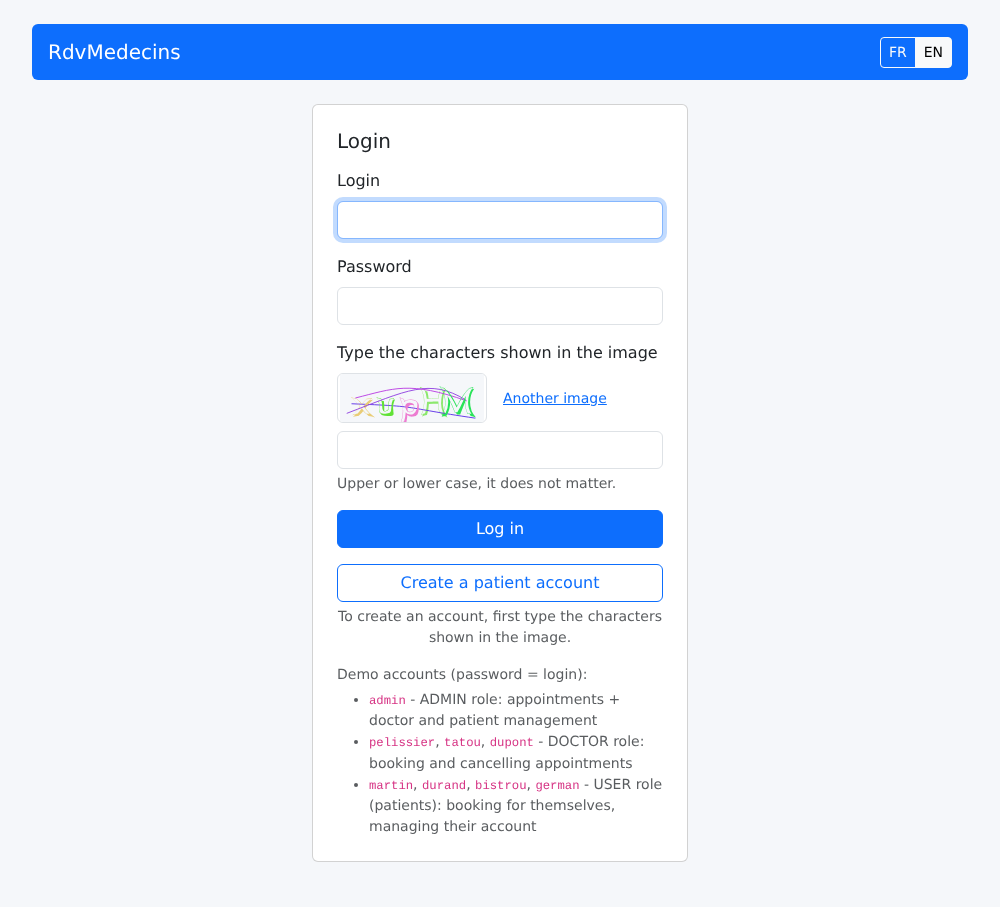
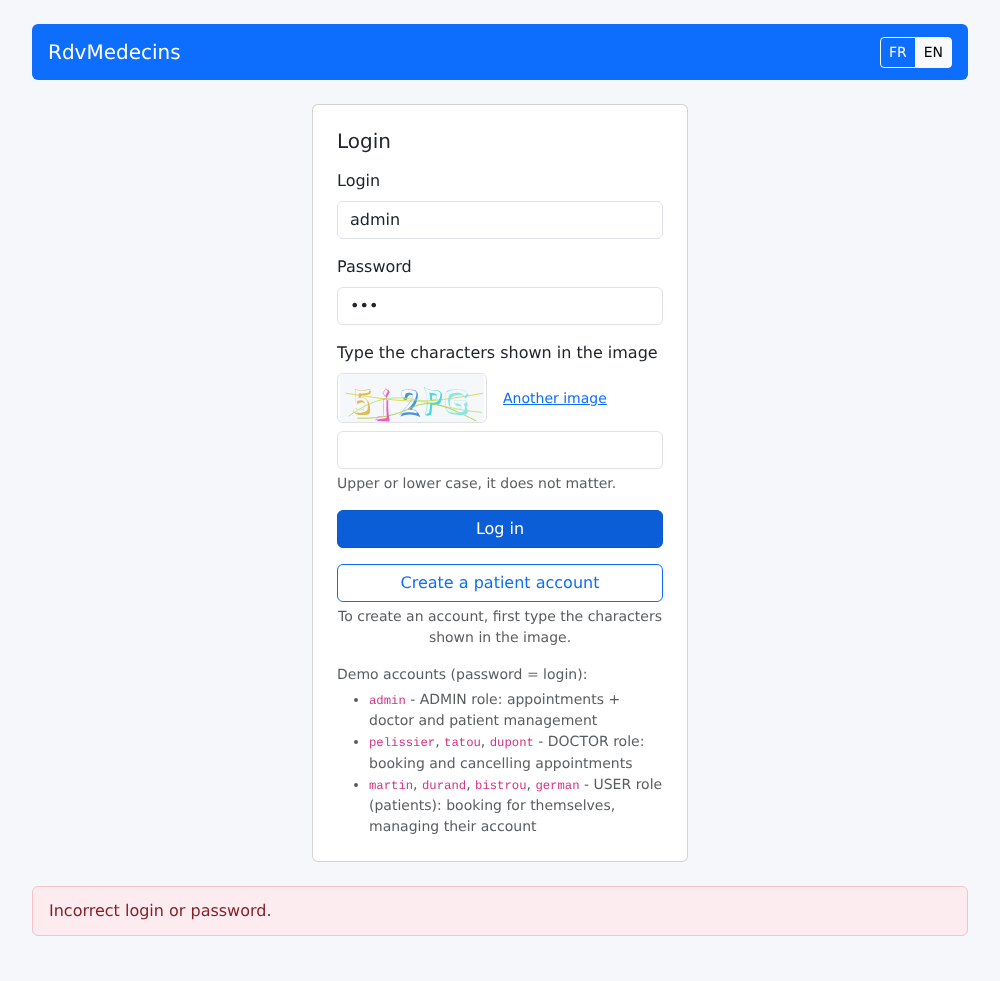
Incorrect password: A message appears at the bottom of the page, and a new image is displayed (each image can only be used once):
10.3.2. The calendar, as seen by the administrator and doctors
When logged in as [admin], you are taken to the calendar:
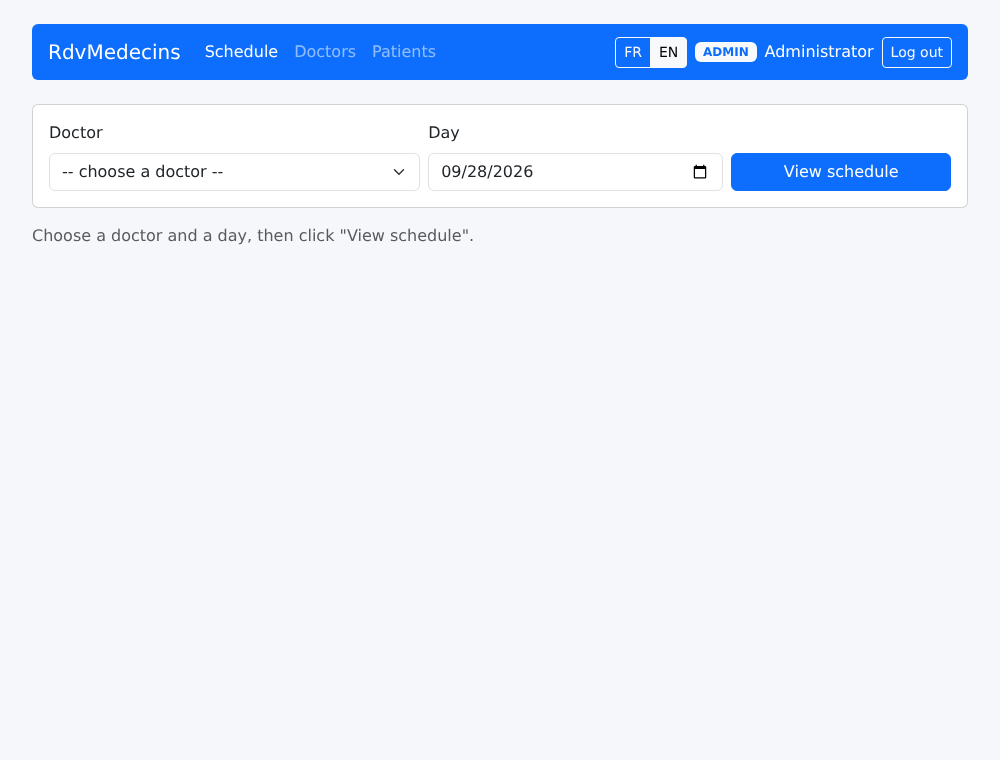
Select a doctor and a day, then click “View schedule.” The URL becomes [/schedule?doctorId=1&day=2026-09-28]:
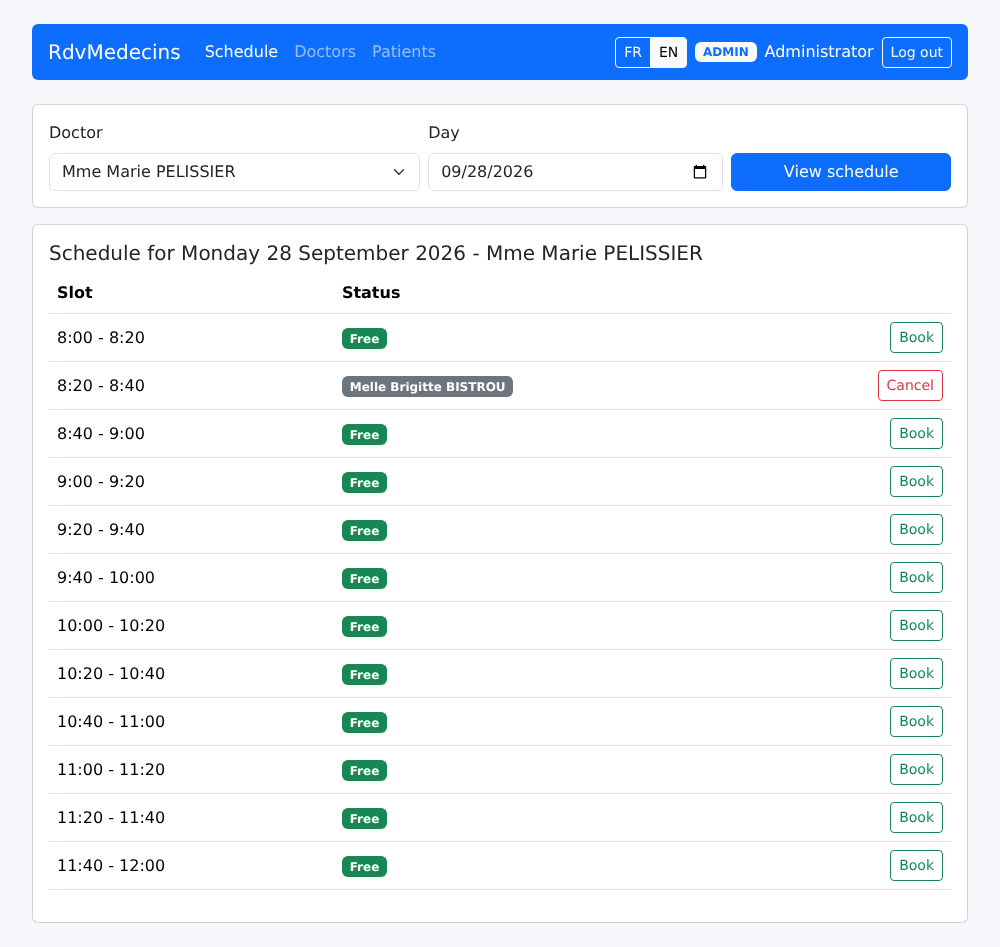
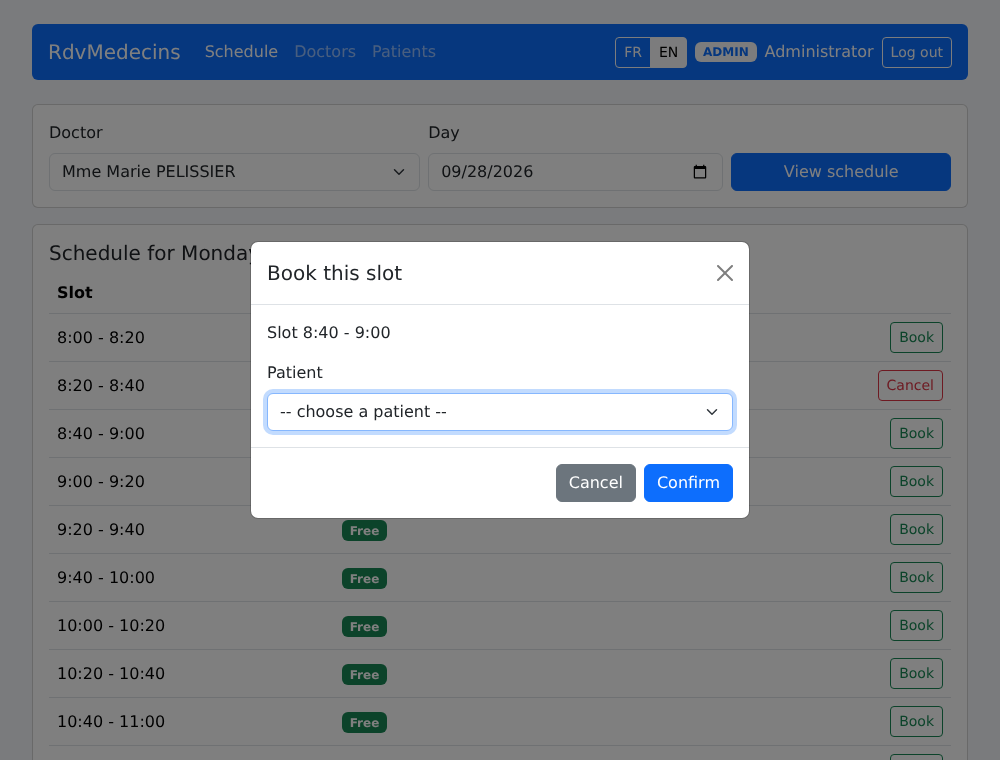
“Book” opens the booking window. The URL becomes [/schedule?doctorId=1&day=2026-09-28&book=3]: reloading the page (F5) reopens the same window.
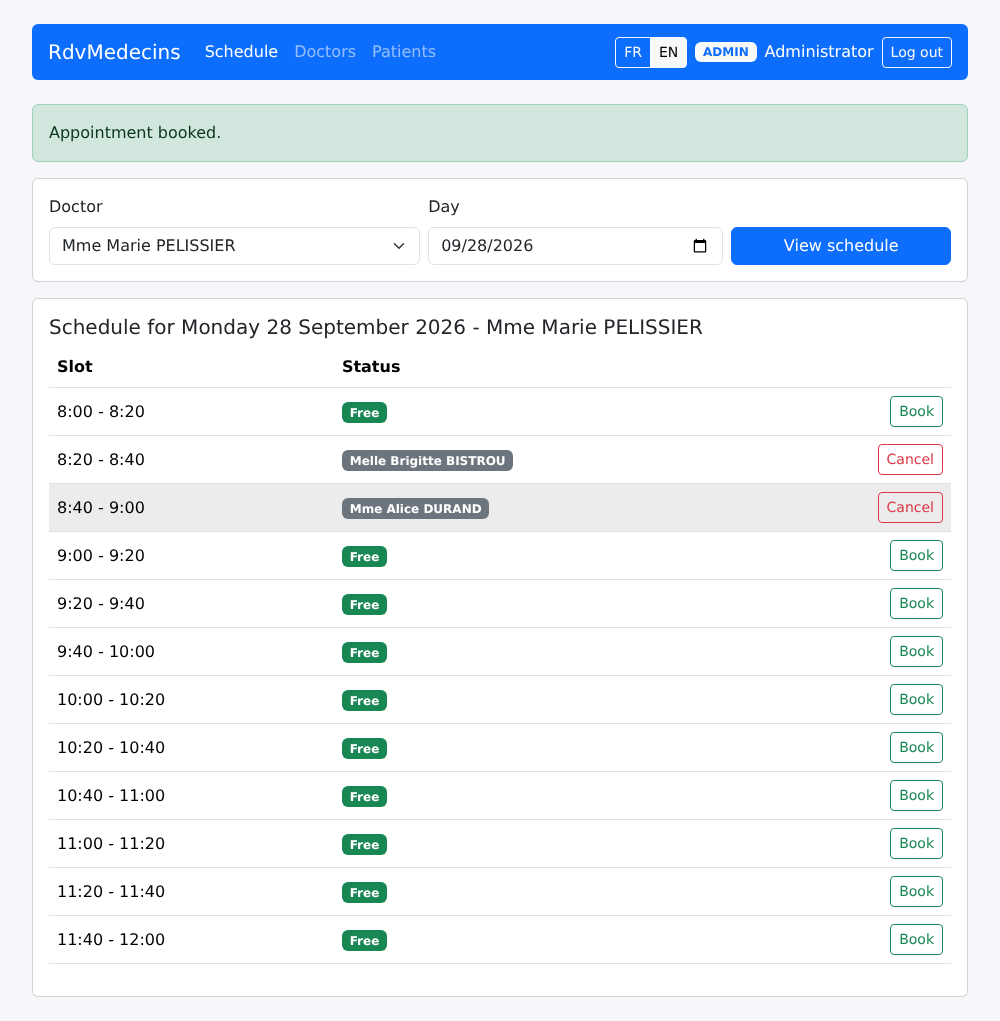
The appointment is saved:
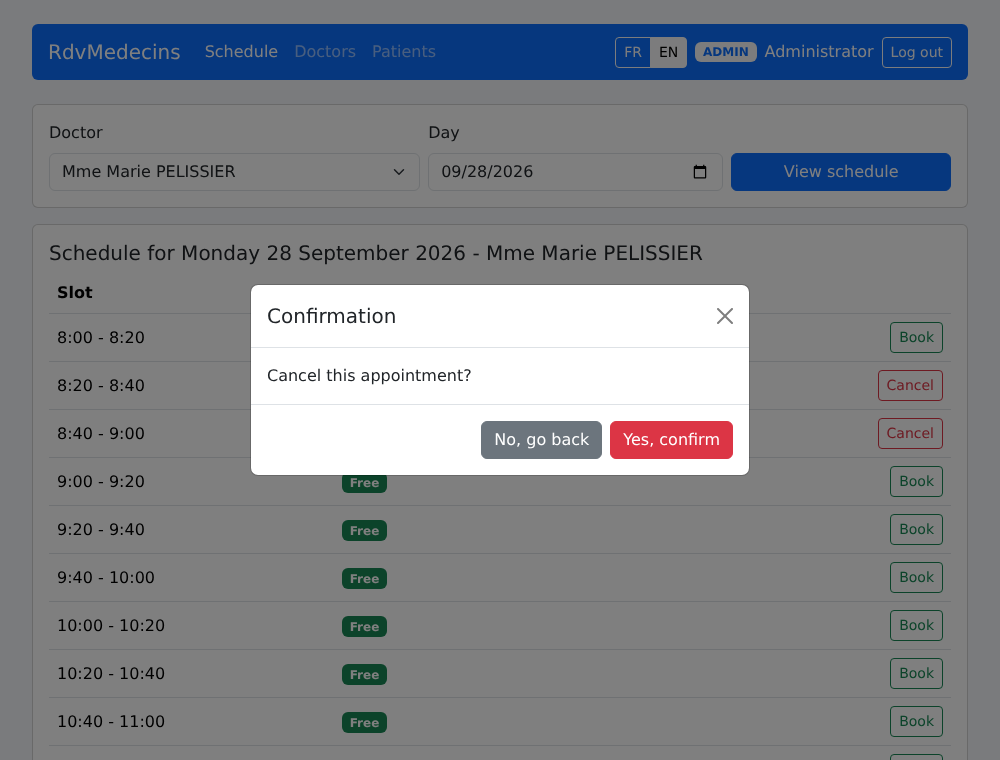
"Cancel" prompts for confirmation:
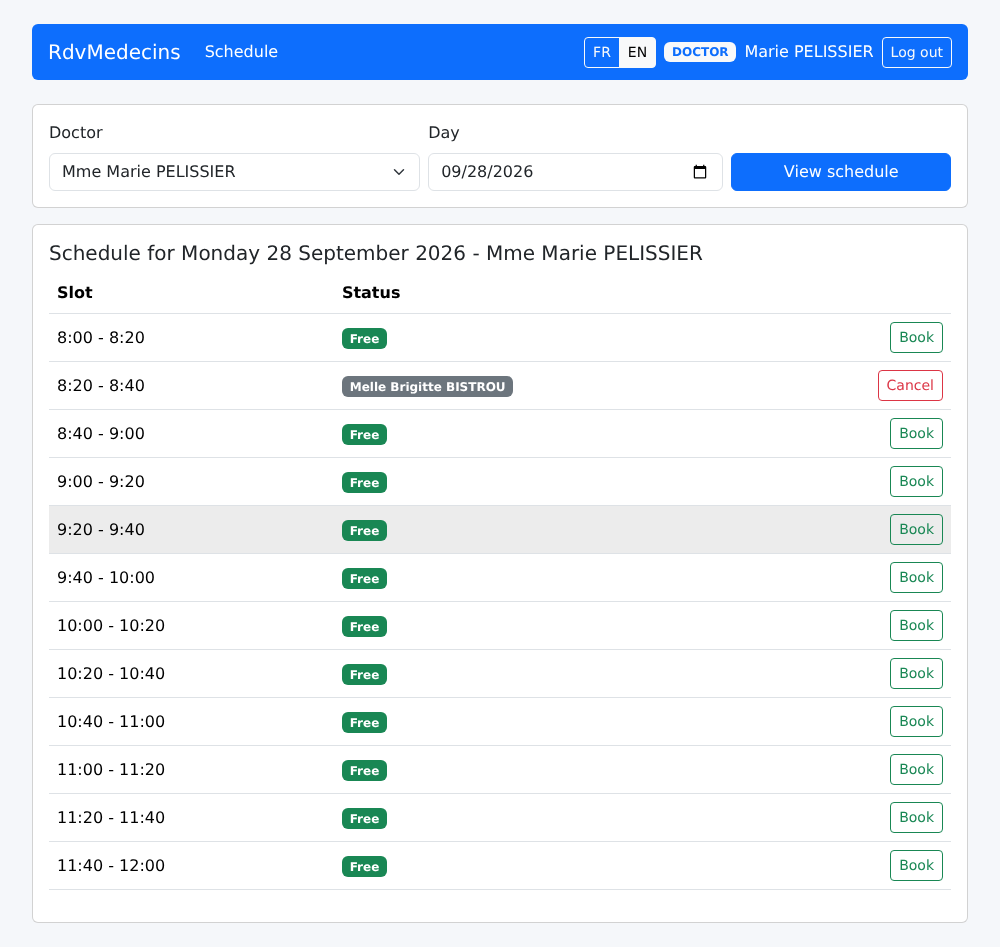
A doctor is taken directly to THEIR OWN daily schedule:
10.3.3. The Patient Portal
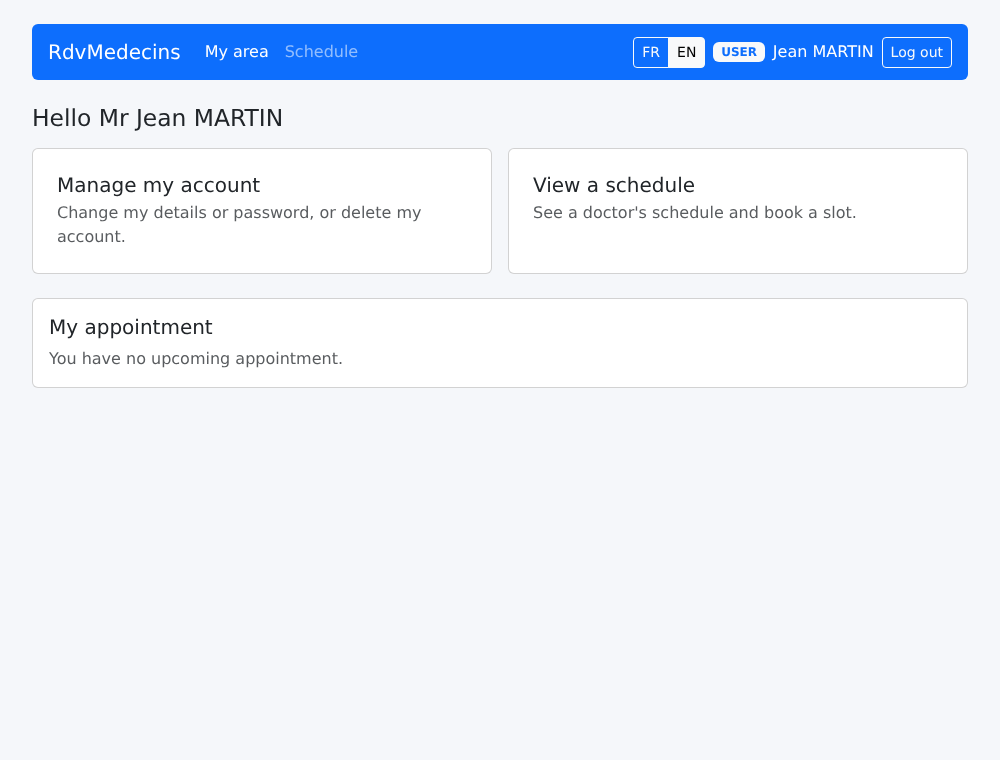
A patient ([martin]) accesses “My area”:
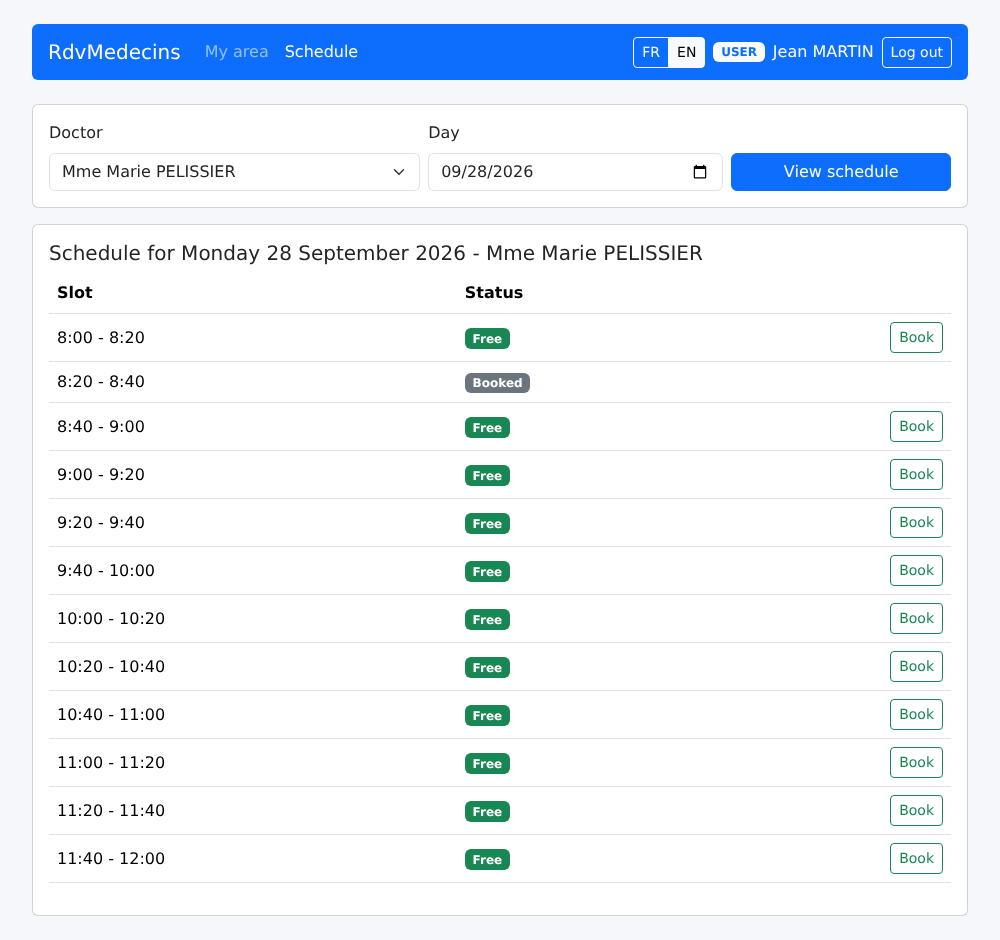
In a calendar, they see “Booked” next to the time slots for other patients:
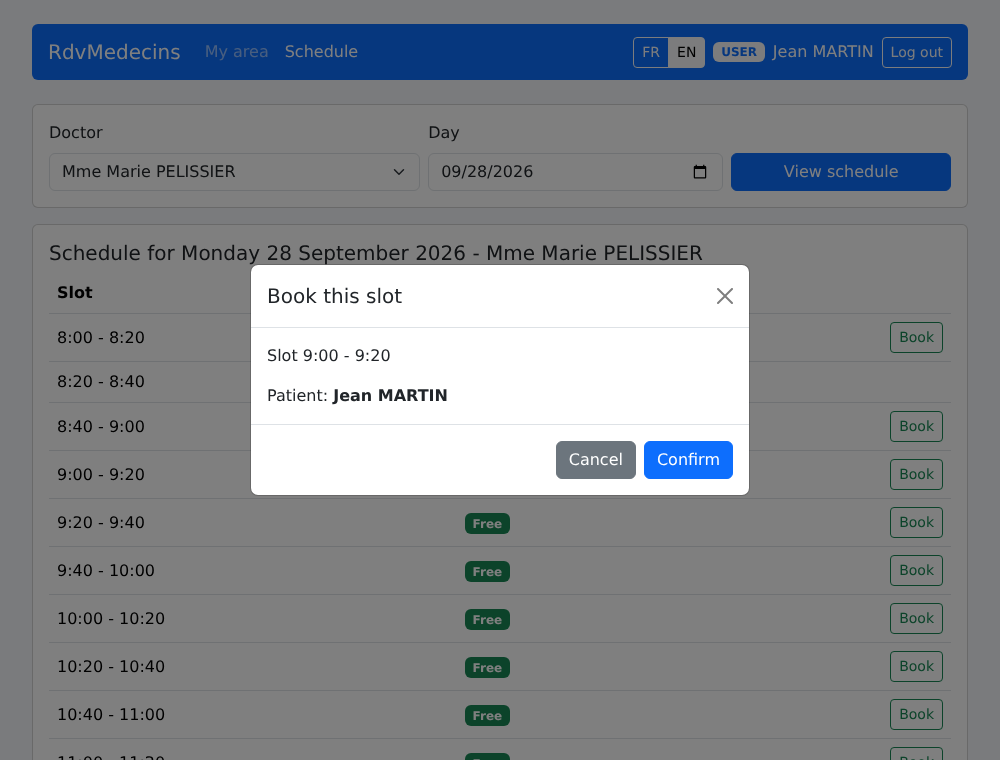
They book an appointment for themselves without selecting a patient:
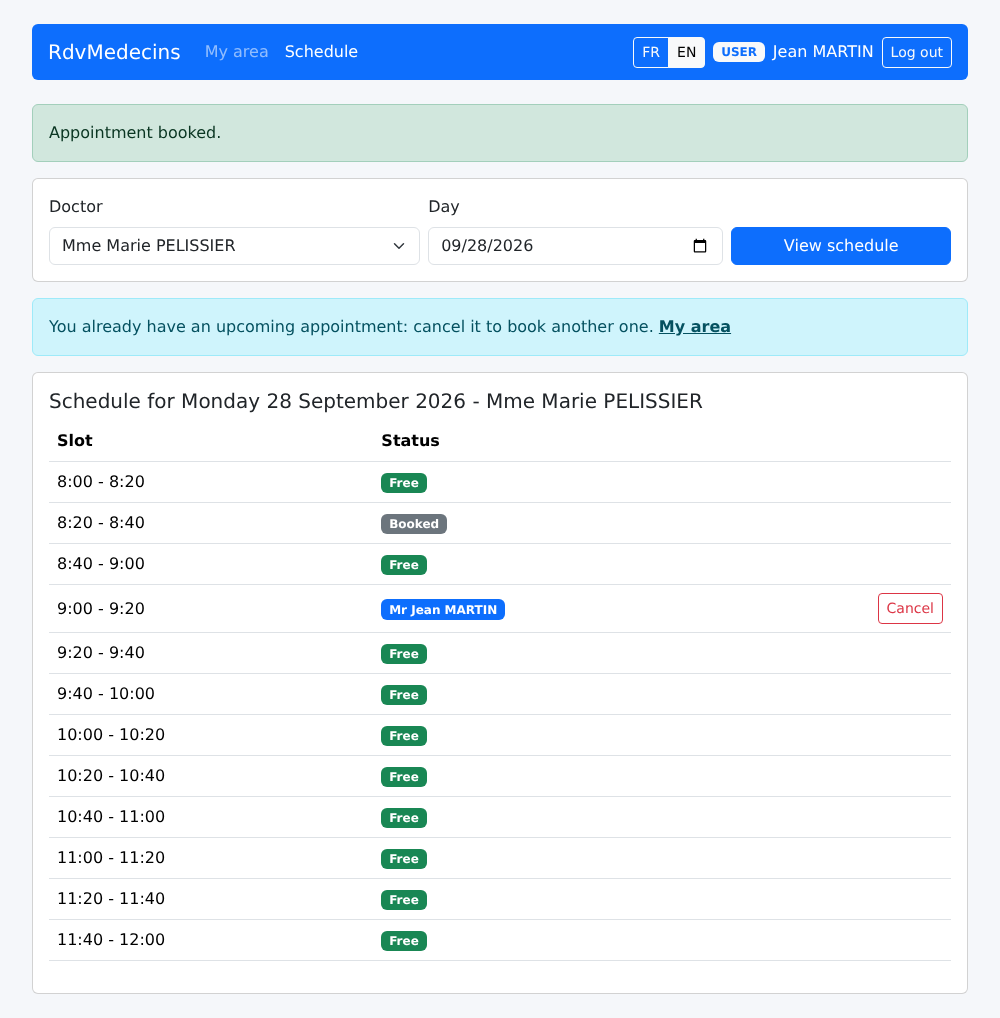
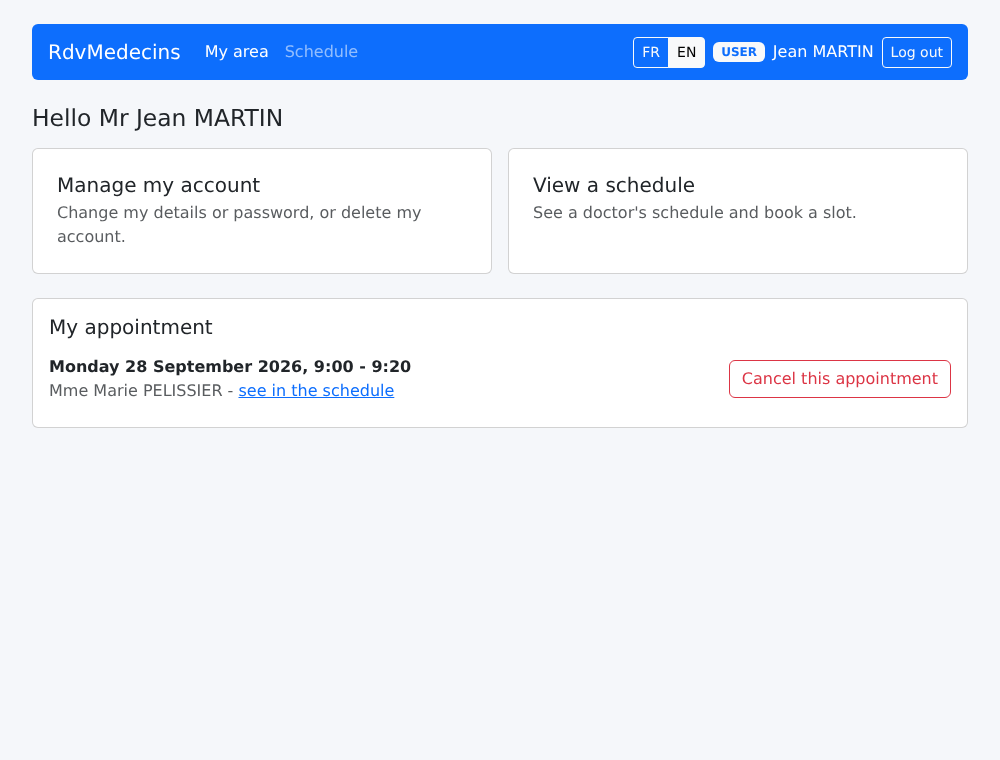
His appointment appears under his name; the “Book” button is no longer available (only one upcoming appointment), and a message explains why:
His dashboard shows this:
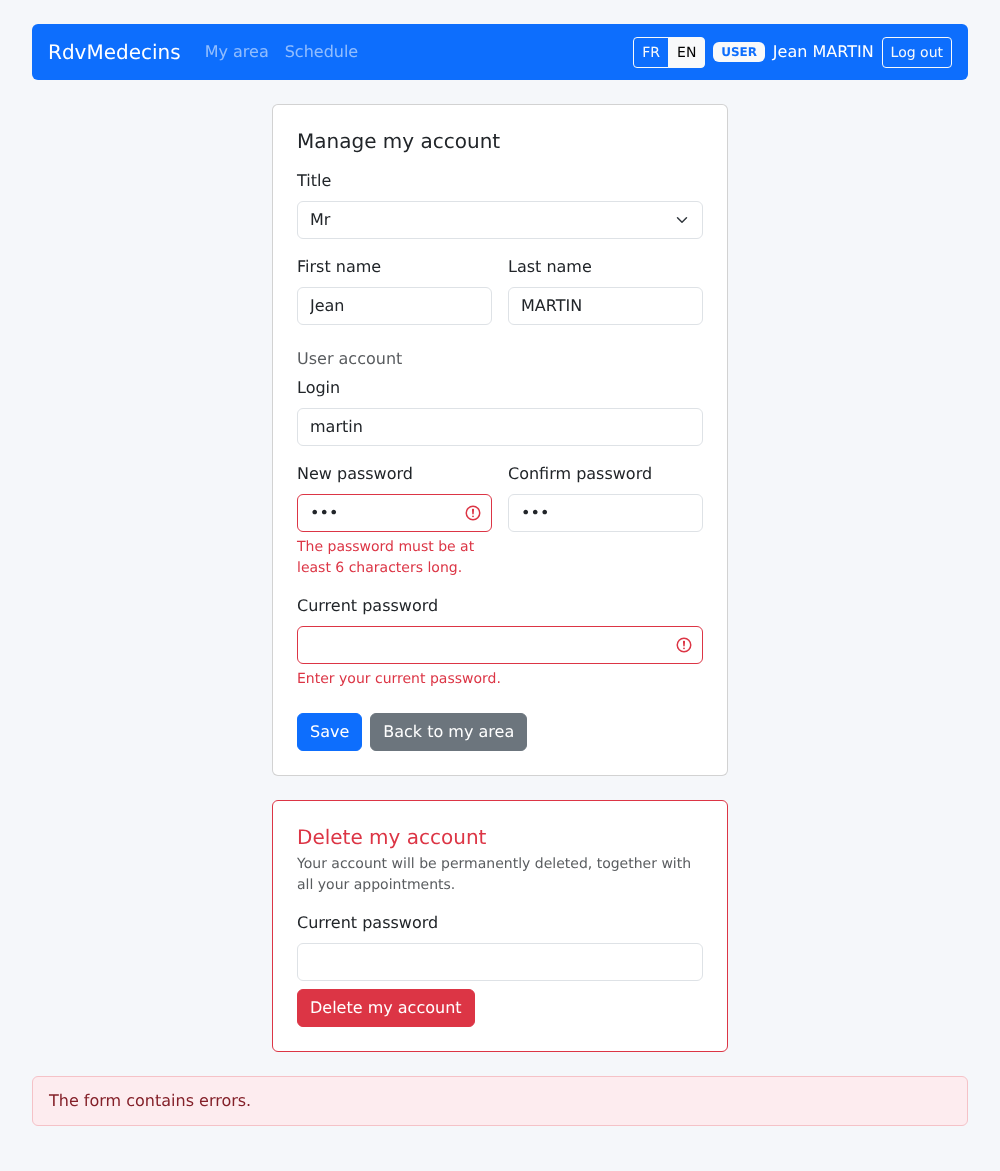
"Manage my account": any changes require the current password; the errors are server-side:
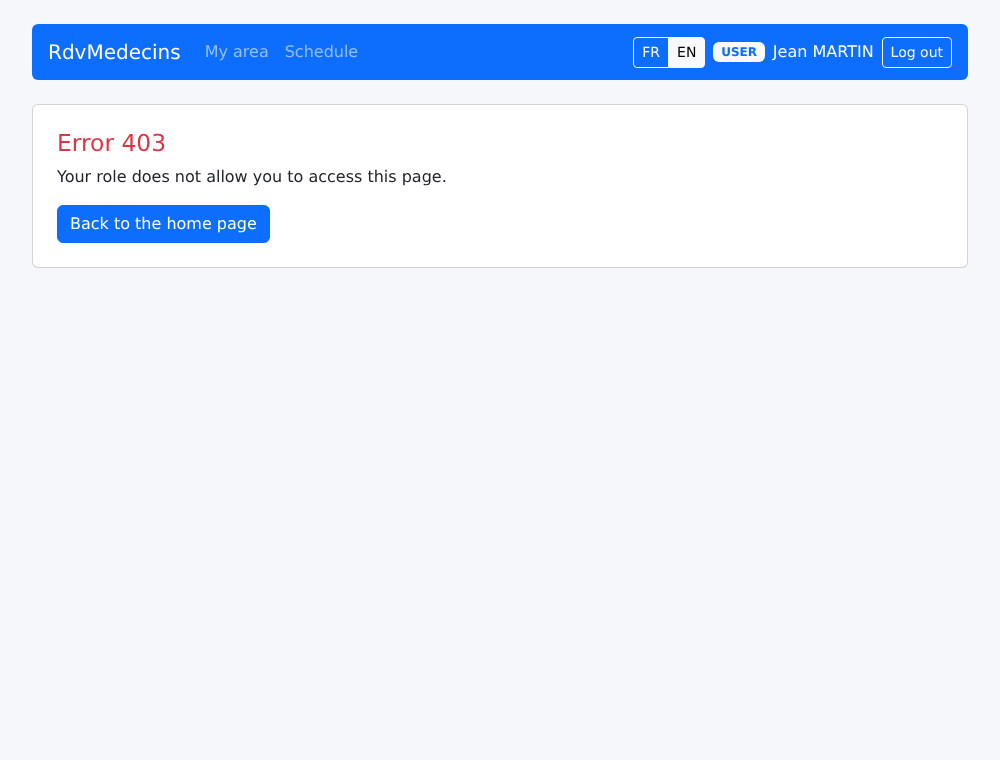
If he enters the address [/doctors], reserved for the administrator:
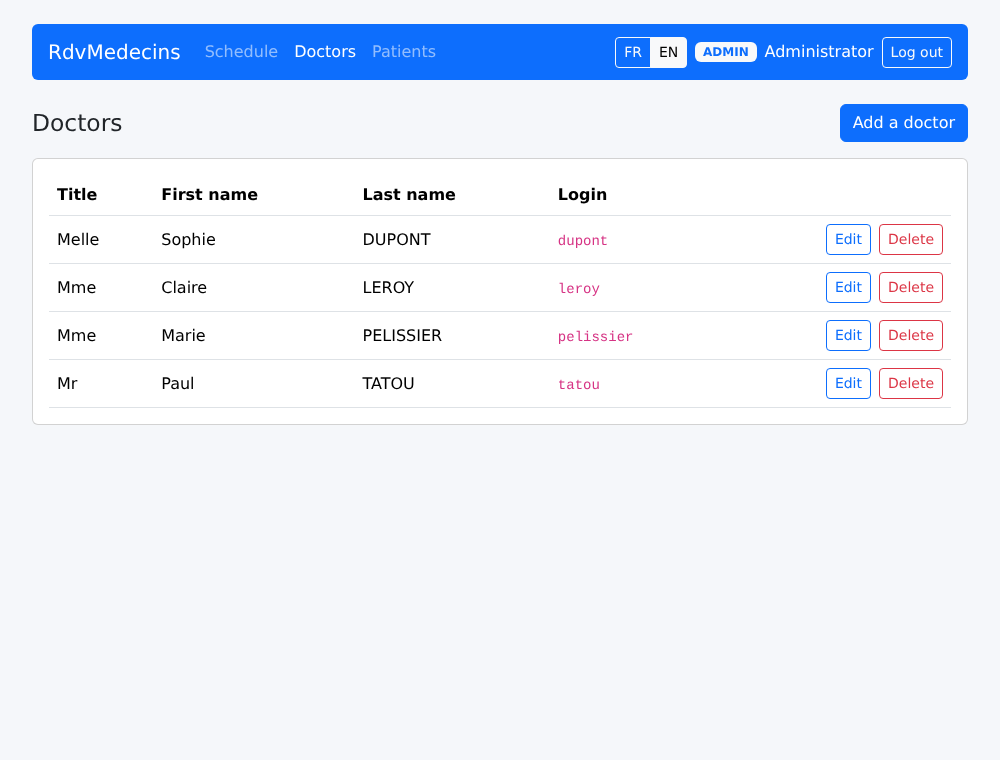
10.3.4. Managing doctors and clients
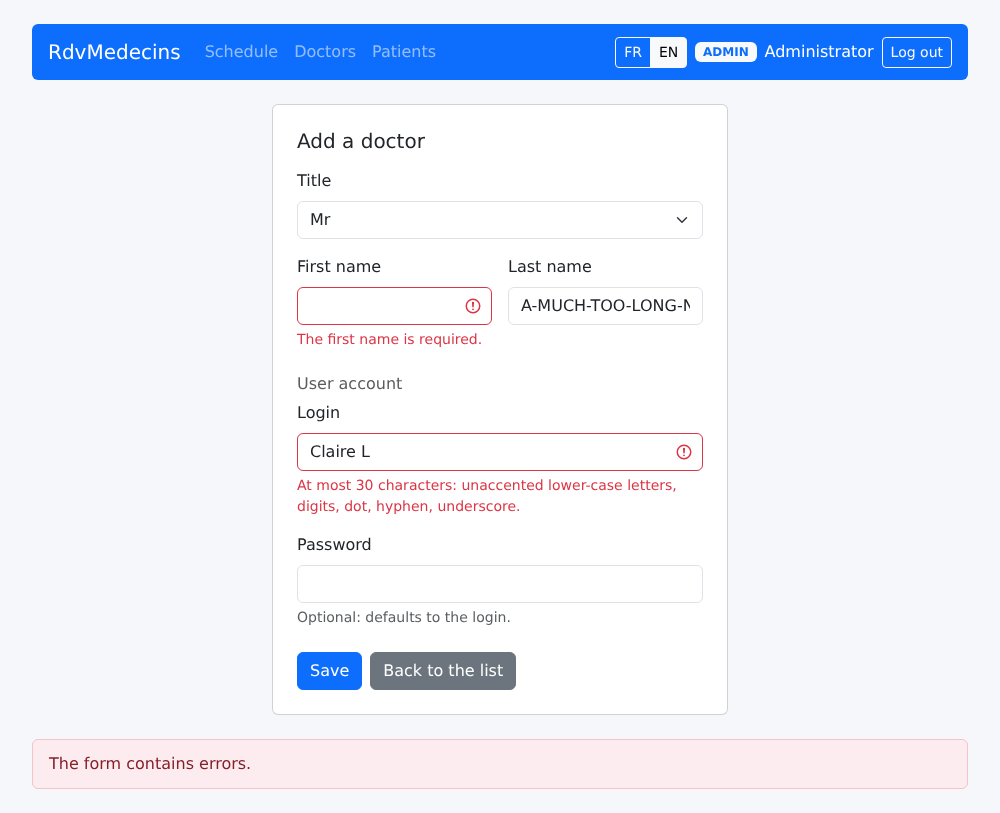
An incorrectly filled-out entry:
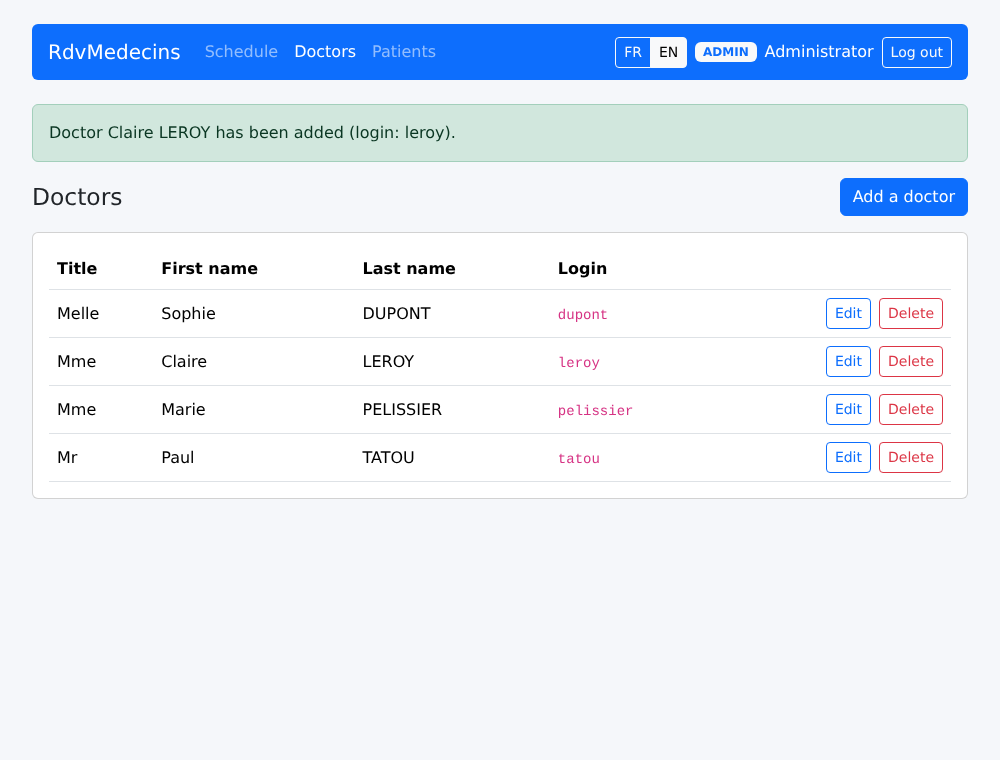
A successful addition:
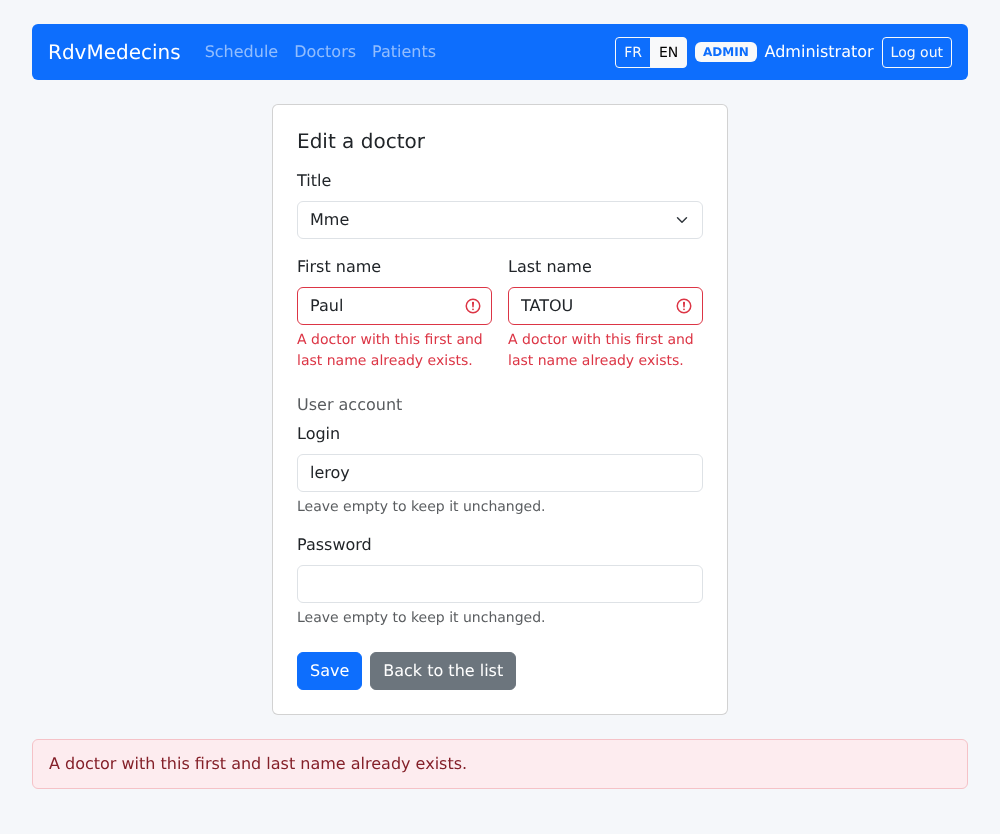
A homonym:
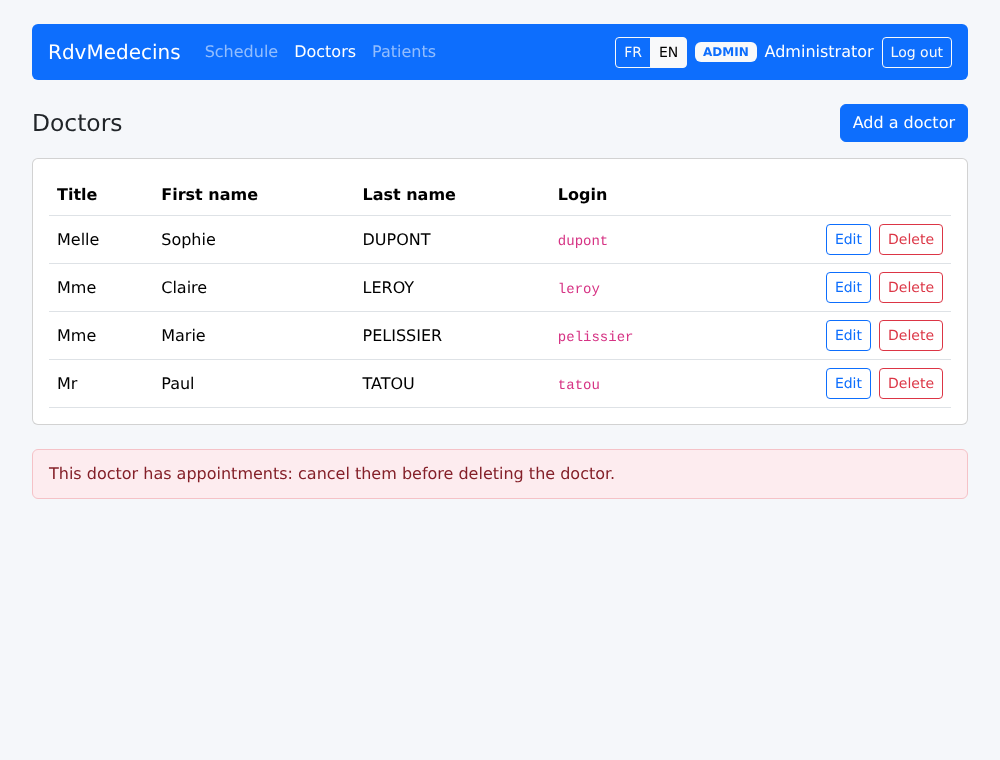
The request to remove a doctor with scheduled appointments is denied:
10.3.5. Creating an account
On the login page, enter the CAPTCHA and then click “Create a patient account.” The form, filled out incorrectly, is then rejected by the server:
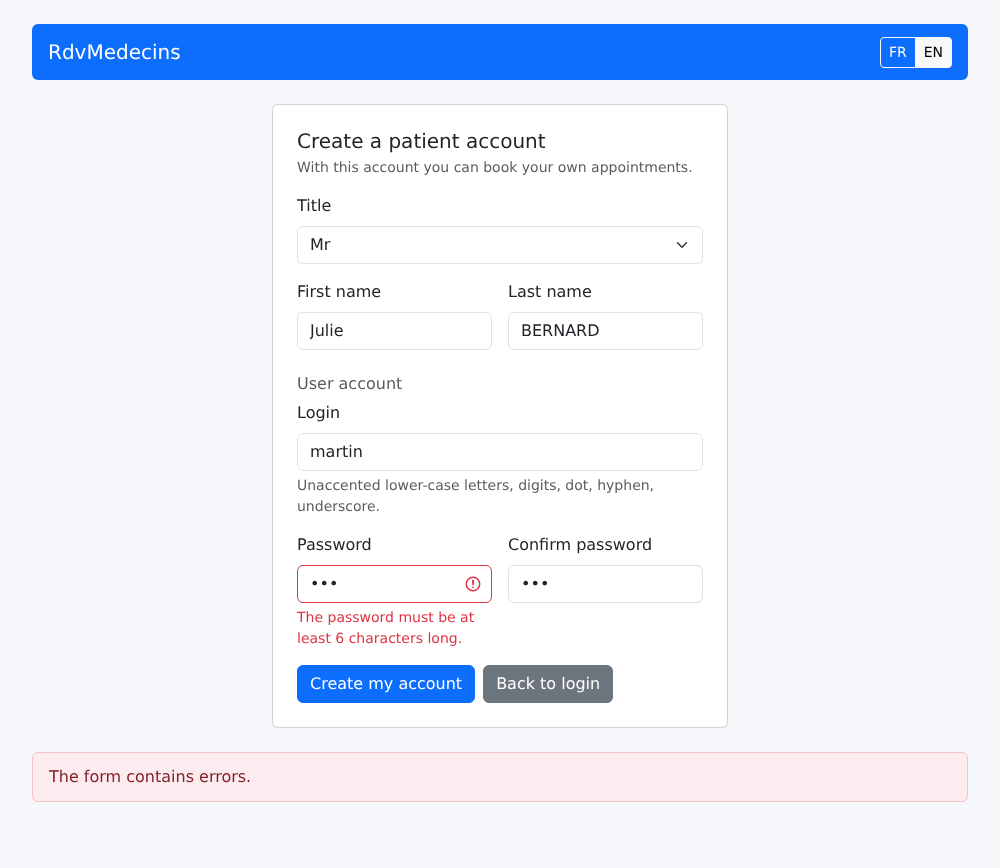
Once the account is created, return to the login page; the login fields are pre-filled:
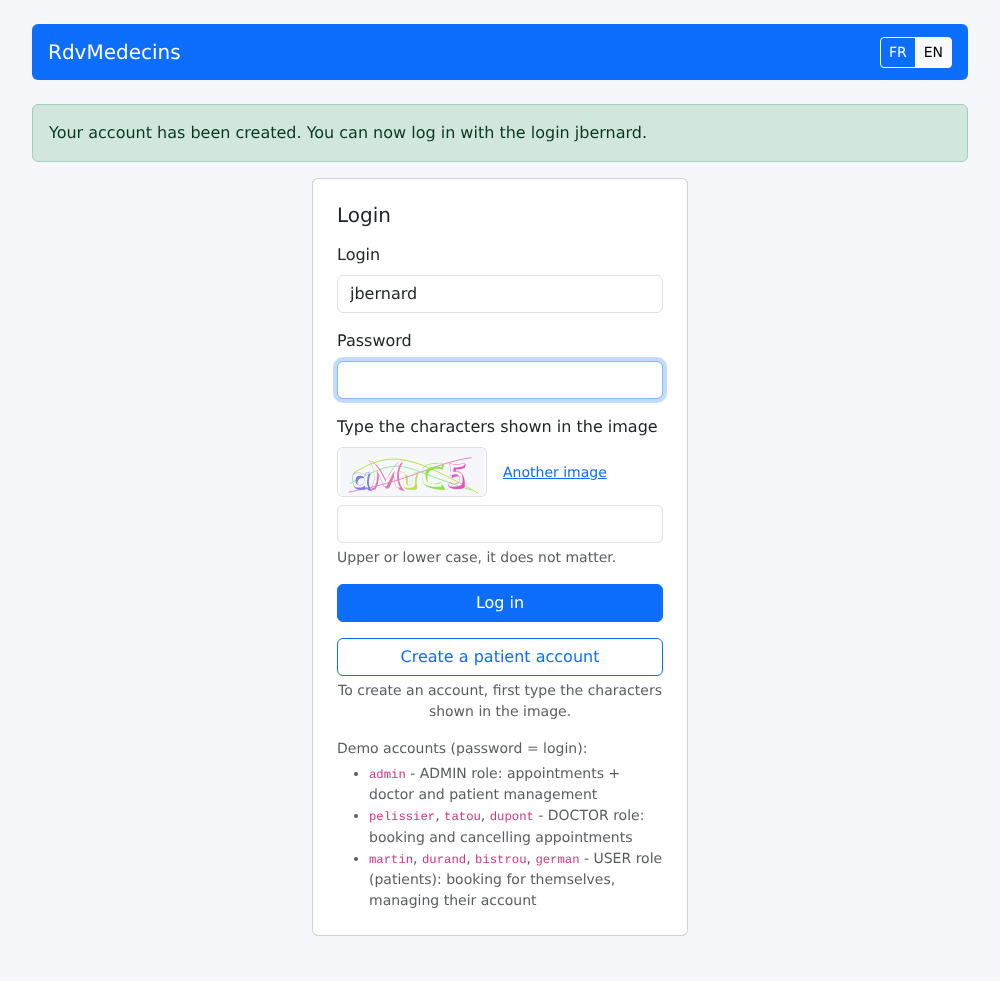
10.3.6. In French
The buttons FR / EN translate the page on the spot, without making any requests to the server:
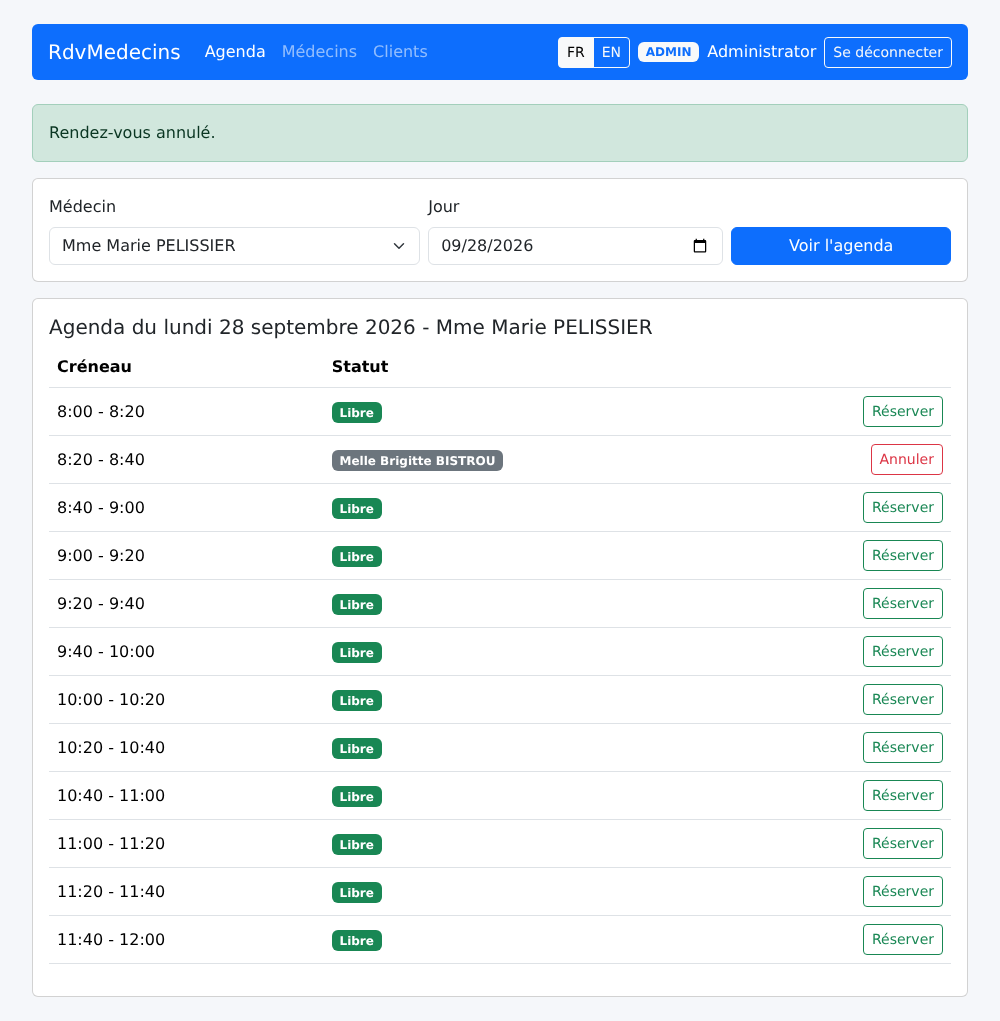
10.3.7. Session expired, unknown address
If the token expires (or if the cookie is deleted), the next request receives a 401 response; the client is redirected to the login page:
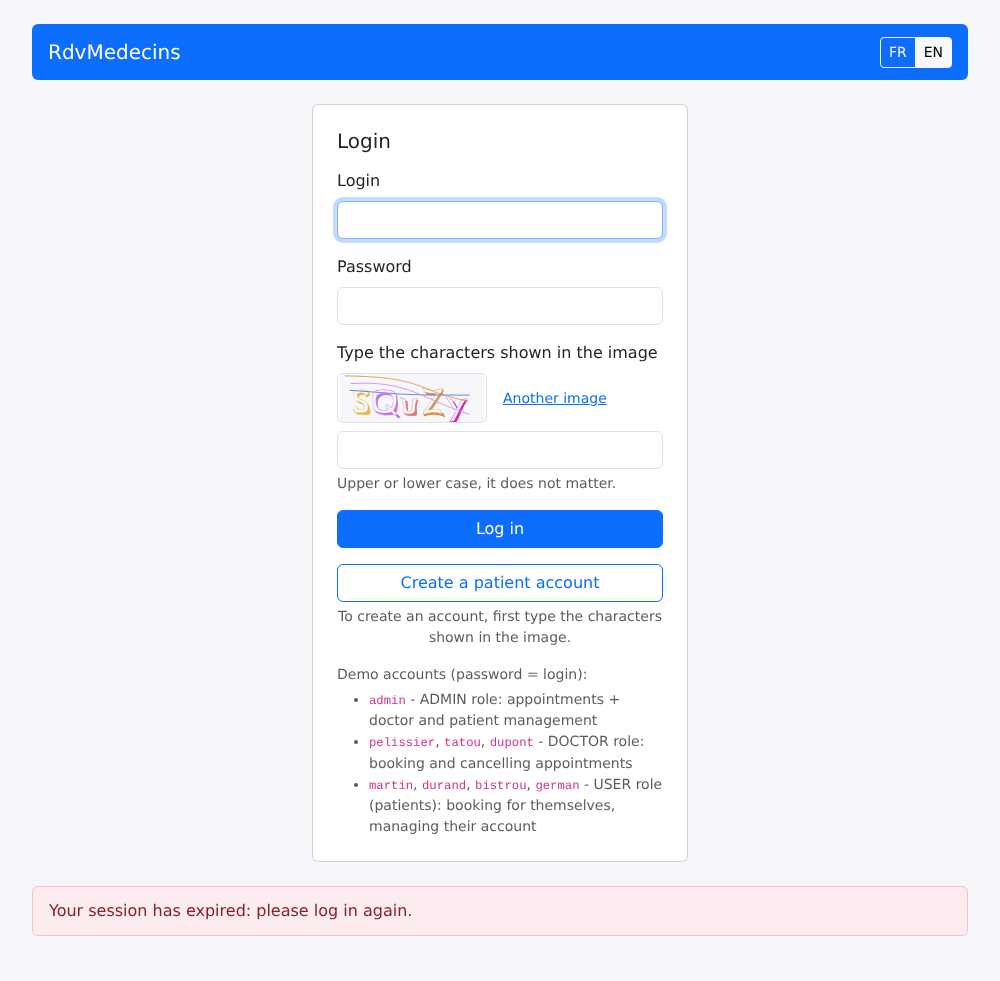
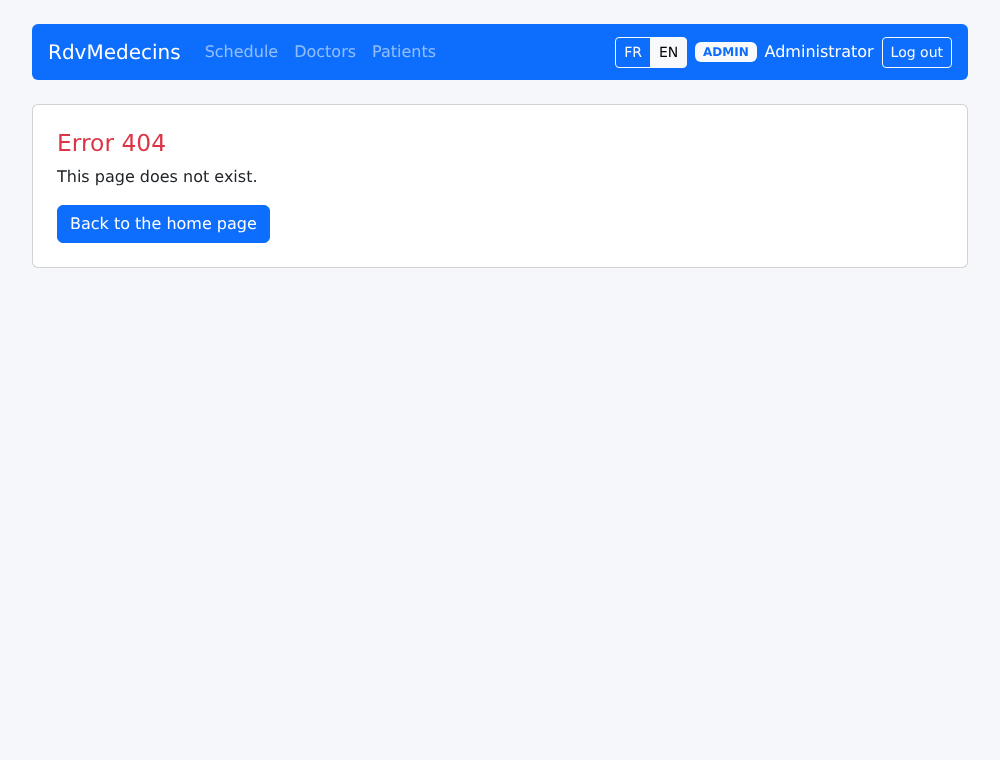
An unknown address:
10.4. Client architecture
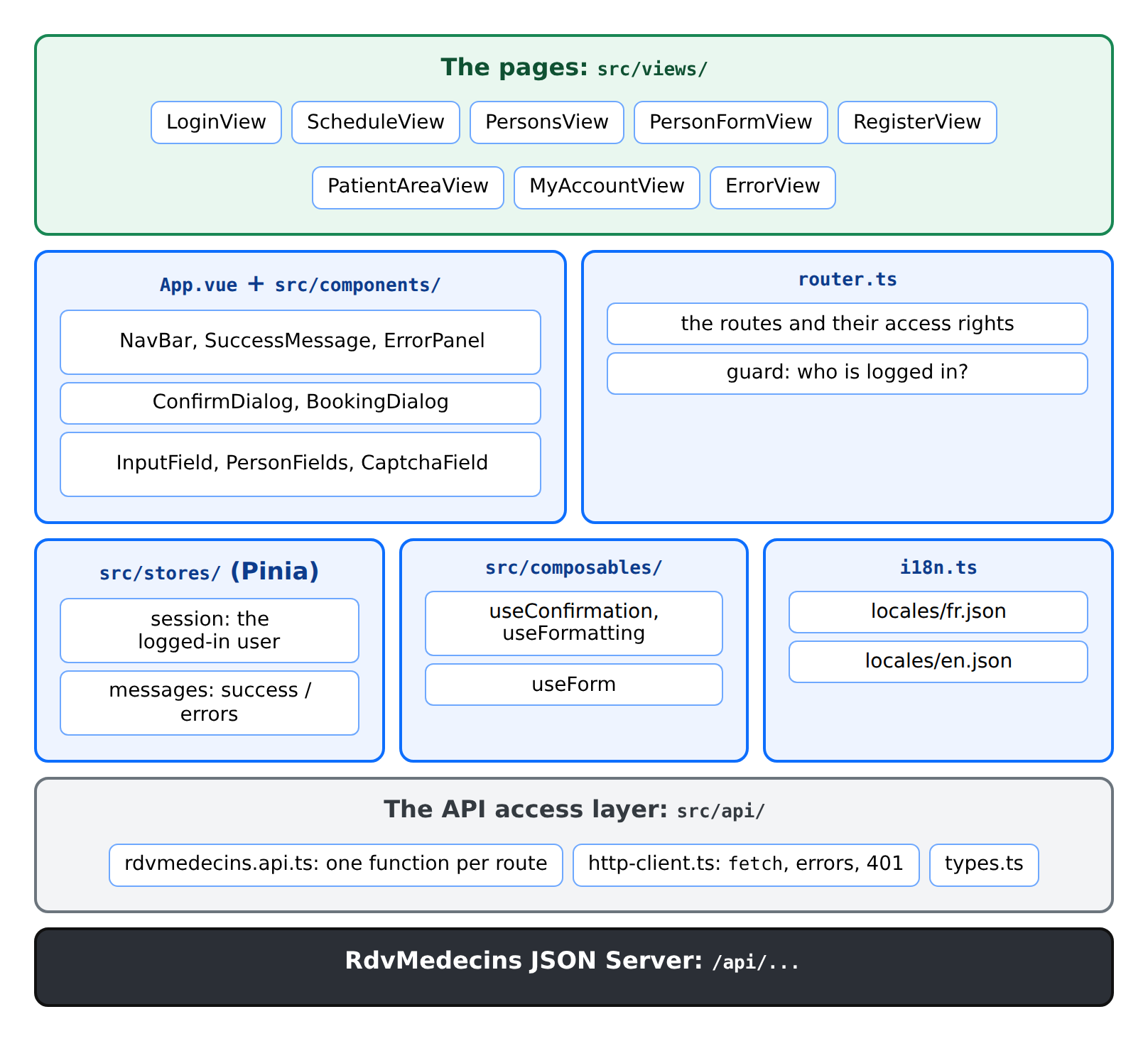
| rdvmedecins-vuejs/
├── index.html THE page of the application
├── public/favicon.svg the tab icon
├── package.json, vite.config.ts, tsconfig.json, env.d.ts
└── src/
├── main.ts the startup
├── App.vue the layout shared by all the pages
├── styles.css
├── router.ts the pages and their access rights
├── i18n.ts the languages
├── locales/ fr.json, en.json
├── api/ the API access layer
├── stores/ session.ts, messages.ts
├── composables/ useConfirmation, useFormatting, useForm
├── components/ the reusable components
└── views/ the pages
|
The following table compares the HTML application from the [NestJS] course with this client:
Application HTML (NestJS) | Client Vue.js |
The server generates each page ([res.render]) | The server returns JSON; the components of [src/views/] generate the pages |
[views/layout.hbs] and its partial views | [App.vue] and the components of [src/components/] |
the controller routes ([@Controller('schedule')]) | client routes ([router.ts]); the server only has routes [/api/...] |
[JwtAuthGuard] and [RolesGuard] redirect to [/login] or a 403 page | the router's guard; the server maintains its own guards, which respond with 401 / 403 |
flash message in a cookie | flash message in a Pinia store |
Dictionaries read by the server, helper [{{t}}] | dictionaries on the client, [vue-i18n]; the server returns only keys |
language stored in a cookie | language stored in [localStorage] |
form rejected: the server reloads the page | form rejected: 400/409 response; the client displays the errors |
confirmation window: a small script, [public/js/app.js] | a component, [ConfirmDialog.vue] |
The application works without JavaScript | The application IS JavaScript |
10.5. Project configuration
10.5.1. package.json
| {
"name": "rdvmedecins-vuejs",
"version": "1.0.0",
"description": "Vue.js client of the medical appointment booking application [RdvMedecins] - client of the JSON server [rdvmedecins-nestjs-json]",
"private": true,
"type": "module",
"scripts": {
"dev": "vite",
"build": "vue-tsc --noEmit && vite build",
"preview": "vite preview",
"check": "vue-tsc --noEmit"
},
"dependencies": {
"bootstrap": "^5.3.8",
"pinia": "^3.0.4",
"vue": "^3.5.22",
"vue-i18n": "~11.3.2",
"vue-router": "^4.6.3"
},
"devDependencies": {
"@types/node": "^22.10.0",
"@vitejs/plugin-vue": "^6.0.1",
"@vue/tsconfig": "^0.8.1",
"typescript": "~5.9.3",
"vite": "^7.1.12",
"vue-tsc": "^3.1.3"
}
}
|
The same libraries as in the examples. One additional command:
- Line 10: [npm run preview] serves the compiled version of the application (folder [dist/], generated by [npm run build]), to verify it before deploying it.
10.5.2. vite.config.ts
| // =========================================================================
// vite.config.ts
// -------------------------------------------------------------------------
// - npm run dev : development server on http://localhost:5173;
// the /api/... requests are forwarded to the JSON server
// (port 8080) by the proxy: page and API have the same
// origin, the token cookie travels normally;
// - npm run build : the compiled application, in dist/. To put it in
// production, copy the CONTENT of dist/ into the
// client/ folder of the JSON server, which then serves it itself
// (see chapter "Deployment").
// =========================================================================
import { defineConfig } from 'vite';
import vue from '@vitejs/plugin-vue';
export default defineConfig({
plugins: [vue()],
server: {
port: 5173,
proxy: {
'/api': 'http://localhost:8080',
},
},
// npm run preview: serves dist/ (after npm run build), with the same proxy
preview: {
port: 4173,
proxy: {
'/api': 'http://localhost:8080',
},
},
});
|
- lines 21–23: the proxy for requests from [/api] to the server JSON;
- lines 26–31: the same proxy for [npm run preview].
An important detail: the application uses “clean” addresses ([/schedule], [/my-area]). If you reload the page [/schedule], the browser requests [/schedule] from the [Vite] server. Since the server cannot find a file with that name, it returns [index.html] (this is its default behavior for a single-page application); the application launches, and its router displays the calendar page.
10.5.3. tsconfig.json and env.d.ts
Identical to those in the examples, except for the list of files:
| {
"extends": "@vue/tsconfig/tsconfig.dom.json",
"compilerOptions": {
"types": ["vite/client"],
"noUnusedLocals": true,
"noUnusedParameters": true
},
"include": ["src/**/*.ts", "src/**/*.vue", "env.d.ts"]
}
|
10.6. Starting the application
10.6.1. index.html
| <!doctype html>
<!--
index.html - THE page of the application (Single Page Application).
The server never sends any other: everything else is built in
the browser by Vue.js, in <div id="app">. lang and title are
updated by the application according to the language and the page displayed.
-->
<html lang="en">
<head>
<meta charset="utf-8">
<meta name="viewport" content="width=device-width, initial-scale=1">
<link rel="icon" href="/favicon.svg" type="image/svg+xml">
<title>RdvMedecins</title>
</head>
<body>
<div id="app"></div>
<!-- without JavaScript, a Vue.js application cannot display anything: we say so -->
<noscript>RdvMedecins requires JavaScript. / RdvMedecins a besoin de JavaScript.</noscript>
<script type="module" src="/src/main.ts"></script>
</body>
</html>
|
- Line 12: the tab icon. The files in the [public/] folder are served as-is, at the root of the site;
- line 18: without [JavaScript], a [Vue.js] application cannot display anything. The HTML application from the [NestJS] course, on the other hand, worked without [JavaScript]: that’s the trade-off of a single-page application;
- Line 19: the program.
10.6.2. src/main.ts
| // =========================================================================
// main.ts - the startup of the application
// -------------------------------------------------------------------------
// 1. Bootstrap (CSS) and our few styles;
// 2. Pinia (stores), vue-i18n (languages), the router;
// 3. the reaction to a 401 response coming from any request:
// the session has expired - we forget the user and go back to the
// login page, with a message;
// 4. the display in <div id="app">.
// =========================================================================
import { createApp } from 'vue';
import { createPinia } from 'pinia';
import 'bootstrap/dist/css/bootstrap.min.css';
import './styles.css';
import App from './App.vue';
import { i18n } from './i18n';
import { router } from './router';
import { whenUnauthenticated } from './api/http-client';
import { useSessionStore } from './stores/session';
import { useMessagesStore } from './stores/messages';
const app = createApp(App);
app.use(createPinia());
app.use(i18n);
app.use(router);
whenUnauthenticated(() => {
useSessionStore().forget();
useMessagesStore().flash('error', 'ERRORS.SESSION_EXPIRED');
router.push({ name: 'login' });
});
app.mount('#app');
|
- Lines 24–26: the three extensions: stores, languages, and the router. [Pinia] must be installed BEFORE the router: the router guard uses a store;
- Lines 28–32: What to do when any request receives a 401 response (session expired, account deleted, etc.): forget the user, prepare the message “Your session has expired” for the next page, and redirect to the login page. This response is declared ONCE here; the function [whenUnauthenticated] is described with [http-client.ts].
10.6.3. src/App.vue
| <!--
=========================================================================
App.vue - the root component: the TEMPLATE common to all the pages
-------------------------------------------------------------------------
The equivalent of views/layout.hbs of the HTML application:
- the navigation bar;
- a success message at the TOP;
- the current page (<RouterView>);
- the error panel at the BOTTOM;
- the confirmation dialog, once for the whole application.
:key="String(route.name)" on <RouterView>: when going from one route to
ANOTHER (from /doctors to /clients, for example), the page component
is recreated; when only the query changes (/schedule?day=...), it is
kept, and it is the component that follows the URL.
=========================================================================
-->
<script setup lang="ts">
import { RouterView, useRoute } from 'vue-router';
import NavBar from './components/NavBar.vue';
import SuccessMessage from './components/SuccessMessage.vue';
import ErrorPanel from './components/ErrorPanel.vue';
import ConfirmDialog from './components/ConfirmDialog.vue';
const route = useRoute();
</script>
<template>
<div class="container py-4">
<NavBar />
<SuccessMessage />
<RouterView :key="String(route.name)" />
<ErrorPanel />
</div>
<ConfirmDialog />
</template>
|
The template common to all pages, equivalent to [views/layout.hbs]:
- line 30: the navigation bar;
- line 31: a success message at the top;
- line 32: the current page. The [:key] attribute: when a component’s key changes, [Vue.js] destroys it and creates a new one. With the route NAME as the key, switching from [/doctors] to [/clients] (two different routes, displayed by the same component) recreates the page, which reloads its data. When only the [query] changes (to [/schedule?day=...]), the page is retained, and it is this page that follows its URL;
- line 33: the error area, at the bottom;
- line 35: the confirmation window, displayed once for the entire application.
10.6.4. src/styles.css
| /* =========================================================================
styles.css - a few settings on top of Bootstrap
(taken from public/css/styles.css of the HTML application)
========================================================================= */
body {
background-color: #f5f7fa;
}
.free-slot:hover {
background-color: #e9f7ef;
}
/* -------------------------------------------------------------------------
.error-panel: the error messages, at the bottom of the page, on a light pink
background (see components/ErrorPanel.vue).
position: sticky + bottom: if the page is taller than the window, the
panel stays stuck to the bottom of the window instead of disappearing below the
fold - without ever covering the content when the page is
short. z-index: above the grey backdrop of the modal dialogs.
pointer-events: none: the panel contains nothing clickable; if it
overlaps a button, the click goes through.
------------------------------------------------------------------------- */
.error-panel {
position: sticky;
bottom: 1rem;
z-index: 1060;
pointer-events: none;
margin-top: 1.5rem;
padding: 0.75rem 1rem;
background-color: #fdecef; /* light pink */
border: 1px solid #f5c2c7;
border-radius: 0.375rem;
color: #842029;
}
/* the two main options of the patient's "My area" page */
.option-card {
transition: border-color 0.15s, box-shadow 0.15s;
}
.option-card:hover {
border-color: #0d6efd;
box-shadow: 0 0.25rem 0.75rem rgba(13, 110, 253, 0.15);
}
/* the captcha image (SVG of 150 x 50 pixels) */
.captcha-image svg {
display: block;
border: 1px solid #dee2e6;
border-radius: 0.375rem;
}
|
The styles for the HTML application, with one addition:
- Line 28: The error area, which “sticks” to the bottom of the window, may overlap a button (a confirmation window in the center of a short page, for example); it contains nothing clickable, and a click passes right through it.
10.7. The API access layer
10.7.1. src/api/types.ts
The JSON objects of the API, described in the chapter on the black box, translated into [TypeScript] interfaces:
| // =========================================================================
// api/types.ts - the JSON objects exchanged with the server
// -------------------------------------------------------------------------
// The translation, into TypeScript interfaces, of the API described in the chapter
// "The server, a black box". The compiler thus checks that the client
// only uses fields that really exist.
// =========================================================================
export type Role = 'ADMIN' | 'DOCTOR' | 'USER';
// POST /api/auth/login, GET /api/auth/me, PUT /api/my-account
export interface User {
login: string;
name: string; // display name: "Marie PELISSIER"
role: Role;
}
// GET /api/captcha
export interface Captcha {
id: string;
svg: string;
}
// a title, a first name, a last name
export interface Identity {
title: string;
firstName: string;
lastName: string;
}
// a doctor or a client: GET /api/doctors, GET /api/clients/:id...
export interface Person extends Identity {
id: number;
version: number; // optimistic lock: to send back with an update
login?: string; // only for the ADMIN
}
// what is sent to create / update a person (ADMIN)
export interface PersonData extends Identity {
login: string; // '' = default value (creation) or unchanged (update)
password: string; // same
version?: number;
}
export interface Slot {
id: number;
startHour: number;
startMinute: number;
endHour: number;
endMinute: number;
}
// a row of the schedule, with the RIGHTS of the logged-in user
export interface ScheduleSlot extends Slot {
free: boolean;
patient: Identity | null; // null: free, or taken by another patient
mine: boolean; // the appointment of the logged-in patient
bookable: boolean;
appointmentId: number | null; // filled in if the user can cancel
}
// GET /api/schedule?doctorId=...&day=...
export interface Schedule {
doctor: Person;
day: string; // "yyyy-MM-dd"
slots: ScheduleSlot[];
info: string | null; // translation key (patient who already has an appointment)
}
// GET /api/my-area
export interface MyArea {
patient: Identity;
appointments: { id: number; day: string; slot: Slot; doctor: Person }[];
}
// GET /api/my-account
export interface MyAccount extends Identity {
login: string;
version: number;
}
// PUT /api/my-account
export interface MyAccountUpdate extends Identity {
login: string;
password: string; // '' = unchanged
confirmation: string;
currentPassword: string;
version: number;
}
// POST /api/register
export interface Registration extends Identity {
login: string;
password: string;
confirmation: string;
}
|
- line 32: one interface can extend another: a [Person] is an [Identity] that additionally has an ID, a version, and, for the ADMIN, a login;
- Line 54: An entry in the calendar: a time slot, plus the permissions of the logged-in user;
- lines 39 and following: what the client SENDS to the server.
10.7.2. src/api/http-client.ts
The [request] function from Example 19 ([common/api.ts]), with centralized handling of the 401 response:
| // =========================================================================
// api/http-client.ts - the function that sends ALL the requests to the API
// -------------------------------------------------------------------------
// Taken from common/api.ts of the examples, with one new feature: the
// centralized handling of the 401 response.
//
// A 401 can happen at any time: the token has expired (2 hours), the
// account has been deleted, the server has restarted with another secret
// key... Rather than handling this case in each component, we
// notify ONE function, registered at startup (see main.ts), which forgets
// the user and sends back to the login page.
// =========================================================================
export class ApiError extends Error {
constructor(
public readonly statusCode: number, // 0: the server did not respond
public readonly key: string, // translation key: 'ERRORS.LOGIN_TAKEN'
public readonly params: Record<string, string> = {},
public readonly fields: Record<string, string> = {}, // error of each field
) {
super(key);
this.name = 'ApiError';
}
}
// the function called on each 401 response (see main.ts)
let onUnauthenticated: (error: ApiError) => void = () => {};
export function whenUnauthenticated(callback: (error: ApiError) => void): void {
onUnauthenticated = callback;
}
type Method = 'GET' | 'POST' | 'PUT' | 'DELETE';
export interface RequestOptions {
// the public routes (login, captcha...) and GET /api/auth/me
// handle the 401 themselves: no automatic redirect
ignore401?: boolean;
}
export async function request<T>(method: Method, url: string, body?: unknown, options: RequestOptions = {}): Promise<T> {
let response: Response;
try {
response = await fetch(`/api${url}`, {
method,
headers: body !== undefined ? { 'Content-Type': 'application/json', Accept: 'application/json' } : { Accept: 'application/json' },
body: body !== undefined ? JSON.stringify(body) : undefined,
});
} catch {
throw new ApiError(0, 'ERRORS.SERVER_UNREACHABLE');
}
// read as text then converted: an empty response, or one that is not
// JSON (server stopped: it is the Vite proxy that answers), does not
// crash the application
const text = await response.text();
let data: unknown = null;
try {
data = text ? JSON.parse(text) : null;
} catch {
data = null;
}
if (response.ok) {
return data as T;
}
const e = (data ?? {}) as { key?: string; params?: Record<string, string>; fields?: Record<string, string> };
const error = new ApiError(
response.status,
// no key: it is not our server that answered, but a proxy
// (Vite: 500 without a body; nginx: 502, 504...)
e.key ?? (response.status >= 500 ? 'ERRORS.SERVER_UNREACHABLE' : 'ERRORS.SERVER_ERROR'),
e.params,
e.fields,
);
if (response.status === 401 && !options.ignore401) {
onUnauthenticated(error);
}
throw error;
}
|
- lines 14–23: a request error: HTTP code, message key, parameters, error for each field;
- line 27: the function to be called for each 401 response. It does nothing initially; [main.ts] provides one, via [whenUnauthenticated]. Why not call the router directly here? Because the API access layer should know nothing about the pages: it signals the error, and the application decides;
- lines 35–39: some requests expect a 401 and handle it themselves: an incorrect password ([POST /api/auth/login] responds with a 401), or the question “who is logged in?” ([GET /api/auth/me], 401 if no one is logged in). For these, there is no automatic redirection;
- Line 46: The header [Accept] tells the server the desired response format;
- line 50: no response at all;
- line 73: a response without a key does not come from our server: when the JSON server is down, the proxy responds (the one for [Vite] returns a 500 error with no body; a production proxy like [nginx] returns a 502 or 504);
- lines 77–79: an unexpected 401: we notify the application, then reject the promise as we would for any error.
10.7.3. src/api/rdvmedecins.api.ts
A function per API route:
| // =========================================================================
// api/rdvmedecins.api.ts - one function per route of the API
// -------------------------------------------------------------------------
// The "data access layer" of the client: the components call these
// typed functions, without knowing anything about URLs, fetch or JSON. If the API
// changes, only this file changes.
// =========================================================================
import { request } from './http-client';
import type {
Schedule,
Captcha,
PersonData,
Registration,
MyAccountUpdate,
MyAccount,
MyArea,
Person,
User,
} from './types';
// /api/doctors or /api/clients: both are managed in the same way
export type PersonType = 'doctors' | 'clients';
type Empty = Record<string, never>;
export const rdvApi = {
// ------------------------------------------------ login (public routes)
captcha: () => request<Captcha>('GET', '/captcha', undefined, { ignore401: true }),
me: () => request<User>('GET', '/auth/me', undefined, { ignore401: true }),
logIn: (login: string, password: string, captchaId: string, captcha: string) =>
request<User>('POST', '/auth/login', { login, password, captchaId, captcha }, { ignore401: true }),
logOut: () => request<Empty>('POST', '/auth/logout', {}, { ignore401: true }),
// ------------------------------------------------ account creation (public)
registrationAccess: (captchaId: string, captcha: string) =>
request<Empty>('POST', '/register/access', { captchaId, captcha }, { ignore401: true }),
registrationAccessStatus: () => request<{ valid: boolean }>('GET', '/register/access', undefined, { ignore401: true }),
register: (data: Registration) => request<{ login: string }>('POST', '/register', data, { ignore401: true }),
// ------------------------------------------------ schedule and appointments
// doctorId null: for a logged-in doctor, THEIR schedule
schedule: (doctorId: number | null, day: string) => {
const params = new URLSearchParams({ day });
if (doctorId !== null) {
params.set('doctorId', String(doctorId));
}
return request<Schedule>('GET', `/schedule?${params}`);
},
book: (day: string, slotId: number, clientId: number | null) =>
request<{ id: number }>('POST', '/appointments', { day, slotId, clientId: clientId ?? undefined }),
cancelAppointment: (appointmentId: number) => request<Empty>('DELETE', `/appointments/${appointmentId}`),
// ------------------------------------------------ doctors and clients
list: (type: PersonType) => request<Person[]>('GET', `/${type}`),
read: (type: PersonType, id: number) => request<Person>('GET', `/${type}/${id}`),
add: (type: PersonType, data: PersonData) => request<Person>('POST', `/${type}`, data),
edit: (type: PersonType, id: number, data: PersonData) =>
request<Person>('PUT', `/${type}/${id}`, data),
remove: (type: PersonType, id: number) => request<Empty>('DELETE', `/${type}/${id}`),
// ------------------------------------------------ the patient's area
myArea: () => request<MyArea>('GET', '/my-area'),
myAccount: () => request<MyAccount>('GET', '/my-account'),
editMyAccount: (data: MyAccountUpdate) => request<User>('PUT', '/my-account', data),
deleteMyAccount: (currentPassword: string) => request<Empty>('DELETE', '/my-account', { currentPassword }),
};
|
- line 23: doctors and clients are handled the same way; only the address changes: [/api/doctors] or [/api/clients];
- line 25: the type of an empty object, [{}];
- Lines 29–33: the connection routes, which handle their own 401 ([ignore401]);
- lines 43–49: if no doctor is available, the parameter [doctorId] is omitted; if a doctor is available, the server returns THEIR schedule;
- lines 50–51: [clientId ?? undefined]: [null] becomes [undefined], and [JSON.stringify] omits the properties of [undefined]: a patient does not send [clientId];
- lines 55–60: the five operations on individuals, defined by their type;
- line 66: a DELETE query can also have a body.
10.8. Languages
10.8.1. src/i18n.ts
| // =========================================================================
// i18n.ts - French and English
// -------------------------------------------------------------------------
// The locales/fr.json and locales/en.json dictionaries are those of the
// NestJS course (i18n/*.json), completed with a few keys specific to the client
// (ERRORS.SERVER_UNREACHABLE...). The JSON server only returns KEYS
// ('ERRORS.LOGIN_TAKEN'): they are the same as those of the dictionaries.
//
// The chosen language is stored in localStorage (a preference, not
// sensitive data); failing that, the browser's language is used.
// =========================================================================
import { createI18n } from 'vue-i18n';
import fr from './locales/fr.json';
import en from './locales/en.json';
export type Language = 'fr' | 'en';
export const LANGUAGES: Language[] = ['fr', 'en'];
const STORAGE_KEY = 'rdvmedecins.language';
function initialLanguage(): Language {
try {
const stored = localStorage.getItem(STORAGE_KEY);
if (stored === 'fr' || stored === 'en') {
return stored;
}
} catch {
// localStorage unavailable (strict private browsing...): never mind
}
return navigator.language.toLowerCase().startsWith('fr') ? 'fr' : 'en';
}
export const i18n = createI18n({
legacy: false,
locale: initialLanguage(),
fallbackLocale: 'en',
messages: { fr, en },
// no warning in the console for a key translated by fallback
fallbackWarn: false,
missingWarn: false,
});
// change the language: the whole application is translated again at once
export function changeLanguage(language: Language): void {
i18n.global.locale.value = language;
document.documentElement.lang = language;
try {
localStorage.setItem(STORAGE_KEY, language);
} catch {
// of no importance
}
}
document.documentElement.lang = i18n.global.locale.value;
|
- lines 21–31: the stored language, otherwise the browser’s language. Access to [localStorage] is protected by [try / catch]: some browsers, in incognito mode, block it;
- lines 39–40: no warning in the console when a key is missing or comes from the fallback dictionary;
- lines 44–52: change language: [i18n.global.locale] is the language for the entire application; the page’s [lang] attribute is also updated, and the selection is saved.
10.8.2. The dictionaries
These are the keys from course [NestJS], supplemented by a few client-specific keys ([APP.LOADING], [ERRORS.AUTH_REQUIRED], [ERRORS.JSON_REQUIRED], [ERRORS.SERVER_UNREACHABLE]). The error codes are those returned by the server.
10.8.2.1. src/locales/fr.json
| {
"APP": {
"TITLE": "RdvMedecins",
"LOGOUT": "Se déconnecter",
"MENU_SCHEDULE": "Agenda",
"MENU_DOCTORS": "Médecins",
"MENU_PATIENTS": "Clients",
"MENU_MY_AREA": "Mon espace",
"LOADING": "Chargement...",
"LANGUAGE": "Langue"
},
"LOGIN": {
"TITLE": "Connexion",
"LOGIN_LABEL": "Login",
"PASSWORD_LABEL": "Mot de passe",
"SUBMIT": "Se connecter",
"ERROR": "Login ou mot de passe incorrect.",
"DEMO_ACCOUNTS": "Comptes de démonstration (mot de passe = login) :",
"DEMO_ADMIN": "rôle ADMIN : rendez-vous + gestion des médecins et des clients",
"DEMO_DOCTOR": "rôle DOCTOR : prise et annulation de rendez-vous",
"DEMO_USER": "rôle USER (patients) : réservation pour eux-mêmes, gestion de leur compte",
"CREATE_ACCOUNT": "Créer un compte client",
"CREATE_ACCOUNT_HELP": "Pour créer un compte, recopiez d'abord les caractères de l'image."
},
"DOCTOR_DAY_PICKER": {
"DOCTOR_LABEL": "Médecin",
"CHOOSE_DOCTOR": "-- choisir un médecin --",
"DAY_LABEL": "Jour",
"VIEW_SCHEDULE": "Voir l'agenda"
},
"SCHEDULE": {
"PAGE_TITLE": "Agenda",
"TITLE_PREFIX": "Agenda du",
"COLUMN_SLOT": "Créneau",
"COLUMN_STATUS": "Statut",
"FREE": "Libre",
"BOOK": "Réserver",
"CANCEL_APPOINTMENT": "Annuler",
"CANCEL_CONFIRM": "Annuler ce rendez-vous ?",
"EMPTY_STATE": "Choisissez un médecin et un jour, puis cliquez sur « Voir l'agenda ».",
"NO_SLOTS": "Ce médecin n'a aucun créneau horaire.",
"BOOKED": "Rendez-vous enregistré.",
"CANCELLED": "Rendez-vous annulé.",
"BOOKED_BY_OTHER": "Réservé",
"ALREADY_BOOKED_INFO": "Vous avez déjà un rendez-vous à venir : annulez-le pour en prendre un autre."
},
"BOOKING_DIALOG": {
"TITLE": "Réserver ce créneau",
"CLOSE_ARIA": "Fermer",
"SLOT": "Créneau de {time}",
"PATIENT_LABEL": "Patient",
"CHOOSE_PATIENT": "-- choisir un patient --",
"CANCEL": "Annuler",
"CONFIRM": "Confirmer"
},
"PERSONS": {
"COLUMN_TITLE": "Titre",
"COLUMN_FIRSTNAME": "Prénom",
"COLUMN_LASTNAME": "Nom",
"COLUMN_LOGIN": "Login",
"EDIT": "Modifier",
"DELETE": "Supprimer",
"SAVE": "Enregistrer",
"BACK": "Retour à la liste",
"TITLE_LABEL": "Titre",
"FIRSTNAME_LABEL": "Prénom",
"LASTNAME_LABEL": "Nom",
"LOGIN_LABEL": "Login",
"PASSWORD_LABEL": "Mot de passe",
"LOGIN_HELP_CREATE": "Facultatif : par défaut, le nom en minuscules.",
"LOGIN_HELP_EDIT": "Laisser vide pour ne pas le changer.",
"PASSWORD_HELP_CREATE": "Facultatif : par défaut, identique au login.",
"PASSWORD_HELP_EDIT": "Laisser vide pour ne pas le changer.",
"ACCOUNT_SECTION": "Compte utilisateur"
},
"DOCTORS": {
"TITLE": "Médecins",
"ADD": "Ajouter un médecin",
"EDIT": "Modifier un médecin",
"EMPTY": "Aucun médecin.",
"DELETE_CONFIRM": "Supprimer ce médecin, ses créneaux horaires et son compte utilisateur ?",
"ADDED": "Le médecin {name} a été ajouté (login : {login}).",
"UPDATED": "Le médecin {name} a été modifié.",
"DELETED": "Le médecin {name} a été supprimé."
},
"CLIENTS": {
"TITLE": "Clients",
"ADD": "Ajouter un client",
"EDIT": "Modifier un client",
"EMPTY": "Aucun client.",
"DELETE_CONFIRM": "Supprimer ce client, son compte utilisateur et tous ses rendez-vous ?",
"ADDED": "Le client {name} a été ajouté (login : {login}).",
"UPDATED": "Le client {name} a été modifié.",
"DELETED": "Le client {name} a été supprimé."
},
"ERROR_PAGE": {
"TITLE": "Erreur",
"BACK": "Retour à l'accueil"
},
"ERRORS": {
"LOGIN_TAKEN": "Ce login est déjà utilisé par un autre compte.",
"DOCTOR_ALREADY_EXISTS": "Un médecin portant ce prénom et ce nom existe déjà.",
"PATIENT_ALREADY_EXISTS": "Un client portant ce prénom et ce nom existe déjà.",
"DOCTOR_HAS_APPOINTMENTS": "Ce médecin a des rendez-vous : annulez-les avant de le supprimer.",
"SLOT_ALREADY_BOOKED": "Ce créneau vient d'être réservé par quelqu'un d'autre.",
"CONCURRENT_UPDATE": "Cette fiche a été modifiée entre-temps par un autre utilisateur. Revenez à la liste et rouvrez-la avant de recommencer.",
"DOCTOR_NOT_FOUND": "Ce médecin n'existe pas (ou plus).",
"PATIENT_NOT_FOUND": "Ce client n'existe pas (ou plus).",
"SLOT_NOT_FOUND": "Ce créneau n'existe pas (ou plus).",
"APPOINTMENT_NOT_FOUND": "Ce rendez-vous n'existe pas (ou plus).",
"INVALID_DATE": "La date demandée n'est pas valide.",
"CHOOSE_PATIENT": "Choisissez un patient.",
"INVALID_FORM": "Le formulaire contient des erreurs.",
"INVALID_TITLE": "Choisissez un titre dans la liste.",
"FIRSTNAME_REQUIRED": "Le prénom est obligatoire.",
"FIRSTNAME_TOO_LONG": "Le prénom ne doit pas dépasser 20 caractères.",
"LASTNAME_REQUIRED": "Le nom est obligatoire.",
"LASTNAME_TOO_LONG": "Le nom ne doit pas dépasser 20 caractères.",
"INVALID_LOGIN": "30 caractères au plus : lettres minuscules non accentuées, chiffres, point, tiret, souligné.",
"PASSWORD_TOO_LONG": "Le mot de passe ne doit pas dépasser 72 caractères.",
"SESSION_EXPIRED": "Votre session a expiré : reconnectez-vous.",
"BAD_REQUEST": "La requête est invalide.",
"FORBIDDEN": "Votre rôle ne vous permet pas d'accéder à cette page.",
"NOT_FOUND": "Cette page n'existe pas.",
"SERVER_ERROR": "Une erreur inattendue s'est produite. Réessayez plus tard.",
"TOO_MANY_ATTEMPTS": "Trop de tentatives infructueuses. Réessayez dans {minutes} minute(s).",
"WRONG_CAPTCHA": "Les caractères recopiés ne correspondent pas à l'image. Une nouvelle image vous est proposée.",
"TOO_MANY_ACCOUNTS": "Trop de comptes ont été créés depuis votre connexion. Réessayez dans {minutes} minute(s).",
"LOGIN_REQUIRED": "Le login est obligatoire.",
"PASSWORD_REQUIRED": "Le mot de passe est obligatoire.",
"PASSWORD_TOO_SHORT": "Le mot de passe doit comporter au moins {min} caractères.",
"CONFIRMATION_REQUIRED": "Confirmez le mot de passe.",
"PASSWORDS_DIFFER": "La confirmation ne correspond pas au mot de passe.",
"CURRENT_PASSWORD_REQUIRED": "Saisissez votre mot de passe actuel.",
"WRONG_CURRENT_PASSWORD": "Mot de passe actuel incorrect.",
"PAST_DATE": "On ne peut pas prendre de rendez-vous à une date passée.",
"PATIENT_HAS_UPCOMING_APPOINTMENT": "Ce patient a déjà un rendez-vous à venir : il faut l'annuler avant d'en prendre un autre.",
"CAPTCHA_BEFORE_ACCOUNT": "Pour créer un compte, recopiez d'abord correctement les caractères de l'image, puis cliquez sur « Créer un compte client ».",
"AUTH_REQUIRED": "Connectez-vous pour accéder à cette page.",
"JSON_REQUIRED": "Requête refusée : le serveur attend du JSON.",
"SERVER_UNREACHABLE": "Le serveur ne répond pas. Réessayez plus tard."
},
"CAPTCHA": {
"LABEL": "Recopiez les caractères de l'image",
"IMAGE_ALT": "Image de vérification anti-robots",
"NEW_IMAGE": "Autre image",
"HELP": "Majuscules ou minuscules, peu importe."
},
"REGISTRATION": {
"TITLE": "Créer un compte client",
"INTRO": "Ce compte vous permettra de prendre vous-même vos rendez-vous.",
"LOGIN_HELP": "Lettres minuscules non accentuées, chiffres, point, tiret, souligné.",
"PASSWORD_HELP": "Au moins {min} caractères.",
"SUBMIT": "Créer mon compte",
"BACK_TO_LOGIN": "Retour à la connexion",
"DONE": "Votre compte a été créé. Vous pouvez vous connecter avec le login {login}."
},
"ACCOUNT": {
"CONFIRMATION_LABEL": "Confirmation du mot de passe"
},
"AREA": {
"TITLE": "Mon espace",
"HELLO": "Bonjour {name}",
"MANAGE_ACCOUNT": "Gérer mon compte",
"MANAGE_ACCOUNT_HELP": "Modifier mes informations, mon mot de passe, ou supprimer mon compte.",
"VIEW_SCHEDULE": "Voir un agenda",
"VIEW_SCHEDULE_HELP": "Consulter l'agenda d'un médecin et réserver un créneau.",
"MY_APPOINTMENT": "Mon rendez-vous",
"SEE_IN_SCHEDULE": "voir dans l'agenda",
"CANCEL_APPOINTMENT": "Annuler ce rendez-vous",
"NO_APPOINTMENT": "Vous n'avez aucun rendez-vous à venir."
},
"MY_ACCOUNT": {
"TITLE": "Gérer mon compte",
"NEW_PASSWORD_LABEL": "Nouveau mot de passe",
"CURRENT_PASSWORD_LABEL": "Mot de passe actuel",
"CURRENT_PASSWORD_HELP": "Obligatoire pour enregistrer une modification.",
"BACK": "Retour à mon espace",
"DELETE_TITLE": "Supprimer mon compte",
"DELETE_HELP": "Votre compte sera définitivement supprimé, ainsi que tous vos rendez-vous.",
"DELETE_CONFIRM": "Supprimer définitivement votre compte ? Votre rendez-vous éventuel sera annulé.",
"DELETE_SUBMIT": "Supprimer mon compte",
"UPDATED": "Votre compte a été modifié.",
"DELETED": "Votre compte a été supprimé."
},
"CONFIRMATION": {
"TITLE": "Confirmation",
"NO": "Non, revenir",
"YES": "Oui, confirmer"
}
}
|
10.8.2.2. src/locales/en.json
| {
"APP": {
"TITLE": "RdvMedecins",
"LOGOUT": "Log out",
"MENU_SCHEDULE": "Schedule",
"MENU_DOCTORS": "Doctors",
"MENU_PATIENTS": "Patients",
"MENU_MY_AREA": "My area",
"LOADING": "Loading...",
"LANGUAGE": "Language"
},
"LOGIN": {
"TITLE": "Login",
"LOGIN_LABEL": "Login",
"PASSWORD_LABEL": "Password",
"SUBMIT": "Log in",
"ERROR": "Incorrect login or password.",
"DEMO_ACCOUNTS": "Demo accounts (password = login):",
"DEMO_ADMIN": "ADMIN role: appointments + doctor and patient management",
"DEMO_DOCTOR": "DOCTOR role: booking and cancelling appointments",
"DEMO_USER": "USER role (patients): booking for themselves, managing their account",
"CREATE_ACCOUNT": "Create a patient account",
"CREATE_ACCOUNT_HELP": "To create an account, first type the characters shown in the image."
},
"DOCTOR_DAY_PICKER": {
"DOCTOR_LABEL": "Doctor",
"CHOOSE_DOCTOR": "-- choose a doctor --",
"DAY_LABEL": "Day",
"VIEW_SCHEDULE": "View schedule"
},
"SCHEDULE": {
"PAGE_TITLE": "Schedule",
"TITLE_PREFIX": "Schedule for",
"COLUMN_SLOT": "Slot",
"COLUMN_STATUS": "Status",
"FREE": "Free",
"BOOK": "Book",
"CANCEL_APPOINTMENT": "Cancel",
"CANCEL_CONFIRM": "Cancel this appointment?",
"EMPTY_STATE": "Choose a doctor and a day, then click \"View schedule\".",
"NO_SLOTS": "This doctor has no time slots.",
"BOOKED": "Appointment booked.",
"CANCELLED": "Appointment cancelled.",
"BOOKED_BY_OTHER": "Booked",
"ALREADY_BOOKED_INFO": "You already have an upcoming appointment: cancel it to book another one."
},
"BOOKING_DIALOG": {
"TITLE": "Book this slot",
"CLOSE_ARIA": "Close",
"SLOT": "Slot {time}",
"PATIENT_LABEL": "Patient",
"CHOOSE_PATIENT": "-- choose a patient --",
"CANCEL": "Cancel",
"CONFIRM": "Confirm"
},
"PERSONS": {
"COLUMN_TITLE": "Title",
"COLUMN_FIRSTNAME": "First name",
"COLUMN_LASTNAME": "Last name",
"COLUMN_LOGIN": "Login",
"EDIT": "Edit",
"DELETE": "Delete",
"SAVE": "Save",
"BACK": "Back to the list",
"TITLE_LABEL": "Title",
"FIRSTNAME_LABEL": "First name",
"LASTNAME_LABEL": "Last name",
"LOGIN_LABEL": "Login",
"PASSWORD_LABEL": "Password",
"LOGIN_HELP_CREATE": "Optional: defaults to the last name in lower case.",
"LOGIN_HELP_EDIT": "Leave empty to keep it unchanged.",
"PASSWORD_HELP_CREATE": "Optional: defaults to the login.",
"PASSWORD_HELP_EDIT": "Leave empty to keep it unchanged.",
"ACCOUNT_SECTION": "User account"
},
"DOCTORS": {
"TITLE": "Doctors",
"ADD": "Add a doctor",
"EDIT": "Edit a doctor",
"EMPTY": "No doctors.",
"DELETE_CONFIRM": "Delete this doctor, their time slots and their user account?",
"ADDED": "Doctor {name} has been added (login: {login}).",
"UPDATED": "Doctor {name} has been updated.",
"DELETED": "Doctor {name} has been deleted."
},
"CLIENTS": {
"TITLE": "Patients",
"ADD": "Add a patient",
"EDIT": "Edit a patient",
"EMPTY": "No patients.",
"DELETE_CONFIRM": "Delete this patient, their user account and all their appointments?",
"ADDED": "Patient {name} has been added (login: {login}).",
"UPDATED": "Patient {name} has been updated.",
"DELETED": "Patient {name} has been deleted."
},
"ERROR_PAGE": {
"TITLE": "Error",
"BACK": "Back to the home page"
},
"ERRORS": {
"LOGIN_TAKEN": "This login is already used by another account.",
"DOCTOR_ALREADY_EXISTS": "A doctor with this first and last name already exists.",
"PATIENT_ALREADY_EXISTS": "A patient with this first and last name already exists.",
"DOCTOR_HAS_APPOINTMENTS": "This doctor has appointments: cancel them before deleting the doctor.",
"SLOT_ALREADY_BOOKED": "This slot has just been booked by someone else.",
"CONCURRENT_UPDATE": "This record was changed by another user in the meantime. Go back to the list and reopen it before trying again.",
"DOCTOR_NOT_FOUND": "This doctor does not exist (any more).",
"PATIENT_NOT_FOUND": "This patient does not exist (any more).",
"SLOT_NOT_FOUND": "This slot does not exist (any more).",
"APPOINTMENT_NOT_FOUND": "This appointment does not exist (any more).",
"INVALID_DATE": "The requested date is not valid.",
"CHOOSE_PATIENT": "Choose a patient.",
"INVALID_FORM": "The form contains errors.",
"INVALID_TITLE": "Choose a title from the list.",
"FIRSTNAME_REQUIRED": "The first name is required.",
"FIRSTNAME_TOO_LONG": "The first name must not exceed 20 characters.",
"LASTNAME_REQUIRED": "The last name is required.",
"LASTNAME_TOO_LONG": "The last name must not exceed 20 characters.",
"INVALID_LOGIN": "At most 30 characters: unaccented lower-case letters, digits, dot, hyphen, underscore.",
"PASSWORD_TOO_LONG": "The password must not exceed 72 characters.",
"SESSION_EXPIRED": "Your session has expired: please log in again.",
"BAD_REQUEST": "The request is invalid.",
"FORBIDDEN": "Your role does not allow you to access this page.",
"NOT_FOUND": "This page does not exist.",
"SERVER_ERROR": "An unexpected error occurred. Please try again later.",
"TOO_MANY_ATTEMPTS": "Too many failed attempts. Try again in {minutes} minute(s).",
"WRONG_CAPTCHA": "The characters you typed do not match the image. A new image is shown.",
"TOO_MANY_ACCOUNTS": "Too many accounts have been created from your connection. Try again in {minutes} minute(s).",
"LOGIN_REQUIRED": "The login is required.",
"PASSWORD_REQUIRED": "The password is required.",
"PASSWORD_TOO_SHORT": "The password must be at least {min} characters long.",
"CONFIRMATION_REQUIRED": "Please confirm the password.",
"PASSWORDS_DIFFER": "The confirmation does not match the password.",
"CURRENT_PASSWORD_REQUIRED": "Enter your current password.",
"WRONG_CURRENT_PASSWORD": "Incorrect current password.",
"PAST_DATE": "Appointments cannot be booked for a past date.",
"PATIENT_HAS_UPCOMING_APPOINTMENT": "This patient already has an upcoming appointment: it must be cancelled before booking another one.",
"CAPTCHA_BEFORE_ACCOUNT": "To create an account, first type the characters shown in the image correctly, then click \"Create a patient account\".",
"AUTH_REQUIRED": "Please log in to access this page.",
"JSON_REQUIRED": "Request refused: the server expects JSON.",
"SERVER_UNREACHABLE": "The server does not respond. Please try again later."
},
"CAPTCHA": {
"LABEL": "Type the characters shown in the image",
"IMAGE_ALT": "Anti-robot verification image",
"NEW_IMAGE": "Another image",
"HELP": "Upper or lower case, it does not matter."
},
"REGISTRATION": {
"TITLE": "Create a patient account",
"INTRO": "With this account you can book your own appointments.",
"LOGIN_HELP": "Unaccented lower-case letters, digits, dot, hyphen, underscore.",
"PASSWORD_HELP": "At least {min} characters.",
"SUBMIT": "Create my account",
"BACK_TO_LOGIN": "Back to login",
"DONE": "Your account has been created. You can now log in with the login {login}."
},
"ACCOUNT": {
"CONFIRMATION_LABEL": "Confirm password"
},
"AREA": {
"TITLE": "My area",
"HELLO": "Hello {name}",
"MANAGE_ACCOUNT": "Manage my account",
"MANAGE_ACCOUNT_HELP": "Change my details or password, or delete my account.",
"VIEW_SCHEDULE": "View a schedule",
"VIEW_SCHEDULE_HELP": "See a doctor's schedule and book a slot.",
"MY_APPOINTMENT": "My appointment",
"SEE_IN_SCHEDULE": "see in the schedule",
"CANCEL_APPOINTMENT": "Cancel this appointment",
"NO_APPOINTMENT": "You have no upcoming appointment."
},
"MY_ACCOUNT": {
"TITLE": "Manage my account",
"NEW_PASSWORD_LABEL": "New password",
"CURRENT_PASSWORD_LABEL": "Current password",
"CURRENT_PASSWORD_HELP": "Required to save any change.",
"BACK": "Back to my area",
"DELETE_TITLE": "Delete my account",
"DELETE_HELP": "Your account will be permanently deleted, together with all your appointments.",
"DELETE_CONFIRM": "Permanently delete your account? Any appointment you have will be cancelled.",
"DELETE_SUBMIT": "Delete my account",
"UPDATED": "Your account has been updated.",
"DELETED": "Your account has been deleted."
},
"CONFIRMATION": {
"TITLE": "Confirmation",
"NO": "No, go back",
"YES": "Yes, confirm"
}
}
|
10.9. The stores
10.9.1. src/stores/session.ts
| // =========================================================================
// stores/session.ts - WHO is logged in?
// -------------------------------------------------------------------------
// The Pinia store of the session: the logged-in user (or null), and what
// is deduced from it (is the user an ADMIN? a patient?).
//
// The JWT token itself is NOT here: it is in an httpOnly cookie that
// only the browser handles. The store keeps only the DESCRIPTION of
// the user, returned by the server ({ login, name, role }).
//
// At startup (and after an F5), the store is empty: check() asks the
// server, only once, who is logged in (GET /api/auth/me).
// =========================================================================
import { computed, ref } from 'vue';
import { defineStore } from 'pinia';
import { rdvApi } from '../api/rdvmedecins.api';
import type { Role, User } from '../api/types';
export const useSessionStore = defineStore('session', () => {
const user = ref<User | null>(null);
// has the question "who is logged in?" already been asked to the server?
let checking: Promise<void> | null = null;
const loggedIn = computed(() => user.value !== null);
const role = computed<Role | null>(() => user.value?.role ?? null);
const isAdmin = computed(() => role.value === 'ADMIN');
const isPatient = computed(() => role.value === 'USER');
// ADMIN and DOCTOR: book and cancel the appointments of any patient
const isManager = computed(() => role.value === 'ADMIN' || role.value === 'DOCTOR');
// the home page of each role, right after login
const homePage = computed(() => (isPatient.value ? '/my-area' : '/schedule'));
// called by the router guard before EACH navigation; only queries
// the server the first time (the promise is kept and reused)
function check(): Promise<void> {
checking ??= rdvApi
.me()
.then((u) => {
user.value = u;
})
.catch(() => {
user.value = null; // 401: nobody; or server unreachable
});
return checking;
}
async function logIn(login: string, password: string, captchaId: string, captcha: string): Promise<void> {
user.value = await rdvApi.logIn(login, password, captchaId, captcha);
}
// the user has changed name or login (PUT /api/my-account)
function update(u: User): void {
user.value = u;
}
async function logOut(): Promise<void> {
try {
await rdvApi.logOut();
} finally {
forget();
}
}
// without asking the server anything: session expired, account deleted
function forget(): void {
user.value = null;
}
return {
user,
loggedIn,
role,
isAdmin,
isPatient,
isManager,
homePage,
check,
logIn,
update,
logOut,
forget,
};
});
|
- Line 21: the logged-in user, as described by the server. The token itself isn’t there—it’s in a cookie that only the browser handles;
- lines 25–30: what is inferred from this, used by the pages and the navigation bar;
- line 33: the home page for each role: “My area” for a patient, the calendar for others;
- lines 37–47: the question “Who is logged in?”, asked of the server only the FIRST time. The promise is kept in [checking]: subsequent calls reuse it (the operator [??=] only assigns a value if the variable is [null] or [undefined]). It cannot fail: an error (401, server unreachable) means “no one”;
- lines 49–51: the login. If it fails, [rdvApi.logIn] rejects its promise with a [ApiError], which passes through this function to the login page;
- line 54: After making changes to their account, the patient may have changed their name;
- lines 58–64: [finally]: the user is forgotten, even if the server did not respond;
- line 67: without making any request to the server (session expired, account deleted).
10.9.2. src/stores/messages.ts
| // =========================================================================
// stores/messages.ts - the messages displayed to the user
// -------------------------------------------------------------------------
// Same presentation as the HTML application:
// - a SUCCESS is displayed at the TOP of the page (green banner);
// - an ERROR at the BOTTOM, on a light pink background ("sticky" panel).
// A message is a translation KEY (+ its parameters): it is therefore
// translated again on its own if the user changes the language.
//
// The "flash" messages: an action that ends with a change of
// page (booking, adding a doctor...) leaves its message with flash();
// it will be displayed on the NEXT page, then disappear at the following
// navigation (see router.afterEach in router.ts). On the server side, it was the
// role of the short-lived "rdvmedecins_flash" cookie.
// =========================================================================
import { ref } from 'vue';
import { defineStore } from 'pinia';
import { ApiError } from '../api/http-client';
export interface Message {
key: string;
params?: Record<string, string>;
}
export const useMessagesStore = defineStore('messages', () => {
const success = ref<Message | null>(null);
const error = ref<Message | null>(null);
// the messages to display on the next page
let pending: { success: Message | null; error: Message | null } | null = null;
function showSuccess(key: string, params?: Record<string, string>): void {
success.value = { key, params };
error.value = null;
}
function showError(key: string, params?: Record<string, string>): void {
error.value = { key, params };
success.value = null;
}
// an ApiError -> the message of the page; any other error is an
// anomaly of the client, which is let through (browser console)
function showApiError(e: unknown): void {
if (!(e instanceof ApiError)) {
throw e;
}
showError(e.key, e.params);
}
function clear(): void {
success.value = null;
error.value = null;
}
// for the NEXT page
function flash(type: 'success' | 'error', key: string, params?: Record<string, string>): void {
pending ??= { success: null, error: null };
pending[type] = { key, params };
}
// called after each navigation (router.afterEach)
function newPage(): void {
success.value = pending?.success ?? null;
error.value = pending?.error ?? null;
pending = null;
}
return { success, error, showSuccess, showError, showApiError, clear, flash, newPage };
});
|
- lines 21–24: A message consists of a translation KEY and its parameters. It therefore automatically translates itself if the user changes languages;
- lines 27–28: the success message (displayed at the top) and the error message (at the bottom) for the current page;
- lines 44–49: a [ApiError] becomes the page’s message. Any other error is a CLIENT anomaly (a programming error): it is allowed to be logged and will be displayed in the browser console;
- lines 57–60: a message for the NEXT page. An action that results in a page change (booking, adding a doctor, logging in after creating an account) displays this message before navigating to the next page;
- lines 63–67: called after each page navigation (see [router.ts]): messages from the previous page disappear, and pending messages appear. In the HTML application, this was the role of the short-lived cookie [rdvmedecins_flash].
10.10. The composables
10.10.1. src/composables/useConfirmation.ts
The composable from Example 12, with three differences:
| // =========================================================================
// composables/useConfirmation.ts - "Are you sure?"
// -------------------------------------------------------------------------
// Taken from example 12: confirm(key) opens the confirmation dialog
// (components/ConfirmDialog.vue, placed once in App.vue) and
// returns a promise resolved to true (Yes) or false (No). The message is
// a translation KEY: the dialog translates it into the current language.
//
// if (await confirm('SCHEDULE.CANCEL_CONFIRM')) { ... }
// =========================================================================
import { readonly, ref } from 'vue';
import { useMessagesStore } from '../stores/messages';
const messageKey = ref<string | null>(null); // null: dialog closed
let answer: ((yes: boolean) => void) | null = null;
export function useConfirmation() {
function confirm(key: string): Promise<boolean> {
answer?.(false); // a question still open? it counts as "no"
// a new question: the messages of the previous action are outdated
useMessagesStore().clear();
messageKey.value = key;
return new Promise<boolean>((resolve) => {
answer = resolve;
});
}
function respond(yes: boolean): void {
messageKey.value = null;
const r = answer;
answer = null;
r?.(yes);
}
return { messageKey: readonly(messageKey), confirm, respond };
}
|
- line 19: the message is a translation KEY: the window translates it into the current language;
- line 20: an open question (unlikely scenario) receives the answer “no”;
- line 22: a new question renders the messages from the previous action obsolete.
| // =========================================================================
// composables/useFormatting.ts - the display of persons, times and days
// -------------------------------------------------------------------------
// The server sends RAW data (startHour: 8, startMinute: 0; day:
// "2026-10-05"); the formatting, which depends on the language, is the business
// of the client. longDate() follows the current language of vue-i18n.
// =========================================================================
import { useI18n } from 'vue-i18n';
import type { Slot, Identity } from '../api/types';
// "Mme Alice DURAND"
export function label(p: Identity): string {
return `${p.title} ${p.firstName} ${p.lastName}`;
}
// "8:05" rather than "8:5"
export function time(h: number, m: number): string {
return `${h}:${String(m).padStart(2, '0')}`;
}
// "8:00 - 8:20"
export function timeRange(s: Slot): string {
return `${time(s.startHour, s.startMinute)} - ${time(s.endHour, s.endMinute)}`;
}
// today's date, in the "yyyy-MM-dd" format (that of <input type="date"> and of the API)
export function today(): string {
const d = new Date();
return `${d.getFullYear()}-${String(d.getMonth() + 1).padStart(2, '0')}-${String(d.getDate()).padStart(2, '0')}`;
}
// true if [day] is a date that exists in the yyyy-MM-dd format
export function isValidDate(day: unknown): day is string {
if (typeof day !== 'string' || !/^\d{4}-\d{2}-\d{2}$/.test(day)) {
return false;
}
const date = new Date(`${day}T00:00:00Z`);
return !isNaN(date.getTime()) && date.toISOString().slice(0, 10) === day;
}
export function useFormatting() {
const { locale } = useI18n();
// "lundi 5 octobre 2026" / "Monday 5 October 2026"
function longDate(day: string): string {
return new Intl.DateTimeFormat(locale.value === 'en' ? 'en-GB' : 'fr-FR', {
dateStyle: 'full',
timeZone: 'UTC', // "2026-10-05T00:00:00Z" must remain the 5th, whatever the time zone
}).format(new Date(`${day}T00:00:00Z`));
}
return { label, time, timeRange, longDate };
}
|
The server sends raw data ([startHour: 8, startMinute: 0], [day: "2026-10-05"]); formatting this data, which depends on the language, is the client’s responsibility:
- lines 13–39: ordinary, non-reactive functions, exported one by one;
- lines 42–54: a composable, because [longDate] requires the CURRENT language, which it obtains via [useI18n()]. When the language changes, a template that displays [longDate(...)] is recalculated;
- line 49: [new Date("2026-10-05T00:00:00Z")] is midnight UTC; displayed in the Paris time zone, it would still be October 5, but in New York, it would be October 4! We therefore request a display in the UTC time zone.
| // =========================================================================
// composables/useForm.ts - the errors of a form sent to the server
// -------------------------------------------------------------------------
// All the forms of the application follow the same pattern as
// example 20: no rule is checked in the browser (they
// live in ONE single place, the server), and on refusal:
// - the error of each field (ApiError.fields) is displayed under the field,
// outlined in red;
// - the general message (ApiError.key) is displayed at the bottom of the page.
// This composable groups this state and these actions.
// =========================================================================
import { ref } from 'vue';
import { ApiError } from '../api/http-client';
import { useMessagesStore } from '../stores/messages';
export function useForm() {
const messages = useMessagesStore();
const errors = ref<Record<string, string>>({}); // field -> message key
const params = ref<Record<string, string>>({}); // parameters of the messages ({min}...)
const submitting = ref(false);
function clearErrors(): void {
errors.value = {};
params.value = {};
}
// runs the submission; returns true if it succeeded. On an ApiError, the
// errors are displayed and false is returned.
async function submit(action: () => Promise<void>): Promise<boolean> {
clearErrors();
submitting.value = true;
try {
await action();
return true;
} catch (e) {
if (e instanceof ApiError) {
errors.value = e.fields;
params.value = e.params;
}
messages.showApiError(e);
return false;
} finally {
submitting.value = false;
}
}
return { errors, params, submitting, submit, clearErrors };
}
|
All forms in the application follow the approach shown in Example 20: no rules are validated in the browser; the server validates everything, and any errors are displayed below the fields. This composable groups together the state and common actions:
- lines 19–21: the error for each field, the message parameters, and a submission indicator (the button is disabled during submission to prevent double-clicking);
- lines 30–46: executes the submission (a function provided by the page); if [ApiError] occurs, clears the field errors, displays the general message at the bottom of the page, and returns [false].
10.11. The router
| // =========================================================================
// router.ts - the pages of the application and their access rights
// -------------------------------------------------------------------------
// The SAME addresses as the HTML application (/login, /schedule, /doctors,
// /my-area...), but they are now routes of the CLIENT:
// createWebHistory produces "clean" addresses, without #. The browser
// sends a request to the server only for the very first page; after that,
// the router changes the address and the displayed component.
//
// The other side of the coin: if the user reloads /schedule (F5), the
// browser really does request /schedule from the server, which must then
// send back index.html (Vite does it in development; in production, see
// web/client-spa.ts of the JSON server).
//
// Each route carries metadata (meta):
// - title : translation key of the tab title;
// - public : accessible without being logged in;
// - roles : the allowed roles (absent = all logged-in roles);
// - type : 'doctors' or 'clients' for the pages common to both.
//
// REMINDER: these checks are only a CONVENIENCE (not displaying a useless
// page). The data is protected by the server, which
// checks the token and the role again on EACH request.
// =========================================================================
import { createRouter, createWebHistory } from 'vue-router';
import type { Role } from './api/types';
import type { PersonType } from './api/rdvmedecins.api';
import { i18n } from './i18n';
import { useSessionStore } from './stores/session';
import { useMessagesStore } from './stores/messages';
import { rdvApi } from './api/rdvmedecins.api';
import LoginView from './views/LoginView.vue';
import ScheduleView from './views/ScheduleView.vue';
declare module 'vue-router' {
interface RouteMeta {
title: string;
public?: boolean;
roles?: Role[];
type?: PersonType;
}
}
// the routes to manage doctors AND clients (ADMIN), on the same model
function personRoutes(type: PersonType, title: string, addTitle: string, editTitle: string) {
const roles: Role[] = ['ADMIN'];
return [
{ path: `/${type}`, name: type, component: () => import('./views/PersonsView.vue'), meta: { title, roles, type } },
{
path: `/${type}/add`,
name: `${type}-add`,
component: () => import('./views/PersonFormView.vue'),
meta: { title: addTitle, roles, type },
},
{
path: `/${type}/:id(\\d+)/edit`, // (\\d+): the id must be a number
name: `${type}-edit`,
component: () => import('./views/PersonFormView.vue'),
props: (route: { params: { id?: string | string[] } }) => ({ id: Number(route.params.id) }),
meta: { title: editTitle, roles, type },
},
];
}
export const router = createRouter({
history: createWebHistory(),
routes: [
// "/": to /login, which itself sends to the role's home page if logged in
{ path: '/', redirect: '/login' },
{ path: '/login', name: 'login', component: LoginView, meta: { title: 'LOGIN.TITLE', public: true } },
{ path: '/schedule', name: 'schedule', component: ScheduleView, meta: { title: 'SCHEDULE.PAGE_TITLE' } },
...personRoutes('doctors', 'DOCTORS.TITLE', 'DOCTORS.ADD', 'DOCTORS.EDIT'),
...personRoutes('clients', 'CLIENTS.TITLE', 'CLIENTS.ADD', 'CLIENTS.EDIT'),
{
path: '/register',
name: 'register',
component: () => import('./views/RegisterView.vue'),
meta: { title: 'REGISTRATION.TITLE', public: true },
// a guard SPECIFIC to the route: without a pass (captcha solved on the
// login page), back to the login page
beforeEnter: async () => {
const { valid } = await rdvApi.registrationAccessStatus().catch(() => ({ valid: false }));
if (!valid) {
useMessagesStore().flash('error', 'ERRORS.CAPTCHA_BEFORE_ACCOUNT');
return { name: 'login' };
}
return true;
},
},
{
path: '/my-area',
name: 'my-area',
component: () => import('./views/PatientAreaView.vue'),
meta: { title: 'AREA.TITLE', roles: ['USER'] },
},
{
path: '/my-account',
name: 'my-account',
component: () => import('./views/MyAccountView.vue'),
meta: { title: 'MY_ACCOUNT.TITLE', roles: ['USER'] },
},
{
path: '/forbidden',
name: 'forbidden',
component: () => import('./views/ErrorView.vue'),
props: { code: 403 },
meta: { title: 'ERROR_PAGE.TITLE' },
},
{
path: '/:pathMatch(.*)*',
name: 'not-found',
component: () => import('./views/ErrorView.vue'),
props: { code: 404 },
meta: { title: 'ERROR_PAGE.TITLE', public: true },
},
],
});
// -------------------------------------------------------------------------
// the GLOBAL guard, before each navigation
// -------------------------------------------------------------------------
router.beforeEach(async (to) => {
const session = useSessionStore();
// the first time (startup, F5): we ask the server who is logged in
await session.check();
if (to.meta.public) {
// already logged in: the login page no longer makes sense
if (to.name === 'login' && session.loggedIn) {
return session.homePage;
}
return true;
}
if (!session.loggedIn) {
// the requested page is remembered, to come back to it after login
return { name: 'login', query: { redirect: to.fullPath } };
}
if (to.meta.roles && !to.meta.roles.includes(session.role!)) {
return { name: 'forbidden' };
}
return true;
});
// -------------------------------------------------------------------------
// after each navigation: "flash" messages, tab title
// -------------------------------------------------------------------------
router.afterEach((to, from) => {
// a navigation that changes only the query (/schedule?...) is still a
// new "page": as with the HTML application, the messages of the
// previous page disappear, the flash messages appear
if (to.fullPath !== from.fullPath) {
useMessagesStore().newPage();
}
document.title = `${i18n.global.t(to.meta.title)} - ${i18n.global.t('APP.TITLE')}`;
});
|
- lines 36–43: metadata for our routes: the tab title (a translation key), public access, authorized roles, and user type;
- Lines 46–64: the three doctor management routes (list, add, edit), and the same three for clients, generated by a function. The pages are loaded on demand ([() => import(...)]): a patient will never download the doctor management code;
- Line 57: [(\d+)]: A regular expression restricts the parameter [id] to numbers. [/doctors/abc/edit] does not match this route: the “page not found” page is displayed;
- line 60: the component’s [id] property, converted to a number;
- line 67: “clean” addresses, without [#];
- line 70: the address [/] leads to [/login], which in turn leads to the role’s home page when logged in;
- lines 82–89: a guard SPECIFIC to a route, executed before entering it: without a pass (captcha solved on the login page), account creation redirects to the login page with a message;
- line 107: [props] can also be a static object: the same error page is used for 403 and 404 errors;
- Lines 123–143: The GLOBAL guard, before each navigation:
- [await session.check()]: The first time (on startup, F5), the server is queried to determine who is logged in. The guard is [async]: navigation waits for the response;
- a public page is always accessible; however, the login page, for a logged-in user, redirects to their home page;
- not logged in: login page, while retaining the requested page;
- invalid role: 403 page;
- lines 148–156: after each navigation: the messages flash, and the tab title is translated. [i18n.global.t]: outside a component, the [i18n] object is used directly.
10.12. The components
10.12.1. src/components/NavBar.vue
| <!--
=========================================================================
components/NavBar.vue - the navigation bar
-------------------------------------------------------------------------
Same content as that of the HTML application (views/partials/navbar.hbs):
title, menus according to the role, FR / EN, role, name, logout.
"Doctors" and "Patients" appear only for the ADMIN: a mere display
convenience, the real protection being that of the server.
=========================================================================
-->
<script setup lang="ts">
import { RouterLink, useRouter } from 'vue-router';
import { useI18n } from 'vue-i18n';
import { useSessionStore } from '../stores/session';
import { changeLanguage, LANGUAGES } from '../i18n';
const { t, locale } = useI18n();
const session = useSessionStore();
const router = useRouter();
async function logOut(): Promise<void> {
await session.logOut().catch(() => {}); // even if the server does not respond
router.push({ name: 'login' });
}
</script>
<template>
<nav class="navbar navbar-expand-sm navbar-dark bg-primary rounded mb-4 px-3">
<span class="navbar-brand mb-0">{{ t('APP.TITLE') }}</span>
<ul v-if="session.loggedIn" class="navbar-nav me-auto">
<li v-if="session.isPatient" class="nav-item">
<!-- active-class: the Bootstrap class of the menu of the displayed page -->
<RouterLink class="nav-link" active-class="active" to="/my-area">{{ t('APP.MENU_MY_AREA') }}</RouterLink>
</li>
<li class="nav-item">
<RouterLink class="nav-link" active-class="active" to="/schedule">{{ t('APP.MENU_SCHEDULE') }}</RouterLink>
</li>
<template v-if="session.isAdmin">
<li class="nav-item">
<RouterLink class="nav-link" active-class="active" to="/doctors">{{ t('APP.MENU_DOCTORS') }}</RouterLink>
</li>
<li class="nav-item">
<RouterLink class="nav-link" active-class="active" to="/clients">{{ t('APP.MENU_PATIENTS') }}</RouterLink>
</li>
</template>
</ul>
<div v-else class="me-auto"></div>
<div class="d-flex align-items-center gap-2">
<!-- FR / EN: no request to the server, the page is translated again in place -->
<div class="btn-group btn-group-sm" role="group" :aria-label="t('APP.LANGUAGE')">
<button
v-for="l in LANGUAGES"
:key="l"
type="button"
class="btn"
:class="locale === l ? 'btn-light' : 'btn-outline-light'"
:aria-pressed="locale === l"
@click="changeLanguage(l)"
>
{{ l.toUpperCase() }}
</button>
</div>
<template v-if="session.user">
<span class="badge text-bg-light text-primary">{{ session.user.role }}</span>
<span class="text-white">{{ session.user.name }}</span>
<button type="button" class="btn btn-sm btn-outline-light" @click="logOut">{{ t('APP.LOGOUT') }}</button>
</template>
</div>
</nav>
</template>
|
- lines 21–24: logout, followed by the login page. [.catch(() => {})]: even if the server does not respond, the client disconnects;
- line 31: the menus only appear once logged in, depending on the role: “My area” for a patient, “Doctors” and “Patients” for the ADMIN. This is simply for display convenience; true security is provided by the server;
- line 34: the menu on the displayed page is assigned the class [active];
- lines 53–63: the FR / EN buttons. [:aria-pressed] indicates to screen readers which button is pressed;
- line 66: the role, the name, and the logout function.
10.12.2. src/components/SuccessMessage.vue and ErrorPanel.vue
| <!--
components/SuccessMessage.vue - the SUCCESS message, at the top of the page
(appointment booked, doctor added...) - see stores/messages.ts.
role="status": a screen reader announces it without interrupting the user.
-->
<script setup lang="ts">
import { useI18n } from 'vue-i18n';
import { useMessagesStore } from '../stores/messages';
const { t } = useI18n();
const messages = useMessagesStore();
</script>
<template>
<div v-if="messages.success" class="alert alert-success" role="status">
{{ t(messages.success.key, messages.success.params ?? {}) }}
</div>
</template>
|
| <!--
components/ErrorPanel.vue - the error panel, at the BOTTOM of each page, on a
light pink background (class .error-panel, see styles.css) - like
views/partials/errors.hbs of the HTML application.
role="alert": a screen reader announces the message as soon as it appears.
-->
<script setup lang="ts">
import { useI18n } from 'vue-i18n';
import { useMessagesStore } from '../stores/messages';
const { t } = useI18n();
const messages = useMessagesStore();
</script>
<template>
<div v-if="messages.error" class="error-panel" role="alert">
{{ t(messages.error.key, messages.error.params ?? {}) }}
</div>
</template>
|
Two very short components that display messages from the [messages] store, translated into the current language:
- line 16: a screen reader announces the error message as soon as it appears, even if it is at the bottom of the page; the success message is [role="status"], announced without interrupting the user.
10.12.3. src/components/ConfirmDialog.vue
| <!--
=========================================================================
components/ConfirmDialog.vue - the "Are you sure?" dialog
-------------------------------------------------------------------------
The one of example 12, completed for the keyboard like public/js/app.js
of the HTML application:
- on opening, the focus goes to "No, go back": an absent-minded press on
Enter deletes nothing;
- Escape closes the dialog (= No);
- Tab and Shift+Tab stay INSIDE the dialog (otherwise the focus would go to
the greyed-out page, behind);
- on closing, the focus goes back to the element that had it (the
"Delete" button clicked, for example).
"No, go back" rather than "Cancel": the question is sometimes "Cancel this
appointment?", and a "Cancel" button would be ambiguous there.
=========================================================================
-->
<script setup lang="ts">
import { nextTick, useTemplateRef, watch } from 'vue';
import { useI18n } from 'vue-i18n';
import { useConfirmation } from '../composables/useConfirmation';
const { t } = useI18n();
const { messageKey, respond } = useConfirmation();
const dialog = useTemplateRef<HTMLElement>('dialog');
const noButton = useTemplateRef<HTMLButtonElement>('noButton');
let previousFocus: HTMLElement | null = null;
watch(messageKey, async (key, oldKey) => {
if (key !== null && oldKey === null) {
previousFocus = document.activeElement as HTMLElement | null;
await nextTick(); // the dialog is now in the page
noButton.value?.focus();
} else if (key === null) {
previousFocus?.focus();
previousFocus = null;
}
});
function onKeydown(e: KeyboardEvent): void {
if (e.key === 'Escape') {
respond(false);
} else if (e.key === 'Tab' && dialog.value) {
const buttons = [...dialog.value.querySelectorAll<HTMLButtonElement>('button')];
const first = buttons[0];
const last = buttons[buttons.length - 1];
if (e.shiftKey && document.activeElement === first) {
e.preventDefault();
last?.focus();
} else if (!e.shiftKey && document.activeElement === last) {
e.preventDefault();
first?.focus();
}
}
}
</script>
<template>
<Teleport to="body">
<div v-if="messageKey !== null" @keydown="onKeydown">
<div class="modal-backdrop fade show"></div>
<div
ref="dialog"
class="modal fade show d-block"
tabindex="-1"
role="alertdialog"
aria-modal="true"
aria-labelledby="confirmation-title"
aria-describedby="confirmation-message"
@click.self="respond(false)"
>
<div class="modal-dialog modal-dialog-centered">
<div class="modal-content">
<div class="modal-header">
<h5 id="confirmation-title" class="modal-title">{{ t('CONFIRMATION.TITLE') }}</h5>
<button type="button" class="btn-close" :aria-label="t('BOOKING_DIALOG.CLOSE_ARIA')" @click="respond(false)"></button>
</div>
<div class="modal-body">
<p id="confirmation-message" class="mb-0">{{ t(messageKey) }}</p>
</div>
<div class="modal-footer">
<button ref="noButton" type="button" class="btn btn-secondary" @click="respond(false)">{{ t('CONFIRMATION.NO') }}</button>
<button type="button" class="btn btn-danger" @click="respond(true)">{{ t('CONFIRMATION.YES') }}</button>
</div>
</div>
</div>
</div>
</div>
</Teleport>
</template>
|
The window from Example 12, enhanced for keyboard navigation using the [public/js/app.js] script from the HTML application:
- lines 29–38: Upon opening, the element that had focus (the “Delete” button that was clicked, for example) is retained, then focus is given to the “No, go back” button; upon closing, focus is returned to the retained element. A user navigating with the keyboard thus regains their position on the page;
- lines 40–55: Esc is treated as “No”; Tab and Shift+Tab remain within the window: when reaching the last button, Tab returns to the first one (otherwise, focus would move to the grayed-out page behind it);
- line 60: Keyboard input is handled by the window itself: no need to attach or detach a listener to the document;
- line 68: for screen readers, the window’s title and message;
- line 79: the message, translated.
A complete form field, reused by all forms in the application:
| <!--
=========================================================================
components/InputField.vue - a complete form field
-------------------------------------------------------------------------
Label + field + help message OR error message, with v-model (see
example 08). All the forms of the application use it:
<InputField v-model="form.lastName" id="lastName" label="PERSONS.LASTNAME_LABEL"
:error="errors.lastName" :params="params" :maxlength="20" />
label, help and error are translation KEYS. An error outlines the
field in red (Bootstrap class is-invalid) and replaces the help.
=========================================================================
-->
<script setup lang="ts">
import { useI18n } from 'vue-i18n';
const model = defineModel<string>({ required: true });
withDefaults(
defineProps<{
id: string;
label: string;
type?: 'text' | 'password';
error?: string; // key of the error message of this field
params?: Record<string, string>; // parameters of the messages ({min}...)
help?: string; // key of the help message
maxlength?: number;
autocomplete?: string;
required?: boolean;
}>(),
{ type: 'text', error: undefined, params: () => ({}), help: undefined, maxlength: undefined, autocomplete: 'off', required: false },
);
const { t } = useI18n();
</script>
<template>
<div>
<label class="form-label" :for="id">{{ t(label) }}</label>
<input
:id="id"
v-model="model"
:type="type"
class="form-control"
:class="{ 'is-invalid': error }"
:maxlength="maxlength"
:autocomplete="autocomplete"
:required="required"
:aria-invalid="error ? 'true' : undefined"
:aria-describedby="`${id}-message`"
>
<div v-if="error" :id="`${id}-message`" class="invalid-feedback">{{ t(error, params) }}</div>
<div v-else-if="help" :id="`${id}-message`" class="form-text">{{ t(help, params) }}</div>
</div>
</template>
|
- line 18: the field is used with [v-model] (see example 08);
- lines 20–33: the props: the field ID, and the translation KEYS for the label, tooltip, and error message;
- line 46: an error highlights the field in red;
- line 51: the help or error message is associated with the field for screen readers;
- lines 53–54: the error message REPLACES the help text.
When placed within a parent, the component also inherits the attributes passed down from the parent, even if they are not props: [<InputField class="col-sm-6" ...>] adds the class [col-sm-6] to its root element, [<div>] (these are known as “inherited” attributes, [fallthrough attributes]).
10.12.5. src/components/PersonFields.vue
The title, first name, and last name are common to three forms:
| <!--
=========================================================================
components/PersonFields.vue - title, first name, last name
-------------------------------------------------------------------------
The identity fields, common to three forms: the ADMIN's doctor / client
form, "Create a patient account" and "Manage my account" (the equivalent of the
partial views/partials/personFields.hbs). Three named v-models:
<PersonFields v-model:title="f.title" v-model:firstName="f.firstName"
v-model:lastName="f.lastName" :errors="errors" />
=========================================================================
-->
<script setup lang="ts">
import { useI18n } from 'vue-i18n';
import InputField from './InputField.vue';
const title = defineModel<string>('title', { required: true });
const firstName = defineModel<string>('firstName', { required: true });
const lastName = defineModel<string>('lastName', { required: true });
defineProps<{ errors: Record<string, string> }>();
const { t } = useI18n();
const TITLES = ['Mr', 'Mme', 'Melle'];
</script>
<template>
<div class="mb-3">
<label class="form-label" for="title">{{ t('PERSONS.TITLE_LABEL') }}</label>
<select id="title" v-model="title" class="form-select" :class="{ 'is-invalid': errors.title }">
<option v-for="tt in TITLES" :key="tt" :value="tt">{{ tt }}</option>
</select>
<div v-if="errors.title" class="invalid-feedback">{{ t(errors.title) }}</div>
</div>
<div class="row g-3 mb-3">
<InputField v-model="firstName" class="col-sm-6" id="firstName" label="PERSONS.FIRSTNAME_LABEL" :error="errors.firstName" :maxlength="20" required />
<InputField v-model="lastName" class="col-sm-6" id="lastName" label="PERSONS.LASTNAME_LABEL" :error="errors.lastName" :maxlength="20" required />
</div>
</template>
|
- Lines 16–18: three [v-model] fields named: the parent writes [v-model:title="..."], [v-model:firstName="..."], [v-model:lastName="..."];
- line 34: both text fields are [InputField]. [firstName] is the [ref] of [defineModel]: the parent-child chain -> PersonFields -> InputField -> [<input>] works both ways.
A component can have multiple root elements (here, the [<div>] for the title and the row containing the two fields): this is referred to as a “fragment.”
10.12.6. src/components/CaptchaField.vue
| <!--
=========================================================================
components/CaptchaField.vue - the captcha image and the input field
-------------------------------------------------------------------------
Loads a captcha (GET /api/captcha) when displayed. The parent gets
the input through v-model, and the identifier of the captcha through the exposed
method captchaId(); it calls reload() after each attempt, because an
image is used only ONCE (the server forgets it as soon as it has checked it).
defineExpose: what a PARENT component can call on this component,
thanks to a template ref (see LoginView.vue).
v-html: the SVG image is inserted as is. Harmless HERE because
it is built by our server (svg-captcha library) and does not
contain anything that comes from a user - see example 17.
=========================================================================
-->
<script setup lang="ts">
import { onMounted, ref } from 'vue';
import { useI18n } from 'vue-i18n';
import { rdvApi } from '../api/rdvmedecins.api';
import type { Captcha } from '../api/types';
const input = defineModel<string>({ required: true });
defineProps<{ error?: string }>();
const { t } = useI18n();
const captcha = ref<Captcha | null>(null);
async function reload(): Promise<void> {
input.value = '';
try {
captcha.value = await rdvApi.captcha();
} catch {
captcha.value = null; // server unreachable: the login will fail with a clear message
}
}
defineExpose({ reload, captchaId: () => captcha.value?.id ?? '' });
onMounted(reload);
</script>
<template>
<div class="mb-3">
<label class="form-label" for="captcha">{{ t('CAPTCHA.LABEL') }}</label>
<div class="d-flex align-items-center gap-3 mb-2">
<div class="captcha-image" role="img" :aria-label="t('CAPTCHA.IMAGE_ALT')" v-html="captcha?.svg ?? ''"></div>
<a href="#" class="small" @click.prevent="reload">{{ t('CAPTCHA.NEW_IMAGE') }}</a>
</div>
<input id="captcha" v-model="input" type="text" maxlength="10" autocomplete="off" autocapitalize="off" spellcheck="false"
class="form-control" :class="{ 'is-invalid': error }">
<div v-if="error" class="invalid-feedback">{{ t(error) }}</div>
<div v-else class="form-text">{{ t('CAPTCHA.HELP') }}</div>
</div>
</template>
|
- lines 30–37: a new CAPTCHA; the previous input is cleared;
- line 39: what the PARENT can call on this component, via a template reference (see [LoginView.vue]). Without [defineExpose], a [<script setup>] component exposes nothing;
- Line 47: The SVG image, inserted as-is: it comes from our server (see Example 17).
10.12.7. src/components/BookingDialog.vue
| <!--
=========================================================================
components/BookingDialog.vue - the dialog to book a slot
-------------------------------------------------------------------------
Same dialog as views/partials/booking.hbs of the HTML application
(and as the booking-dialog component of the Angular client): the
Bootstrap classes of a modal dialog, displayed "hard-coded" (show d-block).
The component does not talk to the server: it emits
- 'confirm' with the chosen patient (null for a patient who books
for themselves);
- 'close'.
It is the schedule page that decides what to do with it (ScheduleView.vue).
=========================================================================
-->
<script setup lang="ts">
import { onMounted, onUnmounted, ref, useTemplateRef } from 'vue';
import { useI18n } from 'vue-i18n';
import type { Person } from '../api/types';
import { label } from '../composables/useFormatting';
const props = defineProps<{
time: string; // "8:00 - 8:20"
clients: Person[]; // ADMIN / DOCTOR: the patients to choose from
patient: string | null; // USER: the patient is themselves
submitting: boolean;
}>();
const emit = defineEmits<{ confirm: [clientId: number | null]; close: [] }>();
const { t } = useI18n();
const clientId = ref<number | null>(null);
const list = useTemplateRef<HTMLSelectElement>('list');
const confirmButton = useTemplateRef<HTMLButtonElement>('confirmButton');
function onEscape(e: KeyboardEvent): void {
if (e.key === 'Escape') {
emit('close');
}
}
onMounted(() => {
// the focus on the first useful element of the dialog
(props.patient === null ? list.value : confirmButton.value)?.focus();
document.addEventListener('keydown', onEscape);
});
onUnmounted(() => document.removeEventListener('keydown', onEscape));
</script>
<template>
<Teleport to="body">
<div class="modal-backdrop fade show"></div>
<div class="modal fade show d-block" tabindex="-1" role="dialog" aria-modal="true" aria-labelledby="booking-title"
@click.self="emit('close')">
<div class="modal-dialog modal-dialog-centered">
<form class="modal-content" @submit.prevent="emit('confirm', clientId)">
<div class="modal-header">
<h5 id="booking-title" class="modal-title">{{ t('BOOKING_DIALOG.TITLE') }}</h5>
<button type="button" class="btn-close" :aria-label="t('BOOKING_DIALOG.CLOSE_ARIA')" @click="emit('close')"></button>
</div>
<div class="modal-body">
<p>{{ t('BOOKING_DIALOG.SLOT', { time }) }}</p>
<!-- a patient books for themselves: no list (and the server
would ignore a possible clientId anyway) -->
<p v-if="patient !== null" class="mb-0">{{ t('BOOKING_DIALOG.PATIENT_LABEL') }}: <strong>{{ patient }}</strong></p>
<template v-else>
<label class="form-label" for="clientId">{{ t('BOOKING_DIALOG.PATIENT_LABEL') }}</label>
<select id="clientId" ref="list" v-model="clientId" class="form-select">
<option :value="null">{{ t('BOOKING_DIALOG.CHOOSE_PATIENT') }}</option>
<option v-for="c in clients" :key="c.id" :value="c.id">{{ label(c) }}</option>
</select>
</template>
</div>
<div class="modal-footer">
<button type="button" class="btn btn-secondary" @click="emit('close')">{{ t('BOOKING_DIALOG.CANCEL') }}</button>
<button ref="confirmButton" type="submit" class="btn btn-primary" :disabled="submitting">{{ t('BOOKING_DIALOG.CONFIRM') }}</button>
</div>
</form>
</div>
</div>
</Teleport>
</template>
|
The appointment booking window. It does not communicate with the server: it sends either [confirm] with the selected patient, or [close]. The calendar page decides what to do with it.
- lines 22–27: the appointment time, and either the list of patients (ADMIN, DOCTOR) or the name of the logged-in patient (USER);
- Lines 42–46: Upon opening, the focus goes to the first applicable element (the list of patients or the “Confirm” button); the Esc key closes the window;
- line 56: a real form: the Enter key confirms;
- line 66: a patient makes a reservation for themselves: no list.
10.13. The pages
10.13.1. src/views/LoginView.vue
| <!--
=========================================================================
views/LoginView.vue - the login page (/login)
-------------------------------------------------------------------------
Same page as views/login.hbs of the HTML application: login,
password, captcha, and a second button "Create a patient account" that checks
the SAME captcha before opening the account creation.
/login?login=jbernard: the login field is pre-filled (right after the
creation of an account).
/login?redirect=/doctors: after login, this page is opened
(set by the router guard) rather than the home page of the role.
=========================================================================
-->
<script setup lang="ts">
import { onMounted, reactive, ref, useTemplateRef } from 'vue';
import { useRoute, useRouter } from 'vue-router';
import { useI18n } from 'vue-i18n';
import { ApiError } from '../api/http-client';
import { rdvApi } from '../api/rdvmedecins.api';
import { useSessionStore } from '../stores/session';
import { useMessagesStore } from '../stores/messages';
import CaptchaField from '../components/CaptchaField.vue';
const { t } = useI18n();
const route = useRoute();
const router = useRouter();
const session = useSessionStore();
const messages = useMessagesStore();
const form = reactive({
login: typeof route.query.login === 'string' ? route.query.login.slice(0, 30) : '',
password: '',
captcha: '',
});
const captchaError = ref<string | undefined>(undefined);
const submitting = ref(false);
const captchaField = useTemplateRef<InstanceType<typeof CaptchaField>>('captchaField');
const loginField = useTemplateRef<HTMLInputElement>('loginField');
const passwordField = useTemplateRef<HTMLInputElement>('passwordField');
// the focus: on the password if the login is already filled in
onMounted(() => (form.login ? passwordField.value : loginField.value)?.focus());
// both buttons share this sequence: submission, then, on failure,
// error message and a NEW image (each one is used only once)
async function attempt(action: () => Promise<void>): Promise<void> {
messages.clear();
captchaError.value = undefined;
submitting.value = true;
try {
await action();
} catch (e) {
messages.showApiError(e);
if (e instanceof ApiError) {
captchaError.value = e.fields.captcha;
}
await captchaField.value?.reload();
} finally {
submitting.value = false;
}
}
function logIn(): Promise<void> {
return attempt(async () => {
await session.logIn(form.login.trim(), form.password, captchaField.value?.captchaId() ?? '', form.captcha);
const redirect = route.query.redirect;
// only an INTERNAL path: never a redirect to another site
router.push(typeof redirect === 'string' && redirect.startsWith('/') && !redirect.startsWith('//') ? redirect : session.homePage);
});
}
function createAccount(): Promise<void> {
return attempt(async () => {
await rdvApi.registrationAccess(captchaField.value?.captchaId() ?? '', form.captcha);
router.push({ name: 'register' });
});
}
</script>
<template>
<div class="row justify-content-center">
<div class="col-sm-8 col-md-6 col-lg-5">
<div class="card p-4">
<h5 class="card-title mb-3">{{ t('LOGIN.TITLE') }}</h5>
<form @submit.prevent="logIn">
<div class="mb-3">
<label class="form-label" for="login">{{ t('LOGIN.LOGIN_LABEL') }}</label>
<input id="login" ref="loginField" v-model="form.login" type="text" class="form-control" autocomplete="username" required>
</div>
<div class="mb-3">
<label class="form-label" for="password">{{ t('LOGIN.PASSWORD_LABEL') }}</label>
<input id="password" ref="passwordField" v-model="form.password" type="password" class="form-control"
autocomplete="current-password" required>
</div>
<CaptchaField ref="captchaField" v-model="form.captcha" :error="captchaError" />
<!-- type="submit": Enter in a field triggers "Log in" -->
<button type="submit" class="btn btn-primary w-100" :disabled="submitting">{{ t('LOGIN.SUBMIT') }}</button>
<!-- type="button": this button does not submit the form (no
required check on login and password, useless here) -->
<button type="button" class="btn btn-outline-primary w-100 mt-3" :disabled="submitting" @click="createAccount">
{{ t('LOGIN.CREATE_ACCOUNT') }}
</button>
<div class="form-text text-center">{{ t('LOGIN.CREATE_ACCOUNT_HELP') }}</div>
</form>
<div class="text-muted small mt-3">
{{ t('LOGIN.DEMO_ACCOUNTS') }}
<ul class="mb-0 mt-1">
<li><code>admin</code> - {{ t('LOGIN.DEMO_ADMIN') }}</li>
<li><code>pelissier</code>, <code>tatou</code>, <code>dupont</code> - {{ t('LOGIN.DEMO_DOCTOR') }}</li>
<li><code>martin</code>, <code>durand</code>, <code>bistrou</code>, <code>german</code> - {{ t('LOGIN.DEMO_USER') }}</li>
</ul>
</div>
</div>
</div>
</div>
</template>
|
- line 32: [/login?login=jbernard] pre-fills the login field (immediately after creating an account);
- line 38: a reference to the [CaptchaField] COMPONENT: we can call what it exposes ([reload()], [captchaId()]). [InstanceType<typeof CaptchaField>] is its type;
- line 43: the focus is on the password field if the username is already filled in;
- lines 47–62: both buttons follow the same sequence: submission; if unsuccessful, an error message appears, along with an error below the CAPTCHA field if applicable, and a NEW image;
- lines 64–71: the login, followed by the page requested before the login (parameter [redirect], set by the router), or the role’s home page. Only an internal path is accepted: it must begin with [/], but not with [//] ([//site.com/...] refers to ANOTHER site);
- lines 73–78: “Create a patient account”: the server verifies the CAPTCHA and issues a token; the account creation page then opens;
- line 105: [type="button"]: this button does not submit the form. In the HTML application, this was a second button for submitting the same form to a different address ([formaction]).
10.13.2. src/views/ScheduleView.vue
The main page. As in the HTML application, ALL its state is in the URL:
| /schedule choice of the doctor and the day
/schedule?doctorId=1&day=2026-10-05 the schedule
/schedule?doctorId=1&day=2026-10-05&book=7 + the booking dialog for slot 7
|
| <!--
=========================================================================
views/ScheduleView.vue - the schedule page (/schedule)
-------------------------------------------------------------------------
Three blocks, like views/schedule.hbs of the HTML application:
1. the choice of the doctor and of the day;
2. the schedule of that doctor on that day;
3. the dialog to book a slot.
As in the HTML application, ALL the state of the page is in its URL:
/schedule?doctorId=1&day=2026-10-05 the schedule
/schedule?doctorId=1&day=2026-10-05&book=7 + the booking dialog
The page can therefore be reloaded, bookmarked, and the browser's Back /
Forward buttons can be used. The page FOLLOWS its URL: a watch on the
query reloads the schedule; the user's actions, on the other hand, change
the URL (router.push).
What each user sees and can do is decided by the SERVER (fields
patient, mine, bookable, appointmentId of each slot): the page merely
displays it. A patient does not even receive the name of the other patients.
=========================================================================
-->
<script setup lang="ts">
import { computed, onMounted, reactive, ref, watch } from 'vue';
import { RouterLink, useRoute, useRouter } from 'vue-router';
import { useI18n } from 'vue-i18n';
import { ApiError } from '../api/http-client';
import { rdvApi } from '../api/rdvmedecins.api';
import type { Schedule, ScheduleSlot, Person } from '../api/types';
import { today, isValidDate, label, useFormatting } from '../composables/useFormatting';
import { useConfirmation } from '../composables/useConfirmation';
import { useSessionStore } from '../stores/session';
import { useMessagesStore } from '../stores/messages';
import BookingDialog from '../components/BookingDialog.vue';
const { t } = useI18n();
const route = useRoute();
const router = useRouter();
const session = useSessionStore();
const messages = useMessagesStore();
const { timeRange, longDate } = useFormatting();
const { confirm } = useConfirmation();
const doctors = ref<Person[]>([]);
const clients = ref<Person[]>([]); // ADMIN / DOCTOR: for the booking dialog
const schedule = ref<Schedule | null>(null);
const loading = ref(false);
const submitting = ref(false);
// the values of the "doctor + day" form, copied from the URL
const choice = reactive<{ doctorId: number | null; day: string }>({ doctorId: null, day: today() });
// "3" -> 3 ; "", "abc", "-2", absent -> null
function positiveInteger(value: unknown): number | null {
const n = Number(value);
return typeof value === 'string' && value !== '' && Number.isInteger(n) && n > 0 ? n : null;
}
// the displayed schedule, without booking dialog: the "back" query
const scheduleQuery = computed(() => ({ doctorId: String(choice.doctorId ?? ''), day: choice.day }));
// the slot whose booking dialog is open (?book=7),
// only if it is bookable by this user
const slotToBook = computed<ScheduleSlot | null>(() => {
const id = positiveInteger(route.query.book);
return schedule.value?.slots.find((s) => s.id === id && s.bookable) ?? null;
});
// -------------------------------------------------------------------------
// loading
// -------------------------------------------------------------------------
onMounted(async () => {
try {
doctors.value = await rdvApi.list('doctors');
// the list of patients: only for those allowed to read it
if (session.isManager) {
clients.value = await rdvApi.list('clients');
}
} catch (e) {
messages.showApiError(e);
}
});
// the schedule follows the URL (doctor and day)
watch(() => [route.query.doctorId, route.query.day], loadSchedule, { immediate: true });
async function loadSchedule(): Promise<void> {
// the day: the one in the URL if it is valid, otherwise today
const rawDay = route.query.day;
choice.day = today();
if (rawDay !== undefined) {
if (!isValidDate(rawDay)) {
schedule.value = null;
messages.showError('ERRORS.INVALID_DATE');
return;
}
choice.day = rawDay;
}
// the doctor: the one in the URL; without a doctor, a DOCTOR sees THEIR schedule
// (the server finds it from the token)
choice.doctorId = positiveInteger(route.query.doctorId);
if (choice.doctorId === null && session.role !== 'DOCTOR') {
schedule.value = null;
return;
}
loading.value = true;
try {
schedule.value = await rdvApi.schedule(choice.doctorId, choice.day);
choice.doctorId = schedule.value.doctor.id;
} catch (e) {
schedule.value = null;
messages.showApiError(e);
} finally {
loading.value = false;
}
}
// -------------------------------------------------------------------------
// actions
// -------------------------------------------------------------------------
// "View schedule": the URL is changed, the schedule follows (watch above)
function viewSchedule(): void {
router.push({ query: scheduleQuery.value });
}
function closeBooking(): void {
router.push({ query: scheduleQuery.value });
}
async function book(clientId: number | null): Promise<void> {
const slot = slotToBook.value;
if (slot === null) {
return;
}
submitting.value = true;
try {
await rdvApi.book(choice.day, slot.id, session.isManager ? clientId : null);
messages.flash('success', 'SCHEDULE.BOOKED');
} catch (e) {
if (e instanceof ApiError && e.key === 'ERRORS.CHOOSE_PATIENT') {
// no patient chosen: the dialog stays open
messages.showError(e.key);
return; // (finally runs all the same)
}
if (!(e instanceof ApiError)) {
throw e;
}
// slot taken in the meantime, patient who already has an appointment...:
// the message will be displayed on the schedule, dialog closed
messages.flash('error', e.key, e.params);
} finally {
submitting.value = false;
}
await router.push({ query: scheduleQuery.value });
await loadSchedule(); // the server is the reference: the schedule is read again
}
async function cancel(s: ScheduleSlot): Promise<void> {
if (s.appointmentId === null || !(await confirm('SCHEDULE.CANCEL_CONFIRM'))) {
return;
}
try {
await rdvApi.cancelAppointment(s.appointmentId);
messages.showSuccess('SCHEDULE.CANCELLED');
} catch (e) {
messages.showApiError(e);
}
await loadSchedule();
}
</script>
<template>
<!-- 1. the choice of the doctor and of the day -->
<form class="card p-3 mb-3" @submit.prevent="viewSchedule">
<div class="row g-2 align-items-end">
<div class="col-sm-5">
<label class="form-label" for="doctorId">{{ t('DOCTOR_DAY_PICKER.DOCTOR_LABEL') }}</label>
<select id="doctorId" v-model="choice.doctorId" class="form-select" required>
<option :value="null">{{ t('DOCTOR_DAY_PICKER.CHOOSE_DOCTOR') }}</option>
<option v-for="d in doctors" :key="d.id" :value="d.id">{{ label(d) }}</option>
</select>
</div>
<div class="col-sm-4">
<label class="form-label" for="day">{{ t('DOCTOR_DAY_PICKER.DAY_LABEL') }}</label>
<input id="day" v-model="choice.day" type="date" class="form-control" required>
</div>
<div class="col-sm-3">
<button type="submit" class="btn btn-primary w-100">{{ t('DOCTOR_DAY_PICKER.VIEW_SCHEDULE') }}</button>
</div>
</div>
</form>
<!-- patient who already has an upcoming appointment: why there is no "Book" button -->
<div v-if="schedule?.info" class="alert alert-info">
{{ t(schedule.info) }} <RouterLink to="/my-area" class="alert-link">{{ t('APP.MENU_MY_AREA') }}</RouterLink>
</div>
<!-- 2. the schedule -->
<p v-if="loading && !schedule" class="text-muted">{{ t('APP.LOADING') }}</p>
<div v-else-if="schedule" class="card p-3">
<h5>{{ t('SCHEDULE.TITLE_PREFIX') }} {{ longDate(schedule.day) }} - {{ label(schedule.doctor) }}</h5>
<table v-if="schedule.slots.length > 0" class="table table-hover align-middle">
<thead>
<tr>
<th>{{ t('SCHEDULE.COLUMN_SLOT') }}</th>
<th>{{ t('SCHEDULE.COLUMN_STATUS') }}</th>
<th></th>
</tr>
</thead>
<tbody>
<tr v-for="s in schedule.slots" :key="s.id" :class="{ 'free-slot': s.bookable }">
<td>{{ timeRange(s) }}</td>
<td>
<span v-if="s.free" class="badge text-bg-success">{{ t('SCHEDULE.FREE') }}</span>
<span v-else-if="s.patient" class="badge" :class="s.mine ? 'text-bg-primary' : 'text-bg-secondary'">{{ label(s.patient) }}</span>
<span v-else class="badge text-bg-secondary">{{ t('SCHEDULE.BOOKED_BY_OTHER') }}</span>
</td>
<td class="text-end">
<!-- "Book" is a LINK: it adds ?book=... to the URL, which
opens the booking dialog -->
<RouterLink v-if="s.bookable" class="btn btn-sm btn-outline-success" :to="{ query: { ...scheduleQuery, book: s.id } }">
{{ t('SCHEDULE.BOOK') }}
</RouterLink>
<button v-if="s.appointmentId !== null" type="button" class="btn btn-sm btn-outline-danger" @click="cancel(s)">
{{ t('SCHEDULE.CANCEL_APPOINTMENT') }}
</button>
</td>
</tr>
</tbody>
</table>
<p v-else class="text-muted mb-0">{{ t('SCHEDULE.NO_SLOTS') }}</p>
</div>
<p v-else class="text-muted">{{ t('SCHEDULE.EMPTY_STATE') }}</p>
<!-- 3. the booking dialog, only if the URL contains &book=... -->
<BookingDialog
v-if="slotToBook"
:time="timeRange(slotToBook)"
:clients="clients"
:patient="session.isPatient ? (session.user?.name ?? '') : null"
:submitting="submitting"
@confirm="book"
@close="closeBooking"
/>
</template>
|
Page data:
- lines 44–48: the lists, the displayed calendar, and the loading and sending indicators;
- line 51: the values from the “doctor + day” form. They are copied FROM the URL; the user can modify them without any effect until they click “View schedule”;
- line 60: the [query] for the displayed calendar, without a booking window;
- Lines 64–67: the time slot for which the window is open: [?book=...], if it exists AND if it is bookable by this user. A manually created URL ([book=] on a booked time slot) therefore does not open any booking window.
Loading:
- Lines 72–82: the list of doctors is visible to everyone, while the list of patients is visible only to those authorized to view it;
- line 85: the page FOLLOWS the URL. [immediate]: The calendar loads as soon as the page is displayed (a bookmarked URL, a F5); then every time the doctor or the date in the URL changes (by clicking “View schedule” or the Previous/Next buttons). A change to [book] alone does not reload the calendar: it merely opens or closes the window (see [slotToBook]);
- lines 87–116: the day from the URL (today by default; an error occurs if it does not exist); the doctor from the URL; if no doctor is specified, a logged-in doctor sees THEIR calendar (the server retrieves it using the token), and the doctor returned by the server is then copied into the form.
Actions:
- lines 123–125: “View schedule” does not load anything itself: it changes the URL, and the calendar updates accordingly;
- lines 131–157: the appointment:
- if no patient is selected: the server uses the one from the token;
- no patient selected (ADMIN, DOCTOR): the window remains open, displaying the message;
- success or other rejection (slot taken in the meantime, patient already has an appointment): a pop-up message, then the URL without [book] (the window closes), followed by a reload of the calendar: the server’s version is final;
- lines 159–170: cancellation, after confirmation. The server returns [appointmentId] for the time slots the user can cancel: for a ADMIN or a DOCTOR, all of them; for a patient, their own (the HTML application only allowed them to cancel from “My area”; the API also allows it from the calendar).
The template:
- line 175: selection of the doctor and the day;
- line 195: a patient who already has an upcoming appointment: why there is no “Book” button;
- line 202: the day, formatted in the current language;
- lines 216 and 217: the patient’s name, if it was submitted; otherwise, “Booked”;
- line 222: “Book” is a LINK: it adds [book=...] to the URL. The browser’s Back button therefore closes the window;
- lines 237–244: the window, when requested by the URL.
10.13.3. src/views/persons.config.ts
The pages for managing doctors and clients are shared. What distinguishes them:
| // =========================================================================
// views/persons.config.ts - doctors or clients?
// -------------------------------------------------------------------------
// The pages to manage doctors and clients are IDENTICAL: same
// list, same form. As in the HTML application (abstract class
// PersonsController), they are written ONCE (PersonsView.vue,
// PersonFormView.vue); only the address of the API and the
// keys of the labels change, described here. The router gives the type in the
// meta property of each route (see router.ts).
// =========================================================================
import type { PersonType } from '../api/rdvmedecins.api';
export interface PersonKeys {
title: string; // "Doctors"
add: string; // "Add a doctor"
edit: string; // "Edit a doctor"
empty: string; // "No doctors."
confirmDelete: string;
added: string; // "Doctor {name} has been added (login: {login})."
edited: string;
deleted: string;
}
export const PERSON_KEYS: Record<PersonType, PersonKeys> = {
doctors: {
title: 'DOCTORS.TITLE',
add: 'DOCTORS.ADD',
edit: 'DOCTORS.EDIT',
empty: 'DOCTORS.EMPTY',
confirmDelete: 'DOCTORS.DELETE_CONFIRM',
added: 'DOCTORS.ADDED',
edited: 'DOCTORS.UPDATED',
deleted: 'DOCTORS.DELETED',
},
clients: {
title: 'CLIENTS.TITLE',
add: 'CLIENTS.ADD',
edit: 'CLIENTS.EDIT',
empty: 'CLIENTS.EMPTY',
confirmDelete: 'CLIENTS.DELETE_CONFIRM',
added: 'CLIENTS.ADDED',
edited: 'CLIENTS.UPDATED',
deleted: 'CLIENTS.DELETED',
},
};
// {name} and {login} of the "added / updated / deleted" messages
export function messageParams(p: { firstName: string; lastName: string; login?: string }): Record<string, string> {
return { name: `${p.firstName} ${p.lastName}`, login: p.login ?? '' };
}
|
- line 25: the keys for the labels specific to each type, as in the [DoctorsController] and [ClientsController] controllers of the HTML application;
- lines 49–51: the parameters [{name}] and [{login}] for the “added/modified/deleted” messages.
10.13.4. src/views/PersonsView.vue
| <!--
=========================================================================
views/PersonsView.vue - the list of doctors OR of clients (ADMIN)
-------------------------------------------------------------------------
A single page for both: the type ('doctors' or 'clients') is in
the metadata of the route (route.meta.type, see router.ts), the labels
specific to each in persons.config.ts. Equivalent of
views/persons/list.hbs of the HTML application.
=========================================================================
-->
<script setup lang="ts">
import { computed, onMounted, ref } from 'vue';
import { RouterLink, useRoute } from 'vue-router';
import { useI18n } from 'vue-i18n';
import { rdvApi, type PersonType } from '../api/rdvmedecins.api';
import type { Person } from '../api/types';
import { useConfirmation } from '../composables/useConfirmation';
import { useMessagesStore } from '../stores/messages';
import { PERSON_KEYS, messageParams } from './persons.config';
const { t } = useI18n();
const route = useRoute();
const messages = useMessagesStore();
const { confirm } = useConfirmation();
const type = route.meta.type as PersonType;
const keys = PERSON_KEYS[type];
const persons = ref<Person[] | null>(null); // null: not loaded yet
const empty = computed(() => persons.value !== null && persons.value.length === 0);
async function load(): Promise<void> {
try {
persons.value = await rdvApi.list(type);
} catch (e) {
messages.showApiError(e);
}
}
async function remove(p: Person): Promise<void> {
if (!(await confirm(keys.confirmDelete))) {
return;
}
try {
await rdvApi.remove(type, p.id);
messages.showSuccess(keys.deleted, messageParams(p));
} catch (e) {
// a doctor who still has appointments: 409 ERRORS.DOCTOR_HAS_APPOINTMENTS
messages.showApiError(e);
}
await load();
}
onMounted(load);
</script>
<template>
<div class="d-flex justify-content-between align-items-center mb-3">
<h4 class="mb-0">{{ t(keys.title) }}</h4>
<RouterLink class="btn btn-primary" :to="`/${type}/add`">{{ t(keys.add) }}</RouterLink>
</div>
<div class="card p-3">
<p v-if="persons === null" class="text-muted mb-0">{{ t('APP.LOADING') }}</p>
<p v-else-if="empty" class="text-muted mb-0">{{ t(keys.empty) }}</p>
<table v-else class="table table-hover align-middle mb-0">
<thead>
<tr>
<th>{{ t('PERSONS.COLUMN_TITLE') }}</th>
<th>{{ t('PERSONS.COLUMN_FIRSTNAME') }}</th>
<th>{{ t('PERSONS.COLUMN_LASTNAME') }}</th>
<th>{{ t('PERSONS.COLUMN_LOGIN') }}</th>
<th></th>
</tr>
</thead>
<tbody>
<tr v-for="p in persons" :key="p.id">
<td>{{ p.title }}</td>
<td>{{ p.firstName }}</td>
<td>{{ p.lastName }}</td>
<td><code>{{ p.login }}</code></td>
<td class="text-end">
<div class="d-inline-flex gap-2">
<RouterLink class="btn btn-sm btn-outline-primary" :to="`/${type}/${p.id}/edit`">{{ t('PERSONS.EDIT') }}</RouterLink>
<button type="button" class="btn btn-sm btn-outline-danger" @click="remove(p)">{{ t('PERSONS.DELETE') }}</button>
</div>
</td>
</tr>
</tbody>
</table>
</div>
</template>
|
- line 26: the type of people, read from the route’s metadata. It will not change during the component’s lifetime: when switching from [/doctors] to [/clients], the key [:key] from [<RouterView>] recreates the page;
- line 28: [null] as long as the list has not been loaded: this distinguishes between “loading” and “empty list”;
- lines 39–51: confirmation, deletion, message, and reloading of the list. If a doctor still has appointments: the server returns a 409 response, and the message is displayed at the bottom of the page.
| <!--
=========================================================================
views/PersonFormView.vue - creation OR update of a doctor
or of a client (ADMIN)
-------------------------------------------------------------------------
/doctors/add -> creation (no id prop)
/doctors/3/edit -> update (prop id = 3, see router.ts)
(and the same addresses under /clients). Equivalent of
views/persons/form.hbs of the HTML application.
No rule is checked here: the server validates everything, and its errors
are displayed under the fields (see composables/useForm.ts).
The VERSION read with the record goes back with the update: if another
ADMIN has changed it in the meantime, the server answers 409 CONCURRENT_UPDATE.
=========================================================================
-->
<script setup lang="ts">
import { computed, onMounted, reactive } from 'vue';
import { RouterLink, useRoute, useRouter } from 'vue-router';
import { useI18n } from 'vue-i18n';
import { ApiError } from '../api/http-client';
import { rdvApi, type PersonType } from '../api/rdvmedecins.api';
import type { PersonData } from '../api/types';
import { useForm } from '../composables/useForm';
import { useMessagesStore } from '../stores/messages';
import PersonFields from '../components/PersonFields.vue';
import InputField from '../components/InputField.vue';
import { PERSON_KEYS, messageParams } from './persons.config';
const props = defineProps<{ id?: number }>();
const { t } = useI18n();
const route = useRoute();
const router = useRouter();
const messages = useMessagesStore();
const { errors, params, submitting, submit } = useForm();
const type = route.meta.type as PersonType;
const keys = PERSON_KEYS[type];
const creating = computed(() => props.id === undefined);
const form = reactive<PersonData>({ title: 'Mr', firstName: '', lastName: '', login: '', password: '', version: undefined });
// update: the record is read (including its version)
onMounted(async () => {
if (props.id === undefined) {
return;
}
try {
const p = await rdvApi.read(type, props.id);
Object.assign(form, { title: p.title, firstName: p.firstName, lastName: p.lastName, login: p.login ?? '', version: p.version });
} catch (e) {
// record that does not exist (deleted in the meantime...): back to the list
if (e instanceof ApiError) {
messages.flash('error', e.key, e.params);
router.push(`/${type}`);
return;
}
throw e;
}
});
async function save(): Promise<void> {
const succeeded = await submit(async () => {
const p = props.id === undefined ? await rdvApi.add(type, form) : await rdvApi.edit(type, props.id, form);
messages.flash('success', creating.value ? keys.added : keys.edited, messageParams(p));
});
if (succeeded) {
router.push(`/${type}`);
} else if (messages.error?.key === 'ERRORS.DOCTOR_NOT_FOUND' || messages.error?.key === 'ERRORS.PATIENT_NOT_FOUND') {
// deleted in the meantime by another ADMIN: back to the list
messages.flash('error', messages.error.key);
router.push(`/${type}`);
}
}
</script>
<template>
<div class="row justify-content-center">
<div class="col-md-8 col-lg-6">
<div class="card p-4">
<h5 class="card-title mb-3">{{ t(creating ? keys.add : keys.edit) }}</h5>
<!-- novalidate: it is the SERVER that validates (it is the reference) -->
<form novalidate @submit.prevent="save">
<PersonFields v-model:title="form.title" v-model:firstName="form.firstName" v-model:lastName="form.lastName" :errors="errors" />
<h6 class="mt-4 text-muted">{{ t('PERSONS.ACCOUNT_SECTION') }}</h6>
<InputField v-model="form.login" class="mb-3" id="login" label="PERSONS.LOGIN_LABEL" :maxlength="30"
:error="errors.login" :help="creating ? 'PERSONS.LOGIN_HELP_CREATE' : 'PERSONS.LOGIN_HELP_EDIT'" />
<!-- never pre-filled: the password never comes back from the server -->
<InputField v-model="form.password" class="mb-4" id="password" type="password" label="PERSONS.PASSWORD_LABEL"
:maxlength="72" autocomplete="new-password" :error="errors.password" :params="params"
:help="creating ? 'PERSONS.PASSWORD_HELP_CREATE' : 'PERSONS.PASSWORD_HELP_EDIT'" />
<div class="d-flex gap-2">
<button type="submit" class="btn btn-primary" :disabled="submitting">{{ t('PERSONS.SAVE') }}</button>
<RouterLink class="btn btn-secondary" :to="`/${type}`">{{ t('PERSONS.BACK') }}</RouterLink>
</div>
</form>
</div>
</div>
</div>
</template>
|
- line 30: creation without [id], modification with it (the property comes from the route; see [router.ts]);
- line 36: form errors (see [useForm.ts]);
- lines 45–61: during modification, read the record, including the version. If it does not exist (deleted in the meantime), return to the list with a message;
- lines 63–75: POST or PUT; if successful, display a message and return to the list. If the operation fails, [useForm] has already displayed the errors; if a record has been deleted in the meantime, the program returns to the list;
- line 84: [novalidate]: the server validates this;
- line 85: the three named [v-model] commands;
- line 91: the password is never pre-filled: it is never returned from the server.
10.13.6. src/views/RegisterView.vue
| <!--
=========================================================================
views/RegisterView.vue - "Create a patient account" (/register, public)
-------------------------------------------------------------------------
One only gets here after typing the captcha of the login page
(button "Create a patient account"): the server has then issued a
pass, which the route guard has checked (see router.ts).
Same fields as the ADMIN's form, but the login and the password
are required, with confirmation. Equivalent of
views/account/registration.hbs of the HTML application.
=========================================================================
-->
<script setup lang="ts">
import { reactive } from 'vue';
import { RouterLink, useRouter } from 'vue-router';
import { useI18n } from 'vue-i18n';
import { rdvApi } from '../api/rdvmedecins.api';
import type { Registration } from '../api/types';
import { useForm } from '../composables/useForm';
import { useMessagesStore } from '../stores/messages';
import PersonFields from '../components/PersonFields.vue';
import InputField from '../components/InputField.vue';
const { t } = useI18n();
const router = useRouter();
const messages = useMessagesStore();
const { errors, params, submitting, submit } = useForm();
// minimum length of a password chosen by a patient: same value
// as the server (which also returns {min} with the PASSWORD_TOO_SHORT error)
const PASSWORD_MIN = '6';
const form = reactive<Registration>({ title: 'Mr', firstName: '', lastName: '', login: '', password: '', confirmation: '' });
async function create(): Promise<void> {
let login = '';
const succeeded = await submit(async () => {
login = (await rdvApi.register(form)).login;
});
if (succeeded) {
// back to the login page, login pre-filled
messages.flash('success', 'REGISTRATION.DONE', { login });
router.push({ name: 'login', query: { login } });
} else if (messages.error?.key === 'ERRORS.CAPTCHA_BEFORE_ACCOUNT') {
// pass expired (15 minutes): back to the captcha
messages.flash('error', 'ERRORS.CAPTCHA_BEFORE_ACCOUNT');
router.push({ name: 'login' });
}
}
</script>
<template>
<div class="row justify-content-center">
<div class="col-md-8 col-lg-6">
<div class="card p-4">
<h5 class="card-title mb-1">{{ t('REGISTRATION.TITLE') }}</h5>
<p class="text-muted small mb-3">{{ t('REGISTRATION.INTRO') }}</p>
<form novalidate @submit.prevent="create">
<PersonFields v-model:title="form.title" v-model:firstName="form.firstName" v-model:lastName="form.lastName" :errors="errors" />
<h6 class="mt-4 text-muted">{{ t('PERSONS.ACCOUNT_SECTION') }}</h6>
<InputField v-model="form.login" class="mb-3" id="login" label="PERSONS.LOGIN_LABEL" :maxlength="30"
autocomplete="username" required :error="errors.login" help="REGISTRATION.LOGIN_HELP" />
<div class="row g-3 mb-3">
<InputField v-model="form.password" class="col-sm-6" id="password" type="password" label="PERSONS.PASSWORD_LABEL"
:maxlength="72" autocomplete="new-password" required :error="errors.password"
:params="{ min: PASSWORD_MIN, ...params }" help="REGISTRATION.PASSWORD_HELP" />
<InputField v-model="form.confirmation" class="col-sm-6" id="confirmation" type="password"
label="ACCOUNT.CONFIRMATION_LABEL" :maxlength="72" autocomplete="new-password" required
:error="errors.confirmation" />
</div>
<div class="d-flex gap-2">
<button type="submit" class="btn btn-primary" :disabled="submitting">{{ t('REGISTRATION.SUBMIT') }}</button>
<RouterLink class="btn btn-secondary" to="/login">{{ t('REGISTRATION.BACK_TO_LOGIN') }}</RouterLink>
</div>
</form>
</div>
</div>
</div>
</template>
|
- line 31: the minimum password length, for the help message (the server also returns this in [params], along with the error);
- lines 35–49: account creation, followed by the login page with the username pre-filled. If the token has expired (15 minutes), the server responds with a 403 error: return to the login page to solve a new CAPTCHA;
- line 67: the message parameters for the field; [...params] (the spread operator) copies those returned by the server.
Access to this page is controlled by the [beforeEnter] guard on its route (see [router.ts]).
10.13.7. src/views/PatientAreaView.vue
| <!--
=========================================================================
views/PatientAreaView.vue - "My area" (/my-area, USER role)
-------------------------------------------------------------------------
The home page of the patient, right after login:
- two options: [Manage my account] and [View a schedule];
- their upcoming appointment, if they have one, with the means to cancel it.
Equivalent of views/patient/area.hbs of the HTML application.
=========================================================================
-->
<script setup lang="ts">
import { onMounted, ref } from 'vue';
import { RouterLink } from 'vue-router';
import { useI18n } from 'vue-i18n';
import { rdvApi } from '../api/rdvmedecins.api';
import type { MyArea } from '../api/types';
import { useFormatting } from '../composables/useFormatting';
import { useConfirmation } from '../composables/useConfirmation';
import { useMessagesStore } from '../stores/messages';
const { t } = useI18n();
const messages = useMessagesStore();
const { label, timeRange, longDate } = useFormatting();
const { confirm } = useConfirmation();
const area = ref<MyArea | null>(null);
async function load(): Promise<void> {
try {
area.value = await rdvApi.myArea();
} catch (e) {
messages.showApiError(e);
}
}
async function cancel(appointmentId: number): Promise<void> {
if (!(await confirm('SCHEDULE.CANCEL_CONFIRM'))) {
return;
}
try {
await rdvApi.cancelAppointment(appointmentId);
messages.showSuccess('SCHEDULE.CANCELLED');
} catch (e) {
messages.showApiError(e);
}
await load();
}
onMounted(load);
</script>
<template>
<template v-if="area">
<h4 class="mb-3">{{ t('AREA.HELLO', { name: label(area.patient) }) }}</h4>
<div class="row g-3 mb-4">
<div class="col-sm-6">
<RouterLink class="card p-4 h-100 text-decoration-none option-card" to="/my-account">
<h5 class="mb-1">{{ t('AREA.MANAGE_ACCOUNT') }}</h5>
<span class="text-muted">{{ t('AREA.MANAGE_ACCOUNT_HELP') }}</span>
</RouterLink>
</div>
<div class="col-sm-6">
<RouterLink class="card p-4 h-100 text-decoration-none option-card" to="/schedule">
<h5 class="mb-1">{{ t('AREA.VIEW_SCHEDULE') }}</h5>
<span class="text-muted">{{ t('AREA.VIEW_SCHEDULE_HELP') }}</span>
</RouterLink>
</div>
</div>
<div class="card p-3">
<h5>{{ t('AREA.MY_APPOINTMENT') }}</h5>
<!-- normally only one (rule "one upcoming appointment at a time"),
but the page can display several -->
<div
v-for="(a, i) in area.appointments"
:key="a.id"
class="d-flex flex-wrap justify-content-between align-items-center gap-2 py-2"
:class="{ 'border-bottom': i < area.appointments.length - 1 }"
>
<div>
<div class="fw-semibold">{{ longDate(a.day) }}, {{ timeRange(a.slot) }}</div>
<div class="text-muted">
{{ label(a.doctor) }} -
<!-- the doctor's schedule on that day: the patient sees their name in it -->
<RouterLink :to="{ path: '/schedule', query: { doctorId: a.doctor.id, day: a.day } }">{{ t('AREA.SEE_IN_SCHEDULE') }}</RouterLink>
</div>
</div>
<button type="button" class="btn btn-outline-danger" @click="cancel(a.id)">{{ t('AREA.CANCEL_APPOINTMENT') }}</button>
</div>
<p v-if="area.appointments.length === 0" class="text-muted mb-0">{{ t('AREA.NO_APPOINTMENT') }}</p>
</div>
</template>
<p v-else class="text-muted">{{ t('APP.LOADING') }}</p>
</template>
|
- lines 36–47: the patient cancels THEIR appointment (the server would reject one from someone else);
- line 57: an entire card is a link;
- line 75: normally only one appointment (the “one upcoming appointment at a time” rule), but the page can display multiple ones;
- line 85: the doctor’s schedule for that day, where the patient sees their name.
10.13.8. src/views/MyAccountView.vue
| <!--
=========================================================================
views/MyAccountView.vue - "Manage my account" (/my-account, USER role)
-------------------------------------------------------------------------
Two independent forms, like views/patient/account.hbs:
1. the update (identity, login, optional new password);
2. the deletion of the account - which also cancels its appointments.
Both require the CURRENT password (checked by the server).
=========================================================================
-->
<script setup lang="ts">
import { onMounted, reactive, ref } from 'vue';
import { RouterLink, useRouter } from 'vue-router';
import { useI18n } from 'vue-i18n';
import { rdvApi } from '../api/rdvmedecins.api';
import type { MyAccountUpdate } from '../api/types';
import { useForm } from '../composables/useForm';
import { useConfirmation } from '../composables/useConfirmation';
import { useSessionStore } from '../stores/session';
import { useMessagesStore } from '../stores/messages';
import PersonFields from '../components/PersonFields.vue';
import InputField from '../components/InputField.vue';
const { t } = useI18n();
const router = useRouter();
const session = useSessionStore();
const messages = useMessagesStore();
const { confirm } = useConfirmation();
// two forms, hence two sets of errors
const update = useForm();
const deletion = useForm();
const form = reactive<MyAccountUpdate>({
title: 'Mr',
firstName: '',
lastName: '',
login: '',
password: '',
confirmation: '',
currentPassword: '',
version: 0,
});
const deletePassword = ref('');
onMounted(async () => {
try {
Object.assign(form, await rdvApi.myAccount());
} catch (e) {
messages.showApiError(e);
}
});
async function save(): Promise<void> {
const succeeded = await update.submit(async () => {
// the server has issued a NEW token (name, login): the navigation
// bar must follow
session.update(await rdvApi.editMyAccount(form));
messages.flash('success', 'MY_ACCOUNT.UPDATED');
});
// never a password left in the fields after a submission
form.currentPassword = '';
if (succeeded) {
router.push('/my-area');
}
}
async function remove(): Promise<void> {
if (!(await confirm('MY_ACCOUNT.DELETE_CONFIRM'))) {
return;
}
const succeeded = await deletion.submit(async () => {
await rdvApi.deleteMyAccount(deletePassword.value);
});
deletePassword.value = '';
if (succeeded) {
session.forget(); // the server has cleared the token cookie
messages.flash('success', 'MY_ACCOUNT.DELETED');
router.push({ name: 'login' });
}
}
</script>
<template>
<div class="row justify-content-center">
<div class="col-md-8 col-lg-6">
<!-- 1. update -->
<div class="card p-4 mb-4">
<h5 class="card-title mb-3">{{ t('MY_ACCOUNT.TITLE') }}</h5>
<form novalidate @submit.prevent="save">
<PersonFields v-model:title="form.title" v-model:firstName="form.firstName" v-model:lastName="form.lastName" :errors="update.errors.value" />
<h6 class="mt-4 text-muted">{{ t('PERSONS.ACCOUNT_SECTION') }}</h6>
<InputField v-model="form.login" class="mb-3" id="login" label="PERSONS.LOGIN_LABEL" :maxlength="30"
autocomplete="username" required :error="update.errors.value.login" />
<div class="row g-3 mb-3">
<InputField v-model="form.password" class="col-sm-6" id="password" type="password" label="MY_ACCOUNT.NEW_PASSWORD_LABEL"
:maxlength="72" autocomplete="new-password" :error="update.errors.value.password"
:params="update.params.value" help="PERSONS.PASSWORD_HELP_EDIT" />
<InputField v-model="form.confirmation" class="col-sm-6" id="confirmation" type="password"
label="ACCOUNT.CONFIRMATION_LABEL" :maxlength="72" autocomplete="new-password"
:error="update.errors.value.confirmation" />
</div>
<InputField v-model="form.currentPassword" class="mb-4" id="currentPassword" type="password"
label="MY_ACCOUNT.CURRENT_PASSWORD_LABEL" :maxlength="72" autocomplete="current-password" required
:error="update.errors.value.currentPassword" help="MY_ACCOUNT.CURRENT_PASSWORD_HELP" />
<div class="d-flex gap-2">
<button type="submit" class="btn btn-primary" :disabled="update.submitting.value">{{ t('PERSONS.SAVE') }}</button>
<RouterLink class="btn btn-secondary" to="/my-area">{{ t('MY_ACCOUNT.BACK') }}</RouterLink>
</div>
</form>
</div>
<!-- 2. deletion -->
<div class="card p-4 border-danger">
<h5 class="card-title text-danger mb-1">{{ t('MY_ACCOUNT.DELETE_TITLE') }}</h5>
<p class="text-muted small">{{ t('MY_ACCOUNT.DELETE_HELP') }}</p>
<form class="d-flex flex-wrap gap-2 align-items-end" novalidate @submit.prevent="remove">
<InputField v-model="deletePassword" class="flex-grow-1" id="deletePassword" type="password"
label="MY_ACCOUNT.CURRENT_PASSWORD_LABEL" :maxlength="72" autocomplete="current-password" required
:error="deletion.errors.value.currentPassword" />
<button type="submit" class="btn btn-danger" :disabled="deletion.submitting.value">{{ t('MY_ACCOUNT.DELETE_SUBMIT') }}</button>
</form>
</div>
</div>
</div>
</template>
|
- lines 30–31: two forms, so two sets of errors: a composable can be called as many times as desired, and each call has its own state;
- line 47: the values read are copied into the form, including the version;
- lines 53–65: the server has issued a new token (the name and login may have changed); it returns the user as described by this token, and the session is updated: the navigation bar follows suit. The current password is cleared after each submission;
- lines 67–80: confirmation, deletion; the server has deleted the token cookie: the user is forgotten, and the user is redirected back to the login page;
- line 90: [update] is a regular object that CONTAINS [ref]s: in the template, you must write [.value] (see Example 11).
10.13.9. src/views/ErrorView.vue
| <!--
views/ErrorView.vue - the error page: 404 (unknown address) or 403
(insufficient role, see the router guard). Equivalent of views/error.hbs.
-->
<script setup lang="ts">
import { computed } from 'vue';
import { RouterLink } from 'vue-router';
import { useI18n } from 'vue-i18n';
const props = defineProps<{ code: 403 | 404 }>();
const { t } = useI18n();
const message = computed(() => (props.code === 403 ? 'ERRORS.FORBIDDEN' : 'ERRORS.NOT_FOUND'));
</script>
<template>
<div class="card p-4">
<h4 class="text-danger">{{ t('ERROR_PAGE.TITLE') }} {{ code }}</h4>
<p>{{ t(message) }}</p>
<RouterLink to="/" class="btn btn-primary align-self-start">{{ t('ERROR_PAGE.BACK') }}</RouterLink>
</div>
</template>
|
The error page for an unknown URL (404) or a page restricted to the user’s role (403).