8. Communicating with the server
The examples in this chapter query the server JSON [RdvMedecins]: It must be running ([npm run start:dev] in the [rdvmedecins-nestjs-json] folder) on port 8080, at the same time as the [Vite] server used in the examples, on port 5173.
8.1. Example 17: A First Request HTTP
8.1.1. The Vite proxy
The example page comes from http://localhost:5173 (the [Vite] server); API is located at http://localhost:8080. To a browser, these are two different origins (the port is part of the origin). However, for security reasons, a browser does not allow a page to read responses from another origin unless the server explicitly permits it (the mechanism known as CORS). And [fetch] does not send cookies (and therefore not the token) to another origin unless asked to do so ([credentials: 'include']) AND the server accepts it, again via CORS.
Rather than opening the server to other origins, we route requests from API through the Vite server. This is the proxy declared in [vite.config.ts]:
| server: {
port: 5173,
proxy: {
'/api': 'http://localhost:8080',
},
},
|
The browser sends [GET http://localhost:5173/api/captcha]; [Vite] forwards the request to [http://localhost:8080/api/captcha], then sends the response back to the browser. From the browser’s perspective, the page and API have the same origin:
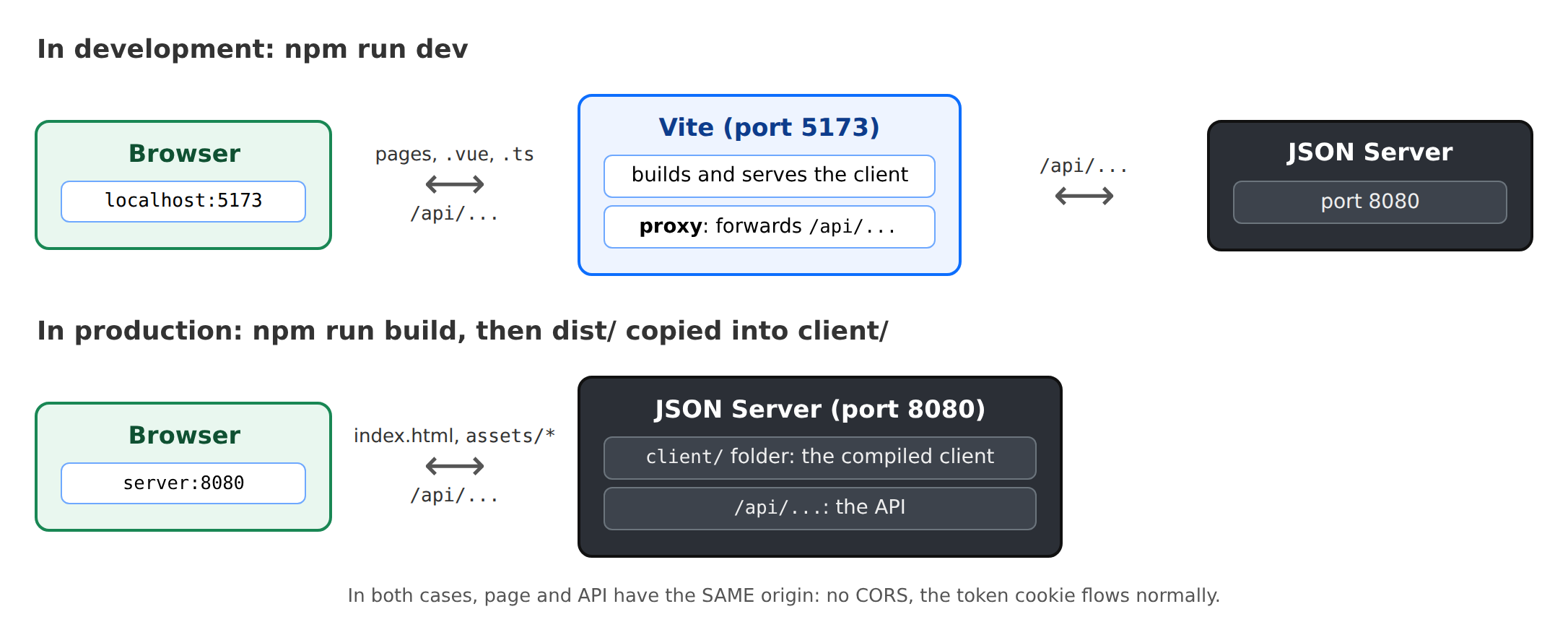
In production, there will no longer be a [Vite]: the JSON server itself will serve the compiled client files (see the “Deployment” chapter). The page and API will still share the same origin.
8.1.2. The request
| <!--
=========================================================================
17-fetch/src/App.vue - a first HTTP request to the server
-------------------------------------------------------------------------
The RdvMedecins JSON server must be running (port 8080). We ask it for
a captcha: GET /api/captcha -> { "id": "...", "svg": "<svg ...>" }.
- fetch(url): the browser function that sends an HTTP request.
It returns a PROMISE: we wait for the response with await;
- response.ok: true for a 2xx code; response.json() reads the JSON
body (another promise);
- the address is RELATIVE (/api/captcha): the request goes to the
server of the page, Vite (port 5173), which forwards it to the JSON server
(port 8080) thanks to its proxy (see vite.config.ts);
- three states to display: in progress, succeeded, failed.
=========================================================================
-->
<script setup lang="ts">
import { onMounted, ref } from 'vue';
// what GET /api/captcha returns
interface Captcha {
id: string;
svg: string;
}
const captcha = ref<Captcha | null>(null);
const loading = ref(false);
const error = ref<string | null>(null);
const requestCount = ref(0);
async function load(): Promise<void> {
loading.value = true;
error.value = null;
try {
const response = await fetch('/api/captcha');
requestCount.value++;
if (!response.ok) {
// the server responded, but with an error (4xx, 5xx) - or it is
// Vite that answers 502/504 because the JSON server is stopped
throw new Error(`the server responded ${response.status} ${response.statusText}`);
}
captcha.value = (await response.json()) as Captcha;
} catch (e) {
// fetch itself fails when no response arrives (network down...)
error.value = e instanceof Error ? e.message : String(e);
captcha.value = null;
} finally {
loading.value = false;
}
}
// on the first display, a captcha is loaded
onMounted(load);
</script>
<template>
<div class="container py-4" style="max-width: 640px">
<h1 class="h3 mb-3">Example 17 - a first HTTP request</h1>
<div class="card p-3">
<p v-if="loading" class="text-muted">Loading...</p>
<div v-else-if="error" class="alert alert-danger mb-3">
Unable to get a captcha: {{ error }}.<br>
Is the RdvMedecins JSON server running (port 8080)?
</div>
<template v-else-if="captcha">
<!-- v-html: inserts a string as HTML (here, the SVG image).
To be used ONLY for safe content: this SVG is built by
OUR server. With user input, v-html would open
the door to script injection ({{ }}, for its part, escapes everything). -->
<div class="captcha mb-2" v-html="captcha.svg"></div>
<p class="small text-muted">id: <code>{{ captcha.id }}</code></p>
</template>
<button class="btn btn-primary align-self-start" :disabled="loading" @click="load">Another image</button>
<p class="small text-muted mt-2 mb-0">{{ requestCount }} successful request(s) - open the Network tab of the developer tools (F12).</p>
</div>
</div>
</template>
<style scoped>
/* :deep(svg): the rule reaches the <svg> inserted by v-html, which "scoped" would otherwise ignore */
.captcha :deep(svg) {
border: 1px solid #dee2e6;
border-radius: 0.375rem;
}
</style>
|
- line 22: the format of the response from [GET /api/captcha];
- lines 27–29: the three states of a request: in progress, successful (the CAPTCHA), and error;
- line 36: [fetch(url)], the browser function that sends a request HTTP. It returns a response promise; [await] suspends the function [async] until the promise resolves, without blocking the page. The address is relative: the request is sent to the page’s server, [Vite], which forwards it;
- Line 38: [fetch] does NOT report an error when the server returns a 404 or 500 response: it did receive a response. It is up to us to test [response.ok] (true for a 2xx code). If the JSON server is down, [Vite] responds with a 5xx error;
- line 43: [response.json()] reads the body and converts it into an object (yet another promise). [as Captcha] informs [TypeScript] of the object’s format: the compiler cannot verify what the server will send;
- line 44: [fetch] itself fails when no response is received (network down);
- line 48: in any case, the request is no longer in progress;
- line 54: on the first display, a CAPTCHA is loaded;
- line 71: [v-html] inserts a string like HTML (here, the image SVG). Use ONLY for safe content: this SVG is generated by OUR server. With user-entered data, [v-html] could allow scripts to be injected into the page; the [{{ }}] tokens, on the other hand, escape everything;
- Line 82: [:deep(...)]: A [scoped] rule normally only affects elements in the template; the [<svg>] inserted by [v-html] is not part of it.
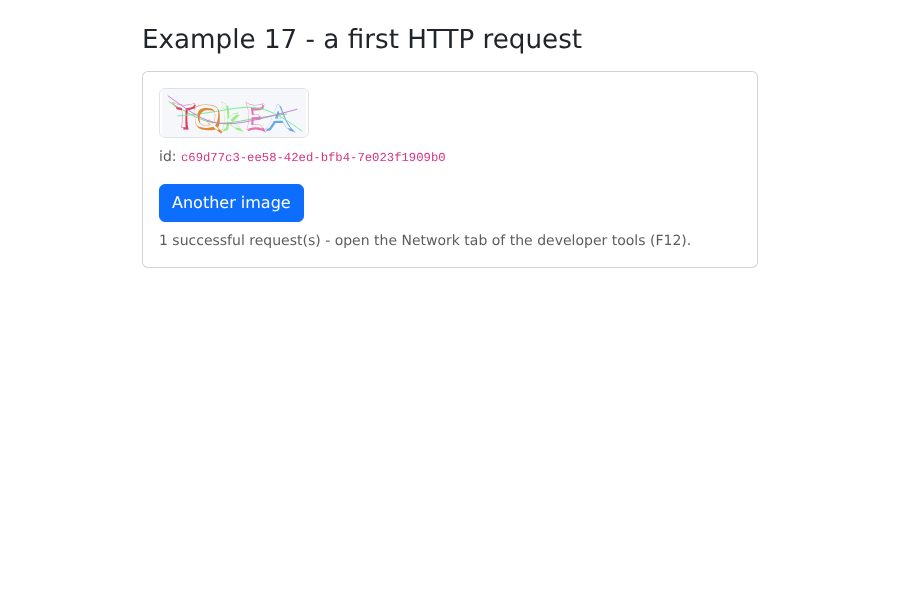
In the browser’s developer tools (F12), the Network tab shows the request [captcha], sent to [localhost:5173], and its response JSON.
8.2. Example 18: Login, Cookie, and Session
| <!--
=========================================================================
18-login/src/App.vue - logging in to the RdvMedecins server
-------------------------------------------------------------------------
1. at startup: GET /api/auth/me - are we already logged in?
(after an F5, the client has forgotten everything; the server reads the cookie);
2. login: POST /api/auth/login, JSON body { login, password,
captchaId, captcha }. On success, the server sets the httpOnly
cookie of the JWT token: our code NEVER sees it (try
document.cookie in the console: it is not there);
3. protected request: GET /api/doctors. The browser attaches the cookie
by itself (same origin);
4. logout: POST /api/auth/logout - the server deletes the cookie.
A cookie belongs to a machine (localhost) and to a path (/api): it
is therefore shared by ALL the examples. Once logged in here, examples 19 and 20
are logged in too.
=========================================================================
-->
<script setup lang="ts">
import { onMounted, reactive, ref } from 'vue';
interface User {
login: string;
name: string;
role: 'ADMIN' | 'DOCTOR' | 'USER';
}
interface Doctor {
id: number;
title: string;
firstName: string;
lastName: string;
}
// the shape of ALL the errors of the API
interface ApiError {
statusCode: number;
key: string;
params?: Record<string, string>;
}
// the few messages this example needs (example 20 will use vue-i18n)
const MESSAGES: Record<string, string> = {
'LOGIN.ERROR': 'Incorrect login or password.',
'ERRORS.WRONG_CAPTCHA': 'The characters you typed do not match the image.',
'ERRORS.TOO_MANY_ATTEMPTS': 'Too many failed attempts. Try again later.',
};
const user = ref<User | null>(null);
const doctors = ref<Doctor[]>([]);
const captcha = ref<{ id: string; svg: string } | null>(null);
const input = reactive({ login: 'admin', password: '', captcha: '' });
const error = ref<string | null>(null);
const ready = ref(false); // is the initial check finished?
async function loadCaptcha(): Promise<void> {
captcha.value = await (await fetch('/api/captcha')).json();
input.captcha = '';
}
// 1. who is logged in? 200 -> the user; 401 -> nobody
async function checkSession(): Promise<void> {
const response = await fetch('/api/auth/me');
if (response.ok) {
user.value = await response.json();
await loadDoctors();
} else {
await loadCaptcha();
}
ready.value = true;
}
// 2. logging in
async function logIn(): Promise<void> {
error.value = null;
const response = await fetch('/api/auth/login', {
method: 'POST',
// the server rejects (415) a POST that is not in JSON
headers: { 'Content-Type': 'application/json' },
body: JSON.stringify({
login: input.login,
password: input.password,
captchaId: captcha.value?.id,
captcha: input.captcha,
}),
});
if (response.ok) {
user.value = await response.json();
input.password = '';
await loadDoctors();
return;
}
// an error: the JSON body says which one; each image can only be used once
const e = (await response.json()) as ApiError;
error.value = `${response.status} - ${MESSAGES[e.key] ?? e.key}`;
await loadCaptcha();
}
// 3. a protected request
async function loadDoctors(): Promise<void> {
const response = await fetch('/api/doctors');
doctors.value = response.ok ? await response.json() : [];
}
// 4. logging out
async function logOut(): Promise<void> {
await fetch('/api/auth/logout', { method: 'POST', headers: { 'Content-Type': 'application/json' }, body: '{}' });
user.value = null;
doctors.value = [];
await loadCaptcha();
}
onMounted(() => {
checkSession().catch(() => {
error.value = 'Is the RdvMedecins JSON server running (port 8080)?';
ready.value = true;
});
});
</script>
<template>
<div class="container py-4" style="max-width: 640px">
<h1 class="h3 mb-3">Example 18 - logging in to the server</h1>
<p v-if="!ready" class="text-muted">Checking the session...</p>
<!-- logged in -->
<div v-else-if="user" class="card p-3">
<p>Logged in: <strong>{{ user.name }}</strong> ({{ user.login }}),
role <span class="badge text-bg-primary">{{ user.role }}</span></p>
<h2 class="h6">GET /api/doctors</h2>
<ul>
<li v-for="m in doctors" :key="m.id">{{ m.title }} {{ m.firstName }} {{ m.lastName }}</li>
</ul>
<p class="small text-muted">Reload the page (F5): you stay logged in.</p>
<button class="btn btn-outline-secondary align-self-start" @click="logOut">Log out</button>
</div>
<!-- not logged in: the form -->
<form v-else class="card p-3" @submit.prevent="logIn">
<div class="mb-2">
<label class="form-label" for="login">Login</label>
<input id="login" v-model="input.login" class="form-control" autocomplete="username">
</div>
<div class="mb-2">
<label class="form-label" for="password">Password</label>
<input id="password" v-model="input.password" type="password" class="form-control" autocomplete="current-password">
</div>
<div class="mb-3">
<label class="form-label" for="captcha">Type the characters shown in the image</label>
<div class="d-flex align-items-center gap-3 mb-2">
<div v-if="captcha" v-html="captcha.svg"></div>
<a href="#" class="small" @click.prevent="loadCaptcha">Another image</a>
</div>
<input id="captcha" v-model="input.captcha" class="form-control" autocomplete="off">
</div>
<button class="btn btn-primary">Log in</button>
<p class="small text-muted mt-2 mb-0">Accounts: admin, pelissier, martin... (password = login).</p>
</form>
<div v-if="error" class="alert alert-danger mt-3">{{ error }}</div>
</div>
</template>
|
- line 35: the format of all errors in API;
- line 42: the few messages required by this example, in English; Example 20 will use [vue-i18n];
- Lines 61–69: On startup, [GET /api/auth/me]: Are we already logged in? After reloading the page (F5), the [Vue.js] application has forgotten everything; the server, however, reads the cookie. 200: the user; 401: no one;
- lines 73–96: the connection:
- line 76: [fetch(url, options)]: the method, headers, and body;
- line 78: the server rejects a POST that is not in JSON format;
- line 79: the body, converted to JSON text;
- line 87: if successful, the server has set the token cookie. Our code NEVER sees it: type [document.cookie] into the browser console; it is not there ([HttpOnly]);
- line 93: if the request fails, the body explains why. We display the message and request a new image: each image is used only once;
- lines 99–102: a protected request. We don’t need to do anything to authenticate: the browser automatically includes the cookie because the request is going to the same origin as the page (by default, [fetch] sends cookies with same-origin requests);
- lines 105–110: logout—the server deletes the cookie. The body ['{}'] is included so that the request is a POST JSON.
The login form:
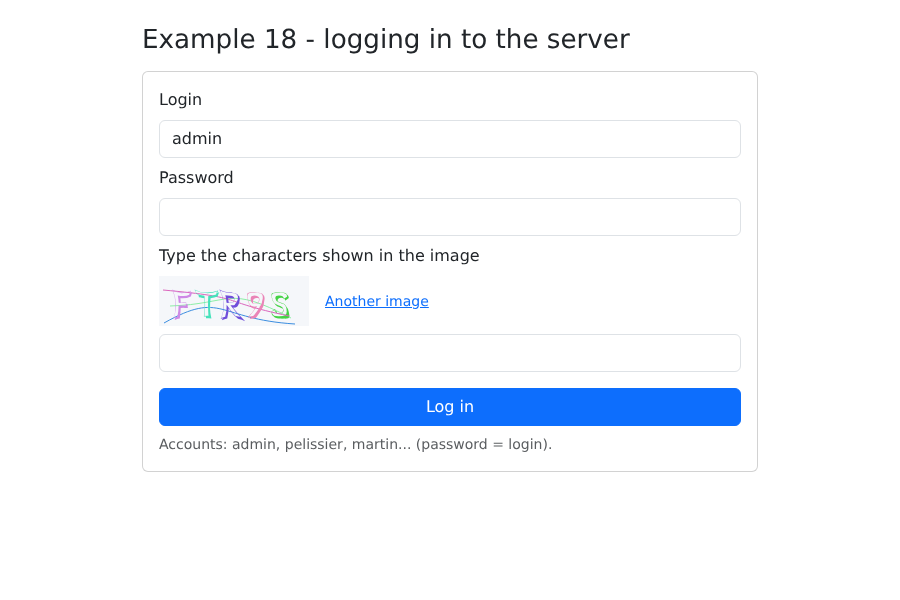
With an incorrectly entered CAPTCHA (the server is in test mode: any CAPTCHA accepts the response [test]):
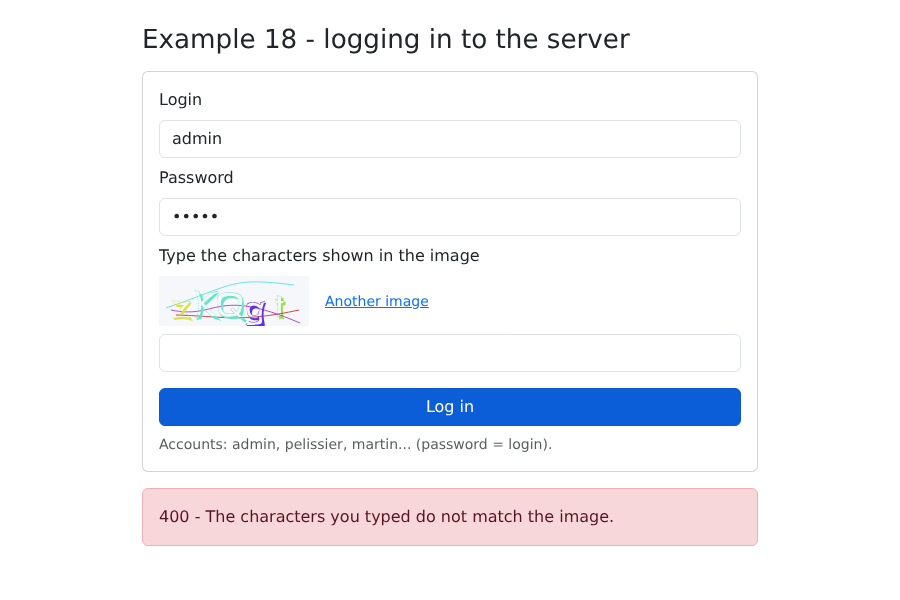
Logged in:
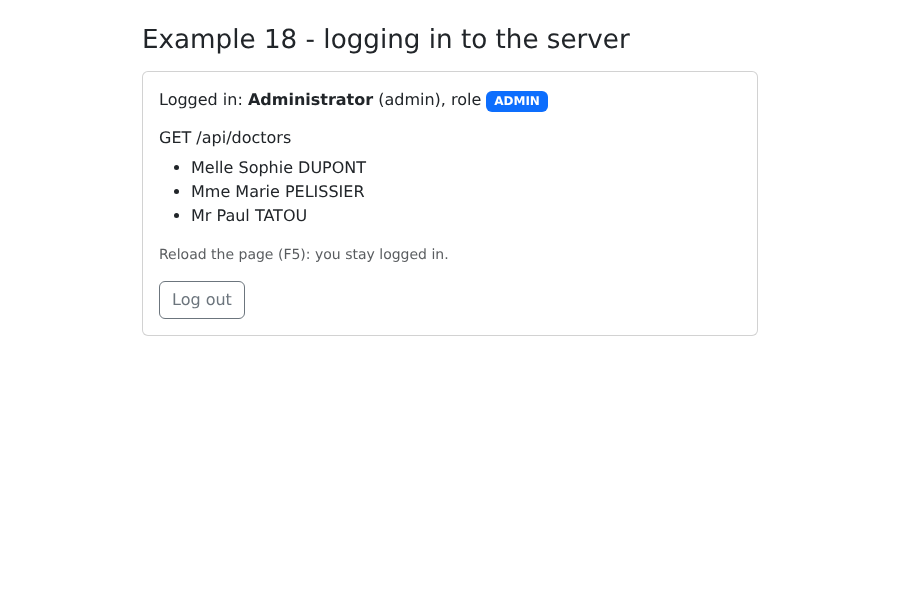
Reload the page (F5): you remain logged in. Next, open Example 19: you’re logged in there as well. A cookie belongs to a machine (here, [localhost]) and a path (here, [/api]), which are common to all examples.
8.3. Example 19: An Access Layer for API
Example 18 repeated the same steps with every call to [fetch]: the prefix [/api], the header [Content-Type], [JSON.stringify], the test for [response.ok], and reading the error body. We group them into a single function, in the [common] folder (shared by examples 19 and 20):
| // =========================================================================
// common/api.ts - ONE function for all the requests to the API
// -------------------------------------------------------------------------
// In example 18, each call to fetch repeated the same gestures:
// /api prefix, Content-Type header, JSON.stringify, test of response.ok,
// reading of the error body... They are grouped here, once and for all:
//
// const doctors = await api.get<Person[]>('/doctors');
// await api.post('/appointments', { day, slotId, clientId });
//
// - on success, the promise returns the JSON body, TYPED;
// - on failure, it is REJECTED with an ApiError, which carries the
// translation key sent by the server (and, if any, its
// parameters and the error of each field).
// Used by examples 19 and 20; the case study takes up its principle.
// =========================================================================
export class ApiError extends Error {
constructor(
public readonly statusCode: number, // 0: the server did not respond
public readonly key: string, // e.g.: 'ERRORS.LOGIN_TAKEN'
public readonly params: Record<string, string> = {},
public readonly fields: Record<string, string> = {},
) {
super(key);
this.name = 'ApiError';
}
}
type Method = 'GET' | 'POST' | 'PUT' | 'DELETE';
export async function request<T>(method: Method, url: string, body?: unknown): Promise<T> {
let response: Response;
try {
response = await fetch(`/api${url}`, {
method,
// a body -> JSON (the server rejects a POST that is not)
headers: body !== undefined ? { 'Content-Type': 'application/json' } : {},
body: body !== undefined ? JSON.stringify(body) : undefined,
});
} catch {
// no response (network down...)
throw new ApiError(0, 'ERRORS.SERVER_UNREACHABLE');
}
// the body is read as text, then converted: an empty response, or one
// that is not JSON (JSON server stopped: it is Vite that answers),
// must not crash the application
const text = await response.text();
let data: unknown = null;
try {
data = text ? JSON.parse(text) : null;
} catch {
data = null;
}
if (!response.ok) {
const e = (data ?? {}) as { key?: string; params?: Record<string, string>; fields?: Record<string, string> };
throw new ApiError(response.status, e.key ?? 'ERRORS.SERVER_UNREACHABLE', e.params, e.fields);
}
return data as T;
}
// shortcuts, more readable in use
export const api = {
get: <T>(url: string) => request<T>('GET', url),
post: <T>(url: string, body: unknown = {}) => request<T>('POST', url, body),
put: <T>(url: string, body: unknown) => request<T>('PUT', url, body),
delete: <T>(url: string, body?: unknown) => request<T>('DELETE', url, body),
};
|
- Lines 18–27: An error class that contains the server’s response: the code HTTP, the message key, its parameters, and the error for each field. The code 0 means “no response”;
- line 32: a generic function: [T] is the type of the body expected in case of success. [request<Person[]>('GET', '/doctors')] returns a [Promise<Person[]>];
- line 38: a body, and only in this case, accompanied by the header JSON;
- lines 49–55: the body is read as text and then converted. An empty response, or one that is not JSON (server down: [Vite] responds with text), should not cause the application to crash;
- lines 57–60: a failure results in a [ApiError]: the promise returned by [request] is rejected. The calling code catches this via [try / catch];
- lines 65–70: shorthand, more readable: [api.get<T>(url)], [api.post<T>(url, body)]... [api.post] sends the body [{}] by default.
The object types of JSON from API, described in the previous chapter:
| // =========================================================================
// common/types.ts - the JSON objects exchanged with the RdvMedecins API
// (see the chapter on the black box, which describes each route)
// =========================================================================
export type Role = 'ADMIN' | 'DOCTOR' | 'USER';
// POST /api/auth/login, GET /api/auth/me
export interface User {
login: string;
name: string;
role: Role;
}
// GET /api/captcha
export interface Captcha {
id: string;
svg: string;
}
// a doctor or a client (GET /api/doctors, GET /api/clients...)
export interface Person {
id: number;
version: number;
title: string;
firstName: string;
lastName: string;
login?: string; // only for the ADMIN
}
export interface Identity {
title: string;
firstName: string;
lastName: string;
}
// a row of GET /api/schedule
export interface ScheduleSlot {
id: number;
startHour: number;
startMinute: number;
endHour: number;
endMinute: number;
free: boolean;
patient: Identity | null;
mine: boolean;
bookable: boolean;
appointmentId: number | null;
}
// GET /api/schedule?doctorId=...&day=...
export interface Schedule {
doctor: Person;
day: string;
slots: ScheduleSlot[];
info: string | null;
}
|
A connection component, rewritten with [api.ts] and reduced to a bar:
| <!--
=========================================================================
common/LoginBar.vue - logging in / out, in one bar
-------------------------------------------------------------------------
The component of example 18, reduced to a bar and rewritten with
common/api.ts. It emits 'change' with the logged-in user (or null)
each time the user changes - including at startup, after having
queried GET /api/auth/me.
=========================================================================
-->
<script setup lang="ts">
import { onMounted, reactive, ref } from 'vue';
import { api, ApiError } from './api';
import type { Captcha, User } from './types';
const emit = defineEmits<{ change: [user: User | null] }>();
const user = ref<User | null>(null);
const captcha = ref<Captcha | null>(null);
const input = reactive({ login: 'admin', password: '', captcha: '' });
const error = ref<string | null>(null);
async function newCaptcha(): Promise<void> {
captcha.value = await api.get<Captcha>('/captcha');
input.captcha = '';
}
function setUser(u: User | null): void {
user.value = u;
emit('change', u);
}
onMounted(async () => {
try {
setUser(await api.get<User>('/auth/me'));
} catch {
setUser(null); // 401: nobody is logged in
await newCaptcha().catch(() => (error.value = 'Is the JSON server running (port 8080)?'));
}
});
async function logIn(): Promise<void> {
error.value = null;
try {
const u = await api.post<User>('/auth/login', {
login: input.login,
password: input.password,
captchaId: captcha.value?.id,
captcha: input.captcha,
});
input.password = '';
setUser(u);
} catch (e) {
error.value = e instanceof ApiError ? `${e.statusCode} ${e.key}` : String(e);
await newCaptcha();
}
}
async function logOut(): Promise<void> {
await api.post('/auth/logout');
setUser(null);
await newCaptcha();
}
</script>
<template>
<div class="alert alert-secondary d-flex flex-wrap align-items-center gap-2 py-2">
<template v-if="user">
<span>Logged in: <strong>{{ user.name }}</strong> <span class="badge text-bg-primary">{{ user.role }}</span></span>
<button class="btn btn-sm btn-outline-secondary ms-auto" @click="logOut">Log out</button>
</template>
<form v-else class="d-flex flex-wrap align-items-center gap-2 w-100" @submit.prevent="logIn">
<input v-model="input.login" class="form-control form-control-sm w-auto" placeholder="login" autocomplete="username">
<input v-model="input.password" type="password" class="form-control form-control-sm w-auto" placeholder="password" autocomplete="current-password">
<div v-if="captcha" class="captcha" v-html="captcha.svg"></div>
<input v-model="input.captcha" class="form-control form-control-sm w-auto" placeholder="captcha" autocomplete="off" size="8">
<button class="btn btn-sm btn-primary">Log in</button>
<span v-if="error" class="text-danger small">{{ error }}</span>
</form>
</div>
</template>
<style scoped>
/* the captcha image, reduced to fit in the bar */
.captcha :deep(svg) {
display: block;
height: 32px;
width: auto;
}
</style>
|
- Line 16: The component sends [change] with the logged-in user (or [null]) every time it changes, including at startup;
- line 35: with [api.ts], a request fits on one line; in case of failure (401), it switches to [catch];
- Line 54: [instanceof] distinguishes an error in API from another anomaly.
Above [api.ts], a function per route from API:
| // =========================================================================
// 19-api-service/src/rdvmedecins.service.ts - the API access layer
// -------------------------------------------------------------------------
// One typed function per route of the API. The components know neither
// the URLs, nor fetch, nor the JSON format: they call functions.
// It is the client-side equivalent of the DAO layer on the server side: if the API
// changes (a URL, a field name), only this file is modified.
// =========================================================================
import { api } from '../../common/api';
import type { Schedule, Person } from '../../common/types';
export const rdvmedecins = {
getDoctors: () => api.get<Person[]>('/doctors'),
getClients: () => api.get<Person[]>('/clients'),
// URLSearchParams builds "?doctorId=1&day=2030-01-15", encoding what needs to be
getSchedule: (doctorId: number, day: string) =>
api.get<Schedule>(`/schedule?${new URLSearchParams({ doctorId: String(doctorId), day })}`),
book: (day: string, slotId: number, clientId?: number) =>
api.post<{ id: number }>('/appointments', { day, slotId, clientId }),
cancelAppointment: (appointmentId: number) => api.delete<Record<string, never>>(`/appointments/${appointmentId}`),
};
|
This is the client-side equivalent of the server’s DAO layer: the components are not aware of URL, [fetch], or the JSON format; they call typed functions. If API changes, only this file changes.
- Line 18: [URLSearchParams] generates the string [doctorId=1&day=2030-01-15] by encoding the characters that need to be encoded.
The page:
| <!--
=========================================================================
19-api-service/src/App.vue - a schedule, with the API access layer
-------------------------------------------------------------------------
Log in (top bar), choose a doctor and a day: the schedule
is displayed. ADMIN and DOCTOR can book for a patient and cancel;
a patient (martin...) books for themselves. Each action ends with
a reload of the schedule: it is the SERVER that is authoritative.
=========================================================================
-->
<script setup lang="ts">
import { computed, ref, watch } from 'vue';
import LoginBar from '../../common/LoginBar.vue';
import { ApiError } from '../../common/api';
import type { Schedule, ScheduleSlot, Person, User } from '../../common/types';
import { rdvmedecins } from './rdvmedecins.service';
const user = ref<User | null>(null);
const doctors = ref<Person[]>([]);
const clients = ref<Person[]>([]);
const doctorId = ref<number | null>(null);
const day = ref(tomorrow());
const schedule = ref<Schedule | null>(null);
const clientId = ref<number | null>(null);
const message = ref<{ type: 'success' | 'danger'; text: string } | null>(null);
const isManager = computed(() => user.value !== null && user.value.role !== 'USER');
function tomorrow(): string {
const d = new Date(Date.now() + 24 * 3600 * 1000);
return `${d.getFullYear()}-${String(d.getMonth() + 1).padStart(2, '0')}-${String(d.getDate()).padStart(2, '0')}`;
}
function timeRange(c: ScheduleSlot): string {
const hm = (h: number, m: number) => `${h}:${String(m).padStart(2, '0')}`;
return `${hm(c.startHour, c.startMinute)} - ${hm(c.endHour, c.endMinute)}`;
}
// an API error becomes a message (its key, for lack of a dictionary here)
function report(e: unknown): void {
message.value = { type: 'danger', text: e instanceof ApiError ? `${e.statusCode} ${e.key}` : String(e) };
}
// login / logout: we (re)load what this role is allowed to see
async function onUserChange(u: User | null): Promise<void> {
user.value = u;
schedule.value = null;
doctors.value = [];
clients.value = [];
if (u === null) {
return;
}
try {
doctors.value = await rdvmedecins.getDoctors();
// the list of patients: only for ADMIN and DOCTOR (a USER would receive 403)
clients.value = isManager.value ? await rdvmedecins.getClients() : [];
} catch (e) {
report(e);
}
}
async function loadSchedule(): Promise<void> {
if (doctorId.value === null) {
return;
}
try {
schedule.value = await rdvmedecins.getSchedule(doctorId.value, day.value);
} catch (e) {
schedule.value = null;
report(e);
}
}
// the schedule follows the choice of the doctor and the day
watch([doctorId, day], () => {
message.value = null;
loadSchedule();
});
async function book(c: ScheduleSlot): Promise<void> {
try {
await rdvmedecins.book(day.value, c.id, isManager.value ? (clientId.value ?? undefined) : undefined);
message.value = { type: 'success', text: `Slot ${timeRange(c)} booked.` };
} catch (e) {
report(e);
}
await loadSchedule();
}
async function cancel(c: ScheduleSlot): Promise<void> {
try {
await rdvmedecins.cancelAppointment(c.appointmentId as number);
message.value = { type: 'success', text: `Appointment of ${timeRange(c)} cancelled.` };
} catch (e) {
report(e);
}
await loadSchedule();
}
</script>
<template>
<div class="container py-4">
<h1 class="h3 mb-3">Example 19 - an API access layer</h1>
<LoginBar @change="onUserChange" />
<template v-if="user">
<div class="row g-2 mb-3">
<div class="col-sm-5">
<select v-model="doctorId" class="form-select">
<option :value="null" disabled>-- choose a doctor --</option>
<option v-for="m in doctors" :key="m.id" :value="m.id">{{ m.title }} {{ m.firstName }} {{ m.lastName }}</option>
</select>
</div>
<div class="col-sm-3"><input v-model="day" type="date" class="form-control"></div>
<div v-if="isManager" class="col-sm-4">
<select v-model="clientId" class="form-select">
<option :value="null">-- patient to book for --</option>
<option v-for="c in clients" :key="c.id" :value="c.id">{{ c.title }} {{ c.firstName }} {{ c.lastName }}</option>
</select>
</div>
</div>
<div v-if="message" class="alert" :class="`alert-${message.type}`">{{ message.text }}</div>
<!-- info: the key sent by the server when a patient already has an upcoming appointment -->
<div v-if="schedule?.info" class="alert alert-info">{{ schedule.info }}</div>
<table v-if="schedule" class="table table-sm align-middle">
<caption class="caption-top">Schedule of {{ schedule.day }} - {{ schedule.doctor.title }} {{ schedule.doctor.firstName }} {{ schedule.doctor.lastName }}</caption>
<tbody>
<tr v-for="c in schedule.slots" :key="c.id">
<td>{{ timeRange(c) }}</td>
<td>
<span v-if="c.free" class="badge text-bg-success">Free</span>
<span v-else-if="c.patient" class="badge" :class="c.mine ? 'text-bg-primary' : 'text-bg-secondary'">
{{ c.patient.title }} {{ c.patient.firstName }} {{ c.patient.lastName }}
</span>
<span v-else class="badge text-bg-secondary">Booked</span>
</td>
<td class="text-end">
<!-- the buttons follow the rights computed by the server -->
<button v-if="c.bookable" class="btn btn-sm btn-outline-success" @click="book(c)">Book</button>
<button v-if="c.appointmentId !== null" class="btn btn-sm btn-outline-danger" @click="cancel(c)">Cancel</button>
</td>
</tr>
</tbody>
</table>
</template>
</div>
</template>
|
- Line 27: ADMIN or DOCTOR;
- lines 45–60: Each time a user logs in or out, the content that this role is authorized to view is (re)loaded. A patient would receive a 403 error for the client list: we don’t even request it;
- line 75: [watch] can monitor multiple sources: the calendar is reloaded when the doctor OR the day changes;
- Lines 80–87: a reservation, followed, WHATEVER HAPPENS, by a refresh of the calendar. The server’s record is final: if the time slot has been taken by someone else in the meantime, the refreshed calendar will show it;
- lines 141 and 142: the buttons reflect the permissions calculated by the server;
- line 137: a booked slot for which the server has not assigned a patient (as seen by a patient).
Logged in as [admin], select a doctor, a patient, and book a time slot:
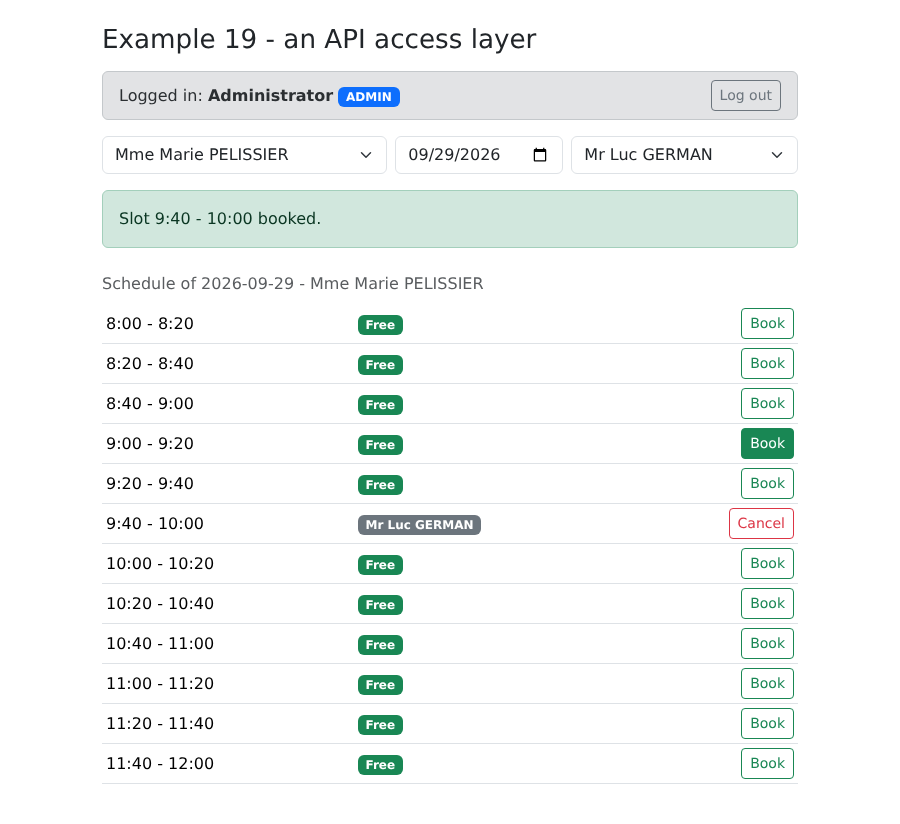
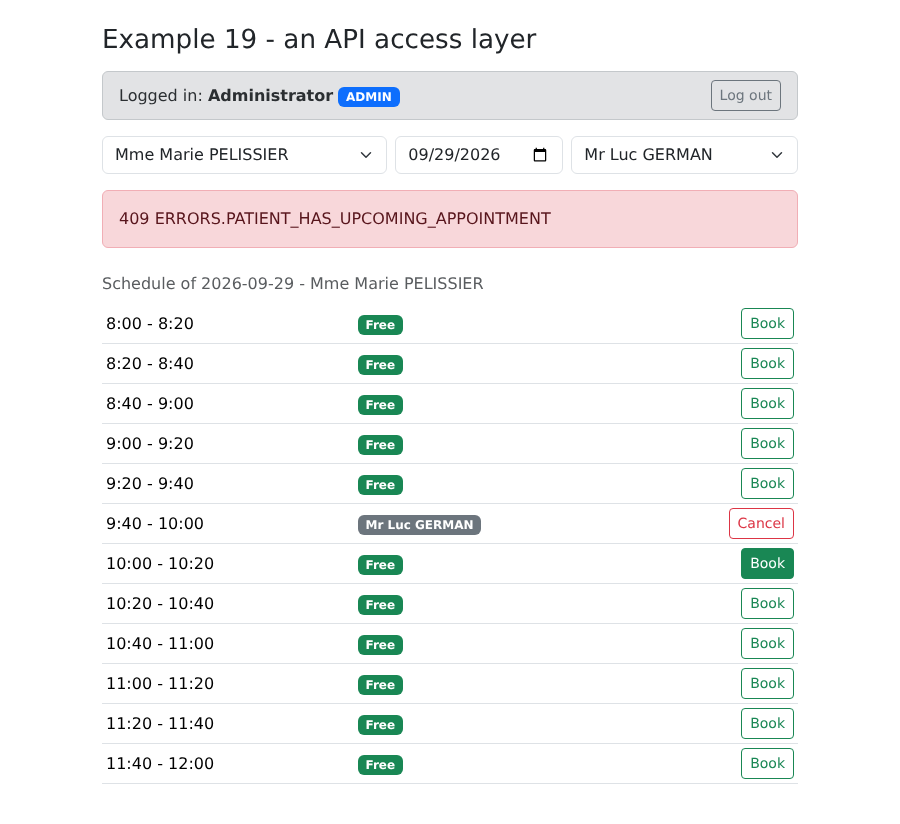
Book a second appointment slot for the same patient: the server refuses. Since there is no dictionary in this example, the raw key is displayed:
8.4. Example 20: Errors Returned by the Server
Last example before the case study: customer management, handled by the ADMIN form. This form performs no validation in the browser: everything is sent to the server, which validates the data and, in case of rejection, responds with the error for each field. Example 06 showed the alternative approach; this one has a significant advantage: the rules exist in only ONE place—the server—and the client cannot overlook them. The trade-off: a round trip to the server before displaying the errors.
The dictionaries use the server’s error codes:
| {
"FORM": {
"TITLE_ADD": "Ajouter un client",
"TITLE_EDIT": "Modifier un client",
"TITLE": "Titre",
"FIRSTNAME": "Prénom",
"LASTNAME": "Nom",
"LOGIN": "Login",
"PASSWORD": "Mot de passe",
"SAVE": "Enregistrer",
"CANCEL": "Annuler",
"EDIT": "Modifier",
"DELETE": "Supprimer",
"DELETE_CONFIRM": "Supprimer le client {name}, son compte et ses rendez-vous ?",
"ADDED": "Le client {name} a été ajouté (login : {login}).",
"UPDATED": "Le client {name} a été modifié.",
"DELETED": "Le client {name} a été supprimé.",
"ADMIN_ONLY": "Connectez-vous avec le compte admin : seul le rôle ADMIN gère les clients."
},
"ERRORS": {
"INVALID_FORM": "Le formulaire contient des erreurs.",
"INVALID_TITLE": "Choisissez un titre dans la liste.",
"FIRSTNAME_REQUIRED": "Le prénom est obligatoire.",
"FIRSTNAME_TOO_LONG": "Le prénom ne doit pas dépasser 20 caractères.",
"LASTNAME_REQUIRED": "Le nom est obligatoire.",
"LASTNAME_TOO_LONG": "Le nom ne doit pas dépasser 20 caractères.",
"INVALID_LOGIN": "30 caractères au plus : lettres minuscules non accentuées, chiffres, point, tiret, souligné.",
"PASSWORD_TOO_LONG": "Le mot de passe ne doit pas dépasser 72 caractères.",
"LOGIN_TAKEN": "Ce login est déjà utilisé par un autre compte.",
"PATIENT_ALREADY_EXISTS": "Un client portant ce prénom et ce nom existe déjà.",
"PATIENT_NOT_FOUND": "Ce client n'existe pas (ou plus).",
"CONCURRENT_UPDATE": "Cette fiche a été modifiée entre-temps par un autre utilisateur. Rechargez-la avant de recommencer.",
"FORBIDDEN": "Votre rôle ne vous permet pas cette action.",
"AUTH_REQUIRED": "Connectez-vous d'abord.",
"SESSION_EXPIRED": "Votre session a expiré : reconnectez-vous.",
"SERVER_UNREACHABLE": "Le serveur ne répond pas.",
"SERVER_ERROR": "Une erreur inattendue s'est produite."
}
}
|
([locales/en.json] has the same codes, in English.)
| import { createApp } from 'vue';
import { createI18n } from 'vue-i18n';
import 'bootstrap/dist/css/bootstrap.min.css';
import App from './App.vue';
import fr from './locales/fr.json';
import en from './locales/en.json';
// same configuration as example 16, in shorter form
const i18n = createI18n({ legacy: false, locale: 'en', fallbackLocale: 'en', messages: { fr, en } });
createApp(App).use(i18n).mount('#app');
|
The page:
| <!--
=========================================================================
20-server-errors/src/App.vue - displaying the errors of the SERVER
-------------------------------------------------------------------------
The management of the clients (admin account). This form DELIBERATELY
does no validation in the browser: everything is sent to the
server, which answers, in case of refusal, with a JSON error:
400 { key: 'ERRORS.INVALID_FORM', fields: { lastName: 'ERRORS.LASTNAME_REQUIRED' } }
409 { key: 'ERRORS.PATIENT_ALREADY_EXISTS', fields: { firstName: ..., lastName: ... } }
409 { key: 'ERRORS.CONCURRENT_UPDATE' } (optimistic lock)
The client translates each key (vue-i18n) and places each message under its
field, the general message at the bottom of the form. Try: an empty last name, a
title modified in the developer tools, a namesake (Alice DURAND),
a login already taken (martin), the same record modified in two tabs...
=========================================================================
-->
<script setup lang="ts">
import { computed, reactive, ref } from 'vue';
import { useI18n } from 'vue-i18n';
import LoginBar from '../../common/LoginBar.vue';
import { api, ApiError } from '../../common/api';
import type { Person, User } from '../../common/types';
// the confirmation dialog of example 12, reused as is
import ConfirmDialog from '../../12-confirmation/src/components/ConfirmDialog.vue';
import { useConfirmation } from '../../12-confirmation/src/composables/useConfirmation';
const { t, locale } = useI18n();
const { confirm } = useConfirmation();
const user = ref<User | null>(null);
const clients = ref<Person[]>([]);
const isAdmin = computed(() => user.value?.role === 'ADMIN');
// the form: editedId === null -> creation, otherwise update
const editedId = ref<number | null>(null);
const input = reactive({ title: 'Mr', firstName: '', lastName: '', login: '', password: '', version: 0 });
// the errors returned by the server
const fieldErrors = ref<Record<string, string>>({});
const pageError = ref<ApiError | null>(null);
const success = ref<string | null>(null);
async function onUserChange(u: User | null): Promise<void> {
user.value = u;
clients.value = [];
if (u?.role === 'ADMIN') {
await reload();
}
}
async function reload(): Promise<void> {
clients.value = await api.get<Person[]>('/clients');
}
function newForm(): void {
editedId.value = null;
Object.assign(input, { title: 'Mr', firstName: '', lastName: '', login: '', password: '', version: 0 });
clearErrors();
}
function edit(c: Person): void {
editedId.value = c.id;
// the VERSION read with the record goes back with the update: if someone
// has modified the record in the meantime, the server will answer 409 CONCURRENT_UPDATE
Object.assign(input, { title: c.title, firstName: c.firstName, lastName: c.lastName, login: c.login ?? '', password: '', version: c.version });
clearErrors();
}
function clearErrors(): void {
fieldErrors.value = {};
pageError.value = null;
success.value = null;
}
// the text of an error, in the current language, with its parameters
function errorText(e: ApiError): string {
return t(e.key, e.params);
}
async function save(): Promise<void> {
clearErrors();
const body = { ...input };
try {
const client =
editedId.value === null
? await api.post<Person>('/clients', body)
: await api.put<Person>(`/clients/${editedId.value}`, body);
const message = t(editedId.value === null ? 'FORM.ADDED' : 'FORM.UPDATED', {
name: `${client.firstName} ${client.lastName}`,
login: client.login ?? '',
});
newForm(); // form emptied, messages cleared...
success.value = message; // ... except this one
await reload();
} catch (e) {
if (!(e instanceof ApiError)) {
throw e;
}
// the error of each field, and the general message
fieldErrors.value = e.fields;
pageError.value = e;
}
}
async function remove(c: Person): Promise<void> {
const name = `${c.firstName} ${c.lastName}`;
if (!(await confirm(t('FORM.DELETE_CONFIRM', { name })))) {
return;
}
clearErrors();
try {
await api.delete(`/clients/${c.id}`);
success.value = t('FORM.DELETED', { name });
} catch (e) {
pageError.value = e instanceof ApiError ? e : null;
}
await reload();
}
</script>
<template>
<div class="container py-4">
<div class="d-flex justify-content-between align-items-center mb-3">
<h1 class="h3 mb-0">Example 20 - the errors returned by the server</h1>
<select v-model="locale" class="form-select form-select-sm w-auto">
<option value="fr">FR</option>
<option value="en">EN</option>
</select>
</div>
<LoginBar @change="onUserChange" />
<p v-if="user && !isAdmin" class="alert alert-warning">{{ t('FORM.ADMIN_ONLY') }}</p>
<div v-if="isAdmin" class="row g-4">
<div class="col-lg-6">
<table class="table table-sm align-middle">
<tbody>
<tr v-for="c in clients" :key="c.id">
<td>{{ c.title }} {{ c.firstName }} {{ c.lastName }}</td>
<td><code>{{ c.login }}</code></td>
<td class="text-end text-nowrap">
<button class="btn btn-sm btn-outline-primary me-1" @click="edit(c)">{{ t('FORM.EDIT') }}</button>
<button class="btn btn-sm btn-outline-danger" @click="remove(c)">{{ t('FORM.DELETE') }}</button>
</td>
</tr>
</tbody>
</table>
</div>
<div class="col-lg-6">
<form class="card p-3" novalidate @submit.prevent="save">
<h2 class="h5">{{ editedId === null ? t('FORM.TITLE_ADD') : t('FORM.TITLE_EDIT') }}</h2>
<div class="mb-2">
<label class="form-label" for="title">{{ t('FORM.TITLE') }}</label>
<!-- a "Dr" option that the server will reject: to see ERRORS.INVALID_TITLE -->
<select id="title" v-model="input.title" class="form-select" :class="{ 'is-invalid': fieldErrors.title }">
<option>Mr</option><option>Mme</option><option>Melle</option><option>Dr</option>
</select>
<div class="invalid-feedback">{{ fieldErrors.title && t(fieldErrors.title) }}</div>
</div>
<div class="row g-2 mb-2">
<div class="col-sm-6">
<label class="form-label" for="firstName">{{ t('FORM.FIRSTNAME') }}</label>
<input id="firstName" v-model="input.firstName" class="form-control" :class="{ 'is-invalid': fieldErrors.firstName }">
<div class="invalid-feedback">{{ fieldErrors.firstName && t(fieldErrors.firstName) }}</div>
</div>
<div class="col-sm-6">
<label class="form-label" for="lastName">{{ t('FORM.LASTNAME') }}</label>
<input id="lastName" v-model="input.lastName" class="form-control" :class="{ 'is-invalid': fieldErrors.lastName }">
<div class="invalid-feedback">{{ fieldErrors.lastName && t(fieldErrors.lastName) }}</div>
</div>
</div>
<div class="row g-2 mb-3">
<div class="col-sm-6">
<label class="form-label" for="login">{{ t('FORM.LOGIN') }}</label>
<input id="login" v-model="input.login" class="form-control" :class="{ 'is-invalid': fieldErrors.login }">
<div class="invalid-feedback">{{ fieldErrors.login && t(fieldErrors.login) }}</div>
</div>
<div class="col-sm-6">
<label class="form-label" for="password">{{ t('FORM.PASSWORD') }}</label>
<input id="password" v-model="input.password" type="password" class="form-control" autocomplete="new-password"
:class="{ 'is-invalid': fieldErrors.password }">
<div class="invalid-feedback">{{ fieldErrors.password && t(fieldErrors.password) }}</div>
</div>
</div>
<div class="d-flex gap-2">
<button class="btn btn-primary">{{ t('FORM.SAVE') }}</button>
<button type="button" class="btn btn-secondary" @click="newForm">{{ t('FORM.CANCEL') }}</button>
</div>
<div v-if="success" class="alert alert-success mt-3 mb-0">{{ success }}</div>
<!-- the general message, and the HTTP status, to understand -->
<div v-if="pageError" class="alert alert-danger mt-3 mb-0">
{{ errorText(pageError) }} <span class="small text-muted">({{ pageError.statusCode }} {{ pageError.key }})</span>
</div>
</form>
</div>
</div>
</div>
<ConfirmDialog />
</template>
|
- Line 26: the confirmation window from Example 12, reused as-is—a well-designed component is reusable;
- lines 40 and 41: the errors returned by the server: the error for each field, and the general message;
- lines 62–68: to modify a record, copy its values into the form, including the version number: it will be saved with the modification (optimistic locking);
- lines 77–79: the error message, in everyday language, along with its parameters;
- lines 81–102: [POST] for a creation, [PUT] for a modification. If the request is rejected, the returned errors are stored; the template handles the rest;
- line 157: a title that the server will reject, to see [ERRORS.INVALID_TITLE];
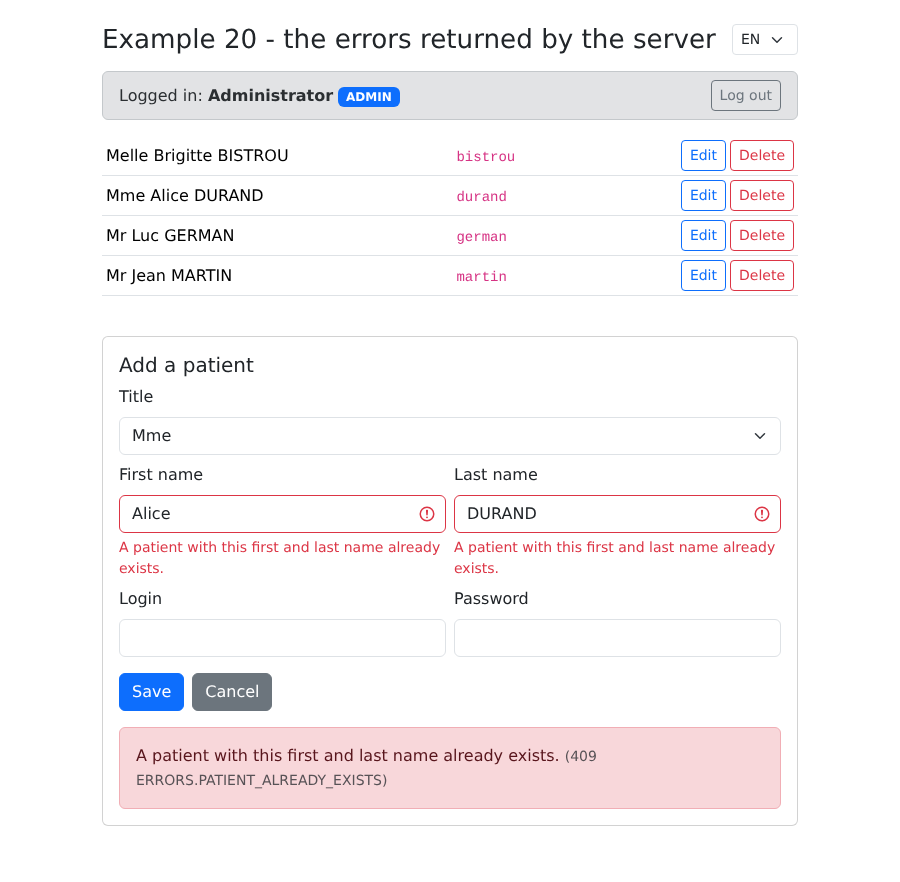
- lines 164 and 165: a rejected field is highlighted in red, and its translated error code is displayed below it;
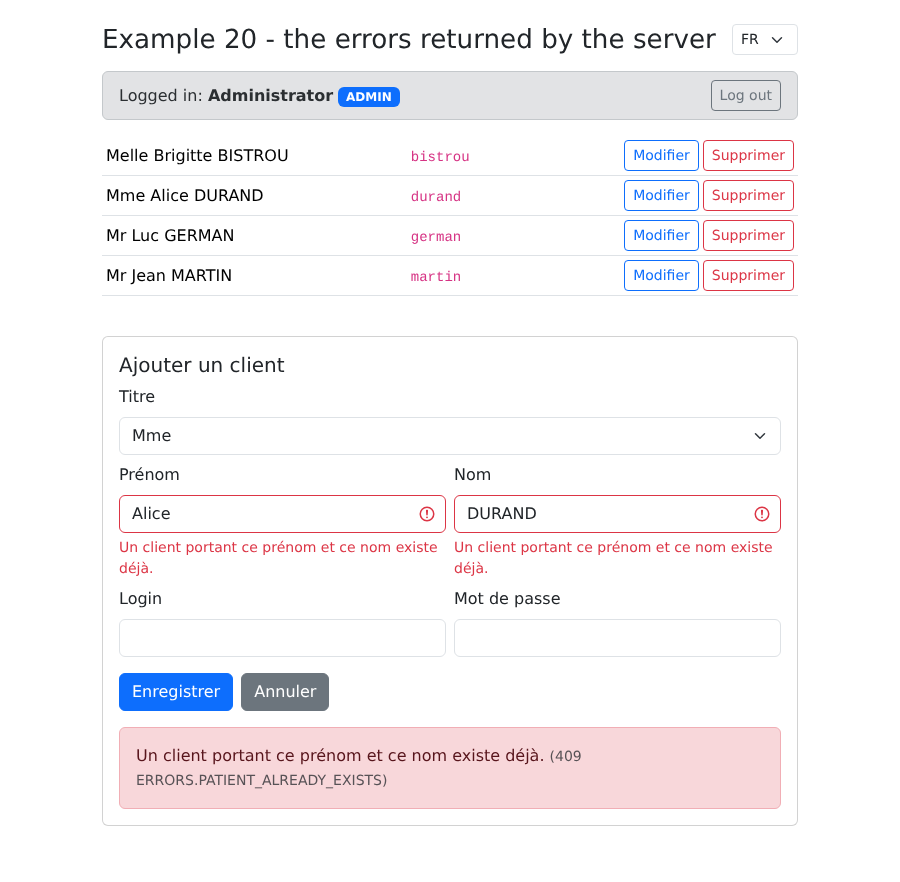
- line 126: changing the language also re-translates the error messages already displayed: only the keys have been retained.
An incorrectly filled-out form:
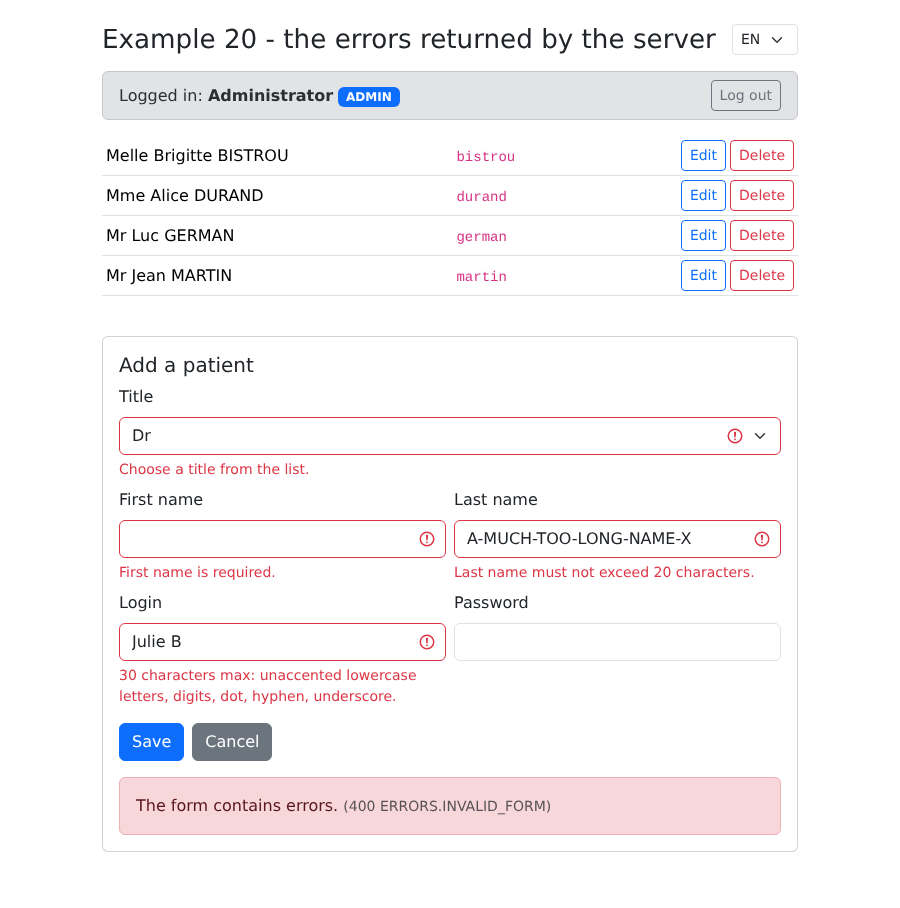
A duplicate name (Alice DURAND already exists): the server returns a 409 response and identifies the first name and last name fields:
The same error, in French:
Also try editing the same record in two tabs: the second record receives [ERRORS.CONCURRENT_UPDATE].