6. Internationalization
6.1. Example 16: A Bilingual Application
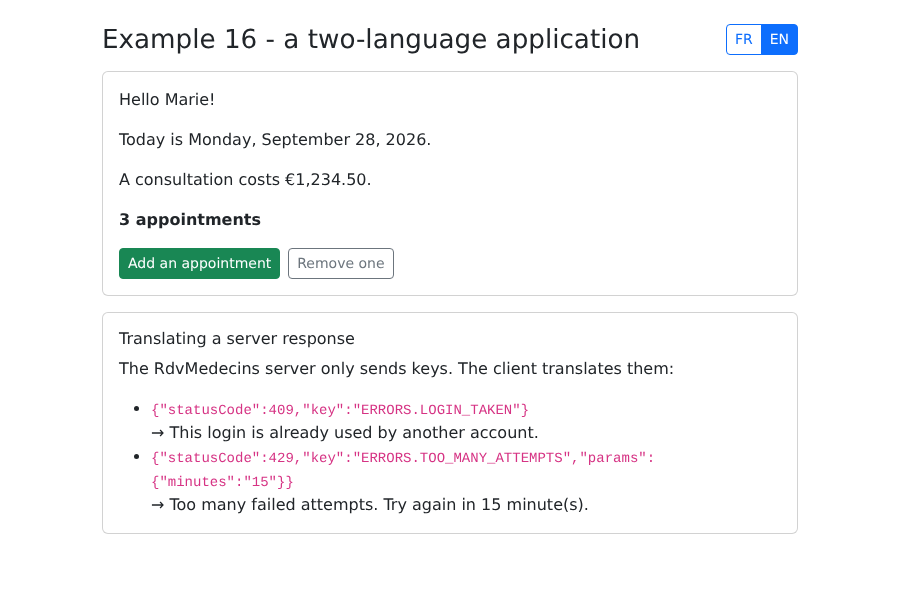
In the [NestJS] course, the server translated the pages before sending them. Here, translation takes place in the browser using the [vue-i18n] library, and switching languages no longer requires any interaction with the server.
6.1.1. Dictionaries
One dictionary per language, in the JSON format. Each text has a key ([HOME.HELLO]):
| {
"APP": {
"TITLE": "Exemple 16 - une application en deux langues",
"LANGUAGE": "Langue"
},
"HOME": {
"HELLO": "Bonjour {name} !",
"TODAY": "Nous sommes le {date}.",
"PRICE": "Une consultation coûte {price}.",
"APPOINTMENTS": "aucun rendez-vous | un rendez-vous | {n} rendez-vous",
"ADD": "Ajouter un rendez-vous",
"REMOVE": "En retirer un"
},
"ERRORS": {
"LOGIN_TAKEN": "Ce login est déjà utilisé par un autre compte.",
"TOO_MANY_ATTEMPTS": "Trop de tentatives infructueuses. Réessayez dans {minutes} minute(s)."
},
"SERVER": {
"TITLE": "Traduire une réponse du serveur",
"EXPLANATION": "Le serveur RdvMedecins ne renvoie que des clés. C'est le client qui les traduit :"
}
}
|
| {
"APP": {
"TITLE": "Example 16 - a two-language application",
"LANGUAGE": "Language"
},
"HOME": {
"HELLO": "Hello {name}!",
"TODAY": "Today is {date}.",
"PRICE": "A consultation costs {price}.",
"APPOINTMENTS": "no appointment | one appointment | {n} appointments",
"ADD": "Add an appointment",
"REMOVE": "Remove one"
},
"ERRORS": {
"LOGIN_TAKEN": "This login is already used by another account.",
"TOO_MANY_ATTEMPTS": "Too many failed attempts. Try again in {minutes} minute(s)."
},
"SERVER": {
"TITLE": "Translating a server response",
"EXPLANATION": "The RdvMedecins server only sends keys. The client translates them:"
}
}
|
- line 7: [{name}] is a message parameter;
- line 10: a plural message: its forms are separated by [|] (zero, one, multiple); [{n}] is the number;
- Lines 14–17: These are the SAME keys that the server returns in its error responses (see the following chapter).
6.1.2. The configuration
| // =========================================================================
// 16-i18n/src/i18n.ts - the configuration of vue-i18n
// -------------------------------------------------------------------------
// vue-i18n is the translation library of Vue.js. We provide it with:
// - a DICTIONARY per language (files locales/fr.json, locales/en.json),
// where each text has a KEY ("HOME.HELLO");
// - the starting language (here: the one stored in localStorage, otherwise
// the browser's one, otherwise English);
// - date and number formats specific to each language.
// In the components, t('HOME.HELLO', { name: 'Marie' }) returns the
// text of the CURRENT language; changing the language updates the whole page.
//
// It is, on the client side, the same principle as the NestJS course (dictionaries
// i18n/*.json + helper {{t}}) - but the translation is now done in
// the browser, and changing the language no longer asks anything of the server.
// =========================================================================
import { createI18n } from 'vue-i18n';
import fr from './locales/fr.json';
import en from './locales/en.json';
export type Language = 'fr' | 'en';
export const LANGUAGE_KEY = 'example16.language';
function initialLanguage(): Language {
const stored = localStorage.getItem(LANGUAGE_KEY);
if (stored === 'fr' || stored === 'en') {
return stored;
}
return navigator.language.startsWith('fr') ? 'fr' : 'en';
}
// the type of the messages: that of the English dictionary (the "model")
type Messages = typeof en;
export const i18n = createI18n<[Messages], Language>({
legacy: false, // the "Composition" API (useI18n), that of <script setup>
locale: initialLanguage(),
fallbackLocale: 'en', // a key missing in French: the English one is used
messages: { fr, en },
// d(date, 'long') and n(number, 'euros'): formats specific to each language
datetimeFormats: {
fr: { long: { dateStyle: 'full' } },
en: { long: { dateStyle: 'full' } },
},
numberFormats: {
fr: { euros: { style: 'currency', currency: 'EUR' } },
en: { euros: { style: 'currency', currency: 'EUR' } },
},
});
|
- line 19: [Vite] can import a JSON file: this returns an object;
- lines 25–31: the language stored in [localStorage], otherwise the browser’s language ([navigator.language]), otherwise English;
- lines 36–50: the configuration object:
- [legacy: false]: the Composition API ([useI18n]), that of [<script setup>];
- [fallbackLocale: 'en']: a key missing from the French dictionary is taken from the English dictionary;
- [datetimeFormats], [numberFormats]: date and number formats specific to each language.
| import { createApp } from 'vue';
import 'bootstrap/dist/css/bootstrap.min.css';
import App from './App.vue';
import { i18n } from './i18n';
// app.use(i18n): t(), d(), n() become available in all the components
createApp(App).use(i18n).mount('#app');
|
6.1.3. The page
| <!--
=========================================================================
16-i18n/src/App.vue - a translated page
-------------------------------------------------------------------------
- t('KEY') a text;
- t('KEY', { name: ... }) a text with parameters ({name} in the dictionary);
- t('KEY', n) a plural: "none | one | {n}" depending on n;
- d(date, 'long') a date, in the format of the language;
- n(number, 'euros') a number, in the format of the language;
- locale the current language: modifying it translates everything again.
=========================================================================
-->
<script setup lang="ts">
import { ref, watch } from 'vue';
import { useI18n } from 'vue-i18n';
import { LANGUAGE_KEY, type Language } from './i18n';
const { t, d, n, locale } = useI18n();
const count = ref(2);
// on each change of language: it is stored, and the lang attribute of the
// page is updated (useful for screen readers, spell checkers)
watch(
locale,
(language) => {
localStorage.setItem(LANGUAGE_KEY, language);
document.documentElement.lang = language;
document.title = t('APP.TITLE');
},
{ immediate: true },
);
function choose(language: Language): void {
locale.value = language;
}
// what the RdvMedecins server would return (see the chapter on the black box)
const serverResponses = [
{ statusCode: 409, key: 'ERRORS.LOGIN_TAKEN' },
{ statusCode: 429, key: 'ERRORS.TOO_MANY_ATTEMPTS', params: { minutes: '15' } },
];
</script>
<template>
<div class="container py-4" style="max-width: 720px">
<div class="d-flex justify-content-between align-items-center mb-3">
<h1 class="h3 mb-0">{{ t('APP.TITLE') }}</h1>
<div class="btn-group btn-group-sm" role="group" :aria-label="t('APP.LANGUAGE')">
<button class="btn" :class="locale === 'fr' ? 'btn-primary' : 'btn-outline-primary'" @click="choose('fr')">FR</button>
<button class="btn" :class="locale === 'en' ? 'btn-primary' : 'btn-outline-primary'" @click="choose('en')">EN</button>
</div>
</div>
<div class="card p-3 mb-3">
<p>{{ t('HOME.HELLO', { name: 'Marie' }) }}</p>
<p>{{ t('HOME.TODAY', { date: d(new Date(), 'long') }) }}</p>
<p>{{ t('HOME.PRICE', { price: n(1234.5, 'euros') }) }}</p>
<!-- t(key, number) chooses the right plural form -->
<p class="fw-bold">{{ t('HOME.APPOINTMENTS', count) }}</p>
<div class="d-flex gap-2">
<button class="btn btn-sm btn-outline-success" @click="count++">{{ t('HOME.ADD') }}</button>
<button class="btn btn-sm btn-outline-secondary" :disabled="count === 0" @click="count--">{{ t('HOME.REMOVE') }}</button>
</div>
</div>
<div class="card p-3">
<h2 class="h6">{{ t('SERVER.TITLE') }}</h2>
<p>{{ t('SERVER.EXPLANATION') }}</p>
<ul class="mb-0">
<li v-for="r in serverResponses" :key="r.key">
<code>{{ JSON.stringify(r) }}</code><br>
<!-- the server's key IS a key of the dictionary; params provides its parameters -->
→ {{ t(r.key, r.params ?? {}) }}
</li>
</ul>
</div>
</div>
</template>
|
- line 18: translation tools:
- [t(key, params)]: a text;
- [t(key, n)]: a plural;
- [d(date, 'long')]: a date, in the language's format;
- [n(number, 'euros')]: a number, in the language's format;
- [locale]: the current language, a [ref]. Changing it re-translates the entire page;
- lines 23–30: Each time the language is changed, the selection is saved and the page’s [lang] attribute is updated (useful for screen readers and spell-checkers);
- lines 38–41: two error responses, as returned by the server [RdvMedecins];
- line 73: the key sent by the server is a dictionary key; its parameters are those of the message.
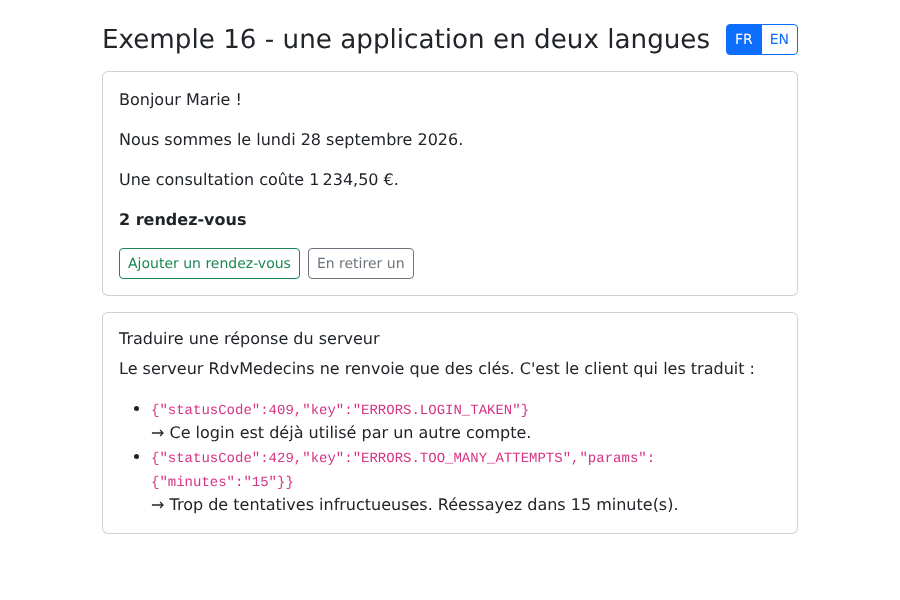
In French (French browser):
In English, after clicking “Add an appointment”: