5. Thymeleaf Views
Let’s return to the architecture of a Spring MVC application.
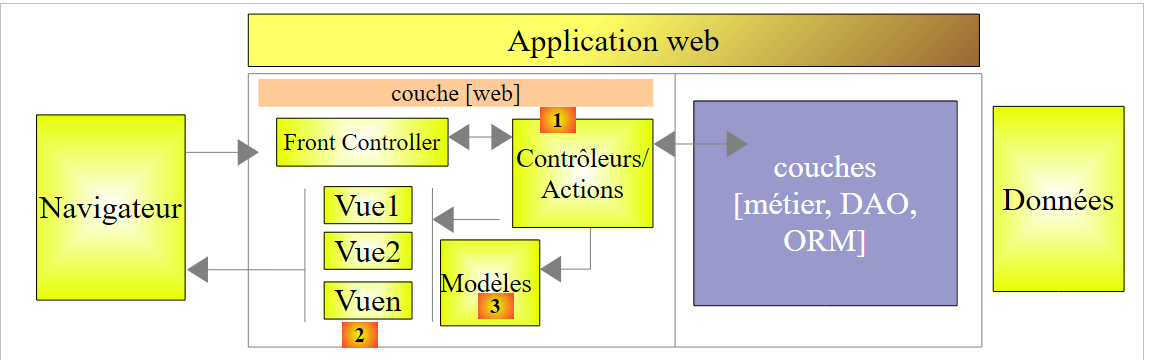 |
The previous two chapters described various aspects of the [1] block, the actions. We will now discuss:
- the [2] block of the V views;
- the [3] model (M) block displayed by these views;
Since the creation of Spring MVC, the technology used to generate the HTML pages sent to client browsers has been that of JSP (Java Server Pages). In recent years, the [Thymeleaf] and [http://www.thymeleaf.org/] technologies have also become available. It is this technology that we are now presenting.
5.1. Project STS
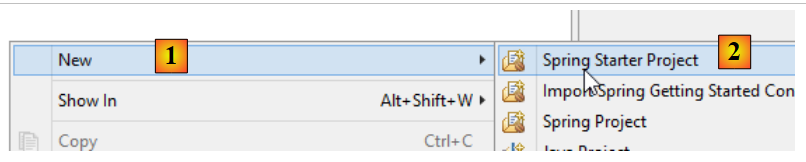
We are creating a new project:
 |
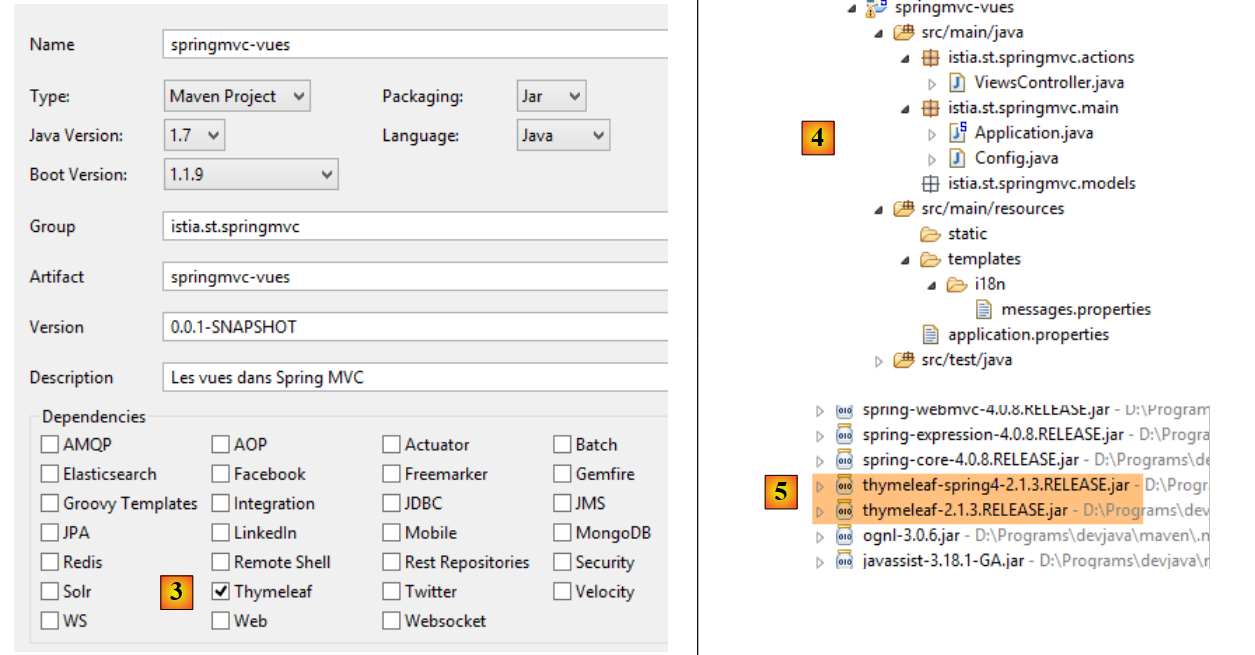 |
- In [3], specify that the project requires the dependencies from [Thymeleaf]. This will add, in addition to the [Spring MVC] dependencies from the previous project, those of the [Thymeleaf] and [5] frameworks;
Now, let’s evolve this project as follows:
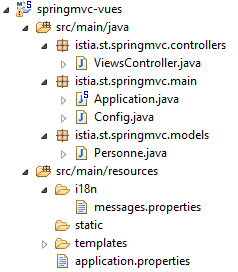 |
We’ll draw inspiration from the previous project:
- [istia.st.springmvc.controllers] will contain the controllers;
- [istia.st.springmvc.models] will contain the action and view models;
- [istia.st.springmvc.main] is the Spring Boot executable class package;
- [templates] will contain the Thymeleaf views;
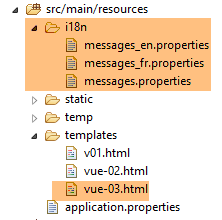
- [i18n] will contain the internationalized messages displayed by the views;
The [Application] class is as follows:
package istia.st.springmvc.main;

import org.springframework.boot.SpringApplication;

public class Application {

    public static void main(String[] args) {
        SpringApplication.run(Config.class, args);
    }
}
The [Config] class is as follows:
package istia.st.springmvc.main;

import java.util.Locale;

import org.springframework.boot.autoconfigure.EnableAutoConfiguration;
import org.springframework.context.MessageSource;
import org.springframework.context.annotation.Bean;
import org.springframework.context.annotation.ComponentScan;
import org.springframework.context.annotation.Configuration;
import org.springframework.context.support.ResourceBundleMessageSource;
import org.springframework.web.servlet.config.annotation.InterceptorRegistry;
import org.springframework.web.servlet.config.annotation.WebMvcConfigurerAdapter;
import org.springframework.web.servlet.i18n.CookieLocaleResolver;
import org.springframework.web.servlet.i18n.LocaleChangeInterceptor;

@Configuration
@ComponentScan({ "istia.st.springmvc.controllers", "istia.st.springmvc.models" })
@EnableAutoConfiguration
public class Config extends WebMvcConfigurerAdapter {
    @Bean
    public MessageSource messageSource() {
        ResourceBundleMessageSource messageSource = new ResourceBundleMessageSource();
        messageSource.setBasename("i18n/messages");
        return messageSource;
    }

    @Bean
    public LocaleChangeInterceptor localeChangeInterceptor() {
        LocaleChangeInterceptor localeChangeInterceptor = new LocaleChangeInterceptor();
        localeChangeInterceptor.setParamName("lang");
        return localeChangeInterceptor;
    }

    @Override
    public void addInterceptors(InterceptorRegistry registry) {
        registry.addInterceptor(localeChangeInterceptor());
    }

    @Bean
    public CookieLocaleResolver localeResolver() {
        CookieLocaleResolver localeResolver = new CookieLocaleResolver();
        localeResolver.setCookieName("lang");
        localeResolver.setDefaultLocale(new Locale("fr"));
        return localeResolver;
    }
}
This configuration currently enables locale management.
The [ViewController] controller is as follows:
package istia.st.springmvc.actions;

import org.springframework.stereotype.Controller;

@Controller
public class ViewsController {

}
- Line 5: The annotation [@Controller] has replaced the annotation [@RestController] because actions will no longer generate the response to the client. Instead, they will:
- construct an M model
- return a type [String], which will be the name of the view [Thymeleaf] responsible for displaying this model. It is the combination of this view V and this model M that will generate the flow HTML sent to the client;
The file [messages.properties] is currently empty.
5.2. [/v01]: The Basics of Thymeleaf
We will now examine the first action in [ViewsController]:
    // thymeleaf basics - 1
    @RequestMapping(value = "/v01", method = RequestMethod.GET)
    public String v01() {
        return "v01";
}
- line 3: the action returns a type [String]. This will be the name of the action;
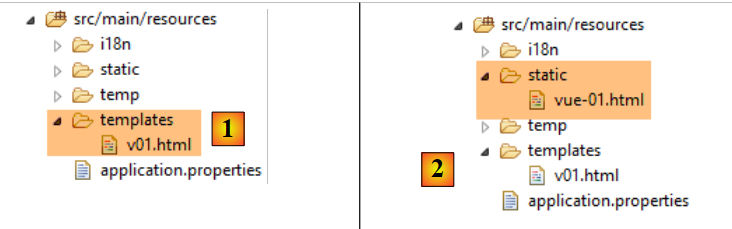
- line 4: this view will be [v01]. By default, it must be located in the [templates] folder and named [v01.html];
The view [v01.html] is as follows:
 |
<!DOCTYPE html>
<html xmlns:th="http://www.thymeleaf.org">
<head>
<title th:text="'Les vues'">Spring 4 MVC</title>
<meta http-equiv="Content-Type" content="text/html; charset=UTF-8" />
</head>
<body>
    <h2 th:text="'Les vues dans Spring MVC'">Spring 4 MVC</h2>
</body>
</html>
This is a HTML file. The presence of Thymeleaf is evident:
- in the [th] namespace on line 2;
- in the [th:text] attributes on lines 4 and 8;
This is a valid HTML file that can be viewed. We place it in the [static] [2] folder under the name [vue-01.html] and access it directly using a browser:
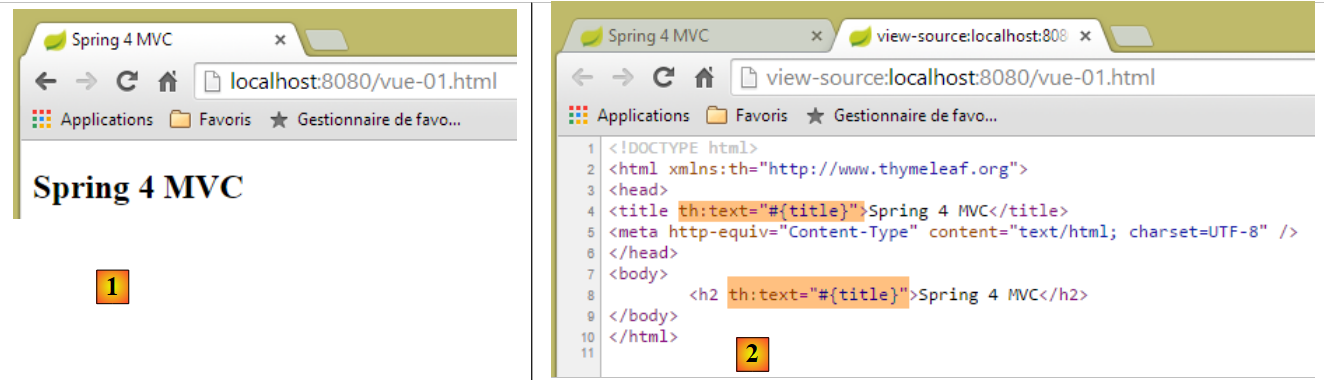 |
If we examine the source code of the page in [2], we can see that the [th:text] attributes were sent by the server and ignored by the browser. When a view is the result of an action, Thymeleaf kicks in and interprets the [th] attributes before sending the response to the client.
The HTML tag:
<title th:text="'Les vues'">Spring 4 MVC</title>
is processed as follows by Thymeleaf:
- th:text has the syntax th:text="expression" where expression is an expression to be evaluated. When this expression is a string, as in this case, it must be enclosed in single quotes;
- the value of [expression] replaces the text of the HTML tag, in this case the text of the [title] tag;
After processing, the tag above became:
<title>Les vues</title>
Let’s call the action [/v01]:
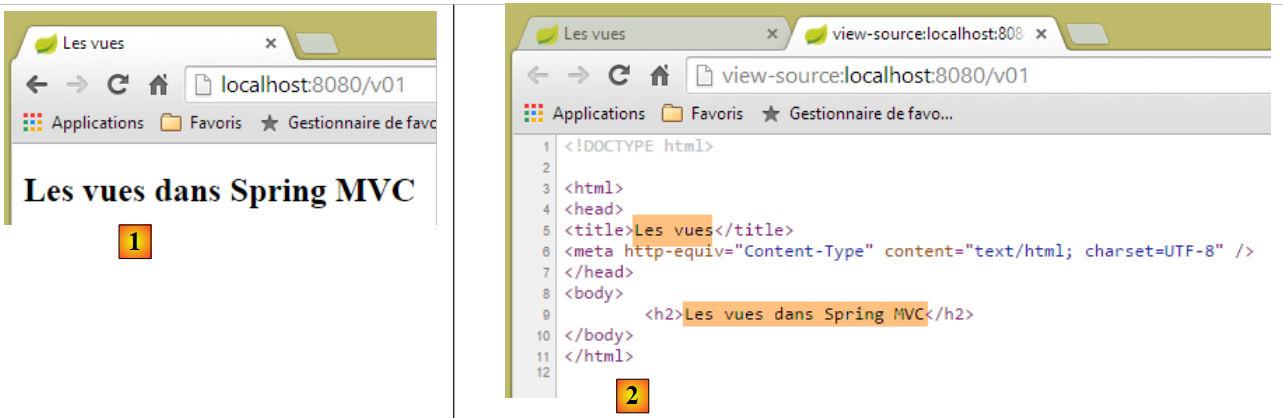 |
- In [2], we can see the replacement work done by Thymeleaf;
Now let’s request URL [http://localhost:8080/v01.html]:
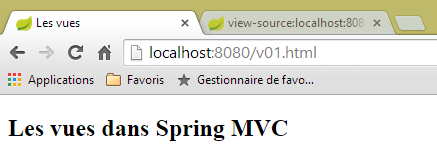 |
How should we interpret this? Was the view [templates/v01.html] served directly without going through an action? To clarify things, we create the following action [/v02]:
    // thymeleaf basics - 2
    @RequestMapping(value = "/v02", method = RequestMethod.GET)
    public String v02() {
        System.out.println("action v02");
        return "vue-02";
}
The view [vue-02.html] is a copy of [v01.html]:
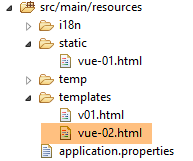 |
Now let's request URL [http://localhost:8080/vue-02.html]:
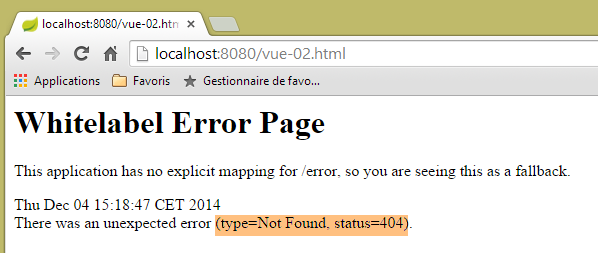 |
URL was not found. Now let's request URL and [http://localhost:8080/v02.html]
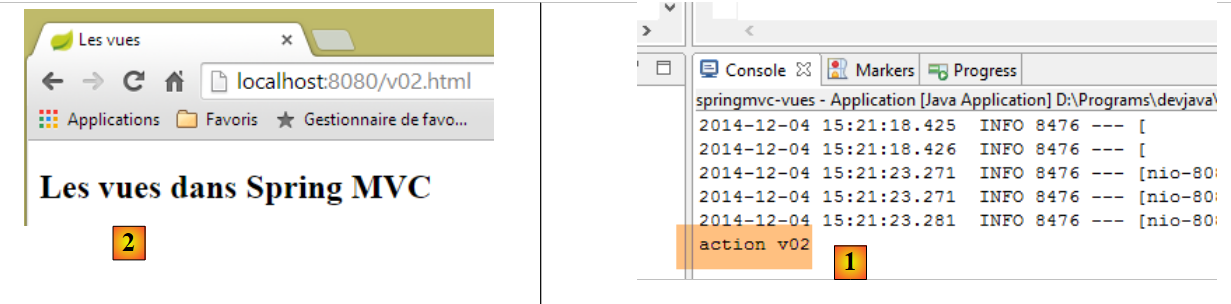 |
- In the console logs for [1], we can see that the action [/v02] was called, and this caused the view [vue-02.html] to be displayed in [2];
Now we know that URL [http://localhost:8080/v02.html] can also refer to a file named [/v02.html] in the folder [static]. What happens if this file exists? Let’s try it. We create the following [v02.html] file in the [static] folder:
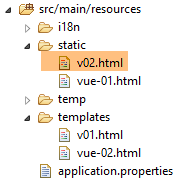 |
<!DOCTYPE html>
<html xmlns:th="http://www.thymeleaf.org">
<head>
<title>Spring 4 MVC</title>
<meta http-equiv="Content-Type" content="text/html; charset=UTF-8" />
</head>
<body>
    <h2>Spring 4 MVC</h2>
</body>
</html>
then we request URL and [http://localhost:8080/v02.html]:
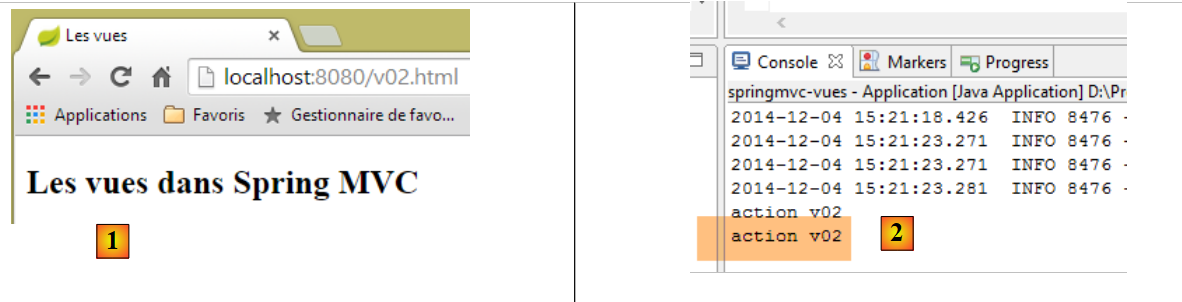 |
[1] and [2] show that the action [/v02] was called. We can therefore conclude that when the requested URL is of the form [/x.html], Spring / Thymeleaf:
- executes the [/x] action if it exists;
- serves the page [/static/x.html] if it exists;
- throws a 404 exception "Not not found" otherwise;
To avoid confusion, from now on, actions and views will not have the same names.
5.3. [/v03]: View Internationalization
The Spring/Thymeleaf integration allows Thymeleaf to use Spring message files. Consider the following new action [/v03]:
    // internationalization of views
    @RequestMapping(value = "/v03", method = RequestMethod.GET)
    public String v03() {
        return "vue-03";
}
It displays the following view [vue-03.html]:
 |
<!DOCTYPE html>
<html xmlns:th="http://www.thymeleaf.org">
<head>
<title th:text="#{title}">Spring 4 MVC</title>
<meta http-equiv="Content-Type" content="text/html; charset=UTF-8" />
</head>
<body>
    <h2 th:text="#{title}">Spring 4 MVC</h2>
</body>
</html>
On lines 4 and 8, the expression for the [th:text] attribute is #{title}, whose value is the key message [title]. We create the following files: [messages_fr.properties] and [messages_en.properties]:
[messages_fr.properties]
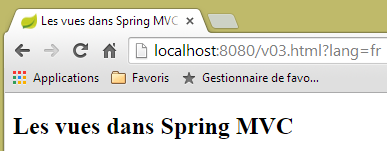
title=Les vues dans Spring MVC
[messages_en.properties]
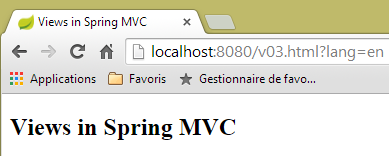
title=Views in Spring MVC
Let’s request URL, [http://localhost:8080/v03.html?lang=fr], and [http://localhost:8080/v03.html?lang=en]:
 |  |
Note that we have applied what we learned recently. Rather than naming the action [v03] as [/v03], we named it [/v03.html].
5.4. [/v04]: creating the M template for a V view
Consider the following new action [/v04]:
    // creation of the M model of a V view
    @RequestMapping(value = "/v04", method = RequestMethod.GET)
    public String v04(Model model) {
        model.addAttribute("personne", new Personne(7, "martin", 17));
        System.out.println(String.format("Modèle=%s", model));
        return "vue-04";
}
- line 4: the view model is injected into the action parameters. By default, this initial model is empty. We will see that it is possible to pre-populate it;
- Line 4: A model of type [Model] is a kind of dictionary of elements of type <String, Object>. Line 4: We add an entry to this dictionary with the key [personne] associated with a value of type [Personne];
- Line 5: We display the template on the console to see what it looks like;
- Line 6: We display the view [vue-04.html];
The [Personne] class is the one used in the previous chapter:
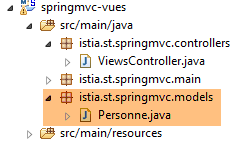 |
package istia.st.springmvc.models;

public class Personne {

    // identifier
    private Integer id;
    // name
    private String nom;
    // age
    private int age;

    // manufacturers
    public Personne() {

    }

    public Personne(String nom, int age) {
        this.nom = nom;
        this.age = age;
    }

    public Personne(Integer id, String nom, int age) {
        this(nom, age);
        this.id = id;
    }

    @Override
    public String toString() {
        return String.format("[id=%s, nom=%s,  age=%d]", id, nom, age);
    }

    // getters and setters
...
}
The view [vue-04.html] is as follows:
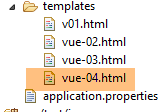 |
<!DOCTYPE html>
<html xmlns:th="http://www.thymeleaf.org">
    <head>
        <title th:text="#{title}">Spring 4 MVC</title>
        <meta http-equiv="Content-Type" content="text/html; charset=UTF-8" />
    </head>
    <body>
        <p>
            <span th:text="#{personne.nom}">Nom :</span>
            <span th:text="${personne.nom}">Bill</span>
        </p>
        <p>
            <span th:text="#{personne.age}">Age :</span>
            <span th:text="${personne.age}">56</span>
        </p>
    </body>
</html>
- On line 10, a new Thymeleaf expression type ${var} is introduced, where var is a key from the view's M model. Recall that action [/v04] added a key [personne] to the model, associated with a type Personne[id, nom, age];
- line 10: displays the name of the person in the model;
- line 14: displays their age;
The message files are modified to add the keys [personne.nom] and [personne.age] from lines 9 and 13. The result is as follows:
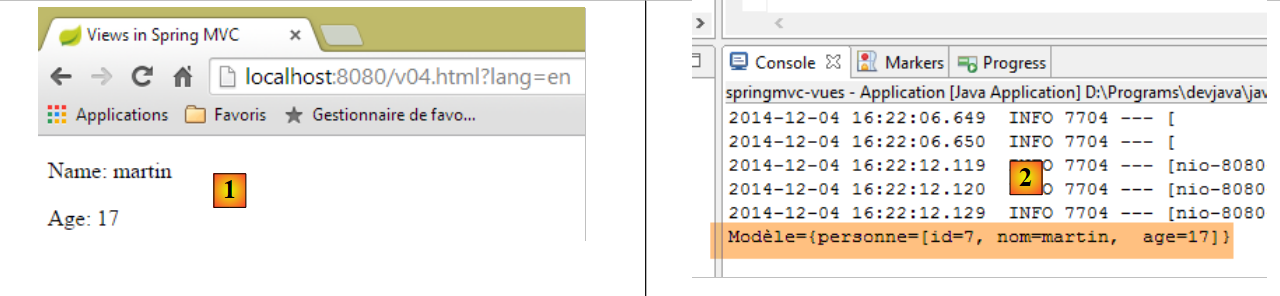 |
and the nature of template M can be found in the [2] console logs.
One might wonder why the [vue-04] view is not written as follows:
<!DOCTYPE html>
<html xmlns:th="http://www.thymeleaf.org">
    <head>
        <title th:text="#{title}"></title>
        <meta http-equiv="Content-Type" content="text/html; charset=UTF-8" />
    </head>
    <body>
        <p>
            <span th:text="#{personne.nom}" /></span>
            <span th:text="${personne.nom}"></span>
        </p>
        <p>
            <span th:text="#{personne.age}"></span>
            <span th:text="${personne.age}"></span>
        </p>
    </body>
</html>
This view is perfectly valid and will produce the same result as before. One of Thymeleaf’s goals is to ensure that a Thymeleaf page can be displayed even if it does not pass through Thymeleaf. So, let’s create two new static pages:
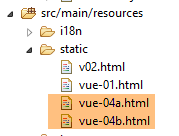 |
The view [vue-04b.html] is a copy of the view [vue-04.html]. The same applies to the view [vue-04a.html], but we have removed the static text from the page. If we view both pages, we get the following results:
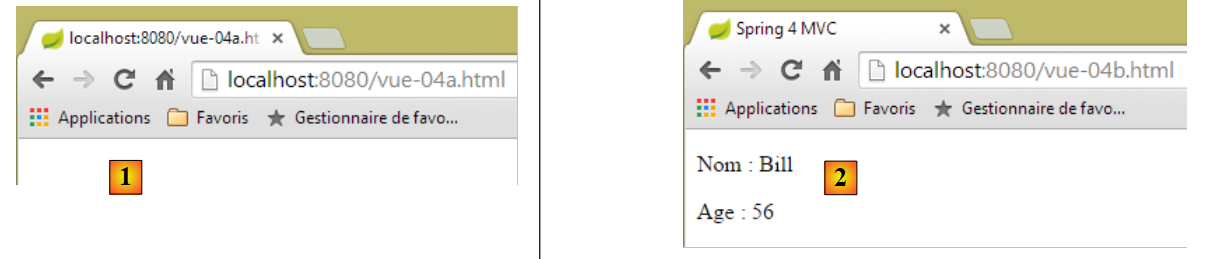 |
In the case of [1], the page structure does not appear, whereas in the case of [2], it is clearly visible. This is the benefit of placing static text in a Thymeleaf view, even though it will be replaced by other text at runtime.
Now, let’s look at a technical detail. In the [vue-04.html] view, we format the code using [ctrl-Maj-F]. We get the following result:
<!DOCTYPE html>
<html xmlns:th="http://www.thymeleaf.org">
<head>
<title th:text="#{title}">Spring 4 MVC</title>
<meta http-equiv="Content-Type" content="text/html; charset=UTF-8" />
</head>
<body>
    <p>
        <span th:text="#{personne.nom}">Nom :</span> <span
            th:text="${personne.nom}">Bill</span>
    </p>
    <p>
        <span th:text="#{personne.age}">Age :</span> <span
            th:text="${personne.age}">56</span>
    </p>
</body>
</html>
The tags are misaligned, making the code harder to read. If we rename [vue-04.html] to [vue-04.xml] and reformat the code, the tags will be aligned again. Therefore, the suffix [xml] would be more practical. It is possible to work with this suffix. To do so, we need to configure Thymeleaf. To avoid undoing what we’ve done, we duplicate the [springmvc-vues] project we’ve been working on into a new project named [springmvc-vues-xml]
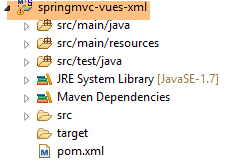 |
We modify the [pom.xml] file as follows:
    <groupId>istia.st.springmvc</groupId>
    <artifactId>springmvc-vues-xml</artifactId>
    <version>0.0.1-SNAPSHOT</version>
    <packaging>jar</packaging>

    <name>springmvc-vues-xml</name>
<description>Les vues dans Spring MVC</description>
The project name is changed on lines 2 and 6. Additionally, we change the suffix of the views in the [templates] folder:
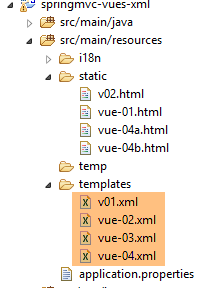 |
The [http://docs.spring.io/spring-boot/docs/current/reference/html/common-application-properties.html] document lists the Spring Boot configuration properties that can be used in the [application.properties] file:
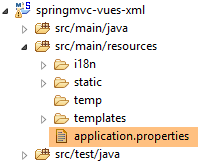 |
This document lists the properties that Spring Boot uses during autoconfiguration, which can be modified by configuring them differently in [application.properties]. For Thymeleaf, the autoconfiguration properties are as follows:
# THYMELEAF (ThymeleafAutoConfiguration)
spring.thymeleaf.check-template-location=true
spring.thymeleaf.prefix=classpath:/templates/
spring.thymeleaf.suffix=.html
spring.thymeleaf.mode=HTML5
spring.thymeleaf.encoding=UTF-8
spring.thymeleaf.content-type=text/html # ;charset=<encoding> is added
spring.thymeleaf.cache=true # set to false for hot refresh
So we could simply add the line
spring.thymeleaf.suffix=.xml
in [application.properties]. However, we will take a different approach: configuration via code. We will configure Thymeleaf in the [Config] class:
package istia.st.springmvc.main;

import java.util.Locale;

...
import org.thymeleaf.spring4.SpringTemplateEngine;
import org.thymeleaf.spring4.templateresolver.SpringResourceTemplateResolver;

@Configuration
@ComponentScan({ "istia.st.springmvc.controllers", "istia.st.springmvc.models" })
@EnableAutoConfiguration
public class Config extends WebMvcConfigurerAdapter {
    ...

    @Bean
    public SpringResourceTemplateResolver templateResolver() {
        SpringResourceTemplateResolver templateResolver = new SpringResourceTemplateResolver();
        templateResolver.setPrefix("classpath:/templates/");
        templateResolver.setSuffix(".xml");
        templateResolver.setTemplateMode("HTML5");
        templateResolver.setCharacterEncoding("UTF-8");
     templateResolver.setCacheable(true);
        return templateResolver;
    }

    @Bean
    SpringTemplateEngine templateEngine(SpringResourceTemplateResolver templateResolver) {
        SpringTemplateEngine templateEngine = new SpringTemplateEngine();
        templateEngine.setTemplateResolver(templateResolver);
        return templateEngine;
    }

}
- Lines 16–24 configure a [TemplateResolver] for Thymeleaf. This object is responsible for finding the corresponding file based on a view name provided by an action;
- Lines 18 and 19 set the prefix and suffix to be added to the view name to locate the file. Thus, if the view name is [vue04], the file sought will be [classpath:/templates/vue04.xml]. [classpath:/templates] is a Spring syntax that refers to a folder named [/templates] located at the root of the project’s classpath;
- Line 21: so that the response sent to the client includes the header HTTP:
Content-Type:text/html;charset=UTF-8
- line 20: indicates that the view complies with the HTML5 standard;
- line 22: indicates that Thymeleaf views can be cached;
- Lines 26–31: sets the view resolution engine for the Spring/Thymeleaf pair to the previous resolution engine;
Let’s run the executable for this new project and request the URL [http://localhost:8080/v04.html?lang=en]:
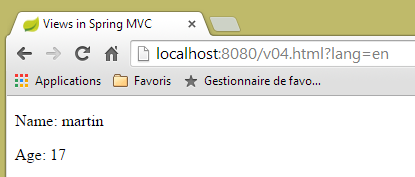 |
We note that in URL, the action [/v04] has again been replaced by [v04.html].
5.5. [/v05]: factoring an object in a Thymeleaf view
We create the following action [/v05]:
    // creation of the M model of a V - 2 view
    @RequestMapping(value = "/v05", method = RequestMethod.GET)
    public String v05(Model model) {
        model.addAttribute("personne", new Personne(7, "martin", 17));
        return "vue-05";
}
It is identical to the [/v04] action. The [vue-05.xml] view is as follows:
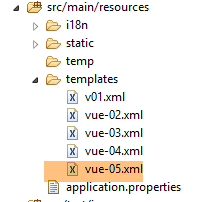 |
<!DOCTYPE html>
<html xmlns:th="http://www.thymeleaf.org">
    <head>
        <title th:text="#{title}">Spring 4 MVC</title>
        <meta http-equiv="Content-Type" content="text/html; charset=UTF-8" />
    </head>
    <body>
        <div th:object="${personne}">
            <p>
                <span th:text="#{personne.nom}">Nom :</span>
                <span th:text="*{nom}">Bill</span>
            </p>
            <p>
                <span th:text="#{personne.age}">Age :</span>
                <span th:text="*{age}">56</span>
            </p>
        </div>
    </body>
</html>
- lines 8-17: within these lines, a Thymeleaf object is defined by the attribute [th:object="${personne}"] (line 8). This object is the key object [personne] found in the template:
- line 11: the Thymeleaf expression [*{nom}] is equivalent to [${objet.nom}], where [objet] is the current Thymeleaf object. So here, the expression [*{nom}] is equivalent to [${personne.nom}];
- line 15: same;
The result:
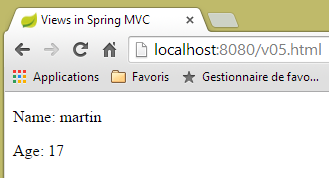 |
5.6. [/v06]: tests in a Thymeleaf view
Consider the following action [/v06]:
    // creation of the M model of a V - 3 view
    @RequestMapping(value = "/v06", method = RequestMethod.GET)
    public String v06(Model model) {
        model.addAttribute("personne", new Personne(7, "martin", 17));
        return "vue-06";
}
It is identical to the two previous actions. It displays the following view [vue-06.xml]:
<!DOCTYPE html>
<html xmlns:th="http://www.thymeleaf.org">
<head>
<title th:text="#{title}">Spring 4 MVC</title>
<meta http-equiv="Content-Type" content="text/html; charset=UTF-8" />
</head>
<body>
<div th:object="${personne}">
<p>
<span th:text="#{personne.nom}">Nom :</span>
<span th:text="*{nom}">Bill</span>
</p>
<p>
<span th:text="#{personne.age}">Age :</span>
<span th:text="*{age}">56</span>
</p>
<p th:if="*{age} >= 18" th:text="#{personne.majeure}">Vous êtes majeur</p>
<p th:if="*{age} < 18" th:text="#{personne.mineure}">Vous êtes mineur</p>
</div>
</body>
</html>
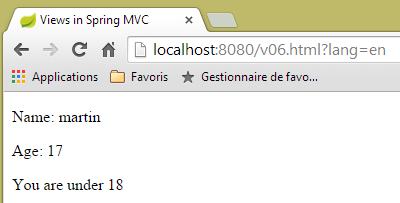
- line 17: the [th:if] attribute evaluates a Boolean expression. If this expression is true, the tag is displayed; otherwise, it is not. So here, if ${personne.age} >= 18, the text [#{personne.majeure}] will be displayed, i.e., the message with key [personne.majeure] in the message files;
- line 18: you cannot write [*{age} < 18] because the < sign is a reserved character. You must therefore use its equivalent HTML [<], also known as the entity HTML [http://en.wikipedia.org/wiki/List_of_XML_and_HTML_character_entity_references];
The message files are modified:
[messages_fr.properties]
title=Les vues dans Spring MVC
personne.nom=Nom :
personne.age=Age :
personne.mineure=Vous êtes mineur
personne.majeure=Vous êtes majeur
[messages_en.properties]
title=Views in Spring MVC
personne.nom=Name:
personne.age=Age:
personne.mineure=You are under 18
personne.majeure=You are over 18
The result is as follows:
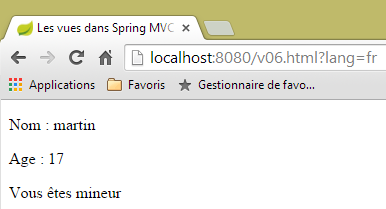 |  |
5.7. [/v07]: iteration in a Thymeleaf view
Consider the following action [/v07]:
    // creation of the M model of a V - 4 view
    @RequestMapping(value = "/v07", method = RequestMethod.GET)
    public String v07(Model model) {
        model.addAttribute("liste", new Personne[] { new Personne(7, "martin", 17), new Personne(8, "lucie", 32),
                new Personne(9, "paul", 7) });
        return "vue-07";
}
- The action creates a list of three people, places it in the model associated with the key [liste], and displays the view [vue-07];
The view [vue-07.xml] is as follows:
<!DOCTYPE html>
<html xmlns:th="http://www.thymeleaf.org">
    <head>
        <title th:text="#{title}">Spring 4 MVC</title>
        <meta http-equiv="Content-Type" content="text/html; charset=UTF-8" />
    </head>
    <body>
        <h3 th:text="#{liste.personnes}">Liste de personnes</h3>
        <ul>
            <li th:each="element : ${liste}" th:text="'['+ ${element.id} + ', ' +${element.nom}+ ', ' + ${element.age} + ']'">[id,nom,age]</li>
        </ul>
    </body>
</html>
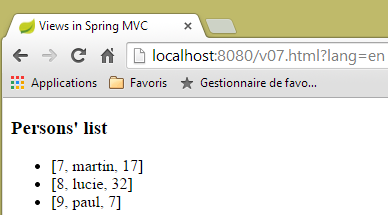
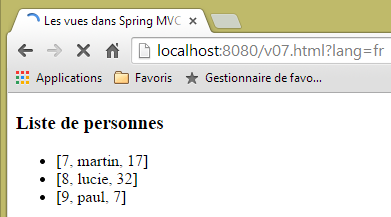
- Line 10: The [th:each] attribute repeats the tag in which it is located, in this case a <li> tag. It has two parameters here: [element : collection], where [collection] is a collection of objects, in this case a list of people. Thymeleaf will iterate through the collection and generate as many <li> tags as there are elements in the collection. For each <li> tag, [element] will represent the collection element associated with the tag. For this element, the [th:text] attribute will be evaluated. Its expression here is a string concatenation to produce the result [id, nom, age];
- line 8: the key [liste.personnes] is added to the message files;
Here is the result:
 |  |
5.8. [/v08-/v10]: @ModelAttribute
We’ll revisit something we saw when studying actions: the role of the [@ModelAttribute] annotation. We’ll add the following new action:
    // --------------- Binding and ModelAttribute ----------------------------------

    // if the parameter is an object, it is instantiated and possibly modified by the query parameters
    // it will automatically become part of the view model with the key [key]
    // for @ModelAttribute("xx") parameter, key will equal xx
    // for @ModelAttribute parameter, key will be equal to the parameter's lowercase class name
    // if @ModelAttribute is absent, then everything happens as if it were present without a key
    // note that this automatic presence in the model is not performed if the parameter is not a

    @RequestMapping(value = "/v08", method = RequestMethod.GET)
    public String v08(@ModelAttribute("someone") Personne p, Model model) {
        System.out.println(String.format("Modèle=%s", model));
        return "vue-08";
}
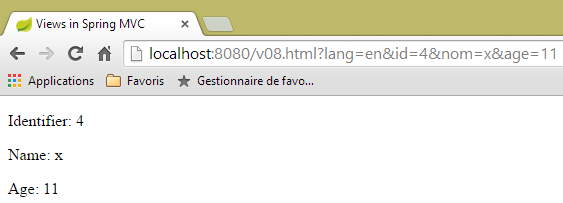
- line 11: the [@ModelAttribute("someone")] annotation will automatically add the [Personne p] object to the model, associated with the key [someone];
- line 12: to check the model;
- line 13: displays the view [vue-08.xml];
The view [vue-08.xml] is as follows:
<!DOCTYPE html>
<html xmlns:th="http://www.thymeleaf.org">
    <head>
        <title th:text="#{title}">Spring 4 MVC</title>
        <meta http-equiv="Content-Type" content="text/html; charset=UTF-8" />
    </head>
    <body>
        <div th:object="${someone}">
            <p>
                <span th:text="#{personne.id}">Id :</span>
                <span th:text="*{id}">14</span>
            </p>
            <p>
                <span th:text="#{personne.nom}">Nom :</span>
                <span th:text="*{nom}">Bill</span>
            </p>
            <p>
                <span th:text="#{personne.age}">Age :</span>
                <span th:text="*{age}">56</span>
            </p>
        </div>
    </body>
</html>
- line 8: the Thymeleaf object is initialized with the key object [someone];
The result is as follows:
 |
and in the console, we have the following log:
Modèle={someone=[id=4, nom=x, age=11], org.springframework.validation.BindingResult.someone=org.springframework.validation.BeanPropertyBindingResult: 0 errors}
Now let’s consider the following [/v09] action:
    @RequestMapping(value = "/v09", method = RequestMethod.GET)
    public String v09(Personne p, Model model) {
        System.out.println(String.format("Modèle=%s", model));
        return "vue-09";
}
- Line 1: The presence of the parameter [Personne p] will automatically place the person [p] into the model. Since no key is specified, the key used is the class name with its first character lowercase. Therefore, [Personne p] is equivalent to [@ModelAttribute("personne") Personne p];
The view for [vue.09.xml] is as follows:
<!DOCTYPE html>
<html xmlns:th="http://www.thymeleaf.org">
    <head>
        <title th:text="#{title}">Spring 4 MVC</title>
        <meta http-equiv="Content-Type" content="text/html; charset=UTF-8" />
    </head>
    <body>
        <div th:object="${personne}">
            <p>
                <span th:text="#{personne.id}">Id :</span>
                <span th:text="*{id}">14</span>
            </p>
            <p>
                <span th:text="#{personne.nom}">Nom :</span>
                <span th:text="*{nom}">Bill</span>
            </p>
            <p>
                <span th:text="#{personne.age}">Age :</span>
                <span th:text="*{age}">56</span>
            </p>
        </div>
    </body>
</html>
- Line 8: The template key used is [personne];
Here is a result:
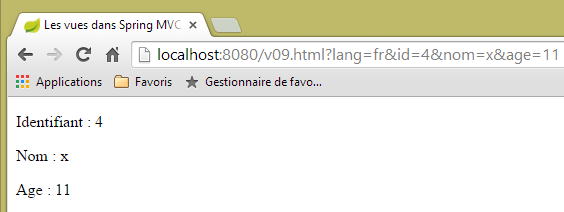 |
and the log in the server console:
Modèle={personne=[id=4, nom=x, age=11], org.springframework.validation.BindingResult.personne=org.springframework.validation.BeanPropertyBindingResult: 0 errors}
Now, let’s consider the following new [/v10] action:
    @ModelAttribute("uneAutrePersonne")
    private Personne getPersonne(){
        return new Personne(24,"pauline",55);
    }

    @RequestMapping(value = "/v10", method = RequestMethod.GET)
    public String v10(Model model) {
        System.out.println(String.format("Modèle=%s", model));
        return "vue-10";
}
- lines 1-4: define a method that creates a key element [uneAutrePersonne] in the model of each request, associated with the object [new Personne(24,"pauline",55)];
- lines 6-10: the [/v10] action does nothing except pass the model it receives to the [vue-10.xml] view. Note that the parameter [Model model] is only required for the statement on line 8. Without it, it is unnecessary;
The view [vue-10.xml] is as follows:
<!DOCTYPE html>
<html xmlns:th="http://www.thymeleaf.org">
    <head>
        <title th:text="#{title}">Spring 4 MVC</title>
        <meta http-equiv="Content-Type" content="text/html; charset=UTF-8" />
    </head>
    <body>
        <div th:object="${uneAutrePersonne}">
            <p>
                <span th:text="#{personne.id}">Id :</span>
                <span th:text="*{id}">14</span>
            </p>
            <p>
                <span th:text="#{personne.nom}">Nom :</span>
                <span th:text="*{nom}">Bill</span>
            </p>
            <p>
                <span th:text="#{personne.age}">Age :</span>
                <span th:text="*{age}">56</span>
            </p>
        </div>
    </body>
</html>
The result is as follows:
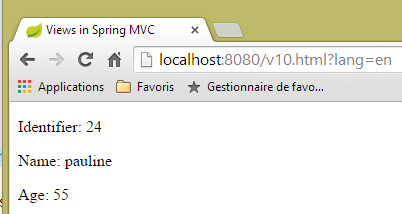 |
and the console log is as follows:
5.9. [/v11] : @SessionAttributes
We’re revisiting something we saw when studying actions: the role of the [@SessionAttributes] annotation. We’re adding the following new action, [/v11]:
    @ModelAttribute("jean")
    private Personne getJean(){
        return new Personne(33,"jean",10);
    }

    @RequestMapping(value = "/v11", method = RequestMethod.GET)
    public String v11(Model model, HttpSession session) {
        System.out.println(String.format("Modèle=%s, Session[jean]=%s", model, session.getAttribute("jean")));
        return "vue-11";
}
We have something similar to what we just studied. The difference lies in a [@SessionAttributes] annotation placed on the class itself:
@Controller
@SessionAttributes("jean")
public class ViewsController {
- line 2: we specify that the model’s key [jean] must be placed in the session;
This is why, on line 7 of the action, the session is injected. On line 8, we display the value of the session associated with the key [jean].
The view [vue-11.xml] is as follows:
<!DOCTYPE html>
<html xmlns:th="http://www.thymeleaf.org">
    <head>
        <title th:text="#{title}">Spring 4 MVC</title>
        <meta http-equiv="Content-Type" content="text/html; charset=UTF-8" />
    </head>
    <body>
        <div th:object="${jean}">
            <p>
                <span th:text="#{personne.id}">Id :</span>
                <span th:text="*{id}">14</span>
            </p>
            <p>
                <span th:text="#{personne.nom}">Nom :</span>
                <span th:text="*{nom}">Bill</span>
            </p>
            <p>
                <span th:text="#{personne.age}">Age :</span>
                <span th:text="*{age}">56</span>
            </p>
        </div>
        <hr />
        <div th:object="${session.jean}">
            <p>
                <span th:text="#{personne.id}">Id :</span>
                <span th:text="*{id}">14</span>
            </p>
            <p>
                <span th:text="#{personne.nom}">Nom :</span>
                <span th:text="*{nom}">Bill</span>
            </p>
            <p>
                <span th:text="#{personne.age}">Age :</span>
                <span th:text="*{age}">56</span>
            </p>
        </div>
    </body>
</html>
Two people are displayed:
- lines 8–21: the person with key [jean] in the template;
- lines 23–36: the person with key [jean] in the session;
The results are as follows:
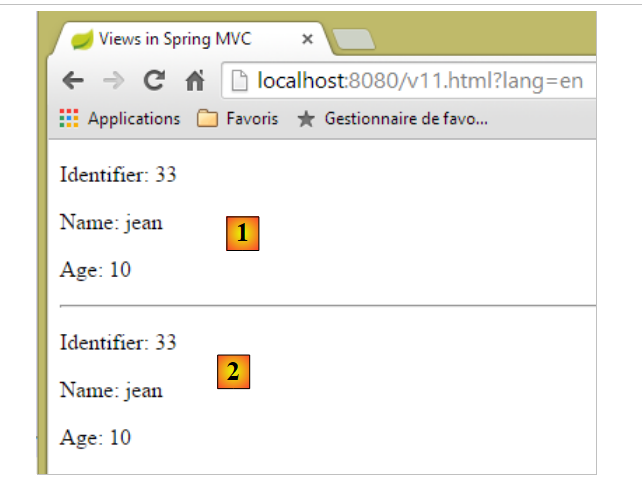 |
- in [1], the person with key [jean] in the model;
- in [2], the key person [jean] in the session;
The console log is as follows:
Modèle={uneAutrePersonne=[id=24, nom=pauline, age=55], jean=[id=33, nom=jean, age=10]}, Session[jean]=null
Above, we see that the key [jean] is not in the session received by the action. We can infer that the key [jean] was added to the session after the action was executed and before the view was displayed.
Now, let’s consider the case where a key is referenced by both [@ModelAttribute] and [@SessionAttributes]. We construct the following two actions:
    @RequestMapping(value = "/v12a", method = RequestMethod.GET)
    @ResponseBody
    public void v12a(HttpSession session) {
        session.setAttribute("paul", new Personne(51, "paul", 33));
    }

    // case where the key of [@ModelAttribute] is also a key of [@SessionAttributes]
    // in this case, the corresponding parameter is initialized with the session value
    @RequestMapping(value = "/v12b", method = RequestMethod.GET)
    public String v12b(Model model, @ModelAttribute("paul") Personne p) {
        System.out.println(String.format("Modèle=%s", model));
        return "vue-12";
}
The [/v12a] action is only used to place the ['paul',new Personne(51, "paul", 33)] element into the session. It does nothing else. The fact that it is tagged by [@ResponseBody] indicates that it is the one generating the response to the client. Since its type is [void], no response is generated.
The action [/v12b] accepts [@ModelAttribute("paul") Personne p] as a parameter. If nothing else is done, a [Personne] object is instantiated and then initialized with the request parameters, and this object has nothing to do with the [paul] key object placed in the session by the [/v12a] action. We will add the key [paul] to the session attributes of the class:
@Controller
@SessionAttributes({ "jean", "paul" })
public class ViewsController {
- line 2, there are now two session attributes;
Let’s go back to the parameters of the [/v12b] action:
public String v12b(Model model, @ModelAttribute("paul") Personne p) {
Now, the [Personne p] object will not be instantiated but will reference the [paul] key object in the session. The rest of the process remains the same. The key object [paul] will end up in the view template that will be displayed. This is what we want to see on line 11 of the [/v12b] action.
The view [vue-12.xml] will be as follows:
<!DOCTYPE html>
<html xmlns:th="http://www.thymeleaf.org">
    <head>
        <title th:text="#{title}">Spring 4 MVC</title>
        <meta http-equiv="Content-Type" content="text/html; charset=UTF-8" />
    </head>
    <body>
        <div th:object="${paul}">
            <p>
                <span th:text="#{personne.id}">Id :</span>
                <span th:text="*{id}">14</span>
            </p>
            <p>
                <span th:text="#{personne.nom}">Nom :</span>
                <span th:text="*{nom}">Bill</span>
            </p>
            <p>
                <span th:text="#{personne.age}">Age :</span>
                <span th:text="*{age}">56</span>
            </p>
        </div>
    </body>
</html>
- line 8: references the key [paul] from the view template;
This produces the following result (after executing the [/v12a] action, which places the key [paul] in the session):
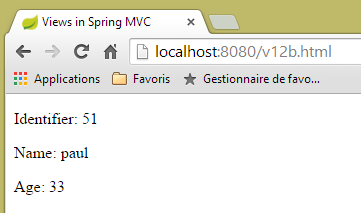 |
The console log is as follows:
Modèle={jean=[id=33, nom=jean, age=10], uneAutrePersonne=[id=24, nom=pauline, age=55], paul=[id=51, nom=paul, age=33], org.springframework.validation.BindingResult.paul=org.springframework.validation.BeanPropertyBindingResult: 0 errors}
The key [paul] has been successfully added to the model with the value associated with the key [paul] in the session.
5.10. [/v13]: Generate an input form
We will now discuss form input and validation. We will build an initial form using the following action [/v13]:
  // generates a form for entering a person
  @RequestMapping(value = "/v13", method = RequestMethod.GET)
  public String v13() {
    return "vue-13";
}
which simply displays the following [vue-13.xml] view:
<!DOCTYPE html>
<html xmlns:th="http://www.thymeleaf.org">
    <head>
        <title th:text="#{title}">Spring 4 MVC</title>
        <meta http-equiv="Content-Type" content="text/html; charset=UTF-8" />
    </head>
    <body>
        <form action="/someURL" th:action="@{/v14.html}" method="post">
            <h2 th:text="#{personne.formulaire.titre}">Entrez les informations suivantes</h2>
            <div th:object="${personne}">
                <table>
                    <thead></thead>
                    <tbody>
                        <tr>
                            <td th:text="#{personne.id}">Id :</td>
                            <td>
                                <input type="text" name="id" value="11" th:value="''" />
                            </td>
                        </tr>
                        <tr>
                            <td th:text="#{personne.nom}">Nom :</td>
                            <td>
                                <input type="text" name="nom" value="Tintin" th:value="''" />
                            </td>
                        </tr>
                        <tr>
                            <td th:text="#{personne.age}">Age :</td>
                            <td>
                                <input type="text" name="age" value="17" th:value="''" />
                            </td>
                        </tr>
                    </tbody>
                </table>
            </div>
            <input type="submit" value="Valider" th:value="#{personne.formulaire.valider}" />
        </form>
    </body>
</html>
If we place this view in the [static] folder under the name [vue-13.html] and request URL [http://localhost:8080/vue-13.html], we get the following page:
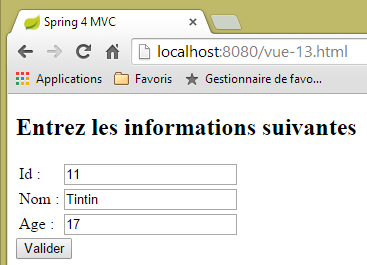 |
- On line 8 of the form, we find the <form> tag with the attribute [th:action]. This attribute will be evaluated by Thymeleaf, and its value will replace the current value of the [action] attribute, which is therefore only there for decorative purposes. Here, the value of the [th:action] attribute will be [/v14.html];
- lines 17, 23, and 29, the value of the [th:value] attribute will replace that of the [value] attribute. Here, this value will be the empty string;
When we request URL [/v13.html], we get the following result:
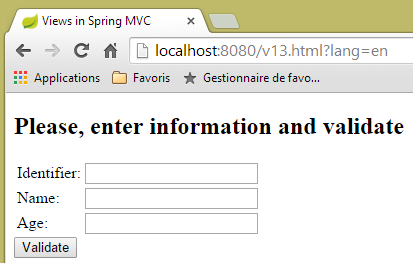 |
Let’s look at the source code generated by Thymeleaf:
<!DOCTYPE html>

<html>
    <head>
        <title>Views in Spring MVC</title>
        <meta http-equiv="Content-Type" content="text/html; charset=UTF-8" />
    </head>
    <body>
        <form action="/v14.html" method="post">
            <h2>Please, enter information and validate</h2>
            <div>
                <table>
                    <thead></thead>
                    <tbody>
                        <tr>
                            <td>Identifier:</td>
                            <td>
                                <input type="text" name="id" value="" />
                            </td>
                        </tr>
                        <tr>
                            <td>Name:</td>
                            <td>
                                <input type="text" name="nom" value="" />
                            </td>
                        </tr>
                        <tr>
                            <td>Age:</td>
                            <td>
                                <input type="text" name="age" value="" />
                            </td>
                        </tr>
                    </tbody>
                </table>
            </div>
            <input type="submit" value="Validate" />
        </form>
    </body>
</html>
Lines 9, 18, 24, and 30 show Thymeleaf evaluating the attributes [th:action] and [th:value].
5.11. [/v14]: Handle values posted by a form
The [/v14] action is the action that receives the posted values. It is as follows:
  // processes form values
  @RequestMapping(value = "/v14", method = RequestMethod.POST)
  public String v14(Personne p) {
    return "vue-14";
}
- Line 3: The posted values are encapsulated in a [Personne p] object. We know that this object automatically becomes part of the M model for the V view that will be displayed by the action, associated with the key [personne];
- Line 4: The view displayed is the [vue-14.xml] view;
The [vue-14.xml] view is as follows:
<!DOCTYPE html>
<html xmlns:th="http://www.thymeleaf.org">
    <head>
        <title th:text="#{title}">Spring 4 MVC</title>
        <meta http-equiv="Content-Type" content="text/html; charset=UTF-8" />
    </head>
    <body>
    <h2 th:text="#{personne.formulaire.saisies}">Voici vos saisies</h2>
        <div th:object="${personne}">
            <p>
                <span th:text="#{personne.id}">Id :</span>
                <span th:text="*{id}">14</span>
            </p>
            <p>
                <span th:text="#{personne.nom}">Nom :</span>
                <span th:text="*{nom}">Bill</span>
            </p>
            <p>
                <span th:text="#{personne.age}">Age :</span>
                <span th:text="*{age}">56</span>
            </p>
        </div>
    </body>
</html>
- line 9: retrieve the object associated with the key [personne] from the model;
- lines 12, 16, and 20: we display the characteristics of this object;
This produces the following result:
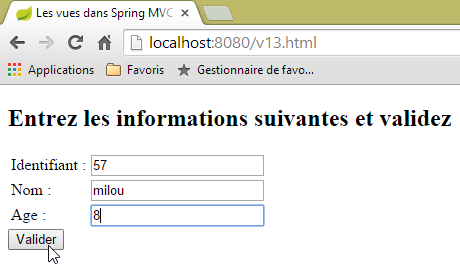 | 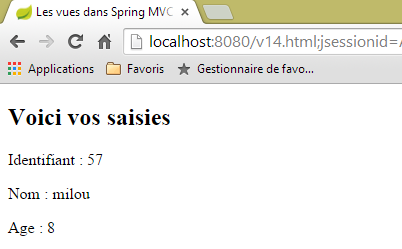 |
5.12. [/v15-/v16]: validating a template
Using the previous example, let’s look at the following sequence:
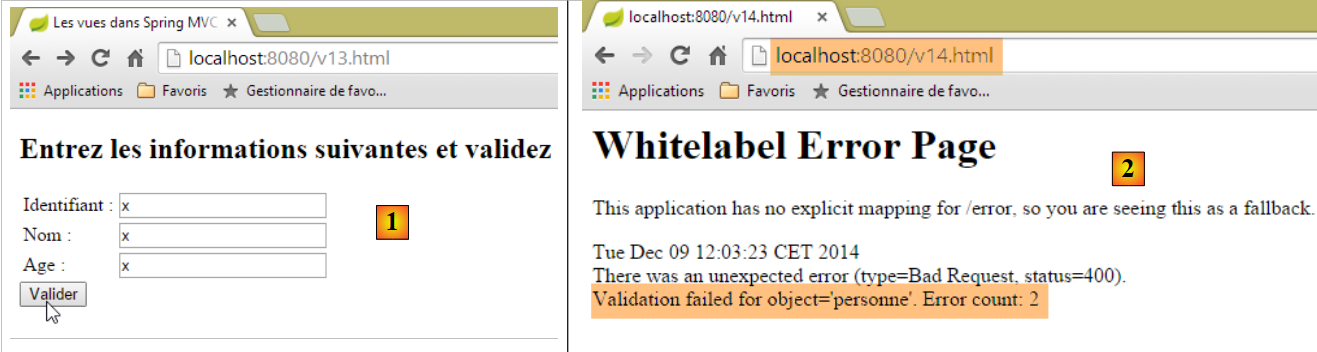 |
- In [1], we enter incorrect values for the fields [id] and [age] of type [int];
- In [2], the server response indicates that there were two errors;
We will use the same form, but in the event of validation errors, we will redirect to a page listing these errors so that the user can correct them.
The [/v15] action is as follows:
    // ---------------------- form display
    @RequestMapping(value = "/v15", method = RequestMethod.GET)
    public String v15(SecuredPerson p) {
        return "vue-15";
}
It receives the following [SecuredPerson] type as a parameter:
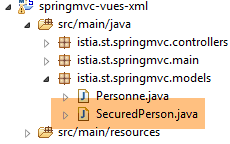 |
package istia.st.springmvc.models;

import javax.validation.constraints.NotNull;

import org.hibernate.validator.constraints.Length;
import org.hibernate.validator.constraints.Range;

public class SecuredPerson {

    @Range(min = 1)
    private int id;

    @Length(min = 4, max = 10)
    private String nom;

    @Range(min = 8, max = 14)
    private int age;

    // manufacturers
    public SecuredPerson() {

    }

    public SecuredPerson(int id, String nom, int age) {
        this.id=id;
        this.nom = nom;
        this.age = age;
    }

    // getters and setters
...
}
The fields in [id, nom, age] have been annotated with validation constraints. The view [vue-15.xml] displayed by the action [/v15] is as follows:
<!DOCTYPE html>
<html xmlns:th="http://www.thymeleaf.org">
    <head>
        <title th:text="#{title}">Spring 4 MVC</title>
        <meta http-equiv="Content-Type" content="text/html; charset=UTF-8" />
    </head>
    <body>
        <form action="/someURL" th:action="@{/v16.html}" method="post">
            <h2 th:text="#{personne.formulaire.titre}">Entrez les informations suivantes</h2>
            <div th:object="${securedPerson}">
                <table>
                    <thead></thead>
                    <tbody>
                        <tr>
                            <td th:text="#{personne.id}">Id :</td>
                            <td>
                                <input type="text" name="id" value="11" th:value="*{id}" />
                            </td>
                            <td>
                                <span th:if="${#fields.hasErrors('id')}" th:errors="*{id}" style="color: red">Identifiant erroné</span>
                            </td>
                        </tr>
                        <tr>
                            <td th:text="#{personne.nom}">Nom :</td>
                            <td>
                                <input type="text" name="nom" value="Tintin" th:value="*{nom}" />
                            </td>
                            <td>
                                <span th:if="${#fields.hasErrors('nom')}" th:errors="*{nom}" style="color: red">Nom erroné</span>
                            </td>
                        </tr>
                        <tr>
                            <td th:text="#{personne.age}">Age :</td>
                            <td>
                                <input type="text" name="age" value="17" th:value="*{age}" />
                            </td>
                            <td>
                                <span th:if="${#fields.hasErrors('age')}" th:errors="*{age}" style="color: red">Âge erroné</span>
                            </td>
                        </tr>
                    </tbody>
                </table>
                <input type="submit" value="Valider" th:value="#{personne.formulaire.valider}" />
                <ul>
                    <li th:each="err : ${#fields.errors('*')}" th:text="${err}" style="color: red" />
                </ul>
            </div>
        </form>
    </body>
</html>
- lines 10-47: the page template object associated with the key [securedPerson] is retrieved. After GET, we have an object with its instantiation value [id=0, nom=null, age=0];
- line 17: the value of the [securedPerson.id] field;
- line 20: the expression [${#fields.hasErrors('id')}] determines whether there were validation errors on the field [securedPerson.id]. If so, the attribute [th:errors="*{id}"] displays the associated error message;
- this scenario is repeated on line 29 for the [nom] field and line 38 for the [age] field;
- line 45: the expression [${#fields.errors('*')}] refers to all errors in the fields of the [securedPerson] object. Thus, it is the set of these errors that will be displayed by lines 44–46;
- line 16: we see that the form values will be posted to the [/v16] action. This is as follows:
    // -------------------- model validation------------------
    @RequestMapping(value = "/v16", method = RequestMethod.POST)
    public String v16(@Valid SecuredPerson p, BindingResult result) {
        // mistakes?
        if (result.hasErrors()) {
            return "vue-15";
        } else {
            return "vue-16";
        }
}
- Line 3: The annotation [@Valid SecuredPerson p] enforces validation of posted values;
- line 5: checks whether the action template is invalid or not;
- line 6: if it is incorrect, the [vue-15.xml] form is returned. Since this form displays error messages, we will see those;
- line 8: if the action template is validated, then the following [vue-16.xml] view is displayed:
<!DOCTYPE html>
<html xmlns:th="http://www.thymeleaf.org">
    <head>
        <title th:text="#{title}">Spring 4 MVC</title>
        <meta http-equiv="Content-Type" content="text/html; charset=UTF-8" />
    </head>
    <body>
    <h2 th:text="#{personne.formulaire.saisies}">Voici vos saisies</h2>
        <div th:object="${securedPerson}">
            <p>
                <span th:text="#{personne.id}">Id :</span>
                <span th:text="*{id}">14</span>
            </p>
            <p>
                <span th:text="#{personne.nom}">Nom :</span>
                <span th:text="*{nom}">Bill</span>
            </p>
            <p>
                <span th:text="#{personne.age}">Age :</span>
                <span th:text="*{age}">56</span>
            </p>
        </div>
    </body>
</html>
Here are some examples of execution:
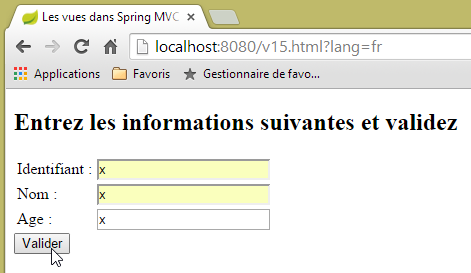 | 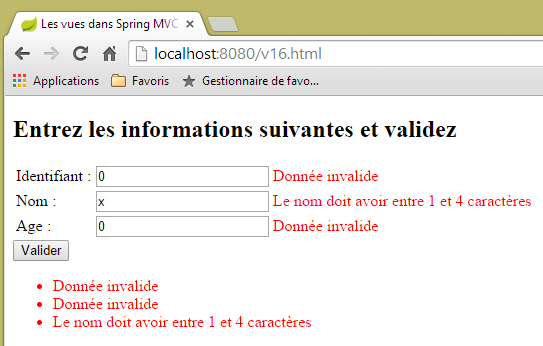 |
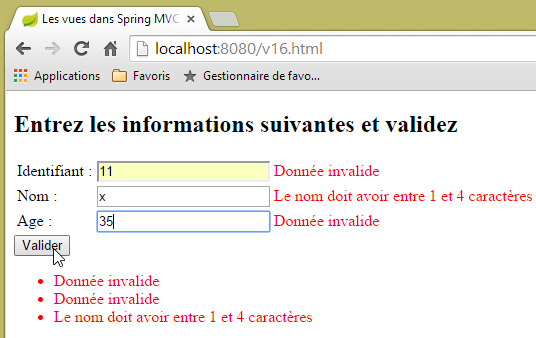 | 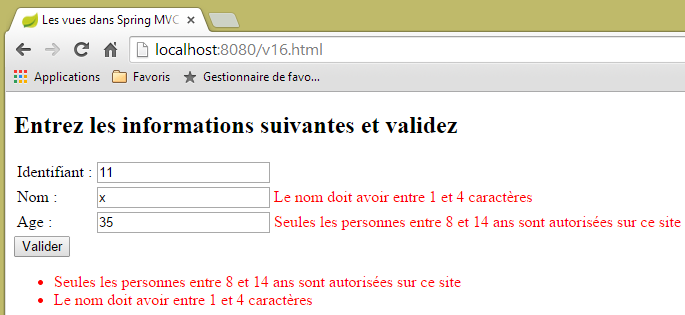 |
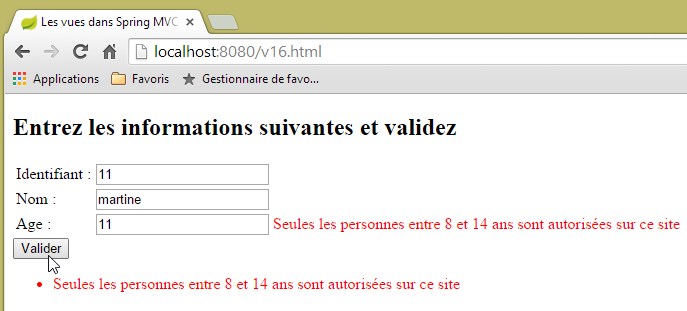 |
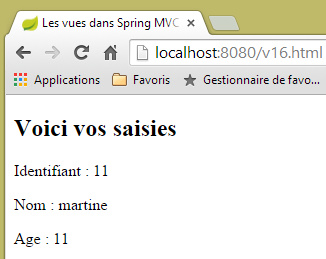 |
5.13. [/v17-/v18]: Checking error messages
When the [/v15] action is requested for the first time, the following result is obtained:
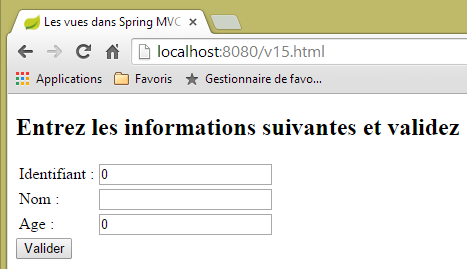 |
You might want an empty form instead of zeros in the fields [Identifiant, Age]. To achieve this, we modify the action model as follows:
package istia.st.springmvc.models;

import javax.validation.constraints.Digits;

import org.hibernate.validator.constraints.Length;
import org.hibernate.validator.constraints.Range;

public class StringSecuredPerson {

    @Range(min = 1)
    @Digits(fraction = 0, integer = 4)
    private String id;

    @Length(min = 4, max = 10)
    private String nom;

    @Range(min = 8, max = 14)
    @Digits(fraction = 0, integer = 2)
    private String age;

    // manufacturers
    public StringSecuredPerson() {

    }

    public StringSecuredPerson(String id, String nom, String age) {
        this.id = id;
        this.nom = nom;
        this.age = age;
    }

    // getters and setters
...

}
- lines 12 and 19: the fields [id] and [age] are converted to type [String];
- line 11: it is specified that the field [id] must be a number of at most four digits, with no decimals;
- line 18: same applies to the field [age], which must be an integer of no more than two digits;
Action [/v17] becomes as follows:
    // ---------------------- form display
    @RequestMapping(value = "/v17", method = RequestMethod.GET)
    public String v17(StringSecuredPerson p) {
        return "vue-17";
}
The view [vue-17.xml] displayed by the action [/v17] is as follows:
<!DOCTYPE html>
<html xmlns:th="http://www.thymeleaf.org">
    <head>
        <title th:text="#{title}">Spring 4 MVC</title>
        <meta http-equiv="Content-Type" content="text/html; charset=UTF-8" />
    </head>
    <body>
        <form action="/someURL" th:action="@{/v18.html}" method="post">
            <h2 th:text="#{personne.formulaire.titre}">Entrez les informations suivantes</h2>
            <div th:object="${stringSecuredPerson}">
                <table>
                    <thead></thead>
                    <tbody>
                        <tr>
                            <td th:text="#{personne.id}">Id :</td>
                            <td>
                                <input type="text" name="id" value="11" th:value="*{id}" />
                            </td>
                            <td>
                                <span th:each="err,status : ${#fields.errors('id')}" th:if="${status.index}==0" th:text="${err}" style="color: red">
                                    Identifiant erroné
                                </span>
                            </td>
                        </tr>
                        <tr>
                            <td th:text="#{personne.nom}">Nom :</td>
                            <td>
                                <input type="text" name="nom" value="Tintin" th:value="*{nom}" />
                            </td>
                            <td>
                                <span th:if="${#fields.hasErrors('nom')}" th:errors="*{nom}" style="color: red">Nom erroné</span>
                            </td>
                        </tr>
                        <tr>
                            <td th:text="#{personne.age}">Age :</td>
                            <td>
                                <input type="text" name="age" value="17" th:value="*{age}" />
                            </td>
                            <td>
                                <span th:if="${#fields.hasErrors('age')}" th:errors="*{age}" style="color: red">Âge erroné</span>
                            </td>
                        </tr>
                    </tbody>
                </table>
                <input type="submit" value="Valider" th:value="#{personne.formulaire.valider}" />
                <ul>
                    <li th:each="err : ${#fields.errors('*')}" th:text="${err}" style="color: red" />
                </ul>
            </div>
        </form>
    </body>
</html>
The changes are made in the following lines:
- line 10: we now work with the key model object [stringSecuredPerson];
- line 20: we iterate through the list of errors in the [id] field. In the [th:each="err,status : ${#fields.errors('id')}"] syntax, it is the [err] variable that iterates through the list. The variable [status] provides information about each iteration. It is a [index, count, size, current] object where:
- index: is the number of the current element,
- current: the value of this current element,
- count, size: the size of the list being traversed;
- line 20: only the first element of the [th:if="${status.index}==0"] list is displayed;
The [/v18] action that processes the POST from the [/v17] action is as follows:
    // -------------------- model validation------------------
    @RequestMapping(value = "/v18", method = RequestMethod.POST)
    public String v18(@Valid StringSecuredPerson p, BindingResult result) {
        // mistakes?
        if (result.hasErrors()) {
            return "vue-17";
        } else {
            return "vue-18";
        }
}
The message files change as follows:
[messages_fr.properties]
title=Les vues dans Spring MVC
personne.nom=Nom :
personne.age=Age :
personne.id=Identifiant :
personne.mineure=Vous êtes mineur
personne.majeure=Vous êtes majeur
liste.personnes=Liste de personnes
personne.formulaire.titre=Entrez les informations suivantes et validez
personne.formulaire.valider=Valider
personne.formulaire.saisies=Voici vos saisies
notNull=La donnée est obligatoire
Range.securedPerson.id=L''identifiant doit être un nombre entier >=1
Range.securedPerson.age=Seules les personnes entre 8 et 14 ans sont autorisées sur ce site
Length.securedPerson.nom=Le nom doit avoir entre 1 et 4 caractères
typeMismatch=Donnée invalide
Range.stringSecuredPerson.id=L''identifiant doit être un nombre entier >=1
Range.stringSecuredPerson.age=Seules les personnes entre 8 et 14 ans sont autorisées sur ce site
Length.stringSecuredPerson.nom=Le nom doit avoir entre 1 et 4 caractères
Digits.stringSecuredPerson.id=Tapez un nombre entier de 4 chiffres au plus
Digits.stringSecuredPerson.age=Tapez un nombre entier de 2 chiffres au plus
[messages_en.properties]
title=Views in Spring MVC
personne.nom=Name:
personne.age=Age:
personne.id=Identifier:
personne.mineure=You are under 18
personne.majeure=You are over 18
liste.personnes=Persons' list
personne.formulaire.titre=Please, enter information and validate
personne.formulaire.valider=Validate
personne.formulaire.saisies=Here are your inputs
NotNull=Data is required
Range.securedPerson.id=Identifier must be an integer >=1
Range.securedPerson.age=Only kids who are 8 to 14 years old are allowed on this site
Length.securedPerson.nom=Name must be 4 to 10 characters long
typeMismatch=Invalid format
Range.stringSecuredPerson.id=Identifier must be an integer >=1
Range.stringSecuredPerson.age=Only kids who are 8 to 14 years old are allowed on this site
Length.stringSecuredPerson.nom=Name must be 4 to 10 characters long
Digits.stringSecuredPerson.id=Should be an integer with at most four digits
Digits.stringSecuredPerson.age=Should be an integer with at most two digits
Let’s look at a few examples:
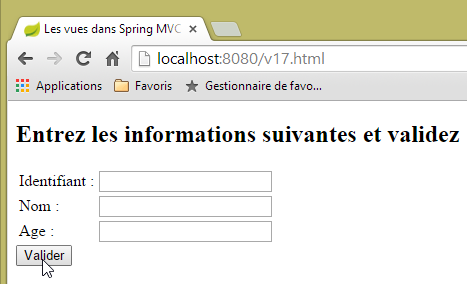 |
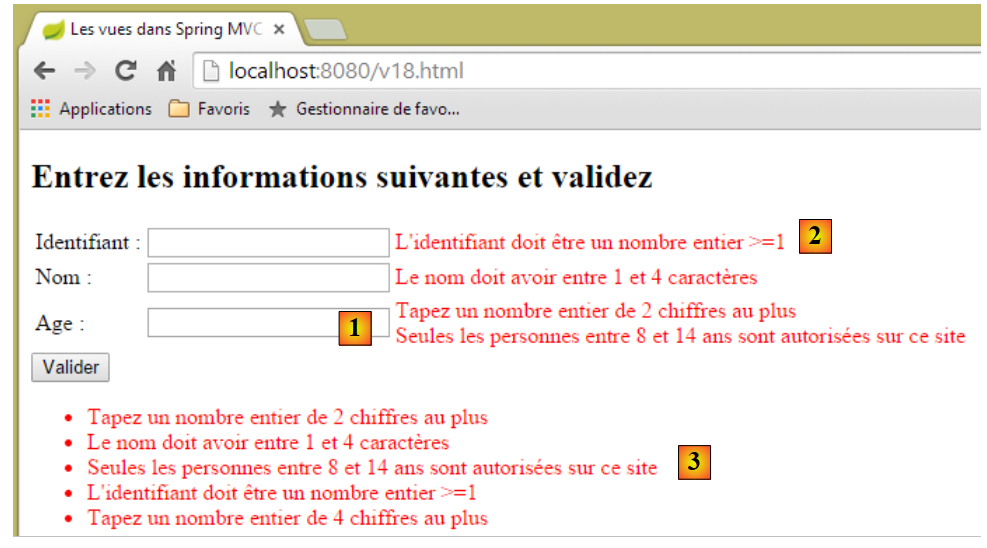 |
In [1], we can see that both validators for the [age] field have been executed:
    @Range(min = 8, max = 14)
    @Digits(fraction = 0, integer = 2)
    private String age;
Is there a specific order for the error messages? For the [age] field, it appears that the validators ran in the order of [Digits, Range]. However, if we make multiple requests, we can see that this order may change. Therefore, we cannot rely on the order of the validators. In [2], only one of the two messages from the [id] field is displayed. In [3], all error messages are displayed.
5.14. [/v19-/v20]: Using Different Validators
Consider the following new action model:
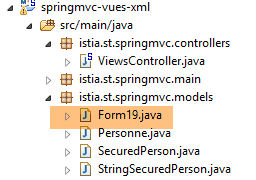 |
package istia.st.springmvc.models;

import java.util.Date;

import javax.validation.constraints.AssertFalse;
import javax.validation.constraints.AssertTrue;
import javax.validation.constraints.Future;
import javax.validation.constraints.Max;
import javax.validation.constraints.Min;
import javax.validation.constraints.NotNull;
import javax.validation.constraints.Past;
import javax.validation.constraints.Pattern;
import javax.validation.constraints.Size;

import org.hibernate.validator.constraints.Email;
import org.hibernate.validator.constraints.Length;
import org.hibernate.validator.constraints.NotBlank;
import org.hibernate.validator.constraints.NotEmpty;
import org.hibernate.validator.constraints.Range;
import org.hibernate.validator.constraints.URL;
import org.springframework.format.annotation.DateTimeFormat;

public class Form19 {

    @NotNull
    @AssertFalse
    private Boolean assertFalse;

    @NotNull
    @AssertTrue
    private Boolean assertTrue;

    @NotNull
    @Future
    @DateTimeFormat(pattern = "yyyy-MM-dd")
    private Date dateInFuture;

    @NotNull
    @Past
    @DateTimeFormat(pattern = "yyyy-MM-dd")
    private Date dateInPast;

    @NotNull
    @Max(value = 100)
    private Integer intMax100;

    @NotNull
    @Min(value = 10)
    private Integer intMin10;

    @NotNull
    @NotEmpty
    private String strNotEmpty;

    @NotNull
    @NotBlank
    private String strNotBlank;

    @NotNull
    @Size(min = 4, max = 6)
    private String strBetween4and6;

    @NotNull
    @Pattern(regexp = "^\\d{2}:\\d{2}:\\d{2}$")
    private String hhmmss;

    @NotNull
    @Email
    @NotBlank
    private String email;

    @NotNull
    @Length(max = 4, min = 4)
    private String str4;

    @Range(min = 10, max = 14)
    @NotNull
    private Integer int1014;

    @URL
    @NotBlank
    private String url;

    // getters and setters
...
}
It will be displayed by the following [/v19] action:
    // ------------------ form display
    @RequestMapping(value = "/v19", method = RequestMethod.GET, produces = "text/html; charset=UTF-8")
    public String v19(Form19 formulaire) {
        return "vue-19";
}
- line 3: the action receives a [Form19 formulaire] object as a parameter. If GET does not receive any parameters, this object will be initialized with Java's default values;
- line 4: the [vue-19.xml] view is displayed. It is as follows:
<!DOCTYPE HTML>
<html xmlns:th="http://www.thymeleaf.org">
    <head>
        <title>Spring 4 MVC</title>
        <meta http-equiv="Content-Type" content="text/html; charset=UTF-8" />
        <link rel="stylesheet" href="/css/form19.css" />
    </head>
    <body>
        <h3>Formulaire - Validations côté serveur</h3>
        <form action="/someURL" th:action="@{/v20.html}" method="post" th:object="${form19}">
            <table>
                <thead>
                    <tr>
                        <th class="col1">Contrainte</th>
                        <th class="col2">Saisie</th>
                        <th class="col3">Erreur</th>
                    </tr>
                </thead>
                <tbody>
                    <tr>
                        <td class="col1">@NotEmpty</td>
                        <td class="col2">
                            <input type="text" th:field="*{strNotEmpty}" />
                        </td>
                        <td class="col3">
                            <span th:if="${#fields.hasErrors('strNotEmpty')}" th:errors="*{strNotEmpty}" class="error">Donnée erronée</span>
                        </td>
                    </tr>
                    <tr>
                        <td class="col1">@NotBlank</td>
                        <td class="col2">
                            <input type="text" th:field="*{strNotBlank}" />
                        </td>
                        <td class="col3">
                            <span th:if="${#fields.hasErrors('strNotBlank')}" th:errors="*{strNotBlank}" class="error">Donnée erronée</span>
                        </td>
                    </tr>
                    <tr>
                        <td class="col1">@assertFalse</td>
                        <td class="col2">
                            <input type="radio" th:field="*{assertFalse}" value="true" />
                            <label th:for="${#ids.prev('assertFalse')}">True</label>
                            <input type="radio" th:field="*{assertFalse}" value="false" />
                            <label th:for="${#ids.prev('assertFalse')}">False</label>
                        </td>
                        <td class="col3">
                            <span th:if="${#fields.hasErrors('assertFalse')}" th:errors="*{assertFalse}" class="error">Donnée erronée</span>
                        </td>
                    </tr>
                    <tr>
                        <td class="col1">@assertTrue</td>
                        <td class="col2">
                            <select th:field="*{assertTrue}">
                                <option value="true">True</option>
                                <option value="false">False</option>
                            </select>
                        </td>
                        <td class="col3">
                            <span th:if="${#fields.hasErrors('assertTrue')}" th:errors="*{assertTrue}" class="error">Donnée erronée</span>
                        </td>
                    </tr>
                    <tr>
                        <td class="col1">@Past</td>
                        <td class="col2">
                            <input type="date" th:field="*{dateInPast}" th:value="*{dateInPast}" />
                        </td>
                        <td class="col3">
                            <span th:if="${#fields.hasErrors('dateInPast')}" th:errors="*{dateInPast}" class="error">Donnée erronée</span>
                        </td>
                    </tr>
                    <tr>
                        <td class="col1">@Future</td>
                        <td class="col2">
                            <input type="date" th:field="*{dateInFuture}" th:value="*{dateInFuture}" />
                        </td>
                        <td class="col3">
                            <span th:if="${#fields.hasErrors('dateInFuture')}" th:errors="*{dateInFuture}" class="error">Donnée erronée</span>
                        </td>
                    </tr>
                    <tr>
                        <td class="col1">@Max</td>
                        <td class="col2">
                            <input type="text" th:field="*{intMax100}" th:value="*{intMax100}" />
                        </td>
                        <td class="col3">
                            <span th:if="${#fields.hasErrors('intMax100')}" th:errors="*{intMax100}" class="error">Donnée erronée</span>
                        </td>
                    </tr>
                    <tr>
                        <td class="col1">@Min</td>
                        <td class="col2">
                            <input type="text" th:field="*{intMin10}" th:value="*{intMin10}" />
                        </td>
                        <td class="col3">
                            <span th:if="${#fields.hasErrors('intMin10')}" th:errors="*{intMin10}" class="error">Donnée erronée</span>
                        </td>
                    </tr>
                    <tr>
                        <td class="col1">@Size</td>
                        <td class="col2">
                            <input type="text" th:field="*{strBetween4and6}" th:value="*{strBetween4and6}" />
                        </td>
                        <td class="col3">
                            <span th:if="${#fields.hasErrors('strBetween4and6')}" th:errors="*{strBetween4and6}" class="error">Donnée erronée</span>
                        </td>
                    </tr>
                    <tr>
                        <td class="col1">@Pattern(hh:mm:ss)</td>
                        <td class="col2">
                            <input type="text" th:field="*{hhmmss}" th:value="*{hhmmss}" />
                        </td>
                        <td class="col3">
                            <span th:if="${#fields.hasErrors('hhmmss')}" th:errors="*{hhmmss}" class="error">Donnée erronée</span>
                        </td>
                    </tr>
                    <tr>
                        <td class="col1">@Email</td>
                        <td class="col2">
                            <input type="text" th:field="*{email}" th:value="*{email}" />
                        </td>
                        <td class="col3">
                            <span th:if="${#fields.hasErrors('email')}" th:errors="*{email}" class="error">Donnée erronée</span>
                        </td>
                    </tr>
                    <tr>
                        <td class="col1">@Length</td>
                        <td class="col2">
                            <input type="text" th:field="*{str4}" th:value="*{str4}" />
                        </td>
                        <td class="col3">
                            <span th:if="${#fields.hasErrors('str4')}" th:errors="*{str4}" class="error">Donnée erronée</span>
                        </td>
                    </tr>
                    <tr>
                        <td class="col1">@Range</td>
                        <td class="col2">
                            <input type="text" th:field="*{int1014}" th:value="*{int1014}" />
                        </td>
                        <td class="col3">
                            <span th:if="${#fields.hasErrors('int1014')}" th:errors="*{int1014}" class="error">Donnée erronée</span>
                        </td>
                    </tr>
                    <tr>
                        <td class="col1">@URL</td>
                        <td class="col2">
                            <input type="text" th:field="*{url}" th:value="*{url}" />
                        </td>
                        <td class="col3">
                            <span th:if="${#fields.hasErrors('url')}" th:errors="*{url}" class="error">Donnée erronée</span>
                        </td>
                    </tr>
                </tbody>
            </table>
            <p>
                <input type="submit" value="Valider" />
            </p>
        </form>
    </body>
</html>
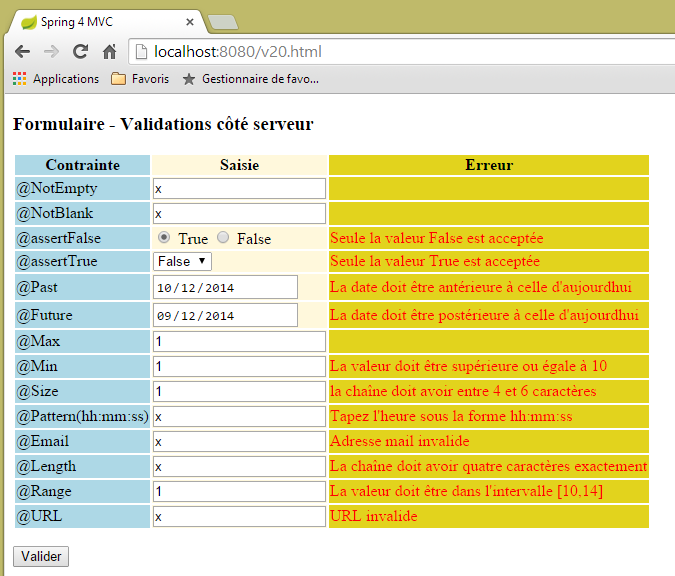
This code displays the following view:
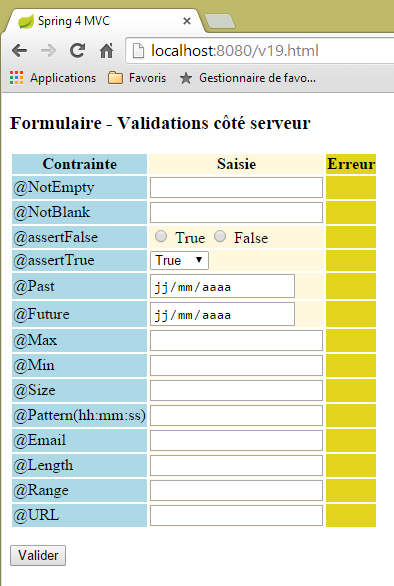 |
The page displays a three-column table:
- column 1: the input field validator;
- column 2: the input field;
- column 3: error messages for the input field;
Let’s examine, for example, the code for view [/v19.html] for validator [@Pattern]:
                    <tr>
                        <td class="col1">@Pattern(hh:mm:ss)</td>
                        <td class="col2">
                            <input type="text" th:field="*{hhmmss}" th:value="*{hhmmss}" />
                        </td>
                        <td class="col3">
                            <span th:if="${#fields.hasErrors('hhmmss')}" th:errors="*{hhmmss}" class="error">Donnée erronée</span>
                        </td>
</tr>
We see code that we just studied with forms of type [Personne]:
- line 2: the first column: the name of the validator being tested;
- line 4: the Thymeleaf attribute [th:field="*{hhmmss}] will generate the attributes HTML, [id="hhmmss"], and [name="hhmmss"]. The Thymeleaf attribute [th:value="*{hhmmss}"] will generate the attribute HTML [value="valeur de [form19.hhmmss]]";
- Line 7: If the value entered for the [form19.hhmmss] field is incorrect, then line 7 displays the error messages associated with that field;
The posted values are processed by the following [/v20] action:
    // ----------------- form template validation
    @RequestMapping(value = "/v20", method = RequestMethod.POST, produces = "text/html; charset=UTF-8")
    public String v20(@Valid Form19 formulaire, BindingResult result, RedirectAttributes redirectAttributes) {
        if (result.hasErrors()) {
            return "vue-19";
        } else {
            // redirection to [vue-19]
            redirectAttributes.addFlashAttribute("form19", formulaire);
            return "redirect:/v19.html";
        }
}
- line 3: the posted values will populate the fields of the [Form19 formulaire] object if they are valid;
- lines 4–6: if the posted values are not valid, then the [vue-19] form is redisplayed with error messages;
- lines 6–10: if the posted values are valid, then the [Form19 formulaire] object constructed with these values is made available to the next request, in this case the redirect. It is then destroyed;
- line 9: the client is redirected to the action [/v19.html]. This action will redisplay the form [vue-19], which contains code such as:
<form action="/someURL" th:action="@{/v20.html}" method="post" th:object="${form19}">
The [th:object="${form19}"] attribute will then retrieve the object associated with the Flash attribute [form19] and thus redisplay the form as it was entered.
The form code warrants further explanation. Consider the following code:
                    <tr>
                        <td class="col1">@assertFalse</td>
                        <td class="col2">
                            <input type="radio" th:field="*{assertFalse}" value="true" />
                            <label th:for="${#ids.prev('assertFalse')}">True</label>
                            <input type="radio" th:field="*{assertFalse}" value="false" />
                            <label th:for="${#ids.prev('assertFalse')}">False</label>
                        </td>
                        <td class="col3">
                            <span th:if="${#fields.hasErrors('assertFalse')}" th:errors="*{assertFalse}" class="error">Donnée erronée</span>
                        </td>
</tr>
This generates the following HTML code:
<tr>
  <td class="col1">@assertFalse</td>
  <td class="col2">
    <input type="radio" value="true" id="assertFalse1" name="assertFalse" />
    <label for="assertFalse1">True</label>
    <input type="radio" value="false" id="assertFalse2" name="assertFalse" />
    <label for="assertFalse2">False</label>
  </td>
  <td class="col3">
  </td>
</tr>
In the code
<input type="radio" th:field="*{assertFalse}" value="true" />
<label th:for="${#ids.prev('assertFalse')}">True</label>
<input type="radio" th:field="*{assertFalse}" value="false" />
<label th:for="${#ids.prev('assertFalse')}">False</label>
The Thymeleaf attributes on lines 1 and 3, [th:field="*{assertFalse}"], are causing a problem. It was noted that this attribute generates the attributes HTML, [id=assertFalse], and [name=assertFalse]. The difficulty arises because, since these are generated on lines 1 and 3, we end up with two identical [name] attributes and two identical [id] attributes. While this is possible with the [name] attribute, it is not possible with the [id] attribute. As seen in the generated HTML code, Thymeleaf generated two different [id] attributes: [id=asserFalse1] and [id=assertFalse2]. This is a good thing. The problem is that we don’t know these identifiers, and we might need them. This is the case for the [label] tag on line 2. The [for] attribute of a HTML [label] tag must reference a [id] attribute, in this case, the one generated for the [input] tag on line 1. The Thymeleaf documentation indicates that the expression [${#ids.prev('assertFalse')}"] retrieves the last [id] attribute generated for the [assertFalse] field.
Now let’s look at the code for the form’s dropdown list:
<select th:field="*{assertTrue}">
   <option value="true">True</option>
   <option value="false">False</option>
</select>
This code generates the HTML code for a drop-down list:
The posted value will be sent with the name [name="assertTrue"].
The view [vue-19.xml] uses a style sheet:
    <head>
        <title>Spring 4 MVC</title>
        <meta http-equiv="Content-Type" content="text/html; charset=UTF-8" />
        <link rel="stylesheet" href="/css/form19.css" />
</head>
Line 4: The style sheet used must be placed in the [static] folder of the project:
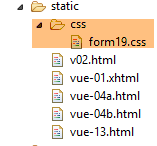 |
Its content is as follows:
@CHARSET "UTF-8";

.col1 {
    background: lightblue;
}

.col2 {
    background: Cornsilk;
}

.col3 {
    background: #e2d31d;
}

.error {
    color: red;
}
Now, let's look at the dates:
    @NotNull
    @Future
    @DateTimeFormat(pattern = "yyyy-MM-dd")
    private Date dateInFuture;

    @NotNull
    @Past
    @DateTimeFormat(pattern = "yyyy-MM-dd")
    private Date dateInPast;
Examining network requests in Chrome DevTools (Ctrl-Shift-I) shows that dates are posted in the (yyyy-mm-dd) format:
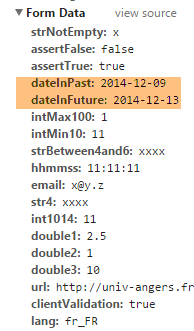 |
This is why the dates were annotated with the validator:
@DateTimeFormat(pattern = "yyyy-MM-dd")
which sets the expected format for the posted date values.
Finally, the French message file [messages_fr.properties]:
title=Les vues dans Spring MVC
personne.nom=Nom :
personne.age=Age :
personne.id=Identifiant :
personne.mineure=Vous êtes mineur
personne.majeure=Vous êtes majeur
liste.personnes=Liste de personnes
personne.formulaire.titre=Entrez les informations suivantes et validez
personne.formulaire.valider=Valider
personne.formulaire.saisies=Voici vos saisies
NotNull=La donnée est obligatoire
Range.securedPerson.id=L''identifiant doit être un nombre entier >=1
Range.securedPerson.age=Seules les personnes entre 8 et 14 ans sont autorisées sur ce site
Length.securedPerson.nom=Le nom doit avoir entre 1 et 4 caractères
typeMismatch=Donnée invalide
Range.stringSecuredPerson.id=L''identifiant doit être un nombre entier >=1
Range.stringSecuredPerson.age=Seules les personnes entre 8 et 14 ans sont autorisées sur ce site
Length.stringSecuredPerson.nom=Le nom doit avoir entre 1 et 4 caractères
Digits.stringSecuredPerson.id=Tapez un nombre entier de 4 chiffres au plus
Digits.stringSecuredPerson.age=Tapez un nombre entier de 2 chiffres au plus
Future.form19.dateInFuture=La date doit être postérieure à celle d''aujourd'hui
Past.form19.dateInPast=La date doit être antérieure à celle d''aujourd'hui
Size.form19.strBetween4and6=la chaîne doit avoir entre 4 et 6 caractères
Min.form19.intMin10=La valeur doit être supérieure ou égale à 10
Max.form19.intMax100=La valeur doit être inférieure ou égale à 100
Length.form19.str4=La chaîne doit avoir quatre caractères exactement
Email.form19.email=Adresse mail invalide
URL.form19.url=URL invalide
Range.form19.int1014=La valeur doit être dans l''intervalle [10,14]
AssertTrue=Seule la valeur True est acceptée
AssertFalse=Seule la valeur False est acceptée
Pattern.form19.hhmmss=Tapez l''heure sous la forme hh:mm:ss
NotEmpty=La donnée ne peut être vide
NotBlank=La donnée ne peut être vide
Let's look at some examples of execution:
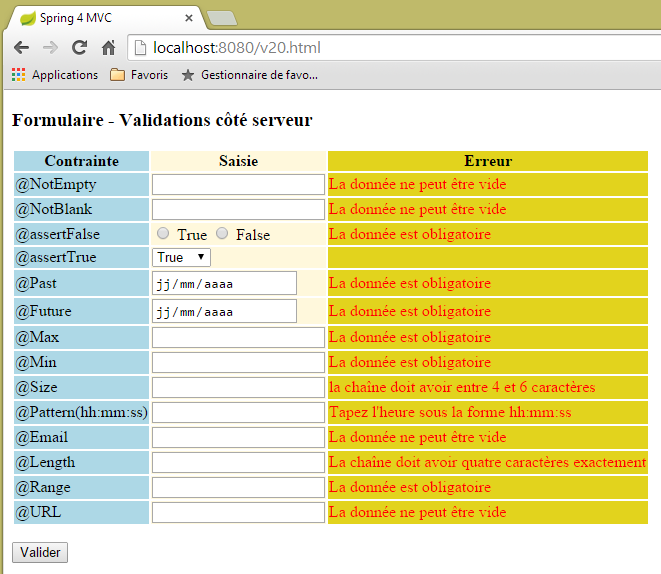 |
 |
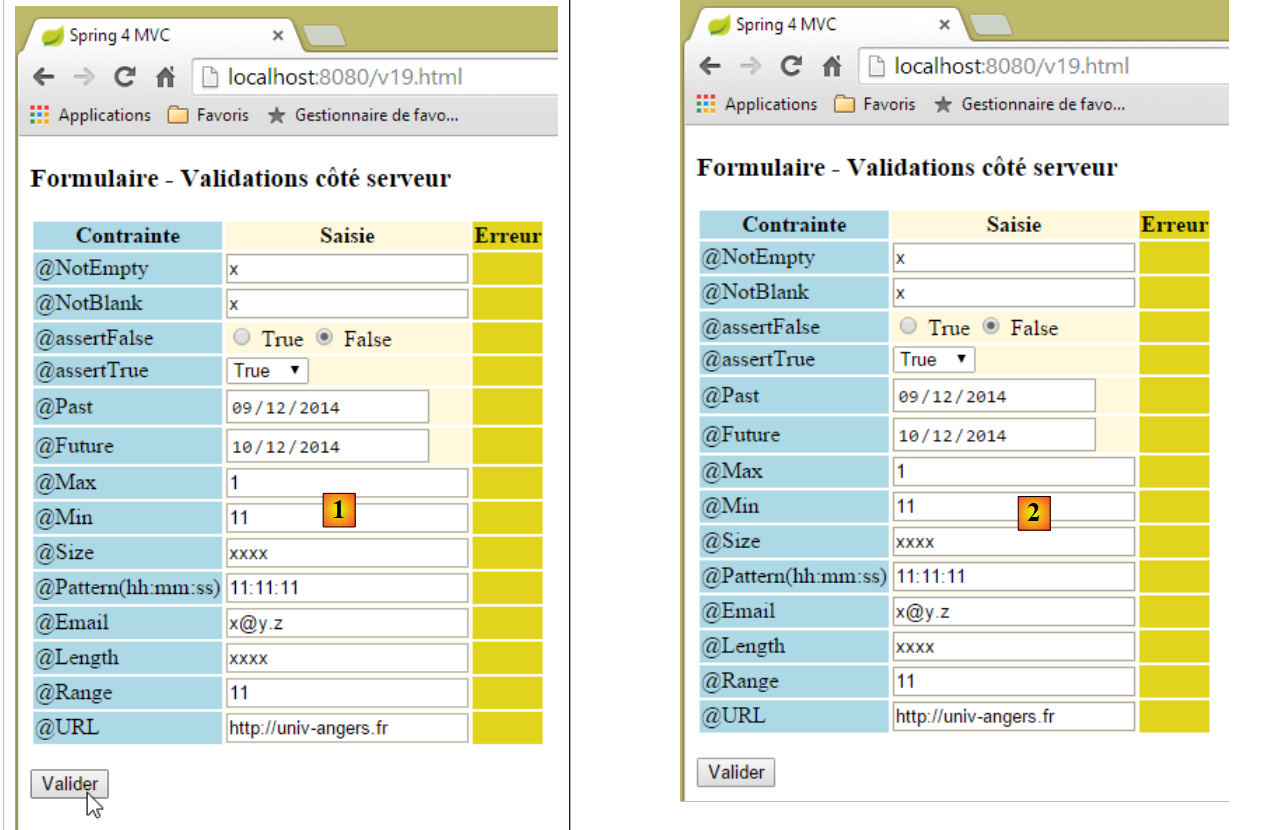 |
Above, between [1] and [2], it appears that nothing happened. However, if we look at the network traffic (Ctrl-Shift-I), we see that there were two network exchanges with the server:
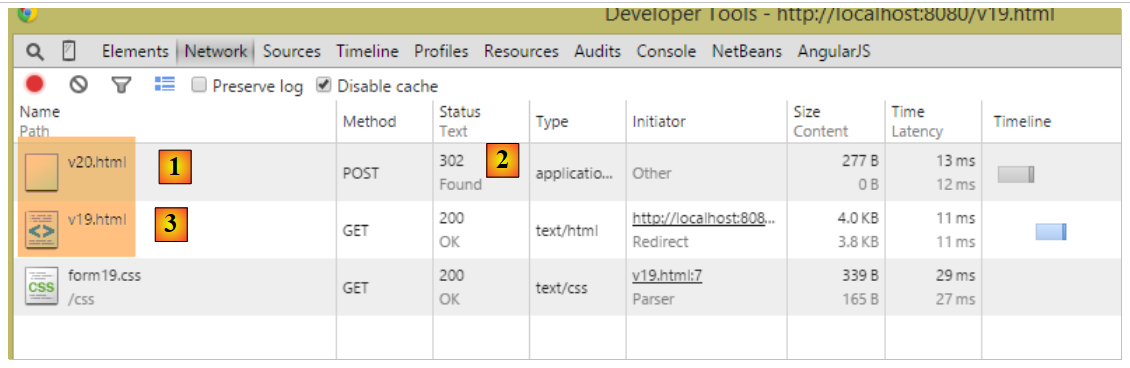 |
- in [1], the initial POST to [/v20];
- in [2], the response to this action is a redirect;
- in [3], the second request, this time to [/v19];
The action [/v19] is then executed:
    // ------------------ form display
    @RequestMapping(value = "/v19", method = RequestMethod.GET, produces = "text/html; charset=UTF-8")
    public String v19(Form19 formulaire) {
        return "vue-19";
}
- line 3, the parameter [Form19 formulaire] is initialized with the Flash attribute of key [form19], which was created by the previous action [/v19] and was an object of type [Form19] with the values the values posted to action [/v19];
- Line 4: The view [vue-19.xml] will be displayed with, in its template, an object [Form19 formulaire] initialized with the posted values. This is why the user sees the form exactly as they posted it;
Why a redirect? Why didn’t we simply post to the [/v19] action above? We would have gotten the same result. With a few differences:
- the browser would have displayed [http://localhost:8080/v20.html] in its address bar instead of [http://localhost:8080/v19.html] as it did here, because it displays the last URL called;
- if the user refreshes the page (F5), the result is completely different:
- in the case of redirection, the URL displayed is [http://localhost:8080/v19.html] obtained from a GET. The browser will re-execute this last command and will then receive a brand-new form (the Flash attribute is used only once),
- If there is no redirection, the displayed URL is [http://localhost:8080/v20.html], which is derived from POST. The browser will replay this last command and thus generate another POST with the same posted values as before. Here, this has no consequences, but it is often undesirable, so redirection is generally preferred;
5.15. [/v21-/v22]: Handling Radio Buttons
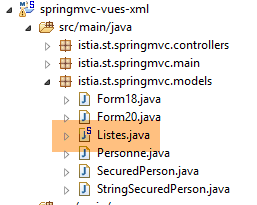
Consider the following Spring component:
 |
package istia.st.springmvc.models;

import org.springframework.stereotype.Component;

@Component
public class Listes {

    private String[] deplacements = new String[] { "0", "1", "2", "3", "4" };
    private String[] libellesDeplacements = new String[] { "vélo", "marche", "train", "avion", "autre" };
    private String[] libellesBijoux = new String[] { "émeraude", "rubis", "diamant", "opaline" };

    // getters and setters
  ...

}
- line 5: the [Listes] class will be a Spring component;
- lines 8–10: lists used to populate radio buttons, checkboxes, and dropdown lists;
In the [Config] configuration class, the following is written:
@Configuration
@ComponentScan({ "istia.st.springmvc.controllers", "istia.st.springmvc.models" })
@EnableAutoConfiguration
public class Config extends WebMvcConfigurerAdapter {
- line 2: the [models] package, where the [Listes] component is located, will be properly scanned by Spring;
We create the following new actions:
    // ------------------ form with radio buttons
    @Autowired
    private Listes listes;

    @RequestMapping(value = "/v21", method = RequestMethod.GET, produces = "text/html; charset=UTF-8")
    public String v21(@ModelAttribute("form") Form21 formulaire, Model model) {
        model.addAttribute("listes", listes);
        return "vue-21";
    }

    @RequestMapping(value = "/v22", method = RequestMethod.POST, produces = "text/html; charset=UTF-8")
    public String v22(@ModelAttribute("form") Form21 formulaire, RedirectAttributes redirectAttributes) {
        redirectAttributes.addFlashAttribute("form", formulaire);
        return "redirect:/v21.html";
}
- lines 2-3: the [Listes] component is injected into the controller;
- line 6: we handle a form of type [Form21], which we will describe. Note that we specified its key, [form], in the view model. Recall that by default, this would have been [form21];
- line 7: we inject the [Listes] component into the model. The view will need it;
- line 8: we display the view [vue-21.xml]. This view will display the form [Form21], and the posted values will be sent to the action [/v22] in lines 12–15;
- Lines 12–15: The [/v22] action simply redirects to the [/v21] action, placing the posted values it received into a Flash attribute with the key [form]. It is important that this key be the same as the one used in line 6;
The [Form21] model is as follows:
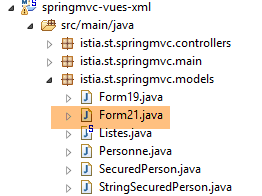 |
package istia.st.springmvc.models;

public class Form21 {

    // posted values
    private String marie = "non";
    private String deplacement = "4";
    private String[] couleurs;
    private String strCouleurs;
    private String[] bijoux;
    private String strBijoux;
    private int couleur2;
    private int[] bijoux2;
    private String strBijoux2;

    // getters and setters
    ...
}
The view [vue-21.xml] is as follows:
<!DOCTYPE HTML>
<html xmlns:th="http://www.thymeleaf.org">
    <head>
        <title>Spring 4 MVC</title>
        <meta http-equiv="Content-Type" content="text/html; charset=UTF-8" />
        <link rel="stylesheet" href="/css/form19.css" />
    </head>
    <body>

        <h3>Formulaire - Boutons radio</h3>
        <form action="/someURL" th:action="@{/v22.html}" method="post" th:object="${form}">
            <table>
                <thead>
                    <tr>
                        <th class="col1">Texte</th>
                        <th class="col2">Saisie</th>
                        <th class="col3">Valeur</th>
                    </tr>
                </thead>
                <tbody>
                    <tr>
                        <td class="col1">Etes-vous marié(e)</td>
                        <td class="col2">
                            <input type="radio" th:field="*{marie}" value="oui" />
                            <label th:for="${#ids.prev('marie')}">Oui</label>
                            <input type="radio" th:field="*{marie}" value="non" />
                            <label th:for="${#ids.prev('marie')}">Non</label>
                        </td>
                        <td class="col3">
                            <span th:text="*{marie}"></span>
                        </td>
                    </tr>
                    <tr>
                        <td class="col1">Mode de déplacement</td>
                        <td class="col2">
                            <span th:each="mode, status : ${listes.deplacements}">
                                <input type="radio" th:field="*{deplacement}" th:value="${mode}" />
                                <label th:for="${#ids.prev('deplacement')}" th:text="${listes.libellesDeplacements[status.index]}">Autre</label>
                            </span>
                        </td>
                        <td class="col3">
                            <span th:text="*{deplacement}"></span>
                        </td>
                    </tr>
                </tbody>
            </table>
            <p>
                <input type="submit" value="Valider" />
            </p>
        </form>
    </body>
</html>
- Lines 36–40: Note the use of the [Listes] component included in the template to generate the labels for the checkboxes;
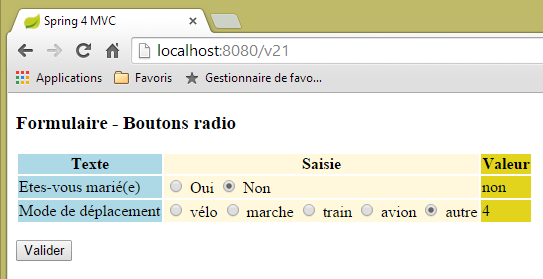
- Column 3 displays the value posted for a POST, or the initial value of the form during the initial GET;
This code displays the following page:
 |
corresponding to the following HTML code:
<!DOCTYPE HTML>

<html>
    <head>
        <title>Spring 4 MVC</title>
        <meta http-equiv="Content-Type" content="text/html; charset=UTF-8" />
        <link rel="stylesheet" href="/css/form19.css" />
    </head>
    <body>

        <h3>Formulaire - Boutons radio</h3>
        <form action="/v22.html" method="post">
            <table>
                <thead>
                    <tr>
                        <th class="col1">Texte</th>
                        <th class="col2">Saisie</th>
                        <th class="col3">Valeur</th>
                    </tr>
                </thead>
                <tbody>
                    <tr>
                        <td class="col1">Etes-vous marié(e)</td>
                        <td class="col2">
                            <input type="radio" value="oui" id="marie1" name="marie" />
                            <label for="marie1">Oui</label>
                            <input type="radio" value="non" id="marie2" name="marie" checked="checked" />
                            <label for="marie2">Non</label>
                        </td>
                        <td class="col3">
                            <span>non</span>
                        </td>
                    </tr>
                    <tr>
                        <td class="col1">Mode de déplacement</td>
                        <td class="col2">
                            <span>
                                <input type="radio" value="0" id="deplacement1" name="deplacement" />
                                <label for="deplacement1">vélo</label>
                            </span>
                            <span>
                                <input type="radio" value="1" id="deplacement2" name="deplacement" />
                                <label for="deplacement2">marche</label>
                            </span>
                            <span>
                                <input type="radio" value="2" id="deplacement3" name="deplacement" />
                                <label for="deplacement3">train</label>
                            </span>
                            <span>
                                <input type="radio" value="3" id="deplacement4" name="deplacement" />
                                <label for="deplacement4">avion</label>
                            </span>
                            <span>
                                <input type="radio" value="4" id="deplacement5" name="deplacement" checked="checked" />
                                <label for="deplacement5">autre</label>
                            </span>
                        </td>
                        <td class="col3">
                            <span>4</span>
                        </td>
                    </tr>
                </tbody>
            </table>
            <p>
                <input type="submit" value="Valider" />
            </p>
        </form>
    </body>
</html>
We can see that the posted values (name attributes) are posted to the following fields in the [Form21] model:
    private String marie = "non";
    private String deplacement = "4";
Readers are encouraged to run tests. Note that it is the [value] attribute of the radio buttons that is posted.
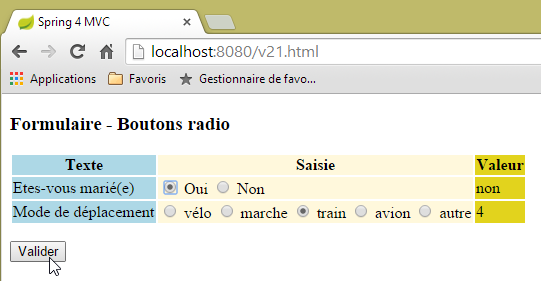 | 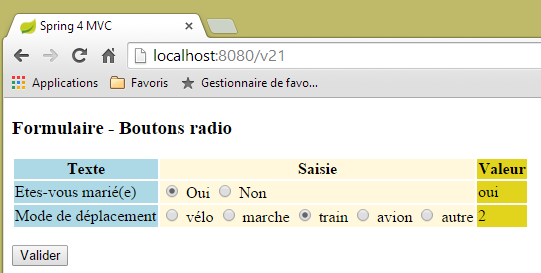 |
5.16. [/v23-/v24]: managing checkboxes
We add the following new action:
    // ------------------ form with checkboxes
    @RequestMapping(value = "/v23", method = RequestMethod.GET, produces = "text/html; charset=UTF-8")
    public String av20(@ModelAttribute("form") Form21 formulaire, Model model) {
        model.addAttribute("listes", listes);
        return "vue-23";
}
- line 3: we continue to use the [Form21] model;
The view [vue-23.xml] is as follows:
<!DOCTYPE HTML>
<html xmlns:th="http://www.thymeleaf.org">
    <head>
        <title>Spring 4 MVC</title>
        <meta http-equiv="Content-Type" content="text/html; charset=UTF-8" />
        <link rel="stylesheet" href="/css/form19.css" />
    </head>
    <body>
        <h3>Formulaire - Cases à cocher</h3>
        <form action="/someURL" th:action="@{/v24.html}" method="post" th:object="${form}">
            <table>
                <thead>
                    <tr>
                        <th class="col1">Texte</th>
                        <th class="col2">Saisie</th>
                        <th class="col3">Valeur</th>
                    </tr>
                </thead>
                <tbody>
                    <tr>
                        <td class="col1">Vos couleurs préférées</td>
                        <td class="col2">
                            <input type="checkbox" th:field="*{couleurs}" value="0" />
                            <label th:for="${#ids.prev('couleurs')}">rouge</label>
                            <input type="checkbox" th:field="*{couleurs}" value="1" />
                            <label th:for="${#ids.prev('couleurs')}">vert</label>
                            <input type="checkbox" th:field="*{couleurs}" value="2" />
                            <label th:for="${#ids.prev('couleurs')}">bleu</label>
                        </td>
                        <td class="col3">
                            <span th:text="*{strCouleurs}"></span>
                        </td>
                    </tr>
                    <tr>
                        <td class="col1">Pierres préférées</td>
                        <td class="col2">
                            <span th:each="label, status : ${listes.libellesBijoux}">
                                <input type="checkbox" th:field="*{bijoux}" th:value="${status.index}" />
                                <label th:for="${#ids.prev('bijoux')}" th:text="${label}">Autre</label>
                            </span>
                        </td>
                        <td class="col3">
                            <span th:text="*{strBijoux}"></span>
                        </td>
                    </tr>
                </tbody>
            </table>
            <p>
                <input type="submit" value="Valider" />
            </p>
        </form>
    </body>
</html>
- lines 37–41: Note the use of the [Listes] component to generate the checkbox labels;
This code displays the following page:
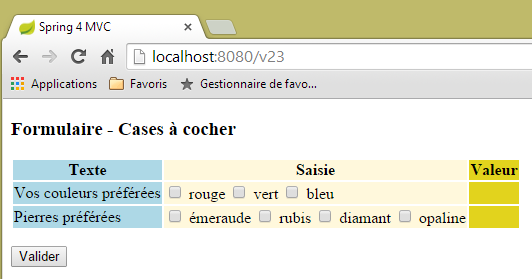 |
generated from the following HTML code:
<!DOCTYPE HTML>

<html>
    <head>
        <title>Spring 4 MVC</title>
        <meta http-equiv="Content-Type" content="text/html; charset=UTF-8" />
        <link rel="stylesheet" href="/css/form19.css" />
    </head>
    <body>
        <h3>Formulaire - Cases à cocher</h3>
        <form action="/v24.html" method="post">
            <table>
                <thead>
                    <tr>
                        <th class="col1">Texte</th>
                        <th class="col2">Saisie</th>
                        <th class="col3">Valeur</th>
                    </tr>
                </thead>
                <tbody>
                    <tr>
                        <td class="col1">Vos couleurs préférées</td>
                        <td class="col2">
                            <input type="checkbox" value="0" id="couleurs1" name="couleurs" /><input type="hidden" name="_couleurs" value="on" />
                            <label for="couleurs1">rouge</label>
                            <input type="checkbox" value="1" id="couleurs2" name="couleurs" /><input type="hidden" name="_couleurs" value="on" />
                            <label for="couleurs2">vert</label>
                            <input type="checkbox" value="2" id="couleurs3" name="couleurs" /><input type="hidden" name="_couleurs" value="on" />
                            <label for="couleurs3">bleu</label>
                        </td>
                        <td class="col3">
                            <span></span>
                        </td>
                    </tr>
                    <tr>
                        <td class="col1">Pierres préférées</td>
                        <td class="col2">
                            <span>
                                <input type="checkbox" value="0" id="bijoux1" name="bijoux" /><input type="hidden" name="_bijoux" value="on" />
                                <label for="bijoux1">émeraude</label>
                            </span>
                            <span>
                                <input type="checkbox" value="1" id="bijoux2" name="bijoux" /><input type="hidden" name="_bijoux" value="on" />
                                <label for="bijoux2">rubis</label>
                            </span>
                            <span>
                                <input type="checkbox" value="2" id="bijoux3" name="bijoux" /><input type="hidden" name="_bijoux" value="on" />
                                <label for="bijoux3">diamant</label>
                            </span>
                            <span>
                                <input type="checkbox" value="3" id="bijoux4" name="bijoux" /><input type="hidden" name="_bijoux" value="on" />
                                <label for="bijoux4">opaline</label>
                            </span>
                        </td>
                        <td class="col3">
                            <span></span>
                        </td>
                    </tr>
                </tbody>
            </table>
            <p>
                <input type="submit" value="Valider" />
            </p>
        </form>
    </body>
</html>
Note that the posted values (name attributes) are posted to the following fields in [Form21]:
    private String[] couleurs;
    private String[] bijoux;
These are arrays because for each field, there are multiple checkboxes labeled with the field name. It is therefore possible for multiple posted values to arrive with the same name (form attribute name). An array is therefore needed to retrieve them.
Let’s return to the Thymeleaf code in column 3 of the page:
  <td class="col3">
    <span th:text="*{strCouleurs}"></span>
  </td>
</tr>
<tr>
  <td class="col1">Pierres préférées</td>
  <td class="col2">
    <span th:each="label, status : ${listes.libellesBijoux}">
      <input type="checkbox" th:field="*{bijoux}" th:value="${status.index}" />
      <label th:for="${#ids.prev('bijoux')}" th:text="${label}">Autre</label>
    </span>
  </td>
  <td class="col3">
    <span th:text="*{strBijoux}"></span>
  </td>
</tr>
The fields referenced in lines 2 and 14 are as follows:
    private String strCouleurs;
    private String strBijoux;
They are calculated by action [/v24], which manages POST:
    // mapper Jackson / jSON
    private ObjectMapper mapper = new ObjectMapper();

    @RequestMapping(value = "/v24", method = RequestMethod.POST, produces = "text/html; charset=UTF-8")
    public String av21(@ModelAttribute("form") Form21 formulaire, RedirectAttributes redirectAttributes) throws JsonProcessingException {
        redirectAttributes.addFlashAttribute("form", formulaire);
        formulaire.setStrCouleurs(mapper.writeValueAsString(formulaire.getCouleurs()));
        formulaire.setStrBijoux(mapper.writeValueAsString(formulaire.getBijoux()));
        return "redirect:/v23.html";
}
Keep in mind that the Jackson library / jSON is included in the project's dependencies.
- Line 2: We create a [ObjectMapper] type that allows us to serialize/deserialize objects in jSON,
- line 7: we serialize the color array into jSON. The result is placed in the [strCouleurs] field;
- line 8: the jewelry array is serialized to jSON. The result is placed in the [strBijoux] field;
Here is an example of execution:
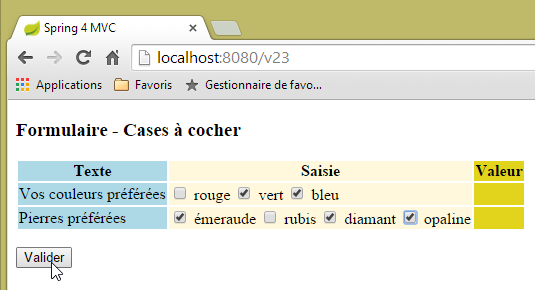 | 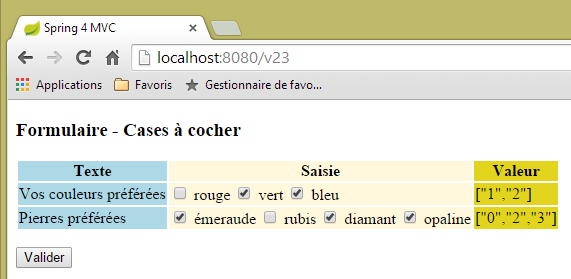 |
Note that it is the [value] attribute of the checkboxes that is posted.
5.17. [/25-/v26]: Manage lists
We add the following action [/v25]:
  // ------------------ form with lists
  @RequestMapping(value = "/v25", method = RequestMethod.GET, produces = "text/html; charset=UTF-8")
  public String v25(@ModelAttribute("form") Form21 formulaire, Model model) {
        model.addAttribute("listes", listes);
        return "vue-25";
}
The view [vue-25.xml] is as follows:
<!DOCTYPE HTML>
<html xmlns:th="http://www.thymeleaf.org">
    <head>
        <title>Spring 4 MVC</title>
        <meta http-equiv="Content-Type" content="text/html; charset=UTF-8" />
        <link rel="stylesheet" href="/css/form19.css" />
    </head>
    <body>

        <h3>Formulaire - Listes</h3>
        <form action="/someURL" th:action="@{/v26.html}" method="post"
            th:object="${form}">
            <table>
                <thead>
                    <tr>
                        <th class="col1">Texte</th>
                        <th class="col2">Saisie</th>
                        <th class="col3">Valeur</th>
                    </tr>
                </thead>
                <tbody>
                    <tr>
                        <td class="col1">Votre couleur préférée</td>
                        <td class="col2">
                            <select th:field="*{couleur2}">
                                <option value="0">rouge</option>
                                <option value="1">bleu</option>
                                <option value="2">vert</option>
                            </select>
                        </td>
                        <td class="col3">
                            <span th:text="*{couleur2}"></span>
                        </td>
                    </tr>
                    <tr>
                        <td class="col1">Pierres préférées (choix multiple)</td>
                        <td class="col2">
                            <select th:field="*{bijoux2}" multiple="multiple" size="3">
                                <option th:each="label, status : ${listes.libellesBijoux}"
                                    th:text="${label}" th:value="${status.index}">
                                </option>
                            </select>
                        </td>
                        <td class="col3">
                            <span th:text="*{strBijoux2}"></span>
                        </td>
                    </tr>

                </tbody>
            </table>
            <input type="submit" value="Valider" />
        </form>
    </body>
</html>
- lines 38–42: generation of a dropdown list where the labels are taken from the [Listes] component that we have already used;
The displayed page is as follows:
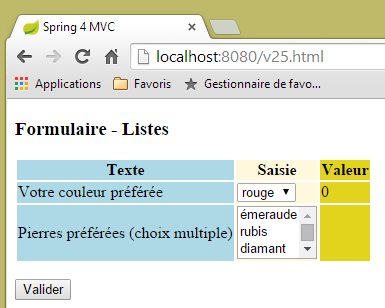 |
generated by the following HTML code:
<!DOCTYPE HTML>

<html>
    <head>
        <title>Spring 4 MVC</title>
        <meta http-equiv="Content-Type" content="text/html; charset=UTF-8" />
        <link rel="stylesheet" href="/css/form19.css" />
    </head>
    <body>

        <h3>Formulaire - Listes</h3>
        <form action="/v26.html" method="post">
            <table>
                <thead>
                    <tr>
                        <th class="col1">Texte</th>
                        <th class="col2">Saisie</th>
                        <th class="col3">Valeur</th>
                    </tr>
                </thead>
                <tbody>
                    <tr>
                        <td class="col1">Votre couleur préférée</td>
                        <td class="col2">
                            <select id="couleur2" name="couleur2">
                                <option value="0" selected="selected">rouge</option>
                                <option value="1">bleu</option>
                                <option value="2">vert</option>
                            </select>
                        </td>
                        <td class="col3">
                            <span>0</span>
                        </td>
                    </tr>
                    <tr>
                        <td class="col1">Pierres préférées (choix multiple)</td>
                        <td class="col2">
                            <select multiple="multiple" size="3" id="bijoux2" name="bijoux2">
                                <option value="0">émeraude</option>
                                <option value="1">rubis</option>
                                <option value="2">diamant</option>
                                <option value="3">opaline</option>
                            </select>
                            <input type="hidden" name="_bijoux2" value="1" />
                        </td>
                        <td class="col3">
                            <span></span>
                        </td>
                    </tr>
                </tbody>
            </table>
            <p>
                <input type="submit" value="Valider" />
            </p>
        </form>
    </body>
</html>
- Line 44: Note that Thymeleaf has created a hidden field. I don’t understand its purpose:
- the posted values (value attributes of the option tags) will be stored in the following fields (name attributes) of [Form21]:
    private int couleur2;
    private int[] bijoux2;
- line 38: the list [bijoux2] is a multiple-choice list. Therefore, multiple values can be posted associated with the name [bijoux2]. To retrieve them, the field [bijoux2] must be an array. Note that it is an array of integers. This is possible because the posted values can be converted to this type;
The values are posted to the following [/v26] action:
  @RequestMapping(value = "/v26", method = RequestMethod.POST, produces = "text/html; charset=UTF-8")
  public String v26(@ModelAttribute("form") Form21 formulaire, RedirectAttributes redirectAttributes) throws JsonProcessingException {
    redirectAttributes.addFlashAttribute("form", formulaire);
    formulaire.setStrBijoux2(mapper.writeValueAsString(formulaire.getBijoux2()));
    return "redirect:/v25.html";
}
There is nothing here that we haven't seen before. Here is an example of execution:
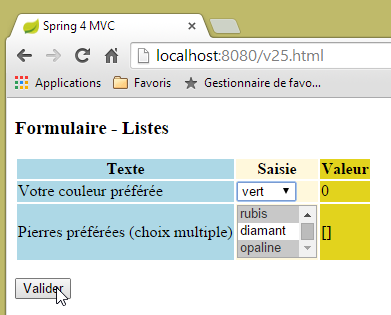 | 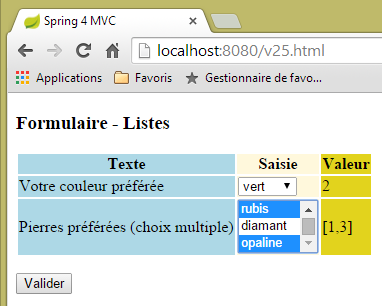 |
5.18. [/v27]: message configuration
Consider the following action [/v27]:
  // ------------------ set messages
  @RequestMapping(value = "/v27", method = RequestMethod.GET, produces = "text/html; charset=UTF-8")
  public String v27(Model model) {
        model.addAttribute("param1","paramètre un");
        model.addAttribute("param2","paramètre deux");
        model.addAttribute("param3","paramètre trois");
        model.addAttribute("param4","messages.param4");
        return "vue-27";
}
The action simply sets four values in the model and displays the following view [vue-27.xml]:
<!DOCTYPE html>
<html xmlns:th="http://www.thymeleaf.org">
    <head>
        <title th:text="#{messages.titre}">Spring 4 MVC</title>
        <meta http-equiv="Content-Type" content="text/html; charset=UTF-8" />
    </head>
    <body>
        <h2 th:text="#{messages.titre}">Spring 4 MVC</h2>
        <p th:text="#{messages.msg1(${param1})}"></p>
        <p th:text="#{messages.msg2(${param2},${param3})}"></p>
        <p th:text="#{messages.msg3(#{${param4}})}"></p>
    </body>
</html>
- line 8: a message without parameters;
- line 9: a message with a parameter [$param1] taken from the template;
- line 10: a message with two parameters [$param2, $param3] taken from the template;
- line 11: a message with one parameter. This parameter is itself a message key (indicated by #). The key is provided by [$param4];
The French message file is as follows:
[messages_fr.properties]
messages.titre=Messages paramétrés
messages.msg1=Un message avec un paramètre : {0}
messages.msg2=Un message avec deux paramètres : {0}, {1}
messages.msg3=Un message avec une clé de message comme paramètre : {0}
messages.param4=paramètre quatre
To indicate the presence of parameters in the message, use the symbols {0}, {1}, ...
Merging the template generated by action [/v27] with view [vue-27] will produce the following code HTML:
<!DOCTYPE html>

<html>
    <head>
        <title>Messages paramétrés</title>
        <meta http-equiv="Content-Type" content="text/html; charset=UTF-8" />
    </head>
    <body>
        <h2>Messages paramétrés</h2>
        <p>Un message avec un paramètre : paramètre un</p>
        <p>Un message avec deux paramètre : paramètre deux, paramètre trois</p>
        <p>Un message avec une clé de message comme paramètre : paramètre quatre</p>
    </body>
</html>
which results in the following view:
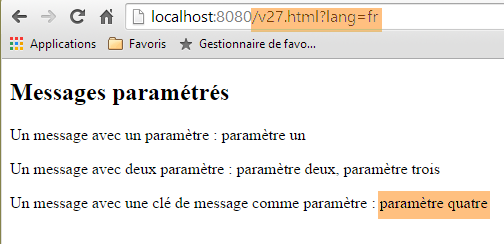 |
The English message file is as follows:
[messages_fr.properties]
messages.titre=Parameterized messages
messages.msg1=Message with one parameter: {0}
messages.msg2=Message with two parameters: {0}, {1}
messages.msg3=Message with a message key as a parameter: {0}
messages.param4=parameter four
Merging the template generated by action [/v27] with view [vue-27] will produce the following code HTML:
<!DOCTYPE html>

<html>
    <head>
        <title>Parameterized messages</title>
        <meta http-equiv="Content-Type" content="text/html; charset=UTF-8" />
    </head>
    <body>
        <h2>Parameterized messages</h2>
        <p>Message with one parameter: paramètre un</p>
        <p>Message with two parameters: paramètre deux, paramètre trois</p>
        <p>Message with a message key as a parameter: parameter four</p>
    </body>
</html>
which results in the following view:
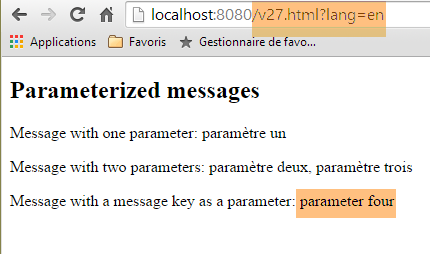 |
We can see that the last message has been fully internationalized, which is not the case for the previous two.
5.19. Using a Master Page
In a web application, views often share a number of elements that can be factored into a master page. Here is an example:
 |
Above, we have two similar pages where the fragment [1] has been replaced by the fragment [2]. The view is that of a master page with three fixed fragments [3-5] and one variable fragment [6].
5.19.1. The project
We are building a project [springmvc-masterpage] following the procedure in Section 5.1.
 |
The file [pom.xml] is as follows:
<?xml version="1.0" encoding="UTF-8"?>
<project xmlns="http://maven.apache.org/POM/4.0.0" xmlns:xsi="http://www.w3.org/2001/XMLSchema-instance"
    xsi:schemaLocation="http://maven.apache.org/POM/4.0.0 http://maven.apache.org/xsd/maven-4.0.0.xsd">
    <modelVersion>4.0.0</modelVersion>

    <groupId>istia.st.springmvc</groupId>
    <artifactId>springmvc-masterpage</artifactId>
    <version>0.0.1-SNAPSHOT</version>
    <packaging>jar</packaging>

    <name>springmvc-masterpage</name>
    <description>Page maître</description>

    <parent>
        <groupId>org.springframework.boot</groupId>
        <artifactId>spring-boot-starter-parent</artifactId>
        <version>1.1.9.RELEASE</version>
        <relativePath/> <!-- lookup parent from repository -->
    </parent>

    <dependencies>
        <dependency>
            <groupId>org.springframework.boot</groupId>
            <artifactId>spring-boot-starter-thymeleaf</artifactId>
        </dependency>
        <dependency>
            <groupId>org.springframework.boot</groupId>
            <artifactId>spring-boot-starter-test</artifactId>
            <scope>test</scope>
        </dependency>
    </dependencies>

    <properties>
        <project.build.sourceEncoding>UTF-8</project.build.sourceEncoding>
        <start-class>istia.st.springmvc.main.Main</start-class>
        <java.version>1.7</java.version>
    </properties>

    <build>
        <plugins>
            <plugin>
                <groupId>org.springframework.boot</groupId>
                <artifactId>spring-boot-maven-plugin</artifactId>
            </plugin>
        </plugins>
    </build>

</project>
One of the dependencies included in this file is required for the master page:
 |
The [config] and [main] packages are identical to those with the same names in the previous project.
5.19.2. The master page
 |
The master page is the following [layout.xml] view:
<!DOCTYPE html>
<html xmlns:th="http://www.thymeleaf.org" xmlns:layout="http://www.ultraq.net.nz/thymeleaf/layout">
    <head>
        <title>Layout</title>
        <meta http-equiv="Content-Type" content="text/html; charset=UTF-8" />
    </head>
    <body>
        <table style="width: 400px">
            <tr>
                <td colspan="2" bgcolor="#ccccff">
                    <div th:include="entete" />
                </td>
            </tr>
            <tr style="height: 200px">
                <td bgcolor="#ffcccc">
                    <div th:include="menu" />
                </td>
                <td>
                    <section layout:fragment="contenu">
                        <h2>Contenu</h2>
                    </section>
                </td>
            </tr>
            <tr bgcolor="#ffcc66">
                <td colspan="2">
                    <div th:include="basdepage" />
                </td>
            </tr>
        </table>
    </body>
</html>
- line 2: the master page must define the [xmlns:layout="http://www.ultraq.net.nz/thymeleaf/layout"] namespace, an element of which is used on line 19;
- lines 10–12: generate the [1] field below. The Thymeleaf tag [th:include] allows a fragment defined in another file to be included in the current view. This allows fragments used in multiple views to be reused;
- lines 15–17: generate the [2] section below;
- lines 19–20: generate the [3] area below. The attribute [layout:fragment] is an attribute of the namespace [xmlns:layout="http://www.ultraq.net.nz/thymeleaf/layout"]. It indicates a field that can be replaced by another at runtime;
- lines 24–28: generate the field [4] below;
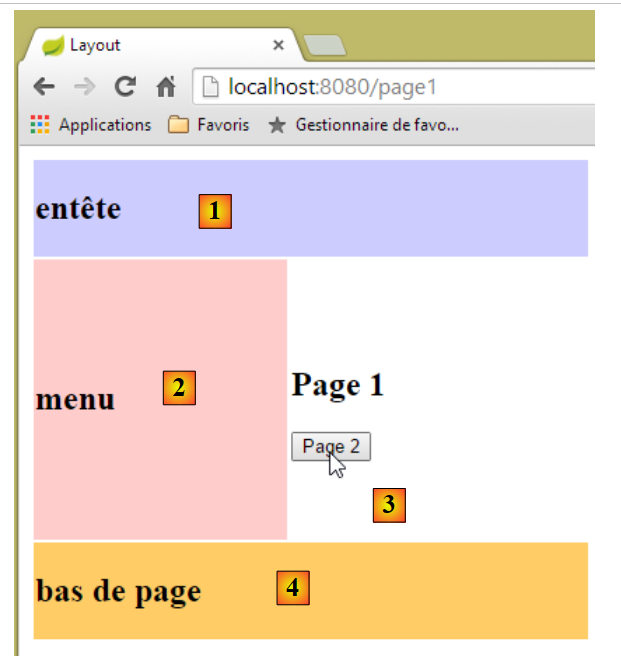 |
5.19.3. The fragments
The fragments [entete.xml], [menu.xml], and [basdepage.xml] are as follows:
[entete.xml]
<!DOCTYPE html>
<html>
    <h2>entête</h2>
</html>
[menu.xml]
<!DOCTYPE html>
<html>
    <h2>menu</h2>
</html>
[basdepage.xml]
<!DOCTYPE html>
<html>
    <h2>bas de page</h2>
</html>
The fragment [page1.xml] is as follows:
<!DOCTYPE html>
<html xmlns:th="http://www.thymeleaf.org" xmlns:layout="http://www.ultraq.net.nz/thymeleaf/layout" layout:decorator="layout">
    <section layout:fragment="contenu">
        <h2>Page 1</h2>
        <form action="/someURL" th:action="@{/page2.html}" method="post">
            <input type="submit" value="Page 2" />
        </form>
    </section>
</html>
- Line 2: The [layout:decorator="layout"] attribute indicates that the current page [page1.xml] is 'decorated', i.e., it belongs to a master page. This is the value of the attribute, in this case the view [layout.xml];
- Line 3: This specifies which fragment of the master page [page1.xml] will be inserted into. The attribute [layout:fragment="contenu"] indicates that [page1.xml] will be inserted into the fragment named [contenu], i.e., the [3] area of the master page;
- lines 5–7: the fragment’s content is a form that includes a button from POST to the action [/page2.html];
The [page2.xml] fragment is similar:
<!DOCTYPE html>
<html xmlns:th="http://www.thymeleaf.org" xmlns:layout="http://www.ultraq.net.nz/thymeleaf/layout"
    layout:decorator="layout">
    <section layout:fragment="contenu">
        <h2>Page 2</h2>
        <form action="/someURL" th:action="@{/page1.html}" method="post">
            <input type="submit" value="Page 1" />
        </form>
    </section>
</html>
5.19.4. Actions
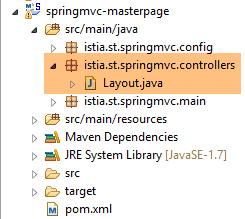 |
The [Layout.java] controller is as follows:
package istia.st.springmvc.controllers;

import org.springframework.stereotype.Controller;
import org.springframework.web.bind.annotation.RequestMapping;
import org.springframework.web.bind.annotation.RequestMethod;

@Controller
public class Layout {
    @RequestMapping(value = "/page1")
    public String page1() {
        return "page1";
    }

    @RequestMapping(value = "/page2", method=RequestMethod.POST)
    public String page2() {
        return "page2";
    }
}
- lines 10–12: the [/page1] action simply displays the [page1.xml] view;
- lines 15–17: same for the [/page2] action, which displays the [page2.xml] view;