7. Ajaxifying a Spring MVC Application
7.1. The Role of AJAX in a Web Application
So far, the learning examples we’ve studied have had the following architecture:
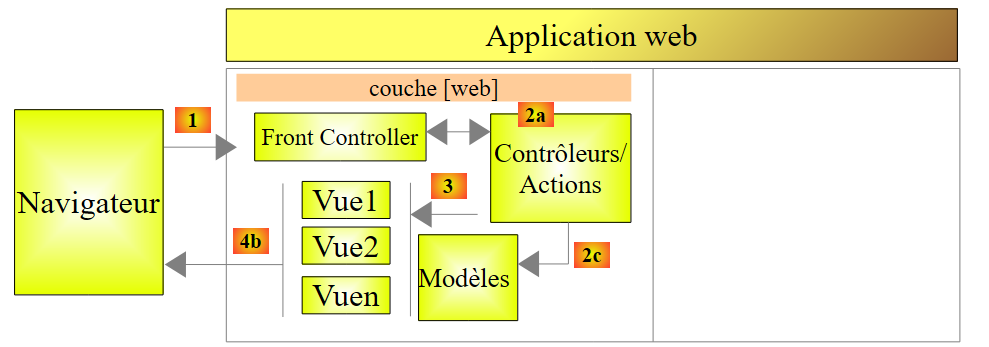 |
To switch from a view [View1] to a view [View2], the browser:
- sends a request to the web application;
- receives the view [View2] and displays it in place of the view [View1].
This is the classic pattern:
- request from the browser;
- the web server generates a view in response to the client;
- display of this new view by the browser.
For several years now, there has been another mode of interaction between the browser and the web server: AJAX (Asynchronous JavaScript and XML). This involves interactions between the view displayed by the browser and the web server. The browser continues to do what it does best—display an HTML view—but it is now controlled by JavaScript embedded within the displayed HTML view. The diagram is as follows:
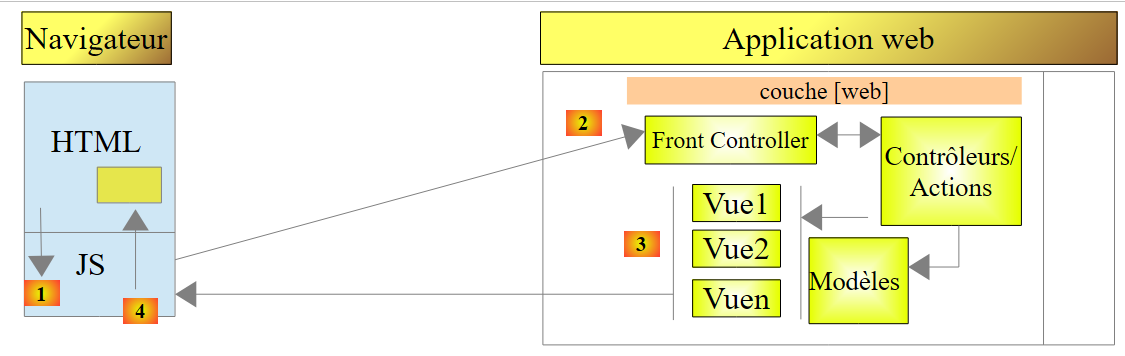 |
- In [1], an event occurs on the page displayed in the browser (a button click, a text change, etc.). This event is intercepted by JavaScript (JS) embedded in the page;
- In [2], the JavaScript code makes an HTTP request just as the browser would have done. The request is asynchronous: the user can continue to interact with the page without being blocked while waiting for the HTTP response. The request follows the standard processing flow. Nothing (or very little) distinguishes it from a standard request;
- In [3], a response is sent to the JS client. Rather than a complete HTML view, it is typically a partial HTML view, an XML feed, or JSON (JavaScript Object Notation) that is sent;
- In [4], JavaScript retrieves this response and uses it to update a region of the displayed HTML page.
For the user, there is a change in the view because what they see has changed. However, there is no full page reload; instead, only a partial modification of the displayed page occurs. This helps make the page more fluid and interactive: because there is no full page reload, we can handle events that previously could not be managed. For example, offering the user a list of options as they type characters into an input field. With each new character typed, an AJAX request is sent to the server, which then returns additional suggestions. Without AJAX, this type of input assistance was previously impossible. We couldn’t reload a new page with every character typed.
7.2. Updating a page with an HTML feed
7.2.1. The Views
We propose to study the following application:
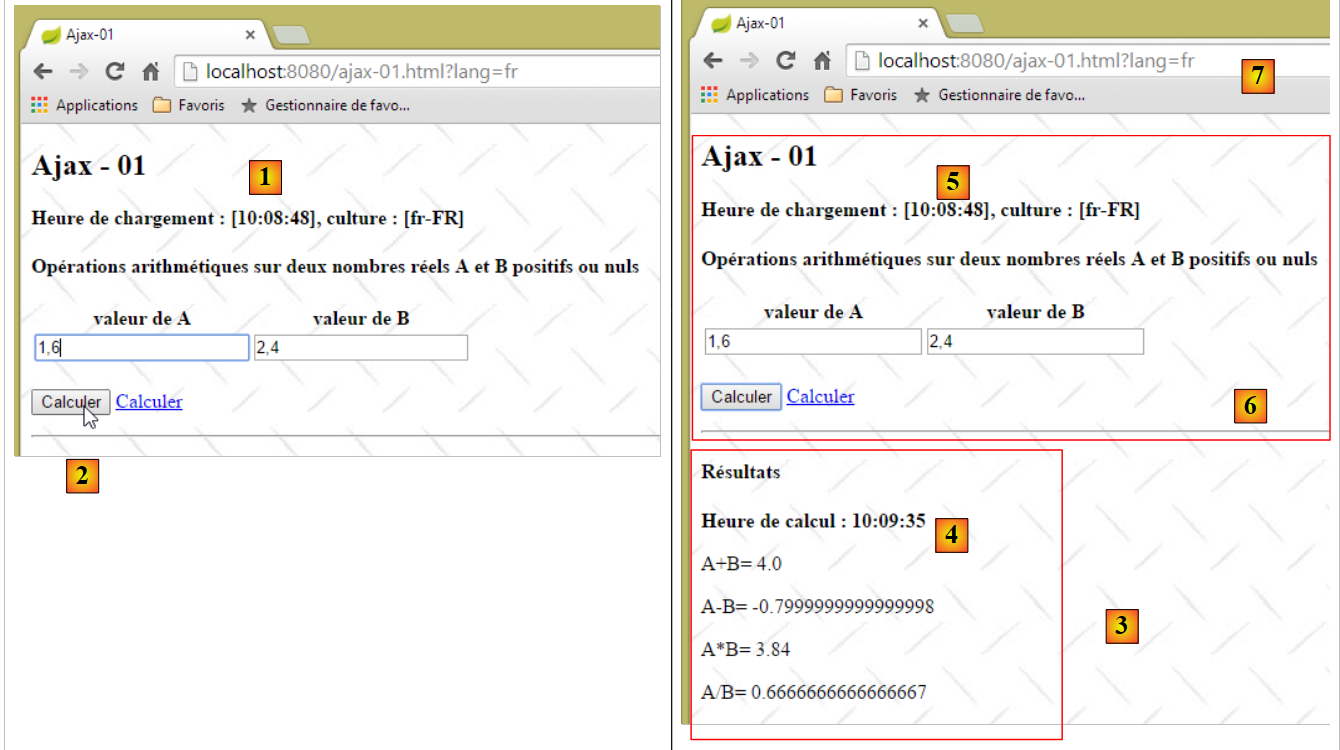 |
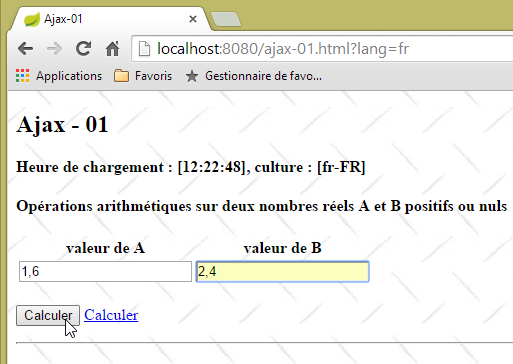
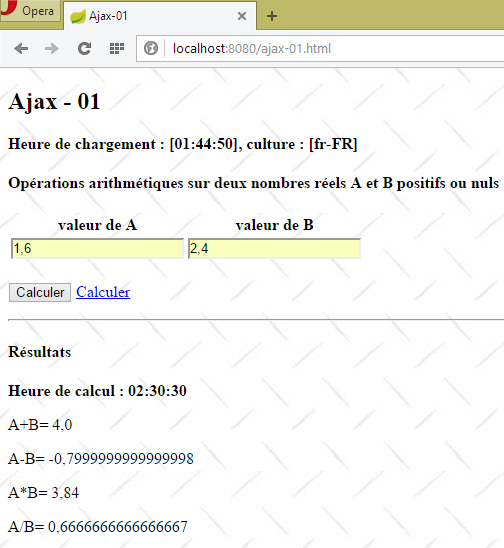
- in [1], the page load time;
- in [2], the four arithmetic operations are performed on two real numbers A and B;
- at [3], the server’s response is displayed in a region of the page;
- in [4], the time of the calculation. This is different from the page load time [5]. The latter is equal to [1], showing that region [6] has not been reloaded. Furthermore, the page’s URL [7] has not changed.
7.2.2. The [/ajax-01] action
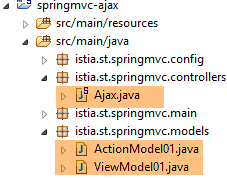 |
The controller [Ajax.java] defines the following action [/ajax-01]:
    @RequestMapping(value = "/ajax-01", method = RequestMethod.GET, produces = "text/html; charset=UTF-8")
    public String ajax01(Locale locale, Model modèle, HttpSession session, String tempo) {
        // valid tempo?
        if (tempo != null) {
            boolean valide = false;
            int valueTempo = 0;
            try {
                valueTempo = Integer.parseInt(tempo);
                valide = valueTempo >= 0;
            } catch (NumberFormatException e) {

            }
            if (valide) {
                session.setAttribute("tempo", new Integer(valueTempo));
            }
        }
        // prepare the view model [view-01]
        ...
}
- line 2: the action [/ajax-01] accepts only one parameter [tempo]. This is the duration in milliseconds that the server must wait before sending the results of the arithmetic operations;
- line 4: the parameter [tempo] is optional;
- lines 5–12: we verify that the value of the [tempo] parameter is valid;
- lines 13–15: if so, the timeout value is stored in the session. This means it will remain in effect until it is changed;
The code for the [/ajax-01] action continues as follows:
    @RequestMapping(value = "/ajax-01", method = RequestMethod.GET, produces = "text/html; charset=UTF-8")
    public String ajax01(Locale locale, Model modèle, HttpSession session, String tempo) {
        // valid tempo?
...
        // prepare the view model [view-01]
        modèle.addAttribute("actionModel01", new ActionModel01());
...
        // view
        return "vue-01";
}
The [ActionModel01] class is primarily used to encapsulate the values posted by the [/ajax-01] action. Here, nothing is posted. We create an empty class and place it in the model because the [vue-01.xml] view uses it. The [ActionModel01] class is as follows:
package istia.st.springmvc.models;

import javax.validation.constraints.DecimalMin;
import javax.validation.constraints.NotNull;

public class ActionModel01 {

    // posted data
    @NotNull
    @DecimalMin(value = "0.0")
    private Double a;

    @NotNull
    @DecimalMin(value = "0.0")
    private Double b;

    // getters and setters
    ...
}
- lines 11 and 15: two real numbers [a,b] that will be submitted via a form;
Let's go back to the action code:
    @RequestMapping(value = "/ajax-01", method = RequestMethod.GET, produces = "text/html; charset=UTF-8")
    public String ajax01(Locale locale, Model modèle, HttpSession session, String tempo) {
...
        // prepare the view model [view-01]
        modèle.addAttribute("actionModel01", new ActionModel01());
        Resultats résultats = new Resultats();
        modèle.addAttribute("resultats", résultats);
...
        // view
        return "vue-01";
}
- lines 6-7: we add an instance of type [Results] to the model;
The [Results] type placed in the model is as follows:
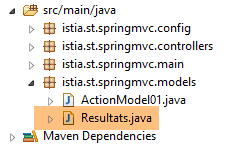 |
package istia.st.springmvc.models;

public class Resultats {

    // data
    private String aplusb;
    private String amoinsb;
    private String amultiplieparb;
    private String adiviseparb;
    private String heureGet;
    private String heurePost;
    private String erreur;
    private String vue;
    private String culture;

    // getters and setters
    ...
}
- lines 6–9: the results of the four arithmetic operations on the numbers [a, b];
- line 10: the time the page was initially loaded;
- line 11: the time the four arithmetic operations were executed;
- line 12: any error messages;
- line 13: the view to be displayed, if any;
- line 14: the view's locale, [fr-FR] or [en-US];
The code for the [/ajax-01] action continues as follows:
    @RequestMapping(value = "/ajax-01", method = RequestMethod.GET, produces = "text/html; charset=UTF-8")
    public String ajax01(ActionModel01 formulaire, Locale locale, Model modèle, HttpSession session) {
        ...
        // local
        setLocale(locale, modèle, résultats);
...
}
- line 5: the [setLocale] method is used to set the locale to be used in the view template, [fr-FR] or [en-US]. This locale is intended for the JavaScript embedded in the view;
The [setLocale] method is as follows:
    private void setLocale(Locale locale, Model modèle, Resultats résultats) {
        // we only manage fr-FR, en-US locales
        String language = locale.getLanguage();
        String country = null;
        switch (language) {
        case "fr":
            country = "FR";
            break;
        default:
            language = "en";
            country = "US";
            break;
        }
        // culture
        résultats.setCulture(String.format("%s-%s", language, country));
}
In the template, the string [${results.culture}] will be equal to 'fr-FR' or 'en-US'.
Let's go back to the [/ajax-01] action:
@RequestMapping(value = "/ajax-01", method = RequestMethod.GET, produces = "text/html; charset=UTF-8")
    public String ajax01(ActionModel01 formulaire, Locale locale, Model modèle, HttpSession session) {
...
        // local
        setLocale(locale, modèle, résultats);
        // hour
        résultats.setHeureGet(new SimpleDateFormat("hh:mm:ss").format(new Date()));
        // view
        return "vue-01";
    }
- line 7: set the time from the GET request in the template;
- Line 9: We display the view [vue-01.xml]:
7.2.3. The view [view-01.xml]
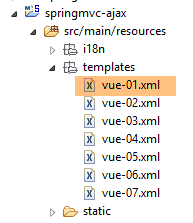 | 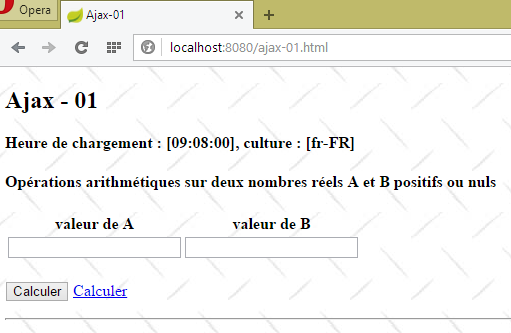 |
The view [view-01.xml] is as follows:
<!DOCTYPE HTML>
<html xmlns:th="http://www.thymeleaf.org">
    <head>
        <meta name="viewport" content="width=device-width" />
        <title>Ajax-01</title>
        <link rel="stylesheet" href="/css/ajax01.css" />
        <script type="text/javascript" src="/js/jquery/jquery-2.1.1.min.js"></script>
        <script type="text/javascript" src="/js/jquery/jquery.validate.min.js"></script>
        <script type="text/javascript" src="/js/jquery/jquery.validate.unobtrusive.min.js"></script>
        <script type="text/javascript" src="/js/jquery/globalize/globalize.js"></script>
        <script type="text/javascript" src="/js/jquery/globalize/cultures/globalize.culture.fr-FR.js"></script>
        <script type="text/javascript" src="/js/jquery/globalize/cultures/globalize.culture.en-US.js"></script>
        <script type="text/javascript" src="/js/jquery/jquery.unobtrusive-ajax.js"></script>
        <script type="text/javascript" src="/js/json3.js"></script>
        <script type="text/javascript" src="/js/client-validation.js"></script>
        <script type="text/javascript" src="/js/local1.js"></script>
        <script th:inline="javascript">
            /*<![CDATA[*/
                    var culture = [[${resultats.culture}]];
                    Globalize.culture(culture);
                    /*]]>*/
        </script>
    </head>
    <body>
        <h2>Ajax - 01</h2>
        <p>
            <strong th:text="#{labelHeureGetCulture(${resultats.heureGet},${resultats.culture})}">
                Heure de chargement :
            </strong>
        </p>
        <h4>
            <p th:text="#{titre.part1}">
                Opérations arithmétiques sur deux nombres réels A et B positifs ou nuls
            </p>
        </h4>
        <form id="formulaire" name="formulaire" ... ">
...
        </form>
        <hr />
        <div id="resultats" />
    </body>
</html>
- lines 7–12: the jQuery validation and internationalization (cultures) libraries;
- line 15: the [client-validation] library built in section 6.3;
- line 14: the JSON library used by the [client-validation] library. It is optional if validation logs have been disabled;
- line 13: Microsoft’s [Unobtrusive Ajax] library. This library sometimes allows you to avoid writing JavaScript;
- line 16: a JavaScript file for our own needs;
- lines 17–22: to handle the [fr-FR] and [en-US] locales on the client side. We have already encountered this code;
- line 27: a configured message. We studied these in section 5.18;
- lines 36–38: the form we will return to later;
- Line 40: the area of the document where JavaScript will place the server's response;
7.2.4. The form
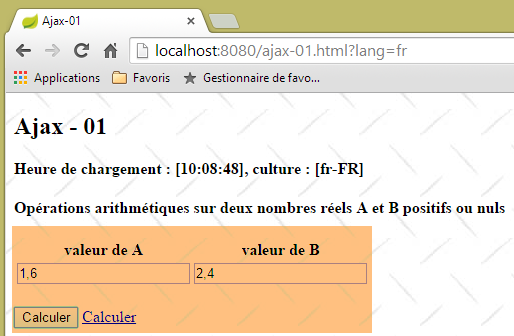 |
In the [vue-01.xml] view, the form is as follows:
<form id="formulaire" name="formulaire" th:action="@{/ajax-02.html}" method="post" th:object="${actionModel01}" th:attr="data-ajax='true',data-ajax-loading='#loading',data-ajax-loading-duration='0',data-ajax-method='post',data-ajax-mode='replace',data-ajax-update='#resultats', data-ajax-begin='beforeSend',data-ajax-complete='afterComplete' ">
    <table>
        <thead>
            <tr>
                <th>
                    <span th:text="#{valeur.a}"></span>
                </th>
                <th>
                    <span th:text="#{valeur.b}"></span>
                </th>
            </tr>
        </thead>
        <tbody>
            <tr>
                <td>
                    <input type="text" th:field="*{a}" th:value="*{a}" data-val="true"
                        th:attr="data-val-required=#{NotNull},data-val-number=#{typeMismatch},data-val-min=#{actionModel01.a.min},data-val-min-value=#{actionModel01.a.min.value}" />
                </td>
                <td>
                    <input type="text" th:field="*{b}" th:value="*{b}" data-val="true"
                        th:attr="data-val-required=#{NotNull},data-val-number=#{typeMismatch},data-val-min=#{actionModel01.b.min},data-val-min-value=#{actionModel01.b.min.value}" />
                </td>
            </tr>
            <tr>
                <td>
                    <span class="field-validation-valid" data-valmsg-for="a" data-valmsg-replace="true"></span>
                    <span th:if="${#fields.hasErrors('a')}" th:errors="*{a}" class="error">Donnée
                        erronée
                    </span>
                </td>
                <td>
                    <span class="field-validation-valid" data-valmsg-for="b" data-valmsg-replace="true"></span>
                    <span th:if="${#fields.hasErrors('b')}" th:errors="*{b}" class="error">Donnée
                        erronée
                    </span>
                </td>
            </tr>
        </tbody>
    </table>
    <p>
        <input type="submit" th:value="#{action.calculer}" value="Calculer"></input>
        <img id="loading" style="display: none" src="/images/loading.gif" />
        <a href="javascript:postForm()" th:text="#{action.calculer}">Calculer</a>
    </p>
</form>
which produces the following HTML:
<form id="formulaire" name="formulaire" method="post" data-ajax-update="#resultats" data-ajax-complete="afterComplete"     data-ajax-begin="beforeSend" data-ajax-loading-duration="0" data-ajax-mode="replace" data-ajax="true" data-ajax-method="post" data-ajax-loading="#loading" action="/ajax-02.html">
    <table>
        <thead>
            <tr>
                <th>
                    <span>valeur de A</span>
                </th>
                <th>
                    <span>valeur de B</span>
                </th>
            </tr>
        </thead>
        <tbody>
            <tr>
                <td>
                    <input type="text" data-val="true" data-val-min="Le nombre doit être supérieur ou égal à 0" data-val-number="Format invalide" data-val-min-value="0" data-val-required="Le champ est obligatoire" value="" id="a" name="a" />
                </td>
                <td>
                    <input type="text" data-val="true" data-val-min="Le nombre doit être supérieur ou égal à 0" data-val-number="Format invalide" data-val-min-value="0" data-val-required="Le champ est obligatoire" value="" id="b" name="b" />
                </td>
            </tr>
            <tr>
                <td>
                    <span class="field-validation-valid" data-valmsg-for="a" data-valmsg-replace="true"></span>

                </td>
                <td>
                    <span class="field-validation-valid" data-valmsg-for="b" data-valmsg-replace="true"></span>

                </td>
            </tr>
        </tbody>
    </table>
    <p>
        <input type="submit" value="Calculer" />
        <img id="loading" style="display: none" src="/images/loading.gif" />
        <a href="javascript:postForm()">Calculer</a>
    </p>
</form>
- line 16: the [a] field is associated with the [required], [number], and [min] validators;
- line 19: same for field [b];
The various messages are found in the project's [messages.properties] files:
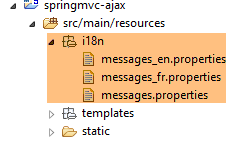 |
[messages_fr.properties]
NotNull=Le champ est obligatoire
typeMismatch=Format invalide
actionModel01.a.min=Le nombre doit être supérieur ou égal à 0
DecimalMin.actionModel01.a=Le nombre doit être supérieur ou égal à 0
DecimalMax.actionModel01.b=Le nombre doit être supérieur ou égal à 0
actionModel01.b.min=Le nombre doit être supérieur ou égal à 0
valeur.a=valeur de A
valeur.b=valeur de B
actionModel01.a.min.value=0
actionModel01.b.min.value=0
labelHeureCalcul=Heure de calcul :
LabelErreur=Une erreur s''est produite : [{0}]
labelAplusB=A+B=
labelAmoinsB=A-B=
labelAfoisB=A*B=
labelAdivB=A/B=
titre.part1=Opérations arithmétiques sur deux nombres réels A et B positifs ou nuls
labelHeureGetCulture=Heure de chargement : [{0}], culture : [{1}]
action.calculer=Calculer
erreur.aleatoire=erreur aléatoire
resultats=Résultats
resultats.erreur=Une erreur s''est produite : [{0}]
resultats.titre=Résultats
message.zone=Nombre d'accès :
[messages_en.properties]
NotNull=Required field
typeMismatch=Invalid format
actionModel01.a.min=The number must be greater or equal to 0
DecimalMin.actionModel01.a=The number must be greater or equal to 0
DecimalMax.actionModel01.b=The number must be greater or equal to 0
actionModel01.b.min=The number must be greater or equal to 0
valeur.a=A value
valeur.b=B value
actionModel01.a.min.value=0
actionModel01.b.min.value=0
labelHeureCalcul=Computing hour:
LabelErreur=There was an error: [{0}]
labelAplusB=A+B=
labelAmoinsB=A-B=
labelAfoisB=A*B=
labelAdivB=A/B=
titre.part1=Arithmetic operations on two positive or equal to zero real numbers
labelHeureGetCulture=Loading hour: [{0}], culture: [{1}]
action.calculer=Calculate
erreur.aleatoire=randomly generated error
resultats=Results
resultats.erreur=Some error occurred : [{0}]
resultats.titre=Results
message.zone=Number of hits:
Now, let's examine the attributes of the [form] tag:
<form id="formulaire" name="formulaire" method="post" data-ajax-update="#resultats" data-ajax-complete="afterComplete" data-ajax-begin="beforeSend" data-ajax-loading-duration="0" data-ajax-mode="replace" data-ajax="true" data-ajax-method="post" data-ajax-loading="#loading" action="/ajax-02.html">
We can recognize the standard attributes of the [form] tag:
<form id="formulaire" name="formulaire" method="post" action="/ajax-02.html">
It is immediately apparent that if JavaScript is disabled in the browser displaying the page, the form will be submitted to the URL [/ajax-02.html]. Now, let’s analyze the other attributes:
<form ... data-ajax-update="#resultats" data-ajax-complete="afterComplete" data-ajax-begin="beforeSend" data-ajax-loading-duration="0" data-ajax-mode="replace" data-ajax="true" data-ajax-method="post" data-ajax-loading="#loading">
The [data-ajax-xxx] attributes are handled by the [unobtrusive-ajax] JavaScript library, which was imported by the [vue-01.xml] view:
<script type="text/javascript" src="/js/jquery/jquery.unobtrusive-ajax.js"></script>
When the [data-ajax-xxx] attributes are present, the form's [submit] button will be executed via an Ajax call from the [unobtrusive-ajax] library. The parameters have the following meanings:
- [data-ajax="true"]: the presence of this attribute causes the form's [submit] to be executed via Ajax;
- [data-ajax-method="post"]: the method of the [submit]. The POST URL will be that of the [action="/ajax-02.html"] attribute;
- [data-ajax-loading="#loading"]: the ID of an area to display while waiting for the server's response. The area identified by [loading] in the [vue-01.xml] view is as follows:
<img id="loading" style="display: none" src="/images/loading.gif" />
This is an animated loading image that will be displayed until the server response is received;
- [data-ajax-loading-duration="0"]: the wait time in milliseconds before the [data-ajax-loading="#loading"] area is displayed. Here, it will be displayed as soon as the wait begins;
- [data-ajax-begin="beforeSend"]: the JavaScript function to execute before submitting;
- [data-ajax-complete="afterComplete"] : the JavaScript function to execute when the response has been received;
- [data-ajax-update="#resultats"]: the ID of the area where the result sent by the server will be placed. The [vue-01.xml] view contains the following area:
<div id="resultats" />
- [data-ajax-mode="replace"]: the mode for inserting the result into the previous area. The [replace] mode will cause the result to "overwrite" whatever was previously in the area with the ID [resultats];
Note that the JavaScript [submit] will only occur if the validators have declared the tested values valid.
The [unobtrusive-ajax] JavaScript library has two objectives:
- to ensure that the form adapts correctly to both possibilities: whether JavaScript is enabled or disabled in the browser;
- to avoid writing JavaScript. We will see that in this case, this could not be avoided.
7.2.5. The [/ajax-02] action
We saw that the posted values were sent to the [/ajax-02] action. It is as follows:
@RequestMapping(value = "/ajax-02", method = RequestMethod.POST, produces = "text/html; charset=UTF-8")
    public String ajax02(ActionModel01 formulaire, Locale locale, Model modèle, HttpSession session) throws InterruptedException {
        // tempo?
        Integer tempo = (Integer) session.getAttribute("tempo");
        if (tempo != null && tempo > 0) {
            Thread.sleep(tempo);
        }
        // prepare the model for the next view
        Resultats résultats = new Resultats();
        modèle.addAttribute("resultats", résultats);
        // we set the locale
        setLocale(locale, modèle, résultats);
        // hour
        résultats.setHeurePost(new SimpleDateFormat("hh:mm:ss").format(new Date()));
        ...
}
- We’ll simplify things for now: we’ll assume that the POST request was indeed sent by the JavaScript in the view [vue-01.xml]. We’ll revisit this assumption a bit later;
- line 2: the posted values [a,b] are placed in the model [ActionModel01];
- lines 4–7: if the user set a timeout during a previous GET request, it is retrieved from the session and the timeout is applied (line 6). The purpose of this is to allow the user to see the effect of the [data-ajax-loading="#loading"] attribute in the form;
- lines 9-10: an [results] attribute is added to the model;
- line 12: the locale [fr-FR] or [en-US] is added to the model;
- line 14: we set the POST time in the model;
Recall the [Resultats] type added to the model:
public class Resultats {

    // data
    private String aplusb;
    private String amoinsb;
    private String amultiplieparb;
    private String adiviseparb;
    private String heureGet;
    private String heurePost;
    private String erreur;
    private String vue;
    private String culture;

    // getters and setters
...
}
The code for the [/ajax-02] action continues as follows:
@RequestMapping(value = "/ajax-02", method = RequestMethod.POST, produces = "text/html; charset=UTF-8")
    public String ajax02(ActionModel01 formulaire, BindingResult result, Locale locale, Model modèle,    HttpSession session) throws InterruptedException {
...
        résultats.setHeurePost(new SimpleDateFormat("hh:mm:ss").format(new Date()));
        // we generate an error every other time
        int val = new Random().nextInt(2);
        if (val == 0) {
            // an error message is returned
            résultats.setErreur("erreur.aleatoire");
            return "vue-03";
        }
...
    }
- Lines 6–11: For this example, we show how to return an error page to the JavaScript client. Half the time, we return the following view [view-03.xml]:
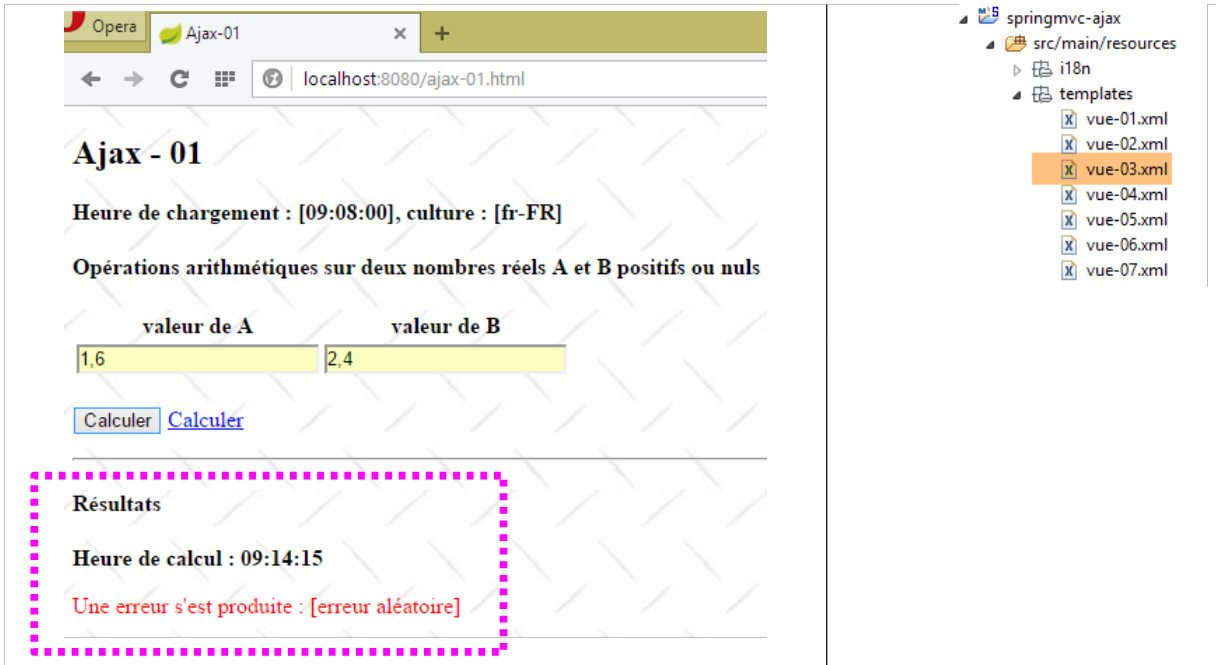 |
Note line 9: what we put in the template is not a message, but a message key:
[messages_fr.properties]
erreur.aleatoire=erreur aléatoire
[messages_fr.properties]
erreur.aleatoire=randomly generated error
The view code [vue-03.xml] is as follows:
<!DOCTYPE HTML>
<html xmlns:th="http://www.thymeleaf.org">
    <body>
        <h4>Résultats</h4>
        <p>
            <strong>
                <span th:text="#{labelHeureCalcul}">Heure de calcul :</span>
                <span id="heureCalcul" th:text="${resultats.heurePost}"></span>
            </strong>
        </p>
        <p style="color: red;">
            <span th:text="#{LabelErreur(#{${resultats.erreur}})}">Une erreur s'est produite :</span>
            <!-- <span id="error" th:text="${resultats.erreur}"></span> -->
        </p>
    </body>
</html>
- line 12, note a message configured by a message key that is itself calculated. We introduced this concept in section 5.18, page 170.
The code for the [/ajax-02] action continues as follows:
@RequestMapping(value = "/ajax-02", method = RequestMethod.POST, produces = "text/html; charset=UTF-8")
    public String ajax02(ActionModel01 formulaire, BindingResult result, Locale locale, Model modèle,    HttpSession session) throws InterruptedException {
...
        // retrieve posted values
        double a = formulaire.getA();
        double b = formulaire.getB();
        // we build the model
        résultats.setAplusb(String.valueOf(a + b));
        résultats.setAmoinsb(String.valueOf(a - b));
        résultats.setAmultiplieparb(String.valueOf(a * b));
        try {
            résultats.setAdiviseparb(String.valueOf(a / b));
        } catch (RuntimeException e) {
            résultats.setAdiviseparb("NaN");
        }
        // the view is displayed
        return "vue-02";
    }
- lines 5–15: the four arithmetic operations are performed on the numbers [a, b] and encapsulated in the [Resultats] instance of the model;
- line 17: the following view [view-02.xml] is returned:
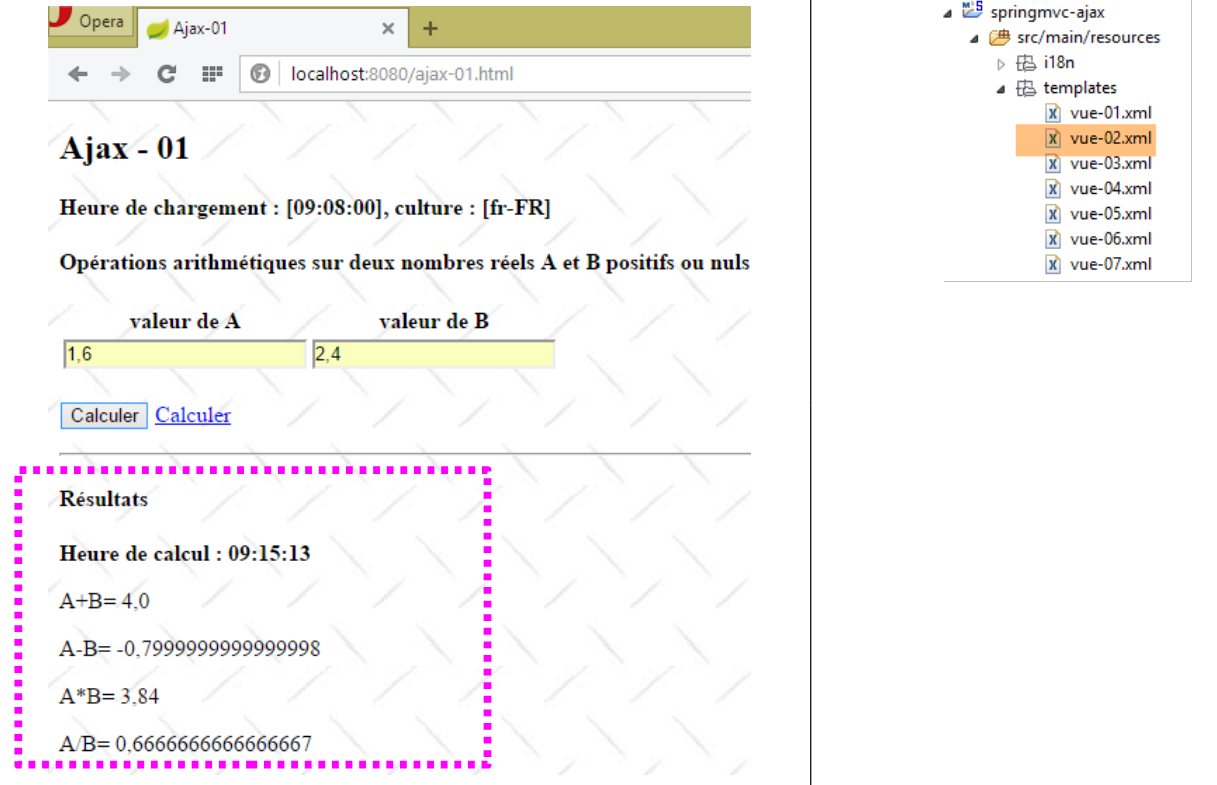 |
The view [view-02.xml] is as follows:
<!DOCTYPE HTML>
<html xmlns:th="http://www.thymeleaf.org">
    <body>
        <h4>Résultats</h4>
        <p>
            <strong>
                <span th:text="#{labelHeureCalcul}">Heure de calcul :</span>
                <span id="heureCalcul" th:text="${resultats.heurePost}"></span>
            </strong>
        </p>
        <p>
            <span th:text="#{labelAplusB}">A+B=</span>
            <span id="aplusb" th:text="${resultats.aplusb}"></span>
        </p>
        <p>
            <span th:text="#{labelAmoinsB}">A-B=</span>
            <span id="amoinsb" th:text="${resultats.amoinsb}"></span>
        </p>
        <p>
            <span th:text="#{labelAfoisB}">A*B=</span>
            <span id="amultiplieparb" th:text="${resultats.amultiplieparb}"></span>
        </p>
        <p>
            <span th:text="#{labelAdivB}">A/B=</span>
            <span id="adiviseparb" th:text="${resultats.adiviseparb}"></span>
        </p>
    </body>
</html>
Whether the result is the view [vue-02.xml] or the view [vue-03.xml], this HTML result is placed in the area identified by [resultats] in the view [vue-01.xml], due to the form's [data-ajax-update="#resultats"] attribute.
7.2.6. POSTing the entered values
We encounter a challenge here with the posted values. We are working with two locales [fr-FR] and [en-US] that represent real numbers differently. We addressed this issue in Section 6.3, page 190, when we needed to POST real numbers in two different locales. We will reuse the tools used there. However, we face an additional challenge: we do not have access to the method that handles the POST of the entered values. This is why we added the following attributes to the form tag:
- [data-ajax-begin="beforeSend"]: the JavaScript function to execute before submitting the form;
- [data-ajax-complete="afterComplete"]: the JavaScript function to execute when the response has been received;
We don’t have access to the JavaScript function that will POST the entered values, but we can write two JavaScript functions:
- [beforeSend]: a JavaScript function executed before the POST;
- [afterComplete]: a JavaScript function executed upon receipt of the POST response;
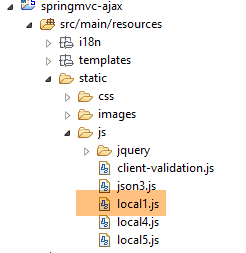
These two functions are placed in a file named [local1.js]:
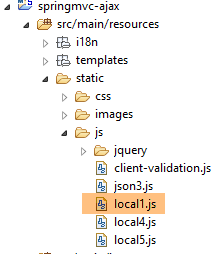 |
The [local1.js] file initializes the JavaScript environment of the [vue-01.xml] view as follows:
// global data
var loading;
var formulaire;
var résultats;
var a, b;

// document loading
$(document).ready(function() {
    // retrieve the references of the page's various components
    loading = $("#loading");
    formulaire = $("#formulaire");
    resultats = $('#resultats');
    a = $("#a");
    b = $("#b");
    // we hide certain elements
    loading.hide();
    // parse the form validators
    $.validator.unobtrusive.parse(formulaire);
    // we manage two locales [fr_FR, en_US]
    // the reals [a,b] are sent by the server in Anglo-Saxon format
    // we put them in French format if necessary
    checkCulture(2);
});
- line 22: the [checkCulture] function is described a little further on;
The JavaScript function [beforeSend] will be as follows:
function beforeSend(jqXHR, settings) {
    // before POST
    // numbers must be posted in Anglo-Saxon format
    var culture = Globalize.culture().name;
    if (culture === 'fr-FR') {
        checkCulture(1);
        settings.data = formulaire.serialize();
    }
}

function afterComplete(jqXHR, settings) {
    ...
}

function checkCulture(mode) {
    if (mode == 1) {
        // we put the numbers [a,b] in Anglo-Saxon format
        var value1 = a.val().replace(",", ".");
        a.val(value1);
        var value2 = b.val().replace(",", ".");
        b.val(value2);
    }
    if (mode == 2) {
...
    }
}
- lines 4-6: we check if the view's locale is [fr-FR]. In this case, the posted values must be changed. Indeed, if the user entered [1,6], the value [1.6] must be posted; otherwise, the value [1,6] will be rejected on the server side. To do this, simply change the comma in the posted values to a decimal point (lines 18–21);
- but we can’t stop there. When the [beforeSend] function is called, the string of posted values [a=val1&b=valB] has already been constructed. We therefore need to modify it. This is done using the function’s second parameter [settings];
- Line 7: [settings.data] (settings is a function parameter) represents the posted string. We recreate this string using the expression [form.serialize()]. This expression traverses the form to find the values to be posted and constructs the POST string. It will then take the new values of [a,b] with decimal points;
If we do nothing else, the server will send its response, which will be displayed correctly. However, the values of [a,b] now have decimal points, even though we are still in the [fr-FR] locale. So if the user doesn’t notice this and clicks [Calculate] again, the validators will tell them that the values [a,b] are invalid. Which is correct. This is where the [afterComplete] function comes in, executed upon receiving the result:
function beforeSend(jqXHR, settings) {
    // before POST
...
}

function afterComplete(jqXHR, settings) {
    // after POST
    // numbers must be supplied in French format if necessary
    var culture = Globalize.culture().name;
    if (culture === 'fr-FR') {
        checkCulture(2);
    }
}

function checkCulture(mode) {
    if (mode == 1) {
...
    }
    if (mode == 2) {
        // put the numbers in French format
        var value1 = a.val().replace(".", ",");
        a.val(value1);
        var value2 = b.val().replace(".", ",");
        b.val(value2);
    }
}
- lines 9-12: if the view's locale is [fr-FR], convert the numbers [a,b] to French format.
7.2.7. Tests
Here are some test screenshots:
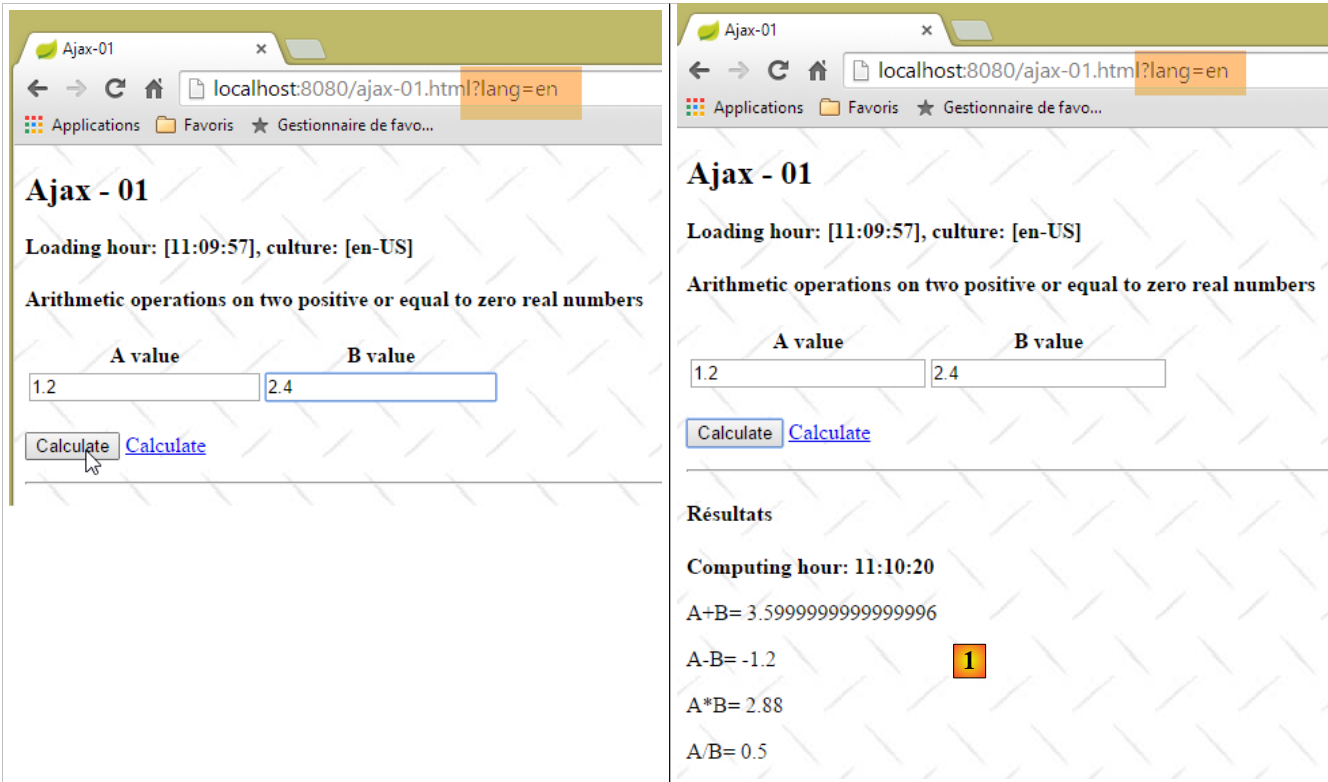 |
- in [1], the server's response;
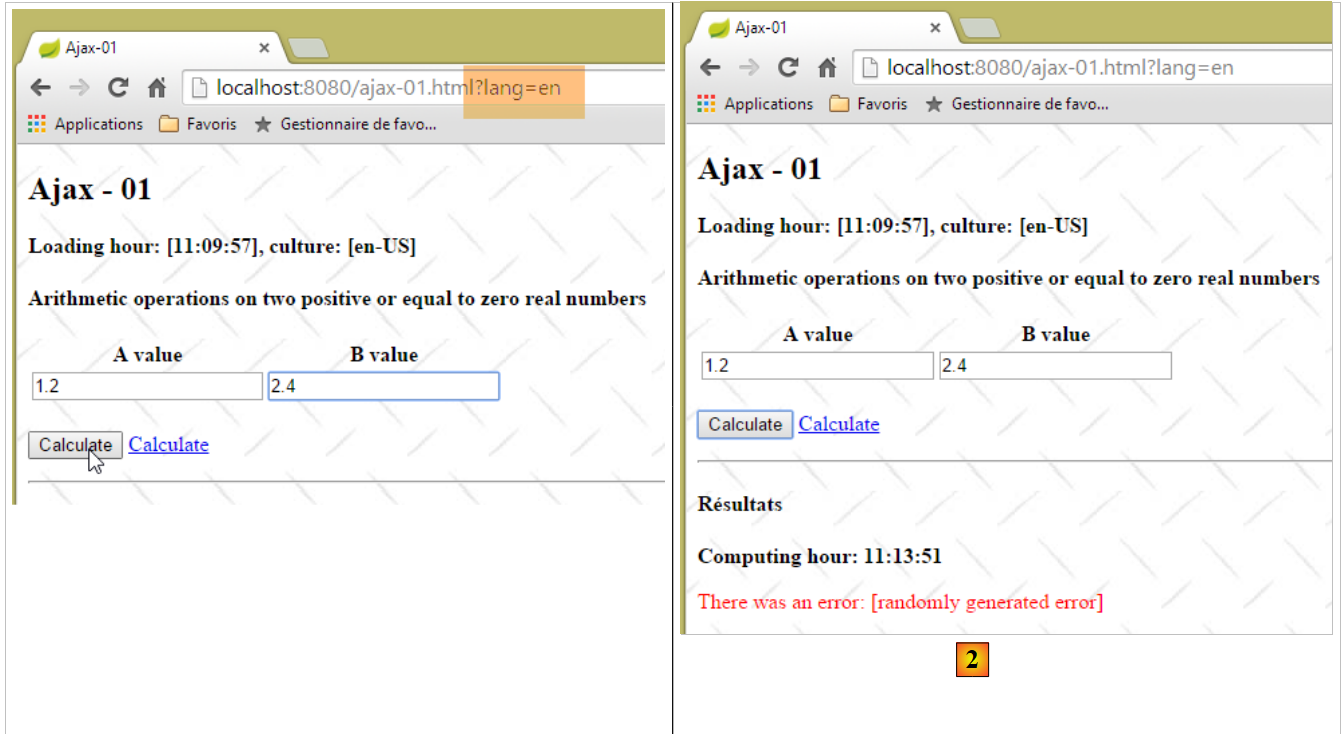 |
- in [2], the server's response with an error message;
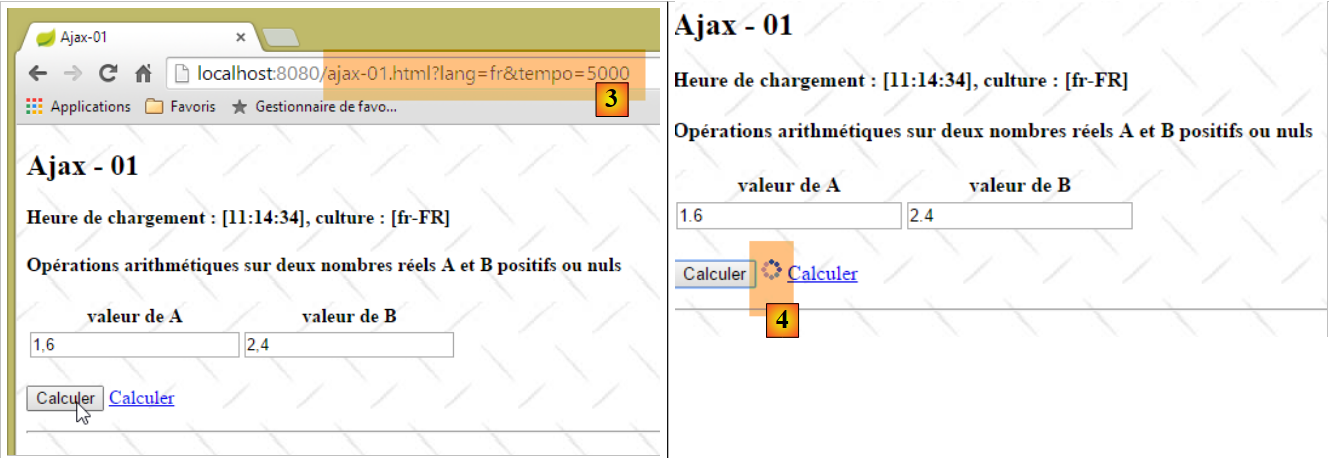 |
- in [3], a 5-second timeout is set. This means the server will wait 5 seconds before sending its response. In the [form] tag, we used the attribute [data-ajax-loading='#loading']. The [loading] parameter is the identifier of an area that is:
- displayed for the entire duration of the wait;
- hidden after the server's response is received;
Here, [loading] is the identifier of an animated image that can be seen in [4].
7.2.8. Disabling JavaScript with the [en-US] locale
What happens if we disable JavaScript in the browser?
The POST of the entered values will occur according to the [form] tag, whose [data-ajax-attr] attributes will not be used. Everything happens as if we had the following [form] tag:
<form id="formulaire" name="formulaire" method="post" action="/ajax-02.html">
The entered values will therefore be posted to the [/ajax-02] action. They will not have been validated on the client side. Therefore, the server-side validators will take over. They were already involved before, but on values that had already been validated on the client side, and were therefore correct. This is no longer the case.
We modify the [/ajax-02] action as follows:
@RequestMapping(value = "/ajax-02", method = RequestMethod.POST, produces = "text/html; charset=UTF-8")
    public String ajax02(@Valid ActionModel01 formulaire, BindingResult result, Locale locale, Model modèle,    HttpSession session, HttpServletRequest request) throws InterruptedException {
        // ajax request?
        boolean isAjax = "XMLHttpRequest".equals(request.getHeader("X-Requested-With"));
        ...
    }
- Line 4: The [/ajax-02] action can now be called via an Ajax POST or a standard POST. We need to be able to distinguish between these two cases. We do this using the HTTP headers sent by the client browser;
When we look at the network traffic in the Chrome DevTools (Ctrl-Shift-I) with JavaScript enabled, we see that the client sends the following headers during the POST request:
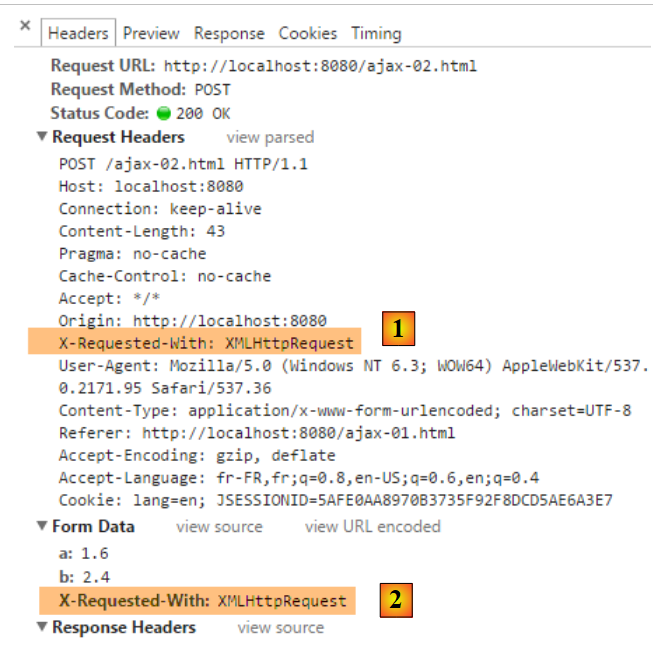 |
As shown above:
- an [X-Requested-With] header was sent [1];
- an [X-Requested-With] parameter has been added to the posted values [2];
This is not done in the case of a standard POST. We therefore have two options for retrieving the information: retrieve it from the HTTP headers or from the posted values. Line 4 of the [/ajax-02] action chose the first solution.
Let’s continue with the code for this action:
@RequestMapping(value = "/ajax-02", method = RequestMethod.POST, produces = "text/html; charset=UTF-8")
    public String ajax02(@Valid ActionModel01 formulaire, BindingResult result, Locale locale, Model modèle, HttpSession session, HttpServletRequest request) throws InterruptedException {
        // ajax request?
        boolean isAjax = "XMLHttpRequest".equals(request.getHeader("X-Requested-With"));
        // tempo?
        Integer tempo = (Integer) session.getAttribute("tempo");
        if (tempo != null && tempo > 0) {
            Thread.sleep(tempo);
        }
        // prepare the model for the next view
        Resultats résultats = new Resultats();
        modèle.addAttribute("resultats", résultats);
        // we set the locale
        setLocale(locale, modèle, résultats);
        // hour
        String heure = new SimpleDateFormat("hh:mm:ss").format(new Date());
        résultats.setHeurePost(heure);
        résultats.setHeureGet(heure);
        // valid request?
        if (!isAjax && result.hasErrors()) {
            return "vue-01";
        }
...
- line 2: the [@Valid ActionModel01 form] parameter triggers the server-side validators;
- lines 20–22: if the request is not an Ajax request and validation has failed, then the view [vue-01.xml] is returned with error messages.
Here is an example:
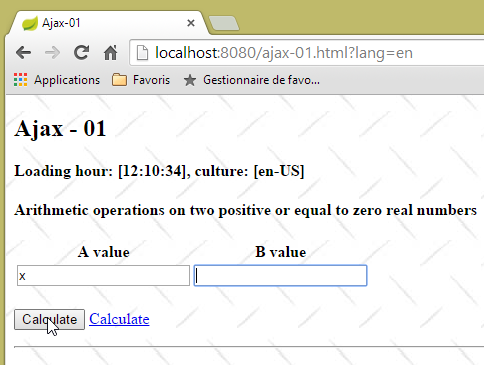 | 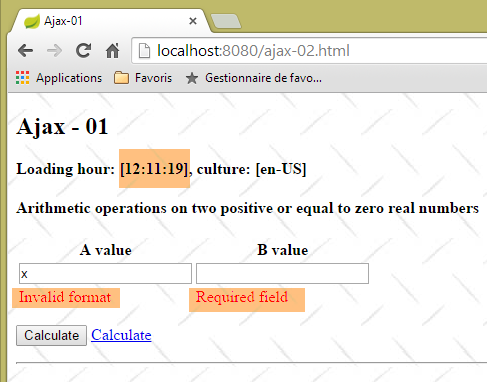 |
Let’s continue our examination of the [/ajax-02] action:
@RequestMapping(value = "/ajax-02", method = RequestMethod.POST, produces = "text/html; charset=UTF-8")
    public String ajax02(@Valid ActionModel01 formulaire, BindingResult result, Locale locale, Model modèle,    HttpSession session, HttpServletRequest request) throws InterruptedException {
        // ajax request?
        boolean isAjax = "XMLHttpRequest".equals(request.getHeader("X-Requested-With"));
...
        // valid request?
        if (!isAjax && result.hasErrors()) {
            return "vue-01";
        }
        // we generate an error every other time
        int val = new Random().nextInt(2);
        if (val == 0) {
            // an error message is returned
            résultats.setErreur("erreur.aleatoire");
            if (isAjax) {
                return "vue-03";
            } else {
                résultats.setVue("vue-03");
                return "vue-01";
            }
        }
...
- line 14: a random error is generated;
- line 16: in the case of an Ajax call, the [vue-03.xml] view is returned and placed in the area identified by [resultats];
- line 18: in the case of a non-Ajax call, the view to be displayed is placed in the [Resultats] model;
- line 19: the view [vue-01.xml] is rendered again;
The view [vue-01.xml] is modified as follows:
<div id="resultats" />
<div th:if="${resultats.vue}=='vue-02'" th:include="vue-02" />
<div th:if="${resultats.vue}=='vue-03'" th:include="vue-03" />
- Line 3: The view [view-03.xml] will be inserted under the [results] area;
Here is an example:
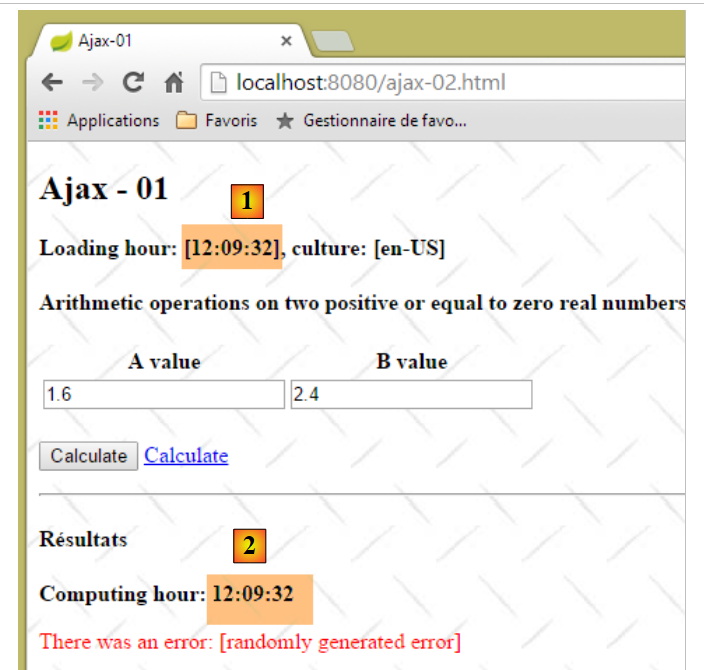 |
Note that the times [1] and [2] are now identical.
Let’s continue our study of the [/ajax-02] action:
    @RequestMapping(value = "/ajax-02", method = RequestMethod.POST, produces = "text/html; charset=UTF-8")
    public String ajax02(@Valid ActionModel01 formulaire, BindingResult result, Locale locale, Model modèle, HttpSession session, HttpServletRequest request) throws InterruptedException {
        // ajax request?
        boolean isAjax = "XMLHttpRequest".equals(request.getHeader("X-Requested-With"));
...
        // retrieve posted values
        double a = formulaire.getA();
        double b = formulaire.getB();
        // we build the model
        résultats.setAplusb(String.valueOf(a + b));
        résultats.setAmoinsb(String.valueOf(a - b));
        résultats.setAmultiplieparb(String.valueOf(a * b));
        try {
            résultats.setAdiviseparb(String.valueOf(a / b));
        } catch (RuntimeException e) {
            résultats.setAdiviseparb("NaN");
        }
        // the view is displayed
        if (isAjax) {
            return "vue-02";
        } else {
            résultats.setVue("vue-02");
            return "vue-01";
        }
}
- lines 7–17: the results of the four arithmetic operations are placed in the template;
- lines 22-23: the view [vue-01.xml] (line 22) is rendered by inserting the view [vue-02.xml] (line 22);
This insertion is done as follows in [vue-01.xml]:
<div id="resultats" />
<div th:if="${resultats.vue}=='vue-02'" th:include="vue-02" />
<div th:if="${resultats.vue}=='vue-03'" th:include="vue-03" />
- Line 2: The [vue-02.xml] view will be inserted under the [resultats] area;
Here is an example of the output:
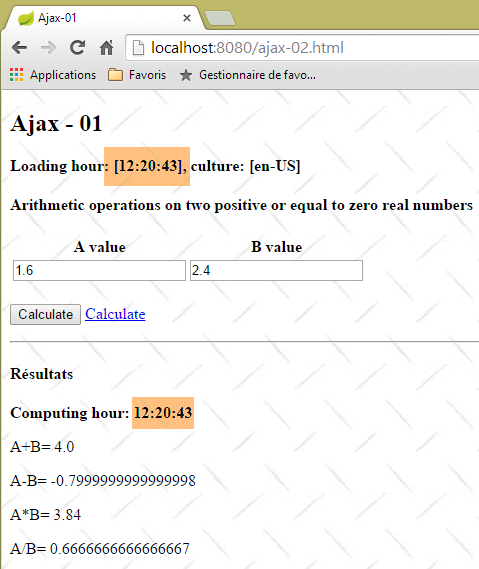 |
7.2.9. Disabling JavaScript with the [fr-FR] locale
With the [fr-FR] locale, we encounter the following issue:
 | 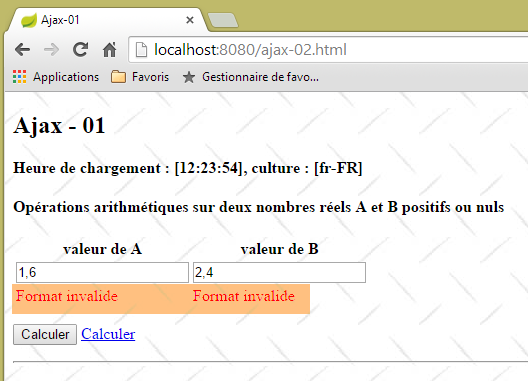 |
Values entered in the French format were declared invalid. This is because the server expects real numbers in the Anglo-Saxon format. The solution is quite complex. We will create a filter that will:
- intercept the request;
- change the commas in the posted values [a] and [b] to decimal points;
- then pass the new request to the action that needs to process it;
First, we add a hidden field to the view [vue-01.xml]:
<form ...>
...
</p>
    <!-- hidden fields -->
    <input type="hidden" id="culture" name="culture" th:value="${resultats.culture}"></input>
</form>
- line 5: the culture [fr-FR] or [en-US] is placed in the [name=culture] attribute field. Since the [input] tag is in the form, its value will be posted along with the values of [a] and [b]. We will then have a posted string in the form:
It is important to understand this point.
Next, we include a filter in the application configuration:
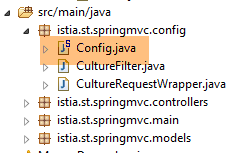 |
The [Config] file is modified as follows:
@Configuration
@ComponentScan({ "istia.st.springmvc.controllers", "istia.st.springmvc.models" })
@EnableAutoConfiguration
public class Config extends WebMvcConfigurerAdapter {
...
    @Bean
    public Filter cultureFilter() {
        return new CultureFilter();
    }
}
- Line 7: The fact that the [cultureFilter] bean returns a [Filter] type makes it a filter. The bean itself can have any name;
The next step is to create the filter itself:
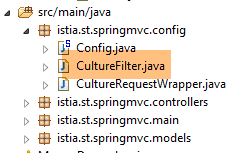 |
package istia.st.springmvc.config;

import java.io.IOException;

import javax.servlet.FilterChain;
import javax.servlet.ServletException;
import javax.servlet.http.HttpServletRequest;
import javax.servlet.http.HttpServletResponse;

import org.springframework.web.filter.OncePerRequestFilter;

public class CultureFilter extends OncePerRequestFilter {

    @Override
    protected void doFilterInternal(HttpServletRequest request, HttpServletResponse response, FilterChain filterChain)
            throws ServletException, IOException {
        // next handler
        filterChain.doFilter(new CultureRequestWrapper(request), response);
    }
}
- line 12: we extend the [OncePerRequestFilter] class, which is a Spring class, and what we need to do is override the [doFilterInternal] method of this class;
- line 15: the [doFilterInternal] method receives three pieces of information:
- [HttpServletRequest request]: the request to be filtered. This cannot be modified,
- [HttpServletResponse response]: the response to be sent to the server. The filter can choose to generate it itself,
- [FilterChain filterChain]: the filter chain. Once the [doFilterInternal] method has finished its work, it must pass the request to the next filter in the filter chain;
- line 18: we create a new request from the one we received [new CultureRequestWrapper(request)] and pass it to the next filter. Because we cannot modify the initial request [HttpServletRequest request], we create a new one;
The [CultureRequestWrapper] class is as follows:
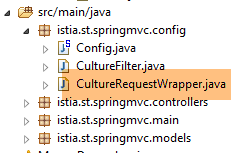 |
package istia.st.springmvc.config;

import javax.servlet.http.HttpServletRequest;
import javax.servlet.http.HttpServletRequestWrapper;

public class CultureRequestWrapper extends HttpServletRequestWrapper {

    public CultureRequestWrapper(HttpServletRequest request) {
        super(request);
    }

    @Override
    public String[] getParameterValues(String name) {
        // posted values a and b
        if (name != null && (name.equals("a") || name.equals("b"))) {
            String[] values = super.getParameterValues(name);
            String[] newValues = values.clone();
            newValues[0] = newValues[0].replace(",", ".");
            return newValues;
        }
        // other cases
        return super.getParameterValues(name);
    }

}
- line 6: the [CultureRequestWrapper] class extends the [HttpServletRequestWrapper] class and will override some of its methods;
- lines 8–10: the constructor that receives the request to be filtered and passes it to the parent class;
- It is important to understand here that the filtered request will ultimately end up as an input parameter for a class called a servlet. With Spring MVC, this servlet is of type [DispatcherServlet]. This class has various methods for retrieving request parameters: [getParameter, getParameterMap, getParameterNames, getParameterValues, ...]. The method used by the servlet must be redefined. To do this, one would need to read the code of the [DispatcherServlet] class. I did not do that and redefined various methods. Ultimately, it was the [getParameterValues] method that was redefined;
- line 13: the [getParameterValues] method takes as a parameter the name of one of the parameters returned by the [getParameterNames] method and must return an array of its values. Indeed, we know that a parameter may appear multiple times in a request;
- line 18: the comma is replaced with a decimal point;
Here is an example of execution:
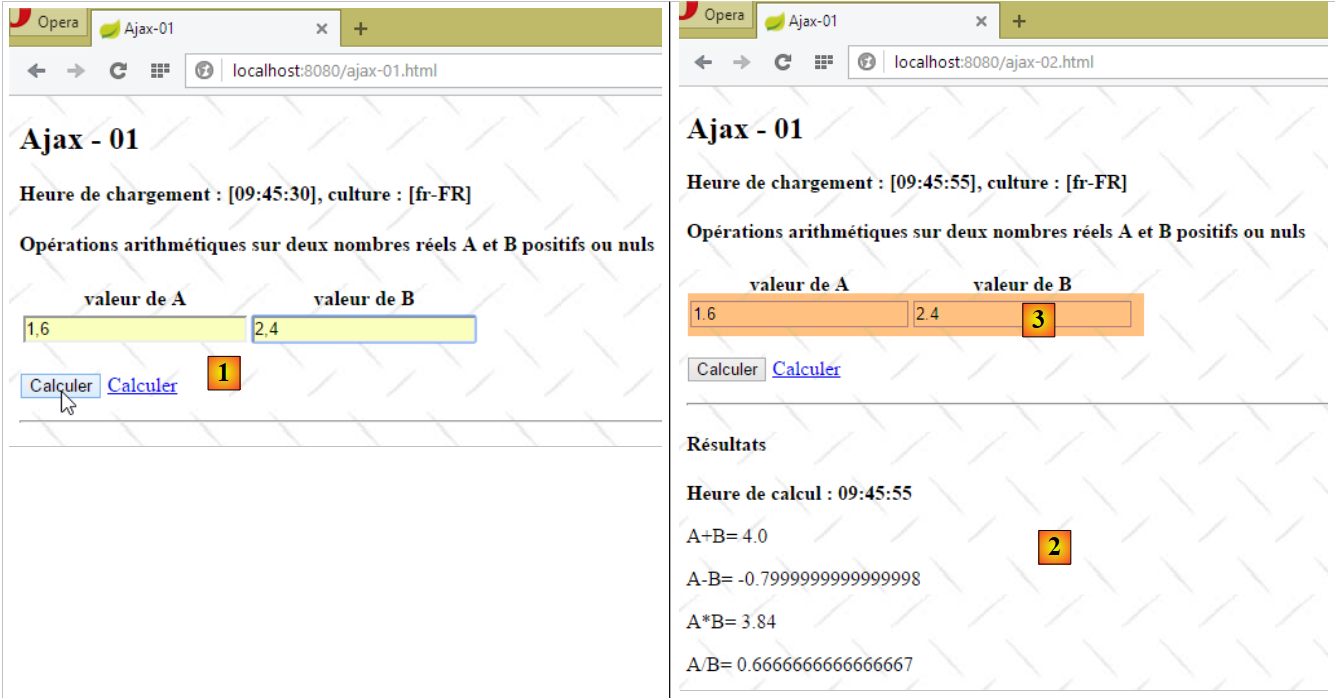 |
- in [1], the values [a,b] are entered in French format;
- in [2], the results;
- in [3], the server returned a page with numbers in Anglo-Saxon format.
This issue can be resolved with Thymeleaf as follows in the view [vue-01.xml]
<tr>
    <td>
        <input type="text" id="a" name="a"    th:value="${resultats.culture}=='fr-FR' and ${actionModel01.a}!=null? ${#strings.replace(actionModel01.a,'.',',')} : ${actionModel01.a}" data-val="true" th:attr="data-val-required=#{NotNull},data-val-number=#{typeMismatch},data-val-min=#{actionModel01.a.min},data-val-min-value=#{actionModel01.a.min.value}" />
    </td>
    <td>
        <input type="text" id="b" name="b" th:value="${resultats.culture}=='fr-FR' and ${actionModel01.b}!=null? ${#strings.replace(actionModel01.b,'.',',')} : ${actionModel01.b}" data-val="true" th:attr="data-val-required=#{NotNull},data-val-number=#{typeMismatch},data-val-min=#{actionModel01.b.min},data-val-min-value=#{actionModel01.b.min.value}" />
    </td>
</tr>
There are several changes to make on lines 3 and 6. Let’s focus on line 3:
- we had written [th:field="*{a}"]. The [th:field] parameter sets the [id, name, value] attributes of the generated HTML [input] tag. Here, we want to manage the [value] attribute ourselves. So we also set the [id, name] attributes ourselves;
- the [th:value] attribute evaluates an expression using the ternary operator ?. We test the expression [${resultats.culture}=='fr-FR' and ${actionModel01.b}!=null]. If it is true, we set the [value] attribute to the value of [actionModel01.a], where the decimal point is replaced by a comma. If it is false, we set the [value] attribute to the value of [actionModel01.a] without modification;
- Line 6: We do the same thing for the [b] field;
Here is an example of execution:
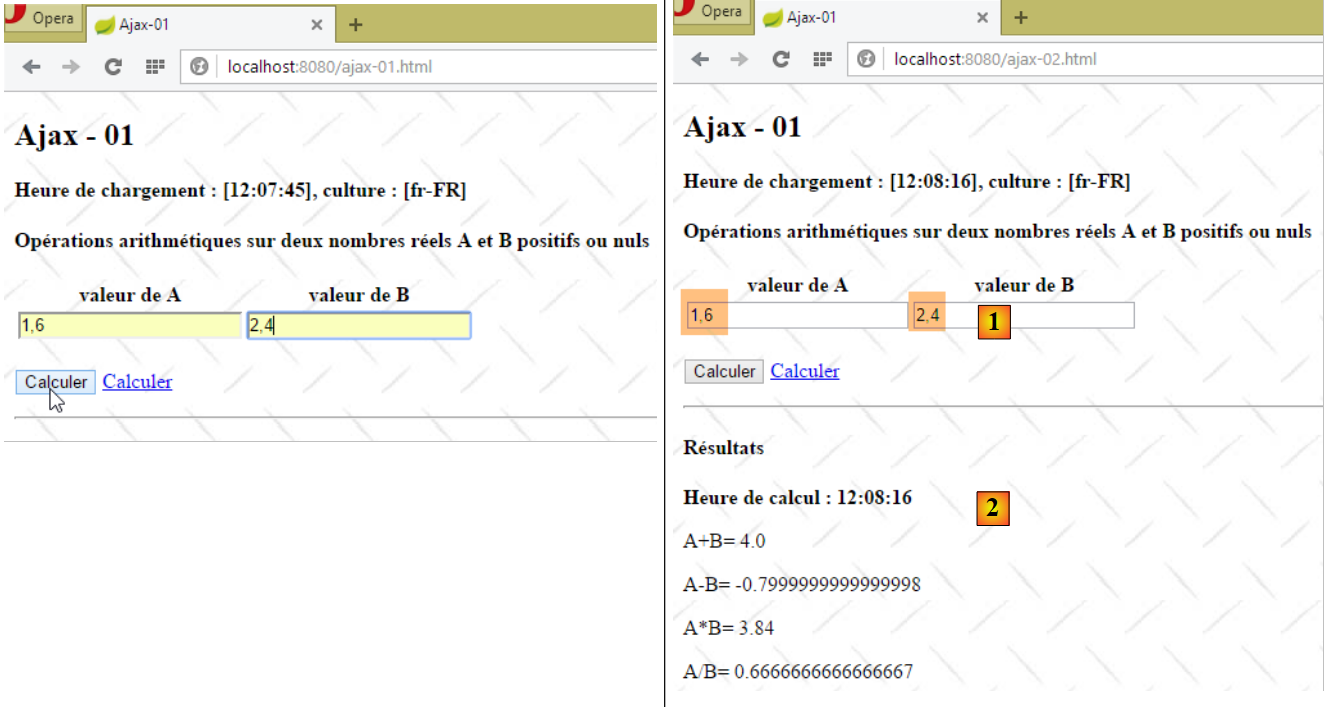 |
- In [1], the numbers [a,b] retain the French notation. This is not the case in [2];
This new issue is handled in the same way as the previous one. We modify the view [vue-03.xml] as follows:
<!DOCTYPE HTML>
<html xmlns:th="http://www.thymeleaf.org">
    <body>
        <h4 th:text="#{resultats}">Résultats</h4>
        <p>
            <strong>
                <span th:text="#{labelHeureCalcul}">Heure de calcul :</span>
                <span id="heureCalcul" th:text="${resultats.heurePost}"></span>
            </strong>
        </p>
        <p>
            <span th:text="#{labelAplusB}">A+B=</span>
            <span id="aplusb" th:text="${resultats.culture}=='fr-FR' and ${resultats.aplusb}!=null? ${#strings.replace(resultats.aplusb,'.',',')} : ${resultats.aplusb}"></span>
        </p>
        <p>
            <span th:text="#{labelAmoinsB}">A-B=</span>
            <span id="amoinsb"     th:text="${resultats.culture}=='fr-FR' and ${resultats.amoinsb}!=null? ${#strings.replace(resultats.amoinsb,'.',',')} : ${resultats.amoinsb}"></span>
        </p>
        <p>
            <span th:text="#{labelAfoisB}">A*B=</span>
            <span id="amultiplieparb" th:text="${resultats.culture}=='fr-FR' and ${resultats.amultiplieparb}!=null? ${#strings.replace(resultats.amultiplieparb,'.',',')} : ${resultats.amultiplieparb}"></span>
        </p>
        <p>
            <span th:text="#{labelAdivB}">A/B=</span>
            <span id="adiviseparb" th:text="${resultats.culture}=='fr-FR' and ${resultats.adiviseparb}!=null? ${#strings.replace(resultats.adiviseparb,'.',',')} : ${resultats.adiviseparb}"></span>
        </p>
    </body>
</html>
Here is an example:
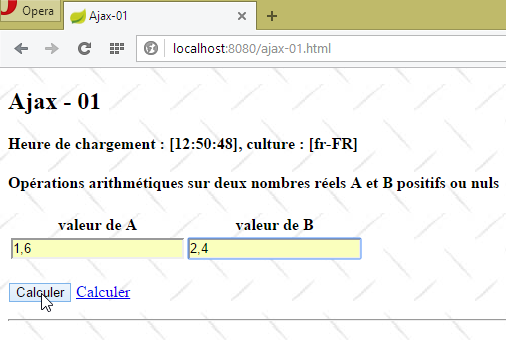 | 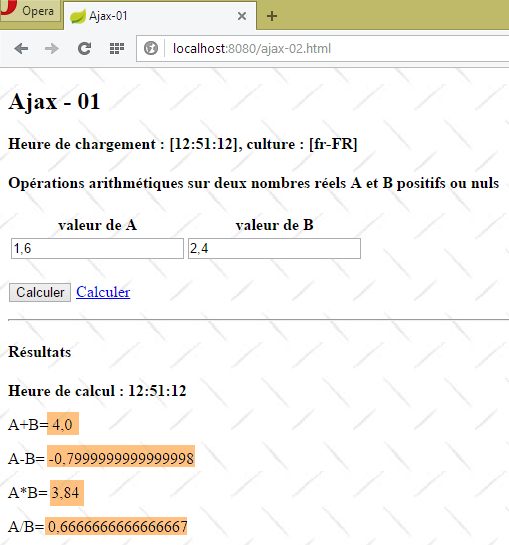 |
We now have an application that correctly handles two locales in an environment that may or may not use JavaScript. To achieve this, we had to significantly increase the complexity of the server-side code. Moving forward, we will always assume that JavaScript is enabled in the browser. This enables features that are impossible in server-only mode.
7.2.10. Handling the [Calculate] link
Let’s examine the [Calculate] link on the main page [vue-01.xml]:
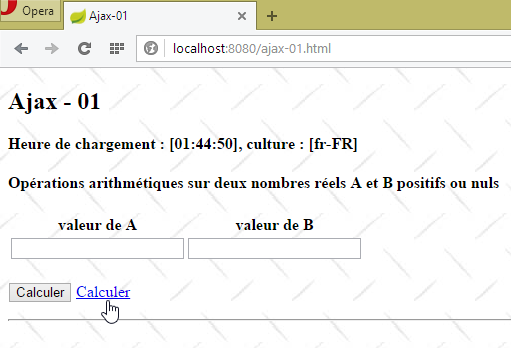 |  |
The code for the [Calculate] link in the [vue-01.xml] view is as follows:
<a href="javascript:postForm()" th:text="#{action.calculer}">Calculer</a>
The JavaScript function [postForm] is defined in the file [local1.js] as follows:
// global data
var loading;
var formulaire;
var résultats;
var a, b;

function postForm() {
    // valid form?
    if (!formulaire.validate().form()) {
        // invalid form - terminated
        return;
    }
    // we manage two locales [fr_FR, en_US]
    // the real [a,b] must be posted in Anglo-Saxon format in all cases
    // they will be filtered by [CultureFilter]

    // make a manual Ajax call
    $.ajax({
        url : '/ajax-02',
        headers : {
            'X-Requested-With' : 'XMLHttpRequest'
        },
        type : 'POST',
        data : formulaire.serialize(),
        dataType : 'html',
        beforeSend : function() {
            loading.show();
        },
        success : function(data) {
            resultats.html(data);
        },
        complete : function() {
            loading.hide();
        },
        error : function(jqXHR) {
            résultats.html(jqXHR.responseText);
        }
    })
}
- lines 2–5: Recall that these elements were initialized by the [$(document).ready] function;
- lines 9-12: We run the form’s JavaScript validators. If any of the values is invalid, the expression [form.validate().form()] returns false. In this case, the form’s [submit] is canceled;
- lines 18-38: we make a manual Ajax call;
- line 19: the target URL of the Ajax call;
- lines 20–22: an array of HTTP headers to add to those included by default in the HTTP request. Here, we add the HTTP header that will indicate to the server that we are making an Ajax call;
- line 23: the HTTP method used;
- line 24: the data being posted. [formulaire.serialize] creates the string to be posted [culture=fr-FR&a=12,7&b=20,89] from the form with ID [formulaire]. Here we encounter the problem discussed earlier: the values [a,b] must be posted in the Anglo-Saxon format. We know that this problem has now been resolved with the creation of the [cultureFilter] filter;
- line 25: the expected return data type. We know that the server will return an HTML stream;
- line 26: the method to execute when the request starts. Here, we specify that the component with id [loading] must be displayed. This is the animated loading image;
- line 29: the method to execute if the Ajax request is successful. The [data] parameter is the complete response from the server. We know this is an HTML stream;
- line 30: we update the component with the ID [results] with the HTML from the [data] parameter.
- line 33: we hide the loading indicator;
- line 35: function executed when the server response is received, regardless of whether it is a success or an error;
- Lines 35–37: If an error occurs (the server returned an HTTP response with a status code indicating a server-side error), the server’s HTML response is displayed in the [results] area;
Here is an example of execution:
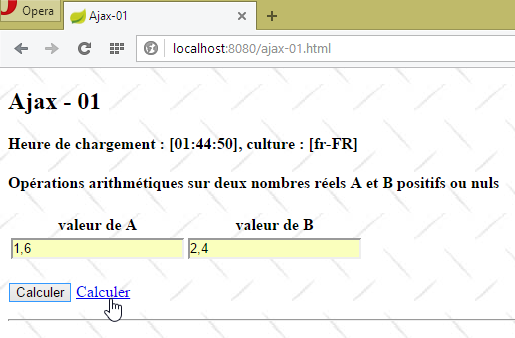 |  |
7.3. Updating an HTML page with a JSON feed
In the previous example, the web server responded to the Ajax HTTP request with an HTML stream. This stream contained data accompanied by HTML formatting. We will revisit the previous example, this time using JSON (JavaScript Object Notation) responses that contain only the data. The advantage is that fewer bytes are transmitted. We assume that JavaScript is enabled in the browser.
7.3.1. The [/ajax-04] action
The [/ajax-04] action is identical to the [/ajax-01] action, except that it displays the [vue-04.xml] view instead of the [vue-01.xml] view:
@RequestMapping(value = "/ajax-04", method = RequestMethod.GET, produces = "text/html; charset=UTF-8")
    public String ajax04(Locale locale, Model modèle, HttpSession session, String tempo) {
        ...
        // view
        return "vue-04";
    }
7.3.2. The view [view-04.xml]
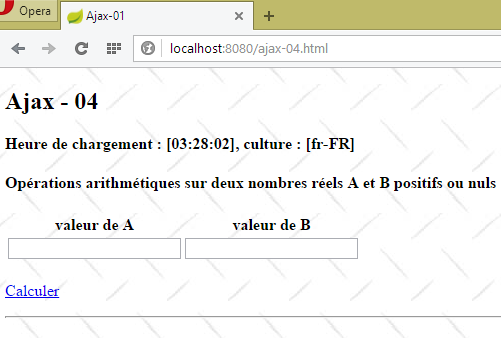 |
The view [view-04.xml] uses the body of the view [view-01.xml] with the following differences:
<!DOCTYPE HTML>
<html xmlns:th="http://www.thymeleaf.org">
    <head>
        ...
        <script type="text/javascript" src="/js/local4.js"></script>
        <script th:inline="javascript">
            /*<![CDATA[*/
                    var culture = [[${resultats.culture}]];
                    Globalize.culture(culture);
                    /*]]>*/
        </script>
    </head>
    <body>
        <h2>Ajax - 04</h2>
    ...
        <form id="formulaire" name="formulaire" th:object="${actionModel01}">
...
            <p>
                <img id="loading" style="display: none" src="/images/loading.gif" />
                <a href="javascript:postForm()" th:text="#{action.calculer}">Calculer</a>
            </p>
            <!-- hidden fields -->
            <input type="hidden" id="culture" name="culture" th:value="${resultats.culture}"></input>
</form>
        <hr />
        <div id="entete">
            <h4 id="titre">Résultats</h4>
            <p>
                <strong>
                    <span id="labelHeureCalcul">Heure de calcul :</span>
                    <span id="heureCalcul">12:10:87</span>
                </strong>
            </p>
        </div>
        <div id="résultats">
            <p>
                A+B=
                <span id="aplusb">16,7</span>
            </p>
            <p>
                A-B=
                <span id="amoinsb">16,7</span>
            </p>
            <p>
                A*B=
                <span id="afoisb">16,7</span>
            </p>
            <p>
                A/B=
                <span id="adivb">16,7</span>
            </p>
        </div>
        <div id="erreur">
            <p style="color: red;">
                <span id="msgErreur">xx</span>
            </p>
        </div>
    </body>
</html>
- line 5: the view's JavaScript is now in the [local4.js] file;
- line 16: the [form] tag no longer has the [data-ajax-attr] parameters from the [Unobtrusive Ajax] library. We won't be using it here. The [form] tag also no longer has the [method] and [action] attributes, which specify how and where to submit the values entered in the form. This is because the form will be submitted by a JavaScript function (line 20);
- lines 26–57: the area with the ID [resultats], which was previously empty, now contains HTML code to display the results;
- lines 26–34: the results header where the calculation time is displayed;
- lines 35–52: the results of the four arithmetic operations;
- lines 53–57: any error messages sent by the server;
The JavaScript code executed when the view [vue-04.xm] loads is in the file [local4.js]. It is as follows:
// global data
    var loading;
    var formulaire;
    var résultats;
    var titre;
    var labelHeureCalcul;
    var heureCalcul;
    var aplusb;
    var amoinsb;
    var afoisb;
    var adivb;
    var msgErreur;

// document loading
$(document).ready(function() {
    // retrieve the references of the page's various components
    loading = $("#loading");
    formulaire = $("#formulaire");
    résultats = $('#résultats');
    titre=$("#titre");
    labelHeureCalcul=$("#labelHeureCalcul");
    heureCalcul=$("#heureCalcul");
    aplusb=$("#aplusb");
    amoinsb=$("#amoinsb");
    afoisb=$("#afoisb");
    adivb=$("#adivb");
    msgErreur=$("#msgErreur");
    // we hide certain elements
    résultats.hide();
    erreur.hide();
    loading.hide();
});
- lines 17–27: retrieve the jQuery references for all elements on the page;
- line 29: the results area is hidden;
- line 30: as well as the error area;
- line 31: as well as the animated loading image;
- lines 2–12: the retrieved references are made global so that other functions can access them;
7.3.3. The jS [postForm] function
The [Calculate] link is as follows:
<p>
    <img id="loading" style="display: none" src="/images/loading.gif" />
    <a href="javascript:postForm()" th:text="#{action.calculer}">Calculer</a>
</p>
The JavaScript function [postForm] is defined in the [local.js] file as follows:
function postForm() {
    // valid form?
    if (!formulaire.validate().form()) {
        // invalid form - terminated
        return;
    }
    // make a manual Ajax call
    $.ajax({
        url : '/ajax-05',
        headers : {
            'Accept' : 'application/json'
        },
        type : 'POST',
        data : formulaire.serialize(),
        dataType : 'json',
        beforeSend : onBegin,
        success : onSuccess,
        error : onError,
        complete : onComplete
    })
}

// before the Ajax call
function onBegin() {
...
}

// on receipt of the server response
// in case of success
function onSuccess(data) {
...
}

// on receipt of the server response
// in case of failure
function onError(jqXHR) {
...
}

// after [onSuccess, onError]
function onComplete() {
...
}
- lines 3–6: Before submitting the entered values, we validate them. If they are incorrect, we do not submit the form;
- line 9: the entered values are sent to the [/ajax-05] action, which we’ll explain in more detail later;
- lines 10–12: an HTTP header to tell the server that we expect a response in JSON format;
- Line 13: The entered values will be posted;
- line 14: serialization of the entered values into a string ready to be posted [a=1,6&b=2,4&culture=fr-FR];
- line 15: the type of response sent by the server. It will be JSON;
- line 16: the function to execute before the POST;
- line 17: the function to execute upon receiving the server's response if it is successful. The "success" of an HTTP request is determined by the status of the server's HTTP response. A response [HTTP/1.1 200 OK] is a successful response. An [HTTP/1.1 500 Internal Server Error] response is a failure response. What is referred to as the status of an HTTP response is the code [200] or [500]. Some of these codes are associated with 'success' while others are associated with 'failure';
- line 18: the function to execute upon receiving the server’s response when the HTTP status of that response is a failure status;
- line 18: the function to be executed last, after the preceding [onSuccess, onError] functions;
The [onBegin] function is as follows:
// before the Ajax call
function onBegin() {
    console.log("onBegin");
    // we show the moving image
    loading.show();
    // hide certain elements of the view
    entete.hide();
    résultats.hide();
    erreur.hide();
}
Before exploring the other JavaScript functions of the Ajax call, we need to know the response sent by the [/ajax-05] action.
7.3.4. The [/ajax-05] action
The [/ajax-05] action is as follows:
    @RequestMapping(value = "/ajax-05", method = RequestMethod.POST)
    @ResponseBody()
    // processes the POST of view [view-04]
    public JsonResults ajax05(@Valid ActionModel01 formulaire, BindingResult result, Locale locale,    HttpServletRequest request, HttpSession session) throws InterruptedException {
        if(result.hasErrors()){
            // abnormal case - nothing returned
            return null;
        }
        ...
}
- line 2: the [ResponseBody] attribute indicates that the [/ajax-05] action itself returns the response to the client. Because a JSON library is included in the project dependencies, Spring Boot automatically configures this type of action to return JSON. Therefore, the JSON string of type [JsonResults] (line 4) will be sent to the client;
- Line 2: The posted values [a, b, culture] will be encapsulated in a [ActionModel01] type, which we validate [@Valid ActionModel01]. This is just for formality. We’ve assumed that JavaScript is enabled on the client browser, so when they arrive, the posted values have already been verified on the client side. However, we can anticipate the case of an unauthorized POST request that doesn’t use our JavaScript client. In this case, validation may fail;
- lines 5–7: in case of an error, we return an empty JSON object;
Let’s continue our examination of the [/ajax-05] action:
    @RequestMapping(value = "/ajax-05", method = RequestMethod.POST)
    @ResponseBody()
    // processes the POST of view [view-04]
    public JsonResults ajax05(@Valid ActionModel01 formulaire, BindingResult result, Locale locale,
            HttpServletRequest request, HttpSession session) throws InterruptedException {
...
        // spring application context
        WebApplicationContext ctx = WebApplicationContextUtils.getWebApplicationContext(request.getServletContext());
        // tempo?
        Integer tempo = (Integer) session.getAttribute("tempo");
        if (tempo != null && tempo > 0) {
            Thread.sleep(tempo);
        }
    ...
        // we return the result
        return résultats;
}
- Line 8: We retrieve the context [ctx] from the Spring application. We need this to retrieve messages from the [messages.properties] files based on a message key and a locale. This is done using the following syntax:
ctx.getMessage(clé_message, tableau_de_paramètres, locale)
- [message_key]: the key of the message being searched for;
- [locale]: the locale used. Thus, if this locale is [en_US], the [messages_en.properties] file will be used;
- [parameter_array]: the retrieved message can be parameterized as in [key=message {0} {1}]. This message contains two parameters [{0} {1}]. You must provide an array of two values as the second parameter of [ctx.getMessage];
- lines 10-13: if there is a timeout in the session, the current thread is paused for the duration of the timeout;
The [/ajax-05] action continues as follows:
        // on prépare le modèle de la prochaine vue
        JsonResults résultats = new JsonResults();
        ...
}
- line 2: creation of the JSON string template sent to the client;
The [JsonResults] model is as follows:
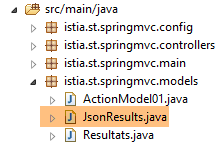 |
package istia.st.springmvc.models;

public class JsonResults {

    // data
    private String titre;
    private String labelHeureCalcul;
    private String heureCalcul;
    private String aplusb;
    private String amoinsb;
    private String afoisb;
    private String adivb;
    private String msgErreur;

    // getters and setters
...

}
- lines 6–13: each field in the [JsonResult] class corresponds to a field with the same [id] in the [vue-04.xml] view:
The [/ajax-05] action continues as follows:
        // on prépare le modèle de la prochaine vue
        JsonResults résultats = new JsonResults();
        // entête
        résultats.setTitre(ctx.getMessage("resultats.titre", null, locale));
        résultats.setLabelHeureCalcul(ctx.getMessage("labelHeureCalcul", null, locale));
        résultats.setHeureCalcul(new SimpleDateFormat("hh:mm:ss").format(new Date()));
        // on génère une erreur une fois sur deux
        int val = new Random().nextInt(2);
        if (val == 0) {
            // on renvoie un message d'erreur
            résultats.setMsgErreur(ctx.getMessage("resultats.erreur",
                    new Object[] { ctx.getMessage("erreur.aleatoire", null, locale) }, locale));
            return résultats;
}
- line 2: create the JSON string template sent to the client;
- lines 4–6: create the messages for the results header;
- lines 8–14: on average, an error message is generated once every two attempts. In this case, the process stops there and the JSON string is returned to the client (line 13);
- line 11: here is an example of a parameterized message:
erreur.aleatoire=erreur aléatoire
resultats.erreur=Une erreur s''est produite : [{0}]
The [/ajax-05] action continues as follows:
        // on récupère les valeurs postées
        double a = formulaire.getA();
        double b = formulaire.getB();
        // on construit le modèle
        résultats.setAplusb(String.valueOf(a + b));
        résultats.setAmoinsb(String.valueOf(a - b));
        résultats.setAfoisb(String.valueOf(a * b));
        try {
            résultats.setAdivb(String.valueOf(a / b));
        } catch (RuntimeException e) {
            résultats.setAdivb("NaN");
        }
        // on rend le résultat
return résultats;
- lines 2-3: retrieve the values of [a] and [b];
- lines 5-12: we construct the four results;
- line 14: the JSON string [JsonResults] is sent to the client;
Let's see how this works with the [Advanced Rest Client]:
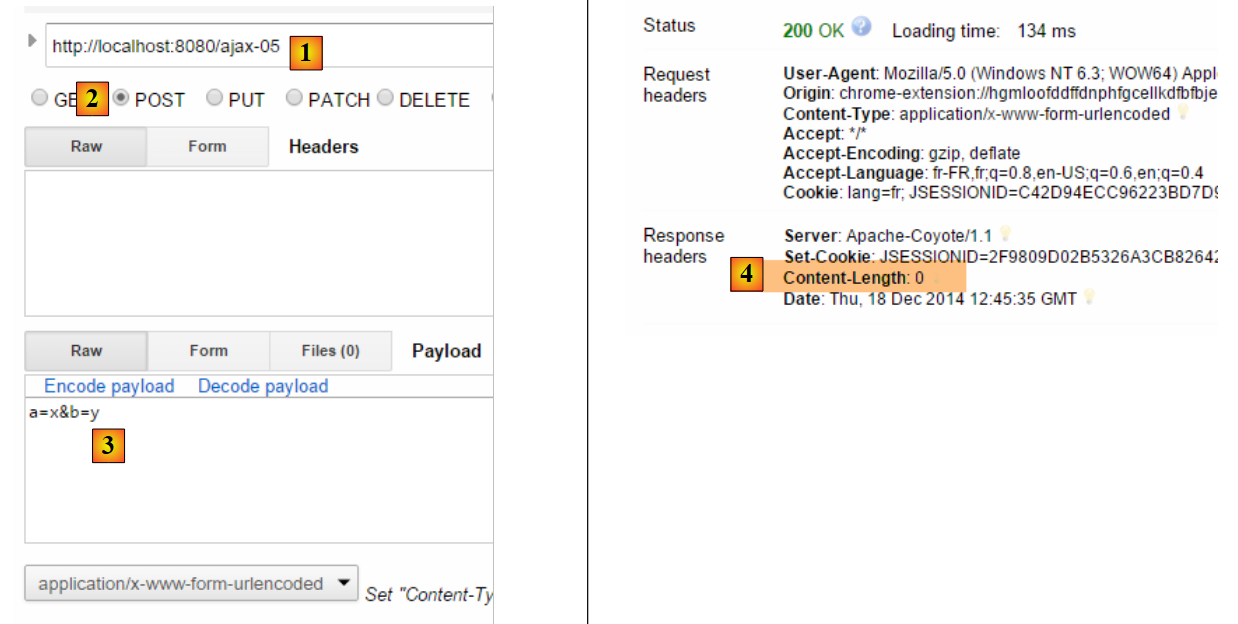 |
- in [1-2], we make a POST request to the action [/ajax-05];
- in [3], we post incorrect values;
- in [4], the server returned an empty response;
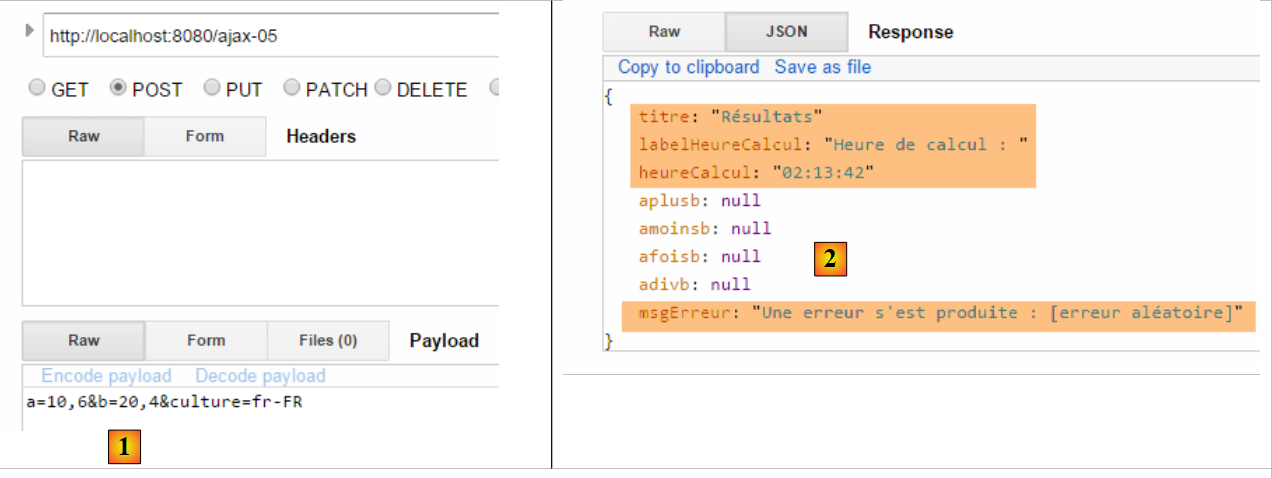 |
- In [1], we post correct values;
- in [2], the JSON object returned by the server, with an error message here;
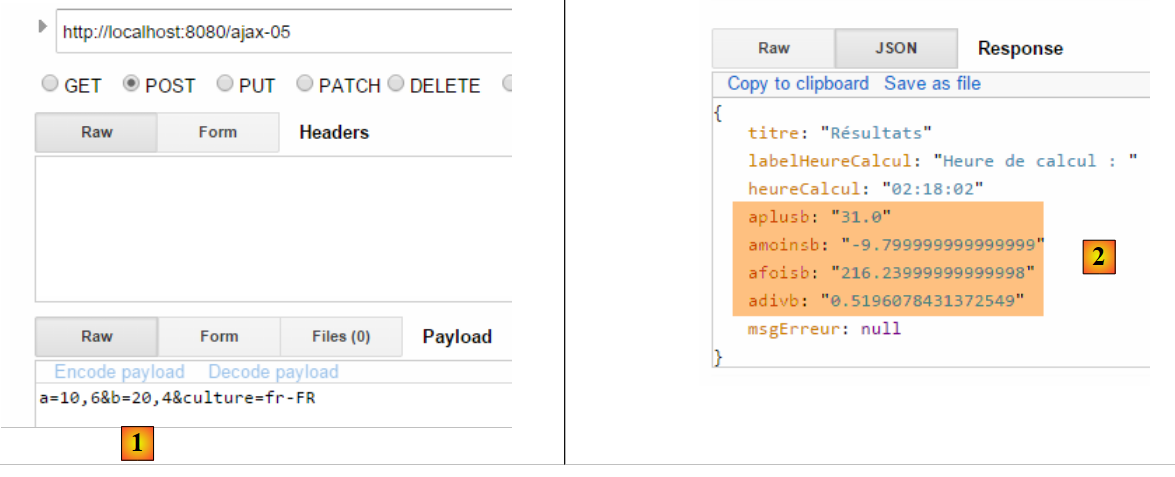 |
- In [1], we post correct values;
- in [2], the JSON object returned by the server, showing the four results;
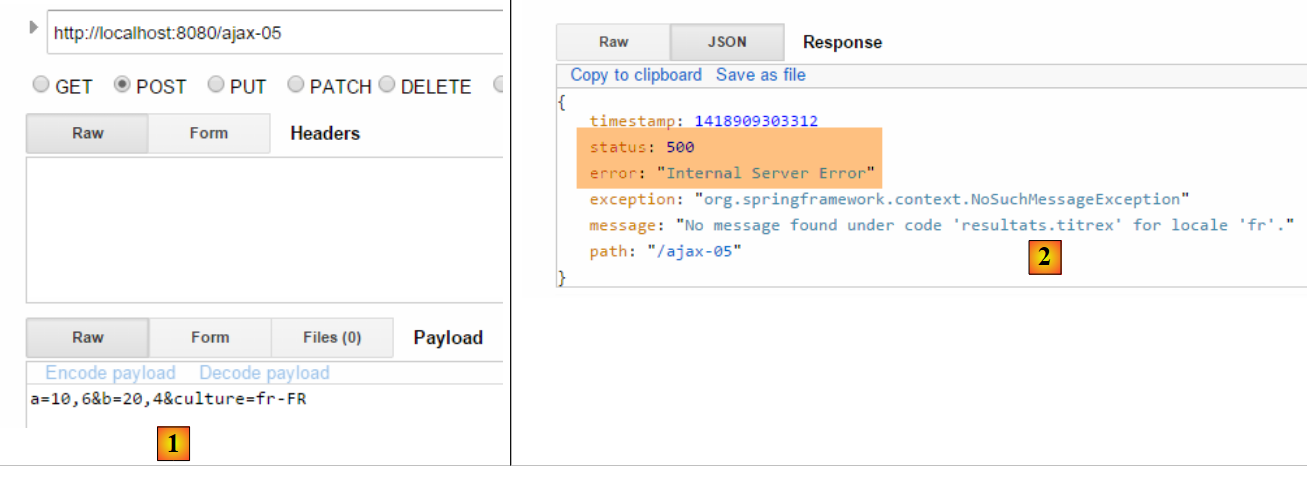 |
- in [1], we post correct values;
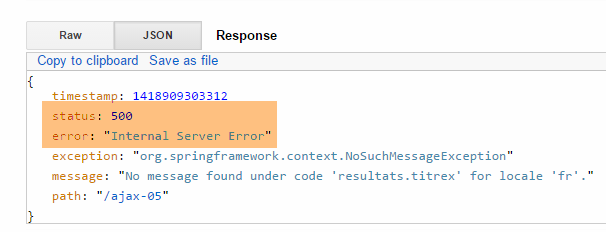
- in [2], we have triggered a server-side exception. We see that the server still sends a JSON object. In this message, we see that the HTTP status of the response is [500], indicating that there was a server-side error;
7.3.5. The jS [postForm] function - 2
Now that we know the JSON object returned by the server, we can use it in JavaScript. The [onSuccess] method, which is executed when the server sends a response with HTTP status [200], is as follows:
// on receipt of the server response
// in case of success
function onSuccess(data) {
    console.log("onSuccess");
    // fill in the results area
    titre.text(data.titre);
    labelHeureCalcul.text(data.labelHeureCalcul);
    heureCalcul.text(data.heureCalcul);
    entete.show();
    // error-free results
    if (!data.msgErreur) {
        aplusb.text(data.aplusb);
        amoinsb.text(data.amoinsb);
        afoisb.text(data.afoisb);
        adivb.text(data.adivb);
        résultats.show();
        return;
    }
    // results with error
    msgErreur.text(data.msgErreur);
    erreur.show();
}
- line 3: the [data] parameter is the JSON object returned by the server:
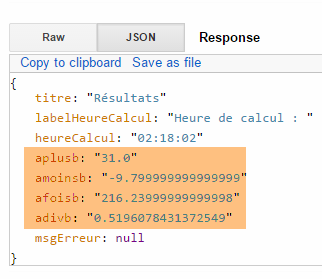 |
The [onError] method executed when the HTTP response status is [500] is as follows:
// on receipt of the server response
// in case of failure
function onError(jqXHR) {
    console.log("onError");
    // system error
    msgErreur.text(jqXHR.responseText);
    erreur.show();
}
- Line 3: The jQuery object [jqXHR] has the following properties:
- responseText: the text of the server's response,
- status: the error code returned by the server,
- statusText: the text associated with this error code;
- line 6: the object [jqXHR.responseText] is the following JSON object:
 |
7.3.6. Tests
Let’s look at some screenshots of the web application in action:
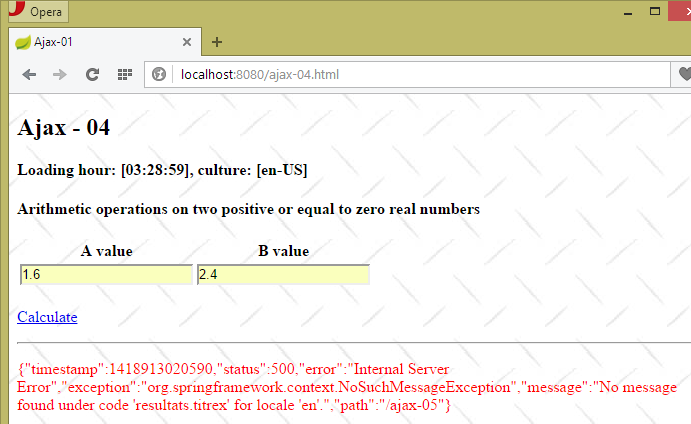 |
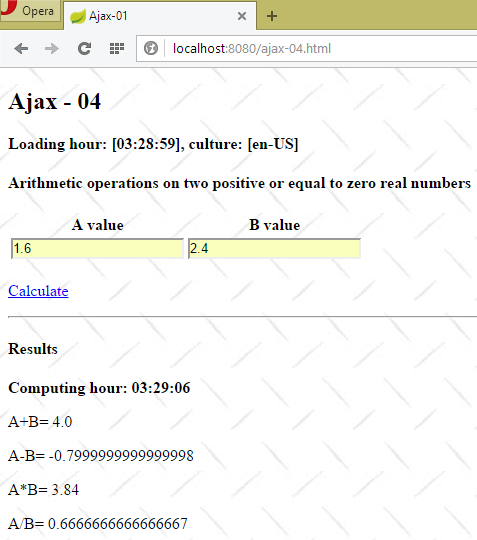 |
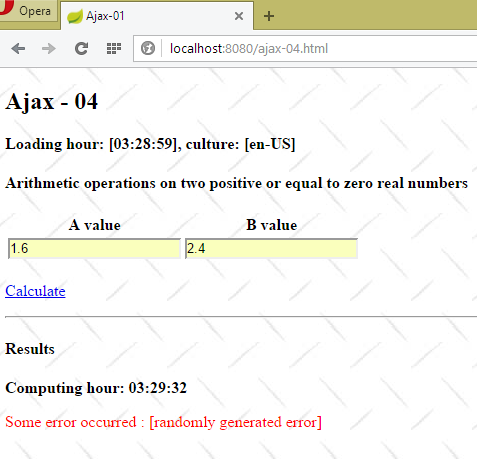 |
7.4. Single-page web application
7.4.1. Introduction
Ajax technology allows you to build single-page applications:
- the first page is loaded via a standard browser request;
- subsequent pages are loaded via Ajax calls. As a result, the browser never changes its URL and never loads a new page. This type of application is called a Single-Page Application (SPA).
Here is a basic example of such an application. The new application will have two views:
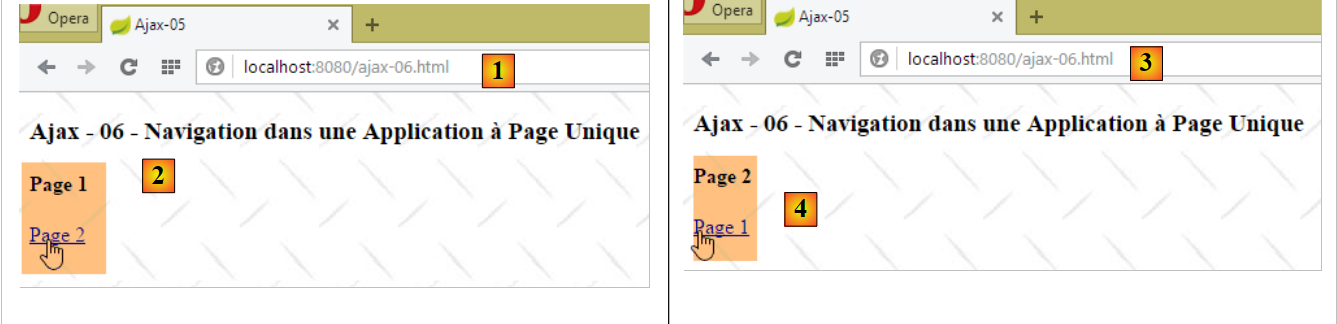 |
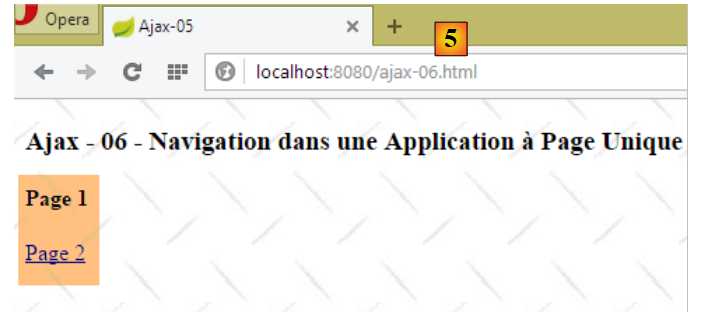 |
- in [1], the action [/ajax-06] brings up the first page, page 1;
- in [2], a link allows us to navigate to page 2 via an Ajax call;
- in [3], the URL has not changed. The page displayed is page 2;
- in [4], a link allows us to return to page 1 via an Ajax call;
- in [5], the URL has not changed. The page displayed is page 1.
7.4.2. The [/ajax-06] action
The code for the [/ajax-06] action is as follows:
    @RequestMapping(value = "/ajax-06", method = RequestMethod.GET, produces = "text/html; charset=UTF-8")
    public String ajax06() {
        return "vue-06";
}
- Lines 1–4: The [/ajax-06] action simply renders the [vue-06.xml] view;
7.4.3. The view [vue-06.xml]
The view [vue-06.xml] is as follows:
<!DOCTYPE HTML>
<html xmlns:th="http://www.thymeleaf.org">
    <head>
        <meta name="viewport" content="width=device-width" />
        <title>Ajax-06</title>
        <link rel="stylesheet" href="/css/ajax01.css" />
        <script type="text/javascript" src="/js/jquery/jquery-2.1.1.min.js"></script>
        <script type="text/javascript" src="/js/local6.js"></script>
    </head>
    <body>
        <h3>Ajax - 06 - Navigation dans une Application à Page Unique</h3>
        <div id="content" th:include="vue-07" />
    </body>
</html>
- line 8: the view uses a script [local6.js];
- line 12: the view [vue-07.xml] is included in the [content] ID area of the view [vue-06.xml];
7.4.4. The view [vue-07.xml]
The view [vue-07.xml] is as follows:
<!DOCTYPE HTML>
<html xmlns:th="http://www.thymeleaf.org">
    <body>
        <h4>Page 1</h4>
        <p>
            <a href="javascript:gotoPage(2)">Page 2</a>
        </p>
    </body>
</html>
7.4.5. The jS function [gotoPage]
The [Page 2] link in the [vue-07.xml] view uses the jS [gotoPage] function defined in the following [local6.js] file:
// global data
var content;

function gotoPage(num) {
    // make a manual Ajax call
    $.ajax({
        url : '/ajax-07',
        type : 'POST',
        data : 'num=' + num,
        dataType : 'html',
        beforeSend : function() {
        },
        success : function(data) {
            content.html(data)
        },
        complete : function() {
        },
        error : function(jqXHR) {
            // system error
            content.html(jqXHR.responseText);
        }
    })
}

// document loading
$(document).ready(function() {
    // retrieve the references of the page's various components
    content = $("#content");
});
- line 28: when the page loads, we store the element with the ID [content] and make it a global variable (line 2);
- line 4: the [gotoPage] function receives as a parameter the page number (1 or 2) to display in the current view;
- line 7: the target URL for the POST request;
- line 8: the URL from line 7 is requested via a POST;
- line 9: the posted string. A parameter named [num] is posted. Its value is the page number (line 4) to be displayed in the current view;
- line 10: the server will return HTML, specifically the HTML for the page to be displayed;
- lines 13–15: if successful (HTTP status 200), the HTML sent by the server is placed in the element with id [content];
- lines 18-20: if the request fails (HTTP status 500), the HTML sent by the server is placed in the field with id [content];
7.4.6. The [/ajax-07] action
The code for the [/ajax-07] action is as follows:
@RequestMapping(value = "/ajax-07", method = RequestMethod.POST, produces = "text/html; charset=UTF-8")
    public String ajax07(int num) {
        // num : page number
        switch (num) {
        case 1:
            return "vue-07";
        case 2:
            return "vue-08";
        default:
            return "vue-07";
        }
    }
- line 2: we retrieve the posted parameter named [num]. Note that the parameter on line 2 must have the same name as the posted parameter, in this case [num]. [num] is a page or view number;
- lines 5-6: if [num==1], we return the view [vue-07.xml];
- lines 7-8: if [num==2], we return the view [vue-08.xml];
- lines 9-10: in all other cases (which is normally impossible), the view [vue-07.xml] is returned;
7.4.7. The view [view-08.xml]
The view [view-08.xml] forms page 2 of the application:
<!DOCTYPE HTML>
<html xmlns:th="http://www.thymeleaf.org">
    <body>
        <h4>Page 2</h4>
        <p>
            <a href="javascript:gotoPage(1)">Page 1</a>
        </p>
    </body>
</html>
7.5. Embedding multiple HTML streams in a JSON response
7.5.1. Introduction
Consider the following application:
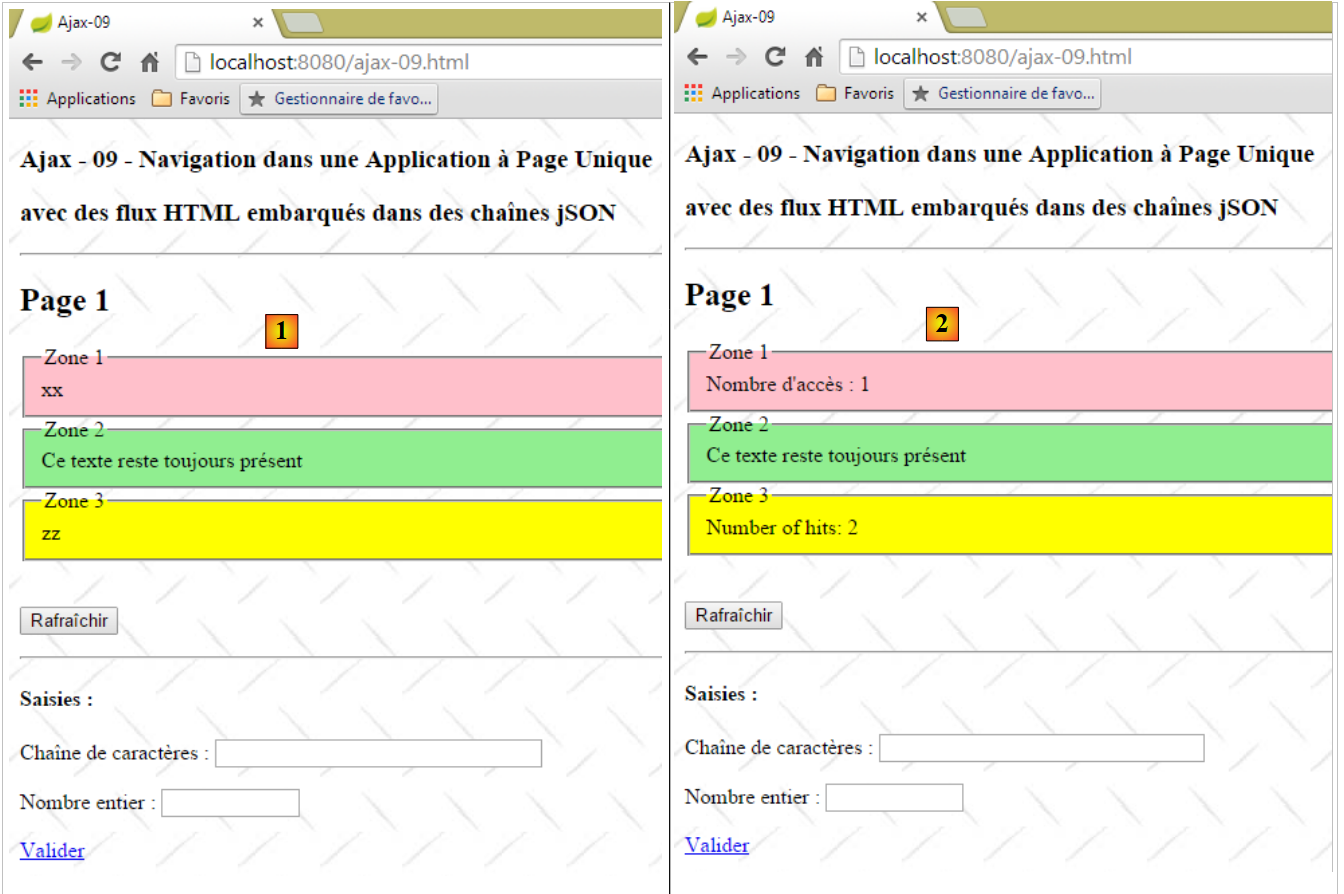 |
Page [1] has four areas:
- [Zone 1] and [Zone 3] are zones that appear or disappear when the [Refresh] button is clicked. We count the number of times each of these two zones appears [2]. The [Zone 1] zone uses French, while the [Zone 3] zone uses English;
- [Zone 2] is always present;
- the [Entries] section is always visible;
The [Submit] link displays the next page [3]:
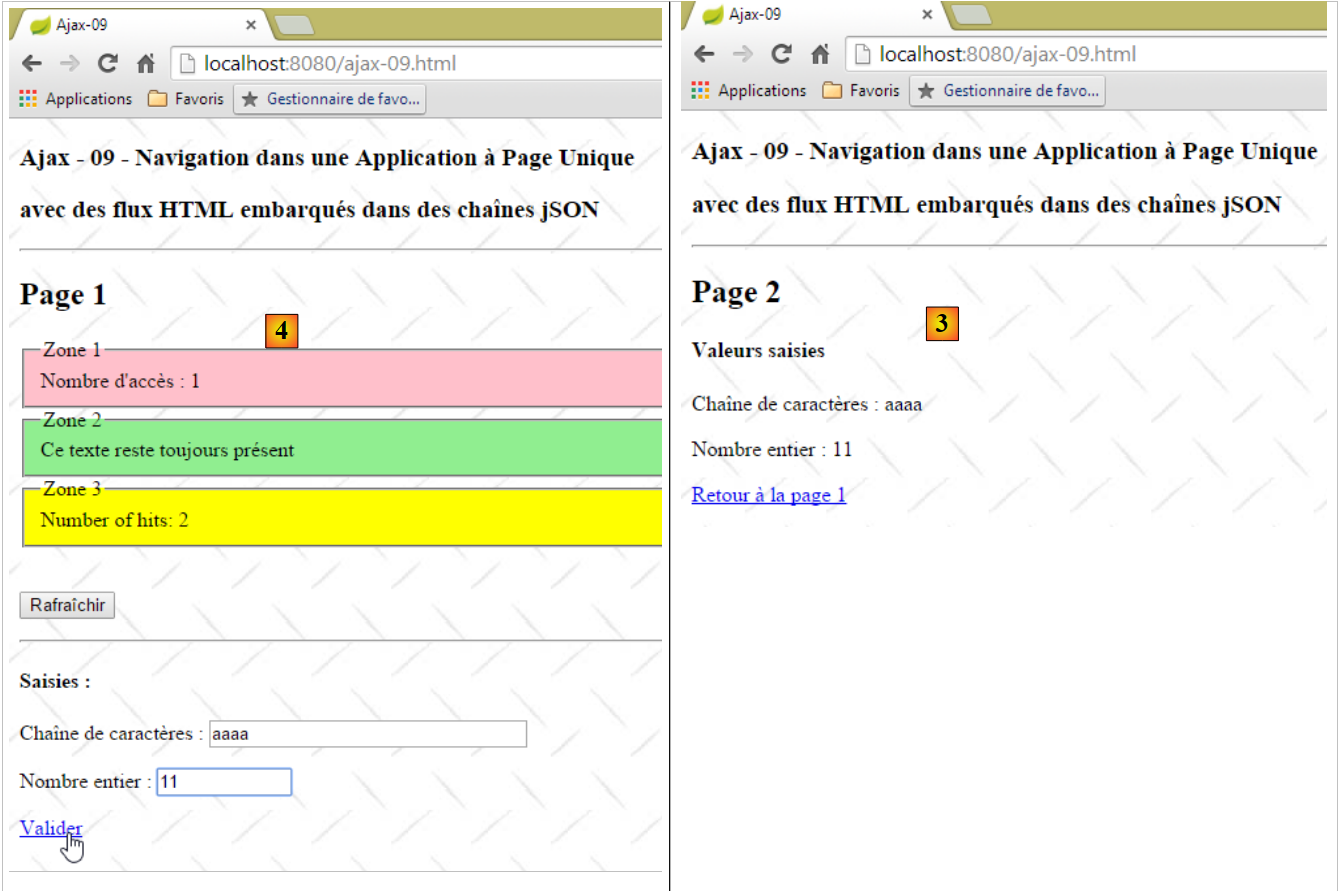 |
- the [Back to Page 1] link restores Page 1 to its previous state [4];
The application is a single-page application. The first page is requested from the server by the browser. Subsequent pages are retrieved from the server via Ajax calls.
7.5.2. The action [/ajax-09]
 |
The [/ajax-09] action is as follows:
    @RequestMapping(value = "/ajax-09", method = RequestMethod.GET, produces = "text/html; charset=UTF-8")
    public String ajax09() {
        return "vue-09";
}
It simply displays the view [vue-09.xml].
7.5.3. XML Views
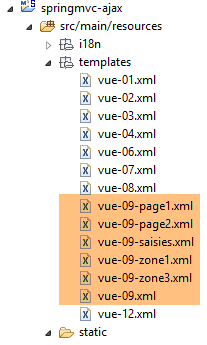 |
The view [vue-09.xml] is the application's master page:
<!DOCTYPE HTML>
<html xmlns:th="http://www.thymeleaf.org">
    <head>
        <meta name="viewport" content="width=device-width" />
        <title>Ajax-09</title>
        <link rel="stylesheet" href="/css/ajax01.css" />
        <script type="text/javascript" src="/js/jquery/jquery-2.1.1.min.js"></script>
        <script type="text/javascript" src="/js/json3.js"></script>
        <script type="text/javascript" src="/js/local9.js"></script>
    </head>
    <body>
        <h3>Ajax - 09 - Navigation dans une Application à Page Unique</h3>
        <h3>avec des flux HTML embarqués dans des chaînes jSON</h3>
        <hr />
        <div id="content" th:include="vue-09-page1" />
        <img id="loading" src="/images/loading.gif" />
        <div id="erreur" style="background-color:lightgrey"></div>
    </body>
</html>
- line 9: the JS file used in the application;
- line 15: the content of the master page;
- line 16: an animated loading image:
- line 17: area to display any errors;
The view [vue-09-page1.xml] is page 1 of the application:
<!DOCTYPE HTML>
<html xmlns:th="http://www.thymeleaf.org">
    <body>
        <h2>Page 1</h2>
        <!-- zone 1 -->
        <fieldset id="zone1" style="background-color:pink">
            <legend>Zone 1</legend>
            <span id="zone1-content" th:text="xx">xx</span>
        </fieldset>
        <!-- zone 2 -->
        <fieldset id="zone2" style="background-color:lightgreen">
            <legend>Zone 2</legend>
            <span>Ce texte reste toujours présent</span>
        </fieldset>
        <!-- zone 3 -->
        <fieldset id="zone3" style="background-color:yellow">
            <legend>Zone 3</legend>
            <span id="zone3-content" th:text="zz">zz</span>
        </fieldset>
        <br />
        <p>
            <button onclick="javascript:postForm()">Rafraîchir</button>
        </p>
        <hr />
        <div id="saisies" th:include="vue-09-saisies">
        </div>
    </body>
</html>
- lines 6–9: the [Zone 1] area. Its content is placed in the [id="zone1-content"] component;
- lines 11-14: the [Zone 2] area, which does not change;
- lines 16-19: the [Zone 3] area. Its content is placed in the [id="zone3-content"] component;
- line 22: the JS function that submits the form;
- line 25: inclusion of the input area;
Note that page 1 does not have a [form] tag. Everything will be handled in JavaScript.
The view [vue-09-saisies.xml] is as follows:
<!DOCTYPE HTML>
<html xmlns:th="http://www.thymeleaf.org">
    <div id="saisies">
        <h4>Saisies :</h4>
        <p>
            Chaîne de caractères :
            <input type="text" id="text1" size="30" th:value="${value1}" />
        </p>
        <p>
            Nombre entier :
            <input type="text" id="text2" size="10" th:value="${value2}" />
        </p>
        <p>
            <a href="javascript:valider()">Valider</a>
        </p>
    </div>
</html>
- lines 5-8: enter a string;
- lines 13-16: enter an integer;
- line 14: the JS function that submits the entered values;
Again, note that the input field does not have a [form] tag.
In total, page 1 has two features:
- [Refresh]: which refreshes zones 1 and 3. This action is handled by the server, which randomly returns:
- field 1 with its access counter and nothing for field 3,
- zone 3 with its access counter and nothing for zone 1,
- both zones with their access counters;
- [Submit]: which displays page 2 with the entered values or an error message if the entered data is invalid;
We will first focus on the [Refresh] button.
7.5.4. The JS code for the [Refresh] button
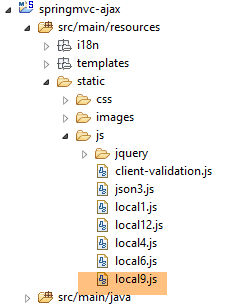 |
The code in the [local9.js] file is as follows:
// global variables
var content;
var loading;
var erreur;

// document loading
$(document).ready(function() {
    // retrieve the references of the page's various components
    loading = $("#loading");
    loading.hide();
    erreur = $("#erreur");
    erreur.hide();
    content = $("#content");
});
- lines 9-13: when the master page is loaded, the references to the three components identified by [loading, error, content] are stored;
- lines 2-4: the references to these three components are stored in global variables. They remain constant because the three areas in question are always present on the displayed page, regardless of the time. Because they remain constant, they can be calculated in [$(document).ready] and shared with the other functions in the JS file;
The [postForm] function handles the click on the [Refresh] button:
function postForm() {
    console.log("postForm");
    // make a manual Ajax call
    $.ajax({
        url : '/ajax-10',
        headers : {
            'Accept' : 'application/json'
        },
        type : 'POST',
        dataType : 'json',
        beforeSend : onBegin,
        success : onSuccess,
        error : onError,
        complete : onComplete
    })
}
- lines 4–15: the Ajax call to the server;
- line 5: the [ajax-10] action will handle the POST;
- lines 6-8: the response will be JSON. The JS client indicates that it accepts JSON documents;
- line 9: the [ajax-10] action is called with a POST operation;
- line 10: we will receive JSON;
- line 11: the function executed before the Ajax call;
- line 12: the function executed upon receiving the server response, when it is successful [200 OK];
- line 13: the function executed upon receiving the server response, when it fails [500 Internal Server Error, ...];
- line 14: the function executed after receiving the response;
The [onBegin] function is as follows:
// before the Ajax call
function onBegin() {
    console.log("onBegin");
    // waiting image
    loading.show();
}
It simply displays the animated loading image while waiting for the server's response.
7.5.5. The [/ajax-10] action
|
The [/ajax-10] action is as follows:
// the session
    @Autowired
    private SessionModel1 session;
    // the Thymeleaf / Spring engine
    @Autowired
    private SpringTemplateEngine engine;

    @RequestMapping(value = "/ajax-10", method = RequestMethod.POST)
    @ResponseBody()
    public JsonResult10 ajax10(HttpServletRequest request, HttpServletResponse response) {
    ...
    }
- Line 3: The session is injected. It has the following [SessionModel1] type:
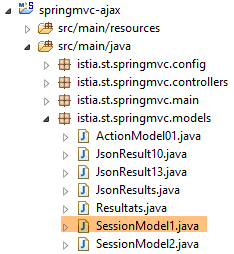 |
package istia.st.springmvc.models;

import java.io.Serializable;

import org.springframework.context.annotation.Scope;
import org.springframework.context.annotation.ScopedProxyMode;
import org.springframework.stereotype.Component;

@Component
@Scope(value = "session", proxyMode = ScopedProxyMode.TARGET_CLASS)
public class SessionModel1 implements Serializable {

    private static final long serialVersionUID = 1L;
    // two meters
    private int cpt1 = 0;
    private int cpt3 = 0;
    // the three zones
    private String zone1 = "xx";
    private String zone3 = "zz";
    private String saisies;
    private boolean zone1Active = true;
    private boolean zone3Active = true;

    // getters and setters
    ...
}
The session [SessionModel1] stores the following:
- line 15: the number of times [cpt1] that the [Zone 1] area is displayed;
- line 16: the number of times [cpt3] that the [Zone 3] area is displayed;
- lines 18–20: the HTML streams for the [Zone 1], [Zone 3], and [Inputs] zones. This is necessary in the sequence [Page 1] --> [Page 2] --> [Page 1]. When moving from [Page 2] to [Page 1], [Page 1] and its three zones must be restored;
- lines 21-22: two booleans indicating whether the [Zone 1] and [Zone 3] zones are displayed (visible);
The other element injected into the [AjaxController] is as follows:
    // the Thymeleaf / Spring engine
    @Autowired
private SpringTemplateEngine engine;
The [SpringTemplateEngine] bean is defined in the [Config] configuration file:
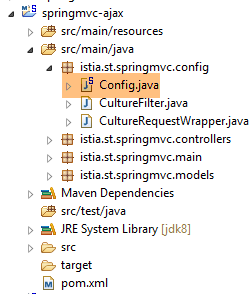 |
It is defined as follows:
    @Bean
    public SpringResourceTemplateResolver templateResolver() {
        SpringResourceTemplateResolver templateResolver = new SpringResourceTemplateResolver();
        templateResolver.setPrefix("classpath:/templates/");
        templateResolver.setSuffix(".xml");
        templateResolver.setTemplateMode("HTML5");
        templateResolver.setCacheable(true);
        templateResolver.setCharacterEncoding("UTF-8");
        return templateResolver;
    }

    @Bean
    SpringTemplateEngine templateEngine(SpringResourceTemplateResolver templateResolver) {
        SpringTemplateEngine templateEngine = new SpringTemplateEngine();
        templateEngine.setTemplateResolver(templateResolver);
        return templateEngine;
}
- lines 2–10: we are familiar with the [SpringResourceTemplateResolver] bean, which allows us to define certain characteristics of the views;
- lines 13–17: The [SpringTemplateEngine] bean allows us to define the view “engine,” the class responsible for generating [Thymeleaf] responses to clients. [Thymeleaf] has a default "engine" and another when used in a [Spring] environment. It is the latter that we are using here;
The signature of the [/ajax-10] action is as follows:
@RequestMapping(value = "/ajax-10", method = RequestMethod.POST)
    @ResponseBody()
    public JsonResult10 ajax10(HttpServletRequest request, HttpServletResponse response) {
    ...
}
- Line 1: The [/ajax-10] action only accepts a POST request;
- line 2: the [/ajax-10] action returns the response to the client itself. This will be automatically converted to JSON;
- line 3: the response is of type [JsonResult10] as follows:
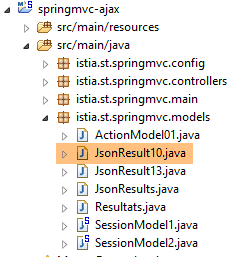 |
package istia.st.springmvc.models;

public class JsonResult10 {

    // data
    private String content;
    private String zone1;
    private String zone3;
    private String erreur;
    private String saisies;
    private boolean zone1Active;
    private boolean zone3Active;

    public JsonResult10() {
    }

    // getters and setters
...
}
- line 6: the HTML content of the area identified by [content];
- line 7: the HTML content of the [Zone 1] area;
- line 8: the HTML content of the [Zone 3] area;
- line 9: the HTML content of the [Error] area;
- line 10: the HTML content of the [Inputs] area;
- line 11: a Boolean indicating whether the [Zone 1] area should be displayed;
- line 12: a Boolean indicating whether the [Zone 3] area should be displayed;
The code for the [/ajax-10] action is as follows:
@RequestMapping(value = "/ajax-10", method = RequestMethod.POST)
    @ResponseBody()
    public JsonResult10 ajax10(HttpServletRequest request, HttpServletResponse response) {
        // thymeleaf context
        WebContext thymeleafContext = new WebContext(request, response, request.getServletContext());
        // answer
        JsonResult10 result = new JsonResult10();
        // session
        session.setZone1(null);
        session.setZone3(null);
        session.setZone1Active(false);
        session.setZone3Active(false);
        // randomize an answer
        int cas = new Random().nextInt(3);
        switch (cas) {
        case 0:
            // zone 1 active
            setZone1(thymeleafContext, result);
            return result;
        case 1:
            // zone 3 active
            setZone3(thymeleafContext, result);
            return result;
        case 2:
            // active zones 1 and 3
            setZone1(thymeleafContext, result);
            setZone3(thymeleafContext, result);
            return result;
        }
        return null;
    }
- Line 5: We retrieve the [Thymeleaf] context. We’ll see later what it’s used for;
- line 7: we create an empty response for now;
- lines 9–12: we set the two fields in the session to [null] and specify that they should not be displayed. These two fields will be generated shortly, but it is possible that only one of them will be;
- lines 14–29: both fields are generated;
- lines 17–19: only the [Zone 1] zone is generated;
- lines 21–23: only the [Zone 3] zone is generated;
- lines 25–28: both [Zone 1] and [Zone 3] are generated;
The HTML flow for the [Zone 1] zone is generated by the following method:
    private void setZone1(WebContext thymeleafContext, JsonResult10 result) {
        // zone 1 active
        // flow HTML
        int cpt1 = session.getCpt1() + 1;
        thymeleafContext.setVariable("cpt1", cpt1);
        thymeleafContext.setLocale(new Locale("fr", "FR"));
        String zone1 = engine.process("vue-09-zone1", thymeleafContext);
        result.setZone1(zone1);
        result.setZone1Active(true);
        // session
        session.setCpt1(cpt1);
        session.setZone1(zone1);
        session.setZone1Active(true);
}
- line 1: the parameters are:
- the [Thymeleaf] context of type [WebContext],
- the response to the client currently being built of type [JsonResult10];
- line 3: we increment the session counter [cpt1], which counts the number of times the zone [Zone 1] is displayed;
- line 4: the [Thymeleaf] context of type [WebContext] behaves somewhat like the [Model] in Spring MVC. To add an element to the model, we use [WebContext.setVariable]. Here, we place the counter [cpt1] into the [Thymeleaf] model. This will allow the Thymeleaf expression [${cpt1}] to be evaluated
- line 5: the [Thymeleaf] context has a locale. This allows it to evaluate expressions of the type [#{key_msg}]. Here, we associate the Thymeleaf context with a French locale;
- line 6: this is the most interesting instruction. The Thymeleaf engine will process the view [vue-09-zone1.xml] using the template and locale we just calculated, and instead of sending the resulting HTML output to the client, it returns it as a string;
- lines 7–9: the HTML output for the [Zone 1] area that has just been calculated is stored in the session and in the result to be sent to the client. Additionally, we specify that the [Zone 1] area must be displayed;
- lines 11–13: information regarding the [Zone 1] area is stored in the session so that it can be regenerated;
Line 7 processes the following view [vue-09-zone1.xml]:
<!DOCTYPE HTML>
<html xmlns:th="http://www.thymeleaf.org">
    <span th:text="#{message.zone}"></span>
    <span th:text="${cpt1}"></span>
</html>
- line 3: the expression [#{message.zone}] will be evaluated using the locale;
- line 4: the expression [${cpt1}] will be evaluated using the Thymeleaf template;
The key message [message.zone] is defined in the message files [messages_fr.properties] and [messages_en.properties]:
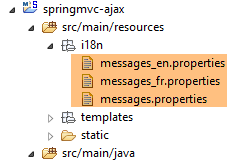 |
[messages_fr.properties]
message.zone=Nombre d'accès :
[messages_en.properties]
message.zone=Number of hits:
The HTML flow for the [Zone 3] area is generated by a similar method:
    private void setZone3(WebContext thymeleafContext, JsonResult10 result) {
        // zone 3 active
        // flow HTML
        int cpt3 = session.getCpt3() + 1;
        thymeleafContext.setVariable("cpt3", cpt3);
        thymeleafContext.setLocale(new Locale("en", "US"));
        String zone3 = engine.process("vue-09-zone3", thymeleafContext);
        result.setZone3(zone3);
        result.setZone3Active(true);
        // session
        session.setCpt3(cpt3);
        session.setZone3(zone3);
        session.setZone3Active(true);
}
- line 6: the locale for the zone [Zone 3] is English;
7.5.6. Processing the response from the [/ajax-10] action
Let's return to the JS code in [local9.js] that will process the server response:
// on receipt of the server response
// in case of success
function onSuccess(data) {
    console.log("onSuccess");
    // content
    if (data.content) {
        content.html(data.content);
    }
    // zone 1
    if (data.zone1Active) {
        $("#zone1").show();
        if (data.zone1) {
            $("#zone1-content").html(data.zone1);
        }
    } else {
        $("#zone1").hide();
    }
    // zone 3 active?
    if (data.zone3Active) {
        $("#zone3").show();
        if (data.zone3) {
            $("#zone3-content").html(data.zone3);
        }
    } else {
        $("#zone3").hide();
    }
    // seized?
    if (data.saisies) {
        $("#saisies").html(data.saisies);
    }
    // mistake?
    if (data.erreur) {
        erreur.text(data.erreur);
        erreur.show();
    } else {
        erreur.hide();
    }
}
Let’s review the Java structure of the response received on line 3 in the [data] variable:
public class JsonResult10 {

    // data
    private String content;
    private String zone1;
    private String zone3;
    private String erreur;
    private String saisies;
    private boolean zone1Active;
    private boolean zone3Active;

}
- Lines 6–8: If [data.content] is not null, then the [id=content] field is initialized with it. This field represents [Page 1] or [Page 2] in its entirety. In this example, [data.content == null], so the [id=content] zone will not be modified and will continue to display [Page 1];
- lines 10-17: display [Zone 1] if [data.zone1Active==true]. If, in addition, [data.zone1!=null], then the content of [Zone 1] is modified; otherwise, it remains as it was;
- lines 19–26: same applies to [Zone 3];
- lines 28–30: if [data.saisies!=null], then the [Saisies] zone is refreshed. In this demonstration, [data.saisies==null], so the [Saisies] zone remains unchanged;
- lines 32–37: similar reasoning applies to the [Error] field, with the following nuances:
- line 33: [data.error] will be an error message in text format;
- line 36: if [data.error] is null, then the [Error] field is hidden. This is because it may have been displayed during the previous request;
In the event of a server-side error (HTTP status such as 500 Internal Server Error), the following function is executed:
// on receipt of the server response
// in case of failure
function onError(jqXHR) {
    console.log("onError");
    // system error
    erreur.text(jqXHR.responseText);
    erreur.show();
}
To see such an error, let's modify the [postForm] function as follows:
function postForm() {
    console.log("postForm");
    // retrieve references to the current page
    ...
    // make a manual Ajax call
    $.ajax({
        url : '/ajax-10x',
        ...
    })
}
- line 7: we enter a URL that doesn't exist;
Here are the results when you click the [Refresh] button:
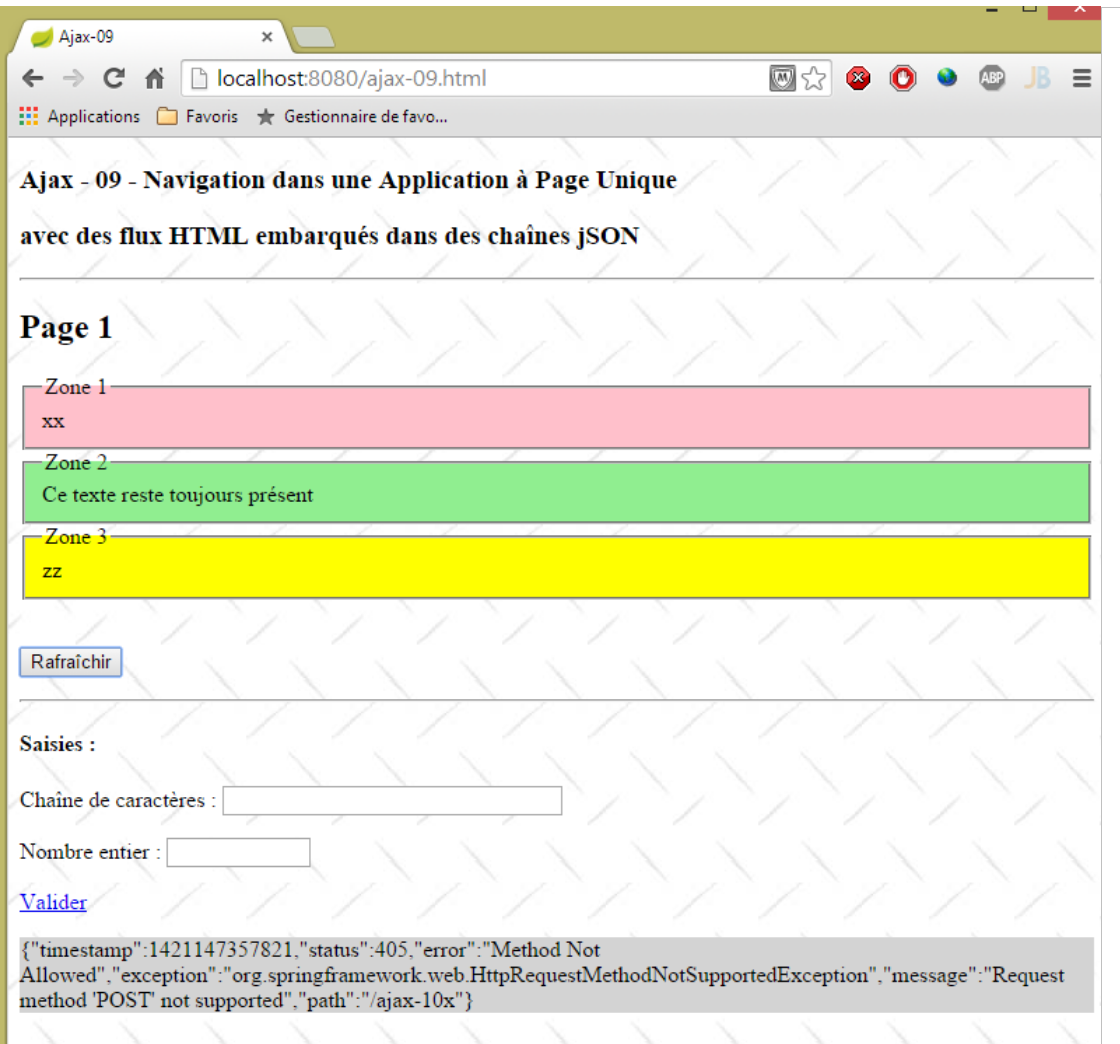 |
It is interesting to note that the error was also sent in the form of a JSON string.
The method executed after receiving the server's response is as follows:
// after [onSuccess, onError]
function onComplete() {
    console.log("onComplete");
    // waiting image
    loading.hide();
}
We simply hide the animated loading image.
7.5.7. Displaying the [Page 2] page
The HTML code for the [Submit] link is as follows:
<a href="javascript:valider()">Valider</a>
The JS function [validate] is as follows:
// validation of entered values
function valider() {
    // posted value
    var post = JSON3.stringify({
        "value1" : $("#text1").val().trim(),
        "value2" : $("#text2").val().trim()
    });
    // make a manual Ajax call
    $.ajax({
        url : '/ajax-11A',
        headers : {
            'Accept' : 'application/json',
            'Content-Type' : 'application/json'
        },
        type : 'POST',
        data : post,
        dataType : 'json',
        beforeSend : onBegin,
        success : onSuccess,
        error : onError,
        complete : onComplete
    })
}
- lines 4-7: we have two values, v1 and v2, to post: those from the input components identified by [#text1] and [#text2]. We’re going to do something new. We’re going to post these two values as a JSON string {"value1":v1,"value2":v2};
- line 10: the posted values will be sent to the [ajax-11A] action;
- line 12: since we know we’re going to receive a JSON response, we specify that we can receive JSON;
- line 13: we tell the server that we’re going to send it the posted value as a JSON string;
- lines 15-16: we POST the value to be sent;
- line 17: we will receive JSON;
7.5.8. The [ajax-11A] action
The [ajax-11A] action that processes the posted JSON string is as follows:
@RequestMapping(value = "/ajax-11A", method = RequestMethod.POST, consumes = "application/json")
    @ResponseBody
    public JsonResult10 ajax11A(@RequestBody @Valid PostAjax11A post, BindingResult bindingResult, Locale locale,     HttpServletRequest request, HttpServletResponse response) {
        ...
    }
- Line 1: We specify with ["application/json"] that the action expects a document in JSON format. This document is the value posted by the client;
- line 3: the posted value will be retrieved in the following [PostAjax11A post] object:
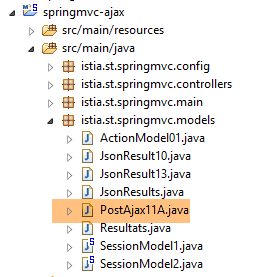 |
package istia.st.springmvc.models;

import javax.validation.constraints.NotNull;
import javax.validation.constraints.Size;

import org.hibernate.validator.constraints.Range;

public class PostAjax11A {

    // data
    @Size(min = 4, max = 6)
    @NotNull
    private String value1;
    @Range(min = 10, max = 14)
    @NotNull
    private Integer value2;

    // getters and setters
    ...
}
- The structure of the [PostAjax11A] object must match the structure of the posted object {"value1":v1,"value2":v2}. Therefore, fields [value1] (line 13) and [value2] (line 16) are required;
- We have placed integrity constraints on both fields;
Let’s return to the code for the [ajax-11A] action:
@RequestMapping(value = "/ajax-11A", method = RequestMethod.POST, consumes = "application/json")
    @ResponseBody
    public JsonResult10 ajax11A(@RequestBody @Valid PostAjax11A post, BindingResult bindingResult, Locale locale,    HttpServletRequest request, HttpServletResponse response) {
        // thymeleaf context
        WebContext thymeleafContext = new WebContext(request, response, request.getServletContext());
        // answer
        JsonResult10 result = new JsonResult10();
        // valid post?
        if (bindingResult.hasErrors()) {
            // page 1 is returned with an error
            result.setZone1Active(session.isZone1Active());
            result.setZone3Active(session.isZone3Active());
            result.setErreur(getErreursForModel(bindingResult));
            return result;
        }
        ...
}
- line 3: the [@RequestBody] annotation refers to the document sent by the client. This is the value posted by the client in JSON format. It will therefore be used to construct the [PostAjax11A] object;
- line 3: the [@Valid] annotation enforces validation of the posted value;
- line 9: if validation fails:
- line 13: an error message is returned,
- lines 11–12: fields 1 and 3 are restored to their previous state (displayed or not);
The error message is calculated as follows:
    private String getErreursForModel(BindingResult result) {
        StringBuffer buffer = new StringBuffer();
        for (FieldError error : result.getFieldErrors()) {
            StringBuffer bufferCodes = new StringBuffer("(");
            for (String code : error.getCodes()) {
                bufferCodes.append(String.format("%s ", code));
            }
            bufferCodes.append(")");
            buffer.append(String.format("[%s:%s:%s:%s]", error.getField(), error.getRejectedValue(), bufferCodes,
                    error.getDefaultMessage()));
        }
        return buffer.toString();
}
This is a function we've seen before.
The [ajax-11A] action continues as follows:
@RequestMapping(value = "/ajax-11A", method = RequestMethod.POST, consumes = "application/json")
    @ResponseBody
    public JsonResult10 ajax11A(@RequestBody @Valid PostAjax11A post, BindingResult bindingResult, Locale locale,    HttpServletRequest request, HttpServletResponse response) {
        // thymeleaf context
        WebContext thymeleafContext = new WebContext(request, response, request.getServletContext());
        // answer
        JsonResult10 result = new JsonResult10();
        // valid post?
        if (bindingResult.hasErrors()) {
    ...
        }
        // the input field is saved
        thymeleafContext.setVariable("value1", post.getValue1());
        thymeleafContext.setVariable("value2", post.getValue2());
        session.setSaisies(engine.process("vue-09-saisies", thymeleafContext));
        // send page 2
        result.setContent(engine.process("vue-09-page2", thymeleafContext));
        return result;
}
- lines 13-14: the posted values are placed in the Thymeleaf context;
- line 15: using this context, we calculate the view [vue-09-saisies] and store it in the session so we can regenerate it later;
- line 17: page 2 is placed in the result that will be sent to the client;
The view [view-09-page2.xml] is as follows:
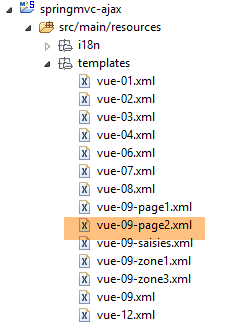 |
<!DOCTYPE HTML>
<html xmlns:th="http://www.thymeleaf.org">
    <body>
        <h2>Page 2</h2>
        <p>
            <h4>Valeurs saisies :</h4>
            <p>
                Chaîne de caractères :
                <span th:text="${value1}"></span>
            </p>
            <p>
                Nombre entier :
                <span th:text="${value2}"></span>
            </p>
            <a href="javascript:retourPage1()">Retour à la page 1</a>
        </p>
    </body>
</html>
- Lines 9 and 13 display the values [value1, value2] that the action [/ajax-11A] placed in the Thymeleaf context;
7.5.9. Processing the response from the [/ajax-11A] action
On the client side, the response from the [/ajax-10] action is processed by the [onSuccess] function:
function onSuccess(data) {
    console.log("onSuccess");
    // content
    if (data.content) {
        content.html(data.content);
    }
    // zone 1
    if (data.zone1Active) {
        $("#zone1").show();
        if (data.zone1) {
            $("#zone1-content").html(data.zone1);
        }
    } else {
        $("#zone1").hide();
    }
    // zone 3 active?
    if (data.zone3Active) {
        $("#zone3").show();
        if (data.zone3) {
            $("#zone3-content").html(data.zone3);
        }
    } else {
        $("#zone3").hide();
    }
    // seized?
    if (data.saisies) {
        $("#saisies").html(data.saisies);
    }
    // mistake?
    if (data.erreur) {
        erreur.text(data.erreur);
        erreur.show();
    } else {
        erreur.hide();
    }
}
We have already commented on this code. Let’s consider the two cases: a response with or without an error:
With error
In this case, the [/ajax-11A] action sent a JSON response in the form {"zone1":null, "zone3":null,"saisies":null,"erreur":erreur,"zone1Active":zone1Active,"zone3Active":zone3Active,"content":null}. If we follow the code above, we see that:
- the [content] field does not change. It contained page #1;
- the [Error] field is displayed;
- the [Zone 1], [Zone 3], and [Entries] fields remain unchanged;
No error
In this case, the [/ajax-11A] action sent a JSON response in the form {"zone1":null, "zone3":null,"saisies":null,"erreur":null,"zone1Active":false,"zone3Active":false,"content":content}. If we follow the code above, we see that:
- the [content] field is displayed. It contains page #2;
Here are three examples of execution:
A case with a validation error:
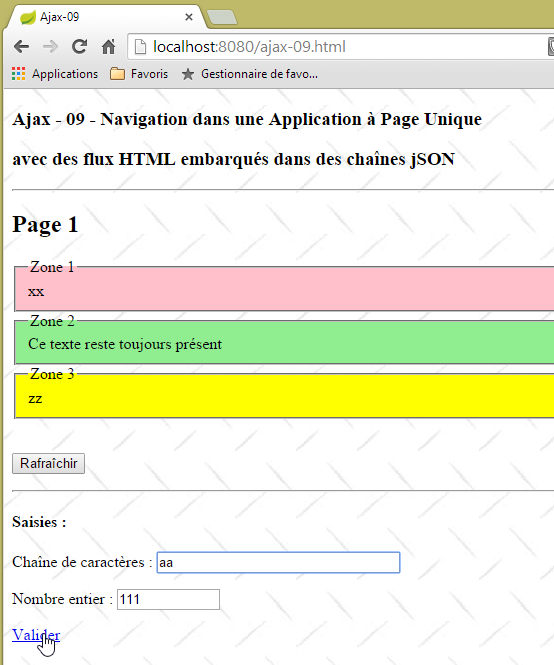 | 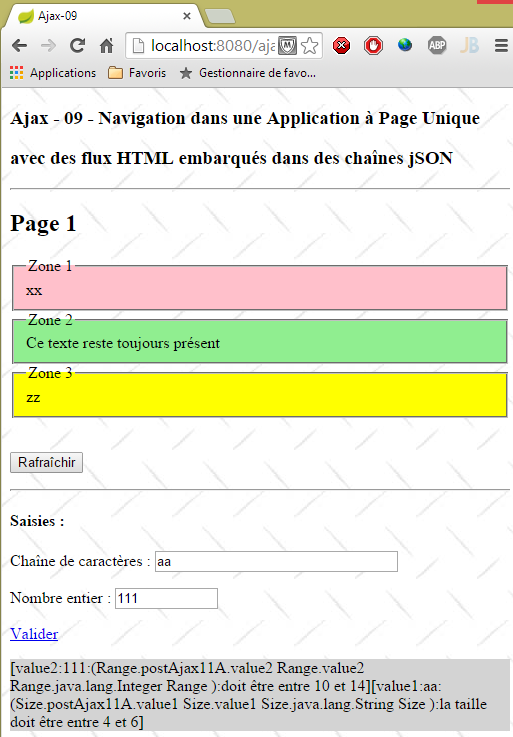 |
A case with a POST error:
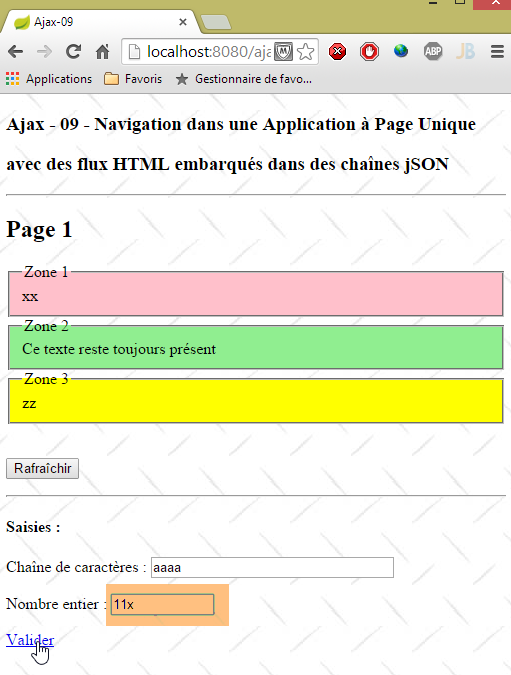 | 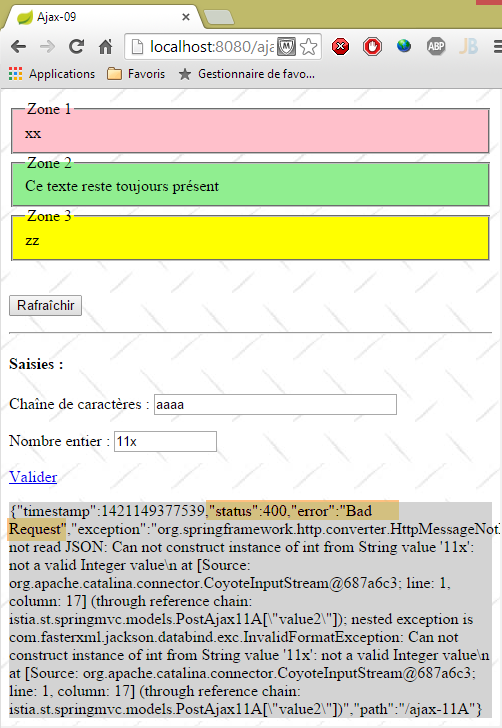 |
This type of error is different. Because Spring was unable to convert the JSON string to the [PostAjax11A] type, it returned an HTTP response with [status=400]. The [ajax-11A] action was not executed;
A case with no error:
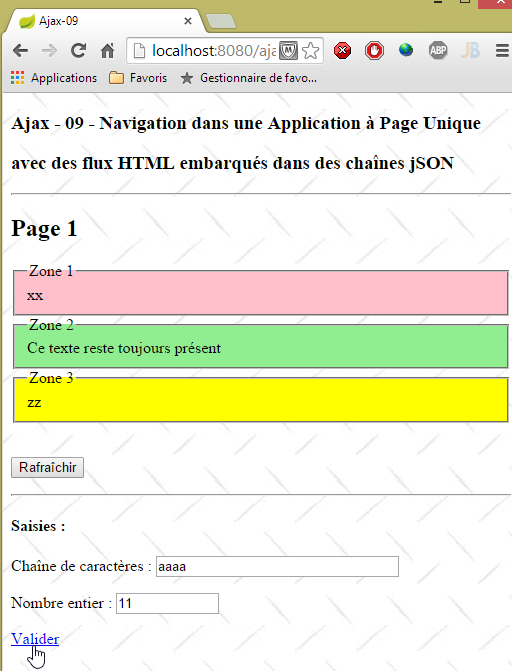 | 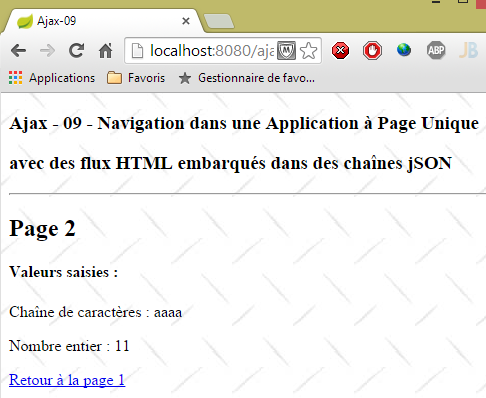 |
7.5.10. Return to page 1
The [Back to page 1] link on page 2 is as follows:
<a href="javascript:retourPage1()">Retour à la page 1</a>
The JS method [returnPage1] is as follows:
// back to page 1
function retourPage1() {
    // make a manual Ajax call
    $.ajax({
        url : '/ajax-11B',
        headers : {
            'Accept' : 'application/json',
        },
        type : 'POST',
        dataType : 'json',
        beforeSend : onBegin,
        success : onSuccess,
        error : onError,
        complete : onComplete
    })
}
It sends a POST request, without any posted data, to the [/ajax-11B] action.
7.5.11. The [/ajax-11B] action
The [/ajax-11B] action is as follows:
    @RequestMapping(value = "/ajax-11B", method = RequestMethod.POST)
    @ResponseBody
    public JsonResult10 ajax11B(HttpServletRequest request, HttpServletResponse response) {
        // thymeleaf context
        WebContext thymeleafContext = new WebContext(request, response, request.getServletContext());
        // answer
        JsonResult10 result = new JsonResult10();
        // we return page 1 in its original state
        result.setContent(engine.process("vue-09-page1", thymeleafContext));
        result.setSaisies(session.getSaisies());
        result.setZone1(session.getZone1());
        result.setZone3(session.getZone3());
        result.setZone1Active(session.isZone1Active());
        result.setZone3Active(session.isZone3Active());
        return result;
}
The action must regenerate page #1 with its three zones [Zone1, Zone3, Error]:
- line 9: page 1 is added to the result;
- line 10: the input zone is added to the result;
- Line 11: The [Zone 1] field is included in the result;
- line 12: the [Zone 3] zone is added to the result;
- lines 13-14: the status of zones [Zone 1] and [Zone 3] is added to the result;
7.5.12. Processing the response from the [/ajax-11B] action
The response from the [/ajax-11B] action is processed by the [onSuccess] function:
function onSuccess(data) {
    console.log("onSuccess");
    // content
    if (data.content) {
        content.html(data.content);
    }
    // zone 1
    if (data.zone1Active) {
        $("#zone1").show();
        if (data.zone1) {
            $("#zone1-content").html(data.zone1);
        }
    } else {
        $("#zone1").hide();
    }
    // zone 3 active?
    if (data.zone3Active) {
        $("#zone3").show();
        if (data.zone3) {
            $("#zone3-content").html(data.zone3);
        }
    } else {
        $("#zone3").hide();
    }
    // seized?
    if (data.saisies) {
        $("#saisies").html(data.saisies);
    }
    // mistake?
    if (data.erreur) {
        erreur.text(data.erreur);
        erreur.show();
    } else {
        erreur.hide();
    }
}
The action [/ajax-11B] sent a JSON response in the form {"zone1":zone1, "zone3":zone3,"saisies":saisies,"erreur":null,"zone1Active":zone1Active,"zone3Active":zone3Active,"content":content}. If we follow the code above, we see that:
- the [content] field has been modified. It previously contained page #2. It will now contain page #1;
- the [Error] field is hidden;
- the [Zone 1], [Zone 3], and [Entries] zones are displayed as they were;
7.6. Managing the session on the client side
7.6.1. Introduction
In the previous section, we managed a session with the following structure:
public class SessionModel1 implements Serializable {

    // two meters
    private int cpt1 = 0;
    private int cpt3 = 0;
    // the three zones
    private String zone1 = "xx";
    private String zone3 = "zz";
    private String saisies;
    private boolean zone1Active = true;
    private boolean zone3Active = true;
...
}
When there are a large number of users, the memory occupied by all these users’ sessions can become a problem. The rule is therefore to minimize the size of this memory. The SPV (Single-Page Application) model allows you to manage the session on the client side and have a sessionless web server. In fact, the single page is initially loaded by the browser. Along with it comes the accompanying JavaScript file. Since there is no page reload, this JS file will remain permanently in the browser as it was initially loaded. We can then use its global variables to store information about the user’s various actions. That is what we will look at now. We will not only manage the session on the client side but also redesign the JS application to minimize server requests.
7.6.2. The [/ajax-12] action
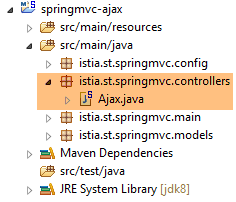 |
The [/ajax-12] action is as follows:
    @RequestMapping(value = "/ajax-12", method = RequestMethod.GET, produces = "text/html; charset=UTF-8")
    public String ajax12() {
        return "vue-12";
}
The view [vue-12.xml] is as follows:
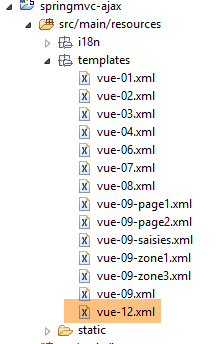 |
<!DOCTYPE HTML>
<html xmlns:th="http://www.thymeleaf.org">
    <head>
        <meta name="viewport" content="width=device-width" />
        <title>Ajax-12</title>
        <link rel="stylesheet" href="/css/ajax01.css" />
        <script type="text/javascript" src="/js/jquery/jquery-2.1.1.min.js"></script>
        <script type="text/javascript" src="/js/json3.js"></script>
        <script type="text/javascript" src="/js/local12.js"></script>
    </head>
    <body>
        <h3>Ajax - 12 - Navigation dans une Application à Page Unique</h3>
        <h3>avec des flux HTML embarqués dans une chaîne jSON</h3>
        <h3>et une session gérée par le client JS</h3>
        <hr />
        <div id="content" th:include="vue-09-page1" />
        <img id="loading" src="/images/loading.gif" />
        <div id="erreur" style="background-color:lightgrey"></div>
    </body>
</html>
- This view is identical to view [vue-09] except for the JS script used on line 9;
The view displayed is as follows:
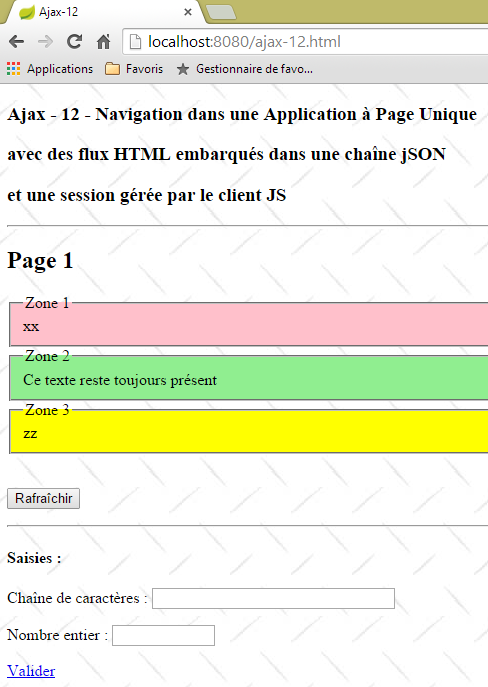 |
7.6.3. The JS code for the [Refresh] button
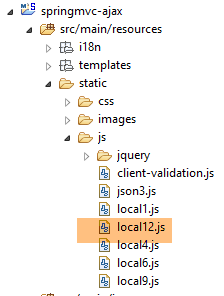 |
The code in the [local12.js] file is as follows:
// global variables
var content;
var loading;
var erreur;
var page1;
var page2;
var value1;
var value2;
var session = {
        "cpt1" : 0,
        "cpt3" : 0
    };

// document loading
$(document).ready(function() {
    // retrieve the references of the page's various components
    loading = $("#loading");
    loading.hide();
    erreur = $("#erreur");
    erreur.hide();
    content = $("#content");
});
- lines 17–21: when the master page is loaded, the references to the three components identified by [loading, error, content] are stored in the global variables in lines 2–4;
- lines 5-6: to store the two pages;
- lines 7-8: to store the two values submitted via the [Validate] link;
- line 9: the session. It stores the values of the counters [cpt1, cpt3] on the client side;
The [postForm] function handles the click on the [Refresh] button:
function postForm() {
    console.log("postForm");
    // we post the session
    var post = JSON3.stringify(session);
    // make a manual Ajax call
    $.ajax({
        url : '/ajax-13',
        headers : {
            'Accept' : 'application/json',
            'Content-Type' : 'application/json'
        },
        type : 'POST',
        data : post,
        dataType : 'json',
        beforeSend : onBegin,
        success : function(data) {
            ...
        },
        error : onError,
        complete : onComplete
    })
}
The differences from the previous version are as follows:
- the URL on line 7 is different;
- line 4: a value is posted, whereas previously none was posted. This value is the JSON string of the session. The principle is as follows:
- the client sends the session to the server,
- the server modifies it and sends it back,
- the client stores the new session;
- line 10: we send a document in JSON format (posted value);
- line 13: we have something to post;
- lines 15–20: the [beforeSend, error, complete] functions are the same as in the previous version. Only the [success] function changes (lines 16–18);
7.6.4. The [/ajax-13] action
|
The [/ajax-13] action is as follows:
    @RequestMapping(value = "/ajax-13", method = RequestMethod.POST, consumes = "application/json; charset=UTF-8")
    @ResponseBody()
    public JsonResult13 ajax13(@RequestBody SessionModel2 session2, HttpServletRequest request,    HttpServletResponse response) {
    ...
}
- Line 3: The parameter [@RequestBody SessionModel2 session2] retrieves the session posted by the client. This has the following [SessionModel2] type:
 |
package istia.st.springmvc.models;

import java.io.Serializable;

public class SessionModel2 implements Serializable {

    private static final long serialVersionUID = 1L;
    // two meters
    private int cpt1 = 0;
    private int cpt3 = 0;

    // getters and setters
    ...
}
The [SessionModel2] session stores the following:
- line 9: the number of times [cpt1] that the [Zone 1] area is displayed;
- line 10: the number of times [cpt3] that area [Zone 3] is displayed;
Let’s continue examining the code for the [/ajax-13] action:
    @RequestMapping(value = "/ajax-13", method = RequestMethod.POST, consumes = "application/json; charset=UTF-8")
    @ResponseBody()
    public JsonResult13 ajax13(@RequestBody SessionModel2 session2, HttpServletRequest request,    HttpServletResponse response) {
    ...
}
- Line 3: The [JsonResult13] type of the response is as follows:
 |
package istia.st.springmvc.models;

public class JsonResult13 {

    // data
    private String page2;
    private String zone1;
    private String zone3;
    private String erreur;
    private String value1;
    private Integer value2;

    // session
    private SessionModel2 session;

    // getters and setters
    ...
}
- line 14: the session. The server sends it back to the client for storage;
- line 6: the HTML content of page 2;
- line 7: the HTML content of the [Zone 1] area;
- line 8: the HTML content of the [Zone 3] area;
- line 9: any error message;
- lines 10–11: two pieces of information calculated by the server and displayed by page #2;
Let’s continue examining the code for the [/ajax-13] action:
@RequestMapping(value = "/ajax-13", method = RequestMethod.POST, consumes = "application/json; charset=UTF-8")
    @ResponseBody()
    public JsonResult13 ajax13(@RequestBody SessionModel2 session2, HttpServletRequest request,
            HttpServletResponse response) {
        // thymeleaf context
        WebContext thymeleafContext = new WebContext(request, response, request.getServletContext());
        // answer
        JsonResult13 result = new JsonResult13();
        result.setSession(session2);
        // randomize an answer
        int cas = new Random().nextInt(3);
        switch (cas) {
        case 0:
            // zone 1 active
            setZone1B(thymeleafContext, result);
            return result;
        case 1:
            // zone 3 active
            setZone3B(thymeleafContext, result);
            return result;
        case 2:
            // active zones 1 and 3
            setZone1B(thymeleafContext, result);
            setZone3B(thymeleafContext, result);
            return result;
        }
        return null;
    }
- Line 9: The session is placed in the result of the action;
The [setZone1B] method that activates the [Zone 1] zone is as follows:
    private void setZone1B(WebContext thymeleafContext, JsonResult13 result) {
        // retrieve the session
        SessionModel2 session = result.getSession();
        // zone 1 active
        // flow HTML
        int cpt1 = session.getCpt1() + 1;
        thymeleafContext.setVariable("cpt1", cpt1);
        thymeleafContext.setLocale(new Locale("fr", "FR"));
        String zone1 = engine.process("vue-09-zone1", thymeleafContext);
        result.setZone1(zone1);
        // session
        session.setCpt1(cpt1);
}
- Line 3: We retrieve the session. It will be modified on line 12 with the new counter [cpt1]. Note that this session will be sent back to the client;
- line 10: the new zone [Zone 1];
The method [setZone3B] that activates the zone [Zone 3] is similar:
private void setZone3B(WebContext thymeleafContext, JsonResult13 result) {
        // retrieve the session
        SessionModel2 session = result.getSession();
        // zone 3 active
        // flow HTML
        int cpt3 = session.getCpt3() + 1;
        thymeleafContext.setVariable("cpt3", cpt3);
        thymeleafContext.setLocale(new Locale("en", "US"));
        String zone3 = engine.process("vue-09-zone3", thymeleafContext);
        result.setZone3(zone3);
        // session
        session.setCpt3(cpt3);
    }
7.6.5. Processing the response from the [/ajax-13] action
On the client side, the JSON response from the [/ajax-13] action is processed by the following [onSuccess] function:
function postForm() {
    console.log("postForm");
    // we post the session
    var post = JSON3.stringify(session);
    // make a manual Ajax call
    $.ajax({
    ...
        success : function(data) {
            // save the session
            session = data.session;
            // update both zones
            if (data.zone1) {
                $("#zone1-content").html(data.zone1);
                $("#zone1").show();
            } else {
                $("#zone1").hide();
            }
            if (data.zone3) {
                $("#zone3").show();
                $("#zone3-content").html(data.zone3);
            } else {
                $("#zone3").hide();
            }
        },
...
    })
}
- lines 12–17: if the server has put something in the [zone1] field of the response, then the [Zone 1] area must be regenerated and displayed; otherwise, it must be hidden;
- lines 18-23: same logic applies to the [Zone 3] area;
7.6.6. Displaying the [Page 2] page
The HTML code for the [Submit] link is as follows:
<a href="javascript:valider()">Valider</a>
The JS function [validate] is as follows:
// validation of entered values
function valider() {
    // memorize page 1
    page1 = content.html();
    // store the values entered
    value1 = $("#text1").val().trim();
    value2 = $("#text2").val().trim();
    // posted value
    var post = JSON3.stringify({
        "value1" : value1,
        "value2" : value2,
        "pageRequired" : page2 ? false : true
    });
    // make a manual Ajax call
    $.ajax({
        url : '/ajax-14',
        headers : {
            'Accept' : 'application/json',
            'Content-Type' : 'application/json'
        },
        type : 'POST',
        data : post,
        dataType : 'json',
        beforeSend : onBegin,
        success : function(data) {
        ...
        },
        error : onError,
        complete : onComplete
    })
}
- We're going to send a POST request, which should normally take us to page 2;
- line 4: we save page 1 so we can return to it later;
- Lines 6–7: The previous operation does not store the entered values, only the page’s HTML code. So now we store the two values entered in the form;
- lines 9–13: The two entered values are placed in a JSON string. This is what will be posted;
- line 12: a parameter to tell the server whether we need page #2. We will proceed as follows. We will request page #2 once, then store it in the JS variable ` [page2]`. After that, we will not request it again. We will use the cached page. Line 2: `[pageRequired]` is `true` if the variable `[page2]` is empty, `false` otherwise;
- note that the session is not posted. In fact, it stores counters that the [/ajax-14] action on line 20 does not modify;
7.6.7. The [/ajax-14] action
The [/ajax-14] action is as follows:
@RequestMapping(value = "/ajax-14", method = RequestMethod.POST)
    @ResponseBody
    public JsonResult13 ajax14(@RequestBody @Valid PostAjax14 post, BindingResult bindingResult, Locale locale,    HttpServletRequest request, HttpServletResponse response) {
        ...
    }
- line 3: the response is always of type [JsonResult13];
- line 3: the posted value is encapsulated in the following [PostAjax14] type:
package istia.st.springmvc.models;

public class PostAjax14 extends PostAjax11A {

    // page 2
    private boolean pageRequired;

    // getters and setters
    ...
}
- Line 3: The [PostAjax14] class extends the [PostAjax11A] class from the previous version. It therefore has a structure of [value1, value2, pageRequired];
The [/ajax-14] action continues as follows:
    @RequestMapping(value = "/ajax-14", method = RequestMethod.POST)
    @ResponseBody
public JsonResult13 ajax14(@RequestBody @Valid PostAjax14 post, BindingResult bindingResult, Locale locale,    HttpServletRequest request, HttpServletResponse response) {
        // thymeleaf context
        WebContext thymeleafContext = new WebContext(request, response, request.getServletContext());
        // answer
        JsonResult13 result = new JsonResult13();
        // valid post?
        if (bindingResult.hasErrors()) {
            // an error is returned
            result.setErreur(getErreursForModel(bindingResult));
            return result;
        }
        // send page 2
        result.setValue1(post.getValue1());
        result.setValue2(post.getValue2());
        // page required?
        if (post.isPageRequired()) {
            result.setPage2(engine.process("vue-12-page2", thymeleafContext));
        }
        return result;
}
- lines 9–13: if the posted values [value1, value2] are invalid, an error message is returned;
- lines 15-16: normally, the server should perform a calculation using the posted values. Here, it simply returns them to show that it has received them;
- lines 18-20: page #2 is only returned if it has been requested by the client. Line 19, the view [view-12-page2] is new:
 |
<!DOCTYPE HTML>
<html xmlns:th="http://www.thymeleaf.org">
    <body>
        <h2>Page 2</h2>
        <p>
            <h4>Valeurs saisies :</h4>
            <p>
                Chaîne de caractères :
                <span id="value1"></span>
            </p>
            <p>
                Nombre entier :
                <span id="value2"></span>
            </p>
            <a href="javascript:retourPage1()">Retour à la page 1</a>
        </p>
    </body>
</html>
- The XML code no longer contains values evaluated by Thymeleaf as was previously the case;
- we have identified the areas where to place the values returned [value1, value2] by the server. Line 9, [id='value1'] indicates where to place [value1]. Line 13, same thing for [value2];
7.6.8. Processing the response from the [/ajax-14] action
The response from the [/ajax-14] action is processed by the following [success] function:
// validation des valeurs saisies
function valider() {
    ...
    // on fait un appel Ajax à la main
    $.ajax({
        ...
        success : function(data) {
            // erreur ?
            if (data.erreur) {
                // affichage erreur
                erreur.html(data.erreur);
                erreur.show();
            } else {
                // pas d'erreur
                erreur.hide();
                // page 2
                if (page2) {
                    // on utilise la page en cache
                    content.html(page2);
                } else {
                    // on mémorise la page 2
                    page2 = data.page2;
                    // on l'affiche
                    content.html(data.page2);
                }
                // on la met à jour avec les infos du serveur
                $("#value1").text(data.value1);
                $("#value2").text(data.value2);
            }
        },
...
    })
}
- lines 9–13: if the server returned an error, display it;
- lines 14–29: the case where there was no error. We must then display page 2;
- line 17: we check if page 2 is already stored in the variable [page2];
- line 19: in this case, use the variable [page2] to display page 2;
- line 24: otherwise, we use the [data.page2] field provided by the server;
- line 22: we make sure to store page #2 so we don’t have to request it again later;
- lines 27–28: on page 2, we display the two pieces of information [value1, value2] sent by the server;
7.6.9. Return to page 1
The link [Back to page 1] on page 2 is as follows:
<a href="javascript:retourPage1()">Retour à la page 1</a>
The JS method [returnPage1] is as follows:
// back to page 1
function retourPage1() {
    // regenerate page 1
    content.html(page1);
    // regenerate foreclosures
    $("#text1").val(value1);
    $("#text2").val(value2);
}
- This is a JavaScript action that does not interact with the server because page 1 has been stored locally in the variable [page1];
- Line 4: We reload page 1;
- lines 6-7: only the HTML portion of page #1 was cached. Not the user input. We must therefore reload the user input;
7.6.10. Conclusion
By leveraging the capabilities of the APU model, we have succeeded in simplifying the web server, which is now stateless (no sessions) and less heavily loaded:
- we removed the interaction with the server in the JS function [returnPage1]);
- the server generates page 2 only once;
7.7. Structuring JavaScript code into layers
7.7.1. Introduction
The JavaScript code from the previous application is starting to get complex. It’s time to structure it into layers. The application will remain the same as before. We won’t make any changes to the server except to define a new landing page. We’re going to refactor the JS code.
The new architecture will be as follows:
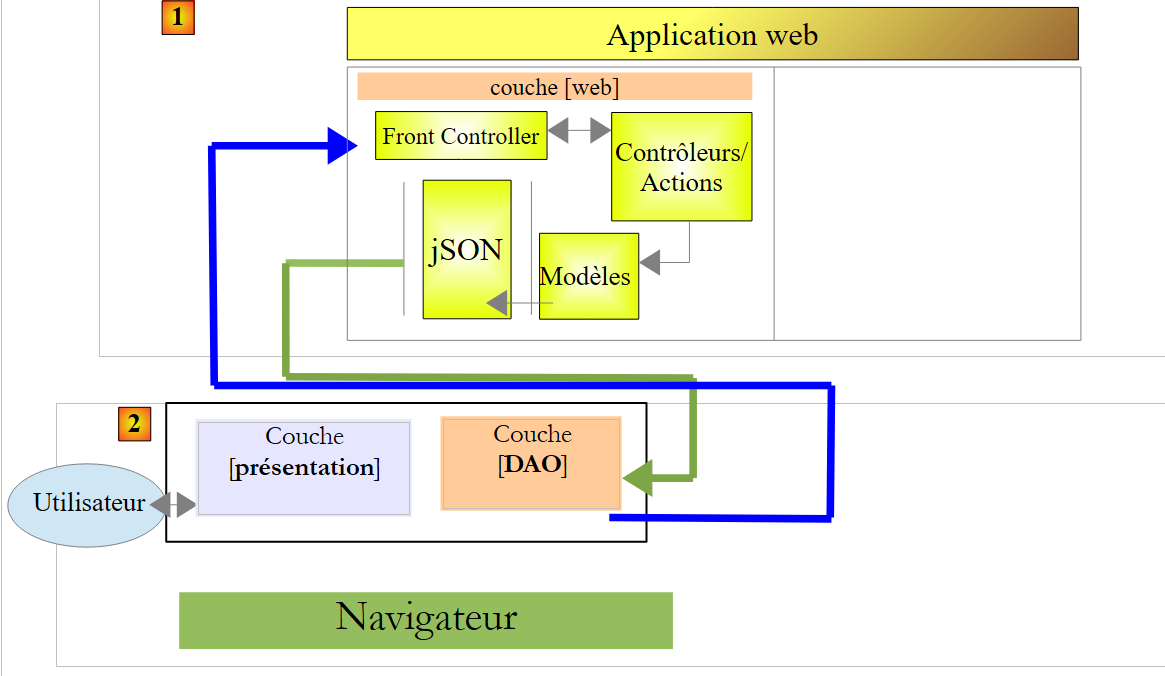 |
7.7.2. The start page
The action that launches the application is the following [/ajax-16] action:
    @RequestMapping(value = "/ajax-16", method = RequestMethod.GET, produces = "text/html; charset=UTF-8")
    public String ajax16() {
        return "vue-16";
}
It displays the following view [vue-16.xml]:
<!DOCTYPE HTML>
<html xmlns:th="http://www.thymeleaf.org">
    <head>
        <meta name="viewport" content="width=device-width" />
        <title>Ajax-12</title>
        <link rel="stylesheet" href="/css/ajax01.css" />
        <script type="text/javascript" src="/js/jquery/jquery-2.1.1.min.js"></script>
        <script type="text/javascript" src="/js/json3.js"></script>
        <script type="text/javascript" src="/js/local16-dao.js"></script>
        <script type="text/javascript" src="/js/local16-ui.js"></script>
    </head>
    <body>
        <h3>Ajax - 16 - Navigation dans une Application à Page Unique</h3>
        <h3>Structuration du code JS</h3>
        <hr />
        <div id="content" th:include="vue-09-page1" />
        <img id="loading" src="/images/loading.gif" />
        <div id="erreur" style="background-color:lightgrey"></div>
    </body>
</html>
- Lines 9–10: The JS code has been placed in two different files:
- [local-ui] implements the [presentation] layer,
- [local-dao] implements the [DAO] layer;
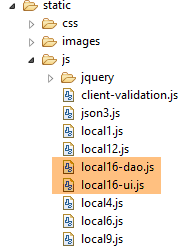 |
7.7.3. Implementation of the [DAO] layer
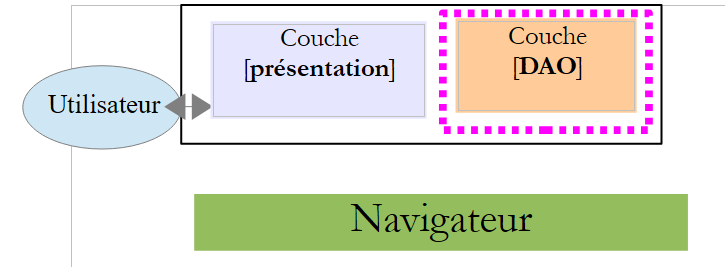 |
7.7.4. Interface
The [DAO] layer in [local-dao.js] will present the following interface to the [presentation] layer:
| to update page 1 using the [Refresh] button |
| to display page 2 with the [Submit] button |
JavaScript does not have the concept of an interface. I used this term simply to indicate that the [presentation] layer agreed to communicate with the [DAO] layer solely through the two functions above.
7.7.5. Implementation of the interface
The skeleton of the implementation is as follows:
var session = {
    "cpt1" : 0,
    "cpt3" : 0
};

// update Page 1
function updatePage1(deferred, sendMeBack) {
...
}

// page 2
function getPage2(deferred, sendMeBack, value1, value2, pageRequired) {
...
}
The purpose of the [DAO] layer is to hide the details of HTTP requests made to the web server from the [presentation] layer. The session is part of these details. It is therefore now managed by the [DAO] layer.
7.7.5.1. The [updatePage1] function
The [updatePage1] function is the function called by the [presentation] layer to refresh page 1. Its code is as follows:
// update Page 1
function updatePage1(deferred, sendMeBack) {
    // requête HTTP
    executePost(deferred, sendMeBack, '/ajax-13', session);
}
- Line 1: The [updatePage1] function receives two parameters:
- an object of type [jQuery.Deferred]. This type of object stores a state that can have three values ['pending', 'resolved', 'rejected']. When it arrives in the [updatePage1] function, it is in the [pending] state;
- a JS object to be returned to the [presentation] layer;
All HTTP requests are made by the following [executePost] function:
// requête HTTP
function executePost(deferred, sendMeBack, url, post) {
    // on fait un appel Ajax à la main
    $.ajax({
        headers : {
            'Accept' : 'application/json',
            'Content-Type' : 'application/json'
        },
        url : url,
        type : 'POST',
        data : JSON3.stringify(post),
        dataType : 'json',
        success : function(data) {
            // on mémorise la session
            if (data.session) {
                session = data.session;
            }
            // on rend le résultat
            deferred.resolve({
                "status" : 1,
                "data" : data,
                "sendMeBack" : sendMeBack
            });
        },
        error : function(jqXHR) {
            // on rend l'erreur
            deferred.resolve({
                "status" : 2,
                "data" : jqXHR.responseText,
                "sendMeBack" : sendMeBack
            });
        }
    });
}
- line 1: the [executePost] function executes a POST-type Ajax call. It expects four parameters:
- a [jQuery.Deferred] object in the [pending] state;
- a JS object to be returned to the [presentation] layer;
- the POST URL;
- the value to be posted as a JS object;
- Lines 5–8: The function posts JSON (line 7) and receives JSON (line 6);
- line 11: the value to be posted is converted to JSON;
- lines 13–24: the function executed if the Ajax call is successful;
- lines 19–23: if the server returned a session, it is stored;
- lines 13–18: set the [deferred] object to the [resolved] state and pass a result with the following fields:
- [status]: 1 for success, 2 for failure,
- [data]: the server's JSON response,
- [sendMeBack]: the second parameter of the function, which is an object the caller wants to retrieve;
- lines 17–31: the function executed if the Ajax call fails. We do the same thing as before with two differences:
- [status] is set to 2 to indicate an error;
- [data] is again the server's JSON response but obtained in a different way;
7.7.5.2. The [getPage2] function
The [getPage2] function is as follows:
// page 2
function getPage2(deferred, sendMeBack, value1, value2, pageRequired) {
    // requête HTTP
    executePost(deferred, sendMeBack, '/ajax-14', {
        "value1" : value1,
        "value2" : value2,
        "pageRequired" : pageRequired,
    });
}
- The function receives the following parameters:
- [deferred]: an object of type [jQuery.Deferred] in the [pending] state,
- [sendMeBack]: a JS object to be returned to the [presentation] layer,
- [value1]: the first input on page 1,
- [value2]: the second input on page 2,
- [pageRequired]: a boolean indicating to the server whether or not to send the HTML stream for page 2;
- the [executePost] function is called to execute the necessary HTTP request;
7.7.6. The [presentation] layer
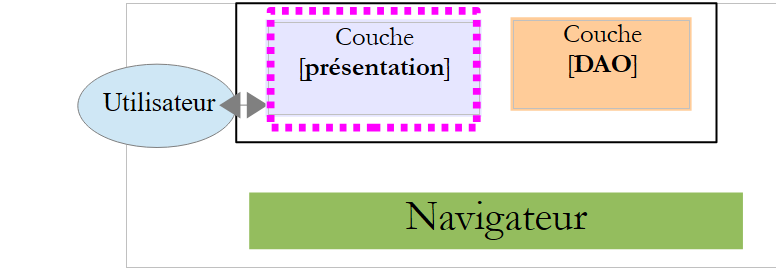 |
The [presentation] layer is implemented by the [local-ui.js] file. This file reuses the code from the [local12.js] file, reworked to use the preceding [DAO] layer. Only two functions have changed: [postForm] and [valider].
7.7.6.1. The [postForm] function
The [postForm] function is as follows:
// update Page 1
function postForm() {
    // on met à jour la page 1
    var deferred = $.Deferred();
    loading.show();
    updatePage1(deferred, {
        'sender' : "postForm",
        'info' : 10
    });
    // affichage résultats
    deferred.done(postFormDone);
}
- line 4: we create a [jQuery.Deferred] object. By default, it is in the [pending] state;
- line 5: the loading image is displayed
- lines 6–9: the [updatePage1] function is executed. We pass a dummy [sendMeBack] object, just to show what it can be used for;
- line 11: the parameter of the [deferred.done] function is itself a function. This is the function to be executed when the state of the [deferred] object changes to [resolved]. We just saw that the DAO function [executePost] set the state of this object to [resolved] upon receiving the server response. This means that when the [postFormDone] function executes, the server response has been received;
The [postFormDone] function is as follows:
function postFormDone(result) {
    // end waiting
    loading.hide();
    // data recovery
    var data = result.data
    // for demo
    console.log(JSON3.stringify(result.sendMeBack));
    // status analysis
    switch (result.status) {
    case 1:
        // update both zones
        if (data.zone1) {
            $("#zone1-content").html(data.zone1);
            $("#zone1").show();
        } else {
            $("#zone1").hide();
        }
        if (data.zone3) {
            $("#zone3").show();
            $("#zone3-content").html(data.zone3);
        } else {
            $("#zone3").hide();
        }
        break;
    case 2:
        // error display
        erreur.html(data);
        break;
    }
}
- Line 1: The [result] parameter received is the parameter passed to the [deferred.resolve] method in the [executePost] function, for example:
            // on rend le résultat
            deferred.resolve({
                "status" : 1,
                "data" : data,
                "sendMeBack" : sendMeBack
});
- line 5: we retrieve the response from the server;
- lines 10–24: this is the code that, in the previous version, was in the [onSuccess] function of the [postForm] function;
- lines 25–28: this is the code that was previously in the [onError] function of the [postForm] function;
7.7.6.2. The role of the [sendMeBack] parameter
What is the [sendMeBack] parameter used for? Let’s look at the code that calls the [updatePage1] function:
// update Page 1
function postForm() {
    // on met à jour la page 1
    var deferred = $.Deferred();
    loading.show();
    updatePage1(deferred, {
        'sender' : "postForm",
        'info' : 10
    });
    // affichage résultats
    deferred.done(postFormDone);
}
and the signature of the [validerDone] function:
function postFormDone(result) {
}
How can the [postForm] function pass information to the [postFormDone] function? The latter has only one parameter, [result]. This is created by the [executePost] function in the [DAO] layer. To pass information to the [postFormDone] function, the [postForm] function must first pass it to the [updatePage1] function. This is the role of the [sendMeBack] parameter. It is used as follows:
function postFormDone(result) {
    // end waiting
    loading.hide();
    // data recovery
    var data = result.data
    // for demo
    console.log(JSON3.stringify(result.sendMeBack));
    // status analysis
    switch (result.status) {
...
- line 7, the [postFormDone] function has retrieved the [sendMeBack] parameter initially passed to the DAO function [updatePage1] by the [postForm] function;
7.7.7. The [valider] function
The [valider] function is as follows:
// validation valeurs saisies
function valider() {
    // on mémorise la page 1
    page1 = content.html();
    // on mémorise les valeurs saisies
    value1 = $("#text1").val().trim();
    value2 = $("#text2").val().trim();
    // pas d'erreur
    erreur.hide();
    // on demande la page 2
    var deferred = $.Deferred();
    loading.show();
    getPage2(deferred, {
        'sender' : 'valider',
        'info' : 20
    }, value1, value2, page2 ? false : true);
    // affichage résultats
    deferred.done(validerDone);
}
and the [validerDone] function (line 18) as follows:
function validerDone(result) {
    // end waiting
    loading.hide();
    // data recovery
    var data = result.data
    // for demo
    console.log(JSON3.stringify(result.sendMeBack));
    // status analysis
    switch (result.status) {
    case 1:
        // mistake?
        if (data.erreur) {
            // error display
            erreur.html(data.erreur);
            erreur.show();
        } else {
            // no error
            erreur.hide();
            // page 2
            if (page2) {
                // use the cached page
                content.html(page2);
            } else {
                // memorize page 2
                page2 = data.page2;
                // we display it
                content.html(data.page2);
            }
            // we update it with server info
            $("#value1").text(data.value1);
            $("#value2").text(data.value2);
        }
        break;
    case 2:
        // error display
        erreur.html(data);
        erreur.show();
        break;
    }
}
- line 5: we retrieve the response from the server;
- lines 10–32: this is the code that, in the previous version, was in the [onSuccess] function of the [validate] function;
- lines 34–38: this is the code that was previously in the [onError] function of the [validate] function;
7.7.8. Tests
The application continues to work as before, and in the Chrome console, you can see the [sendMeBack] parameters of the [postForm] and [validate] functions:
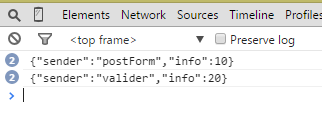 |
7.8. Conclusion
Let’s return to the general architecture of a Spring MVC application:
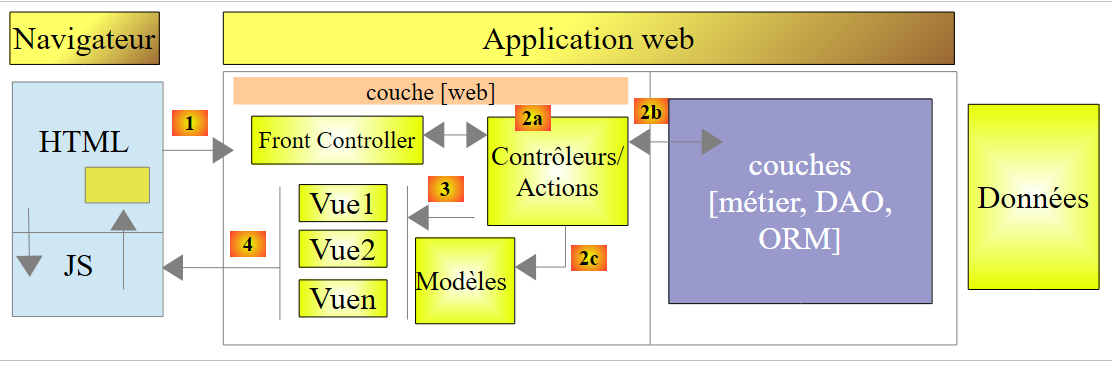 |
Thanks to the JavaScript embedded in the HTML pages and executed in the browser, and thanks to the APU model, we can offload code to the browser and achieve the following architecture:
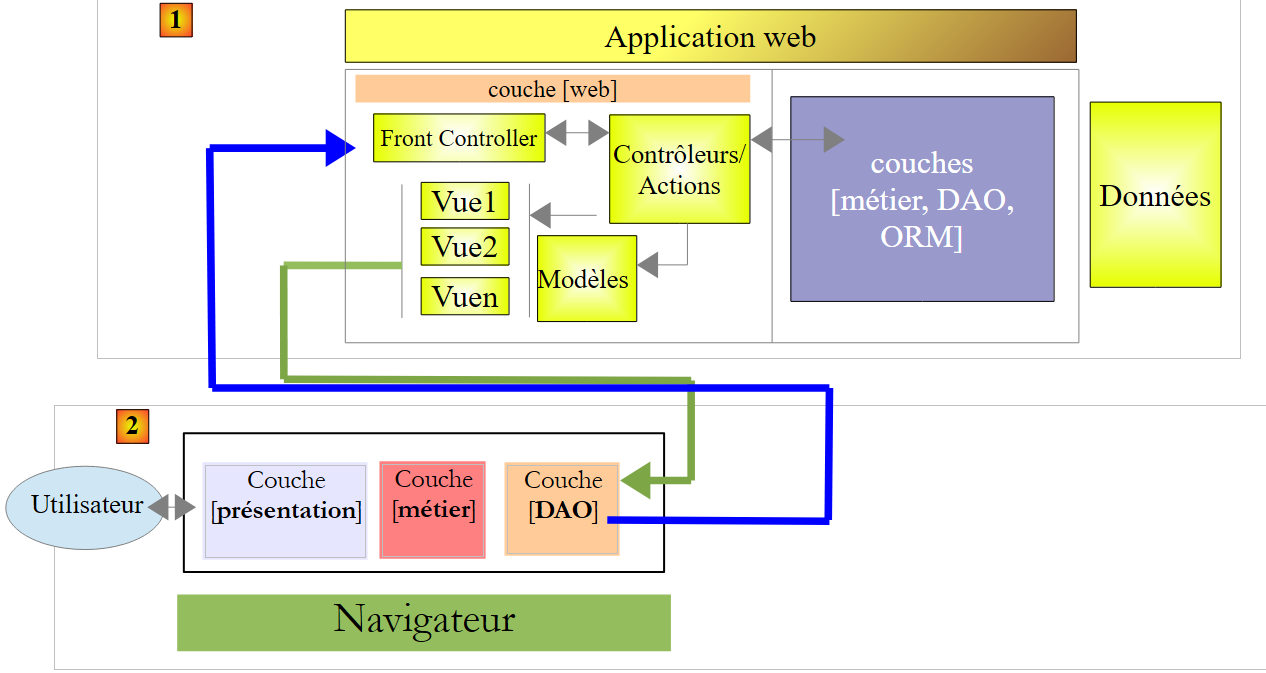 |
- we have a client [2] / server [1] architecture where the client and server communicate via JSON;
- in [1], the Spring MVC web layer delivers views, view fragments, and data in JSON;
- in [2]: the JavaScript code embedded in the view loaded when the application starts can be structured into layers:
- the [presentation] layer handles user interactions,
- the [DAO] layer handles data access via the web server [1],
- the [business] layer may not exist or may take over certain non-confidential functionalities from the server’s [business] layer to offload the server;
- the client [2] can cache certain views to further offload the server. It manages the session;