3. Actions: The Response
Let’s consider the architecture of a Spring MVC application:
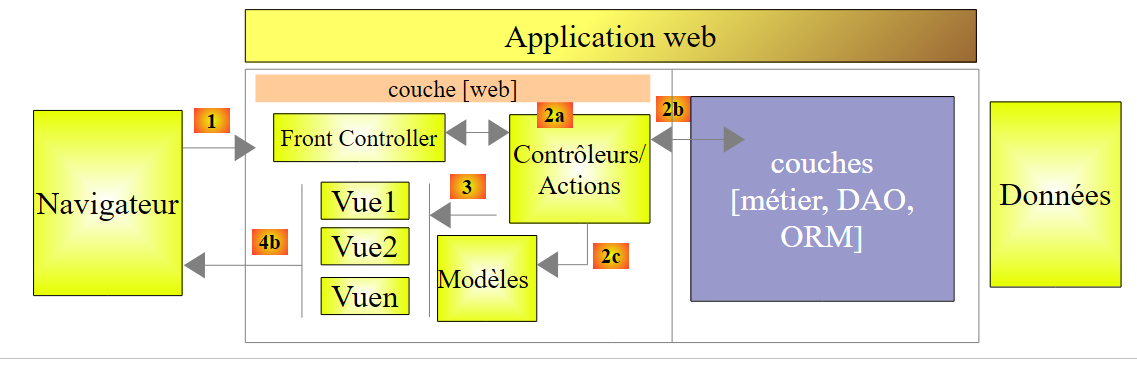 |
In this chapter, we examine the process that routes the request to the controller and the action that will process it, a mechanism known as routing. We also present the various responses [3] that an action can return to the browser. This may be something other than a V view [4b].
3.1. The new project
We are creating a new Spring project:
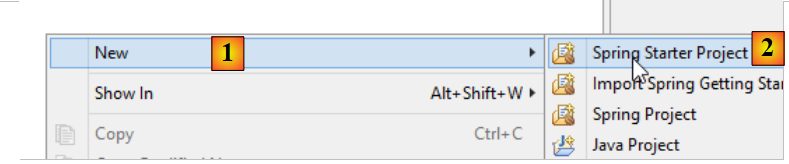 |
- in [1-2], we create a new project based on Spring Boot;
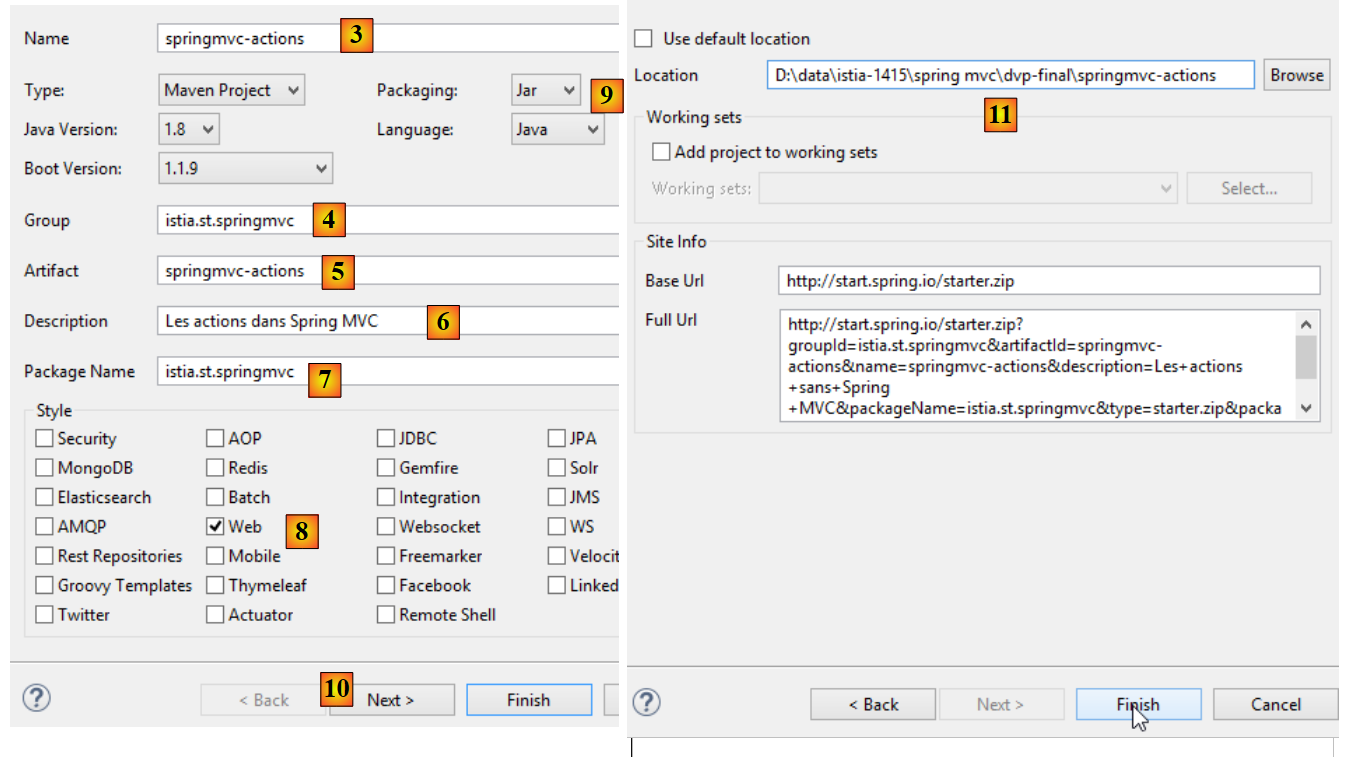 |
- in [3], the name of the Maven project;
- in [4], the Maven group in which the project’s compilation output will be placed;
- in [5], the name given to the compilation output;
- [6], a description of the project;
- in [7], the package in which the project’s executable class will be placed;
- in [8], the nature of the project. This is a web project with Thymeleaf views. Here, we see all the ready-to-use Maven dependencies provided by the Spring Boot project;
- In [9], we specify that the output of the Maven build will be packaged in a jar archive rather than a WAR file. The project will then use an embedded Tomcat server included in its dependencies;
- In [10], proceed to the next step of the wizard;
- In [11], specify the project folder;
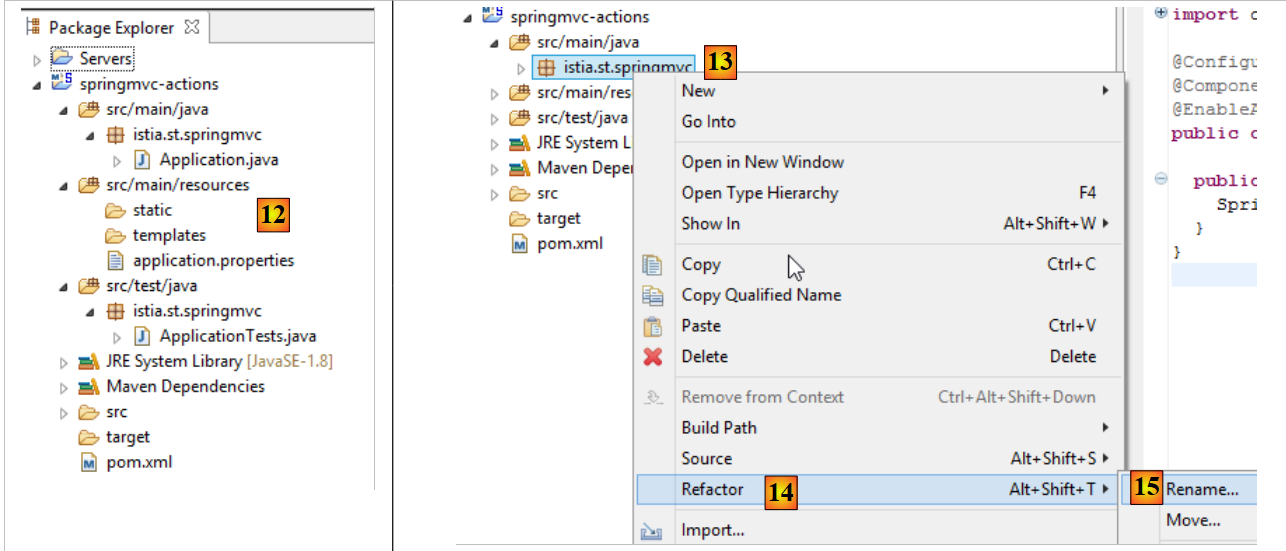 |
- In [12], the generated project;
- In [14-15], rename the package [istia.st.springmvc];
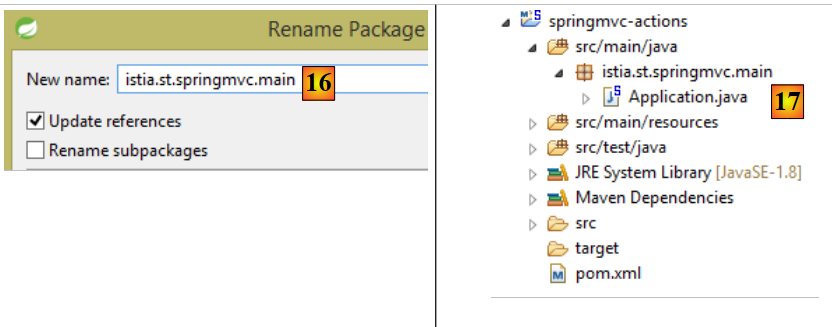 |
- in [16], the new package name;
- in [17], the new project;
We now create a new class;
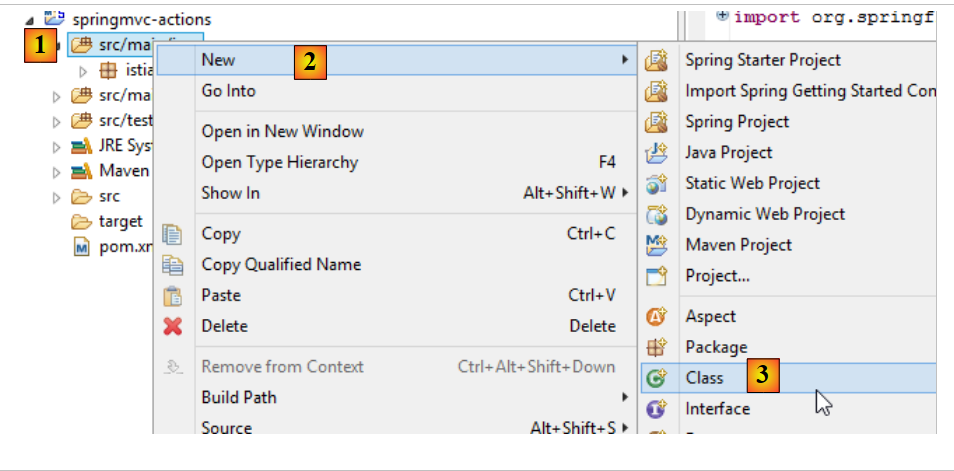 |
- in [1-3], we create a new class;
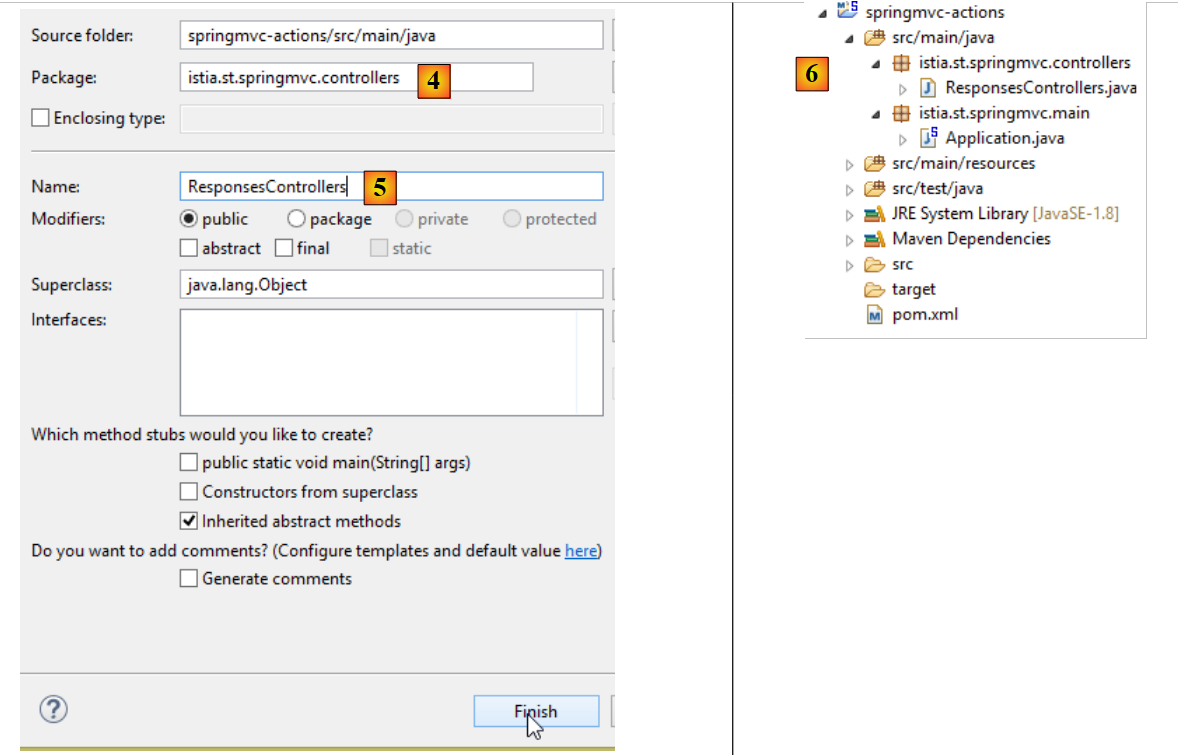 |
- in [5] we name it and in [4] we specify its package;
- in [6], the new project;
The class is currently as follows:
package istia.st.springmvc;

public class ActionsController {

}
We are updating this code as follows:
package istia.st.springmvc;

import org.springframework.web.bind.annotation.RestController;

@RestController
public class ActionsController {

}
- line 6: the annotation [@RestController] indicates two things:
- that the class [ActionsController], annotated in this way, is a Spring controller MVC, and therefore contains actions that handle requests from URL to clients;
- that the result of these actions is sent to the client;
The other annotation, [@Controller], that we encountered is different: the actions of a controller annotated in this way return the name of the view that should be displayed. It is then the combination of this view and the model constructed by the action for this view that provides the response sent to the client.
The change in our project’s structure requires a change in our project’s configuration:
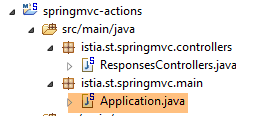 |
The [Application] class evolves as follows:
package istia.st.springmvc.main;

import org.springframework.boot.SpringApplication;
import org.springframework.boot.autoconfigure.EnableAutoConfiguration;
import org.springframework.context.annotation.ComponentScan;
import org.springframework.context.annotation.Configuration;

@Configuration
@ComponentScan({"istia.st.springmvc.controllers"})
@EnableAutoConfiguration
public class Application {

    public static void main(String[] args) {
        SpringApplication.run(Application.class, args);
    }
}
- line 9: the [ComponentScan] annotation accepts as a parameter an array of package names where Spring Boot should look for Spring components. Here we include the [istia.st.springmvc.controllers] package in this array so that the controller annotated with [@RestController] can be found;
We will build various actions in the controller to illustrate their main features. First, we will focus on the various types of responses possible for an action in an application without views.
3.2. [/a01, /a02] - Hello world
Our first action will be as follows:
@RestController
public class ActionsController {
    // ----------------------- hello world ------------------------
    @RequestMapping(value = "/a01", method = RequestMethod.GET)
    public String a01() {
        return "Greetings from Spring Boot!";
    }
}
- line 4: the annotation [RequestMapping] qualifies the request processed by the annotated action:
- the [value] attribute is the processed URL,
- the [method] attribute specifies the accepted method;
Thus, the method [a01] processes the request HTTP [GET /a01].
- line 5: the method [a01] returns a type [String], which will be sent as-is to the client;
- Line 6: The returned string;
Let’s run the application as we have done several times before, and then with the client [Advanced Rest Client], we request the URL [/a01] with a GET [1-2]:
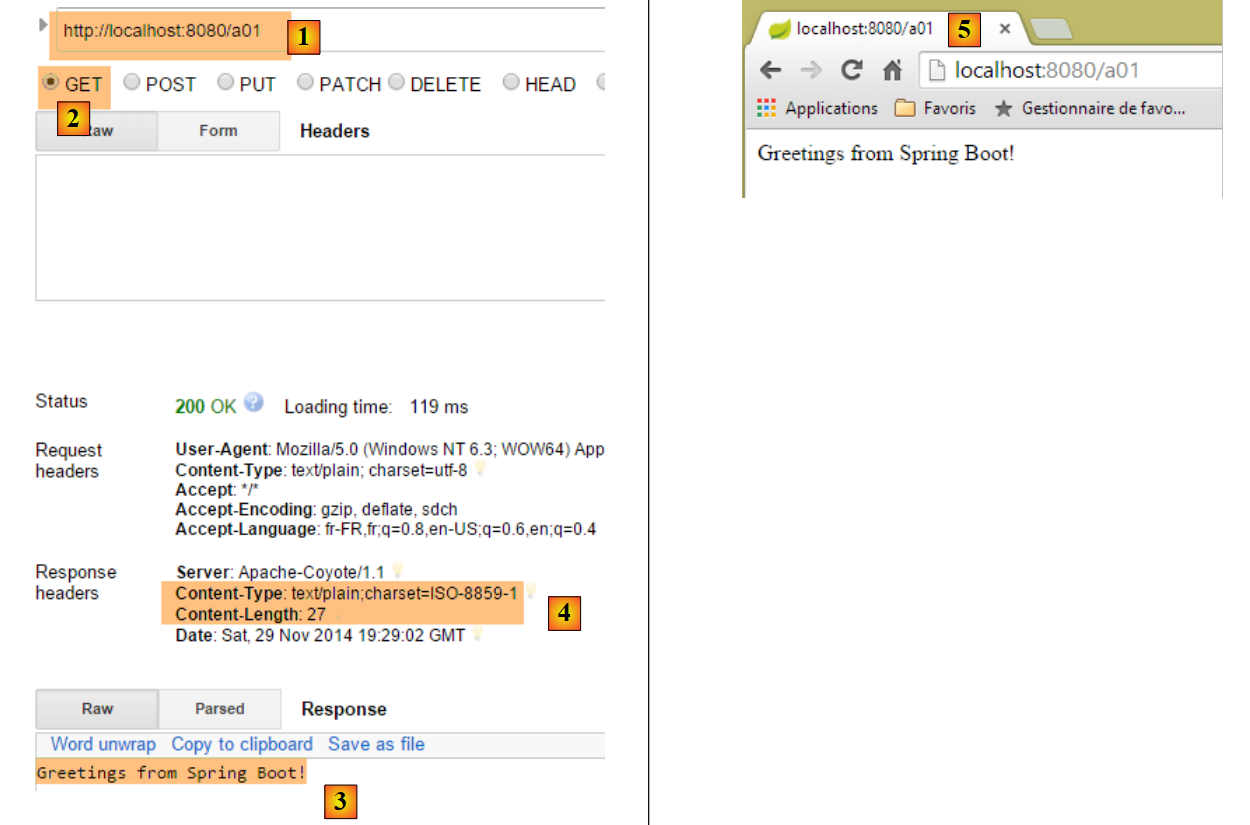 |
- in [3], the server's response;
- in [4], the headers of the response; we see that the encoding used is [ISO-8859-1]. We may prefer UTF-8 encoding. This can be configured;
- in [5], we request the same URL using the Chrome browser;
We add the following [/a02] action to the [ActionsController] controller (this may sometimes lead to confusion between URL and the method that handles it under the action name):
    // ----------------------- accented characters - UTF8 ------------------------
    @RequestMapping(value = "/a02", method = RequestMethod.GET, produces="text/plain;charset=UTF-8")
    public String a02() {
        return "caractères accentués : éèàôûî";
}
- line 2: the [produces="text/plain;charset=UTF-8"] attribute indicates that the action sends a text stream with characters encoded in the [UTF-8] format. This format specifically allows the use of accented characters;
To apply this new action, we must restart the application:
 |
The result is as follows:
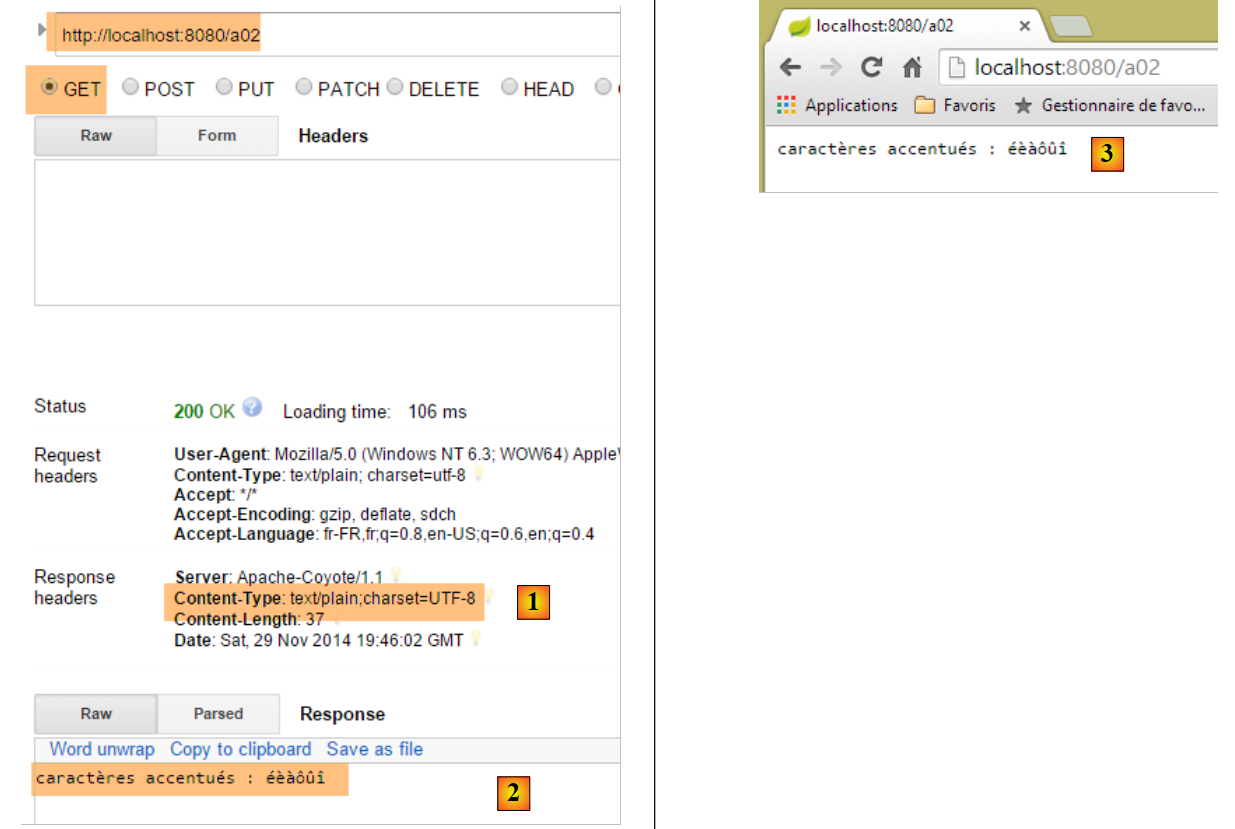 |
- in [1], we can see the nature of the document sent by the server;
- In [2-3], we clearly see the accented characters;
3.3. [/a03]: render a XML stream
We add the following action [/a03]:
    // ----------------------- text/xml ------------------------
    @RequestMapping(value = "/a03", method = RequestMethod.GET, produces = "text/xml;charset=UTF-8")
    public String a03() {
        String greeting = "<greetings><greeting>Greetings from Spring Boot!</greeting></greetings>";
        return greeting;
}
- line 2: the [produces="text/xml;charset=UTF-8"] attribute indicates that the action sends a XML stream with characters encoded in the [UTF-8] format;
Its execution produces the following:
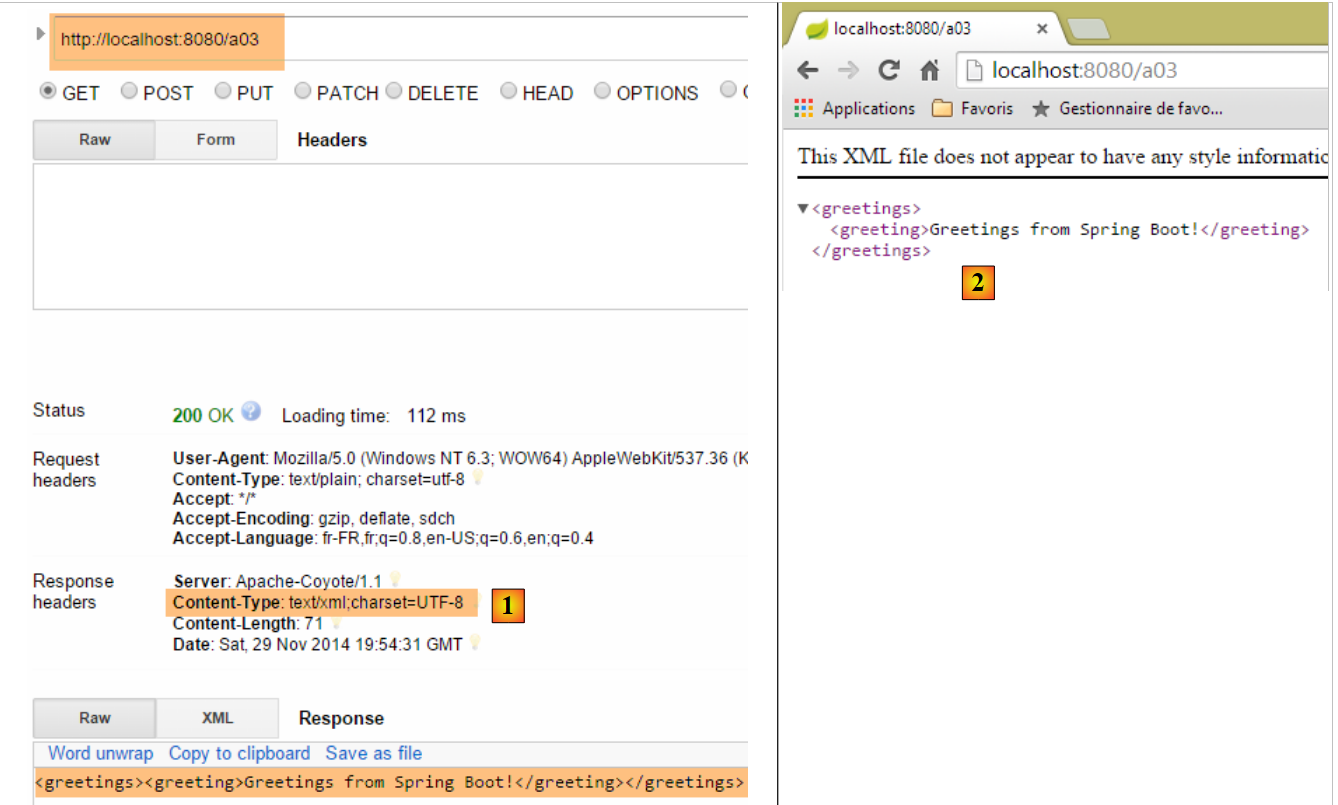 |
- in [1], the HTTP header specifies that the sent document is in HTML;
- In [2], the Chrome browser uses this information to format the received XML text;
Note that with Chrome, you can view the HTTP exchanges between the client and the server in the developer console (Ctrl-Shift-I):
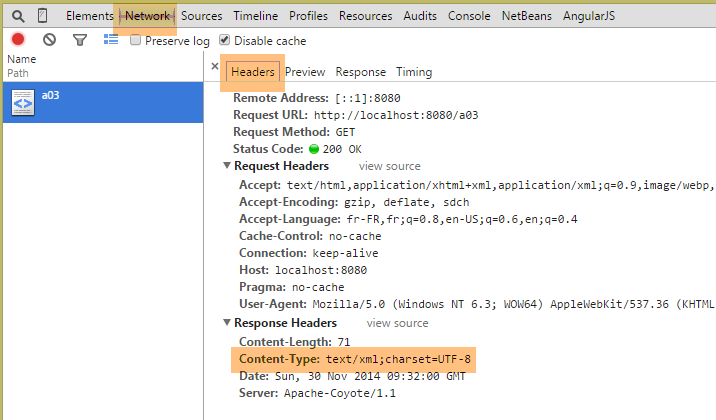
From now on, we will not systematically take screenshots of the HTTP exchanges between the client and the server. Sometimes, we will simply list the text of these exchanges.
3.4. [/a04, /a05]: Return a jSON stream
We are adding the following [/a04] action:
    // ----------------------- produce from jSON ------------------------
    @RequestMapping(value = "/a04", method = RequestMethod.GET)
    public Map<String, Object> a04() {
        Map<String, Object> map = new HashMap<String, Object>();
        map.put("1", "un");
        map.put("2", new int[] { 4, 5 });
        return map;
}
- Line 3: The action returns a [Map] type, a dictionary. Recall that with a [@RestController] controller, the result of the action is the response sent to the client. Since the HTTP protocol is a text-based exchange protocol, the client’s response must be serialized into a string. To do this, Spring MVC uses various [Objet <---> chaîne de caractères] converters. The association of a specific object with a converter is done through configuration. Here, Spring Boot’s autoconfiguration will inspect the project’s dependencies:
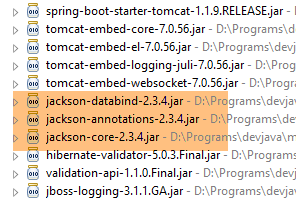 |
The Jackson dependencies listed above are libraries for serializing and deserializing objects into jSON strings. Spring Boot will then use these libraries to serialize and deserialize the objects returned by the actions. An example of Java code for serializing/deserializing Java objects into jSON can be found in Section 9.7.
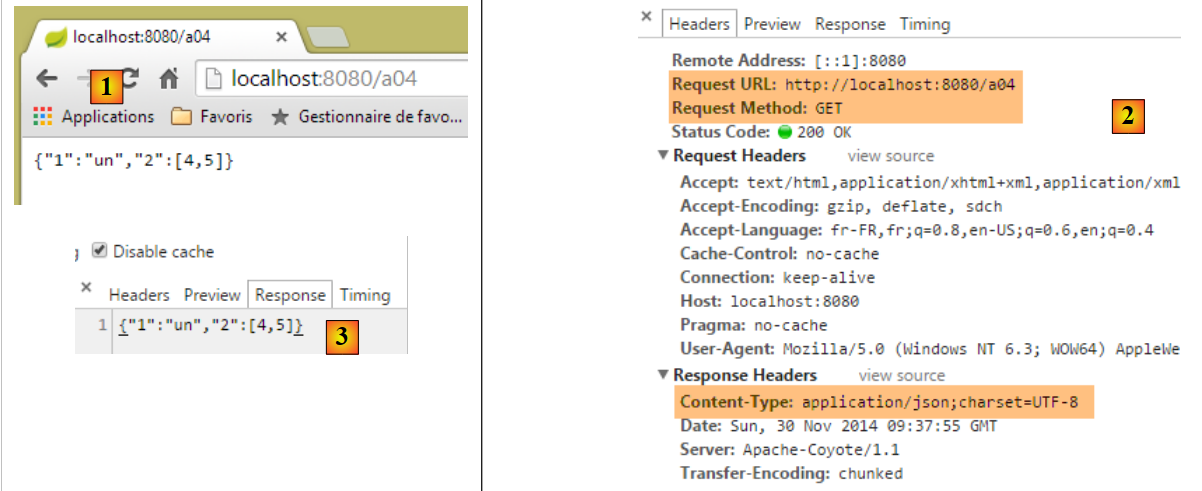
Note on line 2 that we did not specify the type of the response being sent. We will see the default type that will be sent.
The results are as follows in Chrome [1-3]:
 |
Now let’s add the following action:
    // ----------------------- produce from jSON - 2 ------------------------
    @RequestMapping(value = "/a05", method = RequestMethod.GET)
    public Personne a05() {
        return new Personne(1,"carole",45);
}
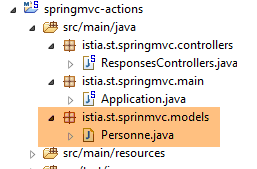
The [Personne] class is as follows:
 |
package istia.st.sprinmvc.models;

public class Personne {

    // identifier
    private Integer id;
    // name
    private String nom;
    // age
    private int age;

    // manufacturers
    public Personne() {

    }

    public Personne(String nom, int age) {
        this.nom = nom;
        this.age = age;
    }

    public Personne(Integer id, String nom, int age) {
        this(nom, age);
        this.id = id;
    }

    @Override
    public String toString() {
        return String.format("[id=%s, nom=%s,  age=%d]", id, nom, age);
    }

    // getters and setters
...
}
Execution yields the following results:
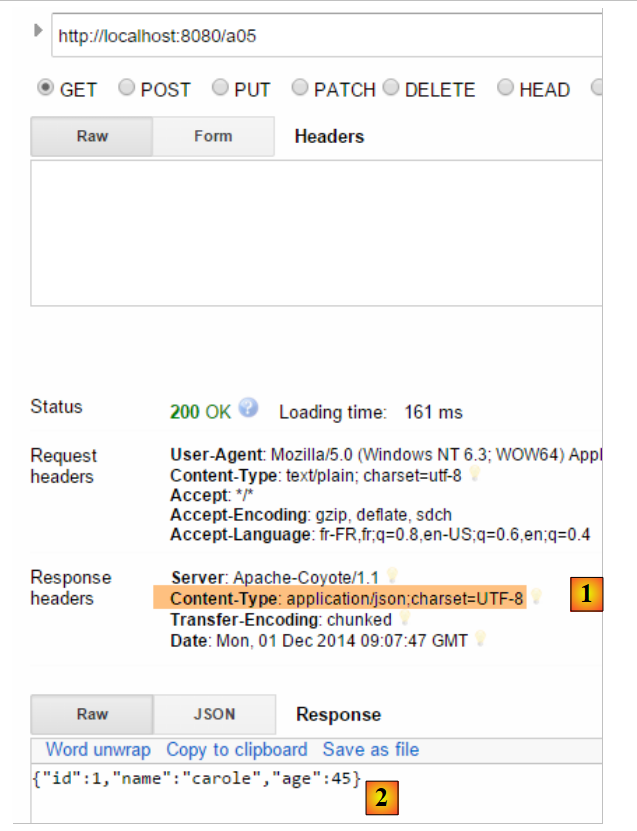 |
- in [1], the server indicates that the document it is sending is jSON;
- in [2], the received document jSON;
3.5. [/a06]: return an empty stream
We add the following [/a06] action:
    // ----------------------- render an empty stream ------------------------
    @RequestMapping(value = "/a06")
    public void a06() {
}
- line 3, the [/a06] action returns nothing. Spring MVC will then generate an empty response to the client;
The execution yields the following results:
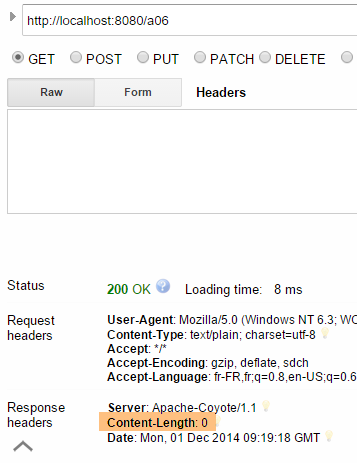 |
Above, the HTTP [Content-Length] attribute in the response indicates that the server is sending an empty document.
3.6. [/a07, /a08, /a09]: nature of the flow with [Content-Type]
We add the following [/a07] action:
    // ----------------------- text/html ------------------------
    @RequestMapping(value = "/a07", method = RequestMethod.GET, produces = "text/html;charset=UTF-8")
    public String a07() {
        String greeting = "<h1>Greetings from Spring Boot!</h1>";
        return greeting;
}
- line 2, the action [/a07] returns a stream HTML [text/html];
- line 4: a string HTML;
The execution yields the following results:
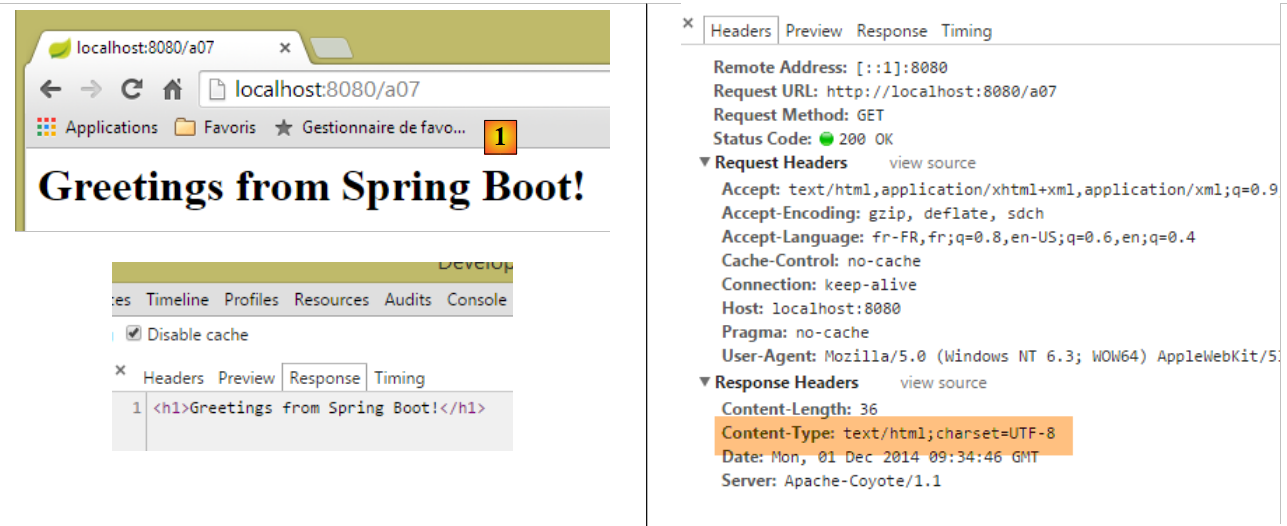 |
- In [1], we see that Chrome has interpreted the HTML tag <h1>, which displays its content in large font;
Now let’s do the same thing with the following [/a08] action:
    // ----------------------- result HTML in text/plain ------------------------
    @RequestMapping(value = "/a08", method = RequestMethod.GET, produces = "text/plain;charset=UTF-8")
    public String a08() {
        String greeting = "<h1>Greetings from Spring Boot!</h1>";
        return greeting;
}
- Line 2: The action's response is of type [text/plain];
The results are as follows:
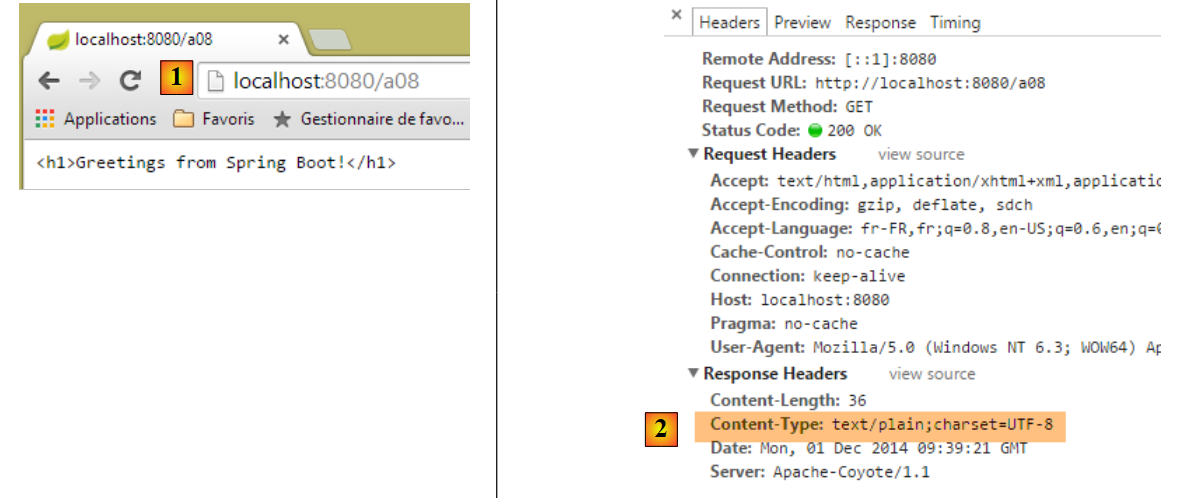 |
- In [1], Chrome did not interpret the HTML <h1> tag because the server told it that it was sending a [text/plain] [2] stream;
Let’s try something similar with the following [/a09] action:
    // ----------------------- result HTML in text/xml ------------------------
    @RequestMapping(value = "/a09", method = RequestMethod.GET, produces = "text/xml;charset=UTF-8")
    public String a09() {
        String greeting = "<h1>Greetings from Spring Boot!</h1>";
        return greeting;
}
- Line 2: We send a stream of type [text/xml];
The results are as follows:
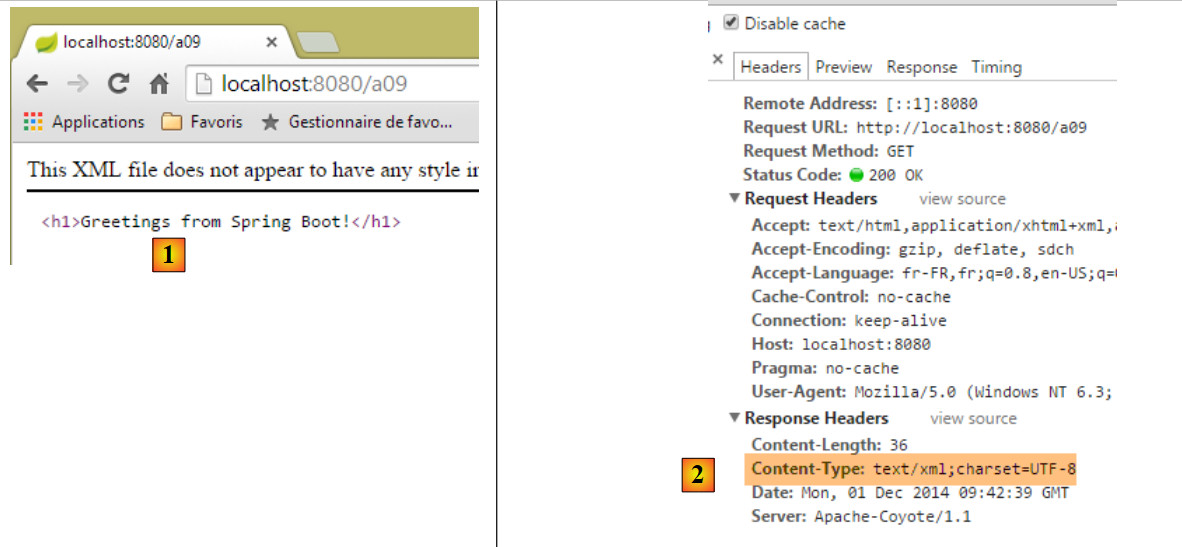 |
- In [1], Chrome did not interpret the HTML <h1> tag because the server told it that it was sending a [text/xml] [2] stream. It then treated the <h1> tag as a XML tag;
These examples highlight the importance of the HTTP [Content-Type] header in the server’s response. The browser uses this header to determine how to interpret the document it receives;
3.7. [/a10, /a11, /a12]: redirect the client
We create a new controller [RedirectController]:
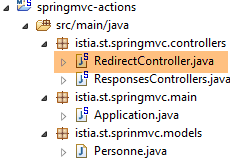 |
The code for [RedirectCntroller] will be as follows for now:
package istia.st.springmvc.controllers;

import org.springframework.stereotype.Controller;
import org.springframework.web.bind.annotation.RequestMapping;
import org.springframework.web.bind.annotation.RequestMethod;

@Controller
public class RedirectController {
}
- Line 7: We use the [@Controller] annotation, which means that by default, the [String] type of the action result now refers to the name of an action or a view;
We create the following [/a10] action:
    // ------------ bridge to third-party action -----------------------
    @RequestMapping(value = "/a10", method = RequestMethod.GET)
    public String a10() {
        return "a01";
}
- Line 4: We return 'a01' as the result, which is the name of an action. This action will then send the response to the client;
Here is an example:
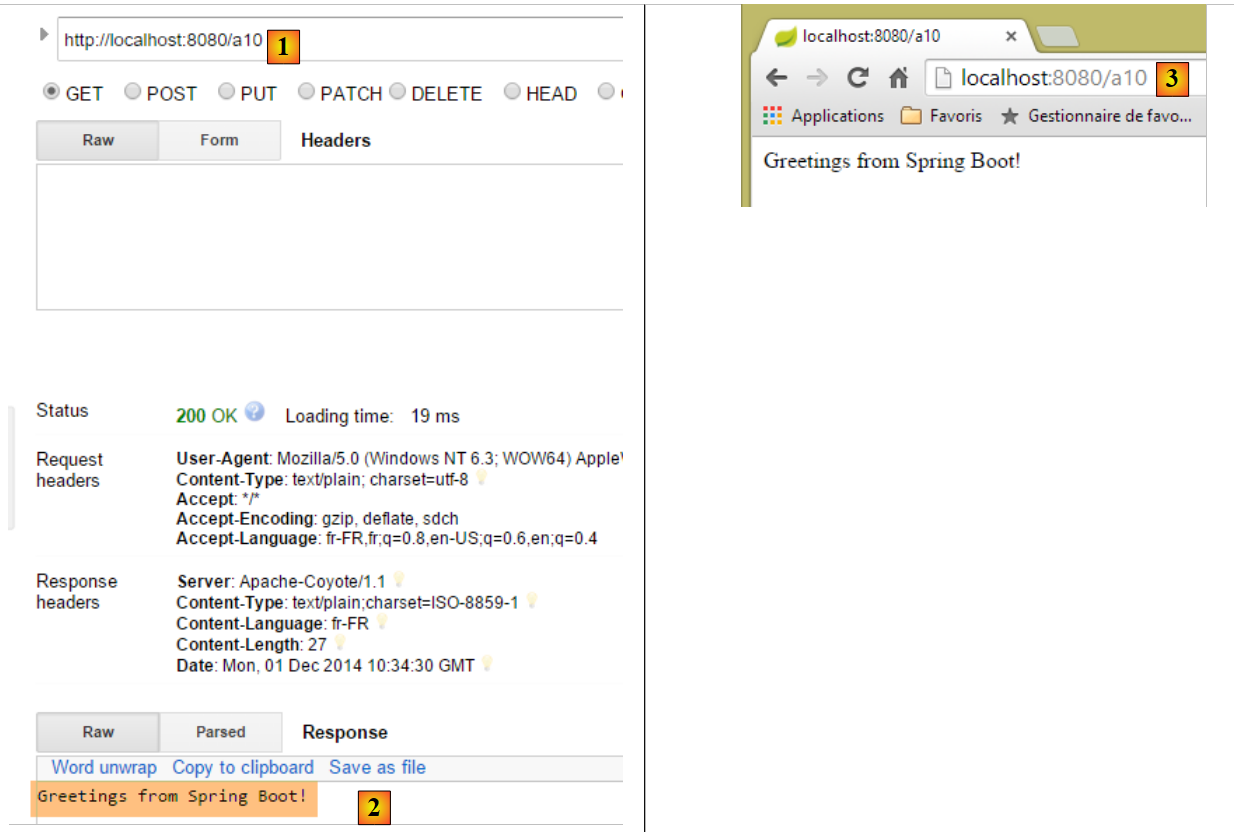 |
- in [2], we received the data stream from action [/a01];
- In [3], the browser displays URL from the [/a10] action;
We now create the following action [/a11]:
    // ------------ temporary 302 redirect to a third-party action -----------------------
    @RequestMapping(value = "/a11", method = RequestMethod.GET)
    public String a11() {
        return "redirect:/a01";
}
We get the following results:
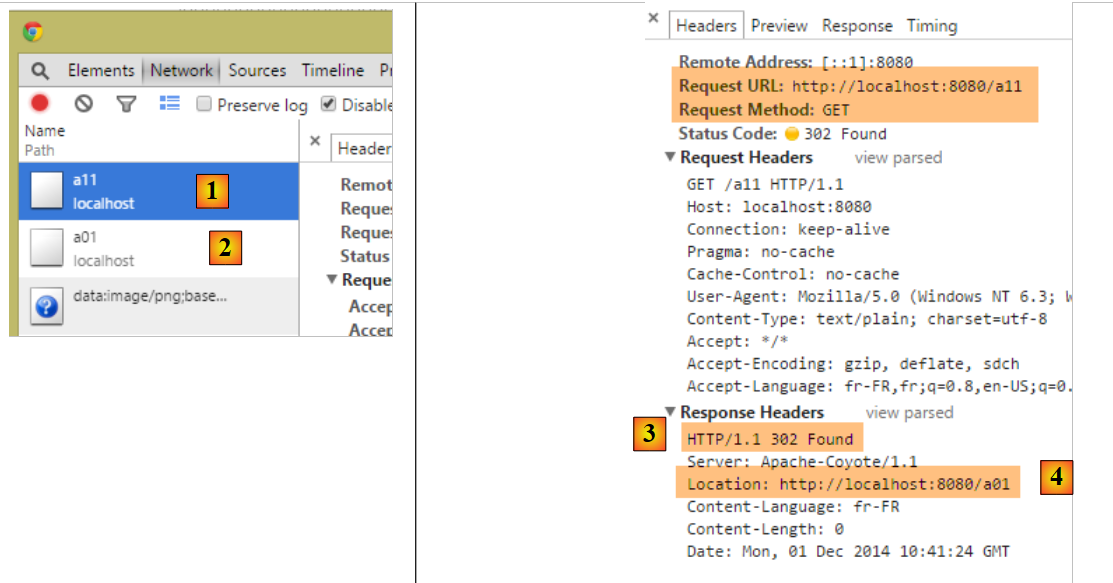 |
- In the Chrome logs for [1-2], we see two requests: one to [/a11] and the other to [/a01];
- in [3], the server responds with a [302] code that instructs the client browser to redirect toURL specified by the header HTTP [Location:] [4]. The code [302] is a temporary redirect code;
The browser then sends the second request to the redirection server URL:
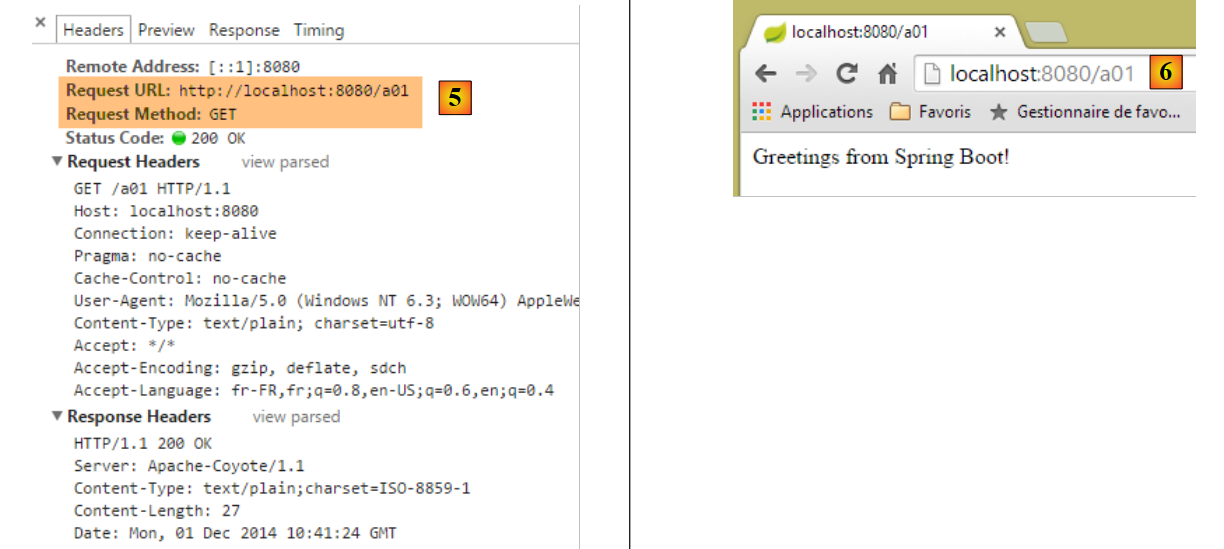 |
- to [5], the client’s second request;
- to [6], the client browser displays the URL redirect request;
You may want to indicate a permanent redirect, in which case you must send the following HTTP header to the client:
which means that the redirect is permanent. This difference between a temporary redirect (302) and a permanent redirect (301) is taken into account by some search engines.
We write the action [/a12], which will perform this permanent redirect:
    // ------------ permanent 301 redirect to a third-party action----------------
    @RequestMapping(value = "/a12", method = RequestMethod.GET)
    public void a12(HttpServletResponse response) {
        response.setStatus(301);
        response.addHeader("Location", "/a01");
}
- line 3: Spring is asked to inject the MVC object, which encapsulates the response sent to the client;
- line 4: we set the response's [status], the header's [301], and the HTTP:
- line 5: we manually create the following HTTP header:
which is the URL redirect header.
Execution yields the following results:
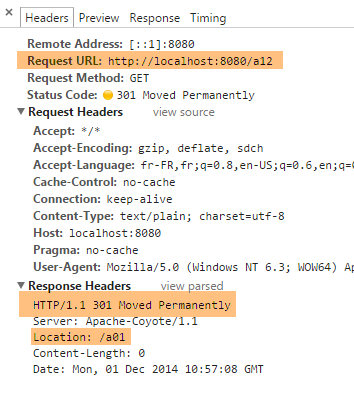 | 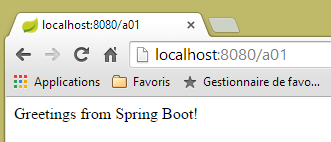 |
From this example, we will note how to:
- generate the HTTP response status;
- include a HTTP header in the response;
3.8. [/a13]: generate the complete response
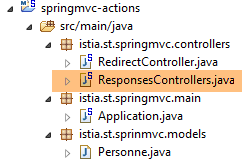
It is possible to fully control the response, as shown by the following action of the [ResponsesController] class:
 |
    // ----------------------- complete response generation ------------------------
    @RequestMapping(value = "/a13")
    public void a13(HttpServletResponse response) throws IOException {
        response.setStatus(666);
        response.addHeader("header1", "qq chose");
        response.addHeader("Content-Type", "text/html;charset=UTF-8");
        String greeting = "<h1>Greetings from Spring Boot!</h1>";
        response.getWriter().write(greeting);
}
- line 3: the result of the action is [void]. In this case, to send a non-empty response to the client, you must use the [HttpServletResponse response] object provided by Spring MVC;
- line 4: we give the response a status that will not be recognized by the client;
- line 5: we add a header HTTP that will not be recognized by the client;
- line 6: add a header HTTP [Content-Type] to specify the type of stream to be sent, in this case HTML;
- Lines 7–8: The document that will follow the HTTP headers in the response;
The results are as follows:
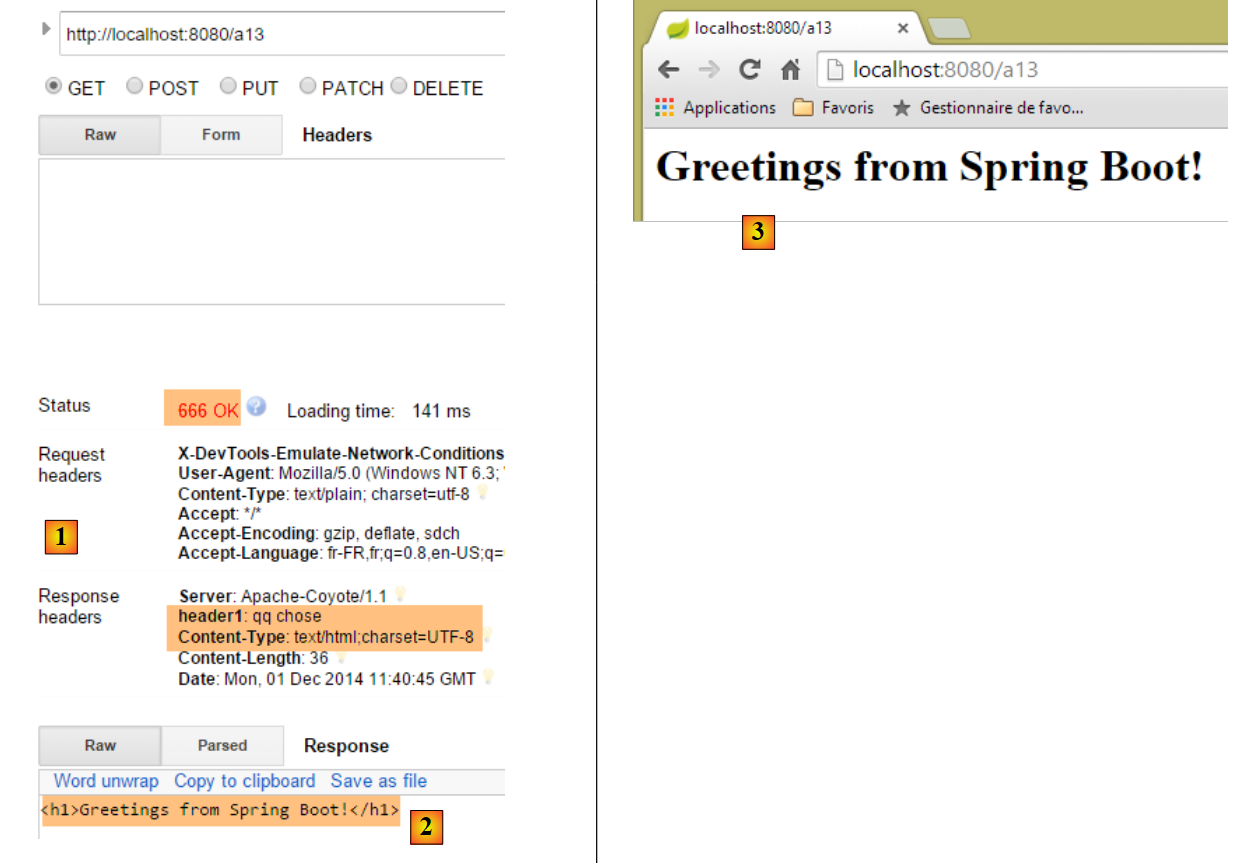 |
- in [1], we recognize the elements of our response;
- in [2-3], we see that Chrome ignored the fact that:
- the response status HTTP was not a recognized HTTP status,
- the [header1] header was not a recognized HTTP header;
If the client is not a browser but a programmed client, you are free to use whatever status codes and headers you want.