12. Web services in Python
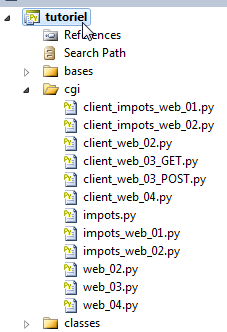 |
Python scripts can be executed by a WEB server. This server will listen for client requests. From the client’s perspective, calling a WEB service is equivalent to requesting the URL of that service. The client can be written in any language, including Python. We need to know how to "communicate" with a WEB service, that is, understand the Http communication protocol between a web server and its clients. This is the purpose of the following programs.
The web service scripts will be executed by the Apache web server on WampServer. They must be placed in a specific directory: <WampServer>\bin\apache\apachex.y.z\cgi-bin, where <WampServer> is the installation directory of WampServer and x.y.z is the version of the Apache web server.
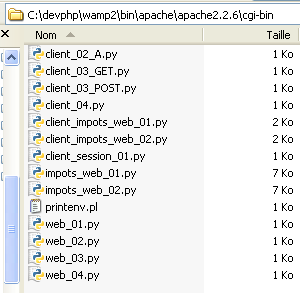 |
Placing the Python scripts in the <cgi-bin> folder is not enough. The script must specify the path to the Python interpreter to be used on the first line. This path is included as a comment:
The reader should adapt this path to their own environment.
12.1. Client/server date and time application
Our first web service will be a date and time service: the client receives the current date and time.
12.1.1. The server
#!D:\Programs\ActivePython\Python2.7.2\python.exe

import time

# headers
print "Content-Type: text/plain\n"

# dispatch time to customer
  # localtime: number of milliseconds since 01/01/1970
  # "date-time display format
  # d: 2-digit day
  # m: 2-digit month
  # y: 2-digit year
  # H: hour 0.23
  # M: minutes
  # S: seconds

print time.strftime('%d/%m/%y %H:%M:%S',time.localtime())
Notes:
- line 6: the script must generate some of the Http headers in the response to the client itself. These will be added to the Http headers generated by the Apache server itself. The Http header on line 6 tells the client that a resource in text/plain format—i.e., unformatted text—will be sent. Note the "\n" at the end of the header, which will generate a blank line after the header. This is mandatory: it is this blank line that signals to the client Http the end of the Http headers in the response. Next comes the resource requested by the client, in this case unformatted text;
- line 18: the resource sent to the client is text displaying the current date and time.
12.1.2. Two tests
The previous script can be run directly by the Python interpreter in a command window, as we have done so far. This helps eliminate any syntax or runtime errors. The following result is obtained:
Once the script has been tested in this way, it can be placed in the <cgi-bin> directory of the Apache server (see paragraph 12). Let’s launch the WampServer application. This starts both an Apache web server and a MySQL database management system. For now, we will only use the web server. Then, using a browser, let’s request the following URL: URL://localhost/cgi-bin/web_02.py:
 |
- in [1]: the requested URL;
- to [2]: the response displayed by the browser;
- in [3]: the source code received by the web browser. This is indeed the one sent by the Python script.
With certain tools (here Firebug, a Firefox browser plugin), you can access the headers exchanged with the server. Above, the web browser received the following headers:
Lines 7–8 are recognizable as the Http header sent by the Python script. The preceding lines were generated by the Apache web server.
12.1.3. A scheduled client
We will now write a script that will act as a client for the previous web service. We will use the features of the httplib module, which makes it easier to write clients Http.
# -*- coding=utf-8 -*-

import httplib,re

# constants
HOST="localhost"
URL="/cgi-bin/web_02.py"
# connection
connexion=httplib.HTTPConnection(HOST)
# follow-up
connexion.set_debuglevel(1)
# send request
connexion.request("GET", URL)
# response processing
reponse=connexion.getresponse()
# content
contenu=reponse.read()
# locking connection
connexion.close()
print "------\n",contenu,"-----\n"
# recovery of time elements
elements=re.match(r"^(\d\d)/(\d\d)/(\d\d) (\d\d):(\d\d):(\d\d)\s*$",contenu).groups()
print "Jour=%s,Mois=%s,An=%s,Heures=%s,Minutes=%s,Secondes=%s" % (elements[0],elements[1],elements[2],elements[3],elements[4],elements[5])
Notes:
- line 3: the re module is required for regular expressions, the httplib module for the clients and Http functions;
- line 9: a Http connection is created using port 80 of HOST, defined on line 6;
- line 11: the trace allows you to view the headers of the client request and the server response;
- line 13: the URL web service is requested. There are two ways to request it: using a Http, GET, or POST command. The difference between the two is explained later. Here, it will be requested using the command Http GET;
- Line 15: The server's response is read. The entire response is retrieved here: headers Http and the resource requested by the client. In its response, the server may have instructed the client to redirect. In this case, the httplib client automatically performs the redirection. The response obtained is therefore the one resulting from the redirection;
- line 17: the response consists of the headers Http and the document requested by the client. To retrieve only the Http headers, use [reponse].getHeaders(). To retrieve the document, use [reponse].read();
- line 19: once the response from the web server is received, the connection to it is closed;
- We know that the document sent by the server is a line of text in the format 15/06/11 14:56:36. Lines 22–26: We use a regular expression to extract the various elements of this line.
12.1.4. Results
Notes:
- line 1: the headers Http sent by the client to the web server;
- Lines 2–6: the Http headers from the web server’s response;
- line 8: the document sent by the server;
- line 11: the result of its processing;
12.2. Retrieval by the server of parameters sent by the client
In the Http protocol, a client has two methods for passing parameters to the web server:
- it requests the URL service in the form
GET url?param1=val1¶m2=val2¶m3=val3… HTTP/1.0
where the valid values must first be encoded so that certain reserved characters are replaced by their hexadecimal values.
- it requests the URL service in the form
then, among the headers sent to the server, includes the following header:
The rest of the headers sent by the client end with a blank line. It can then send its data in the form
where the values must, as with the GET method, be encoded beforehand. The number of characters sent to the server must be N, where N is the value declared in the header:
12.2.1. The web service
The following web service receives 3 parameters from its client: last_name, first_name, age. It retrieves them from a sort of dictionary named cgi.FieldStorage provided by the CGI module. The vali value of a parameter parami is obtained via vali=cgi.FieldStorage().getlist("parami"). We get an array of:
- 0 elements if the parami parameter is not present in the client’s request;
- 1 element if the parami parameter is present once in the client request;
- n elements if the parami parameter is present n times in the client request.
Once the parameters have been retrieved, the script returns them to the client.
#!D:\Programs\ActivePython\Python2.7.2\python.exe

import cgi

# headers
print "Content-Type: text/plain\n"

# server retrieves information sent by the client
# here firstname=P&lastname=N&age=A
formulaire=cgi.FieldStorage()

# we send them back to the customer
print "informations recues du service web [prenom=%s,nom=%s,age=%s]" % (formulaire.getlist("prenom"),formulaire.getlist("nom"),formulaire.getlist("age"))
A test can be performed using a web browser:
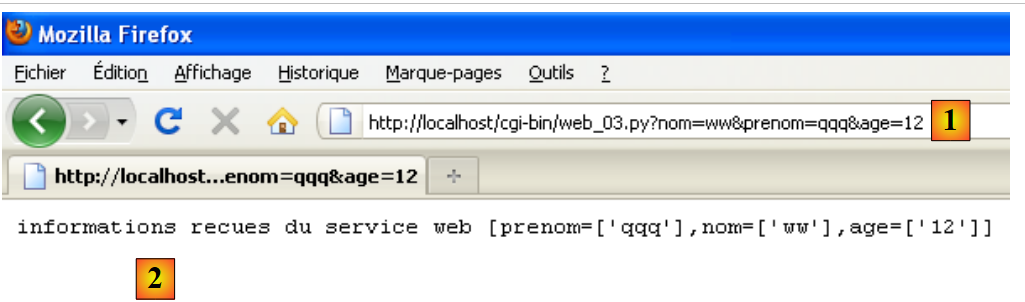 |
In [1], the URL from the web service. Note the presence of the three parameters last_name, first_name, age. In [2], the response from the web service.
12.2.2. The client GET
# -*- coding=utf-8 -*-

import httplib,urllib

# constants
HOST="localhost"
URL="/cgi-bin/web_03.py"
PRENOM="Jean-Paul"
NOM="de la Huche"
AGE=42

# parameters must be encoded before being sent to the server
params = urllib.urlencode({'nom': NOM, 'prenom': PRENOM, 'age': AGE})
# parameters are set at the end of URL
URL+="?"+params
# connection
connexion=httplib.HTTPConnection(HOST)
# follow-up
connexion.set_debuglevel(1)
# send request
connexion.request("GET",URL)
# response processing
reponse=connexion.getresponse()
# content
contenu=reponse.read()
print contenu,"\n"
# closing the connection
connexion.close()
Notes:
- lines 8–10: the values of the 3 parameters sent to the web service;
- line 13: these must be encoded. This is done using the urlencode method from the urllib module. This module is imported on line 3. The method takes a dictionary {param1:val1, param2:val2, ...} as a parameter;
- line 15: in a GET command (line 21), the client must place the encoded parameters at the end of the URL from the web service;
- The following lines have already been discussed.
12.2.3. The results
Notes:
- line 2: note the encoding of the parameters (last_name, first_name, age);
- line 8: the web service response.
12.2.4. The client POST
The client POST is similar to the client GET, except that the encoded parameters are no longer part of the target URL. They are passed as the third argument of the POST request (line 19).
# -*- coding=utf-8 -*-

import httplib,urllib

# constants
HOST="localhost"
URL="/cgi-bin/web_03.py"
PRENOM="Jean-Paul"
NOM="de la Huche"
AGE=42

# parameters must be encoded before being sent to the server
params = urllib.urlencode({'nom': NOM, 'prenom': PRENOM, 'age': AGE})
# connection
connexion=httplib.HTTPConnection(HOST)
# follow-up
connexion.set_debuglevel(1)
# send request
connexion.request("POST",URL,params)
# response processing
reponse=connexion.getresponse()
# content
contenu=reponse.read()
print contenu,"\n"
# closing the connection
connexion.close()
12.2.5. The results
Notes:
- Note line 2: the method used by the client POST to send the encoded parameters:
- the Http Content-Length header indicates the number of characters that will be sent to the web service;
- this Http header is then followed by an empty line indicating the end of the headers;
- then the 39 characters of the encoded parameters are sent.
- Line 8: the web service response.
12.3. Retrieving environment variables from a web service
12.3.1. The web service
The Python CGI script runs in a system environment that has attributes. Its attributes and their values are available in a dictionary named os.environ.
#!D:\Programs\ActivePython\Python2.7.2\python.exe

import os

# headers
print "Content-Type: text/plain\n"
# environmental news
for (cle,valeur) in os.environ.items():
    print "%s : %s" % (cle,valeur)
Notes:
- line 3: you must import the os module to access "system" variables.
If you run the script above directly (c.a.d. as a console script, not CGI), you will see the following results in the console:
In a web browser (where the CGI script is executed), the following results are obtained:
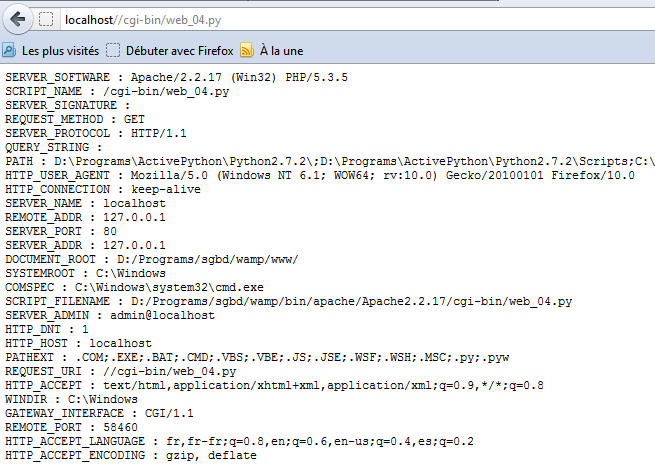 |
Note that depending on the execution context, the environment obtained is not the same.
12.3.2. The programmed client
# -*- coding=utf-8 -*-

import httplib

# constants
HOST="localhost"
URL="/cgi-bin/web_04.py"
# connection
connexion=httplib.HTTPConnection(HOST)
# send request
connexion.request("GET", URL)
# response processing
reponse=connexion.getresponse()
# content
print reponse.read()
12.3.3. Results
Note that the programmed client does not receive exactly the same response as the web browser. This is because the browser sent information to the web server that the server used to generate its response. Here, the programmed client did not send any information about itself.