9. Using the MySQL DBMS
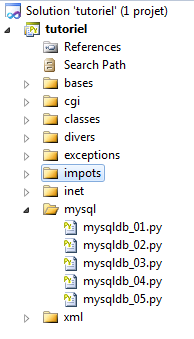 |
9.1. Installing the MySQLdb module
We will write scripts using a MySQL database:
 |
The Python functions for managing a MySQL database are encapsulated in a MySQLdb module that is not included in the initial Python distribution. You must therefore download and install the module. Here is one way to do this:
 |
- In the Programs menu, select [1] the Python package manager. The command window [2] will then appear.
Search for the keyword mysql in the packages:
C:\Documents and Settings\st>pypm search mysql
Get: [pypm-be.activestate.com] :repository-index:
Get: [pypm-free.activestate.com] :repository-index:
autosync: synced 2 repositories
  chartio                    Setup wizard and connection client for connecting
  chartio-setup              Setup wizard and connection client for connecting
  cns.recipe.zmysqlda        Recipe for installing ZMySQLDA
  collective.recipe.zmysqlda Recipe for installing ZMySQLDA
  django-mysql-manager       DESCRIPTION_DESCRIPTION_DESCRIPTION
  jaraco.mysql               MySQLDB-compatible MySQL wrapper by Jason R. Coomb
  lovely.testlayers          mysql, postgres nginx, memcached cassandra test la
  mtstat-mysql               MySQL Plugins for mtstat
  mysql-autodoc              Generate HTML documentation from a mysql database
  mysql-python               Python interface to MySQL
  mysqldbda                  MySQL Database adapter
  products.zmysqlda          MySQL Zope2 adapter.
  pymysql                    Pure Python MySQL Driver
  pymysql-sa                 PyMySQL dialect for SQLAlchemy.
  pymysql3                   Pure Python MySQL Driver
  sa-mysql-dt                Alternative implementation of DateTime column for
  schemaobject               Iterate over a MySQL database schema as a Python o
  schemasync                 A MySQL Schema Synchronization Utility
  simplestore                A datastore layer built on top of MySQL in Python.
  sqlbean                    A auto maping ORM for MYSQL and can bind with memc
  sqlwitch                   sqlwitch offers idiomatic SQL generation on top of
  tiddlywebplugins.mysql     MySQL-based store for tiddlyweb
  tiddlywebplugins.mysql2    MySQL-based store for tiddlyweb
zest.recipe.mysql          A Buildout recipe to setup a MySQL database.
All modules whose name or description contains the keyword "mysql" have been listed. The one we're interested in is [mysql-python], line 14. Let's install it:
C:\Documents and Settings\st>pypm install mysql-python
The following packages will be installed into "%APPDATA%\Python" (2.7):
 mysql-python-1.2.3
Hit: [pypm-free.activestate.com] mysql-python 1.2.3
Installing mysql-python-1.2.3

C:\Documents and Settings\st>echo %APPDATA%
C:\Documents and Settings\st\Application Data
- Line 5: The mysql-python-1.2.3 package was installed in the "%APPDATA%\Python" folder, where APPDATA is the folder specified on line 8.
This operation may fail if:
9.2. Installing MySQL
There are various ways to install the MySQL DBMS. Here we have used WampServer, a package that combines several software components:
- an Apache web server. We will use it to write web scripts in Python;
- the MySQL database management system;
- the PHP scripting language;
- a MySQL database administration tool written in PHP: phpMyAdmin.
WampServer can be downloaded (June 2011) at the following address:
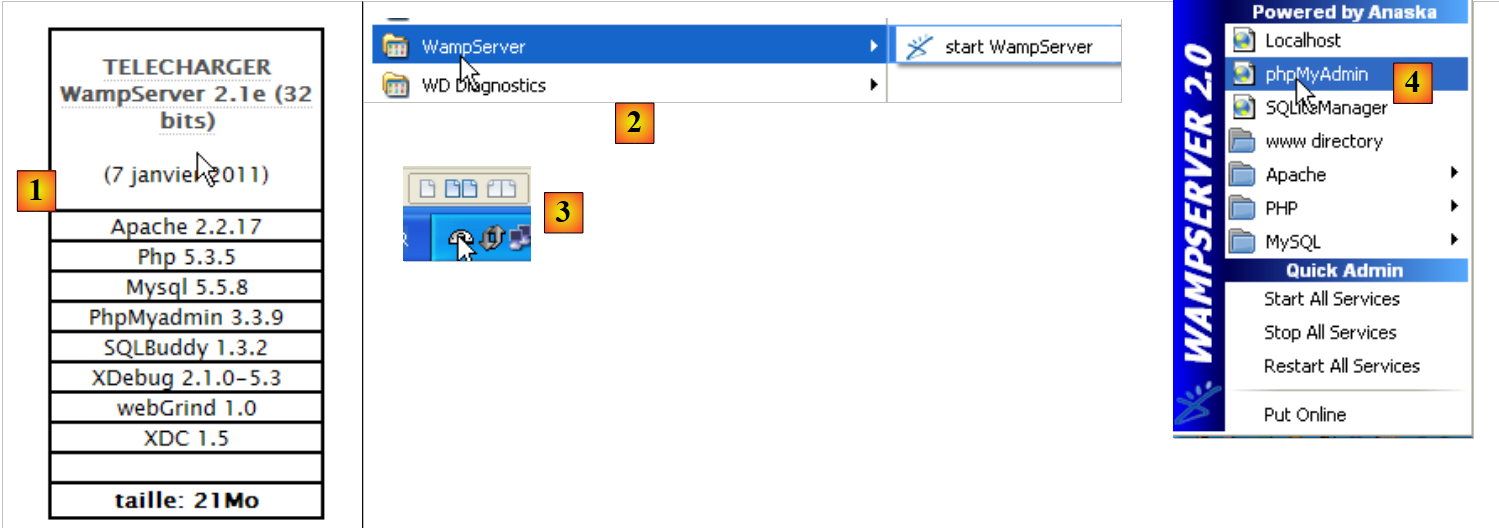 |
- In [1], download the appropriate version of WampServer;
- in [2], once installed, launch it. This will start the Apache web server and the MySQL database management system;
- in [3], once launched, WampServer can be managed via an icon [3] located at the bottom right of the taskbar;
- In [4], launch the MySQL administration tool.
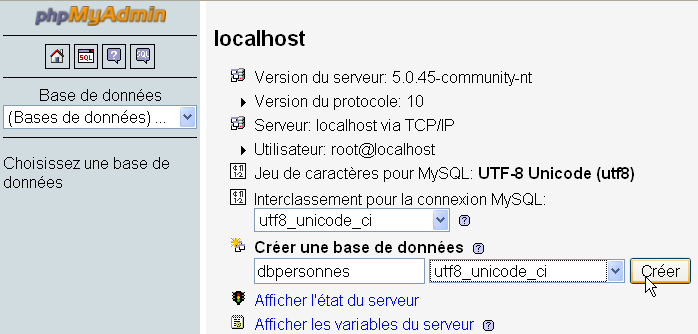
Create a database [dbpersonnes]:
Create a user [admpersonnes] with the password [nobody]:
 | 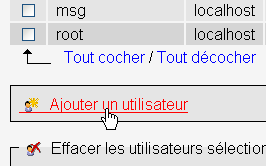 |
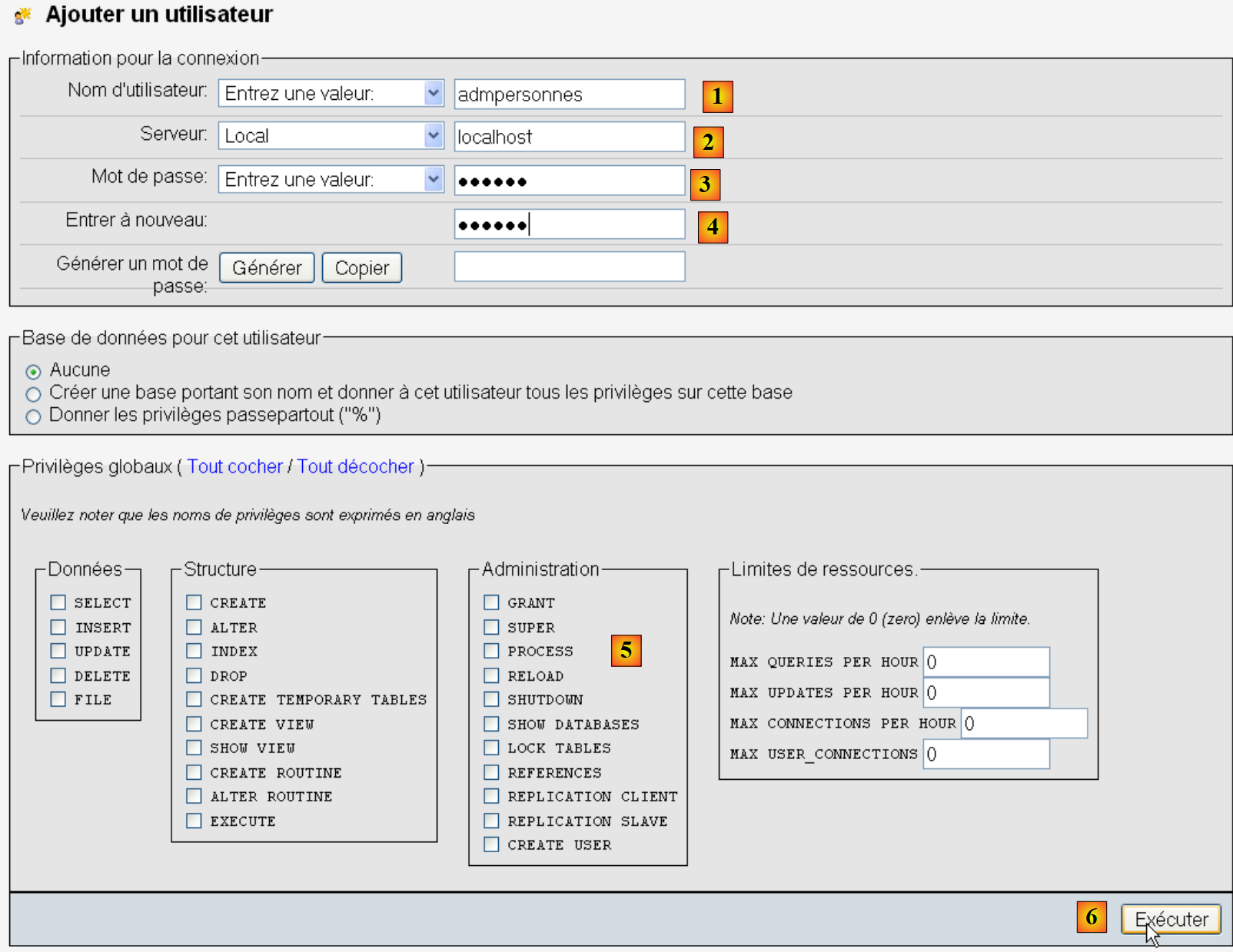 |
- in [1], the user name;
- in [2], the DBMS server on which you grant them permissions;
- in [3], their password [nobody];
- in [4], same as above;
- in [5], we grant no privileges to this user;
- in [6], create the user.
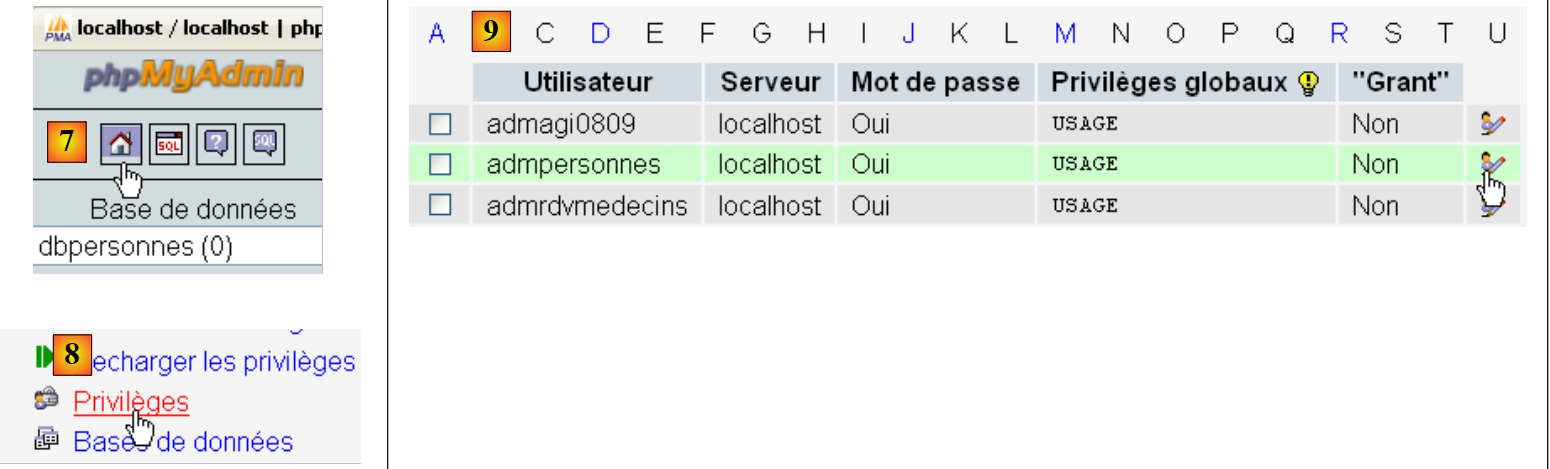 |
- in [7], return to the phpMyAdmin home page;
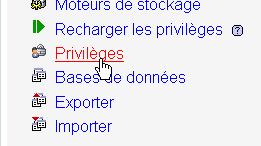
- in [8], use the [Privileges] link on this page to modify the privileges for the user [admpersonnes] [9].
 |
- in [10], specify that you want to grant the user [admpersonnes] rights to the [dbpersonnes] database;
- In [11], confirm the selection.
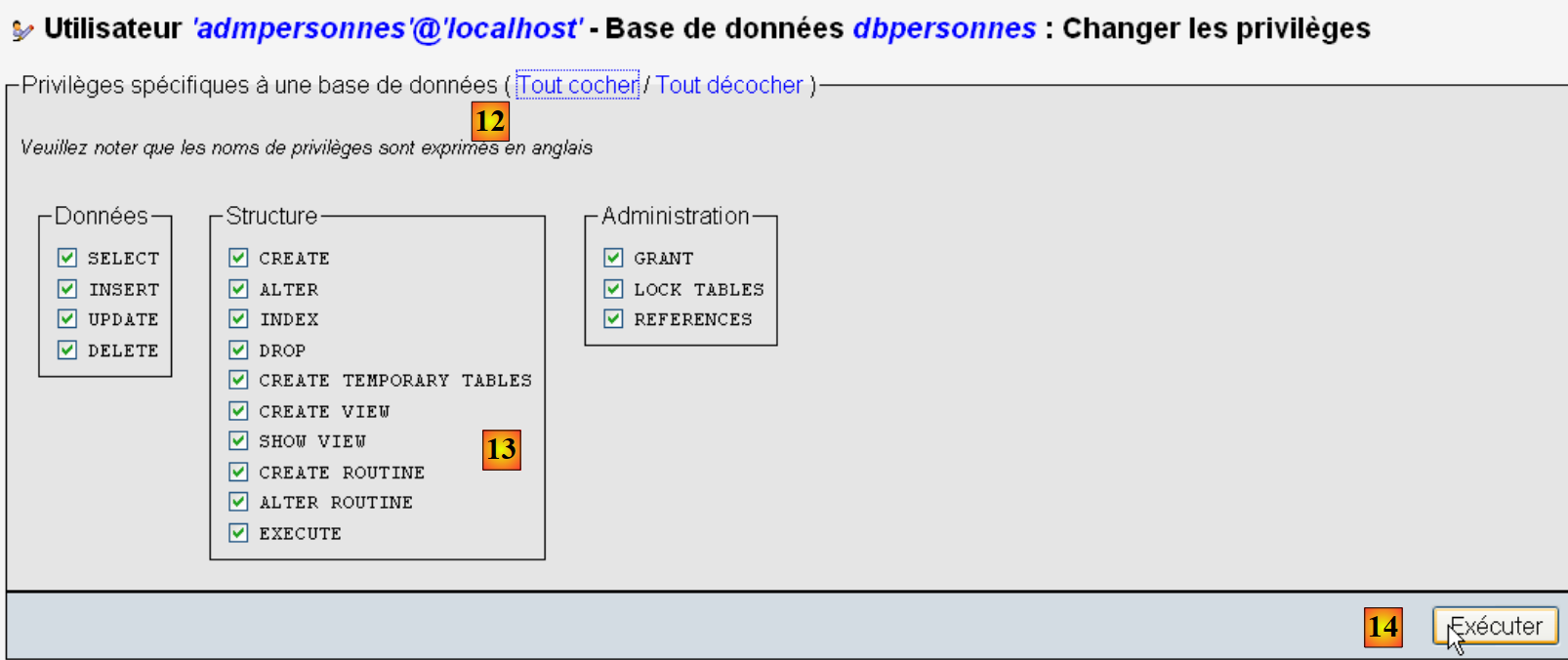 |
- Using the [12] [Select All] link, grant the user [admpersonnes] all rights to the [dbpersonnes] database [13];
- We confirm in [14].
Now we have:
- a MySQL database [dbpersonnes];
- a user [admpersonnes / nobody] who has full access to this database.
We will write Python scripts to work with the database.
9.3. Connecting to a MySQL Database - 1
# import du module MySQLdb
import sys
sys.path.append("D:\Programs\ActivePython\site-packages")
import MySQLdb

# connexion à une base MySQL
....
Notes:
- Lines 2–4: Scripts containing operations with the MySQL DBMS must import the MySQLdb module. Recall that we installed this module in the [%APPDATA%\Python] folder. The [%APPDATA%\Python] folder is automatically searched when a Python script requests a module. In fact, all folders listed in sys.path are searched. Here is an example that displays these folders:
The screen output is as follows:
Line 8, the [site-packages] folder where MySQLdb was originally installed. We are moving the [site-packages] folder, which is where the pypm utility installs Python modules. To add a new folder that Python will search for modules in, we add it to the sys.path list:
# import du module MySQLdb
import sys
sys.path.append("D:\Programs\ActivePython\site-packages")
import MySQLdb
# connexion à une base MySQL
....
On line 3, we add the folder where the MySQLdb module was moved.
The complete code for the example is as follows:
# import du module MySQLdb
import sys
sys.path.append("D:\Programs\ActivePython\site-packages")
import MySQLdb
# connexion à une base MySQL
# l'identité de l'utilisateur est (admpersonnes,nobody)
user="admpersonnes"
pwd="nobody"
host="localhost"
connexion=None
try:
print "connexion..."
# connexion
connexion=MySQLdb.connect(host=host,user=user,passwd=pwd)
# suivi
print "Connexion a MySQL reussie sous l'identite host={0},user={1},passwd={2}".format(host,user,pwd)
except MySQLdb.OperationalError,message:
print "Erreur : {0}".format(message)
finally:
try:
connexion.close()
except:
pass
- lines 8–11: the script will connect (line 15) the user [admpersonnes / nobody] to the MySQL database on the machine [localhost]. It does not connect to a specific database;
- lines 12–24: the connection may fail. Therefore, it is wrapped in a try/except/finally block;
- line 15: the connect method of the MySQLdb module accepts various named parameters:
- user: the user owning the connection [admpersonnes];
- pwd: the user’s password [nobody];
- host: the machine running the MySQL DBMS [localhost];
- db: the database to connect to. Optional.
- line 18: if an exception is thrown, it is of type [MySQLdb.OperationalError] and the associated error message will be found in the [message] variable;
- lines 20–23: in the [finally] clause, the connection is closed. If an exception occurs, it is caught (line 23) but no action is taken (line 24).
connexion...
Connexion a MySQL reussie sous l'identite host=localhost,user=admpersonnes,passwd=nobody
9.4. Connecting to a MySQL database - 2
Notes:
- lines 7–15: a function that attempts to connect and then disconnect a user from a MySQL DBMS. Displays the result;
- lines 18–34: main program – calls the testConnection method twice and displays any exceptions.
9.5. Creating a MySQL table
Now that we know how to establish a connection with a MySQL DBMS, we will begin issuing SQL commands over this connection. To do this, we will connect to the created database [dbpersonnes] and use the connection to create a table in the database.
# import du module MySQLdb
import sys
sys.path.append("D:\Programs\ActivePython\site-packages")
import MySQLdb
# ---------------------------------------------------------------------------------
def executeSQL(connexion,update):
# exécute une requête update de mise à jour sur la connexion
# on demande un curseur
curseur=connexion.cursor()
# exécute la requête sql sur la connexion
try:
curseur.execute(update)
connexion.commit()
except Exception, erreur:
connexion.rollback()
raise
finally:
curseur.close()
# ---------------------------------------------- main
# connexion à la base MySQL
# l'identité de l'utilisateur
ID="admpersonnes"
PWD="nobody"
# la machine hôte du sgbd
HOTE="localhost"
# identité de la base
BASE="dbpersonnes"
# connexion
try:
connexion=MySQLdb.connect(host=HOTE,user=ID,passwd=PWD,db=BASE)
except MySQLdb.OperationalError,message:
print message
sys.exit()
# suppression de la table personnes si elle existe
# si elle n'existe pas une erreur se produira
# on l'ignore
requete="drop table personnes"
try:
executeSQL(connexion,requete)
except:
pass
# création de la table personnes
requete="create table personnes (prenom varchar(30) NOT NULL, nom varchar(30) NOT NULL, age integer NOT NULL, primary key(nom,prenom))"
try:
executeSQL(connexion,requete)
except MySQLdb.OperationalError,message:
print message
sys.exit()
# on se deconnecte et on quitte
try:
connexion.close()
except MySQLdb.OperationalError,message:
print message
sys.exit()
Notes:
- line 7: the executeSQL function executes an SQL query on an open connection;
- line 10: SQL operations on the connection are performed through a special object called a cursor;
- Line 10: Obtain a cursor;
- line 13: execute the SQL query;
- line 14: the current transaction is committed;
- line 15: if an exception occurs, the error message is stored in the error variable;
- line 16: the current transaction is rolled back;
- line 17: the exception is rethrown;
- line 19: whether there is an error or not, the cursor is closed. This frees the resources associated with it.
create table personnes (prenom varchar(30) NOT NULL, nom varchar(30) NOT NULL, age integer NOT NULL, primary key(nom,prenom)) : requete reussie
Verification with phpMyAdmin:
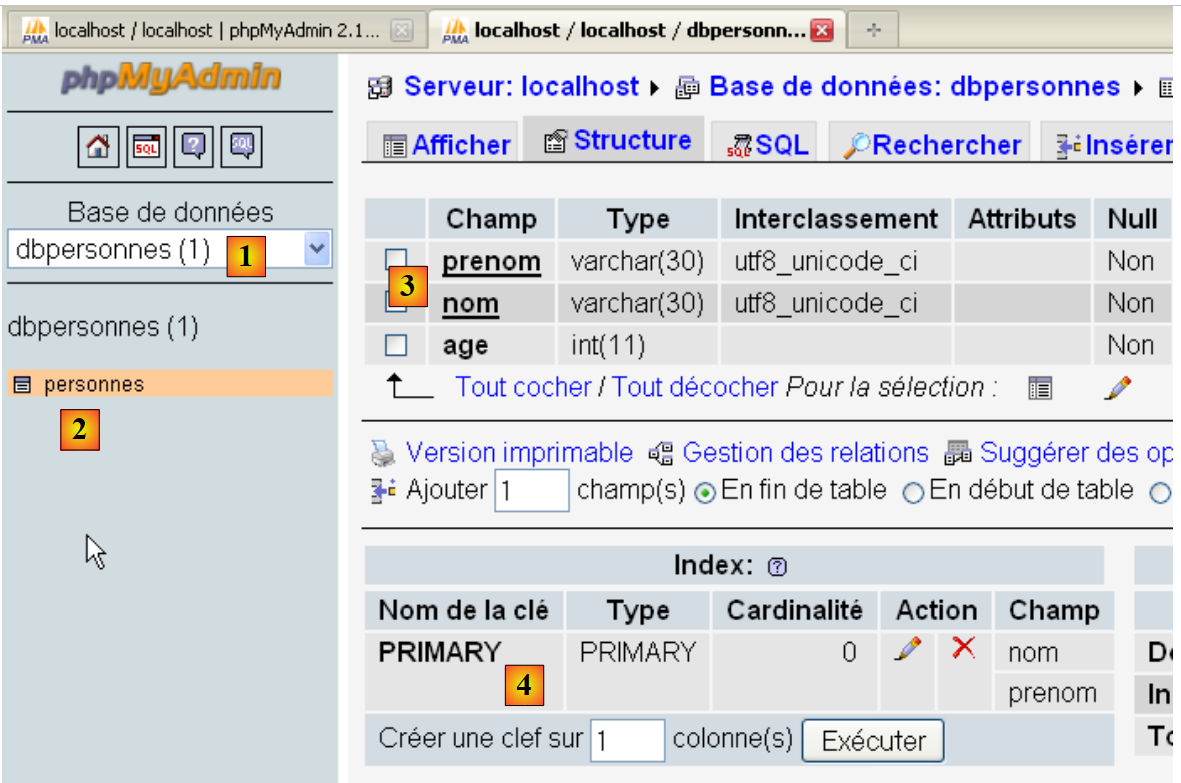 |
- The database [dbpersonnes] [1] has a table [personnes] [2] with the structure [3] and the primary key [4].
9.6. Filling the [people] table
After previously creating the [people] table, we now populate it.
The sql.txt file:
An error has been intentionally inserted in line 5.
Screen results:
drop table personnes : Execution reussie
create table personnes (prenom varchar(30) not null, nom varchar(30) not null, age integer not null, primary key (nom,prenom)) : Execution reussie
insert into personnes values('Paul','Langevin',48) : Execution reussie
insert into personnes values ('Sylvie','Lefur',70) : Execution reussie
xx : Erreur ((1064, "You have an error in your SQL syntax; check the manual that corresponds to your MySQL server version for the right syntax to use near 'xx' at
line 1"))
insert into personnes values ('Pierre','Nicazou',35) : Execution reussie
insert into personnes values ('Geraldine','Colou',26) : Execution reussie
insert into personnes values ('Paulette','Girond',56) : Execution reussie
il y a eu 1 erreur(s)
xx : Erreur ((1064, "You have an error in your SQL syntax; check the manual that corresponds to your MySQL server version for the right syntax to use near 'xx' at line 1"))
Verification with phpMyAdmin:
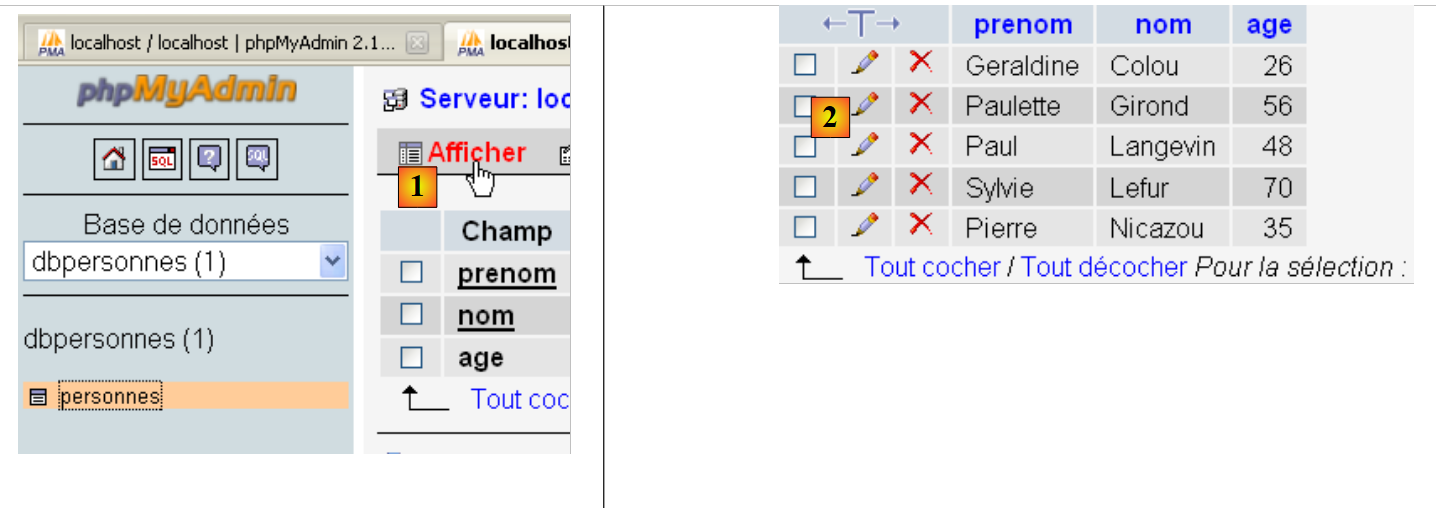
- In [1], the [View] link allows you to see the contents of the [people] table [2].
9.7. Executing arbitrary SQL queries
The following script allows you to execute an SQL command file and display the result of each one:
- the result of the SELECT if the command is a SELECT;
- the number of rows modified if the command is INSERT, UPDATE, or DELETE.
1 2 3 4 5 6 7 8 9 10 11 12 13 14 15 16 17 18 19 20 21 22 23 24 25 26 27 28 29 30 31 32 33 34 35 36 37 38 39 40 41 42 43 44 45 46 47 48 49 50 51 52 53 54 55 56 57 58 59 60 61 62 63 64 65 66 67 68 69 70 71 72 73 74 75 76 77 78 79 80 81 82 83 84 85 86 87 88 89 90 91 92 93 94 95 96 97 98 99 100 101 102 103 104 105 106 107 108 109 110 111 112 113 114 115 116 117 118 119 120 121 122 123 124 125 126 127 128 129 130 131 132 133 134 135 136 137 | |
Notes:
- The new feature is line 100 of the script: after executing an SQL statement, we request information about the cursor used by that query. This information is provided by the displayInfo function on lines 16–40;
- Lines 19 and 39: If the executed SQL query was a SELECT, the [cursor.description] attribute is an array where element i describes field i of the SELECT result. Otherwise, the [cursor.rowcount] attribute (line 39) is the number of rows modified by the INSERT, UPDATE, or DELETE query;
- lines 32 and 36: the [cursor.fetchone] method retrieves the current row of the SELECT. There is a [cursor.fetchall] method that retrieves all rows at once.
The file of executed queries:
Screen results:
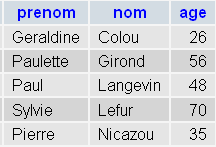
PhpMyAdmin verification:
 |