11. Python network functions
We will now discuss Python network functions that allow us to program TCP / IP (Transfer Control Protocol / Internet Protocol).
 |
11.1. Get the name or IP address of a machine on the Internet
import sys, socket

#------------------------------------------------
def getIPandName(nomMachine):
    #nomMachine: name of the machine whose address is required IP: name of the machine whose address is required IP: name of the machine whose address is required
    # nomMachine-->adresse IP
    try:
        ip=socket.gethostbyname(nomMachine)
        print "ip[%s]=%s" % (nomMachine,ip)
    except socket.error, erreur:
        print "ip[%s]=%s" % (nomMachine,erreur)
        return

    # address IP --> nomMachine
    try:
        name=socket.gethostbyaddr(ip)
        print "name[%s]=%s" % (ip,name[0])
    except socket.error, erreur:
        print "name[%s]=%s" % (ip,erreur)
        return


# ---------------------------------------- main

# constants
HOTES=["istia.univ-angers.fr","www.univ-angers.fr","www.ibm.com","localhost","","xx"]

# IP addresses of HOTES machines
for i in range(len(HOTES)):
    getIPandName(HOTES[i])
# end
sys.exit()
Notes:
- Line 1: Python's network functions are encapsulated in the socket module.
11.2. A web client
A script to retrieve the content of the index page of a website.
import sys,socket

  #-----------------------------------------------------------------------
def getIndex(site):
    # reads the URL site/ and stores it in the site.html file

    # initially no error
    erreur=""
    # creation of the site.html file
    try:
        html=open("%s.html" % (site),"w")
    except IOError, erreur:
        pass
    # mistake?
    if erreur:
        return "Erreur (%s) lors de la création du fichier %s.html" % (erreur,site)

    # open a connection on site port 80
    try:
        connexion=socket.create_connection((site,80))
    except socket.error, erreur:
        pass
    # return if error
    if erreur:
        return "Echec de la connexion au site (%s,80) : %s" % (site,erreur)

    # connection represents a bidirectional communication flow
    # between the client (this program) and the contacted web server
    # this channel is used for the exchange of orders and information
    # the dialog protocol is HTTP

    # the customer sends the get command to request URL /
    # syntax get URL HTTP/1.0
    # protocol HTTP headers must end with an empty line
    connexion.send("GET / HTTP/1.0\n\n")

    # the server will now respond on the connection channel. It will send all
    # then close the channel. The customer reads everything that comes in from the connection
    # until the channel closes
    ligne=connexion.recv(1000)
    while(ligne):
        html.write(ligne)
        ligne=connexion.recv(1000)

    # the customer in turn closes the connection
    connexion.close()
    # close file html
    html.close()
    # return
    return "Transfert reussi du paragraphe index du site %s" % (site)

# --------------------------------------------- main

# get the text HTML from URL

# list of websites
SITES=("istia.univ-angers.fr","www.univ-angers.fr","www.ibm.com","xx")

# reading the index pages of the sites in the SITES table
for i in range(len(SITES)):
      # read site index page SITES[i]
      resultat=getIndex(SITES[i])
      # result display
      print resultat

# end
sys.exit()
Notes:
- line 57: the list of Url websites whose index pages are desired. This list is stored in the text file [nomsite.html];
- Line 62: The getIndex function does the job;
- line 4: the getIndex function;
- line 20: the create_connection((site,port)) method allows you to create a connection with a TCP / IP service running on port port on the site machine;
- line 35: the send method allows data to be sent through a TCP / IP connection. Here, text is being sent. This text follows the HTTP protocol (HyperText Transfer Protocol);
- Line 40: The recv method is used to receive data via a TCP / IP connection. Here, the web server’s response is read in blocks of 1,000 characters and saved to the [nomsite.html] text file.
Transfert reussi du paragraphe index du site istia.univ-angers.fr
Transfert reussi du paragraphe index du site www.univ-angers.fr
Transfert reussi du paragraphe index du site www.ibm.com
Echec de la connexion au site (xx,80) : [Errno 11001] getaddrinfo failed
The file received for the site [www.ibm.com]:
- Lines 1–11 are the HTTP headers from the server’s response;
- line 1: the server instructs the client to redirect to the URL specified on line 8;
- line 2: date and time of the response;
- line 3: web server identity;
- line 4: content sent by the server. Here, a page HTML that begins on line 13;
- line 12: the blank line that ends the headers;
- lines 13–19: the HTML page sent by the web server.
11.3. An SMTP client
Among the TCP / IP protocols, SMTP (SendMail Transfer Protocol) is the communication protocol for the message sending service.
# -*- coding=utf-8 -*-

import sys,socket

#-----------------------------------------------------------------------
def getInfos(fichier):
    # returns the information (smtp,sender,recipient,message) taken from the text file [file]
    # line 1: smtp, sender, recipient
    # next lines: message text

    # open [file]
    erreur=""
    try:
        infos=open(fichier,"r")
    except IOError, erreur:
        return ("Le fichier %s n'a pu etre ouvert en lecture : %s" % (fichier, erreur))

    # read the 1st line
    ligne=infos.readline()
    # delete end-of-line mark
    ligne=cutNewLineChar(ligne)
    # retrieve smtp, sender, recipient fields
    champs=ligne.split(",")
    # do we have the right number of fields?
    if len(champs)!=3 :
        return ("La ligne 1 du fichier %s (serveur smtp, expediteur, destinataire) a un nombre de champs incorrect" % (fichier))
    # "processing" the recovered information
    # we remove from each of the 3 fields the "blanks" that precede or follow the useful information
    for i in range(3):
        champs[i]=champs[i].strip()
    # field recovery
    (smtpServer,expediteur,destinataire)=champs
    message=""
    # read rest of message
    ligne=infos.readline()
    while ligne!='':
        message+=ligne
        ligne=infos.readline()
    infos.close()
    # return
    return ("",smtpServer,expediteur,destinataire,message)

#-----------------------------------------------------------------------
def sendmail(smtpServer,expediteur,destinataire,message,verbose):
    # sends message to smtp server smtpserver from sender
    # as recipient. If verbose=True, tracks client-server exchanges

    # retrieve the customer's name
    try:
        client=socket.gethostbyaddr(socket.gethostbyname("localhost"))[0]
    except socket.error, erreur:
        return "Erreur IP / Nom du client : %s" % (erreur)

    # open a connection on port 25 of smtpServer
    try:
        connexion=socket.create_connection((smtpServer,25))
    except socket.error, erreur:
        return "Echec de la connexion au site (%s,25) : %s" % (smtpServer,erreur)

    # connection represents a bidirectional communication flow
    # between the client (this program) and the smtp server contacted
    # this channel is used for the exchange of orders and information

    # after connection, the server sends a welcome message which is read as follows
    erreur=sendCommand(connexion,"",verbose,1)
    if(erreur) :
        connexion.close()
        return erreur
    # cmde ehlo:
    erreur=sendCommand(connexion,"EHLO %s" % (client),verbose,1)
    if erreur :
        connexion.close()
        return erreur
    # cmde mail from:
    erreur=sendCommand(connexion,"MAIL FROM: <%s>" % (expediteur),verbose,1)
    if erreur :
        connexion.close()
        return erreur
    # cmde rcpt to:
    erreur=sendCommand(connexion,"RCPT TO: <%s>" % (destinataire),verbose,1)
    if erreur :
        connexion.close()
        return erreur
    # cmde data
    erreur=sendCommand(connexion,"DATA",verbose,1)
    if erreur :
        connexion.close()
        return erreur
    # prepare message to send
    # it must contain the lines
    # From: expéditeur
    # To: recipient
    # empty line
    # Message
    # .
    data="From: %s\r\nTo: %s\r\n%s\r\n.\r\n" % (expediteur,destinataire,message)
    # send message
    erreur=sendCommand(connexion,data,verbose,0)
    if erreur :
        connexion.close()
        return erreur
    # cmde quit
    erreur=sendCommand(connexion,"QUIT",verbose,1)
    if erreur :
        connexion.close()
        return erreur
    # end
    connexion.close()
    return "Message envoye"

# --------------------------------------------------------------------------
def sendCommand(connexion,commande,verbose,withRCLF):
    # sends command to connection channel
    # verbose mode if verbose=1
    # if withRCLF=1, adds sequence RCLF to command

    # data
    RCLF="\r\n" if withRCLF else ""
    # send cmde if order not empty
    if commande:
        connexion.send("%s%s" % (commande,RCLF))
        # possible echo
        if verbose:
            affiche(commande,1)
        # read response of less than 1000 characters
        reponse=connexion.recv(1000)
        # possible echo
        if verbose:
            affiche(reponse,2)
        # error code recovery
        codeErreur=reponse[0:3]
        # error returned by the server?
        if int(codeErreur) >=500:
            return reponse[4:]
        # error-free return
        return ""

# --------------------------------------------------------------------------
def affiche(echange,sens):
    # displays exchange ? screen
    # if sens=1 displays -->change
    # if sens=2 displays <-- exchange without last 2 characters RCLF
    if sens==1:
        print "--> [%s]" % (echange)
        return
    elif sens==2:
        l=len(echange)
        print "<-- [%s]" % echange[0:l-2]
        return


# --------------------------------------------------------------------------
def cutNewLineChar(ligne):
    # delete the [line] end-of-line mark if it exists
    l=len(ligne)
    while(ligne[l-1]=="\n" or ligne[l-1]=="\r"):
        l-=1
    return(ligne[0:l])

# main ----------------------------------------------------------------

# client SMTP (SendMail Transfer Protocol) for sending a message
# information is taken from a INFOS file containing the following lines
# line 1: smtp, sender, recipient
# next lines: message text

# sender:email sender
# recipient: email recipient
# smtp: name of smtp server to use


# communication protocol SMTP client-server
# -> client connects to smtp server port 25
# <- server sends him a welcome message
# -> customer sends command EHLO: machine name
# <- server responds OK or not
# -> client envoie la commande mail from: <exp?diteur>
# <- server responds OK or not
# -> client sends the rcpt to command: <recipient>
# <- server responds OK or not
# -> customer sends data command
# <- server responds OK or not
# -> client sends all the lines of its message and ends with a line containing the single character .
# <- server responds OK or not
# -> customer sends quit order
# <- server responds OK or not

# server responses have the form xxx text where xxx is a 3-digit number. Any number xxx >=500
# indicates an error. The answer may consist of several lines all beginning with xxx- except for the last line
# of the form xxx(space)

# exchanged text lines must end with RC(#13) and LF(#10) characters

# # Mailing parameters
MAIL="mail2.txt"
# retrieve mail parameters
res=getInfos(MAIL)
# mistake?
if res[0]:
      print "%s" % (erreur)
      sys.exit()
# sending mail in verbose mode
(smtpServer,expediteur,destinataire,message)=res[1:]
print "Envoi du message [%s,%s,%s]" % (smtpServer,expediteur,destinataire)
resultat=sendmail(smtpServer,expediteur,destinataire,message,True)
print "Resultat de l'envoi : %s" % (resultat)
# end
sys.exit()
Notes:
- On a Windows machine with antivirus software, the antivirus may prevent the Python script from connecting to port 25 of a SMTP server. In that case, you must disable the antivirus. For McAfee, for example, you can do the following:
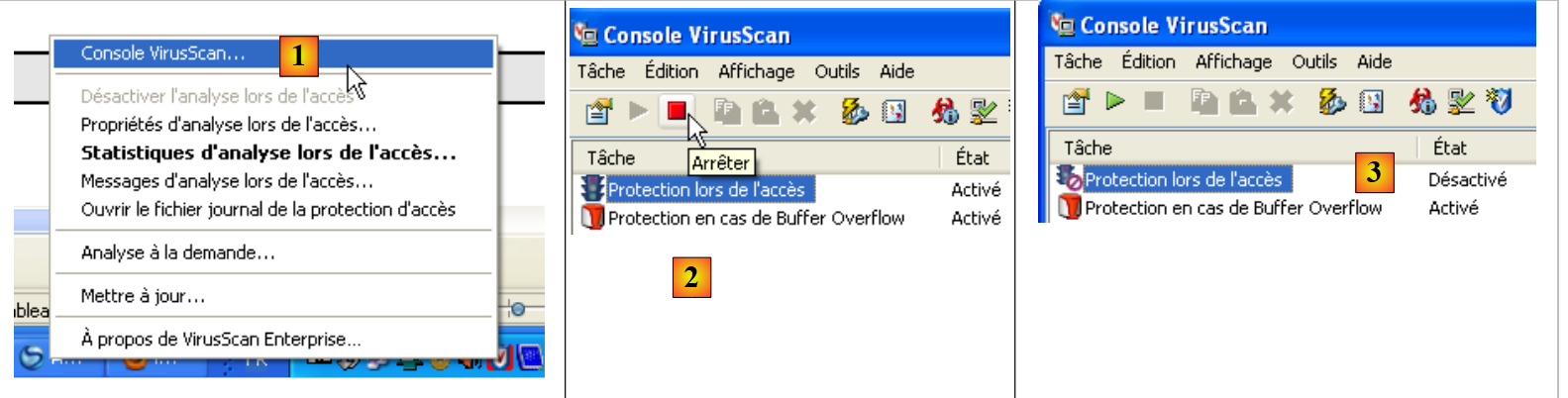 |
- In [1], enable the VirusScan console
- On [2], stop the [Protection lors de l'accès] service
- In [3], it is stopped
The file infos.txt:
smtp.univ-angers.fr, serge.tahe@univ-angers.fr , serge.tahe@univ-angers.fr
Subject: test

ligne1
ligne2

ligne3
Screen results:
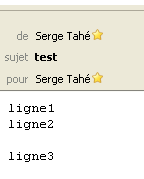
The message as seen by the Thunderbird email client:
 |
11.4. A second SMTP client
This second script does the same thing as the previous one but uses the features of the [smtplib] module.
# -*- coding=utf-8 -*-

import sys,socket, smtplib

#-----------------------------------------------------------------------
def getInfos(fichier):
    # returns the information (smtp,sender,recipient,message) taken from the text file [file]
    # line 1: smtp, sender, recipient
    # next lines: message text

    # open [file]
    erreur=""
    try:
        infos=open(fichier,"r")
    except IOError, erreur:
        return ("Le fichier %s n'a pu etre ouvert en lecture : %s" % (fichier, erreur))

    # read the 1st line
    ligne=infos.readline()
    # delete end-of-line mark
    ligne=cutNewLineChar(ligne)
    # retrieve smtp, sender, recipient fields
    champs=ligne.split(",")
    # do we have the right number of fields?
    if len(champs)!=3 :
        return ("La ligne 1 du fichier %s (serveur smtp, expediteur, destinataire) a un nombre de champs incorrect" % (fichier))
    # "processing" the information recovered - removing the "blanks" that precede or follow them
    for i in range(3):
        champs[i]=champs[i].strip()
    # field recovery
    (smtpServer,expediteur,destinataire)=champs
    # read message to send
    message=""
    ligne=infos.readline()
    while ligne!='':
        message+=ligne
        ligne=infos.readline()
    infos.close()
    # return
    return ("",smtpServer,expediteur,destinataire,message)

#-----------------------------------------------------------------------
def sendmail(smtpServer,expediteur,destinataire,message,verbose):
    # sends message to smtp server smtpserver from sender
    # as recipient. If verbose=True, tracks client-server exchanges

    # we use the smtplib library
    try:
        server = smtplib.SMTP(smtpServer)
        if verbose:
            server.set_debuglevel(1)
            server.sendmail(expediteur, destinataire, message)
            server.quit()
    except Exception, erreur:
        return "Erreur envoi du message : %s" % (erreur)
    # end
    return "Message envoye"

# --------------------------------------------------------------------------
def cutNewLineChar(ligne):
    # delete the [line] end-of-line mark if it exists
    l=len(ligne)
    while(ligne[l-1]=="\n" or ligne[l-1]=="\r"):
        l-=1
    return(ligne[0:l])

# main ----------------------------------------------------------------

# client SMTP (SendMail Transfer Protocol) for sending a message
# information is taken from a INFOS file containing the following lines
# line 1: smtp, sender, recipient
# next lines: message text

# sender:email sender
# recipient: email recipient
# smtp: name of smtp server to use


# communication protocol SMTP client-server
# -> client connects to smtp server port 25
# <- server sends him a welcome message
# -> customer sends command EHLO: machine name
# <- server responds OK or not
# -> client envoie la commande mail from: <expéditeur>
# <- server responds OK or not
# -> client sends the rcpt to command: <recipient>
# <- server responds OK or not
# -> customer sends data command
# <- server responds OK or not
# -> client sends all the lines of its message and ends with a line containing the single character .
# <- server responds OK or not
# -> customer sends quit order
# <- server responds OK or not

# server responses have the form xxx text where xxx is a 3-digit number. Any number xxx >=500
# indicates an error. The answer may consist of several lines all beginning with xxx- except the last one
# of the form xxx(space)

# exchanged text lines must end with RC(#13) and LF(#10) characters

# # Mailing parameters
MAIL="mail2.txt"
# retrieve mail parameters
res=getInfos(MAIL)
# mistake?
if res[0]:
      print "%s" % (erreur)
      sys.exit()
# sending mail in verbose mode
(smtpServer,expediteur,destinataire,message)=res[1:]
print "Envoi du message [%s,%s,%s]" % (smtpServer,expediteur,destinataire)
resultat=sendmail(smtpServer,expediteur,destinataire,message,True)
print "Resultat de l'envoi : %s" % (resultat)
# end
sys.exit()
Notes:
- This script is identical to the previous one except for the sendmail function. This function now uses the features of the [smtplib] module (line 3).
The mail2.txt file:
smtp.univ-angers.fr, serge.tahe@univ-angers.fr , serge.tahe@univ-angers.fr
From: serge.tahe@univ-angers.fr
To: serge.tahe@univ-angers.fr
Subject: test

ligne1
ligne2

ligne3
Screen results:
11.5. Echo client/server
We create an echo service. The server returns all text lines sent by the client in uppercase. The service can serve multiple clients instances simultaneously using threads.
# -*- coding=utf-8 -*-

# generic tcp server on Windows

# loading header files
import re,sys,SocketServer,threading

# multi-threaded tcp server
class ThreadedTCPRequestHandler(SocketServer.StreamRequestHandler):

  def handle(self):
    # current thread
    cur_thread = threading.currentThread()
    # customer data
    self.data="on"
    # stop on empty chain
    while self.data:
      # the client's text lines are read using the readline method
      self.data =self.rfile.readline().strip()
      # console monitoring
      print "client %s : %s (%s)" % (self.client_address[0],self.data,cur_thread.getName())
      # reply to customer
      response = "%s: %s" % (cur_thread.getName(), self.data.upper())
      # self.wfile is the write stream to client
      self.wfile.write(response)

class ThreadedTCPServer(SocketServer.ThreadingMixIn, SocketServer.TCPServer):
    pass

# ------------------------------------------------------ main
# call syntax: argv[0] port
# the server is launched on the port named

# Data
syntaxe="syntaxe : %s port" % (sys.argv[0])

#------------------------------------- check the call
# there must be one argument and one argument alone
nbArguments=len(sys.argv)
if nbArguments!=2:
    print syntaxe
    sys.exit(1)

# the port must be digital
port=sys.argv[1]
modele=r"^\s*\d+\s*$"
if not re.match(modele,port):
    print "Le port %s n'est pas un nombre entier positif\n" % (port)
    sys.exit(2)

# server launch - serves each client on a thread
host="localhost"
server = ThreadedTCPServer((host,int(port)), ThreadedTCPRequestHandler)

# the server is launched in a thread
# each customer will be served in an additional thread
server_thread = threading.Thread(target=server.serve_forever)
# starts server - infinite loop of waiting for clients
server_thread.start()
# follow-up
print "Serveur d'echo a l'ecoute sur le port % s" % (port)
Notes:
- Line 39: sys.argv represents the script parameters. Here, they must be in the following format: nom_du_script port. There must therefore be two of them. sys.argv[0] will then be nom_du_script, and sys.argv[1] will be port;
- line 53: the echo server is an instance of the ThreadedTcpServer class. The constructor of this class expects two parameters:
- parameter 1: a two-element tuple (host,port) that specifies the server’s machine and listening port;
- parameter 2: the name of the class responsible for handling client requests.
- line 57: a thread is created (but not yet started). This thread executes the [serve_forever] method of the TCP server. This method is a loop that listens for client connections. As soon as a client connection is detected, an instance of the ThreadedTCPRequestHandler class will be created. Its handle method is responsible for communicating with the client;
- line 59: the echo service thread is launched. From this point on, clients instances can connect to the service;
- line 27: the echo server class. It derives from two classes: SocketServer.ThreadingMixIn and SocketServer.TCPServer. This makes it a multithreaded TCP server: the server runs in one thread, and each client is served in an additional thread;
- line 9: the class that processes requests from clients. It derives from the SocketServer.StreamRequestHandler class. It therefore inherits two attributes:
- rfile: which is the read stream for data sent by the client—can be treated as a text file;
- wfile: which is the write stream used to send data to the client—can be treated as a text file.
- line 11: the handle method processes requests from clients;
- line 13: the thread that executes this handle method;
- line 17: loop for processing client requests. The loop ends when the client sends an empty line;
- line 19: reading the client request;
- line 21: self.client_address[0] represents the client’s address IP. cur_thread.getName() is the name of the thread executing the handle method;
- line 23: the response to the client has two components—the name of the thread serving the client and the command the client sent, in uppercase.
# -*- coding=utf-8 -*-
import re,sys,socket

# ------------------------------------------------------ main
# customer tcp generic
# call syntax: argv[0] host port
# client connects to echo service (host,port)
# the server returns the lines typed by the client

# syntax
syntaxe="syntaxe : %s hote port" % (sys.argv[0])

#------------------------------------- check the call
# there must be two arguments
nbArguments=len(sys.argv)
if nbArguments!=3:
    print syntaxe
    sys.exit(1)

# we recover the arguments
hote=sys.argv[1]
# the port must be digital
port=sys.argv[2]
modele=r"^\s*\d+\s*$"
if not re.match(modele,port):
    print "Le port %s foit être un nombre entier positif" % (port)
    sys.exit(2)

try:
  # client connection to server
  connexion=socket.create_connection((hote,int(port)))
except socket.error, erreur:
  print "Echec de la connexion au site (%s,%s) : %s" % (hote,port,erreur)
  sys.exit(3)

try:
    # input loop
    ligne=raw_input("Commande (rien pour arreter): ").strip()
    while ligne!="":
        # send the line to the server
        connexion.send("%s\n" % (ligne))
        # we're waiting for the answer
        reponse=connexion.recv(1000)
        print "<-- %s" % (reponse)
        ligne=raw_input("Commande (rien pour arreter): ")
except socket.error, erreur:
    print "Echec de la connexion au site (%s,%s) : %s" % (hote,port,erreur)
    sys.exit(3)
finally:
    # close the connection
    connexion.close()
The server is launched in a command prompt window:
A first client is launched in a second window:
The client receives, in response to the command it sends to the server, that same command in uppercase. A second client is launched in a third window:
The server console then looks like this:
The clients requests are indeed served in different threads. To stop a client, simply enter an empty command.
11.6. Generic Tcp server
We propose to write a Python script that
- would act as a Tcp server capable of serving one client at a time,
- accepts text lines sent by the client,
- accepts text lines from the keyboard and sends them back to the client.
Thus, the user at the keyboard acts as the server:
- they see the text lines sent by the client on their console;
- he responds to the client by typing the response on the keyboard.
This allows it to adapt to any type of client. That is why we will call it the "generic Tcp server." It is a useful tool for exploring Tcp communication protocols. In the following example, the Tcp client will be a web browser, which will allow us to discover the Http protocol used by clients web applications.
 |
# -*- coding=utf-8 -*-

# server tcp generic

# loading header files
import re,sys,SocketServer,threading

# server tcp generic
class MyTCPHandler(SocketServer.StreamRequestHandler):
    def handle(self):
        # the customer is displayed
        print "client %s" % (self.client_address[0])
        # create a thread for reading customer orders
        thread_lecture = threading.Thread(target=self.lecture)
        thread_lecture.start()
        # stop on cmde 'bye
        # cmde reading typed on keyboard
        cmde=raw_input("--> ")
        while cmde!="bye":
            # send cmde to customer. self.wfile is the write flow to the customer
            self.wfile.write("%s\n" % (cmde))
            # next cmde reading
            cmde=raw_input("--> ")

    def lecture(self):
        # displays all lines sent by the client until the bye command is received
        ligne=""
        while ligne!="bye":
            # the client's text lines are read using the readline method
            ligne = self.rfile.readline().strip()
            # console monitoring
            print "<--- %s : %s" % (self.client_address[0], ligne)

# ------------------------------------------------------ main
# call syntax: argv[0] port
# the server is launched on the port named

# Data
syntaxe="syntaxe : %s port" % (sys.argv[0])

#------------------------------------- check the call
# there must be one argument and one argument alone
nbArguments=len(sys.argv)
if nbArguments!=2:
    print syntaxe
    sys.exit(1)

# the port must be digital
port=sys.argv[1]
modele=r"^\s*\d+\s*$"
if not re.match(modele,port):
    print "Le port %s n'est pas un nombre entier positif\n" % (port)
    sys.exit(2)

# server launch
host="localhost"
server = SocketServer.TCPServer((host, int(port)), MyTCPHandler)
print "Service tcp generique lance sur le port %s. Arret par Ctrl-C" % (port)
server.serve_forever()
Notes:
- line 57: the Tcp server will be an instance of the SocketServer.TCPServer class. Its constructor accepts two parameters:
- The first parameter is a two-element tuple (host, port), where host is the machine on which the service runs (usually localhost) and port is the port on which the service waits (listens) for requests from clients;
- The second parameter specifies a client’s service class. When a client connects, an instance of the service class is created, and its *
handle*method must manage the connection with the client.
The Tcp SocketServer.TCPServer server is not multithreaded. It serves one client at a time;
- line 59: the serve_forever method of the Tcp server is executed. This is an infinite loop waiting for clients;
- line 9: the Tcp server is here a class derived from the SocketServer.StreamRequestHandler class. This allows the data streams exchanged with the client to be treated as text files. We have already encountered this class. We have the following methods:
- readline to read a line of text from the client;
- write to send text lines back to the client.
- line 12: self.client_address[0] is the client’s address Ip;
- line 14: the server Tcp will communicate with the client using two threads
- one thread for reading lines from the client;
- a thread for writing lines to the client.
- line 14: the thread for reading lines from the client is created. Its target parameter sets the method executed by the thread. This is the one defined on line 25;
- line 25: the read thread is launched;
- lines 25–32: the method executed by the read thread;
- line 28: the read thread reads all lines of text sent by the client until the line "bye" is received;
- line 18: we are now in the thread that writes to the client. The idea is to send the client all the lines of text typed by the user on the keyboard.
The server
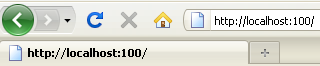
The client browser
 |
The request received by the server
The server response typed by the user on the keyboard (without the --> sign)
- lines 1-5: response Http sent to the client;
- line 6: the Html page sent to the client;
- line 7: end of the dialogue with the client. The client service will terminate and the connection will be closed, which will abruptly interrupt the thread reading the text lines sent by the client;
- Lines 1–5 of the response Http sent to the client have the following meanings:
- line 1: the resource requested by the client was found;
- Line 2: Server identification;
- line 3: the server will close the connection after sending the resource;
- line 4: type of resource sent by the server: a Html document;
- line 5: an empty line.
The page displayed by the [1] browser:
 |
If we view the source code received by the [2] browser, we see that the HTML code received by the web browser is indeed the one that was sent to it.