3. The Basics
 |
3.1. An example Python program
Below is a program demonstrating the basic features of Python.
# -*- coding=utf-8 -*-

# ----------------------------------
def affiche(chaine):
    # chain poster
    print "chaine=%s" % (chaine)


# ----------------------------------
def afficheType(variable):
    # displays variable type
    print "type[%s]=%s" % (variable,type(variable))

# ----------------------------------
def f1(param):
    # adds 10 to param
    return param+10

# ----------------------------------
def f2():
    # returns 3 values
    return ("un",0,100);


# -------------------------------- main program ------------------------------------
# this is a comment
# variable used without being declared
nom="dupont"

# a screen display
print "nom=%s" % (nom)

# a list with elements of different types
liste=["un","deux",3,4]

# its number of elements
n=len(liste)

# a loop
for i in range(n):
  print "liste[%d]=%s" % (i,liste[i])

# initialize 2 variables with a tuple
(chaine1,chaine2)=("chaine1","chaine2")

# concatenation of the 2 strings
chaine3=chaine1+chaine2

# result display
print "[%s,%s,%s]" % (chaine1,chaine2,chaine3)

# use function
affiche(chaine1)

# the type of a variable can be known
afficheType(n)
afficheType(chaine1)
afficheType(liste)

# the type of a variable can change at runtime
n="a change"
afficheType(n)

# a function can return a result
res1=f1(4)
print "res1=%s" % (res1)

# a function can return a list of values
(res1,res2,res3)=f2()
print "(res1,res2,res3)=[%s,%s,%s]" % (res1,res2,res3)

# we could have retrieved these values in a
liste=f2()
for i in range(len(liste)):
    print "liste[%s]=%s" % (i, liste[i])

# testing
for i in range(len(liste)):
    # displays only channels
    if (type(liste[i])=="str"):
        print "liste[%s]=%s" % (i,liste[i])

# other tests
for i in range(len(liste)):
    # displays only integers >10
    if (type(liste[i])=="int" and liste[i]>10):
        print "liste[%s]=%s" % (i,liste[i])

# une boucle while
liste=(8,5,0,-2,3,4)
i=0
somme=0
while(i<len(liste) and liste[i]>0):
    print "liste[%s]=%s" % (i,liste[i])
    somme+=liste[i] #sum=sum+t[i]
    i+=1 #i=i+1
print "somme=%s" % (somme)
# end of program
Note:
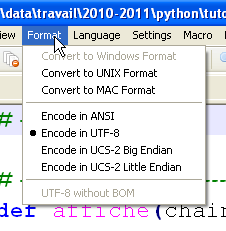
- line 1: a special comment used to declare the script's encoding type, here UTF-8. This depends on the text editor used. Here with Notepad++:
 |
- line 4: the keyword def defines a function;
- lines 5-6: the function’s body. It is indented one tab to the right. This indentation, combined with the colon (:) in the def statement, defines the function’s body. This applies to all statements with a body: if, else, while, for, try, except;
- line 12: Python manages variable types internally. You can determine a variable’s type using the type(variable) function, which returns a variable of type 'type'. The expression '%s' % (type(variable)) is a string representing the variable’s type;
- line 25: the main program. This comes after the definition of all the script’s functions. Its content is not indented;
- Line 28: In Python, you don't declare variables. Python is case-sensitive. The variable
Nomis different from the variablenom*. A string can be enclosed in double quotes " or single quotes '. So you can write 'dupont' or "dupont*"; - line 31: the expression "xxxx%syyyy%szzzz" % (100, 200) is the string "xxxx100yyy200szzzz" where each %s has been replaced by an element of the tuple. %s is the string formatting specifier. There are other formats;
- line 34: there is a difference between a tuple (1,2,3) (note the parentheses) and a list [1,2,3] (note the square brackets). A tuple is immutable, whereas a list is mutable. In both cases, element number i is denoted as [i];
- line 40: range(n) is the tuple (0,1,2,...,n-1);
- line 74: len(var) is the number of elements in the collection var (tuple, list, dictionary, ...);
- line 86: the other Boolean operators are or and not.
The screen output is as follows:
3.2. Type conversions
Here we focus on type conversions involving data of type str (string), int (integer), float (floating-point), and bool (boolean).
# -*- coding=utf-8 -*-

# type changes
# int --> str, float, bool
x=4
print x, type(x)
x=str(4)
print x, type(x)
x=float(4)
print x, type(x)
x=bool(4)
print x, type(x)

# bool --> int, float, str
x=True
print x, type(x)
x=int(True)
print x, type(x)
x=float(True)
print x, type(x)
x=str(True)
print x, type(x)

# str --> int, float, bool
x="4"
print x, type(x)
x=int("4")
print x, type(x)
x=float("4")
print x, type(x)
x=bool("4")
print x, type(x)

# float --> str, int, bool
x=4.32
print x, type(x)
x=str(4.32)
print x, type(x)
x=int(4.32)
print x, type(x)
x=bool(4.32)
print x, type(x)

# type change error handling
try:
    x=int("abc")
    print x, type(x)
except ValueError, erreur:
    print erreur

# various Boolean cases
x=bool("abc")
print x, type(x)
x=bool("")
print x, type(x)
x=bool(0)
print x, type(x)
x=None
print x, type(x)
x=bool(None)
print x, type(x)
Many type conversions are possible. Some may fail, such as those in lines 45–49, which attempt to convert the string 'abc' to an integer. We handled the error using a try/except block. A general form of this block is as follows:
try:
    actions
except Exception, Message:
    actions
finally:
    actions
If any of the actions within the try block throw an exception (signal an error), control immediately jumps to the **except clause. If the actions within the try block do not throw an exception, the except clause is ignored. The Exception and Message attributes of the except statement are optional. When present, Exception specifies the type of exception intercepted by the except statement, and Message contains the error message associated with the exception. There can be multiple except statements if you want to handle different types of exceptions within the same try block.
The finally statement is optional. If present, the actions in the finally block are always executed, regardless of whether an exception occurred or not.
We will return to exceptions a little later.
Lines 52–61 show various attempts to convert data of type str, int, and float, NoneType, into a boolean. This is always possible. The rules are as follows:
- bool(int i) is False if i is 0, True in all other cases;
- bool(float f) is False if f is 0.0, True in all other cases;
- bool(str string) is False if string has 0 characters, True in all other cases;
- bool(None) is False. None is a special value that means the variable exists but has no value.
The screen results are as follows:
3.3. The scope of variables
# -*- coding=utf-8 -*-

# variable scope
def f1():
    # we use the global variable i
    global i
    i+=1
    j=10
    print "f1[i,j]=[%s,%s]" % (i,j)

def f2():
    # we use the global variable i
    global i
    i+=1
    j=20
    print "f2[i,j]=[%s,%s]" % (i,j)

def f3():
    # we use a local variable i
    i=1
    j=30
    print "f3[i,j]=[%s,%s]" % (i,j)

# tests
i=0
j=0 # these two variables are known only to a function f
    # only if it explicitly declares with the global instruction
    # she wants to use them
f1()
f2()
f3()
print "test[i,j]=[%s,%s]" % (i,j)
Results
Notes:
- The script demonstrates the use of the variable
i, declared as global in the functionsf1andf2. In this case, the main program and the functionsf1andf2share the same variablei.
3.4. Lists, tuples, and dictionaries
3.4.1. One-dimensional lists
# -*- coding=utf-8 -*-

# listes à 1 dimension
# initialisation
list1=[0,1,2,3,4,5]

# parcours - 1
print "list1 a %s elements" % (len(list1))
for i in range(len(list1)):
    print "list1[%s]=%s" % (i, list1[i])

list1[1]=10;
# parcours - 2
print "list1 a %s elements" % (len(list1))
for element in list1:
    print element

# ajout de deux éléments
list1[len(list1):]=[10,11]
print ("%s") % (list1)

# suppression des deux derniers éléments
list1[len(list1)-2:]=[]
print ("%s") % (list1)

# ajout en début de liste d'a tuple
list1[:0]=[-10, -11, -12]
print ("%s") % (list1)

# insertion en milieu de liste de deux éléments
list1[3:3]=[100,101]
print ("%s") % (list1)

# suppression de deux éléments en milieu de liste
list1[3:4]=[]
print ("%s") % (list1)
Notes:
- the notation array[i:j] refers to elements i through j-1 of the array;
- the notation [i:] refers to elements i and subsequent elements of the array;
- the notation [:i] refers to elements 0 through i-1 of the array;
- line 20: print (%s) % (list1) displays the string: "[ list1[0], list1[2], ..., list1[n-1]]".
Results
The previous code can be written differently (bases_03b) using certain list methods:
# -*- coding=utf-8 -*-

# listes à 1 dimension

# initialisation
list1=[0,1,2,3,4,5]

# parcours - 1
print "list1 a %s elements" % (len(list1))
for i in range(len(list1)):
    print "list1[%s]=%s" % (i, list1[i])

list1[1]=10
# parcours - 2
print "list1 a %s elements" % (len(list1))
for element in list1:
    print element

# ajout de deux éléments
list1.extend([10,11])
print ("%s") % (list1)

# suppression des deux derniers éléments
del list1[len(list1)-2:]
print ("%s") % (list1)

# ajout en début de liste d'a tuple
for i in (-12, -11, -10):
    list1.insert(0,i)
print ("%s") % (list1)

# insertion en milieu de liste
for i in (101,100):
    list1.insert(3,i)
print ("%s") % (list1)

# suppression en milieu de liste
del list1[3:4]
print ("%s") % (list1)
The results obtained are the same as with the previous version.
3.4.2. The dictionary
# -*- coding=utf-8 -*-

def existe(conjoints,mari):
    # checks whether the husband key exists in the joint dictionary
    if(conjoints.has_key(mari)):
        print "La cle [%s] existe associee a la valeur [%s]" % (mari, conjoints[mari])
    else:
        print "La cle [%s] n'existe pas" % (mari)


# ----------------------------- Main
# dictionaries
conjoints={"Pierre":"Gisele", "Paul":"Virginie", "Jacques":"Lucette","Jean":""}

# routes - 1
print "Nombre d'elements du dictionnaire : %s " % (len(conjoints))
for (cle,valeur) in conjoints.items():
    print "conjoints[%s]=%s" % (cle,valeur)

# list of dictionary keys
print "liste des cles-------------"
cles=conjoints.keys()
print ("%s") % (cles)

# list of dictionary values
print "liste des valeurs------------"
valeurs=conjoints.values()
print ("%s") % (valeurs)

# key search
existe(conjoints,"Jacques")
existe(conjoints,"Lucette")
existe(conjoints,"Jean")

# deleting a key-value
del (conjoints["Jean"])
print "Nombre d'elements du dictionnaire : %s " % (len(conjoints))
print ("%s") % (conjoints)
Notes:
- line 17: conjoints.items() returns the list of (key, value) pairs from the couples dictionary;
- line 22: conjoints.keys() returns the keys of the conjoints dictionary;
- line 27: conjoints.values() returns the values of the conjoints dictionary;
- line 7: conjoints.has_key(husband) returns True if the key husband exists in the spouses dictionary, False otherwise;
- line 38: a dictionary can be displayed on a single line.
3.4.3. Tuples
# -*- coding=utf-8 -*-

# tuples
# initialization
tab1=(0,1,2,3,4,5)

# routes - 1
print "tab1 a %s elements" % (len(tab1))
for i in range(len(tab1)):
    print "tab1[%s]=%s" % (i, tab1[i])

# routes - 2
print "tab1 a %s elements" % (len(tab1))
for element in tab1:
    print element

# element modification
tab1[0]=-1
Notes:
- Lines 15–18 of the results: show that a tuple cannot be modified.
3.4.4. Multidimensional lists
# -*- coding=utf-8 -*-

# multidimensional lists

# initialization
multi=[[0,1,2], [10,11,12,13], [20,21,22,23,24]]

# route
for i1 in range(len(multi)):
    for i2 in range(len(multi[i1])):
        print "multi[%s][%s]=%s" % (i1,i2,multi[i1][i2])

# multidimensional dictionaries
# initialization
multi={"zero":[0,1], "un":[10,11,12,13], "deux":[20,21,22,23,24]}

# route
for (cle,valeur) in multi.items():
    for i2 in range(len(multi[cle])):
        print "multi[%s][%s]=%s" % (cle,i2,multi[cle][i2])
3.4.5. Links between strings and lists
# -*- coding=Utf-8 -*-

# string to list
chaine='1:2:3:4'
tab=chaine.split(':')
print type(tab)

# list display
print "tab a %s elements" % (len(tab))
print ("%s") % (tab)

# list to string
chaine2=":".join(tab)
print "chaine2=%s" % (chaine2)

# add an empty field
chaine+=":"
print "chaine=%s" % (chaine)
tab=chaine.split(":")

# list display
print "tab a %s elements" % (len(tab))
print ("%s") % (tab)

# let's add another empty field
chaine+=":"
print "chaine=%s" % (chaine)
tab=chaine.split(":")

# list display
print "tab a %s elements" % (len(tab))
print ("%s") % (tab)
Notes:
- line 5: the method chaine.split(separator) splits the string string into elements separated by separator and returns them as a list. Thus, the expression '1:2:3:4'.split(":") evaluates to the list ('1','2','3','4');
- line 13: 'separator'.join(list) returns the string 'list[0]+separator+list[1]+separator+...'.
3.5. Regular expressions
# -*- coding=utf-8 -*-

import re

# --------------------------------------------------------------------------
def compare(modele,chaine):
    # compares chain chain with model chain
    # displaying results
    print "\nResultats(%s,%s)" % (chaine,modele)
    match=re.match(modele,chaine)
    if match:
        print match.groups()
    else:
        print "La chaine [%s] ne correspond pas au modele [%s]" % (chaine,modele)


# regular expressions in python
# retrieve the various fields of a string
# the model: a sequence of numbers surrounded by any characters
# you only want to retrieve the sequence of digits
modele=r"^.*?(\d+).*?$"

# the chain is compared with the model
compare(modele,"xyz1234abcd")
compare(modele,"12 34")
compare(modele,"abcd")

# the model: a sequence of numbers surrounded by any characters
# we want the sequence of digits and the fields that follow and precede them
modele=r"^(.*?)(\d+)(.*?)$"

# the chain is compared with the model
compare(modele,"xyz1234abcd")
compare(modele,"12 34")
compare(modele,"abcd")

# the template - a date in dd/mm/aa format
modele=r"^\s*(\d\d)\/(\d\d)\/(\d\d)\s*$"
compare(modele,"10/05/97")
compare(modele," 04/04/01 ")
compare(modele,"5/1/01")

# the model - a decimal number
modele=r"^\s*([+|-]?)\s*(\d+\.\d*|\.\d+|\d+)\s*$"
compare(modele,"187.8")
compare(modele,"-0.6")
compare(modele,"4")
compare(modele,".6")
compare(modele,"4.")
compare(modele," + 4")
# end
Notes:
- Note the module imported on line 3. It contains the functions for handling regular expressions;
- line 10: comparing a string to a regular expression (pattern) returns True if the string matches the pattern, False otherwise;
- line 12: match.groups() is a tuple whose elements are the parts of the string that match the elements of the regular expression enclosed in parentheses. In the pattern:
- ^.*?(\d+).*?, match.groups() will be a tuple with one element;
- ^(.*?)(\d+)(.*?)$, match.groups() will be a tuple of 3 elements.
3.6. Function parameter passing mode
# -*- coding=utf-8 -*-

def f1(a):
    a=2

def f2(a,b):
    a=2
    b=3
    return (a,b)

# ------------------------ hand
x=1
f1(x)
print "x=%s" % (x)
(x,y)=(-1,-1)
(x,y)=f2(x,y)
print "x=%s, y=%s" % (x,y)
Notes:
- Everything is an object in Python. Some objects are called "immutable": they cannot be modified. This is the case for numbers, strings, and tuples. When Python objects are passed as arguments to functions, it is their references that are passed, unless these objects are "immutable," in which case the value of the object is passed;
- The functions f1 (line 3) and f2 (line 6) are intended to illustrate the passing of an output parameter. We want the actual parameter of a function to be modified by the function;
- lines 3–4: the function f1 modifies its formal parameter a. We want to know if the actual parameter will also be modified.
- lines 12–13: the actual parameter is x = 1. The result of line 1 shows that the actual parameter is not modified. Thus, the actual parameter x and the formal parameter a are two different objects;
- lines 6–9: the function f2 modifies its formal parameters a and b, and returns them as results;
- lines 15–16: the actual parameters (x, y) are passed to f2, and the result of f2 is assigned to (x, y). Line 2 of the results shows that the actual parameters (x, y) have been modified.
We conclude that when "immutable" objects are output parameters, they must be part of the results returned by the function.
3.7. Text files
# -*- coding=utf-8 -*-

import sys

# sequential operation of a text file
# this is a set of lines of the form login:pwd:uid:gid:infos:dir:shell
# each line is put into a dictionary in the form login => [uid,gid,infos,dir,shell]

# --------------------------------------------------------------------------
def afficheInfos(dico,cle):
    # displays the value associated with key in the dico dictionary if it exists
    valeur=None
    if dico.has_key(cle):
        valeur=dico[cle]
    if 'list' in str(type(valeur)):
        print "[{0},{1}]".format(cle,":".join(valeur))
    else:
        # key is not a dictionary key dico
        print "la cle [{0}] n'existe pas".format(cle)


def cutNewLineChar(ligne):
    # delete the end-of-line mark if it exists
    l=len(ligne);
    while(ligne[l-1]=="\n" or ligne[l-1]=="\r"):
        l-=1
    return(ligne[0:l]);

# set the file name
INFOS="infos.txt"

# we open it in creation
try:
    fic=open(INFOS,"w")
except:
    print "Erreur d'ouverture du fichier INFOS en écriture\n"
    sys.exit()

# generate arbitrary content
for i in range(1,101):
    ligne="login%s:pwd%s:uid%s:gid%s:infos%s:dir%s:shell%s" % (i,i,i,i,i,i,i)
    fic.write(ligne+"\n")

# close the file
fic.close()

# open it for reading
try:
    fic=open(INFOS,"r")
except:
    print "Erreur d'ouverture du fichier INFOS en écriture\n"
    sys.exit()

# empty dictionary at start
dico={}

# line reading
ligne=fic.readline()
while(ligne!=''):
    # remove the end-of-line character
    ligne=cutNewLineChar(ligne)

    # put the line in a table
    infos=ligne.split(":")

    # retrieve login
    login=infos[0]

    # remove the first two elements [login,pwd]
    infos[0:2]=[]

    # create a dictionary entry
    dico[login]=infos

    # line reading
    ligne=fic.readline()

# close the file
fic.close()

# using the dictionary
afficheInfos(dico,"login10")
afficheInfos(dico,"X")
Notes:
- Line 37: to terminate the script in the middle of the code.
The infos.txt file:
login0:pwd0:uid0:gid0:infos0:dir0:shell0
login1:pwd1:uid1:gid1:infos1:dir1:shell1
login2:pwd2:uid2:gid2:infos2:dir2:shell2
...
login98:pwd98:uid98:gid98:infos98:dir98:shell98
login99:pwd99:uid99:gid99:infos99:dir99:shell99
Screen output: