17. Web Services
Note: By “web service,” we mean here any web application that delivers raw data consumed by a client—in the examples that follow, a console script. We are not concerned with any particular technology—such as REST (REpresentational State Transfer) or SOAP (Simple Object Access Protocol), for example—which deliver data in a well-defined format: JSON most often for REST, and XML for SOAP. Each of these technologies precisely describes how the client must query the server and the format the server’s response must take. In this course, we will be much more flexible regarding the nature of the client’s request and the server’s response. However, the scripts written and the tools used are similar to those of the REST technology.
17.1. Introduction
Since PHP programs can be executed by a web server, such a program becomes a server program capable of serving multiple clients. From the client’s perspective, calling a web service is equivalent to requesting the URL of that service. The client can be written in any language, including PHP. We also need to know how to “communicate” with a web service—that is, understand the HTTP communication protocol between a web server and its clients. That was the purpose of the previous chapter, which introduced us to part of this protocol.

In their simplest form, client/server exchanges proceed as follows:
- the client opens a connection to port 80 on the web server;
- the client sends a request for a document;
- the web server sends the requested document and closes the connection;
- the client then closes the connection.
The document can be of various types: text in HTML format, an image, a video, etc. It can be an existing document (static document) or a document generated on the fly by a script (dynamic document). In the latter case, this is referred to as web programming. The script for dynamically generating documents can be written in various languages: PHP, Python, Java, JavaScript, C#, Ruby…
In the following, we will use PHP scripts to dynamically generate text documents.

- In [1], the client establishes a connection with the server, requests a PHP script, and may or may not send parameters to that script;
- In [2], the web server has the PHP script executed by the PHP interpreter. The script generates a document that is sent to the client [3];
- The server closes the connection. The client does the same.
The web server can handle multiple clients at the same time.
With [Laragon], the web server is [Apache], an open-source server from the Apache Foundation (https://httpd.apache.org). In the following applications, [Laragon] must be launched and its services started (the [Start All] button in the [Laragon] window). This launches the [Apache] web server as well as the [MySQL] DBMS. The [Apache] server of [Laragon] executes the PHP scripts using the [mod_php] module from the PHP version selected in [Laragon], in this case PHP 8.5.
So far, we have written PHP scripts that run in a console context:

The user uses the console (the VS Code terminal) to request the execution of a PHP script and receive its results.
In the client/server applications described below:
- the client script is executed in a console context;
- the server script is executed in a web context.
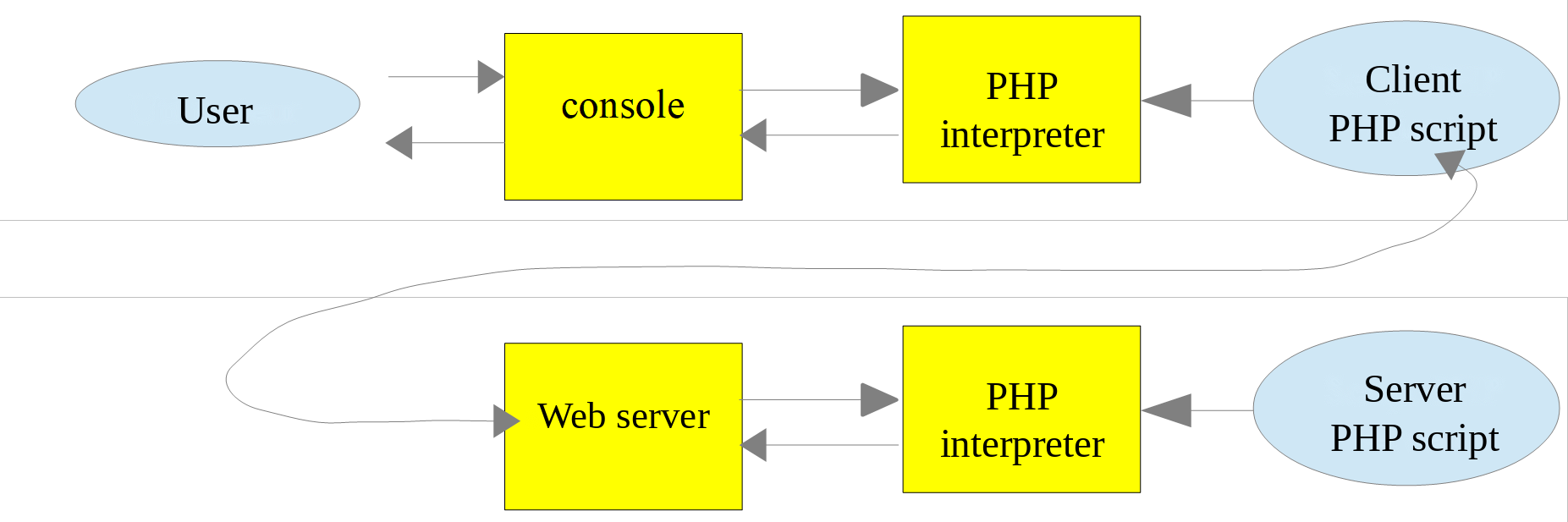
The server script PHP cannot be located just anywhere in the file system. This is because the web server searches for the static and dynamic documents it is requested to serve in locations specified by configuration. The default configuration for [Laragon] causes documents to be searched for in the [<laragon>/www] folder, where [<laragon>] is the installation folder for [Laragon] (for example, [C:\laragon]). Thus, if a web client requests document D using the URL or [http://localhost/D] path, the web server will serve document D from the [<laragon>/www/D] path.
The code folder for this course, [php8-oct-2026], has been placed in the [<laragon>/www] folder (see the chapter on installation). The server scripts for this chapter are in the [php8-oct-2026/scripts-web] folder. If a server script is named [S.php], the web server will be queried with URL and [http://localhost/php8-oct-2026/scripts-web/S.php]. The document [<laragon>/www/php8-oct-2026/scripts-web/S.php] will then be served.
Client scripts are located in the [php8-oct-2026/scripts-console/web-clients] folder. Here is the structure of the two folders (each numbered folder corresponds to a paragraph in this chapter):
In VS Code, open the [php8-oct-2026] folder ([File / Open Folder] menu). All web script and console script files are then accessible in the VS Code explorer, and the [PHP Intelephense] extension analyzes the code in both. There is no “web project” to create: for the [Apache] server, a web script is simply a [.php] file located in the [<laragon>/www] folder.
The HTTP clients used in this chapter are:
- a web browser (Chrome, Firefox, Edge, etc.);
- the [curl] command-line tool, available in Windows 11 (and in the [Laragon] terminal). In a [PowerShell] terminal, you must type [curl.exe] instead of [curl], because in Windows PowerShell, [curl] is an alias for the command [Invoke-WebRequest], which does not have the same options. In a [Command Prompt] (cmd) terminal or in the [Laragon] terminal, [curl] is sufficient;
- PHP console scripts using the Symfony [HttpClient] library.
We will use [curl] with a few options:
option | role |
[-i] | displays the HTTP response headers before the document |
[-v] | verbose mode: also displays the HTTP headers sent by [curl] |
[-d name=value] | sends the parameter via a request POST |
[--data-urlencode "name=value"] | same as above, URL-encoding the value |
[-u login:password] | authentication [Basic] |
[-c file] / [-b file] | Saves / returns cookies received from the server |
17.2. Writing a static page
Note: For the rest of this process, [Laragon] must be running.
We will show how to create a static page in HTML (HyperText Markup Language). In VS Code, we create the folder [scripts-web/01] and then, within that folder, the file [example-01.html]. In an empty HTML file, VS Code provides a page template: simply type [!] and then press the [Tab] key (the [Emmet] function from VS Code). We complete this template as follows:
- Line 6: the page title;
- line 9: its content.
Now let’s have the HTML page displayed by the [Apache] server from [Laragon]. In a browser, we request the URL [http://localhost/php8-oct-2026/scripts-web/01/example-01.html]:

- At the top, the tab displays the page title and the address bar shows the requested URL;
- below that, the page content.
The page displayed is a static page: you can reload it as many times as you like in the browser (F5), and the same content is always displayed.
Most browsers provide access to the data exchanged between the client and the server, as described in the previous chapter: type F12 to open the developer tools, then select the [Network] tab and reload the page (F5). By clicking on the loaded document, you can see the command sent to the server, the headers of the browser’s request, the headers of the server’s response, and then the received document.
The [curl] tool allows you to view the same information in a terminal. With the [-i] option, it displays the HTTP headers of the server response, followed by the received document:
- Line 2: the response status line: HTTP protocol version, [200] status code, and its description [OK];
- Next come the response headers HTTP. These include, in particular, the response date [Date], the server signature [Server], the date the document was last modified [Last-Modified], its size in bytes [Content-Length], and its type [Content-Type];
- followed by a blank line, which separates the headers from the document;
- and finally, the document HTML that we created. A browser interprets this code to display the page shown above.
17.3. Creating a Dynamic Page in PHP
We will now write a dynamic page in PHP. In the [scripts-web/01] folder, we create the following file, [example-01.php]:
Comments
- line 5: the page title;
- line 8: the code PHP is placed between the tags [<?php] and [?>]. Everything outside these tags is HTML;
- line 17: writes the current date and time. The [time] function returns the number of seconds that have elapsed since January 1, 1970, at 0:00 UTC. The function [date] formats this number according to the format specified by its first parameter, in this case day/month/year hours:minutes:seconds.
Basically, the PHP script above writes the current time to the console. However, when executed by a web server, the output stream from the [print] statement—which is usually directed to the script’s execution console—is redirected to the connection between the server and its client. Therefore, in a web context, the script above sends the current time as text to the client—in this case, a browser.
Let’s try URL and [http://localhost/php8-oct-2026/scripts-web/01/example-01.php]:

This is a dynamic page because if you reload the page several times in the browser (F5), its content changes (the time changes).
The browser has received a HTML feed. To view it, you can display the page’s source code in the browser (right-click on the page, select the [View page source] option, or press Ctrl-U), or use [curl]:
- after the blank line, the received code HTML. The code PHP has disappeared: it has been replaced by the text it generated, along with the date and time;
- among the headers, the header [X-Powered-By] was not present when the static page was requested. It indicates that the server’s response was generated by a script PHP. The headers [Last-Modified] and [ETag], on the other hand, have disappeared: the document does not exist on the disk; it is generated at the time of the request. The [Content-Length] header is still present: since the document is short, [Apache] was able to receive it in its entirety before sending the headers, and thus calculate its size.
It is therefore important to remember that a PHP script intended to be executed by a web server for a browser must produce a HTML stream. We will see that the script can also generate the headers HTTP and virtually all elements of the server’s response.
17.4. Basics of the HTML Language
This chapter will not delve into web programming in PHP. A MVC web application is developed later in this course. Instead, this chapter focuses on web services: PHP pages that deliver data to other PHP clients via a web server. Nevertheless, we thought it would be useful to provide the reader with some basics of HTML.
A web browser can display various documents, the most common being the HTML document (HyperText Markup Language). This is formatted text containing tags of the form [<tag>text</tag>]. For example, the text [<b>important</b>] will display important text in bold. There are standalone tags, such as the [<hr>] tag, which displays a horizontal line. We will not go over all the tags that can be found in a HTML text. A good reference is the Mozilla documentation site: https://developer.mozilla.org/en-US/docs/Web/HTML. Knowledge of the HTML language is essential, since dynamic web applications must generate the HTML code themselves to send to web clients.
In short, you don't need to know the entire HTML language to get started with web programming. One way to discover the intricacies of the HTML language is to browse the web and view the source code of pages that feature interesting characteristics you're not yet familiar with.
Consider the following [tags.html] example, which includes some elements commonly found in a web document, such as:
- a table;
- an image;
- a link.
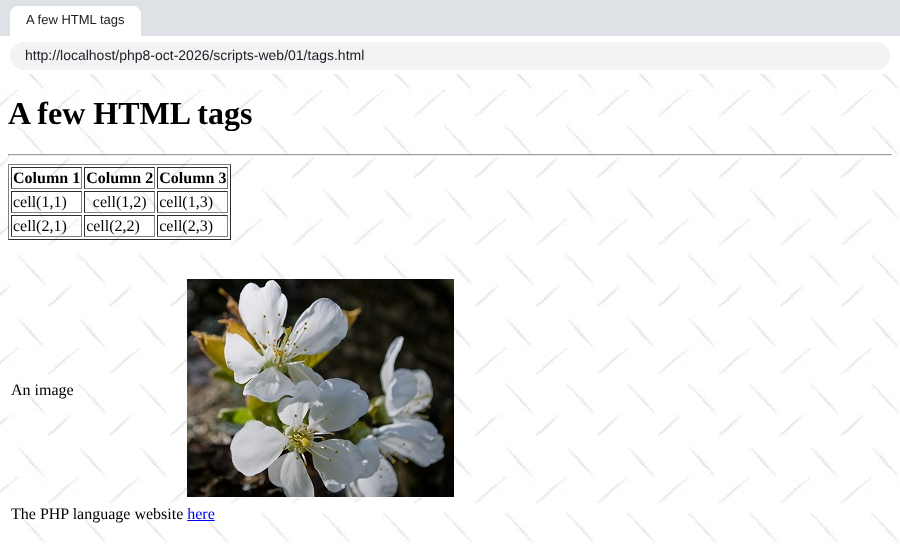
A HTML document generally has the following format:
The entire document is enclosed by the [<html>…</html>] tags. It consists of two parts:
- [<head>…</head>]: This is the non-displayable part of the document. It provides information to the browser that will display the document. It often contains the [<title>…</title>] tag, which specifies the text that will appear in the browser tab. Other tags may also be present, including tags that define the document’s keywords—keywords that are subsequently used by search engines. This section may also contain scripts, written in JavaScript, which will be executed by the browser;
- [<body attributes>…</body>]: This is the section that will be displayed by the browser. The HTML tags contained in this section tell the browser the “desired” visual layout for the document.
The HTML code for our example document is as follows:
element | HTML tags and examples | ||
document title | [<title>A few HTML tags</title>] (line 5): The text [A few HTML tags] will appear in the browser tab displaying the document | ||
horizontal bar | [<hr>]: displays a horizontal line (line 10) | ||
table | [<table attributes>….</table>]: to define the table (line 12); [<thead>…</thead>]: to define the column headers ({{L:<thead> | </thead>}}); [<tbody>…</tbody>]: to define the table content ({{L:<tbody> | </tbody>}}); [<tr attributes>…</tr>]: to define a row (line 21); [<td attributes>…</td>]: to define a cell (row 22); examples: [<table border="1">…</table>]: the attribute [border] defines the thickness of the table border; [<td style="text-align: center;">cell(1,2)</td>] (row 23): defines a cell whose content will be [cell(1,2)]. This content will be horizontally centered ([text-align: center]) |
image | [<img src="images/cherry-tree.jpg" alt="a cherry tree">] (line 37): defines an image whose source file is [images/cherry-tree.jpg] on the web server. The attribute [alt] provides alternative text, which is displayed if the image cannot be displayed. This tag appears in a web document generated using the URL [http://localhost/php8-oct-2026/scripts-web/01/tags.html]. Therefore, the browser will request the URL [http://localhost/php8-oct-2026/scripts-web/01/images/cherry-tree.jpg] to retrieve the image referenced here | ||
link | [<a href="https://www.php.net/">here</a>] (line 41): causes the text [here] to serve as a link to URL [https://www.php.net/] | ||
page background | [<body style="background-image: url(images/standard.jpg)">] (line 8): indicates that the image to be used as the page background is located at URL [images/standard.jpg] on the web server. In the context of our example, the browser will request the URL [http://localhost/php8-oct-2026/scripts-web/01/images/standard.jpg] to retrieve this background image |
This simple example shows that to build the entire document, the browser must make three requests to the server:
- [http://localhost/php8-oct-2026/scripts-web/01/tags.html] to retrieve the source HTML of the document;
- [http://localhost/php8-oct-2026/scripts-web/01/images/cherry-tree.jpg] to retrieve the image [cherry-tree.jpg];
- [http://localhost/php8-oct-2026/scripts-web/01/images/standard.jpg] to retrieve the background image [standard.jpg].
This is what the [Network] tab in the browser’s developer tools (F12) shows: it displays the three requests made by the browser.
Note: On Windows, filenames are not case-sensitive: [Cherry-tree.jpg] and [cherry-tree.jpg] refer to the same file. This is not the case on a Linux server, where most websites are hosted. You should therefore get into the habit of writing file names exactly as they appear on the disk, including in URLs.
17.5. Making a Static Page Dynamic
Let’s show how we can make the page HTML [example-01.html] dynamic. Let’s copy its content into a file named [page-00.php]. This script, PHP, does not contain any PHP—only HTML. Let’s request it from the server:
The PHP interpreter processed the [page-00.php] script and produced the same HTML output as the static page [example-01.html]. This teaches us one thing: when the PHP interpreter finds HTML within a PHP script, it leaves it untouched and sends it to the client as-is.
Now let’s add a few PHP instructions to the following [page-01.php] script so that the PHP interpreter has something to do:
- Lines 4 and 9: We’ve added PHP code to dynamically generate the page’s title and content. Here, we’re assuming that the variable [$page] is an object containing the data to be displayed. The [<?= expression ?>] tag is a shortcut for [<?php print expression ?>]. It is designed for this type of page: HTML with a few values calculated by PHP.
If we call this script directly, we get the following result:
- Lines 5–8: The page title could not be calculated because the variable [$page] was not defined. PHP inserted two warning messages into the HTML stream: the variable [$page] does not exist, and the property [title] of [null] cannot be read;
- Lines 14–17: same issue with the content.
Note: Starting with PHP 8.0, using an undefined variable and reading a property on [null] triggers a [Warning] warning rather than a simple [Notice] as in PHP 7. The messages are displayed on the page because the configuration of PHP for [Laragon] is a development configuration ([display_errors=On]). On a production server, we use [display_errors=Off], and errors are written to a log file.
Now, let’s write the following [example-02.php] web script:
- Line 3: Like all PHP scripts in this course, this script requires strict type checking;
- Lines 6–8: We define the [$page] object. The predefined class [stdClass] is the only class (along with classes marked by the [#[\AllowDynamicProperties]] attribute) to which undeclared properties can still be added without a warning: Starting with PHP 8.2, creating dynamic properties on objects of other classes is deprecated;
- Line 10: The script [page-01.php] is included. The code in this script will then be interpreted:
- The variable [$page] is now defined, and the PHP interpreter will use it;
- the code HTML from [page-01.php] will be sent as-is to the client;
- the results of the expressions in [<?= … ?>] will be included in the text stream sent to the client.
Now, if we request the web script [example-02.php], we get the following in the browser:

And here is the text received by the browser:
- Lines 5 and 10: the codes PHP and [page-01.php] have been replaced by the values of the expressions [$page->title] and [$page->contents].
From this example, we can take away two key points:
- The HTML pages intended for the browser can be isolated into PHP scripts containing only this HTML code and a few dynamic parts generated by PHP code. There should be as little PHP as possible in these pages;
- all logic that generates the dynamic data included in the HTML pages must be isolated into pure PHP scripts, containing no page presentation code (HTML, CSS, JavaScript…).
This allows for a separation of tasks:
- the task of generating the web pages to be displayed (HTML, CSS, JavaScript…);
- the task of implementing the logic for the web application being built. This logic can be implemented using a layered architecture, exactly as we did with the console scripts.
Note: A value inserted into a HTML page should normally be protected by the [htmlspecialchars] function, which replaces the special characters in the HTML ([<], [>], [&], ["]) with their HTML codes. Otherwise, a value provided by a user that contains, for example, a tag such as [<script>] would be executed by the browser (XSS vulnerability). We’ll come back to this when we write HTML pages.
Next, we’ll build specific web scripts:
- they will send only data to the client and no formatting (HTML, CSS, JavaScript). They will therefore be data servers rather than web pages;
- the clients for these web scripts will be console scripts that will retrieve the data sent by the server and process it.
17.6. Client/server application for date and time
We are now looking at the following configuration:
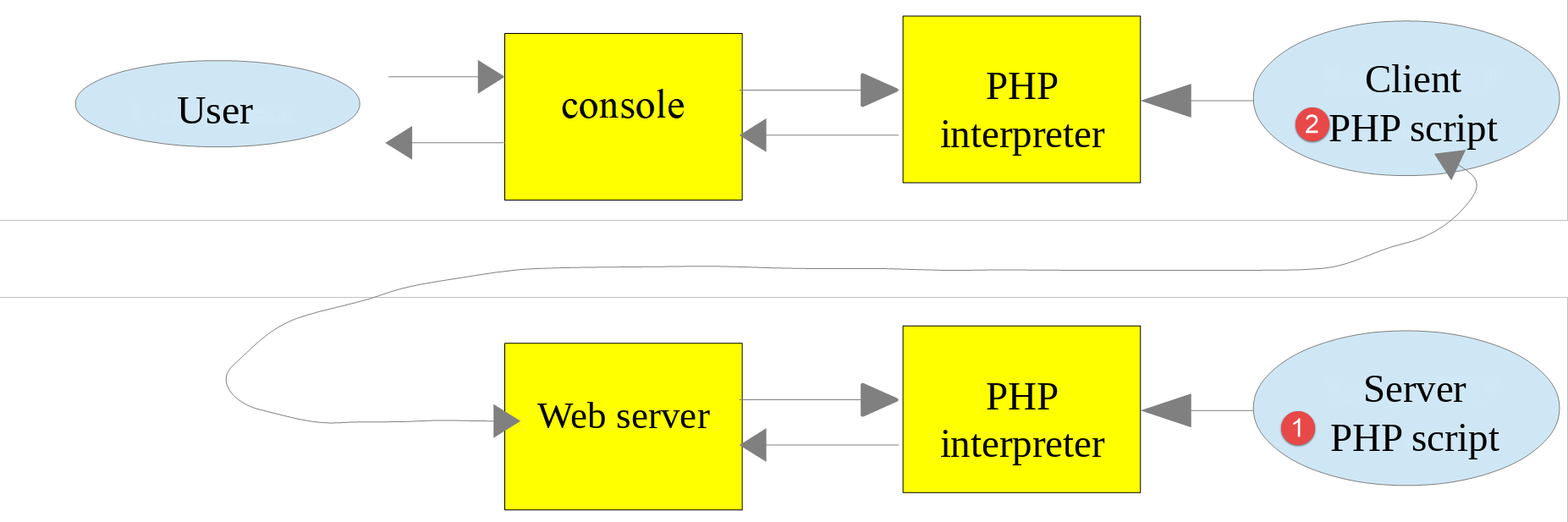
We will write:
- a web script, [1], which sends the current date and time to its client;
- a console script [2] that will act as the client for the web script: it will retrieve the date and time sent by the web script and display them on the console.
17.6.1. The server-side script
We have already written a web script that generates the current date and time: the [example-01.php] script from the previous paragraph. We mentioned that we would be writing data servers: raw data without formatting (HTML). The server script [date-time-server.php] will therefore be as follows:
- Line 6: The date functions use the time zone set by the [date.timezone] directive in the [php.ini] file. To avoid depending on the server configuration, the script sets the time zone itself—in this case, Paris;
- Line 8: The [header] function adds a HTTP header to the response. Here, the HTTP and [Content-Type] headers are set, which inform the client of the nature of the document it will receive. For the [example-01.php] page, the [Content-Type] was [text/html; charset=UTF-8]. Here, we inform the client that the document is plain text (not HTML). This is not important for our console client, which will not attempt to use this header. It is more important for web browsers, which do use this header. The HTTP headers precede the document in the server’s response: the [header] function must therefore be called before the script has written anything;
- Line 19: the document sent to the client: the date and time, without the HTML tag.
Let’s request this script using a browser:

The browser displays the received plain text. With [curl], we see the header HTTP [Content-Type] set by the script and, after the blank line, the received text document:
17.6.2. The client-side script
In the previous chapter, we wrote several HTTP clients. We could use them to retrieve the text document sent by the [date-time-server.php] server script. We won’t do that, however. As we did for the SMTP and IMAP protocols, we will use a third-party library, specifically the [HttpClient] component from the Symfony framework, whose documentation can be found at URL https://symfony.com/doc/current/http_client.html.
Like the previous libraries, the [HttpClient] component is installed using the [Composer] tool. In a terminal window opened in the [php8-oct-2026] folder, the command would be:
This isn’t necessary here: the file [composer.json] in the [php8-oct-2026] folder already declares this dependency (in version 8) as well as that of the [HttpFoundation] component, which we’ll be using soon. The [composer install] command run during the installation of the course codes installed them in the [php8-oct-2026/vendor] folder.
The console script [date-time-client.php] will process the following JSON and [config-date-time-client.json] files:
- Line 2: the URL server script.
The client-side script [date-time-client.php] is as follows:
Comments
- Line 8: As we did for the previous libraries, we load the file [vendor/autoload.php] generated by [Composer]. Its path is calculated based on the constant [__DIR__], which is the script’s folder: the script works regardless of the location of the [php8-oct-2026] folder;
- Line 10: We declare the [HttpClient] class that we will use;
- line 11: the [ExceptionInterface] interface is implemented by all exceptions that the Symfony client HTTP may throw;
- line 14: The name of the configuration file can be passed as an argument to the script: [php date-time-client.php other-config.json]. Otherwise, the file [config-date-time-client.json] is used. The array [$argv] contains the command-line arguments, where [$argv[0]] is the name of the script. The operator [??] returns its left operand if it exists and is not [null]; otherwise, it returns its right operand;
- lines 17–25: the script’s configuration is retrieved into the array [$config]. The parameter named [flags: JSON_THROW_ON_ERROR] instructs [json_decode] to throw a [JsonException] exception if JSON is incorrect, instead of letting [null] run silently;
- Line 29: A HTTP client is created. The static method [create] selects the most appropriate implementation: in this case, the class [CurlHttpClient], which uses the extension [curl] of PHP;
- line 33: the URL from the server script is requested using a GET command: [GET URL HTTP/1.1]. This operation is asynchronous: execution continues to the next line without waiting for the response;
- line 35: The response status code is retrieved. This is found in the first line of the server’s response. Thus, if this line is [HTTP/1.1 200 OK], the response status is 200. This operation is blocking: execution does not resume until the client has received the headers from the server’s response;
- line 39: We retrieve the response headers HTTP. We obtain an associative array whose keys are the header names (in lowercase), and the array values: a single header may indeed appear multiple times in a response. Here, we display the first value of each header;
- line 43: We retrieve the document returned by the server; we know that this document is text;
- line 46: if an error occurs, the error message is displayed. The script PHP 7 used to catch the exceptions [TypeError | RuntimeException]; it is more precise to catch the client exceptions HTTP, all of which implement [ExceptionInterface]. Note that [getHeaders] and [getContent] throw an exception when the response status code indicates an error (codes 300 through 599). We will discuss this in the section on authentication.
The client runs in a terminal with the directory open ([Laragon] must be running for the server script to be accessible):
The current date and time are correctly retrieved on the last line. The headers displayed are the same as those we saw with [curl], with the names in lowercase.
You might be curious to know what the client script sent to the server. In the previous chapter, we used a generic TCP server for this purpose, which displays the lines of text it receives. Here, we’ll write a small TCP “spy” server, [spy-server.php], that does the same thing and then sends a minimal HTTP response back to the client:
- line 9: the listening port is passed as an argument; the default is 100;
- line 11: creates a service TCP on port [port] of the local machine;
- line 18: waiting for a client;
- line 27: reads and displays the received lines up to the empty line that ends the HTTP headers. Along the way, it notes the value of the [Content-Length] header, which specifies the size of the document that may follow the headers;
- lines 40–41: read and display this document;
- lines 45–50: Send a minimal HTTP response: status line, headers, empty line, document;
- line 52: close the connection with the client so that it detects that it has received the entire response.
We launch the spy server in the first terminal:
The configuration file [config-spy.json] specifies port 100 on the local machine:
This time, the client contacts the server [localhost] on port 100. Therefore, our spy server will be the one to handle the request. In a second terminal, we run the client with this configuration:
- Line 7: The client successfully received the document sent by the spy server.
In the first terminal, the spy server displayed what it received:
- Line 5: The command HTTP GET generated by the client script;
- Line 6: The header [Host] specifies the target machine and port;
- line 8: the Symfony client signature [HttpClient];
- line 9: the client indicates that it accepts a compressed response in the [gzip] format;
- line 10: the empty line that ends the headers. A GET request has no document.
17.6.3. The Server Script – Version 2
By default, the functions for writing a web script are not object-oriented. On the server side, this means you end up mixing classes with traditional PHP functions. To achieve a more consistent coding style, we’ll use the [HttpFoundation] library from the Symfony framework. It encapsulates all the standard PHP functions of a web script within a system of classes and interfaces: the [Request] class represents the client request, and the [Response] class represents the server response. The library’s documentation is available at https://symfony.com/doc/current/components/http_foundation.html.
Like [HttpClient], the [HttpFoundation] library (version 8) is already installed in the [vendor] folder. It was likely installed using the following command:
The second version of the [date-time-server-2.php] server is as follows:
Comments
- Line 8: Loading the libraries installed by [Composer]. The script is in the [scripts-web/02] folder: the [vendor] folder is two levels above;
- Line 10: The [Response] class in the [HttpFoundation] library handles the entire response to the web service clients;
- Lines 16–20: Creation of the response. The constructor of the [Response] class has three parameters: the document sent to the client (here, the date and time), the response status code (here, the constant [Response::HTTP_OK], which is 200), and an array of headers HTTP. We use the named arguments of PHP 8.0 ([content:], [status:], [headers:]): they make the call more readable and eliminate the need to follow the parameter order;
- line 22: the response is text UTF-8. [HttpFoundation] will add [charset=UTF-8] to the header [Content-Type];
- line 25: The response is sent to the client: the status line, the headers, and then the document. The method [send] uses the functions [http_response_code], [header], and [print], which we would have used ourselves.
With [curl]:
- line 2: response code 200;
- the header [Cache-Control] was added by [HttpFoundation]. It indicates that the response must not be cached by an intermediary (a proxy);
- the header [Content-Type] is the one set by the script, supplemented by the character set;
- The last line is the document.
17.6.4. The client script – version 2
The client script remains unchanged. It is simply given a different configuration file, [config-date-time-client-2.json]:
The results are the same as in Version 1:
17.7. A JSON data server
A web script’s response may consist of multiple data elements that can be organized into arrays and objects. The script can then send these various elements within a string JSON, which the client will decode.
17.7.1. The server-side script
The [json-server.php] script uses the following [Person] class:
Comments
- line 5: The class belongs to the [Models] namespace;
- line 7: The class implements the PHP [JsonSerializable] interface. This requires it to implement the [jsonSerialize] method (lines 39–43). The method must return a value that will be serialized in JSON, in this case an associative array. When the expression [json_encode($person)] is used, the function [json_encode] checks whether the class [Person] implements the interface [JsonSerializable]. If so, the expression becomes [json_encode($person->jsonSerialize())];
- lines 11–15: the constructor uses property promotion from PHP 8.0: each parameter preceded by a visibility specifier declares a property and initializes it. All three parameters have a default value;
- line 12: asymmetric visibility, introduced with PHP 8.4: the property is readable from anywhere ([public]) but can only be modified within the class ([private(set)]). We can therefore write [$person->lastName] for reading, without a getter, but not [$person->lastName = "x"] outside the class. The PHP 7 from 2019 required us to declare private properties and write a getter for each one;
- lines 19–22: a constructor (also called a factory) for a [Person] object based on an associative array. The expression [new static(...$assoc)] passes the elements of the array to the constructor. Since PHP 8.1, the [...] operator accepts arrays with string keys: each key becomes a named argument. Thus, [Person::fromArray(["lastName" => "x", "age" => 3])] is equivalent to [new Person(lastName: "x", age: 3)]. A key that is not a constructor parameter causes an error. Version PHP 7 of the class copied the array elements into properties with arbitrary names, which could create dynamic properties—a feature that has been deprecated since PHP 8.2;
- lines 26–29: the class’s only setter. It returns the object itself (return type [static]), which allows for chained calls;
- line 43: the function [get_object_vars] returns the object’s associative array [property => value];
- line 47: the static function [jsonUnserialize] allows you to create a [Person] object from its string JSON.
The script [json-server.php] is as follows:
Comments
- lines 7 and 9: the [Person] class is imported;
- Line 13: A [Person] object is created with named arguments;
- Lines 15–21: A two-level associative array is created;
- Line 24: The document sent to the client is the string JSON from an array:
- the element [$person] will be serialized to JSON using its method [jsonSerialize];
- the element [$assoc] will be natively serialized to JSON;
- the option [JSON_THROW_ON_ERROR] causes [json_encode] to throw an exception in the event of an error (for example, a string that is not in the UTF-8 format) instead of returning [false];
- Line 25: It specifies that the document is of type [application/json]. Upon receiving this header, browsers render the string JSON.
If you request this script using a browser (Chrome in this case), you get the following response:
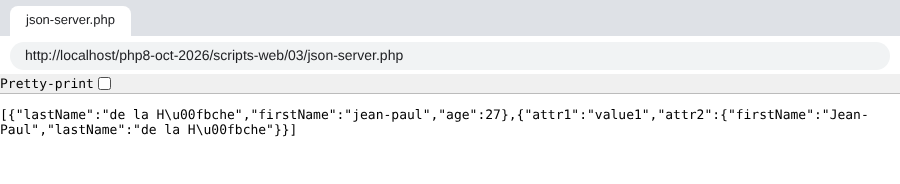
Note the encoding of accented characters: by default, [json_encode] replaces any character that is not ASCII with its Unicode sequence [\uXXXX] ([û] becomes [\u00fb]). The [Pretty-print] field in Chrome displays the indented JSON. With [curl]:
- the header [Content-Type] specifies the document type as [application/json];
- the last line is the received string JSON.
17.7.2. The client
The client [json-client.php] is configured by the following file: JSON [config-json-client.json]:
It uses a copy of the [Person] class from the server, located in its folder. The [json-client.php] script is as follows:
Comments
- lines 9 and 11: import of the [Person] class;
- Line 16: This client always uses the same configuration file, whose name is a constant;
- line 31: creation of the HTTP client;
- Line 45: The [toArray] method in the response decodes the received JSON document and returns the corresponding PHP array. It throws an exception if the document is not of type JSON. We know that what was encoded is an array with two elements. The [[$person, $assoc] = …] assignment by decomposition (also known as destructuring) assigns these two elements to two variables. It replaces the old syntax [list($person, $assoc) = …];
- line 47: an object [Person] is created from the array of its properties, to be displayed later (line 50). The object is converted to a string using its method [__toString];
- line 51: the second associative array is displayed. The [print] instruction cannot display arrays. Therefore, this array is converted to a string using JSON. To preserve accented characters as-is, the option [JSON_UNESCAPED_UNICODE] must be added. We have seen that without this option, accented characters are encoded in the string JSON.
Running the client-side script yields the following results:
In the last two lines, the accented characters were correctly retrieved.
17.8. Retrieving Environment Variables from the Web Service
A server-side script runs in a web environment that it can access. This environment is stored in the array [$_SERVER], a global variable of PHP. If we use the [HttpFoundation] library, this environment is found in the [server] property of the [Request] object, which represents the HTTP request processed by the web script.
17.8.1. The server-side script
We are writing a server application that sends its execution environment to its clients. The web script [env-server.php] is as follows:
- Line 12: We create an object of type [Request] that encapsulates all available information about the HTTP request received by the web script, as well as its execution environment. The static method [createFromGlobals] constructs this object from the global variables of PHP: [$_GET], [$_POST], [$_COOKIE], [$_FILES], and [$_SERVER];
- Line 15: The information sent to the client is the string JSON from the object [$request->server], which represents the web script's runtime environment. It is an object of type [ServerBag], a kind of dictionary. [$request->server->all()], on the other hand, is a true associative array—the contents of [ServerBag]. Without [HttpFoundation], we would have written [json_encode($_SERVER)]. The [JSON_UNESCAPED_SLASHES] option prevents the [/] characters in the paths from being encoded as [\/];
- Line 20: The response is sent.
If you request this script using a browser, it displays the JSON dictionary of environment variables.
17.8.2. The client script
The client script [env-client.php] is configured by the following file: JSON [config-env-client.json]:
- Line 2: the URL of the server script;
- lines 3–9: the names of the environment variables that the client will display. Without this key, it displays all of them.
The client script [env-client.php] is as follows:
Comments
- line 43: the server’s response JSON is decoded. This yields an associative array;
- Lines 45–46: The environment is long. If the configuration file contains a list of variable names ([display]), only those names are retained. The function [array_filter] retains the elements of an associative array for which the function passed as a parameter returns [true]. With the option [ARRAY_FILTER_USE_KEY], this function receives the element’s key rather than its value;
- lines 48–49: all values of this associative array are displayed.
The following console output is obtained (the path to the [php8-oct-2026] folder is abbreviated to [.../php8-oct-2026]):
Here is the meaning of these variables, and a few others that the server also sends:
variable | Meaning |
HTTP_HOST | The value "xxx" of the header HTTP [Host: xxx] sent by the client |
HTTP_USER_AGENT | the value xxx of the header HTTP [User-Agent: xxx] sent by the client |
HTTP_ACCEPT_ENCODING | The value xxx of the header HTTP [Accept-Encoding: xxx] sent by the client |
PATH | the path to the executables on the machine where the server script is running |
SERVER_SIGNATURE | the web server’s signature, added by [Apache] to the pages it generates itself (error pages, file lists) |
SERVER_SOFTWARE | the type of web server |
SERVER_NAME | the hostname of the web server |
SERVER_PORT | Web server listening port |
SERVER_ADDR | the IP address of the web server machine |
REMOTE_ADDR | the client's address IP. In this case, the client was on the same machine as the server |
REMOTE_PORT | the port from which the client made its request |
DOCUMENT_ROOT | the root of the directory tree for documents served by the web server, [<laragon>/www] along with [Laragon] |
REQUEST_SCHEME | the protocol of the requested URL: [http] or [https] |
SERVER_ADMIN | the web server administrator's email address |
SCRIPT_FILENAME | The full path to the server script |
SERVER_PROTOCOL | the version of the HTTP protocol used by the web server |
REQUEST_METHOD | The HTTP method used by the client: GET, POST, PUT, DELETE… |
QUERY_STRING | Parameters sent in URL: GET /url?parameters |
REQUEST_URI | the URL requested by the client. If the client requests the URL [http://machine:port/uri], we have REQUEST_URI=/uri |
SCRIPT_NAME | the path to the script from the server root: [$_SERVER['SCRIPT_FILENAME']] = [$_SERVER['DOCUMENT_ROOT'] . $_SERVER['SCRIPT_NAME']] |
REQUEST_TIME_FLOAT | the time of the request, in seconds since January 1, 1970, with microsecond precision |
17.9. Server retrieval of parameters sent by a client
17.9.1. Introduction
In the HTTP protocol, a client has two methods for passing parameters to the web server:
- it requests the URL service in the form
where the [vali] values must first be encoded so that certain reserved characters are replaced by their hexadecimal values;
- it requests the service’s URL in the form
then, among the HTTP headers sent to the server, includes the following header:
The rest of the headers sent by the client end with a blank line. The client can then send its data in the form
where the values [vali] must, as with the GET method, be encoded beforehand. The number of bytes sent to the server must be N, where N is the value declared in the [Content-Length] header.
The PHP script of the web service that retrieves the [parami] parameters sent by the client obtains their values from the arrays:
- [$_GET['parami']] for the parameters of URL;
- [$_POST['parami']] for the parameters sent in a POST order document;
This applies to the basic functions of PHP. If the [HttpFoundation] library is used, these parameters are found in:
- [$request->query->get('parami')] for the parameters of URL;
- [$request->request->get('parami')] for the parameters of the document associated with a POST command;
where [$request] is the [Request] object that represents all the information about the request received by the web script.
17.9.2. The GET client – version 1
Client scripts are configured by the following JSON [config-parameters-client.json] file:
- Line 2: the URL of the target web script for clients GET;
- Line 3: The URL web script targets clients POST.
Clients send three [firstName, lastName, age] parameters to the server. The [parameters-get-client.php] client is as follows:
Comments
- line 14: As with the date/time client, the name of the configuration file can be passed as an argument;
- line 33: the three parameters are assigned by unpacking an array;
- Lines 35–37: Encoding of the parameters sent to the server. The parameters [$firstName] and [$lastName], which may contain any characters, are encoded using the function [urlencode]: all characters other than the letters and digits ASCII and the characters [-_.] are replaced by [%xx], where [xx] is the hexadecimal value of the byte; a character such as UTF-8 ([û]), encoded over two bytes, thus becomes [%C3%BB]. Spaces are replaced by the character [+];
- line 39: the requested URL is [URL?parameters], where [parameters] is in the form [firstName=val1&lastName=val2&age=val3];
- line 49: the client will simply display the server’s response.
Note: The [http_build_query] function of PHP constructs the same string from an associative array: [http_build_query(["firstName" => $firstName, "lastName" => $lastName, "age" => $age])].
You might be curious to see what the server receives when a configured GET request is sent. To do this, we launch our [spy-server.php] sniffer server on port 100, in a terminal window open to the [web-clients/02] directory:
The file [config-spy.json] designates this server for the clients GET and POST:
We run the client using the command [php parameters-get-client.php config-spy.json]. The spy server displays the following information:
- Line 5: The configured command GET sent by the client. The encoding of certain characters is clearly visible.
17.9.3. The GET / POST server
The server script [parameters-server.php] is as follows:
Comments
- line 12: creation of the [Request] object from the web script. This object encapsulates all the information that the web script received from the client;
- Line 14: The [$request->query] object is of type [InputBag] and contains the parameters of URL. The expression [$request->query->get('X')] retrieves the parameter named X from the [firstName=val1&lastName=val2&age=val3] parameters. The expression [$request->query->all()] retrieves the array of all these parameters;
- Line 15: The object [$request->request], which is also of type [InputBag], collects the parameters sent in the client’s document. These parameters are also said to be "posted." The expression [$request->request->get('X')] returns the posted parameter named X, and the expression [$request->request->all()] returns an array of all posted parameters;
- lines 20–23: The server returns to the client all the parameters it received, the [GET / POST / …] method used by the client, obtained via [$request->getMethod()], and the requested URI, obtained via [$request->getRequestUri()]. The document sent to the client is the string JSON from an associative array, some of whose values are themselves associative arrays. The option [JSON_UNESCAPED_UNICODE] specifies that Unicode characters (such as accented characters) be sent as-is and not encoded;
- line 25: the client is notified that JSON will be sent;
- Line 29: The response is sent to the client.
Running the client script [parameters-get-client.php] with its default configuration yields the following results:
- last line:
- [method]: the method is GET;
- [uri]: the URL-encoded parameters of the GET request are visible in the requested URI;
- [getParameters]: the array of parameters from URL, decoded by PHP;
- [bodyParameters]: the array of posted parameters; it is empty.
The server can also be tested with [curl]. The quotation marks around URL are necessary because the character [&] has a special meaning for the command interpreter:
17.9.3.1. A version without HttpFoundation
The script [parameters-server-native.php] performs the same task using only the functions from PHP:
- Line 8: The arrays [$_GET] and [$_POST] contain character strings, regardless of the expected value type. The [filter_input] function reads a parameter and validates it: here, the [age] parameter of URL ([INPUT_GET]) must be an integer ([FILTER_VALIDATE_INT]). It returns the integer if the parameter is valid, [false] if it is not, and [null] if it is missing;
- Line 12: the [Content-Type] header in the response;
- line 14: the HTTP method in the request;
- line 15: the requested URI;
- lines 16 and 17: the parameters for URL and those for the document.
Two requests made using [curl]:
- In the first query, the parameter [age] is [45]: it is rendered as the integer 45 rather than the string ["45"];
- In the second query, the option [-d] results in the query being rendered as POST: the parameter [firstName] is in [$_POST], while the parameter [age] from URL is in [$_GET]. Its value, [4x], is not an integer: [filter_input] results in [false].
In the rest of this course, we’ll use [HttpFoundation], which has a more consistent code. But it’s good to understand what’s behind it.
17.9.4. The GET client – version 2
In the previous version of the client script, we URL-encoded the parameters sent to the server ourselves, for educational purposes. The [HttpClient] object can handle this task on its own. This is the [parameters-get-client-2.php] script, identical to the previous one except for the following lines:
- lines 37–41: The third parameter of the [request] method is an array of options. The [query] option is the array of parameters to be added to URL. The [HttpClient] object handles their encoding itself.
Results:
- Last line: Note that [HttpClient] encoded the spaces using [%20] rather than [+]. Both encodings are accepted by PHP.
17.9.5. The POST client
An HTTP client sends the following text sequence to the web server: HTTP headers, blank line, document. In the previous client, this sequence was as follows:
There was no document. There is another way to transmit parameters, known as the POST method. In this case, the text sequence sent to the web server is as follows:
This time, the parameters—which, for the GET client, were included in the first line of the request—are part of the document sent after the headers in the POST client.
The script for client POST [parameters-post-client.php] differs from client GET—version 2—only in the following lines:
- line 35: we now have a HTTP request of type POST;
- lines 37–41: the option [body] is the body of the request POST: this is the document sent by the client to the server. When this option is an array, [HttpClient] URL-encodes it and adds the header [Content-Type: application/x-www-form-urlencoded]. Here, three parameters are sent: [firstName, lastName, age].
The results of executing the client-side script are as follows:
- Last line: the method is [POST] and the parameters are of type [bodyParameters]. There are no [getParameters] parameters, as shown by [uri].
With [curl], the [-d] option sends a parameter via a POST request, and the [--data-urlencode] option does the same by URL-encoding its value:
Let’s see what the server receives during a POST request. We restart the spy server on port 100 and run the client with the [php parameters-post-client.php config-spy.json] command. The spy server displays the following information:
- Line 5: the command POST;
- line 8: the header HTTP [Content-Type] specifies the type of document sent by the client. The type [application/x-www-form-urlencoded] denotes URL-encoded text;
- line 11: the header HTTP [Content-Length] specifies the number of bytes in the document that the client will send to the server;
- line 12: the empty line that marks the end of the headers HTTP and the beginning of the 52-byte document;
- line 13: the document: the URL-encoded string of parameters. The reader can verify that it indeed has 52 characters.
17.9.6. A mixed POST client
In a POST, you can mix parameters encoded in the URL with parameters encoded in the document sent by the client after the HTTP headers. Here is an example of a [parameters-mixed-post-client.php]:
Comments
- line 35: a POST request;
- lines 37–41: the URL-encoded parameters in the body (document) of the request;
- lines 43–47: the URL-encoded parameters in the URL.
Upon execution, the following console output is generated:
- Last line: We can see that the server was able to retrieve both types of parameters.
17.9.7. A mixed GET client
We’ll try doing the same thing with a GET request. The [parameters-mixed-get-client.php] script differs from the previous one only in its method:
Upon execution, we get the following console output:
- Last line: We can see that the server did not process the URL-encoded parameters in the document sent by the client.
However, the server sniffer shows that the client did indeed send a 52-byte document:
PHP only populates the array [$_POST] (and therefore [HttpFoundation] and the object [$request->request]) only starting with the request document POST. The request document GET is ignored.
Finally, which method should be used to send information to the server?
- The [GET URL?param1=val1¶m2=val2&…] method uses a configured URL that can serve as a link. This is its main advantage: the user can add such links to their bookmarks. It is designed for requests that read data without making any changes to the server;
- in other applications, you may not want to display the parameters sent to the server in a URL. For security reasons, for example: URLs are stored in the browser history and in server log files. In such cases, use a [POST] method and include the URL-encoded parameters in the document sent to the server. This is also the method to use for requests that modify data on the server.
17.10. Web Session Management
In the previous client/server examples, the process worked as follows:
- the client opens a connection to port 80 on the web server;
- it sends the following text sequence: HTTP headers, an empty line, [document];
- in response, the server sends a sequence of the same type;
- the server closes the connection to the client;
- the client closes the connection to the server.
If the same client makes a new request to the web server shortly thereafter, a new connection is established between the client and the server. The server cannot tell whether the connecting client has visited before or if this is the first request. Between connections, the server “forgets” its client. For this reason, the HTTP protocol is said to be a stateless protocol. However, it is useful for the server to remember its clients. For example, if an application is secure, the client will send the server a username and password to authenticate itself. If the server “forgets” its client between connections, the client would have to authenticate itself with every new connection, which is not feasible.
To track a client, the server proceeds as follows: when a client makes its first request, the server includes an identifier in its response, which the client must then send back with every subsequent request. Using this identifier—which is unique to each client—the server can recognize the client. It can then maintain a record for that client in the form of a memory entry uniquely associated with the client’s identifier.
Technically, this works as follows:
- In the response to a new client, the server includes the header HTTP [Set-Cookie: Keyword=Identifier]. It does this only on the first request;
- in subsequent requests, the client will send its identifier via the header HTTP [Cookie: Keyword=Identifier] so that the server can recognize it.
One might wonder how the server knows it is dealing with a new client rather than a returning one. It is the presence of the header HTTP [Cookie] in the client’s HTTP headers that indicates this. For a new client, this header is missing.
All connections made by a given client are referred to as a session.
17.10.1. The configuration file [php.ini]
For session management to work correctly with PHP, you must verify that it is configured correctly. Its configuration file is [php.ini]. Depending on the execution context (console, web), the [php.ini] configuration file used may differ. To determine which one is used, run the following [phpinfo.php] script:
The [phpinfo] function provides information about the PHP interpreter that executes the script. In particular, on line [Loaded Configuration File], it provides the path to the [php.ini] configuration file being used. We have already used this function in a console environment when installing PHP. In a web environment, simply request URL and [http://localhost/php8-oct-2026/scripts-web/06/phpinfo.php] using a browser. With [Laragon], the [php.ini] used by the [Apache] server is the one from the folder of the selected PHP version ([<laragon>/bin/php/<version>/php.ini]). It can be opened via the [Laragon] menu: [PHP / php.ini].
This file contains a section named [Session]. Rather than copying it, the following script, [session-config.php], displays the actual values of the directives we are interested in:
- Line 6: The [ini_get_all] function returns the values of the configuration directives for an extension of PHP—in this case, the [session] extension. With [details: false], we obtain an array [directive => value];
- line 19: the function [var_export] displays a value in the form of an expression PHP. An empty string thus appears as [''].
Result:
- Line 2: Data from a client session is saved to a file;
- Line 3: The folder where session data is saved. If empty, it refers to the system’s temporary folder. In the configuration of [Laragon], it refers to a folder named [Laragon] (in the form [<laragon>/tmp]). If this folder does not exist, session management will not function;
- line 4: In strict mode, the server rejects any session ID that it did not create itself. This is a safeguard against a so-called session fixation attack. It is recommended to enable this;
- Lines 5–6: indicate that the session ID is managed solely by the headers HTTP, [Set-Cookie], and [Cookie];
- line 7: the [Set-Cookie] header will be in the form [Set-Cookie: PHPSESSID=session_id];
- Line 8: A client session is not started automatically. The server script must explicitly request it using the [session_start()] command;
- line 9: The session cookie remains valid until the client browser is closed;
- line 10: the path for which the session cookie must be sent back. If [session.cookie_path = /xxx], then every time the browser requests a URL of type [/xxx/yyy/zzz], it must send back the cookie. Here, the path [/] indicates that the cookie must be sent back for any URL on the site;
- Lines 12–13: The [HttpOnly] attribute of the cookie makes it inaccessible to the JavaScript code on the page; the [SameSite] attribute prevents it from being sent in response to requests from other sites. These two attributes protect the session ID;
- line 14: Objects in the session must be serialized in order to be stored in a file. PHP handles this serialization and deserialization;
- Lines 15–17: Each time a session starts, PHP initiates, with probability [gc_probability / gc_divisor], a cleanup of session files older than [gc_maxlifetime] seconds: sessions that have been inactive for longer than this are lost.
Note: Section [Session] of the 2019 [php.ini] contained the directive [session.sid_bits_per_character = 5]. The directives [session.sid_length] and [session.sid_bits_per_character], which specified the length and character set of the session ID, have been deprecated since PHP 8.4: PHP now uses 32-character hexadecimal identifiers, which are sufficiently secure. These directives should no longer be used.
All of these settings can also be configured by the script itself when the session starts, as we will see later.
17.10.2. Example 1
17.10.2.1. The server
Session ID management is transparent to a web service. This ID is managed by PHP. A web service accesses the client's session using the [session_start()] statement. From that point on, the web service can read from and write to the client’s session via the array [$_SESSION]. If the [HttpFoundation] library is used, the session is represented by an object of type [Session].
The following code, [session-server.php], demonstrates session-based management of three counters. With each new request, the web script increments these counters and stores them in the session so they can be retrieved during the next request.
- Lines 12–13: A session is created and activated. The object [Session] encapsulates the session data corresponding to the session cookie sent by the client. If the client did not send such a cookie, then no data is stored in [Session]. The web script will include the header HTTP [Set-Cookie: PHPSESSID=xxx] in its first response. In subsequent requests, the client will send the headers HTTP and [Cookie: PHPSESSID=xxx] to indicate the session whose content it wants to use. A session is a client’s memory;
- Lines 15–20: We check whether the session has a key named [N1]. This will be the name of our first counter. If it does not exist, we assign it the value 0 and store it in the session. If it does exist, we:
- retrieve it from the session;
- increment its value by 1;
- put it back into the session;
- lines 22–34: We do the same for the other two counters, N2 and N3;
- lines 37–44: The response will be the string
JSON, which is an array containing the three counters; - line 48: the response is sent to the client. At the end of the script, the session data is saved by PHP to the session file.
In the client-server relationship, the management of the client session on the server depends on both parties, the client and the server:
- the server is responsible for sending an identifier to the client upon its first request;
- the client is responsible for sending this identifier back with each new request. If it fails to do so, the server will assume it is a new client and generate a new identifier for a new session.
Results
We use a web browser as the client. By default, the browser does indeed send back to the server the session identifiers that the server sends to it. As requests are made, the browser will receive the three counters sent by the server and see their values increment. The first request yields:
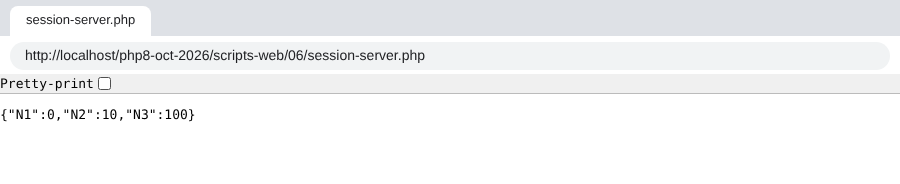
After reloading the page three times (F5), we get:
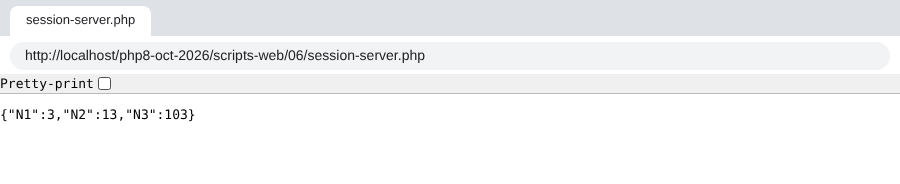
The fourth request shows that the counters have indeed been incremented. The counter values are indeed being stored across requests.
The browser’s developer tools (F12, [Network] tab) display the HTTP headers exchanged. Let’s examine them using [curl]. With the [-c cookies.txt] option, [curl] saves the cookies received from the server to the [cookies.txt] file; with the [-b cookies.txt] option, it sends the cookies from this file back to the server. It then behaves like a browser. First request:
- The header [Set-Cookie] contains the session ID sent by the server in its response to the client’s first request;
- the first header, [Cache-Control], is set by [HttpFoundation] at the start of the session: the response, specific to this client, must not be cached by an intermediary ([private]) and must be requested again from the server ([max-age=0]);
- the last line contains the three initialized counters.
The file [cookies.txt] now contains the session cookie:
2nd request:
- [curl] returned the session ID with the header HTTP [Cookie: PHPSESSID=…];
- In its response, the web service no longer includes the [Set-Cookie] header. It is now the client’s responsibility to send the identifier with each of its requests;
- Last line: the counters have been incremented.
17.10.2.2. The client
We are now writing a client-side script based on the previous server-side script. In managing the session, it must behave like a web browser:
- In the server’s response to its first request, it must find the session ID that the server sends it. It knows it will find it in the header HTTP [Set-Cookie];
- with each subsequent request, it must send the session ID it received back to the server. It will do so using the header HTTP [Cookie].
Client [session-client.php] is configured by the following file: JSON [config-session-client.json]:
The code for client [session-client.php] is as follows:
Comments
- line 29: creation of the client HTTP;
- line 31: the variable [$sessionCookie] will contain the session cookie, in the form [PHPSESSID=xxx]. Its value is [null] until the server sends it;
- line 34: we will send the same request to the server 10 times: [session-server.php];
- lines 36–38: If the session cookie is not yet known, we send the command [GET] without the header [Cookie];
- lines 39–43: otherwise, we send the command [GET] with the header [Cookie]. The [headers] option of the [request] method is the array of HTTP headers to be added to the request;
- Line 55: The web server may send multiple [Set-Cookie] headers. The session cookie is just one of them. It is uniquely formatted as [PHPSESSID=xxx; …]. If the response does not have a [Set-Cookie] header, the expression [$headers['set-cookie'] ?? []] returns an empty array, and the loop does nothing;
- line 56: a regular expression is used to find the session cookie;
- line 62: once the 10 requests have been made, the last response from the server, JSON, is displayed.
Note: The Symfony client [HttpClient] does not manage cookies from one request to the next on its own, which is why this code is included. Session cookie management will be handled in versions of the tax calculation application that use a session.
Results
Running the client script produces the following output (we are showing only the beginning and the end):
- In its first response, the server sends the session ID (header [set-cookie]). In subsequent responses, it no longer sends it;
- Last line: the three counters [N1, N2, N3] were indeed incremented 9 times. They were initialized during request #1.
17.10.2.3. A version without HttpFoundation
The script [session-server-native.php] performs the same task using only the functions from PHP:
- Lines 8–15: session startup. Starting with PHP 7.0, the [session_start] function accepts an array of options: These are the [session.*] directives from the [php.ini] file, without their [session.] prefix. They apply only to the current request. Here, we enable strict mode and the [HttpOnly] and [SameSite] attributes of the session cookie, as described in the section on the [php.ini] file;
- lines 17–19: We iterate through the array [counter => initial value]. For each counter, we increment it if it is in the session [$_SESSION]; otherwise, we add it to the session with its initial value;
- line 22: the [Content-Type] header of the response;
- line 23: the JSON document sent to the client.
We run the same client with the configuration [config-session-client-native.json], which refers to this script: [php session-client.php config-session-client-native.json]. Start of the display:
- The session cookie now has the attributes [HttpOnly] and [SameSite=Lax];
- The headers [Expires], [Cache-Control], and [Pragma], set by PHP at the start of the session, prevent the response from being cached (directive [session.cache_limiter = nocache]).
The last line displayed is the same as before:
17.10.3. Example 2
17.10.3.1. The server
The following example shows that you can also save the values of an array or an object to the session. We will place an object [Person] in the session. The [Person] class in the [scripts-web/07] folder is the same as the one in the JSON example in the [scripts-web/03] folder.
The server script [session-server.php] in the folder [scripts-web/07] is as follows:
Comments
- line 8: the [Person] class must be loaded before the session starts: upon startup, PHP deserializes the objects placed in the session during previous requests, and it must therefore know their class;
- Lines 15–16: The current session is retrieved and activated;
- Lines 20–28: We manage an array [array] that has been placed in the session. With each new request, its elements are incremented by 1. The function [array_map] applies a function to each element of an array and returns the array of results. The function here is an arrow function, introduced with PHP 7.4: [fn(int $value): int => $value + 1];
- lines 31–42: We manage an associative array [assoc] that is session-scoped. With each new request, its elements are incremented by 1;
- lines 45–53: We manage a session-scoped object [Person]. With each new request, this person’s age is incremented by 1. Note that it is not necessary to put the object back into the session after modifying it: the session contains a reference to this object, and it is the modified object that will be saved at the end of the script;
- Lines 57–64: We send a response JSON to the client: the string JSON from an associative array.
Let’s request this script using a browser. The first two requests return the following results (F5 in the browser for the second one):
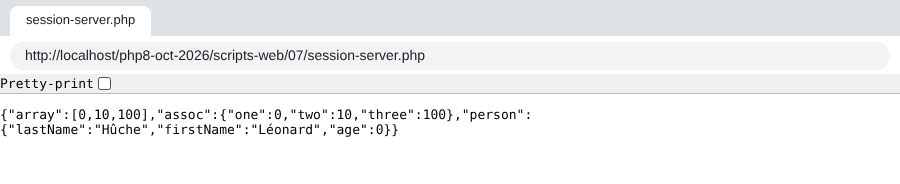
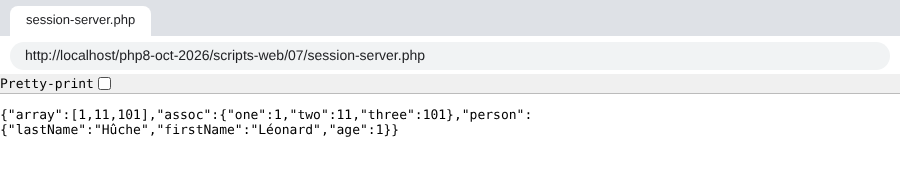
We can see that on the second request, all the counters have been incremented.
17.10.3.2. The client
The client is the same as in Example 1. We provide it only with the configuration file [config-session-client-07.json]:
Executing the command [php session-client.php config-session-client-07.json] produces the following results (start and end):
- Last line: We can see that all counters have been incremented 9 times.
17.11. Authentication
We will now focus on web services intended for specific users only. The client must authenticate with the web service before receiving a response.
17.11.1. The client
The client [auth-client.php] is configured by the following file: JSON [config-auth-client.json]:
- Line 2: the URL of the web service;
- Lines 3–4: the user credentials.
The client code [auth-client.php] is as follows:
Comments
- Lines 29–35: A parameter was passed to the static method [HttpClient::create]—an associative array of options that will apply to all requests from this client;
- Line 31: The option [auth_basic] has a value of a two-element array, [user, password]. The client will use these elements to authenticate with the web service. The option [auth_basic] specifies an authentication type called [Basic], named after the value of the header HTTP [Authorization] that the client will send. There are other authentication types;
- lines 33–34: two useful options for the HTTPS protocol, which we’ll cover a little later. They default to [true] if the configuration file does not specify otherwise;
- Apart from this code, the client is identical to the previous ones.
To view the HTTP headers sent by the client, we connect it to our monitoring server, running on port 100, with the following [config-spy.json] configuration:
The command [php auth-client.php config-spy.json] produces the following output in the spy server’s terminal:
- Line 8: We see the header [Authorization: Basic XXX] sent by the client. The string XXX is the Base64-encoded version of the string [user:password].
To verify this, you can decode the received string using the [base64_decode] function from PHP. The [-r] option of the [php] command executes the PHP code that follows it:
Base64 encoding is not encryption: anyone can decode the string.
17.11.2. The server
The server [auth-server.php] is as follows:
Comments
- line 12: authorized users—in this case, just one—with the login [admin] and password [admin];
- line 17: the method [getUser] of the object [Request] returns the user ID, extracted by PHP from the [Authorization: Basic …] header sent by the client, or [null] if the client did not send that header. Without [HttpFoundation], it would be found in [$_SERVER['PHP_AUTH_USER']];
- line 18: the same applies to the password ([$_SERVER['PHP_AUTH_PW']]);
- lines 20–22: We search for the user attempting to log in in the list of authorized users. Passwords are compared using the function [hash_equals] rather than the operator [===]: its execution time does not depend on where the two strings differ, which prevents an attacker from guessing a password character by character by measuring response times;
- lines 26–29: if the user has not been authenticated, the following is sent to the client:
- the code [401 Unauthorized];
- a [WWW-Authenticate: Basic realm="something"] header. Browsers recognize this header and display an authentication window prompting the user to log in. HTTP headers must be written using only the characters ASCII. The PHP 7 script used the [utf8_decode] function to convert a string UTF-8 to ISO-8859-1; this function has been deprecated since PHP 8.2. If it were needed, we would use [mb_convert_encoding($text, 'ISO-8859-1', 'UTF-8')]. Our text [PHP 8 by example] uses only the characters ASCII;
- lines 30–32: if the user has been recognized, the code [200 OK] is sent to the client;
- line 35: the response contains no document, only a status line and headers.
Let’s request URL [http://localhost/php8-oct-2026/scripts-web/08/auth-server.php] using a browser: the browser displays a login window. If incorrect credentials are entered, the browser displays this window indefinitely until the correct credentials are entered: each time, a round trip to the server occurs, always returning the same response, which triggers the browser’s authentication window. Here is the server’s response without credentials:
- line 2: the code [401 Unauthorized] from the response;
- the header HTTP [WWW-Authenticate] prompts the client to authenticate;
- the body of the response is empty.
With the [-u admin:admin] option, [curl] sends the credentials [admin, admin]:
- line 2: the response code [200 OK];
- the response body is empty.
Let’s run the client [auth-client.php] with the authorized user [admin, admin]. The server’s response is as follows:
- Line 2: The server responded with [200 OK];
- Last line: The response has no content.
Now let's run the client with an incorrect password, using the configuration file [config-auth-client-ko.json]:
The response is as follows:
- Line 2: The client successfully received a 401 code;
- line 4: an exception was thrown in the client. It was thrown by the Symfony client [HttpClient]: it throws an exception of type [ClientExceptionInterface] (4xx codes) or [ServerExceptionInterface] (5xx codes) when the status code of the HTTP response indicates an error and the client attempts to read the response headers or content. The exception message shows that the server responded with [401 Unauthorized] to indicate that the user was not recognized. To read the headers or the body of a response that contains an error anyway, use [$response->getHeaders(false)] or [$response->getContent(false)]. We’ll use this in the tax calculation application, where the server returns a JSON error message along with its error codes.
17.11.2.1. When the server always responds with 401
With certain installations of [Apache], the server responds with [401 Unauthorized] to every request, even with the correct credentials. The cause is not the PHP script: it is the way [Apache] executes PHP. When PHP is a module of [Apache] (mod_php), it receives all the HTTP headers from the request. However, when [Apache] executes PHP in a separate process, according to the FastCGI protocol (modules [mod_fcgid] or [mod_proxy_fcgi]), and by default does not pass on to it the [Authorization] header containing the identifiers: for PHP, the client has never authenticated. For this reason, the [scripts-web] folder contains the following [.htaccess] file, which applies to all its subfolders:
- Line 6: instructs [Apache] (version 2.4.13 and later) to pass the [Authorization] header to the FastCGI programs;
- line 7: a second, older method that copies the [Authorization] header into the [HTTP_AUTHORIZATION] environment variable. The Symfony [Request] class can read the identifiers from there.
With mod_php, these two lines have no effect. We verify that the server is receiving the credentials correctly with [curl], which does not store anything from one request to the next, unlike the browser: [curl -i -u admin:admin "http://localhost/php8-oct-2026/scripts-web/08/auth-server.php"] should return a 200 status code. If the browser continues to display its authentication window, you must either close it completely (it retains rejected credentials for the entire session) or use an incognito window.
17.11.3. Securing the Client/Server Connection
We’ve seen that to authenticate with the server, the client sends the header:
If this line is intercepted by spyware, it can easily retrieve the [login, password] credentials encoded in Base64 within the string [YWRtaW46YWRtaW4=]. For this reason, authentication must take place over a secure connection between the client and the server. Secure URL connections use the [HTTPS] protocol instead of the HTTP protocol. The [HTTPS] protocol is the HTTP protocol within a client/server connection encrypted by the TLS protocol (Transport Layer Security, the successor to SSL). Secure URL connections take the form of [https://document_path]. The default port for the HTTPS protocol is port 443.
Not all web servers accept URL in this format; they must be configured to do so. The [Apache] server from [Laragon] supports the HTTPS protocol, but it is not enabled by default. You can enable it via the [Laragon] menu: right-click in the [Laragon] window, then select [Apache / SSL / Enabled]. The [Apache] server is then restarted, and the [Laragon] window shows that it is now listening on two ports: port 80 (HTTP) and port 443 (HTTPS). During this activation, [Laragon] generated a so-called self-signed certificate for the server.
Web browsers, on the other hand, reject self-signed certificates by default. With a certificate that is simply unknown, [Chrome] and [Edge] display a warning page (“Your connection is not private”) with a button [Advanced] followed by a link [Proceed to localhost (unsafe)]. However, this link is not always provided: it is notably missing when the certificate is deemed non-compliant, or when the browser has cached that the site [localhost] should always be served as HTTPS with a valid certificate (mechanism HSTS). The correct solution is then to trust the certificate for [Laragon]:
- in the [Laragon] menu, select [Apache / SSL / Add laragon.crt to Trust Store]. [Windows] prompts you to confirm adding the certificate to the user’s trusted root certificate authorities; accept;
- close the browser completely (all its windows) and restart it: [Chrome] and [Edge] use the certificate store of [Windows], and the certificate for [Laragon] is now accepted without a warning for [https://localhost];
- if the browser still rejects the page, delete the HSTS rule that it may have cached for [localhost]: open the page [chrome://net-internals/#hsts] (or [edge://net-internals/#hsts] for [Edge]), type [localhost] into the [Delete domain security policies] field and click on [Delete].
As a last resort, and only on your own computer, [Chrome] and [Edge] will allow you to bypass the warning if you type, on the error page itself (without clicking in an input field), the words [thisisunsafe]. This is a browser workaround intended for developers: never use it on a site you do not control. If none of these methods work, use the URL [http://localhost/...] in the browser: we’ll see in the chapter on Version 8 of the tax calculation why this isn’t reckless on your own machine.
Adding the certificate to the [Windows] store does not affect our PHP clients: the [curl] library, which PHP uses, has its own list of certificate authorities. This is illustrated in the following example.
Now that we have a secure server, let’s provide the [auth-client.php] client with the following configuration file, [config-auth-client-https-verify.json]:
- Line 2: The protocol has become [https]. The port is not specified; the default is port 443.
Let’s run the client with this configuration. The console output is as follows:
The Symfony client [HttpClient] threw an exception because it did not accept the certificate sent by the server. The TLS connection relies on certificates issued by recognized certificate authorities. The certificate generated by [Laragon] is a self-signed certificate: it is not validated by any certificate authority. The client therefore rejected it, and rightly so: there is no proof that it is communicating with the real server and not an imposter.
It is possible to instruct [HttpClient] not to verify the certificate sent by the server. This is done using the [verify_peer] and [verify_host] options of the [HttpClient::create] method, which our client reads from its configuration file. The [config-auth-client-https.json] file sets them to [false]:
- Line 5: Do not verify that the certificate was issued by a recognized certificate authority;
- line 6: do not verify that the certificate was issued for the machine being contacted ([localhost] in this case).
We had already encountered this problem in the previous chapter, with the [libcurl] library and its [CURLOPT_SSL_VERIFYPEER] option. The Symfony client [HttpClient] is actually a [curl] client when the [curl] extension is enabled in the PHP configuration, as is the case here: the class instantiated by [HttpClient::create] is then [CurlHttpClient], which translates its options into [curl] options: [verify_peer] becomes [CURLOPT_SSL_VERIFYPEER], and [verify_host] becomes [CURLOPT_SSL_VERIFYHOST].
If we now run the client with the command [php auth-client.php config-auth-client-https.json], we get the following result:
The user was successfully recognized. With [curl], the option [-k] (or [--insecure]) serves the same purpose as our two options:
Note: Disabling certificate verification is only acceptable during development, on your own machine. A cleaner solution is to specify the server’s certificate to the client using the [cafile] option of [HttpClient] (or the [--cacert] option of [curl]): verification remains enabled, and the client accepts that specific certificate. In production, the server has a certificate issued by a recognized certificate authority (for example, free of charge from Let’s Encrypt), and no option is required.
Now we know how to authenticate with a secure server.