23. Practical Exercise – Version 12
In this chapter, we will write a web application that follows the MVC architecture (Model-View-Controller). The application will be able to return responses in three formats: JSON, XML, and HTML. There is a significant increase in complexity between what we are about to do and what we have done previously. We will reuse most of the concepts covered so far and will detail all the steps leading to the final application.
23.1. MVC Architecture
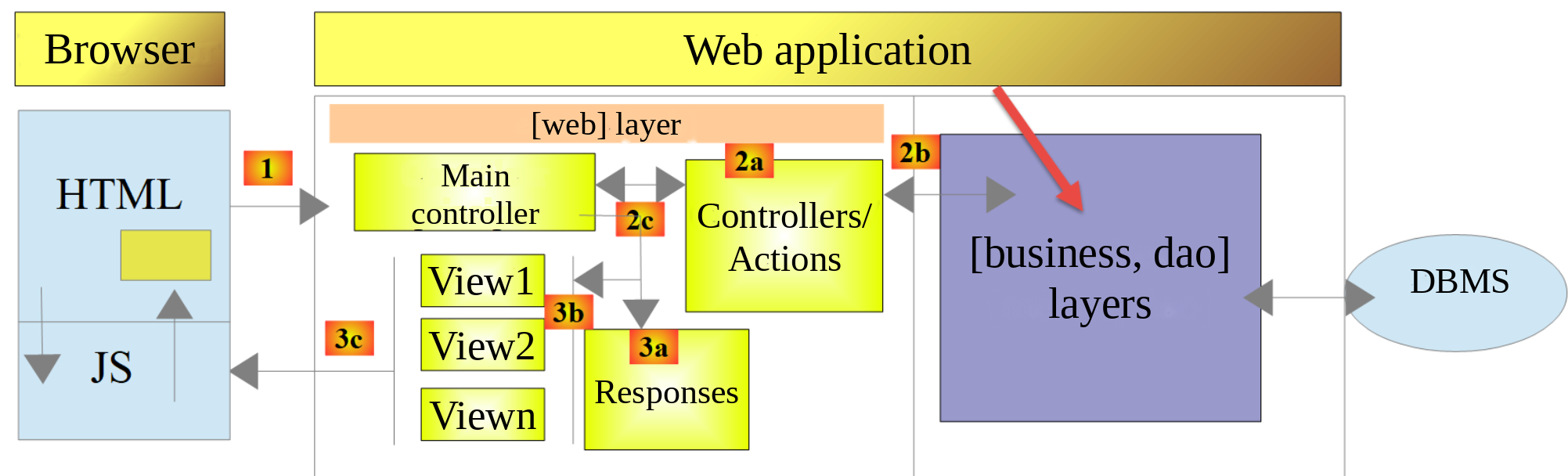
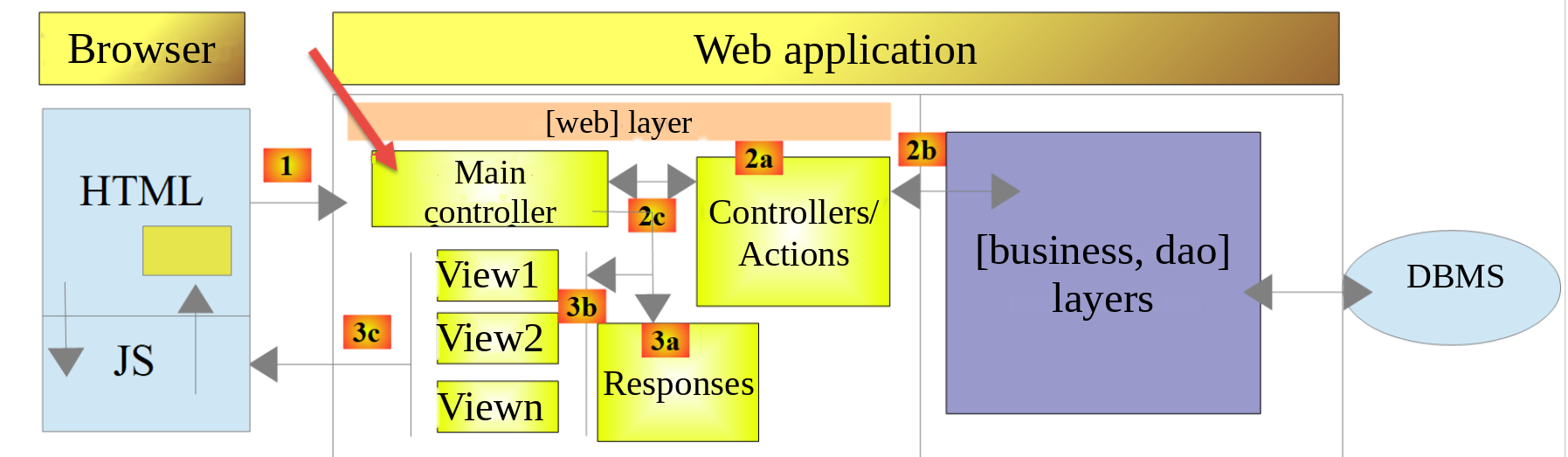
We will implement the architecture model known as MVC (Model–View–Controller) as follows:
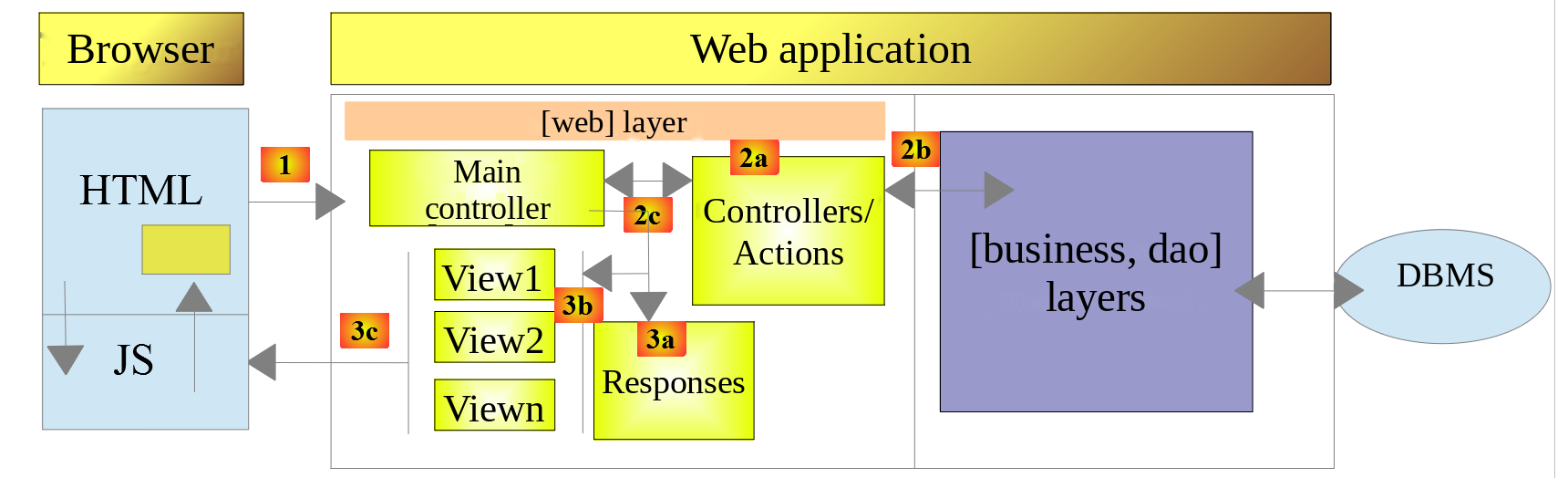
The processing of a client request will proceed as follows:
- 1 - Request: The requested URL parameters will be in the form [http://machine:port/context/main.php?action=anAction¶m1=v1¶m2=v2&…]. The [Main controller] will use the [action] parameter from the URL to “route” the request to the secondary controller responsible for processing this action. The remainder of the URL and [param1=v1¶m2=v2&…] consists of optional parameters that will be passed to the action. The C in MVC is the string [Main controller, Controller / Action]. If no controller can process the requested action, the server will respond that the requested action is invalid;
- 2 - Processing:
- The selected action [2a] can use the parameters passed to it by [Main controller]. These parameters may come from several sources: the [/param1/param2/…] path from URL, the [param1=v1¶m2=v2] parameters from URL, or parameters submitted by the browser with its request;
- When processing the user’s request, the action may require the [business] and [2b] layers. Once the client’s request has been processed, it may trigger various responses. A classic example is: an error response if the request could not be processed correctly, or a confirmation response otherwise;
- [Controller / Action] will return its response, [2c], to the main controller along with a status code. These status codes will uniquely represent the current state of the application. They will be either success codes or error codes;
- 3 - Response:
- Depending on whether the client requested a response of JSON, XML, or HTML, the [Main controller] will instantiate the appropriate response type ([3a]) and instruct it to send the response to the client. The [Main controller] will pass it the response and status code provided by the [Controller / Action] that was executed;
- if the desired response is of type JSON or XML, the selected response will format the response from [Controller / Action] that was provided to it and send it via [3c]. The client capable of processing this response can be a PHP console script or a JavaScript script embedded in a HTML page;
- if the desired response is of type HTML, the selected response will choose one of the HTML views [3b] ([View1], [View2]…) using the status code provided to it. This is the V for MVC. Each status code corresponds to a single view. This view V will display the response from the executed [Controller / Action]. It formats the data from this response using HTML, CSS, and JavaScript. This data is called the view model. It is the “M” in MVC. The client is most often a web browser.
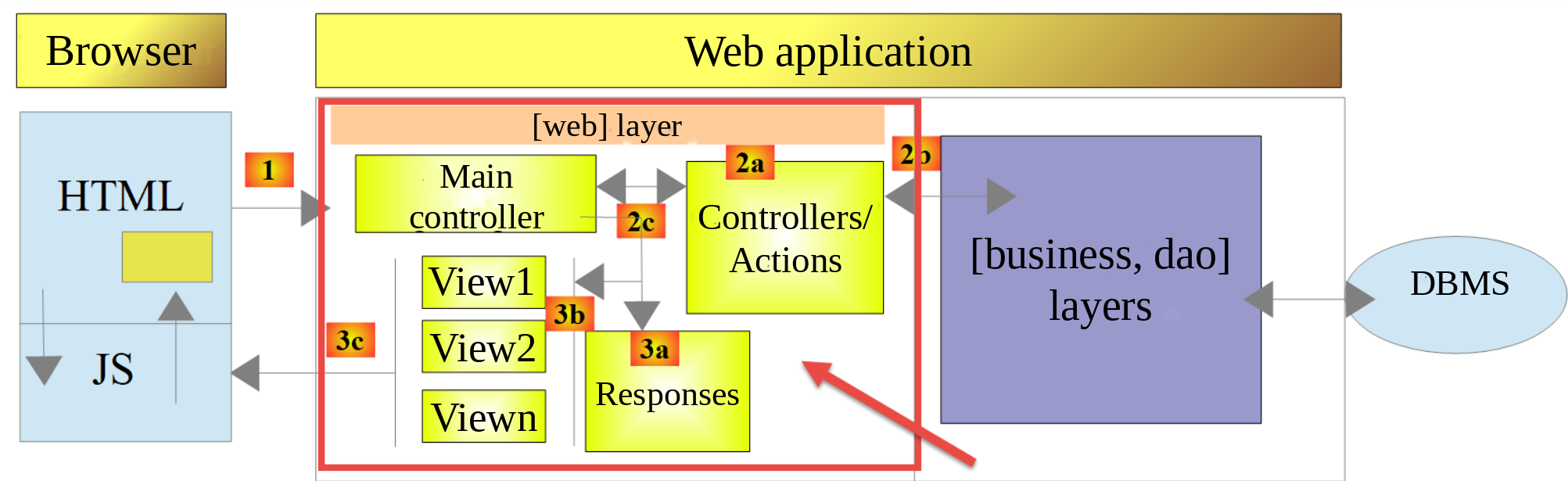
Now, let’s clarify the relationship between web architecture MVC and layered architecture. Depending on how the model is defined, these two concepts may or may not be related. Let’s consider a single-layer web application MVC:
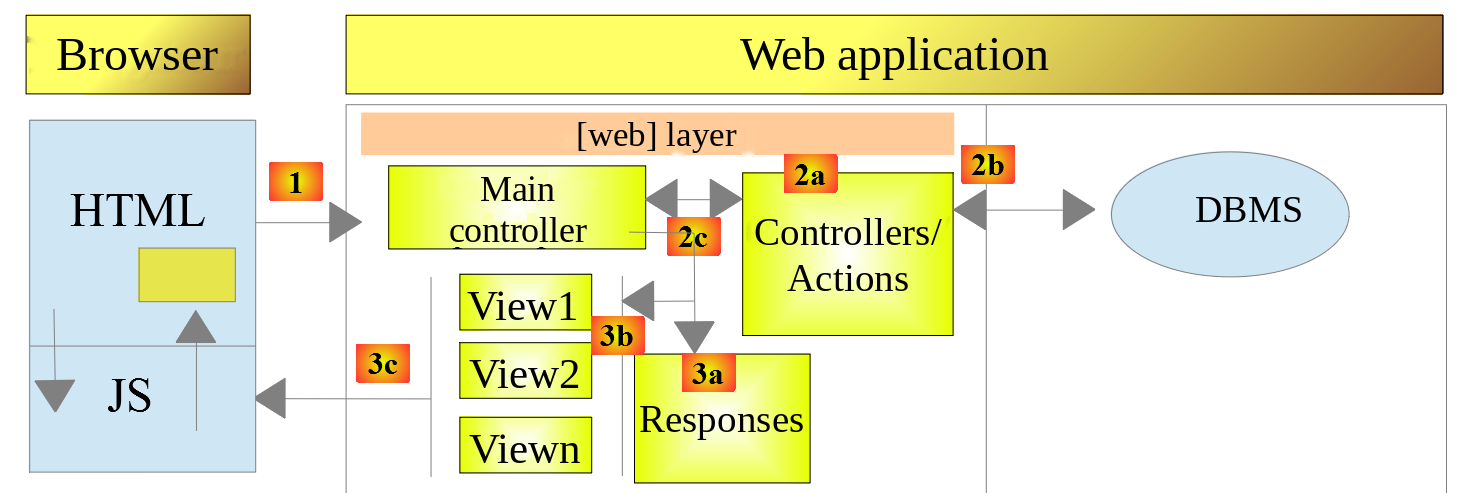
In the example above, each [Controller / Action] component incorporates parts of the [business] and [dao] layers. The [web] layer does indeed have a MVC architecture, but the application as a whole does not have a layered architecture. Here, there is only one layer that does everything.
Now, let’s consider a multi-layer web architecture:
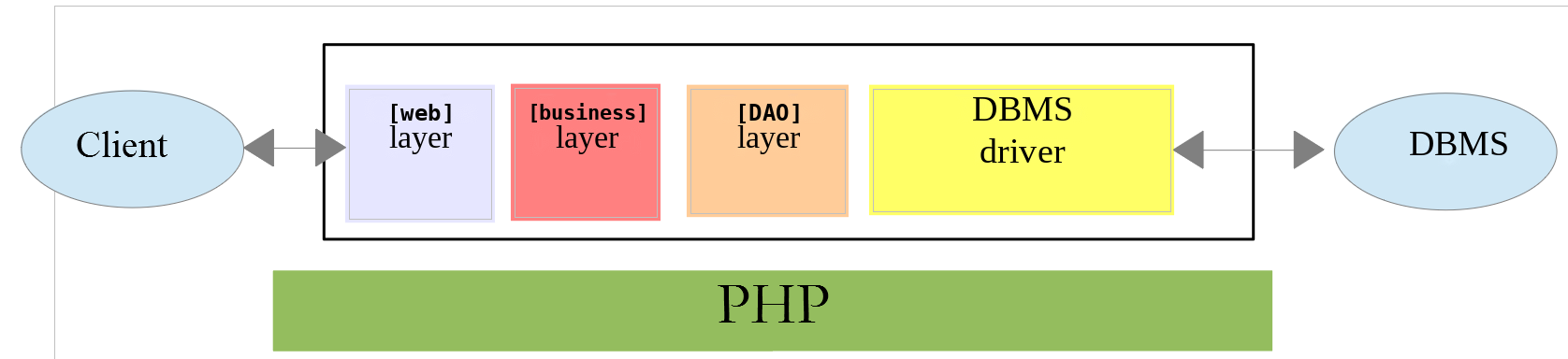
The [web] layer can be implemented without following the MVC model. We then have a multi-layer architecture, but the web layer does not implement the MVC model.
For example, in the .NET world, the [web] layer can be implemented using ASP.NET Core MVC, resulting in a layered architecture with a [web] layer of type MVC. Once this is done, we can replace this ASP.NET Core MVC layer with a ASP.NET Core [Razor Pages] layer while keeping the rest (business logic, DAO, driver) unchanged. We then have a layered architecture with a [web] layer that is no longer of type MVC.
In MVC, we stated that model M is that of view V, i.e.,the set of data displayed by view V. Another definition of model M for MVC is given:
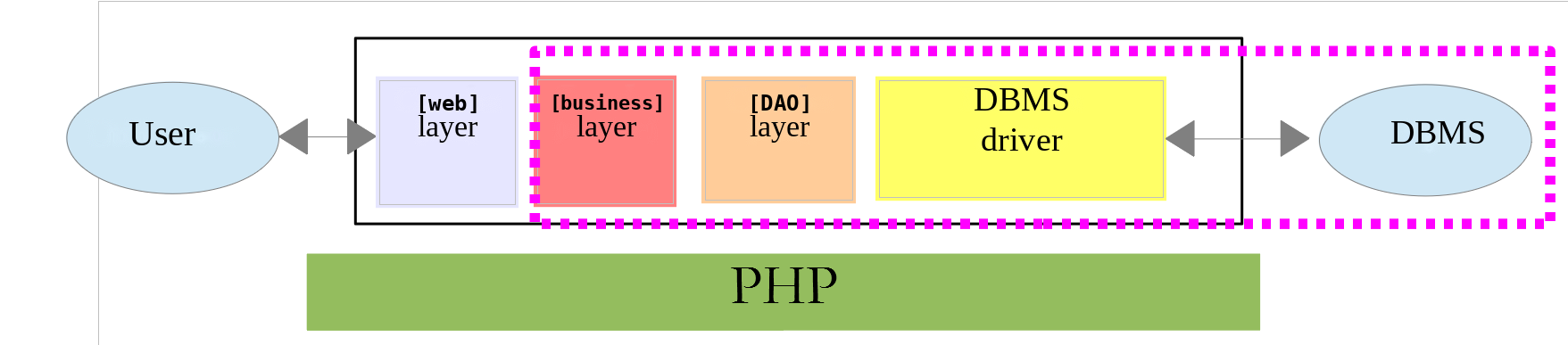
Many authors consider that what is to the right of layer [web] forms the M model of MVC. To avoid ambiguity, we can refer to:
- the domain model when referring to everything to the right of the layer [web];
- the view model when referring to the data displayed by a view V.
23.2. Project Structure
For this project, we are using a directory structure that mirrors the MVC model. In [VS Code], the [scripts-web/tax/version-12] folder contains the following elements:
- [main.php] is the main controller for our MVC model. It is the C in MVC;
- the [Controllers] folder contains the secondary controllers. Each one handles a specific action. This action is specified in the URL, for example, […/main.php?action=authenticate-user]. Based on this action, the main controller [main.php] will select a secondary controller—in this case, [AuthenticateUserController]—to handle the requested action. These controllers are also part of the C in MVC;
- the [Responses] folder contains the classes responsible for sending the response to the client. There is one class for each type of desired response:
- [JsonResponse]: for a JSON response;
- [XmlResponse]: for a response of type XML;
- [HtmlResponse]: for a HTML response;
- The [Views] file contains the HTML views when a HTML response is desired. This is the V of MVC. They are activated by the class [HtmlResponse], which passes them the data to be displayed. This data is the view model. According to the terminology adopted for the M, this data can be the M of MVC;
- the [Tests] folder contains test versions of the views, which allow you to adjust their visual appearance;
- the folder [Entities] contains classes and enumerations used by the various controllers;
- the [Data] folder contains the configuration file [config.json] and the log file [logs.txt]. As in previous versions, the [.htaccess] file in version 8 prevents [Apache] from serving its files: the configuration contains passwords.
The PHP 7 course copied the classes for layers [business] and [dao] (folder [Model]) and the utilities (folder [Utilities]). We do not copy them: as in previous versions, these classes are loaded from the folders of versions 5, 8, 9, and 11, where they were originally written.
Using this directory structure, we can describe the flow of processing for an action requested by a client:
- [main.php] receives the request;
- after performing some preliminary checks (is the action one of the accepted actions?), it forwards the request to the secondary controller responsible for processing that action;
- the secondary controller performs its tasks. In carrying out this task, it may need the layers [business] and [dao], as well as the entities in the folder [Entities]. It returns its response to the primary controller [main.php], which activated it;
- depending on the type of response [JSON, XML, HTML] requested by the client, the main controller [main.php] activates one of the responses from the folder [Responses];
- The responses [JsonResponse, XmlResponse] send the response JSON or XML to the client, respectively;
- The response [HtmlResponse] uses one of the views from the folder [Views] to send a response HTML to the client;
- the various components access the [Logger] class in version 9 to write logs to the [Data/logs.txt] file. The following are logged:
- the requested action;
- the response from its controller. This is recorded in the JSON format regardless of the requested [JSON, XML, HTML] type;
- in the event of a fatal error (status HTTP 500 Internal Server Error), the main controller [main.php] sends an email to the administrator using the [SendAdminMail] class from version 9.
23.3. Application Actions
The client sends the action to be executed to the web server as a [action] parameter in the URL [/main.php?action=xxx]. The PHP 7 course listed the actions allowed in the configuration file, each associated with the name of its controller class. We use an enumeration (PHP 8.1), the [Action] enumeration from the [Entities] folder:
Comments
- line 9: The enumeration [Action] is a “backed” enumeration: each of its cases has a value, in this case of type [string]. We encountered enumerations in the chapter on classes;
- Line 11: [init-session] starts a session of tax calculation simulations. This action specifies the type of responses desired: [JSON, XML, HTML];
- line 12: Once the session type is set, the client must authenticate using the action [authenticate-user]. Until the client is authenticated, all other actions are prohibited except for [init-session];
- line 13: Once authenticated, the client can perform a series of tax calculations using action [calculate-tax];
- line 14: At any time, the customer can request to view the list of simulations they have performed using action [list-simulations];
- line 15: They can delete some of them using action [delete-simulation];
- line 16: The customer ends their simulation session using action [end-session]. From that point on, they will need to log in again if they want to use the application;
- line 17: In the HTML application, the action [display-tax-calculation] displays the form used to calculate the tax;
- lines 20–23: An enumeration can have methods. Within a method, [$this] refers to the enumeration item for which the method is being called. The method [requiresSessionType] specifies whether the action can be executed only when the session type is known: this is the case for all actions except [init-session]. The cases of an enumeration are unique objects: they are compared using the [===] operator;
- Lines 26–32: The method [requiresAuthentication] determines whether the action can only be performed by an authenticated user: this is the case for all actions except [init-session] and [authenticate-user]. The expression [match] allows multiple values, separated by commas, within the same branch.
These rules, which were previously written in the main controller for the PHP 7 course, are now grouped together with the action definitions.
23.4. Web Application Configuration
The application is configured by the following JSON [Data/config.json] file:
Comments
- line 2: the file JSON describing the database MySQL [dbtaxes-2019], which is for version 8. The path is relative to the folder [version-12];
- Lines 3–33: the PHP files for the application. These first contain the classes that have already been written:
- the [TaxException, TaxAdminData, Database] entities and the [Utilities] class from version 5;
- layers [dao] and [business] from versions 8 and 9;
- the utilities [Logger] and [SendAdminMail] from version 9 and [XmlUtilities] from version 11;
- and the classes from version 12, which we will now present. The file PHP 7 also contained the absolute paths to third-party libraries ([C:/myprograms/laragon-lite/www/vendor/autoload.php]): the class loader from [Composer] is now loaded directly by [main.php], using a relative path;
- lines 34–39: the user authorized to use the application;
- lines 40–48: the email contact information for the application administrator. The email is sent to the [Mailpit] server, which listens on port 1025 (see version 9);
- line 49: the path to the log file;
- lines 50–54: the details of the [Redis] server, which serves as the scope memory for [application] (see version 10);
- lines 55–59: [HTML view => array of the status codes leading to this view] associations. These are described a little further on;
- line 60: the [view-errors.php] view is displayed in a HTML session whenever an abnormal error occurs:
- An application such as JSON or XML is typically queried using a programmed client. The client passes parameters to the server, which may be missing or incorrect. The controllers handle these cases and return error codes to the client. All possible error cases must be handled;
- with a HTML application, it’s a little different. Under normal use, the web application utilizes only a subset of the possible use cases for the JSON and XML clients. Let’s take an example: the [calculate-tax] action expects three posted parameters (sent by a POST): [married, children, salary]. With a JSON client that allows you to enter URL manually, you can request the action [calculate-tax] with a GET instead of a POST, or with a POST without any posted parameters when three are required, and so on. The JSON server must handle all these cases. With a web application, the [calculate-tax] action will be requested from a web form where neither of the two previous cases is possible: the [calculate-tax] action will be called with a POST and all three [married, children, salary] parameters. However, the user can reproduce certain errors by manually entering URL values into the browser. For security reasons, this scenario must be handled;
- the view [view-errors.php] will be displayed whenever a secondary controller returns a status code that is incompatible with the web application, i.e.,a status code not present in the [views] key of the configuration file. We are opting for this solution for educational purposes. Another possible option would be to re-display the view currently shown in the client’s browser so that the user gets the impression that the server is not responding to their hand-crafted URL requests.
Compared to the configuration file for the PHP 7 course, the keys [rootDirectory] (the root directory is now known as [main.php]), [actions] (replaced by the enumeration [Action]), and [types] (replaced by the enumeration [ResponseType] presented below) have been removed.
23.5. Tools and Libraries
23.5.1. The [curl] tool
The PHP 7 course used the graphical tool [Postman] to query the various URL components of the web application. We use the command-line tool [curl], introduced in the chapter on web services. It allows us to:
- use any URL: these are created manually;
- to query the web server using a GET, POST, PUT, OPTIONS… (options [-X] and [-d]);
- specify the parameters for GET (in URL) or POST (options [-d] and [--data-urlencode]);
- set the HTTP headers for the request (option [-H]);
- to receive a response in the JSON, XML, or HTML format;
- to have access to the HTTP headers of the response (option [-i]);
- to handle the session cookie like a browser: the [-c cookies.txt] option saves the cookies sent by the server to the [cookies.txt] file, while the [-b cookies.txt] option sends them back to the server.
Since we manually generate the requested URL files, we’ll be able to test all possible error scenarios and see how the server responds. Remember that in a [PowerShell] terminal, you must type [curl.exe] instead of [curl]. All commands in this chapter are entered in a terminal opened in any working directory, where [curl] creates the file [cookies.txt].
To post the parameter [married], we’ll use the option [--data-urlencode "married=yes"], which URL-encodes the parameter’s name and value if necessary. The parameter names ([married], [number]...) contain no accented characters, so in URL we can write them as they are.
23.5.2. The Symfony / Serializer Library
The PHP 7 course used the [Symfony / Serializer] library to serialize server responses into JSON and XML, which may contain [Simulation] objects. It had two advantages: the same API for both JSON and XML; the serialization of objects with private attributes, exposed via getters.
We do not use it in this version, although it is installed in the [vendor] folder for the course:
- our class [Simulation] is a [readonly] class with public attributes (see the following paragraph). The function [json_encode] directly serializes an object’s public attributes: the JSON serialization no longer requires a library;
- for XML, we have the [XmlUtilities] class from version 11, which produces XML documents in the same format as those from version 11, which XML clients already know how to process. All you need to do is provide it with an array, after converting the [Simulation] objects into associative arrays;
- the server never has to deserialize JSON or XML into objects, which was the other advantage highlighted by the PHP 7 course.
The [Symfony / Serializer] library would therefore only add one more dependency here. It remains a good choice when you need to deserialize documents into typed objects or handle many different formats.
23.6. Application Entities
The [Entities] folder contains two enumerations, [Action] (already presented) and [ResponseType] (presented along with the server responses), and two classes. The [Simulation] class encapsulates the elements of a tax calculation simulation:
Comments
- line 9: the class is [readonly] (PHP 8.2): all its attributes are read-only. A simulation is an immutable object: once constructed, it does not change;
- Lines 13–24: The attributes are declared and initialized by passing in the constructor’s parameters (PHP 8.0). They are typed: [string] for marital status, [int] for other parameters and amounts, and [float] for the tax rate;
- the attributes are public: since they are read-only, it is no longer necessary to protect them with getters. The class PHP 7 [Simulation] derived from the class [BaseEntity], had eight untyped attributes [protected], and eight getters.
The second class, [ControllerResult], represents the result that a secondary controller returns to the main controller:
- line 13: the status code HTTP of the response to be sent to the client;
- line 15: the state of the application after the action has been executed;
- line 17: the response itself. Its type depends on the action: a message, a list of error messages, a simulation, or a list of simulations. The type [mixed] (PHP 8.0) accepts any value;
- line 19: the HTTP headers to be added to the response. This is an optional parameter.
In the PHP 7 course, the controllers returned the array [[$statusCode, $status, $content, $headers]]. An object with named and typed attributes is safer: you cannot make a mistake in the order of the elements.
23.7. The app's utilities
The application uses three utilities that have already been described:
- the [Logger] class from version 9 allows you to log events to a text file;
- the [SendAdminMail] class from version 9 allows you to send an email to the application administrator;
- the [XmlUtilities] class from version 11 retrieves the XML document from a table.
23.8. The [business] and [dao] layers
The classes and interfaces of the layers [business] and [dao] have all been defined and used in previous versions:
Class | Role |
TaxException | The class of exceptions thrown by the [dao] layer. Version 5, folder [Entities] |
InterfaceServerDao | Interface implemented by the [dao] layer of the server. Version 8, folder [Dao] |
ServerDao | Implementation of the [InterfaceServerDao] interface: tax data is read from the database. Version 8 |
ServerDaoWithSession | Class derived from [ServerDao]: Tax data can be provided to the constructor. Version 9, folder [Dao] |
InterfaceServerBusiness | Interface implemented by the [business] layer of the server. Version 8, folder [Business] |
ServerBusiness | Implementation of the [InterfaceServerBusiness] interface: tax calculation. Version 8 |
The application currently under development therefore makes extensive use of elements that have already been presented and used:
- the [business] and [dao] layers;
- the utilities [Logger], [SendAdminMail], and [XmlUtilities];
- the entities [TaxException, TaxAdminData, Database].
We will focus on the [web] layer of the application:
23.9. The main controller [main.php]
23.9.1. Introduction
The main controller [main.php] is configured by the file [Data/config.json]. Let’s review its position in our MVC architecture:
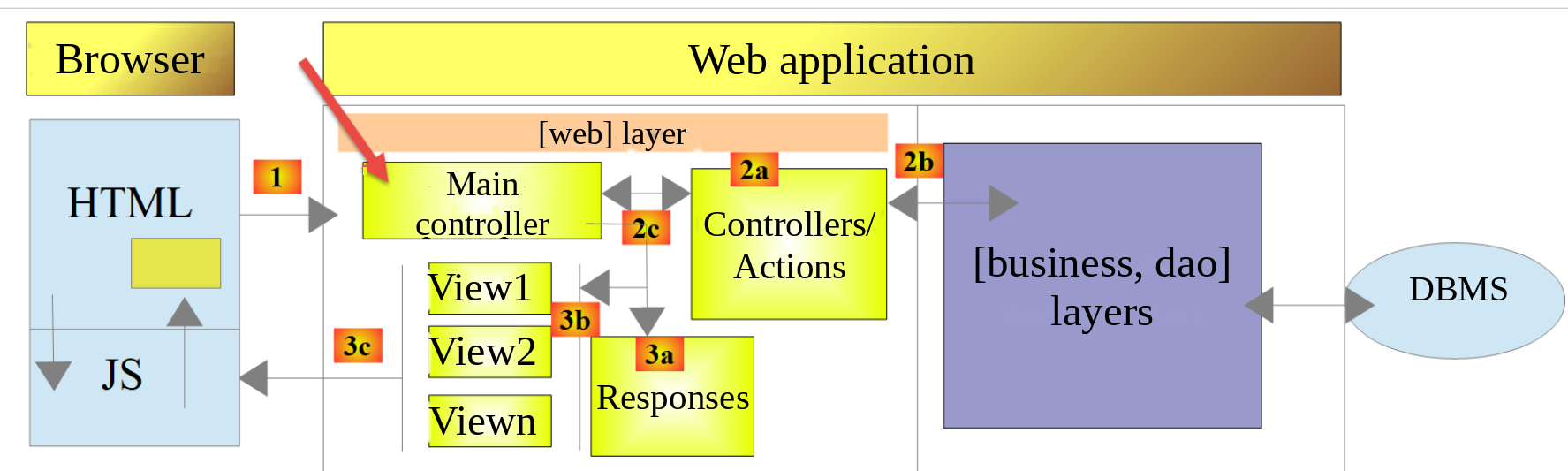
The main controller [main.php] is the first element in the MVC architecture to process the client’s request. It has several roles:
- First, it performs basic checks:
- Does its configuration file exist and is it valid?
- it loads all the project dependencies. This involves loading all components of the MVC architecture;
- Has the requested action been specified? If so, is it valid?
- If the requested action is valid, it selects [2a]—the secondary controller that will process it—and passes it the information it needs: the application configuration, the request HTTP, and the session;
- it retrieves [2c] the response from the secondary controller. Depending on the type (JSON, XML, HTML) of response requested by the client, it selects [3a] the response (JsonResponse, XmlResponse, HtmlResponse) responsible for sending the response to the client and passes it all the information it needs (the request HTTP, the session, the application configuration, and the response from the secondary controller).
23.9.2. [main.php] - 1
The beginning of the primary controller [main.php] is as follows:
Comments
- Lines 10–12: The main controller uses the following classes from the Symfony library [HttpFoundation]:
- [Request]: the HTTP request currently being processed;
- [Response]: the HTTP response to the client;
- [Session]: the web application session;
- Line 15: Errors detected by PHP are not included in the document sent to the client: they would corrupt the responses JSON or XML. They remain logged in the web server’s error log (Apache’s [error.log] file). During development, this line can be commented out: the PHP errors will then appear in the responses received by [curl] or the browser. This aids in debugging. The PHP 7 script also modified the error reporting level using [error_reporting(E_ALL && !E_WARNING && !E_NOTICE)], an expression that was, incidentally, incorrect (it required the bitwise operators [&] and [~]): on the contrary, we want to ignore no errors;
- line 18: the application’s root directory, which is that of the [main.php] script. The paths in the configuration file are relative to this directory. The constant is defined in the [Application] namespace: it is therefore visible to classes in that namespace, particularly the controller that will calculate the tax;
- line 20: the path to the configuration file;
- line 23: the class loader from [Composer] is loaded, making the Symfony and Predis classes available. It is loaded before the configuration is read: the error response sent if the configuration fails uses the Symfony class [Response]. The PHP 7 script used an absolute path here;
- lines 26–29: the configuration file is read. If it does not exist or cannot be read, an error response with status [131] is sent to the client via the [sendConfigError] function;
- lines 30–34: The JSON from the configuration file is decoded. With the [JSON_THROW_ON_ERROR] option, the [json_decode] function throws a [JsonException] exception if the JSON is invalid. An error response is then sent with status [132]. Starting with PHP 8.0, the [catch] clause can omit the exception variable when it is not used: [catch (\JsonException)];
Here we have an existing and syntactically correct configuration file. It would also be necessary to verify that the expected keys are actually present in this file. We will consider this to be part of the developer’s normal debugging work.
The function [sendConfigError] is defined at the end of the script:
- Line 124: The return type [never] (PHP 8.1) indicates that the function never returns control to the caller; it always terminates with [exit] or an exception. A code analyzer such as the [PHP Intelephense] extension of [VS Code] then knows that the code following a call to [sendConfigError] is executed only if the configuration could be read;
- line 126: all responses generated by the web application will have three keys:
- [action]: the action requested by the client (unknown here);
- [status]: the state of the application after executing this action;
- [response]: the web server’s response;
- line 127: Since the application’s classes have not yet been loaded, a Symfony response is constructed directly, with the status [500 Internal Server Error];
- line 128: the response is a JSON document encoded in UTF-8;
- line 129: the response is sent to the client.
23.9.3. [curl] Tests - 1
We will verify the server’s behavior when the configuration file is missing or incorrect. Let’s rename [Data/config.json] to [Data/config2.json], then request the URL from the main controller:
- Line 1: The option [-i] instructs [curl] to display the HTTP headers from the response;
- Line 2: The server returned status code [500 Internal Server Error];
- line 8: The response is a JSON document;
- line 10: the JSON document from the response. This is indeed the one we were expecting.
Let's rename the file back to [config.json], then make it syntactically incorrect—for example, by deleting everything after its second line. We no longer display the headers HTTP:
This initial test showed us that we can send any type of request to the server under test and that we receive the complete response: the HTTP headers and the document that follows them. Let’s not forget to restore the contents of the [config.json] file.
23.9.4. [main.php] – 2
We’ll now resume our analysis of the main controller, [main.php]:
Comments
- lines 37–39: We include all the application’s dependencies. We’ve already encountered this code several times;
- line 42: All information from the client’s request is encapsulated in the Symfony object [Request];
- lines 44–45: a new session is started, or the existing session is retrieved if the client has sent a session cookie. The session is started after the application classes have been loaded: it will contain [Simulation] objects, and the [Simulation] class must be defined by the time PHP reconstructs the session objects;
- Lines 48–59: We attempt to create the [Logger] object, which will allow us to log events to the [Data/logs.txt] file. This creation may fail: the constructor for [Logger] then throws a [TaxException] exception;
- lines 52–56: the error response, with status [133]. The message uses the log file name specified in the configuration rather than the full path: the full path would reveal the server’s folder structure to the client;
- line 57: the response is sent via a [JsonResponse] object, without a log since one could not be created. The application classes are now loaded: they can be used;
- Line 58: The script is terminated.
All responses sent to the client implement the following [InterfaceResponse] interface, from the [Responses] folder:
- Lines 23–31: The [InterfaceResponse] interface has a single method, [send], for sending the response to the client;
- lines 16–22: the meaning of the various parameters of the [send] method;
- lines 27–29: The parameters [$statusCode], [$content], and [$headers] contain the result from the secondary controller and the keys [action, status] added by the primary controller. However, the response may require additional information. Therefore, it is provided with the first three parameters, which give it access to all information regarding the request, the session, and the configuration;
- Line 30: The response requires [Logger] because it will log the response sent to the client. The type [?Logger] indicates that the parameter may be [null]: this is the case when the log could not be created. In the PHP 7 signature, the parameters [Request $request = NULL] and [Logger $logger = NULL] were implicitly nullable: this syntax has been deprecated since PHP 8.4. Additionally, declaring an optional parameter before required parameters has been deprecated since PHP 8.0.
The class [JsonResponse] implements the interface [InterfaceResponse] as follows:
Comments
- Line 13: The class extends the abstract class [ParentResponse], which implements the interface [InterfaceResponse]. All response types extend this class. It is this parent class that sends the response to the client. Because this code is common to all response types, it has been factored into a parent class. Our [JsonResponse] class is not Symfony’s [JsonResponse] class: it is in the [Application] namespace, and we do not import the Symfony class;
- Line 15: The attribute [Override] (PHP 8.3) indicates that the method [send] implements a method from a parent class or an interface. If this were not the case (due to a typo in the name, for example), PHP would report an error;
- Line 26: The response [$content] is serialized to JSON. The options for [json_encode] are defined once and for all in the parent class. The function [json_encode] serializes a [Simulation] object as a JSON object whose keys are the names of its public attributes;
- line 28: the parent class is asked to send the response to the client, specifying the document type as [application/json];
- line 30: the response JSON is logged. The null-safe operator [?->] calls the method [write] only if [$logger] is not [null].
The code for the parent class [ParentResponse] is as follows:
Comments
- Line 13: The class is abstract; it cannot be instantiated. It implements the [InterfaceResponse] interface without defining the [send] method, which will be defined by the child classes. In the PHP 7 course, [ParentResponse] was a regular class that the child classes extended while implementing the interface;
- Line 16: the options of [json_encode] common to all responses. Since PHP 8.3, a class constant can be typed:
- [JSON_UNESCAPED_UNICODE]: accented characters are written as-is and not in the form [\u00e9];
- [JSON_UNESCAPED_SLASHES]: The character [/] is not encoded as [\/];
- [JSON_PRESERVE_ZERO_FRACTION]: A real number is always written with a decimal point (a zero rate is written as [0.0]);
- [JSON_THROW_ON_ERROR]: A serialization error throws a [JsonException] exception;
- line 24: the [sendResponse] method sends the response to the client. Note that the response body [$body] is of type [string] and is therefore ready to be sent;
- line 27: the Symfony class constructor [Response] receives the response body, status, and headers;
- line 29: the type of the sent document, encoded as UTF-8;
- line 31: the response is sent to the client;
- line 35: the method [log] logs the response as JSON. It will be used by the responses XML and HTML;
- lines 42–49: the static method [toArray] returns the data [$data], in which the objects have been replaced by the associative array of their public attributes. It will be used by the response XML:
- the expression [match (true)] selects the first branch whose condition is true;
- line 45: an object is replaced by the array of its attributes, returned by the function [get_object_vars]. When called from outside the object’s class, it returns only its public attributes. The attributes themselves may be objects; therefore, [toArray] is called;
- line 46: Each element of an array is transformed by [toArray]. The syntax [self::toArray(...)] (PHP 8.1) creates an anonymous function (a [Closure]) from the method [toArray]: this is the syntax for first-class callables. With a single array, the function [array_map] preserves the array keys;
- line 47: the other values (strings, numbers) are returned as-is.
23.9.5. [curl] Tests – 2
Let’s modify the file [config.json] as follows: ["logsFilename": "Data"]. The log file is now [Data], which is a folder. Creating the file [Data] should therefore fail:
- Line 2: Status [500 Internal Server Error];
- Line 7: the session cookie: the session was started before the log was created;
- line 12: the expected response JSON.
Let’s restore the value [Data/logs.txt] to the key [logsFilename].
23.9.6. [main.php] – 3
Let’s continue examining the main controller [main.php]:
Comments
- line 62: We log the fact that we have a new request. We couldn’t do this before because we weren’t sure we had a valid log file;
- line 65: the parameter [action] must be part of URL in the form [main.php?action=anAction]. It is therefore part of the [$request->query] parameters of URL. Symfony’s [getString] method returns the parameter’s value as a string, or an empty string if the parameter is missing;
- line 66: the requested action is logged;
- line 68: the static method [tryFrom] of a backed enumeration returns the enumeration case whose value is [$actionName], or [null] if no case has that value. The method [from] would do the same thing but would throw a [ValueError] exception in the second case;
- lines 70–78: preliminary checks. Their result, [$error], is either an array [status, message] describing the first error encountered, or [null] if the action can be executed. The conditions are evaluated in the following order:
- line 71: the parameter [action] is missing from URL: status [101];
- line 72: the action is unknown: status [102];
- line 73: the application provides three response types (JSON, XML, HTML). This type is set by action [init-session], which places it in the session, associated with key [type]. Except for action [init-session], all actions must be performed with a key [type] in the session; otherwise, the status is [103];
- Line 75: Except for actions [init-session] and [authenticate-user], all actions must be performed after authentication. Authentication is performed using the [authenticate-user] action, which, if authentication is successful, sets a [user] key in the session; otherwise, the status is [104];
- line 77: no error;
- lines 79–82: if the requested action or its execution context is incorrect, the error response is prepared but not sent: status [400 Bad Request], status, error list (with a single error in this case). The [[$status, $message] = $error] destructuring assigns the two elements of the [$error] array in a single statement;
- lines 85–93: this is a valid operation. We instantiate the secondary controller that will process it. The PHP 7 course constructed the controller class name from the configuration ([__NAMESPACE__ . $config["actions"][$action]]) and then instantiated it with [new $controller()]. The expression [match] on the cases of the enumeration [Action] is safer: the code analyzer for [VS Code] checks the class names, and if a case is added to the enumeration without adding it here, [match] will throw a [UnhandledMatchError] exception instead of instantiating a random class;
- line 94: the name of the secondary controller is logged for verification during development. Starting with PHP 8.0, [$object::class] returns the full class name of an object;
- line 95: the secondary controller is executed. It returns a [ControllerResult] object. We’ll come back to secondary controllers a little later;
- We then reach line 99 either because an error occurred or after a controller was executed. In either case, the object [$result] contains everything needed to generate the response to the client;
- Line 99: The response to the client is a three-key array named [action, status, response]. The key [action] will facilitate better tracking of the logs in the file [logs.txt]. The key [status] will serve two purposes:
- it will allow clients JSON and XML to determine the state into which the executed action has placed the web application;
- in the case of a HTML response, it will allow the system to select the HTML view to be sent to the client browser;
- Lines 101–104: Special case of status code [500 Internal Server Error]. If a controller has set this status code, it means the application cannot function. This is the case, for example, with tax calculations if the DBMS or the [Redis] server has not been started or is no longer responding. An email is then sent to the application administrator to notify them, using class [SendAdminMail] from version 9;
- Line 107: The response type [JSON, XML, HTML] is determined. If the action [init-session] was executed successfully, this type is present in the session, associated with the key [type]. If this is not the case, the [get] method of the session returns the default value [""], [tryFrom] returns [null], and the operator [??] selects the type JSON;
- Lines 109–117: The method [response] of the enumeration [ResponseType], described later, returns the object [JsonResponse], [XmlResponse] or [HtmlResponse], which is appropriate for the session type. Its method [send] sends the response to the client. Since the three classes implement the same [InterfaceResponse] interface, their [send] methods all have the same signature;
- Line 119: The main controller has completed its work. The script PHP 7 used to close the log file here; our class [Logger] no longer has a method [close].
23.9.7. [curl] Tests – 3
We will test various error scenarios for the [action] parameter of URL:
- Lines 1–2: A request without the [action] parameter in URL: status [101];
- lines 4–5: a request with an invalid [action] parameter: status [102];
- lines 7–8: an action recognized but the session type (json, xml, html) has not yet been specified: status [103].
In all three cases, the key [response] is an error list, in this instance containing a single error.
23.10. Secondary controllers
Each action is executed by one of the controllers in the [Controllers] folder:
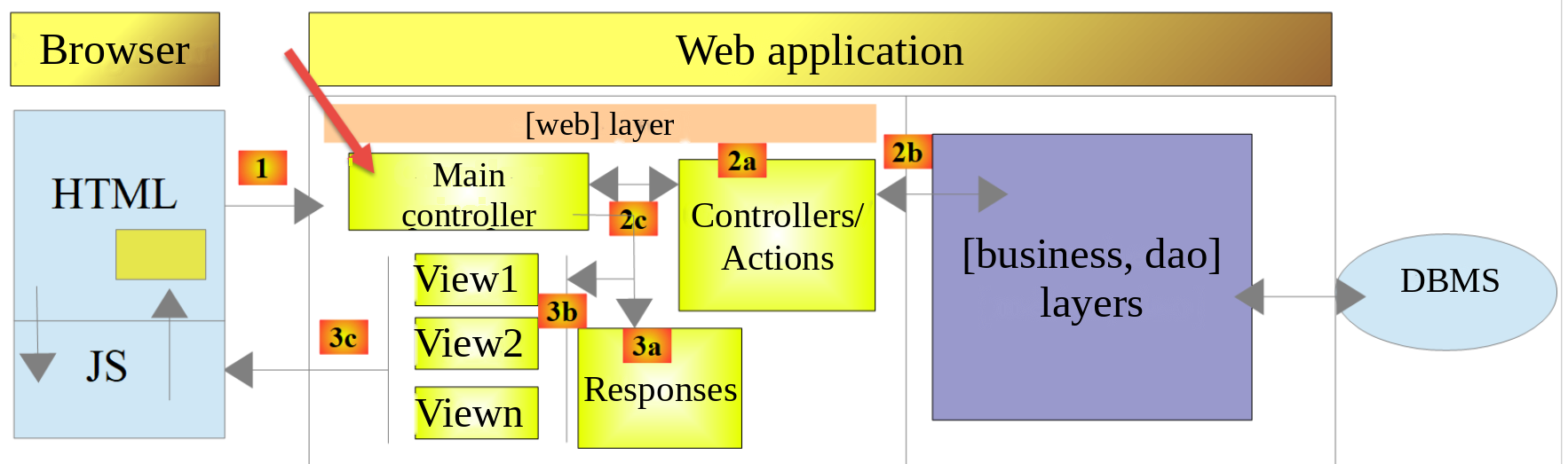
In the overall architecture of the application above, the secondary controllers are in [2a]. Each controller implements the following [InterfaceController] interface:
Comments
- Line 20: All secondary controllers are executed via the [execute] method. Information known to the main controller is passed to this method:
- [array $config]: the application configuration;
- [Request $request]: the HTTP request currently being processed;
- [Session $session]: the current web application session;
- The [execute] method returns a [ControllerResult] object: the response status code HTTP, the state of the application at the end of execution, the response to be sent to the client, and the headers HTTP to be added to the response.
Method PHP 7 had a fourth parameter, [array $infos = NULL], which was included “just in case” but never used: we have removed it. Each secondary controller is called by the following code in the main controller:
23.11. Actions
We will now review the various possible actions of the web service:
Action | Role | Execution Context |
init-session | Used to specify the type (json, xml, html) of the desired responses | Request GET main.php?action=init-session&type=x Can be issued at any time |
authenticate-user | Authorizes or denies a user’s login | Request POST main.php?action=authenticate-user The request must include two POST parameters: [user, password] Can only be issued if the session type (json, xml, html) is known |
calculate-tax | Performs a tax calculation simulation | Request: POST main.php?action=calculate-tax The request must have three POST parameters: [married, children, salary] Can only be issued if the session type is known and the user is authenticated |
list-simulations | Requests a list of simulations performed since the start of the session | Request GET main.php?action=list-simulations The request does not accept any other parameters Can only be issued if the session type is known and the user is authenticated |
delete-simulation | Deletes a simulation from the list of simulations | Request GET main.php?action=delete-simulation&number=x The request does not accept any other parameters Can only be issued if the session type is known and the user is authenticated |
end-session | Ends the simulation session | Request GET main.php?action=end-session Technically, the old web session is deleted and a new session is created Can only be issued if the session type is known and the user is authenticated |
display-tax-calculation | Displays the tax calculation view (application HTML) | Request GET main.php?action=display-tax-calculation Can only be issued if the session type is known and the user is authenticated |
All secondary controllers proceed in the same way:
- they check their parameters. These are found in the [$request->query] object for parameters present in the URL object and in the [$request->request] object for those that are posted (request POST);
- A controller is similar to a function or method that checks the validity of its parameters. For the controller, however, it’s a bit more complicated:
- the expected parameters may be missing;
- the expected parameters are all character strings, whereas a function can specify the type of its parameters. If the expected parameter is a number, then you must verify that the parameter’s string actually represents a number;
- once it has been verified that the expected parameters are present and syntactically correct, you must verify that they are valid within the current execution context. This context is stored in the session. Authentication is an example of an execution context: certain actions should only be processed once the client has been authenticated. A key in the session indicates whether this authentication has taken place or not;
- Once the previous checks have been completed, the secondary controller can begin processing. This parameter validation is very important. We cannot allow a client to send us just anything at any point during the application’s lifecycle. We must maintain complete control over the application’s lifecycle;
- Once its work is done, the secondary controller returns the [ControllerResult] object expected by the primary controller that called it.
We will now review the various controllers—or, in other words, the various actions that drive the web application’s lifecycle.
23.11.1. The [init-session] action
The action [init-session] is handled by the following controller, [InitSessionController]:
Comments
- A request for [GET main.php?action=init-session&type=xxx] is expected;
- Line 14: The class implements the [InterfaceController] interface. It is [final]: it cannot be derived from;
- Lines 20–23: We verify that the request is a GET request with two parameters in the URL. If this is not the case, an error result is returned to the main controller with the status [701]. The Symfony method [getMethod] returns the name of the method HTTP in uppercase: it is no longer necessary to convert it to lowercase as the script PHP 7 did;
- lines 25–27: We verify that the parameter [type] is present in URL. If not, we return an error result with status [702];
- line 29: Record the session type;
- Lines 30–32: Check that the session type is one of the terms (json, xml, html), i.e. the value must be one of the cases in the enumeration [ResponseType]. If this is not the case, return an error result with status [703];
- line 34: the session type is set in the web application session;
- line 36: the controller has finished its work. A success result is returned to the main controller, with status [700].
Every error case results in an immediate [return]. The script PHP 7 used a Boolean variable [$error] that was checked at each step: the code is now shorter and more readable. Let’s review what the main controller does with the responses from the secondary controllers: it adds the keys [action] and [status] to the response and sends it by instantiating one of the [JsonResponse, XmlResponse, HtmlResponse] classes depending on the type (json, xml, html) of the current session.
Next, we will perform [curl] tests as part of a [json] simulation session.
23.11.2. [curl] Tests
- Lines 1–2: the [init-session] action without the [type] parameter: the request does not have the two expected parameters; status [701];
- lines 4–5: the action [init-session] with parameter [typ] instead of [type]: status [702];
- lines 7–8: action [init-session] with an incorrect parameter [type]: status [703];
- lines 10–20: action [init-session] with type [json]: status [700].
The [-c cookies.txt -b cookies.txt] options cause [curl] to handle the session cookie like a browser. The cookie was sent by the server in its response to the first request (lines 1–2); [curl] saved it to the file [cookies.txt] and sends it back with every request. The server no longer sends it (lines 11–18); it only does so at the start of a new session. The file [cookies.txt] now contains:
23.11.3. The [authenticate-user] action
The action [authenticate-user] is executed by the following controller, [AuthenticateUserController]:
Comments
- We are waiting for a [POST main.php?action=authenticate-user] request with two posted parameters, [user, password];
- Lines 20–23: The system checks whether there is a POST request with a single parameter in URL. If not, an error result is returned with status [201];
- line 26: the error status for the posted parameters starts at value 210;
- lines 28–31: We check for the presence of the parameter [user] in the posted values. If it is not present, we log the error and increment the status by 2;
- Lines 33–36: We check for the presence of the parameter [password]. If it is not present, we log the error and add 4 to the status. The status is therefore 212 if only [user] is missing, 214 if only [password] is missing, and 216 if both are missing;
- lines 38–40: if any of the posted values is missing, an error result is returned, with the response being the list of errors;
- lines 41–42: the posted identifiers;
- lines 44–47: verify that the pair [[$user, $password]] is present in the [$config["users"]] array in the configuration file. The function [array_any] (PHP 8.4) returns [true] if at least one element of the array satisfies the condition expressed by the arrowed function. The password is compared using the function [hash_equals], whose execution time does not depend on the position of the first differing character: an attacker cannot guess the password character by character by measuring response times. The script PHP 7 used a loop [while];
- lines 48–51: if the user is not found, an error result is returned with status HTTP [401 Unauthorized] and status [221]. Message PHP 7 contained the entered password: a password must never be sent back to the client or written to the logs;
- line 53: authentication was successful. This is recorded in the session by adding the key [user], with the user ID as its value. The presence of this key indicates successful authentication;
- Line 55: A success result is returned to the main controller, with the status [200].
23.11.4. [curl] Tests
We proceed with testing the [AuthenticateUserController] controller in JSON mode, within the session opened previously:
- Lines 1–2: Before any authentication, a tax calculation is requested. The option [-d] converts the request to POST. The main controller rejects the action: status [104];
- lines 4–5: the action [authenticate-user] uses a GET when a POST is required: status [201];
- lines 7–8: a POST (option [-X POST]) with no posted parameters: status [216];
- lines 10–11: a POST with only the [password] parameter: status [212]. With the [-d] option, parameters are submitted just as they would be in a HTML form: the request body is the string [password=x], and the header [Content-Type] is set to [application/x-www-form-urlencoded];
- lines 13–14: a POST with the single parameter [user]; status [214];
- lines 16–26: a POST with invalid identifiers: status [221]. Note the response status [401 Unauthorized] (line 17);
- lines 28–38: a POST with valid identifiers: status [200] and status [200 OK] (line 29).
23.11.5. Action [calculate-tax]
The [calculate-tax] action is processed by the following [CalculateTaxController] controller:
1 2 3 4 5 6 7 8 9 10 11 12 13 14 15 16 17 18 19 20 21 22 23 24 25 26 27 28 29 30 31 32 33 34 35 36 37 38 39 40 41 42 43 44 45 46 47 48 49 50 51 52 53 54 55 56 57 58 59 60 61 62 63 64 65 66 67 68 69 70 71 72 73 74 75 76 77 78 79 80 81 82 83 84 85 86 87 88 89 90 91 92 93 94 95 96 97 98 99 100 101 102 103 104 105 106 107 108 109 110 111 112 113 114 115 | |
Comments
- The expected request is [POST main.php?action=calculate-tax] with three posted parameters [married, children, salary]:
- [married] must have its value in [yes, no];
- [children, salary] must be positive integers or zero;
- Lines 13–16: As in version 10, we use the [Predis] library and the [dao] layer from version 9, under the alias [ServerDaoWithRedis];
- lines 25–29: We verify that there is indeed a POST with a single parameter in the URL. If this is not the case, an error result is returned to the main controller, with status [301];
- lines 32–33: error messages are accumulated in the array [$errors]. The count starts at 310, and each error increments it by one;
- lines 35–44: We check for the presence of parameter [married] (+2 if missing), then verify that its value is in [yes, no] (+4 otherwise);
- lines 47–60: The parameters [children] and [salary] are checked by the same loop. The array being iterated through associates each parameter with the pair of values added to the state when the parameter is missing or invalid: (8, 9) for [children], (16, 17) for [salary]. The unpacking of [[$missing, $invalid]] is performed directly within the [foreach] statement. The PHP script 7 wrote the same code twice;
- lines 48–52: the parameter is missing; the [continue] statement moves on to the next parameter;
- lines 54–59: the value must be a sequence of at least one digit. If so, it is converted to an integer and stored in the array [$values];
- lines 62–64: If there were any errors, a result is returned containing a list of the errors;
- line 65: the parameters are valid. The tax can be calculated. To do this, the layers [dao] and [business] must be created, which are capable of performing this calculation;
- lines 68–79: A client named [Redis] is created, and a connection to the server is established immediately. If we were unable to connect to the server [Redis], we return a result with status [500 Internal Server Error] and condition [350];
- lines 81–98: construction of the [dao] layer:
- Line 82: Check whether the server [Redis] has the key [taxAdminData]. This key represents the tax administration data. The method [get] of [Predis] returns [null] if the key does not exist;
- line 85: the key does not exist; the tax data must be retrieved from the database. The path to the database description file is relative to the application’s root directory, which is determined by the constant [ROOT_DIRECTORY] defined by [main.php];
- line 86: the data retrieved from the database is stored in memory [Redis] with the key [taxAdminData], in the form of its string JSON;
- lines 89–90: if the key [taxAdminData] exists in memory [Redis], the tax data is passed directly to the layer builder [dao];
- lines 92–94: if the database query failed, a result is returned with status [500 Internal Server Error], application status [341], and the exception message thrown by layer [dao]. The listing for course PHP 7 showed status 340 here, whereas its source code, its configuration (which associates status 341 with the tax calculation view), and its text all used 341. We chose 341: status 340 is already the status for a request with three invalid posted parameters (310 + 4 + 9 + 17);
- lines 95–98: the [finally] clause is executed in all cases, regardless of whether an exception occurred, and even if the [catch] block ends with a [return]. Here, the connection to the [Redis] server is closed;
- line 100: the [business] layer is created and calculates the tax. The result is the [tax, surcharge, discount, reduction, rate] array;
- Line 102: Based on the result of the calculation, an object [Simulation] is created. The first three arguments are positional. The operator [...] then decomposes the associative array [$result]: Starting with PHP 8.1, its keys become named arguments—in this case, [tax, surcharge, discount, reduction, rate]—which are the names of the last parameters of the constructor;
- line 104: the simulation that has just been constructed is added to the list of simulations already calculated, which is located in the session. The second parameter of the session’s [get] method is the value returned if the key is absent: an empty list if no simulations have been performed yet. The new list is constructed by decomposing the old list, followed by the new simulation, and then returned to the session;
- line 106: the simulation is returned to the main controller, with the status [300];
- line 111: An error message from a DBMS driver may not be encoded as UTF-8 (see version 8). In that case, it could not be placed in a JSON string. The PHP 7 script used the [utf8_encode] function, which has been deprecated since PHP 8.2; we now use [mb_convert_encoding].
23.11.6. [curl] Tests
We are testing the [CalculateTaxController] controller in JSON mode, with the user authenticated:
- Lines 1–2: We make a request for GET instead of POST: status [301];
- lines 4–5: a request POST with all three parameters from [married, children, salary] present and all invalid: status 310 + 4 + 9 + 17 = 340;
- lines 7–8: only the parameter [salary] is posted, and it is also invalid: status 310 + 2 + 8 + 17 = 337;
- lines 10–11: a tax calculation with valid parameters: record [300]. The result is the JSON object from the simulation. This matches the tax amount of 2,814 euros from the official 2019 example for a couple with two children and an income of 55,555 euros;
- Lines 13–14: a second tax calculation.
Note that the status does not always indicate a unique combination of errors: 8 + 17 = 9 + 16. Status 337 also corresponds to a request where [married] and [salary] are missing and where [children] is invalid. The list of error messages provides a precise description of the errors.
Let’s now simulate a failure of the [Redis] server. Rather than shutting down the server, we specify in [config.json] a port on which no server is listening: ["port": 6380]. After re-authentication, a calculation request returns the following response:
- line 5: status [500 Internal Server Error];
- line 14: the status [350] and the exception message thrown by [Predis].
An email was sent to the application administrator: this can be seen in the web interface for [Mailpit] (URL [http://localhost:8025]). Its subject line is [tax calculation server crash], and its body contains the response JSON sent to the client. Don’t forget to restore port 6379.
23.11.7. Action [list-simulations]
The action [list-simulations] is processed by the following secondary controller, [ListSimulationsController]:
Comments
- [GET main.php?action=list-simulations] request;
- lines 20–23: Verify that there is a GET request with a single parameter. If this is not the case, an error result is returned to the primary controller, with status [501];
- line 25: The list of simulations found in the session is returned to the main controller—or an empty list if the session contains none—with the status [500]. Course PHP 7 declared the class without [implements InterfaceController]: an omission, corrected here.
23.11.8. [curl] Tests
We will run two tests, one with an error and one that succeeds:
- Lines 1–2: a GET request with an extra [param1] parameter in the URL: status [501];
- Lines 4–5: A valid query: status [500]. The response is the list JSON of the two simulations performed previously.
23.11.9. Action [delete-simulation]
Action [delete-simulation] is processed by the following secondary controller, [DeleteSimulationController]:
Comments
- request [GET main.php?action=delete-simulation&number=x];
- lines 20–22: Check that there is a request GET with two parameters. Otherwise, the status is [602];
- lines 24–26: Check that the parameter [number] exists among the parameters of URL. Otherwise, the status is [604];
- lines 28–31: Check that the value of parameter [number] is syntactically correct: a positive integer or zero. Otherwise, the status is [612];
- lines 33–37: Verify that simulation No. [number] actually exists: the number must be in the range [0, n-1], where n is the number of simulations in the session. Otherwise, the status is [628]. Since the number cannot be negative, it is sufficient to verify that it is less than n. If the session contains no simulations, n is 0;
- line 39: simulation No. [number] is deleted by function [array_splice], which deletes an element starting at position [$number] and renumbers the subsequent elements. The script PHP 7 used [unset], which does not change the keys of the other elements, and then [array_values] to obtain a list with keys [0, n-2];
- line 41: the new simulation table is returned to the session;
- line 43: the new list of simulations is returned to the main controller, with the status [600];
- line 47: a utility method that constructs an error result. The error statuses are those from script PHP 7, which calculated them by adding 2, 4, 8, and then 16 to status 600 as the checks progressed.
23.11.10. Tests for [curl]
We will perform error and success tests:
- lines 1–2: a GET request without the parameter [number]: status [602];
- lines 4–5: a request GET with two parameters but without [number]: status [604];
- lines 7–8: a request with a syntactically incorrect number: status [612];
- lines 10–11: a request with a simulation number equal to 100 that does not exist: status [628];
- lines 13–14: simulation #0, the first in the list, is deleted: status [600]. The response is the new list, which now contains only the second simulation;
- lines 16–17: the operation is repeated; there are no simulations left in the session.
23.11.11. Action [end-session]
Action [end-session] is processed by the following secondary controller, [EndSessionController]:
Comments
- request [GET main.php?action=end-session];
- lines 20–23: Verify that the action is a GET with the single parameter [action]. Otherwise, the status is [401];
- line 25: Before the session ends, the session type ([json, xml, html]) is stored;
- line 27: the current session is invalidated. This deletes the data stored in it, and a new session is started with a new identifier;
- Line 29: The type from the previous session is restored in the new session. Finally, we start over with a new session having the unique key [type]: the user will need to authenticate again;
- Line 31: The result is returned to the main controller, with the status [400].
23.11.12. [curl] Tests
We will perform an error test and a success test:
- Lines 1–2: We request session termination with a POST instead of the expected GET: status [401];
- Lines 4–16: A valid [end-session] action: status [400];
- lines 10–11: the server sends two [Set-Cookie] headers. The first instructs the client to delete the old session cookie (its expiration date has passed). The second provides the client with the new session cookie: a new web session begins. We saw that, within the same session, the server no longer sends the session cookie after the first response;
- lines 18–19: In the new session, the user is no longer authenticated: status [104].
23.12. Server Response Types
23.12.1. Introduction
Let’s review the application’s overall architecture:
We will now present the possible response types [3a]. These are located in the [Responses] folder of the project. We have already introduced the [InterfaceResponse] interface, the parent class [ParentResponse], and the [JsonResponse] class. The response type for a session is set by the action [init-session], which places it in the session. It is represented by the enumeration [ResponseType] in the folder [Entities]:
Comments
- lines 11–13: the three response types. The value for each case is the expected value for the [type] parameter of action [init-session];
- Lines 16–23: The [response] method returns the object responsible for sending a response of this type. The return type is the [InterfaceResponse] interface: the calling code is only aware of the [send] method of the interface. The PHP 7 course associated each type in the configuration file with a class name (key [types]) and instantiated it using [new $response()].
Let’s review the code from the main controller that requests that the response be sent to the client:
- Line 107: The response type is determined;
- line 109: the appropriate response class is instantiated, and the response is sent to the client using its method [send($request, $session, $config, $statusCode, $content, $headers, $logger)].
23.12.2. The [JsonResponse] class
has already been introduced. However, we are including its code again to better highlight the consistency among the three response classes:
23.12.3. The [XmlResponse] class
The [XmlResponse] class is as follows:
Comments
- Line 27: The response [$content] is serialized to XML by the method [arrayToXml] of the class [XmlUtilities] in version 11. This method expects an array whose values are either arrays or simple values: the [toArray] method of the parent class first replaces the [Simulation] objects with the array of their attributes. The root element of the document is named [root], as in course PHP 7;
- line 29: the parent class sends the response to the client, with the type [application/xml];
- line 31: the response is logged as JSON, which is more concise than XML.
The PHP 7 course used the XML encoder from the [Symfony / Serializer] library, and a second encoder, JSON, for the logs.
23.12.4. [curl] Tests
We have already run all possible error tests in JSON. There is nothing else to do in XML. We are starting a new session (file [cookies.txt] deleted) of type XML:
- Lines 1–7: the session-start request XML, and the server’s response XML. From now on, all server responses will be in XML. You can reuse all previously used requests without changing them, and each will return a response in the format XML;
- lines 9–15: a successful authentication;
- lines 17–32: a tax calculation. The element [response] contains the simulation attributes as child elements;
- lines 34–51: the list of simulations. Each simulation is a [item] element of the [response] element;
- lines 53–63: a list of errors. Each error message is a [item] element.
23.12.5. The [HtmlResponse] response
When the session type is [html], an object of type [HtmlResponse] is instantiated to send the response to the client. This object will send the client a HTML document, which depends on the status code returned by the secondary controller that processed the action. This mapping, [status => view], is entered in the configuration file [config.json] as follows:
This configuration is interpreted as follows: [‘view name' => ‘statuses associated with this view']:
- line 56: if the secondary controller returned a status from the [700, 221, 400] array, then display the [view-authentication.php] view;
- line 57: if the secondary controller returned a status from the [200, 300, 341, 350, 800] array, then display the [view-tax-calculation.php] view;
- Line 58: If the secondary controller returned a status from the [500, 600] array, then display the [view-simulations-list.php] view;
- Line 60: If the secondary controller has returned a status that is not in any of the previous arrays, then display view [view-errors.php].
The views are contained in the [Views] folder of the project. The code for the [HtmlResponse] class is as follows:
Comments
- line 26: The view to be displayed depends on the status code returned by the controller that processed the action. This code is in [$content["status"]];
- Lines 29–32: The application configuration is searched for the view that corresponds to this status. The function [array_find_key] (PHP 8.4) returns the key of the first element in the array [$config["views"]] that satisfies the condition expressed by the arrowed function—in this case, the name of the first view whose list of states contains [$status]. If no element satisfies the condition, it returns [null]: this indicates an abnormal status code for the application HTML, and the error view is displayed using the operator [??]. The script PHP 7 performed this search using a fifteen-line loop [while];
- lines 35–38: the code PHP from the selected view is executed, and the result is stored in the variable [$html]. This code warrants some explanation. Let’s imagine that the selected view is [view-authentication.php], which displays a web authentication form:
- Line 35: The function [ob_start] initiates what the documentation refers to as an output delay. Anything written by the operations [print], [echo], or by the text HTML from an included script—and which would normally be sent immediately to the client—is placed in an output buffer (ob) without being sent to the client;
- Line 36: The view [view-authentication.php] is loaded; this is a dynamic view HTML containing code PHP. Two things then happen. First, the PHP code in the view is executed. The result is a page that contains only HTML, or even CSS and JavaScript, but no longer PHP. Next, this HTML code is normally sent to the client. This is actually the case for any text encountered by the PHP interpreter that is not PHP code. Due to the output delay, this code
HTMLis placed in the output buffer without being sent to the client; - Line 38: The [ob_get_clean] function does two things: it returns the contents of the output buffer—that is, the HTML page that was placed there—and it clears the buffer and stops the output delay. From the client’s perspective, it’s as if nothing had happened: it still hasn’t received anything;
- The view is included by the [send] method: The view's code therefore has access to the method's local variables, specifically its parameters [$request], [$session], [$config], and [$content]. This is how the view receives the data it needs to display;
- [__DIR__] is the absolute path to the folder containing the currently running script, in this case the [Responses] folder. To find the view, you must therefore go up one level to [..] and then enter the [Views] folder;
- Line 40: The parent class sends the response to the client, with the type [text/html];
- line 42: the response [$content] provided by the secondary controller that processed the current action is logged as JSON, without the HTML.
23.12.6. [curl] Tests
To truly test the session’s HTML mode, we would need to review all the views. We’ll do that later. For now, we’ll simply verify that a successful [init-session] action (status 700) in a new [html]-type session does indeed produce a HTML response. According to the configuration file, the view [view-authentication.php] is the response:
- Line 1: The [-D -] option instructs [curl] to write the HTTP headers of the response to standard output (the [-] file), the [-o view.html] option to write the body of the response to the [view.html] file;
- Line 11: The response is a HTML document.
When opened in a browser, the file [view.html] displays the authentication view, which is shown below.
23.13. The HTML web application
23.13.1. Overview of Views
The HTML web application uses four views. The authentication view:
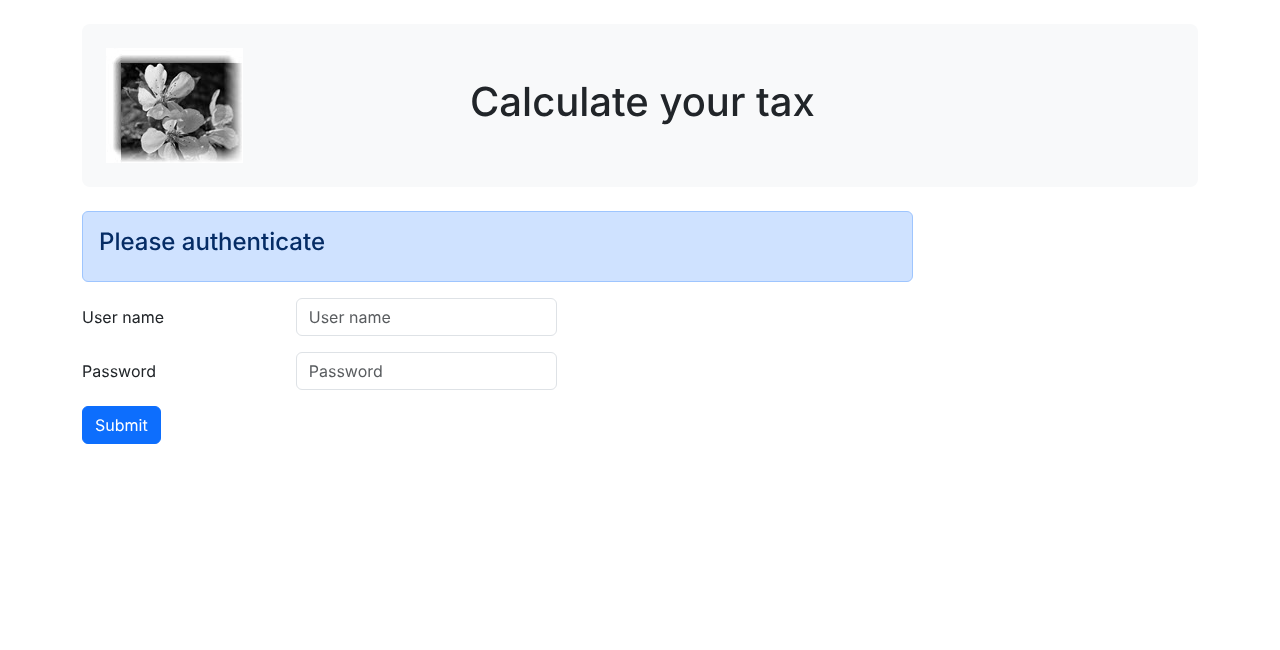
The tax calculation view:
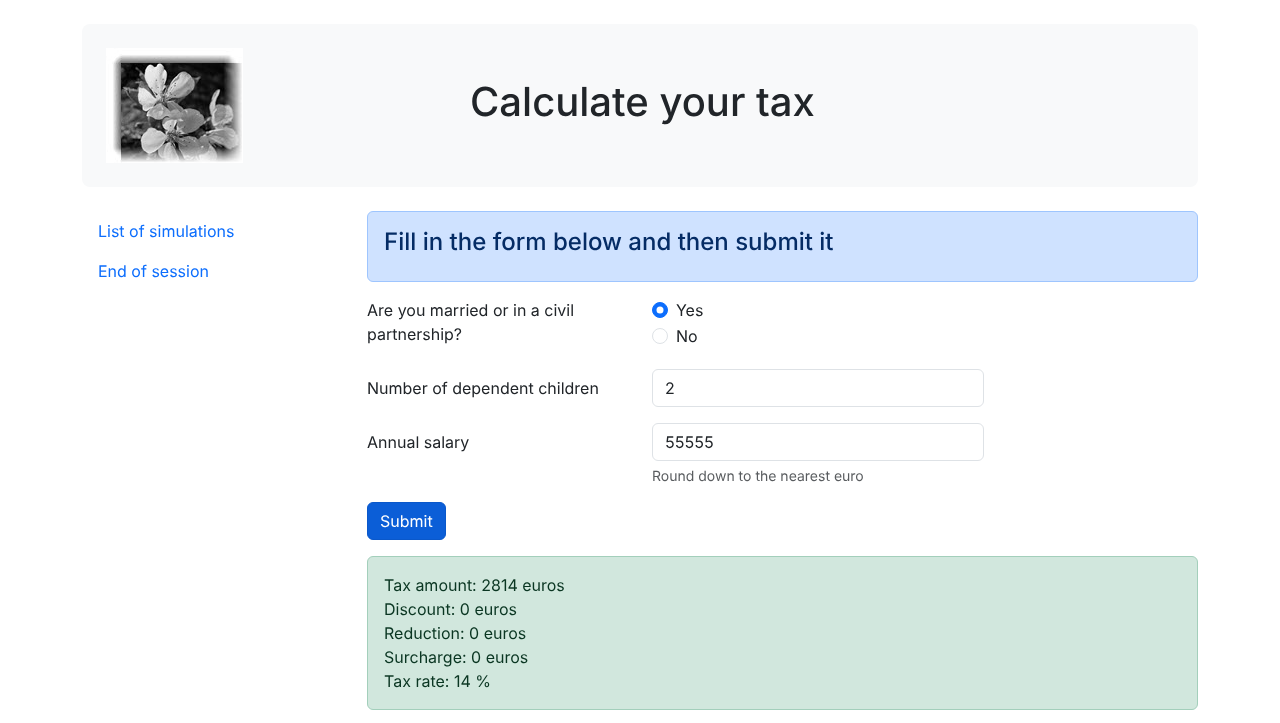
The simulation list view:
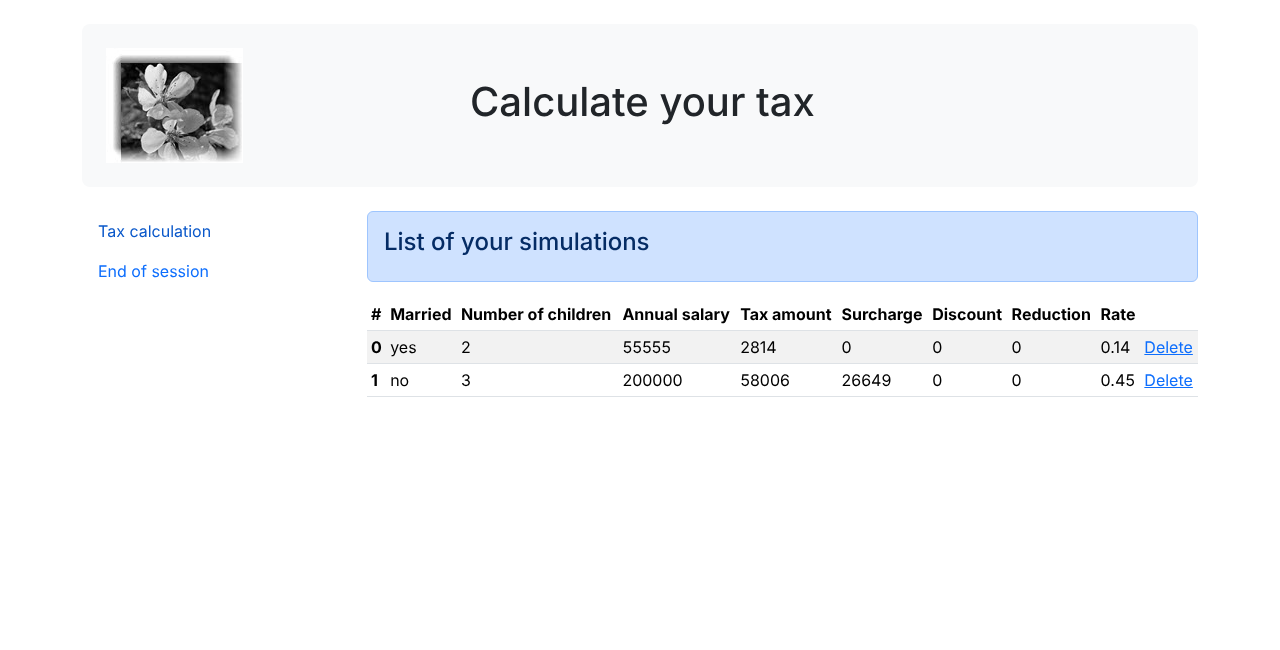
Unexpected Errors View:
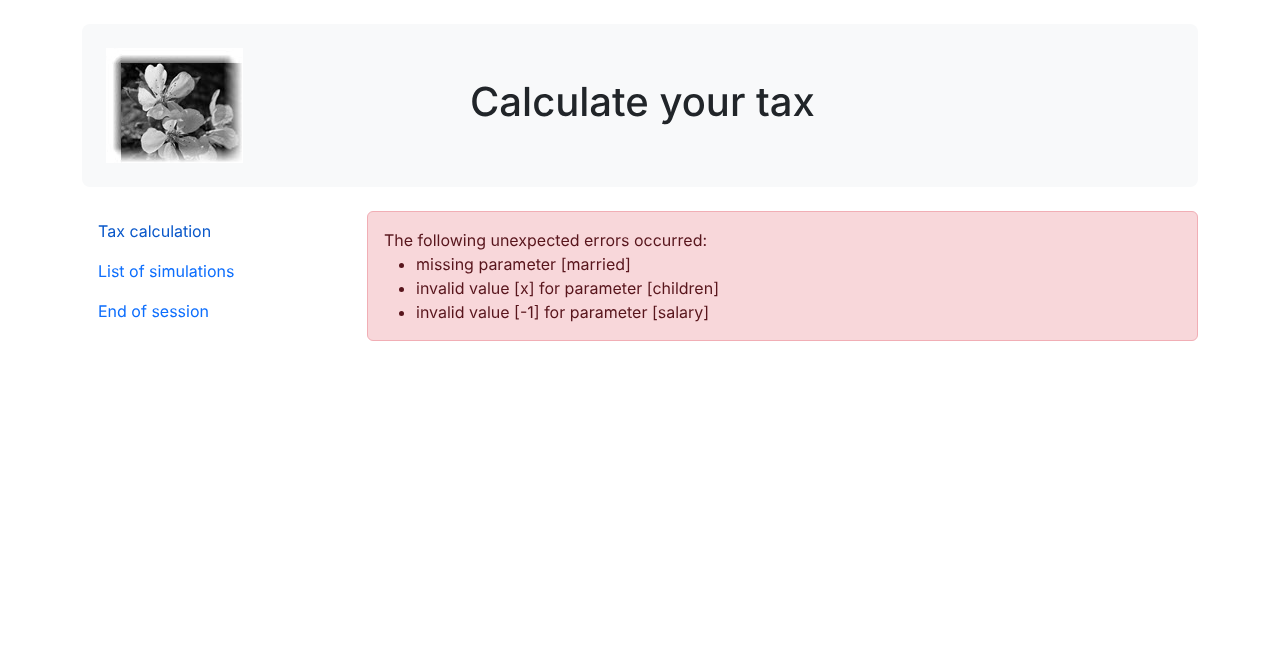
The views use the CSS [Bootstrap] framework, version 5.3. Course PHP 7 used version 4.1: some classes CSS have changed or been removed; we’ll point these out as we go. We’ll describe these views one by one.
23.13.2. The Authentication View
23.13.2.1. Overview of the View
The authentication view is as follows:
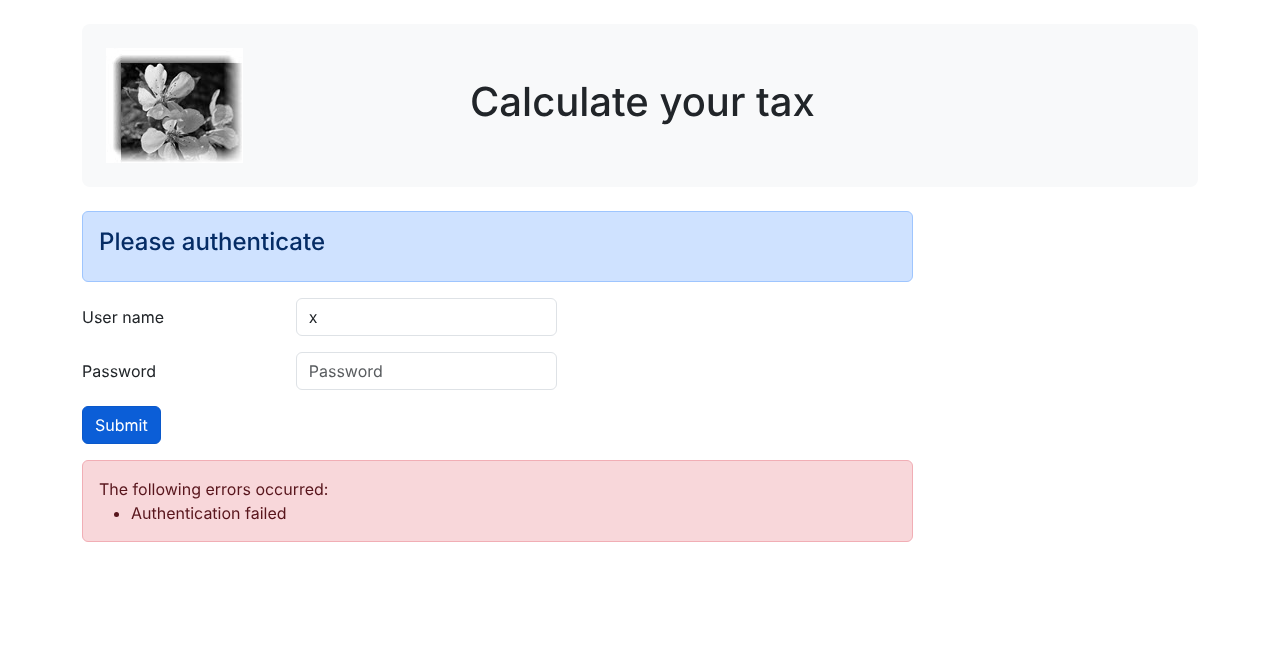
The view consists of three elements that we’ll call fragments:
- the top banner, with the logo and title, is generated by the script [v-banner.php];
- the authentication form is generated by the script [v-authentication.php];
- the pink error box, displayed only when there are errors, is generated by the script [v-errors.php].
The authentication view is generated by the following page, [view-authentication.php]:
Comments
- lines 2–7: The view is executed by the [require] statement in the [HtmlResponse::send] method. It inherits the variables from this method;
- lines 13–28: The PHP section of the view calculates the view model. We’ll come back to this a little later;
- line 30: a HTML5 document begins with this line;
- lines 31–61: the HTML page is enclosed within the [<html>] and [</html>] tags. The [lang] attribute specifies the document’s language;
- lines 32–40: header (head) of the HTML document:
- line 34: the [<meta charset>] tag indicates that the document is encoded in UTF-8;
- Line 35: The [<meta name="viewport">] tag sets the initial display of the view: across the full width of the screen displaying it (width) at its initial size (initial-scale). The value [shrink-to-fit=no] from version PHP 7 is no longer used with current browsers;
- Lines 37–38: The [<link rel="stylesheet">] tag specifies the CSS file that governs the view’s appearance. We are using the CSS [Bootstrap] 5.3.8 framework, downloaded from the [jsDelivr] ([https://getbootstrap.com/docs/5.3/getting-started/introduction/]) distribution network. The [integrity] attribute contains the file’s fingerprint: the browser rejects the downloaded file if it does not match this fingerprint, which protects the page from file tampering on the distribution network;
- line 39: the [<title>] tag sets the page title, which is displayed in the browser tab;
- Lines 41–60: The body of the web page is enclosed within the [<body>] and [</body>] tags;
- line 42: the [<div>] tag delimits a section of the displayed page. The [class] attributes used in the view all refer to the CSS Bootstrap framework. The [<div class="container">] tag delimits a Bootstrap container, centered on the page;
- line 44: the [v-banner.php] fragment is included, which generates the page header. We’ll describe it shortly. The path is constructed using [__DIR__], the [Views] folder: a simple relative path such as ["v-banner.php"] would first be searched for in the directories specified by the [include_path] directive (PHP), then in the calling script’s folder ([Responses]) and the current folder, which can lead to unexpected results;
- Lines 46–47: The [<div class="row">] tag delimits a Bootstrap row. These rows consist of 12 columns. The [<div class="col-md-9">] tag delimits a section of 9 columns;
- line 48: the fragment [v-authentication.php] is included, which displays the authentication form;
- lines 52–58: if the model’s error list is not empty, the fragment [v-errors.php] is included, which displays the errors in a new Bootstrap row. Here, we use the alternative syntax for control structures in PHP, [if (...):] ... [endif], which is more readable than curly braces in a HTML page. The PHP 7 script wrote the error code using the HTML syntax ([heredoc]) ([print <<<EOT ... EOT;]).
Let’s note the dynamic elements to be defined in this code:
- [$model->errors]: the list of error messages, empty if there are no errors;
- [$model->errorsTitle]: the text preceding the list of errors.
23.13.2.2. The fragment [v-banner.php]
The fragment [v-banner.php] displays the top banner on all views of the web application:
Comments
- Line 6: The header is wrapped in a section whose Bootstrap classes provide inner spacing (p-4), vertical margins (my-4), a light gray background (bg-body-tertiary), and rounded corners (rounded-3). Course PHP 7 used the Bootstrap 4 class [jumbotron], which no longer exists in Bootstrap 5: these four classes replace it;
- line 7: a Bootstrap row. The [align-items-center] class vertically centers the content of its columns;
- lines 8–10: a [<img>] image is placed in the first four columns of the row;
- line 9: the syntax [<?= expression ?>] is equivalent to [<?php echo expression ?>]. In other words, the value of the [src] attribute will be the value of the expression PHP. This is:
- [$model->logo ?? "Views/logo.jpg"]: the URL of the logo, if the view model contains one; otherwise, the URL relative to [Views/logo.jpg]. All URL in the application are of the form [http://localhost/php8-oct-2026/scripts-web/tax/version-12/main.php?action=…]: the URL relative to [Views/logo.jpg] is supplemented by the browser with the path of the displayed page, resulting in [http://localhost/php8-oct-2026/scripts-web/tax/version-12/Views/logo.jpg]. The PHP 7 fragment constructed the absolute URL of the logo from server variables ([REQUEST_SCHEME], [SERVER_NAME], [SERVER_PORT], [REQUEST_URI]) and a regular expression: this was unnecessary;
- [htmlspecialchars(...)]: The function [htmlspecialchars] replaces the special characters in HTML with their entities: [&] becomes [&], [<] becomes [<], [>] becomes [>], ["] becomes ["], and ['] becomes [']. Thus, the value written to the page cannot break the [src] attribute or insert tags into the page;
- Lines 11–13: The other 8 columns in the row (note that there are 12 in total) are used to display text in large font (tag [<h1>]).
Dynamic element: [$model->logo], the URL for the image displayed in the banner (optional).
Any dynamic value written to a HTML page must go through [htmlspecialchars]. This is the protection against XSS (Cross-Site Scripting) attacks: if a value entered by the user, or originating from an untrusted source, were written as-is into the page, a malicious user could inject code—such as [<script>…</script>]—which would be executed by the browsers of those viewing the page. Version 7 of PHP did not escape any values. Starting with version 8.1 of PHP, the default options for [htmlspecialchars] ([ENT_QUOTES | ENT_SUBSTITUTE | ENT_HTML401]) also encode the apostrophe: calling [htmlspecialchars($value)] is sufficient, whether the value is written in text or in an attribute delimited by quotation marks or apostrophes.
23.13.2.3. The fragment [v-authentication.php]
The fragment [v-authentication.php] displays the web application’s authentication form:
Comments
- Lines 6–36: The [<form>] tag delimits a HTML form. This form generally has the following characteristics:
- It defines input fields ([<input>] tags);
- it has a [submit]-type button that submits the entered values to the URL specified in the [action] attribute of the [<form>] tag. The HTTP method used to query this URL is specified in the [method] attribute of the [<form>] tag;
- here, when the user clicks the [Submit] button, the browser will submit the values entered in the form to the URL and [main.php?action=authenticate-user];
- The posted values are the values entered by the user in the two input fields. They will be posted in the form [user=xx&password=yy]. The parameter names [user, password] correspond to the attributes [name] of the input fields;
- lines 8–10: a Bootstrap section to display a title on a blue background;
- lines 12–20: the first line of the form. The class [mb-3] adds a bottom margin to the line. Bootstrap 4 used the class [form-group], which no longer exists in Bootstrap 5;
- Line 14: the label, in three columns. The [for] attribute of the [<label>] tag links the label to the [id] attribute of the input field: clicking on the label places the cursor in the input field;
- line 16: the input field is placed within a four-column layout;
- Lines 17–18: The HTML [<input>] tag defines an input field. It has several attributes:
- [type="text"]: This is a text input field. You can type anything into it;
- [class="form-control"]: Bootstrap style for the input field;
- [id="user"]: ID of the input field. This ID is generally used by CSS and the code JavaScript;
- [name="user"]: name of the input field. The value entered by the user will be submitted by the browser under this name ([user=xx]);
- [placeholder="prompt"]: the text displayed in the input field when the user has not yet typed anything;
- [value="value"]: the text displayed in the input field as soon as it appears on the screen, before the user enters anything. This mechanism is used in the event of an error to display the input that caused the error. Here, this value will be the value of [$model->login], escaped by [htmlspecialchars]: an entered identifier containing a quotation mark cannot close the [value] attribute;
- lines 22–29: similar code for the password entry field. The [type="password"] attribute creates a text input field where the characters being typed are hidden;
- lines 31–35: a third line for the [Submit] button;
- line 33: because it has the attribute [type="submit"], clicking this button triggers the browser to send the entered values to the server. The classes CSS and [btn btn-primary] display a blue button.
There is one last thing to explain. The [action="main.php?action=authenticate-user"] attribute of the [<form>] tag defines an incomplete URL (it does not begin with http://machine:port/path). The authentication view will be obtained using various URL entries:
- [http://localhost/php8-oct-2026/scripts-web/tax/version-12/main.php?action=init-session&type=html];
- [http://localhost/php8-oct-2026/scripts-web/tax/version-12/main.php?action=authenticate-user].
These URL files refer to a [main.php] document located at the path [http://localhost/php8-oct-2026/scripts-web/tax/version-12]. This will be the case for all URL files in this application. The URL and [main.php?action=authenticate-user] files will be prefixed with this path when the entered values are sent. These values will therefore be posted to the URL and [http://localhost/php8-oct-2026/scripts-web/tax/version-12/main.php?action=authenticate-user] files.
23.13.2.4. The [v-errors.php] fragment
The fragment [v-errors.php] displays a list of error messages. It is used by three of the application’s four views:
- Line 5: Errors are displayed in a Bootstrap container with a pink background;
- line 6: the text introducing the errors;
- lines 7–11: the HTML [<ul>] tag (unordered list) displays a bulleted list. Each list item has the syntax [<li>item</li>]. The class [mb-0] removes the bottom margin from the list;
- Lines 8–10: the alternative syntax for the loop [foreach]. Each message is escaped by [htmlspecialchars]: controller error messages contain the values sent by the client ([invalid value [x] for parameter [children]]). In course PHP 7, the view model contained the list HTML of errors, constructed by concatenating strings [<li>$error</li>]: A posted value containing code JavaScript would have been executed by the browser.
Dynamic elements: [$model->errorsTitle] and [$model->errors].
23.13.2.5. Visual testing
We can test the views well before integrating them into the application. The goal here is to test their visual appearance. We gather all the test views in the [Tests] folder of the project. To test the [view-authentication.php] view, we need to create the data model it will display. The script [Tests/view-authentication.php] is as follows:
Comments
- Line 5: The authentication view contains dynamic parts controlled by the [$model] object. This object is called the view model. According to one of the two definitions given for the acronym MVC, this is the M in MVC. It is calculated by the function [getModelForThisView]. A function defined at the top level of a script is known as soon as the script begins execution: it can be called before it is defined;
- lines 9–17: The view model is an object of type [stdClass], the generic class of PHP. It is obtained here by converting an associative array into an object using the [(object)] operator: the array keys become the object’s attributes. The type [stdClass] is the only object type to which undeclared attributes can still be added (see the chapter on classes). An associative array could have been used instead to achieve the same result;
- line 14: test values for the view’s dynamic elements. The second error contains HTML tags: we’ll verify that they are displayed as-is and not interpreted by the browser;
- line 16: the URL for the logo is relative to the URL for the test script, located in the [Tests] folder;
- line 32: the rest of the script is from the [Views/view-authentication.php] view. The included fragments are those from the [Views] folder: these are the ones being tested. Course PHP 7 copied a version of them into the [Tests] folder.
The visual test is performed by requesting the URL and [http://localhost/php8-oct-2026/scripts-web/tax/version-12/Tests/view-authentication.php] files in a browser:
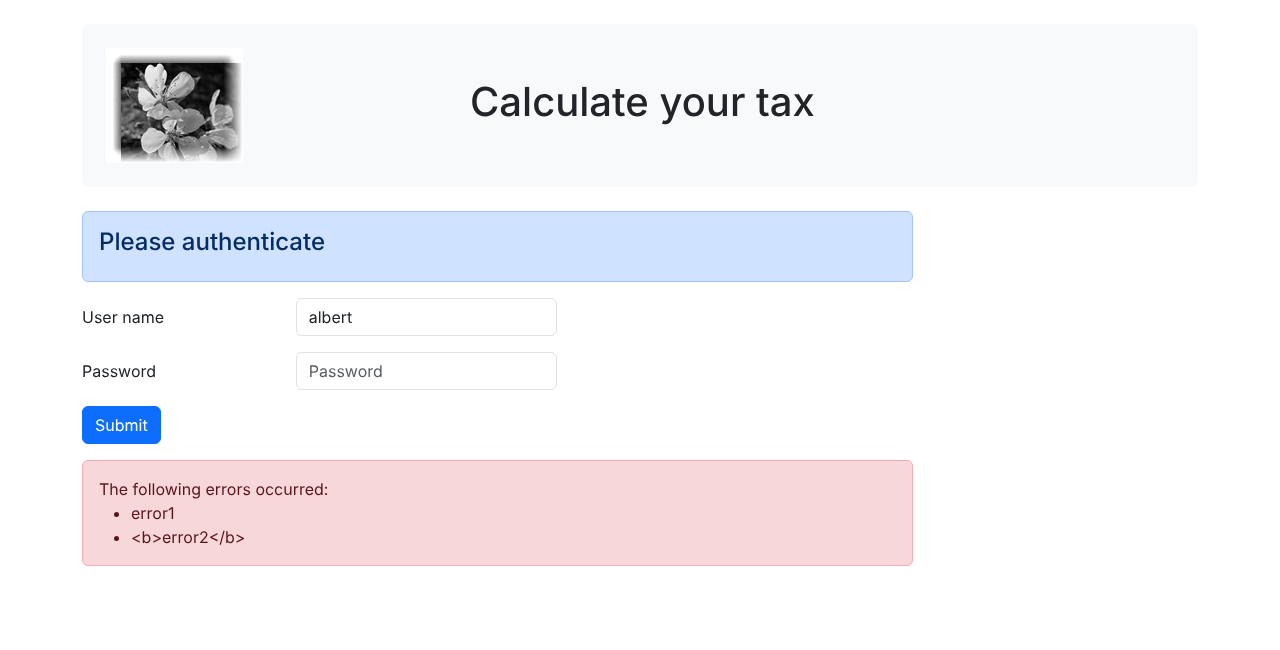
Note that the [<b>] tag from the second error was displayed but not interpreted: the protection against XSS attacks is working. Continue these visual tests until you are satisfied with the result. During debugging, we modify the file in [VS Code] and then refresh the browser page (F5).
23.13.2.6. Calculating the View Model
Once the visual appearance of the view has been determined, we can proceed to calculate the view model under real-world conditions. Let’s review the status codes that lead to this view. They can be found in the configuration file:
Therefore, the status codes [700, 221, 400] cause the authentication view to be displayed. To determine the meaning of these codes, we can refer to the [curl] tests performed on the JSON application:
- 700 is the status code following a successful [init-session] action: the blank authentication form is then displayed;
- 221 is the status code following a failed [authenticate-user] action (unrecognized credentials): the authentication form is then displayed so that the credentials can be corrected;
- 400 is the status code following a successful [end-session] action: the empty authentication form is then displayed.
Now that we know when the authentication form should be displayed, we can calculate its model in [view-authentication.php]:
Comments
- lines 3–7: We declare the variables inherited from the [HtmlResponse::send] method, which renders the view using [require];
- line 10: the Symfony class used in the view code. The view has no namespace: without this statement, [Request] would refer to the class [\Request], which does not exist;
- Lines 15–28: The [getModelForThisView] function calculates the view model. It receives the request and response from the controller—the only data it needs. The views do not have a [declare(strict_types=1)] declaration: they are HTML pages with some PHP code;
- lines 18–27: The model depends on the status code returned by the controller that processed the current action:
- lines 20–23: in the case of failed authentication: the username entered by the user, found in the posted parameters [$request->request], is redisplayed, and an error message is shown. The user can then try another authentication attempt;
- line 26: status codes 700 and 400: a blank authentication form, with no errors.
Script PHP 7 used a statement that modified an object created at the beginning of the function.
23.13.2.7. [curl] Tests
We already have queries that generate [700, 221, 400] codes, which display the authentication view. Simply reuse them in a [html]-type session and check whether they correctly display the authentication view. Let’s authenticate using the user [x, x] in the HTML session opened in the previous paragraph:
- Line 1: The request sends the string [user=x&password=x];
- Lines 42–43: The incorrect user was displayed again;
- lines 67–71: An error message is displayed, escaped by [htmlspecialchars].
In a browser, the following view is displayed:
23.13.2.8. Conclusion
We were able to test the view [view-authentication.php] without having written the other views. This was possible because:
- all the controllers have been written;
- [curl] allows us to send requests to the server without needing the views. When writing controllers, you must be aware that anyone can do this. You must therefore be prepared to handle requests that no view would allow. These are created manually using [curl]. You should never assume a priori that “this request is impossible.” You must verify it.
23.13.3. The Tax Calculation View
23.13.3.1. Overview of the view
The tax calculation view is as follows:
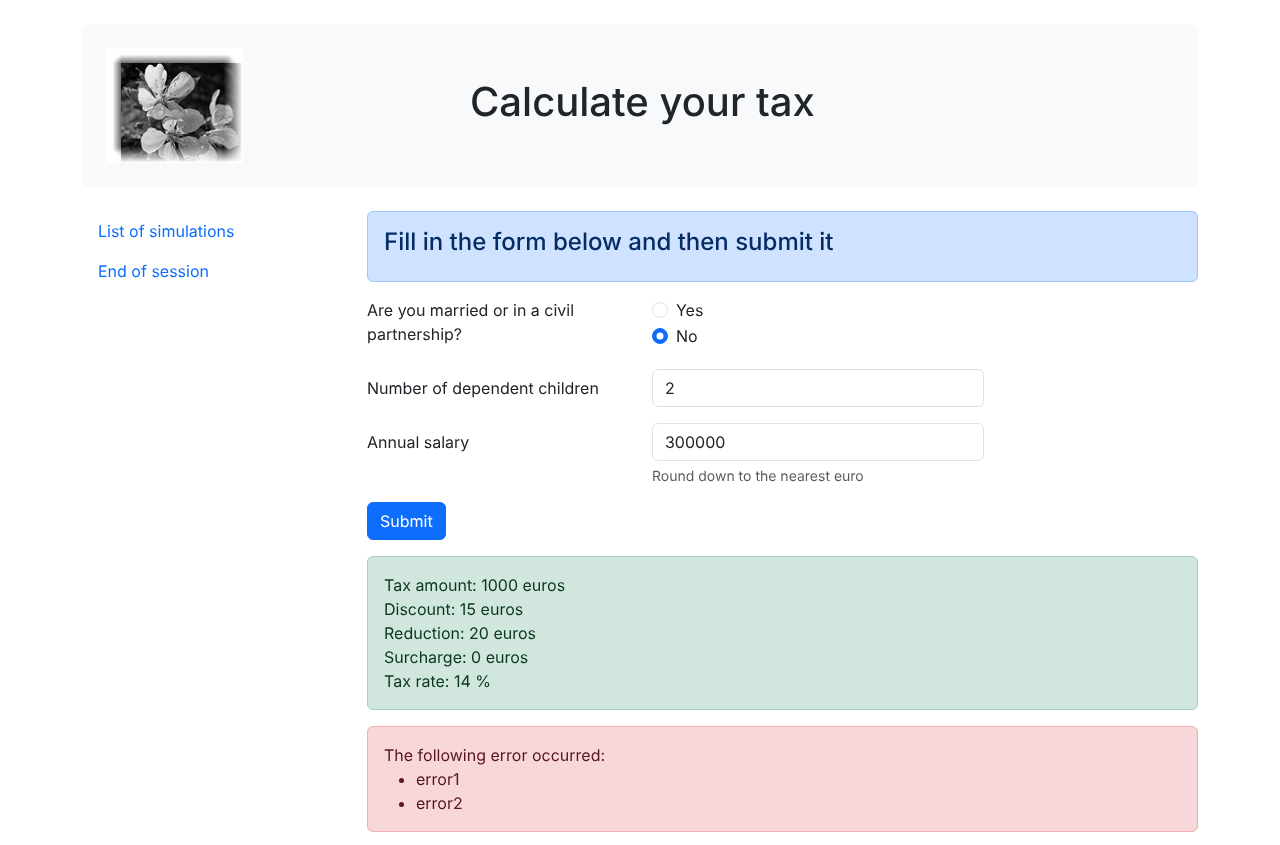
The view has five parts:
- the top banner is generated by the fragment [v-banner.php], which has already been presented;
- the tax calculation form is generated by the fragment [v-tax-calculation.php];
- a menu with two links is generated by the fragment [v-menu.php];
- the calculation result is displayed in a green box;
- Errors are displayed in a pink box by the fragment [v-errors.php].
The green and pink frames are never displayed together in the application: the screenshot above is from the visual test of the view, presented later. The tax calculation view is generated by the following script, [view-tax-calculation.php], of which we are currently showing only the section HTML:
Comments
We will only comment on the new features:
- line 57: inclusion of the top banner of the view;
- lines 60–62: inclusion of the menu, which will occupy three columns of the Bootstrap row following the header;
- lines 63–65: inclusion of the tax calculation form, which will occupy the remaining nine columns of this row;
- lines 68–78: if the tax calculation was successful, the list [$model->results] is not empty, and the calculation result is displayed in a green frame (class [alert-success]). Each line of the result is followed by a line break ([<br>]). The box is on a new Bootstrap line and occupies nine columns offset by three columns (class [offset-md-3]). It will therefore appear immediately below the tax calculation form. Script PHP 7 achieved the offset using an empty column [<div class="col-md-3"></div>];
- lines 80–86: if the tax calculation failed, the list [$model->errors] is not empty, and the errors are displayed in a pink box in the same location by the fragment [v-errors.php].
23.13.3.2. The fragment [v-tax-calculation.php]
The fragment [v-tax-calculation.php] displays the tax calculation form:
Comments
- Line 6: The form HTML will be posted (attribute [method]) to URL and [main.php?action=calculate-tax] (attribute [action]). The posted values will be the values from the input fields:
- the value of the selected radio button in the form [married=yes] if the [Yes] radio button is selected, or [married=no] if the [No] radio button is selected. [married] is the value of the [name] attribute for both radio buttons, [yes] and [no] are the values of their [value] attributes;
- the value of the numeric input field [children] in the form [children=xx], where [xx] is the value entered by the user via the keyboard;
- the value of the numeric input field [salary] in the form [salary=xx];
- finally, the posted value will be in the form [married=xx&children=yy&salary=zz];
- The entered values will be posted when the user clicks the button labeled [Submit] on line 48;
- Lines 12–26: the two radio buttons. The [<fieldset>] tag groups form elements together, and the [<legend>] tag provides them with a title;
- lines 16–21: these are radio buttons because of the [type="radio"] attribute. The two radio buttons are part of the same radio button group because they share the same [name] attribute. The browser ensures that, within a group of radio buttons, only one is selected at any given time. Therefore, clicking one deselects the one that was previously selected;
- lines 17–22: When the form is displayed, one of the radio buttons must be selected; to achieve this, simply add the [checked] attribute to the relevant [<input type="radio">] tag. The ternary operator sets this attribute on the [Yes] button if [$model->married] equals [yes]; otherwise, it sets it on the [No] button. Since the value being written is a constant, there is nothing to escape. Course PHP 7 inserted two variables, [checkedYes] and [checkedNo], into the model, containing the text [checked="checked"] or an empty string;
- lines 31–32: a numeric input field ([type="number"]) with a minimum value of 0 ([min="0"]). In modern browsers, this means the user can only enter a number greater than or equal to 0. The input can also be made using a slider that can be clicked to increase or decrease the value. The attribute [step="1"] indicates that the slider operates in increments of 1: the slider will only accept integer values ranging from 0 to n in steps of 1. For manual entry, this means that numbers with decimals will not be accepted. In certain views, the children’s input field must be pre-filled with the last entry made in that field: this is the role of the attribute [value], whose value is provided by [$model->children];
- Lines 39–42: The same explanations apply to salary entry as to those for children. The tooltip below the input field has the class [form-text]; Bootstrap 4 used the tag [<small>].
Dynamic elements: [$model->married], [$model->children], [$model->salary].
23.13.3.3. The [v-menu.php] snippet
This fragment displays a menu to the left of the tax calculation form. Its code is as follows:
Comments
- Lines 6–10: The HTML and [<nav>] tags enclose a section of the document containing navigation links to other documents. The [nav, flex-column, nav-link] classes are Bootstrap classes that define the menu’s appearance: a vertical list of links;
- line 7: the [$model->menuOptions] model for the fragment is an array of the form [["List of simulations" => "main.php?action=list-simulations", "End of session" => "main.php?action=end-session"]];
- line 8: the HTML [<a>] tag introduces a navigation link. [$url] is the URL that is navigated to when the [$text] link is clicked. The browser then performs a [GET $url] operation. If [$url] is a relative URL, then it is supplemented by the path of the URL currently displayed by the browser. Thus, while the browser’s current URL is of type [http://path/main.php?parameters], the [List of simulations] link leads to [http://path/main.php?action=list-simulations]. The text and the URL are escaped by [htmlspecialchars]: in a URL, the character [&] that separates the parameters must be written as [&] in a HTML document.
23.13.3.4. Visual test
We create a test script for view [view-tax-calculation.php] in folder [Tests]:
Comments
- Lines 9–32: We initialize all dynamic parts of the [view-tax-calculation.php] view and the fragments [v-banner.php], [v-tax-calculation.php], [v-menu.php], and [v-errors.php];
- lines 15–21: the lines containing the calculation results;
- line 24: an error list is also displayed to view both frames.
We test the [view-tax-calculation.php] view by requesting URL and [http://localhost/php8-oct-2026/scripts-web/tax/version-12/Tests/view-tax-calculation.php]. We obtain the result shown at the beginning of this paragraph. We continue working on this view until we are satisfied with the visual result. We can then proceed to integrate the view into the web application currently under development.
23.13.3.5. Calculating the View Model
Once the visual appearance of the view has been determined, you can proceed to calculate the view model under real-world conditions. The status codes that lead to this view are the [200, 300, 341, 350, 800] codes in the configuration. To determine the meaning of these codes, you can refer to the [curl] tests performed on the JSON application:
- 200 is the status code following a successful [authenticate-user] action: the blank tax calculation form is then displayed;
- 300 is the status code following a successful [calculate-tax] action. The calculation form is then displayed with the data entered and the tax amount. The user can then perform another calculation;
- 341 is the status code returned for a tax calculation with valid parameters when a lack of connection to the DBMS causes an error;
- 350 is the status code returned for a tax calculation with valid parameters when a failure to connect to the [Redis] server causes an error;
- Status code 800 will be discussed later. We have not encountered it yet;
- We assume here that the user is using a modern browser. Thus, with the form under consideration, it is not possible to enter negative numbers, non-numeric character strings, or decimal numbers in the [children, salary] input fields. If these errors occur nonetheless (in a manually crafted request), they will be treated as unexpected errors: in that case, the view [view-errors.php] will be displayed.
Now that we know when the tax calculation form should be displayed, we can define its model in [view-tax-calculation.php]:
Comments
- line 17: For statuses 300, 341, and 350, the form is redisplayed with the entered values;
- Lines 18–20: The entered values are found in the posted parameters [$request->request]. For statuses 200 and 800, the form is empty, with the [No] button checked;
- Lines 23–32: Successful tax calculation. The response from the [$content["response"]] controller is a [Simulation] object: the result lines are constructed based on its attributes. The rate is displayed as a percentage. Since a simulation is an object, [$simulation->tax] is interpolated directly into a string enclosed in quotation marks;
- line 35: case where the tax calculation fails due to the database or server being unavailable ([Redis]). The controller’s response is then the error message;
- Lines 37–40: the two menu options.
23.13.3.6. [curl] Tests
The query that returns status 300 allows us to view a successful tax calculation. In a browser, after successful authentication, fill out the form and then submit it:
Let’s try an error scenario: error 350 due to the [Redis] server being unavailable (port 6380 in [config.json]):
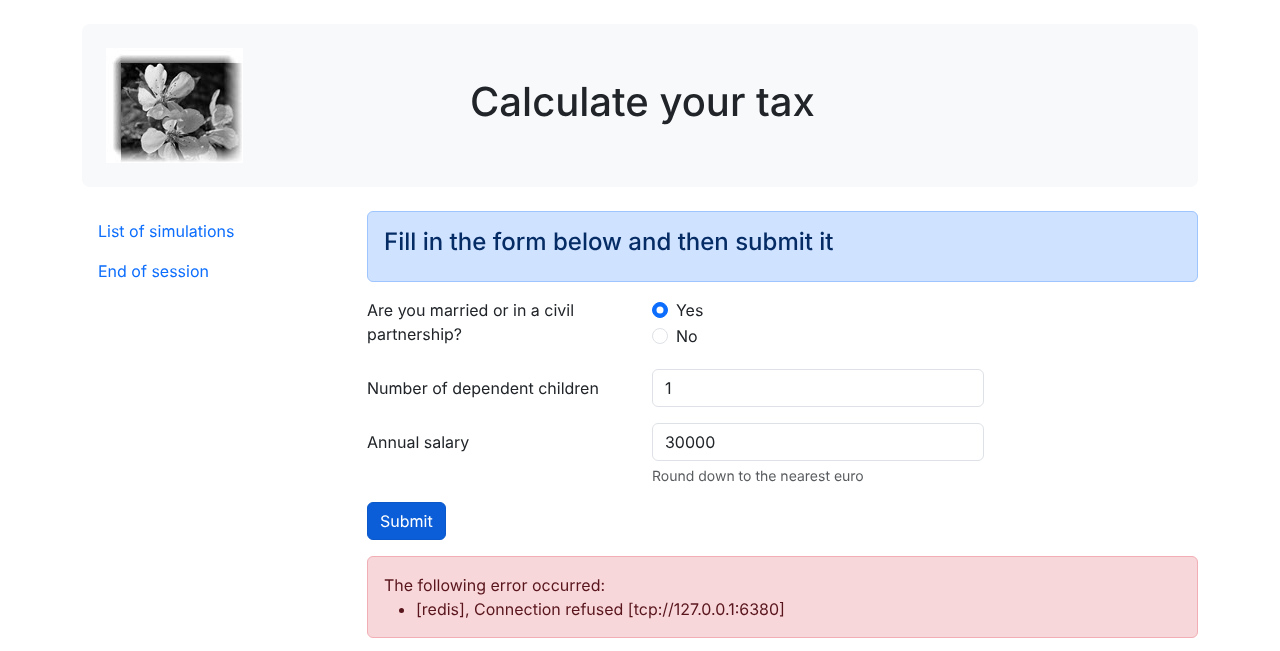
Note that the form has been redisplayed with the entered values.
23.13.4. The simulation list view
23.13.4.1. Overview of the view
The view displaying the list of simulations is as follows:
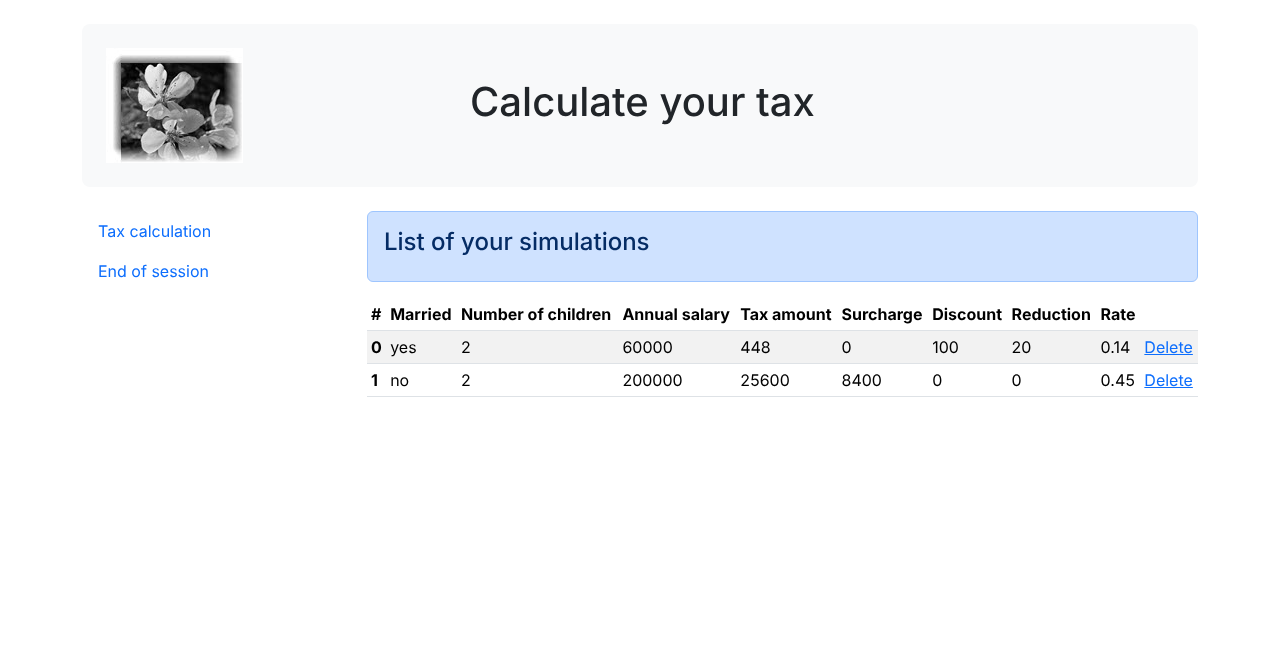
The view generated by the [view-simulations-list.php] script has three parts:
- the top banner, generated by the fragment [v-banner.php], which has already been presented;
- a menu with two links, generated by the fragment [v-menu.php], which has already been presented;
- the simulation table, generated by the fragment [v-simulations-list.php].
The HTML section of the [view-simulations-list.php] script is as follows:
- Line 33: inclusion of the application banner;
- line 37: inclusion of the menu. It will be displayed in three columns below the banner;
- line 40: inclusion of the simulation table. It will be displayed in nine columns below the banner and to the right of the menu.
The fragment [v-simulations-list.php] is as follows:
Comments
- Lines 10–45: A table named HTML is created using the [<table>] tag. Bootstrap classes give it a compact appearance (table-sm), a highlighted row when the mouse hovers over it (table-hover), and alternating row colors (table-striped);
- Lines 12–25: The table column headers are defined within a
***[<thead>]***(table head) tag. The***[<tr>](table row) tag defines a row. The [<th>] tag (table header) defines a column header. There are ten of them. [scope="col"] indicates that the header applies to the column. [scope="row"]* indicates that the header applies to the row; - lines 27–44: the [<tbody>] tag encloses the data displayed by the table;
- line 28: the list of simulations is found in the [$model->simulations] model. It is a list of [Simulation] objects: [$i] is the simulation number in the list;
- Lines 29–42: The [<tr>] tag encloses a row of the table;
- line 31: the [<th scope="row">] tag defines the row header, the simulation number;
- lines 32–39: each [<td>] tag defines a column in the row. Only the marital status—a string of characters—is escaped: the other attributes of the simulation are numbers, typed as such in the [Simulation] class, which cannot contain special characters from the HTML class;
- Line 41: a link to delete the simulation. The URL [main.php?action=delete-simulation&number=$i] takes the number displayed in the first column of the table.
23.13.4.2. Visual Test
We create a test script for the [view-simulations-list.php] view in the [Tests] folder:
Comments
- lines 5–7: The test model contains [Simulation] objects: we load the class and import its full name;
- Lines 16–21: The two simulations displayed by table HTML. They are constructed using named arguments (PHP 8.0): the name of each parameter precedes its value, which makes the code readable without knowing the order of the constructor’s parameters;
- lines 23–26: the table of menu options.
The visual test, requested using URL and [http://localhost/php8-oct-2026/scripts-web/tax/version-12/Tests/view-simulations-list.php], produces the result shown at the beginning of this paragraph.
23.13.4.3. Calculating the View Model
The status codes that lead to the simulation view are the [500, 600] codes in the configuration:
- 500 is the status code following a successful [list-simulations] action: the list of simulations performed by the user is then displayed;
- 600 is the status code following a successful [delete-simulation] action. The new list of simulations obtained after this deletion is then displayed.
In both cases, the controller’s response is the list of simulations. The view model is calculated in [view-simulations-list.php]:
- line 12: the [$model->simulations] model used by the [v-simulations-list.php] fragment is the list of [Simulation] objects returned by the controller. The script PHP 7 converted each object into an associative array using the getters of the class [Simulation]: with public attributes, this is unnecessary;
- lines 14–17: the [$model->menuOptions] model used by the [v-menu.php] fragment. The [Tax calculation] link uses the [display-tax-calculation] action, which we will implement shortly.
23.13.4.4. [curl] Tests
Action [list-simulations] (status 500) displays the list of simulations performed in session HTML. In a browser, after two tax calculations, click the [List of simulations] link in the menu:
Clicking the [Delete] link for simulation #0 (status 600) displays a list of simulations with one simulation missing:
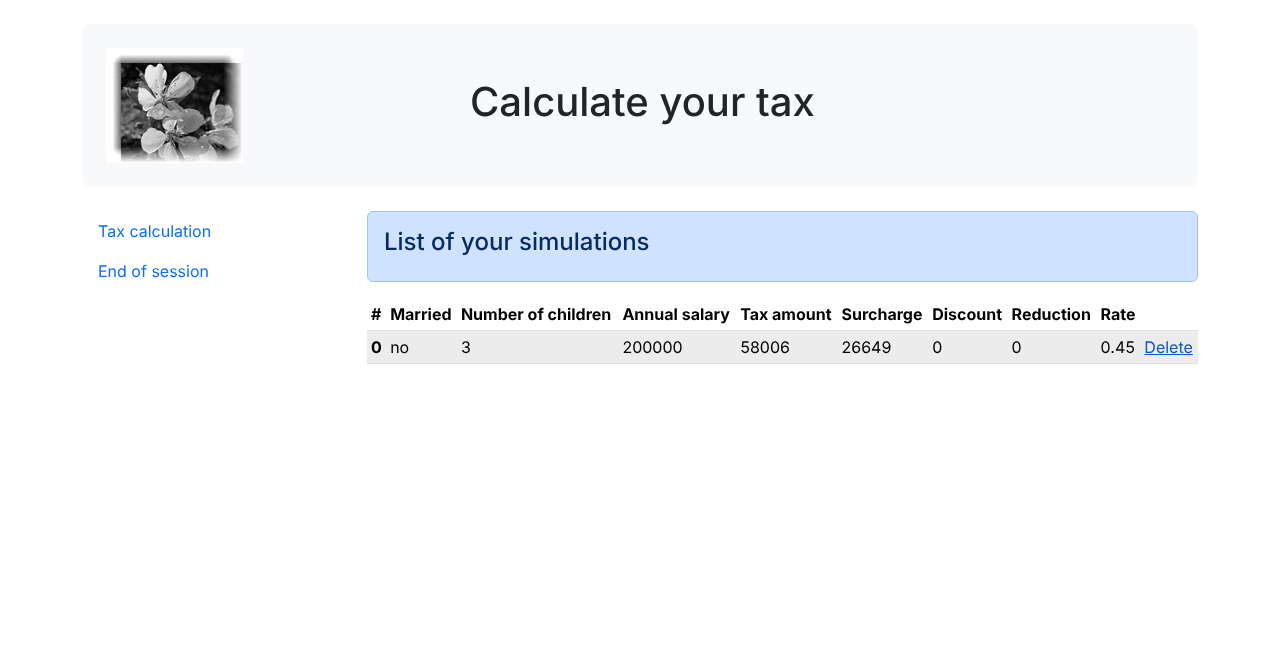
23.13.5. Viewing Unexpected Errors
Here, an unexpected error is defined as an error that should not have occurred during normal use of the web application. Let’s take the following request as an example, in session JSON:
The parameters [married] and [children] are missing, and the parameter [salary] is invalid. However, in the HTML form of the web application, this situation cannot occur:
- all parameters are present;
- the parameter [married], which derives its value from the [value] attributes of two radio buttons, must be either [yes] or [no];
- with a modern browser, the [<input type="number" min="0" step="1" …>] attributes ensure that the entries for children and salary are necessarily integers >= 0.
However, nothing prevents a user from sending such a request to our server—using [curl] or their browser’s developer tools—during a HTML session. We’ll call an “unexpected error” any error that shouldn’t occur within the HTML application. If it does occur, it’s likely because someone is trying to “hack” the application. For educational purposes, we’ve decided to display an error page for these cases. In reality, we could re-display the last page sent to the client. To do this, we simply need to store the last HTML response sent in the session. In the event of an unexpected error, we return this response. This way, the user will have the impression that the server is not responding to their errors since the displayed page does not change.
23.13.5.1. View Overview
The view that displays unexpected errors is as follows:
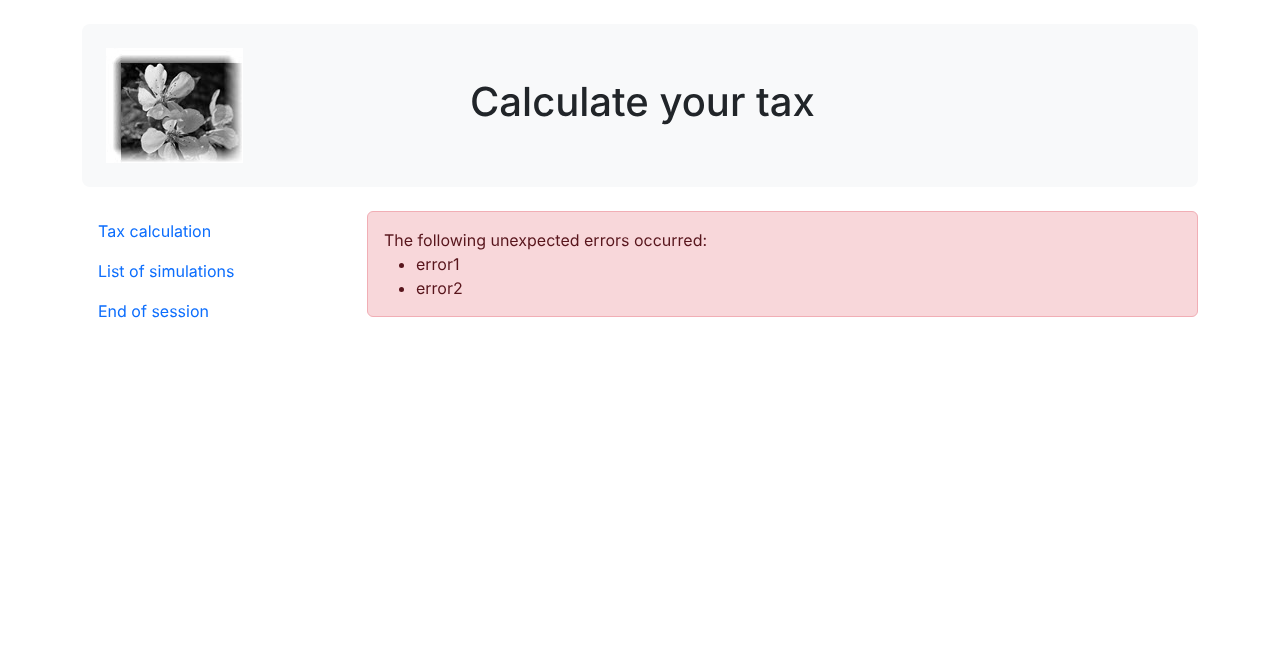
The view generated by the script [view-errors.php] has three parts:
- the top banner, generated by the fragment [v-banner.php];
- a menu with three links, generated by the fragment [v-menu.php];
- the unexpected error(s), displayed by the fragment [v-errors.php].
The HTML section of the [view-errors.php] script is as follows:
- line 36: inclusion of the application banner;
- line 40: inclusion of the menu, in three columns below the banner;
- line 43: display of errors in nine columns, using the fragment [v-errors.php] already presented.
23.13.5.2. Visual Test
We create a test script for the view [view-errors.php] in the [Tests] folder:
- Line 12: the list of unexpected errors;
- lines 14–18: the table of the three menu options.
The visual test, requested with URL and [http://localhost/php8-oct-2026/scripts-web/tax/version-12/Tests/view-errors.php], produces the result shown at the beginning of this paragraph.
23.13.5.3. Calculation of the view model
It is the missing status codes in the [views] key of the configuration file that cause the unexpected errors view to be displayed. The code for calculating the view model [view-errors.php] is as follows:
- line 11: errors are retrieved from the controller’s response;
- line 14: depending on the controller and the error, the response is either a single message or a list of messages. The [$model->errors] model used by the [v-errors.php] fragment is always a list;
- lines 16–20: the [$model->menuOptions] model used by the [v-menu.php] fragment.
23.13.5.4. [curl] Tests
To obtain status 338—which is not a status expected by the HTML application—you must submit a manually crafted request: missing [married], invalid children, and invalid salary. With [curl], within a HTML session, this results in a view of unexpected errors. In the browser, you can also construct such a form using the developer tools (F12). This yields the following page:
23.13.6. Implementing Application Menu Actions
Here, we will discuss the implementation of menu actions. Let’s review the meanings of the links we’ve encountered:
View | Link | Target | Role |
Tax Calculation | [List of simulations] | [main.php?action=list-simulations] | Request a list of simulations |
Tax Calculation | [End of session] | [main.php?action=end-session] | Request to end the session |
List of simulations | [Tax calculation] | [main.php?action=display-tax-calculation] | Display the tax calculation view |
List of simulations | [End of session] | [main.php?action=end-session] | Request to end the session |
Unexpected errors | [Tax calculation] | [main.php?action=display-tax-calculation] | Display the tax calculation view |
Unexpected errors | [List of simulations] | [main.php?action=list-simulations] | Request a list of simulations |
Unexpected errors | [End of session] | [main.php?action=end-session] | Request to end the session |
Note that clicking a link triggers a GET to the link’s target. The [list-simulations, end-session] actions have been implemented using a GET operation, which allows us to use them as link targets. When the action is performed via a POST, using a link is no longer possible unless it is combined with a JavaScript.
From the actions listed above, it appears that the [display-tax-calculation] action has not yet been implemented. This is a navigation operation between two views: the JSON or XML server has no reason to implement it because it does not have the concept of a view. It is the HTML server that introduces this concept. We therefore need to implement the action [display-tax-calculation]. This will allow us to review the procedure for implementing an action within the server:
- we add a case to the [Action] enumeration: [case DisplayTaxCalculation = "display-tax-calculation";];
- we write the secondary controller [DisplayTaxCalculationController] to the [Controllers] folder;
- add its file to the [dependencies] key in the [config.json] file;
- add the branch [Action::DisplayTaxCalculation => new DisplayTaxCalculationController()] to the expression [match] of the main controller;
- associate the status code returned by the controller, 800, with the tax calculation view in key [views] of [config.json].
The [DisplayTaxCalculationController] controller is as follows:
- Line 14: Like the other secondary controllers, the new controller implements the [InterfaceController] interface;
- line 20: View changes are easy to implement: simply set the status code associated with the target view—in this case, code 800. A view change cannot result in an error.
23.13.7. Real-World Testing
The code has been written, and each action has been tested with [curl]. We still need to test the view flow in a real-world scenario. We need a way to initialize the HTML session. We know that we need to send the parameters [action=init-session&type=html] to the server. To avoid having to type them into the browser’s address bar, we’ll add the script [index.php] to our application:
- Line 6: [header] is a function that adds a HTTP header to the response. The HTTP [Location: main.php?action=init-session&type=html] header instructs the client browser to redirect to the specified URL. PHP then sets the response status to [302 Found].
The [index.php] script is requested along with the URL and [http://localhost/php8-oct-2026/scripts-web/tax/version-12/index.php] scripts. When the client browser receives the redirect to the relative URL from [main.php?action=init-session&type=html], it will request the absolute URL for [http://localhost/php8-oct-2026/scripts-web/tax/version-12/main.php?action=init-session&type=html], and the HTML session will begin.
The startup URL can be simplified to [http://localhost/php8-oct-2026/scripts-web/tax/version-12/]. If no document is specified in URL, [Apache] uses the [index.html] or [index.php] document from the folder. In this case, the script [index.php] will therefore be used. Let’s verify this with [curl]:
- Line 2: The code HTTP [302] is a redirect code: the client is told that the requested URL has been moved;
- Line 6: The new URL is specified by the header [Location]. A browser follows this redirect with a new request for GET. [curl] does so only if given the [-L] option.
In the browser, the developer tools (F12, [Network] tab) show both requests: the first receives a 302 response, and the second displays the authentication page. Let’s get started: we’ll now present a few view sequences. Let’s request the URL view from the [http://localhost/php8-oct-2026/scripts-web/tax/version-12/] view:
The address displayed by the browser is the redirect URL, [main.php?action=init-session&type=html]. Let’s fill out the form we received:
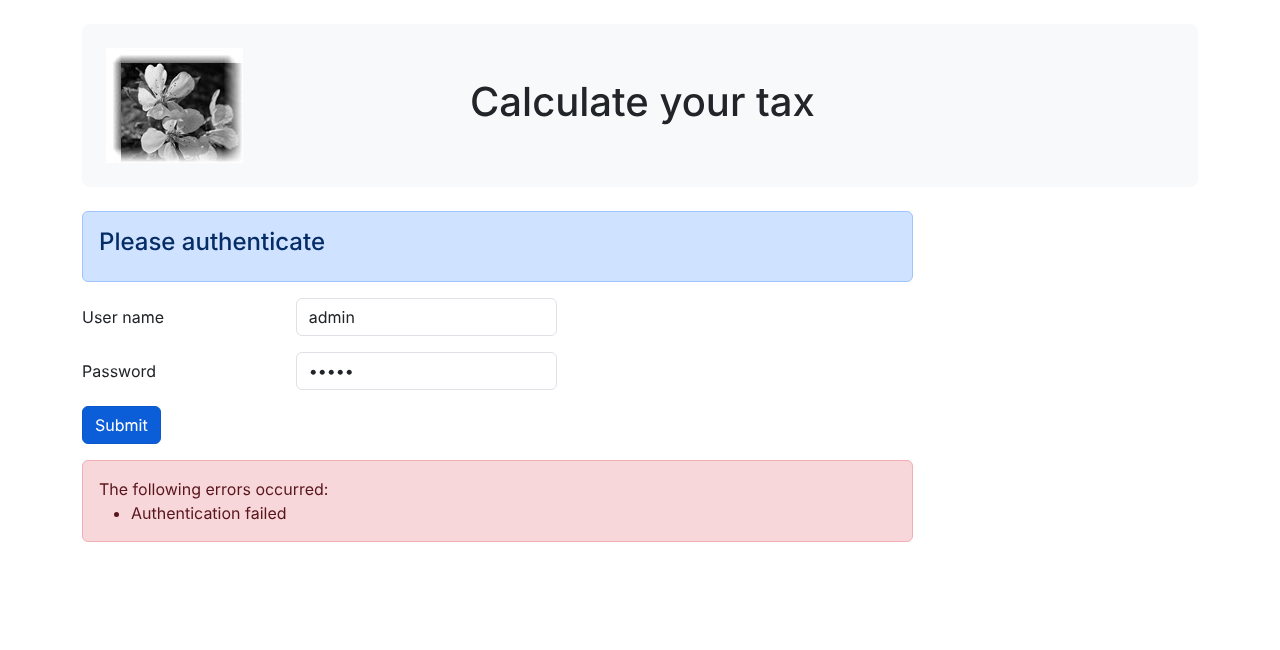
After submission, the tax calculation screen (status 200) appears:
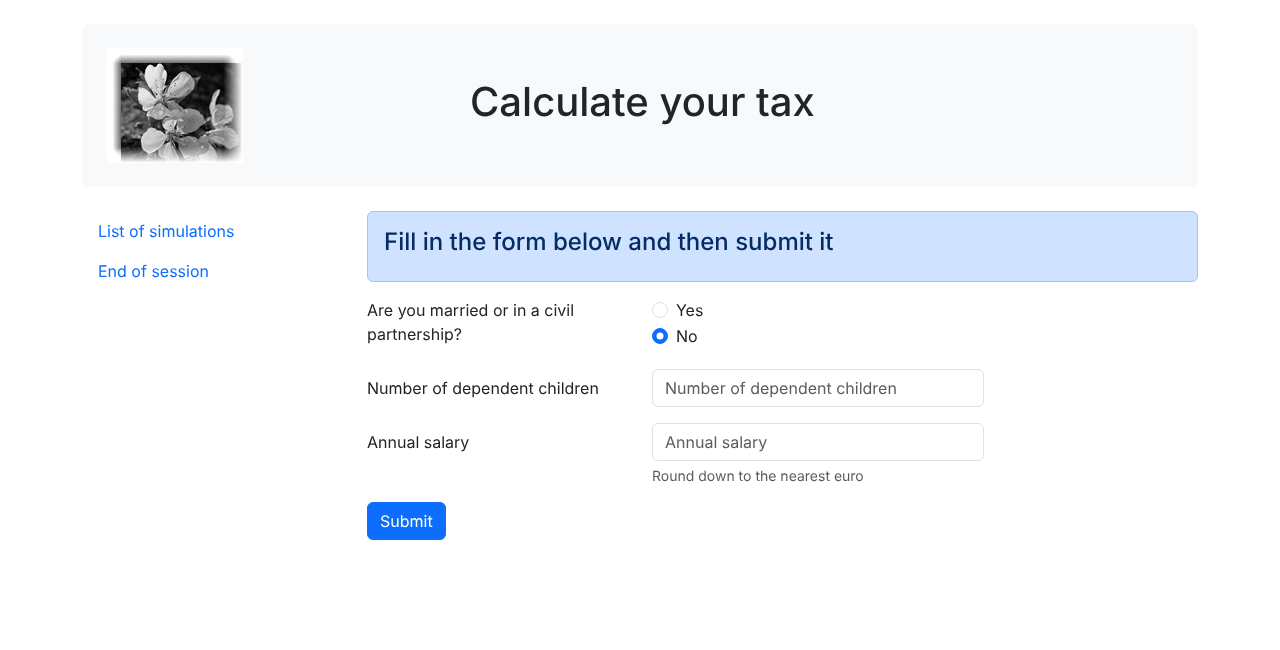
Let’s run a few simulations:
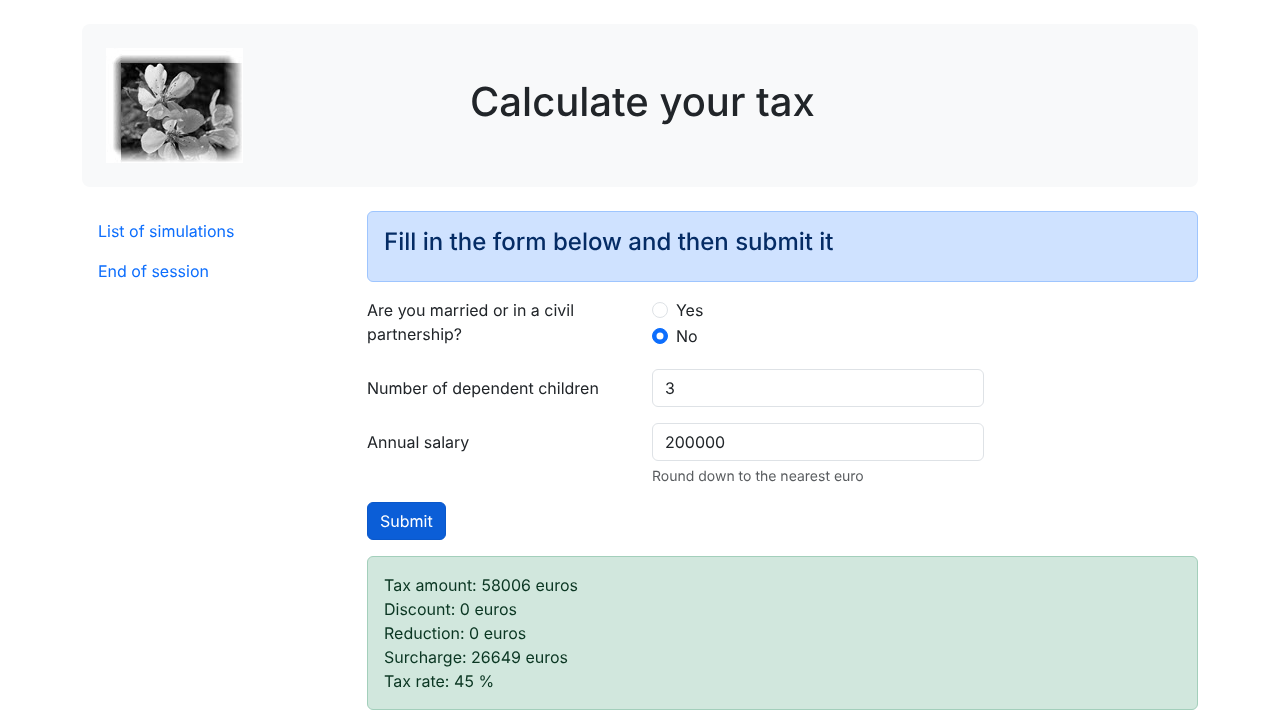
Let’s request the list of simulations:
Let's delete the first simulation:
Let’s return to the tax calculation view using the link [Tax calculation] (status 800):
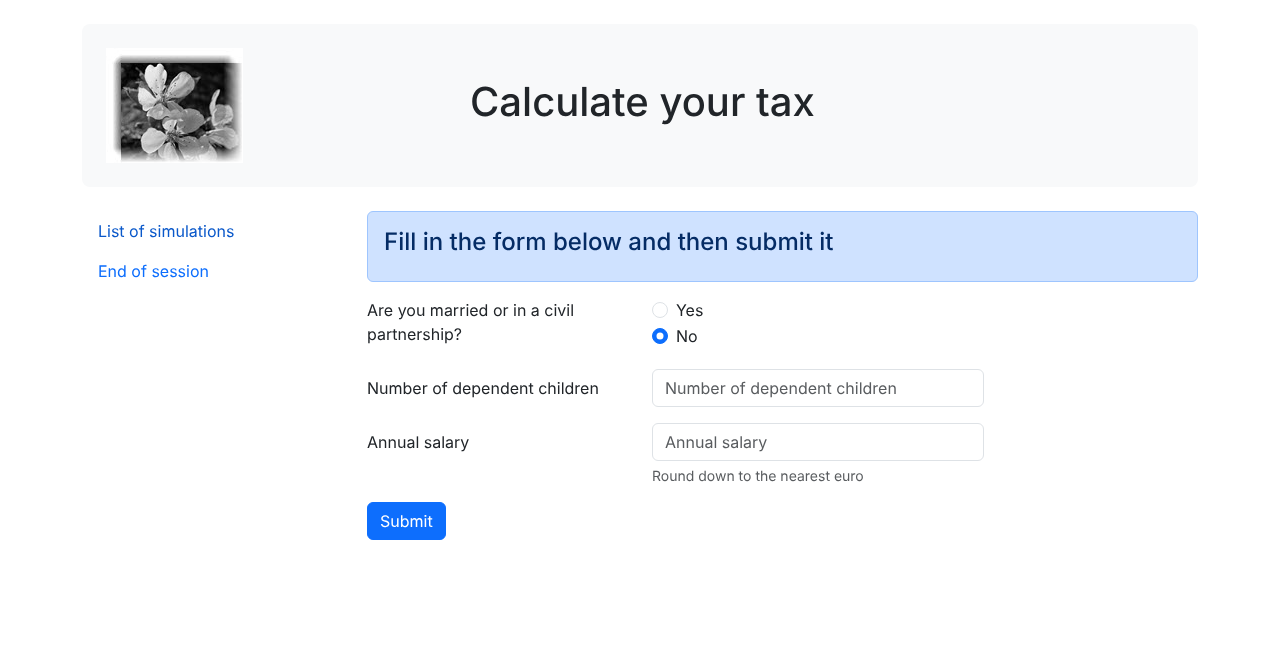
Let’s end the session using the link [End of session]: we return to the authentication screen (status 400):
Finally, here are the logs for [Data/logs.txt] from a short session (JSON: init-session, authenticate-user, calculate-tax):
For each request, the requested action, the controller that processed it, and the response in JSON are recorded, regardless of the session type. Readers are encouraged to conduct further tests.
23.14. JSON Web Service Client
23.14.1. Client/server architecture
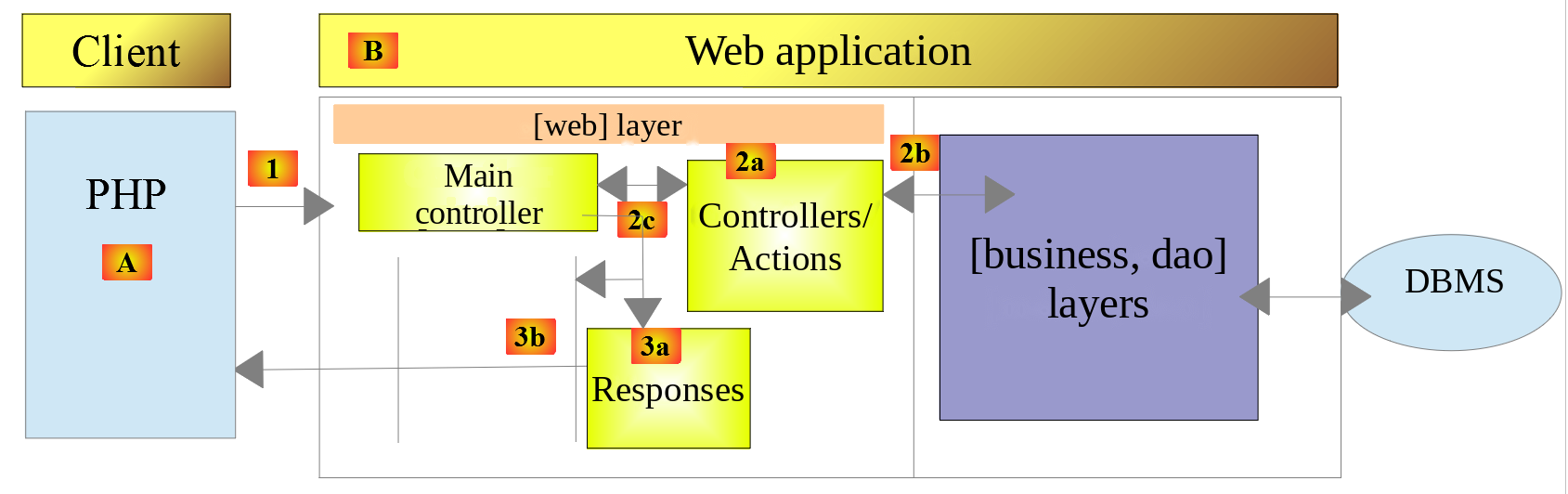
We will now focus on the client JSON [A] of the web service [B]. The client [A], like the web service [B], has a layered structure:

This architecture is reflected in the following code organization within the [scripts-console/tax/version-12] folder:
The other classes used by the client have already been discussed and explained. As with previous clients, they are loaded from the folders where they were written:
Class | Role and Origin |
TaxException | The application's exception class. Version 5, folder [Entities] |
TaxPayerData | A taxpayer's data [married, children, salary]. Version 5, file [Entities] |
Utilities | Reading and writing files JSON. Version 5, folder [Utilities] |
TraitDao | Implementation of methods [getTaxPayersData] and [saveResults]. Version 5, folder [Dao] |
Simulation | A tax calculation simulation. Version 12 server, folder [Entities] |
The client uses the server’s class [Simulation]: this is the format in which the server sends its simulations, and this class [readonly] with public attributes is suitable for both the client and the server. The class PHP 7 [BaseEntity], from which the client class [Simulation] 7 PHP was derived, no longer exists.
23.14.2. The [dao] layer

23.14.2.1. Interface
The interface of layer [dao] is as follows: [Dao/InterfaceClientDao.php]:
Comments
- Line 14: The [getTaxPayersData] method is used to process the JSON file containing taxpayer data. This method is implemented by the [TraitDao] feature in version 5;
- Line 18: The [saveResults] method allows you to save the results of multiple tax calculations to a JSON file. Here as well, this method is implemented by the trait [TraitDao]. This trait delegates the work to the method [Utilities::writeJsonFile], which can convert any object into JSON based on its public attributes: [TaxPayerData] objects in previous versions, [Simulation] objects here;
- lines 21–38: a method has been created for each of the actions accepted by the web service, with the exception of the [display-tax-calculation] action, which is used only by the HTML application;
- line 24: the [SensitiveParameter] attribute (PHP 8.2), which we’ve already encountered: if an exception is thrown while the method is executing, the password value will not appear in the call trace;
- the documentation comments (PHPDoc), [@return Simulation[]], and [@param Simulation[] $simulations] specify the contents of the arrays. PHP cannot determine the type of an array’s contents: the type [array] does not specify that the elements are [Simulation] objects. These comments convey this information to the [VS Code] editor (PHP Intelephense extension), which can then suggest the attributes of [Simulation] when traversing the array.
23.14.2.2. Implementation
The [InterfaceClientDao] interface is implemented by the following [ClientDao] class:
Comments
- Line 19: The class uses the [TraitDao] trait, which implements two methods of the interface:
- [getTaxPayersData(string $taxPayersFilename, string $errorsFilename): array];
- [saveResults(string $resultsFilename, array $simulations): void];
- Line 22: The Symfony client
HTTPis created only once, by the constructor, and is used for all requests. The clientPHPused to create a new clientHTTPin each method; - line 24: the session cookie. Its role was described with the client in version 9. It is set to [null] until the server sends it;
- Lines 30–34: The constructor receives three parameters, two of which are promoted to attributes:
- the URL and [$urlServer] from the JSON web service;
- the [$httpClientOptions] options from the HTTP client. These come from the configuration file: as with version 11, these are the [verify_peer] and [verify_host] options, which would allow working with the self-signed certificate [Laragon] if the server’s URL used the schema [https];
- a Boolean [$verbose] which, when set to [true], indicates that the class should display the server's responses on the console.
The [initSession] method
The [initSession] method is implemented as follows:
Since action [init-session] is the first action requested from the web service, method [initSession] will be the first method in the [dao] layer to be called.
Comments
- Line 40: The desired session type is passed as a parameter. If no parameter is provided, a JSON session will be started. A JSON client can request a XML session: it will receive XML responses from version 11, which it will not be able to process;
- Line 43: A GET request is sent to the web service. Its two parameters are placed in the URL: [main.php?action=init-session&type=json]. The server’s response (a simple message) is not processed. The private method [sendRequest] throws an exception if the response code HTTP is not 200 OK.
The client PHP 7 repeated the following steps in each of its methods: creating the client HTTP, preparing the request options (including the session cookie), and calling the method [getResponse]. We factored this work into the private method [sendRequest].
The [sendRequest] method
Comments
- line 51: the method receives the HTTP method from the request (GET or POST), the parameters from URL, and, for POST, the posted parameters. The [$body] parameter is optional; its default value is an empty array;
- line 54: the [query] option of the Symfony client HTTP contains the parameters from URL. Symfony encodes them itself;
- line 57: when the [body] option is an array, Symfony sends the posted parameters in the form [param1=v1¶m2=v2…] with the header [Content-Type: application/x-www-form-urlencoded], just as a browser does when posting a form;
- lines 59–61: Starting with the second request, we send the session cookie back to the server that it sent to us. This is how the server retrieves the client’s session;
- line 64: the request is prepared. Symfony’s HTTP client is asynchronous: the request is actually sent and the response read when we request the status, headers, or content of the response, which is what the [getResponse] method does;
- line 66: the [response] element of the server’s response is returned.
The [getResponse] method
The [getResponse] method is responsible for processing the web service response:
Comments
- Line 71: The method is private. Its parameter is of type [ResponseInterface], the interface implemented by all responses from the Symfony client HTTP. Client PHP 7 used the type [CurlResponse], the response class when client HTTP is implemented with library [curl]: the [dao] layer was unnecessarily dependent on the implementation chosen by Symfony;
- Lines 73–80: The response status, headers, and content are retrieved. The [false] parameter prevents Symfony from throwing an exception when the response status HTTP falls within the ranges [3xx, 4xx, 5xx]. If the server cannot be reached, Symfony throws a [TransportExceptionInterface] exception, which is converted to a [TaxException] exception with status code 40, as in previous versions;
- lines 83–84: if in [$verbose] mode, the server’s response is displayed on the console;
- lines 88–90: We retrieve the session cookie. Client PHP 7 only did this in the [initSession] method. We do this after every request because the server in version 12 changes the session cookie during the [end-session] action: it sends two headers, the first to delete the old cookie ([PHPSESSID=deleted]) and the second for the new one. The loop retains the last one. The regular expression [/^PHPSESSID=([^;]+)/] captures the cookie’s value up to the first semicolon, which separates the value from the cookie’s attributes (path, expires, etc.);
- line 95: the string JSON is parsed into an array. The option [JSON_THROW_ON_ERROR] causes a [JsonException] exception to be thrown if the string is not a valid JSON;
- lines 99–100: If the response is not a JSON object with the key [response], it is not a response from our web service. A code 41 exception is thrown;
- Lines 103–109: If the status of the server’s response HTTP is not 200, an exception with code 42 is thrown; the exception message is the server’s response JSON, supplemented by the status HTTP, as with the previous clients. The [+] operator, when applied to two associative arrays, merges them: the [["HTTP status" => $statusCode]] array is populated with the keys [action, status, response] from the [$array] array;
- Line 112: The relevant information is in [$array["response"]]. Depending on the action, this is a message, an associative array (a simulation), or a list of associative arrays (simulations). The method’s return type is therefore [mixed].
The [authenticateUser] method
The [authenticateUser] method is as follows:
Comments
- line 121: the client’s request is a POST;
- line 122: the single parameter of the URL;
- line 123: the parameters of the POST;
- The response is not processed: we know that in the event of an error (HTTP code other than 200), the [getResponse] method itself throws an exception.
The [calculateTax] method
Comments
- line 134: the single parameter of URL;
- line 135: the three parameters of POST;
- line 138: if you reach this point, it means that the [getResponse] method did not throw an exception. The response is the associative array of a simulation’s attributes. The [toSimulation] method, described a little further on, converts it into a [Simulation] object.
The [listSimulations] method
Comments
- line 146: a GET request with the single parameter [action];
- line 148: the transformation of the response into a list of [Simulation] objects is handled by the private method [getSimulations].
The [getSimulations] method
Comments
- line 153: the method receives the response from the server, a list of associative arrays, each containing all the attributes of a simulation. It does not use any object attributes: it is static and called by [self::getSimulations(...)];
- line 155: the function [array_map] applies the method [toSimulation] to each element of the list and returns the list of results. The syntax [self::toSimulation(...)] (PHP 8.1, “first-class callable syntax”) creates an anonymous function (a [Closure]) from the method [toSimulation]. It replaces the old syntax [[self::class, "toSimulation"]];
- line 162: the [...] operator unpacks the [$attributes] array into constructor arguments. Starting with PHP 8.1, the string keys of the array become named arguments: the key [married] is passed to parameter [$married], the key [tax] to parameter [$tax], and so on, regardless of the order of the keys in the array. If the server sent a key unknown to the constructor, PHP would throw a [Error] error;
- the client PHP 7 used the method [setFromArrayOfAttributes] of the class [BaseEntity] to initialize the object [Simulation] with the elements of the array. Note that the JSON serialization of its [Simulation] objects contained the redundant attribute [arrayOfAttributes] inherited from the [BaseEntity] class. This is no longer the case.
The [deleteSimulation] method
Comments
- Line 170: A GET request is made with two parameters in the URL;
- Line 172: After a deletion, the server returns the new list of simulations. This list is returned.
The [endSession] method
A work session with the web service normally ends with a call to the [endSession] method:
Comments
- Line 180: A request is made to GET with the single parameter [action]. An exception will be thrown if the response status code HTTP is not 200. The server responds with a new session cookie that the [getResponse] method stores: subsequent requests will be made within the new session, where the user is not authenticated.
23.14.3. The [business] layer

23.14.3.1. The interface
The interface of the [business] layer is as follows: [Business/InterfaceClientBusiness.php]:
Comments
- line 13: Only the method [executeBatchTaxes] is specific to the [business] layer. All others belong to the [dao] layer, which implements them;
- Line 16: The results file is optional. If it is missing, the results are not saved. The parameter is of type [?string] (string or [null]). We placed it last: an optional parameter must follow the required parameters. Course PHP 7 declared [string $resultsFileName] and passed [NULL] to the method, which causes a [TypeError]-type error in [strict_types=1] mode.
23.14.3.2. The [ClientBusiness] class
The class implementing the [business] layer is as follows:
Comments
- line 12: To be instantiated, the [business] layer requires a reference to the [dao] layer. This reference is injected by the constructor and becomes a read-only attribute through parameter promotion;
- Lines 18–22: Only the [executeBatchTaxes] method is specific to the [business] layer. The implementations of the other methods delegate the work to the methods of the same names in the [dao] layer;
- line 25: the [dao] layer is accessed to retrieve taxpayer data into an array of objects of type [TaxPayerData];
- Lines 27–34: The tax for each taxpayer in the [$taxPayersData] array is calculated. The arrow function (PHP 7.4) called by [array_map] returns, for each taxpayer, the [Simulation] object returned by the server. Each calculation is also stored by the server in the user’s session;
- lines 36–37: the results are saved to a JSON file only if a filename has been specified.
Note: The [business] layer does virtually nothing. One might decide to remove it and consolidate everything into the [dao] layer.
23.14.4. The main script

The main script is configured by the following file, [Data/config.json]:
- Line 2: the URL for the main server controller in version 12. We use the [http] schema, as we have since version 8 (see the section “Why [http] and not [https]?” in the chapter on version 8);
- line 3: the user’s credentials;
- line 7: the HTTP client options, already used by the Version 11 client: if URL uses the [https] schema, the server’s self-signed certificate is not verified;
- Lines 14–24: The application files to be loaded, related to the client's [version-12] folder. This includes the server’s [Simulation] class. Course PHP 7 also provided an absolute root directory, [rootDirectory], and the absolute path to the Composer autoloader. As with previous versions, the paths are now calculated based on the constant [__DIR__]: the [php8-oct-2026] folder can be moved without changing the configuration.
The main script [Main/main.php] is as follows:
Comments
- lines 10–15: processing the configuration file [config.json];
- lines 18–20: loading all dependencies;
- lines 24–26: absolute paths to the data files;
- lines 29–31: building the layers [dao] and [business]. The parameter [$verbose] is passed by name: [verbose: true] is more descriptive than simply [true];
- line 36: initialization of a JSON session;
- line 38: authenticating with the server;
- lines 40–43: calculating the tax for a group of taxpayers. The results are not saved: thanks to named arguments, we simply omit the optional parameter [resultsFileName];
- line 45: the results of all these calculations are retrieved;
- line 47: delete simulation #1 (the second one on the list);
- line 49: Save the remaining simulations;
- line 52: the session is ended. The server deletes the session and starts a new one;
- line 54: the list of simulations is requested. In the new session, the user is not authenticated. Therefore, an exception should occur indicating that the user is not authenticated.
The file [taxpayersdata.json] is the one from previous versions:
There are 12 taxpayers, 1 of whom is incorrect. This makes a total of 11 simulations. One of them will be deleted. There should be 10 remaining.
The console output is as follows (in verbose mode, the server’s JSON responses are displayed on the console):
- lines 2–3: the JSON session is started and the user is authenticated;
- lines 4–14: the 11 tax calculations. The incorrect taxpayer was not sent to the server;
- line 15: the list of 11 simulations;
- line 16: the list of the 10 simulations remaining after simulation #1 (tax 1384) was deleted;
- line 17: the message from the main script after the results are saved;
- line 18: the end of the session;
- lines 19–20: the list of simulations is rejected (status 104): in the new session, the user is not authenticated. The PHP 7 client previously received status 103 (no active session) here because it continued to send the old session cookie. The version 12 server retains the session type during the [end-session] action: the client therefore remains a JSON client, but must authenticate again.
After the main script runs, the JSON [results.json] file looks like this:
There are indeed 10 simulations. The file JSON [errors.json] has the following content:
23.14.5. [PHPUnit] Tests
As with previous clients, the Version 12 client can be tested using [PHPUnit]. The test class [Tests/ClientBusinessTest.php] is similar to that of previous clients:
1 2 3 4 5 6 7 8 9 10 11 12 13 14 15 16 17 18 19 20 21 22 23 24 25 26 27 28 29 30 31 32 33 34 35 36 37 38 39 40 41 42 43 44 45 46 47 48 49 50 51 52 53 54 55 56 57 58 59 60 61 62 63 64 65 66 67 68 69 70 71 72 73 74 75 76 77 78 79 80 81 82 83 84 85 86 87 88 89 90 91 92 93 94 95 96 97 98 99 100 101 102 103 104 105 106 107 108 109 110 111 112 113 114 115 116 117 118 119 120 121 122 | |
Comments
- lines 31–37: The client configuration is read and dependencies are loaded only once, before the first test;
- Lines 43–51: Note that the [setUp] method is executed before each test. It constructs the layers [dao] (in non-verbose mode) and [business], then initializes a session JSON and authenticates itself. Each test thus runs in its own session, independent of the other tests. Course PHP 7 performed this task in the test class constructor, which PHPUnit no longer allows;
- lines 55–69: the data provider from previous versions. For each taxpayer, we have the tax calculated by the official simulator and the five expected results from [tax, surcharge, discount, reduction, rate];
- line 82: the expected simulation is constructed and compared to the one returned by the server. When applied to two objects, the [assertEquals] method verifies that they are of the same class and that their attributes are equal. The operator [...] decomposes a list here: its elements are passed to the last five parameters of the constructor, in order;
- Lines 86–97: A test of the actions [list-simulations] and [delete-simulation]. We run two simulations, delete the first one, and verify that the second one remains. Then we request the deletion of a simulation that does not exist: the server must respond with status 628;
- lines 101–105: After the session ends, the list of simulations must be rejected with status code 104;
- lines 110–119: a utility method that verifies that the action [$action], passed as an anonymous function, throws a [TaxException] exception with code 42, the expected status HTTP, and the expected status. Since the exception message is the server’s JSON response, it is decoded to verify its elements. If no exception is thrown, the [fail] method causes the test to fail.
The test results are as follows:
Many other tests should be performed:
- test the various methods of the [dao] layer;
- test the status codes returned by the web server. These status codes are important because their values determine which HTML page to display.