Skip to content

14. Application Exercise – Version 6

We have just implemented the following layered structure:
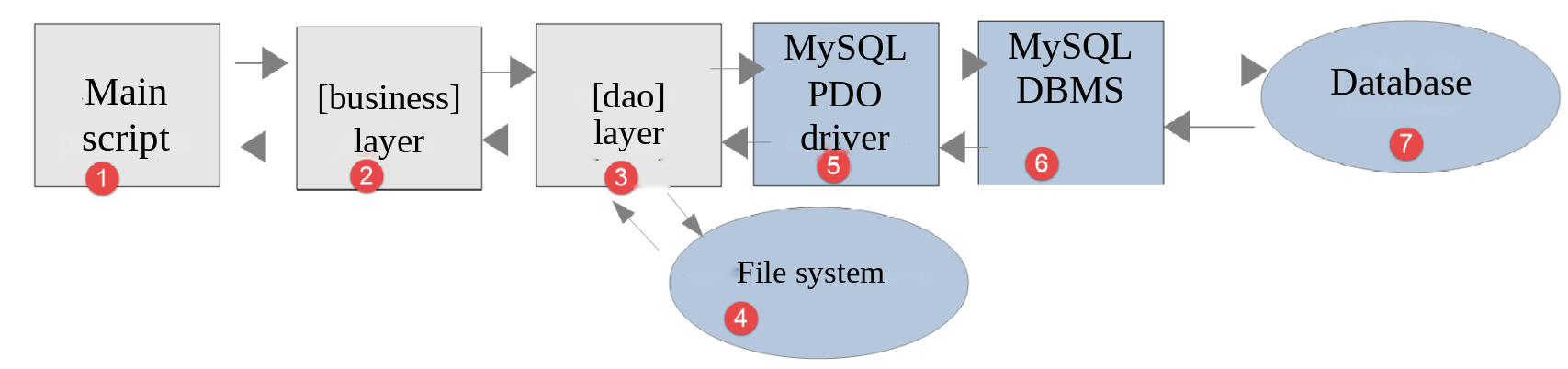
Image

The DBMS used in the examples was MySQL. In the previous chapter, we noted that nothing in the classes implementing the [dao] layer suggested that a specific DBMS was being used. We will now verify this by using another DBMS, namely PostgreSQL. The layered architecture becomes as follows:
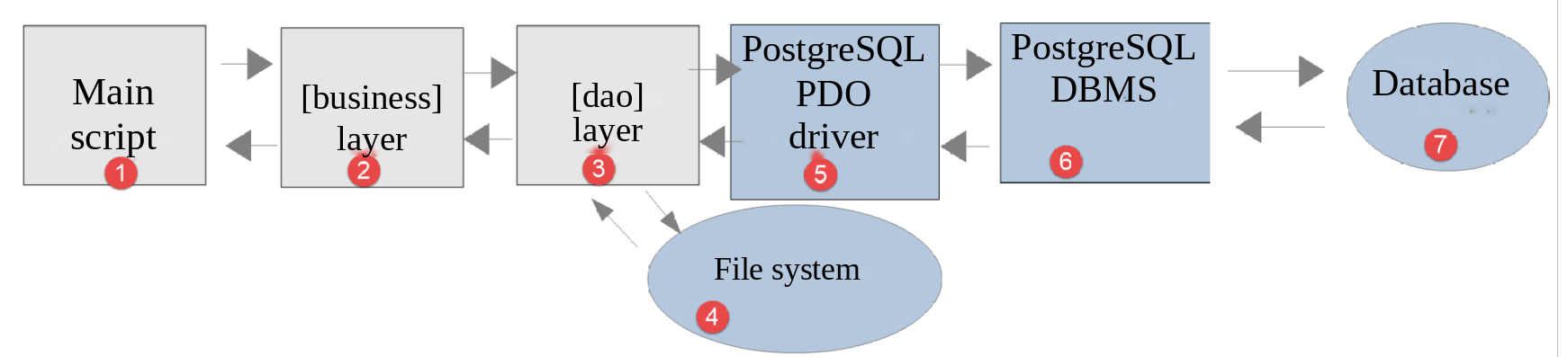
Image

Version 6 does not contain any new classes: it uses the classes from version 5. It contains only data files and new main scripts:

version-06
├── Data
│   ├── database.json
│   ├── errors.json
│   ├── postgres-dbtaxes-2019.sql
│   ├── results.json
│   ├── taxadmindata.json
│   └── taxpayersdata.json
├── Main
│   ├── MainCalculateTaxWithTaxAdminDataInPostgresDatabase.php
│   └── MainTransferAdminDataFromJsonFile2PostgresDatabase.php
└── Tests
    ├── data
    │   ├── database-incomplete.json
    │   └── database-nonexistent-user.json
    ├── BusinessTest.php
    └── DaoTest.php

14.1. Installation of the PostgreSQL DBMS

The PHP 7 course downloaded the PostgreSQL installer for Windows from the website https://www.postgresql.org/download/, ran it, and then changed the PostgreSQL Windows service—which launched automatically at system startup—to a manual-startup service. With [Laragon], it’s simpler. PostgreSQL isn’t installed by default, but [Laragon] can add it itself:

  • right-click in the [Laragon] window (or on its icon in the taskbar) to open its menu;
  • select [Tools > Quick add]. The list shows software that [Laragon] can download and install, including one or more versions of PostgreSQL, such as [postgresql-17];
  • Clicking on the desired version starts the download and installation. PostgreSQL is installed in the [<laragon>/bin/postgresql] folder, and its data in the [<laragon>/data/postgresql-NN] folder;
  • The [Start All] button now launches PostgreSQL with Apache and MySQL. The [Laragon] window indicates that it is listening on port 5432, its default port.

If the desired version of PostgreSQL is not listed, you can add it to the list: the [Tools > Quick add > Configuration] menu opens the [<laragon>/usr/packages.conf] file, which associates each program with the address of its archive. Add (or modify) a line in the form [postgresql-17=<address of the zip archive>], where the archive is the “binaries” archive for PostgreSQL for Windows provided by the company EDB (the “zip archive” link on the page https://www.enterprisedb.com/download-postgresql-binaries). Alternatively, without using this menu, you can extract this archive yourself into a subfolder of [<laragon>/bin/postgresql]: [Laragon] will find it the next time it starts up, and the version to use can be selected from the [PostgreSQL > Version] menu.

PostgreSQL is used only in this chapter and the next one. It works only when [Laragon] is running, and you can stop it from the [PostgreSQL] menu in [Laragon].

Like MySQL, PostgreSQL has an administrator, the superuser [postgres]. In the installation performed by [Laragon], it normally does not have a password. If a password was assigned to it, the tools will prompt for it.

The terminal for [Laragon] provides access to the command-line client for PostgreSQL, [psql], which is equivalent to the client [mysql]. The [PostgreSQL] menu in [Laragon] also offers the graphical tool [pgAdmin] when it is installed. The documentation for PostgreSQL is available at https://www.postgresql.org/docs/.

14.2. Enabling the PDO extension for the PostgreSQL DBMS

The PDO driver for PostgreSQL is the [pdo_pgsql] extension of PHP. You activate it the same way you did for the MySQL driver:

  • either in the [Laragon] menu: PHP / Extensions / pdo_pgsql;
  • or by verifying that the following line is not commented out (no semicolon at the beginning of the line) in the [php.ini] file (menu PHP / php.ini from [Laragon]):
extension=pdo_pgsql

After saving the change, restart the [Laragon] services ([Reload] button). Then verify that the driver is present using the [pdo-drivers.php] script from the section on MySQL, run in the [scripts-console/mysql] folder:

1
2
3
4
5
> php pdo-drivers.php
Available PDO drivers: mysql, pgsql, sqlite
extension [pdo_mysql]: loaded
extension [pdo_pgsql]: loaded
extension [pdo_sqlite]: loaded

The [pgsql] driver is one of the available drivers.

14.3. Creating the database [dbtaxes-2019]

Using PostgreSQL, we will create:

  • a user named [admtaxes] with the password [pwdtaxes];
  • a database named [dbtaxes-2019], of which this user will be the owner;
  • in this database, the tables [tbbrackets] and [tbconstants].

The PHP 7 course covered this task using the administration tool [pgAdmin], a web application that must be installed in addition to the DBMS. As with MySQL, we’ll write an SQL script instead: [Data/postgres-dbtaxes-2019.sql]:

-- database [dbtaxes-2019] of the tax calculation application - PostgreSQL DBMS
-- to be executed by the administrator [postgres] of the DBMS:
--   psql -U postgres -f postgres-dbtaxes-2019.sql
-- the database, its tables and its owner are recreated if they already exist

-- the database and its owner [admtaxes] with password [pwdtaxes]
DROP DATABASE IF EXISTS "dbtaxes-2019";
DROP ROLE IF EXISTS admtaxes;
CREATE ROLE admtaxes LOGIN PASSWORD 'pwdtaxes';
CREATE DATABASE "dbtaxes-2019" OWNER admtaxes ENCODING 'UTF8' TEMPLATE template0;

-- connection to the new database (psql client command)
\connect dbtaxes-2019

-- the tables are created by [admtaxes]: he will be their owner
SET ROLE admtaxes;

-- the table of the tax brackets
CREATE TABLE tbbrackets (
    id INTEGER GENERATED ALWAYS AS IDENTITY,
    limits NUMERIC(10, 2) NOT NULL,
    coeffr NUMERIC(6, 2) NOT NULL,
    coeffn NUMERIC(10, 2) NOT NULL,
    PRIMARY KEY (id)
);

-- the table of the tax calculation constants
CREATE TABLE tbconstants (
    id INTEGER GENERATED ALWAYS AS IDENTITY,
    half_share_qf_ceiling NUMERIC(10, 2) NOT NULL,
    single_income_ceiling_for_reduction NUMERIC(10, 2) NOT NULL,
    couple_income_ceiling_for_reduction NUMERIC(10, 2) NOT NULL,
    half_share_reduction_value NUMERIC(10, 2) NOT NULL,
    single_discount_ceiling NUMERIC(10, 2) NOT NULL,
    couple_discount_ceiling NUMERIC(10, 2) NOT NULL,
    single_tax_ceiling_for_discount NUMERIC(10, 2) NOT NULL,
    couple_tax_ceiling_for_discount NUMERIC(10, 2) NOT NULL,
    ten_percent_allowance_max NUMERIC(10, 2) NOT NULL,
    ten_percent_allowance_min NUMERIC(10, 2) NOT NULL,
    PRIMARY KEY (id)
);

Comments

  • Lines 7–8: We delete the database and user if they exist, so that the script can be rerun. With PostgreSQL, a name containing a hyphen is enclosed in quotation marks, not backticks as in MySQL: this is the first difference between the two DBMS scripts;
  • Line 9: PostgreSQL refers to its users as “roles.” The [LOGIN] attribute authorizes the role [admtaxes] to connect to the DBMS;
  • Line 10: Creation of the database [dbtaxes-2019]. Its owner is [admtaxes], which grants it full rights over the database. The character encoding is UTF-8. The database is built from the template database [template0], which supports any character encoding;
  • Line 13: This line is not a SQL command but a [psql] client command (it begins with a backslash). It connects the client to the database [dbtaxes-2019] that was just created. With PostgreSQL, there is no equivalent to the [USE] command from MySQL: a connection operates on a single database;
  • Line 16: The following commands are executed under the identity of [admtaxes], which will thus be the owner of the created tables;
  • Lines 19–25: the table [tbbrackets]. The primary key [id] is of type [INTEGER GENERATED ALWAYS AS IDENTITY]: it is the DBMS that generates its values during inserts, just as the attribute [AUTO_INCREMENT] did for MySQL. This syntax conforms to the SQL standard; [AUTO_INCREMENT] is specific to MySQL. The [NUMERIC] type is equivalent to the [DECIMAL] type of MySQL;
  • Lines 28–41: the table [tbconstants]. Column names are written in lowercase, with words separated by underscores (half_share_qf_ceiling).

Why these column names? A distinctive feature of PostgreSQL is that column names may be case-sensitive (upper/lowercase), which is not usually the case with other DBMSs. For example, with MySQL, the query [select limits, coeffR, coeffN from tbbrackets] works even though the actual columns in the table [tbbrackets] are [LIMITS, COEFFR, COEFFN]. With PostgreSQL, it does not work, because PostgreSQL converts names that are not enclosed in quotation marks to lowercase: it actually executes the command [select limits, coeffr, coeffn from tbbrackets]. To prevent this from happening, you must use [select "LIMITS", "COEFFR", "COEFFN" from tbbrackets]—that is, enclose the column names in quotation marks. For these reasons, we give the columns lowercase names, and we cannot reuse the camelCase names (halfShareQfCeiling) of the MySQL database. Database object names can be a source of incompatibility between DBMSs, as certain names are reserved words in some DBMSs but not in others.

This script must be run by the superuser [postgres]. In the [Laragon] terminal opened in the [version-06/Data] folder, type the following command (the [-U] option specifies the user name, and the [-f] option specifies the file to run):

> psql -U postgres -f postgres-dbtaxes-2019.sql
psql:postgres-dbtaxes-2019.sql:7: NOTICE:  database "dbtaxes-2019" does not exist, skipping
DROP DATABASE
psql:postgres-dbtaxes-2019.sql:8: NOTICE:  role "admtaxes" does not exist, skipping
DROP ROLE
CREATE ROLE
CREATE DATABASE
You are now connected to database "dbtaxes-2019" as user "postgres".
SET
CREATE TABLE
CREATE TABLE
  • Lines 2 and 4: warnings (NOTICE) from the [DROP ... IF EXISTS] commands during the first execution: the database and role did not exist;
  • The other lines are the logs of the executed commands.

We verify the result by logging into the database as [admtaxes]. The [-h localhost] option requires a network connection to the local machine, as will PHP. [psql] then prompts for the password for [admtaxes], unless the server trusts local connections (see the section on testing, below). The [-c] option passes a command to be executed; the [psql] command [\dt] lists the database tables:

1
2
3
4
5
6
7
> psql -U admtaxes -h localhost -d dbtaxes-2019 -c "\dt"
            List of relations
 Schema |    Name     | Type  |  Owner
--------+-------------+-------+----------
 public | tbbrackets  | table | admtaxes
 public | tbconstants | table | admtaxes
(2 rows)

and the command [\d tbbrackets] displays the structure of the table [tbbrackets]:

> psql -U admtaxes -h localhost -d dbtaxes-2019 -c "\d tbbrackets"
                          Table "public.tbbrackets"
 Column |     Type      | Collation | Nullable |           Default
--------+---------------+-----------+----------+------------------------------
 id     | integer       |           | not null | generated always as identity
 limits | numeric(10,2) |           | not null |
 coeffr | numeric(6,2)  |           | not null |
 coeffn | numeric(10,2) |           | not null |
Indexes:
    "tbbrackets_pkey" PRIMARY KEY, btree (id)
  • Line 5: the primary key [id], generated by the DBMS (always generated as an identity);
  • Lines 9–10: the primary key index.

PostgreSQL can also be managed graphically. The [HeidiSQL] tool provided with [Laragon] can connect to a PostgreSQL server (network type “PostgreSQL (TCP/IP”), port 5432). The [pgAdmin] tool from the PHP 7 course can also be used ([https://www.pgadmin.org/]).

14.4. Populating the [dbtaxes-2019] database

We have already done this work with the MySQL DBMS in version 5. We simply need to modify the [database.json] file, which describes the database. The [version-06/Data/database.json] file is as follows:

{
    "dsn": "pgsql:host=localhost;dbname=dbtaxes-2019",
    "id": "admtaxes",
    "pwd": "pwdtaxes",
    "tableBrackets": "public.tbbrackets",
    "colId": "id",
    "colLimits": "limits",
    "colCoeffR": "coeffr",
    "colCoeffN": "coeffn",
    "tableConstants": "public.tbconstants",
    "colHalfShareQfCeiling": "half_share_qf_ceiling",
    "colSingleIncomeCeilingForReduction": "single_income_ceiling_for_reduction",
    "colCoupleIncomeCeilingForReduction": "couple_income_ceiling_for_reduction",
    "colHalfShareReductionValue": "half_share_reduction_value",
    "colSingleDiscountCeiling": "single_discount_ceiling",
    "colCoupleDiscountCeiling": "couple_discount_ceiling",
    "colSingleTaxCeilingForDiscount": "single_tax_ceiling_for_discount",
    "colCoupleTaxCeilingForDiscount": "couple_tax_ceiling_for_discount",
    "colTenPercentAllowanceMax": "ten_percent_allowance_max",
    "colTenPercentAllowanceMin": "ten_percent_allowance_min"
}
  • Line 2: The DSN has changed; the prefix [pgsql] indicates that we are dealing with the PostgreSQL DBMS. The port is not specified: it is the default port for PostgreSQL, 5432;
  • lines 5 and 10: the table names are prefixed with the name of the schema to which they belong, [public]. A PostgreSQL database can contain multiple schemas, which serve as namespaces for the tables. This was not strictly necessary since [public] is the default schema used when no schema is specified in the table name;
  • lines 11–20: the column names in the constants table have changed.

The [Main/MainTransferAdminDataFromJsonFile2PostgresDatabase.php] script for populating the [dbtaxes-2019] database is as follows:

<?php

// strict respect of the declared types of function parameters and results
declare(strict_types=1);

// namespace
namespace Application;

// inclusion of the interfaces and classes of version 5 needed for the transfer
require_once __DIR__ . "/../../version-05/Entities/TaxException.php";
require_once __DIR__ . "/../../version-05/Entities/TaxAdminData.php";
require_once __DIR__ . "/../../version-05/Entities/Database.php";
require_once __DIR__ . "/../../version-05/Utilities/Utilities.php";
require_once __DIR__ . "/../../version-05/Dao/InterfaceDao4TransferAdminData2Database.php";
require_once __DIR__ . "/../../version-05/Dao/DaoTransferAdminDataFromJsonFile2Database.php";

// definition of the constants
const DATABASE_CONFIG_FILENAME = __DIR__ . "/../Data/database.json";
const TAXADMINDATA_FILENAME = __DIR__ . "/../Data/taxadmindata.json";

try {
    // creation of the [dao] layer
    $dao = new DaoTransferAdminDataFromJsonFile2Database(DATABASE_CONFIG_FILENAME, TAXADMINDATA_FILENAME);
    // transfer of the data into the database
    $dao->transferAdminData2Database();
    print "The data of the tax administration have been transferred into the database\n";
} catch (TaxException $ex) {
    // we display the error
    print "Error no. {$ex->getCode()}: {$ex->getMessage()}\n";
}
// end
print "Done\n";

Comments

Only lines 10–15, which load the files required to run the application, have changed from the Version 5 script: the files are now located in the [version-05] folder, adjacent to the [version-06] folder. The constants on lines 18–19 refer to the files in the [version-06/Data] folder.

When this script is run, the following result is obtained:

1
2
3
> php MainTransferAdminDataFromJsonFile2PostgresDatabase.php
The data of the tax administration have been transferred into the database
Done

and the following content in the [tbbrackets] table:

1
2
3
4
5
6
7
8
9
> psql -U admtaxes -h localhost -d dbtaxes-2019 -c "select * from tbbrackets"
 id |  limits   | coeffr |  coeffn
----+-----------+--------+----------
  1 |   9964.00 |   0.00 |     0.00
  2 |  27519.00 |   0.14 |  1394.96
  3 |  73779.00 |   0.30 |  5798.00
  4 | 156244.00 |   0.41 | 13913.69
  5 |      0.00 |   0.45 | 20163.45
(5 rows)

We repeat the same process for the constants table [tbconstants]. The [-x] option of [psql] displays each row vertically:

> psql -U admtaxes -h localhost -d dbtaxes-2019 -x -c "select * from tbconstants"
-[ RECORD 1 ]-----------------------+---------
id                                  | 1
half_share_qf_ceiling               | 1551.00
single_income_ceiling_for_reduction | 21037.00
couple_income_ceiling_for_reduction | 42074.00
half_share_reduction_value          | 3797.00
single_discount_ceiling             | 1196.00
couple_discount_ceiling             | 1970.00
single_tax_ceiling_for_discount     | 1595.00
couple_tax_ceiling_for_discount     | 2627.00
ten_percent_allowance_max           | 12502.00
ten_percent_allowance_min           | 437.00

This time, the [PDO::connect] method created an object of the [Pdo\Pgsql] class, and the PostgreSQL driver was used, without a single line of the [DaoTransferAdminDataFromJsonFile2Database] class being modified. Note that to run the script, neither the Apache server nor the MySQL DBMS is required: only the PostgreSQL DBMS needs to be launched.

14.5. Tax Calculation

Image

The [dao] [3] and [business] [2] layers have already been written. We have already written the main script for the MySQL DBMS in version 5. All we need to do is take the [MainCalculateTaxWithTaxAdminDataInMySQLDatabase.php] script and adapt it for the PostgreSQL DBMS. It is now called [MainCalculateTaxWithTaxAdminDataInPostgresDatabase.php]:

<?php

// strict respect of the declared types of function parameters and results
declare(strict_types=1);

// namespace
namespace Application;

// inclusion of the interfaces and classes of version 5
require_once __DIR__ . "/../../version-05/Entities/TaxException.php";
require_once __DIR__ . "/../../version-05/Entities/TaxAdminData.php";
require_once __DIR__ . "/../../version-05/Entities/TaxPayerData.php";
require_once __DIR__ . "/../../version-05/Entities/Database.php";
require_once __DIR__ . "/../../version-05/Utilities/Utilities.php";
require_once __DIR__ . "/../../version-05/Dao/InterfaceDao.php";
require_once __DIR__ . "/../../version-05/Dao/TraitDao.php";
require_once __DIR__ . "/../../version-05/Dao/DaoTaxWithTaxAdminDataInDatabase.php";
require_once __DIR__ . "/../../version-05/Business/InterfaceBusiness.php";
require_once __DIR__ . "/../../version-05/Business/Business.php";

// definition of the constants
const DATABASE_CONFIG_FILENAME = __DIR__ . "/../Data/database.json";
const TAXPAYERSDATA_FILENAME = __DIR__ . "/../Data/taxpayersdata.json";
const RESULTS_FILENAME = __DIR__ . "/../Data/results.json";
const ERRORS_FILENAME = __DIR__ . "/../Data/errors.json";

try {
    // creation of the [dao] layer
    $dao = new DaoTaxWithTaxAdminDataInDatabase(DATABASE_CONFIG_FILENAME);
    // creation of the [business] layer
    $business = new Business($dao);
    // tax calculation in batch mode
    $business->executeBatchTaxes(TAXPAYERSDATA_FILENAME, RESULTS_FILENAME, ERRORS_FILENAME);
    print "The results have been saved in the file [results.json]\n";
} catch (TaxException $ex) {
    // we display the error
    print "Error no. {$ex->getCode()}: {$ex->getMessage()}\n";
}
// end
print "Done\n";

Comments

Once again, only lines 10–19, which load the Version 5 files, have changed. The JSON files used are those from the [version-06/Data] folder, specifically the [database.json] file, which describes the PostgreSQL database.

Execution Results

1
2
3
> php MainCalculateTaxWithTaxAdminDataInPostgresDatabase.php
The results have been saved in the file [results.json]
Done

The files [errors.json] and [results.json] generated in the [version-06/Data] folder are identical to those obtained with the MySQL database in version 5.

14.6. [PHPUnit] Tests

As with previous versions, we are validating this version using [PHPUnit] tests. The test classes [DaoTest] and [BusinessTest] from the [version-06/Tests] folder are the same as those in version 5. The only change is the test environment: the application files are loaded from the [version-05] folder, and the data comes from the [version-06/Data] folder.

14.6.1. Test of layer [dao]

The beginning of the [Tests/DaoTest.php] test is as follows:

<?php

// strict respect of the declared types of function parameters and results
declare(strict_types=1);

// namespace of the tests
namespace Application\Tests;

// the tested classes
use Application\DaoTaxWithTaxAdminDataInDatabase;
use Application\DaoTransferAdminDataFromJsonFile2Database;
use Application\TaxException;
use Application\InterfaceDao;
use Application\TaxAdminData;
use Application\TaxPayerData;
// the PHPUnit classes
use PHPUnit\Framework\Attributes\DataProvider;
use PHPUnit\Framework\TestCase;

// loading the classes of the [dao] layer of version 5
require_once __DIR__ . "/../../version-05/Entities/TaxException.php";
require_once __DIR__ . "/../../version-05/Entities/TaxAdminData.php";
require_once __DIR__ . "/../../version-05/Entities/TaxPayerData.php";
require_once __DIR__ . "/../../version-05/Entities/Database.php";
require_once __DIR__ . "/../../version-05/Utilities/Utilities.php";
require_once __DIR__ . "/../../version-05/Dao/InterfaceDao.php";
require_once __DIR__ . "/../../version-05/Dao/TraitDao.php";
require_once __DIR__ . "/../../version-05/Dao/DaoTaxWithTaxAdminDataInDatabase.php";
require_once __DIR__ . "/../../version-05/Dao/InterfaceDao4TransferAdminData2Database.php";
require_once __DIR__ . "/../../version-05/Dao/DaoTransferAdminDataFromJsonFile2Database.php";

final class DaoTest extends TestCase
{
    // the data folder of version 6
    private const string DATA = __DIR__ . "/../Data";
    // the tested [dao] layer
    private InterfaceDao $dao;
    // a temporary file for the errors
    private string $errorsFilename;

Comments

  • Lines 21–30: Test environment definition: the classes from layer [dao] of version 5 are loaded;
  • line 35: the test data is from version 6, specifically the file [database.json] from the PostgreSQL database.

The test methods are those from version 5, with one exception. The file [database-incomplete.json] in the folder [Tests/data] is the version 5 file adapted for the PostgreSQL database. However, the “incorrect password” test case from Version 5 has been replaced by a “user does not exist” test case:

    // incorrect descriptions of the database
    public static function invalidDatabases(): array
    {
        // [file name, expected error code]
        return [
            "non-existent file" => ["nonexistent.json", 15],
            "missing key" => ["database-incomplete.json", 21],
            // with PostgreSQL, we test a non-existent user rather than a wrong password:
            // if the server trusts the local connections ([trust] method), it does not check
            // the passwords, but it always refuses a user it does not know
            "non-existent user" => ["database-nonexistent-user.json", 30],
        ];
    }
  • Line 102: The file [database-nonexistent-user.json] describes the database with a user named [unknown], which PostgreSQL does not recognize. The connection fails, and the [dao] layer triggers a [TaxException] with code 30.

Why this change? For each connection type, a PostgreSQL server selects an authentication method specified in its configuration file [pg_hba.conf] (in the PostgreSQL data folder, [<laragon>/data/postgresql-NN] with [Laragon]). The [scram-sha-256] method verifies the password. The [trust] method, on the other hand, trusts the client: it accepts the connection without verifying the password, provided that the user exists. This is the method used by the PostgreSQL installation created by [Laragon] for connections originating from the local machine, which explains why the superuser [postgres] has no password. With this configuration, an incorrect password is accepted: the “incorrect password” test would fail, since the expected exception is not thrown. A nonexistent user, on the other hand, is denied access regardless of the authentication method: the test works on all installations. The [trust] method is convenient on a development machine; it should obviously not be used on a production server.

14.6.2. Testing the [business] layer

Similarly, the [Tests/BusinessTest.php] test is the one from version 5 with a modified environment:

// loading the classes of the [dao] and [business] layers of version 5
require_once __DIR__ . "/../../version-05/Entities/TaxException.php";
require_once __DIR__ . "/../../version-05/Entities/TaxAdminData.php";
require_once __DIR__ . "/../../version-05/Entities/TaxPayerData.php";
require_once __DIR__ . "/../../version-05/Entities/Database.php";
require_once __DIR__ . "/../../version-05/Utilities/Utilities.php";
require_once __DIR__ . "/../../version-05/Dao/InterfaceDao.php";
require_once __DIR__ . "/../../version-05/Dao/TraitDao.php";
require_once __DIR__ . "/../../version-05/Dao/DaoTaxWithTaxAdminDataInDatabase.php";
require_once __DIR__ . "/../../version-05/Business/InterfaceBusiness.php";
require_once __DIR__ . "/../../version-05/Business/Business.php";

final class BusinessTest extends TestCase
{
    // the data folder of version 6
    private const string DATA = __DIR__ . "/../Data";
    // the tested [business] layer
    private InterfaceBusiness $business;

    // executed before each test
    #[\Override]
    protected function setUp(): void
    {
        // creation of the [dao] layer
        $dao = new DaoTaxWithTaxAdminDataInDatabase(self::DATA . "/database.json");
        // creation of the [business] layer
        $this->business = new Business($dao);
    }

14.6.3. Running the Tests

The PostgreSQL DBMS must be started. The test results are as follows:

> php vendor/bin/phpunit scripts-console/tax/version-06/Tests --testdox
PHPUnit 12.5.37 by Sebastian Bergmann and contributors.

Runtime:       PHP 8.5.11
Configuration: /home/claude/php8/php8-oct-2026/phpunit.xml

..................                                                18 / 18 (100%)

Time: 00:00.558, Memory: 16.00 MB

Business (Application\Tests\Business)
 ✔ Calculate tax with data set "couple, 2 children, 55555"
 ✔ Calculate tax with data set "couple, 2 children, 50000"
 ✔ Calculate tax with data set "couple, 3 children, 50000"
 ✔ Calculate tax with data set "single, 2 children, 100000"
 ✔ Calculate tax with data set "single, 3 children, 100000"
 ✔ Calculate tax with data set "couple, 3 children, 100000"
 ✔ Calculate tax with data set "couple, 5 children, 100000"
 ✔ Calculate tax with data set "single, 0 children, 100000"
 ✔ Calculate tax with data set "couple, 2 children, 30000"
 ✔ Calculate tax with data set "single, 0 children, 200000"
 ✔ Calculate tax with data set "couple, 3 children, 200000"

Dao (Application\Tests\Dao)
 ✔ Tax admin data
 ✔ Transfer
 ✔ Invalid databases with data set "non-existent file"
 ✔ Invalid databases with data set "missing key"
 ✔ Invalid databases with data set "non-existent user"
 ✔ Tax payers data
 ✔ Non existent tax payers data

OK (18 tests, 49 assertions)

All 18 tests passed, using a PostgreSQL database instead of a MySQL database. The bet made at the beginning of the chapter has paid off: the transition from MySQL to PostgreSQL required no changes to the application’s classes, only a new database description in the [database.json] file. It must be acknowledged, however, that we had to adapt the column names and the code for the SQL scripts used to create the databases, and that our SQL commands remained very simple ([select], [insert], [delete]).