20. Application Exercise – Version 10
The previous version showed that tax data, shared by all users of the application, should be stored in a scope-based memory [application]. We will use a Redis server (https://redis.io) to implement this.
20.1. Redis
Redis is a server that stores data in memory in the form of [key, value] pairs. It is very fast and widely used by web applications as a cache—that is, as a store for data that is costly to retrieve. The [application] scope memory will be implemented by a Redis server. The PHP scripts that require this application memory will be clients of this server:
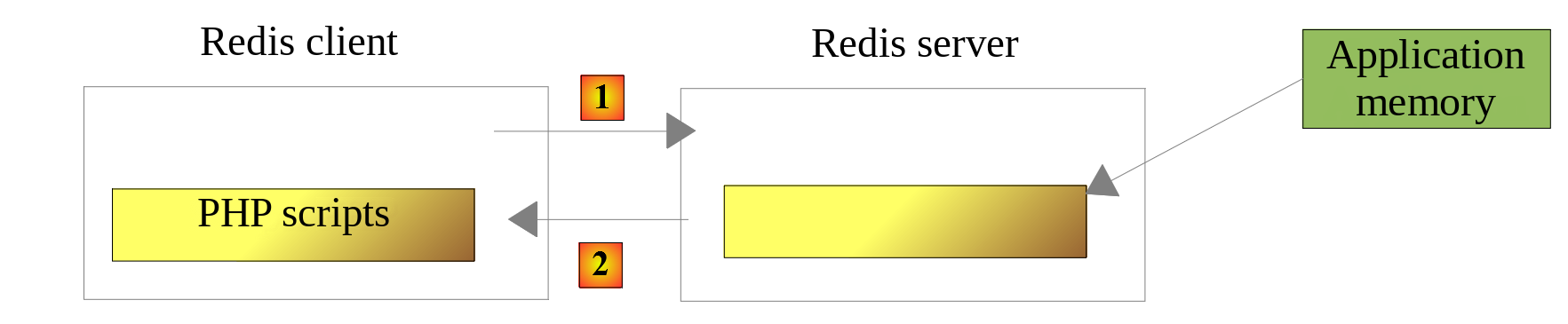
- In [1], a script (PHP) sends a command to the Redis server, for example, to request the value associated with a key;
- In [2], the Redis server responds.
The Redis server operates independently of the PHP scripts: the data stored on it remains available from one request to the next, and for all users of the application.
20.2. Installing Redis
[Laragon] comes with a Redis server that is disabled by default. You can enable it in the [Laragon] preferences ([Preferences] menu, [Services & Ports] tab) by checking the [Redis] checkbox. Leave the port [6379] as is, as this is the default port used by Redis clients. The Redis server is then started along with the other [Laragon] services (Apache, MySQL...) by clicking the [Start All] button.
20.3. The Redis client in command mode
The Redis server can be queried in command mode. Open a [Laragon] terminal and type the command [redis-cli], which launches the Redis server client in command mode. The client then displays the prompt [127.0.0.1:6379>]: it is connected to the Redis server on the local machine (address IP 127.0.0.1) on port 6379. Here is a sample session:
| > redis-cli
127.0.0.1:6379> command count
(integer) 240
127.0.0.1:6379> set title "PHP 8 by example"
OK
127.0.0.1:6379> get title
"PHP 8 by example"
127.0.0.1:6379> exists title
(integer) 1
127.0.0.1:6379> del title
(integer) 1
127.0.0.1:6379> get title
(nil)
127.0.0.1:6379> exists title
(integer) 0
127.0.0.1:6379> quit
|
- Line 3: The Redis client has over 200 commands for communicating with the server. One of them, [command count], displays the exact number of commands available for the version being used;
- Lines 4–7: We’ll only cover the commands we’ll need in our application, PHP. We’ll use Redis for one thing only: associating a value with a key in Redis’s memory. This is done with the Redis command [set key value]. The value can then be retrieved with the command [get key]. That’s all we’ll need;
- lines 8–9: The [exists] command checks whether a key exists: it returns 1 if the key exists, 0 otherwise;
- lines 10–11: The command [del] deletes a key;
- lines 12–13: if you request the value of a nonexistent key, you get the value [nil], indicating that the key was not found;
- line 16: To exit the Redis client, enter the command [quit].
It may be necessary to clear the entire Redis memory. This is done with the command [flushdb].
20.4. Installing a Redis client for PHP
We now need a Redis client for PHP. There are two main ones:
- the PHP [phpredis] extension, written in C, which must be added to the PHP configuration;
- the [Predis] library (https://github.com/predis/predis), written in PHP, which is installed with [Composer].
As with the PHP 7 course, we will use [Predis], version 3. It is located in the [composer.json] file within the [php8-oct-2026] folder and was installed along with the other course libraries using the [composer install] command. It can be found in the [vendor/predis/predis] folder. The class loader for [Composer] supports it: unlike in the PHP 7 course, there is no longer a [predis/autoload.php] file to include or a [Predis\Autoloader::register] method to call.
20.5. Server code
The server for version 10 consists of the following files:
| scripts-web/tax/version-10
├── Data
│ ├── .htaccess
│ ├── config-server.json
│ └── logs.txt
└── tax-server.php
|
The configuration file [config-server.json] changes as follows:
| {
"databaseFilename": "../version-08/Data/database-mysql.json",
"dependencies": [
"../../../scripts-console/tax/version-05/Entities/TaxException.php",
"../../../scripts-console/tax/version-05/Entities/TaxAdminData.php",
"../../../scripts-console/tax/version-05/Entities/Database.php",
"../../../scripts-console/tax/version-05/Utilities/Utilities.php",
"../version-08/Dao/InterfaceServerDao.php",
"../version-08/Dao/ServerDao.php",
"../version-09/Dao/ServerDaoWithSession.php",
"../version-08/Business/InterfaceServerBusiness.php",
"../version-08/Business/ServerBusiness.php",
"../version-09/Utilities/Logger.php",
"../version-09/Utilities/SendAdminMail.php"
],
"users": [
{
"login": "admin",
"passwd": "admin"
}
],
"adminMail": {
"smtp-server": "localhost",
"smtp-port": 1025,
"from": "guest@localhost",
"to": "guest@localhost",
"subject": "tax calculation server crash",
"tls": false,
"attachments": []
},
"logsFilename": "Data/logs.txt",
"redis": {
"scheme": "tcp",
"host": "127.0.0.1",
"port": 6379
}
}
|
Comments
- lines 3–15: Version 10 introduces no new features other than the script [tax-server.php]. It uses elements from versions 5, 8, and 9;
- Lines 32–37: Redis server connection parameters: the protocol (tcp), the host, and the port. These are the default values from [Predis], but it’s better to specify them in the configuration: if the Redis server moves to a different host or port, only the configuration needs to be updated.
The code for the [tax-server.php] server changes as follows:
| <?php
// strict compliance with the declared types of function parameters and results
declare(strict_types=1);
// namespace
namespace Application;
// Symfony dependencies
use Symfony\Component\HttpFoundation\JsonResponse;
use Symfony\Component\HttpFoundation\Request;
use Symfony\Component\HttpFoundation\Response;
use Symfony\Component\HttpFoundation\Session\Session;
// Predis dependencies
use Predis\Client as RedisClient;
use Predis\PredisException;
// class alias: the [dao] layer of version 9 is used with Redis
use Application\ServerDaoWithSession as ServerDaoWithRedis;
// PHP errors are not sent to the client (they go to the web server's log)
ini_set("display_errors", "0");
// the server's root folder: the paths of the configuration file are relative to this folder
const ROOT_DIRECTORY = __DIR__;
// path of the configuration file
const CONFIG_FILENAME = ROOT_DIRECTORY . "/Data/config-server.json";
// we retrieve the configuration
$config = json_decode(file_get_contents(CONFIG_FILENAME), true, flags: JSON_THROW_ON_ERROR);
// we include the dependencies needed by the script
require_once ROOT_DIRECTORY . "/../../../vendor/autoload.php";
foreach ($config["dependencies"] as $dependency) {
require_once ROOT_DIRECTORY . "/$dependency";
}
// session: it now only contains the identifier of the authenticated user
$session = new Session();
$session->start();
// creating the log file
try {
$logger = new Logger(ROOT_DIRECTORY . "/" . $config["logsFilename"]);
} catch (TaxException $ex) {
// error 500 without logs - the message must not reveal the server's file tree
$message = "Failed to create the log file [{$config["logsFilename"]}]";
doInternalServerError($message, $config["adminMail"]);
// done
exit;
}
// 1st log
$logger->write("---new request");
// we retrieve the current request
$request = Request::createFromGlobals();
// authentication only the 1st time
if (!$session->has("user")) {
// log
$logger->write("Authentication in progress…");
// the credentials sent by the client (null if it did not send any)
$requestUser = $request->getUser();
$requestPassword = $request->getPassword();
// is the user one of the authorized users?
$found = $requestUser !== null && $requestPassword !== null
&& array_any(
$config["users"],
fn(array $user): bool => $user["login"] === $requestUser && hash_equals($user["passwd"], $requestPassword)
);
if (!$found) {
// not found - code 401
sendResponse(
["error" => "Authentication failed [$requestUser]"],
Response::HTTP_UNAUTHORIZED,
["WWW-Authenticate" => 'Basic realm="Tax calculation server"'],
$logger
);
// done
exit;
}
// we note in the session that the user has been authenticated
$session->set("user", $requestUser);
// log
$logger->write("Authentication successful [$requestUser]");
} else {
// log
$logger->write("Authentication taken from the session…");
}
// we have a valid user - we check the parameters received
$errors = [];
// we must have a GET request with three parameters
if ($request->getMethod() !== "GET" || $request->query->count() !== 3) {
$errors[] = "GET method required with only the parameters [married, children, salary]";
}
// the marital status
if (!$request->query->has("married")) {
$errors[] = "missing married parameter";
} else {
$married = strtolower(trim($request->query->getString("married")));
if (!in_array($married, ["yes", "no"], true)) {
$errors[] = "invalid married parameter [$married]";
}
}
// the number of children and the salary: integers >= 0
$values = [];
foreach (["children", "salary"] as $parameter) {
if (!$request->query->has($parameter)) {
$errors[] = "missing $parameter parameter";
continue;
}
$value = trim($request->query->getString($parameter));
if (preg_match('/^\d+$/', $value) !== 1) {
$errors[] = "invalid $parameter parameter [$value]";
} else {
$values[$parameter] = (int) $value;
}
}
// other parameters in the request?
foreach (array_diff(array_keys($request->query->all()), ["married", "children", "salary"]) as $parameter) {
$errors[] = "invalid parameter [$parameter]";
}
// errors?
if ($errors !== []) {
// we send a 400 error code to the client
sendResponse(["errors" => $errors], Response::HTTP_BAD_REQUEST, [], $logger);
// done
exit;
}
// log
[$children, $salary] = [$values["children"], $values["salary"]];
$logger->write("valid parameters ['married'=>$married, 'children'=>$children, 'salary'=>$salary]");
// we have everything we need to work
// the [application]-scope memory: a Redis server
try {
// the Redis client
$redis = new RedisClient($config["redis"]);
// we connect to the server right away to find out whether it is there
$redis->connect();
} catch (PredisException $ex) {
// error 500
doInternalServerError("[redis], {$ex->getMessage()}", $config["adminMail"], $logger);
// done
exit;
}
// creating the [dao] layer
$json = $redis->get("taxAdminData");
if ($json === null) {
// the tax data are taken from the database
$logger->write("tax data taken from the database");
try {
// building the [dao] layer
$dao = new ServerDaoWithRedis(ROOT_DIRECTORY . "/" . $config["databaseFilename"]);
// we put the JSON string of the tax data in the [application]-scope memory
$redis->set("taxAdminData", (string) $dao->getTaxAdminData());
} catch (TaxException $ex) {
// error 500
doInternalServerError("[dao], {$ex->getMessage()}", $config["adminMail"], $logger, $redis);
// done
exit;
}
} else {
// the tax data are taken from the [application]-scope memory
$taxAdminData = TaxAdminData::fromArray(json_decode($json, true, flags: JSON_THROW_ON_ERROR));
// instantiating the [dao] layer
$dao = new ServerDaoWithRedis($taxAdminData);
// log
$logger->write("tax data taken from Redis");
}
// creating the [business] layer
$business = new ServerBusiness($dao);
// tax calculation
$result = $business->calculateTax($married, $children, $salary);
// we return the response
sendResponse($result, Response::HTTP_OK, [], $logger, $redis);
// end
exit;
// --------------------------------------------------------------------------
// fatal error: an email to the administrator and a 500 response to the client
function doInternalServerError(
string $message,
array $adminMail,
?Logger $logger = null,
?RedisClient $redis = null
): void {
// the error message of a DBMS driver may not be UTF-8 encoded (Windows-1252 on Windows)
if (!mb_check_encoding($message, "UTF-8")) {
$message = mb_convert_encoding($message, "UTF-8", "Windows-1252");
}
// we send an email to the administrator
// [SendAdminMail] catches all the exceptions and logs them itself
(new SendAdminMail($adminMail, $logger))->send($message);
// we send a 500 error code to the client
sendResponse(["error" => $message], Response::HTTP_INTERNAL_SERVER_ERROR, [], $logger, $redis);
}
// sending the HTTP response to the client
// $result: the array to send, in the form ["response" => $result]
// $statusCode: the HTTP status of the response
// $headers: HTTP headers to add to the response
// $logger: the application's log (null if it could not be created)
// $redis: the Redis client (null if it has not been created yet)
function sendResponse(
array $result,
int $statusCode,
array $headers = [],
?Logger $logger = null,
?RedisClient $redis = null
): void {
// the JSON response
$response = new JsonResponse(null, $statusCode, $headers);
$response->setEncodingOptions(JSON_UNESCAPED_UNICODE | JSON_UNESCAPED_SLASHES | JSON_PRESERVE_ZERO_FRACTION);
$response->setData(["response" => $result]);
// sending
$response->send();
// log
$logger?->write($response->getContent());
// closing the connection to the Redis server
$redis?->disconnect();
}
|
Comments
- Lines 15–16: the classes from [Predis] that we’re using. The [Predis\Client] class is the Redis client. We give it the alias [RedisClient], which is more descriptive in our code. [PredisException] is the parent class of all exceptions thrown by [Predis];
- Line 18: We give the alias [ServerDaoWithRedis] to the [ServerDaoWithSession] class from version 9 to reflect the change in the server script’s implementation. The [ServerDaoWithSession] class can construct the [dao] layer from previously acquired tax data: it does not matter whether the data comes from a session or a Redis server;
- lines 38–39: the session is retained. There are two pieces of information to keep in mind here:
- the fact that the user has authenticated successfully. This information has a scope of [session]: it is linked to a specific user and does not apply to other users. It remains in the session;
- the tax administration data. This information has the scope [application]: it is not linked to a specific user but applies to all users. It is stored on the Redis server;
- lines 135–145: creation of the client [Predis], which will communicate with the Redis server using the connection parameters from the configuration file:
- line 140: The client is immediately connected to the server to check if it is responding;
- if the connection to the Redis server fails, an error response is sent to the client and an email is sent to the application administrator. The error message is prefixed with [[redis]] to indicate the source of the error;
- line 148: the Redis server is queried for the value of the key [taxAdminData]. The [Predis] client provides a method for each Redis command: the [get] method sends the [get taxAdminData] command. It returns the value of the key, or [null] if it does not exist;
- line 149: if the key is not found, then the tax data is retrieved from the database;
- line 156: the key [taxAdminData] is stored in Redis memory, associated with the string JSON from the object [TaxAdminData] obtained from the layer [dao]. The [set] method expects a string as the key’s value. The [(string)] conversion calls the [__toString] method of the [TaxAdminData] class, which returns the string JSON from the object. The PHP 7 script let PHP perform this conversion implicitly; with [declare(strict_types=1)], it is better to write it out;
- Line 159: If reading from the database fails, return a 500 error and send an email to the administrator; the message is prefixed with [[dao]];
- lines 164–169: The key [taxAdminData] is in Redis memory. We know that its value is the string JSON from an object [TaxAdminData]:
- line 165: the string JSON is decoded into an associative array, then the static method [TaxAdminData::fromArray] from version 5 constructs the object [TaxAdminData] from this array, while verifying its data;
- line 167: the [dao] layer is instantiated with this data;
- lines 182–187: The function [doInternalServerError] has one additional parameter—the Redis client—which it passes to the function [sendResponse]. When a function has many parameters, they are written one per line;
- line 221: The function [sendResponse] closes the connection to the Redis server, if it was opened.
20.6. Client code
Version 10 of the client is identical to version 9. The only change is to the configuration file [config-client.json]:
| {
"urlServer": "http://localhost/php8-oct-2026/scripts-web/tax/version-10/tax-server.php",
"user": {
"login": "admin",
"passwd": "admin"
},
"httpClientOptions": {
"verify_peer": false,
"verify_host": false
},
"taxPayersDataFilename": "Data/taxpayersdata.json",
"resultsFilename": "Data/results.json",
"errorsFilename": "Data/errors.json",
"dependencies": [
"../version-05/Entities/TaxException.php",
"../version-05/Entities/TaxPayerData.php",
"../version-05/Utilities/Utilities.php",
"../version-05/Dao/TraitDao.php",
"../version-08/Dao/InterfaceClientDao.php",
"../version-09/Dao/ClientDao.php",
"../version-08/Business/InterfaceClientBusiness.php",
"../version-08/Business/ClientBusiness.php"
]
}
|
- Line 2: the server’s URL from version 10;
- line 20: the client’s [dao] layer is the one from version 9.
The [scripts-console/tax/version-10] folder therefore contains only the [Data] folder, the main script [Main/MainTaxClient.php] (the one for version 8), and the test script [Tests/ClientBusinessTest.php].
Before running the client, let’s delete the key [taxAdminData] from the Redis server’s memory using the command [del taxAdminData] from [redis-cli]. Then let’s run the client:
| > php MainTaxClient.php
The results have been saved in the file [Data/results.json]
Done
|
The results are the same as in version 9. The server logs are as follows:
| 01/10/26 18:10:12.890 : ---new request
01/10/26 18:10:12.891 : Authentication in progress…
01/10/26 18:10:12.891 : Authentication successful [admin]
01/10/26 18:10:12.891 : valid parameters ['married'=>yes, 'children'=>2, 'salary'=>55555]
01/10/26 18:10:12.907 : tax data taken from the database
01/10/26 18:10:12.909 : {"response":{"tax":2814,"surcharge":0,"discount":0,"reduction":0,"rate":0.14}}
01/10/26 18:10:12.912 : ---new request
01/10/26 18:10:12.912 : Authentication taken from the session…
01/10/26 18:10:12.912 : valid parameters ['married'=>yes, 'children'=>2, 'salary'=>50000]
01/10/26 18:10:12.913 : tax data taken from Redis
01/10/26 18:10:12.913 : {"response":{"tax":1384,"surcharge":0,"discount":384,"reduction":347,"rate":0.14}}
01/10/26 18:10:12.916 : ---new request
…
|
- Line 5: During the first request, the tax data is retrieved from the database;
- line 10: during the next request, the data is retrieved from Redis.
Now let’s test a new error scenario: the Redis server is unavailable. We can stop the Redis server from [Laragon]. Instead, we set port 6380—on which no server is listening—in the server’s configuration ([redis]). The result in the console is as follows:
| > php MainTaxClient.php
Error no. 42: {"HTTP status":500,"error":"[redis], Connection refused [tcp://127.0.0.1:6380]"}
Done
|
The server logs show that the administrator was notified via email:
| 01/10/26 18:10:32.255 : ---new request
01/10/26 18:10:32.255 : Authentication in progress…
01/10/26 18:10:32.256 : Authentication successful [admin]
01/10/26 18:10:32.256 : valid parameters ['married'=>yes, 'children'=>2, 'salary'=>55555]
01/10/26 18:10:32.305 : Message [[redis], Connection refused [tcp://127.0.0.1:6380]] sent to guest@localhost
01/10/26 18:10:32.305 : {"response":{"error":"[redis], Connection refused [tcp://127.0.0.1:6380]"}}
|
We then restored port 6379 in the configuration.
20.7. Client tests [PHPUnit]
The test class [ClientBusinessTest] for version 10 is identical to that of version 9; the test environment is that of the version 10 client. Before starting the tests, use the [redis-cli] client to delete the [taxAdminData] key from the Redis server’s memory (command [del taxAdminData]). Now, run the test:
| > php vendor/bin/phpunit scripts-console/tax/version-10/Tests --testdox
PHPUnit 12.5.37 by Sebastian Bergmann and contributors.
Runtime: PHP 8.5.11
Configuration: .../php8-oct-2026/phpunit.xml
........... 11 / 11 (100%)
Time: 00:00.063, Memory: 16.00 MB
Client Business (Application\Tests\ClientBusiness)
✔ Calculate tax with data set "couple, 2 children, 55555"
✔ Calculate tax with data set "couple, 2 children, 50000"
✔ Calculate tax with data set "couple, 3 children, 50000"
✔ Calculate tax with data set "single, 2 children, 100000"
✔ Calculate tax with data set "single, 3 children, 100000"
✔ Calculate tax with data set "couple, 3 children, 100000"
✔ Calculate tax with data set "couple, 5 children, 100000"
✔ Calculate tax with data set "single, 0 children, 100000"
✔ Calculate tax with data set "couple, 2 children, 30000"
✔ Calculate tax with data set "single, 0 children, 200000"
✔ Calculate tax with data set "couple, 3 children, 200000"
OK (11 tests, 22 assertions)
|
Let’s examine the server’s [logs.txt] logs:
| 01/10/26 18:10:32.488 : ---new request
01/10/26 18:10:32.488 : Authentication in progress…
01/10/26 18:10:32.488 : Authentication successful [admin]
01/10/26 18:10:32.488 : valid parameters ['married'=>yes, 'children'=>2, 'salary'=>55555]
01/10/26 18:10:32.489 : tax data taken from the database
01/10/26 18:10:32.491 : {"response":{"tax":2814,"surcharge":0,"discount":0,"reduction":0,"rate":0.14}}
01/10/26 18:10:32.495 : ---new request
01/10/26 18:10:32.495 : Authentication in progress…
01/10/26 18:10:32.495 : Authentication successful [admin]
01/10/26 18:10:32.495 : valid parameters ['married'=>yes, 'children'=>2, 'salary'=>50000]
01/10/26 18:10:32.496 : tax data taken from Redis
01/10/26 18:10:32.496 : {"response":{"tax":1384,"surcharge":0,"discount":384,"reduction":347,"rate":0.14}}
01/10/26 18:10:32.500 : ---new request
01/10/26 18:10:32.500 : Authentication in progress…
01/10/26 18:10:32.500 : Authentication successful [admin]
01/10/26 18:10:32.500 : valid parameters ['married'=>yes, 'children'=>3, 'salary'=>50000]
01/10/26 18:10:32.501 : tax data taken from Redis
01/10/26 18:10:32.501 : {"response":{"tax":0,"surcharge":0,"discount":720,"reduction":0,"rate":0.14}}
…
|
We’ve already mentioned that before each test, the [setUp] method of the test class is re-executed, which means that the [ClientDao] class being tested is instantiated with a nonexistent session cookie for each test. It is therefore as if the 11 tests represented 11 different users, with 11 different sessions:
- lines 2–3, 8–9, 14–15: Each test authenticates itself because it starts a new session;
- line 5: tax data is retrieved from the database;
- lines 11, 17: tax data is retrieved from Redis memory. This clearly demonstrates that there is a [application]-scoped memory shared by all users of the application.
20.8. Viewing the contents of the Redis server
We have seen that the Redis server can be managed in command mode. The command [get taxAdminData] displays the value of the key [taxAdminData]: we recognize the string JSON as belonging to an object of type [TaxAdminData]:
| > redis-cli get taxAdminData
"{\"limits\":[9964,27519,73779,156244,0],\"coeffR\":[0,0.14,0.3,0.41,0.45],\"coeffN\":[0,1394.96,5798,13913.69,20163.45],\"halfShareQfCeiling\":1551,\"singleIncomeCeilingForReduction\":21037,\"coupleIncomeCeilingForReduction\":42074,\"halfShareReductionValue\":3797,\"singleDiscountCeiling\":1196,\"coupleDiscountCeiling\":1970,\"coupleTaxCeilingForDiscount\":2627,\"singleTaxCeilingForDiscount\":1595,\"tenPercentAllowanceMax\":12502,\"tenPercentAllowanceMin\":437}"
|
[redis-cli] displays the string enclosed in quotation marks, prefixing each quotation mark it contains with the character [\].
The Redis server can also be managed using a graphical interface. The official tool is [Redis Insight] (https://redis.io/insight), which is free and available for Windows. Once connected to the [127.0.0.1:6379] server, it displays the list of keys stored by the server. By clicking on the [taxAdminData] key, you can see its value, which the tool displays as a JSON object. You can also delete a key, add a new one, or execute [redis-cli] commands in a built-in console.