6. Sample Application-03: rdvmedecins-pf-ejb
Let’s review the structure of the sample application developed for the Glassfish server:
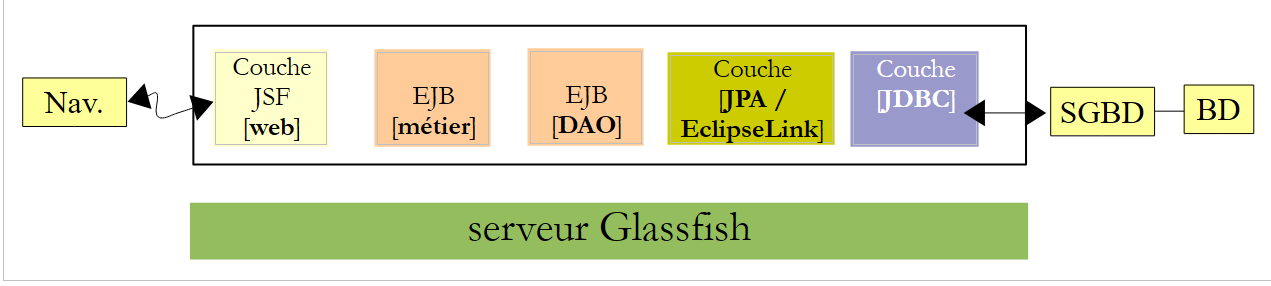 |
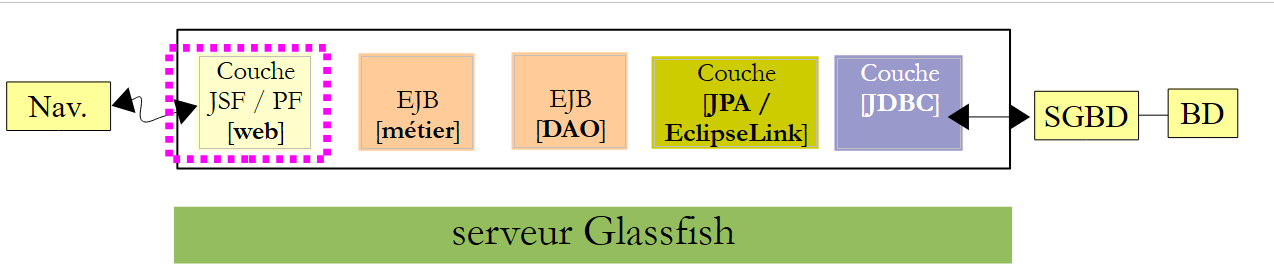
We are not changing anything about this architecture except for the web layer, which will be implemented here using JSF and Primefaces.
 |
6.1. The Netbeans project
Above, the [métier] and [DAO] layers are those from Example 01 (JSF / EJB / Glassfish). We are reusing them.
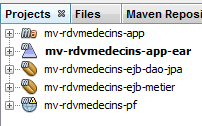 |
- [mv-rdvmedecins-ejb-dao-jpa]: project EJB of layers [DAO] and [JPA] from Example 01,
- [mv-rdvmedecins-ejb-metier]: project EJB of layer [métier] from Example 01,
- [mv-rdvmedecins-pf]: project of the [web] / Primefaces layer – new,
- [mv-rdvmedecins-app-ear]: enterprise project to deploy the application on the Glassfish server – new.
6.2. The enterprise project
The enterprise project is used solely for deploying the three modules [mv-rdvmedecins-ejb-dao-jpa], [mv-rdvmedecins-ejb-metier], and [mv-rdvmedecins-pf] on the server Glassfish. The Netbeans project is as follows:
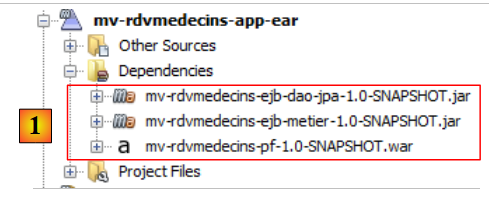 |
The project exists only for these three dependencies, [1], defined in the file [pom.xml] as follows:
<?xml version="1.0" encoding="UTF-8"?>
<project xmlns="http://maven.apache.org/POM/4.0.0" xmlns:xsi="http://www.w3.org/2001/XMLSchema-instance" xsi:schemaLocation="http://maven.apache.org/POM/4.0.0 http://maven.apache.org/xsd/maven-4.0.0.xsd">
  <modelVersion>4.0.0</modelVersion>
  <parent>
    <artifactId>mv-rdvmedecins-app</artifactId>
    <groupId>istia.st</groupId>
    <version>1.0-SNAPSHOT</version>
  </parent>

  <groupId>istia.st</groupId>
  <artifactId>mv-rdvmedecins-app-ear</artifactId>
  <version>1.0-SNAPSHOT</version>
  <packaging>ear</packaging>

  <name>mv-rdvmedecins-app-ear</name>

  ...
    <dependencies>
        <dependency>
            <groupId>${project.groupId}</groupId>
            <artifactId>mv-rdvmedecins-ejb-dao-jpa</artifactId>
            <version>${project.version}</version>
            <type>ejb</type>
        </dependency>
        <dependency>
            <groupId>${project.groupId}</groupId>
            <artifactId>mv-rdvmedecins-ejb-metier</artifactId>
            <version>${project.version}</version>
            <type>ejb</type>
        </dependency>
        <dependency>
            <groupId>${project.groupId}</groupId>
            <artifactId>mv-rdvmedecins-pf</artifactId>
            <version>${project.version}</version>
            <type>war</type>
        </dependency>
    </dependencies>
</project>
- lines 10–13: the Maven artifact for the enterprise project,
- lines 18–37: the project’s three dependencies. Note their types (lines 23, 29, 35).
To run the web application, you must run this enterprise project.
6.3. The web project Primefaces
The web project Primefaces is as follows:
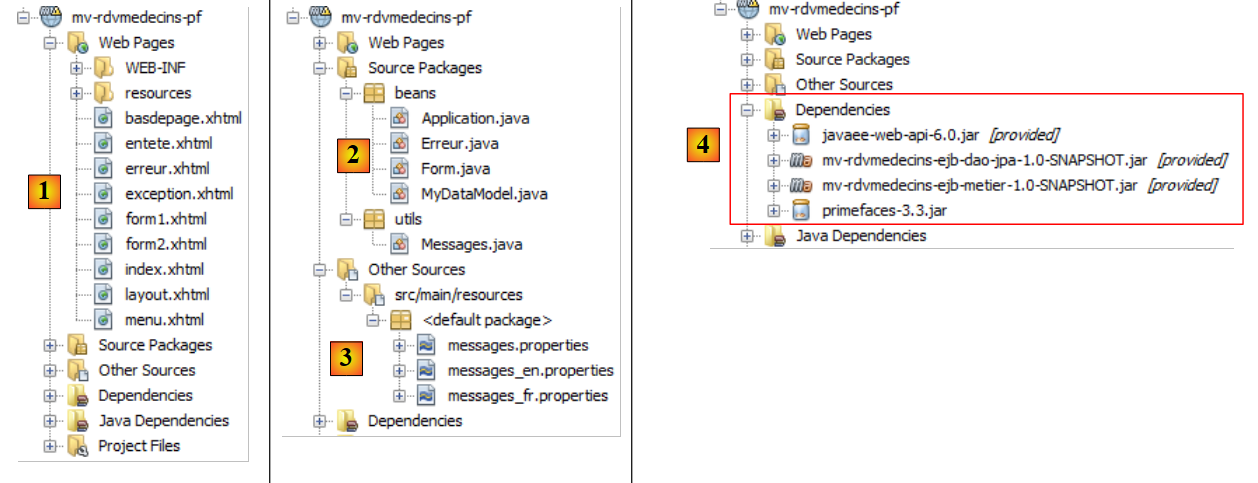 |
- in [1], the project’s pages. The page [index.xhtml] is the only page in the project. It contains three fragments: [form1.xhtml], [form2.xhtml], and [erreur.xhtml]. The other pages are there solely for formatting.
- In [2], the Java beans. The [Application] bean has application scope; the [Form] bean has session scope. The [Erreur] class encapsulates an error. The [MyDataModel] class serves as a template for a <dataTable> tag in Primefaces,
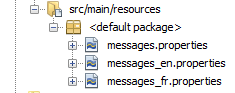
- in [3], the message files for internationalization,
- in [4], the dependencies. The web project has dependencies on the EJB project in the [DAO] layer, the EJB project from the [métier] layer, and Primefaces for the [web] layer.
6.4. Project configuration
The project configuration is the same as that of the Primefaces or JSF projects we have studied. We list the configuration files without re-explaining them.
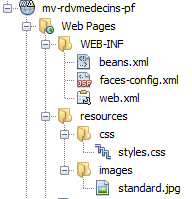 |  |
[web.xml]: configures the web application.
<?xml version="1.0" encoding="UTF-8"?>
<web-app version="3.0" xmlns="http://java.sun.com/xml/ns/javaee" xmlns:xsi="http://www.w3.org/2001/XMLSchema-instance" xsi:schemaLocation="http://java.sun.com/xml/ns/javaee http://java.sun.com/xml/ns/javaee/web-app_3_0.xsd">
  <context-param>
    <param-name>javax.faces.STATE_SAVING_METHOD</param-name>
    <param-value>client</param-value>
  </context-param>
  <context-param>
    <param-name>javax.faces.PROJECT_STAGE</param-name>
    <param-value>Production</param-value>
  </context-param>
  <context-param>
    <param-name>javax.faces.FACELETS_SKIP_COMMENTS</param-name>
    <param-value>true</param-value>
  </context-param>
  <servlet>
    <servlet-name>Faces Servlet</servlet-name>
    <servlet-class>javax.faces.webapp.FacesServlet</servlet-class>
    <load-on-startup>1</load-on-startup>
  </servlet>
  <servlet-mapping>
    <servlet-name>Faces Servlet</servlet-name>
    <url-pattern>/faces/*</url-pattern>
  </servlet-mapping>
  <session-config>
    <session-timeout>
      30
    </session-timeout>
  </session-config>
  <welcome-file-list>
    <welcome-file>faces/index.xhtml</welcome-file>
  </welcome-file-list>
  <error-page>
    <error-code>500</error-code>
    <location>/faces/exception.xhtml</location>
  </error-page>
  <error-page>
    <exception-type>Exception</exception-type>
    <location>/faces/exception.xhtml</location>
  </error-page>

</web-app>
Note that on line 30, the page [index.xhtml] is the application's home page.
[faces-config.xml]: configures the JSF application
<?xml version='1.0' encoding='UTF-8'?>

<!-- =========== FULL CONFIGURATION FILE ================================== -->

<faces-config version="2.0"
              xmlns="http://java.sun.com/xml/ns/javaee"
              xmlns:xsi="http://www.w3.org/2001/XMLSchema-instance"
              xsi:schemaLocation="http://java.sun.com/xml/ns/javaee http://java.sun.com/xml/ns/javaee/web-facesconfig_2_0.xsd">

  <application>
    <resource-bundle>
      <base-name>
        messages
      </base-name>
      <var>msg</var>
    </resource-bundle>
    <message-bundle>messages</message-bundle>
  </application>
</faces-config>
[beans.xml]: empty but required for the @Named annotation
<?xml version="1.0" encoding="UTF-8"?>
<beans xmlns="http://java.sun.com/xml/ns/javaee"
       xmlns:xsi="http://www.w3.org/2001/XMLSchema-instance"
       xsi:schemaLocation="http://java.sun.com/xml/ns/javaee http://java.sun.com/xml/ns/javaee/beans_1_0.xsd">
</beans>
[styles.css]: the application's style sheet
.col1{
   background-color: #ccccff
}

.col2{
   background-color: #ffcccc
}
The Primefaces library comes with its own style sheets. The style sheet above is used only for the page to be displayed in the event of an exception—a page not handled by the application. In that case, the [exception.xhtml] page is displayed.
[messages_fr.properties]: the French message file
# layout
layout.entete=Les M\u00e9decins Associ\u00e9s
layout.basdepage=ISTIA, universit\u00e9 d'Angers - application propuls\u00e9e par PrimeFaces et JQuery

# exception
exception.header=L'the following exception occurred
exception.httpCode=Code HTTP de l'error
exception.message=Message de l'exception
exception.requestUri=Url demand\u00e9e lors de l'error
exception.servletName=Nom de la servlet demand\u00e9e lorsque l'error occurred

# form 1
form1.titre=R\u00e9servations
form1.medecin=M\u00e9decin
form1.jour=Jour
form1.options=Options
form1.francais=Fran\u00e7ais
form1.anglais=Anglais
form1.rafraichir=Rafra\u00eechir
form1.precedent=Jour pr\u00e9c\u00e9dent
form1.suivant=Jour suivant
form1.agenda=Affiche l'agenda of the chosen doctor for the chosen day
form1.today=Aujourd'today

# form 2
form2.titre=Agenda de {0} {1} {2} le {3}
form2.titre_detail=Agenda de {0} {1} {2} le {3}
form2.creneauHoraire=Cr\u00e9neau horaire
form2.client=Client
form2.accueil=Accueil
form2.supprimer=Supprimer
form2.reserver=R\u00e9server
form2.valider=Valider
form2.annuler=Annuler
form2.erreur=Erreur
form2.emtyMessage=Pas de cr\u00e9neaux entr\u00e9s dans la base
form2.suppression.confirmation=Etes-vous s\u00fbr(e) ?
form2.suppression.message=Suppression d'an appointment
form2.supprimer.oui=Oui
form2.supprimer.non=Non
form2.erreurClient=Client [{0}] inconnu
form2.erreurClient_detail=Client {0} inconnu
form2.erreurAction=Action non autoris\u00e9e
form2.erreurAction_detail=Action non autoris\u00e9e

# error
erreur.titre=Une erreur s'is produced.
erreur.exceptions=Cha\u00eene des exceptions
erreur.type=Type de l'exception
erreur.message=Message associ\u00e9
erreur.accueil=Accueil
[messages_en.properties]: English message file
# layout
layout.entete=Associated Doctors
layout.basdepage=ISTIA, Angers university - Application powered by PrimeFaces and JQuery

# exception
exception.header=The following exceptions occurred
exception.httpCode=Error HTTP code
exception.message=Exception message
exception.requestUri=Url targeted when error occurred
exception.servletName=Servlet targeted's name when error occurred

# form 1
form1.titre=Reservations
form1.medecin=Doctor
form1.jour=Date
form1.options=Options
form1.francais=French
form1.anglais=English
form1.rafraichir=Refresh
form1.precedent=Previous Day
form1.suivant=Next day
form1.agenda=Show the doctor's diary for the chosen doctor and the chosen day
form1.today=Today

# form 2
form2.titre={0} {1} {2}'diary on {3}
form2.titre_detail={0} {1} {2}'diary on {3}
form2.creneauHoraire=Time Period
form2.client=Client
form2.accueil=Welcome Page
form2.supprimer=Delete
form2.reserver=Reserve
form2.valider=Submit
form2.annuler=Cancel
form2.erreur=Error
form2.emtyMessage=No Time periods in the database
form2.suppression.confirmation=Are-you sure ?
form2.suppression.message=Booking deletion
form2.supprimer.oui=Yes
form2.supprimer.non=No
form2.erreurClient=Unknown Client {0}
form2.erreurClient_detail=Unknown Client [{0}]
form2.erreurAction=Unauthorized action
form2.erreurAction_detail=Action non autoris\u00e9e

# error
erreur.titre=The following exceptions occurred
erreur.exceptions=Exceptions' chain
erreur.type=Exception type
erreur.message=Associated Message
erreur.accueil=Welcome
6.5. The template for pages [layout.xhtml]
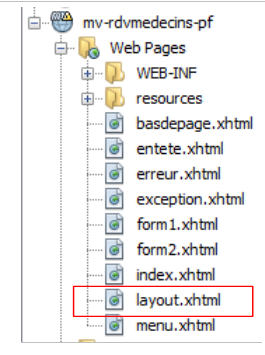 |
The [layout.xhtml] template is as follows:
<?xml version='1.0' encoding='UTF-8' ?>
<!DOCTYPE html PUBLIC "-//W3C//DTD XHTML 1.0 Transitional//EN" "http://www.w3.org/TR/xhtml1/DTD/xhtml1-transitional.dtd">

<html xmlns="http://www.w3.org/1999/xhtml"
      xmlns:h="http://java.sun.com/jsf/html"
      xmlns:p="http://primefaces.org/ui"
      xmlns:f="http://java.sun.com/jsf/core"
      xmlns:ui="http://java.sun.com/jsf/facelets">
  <f:view locale="#{form.locale}">
    <h:head>
      <title>JSF</title>
      <h:outputStylesheet library="css" name="styles.css"/>
    </h:head>
    <h:body style="background-image: url('#{request.contextPath}/resources/images/standard.jpg');">
      <h:form id="formulaire">
        <table style="width: 1200px">
          <tr>
            <td colspan="2" bgcolor="#ccccff">
              <ui:include src="entete.xhtml"/>
            </td>
          </tr>
          <tr>
            <td style="width: 10px;" bgcolor="#ffcccc">
              <ui:include src="menu.xhtml"/>
            </td>
            <td>
              <p:outputPanel id="contenu">
                <ui:insert name="contenu">
                  <h2>Contenu</h2>
                </ui:insert>
              </p:outputPanel>
            </td>
          </tr>
          <tr bgcolor="#ffcc66">
            <td colspan="2">
              <ui:include src="basdepage.xhtml"/>
            </td>
          </tr>
        </table>
      </h:form>
    </h:body>
  </f:view>
</html>
The only variable part of this template is the area on lines 28–30. This area is located in the id :form:content area (line 27). Keep this in mind. The AJAX calls that update this field will have the attribute update=":form:content". Furthermore, the form begins on line 15. Therefore, the fragment inserted on lines 28–30 is inserted into this form.
The appearance of this template is as follows:
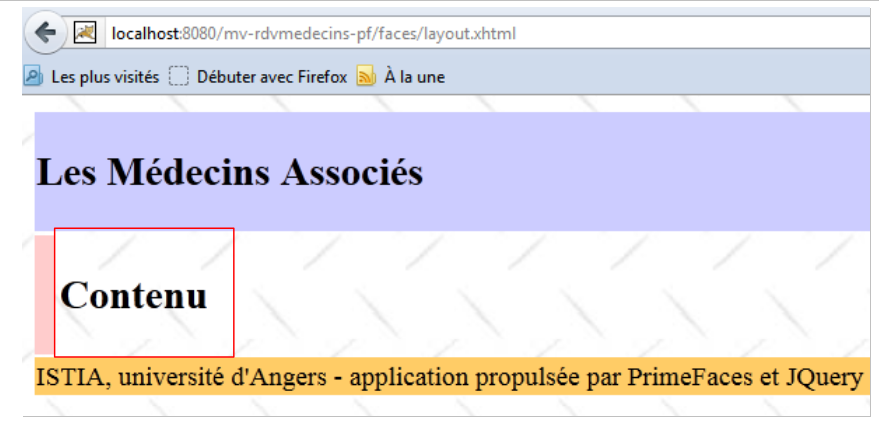 |
The dynamic part of the page will be inserted into the boxed area above.
6.6. The page [index.xhtml]
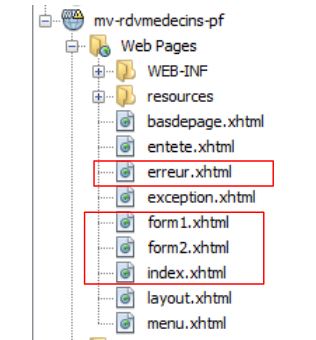 |
The project always displays the same page, the following page [index.xhtml]:
<?xml version='1.0' encoding='UTF-8' ?>
<!DOCTYPE html PUBLIC "-//W3C//DTD XHTML 1.0 Transitional//EN" "http://www.w3.org/TR/xhtml1/DTD/xhtml1-transitional.dtd">
<html xmlns="http://www.w3.org/1999/xhtml"
      xmlns:h="http://java.sun.com/jsf/html"
      xmlns:p="http://primefaces.org/ui"
      xmlns:f="http://java.sun.com/jsf/core"
      xmlns:ui="http://java.sun.com/jsf/facelets">
  <ui:composition template="layout.xhtml">
    <ui:define name="contenu">
      <ui:fragment rendered="#{form.form1Rendered}">
        <ui:include src="form1.xhtml"/>
      </ui:fragment>
      <ui:fragment rendered="#{form.form2Rendered}">
        <ui:include src="form2.xhtml"/>
      </ui:fragment>
      <ui:fragment rendered="#{form.erreurRendered}">
        <ui:include src="erreur.xhtml"/>
      </ui:fragment>
    </ui:define>
  </ui:composition>
</html>
- lines 8-9: this fragment XHTML will be inserted into the dynamic area of the template [layout.xhtml],
- the page includes three sub-fragments:
- [form1.xhtml], lines 10-12;
- [form2.xhtml], lines 13–15;
- [erreur.xhtml], lines 16–18.
The presence of these fragments in [index.xhtml] is controlled by Booleans in the [Form.java] template associated with the page. Therefore, by adjusting these, the rendered page differs.
The fragment [form1.xhtml] renders as follows:
 |
The fragment [form2.xhtml] renders as follows:
 |
The fragment [erreur.xhtml] renders as follows:
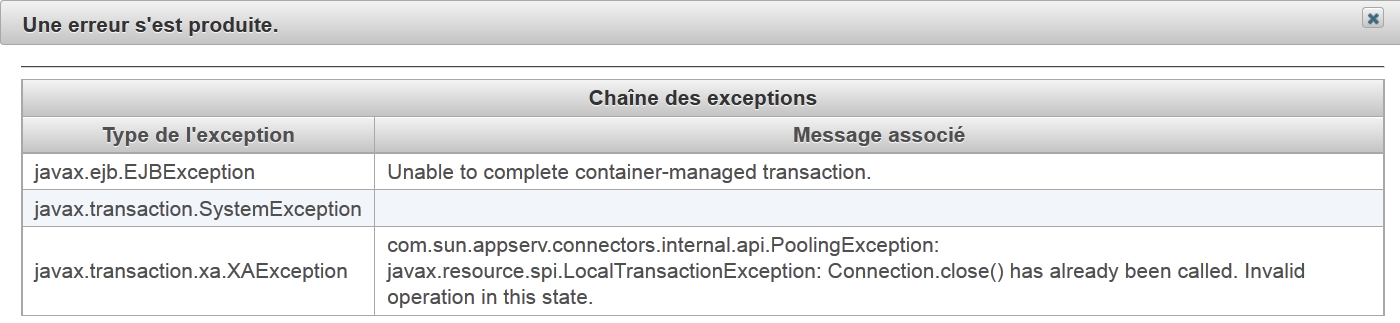 |
6.7. The project’s beans
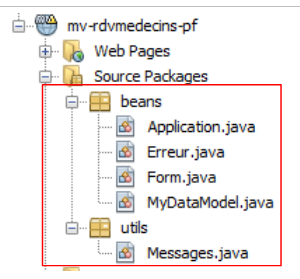 |
The class in the [utils] package has already been presented: the [Messages] class is a class that facilitates the internationalization of an application’s messages. It was discussed in section 2.8.5.7.
6.7.1. The Application bean
The [Application.java] bean is an application-scope bean. Recall that this type of bean is used to store read-only data available to all users of the application. This bean is as follows:
package beans;

import javax.ejb.EJB;
import javax.enterprise.context.ApplicationScoped;
import javax.inject.Named;
import rdvmedecins.metier.service.IMetierLocal;

@Named(value = "application")
@ApplicationScoped
public class Application {

  // business layer
  @EJB
  private IMetierLocal metier;

  public Application() {
  }

  // getters

  public IMetierLocal getMetier() {
    return metier;
  }

}
- line 8: we give the bean the name "application",
- line 9: it has application scope,
- lines 13-14: a reference to the local interface of the [métier] layer will be injected into it by the EJB container of the application server. Let’s review the application architecture:
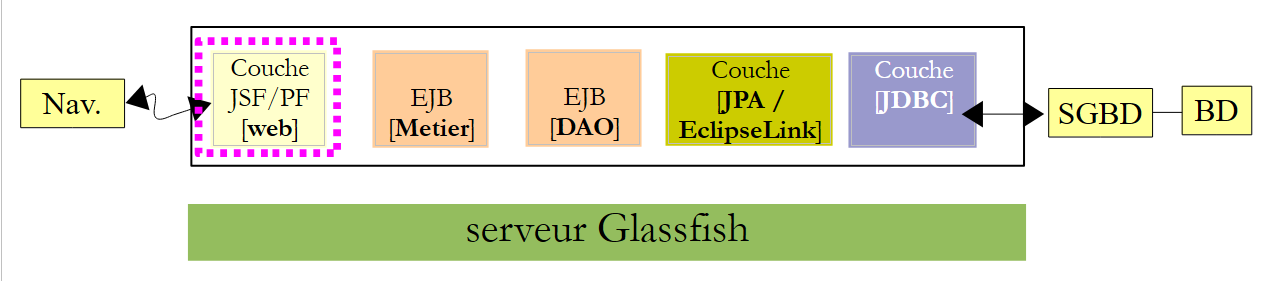 |
The JSF application and the EJB and [Metier] applications will run in the same JVM (Java Virtual Machine). So the [JSF] layer will use the local interface of EJB. That’s it. The [Application] bean contains nothing else. To access the [métier] layer, the other beans will retrieve it from this bean.
6.7.2. The [Erreur] bean
The [Erreur] class is as follows:
- package beans;
public class Erreur {

  public Erreur() {
  }

  // field
  private String classe;
  private String message;

  // manufacturer
  public Erreur(String classe, String message){
    this.setClasse(classe);
    this.message=message;
  }

  // getters and setters
...
}
- line 9, the name of an exception class if an exception was thrown,
- line 10: an error message.
6.7.3. The [Form] bean
Its code is as follows:
package beans;

import java.io.IOException;
...

@Named(value = "form")
@SessionScoped
public class Form implements Serializable {

  public Form() {
  }

// bean Application
  @Inject
  private Application application;

  // session cache
  private List<Medecin> medecins;
  private List<Client> clients;
  private Map<Long, Medecin> hMedecins = new HashMap<Long, Medecin>();
  private Map<Long, Client> hClients = new HashMap<Long, Client>();
  private Map<String, Client> hIdentitesClients = new HashMap<String, Client>();

  // model
  private Long idMedecin;
  private Date jour = new Date();
  private Boolean form1Rendered = true;
  private Boolean form2Rendered = false;
  private Boolean erreurRendered = false;
  private String form2Titre;
  private AgendaMedecinJour agendaMedecinJour;
  private Long idCreneauChoisi;
  private Medecin medecin;
  private Long idClient;
  private CreneauMedecinJour creneauChoisi;
  private List<Erreur> erreurs;
  private Boolean erreur = false;
  private String identiteClient;
  private String action;
  private String msgErreurClient;
  private Boolean erreurClient;
  private String msgErreurAction;
  private Boolean erreurAction;
  private String locale = "fr";

  @PostConstruct
  private void init() {
    // doctors and clients are cached
    try {
      medecins = application.getMetier().getAllMedecins();
      clients = application.getMetier().getAllClients();
    } catch (Throwable th) {
      // we note the error
      prepareVueErreur(th);
      return;
    }

    // dictionaries
    for (Medecin m : medecins) {
      hMedecins.put(m.getId(), m);
    }
    for (Client c : clients) {
      hClients.put(c.getId(), c);
      hIdentitesClients.put(identite(c), c);
    }
  }

  ...

  // view display
  private void setForms(Boolean form1Rendered, Boolean form2Rendered, Boolean erreurRendered) {
    this.form1Rendered = form1Rendered;
    this.form2Rendered = form2Rendered;
    this.erreurRendered = erreurRendered;
  }

  // preparation vueErreur
  private void prepareVueErreur(Throwable th) {
    // create an error list
    erreurs = new ArrayList<Erreur>();
    erreurs.add(new Erreur(th.getClass().getName(), th.getMessage()));
    while (th.getCause() != null) {
      th = th.getCause();
      erreurs.add(new Erreur(th.getClass().getName(), th.getMessage()));
    }
// the error view is displayed
    setForms(true, false, true);
  }

  // getters and setters
  ...
}
- lines 6-8: the class [Form] is a bean named "form" with session scope. Note that the class must therefore be serializable,
- lines 14-15: the form bean has a reference to the application bean. This reference will be injected by the servlet container in which the application runs (presence of the @Inject annotation).
- lines 17–44: the [form1.xhtml, form2.xhtml, erreur.xhtml] page template. The display of these pages is controlled by the booleans in lines 27–29. Note that by default, the [form1.xhtml] page is rendered (line 27),
- lines 46–47: the init method is executed immediately after the class is instantiated (presence of the @PostConstruct annotation),
- lines 50–51: the [métier] layer is queried for the list of doctors and clients,
- lines 59–65: if everything went well, the dictionaries of doctors and clients are constructed. They are indexed by their number. Next, the [form1.xhtml] page will be displayed (line 27),
- line 54: in case of an error, the template for the [erreur.xhtml] page is generated. This template is the error list from line 36,
- lines 78–88: the [prepareVueErreur] method constructs the list of errors to be displayed. The page [index.xhtml] then displays the fragments [form1.xhtml] and [erreur.xhtml] (line 87).
The [erreur.xhtml] page is as follows:
<?xml version='1.0' encoding='UTF-8' ?>
<!DOCTYPE html PUBLIC "-//W3C//DTD XHTML 1.0 Transitional//EN" "http://www.w3.org/TR/xhtml1/DTD/xhtml1-transitional.dtd">
<html xmlns="http://www.w3.org/1999/xhtml"
      xmlns:h="http://java.sun.com/jsf/html"
      xmlns:p="http://primefaces.org/ui"
      xmlns:f="http://java.sun.com/jsf/core"
      xmlns:ui="http://java.sun.com/jsf/facelets">

  <body>
    <p:panel header="#{msg['erreur.titre']}" closable="true" >
      <hr/>
      <p:dataTable value="#{form.erreurs}" var="erreur">
        <f:facet name="header">
          <h:outputText value="#{msg['erreur.exceptions']}"/>
        </f:facet>
        <p:column>
          <f:facet name="header">
            <h:outputText value="#{msg['erreur.type']}"/>
          </f:facet>
          <h:outputText value="#{erreur.classe}"/>
        </p:column>
        <p:column>
          <f:facet name="header">
            <h:outputText value="#{msg['erreur.message']}"/>
          </f:facet>
          <h:outputText value="#{erreur.message}"/>
        </p:column>
      </p:dataTable>
    </p:panel>
  </body>
</html>
It uses a <p:dataTable> tag (lines 12–28) to display the list of errors. This results in an error page similar to the following:
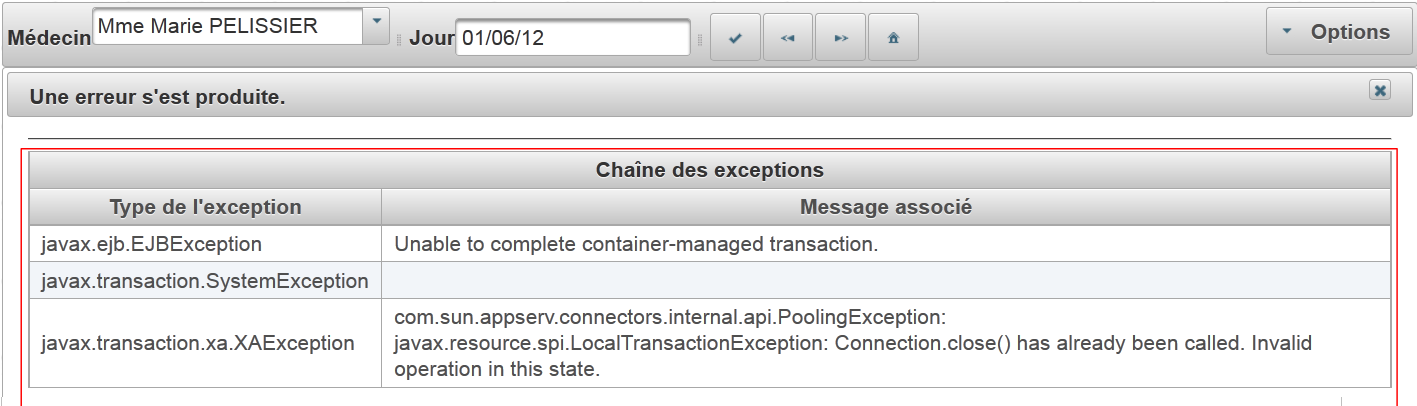 |
We will now define the different phases of the application's lifecycle. For each user action, we will examine the relevant views and event handlers.
6.8. Displaying the home page
If all goes well, the first page displayed is [form1.xhtml]. This produces the following view:
 |
The page [form1.xhtml] is as follows:
<?xml version='1.0' encoding='UTF-8' ?>
<!DOCTYPE html PUBLIC "-//W3C//DTD XHTML 1.0 Transitional//EN" "http://www.w3.org/TR/xhtml1/DTD/xhtml1-transitional.dtd">
<html xmlns="http://www.w3.org/1999/xhtml"
      xmlns:h="http://java.sun.com/jsf/html"
      xmlns:p="http://primefaces.org/ui"
      xmlns:f="http://java.sun.com/jsf/core"
      xmlns:ui="http://java.sun.com/jsf/facelets">
  <p:toolbar>
    <p:toolbarGroup align="left">
      ...
    </p:toolbarGroup>
    <p:toolbarGroup align="right">
 ...
    </p:toolbarGroup>
  </p:toolbar>
</html>
The toolbar highlighted in the screenshot is the Primefaces Toolbar component. It is defined in lines 8–14. It contains two groups of components, each defined by a <toolbarGroup> tag, in lines 9–11 and 12–14. One of the groups is aligned to the left of the toolbar (line 9), the other to the right (line 12).
Let’s examine some components of the left group:
<p:toolbar>
    <p:toolbarGroup align="left">
      <h:outputText value="#{msg['form1.medecin']}"/>
      <p:selectOneMenu value="#{form.idMedecin}" effect="fade">
        <f:selectItems value="#{form.medecins}" var="medecin" itemLabel="#{medecin.titre} #{medecin.prenom} #{medecin.nom}" itemValue="#{medecin.id}"/>
        <p:ajax update=":formulaire:contenu" listener="#{form.hideAgenda}" />
      </p:selectOneMenu>
      <p:separator/>
      <h:outputText value="#{msg['form1.jour']}"/>
      <p:calendar id="calendrier" value="#{form.jour}" readOnlyInputText="true">
        <p:ajax event="dateSelect" listener="#{form.hideAgenda}" update=":formulaire:contenu"/>
      </p:calendar>
      <p:separator/>
      <p:commandButton id="resa-agenda" icon="ui-icon-check" actionListener="#{form.getAgenda}" update=":formulaire:contenu"/>
      <p:tooltip for="resa-agenda" value="#{msg['form1.agenda']}"/>
      ...
    </p:toolbarGroup>
...
- lines 4-7: the doctors combo box to which an effect has been added (effect="fade"),
- line 6: a AJAX behavior. When there is a change in the combo box, the [Form].hideAgenda (listener="#{form.hideAgenda}") will be executed and the dynamic area :form:content (update=":form:content") will be updated,
- line 8: includes a separator in the toolbar,
- lines 10-12: the date input field. The calendar from Primefaces is used here. The input field is read-only (readOnlyInputText="true"),
- Line 11: behavior AJAX. When the date changes, the method [Form].hideAgenda will be executed and the dynamic field :form:content will be updated,
- Line 14: a button. Clicking it executes a call to AJAX for the method [Form].getAgenda (), the template will then be modified, and the server response will be used to update the dynamic field :form:content,
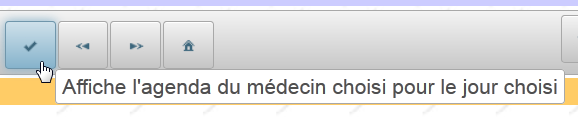
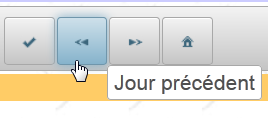
- Line 15: The <tooltip> tag allows you to associate a tooltip with a component. The id for the latter is specified by the tooltip’s for attribute. Here (for="resa-agenda") refers to the button on line 14:
 |  |
This page is powered by the following model:
@Named(value = "form")
@SessionScoped
public class Form implements Serializable {

  public Form() {
  }

  // session cache
  private List<Medecin> medecins;
  private List<Client> clients;
  // model
  private Long idMedecin;
  private Date jour = new Date();

  // list of doctors
  public List<Medecin> getMedecins() {
    return medecins;
  }

  // clients list
  public List<Client> getClients() {
    return clients;
  }

  // agenda
  public void getAgenda() {
    ...
  }
- The field on line 12 reads from and writes to the value of the list on line 4 of the page. When the page is first displayed, it sets the value selected in the combo box. On initial display, idMedecin is equal to null, so the first doctor will be selected.
- The method in lines 16–18 generates the items for the doctors dropdown (line 5 of the page). Each generated option will have as its label (itemLabel) the doctor’s title, last name, and first name, and as its value (itemValue), the doctor’s ID (id),
- the field on line 13 provides read/write access to the input field on line 10 of the page. Upon initial display, the current date is shown,
- lines 26–28: the getAgenda method handles the click on the [Agenda] button on line 14 of the page. It is almost identical to what it was in version and JSF:
  // bean Application
  @Inject
  private Application application;
  // session cache
  private List<Medecin> medecins;
  private Map<Long, Medecin> hMedecins = new HashMap<Long, Medecin>();
  // model
  private Long idMedecin;
  private Date jour = new Date();
  private Boolean form1Rendered = true;
  private Boolean form2Rendered = false;
  private Boolean erreurRendered = false;
  private AgendaMedecinJour agendaMedecinJour;
  private Long idCreneauChoisi;
  private CreneauMedecinJour creneauChoisi;
  private List<Erreur> erreurs;
  private Boolean erreur = false;

  public void getAgenda() {
    try {
      // we get the doctor back
      medecin = hMedecins.get(idMedecin);
      // the doctor's agenda for a given day
      agendaMedecinJour = application.getMetier().getAgendaMedecinJour(medecin, jour);
      // form 2 is displayed
      setForms(true, true, false);
    } catch (Throwable th) {
      // error view
      prepareVueErreur(th);
    }
    // no slots selected yet
    creneauChoisi = null;
}
We will not comment on this code. That has already been done.
6.9. Display a doctor's agenda
6.9.1. Overview of the agenda
This is the following use case:
 |
- In [1], we select a doctor [1] and a day [2], then we request [3] the doctor's agenda for the selected day,
- in [4], the doctor appears below the toolbar.
The code for the [form2.xhtml] page is as follows:
<?xml version='1.0' encoding='UTF-8' ?>
<!DOCTYPE html PUBLIC "-//W3C//DTD XHTML 1.0 Transitional//EN" "http://www.w3.org/TR/xhtml1/DTD/xhtml1-transitional.dtd">
<html xmlns="http://www.w3.org/1999/xhtml"
      xmlns:h="http://java.sun.com/jsf/html"
      xmlns:p="http://primefaces.org/ui"
      xmlns:f="http://java.sun.com/jsf/core"
      xmlns:ui="http://java.sun.com/jsf/facelets"
      xmlns:c="http://java.sun.com/jsp/jstl/core">

  <body>
    <!-- context menu -->
    <p:contextMenu for="agenda">
      ...
    </p:contextMenu>
    <!-- agenda -->
    <p:dataTable id="agenda" value="#{form.myDataModel}" var="creneauMedecinJour" style="width: 800px"
                 selectionMode="single" selection="#{form.creneauChoisi}" emptyMessage="#{msg['form2.emtyMessage']}">
      <!-- schedule column -->
      <p:column style="width: 100px">
        ...
      </p:column>
      <!-- clients column -->
      <p:column style="width: 300px">
        ...
      </p:column>
    </p:dataTable>

    <!-- confirmation deletion RV -->
    <p:confirmDialog id="confirmDialog" message="#{msg['form2.suppression.confirmation']}"
                     header="#{msg['form2.suppression.message']}" severity="alert" widgetVar="confirmation">
      ...
    </p:confirmDialog>

    <!-- error message -->
    <p:dialog header="#{msg['form2.erreur']}" widgetVar="dlgErreur" height="100" >
      ...
    </p:dialog>

    <!-- server return management -->
    <script type="text/javascript">
      ...
      }
    </script>
  </body>
</html>
- lines 16-26: the main element of the page is the <dataTable> table, which displays the doctor's <agenda>,
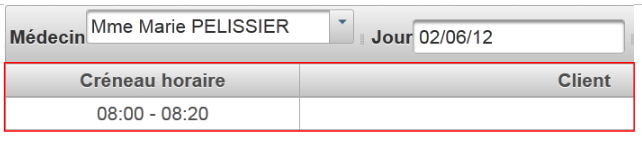 |
- lines 12-14: we will use a context menu to add/delete an appointment:
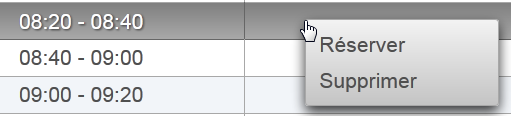 |
- lines 29-32: a confirmation dialog will be displayed when the user wants to delete an appointment:
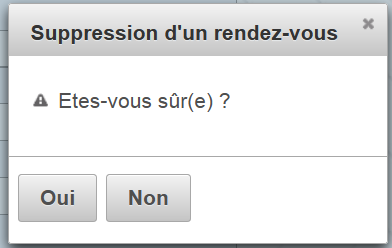 |
- lines 35-37: a dialog box will be used to report an error:
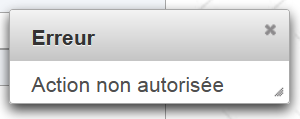 |
- lines 40-43: we will need to introduce some Javascript.
6.9.2. The Appointment Table
Here we discuss the model of a data table as studied in Section 5.15, page 327.
Let’s examine the main element of the page, the table that displays the agenda:
<p:dataTable id="agenda" value="#{form.myDataModel}" var="creneauMedecinJour" style="width: 800px"
                 selectionMode="single" selection="#{form.creneauChoisi}" emptyMessage="#{msg['form2.emtyMessage']}">
      <!-- schedule column -->
      <p:column style="width: 100px">
        ...
      </p:column>
      <!-- clients column -->
      <p:column style="width: 300px">
        ...
      </p:column>
    </p:dataTable>
The result is as follows:
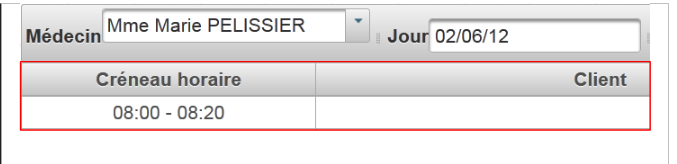 |
This is a two-column table (rows 4–6 and 8–10) populated by the source [Form].getMyDataModel() (value="#{form.myDataModel}"). Only one row can be selected at a time (selectionMode="single"). For each POST, a reference to the selected element is assigned to [Form].creneauChoisi (selection="#{form.creneauChoisi}").
Recall that the getAgenda method initialized the following field in the template:
// model
private AgendaMedecinJour agendaMedecinJour;
The table model is obtained by calling the following method [Form].getMyDataModel (value attribute of the <dataTable> tag):
  // the dataTable model
  public MyDataModel getMyDataModel() {
    return new MyDataModel(agendaMedecinJour.getCreneauxMedecinJour());
}
Let’s examine the [MyDataModel] class, which serves as the model for the <p:dataTable> tag:
package beans;

import javax.faces.model.ArrayDataModel;
import org.primefaces.model.SelectableDataModel;
import rdvmedecins.metier.entites.CreneauMedecinJour;

public class MyDataModel extends ArrayDataModel<CreneauMedecinJour> implements SelectableDataModel<CreneauMedecinJour> {

  // manufacturers
  public MyDataModel() {
  }

  public MyDataModel(CreneauMedecinJour[] creneauxMedecinJour) {
    super(creneauxMedecinJour);
  }

  @Override
  public Object getRowKey(CreneauMedecinJour creneauMedecinJour) {
    return creneauMedecinJour.getCreneau().getId();
  }

  @Override
  public CreneauMedecinJour getRowData(String rowKey) {
    // list of slots
    CreneauMedecinJour[] creneauxMedecinJour = (CreneauMedecinJour[]) getWrappedData();
    // the key is an integer long
    long key = Long.parseLong(rowKey);
    // search for the selected slot
    for (CreneauMedecinJour creneauMedecinJour : creneauxMedecinJour) {
      if (creneauMedecinJour.getCreneau().getId().longValue() == key) {
        return creneauMedecinJour;
      }
    }
    // nothing
    return null;
  }
}
- line 7: the class [MyDataModel] is the template for the <p:dataTable> tag. The purpose of this class is to link the rowkey element that is posted with the element associated with that row,
- line 7: the class implements the [SelectableDataModel] interface through the [ArrayDataModel] class. This means that the constructor’s parameter is an array. It is this array that populates the <dataTable> tag. Here, each row of the array will be associated with an element of type [CreneauMedecinJour],
- lines 13–15: the constructor passes its parameter to its parent class,
- lines 18–20: each row of the array corresponds to a time slot and will be identified by the id of the time slot (line 19). It is this id that will be posted to the server,
- line 23: the code that will be executed on the server side when the id for a time slot is posted. The purpose of this method is to return the reference of the [CreneauMedecinJour] object associated with this id. This reference will be assigned to the value of the selection attribute of the <dataTable> tag:
<p:dataTable id="agenda" value="#{form.myDataModel}" var="creneauMedecinJour" style="width: 800px"
selectionMode="single" selection="#{form.creneauChoisi}" emptyMessage="#{msg['form2.emtyMessage']}">
The field [Form].creneauChoisi will therefore contain the reference of the object [CreneauMedecinJour] that you want to add or delete.
6.9.3. The time slot column
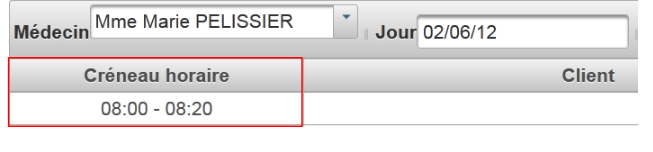 |
The time slot column is generated using the following code:
<p:dataTable id="agenda" value="#{form.myDataModel}" var="creneauMedecinJour" style="width: 800px"
                 selectionMode="single" selection="#{form.creneauChoisi}" emptyMessage="#{msg['form2.emtyMessage']}">
      <!-- schedule column -->
      <p:column style="width: 100px">
        <f:facet name="header">
          <h:outputText value="#{msg['form2.creneauHoraire']}"/>
        </f:facet>
        <div align="center">
          <h:outputFormat value="{0,number,#00}:{1,number,#00} - {2,number,#00}:{3,number,#00}">
            <f:param value="#{creneauMedecinJour.creneau.hdebut}" />
            <f:param value="#{creneauMedecinJour.creneau.mdebut}" />
            <f:param value="#{creneauMedecinJour.creneau.hfin}" />
            <f:param value="#{creneauMedecinJour.creneau.mfin}" />
          </h:outputFormat>
        </div>
      </p:column>

      <!-- clients column -->
      <p:column style="width: 300px">
        ...
      </p:column>
    </p:dataTable>
- lines 5-7: the column header,
- Lines 8–15: the current element in the column. Note line 9, which uses the <h:outputFormat> tag to format the elements to be displayed. The value parameter specifies the string to be displayed. The notation {i,type,format} refers to parameter number i, the type of that parameter, and its format. Here, there are 4 parameters numbered 0 through 3; their type is numeric, and they will be displayed with two digits.
- lines 10–13: the four parameters expected by the <h:outputFormat> tag.
6.9.4. The clients column
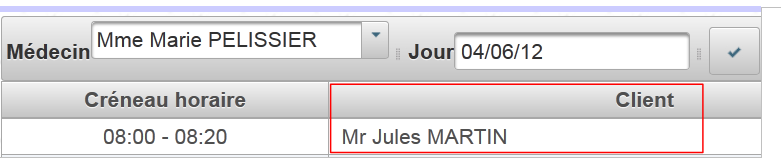 |
The clients column is generated using the following code:
<!-- agenda -->
    <p:dataTable id="agenda" value="#{form.myDataModel}" var="creneauMedecinJour" style="width: 800px"
                 selectionMode="single" selection="#{form.creneauChoisi}" emptyMessage="#{msg['form2.emtyMessage']}">
      <!-- schedule column -->
      ...
      <!-- clients column -->
      <p:column style="width: 300px">
        <f:facet name="header">
          <h:outputText value="#{msg['form2.client']}"/>
        </f:facet>
        <ui:fragment rendered="#{creneauMedecinJour.rv!=null}">
          <h:outputText value="#{creneauMedecinJour.rv.client.titre} #{creneauMedecinJour.rv.client.prenom} #{creneauMedecinJour.rv.client.nom}" />
        </ui:fragment>
        <ui:fragment rendered="#{creneauMedecinJour.rv==null and form.creneauChoisi!=null and form.creneauChoisi.creneau.id==creneauMedecinJour.creneau.id}">
          ...
        </ui:fragment>
      </p:column>
    </p:dataTable>
- lines 8–10: the column header,
- lines 11–13: the default element when there is an appointment scheduled for that time slot. In this case, the title, first name, and last name of the client for whom the appointment was made are displayed,
- lines 14–16: another section we’ll come back to.
6.10. Deleting an appointment
Deleting an appointment follows this sequence:
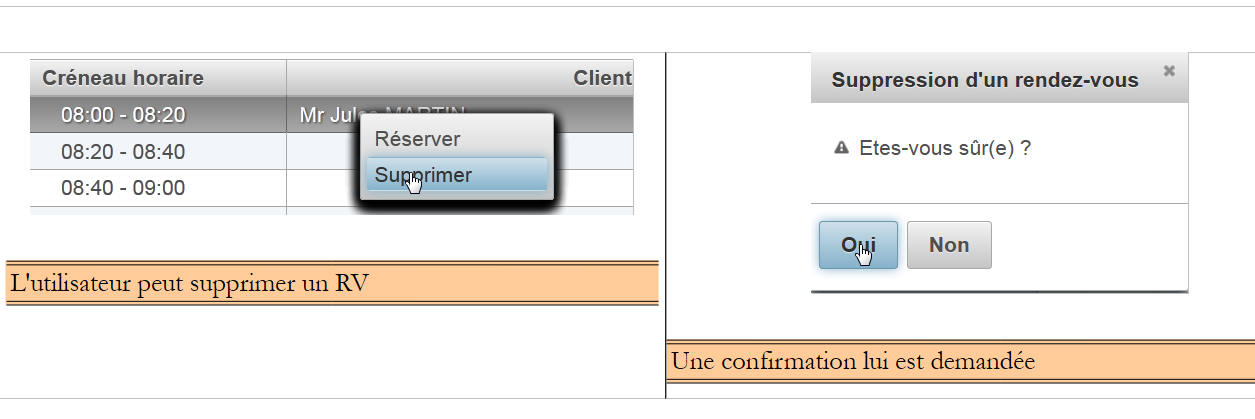 |
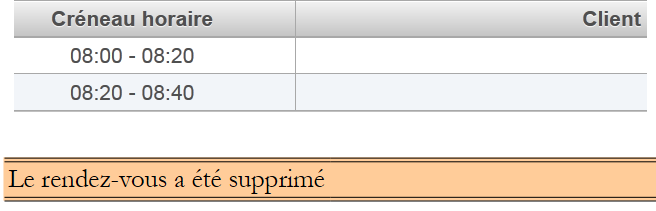 |
The view involved in this action is as follows:
<!-- context menu -->
    <p:contextMenu for="agenda">
...
      <p:menuitem value="#{msg['form2.supprimer']}" onclick="confirmation.show()"/>
    </p:contextMenu>
    <!-- agenda -->
    <p:dataTable id="agenda" value="#{form.myDataModel}" var="creneauMedecinJour" style="width: 800px"
                 selectionMode="single" selection="#{form.creneauChoisi}" emptyMessage="#{msg['form2.emtyMessage']}">
      ...
    </p:dataTable>

    <!-- confirm deletion RV -->
    <p:confirmDialog id="confirmDialog" message="#{msg['form2.suppression.confirmation']}"
       header="#{msg['form2.suppression.message']}" severity="alert" widgetVar="confirmation">
      <p:commandButton value="#{msg['form2.supprimer.oui']}" update=":formulaire:contenu" action="#{form.action}"
                       oncomplete="handleRequest(xhr, status, args); confirmation.hide()">
        <f:setPropertyActionListener value="supprimer" target="#{form.action}"/>
      </p:commandButton>
      <p:commandButton value="#{msg['form2.supprimer.non']}" onclick="confirmation.hide()" type="button" />
    </p:confirmDialog>
- lines 2-5: a context menu linked to the data table (for attribute). It has two options [1]:
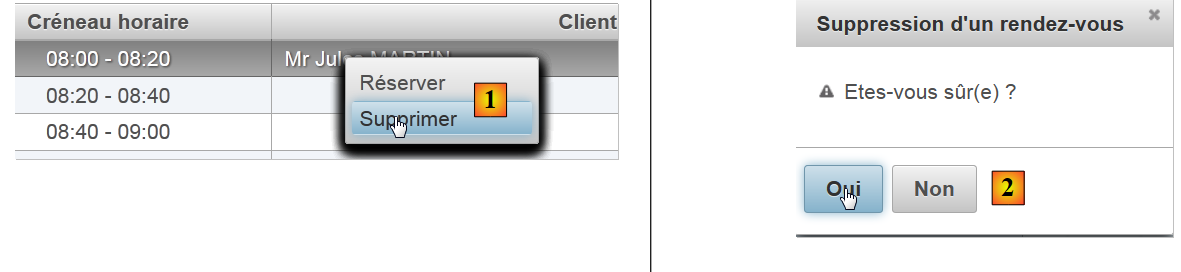 |
- line 4: the option [Supprimer] triggers the display of the [2] dialog box from lines 13-20,
- line 15: clicking on [Oui] triggers the execution of [Form.action], which will delete the appointment. Normally, the context menu should not offer option or [Supprimer] if the selected item has no appointment, and not option or [Réserver] if the selected item has an appointment. We were unable to make the context menu that subtle. It works for the first selected item, but then we noticed that the context menu retains the configuration set for that first selection. It then becomes incorrect. So we kept both options and decided to provide feedback to the user if they deleted an item without an appointment,
- Line 16: the oncomplete attribute, which allows you to define Javascript code to be executed after the AJAX call has been executed. This code will be as follows:
<!-- error message -->
    <p:dialog header="#{msg['form2.erreur']}" widgetVar="dlgErreur" height="100" >
      <h:outputText value="#{form.msgErreur}" />
    </p:dialog>

    <!-- server return management -->
    <script type="text/javascript">
      function handleRequest(xhr, status, args) {
        // mistake?
        if(args.erreur) {
          dlgErreur.show();
        }
      }
    </script>
- Line 10: The code Javascript checks whether the args dictionary has the error attribute. If so, it displays the dialog box from line 2 (attribute widgetVar). This dialog displays the template [Form].msgErreur.
Let’s look at the code executed to handle the deletion of an appointment:
    <p:confirmDialog ...>
      <p:commandButton value="#{msg['form2.supprimer.oui']}" update=":formulaire:contenu" action="#{form.action}"
                       ...>
        <f:setPropertyActionListener value="supprimer" target="#{form.action}"/>
      </p:commandButton>
      ...
</p:confirmDialog>
- line 2: the [Form].action method will be executed,
- line 4: before it is executed, the action field will have been set to 'delete'.
The [action] method is as follows:
// action on RV
  public void action() {
    // according to desired action
    if (action.equals("supprimer")) {
      supprimer();
    }
    ...
  }

  public void supprimer() {
    // is there anything we can do?
    Rv rv = creneauChoisi.getRv();
    if (rv == null) {
      signalerActionIncorrecte();
      return;
    }
    try {
      // deleting an appointment
      application.getMetier().supprimerRv(rv);
      // we update the agenda
      agendaMedecinJour = application.getMetier().getAgendaMedecinJour(medecin, jour);
      // form2 is displayed
      setForms(true, true, false);
    } catch (Throwable th) {
      // error view
      prepareVueErreur(th);
    }
    // raz of the chosen slot
    creneauChoisi = null;
}
- line 4: if the action is 'delete', execute the method [supprimer],
- line 12: retrieve the appointment for the selected slot. Note that [creneauChoisi] was initialized by the reference of the selected [CreneauMedecinJour] element;
- if this appointment exists, it is deleted (line 19), agenda is regenerated (line 21) and then redisplayed (line 23),
- if the deletion failed, the error page is displayed (line 26),
- If the selected item has no appointment (line 13), then we are in a situation where the user clicked on a time slot that has no appointment. This error is reported:
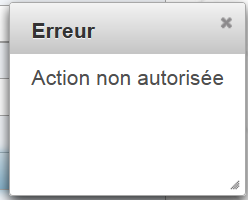 |
The [signalerActionIncorrecte] method is as follows:
// report an incorrect action
  private void signalerActionIncorrecte() {
    // raz selected slot
    creneauChoisi = null;
    // error
    msgErreur = Messages.getMessage(null, "form2.erreurAction", null).getSummary();
    RequestContext.getCurrentInstance().addCallbackParam("erreur", true);
  }
- line 4: remove the selection,
- line 6: generate an internationalized error message,
- line 7: add the attribute ('error', true) to the args dictionary of the AJAX call.
Let's return to the XHTML code for the [Oui] button:
<p:commandButton value="#{msg['form2.supprimer.oui']}" update=":formulaire:contenu" action="#{form.action}"
oncomplete="handleRequest(xhr, status, args); confirmation.hide()">
- Line 2: After the [Form].action method is executed, the Javascript handleRequest method is executed:
    <!-- error message -->
    <p:dialog header="#{msg['form2.erreur']}" widgetVar="dlgErreur" height="100" >
      <h:outputText value="#{form.msgErreur}" />
    </p:dialog>

    <!-- server return management -->
    <script type="text/javascript">
      function handleRequest(xhr, status, args) {
        // mistake?
        if(args.erreur) {
          dlgErreur.show();
        }
      }
</script>
- Line 10: We check if the args dictionary has an attribute named 'error'. If so, the dialog box from line 2 is displayed.
- line 3: it displays the error message generated by the template.
6.11. Appointment scheduling
The appointment scheduling process follows this sequence:
 |
The view involved in this action is as follows:
<!-- context menu -->
    <p:contextMenu for="agenda">
      <p:menuitem value="#{msg['form2.reserver']}" update=":formulaire:contenu" action="#{form.action}" oncomplete="handleRequest(xhr, status, args)">
        <f:setPropertyActionListener value="reserver" target="#{form.action}"/>
      </p:menuitem>
      ...
    </p:contextMenu>
    <!-- agenda -->
    <p:dataTable id="agenda" value="#{form.myDataModel}" var="creneauMedecinJour" style="width: 800px"
   selectionMode="single" selection="#{form.creneauChoisi}" emptyMessage="#{msg['form2.emtyMessage']}">
      <!-- schedule column -->
      <p:column style="width: 100px">
...
      </p:column>
      <!-- clients column -->
      <p:column style="width: 300px">
        <f:facet name="header">
          <h:outputText value="#{msg['form2.client']}"/>
        </f:facet>
...
        <ui:fragment rendered="#{creneauMedecinJour.rv==null and form.creneauChoisi!=null and form.creneauChoisi.creneau.id==creneauMedecinJour.creneau.id}">
          <p:autoComplete completeMethod="#{form.completeClients}" value="#{form.identiteClient}" size="30"/>
          <p:spacer width="50px"/>
          <p:commandLink action="#{form.action()}" value="#{msg['form2.valider']}" update=":formulaire:contenu" oncomplete="handleRequest(xhr, status, args)">
            <f:setPropertyActionListener value="valider" target="#{form.action}"/>
          </p:commandLink>
          <p:spacer width="50px"/>
          <p:commandLink action="#{form.action()}" value="#{msg['form2.annuler']}" update=":formulaire:contenu">
            <f:setPropertyActionListener value="annuler" target="#{form.action}"/>
          </p:commandLink>
        </ui:fragment>
      </p:column>
    </p:dataTable>
...
- lines 21-31: display the following:
 |
- line 21: this is displayed if there are no appointments, a selection has been made, and the id of the selected time slot matches that of the current table row. If this condition is not included, the fragment is displayed for all time slots,
- line 22: the input field will be an assisted input field. We assume here that there may be many clients values,
- Lines 24–26: the link [Valider],
- lines 28–30: the link [Annuler].
The autocomplete field is generated by the following code:
<p:autoComplete completeMethod="#{form.completeClients}" value="#{form.identiteClient}" size="30"/>
The method [Form].completeClients is responsible for providing suggestions to the user based on the characters typed in the input field:
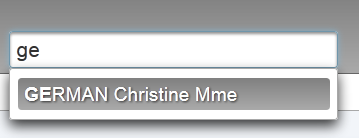 |
The suggestions are in the form [Nom prénom titre]. The code for the [Form].completeClients method is as follows:
  // the autocomplete text method
  public List<String> completeClients(String query) {
    List<String> identites = new ArrayList<String>();
    // we search for clients that match
    for (Client c : clients) {
      String identite = identite(c);
      if (identite.toLowerCase().startsWith(query.toLowerCase())) {
        identites.add(identite);
      }
    }
    return identites;
  }

  private String identite(Client c) {
    return c.getNom() + " " + c.getPrenom() + " " + c.getTitre();
}
- line 2: query is the string entered by the user,
- line 3: the list of suggestions. Initially an empty list,
- lines 5–10: we construct the identities [Nom prénom titre] and clients. If an identity starts with query (line 7), it is added to the list of suggestions (line 8).
6.12. Confirming an appointment
Validating an appointment follows this sequence:
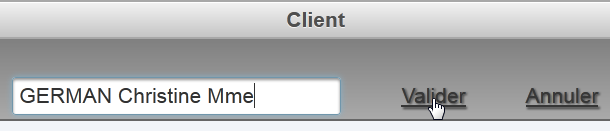 |  |
The code for the [Valider] link is as follows:
          <p:commandLink action="#{form.action()}" value="#{msg['form2.valider']}" update=":formulaire:contenu" oncomplete="handleRequest(xhr, status, args)">
            <f:setPropertyActionListener value="valider" target="#{form.action}"/>
</p:commandLink>
Therefore, the method [Form].action() will handle this event. Meanwhile, the model [Form].action will have received the string 'valider'. The code is as follows:
  // bean Application
  @Inject
  private Application application;
  // session cache
...
  private Map<String, Client> hIdentitesClients = new HashMap<String, Client>();
  // model
  private Date jour = new Date();
  private Boolean form1Rendered = true;
  private Boolean form2Rendered = false;
  private Boolean erreurRendered = false;
  private AgendaMedecinJour agendaMedecinJour;
  private CreneauMedecinJour creneauChoisi;
  private List<Erreur> erreurs;
  private Boolean erreur = false;
  private String identiteClient;
  private String action;
  private String msgErreur;

  @PostConstruct
  private void init() {
    ...
    for (Client c : clients) {
      hClients.put(c.getId(), c);
      hIdentitesClients.put(identite(c), c);
    }
  }

  // action on RV
  public void action() {
    // according to desired action
...
    if (action.equals("valider")) {
      validerResa();
    }
}

  // validation Rv
  public void validerResa() {
    // reservation validation
    try {
      // does the customer exist?
      Boolean erreur = !hIdentitesClients.containsKey(identiteClient);
      if (erreur) {
        msgErreur = Messages.getMessage(null, "form2.erreurClient", new Object[]{identiteClient}).getSummary();
        RequestContext.getCurrentInstance().addCallbackParam("erreur", true);
        return;
      }
      // we add the Rv
      application.getMetier().ajouterRv(jour, creneauChoisi.getCreneau(), hIdentitesClients.get(identiteClient));
      // we update the agenda
      agendaMedecinJour = application.getMetier().getAgendaMedecinJour(medecin, jour);
      // form2 is displayed
      setForms(true, true, false);
    } catch (Throwable th) {
      // error view
      prepareVueErreur(th);
    }
    // raz of the chosen slot
    creneauChoisi = null;
    // raz client
    identiteClient = null;
}
- lines 33–35: due to the value of the action field, the method [validerResa] will be executed,
- line 43: we first check that the customer exists. In fact, in the assisted input field, the user may have entered data manually without using the suggestions provided. The assisted input is associated with the model [Form].identiteClient. We therefore check whether this identity exists in the identitesClients dictionary created when the model was instantiated (line 20). This dictionary associates a customer identity of type [Nom prénom titre] with the customer itself (line 25),
- line 44: if the client does not exist, an error is returned to the browser,
- line 45: an internationalized error message,
- line 46: the attribute ('error', true) is added to the args dictionary of the AJAX call. The AJAX call has been defined as follows:
<p:commandLink action="#{form.action()}" value="#{msg['form2.valider']}" update=":formulaire:contenu" oncomplete="handleRequest(xhr, status, args)">
            <f:setPropertyActionListener value="valider" target="#{form.action}"/>
</p:commandLink>
In line 3 above, we see that the [Valider] link has an oncomplete attribute. It is this attribute that will display the error message using a technique we have already encountered.
- Line 50: We instruct the [métier] layer to add an appointment for the selected day (day), the selected time slot (creneauChoisi.getCreneau()), and the selected client (hIdentitesClients.get(identiteClient)),
- line 52: the [métier] layer is asked to refresh the doctor’s agenda. We will see the added appointment along with any changes other users of the application may have made,
- line 54: we re-display the agenda [form2.xhtml],
- line 57: display the error page if an error occurs.
6.13. Canceling an appointment
This corresponds to the following sequence:
 |
The [Annuler] button on the [form2.xhtml] page is as follows:
<p:commandLink action="#{form.action()}" value="#{msg['form2.annuler']}" update=":formulaire:contenu">
            <f:setPropertyActionListener value="annuler" target="#{form.action}"/>
          </p:commandLink>
The method [Form].action is therefore called:
// action on RV
  public void action() {
    // according to desired action
...
    if (action.equals("annuler")) {
      annulerRv();
    }
  }

// cancel appointment
  public void annulerRv() {
    // form2 is displayed
    setForms(true, true, false);
    // raz of the chosen slot
    creneauChoisi = null;
    // raz client
    identiteClient = null;
  }
6.14. Navigation in the calendar
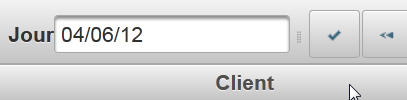
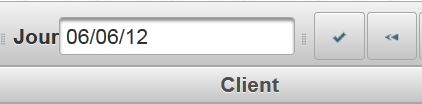
The toolbar allows you to navigate the calendar:
 |  |
 |  |
 | 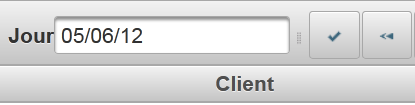 |
Not shown in the screenshots above, agenda is updated with the appointments for the newly selected day.
The tags for the three relevant buttons are as follows in [form1.xhtml]:
  <p:toolbar>
    <p:toolbarGroup align="left">
...
      <h:outputText value="#{msg['form1.jour']}"/>
      <p:calendar id="calendrier" value="#{form.jour}" readOnlyInputText="true">
        <p:ajax event="dateSelect" listener="#{form.hideAgenda}" update=":formulaire:contenu"/>
      </p:calendar>
      <p:separator/>
      <p:commandButton id="resa-agenda" icon="ui-icon-check" actionListener="#{form.getAgenda}" update=":formulaire:contenu"/>
      <p:tooltip for="resa-agenda" value="#{msg['form1.agenda']}"/>
      <p:commandButton id="resa-precedent" icon="ui-icon-seek-prev" actionListener="#{form.getPreviousAgenda}" update=":formulaire:contenu"/>
      <p:tooltip for="resa-precedent" value="#{msg['form1.precedent']}"/>
      <p:commandButton id="resa-suivant" icon="ui-icon-seek-next" actionListener="#{form.getNextAgenda}" update=":formulaire:contenu"/>
      <p:tooltip for="resa-suivant" value="#{msg['form1.suivant']}"/>
      <p:commandButton id="resa-today" icon="ui-icon-home" actionListener="#{form.today}" update=":formulaire:contenu"/>
      <p:tooltip for="resa-today" value="#{msg['form1.today']}"/>
    </p:toolbarGroup>
    <p:toolbarGroup align="right">
      ...
    </p:toolbarGroup>
</p:toolbar>
The methods [Form].getPreviousAgenda, [Form].getNextAgenda, [Form].today are as follows:
private Date jour = new Date();

public void getPreviousAgenda() {
    // move on to the previous day
    Calendar cal = Calendar.getInstance();
    cal.setTime(jour);
    cal.add(Calendar.DAY_OF_YEAR, -1);
    jour = cal.getTime();
    // agenda
    if (form2Rendered) {
      getAgenda();
    }
  }

  public void getNextAgenda() {
    // we move on to the next day
    Calendar cal = Calendar.getInstance();
    cal.setTime(jour);
    cal.add(Calendar.DAY_OF_YEAR, 1);
    jour = cal.getTime();
    // agenda
    if (form2Rendered) {
      getAgenda();
    }
  }

  // agenda today
  public void today() {
    jour = new Date();
    // agenda
    if (form2Rendered) {
      getAgenda();
    }
}
- Line 1: the display date of agenda,
- line 5: a calendar is used,
- line 6: which is initialized to the current day of the agenda,
- line 7: we subtract one day from the calendar,
- line 8: and reinitialize it with the display date of agenda,
- line 11: we redisplay the agenda if it is currently displayed. This is because the user can use the toolbar even if the agenda is not displayed.
The other methods are similar.
6.15. Changing the display language
Language switching is managed by the menu button on the toolbar:
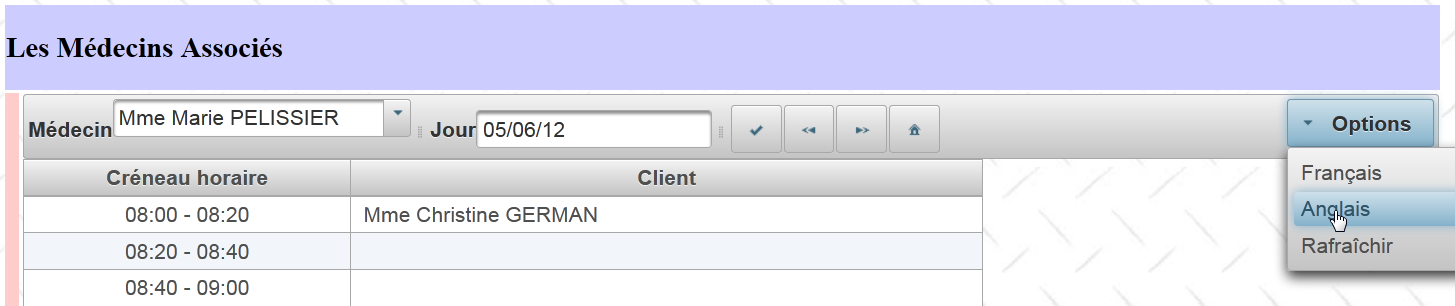 |
 |
The menu button tags are as follows:
<p:toolbar>
    <p:toolbarGroup align="left">
...
    </p:toolbarGroup>
    <p:toolbarGroup align="right">
      <p:menuButton value="#{msg['form1.options']}">
        <p:menuitem id="menuitem-francais" value="#{msg['form1.francais']}" actionListener="#{form.setFrenchLocale}" update=":formulaire"/>
        <p:menuitem id="menuitem-anglais" value="#{msg['form1.anglais']}" actionListener="#{form.setEnglishLocale}" update=":formulaire"/>
        <p:menuitem id="menuitem-rafraichir" value="#{msg['form1.rafraichir']}" actionListener="#{form.refresh}" update=":formulaire:contenu"/>
      </p:menuButton>
    </p:toolbarGroup>
  </p:toolbar>
The methods executed in the template are as follows:
private String locale = "fr";

  public void setFrenchLocale() {
    locale = "fr";
    // reload page
    redirect();
  }

  public void setEnglishLocale() {
    locale = "en";
    // reload page
    redirect();
  }

  private void redirect() {
    // redirect the client to the servlet
    ExternalContext ctx = FacesContext.getCurrentInstance().getExternalContext();
    try {
      ctx.redirect(ctx.getRequestContextPath());
    } catch (IOException ex) {
      Logger.getLogger(Form.class.getName()).log(Level.SEVERE, null, ex);
    }
}
The methods on lines 3 and 9 simply initialize the local field on line 1 and then redirect the client browser to the same page. A redirect is a response in which the server instructs the browser to load another page. The browser then performs a GET to this new page.
- line 17: [ExternalContext] is a JSF class that allows access to the currently running servlet,
- line 19: the redirection is performed. The parameter of the redirect method is the URL of the page to which the client browser should be redirected. Here we want to redirect to the URL of our application:
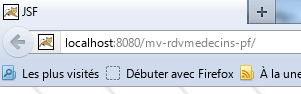 |
the [getRequestContextPath] method provides this name. The [index.xhtml] home page of our application will therefore be loaded. This page is associated with the session-scoped [Form] model. This model manages three Booleans that control the appearance of the [index.xhtml] page:
  private Boolean form1Rendered = true;
private Boolean form2Rendered = false;
private Boolean erreurRendered = false;
Since the model is session-scoped, these three Booleans have retained their values. The [index.xhtml] page will therefore appear in the state it was in before the redirection. This page is rendered using the following [layout.xhtml] facelet template:
<?xml version='1.0' encoding='UTF-8' ?>
<!DOCTYPE html PUBLIC "-//W3C//DTD XHTML 1.0 Transitional//EN" "http://www.w3.org/TR/xhtml1/DTD/xhtml1-transitional.dtd">

<html xmlns="http://www.w3.org/1999/xhtml"
      xmlns:h="http://java.sun.com/jsf/html"
      xmlns:p="http://primefaces.org/ui"
      xmlns:f="http://java.sun.com/jsf/core"
      xmlns:ui="http://java.sun.com/jsf/facelets">
  <f:view locale="#{form.locale}">
    ....
  </f:view>
</html>
The tag on line 9 sets the page's display language using its locale attribute. The page will therefore switch to French or English as appropriate. Now, why a redirect? Let’s go back to the tags for the language change options:
<p:toolbar>
    <p:toolbarGroup align="left">
...
    </p:toolbarGroup>
    <p:toolbarGroup align="right">
      <p:menuButton value="#{msg['form1.options']}">
        <p:menuitem id="menuitem-francais" value="#{msg['form1.francais']}" actionListener="#{form.setFrenchLocale}" update=":formulaire"/>
        <p:menuitem id="menuitem-anglais" value="#{msg['form1.anglais']}" actionListener="#{form.setEnglishLocale}" update=":formulaire"/>
        <p:menuitem id="menuitem-rafraichir" value="#{msg['form1.rafraichir']}" actionListener="#{form.refresh}" update=":formulaire:contenu"/>
      </p:menuButton>
    </p:toolbarGroup>
</p:toolbar>
They were originally written to update the form field using a call to AJAX (the "update" attribute in lines 7 and 8). However, during testing, the language change did not always work. Hence the redirect to resolve this issue. We could also have set the ajax='false' attribute on the tags to trigger a page reload. That would have avoided the redirect.
6.16. Refreshing the lists
This corresponds to the following action:
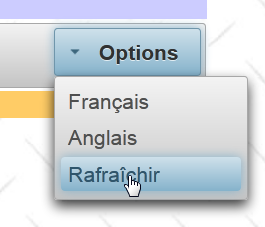 |
The tag associated with option [Rafraîchir] is as follows:
<p:menuitem id="menuitem-rafraichir" value="#{msg['form1.rafraichir']}" actionListener="#{form.refresh}" update=":formulaire:contenu"/>
The [Form].refresh method is as follows:
  public void refresh() {
    // refresh lists
    init();
}
The init method is the method executed immediately after the [Form] bean is constructed. Its purpose is to cache data from the database in the model:
// bean Application
  @Inject
  private Application application;
  // session cache
  private List<Medecin> medecins;
  private List<Client> clients;
  private Map<Long, Medecin> hMedecins = new HashMap<Long, Medecin>();
  private Map<Long, Client> hClients = new HashMap<Long, Client>();
  private Map<String, Client> hIdentitesClients = new HashMap<String, Client>();
  ...

  @PostConstruct
  private void init() {
    // doctors and clients are cached
    try {
      medecins = application.getMetier().getAllMedecins();
      clients = application.getMetier().getAllClients();
    } catch (Throwable th) {
      ...
    }
    ...
    // dictionaries
    for (Medecin m : medecins) {
      hMedecins.put(m.getId(), m);
    }
    for (Client c : clients) {
      hClients.put(c.getId(), c);
      hIdentitesClients.put(identite(c), c);
    }
  }
The init method constructs the lists and dictionaries in lines 5–9. The drawback of this approach is that these elements no longer reflect changes in the database (such as the addition of a client or a doctor). The refresh method forces the rebuilding of these lists and dictionaries. Therefore, we will use it every time a change is made to the database, such as adding a new client.
6.17. Conclusion
Let’s review the architecture of the application we just built:
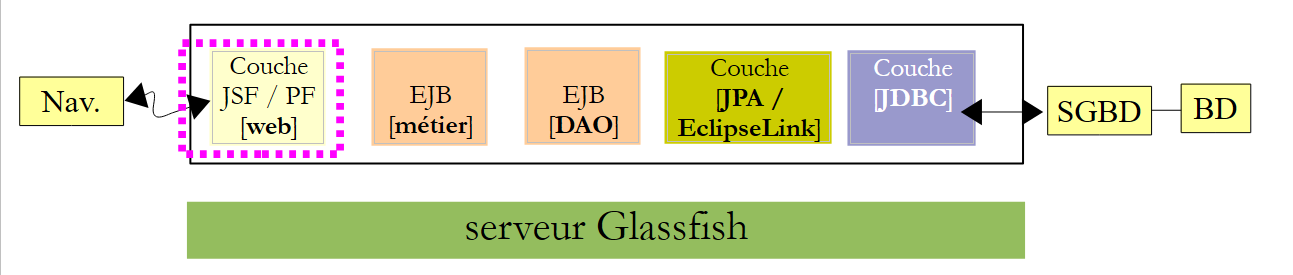 |
We relied heavily on the pre-built version and JSF2:
- the [métier], [DAO], and [JPA] layers were retained,
- the [Application] and [Form] beans from the web layer have been retained, but new features have been added to them due to the enhancement of the user interface,
- the user interface has been significantly modified. In particular, it is now more feature-rich and user-friendly.
The transition from JSF to Primefaces to build the web interface requires some experience, as at first one is a bit overwhelmed by the large number of available components and ultimately isn’t quite sure which ones to use. One must therefore consider the desired usability for the interface.
6.18. Eclipse Testing
As we did for previous versions of the sample application, we’ll show how to test this version 03 with Eclipse. First, we import the Maven projects from sample 03 [1] into Eclipse:
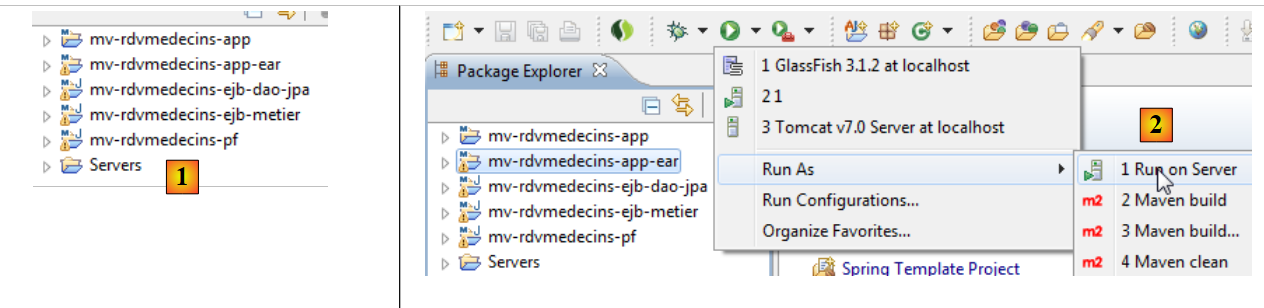 |
- [mv-rdvmedecins-ejb-dao-jpa]: the [DAO] and [JPA] layers,
- [mv-rdvmedecins-ejb-metier]: the [métier] layer,
- [mv-rdvmedecins-pf]: the layer [web] implemented with JSF and Primefaces,
- [mv-rdvmedecins-app]: the parent of the enterprise project [mv-rdvmedecins-app-ear]. When the parent project is imported, the child project is automatically imported
- in [2], the enterprise project [mv-rdvmedecins-app-ear] is executed,
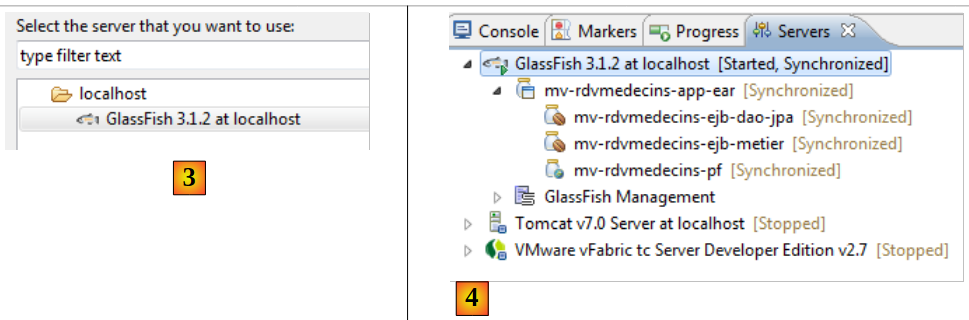 |
- in [3], the server Glassfish is selected,
- In [4], in the [Servers] tab, the application has been deployed. It does not run on its own. You must request its URL [http://localhost:8080/mv-rdvmedecins-pf/] in a browser [5]:
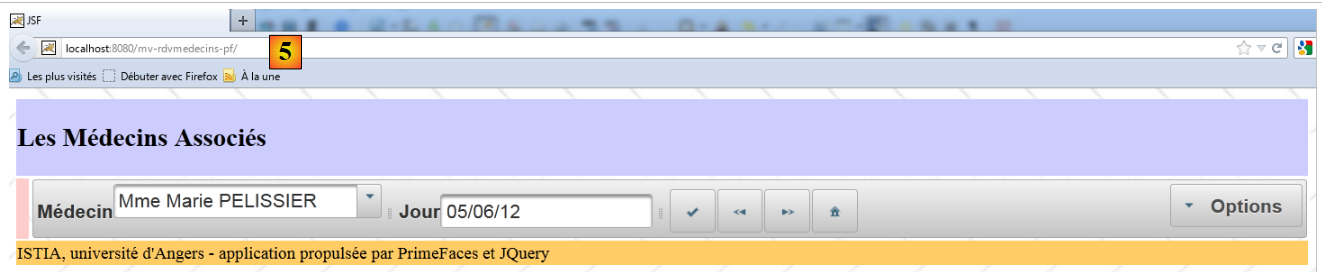 |