4. Sample Application – 02: rdvmedecins-jsf2-spring
We now propose to port the previous application to a Spring/Tomcat environment:
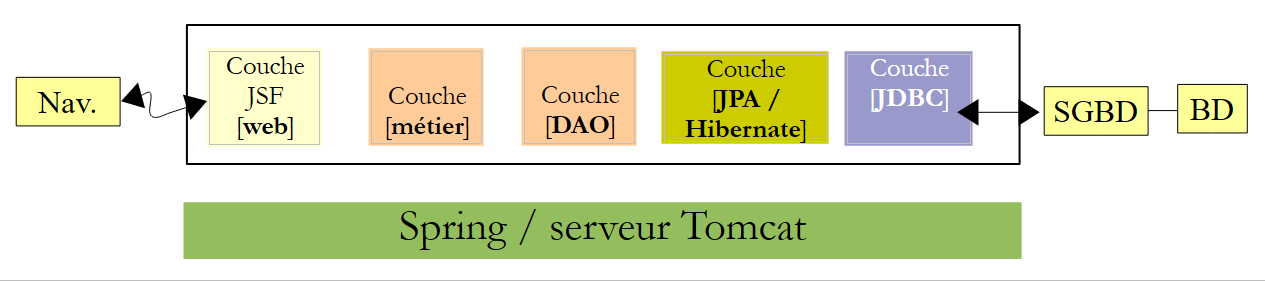 |
This is truly a port. We will start with the previous application and adapt it to the new environment. We will only comment on the changes. There are three main changes:
- the server is no longer Glassfish but Tomcat, a lightweight server that does not have a EJB container,
- to replace EJB, we will use Spring, the main competitor to EJB and [http://www.springsource.com/],
- the implementation JPA used will be Hibernate instead of EclipseLink.
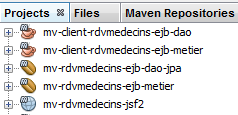
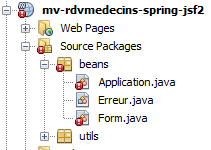
Because we will be doing a lot of copy-and-paste between the old project and the new one, we keep the previous projects open in Netbeans:
 |
Using the Spring framework requires certain knowledge that can be found in [ref7] (see page 166).
4.1. The layers [DAO] and [JPA]
 |
4.1.1. The Netbeans project
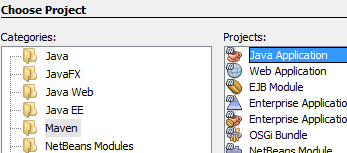
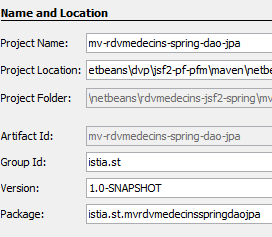
We are building a Maven project of type [Java Application]:
 |  |  |
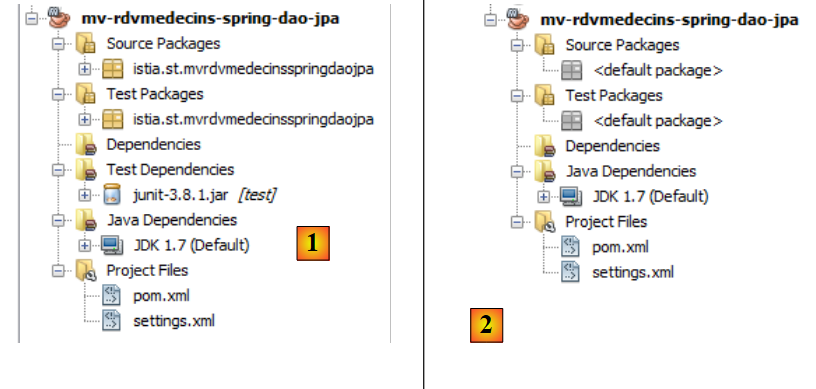 |
- in [1], the created project,
- in [2], the same project stripped of the packages from [Source Packages] and [Test Packages] and the [junit-3.8.1] dependency.
The hardest part of Maven projects is finding the right dependencies. For this Spring / JPA / Hibernate project, they are as follows:
<project xmlns="http://maven.apache.org/POM/4.0.0" xmlns:xsi="http://www.w3.org/2001/XMLSchema-instance"
  xsi:schemaLocation="http://maven.apache.org/POM/4.0.0 http://maven.apache.org/xsd/maven-4.0.0.xsd">
  <modelVersion>4.0.0</modelVersion>

  <groupId>istia.st</groupId>
  <artifactId>mv-rdvmedecins-spring-dao-jpa</artifactId>
  <version>1.0-SNAPSHOT</version>
  <packaging>jar</packaging>

  <name>mv-rdvmedecins-spring-dao-jpa</name>
  <url>http://maven.apache.org</url>

  <properties>
    <project.build.sourceEncoding>UTF-8</project.build.sourceEncoding>
  </properties>

    <dependencies>
    <dependency>
      <groupId>org.hibernate</groupId>
      <artifactId>hibernate-entitymanager</artifactId>
      <version>4.1.2</version>
      <type>jar</type>
    </dependency>
    <dependency>
      <groupId>org.hibernate.java-persistence</groupId>
      <artifactId>jpa-api</artifactId>
      <version>2.0.Beta-20090815</version>
      <type>jar</type>
    </dependency>
    <dependency>
      <groupId>mysql</groupId>
      <artifactId>mysql-connector-java</artifactId>
      <version>5.1.6</version>
    </dependency>
    <dependency>
      <groupId>junit</groupId>
      <artifactId>junit</artifactId>
      <version>4.10</version>
      <scope>test</scope>
      <type>jar</type>
    </dependency>
    <dependency>
      <groupId>commons-dbcp</groupId>
      <artifactId>commons-dbcp</artifactId>
      <version>1.2.2</version>
    </dependency>
    <dependency>
      <groupId>commons-pool</groupId>
      <artifactId>commons-pool</artifactId>
      <version>1.6</version>
    </dependency>
    <dependency>
      <groupId>org.springframework</groupId>
      <artifactId>spring-tx</artifactId>
      <version>3.1.1.RELEASE</version>
      <type>jar</type>
    </dependency>
    <dependency>
      <groupId>org.springframework</groupId>
      <artifactId>spring-beans</artifactId>
      <version>3.1.1.RELEASE</version>
      <type>jar</type>
    </dependency>
    <dependency>
      <groupId>org.springframework</groupId>
      <artifactId>spring-context</artifactId>
      <version>3.1.1.RELEASE</version>
      <type>jar</type>
    </dependency>
    <dependency>
      <groupId>org.springframework</groupId>
      <artifactId>spring-orm</artifactId>
      <version>3.1.1.RELEASE</version>
      <type>jar</type>
    </dependency>
  </dependencies>

</project>
- lines 18–29: for Hibernate,
- lines 30–34: for the JDBC driver of MySQL,
- lines 35–41: for the JUnit test,
- lines 42–51: for the Apache Commons DBCP connection pool. A connection pool is a pool of open connections. When the application needs a connection, it requests one from the pool. When it no longer needs it, it returns it. Connections are opened when the application starts and remain open for the duration of the application’s lifetime. This avoids the overhead of repeatedly opening and closing connections. This type of pool existed in Glassfish, but its use was transparent to us. This will also be the case here, but we need to install and configure it,
- lines 52–75: for Spring.
Let’s add these dependencies and build the project:
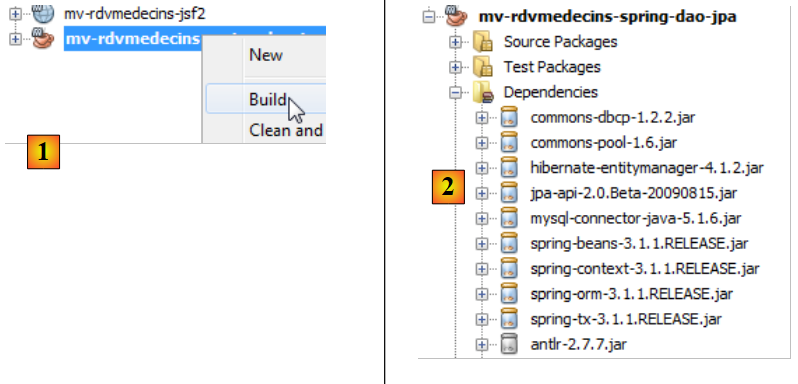 |
- in [1], we build the project, which will force Maven to download the dependencies;
- in [2], these then appear in the [Dependencies] branch. There are a great many of them, as the Hibernate and Spring frameworks themselves have a great many dependencies. Again, thanks to Maven, we don’t have to worry about them. They are downloaded automatically.
Now that we have the dependencies, we copy the code from the EJB project in the [dao] layer into the Spring project in the [dao] layer:
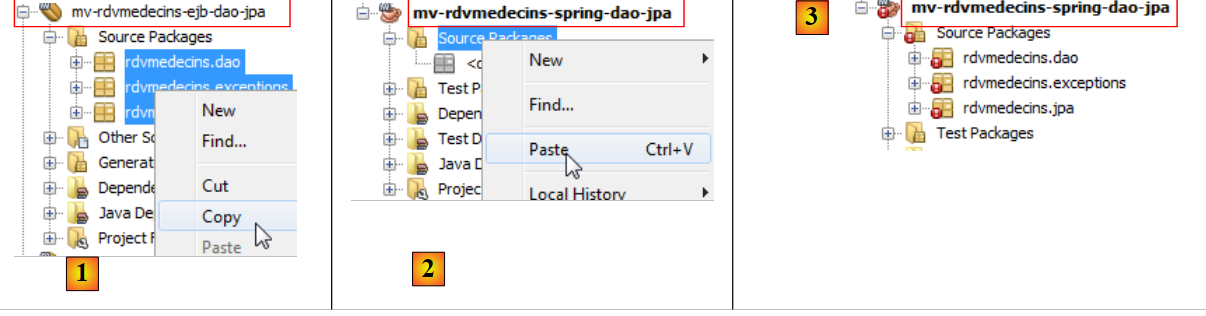 |
- in [1], we copy to the source project,
- in [2], paste into the destination project,
- in [3], the result.
Once the copy is complete, you need to correct the errors.
4.1.2. The package [exceptions]
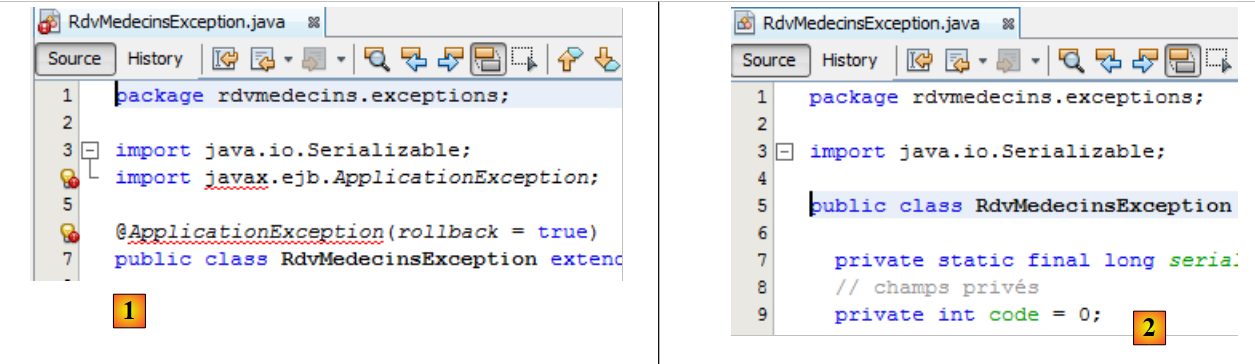 |
The class [RdvMedecinsExceptions] [1] has errors due to package [javax] line 4, which no longer exists. This is a package specific to EJB. The error on line 6 stems from the one on line 4. We delete these two lines. This resolves the [2] errors.
4.1.3. The package [jpa]
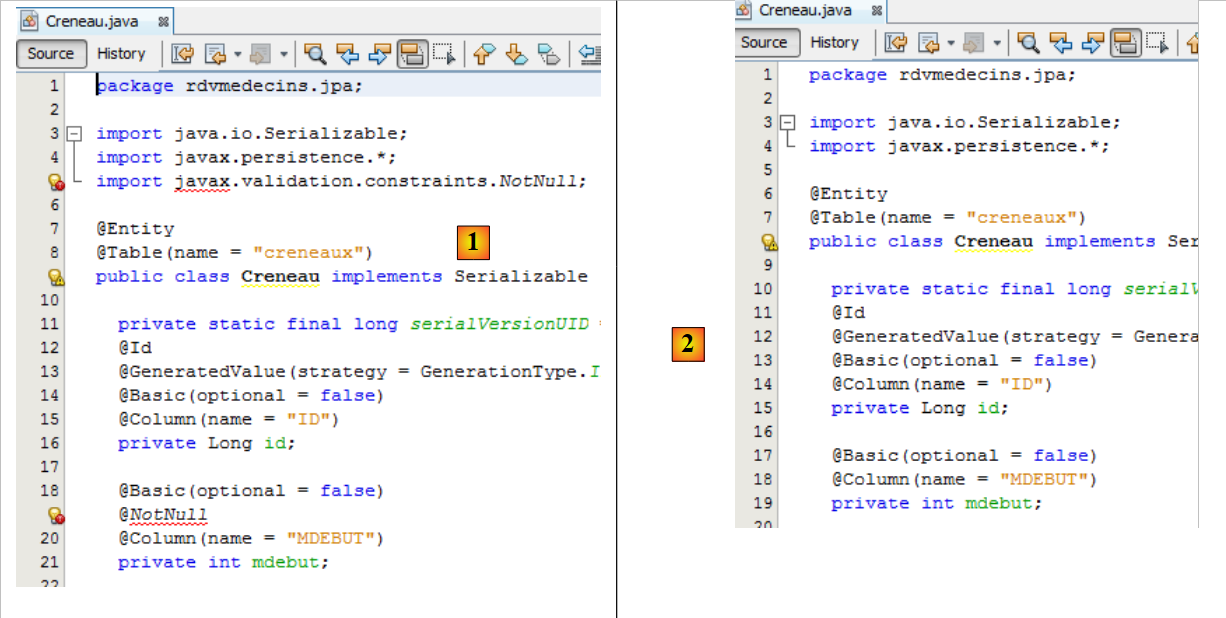 |
- In [1], the [Creneau] class is incorrect due to the absence of the validation package on line [5]. We could have added this package to the project dependencies. However, during testing, Hibernate throws an exception because of it. Since it is not essential to our application, we removed it. To fix the class, simply delete all the erroneous lines [2]. We do this for all the erroneous classes.
4.1.4. The [dao] package
We are now at the following point:
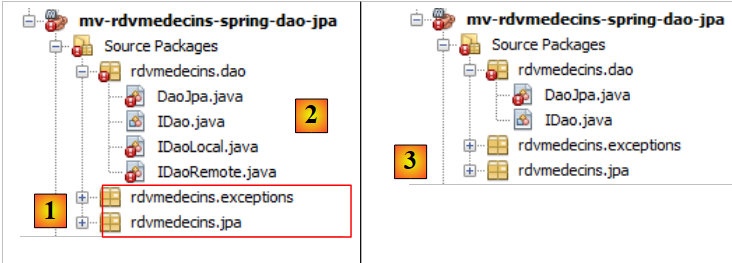 |
- in [1], the two corrected packages,
- in [2], the package [dao]. Since EJB no longer exists, the concept of remote and local interfaces in EJB is also no longer relevant. We are removing them from [3].
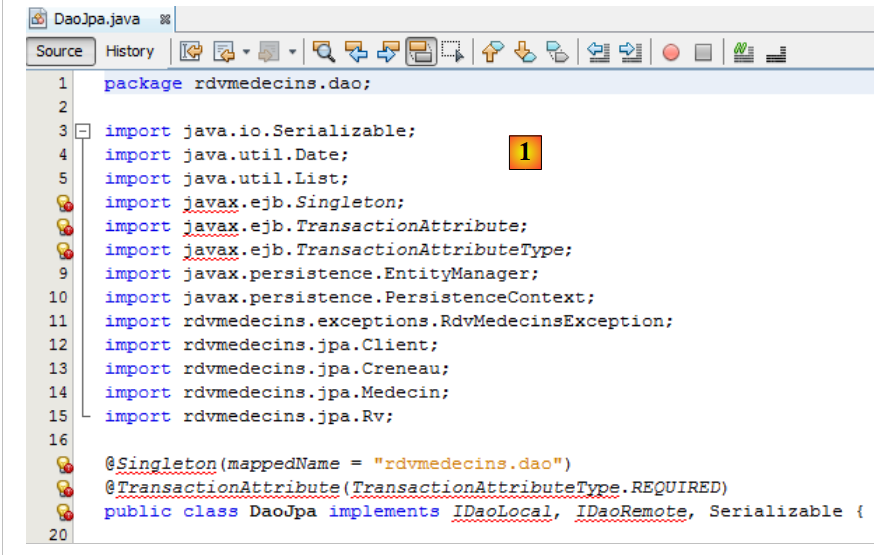 |
- In [1], the errors in class [DaoJpa] have two causes:
- the import of a package linked to EJB (lines 6–8);
- the use of the local and remote interfaces that we just removed.
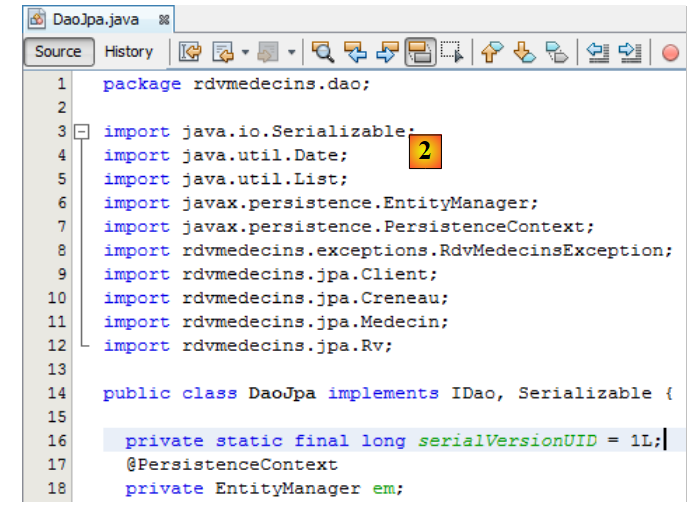
We remove the erroneous lines and use the [IDao] interface instead of the local and remote [2] interfaces.
 |
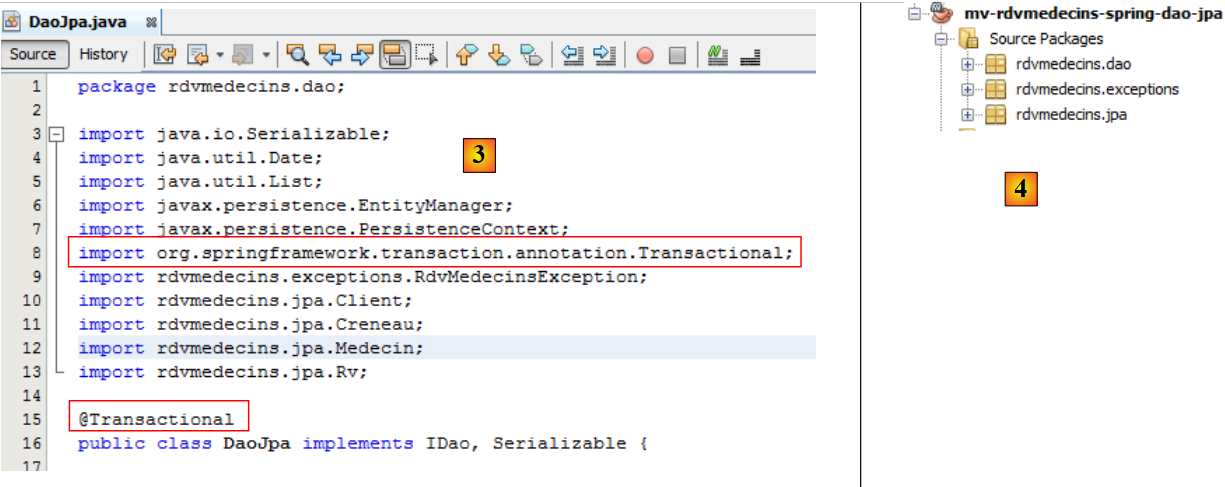
In the EJB project, the [DaoJpa] class was a singleton, and its methods were executed within a transaction. We will see that the [DaoJpa] class will be a Spring-managed bean. By default, every Spring bean is a singleton. That covers the first property. The second is achieved using Spring’s @Transactional annotation on [3]:
 |
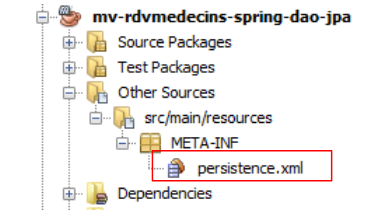
With this done, the project no longer has any errors [4].
4.1.5. Configuration of the [JPA] layer
In the EJB project, we had configured the [JPA] layer using the [persistence.xml] file. Here we have a [JPA] layer, so we need to create this file. In the EJB project, we had generated it using Glassfish. Here, we are building it manually. The main reason for this is that part of the configuration from the [persistence.xml] file is migrating into the Spring configuration file itself.
We create the file [persistence.xml]:
 |
with the following content:
<?xml version="1.0" encoding="UTF-8"?>
<persistence version="2.0" xmlns="http://java.sun.com/xml/ns/persistence" xmlns:xsi="http://www.w3.org/2001/XMLSchema-instance" xsi:schemaLocation="http://java.sun.com/xml/ns/persistence http://java.sun.com/xml/ns/persistence/persistence_2_0.xsd">
  <persistence-unit name="spring-dao-jpa-hibernate-mysqlPU" transaction-type="RESOURCE_LOCAL">
    <class>rdvmedecins.jpa.Client</class>
    <class>rdvmedecins.jpa.Creneau</class>
    <class>rdvmedecins.jpa.Medecin</class>
    <class>rdvmedecins.jpa.Rv</class>
  </persistence-unit>
</persistence>
- line 3: we give a name to the persistence unit,
- line 3: the transaction type is RESOURCE_LOCAL. In the EJB project, it was JTA to indicate that transactions were managed by the EJB container. The value RESOURCE_LOCAL indicates that the application manages its own transactions. This will be the case here through Spring,
- lines 4–7: the full names of the four JPA entities. This is optional because Hibernate automatically looks for them in the project’s ClassPath.
That’s it. The name of the provider, its properties, and the characteristics of the data source are now in the Spring configuration file.
4.1.6. The Spring configuration file
We mentioned that the [DaoJpa] class is a bean managed by Spring. This is done via a configuration file. This file will also include the database access configuration as well as transaction management. It must be in the project’s ClassPath directory. We place it in the [Other sources] branch:
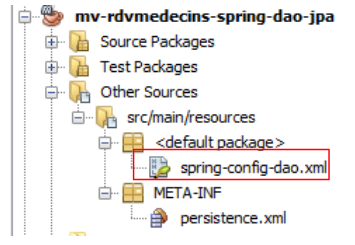 |
The [spring-config-dao.xml] file is as follows:
<?xml version="1.0" encoding="UTF-8"?>
<beans xmlns="http://www.springframework.org/schema/beans" xmlns:xsi="http://www.w3.org/2001/XMLSchema-instance"
       xmlns:tx="http://www.springframework.org/schema/tx"
       xsi:schemaLocation="http://www.springframework.org/schema/beans http://www.springframework.org/schema/beans/spring-beans-2.0.xsd http://www.springframework.org/schema/tx http://www.springframework.org/schema/tx/spring-tx-2.0.xsd">

  <!-- application layers -->
  <bean id="dao" class="    " />

  <!-- EntityManagerFactory -->
  <bean id="entityManagerFactory" class="org.springframework.orm.jpa.LocalContainerEntityManagerFactoryBean">
    <property name="dataSource" ref="dataSource" />
    <property name="jpaVendorAdapter">
      <bean class="org.springframework.orm.jpa.vendor.HibernateJpaVendorAdapter">
        <property name="databasePlatform" value="org.hibernate.dialect.MySQL5InnoDBDialect" />
        <!--
        <property name="showSql" value="true" />
        <property name="generateDdl" value="true" />
        -->
      </bean>
    </property>
  </bean>

  <!-- data source DBCP -->
  <bean id="dataSource" class="org.apache.commons.dbcp.BasicDataSource" destroy-method="close">
    <property name="driverClassName" value="com.mysql.jdbc.Driver" />
    <property name="url" value="jdbc:mysql://localhost:3306/dbrdvmedecins2" />
    <property name="username" value="root" />
    <property name="password" value="" />
  </bean>

  <!-- transaction manager -->
  <tx:annotation-driven transaction-manager="txManager" />
  <bean id="txManager" class="org.springframework.orm.jpa.JpaTransactionManager">
    <property name="entityManagerFactory" ref="entityManagerFactory" />
  </bean>

  <!-- translation of exceptions -->
  <bean class="org.springframework.dao.annotation.PersistenceExceptionTranslationPostProcessor" />

  <!-- persistence -->
  <bean class="org.springframework.orm.jpa.support.PersistenceAnnotationBeanPostProcessor" />

</beans>
This is a Spring 2.x-compatible file. We have not attempted to use the new features of the 3.x versions.
- Lines 2–4: the root <beans> tag of the configuration file. We will not comment on the various attributes of this tag. Be sure to copy and paste this section carefully, as a mistake in any of these attributes can cause errors that are sometimes difficult to understand.
- line 7: the bean "dao" is a reference to an instance of the [rdvmedecins.dao.DaoJpa] class. A single instance will be created (singleton) and will implement the [dao] layer of the application,
- lines 24–29: A data source is defined. It provides the "connection pool" service we mentioned. The [DBCP] component from the Apache Commons project (DBCP, [http://jakarta.apache.org/commons/dbcp/]) is used here,
- lines 25–28: to establish connections with the target database, the data source needs to know the driver JDBC being used (line 25), the database name URL (line 26), the connection user and their password (lines 27–28),
- lines 10-21: configure the JPA layer,
- line 10: defines a bean of type [EntityManagerFactory] capable of creating objects of type [EntityManager] to manage persistence contexts. The instantiated class [LocalContainerEntityManagerFactoryBean] is provided by Spring. It requires a number of parameters to instantiate itself, defined in lines 11–20,
- line 11: the data source to use to obtain connections to SGBD. This is the [DBCP] source defined on lines 24–29,
- lines 12–20: the JPA implementation to use,
- line 13: defines Hibernate as the JPA implementation to use,
- line 14: the SQL dialect that Hibernate must use with the SGBD target, here MySQL5,
- line 16 (commented out): requests that SQL commands executed by Hibernate be logged to the console,
- line 17 (commented out): requests that the database be generated (drop and create) when the application starts,
- line 32: indicates that transactions are managed using Java annotations (they could also have been declared in spring-config.xml). Specifically, this is the @Transactional annotation found in the [DaoJpa] class,
- lines 33–35: define the transaction manager to be used,
- line 33: the transaction manager is a class provided by Spring,
- line 34: the Spring transaction manager needs to know the EntityManagerFactory class that manages the JPA layer. This is the one defined on lines 10–21,
- line 41: defines the class that manages Spring persistence annotations,
- Line 38: defines the Spring class that handles, in particular, the @Repository annotation, which makes a class annotated in this way eligible for the translation of native exceptions from the JDBC driver of SGBD into generic Spring exceptions of type [DataAccessException]. This translation encapsulates the native JDBC exception in a [DataAccessException] type with various subclasses:
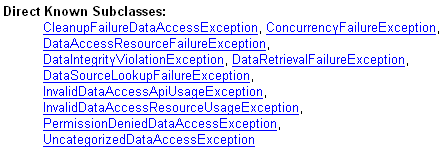
This translation allows the client program to handle exceptions generically regardless of the target SGBD. We did not use the @Repository annotation in our Java code. Therefore, line 38 is unnecessary. We left it in for informational purposes only.
We are done with the Spring configuration file. It was taken from the Spring documentation. Adapting it to various situations often boils down to two changes:
- the target database: lines 24–29,
- the JPA implementation: lines 12–20.
When the code is executed, all beans in the configuration file will be instantiated. We will see how.
4.1.7. The JUnit test class
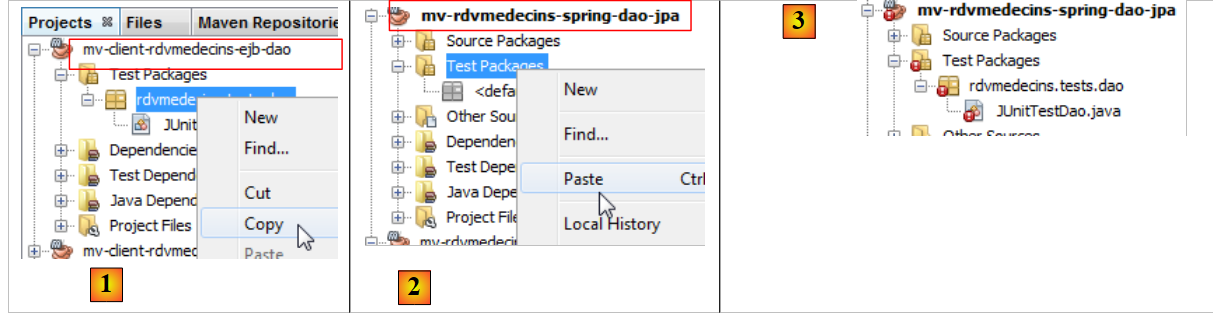 |
We had tested the [DAO] layer of the EJB project with a JUnit test. We do the same for the [DAO] layer of the Spring project:
- in [1] and [2], copying and pasting the JUnit test between the two projects
- in [3], the imported test has errors in its new environment.
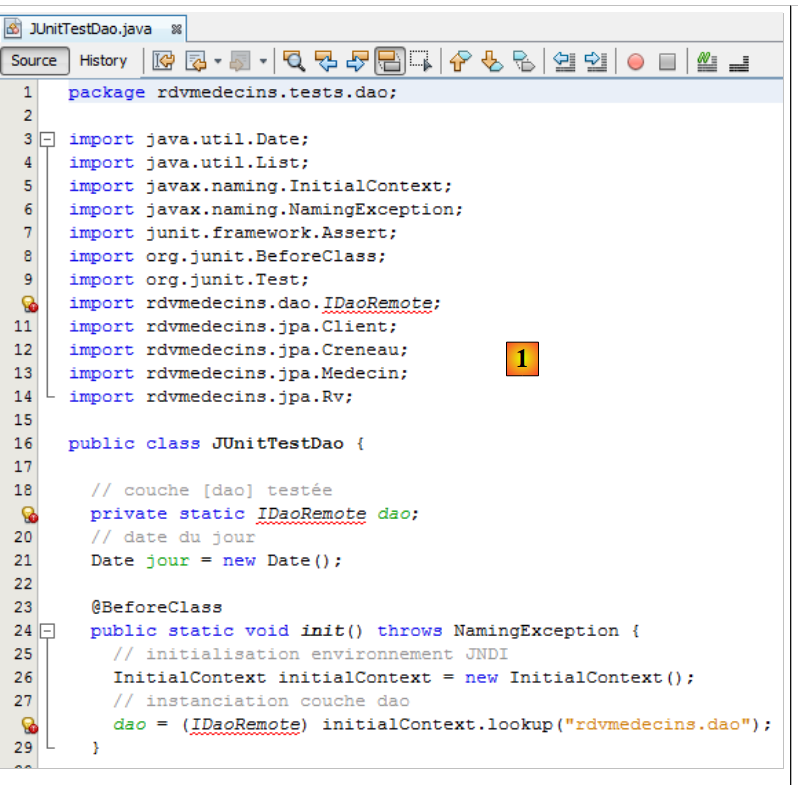 |
The reported error [1] is that of the remote interface of EJB, which no longer exists. Furthermore, the initialization code for the [dao] field on line 19 was a JNDI call specific to EJB (lines 25–28). To instantiate the [dao] field on line 19, we need to use the Spring configuration file. This is done as follows:
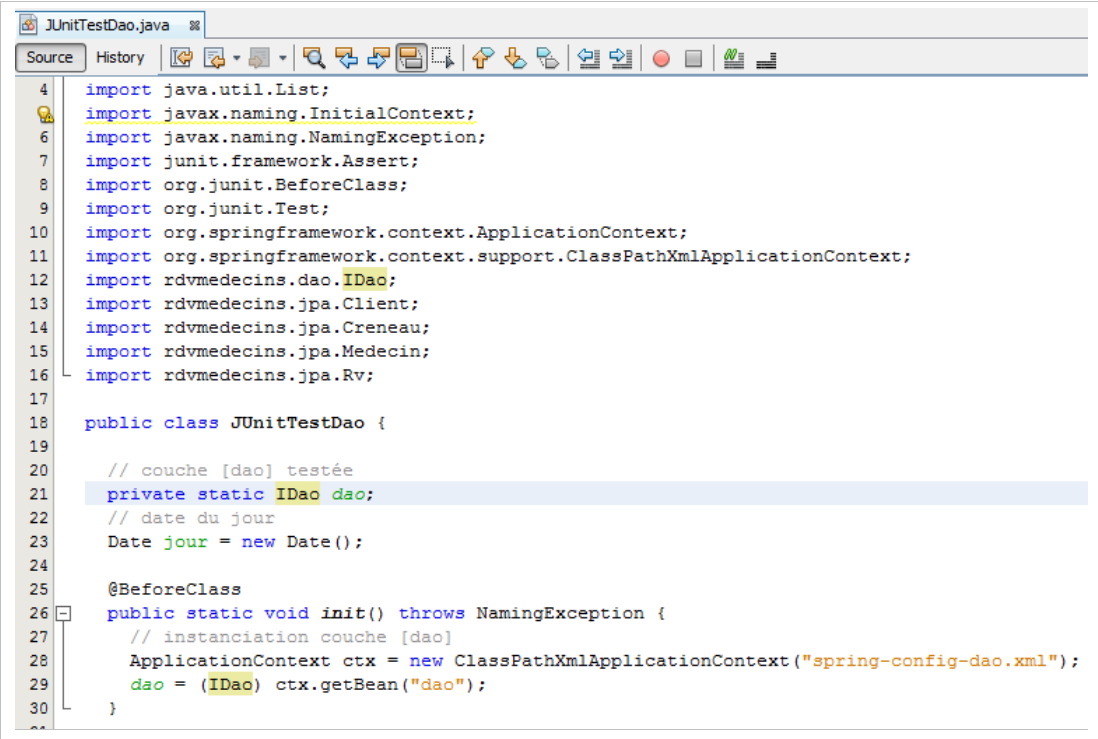 |
- line 21: the interface type has become [IDao],
- line 28: instantiates all beans declared in the [spring-config-dao.xml] file, specifically this one:
<bean id="dao" class="rdvmedecins.dao.DaoJpa" />
- Line 29 requests from the Spring context in line 28 a reference to the bean with id="dao". This returns a reference to the singleton [DaoJpa] (class above) that Spring has instantiated.
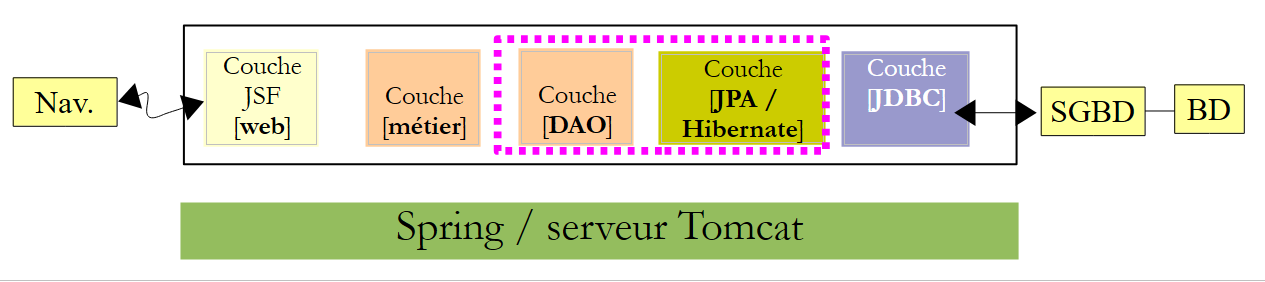
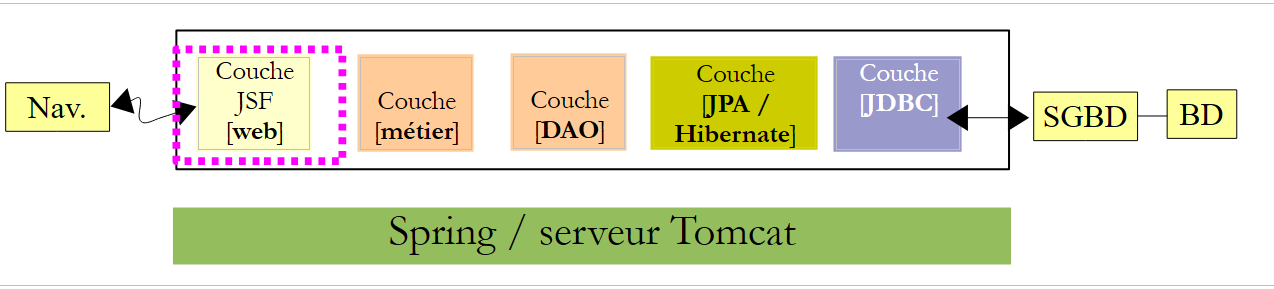
Lines 28–29 construct the following blocks (pink dotted lines):
 |
When the tests for the JUnit client run, the [DAO] layer has been instantiated. We can therefore test its methods. Note that no server is required to run this test, unlike the test for EJB and [DAO], which required the Glassfish server. Here, everything runs within the same JVM.
We can now run the JUnit test. The MySQL server must be running. The results are as follows:
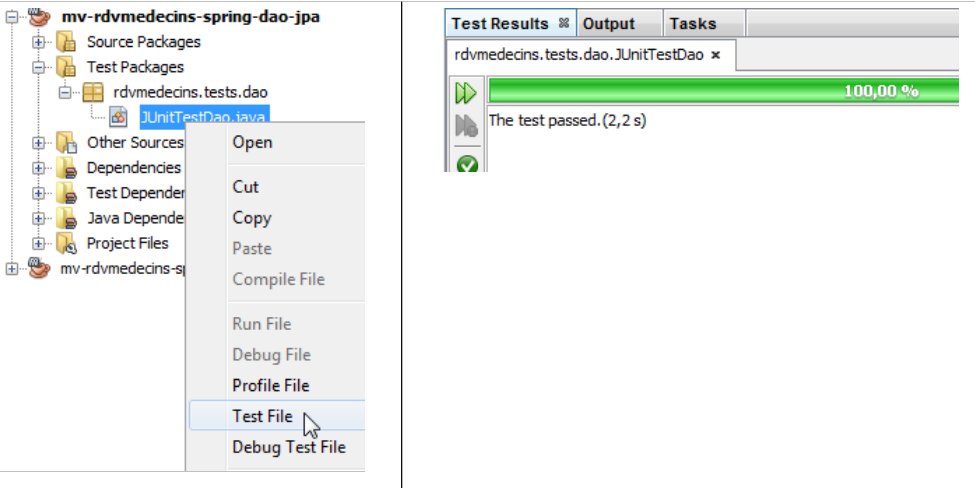 |
The JUnit test passed. Let’s examine the test logs as we did for the EJB test:
- lines 1-4: Spring logs,
- lines 5-10: Hibernate logs,
- line 11: Spring reports all the beans it has instantiated. First among them is the bean [dao],
- lines 12 and following: logs from the JUnit test,
- lines 60–65: we can clearly see the exception caused by adding an appointment that already exists in the database. Recall that with EJB, we did not encounter this exception due to a serialization issue.
The [dao] layer is operational. We are now building the [métier] layer.
4.2. The [métier] layer
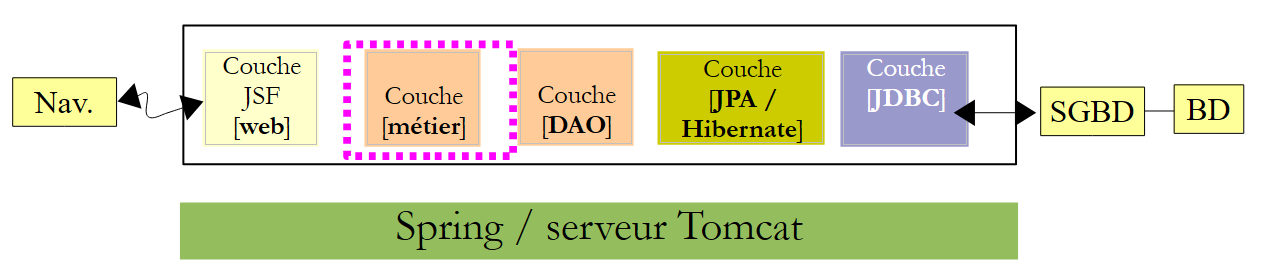 |
We proceed in the same way as for the [DAO] layer, by copying and pasting from the EJB project into the Spring project.
4.2.1. The Netbeans project
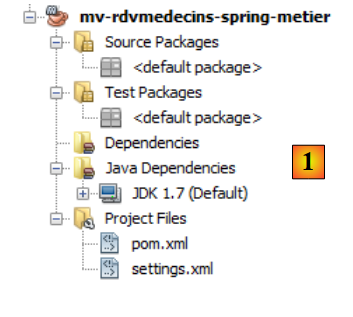
We build a new Maven project of type [Java Application], stripped of everything we don’t want to keep from [1]:
 |
4.2.2. Project dependencies
In the architecture:
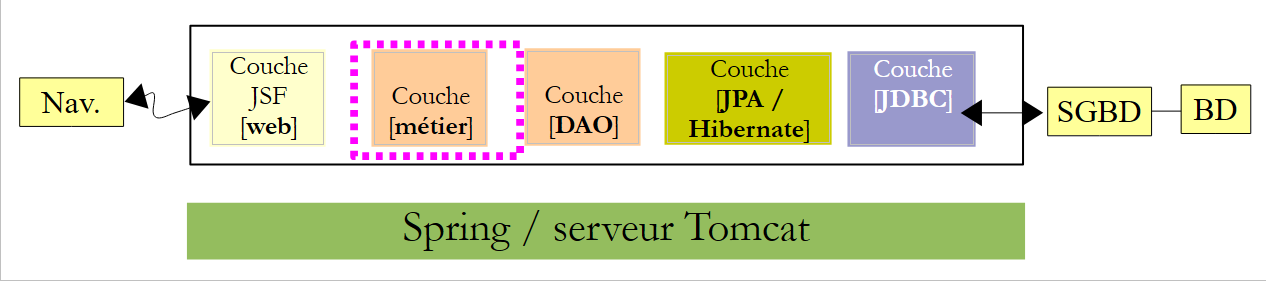 |
the [métier] layer relies on the [dao] layer. We therefore add a dependency on the previous project:
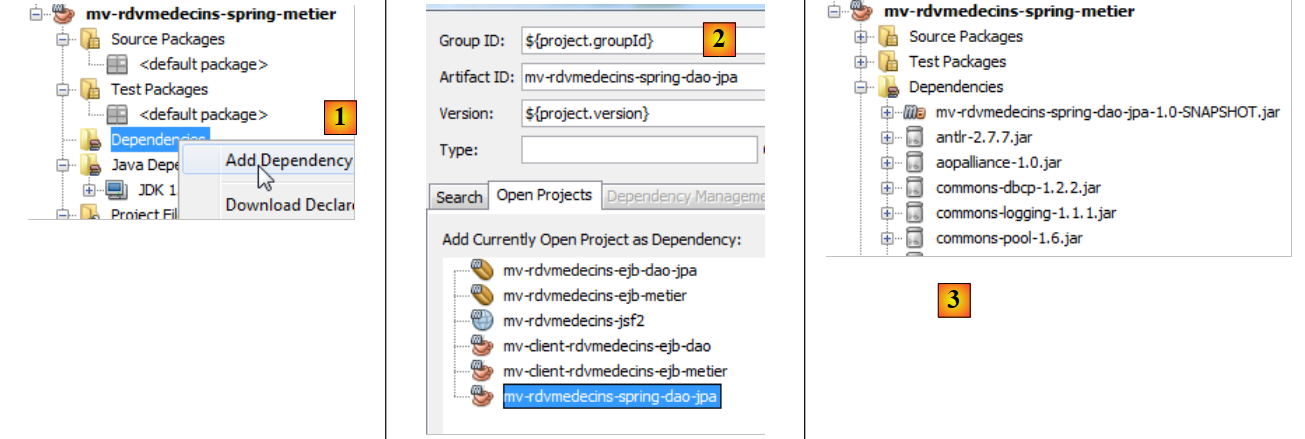 |
- in [1] and [2], we add a dependency on the project in the [dao] layer;
- in [3], this dependency has introduced other dependencies, those of the [dao] layer project.
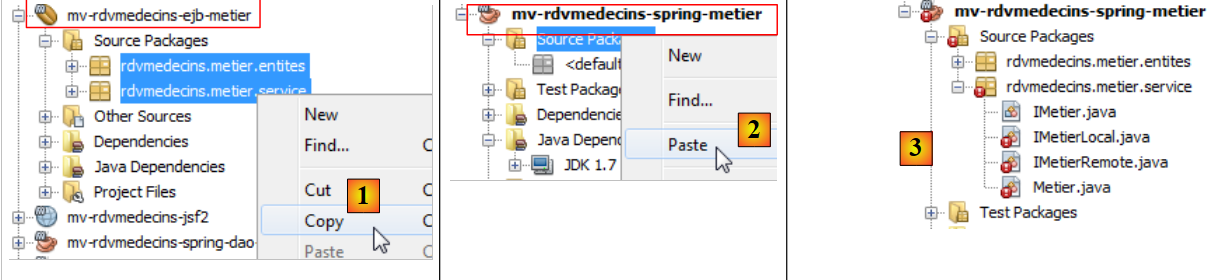 |
- In [1] and [2], the Java sources from the EJB project are copied to the Spring project,
- in [3], the imported sources contain errors in their new environment.
We start by removing the remote and local interfaces from the [métier] layer, which no longer exist in [4]:
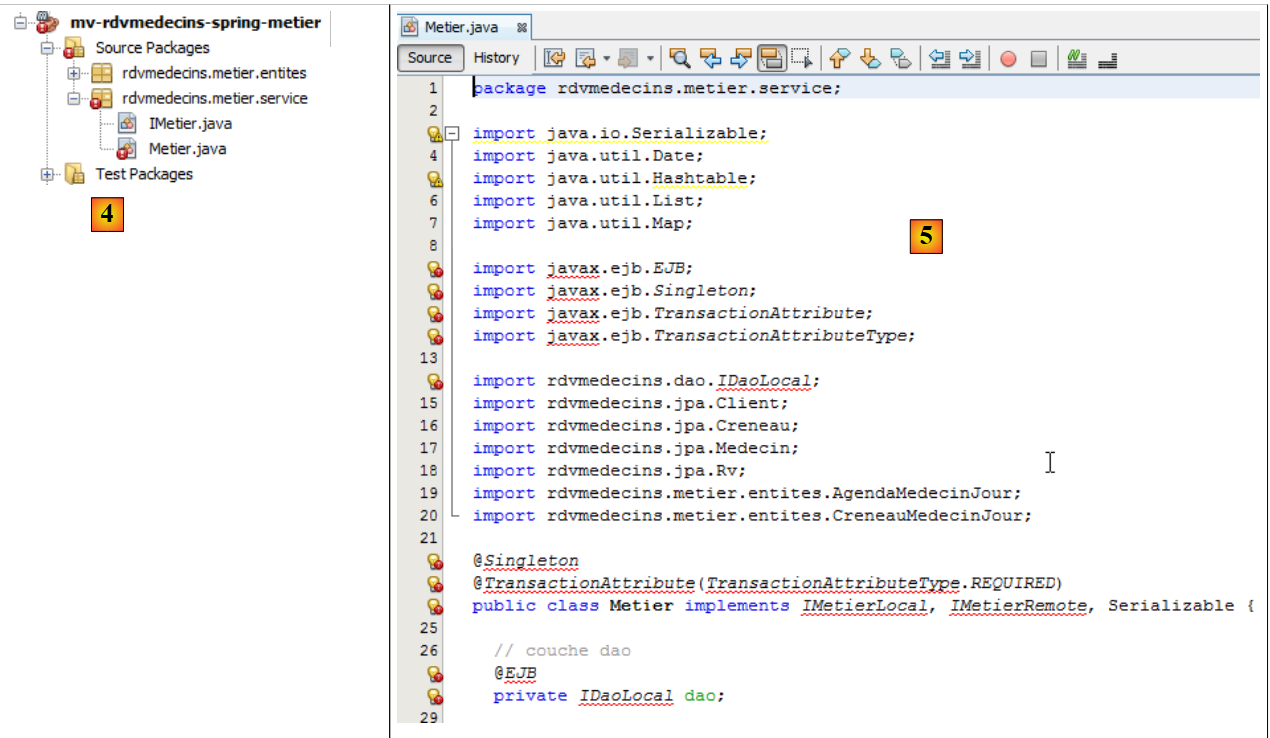 |
- In [5], the errors in the [Metier] class have several causes:
- the use of the [javax.ejb] package, which no longer exists;
- the use of the [IDaoLocal] interface, which no longer exists;
- the use of the [IMetierRemote] and [IMetierLocal] interfaces, which no longer exist.
We
- delete all erroneous lines related to package [javax.ejb],
- replace the [IDaoLocal] interface with the [IDao] interface,
- replace the [IMetierRemote] and [IMetierLocal] interfaces with the [IMetier] interface.
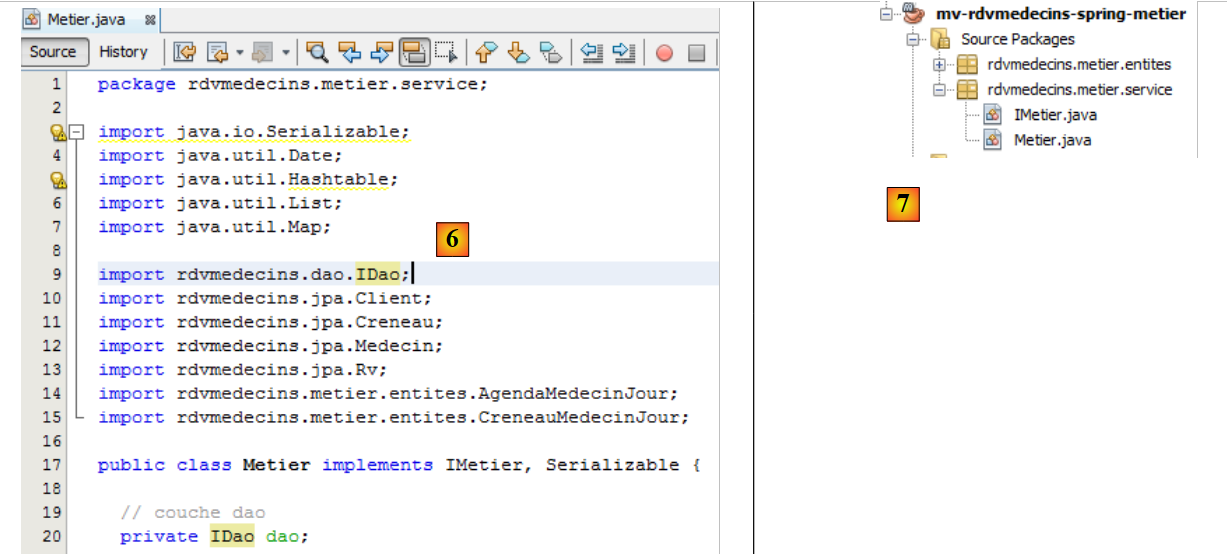 |
- In [6], the corrected class,
- in [7], there are no more errors.
We have removed the references to EJB, but we now need to restore their properties:
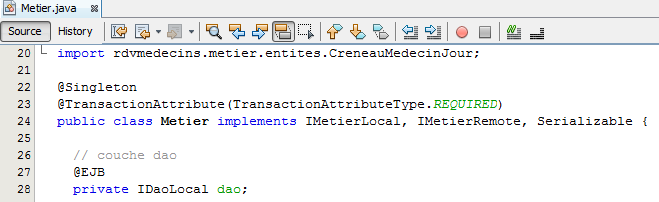 |
- line 22: we had a singleton. This behavior will be achieved by making the class a Spring-managed bean,
- line 23: each method ran within a transaction. This will be achieved using the Spring @Transactional annotation,
- lines 27–28: the reference to the [DAO] layer was obtained via injection from the EJB container. We will use Spring injection.
The code for the [Metier] class in the Spring project therefore changes as follows:
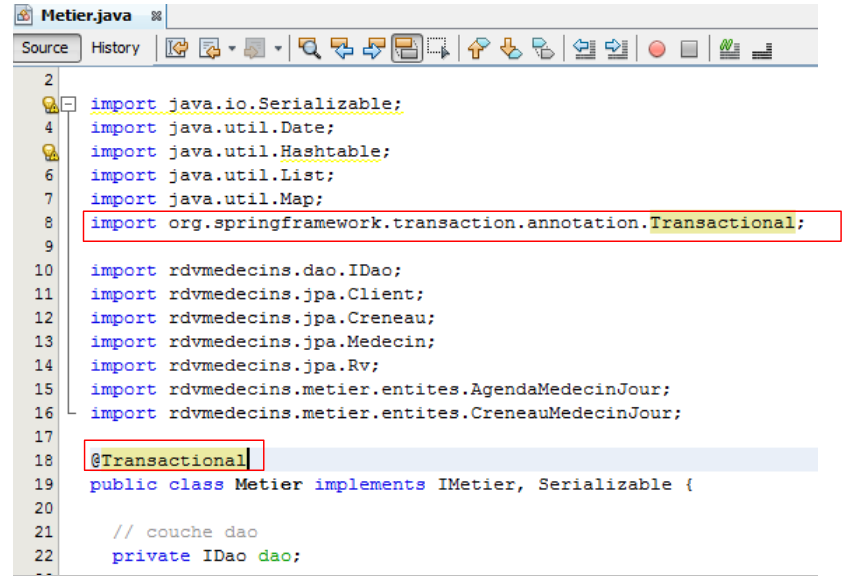 |
That’s all for the Java code. The rest takes place in the Spring configuration file.
4.2.3. The Spring configuration file
We copy the Spring configuration file from the [DAO] layer project into the [métier] layer project. We start by creating the [Other Resources] branch in the [métier] layer project if it does not exist:
 |
- In [1], on the [Files] tab, create a subfolder within the [main] folder;
- in [2], it must be named [resources],
- in [3], in the [Projects] tab, the [Other Sources] branch has been created.
We can now copy and paste the Spring configuration file:
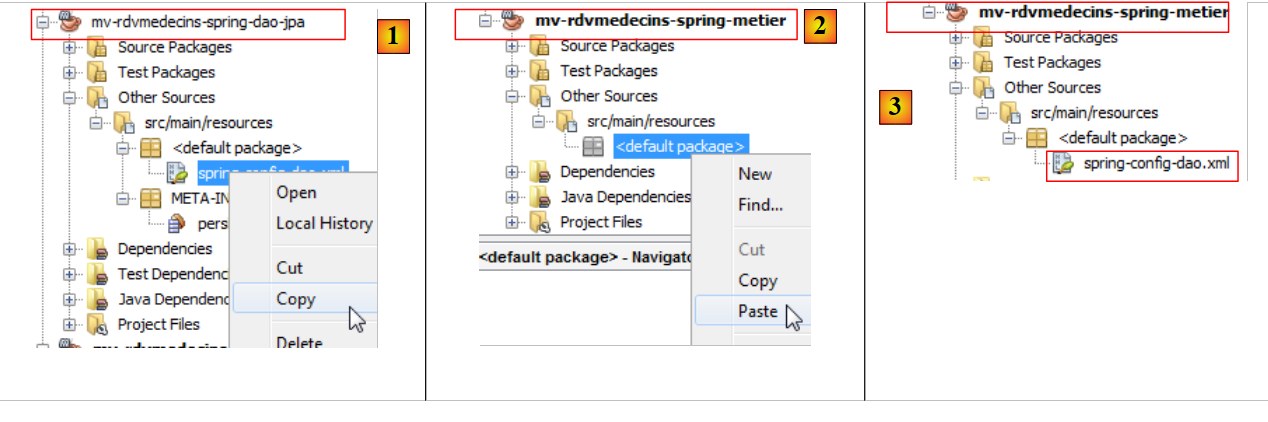 |
- in [1], we copy the file from the [DAO] project into the [métier] and [2] projects,
- in [3], the copied file.
The configuration file that was copied configures the [DAO] layer. We add a bean to it to configure the [métier] layer:
- line 2: the bean for the [DAO] layer,
- lines 3–5: the bean from the [métier] layer,
- line 3: the bean is named métier (attribute id) and is an instance of the class [rdvmedecins.metier.service.Metier] (attribute class). This bean will be instantiated like the others when the application starts.
Let’s review the code for the [rdvmedecins.metier.service.Metier] bean:
package rdvmedecins.metier.service;
...
public class Metier implements IMetier, Serializable {
// layer dao
private IDao dao;
public Metier() {
}
- line 8: the [dao] field will be instantiated by Spring at the same time as the business bean. Let’s go back to the definition of this bean in the Spring configuration file:
- Line 4: The <property> tag is used to initialize fields of the instantiated bean. The field name is specified by the name attribute. Therefore, the dao field of the [rdvmedecins.metier.service.Metier] class will be instantiated. This will be done via a method named setDao, which must exist. The value assigned to it is that of the ref attribute. Here, this value is the reference to the dao bean from line 2.
Put more simply, in the code:
package rdvmedecins.metier.service;
...
public class Metier implements IMetier, Serializable {
// layer dao
private IDao dao;
public Metier() {
}
The dao field on line 19 will be initialized by Spring with a reference to the [dao] layer. That is exactly what we wanted. The dao field will be initialized by Spring via a setter that we need to add:
// setter
public void setDao(IDao dao) {
this.dao = dao;
}
We rename the Spring configuration file to reflect the changes:
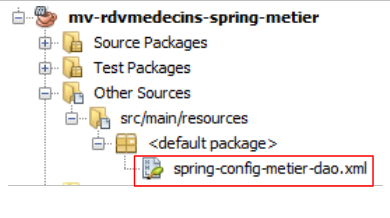 |
We are now ready for a test. We will use the console test used to test EJB and [Metier].
4.2.4. Testing the [métier] layer
The test will run with the following architecture:
 |
We copy the console test from the EJB project into the Spring project:
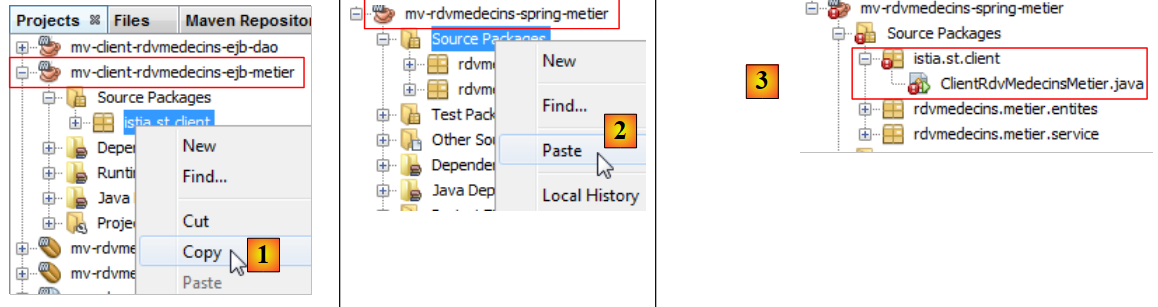 |
- In [1] and [2], when copying and pasting between the two projects,
- in [3], the imported code contains errors.
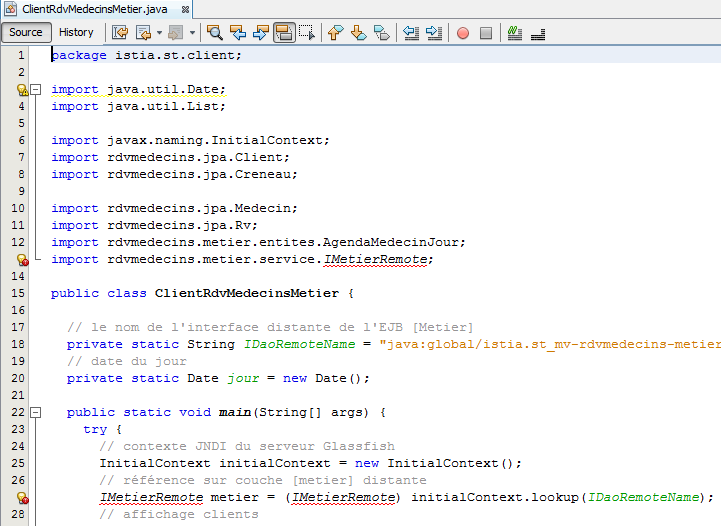 |
The imported code contains two types of errors:
- line 13: the [IMetierRemote] interface has been replaced by the [IMetier] interface,
- lines 24–27: the [métier] layer is no longer instantiated via a JNDI call but by instantiating beans from the Spring configuration file.
We correct these two points:
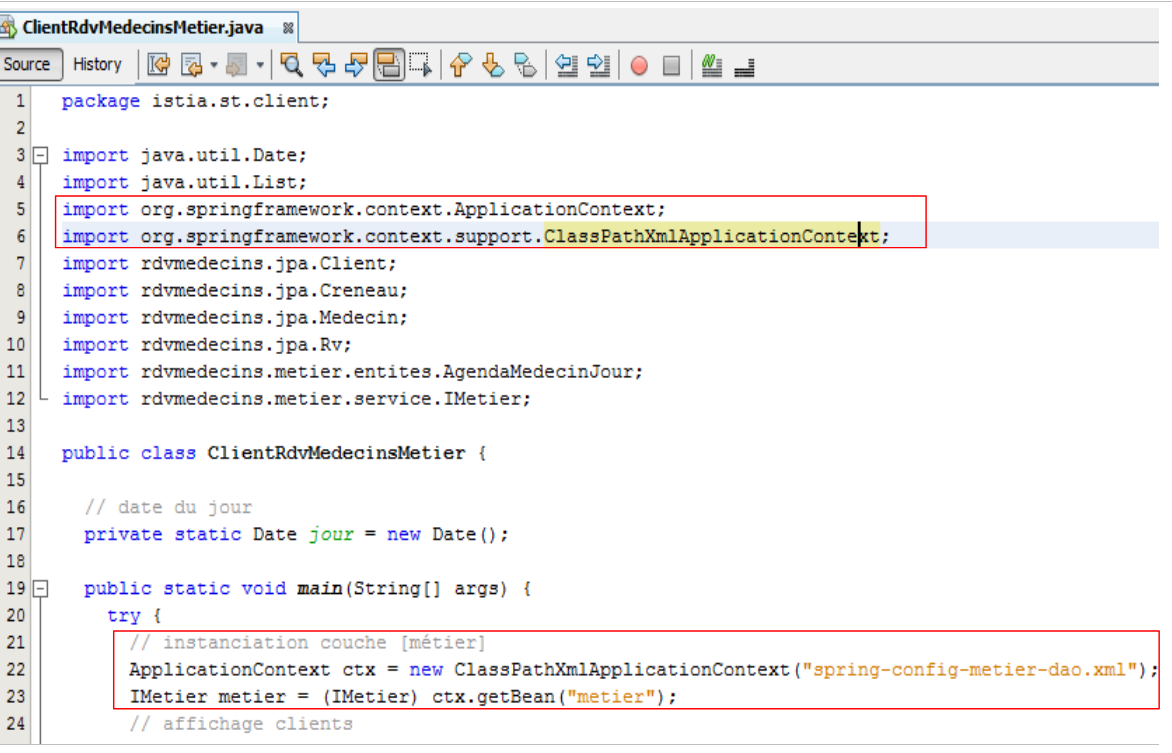 |
- line 22: the [spring-config-metier-dao.xml] file is used. All beans in this file are then instantiated. Among them are the following:
  <!-- application layers -->
  <bean id="dao" class="rdvmedecins.dao.DaoJpa" />
  <bean id="metier" class="rdvmedecins.metier.service.Metier">
    <property name="dao" ref="dao"/>
</bean>
These two beans represent the [DAO] and [métier] layers of the test architecture:
 |
Once this is done, the test can run:
 |
The test logs are as follows:
- Lines 1–4: Spring and Hibernate logs,
- line 5: beans instantiated by Spring. Note the beans dao and metier,
- lines 6–53: the test logs. They match the results obtained from the EJB project test. We refer the reader to the comments on that test (section 3.5.3).
We have built the [métier] layer. We now move on to the final layer, the [web] layer.
4.3. The [web] layer
 |
To build layer [web], we will proceed in the same way as for the other two layers, by copying and pasting from layer [web] of project EJB.
4.3.1. The Netbeans project
First, we create a web project:
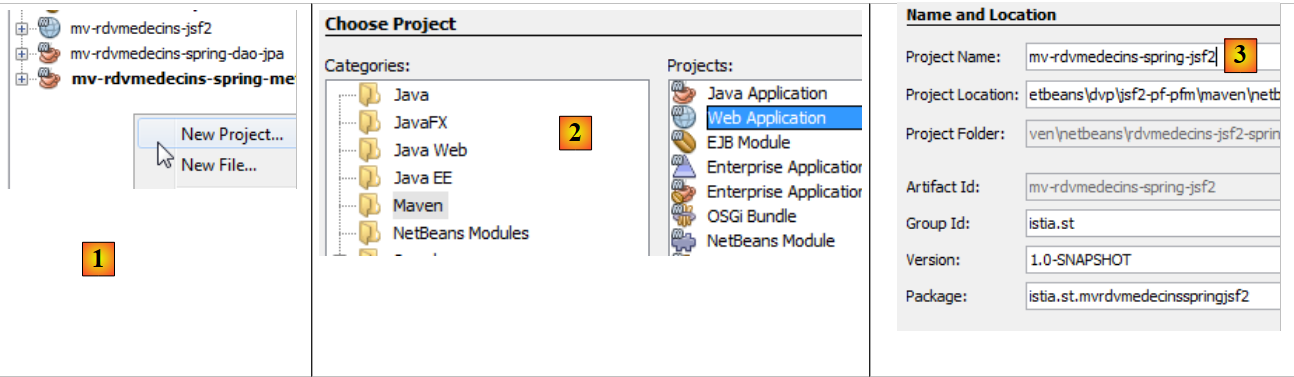 |
- in [1], we create a new project,
- in [2], a Maven project of type [Web Application],
- in [3], we give it a name,
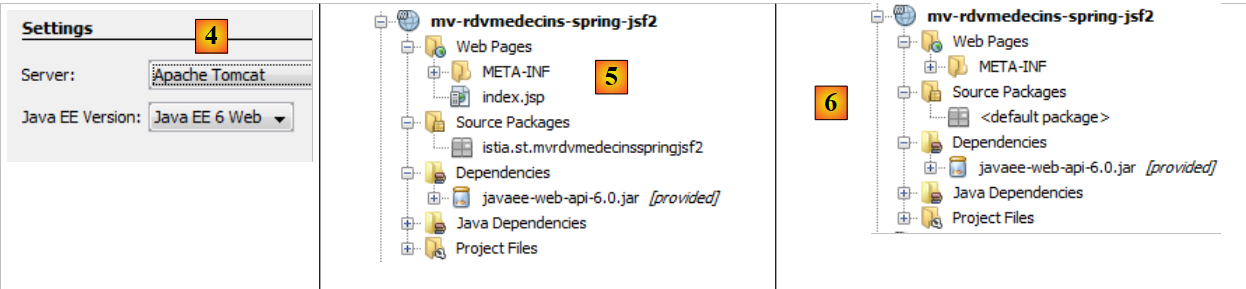 |
- in [4], this time we choose the Tomcat server and not Glassfish, which was used for the EJB project,
- in [5], the resulting project,
- in [6], the project after deleting [index.jsp] and the package from [Source Packages].
4.3.2. Project dependencies
Let’s look at the project architecture:
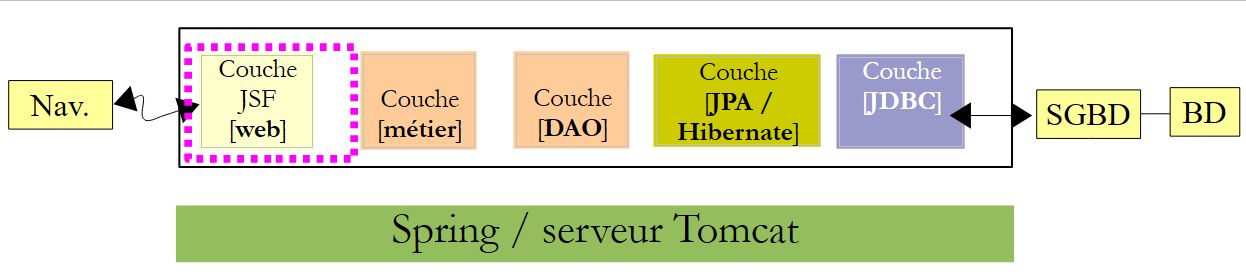 |
The [web] layer requires the [métier], [DAO], and [JPA] layers. These are part of the two projects we just built. Hence, a dependency on each of these projects:
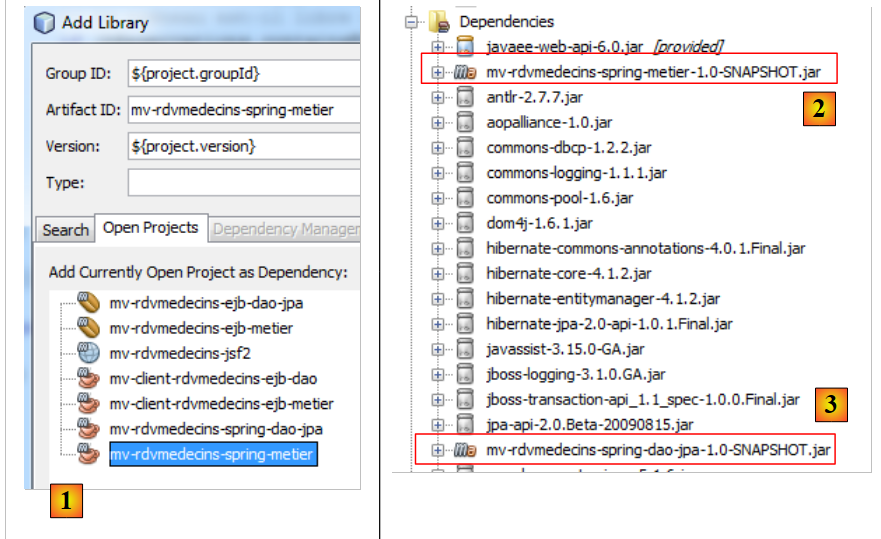 |
- In [1], we add the dependency on the Spring/business project,
- in [2], the Spring / business project has been added. Since it itself had a dependency on the Spring / DAO / JPA project, that project was automatically added to the dependencies of [3].
Let’s return to the structure of our application:
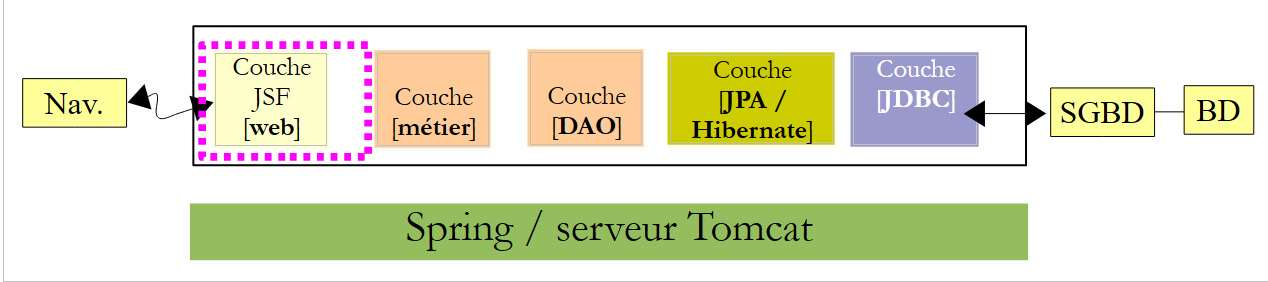 |
The web layer is a JSF layer. We therefore need the Java Server Faces libraries. The Tomcat server does not have them. The dependency will therefore not have the scope [provided], as it did with the Glassfish server, but rather the scope [compile], which is the default scope when no scope is specified.
We add these dependencies directly to the [pom.xml] code:
<dependencies>
    <dependency>
      <groupId>${project.groupId}</groupId>
      <artifactId>mv-rdvmedecins-spring-metier</artifactId>
      <version>${project.version}</version>
    </dependency>
    <dependency>
      <groupId>com.sun.faces</groupId>
      <artifactId>jsf-api</artifactId>
      <version>2.1.7</version>
    </dependency>
    <dependency>
      <groupId>com.sun.faces</groupId>
      <artifactId>jsf-impl</artifactId>
      <version>2.1.7</version>
    </dependency>
    <dependency>
      <groupId>javax</groupId>
      <artifactId>javaee-web-api</artifactId>
      <version>6.0</version>
      <scope>provided</scope>
    </dependency>
  </dependencies>
- Lines 7–16 have been added to the [pom.xml] file. These are the dependencies on JSF. They are the ones used in the EJB / Glassfish project. Note that they do not have the <scope> tag. Therefore, by default, their scope is [compile]. The JSF library will therefore be included in the [war] archive of the web project.
After adding these dependencies to the [pom.xml] file, we compile the project so that they are downloaded.
4.3.3. Porting the JSF / Glassfish project to the JSF / Tomcat project
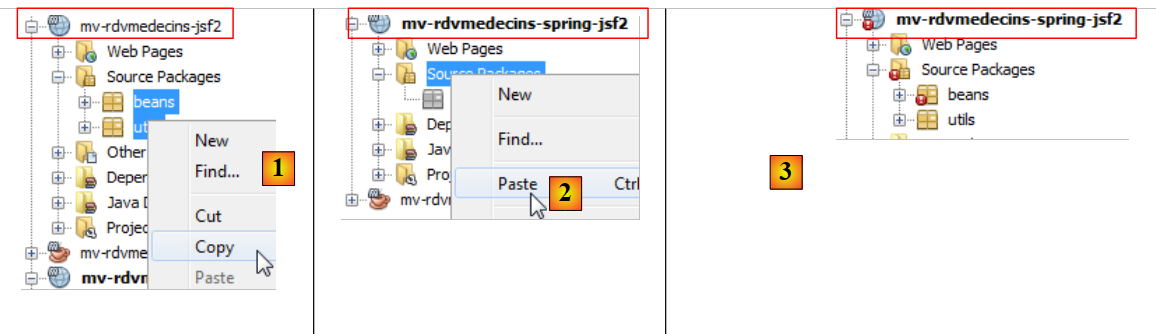
We copy all the code from the JSF / Glassfish project to the JSF / Tomcat project:
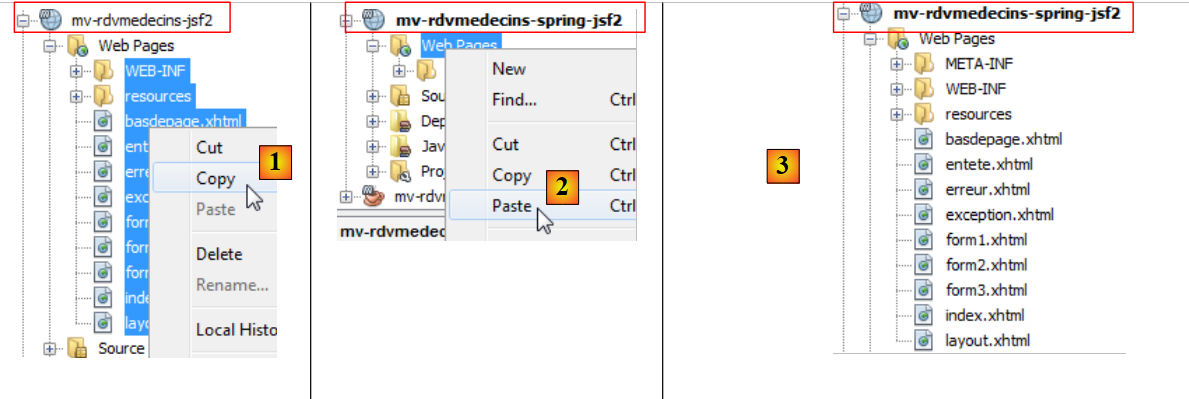 |
- [1, 2, 3]: copying web pages from the old project to the new one,
 |
- [1, 2, 3]: copy the Java code from the old project to the new one. There are errors. This is normal. We will correct them,
 |
- in [1], in the [Files] tab of Netbeans, we create a subfolder [resources] within the [main] folder,
- this creates, in the [Projects] tab, the branch [Other Sources] [3],
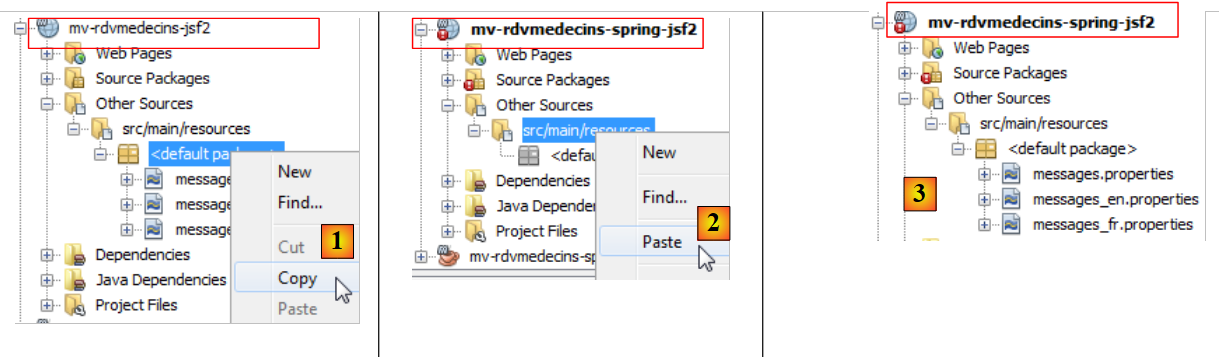 |
- [1, 2, 3]: message files are copied from the old project to the new project.
4.3.4. Changes to the imported project
We noted that the imported Java code contained errors. Let’s examine them:
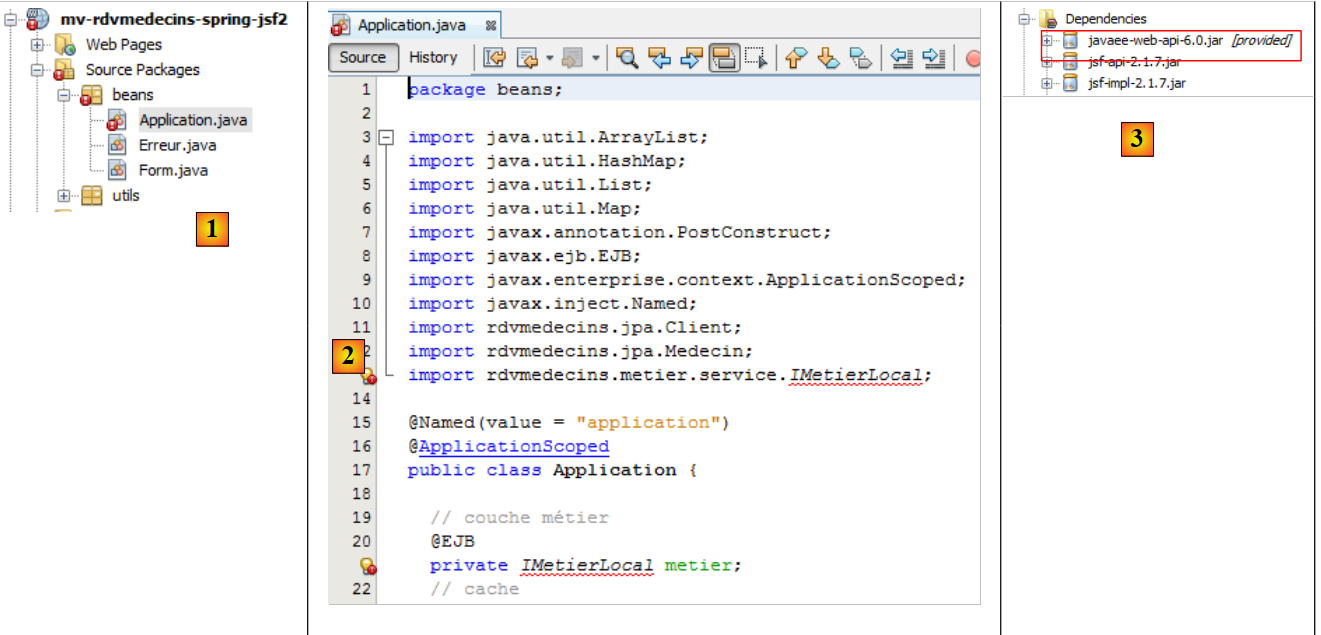 |
- in [1], only the [Application] bean is incorrect,
- In [2], the error is caused solely by the [IMetierLocal] interface, which no longer exists. Here, it may be surprising that line 20 does not trigger an error. The @EJB annotation explicitly refers to EJB and is recognized here. This is due to the presence of the [javaee-web-api-6.0] [3] dependency. Java EE 6 introduced an architecture that allows deploying a web application based on EJB without a remote interface, on servers that do not have a EJB container. The server simply needs to provide the [javaee-web-api-6.0] dependency. We can see that this has the scope [provided] [3].
Here, we will not use the [javaee-web-api-6.0] dependency. We remove it: [1]:
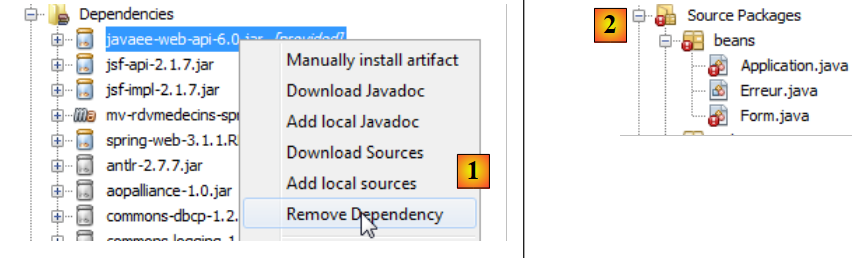 |
 |
This causes new errors: [2]. We’ll start with those related to the [Form] bean:
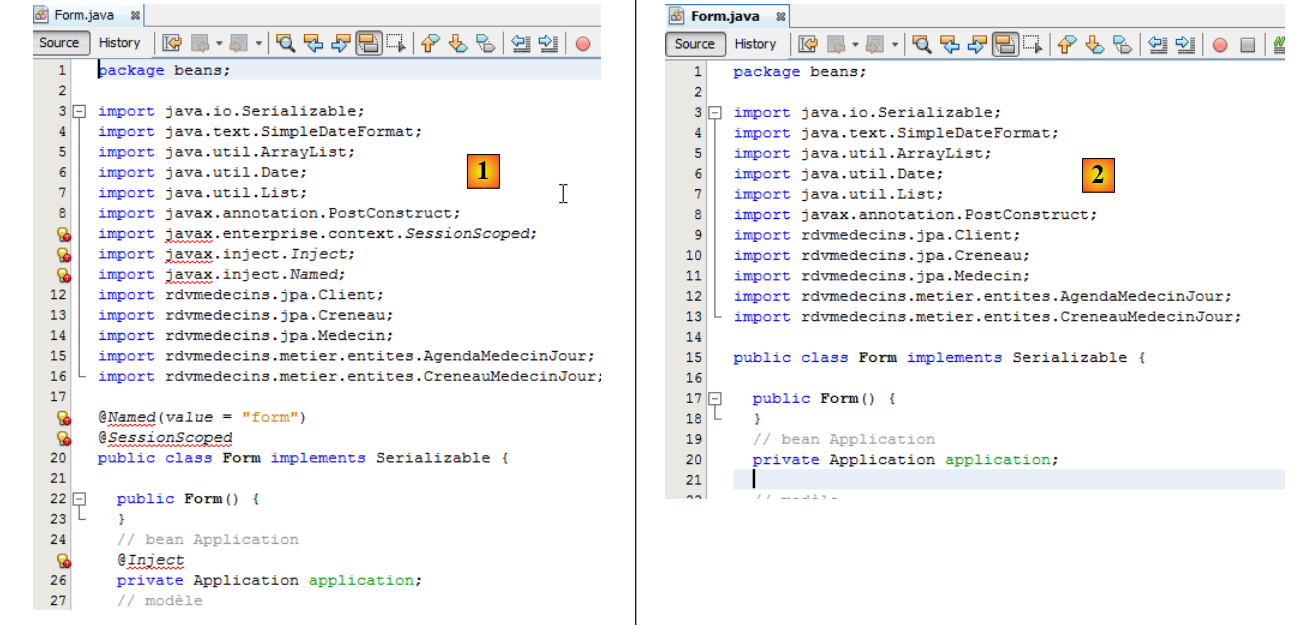 |
- In [1], the erroneous lines are related to the loss of the [javax] package. We remove them all from [2]. The erroneous lines made the [Form] class a session-scoped bean (lines 18–20 of [1]). Additionally, the [Application] bean was injected on line 25. This information will be moved to the JSF configuration file.
Let’s move on to the [Application] bean:
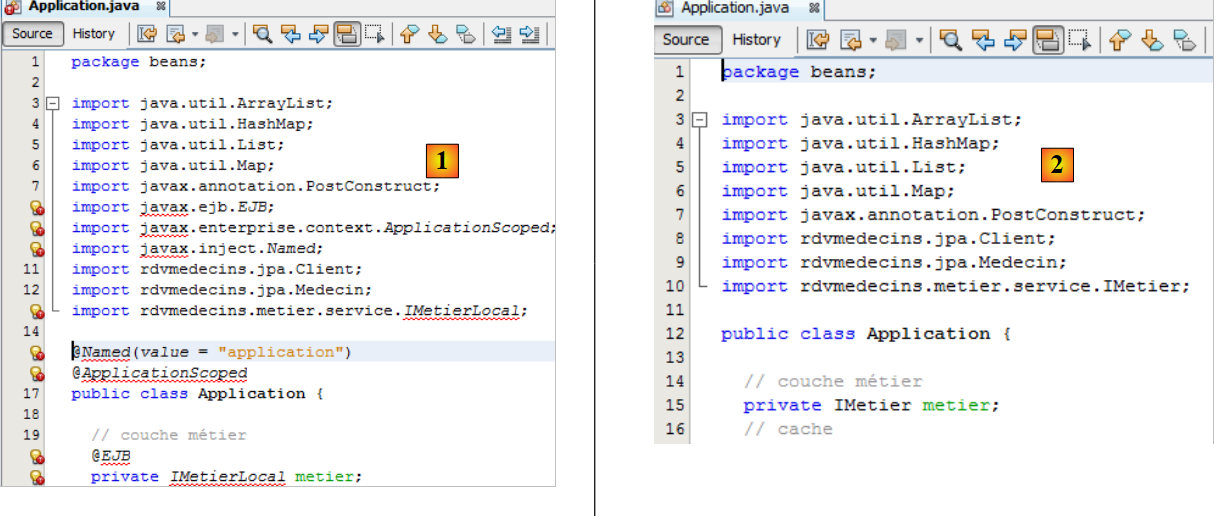 |
We remove all the erroneous lines from [1] and change the [IMetierLocal] interface on lines 13 and 21 to [IMetier]. In [2], there are no more errors. In [1], we removed lines 15–16, which made the class [Application] an application-scoped bean. This information will be moved to the JSF configuration file. We have also removed line 20, which injected a reference to the [métier] layer into the bean. Now, this will be initialized by Spring. We already have the necessary configuration file; it is the one from the Spring / Business project. We copy it:
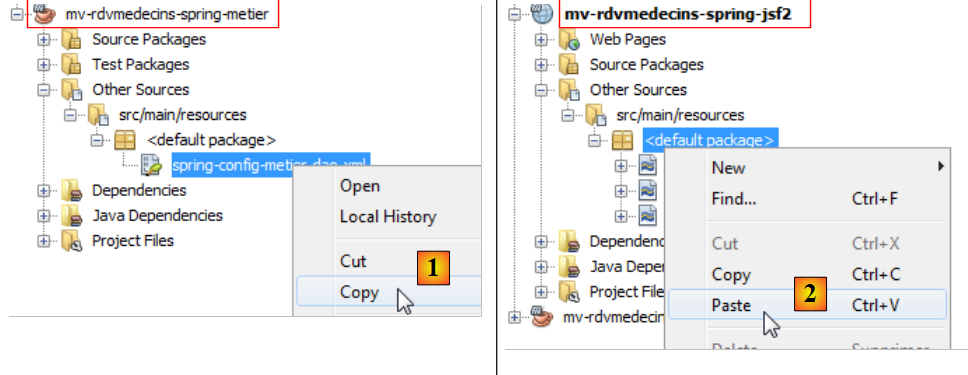 |
- to [1, 2], we copy the Spring configuration file from the Spring / Business project to the Spring / JSF project,
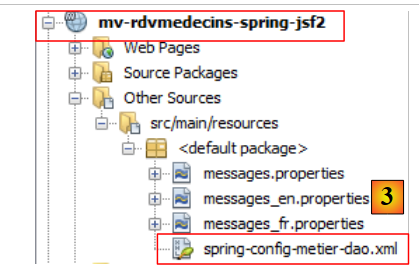 |
In [3], the result.
In the [Application] bean, you need to use this configuration file to obtain a reference to the [métier] layer. This is done in its [init] method:
package beans;

...
import org.springframework.context.ApplicationContext;
import org.springframework.context.support.ClassPathXmlApplicationContext;

public class Application {

  // business layer
  private IMetier metier;
...

  public Application() {
  }

  @PostConstruct
  public void init() {
    try {
      // instantiation layer [business]
      ApplicationContext ctx = new ClassPathXmlApplicationContext("spring-config-metier-dao.xml");
      metier = (IMetier) ctx.getBean("metier");
      // doctors and clients are cached
...
    } catch (Throwable th) {
...
    }
...
  }
- line 20: the beans from the Spring configuration file are instantiated,
- line 21: a reference is requested for the business bean, i.e., the [métier] layer.
Generally speaking, Spring beans should be instantiated in the init method of the application-scoped bean. There is another method where beans are instantiated by a Spring servlet. This involves modifying the [web.xml] file and adding a dependency on the [spring-web] artifact. We did not do this here to remain consistent with what was used in the previous code.
We removed the annotations in the [Application] and [Form] classes that made them JSF beans. These classes must remain JSF beans. Instead of annotations, we now use the JSF [WEB-INF / faces.config.xml] configuration file to declare the beans.
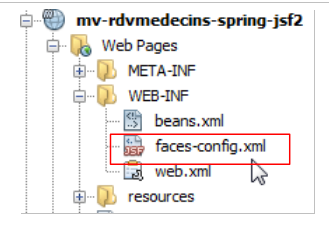 |
This file is now as follows:
<?xml version='1.0' encoding='UTF-8'?>

<!-- =========== FULL CONFIGURATION FILE ================================== -->

<faces-config version="2.0"
              xmlns="http://java.sun.com/xml/ns/javaee"
              xmlns:xsi="http://www.w3.org/2001/XMLSchema-instance"
              xsi:schemaLocation="http://java.sun.com/xml/ns/javaee http://java.sun.com/xml/ns/javaee/web-facesconfig_2_0.xsd">

  <application>
    <!-- message file -->
    <resource-bundle>
      <base-name>
        messages
      </base-name>
      <var>msg</var>
    </resource-bundle>
    <message-bundle>messages</message-bundle>
  </application>
    <!-- the applicationBean bean -->
    <managed-bean>
      <managed-bean-name>applicationBean</managed-bean-name>
      <managed-bean-class>beans.Application</managed-bean-class>
      <managed-bean-scope>application</managed-bean-scope>
    </managed-bean>
    <!-- the bean form -->
    <managed-bean>
      <managed-bean-name>form</managed-bean-name>
      <managed-bean-class>beans.Form</managed-bean-class>
      <managed-bean-scope>session</managed-bean-scope>
      <managed-property>
        <property-name>application</property-name>
        <value>#{applicationBean}</value>
      </managed-property>
    </managed-bean>
</faces-config>
- Lines 10–19 configure the message file. This was the only configuration we had in the JSF / EJB project;
- lines 21–35 declare the beans for the JSF application. This was the standard method with JSF 1.x. JSF 2 introduced annotations, but the JSF 1.x method is still supported,
- lines 21–25: declare the applicationBean bean,
- line 22: the bean name. You might be tempted to use the name "application." Avoid this, as it is the name of a predefined bean in JSF,
- line 23: the full name of the bean class,
- line 24: its scope,
- lines 27–35: define the form bean,
- line 28: the bean name,
- line 29: the full name of the bean class,
- line 30: its scope,
- lines 31–34: define a property of the [beans.Form] class,
- line 32: property name. The [beans.Form] class must have a field with this name and the corresponding setter,
- line 33: the field’s value. Here, it is the reference to the applicationBean bean defined on line 21. We are thus injecting the application-scoped bean into the session-scoped bean so that the latter has access to application-scoped data.
We mentioned earlier that the field [application] of the bean [beans.Form] would be initialized via a setter. It must therefore be added to the class [beans.Form] if it does not already exist:
public void setApplication(Application application) {
    this.application = application;
  }
4.3.5. Testing the application
Our application is now error-free and ready for testing:
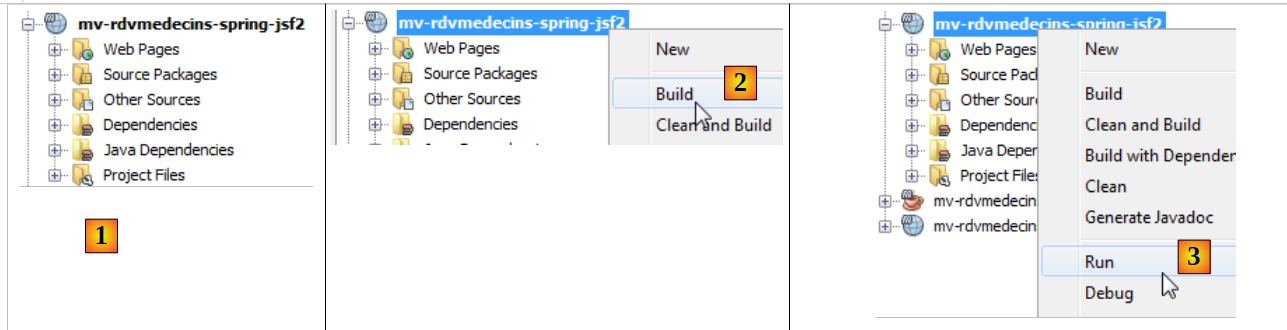 |
- in [1], the corrected project,
- in [2], we build it,
- in [3], we run it. SGBD and MySQL must be running. The Tomcat server will then be launched ([4]) if it wasn’t already, and then the application’s home page will be displayed ([5]):
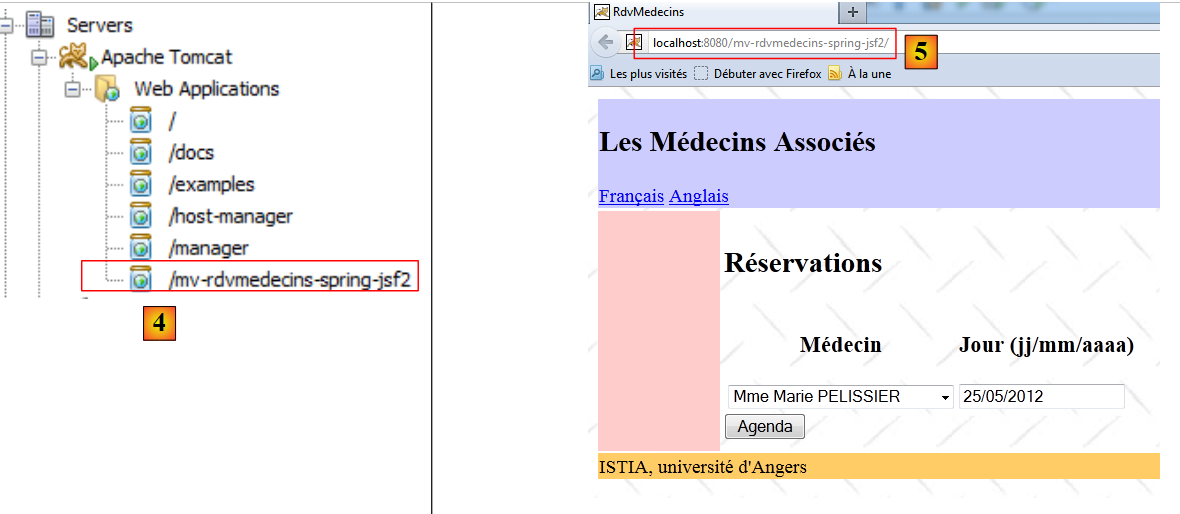 |
From there, we return to the application under study. We leave it to the reader to verify that it works. Now let’s stop the application:
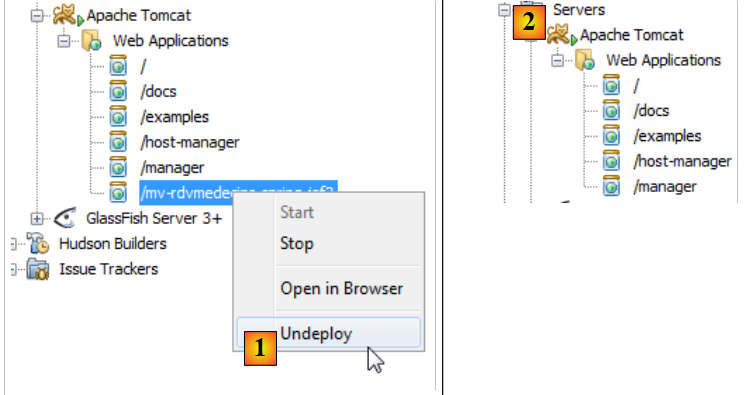 |
- in [1], the application is unloaded,
- in [2], it is no longer there.
Now let’s look at the Tomcat s logs:
Lines 2 and 4 indicate a malfunction when the application shuts down. Line 4 indicates that there is a probable risk of a memory leak. Indeed, this occurs, and after a while, Netbeans is no longer usable. This problem is particularly frustrating because Netbeans must be restarted every time the project is run. This issue was previously encountered in the document "Introduction to Struts 2 by Example" [http://tahe.developpez.com/java/struts2].
There is a lot of information available online about this error. It occurs when repeatedly loading and unloading an application from Tomcat. After a while, the error java.lang.OutOfMemoryError: PermGen space appears. It appears there is no solution to prevent this error when it originates from third-party archives (jar), as is the case here. You must then restart Tomcat to resolve it.
However, it is possible to delay the occurrence of this error. First, increase the memory space that has overflowed.
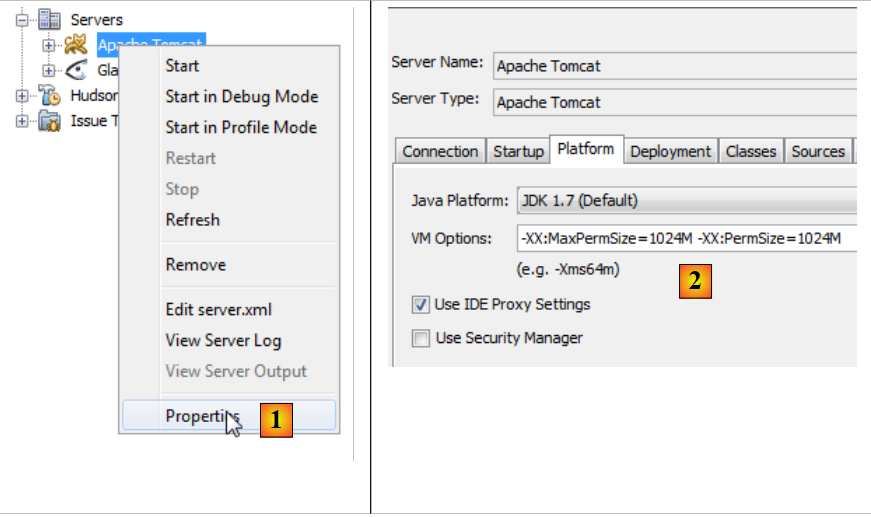 |
- In [1], go to the Tomcat server properties,
- In [2], on the [Platform] tab, set the value for the overflow memory. Here, we set it to 1 GB because we had a total of 8 GB of memory. You can set it to 512 MB (512 megabytes) with a smaller amount of memory.
Next, place the JDBC driver from MySQL in <tomcat>/lib, where <tomcat> is the Tomcat installation directory.
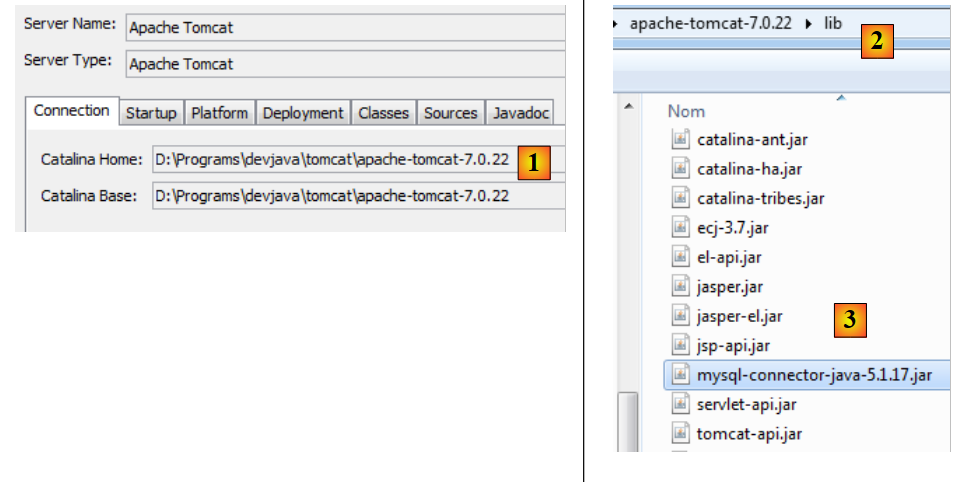 |
- In [1], in the Tomcat properties, note its installation directory <tomcat>,
- In <tomcat>/lib, place a recent driver JDBC from MySQL [3].
Next, remove the project’s dependency on the JDBC driver from MySQL and [4].
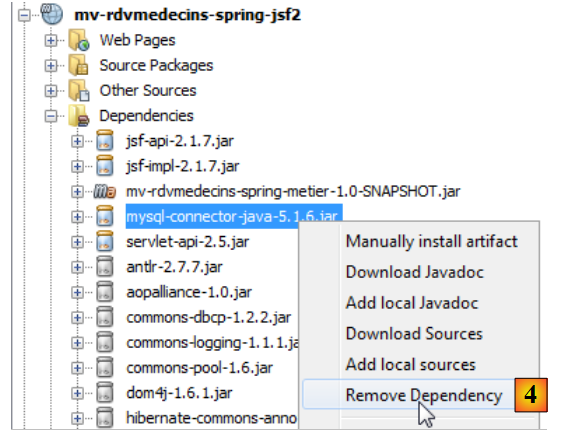 |
Once this is done, we test the application. We find that we can repeatedly load and unload the application. However, the memory leak issues are not resolved. They simply occur later.
4.4. Conclusion
We ported the JSF / EJB / Glassfish application to a JSF / Spring / Tomcat environment. This was done primarily by copying and pasting between the two projects. This was possible because Spring and EJB3 share many similarities. EJB3 was in fact created after Spring proved to be more efficient than EJB2. EJB3 then incorporated the best ideas from Spring.
4.5. When testing with Eclipse
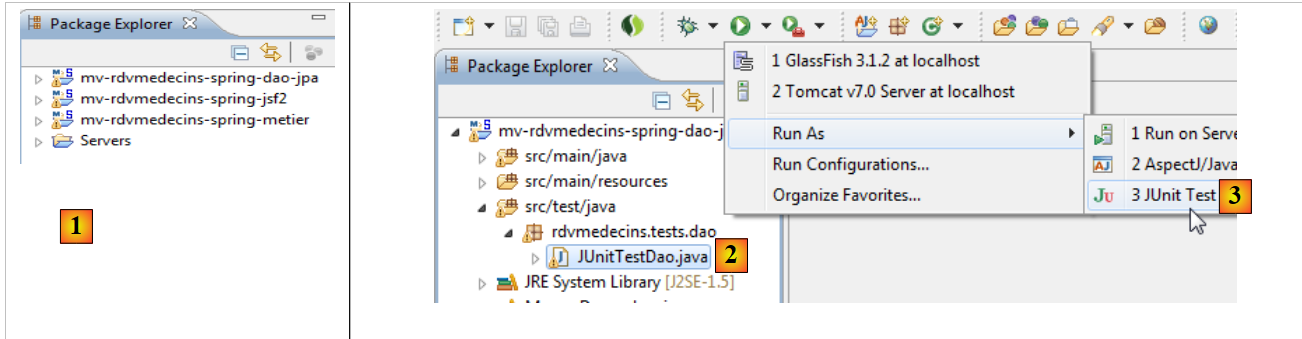 |
- In [1], we import the three Spring projects,
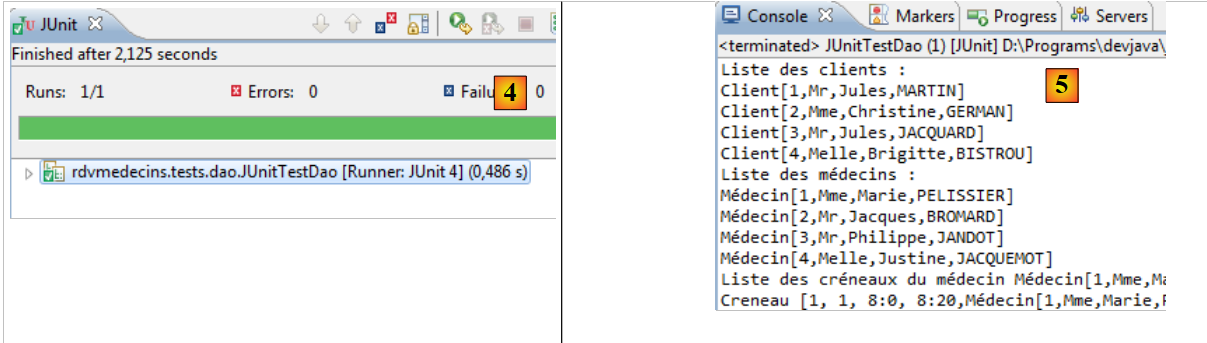
- in [2], we select the JUnit test from the [DAO] layer and run it in [3],
 |
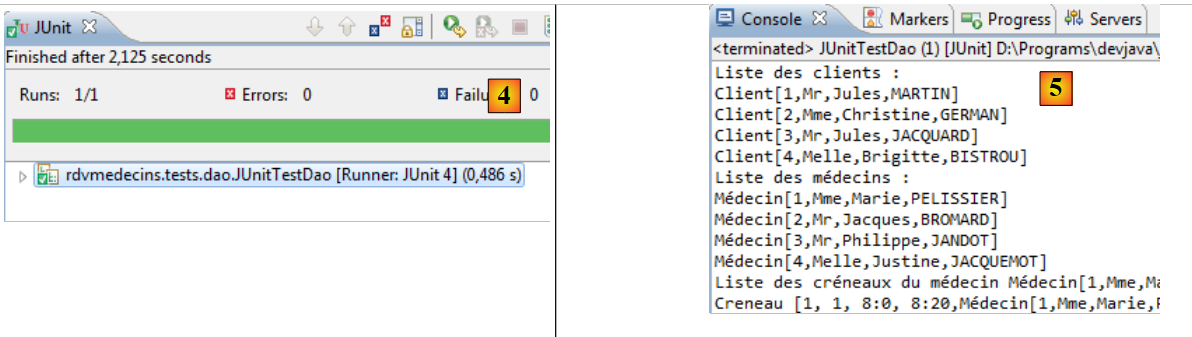 |
- in [4], the test passes,
- in [5], the console logs.
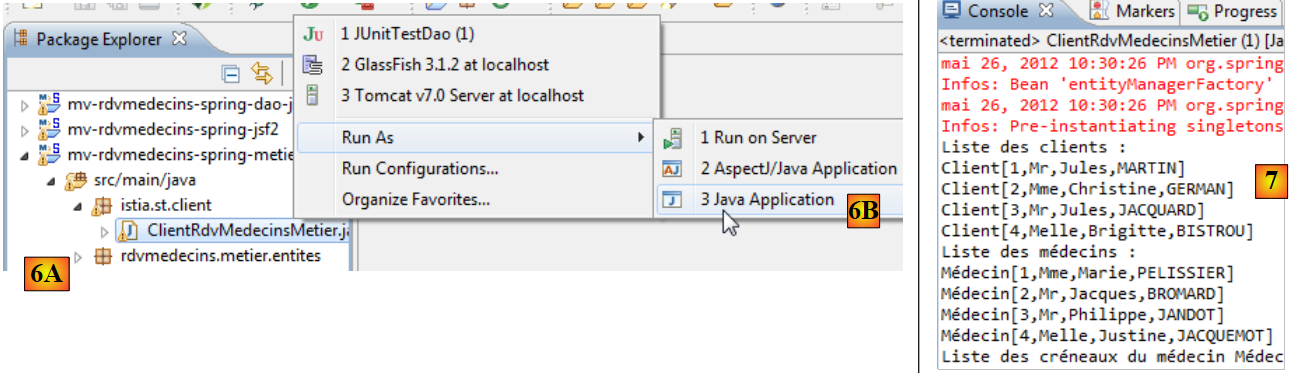 |
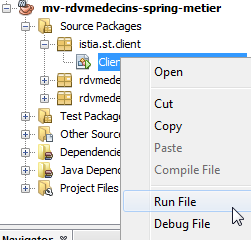
- in [6A] [6B], we run the console client from layer [métier],
- in [7], the resulting console output,
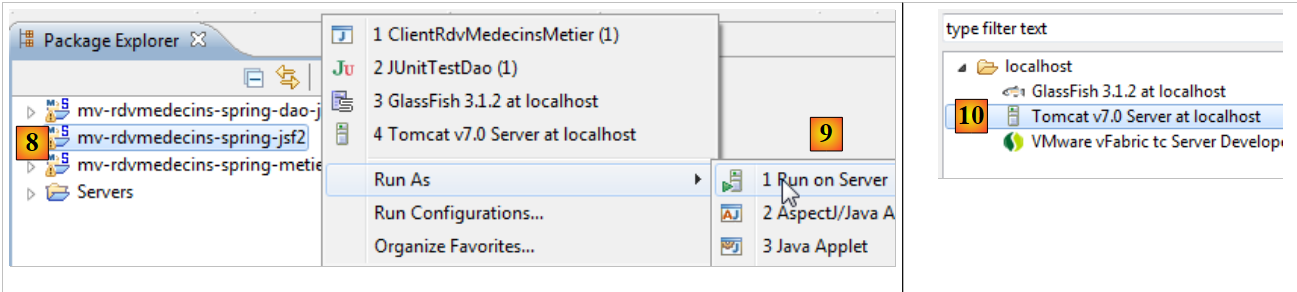 |
- in [8] [9], the web project is run on a Tomcat 7 server [10],
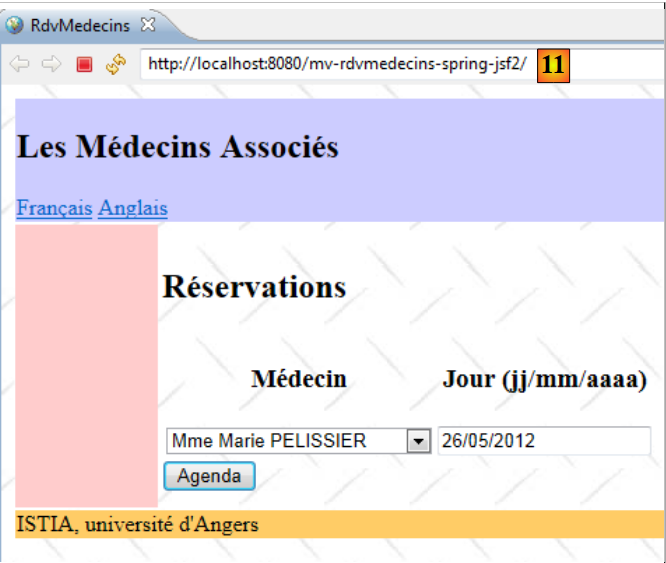 |
- in [11], the application's home page is displayed in Eclipse's internal browser.