9. Sample Application 05: rdvmedecins-pfm-ejb
Let’s review the structure of example application 01 JSF / EJB developed for the Glassfish server:
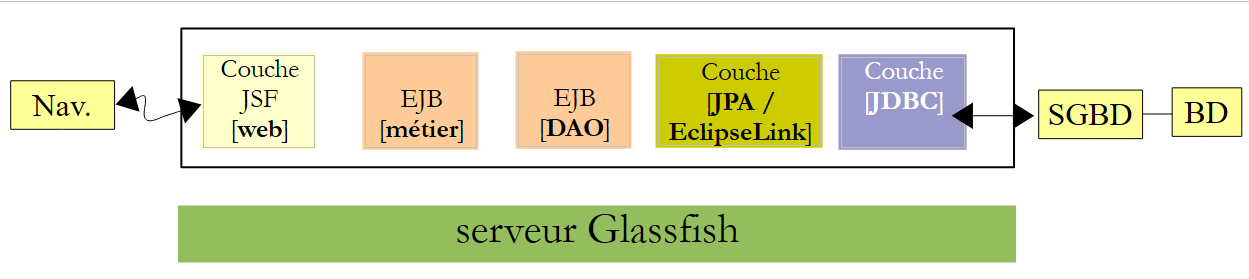 |
We are not changing anything about this architecture except for the web layer, which will be implemented here using JSF, Primefaces, and Primefaces (mobile). The target browser will be a mobile browser.
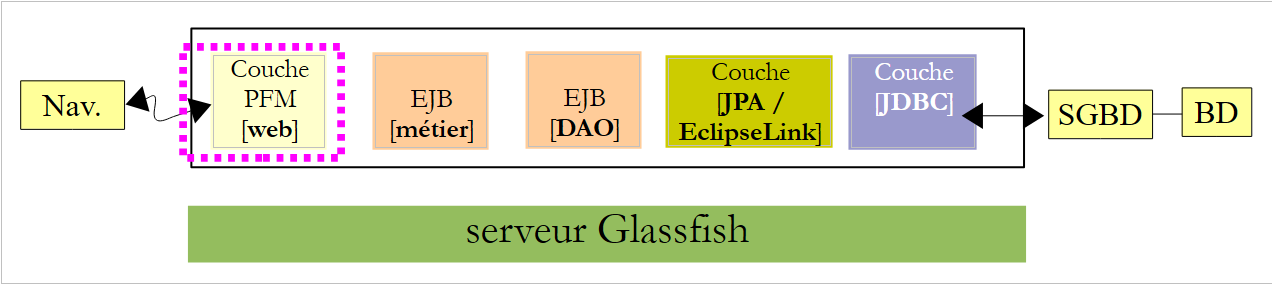 |
We have developed two applications using Glassfish:
- Application 01 used JSF / EJB and had a fairly basic interface,
- Application 03 used PF / EJB and had a rich interface.
Due to the limited number of components available in Primefaces Mobile, we will revert to the basic interface of Application 01. Additionally, the views must be able to adapt to the smaller size of mobile screens.
9.1. The Views
To give you an idea, here are a few views of the application running in an iPhone 4 simulator:
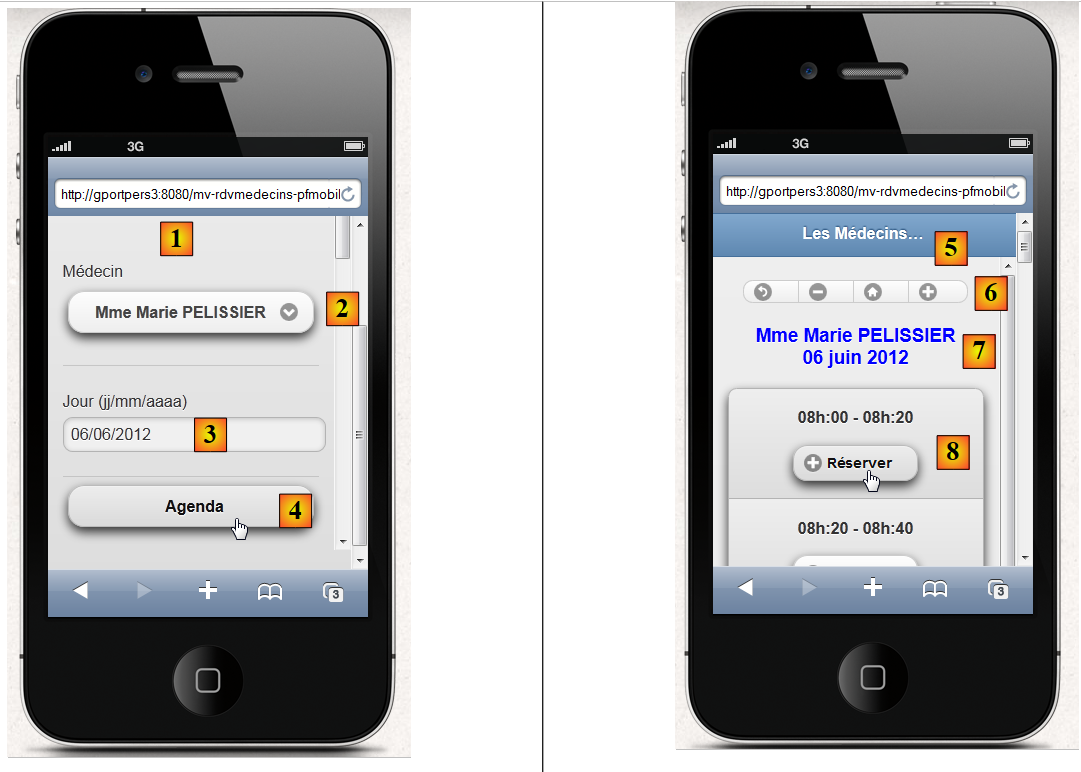 |
- in [1], the home page. Note that this time we had to specify the machine name (you can also specify its address, IP), because with the localhost machine, nothing was displayed,
- in [2], the doctor dropdown menu,
- in [3], the desired date for the appointment,
- in [4], the button to request the agenda for the day,
- in [5], the new view displays the doctor's available time slots,
- in [6], a set of buttons to navigate the calendar,
- in [7], a message reminding you of the doctor and the day,
- in [8], a time slot to book. We do this,
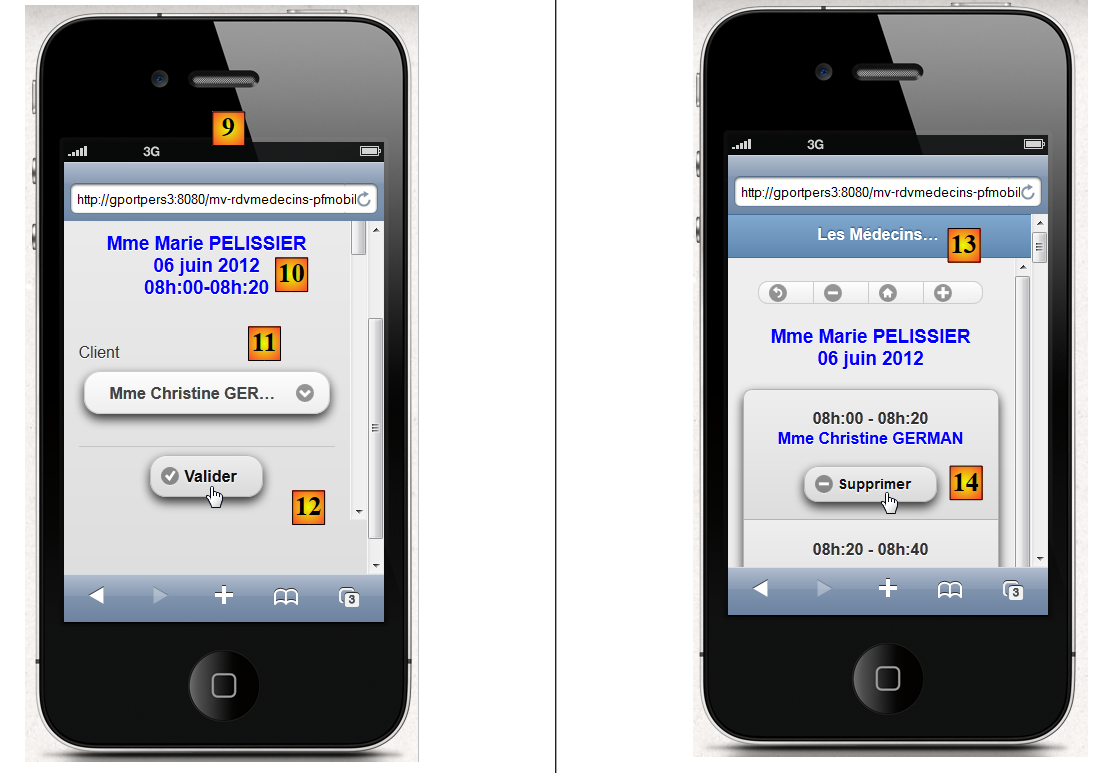 |
- in [9], the customer selection view,
- in [10], a message reminding the customer of the doctor, the day, and the time slot for the appointment,
- in [11], the dropdown menu in clients,
- to [12], the confirmation button,
- in [13], clicking the button takes us back to agenda,
- to [14], the time slot is now reserved. We will now delete the reservation,
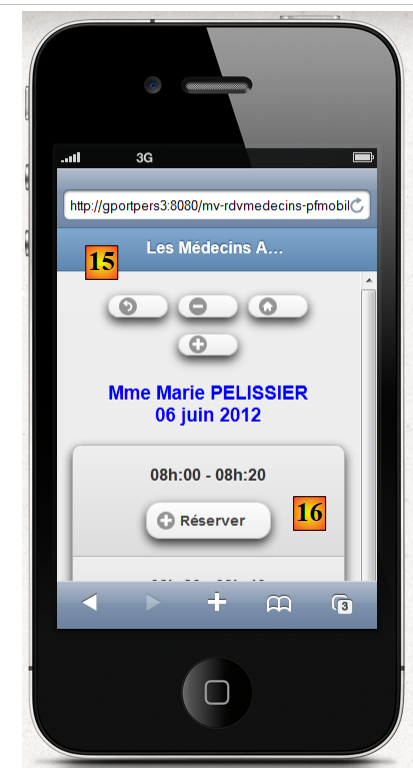 |
- in [15], we remain on the same view,
- but in [16], the appointment has been deleted,
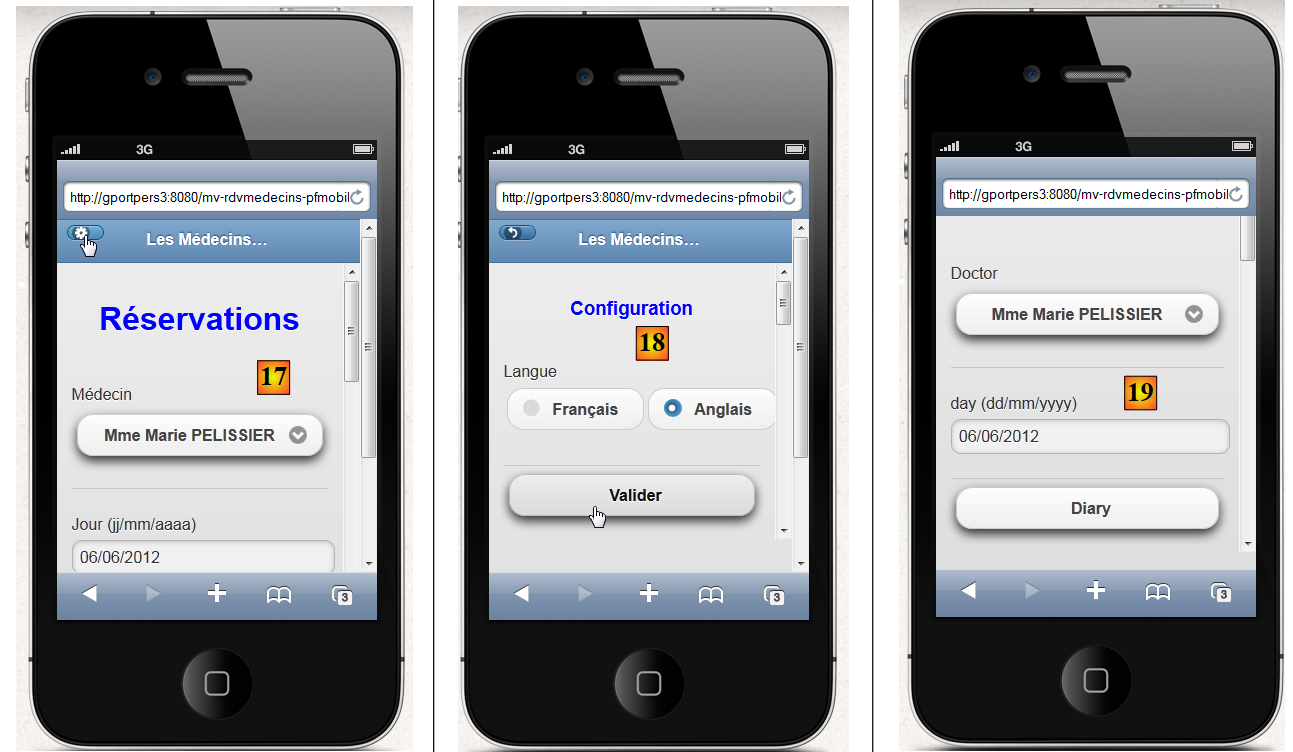
It is possible to change the language on the home page [17], [18], [19]:
 |
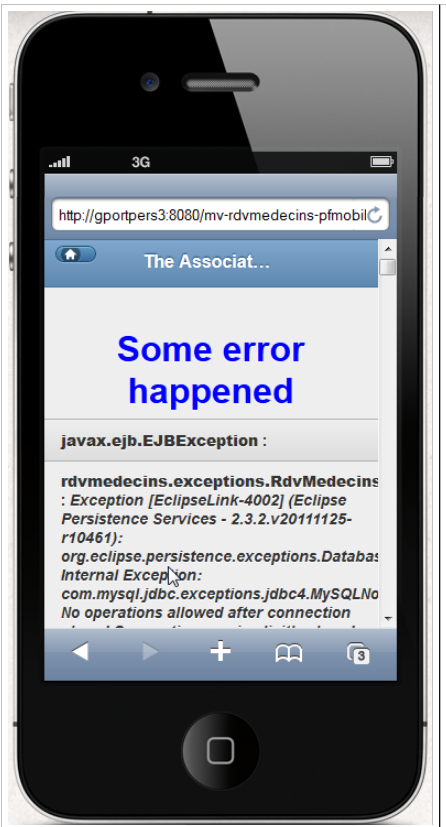
Finally, an error view has been provided:
 |
9.2. The Netbeans project
The Netbeans project is as follows:
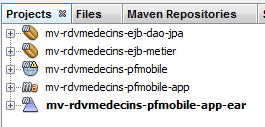 |
- [mv-rdvmedecins-ejb-dao-jpa]: project EJB of layers [DAO] and [JPA] from Example 01,
- [mv-rdvmedecins-ejb-metier]: project EJB of layer [métier] from Example 01,
- [mv-rdvmedecins-pfmobile]: project of the [web] / Primefaces mobile layer – new,
- [mv-rdvmedecins-pfmobile-app-ear]: enterprise project to deploy the application on the Glassfish server – new.
9.3. The enterprise project
The enterprise project is used solely for deploying the three modules [mv-rdvmedecins-ejb-dao-jpa], [mv-rdvmedecins-ejb-metier], and [mv-rdvmedecins-pfmobile] on the server Glassfish. The Netbeans project is as follows:
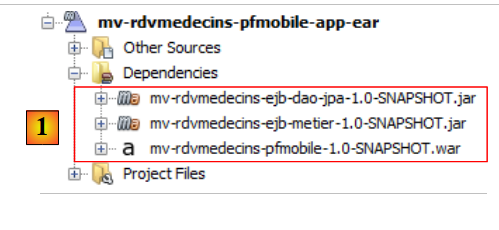 |
The project exists only for these three dependencies, [1], defined in the file [pom.xml] as follows:
<?xml version="1.0" encoding="UTF-8"?>
<project xmlns="http://maven.apache.org/POM/4.0.0" xmlns:xsi="http://www.w3.org/2001/XMLSchema-instance" xsi:schemaLocation="http://maven.apache.org/POM/4.0.0 http://maven.apache.org/xsd/maven-4.0.0.xsd">
  <modelVersion>4.0.0</modelVersion>
...

  <groupId>istia.st</groupId>
  <artifactId>mv-rdvmedecins-pfmobile-app-ear</artifactId>
  <version>1.0-SNAPSHOT</version>
  <packaging>ear</packaging>

  <name>mv-rdvmedecins-pfmobile-app-ear</name>

...
    <dependencies>
        <dependency>
            <groupId>${project.groupId}</groupId>
            <artifactId>mv-rdvmedecins-ejb-dao-jpa</artifactId>
            <version>${project.version}</version>
            <type>ejb</type>
        </dependency>
        <dependency>
            <groupId>${project.groupId}</groupId>
            <artifactId>mv-rdvmedecins-ejb-metier</artifactId>
            <version>${project.version}</version>
            <type>ejb</type>
        </dependency>
        <dependency>
            <groupId>${project.groupId}</groupId>
            <artifactId>mv-rdvmedecins-pfmobile</artifactId>
            <version>${project.version}</version>
            <type>war</type>
        </dependency>
    </dependencies>
</project>
- lines 6–9: the Maven artifact for the enterprise project,
- lines 14–33: the project’s three dependencies. Note their types (lines 19, 25, 31).
To run the web application, you must run this enterprise project.
9.4. The Primefaces mobile web project
The Primefaces mobile web project is as follows:
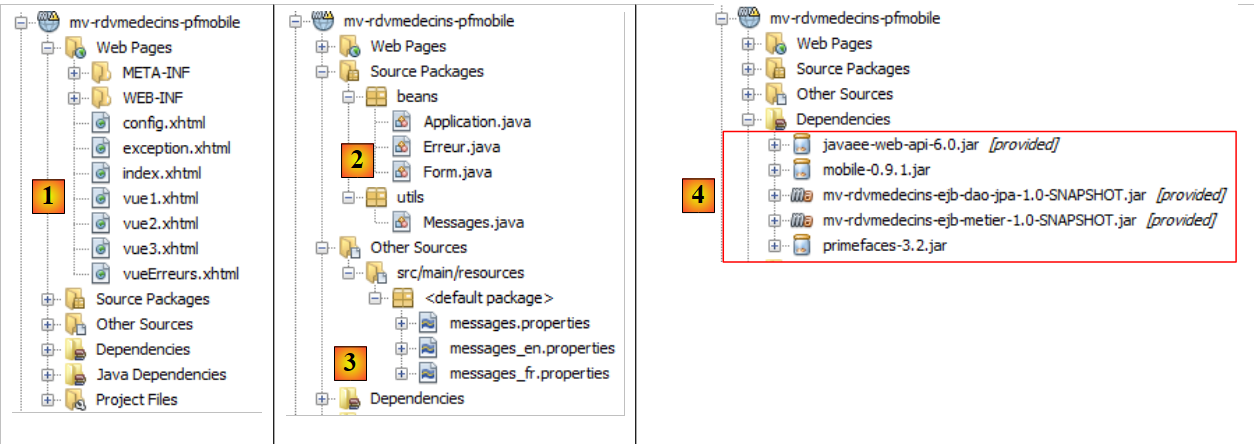 |
- in [1], the project pages. The page [index.xhtml] is the only page in the project. It contains five views: [vue1.xhtml], [vue2.xhtml], [vue3.xhtml], [vueErreurs.xhtml], and [config.xhtml],
- in [2], the Java beans. The application-scoped bean [Application], the session-scoped bean [Form]. The class [Erreur] encapsulates an error,
- in [3], the message files for internationalization,
- [4] contains the dependencies. The web project depends on the EJB project in the [DAO] layer, the EJB project in the [métier] layer, and the Primefaces mobile project for the [web] layer.
9.5. Project configuration
The project configuration is the same as that of the Primefaces or JSF projects we have studied. We list the configuration files without re-explaining them.
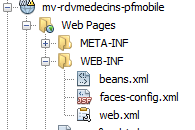 | 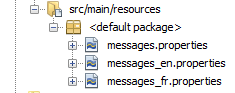 |
[web.xml]: configures the web application.
<?xml version="1.0" encoding="UTF-8"?>
<web-app version="3.0" xmlns="http://java.sun.com/xml/ns/javaee" xmlns:xsi="http://www.w3.org/2001/XMLSchema-instance" xsi:schemaLocation="http://java.sun.com/xml/ns/javaee http://java.sun.com/xml/ns/javaee/web-app_3_0.xsd">
  <context-param>
    <param-name>javax.faces.PROJECT_STAGE</param-name>
    <param-value>Development</param-value>
  </context-param>
  <context-param>
    <param-name>javax.faces.FACELETS_SKIP_COMMENTS</param-name>
    <param-value>true</param-value>
  </context-param>
  <servlet>
    <servlet-name>Faces Servlet</servlet-name>
    <servlet-class>javax.faces.webapp.FacesServlet</servlet-class>
    <load-on-startup>1</load-on-startup>
  </servlet>
  <servlet-mapping>
    <servlet-name>Faces Servlet</servlet-name>
    <url-pattern>/faces/*</url-pattern>
  </servlet-mapping>
  <session-config>
    <session-timeout>
      30
    </session-timeout>
  </session-config>
  <welcome-file-list>
    <welcome-file>faces/index.xhtml</welcome-file>
  </welcome-file-list>
  <error-page>
    <error-code>500</error-code>
    <location>/faces/exception.xhtml</location>
  </error-page>
  <error-page>
    <exception-type>Exception</exception-type>
    <location>/faces/exception.xhtml</location>
  </error-page>

</web-app>
Note that on line 26, the page [index.xhtml] is the application's home page.
[faces-config.xml]: configures the JSF application
<?xml version='1.0' encoding='UTF-8'?>

<!-- =========== FULL CONFIGURATION FILE ================================== -->

<faces-config version="2.0"
              xmlns="http://java.sun.com/xml/ns/javaee"
              xmlns:xsi="http://www.w3.org/2001/XMLSchema-instance"
              xsi:schemaLocation="http://java.sun.com/xml/ns/javaee http://java.sun.com/xml/ns/javaee/web-facesconfig_2_0.xsd">

  <application>
    <resource-bundle>
      <base-name>
        messages
      </base-name>
      <var>msg</var>
    </resource-bundle>
      <message-bundle>messages</message-bundle>
    <default-render-kit-id>PRIMEFACES_MOBILE</default-render-kit-id>
  </application>
</faces-config>
[beans.xml]: empty but required for the @Named annotation
<?xml version="1.0" encoding="UTF-8"?>
<beans xmlns="http://java.sun.com/xml/ns/javaee"
       xmlns:xsi="http://www.w3.org/2001/XMLSchema-instance"
       xsi:schemaLocation="http://java.sun.com/xml/ns/javaee http://java.sun.com/xml/ns/javaee/beans_1_0.xsd">
</beans>
[messages_fr.properties]: the French message file
# page
page.titre=Les M\u00e9decins Associ\u00e9s
format.date=dd/MM/yyyy
format.date_detail=dd/MM/yyyy

# vue1
vue1.header=Les M\u00e9decins Associ\u00e9s - R\u00e9servations

# formulaire 1
form1.titre=R\u00e9servations
form1.medecin=M\u00e9decin
form1.jour=Jour (jj/mm/aaaa)
form1.date.requise=La date est n\u00e9cessaire
form1.date.invalide=La date est invalide
form1.date.invalide_detail=La date est invalide
form1.agenda=Agenda
form1.options=Options

# formulaire 2
form2.titre={0} {1} {2}<br/>{3}
form2.titre_detail={0} {1} {2}<br/>{3}
form2.retour=Retour
form2.supprimer=Supprimer
form2.reserver=R\u00e9server
form2.precedent=Jour pr\u00e9c\u00e9dent
form2.suivant=Jour suivant
form2.today=Aujourd'today

# formulaire 3
form3.client=Client
form3.valider=Valider
form3.titre={0} {1} {2}<br/>{3}<br/>{4,number,#00}h:{5,number,#00}-{6,number,#00}h:{7,number,#00}
form3.titre_detail={0} {1} {2}<br/>{3}<br/>{4,number,#00}h:{5,number,#00}-{6,number,#00}h:{7,number,#00}
form3.retour=Retour

# erreur
erreur.titre=Une erreur s'is produced.

# config
config.retour=Retour
config.titre=Configuration
config.langue=Langue
config.langue.francais=Fran\u00e7ais
config.langue.anglais=Anglais
config.valider=Valider

#exception
exception.titre=Application indisponible. Veuillez recommencer ult\u00e9rieurement.
[messages_en.properties]: English message file
# page
page.titre=The Associated Doctors
format.date=dd/MM/yyyy
format.date_detail=dd/MM/yyyy

# view1
vue1.header=The Associated Doctors - Reservations

# form 1
form1.titre=Reservations
form1.medecin=Doctor
form1.jour=day (dd/mm/yyyy)
form1.date.requise=The date is necessary
form1.date.invalide=Invalid date
form1.date.invalide_detail=invalid date
form1.agenda=Diary
form1.options=Options

# form 2
form2.titre={0} {1} {2}<br/>{3}
form2.titre_detail={0} {1} {2}<br/>{3}
form2.retour=Back
form2.supprimer=Delete
form2.reserver=Reserve
form2.precedent=Previous Day
form2.suivant=Next Day
form2.today=Today

# form 3
form3.client=Patient
form3.valider=Validate
form3.titre={0} {1} {2}<br/>{3}<br/>{4,number,#00}h:{5,number,#00}-{6,number,#00}h:{7,number,#00}
form3.titre_detail={0} {1} {2}<br/>{3}<br/>{4,number,#00}h:{5,number,#00}-{6,number,#00}h:{7,number,#00}
form3.retour=Back

# error
erreur.titre=Some error happened

# config
config.retour=Back
config.titre=Configuration
config.langue=Language
config.langue.francais=French
config.langue.anglais=English
config.valider=Validate

#exception
exception.titre=Application not available. Please try again later.
9.6. The [index.xhtml] page
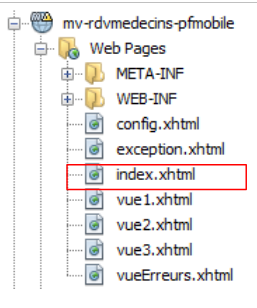 |
The project always displays the same page, the following [index.xhtml] page:
<f:view xmlns="http://www.w3.org/1999/xhtml"
        xmlns:f="http://java.sun.com/jsf/core"
        xmlns:h="http://java.sun.com/jsf/html"
        xmlns:ui="http://java.sun.com/jsf/facelets"
        xmlns:p="http://primefaces.org/ui"
        xmlns:pm="http://primefaces.org/mobile"
        contentType="text/html"
        locale="#{form.locale}">

  <pm:page title="#{msg['page.titre']}">
    <pm:view id="vue1">
      <ui:fragment rendered="#{form.form1Rendered}">
        <ui:include src="vue1.xhtml"/>
      </ui:fragment>
      <ui:fragment rendered="#{form.erreurInit}">
        <ui:include src="vueErreurs.xhtml"/>
      </ui:fragment>
    </pm:view>
    <pm:view id="vue2">
      <ui:fragment rendered="#{form.form2Rendered}">
        <ui:include src="vue2.xhtml"/>
      </ui:fragment>
    </pm:view>
    <pm:view id="vue3">
      <ui:fragment rendered="#{form.form3Rendered}">
        <ui:include src="vue3.xhtml"/>
      </ui:fragment>
    </pm:view>
    <pm:view id="vueErreurs">
      <ui:fragment rendered="#{form.erreurRendered}">
        <ui:include src="vueErreurs.xhtml"/>
      </ui:fragment>
    </pm:view>
    <pm:view id="config">
      <ui:include src="config.xhtml"/>
    </pm:view>
  </pm:page>
</f:view>
- line 8: the page is internationalized (locale attribute),
- line 10: the page contains five views: view1 on line 11, view2 on line 19, view3 on line 24, vueErreurs on line 29, config on line 34. At any given time, only one of these views is visible. When the application starts, the view1 view is displayed. Here, we encountered the following issue: if the application initialization was successful, we must display [vue1.xhtml]; otherwise, [vueErreurs.xhtml] must be displayed. We resolved the issue by ensuring that the content of view1 is managed by the model, which sets the values for the Booleans [Form].form1rendered (line 12) and [Form].erreurInit (line 15) to set the content of vue1 (line 11),
In a simulator, view [vue1.xhtml] has rendering [1], view [vue2.xhtml] renders as [2], view [vue3.xhtml] renders as [3]:
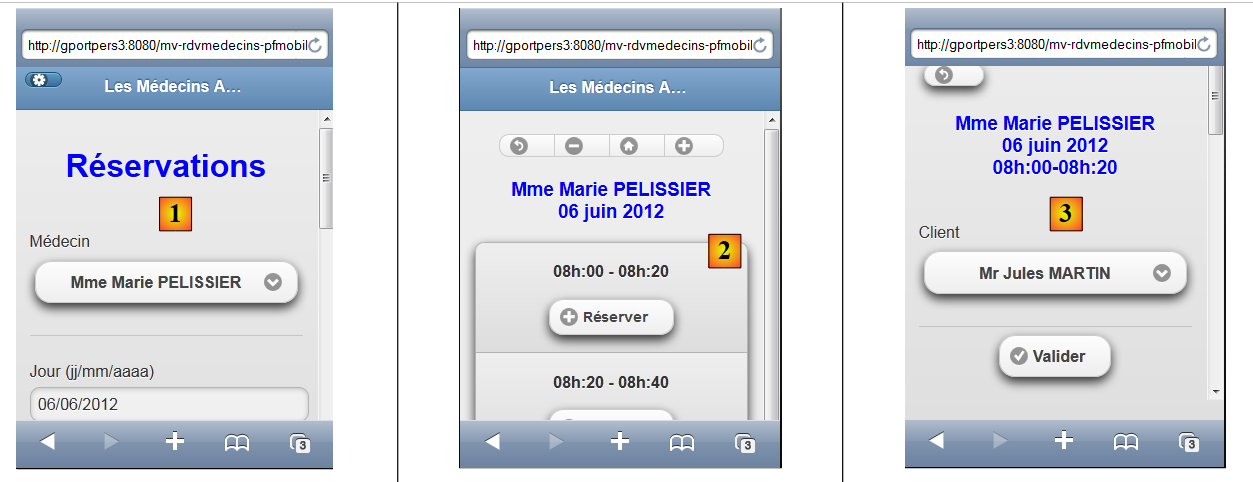 |
the view [vueErreurs.xhtml] has the rendering [4], the view [config.xhtml] has the rendering [5]:
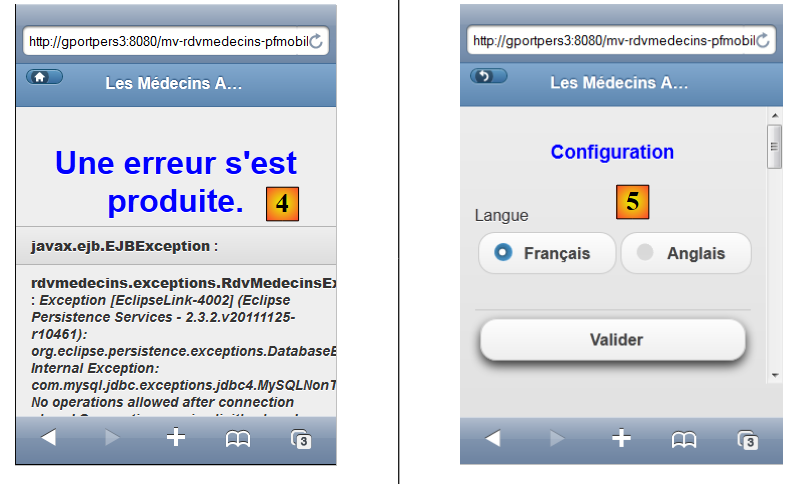 |
9.7. The project's beans
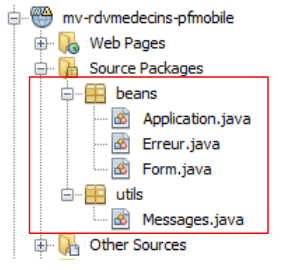 |
The class in the [utils] package has already been presented: the [Messages] class is a class that facilitates the internationalization of an application’s messages. It was discussed in section 2.8.5.7.
9.7.1. The Application Bean
The [Application.java] bean is an application-scope bean. Recall that this type of bean is used to store read-only data available to all users of the application. This bean is as follows:
package beans;

import javax.ejb.EJB;
import javax.enterprise.context.ApplicationScoped;
import javax.inject.Named;
import rdvmedecins.metier.service.IMetierLocal;

@Named(value = "application")
@ApplicationScoped
public class Application {

  // business layer
  @EJB
  private IMetierLocal metier;

  public Application() {
  }

  // getters

  public IMetierLocal getMetier() {
    return metier;
  }

}
- line 8: we give the bean the name "application",
- line 9: it has application scope,
- lines 13-14: a reference to the local interface of the [métier] layer will be injected into it by the EJB container of the application server. Let’s review the application architecture:
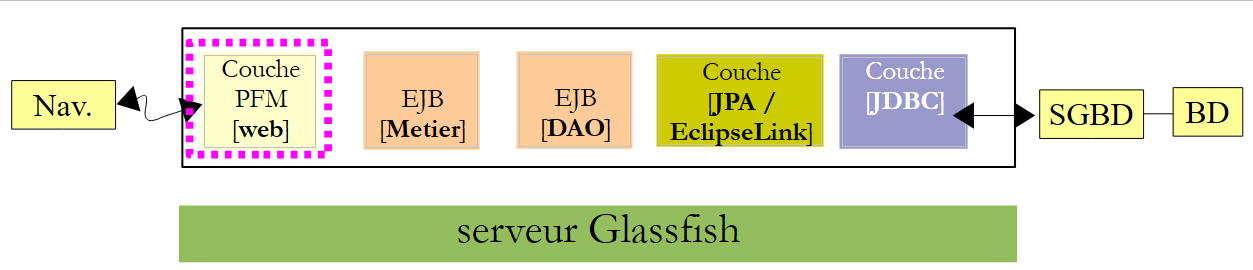 |
The PFM, EJB, and [Metier] applications will run in the same JVM (Java Virtual Machine). So the [PFM] layer will use the local interface of EJB. That’s it. The [Application] bean contains nothing else. To access the [métier] layer, the other beans will retrieve it from this bean.
9.7.2. The [Erreur] bean
The [Erreur] class is as follows:
package beans;

public class Erreur {

  public Erreur() {
  }

  // field
  private String classe;
  private String message;

  // manufacturer
  public Erreur(String classe, String message){
    this.setClasse(classe);
    this.message=message;
  }

  // getters and setters
...
}
- line 9, the name of an exception class if an exception was thrown,
- line 10: an error message.
9.7.3. The [Form] bean
Its code is as follows:
package beans;

...

@Named(value = "form")
@SessionScoped
public class Form implements Serializable {

  public Form() {
  }
  // bean Application
  @Inject
  private Application application;
  private IMetierLocal metier;
  // session cache
  private List<Medecin> medecins;
  private List<Client> clients;
  private Map<Long, Medecin> hMedecins = new HashMap<Long, Medecin>();
  private Map<Long, Client> hClients = new HashMap<Long, Client>();
  // model
  private Long idMedecin;
  private Date jour = new Date();
  private String strJour;
  private Boolean form1Rendered;
  private Boolean form2Rendered;
  private Boolean form3Rendered;
  private Boolean erreurRendered;
  private String form2Titre;
  private String form3Titre;
  private AgendaMedecinJour agendaMedecinJour;
  private Long idCreneauChoisi;
  private Medecin medecin;
  private Long idClient;
  private CreneauMedecinJour creneauChoisi;
  private List<Erreur> erreurs;
  private Boolean erreurInit = false;
  private String action;
  private String locale = "fr";
  private String msgErreurDate = "";
  private SimpleDateFormat dateFormatter;
  private Boolean erreurDate;

  @PostConstruct
  private void init() {
    System.out.println("init");
    // initially no error
    erreurInit = false;
    // date formatting
    dateFormatter = new SimpleDateFormat(Messages.getMessage(null, "format.date", null).getSummary());
    dateFormatter.setLenient(false);
    // the current day
    strJour = dateFormatter.format(jour);
    // recover the business layer
    metier = application.getMetier();
    // doctors and clients are cached
    try {
      medecins = metier.getAllMedecins();
      clients = metier.getAllClients();
    } catch (Throwable th) {
      // we note the error
      erreurInit = true;
      prepareVueErreur(th);
      return;
    }
    // list checking
    if (medecins.size() == 0) {
      // we note the error
      erreurInit = true;
      erreurs = new ArrayList<Erreur>();
      erreurs.add(new Erreur("", "La liste des médecins est vide"));
    }
    if (clients.size() == 0) {
      // we note the error
      erreurInit = true;
      erreurs = new ArrayList<Erreur>();
      erreurs.add(new Erreur("", "La liste des clients est vide"));
    }
    // mistake?
    if (erreurInit) {
      // the error view is displayed
      setForms(false, false, false, true);
      return;
    }

    // dictionaries
    for (Medecin m : medecins) {
      hMedecins.put(m.getId(), m);
    }
    for (Client c : clients) {
      hClients.put(c.getId(), c);
    }
    // view 1
    setForms(true, false, false, false);
  }

  // view display
  private void setForms(Boolean form1Rendered, Boolean form2Rendered, Boolean form3Rendered, Boolean erreurRendered) {
    this.form1Rendered = form1Rendered;
    this.form2Rendered = form2Rendered;
    this.form3Rendered = form3Rendered;
    this.erreurRendered = erreurRendered;
  }

  // preparation vueErreur
  private void prepareVueErreur(Throwable th) {
    // create an error list
    erreurs = new ArrayList<Erreur>();
    erreurs.add(new Erreur(th.getClass().getName(), th.getMessage()));
    while (th.getCause() != null) {
      th = th.getCause();
      erreurs.add(new Erreur(th.getClass().getName(), th.getMessage()));
    }
// the error view is displayed
    setForms(false, false, false, true);
  }

  // getters and setters
  ..
}
- lines 5-7: the class [Form] is a bean named "form" with session scope. Note that the class must therefore be serializable,
- lines 12-13: the form bean has a reference to the application bean. This reference will be injected by the servlet container in which the application runs (presence of the @Inject annotation).
- lines 24–27: control the display of the views vue1 (line 24), vue2 (line 25), vue3 (line 26), vueErreurs (line 27),
- lines 43–44: the init method is executed immediately after the class is instantiated (presence of the @PostConstruct annotation),
- lines 49-50: handle date formatting. Primefaces mobile does not offer a calendar. Furthermore, JSF validators cannot be used in a PFM page. Therefore, we will need to manually handle the entry of the agenda date,
- line 49: sets the date format. This format is used in internationalized files:
format.date=dd/MM/yyyy
format.date_detail=dd/MM/yyyy
- line 50: we specify that we must not be "lenient" regarding dates. If we do not do this, an entry such as 12/32/2011—which is an incorrect entry—is considered the valid date 01/01/2012,
- line 54: a reference is retrieved from the [métier] layer via the [Application] bean,
- lines 57–58: we request the list of doctors and clients from the [métier] layer,
- lines 66–91: if everything went well, the dictionaries for doctors and clients are constructed. They are indexed by their number. Next, the [vue1.xhtml] view will be displayed (line 93),
- line 59: in case of an error, the [vueErreurs.xhtml] page template is constructed. This template is the error list from line 35,
- lines 105–115: the [prepareVueErreur] method constructs the list of errors to be displayed. The [index.xhtml] page then displays the [vueErreurs.xhtml] view (line 114).
The page [erreur.xhtml] is as follows:
<?xml version='1.0' encoding='UTF-8' ?>
<!DOCTYPE html PUBLIC "-//W3C//DTD XHTML 1.0 Transitional//EN" "http://www.w3.org/TR/xhtml1/DTD/xhtml1-transitional.dtd">
<html xmlns="http://www.w3.org/1999/xhtml"
      xmlns:h="http://java.sun.com/jsf/html"
      xmlns:p="http://primefaces.org/ui"
      xmlns:f="http://java.sun.com/jsf/core"
      xmlns:pm="http://primefaces.org/mobile"
      xmlns:ui="http://java.sun.com/jsf/facelets">

  <!-- Errors view -->
  <pm:header title="#{msg['page.titre']}" swatch="b">
    <f:facet name="left">
      <p:button icon="home" value=" " href="#vue1?reverse=true" />
    </f:facet>
  </pm:header>
  <pm:content>
    <div align="center">
      <h1><h:outputText value="#{msg['erreur.titre']}" style="color: blue"/></h1>
    </div>

    <p:dataList value="#{form.erreurs}" var="erreur">
      <b>#{erreur.classe}</b> : <i>#{erreur.message}</i>
    </p:dataList>
  </pm:content>
</html>
It uses a <p:dataList> tag (lines 21–23) to display the list of errors. The button on line 13 allows you to return to the vue1 view.
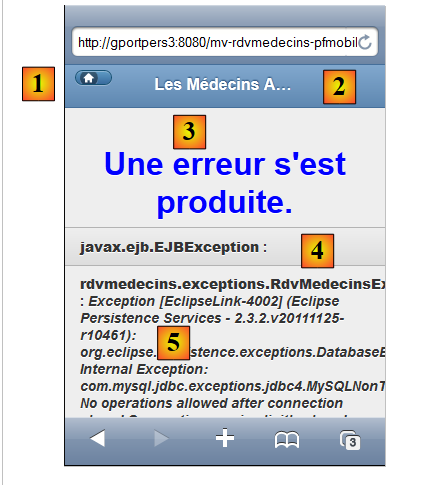 |
- The [1] button is generated by line 13. The icon attribute sets the button’s icon. The button returns to the vue1 view (href attribute),
- the header [2] is generated by lines 11-15,
- the title [3] is generated by line 18,
- the text [4] is generated by the template #{erreur.classe} on line 22,
- the text [5] is generated by the template #{erreur.message} in line 22.
We will now define the different phases of the application's lifecycle. For each user action, we will examine the relevant views and the event handlers that occur within them.
9.8. Displaying the home page
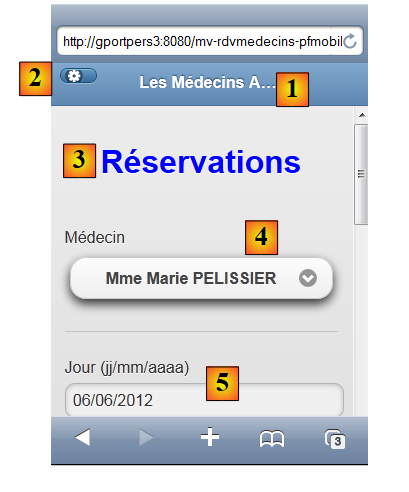
If all goes well, the first view displayed is [vue1.xhtml]. This results in the following view:
 |
The code for the [vue1.xhtml] view is as follows:
<?xml version='1.0' encoding='UTF-8' ?>
<!DOCTYPE html PUBLIC "-//W3C//DTD XHTML 1.0 Transitional//EN" "http://www.w3.org/TR/xhtml1/DTD/xhtml1-transitional.dtd">
<html xmlns="http://www.w3.org/1999/xhtml"
      xmlns:h="http://java.sun.com/jsf/html"
      xmlns:p="http://primefaces.org/ui"
      xmlns:f="http://java.sun.com/jsf/core"
      xmlns:pm="http://primefaces.org/mobile"
      xmlns:ui="http://java.sun.com/jsf/facelets">

  <!-- View 1 -->
  <pm:header title="#{msg['page.titre']}" swatch="b">
    <f:facet name="left">
      <p:button icon="gear" value=" "  href="#config" />
    </f:facet>
  </pm:header>
  <pm:content>
    <h:form id="form1">
      <div align="center">
        <h1><h:outputText value="#{msg['form1.titre']}" style="color: blue"/></h1>
      </div>
      <pm:field>
        <h:outputLabel value="#{msg['form1.medecin']}" for="choixMedecin"/>
        <h:selectOneMenu id="choixMedecin" value="#{form.idMedecin}">
          <f:selectItems value="#{form.medecins}" var="medecin" itemLabel="#{medecin.titre} #{medecin.prenom} #{medecin.nom}" itemValue="#{medecin.id}"/>
        </h:selectOneMenu>
      </pm:field>
      <pm:field>
        <h:outputLabel value="#{msg['form1.jour']}" for="jour"/>
        <p:inputText id="jour" value="#{form.strJour}"/>
        <ui:fragment rendered="#{form.erreurDate}">
          <p:spacer width="50px"/>
          <h:outputText id="msgErreurDate" value="#{form.msgErreurDate}" style="color: red"/>
        </ui:fragment>
      </pm:field>
      <p:commandButton value="#{msg['form1.agenda']}" update=":form1, :vue2, :vueErreurs" action="#{form.getAgenda}" />
    </h:form>
  </pm:content>
</html>
- lines 11–15: generate the header [1],
- line 13: generates the button [2]. Clicking this button displays the view config (href attribute),
- line 19: generates the title [3],
- lines 21–26: generate the doctors dropdown [4],
- lines 27-34: generate the date input [5]. This input is created using a <p:inputText> tag without a validator. The date validation will be performed on the server side. If the date is incorrect, the server will display an error message via lines 30–34,
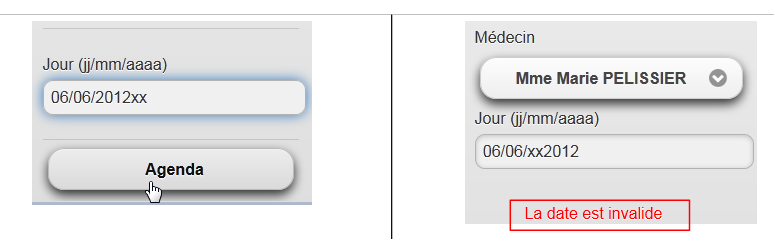 |
- Line 35: the button that submits the form. It updates three fields: form1 (the form in view1), view2, and vueErreurs. Indeed, if the date is invalid, form1 must be updated. If the date is correct, view2 must be updated. Finally, if an exception occurs (e.g., a broken database connection), vueErreurs must be displayed. You might be tempted to use view1 instead of form1 (updating the entire view). In that case, the application will crash.
This view is backed by the following model:
@Named(value = "form")
@SessionScoped
public class Form implements Serializable {

  public Form() {
  }

  // bean Application
  @Inject
  private Application application;
  private IMetierLocal metier;
  // session cache
  private List<Medecin> medecins;
  private List<Client> clients;
  // model
  private Long idMedecin;
  private Date jour = new Date();
  private String strJour;
  private Boolean form1Rendered;
  private Boolean form2Rendered;
  private Boolean form3Rendered;
  private Boolean erreurRendered;
  private String msgErreurDate = "";
  private Boolean erreurDate;

    // list of doctors
  public List<Medecin> getMedecins() {
    return medecins;
  }

  // agenda
  public String getAgenda() {
...
    }
  }
- The field on line 16 reads from and writes to the value of the list on line 23 of the page. When the page is first displayed, it sets the value selected in the combo box;
- the method on lines 27–29 generates the items for the doctors combo box (line 24 of the view). Each generated option will have as its label (itemLabel) the doctor’s title, last name, and first name, and as its value (itemValue), the doctor’s id,
- the field on line 18 feeds the input field on line 29 of the page via read/write,
- Lines 32–34: The method getAgenda handles the click on the button [Agenda] on line 35 of the page. Its code is as follows:
// agenda
  public String getAgenda() {
    try {
      // we check the day
      jour = dateFormatter.parse(strJour);
      // no error
      erreurDate=false;
      msgErreurDate = "";
      // we create the agenda
      return getAgenda(jour);
    } catch (ParseException ex) {
      // error msg
      erreurDate=true;
      msgErreurDate = Messages.getMessage(null, "form1.date.invalide", null).getSummary();
      // view1
      setForms(true, false, false, false);
      return "pm:vue1";
    }
  }
- The method begins by checking the validity of the date entered by the user,
- line 5: the date is parsed according to the date format initialized by the init method when the model is instantiated,
- line 11: if an exception occurs, an error is set (line 13), an internationalized error message is constructed (line 14), the vue1 view is prepared (line 16), and the vue1 view is displayed (line 17),
- line 10: if the date is valid, the following method is executed:
  // agenda
  public String getAgenda(Date jour) {
    // no slots selected yet
    creneauChoisi = null;
    try {
      // we pick up the chosen doctor
      medecin = hMedecins.get(idMedecin);
      // title form 2
      form2Titre = Messages.getMessage(null, "form2.titre", new Object[]{medecin.getTitre(), medecin.getPrenom(), medecin.getNom(), new SimpleDateFormat("dd MMM yyyy").format(jour)}).getSummary();
      // the doctor's agenda for a given day
      agendaMedecinJour = metier.getAgendaMedecinJour(medecin, jour);
      // view 2 is displayed
      setForms(false, true, false, false);
      return "pm:vue2";
    } catch (Throwable th) {
      System.out.println(th);
      // error view
      prepareVueErreur(th);
      return "pm:vueErreurs";
    }
}
Here we see code that has appeared several times before. On line 9, an internationalized message is constructed for the vue2 view:
form2.titre={0} {1} {2}<br/>{3}
form2.titre_detail={0} {1} {2}<br/>{3}
Note that we have included XHTML in the message. It will be displayed as follows:
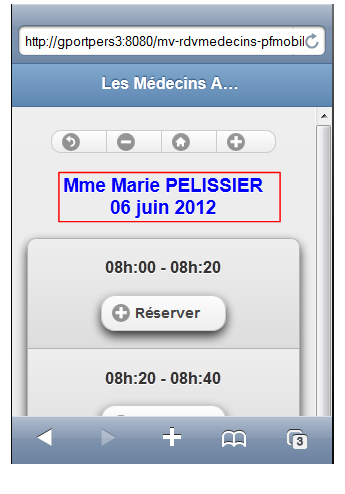 |
9.9. View a doctor's agenda
The doctor's agenda is displayed by the [vue2.xhtml] view:
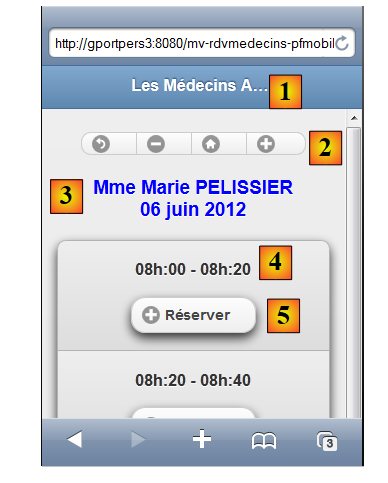 |
The code for the [vue2.xhtml] view is as follows:
<?xml version='1.0' encoding='UTF-8' ?>
<!DOCTYPE html PUBLIC "-//W3C//DTD XHTML 1.0 Transitional//EN" "http://www.w3.org/TR/xhtml1/DTD/xhtml1-transitional.dtd">
<html xmlns="http://www.w3.org/1999/xhtml"
      xmlns:h="http://java.sun.com/jsf/html"
      xmlns:p="http://primefaces.org/ui"
      xmlns:f="http://java.sun.com/jsf/core"
      xmlns:pm="http://primefaces.org/mobile"
      xmlns:ui="http://java.sun.com/jsf/facelets">

  <!-- View 2 -->
  <pm:header title="#{msg['page.titre']}" swatch="b"/>
  <pm:content>
    <h:form id="form2">
      <div align="center">
        <pm:buttonGroup orientation="horizontal">
          <p:commandButton inline="true" icon="back" value=" " action="#{form.showVue1}" update=":vue1"/>
          <p:commandButton inline="true" icon="minus" value=" " action="#{form.getPreviousAgenda}" update=":form2"/>
          <p:commandButton inline="true" icon="home" value=" " action="#{form.getTodayAgenda}" update=":form2"/>
          <p:commandButton inline="true" icon="plus" value=" " action="#{form.getNextAgenda}" update=":form2"/>
        </pm:buttonGroup>
        <h3><h:outputText value="#{form.form2Titre}" style="color: blue" escape="false"/></h3>
      </div>

      <p:dataList id="creneaux" type="inset" value="#{form.agendaMedecinJour.creneauxMedecinJour}" var="creneauMedecinJour">
        <p:column>
          <div align="center">
            <h2>
              <h:outputFormat value="{0,number,#00}h:{1,number,#00} - {2,number,#00}h:{3,number,#00}">
                <f:param value="#{creneauMedecinJour.creneau.hdebut}" />
                <f:param value="#{creneauMedecinJour.creneau.mdebut}" />
                <f:param value="#{creneauMedecinJour.creneau.hfin}" />
                <f:param value="#{creneauMedecinJour.creneau.mfin}" />
              </h:outputFormat>
              <ui:fragment rendered="#{creneauMedecinJour.rv!=null}">
                <br/>
                <h:outputText value="#{creneauMedecinJour.rv.client.titre} #{creneauMedecinJour.rv.client.prenom} #{creneauMedecinJour.rv.client.nom}" style="color: blue"/>
              </ui:fragment>
            </h2>
          </div>
          <div align="center">
            <ui:fragment rendered="#{creneauMedecinJour.rv!=null}">
              <p:commandButton inline="true" action="#{form.action}" value="#{msg['form2.supprimer']}" icon="minus" update=":form2, :vue3, :vueErreurs">
                <f:setPropertyActionListener value="#{creneauMedecinJour.creneau.id}" target="#{form.idCreneauChoisi}"/>
              </p:commandButton>
            </ui:fragment>
            <ui:fragment rendered="#{creneauMedecinJour.rv==null}">
              <p:commandButton inline="true" action="#{form.action}" value="#{msg['form2.reserver']}" icon="plus" update=":form2, :vue3, :vueErreurs">
                <f:setPropertyActionListener value="#{creneauMedecinJour.creneau.id}" target="#{form.idCreneauChoisi}"/>
              </p:commandButton>
            </ui:fragment>
          </div>
        </p:column>
      </p:dataList>
    </h:form>
  </pm:content>
</html>
- lines 11: generates the header [1],
- lines 15–20: generates the button group [2],
- line 21: generates the title [3]. Note the value of the escape attribute. This is what allows us to interpret the code XHTML that we placed in form2Titre,
- line 24: time slots are displayed using a dataList,
- lines 28–33: generate the time slot title [4],
- lines 34–37: display a snippet if there is an appointment in the time slot,
- line 36: displays the identity of the client who made the appointment,
- lines 41-45: display the [Supprimer] button if there is an appointment,
- lines 46-50: display the [Réserver] button if there is no appointment.
This view is primarily populated by the following model:
private AgendaMedecinJour agendaMedecinJour;
which populates dataList on line 24. This field was created by the getAgenda method when switching from view1 to view2.
9.10. Deleting an appointment
Deleting an appointment follows this sequence:
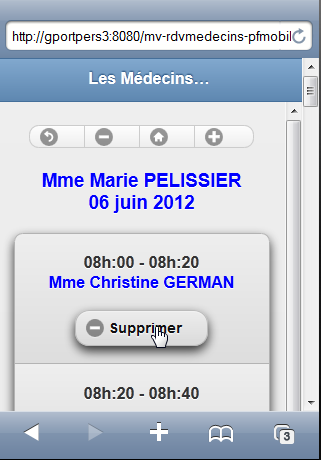 | 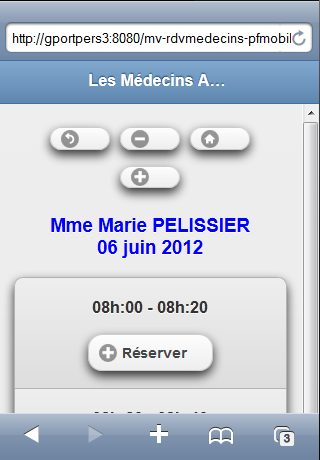 |
The view affected by this action is as follows:
<ui:fragment rendered="#{creneauMedecinJour.rv!=null}">
              <p:commandButton inline="true" action="#{form.action}" value="#{msg['form2.supprimer']}" icon="minus" update=":form2, :vueErreurs">
                <f:setPropertyActionListener value="#{creneauMedecinJour.creneau.id}" target="#{form.idCreneauChoisi}"/>
              </p:commandButton>
            </ui:fragment>
- line 2: the [Supprimer] button is associated with the [Form].action method (action attribute),
- line 3: the id for the slot currently selected will be sent to the [Form].idCreneauChoisi template,
- line 2: the AJAX call will update the form2 fields (view2 form) and the vueErreurs view. There are in fact two cases: if everything goes well, the vue2 view will be redisplayed; otherwise, the vueErreurs view will be displayed.
The [action] method is as follows:
  // action on RV
  public String action() {
    // search for the slot in the agenda
    int i = 0;
    Boolean trouvé = false;
    while (!trouvé && i < agendaMedecinJour.getCreneauxMedecinJour().length) {
      if (agendaMedecinJour.getCreneauxMedecinJour()[i].getCreneau().getId() == idCreneauChoisi) {
        trouvé = true;
      } else {
        i++;
      }
    }
    // have we found?
    if (!trouvé) {
      // it's weird - form2 is redisplayed
      setForms(false, true, false, false);
      return "pm:vue2";
    } else {
      creneauChoisi = agendaMedecinJour.getCreneauxMedecinJour()[i];
    }
    // we found
    // according to desired action
    if (creneauChoisi.getRv() == null) {
      return reserver();
    } else {
      return supprimer();
    }
  }

  // reservation
  public String reserver() {
 ...
  }

  public String supprimer() {
    try {
      // deleting an appointment
      metier.supprimerRv(creneauChoisi.getRv());
      // we update the agenda
      agendaMedecinJour = metier.getAgendaMedecinJour(medecin, jour);
      // form2 is displayed
      setForms(false, true, false, false);
      return "pm:vue2";
    } catch (Throwable th) {
      // error view
      prepareVueErreur(th);
      return "pm:vueErreurs";
    }
}
- lines 3-12: we search for the time slot for which we received the id (line 7),
- if it is not found, which is abnormal, we redisplay view2 (lines 16-17),
- line 19: if it is found, the corresponding [CreneauMedecinJour] object is stored. This is what gives us access to the appointment to be deleted,
- line 26: we delete it,
- lines 35–48: the delete method returns view2 if the deletion was successful (lines 42–43) or view vueErreurs if there was a problem (lines 46–47).
9.11. Appointment Scheduling
Making an appointment follows this sequence:
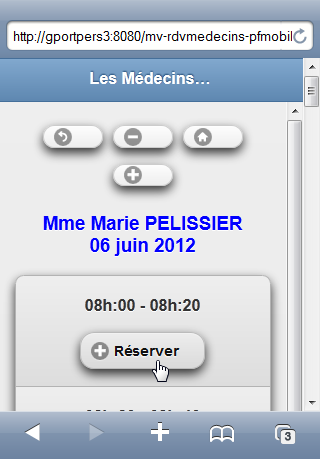 | 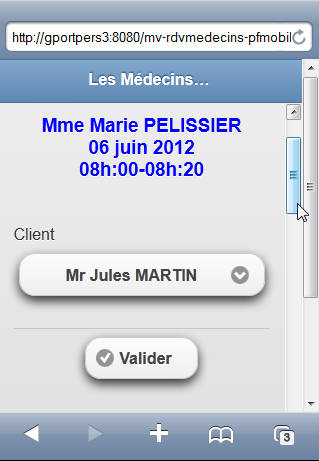 |
We navigate from view vue2 to view vue3. The code involved in this action is as follows:
<ui:fragment rendered="#{creneauMedecinJour.rv==null}">
              <p:commandButton inline="true" action="#{form.action}" value="#{msg['form2.reserver']}" icon="plus" update=":vue3, :vueErreurs">
                <f:setPropertyActionListener value="#{creneauMedecinJour.creneau.id}" target="#{form.idCreneauChoisi}"/>
              </p:commandButton>
            </ui:fragment>
- Line 2: The [Réserver] button is associated with the [Form].action method (action attribute), which is the same as for the [Supprimer] button. The AJAX call updates the vue3 and vueErreurs views depending on whether or not errors occur during the call’s processing.
- Line 3: As with the [Supprimer] button, the id for the time slot is passed to the model.
The template that handles this action is as follows:
// action on RV
  public String action() {
    ...
    // according to desired action
    if (creneauChoisi.getRv() == null) {
      return reserver();
    } else {
      return supprimer();
    }
  }

  // reservation
  public String reserver() {
    try {
      // title form 3
      form3Titre = Messages.getMessage(null, "form3.titre", new Object[]{medecin.getTitre(), medecin.getPrenom(), medecin.getNom(), new SimpleDateFormat("dd MMM yyyy").format(jour),
                creneauChoisi.getCreneau().getHdebut(), creneauChoisi.getCreneau().getMdebut(), creneauChoisi.getCreneau().getHfin(), creneauChoisi.getCreneau().getMfin()}).getSummary();
      // form 3 is displayed
      setForms(false, false, true, false);
      return "pm:vue3";
    } catch (Throwable th) {
      // error view
      prepareVueErreur(th);
      return "pm:vueErreurs";
    }
  }
- lines 2–10: the action method determines the reference creneauChoisi of the [CreneauMedecinJour] object that is the subject of a reservation, then calls the reserver method,
- line 16: an internationalized message is constructed. It is as follows:
form3.titre={0} {1} {2}<br/>{3}<br/>{4,number,#00}h:{5,number,#00}-{6,number,#00}h:{7,number,#00}
form3.titre_detail={0} {1} {2}<br/>{3}<br/>{4,number,#00}h:{5,number,#00}-{6,number,#00}h:{7,number,#00}
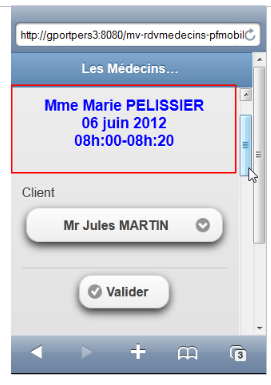
This will be the title of the vue3 view. As with the vue2 view, this title includes XML. It also includes formatted parameters to display the time slots,
 |
- lines 19-20: view vue3 is displayed,
- lines 23-24: the view vueErreurs is displayed if problems were encountered.
9.12. Confirming an appointment
Validating an appointment follows this sequence:
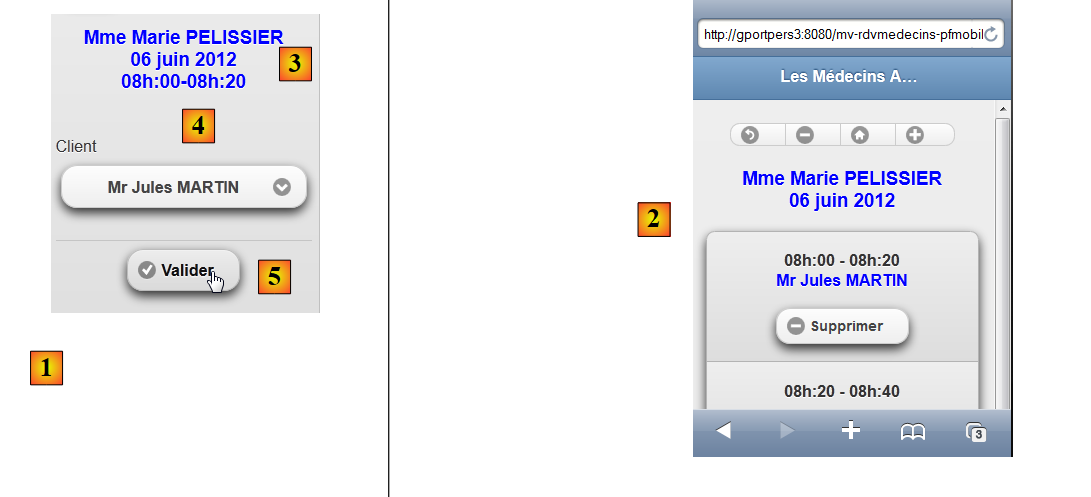 |
In [1], view3, and in [2], view2 after adding an appointment.
The code for [vue3.xhtml] (view3) is as follows:
<?xml version='1.0' encoding='UTF-8' ?>
<!DOCTYPE html PUBLIC "-//W3C//DTD XHTML 1.0 Transitional//EN" "http://www.w3.org/TR/xhtml1/DTD/xhtml1-transitional.dtd">
<html xmlns="http://www.w3.org/1999/xhtml"
      xmlns:h="http://java.sun.com/jsf/html"
      xmlns:p="http://primefaces.org/ui"
      xmlns:f="http://java.sun.com/jsf/core"
      xmlns:pm="http://primefaces.org/mobile"
      xmlns:ui="http://java.sun.com/jsf/facelets">

  <!-- View 3 -->
  <pm:header title="#{msg['page.titre']}" swatch="b"/>
  <pm:content>
    <h:form id="form3">
      <p:commandButton inline="true" value=" " icon="back" action="#{form.showVue2}" update=":vue2"/>
      <div align="center">
        <h3><h:outputText value="#{form.form3Titre}" style="color: blue" escape="false"/></h3>
      </div>
      <pm:field>
        <h:outputLabel value="#{msg['form3.client']}" for="choixClient"/>
        <h:selectOneMenu id="choixClient" value="#{form.idClient}">
          <f:selectItems value="#{form.clients}" var="client" itemLabel="#{client.titre} #{client.prenom} #{client.nom}" itemValue="#{client.id}"/>
        </h:selectOneMenu>
      </pm:field>
      <div align="center">
        <p:commandButton inline="true" value="#{msg['form3.valider']}" action="#{form.validerRv}" update=":vue2, :vueErreurs" icon="check"/>
      </div>
    </h:form>
  </pm:content>
</html>
- line 16: generates the title of the [3] view. Note the value of the escape attribute, which allows the XHTML characters in the title to be interpreted,
- lines 18–23: generate the combo box for clients and [4],
- line 25: produces the button [Valider] [5]. The method [Form].validerRv is associated with this button:
// validation Rv
  public String validerRv() {
    try {
      // retrieve an instance of the chosen slot
      Creneau creneau = metier.getCreneauById(idCreneauChoisi);
      // we add the Rv
      metier.ajouterRv(jour, creneau, hClients.get(idClient));
      // we update the agenda
      agendaMedecinJour = metier.getAgendaMedecinJour(medecin, jour);
      // form2 is displayed
      setForms(false, true, false, false);
      return "pm:vue2";
    } catch (Throwable th) {
      // error view
      prepareVueErreur(th);
      return "pm:vueErreurs";
    }
  }
This code has already been encountered in version 01. Note simply the display of the views:
- view2 (lines 11–12) if everything went well,
- the view vueErreurs (lines 15-16) otherwise.
9.13. Canceling an appointment
This corresponds to the following sequence:
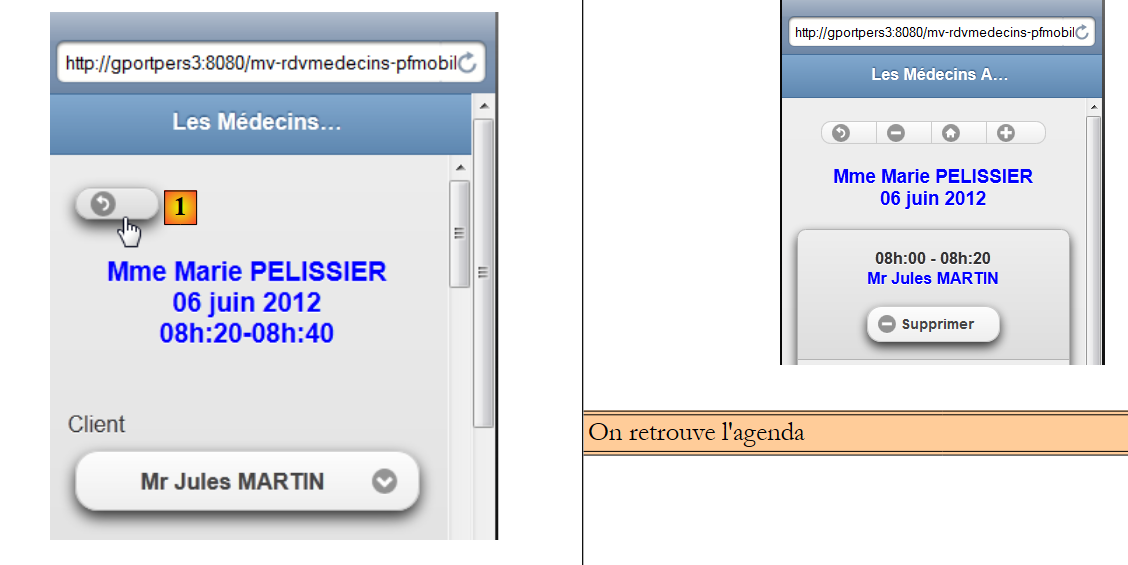 |
The [1] button in the [vue3.xhtml] view is as follows:
<p:commandButton inline="true" value=" " icon="back" action="#{form.showVue2}" update=":vue2"/>
The method [Form].showVue2 is therefore called. It simply displays view2:
  public String showVue2() {
    // view2
    setForms(false, true, false, false);
    return "pm:vue2?reverse=true";
}
9.14. Navigation in the calendar
In view2, buttons allow you to navigate the calendar:
Previous day:
 |
Next day:
 |
Today:
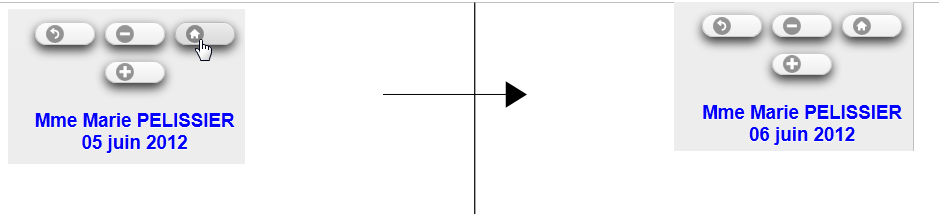 |
Not shown in the screenshots above, agenda is updated and displays the appointments for the newly selected day.
The tags for the three buttons in question are as follows in [vue2.xhtml]:
<pm:buttonGroup orientation="horizontal">
          <p:commandButton inline="true" icon="back" value=" " action="#{form.showVue1}" update=":vue1"/>
          <p:commandButton inline="true" icon="minus" value=" " action="#{form.getPreviousAgenda}" update=":form2"/>
          <p:commandButton inline="true" icon="home" value=" " action="#{form.getTodayAgenda}" update=":form2"/>
          <p:commandButton inline="true" icon="plus" value=" " action="#{form.getNextAgenda}" update=":form2"/>
        </pm:buttonGroup>
The methods [Form].getPreviousAgenda, [Form], getNextAgenda, and [Form].today were examined in Example 03.
9.15. Changing the display language
The language change is managed by a button on the home page:
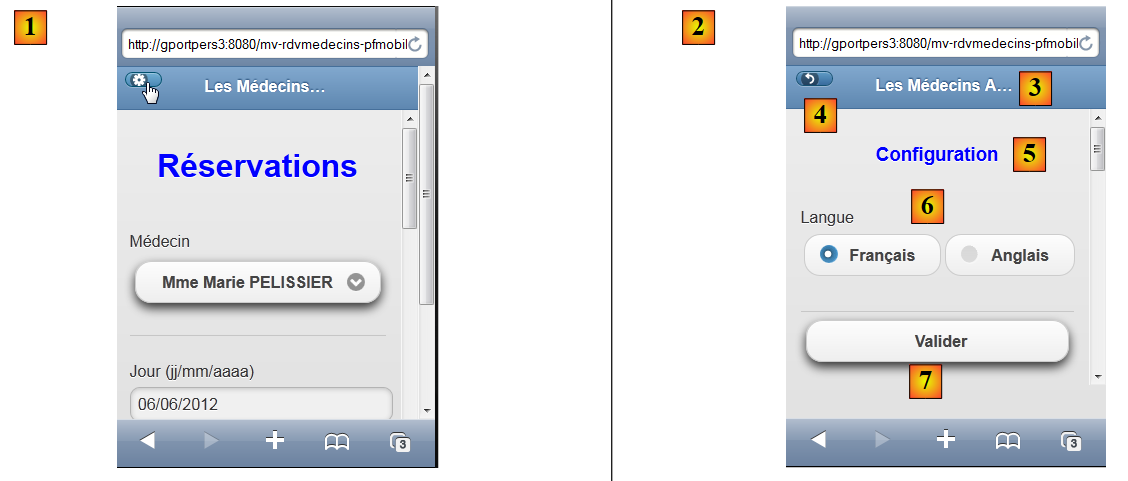 |
The button code is as follows:
<p:button icon="gear" value=" " href="#config" />
It therefore switches to the view config [2]. The view [config.xhtml] is as follows:
<?xml version='1.0' encoding='UTF-8' ?>
<!DOCTYPE html PUBLIC "-//W3C//DTD XHTML 1.0 Transitional//EN" "http://www.w3.org/TR/xhtml1/DTD/xhtml1-transitional.dtd">
<html xmlns="http://www.w3.org/1999/xhtml"
      xmlns:h="http://java.sun.com/jsf/html"
      xmlns:p="http://primefaces.org/ui"
      xmlns:f="http://java.sun.com/jsf/core"
      xmlns:pm="http://primefaces.org/mobile"
      xmlns:ui="http://java.sun.com/jsf/facelets">

  <!-- View 1 -->
  <pm:header title="#{msg['page.titre']}" swatch="b">
    <f:facet name="left">
      <p:button icon="back" value=" " href="#vue1?reverse=true" />
    </f:facet>
  </pm:header>
  <pm:content>
    <h:form id="frmConfig">
      <div align="center">
        <h3><h:outputText value="#{msg['config.titre']}" style="color: blue"/></h3>
      </div>
      <pm:field>
        <h:outputLabel value="#{msg['config.langue']}" for="langue"/>
        <h:selectOneRadio id="langue" value="#{form.locale}">
          <f:selectItem itemLabel="#{msg['config.langue.francais']}" itemValue="fr"/>
          <f:selectItem itemLabel="#{msg['config.langue.anglais']}" itemValue="en" />
        </h:selectOneRadio>
      </pm:field>
      <p:commandButton value="#{msg['config.valider']}" action="#{form.configurer}" update=":vue1"/>
    </h:form>
  </pm:content>
</html>
- line 11: displays [3],
- line 13: displays the button [4]. This button allows you to return to the vue1 view,
- line 17: the view's form,
- line 19: displays the view title [5],
- lines 21–27: display the radio buttons. The value (itemValue) of the selected radio button will be posted to the [Form].locale model (value attribute on line 23),
- line 28: displays the [Valider] button. The call to AJAX updates the vue1 view (update attribute). The method called is [Form].configurer:
public String configurer(){
    // after configuration - redisplay view1
    redirect();
    return null;
  }

  private void redirect() {
    // redirect the client to the servlet
    ExternalContext ctx = FacesContext.getCurrentInstance().getExternalContext();
    try {
      ctx.redirect(ctx.getRequestContextPath());
    } catch (IOException ex) {
      Logger.getLogger(Form.class.getName()).log(Level.SEVERE, null, ex);
    }
  }
The configure method (line 1) simply redirects the mobile browser to the application's URL page. Therefore, the [index.xhtml] page will be loaded:
<f:view xmlns="http://www.w3.org/1999/xhtml"
        xmlns:f="http://java.sun.com/jsf/core"
        xmlns:h="http://java.sun.com/jsf/html"
        xmlns:ui="http://java.sun.com/jsf/facelets"
        xmlns:p="http://primefaces.org/ui"
        xmlns:pm="http://primefaces.org/mobile"
        contentType="text/html"
        locale="#{form.locale}">

  <pm:page title="#{msg['page.titre']}">
    <pm:view id="vue1">
      ...
    </pm:view>
    ...
  </pm:page>
</f:view>
- Line 8: The view will use the language that has just been changed (locale attribute) and will display view1 (line 11).
9.16. Conclusion
Let’s review the architecture of the application we just built:
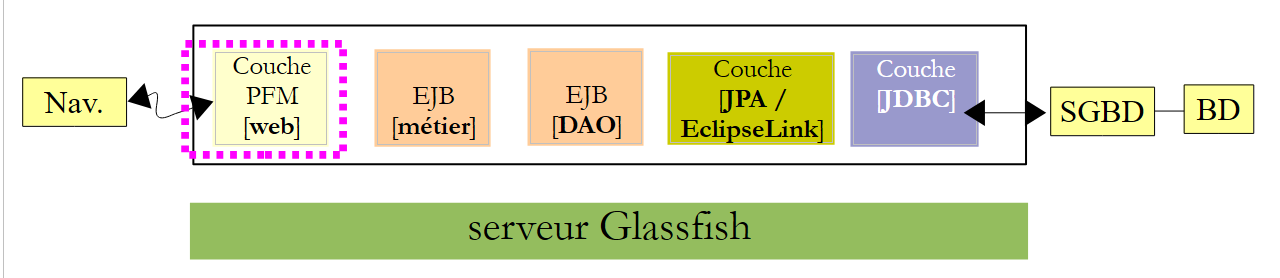 |
The transition to a mobile interface required rewriting the XHTML pages. The model, on the other hand, has changed very little. The lower layers [métier], [DAO], and [JPA] have not changed at all.
9.17. Eclipse Tests
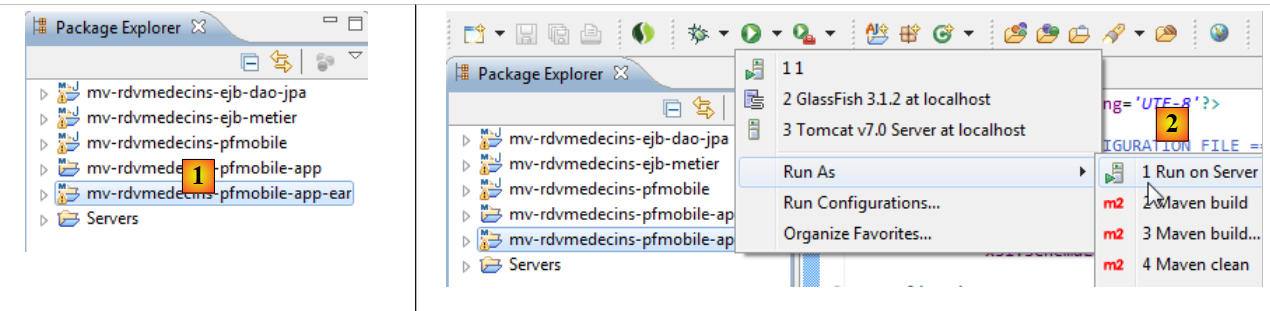
As we did for previous versions of the sample application, we will show how to test this version 05 with Eclipse. First, we import the Maven projects from sample 05 [1] into Eclipse:
 |
- [mv-rdvmedecins-ejb-dao-jpa]: the [DAO] and [JPA] layers,
- [mv-rdvmedecins-ejb-metier]: the [métier] layer,
- [mv-rdvmedecins-pfmobile]: the layer [web] implemented by the mobile layer Primefaces,
- [mv-rdvmedecins-pfmobile-app]: the parent of the enterprise project [mv-rdvmedecins-pfmobile-app-ear]. When the parent project is imported, the child project is automatically imported
- in [2], the enterprise project [mv-rdvmedecins-pfmobile-app-ear] is executed,
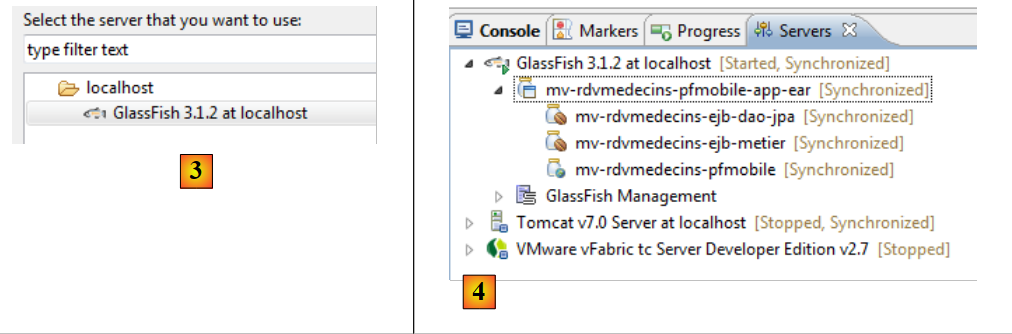 |
- in [3], the server Glassfish is selected,
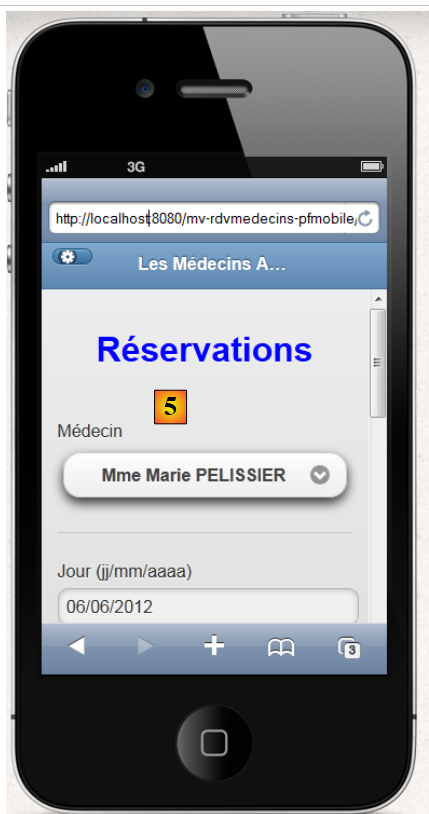
- In [4], on the [Servers] tab, the application has been deployed. It does not run on its own. You must request its URL [http://localhost:8080/mv-rdvmedecins-pfmobile/] in a browser or mobile simulator [5]:
 |