9. JAVA RMI
9.1. Introduction
We have seen how to create network applications using communication tools called sockets. In a client/server application built on these tools, the link between the client and the server is the communication protocol they have adopted to communicate. The two applications can be written in different languages: Java, for example, for the client, Perl for the server, or any other combination. We do indeed have two distinct applications connected by a communication protocol known to both. Furthermore, network access via sockets is not transparent to a Java application: it must use the Socket class, a class created specifically to manage these communication tools known as sockets.
JAVA RMI (Remote Method Invocation) enables the creation of network applications with the following characteristics:
- Client/server applications are Java applications at both ends of the communication
- The client can use objects located on the server as if they were local
- The network layer becomes transparent: applications do not have to worry about how information is transported from one point to another.
The last point is a factor in portability: if the network layer of a RMI application were to change, the application itself would not need to be rewritten. It is the RMI classes of the Java language that would need to be adapted to the new network layer.
The principle of RMI communication is as follows:
- A traditional Java application is written on machine A. It will act as a server. To do this, some of its objects will be “published” on machine A, where the application runs, and will then become services.
- A traditional Java application is written on machine B. It will act as the client. It will have access to the objects/services published on machine A; that is, via a remote reference, it will be able to manipulate them as if they were local. To do this, it will need to know the structure of the remote object it wants to access (methods & properties).
9.2. Let’s learn through an example
The theory behind the RMI interface is not simple. To make things clearer, we will walk through the process of writing a client/server application using the RMI package in Java. We’ll use an application found in many books on RMI: the client calls a single method of a remote object, which then returns a string. Here, we present a slight variation: the server echoes back what the client sends it. We have already presented such an application in this book, which relies on sockets.
9.2.1. The server application
9.2.1.1. Step 1: The object/server interface
A remote object is a class instance that must implement the Remote interface defined in the java.rmi package. The object’s methods that will be accessible remotely are those declared in an interface derived from the Remote interface:
import java.rmi.*;

 // remote interface p
ublic interface interEcho extends Remote{
     public String echo(String msg) throws java.rmi.RemoteException
; }
Here, we declare an interface named interEcho that declares an echo method as remotely accessible. This method may throw an exception of the RemoteException class, which encompasses all network-related errors.
9.2.1.2. Step 2: Writing the server object
In the next step, we define the class that implements the previous remote interface. This class must be derived from the UnicastRemoteObject class, which provides methods that allow remote method invocation.
import java.rmi.*;
import java.rmi.server.*;
import java.net.*;

// class implementing remote echo
public class srvEcho extends UnicastRemoteObject implements interEcho{

    // manufacturer
    public srvEcho() throws RemoteException{
        super();
    }// manufacturer end

    // method performing the echo
    public String echo(String msg) throws RemoteException{
        return  "["  + msg + "]";
    }// fine echo
}// end of class
In the previous class, we find:
- the method that echoes
- a constructor that does nothing except call the parent class’s constructor. It is there to declare that it can throw a RemoteException exception.
We will create an instance of this class with a main method. For an object/service to be accessible from the outside, it must be created and registered in the directory of externally accessible objects. A client wishing to access a remote object proceeds as follows:
- they contact the directory service on the machine where the desired object is located. This directory service operates on a port that the client must know (1099 by default). The client requests from the directory a reference to an object/service by providing its name. If this name corresponds to an object/service in the directory, the directory returns a reference to the client, through which the client can communicate with the remote object/service.
- From that point on, the client can use this remote object as if it were local
Returning to our server, we must create an object of type srvEcho and register it in the directory of externally accessible objects. This registration is performed using the *rebind* method of the *Naming* class:
where
name: the name that will be associated with the remote object
obj: the remote object
Our srvEcho class therefore becomes the following:
import java.rmi.*;
import java.rmi.server.*;
import java.net.*;

// class implementing remote echo
public class srvEcho extends UnicastRemoteObject implements interEcho{

    // manufacturer
    public srvEcho() throws RemoteException{
        super();
    }// manufacturer end

    // method performing the echo
    public String echo(String msg) throws RemoteException{
        return  "["  + msg + "]";
    }// fine echo

    // service creation
    public static void main (String arg[]){
        try{
            srvEcho serveurEcho=new srvEcho();
            Naming.rebind("srvEcho",serveurEcho);
            System.out.println("Serveur d’écho prêt");
        } catch (Exception e){
            System.err.println(" Erreur "  + e + "  lors du lancement du serveur d’écho ");
        }
    }// hand
}// end of class
When reading the previous program, it seems as though it will stop immediately after creating and registering the echo service. This is not the case. Because the srvEcho class is derived from the UnicastRemoteObject class, the created object runs indefinitely: it listens for requests from clients on an anonymous port, i.e., one chosen by the system based on the circumstances. Service creation is asynchronous: in the example, the *main* method creates the service and continues execution; it will display “Echo server ready.”
9.2.1.3. Step 3: Compiling the server application
At this point, we can compile our server. We compile the interEcho.java file from the interEcho interface as well as the srvEcho.java file from the srvEcho class. We obtain the corresponding .class files: interEcho.class and srvEcho.class.
9.2.1.4. Step 4: Writing the client
We write a client to which we pass the URL from the echo server as a parameter and which
- reads a line typed on the keyboard
- sends it to the echo server
- displays the response it sends
- loops back to step 1 and stops when the typed line is “end”.
This results in the following client:
import java.rmi.*;
 import java.io.*

; public class cltEch

    o { public static void main(String a
        rg[]){ // syntax : cltEcho URLService

        // argument verification
        if(arg.length!=1){
            System.err.println("Syntaxe : pg url_service_rmi");
            System.exit(1);
        }

        // client-server dialogue
        String urlService=arg[0];
        BufferedReader in=null;
        String msg=null;
        String reponse=null;
        interEcho serveur=null;

        try{
            // open keyboard flow
            in=new BufferedReader(new InputStreamReader(System.in));
            // service location
            serveur=(interEcho) Naming.lookup(urlService);
            // loop for reading msg to be sent to echo server
            System.out.print("Message : ");
            msg=in.readLine().toLowerCase().trim();
            while(! msg.equals("fin")){
                // send msg to server and receive response
                reponse=serveur.echo(msg);
                // follow-up
                System.out.println("Réponse serveur : " + reponse);
                // next msg
                System.out.print("Message : ");
                msg=in.readLine().toLowerCase().trim();
            }// while
            // it's over
            System.exit(0);
        // error management
        } catch (Exception e){
            System.err.println("Erreur : " + e);
            System.exit(2);
        }// try
    }// hand
}// class
There is nothing particularly special about this client except for the statement that requests a server reference:
Recall that our echo service was registered in the service directory of the machine where it is located using the instruction:
Naming.rebind("srvEcho",serveurEcho);
The client therefore also uses a method from the Naming class to obtain a reference to the server it wants to use. The lookup method used takes the url of the requested service as a parameter. This has the form of a classic url:
where
rmi: optional - RMI protocol
machine: name or IP address of the machine on which the echo server runs - optional, default is localhost.
port: listening port of this machine’s directory service—optional, default 1099
nom_service: name under which the requested service was registered (srvEcho in our example)
What is retrieved is an instance of the remote interface interEcho. Assuming the client and server are not on the same machine, when compiling the client cltEcho.java, the file interEcho.class—the result of compiling the remote interface interEcho—must be present in the same directory; otherwise, a compilation error will occur on the lines referencing this interface.
9.2.1.5. Step 5: Generating the .class files required for the client-server application
To clearly distinguish between the server-side and client-side components, we will place the server in the echo\server directory and the client in the echo\client directory.
The server directory contains the following source files:
E:\data\java\RMI\echo\serveur>dir *.java

INTERE~1 JAV           158  09/03/99  15:06 interEcho.java
SRVECH~1 JAV           759  09/03/99  15:07 srvEcho.java
After compiling these two source files, we have the following .class files:
E:\data\java\RMI\echo\serveur>dir *.class

SRVECH~1 CLA         1 129  09/03/99  15:58 srvEcho.class
INTERE~1 CLA           256  09/03/99  15:58 interEcho.class
In the client directory, we find the following source file:
as well as the file interEcho.class, which was generated during server compilation:
After compiling the source file, we have the following .class files:
E:\data\java\RMI\echo\client>dir *.class

CLTECH~1 CLA         1 506  09/03/99  16:08 cltEcho.class
INTERE~1 CLA           256  09/03/99  15:59 interEcho.class
If you try to run the client cltEcho, you get the following error:
E:\data\java\RMI\echo\client>j:\jdk12\bin\java cltEcho rmi://localhost/srvEcho
Erreur : java.rmi.UnmarshalException: error unmarshalling return; nested exception is:
        java.lang.ClassNotFoundException: srvEcho_Stub
If you try to run the srvEcho server, you get the following error:
E:\data\java\RMI\echo\serveur>j:\jdk12\bin\java srvEcho
Erreur java.rmi.StubNotFoundException: Stub class not found: srvEcho_Stub; nested exception is:
        java.lang.ClassNotFoundException: srvEcho_Stub  lors du lancement du serveur d’écho
In both cases, the Java Virtual Machine indicates that it could not find the class srvEcho_stub. Indeed, we have never heard of this class before. In the client, the server was located using the following statement:
Here, urlService is the string rmi://localhost/srvEcho with
Rmi: RMI protocol
Localhost: the machine where the server is running—in this case, the same machine as the client. The syntax is normally machine:port. If no port is specified, port 1099 is used by default. The server’s directory service is listening on this port.
srvEcho: this is the name of the specific service being requested
No errors were reported during compilation. The file interEcho.class on the remote interface simply needed to be available.
At runtime, the virtual machine requires the presence of a srvEcho_stub.class file if the requested service is srvEcho; generally, a X_stub.class file is required for service X. This file is only required at runtime, not during client compilation. The same applies to the server. So what is this file?
On the server, there is the srvEcho.class class, which is our remote object/service. The client, even if it does not need this class, still needs a kind of image of it in order to communicate with it. In fact, the client does not send its requests directly to the remote object: it sends them to its local image srvEcho_stub.class located on the same machine as itself. This local image srvEcho_stub.class communicates with a similar image (srvEcho_stub.class) located on the server. This image is created from the server’s .class file using a Java tool called rmic. On Windows, the command:
will generate, from the srvEcho.class file, two other .class files:
E:\data\java\RMI\echo\serveur>dir *.class

SRVECH~2 CLA         3 264  09/03/99  16:57 srvEcho_Stub.class
SRVECH~3 CLA         1 736  09/03/99  16:57 srvEcho_Skel.class
The file srvEcho_stub.class, which the client and server need at runtime, is indeed present here. There is also a file named srvEcho_Skel.class, the purpose of which is currently unknown. We make a copy of the srvEcho_stub.class file in the client and server directories and delete the srvEcho_Skel.class file. We therefore have the following files:
on the server side:
E:\data\java\RMI\echo\serveur>dir *.class

SRVECH~1 CLA         1 129  09/03/99  15:58 srvEcho.class
INTERE~1 CLA           256  09/03/99  15:58 interEcho.class
SRVECH~1 CLA         3 264  09/03/99  16:01 srvEcho_Stub.class
On the client side:
E:\data\java\RMI\echo\client>dir *.class

CLTECH~1 CLA         1 506  09/03/99  16:08 cltEcho.class
INTERE~1 CLA           256  09/03/99  15:59 interEcho.class
SRVECH~1 CLA         3 264  09/03/99  16:01 srvEcho_Stub.class
9.2.1.6. Step 6: Running the Echo Client-Server Application
We are ready to run our client-server application. Initially, the client and server will run on the same machine. First, we need to launch our server application. Recall that this:
- creates the service
- registers it in the service directory of the machine on which the echo server is running
This last step requires a registry service. This is started with the command:
rmiregistry is the registry service. Here, it is launched in the background in a Windows Command Prompt window using the start command. With the registry active, we can create the echo service and register it in the service registry. Again, it is launched in the background using a start command:
The echo server runs in a new window DOS and displays the requested output:
All that remains is to launch and test our client:
E:\data\java\RMI\echo\client>j:\jdk12\bin\java cltEcho rmi://localhost/srvEcho
Message : msg1
Réponse serveur : [msg1]
Message : msg2
Réponse serveur : [msg2]
Message : fin
9.2.1.7. The client and server on two different machines
In the previous example, the client and server were on the same machine. Now we place them on different machines:
- the server on a Windows machine
- the client on a Linux machine
The server is launched as before on the Windows machine. On the Linux machine, we have transferred the client’s .class files:
shiva[serge]:/home/admin/serge/java/rmi/client#
$ dir
total 9
drwxr-xr-x   2 serge    admin        1024 Mar 10 10:02 .
drwxr-xr-x   4 serge    admin        1024 Mar 10 10:01 ..
-rw-r--r-- 1 serge admin 1506 Mar 10 10:02 cltEcho.class
-rw-r--r-- 1 serge admin 256 Mar 10 10:02 interEcho.class
-rw-r--r-- 1 serge admin 3264 Mar 10 10:02 srvEcho_Stub.class
The client is launched:
$ java cltEcho rmi://tahe.istia.univ-angers.fr/srvEcho
Message : msg1
Erreur : java.rmi.ServerException: RemoteException occurred in server thread; nested exception is:
      java.rmi.UnmarshalException: error unmarshalling call header; nested exception is:
      java.rmi.UnmarshalException: skeleton class not found but required for client version
So we have an error: the Java Virtual Machine is apparently requesting the file srvEcho_skel.class, which was generated by the rmic utility but had not been used until now. We recreate it and transfer it to the Linux machine as well:
shiva[serge]:/home/admin/serge/java/rmi/client#
$ dir
total 11
drwxr-xr-x   2 serge    admin        1024 Mar 10 10:17 .
drwxr-xr-x   4 serge    admin        1024 Mar 10 10:01 ..
-rw-r--r-- 1 serge admin 1506 Mar 10 10:02 cltEcho.class
-rw-r--r-- 1 serge admin 256 Mar 10 10:02 interEcho.class
-rw-r--r-- 1 serge admin 1736 Mar 10 10:17 srvEcho_Skel.class
-rw-r--r-- 1 serge admin 3264 Mar 10 10:02 srvEcho_Stub.class
We get the same error as before... So we think it over and reread the docs on RMI. We eventually conclude that perhaps the server itself needs the infamous srvEcho_Skel.class file. We then restart the server on the Windows machine with both the srvEcho_Stub.class and srvEcho_Skel.class files present:
E:\data\java\RMI\echo\serveur>dir *.class

SRVECH~1 CLA         1 129  09/03/99  15:58 srvEcho.class
INTERE~1 CLA           256  09/03/99  15:58 interEcho.class
SRVECH~2 CLA         3 264  10/03/99   9:05 srvEcho_Stub.class
SRVECH~3 CLA         1 736  10/03/99   9:05 srvEcho_Skel.class

E:\data\java\RMI\echo\serveur>start j:\jdk12\bin\java srvEcho
Then, on the Linux machine, we test the client again, and this time it works:
shiva[serge]:/home/admin/serge/java/rmi/client#
$ dir *.class
-rw-r--r-- 1 serge admin 1506 Mar 10 10:02 cltEcho.class
-rw-r--r-- 1 serge admin 256 Mar 10 10:02 interEcho.class
-rw-r--r-- 1 serge admin 3264 Mar 10 10:02 srvEcho_Stub.class

shiva[serge]:/home/admin/serge/java/rmi/client#
$ java cltEcho rmi://tahe.istia.univ-angers.fr/srvEcho
Message : msg1
Réponse serveur : [msg1]
Message : msg2
Réponse serveur : [msg2]
Message : fin
We can therefore conclude that, on the server side, both files—srvEcho_Stub.class and srvEcho_Skel.class—must be present. On the client side, only the file srvEcho_Stub.class has been necessary so far. It turned out to be essential when the client and server were on the same Windows machine. On Linux, we’ll remove it to see what happens...
shiva[serge]:/home/admin/serge/java/rmi/client#
$ dir *.class
-rw-r--r-- 1 serge admin 1506 Mar 10 10:02 cltEcho.class
-rw-r--r-- 1 serge admin 256 Mar 10 10:02 interEcho.class

shiva[serge]:/home/admin/serge/java/rmi/client#
$ java cltEcho rmi://tahe.istia.univ-angers.fr/srvEcho
*** Security Exception: No security manager, stub class loader disabled ***
java.rmi.RMISecurityException: security.No security manager, stub class loader disabled
        at sun.rmi.server.RMIClassLoader.getClassLoader(RMIClassLoader.java:84)
        at sun.rmi.server.MarshalInputStream.resolveClass(MarshalInputStream.java:88)
        at java.io.ObjectInputStream.inputClassDescriptor(ObjectInputStream.java)
        at java.io.ObjectInputStream.readObject(ObjectInputStream.java)
        at java.io.ObjectInputStream.inputObject(ObjectInputStream.java)
        at java.io.ObjectInputStream.readObject(ObjectInputStream.java)
        at sun.rmi.registry.RegistryImpl_Stub.lookup(RegistryImpl_Stub.java:105)
        at java.rmi.Naming.lookup(Naming.java:60)
        at cltEcho.main(cltEcho.java:28)
Erreur : java.rmi.UnexpectedException: Unexpected exception; nested exception is:
        java.rmi.RMISecurityException: security.No security manager, stub class loader disabled
We have an interesting error that seems to indicate the Java Virtual Machine attempted to load the stub class but failed due to the absence of a "security manager." We recall seeing something about this in the documentation. We dive back in... and find that the server must create and install a security manager to guarantee to the clients instances requesting class loading that those classes are safe. Without this security manager, class loading is impossible. That seems to fit: our Linux client requested the srvEcho_stub.class class it needs from the server, and the server refused, stating that no security manager had been installed. So we modify the code of the server’s main function as follows:
     // service creation
    public static void main (String arg[]){

         // installation of a security manager Sy
        stem.setSecurityManager(new RMISecurityManager());

        // service launch and registration
        try{
            srvEcho serveurEcho=new srvEcho();
            Naming.rebind("srvEcho",serveurEcho);
            System.out.println("Serveur d’écho prêt");
        } catch (Exception e){
            System.err.println(" Erreur "  + e + "  lors du lancement du serveur d’écho ");
        }
    }// hand
We compile and generate the files srvEcho_stub.class and srvEcho_Skel.class using the rmic tool. We start the directory service (rmiregistry) and then the server, and we get an error that we didn’t have before!
Erreur java.security.AccessControlException: access denied (java.net.SocketPermission 127.0.0.1:1099 connect,resolve) lors du lancement du serveur d’écho
The security manager seems to have been too effective. We review the documentation again... We realize that when a security manager is active, you must specify the program’s permissions when launching it. This is done with the following command:
start j:\jdk12\bin\java -Djava.security.policy=mypolicy srvEcho
where
java.security.policy is a keyword
mypolicy is a text file defining the program's permissions. Here, it is as follows:
The program has full permissions here.
Let’s start over. Go to the server directory and do the following:
- start the directory service: start j:\jdk12\bin\rmiregistry
- Start the server: start j:\jdk12\bin\java -Djava.security.policy=mypolicy srvEcho
And this time, the echo server (but not the client yet) starts correctly. Now you can try the following:
- stop the echo server, then the directory service
- restart the directory service while in a directory other than the server’s
- return to the server directory start the echo server - you will get the following error:
Erreur java.rmi.ServerException: RemoteException occurred in server thread; nes
ted exception is:
java.rmi.UnmarshalException: error unmarshalling arguments; nested exception is:
java.lang.ClassNotFoundException: srvEcho_Stub  lors du lancement du serveur d’écho
We can conclude that the directory from which the directory service is launched matters. Here, Java could not find the srvEcho_stub.class class because the directory service was not launched from the server directory. When launching the server, you can specify the directory where the classes required by the server are located:
start j:\jdk12\bin\java
-Djava.security.policy=mypolicy
-Djava.rmi.server.codebase=file:/e:/data/java/rmi/echo/serveur/
srvEcho
The command is on a single line. The keyword java.rmi.server.codebase is used to specify the path to the directory containing the classes required by the server. Here, this URL specifies the file protocol, which is the protocol for accessing local files, and the directory containing the server’s .class files. Therefore, if we proceed as follows:
- stop the directory service
- restart the directory service from a directory other than the server’s
- in the server directory, start the server with the command (a single line):
 start j:\jdk12\bin\java
-Djava.security.policy=mypolicy
-Djava.rmi.server.codebase=file:/e:/data/java/rmi/echo/serveur/
srvEcho
The server is now running correctly. We can now move on to the client. Let’s test it:
shiva[serge]:/home/admin/serge/java/rmi/client#
$ dir *.class
-rw-r--r-- 1 serge admin 1506 Mar 10 14:28 cltEcho.class
-rw-r--r-- 1 serge admin 256 Mar 10 10:02 interEcho.class

shiva[serge]:/home/admin/serge/java/rmi/client#
$ java cltEcho rmi://tahe.istia.univ-angers.fr/srvEcho
*** Security Exception: No security manager, stub class loader disabled ***
java.rmi.RMISecurityException: security.No security manager, stub class loader disabled
        at sun.rmi.server.RMIClassLoader.getClassLoader(RMIClassLoader.java:84)
        at sun.rmi.server.MarshalInputStream.resolveClass(MarshalInputStream.java:88)
        at java.io.ObjectInputStream.inputClassDescriptor(ObjectInputStream.java)
        at java.io.ObjectInputStream.readObject(ObjectInputStream.java)
        at java.io.ObjectInputStream.inputObject(ObjectInputStream.java)
        at java.io.ObjectInputStream.readObject(ObjectInputStream.java)
        at sun.rmi.registry.RegistryImpl_Stub.lookup(RegistryImpl_Stub.java:105)
        at java.rmi.Naming.lookup(Naming.java:60)
        at cltEcho.main(cltEcho.java:31)
Erreur : java.rmi.UnexpectedException: Unexpected exception; nested exception is:
        java.rmi.RMISecurityException: security.No security manager, stub class loader disabled
We get the same error indicating that a security handler is missing. We think we might have made a mistake and that the client is supposed to create its own security handler. We leave the server with its security handler but create one for the client as well. The main function of the cltEcho.java client then becomes:
public static void main(String arg[]){
         // syntax : cltEcho machine po
        rt // machine: machine where the echo server
        operates // port: port where the service directory operates on the echo servic

        e machine // argument ve
        rification if(ar
            g.length!=1){ System.err.println("Syntaxe : pg u
            rl_service_rmi"
        )

        ; System.exit(1); } // installation
         of a security manager System.setSecurityManager(n

        ew RMISecurityManager());
         // client-server dia
        logue String urlServi
        ce=arg[0]; Buf
        feredReader in=null;
         String msg=null; S

        tring reponse=null; interEcho serveur=null; try{
            ....
        } catch (Exception e){
            ....
        }// try
    }// hand
We then proceed as follows:
- recompile cltEcho.java
- transfer the .class files to the Linux machine
shiva[serge]:/home/admin/serge/java/rmi/client#
$ dir *.class
-rw-r--r-- 1 serge admin 1506 Mar 10 14:28 cltEcho.class
-rw-r--r-- 1 serge admin 256 Mar 10 10:02 interEcho.class
- We launch the client
$ java cltEcho rmi://tahe.istia.univ-angers.fr/srvEcho

java.io.FileNotFoundException: /e:/data/java/rmi/echo/serveur/srvEcho_Stub.class
        at java.io.FileInputStream.<init>(FileInputStream.java)
        at sun.net.www.protocol.file.FileURLConnection.connect(FileURLConnection.java:150)
        at sun.net.www.protocol.file.FileURLConnection.getInputStream(FileURLConnection.java:170)
        at sun.applet.AppletClassLoader.loadClass(AppletClassLoader.java:119)
        at sun.applet.AppletClassLoader.findClass(AppletClassLoader.java:496)
        at sun.applet.AppletClassLoader.loadClass(AppletClassLoader.java:199)
        at sun.rmi.server.RMIClassLoader.loadClass(RMIClassLoader.java:159)
        at sun.rmi.server.MarshalInputStream.resolveClass(MarshalInputStream.java:97)
        at java.io.ObjectInputStream.inputClassDescriptor(ObjectInputStream.java)
        at java.io.ObjectInputStream.readObject(ObjectInputStream.java)
        at java.io.ObjectInputStream.inputObject(ObjectInputStream.java)
        at java.io.ObjectInputStream.readObject(ObjectInputStream.java)
        at sun.rmi.registry.RegistryImpl_Stub.lookup(RegistryImpl_Stub.java:105)
        at java.rmi.Naming.lookup(Naming.java:60)
        at cltEcho.main(cltEcho.java:31)
File not found when looking for: srvEcho_Stub
Erreur : java.rmi.UnmarshalException: Return value class not found; nested exception is:
        java.lang.ClassNotFoundException: srvEcho_Stub
Despite appearances, we’re making progress: the error is no longer the same. We can see that the client was able to request the class srvEcho_Stub.class from the server, but the server couldn’t find it. Therefore, the client must have a security manager if it wants to be able to request classes from the server.
If we look at the previous error, we see that the file srvEcho_Stub.class was searched for in the directory e:/data/java/rmi/echo/server/ and was not found. Yet that is exactly where it is. If we look more closely at the list of methods involved in the error, we find this one: sun.net.www.protocol.file.FileURLConnection.getInputStream. The client appears to have opened a stream with an object of type FileURLConnection. We suspect that all of this has to do with how we started our server:
start j:\jdk12\bin\java
-Djava.security.policy=mypolicy
-Djava.rmi.server.codebase=file:/e:/data/java/rmi/echo/serveur/
srvEcho
The error message seems to refer to the value of the java.rmi.server.codebase keyword. When we look at the documentation again, we see that the value of this keyword is, in the examples provided, always: http://.., c.a.d. and that the protocol used is http. It is not clear how the client requests and obtains its classes from the server. Perhaps it requests them using the URL from the java.rmi.server.codebase, URL keyword specified when the server is launched. We therefore decide to launch the server using the following new command:
start j:\jdk12\bin\java -Djava.security.policy=mypolicy
-Djava.rmi.server.codebase=http://tahe.istia.univ-angers.fr/rmi/echo/ srvEcho
The protocol is now http. We must move the .class files to a location accessible to the http server on the machine where the classes will be stored. In our example, the server is running on a Windows machine with a Microsoft http PWS server. The root of this server is d:\Inetpub\wwwroot. Therefore, proceed as follows:
- Create the directory d:\Inetpub\wwwroot\rmi\echo
- Place the server’s .class files and the mypolicy file in it
- Start the web server if it is not already running
- Restart the directory service (rmiregistry)
- restart the server with the command
start j:\jdk12\bin\java -Djava.security.policy=mypolicy
-Djava.rmi.server.codebase=http://tahe.istia.univ-angers.fr/rmi/echo/ srvEcho
- On the Linux machine, launch the client:
shiva[serge]:/home/admin/serge/java/rmi/client#
$ dir *.class
-rw-r--r-- 1 serge admin 1622 Mar 10 14:37 cltEcho.class
-rw-r--r-- 1 serge admin 256 Mar 10 10:02 interEcho.class

shiva[serge]:/home/admin/serge/java/rmi/client#
$ java cltEcho rmi://tahe.istia.univ-angers.fr/srvEcho
Message : msg1
Réponse serveur : [msg1]
Message : msg2
Réponse serveur : [msg2]
Message : fin
Phew! It works. The client successfully retrieved the infamous srvEcho_Stub.class file.
All of this has given us some ideas, and we’re wondering if the client running on the server’s Windows machine would also work without the srvEcho_Stub.class file. We navigate to the client’s directory, delete the srvEcho_Stub.class file if it’s there, and launch the client the same way as on Linux:
E:\data\java\RMI\echo\client>dir *.class

CLTECH~1 CLA         1 622  10/03/99  14:12 cltEcho.class
INTERE~1 CLA           256  09/03/99  15:59 interEcho.class

E:\data\java\RMI\echo\client>j:\jdk12\bin\java -Djava.security.policy=mypolicy cltEcho rmi://tahe.istia.univ-angers.fr/srvEcho

Message : nouveau message
Réponse serveur : [nouveau message]
Message : fin
9.2.1.8. Summary
Windows server side:
- The server has a security manager
- it was launched with the following options: start j:\jdk12\bin\java -Djava.security.policy=mypolicy
-Djava.rmi.server.codebase=http://tahe.istia.univ-angers.fr/rmi/echo/ srvEcho
Client side (Linux or Windows)
- The client has a security manager
- on Linux, it was launched by java cltEcho rmi://tahe.istia.univ-angers.fr/srvEcho
- On Windows, it was launched by j:\jdk12\bin\java -Djava.security.policy=mypolicy cltEcho rmi://tahe.istia.univ-angers.fr/srvEcho
9.2.1.9. Echo server on Linux, clients on Windows and Linux
We are now moving the server to a Linux machine and testing clients on Linux and Windows. The procedure is as follows:
- Move the server’s .class files to the Linux machine
shiva[serge]:/home/admin/serge/WWW/rmi/echo/serveur#
$ dir
total 11
drwxr-xr-x   2 serge    admin        1024 Mar 10 16:15 .
drwxr-xr-x   3 serge    admin        1024 Mar 10 16:09 ..
-rw-r--r-- 1 serge admin 256 Mar 10 16:09 interEcho.class
-rw-r--r-- 1 serge admin 1245 Mar 10 16:09 srvEcho.class
-rw-r--r-- 1 serge admin 1736 Mar 10 16:09 srvEcho_Skel.class
-rw-r--r-- 1 serge admin 3264 Mar 10 16:09 srvEcho_Stub.class
- Because the class srvEcho_Stub.class will be requested by clients, the directory chosen for the server classes is a directory accessible to the http server on the Linux machine. Here, the URL for this directory is http://shiva.istia.univ-angers.fr/~serge/rmi/echo/server
- The directory service is running in the background: /usr/local/bin/jdk/rmiregistry &
- the server is launched in the background: /usr/local/bin/jdk/bin/java
-Djava.rmi.server.codebase=http://shiva.istia.univ-angers.fr/~serge/rmi/echo/server/
srvEcho &
We can test the clients. The Windows client first.
- Go to the client directory on the Windows machine
- Launch the client with the command:
E:\data\java\RMI\echo\client>j:\jdk12\bin\java -Djava.security.policy=mypolicy cltEcho rmi://shiva.istia.univ-angers.fr/srvEcho
Message : msg1
Réponse serveur : [msg1]
Message : fin
Testing the Linux client:
shiva[serge]:/home/admin/serge/java/rmi/echo/client#
$ java cltEcho srvEcho
Message : msg1
Réponse serveur : [msg1]
Message : msg2
Réponse serveur : [msg2]
Message : fin
Note that for the Linux client running on the same machine as the echo server, it was not necessary to specify a machine in the URL of the requested service.
9.3. Second example: Server SQL on a Windows machine
9.3.1. The problem
We saw in the JDBC chapter how to manage relational databases. In the examples presented, the applications and the database used were on the same Windows machine. Here, we propose writing a RMI server on a Windows machine, which would allow remote clients clients to access the public ODBC databases on the machine hosting the server.
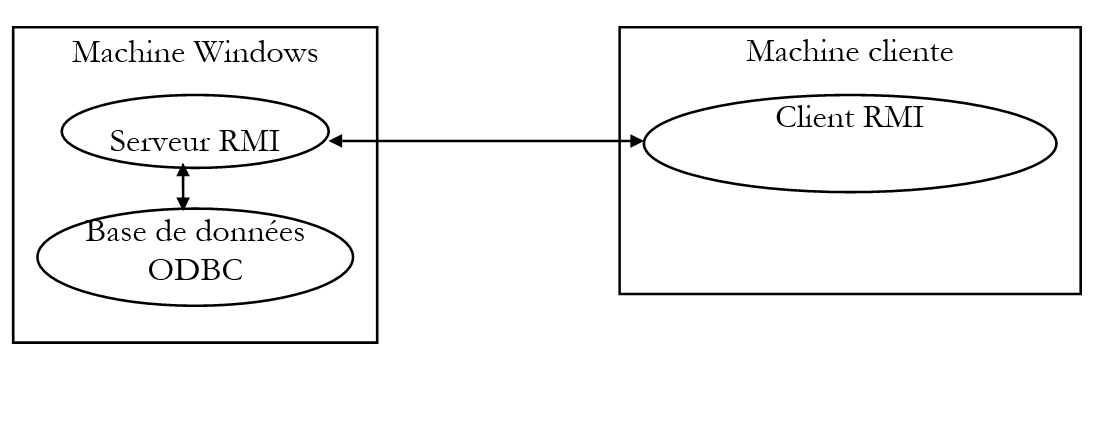
The RMI client could perform three operations:
- connect to the database of its choice
- send SQL requests
- close the connection
The server executes the client’s SQL requests and sends the results back to the client. This is its primary function, which is why we will refer to it as a SQL server.
We apply the various steps seen previously with the echo server.
9.3.2. Step 1: The remote interface
The remote interface is the interface that lists the methods of the RMI server that will be accessible to clients and RMI. We will use the following interface:
import java.rmi.*;

 // remote interface p
ublic interface interSQL extends Remote{
     public String connect(String pilote, String url, String id, String mdp
        ) throws java.rmi.RemoteExcept
    ion; public String[] executeSQL(String requete, String separa
        teur) throws java.rmi.RemoteE
    xception; public Str
        ing close() throws java.rmi.Re
moteException; }
The roles of the various methods are as follows:
Connect: The client connects to a remote database, providing the driver, url JDBC, as well as its identity, id, and its password, mdp, to access the database. The server returns a string indicating the result of the connection:
executeSQL: the client requests the execution of a query SQL on the database to which it is connected. It specifies the character that should separate the fields in the results returned to it. The server returns an array of strings:
for a database update request, where n is the number of rows updated
if the query generated an error
if the query returned no results
if the query returned results. The rows returned by the server are the query results.
close: the client closes its connection to the remote database. The server returns a string indicating the result of this closure:
9.3.3. Step 2: Server code
The Java source code for the SQL server follows. Understanding it requires familiarity with JDBC database management as well as the construction of RMI servers. The program comments should facilitate understanding.
// imported packages
import java.rmi.*;
import java.rmi.server.*;
import java.sql.*;
import java.util.*;

// class srvSQL
public class srvSQL extends UnicastRemoteObject implements interSQL{

    // global class data
    private Connection DB;

    // ------------- manufacturer
    public srvSQL() throws RemoteException{
        super();
    }

    // --------------- connect
    public String connect(String pilote, String url, String id,
        String mdp) throws RemoteException{

        // connection to the url database using the pilot driver
        // identification with identity id and password mdp

        String resultat=null;            // result of the method
        try{
            // loading the driver
            Class.forName(pilote);
            // connection request
            DB=DriverManager.getConnection(url,id,mdp);
            // ok
            resultat="200 Connexion réussie";
        } catch (Exception e){
            // error
            resultat="500 Echec de la connexion (" + e + ")";
        }
        // end
        return resultat;
    }

    // ------------- executeSQL
    public String[] executeSQL(String requete, String separateur)
        throws RemoteException{

        // executes a SQL query on the DB database
        // and puts the results in an array of strings

        // data required to execute the request
        Statement S=null;
        ResultSet RS=null;
        String[] lignes=null;
        Vector resultats=new Vector();
        String ligne=null;

        try{
            // create query container
            S=DB.createStatement();
            // request execution
            if (! S.execute(requete)){
                // update request
                // returns the number of lines updated
                lignes=new String[1];
                lignes[0]="100 "+S.getUpdateCount();
                return lignes;
            }
            // it was a query request
            // retrieve results
            RS=S.getResultSet();
            // number of Resultset fields
            int nbChamps=RS.getMetaData().getColumnCount();
            // we exploit them
            while(RS.next()){
                // create results line
                ligne="101 ";
                for (int i=1;i<nbChamps;i++)
                    ligne+=RS.getString(i)+separateur;
                ligne+=RS.getString(nbChamps);
                // add to results vector
                resultats.addElement(ligne);
            }// while
            // end of results processing
            // free up resources
            RS.close();
            S.close();
            // we return the results
            int nbLignes=resultats.size();
            if (nbLignes==0){
                lignes=new String[1];
                lignes[0]="501 Pas de résultats";
            } else {
                lignes=new String[resultats.size()];
                for(int i=0;i<lignes.length;i++)
                    lignes[i]=(String) resultats.elementAt(i);
            }//if
            return lignes;
        } catch (Exception e){
            // error
            lignes=new String[1];
            lignes[0]="500 " + e;
            return lignes;
        }// try-catch
    }// executeSQL

    // --------------- close
    public String close() throws RemoteException {
        // closes database connection
        String resultat=null;
        try{
            DB.close();
            resultat="200 Base fermée";
        } catch (Exception e){
            resultat="500 Erreur à la fermeture de la base ("+e+")";
        }
        // return result
        return resultat;
    }

    // ----------- hand
    public static void main (String[] args){

        // security manager
        System.setSecurityManager(new RMISecurityManager());

        // service launch
        srvSQL serveurSQL=null;
        try{
            // creation
            serveurSQL=new srvSQL();
            // registration
            Naming.rebind("srvSQL",serveurSQL);
            // follow-up
            System.out.println("Serveur SQL prêt");
        } catch (Exception e){
            // error
            System.err.println("Erreur lors du lancement du serveur SQL ("+ e +")");
        }// try-catch
    }// hand

}// class
9.3.4. RMI client script
The RMI server client is called with the following parameters:
urlserviceAnnuaire: url RMI of the directory service that registered the server SQL
driver: driver that the SQL server must use to manage the database
urlBase: url JDBC of the database to be managed
id: client ID or null if no ID
password: client password or null if no password
separator: character that the SQL server must use to separate the fields in the result rows of a query
Here is an example of possible parameters:
where:
RMI name of the server SQL
the standard driver for databases with an ODBC interface
to use an articles database declared in the list of public databases ODBC on the Windows machine
no identity
no password
the fields in the results will be separated by a comma
Once launched with the above settings, the client follows these steps:
- They connect to the RMI srvSQL server, which is a RMI server on the same machine as the client
- they request a connection to the articles database
- it prompts the user to type a query SQL on the keyboard
- it sends it to the server SQL
- it displays the results returned by the server on the screen
- it asks the user again to type a query SQL on the keyboard. It will stop when the query is finished.
The client’s Java code follows. The comments should be sufficient for understanding it.
import java.rmi.*;
import java.io.*;

public class cltSQL {

    // global class data
    private static String syntaxe =
        "syntaxe : cltSQL urlServiceAnnuaire pilote urlBase id mdp separateur";
    private static BufferedReader in=null;
    private static interSQL serveurSQL=null;

    public static void main(String arg[]){
        // syntax : cltSQL urlServiceAnnuaire driver separator url id mdp
        // urlServiceAnnuaire : url directory of services RMI to contact
        // driver: driver to be used for the database to be processed
        // urlBase : url jdbc of the database to be used
        // id: user identity
        // mdp: password
        // separator: string separating fields in query results

        // check number of arguments
        if(arg.length!=6)
            erreur(syntaxe,1);

        // init database connection parameters
        String urlService=arg[0];
        String pilote=arg[1];
        String urlBase=arg[2];
        String id, mdp, separateur;
        if(arg[3].equals("null")) id=""; else id=arg[3];
        if(arg[4].equals("null")) mdp=""; else mdp=arg[4];
        if(arg[5].equals("null")) separateur=" "; else separateur=arg[5];

        // installation of a security manager
        System.setSecurityManager(new RMISecurityManager());

        // client-server dialogue
        String requete=null;
        String reponse=null;
        String[] lignes=null;
        String codeErreur=null;

        try{
            // open keyboard flow
            in=new BufferedReader(new InputStreamReader(System.in));
            // follow-up
            System.out.println("--> Connexion au serveur RMI en cours...");
            // service location
            serveurSQL=(interSQL) Naming.lookup(urlService);
            // follow-up
            System.out.println("--> Connexion à la base de données en cours");
            // initial database connection request
            reponse=serveurSQL.connect(pilote,urlBase,id,mdp);
            // follow-up
            System.out.println("<-- "+reponse);
            // response analysis
            codeErreur=reponse.substring(0,3);
            if(codeErreur.equals("500"))
                erreur("Abandon sur erreur de connexion à la base",3);
            // loop for reading requests to be sent to the server SQL
            System.out.print("--> Requête : ");
            requete=in.readLine().toLowerCase().trim();
            while(! requete.equals("fin")){
                // send request to server and receive response
                lignes=serveurSQL.executeSQL(requete,separateur);
                // follow-up
                afficheLignes(lignes);
                // following request
                System.out.print("--> Requête : ");
                requete=in.readLine().toLowerCase().trim();
            }// while
            // follow-up
            System.out.println("--> Fermeture de la connexion à la base de données distante");
            // close the connection
            reponse=serveurSQL.close();
            // follow-up
            System.out.println("<-- " + reponse);
            // end
            System.exit(0);
        // error management
        } catch (Exception e){
            erreur("Abandon sur erreur : " + e,2);
        }// try
    }// hand

    // ----------- AfficheLignes
    private static void afficheLignes(String[] lignes){
        for (int i=0;i<lignes.length;i++)
            System.out.println("<-- " + lignes[i]);
    }// afficheLignes

    // ------------ error
    private static void erreur(String msg, int exitCode){
        // error msg display
        System.err.println(msg);
        // possible release of resources
        try{
            in.close();
            serveurSQL.close();
        } catch(Exception e){}
        // we leave
        System.exit(exitCode);
    }// error

}// class
9.3.5. Step 3: Creating .class files
- The server is compiled
E:\data\java\RMI\sql\serveur>j:\jdk12\bin\javac interSQL.java

E:\data\java\RMI\sql\serveur>j:\jdk12\bin\javac srvSQL.java

E:\data\java\RMI\sql\serveur>dir *.class

INTERS~1 CLA           451  12/03/99  17:54 interSQL.class
SRVSQL~1 CLA         3 238  12/03/99  17:54 srvSQL.class
- The Stub and Skel files are created
E:\data\java\RMI\sql\serveur>j:\jdk12\bin\rmic srvSQL

E:\data\java\RMI\sql\serveur>dir *.class


INTERS~1 CLA           451  12/03/99  17:54 interSQL.class
SRVSQL~1 CLA         3 238  12/03/99  17:54 srvSQL.class
SRVSQL~2 CLA         4 491  12/03/99  17:56 srvSQL_Stub.class
SRVSQL~3 CLA         2 414  12/03/99  17:56 srvSQL_Skel.class
- Transfer the files interSQL.class, srvSQL_Stub.class, and srvSQL_Skel.class to the client directory
E:\data\java\RMI\sql\client>dir

CLTSQL~1 JAV         3 486  11/03/99  11:39 cltSQL.java
INTERS~1 CLA           451  11/03/99  10:55 interSQL.class
SRVSQL~1 CLA         4 491  11/03/99  13:19 srvSQL_Stub.class
SRVSQL~2 CLA         2 414  11/03/99  13:19 srvSQL_Skel.class
- Compile the client
E:\data\java\RMI\sql\client>j:\jdk12\bin\javac cltSQL.java

E:\data\java\RMI\sql\client>dir *.class

INTERS~1 CLA           451  11/03/99  10:55 interSQL.class
CLTSQL~1 CLA         2 839  12/03/99  18:00 cltSQL.class
SRVSQL~1 CLA         4 491  11/03/99  13:19 srvSQL_Stub.class
SRVSQL~2 CLA         2 414  11/03/99  13:19 srvSQL_Skel.class
9.3.6. Step 4: Testing with server & client on the same Windows machine
- The directory service is launched in a directory other than that of the server and client
- Place the following mypolicy file in the client and server directories
- Start the server
E:\data\java\RMI\sql\serveur>start j:\jdk12\bin\java -Djava.security.policy=mypolicy
-Djava.rmi.server.codebase=file:/e:/data/java/rmi/sql/serveur/ srvSQL
- Launch the client
E:\data\java\RMI\sql\client>j:\jdk12\bin\java -Djava.security.policy=mypolicy cltSQL srvSQL
sun.jdbc.odbc.JdbcOdbcDriver jdbc:odbc:articles null null ,

--> Connection to server RMI in progress...
--> Current database connection
<-- 200 Successful connection
--> Requête : select nom, stock_actu from articles order by stock_actu desc
<-- 101 vélo.31
<-- 101 test3.13
<-- 101 water skis,13
<-- 101 canoeing,13
<-- 101 panther,11
<-- 101 leopard,11
<-- 101 sperm whale,10
<-- 101 rifle,10
<-- 101 arc,10
--> Requête : update articles set stock_actu=stock_actu-1 where stock_actu<=11
<-- 100 5
--> Requête : select nom,stock_actu from articles order by stock_actu asc
<-- 101 sperm whale,9
<-- 101 rifle,9
<-- 101 arc.9
<-- 101 panther,10
<-- 101 leopard,10
<-- 101 test3.13
<-- 101 water skis,13
<-- 101 canoeing,13
<-- 101 vélo.31
--> Query: end
--> Closing the remote database connection
<-- 200 Closed base
9.3.7. Step 5: Testing with a server on a Windows machine and a client on a Linux machine
- If necessary, stop the server and the directory service
- Transfer the client's .class files to a Linux machine
shiva[serge]:/home/admin/serge/java/rmi/sql/client#
$ dir *.class
-rw-r--r-- 1 serge admin 2839 Mar 11 14:37 cltSQL.class
-rw-r--r-- 1 serge admin 451 Mar 11 14:37 interSQL.class
- The server files are placed in a directory accessible to the http server on the Windows machine
D:\Inetpub\wwwroot\rmi\sql>dir

INTERS~1 CLA           451  11/03/99  10:55 interSQL.class
SRVSQL~1 CLA         3 238  11/03/99  13:19 srvSQL.class
SRVSQL~2 CLA         4 491  11/03/99  13:19 srvSQL_Stub.class
SRVSQL~3 CLA         2 414  11/03/99  13:19 srvSQL_Skel.class
MYPOLICY                81  08/06/98  15:01 mypolicy
- Restart the directory service
- Restart the server with different parameters than those used in the previous test
D:\Inetpub\wwwroot\rmi\sql>start j:\jdk12\bin\java -Djava.security.policy=mypolicy
-Djava.rmi.server.codebase=http://tahe.istia.univ-angers.fr/rmi/sql/ srvSQL
- Launch the client on the Linux machine
/usr/local/bin/jdk/bin/java cltSQL rmi://tahe.istia.univ-angers.fr/srvSQL sun.jdbc.odbc.JdbcOdbcDriver jdbc:odbc:articles null null ,

--> Requête : select nom,stock_actu,stock_mini from articles order by nom
<-- 101 arc,9,8
<-- 101 sperm whale,9,6
<-- 101 canoeing,13.7
<-- 101 test3,13,9
<-- 101 rifle,9,8
<-- 101 leopard,10.7
<-- 101 panther,10.7
<-- 101 water skis,13.8
<-- 101 bicycle,31,8
--> Requête : update articles set stock_actu=stock_mini where stock_mini<=7
<-- 100 4
--> Requête : select nom,stock_actu,stock_mini from articles order by nom
<-- 101 arc,9,8
<-- 101 sperm whale,6,6
<-- 101 canoeing,7,7
<-- 101 test3,13,9
<-- 101 rifle,9,8
<-- 101 leopard,7,7
<-- 101 panther,7,7
<-- 101 water skis,13.8
<-- 101 bicycle,31,8
--> Query: end
--> Closing the remote database connection
<-- 200 Closed base
9.3.8. Conclusion
This is an interesting application in that it allows access to a database from any workstation on the network. We could very well have written it the traditional way using sockets, which is actually what is required in an exercise in the chapter on databases. If we were to write this application the traditional way:
- we would have a client and a server that could be written in different languages
- the client and server would communicate by exchanging lines of text and would have a dialogue that might look something like this:
where the first two parameters specify where to find the server, and the next four indicate the connection parameters for the database to be used
The server could respond with something like:
to ask the server to execute a query SQL on the database connected to the client. separator is the character used to separate fields in the response lines.
The server might respond with something like
for a database update query, where n is the number of updated rows
if the query generated an error
if the query returned no results
if the query returned results. The rows returned by the server are the query results.
to close the connection to the remote database. The server may return a string indicating the result of this closure:
Here we see that if we are able to build a traditional application using a protocol like the one described above, we can deduce a possible structure for the RMI server. Where in the protocol we have a client-to-server statement of the form:
we could have within the RMI server a method
and this method, accessible to the client, must therefore be part of the server’s published interface.
To wrap this up, note that our server currently handles only one client: it cannot handle multiple clients as it is currently written. Indeed, if a client connects to database B1, a Connection object DB=DB1 is created by the server. If a second client requests a connection to database B2, the server records it as Connection DB=DB2, thereby breaking the first client’s connection to database B1.
9.4. Exercises
9.4.1. Exercise 1
Extend the existing SQL server so that it can handle multiple clients instances.
9.4.2. Exercise 2
Write the Java e-commerce applet presented in the exercises in chapter JDBC so that it works with the RMI server from the previous exercise.