10. Building CORBA Distributed Applications
10.1. Introduction
In the previous chapter, we saw how to create distributed applications in Java using the RMI package. Here, we address the same problem, this time using the CORBA architecture. CORBA (Common Object Request Broker Architecture) is a specification defined by the OMG (Object Management Group), which brings together many companies in the IT industry. CORBA defines a “software bus” accessible to applications written in different languages:
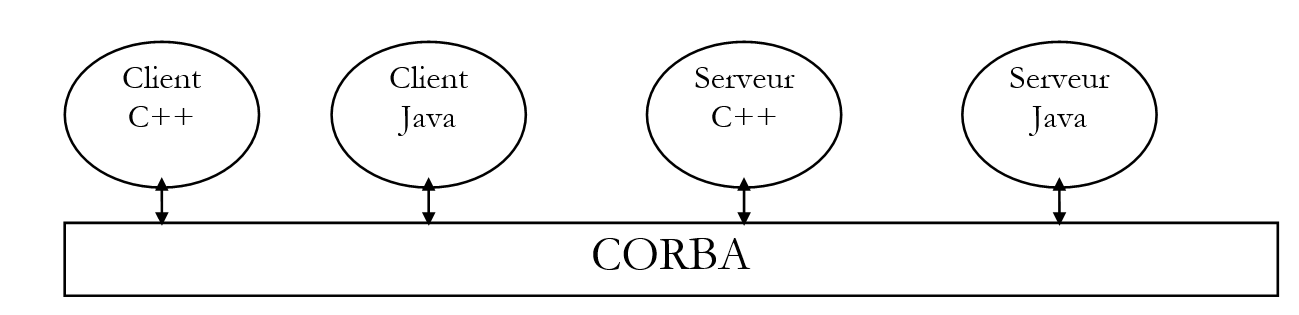
We will see that building a distributed application with CORBA is similar to the method used with Java RMI: the concepts are alike. CORBA offers the advantage of interoperability with applications written in other languages.
10.2. The Development Process for a CORBA Application
10.2.1. Introduction
To develop a CORBA client-server application, we will follow these steps:
- Writing the server interface using IDL (Interface Definition Language)
- generating the server’s “skeleton” and “stub” classes
- Writing the server
- writing the client
- compiling all the classes
- Launching a CORBA service directory
- launching the server
- launching the client
We will use the echo server, already used in the RMI context, as our first example. This will allow the reader to see the differences between the two methods.
The application has been tested with JDK 1.2.
10.2.2. Writing the server interface
As with Java RMI, the server is defined by its interface in relation to the client. While the classes implementing the server are not required by the client, those of its interface are. Whereas Java RMI used a Java interface to generate the server’s “skeleton” and “stub” classes, the Java CORBA architecture requires the interface to be described in a language other than Java. This interface will generate several classes, some of which are used by the client and others by the server.
The description of the echo interface will be as follows:
The interface description will be stored in an echo.idl file. It is written in the OMG’s IDL (Interface Definition Language). To be usable, it must be parsed by a program that will generate source files in the language used to develop the CORBA application. Here, we will use the idltojava.exe program, which will generate the necessary .java source files for the application based on the previous interface. The idltojava.exe program is not included with the JDK. It can be downloaded from the Sun website at http://java.sun.com.
Let’s analyze a few lines of the previous IDL interface:
is equivalent to the Java **package echo**. Compiling the interface will generate the Java package *echo*, i.e., a directory containing Java classes.
is equivalent to the Java **interface iSrvEcho**. It will generate a Java interface.
is equivalent to the Java statement **String echo(String msg)**. The types in the IDL language do not correspond exactly to those in the Java language. The correspondences are explained later in this chapter. In the IDL language, the parameters of a function can be input (**in**), output (**out**), or input-output (**inout**) parameters. Here, the *echo* method receives an input parameter *msg,* which is a string, and returns a string as the result.
The previous interface is that of our echo server. Recall that a remote interface describes the server object’s methods accessible to clients. Here, only the echo method will be available to clients.
10.2.3. Compiling the server’s IDL interface
Once the server interface is defined, we generate the corresponding Java files.
E:\data\java\corba\ECHO>dir *.idl

ECHO     IDL            78  15/03/99  13:56 ECHO.IDL

E:\data\java\corba\ECHO>d:\javaidl\idltojava.exe -fno-cpp echo.idl
The -fno-cpp option is used to indicate that no preprocessor should be used (most commonly used with C/C++). Compiling the echo.idl file creates an echo subdirectory containing the following files:
E:\data\java\corba\ECHO>dir echo

_ISRVE~1 JAV         1 095  17/03/99  17:19 _iSrvEchoStub.java
ISRVEC~1 JAV           311  17/03/99  17:19 iSrvEcho.java
ISRVEC~2 JAV           825  17/03/99  17:19 iSrvEchoHolder.java
ISRVEC~3 JAV         1 827  17/03/99  17:19 iSrvEchoHelper.java
_ISRVE~2 JAV         1 803  17/03/99  17:19 _iSrvEchoImplBase.java
The iSrvEcho.java file is the Java file describing the server interface:
/*
 * File: ./ECHO/ISRVECHO.JAVA
 * From: ECHO.IDL
 * Date: Mon Mar 15 13:56:08 1999
 *   By: D:\JAVAIDL\IDLTOJ~1.EXE Java IDL 1.2 Aug 18 1998 16:25:34
 */

package echo;
public interface iSrvEcho
    extends org.omg.CORBA.Object, org.omg.CORBA.portable.IDLEntity {
    String echo(String msg)
;
}
We can see that this is almost a word-for-word translation of the IDL interface. If you’re curious enough to look at the contents of the other .java files, you’ll find more complex things. Here’s what the documentation says about the role of these different files:
the server interface
implements the previous iSrvEcho interface. It is an abstract class, the server’s “skeleton,” providing the server with the CORBA functionality required by the distributed application.
This is the server "stub" that the client will use. It provides the client with the CORBA functionality needed to access the server.
Provides the methods needed to manage CORBA object references
Provides the methods needed to manage the input and output parameters of the interface’s methods.
10.2.4. Compiling the classes generated from the IDL interface
It is a good idea to compile the preceding classes. We will see in another example that errors caused by incorrect operation of the idltojava generator can be detected here. Here, everything goes smoothly, and after compilation, the following files are present in the echo package directory:
E:\data\java\corba\ECHO\echo>dir

_ISRVE~1 JAV         1 095  17/03/99  17:19 _iSrvEchoStub.java
ISRVEC~1 JAV           311  17/03/99  17:19 iSrvEcho.java
ISRVEC~2 JAV           825  17/03/99  17:19 iSrvEchoHolder.java
ISRVEC~3 JAV         1 827  17/03/99  17:19 iSrvEchoHelper.java
_ISRVE~2 JAV         1 803  17/03/99  17:19 _iSrvEchoImplBase.java
_ISRVE~1 CLA         2 275  18/03/99  11:25 _iSrvEchoImplBase.class
_ISRVE~2 CLA         1 383  18/03/99  11:25 _iSrvEchoStub.class
ISRVEC~1 CLA           251  18/03/99  11:25 iSrvEcho.class
ISRVEC~2 CLA         2 078  18/03/99  11:25 iSrvEchoHelper.class
ISRVEC~3 CLA           858  18/03/99  11:25 iSrvEchoHolder.class
10.2.5. Server implementation
10.2.5.1. Implementation of the iSrvEcho interface
We defined the iSrvEcho interface earlier. We will now write the class that implements this interface. It will be derived from the _iSrvEchoImplbase.java class, which, as noted above, already implements the iSrvEcho interface.
// imported packages
import echo.*;

// class implementing remote echo
public class srvEcho extends _iSrvEchoImplBase{
    // method performing the echo
    public String echo(String msg){
        return  "["  + msg + "]";
    }// fine echo
}// end of class
The code is self-explanatory. This class is saved in the file srvEcho.java in the parent directory of the iSrvEcho interface package.
You can compile it to verify:
E:\data\java\corba\ECHO>j:\jdk12\bin\javac srvEcho.java

E:\data\java\corba\ECHO>dir

ECHO     IDL            78  15/03/99  13:56 ECHO.IDL
SRVECH~1 CLA           488  18/03/99  11:30 srvEcho.class
SRVECH~1 JAV           252  15/03/99  14:02 srvEcho.java
ECHO           <REP>        17/03/99  17:19 echo
10.2.5.2. Writing the server creation class
As with an RMI client-server application, a CORBA server must be registered in a directory to be accessible by clients. It is this registration procedure that, at the development level, differs depending on whether you have a CORBA or RMI application. Here is the one for the echo CORBA server registered in the serverEcho.java file:
// imported packages

import echo.*
;
import org.omg.CosNaming.
*;
import org.omg.CosNaming.NamingContextPackage
.*;
import org.omg.CORB

A.*;

//----------- class serveu
rEcho
public class serveu
    rEcho{
    // ------- main: launches the ech
    o server
    // syntax pg machineAnnuaire portAnnuaire n
    omService
    // machine: machine supporting CORBA
    directory
    // port: directory port
     CORBA
    // nomService: name of the service t

o  be registered

  public static void
    main(String arg[]){
    // are th
    e arguments there?

    if(arg.length!=3){
        System.err.println("Syntaxe : pg machineAnnuaire por
        tAnnuaire nomSe
    r
    vice");
        System.exit(1);
    }

    // retrieve the argu
    ments
    String machi
    ne=arg[0];
    String port=arg[1];
    String nomService=arg[2];


    try{

    // you need a CORBA object to work
    String[] initORB={"-ORBInitialHost",machine,"-ORBInitialPort",port};
      ORB orb=ORB.init(initORB,null);
    // put the service in the service directory
    // it will be called srvEcho
      org.omg.CORBA.Object objRef=
        orb.resolve_initial_references("NameService");
      NamingContext ncRef=NamingContextHelper.narrow(objRef);
      NameComponent nc= new NameComponent(nomService,"");
      NameComponent path[]={nc};
    // create the server and associate it with the srvEcho service
    srvEcho serveurEcho=new srvEcho();
      ncRef.rebind(path,serveurEcho);
    orb.connect(serveurEcho);
    // follow-up
    System.out.println("Serveur d'écho prêt");
    // waiting for customer requests
      java.lang.Object sync=new java.lang.Object();
      synchronized(sync){
        sync.wait();
      }
    } catch(Exception e){
    // there has been an error
      System.err.println("Erreur " + e);
      e.printStackTrace(System.err);
    }
  }// hand
}// serveurEcho
Below, we outline the basics of starting the server without delving into details that may seem complex at first glance. It is important to remember the key points from the previous example, as they will be present in every CORBA server.
10.2.5.2.1. Server Parameters
A CORBA server must register with a directory service operating on a given machine and port. Our application will receive these two pieces of information as parameters. The registered service must have a name, which will be the third parameter.
10.2.5.2.2. Creating the CORBA Directory Service Access Object
To access the directory service and register our echo server, we need an object called an ORB (Object Request Broker), obtained using the following class method:
Args : tableau de paires de chaînes de caractères, chaque paire étant de la forme (paramètre,valeur)
Prop : propriétés de l’application
The example uses the following sequence to obtain the ORB object:
    String[] initORB={"-ORBInitialHost",machine,"-ORBInitialPort",port};
       ORB orb=ORB.init(initORB,null);
The (parameter, value) pairs used are as follows:
("-ORBInitialHost",machine) : ce couple précise la machine ou opère l’annuaire des services CORBA, ici la machine passée en paramètre au serveur.
("-ORBInitialPort",port ) : ce couple précise le port ou opère l’annuaire des services CORBA, ici le port passé en paramètre au serveur.
The second parameter of the init method is set to null. If the first parameter had also been set to null, the (machine,port) pair used would have been the default (localhost,900).
10.2.5.2.3. Registering the server in the CORBA service directory
Registering the server in the directory is done with the following operations:
        // put the service in the service directory
    //
    it will be called srvEcho

           org.omg.CORBA.Object o
b       jRef=
        orb.resolve_initial_references("
N     ameService");
      NamingContext ncRef=NamingContextHe
l     per.narrow(objRef);
      NameComponent nc= new Nam
e     Component(nomService,"");

          NameComponent path[]={nc};
    // create the server a
    nd associate it with the srvEcho s
e         rvice
    srvEcho serveurEcho=new
            srvEcho();
        ncRef.rebind(path,serveurEcho);
            orb.connect(serveurEcho);
The first part of the code involves preparing the service name. This name is represented in the code by the variable path. A service name consists of several components:
- an initial component objRef, a generic object that must be cast to a NamingContext type, here ncRef.
- the service name, here `serviceName`, which was passed as a parameter to the server
These name components (NameComponent) are collected in an array, here path. It is this array that precisely “names” the created service. Once the name is created, it remains
- to associate it with an instance of the server (the srvEcho class constructed previously)
srvEcho serveurEcho=new srvEcho();
- and register it in the directory
10.2.5.3. Compiling the server launch class
Compile the previous class:
E:\data\java\corba\ECHO>j:\jdk12\bin\javac serveurEcho.java

E:\data\java\corba\ECHO>dir

ECHO     IDL            78  15/03/99  13:56 ECHO.IDL
SERVEU~1 CLA         1 793  18/03/99  13:18 serveurEcho.class
SERVEU~1 JAV         1 806  16/03/99  15:38 serveurEcho.java
SRVECH~1 CLA           488  18/03/99  11:30 srvEcho.class
SRVECH~1 JAV           252  15/03/99  14:02 srvEcho.java
ECHO           <REP>        17/03/99  17:19 echo
10.2.6. Client write
10.2.6.1. The code
We are writing a client to test our echo service. We will pass the same three parameters to the client as we did to the server:
Machine: the machine where the CORBA service directory is located
Port: the port on which this directory operates
serviceName: name of the echo service
The client connects to the echo service and then prompts the user to type messages on the keyboard. These messages are sent to the echo server, which sends them back. A log of this dialogue is displayed on the screen.
The CORBA client for the echo service is very similar to the RMI client already written. Here again, the client must connect to a directory service to obtain a reference to the server object it wishes to connect to. The difference between the two clients lies there and there alone. Here is the code for the CORBA echo client:
10.2.6.2. Connecting the client to the server
The CORBA client above connects to the server using the following statement:
        // on fait la liaison avec le serveur d'écho
        iSrvEcho serveurEcho=getServeurEcho(machine,port,nomService);
After this operation, the client holds a reference to the echo server. From this point on, a CORBA client is no different from an RMI client. The private method that establishes the connection to the server is as follows:
// imported packages
import java.io.*;
import echo.*;
import org.omg.CosNaming.*;
import org.omg.CORBA.*;

// ---------- class cltEcho
public class cltEcho {

    public static void main(String arg[]){
                // syntax : cltEcho machineAnnuaire portAnnuaire nameservice
                // machine: machine where the CORBA service directory operates
                // port: port where the service directory operates
                // nomService: echo service name

                // argument verification
        if(arg.length!=3){
            System.err.println("Syntaxe : pg machineAnnuaire portAnnuaire nomservice");
            System.exit(1);
        }

                // parameters are retrieved
        String machine=arg[0];
        String port=arg[1];
        String nomService=arg[2];

                // link to echo server
        iSrvEcho serveurEcho=getServeurEcho(machine,port,nomService);

                // client-server dialogue
        BufferedReader in=null;
        String msg=null;
        String reponse=null;
        iSrvEcho serveur=null;

        try{
                        // open keyboard flow
            in=new BufferedReader(new InputStreamReader(System.in));
                        // loop for reading msg to be sent to echo server
            System.out.print("Message : ");
            msg=in.readLine().toLowerCase().trim();
            while(! msg.equals("fin")){
                                // send msg to server and receive response
                reponse=serveurEcho.echo(msg);
                                // follow-up
                System.out.println("Réponse serveur : " + reponse);
                                // next msg
                System.out.print("Message : ");
                msg=in.readLine().toLowerCase().trim();
            }// while
                        // it's over
            System.exit(0);
                // error management
        } catch (Exception e){
            System.err.println("Erreur : " + e);
            System.exit(2);
        }// try
    }// hand

        // ---------------------- getServeurEcho
    private static iSrvEcho getServeurEcho(String machine, String port,
            String nomService){

                // requests an echo server reference
                // follow-up
        System.out.println("--> Connexion au serveur CORBA en cours...");
                // echo server reference
        iSrvEcho serveurEcho=null;
        try{
                        // we request a CORBA object to work with
            String[] initORB={"-ORBInitialHost",machine,"-ORBInitialPort",port};
          ORB orb=ORB.init(initORB,null);
                        // use the directory service to locate the echo server
          org.omg.CORBA.Object objRef=
                orb.resolve_initial_references("NameService");
          NamingContext ncRef=NamingContextHelper.narrow(objRef);
                        // the service required is called srvEcho - it is requested
          NameComponent nc= new NameComponent(nomService,"");
          NameComponent path[]={nc};
          serveurEcho=iSrvEchoHelper.narrow(ncRef.resolve(path));
        } catch (Exception e){
            System.err.println("Erreur lors de la localisation du serveur d'écho ("
                + e + ")");
            System.exit(10);
        }// try-catch
                // return the reference to the server
        return serveurEcho;
    }// getServeurEcho

}// class
We see the same code sequences as in the server:
- we create an ORB object that will allow us to contact the CORBA service directory
String[] initORB={"-ORBInitialHost",machine,"-ORBInitialPort",port};
      ORB orb=ORB.init(initORB,null);
- we define the different components of the echo service name
        org.omg.CORBA.Object objRef=orb.resolve_initial_references("NameService");
      NamingContext ncRef=NamingContextHelper.narrow(objRef);
      NameComponent nc= new NameComponent(nomService,"");
      NameComponent path[]={nc};
- We request a reference to the echo service from the directory service (this is where we differ from the server)
10.2.6.3. Compilation
E:\data\java\corba\ECHO>j:\jdk12\bin\javac cltEcho.java

E:\data\java\corba\ECHO>dir

CLTECH~1 CLA         2 599  18/03/99  13:51 cltEcho.class
CLTECH~1 JAV         2 907  16/03/99  16:15 cltEcho.java
ECHO     IDL            78  15/03/99  13:56 ECHO.IDL
SERVEU~1 CLA         1 793  18/03/99  13:18 serveurEcho.class
SERVEU~1 JAV         1 806  16/03/99  15:38 serveurEcho.java
SRVECH~1 CLA           488  18/03/99  11:30 srvEcho.class
SRVECH~1 JAV           252  15/03/99  14:02 srvEcho.java
ECHO           <REP>        17/03/99  17:19 echo
10.2.7. Tests
10.2.7.1. Starting the directory service
On a Windows machine, we start the directory service as follows:
which starts the directory service on port 1000 of the machine.
The tnameserv directory service produces a screen display that looks like the following:
Initial Naming Context:
IOR:000000000000002849444c3a6f6d672e6f72672f436f734e616d696e672f4e616d696e67436f
6e746578743a312e3000000000010000000000000030000100000000000a69737469612d30303900
044700000018afabcafe000000027620dd9a000000080000000000000000
TransientNameServer: setting port for initial object references to: 1000
It’s hard to read, but note the last line: the service is active on port 1000.
10.2.7.2. Launching the echo server
The echo service is launched with three parameters:
E:\data\java\corba\ECHO>start j:\jdk12\bin\java serveurEcho localhost 1000 srvEcho
The server displays:
10.2.7.3. Launching the client on the same machine as the server
E:\data\java\corba\ECHO>j:\jdk12\bin\java cltEcho localhost 1000 srvEcho
--> Connexion au serveur CORBA en cours...
Message : msg1
Réponse serveur : [msg1]
Message : msg2
Réponse serveur : [msg2]
Message : fin
10.2.7.4. Launching the client on a Windows machine other than the server
E:\data\java\corba\ECHO>j:\jdk12\bin\java cltEcho tahe.istia.univ-angers.fr 1000 srvEcho
--> Connexion au serveur CORBA en cours...
Message : abcd
Réponse serveur : [abcd]
Message : efgh
Réponse serveur : [efgh]
Message : fin
10.3. Example 2: an SQL server
10.3.1. Introduction
Here we revisit the SQL server code previously examined in the context of Java RMI, again to highlight the similarities and differences between the two approaches. As a reminder, the role of this SQL server is as follows: it runs on a Windows machine and allows remote clients to access the public ODBC databases on that Windows machine.
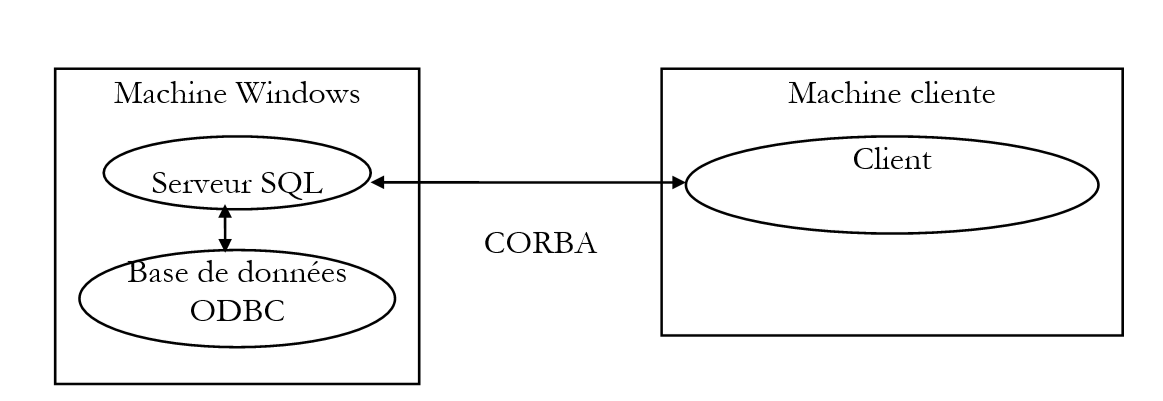
The CORBA client could perform three operations:
- connect to the database of its choice
- send SQL queries
- close the connection
The server executes the client’s SQL queries and sends the results back to the client. This is its primary function, which is why we call it an SQL server. We apply the various steps previously covered with the echo server.
10.3.2. Writing the server’s IDL interface
As a reminder, here is the RMI interface we used for the server:
import java.rmi.*;


// remote interface
p
ublic interface interSQL extends Remote{

        public String connect(String pilote, String url, String id, String mdp
        )
        throws java.rmi.RemoteExcept
    ion;
    public String[] executeSQL(String requete, String separa
        teur)
        throws java.rmi.RemoteE
    xception;
    public Str
        ing close()
        throws java.rmi.Re
moteException;
}
The roles of the various methods were as follows:
Connect: the client connects to a remote database, providing the driver, the JDBC URL, as well as its ID and password to access the database. The server returns a string indicating the result of the connection:
executeSQL: the client requests the execution of an SQL query on the database to which it is connected. It specifies the character that should separate the fields in the results returned to it. The server returns an array of strings:
for a database update query, where n is the number of rows updated
if the query generated an error
if the query returned no results
if the query returned results. The rows returned by the server are the result rows of the query.
Close: the client closes its connection to the remote database. The server returns a string indicating the result of this closure:
The server's IDL interface will be as follows:
module srvSQL{

    typedef sequence<string> resultats;

    interface interSQL{
        string connect(in string pilote, in string urlBase, in string id, in string mdp);
        resultats executeSQL(in string requete, in string separateur);
        string close();
    };// interface
};// module
The only new feature compared to what we saw with the echo server’s IDL interface is the use of the sequence keyword. This keyword allows you to define a one-dimensional array. The definition is done in two steps:
- defining a type to designate the array, here results:
The typedef keyword is well known to C/C++ programmers: it allows you to define a new type. Here, the type resultats is defined as equivalent to the type sequence<string>, i.e., a dynamic (unsized) array of character strings.
- using the new type where needed
The executeSQL method therefore returns an array of strings.
10.3.3. Compiling the server’s IDL interface
The previous IDL interface is placed in the file srvSQL.idl. We compile this file:
E:\data\java\corba\sql>d:\javaidl\idltojava -fno-cpp srvSQL.idl

E:\data\java\corba\sql>dir

SRVSQL   IDL           275  19/03/99   9:59 srvSQL.idl
SRVSQL         <REP>        19/03/99   9:41 srvSQL
We can see that the compilation created a directory named after the IDL interface module (srvSQL). Let’s look at the contents of this directory:
E:\data\java\corba\sql>dir srvSQl

RESULT~1 JAV           833  19/03/99  10:00 resultatsHolder.java
RESULT~2 JAV         1 883  19/03/99  10:00 resultatsHelper.java
_INTER~1 JAV         2 474  19/03/99  10:00 _interSQLStub.java
INTERS~1 JAV           448  19/03/99  10:00 interSQL.java
INTERS~2 JAV           841  19/03/99  10:00 interSQLHolder.java
INTERS~3 JAV         1 855  19/03/99  10:00 interSQLHelper.java
_INTER~2 JAV         4 535  19/03/99  10:00 _interSQLImplBase.java
Note that the Helper and Holder files are classes associated with the input/output parameters and results of the remote interface methods. The srvSQL directory contains all .java files related to the interSQL interface defined in the .idl file. It also contains files related to the results type created in the IDL interface.
The interSQL.java file is the Java file for our server’s interface. It is important to verify that what was automatically generated matches our expectations. The generated interSQL.java file is as follows:
/*
 * File: ./SRVSQL/INTERSQL.JAVA
 * From: SRVSQL.IDL
 * Date: Fri Mar 19 09:59:48 1999
 *   By: D:\JAVAIDL\IDLTOJ~1.EXE Java IDL 1.2 Aug 18 1998 16:25:34
 */

package srvSQL;
public interface interSQL
    extends org.omg.CORBA.Object, org.omg.CORBA.portable.IDLEntity {
    String connect(String pilote, String urlBase, String id, String mdp)
;
    String[] executeSQL(String requete, String separateur)
;
    String close()
;
}
We can see that we have the same interface as the one used for the RMI client-server. So we can continue. Let’s compile all these .java files:
E:\data\java\corba\sql\srvSQL>j:\jdk12\bin\javac *.java

Note: _interSQLImplBase.java uses or overrides a deprecated API.  Recompile with
 "-deprecation" for details.
1 warning

E:\data\java\corba\sql\srvSQL>dir *.class

_INTER~1 CLA         3 094  19/03/99  10:01 _interSQLImplBase.class
_INTER~2 CLA         1 953  19/03/99  10:01 _interSQLStub.class
INTERS~1 CLA           430  19/03/99  10:01 interSQL.class
INTERS~2 CLA         2 096  19/03/99  10:01 interSQLHelper.class
INTERS~3 CLA           870  19/03/99  10:01 interSQLHolder.class
RESULT~1 CLA         2 047  19/03/99  10:01 resultatsHelper.class
RESULT~2 CLA           881  19/03/99  10:01 resultatsHolder.class
10.3.4. Writing the SQL Server
We will now write the SQL server code. Recall that this class must derive from the abstract class _nomInterfaceImplBase generated by compiling the IDL file. Aside from this particularity and excluding the code sequences related to registering the service in a directory, the CORBA server code is identical to that of the RMI server:
// imported packages
import java.sql.*;
import java.util.*;
import srvSQL.*;

// class SQLServant
public class SQLServant extends _interSQLImplBase{

    // global class data
    private Connection DB;

    // --------------- connect
    public String connect(String pilote, String url, String id,
        String mdp){

        // connection to url database via driver
        // identification with identity id and password mdp

        String resultat=null;            // result of the method
        try{
            // loading the driver
            Class.forName(pilote);
            // connection request
            DB=DriverManager.getConnection(url,id,mdp);
            // ok
            resultat="200 Connexion réussie";
        } catch (Exception e){
            // error
            resultat="500 Echec de la connexion (" + e + ")";
        }
        // end
        return resultat;
    }

    // ------------- executeSQL
    public String[] executeSQL(String requete, String separateur){

        // executes a SQL query on the DB database
        // and puts the results in an array of strings

        // data required to execute the request
        Statement S=null;
        ResultSet RS=null;
        String[] lignes=null;
        Vector resultats=new Vector();
        String ligne=null;

        try{
            // create query container
            S=DB.createStatement();
            // request execution
            if (! S.execute(requete)){
                // update request
                // returns the number of lines updated
                lignes=new String[1];
                lignes[0]="100 "+S.getUpdateCount();
                return lignes;
            }
            // it was a query request
            // retrieve results
            RS=S.getResultSet();
            // number of Resultset fields
            int nbChamps=RS.getMetaData().getColumnCount();
            // we exploit them
            while(RS.next()){
                // create results line
                ligne="101 ";
                for (int i=1;i<nbChamps;i++)
                    ligne+=RS.getString(i)+separateur;
                ligne+=RS.getString(nbChamps);
                // add to results vector
                resultats.addElement(ligne);
            }// while
            // end of results processing
            // free up resources
            RS.close();
            S.close();
            // we return the results
            int nbLignes=resultats.size();
            if (nbLignes==0){
                lignes=new String[1];
                lignes[0]="501 Pas de résultats";
            } else {
                lignes=new String[resultats.size()];
                for(int i=0;i<lignes.length;i++)
                    lignes[i]=(String) resultats.elementAt(i);
            }//if
            return lignes;
        } catch (Exception e){
            // error
            lignes=new String[1];
            lignes[0]="500 " + e;
            return lignes;
        }// try-catch
    }// executeSQL

    // --------------- close
    public String close(){
        // closes database connection
        String resultat=null;
        try{
            DB.close();
            resultat="200 Base fermée";
        } catch (Exception e){
            resultat="500 Erreur à la fermeture de la base ("+e+")";
        }
        // return result
        return resultat;
    }
}// class SQLServant
This class is located in the SQLServant.java file that we are compiling:
E:\data\java\corba\sql>dir

SRVSQL   IDL           275  19/03/99   9:59 srvSQL.idl
SRVSQL         <REP>        19/03/99   9:41 srvSQL
SQLSER~1 JAV         2 941  15/03/99   9:09 SQLServant.java

E:\data\java\corba\sql>j:\jdk12\bin\javac SQLServant.java

E:\data\java\corba\sql>dir *.class

SQLSER~1 CLA         2 568  19/03/99  10:19 SQLServant.class
10.3.5. Writing the SQL Server Launch Program
The previous class represents the SQL server once it has been launched. Before that, it must be registered in a CORBA service directory. As with the echo service, we will do this using a special class to which we will pass three parameters at runtime:
Machine: the machine where the CORBA service directory is located
Port: the port on which this directory operates
serviceName: name of the SQL service
The code for this class is nearly identical to that of the class that performed the same task for the echo service. We have highlighted in bold the line that differs between the two classes: it does not create the same server object. We can see, therefore, that the server launch mechanism remains the same. If we isolate this mechanism into a class, as has been done here, it becomes virtually transparent to the developer.
// imported packages
import srvSQL.*;
import org.omg.CosNaming.*;
import org.omg.CosNaming.NamingContextPackage.*;
import org.omg.CORBA.*;

//----------- class serveurSQL
public class serveurSQL{
    // ------- main: launches the SQL server
  public static void main(String arg[]){
        // serveurSQL machine port service

        //do we have the right number of arguments
        if(arg.length!=3){
            System.err.println("Syntaxe : pg machineAnnuaireCorba portAnnuaireCorba nomService");
            System.exit(1);
        }
        // retrieve the arguments
        String machine=arg[0];
        String port=arg[1];
        String nomService=arg[2];
        String[] initORB={"-ORBInitialHost",machine,"-ORBInitialPort",port};
    try{
            // you need a CORBA object to work
      ORB orb=ORB.init(initORB,null);
            // put the service in the service directory
      org.omg.CORBA.Object objRef=
        orb.resolve_initial_references("NameService");
      NamingContext ncRef=NamingContextHelper.narrow(objRef);
      NameComponent nc= new NameComponent(nomService,"");
      NameComponent path[]={nc};
        // create the server and associate it with the srvSQL service
        SQLServant serveurSQL=new SQLServant();
      ncRef.rebind(path,serveurSQL);
        orb.connect(serveurSQL);
        // follow-up
        System.out.println("Serveur SQL prêt");
        // waiting for customer requests
      java.lang.Object sync=new java.lang.Object();
      synchronized(sync){
        sync.wait();
      }
    } catch(Exception e){
            // there has been an error
      System.err.println("Erreur " + e);
      e.printStackTrace(System.err);
    }
  }// hand
}// srvSQL
We compile this new class:
E:\data\java\corba\sql>j:\jdk12\bin\javac serveurSQL.java

E:\data\java\corba\sql>dir *.class

SQLSER~1 CLA         2 568  19/03/99  10:19 SQLServant.class
SERVEU~1 CLA         1 800  19/03/99  10:33 serveurSQL.class
10.3.6. Client code
The CORBA server client is called with the following parameters:
machine: machine where the CORBA service directory is located
port: the port on which this directory operates
serviceName: name of the SQL service
driver: the driver that the SQL server must use to manage the desired database
baseUrl: JDBC URL of the database to be managed
id: client ID or null if no ID
password: client password or null if no password
separator: character that the SQL server must use to separate fields in the result rows of a query
Here is an example of possible parameters:
where:
machine: machine on which the CORBA service directory is located
port: the port on which this directory operates
srvSQL: srvSQL, the CORBA name of the SQL server
driver: sun.jdbc.odbc.JdbcOdbcDriver, the standard driver for databases with an ODBC interface
urlBase: jdbc:odbc:articles, to use an articles database declared in the list of public ODBC databases on the Windows machine
id: null, no ID
password: null, no password
separator: , result fields will be separated by a comma
Once launched with the above parameters, the client performs the following steps:
- it connects to the machine machine on port port to request the CORBA service srvSQL
- they request a connection to the articles database
- they ask the user to type an SQL query on the keyboard
- it sends it to the SQL server
- It displays the results returned by the server on the screen
- it prompts the user again to type an SQL query on the keyboard. It will stop when the query is finished.
The Java client code follows. The comments should be sufficient for understanding it. Note that:
- the code is identical to that of the RMI client already studied. It differs in the process of requesting the service from the directory, a process isolated in the getServeurSQL method.
- the getServeurSQL method is identical to the one written for the echo client
We can therefore see that:
- a CORBA client differs from an RMI client only in the way it contacts the server
- this method is identical for all CORBA clients
import srvSQL.*;
import org.omg.CosNaming.*;
import org.omg.CORBA.*;
import java.io.*;

public class clientSQL {

    // global class data
    private static String syntaxe =
        "syntaxe : cltSQL machine port service pilote urlBase id mdp separateur";
    private static BufferedReader in=null;
    private static interSQL serveurSQL=null;

    public static void main(String arg[]){
        // syntax : cltSQL machine port separator driver url id mdp
        // machine port: machine & service directory port CORBA to contact
        // department: department name
        // driver: driver to be used for the database to be processed
        // urlBase: jdbc url of the database to be used
        // id: user identity
        // mdp: password
        // separator: string separating fields in query results

        // check number of arguments
        if(arg.length!=8)
            erreur(syntaxe,1);

        // init database connection parameters
        String machine=arg[0];
        String port=arg[1];
        String service=arg[2];
        String pilote=arg[3];
        String urlBase=arg[4];
        String id, mdp, separateur;
        if(arg[5].equals("null")) id=""; else id=arg[5];
        if(arg[6].equals("null")) mdp=""; else mdp=arg[6];
        if(arg[7].equals("null")) separateur=" "; else separateur=arg[7];

        // directory service parameters CORBA
        String[] initORB={"-ORBInitialHost",arg[0],"-ORBInitialPort",arg[1]};
        // client CORBA - request a server reference SQL
        interSQL serveurSQL=getServeurSQL(machine,port,service);

        // client-server dialogue
        String requete=null;
        String reponse=null;
        String[] lignes=null;
        String codeErreur=null;

        try{
            // open keyboard flow
            in=new BufferedReader(new InputStreamReader(System.in));
            // follow-up
            System.out.println("--> Connexion à la base de données en cours");
            // initial database connection request
            reponse=serveurSQL.connect(pilote,urlBase,id,mdp);
            // follow-up
            System.out.println("<-- "+reponse);
            // response analysis
            codeErreur=reponse.substring(0,3);
            if(codeErreur.equals("500"))
                erreur("Abandon sur erreur de connexion à la base",3);
            // loop for reading requests to be sent to the server SQL
            System.out.print("--> Requête : ");
            requete=in.readLine().toLowerCase().trim();
            while(! requete.equals("fin")){
                // send request to server and receive response
                lignes=serveurSQL.executeSQL(requete,separateur);
                // follow-up
                afficheLignes(lignes);
                // following request
                System.out.print("--> Requête : ");
                requete=in.readLine().toLowerCase().trim();
            }// while
            // follow-up
            System.out.println("--> Fermeture de la connexion à la base de données distante");
            // close the connection
            reponse=serveurSQL.close();
            // follow-up
            System.out.println("<-- " + reponse);
            // end
            System.exit(0);
        // error management
        } catch (Exception e){
            erreur("Abandon sur erreur : " + e,2);
        }// try
    }// hand

    // ----------- AfficheLignes
    private static void afficheLignes(String[] lignes){
        for (int i=0;i<lignes.length;i++)
            System.out.println("<-- " + lignes[i]);
    }// afficheLignes

    // ------------ error
    private static void erreur(String msg, int exitCode){
        // error msg display
        System.err.println(msg);
        // possible release of resources
        try{
            in.close();
            serveurSQL.close();
        } catch(Exception e){}
        // we leave
        System.exit(exitCode);
    }// error

    // ---------------------- getServeurSQL
    private static interSQL getServeurSQL(String machine, String port, String service){
        // requests a server reference SQL
        // machine: service directory machine CORBA
        // port: service directory port CORBA
        // service: service name CORBA to request

        // follow-up
        System.out.println("--> Connexion au serveur CORBA en cours...");
        // server reference SQL
        interSQL serveurSQL=null;
        // directory service parameters CORBA
        String[] initORB={"-ORBInitialHost",machine,"-ORBInitialPort",port};
                try{
            // a CORBA object is required to work - to do this, we pass the port
            // service directory listening CORBA
      ORB orb=ORB.init(initORB,null);
            // use the directory service to locate the SQL server
      org.omg.CORBA.Object objRef=
        orb.resolve_initial_references("NameService");
      NamingContext ncRef=NamingContextHelper.narrow(objRef);
            // the service required is called srvSQL - it is requested
      NameComponent nc= new NameComponent(service,"");
      NameComponent path[]={nc};
      serveurSQL=interSQLHelper.narrow(ncRef.resolve(path));
        } catch (Exception e){
            System.err.println("Erreur lors de la localisation du serveur SQL ("
                + e + ")");
            System.exit(10);
        }// try-catch
        // return the reference to the server
        return serveurSQL;
    }// getServeurSQL

}// class
Let's compile the client class:
E:\data\java\corba\sql>j:\jdk12\bin\javac clientSQL.java

E:\data\java\corba\sql>dir *.class

SQLSER~1 CLA         2 568  19/03/99  10:19 SQLServant.class
SERVEU~1 CLA         1 800  19/03/99  10:33 serveurSQL.class
CLIENT~1 CLA         3 774  19/03/99  10:45 clientSQL.class
We are ready for testing.
10.3.7. Tests
10.3.7.1. Prerequisites
We assume that an ACCESS database named Articles is publicly available on the SQL server’s Windows machine:
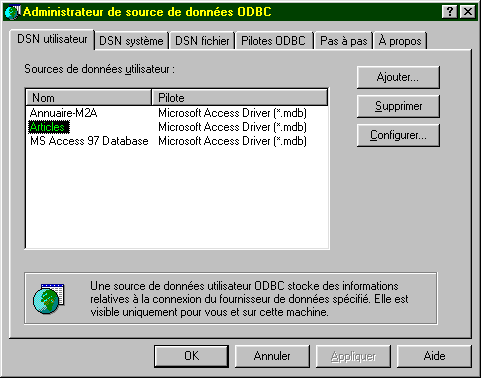
This database has the following structure:
name | type |
code | 4-character item code |
name | its name (string) |
price | its price (actual) |
current_stock | current stock (integer) |
min_stock | the minimum stock (integer) below which the item must be restocked |
10.3.7.2. Starting the directory service
E:\data\java\corba\sql>start j:\jdk12\bin\tnameserv -ORBInitialPort 1000

Le service d’annuaire est lancé sur le port 1000. Il affiche dans une fenêtre DOS quelque chose du genre :

Initial Naming Context:
IOR:000000000000002849444c3a6f6d672e6f72672f436f734e616d696e672f4e616d696e67436f
6e746578743a312e3000000000010000000000000030000100000000000a69737469612d30303900
052800000018afabcafe000000027693d3fd000000080000000000000000
TransientNameServer: setting port for initial object references to: 1000
10.3.7.3. Starting the SQL server
Starting the SQL server:
It displays the following in a DOS window:
10.3.7.4. Launching a client on the same machine as the server
Here are the results obtained with a client on the same machine as the server:
E:\data\java\corba\sql>j:\jdk12\bin\java clientSQL localhost 1000 srvSQL sun.jdbc.odbc.JdbcOdbcDriver jdbc:odbc:articles null null ,
--> Connection to server CORBA in progress...
--> Current database connection
<-- 200 Successful connection
--> Requête : select nom, stock_actu, stock_mini from articles
<-- 101 bicycle,31,8
<-- 101 arc,9,8
<-- 101 canoeing,7,7
<-- 101 rifle,9,8
<-- 101 water skis,13.8
<-- 101 test3,13,9
<-- 101 sperm whale,6,6
<-- 101 leopard,7,7
<-- 101 panther,7,7
--> Requête : delete from articles where stock_mini<7
<-- 100 1
--> Requête : select nom, stock_actu, stock_mini from articles
<-- 101 bicycle,31,8
<-- 101 arc,9,8
<-- 101 canoeing,7,7
<-- 101 rifle,9,8
<-- 101 water skis,13.8
<-- 101 test3,13,9
<-- 101 leopard,7,7
<-- 101 panther,7,7
--> Query: end
--> Closing the remote database connection
<-- 200 Closed base
10.3.7.5. Launching a client on a machine other than the server
Here are the results obtained with a client on a machine other than the server:
E:\data\java\corba\sql>j:\jdk12\bin\java clientSQL tahe.istia.univ-angers.fr 1000 srvSQL sun.jdbc.odbc.JdbcOdbcDriver jdbc:odbc:articles null null ,
--> Connection to server CORBA in progress...
--> Current database connection
<-- 200 Successful connection
--> Requête : select * from articles
<-- 101 a300,v_lo,1202,31,8
<-- 101 d600,arc,5000,9,8
<-- 101 d800,canoe,1502,7,7
<-- 101 x123,rifle,3000,9,8
<-- 101 s345,water skis,1800,13,8
<-- 101 f450,test3,3,13,9
<-- 101 z400,leopard,500000,7,7
<-- 101 g457,panther,800000,7,7
--> Query: end
--> Closing the remote database connection
<-- 200 Closed base
10.4. IDL - JAVA Correspondences
Here we provide the mappings between simple IDL and Java types:
IDL type | Java type |
boolean | boolean |
char | char |
wchar | char |
byte | byte |
string | java.lang.String |
wstring | java.lang.String |
short | short |
unsigned short | short |
long | int |
unsigned long | int |
long long | long |
unsigned long long | long |
float | float |
double | double |
Recall that to define an array of elements of type T in the IDL interface, we use the statement:
and that we then use TypeName to refer to the array type. Thus, in the SQL server interface, we used the declaration:
so that results refers to a String[] array in Java.