5. Case Study with Oracle Database Express Edition 11g Release 2
5.1. Installing the tools
The tools to be installed are as follows:
- SGBD: [http://www.oracle.com/technetwork/products/express-edition/downloads/index.html];
- an administration tool: EMS SQL Manager for Oracle Freeware [http://www.sqlmanager.net/fr/products/oracle/manager/download];
- an Oracle client for .NET: ODAC 11.2 Release 5 (11.2.0.3.20) with Oracle Developer Tools for Visual Studio: [http://www.oracle.com/technetwork/developer-tools/visual-studio/downloads/index.html].
In the following examples, the user "system" has the password "system".
Let’s launch Oracle [1] and then the [SQL Manager Lite for Oracle] tool, which we will use to administer SGBD and [2].
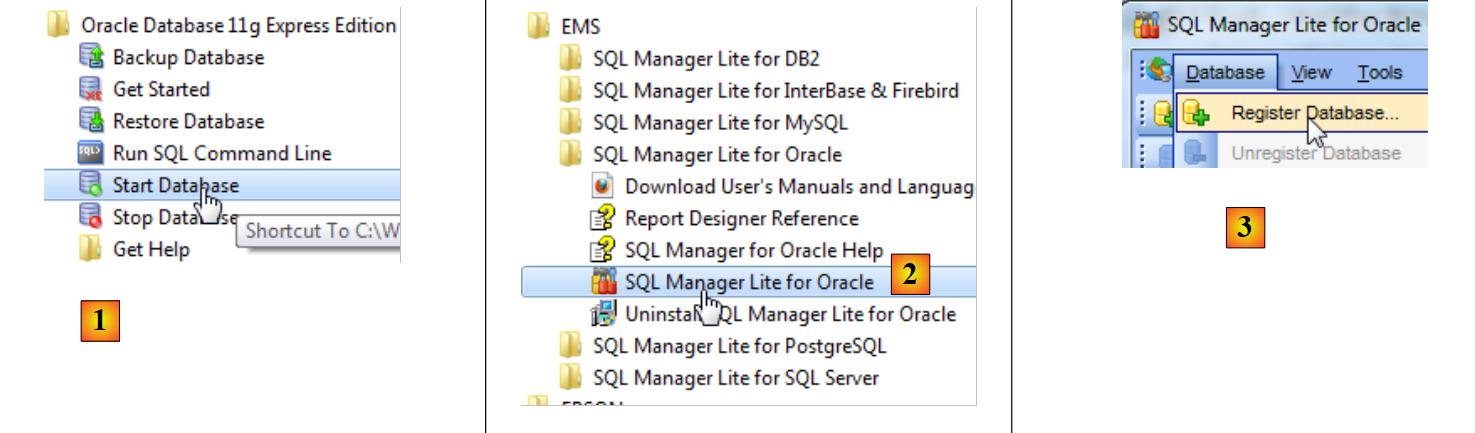 |
- In [3], we connect to an existing database;
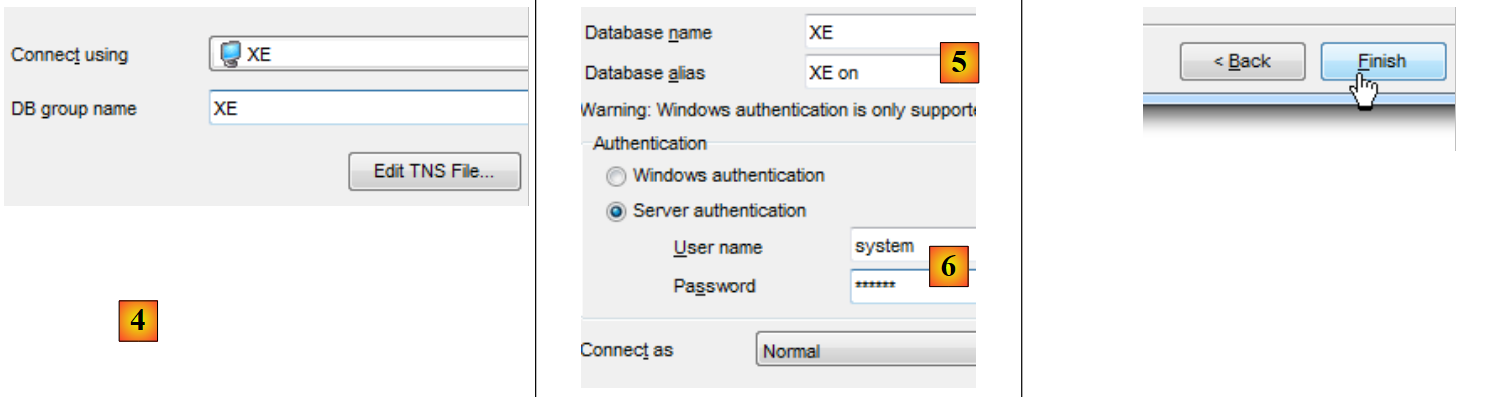 |
- In [4], we use the Oracle service XE to connect;
- in [5], we specify the database name XE;
- In [6], we log in as system/system;
- In [7], we finish the wizard;
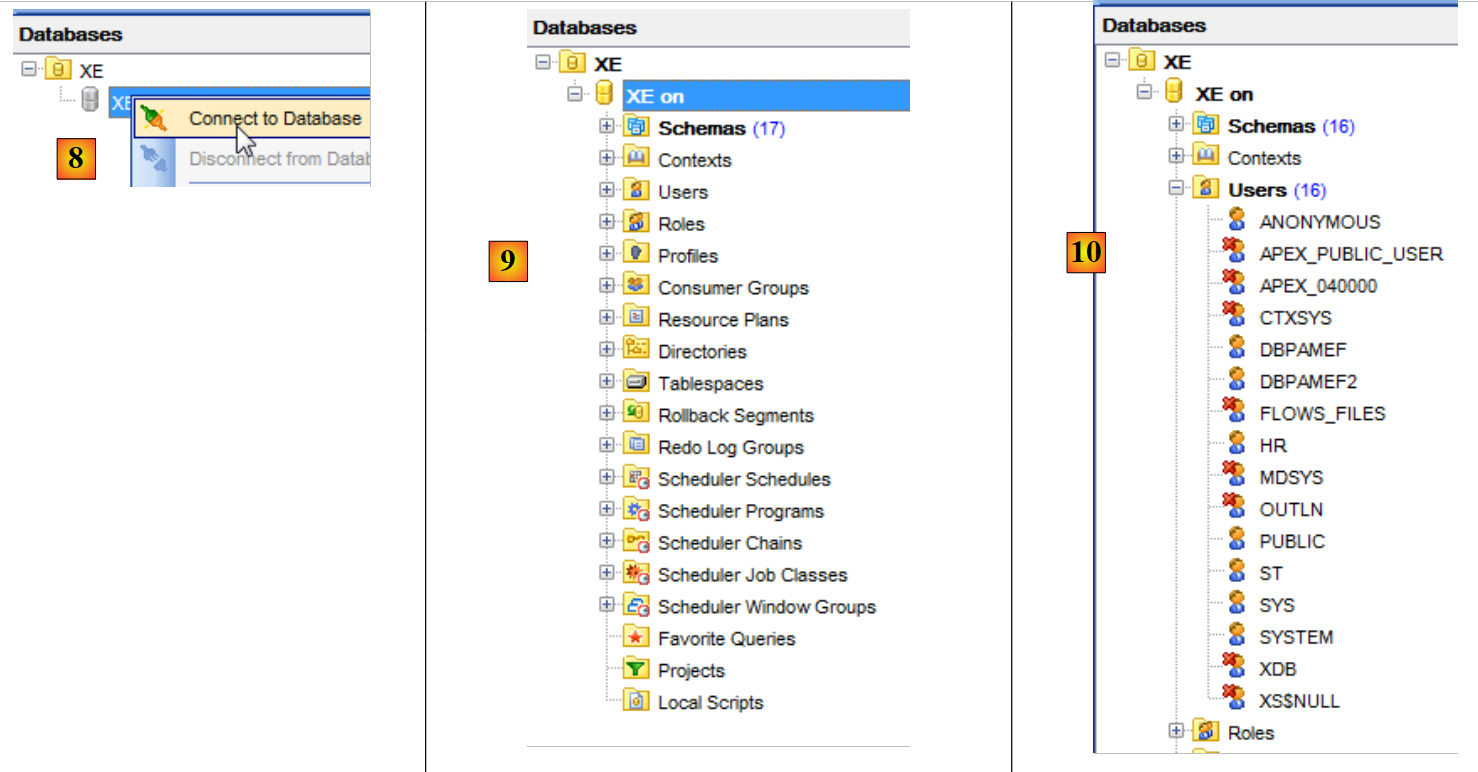 |
- In [8], you connect to the database;
- in [9], you are logged in;
- because we logged in as the system / system user, who has extended privileges, we can, for example, manage users [10];
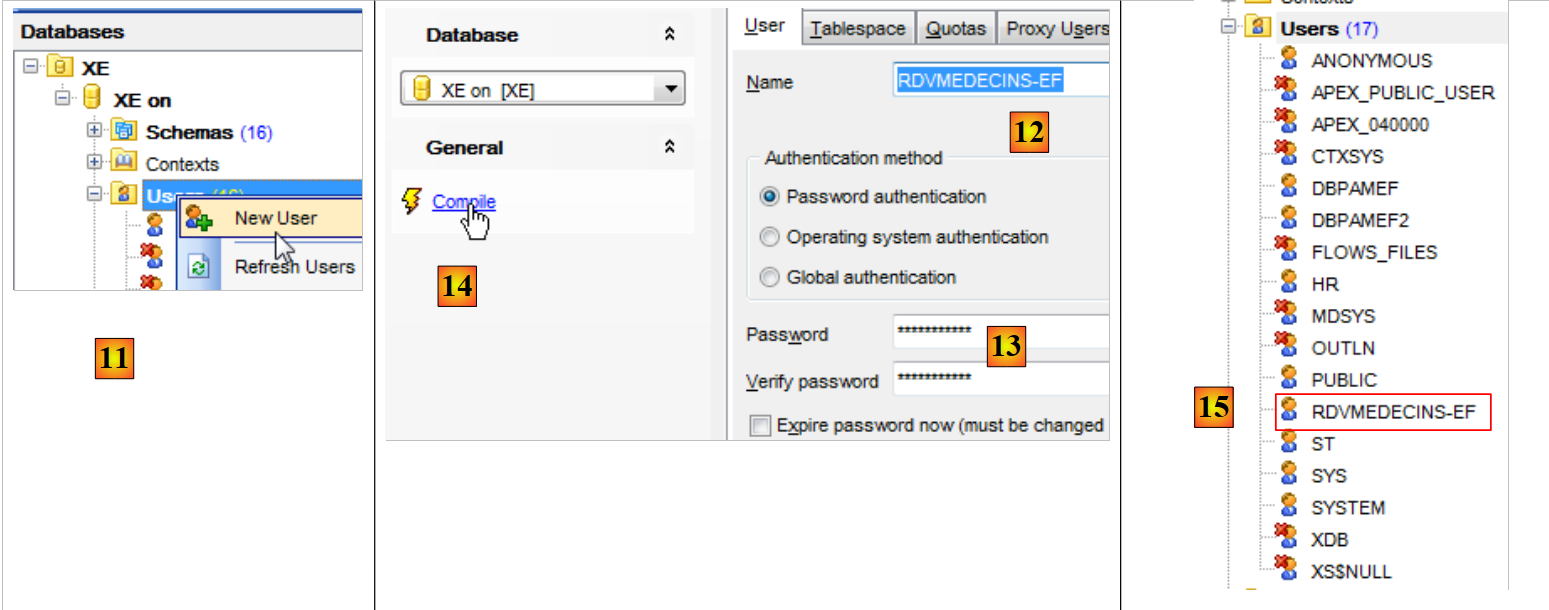 |
- In [11], we create a new user;
- in [12], the user will be named [RDVMEDECINS-EF];
- in [13], and will have the password rdvmedecins;
- in [14], the user creation is validated;
- in [15], the user has been created;
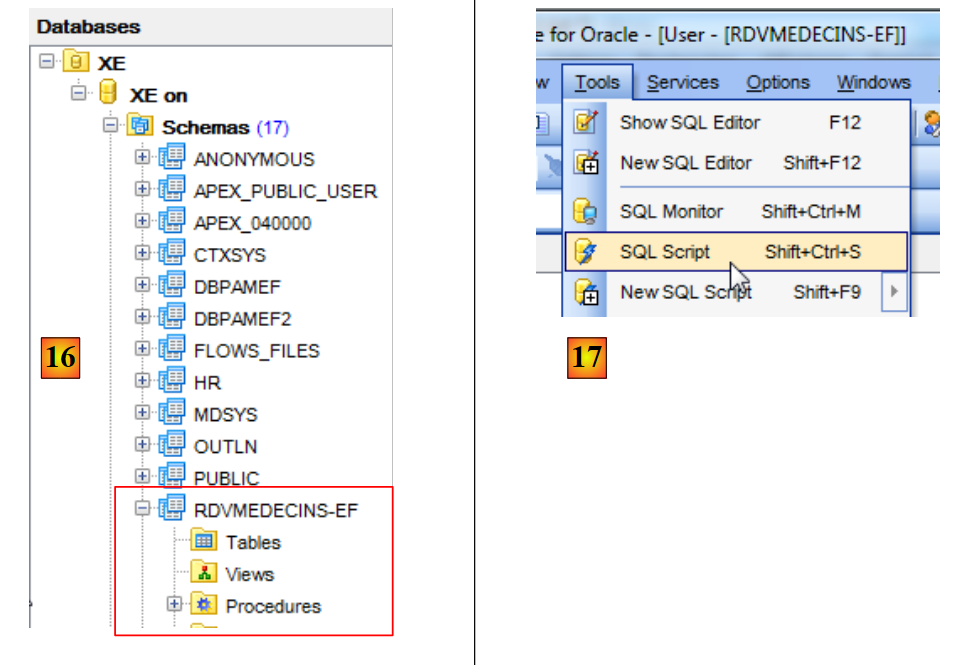 |
- in [16], the user [RDVMEDECINS-EF] is also a database schema;
- in [17], the user as created does not have sufficient permissions. We grant them via a script SQL;
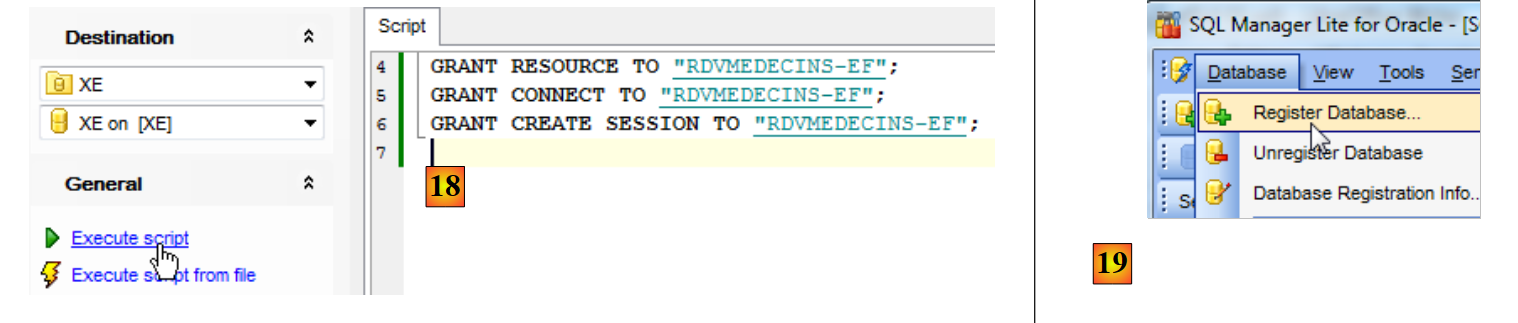 |
- in [18], the script is executed;
- in [19], we will attempt to log in as [RDVMEDECINS-EF] to see what they can do. To do this, we start by creating a new database in [EMS Manager];
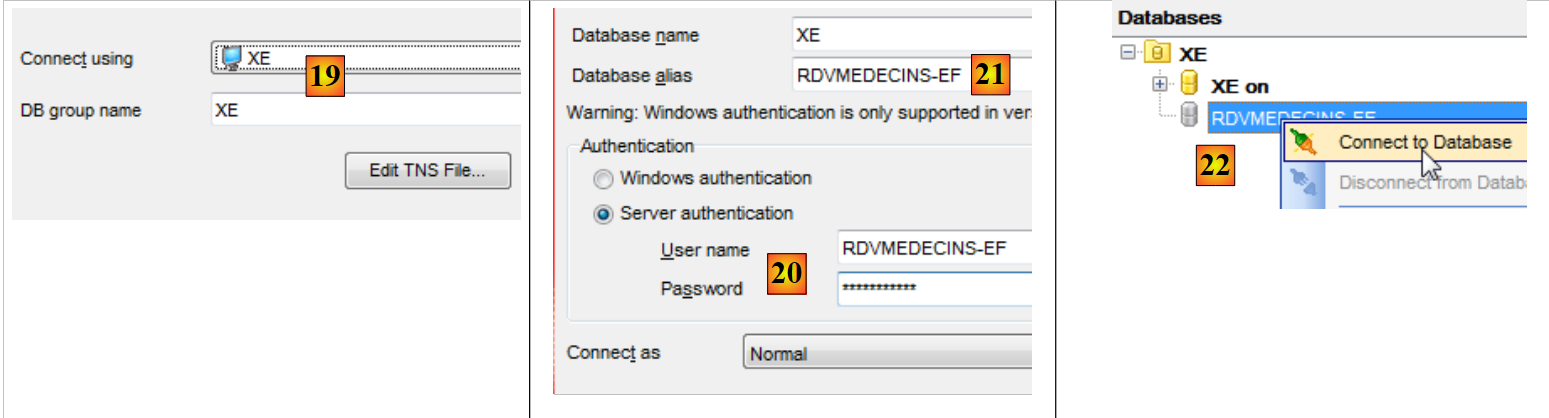 |
- In [19], we log in via the XE service;
- in [20], we log in using the identity RDVMEDECINS-EF / rdvmedecins;
- In [21], an alias is provided that reflects the name of the logged-in user;
- in [22], we log in to Oracle using the provided credentials;
 |
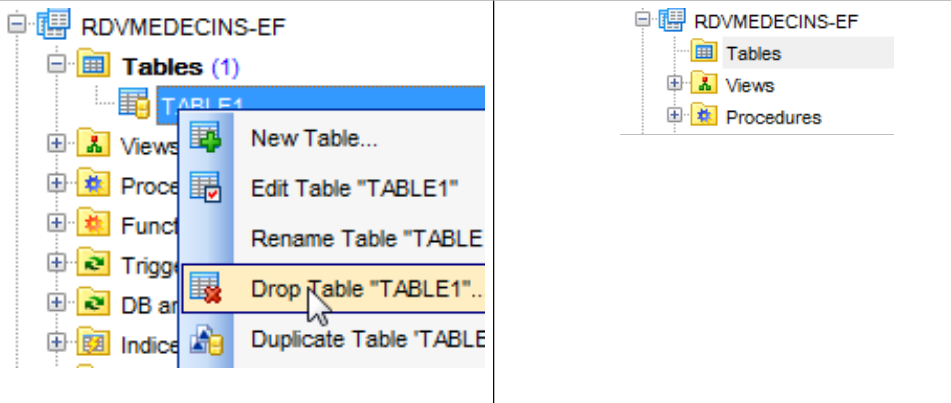 |
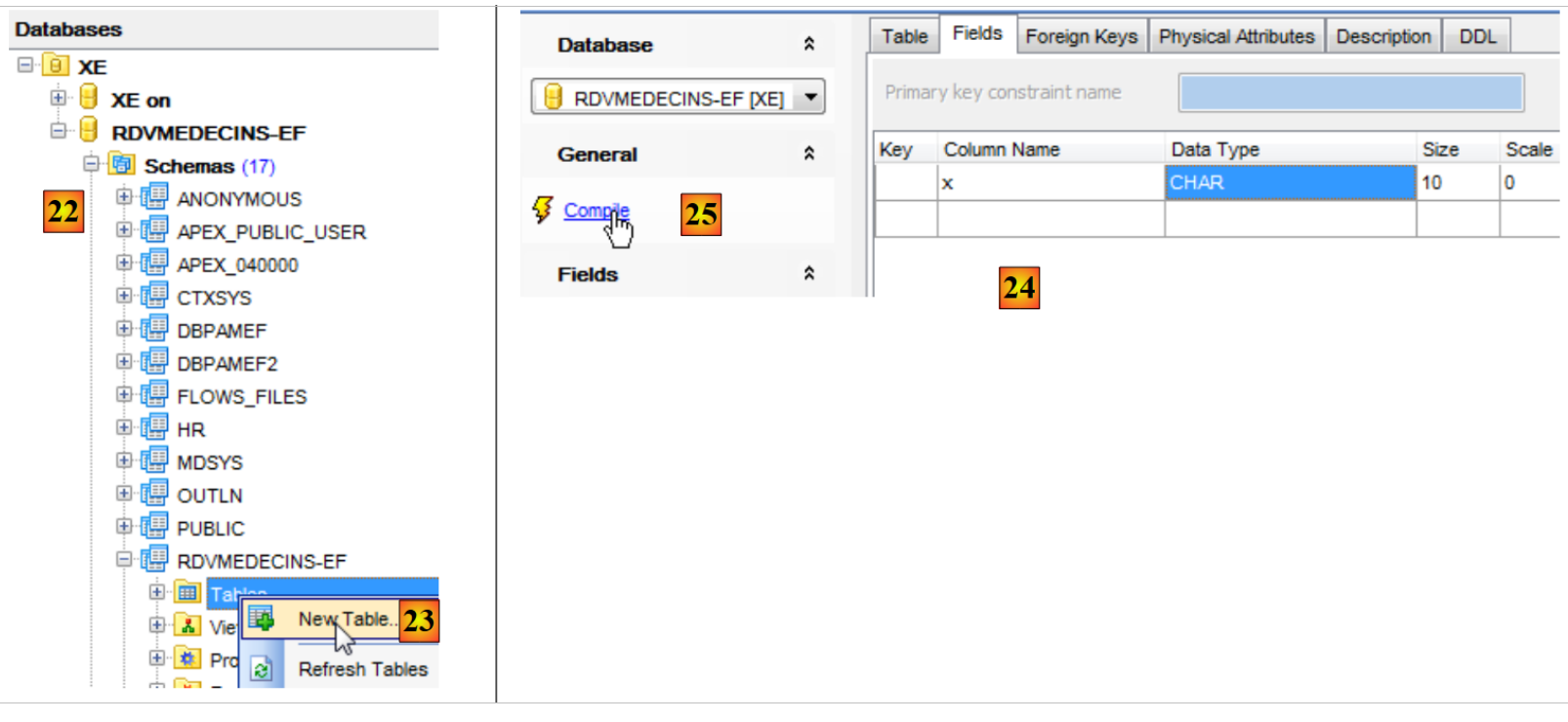
- in [22], the connection was successful;
- in [23], we attempt to create a table in the schema [RDVMEDECINS-EF];
- In [24], we define a table;
- In [25], we validate its definition;
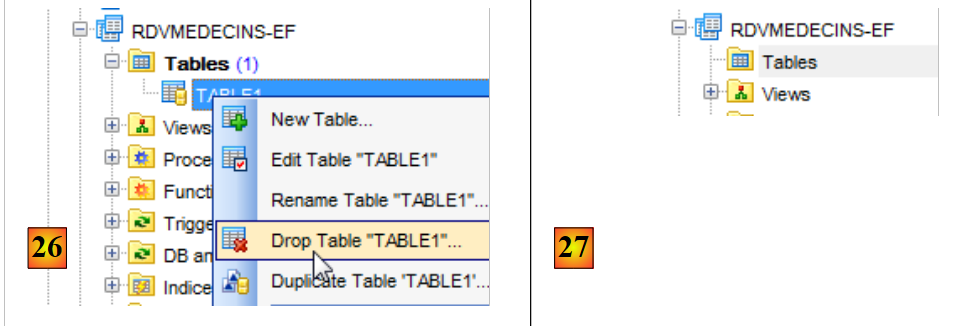 |
- in [26], the table has been created. We delete it;
- In [27], it has been deleted.
Now that we have a user with sufficient permissions, we will create the project VS 2012, which will create the tables of the schema [RDVMEDECINS-EF] based on the entity definitions.
5.2. Creating the database from the entities
We start by duplicating the [RdvMedecins-SqlServer-01] project folder into [RdvMedecins-Oracle-01] and [1]:
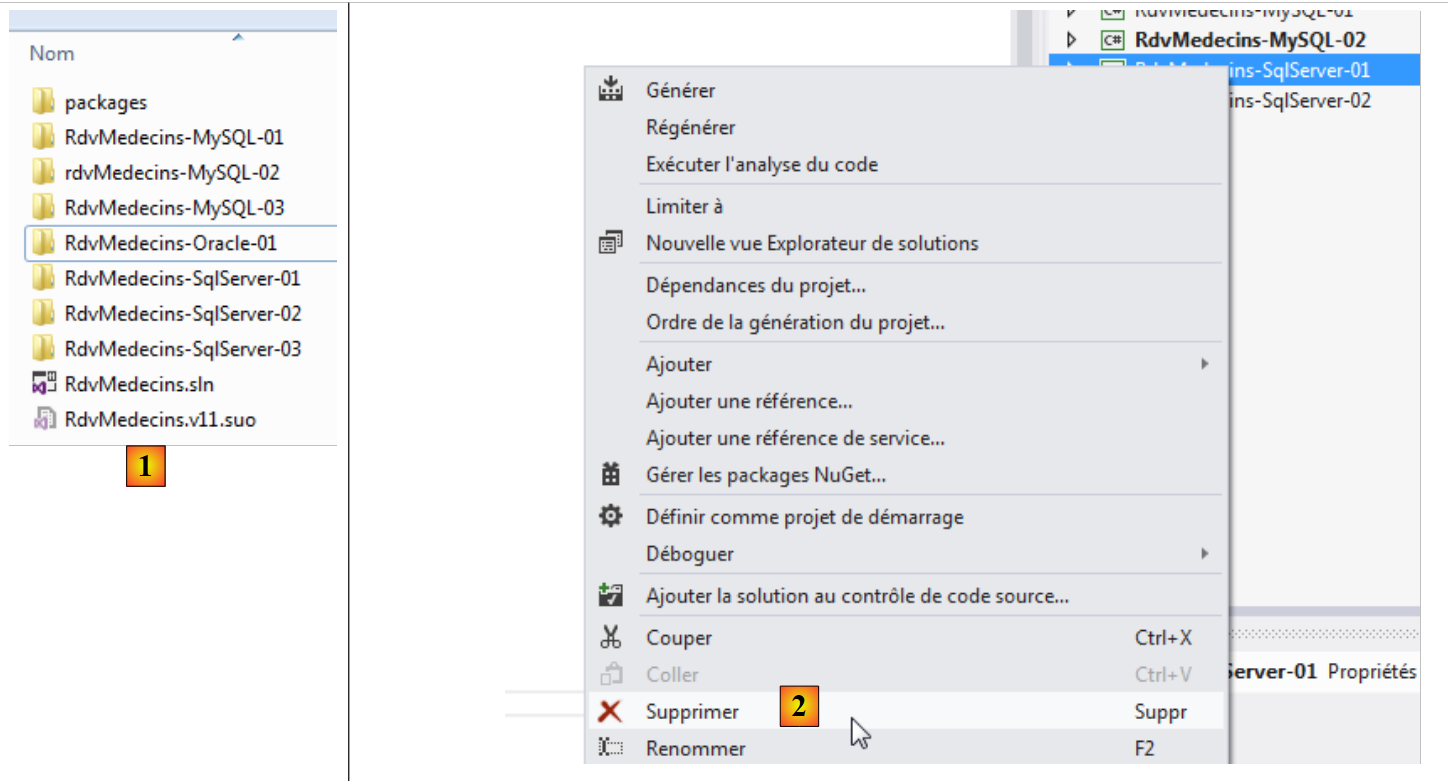 |
- in [2], in VS 2012, we remove the [RdvMedecins-SqlServer-01] project from the solution;
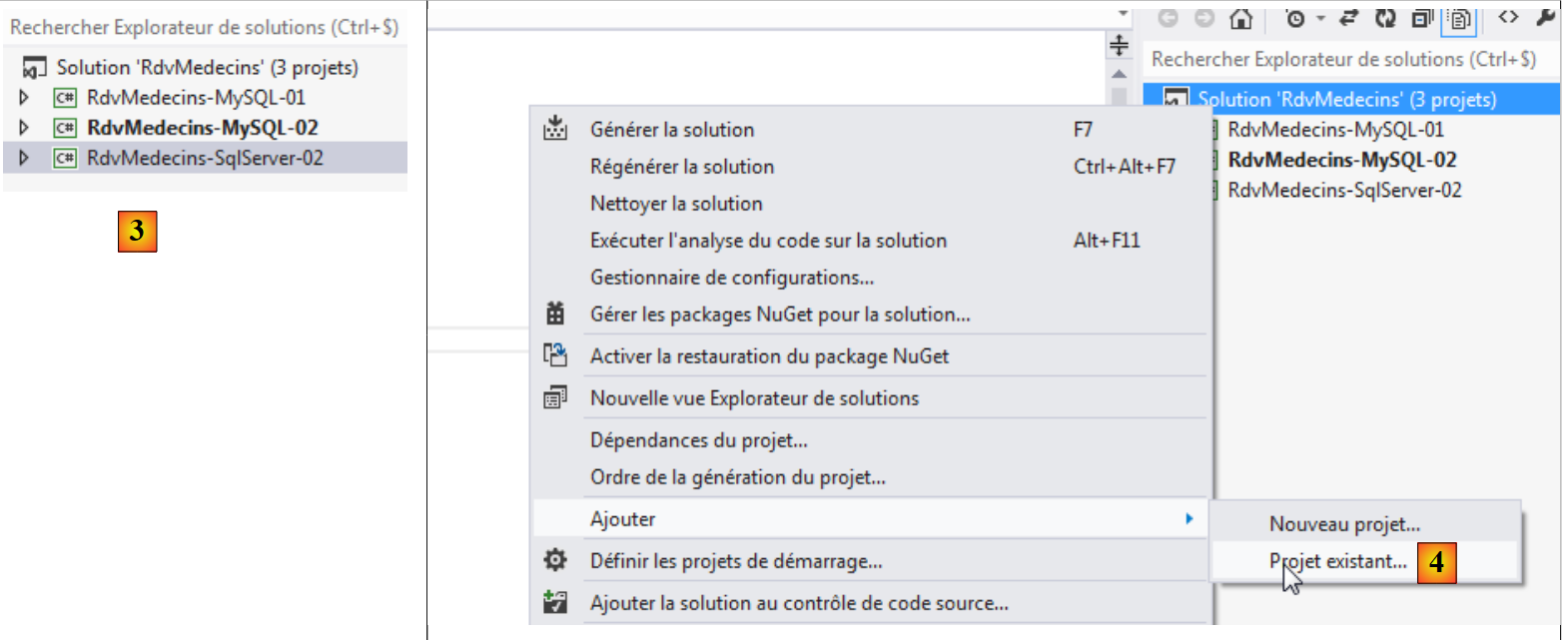 |
- in [3], the project has been removed;
- In [4], we add another one. This one is taken from the [RdvMedecins-Oracle-01] folder that we created previously;
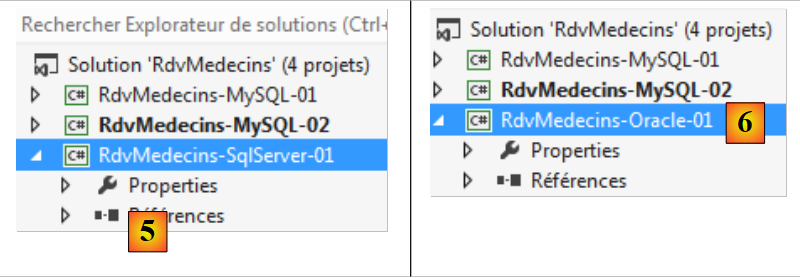 |
- in [5], the loaded project is named [RdvMedecins-SqlServer-01];
- In [6], we rename it to [RdvMedecins-Oracle-01]
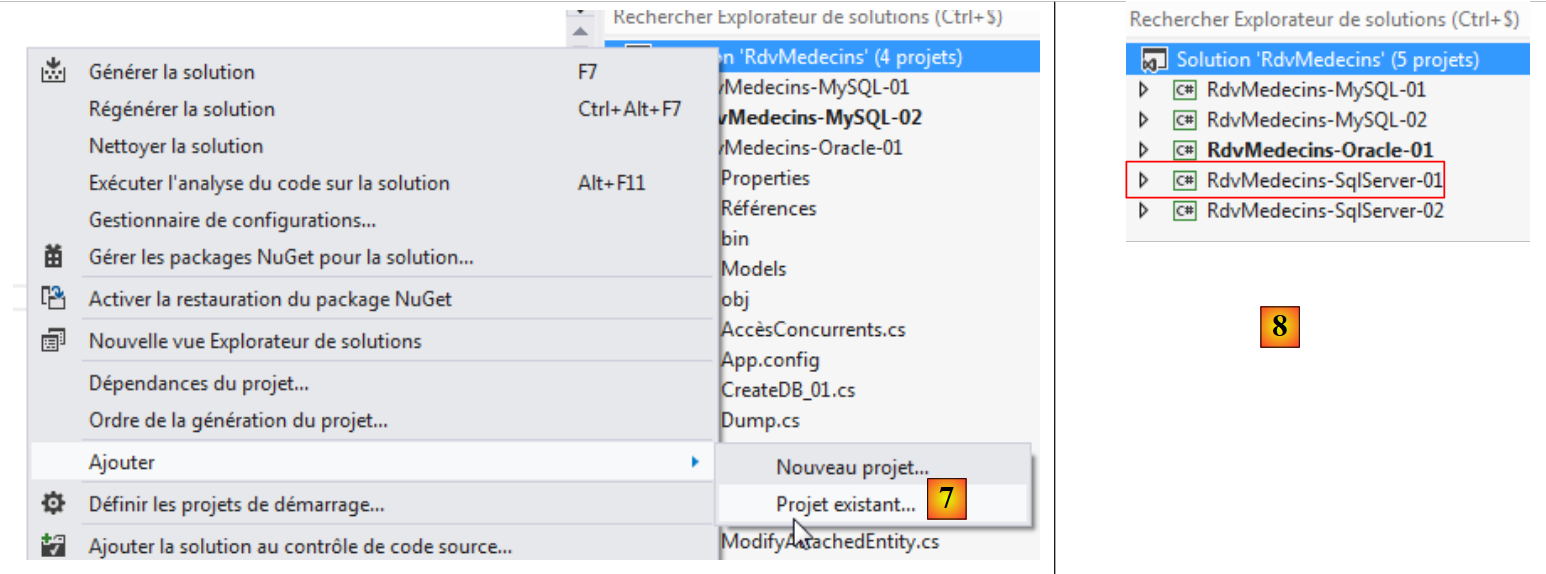 |
- in [7], we add another project to the solution. This project is taken from the [RdvMedecins-SqlServer-01] folder of the project we previously removed from the solution;
- In [8], the project [RdvMedecins-SqlServer-01] has been added back to the solution.
The [RdvMedecins-Oracle-01] project is identical to the [RdvMedecins-SqlServer-01] project. We need to make a few changes. In [App.config], we will modify the connection string and the [DbProviderFactory], which must be adapted for each SGBD.
<!-- connection chain on base -->
  <connectionStrings>
    <add name="monContexte" connectionString="Data Source=(DESCRIPTION=(ADDRESS_LIST=(ADDRESS=(PROTOCOL=TCP)(HOST=localhost)(PORT=1521)))(CONNECT_DATA=(SERVER=DEDICATED)(SERVICE_NAME=XE)));User Id=RDVMEDECINS-EF;Password=rdvmedecins;" providerName="Oracle.DataAccess.Client" />
  </connectionStrings>
  <!-- the factory provider -->
  <system.data>
    <DbProviderFactories>
      <remove invariant="Oracle.DataAccess.Client" />
      <add name="Oracle Data Provider for .NET" invariant="Oracle.DataAccess.Client" description="Oracle Data Provider for .NET" type="Oracle.DataAccess.Client.OracleClientFactory, Oracle.DataAccess, Version=4.112.3.0, Culture=neutral, PublicKeyToken=89b483f429c47342" />
    </DbProviderFactories>
  </system.data>
- line 3: the user and their password;
- lines 6–11: the DbProviderFactory. Line 9 references a DLL and [Oracle.DataAccess] that we do not have. We obtain it using NuGet [1]:
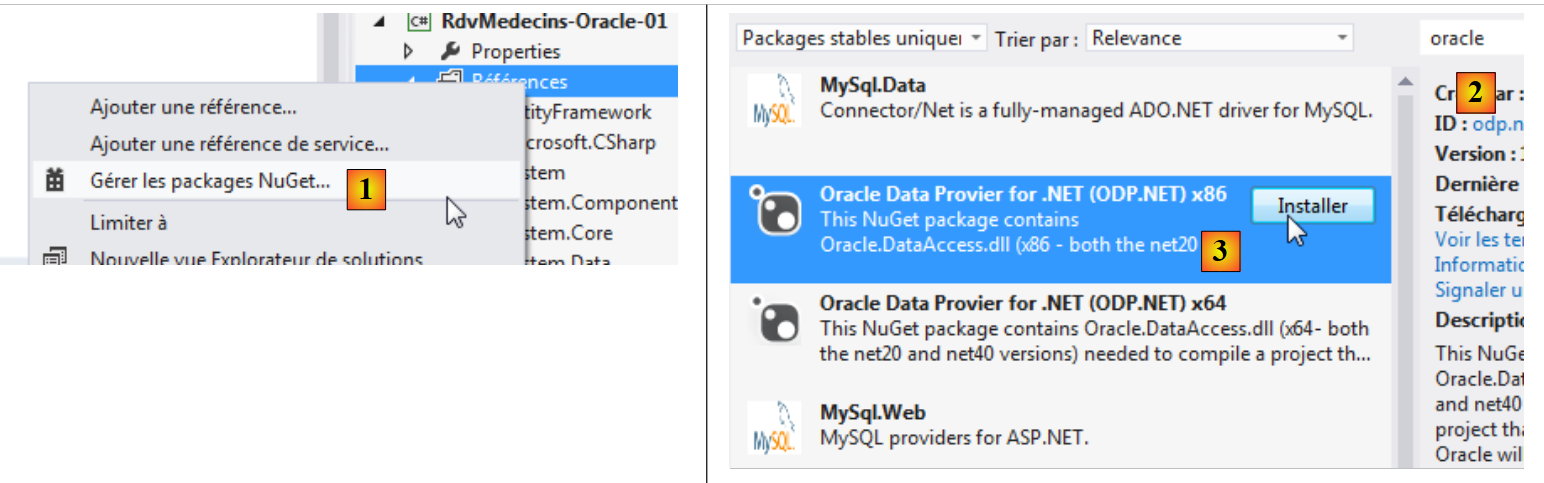 |
- In [2], type the keyword "oracle" in the search field;
- In [3], select the appropriate package [Oracle Data Provider]. This is Oracle's ADO connector NET;
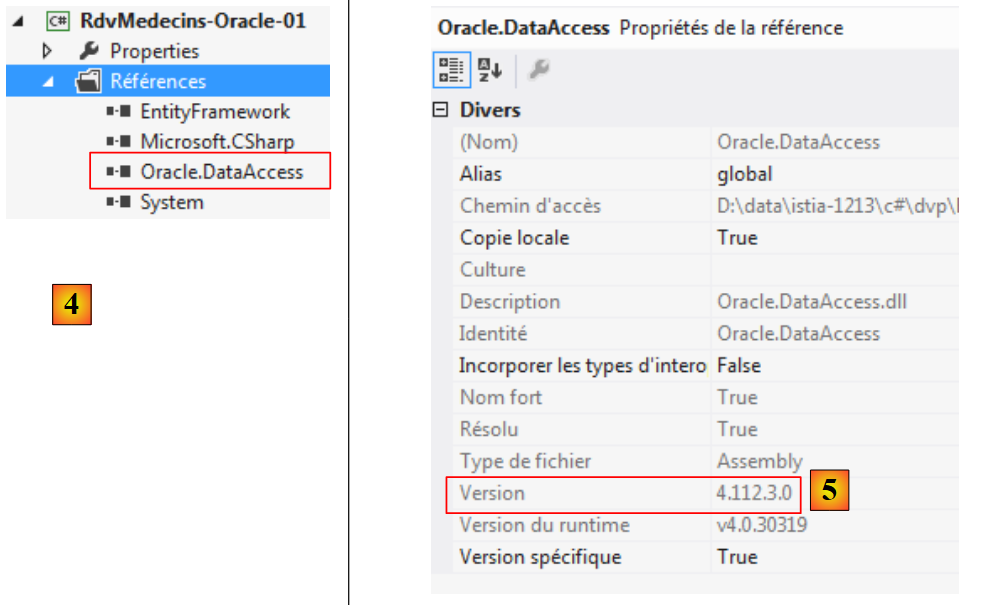 |
- In [4], the reference is added;
- In [5], within [App.config], you must specify the correct version from DLL. This can be found in its properties.
In the [Entites.cs] file, you must adapt the schema of the tables that will be generated. The schema used is the name of the user who owns the tables.
  [Table("MEDECINS", Schema = "RDVMEDECINS-EF")]
  public class Medecin : Personne
  {...}

  [Table("CLIENTS", Schema = "RDVMEDECINS-EF")]
  public class Client : Personne
  {...}

  [Table("RVS", Schema = "RDVMEDECINS-EF")]
  public class Rv
  {...}

  [Table("CRENEAUX", Schema = "RDVMEDECINS-EF")]
  public class Creneau
  {...}
We configure the project build:
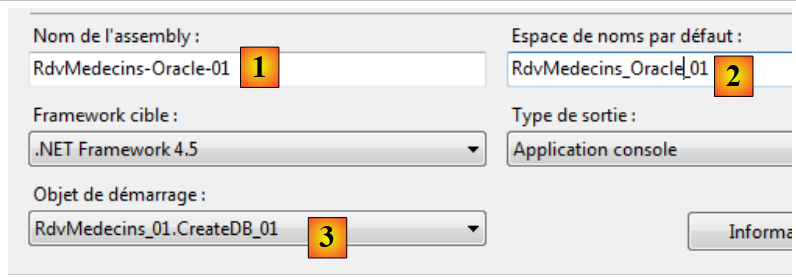 |
- in [1], we give a different name to the assembly that will be generated;
- in [2], we also specify a different default namespace;
- in [3], we specify the program to be executed.
At this stage, there are no compilation errors. Let’s run the program [CreateDB_01]. We get the following exception:
We recall having encountered the same error with MySQL. This is related to the type of the Timestamp field in the entities. We make the same modification. In the entities, we replace the three lines
    [Column("TIMESTAMP")]
    [Timestamp]
    public byte[] Timestamp { get; set; }
by the following:
    [ConcurrencyCheck]
    [Column("VERSIONING")]
    public int? Versioning { get; set; }
We therefore change the column type from byte[] to int?. Recall that for both SQL Server and MySQL, the table column used to manage access concurrency was assigned a value from SGBD each time a row was inserted or modified. From now on, we will use an entity field that is an integer. In SGBD, we will use stored procedures to increment this integer by one each time a row is inserted or modified.
We make the above change for all four entities and then rerun the application. We then get the following error:
Line 1 indicates that the Oracle ADO.NET connector is unable to delete the existing database. Let’s review what is happening. The code for [CreateDB_01.cs] is as follows:
using System;
using System.Data.Entity;
using RdvMedecins.Models;

namespace RdvMedecins_01
{
  class CreateDB_01
  {
    static void Main(string[] args)
    {
      // create the database
      Database.SetInitializer(new RdvMedecinsInitializer());
      using (var context = new RdvMedecinsContext())
      {
        context.Database.Initialize(false);
      }
    }
  }
}
Line 15 triggers the execution of the [RdvMedecinsInitializer] class (line 12). It is as follows:
public class RdvMedecinsInitializer : DropCreateDatabaseAlways<RdvMedecinsContext>
It derives from the [DropCreateDatabaseAlways] class, which attempts to delete and then recreate the database. We change the class definition to:
public class RdvMedecinsInitializer : CreateDatabaseIfNotExists<RdvMedecinsContext>
The database is created only if it does not already exist. We rerun [CreateDB_01.cs], and this time there are no errors. However, in [EMS Manager], we see that the [RDVMEDECINS-EF] database remains empty. Because EF found an existing database, it did nothing. It only performs an action if the database does not exist. From there, we’re stuck in a loop. In fact, the connection string for SGBD is as follows:
  <connectionStrings>
    <add name="monContexte" connectionString="Data Source=(DESCRIPTION=(ADDRESS_LIST=(ADDRESS=(PROTOCOL=TCP)(HOST=localhost)(PORT=1521)))(CONNECT_DATA=(SERVER=DEDICATED)(SERVICE_NAME=XE)));User Id=RDVMEDECINS-EF;Password=rdvmedecins;" providerName="Oracle.DataAccess.Client" />
</connectionStrings>
Line 2: The connection string uses a user name rather than a database name. This user must exist.
We are therefore required to manually create the [RDVMEDECINS-EF] database using the [EMS Manager for Oracle] tool. We will not describe every step, but only the most important ones.
The Oracle database will be as follows:
The tables
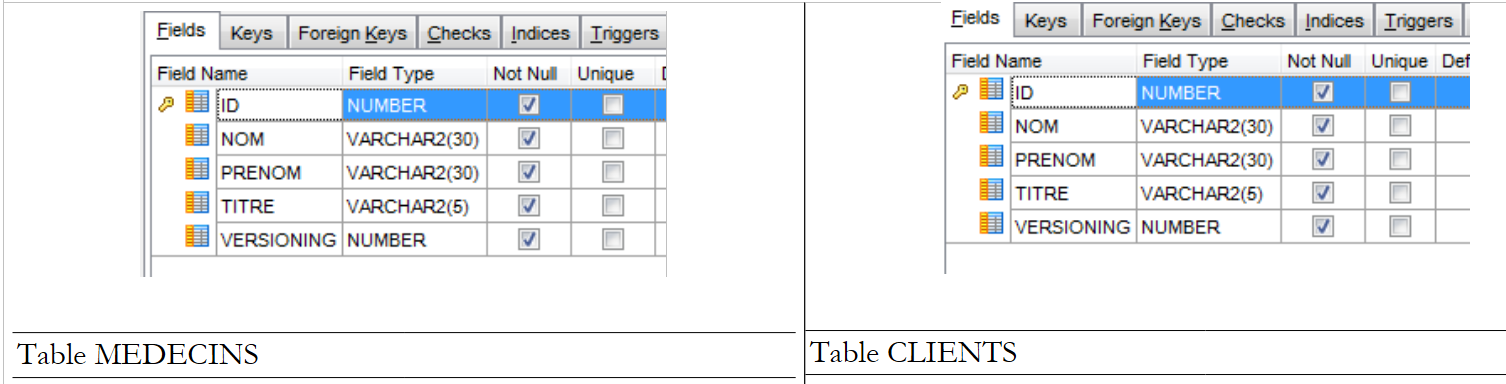 |
The various tables have the primary and foreign keys that these same tables had in the two previous examples. The foreign keys notably have the attributes ON, DELETE, and CASCADE.
Sequences
We have created Oracle sequences here. These are generators of consecutive numbers. There are 5 of them: [1].
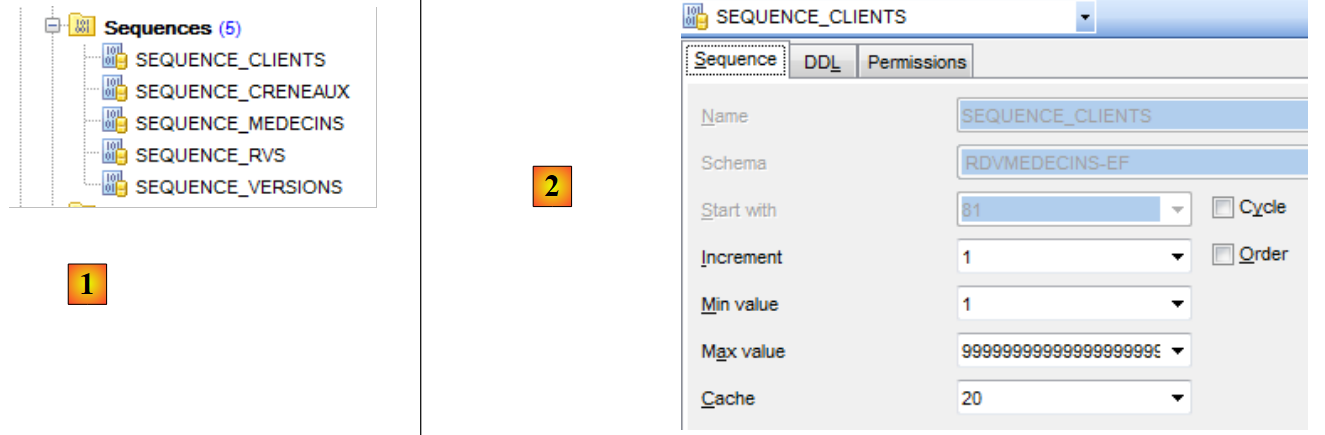 |
- In [2], we see the properties of the sequence [SEQUENCE_CLIENTS]. It generates consecutive numbers in increments of 1, starting from 1 up to a very large value.
All sequences are built on the same model.
- [SEQUENCE_CLIENTS] will be used to generate the primary key for the table [CLIENTS];
- [SEQUENCE_MEDECINS] will be used to generate the primary key for table [MEDECINS];
- [SEQUENCE_CRENEAUX] will be used to generate the primary key for table [CRENEAUX];
- [SEQUENCE_RVS] will be used to generate the primary key for table [RVS];
- [SEQUENCE_VERSIONS] will be used to generate the values for the [VERSIONING] columns in all tables.
Triggers
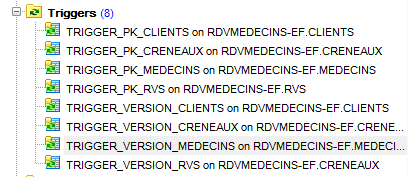
A trigger is a procedure executed by SGBD before or after an event (Insert, Update, Delete) in a table. We have 8 of them: [1]:
 |
Let’s look at the code for the DDL trigger that populates the primary key of the [CLIENTS] table:
- Lines 1–5: Before each INSERT operation on the [CLIENTS] table;
- line 6: the [ID] column will take the next value from the [SEQUENCE_CLIENTS] sequence. The primary key will thus have consecutive values provided by the sequence.
The [TRIGGER_PK_MEDECINS, TRIGGER_PK_CRENEAUX, TRIGGER_PK_RVS] triggers are similar.
Let’s look at the code DDL for the trigger [TRIGGER_VERSIONS_CLIENTS], which populates column [VERSIONING] in table [CLIENTS]:
- Lines 1-2: Before each INSERT or UPDATE operation on the [CLIENTS] table;
- line 8: the [VERSIONING] column will take the next value from the [SEQUENCE_VERSIONS] sequence. The [VERSIONING] column will thus have consecutive values provided by the sequence.
The [TRIGGER_VERSION_MEDECINS, TRIGGER_VERSION_CRENEAUX, TRIGGER_VERSION_RVS] triggers are similar. The four [VERSIONING] columns derive their values from the same sequence.
The script for generating the Oracle database tables, [RDVMEDECINS-EF], has been placed in the [RdvMedecins / databases / oracle] folder. The reader can load and run it to create the tables.
Once this is done, the various programs in the project can be run. They produce the same results as with SQL Server, except for the program [ModifyDetachedEntities], which crashes for the same reason it crashed with MySQL. The problem is solved in the same way. Simply copy the [ModifyDetachedEntities] program from the [RdvMedecins-MySQL-01] project into the [RdvMedecins-Oracle-01] project. This then creates a new problem:
- lines 1-4: the detached client has indeed been updated;
- line 6: a known exception. This is the one you get when you try to modify an entity without having the correct version. However, in this case, we did not want to modify but rather delete the entity:
      // remove out-of-context entity
      using (var context = new RdvMedecinsContext())
      {
        // here we have a new empty context
        // we put client1 in the context in a deleted state
        context.Entry(client1).State = EntityState.Deleted;
        // save the context
        context.SaveChanges();
}
EF 5 refused to delete client1 from the database because client1 (line 6) did not have the same version. We had not encountered this issue with MySQL. We are gradually realizing that the ADO.NET connectors for different SGBDs have slight differences. We correct it as follows:
using (var context = new RdvMedecinsContext())
      {
        // here we have a new empty context
        // put client1 in the context to delete it
        context.Clients.Remove(context.Clients.Find(client1.Id));
        // save the context
        context.SaveChanges();
      }
and it works.
5.3. Multi-layer architecture based on EF 5
Let’s return to our case study described in paragraph 2, page 7.
 |
We will start by building the [DAO] data access layer. To do this, we duplicate the console project VS 2012 [RdvMedecins-SqlServer-02] into [RdvMedecins-Oracle-02] [1]:
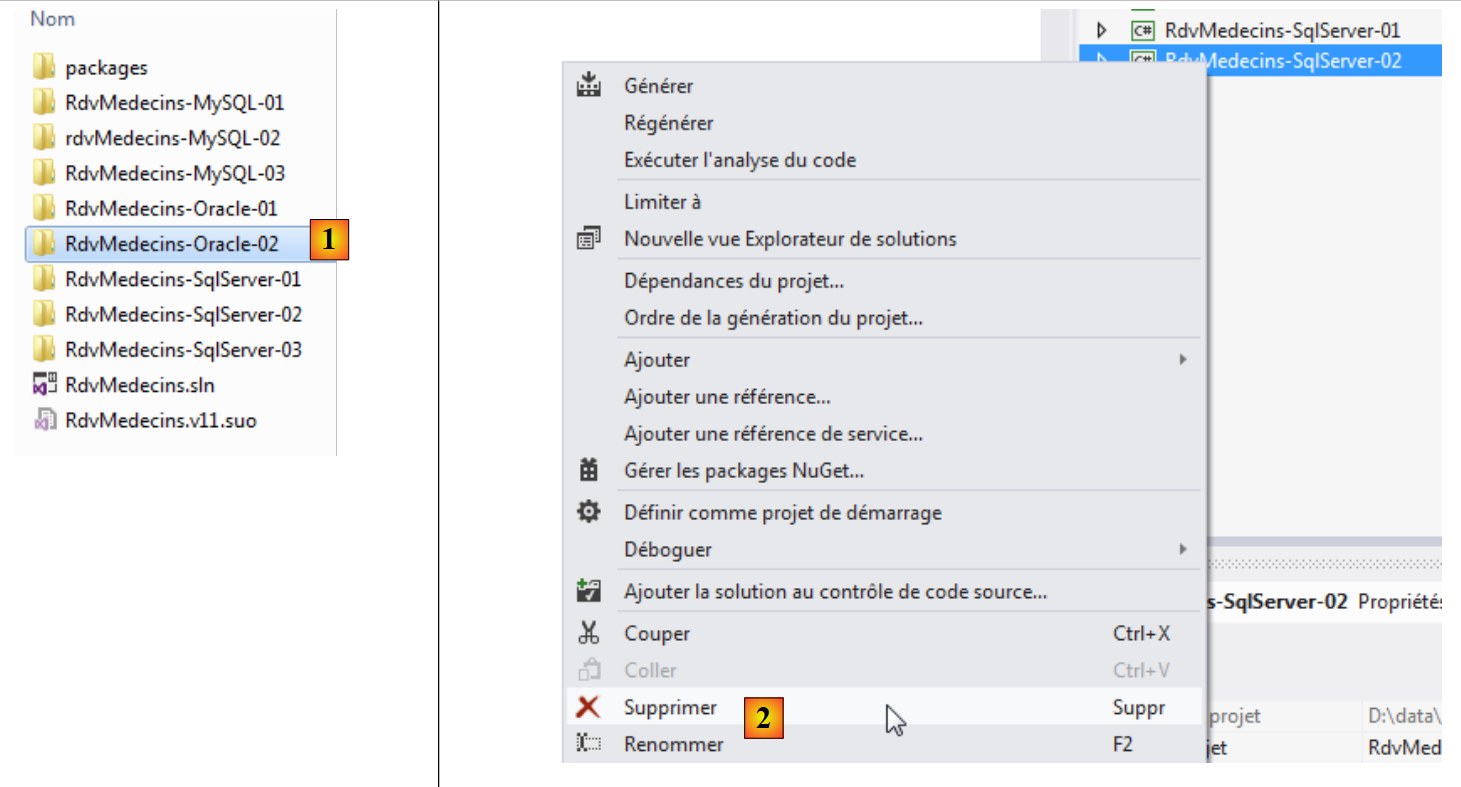 |
- in [2], we delete the project [RdvMedecins-SqlServer-02];
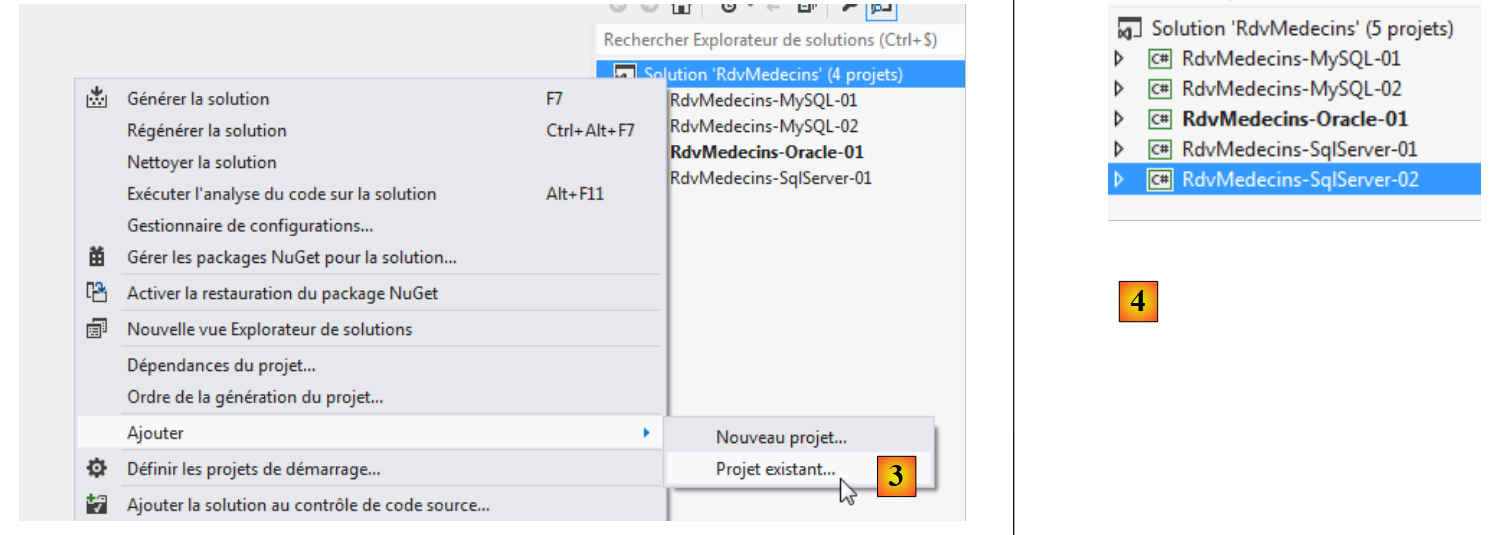 |
- In [3], an existing project is added to the solution. It is taken from the [RdvMedecins-Oracle-02] folder that was just created;
- In [4], the new project has the same name as the one that was deleted. We will rename it;
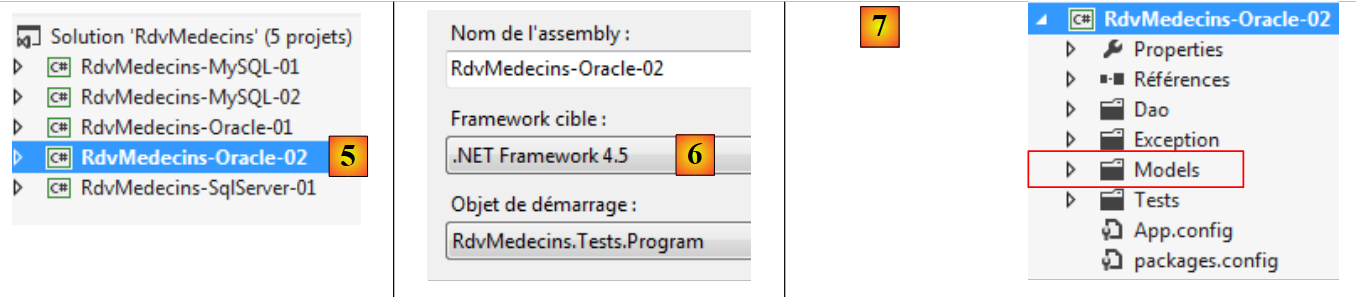 |
- In [5], we have changed the project name;
- In [6], we modify some of its properties, such as the assembly name here;
- in [7], the [Models] folder is deleted and replaced by the [Models] folder from the [RdvMedecins-Oracle-01] project. This is because the two projects share the same templates.
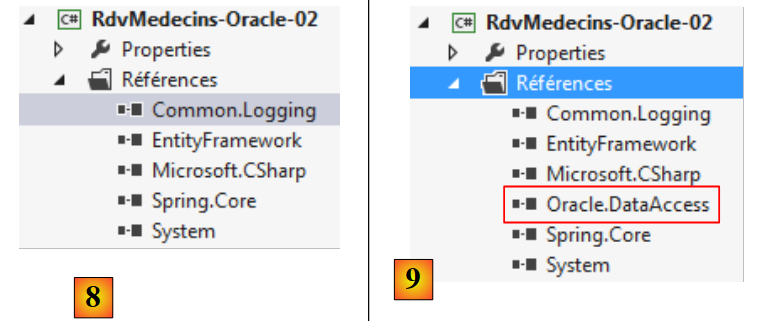 |
- In [8], the current project references;
- In [9], the Oracle ADO connector NET was added using the NuGet tool.
In the [App.config] file, replace the SQL Server database information with that of the Oracle database. This information can be found in the [App.config] file of the [RdvMedecins-Oracle-01] project:
<!-- connection chain on base -->
  <connectionStrings>
    <add name="monContexte" connectionString="Data Source=(DESCRIPTION=(ADDRESS_LIST=(ADDRESS=(PROTOCOL=TCP)(HOST=localhost)(PORT=1521)))(CONNECT_DATA=(SERVER=DEDICATED)(SERVICE_NAME=XE)));User Id=RDVMEDECINS-EF;Password=rdvmedecins;" providerName="Oracle.DataAccess.Client" />
  </connectionStrings>
  <!-- the factory provider -->
  <system.data>
    <DbProviderFactories>
      <remove invariant="Oracle.DataAccess.Client" />
      <add name="Oracle Data Provider for .NET" invariant="Oracle.DataAccess.Client" description="Oracle Data Provider for .NET" type="Oracle.DataAccess.Client.OracleClientFactory, Oracle.DataAccess, Version=4.112.3.0, Culture=neutral, PublicKeyToken=89b483f429c47342" />
    </DbProviderFactories>
  </system.data>
The objects managed by Spring also change. Currently we have:
  <!-- spring configuration -->
  <spring>
    <context>
      <resource uri="config://spring/objects" />
    </context>
    <objects xmlns="http://www.springframework.net">
      <object id="rdvmedecinsDao" type="RdvMedecins.Dao.Dao,RdvMedecins-SqlServer-02" />
    </objects>
</spring>
Line 7 references the assembly for the [RdvMedecins-SqlServer-02] project. The assembly is now [RdvMedecins-Oracle-02].
With that done, we are ready to run the test for the [DAO] layer. First, we must ensure the database is populated (program [Fill] from the [RdvMedecins-Oracle-01] project). The test program succeeds.
We create the DLL for the project as was done for the [RdvMedecins-SqlServer-02] project, and we gatherall DLL files from the project into a [lib] folder created within [RdvMedecins-Oracle-02]. These will be the references for the [RdvMedecins-Oracle-03] web project that follows.
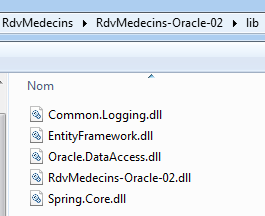 |
We are now ready to build the [ASP.NET] layer of our application:
 |
We will start with the [RdvMedecins-SqlServer-03] project. We duplicate this project’s folder into [RdvMedecins-Oracle-03] and [1]:
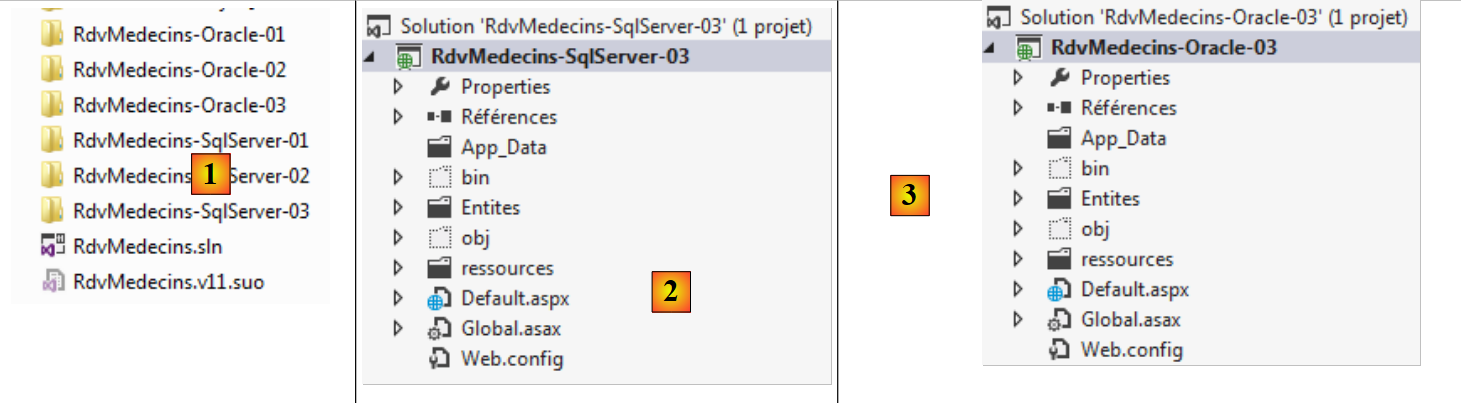 |
- into [2], using VS 2012 Express for the Web, we open the solution in the [RdvMedecins-Oracle-03] folder;
- in [3], we change both the solution name and the project name;
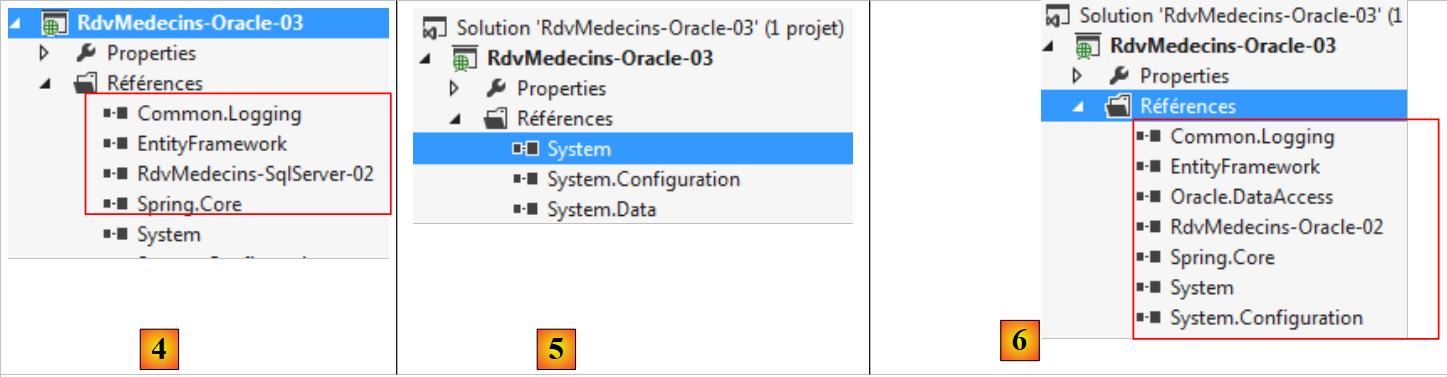 |
- In [4], the current project references;
- in [5], we delete them;
- in [6], to replace them with references to DLL, which we have just saved in a folder named [lib] within the [RdvMedecins-Oracle-02] project.
All that remains is to modify the [Web.config] file. We replace its current content with the content of the [App.config] file from the [RdvMedecins-Oracle-02] project. Once this is done, we run the web project. It works. Don’t forget to populate the database before running the web application.