4. Case study with MySQL 5.5.28
4.1. Installing the tools
The tools to be installed are as follows:
- SGBD: [http://dev.mysql.com/downloads/];
- an administration tool: EMS SQL Manager for MySQL Freeware [http://www.sqlmanager.net/fr/products/mysql/manager/download].
In the following examples, the root user has the root password.
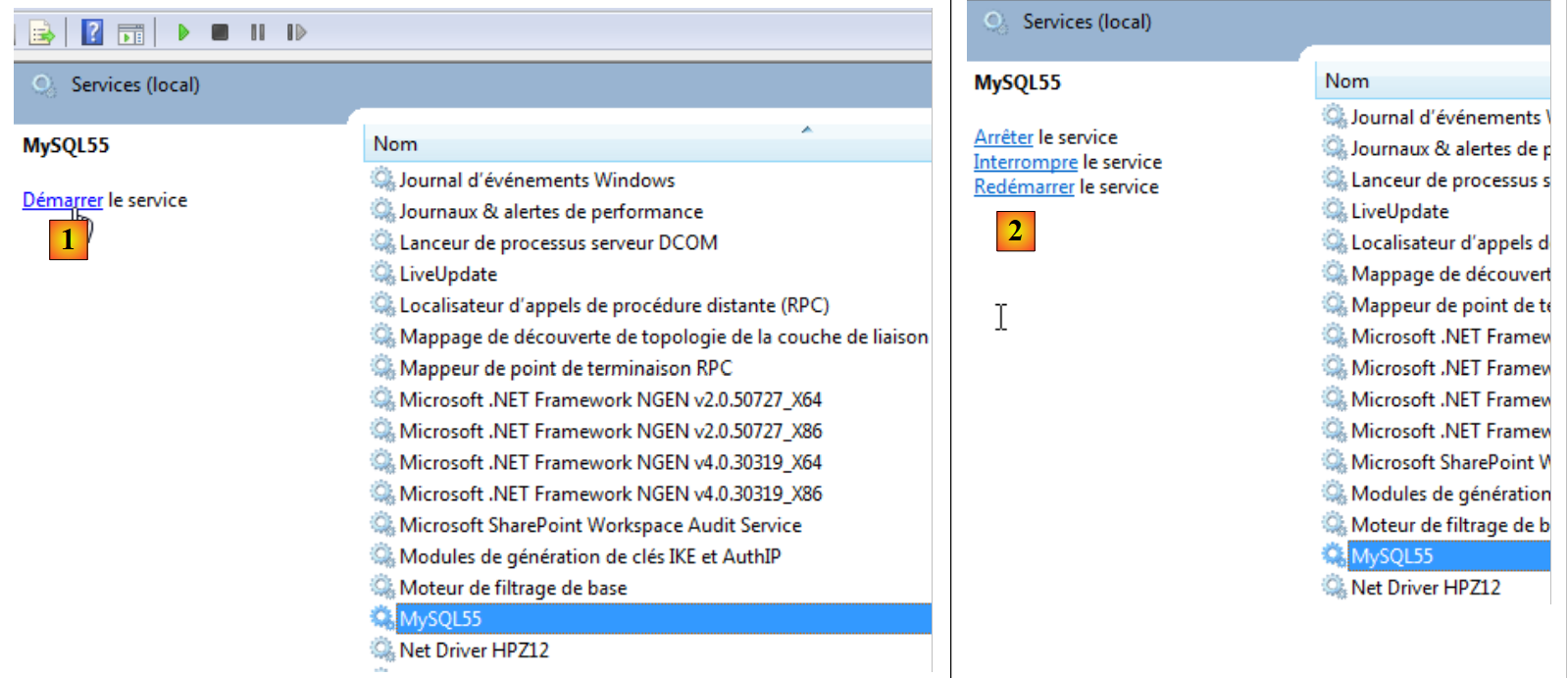
Let’s launch MySQL5. Here, we do this from the Windows Services window [1]. In [2], SGBD is launched.
 |
We now launch the [SQL Manager Lite for MySQL] tool, which we will use to manage SGBD and [3].
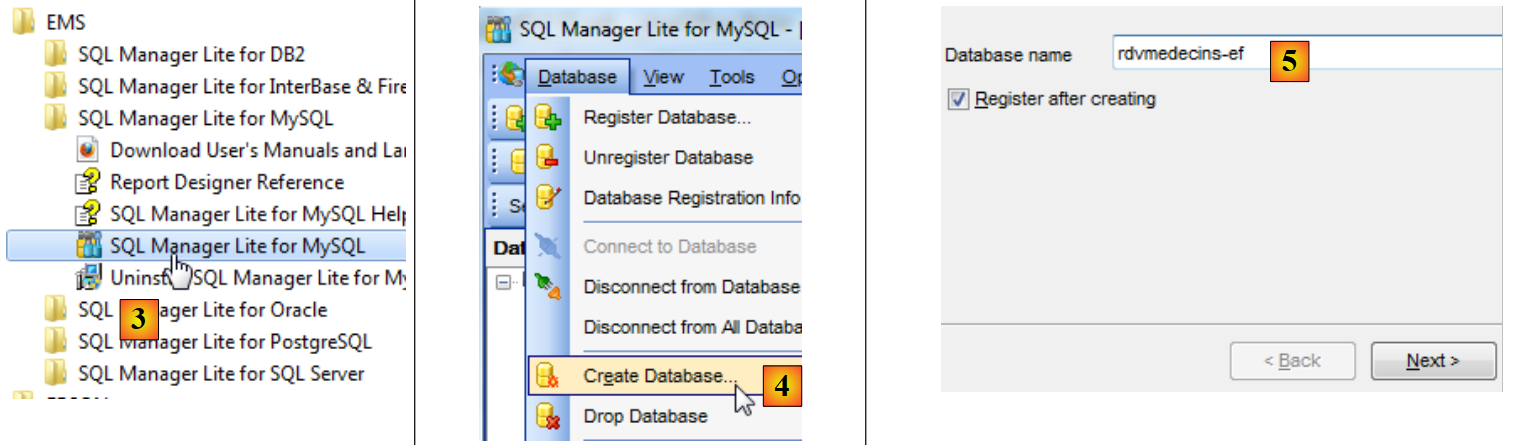 |
- In [4], we create a new database;
- In [5], we specify the database name;
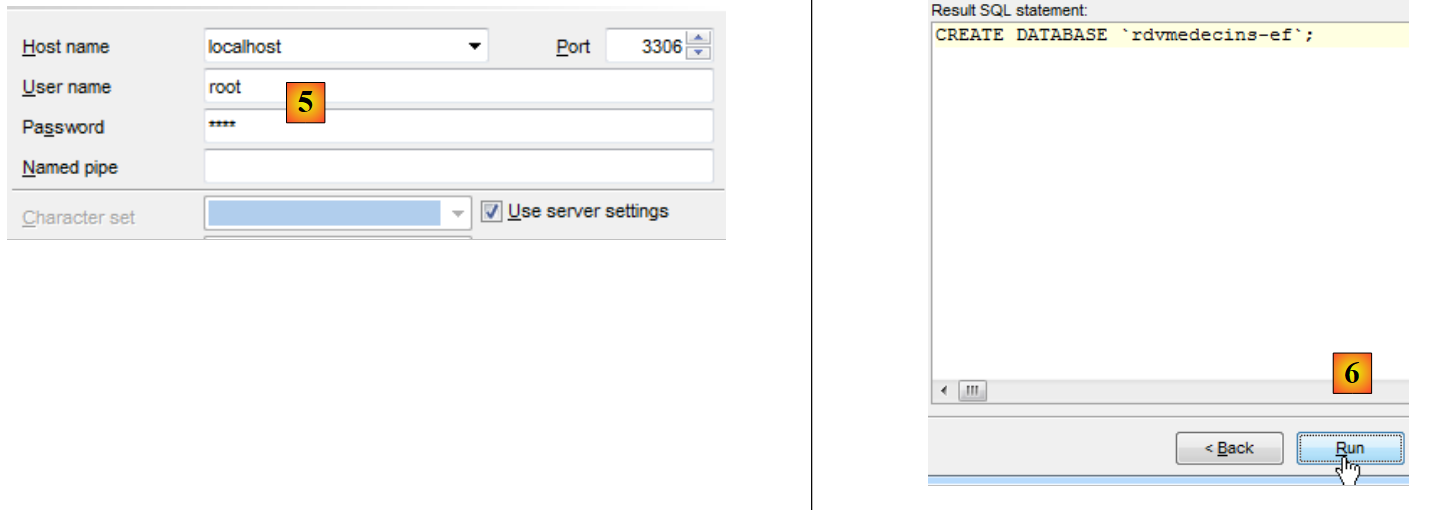 |
- In [5], we log in as root / root;
- In [6], we validate the command SQL, which will be executed;
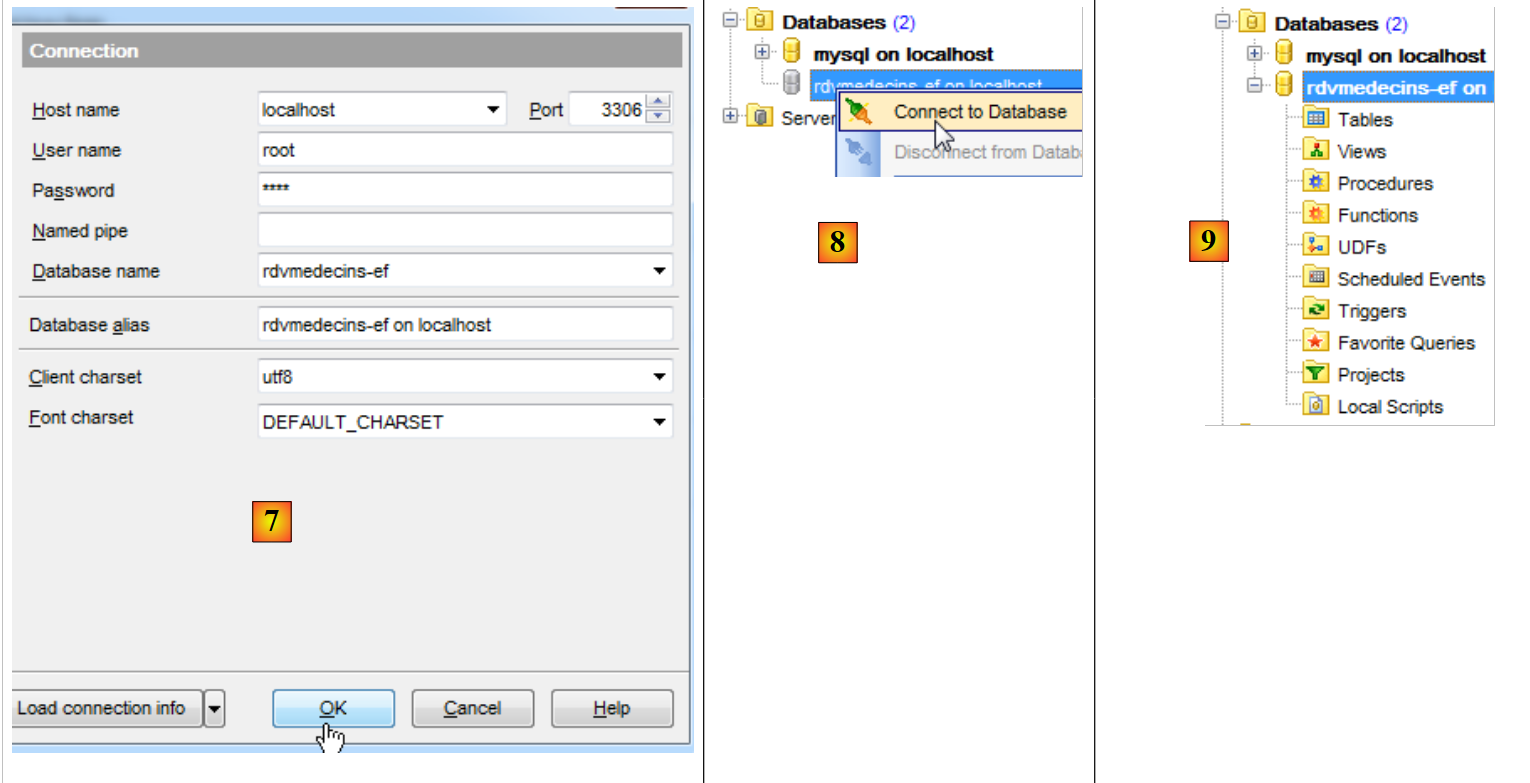 |
- In [7], the database has been created. It must now be saved in [EMS Manager]. The information is correct. We run [OK];
- In [8], we log in to it;
- In [9], [EMS Manager] displays the database, which is currently empty.
We will now connect a 2012 VS project to this database.
4.2. Creating the database from entities
We create the console project VS 2012 [RdvMedecins-MySQL-01] [1] below:
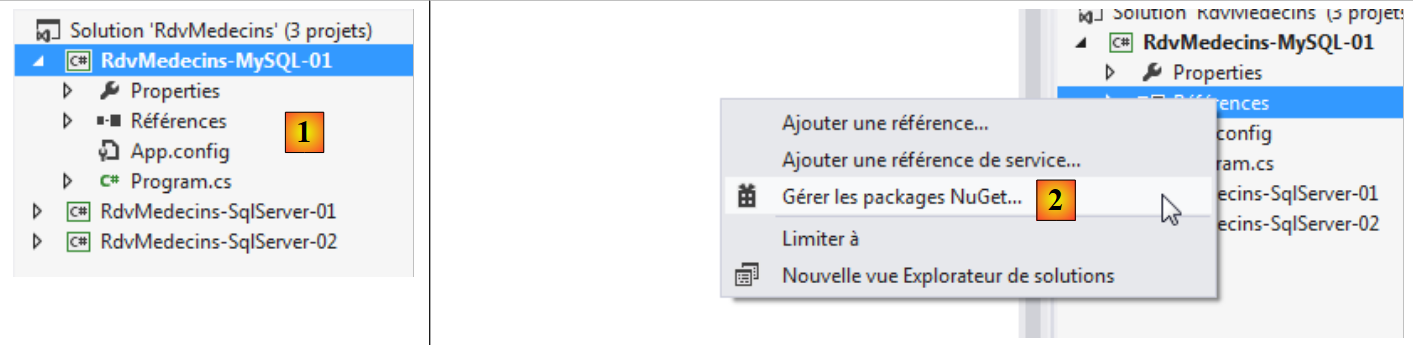 |
- In [2], we add references to the project via NuGet;
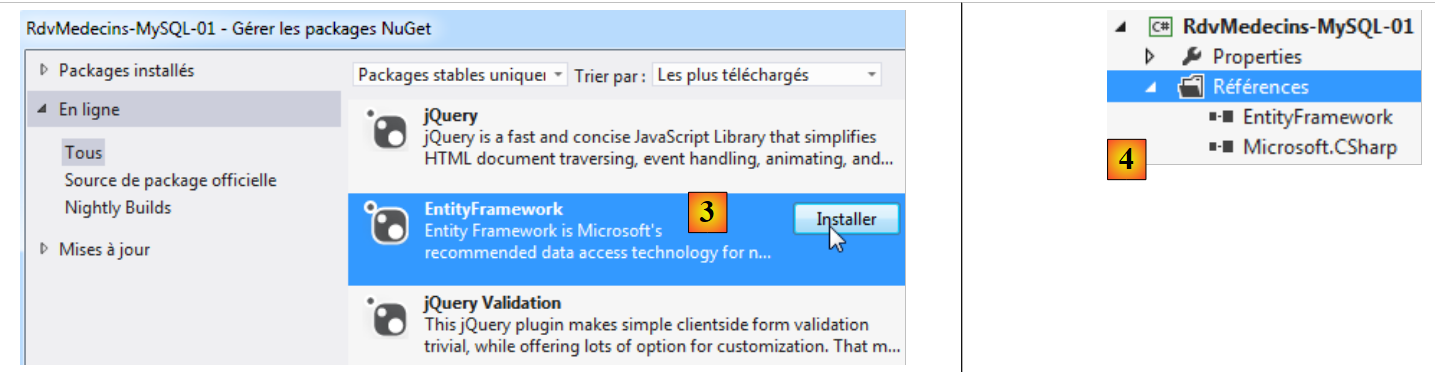 |
- in [3], reference EF 5 is added;
- in [4], it is now in the references;
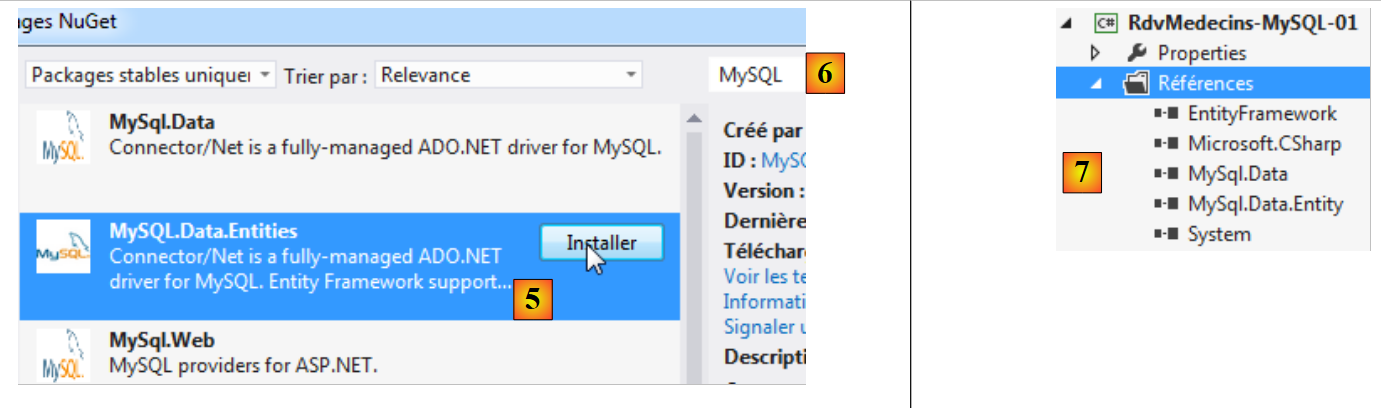 |
- In [5], we start over to add [MySQL.Data.Entities], which is an ADO.NET connector for Entity Framework. To find the package, you can use the search box for [6];
- In [7], two references appear: [MySQL.Data.Entities] and [MySQL.Data], the latter being a dependency of the former.
Now, we will build the [RdvMedecins-MySQL-01] project from the [RdvMedecins-SqlServer-01] project.
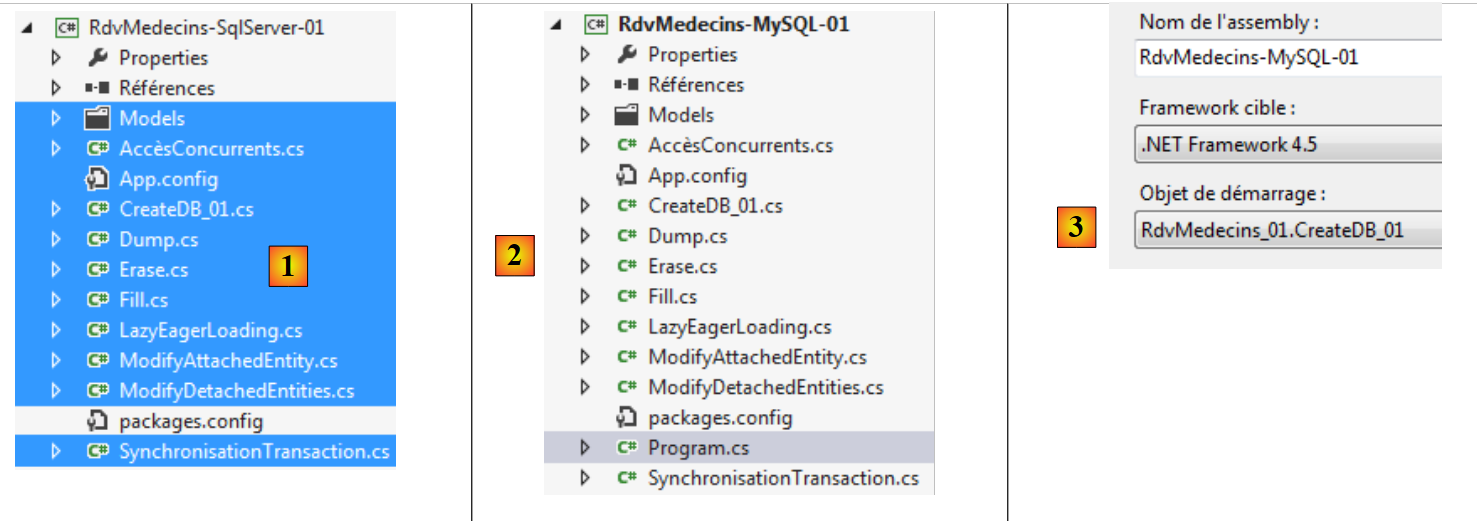 |
- In [1], we copy the selected elements;
- In [2], we paste them into the [RdvMedecins-MySQL-01] project;
- In [3], because there are multiple programs with a method named [Main], we need to specify the project to start.
At this point, the project should build successfully. Now, we will modify the configuration file [App.config], which configures the database connection string, and DbProviderFactory. It becomes the following:
<?xml version="1.0" encoding="utf-8"?>
<configuration>
  <configSections>
    <!-- For more information on Entity Framework configuration, visit http://go.microsoft.com/fwlink/?LinkID=237468 -->
    <section name="entityFramework" type="System.Data.Entity.Internal.ConfigFile.EntityFrameworkSection, EntityFramework, Version=5.0.0.0, Culture=neutral, PublicKeyToken=b77a5c561934e089" requirePermission="false" />
  </configSections>
  <startup>
    <supportedRuntime version="v4.0" sku=".NETFramework,Version=v4.5" />
  </startup>
  <entityFramework>
    <defaultConnectionFactory type="System.Data.Entity.Infrastructure.SqlConnectionFactory, EntityFramework" />
  </entityFramework>

  <!-- connecting chain-->
  <connectionStrings>
    <add name="monContexte"
         connectionString="Server=localhost;Database=rdvmedecins-ef;Uid=root;Pwd=root;"
         providerName="MySql.Data.MySqlClient" />
  </connectionStrings>
  <!-- the factory provider -->
  <system.data>
    <DbProviderFactories>
      <add name="MySQL Data Provider" invariant="MySql.Data.MySqlClient" description=".Net Framework Data Provider for MySQL"
          type="MySql.Data.MySqlClient.MySqlClientFactory, MySql.Data, Version=6.5.4.0, Culture=neutral, PublicKeyToken=C5687FC88969C44D"
        />
    </DbProviderFactories>
  </system.data>

</configuration>
- line 17: the connection string to the database MySQL [rdvmedecins-ef] that we created;
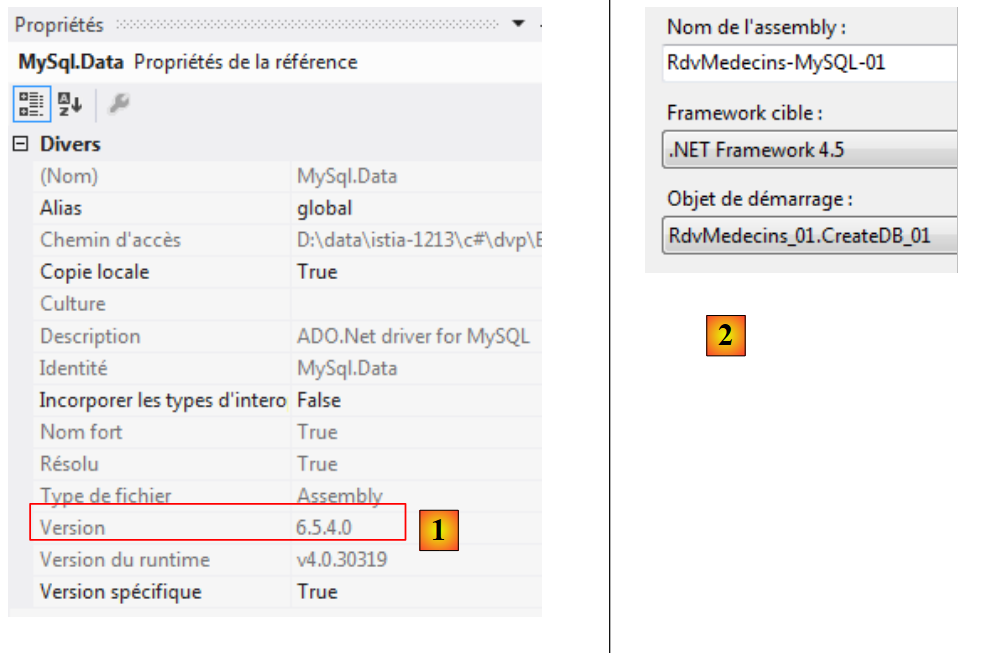
- line 24: version must match the reference [MySql.Data] in the [1] project:
 |
There is also some configuration in the [Entites.cs] file, where the names of the tables and the schema to which they belong are specified. This may vary depending on the SGBD file. That is the case here, where there will be no schema. The [Entites.cs] file changes as follows:
  [Table("MEDECINS")]
  public class Medecin : Personne
  {...}

  [Table("CLIENTS")]
  public class Client : Personne
  {...}

  [Table("CRENEAUX")]
  public class Creneau
  {...}

  [Table("RVS")]
  public class Rv
  {...}
Let's run the program [CreateDB_01] [2]. We get the following exception:
The same error appears four times (lines 2–5). The rowversion type suggests the field with the annotation [Timestamp] in the entities:
    [Column("TIMESTAMP")]
    [Timestamp]
    public byte[] Timestamp { get; set; }
We decide to replace these three lines with the following:
    [ConcurrencyCheck]
    [Column("VERSIONING")]
    public DateTime? Versioning { get; set; }
We change the column type from byte[] to DateTime?. We do this because MySQL has a type [TIMESTAMP] that represents a date/time, and a column of this type is automatically updated by MySQL every time the row is updated. This will allow us to handle concurrent access.
The annotation [Timestamp] can only be applied to a column of type byte[]. We replace it with the annotation [ConcurrencyCheck]. Both annotations handle concurrent access. We do this for all four entities and then rerun the application. We then get the following error:
Line 1 indicates a syntax error in SQL, which is executed by MySQL. Since this was not generated by us but by the ADO.NET provider of MySQL, we cannot correct this issue. However, we can see that tables were created by [1] below:
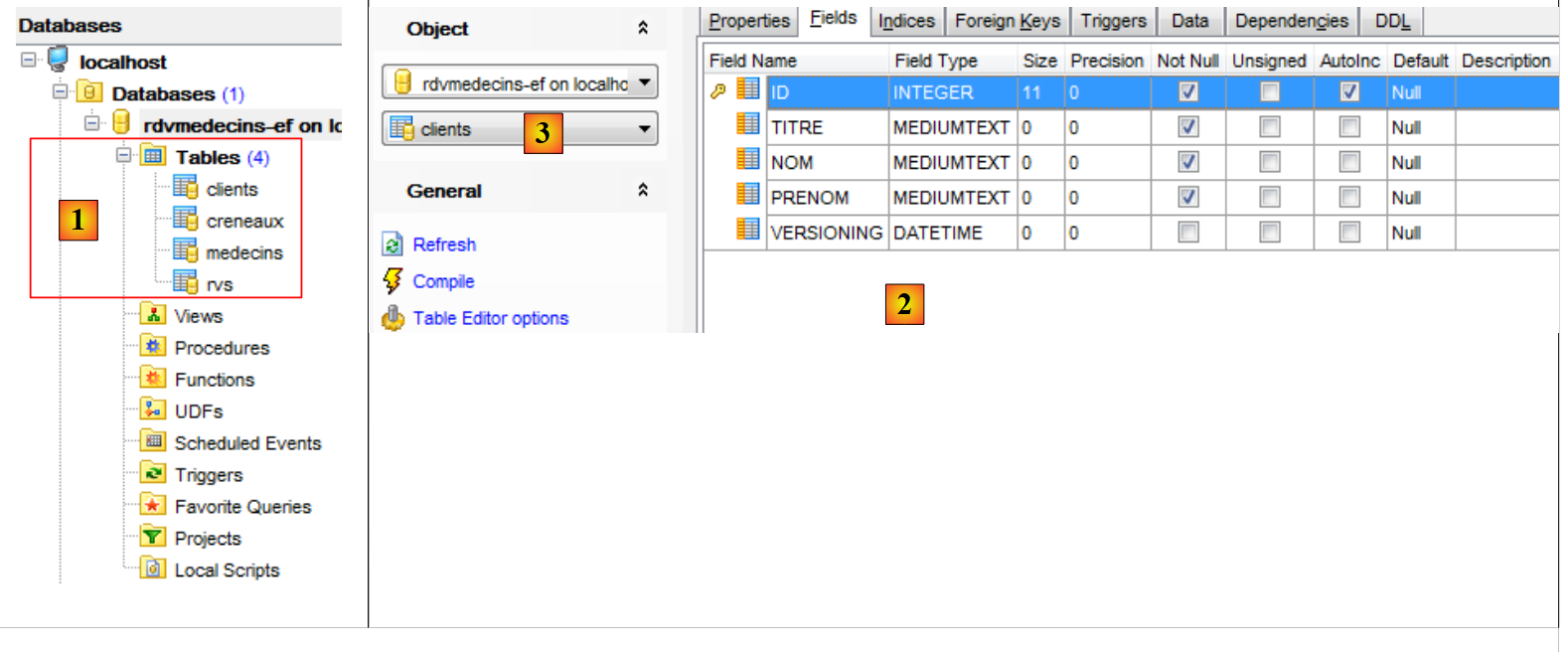 |
- In [2], we can see the structure of the table [clients] [3].
There are several changes to be made to the generated database:
- the column type for [VERSIONING] is incorrect. It must be set to the type MySQL [TIMESTAMP];
- note that the table [rvs] has a uniqueness constraint. It was not created by this generation;
- the ADO.NET connector for SQL Server had generated foreign keys with the clause ON DELETE CASCADE. The ADO.NET connector for MySQL did not do this.
As we did with SQL Server, we therefore need to modify the generated database. We do not show how to make the modifications. We simply provide the script for creating the database:
# SQL Manager Lite for MySQL 5.3.0.2
# ---------------------------------------
# Host     : localhost
# Port     : 3306
# Database : rdvmedecins-ef


/*!40101 SET @OLD_CHARACTER_SET_CLIENT=@@CHARACTER_SET_CLIENT */;
/*!40101 SET @OLD_CHARACTER_SET_RESULTS=@@CHARACTER_SET_RESULTS */;
/*!40101 SET @OLD_COLLATION_CONNECTION=@@COLLATION_CONNECTION */;
/*!40101 SET NAMES utf8 */;

SET FOREIGN_KEY_CHECKS=0;

USE `rdvmedecins-ef`;

#
# Structure for the `clients` table :
#

CREATE TABLE `clients` (
  `ID` INTEGER(11) NOT NULL AUTO_INCREMENT,
  `NOM` VARCHAR(30) COLLATE utf8_general_ci NOT NULL,
  `PRENOM` VARCHAR(30) COLLATE utf8_general_ci NOT NULL,
  `TITRE` VARCHAR(5) COLLATE utf8_general_ci NOT NULL,
  `VERSIONING` TIMESTAMP NOT NULL ON UPDATE CURRENT_TIMESTAMP DEFAULT CURRENT_TIMESTAMP,
  PRIMARY KEY USING BTREE (`ID`) COMMENT ''
)ENGINE=InnoDB
AUTO_INCREMENT=96 AVG_ROW_LENGTH=4096 CHARACTER SET 'utf8' COLLATE 'utf8_general_ci'
COMMENT=''
;

#
# Structure for the `medecins` table :
#

CREATE TABLE `medecins` (
  `ID` INTEGER(11) NOT NULL AUTO_INCREMENT,
  `NOM` VARCHAR(30) COLLATE utf8_general_ci NOT NULL,
  `PRENOM` VARCHAR(30) COLLATE utf8_general_ci NOT NULL,
  `TITRE` VARCHAR(5) COLLATE utf8_general_ci NOT NULL,
  `VERSIONING` TIMESTAMP NOT NULL ON UPDATE CURRENT_TIMESTAMP DEFAULT CURRENT_TIMESTAMP,
  PRIMARY KEY USING BTREE (`ID`) COMMENT ''
)ENGINE=InnoDB
AUTO_INCREMENT=56 AVG_ROW_LENGTH=4096 CHARACTER SET 'utf8' COLLATE 'utf8_general_ci'
COMMENT=''
;

#
# Structure for the `creneaux` table :
#

CREATE TABLE `creneaux` (
  `ID` INTEGER(11) NOT NULL AUTO_INCREMENT,
  `HDEBUT` INTEGER(11) NOT NULL,
  `MDEBUT` INTEGER(11) NOT NULL,
  `HFIN` INTEGER(11) NOT NULL,
  `MFIN` INTEGER(11) NOT NULL,
  `MEDECIN_ID` INTEGER(11) NOT NULL,
  `VERSIONING` TIMESTAMP NOT NULL ON UPDATE CURRENT_TIMESTAMP DEFAULT CURRENT_TIMESTAMP,
  PRIMARY KEY USING BTREE (`ID`) COMMENT '',
   INDEX `MEDECIN_ID` USING BTREE (`MEDECIN_ID`) COMMENT '',
  CONSTRAINT `creneaux_ibfk_1` FOREIGN KEY (`MEDECIN_ID`) REFERENCES `medecins` (`ID`) ON DELETE CASCADE ON UPDATE NO ACTION
)ENGINE=InnoDB
AUTO_INCREMENT=472 AVG_ROW_LENGTH=455 CHARACTER SET 'utf8' COLLATE 'utf8_general_ci'
COMMENT=''
;

#
# Structure for the `rvs` table :
#

CREATE TABLE `rvs` (
  `ID` INTEGER(11) NOT NULL AUTO_INCREMENT,
  `JOUR` DATE NOT NULL,
  `CRENEAU_ID` INTEGER(11) NOT NULL,
  `CLIENT_ID` INTEGER(11) NOT NULL,
  `VERSIONING` TIMESTAMP NOT NULL ON UPDATE CURRENT_TIMESTAMP DEFAULT CURRENT_TIMESTAMP,
  PRIMARY KEY USING BTREE (`ID`) COMMENT '',
  UNIQUE INDEX `CRENEAU_ID_JOUR` USING BTREE (`JOUR`, `CRENEAU_ID`) COMMENT '',
   INDEX `CRENEAU_ID` USING BTREE (`CRENEAU_ID`) COMMENT '',
   INDEX `CLIENT_ID` USING BTREE (`CLIENT_ID`) COMMENT '',
  CONSTRAINT `rvs_ibfk_2` FOREIGN KEY (`CLIENT_ID`) REFERENCES `clients` (`ID`) ON DELETE CASCADE ON UPDATE NO ACTION,
  CONSTRAINT `rvs_ibfk_1` FOREIGN KEY (`CRENEAU_ID`) REFERENCES `creneaux` (`ID`) ON DELETE CASCADE ON UPDATE NO ACTION
)ENGINE=InnoDB
AUTO_INCREMENT=28 AVG_ROW_LENGTH=16384 CHARACTER SET 'utf8' COLLATE 'utf8_general_ci'
COMMENT=''
;
- lines 22, 38, 54, 74: the primary keys ID of the tables are of type AUTO_INCREMENT, therefore generated by MySQL;
- lines 26, 42, 60, 78: the VERSIONING column is of type TIMESTAMP and is updated during a INSERT or a UPDATE;
- line 63: the foreign key from table [creneaux] to table [medecins] with the clause ON DELETE CASCADE;
- line 80: the uniqueness constraint for table [rvs];
- line 83: the foreign key from table [rvs] to table [creneaux] with the clause ON DELETE CASCADE;
- line 84: the foreign key from table [rvs] to table [clients] with the clause ON DELETE CASCADE ;
The script for generating the database tables MySQL and [rvmedecins-ef] has been placed in the [RdvMedecins / databases / mysql] folder. The reader can load and run it to create these tables.
Once this is done, the various programs in the project can be run. They produce the same results as with SQL Server, except for the program [ModifyDetachedEntities], which crashes. To understand why, we can look at the output of the program [ModifyAtttachedEntities]:
- lines 1-2: a client before the context is saved;
- lines 3-4: the client after saving. It has a primary key but no value for its [Versioning] field, whereas SQL Server was updating the [Timestamp] field of the entity.
Now let’s examine the code for the [ModifyDetachedEntities] program that crashes:
using System;
...

namespace RdvMedecins_01
{
  class ModifyDetachedEntities
  {
    static void Main(string[] args)
    {
      Client client1;

      // empty the current base
      Erase();
      // add a customer
      using (var context = new RdvMedecinsContext())
      {
        // customer creation
        client1 = new Client { Titre = "x", Nom = "x", Prenom = "x" };
        // add customer to context
        context.Clients.Add(client1);
        // save the context
        context.SaveChanges();
      }
      // basic view
      Dump("1-----------------------------");
      // client1 is not in the context - we modify it
      client1.Nom = "y";
      // out-of-context entity modification
      using (var context = new RdvMedecinsContext())
      {
        // here we have a new empty context
        // we put client1 in the context in a modified state
        context.Entry(client1).State = EntityState.Modified;
        // save the context
        context.SaveChanges();
      }
      ...
    }

    static void Erase()
    {
      ...
    }

    static void Dump(string str)
    {
      ...
    }
  }
}
- line 20: a customer is saved. They now have their primary key, but it is version;
- line 33: a modification is made with client1. It fails because it does not have the version that is in the database.
We resolve the issue by inserting the following code between lines 25 and 26:
      // we retrieve client1 to get his version
      using (var context = new RdvMedecinsContext())
      {
        // customer2 will be in the context
        Client client2 = context.Clients.Find(client1.Id);
        // set the version of customer1 to that of customer2
        client1.Versioning = client2.Versioning;
}
Now, the [client1] entity has the same version as in the database and can therefore be used to update the row in the database.
4.3. Multi-layer architecture based on EF 5
Let’s return to the case study described in section 2.
 |
We will begin by building the [DAO] data access layer. To do this, we create the console project VS 2012 [RdvMedecins-MySQL-02] [1]:
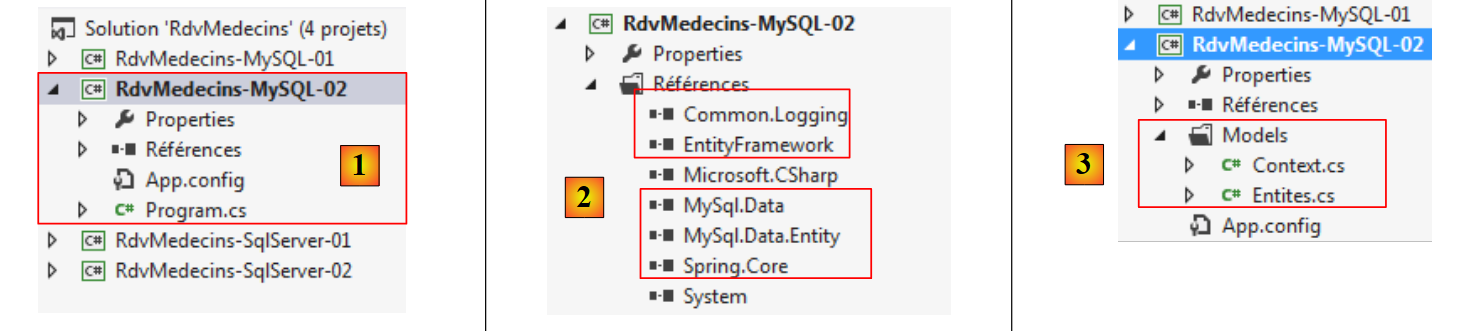 |
- in [2], the references [Common.Logging, EntityFramework, MySql.Data, MySql.Data.Entity, Spring.Core] are added along with NuGet;
- in [3], the folder [Models] is copied from the project [RdvMedecins-MySQL-01];
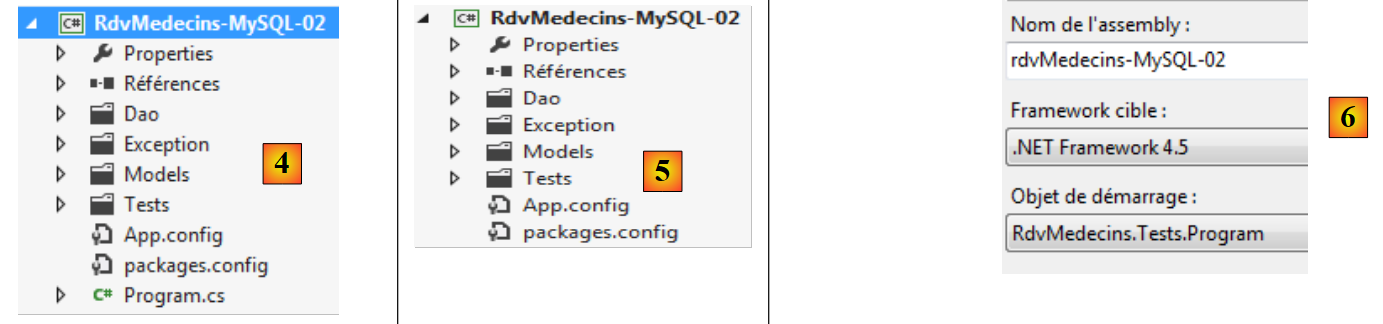 |
- In [4], the folders [Dao, Exception, Tests] and the file [App.config] are copied from the project [RdvMedecins-SqlServer-02];
- in [5], the file [Program.cs] has been deleted;
- in [6], the project is configured to run the test program from the [DAO] layer.
In the file [App.config], the information from the SQL Server database is replaced with that from the MySQL database. This information can be found in the [App.config] file of the [RdvMedecins-MySQL-01] project:
<!-- connecting chain-->
  <connectionStrings>
    <add name="monContexte"
         connectionString="Server=localhost;Database=rdvmedecins-ef;Uid=root;Pwd=root;"
         providerName="MySql.Data.MySqlClient" />
  </connectionStrings>
  <!-- the factory provider -->
  <system.data>
    <DbProviderFactories>
      <add name="MySQL Data Provider" invariant="MySql.Data.MySqlClient" description=".Net Framework Data Provider for MySQL"
          type="MySql.Data.MySqlClient.MySqlClientFactory, MySql.Data, Version=6.5.4.0, Culture=neutral, PublicKeyToken=C5687FC88969C44D"
        />
    </DbProviderFactories>
  </system.data>
The objects managed by Spring also change. Currently we have:
  <!-- spring configuration -->
  <spring>
    <context>
      <resource uri="config://spring/objects" />
    </context>
    <objects xmlns="http://www.springframework.net">
      <object id="rdvmedecinsDao" type="RdvMedecins.Dao.Dao,RdvMedecins-SqlServer-02" />
    </objects>
</spring>
Line 7 references the assembly for the [RdvMedecins-SqlServer-02] project. The assembly is now [RdvMedecins-MySQL-02].
With that done, we are ready to run the test for the [DAO] layer. First, we must ensure the database is populated (program [Fill] from the [RdvMedecins-MySQL-01] project). The test program succeeds.
We create the DLL for the project as was done for the [RdvMedecins-SqlServer-02] project, and we gatherall DLL files from the project into a [lib] folder created within [RdvMedecins-MySQL-02]. These will serve as the references for the upcoming [RdvMedecins-MySQL-03] web project.
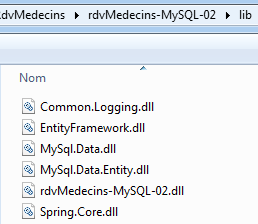 |
We are now ready to build the [ASP.NET] layer of our application:
 |
We will start with the [RdvMedecins-SqlServer-03] project. We duplicate this project’s folder into [RdvMedecins-MySQL-03] and [1]:
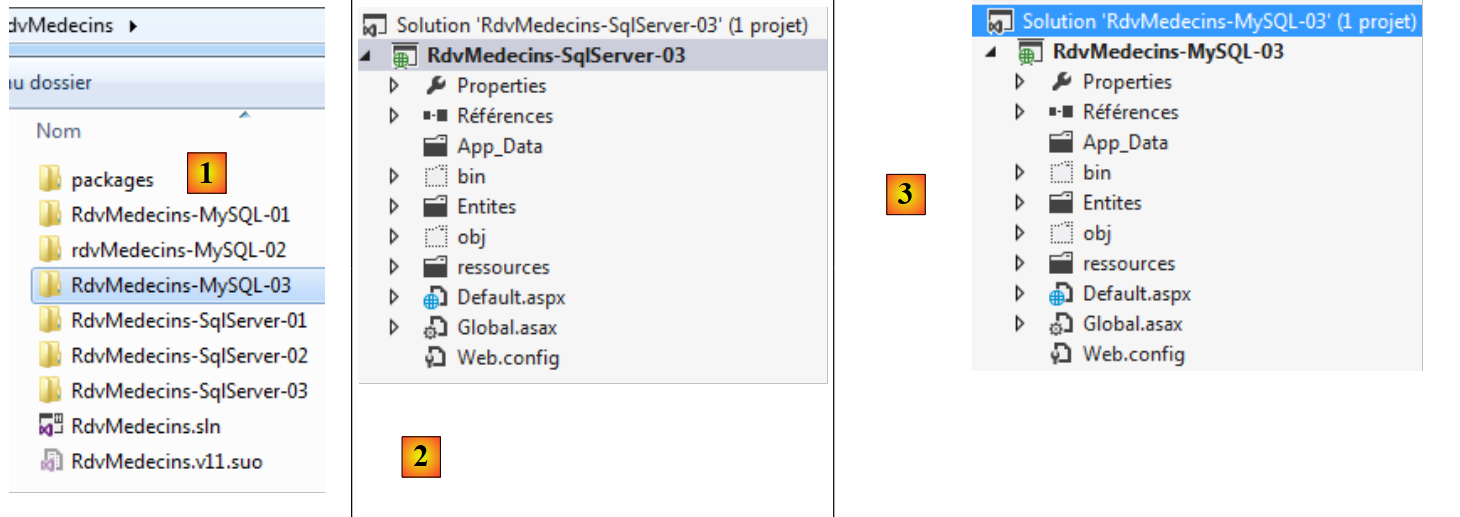 |
- in [2], using VS 2012 Express for the Web, we open the solution in the [RdvMedecins-MySQL-03] folder;
- in [3], we change both the solution name and the project name;
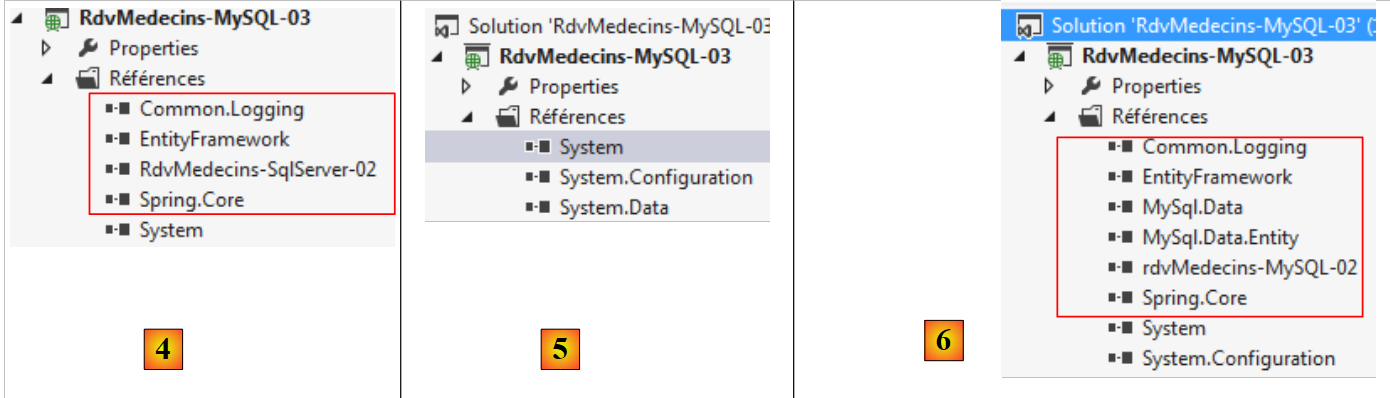 |
- In [4], the current project references;
- In [5], we delete them;
- in [6], to replace them with references to DLL, which we have just saved in a folder named [lib] within the [RdvMedecins-MySQL-02] project.
All that remains is to modify the [Web.config] file. We replace its current content with the content of the [App.config] file from the [RdvMedecins-MySQL-02] project. Once this is done, we run the web project. It works.
4.4. Conclusion
Let’s recap what was done to switch from the SGBD SQL server to the SGBD MySQL:
- the field used to manage concurrent access to entities was changed. Its version SQL Server was:
    [Column("TIMESTAMP")]
    [Timestamp]
    public byte[] Timestamp { get; set; }
It has become:
    [ConcurrencyCheck]
    [Column("VERSIONING")]
    public DateTime? Versioning { get; set; }
with MySQL;
- the annotations [Table] that link an entity to a table have been changed;
- the database connection string and [DbProviderFactory] have been modified in the configuration files [App.config] and [Web.config];
- After saving to the database, a SQL Server entity had both its primary key and its timestamp. With MySQL, it had only its primary key. This required a code change.
In the end, there were relatively few changes, but we still had to review the code. We are repeating the same process for three other SGBD instances:
- SGBD Oracle Database Express Edition 11g Release 2;
- The SGBD PostgreSQL 9.2.1;
- SGBD Firebird 2.1.