6. Case Study with PostgreSQL 9.2.1
6.1. Installing the tools
The tools to be installed are as follows:
- SGBD: [http://www.enterprisedb.com/products-services-training/pgdownload#windows];
- an administration tool: EMS SQL Manager for PostgreSQL Freeware [http://www.sqlmanager.net/fr/products/postgresql/manager/download].
In the following examples, the user postgres has the password postgres.
Let’s run PostgreSQL and then the [SQL Manager Lite for PostgreSQL] tool, which we will use to manage SGBD.
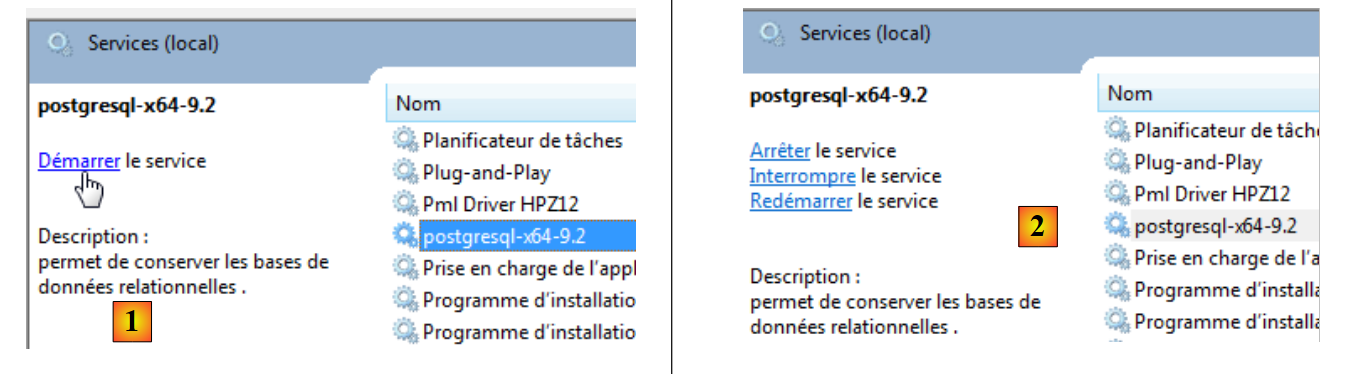 |
- In [1], we launch SGBD and PostgreSQL from Windows Services;
- In [2], the service is started;
We now launch the [SQL Manager Lite for MySQL] tool, which we will use to manage SGBD and [3].
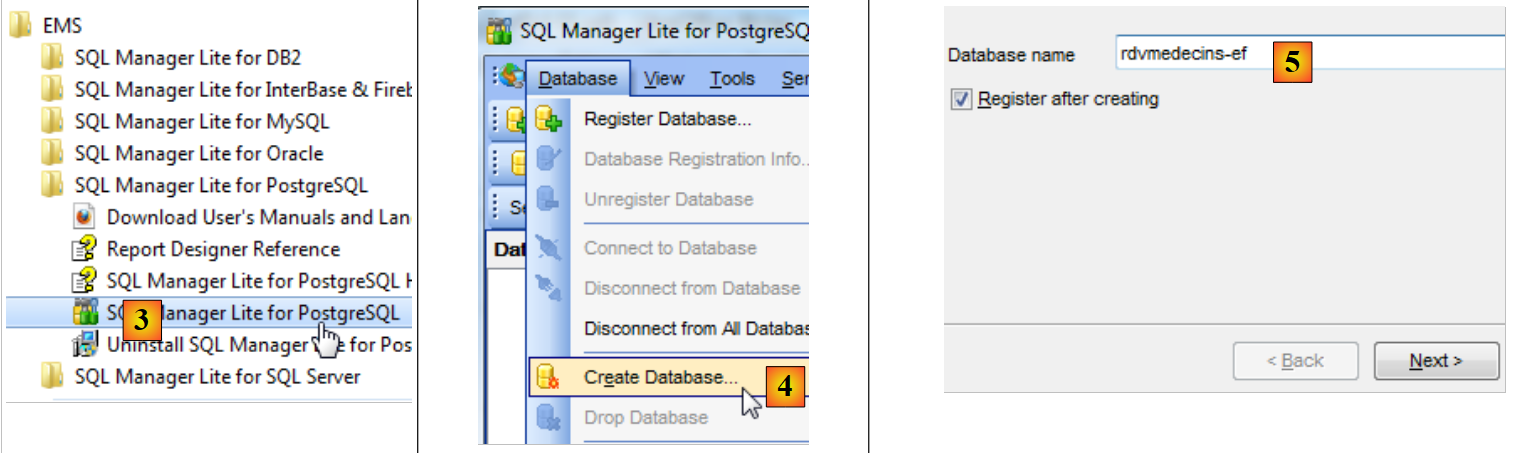 |
- In [4], we create a new database;
- In [5], we specify the database name;
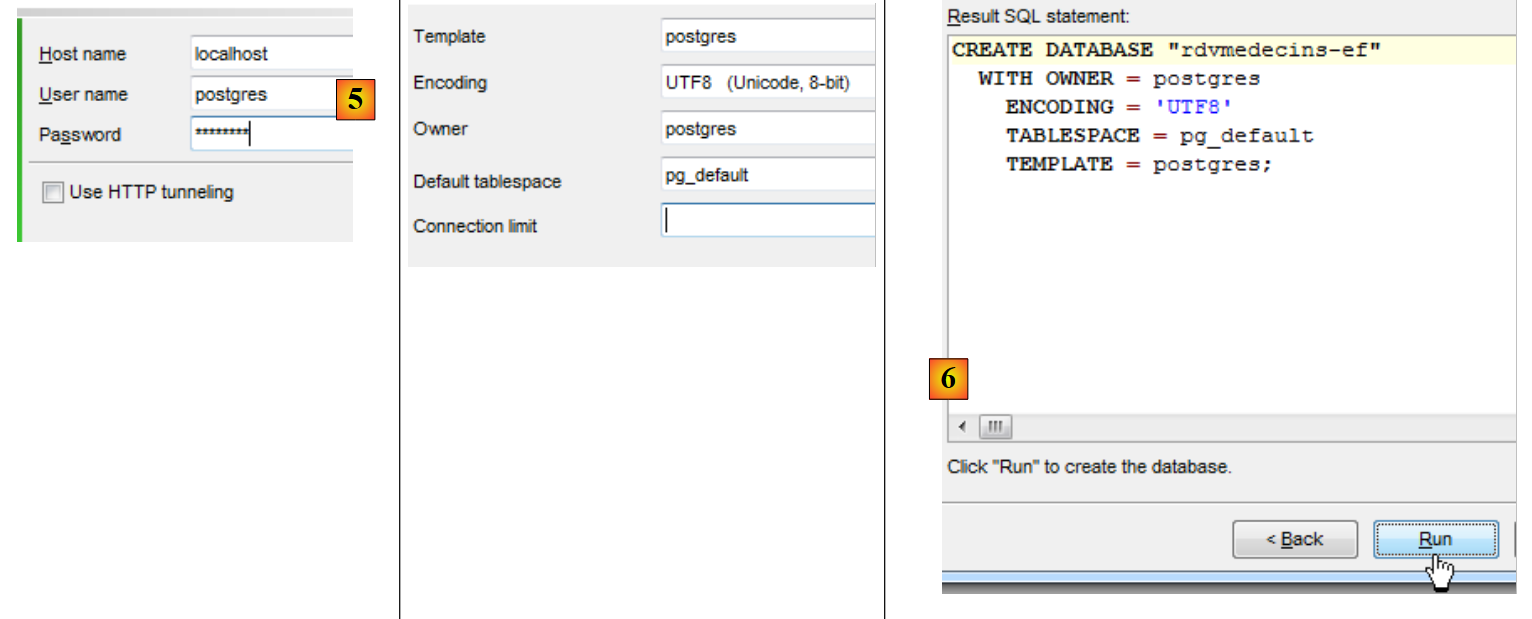 |
- In [5], we log in as postgres / postgres;
- In [6], we provide some information;
- in [7], we validate the SQL command to be executed;
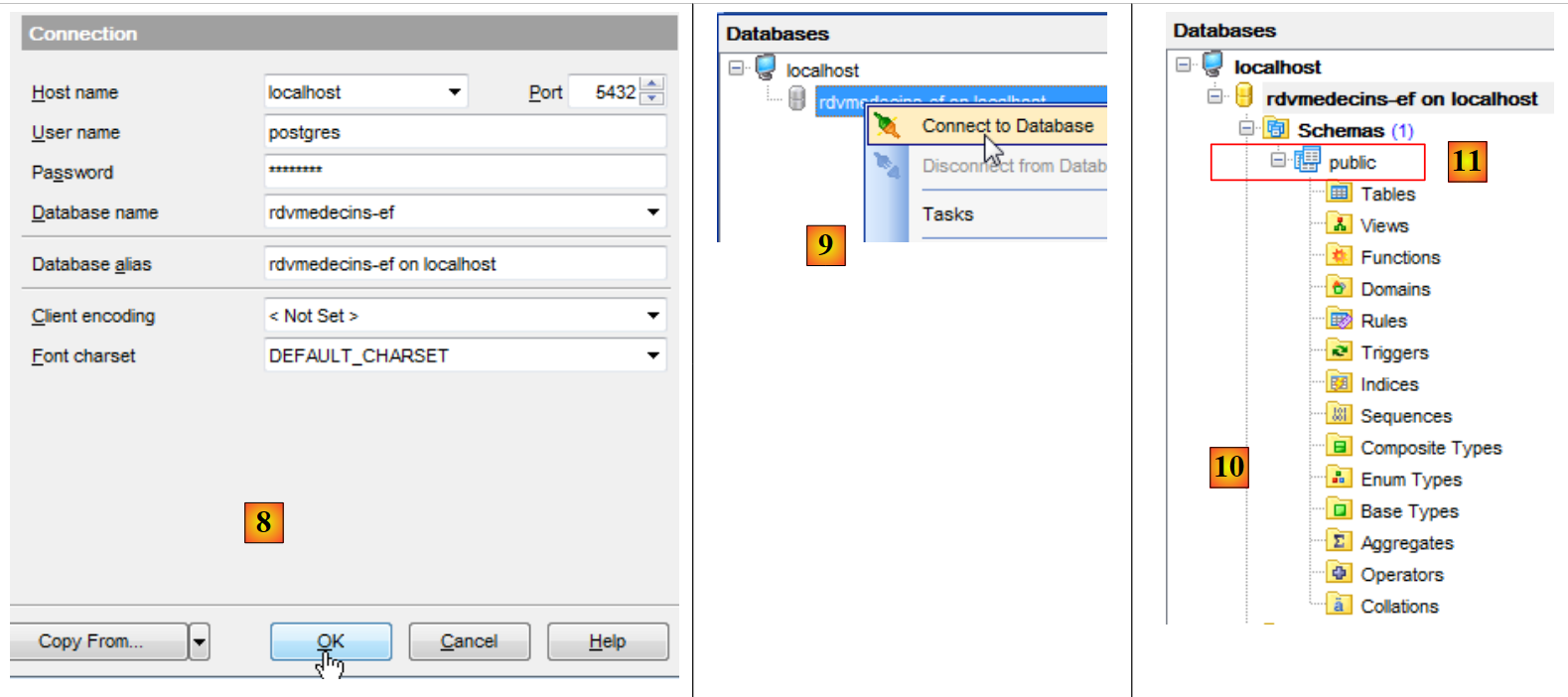 |
- in [8], the database has been created. It must now be saved in [EMS Manager]. The information is correct. We run [OK];
- In [9], we connect to it;
- In [10], [EMS Manager] displays the database, which is currently empty. Note that the tables will belong to a schema named public [11].
We will now connect a 2012 VS project to this database.
6.2. Creating the database from the entities
We start by duplicating the [RdvMedecins-SqlServer-01] project folder into [RdvMedecins-PostgreSQL-01] and [1]:
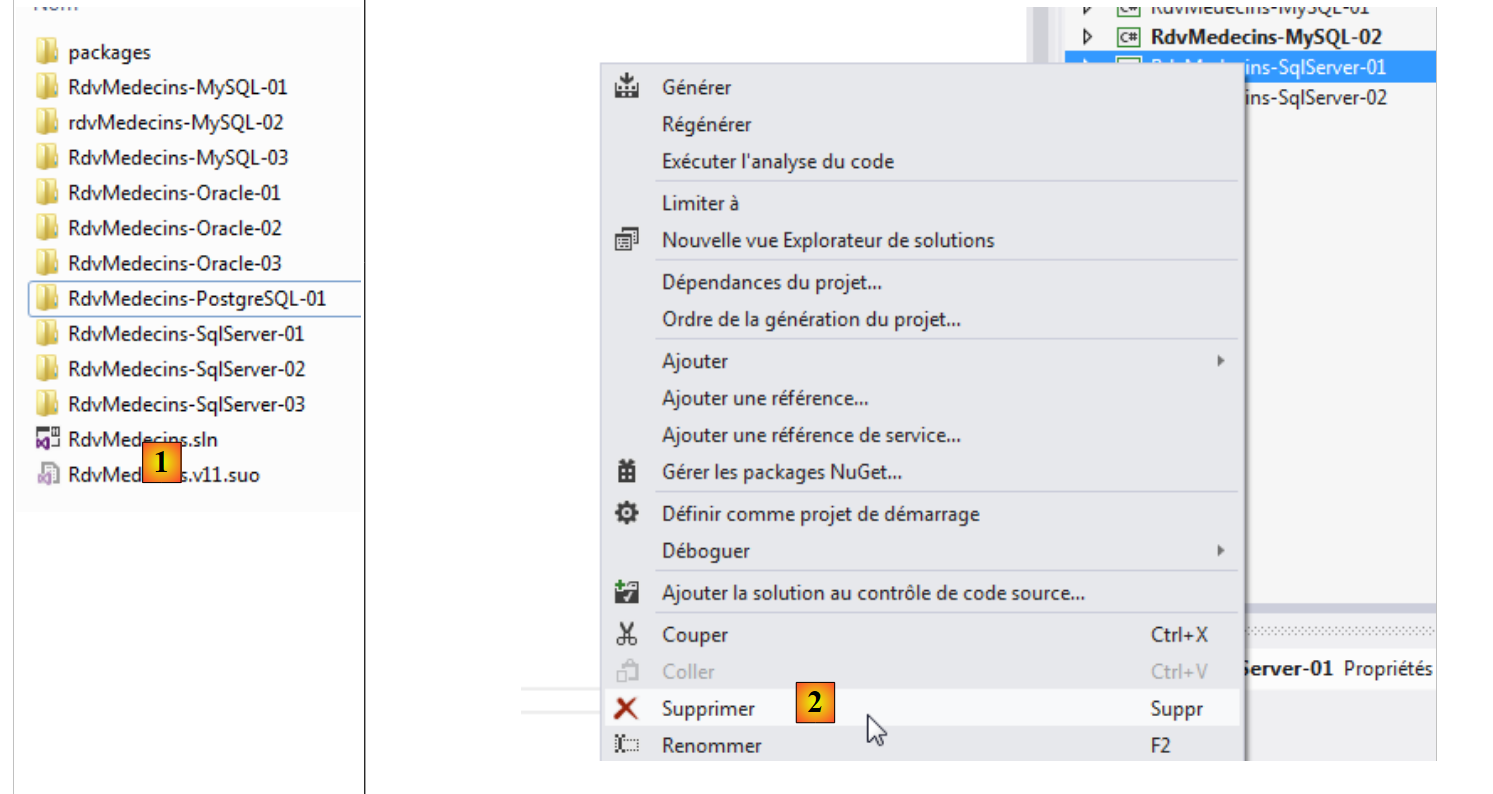 |
- in [2], in VS 2012, we remove the [RdvMedecins-SqlServer-01] project from the solution;
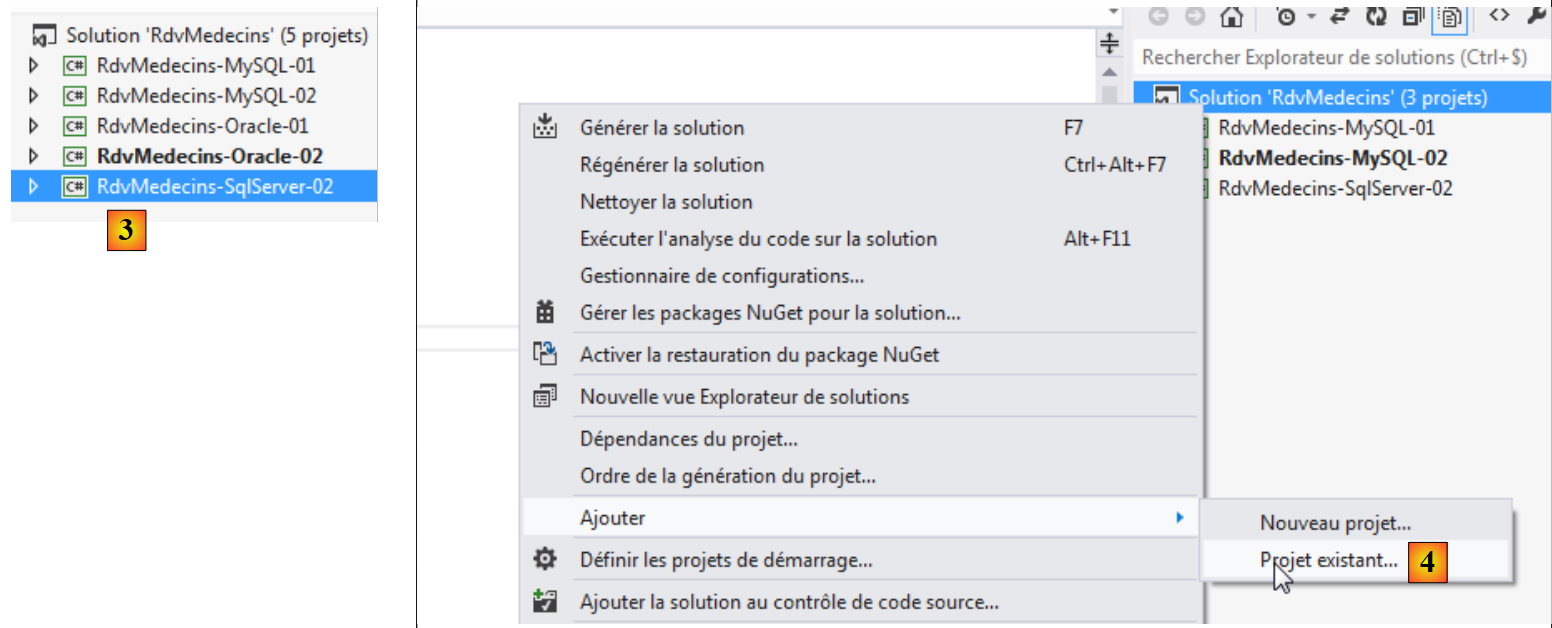 |
- in [3], the project has been removed;
- In [4], we add another one. This one is taken from the [RdvMedecins-PostgreSQL-01] folder that we created previously;
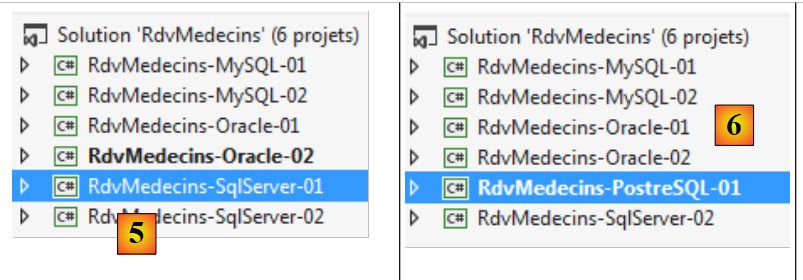 |
- in [5], the loaded project is named [RdvMedecins-SqlServer-01];
- In [6], we rename it to [RdvMedecins-PostgreSQL-01];
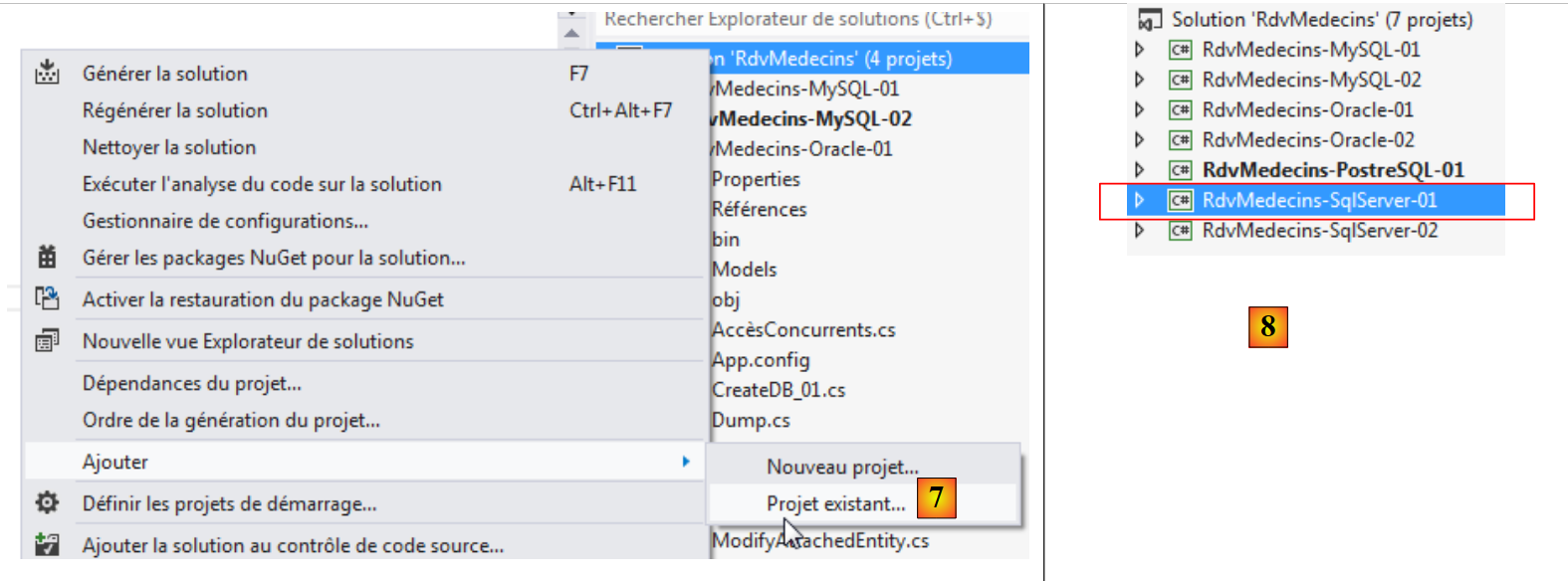 |
- In [7], we add another project to the solution. This project is taken from the [RdvMedecins-SqlServer-01] folder of the project we previously removed from the solution;
- In [8], the project [RdvMedecins-SqlServer-01] has been re-added to the solution.
The [RdvMedecins-PostgreSQL-01] project is identical to the [RdvMedecins-SqlServer-01] project. We need to make a few changes. In [App.config], we will modify the connection string and the [DbProviderFactory], which must be adapted for each SGBD.
<!-- connection chain on base -->
  <connectionStrings>
    <add name="monContexte" connectionString="Server=127.0.0.1;Port=5432;Database=rdvmedecins-ef;User Id=postgres;Password=postgres;" providerName="Npgsql" />
  </connectionStrings>
  <!-- the factory provider -->
  <system.data>
    <DbProviderFactories>
      <add name="Npgsql Data Provider" invariant="Npgsql" support="FF" description=".Net Framework Data Provider for Postgresql Server" type="Npgsql.NpgsqlFactory, Npgsql, Version=2.0.11.0, Culture=neutral, PublicKeyToken=5d8b90d52f46fda7" />
    </DbProviderFactories>
  </system.data>
- line 3: the user and their password;
- lines 7–9: the DbProviderFactory. Line 8 references a DLL [Npgsql] that we do not have. We obtain it using NuGet [1]:
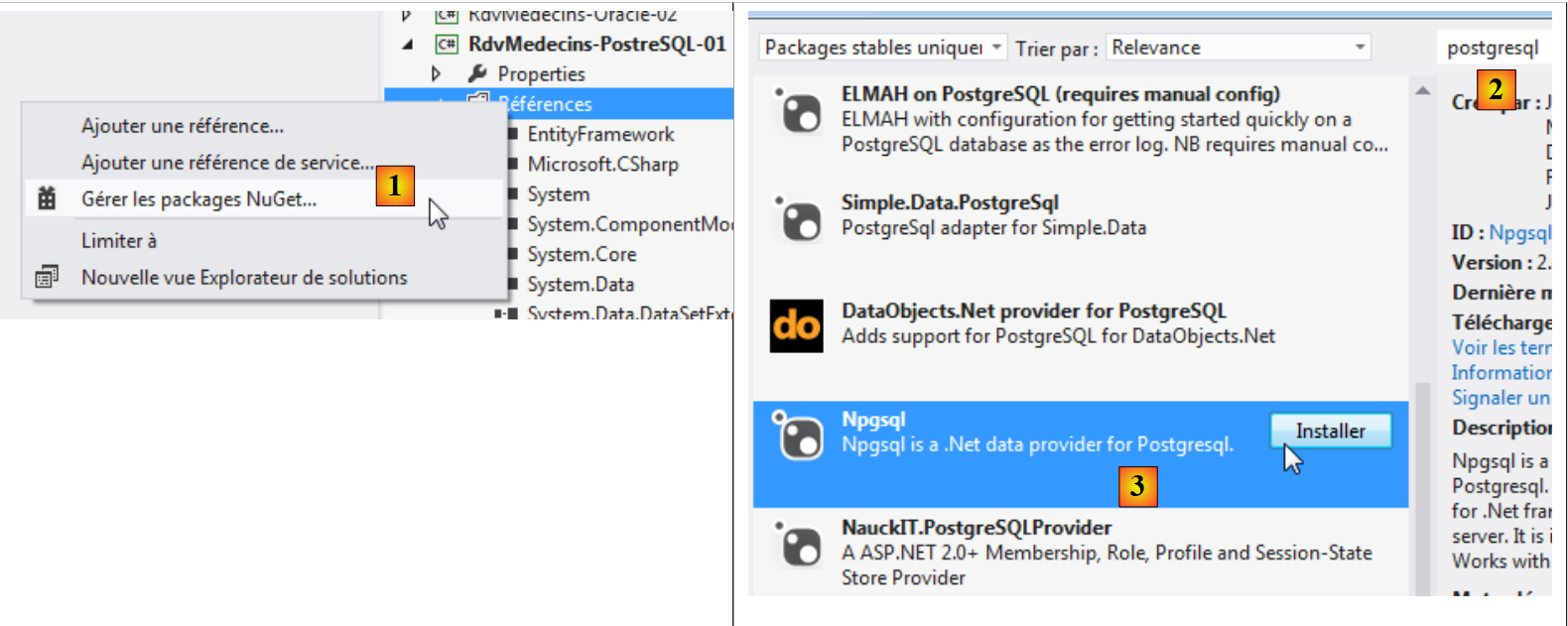 |
- for [2], type the keyword "postgresql" in the search field;
- in [3], select the package [Npgsql]. This is an ADO connector. NET for PostgreSQL;
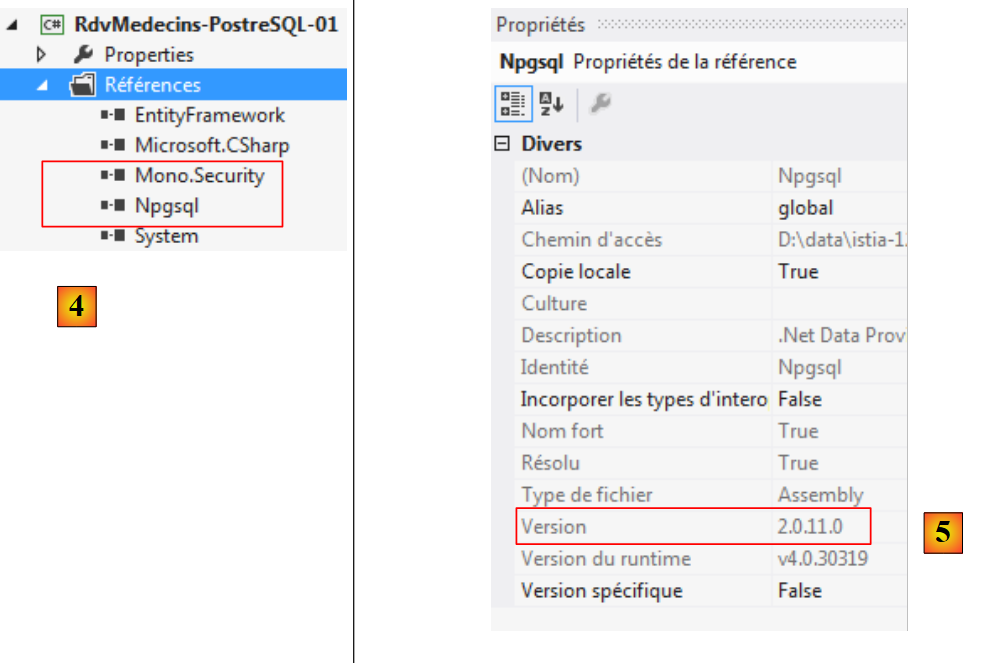 |
- In [4], two references have been added;
- In [5], in [App.config], you must enter the correct version from DLL. You can find it in its properties.
In the file [Entites.cs], you must adapt the schema of the tables that will be generated:
  [Table("MEDECINS", Schema = "public")]
  public class Medecin : Personne
  {...}

  [Table("CLIENTS", Schema = "public")]
  public class Client : Personne
  {...}

  [Table("CRENEAUX", Schema = "public")]
  public class Creneau
  {...}

  [Table("RVS", Schema = "public")]
  public class Rv
  {...}
We saw earlier when creating the PostgreSQL database that the tables belonged to a schema called public.
We configure the project execution:
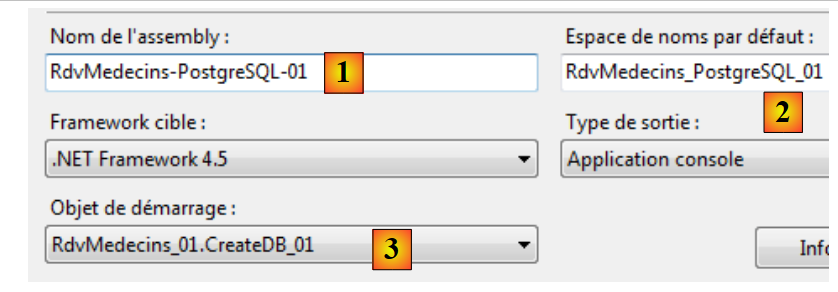 |
- in [1], we give a different name to the assembly that will be generated;
- in [2], we also specify a different default namespace;
- in [3], we specify the program to be executed.
At this stage, there are no compilation errors. Let’s run the program [CreateDB_01]. We get the following exception:
We recall having encountered the same error with MySQL and Oracle. This is related to the type of the Timestamp field in the entities. We make the same modification as with Oracle. In the entities, we replace the three lines
    [Column("TIMESTAMP")]
    [Timestamp]
    public byte[] Timestamp { get; set; }
with the following:
    [ConcurrencyCheck]
    [Column("VERSIONING")]
    public int? Versioning { get; set; }
We change the column type from byte[] to int?. In SGBD, we will use stored procedures to increment this integer by one each time a row is inserted or modified.
We make the above change for all four entities and then rerun the application. We then get the following error:
Line 1 indicates that the ADO.NET connector for PostgreSQL is unable to delete the existing database. Just like with Oracle. We are therefore required to manually create the [RDVMEDECINS-EF] database using the [EMS Manager for PostgreSQL] tool. We will not describe every step, but only the most important ones.
The PostgreSQL database will be as follows:
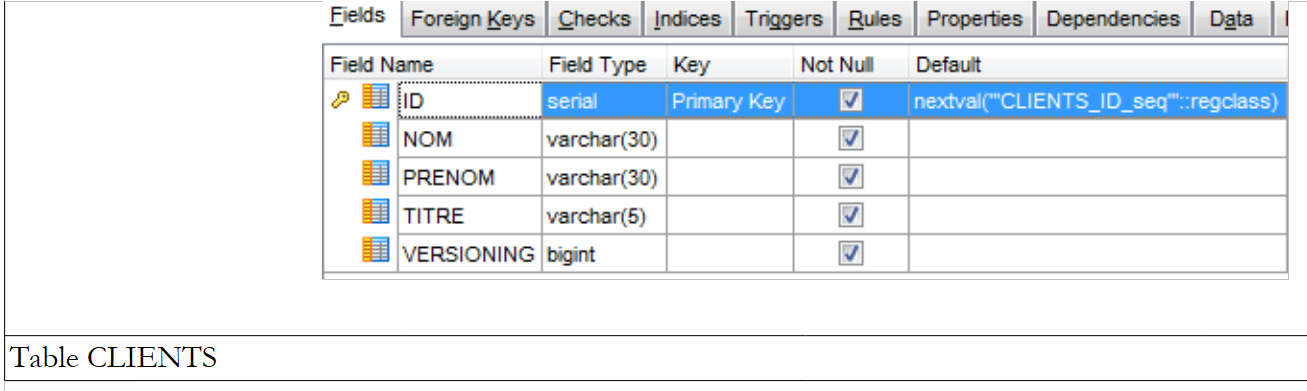
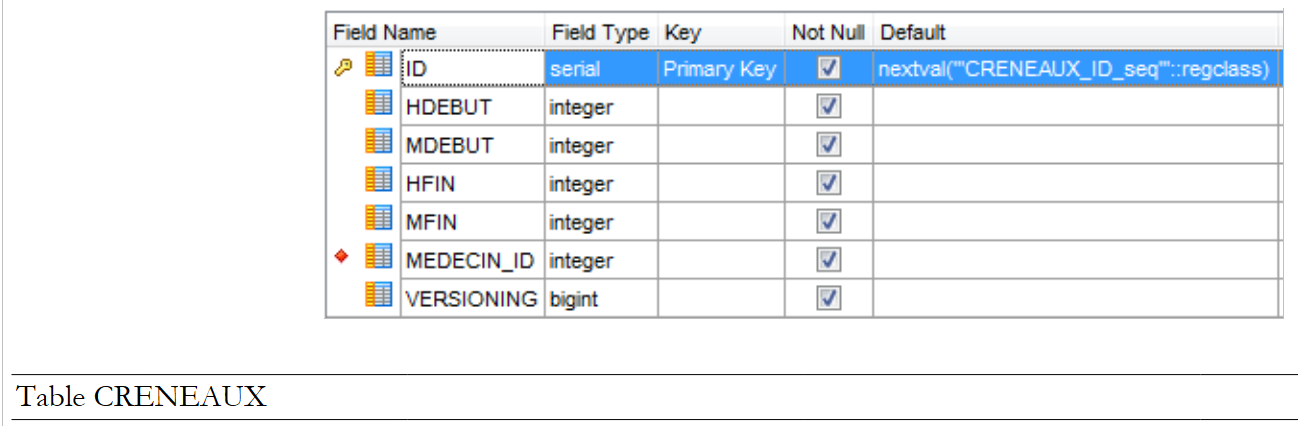
The tables
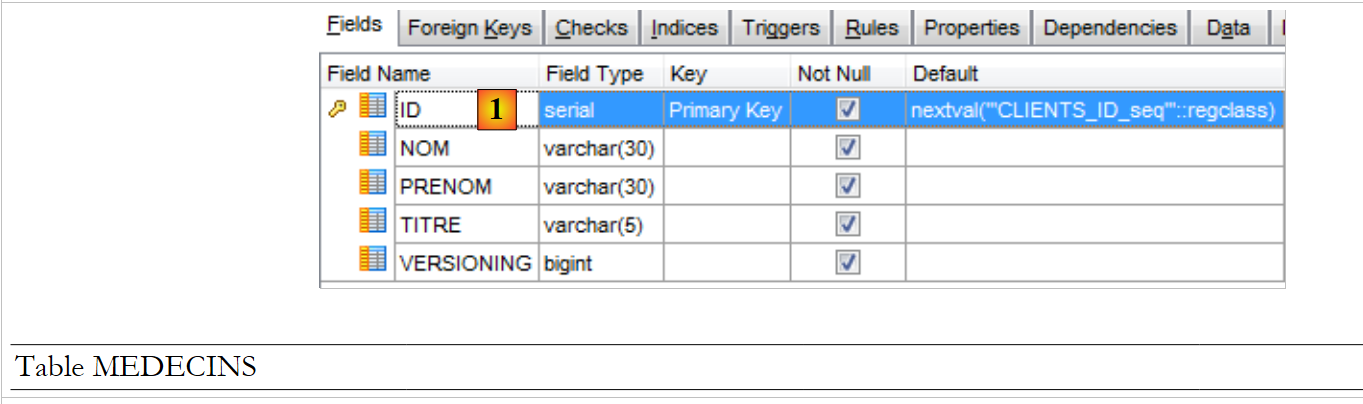 |
- In [1] and ID, the primary key is of the serial type. This type, PostgreSQL, is an integer automatically generated by SGBD.
 |
 |
 |
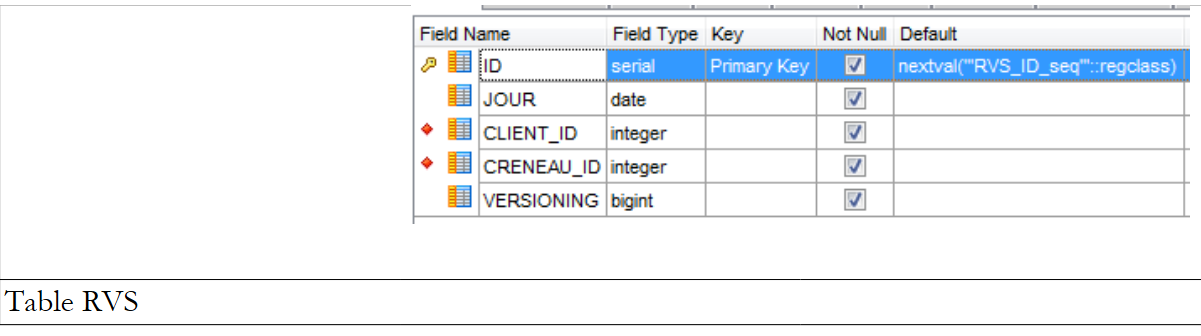 |
The various tables have the primary and foreign keys that these same tables had in the previous examples. The foreign keys have the attribute ON DELETE CASCADE.
Sequences
As with Oracle, we have created sequences here. These are generators of consecutive numbers. There are 5 of them: [1].
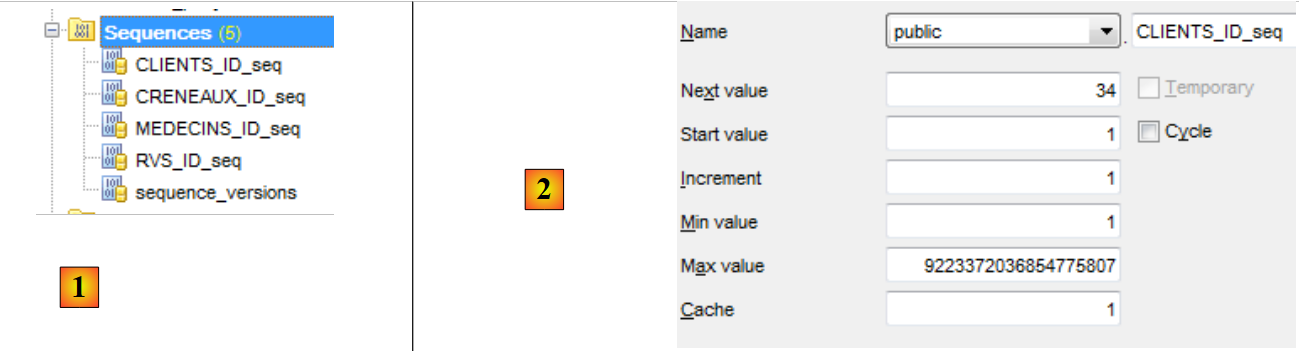 |
- In [2], we see the properties of the sequence [CLIENTS_ID_SEQ]. It generates consecutive numbers in increments of 1, starting from 1 up to a very large value.
All sequences are built on the same model.
- [CLIENTS_ID_seq] will be used to generate the primary key for table [CLIENTS];
- [MEDECINS_ID_seq] will be used to generate the primary key for table [MEDECINS];
- [CRENEAUX_ID_seq] will be used to generate the primary key for table [CRENEAUX];
- [RVS_ID_seq] will be used to generate the primary key for table [RVS];
- [sequence_versions] will be used to generate the values for the [VERSIONING] columns in all tables.
Triggers
A trigger is a procedure executed by SGBD before or after an event (Insert, Update, Delete) in a table. We have 4 of them: [1]:
 |
Let’s look at the code for the [CLIENTS_tr] trigger that populates the [VERSIONING] column of the [CLIENTS] table:
- Lines 1–3: Before each INSERT or UPDATE operation on the [CLIENTS] table;
- line 4: the procedure [public.trigger_versions()] is executed.
The procedure [public.trigger_versions()] is as follows:
- Line 2: NEW represents the row that will be inserted or modified. NEW. "VERSIONING" is the [VERSIONING] column of this row. It is assigned the following value from the number generator: "sequence_versions". Thus, the column ["VERSIONING"] changes each time a INSERT / UPDATE operation is performed on the table [CLIENTS].
The [MEDECINS_tr, CRENEAUX_tr, RVS_tr] triggers work the same way. The four ["VERSIONING"] columns get their values from the same sequence.
The script for generating the database tables PostgreSQL and [RDVMEDECINS-EF] has been placed in the [RdvMedecins / databases / postgreSQL] folder. The reader can load and run it to create these tables.
Once this is done, the various programs in the project can be run. They produce the same results as with SQL Server, except for the program [ModifyDetachedEntities], which crashes for the same reason it crashed with Oracle. The problem is resolved in the same way. Simply copy the program [ModifyDetachedEntities] from the [RdvMedecins-Oracle-01] project into the [RdvMedecins-PostgreSQL-01] project.
The program [LazyEagerLoading] crashes with the following exception:
The incorrect code is as follows:
      using (var context = new RdvMedecinsContext())
      {
        // crenel n° 0
        creneau = context.Creneaux.Include("Medecin").Single<Creneau>(c => c.Id == idCreneau);
        Console.WriteLine(creneau.ShortIdentity());
}
Line 1 of the exception: the reported error suggests a join because LEFT is a join keyword. Because line 4 of the code above requests the immediate loading of the [Medecin] dependency of an entity [Creneau], EF performed a join between the tables [CRENEAUX] and [MEDECINS]. However, it appears that the ADO.NET connector generated an incorrect SQL command. We rewrite the code as follows:
      using (var context = new RdvMedecinsContext())
      {
        // crenel n° 0
        creneau = context.Creneaux.Find(idCreneau);
        Console.WriteLine(creneau.ShortIdentity());
        // force the loading of the associated doctor
        // it's possible because we're still in an open context
        Medecin medecin = creneau.Medecin;
}
- line 4: we retrieve the slot without a join;
- line 8: we retrieve the missing dependency.
It works. Once again, we see that the change to SGBD has an impact on the code. In fact, it is not SGBD that is the issue here, but its connector ADO.NET.
6.3. Multi-layer architecture based on EF 5
Let’s return to the case study described in paragraph 2.
 |
We will start by building the [DAO] data access layer. To do this, we duplicate the console project VS 2012 [RdvMedecins-SqlServer-02] into [RdvMedecins-PostgreSQL-02] [1]:
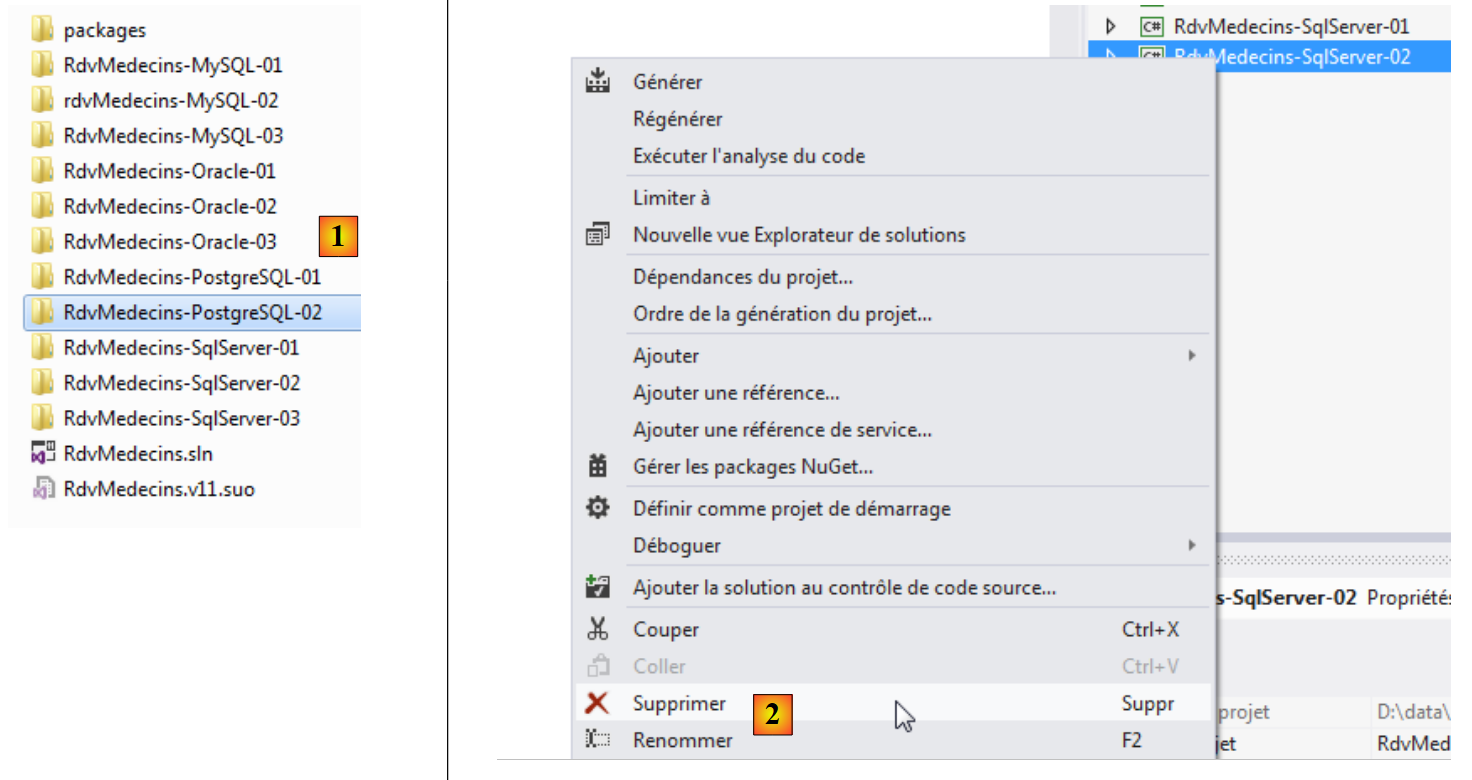 |
- in [2], we delete the project [RdvMedecins-SqlServer-02];
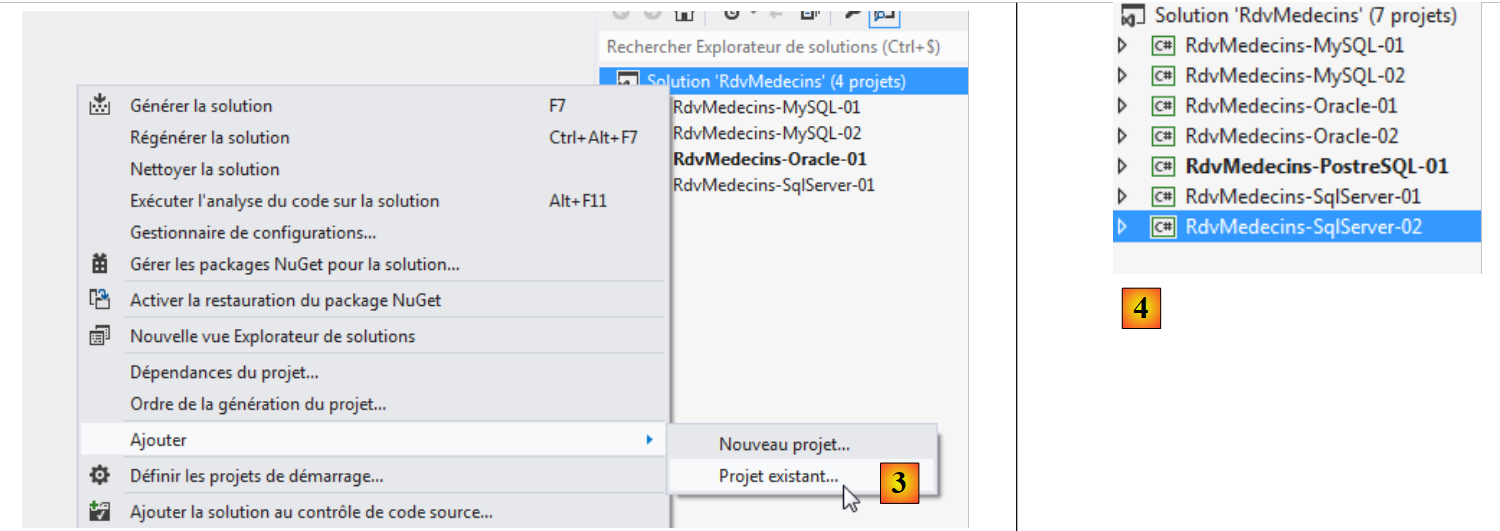 |
- In [3], an existing project is added to the solution. It is taken from the [RdvMedecins-PostgreSQL-02] folder that was just created;
- In [4], the new project has the same name as the one that was deleted. We will rename it;
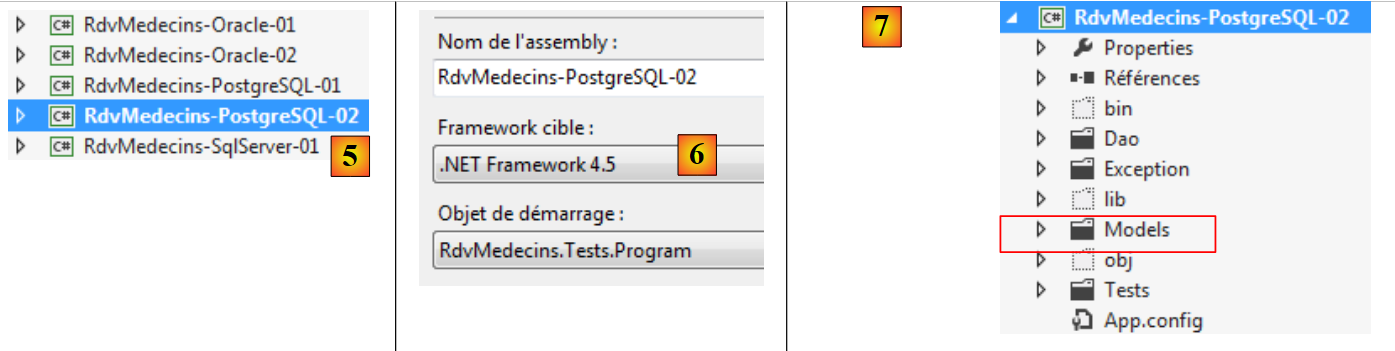 |
- In [5], we have changed the project name;
- In [6], we modify some of its properties, such as the assembly name here;
- in [7], the folder [Models] is deleted and replaced by the folder [Models] from the project [RdvMedecins-PostgreSQL-01]. This is because the two projects share the same templates.
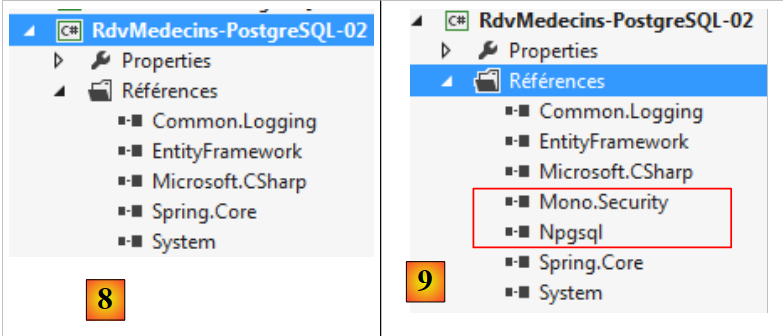 |
- In [8], the current project references;
- In [9], the ADO connector from NET was added using the NuGet tool.
In the file [App.config], the information from the SQL Server database is replaced with that from the PostgreSQL database. This information can be found in the [App.config] file of the [RdvMedecins-PostgreSQL-01] project:
  <!-- connection chain on base -->
  <connectionStrings>
    <add name="monContexte" connectionString="Server=127.0.0.1;Port=5432;Database=rdvmedecins-ef;User Id=postgres;Password=postgres;" providerName="Npgsql" />
  </connectionStrings>
  <!-- the factory provider -->
  <system.data>
    <DbProviderFactories>
      <add name="Npgsql Data Provider" invariant="Npgsql" support="FF" description=".Net Framework Data Provider for Postgresql Server" type="Npgsql.NpgsqlFactory, Npgsql, Version=2.0.11.0, Culture=neutral, PublicKeyToken=5d8b90d52f46fda7" />
    </DbProviderFactories>
</system.data>
The objects managed by Spring also change. Currently we have:
  <!-- spring configuration -->
  <spring>
    <context>
      <resource uri="config://spring/objects" />
    </context>
    <objects xmlns="http://www.springframework.net">
      <object id="rdvmedecinsDao" type="RdvMedecins.Dao.Dao,RdvMedecins-SqlServer-02" />
    </objects>
</spring>
Line 7 references the assembly for the [RdvMedecins-SqlServer-02] project. The assembly is now [RdvMedecins-PostgreSQL-02].
With that done, we are ready to run the test for the [DAO] layer. First, we must ensure the database is populated (program [Fill] from the [RdvMedecins-PostgreSQL-01] project). The test program crashes with the following exception:
Line 13: The message indicates that the error occurred in the [GetCreneauxMedecin] method of the [DAO] layer. This method is as follows:
    // list of time slots for a given doctor
    public List<Creneau> GetCreneauxMedecin(int idMedecin)
    {
      // list of slots
      try
      {
        // opening persistence context
        using (var context = new RdvMedecinsContext())
        {
          // we get the doctor back with his slots
          Medecin medecin = context.Medecins.Include("Creneaux").Single(m => m.Id == idMedecin);
          // returns a list of the doctor's slots
          return medecin.Creneaux.ToList<Creneau>();
        }
      }
      catch (Exception ex)
      {
        throw new RdvMedecinsException(3, "GetCreneauxMedecin", ex);
      }
}
Line 11: we recognize the Include keyword, which has already caused a previous program to crash. The previous code can be replaced with the following:
    // list of time slots for a given doctor
    public List<Creneau> GetCreneauxMedecin(int idMedecin)
    {
      // list of slots
      try
      {
        // opening persistence context
        using (var context = new RdvMedecinsContext())
        {
          // returns a list of the doctor's slots
          return context.Creneaux.Where(c => c.MedecinId == idMedecin).ToList<Creneau>();
        }
      }
      catch (Exception ex)
      {
        throw new RdvMedecinsException(3, "GetCreneauxMedecin", ex);
      }
}
The new code even seems more consistent than the old one. In any case, this time the test program passes.
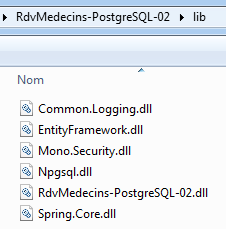
We create the project's DLL as we did for the [RdvMedecins-SqlServer-02] project, and we gatherall the DLL files for the project into a [lib] folder created within [RdvMedecins-PostgreSQL-02]. These will serve as the references for the upcoming [RdvMedecins-PostgreSQL-03] web project.
 |
We are now ready to build the [ASP.NET] layer of our application:
 |
We will start with the [RdvMedecins-SqlServer-03] project. We duplicate this project’s folder into [RdvMedecins-PostgreSQL-03] and [1]:
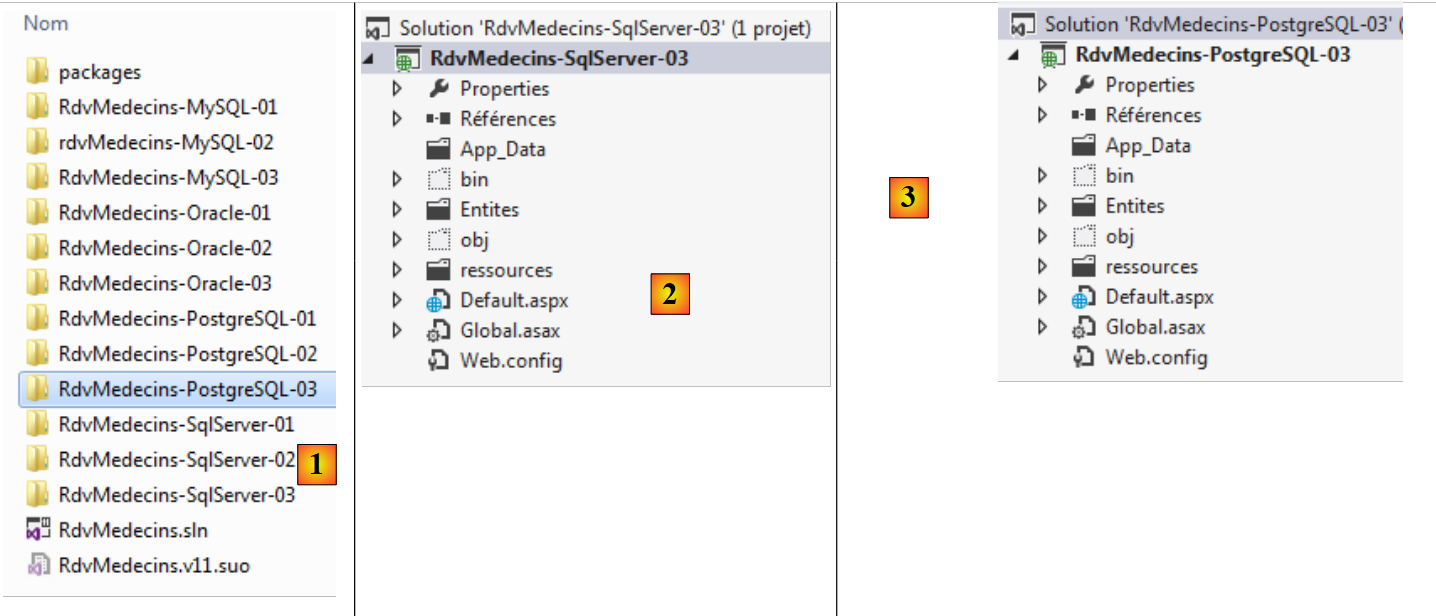 |
- in [2], using VS 2012 Express for the Web, we open the solution in the [RdvMedecins-PostgreSQL-03] folder;
- in [3], we change both the solution name and the project name;
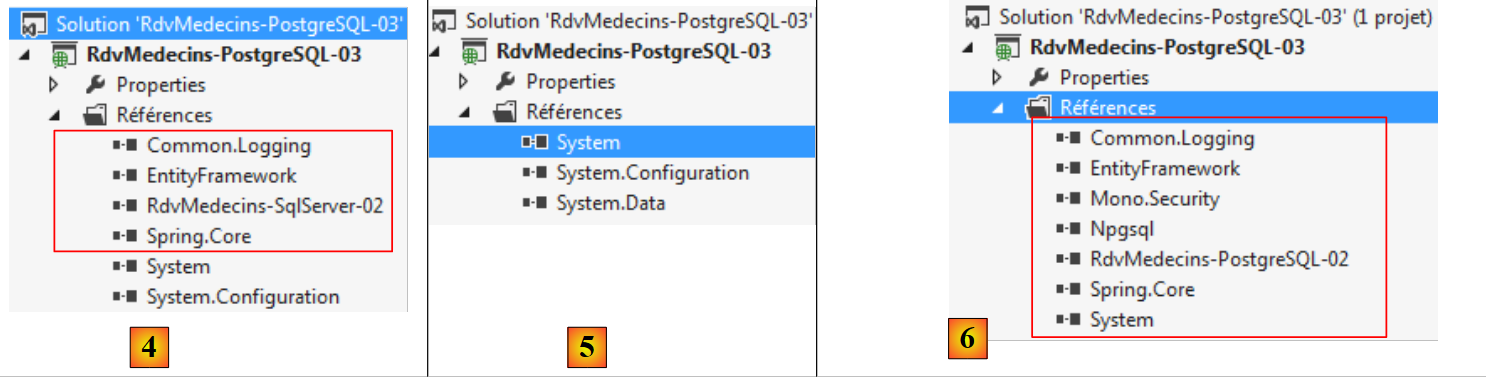 |
- In [4], the current project references;
- In [5], we delete them;
- in [6], to replace them with references to DLL, which we have just saved in a folder named [lib] within the [RdvMedecins-PostgreSQL-02] project.
All that remains is to modify the [Web.config] file. We replace its current content with the content of the [App.config] file from the [RdvMedecins-PostgreSQL-02] project. Once this is done, we run the web project. It works. Don’t forget to populate the database before running the web application.