3. Case Study with SQL Server Express 2012
3.1. Introduction
The examples found on net for Entity Framework are mostly examples using SQL Server. This is quite normal. It is likely that SGBD is the most widely used in the corporate .NET world. We will follow this trend. The examples will then be extended to all databases mentioned in section 1.2.
3.2. Installing the tools
We will not describe how to install the tools. Doing so would require a large number of screenshots, which quickly become outdated. This is a task (admittedly not always easy) that we leave to the reader.
We need to install the following tools:
- SGBD SQL Server Express 2012: [http://www.microsoft.com/fr-fr/download/details.aspx?id=29062]. Download the version "With Tools" package, which includes an administration tool along with SGBD:
 |
Once SGBD is installed, launch it:
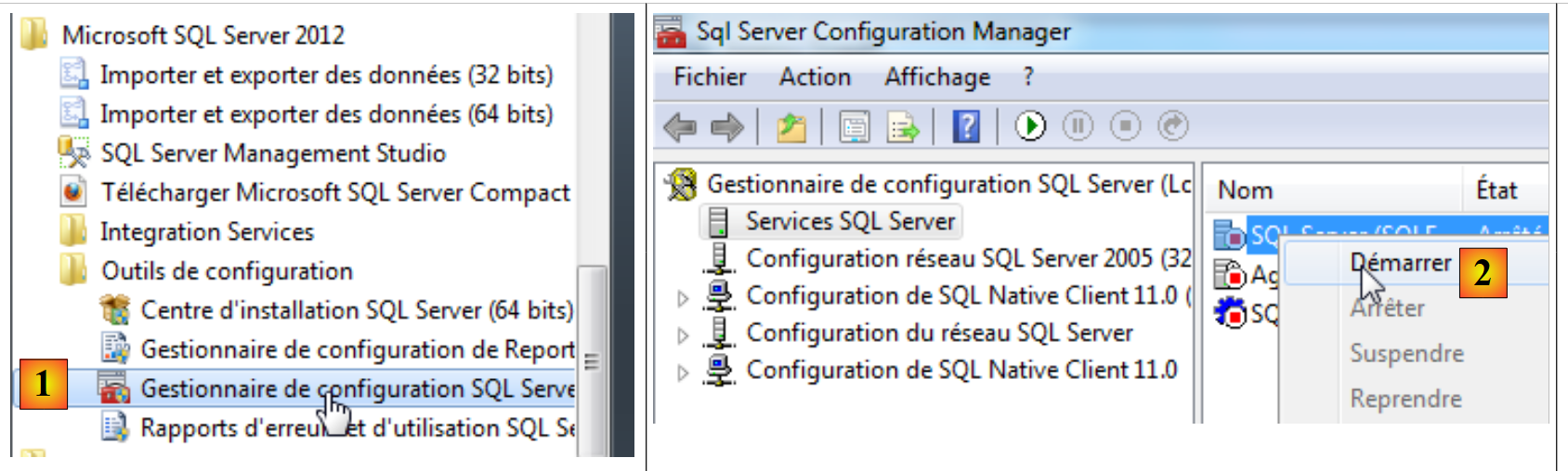 |
 |
- [1]: In the Start Menu, launch the "SQL Server Configuration Manager";
- [2]: In this manager, launch the server;
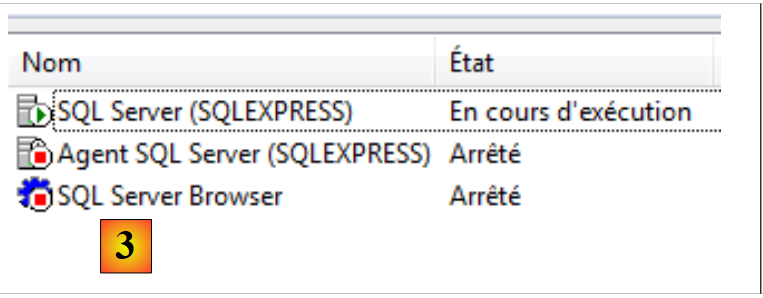
- [3]: It is now running.
We will now launch the SQL Server administration tool:
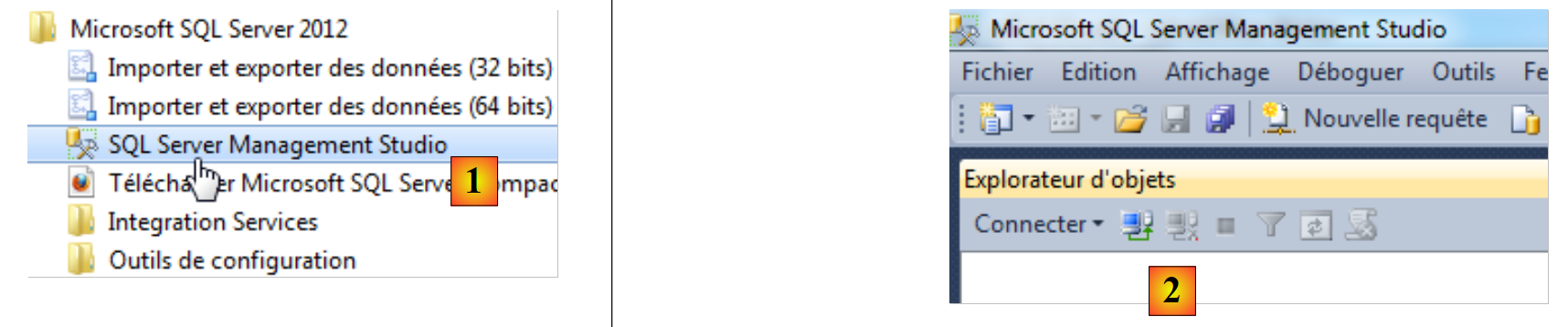 |
- [1]: In the Start Menu, launch "SQL Server Management Studio";
- [2]: the administration tool.
We will connect to the server:
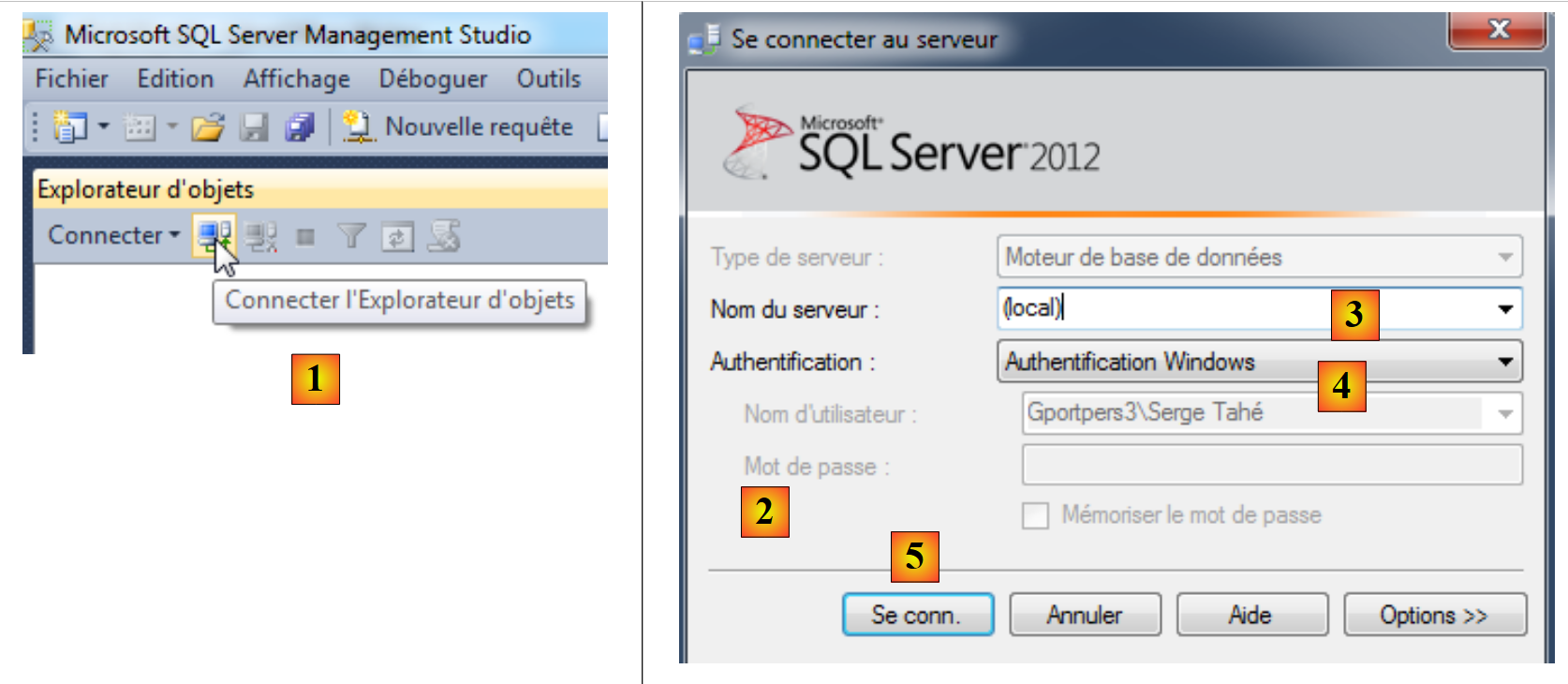 |
- In [1], open the Object Explorer;
- In [2], enter the connection parameters:
- [3]: the (local) server (note the required parentheses) refers to the server installed on the machine,
- [4]: select Windows authentication. You must be an administrator on your computer for this connection to succeed,
- [5]: we connect;
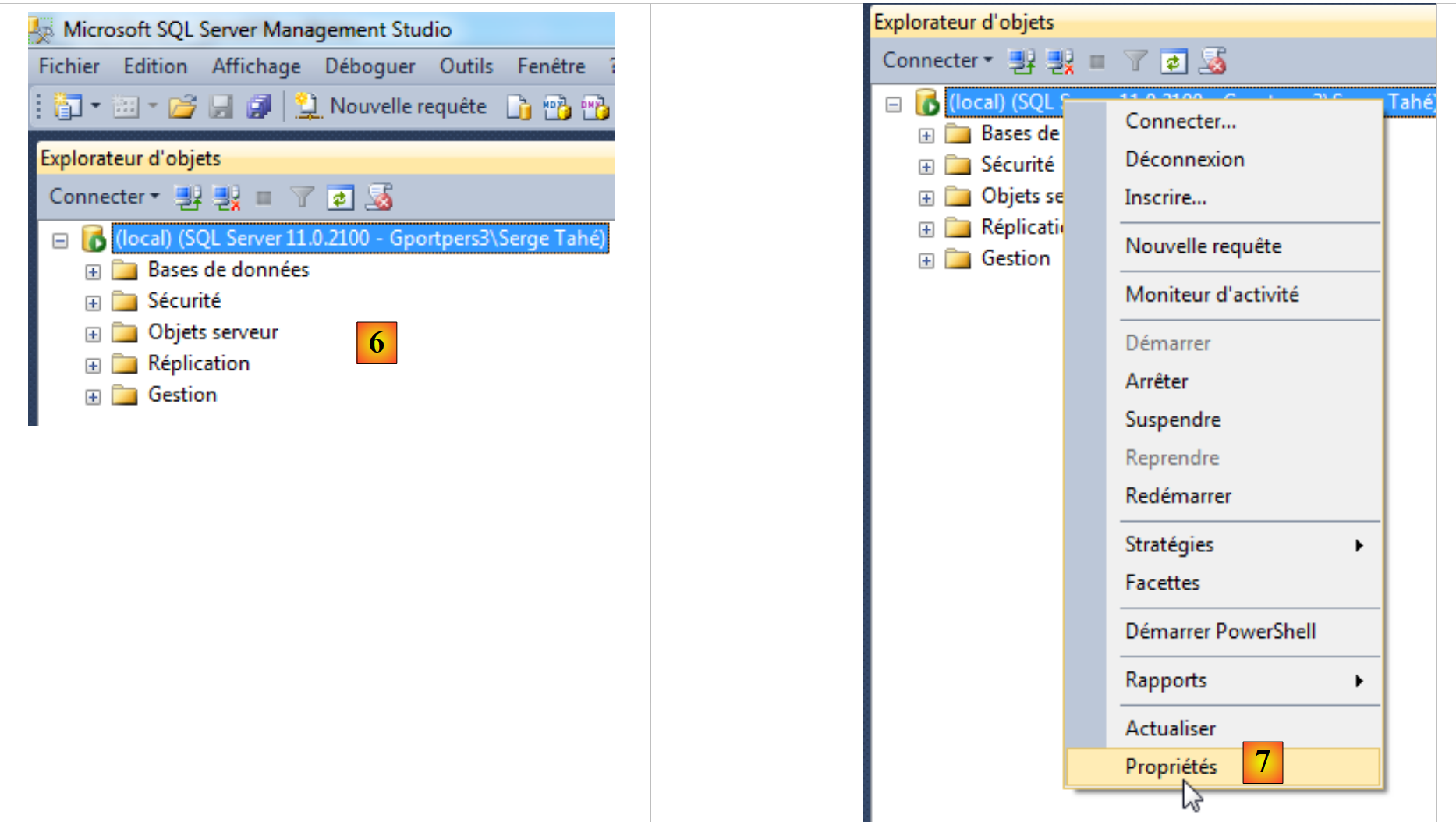 |
- [6]: you are logged in;
- [7]: We want to modify certain server properties;
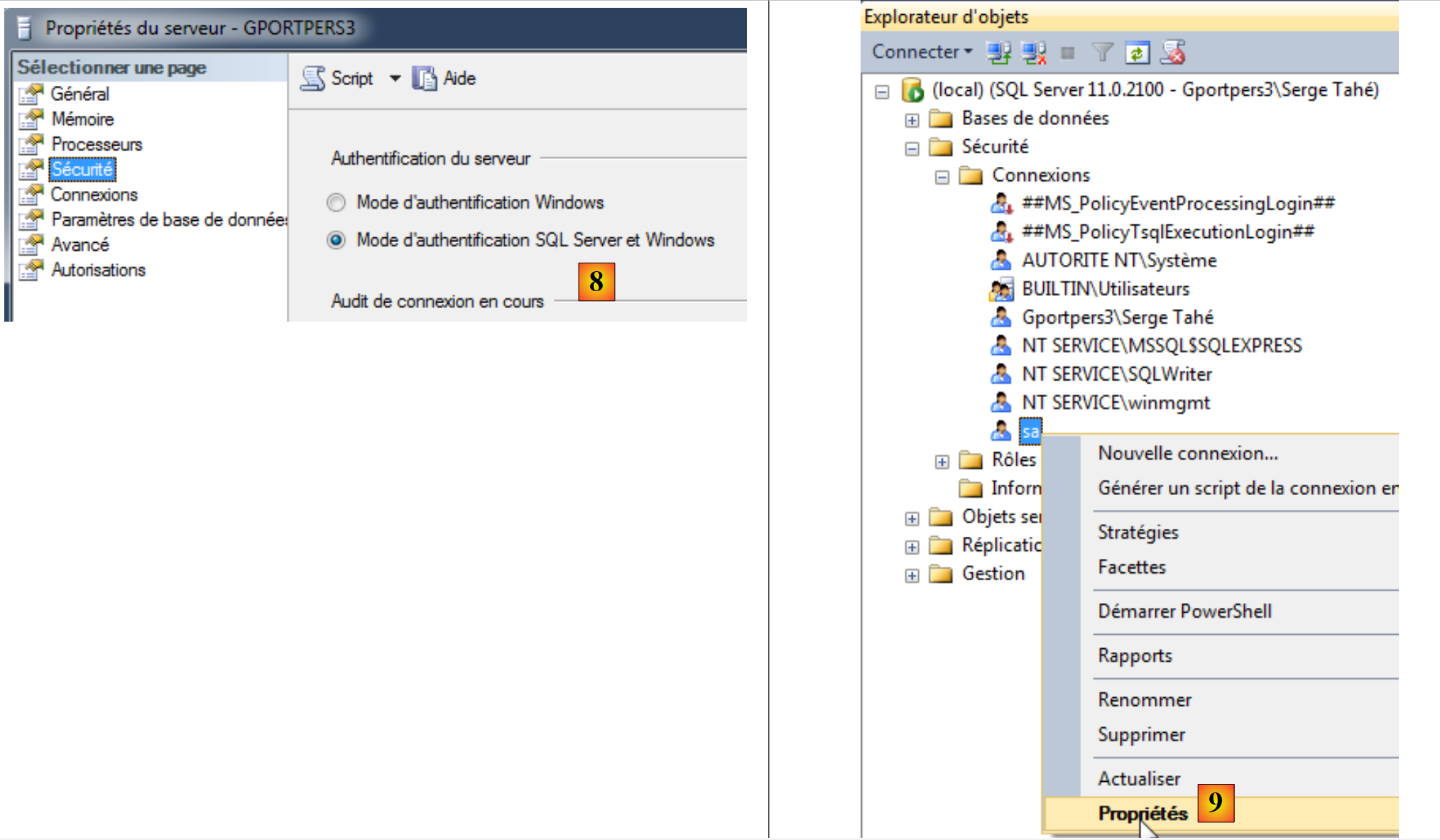 |
- [8]: we request that there be two authentication modes:
- Windows authentication, as just used. A Windows user with the appropriate permissions can then log in;
- SQL Server authentication. The user must be one of the users registered in the SGBD;
Once this is done, we can validate the server properties;
- [9]: edit the properties of the user sa (system administrator);
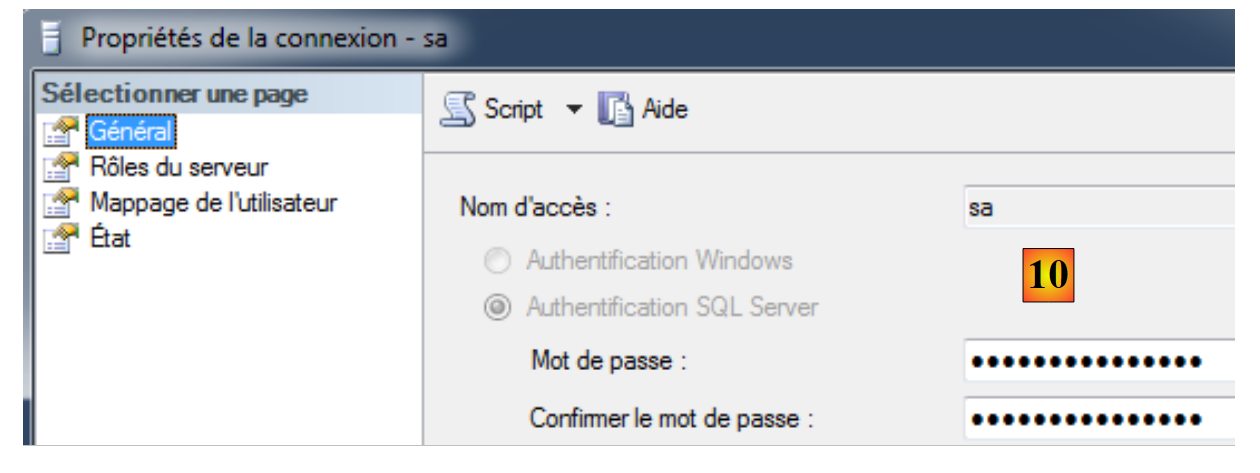 |
- In [10], set a password for the user. In the rest of this document, the password is sqlserver2012;
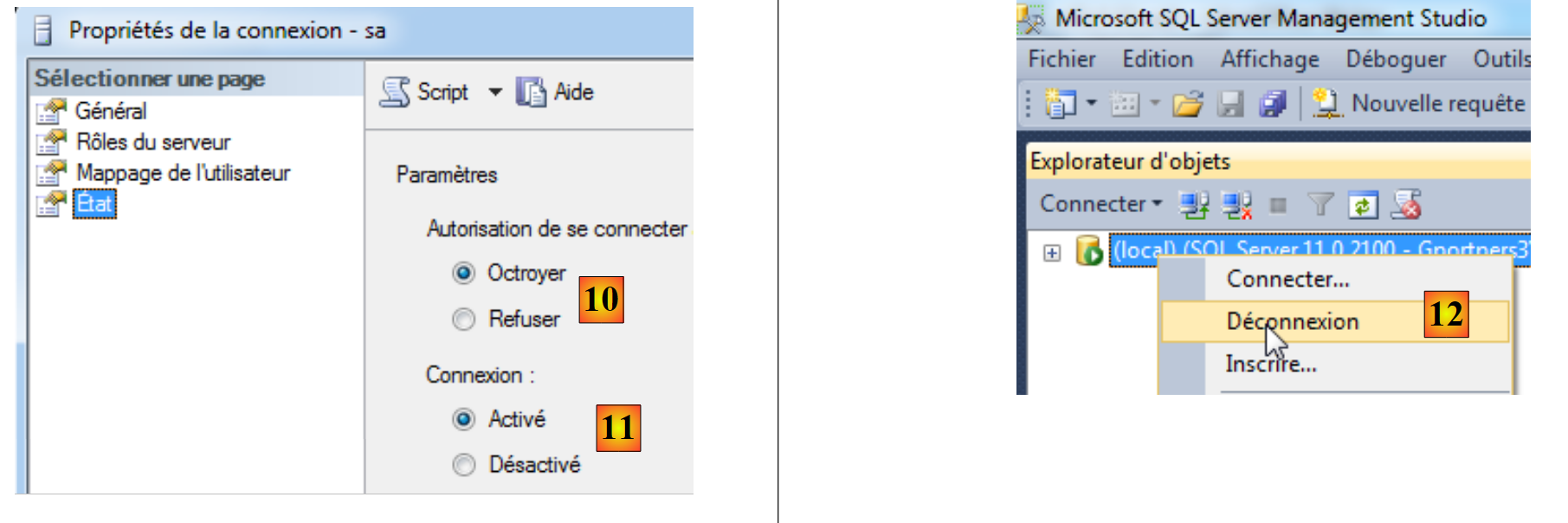 |
- In [10], grant them permission to log in;
- In [11], the connection is enabled. The wizard can now be validated;
- In [12], we log out of the server.
Now, we reconnect using the login sa/sqlserver2012:
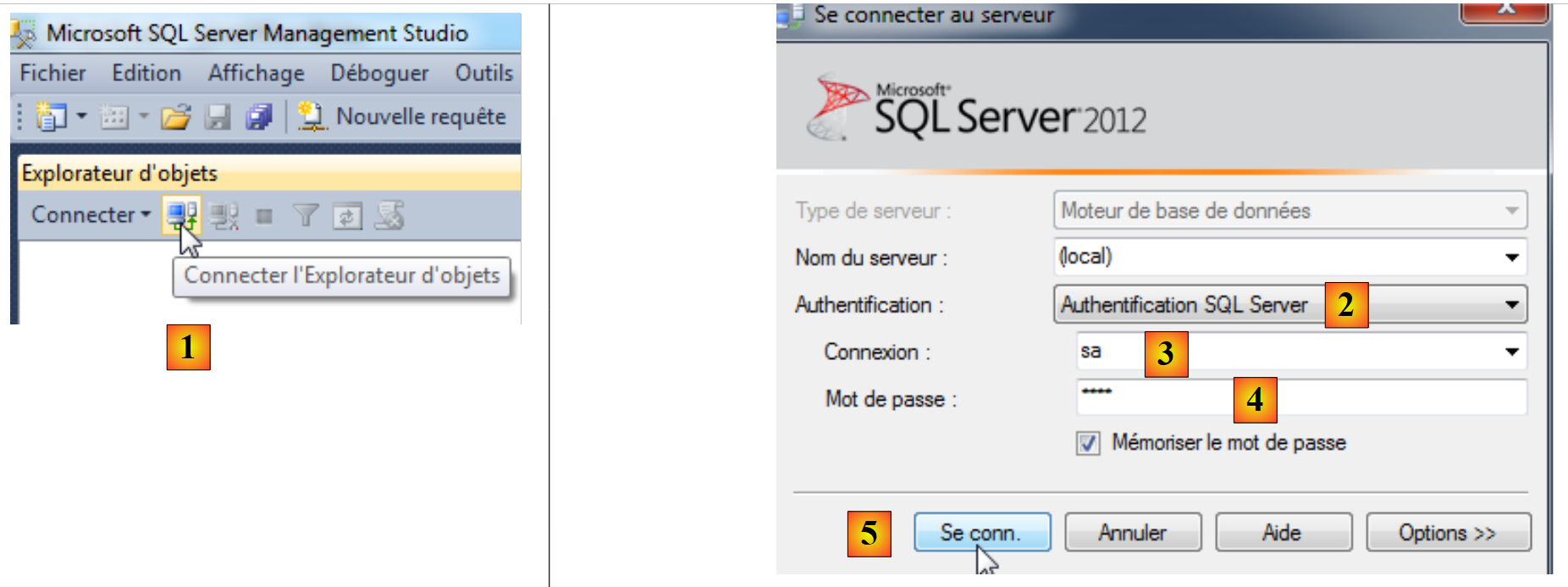 |
- In [1], we reconnect;
- in [2], authentication is performed on the SQL server;
- in [3], the user is sa;
- In [4], their password is sqlserver2012;
- in [5], we log in;
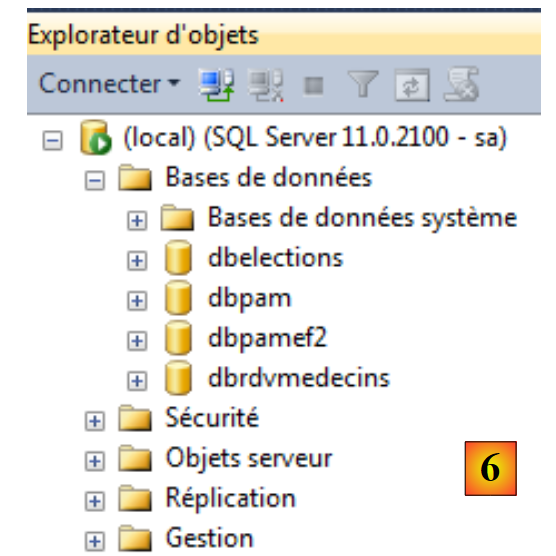 |
- in [6], we are logged in.
We will now create a demo database:
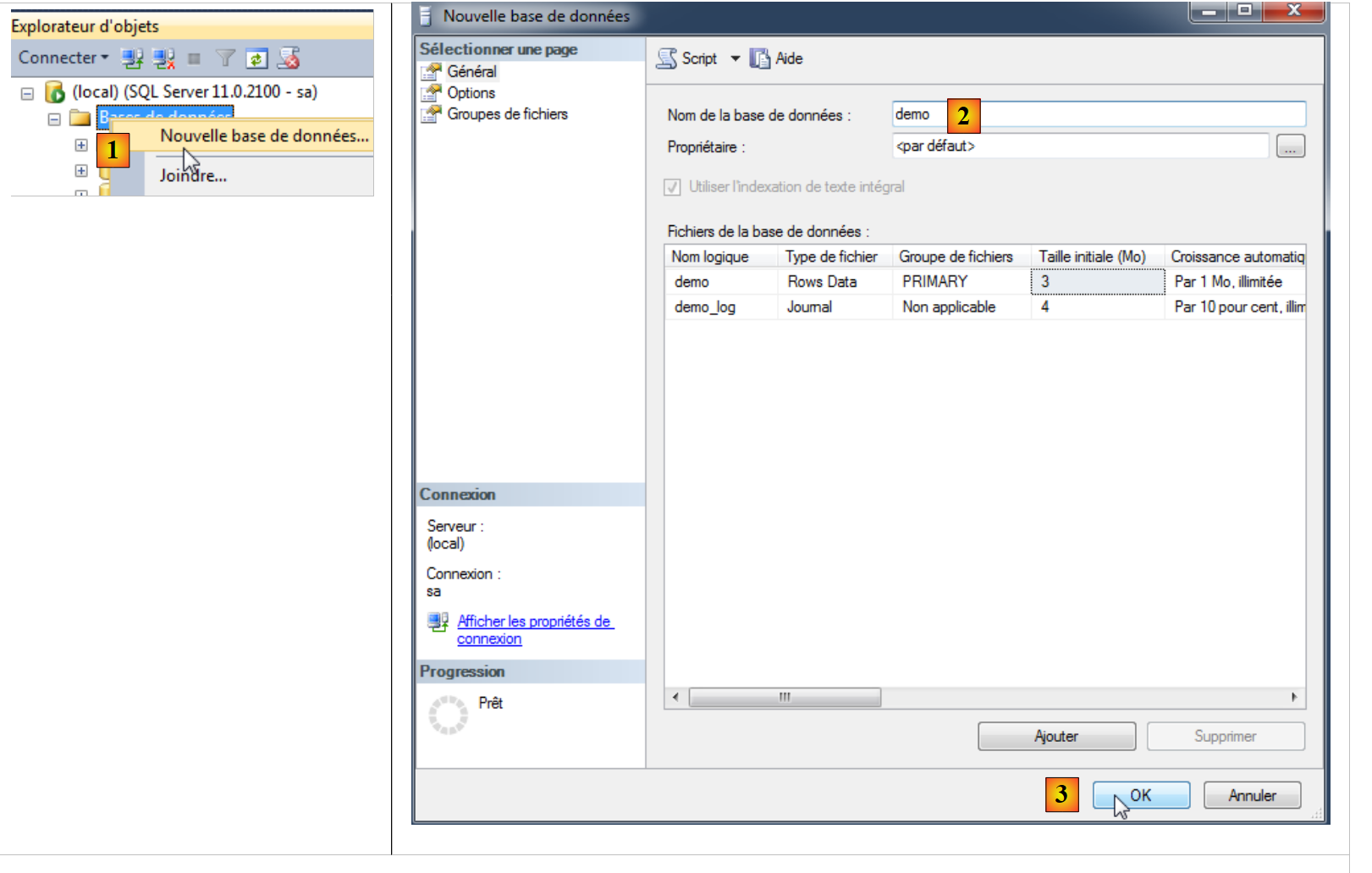 |
- in [1], we create a new BD;
- in [2], it will be named demo;
- In [3], we confirm;
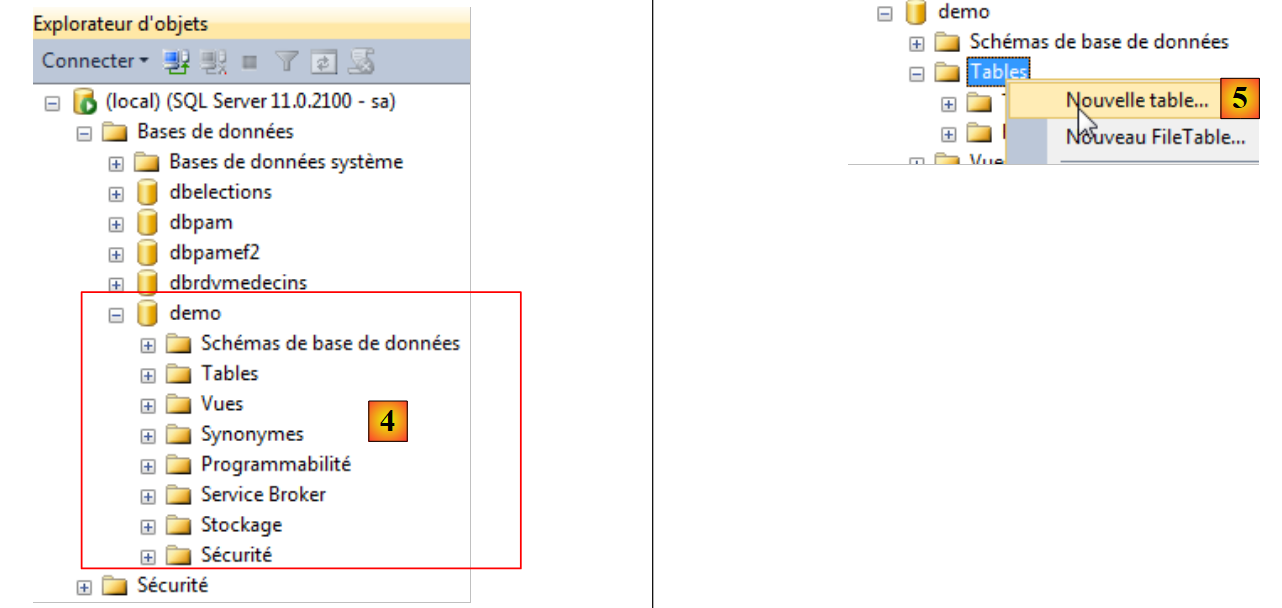 |
- In [4], the database is created;
- In [5], create a new table in the demo database;
 |
 |
 |
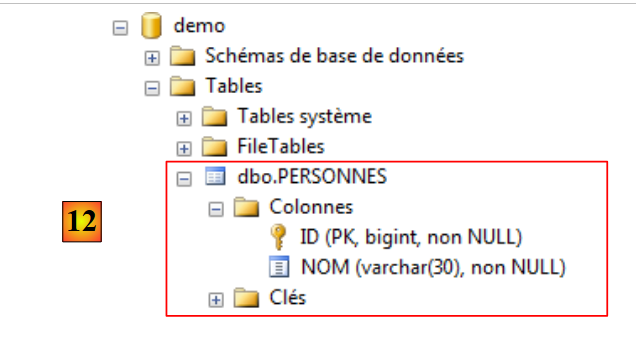 |
- in [6], we define a table with two columns, ID and NOM;
- In [7], column [ID] is made the primary key;
- In [8], the primary key is represented by a key;
- In [9], the table is saved;
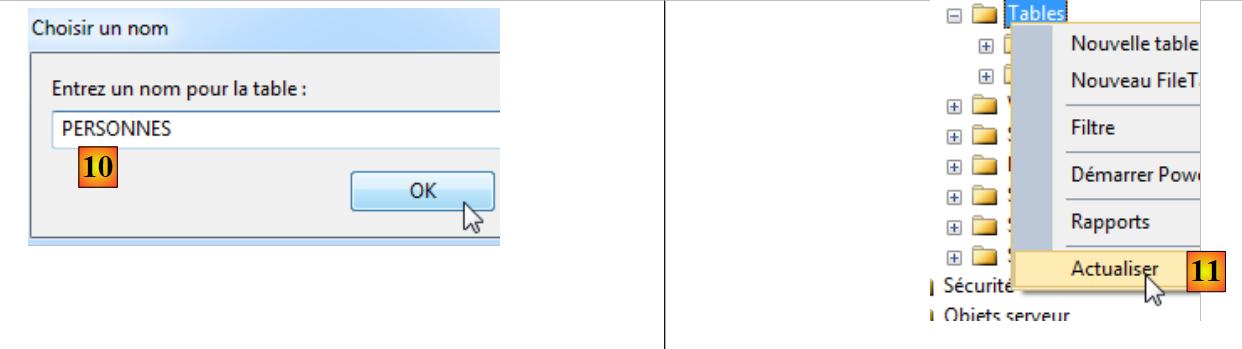
- in [10], we give it a name;
- in [11], to make the table appear in the database [demo], the database must be refreshed;
- In [12], the table [PERSONNES] has been successfully created.
That is all we need to know for now about using the SQL Server administration tool.
3.3. The embedded server (localdb)\v11.0
VS Express 2012 comes with an embedded SQL server. Here, we assume that VS Express 2012 has been installed. Launch VS 2012:
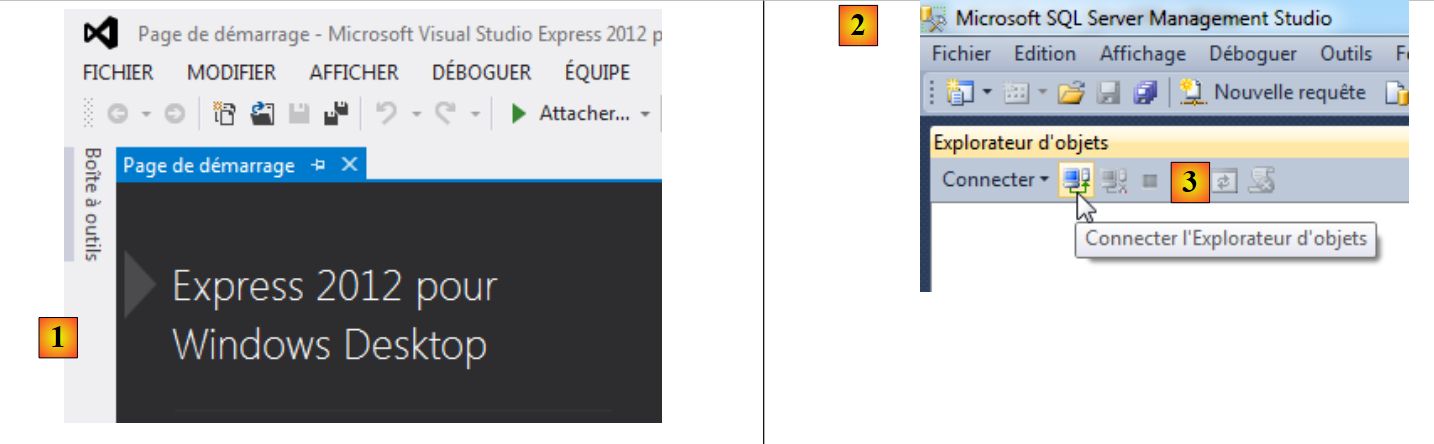 |
Launch the SQL Server 2012 administration tool [2] and log in to [3].
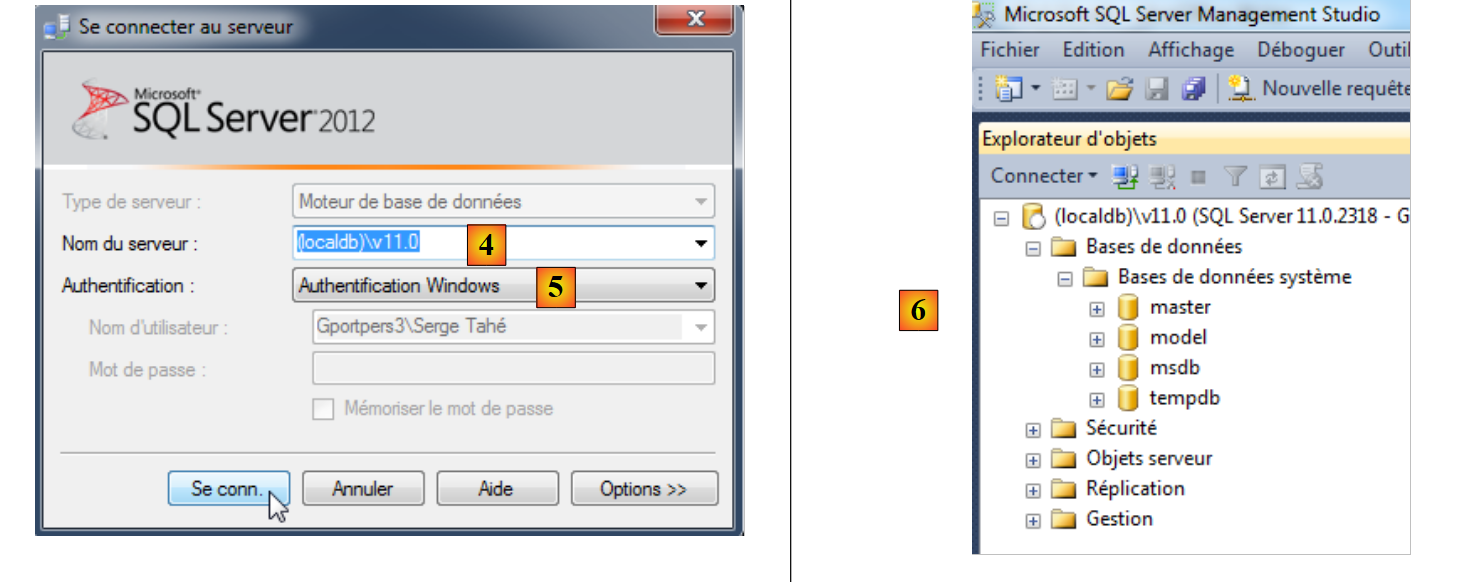 |
- In [4], connect to the server (localdb)\v11.0;
- in [5], using Windows authentication;
- In [6], a successful connection displays the server's databases. As before, you could create a new database.
We will not use this embedded server in VS 2012.
3.4. Creating the database from entities
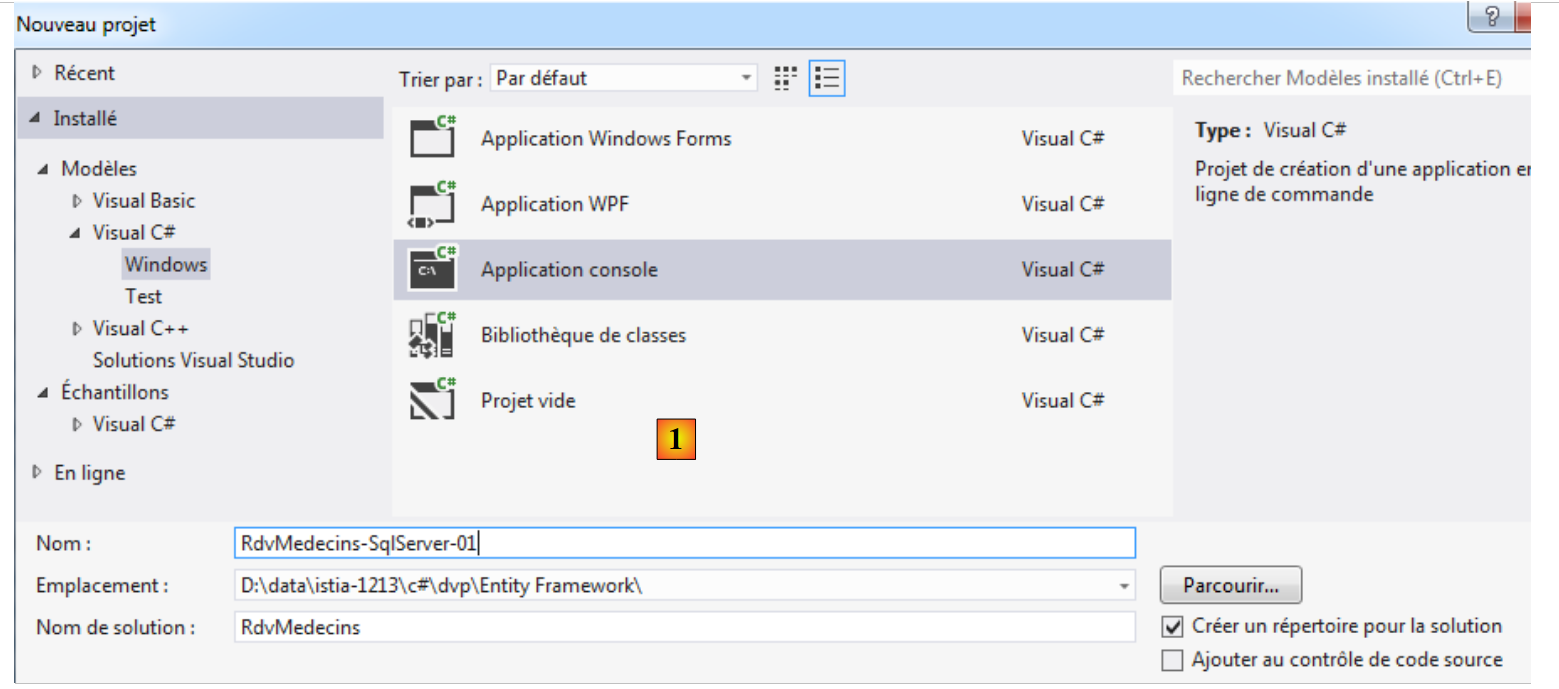
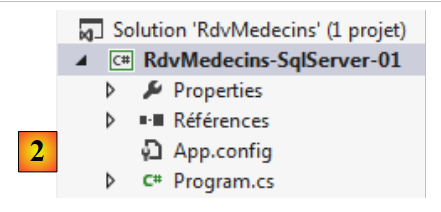
Entity Framework 5 Code First allows you to create a database from entities. That is what we will look at now. Using VS Express 2012, we create an initial console project in C#:
 |
 |
- in [1], the project definition;
- in [2], the created project.
All our projects will need the Entity Framework 5 . We add it:
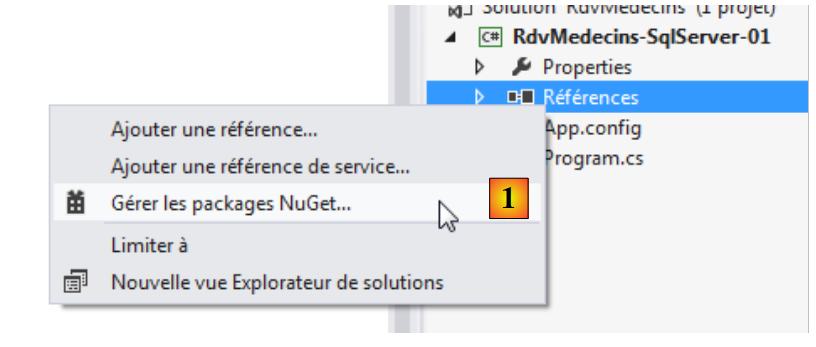 |
- In [1], the NuGet tool allows you to download dependencies;
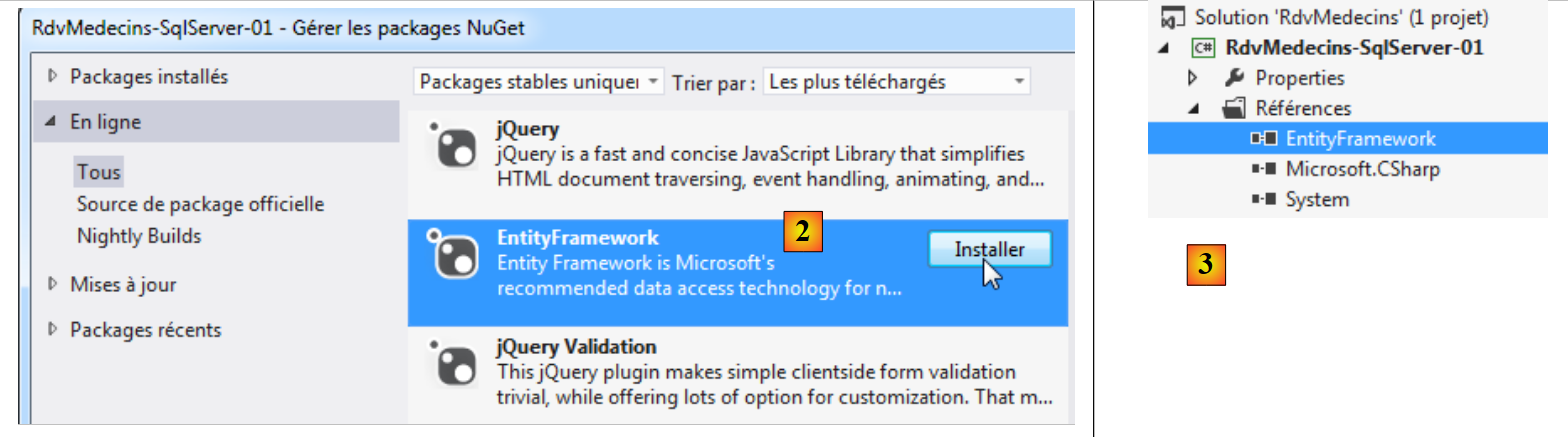 |
- in [2], we download the Entity Framework dependency;
- in [3], the reference has been added to the project.
You can learn more by viewing the properties of the added reference:
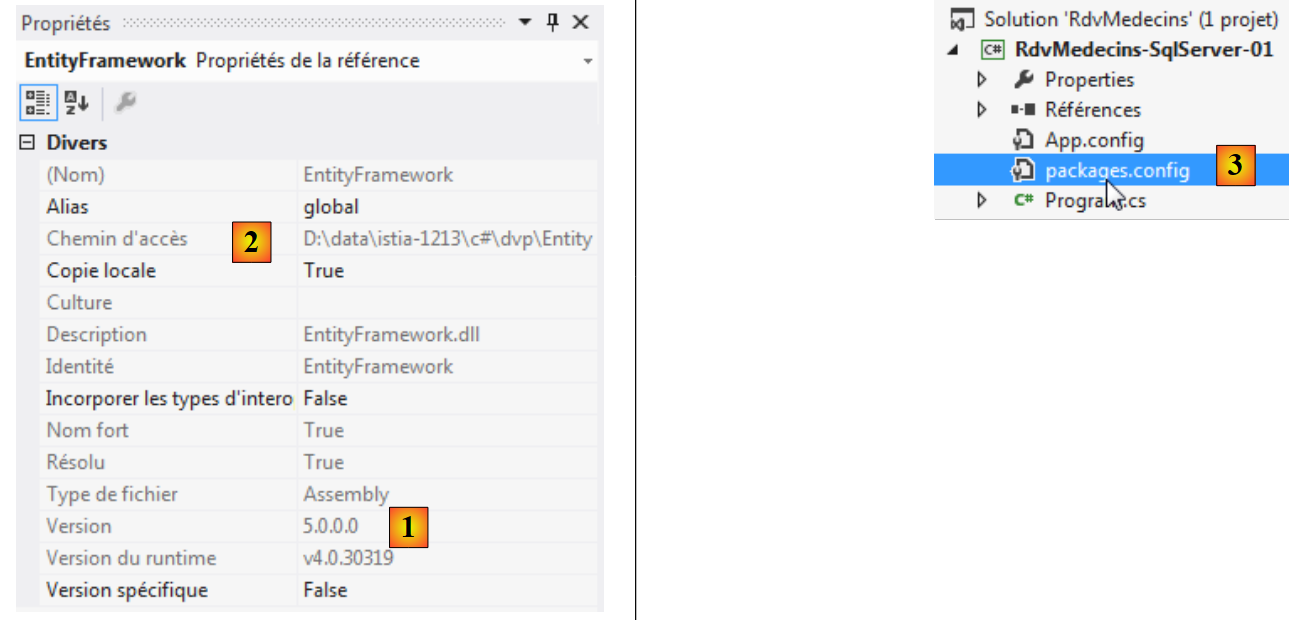 |
- in [1], the version from DLL. You need version 5;
- in [2], its location in the file system: <solution>\packages\EntityFramework.5.0.0\lib\net45\EntityFramework.dll where <solution> is the folder for the VS solution. All packages added by NuGet will go into the <solution>/packages folder;
- In [3], a file named [packages.config] was created. Its contents are as follows:
<?xml version="1.0" encoding="utf-8"?>
<packages>
  <package id="EntityFramework" version="5.0.0" targetFramework="net45" />
</packages>
It lists the packages imported by NuGet.
Let’s go back to the VS project and create a folder named [Models] within the project:
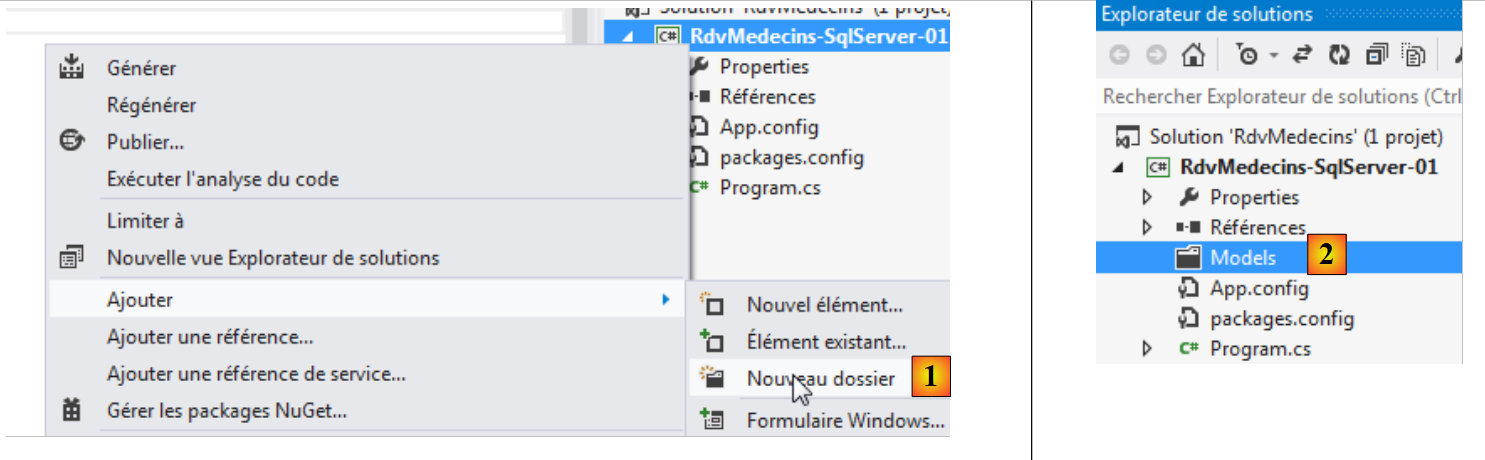 |
- In [1], adding a folder to the project;
- in [2], it will be named [Models].
We will continue this practice of placing our entity definitions in the [Models] folder.
To build our entities, we will use the definition of the MySQL 5 database used in the NHibernate project. Let’s review the role of EF entities:
 |
Entities must reflect the database tables. The data access layer uses these entities instead of working directly with the tables. Let’s start with the [MEDECINS] table:
3.4.1. The [Medecin] entity
It contains information about the doctors managed by the [RdvMedecins] application.
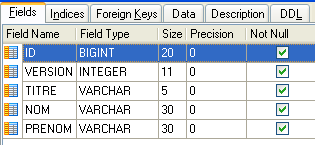 | 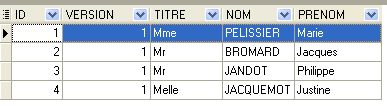 |
- ID: ID number for the doctor—primary key of the table
- VERSION: ID number for the version of the row in the table. This number is incremented by 1 each time a change is made to the row.
- NOM: the doctor's last name
- PRENOM: their first name
- TITRE: their title (Ms., Mrs., Mr.)
We could start with the following [Medecin] class:
using System;

[Table("MEDECINS", Schema = "dbo")]
  namespace RdvMedecins.Entites
{
  public class Medecin
  {
    // data
    public int Id { get; set; }
    public string Titre { get; set; }
    public string Nom { get; set; }
    public string Prenom { get; set; }
}
- Line 3: The [Medecin] class is associated with the [MEDECINS] table in the database. This table will be located in a schema named "dbo".
We place this class in a file named [Entites.cs] [1]. This is where we will place all our entities.
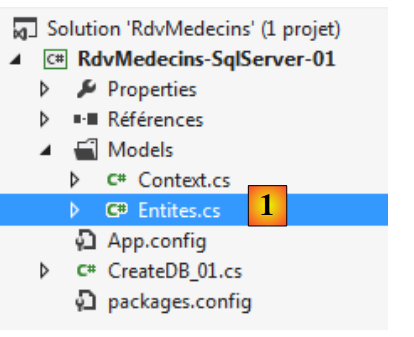 |
Still in the [Models] folder, we create the following [Context.cs] file:
using System.Data.Entity;
using RdvMedecins.Entites;

namespace RdvMedecins.Models
{

  // the context
  public class RdvMedecinsContext : DbContext
  {
    // the doctors
    public DbSet<Medecin> Medecins { get; set; }
  }

  // database initialization
  public class RdvMedecinsInitializer : DropCreateDatabaseAlways<RdvMedecinsContext>
  {
  }
}
- line 8: the class [RdvMedecinsContext] will represent the persistence context, c.-à-d. all entities managed by ORM. It must derive from the [System.Data.Entity.DbContext] class;
- Line 11: The field [Medecins] represents entities of type [Medecin] in the persistence context. It is of type DbSet<Medecin>. There are generally as many [DbSet] entities as there are tables in the database, one per table;
- Line 15: We define a [RdvMedecinsInitializer] class to initialize the created database. Here, it derives from the [DropCreateDataBaseAlways] class, which, as its name suggests, deletes the database if it already exists and then recreates it. This is useful during the development phase of BD. The parameter of the [DropCreateDataBaseAlways] class is the type of persistence context associated with the database. Other parent classes besides [DropCreateDataBaseAlways] can be used for the initialization class:
- [DropCreateDatabaseIfModelChanges]: recreates the database if the entities have changed,
- [CreateDatabaseIfNotExists]: creates the database if it does not exist;
We still need to create a main program. It will be the following [CreateDB_01.cs]:
using System;
using System.Data.Entity;
using RdvMedecins.Models;

namespace RdvMedecins_01
{
  class CreateDB_01
  {
    static void Main(string[] args)
    {
      // we create the
      Database.SetInitializer(new RdvMedecinsInitializer());
      using (var context = new RdvMedecinsContext())
      {
        context.Database.Initialize(false);
      }
    }
  }
}
- line 12: [System.Data.Entity.DataBase] is a class that provides static methods for managing the database associated with a persistence context. The static method [SetInitializer] allows you to specify the database initialization class. This does not trigger initialization;
- line 13: to work with a persistence context, you must instantiate it. This is what is done here. A using clause is used so that the context is automatically closed when the clause ends. Therefore, on line 17, the context is closed;
- line 15: We explicitly trigger the generation of the database associated with the persistence context [RdvMedecinsContext]. The false parameter indicates that this operation should not be performed if it has already been done for this context. Here, we could just as easily have set it to true.
When working with a database, the connection parameters are generally stored in the [App.config] file. Note that for now, they are not there:
<?xml version="1.0" encoding="utf-8"?>
<configuration>
  <configSections>
    <!-- For more information on Entity Framework configuration, visit http://go.microsoft.com/fwlink/?LinkID=237468 -->
    <section name="entityFramework" type="System.Data.Entity.Internal.ConfigFile.EntityFrameworkSection, EntityFramework, Version=5.0.0.0, Culture=neutral, PublicKeyToken=b77a5c561934e089" requirePermission="false" />
  </configSections>
  <startup>
    <supportedRuntime version="v4.0" sku=".NETFramework,Version=v4.5" />
  </startup>
  <entityFramework>
    <defaultConnectionFactory type="System.Data.Entity.Infrastructure.SqlConnectionFactory, EntityFramework" />
  </entityFramework>
</configuration>
The above elements were added to [App.config] when the Entity Framework dependency was added to the project references.
Let’s run the project (Ctrl-F5) after launching SQL Server Express (this is important):
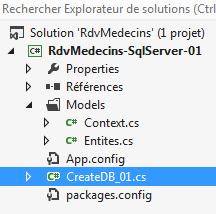 | 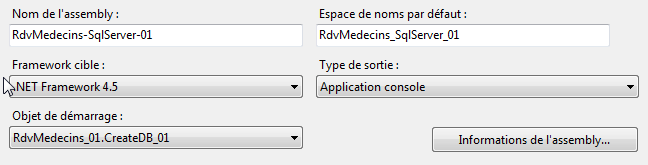 |
The execution should complete without errors. Now let’s open the SQL Server administration tool and refresh the view:
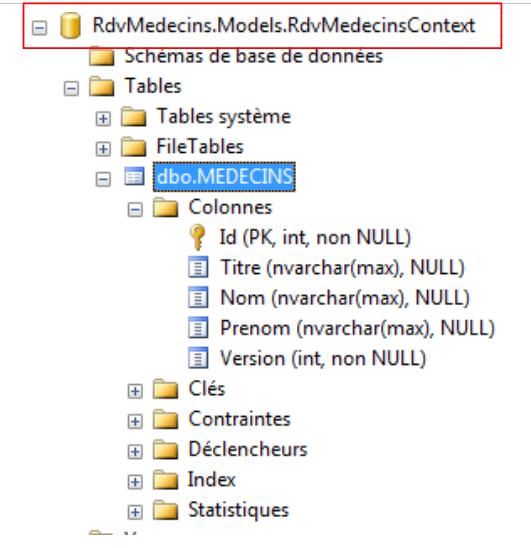 |
We can see that a database with the full name of the [RdvMedecinsContext] class has been created and that it contains a table named [dbo.MEDECINS] (the name we gave it) with columns that match the field names of the [Medecin] entity. If the code executed successfully and the database mentioned above does not appear, check the embedded server (localdb)\v11.0 (see page 19). With VS 2012 Pro, this server is used if the SQL server is not active when the code is executed. With VS 2012 Express, it is not.
Let’s examine the structure of the [MEDECINS] table:
- it contains the field names from the [Medecin] entity;
- the [Id] column is the primary key. This is a convention of EF: if entity E has a field Id or Eid (MedecinId), then this column is the primary key in the associated table;
- the column types in the table are those of the entity fields;
- for the Title, Last Name, and First Name columns, a type of [nvarchar(max)] was used. We could be more specific: 5 characters for the title, 30 for the last name and first name;
- the Title, Last Name, and First Name columns may have the value NULL. We are going to change that.
Let’s look at the properties of the primary key [Id]:
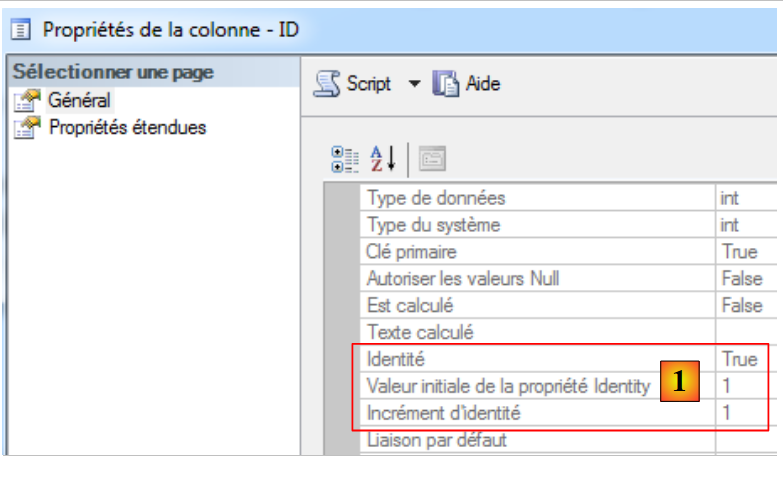 |
In [1], we see that the primary key is of type [Identité], which means its value is automatically generated by SQL Server. We will adopt this strategy for all SGBD.
We will rely less on EF conventions by using annotations. The entity code in [Entites.cs] becomes the following:
using System;
using System.ComponentModel.DataAnnotations;
using System.ComponentModel.DataAnnotations.Schema;

namespace RdvMedecins.Entites
{
  [Table("MEDECINS", Schema = "dbo")]
  public class Medecin
  {
    // data
    [Key]
    [Column("ID")]
    public int Id { get; set; }
    [Required]
    [MaxLength(5)]
    [Column("TITRE")]
    public string Titre { get; set; }
    [Required]
    [MaxLength(30)]
    [Column("NOM")]
    public string Nom { get; set; }
    [Required]
    [MaxLength(30)]
    [Column("PRENOM")]
    public string Prenom { get; set; }
    [Required]
    [Column("VERSION")]
    public int Version { get; set; }
  }
}
- Lines 2 and 3: The annotations are found in the [System.ComponentModel.DataAnnotations] (Key, Required, MaxLength) and [System.ComponentModel.DataAnnotations.Schema] (Column) namespaces. Other annotations can be found in the URL and [http://msdn.microsoft.com/en-us/data/gg193958.aspx] namespaces;
- line 11: [Key] designates the primary key;
- line 12: [Column] sets the column name corresponding to the field;
- line 14: [Required] indicates that the field is required (SQL NOT NULL);
- line 15: [MaxLength] sets the maximum length of the character string, [MinLength] its minimum length;
Let’s run the project with this new definition of the [Medecin] entity. The resulting database is as follows:
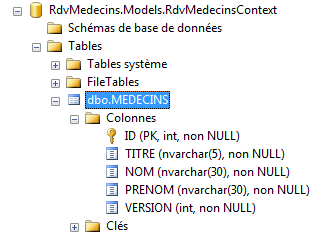 |
- the columns have the names we assigned to them;
- the annotation [Required] has been translated to SQL NOT NULL;
- the annotation [MaxLength(N)] has been mapped to a SQL nvarchar(N) type.
In the NHibernate application, the [VERSION] column was there to prevent concurrent access to the same row in a table. The principle is as follows:
- a process P1 reads a row L from table [MEDECINS] at time T1. The row has version V1;
- a process P2 reads the same row L from table [MEDECINS] at time T2. The row has version V1 because process P1 has not yet committed its modification;
- Process P1 commits its modification to row L. The version for row L then changes to V2=V1+1;
- Process P2 commits its modification to row L. The ORM then throws an exception because process P2 has a version V1 for row L that differs from the version V2 found in the database.
This is called optimistic concurrency control. With EF 5, a field playing this role must have one of the two attributes [Timestamp] or [ConcurrencyCheck]. SQL Server has a type [timestamp]. A column with this type has its value automatically generated by SQL Server whenever a row is inserted or modified. Such a column can then be used to manage access concurrency. To revisit the previous example, process P2 will find a timestamp different from the one it read, because in the meantime the modification made by process P1 will have changed it.
Our [Medecin] entity evolves as follows:
using System;
using System.ComponentModel.DataAnnotations;
using System.ComponentModel.DataAnnotations.Schema;

namespace RdvMedecins.Entites
{
[Table("MEDECINS", Schema = "dbo")]
public class Medecin
  {
    // data
    [Key]
    [Column("ID")]
    public int Id { get; set; }
    [Required]
    [MaxLength(5)]
    [Column("TITRE")]
    public string Titre { get; set; }
    [Required]
    [MaxLength(30)]
    [Column("NOM")]
    public string Nom { get; set; }
    [Required]
    [MaxLength(30)]
    [Column("PRENOM")]
    public string Prenom { get; set; }
    [Column("TIMESTAMP")]
    [Timestamp]
    public byte[] Timestamp { get; set; }
  }
}
- Lines 26–28: the new column with the [Timestamp] attribute from line 27. The field type must be byte[] (line 28). The field name can be anything. We do not assign the [Required] attribute to it because it is not the application that will provide this value, but the SGBD itself.
If we run the project with this new entity, the database changes as follows:
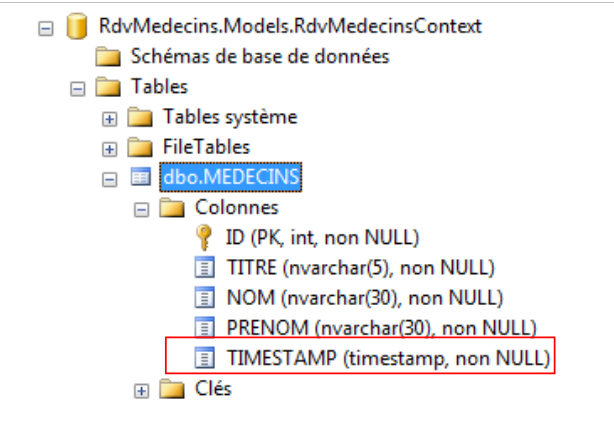 |
We have one last point to address. The persistence context "knows" that an entity must be inserted into the database because its primary key is null at that point. It is the database insertion that will assign a value to the primary key. Here, the type int assigned to the primary key [Id] is not suitable because this type does not accept the value null. We then assign it the type int?, which accepts the values int plus the null pointer. The [Medecin] entity used will therefore be as follows:
public class Medecin
  {
    // data
    [Key]
    [Column("ID")]
    public int? Id { get; set; }
    ...
We still need to see how to represent the concept of a foreign key between tables in an entity.
3.4.2. The [Creneau] entity
The table [CRENEAUX] lists the time slots where RV entries are possible:
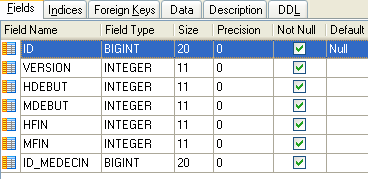 |
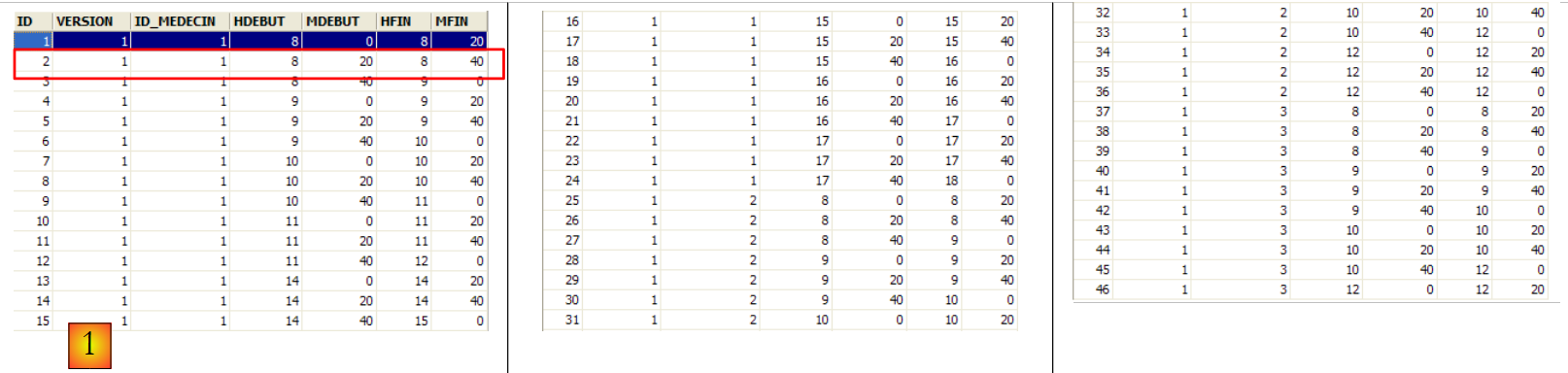 |
- ID: ID number of the time slot—primary key of the table
- VERSION: number identifying the version for the row in the table. This number is incremented by 1 each time a change is made to the row.
- ID_MEDECIN: ID number for the doctor to whom this time slot belongs – foreign key on column MEDECINS(ID).
- HDEBUT: slot start time
- MDEBUT: slot start minutes
- HFIN: slot end hour
- MFIN: slot end minutes
The second row of table [CRENEAUX] (see [1] above) indicates, for example, that slot No. 2 begins at 8:20 a.m. and ends at 8:40 a.m. and belongs to doctor No. 1 (Ms. Marie PELISSIER).
With this information, we can define the entity [Creneau] as follows in [Entites.cs]:
[Table("CRENEAUX", Schema = "dbo")]
  public class Creneau
  {
    // data
    [Key]
    [Column("ID")]
    public int? Id { get; set; }
    [Required]
    [Column("HDEBUT")]
    public int Hdebut { get; set; }
    [Required]
    [Column("MDEBUT")]
    public int Mdebut { get; set; }
    [Required]
    [Column("HFIN")]
    public int Hfin { get; set; }
    [Required]
    [Column("MFIN")]
    public int Mfin { get; set; }
    [Required]
    public virtual Medecin Medecin { get; set; }
    [Column("TIMESTAMP")]
    [Timestamp]
    public byte[] Timestamp { get; set; }
}
The only change is in lines 20–21. The fact that the table [CRENEAUX] has a foreign key on the table [MEDECINS] is reflected in the entity [Creneau] by the presence of a reference to the entity [Medecin], line 21. The field name is irrelevant; only the type matters. The property must be declared virtual using the virtual keyword. This is because EF is required to redefine all so-called navigational properties—that is, those corresponding to a foreign key and enabling navigation between tables.
To test the new entity, we need to make a few changes in [Context.cs]:
using System.Data.Entity;
using RdvMedecins.Entites;

namespace RdvMedecins.Models
{

  // the context
  public class RdvMedecinsContext : DbContext
  {
    // entities
    public DbSet<Medecin> Medecins { get; set; }
    public DbSet<Creneau> Creneaux { get; set; }
  }

  // database initialization
  public class RdvMedecinsInitializer :  DropCreateDatabaseIfModelChanges<RdvMedecinsContext>
  {
  }
}
Line 12 reflects the fact that the context has one more entity to manage. When we run the project, we get the following new database:
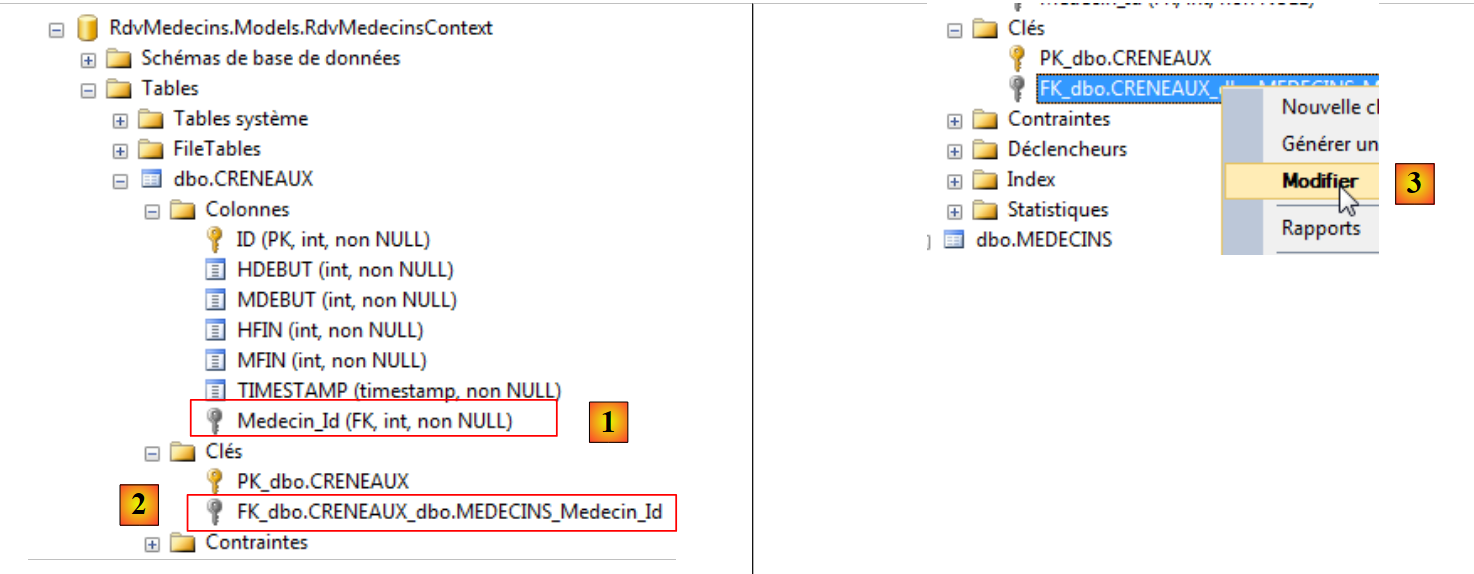 |
The table [CRENEAUX] has indeed been created, and the new feature is the presence of foreign keys [1] and [2]. Its name was generated from the name of the corresponding field in the entity (Medecin) suffixed with "_Id". To view the properties of this foreign key, we try to modify it to [3].
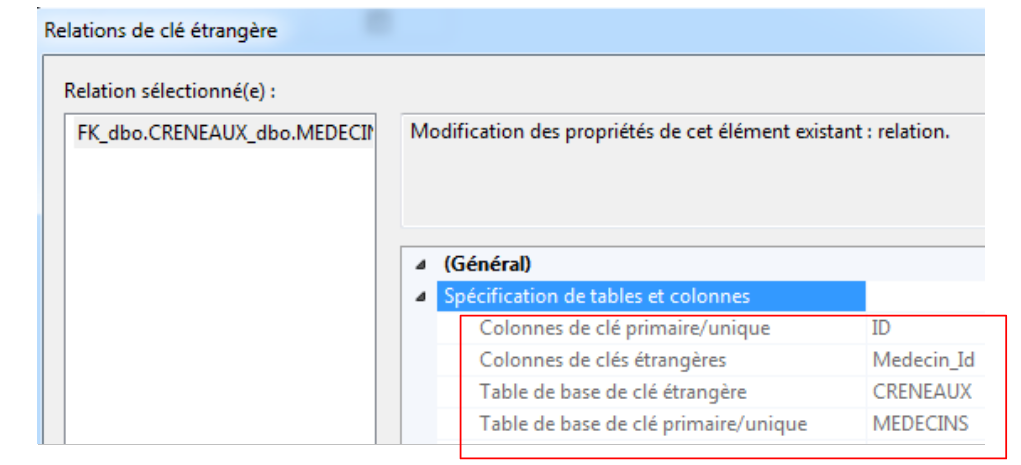 |
The screenshot above shows that [Medecin_Id] is a foreign key in the [CRENEAUX] table and that it references the primary key [ID] in the [MEDECINS] table.
If you create the entities for an existing database, the foreign key column will not necessarily be named [Medecin_Id]. For the other columns, we saw that the annotation [Column] resolved this issue. Strangely, it is more complicated for a foreign key. You must proceed as follows:
public class Creneau
  {
    // data
    ...
    [Required]
    [Column("MEDECIN_ID")]
    public int MedecinId { get; set; }
    [Required]
    [ForeignKey("MedecinId")]
    public virtual Medecin Medecin { get; set; }
    ...
}
- lines 5-7: create a field of the foreign key type (int). Using the [Column] attribute, specify the name of the column that will be the foreign key in the table associated with the entity;
- line 9: we add the annotation [ForeignKey] to the field of type [Medecin]. The argument of this annotation is the name of the field (not the column) that is associated with the foreign key column of the table.
Running the project this time creates the following table:
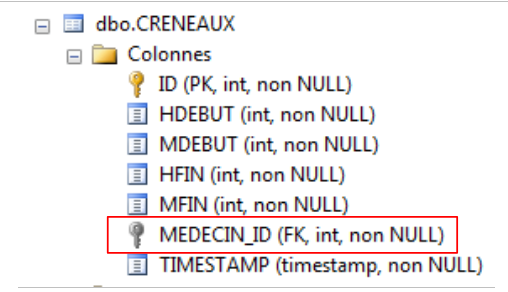 |
Above, the foreign key column does indeed have the name we gave it. Note that the fields:
    [Required]
    [Column("MEDECIN_ID")]
    public int MedecinId { get; set; }
    [Required]
    [ForeignKey("MedecinId")]
public virtual Medecin Medecin { get; set; }
have resulted in only a single column, the [MEDECIN_ID] column. Nevertheless, the presence of the [MedecinId] field is important. When reading a row from the [CRENEAUX] table, it will receive the value of the [MEDECIN_ID] column, i.e., the value of the foreign key in the [MEDECINS] table. This is often useful.
The [Medecin] field above reflects the many-to-one relationship that links the [Creneau] entity to the [Medecin] entity. Multiple [Creneau] objects are linked to a single [Medecin]. The inverse relationship, where a single [Medecin] object is associated with multiple [Creneau] objects, can be modeled using an additional field in the [Medecin] entity:
public class Medecin
  {
    // data
    [Key]
    [Column("ID")]
    public int? Id { get; set; }
    ...
    public ICollection<Creneau> Creneaux { get; set; }
    [Column("TIMESTAMP")]
    [Timestamp]
    public byte[] Timestamp { get; set; }
On line 8, we added the [Creneaux] field, which is a collection of [Creneau] objects. This field will give us access to all of the doctor’s time slots.
When we run the project again, we see that the [MEDECINS] table has not changed:
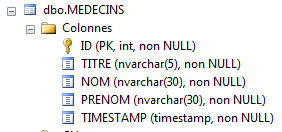 |
No columns have been added. The foreign key relationship between the [CRENEAUX] table and the [MEDECINS] table is sufficient for EF to generate the fields associated with it:
  public class Medecin
  {
    ...
    public ICollection<Creneau> Creneaux { get; set; }
    ...
  }
  public class Creneau
  {
    ...
    [Required]
    [Column("MEDECIN_ID")]
    public int MedecinId { get; set; }
    [Required]
    [ForeignKey("MedecinId")]
    public virtual Medecin Medecin { get; set; }
    ...
  }
We know the basics. We can finish by creating the other two entities.
3.4.3. The entities [Client] and [Rv]
With what we’ve learned, we can write the entities [Client] and [Rv]. The [Client] entity contains information about the clients entities managed by the [RdvMedecins] application.
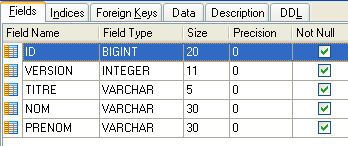 | 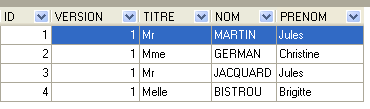 |
- ID: ID number for the customer—primary key of the table
- VERSION: ID number for the version of the row in the table. This number is incremented by 1 each time a change is made to the row.
- NOM: the customer's name
- PRENOM: their first name
- TITRE: their title (Ms., Mrs., Mr.)
The entity [Client] could be as follows:
  [Table("CLIENTS", Schema = "dbo")]
  public class Client
  {
    // data
    [Key]
    [Column("ID")]
    public int? Id { get; set; }
    [Required]
    [MaxLength(5)]
    [Column("TITRE")]
    public string Titre { get; set; }
    [Required]
    [MaxLength(30)]
    [Column("NOM")]
    public string Nom { get; set; }
    [Required]
    [MaxLength(30)]
    [Column("PRENOM")]
    public string Prenom { get; set; }
    // customer rvs
    public ICollection<Rv> Rvs { get; set; }
    [Column("TIMESTAMP")]
    [Timestamp]
    public byte[] Timestamp { get; set; }
}
The class [Client] is almost identical to the class [Medecin]. They could be derived from the same parent class. The new feature is on line 21. It reflects the fact that a customer can have multiple appointments and is derived from the presence of a foreign key from table [RVS] to table [CLIENTS].
The entity [Rv] represents an appointment:
 |
- ID: ID number uniquely identifying RV – primary key
- JOUR: day of the RV
- ID_CRENEAU: time slot for RV – foreign key on the [ID] column of the [CRENEAUX] table – determines both the time slot and the doctor involved.
- ID_CLIENT: customer ID for whom the reservation is made – foreign key on the [ID] column of the [CLIENTS] table
The [Rv] entity could be as follows:
[Table("MEDECINS", Schema = "dbo")]
  public class Rv
  {
    // data
    [Key]
    [Column("ID")]
    public int? Id { get; set; }
    [Required]
    [Column("JOUR")]
    public DateTime Jour { get; set; }
    [Column("CLIENT_ID")]
    public int ClientId { get; set; }
    [ForeignKey("ClientId")]
    [Required]
    public virtual Client Client { get; set; }
    [Column("CRENEAU_ID")]
    public int CreneauId { get; set; }
    [ForeignKey("CreneauId")]
    [Required]
    public virtual Creneau Creneau { get; set; }
    [Column("TIMESTAMP")]
    [Timestamp]
    public byte[] Timestamp { get; set; }
}
- lines 5-7: primary key;
- lines 8-10: appointment date;
- lines 11-12: foreign key from table [RVS] to table [CLIENTS];
- lines 13-15: the customer with the appointment;
- lines 16-17: the foreign key from table [RVS] to table [CRENEAUX];
- lines 18-20: the appointment time slot;
- lines 21-23: the concurrent access control field.
In line 17, we see a many-to-one relationship: a single time slot can correspond to multiple appointments (not on the same day). The inverse relationship can be reflected in the [Creneau] entity:
public class Creneau
  {
    // niche Rvs
    public ICollection<Rv> Rvs { get; set; }
    ...
}
Line 4: the collection of appointments scheduled for this time slot.
When the project is run, the generated database is as follows:
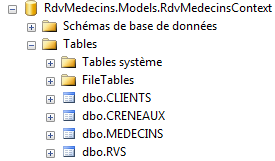 |
The tables [MEDECINS] and [CRENEAUX] have not changed. The tables [CLIENTS] and [RVS] are as follows:
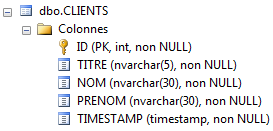 | 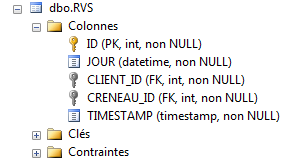 |
This is what was expected. We still have a few details to sort out:
- manage the database name. Here, it was generated by EF;
- populate the database with data.
3.4.4. Setting the database name
To set the name of the database generated by EF, we will use a connection string defined in [App.config]. This configuration file changes as follows:
<?xml version="1.0" encoding="utf-8"?>
<configuration>
  <configSections>
    <!-- For more information on Entity Framework configuration, visit http://go.microsoft.com/fwlink/?LinkID=237468 -->
    <section name="entityFramework" type="System.Data.Entity.Internal.ConfigFile.EntityFrameworkSection, EntityFramework, Version=5.0.0.0, Culture=neutral, PublicKeyToken=b77a5c561934e089" requirePermission="false" />
  </configSections>
  <startup>
    <supportedRuntime version="v4.0" sku=".NETFramework,Version=v4.5" />
  </startup>
  <entityFramework>
    <defaultConnectionFactory type="System.Data.Entity.Infrastructure.SqlConnectionFactory, EntityFramework" />
  </entityFramework>

  <!-- connection chain on base -->
  <connectionStrings>
    <add name="RdvMedecinsContext"
         connectionString="Data Source=localhost;Initial Catalog=rdvmedecins-ef;User Id=sa;Password=sqlserver2012;"
         providerName="System.Data.SqlClient" />
  </connectionStrings>
  <!-- the factory provider -->
  <system.data>
    <DbProviderFactories>
      <add name="SqlClient Data Provider"
       invariant="System.Data.SqlClient"
       description=".Net Framework Data Provider for SqlServer"
       type="System.Data.SqlClient.SqlClientFactory, System.Data,
     Version=4.0.0.0, Culture=neutral, PublicKeyToken=b77a5c561934e089"
    />
    </DbProviderFactories>
  </system.data>

</configuration>
- lines 15-19: the database connection string;
- line 16: the attribute [name] uses the name of the class [RdvMedecinsContext] used for the persistence context. It is important to remember this. This constraint can be bypassed in the context constructor:
    // manufacturer
    public RdvMedecinsContext()
      : base("monContexte")
    {
    }
In this case, we might have name= "monContexte ". This is what we will have later in the document.
- line 17: the connection string. [Data Source]: the name of the server on which SGBD is located, [Initial Catalog]: the database name, so here [rdvmedecins-ef], [User Id]: the connection owner, [Password]: its password. The reader should adapt this string to their environment;
- lines 21–29: define a [DbProviderFactory]. I don’t know what this is. Judging by the name, it could be a class used to generate the [ADO.NET] layer that separates EF from SGBD:
 |
Actually, these lines are unnecessary for SQL Server, but I had to add them for the other SGBD instances. So I’m including them here just for reference. They don’t cause any issues. The only important point is the version on line 27. This is the one for DLL and [System.Data] listed in the project references:
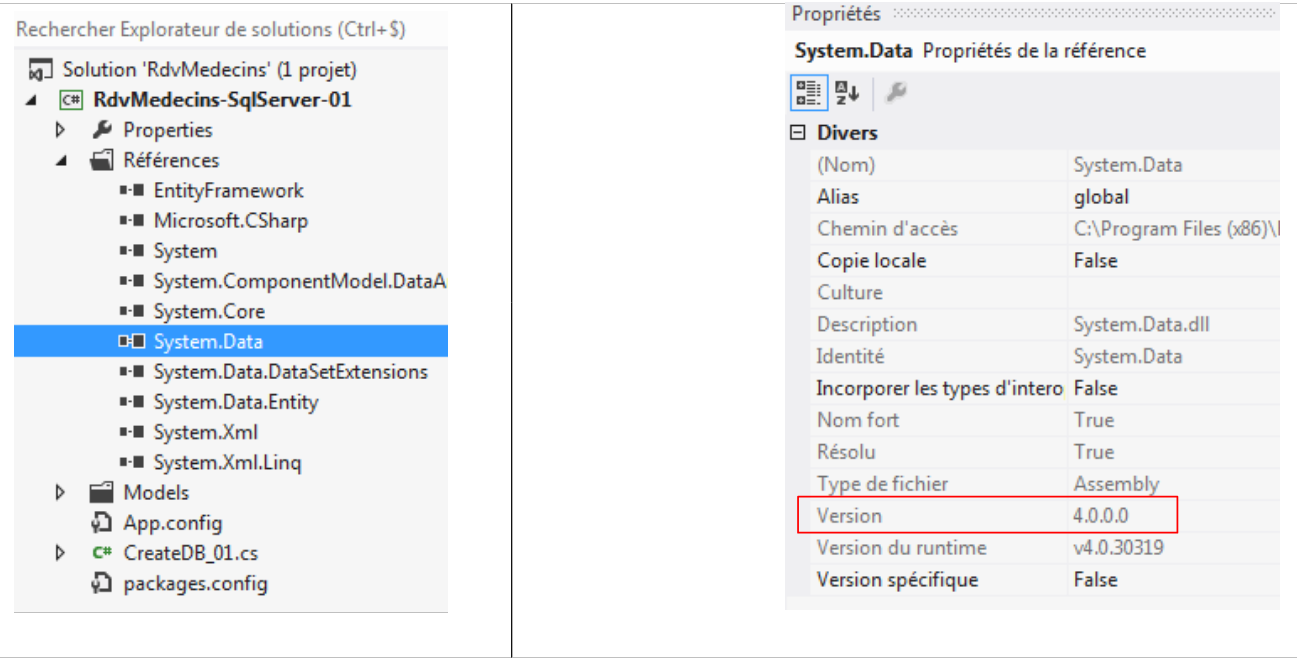 |
There you go. We’re ready. We run the project and get the following [rdvmedecins-ef] database:
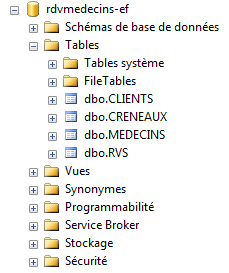 |
This will be our final database. All that’s left is to populate it with data.
3.4.5. Filling the database
The database initialization class can be used to insert data into it:
public class RdvMedecinsInitializer : DropCreateDatabaseIfModelChanges<RdvMedecinsContext>
  {
    // database initialization
    public class RdvMedecinsInitializer : DropCreateDatabaseAlways<RdvMedecinsContext>
    {
      protected override void Seed(RdvMedecinsContext context)
      {
        base.Seed(context);
        // on initialise la base
        // the clients
        Client[] clients ={
        new Client { Titre = "Mr", Nom = "Martin", Prenom = "Jules" },
        new Client { Titre = "Mme", Nom = "German", Prenom = "Christine" },
        new Client { Titre = "Mr", Nom = "Jacquard", Prenom = "Jules" },
        new Client { Titre = "Melle", Nom = "Bistrou", Prenom = "Brigitte" }
     };
        foreach (Client client in clients)
        {
          context.Clients.Add(client);
        }
        // the doctors
        Medecin[] medecins ={
        new Medecin { Titre = "Mme", Nom = "Pelissier", Prenom = "Marie" },
        new Medecin { Titre = "Mr", Nom = "Bromard", Prenom = "Jacques" },
        new Medecin { Titre = "Mr", Nom = "Jandot", Prenom = "Philippe" },
        new Medecin { Titre = "Melle", Nom = "Jacquemot", Prenom = "Justine" }
     };
        foreach (Medecin medecin in medecins)
        {
          context.Medecins.Add(medecin);
        }
        // time slots
        Creneau[] creneaux ={
        new Creneau{ Hdebut=8,Mdebut=0,Hfin=8,Mfin=20,Medecin=medecins[0]},
        new Creneau{ Hdebut=8,Mdebut=20,Hfin=8,Mfin=40,Medecin=medecins[0]},
        new Creneau{ Hdebut=8,Mdebut=40,Hfin=9,Mfin=0,Medecin=medecins[0]},
        new Creneau{ Hdebut=9,Mdebut=0,Hfin=9,Mfin=20,Medecin=medecins[0]},
        new Creneau{ Hdebut=9,Mdebut=20,Hfin=9,Mfin=40,Medecin=medecins[0]},
        new Creneau{ Hdebut=9,Mdebut=40,Hfin=10,Mfin=0,Medecin=medecins[0]},
        new Creneau{ Hdebut=10,Mdebut=0,Hfin=10,Mfin=20,Medecin=medecins[0]},
        new Creneau{ Hdebut=10,Mdebut=20,Hfin=10,Mfin=40,Medecin=medecins[0]},
        new Creneau{ Hdebut=10,Mdebut=40,Hfin=11,Mfin=0,Medecin=medecins[0]},
        new Creneau{ Hdebut=11,Mdebut=0,Hfin=11,Mfin=20,Medecin=medecins[0]},
        new Creneau{ Hdebut=11,Mdebut=20,Hfin=11,Mfin=40,Medecin=medecins[0]},
        new Creneau{ Hdebut=11,Mdebut=40,Hfin=12,Mfin=0,Medecin=medecins[0]},
        new Creneau{ Hdebut=14,Mdebut=0,Hfin=14,Mfin=20,Medecin=medecins[0]},
        new Creneau{ Hdebut=14,Mdebut=20,Hfin=14,Mfin=40,Medecin=medecins[0]},
        new Creneau{ Hdebut=14,Mdebut=40,Hfin=15,Mfin=0,Medecin=medecins[0]},
        new Creneau{ Hdebut=15,Mdebut=0,Hfin=15,Mfin=20,Medecin=medecins[0]},
        new Creneau{ Hdebut=15,Mdebut=20,Hfin=15,Mfin=40,Medecin=medecins[0]},
        new Creneau{ Hdebut=15,Mdebut=40,Hfin=16,Mfin=0,Medecin=medecins[0]},
        new Creneau{ Hdebut=16,Mdebut=0,Hfin=16,Mfin=20,Medecin=medecins[0]},
        new Creneau{ Hdebut=16,Mdebut=20,Hfin=16,Mfin=40,Medecin=medecins[0]},
        new Creneau{ Hdebut=16,Mdebut=40,Hfin=17,Mfin=0,Medecin=medecins[0]},
        new Creneau{ Hdebut=17,Mdebut=0,Hfin=17,Mfin=20,Medecin=medecins[0]},
        new Creneau{ Hdebut=17,Mdebut=20,Hfin=17,Mfin=40,Medecin=medecins[0]},
        new Creneau{ Hdebut=17,Mdebut=40,Hfin=18,Mfin=0,Medecin=medecins[0]},
        new Creneau{ Hdebut=8,Mdebut=0,Hfin=8,Mfin=20,Medecin=medecins[1]},
        new Creneau{ Hdebut=8,Mdebut=20,Hfin=8,Mfin=40,Medecin=medecins[1]},
        new Creneau{ Hdebut=8,Mdebut=40,Hfin=9,Mfin=0,Medecin=medecins[1]},
        new Creneau{ Hdebut=9,Mdebut=0,Hfin=9,Mfin=20,Medecin=medecins[1]},
        new Creneau{ Hdebut=9,Mdebut=20,Hfin=9,Mfin=40,Medecin=medecins[1]},
        new Creneau{ Hdebut=9,Mdebut=40,Hfin=10,Mfin=0,Medecin=medecins[1]},
        new Creneau{ Hdebut=10,Mdebut=0,Hfin=10,Mfin=20,Medecin=medecins[1]},
        new Creneau{ Hdebut=10,Mdebut=20,Hfin=10,Mfin=40,Medecin=medecins[1]},
        new Creneau{ Hdebut=10,Mdebut=40,Hfin=11,Mfin=0,Medecin=medecins[1]},
        new Creneau{ Hdebut=11,Mdebut=0,Hfin=11,Mfin=20,Medecin=medecins[1]},
        new Creneau{ Hdebut=11,Mdebut=20,Hfin=11,Mfin=40,Medecin=medecins[1]},
        new Creneau{ Hdebut=11,Mdebut=40,Hfin=12,Mfin=0,Medecin=medecins[1]},
      };
        foreach (Creneau creneau in creneaux)
        {
          context.Creneaux.Add(creneau);
        }
        // dates
        context.Rvs.Add(new Rv { Jour = new System.DateTime(2012, 10, 8), Client = clients[0], Creneau = creneaux[0] });
      }

    }
  }
- line 6: initialization occurs in the [Seed] method. This method exists in the parent class. It is redefined here. The argument is the application’s persistence context [RdvMedecinsContext];
- line 8: the argument is passed to the parent class; it is likely that the parent class opens the persistence context passed to it, as this opening is no longer necessary thereafter;
- lines 11–16: creation of 4 clients;
- lines 17–20: these are added to the persistence context, more specifically to its doctors. Note the [Add] method that enables this. Recall the definition of the context here:
  public class RdvMedecinsContext : DbContext
  {
    // entities
    public DbSet<Medecin> Medecins { get; set; }
    public DbSet<Creneau> Creneaux { get; set; }
    public DbSet<Client> Clients { get; set; }
public DbSet<Rv> Rvs { get; set; }
...
It is also said that the clients objects have been attached to the context, i.e., they are now managed by EF. Previously, they were detached. They existed as objects but were not managed by EF;
- lines 21–27: creation of 4 doctors;
- lines 28–31: they are placed in the persistence context;
- lines 33-70: creation of time slots. Lines 34–57, for the doctor medecins[0]; lines 58–69, for the doctor medecins[1]. The other doctors have no time slots;
- lines 71–74: these time slots are placed in the persistence context;
- line 76: creation of an appointment for the first client with the first time slot and placing it in the persistence context.
When the project is executed, the following database is obtained:
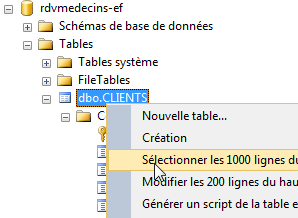 | 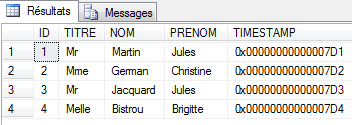 |
Above, we see the table [CLIENTS] populated.
3.4.6. Modification of Entities
Currently, the classes [Medecin] and [Client] are nearly identical. In fact, if we remove the fields added for persistence management with EF 5, they are identical. We will have them derive from a [Personne] class. These two entities then become the following:
// a person
  public abstract class Personne
  {
    // data
    [Key]
    [Column("ID")]
    public int? Id { get; set; }
    [Required]
    [MaxLength(5)]
    [Column("TITRE")]
    public string Titre { get; set; }
    [Required]
    [MaxLength(30)]
    [Column("NOM")]
    public string Nom { get; set; }
    [Required]
    [MaxLength(30)]
    [Column("PRENOM")]
    public string Prenom { get; set; }
    [Column("TIMESTAMP")]
    [Timestamp]
    public byte[] Timestamp { get; set; }

    // signature
    public override string ToString()
    {
      return String.Format("[{0},{1},{2},{3},{4}]", Id, Titre, Prenom, Nom, dump(Timestamp));
    }
    // short signature
    public string ShortIdentity()
    {
      ...
    }

    // utility
    private string dump(byte[] timestamp)
    {
      ...
    }

  }

  [Table("MEDECINS", Schema = "dbo")]
  public class Medecin : Personne
  {
    // the doctor's time slots
    public ICollection<Creneau> Creneaux { get; set; }
    // signature
    public override string ToString()
    {
      return String.Format("Medecin {0}", base.ToString());
    }
  }

[Table("CLIENTS", Schema = "dbo")]
    public class Client : Personne
  {
    // customer rvs
    public ICollection<Rv> Rvs { get; set; }
    // signature
    public override string ToString()
    {
      return String.Format("Client {0}", base.ToString());
    }
  }
When the project is run, the same base is obtained. EF 5 has mapped the lowest classes in the inheritance hierarchy, each to a table. In fact, EF 5 has different table generation strategies for representing entity inheritance. We will not cover them here. You can read, for example, " Entity Framework Code First Inheritance: Table Per Hierarchy and Table Per Type," at URL [http://www.codeproject.com/Articles/393228/Entity-Framework-Code-First-Inheritance-Table-Per].
We will now use this version for the entities.
3.4.7. Add constraints to the database
There is one more detail to address. The [RVS] appointment table is as follows:
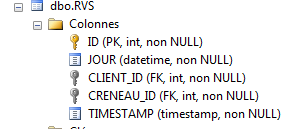 |
This table must have a uniqueness constraint: for a given day, a doctor’s time slot can only be booked once for an appointment. In terms of the table, this means that the pair (JOUR,CRENEAU_ID) must be unique. I don’t know if this constraint can be expressed directly in the code, either on the entities or in the context. It’s likely, but I haven’t checked. We’ll take a different approach. We’ll use a SQL Server administration client to add this constraint.
Using "SQL Server Management Studio," I haven't found a simple way to add this constraint other than executing the SQL command that creates it:
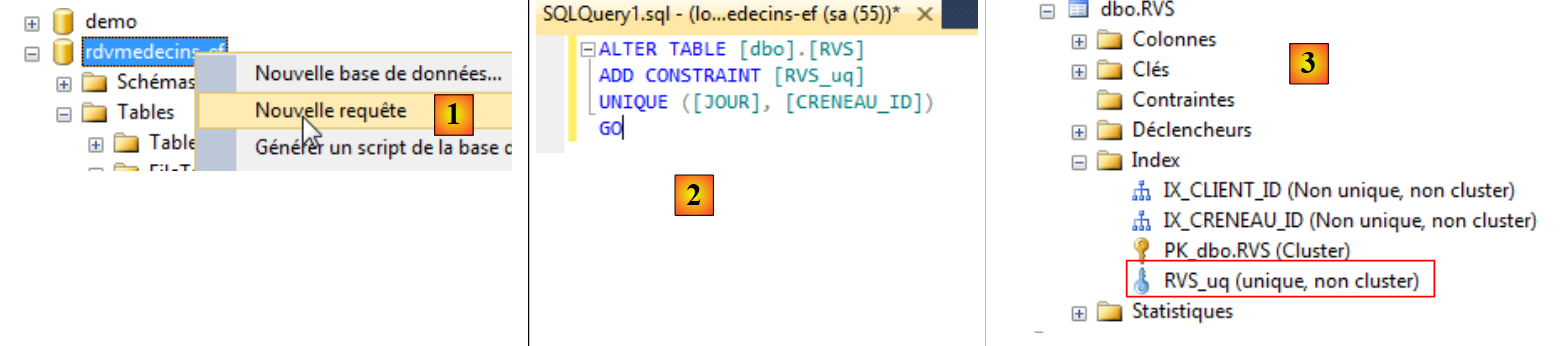 |
- In [1], we create a query SQL for the database [rdvmedecins-ef];
- in [2], the query SQL creates the uniqueness constraint;
- in [3], executing this query created a new index in the [RVS] table.
There are other SQL Server administration tools. Here, we will use the EMS SQL Manager for SQL Server Freeware [http://www.sqlmanager.net/fr/products/mssql/manager/download] tool. Once installed, we launch it:
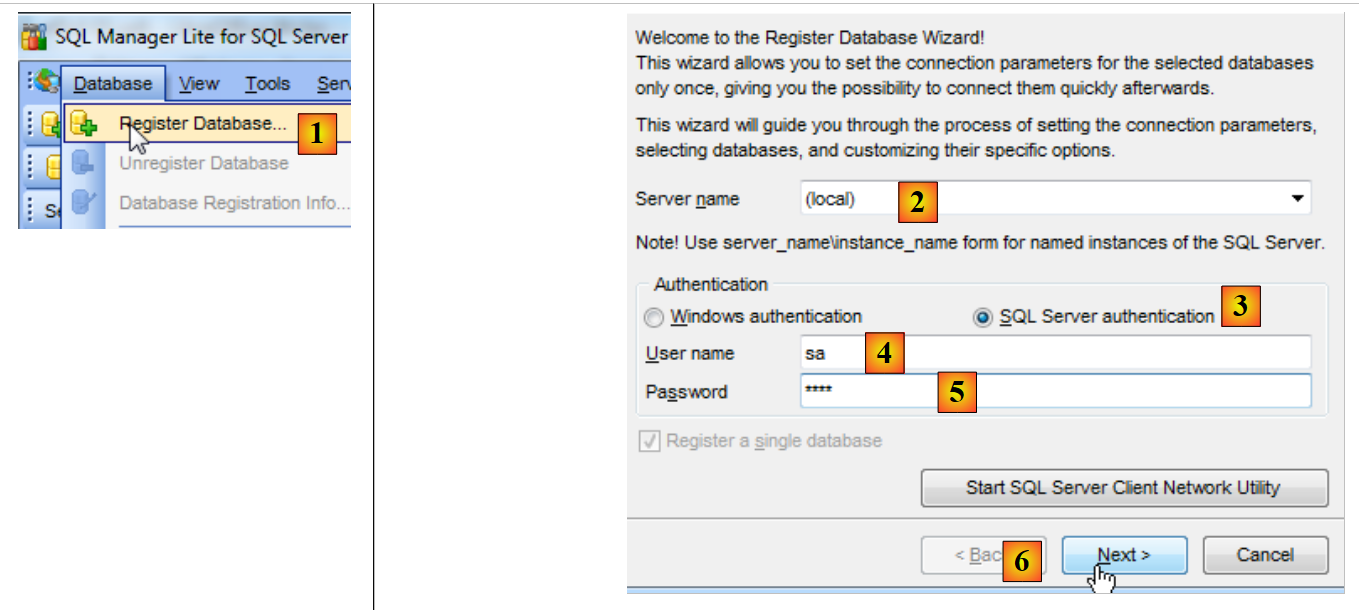 |
- In [1], we create a database;
- in [2], we connect to the (local) server;
- in [3], using SQL Server authentication;
- in [4], under the identity sa;
- in [5], and the password sqlserver2012;
- in [6], proceed to the next step;
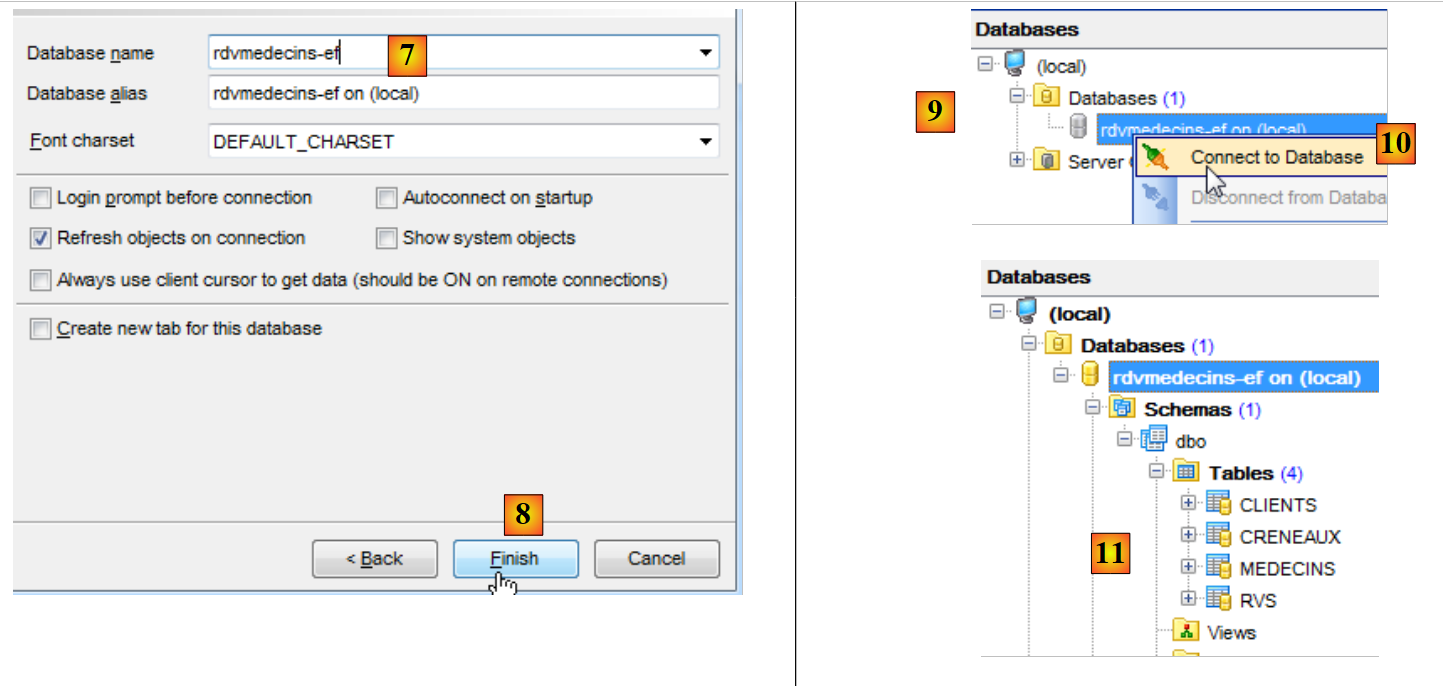 |
- in [7], select the database [rdvmedecins-ef];
- In [8], finish the wizard;
- In [9], the database appears in the database tree. Connect to it in [10];
- In [11], you are logged in.
"SQL Manager Lite for SQL Server" allows you to create the uniqueness constraint on the table [RVS].
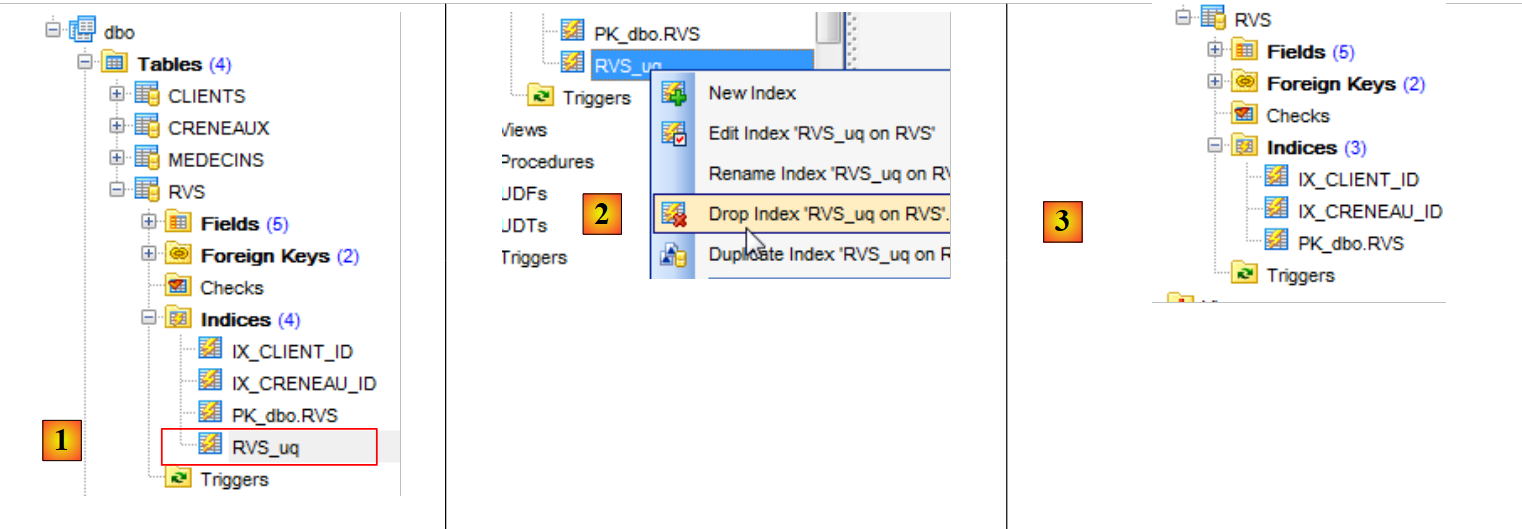 |
- In [1], you can see the unique constraint we created earlier;
- In [2], we delete it;
- In [3], the index corresponding to this uniqueness constraint has disappeared.
We recreate the deleted constraint:
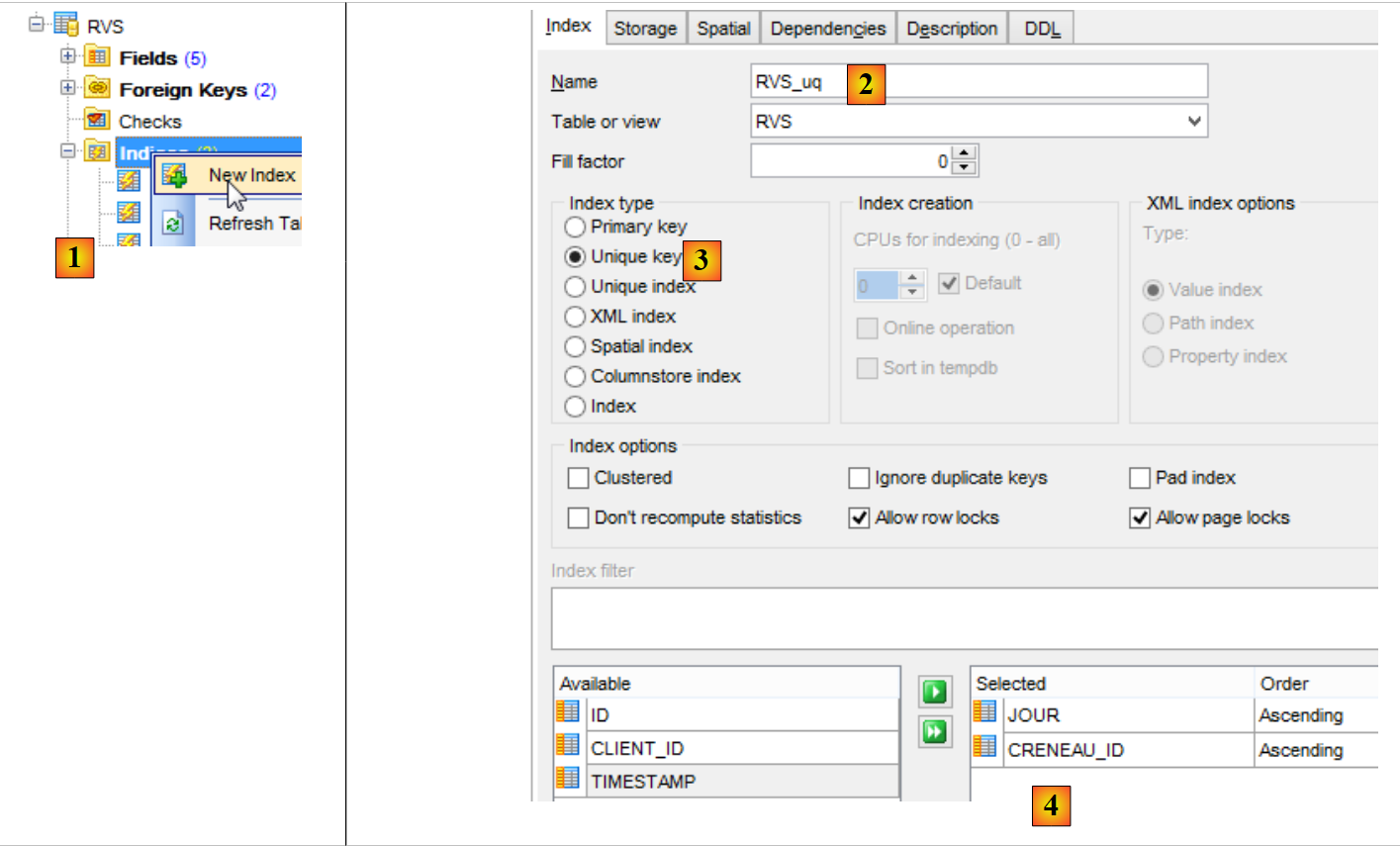 |
- In [1], we create a new index for the table [RVS];
- In [2], we give it a name;
- in [3], it is a uniqueness constraint;
- in [4], on the columns JOUR and CRENEAU_ID;
The DDL tab gives us the code SQL that will be executed:
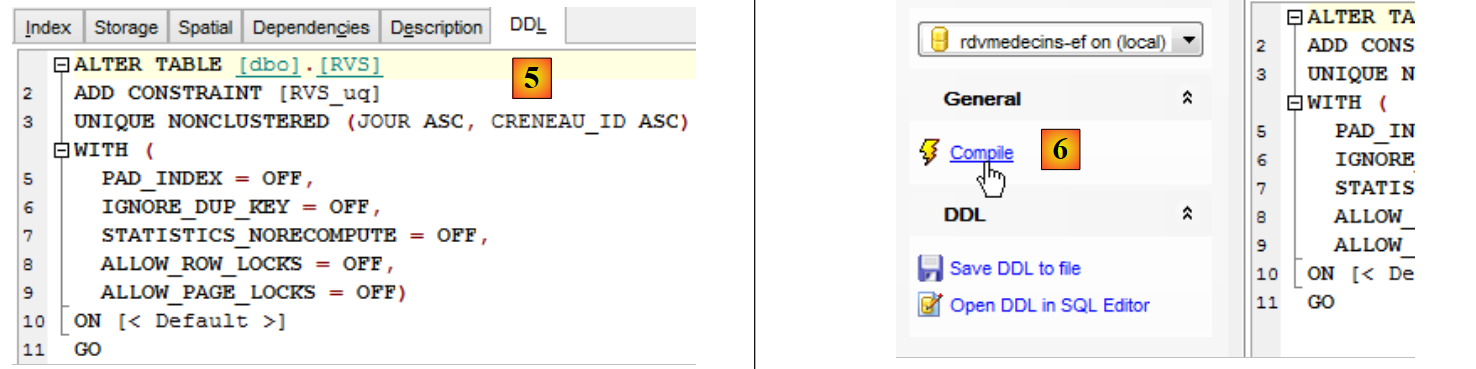 |
- In [6], we compile the order SQL;
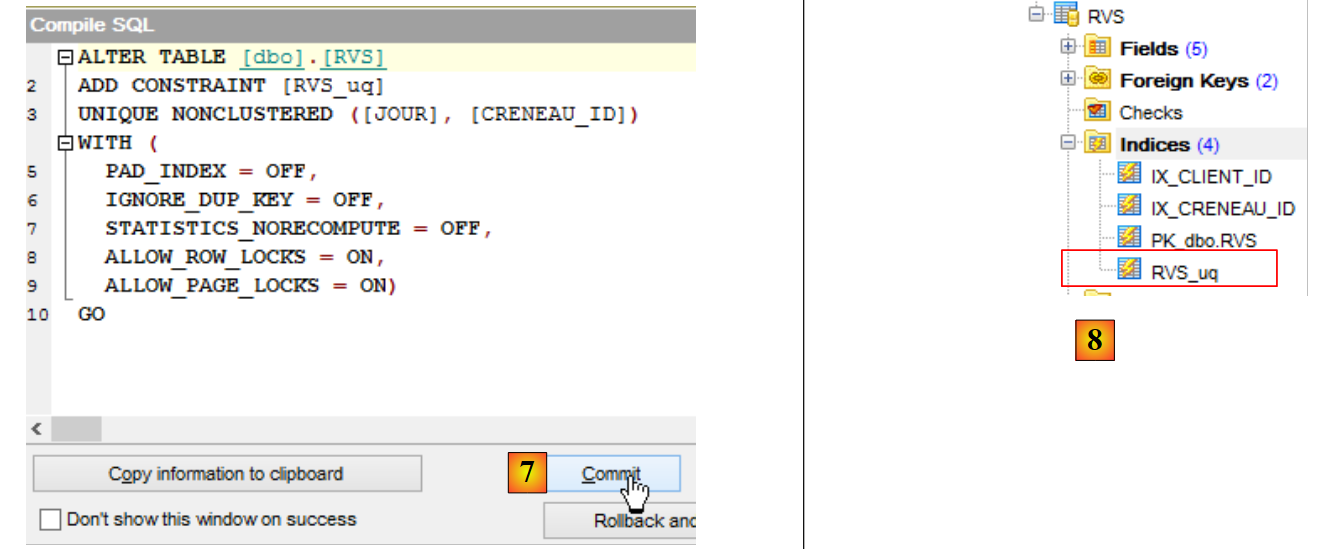 |
- In [7], we confirm;
- in [8], the new index appears.
The interface provided by "SQL Manager Lite for SQL server" is similar to that provided by "SQL Server Management Studio". Similar interfaces can be found for SGBD Oracle, PostgreSQL, Firebird, and MySQL. We will therefore continue with this family of SGBD administration tools.
To access information about a table, simply double-click on it:
 |
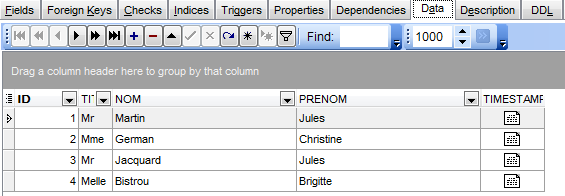
Information about the selected table is available in tabs. Above, we see the [Fields] tab for the [CLIENTS] table. The [Data] tab displays the table’s contents:
3.4.8. The Final Database
We now have our final database. We export its script, SQL, so that we can regenerate it if necessary.
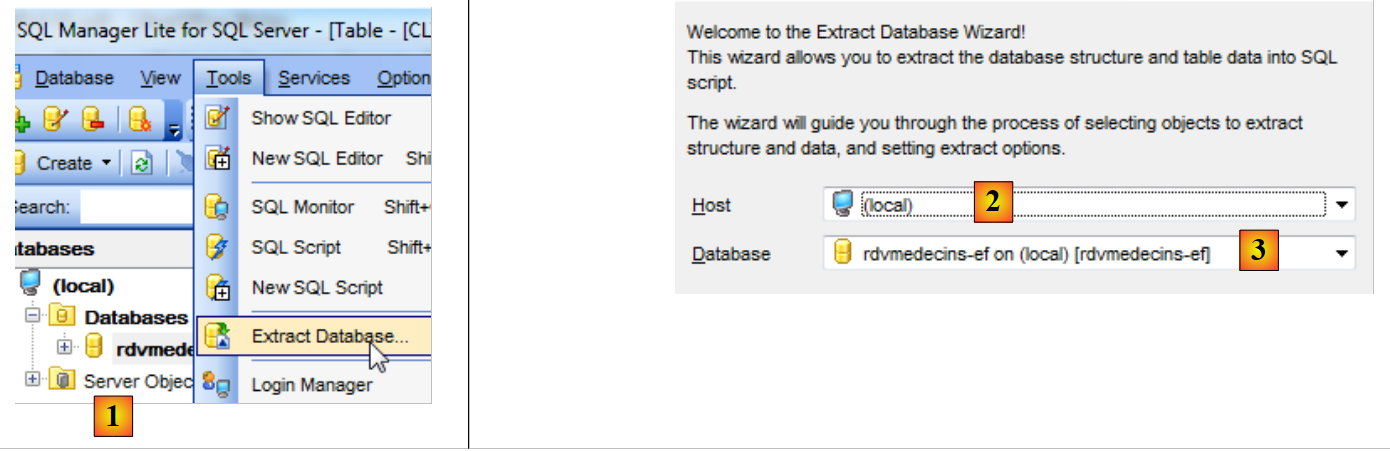 |
- in [1], start of the wizard;
- to [2], the server;
- to [3], the database to be exported;
 |
- in [4], specify the name of the file where the script SQL will be saved;
- in [5], specify its encoding;
- In [6], specify what you want to extract (tables, constraints, data);
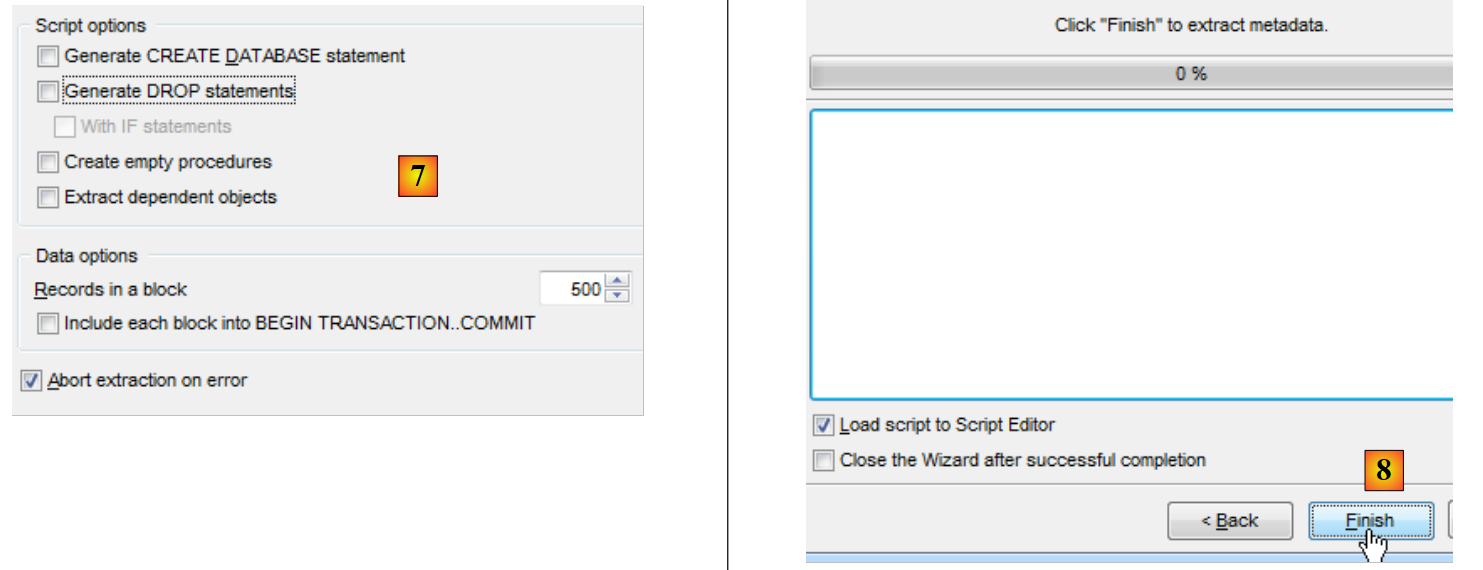 |
- In [7], you can refine the script that will be generated;
- In [8], finish the wizard.
The script has been generated and loaded into the script editor. You can view the generated code SQL. We will rebuild the database using this script.
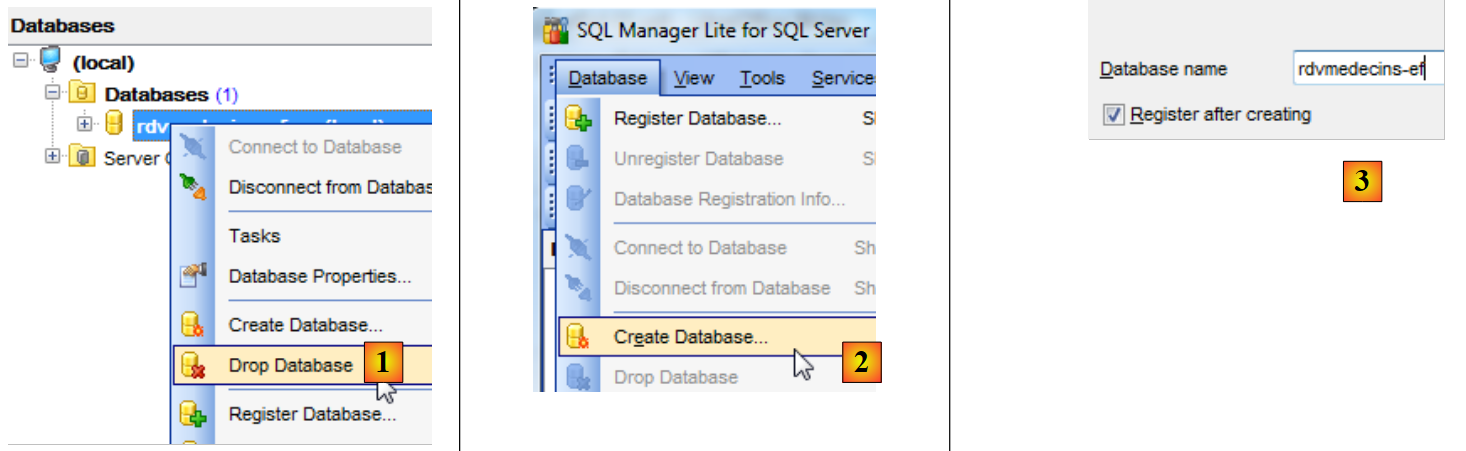 |
- In [1], we delete the database;
- in [2] and [3], we recreate it;
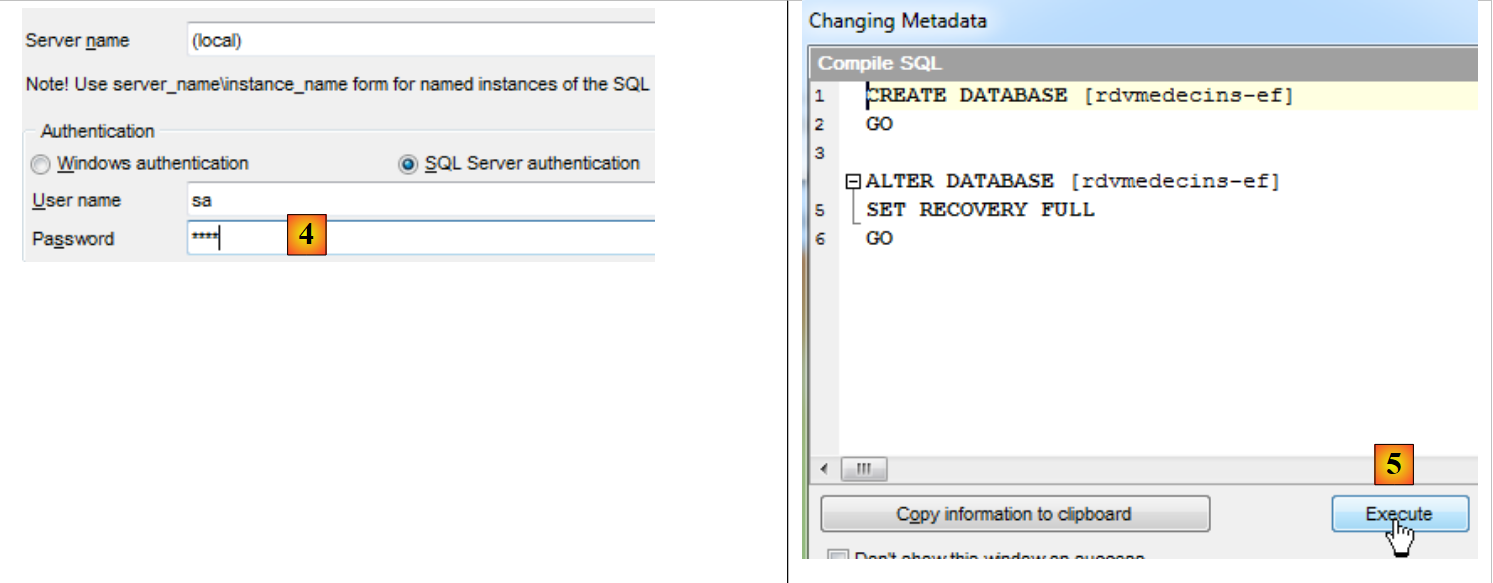 |
- In [4], we authenticate;
- In [5], the database creation script SQL is executed;
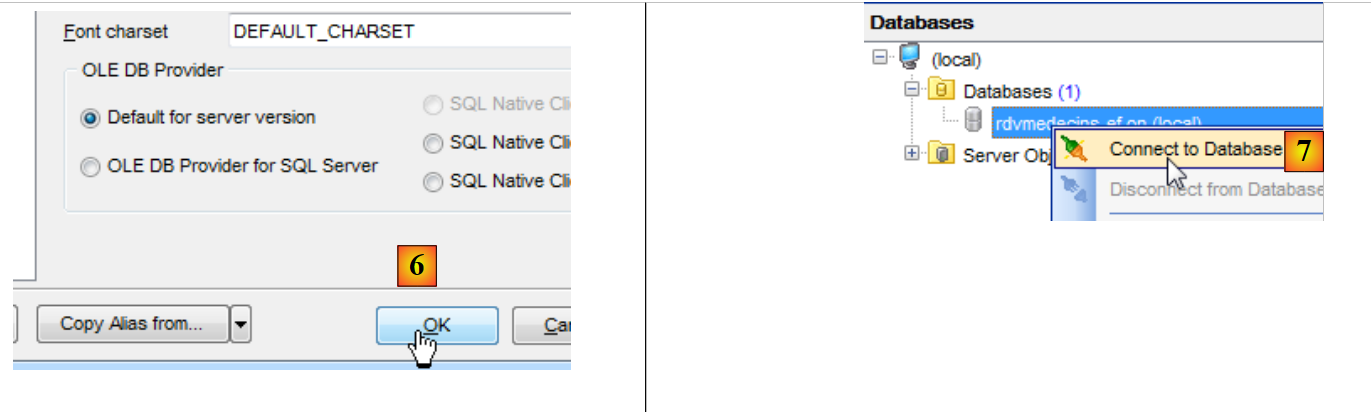 |
- in [6], we save it in "SQL Manager";
- In [7], we connect to the database that has just been created;
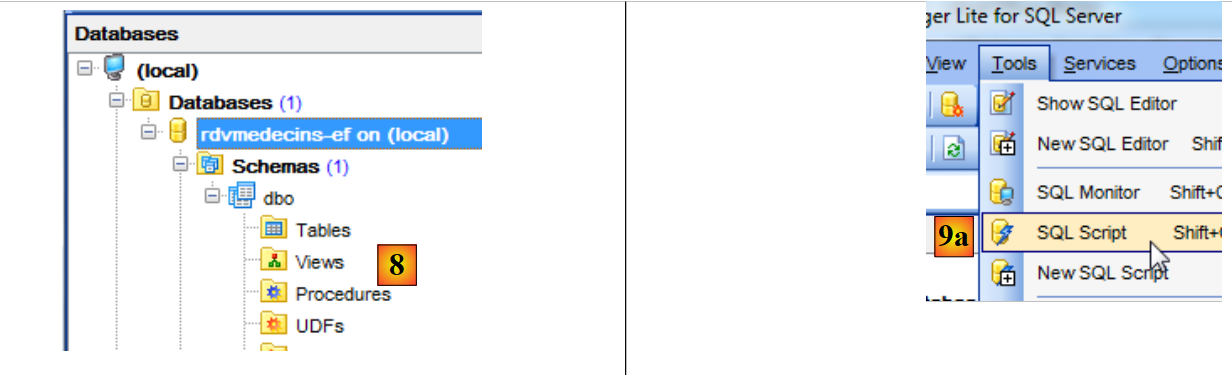 |
- In [8], the database currently has no tables;
- In [9a], open the SQL script editor;
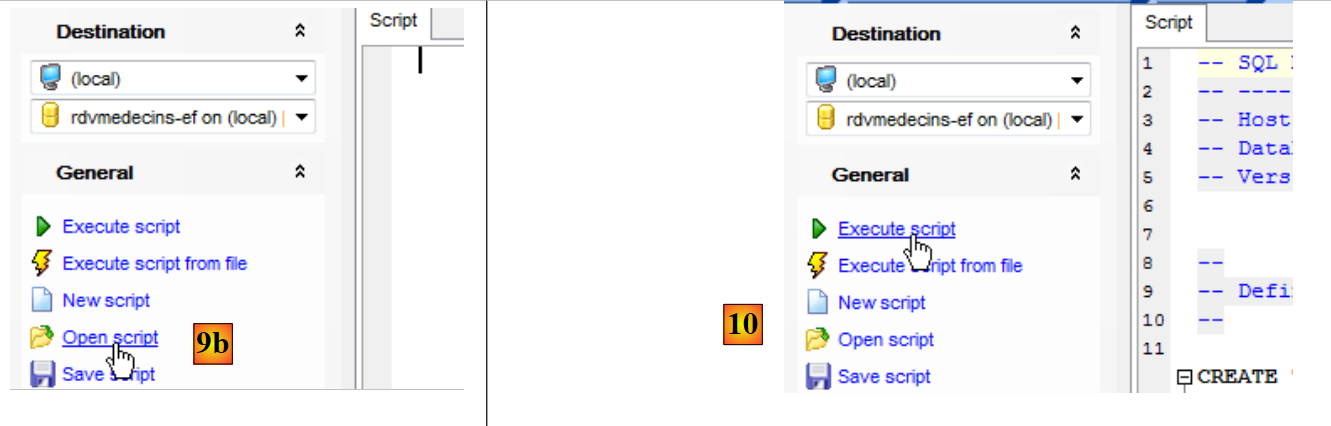 |
- In [9b], we open the script SQL created previously;
- In [10], we run it;
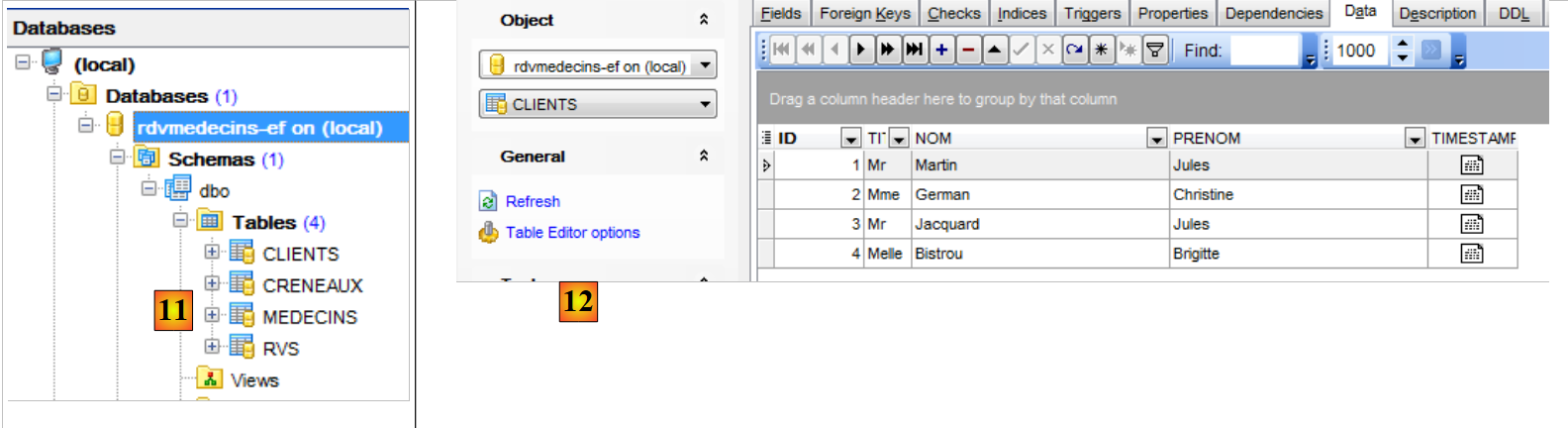 |
- In [11], the tables have been created;
- in [12], they are populated;
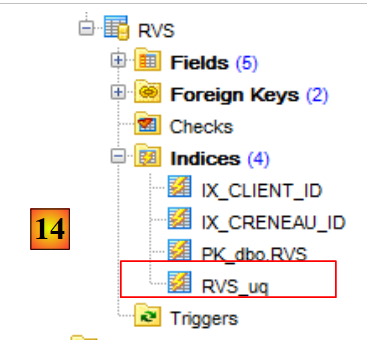 |
- In [14], we find the uniqueness constraint we created for the table [RVS].
We will now work with this existing database. If it is destroyed or corrupted, we know how to regenerate it.
3.5. Working with the database using Entity Framework
We will:
- add, delete, and modify database elements;
- query the database using LINQ to Entities;
- manage concurrent access to the same database element;
- understand the concepts of Lazy Loading and Eager Loading;
- discover that database updates via the persistence context occur within a transaction.
3.5.1. Deleting items from the persistence context
We have a populated database. We are going to empty it. We create a new class [Erase.cs] in the current project [1]:
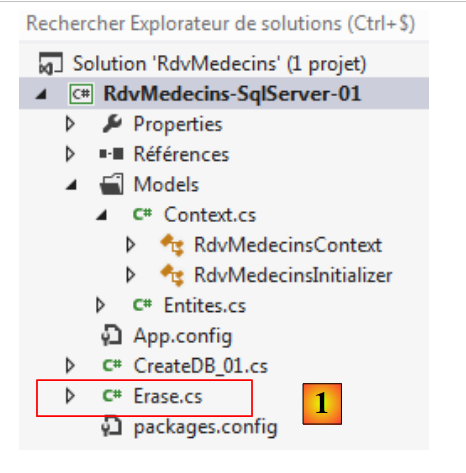 |
The [Erase] class is as follows:
using RdvMedecins.Models;

namespace RdvMedecins_01
{
  class Erase
  {
    static void Main(string[] args)
    {
      using (var context = new RdvMedecinsContext())
      {
        // empty the current base
        // the clients
        foreach (var client in context.Clients)
        {
          context.Clients.Remove(client);
        }
        // the doctors
        foreach (var medecin in context.Medecins)
        {
          context.Medecins.Remove(medecin);
        }
        // save the persistence context
        context.SaveChanges();
      }
    }
  }
}
- line 9: operations on a persistence context are always performed within a [using] clause. This ensures that upon exiting the [using], the context has been closed;
- line 13: we iterate through the context of the clients and [context.Clients]. All clients entries in the database will be placed in the persistence context;
- line 15: for each of them, we perform the [Remove] operation, which removes them from the context. In fact, they are still in the context but in a "deleted" state;
- lines 18–21: we do the same for the doctors;
- line 23: the persistence context is saved to the database.
When saving the context to the database, entities in the context that:
- have a null primary key are subject to a SQL INSERT operation;
- are in a "deleted" state are subject to an operation SQL DELETE;
- are in a "modified" state are subject to an operation SQL UPDATE;
As we will see later, these SQL operations are performed within a transaction. If one of them fails, everything that was done previously is rolled back.
Let’s make the [Erase] program the new start object for the [1] project, then run the project.
 |
Let’s check the database. We will see that all tables are empty in [2]. This is surprising, since we had simply requested the deletion of doctors and clients. It is through the mechanism of foreign keys that the other tables were emptied in a cascade.
The foreign key from table [CRENEAUX] to table [MEDECINS] has been defined as follows by provider EF 5:
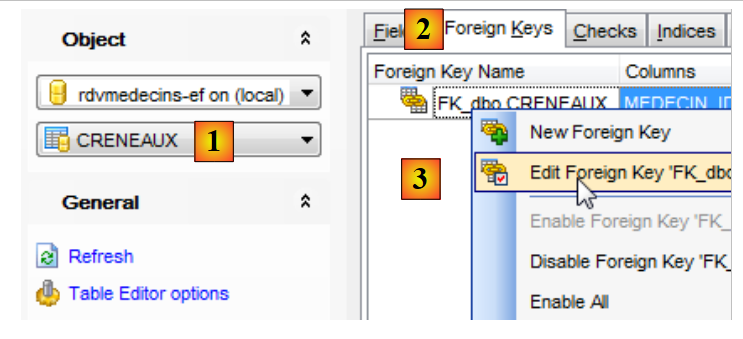 |
- In [1], select the table [CRENEAUX];
- In [2], select the foreign keys tab;
- In [3], edit the single foreign key;
 |
- In [4], in the DDL tab, the SQL definition of the foreign key constraint;
- In [5], the clause ON DELETE CASCADE ensures that deleting a doctor results in the deletion of the time slots associated with them.
The foreign key constraints for table [RVS] are defined similarly:
- Lines 1-6: Deleting a client will also delete the appointments associated with it;
- Lines 1-6: Deleting a time slot will also delete all appointments associated with it.
3.5.2. Adding items to the persistence context
Now that we have emptied the database, we will fill it again. We are adding the program [Fill.cs] [1] to the project.
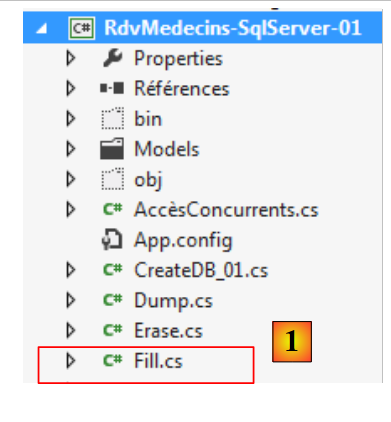 |
The program [Fill.cs] is as follows:
using RdvMedecins.Entites;
using RdvMedecins.Models;

namespace RdvMedecins_01
{
  class Fill
  {
    static void Main(string[] args)
    {
      using (var context = new RdvMedecinsContext())
      {
        // empty the current base
        foreach (var client in context.Clients)
        {
          context.Clients.Remove(client);
        }
        foreach (var medecin in context.Medecins)
        {
          context.Medecins.Remove(medecin);
        }
        // reset it
        // the clients
        Client[] clients ={
        new Client { Titre = "Mr", Nom = "Martin", Prenom = "Jules" },
        new Client { Titre = "Mme", Nom = "German", Prenom = "Christine" },
        new Client { Titre = "Mr", Nom = "Jacquard", Prenom = "Jules" },
        new Client { Titre = "Melle", Nom = "Bistrou", Prenom = "Brigitte" }
     };
        foreach (Client client in clients)
        {
          context.Clients.Add(client);
        }
        // the doctors
        Medecin[] medecins ={
        new Medecin { Titre = "Mme", Nom = "Pelissier", Prenom = "Marie" },
        new Medecin { Titre = "Mr", Nom = "Bromard", Prenom = "Jacques" },
        new Medecin { Titre = "Mr", Nom = "Jandot", Prenom = "Philippe" },
        new Medecin { Titre = "Melle", Nom = "Jacquemot", Prenom = "Justine" }
     };
        foreach (Medecin medecin in medecins)
        {
          context.Medecins.Add(medecin);
        }
        // time slots
        Creneau[] creneaux ={
        new Creneau{ Hdebut=8,Mdebut=0,Hfin=8,Mfin=20,Medecin=medecins[0]},
        new Creneau{ Hdebut=8,Mdebut=20,Hfin=8,Mfin=40,Medecin=medecins[0]},
        new Creneau{ Hdebut=8,Mdebut=40,Hfin=9,Mfin=0,Medecin=medecins[0]},
        new Creneau{ Hdebut=9,Mdebut=0,Hfin=9,Mfin=20,Medecin=medecins[0]},
        new Creneau{ Hdebut=9,Mdebut=20,Hfin=9,Mfin=40,Medecin=medecins[0]},
        new Creneau{ Hdebut=9,Mdebut=40,Hfin=10,Mfin=0,Medecin=medecins[0]},
        new Creneau{ Hdebut=10,Mdebut=0,Hfin=10,Mfin=20,Medecin=medecins[0]},
        new Creneau{ Hdebut=10,Mdebut=20,Hfin=10,Mfin=40,Medecin=medecins[0]},
        new Creneau{ Hdebut=10,Mdebut=40,Hfin=11,Mfin=0,Medecin=medecins[0]},
        new Creneau{ Hdebut=11,Mdebut=0,Hfin=11,Mfin=20,Medecin=medecins[0]},
        new Creneau{ Hdebut=11,Mdebut=20,Hfin=11,Mfin=40,Medecin=medecins[0]},
        new Creneau{ Hdebut=11,Mdebut=40,Hfin=12,Mfin=0,Medecin=medecins[0]},
        new Creneau{ Hdebut=14,Mdebut=0,Hfin=14,Mfin=20,Medecin=medecins[0]},
        new Creneau{ Hdebut=14,Mdebut=20,Hfin=14,Mfin=40,Medecin=medecins[0]},
        new Creneau{ Hdebut=14,Mdebut=40,Hfin=15,Mfin=0,Medecin=medecins[0]},
        new Creneau{ Hdebut=15,Mdebut=0,Hfin=15,Mfin=20,Medecin=medecins[0]},
        new Creneau{ Hdebut=15,Mdebut=20,Hfin=15,Mfin=40,Medecin=medecins[0]},
        new Creneau{ Hdebut=15,Mdebut=40,Hfin=16,Mfin=0,Medecin=medecins[0]},
        new Creneau{ Hdebut=16,Mdebut=0,Hfin=16,Mfin=20,Medecin=medecins[0]},
        new Creneau{ Hdebut=16,Mdebut=20,Hfin=16,Mfin=40,Medecin=medecins[0]},
        new Creneau{ Hdebut=16,Mdebut=40,Hfin=17,Mfin=0,Medecin=medecins[0]},
        new Creneau{ Hdebut=17,Mdebut=0,Hfin=17,Mfin=20,Medecin=medecins[0]},
        new Creneau{ Hdebut=17,Mdebut=20,Hfin=17,Mfin=40,Medecin=medecins[0]},
        new Creneau{ Hdebut=17,Mdebut=40,Hfin=18,Mfin=0,Medecin=medecins[0]},
        new Creneau{ Hdebut=8,Mdebut=0,Hfin=8,Mfin=20,Medecin=medecins[1]},
        new Creneau{ Hdebut=8,Mdebut=20,Hfin=8,Mfin=40,Medecin=medecins[1]},
        new Creneau{ Hdebut=8,Mdebut=40,Hfin=9,Mfin=0,Medecin=medecins[1]},
        new Creneau{ Hdebut=9,Mdebut=0,Hfin=9,Mfin=20,Medecin=medecins[1]},
        new Creneau{ Hdebut=9,Mdebut=20,Hfin=9,Mfin=40,Medecin=medecins[1]},
        new Creneau{ Hdebut=9,Mdebut=40,Hfin=10,Mfin=0,Medecin=medecins[1]},
        new Creneau{ Hdebut=10,Mdebut=0,Hfin=10,Mfin=20,Medecin=medecins[1]},
        new Creneau{ Hdebut=10,Mdebut=20,Hfin=10,Mfin=40,Medecin=medecins[1]},
        new Creneau{ Hdebut=10,Mdebut=40,Hfin=11,Mfin=0,Medecin=medecins[1]},
        new Creneau{ Hdebut=11,Mdebut=0,Hfin=11,Mfin=20,Medecin=medecins[1]},
        new Creneau{ Hdebut=11,Mdebut=20,Hfin=11,Mfin=40,Medecin=medecins[1]},
        new Creneau{ Hdebut=11,Mdebut=40,Hfin=12,Mfin=0,Medecin=medecins[1]},
      };
        foreach (Creneau creneau in creneaux)
        {
          context.Creneaux.Add(creneau);
        }
        // dates
        context.Rvs.Add(new Rv { Jour = new System.DateTime(2012, 10, 8), Client = clients[0], Creneau = creneaux[0] });
        // save the persistence context
        context.SaveChanges();
      }
    }
  }
}
- line 10: the persistence context is opened;
- lines 13–20: rows from tables [CLIENTS] and [MEDECINS] are added to the context and then removed from it. We just saw that this completely emptied the database;
- lines 22–88: elements are added to the persistence context. They all have a null primary key. They will therefore be inserted into the database;
- line 90: changes made to the context are synchronized with the database. This will be the subject of a series of operations SQL DELETE followed by a series of operations SQL INSERT;
We set program [Fill] as the new start object for project [1], then execute the latter.
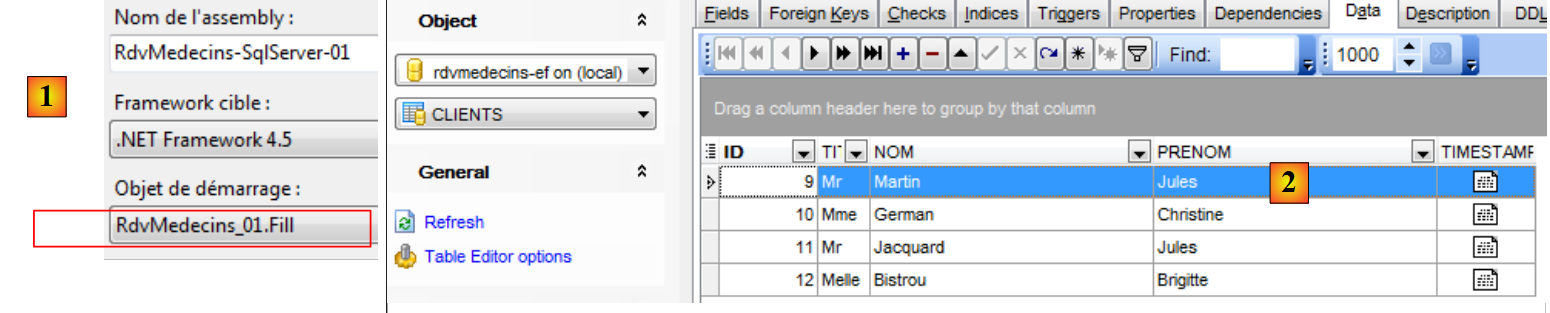 |
We can see in [2] that the tables have been populated.
3.5.3. Displaying the database contents
We will now display the database contents using the LINQ to Entity query. LINQ (Language INtegrated Query) was introduced with the .NET 3.5 framework in 2007. It serves as an extension of the .NET and c.a.d languages, as it is integrated into the language and its syntax is validated by the compiler. It allows querying various collections using a syntax similar to the SQL (Structured Query Language) database query language. There are different versions of LINQ:
- LINQ to Object, for querying in-memory collections;
- LINQ to XML, for querying XML;
- LINQ to Entity, for querying databases;
To function, LINQ relies on numerous extensions made to the .NET languages. These can be used outside of LINQ. We will not present them here but simply provide two references where the reader can find an in-depth description of LINQ:
- LINQ in Action, by Fabrice Marguerie, Steve Eichert, and Jim Wooley, published by Manning;
- LINQ Pocket Reference, by Joseph and Ben Albahari, published by O’Reilly.
I read the first one and found it excellent. I haven’t read the second one, but I did read “C# 3.0 in a Nutshell” by the same authors when LINQ was released. I found this book far above the average of the books I usually read. It seems that the other books by these two authors are of the same caliber. We will also be using LINQPad, a LINQ learning tool written by Joseph Albahari.
We will display the entities in the database. To do this, we will add two display methods to their classes. Let’s start with the [Medecin] entity:
// a doctor
  public class Medecin
  {
    // data
    [Key]
    [Column("ID")]
    public int? Id { get; set; }
    [Required]
    [MaxLength(5)]
    [Column("TITRE")]
    public string Titre { get; set; }
    [Required]
    [MaxLength(30)]
    [Column("NOM")]
    public string Nom { get; set; }
    [Required]
    [MaxLength(30)]
    [Column("PRENOM")]
    public string Prenom { get; set; }
    // the doctor's time slots
    public ICollection<Creneau> Creneaux { get; set; }
    [Column("TIMESTAMP")]
    [Timestamp]
    public byte[] Timestamp { get; set; }

    // signature
    public override string ToString()
    {
      return String.Format("Medecin[{0},{1},{2},{3},{4}]", Id, Titre, Prenom, Nom, dump(Timestamp));
    }
    // short signature
    public string ShortIdentity()
    {
      return ToString();
    }

    // utility
    private string dump(byte[] timestamp){
      string str = "";
      foreach (byte b in timestamp)
      {
        str += b;
      }
      return str;
    }
  }
- lines 27–30: the class’s ToString method. Note that it does not display the collection from line 21;
- lines 32–37: the ShortIdentity method, which does the same thing.
Here, we need to explain the concepts of Lazy and Eager Loading to assess the impact of the two previous methods. We have seen that an entity can have dependencies on another entity. These dependencies are of two types:
- one-to-many, as above, where a doctor is linked to multiple time slots;
- many-to-one, as in the [Creneau] entity below, where one or more time slots are linked to the same doctor;
public class Creneau
  {
    // data
    ...
    [Required]
    [Column("MEDECIN_ID")]
    public int MedecinId { get; set; }
    [Required]
    [ForeignKey("MedecinId")]
    public virtual Medecin Medecin { get; set; }
    ...
  }
When dependencies are loaded at the same time as the entities to which they are attached, this is called eager loading. Otherwise, it is called Lazy Loading: dependencies are loaded only when they are referenced for the first time. By default, EF 5 uses Lazy Loading: dependencies are not loaded at the same time as the entity.
Let’s look at our [ToString] method above:
    // the doctor's time slots
    public ICollection<Creneau> Creneaux { get; set; }

    // signature
    public override string ToString()
    {
      return String.Format("Medecin[{0},{1},{2},{3},{4}]", Id, Titre, Prenom, Nom, dump(Timestamp));
    }
    // short signature
    public string ShortIdentity()
    {
      return ToString();
}
The [ToString] method does not display the [Creneaux] dependency on line 2. If it had, it would have forced the loading of all the doctor’s time slots before execution. It is to avoid this costly loading that the dependency was not included in the entity’s signature. Generally speaking, we will include two signatures in each entity:
- a method ToString that will display the entity and any dependencies one at a time. As just explained, this will trigger the loading of the dependency;
- a method ShortIdentity that will not reference any dependencies. Therefore, no dependencies will be loaded;
The display methods for the other entities will be as follows:
The [Client] entity:
  public class Client
  {
    // data
    ...
    // customer rvs
    public ICollection<Rv> Rvs { get; set; }

    // signature
    public override string ToString()
    {
      return String.Format("Client[{0},{1},{2},{3},{4}]", Id, Titre, Prenom, Nom, dump(Timestamp));
    }
    // short signature
    public string ShortIdentity()
    {
      return ToString();
    }

}
- lines 9–12: method [ToString] does not display the dependency on line 6;
The [Creneau] entity:
public class Creneau
  {
    ...
    [Required]
    [Column("MEDECIN_ID")]
    public int MedecinId { get; set; }
    [Required]
    [ForeignKey("MedecinId")]
    public virtual Medecin Medecin { get; set; }
    // niche Rvs
    public ICollection<Rv> Rvs { get; set; }

    // signature
    public override string ToString()
    {
      return String.Format("Creneau[{0},{1},{2},{3},{4}, {5}]", Id, Hdebut, Mdebut, Hfin, Mfin, Medecin, dump(Timestamp));
    }
    // short signature
    public string ShortIdentity()
    {
      return String.Format("Creneau[{0},{1},{2},{3},{4}, {5}, {6}]", Id, Hdebut, Mdebut, Hfin, Mfin, Timestamp, MedecinId, dump(Timestamp));
    }
  }
- line 16: the method [ToString] references the dependency on line 9. This will force it to be loaded;
- line 11: the dependency [Rvs] is not referenced. It will not be loaded;
- lines 21-22: the [ShortIdentity] method no longer references the [Medecin] reference from line 9. Therefore, it will not be loaded.
The entity [Rv]:
public class Rv
  {
    // data
    ...
    [Column("CLIENT_ID")]
    public int ClientId { get; set; }
    [ForeignKey("ClientId")]
    [Required]
    public virtual Client Client { get; set; }
    [Column("CRENEAU_ID")]
    public int CreneauId { get; set; }
    [ForeignKey("CreneauId")]
    [Required]
    public virtual Creneau Creneau { get; set; }

    // signature
    public override string ToString()
    {
      return String.Format("Rv[{0},{1},{2},{3},{4}]", Id, Jour, Client, Creneau, dump(Timestamp));
    }
    // short signature
    public string ShortIdentity()
    {
      return String.Format("Rv[{0},{1},{2},{3},{4}]", Id, Jour, ClientId, CreneauId, dump(Timestamp));
    }

  }
- lines 17–20: the [ToString] method references the dependencies on lines 9 and 14. This will force them to be loaded;
- lines 17-20: the [ShortIdentity] method avoids this, so the dependencies will not be loaded.
In conclusion, we will pay attention to the [ToString] methods of the entities. If we do not pay attention to this, displaying a table can load half the database if the table has many dependencies.
With that explained, we write the following new [Dump.cs] code:
using RdvMedecins.Entites;
using RdvMedecins.Models;
using System;
using System.Linq;

namespace RdvMedecins_01
{
  class Dump
  {
    static void Main(string[] args)
    {
      // base dump
      using (var context = new RdvMedecinsContext())
      {
        // the clients
        Console.WriteLine("Clients--------------------------------------");
        var clients = from client in context.Clients select client;
        foreach (Client client in clients)
        {
          Console.WriteLine(client);
        }
        // the doctors
        Console.WriteLine("Médecins--------------------------------------");
        var medecins = from medecin in context.Medecins select medecin;
        foreach (Medecin medecin in medecins)
        {
          Console.WriteLine(medecin);
        }
        // time slots
        Console.WriteLine("Créneaux horaires--------------------------------------");
        var creneaux = from creneau in context.Creneaux select creneau;
        foreach (Creneau creneau in creneaux)
        {
          Console.WriteLine(creneau);
        }
        // dates
        Console.WriteLine("Rendez-vous--------------------------------------");
        var rvs = from rv in context.Rvs select rv;
        foreach (Rv rv in rvs)
        {
          Console.WriteLine(rv);
        }
      }
    }
  }
}
We will explain lines 17–21, which display the entities [Client]. The explanation provided will apply to the other entities as well.
        // the clients
        Console.WriteLine("Clients--------------------------------------");
        var clients = from client in context.Clients select client;
        foreach (Client client in clients)
        {
          Console.WriteLine(client);
}
- line 3: the var keyword was introduced with C# 3.0. It allows you to avoid specifying the exact type of a variable. The compiler then infers the type from the type of the expression assigned to the variable;
- line 3: the expression assigned to the variable clients is a LINQ to Entity query. It contains keywords from the SQL language that have been ported to LINQ. The syntax used here is as follows:
from variable in DbSet select variable
A more general syntax for LINQ is
from variable in collection select variable
The collection will be traversed, and for each element in it, the variable will be evaluated. This is done only when the variable [clients] in line 3 is enumerated by the for / each loop in lines 4–7. Until this is done, the variable [clients] is merely an unevaluated query;
- line 4: the query [clients] is iterated over. This will force the evaluation of the query. The rows of the table [CLIENTS] will be brought into the persistence context one by one;
- line 6: the [ToString] method of the [Client] entity is used for display. No dependencies are loaded;
Let’s move on to the following lines of code:
- lines 24–28: the rows of table [MEDECINS] are brought into the persistence context and displayed. No dependencies are loaded;
- lines 31–35: the rows of table [CRENEAUX] are brought into the persistence context and displayed. We have seen that the [ToString] method of this entity displays the dependency [Medecin]. However, this dependency is already loaded. Therefore, it will not be reloaded;
- Lines 38–42: The rows of table [RVS] are brought into the persistence context and displayed. We have seen that the [ToString] method of this entity displayed the dependencies [Client] and [Creneau]. However, these are already loaded. Therefore, there will be no new loads.
Note that the display order is not arbitrary. If we had wanted to display the [Rv] entities first, the [ToString] method of that entity would have triggered the loading of the [Client] and [Creneau] entities linked to those appointments. The others would not have been loaded. They would have been loaded later in another display. This impacts performance. The previous code requires four SQL commands to display all entities. Now suppose we first query the [RVS] table of appointments. An initial SQL query is required for the [RVS] table. Next, the [ToString] method of the [Rv] entity will trigger the potential loading of the associated [Client] and [Creneau] entities. A SQL query is required for each one. Assuming there are N2 clients entities and N3 slots, and that all these entities are referenced in the [RVS] table, displaying this table will require 1+N2+N3 SQL queries. Therefore, performance is lower than in the version table examined. To display the [RVS] table with its dependencies, a table join would be necessary. This can be achieved using LINQ. We will return to this with an example. For now, we will keep in mind that we must pay attention to the SQL queries underlying our LINQ code.
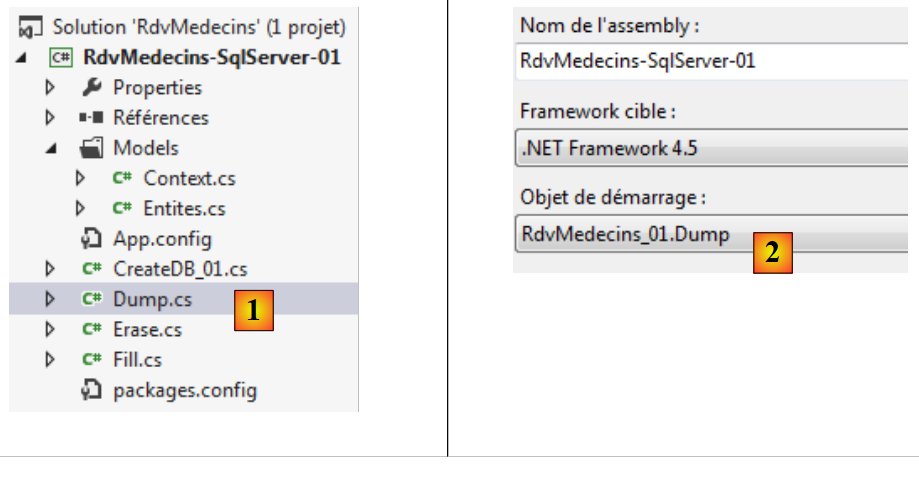
We configure the project to run this new code [1] and [2], then run it:
 |
The console output is as follows:
3.5.4. Learning LINQ with LINQPad
We used the LINQ to Entity queries above to display the contents of the database tables. Joseph Albahari wrote a program to learn the different forms of LINQ. We present it now.
LINQPad is available at the following URL [http://www.linqpad.net/]. Once installed, we launch it [1]:
 |
Beginners can get started with the examples in the [Samples] and [2] tabs, which provide numerous examples. Let’s select the example [3], which then appears in a separate window [4]. The complete code for the example is as follows:
// Now for a simple LINQ-to-objects query expression (notice no semicolon):

from word in "The quick brown fox jumps over the lazy dog".Split()
orderby word.Length
select word


// Feel free to edit this... (no-one's watching!) You'll be prompted to save any
// changes to a separate file.
//
// Tip:  You can execute part of a query by highlighting it, and then pressing F5.
Lines 3–5 are an example of the LINQ to Object query. The LINQ query follows the syntax:
from variable in collection orderby élément1 select élément2
- variable refers to the current element of the collection. In our example, this collection is the list of words resulting from the split string;
- the collection is sorted according to the element1 parameter of orderby. In our example, the collection of words will be sorted by length;
- the select keyword specifies what we want to extract from the current element variable in the collection. In our example, this will be the word.
Let’s execute this query LINQ:
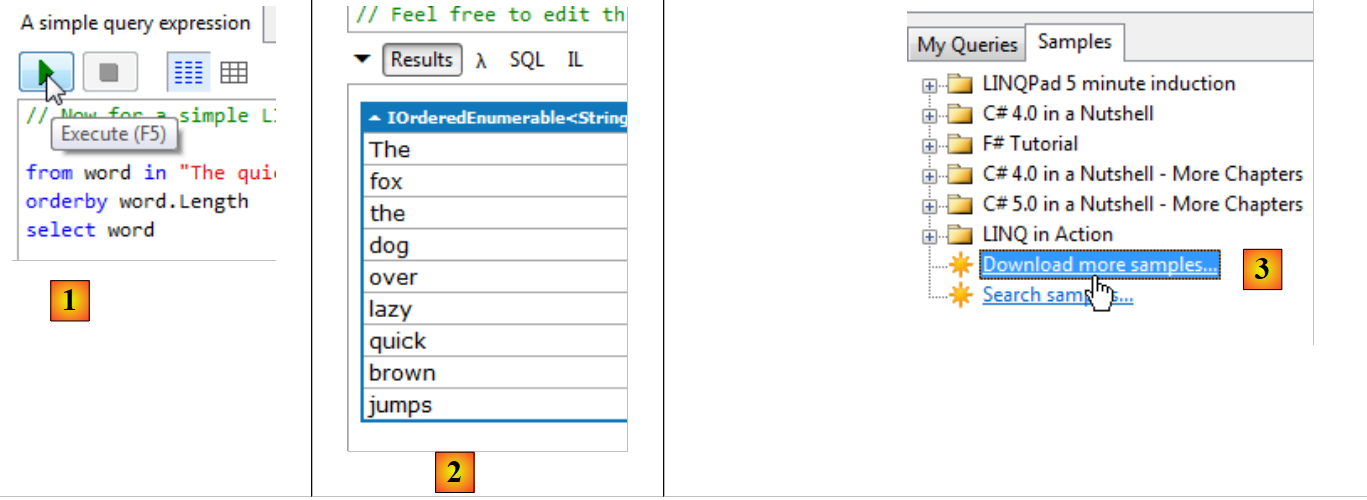 |
- in [1]: a LINQ expression is executed by [F5] or via the execute button;
- to [2]: the display. The words are displayed in order of their length. This simple example demonstrates the power of LINQ;
- in [3], it is possible to download other examples, notably those from the book "LINQ in action" [4];
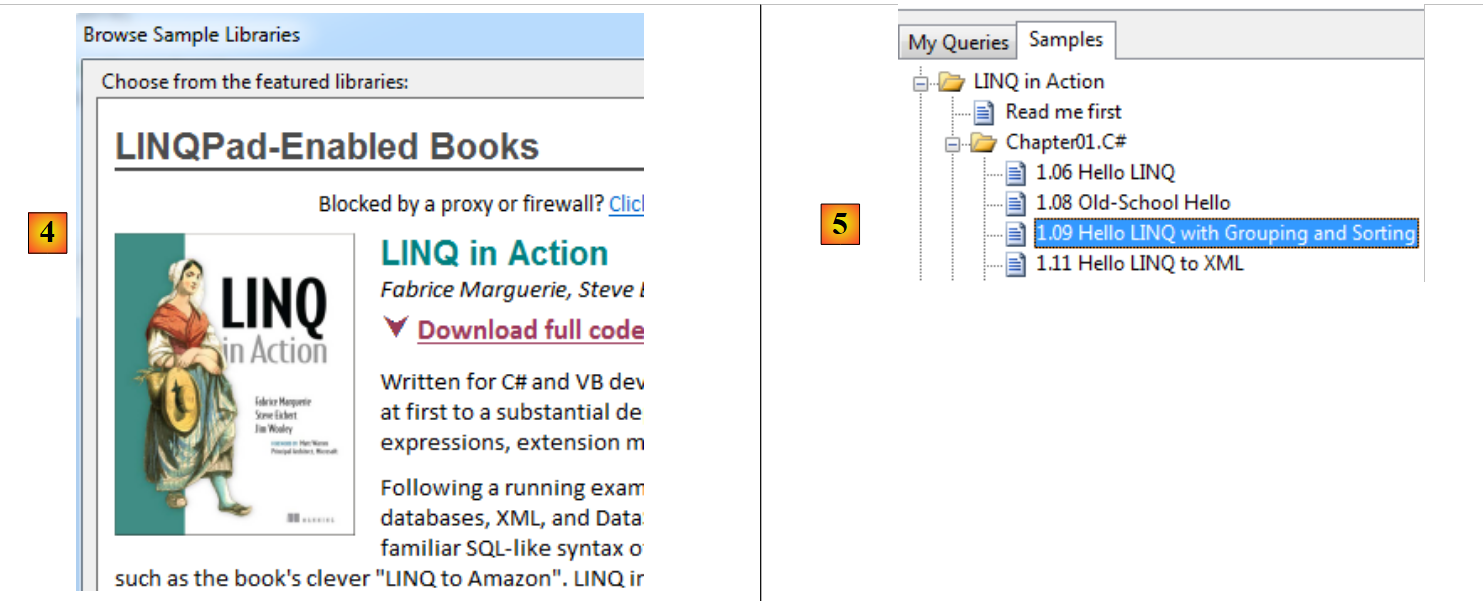 |
- in [5], we choose an example from the book;
string[] words = { "hello", "wonderful", "linq", "beautiful", "world" };

// Group words by length
var groups =
  from word in words
  orderby word ascending
  group word by word.Length into lengthGroups
  orderby lengthGroups.Key descending
  select new { Length = lengthGroups.Key, Words = lengthGroups };

// Print each group out
foreach (var group in groups)
{
  Console.WriteLine("Words of length " + group.Length);
  foreach (string word in group.Words)
    Console.WriteLine("  " + word);
}
- line 4: a new query LINQ with new keywords;
- line 5: the requested collection is the array of words from line 1;
- line 6: the collection is sorted in alphabetical order by word;
- line 7: the collection is grouped into (keyword into) a new collection lengthGroups. lengthGroups.Key represents the grouping factor (keyword by), here the length of the words. lengthGroups groups words with the same grouping factor, i.e., the same length;
- line 8: the collection lengthGroups is sorted by grouping key in descending order, so here by decreasing word size;
- line 9: from this collection, new objects (anonymous classes) are created with two fields:
- Length: the length of the words,
- Words: the words of this length;
Here, we can particularly see the value of the var keyword in line 4. Because we used an anonymous class in line 9, we cannot specify the type of the groups variable. The compiler, however, will assign an internal name to the anonymous class and use it to type the groups variable. It will then be able to determine whether the groups variable is being used correctly
- line 12: iterating over the query from line 4. It is only at this point that it is evaluated. Recall that its execution will produce a collection of objects, specified on line 9;
- line 14: we display the Length property of the current element, i.e., the length of the words;
- Lines 15–17: Display each element of the Words property collection, i.e., the set of words with the length displayed previously.
When we execute this query, we get the following result in LINQPad:
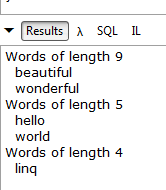 |
Now that we have seen a few examples of [LINQ to Object] queries, let’s look at [LINQ to Entity] queries that will allow us to query databases. First, we will connect to the SQL Server database that we created and populated:
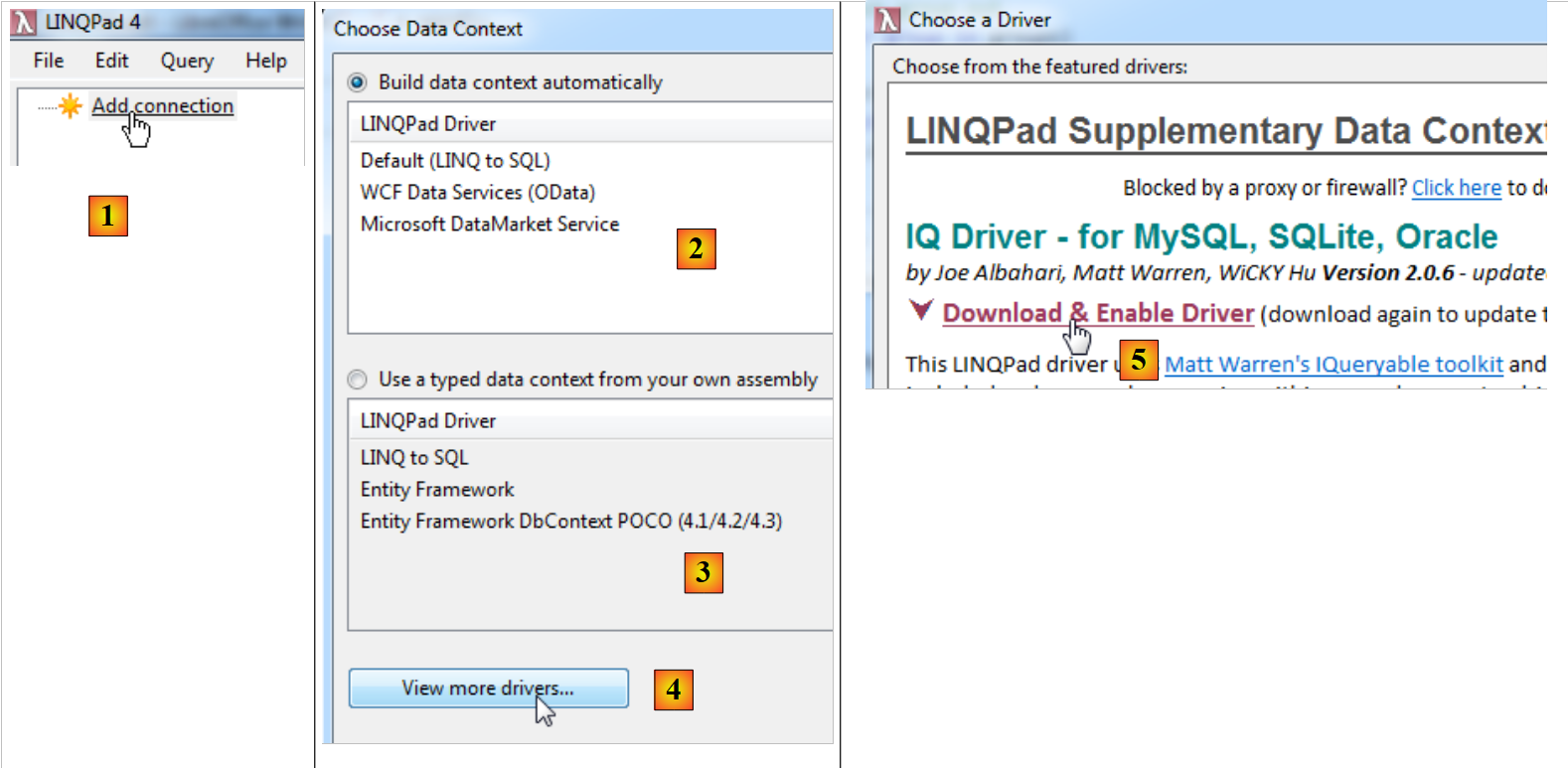 |
- In [1], we add a database connection;
- In [2], the means of accessing the data source. To access the SQL Server database, we will use [LINQPad Driver];
- In [3], it is also possible to retrieve a [DbContext] persistence context defined in an .exe or .dll assembly (option 3). Unfortunately, as of today (October 8, 2012), Entity Framework 5 is not supported;
- in [4], it is possible to download drivers for SGBD other than SQL Server;
- in [5], you can download the driver for SGBD, MySQL, and Oracle;
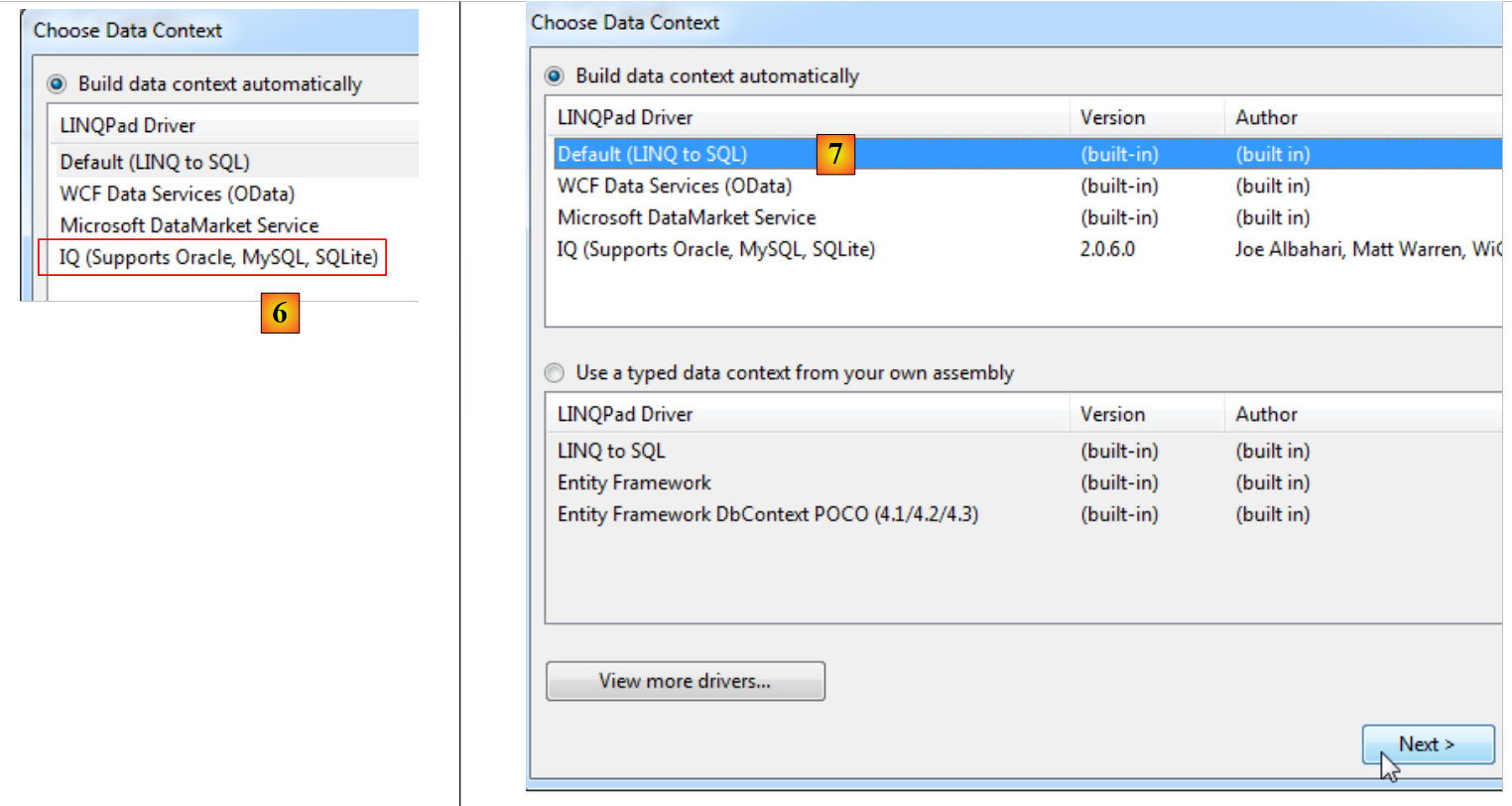 |
- In [6], the downloaded driver;
- in [7], we connect to a SQL Server database;
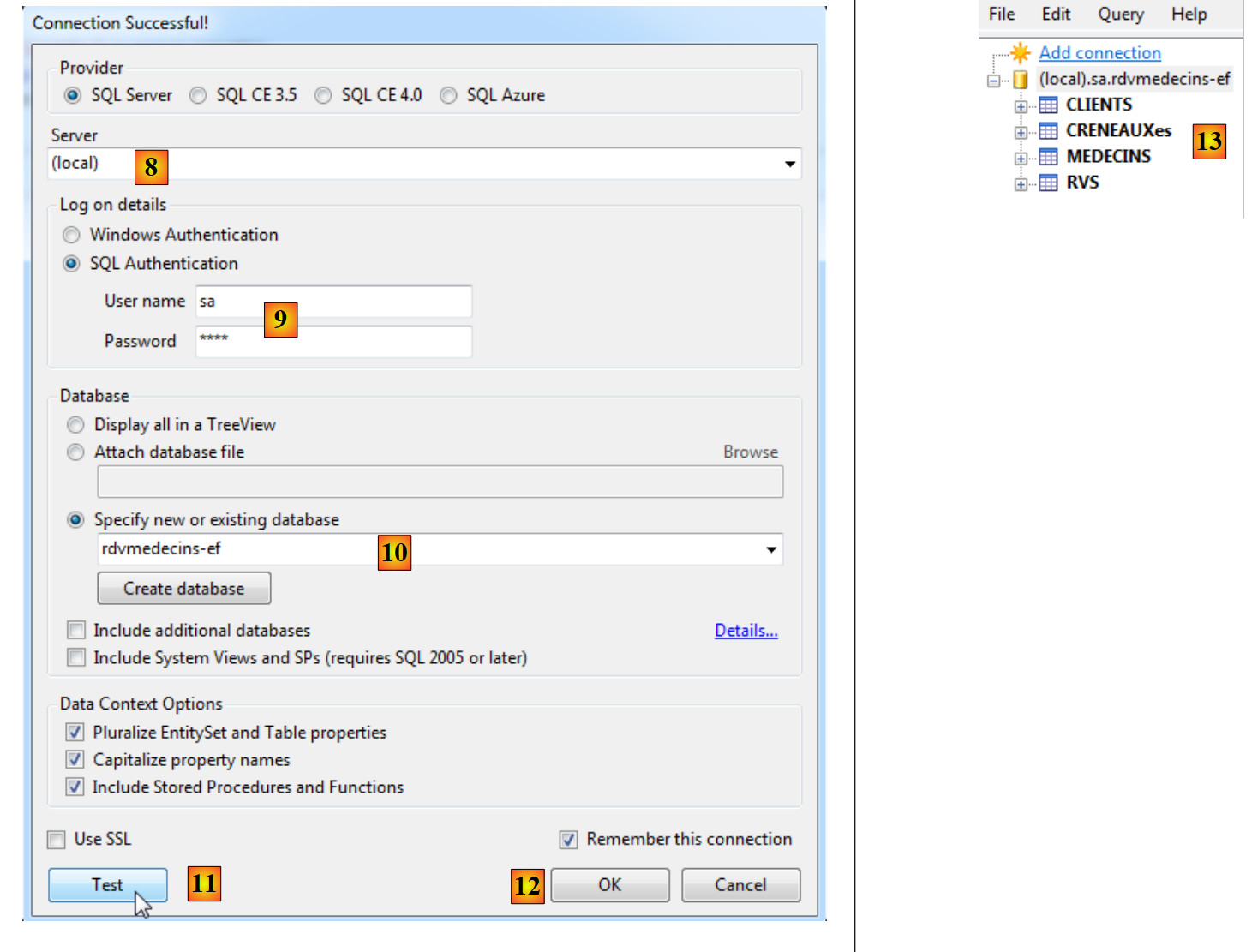 |
- in [8], the database is on the (local) server;
- in [9], we connect using sa / sqlserver2012 authentication;
- In [10], to the [rdvmedecins-ef] database that we created;
- In [11], you can test the connection;
- In [12], we finish the wizard;
- in [13], the connection appears in LINQPad.
The entities were created from table [rdvmedecins-ef]. They are as follows:
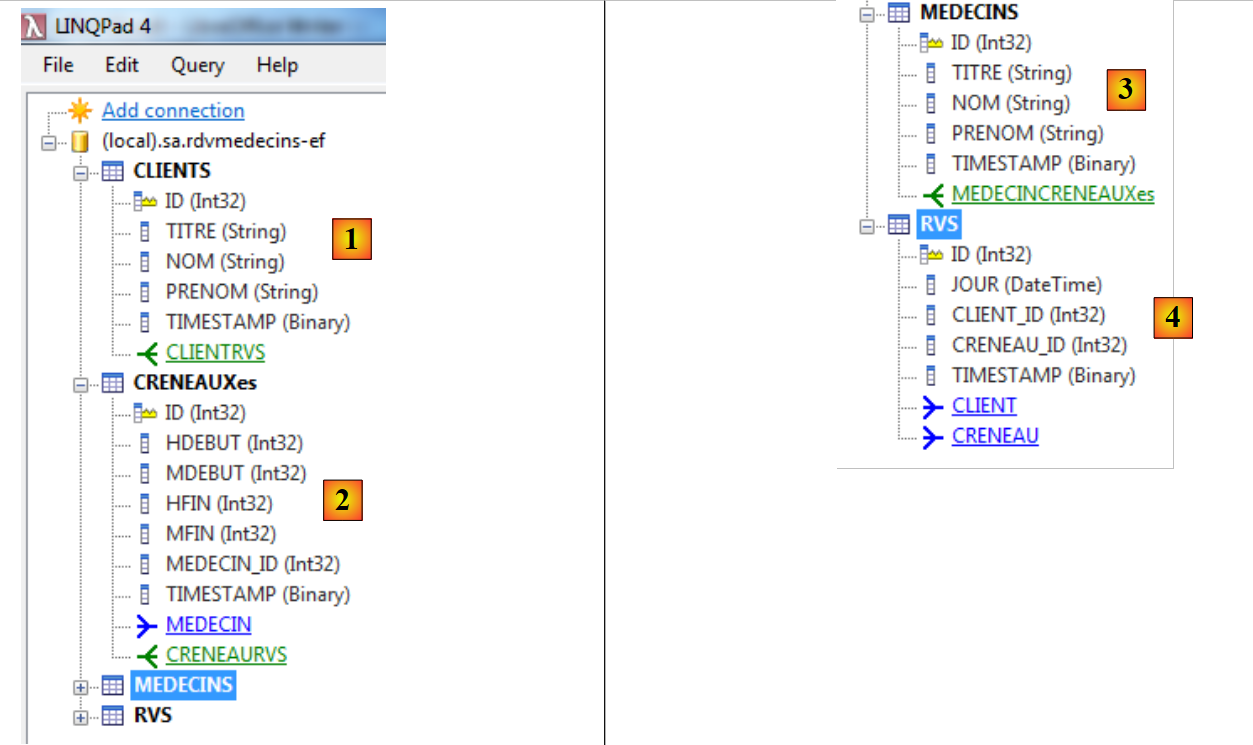 |
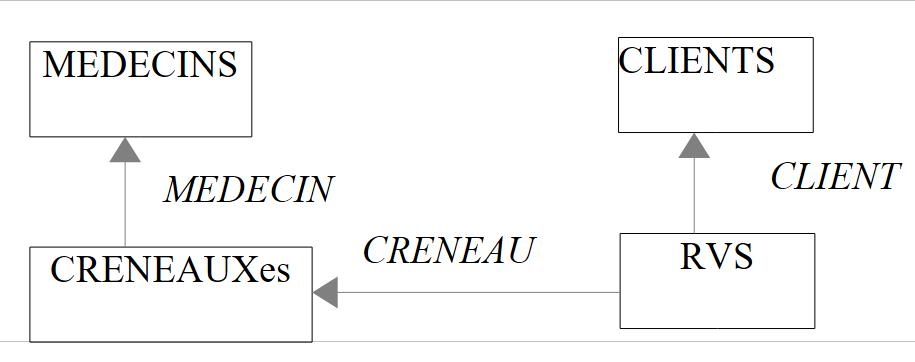
- In [1], [CLIENTS] represents the set of entities in [Client]. Each entity has:
- the properties (ID, TITRE, NOM, PRENOM, TIMESTAMP),
- a one-to-many relationship [CLIENTRVS];
- where [2], [CRENEAUXes] represents the set of entities [Creneau]. Each entity has:
- the properties (ID, HDEBUT, MDEBUT, HFIN, MFIN, MEDECIN_ID, TIMESTAMP),
- a one-to-many relationship [CRENEAURVS],
- a many-to-one relationship [MEDECIN];
- in [3], the entity [MEDECINS] represents the set of entities [Medecin]. Each entity has:
- the properties (ID, TITRE, NOM, PRENOM, TIMESTAMP),
- a one-to-many relationship [MEDECINCRENEAUXes];
- in [4], the entity [RVS] represents the set of entities [Rv]. Each entity has:
- the properties (ID, JOUR, CLIET_ID, CRENEAU_ID, TIMESTAMP),
- a many-to-one relationship with [CLIENT],
- a many-to-one relationship [CRENEAU].
Note that the property names above are different from the names we have used so far. This is not important. We just want to learn the basic principles of database querying.
Let’s see how we can query this entity database. For example, we want a list of doctors sorted by their TITRE and NOM:
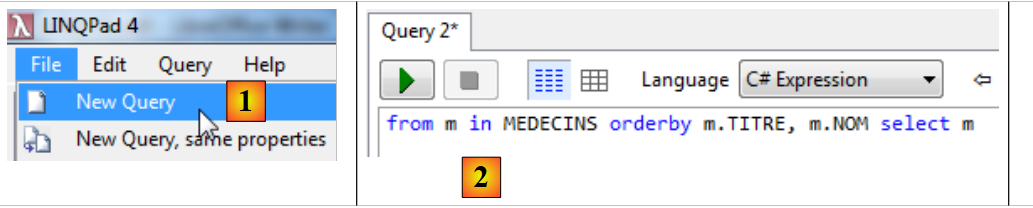 |
- in [1], we create a new query;
- in [2], the query text;
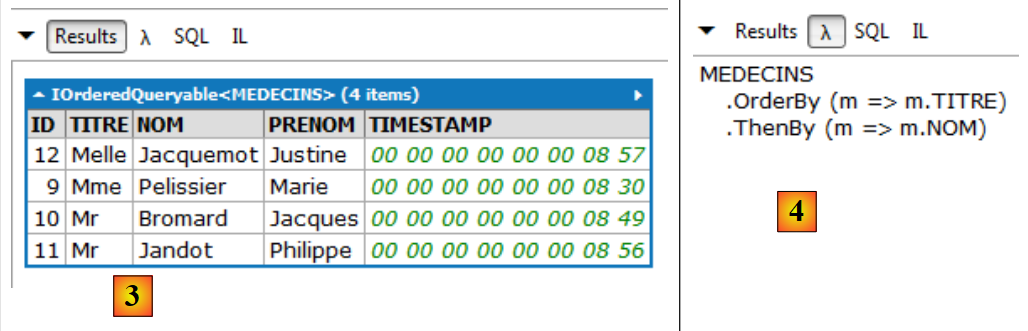 |
- in [3], the result of the query;
- in [4], the same query with lambda expressions. A query with lambda expressions is less readable than a text query, and you might prefer to avoid them. However, they are sometimes indispensable because they allow certain things that text queries do not. A lambda expression denotes a function with one input parameter a and one output parameter b, in the form a=>b. The method OrderBy above accepts a lambda function as its sole parameter. This provides the parameter according to which a collection must be sorted. Thus, MEDECINS.OrderBy(m=>m.TITRE) is the list of doctors sorted by title. The statement should be read as a pipeline on a collection. The collection of doctors is passed as input to the OrderBy method. This method will process the [Medecin] entities one by one. In the lambda expression m=>m.TITRE, m represents the input to the lambda function. You can name it whatever you want. Here, the input to the lambda function will be an entity [Medecin]. The function m=>m.TITRE reads as follows: if I call m my input (an entity [Medecin]), then my output is m.TITRE, i.e., the doctor’s title. MEDECINS.OrderBy(m=>m.TITRE) is in turn a collection, the collection of doctors sorted by titles. This new collection can feed into another method, in the example the method ThenBy. This one works on the same principle. It is used to specify additional parameters for sorting the collection.
Reading the lambda code equivalent to the text code we usually type is a good way to learn it;
 |
- in [5], the order SQL issued to the database. Again, we will read this code carefully. It allows us to evaluate the actual cost of a LINQ query.
Below, we present a few examples of LINQ queries. In each case, we show the displayed results and the equivalent lambda and SQL codes. To understand these queries, we must recall the many-to-one relationships that connect entities to one another. It is through these relationships that we navigate from one entity to another. They are called navigational properties.
 |
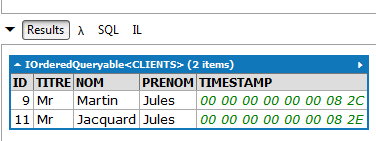
// clients entries with the title "Mr" sorted in descending order by name
Results:
 |
LINQfrom | |
| |
SQL | |
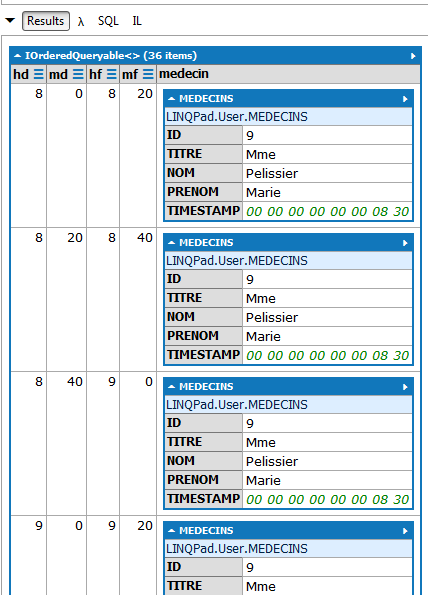
// all time slots with the associated doctor
Results (partial):
 |
LINQfrom | |
LambdaSQLSELECT | 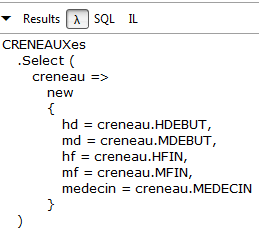 |
|
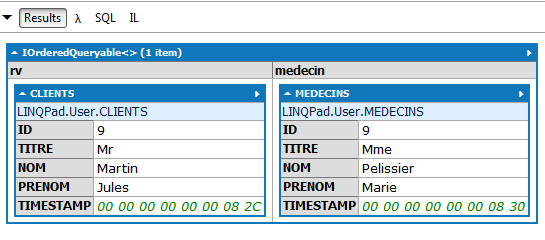
// all rv records with the associated patient and physician
Results:
 |
LINQfrom | |
LambdaSQLSELECT | 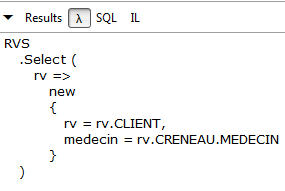 |
|
// doctors without appointments
Results:
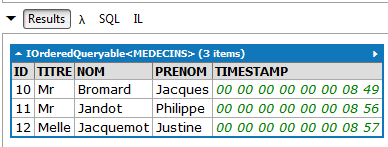 |
LINQLambdaSQLSELECT | |
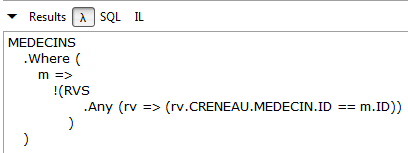 | |
|
There is no query LINQ for this request. You must use lambda expressions. This one reads as follows: I take the collection of doctors (MEDECINS) and I keep (Where) only those doctors (m) for whom I cannot find an appointment (rv) with that doctor (m) in the collection of appointments (RVS).
// Ms. Pélissier's time slots
(Partial) results:
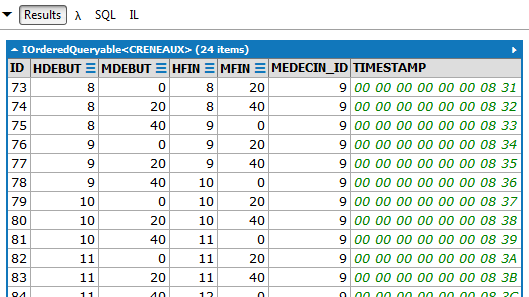 |
LINQfrom | |
 | |
|
// Number of appointments for Ms. Pélissier on 10/08/2012
Results:
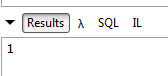 |
LINQ | |
Lambda | |
SQL | |
// List of clients who made an appointment with Ms. Pélissier on 10/08/2012
Results:
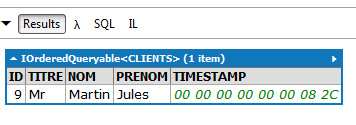 |
LINQfrom | |
Lambda |  |
SQL | |
// number of time slots per doctor
Results:
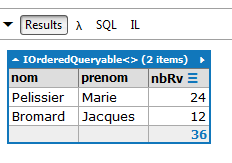 |
LINQfrom | |
LambdaSQLSELECT | 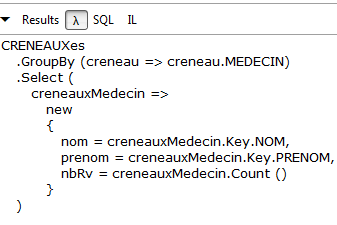 |
|
3.5.5. Modifying an entity attached to the persistence context
We have seen the following operations on the persistence context:
- adding an element to the context ([dbContext].[DbSet].Add);
- removing an element from the context ([dbContext].[DbSet].Remove);
- query a context using LINQ queries.
When you want to synchronize the context with the database, you write [dbContext].SaveChanges().
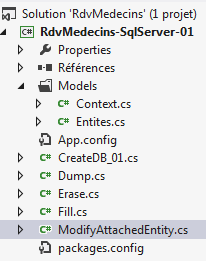 | 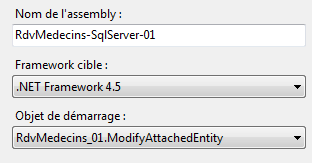 |
The code [ModifyAttachedEntity] illustrates how to modify an entity attached to the context:
using System;
using System.Data;
using System.Linq;
using RdvMedecins.Entites;
using RdvMedecins.Models;

namespace RdvMedecins_01
{
  class ModifyAttachedEntity
  {
    static void Main(string[] args)
    {
      Client client1, client2, client3;
      // 1st context
      using (var context = new RdvMedecinsContext())
      {
        // empty the current base
        foreach (var client in context.Clients)
        {
          context.Clients.Remove(client);
        }
        foreach (var medecin in context.Medecins)
        {
          context.Medecins.Remove(medecin);
        }
        // add a customer
        client1 = new Client { Nom = "xx", Prenom = "xx", Titre = "xx" };
        context.Clients.Add(client1);
        // follow-up
        Console.WriteLine("client1--avant");
        Console.WriteLine(client1);
        // save context
        context.SaveChanges();
        // follow-up
        Console.WriteLine("client1--après");
        Console.WriteLine(client1);
      }
      // 2nd context
      using (var context = new RdvMedecinsContext())
      {
        // retrieve client1 from client2
        client2 = context.Clients.Find(client1.Id);
        // follow-up
        Console.WriteLine("client2");
        Console.WriteLine(client2);
        // modify client2
        client2.Nom = "yy";
        // save context
        context.SaveChanges();
      }
      // 3rd context
      using (var context = new RdvMedecinsContext())
      {
        // retrieve client2 from client3
        client3 = context.Clients.Find(client2.Id);
        // follow-up
        Console.WriteLine("client3");
        Console.WriteLine(client3);
      }
    }
  }
}
- line 15: open application context;
- Lines 18–25: The context is cleared. Specifically, all entities are loaded into the context from the database and then set to a "deleted" status. Note that at this point, the database has not changed. As long as the context is not synchronized with the database, the database remains unchanged. Recall that deleting the entities [Medecin] and [Client] is sufficient to empty the database through cascading deletes;
- lines 27–28: a new customer is added to the database;
- lines 30-31: it is displayed before being saved to the database;
- line 33: the context is synchronized with the database. Entities marked as "deleted" will be subject to an operation SQL DELETE, the entity added to an operation SQL INSERT;
- Lines 35-36: The customer is displayed after synchronization with the database;
The result displayed in the console is as follows:
Note the following points:
- Before synchronization with the database, the client has neither a primary key nor a timestamp;
- after synchronization, it has them. Recall that the primary key was configured to be generated by SQL Server. Similarly, this SGBD automatically generates the timestamp;
- line 37: the persistence context is closed. The entities it contained become "detached." They exist as objects but not as entities attached to a persistence context;
- line 39: a new empty context is started;
- line 42: the client is retrieved directly from the database via its primary key. It is then brought into the context. If it is not found, the Find method returns a null pointer;
- lines 48–49: we display it;
This produces the following result:
- Line 47: We modify it;
- line 49: we synchronize the context with the database. EF will detect that certain elements of the context have been modified since they were loaded. For these elements, it will generate SQL and UPDATE commands in the database. So here, the synchronization will consist of a single UPDATE command;
- line 50: the second context is closed. The client2 entity that was attached to the context is now detached from it;
- line 52: a third empty context is opened;
- line 55: we bring the database’s sole client back into it. We want to see if the modification made to it in the previous context has been reflected in the database;
- lines 57–58: we display the client. This yields the following result:
The customer’s name has indeed been updated in the database. Note that its timestamp has also been updated.
- line 59: we close the context. Incidentally, note that unlike the previous two instances, we did not need to synchronize the context with the database (SaveChanges) beforehand because the context had not been modified.
3.5.6. Management of detached entities
Let’s return to the layered architecture of an application such as the one in the case study:
 |
The [DAO] layer uses ORM and EF5 to access data. We have the building blocks of this layer. Each method will open a persistence context, perform the necessary operations (insertion, modification, deletion, querying), and then close it. The entities managed by the [DAO] layer will be passed up to the ASP.NET web layer. In this layer, they are outside the persistence context and therefore detached. In the web layer, a user can modify these entities (add, update, delete). When they return to the [DAO] layer, they are still detached. However, the [DAO] layer will need to propagate the changes made by the user to the database. It will therefore have to work with detached entities. Let’s look at the three possible cases:
Adding a detached entity
This is the standard procedure for an addition. Simply add (Add) the detached entity to the context, ensuring that its primary key is null.
Modifying a detached entity
You can use the following code:
- The method [DbContext].Entry(detached-entity) will add the entity to the context;
- the state of this entity is set to "modified" so that it is subject to a SQL UPDATE command.
Delete a detached entity
You can use the following code:
- Line 1: Add the entity with the same primary key as the detached entity to the context;
- Line 2: We delete it:
Note that this requires a SELECT followed by a DELETE in the database, whereas normally the single DELETE is sufficient. You can also follow the example of modifying a detached entity and write:
Since I was unable to implement logging for the SQL operations performed on the database, I do not know if one method is preferable to the other.
Here is an example:
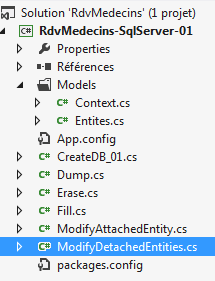 | 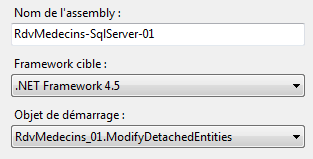 |
The code for the [ModifyDetachedEntities] program is as follows:
using System;
using System.Data;
using RdvMedecins.Entites;
using RdvMedecins.Models;

namespace RdvMedecins_01
{
  class ModifyDetachedEntities
  {
    static void Main(string[] args)
    {
      Client client1;

      // empty the current base
      Erase();
      // add a customer
      using (var context = new RdvMedecinsContext())
      {
        // customer creation
        client1 = new Client { Titre = "x", Nom = "x", Prenom = "x" };
        // add customer to context
        context.Clients.Add(client1);
        // save the context
        context.SaveChanges();
      }
      // basic view
      Dump("1-----------------------------");
      // client1 is not in the context - we modify it
      client1.Nom = "y";
      // new context
      using (var context = new RdvMedecinsContext())
      {
        // here we have an empty context
        // we put client1 in the context in a modified state
        context.Entry(client1).State = EntityState.Modified;
        // save the context
        context.SaveChanges();
      }
      // basic view
      Dump("2-----------------------------");
      // remove out-of-context entity
      using (var context = new RdvMedecinsContext())
      {
        // here we have a new empty context
        // put client1 in the context in a deleted state
        context.Entry(client1).State = EntityState.Deleted;
        // save the context
        context.SaveChanges();
      }
      // basic view
      Dump("3-----------------------------");
    }

    static void Erase()
    {
      // empties base
      using (var context = new RdvMedecinsContext())
      {
        foreach (var client in context.Clients)
        {
          context.Clients.Remove(client);
        }
        foreach (var medecin in context.Medecins)
        {
          context.Medecins.Remove(medecin);
        }
        // save the context
        context.SaveChanges();
      }
    }

    static void Dump(string str)
    {
      Console.WriteLine(str);
      // displays the base
      using (var context = new RdvMedecinsContext())
      {
        foreach (var rv in context.Rvs)
        {
          Console.WriteLine(rv);
        }
        foreach (var creneau in context.Creneaux)
        {
          Console.WriteLine(creneau);
        }
        foreach (var client in context.Clients)
        {
          Console.WriteLine(client);
        }
        foreach (var medecin in context.Medecins)
        {
          Console.WriteLine(medecin);
        }
      }
    }
  }
}
- line 15: the database is cleared;
- lines 17–25: a customer is added to the database;
- line 27: displays the contents of the database;
- After line 25, the persistence context no longer exists. Therefore, there are no longer any attached entities. The client1 entity has transitioned to the "detached" state;
- line 29: the name of the detached entity is modified;
- line 31: a new empty context is opened;
- line 35: the detached entity client1 is placed in the context in a "modified" state;
- line 37: the context is synchronized with the database;
- line 38: it is closed;
- line 40: the database is displayed;
The client's name has indeed been updated in the database. Note that the timestamp has been updated;
- line 42: opening a new empty context;
- line 46: the detached entity client1 is placed in the context in a "deleted" state;
- line 48: the context is synchronized with the database;
- line 49: it is closed;
- line 51: the database is displayed;
The entity has indeed been deleted from the database.
Now, we will look at the two modes for loading an entity’s dependencies: Lazy and Eager Loading.
3.5.7. Lazy and Eager Loading
Let’s revisit the many-to-one dependency schema of one of our four entities:
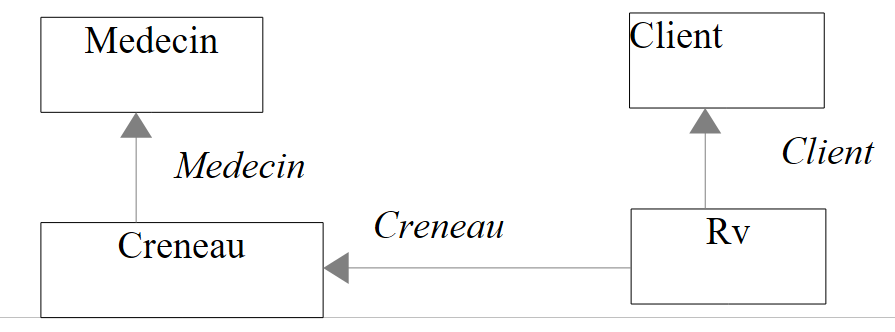 |
Above, the entity [Creneau] has a navigational property [Creneau.Medecin] pointing to the entity [Medecin]. This is called a dependency. We have seen that there are also one-to-many dependencies. The principle explained here also applies to them.
By default, EF 5 is in Lazy Loading mode: when it fetches an entity from the database into the persistence context, it does not fetch its dependencies. These will be fetched when they are first used. This is a common-sense measure. If this were not the case, bringing the appointments into the context would, based on the dependencies above, also bring:
- the [Creneau] entities linked to the appointments;
- the [Medecin] entities linked to these time slots;
- the [Clients] entities linked to the appointments.
Sometimes, however, we need an entity and its dependencies. We will illustrate both loading modes.
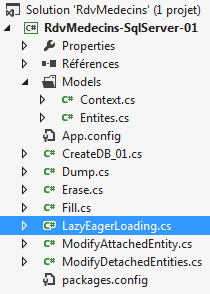 | 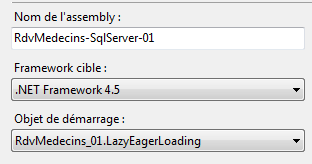 |
The code for [LazyEagerLoading] is as follows:
using RdvMedecins.Entites;
using RdvMedecins.Models;
using System;
using System.Linq;

namespace RdvMedecins_01
{
  class LazyEagerLoading
  {
    // entities
    static Medecin[] medecins;
    static Client[] clients;
    static Creneau[] creneaux;

    static void Main(string[] args)
    {
      // on initialise la base
      InitBase();
      Console.WriteLine("Initialisation terminée");
      // eager loading
      Creneau creneau;
      int idCreneau = (int)creneaux[0].Id;
      using (var context = new RdvMedecinsContext())
      {
        // crenel n° 0
        creneau = context.Creneaux.Include("Medecin").Single<Creneau>(c => c.Id == idCreneau);
        Console.WriteLine(creneau.ShortIdentity());
      }
      // dependent display
      try
      {
        Console.WriteLine("Médecin={0}", creneau.Medecin);
      }
      catch (Exception e)
      {
        Console.WriteLine("L'erreur 1 suivante s'est produite : {0}", e);
      }
      // lazy loading - default mode
      using (var context = new RdvMedecinsContext())
      {
        // crenel n° 0
        creneau = context.Creneaux.Single<Creneau>(c => c.Id == idCreneau);
        Console.WriteLine(creneau.ShortIdentity());
      }
      // dependent display
      try
      {
        Console.WriteLine("Médecin={0}", creneau.Medecin);
      }
      catch (Exception e)
      {
        Console.WriteLine("L'erreur 2 suivante s'est produite : {0}", e);
      }

    }

    static void InitBase()
    {
      // on initialise la base
      using (var context = new RdvMedecinsContext())
      {
        // empty the current base
        ...
        // on initialise la base
        // the clients
        clients = new Client[] {
        new Client { Titre = "Mr", Nom = "Martin", Prenom = "Jules" },
        new Client { Titre = "Mme", Nom = "German", Prenom = "Christine" },
        new Client { Titre = "Mr", Nom = "Jacquard", Prenom = "Jules" },
        new Client { Titre = "Melle", Nom = "Bistrou", Prenom = "Brigitte" }
     };
...
        // dates
        context.Rvs.Add(new Rv { Jour = new System.DateTime(2012, 10, 8), Client = clients[0], Creneau = creneaux[0] });
        // save the persistence context
        context.SaveChanges();
      }
    }
  }
}
- line 18: we start from a known base, the one used so far. After this operation, the arrays in lines 11–13 are filled with detached entities;
- lines 21–22: we focus on the first time slot and the associated doctor;
- line 23: new context;
- line 26: we place the slot in the context along with its dependency (eager loading). Because this is not the default mode, we must explicitly request this dependency. The Include method allows us to do this. Its parameter is the name of the dependency within the entity brought into the context. The query that brings the entity into the context uses lambda expressions. The Single method allows you to specify a condition to retrieve a single entity. Here, we search the database for the entity [Creneau], which has the primary key of slot #0;
- line 27: the retrieved entity is displayed. Recall the two write methods used in entities:
// signature
    public override string ToString()
    {
      return String.Format("Creneau[{0},{1},{2},{3},{4}, {5},{6}]", Id, Hdebut, Mdebut, Hfin, Mfin, Medecin, dump(Timestamp));
    }

   // short signature
    public string ShortIdentity()
    {
      return String.Format("Creneau[{0},{1},{2},{3},{4}, {5}, {6}]", Id, Hdebut, Mdebut, Hfin, Mfin, MedecinId, dump(Timestamp));
    }
- lines 2-5: the [ToString] method displays the [Medecin] dependency. If this is not already in the context, it will be looked up in the database to add it there;
- lines 8-11: the [ShortIdentity] method does not display the [Medecin] dependency. It will therefore not be searched for in the database if it is not in the context;
At this point, the console output is as follows:
- line 28: the context is closed;
- lines 30–37: we attempt to write the entity’s dependency [Medecin]. Recall how Lazy Loading works: a dependency is loaded upon its first use if it is not present. Here, it is normally present. The display is as follows:
- lines 39–44: in a new context, slot #0 is searched for again in the database and brought into the context. Here, the dependency [Medecin] is not explicitly requested. It will therefore not be brought in (Lazy Loading);
- line 43: the short ID of the slot is displayed as follows:
Here, it is important to use ShortIdentity instead of ToString to display the entity. If ToString is used, the dependency [Medecin] will be displayed, and to do so, it will be looked up in the database. However, we do not want that.
- Line 44: the context is closed;
- Lines 46–53: We attempt to display the entity’s dependency. It is important to do this out of context; otherwise, it will be searched for in the database and found. Here, we are out of context. The [Creneau] entity is detached, and its dependency [Medecin] is missing (Lazy Loading). What will happen? The screen display is as follows:
EF found that the dependency [Medecin] was missing. It attempted to load it, but since the context was closed, this operation was no longer possible. We will note this [System.ObjectDisposedException] exception, as it is characteristic of loading a dependency outside an open context.
Now let’s examine concurrency in accessing entities.
3.5.8. Concurrency in Access to Entities
Let’s revisit the definition of the [Client] entity:
public class Client
  {
    // data
    [Key]
    [Column("ID")]
    public int? Id { get; set; }
    [Required]
    [MaxLength(5)]
    [Column("TITRE")]
    public string Titre { get; set; }
    [Required]
    [MaxLength(30)]
    [Column("NOM")]
    public string Nom { get; set; }
    [Required]
    [MaxLength(30)]
    [Column("PRENOM")]
    public string Prenom { get; set; }
    // customer rvs
    public ICollection<Rv> Rvs { get; set; }
    [Column("TIMESTAMP")]
    [Timestamp]
    public byte[] Timestamp { get; set; }

    // signature
    ...
  }
We will focus on the [Timestamp] field on line 23. We know that its value is generated by SGBD. We also noted that the annotation [Timestamp] on line 22 caused EF 5 to use the annotated field to manage concurrency in accessing entities. Let’s recall what concurrency management is:
- a process P1 reads a row L from table [MEDECINS] at time T1. The row has the timestamp TS1;
- a process P2 reads the same row L from table [MEDECINS] at time T2. The row has the timestamp TS1 because process P1 has not yet committed its modification;
- Process P1 commits its modification to row L. The timestamp of row L then changes to TS2;
- Process P2 commits its modification to row L. ORM then throws an exception because process P2 has a timestamp TS1 for row L that differs from the timestamp TS2 found in the database.
This is called optimistic concurrency control. With EF 5, a field playing this role must have one of the two attributes [Timestamp] or [ConcurrencyCheck]. The SQL server has a [timestamp] type. A column with this type has its value automatically generated by the SQL server whenever a row is inserted or modified. Such a column can then be used to manage concurrent access.
We will illustrate this access concurrency with two threads that will simultaneously modify the same [Client] entity in the database. The project evolves as follows:
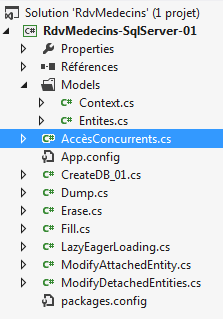 | 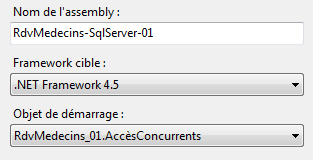 |
The code for the [AccèsConcurrents] program is as follows:
using System;
using System.Data;
using System.Linq;
using System.Threading;
using RdvMedecins.Entites;
using RdvMedecins.Models;

namespace RdvMedecins_01
{

  // object exchanged with threads
  class Data
  {
    public int Duree { get; set; }
    public string Nom { get; set; }
    public Client Client { get; set; }
  }

  // test program
  class AccèsConcurrents
  {

    static void Main(string[] args)
    {
      Client client1;
      using (var context = new RdvMedecinsContext())
      {
        // main thread
        Thread.CurrentThread.Name = "main";
        // empty the current base
        foreach (var client in context.Clients)
        {
          context.Clients.Remove(client);
        }
        foreach (var medecin in context.Medecins)
        {
          context.Medecins.Remove(medecin);
        }
        // add a customer
        client1 = new Client { Nom = "xx", Prenom = "xx", Titre = "xx" };
        context.Clients.Add(client1);
        // follow-up
        Console.WriteLine("{0} client1--avant sauvegarde du contexte", Thread.CurrentThread.Name);
        Console.WriteLine(client1.ShortIdentity());
        // backup
        context.SaveChanges();
        // follow-up
        Console.WriteLine("{0} client1--après sauvegarde du contexte", Thread.CurrentThread.Name);
        Console.WriteLine(client1.ShortIdentity());
      }
      // we'll modify client1 with two threads
      // thead t1
      Thread t1 = new Thread(Modifie);
      t1.Name = "t1";
      t1.Start(new Data { Duree = 5000, Nom = "yy", Client = client1 });
      // thread t2
      Thread t2 = new Thread(Modifie);
      t2.Name = "t2";
      t2.Start(new Data { Duree = 5000, Nom = "zz", Client = client1 });
      // we wait for the end of the 2 threads
      Console.WriteLine("Thread {0} -- début attente fin des deux threads", Thread.CurrentThread.Name);
      t1.Join();
      t2.Join();
      Console.WriteLine("Thread {0} -- fin attente fin des deux threads", Thread.CurrentThread.Name);
      // the modification is displayed - only one was successful
      using (var context = new RdvMedecinsContext())
      {
        // retrieve client1 from client2
        Client client2 = context.Clients.Find(client1.Id);
        Console.WriteLine("Thread {0} client2", Thread.CurrentThread.Name);
        Console.WriteLine("Thread {0} {1}", Thread.CurrentThread.Name, client2.ShortIdentity());
      }
    }

    // thread
    static void Modifie(object infos)
    {
 ...
}
- line 26: we start an empty context;
- line 29: we name the current thread to distinguish it from the two threads that will be created later;
- lines 31–38: the entities [Medecin] and [Client] are set to the "deleted" status;
- lines 40–41: a client is added to the context;
- lines 43-44: it is displayed before the context is synchronized;
- line 46: context synchronization with the database: entities in the "deleted" state will be removed from the database. The entity [Client] placed in the context will be inserted into the database. It will be the only element in the database;
- lines 47-49: the client is displayed after context synchronization. At this stage, the screen displays are as follows:
Note that after context synchronization, the client has a primary key and a timestamp;
- line 50: the context is closed;
- line 53: a thread t1 is associated with the [Modifie] method on line 84. This means that when it is launched, it will execute the [Modifie] method;
- line 54: thread t1 is given a name;
- line 55: thread t1 is launched. Parameters are passed to it in the form of a [Data] structure defined on lines 12–17:
- Duration: the thread will stop Duration seconds before completing its execution,
- Client: a reference to the client to be updated in the database,
- Name: the name to give this client;
- lines 57–59: same procedure with a second thread. Ultimately, two threads will attempt to change the name of the same client in the database;
- lines 60-63: after launching the two threads, the main thread waits for them to finish executing;
- line 62: waiting for thread t1 to finish;
- line 63: waiting for thread t2 to finish;
- line 64: we don’t know in which order the two threads will finish. What is certain is that by line 64, they have finished;
- lines 66-72: in a new context, we query the database for the client to check its status.
Now let’s see what the two threads t1 and t2 do. They execute the following method [Modifie]:
static void Modifie(object infos)
    {
      // parameter is retrieved
      Data data = (Data)infos;
      try
      {
        using (var context = new RdvMedecinsContext())
        {
          Console.WriteLine("Début Thread {0}", Thread.CurrentThread.Name);
          // retrieve client1 from client2
          Client client2 = context.Clients.Find(data.Client.Id);
          Console.WriteLine("Thread {0} client2", Thread.CurrentThread.Name);
          Console.WriteLine("Thread {0} {1}", Thread.CurrentThread.Name, client2.ShortIdentity());
          // modify client2
          client2.Nom = data.Nom;
          // we wait a bit
          Thread.Sleep(data.Duree);
          // save changes
          context.SaveChanges();
        }
      }
      catch (Exception e)
      {
        // exception
        Console.WriteLine("Thread {0} {1}", Thread.CurrentThread.Name, e);
      }
      // end of thread
      Console.WriteLine("Fin Thread {0}", Thread.CurrentThread.Name);
    }
- line 4: retrieve the thread parameters (Duration, Name, Client);
- line 7: new context;
- line 11: the client is brought into the context;
- lines 12-13: monitoring to check the client's status;
- line 15: change its name;
- line 17: the thread pauses for Duree milliseconds. This has an interesting effect. The thread releases the processor that was executing it, making room for another thread. In our example, we have three threads: main, t1, and t2. The main thread is paused, waiting for threads t1 and t2 to finish. Assuming that thread t1 has the processor first, it now yields it to thread t2. This will result in thread t2 reading exactly the same data as thread t1—the same client with the same timestamp;
- Line 19: the context is synchronized with the database. Let’s assume again that thread t1 wakes up first. It will save the client with the name "yy". It will be able to do so because it has the same timestamp as in the database. Because of this update, SGBD will modify the timestamp. When thread t2 wakes up in turn, it will have a client with a timestamp different from the one now in the database. Its update will be rejected.
The screen displays are as follows:
- line 4: the client in the database;
- line 9: the client as read by thread t2;
- line 11: the client as read by thread t1. Both threads have therefore read the same thing;
- line 12: thread t2 finishes first. It was therefore able to perform its update. The name must have changed to "zz";
- line 13: thread t1 throws a [System.Data.OptimisticConcurrencyException] exception. EF detected that it did not have the correct timestamp;
- line 21: thread t1 finishes in turn;
- line 22: the main thread has finished waiting;
- line 24: the main thread displays the client in the database. It is indeed thread t2 that won. The name is "zz". Note that the timestamp has changed.
Now, let’s examine another aspect: the transaction that governs the synchronization of the persistence context with the database.
3.5.9. Synchronization within a transaction
The table [CRENEAUX] has a unique constraint that we added manually (see section 2.2.4, page 12):
We will proceed as follows: we will add two appointments at the same time for the same doctor, on the same day, and in the same time slot. Let’s see what happens.
The project evolves as follows:
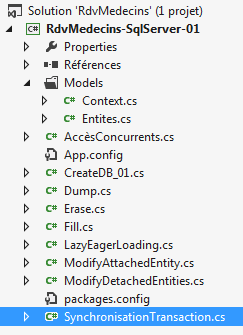 | 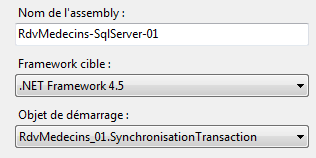 |
The code for program [SynchronisationTransaction] is as follows:
using System;
using System.Linq;
using RdvMedecins.Entites;
using RdvMedecins.Models;

namespace RdvMedecins_01
{

  // test program
  class SynchronisationTransaction
  {

    static void Main(string[] args)
    {
      using (var context = new RdvMedecinsContext())
      {
        // empty the current base
        foreach (var client in context.Clients)
        {
          context.Clients.Remove(client);
        }
        foreach (var medecin in context.Medecins)
        {
          context.Medecins.Remove(medecin);
        }
        context.SaveChanges();
      }

      // create a customer
      Client client1 = new Client { Nom = "xx", Prenom = "xx", Titre = "xx" };
      // we create a doctor
      Medecin medecin1 = new Medecin { Nom = "xx", Prenom = "xx", Titre = "xx" };
      // we create a niche for this doctor
      Creneau creneau1 = new Creneau { Hdebut = 8, Mdebut = 20, Hfin = 8, Mfin = 40, Medecin = medecin1 };
      // create two Rv for this doctor and this customer, same day, same time slot
      Rv rv1 = new Rv { Client = client1, Creneau = creneau1, Jour = new DateTime(2012, 10, 18) };
      Rv rv2 = new Rv { Client = client1, Creneau = creneau1, Jour = new DateTime(2012, 10, 18) };
      try
      {
        // we put it all in the context of persistence
        using (var context = new RdvMedecinsContext())
        {
          context.Clients.Add(client1);
          context.Creneaux.Add(creneau1);
          context.Medecins.Add(medecin1);
          context.Rvs.Add(rv1);
          context.Rvs.Add(rv2);
          // save the context - you should have an exception
          // because the underlying BD has a uniqueness constraint preventing
          // to have two RDV on the same day, in the same slot
          context.SaveChanges();
        }
      }
      catch (Exception e)
      {
        Console.WriteLine("Erreur : {0}", e);
      }
      // if the save occurs in a transaction, then nothing must have been inserted in the database
      // because of the previous exception - we check

      using (var context = new RdvMedecinsContext())
      {
        // the clients
        Console.WriteLine("Clients--------------------------------------");
        var clients = from client in context.Clients select client;
        foreach (Client client in clients)
        {
          Console.WriteLine(client);
        }
        // the doctors
        Console.WriteLine("Médecins--------------------------------------");
        var medecins = from medecin in context.Medecins select medecin;
        foreach (Medecin medecin in medecins)
        {
          Console.WriteLine(medecin);
        }
        // time slots
        Console.WriteLine("Créneaux horaires--------------------------------------");
        var creneaux = from creneau in context.Creneaux select creneau;
        foreach (Creneau creneau in creneaux)
        {
          Console.WriteLine(creneau);
        }
        // dates
        Console.WriteLine("Rendez-vous--------------------------------------");
        var rvs = from rv in context.Rvs select rv;
        foreach (Rv rv in rvs)
        {
          Console.WriteLine(rv);
        }
      }
    }
  }
}
- lines 15–27: a persistence context is used to empty the database;
- line 30: creation of an object [Client];
- line 32: creation of a [Medecin] object;
- line 34: creation of an object [Creneau];
- line 36: creation of an object [Rv];
- line 37: creation of a second [Rv] object identical to the previous one;
- line 41: opening a new context;
- lines 43–47: the previously created objects are attached to the new context. Note here that, by taking dependencies into account, we could have minimized the number of Add operations. However, EF will optimize the SQL and INSERT commands to be sent to the database;
- Line 51: The context is synchronized with the database. As the comment indicates, the insertion of one of the two appointments must fail due to the uniqueness constraint on table [RVS]. But more than that, if the synchronization occurs within a transaction, everything must be rolled back. Therefore, no insertion should take place. The database must remain empty;
- line 53: the context is closed;
- lines 61–90: display of the database contents. It must be empty.
The screen display is as follows:
- Line 1: Exception due to a violation of the uniqueness constraint on table [RVS];
- Lines 9–12: The database is indeed empty. The synchronization of the context with the database therefore took place within a transaction.
There are undoubtedly other aspects to explore in EF 5. However, we now know enough to return to our study of a multi-layer architecture. At the beginning of this document, the reader will find references to articles and books that will allow them to deepen their understanding of EF 5.
3.6. Study of a Multi-Layer Architecture Based on EF 5
We return to our case study described in paragraph 2. This is a ASP.NET web application structured as follows:
 |
We will begin by building the [DAO] data access layer. This layer will be based on EF5.
3.6.1. The new project
We create a new VS 2012 console project in the current [1] solution:
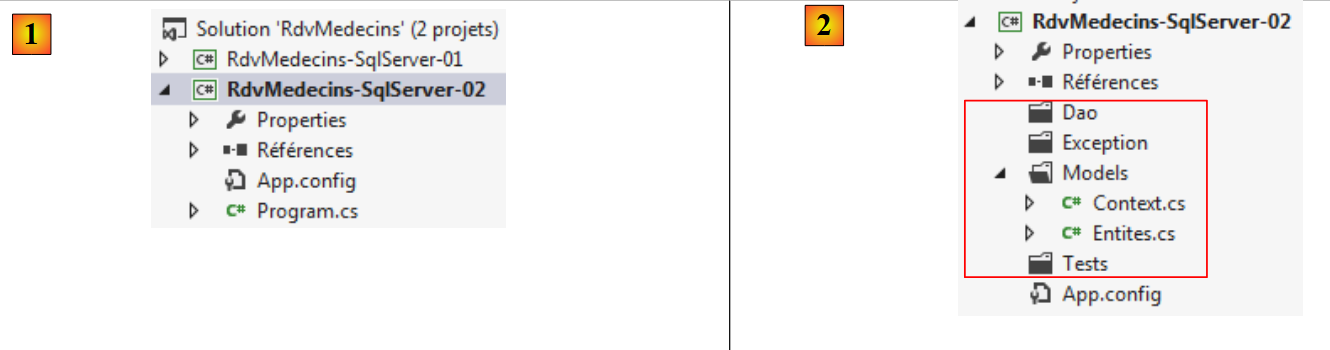 |
We add four folders [2] to it, in which we will organize our code. The folder [Entites] is a copy of the folder [Entites] from the previous project. After this copy, errors appear because we do not have the correct references. We need to add a reference to Entity Framework 5. To do this, we will follow the method explained in section 3.4, page 21. The list of references becomes as follows: [3]:
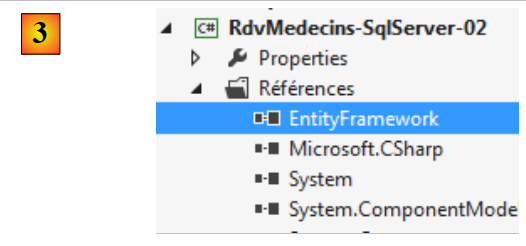 |
At this point, the project should no longer have any compilation errors. From the previous project, we also copy the file [App.config], which configures the database connection:
<?xml version="1.0" encoding="utf-8"?>
<configuration>
  <configSections>
    <!-- For more information on Entity Framework configuration, visit http://go.microsoft.com/fwlink/?LinkID=237468 -->
    <section name="entityFramework" type="System.Data.Entity.Internal.ConfigFile.EntityFrameworkSection, EntityFramework, Version=5.0.0.0, Culture=neutral, PublicKeyToken=b77a5c561934e089" requirePermission="false" />
  </configSections>
  <startup>
    <supportedRuntime version="v4.0" sku=".NETFramework,Version=v4.5" />
  </startup>
  <entityFramework>
    <defaultConnectionFactory type="System.Data.Entity.Infrastructure.SqlConnectionFactory, EntityFramework" />
  </entityFramework>

  <!-- connection chain on base -->
  <connectionStrings>
    <add name="monContexte"
         connectionString="Data Source=localhost;Initial Catalog=rdvmedecins-ef;User Id=sa;Password=sqlserver2012;"
         providerName="System.Data.SqlClient" />
  </connectionStrings>
  <!-- the factory provider -->
  <system.data>
    <DbProviderFactories>
      <add name="SqlClient Data Provider"
       invariant="System.Data.SqlClient"
       description=".Net Framework Data Provider for SqlServer"
       type="System.Data.SqlClient.SqlClientFactory, System.Data,
     Version=4.0.0.0, Culture=neutral, PublicKeyToken=b77a5c561934e089"
    />
    </DbProviderFactories>
  </system.data>

</configuration>
3.6.2. The Exception Class
We will use a project-specific exception class. This is the one that will be returned by the [DAO] layer:
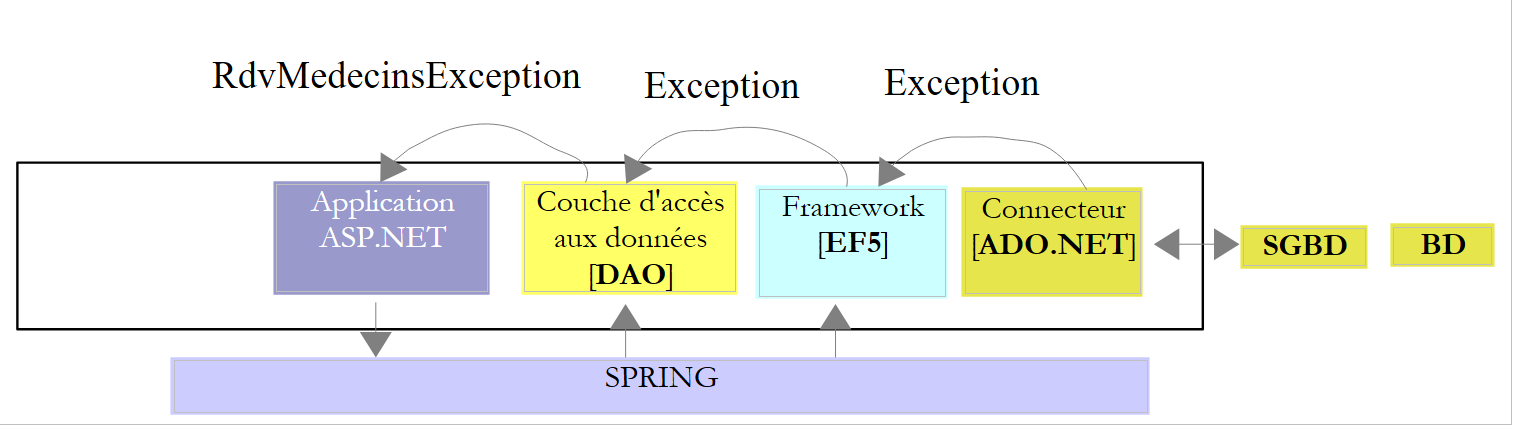 |
The [DAO] layer will catch all exceptions that are propagated up to it and wrap them in a [RdvMedecinsException] exception. This exception will be as follows:
using System;

namespace RdvMedecins.Exceptions
{
  public class RdvMedecinsException : Exception
  {

    // properties
    public int Code { get; set; }

    // manufacturers
    public RdvMedecinsException()
      : base()
    {
    }

    public RdvMedecinsException(string message)
      : base(message)
    {
    }

    public RdvMedecinsException(int code, string message)
      : base(message)
    {
      Code = code;
    }

    public RdvMedecinsException(int code, string message, Exception ex)
      : base(message, ex)
    {
      Code = code;
    }

    // identity
    public override string ToString()
    {
      if (InnerException == null)
      {
        return string.Format("RdvMedecinsException[{0},{1}]", Code, base.Message);
      }
      else
      {
        return string.Format("RdvMedecinsException[{0},{1},{2}]", Code, base.Message, base.InnerException.Message);
      }
    }
  }
}
- line 5: the class derives from the [Exception] class;
- line 9: it adds an error code to its base class;
- lines 12–32: the various constructors incorporate the presence of the [Code] field.
The project evolves as follows:
 |
3.6.3. The [DAO] layer
 |
The [DAO] layer provides an interface to the [ASP.NET] layer. To identify the latter, look at the application’s web pages:
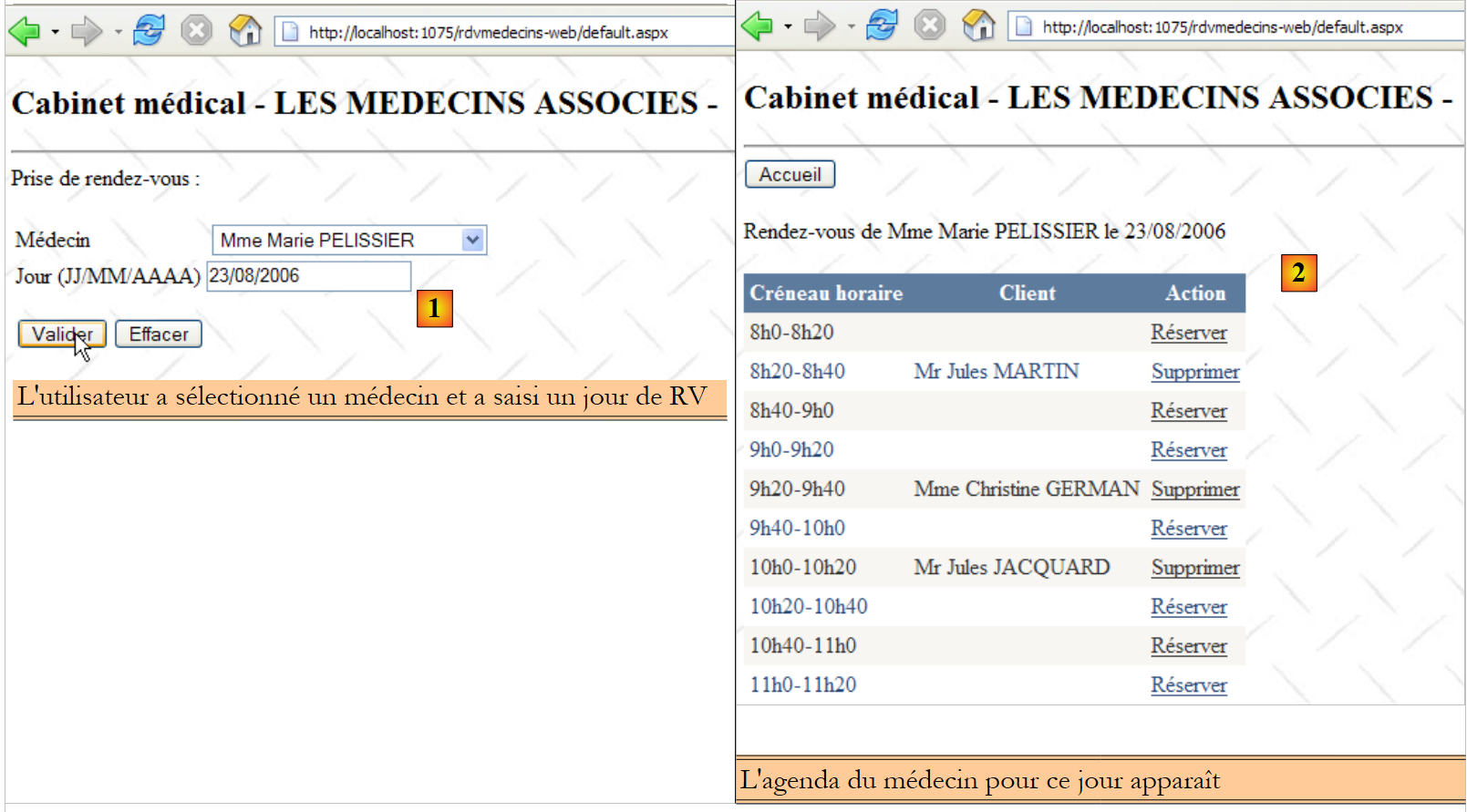 |
- in [1] above, the drop-down list has been populated with the list of doctors. The [DAO] layer will provide this list;
- in [2], the [DAO] layer will provide;
- the list of a doctor’s appointments for a given day,
- the list of a doctor’s available time slots,
- additional information about the selected doctor;
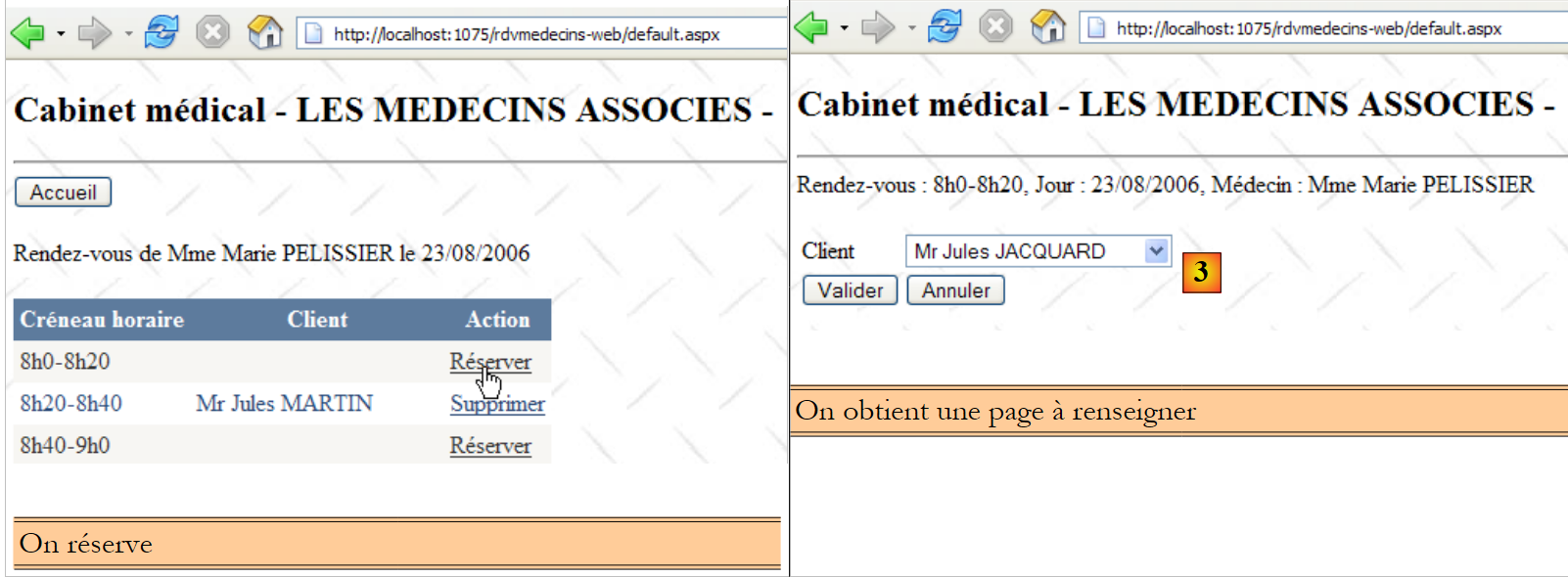 |
- in [3], the drop-down list for clients will be provided by the [DAO] layer;
 |
- in [4], the user confirms an appointment. The [DAO] layer must be able to add it to the database. It must also be able to provide additional information about the selected client;
 |
- In [5], the user deletes an appointment. The [DAO] layer must allow this.
With this information, the [IDao] interface of the [DAO] layer could be as follows:
using System;
using System.Collections.Generic;
using RdvMedecins.Entites;

namespace RdvMedecins.Dao
{
  public interface IDao
  {
    // clients list
    List<Client> GetAllClients();
    // list of doctors
    List<Medecin> GetAllMedecins();
    // list of physician slots
    List<Creneau> GetCreneauxMedecin(int idMedecin);
    // list of RV from a given doctor on a given day
    List<Rv> GetRvMedecinJour(int idMedecin, DateTime jour);
    // add a RV to the list
    int AjouterRv(DateTime jour, int idCreneau, int idClient);
    // delete a RV
    void SupprimerRv(int idRv);
    // find a T entity via its primary key
    T Find<T>(int id) where T : class;
  }
}
The methods in lines 10–20 are derived from the analysis just performed. The method in line 22 is there to address the fact that we are working with Lazy Loading. If, in the [ASP.NET] layer, we need a dependency of an entity, we will retrieve it from the database using this method.
The [Dao] implementation of this interface will be as follows:
using System;
using System.Collections.Generic;
using System.Linq;
using RdvMedecins.Entites;
using RdvMedecins.Exceptions;
using RdvMedecins.Models;

namespace RdvMedecins.Dao
{
  public class Dao : IDao
  {

    //clients list
    public List<Client> GetAllClients()
    {
      // clients list
      List<Client> clients = null;
      try
      {
        // opening persistence context
        using (var context = new RdvMedecinsContext())
        {
          // clients list
          clients = context.Clients.ToList();
        }

      }
      catch (Exception ex)
      {
        throw new RdvMedecinsException(1, "GetAllClients", ex);
      }
      // we return the result
      return clients;
    }

    // list of doctors
    public List<Medecin> GetAllMedecins()
    {
      // list of doctors
      List<Medecin> medecins = null;
      try
      {
        // opening persistence context
        using (var context = new RdvMedecinsContext())
        {
          // list of doctors
          medecins = context.Medecins.ToList();
        }

      }
      catch (Exception ex)
      {
        throw new RdvMedecinsException(2, "GetAllMedecins", ex);
      }
      // we return the result
      return medecins;
    }

    // list of time slots for a given doctor
    public List<Creneau> GetCreneauxMedecin(int idMedecin)
    {
   ...
    }

    // list of a doctor's RV for a given day
    public List<Rv> GetRvMedecinJour(int idMedecin, DateTime jour)
    {
 ...
    }

    // add a RV to the list
    public int AjouterRv(DateTime jour, int idCreneau, int idClient)
    {
 ...
    }

    // delete a RV
    public void SupprimerRv(int idRv)
    {
...
    }

    // find a customer
    public Client FindClient(int id)
    {
...
    }

    // find a niche
    public Creneau FindCreneau(int id)
    {
 ...
    }

    // find a doctor
    public Medecin FindMedecin(int id)
    {
....
    }

    // find a Rv
    public Rv FindRv(int id){
...
    }

  }
}
Let's explain the [GetAllClients] method, which must return a list of all clients entries:
- lines 18–31: the search for clients is performed within a try/catch block. The same applies to all subsequent methods;
- line 21: opening a new context;
- line 24: the [Client] entities are loaded into the context and placed in a list.
The [GetAllMedecins] method, which must return the list of all doctors, is similar (lines 37–57).
The [GetCreneauxMedecin] method is as follows:
// list of time slots for a given doctor
    public List<Creneau> GetCreneauxMedecin(int idMedecin)
    {
      // list of slots
      try
      {
        // opening persistence context
        using (var context = new RdvMedecinsContext())
        {
          // we get the doctor back with his slots
          Medecin medecin = context.Medecins.Include("Creneaux").Single(m => m.Id == idMedecin);
          // list of doctor's slots
          return medecin.Creneaux.ToList<Creneau>();
        }
      }
      catch (Exception ex)
      {
        throw new RdvMedecinsException(3, "GetCreneauxMedecin", ex);
      }
    }
- line 9: opening a new persistence context;
- line 11: search for the doctor whose primary key is known. Request that the dependency [Creneaux]—a collection of the doctor’s time slots—be included. If the doctor does not exist, the Single method throws an exception;
- line 13: return the list of time slots.
The [GetRvMedecinJour] method must return the list of a doctor’s appointments for a given day. Its code could be as follows:
// list of a doctor's RV for a given day
    public List<Rv> GetRvMedecinJour(int idMedecin, DateTime jour)
    {
      // Rv list
      List<Rv> rvs = null;

      try
      {
        // opening persistence context
        using (var context = new RdvMedecinsContext())
        {
          // we get the doctor back
          Medecin medecin = context.Medecins.Find(idMedecin);
          if (medecin == null)
          {
            throw new RdvMedecinsException(10, string.Format("Médecin [{0}] inexistant", idMedecin));
          }
          // rv list
          rvs = context.Rvs.Where(r => r.Creneau.Medecin.Id == idMedecin && r.Jour == jour).ToList();
        }
      }
      catch (Exception ex)
      {
        throw new RdvMedecinsException(4, "GetRvMedecinJour", ex);
      }
      // we return the result
      return rvs;
    }
- line 13: we bring the doctor whose primary key we have into the context;
- lines 14–17: if they do not exist, throw an exception;
- line 19: the query LINQ to retrieve the appointments for this doctor;
The method [AjouterRv] must add an appointment to the database and return the primary key of the inserted record. Its code could be as follows:
// add a RV to the list
    public int AjouterRv(DateTime jour, int idCreneau, int idClient)
    {
      // rdv n° added
      int idRv;
      try
      {
        // opening persistence context
        using (var context = new RdvMedecinsContext())
        {
          // we get the slot back
          Creneau creneau = context.Creneaux.Find(idCreneau);
          if (creneau == null)
          {
            throw new RdvMedecinsException(5, string.Format("Créneau [{0}] inexistant", idCreneau));
          }
          // we get the customer back
          Client client = context.Clients.Find(idClient);
          if (client == null)
          {
            throw new RdvMedecinsException(6, string.Format("Client [{0}] inexistant", idCreneau));
          }
          // niche creation
          Rv rv = new Rv { Jour = jour, Client = client, Creneau = creneau };
          // added in context
          context.Rvs.Add(rv);
          // save context
          context.SaveChanges();
          // retrieve the primary key of the added rv
          idRv = (int)rv.Id;
        }
      }
      catch (Exception ex)
      {
        throw new RdvMedecinsException(7, "AjouterRv", ex);
      }
      // result
      return idRv;
    }
- line 12: search for the appointment slot in the database;
- lines 13–16: if it is not found, an exception is thrown;
- line 18: search for the appointment’s client in the database;
- lines 19–22: if not found, throw an exception;
- line 24: create a [Rv] object with the necessary information;
- line 26: add it to the persistence context;
- line 28: we synchronize the persistence context with the database. The appointment will then be saved to the database;
- line 30: we know that after the database is synchronized, the primary keys of the inserted items are available. We retrieve the one for the added appointment;
- line 31: close the persistence context.
The method [SupprimerRv] must delete an appointment for which the primary key is passed to it.
// delete a RV
    public void SupprimerRv(int idRv)
    {
      try
      {
        // opening persistence context
        using (var context = new RdvMedecinsContext())
        {
          // we retrieve the Rv
          Rv rv = context.Rvs.Find(idRv);
          if (rv == null)
          {
            throw new RdvMedecinsException(5, string.Format("Rv [{0}] inexistant", idRv));
          }
          // delete Rv
          context.Rvs.Remove(rv);
          // save context
          context.SaveChanges();
        }
      }
      catch (Exception ex)
      {
        throw new RdvMedecinsException(8, "SupprimerRv", ex);
      }
    }
- line 7: new persistence context;
- line 10: the appointment to be deleted is passed to the context;
- lines 11–15: if it doesn't exist, an exception is thrown;
- line 16: remove it from the context;
- line 18: the context is synchronized with the database;
- line 19: close the context.
The [Find<T>] method allows you to search the database for an entity of type T using its primary key. Its code could be as follows:
public T Find<T>(int id)  where T : class
    {
      try
      {
        // opening persistence context
        using (var context = new RdvMedecinsContext())
        {
          return context.Set<T>().Find(id);
        }
      }
      catch (Exception ex)
      {
        throw new RdvMedecinsException(20, "Find<T>", ex);
      }
    }
- Line 8: The Set<T> method allows you to retrieve a DbSet<T> to which you can apply the usual methods.
The project evolves as follows:
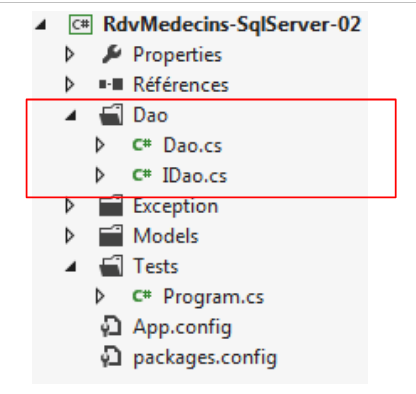 |
3.6.4. Testing the [DAO] layer
We will create a test program for the [DAO] layer. The test architecture will be as follows:
 |
A console program asks [Spring.net] to instantiate the [DAO] layer. Once this is done, it tests the various features of the [DAO] layer interface. Rather than a console program, it would have been preferable to write a test program of the type NUnit. A test program for the [DAO] layer could look like this:
using System;
using System.Collections.Generic;
using RdvMedecins.Dao;
using RdvMedecins.Entites;
using RdvMedecins.Exceptions;
using Spring.Context.Support;

namespace RdvMedecins.Tests
{
  class Program
  {
    public static void Main()
    {
      IDao dao = null;
      try
      {
        // instantiation layer [DAO] via Spring
        dao = ContextRegistry.GetContext().GetObject("rdvmedecinsDao") as IDao;

        // display clients
        List<Client> clients = dao.GetAllClients();
        DisplayClients("Liste des clients :", clients);

        // physician display
        List<Medecin> medecins = dao.GetAllMedecins();
        DisplayMedecins("Liste des médecins :", medecins);

        // list of time slots for doctor no. 0
        List<Creneau> creneaux = dao.GetCreneauxMedecin((int)medecins[0].Id);
        DisplayCreneaux(string.Format("Liste des créneaux horaires du médecin {0}", medecins[0]), creneaux);

        // list of a doctor's Rv for a given day
        DisplayRvs(string.Format("Liste des RV du médecin {0}, le 23/11/2013 :", medecins[0]), dao.GetRvMedecinJour((int)medecins[0].Id, new DateTime(2013, 11, 23)));

        // add a RV to doctor n°1 in slot n° 0
        Console.WriteLine(string.Format("Ajout d'un RV au médecin {0} avec client {1} le 23/11/2013", medecins[0], clients[0]));
        int idRv1 = dao.AjouterRv(new DateTime(2013, 11, 23), (int)creneaux[0].Id, (int)clients[0].Id);
        Console.WriteLine("Rdv ajouté");
        DisplayRvs(string.Format("Liste des RV du médecin {0}, le 23/11/2013 :", medecins[0]), dao.GetRvMedecinJour((int)medecins[0].Id, new DateTime(2013, 11, 23)));

        // add a Rv to an already occupied slot - must raise an exception
        int idRv2;
        Console.WriteLine("Ajout d'un RV dans un créneau déjà occupé");
        try
        {
          idRv2 = dao.AjouterRv(new DateTime(2013, 11, 23), (int)creneaux[0].Id, (int)clients[0].Id);
          Console.WriteLine("Rdv ajouté");
          DisplayRvs(string.Format("Liste des RV du médecin {0}, le 23/11/2013 :", medecins[0]), dao.GetRvMedecinJour((int)medecins[0].Id, new DateTime(2013, 11, 23)));
        }
        catch (RdvMedecinsException ex)
        {
          Console.WriteLine(string.Format("L'erreur suivante s'est produite : {0}", ex));
        }

        // delete a Rv
        Console.WriteLine(string.Format("Suppression du RV n° {0}", idRv1));
        dao.SupprimerRv(idRv1);
        DisplayRvs(string.Format("Liste des RV du médecin {0}, le 23/11/2013 :", medecins[0]), dao.GetRvMedecinJour((int)medecins[0].Id, new DateTime(2013, 11, 23)));
      }
      catch (Exception ex)
      {
        Console.WriteLine(string.Format("L'erreur suivante s'est produite : {0}", ex));
      }
      //break
      Console.ReadLine();
    }

    // utility methods - display lists
    public static void DisplayClients(string Message, List<Client> clients)
    {
      Console.WriteLine(Message);
      foreach (Client c in clients)
      {
        Console.WriteLine(c.ShortIdentity());
      }
    }
    public static void DisplayMedecins(string Message, List<Medecin> medecins)
    {
...
    }
    public static void DisplayCreneaux(string Message, List<Creneau> creneaux)
    {
...
    }
    public static void DisplayRvs(string Message, List<Rv> rvs)
    {
...
    }
  }
}
- line 14: the reference to the [DAO] layer. To make the test independent of the actual implementation of this layer, this reference is of type [IDao] (the interface) rather than of type [Dao] (the class);
- line 18: the [DAO] layer is instantiated by Spring. We will return to the configuration required to make this possible. We cast the object reference returned by Spring to a reference of the [IDao] interface type;
- lines 21–22: display the clients;
- lines 25-26: display the doctors;
- lines 29-30: display the list of time slots for doctor #0;
- line 33: displays the appointments for doctor #0 on 11/23/2013. There should be none;
- line 37: adds an appointment for doctor #0 on 11/23/2013;
- line 39: displays the appointments for doctor #0 on 11/23/2013. There should be one;
- line 46: adds the same appointment a second time. An exception should occur;
- line 57: deletes the single appointment that was added;
- line 58: displays the appointments for doctor #0 on 11/23/2013. There should be none.
3.6.5. Configuration of Spring.net
In the test program above, we briefly covered the statement that instantiates the [DAO] layer:
dao = ContextRegistry.GetContext().GetObject("rdvmedecinsDao") as IDao;
The [ContextRegistry] class is a Spring class in the [Spring.Context.Support] namespace. To use Spring, we need to add its DLL to the project dependencies. We proceed as follows:
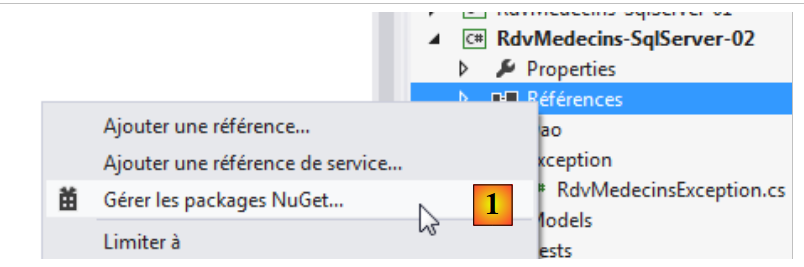 |
- In [1], search for packages using the [NuGet] tool;
 |
- in [2], search for packages online;
- In [3], enter the keyword "spring" in the search field;
- in [4], packages whose description contains this keyword are displayed. Here, [Spring.Core] is the one we need. We install it.
The project dependencies change as follows:
 |
The package [Spring.Core] had a dependency on the package [Common.Logging]. This one was also loaded. At this point, the project should no longer have any errors.
That doesn’t mean it will work, though. We first need to configure Spring in the [App.config] file. This is the trickiest part of the project. The new [App.config] file is as follows:
<?xml version="1.0" encoding="utf-8"?>
<configuration>
  <configSections>
    <!-- For more information on Entity Framework configuration, visit http://go.microsoft.com/fwlink/?LinkID=237468 -->
    <section name="entityFramework" type="System.Data.Entity.Internal.ConfigFile.EntityFrameworkSection, EntityFramework, Version=5.0.0.0, Culture=neutral, PublicKeyToken=b77a5c561934e089" requirePermission="false" />
    <!-- spring -->
    <sectionGroup name="spring">
      <section name="context" type="Spring.Context.Support.ContextHandler, Spring.Core" />
      <section name="objects" type="Spring.Context.Support.DefaultSectionHandler, Spring.Core" />
    </sectionGroup>
    <!-- common logging-->
    <section name="logging" type="Common.Logging.ConfigurationSectionHandler, Common.Logging" />
  </configSections>
  <startup>
    <supportedRuntime version="v4.0" sku=".NETFramework,Version=v4.5" />
  </startup>
  <!-- Entity Framework -->
  <entityFramework>
    <defaultConnectionFactory type="System.Data.Entity.Infrastructure.LocalDbConnectionFactory, EntityFramework">
      <parameters>
        <parameter value="v11.0" />
      </parameters>
    </defaultConnectionFactory>
  </entityFramework>
  <!-- Connection chains -->
  <connectionStrings>
    <add name="monContexte" connectionString="Data Source=localhost;Initial Catalog=rdvmedecins-ef;User Id=sa;Password=sqlserver2012;" providerName="System.Data.SqlClient" />
  </connectionStrings>
  <system.data>
    <DbProviderFactories>
      <add name="SqlClient Data Provider" invariant="System.Data.SqlClient" description=".Net Framework Data Provider for SqlServer" type="System.Data.SqlClient.SqlClientFactory, System.Data, Version=4.0.0.0, Culture=neutral, PublicKeyToken=b77a5c561934e089" />
    </DbProviderFactories>
  </system.data>
  <!-- spring configuration -->
  <spring>
    <context>
      <resource uri="config://spring/objects" />
    </context>
    <objects xmlns="http://www.springframework.net">
      <object id="rdvmedecinsDao" type="RdvMedecins.Dao.Dao,RdvMedecins-SqlServer-02" />
    </objects>
  </spring>
  <!-- configuration common.logging -->
  <logging>
    <factoryAdapter type="Common.Logging.Simple.ConsoleOutLoggerFactoryAdapter, Common.Logging">
      <arg key="showLogName" value="true" />
      <arg key="showDataTime" value="true" />
      <arg key="level" value="DEBUG" />
      <arg key="dateTimeFormat" value="yyyy/MM/dd HH:mm:ss:fff" />
    </factoryAdapter>
  </logging>
</configuration>
Let’s start by removing everything that’s already known: Entity Framework, connection strings, ProviderFactory. The file evolves as follows:
<?xml version="1.0" encoding="utf-8"?>
<configuration>
  <configSections>
    <!-- For more information on Entity Framework configuration, visit http://go.microsoft.com/fwlink/?LinkID=237468 -->
    <section name="entityFramework" ... />
    <!-- spring -->
    <sectionGroup name="spring">
      <section name="context" type="Spring.Context.Support.ContextHandler, Spring.Core" />
      <section name="objects" type="Spring.Context.Support.DefaultSectionHandler, Spring.Core" />
    </sectionGroup>
    <!-- common logging-->
    <sectionGroup name="common">
      <section name="logging" type="Common.Logging.ConfigurationSectionHandler, Common.Logging" />
    </sectionGroup>
  </configSections>
...
  <!-- spring configuration -->
  <spring>
    <context>
      <resource uri="config://spring/objects" />
    </context>
    <objects xmlns="http://www.springframework.net">
      <object id="rdvmedecinsDao" type="RdvMedecins.Dao.Dao,RdvMedecins-SqlServer-02" />
    </objects>
  </spring>
  <!-- configuration common.logging -->
  <common>
    <logging>
      <factoryAdapter type="Common.Logging.Simple.ConsoleOutLoggerFactoryAdapter, Common.Logging">
        <arg key="showLogName" value="true" />
        <arg key="showDataTime" value="true" />
        <arg key="level" value="DEBUG" />
        <arg key="dateTimeFormat" value="yyyy/MM/dd HH:mm:ss:fff" />
      </factoryAdapter>
    </logging>
  </common>
</configuration>
- lines 3-15: define configuration sections;
- line 8: defines the class that will manage the <spring><context> section of the XML file (lines 19-21);
- line 9: defines the class that will manage the <spring><objects> section of the XML file (lines 22-24);
- line 13: defines the class that will handle the <common><logging> section of the XML file (lines 27–36);
- lines 7–14: are stable. Do not need to be changed in another project;
- lines 18-25: Spring configuration. Is stable except for lines 22-24, which define the objects that Spring will instantiate;
- line 23: definition of an object. The id attribute is free. It is the object’s identifier. The type attribute specifies the class to be instantiated in the form “full class name, Assembly containing the class”. The class here is the one that implements the [DAO] layer: [RdvMedecins.Dao.Dao]. To find its assembly, check the project properties:
 |
In [1], the name of the assembly to be provided;
- lines 27–36: the "Common Logging" configuration is stable. You may need to modify the logging level on line 32. After the debugging phase, you can set the level to INFO.
Ultimately, although complex at first glance, the Spring configuration file turns out to be simple. The only changes needed are:
- lines 22–24, which define the objects to be instantiated;
- line 32: the log level.
In the test program, the statement that instantiates the [DAO] layer is as follows:
dao = ContextRegistry.GetContext().GetObject("rdvmedecinsDao") as IDao;
[ContextRegistry] is a Spring class that uses the Spring configuration defined in a file named [Web.config] or [App.config]. Here, it will use the following section of the [App.config] file:
  <spring>
    <context>
      <resource uri="config://spring/objects" />
    </context>
    <objects xmlns="http://www.springframework.net">
      <object id="rdvmedecinsDao" type="RdvMedecins.Dao.Dao,RdvMedecins-SqlServer-02" />
    </objects>
</spring>
- ContextRegistry.GetContext() uses the context from lines 2–4. Line 3 means that the Spring objects are defined in the [spring/objects] section of the configuration file. This section is lines 5–7;
- ContextRegistry.GetContext().GetObject("rdvmedecinsDao") uses the section on lines 5–7. It returns a reference to the object that has the attribute id= "rdvmedecinsDao". This is the object defined on line 6. Spring will then instantiate the class defined by the type attribute using its parameterless constructor. This constructor must therefore exist. Once this is done, the reference to the created object is returned to the calling code. If the object is requested a second time in the code, Spring simply returns a reference to the first object created. This is the design pattern known as the singleton.
Object construction can be more complex. You can use a constructor with parameters or specify the initialization of certain object fields once the object has been created. For more information on this topic, see the article "Spring Tutorial IOC for .NET," at URL [http://tahe.developpez.com/dotnet/springioc/].
Once this is done, we can run the application. The screen results are as follows:
The results are as expected. We will now consider our [DAO] layer to be valid. The tutorial could end here. So far, we have demonstrated:
- the basics of Entity Framework 5;
- a [DAO] layer using this ORM.
Let’s recall our case study described at the beginning of this document. We start with an existing application with the following architecture:
 |
which we want to transform into this:
 |
where EF5 has replaced NHibernate. We have just built the [DAO2] layer. In fact, it does not have the same interface as the [DAO1] layer, whose interface was more limited:
  public interface IDao
  {
    // clients list
    List<Client> GetAllClients();
    // list of doctors
    List<Medecin> GetAllMedecins();
    // list of physician slots
    List<Creneau> GetCreneauxMedecin(int idMedecin);
    // list of RV from a given doctor on a given day
    List<Rv> GetRvMedecinJour(int idMedecin, DateTime jour);
    // add a RV to the list
    int AjouterRv(DateTime jour, int idCreneau, int idClient);
    // delete a RV
    void SupprimerRv(int idRv);
  }
The [DAO2] layer added the following method to this interface:
// find a T entity via its primary key
T Find<T>(int id) where T : class;
This method was added because ORM EF 5 operates in Lazy Loading mode by default. Entities arrive in the [ASP.NET] layer without their dependencies. The method above allows us to retrieve them if needed, and in some cases, we do need them. NHibernate also operates in Lazy Loading mode by default, but I had used it in Eager Loading mode. The entities arrived in the [ASP.NET] layer with their dependencies.
We are going to complete the migration of the ASP.NET / NHibernate application to the ASP.NET / EF 5 application. However, since this no longer concerns EF5, we will not comment on the web code. We will simply explain how to set up the web application and test it. It is available on this tutorial’s website.
3.6.6. Generation of DLL from the [DAO] layer
In the following architecture:
 |
the [ASP.NET] layer will have the layers to its right available to it in the form of DLL. We therefore build the DLL from the [DAO] layer.
 |
- In [1], we select the test program, and in [2], we do not include it in the DLL that will be generated;
- In [3], in the project properties, specify that the assembly to be created is a DLL;
- In [4], in the VS menu, specify that you will generate a [Release] assembly, which contains less information than a [Debug] assembly;
 |
- In [5], the project assembly is regenerated. DLL will be generated;
- In [6], all project files are displayed;
 |
- in [7], the DLL for the [DAO] layer project. This is the one that the ASP.NET web project will use;
- In [8], we refresh the project display;
 |
- In [9], the DLL files from the [Release] folder are gathered into an external folder named [lib] ([10]). This is where the web project will retrieve its references.
3.6.7. The [ASP.NET] layer
Here we will explain the porting of the [ASP.NET / NHibernate] application to the [ASP.NET / EF 5] application. We will be working with Visual Studio Express 2012 for the Web, available for free at URL [http://www.microsoft.com/visualstudio/fra/downloads].
We will start with the existing web project created with VS 2010.
 |
- In [1], we open the existing project:
- In [2], the loaded project has the following references: [3]:
- [NHibernate] is the DLL of the NHibernate framework,
- [Spring.Core] is the DLL of the Spring.net framework,
- [log4net] is the DLL of the log4net logging framework. This framework is used by Spring.net,
- [MySql.Data] is the ADO driver for NET of SGBD and MySQL,
- [rdvmedecins] is the DLL of the [DAO] layer built with NHibernate;
- in [4], we change the project name, and in [5], we remove the previous references;
 |
- In [6], we add references to the project;
- in [7], in the wizard we use option and [Parcourir];
 |
- In [8], we select all DLL files from Project No. 2 that were previously placed in the [lib] folder;
- in [9], a summary that we approve;
- in [10], the web project with its new references.
With this done, the project is organized as follows:
 |
- in [1], the web page management code is split between the two files [Global.asax] and [Default.aspx]. Utility code has been placed in the folder [Entites]. Finally, the application is configured by the file [Web.config];
- in [2], we generate the project assembly;
- in [3], errors appear.
Let’s examine the errors, for example the following one:

and its explanation:

Is the type of [medecin.Id] int? whereas the method [GetCreneauxMedecin] is of type int. A cast is therefore required. This error recurs throughout the code because the entities in the ASP.NET / NHibernate project had primary keys of type int, whereas those in the ASP.NET / EF 5 are of type int?. We correct all errors of this type and regenerate the project. There are then no more.
There is one more detail to address before running the project: the instantiation of the [DAO] layer by the Spring framework. This is done in [Global.asax]:
protected void Application_Start(object sender, EventArgs e)
    {
      // caching of certain database data
      try
      {
        // instantiation layer [dao]
        Dao = ContextRegistry.GetContext().GetObject("rdvmedecinsDao") as IDao;
        ...
      }
      catch (Exception ex)
      {...
      }
    }
In the test program for the [DAO] layer, it instantiated the [DAO] layer as follows:
dao = ContextRegistry.GetContext().GetObject("rdvmedecinsDao") as IDao;
The two methods are identical. Recall that this instantiation of the [DAO] layer relied on a configuration made in [App.config]. We then replace the current [Web.config] content of the web project with that of [App.config] from the [DAO] layer project in order to have the same configuration.
We are ready for the first run. The home page is displayed as [1]:
 |
- in [2], we enter an appointment date and confirm;
 |
- in [3], an error occurs.
When we examine the error message displayed by the page, we see that the exception reported is related to Lazy Loading: we attempted to load a dependency of an object while the persistence context managing it had been closed. The object is now in a "detached" state. This error is due to the fact that NHibernate was used in Eager Loading mode, whereas EF operates by default in Lazy Loading mode. In the line highlighted in red above:
- rdv represents a [Rv] object that was loaded without its dependencies;
- to evaluate rdv.Creneau.Id, the application attempts to load the dependency rdv.Creneau. But since we are no longer in the context, this is not possible, hence the exception.
Here, the solution is simple. On line 108, we create an entry in a dictionary using the primary key of an appointment slot as the key. It turns out that the entity [Rv] encapsulates the primary key of the associated slot. So we write:
dicoRvPris[(int)rdv.CreneauId] = rdv;
We try running the code again. This time, the error is as follows:
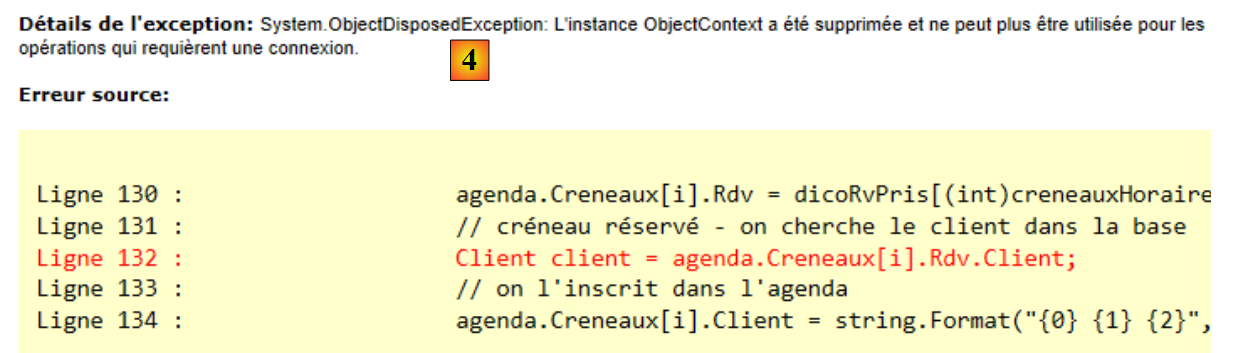 |
The error is similar. On line 132, we are attempting to load the dependency [Client] of an object [Rv] into the layer ASP.NET, which is out of context. We need to retrieve the [Client] object from the database. To resolve this issue, the [IDao] interface has been enhanced with the following method:
    // find a T entity via its primary key
    T Find<T>(int id) where T : class;
This will allow you to retrieve dependencies. Thus, the erroneous line above will be rewritten as follows:
Client client = Global.Dao.Find<Client>(agenda.Creneaux[i].Rdv.ClientId);
Once again, we note the benefit of entities embedding their foreign keys. Here, the [Rv] entity gives us access to the foreign key of the associated [Creneau] dependency. With these two corrections made, the application works. Readers are invited to test the [RdvMedecins-SqlServer-03] application available in the example downloads on this article’s website.
3.7. Conclusion
We have successfully ported the ASP.NET / NHibernate application:
 |
to a ASP.NET / EF 5 application:
 |
Although this architecture should have allowed us to keep the [ASP.NET] layer intact, we had to modify it for two reasons:
- the entities were not exactly the same. The primary key type for the NHibernate entities was int, whereas that of EF 5 was int?. This led us to introduce casts in the web code;
- the entity loading mode was not the same for the two ORM entities: Eager Loading for NHibernate, Lazy Loading for EF 5. This led us to enhance the [DAO] layer interface with a generic method allowing us to retrieve an entity via its primary key.
Nevertheless, the port proved to be fairly simple, once again justifying—if proof were needed—the layered architecture and dependency injection with Spring or another dependency injection framework.
We will now assess the impact of a change to SGBD on the previous architecture. We will migrate all previous projects to four other SGBD instances:
- Oracle Database Express Edition 11g Release 2;
- MySQL 5.5.28;
- PostgreSQL 9.2.1;
- Firebird 2.1.
The codes will no longer change. Only the following elements will change:
- the definition in the entities of the field used to control concurrent access to an entity;
- the configuration files [App.config] or [Web.config];
We will only comment on the elements that are changing.