Skip to content

10. 案例研究:RdvMedecins 应用的 Vue.js 客户端

10.1. 问题

[RdvMedecins] 应用让用户可以在诊所预约医生。[NestJS] 课程把它写成了一个 HTML 应用,其中由服务器生成页面。这里我们编写的是 [Vue.js] 客户端:相同的页面,在浏览器中根据服务器的 JSON 数据生成,该数据在“RdvMedecins 服务器:一个黑盒”一章中已有描述。

该客户端必须提供 HTML 应用所提供的一切:

  • 一个由验证码保护的登录页面,并可选择创建患者账户;
  • 某位医生某一天的日程,可进行预约(患者选择窗口)和取消;
  • 对管理员而言,是医生和客户的管理(列表、添加、编辑、删除);
  • 对患者而言,是个人面板(显示其可以取消的未来预约)和账户管理;
  • 两种语言:法语和英语;
  • 唯一的 URL([/schedule?doctorId=1&day=...]),可以重新加载、加书签,并可使用浏览器的后退/前进按钮进行导航。

10.2. 安装与运行

JSON 服务器必须已安装并正在运行(见上一章)。要在浏览器中使用该客户端,不需要验证码测试模式:在服务器的 [.env] 文件中,不需要设置它。

在打开到 [rdvmedecins-vuejs] 文件夹的控制台窗口中:

npm install
npm run dev

然后在浏览器中打开 http://localhost:5173。演示账户列在登录页面上(密码 = 登录名)。

示例中的 [Vite] 服务器同样使用 5173 端口。如果该端口已被占用,[Vite] 会改用另一个端口(5174……)并在控制台中显示:此时你必须打开那个地址。

10.3. 使用应用

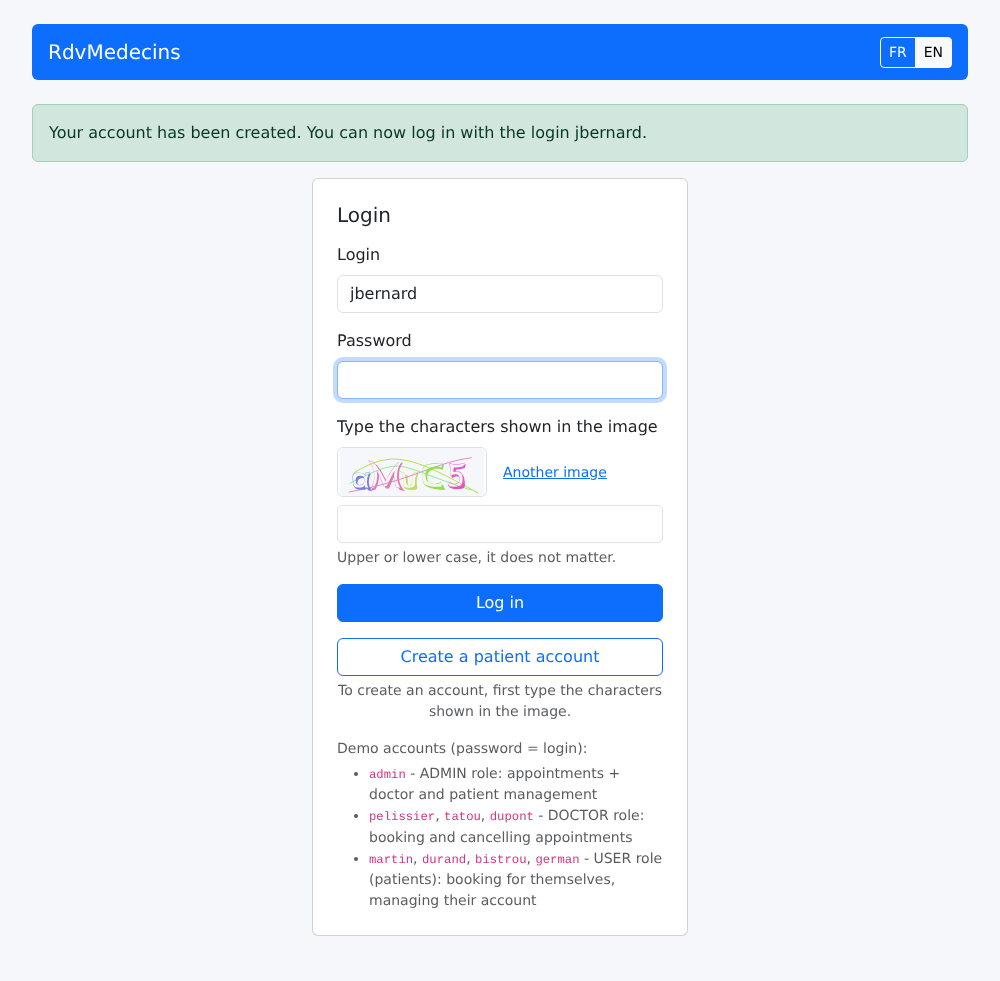
10.3.1. 登录页面
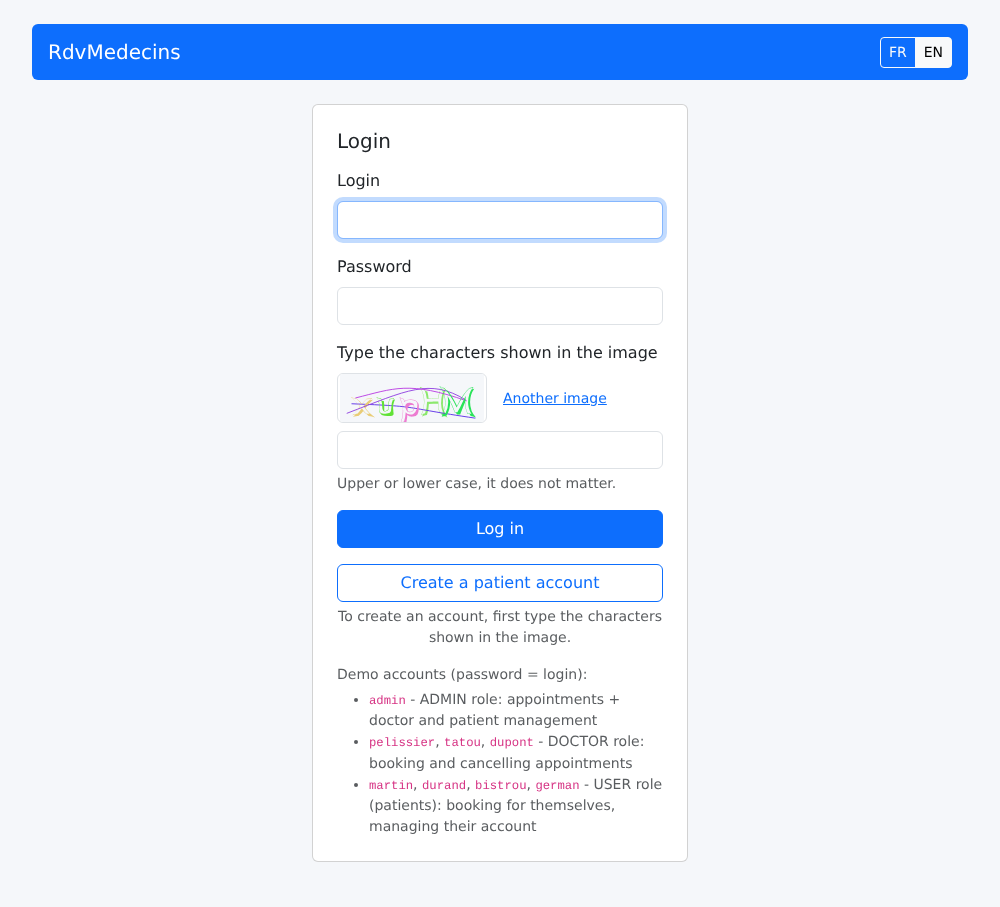
Image

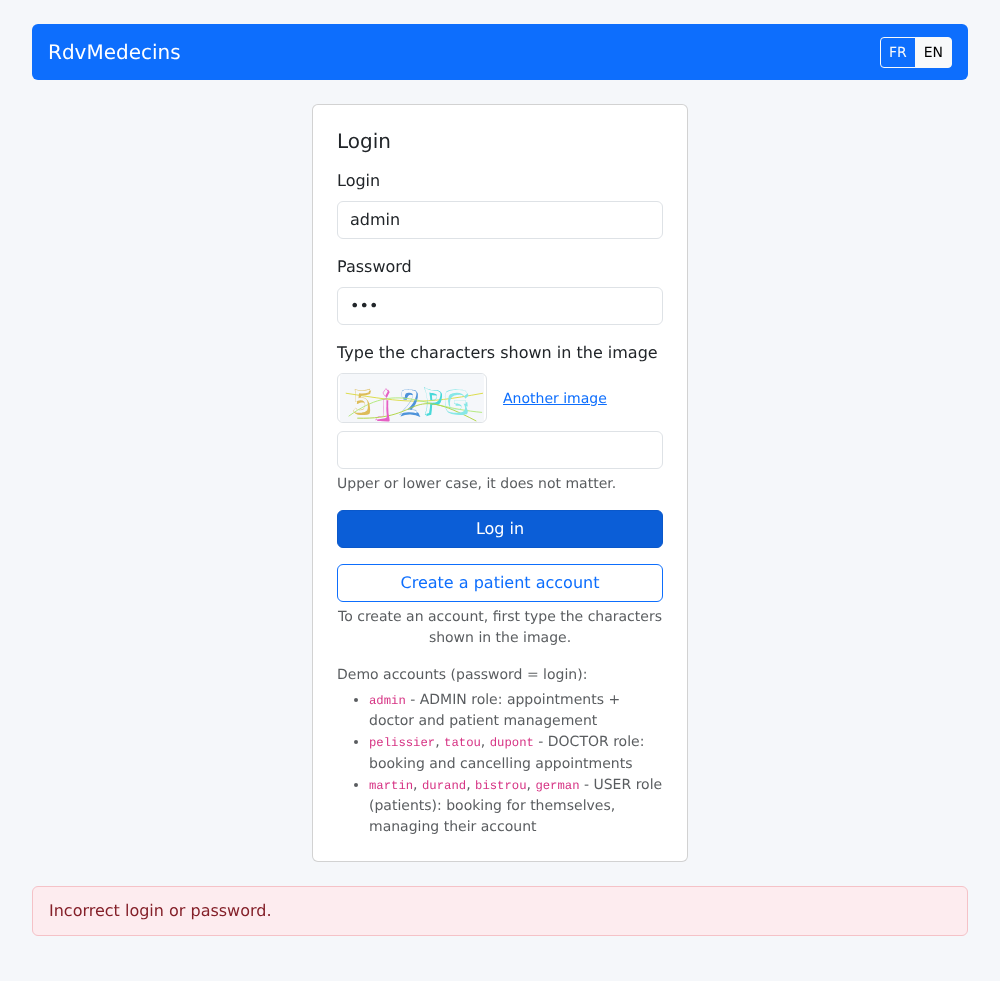
密码错误:页面底部会出现一条消息,并显示一张新图片(每张图片只能使用一次):
Image

10.3.2. 日程,以管理员和医生的视角

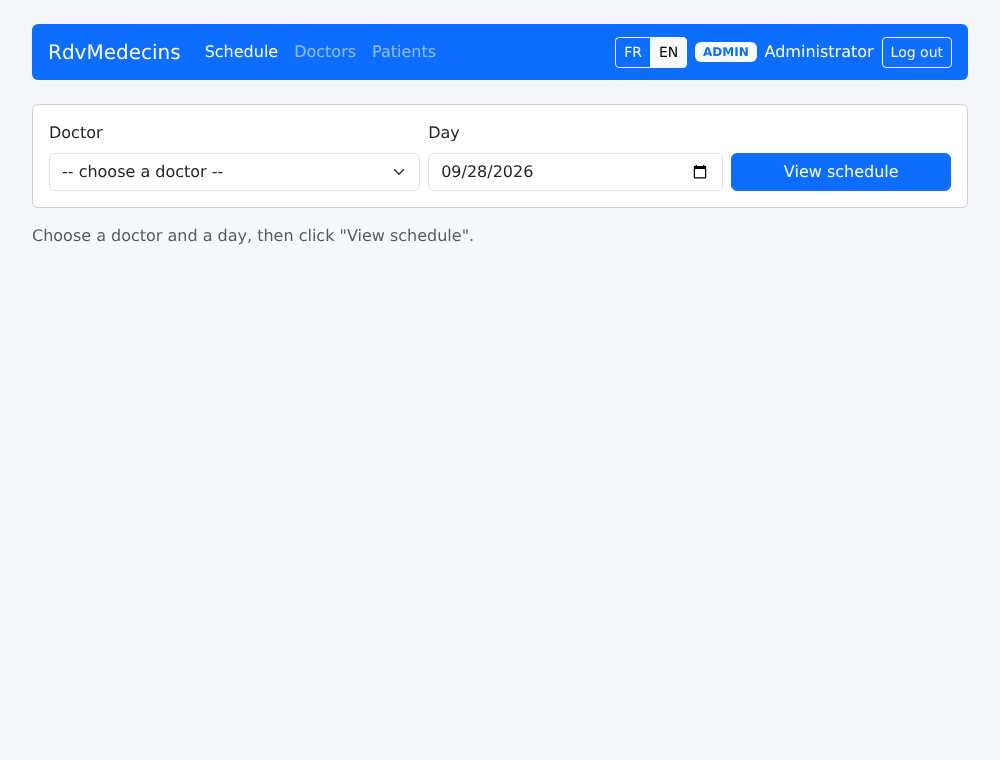
以 [admin] 身份登录时,你会进入日程页面:
Image

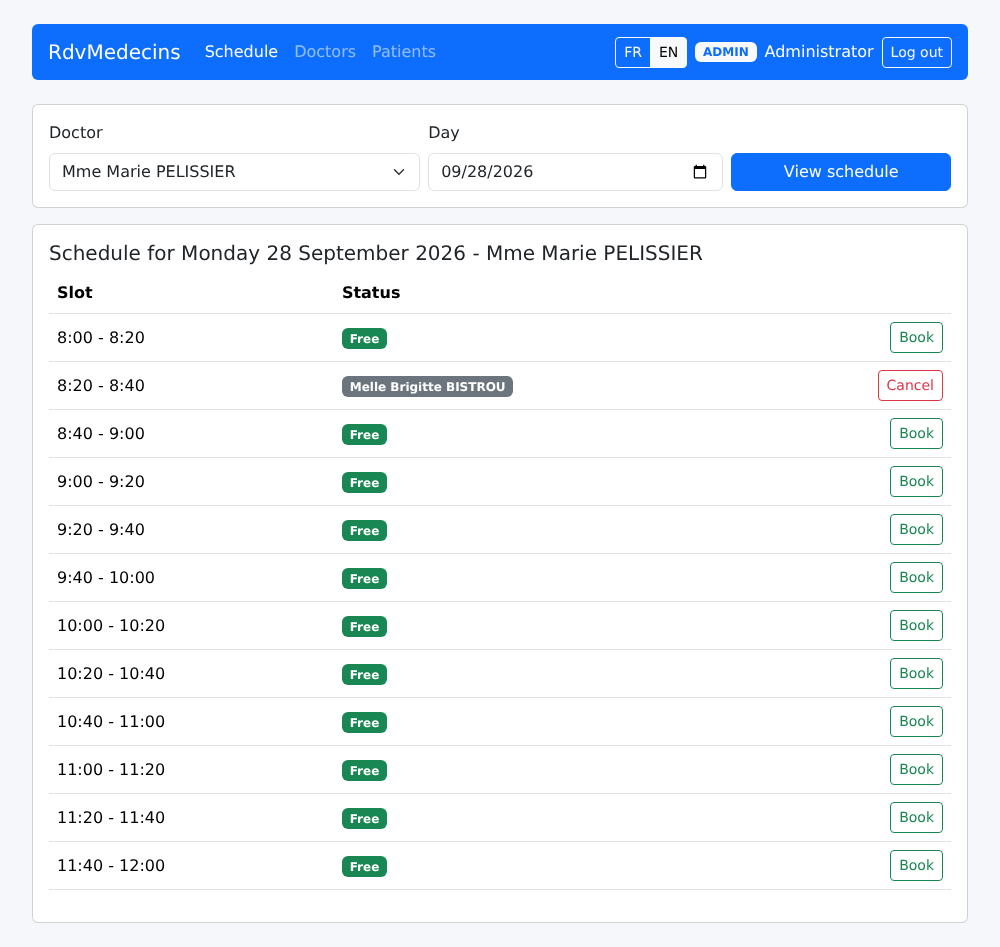
选择一位医生和一个日期,然后点击“View schedule”。URL 变为 [/schedule?doctorId=1&day=2026-09-28]:
Image

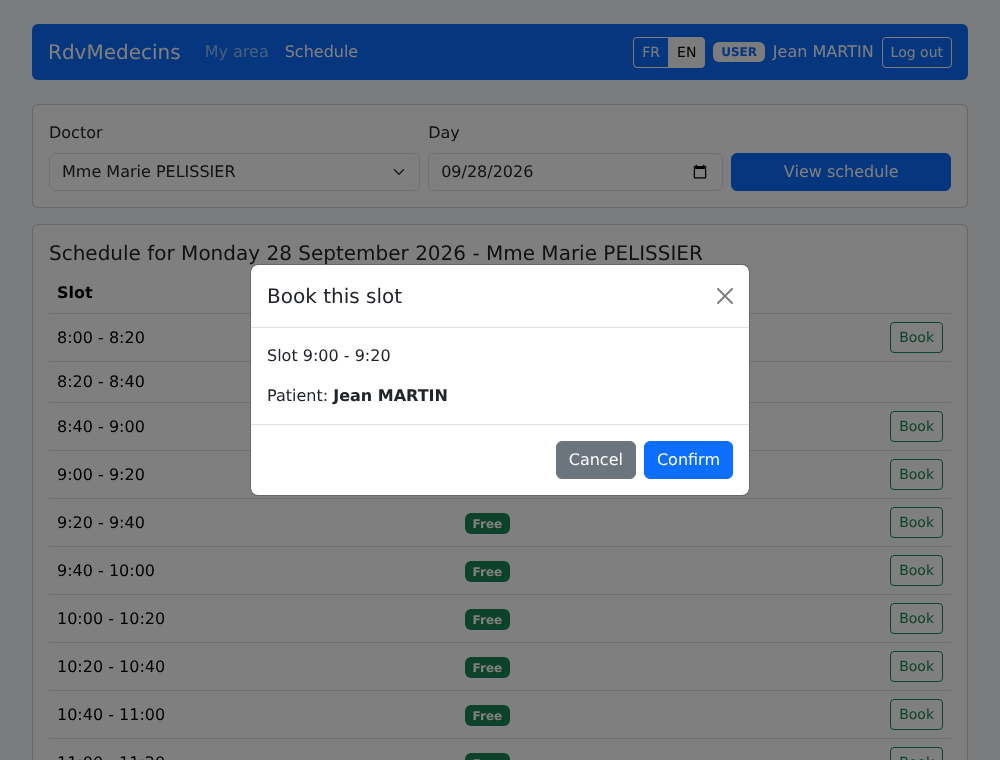
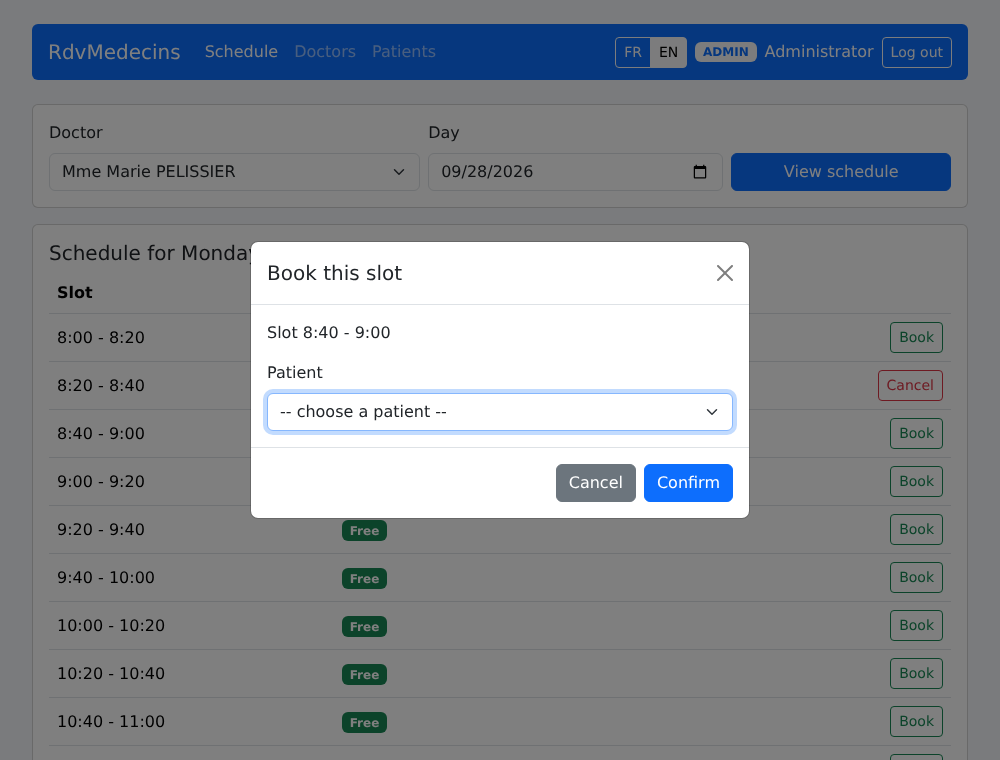
“Book”会打开预约窗口。URL 变为 [/schedule?doctorId=1&day=2026-09-28&book=3]:重新加载页面(F5)会重新打开同一个窗口。
Image

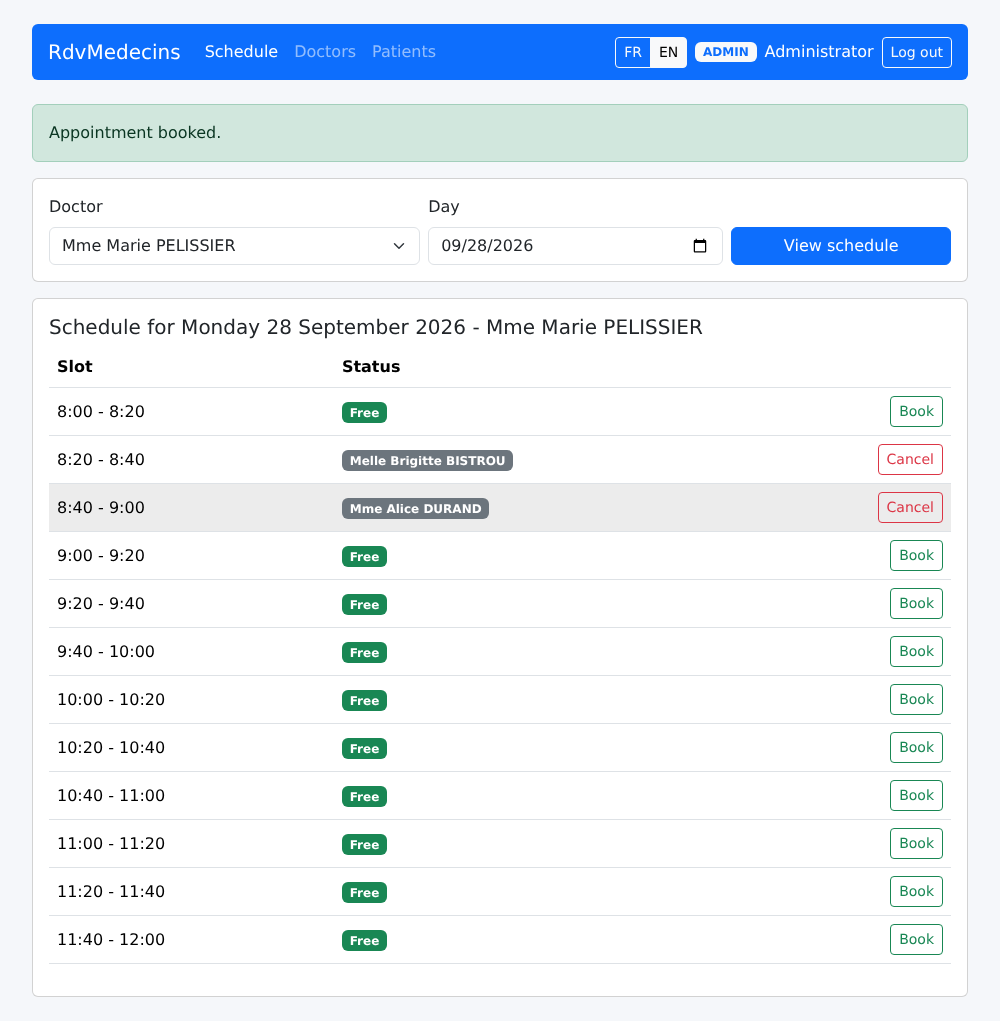
预约已保存:

Image

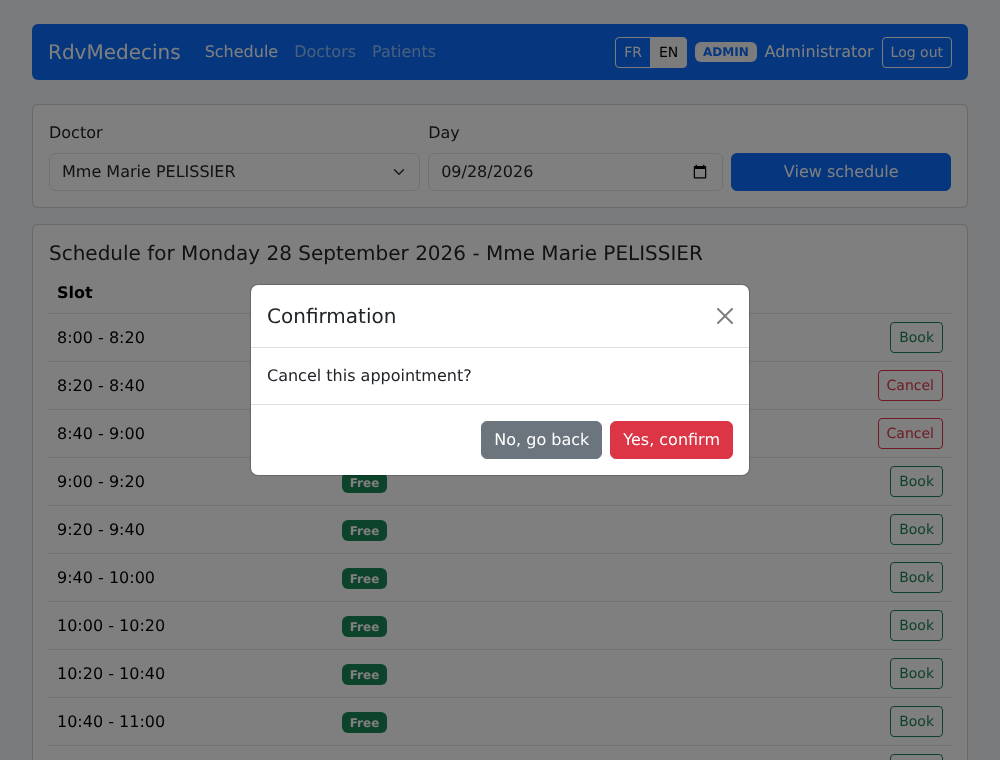
“Cancel”会要求确认:

Image

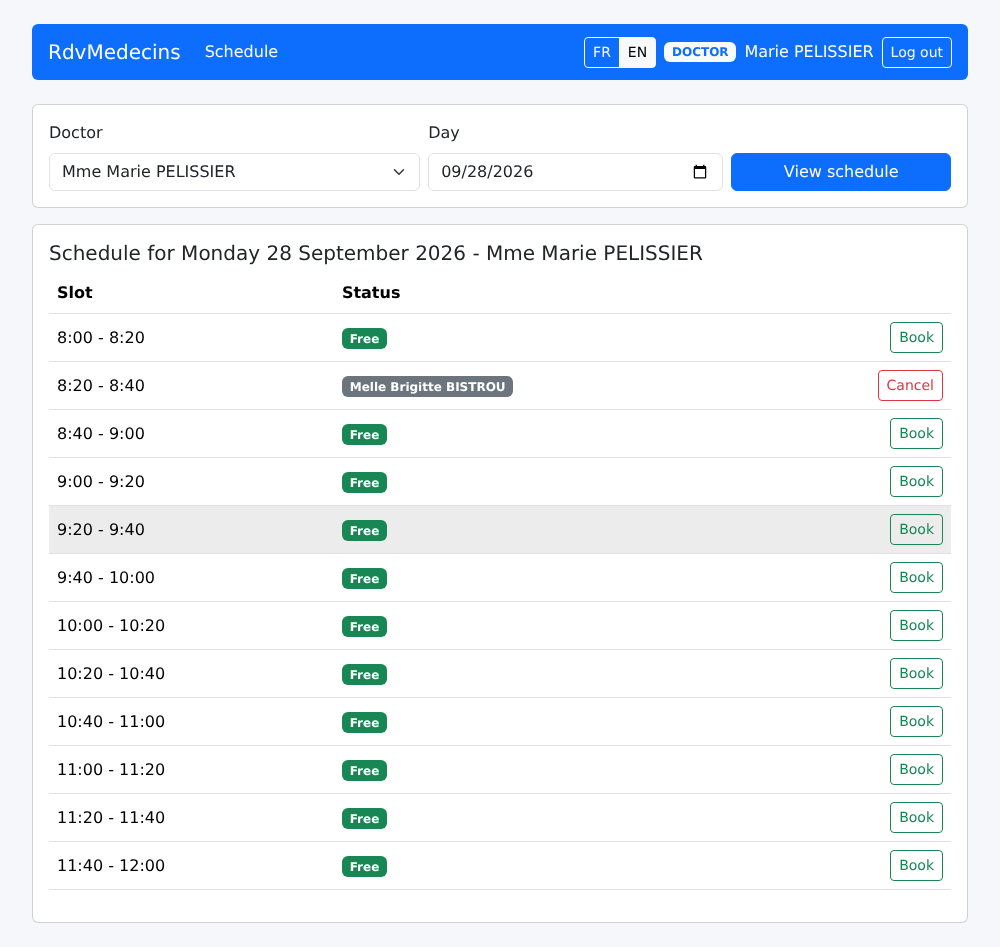
医生会被直接带到他自己的当日日程:

Image

10.3.3. 患者门户

一位患者([martin])进入“My area”:
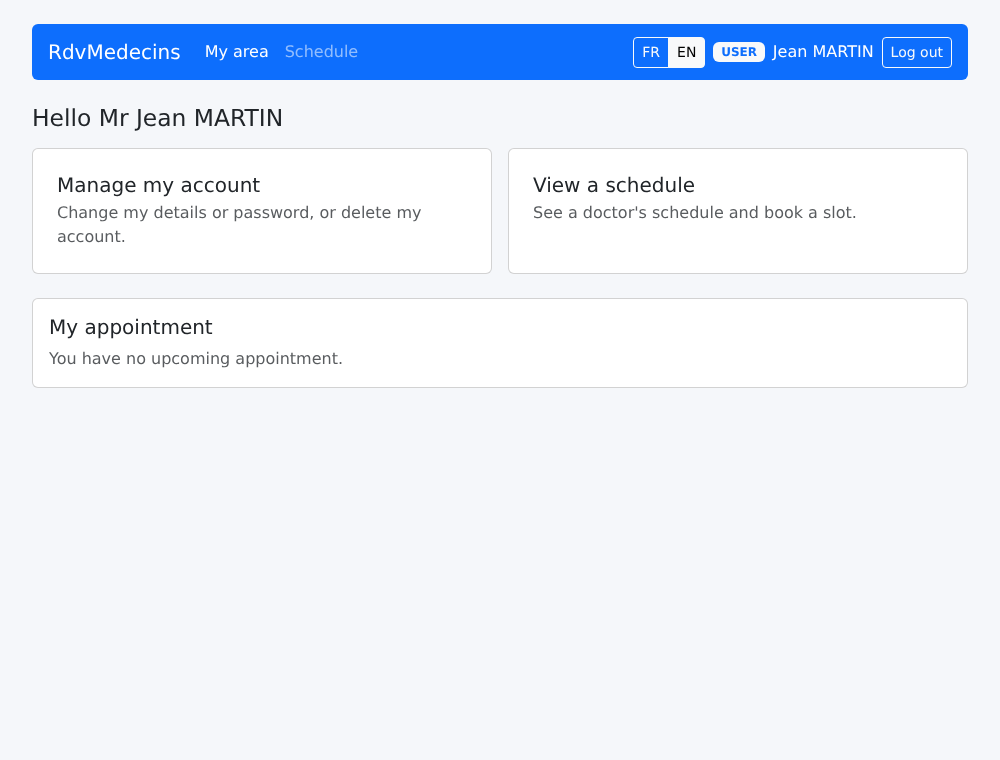
Image

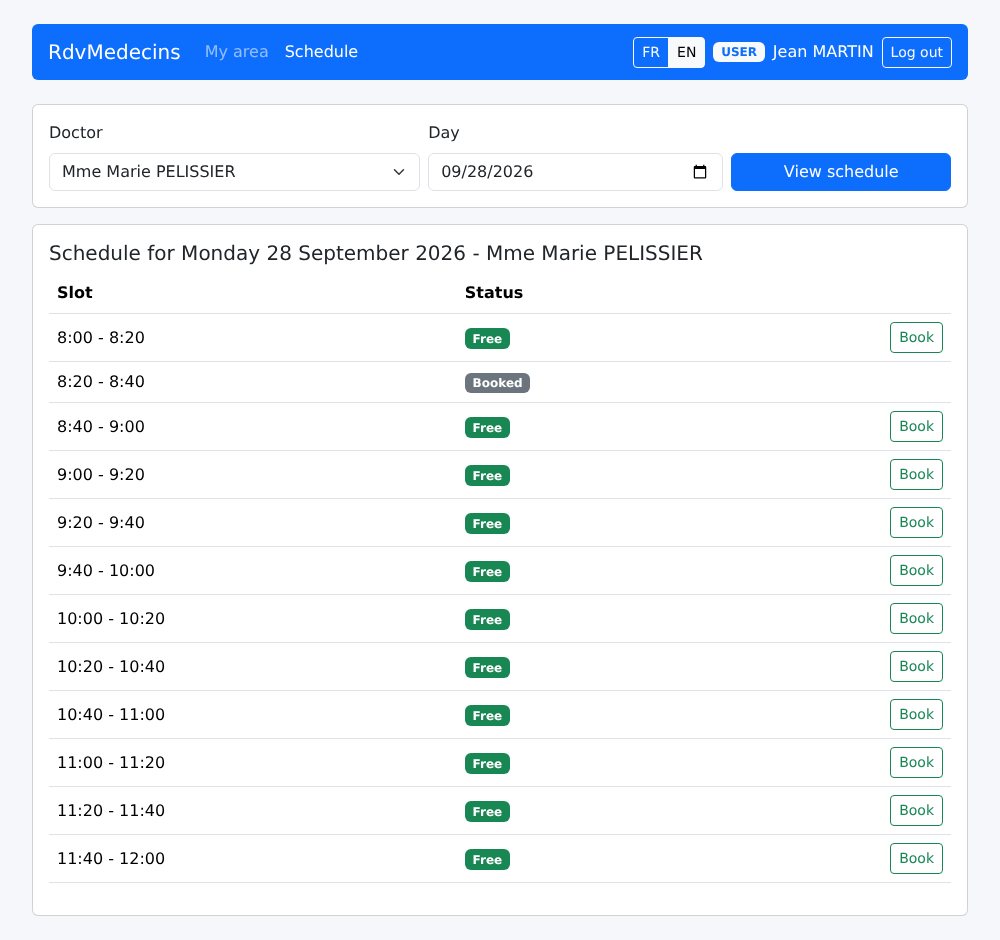
在日程中,其他患者的时间段旁边显示“Booked”:

Image

他无需选择患者,就能为自己预约:

Image

他的预约出现在他的姓名下;“Book”按钮不再可用(只能有一个未来的预约),并且有一条消息解释了原因:
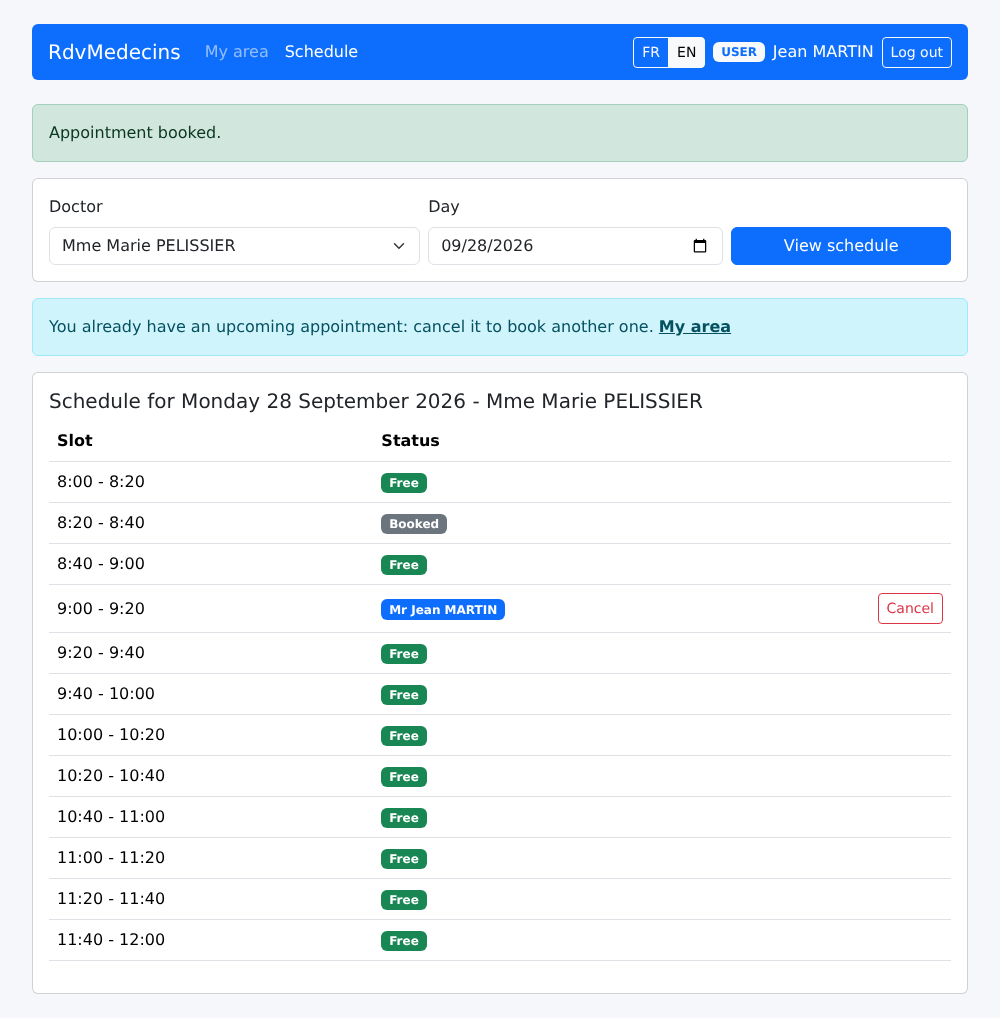
Image

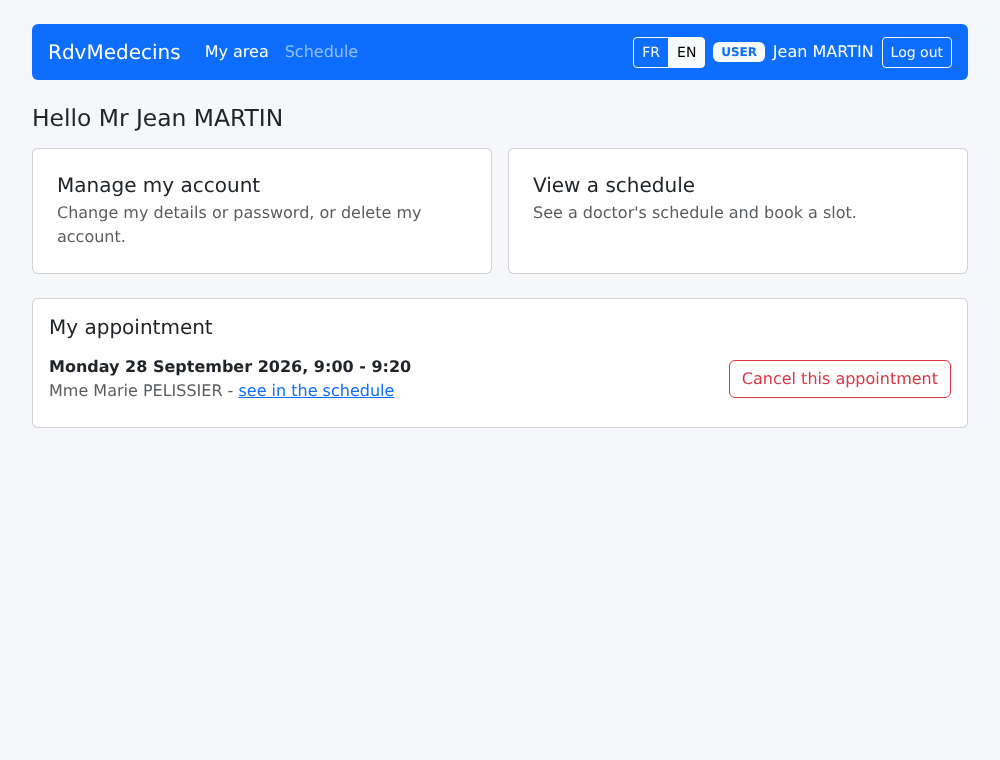
他的面板显示如下内容:

Image

“Manage my account”:任何修改都需要提供当前密码;错误来自服务器端:
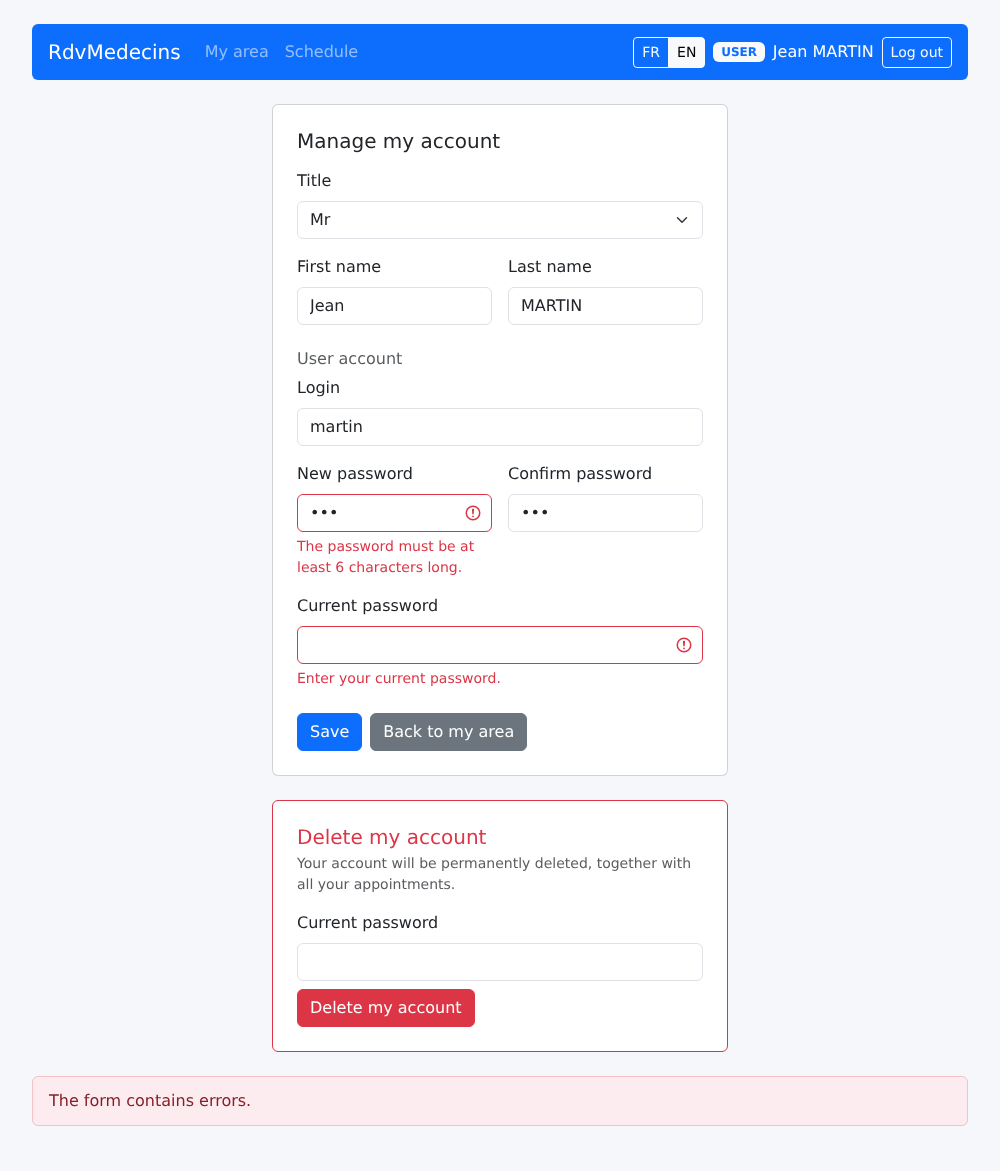
Image

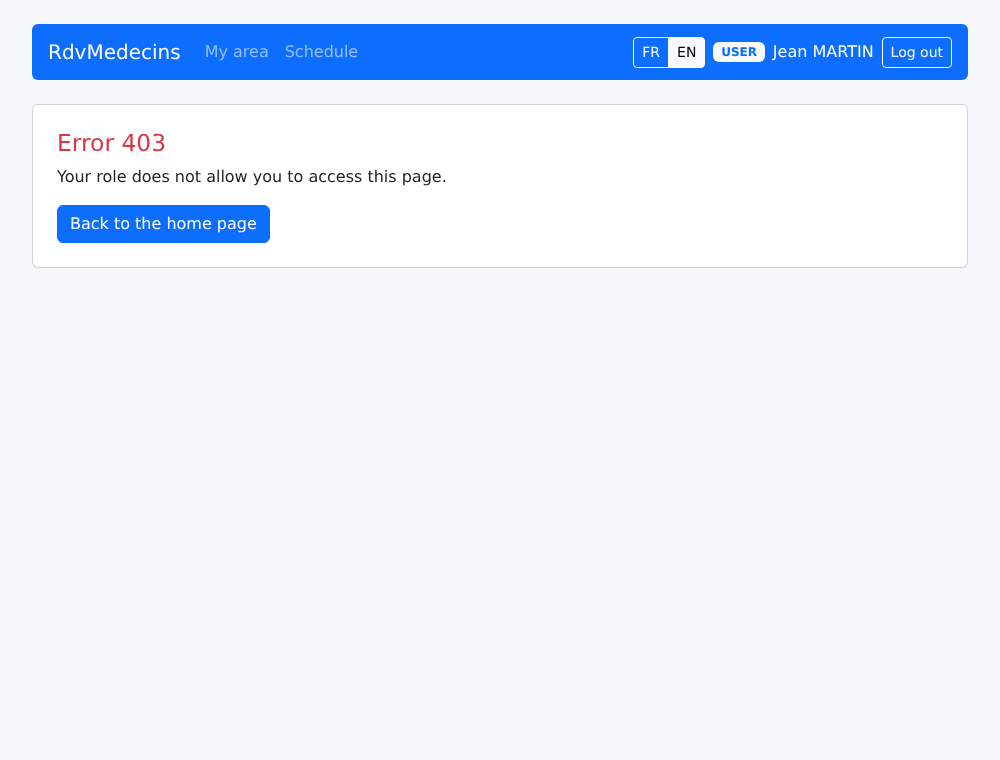
如果他输入专供管理员使用的地址 [/doctors]:

Image

10.3.4. 管理医生和客户

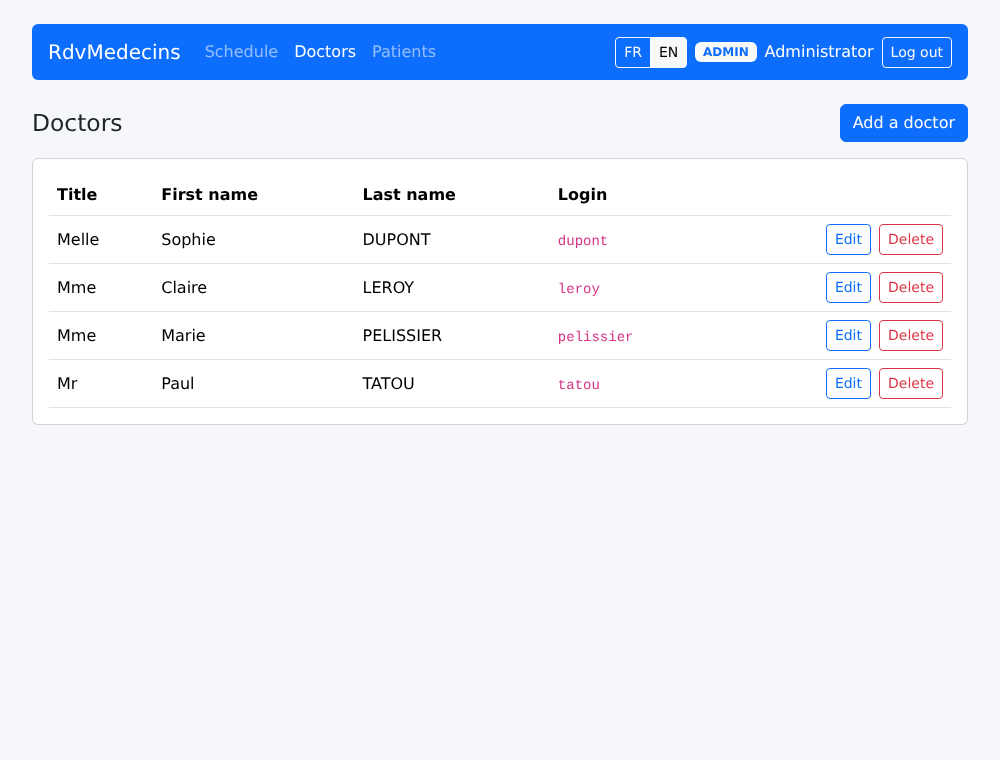
Image

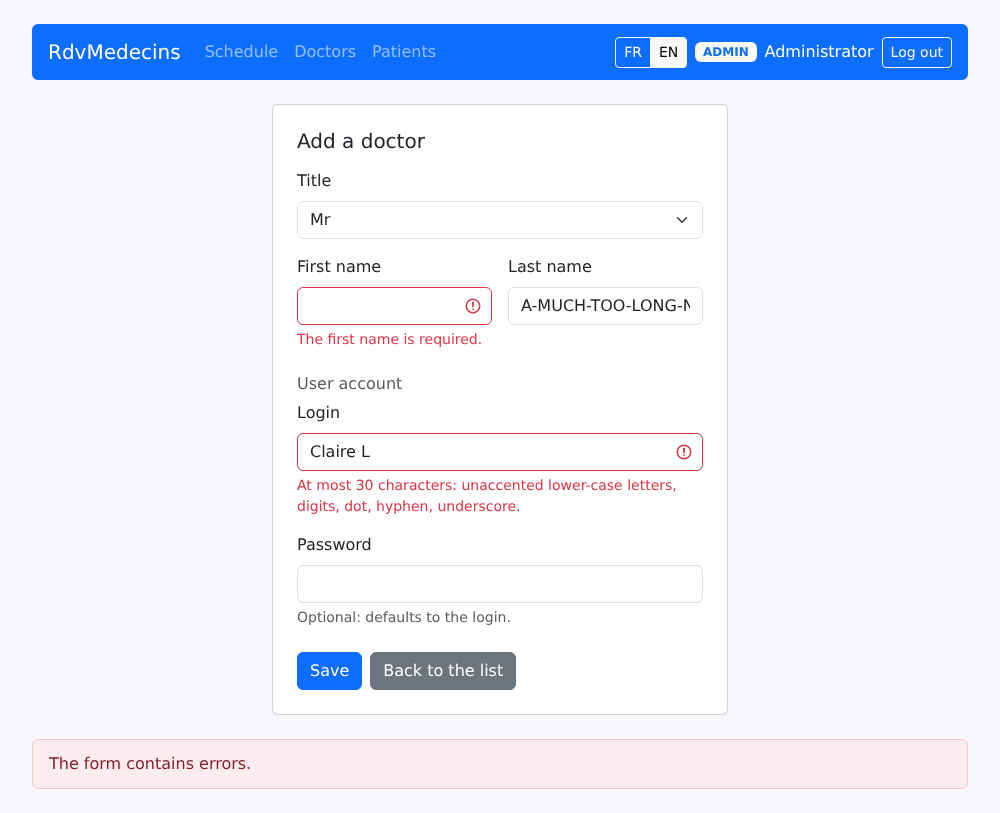
填写不正确的条目:

Image

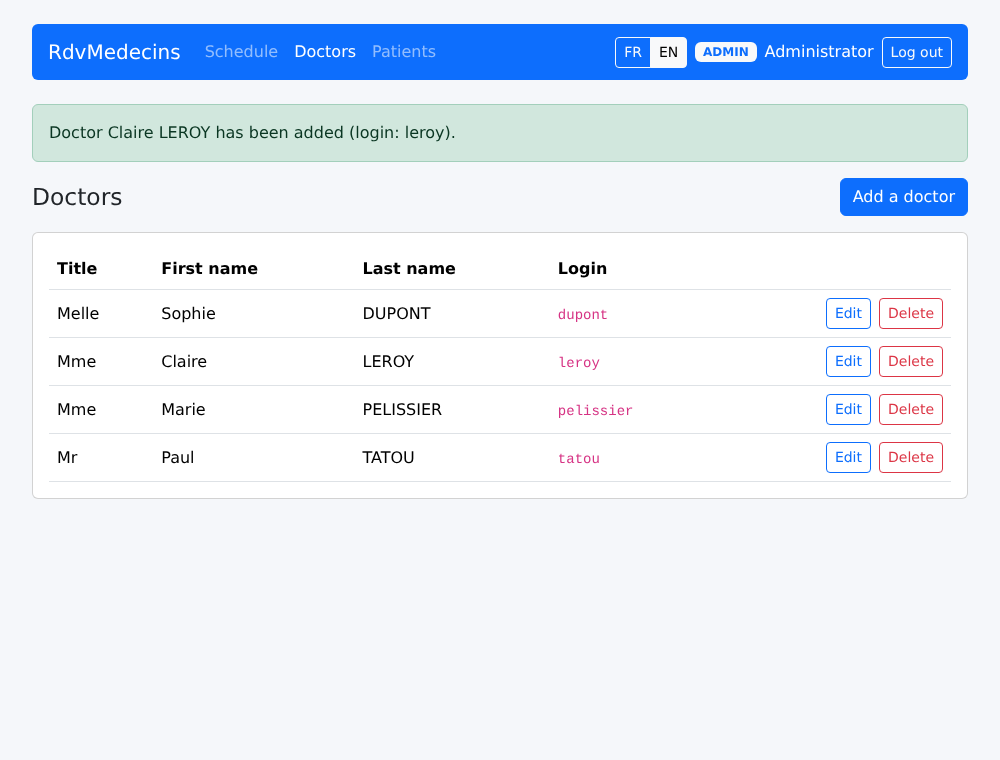
成功的添加:

Image

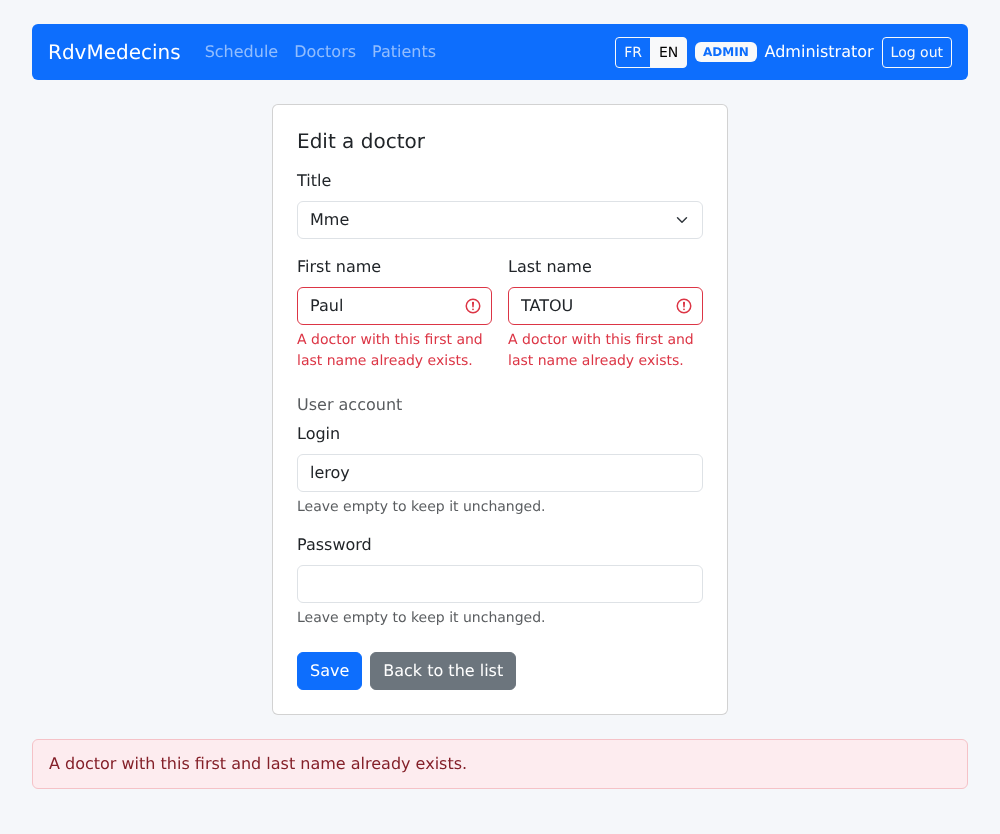
同名情况:

Image

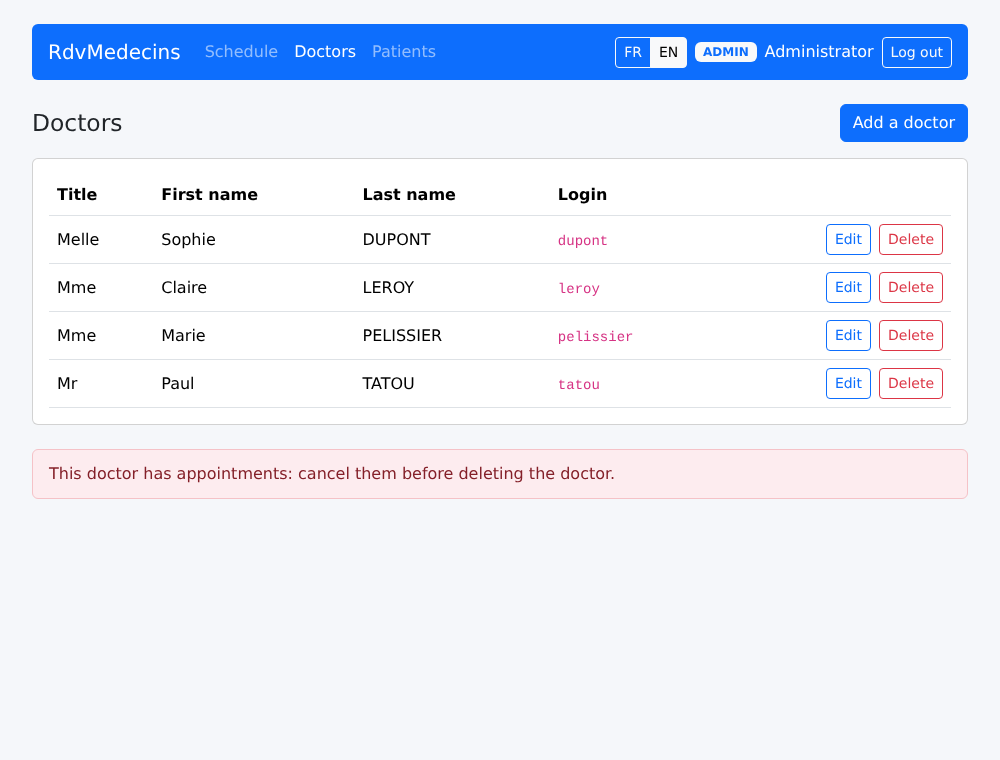
删除一位有预约日程的医生的请求被拒绝:

Image

10.3.5. 创建账户

在登录页面上,输入验证码,然后点击“Create a patient account”。填写不正确的表单随后会被服务器拒绝:
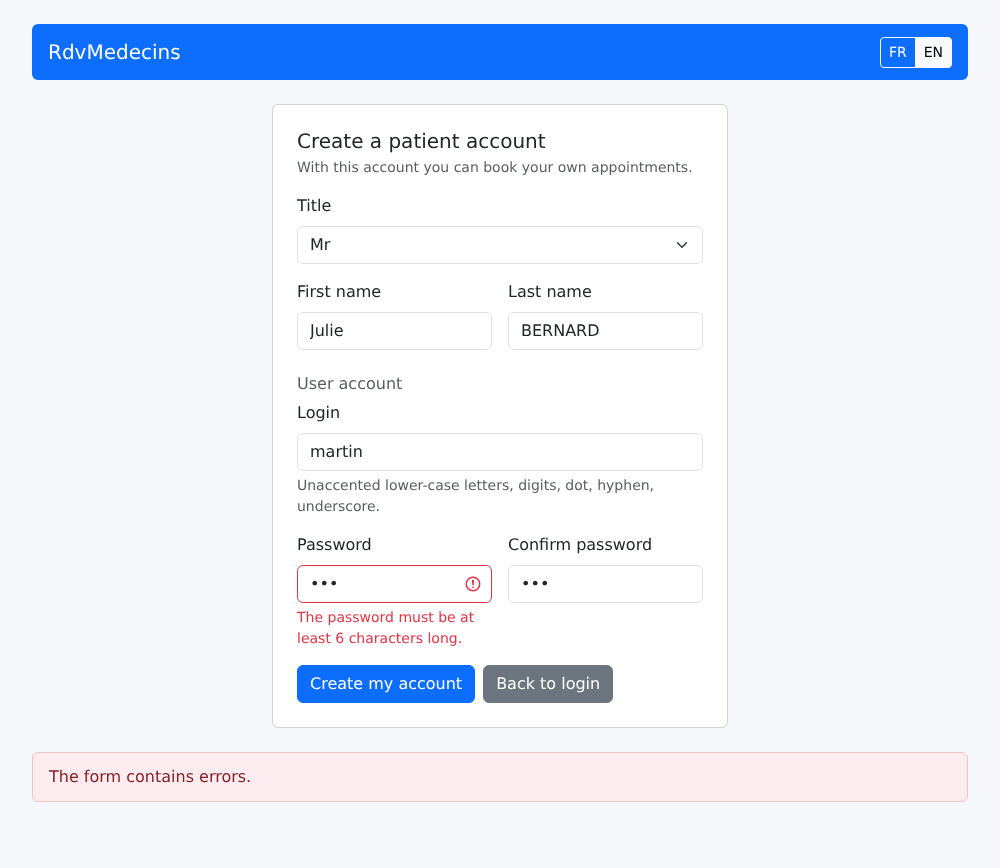
Image

账户创建完成后,返回登录页面;登录字段已预先填好:

Image

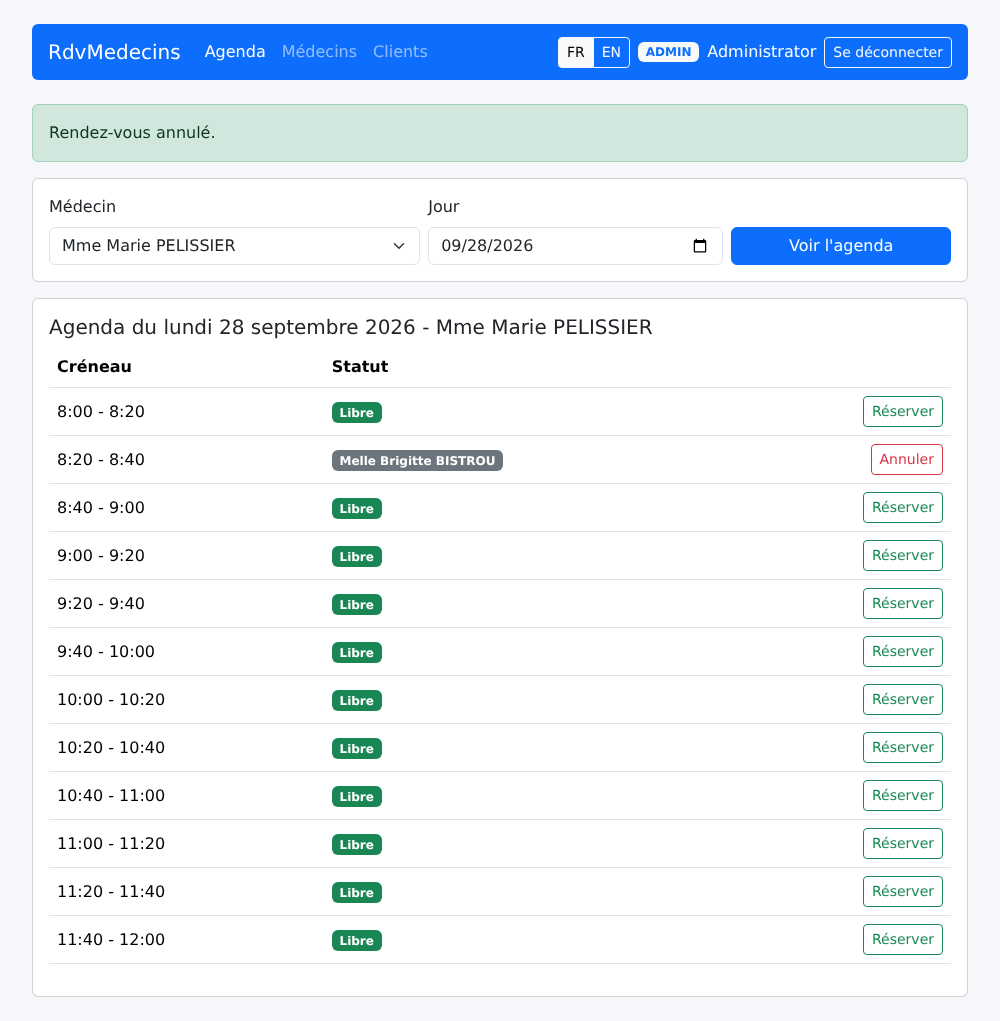
10.3.6. 法语界面

FR / EN 按钮会当场翻译页面,无需向服务器发送任何请求:
Image

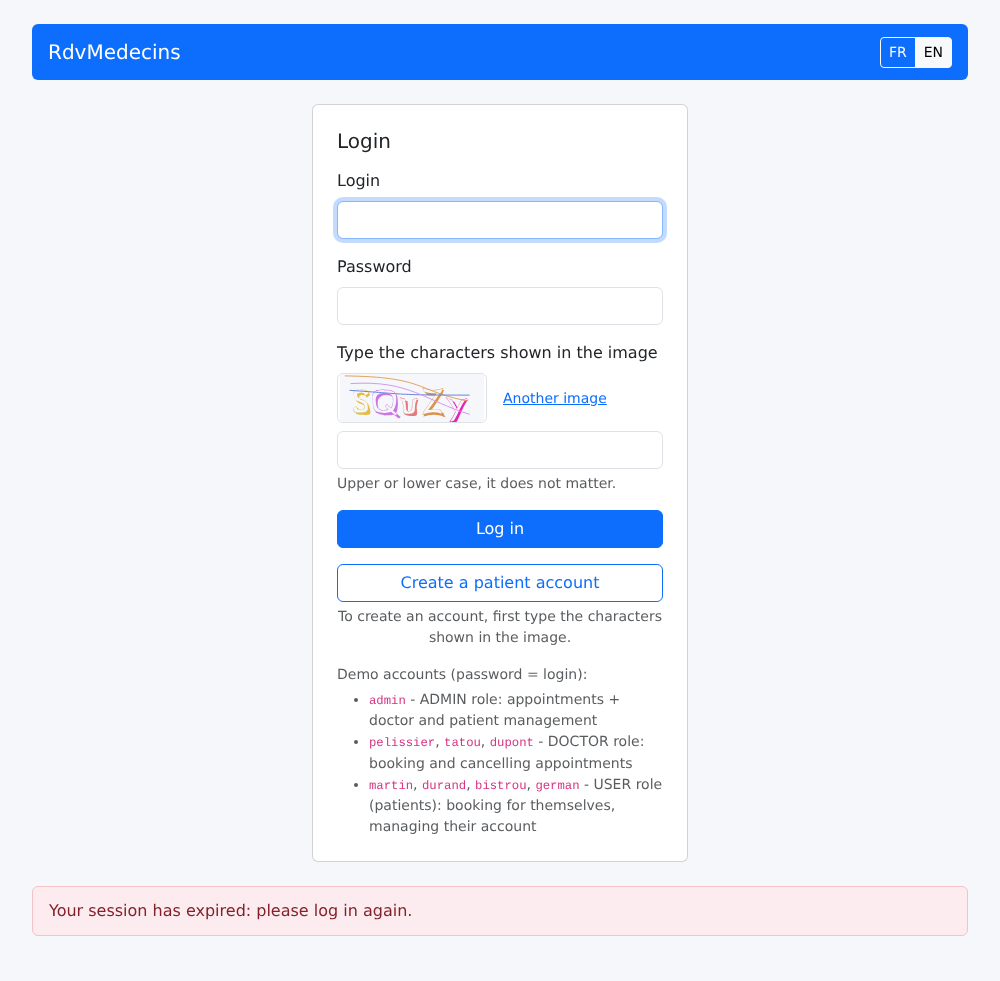
10.3.7. 会话过期,未知地址

如果令牌过期(或 Cookie 被删除),下一个请求会收到 401 响应;客户端被重定向到登录页面:
Image

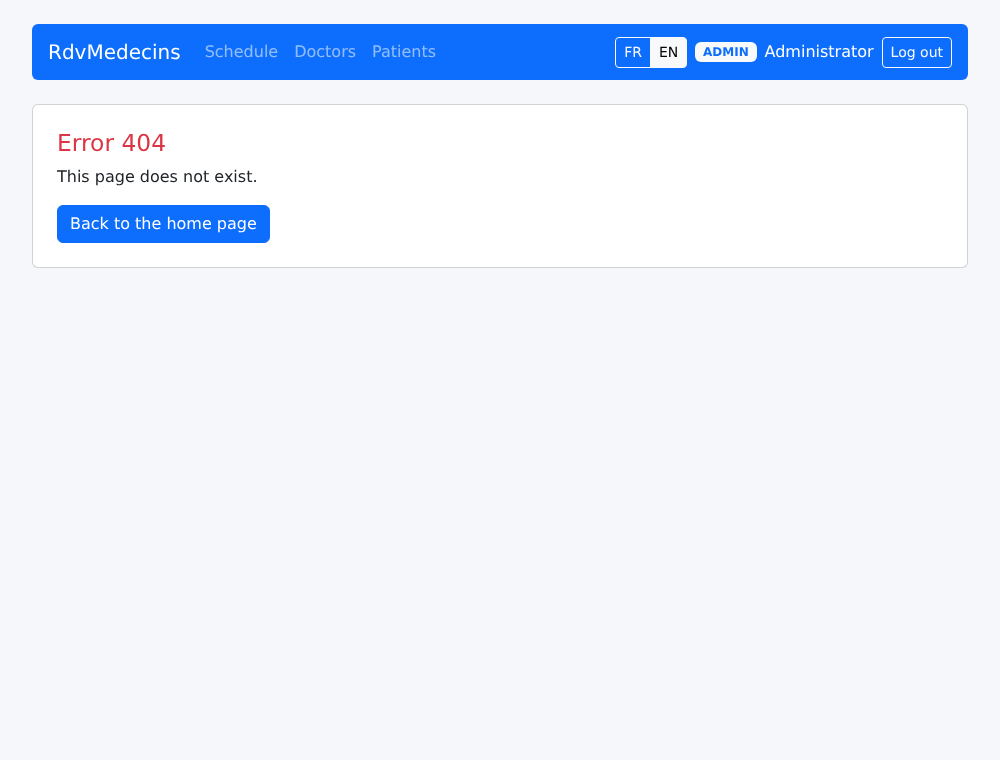
一个未知的地址:

Image

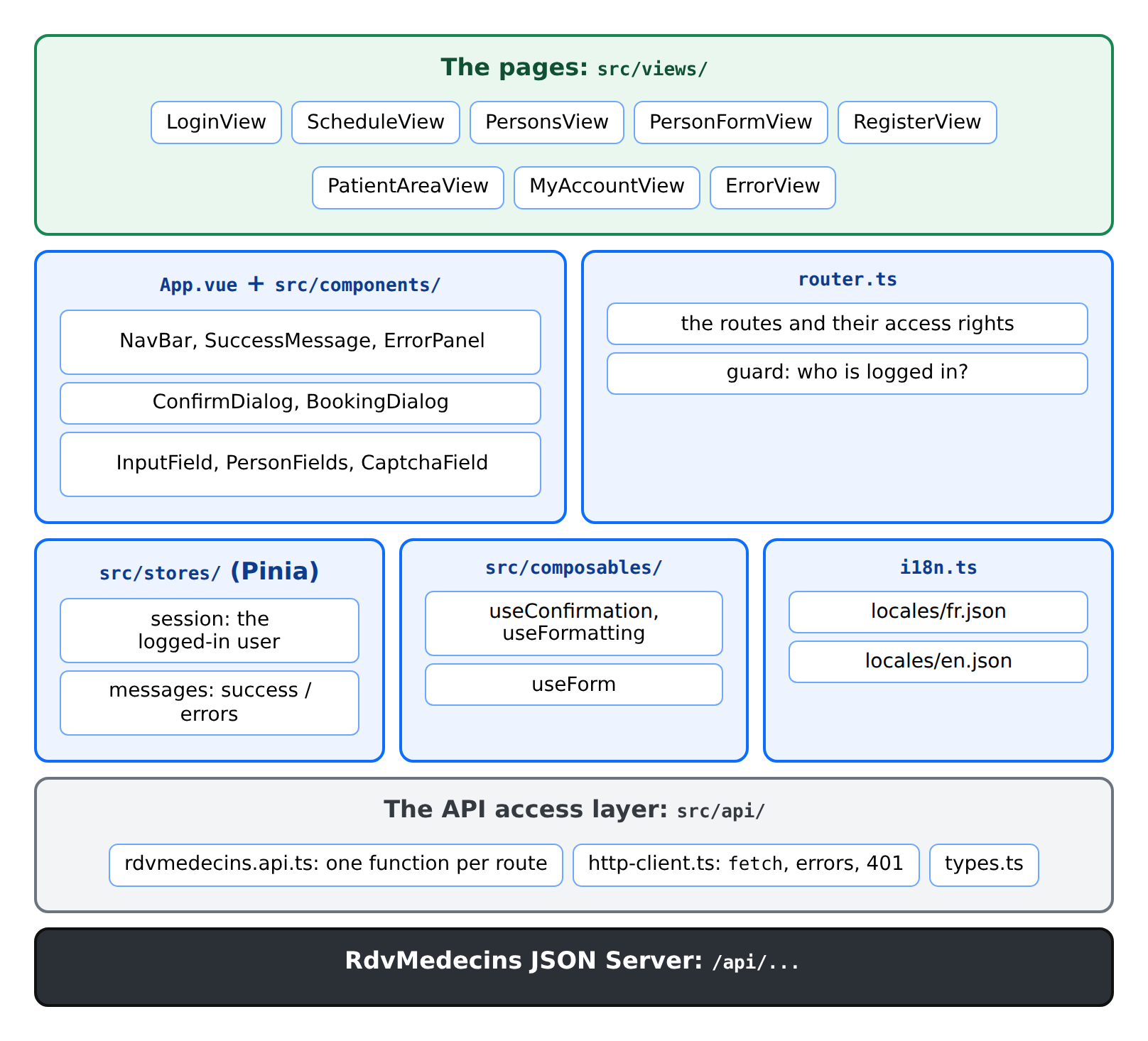
10.4. 客户端架构

Image

rdvmedecins-vuejs/
├── index.html             THE page of the application
├── public/favicon.svg     the tab icon
├── package.json, vite.config.ts, tsconfig.json, env.d.ts
└── src/
    ├── main.ts            the startup
    ├── App.vue            the layout shared by all the pages
    ├── styles.css
    ├── router.ts          the pages and their access rights
    ├── i18n.ts            the languages
    ├── locales/           fr.json, en.json
    ├── api/               the API access layer
    ├── stores/            session.ts, messages.ts
    ├── composables/       useConfirmation, useFormatting, useForm
    ├── components/        the reusable components
    └── views/             the pages

下表比较了 [NestJS] 课程中的 HTML 应用与本客户端:

HTML 应用(NestJS)
Vue.js 客户端
服务器生成每个页面([res.render])
服务器返回 JSON;[src/views/] 中的组件生成页面
[views/layout.hbs] 及其局部视图
[App.vue] 以及 [src/components/] 中的组件
控制器路由([@Controller('schedule')])
客户端路由([router.ts]);服务器只有 [/api/...] 路由
[JwtAuthGuard] 和 [RolesGuard] 重定向到 [/login] 或 403 页面
路由器的守卫;服务器保留自己的守卫,它们以 401 / 403 响应
存放在 Cookie 中的闪现消息
存放在 Pinia store 中的闪现消息
由服务器读取的词典,辅助函数 [{{t}}]
客户端上的词典,[vue-i18n];服务器只返回键
语言存放在 Cookie 中
语言存放在 [localStorage] 中
表单被拒绝:服务器重新加载页面
表单被拒绝:400/409 响应;客户端显示错误
确认窗口:一个小脚本,[public/js/app.js]
一个组件,[ConfirmDialog.vue]
该应用无需 JavaScript 也能运行
该应用本身就是 JavaScript

10.5. 项目配置

10.5.1. package.json

{
  "name": "rdvmedecins-vuejs",
  "version": "1.0.0",
  "description": "Vue.js client of the medical appointment booking application [RdvMedecins] - client of the JSON server [rdvmedecins-nestjs-json]",
  "private": true,
  "type": "module",
  "scripts": {
    "dev": "vite",
    "build": "vue-tsc --noEmit && vite build",
    "preview": "vite preview",
    "check": "vue-tsc --noEmit"
  },
  "dependencies": {
    "bootstrap": "^5.3.8",
    "pinia": "^3.0.4",
    "vue": "^3.5.22",
    "vue-i18n": "~11.3.2",
    "vue-router": "^4.6.3"
  },
  "devDependencies": {
    "@types/node": "^22.10.0",
    "@vitejs/plugin-vue": "^6.0.1",
    "@vue/tsconfig": "^0.8.1",
    "typescript": "~5.9.3",
    "vite": "^7.1.12",
    "vue-tsc": "^3.1.3"
  }
}

与示例中相同的库。多了一条命令:

  • 第 10 行:[npm run preview] 提供应用的编译版本(文件夹 [dist/],由 [npm run build] 生成),以便在部署之前对其进行验证。

10.5.2. vite.config.ts

// =========================================================================
// vite.config.ts
// -------------------------------------------------------------------------
//   - npm run dev   :开发服务器,位于 http://localhost:5173;
//                     /api/... 请求由代理转发给 JSON 服务器
//                     (8080 端口):页面和 API 具有相同的
//                     源,令牌 Cookie 可以正常传递;
//   - npm run build :编译后的应用,位于 dist/ 中。要把它放到
//                     生产环境,请把 dist/ 的内容复制到
//                     JSON 服务器的 client/ 文件夹中,之后由服务器自己提供服务
//                     (见“部署”一章)。
// =========================================================================

import { defineConfig } from 'vite';
import vue from '@vitejs/plugin-vue';

export default defineConfig({
  plugins: [vue()],
  server: {
    port: 5173,
    proxy: {
      '/api': 'http://localhost:8080',
    },
  },
  // npm run preview:提供 dist/(在 npm run build 之后),使用相同的代理
  preview: {
    port: 4173,
    proxy: {
      '/api': 'http://localhost:8080',
    },
  },
});
  • 第 21–23 行:把发往 [/api] 的请求代理到 JSON 服务器;
  • 第 26–31 行:[npm run preview] 使用的同一个代理。

一个重要的细节:应用使用“干净”的地址([/schedule]、[/my-area])。如果重新加载页面 [/schedule],浏览器会请求 [/schedule] 到 [Vite] 服务器。由于服务器找不到同名的文件,它会返回 [index.html] (这是它对单页应用的默认行为);应用随之启动,它的路由器显示日程页面。

10.5.3. tsconfig.json 和 env.d.ts

与示例中的相同,只是文件列表不同:

1
2
3
4
5
6
7
8
9
{
  "extends": "@vue/tsconfig/tsconfig.dom.json",
  "compilerOptions": {
    "types": ["vite/client"],
    "noUnusedLocals": true,
    "noUnusedParameters": true
  },
  "include": ["src/**/*.ts", "src/**/*.vue", "env.d.ts"]
}

10.6. 启动应用

10.6.1. index.html

<!doctype html>
<!--
  index.html - THE page of the application (Single Page Application).
  The server never sends any other: everything else is built in
  the browser by Vue.js, in <div id="app">. lang and title are
  updated by the application according to the language and the page displayed.
-->
<html lang="en">
<head>
  <meta charset="utf-8">
  <meta name="viewport" content="width=device-width, initial-scale=1">
  <link rel="icon" href="/favicon.svg" type="image/svg+xml">
  <title>RdvMedecins</title>
</head>
<body>
  <div id="app"></div>
  <!-- 没有 JavaScript,Vue.js 应用就什么也显示不了:我们在此给出提示 -->
  <noscript>RdvMedecins requires JavaScript. / RdvMedecins a besoin de JavaScript.</noscript>
  <script type="module" src="/src/main.ts"></script>
</body>
</html>
  • 第 12 行:标签页图标。[public/] 文件夹中的文件会原样提供,位于站点根目录;
  • 第 18 行:没有 [JavaScript],[Vue.js] 应用就什么也显示不了。而 [NestJS] 课程中的 HTML 应用,则无需 [JavaScript] 也能工作:这就是单页应用的取舍;
  • 第 19 行:应用程序。

10.6.2. src/main.ts

// =========================================================================
// main.ts - 应用的启动
// -------------------------------------------------------------------------
//   1. Bootstrap(CSS)和我们自己的少量样式;
//   2. Pinia(store)、vue-i18n(语言)、路由器;
//   3. 对来自任何请求的 401 响应的反应:
//      会话已过期——我们忘记该用户并返回
//      登录页面,同时附带一条消息;
//   4. 显示在 <div id="app"> 中。
// =========================================================================

import { createApp } from 'vue';
import { createPinia } from 'pinia';
import 'bootstrap/dist/css/bootstrap.min.css';
import './styles.css';
import App from './App.vue';
import { i18n } from './i18n';
import { router } from './router';
import { whenUnauthenticated } from './api/http-client';
import { useSessionStore } from './stores/session';
import { useMessagesStore } from './stores/messages';

const app = createApp(App);
app.use(createPinia());
app.use(i18n);
app.use(router);

whenUnauthenticated(() => {
  useSessionStore().forget();
  useMessagesStore().flash('error', 'ERRORS.SESSION_EXPIRED');
  router.push({ name: 'login' });
});

app.mount('#app');
  • 第 24–26 行:三个扩展:store、语言和路由器。[Pinia] 必须在路由器之前安装:路由器的守卫要用到 store;
  • 第 28–32 行:当任何请求收到 401 响应(会话过期、账户被删除等)时该怎么做:忘记该用户,为下一个页面准备好“您的会话已过期”消息,并重定向到登录页面。这一处理只在这里声明一次;函数 [whenUnauthenticated] 在 [http-client.ts] 中说明。

10.6.3. src/App.vue

<!--
  =========================================================================
  App.vue - the root component: the TEMPLATE common to all the pages
  -------------------------------------------------------------------------
  The equivalent of views/layout.hbs of the HTML application:
    - the navigation bar;
    - a success message at the TOP;
    - the current page (<RouterView>);
    - the error panel at the BOTTOM;
    - the confirmation dialog, once for the whole application.

  :key="String(route.name)" on <RouterView>: when going from one route to
  ANOTHER (from /doctors to /clients, for example), the page component
  is recreated; when only the query changes (/schedule?day=...), it is
  kept, and it is the component that follows the URL.
  =========================================================================
-->
<script setup lang="ts">
import { RouterView, useRoute } from 'vue-router';
import NavBar from './components/NavBar.vue';
import SuccessMessage from './components/SuccessMessage.vue';
import ErrorPanel from './components/ErrorPanel.vue';
import ConfirmDialog from './components/ConfirmDialog.vue';

const route = useRoute();
</script>

<template>
  <div class="container py-4">
    <NavBar />
    <SuccessMessage />
    <RouterView :key="String(route.name)" />
    <ErrorPanel />
  </div>
  <ConfirmDialog />
</template>

所有页面共用的模板,相当于 [views/layout.hbs]:

  • 第 30 行:导航栏;
  • 第 31 行:顶部的成功消息;
  • 第 32 行:当前页面。[:key] 属性:当组件的 key 变化时,[Vue.js] 会销毁它并创建一个新的。以路由名称作为 key 时,从 [/doctors] 切换到 [/clients] (两条不同的路由,由同一个组件显示)会重新创建页面,页面也会重新加载其数据。而当只有 [query] 变化时(变为 [/schedule?day=...]),页面会被保留,并且正是这个页面跟随它的 URL;
  • 第 33 行:错误区域,位于底部;
  • 第 35 行:确认窗口,在整个应用中只显示一次。

10.6.4. src/styles.css

/* =========================================================================
   styles.css - a few settings on top of Bootstrap
   (taken from public/css/styles.css of the HTML application)
   ========================================================================= */

body {
  background-color: #f5f7fa;
}

.free-slot:hover {
  background-color: #e9f7ef;
}

/* -------------------------------------------------------------------------
   .error-panel: the error messages, at the bottom of the page, on a light pink
   background (see components/ErrorPanel.vue).
   position: sticky + bottom: if the page is taller than the window, the
   panel stays stuck to the bottom of the window instead of disappearing below the
   fold - without ever covering the content when the page is
   short. z-index: above the grey backdrop of the modal dialogs.
   pointer-events: none: the panel contains nothing clickable; if it
   overlaps a button, the click goes through.
   ------------------------------------------------------------------------- */
.error-panel {
  position: sticky;
  bottom: 1rem;
  z-index: 1060;
  pointer-events: none;
  margin-top: 1.5rem;
  padding: 0.75rem 1rem;
  background-color: #fdecef; /* 浅粉色 */
  border: 1px solid #f5c2c7;
  border-radius: 0.375rem;
  color: #842029;
}

/* 患者“My area”页面的两个主要选项 */
.option-card {
  transition: border-color 0.15s, box-shadow 0.15s;
}

.option-card:hover {
  border-color: #0d6efd;
  box-shadow: 0 0.25rem 0.75rem rgba(13, 110, 253, 0.15);
}

/* 验证码图片(150 x 50 像素的 SVG) */
.captcha-image svg {
  display: block;
  border: 1px solid #dee2e6;
  border-radius: 0.375rem;
}

HTML 应用的样式,外加一处新增:

  • 第 28 行:错误区域会“粘”在窗口底部,可能会覆盖某个按钮(例如在较短页面中位于中央的确认窗口);它不包含任何可点击的内容,点击会直接穿过它。

10.7. API 访问层

10.7.1. src/api/types.ts

黑盒一章中描述的 API 的 JSON 对象,被翻译成 [TypeScript] 接口:

// =========================================================================
// api/types.ts - 与服务器交换的 JSON 对象
// -------------------------------------------------------------------------
// 把“服务器,一个黑盒”一章中描述的 API
// 翻译成 TypeScript 接口。这样,编译器就能检查客户端
// 只使用真正存在的字段。
// =========================================================================

export type Role = 'ADMIN' | 'DOCTOR' | 'USER';

// POST /api/auth/login、GET /api/auth/me、PUT /api/my-account
export interface User {
  login: string;
  name: string; // 显示名称:"Marie PELISSIER"
  role: Role;
}

// GET /api/captcha
export interface Captcha {
  id: string;
  svg: string;
}

// 一个称谓、一个名、一个姓
export interface Identity {
  title: string;
  firstName: string;
  lastName: string;
}

// 一位医生或一位客户:GET /api/doctors、GET /api/clients/:id……
export interface Person extends Identity {
  id: number;
  version: number; // 乐观锁:随更新一起发回
  login?: string; // 仅限 ADMIN
}

// 创建 / 更新一个人员时发送的内容(ADMIN)
export interface PersonData extends Identity {
  login: string; // '' = 默认值(创建时)或保持不变(更新时)
  password: string; // 同上
  version?: number;
}

export interface Slot {
  id: number;
  startHour: number;
  startMinute: number;
  endHour: number;
  endMinute: number;
}

// 日程的一行,带有已登录用户的权限
export interface ScheduleSlot extends Slot {
  free: boolean;
  patient: Identity | null; // null:空闲,或已被另一位患者预约
  mine: boolean; // 已登录患者的预约
  bookable: boolean;
  appointmentId: number | null; // 如果用户可以取消,则会填入
}

// GET /api/schedule?doctorId=...&day=...
export interface Schedule {
  doctor: Person;
  day: string; // "yyyy-MM-dd"
  slots: ScheduleSlot[];
  info: string | null; // 翻译键(已有预约的患者)
}

// GET /api/my-area
export interface MyArea {
  patient: Identity;
  appointments: { id: number; day: string; slot: Slot; doctor: Person }[];
}

// GET /api/my-account
export interface MyAccount extends Identity {
  login: string;
  version: number;
}

// PUT /api/my-account
export interface MyAccountUpdate extends Identity {
  login: string;
  password: string; // '' = 保持不变
  confirmation: string;
  currentPassword: string;
  version: number;
}

// POST /api/register
export interface Registration extends Identity {
  login: string;
  password: string;
  confirmation: string;
}
  • 第 32 行:一个接口可以扩展另一个接口:[Person] 是一个 [Identity] ,另外还有 ID、版本,以及对 ADMIN 而言的登录名;
  • 第 54 行:日程中的一个条目:一个时间段,加上已登录用户的权限;
  • 第 39 行及其后:客户端发送给服务器的内容。

10.7.2. src/api/http-client.ts

示例 19 中的 [request] 函数([common/api.ts]),对 401 响应进行集中处理:

// =========================================================================
// api/http-client.ts - 发送所有发往 API 的请求的函数
// -------------------------------------------------------------------------
// 取自示例的 common/api.ts,并有一项新功能:
// 对 401 响应的集中处理。
//
// 401 可能随时出现:令牌已过期(2 小时)、
// 账户已被删除、服务器已用另一个密钥
// 重启……与其在每个组件中处理这种情况,不如
// 通知一个在启动时注册的函数(见 main.ts),由它忘记
// 该用户并把页面送回登录页面。
// =========================================================================

export class ApiError extends Error {
  constructor(
    public readonly statusCode: number, // 0:服务器没有响应
    public readonly key: string, // 翻译键:'ERRORS.LOGIN_TAKEN'
    public readonly params: Record<string, string> = {},
    public readonly fields: Record<string, string> = {}, // 每个字段的错误
  ) {
    super(key);
    this.name = 'ApiError';
  }
}

// 每次收到 401 响应时调用的函数(见 main.ts)
let onUnauthenticated: (error: ApiError) => void = () => {};

export function whenUnauthenticated(callback: (error: ApiError) => void): void {
  onUnauthenticated = callback;
}

type Method = 'GET' | 'POST' | 'PUT' | 'DELETE';

export interface RequestOptions {
  // 公开路由(登录、验证码等)以及 GET /api/auth/me
  // 自行处理 401:不做自动重定向
  ignore401?: boolean;
}

export async function request<T>(method: Method, url: string, body?: unknown, options: RequestOptions = {}): Promise<T> {
  let response: Response;
  try {
    response = await fetch(`/api${url}`, {
      method,
      headers: body !== undefined ? { 'Content-Type': 'application/json', Accept: 'application/json' } : { Accept: 'application/json' },
      body: body !== undefined ? JSON.stringify(body) : undefined,
    });
  } catch {
    throw new ApiError(0, 'ERRORS.SERVER_UNREACHABLE');
  }

  // 先作为文本读取再转换:空响应,或者不是
  // JSON 的响应(服务器已停止:由 Vite 代理返回),不能
  // 使应用崩溃
  const text = await response.text();
  let data: unknown = null;
  try {
    data = text ? JSON.parse(text) : null;
  } catch {
    data = null;
  }

  if (response.ok) {
    return data as T;
  }

  const e = (data ?? {}) as { key?: string; params?: Record<string, string>; fields?: Record<string, string> };
  const error = new ApiError(
    response.status,
    // 没有键:返回响应的不是我们的服务器,而是代理
    // (Vite:不带正文的 500;nginx:502、504 等)
    e.key ?? (response.status >= 500 ? 'ERRORS.SERVER_UNREACHABLE' : 'ERRORS.SERVER_ERROR'),
    e.params,
    e.fields,
  );
  if (response.status === 401 && !options.ignore401) {
    onUnauthenticated(error);
  }
  throw error;
}
  • 第 14–23 行:请求错误:HTTP 状态码、消息键、参数、每个字段的错误;
  • 第 27 行:每次收到 401 响应时要调用的函数。它起初什么也不做;[main.ts] 通过 [whenUnauthenticated] 提供一个。为什么不在这里直接调用路由器?因为 API 访问层不应该了解任何有关页面的事:它只发出错误信号,由应用来决定;
  • 第 35–39 行:有些请求本来就预期会出现 401,并自行处理:密码错误([POST /api/auth/login] 会返回 401),或者“谁已登录?”这个问题([GET /api/auth/me],无人登录时返回 401)。对于这些请求,不做自动重定向;
  • 第 46 行:请求头 [Accept] 告诉服务器期望的响应格式;
  • 第 50 行:完全没有响应;
  • 第 73 行:不含键的响应并非来自我们的服务器:当 JSON 服务器宕机时,由代理来响应([Vite] 的代理返回不带正文的 500 错误;生产环境中的代理,如 [nginx] ,则返回 502 或 504);
  • 第 77–79 行:一个意外的 401:我们通知应用,然后像处理其他错误一样拒绝该 Promise。

10.7.3. src/api/rdvmedecins.api.ts

每个 API 路由对应一个函数:

// =========================================================================
// api/rdvmedecins.api.ts - API 的每个路由对应一个函数
// -------------------------------------------------------------------------
// 客户端的“数据访问层”:组件调用这些带类型的
// 函数,而对 URL、fetch 或 JSON 一无所知。如果 API
// 发生变化,只需修改这个文件。
// =========================================================================

import { request } from './http-client';
import type {
  Schedule,
  Captcha,
  PersonData,
  Registration,
  MyAccountUpdate,
  MyAccount,
  MyArea,
  Person,
  User,
} from './types';

// /api/doctors 或 /api/clients:两者的处理方式相同
export type PersonType = 'doctors' | 'clients';

type Empty = Record<string, never>;

export const rdvApi = {
  // ──────────────────────────────────────────────── 登录(公开路由)
  captcha: () => request<Captcha>('GET', '/captcha', undefined, { ignore401: true }),
  me: () => request<User>('GET', '/auth/me', undefined, { ignore401: true }),
  logIn: (login: string, password: string, captchaId: string, captcha: string) =>
    request<User>('POST', '/auth/login', { login, password, captchaId, captcha }, { ignore401: true }),
  logOut: () => request<Empty>('POST', '/auth/logout', {}, { ignore401: true }),

  // ──────────────────────────────────────────────── 创建账户(公开)
  registrationAccess: (captchaId: string, captcha: string) =>
    request<Empty>('POST', '/register/access', { captchaId, captcha }, { ignore401: true }),
  registrationAccessStatus: () => request<{ valid: boolean }>('GET', '/register/access', undefined, { ignore401: true }),
  register: (data: Registration) => request<{ login: string }>('POST', '/register', data, { ignore401: true }),

  // ──────────────────────────────────────────────── 日程和预约
  // doctorId 为 null:对已登录的医生而言,是他自己的日程
  schedule: (doctorId: number | null, day: string) => {
    const params = new URLSearchParams({ day });
    if (doctorId !== null) {
      params.set('doctorId', String(doctorId));
    }
    return request<Schedule>('GET', `/schedule?${params}`);
  },
  book: (day: string, slotId: number, clientId: number | null) =>
    request<{ id: number }>('POST', '/appointments', { day, slotId, clientId: clientId ?? undefined }),
  cancelAppointment: (appointmentId: number) => request<Empty>('DELETE', `/appointments/${appointmentId}`),

  // ──────────────────────────────────────────────── 医生和客户
  list: (type: PersonType) => request<Person[]>('GET', `/${type}`),
  read: (type: PersonType, id: number) => request<Person>('GET', `/${type}/${id}`),
  add: (type: PersonType, data: PersonData) => request<Person>('POST', `/${type}`, data),
  edit: (type: PersonType, id: number, data: PersonData) =>
    request<Person>('PUT', `/${type}/${id}`, data),
  remove: (type: PersonType, id: number) => request<Empty>('DELETE', `/${type}/${id}`),

  // ──────────────────────────────────────────────── 患者的个人空间
  myArea: () => request<MyArea>('GET', '/my-area'),
  myAccount: () => request<MyAccount>('GET', '/my-account'),
  editMyAccount: (data: MyAccountUpdate) => request<User>('PUT', '/my-account', data),
  deleteMyAccount: (currentPassword: string) => request<Empty>('DELETE', '/my-account', { currentPassword }),
};
  • 第 23 行:医生和客户的处理方式相同;只有地址不同:[/api/doctors] 或 [/api/clients];
  • 第 25 行:空对象的类型,[{}];
  • 第 29–33 行:登录相关的路由,它们自行处理自己的 401([ignore401]);
  • 第 43–49 行:如果没有可选的医生,则省略参数 [doctorId] ;如果有一位医生,服务器会返回他自己的日程;
  • 第 50–51 行:[clientId ?? undefined]:[null] 变成 [undefined],而 [JSON.stringify] 会省略值为 [undefined] 的属性:患者不发送 [clientId];
  • 第 55–60 行:针对个体的五种操作,由它们的类型定义;
  • 第 66 行:DELETE 请求也可以带有正文。

10.8. 语言

10.8.1. src/i18n.ts

// =========================================================================
// i18n.ts - 法语和英语
// -------------------------------------------------------------------------
// 词典 locales/fr.json 和 locales/en.json 取自
// NestJS 课程(i18n/*.json),并补充了一些客户端特有的键
// (ERRORS.SERVER_UNREACHABLE 等)。JSON 服务器只返回键
// ('ERRORS.LOGIN_TAKEN'):它们与词典中的键相同。
//
// 所选语言存储在 localStorage 中(这是一项偏好设置,而不是
// 敏感数据);如果没有,则使用浏览器的语言。
// =========================================================================

import { createI18n } from 'vue-i18n';
import fr from './locales/fr.json';
import en from './locales/en.json';

export type Language = 'fr' | 'en';
export const LANGUAGES: Language[] = ['fr', 'en'];
const STORAGE_KEY = 'rdvmedecins.language';

function initialLanguage(): Language {
  try {
    const stored = localStorage.getItem(STORAGE_KEY);
    if (stored === 'fr' || stored === 'en') {
      return stored;
    }
  } catch {
    // localStorage 不可用(严格的隐私浏览模式等):不要紧
  }
  return navigator.language.toLowerCase().startsWith('fr') ? 'fr' : 'en';
}

export const i18n = createI18n({
  legacy: false,
  locale: initialLanguage(),
  fallbackLocale: 'en',
  messages: { fr, en },
  // 对于通过回退翻译的键,控制台中不显示警告
  fallbackWarn: false,
  missingWarn: false,
});

// 切换语言:整个应用会一次性重新翻译
export function changeLanguage(language: Language): void {
  i18n.global.locale.value = language;
  document.documentElement.lang = language;
  try {
    localStorage.setItem(STORAGE_KEY, language);
  } catch {
    // 无关紧要
  }
}

document.documentElement.lang = i18n.global.locale.value;
  • 第 21–31 行:已存储的语言,否则使用浏览器的语言。对 [localStorage] 的访问用 [try / catch] 保护:某些浏览器在无痕模式下会阻止它;
  • 第 39–40 行:当某个键缺失或来自回退词典时,控制台中不显示警告;
  • 第 44–52 行:切换语言:[i18n.global.locale] 是整个应用的语言;页面的 [lang] 属性也会同时更新,并且所选语言会被保存。

10.8.2. 词典

这些是课程 [NestJS] 中的键,并补充了一些客户端特有的键([APP.LOADING]、[ERRORS.AUTH_REQUIRED]、[ERRORS.JSON_REQUIRED]、[ERRORS.SERVER_UNREACHABLE])。错误码就是服务器返回的那些。

10.8.2.1. src/locales/fr.json

{
  "APP": {
    "TITLE": "RdvMedecins",
    "LOGOUT": "Se déconnecter",
    "MENU_SCHEDULE": "Agenda",
    "MENU_DOCTORS": "Médecins",
    "MENU_PATIENTS": "Clients",
    "MENU_MY_AREA": "Mon espace",
    "LOADING": "Chargement...",
    "LANGUAGE": "Langue"
  },
  "LOGIN": {
    "TITLE": "Connexion",
    "LOGIN_LABEL": "Login",
    "PASSWORD_LABEL": "Mot de passe",
    "SUBMIT": "Se connecter",
    "ERROR": "Login ou mot de passe incorrect.",
    "DEMO_ACCOUNTS": "Comptes de démonstration (mot de passe = login) :",
    "DEMO_ADMIN": "rôle ADMIN : rendez-vous + gestion des médecins et des clients",
    "DEMO_DOCTOR": "rôle DOCTOR : prise et annulation de rendez-vous",
    "DEMO_USER": "rôle USER (patients) : réservation pour eux-mêmes, gestion de leur compte",
    "CREATE_ACCOUNT": "Créer un compte client",
    "CREATE_ACCOUNT_HELP": "Pour créer un compte, recopiez d'abord les caractères de l'image."
  },
  "DOCTOR_DAY_PICKER": {
    "DOCTOR_LABEL": "Médecin",
    "CHOOSE_DOCTOR": "-- choisir un médecin --",
    "DAY_LABEL": "Jour",
    "VIEW_SCHEDULE": "Voir l'agenda"
  },
  "SCHEDULE": {
    "PAGE_TITLE": "Agenda",
    "TITLE_PREFIX": "Agenda du",
    "COLUMN_SLOT": "Créneau",
    "COLUMN_STATUS": "Statut",
    "FREE": "Libre",
    "BOOK": "Réserver",
    "CANCEL_APPOINTMENT": "Annuler",
    "CANCEL_CONFIRM": "Annuler ce rendez-vous ?",
    "EMPTY_STATE": "Choisissez un médecin et un jour, puis cliquez sur « Voir l'agenda ».",
    "NO_SLOTS": "Ce médecin n'a aucun créneau horaire.",
    "BOOKED": "Rendez-vous enregistré.",
    "CANCELLED": "Rendez-vous annulé.",
    "BOOKED_BY_OTHER": "Réservé",
    "ALREADY_BOOKED_INFO": "Vous avez déjà un rendez-vous à venir : annulez-le pour en prendre un autre."
  },
  "BOOKING_DIALOG": {
    "TITLE": "Réserver ce créneau",
    "CLOSE_ARIA": "Fermer",
    "SLOT": "Créneau de {time}",
    "PATIENT_LABEL": "Patient",
    "CHOOSE_PATIENT": "-- choisir un patient --",
    "CANCEL": "Annuler",
    "CONFIRM": "Confirmer"
  },
  "PERSONS": {
    "COLUMN_TITLE": "Titre",
    "COLUMN_FIRSTNAME": "Prénom",
    "COLUMN_LASTNAME": "Nom",
    "COLUMN_LOGIN": "Login",
    "EDIT": "Modifier",
    "DELETE": "Supprimer",
    "SAVE": "Enregistrer",
    "BACK": "Retour à la liste",
    "TITLE_LABEL": "Titre",
    "FIRSTNAME_LABEL": "Prénom",
    "LASTNAME_LABEL": "Nom",
    "LOGIN_LABEL": "Login",
    "PASSWORD_LABEL": "Mot de passe",
    "LOGIN_HELP_CREATE": "Facultatif : par défaut, le nom en minuscules.",
    "LOGIN_HELP_EDIT": "Laisser vide pour ne pas le changer.",
    "PASSWORD_HELP_CREATE": "Facultatif : par défaut, identique au login.",
    "PASSWORD_HELP_EDIT": "Laisser vide pour ne pas le changer.",
    "ACCOUNT_SECTION": "Compte utilisateur"
  },
  "DOCTORS": {
    "TITLE": "Médecins",
    "ADD": "Ajouter un médecin",
    "EDIT": "Modifier un médecin",
    "EMPTY": "Aucun médecin.",
    "DELETE_CONFIRM": "Supprimer ce médecin, ses créneaux horaires et son compte utilisateur ?",
    "ADDED": "Le médecin {name} a été ajouté (login : {login}).",
    "UPDATED": "Le médecin {name} a été modifié.",
    "DELETED": "Le médecin {name} a été supprimé."
  },
  "CLIENTS": {
    "TITLE": "Clients",
    "ADD": "Ajouter un client",
    "EDIT": "Modifier un client",
    "EMPTY": "Aucun client.",
    "DELETE_CONFIRM": "Supprimer ce client, son compte utilisateur et tous ses rendez-vous ?",
    "ADDED": "Le client {name} a été ajouté (login : {login}).",
    "UPDATED": "Le client {name} a été modifié.",
    "DELETED": "Le client {name} a été supprimé."
  },
  "ERROR_PAGE": {
    "TITLE": "Erreur",
    "BACK": "Retour à l'accueil"
  },
  "ERRORS": {
    "LOGIN_TAKEN": "Ce login est déjà utilisé par un autre compte.",
    "DOCTOR_ALREADY_EXISTS": "Un médecin portant ce prénom et ce nom existe déjà.",
    "PATIENT_ALREADY_EXISTS": "Un client portant ce prénom et ce nom existe déjà.",
    "DOCTOR_HAS_APPOINTMENTS": "Ce médecin a des rendez-vous : annulez-les avant de le supprimer.",
    "SLOT_ALREADY_BOOKED": "Ce créneau vient d'être réservé par quelqu'un d'autre.",
    "CONCURRENT_UPDATE": "Cette fiche a été modifiée entre-temps par un autre utilisateur. Revenez à la liste et rouvrez-la avant de recommencer.",
    "DOCTOR_NOT_FOUND": "Ce médecin n'existe pas (ou plus).",
    "PATIENT_NOT_FOUND": "Ce client n'existe pas (ou plus).",
    "SLOT_NOT_FOUND": "Ce créneau n'existe pas (ou plus).",
    "APPOINTMENT_NOT_FOUND": "Ce rendez-vous n'existe pas (ou plus).",
    "INVALID_DATE": "La date demandée n'est pas valide.",
    "CHOOSE_PATIENT": "Choisissez un patient.",
    "INVALID_FORM": "Le formulaire contient des erreurs.",
    "INVALID_TITLE": "Choisissez un titre dans la liste.",
    "FIRSTNAME_REQUIRED": "Le prénom est obligatoire.",
    "FIRSTNAME_TOO_LONG": "Le prénom ne doit pas dépasser 20 caractères.",
    "LASTNAME_REQUIRED": "Le nom est obligatoire.",
    "LASTNAME_TOO_LONG": "Le nom ne doit pas dépasser 20 caractères.",
    "INVALID_LOGIN": "30 caractères au plus : lettres minuscules non accentuées, chiffres, point, tiret, souligné.",
    "PASSWORD_TOO_LONG": "Le mot de passe ne doit pas dépasser 72 caractères.",
    "SESSION_EXPIRED": "Votre session a expiré : reconnectez-vous.",
    "BAD_REQUEST": "La requête est invalide.",
    "FORBIDDEN": "Votre rôle ne vous permet pas d'accéder à cette page.",
    "NOT_FOUND": "Cette page n'existe pas.",
    "SERVER_ERROR": "Une erreur inattendue s'est produite. Réessayez plus tard.",
    "TOO_MANY_ATTEMPTS": "Trop de tentatives infructueuses. Réessayez dans {minutes} minute(s).",
    "WRONG_CAPTCHA": "Les caractères recopiés ne correspondent pas à l'image. Une nouvelle image vous est proposée.",
    "TOO_MANY_ACCOUNTS": "Trop de comptes ont été créés depuis votre connexion. Réessayez dans {minutes} minute(s).",
    "LOGIN_REQUIRED": "Le login est obligatoire.",
    "PASSWORD_REQUIRED": "Le mot de passe est obligatoire.",
    "PASSWORD_TOO_SHORT": "Le mot de passe doit comporter au moins {min} caractères.",
    "CONFIRMATION_REQUIRED": "Confirmez le mot de passe.",
    "PASSWORDS_DIFFER": "La confirmation ne correspond pas au mot de passe.",
    "CURRENT_PASSWORD_REQUIRED": "Saisissez votre mot de passe actuel.",
    "WRONG_CURRENT_PASSWORD": "Mot de passe actuel incorrect.",
    "PAST_DATE": "On ne peut pas prendre de rendez-vous à une date passée.",
    "PATIENT_HAS_UPCOMING_APPOINTMENT": "Ce patient a déjà un rendez-vous à venir : il faut l'annuler avant d'en prendre un autre.",
    "CAPTCHA_BEFORE_ACCOUNT": "Pour créer un compte, recopiez d'abord correctement les caractères de l'image, puis cliquez sur « Créer un compte client ».",
    "AUTH_REQUIRED": "Connectez-vous pour accéder à cette page.",
    "JSON_REQUIRED": "Requête refusée : le serveur attend du JSON.",
    "SERVER_UNREACHABLE": "Le serveur ne répond pas. Réessayez plus tard."
  },
  "CAPTCHA": {
    "LABEL": "Recopiez les caractères de l'image",
    "IMAGE_ALT": "Image de vérification anti-robots",
    "NEW_IMAGE": "Autre image",
    "HELP": "Majuscules ou minuscules, peu importe."
  },
  "REGISTRATION": {
    "TITLE": "Créer un compte client",
    "INTRO": "Ce compte vous permettra de prendre vous-même vos rendez-vous.",
    "LOGIN_HELP": "Lettres minuscules non accentuées, chiffres, point, tiret, souligné.",
    "PASSWORD_HELP": "Au moins {min} caractères.",
    "SUBMIT": "Créer mon compte",
    "BACK_TO_LOGIN": "Retour à la connexion",
    "DONE": "Votre compte a été créé. Vous pouvez vous connecter avec le login {login}."
  },
  "ACCOUNT": {
    "CONFIRMATION_LABEL": "Confirmation du mot de passe"
  },
  "AREA": {
    "TITLE": "Mon espace",
    "HELLO": "Bonjour {name}",
    "MANAGE_ACCOUNT": "Gérer mon compte",
    "MANAGE_ACCOUNT_HELP": "Modifier mes informations, mon mot de passe, ou supprimer mon compte.",
    "VIEW_SCHEDULE": "Voir un agenda",
    "VIEW_SCHEDULE_HELP": "Consulter l'agenda d'un médecin et réserver un créneau.",
    "MY_APPOINTMENT": "Mon rendez-vous",
    "SEE_IN_SCHEDULE": "voir dans l'agenda",
    "CANCEL_APPOINTMENT": "Annuler ce rendez-vous",
    "NO_APPOINTMENT": "Vous n'avez aucun rendez-vous à venir."
  },
  "MY_ACCOUNT": {
    "TITLE": "Gérer mon compte",
    "NEW_PASSWORD_LABEL": "Nouveau mot de passe",
    "CURRENT_PASSWORD_LABEL": "Mot de passe actuel",
    "CURRENT_PASSWORD_HELP": "Obligatoire pour enregistrer une modification.",
    "BACK": "Retour à mon espace",
    "DELETE_TITLE": "Supprimer mon compte",
    "DELETE_HELP": "Votre compte sera définitivement supprimé, ainsi que tous vos rendez-vous.",
    "DELETE_CONFIRM": "Supprimer définitivement votre compte ? Votre rendez-vous éventuel sera annulé.",
    "DELETE_SUBMIT": "Supprimer mon compte",
    "UPDATED": "Votre compte a été modifié.",
    "DELETED": "Votre compte a été supprimé."
  },
  "CONFIRMATION": {
    "TITLE": "Confirmation",
    "NO": "Non, revenir",
    "YES": "Oui, confirmer"
  }
}

10.8.2.2. src/locales/en.json

{
  "APP": {
    "TITLE": "RdvMedecins",
    "LOGOUT": "Log out",
    "MENU_SCHEDULE": "Schedule",
    "MENU_DOCTORS": "Doctors",
    "MENU_PATIENTS": "Patients",
    "MENU_MY_AREA": "My area",
    "LOADING": "Loading...",
    "LANGUAGE": "Language"
  },
  "LOGIN": {
    "TITLE": "Login",
    "LOGIN_LABEL": "Login",
    "PASSWORD_LABEL": "Password",
    "SUBMIT": "Log in",
    "ERROR": "Incorrect login or password.",
    "DEMO_ACCOUNTS": "Demo accounts (password = login):",
    "DEMO_ADMIN": "ADMIN role: appointments + doctor and patient management",
    "DEMO_DOCTOR": "DOCTOR role: booking and cancelling appointments",
    "DEMO_USER": "USER role (patients): booking for themselves, managing their account",
    "CREATE_ACCOUNT": "Create a patient account",
    "CREATE_ACCOUNT_HELP": "To create an account, first type the characters shown in the image."
  },
  "DOCTOR_DAY_PICKER": {
    "DOCTOR_LABEL": "Doctor",
    "CHOOSE_DOCTOR": "-- choose a doctor --",
    "DAY_LABEL": "Day",
    "VIEW_SCHEDULE": "View schedule"
  },
  "SCHEDULE": {
    "PAGE_TITLE": "Schedule",
    "TITLE_PREFIX": "Schedule for",
    "COLUMN_SLOT": "Slot",
    "COLUMN_STATUS": "Status",
    "FREE": "Free",
    "BOOK": "Book",
    "CANCEL_APPOINTMENT": "Cancel",
    "CANCEL_CONFIRM": "Cancel this appointment?",
    "EMPTY_STATE": "Choose a doctor and a day, then click \"View schedule\".",
    "NO_SLOTS": "This doctor has no time slots.",
    "BOOKED": "Appointment booked.",
    "CANCELLED": "Appointment cancelled.",
    "BOOKED_BY_OTHER": "Booked",
    "ALREADY_BOOKED_INFO": "You already have an upcoming appointment: cancel it to book another one."
  },
  "BOOKING_DIALOG": {
    "TITLE": "Book this slot",
    "CLOSE_ARIA": "Close",
    "SLOT": "Slot {time}",
    "PATIENT_LABEL": "Patient",
    "CHOOSE_PATIENT": "-- choose a patient --",
    "CANCEL": "Cancel",
    "CONFIRM": "Confirm"
  },
  "PERSONS": {
    "COLUMN_TITLE": "Title",
    "COLUMN_FIRSTNAME": "First name",
    "COLUMN_LASTNAME": "Last name",
    "COLUMN_LOGIN": "Login",
    "EDIT": "Edit",
    "DELETE": "Delete",
    "SAVE": "Save",
    "BACK": "Back to the list",
    "TITLE_LABEL": "Title",
    "FIRSTNAME_LABEL": "First name",
    "LASTNAME_LABEL": "Last name",
    "LOGIN_LABEL": "Login",
    "PASSWORD_LABEL": "Password",
    "LOGIN_HELP_CREATE": "Optional: defaults to the last name in lower case.",
    "LOGIN_HELP_EDIT": "Leave empty to keep it unchanged.",
    "PASSWORD_HELP_CREATE": "Optional: defaults to the login.",
    "PASSWORD_HELP_EDIT": "Leave empty to keep it unchanged.",
    "ACCOUNT_SECTION": "User account"
  },
  "DOCTORS": {
    "TITLE": "Doctors",
    "ADD": "Add a doctor",
    "EDIT": "Edit a doctor",
    "EMPTY": "No doctors.",
    "DELETE_CONFIRM": "Delete this doctor, their time slots and their user account?",
    "ADDED": "Doctor {name} has been added (login: {login}).",
    "UPDATED": "Doctor {name} has been updated.",
    "DELETED": "Doctor {name} has been deleted."
  },
  "CLIENTS": {
    "TITLE": "Patients",
    "ADD": "Add a patient",
    "EDIT": "Edit a patient",
    "EMPTY": "No patients.",
    "DELETE_CONFIRM": "Delete this patient, their user account and all their appointments?",
    "ADDED": "Patient {name} has been added (login: {login}).",
    "UPDATED": "Patient {name} has been updated.",
    "DELETED": "Patient {name} has been deleted."
  },
  "ERROR_PAGE": {
    "TITLE": "Error",
    "BACK": "Back to the home page"
  },
  "ERRORS": {
    "LOGIN_TAKEN": "This login is already used by another account.",
    "DOCTOR_ALREADY_EXISTS": "A doctor with this first and last name already exists.",
    "PATIENT_ALREADY_EXISTS": "A patient with this first and last name already exists.",
    "DOCTOR_HAS_APPOINTMENTS": "This doctor has appointments: cancel them before deleting the doctor.",
    "SLOT_ALREADY_BOOKED": "This slot has just been booked by someone else.",
    "CONCURRENT_UPDATE": "This record was changed by another user in the meantime. Go back to the list and reopen it before trying again.",
    "DOCTOR_NOT_FOUND": "This doctor does not exist (any more).",
    "PATIENT_NOT_FOUND": "This patient does not exist (any more).",
    "SLOT_NOT_FOUND": "This slot does not exist (any more).",
    "APPOINTMENT_NOT_FOUND": "This appointment does not exist (any more).",
    "INVALID_DATE": "The requested date is not valid.",
    "CHOOSE_PATIENT": "Choose a patient.",
    "INVALID_FORM": "The form contains errors.",
    "INVALID_TITLE": "Choose a title from the list.",
    "FIRSTNAME_REQUIRED": "The first name is required.",
    "FIRSTNAME_TOO_LONG": "The first name must not exceed 20 characters.",
    "LASTNAME_REQUIRED": "The last name is required.",
    "LASTNAME_TOO_LONG": "The last name must not exceed 20 characters.",
    "INVALID_LOGIN": "At most 30 characters: unaccented lower-case letters, digits, dot, hyphen, underscore.",
    "PASSWORD_TOO_LONG": "The password must not exceed 72 characters.",
    "SESSION_EXPIRED": "Your session has expired: please log in again.",
    "BAD_REQUEST": "The request is invalid.",
    "FORBIDDEN": "Your role does not allow you to access this page.",
    "NOT_FOUND": "This page does not exist.",
    "SERVER_ERROR": "An unexpected error occurred. Please try again later.",
    "TOO_MANY_ATTEMPTS": "Too many failed attempts. Try again in {minutes} minute(s).",
    "WRONG_CAPTCHA": "The characters you typed do not match the image. A new image is shown.",
    "TOO_MANY_ACCOUNTS": "Too many accounts have been created from your connection. Try again in {minutes} minute(s).",
    "LOGIN_REQUIRED": "The login is required.",
    "PASSWORD_REQUIRED": "The password is required.",
    "PASSWORD_TOO_SHORT": "The password must be at least {min} characters long.",
    "CONFIRMATION_REQUIRED": "Please confirm the password.",
    "PASSWORDS_DIFFER": "The confirmation does not match the password.",
    "CURRENT_PASSWORD_REQUIRED": "Enter your current password.",
    "WRONG_CURRENT_PASSWORD": "Incorrect current password.",
    "PAST_DATE": "Appointments cannot be booked for a past date.",
    "PATIENT_HAS_UPCOMING_APPOINTMENT": "This patient already has an upcoming appointment: it must be cancelled before booking another one.",
    "CAPTCHA_BEFORE_ACCOUNT": "To create an account, first type the characters shown in the image correctly, then click \"Create a patient account\".",
    "AUTH_REQUIRED": "Please log in to access this page.",
    "JSON_REQUIRED": "Request refused: the server expects JSON.",
    "SERVER_UNREACHABLE": "The server does not respond. Please try again later."
  },
  "CAPTCHA": {
    "LABEL": "Type the characters shown in the image",
    "IMAGE_ALT": "Anti-robot verification image",
    "NEW_IMAGE": "Another image",
    "HELP": "Upper or lower case, it does not matter."
  },
  "REGISTRATION": {
    "TITLE": "Create a patient account",
    "INTRO": "With this account you can book your own appointments.",
    "LOGIN_HELP": "Unaccented lower-case letters, digits, dot, hyphen, underscore.",
    "PASSWORD_HELP": "At least {min} characters.",
    "SUBMIT": "Create my account",
    "BACK_TO_LOGIN": "Back to login",
    "DONE": "Your account has been created. You can now log in with the login {login}."
  },
  "ACCOUNT": {
    "CONFIRMATION_LABEL": "Confirm password"
  },
  "AREA": {
    "TITLE": "My area",
    "HELLO": "Hello {name}",
    "MANAGE_ACCOUNT": "Manage my account",
    "MANAGE_ACCOUNT_HELP": "Change my details or password, or delete my account.",
    "VIEW_SCHEDULE": "View a schedule",
    "VIEW_SCHEDULE_HELP": "See a doctor's schedule and book a slot.",
    "MY_APPOINTMENT": "My appointment",
    "SEE_IN_SCHEDULE": "see in the schedule",
    "CANCEL_APPOINTMENT": "Cancel this appointment",
    "NO_APPOINTMENT": "You have no upcoming appointment."
  },
  "MY_ACCOUNT": {
    "TITLE": "Manage my account",
    "NEW_PASSWORD_LABEL": "New password",
    "CURRENT_PASSWORD_LABEL": "Current password",
    "CURRENT_PASSWORD_HELP": "Required to save any change.",
    "BACK": "Back to my area",
    "DELETE_TITLE": "Delete my account",
    "DELETE_HELP": "Your account will be permanently deleted, together with all your appointments.",
    "DELETE_CONFIRM": "Permanently delete your account? Any appointment you have will be cancelled.",
    "DELETE_SUBMIT": "Delete my account",
    "UPDATED": "Your account has been updated.",
    "DELETED": "Your account has been deleted."
  },
  "CONFIRMATION": {
    "TITLE": "Confirmation",
    "NO": "No, go back",
    "YES": "Yes, confirm"
  }
}

10.9. store

10.9.1. src/stores/session.ts

// =========================================================================
// stores/session.ts - 谁已登录?
// -------------------------------------------------------------------------
// 会话的 Pinia store:已登录的用户(或 null),以及由此
// 推断出的内容(该用户是 ADMIN 吗?是患者吗?)。
//
// JWT 令牌本身不在这里:它在一个 httpOnly Cookie 中,
// 只有浏览器才会处理。store 只保存用户的描述
// (由服务器返回的 { login, name, role })。
//
// 启动时(以及 F5 之后),store 是空的:check() 只会向
// 服务器询问一次谁已登录(GET /api/auth/me)。
// =========================================================================

import { computed, ref } from 'vue';
import { defineStore } from 'pinia';
import { rdvApi } from '../api/rdvmedecins.api';
import type { Role, User } from '../api/types';

export const useSessionStore = defineStore('session', () => {
  const user = ref<User | null>(null);
  // “谁已登录?”这个问题是否已经向服务器问过了?
  let checking: Promise<void> | null = null;

  const loggedIn = computed(() => user.value !== null);
  const role = computed<Role | null>(() => user.value?.role ?? null);
  const isAdmin = computed(() => role.value === 'ADMIN');
  const isPatient = computed(() => role.value === 'USER');
  // ADMIN 和 DOCTOR:可以为任何患者预约和取消预约
  const isManager = computed(() => role.value === 'ADMIN' || role.value === 'DOCTOR');

  // 每种角色登录后立即进入的主页
  const homePage = computed(() => (isPatient.value ? '/my-area' : '/schedule'));

  // 由路由器守卫在每次导航之前调用;只在第一次
  // 向服务器查询(Promise 被保存并复用)
  function check(): Promise<void> {
    checking ??= rdvApi
      .me()
      .then((u) => {
        user.value = u;
      })
      .catch(() => {
        user.value = null; // 401:没有人;或者服务器不可达
      });
    return checking;
  }

  async function logIn(login: string, password: string, captchaId: string, captcha: string): Promise<void> {
    user.value = await rdvApi.logIn(login, password, captchaId, captcha);
  }

  // 用户更改了姓名或登录名(PUT /api/my-account)
  function update(u: User): void {
    user.value = u;
  }

  async function logOut(): Promise<void> {
    try {
      await rdvApi.logOut();
    } finally {
      forget();
    }
  }

  // 无需询问服务器:会话已过期、账户已被删除
  function forget(): void {
    user.value = null;
  }

  return {
    user,
    loggedIn,
    role,
    isAdmin,
    isPatient,
    isManager,
    homePage,
    check,
    logIn,
    update,
    logOut,
    forget,
  };
});
  • 第 21 行:已登录的用户,与服务器描述的一致。令牌本身不在这里——它在只有浏览器才会处理的 Cookie 中;
  • 第 25–30 行:由此推断出的内容,供页面和导航栏使用;
  • 第 33 行:每种角色的主页:患者是“My area”,其他人是日程;
  • 第 37–47 行:“谁已登录?”这个问题,只在第一次向服务器询问。Promise 被保存在 [checking] 中:后续调用会复用它(运算符 [??=] 只在变量为 [null] 或 [undefined] 时才赋值)。它不会失败:出现错误(401、服务器不可达)就表示“没有人登录”;
  • 第 49–51 行:登录。如果失败,[rdvApi.logIn] 会用一个 [ApiError] 拒绝它的 Promise,该错误穿过这个函数,传到登录页面;
  • 第 54 行:修改账户之后,患者的姓名可能已经变了;
  • 第 58–64 行:[finally]:即使服务器没有响应,也会忘记该用户;
  • 第 67 行:无需向服务器发送任何请求(会话过期、账户被删除)。

10.9.2. src/stores/messages.ts

// =========================================================================
// stores/messages.ts - 向用户显示的消息
// -------------------------------------------------------------------------
// 与 HTML 应用的呈现方式相同:
//   - 成功消息显示在页面顶部(绿色横幅);
//   - 错误消息显示在底部,浅粉色背景(“粘性”面板)。
// 消息是一个翻译键(外加它的参数):因此如果用户
// 切换语言,它会自行重新翻译。
//
// “闪现”消息:以页面切换结尾的操作(预约、添加医生等)
// 通过 flash() 留下它的消息;
// 该消息会显示在下一个页面上,然后在随后的导航中
// 消失(见 router.ts 中的 router.afterEach)。在服务器端,这是
// 短生命周期 Cookie "rdvmedecins_flash" 的作用。
// =========================================================================

import { ref } from 'vue';
import { defineStore } from 'pinia';
import { ApiError } from '../api/http-client';

export interface Message {
  key: string;
  params?: Record<string, string>;
}

export const useMessagesStore = defineStore('messages', () => {
  const success = ref<Message | null>(null);
  const error = ref<Message | null>(null);
  // 下一个页面要显示的消息
  let pending: { success: Message | null; error: Message | null } | null = null;

  function showSuccess(key: string, params?: Record<string, string>): void {
    success.value = { key, params };
    error.value = null;
  }

  function showError(key: string, params?: Record<string, string>): void {
    error.value = { key, params };
    success.value = null;
  }

  // ApiError -> 成为页面的消息;任何其他错误都是
  // 客户端的异常,会被放行(浏览器控制台)
  function showApiError(e: unknown): void {
    if (!(e instanceof ApiError)) {
      throw e;
    }
    showError(e.key, e.params);
  }

  function clear(): void {
    success.value = null;
    error.value = null;
  }

  // 给下一个页面
  function flash(type: 'success' | 'error', key: string, params?: Record<string, string>): void {
    pending ??= { success: null, error: null };
    pending[type] = { key, params };
  }

  // 在每次导航之后调用(router.afterEach)
  function newPage(): void {
    success.value = pending?.success ?? null;
    error.value = pending?.error ?? null;
    pending = null;
  }

  return { success, error, showSuccess, showError, showApiError, clear, flash, newPage };
});
  • 第 21–24 行:一条消息由一个翻译键及其参数组成。因此,当用户切换语言时,它会自动重新翻译;
  • 第 27–28 行:当前页面的成功消息(显示在顶部)和错误消息(显示在底部);
  • 第 44–49 行:[ApiError] 会成为页面的消息。任何其他错误都是客户端异常(编程错误):允许记录日志,并会显示在浏览器控制台中;
  • 第 57–60 行:给下一个页面的消息。导致页面切换的操作(预约、添加医生、创建账户后登录)会在跳转到下一个页面之前设置这条消息;
  • 第 63–67 行:在每次页面导航之后调用(见 [router.ts]):上一个页面的消息消失,待显示的消息出现。在 HTML 应用中,这是短生命周期 Cookie [rdvmedecins_flash] 的作用。

10.10. 组合式函数

10.10.1. src/composables/useConfirmation.ts

示例 12 中的组合式函数,有三处不同:

// =========================================================================
// composables/useConfirmation.ts - “你确定吗?”
// -------------------------------------------------------------------------
// 取自示例 12:confirm(key) 打开确认对话框
// (components/ConfirmDialog.vue,在 App.vue 中只放置一次),并
// 返回一个 Promise,兑现为 true(是)或 false(否)。消息是
// 一个翻译键:对话框会把它翻译成当前语言。
//
//     if (await confirm('SCHEDULE.CANCEL_CONFIRM')) { ... }
// =========================================================================

import { readonly, ref } from 'vue';
import { useMessagesStore } from '../stores/messages';

const messageKey = ref<string | null>(null); // null:对话框关闭
let answer: ((yes: boolean) => void) | null = null;

export function useConfirmation() {
  function confirm(key: string): Promise<boolean> {
    answer?.(false); // 还有未回答的问题?它被视为“否”
    // 新的提问:上一个操作的消息已过时
    useMessagesStore().clear();
    messageKey.value = key;
    return new Promise<boolean>((resolve) => {
      answer = resolve;
    });
  }

  function respond(yes: boolean): void {
    messageKey.value = null;
    const r = answer;
    answer = null;
    r?.(yes);
  }

  return { messageKey: readonly(messageKey), confirm, respond };
}
  • 第 19 行:消息是一个翻译键:窗口会把它翻译成当前语言;
  • 第 20 行:一个尚未回答的问题(不太可能出现的情形)会得到“否”的回答;
  • 第 22 行:新的提问会使上一个操作的消息过时。

10.10.2. src/composables/useFormatting.ts

// =========================================================================
// composables/useFormatting.ts - 人员、时间和日期的显示
// -------------------------------------------------------------------------
// 服务器发送的是原始数据(startHour: 8, startMinute: 0; day:
// "2026-10-05");取决于语言的格式化是客户端的
// 职责。longDate() 跟随 vue-i18n 的当前语言。
// =========================================================================

import { useI18n } from 'vue-i18n';
import type { Slot, Identity } from '../api/types';

// "Mme Alice DURAND"
export function label(p: Identity): string {
  return `${p.title} ${p.firstName} ${p.lastName}`;
}

// "8:05" 而不是 "8:5"
export function time(h: number, m: number): string {
  return `${h}:${String(m).padStart(2, '0')}`;
}

// "8:00 - 8:20"
export function timeRange(s: Slot): string {
  return `${time(s.startHour, s.startMinute)} - ${time(s.endHour, s.endMinute)}`;
}

// 今天的日期,格式为 "yyyy-MM-dd"(即 <input type="date"> 和 API 所用的格式)
export function today(): string {
  const d = new Date();
  return `${d.getFullYear()}-${String(d.getMonth() + 1).padStart(2, '0')}-${String(d.getDate()).padStart(2, '0')}`;
}

// 如果 [day] 是一个格式为 yyyy-MM-dd 且真实存在的日期,则为 true
export function isValidDate(day: unknown): day is string {
  if (typeof day !== 'string' || !/^\d{4}-\d{2}-\d{2}$/.test(day)) {
    return false;
  }
  const date = new Date(`${day}T00:00:00Z`);
  return !isNaN(date.getTime()) && date.toISOString().slice(0, 10) === day;
}

export function useFormatting() {
  const { locale } = useI18n();

  // "lundi 5 octobre 2026" / "Monday 5 October 2026"
  function longDate(day: string): string {
    return new Intl.DateTimeFormat(locale.value === 'en' ? 'en-GB' : 'fr-FR', {
      dateStyle: 'full',
      timeZone: 'UTC', // 无论时区如何,"2026-10-05T00:00:00Z" 都必须保持为 5 日
    }).format(new Date(`${day}T00:00:00Z`));
  }

  return { label, time, timeRange, longDate };
}

服务器发送的是原始数据([startHour: 8, startMinute: 0]、[day: "2026-10-05"]);对这些数据进行格式化取决于语言,这是客户端的责任:

  • 第 13–39 行:普通的、非响应式的函数,逐个导出;
  • 第 42–54 行:一个组合式函数,因为 [longDate] 需要当前语言,它通过 [useI18n()] 获得。当语言变化时,显示 [longDate(...)] 的模板会被重新计算;
  • 第 49 行:[new Date("2026-10-05T00:00:00Z")] 是 UTC 的午夜;以巴黎时区显示,它仍然是 10 月 5 日,但在纽约,它却是 10 月 4 日!因此我们要求以 UTC 时区显示。

10.10.3. src/composables/useForm.ts

// =========================================================================
// composables/useForm.ts - 发送给服务器的表单的错误
// -------------------------------------------------------------------------
// 应用中的所有表单都遵循与
// 示例 20 相同的模式:不在浏览器中检查任何规则(规则
// 只存在于一个地方,即服务器),而在被拒绝时:
//   - 每个字段的错误(ApiError.fields)显示在字段下方,
//     用红色框出;
//   - 通用消息(ApiError.key)显示在页面底部。
// 这个组合式函数把这些状态和操作归并在一起。
// =========================================================================

import { ref } from 'vue';
import { ApiError } from '../api/http-client';
import { useMessagesStore } from '../stores/messages';

export function useForm() {
  const messages = useMessagesStore();
  const errors = ref<Record<string, string>>({}); // 字段 -> 消息键
  const params = ref<Record<string, string>>({}); // 消息的参数({min} 等)
  const submitting = ref(false);

  function clearErrors(): void {
    errors.value = {};
    params.value = {};
  }

  // 执行提交;成功则返回 true。出现 ApiError 时,
  // 会显示错误并返回 false。
  async function submit(action: () => Promise<void>): Promise<boolean> {
    clearErrors();
    submitting.value = true;
    try {
      await action();
      return true;
    } catch (e) {
      if (e instanceof ApiError) {
        errors.value = e.fields;
        params.value = e.params;
      }
      messages.showApiError(e);
      return false;
    } finally {
      submitting.value = false;
    }
  }

  return { errors, params, submitting, submit, clearErrors };
}

应用中的所有表单都遵循示例 20 所展示的做法:不在浏览器中验证任何规则;服务器验证一切,所有错误都显示在字段下方。这个组合式函数把共同的状态和操作归并在一起:

  • 第 19–21 行:每个字段的错误、消息参数,以及提交指示器(提交期间按钮被禁用,以防止重复点击);
  • 第 30–46 行:执行提交(由页面提供的函数);如果出现 [ApiError],则清除字段错误,在页面底部显示通用消息,并返回 [false]。

10.11. 路由器

// =========================================================================
// router.ts - 应用的页面及其访问权限
// -------------------------------------------------------------------------
// 与 HTML 应用相同的地址(/login、/schedule、/doctors、
// /my-area 等),但它们现在是客户端的路由:
// createWebHistory 生成不带 # 的“干净”地址。浏览器
// 只为最初的那个页面向服务器发送请求;之后,
// 路由器会更改地址和显示的组件。
//
// 硬币的另一面:如果用户重新加载 /schedule(F5),
// 浏览器确实会向服务器请求 /schedule,而服务器此时必须
// 返回 index.html(Vite 在开发环境中会这样做;生产环境中,请见
// JSON 服务器的 web/client-spa.ts)。
//
// 每条路由都带有元数据(meta):
//   - title   :标签页标题的翻译键;
//   - public  :无需登录即可访问;
//   - roles   :允许的角色(缺省 = 所有已登录角色);
//   - type    :对两者通用的页面,取值 'doctors' 或 'clients'。
//
// 提醒:这些检查只是一种便利(避免显示无用的
// 页面)。数据由服务器保护,服务器
// 在每次请求时都会再次检查令牌和角色。
// =========================================================================

import { createRouter, createWebHistory } from 'vue-router';
import type { Role } from './api/types';
import type { PersonType } from './api/rdvmedecins.api';
import { i18n } from './i18n';
import { useSessionStore } from './stores/session';
import { useMessagesStore } from './stores/messages';
import { rdvApi } from './api/rdvmedecins.api';
import LoginView from './views/LoginView.vue';
import ScheduleView from './views/ScheduleView.vue';

declare module 'vue-router' {
  interface RouteMeta {
    title: string;
    public?: boolean;
    roles?: Role[];
    type?: PersonType;
  }
}

// 用于管理医生和客户(ADMIN)的路由,采用相同的模式
function personRoutes(type: PersonType, title: string, addTitle: string, editTitle: string) {
  const roles: Role[] = ['ADMIN'];
  return [
    { path: `/${type}`, name: type, component: () => import('./views/PersonsView.vue'), meta: { title, roles, type } },
    {
      path: `/${type}/add`,
      name: `${type}-add`,
      component: () => import('./views/PersonFormView.vue'),
      meta: { title: addTitle, roles, type },
    },
    {
      path: `/${type}/:id(\\d+)/edit`, // (\\d+):id 必须是数字
      name: `${type}-edit`,
      component: () => import('./views/PersonFormView.vue'),
      props: (route: { params: { id?: string | string[] } }) => ({ id: Number(route.params.id) }),
      meta: { title: editTitle, roles, type },
    },
  ];
}

export const router = createRouter({
  history: createWebHistory(),
  routes: [
    // "/":导向 /login,如果已登录,它又会进一步导向该角色的主页
    { path: '/', redirect: '/login' },
    { path: '/login', name: 'login', component: LoginView, meta: { title: 'LOGIN.TITLE', public: true } },
    { path: '/schedule', name: 'schedule', component: ScheduleView, meta: { title: 'SCHEDULE.PAGE_TITLE' } },
    ...personRoutes('doctors', 'DOCTORS.TITLE', 'DOCTORS.ADD', 'DOCTORS.EDIT'),
    ...personRoutes('clients', 'CLIENTS.TITLE', 'CLIENTS.ADD', 'CLIENTS.EDIT'),
    {
      path: '/register',
      name: 'register',
      component: () => import('./views/RegisterView.vue'),
      meta: { title: 'REGISTRATION.TITLE', public: true },
      // 一个专属于该路由的守卫:没有通行证(在登录页面上解答的
      // 验证码)时,返回登录页面
      beforeEnter: async () => {
        const { valid } = await rdvApi.registrationAccessStatus().catch(() => ({ valid: false }));
        if (!valid) {
          useMessagesStore().flash('error', 'ERRORS.CAPTCHA_BEFORE_ACCOUNT');
          return { name: 'login' };
        }
        return true;
      },
    },
    {
      path: '/my-area',
      name: 'my-area',
      component: () => import('./views/PatientAreaView.vue'),
      meta: { title: 'AREA.TITLE', roles: ['USER'] },
    },
    {
      path: '/my-account',
      name: 'my-account',
      component: () => import('./views/MyAccountView.vue'),
      meta: { title: 'MY_ACCOUNT.TITLE', roles: ['USER'] },
    },
    {
      path: '/forbidden',
      name: 'forbidden',
      component: () => import('./views/ErrorView.vue'),
      props: { code: 403 },
      meta: { title: 'ERROR_PAGE.TITLE' },
    },
    {
      path: '/:pathMatch(.*)*',
      name: 'not-found',
      component: () => import('./views/ErrorView.vue'),
      props: { code: 404 },
      meta: { title: 'ERROR_PAGE.TITLE', public: true },
    },
  ],
});

// -------------------------------------------------------------------------
// 全局守卫,在每次导航之前
// -------------------------------------------------------------------------
router.beforeEach(async (to) => {
  const session = useSessionStore();
  // 第一次(启动、F5):我们询问服务器谁已登录
  await session.check();

  if (to.meta.public) {
    // 已经登录:登录页面不再有意义
    if (to.name === 'login' && session.loggedIn) {
      return session.homePage;
    }
    return true;
  }
  if (!session.loggedIn) {
    // 记住所请求的页面,以便登录后回到该页面
    return { name: 'login', query: { redirect: to.fullPath } };
  }
  if (to.meta.roles && !to.meta.roles.includes(session.role!)) {
    return { name: 'forbidden' };
  }
  return true;
});

// -------------------------------------------------------------------------
// 每次导航之后:“闪现”消息、标签页标题
// -------------------------------------------------------------------------
router.afterEach((to, from) => {
  // 只改变 query(/schedule?...)的导航仍然是一个
  // 新的“页面”:与 HTML 应用一样,上一个
  // 页面的消息会消失,闪现消息会出现
  if (to.fullPath !== from.fullPath) {
    useMessagesStore().newPage();
  }
  document.title = `${i18n.global.t(to.meta.title)} - ${i18n.global.t('APP.TITLE')}`;
});
  • 第 36–43 行:我们路由的元数据:标签页标题(一个翻译键)、是否公开访问、授权的角色,以及用户类型;
  • 第 46–64 行:医生管理的三条路由(列表、添加、编辑),以及客户的同样三条,由一个函数生成。页面按需加载([() => import(...)]):患者永远不会下载医生管理的代码;
  • 第 57 行:[(\d+)]:一个 正则表达式 把参数 [id] 限制为数字。[/doctors/abc/edit] 不匹配这条路由:会显示“页面未找到”页面;
  • 第 60 行:组件的 [id] 属性,已转换为数字;
  • 第 67 行:“干净”的地址,不带 [#];
  • 第 70 行:地址 [/] 会导向 [/login],而在已登录时,它又会进一步导向该角色的主页;
  • 第 82–89 行:一个专属于某条路由的守卫,在进入该路由之前执行:没有通行证(在登录页面上解答的验证码)时,创建账户会重定向到登录页面并附带一条消息;
  • 第 107 行:[props] 也可以是一个静态对象:403 和 404 错误使用同一个错误页面;
  • 第 123–143 行:全局守卫,在每次导航之前执行:
    • [await session.check()]:第一次(启动时、F5 之后)会向服务器询问谁已登录。该守卫是 [async]:导航会等待响应;
    • 公开页面始终可以访问;不过,对已登录的用户而言,登录页面会重定向到他的主页;
    • 未登录:转到登录页面,同时保留所请求的页面;
    • 角色无效:403 页面;
  • 第 148–156 行:每次导航之后:闪现消息,并翻译标签页标题。[i18n.global.t]:在组件之外,直接使用 [i18n] 对象。

10.12. 组件

10.12.1. src/components/NavBar.vue

<!--
  =========================================================================
  components/NavBar.vue - the navigation bar
  -------------------------------------------------------------------------
  Same content as that of the HTML application (views/partials/navbar.hbs):
  title, menus according to the role, FR / EN, role, name, logout.
  "Doctors" and "Patients" appear only for the ADMIN: a mere display
  convenience, the real protection being that of the server.
  =========================================================================
-->
<script setup lang="ts">
import { RouterLink, useRouter } from 'vue-router';
import { useI18n } from 'vue-i18n';
import { useSessionStore } from '../stores/session';
import { changeLanguage, LANGUAGES } from '../i18n';

const { t, locale } = useI18n();
const session = useSessionStore();
const router = useRouter();

async function logOut(): Promise<void> {
  await session.logOut().catch(() => {}); // 即使服务器没有响应
  router.push({ name: 'login' });
}
</script>

<template>
  <nav class="navbar navbar-expand-sm navbar-dark bg-primary rounded mb-4 px-3">
    <span class="navbar-brand mb-0">{{ t('APP.TITLE') }}</span>

    <ul v-if="session.loggedIn" class="navbar-nav me-auto">
      <li v-if="session.isPatient" class="nav-item">
        <!-- active-class:当前显示页面所对应菜单的 Bootstrap 类 -->
        <RouterLink class="nav-link" active-class="active" to="/my-area">{{ t('APP.MENU_MY_AREA') }}</RouterLink>
      </li>
      <li class="nav-item">
        <RouterLink class="nav-link" active-class="active" to="/schedule">{{ t('APP.MENU_SCHEDULE') }}</RouterLink>
      </li>
      <template v-if="session.isAdmin">
        <li class="nav-item">
          <RouterLink class="nav-link" active-class="active" to="/doctors">{{ t('APP.MENU_DOCTORS') }}</RouterLink>
        </li>
        <li class="nav-item">
          <RouterLink class="nav-link" active-class="active" to="/clients">{{ t('APP.MENU_PATIENTS') }}</RouterLink>
        </li>
      </template>
    </ul>
    <div v-else class="me-auto"></div>

    <div class="d-flex align-items-center gap-2">
      <!-- FR / EN:不向服务器发送请求,页面就地重新翻译 -->
      <div class="btn-group btn-group-sm" role="group" :aria-label="t('APP.LANGUAGE')">
        <button
          v-for="l in LANGUAGES"
          :key="l"
          type="button"
          class="btn"
          :class="locale === l ? 'btn-light' : 'btn-outline-light'"
          :aria-pressed="locale === l"
          @click="changeLanguage(l)"
        >
          {{ l.toUpperCase() }}
        </button>
      </div>

      <template v-if="session.user">
        <span class="badge text-bg-light text-primary">{{ session.user.role }}</span>
        <span class="text-white">{{ session.user.name }}</span>
        <button type="button" class="btn btn-sm btn-outline-light" @click="logOut">{{ t('APP.LOGOUT') }}</button>
      </template>
    </div>
  </nav>
</template>
  • 第 21–24 行:注销,随后进入登录页面。[.catch(() => {})]:即使服务器没有响应,客户端也会断开登录;
  • 第 31 行:菜单只有在登录之后才会出现,并取决于角色:患者是“My area”,ADMIN 是“Doctors”和“Patients”。这只是为了显示方便;真正的安全由服务器保证;
  • 第 34 行:当前显示页面对应的菜单会被赋予类 [active];
  • 第 53–63 行:FR / EN 按钮。[:aria-pressed] 向屏幕阅读器指示哪个按钮被按下;
  • 第 66 行:角色、姓名和注销功能。

10.12.2. src/components/SuccessMessage.vue 和 ErrorPanel.vue

<!--
  components/SuccessMessage.vue - the SUCCESS message, at the top of the page
  (appointment booked, doctor added...) - see stores/messages.ts.
  role="status": a screen reader announces it without interrupting the user.
-->
<script setup lang="ts">
import { useI18n } from 'vue-i18n';
import { useMessagesStore } from '../stores/messages';

const { t } = useI18n();
const messages = useMessagesStore();
</script>

<template>
  <div v-if="messages.success" class="alert alert-success" role="status">
    {{ t(messages.success.key, messages.success.params ?? {}) }}
  </div>
</template>
<!--
  components/ErrorPanel.vue - the error panel, at the BOTTOM of each page, on a
  light pink background (class .error-panel, see styles.css) - like
  views/partials/errors.hbs of the HTML application.
  role="alert": a screen reader announces the message as soon as it appears.
-->
<script setup lang="ts">
import { useI18n } from 'vue-i18n';
import { useMessagesStore } from '../stores/messages';

const { t } = useI18n();
const messages = useMessagesStore();
</script>

<template>
  <div v-if="messages.error" class="error-panel" role="alert">
    {{ t(messages.error.key, messages.error.params ?? {}) }}
  </div>
</template>

两个非常短的组件,显示来自 [messages] store 的消息,并翻译成当前语言:

  • 第 16 行:错误消息一出现,屏幕阅读器就会朗读它,即使它位于页面底部;成功消息是 [role="status"],朗读时不会打断用户。

10.12.3. src/components/ConfirmDialog.vue

<!--
  =========================================================================
  components/ConfirmDialog.vue - the "Are you sure?" dialog
  -------------------------------------------------------------------------
  The one of example 12, completed for the keyboard like public/js/app.js
  of the HTML application:
    - on opening, the focus goes to "No, go back": an absent-minded press on
      Enter deletes nothing;
    - Escape closes the dialog (= No);
    - Tab and Shift+Tab stay INSIDE the dialog (otherwise the focus would go to
      the greyed-out page, behind);
    - on closing, the focus goes back to the element that had it (the
      "Delete" button clicked, for example).
  "No, go back" rather than "Cancel": the question is sometimes "Cancel this
  appointment?", and a "Cancel" button would be ambiguous there.
  =========================================================================
-->
<script setup lang="ts">
import { nextTick, useTemplateRef, watch } from 'vue';
import { useI18n } from 'vue-i18n';
import { useConfirmation } from '../composables/useConfirmation';

const { t } = useI18n();
const { messageKey, respond } = useConfirmation();
const dialog = useTemplateRef<HTMLElement>('dialog');
const noButton = useTemplateRef<HTMLButtonElement>('noButton');
let previousFocus: HTMLElement | null = null;

watch(messageKey, async (key, oldKey) => {
  if (key !== null && oldKey === null) {
    previousFocus = document.activeElement as HTMLElement | null;
    await nextTick(); // 对话框现在位于页面中
    noButton.value?.focus();
  } else if (key === null) {
    previousFocus?.focus();
    previousFocus = null;
  }
});

function onKeydown(e: KeyboardEvent): void {
  if (e.key === 'Escape') {
    respond(false);
  } else if (e.key === 'Tab' && dialog.value) {
    const buttons = [...dialog.value.querySelectorAll<HTMLButtonElement>('button')];
    const first = buttons[0];
    const last = buttons[buttons.length - 1];
    if (e.shiftKey && document.activeElement === first) {
      e.preventDefault();
      last?.focus();
    } else if (!e.shiftKey && document.activeElement === last) {
      e.preventDefault();
      first?.focus();
    }
  }
}
</script>

<template>
  <Teleport to="body">
    <div v-if="messageKey !== null" @keydown="onKeydown">
      <div class="modal-backdrop fade show"></div>
      <div
        ref="dialog"
        class="modal fade show d-block"
        tabindex="-1"
        role="alertdialog"
        aria-modal="true"
        aria-labelledby="confirmation-title"
        aria-describedby="confirmation-message"
        @click.self="respond(false)"
      >
        <div class="modal-dialog modal-dialog-centered">
          <div class="modal-content">
            <div class="modal-header">
              <h5 id="confirmation-title" class="modal-title">{{ t('CONFIRMATION.TITLE') }}</h5>
              <button type="button" class="btn-close" :aria-label="t('BOOKING_DIALOG.CLOSE_ARIA')" @click="respond(false)"></button>
            </div>
            <div class="modal-body">
              <p id="confirmation-message" class="mb-0">{{ t(messageKey) }}</p>
            </div>
            <div class="modal-footer">
              <button ref="noButton" type="button" class="btn btn-secondary" @click="respond(false)">{{ t('CONFIRMATION.NO') }}</button>
              <button type="button" class="btn btn-danger" @click="respond(true)">{{ t('CONFIRMATION.YES') }}</button>
            </div>
          </div>
        </div>
      </div>
    </div>
  </Teleport>
</template>

示例 12 中的窗口,借助 HTML 应用中的 [public/js/app.js] 脚本,增强了键盘导航:

  • 第 29–38 行:打开时,保留原先拥有焦点的元素(例如被点击的“Delete”按钮),然后把焦点交给“No, go back”按钮;关闭时,焦点返回到被保留的元素。这样,用键盘导航的用户就能回到他在页面上的原位置;
  • 第 40–55 行:Esc 被视为“否”;Tab 和 Shift+Tab 保持在窗口之内:到达最后一个按钮时,Tab 会回到第一个按钮(否则焦点会移到后面变灰的页面上);
  • 第 60 行:键盘输入由窗口自身处理:无需在 document 上附加或移除监听器;
  • 第 68 行:为屏幕阅读器提供的窗口标题和消息;
  • 第 79 行:消息,已翻译。

10.12.4. src/components/InputField.vue

一个完整的表单字段,由应用中的所有表单复用:

<!--
  =========================================================================
  components/InputField.vue - a complete form field
  -------------------------------------------------------------------------
  Label + field + help message OR error message, with v-model (see
  example 08). All the forms of the application use it:

    <InputField v-model="form.lastName" id="lastName" label="PERSONS.LASTNAME_LABEL"
                :error="errors.lastName" :params="params" :maxlength="20" />

  label, help and error are translation KEYS. An error outlines the
  field in red (Bootstrap class is-invalid) and replaces the help.
  =========================================================================
-->
<script setup lang="ts">
import { useI18n } from 'vue-i18n';

const model = defineModel<string>({ required: true });

withDefaults(
  defineProps<{
    id: string;
    label: string;
    type?: 'text' | 'password';
    error?: string; // 该字段错误消息的键
    params?: Record<string, string>; // 消息的参数({min} 等)
    help?: string; // 帮助消息的键
    maxlength?: number;
    autocomplete?: string;
    required?: boolean;
  }>(),
  { type: 'text', error: undefined, params: () => ({}), help: undefined, maxlength: undefined, autocomplete: 'off', required: false },
);

const { t } = useI18n();
</script>

<template>
  <div>
    <label class="form-label" :for="id">{{ t(label) }}</label>
    <input
      :id="id"
      v-model="model"
      :type="type"
      class="form-control"
      :class="{ 'is-invalid': error }"
      :maxlength="maxlength"
      :autocomplete="autocomplete"
      :required="required"
      :aria-invalid="error ? 'true' : undefined"
      :aria-describedby="`${id}-message`"
    >
    <div v-if="error" :id="`${id}-message`" class="invalid-feedback">{{ t(error, params) }}</div>
    <div v-else-if="help" :id="`${id}-message`" class="form-text">{{ t(help, params) }}</div>
  </div>
</template>
  • 第 18 行:该字段与 [v-model] 一起使用(见示例 08);
  • 第 20–33 行:props:字段 ID,以及标签、提示信息和错误消息的翻译键;
  • 第 46 行:出现错误时,字段用红色突出显示;
  • 第 51 行:帮助或错误消息与字段关联起来,供屏幕阅读器使用;
  • 第 53–54 行:错误消息会取代帮助文本。

当该组件被放在父组件中时,它还会继承父组件传下来的属性,即使它们不是 props:[<InputField class="col-sm-6" ...>] 会把类 [col-sm-6] 添加到它的根元素 [<div>] 上(这称为“继承”属性,[fallthrough attributes])。

10.12.5. src/components/PersonFields.vue

称谓、名和姓是三个表单共有的:

<!--
  =========================================================================
  components/PersonFields.vue - title, first name, last name
  -------------------------------------------------------------------------
  The identity fields, common to three forms: the ADMIN's doctor / client
  form, "Create a patient account" and "Manage my account" (the equivalent of the
  partial views/partials/personFields.hbs). Three named v-models:
      <PersonFields v-model:title="f.title" v-model:firstName="f.firstName"
                    v-model:lastName="f.lastName" :errors="errors" />
  =========================================================================
-->
<script setup lang="ts">
import { useI18n } from 'vue-i18n';
import InputField from './InputField.vue';

const title = defineModel<string>('title', { required: true });
const firstName = defineModel<string>('firstName', { required: true });
const lastName = defineModel<string>('lastName', { required: true });
defineProps<{ errors: Record<string, string> }>();

const { t } = useI18n();
const TITLES = ['Mr', 'Mme', 'Melle'];
</script>

<template>
  <div class="mb-3">
    <label class="form-label" for="title">{{ t('PERSONS.TITLE_LABEL') }}</label>
    <select id="title" v-model="title" class="form-select" :class="{ 'is-invalid': errors.title }">
      <option v-for="tt in TITLES" :key="tt" :value="tt">{{ tt }}</option>
    </select>
    <div v-if="errors.title" class="invalid-feedback">{{ t(errors.title) }}</div>
  </div>
  <div class="row g-3 mb-3">
    <InputField v-model="firstName" class="col-sm-6" id="firstName" label="PERSONS.FIRSTNAME_LABEL" :error="errors.firstName" :maxlength="20" required />
    <InputField v-model="lastName" class="col-sm-6" id="lastName" label="PERSONS.LASTNAME_LABEL" :error="errors.lastName" :maxlength="20" required />
  </div>
</template>
  • 第 16–18 行:三个 [v-model] 字段 具名:父组件这样写 [v-model:title="..."], [v-model:firstName="..."], [v-model:lastName="..."];
  • 第 34 行:两个文本字段都是 [InputField]。[firstName] 是 [defineModel] 的 [ref]:父子链 -> PersonFields -> InputField -> [<input>] 是双向工作的。

一个组件可以有多个根元素(这里是用于称谓的 [<div>] 和包含两个字段的那一行):这称为“片段”。

10.12.6. src/components/CaptchaField.vue

<!--
  =========================================================================
  components/CaptchaField.vue - the captcha image and the input field
  -------------------------------------------------------------------------
  Loads a captcha (GET /api/captcha) when displayed. The parent gets
  the input through v-model, and the identifier of the captcha through the exposed
  method captchaId(); it calls reload() after each attempt, because an
  image is used only ONCE (the server forgets it as soon as it has checked it).

  defineExpose: what a PARENT component can call on this component,
  thanks to a template ref (see LoginView.vue).

  v-html: the SVG image is inserted as is. Harmless HERE because
  it is built by our server (svg-captcha library) and does not
  contain anything that comes from a user - see example 17.
  =========================================================================
-->
<script setup lang="ts">
import { onMounted, ref } from 'vue';
import { useI18n } from 'vue-i18n';
import { rdvApi } from '../api/rdvmedecins.api';
import type { Captcha } from '../api/types';

const input = defineModel<string>({ required: true });
defineProps<{ error?: string }>();

const { t } = useI18n();
const captcha = ref<Captcha | null>(null);

async function reload(): Promise<void> {
  input.value = '';
  try {
    captcha.value = await rdvApi.captcha();
  } catch {
    captcha.value = null; // 服务器不可达:登录会失败,并给出清晰的消息
  }
}

defineExpose({ reload, captchaId: () => captcha.value?.id ?? '' });
onMounted(reload);
</script>

<template>
  <div class="mb-3">
    <label class="form-label" for="captcha">{{ t('CAPTCHA.LABEL') }}</label>
    <div class="d-flex align-items-center gap-3 mb-2">
      <div class="captcha-image" role="img" :aria-label="t('CAPTCHA.IMAGE_ALT')" v-html="captcha?.svg ?? ''"></div>
      <a href="#" class="small" @click.prevent="reload">{{ t('CAPTCHA.NEW_IMAGE') }}</a>
    </div>
    <input id="captcha" v-model="input" type="text" maxlength="10" autocomplete="off" autocapitalize="off" spellcheck="false"
           class="form-control" :class="{ 'is-invalid': error }">
    <div v-if="error" class="invalid-feedback">{{ t(error) }}</div>
    <div v-else class="form-text">{{ t('CAPTCHA.HELP') }}</div>
  </div>
</template>
  • 第 30–37 行:一个新的验证码;之前的输入被清除;
  • 第 39 行:父组件可以通过模板引用对这个组件调用的内容(见 [LoginView.vue])。没有 [defineExpose],[<script setup>] 组件什么也不会暴露;
  • 第 47 行:SVG 图像,原样插入:它来自我们的服务器(见示例 17)。

10.12.7. src/components/BookingDialog.vue

<!--
  =========================================================================
  components/BookingDialog.vue - the dialog to book a slot
  -------------------------------------------------------------------------
  Same dialog as views/partials/booking.hbs of the HTML application
  (and as the booking-dialog component of the Angular client): the
  Bootstrap classes of a modal dialog, displayed "hard-coded" (show d-block).

  The component does not talk to the server: it emits
    - 'confirm' with the chosen patient (null for a patient who books
      for themselves);
    - 'close'.
  It is the schedule page that decides what to do with it (ScheduleView.vue).
  =========================================================================
-->
<script setup lang="ts">
import { onMounted, onUnmounted, ref, useTemplateRef } from 'vue';
import { useI18n } from 'vue-i18n';
import type { Person } from '../api/types';
import { label } from '../composables/useFormatting';

const props = defineProps<{
  time: string; // "8:00 - 8:20"
  clients: Person[]; // ADMIN / DOCTOR:可供选择的患者
  patient: string | null; // USER:患者就是他本人
  submitting: boolean;
}>();

const emit = defineEmits<{ confirm: [clientId: number | null]; close: [] }>();

const { t } = useI18n();
const clientId = ref<number | null>(null);
const list = useTemplateRef<HTMLSelectElement>('list');
const confirmButton = useTemplateRef<HTMLButtonElement>('confirmButton');

function onEscape(e: KeyboardEvent): void {
  if (e.key === 'Escape') {
    emit('close');
  }
}

onMounted(() => {
  // 焦点放在对话框中第一个有用的元素上
  (props.patient === null ? list.value : confirmButton.value)?.focus();
  document.addEventListener('keydown', onEscape);
});
onUnmounted(() => document.removeEventListener('keydown', onEscape));
</script>

<template>
  <Teleport to="body">
    <div class="modal-backdrop fade show"></div>
    <div class="modal fade show d-block" tabindex="-1" role="dialog" aria-modal="true" aria-labelledby="booking-title"
         @click.self="emit('close')">
      <div class="modal-dialog modal-dialog-centered">
        <form class="modal-content" @submit.prevent="emit('confirm', clientId)">
          <div class="modal-header">
            <h5 id="booking-title" class="modal-title">{{ t('BOOKING_DIALOG.TITLE') }}</h5>
            <button type="button" class="btn-close" :aria-label="t('BOOKING_DIALOG.CLOSE_ARIA')" @click="emit('close')"></button>
          </div>

          <div class="modal-body">
            <p>{{ t('BOOKING_DIALOG.SLOT', { time }) }}</p>
            <!-- a patient books for themselves: no list (and the server
                 would ignore a possible clientId anyway) -->
            <p v-if="patient !== null" class="mb-0">{{ t('BOOKING_DIALOG.PATIENT_LABEL') }}: <strong>{{ patient }}</strong></p>
            <template v-else>
              <label class="form-label" for="clientId">{{ t('BOOKING_DIALOG.PATIENT_LABEL') }}</label>
              <select id="clientId" ref="list" v-model="clientId" class="form-select">
                <option :value="null">{{ t('BOOKING_DIALOG.CHOOSE_PATIENT') }}</option>
                <option v-for="c in clients" :key="c.id" :value="c.id">{{ label(c) }}</option>
              </select>
            </template>
          </div>

          <div class="modal-footer">
            <button type="button" class="btn btn-secondary" @click="emit('close')">{{ t('BOOKING_DIALOG.CANCEL') }}</button>
            <button ref="confirmButton" type="submit" class="btn btn-primary" :disabled="submitting">{{ t('BOOKING_DIALOG.CONFIRM') }}</button>
          </div>
        </form>
      </div>
    </div>
  </Teleport>
</template>

预约窗口。它不与服务器通信:它要么发出带有所选患者的 [confirm] 事件,要么发出 [close]。由日程页面决定如何处理。

  • 第 22–27 行:预约时间,以及患者列表(ADMIN、DOCTOR)或已登录患者的姓名(USER);
  • 第 42–46 行:打开时,焦点交给第一个适用的元素(患者列表或“Confirm”按钮);Esc 键关闭窗口;
  • 第 56 行:一个真正的表单:Enter 键确认;
  • 第 66 行:患者为自己预约:没有列表。

10.13. 页面

10.13.1. src/views/LoginView.vue

<!--
  =========================================================================
  views/LoginView.vue - the login page (/login)
  -------------------------------------------------------------------------
  Same page as views/login.hbs of the HTML application: login,
  password, captcha, and a second button "Create a patient account" that checks
  the SAME captcha before opening the account creation.

  /login?login=jbernard: the login field is pre-filled (right after the
  creation of an account).
  /login?redirect=/doctors: after login, this page is opened
  (set by the router guard) rather than the home page of the role.
  =========================================================================
-->
<script setup lang="ts">
import { onMounted, reactive, ref, useTemplateRef } from 'vue';
import { useRoute, useRouter } from 'vue-router';
import { useI18n } from 'vue-i18n';
import { ApiError } from '../api/http-client';
import { rdvApi } from '../api/rdvmedecins.api';
import { useSessionStore } from '../stores/session';
import { useMessagesStore } from '../stores/messages';
import CaptchaField from '../components/CaptchaField.vue';

const { t } = useI18n();
const route = useRoute();
const router = useRouter();
const session = useSessionStore();
const messages = useMessagesStore();

const form = reactive({
  login: typeof route.query.login === 'string' ? route.query.login.slice(0, 30) : '',
  password: '',
  captcha: '',
});
const captchaError = ref<string | undefined>(undefined);
const submitting = ref(false);
const captchaField = useTemplateRef<InstanceType<typeof CaptchaField>>('captchaField');
const loginField = useTemplateRef<HTMLInputElement>('loginField');
const passwordField = useTemplateRef<HTMLInputElement>('passwordField');

// 焦点:如果登录名已经填写,就放在密码上
onMounted(() => (form.login ? passwordField.value : loginField.value)?.focus());

// 两个按钮共用这一流程:提交,然后在失败时,
// 显示错误消息和一张新图片(每张图片只能使用一次)
async function attempt(action: () => Promise<void>): Promise<void> {
  messages.clear();
  captchaError.value = undefined;
  submitting.value = true;
  try {
    await action();
  } catch (e) {
    messages.showApiError(e);
    if (e instanceof ApiError) {
      captchaError.value = e.fields.captcha;
    }
    await captchaField.value?.reload();
  } finally {
    submitting.value = false;
  }
}

function logIn(): Promise<void> {
  return attempt(async () => {
    await session.logIn(form.login.trim(), form.password, captchaField.value?.captchaId() ?? '', form.captcha);
    const redirect = route.query.redirect;
    // 只接受内部路径:绝不重定向到其他站点
    router.push(typeof redirect === 'string' && redirect.startsWith('/') && !redirect.startsWith('//') ? redirect : session.homePage);
  });
}

function createAccount(): Promise<void> {
  return attempt(async () => {
    await rdvApi.registrationAccess(captchaField.value?.captchaId() ?? '', form.captcha);
    router.push({ name: 'register' });
  });
}
</script>

<template>
  <div class="row justify-content-center">
    <div class="col-sm-8 col-md-6 col-lg-5">
      <div class="card p-4">
        <h5 class="card-title mb-3">{{ t('LOGIN.TITLE') }}</h5>

        <form @submit.prevent="logIn">
          <div class="mb-3">
            <label class="form-label" for="login">{{ t('LOGIN.LOGIN_LABEL') }}</label>
            <input id="login" ref="loginField" v-model="form.login" type="text" class="form-control" autocomplete="username" required>
          </div>
          <div class="mb-3">
            <label class="form-label" for="password">{{ t('LOGIN.PASSWORD_LABEL') }}</label>
            <input id="password" ref="passwordField" v-model="form.password" type="password" class="form-control"
                   autocomplete="current-password" required>
          </div>

          <CaptchaField ref="captchaField" v-model="form.captcha" :error="captchaError" />

          <!-- type="submit":在字段中按 Enter 会触发“Log in” -->
          <button type="submit" class="btn btn-primary w-100" :disabled="submitting">{{ t('LOGIN.SUBMIT') }}</button>

          <!-- type="button": this button does not submit the form (no
               required check on login and password, useless here) -->
          <button type="button" class="btn btn-outline-primary w-100 mt-3" :disabled="submitting" @click="createAccount">
            {{ t('LOGIN.CREATE_ACCOUNT') }}
          </button>
          <div class="form-text text-center">{{ t('LOGIN.CREATE_ACCOUNT_HELP') }}</div>
        </form>

        <div class="text-muted small mt-3">
          {{ t('LOGIN.DEMO_ACCOUNTS') }}
          <ul class="mb-0 mt-1">
            <li><code>admin</code> - {{ t('LOGIN.DEMO_ADMIN') }}</li>
            <li><code>pelissier</code>, <code>tatou</code>, <code>dupont</code> - {{ t('LOGIN.DEMO_DOCTOR') }}</li>
            <li><code>martin</code>, <code>durand</code>, <code>bistrou</code>, <code>german</code> - {{ t('LOGIN.DEMO_USER') }}</li>
          </ul>
        </div>
      </div>
    </div>
  </div>
</template>
  • 第 32 行:[/login?login=jbernard] 预先填入登录字段(在创建账户之后立即使用);
  • 第 38 行:对 [CaptchaField] 组件的引用:我们可以调用它暴露的内容([reload()]、[captchaId()])。[InstanceType<typeof CaptchaField>] 是它的类型;
  • 第 43 行:如果用户名已经填写,焦点就放在密码字段上;
  • 第 47–62 行:两个按钮遵循相同的流程:提交;如果不成功,会出现一条错误消息,如适用,还会在验证码字段下方给出一个错误,并显示一张新图片;
  • 第 64–71 行:登录,随后进入登录之前所请求的页面(参数 [redirect],由路由器设置),或该角色的主页。只接受内部路径:它必须以 [/] 开头,但不能以 [//] 开头([//site.com/...] 指向另一个站点);
  • 第 73–78 行:“Create a patient account”:服务器验证验证码并签发令牌;随后打开创建账户页面;
  • 第 105 行:[type="button"]:这个按钮不提交表单。在 HTML 应用中,这是第二个按钮,用于把同一个表单提交到另一个地址([formaction])。

10.13.2. src/views/ScheduleView.vue

主页面。与 HTML 应用一样,它的全部状态都在 URL 中:

1
2
3
/schedule                                           choice of the doctor and the day
/schedule?doctorId=1&day=2026-10-05                 the schedule
/schedule?doctorId=1&day=2026-10-05&book=7          + the booking dialog for slot 7
<!--
  =========================================================================
  views/ScheduleView.vue - the schedule page (/schedule)
  -------------------------------------------------------------------------
  Three blocks, like views/schedule.hbs of the HTML application:
    1. the choice of the doctor and of the day;
    2. the schedule of that doctor on that day;
    3. the dialog to book a slot.

  As in the HTML application, ALL the state of the page is in its URL:
      /schedule?doctorId=1&day=2026-10-05             the schedule
      /schedule?doctorId=1&day=2026-10-05&book=7      + the booking dialog
  The page can therefore be reloaded, bookmarked, and the browser's Back /
  Forward buttons can be used. The page FOLLOWS its URL: a watch on the
  query reloads the schedule; the user's actions, on the other hand, change
  the URL (router.push).

  What each user sees and can do is decided by the SERVER (fields
  patient, mine, bookable, appointmentId of each slot): the page merely
  displays it. A patient does not even receive the name of the other patients.
  =========================================================================
-->
<script setup lang="ts">
import { computed, onMounted, reactive, ref, watch } from 'vue';
import { RouterLink, useRoute, useRouter } from 'vue-router';
import { useI18n } from 'vue-i18n';
import { ApiError } from '../api/http-client';
import { rdvApi } from '../api/rdvmedecins.api';
import type { Schedule, ScheduleSlot, Person } from '../api/types';
import { today, isValidDate, label, useFormatting } from '../composables/useFormatting';
import { useConfirmation } from '../composables/useConfirmation';
import { useSessionStore } from '../stores/session';
import { useMessagesStore } from '../stores/messages';
import BookingDialog from '../components/BookingDialog.vue';

const { t } = useI18n();
const route = useRoute();
const router = useRouter();
const session = useSessionStore();
const messages = useMessagesStore();
const { timeRange, longDate } = useFormatting();
const { confirm } = useConfirmation();

const doctors = ref<Person[]>([]);
const clients = ref<Person[]>([]); // ADMIN / DOCTOR:用于预约对话框
const schedule = ref<Schedule | null>(null);
const loading = ref(false);
const submitting = ref(false);

// “医生 + 日期”表单的值,复制自 URL
const choice = reactive<{ doctorId: number | null; day: string }>({ doctorId: null, day: today() });

// "3" -> 3 ; ""、"abc"、"-2"、缺失 -> null
function positiveInteger(value: unknown): number | null {
  const n = Number(value);
  return typeof value === 'string' && value !== '' && Number.isInteger(n) && n > 0 ? n : null;
}

// 显示的日程,不带预约对话框:“返回”用的 query
const scheduleQuery = computed(() => ({ doctorId: String(choice.doctorId ?? ''), day: choice.day }));

// 预约对话框已打开的时间段(?book=7),
// 仅当该用户可以预约它时
const slotToBook = computed<ScheduleSlot | null>(() => {
  const id = positiveInteger(route.query.book);
  return schedule.value?.slots.find((s) => s.id === id && s.bookable) ?? null;
});

// -------------------------------------------------------------------------
// 加载
// -------------------------------------------------------------------------
onMounted(async () => {
  try {
    doctors.value = await rdvApi.list('doctors');
    // 患者列表:仅限有权读取它的人
    if (session.isManager) {
      clients.value = await rdvApi.list('clients');
    }
  } catch (e) {
    messages.showApiError(e);
  }
});

// 日程跟随 URL(医生和日期)
watch(() => [route.query.doctorId, route.query.day], loadSchedule, { immediate: true });

async function loadSchedule(): Promise<void> {
  // 日期:如果 URL 中的有效就用它,否则用今天
  const rawDay = route.query.day;
  choice.day = today();
  if (rawDay !== undefined) {
    if (!isValidDate(rawDay)) {
      schedule.value = null;
      messages.showError('ERRORS.INVALID_DATE');
      return;
    }
    choice.day = rawDay;
  }
  // 医生:取自 URL;没有医生时,DOCTOR 会看到他自己的日程
  // (服务器根据令牌找到它)
  choice.doctorId = positiveInteger(route.query.doctorId);
  if (choice.doctorId === null && session.role !== 'DOCTOR') {
    schedule.value = null;
    return;
  }
  loading.value = true;
  try {
    schedule.value = await rdvApi.schedule(choice.doctorId, choice.day);
    choice.doctorId = schedule.value.doctor.id;
  } catch (e) {
    schedule.value = null;
    messages.showApiError(e);
  } finally {
    loading.value = false;
  }
}

// -------------------------------------------------------------------------
// 操作
// -------------------------------------------------------------------------

// “View schedule”:URL 被更改,日程随之更新(见上面的 watch)
function viewSchedule(): void {
  router.push({ query: scheduleQuery.value });
}

function closeBooking(): void {
  router.push({ query: scheduleQuery.value });
}

async function book(clientId: number | null): Promise<void> {
  const slot = slotToBook.value;
  if (slot === null) {
    return;
  }
  submitting.value = true;
  try {
    await rdvApi.book(choice.day, slot.id, session.isManager ? clientId : null);
    messages.flash('success', 'SCHEDULE.BOOKED');
  } catch (e) {
    if (e instanceof ApiError && e.key === 'ERRORS.CHOOSE_PATIENT') {
      // 没有选择患者:对话框保持打开
      messages.showError(e.key);
      return; // (finally 照样会运行)
    }
    if (!(e instanceof ApiError)) {
      throw e;
    }
    // 时间段在此期间被占用、患者已有预约等:消息
    // 会显示在日程上,对话框关闭
    messages.flash('error', e.key, e.params);
  } finally {
    submitting.value = false;
  }
  await router.push({ query: scheduleQuery.value });
  await loadSchedule(); // 以服务器为准:重新读取日程
}

async function cancel(s: ScheduleSlot): Promise<void> {
  if (s.appointmentId === null || !(await confirm('SCHEDULE.CANCEL_CONFIRM'))) {
    return;
  }
  try {
    await rdvApi.cancelAppointment(s.appointmentId);
    messages.showSuccess('SCHEDULE.CANCELLED');
  } catch (e) {
    messages.showApiError(e);
  }
  await loadSchedule();
}
</script>

<template>
  <!-- 1. 选择医生和日期 -->
  <form class="card p-3 mb-3" @submit.prevent="viewSchedule">
    <div class="row g-2 align-items-end">
      <div class="col-sm-5">
        <label class="form-label" for="doctorId">{{ t('DOCTOR_DAY_PICKER.DOCTOR_LABEL') }}</label>
        <select id="doctorId" v-model="choice.doctorId" class="form-select" required>
          <option :value="null">{{ t('DOCTOR_DAY_PICKER.CHOOSE_DOCTOR') }}</option>
          <option v-for="d in doctors" :key="d.id" :value="d.id">{{ label(d) }}</option>
        </select>
      </div>
      <div class="col-sm-4">
        <label class="form-label" for="day">{{ t('DOCTOR_DAY_PICKER.DAY_LABEL') }}</label>
        <input id="day" v-model="choice.day" type="date" class="form-control" required>
      </div>
      <div class="col-sm-3">
        <button type="submit" class="btn btn-primary w-100">{{ t('DOCTOR_DAY_PICKER.VIEW_SCHEDULE') }}</button>
      </div>
    </div>
  </form>

  <!-- 已有未来预约的患者:为什么没有“Book”按钮 -->
  <div v-if="schedule?.info" class="alert alert-info">
    {{ t(schedule.info) }} <RouterLink to="/my-area" class="alert-link">{{ t('APP.MENU_MY_AREA') }}</RouterLink>
  </div>

  <!-- 2. 日程 -->
  <p v-if="loading && !schedule" class="text-muted">{{ t('APP.LOADING') }}</p>
  <div v-else-if="schedule" class="card p-3">
    <h5>{{ t('SCHEDULE.TITLE_PREFIX') }} {{ longDate(schedule.day) }} - {{ label(schedule.doctor) }}</h5>
    <table v-if="schedule.slots.length > 0" class="table table-hover align-middle">
      <thead>
        <tr>
          <th>{{ t('SCHEDULE.COLUMN_SLOT') }}</th>
          <th>{{ t('SCHEDULE.COLUMN_STATUS') }}</th>
          <th></th>
        </tr>
      </thead>
      <tbody>
        <tr v-for="s in schedule.slots" :key="s.id" :class="{ 'free-slot': s.bookable }">
          <td>{{ timeRange(s) }}</td>
          <td>
            <span v-if="s.free" class="badge text-bg-success">{{ t('SCHEDULE.FREE') }}</span>
            <span v-else-if="s.patient" class="badge" :class="s.mine ? 'text-bg-primary' : 'text-bg-secondary'">{{ label(s.patient) }}</span>
            <span v-else class="badge text-bg-secondary">{{ t('SCHEDULE.BOOKED_BY_OTHER') }}</span>
          </td>
          <td class="text-end">
            <!-- "Book" is a LINK: it adds ?book=... to the URL, which
                 opens the booking dialog -->
            <RouterLink v-if="s.bookable" class="btn btn-sm btn-outline-success" :to="{ query: { ...scheduleQuery, book: s.id } }">
              {{ t('SCHEDULE.BOOK') }}
            </RouterLink>
            <button v-if="s.appointmentId !== null" type="button" class="btn btn-sm btn-outline-danger" @click="cancel(s)">
              {{ t('SCHEDULE.CANCEL_APPOINTMENT') }}
            </button>
          </td>
        </tr>
      </tbody>
    </table>
    <p v-else class="text-muted mb-0">{{ t('SCHEDULE.NO_SLOTS') }}</p>
  </div>
  <p v-else class="text-muted">{{ t('SCHEDULE.EMPTY_STATE') }}</p>

  <!-- 3. 预约对话框,仅当 URL 包含 &book=... 时 -->
  <BookingDialog
    v-if="slotToBook"
    :time="timeRange(slotToBook)"
    :clients="clients"
    :patient="session.isPatient ? (session.user?.name ?? '') : null"
    :submitting="submitting"
    @confirm="book"
    @close="closeBooking"
  />
</template>

页面数据:

  • 第 44–48 行:各个列表、显示的日程,以及加载和发送指示器;
  • 第 51 行:“医生 + 日期”表单的值。它们是从 URL 复制来的;用户可以修改它们,但在点击“View schedule”之前不会产生任何效果;
  • 第 60 行:显示日程(不带预约窗口)时使用的 [query] ;
  • 第 64–67 行:窗口为其打开的时间段:[?book=...],如果它存在并且该用户可以预约它。因此,手工构造的 URL(对已被预约的时间段使用 [book=])不会打开任何预约窗口。

加载:

  • 第 72–82 行:医生列表对所有人可见,而患者列表只对有权查看的人可见;
  • 第 85 行:页面跟随 URL。[immediate]:页面一显示,日程就会加载(加书签的 URL、F5);之后,每当 URL 中的医生或日期发生变化时(通过点击“View schedule”或“上一个/下一个”按钮)也会加载。仅 [book] 变化不会重新加载日程:它只是打开或关闭窗口(见 [slotToBook]);
  • 第 87–116 行:来自 URL 的日期(默认是今天;如果该日期不存在则出错);来自 URL 的医生;如果没有指定医生,已登录的医生会看到他自己的日程(服务器通过令牌获取它),然后服务器返回的医生会被复制到表单中。

操作:

  • 第 123–125 行:“View schedule”本身不加载任何内容:它改变 URL,日程随之更新;
  • 第 131–157 行:预约:
    • 如果没有选择患者:服务器使用令牌中的那一位;
    • 没有选择患者(ADMIN、DOCTOR):窗口保持打开,并显示该消息;
    • 成功或其他拒绝情形(时间段在此期间被占用、患者已有预约):一条 弹出消息,然后是不带 [book] 的 URL (窗口关闭),接着重新加载日程:以服务器的版本为准;
  • 第 159–170 行:确认之后取消。服务器会为用户可以取消的时间段返回 [appointmentId] :对于 ADMIN 或 DOCTOR,是所有时间段;对于患者,是他自己的时间段(HTML 应用只允许他们从“My area”取消;API 也允许从日程中取消)。

模板:

  • 第 175 行:选择医生和日期;
  • 第 195 行:已有未来预约的患者:为什么没有“Book”按钮;
  • 第 202 行:日期,以当前语言格式化;
  • 第 216 和 217 行:患者的姓名(如果已提交);否则显示“Booked”;
  • 第 222 行:“Book”是一个链接:它会在 URL 中添加 [book=...] 。因此浏览器的后退按钮会关闭窗口;
  • 第 237–244 行:窗口,在 URL 请求时显示。

10.13.3. src/views/persons.config.ts

管理医生和客户的页面是共用的。区分它们的是:

// =========================================================================
// views/persons.config.ts - 医生还是客户?
// -------------------------------------------------------------------------
// 管理医生和客户的页面是相同的:同样的
// 列表,同样的表单。与 HTML 应用(抽象类
// PersonsController)一样,它们只写一次(PersonsView.vue、
// PersonFormView.vue);只有 API 的地址和
// 标签的键不同,在这里描述。路由器通过每条路由的
// meta 属性给出类型(见 router.ts)。
// =========================================================================

import type { PersonType } from '../api/rdvmedecins.api';

export interface PersonKeys {
  title: string; // "Doctors"
  add: string; // "Add a doctor"
  edit: string; // "Edit a doctor"
  empty: string; // "No doctors."
  confirmDelete: string;
  added: string; // "Doctor {name} has been added (login: {login})."
  edited: string;
  deleted: string;
}

export const PERSON_KEYS: Record<PersonType, PersonKeys> = {
  doctors: {
    title: 'DOCTORS.TITLE',
    add: 'DOCTORS.ADD',
    edit: 'DOCTORS.EDIT',
    empty: 'DOCTORS.EMPTY',
    confirmDelete: 'DOCTORS.DELETE_CONFIRM',
    added: 'DOCTORS.ADDED',
    edited: 'DOCTORS.UPDATED',
    deleted: 'DOCTORS.DELETED',
  },
  clients: {
    title: 'CLIENTS.TITLE',
    add: 'CLIENTS.ADD',
    edit: 'CLIENTS.EDIT',
    empty: 'CLIENTS.EMPTY',
    confirmDelete: 'CLIENTS.DELETE_CONFIRM',
    added: 'CLIENTS.ADDED',
    edited: 'CLIENTS.UPDATED',
    deleted: 'CLIENTS.DELETED',
  },
};

// “已添加 / 已更新 / 已删除”消息中的 {name} 和 {login}
export function messageParams(p: { firstName: string; lastName: string; login?: string }): Record<string, string> {
  return { name: `${p.firstName} ${p.lastName}`, login: p.login ?? '' };
}
  • 第 25 行:每种类型各自标签的键,就像 HTML 应用的 [DoctorsController] 和 [ClientsController] 控制器中一样;
  • 第 49–51 行:用于“已添加/已修改/已删除”消息的参数 [{name}] 和 [{login}] 。

10.13.4. src/views/PersonsView.vue

<!--
  =========================================================================
  views/PersonsView.vue - the list of doctors OR of clients (ADMIN)
  -------------------------------------------------------------------------
  A single page for both: the type ('doctors' or 'clients') is in
  the metadata of the route (route.meta.type, see router.ts), the labels
  specific to each in persons.config.ts. Equivalent of
  views/persons/list.hbs of the HTML application.
  =========================================================================
-->
<script setup lang="ts">
import { computed, onMounted, ref } from 'vue';
import { RouterLink, useRoute } from 'vue-router';
import { useI18n } from 'vue-i18n';
import { rdvApi, type PersonType } from '../api/rdvmedecins.api';
import type { Person } from '../api/types';
import { useConfirmation } from '../composables/useConfirmation';
import { useMessagesStore } from '../stores/messages';
import { PERSON_KEYS, messageParams } from './persons.config';

const { t } = useI18n();
const route = useRoute();
const messages = useMessagesStore();
const { confirm } = useConfirmation();

const type = route.meta.type as PersonType;
const keys = PERSON_KEYS[type];
const persons = ref<Person[] | null>(null); // null:尚未加载
const empty = computed(() => persons.value !== null && persons.value.length === 0);

async function load(): Promise<void> {
  try {
    persons.value = await rdvApi.list(type);
  } catch (e) {
    messages.showApiError(e);
  }
}

async function remove(p: Person): Promise<void> {
  if (!(await confirm(keys.confirmDelete))) {
    return;
  }
  try {
    await rdvApi.remove(type, p.id);
    messages.showSuccess(keys.deleted, messageParams(p));
  } catch (e) {
    // 仍有预约的医生:409 ERRORS.DOCTOR_HAS_APPOINTMENTS
    messages.showApiError(e);
  }
  await load();
}

onMounted(load);
</script>

<template>
  <div class="d-flex justify-content-between align-items-center mb-3">
    <h4 class="mb-0">{{ t(keys.title) }}</h4>
    <RouterLink class="btn btn-primary" :to="`/${type}/add`">{{ t(keys.add) }}</RouterLink>
  </div>

  <div class="card p-3">
    <p v-if="persons === null" class="text-muted mb-0">{{ t('APP.LOADING') }}</p>
    <p v-else-if="empty" class="text-muted mb-0">{{ t(keys.empty) }}</p>
    <table v-else class="table table-hover align-middle mb-0">
      <thead>
        <tr>
          <th>{{ t('PERSONS.COLUMN_TITLE') }}</th>
          <th>{{ t('PERSONS.COLUMN_FIRSTNAME') }}</th>
          <th>{{ t('PERSONS.COLUMN_LASTNAME') }}</th>
          <th>{{ t('PERSONS.COLUMN_LOGIN') }}</th>
          <th></th>
        </tr>
      </thead>
      <tbody>
        <tr v-for="p in persons" :key="p.id">
          <td>{{ p.title }}</td>
          <td>{{ p.firstName }}</td>
          <td>{{ p.lastName }}</td>
          <td><code>{{ p.login }}</code></td>
          <td class="text-end">
            <div class="d-inline-flex gap-2">
              <RouterLink class="btn btn-sm btn-outline-primary" :to="`/${type}/${p.id}/edit`">{{ t('PERSONS.EDIT') }}</RouterLink>
              <button type="button" class="btn btn-sm btn-outline-danger" @click="remove(p)">{{ t('PERSONS.DELETE') }}</button>
            </div>
          </td>
        </tr>
      </tbody>
    </table>
  </div>
</template>
  • 第 26 行:人员的类型,从路由的元数据中读取。它在组件的生命周期内不会改变:当从 [/doctors] 切换到 [/clients] 时,[<RouterView>] 的 [:key] 会重新创建页面;
  • 第 28 行:在列表尚未加载时为 [null] :这样可以区分“正在加载”和“空列表”;
  • 第 39–51 行:确认、删除、消息和重新加载列表。如果某位医生仍有预约:服务器返回 409 响应,消息显示在页面底部。

10.13.5. src/views/PersonFormView.vue

<!--
  =========================================================================
  views/PersonFormView.vue - creation OR update of a doctor
  or of a client (ADMIN)
  -------------------------------------------------------------------------
    /doctors/add               -> creation (no id prop)
    /doctors/3/edit            -> update (prop id = 3, see router.ts)
  (and the same addresses under /clients). Equivalent of
  views/persons/form.hbs of the HTML application.

  No rule is checked here: the server validates everything, and its errors
  are displayed under the fields (see composables/useForm.ts).
  The VERSION read with the record goes back with the update: if another
  ADMIN has changed it in the meantime, the server answers 409 CONCURRENT_UPDATE.
  =========================================================================
-->
<script setup lang="ts">
import { computed, onMounted, reactive } from 'vue';
import { RouterLink, useRoute, useRouter } from 'vue-router';
import { useI18n } from 'vue-i18n';
import { ApiError } from '../api/http-client';
import { rdvApi, type PersonType } from '../api/rdvmedecins.api';
import type { PersonData } from '../api/types';
import { useForm } from '../composables/useForm';
import { useMessagesStore } from '../stores/messages';
import PersonFields from '../components/PersonFields.vue';
import InputField from '../components/InputField.vue';
import { PERSON_KEYS, messageParams } from './persons.config';

const props = defineProps<{ id?: number }>();

const { t } = useI18n();
const route = useRoute();
const router = useRouter();
const messages = useMessagesStore();
const { errors, params, submitting, submit } = useForm();

const type = route.meta.type as PersonType;
const keys = PERSON_KEYS[type];
const creating = computed(() => props.id === undefined);

const form = reactive<PersonData>({ title: 'Mr', firstName: '', lastName: '', login: '', password: '', version: undefined });

// 更新:读取记录(包括它的版本)
onMounted(async () => {
  if (props.id === undefined) {
    return;
  }
  try {
    const p = await rdvApi.read(type, props.id);
    Object.assign(form, { title: p.title, firstName: p.firstName, lastName: p.lastName, login: p.login ?? '', version: p.version });
  } catch (e) {
    // 不存在的记录(在此期间已被删除等):返回列表
    if (e instanceof ApiError) {
      messages.flash('error', e.key, e.params);
      router.push(`/${type}`);
      return;
    }
    throw e;
  }
});

async function save(): Promise<void> {
  const succeeded = await submit(async () => {
    const p = props.id === undefined ? await rdvApi.add(type, form) : await rdvApi.edit(type, props.id, form);
    messages.flash('success', creating.value ? keys.added : keys.edited, messageParams(p));
  });
  if (succeeded) {
    router.push(`/${type}`);
  } else if (messages.error?.key === 'ERRORS.DOCTOR_NOT_FOUND' || messages.error?.key === 'ERRORS.PATIENT_NOT_FOUND') {
    // 在此期间已被另一位 ADMIN 删除:返回列表
    messages.flash('error', messages.error.key);
    router.push(`/${type}`);
  }
}
</script>

<template>
  <div class="row justify-content-center">
    <div class="col-md-8 col-lg-6">
      <div class="card p-4">
        <h5 class="card-title mb-3">{{ t(creating ? keys.add : keys.edit) }}</h5>
        <!-- novalidate:由服务器来验证(以服务器为准) -->
        <form novalidate @submit.prevent="save">
          <PersonFields v-model:title="form.title" v-model:firstName="form.firstName" v-model:lastName="form.lastName" :errors="errors" />

          <h6 class="mt-4 text-muted">{{ t('PERSONS.ACCOUNT_SECTION') }}</h6>
          <InputField v-model="form.login" class="mb-3" id="login" label="PERSONS.LOGIN_LABEL" :maxlength="30"
                      :error="errors.login" :help="creating ? 'PERSONS.LOGIN_HELP_CREATE' : 'PERSONS.LOGIN_HELP_EDIT'" />
          <!-- 从不预先填入:密码从不会从服务器返回 -->
          <InputField v-model="form.password" class="mb-4" id="password" type="password" label="PERSONS.PASSWORD_LABEL"
                      :maxlength="72" autocomplete="new-password" :error="errors.password" :params="params"
                      :help="creating ? 'PERSONS.PASSWORD_HELP_CREATE' : 'PERSONS.PASSWORD_HELP_EDIT'" />

          <div class="d-flex gap-2">
            <button type="submit" class="btn btn-primary" :disabled="submitting">{{ t('PERSONS.SAVE') }}</button>
            <RouterLink class="btn btn-secondary" :to="`/${type}`">{{ t('PERSONS.BACK') }}</RouterLink>
          </div>
        </form>
      </div>
    </div>
  </div>
</template>
  • 第 30 行:创建时没有 [id],修改时有它(该属性来自路由;见 [router.ts]);
  • 第 36 行:表单错误(见 [useForm.ts]);
  • 第 45–61 行:修改时,读取记录,包括 版本。如果它不存在(在此期间已被删除),则返回列表并附带一条消息;
  • 第 63–75 行:POST 或 PUT;成功时,显示一条消息并返回列表。如果操作失败,[useForm] 已经显示了错误;如果记录在此期间已被删除,程序会返回列表;
  • 第 84 行:[novalidate]:由服务器来验证;
  • 第 85 行:三个具名的 [v-model] 绑定;
  • 第 91 行:密码从不预先填入:服务器从不返回它。

10.13.6. src/views/RegisterView.vue

<!--
  =========================================================================
  views/RegisterView.vue - "Create a patient account" (/register, public)
  -------------------------------------------------------------------------
  One only gets here after typing the captcha of the login page
  (button "Create a patient account"): the server has then issued a
  pass, which the route guard has checked (see router.ts).
  Same fields as the ADMIN's form, but the login and the password
  are required, with confirmation. Equivalent of
  views/account/registration.hbs of the HTML application.
  =========================================================================
-->
<script setup lang="ts">
import { reactive } from 'vue';
import { RouterLink, useRouter } from 'vue-router';
import { useI18n } from 'vue-i18n';
import { rdvApi } from '../api/rdvmedecins.api';
import type { Registration } from '../api/types';
import { useForm } from '../composables/useForm';
import { useMessagesStore } from '../stores/messages';
import PersonFields from '../components/PersonFields.vue';
import InputField from '../components/InputField.vue';

const { t } = useI18n();
const router = useRouter();
const messages = useMessagesStore();
const { errors, params, submitting, submit } = useForm();

// 患者所选密码的最小长度:与服务器的值相同
// (服务器在 PASSWORD_TOO_SHORT 错误中也会返回 {min})
const PASSWORD_MIN = '6';

const form = reactive<Registration>({ title: 'Mr', firstName: '', lastName: '', login: '', password: '', confirmation: '' });

async function create(): Promise<void> {
  let login = '';
  const succeeded = await submit(async () => {
    login = (await rdvApi.register(form)).login;
  });
  if (succeeded) {
    // 返回登录页面,登录名已预先填好
    messages.flash('success', 'REGISTRATION.DONE', { login });
    router.push({ name: 'login', query: { login } });
  } else if (messages.error?.key === 'ERRORS.CAPTCHA_BEFORE_ACCOUNT') {
    // 通行证已过期(15 分钟):返回验证码
    messages.flash('error', 'ERRORS.CAPTCHA_BEFORE_ACCOUNT');
    router.push({ name: 'login' });
  }
}
</script>

<template>
  <div class="row justify-content-center">
    <div class="col-md-8 col-lg-6">
      <div class="card p-4">
        <h5 class="card-title mb-1">{{ t('REGISTRATION.TITLE') }}</h5>
        <p class="text-muted small mb-3">{{ t('REGISTRATION.INTRO') }}</p>
        <form novalidate @submit.prevent="create">
          <PersonFields v-model:title="form.title" v-model:firstName="form.firstName" v-model:lastName="form.lastName" :errors="errors" />

          <h6 class="mt-4 text-muted">{{ t('PERSONS.ACCOUNT_SECTION') }}</h6>
          <InputField v-model="form.login" class="mb-3" id="login" label="PERSONS.LOGIN_LABEL" :maxlength="30"
                      autocomplete="username" required :error="errors.login" help="REGISTRATION.LOGIN_HELP" />
          <div class="row g-3 mb-3">
            <InputField v-model="form.password" class="col-sm-6" id="password" type="password" label="PERSONS.PASSWORD_LABEL"
                        :maxlength="72" autocomplete="new-password" required :error="errors.password"
                        :params="{ min: PASSWORD_MIN, ...params }" help="REGISTRATION.PASSWORD_HELP" />
            <InputField v-model="form.confirmation" class="col-sm-6" id="confirmation" type="password"
                        label="ACCOUNT.CONFIRMATION_LABEL" :maxlength="72" autocomplete="new-password" required
                        :error="errors.confirmation" />
          </div>
          <div class="d-flex gap-2">
            <button type="submit" class="btn btn-primary" :disabled="submitting">{{ t('REGISTRATION.SUBMIT') }}</button>
            <RouterLink class="btn btn-secondary" to="/login">{{ t('REGISTRATION.BACK_TO_LOGIN') }}</RouterLink>
          </div>
        </form>
      </div>
    </div>
  </div>
</template>
  • 第 31 行:密码的最小长度,用于帮助消息(服务器也会在 [params] 中连同错误一起返回它);
  • 第 35–49 行:创建账户,随后进入预先填好用户名的登录页面。如果令牌已过期(15 分钟),服务器会以 403 错误响应:返回登录页面重新解答一个新的验证码;
  • 第 67 行:该字段的消息参数;[...params] (展开运算符)复制服务器返回的那些参数。

对该页面的访问由其路由上的 [beforeEnter] 守卫控制(见 [router.ts])。

10.13.7. src/views/PatientAreaView.vue

<!--
  =========================================================================
  views/PatientAreaView.vue - "My area" (/my-area, USER role)
  -------------------------------------------------------------------------
  The home page of the patient, right after login:
    - two options: [Manage my account] and [View a schedule];
    - their upcoming appointment, if they have one, with the means to cancel it.
  Equivalent of views/patient/area.hbs of the HTML application.
  =========================================================================
-->
<script setup lang="ts">
import { onMounted, ref } from 'vue';
import { RouterLink } from 'vue-router';
import { useI18n } from 'vue-i18n';
import { rdvApi } from '../api/rdvmedecins.api';
import type { MyArea } from '../api/types';
import { useFormatting } from '../composables/useFormatting';
import { useConfirmation } from '../composables/useConfirmation';
import { useMessagesStore } from '../stores/messages';

const { t } = useI18n();
const messages = useMessagesStore();
const { label, timeRange, longDate } = useFormatting();
const { confirm } = useConfirmation();

const area = ref<MyArea | null>(null);

async function load(): Promise<void> {
  try {
    area.value = await rdvApi.myArea();
  } catch (e) {
    messages.showApiError(e);
  }
}

async function cancel(appointmentId: number): Promise<void> {
  if (!(await confirm('SCHEDULE.CANCEL_CONFIRM'))) {
    return;
  }
  try {
    await rdvApi.cancelAppointment(appointmentId);
    messages.showSuccess('SCHEDULE.CANCELLED');
  } catch (e) {
    messages.showApiError(e);
  }
  await load();
}

onMounted(load);
</script>

<template>
  <template v-if="area">
    <h4 class="mb-3">{{ t('AREA.HELLO', { name: label(area.patient) }) }}</h4>
    <div class="row g-3 mb-4">
      <div class="col-sm-6">
        <RouterLink class="card p-4 h-100 text-decoration-none option-card" to="/my-account">
          <h5 class="mb-1">{{ t('AREA.MANAGE_ACCOUNT') }}</h5>
          <span class="text-muted">{{ t('AREA.MANAGE_ACCOUNT_HELP') }}</span>
        </RouterLink>
      </div>
      <div class="col-sm-6">
        <RouterLink class="card p-4 h-100 text-decoration-none option-card" to="/schedule">
          <h5 class="mb-1">{{ t('AREA.VIEW_SCHEDULE') }}</h5>
          <span class="text-muted">{{ t('AREA.VIEW_SCHEDULE_HELP') }}</span>
        </RouterLink>
      </div>
    </div>

    <div class="card p-3">
      <h5>{{ t('AREA.MY_APPOINTMENT') }}</h5>
      <!-- normally only one (rule "one upcoming appointment at a time"),
           but the page can display several -->
      <div
        v-for="(a, i) in area.appointments"
        :key="a.id"
        class="d-flex flex-wrap justify-content-between align-items-center gap-2 py-2"
        :class="{ 'border-bottom': i < area.appointments.length - 1 }"
      >
        <div>
          <div class="fw-semibold">{{ longDate(a.day) }}, {{ timeRange(a.slot) }}</div>
          <div class="text-muted">
            {{ label(a.doctor) }} -
            <!-- 该医生当天的日程:患者可以在其中看到自己的姓名 -->
            <RouterLink :to="{ path: '/schedule', query: { doctorId: a.doctor.id, day: a.day } }">{{ t('AREA.SEE_IN_SCHEDULE') }}</RouterLink>
          </div>
        </div>
        <button type="button" class="btn btn-outline-danger" @click="cancel(a.id)">{{ t('AREA.CANCEL_APPOINTMENT') }}</button>
      </div>
      <p v-if="area.appointments.length === 0" class="text-muted mb-0">{{ t('AREA.NO_APPOINTMENT') }}</p>
    </div>
  </template>
  <p v-else class="text-muted">{{ t('APP.LOADING') }}</p>
</template>
  • 第 36–47 行:患者取消他自己的预约(服务器会拒绝取消别人的预约);
  • 第 57 行:整张卡片就是一个链接;
  • 第 75 行:通常只有一个预约(“一次只能有一个未来预约”规则),但页面可以显示多个;
  • 第 85 行:该预约当天的医生日程,患者可以在其中看到自己的姓名。

10.13.8. src/views/MyAccountView.vue

<!--
  =========================================================================
  views/MyAccountView.vue - "Manage my account" (/my-account, USER role)
  -------------------------------------------------------------------------
  Two independent forms, like views/patient/account.hbs:
    1. the update (identity, login, optional new password);
    2. the deletion of the account - which also cancels its appointments.
  Both require the CURRENT password (checked by the server).
  =========================================================================
-->
<script setup lang="ts">
import { onMounted, reactive, ref } from 'vue';
import { RouterLink, useRouter } from 'vue-router';
import { useI18n } from 'vue-i18n';
import { rdvApi } from '../api/rdvmedecins.api';
import type { MyAccountUpdate } from '../api/types';
import { useForm } from '../composables/useForm';
import { useConfirmation } from '../composables/useConfirmation';
import { useSessionStore } from '../stores/session';
import { useMessagesStore } from '../stores/messages';
import PersonFields from '../components/PersonFields.vue';
import InputField from '../components/InputField.vue';

const { t } = useI18n();
const router = useRouter();
const session = useSessionStore();
const messages = useMessagesStore();
const { confirm } = useConfirmation();
// 两个表单,因此有两组错误
const update = useForm();
const deletion = useForm();

const form = reactive<MyAccountUpdate>({
  title: 'Mr',
  firstName: '',
  lastName: '',
  login: '',
  password: '',
  confirmation: '',
  currentPassword: '',
  version: 0,
});
const deletePassword = ref('');

onMounted(async () => {
  try {
    Object.assign(form, await rdvApi.myAccount());
  } catch (e) {
    messages.showApiError(e);
  }
});

async function save(): Promise<void> {
  const succeeded = await update.submit(async () => {
    // 服务器已签发新的令牌(姓名、登录名):导航
    // 栏必须跟着更新
    session.update(await rdvApi.editMyAccount(form));
    messages.flash('success', 'MY_ACCOUNT.UPDATED');
  });
  // 提交之后,字段中绝不能留下密码
  form.currentPassword = '';
  if (succeeded) {
    router.push('/my-area');
  }
}

async function remove(): Promise<void> {
  if (!(await confirm('MY_ACCOUNT.DELETE_CONFIRM'))) {
    return;
  }
  const succeeded = await deletion.submit(async () => {
    await rdvApi.deleteMyAccount(deletePassword.value);
  });
  deletePassword.value = '';
  if (succeeded) {
    session.forget(); // 服务器已清除令牌 Cookie
    messages.flash('success', 'MY_ACCOUNT.DELETED');
    router.push({ name: 'login' });
  }
}
</script>

<template>
  <div class="row justify-content-center">
    <div class="col-md-8 col-lg-6">
      <!-- 1. 更新 -->
      <div class="card p-4 mb-4">
        <h5 class="card-title mb-3">{{ t('MY_ACCOUNT.TITLE') }}</h5>
        <form novalidate @submit.prevent="save">
          <PersonFields v-model:title="form.title" v-model:firstName="form.firstName" v-model:lastName="form.lastName" :errors="update.errors.value" />

          <h6 class="mt-4 text-muted">{{ t('PERSONS.ACCOUNT_SECTION') }}</h6>
          <InputField v-model="form.login" class="mb-3" id="login" label="PERSONS.LOGIN_LABEL" :maxlength="30"
                      autocomplete="username" required :error="update.errors.value.login" />
          <div class="row g-3 mb-3">
            <InputField v-model="form.password" class="col-sm-6" id="password" type="password" label="MY_ACCOUNT.NEW_PASSWORD_LABEL"
                        :maxlength="72" autocomplete="new-password" :error="update.errors.value.password"
                        :params="update.params.value" help="PERSONS.PASSWORD_HELP_EDIT" />
            <InputField v-model="form.confirmation" class="col-sm-6" id="confirmation" type="password"
                        label="ACCOUNT.CONFIRMATION_LABEL" :maxlength="72" autocomplete="new-password"
                        :error="update.errors.value.confirmation" />
          </div>
          <InputField v-model="form.currentPassword" class="mb-4" id="currentPassword" type="password"
                      label="MY_ACCOUNT.CURRENT_PASSWORD_LABEL" :maxlength="72" autocomplete="current-password" required
                      :error="update.errors.value.currentPassword" help="MY_ACCOUNT.CURRENT_PASSWORD_HELP" />
          <div class="d-flex gap-2">
            <button type="submit" class="btn btn-primary" :disabled="update.submitting.value">{{ t('PERSONS.SAVE') }}</button>
            <RouterLink class="btn btn-secondary" to="/my-area">{{ t('MY_ACCOUNT.BACK') }}</RouterLink>
          </div>
        </form>
      </div>

      <!-- 2. 删除 -->
      <div class="card p-4 border-danger">
        <h5 class="card-title text-danger mb-1">{{ t('MY_ACCOUNT.DELETE_TITLE') }}</h5>
        <p class="text-muted small">{{ t('MY_ACCOUNT.DELETE_HELP') }}</p>
        <form class="d-flex flex-wrap gap-2 align-items-end" novalidate @submit.prevent="remove">
          <InputField v-model="deletePassword" class="flex-grow-1" id="deletePassword" type="password"
                      label="MY_ACCOUNT.CURRENT_PASSWORD_LABEL" :maxlength="72" autocomplete="current-password" required
                      :error="deletion.errors.value.currentPassword" />
          <button type="submit" class="btn btn-danger" :disabled="deletion.submitting.value">{{ t('MY_ACCOUNT.DELETE_SUBMIT') }}</button>
        </form>
      </div>
    </div>
  </div>
</template>
  • 第 30–31 行:两个表单,因此有两组错误:组合式函数可以被调用任意多次,每次调用都有自己的状态;
  • 第 47 行:读取到的值被复制到表单中,包括版本;
  • 第 53–65 行:服务器已签发新的令牌(姓名和登录名可能已经变了);它返回该令牌所描述的用户,会话随之更新:导航栏也跟着更新。每次提交之后,当前密码都会被清除;
  • 第 67–80 行:确认,删除;服务器已经删除了令牌 Cookie:该用户被遗忘,并被重定向回登录页面;
  • 第 90 行:[update] 是一个包含 [ref] 的普通对象:在模板中,必须写 [.value] (见示例 11)。

10.13.9. src/views/ErrorView.vue

<!--
  views/ErrorView.vue - the error page: 404 (unknown address) or 403
  (insufficient role, see the router guard). Equivalent of views/error.hbs.
-->
<script setup lang="ts">
import { computed } from 'vue';
import { RouterLink } from 'vue-router';
import { useI18n } from 'vue-i18n';

const props = defineProps<{ code: 403 | 404 }>();
const { t } = useI18n();
const message = computed(() => (props.code === 403 ? 'ERRORS.FORBIDDEN' : 'ERRORS.NOT_FOUND'));
</script>

<template>
  <div class="card p-4">
    <h4 class="text-danger">{{ t('ERROR_PAGE.TITLE') }} {{ code }}</h4>
    <p>{{ t(message) }}</p>
    <RouterLink to="/" class="btn btn-primary align-self-start">{{ t('ERROR_PAGE.BACK') }}</RouterLink>
  </div>
</template>

未知 URL(404)或受限于用户角色的页面(403)所对应的错误页面。