8. 与服务器通信
本章的示例会查询 [RdvMedecins] JSON 服务器:它必须正在运行(执行 [npm run start:dev] ,在 [rdvmedecins-nestjs-json] 文件夹中),监听 8080 端口,同时示例所用的 [Vite] 服务器也在运行,监听 5173 端口。
8.1. 示例 17:第一个 HTTP 请求
8.1.1. Vite 代理
示例页面来自 http://localhost:5173([Vite] 服务器);API 位于 http://localhost:8080。对浏览器而言,这是两个不同的 源 (端口是源的一部分)。然而,出于安全原因,浏览器不允许页面读取来自另一个源的响应,除非服务器 明确允许(这一机制称为 CORS)。并且 [fetch] 不会向另一个源发送 Cookie(因此也不会发送令牌),除非被要求这样做([credentials: 'include']),并且服务器也接受,同样要通过 CORS。
我们不向其他源开放服务器,而是让 API 的请求 经由 Vite 服务器转发。这就是在 [vite.config.ts] 中声明的代理:
| server: {
port: 5173,
proxy: {
'/api': 'http://localhost:8080',
},
},
|
浏览器发送 [GET http://localhost:5173/api/captcha];[Vite] 把请求转发到 [http://localhost:8080/api/captcha],然后把响应发回浏览器。从浏览器的角度看,页面和 API 具有相同的源:
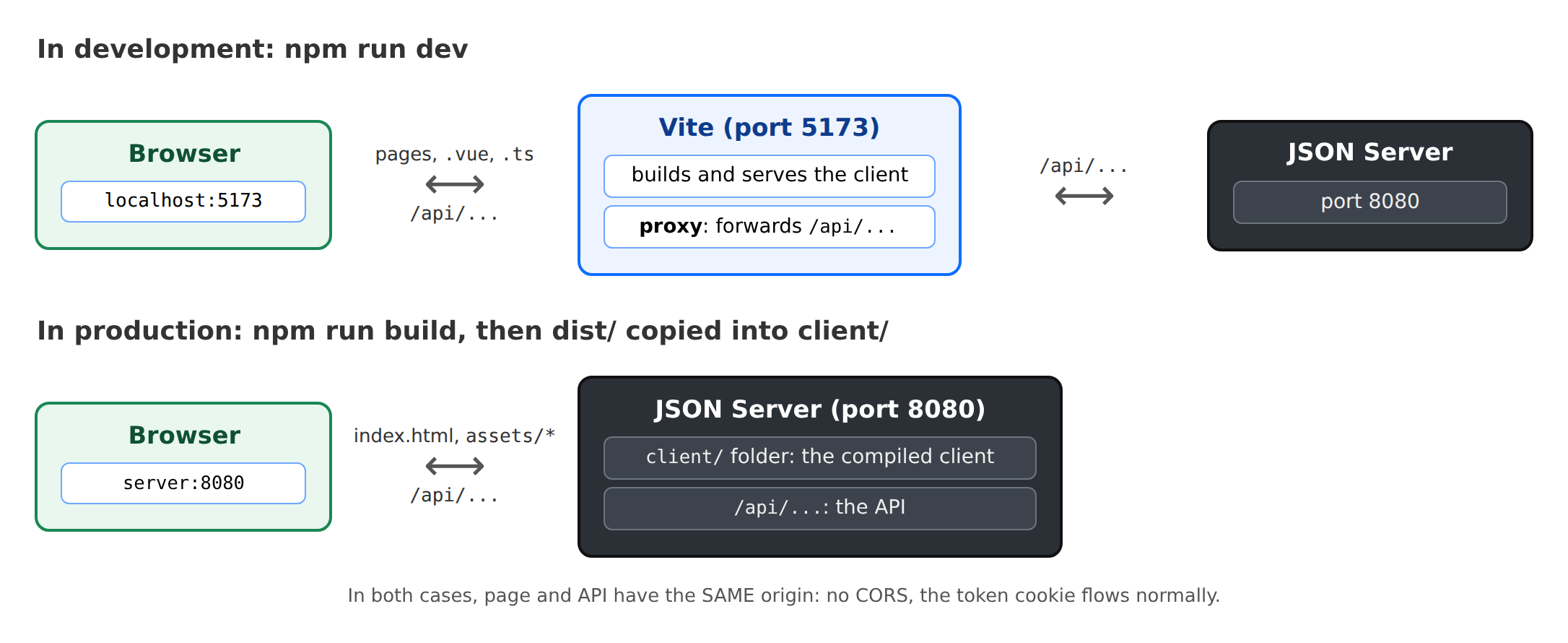
在生产环境中,将不再有 [Vite]:JSON 服务器本身会提供编译后的客户端文件(见“部署”一章)。页面和 API 仍然具有相同的源。
8.1.2. 请求
| <!--
=========================================================================
17-fetch/src/App.vue - a first HTTP request to the server
-------------------------------------------------------------------------
The RdvMedecins JSON server must be running (port 8080). We ask it for
a captcha: GET /api/captcha -> { "id": "...", "svg": "<svg ...>" }.
- fetch(url): the browser function that sends an HTTP request.
It returns a PROMISE: we wait for the response with await;
- response.ok: true for a 2xx code; response.json() reads the JSON
body (another promise);
- the address is RELATIVE (/api/captcha): the request goes to the
server of the page, Vite (port 5173), which forwards it to the JSON server
(port 8080) thanks to its proxy (see vite.config.ts);
- three states to display: in progress, succeeded, failed.
=========================================================================
-->
<script setup lang="ts">
import { onMounted, ref } from 'vue';
// GET /api/captcha 返回的内容
interface Captcha {
id: string;
svg: string;
}
const captcha = ref<Captcha | null>(null);
const loading = ref(false);
const error = ref<string | null>(null);
const requestCount = ref(0);
async function load(): Promise<void> {
loading.value = true;
error.value = null;
try {
const response = await fetch('/api/captcha');
requestCount.value++;
if (!response.ok) {
// 服务器作出了响应,但带有错误(4xx、5xx)——或者是
// 因为 JSON 服务器已停止,由 Vite 返回 502/504
throw new Error(`the server responded ${response.status} ${response.statusText}`);
}
captcha.value = (await response.json()) as Captcha;
} catch (e) {
// 当没有收到任何响应(网络中断等)时,fetch 本身会失败
error.value = e instanceof Error ? e.message : String(e);
captcha.value = null;
} finally {
loading.value = false;
}
}
// 首次显示时,加载一个验证码
onMounted(load);
</script>
<template>
<div class="container py-4" style="max-width: 640px">
<h1 class="h3 mb-3">Example 17 - a first HTTP request</h1>
<div class="card p-3">
<p v-if="loading" class="text-muted">Loading...</p>
<div v-else-if="error" class="alert alert-danger mb-3">
Unable to get a captcha: {{ error }}.<br>
Is the RdvMedecins JSON server running (port 8080)?
</div>
<template v-else-if="captcha">
<!-- v-html: inserts a string as HTML (here, the SVG image).
To be used ONLY for safe content: this SVG is built by
OUR server. With user input, v-html would open
the door to script injection ({{ }}, for its part, escapes everything). -->
<div class="captcha mb-2" v-html="captcha.svg"></div>
<p class="small text-muted">id: <code>{{ captcha.id }}</code></p>
</template>
<button class="btn btn-primary align-self-start" :disabled="loading" @click="load">Another image</button>
<p class="small text-muted mt-2 mb-0">{{ requestCount }} successful request(s) - open the Network tab of the developer tools (F12).</p>
</div>
</div>
</template>
<style scoped>
/* :deep(svg):该规则作用于由 v-html 插入的 <svg>,否则 "scoped" 会忽略它 */
.captcha :deep(svg) {
border: 1px solid #dee2e6;
border-radius: 0.375rem;
}
</style>
|
- 第 22 行:[GET /api/captcha] 响应的格式;
- 第 27–29 行:请求的三种状态:进行中、成功(得到验证码)和错误;
- 第 36 行:[fetch(url)],发送 HTTP 请求的浏览器函数。它返回一个响应的 Promise;[await] 会挂起 [async] 函数,直到该 Promise 完成,同时不会阻塞页面。该地址是 相对地址:请求被发送给页面所在的服务器,即 [Vite],由它转发;
- 第 38 行:当服务器返回 404 或 500 响应时,[fetch] 不会报告错误:它确实收到了响应。需要由我们自己来检测 [response.ok] (对于 2xx 状态码为 true)。如果 JSON 服务器已关闭,[Vite] 会以 5xx 错误作为响应;
- 第 43 行:[response.json()] 读取正文并把它转换成对象(又一个 Promise)。[as Captcha] 向 [TypeScript] 说明该对象的格式:编译器无法验证服务器将发送什么;
- 第 44 行:当没有收到任何响应(网络中断)时,[fetch] 本身会失败;
- 第 48 行:无论如何,请求都不再处于进行中状态;
- 第 54 行:首次显示时,加载一个验证码;
- 第 71 行:[v-html] 把字符串当作 HTML 插入(这里是 SVG 图像)。仅用于安全的内容:这个 SVG 是由我们自己的服务器生成的。对于用户输入的数据,[v-html] 可能导致脚本被注入页面;而 [{{ }}] 标记则会对所有内容进行转义;
- 第 82 行:[:deep(...)]:[scoped] 规则通常只影响模板中的元素;由 [<svg>] 通过 [v-html] 插入的内容不属于模板。
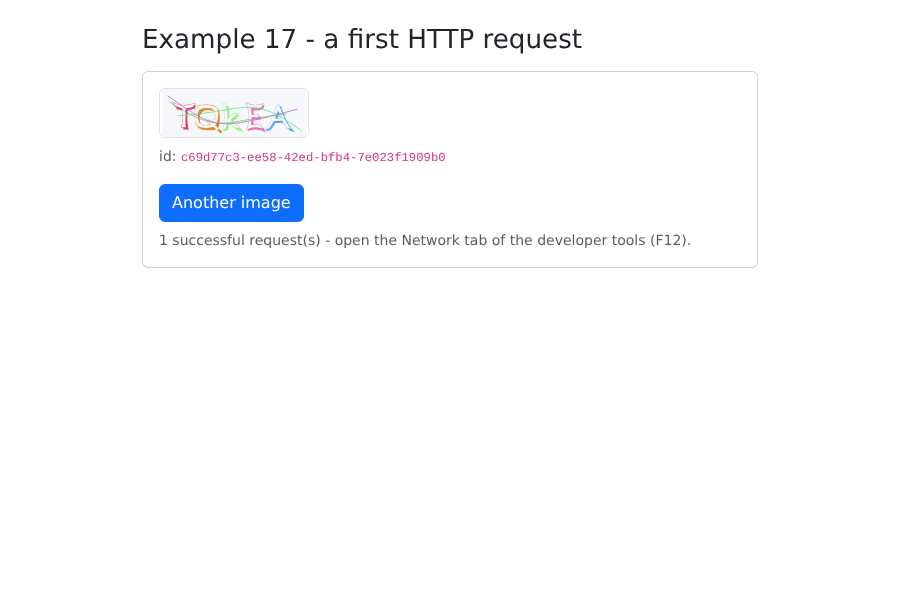
在浏览器的开发者工具(F12)中,Network 选项卡显示发往 [captcha] 的请求,该请求被发送到 [localhost:5173],以及它的 JSON 响应。
8.2. 示例 18:登录、Cookie 和会话
| <!--
=========================================================================
18-login/src/App.vue - logging in to the RdvMedecins server
-------------------------------------------------------------------------
1. at startup: GET /api/auth/me - are we already logged in?
(after an F5, the client has forgotten everything; the server reads the cookie);
2. login: POST /api/auth/login, JSON body { login, password,
captchaId, captcha }. On success, the server sets the httpOnly
cookie of the JWT token: our code NEVER sees it (try
document.cookie in the console: it is not there);
3. protected request: GET /api/doctors. The browser attaches the cookie
by itself (same origin);
4. logout: POST /api/auth/logout - the server deletes the cookie.
A cookie belongs to a machine (localhost) and to a path (/api): it
is therefore shared by ALL the examples. Once logged in here, examples 19 and 20
are logged in too.
=========================================================================
-->
<script setup lang="ts">
import { onMounted, reactive, ref } from 'vue';
interface User {
login: string;
name: string;
role: 'ADMIN' | 'DOCTOR' | 'USER';
}
interface Doctor {
id: number;
title: string;
firstName: string;
lastName: string;
}
// API 所有错误的结构
interface ApiError {
statusCode: number;
key: string;
params?: Record<string, string>;
}
// 本示例所需的少量消息(示例 20 将使用 vue-i18n)
const MESSAGES: Record<string, string> = {
'LOGIN.ERROR': 'Incorrect login or password.',
'ERRORS.WRONG_CAPTCHA': 'The characters you typed do not match the image.',
'ERRORS.TOO_MANY_ATTEMPTS': 'Too many failed attempts. Try again later.',
};
const user = ref<User | null>(null);
const doctors = ref<Doctor[]>([]);
const captcha = ref<{ id: string; svg: string } | null>(null);
const input = reactive({ login: 'admin', password: '', captcha: '' });
const error = ref<string | null>(null);
const ready = ref(false); // 初始检查是否已完成?
async function loadCaptcha(): Promise<void> {
captcha.value = await (await fetch('/api/captcha')).json();
input.captcha = '';
}
// 1. 谁已登录?200 -> 返回用户;401 -> 没有人
async function checkSession(): Promise<void> {
const response = await fetch('/api/auth/me');
if (response.ok) {
user.value = await response.json();
await loadDoctors();
} else {
await loadCaptcha();
}
ready.value = true;
}
// 2. 登录
async function logIn(): Promise<void> {
error.value = null;
const response = await fetch('/api/auth/login', {
method: 'POST',
// 服务器会拒绝(415)不是 JSON 的 POST
headers: { 'Content-Type': 'application/json' },
body: JSON.stringify({
login: input.login,
password: input.password,
captchaId: captcha.value?.id,
captcha: input.captcha,
}),
});
if (response.ok) {
user.value = await response.json();
input.password = '';
await loadDoctors();
return;
}
// 出错:JSON 正文会说明是哪个错误;每张图片只能使用一次
const e = (await response.json()) as ApiError;
error.value = `${response.status} - ${MESSAGES[e.key] ?? e.key}`;
await loadCaptcha();
}
// 3. 一个受保护的请求
async function loadDoctors(): Promise<void> {
const response = await fetch('/api/doctors');
doctors.value = response.ok ? await response.json() : [];
}
// 4. 注销
async function logOut(): Promise<void> {
await fetch('/api/auth/logout', { method: 'POST', headers: { 'Content-Type': 'application/json' }, body: '{}' });
user.value = null;
doctors.value = [];
await loadCaptcha();
}
onMounted(() => {
checkSession().catch(() => {
error.value = 'Is the RdvMedecins JSON server running (port 8080)?';
ready.value = true;
});
});
</script>
<template>
<div class="container py-4" style="max-width: 640px">
<h1 class="h3 mb-3">Example 18 - logging in to the server</h1>
<p v-if="!ready" class="text-muted">Checking the session...</p>
<!-- 已登录 -->
<div v-else-if="user" class="card p-3">
<p>Logged in: <strong>{{ user.name }}</strong> ({{ user.login }}),
role <span class="badge text-bg-primary">{{ user.role }}</span></p>
<h2 class="h6">GET /api/doctors</h2>
<ul>
<li v-for="m in doctors" :key="m.id">{{ m.title }} {{ m.firstName }} {{ m.lastName }}</li>
</ul>
<p class="small text-muted">Reload the page (F5): you stay logged in.</p>
<button class="btn btn-outline-secondary align-self-start" @click="logOut">Log out</button>
</div>
<!-- 未登录:显示表单 -->
<form v-else class="card p-3" @submit.prevent="logIn">
<div class="mb-2">
<label class="form-label" for="login">Login</label>
<input id="login" v-model="input.login" class="form-control" autocomplete="username">
</div>
<div class="mb-2">
<label class="form-label" for="password">Password</label>
<input id="password" v-model="input.password" type="password" class="form-control" autocomplete="current-password">
</div>
<div class="mb-3">
<label class="form-label" for="captcha">Type the characters shown in the image</label>
<div class="d-flex align-items-center gap-3 mb-2">
<div v-if="captcha" v-html="captcha.svg"></div>
<a href="#" class="small" @click.prevent="loadCaptcha">Another image</a>
</div>
<input id="captcha" v-model="input.captcha" class="form-control" autocomplete="off">
</div>
<button class="btn btn-primary">Log in</button>
<p class="small text-muted mt-2 mb-0">Accounts: admin, pelissier, martin... (password = login).</p>
</form>
<div v-if="error" class="alert alert-danger mt-3">{{ error }}</div>
</div>
</template>
|
- 第 35 行:API 所有错误的格式;
- 第 42 行:本示例所需的少量消息,使用英语;示例 20 将使用 [vue-i18n];
- 第 61–69 行:启动时执行 [GET /api/auth/me]:我们已经登录了吗?重新加载页面(F5)后,[Vue.js] 应用已经忘记了一切;而服务器则会读取 Cookie。200:返回用户;401:没有人登录;
- 第 73–96 行:登录:
- 第 76 行:[fetch(url, options)]:方法、请求头和正文;
- 第 78 行:服务器会拒绝不是 JSON 格式的 POST;
- 第 79 行:正文,已转换为 JSON 文本;
- 第 87 行:如果成功,服务器已经设置了令牌 Cookie。我们的代码永远看不到它:在浏览器控制台中输入 [document.cookie] ;它不在其中([HttpOnly]);
- 第 93 行:如果请求失败,正文会解释原因。我们显示该消息并请求一张新图片:每张图片只能使用一次;
- 第 99–102 行:一个受保护的请求。我们无需做任何事情来进行身份验证:浏览器会自动带上 Cookie,因为请求发往的源与页面相同(默认情况下,[fetch] 会在同源请求中发送 Cookie);
- 第 105–110 行:注销——服务器删除 Cookie。包含正文 ['{}'] 是为了让该请求成为一个 JSON POST。
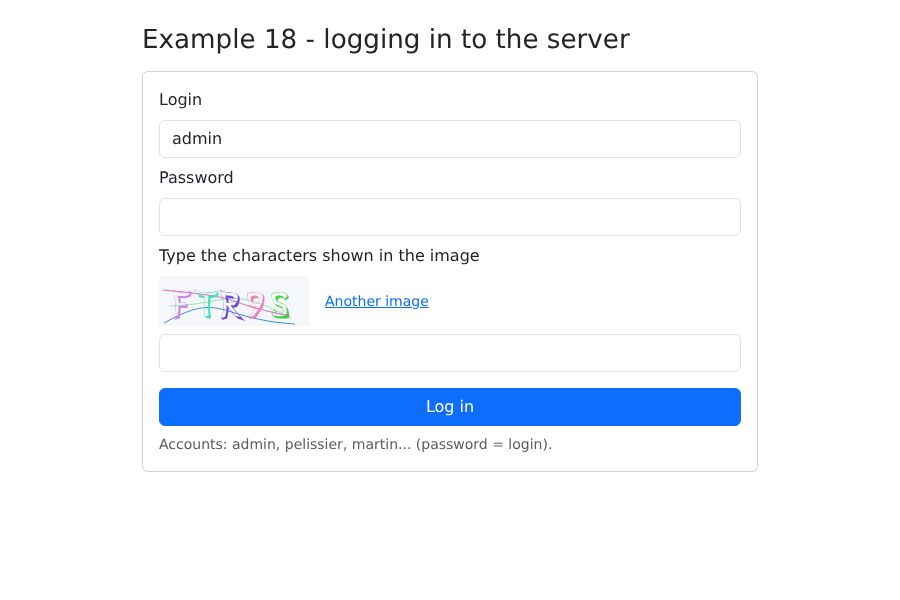
登录表单:
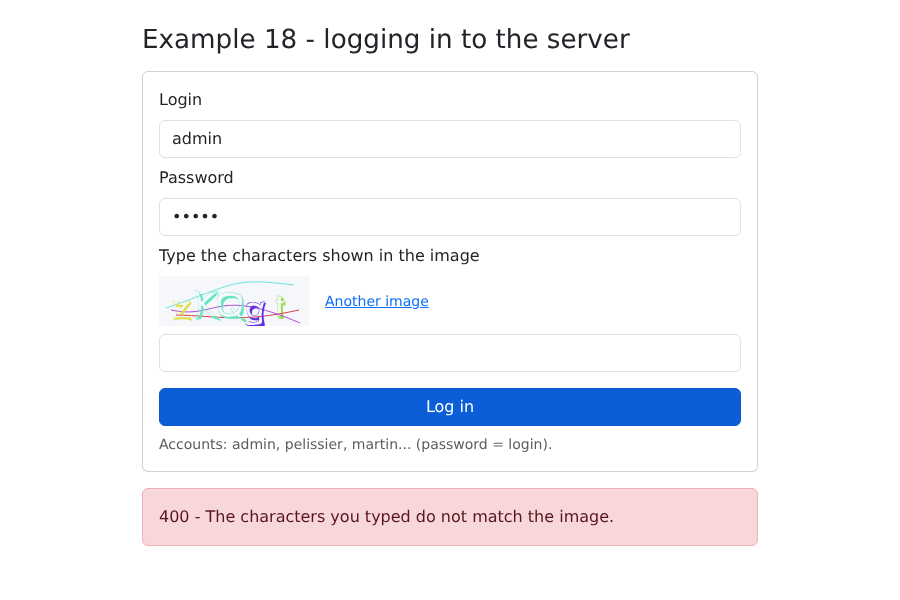
验证码输入错误时(服务器处于测试模式:任何验证码都接受答案 [test]):
已登录:
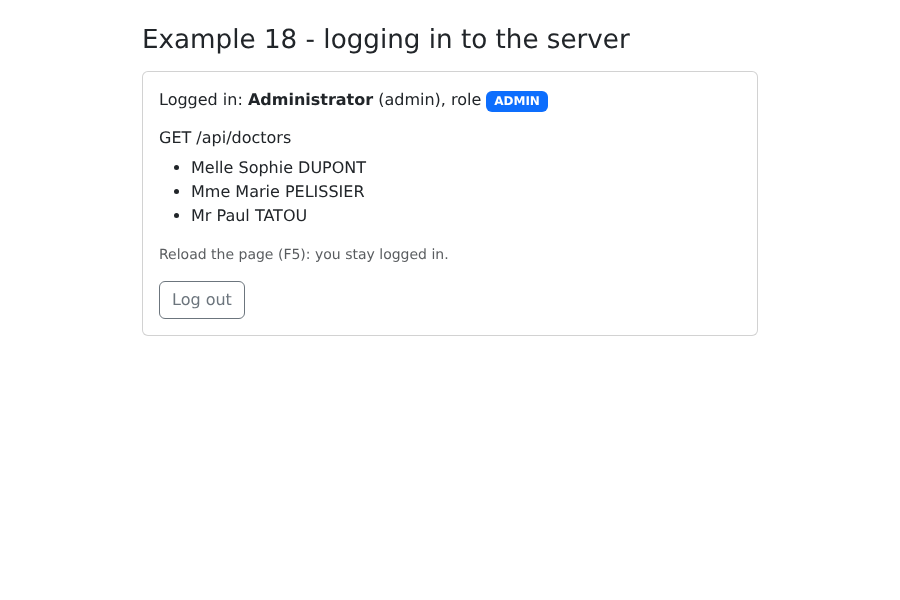
重新加载页面(F5):你仍然保持登录。接下来,打开示例 19:你在那里同样已登录。Cookie 属于一台机器(这里是 [localhost])和一个路径(这里是 [/api]),而这对所有示例都是相同的。
8.3. 示例 19:API 的访问层
示例 18 在每次调用 [fetch] 时都重复相同的步骤:前缀 [/api]、请求头 [Content-Type]、[JSON.stringify]、对 [response.ok] 的检测,以及读取错误正文。我们把它们归并到一个函数中,放在 [common] 文件夹(示例 19 和 20 共用):
| // =========================================================================
// common/api.ts - 一个函数处理所有发往 API 的请求
// -------------------------------------------------------------------------
// 在示例 18 中,每次调用 fetch 都重复相同的动作:
// /api 前缀、Content-Type 请求头、JSON.stringify、对 response.ok 的检测、
// 读取错误正文……这里把它们一次性归并起来:
//
// const doctors = await api.get<Person[]>('/doctors');
// await api.post('/appointments', { day, slotId, clientId });
//
// - 成功时,Promise 返回带类型的 JSON 正文;
// - 失败时,Promise 会被拒绝,并带有一个 ApiError,它携带
// 服务器发送的翻译键(以及,如果有的话,它的
// 参数和每个字段的错误)。
// 示例 19 和 20 使用它;案例研究沿用它的原理。
// =========================================================================
export class ApiError extends Error {
constructor(
public readonly statusCode: number, // 0:服务器没有响应
public readonly key: string, // 例如:'ERRORS.LOGIN_TAKEN'
public readonly params: Record<string, string> = {},
public readonly fields: Record<string, string> = {},
) {
super(key);
this.name = 'ApiError';
}
}
type Method = 'GET' | 'POST' | 'PUT' | 'DELETE';
export async function request<T>(method: Method, url: string, body?: unknown): Promise<T> {
let response: Response;
try {
response = await fetch(`/api${url}`, {
method,
// 一个正文 -> JSON(服务器会拒绝不是 JSON 的 POST)
headers: body !== undefined ? { 'Content-Type': 'application/json' } : {},
body: body !== undefined ? JSON.stringify(body) : undefined,
});
} catch {
// 没有响应(网络中断等)
throw new ApiError(0, 'ERRORS.SERVER_UNREACHABLE');
}
// 正文先作为文本读取,然后再转换:空响应,或者
// 不是 JSON 的响应(JSON 服务器已停止:由 Vite 返回),不能
// 使应用崩溃
const text = await response.text();
let data: unknown = null;
try {
data = text ? JSON.parse(text) : null;
} catch {
data = null;
}
if (!response.ok) {
const e = (data ?? {}) as { key?: string; params?: Record<string, string>; fields?: Record<string, string> };
throw new ApiError(response.status, e.key ?? 'ERRORS.SERVER_UNREACHABLE', e.params, e.fields);
}
return data as T;
}
// 简写形式,使用时更易读
export const api = {
get: <T>(url: string) => request<T>('GET', url),
post: <T>(url: string, body: unknown = {}) => request<T>('POST', url, body),
put: <T>(url: string, body: unknown) => request<T>('PUT', url, body),
delete: <T>(url: string, body?: unknown) => request<T>('DELETE', url, body),
};
|
- 第 18–27 行:一个包含服务器响应的错误类:HTTP 状态码、消息键、它的参数,以及每个字段的错误。状态码 0 表示“没有响应”;
- 第 32 行:一个 泛型函数:[T] 是成功时预期正文的类型。[request<Person[]>('GET', '/doctors')] 返回一个 [Promise<Person[]>];
- 第 38 行:一个正文,并且仅在这种情况下,附带 JSON 请求头;
- 第 49–55 行:正文先作为文本读取,然后再转换。空响应或不是 JSON 的响应(服务器宕机时:[Vite] 以文本作为响应),不应导致应用崩溃;
- 第 57–60 行:失败会产生一个 [ApiError]:[request] 返回的 Promise 被 拒绝。调用方代码通过 [try / catch] 捕获它;
- 第 65–70 行:更易读的简写:[api.get<T>(url)]、[api.post<T>(url, body)]……[api.post] 默认发送正文 [{}]。
上一章所描述的、API 返回的 JSON 对象类型:
| // =========================================================================
// common/types.ts - 与 RdvMedecins API 交换的 JSON 对象
// (见黑盒一章,其中描述了每个路由)
// =========================================================================
export type Role = 'ADMIN' | 'DOCTOR' | 'USER';
// POST /api/auth/login、GET /api/auth/me
export interface User {
login: string;
name: string;
role: Role;
}
// GET /api/captcha
export interface Captcha {
id: string;
svg: string;
}
// 一位医生或一位客户(GET /api/doctors、GET /api/clients……)
export interface Person {
id: number;
version: number;
title: string;
firstName: string;
lastName: string;
login?: string; // 仅限 ADMIN
}
export interface Identity {
title: string;
firstName: string;
lastName: string;
}
// GET /api/schedule 的一行
export interface ScheduleSlot {
id: number;
startHour: number;
startMinute: number;
endHour: number;
endMinute: number;
free: boolean;
patient: Identity | null;
mine: boolean;
bookable: boolean;
appointmentId: number | null;
}
// GET /api/schedule?doctorId=...&day=...
export interface Schedule {
doctor: Person;
day: string;
slots: ScheduleSlot[];
info: string | null;
}
|
一个使用 [api.ts] 重写、并精简为一个栏的登录组件:
| <!--
=========================================================================
common/LoginBar.vue - logging in / out, in one bar
-------------------------------------------------------------------------
The component of example 18, reduced to a bar and rewritten with
common/api.ts. It emits 'change' with the logged-in user (or null)
each time the user changes - including at startup, after having
queried GET /api/auth/me.
=========================================================================
-->
<script setup lang="ts">
import { onMounted, reactive, ref } from 'vue';
import { api, ApiError } from './api';
import type { Captcha, User } from './types';
const emit = defineEmits<{ change: [user: User | null] }>();
const user = ref<User | null>(null);
const captcha = ref<Captcha | null>(null);
const input = reactive({ login: 'admin', password: '', captcha: '' });
const error = ref<string | null>(null);
async function newCaptcha(): Promise<void> {
captcha.value = await api.get<Captcha>('/captcha');
input.captcha = '';
}
function setUser(u: User | null): void {
user.value = u;
emit('change', u);
}
onMounted(async () => {
try {
setUser(await api.get<User>('/auth/me'));
} catch {
setUser(null); // 401:没有人登录
await newCaptcha().catch(() => (error.value = 'Is the JSON server running (port 8080)?'));
}
});
async function logIn(): Promise<void> {
error.value = null;
try {
const u = await api.post<User>('/auth/login', {
login: input.login,
password: input.password,
captchaId: captcha.value?.id,
captcha: input.captcha,
});
input.password = '';
setUser(u);
} catch (e) {
error.value = e instanceof ApiError ? `${e.statusCode} ${e.key}` : String(e);
await newCaptcha();
}
}
async function logOut(): Promise<void> {
await api.post('/auth/logout');
setUser(null);
await newCaptcha();
}
</script>
<template>
<div class="alert alert-secondary d-flex flex-wrap align-items-center gap-2 py-2">
<template v-if="user">
<span>Logged in: <strong>{{ user.name }}</strong> <span class="badge text-bg-primary">{{ user.role }}</span></span>
<button class="btn btn-sm btn-outline-secondary ms-auto" @click="logOut">Log out</button>
</template>
<form v-else class="d-flex flex-wrap align-items-center gap-2 w-100" @submit.prevent="logIn">
<input v-model="input.login" class="form-control form-control-sm w-auto" placeholder="login" autocomplete="username">
<input v-model="input.password" type="password" class="form-control form-control-sm w-auto" placeholder="password" autocomplete="current-password">
<div v-if="captcha" class="captcha" v-html="captcha.svg"></div>
<input v-model="input.captcha" class="form-control form-control-sm w-auto" placeholder="captcha" autocomplete="off" size="8">
<button class="btn btn-sm btn-primary">Log in</button>
<span v-if="error" class="text-danger small">{{ error }}</span>
</form>
</div>
</template>
<style scoped>
/* 验证码图片,已缩小以适应栏的大小 */
.captcha :deep(svg) {
display: block;
height: 32px;
width: auto;
}
</style>
|
- 第 16 行:该组件会发出 [change] 事件,携带已登录的用户(或 [null]),每次变化时都会发出,包括启动时;
- 第 35 行:有了 [api.ts],一个请求只需一行;失败(401)时,会转到 [catch];
- 第 54 行:[instanceof] 用于区分 API 的错误和其他异常。
在 [api.ts] 之上,为 API 的每个路由提供一个函数:
| // =========================================================================
// 19-api-service/src/rdvmedecins.service.ts - API 访问层
// -------------------------------------------------------------------------
// API 的每个路由对应一个带类型的函数。组件既不知道
// URL,也不知道 fetch,更不知道 JSON 格式:它们只调用函数。
// 这是服务器端 DAO 层在客户端的对应物:如果 API
// 发生变化(某个 URL、某个字段名),只需修改这个文件。
// =========================================================================
import { api } from '../../common/api';
import type { Schedule, Person } from '../../common/types';
export const rdvmedecins = {
getDoctors: () => api.get<Person[]>('/doctors'),
getClients: () => api.get<Person[]>('/clients'),
// URLSearchParams 构造出 "?doctorId=1&day=2030-01-15",并对需要编码的部分进行编码
getSchedule: (doctorId: number, day: string) =>
api.get<Schedule>(`/schedule?${new URLSearchParams({ doctorId: String(doctorId), day })}`),
book: (day: string, slotId: number, clientId?: number) =>
api.post<{ id: number }>('/appointments', { day, slotId, clientId }),
cancelAppointment: (appointmentId: number) => api.delete<Record<string, never>>(`/appointments/${appointmentId}`),
};
|
这相当于服务器 DAO 层在客户端的对应物:组件不了解 URL、[fetch] 或 JSON 格式;它们调用的是带类型的函数。如果 API 发生变化,只需修改这个文件。
- 第 18 行:[URLSearchParams] 生成字符串 [doctorId=1&day=2030-01-15] ,并对需要编码的字符进行编码。
页面:
| <!--
=========================================================================
19-api-service/src/App.vue - a schedule, with the API access layer
-------------------------------------------------------------------------
Log in (top bar), choose a doctor and a day: the schedule
is displayed. ADMIN and DOCTOR can book for a patient and cancel;
a patient (martin...) books for themselves. Each action ends with
a reload of the schedule: it is the SERVER that is authoritative.
=========================================================================
-->
<script setup lang="ts">
import { computed, ref, watch } from 'vue';
import LoginBar from '../../common/LoginBar.vue';
import { ApiError } from '../../common/api';
import type { Schedule, ScheduleSlot, Person, User } from '../../common/types';
import { rdvmedecins } from './rdvmedecins.service';
const user = ref<User | null>(null);
const doctors = ref<Person[]>([]);
const clients = ref<Person[]>([]);
const doctorId = ref<number | null>(null);
const day = ref(tomorrow());
const schedule = ref<Schedule | null>(null);
const clientId = ref<number | null>(null);
const message = ref<{ type: 'success' | 'danger'; text: string } | null>(null);
const isManager = computed(() => user.value !== null && user.value.role !== 'USER');
function tomorrow(): string {
const d = new Date(Date.now() + 24 * 3600 * 1000);
return `${d.getFullYear()}-${String(d.getMonth() + 1).padStart(2, '0')}-${String(d.getDate()).padStart(2, '0')}`;
}
function timeRange(c: ScheduleSlot): string {
const hm = (h: number, m: number) => `${h}:${String(m).padStart(2, '0')}`;
return `${hm(c.startHour, c.startMinute)} - ${hm(c.endHour, c.endMinute)}`;
}
// API 错误变成一条消息(由于这里没有词典,显示的是它的键)
function report(e: unknown): void {
message.value = { type: 'danger', text: e instanceof ApiError ? `${e.statusCode} ${e.key}` : String(e) };
}
// 登录 / 注销:我们(重新)加载该角色有权查看的内容
async function onUserChange(u: User | null): Promise<void> {
user.value = u;
schedule.value = null;
doctors.value = [];
clients.value = [];
if (u === null) {
return;
}
try {
doctors.value = await rdvmedecins.getDoctors();
// 患者列表:仅限 ADMIN 和 DOCTOR(USER 会收到 403)
clients.value = isManager.value ? await rdvmedecins.getClients() : [];
} catch (e) {
report(e);
}
}
async function loadSchedule(): Promise<void> {
if (doctorId.value === null) {
return;
}
try {
schedule.value = await rdvmedecins.getSchedule(doctorId.value, day.value);
} catch (e) {
schedule.value = null;
report(e);
}
}
// 日程跟随医生和日期的选择
watch([doctorId, day], () => {
message.value = null;
loadSchedule();
});
async function book(c: ScheduleSlot): Promise<void> {
try {
await rdvmedecins.book(day.value, c.id, isManager.value ? (clientId.value ?? undefined) : undefined);
message.value = { type: 'success', text: `Slot ${timeRange(c)} booked.` };
} catch (e) {
report(e);
}
await loadSchedule();
}
async function cancel(c: ScheduleSlot): Promise<void> {
try {
await rdvmedecins.cancelAppointment(c.appointmentId as number);
message.value = { type: 'success', text: `Appointment of ${timeRange(c)} cancelled.` };
} catch (e) {
report(e);
}
await loadSchedule();
}
</script>
<template>
<div class="container py-4">
<h1 class="h3 mb-3">Example 19 - an API access layer</h1>
<LoginBar @change="onUserChange" />
<template v-if="user">
<div class="row g-2 mb-3">
<div class="col-sm-5">
<select v-model="doctorId" class="form-select">
<option :value="null" disabled>-- choose a doctor --</option>
<option v-for="m in doctors" :key="m.id" :value="m.id">{{ m.title }} {{ m.firstName }} {{ m.lastName }}</option>
</select>
</div>
<div class="col-sm-3"><input v-model="day" type="date" class="form-control"></div>
<div v-if="isManager" class="col-sm-4">
<select v-model="clientId" class="form-select">
<option :value="null">-- patient to book for --</option>
<option v-for="c in clients" :key="c.id" :value="c.id">{{ c.title }} {{ c.firstName }} {{ c.lastName }}</option>
</select>
</div>
</div>
<div v-if="message" class="alert" :class="`alert-${message.type}`">{{ message.text }}</div>
<!-- info:当患者已有未来的预约时,服务器发送的键 -->
<div v-if="schedule?.info" class="alert alert-info">{{ schedule.info }}</div>
<table v-if="schedule" class="table table-sm align-middle">
<caption class="caption-top">Schedule of {{ schedule.day }} - {{ schedule.doctor.title }} {{ schedule.doctor.firstName }} {{ schedule.doctor.lastName }}</caption>
<tbody>
<tr v-for="c in schedule.slots" :key="c.id">
<td>{{ timeRange(c) }}</td>
<td>
<span v-if="c.free" class="badge text-bg-success">Free</span>
<span v-else-if="c.patient" class="badge" :class="c.mine ? 'text-bg-primary' : 'text-bg-secondary'">
{{ c.patient.title }} {{ c.patient.firstName }} {{ c.patient.lastName }}
</span>
<span v-else class="badge text-bg-secondary">Booked</span>
</td>
<td class="text-end">
<!-- 按钮跟随服务器计算出的权限 -->
<button v-if="c.bookable" class="btn btn-sm btn-outline-success" @click="book(c)">Book</button>
<button v-if="c.appointmentId !== null" class="btn btn-sm btn-outline-danger" @click="cancel(c)">Cancel</button>
</td>
</tr>
</tbody>
</table>
</template>
</div>
</template>
|
- 第 27 行:ADMIN 或 DOCTOR;
- 第 45–60 行:每次用户登录或注销时,都会(重新)加载该角色有权查看的内容。患者请求客户列表会收到 403 错误:所以我们根本不去请求它;
- 第 75 行:[watch] 可以监视多个数据源:当医生或日期发生变化时,日程会被重新加载;
- 第 80–87 行:一次预约,之后无论发生什么,都会刷新日程。以服务器的记录为准:如果该时间段在此期间被他人占用,刷新后的日程会显示出来;
- 第 141 和 142 行:按钮反映服务器计算出的权限;
- 第 137 行:一个已被预约、但服务器没有分配患者的时间段(以患者的视角)。
以 [admin] 身份登录,选择一位医生、一位患者,并预约一个时间段:
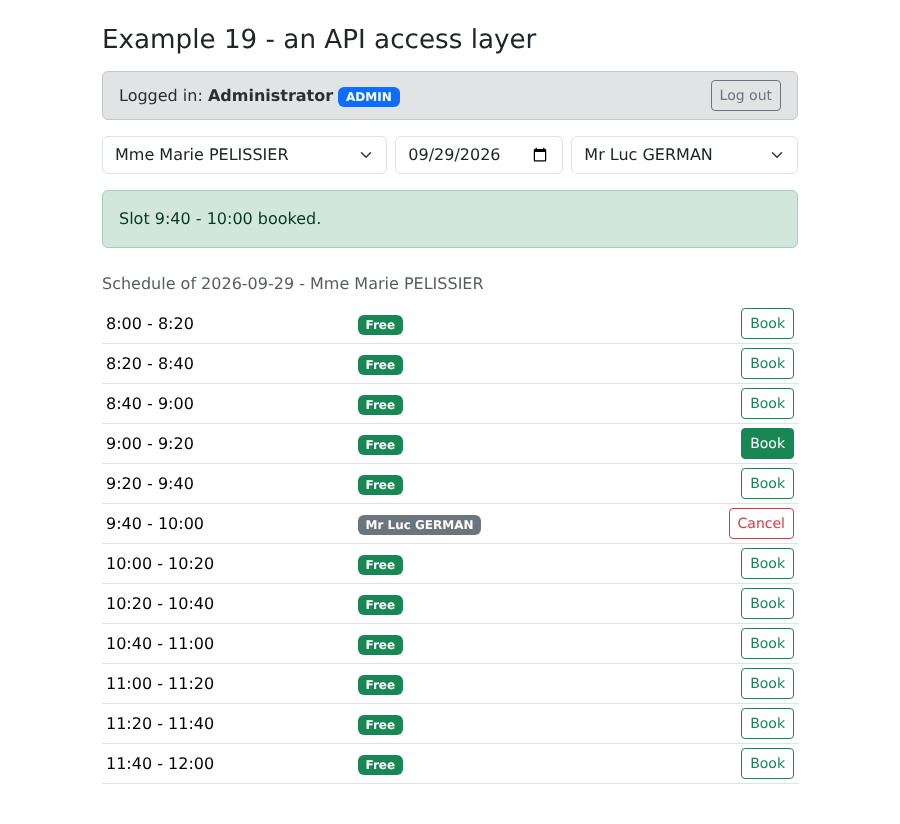
为同一位患者预约第二个时间段:服务器拒绝了。由于本示例中没有词典,显示的是原始的键:
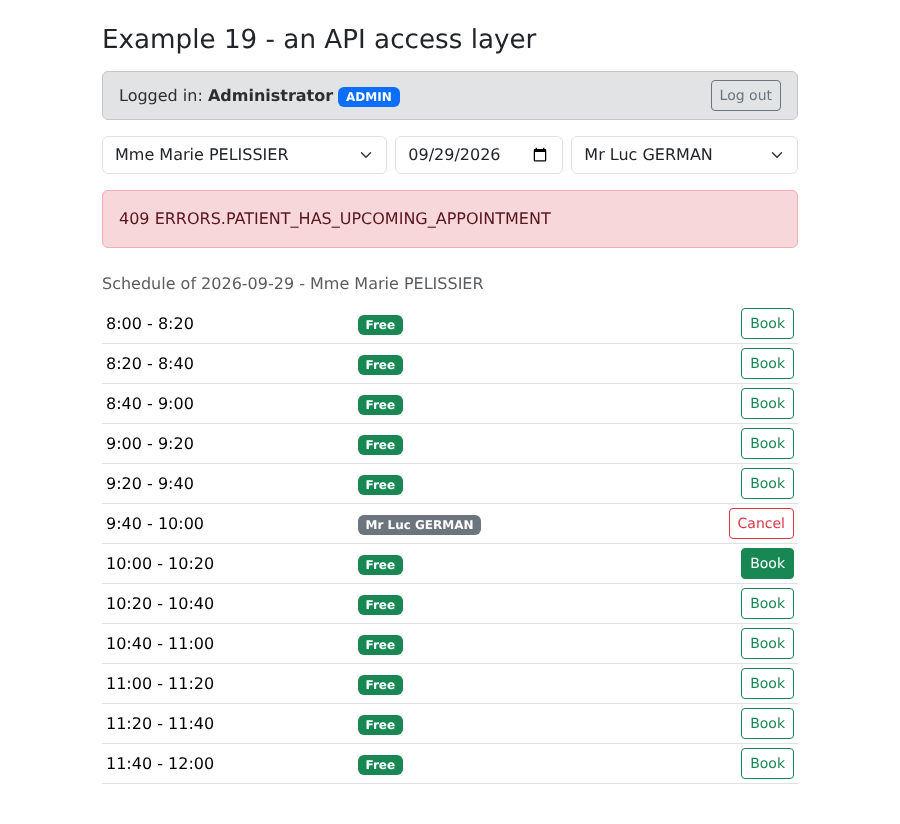
8.4. 示例 20:服务器返回的错误
案例研究之前的最后一个示例:客户管理,由 ADMIN 表单处理。这个表单在浏览器中 不做任何 验证:所有内容都发送给服务器,由服务器验证数据,并在拒绝时返回每个字段的错误。示例 06 展示了另一种做法;这种做法有一个显著的优点:规则只存在于一个地方——服务器——客户端不会遗漏它们。代价是:在显示错误之前,需要往返服务器一次。
词典使用服务器的错误码:
| {
"FORM": {
"TITLE_ADD": "Ajouter un client",
"TITLE_EDIT": "Modifier un client",
"TITLE": "Titre",
"FIRSTNAME": "Prénom",
"LASTNAME": "Nom",
"LOGIN": "Login",
"PASSWORD": "Mot de passe",
"SAVE": "Enregistrer",
"CANCEL": "Annuler",
"EDIT": "Modifier",
"DELETE": "Supprimer",
"DELETE_CONFIRM": "Supprimer le client {name}, son compte et ses rendez-vous ?",
"ADDED": "Le client {name} a été ajouté (login : {login}).",
"UPDATED": "Le client {name} a été modifié.",
"DELETED": "Le client {name} a été supprimé.",
"ADMIN_ONLY": "Connectez-vous avec le compte admin : seul le rôle ADMIN gère les clients."
},
"ERRORS": {
"INVALID_FORM": "Le formulaire contient des erreurs.",
"INVALID_TITLE": "Choisissez un titre dans la liste.",
"FIRSTNAME_REQUIRED": "Le prénom est obligatoire.",
"FIRSTNAME_TOO_LONG": "Le prénom ne doit pas dépasser 20 caractères.",
"LASTNAME_REQUIRED": "Le nom est obligatoire.",
"LASTNAME_TOO_LONG": "Le nom ne doit pas dépasser 20 caractères.",
"INVALID_LOGIN": "30 caractères au plus : lettres minuscules non accentuées, chiffres, point, tiret, souligné.",
"PASSWORD_TOO_LONG": "Le mot de passe ne doit pas dépasser 72 caractères.",
"LOGIN_TAKEN": "Ce login est déjà utilisé par un autre compte.",
"PATIENT_ALREADY_EXISTS": "Un client portant ce prénom et ce nom existe déjà.",
"PATIENT_NOT_FOUND": "Ce client n'existe pas (ou plus).",
"CONCURRENT_UPDATE": "Cette fiche a été modifiée entre-temps par un autre utilisateur. Rechargez-la avant de recommencer.",
"FORBIDDEN": "Votre rôle ne vous permet pas cette action.",
"AUTH_REQUIRED": "Connectez-vous d'abord.",
"SESSION_EXPIRED": "Votre session a expiré : reconnectez-vous.",
"SERVER_UNREACHABLE": "Le serveur ne répond pas.",
"SERVER_ERROR": "Une erreur inattendue s'est produite."
}
}
|
([locales/en.json] 包含相同的错误码,使用英语。)
| import { createApp } from 'vue';
import { createI18n } from 'vue-i18n';
import 'bootstrap/dist/css/bootstrap.min.css';
import App from './App.vue';
import fr from './locales/fr.json';
import en from './locales/en.json';
// 与示例 16 相同的配置,只是更简短
const i18n = createI18n({ legacy: false, locale: 'en', fallbackLocale: 'en', messages: { fr, en } });
createApp(App).use(i18n).mount('#app');
|
页面:
| <!--
=========================================================================
20-server-errors/src/App.vue - displaying the errors of the SERVER
-------------------------------------------------------------------------
The management of the clients (admin account). This form DELIBERATELY
does no validation in the browser: everything is sent to the
server, which answers, in case of refusal, with a JSON error:
400 { key: 'ERRORS.INVALID_FORM', fields: { lastName: 'ERRORS.LASTNAME_REQUIRED' } }
409 { key: 'ERRORS.PATIENT_ALREADY_EXISTS', fields: { firstName: ..., lastName: ... } }
409 { key: 'ERRORS.CONCURRENT_UPDATE' } (optimistic lock)
The client translates each key (vue-i18n) and places each message under its
field, the general message at the bottom of the form. Try: an empty last name, a
title modified in the developer tools, a namesake (Alice DURAND),
a login already taken (martin), the same record modified in two tabs...
=========================================================================
-->
<script setup lang="ts">
import { computed, reactive, ref } from 'vue';
import { useI18n } from 'vue-i18n';
import LoginBar from '../../common/LoginBar.vue';
import { api, ApiError } from '../../common/api';
import type { Person, User } from '../../common/types';
// 示例 12 的确认对话框,原样复用
import ConfirmDialog from '../../12-confirmation/src/components/ConfirmDialog.vue';
import { useConfirmation } from '../../12-confirmation/src/composables/useConfirmation';
const { t, locale } = useI18n();
const { confirm } = useConfirmation();
const user = ref<User | null>(null);
const clients = ref<Person[]>([]);
const isAdmin = computed(() => user.value?.role === 'ADMIN');
// 表单:editedId === null -> 创建,否则为更新
const editedId = ref<number | null>(null);
const input = reactive({ title: 'Mr', firstName: '', lastName: '', login: '', password: '', version: 0 });
// 服务器返回的错误
const fieldErrors = ref<Record<string, string>>({});
const pageError = ref<ApiError | null>(null);
const success = ref<string | null>(null);
async function onUserChange(u: User | null): Promise<void> {
user.value = u;
clients.value = [];
if (u?.role === 'ADMIN') {
await reload();
}
}
async function reload(): Promise<void> {
clients.value = await api.get<Person[]>('/clients');
}
function newForm(): void {
editedId.value = null;
Object.assign(input, { title: 'Mr', firstName: '', lastName: '', login: '', password: '', version: 0 });
clearErrors();
}
function edit(c: Person): void {
editedId.value = c.id;
// 随记录一起读取的版本号(VERSION)会随更新一起发回:如果有人
// 在此期间修改了该记录,服务器会回答 409 CONCURRENT_UPDATE
Object.assign(input, { title: c.title, firstName: c.firstName, lastName: c.lastName, login: c.login ?? '', password: '', version: c.version });
clearErrors();
}
function clearErrors(): void {
fieldErrors.value = {};
pageError.value = null;
success.value = null;
}
// 错误的文本,使用当前语言,并带有它的参数
function errorText(e: ApiError): string {
return t(e.key, e.params);
}
async function save(): Promise<void> {
clearErrors();
const body = { ...input };
try {
const client =
editedId.value === null
? await api.post<Person>('/clients', body)
: await api.put<Person>(`/clients/${editedId.value}`, body);
const message = t(editedId.value === null ? 'FORM.ADDED' : 'FORM.UPDATED', {
name: `${client.firstName} ${client.lastName}`,
login: client.login ?? '',
});
newForm(); // 表单已清空,消息已清除……
success.value = message; // ……除了这一个
await reload();
} catch (e) {
if (!(e instanceof ApiError)) {
throw e;
}
// 每个字段的错误,以及通用消息
fieldErrors.value = e.fields;
pageError.value = e;
}
}
async function remove(c: Person): Promise<void> {
const name = `${c.firstName} ${c.lastName}`;
if (!(await confirm(t('FORM.DELETE_CONFIRM', { name })))) {
return;
}
clearErrors();
try {
await api.delete(`/clients/${c.id}`);
success.value = t('FORM.DELETED', { name });
} catch (e) {
pageError.value = e instanceof ApiError ? e : null;
}
await reload();
}
</script>
<template>
<div class="container py-4">
<div class="d-flex justify-content-between align-items-center mb-3">
<h1 class="h3 mb-0">Example 20 - the errors returned by the server</h1>
<select v-model="locale" class="form-select form-select-sm w-auto">
<option value="fr">FR</option>
<option value="en">EN</option>
</select>
</div>
<LoginBar @change="onUserChange" />
<p v-if="user && !isAdmin" class="alert alert-warning">{{ t('FORM.ADMIN_ONLY') }}</p>
<div v-if="isAdmin" class="row g-4">
<div class="col-lg-6">
<table class="table table-sm align-middle">
<tbody>
<tr v-for="c in clients" :key="c.id">
<td>{{ c.title }} {{ c.firstName }} {{ c.lastName }}</td>
<td><code>{{ c.login }}</code></td>
<td class="text-end text-nowrap">
<button class="btn btn-sm btn-outline-primary me-1" @click="edit(c)">{{ t('FORM.EDIT') }}</button>
<button class="btn btn-sm btn-outline-danger" @click="remove(c)">{{ t('FORM.DELETE') }}</button>
</td>
</tr>
</tbody>
</table>
</div>
<div class="col-lg-6">
<form class="card p-3" novalidate @submit.prevent="save">
<h2 class="h5">{{ editedId === null ? t('FORM.TITLE_ADD') : t('FORM.TITLE_EDIT') }}</h2>
<div class="mb-2">
<label class="form-label" for="title">{{ t('FORM.TITLE') }}</label>
<!-- 一个服务器会拒绝的 "Dr" 选项:用来观察 ERRORS.INVALID_TITLE -->
<select id="title" v-model="input.title" class="form-select" :class="{ 'is-invalid': fieldErrors.title }">
<option>Mr</option><option>Mme</option><option>Melle</option><option>Dr</option>
</select>
<div class="invalid-feedback">{{ fieldErrors.title && t(fieldErrors.title) }}</div>
</div>
<div class="row g-2 mb-2">
<div class="col-sm-6">
<label class="form-label" for="firstName">{{ t('FORM.FIRSTNAME') }}</label>
<input id="firstName" v-model="input.firstName" class="form-control" :class="{ 'is-invalid': fieldErrors.firstName }">
<div class="invalid-feedback">{{ fieldErrors.firstName && t(fieldErrors.firstName) }}</div>
</div>
<div class="col-sm-6">
<label class="form-label" for="lastName">{{ t('FORM.LASTNAME') }}</label>
<input id="lastName" v-model="input.lastName" class="form-control" :class="{ 'is-invalid': fieldErrors.lastName }">
<div class="invalid-feedback">{{ fieldErrors.lastName && t(fieldErrors.lastName) }}</div>
</div>
</div>
<div class="row g-2 mb-3">
<div class="col-sm-6">
<label class="form-label" for="login">{{ t('FORM.LOGIN') }}</label>
<input id="login" v-model="input.login" class="form-control" :class="{ 'is-invalid': fieldErrors.login }">
<div class="invalid-feedback">{{ fieldErrors.login && t(fieldErrors.login) }}</div>
</div>
<div class="col-sm-6">
<label class="form-label" for="password">{{ t('FORM.PASSWORD') }}</label>
<input id="password" v-model="input.password" type="password" class="form-control" autocomplete="new-password"
:class="{ 'is-invalid': fieldErrors.password }">
<div class="invalid-feedback">{{ fieldErrors.password && t(fieldErrors.password) }}</div>
</div>
</div>
<div class="d-flex gap-2">
<button class="btn btn-primary">{{ t('FORM.SAVE') }}</button>
<button type="button" class="btn btn-secondary" @click="newForm">{{ t('FORM.CANCEL') }}</button>
</div>
<div v-if="success" class="alert alert-success mt-3 mb-0">{{ success }}</div>
<!-- 通用消息和 HTTP 状态码,以便理解 -->
<div v-if="pageError" class="alert alert-danger mt-3 mb-0">
{{ errorText(pageError) }} <span class="small text-muted">({{ pageError.statusCode }} {{ pageError.key }})</span>
</div>
</form>
</div>
</div>
</div>
<ConfirmDialog />
</template>
|
- 第 26 行:示例 12 中的确认窗口,原样复用——设计良好的组件是可复用的;
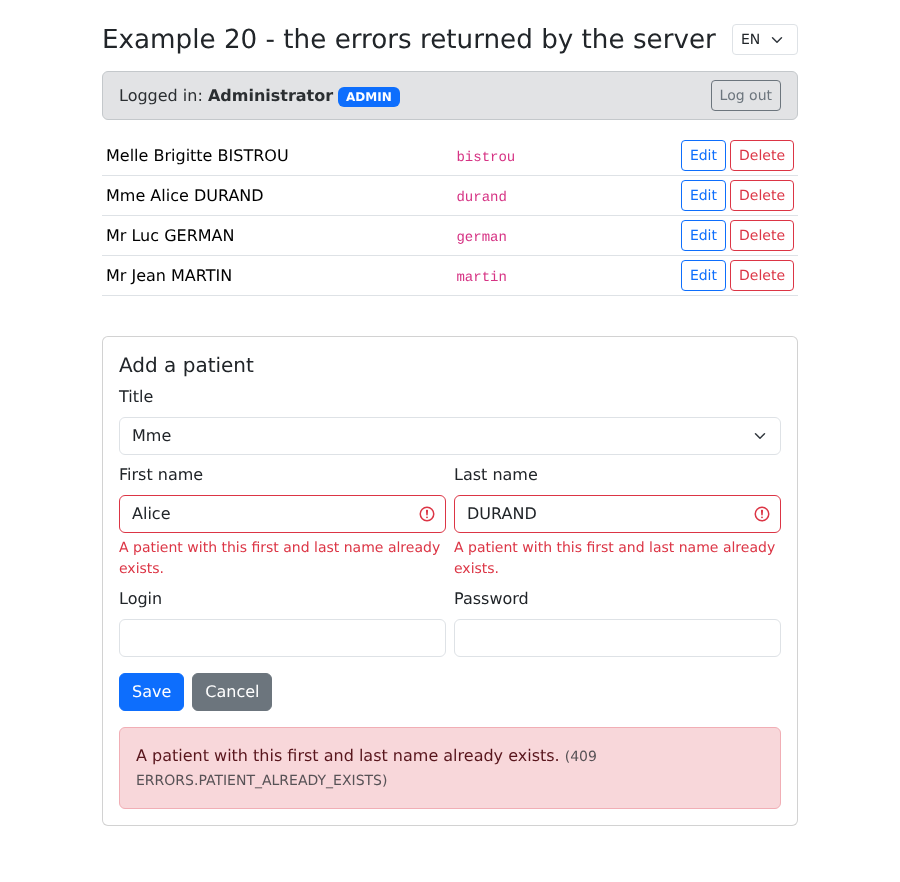
- 第 40 和 41 行:服务器返回的错误:每个字段的错误,以及通用消息;
- 第 62–68 行:要修改一条记录,把它的值复制到表单中,包括 版本号:它会随修改一起保存(乐观锁);
- 第 77–79 行:用日常语言写的错误消息,及其参数;
- 第 81–102 行:创建时用 [POST] ,修改时用 [PUT] 。如果请求被拒绝,返回的错误会被保存;其余由模板处理;
- 第 157 行:一个服务器会拒绝的称谓,用来观察 [ERRORS.INVALID_TITLE];
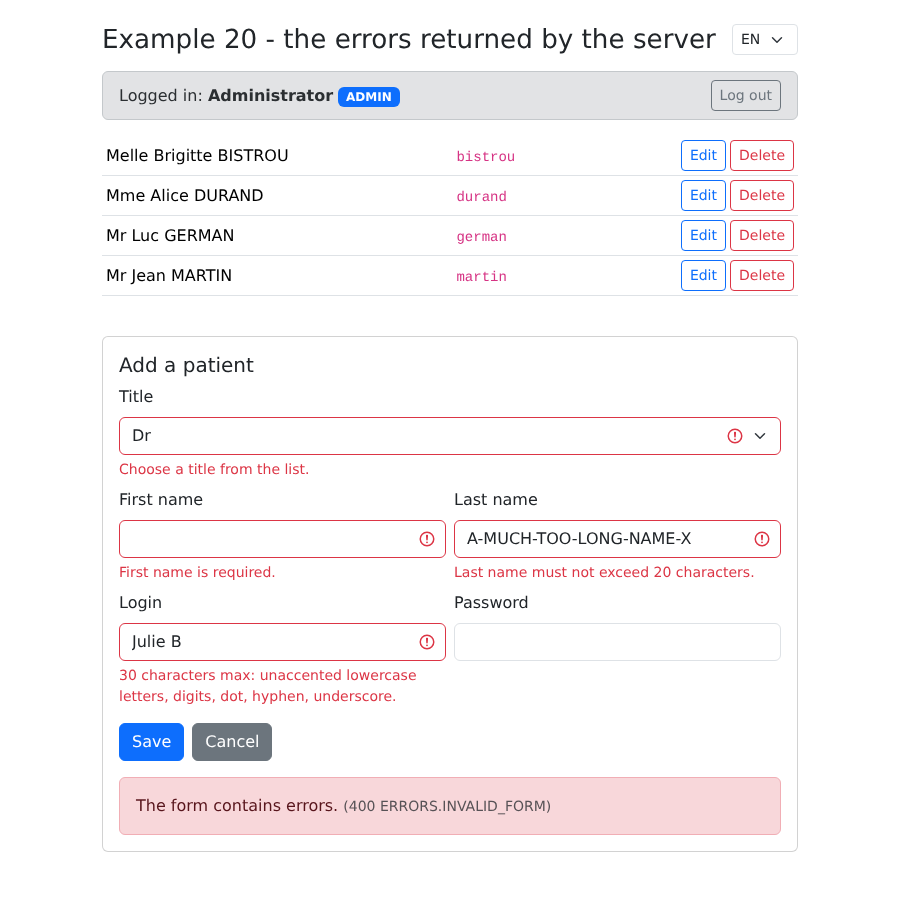
- 第 164 和 165 行:被拒绝的字段用红色突出显示,其翻译后的错误码显示在它下方;
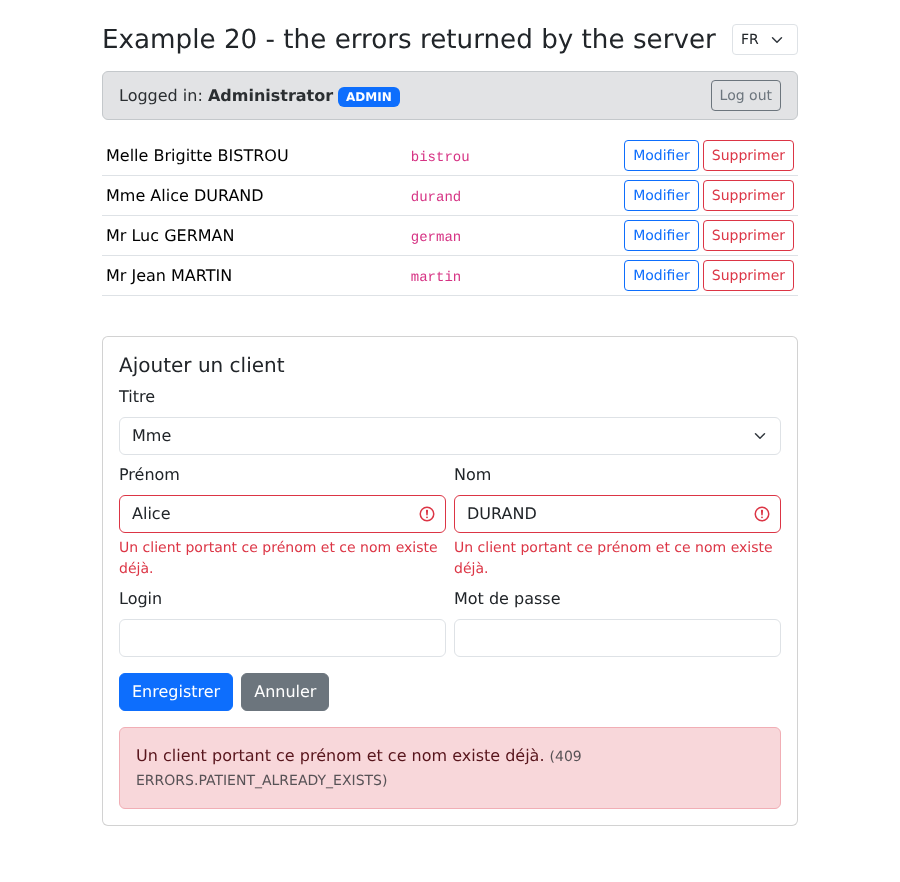
- 第 126 行:切换语言也会重新翻译已经显示的错误消息:因为只保留了键。
填写不正确的表单:
重复的姓名(Alice DURAND 已存在):服务器返回 409 响应,并标出名和姓字段:
同一个错误,法语版:
你也可以尝试在两个标签页中编辑同一条记录:第二次保存会收到 [ERRORS.CONCURRENT_UPDATE]。