<!--
=========================================================================
16-i18n/src/App.vue - a translated page
-------------------------------------------------------------------------
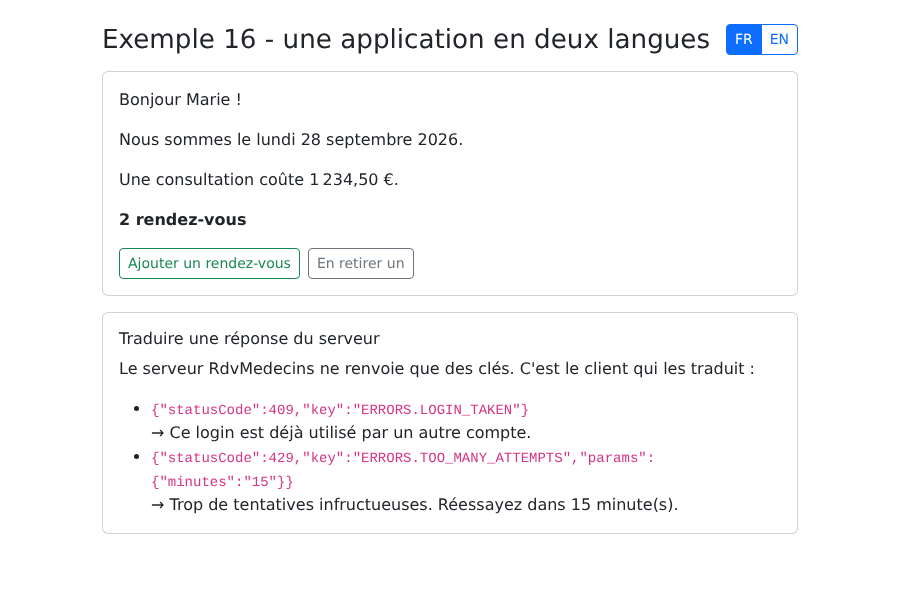
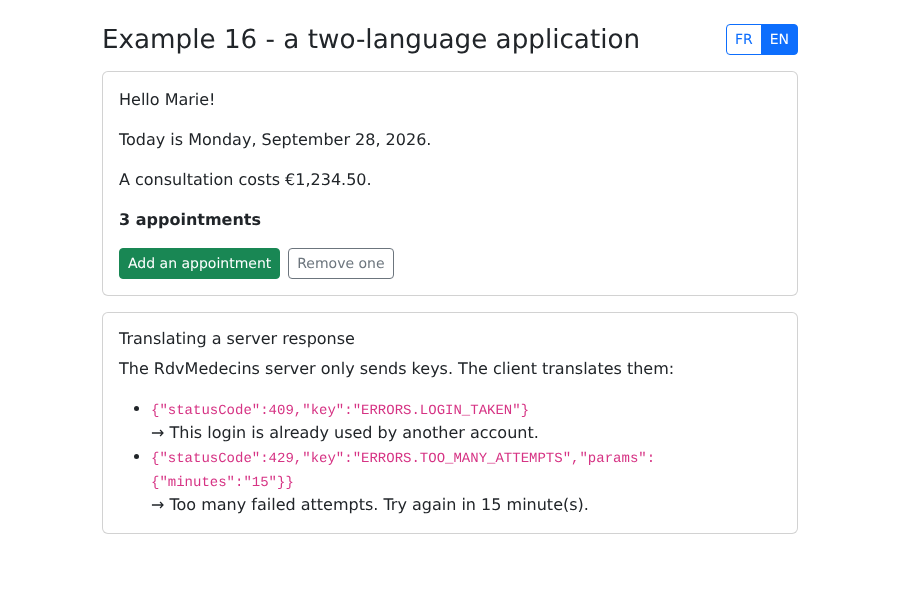
- t('KEY') a text;
- t('KEY', { name: ... }) a text with parameters ({name} in the dictionary);
- t('KEY', n) a plural: "none | one | {n}" depending on n;
- d(date, 'long') a date, in the format of the language;
- n(number, 'euros') a number, in the format of the language;
- locale the current language: modifying it translates everything again.
=========================================================================
-->
<script setup lang="ts">
import { ref, watch } from 'vue';
import { useI18n } from 'vue-i18n';
import { LANGUAGE_KEY, type Language } from './i18n';
const { t, d, n, locale } = useI18n();
const count = ref(2);
// 每次切换语言时:它会被保存,并且页面的 lang 属性会
// 被更新(这对屏幕阅读器、拼写检查器很有用)
watch(
locale,
(language) => {
localStorage.setItem(LANGUAGE_KEY, language);
document.documentElement.lang = language;
document.title = t('APP.TITLE');
},
{ immediate: true },
);
function choose(language: Language): void {
locale.value = language;
}
// RdvMedecins 服务器将返回的内容(见黑盒一章)
const serverResponses = [
{ statusCode: 409, key: 'ERRORS.LOGIN_TAKEN' },
{ statusCode: 429, key: 'ERRORS.TOO_MANY_ATTEMPTS', params: { minutes: '15' } },
];
</script>
<template>
<div class="container py-4" style="max-width: 720px">
<div class="d-flex justify-content-between align-items-center mb-3">
<h1 class="h3 mb-0">{{ t('APP.TITLE') }}</h1>
<div class="btn-group btn-group-sm" role="group" :aria-label="t('APP.LANGUAGE')">
<button class="btn" :class="locale === 'fr' ? 'btn-primary' : 'btn-outline-primary'" @click="choose('fr')">FR</button>
<button class="btn" :class="locale === 'en' ? 'btn-primary' : 'btn-outline-primary'" @click="choose('en')">EN</button>
</div>
</div>
<div class="card p-3 mb-3">
<p>{{ t('HOME.HELLO', { name: 'Marie' }) }}</p>
<p>{{ t('HOME.TODAY', { date: d(new Date(), 'long') }) }}</p>
<p>{{ t('HOME.PRICE', { price: n(1234.5, 'euros') }) }}</p>
<!-- t(key, number) 选择正确的复数形式 -->
<p class="fw-bold">{{ t('HOME.APPOINTMENTS', count) }}</p>
<div class="d-flex gap-2">
<button class="btn btn-sm btn-outline-success" @click="count++">{{ t('HOME.ADD') }}</button>
<button class="btn btn-sm btn-outline-secondary" :disabled="count === 0" @click="count--">{{ t('HOME.REMOVE') }}</button>
</div>
</div>
<div class="card p-3">
<h2 class="h6">{{ t('SERVER.TITLE') }}</h2>
<p>{{ t('SERVER.EXPLANATION') }}</p>
<ul class="mb-0">
<li v-for="r in serverResponses" :key="r.key">
<code>{{ JSON.stringify(r) }}</code><br>
<!-- 服务器的键就是词典中的键;params 提供它的参数 -->
→ {{ t(r.key, r.params ?? {}) }}
</li>
</ul>
</div>
</div>
</template>