5. 共享状态
5.1. 示例 15:使用 Pinia 的共享状态
在应用中,某些数据与许多组件相关:已登录的用户、购物车等。示例 11 用 [provide] / [inject] 共享这些数据,而示例 14 使用的是一个 [ref] 模块。[Pinia] 是 [Vue.js] 官方的共享状态库,它把这些数据组织成 store ,并使它们在 [Vue.js devtools] 扩展中可见。
它在 [main.ts] 中安装:
| // =========================================================================
// 15-pinia/src/main.ts
// -------------------------------------------------------------------------
// app.use(createPinia()):安装 Pinia,即 Vue.js 官方的
// 共享状态管理库。接下来定义的 store
// 可以从任何组件访问。
// =========================================================================
import { createApp } from 'vue';
import { createPinia } from 'pinia';
import 'bootstrap/dist/css/bootstrap.min.css';
import App from './App.vue';
createApp(App).use(createPinia()).mount('#app');
|
第一个 store,购物车:
| // =========================================================================
// 15-pinia/src/stores/cart.ts - 一个 Pinia store
// -------------------------------------------------------------------------
// defineStore('cart', () => { ... }):以类似组合式函数的方式编写的 store
// (“setup”风格):
// - ref 是 store 的状态;
// - computed 值是它的 getter(计算值);
// - 函数是它的 action(修改状态的部分)。
// 与组合式函数(示例 11)的区别:store 在整个应用中只有
// 一份。所有调用 useCartStore() 的组件
// 得到的是同一个购物车。它与应用同生命周期:
// 组件被移除时它依然存在……但页面重新加载(F5)时它就不存在了,
// 因为那会重启应用。
// =========================================================================
import { computed, ref } from 'vue';
import { defineStore } from 'pinia';
export interface Item {
label: string;
price: number;
}
export const useCartStore = defineStore('cart', () => {
const items = ref<Item[]>([]);
const count = computed(() => items.value.length);
const total = computed(() => items.value.reduce((s, a) => s + a.price, 0));
function add(item: Item): void {
items.value.push(item);
}
function clear(): void {
items.value = [];
}
// 返回的所有内容都属于 store
return { items, count, total, add, clear };
});
|
- 第 24–39 行:[defineStore(name, function)] 以“setup”风格定义一个 store,就像组合式函数一样:[ref] 是它的 状态,[computed] 是 它的 getter,函数是它的 action;它对外暴露该函数返回的内容;
- 与组合式函数的区别:整个应用中该 store 只有 一个 实例。所有调用 [useCartStore()] 的组件得到的是同一个购物车。它与应用同生命周期:组件被移除时它依然存在……但页面重新加载(F5)时它就不存在了,因为那会重启应用。
不过,第二个 store 在页面重新加载后依然存在:
| // =========================================================================
// 15-pinia/src/stores/preferences.ts - 一个在 F5 之后依然存在的 store
// -------------------------------------------------------------------------
// 要让数据在页面重新加载或关闭浏览器之后依然保留,
// 它必须存放在浏览器中:localStorage(一个
// 小型的 键 -> 字符串 字典,每个站点各有一个)。
// - 启动时,store 重新读取 localStorage;
// - watch(..., { deep: true }) 在每次变化时重写 localStorage。
// 绝不要在其中存放敏感数据(密码、令牌):页面上的任何脚本
// 都能读取 localStorage。
// =========================================================================
import { ref, watch } from 'vue';
import { defineStore } from 'pinia';
const KEY = 'example15.preferences';
interface Preferences {
dark: boolean;
size: number; // 文字大小,单位为 px
}
function read(): Preferences {
try {
return { dark: false, size: 16, ...JSON.parse(localStorage.getItem(KEY) ?? '{}') };
} catch {
return { dark: false, size: 16 }; // 内容无法读取:使用默认值
}
}
export const usePreferencesStore = defineStore('preferences', () => {
const preferences = ref<Preferences>(read());
watch(preferences, (p) => localStorage.setItem(KEY, JSON.stringify(p)), { deep: true });
return { preferences };
});
|
- 第 23–29 行:启动时,浏览器重新读取 [localStorage],这是浏览器为每个站点存放的小型键/值字典,即使关闭浏览器也会保留。如果内容无法读取,则使用默认值;
- 第 34 行:[{ deep: true }]:[watch] 也会响应对象属性的变化。每次变化都会被重新写入 [localStorage]。
绝不要把敏感数据(密码、令牌)存放在 [localStorage] 中:页面上执行的任何脚本都能读取 [localStorage]。
组件:
| <!-- 15-pinia/src/components/Shop.vue - 向共享购物车中添加 -->
<script setup lang="ts">
import { useCartStore, type Item } from '../stores/cart';
const cart = useCartStore();
const products: Item[] = [
{ label: 'Consultation', price: 30 },
{ label: 'Vaccine', price: 12.5 },
];
</script>
<template>
<div class="card p-3 h-100">
<h2 class="h6">Shop</h2>
<button v-for="p in products" :key="p.label" class="btn btn-sm btn-outline-primary mb-2" @click="cart.add(p)">
+ {{ p.label }} (€{{ p.price }})
</button>
</div>
</template>
|
- 第 5 行:store 被当作响应式对象使用:[cart.add(p)];
| <!--
15-pinia/src/components/CartSummary.vue - READS the same cart
storeToRefs: to DESTRUCTURE a store without losing reactivity
(const { count } = cart would give a simple, frozen copy).
-->
<script setup lang="ts">
import { storeToRefs } from 'pinia';
import { useCartStore } from '../stores/cart';
const cart = useCartStore();
const { count, total } = storeToRefs(cart);
</script>
<template>
<div class="card p-3 h-100">
<h2 class="h6">Cart</h2>
<p class="mb-2">{{ count }} item(s), €{{ total }}</p>
<!-- 而 action 则可以直接解构或调用 -->
<button class="btn btn-sm btn-outline-danger align-self-start" :disabled="count === 0" @click="cart.clear()">Clear</button>
</div>
</template>
|
- 第 11 行:解构 store 而不丢失响应性。 [const { count } = cart] 只会返回一个简单的副本,固定在当前值;[storeToRefs] 返回与 store 关联的 [ref] 实例。而 action 则可以直接解构或调用。
| <!-- 15-pinia/src/components/LocalCounter.vue - 一个本地状态,随组件一起消失 -->
<script setup lang="ts">
import { ref } from 'vue';
const clicks = ref(0);
</script>
<template>
<div class="card p-3 h-100">
<h2 class="h6">Local state</h2>
<button class="btn btn-sm btn-outline-secondary align-self-start" @click="clicks++">{{ clicks }} click(s)</button>
</div>
</template>
|
| <!--
=========================================================================
15-pinia/src/App.vue - three "scopes" of data on the client side
-------------------------------------------------------------------------
Same question as example 23 of the NestJS course (application,
request, client scope), transposed to the browser:
- the LOCAL state of a component (LocalCounter) disappears with it;
- the state of a STORE (the cart) is shared by all the components and
survives their removal - but not F5;
- the state stored in localStorage (the preferences) survives F5 and the
closing of the browser.
Uncheck then check the box again, then reload the page: compare.
=========================================================================
-->
<script setup lang="ts">
import { ref } from 'vue';
import { usePreferencesStore } from './stores/preferences';
import Shop from './components/Shop.vue';
import CartSummary from './components/CartSummary.vue';
import LocalCounter from './components/LocalCounter.vue';
const prefs = usePreferencesStore();
const areaVisible = ref(true);
</script>
<template>
<div :class="{ 'bg-dark text-light': prefs.preferences.dark }" :style="{ fontSize: prefs.preferences.size + 'px' }" class="min-vh-100">
<div class="container py-4">
<h1 class="h3 mb-3">Example 15 - a shared state with Pinia</h1>
<div class="d-flex flex-wrap gap-4 mb-3">
<label class="form-check-label"><input v-model="prefs.preferences.dark" type="checkbox" class="form-check-input"> dark theme</label>
<label>text size <input v-model.number="prefs.preferences.size" type="range" min="12" max="22"> {{ prefs.preferences.size }} px</label>
<label class="form-check-label"><input v-model="areaVisible" type="checkbox" class="form-check-input"> show the area</label>
</div>
<div v-if="areaVisible" class="row g-3 text-body">
<div class="col-md-4"><Shop /></div>
<div class="col-md-4"><CartSummary /></div>
<div class="col-md-4"><LocalCounter /></div>
</div>
<p class="mt-3 mb-2">Outside the area, a second summary of the SAME cart (it stays there when the area disappears):</p>
<div class="text-body"><CartSummary /></div>
</div>
</div>
</template>
|
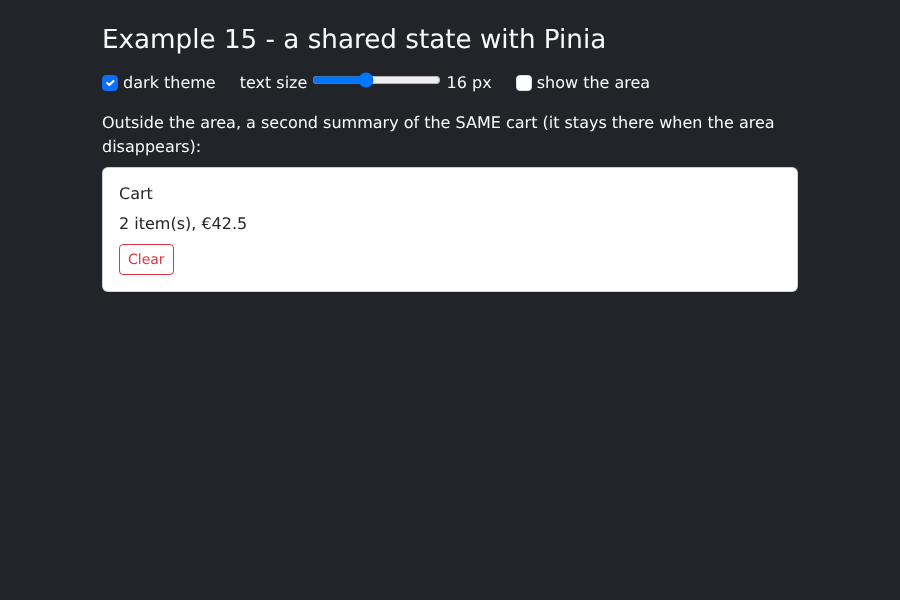
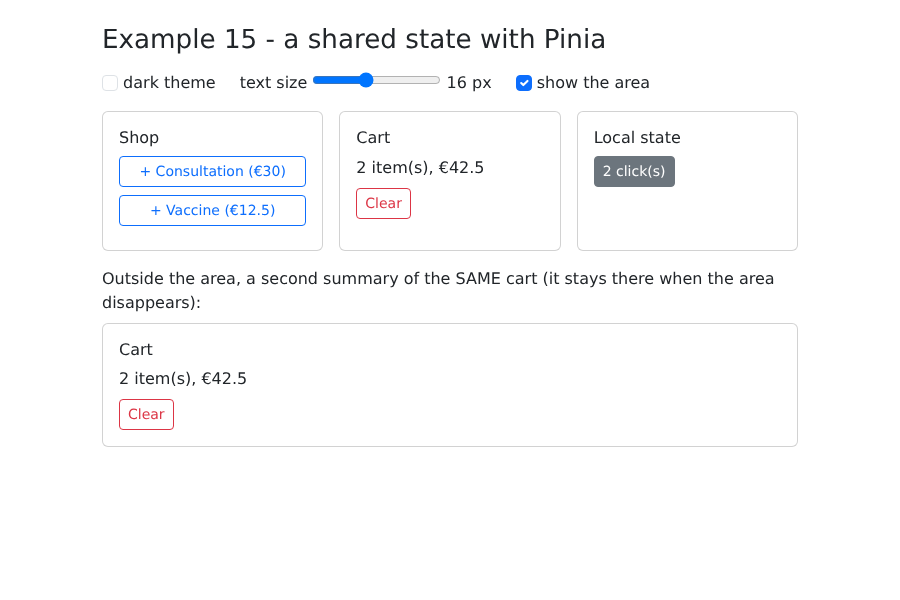
- 第 35 行:取消勾选“显示该区域”会把这三个组件从页面中移除;
- 第 41 行:同一个购物车的第二个摘要,位于该区域之外。
与课程 [NestJS] 中示例 23 的问题相同(应用、查询和客户端作用域),这里改写为适用于浏览器:
数据 | 位置? | 生命周期 |
LocalCounter 的计数器 | 组件的本地状态 | 随组件一起消失 |
购物车 | 一个 Pinia store | 整个应用期间,直到 F5 |
偏好设置 | 一个 Pinia store + localStorage | F5 和关闭浏览器后依然保留 |
添加了两件商品并点击了两次:
该区域已被移除并选择了深色主题:购物车仍在;如果再次显示该区域,本地计数器会重置为零: