6. XML 与 Java
在本章中,我们将介绍如何在 Java 中使用 XML 文档。我们将以上一章研究的税务应用程序为例进行说明。
6.1. XML 文件与 XSL 样式表
请看以下名为 simulations.xml 的 XML 文件,它可能代表税务计算模拟的结果:
<?xml version="1.0" encoding="ISO-8859-1"?>
<simulations>
  <simulation marie="oui" enfants="2" salaire="200000" impot="22504"/>
  <simulation marie="non" enfants="2" salaire="200000" impot="33388"/>
</simulations>
在 IE 6 中查看时,会得到以下结果:
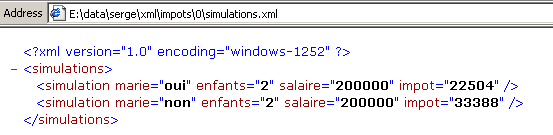
IE6 识别出这是一个 XML 文件(得益于文件的 .xml 扩展名),并按其自身的方式进行格式化。而在 Netscape 中,则会显示空白页面。不过,如果你查看源代码(视图/源代码),可以看到原始的 XML 文件:
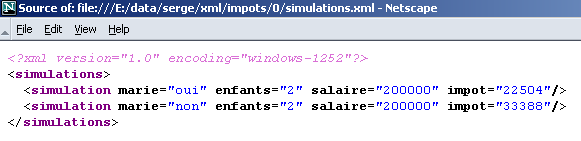
为什么 Netscape 没有显示任何内容?因为它需要一个样式表来告诉它如何将 XML 文件转换为可以显示的 HTML 文件。事实证明,当 XML 文件未提供样式表时,IE 6 会使用默认样式表,而本例中正是这种情况。
有一种名为XSL(扩展样式表语言)的语言,它允许你描述将XML文件转换为任何文本文件所需的转换过程。XSL支持大量指令,且与编程语言极为相似。我们在此不作详细探讨,因为这需要数十页的篇幅。 我们仅介绍两个 XSL 样式表的示例。第一个示例将把 XML 文件 simulations.xml 转换为 HTML 代码。我们修改后者,使其指定浏览器可用于将其转换为 HTML 文档的样式表,以便浏览器随后进行显示:
<?xml version="1.0" encoding="ISO-8859-1" ?>
<?xml-stylesheet type="text/xsl" href="simulations.xsl"?>
<simulations>
  <simulation marie="oui" enfants="2" salaire="200000" impot="22504"/>
  <simulation marie="non" enfants="2" salaire="200000" impot="33388"/>
</simulations>
XML 命令
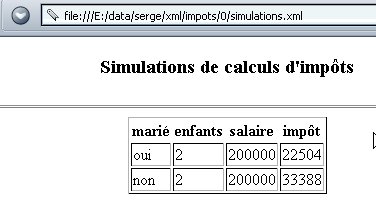
将 simulations.xsl 文件指定为类型为 text/xsl 的 XML 样式表,即包含 XSL 代码的文本文件。浏览器将使用此样式表将 XML 文本转换为 HTML 文档。以下是使用 Netscape 7 加载 XML 文件 simulations.xml 时获得的结果:
当我们查看文档的源代码(“查看/源代码”)时,看到的是原始的 XML 文档,而不是显示的 HTML 文档:
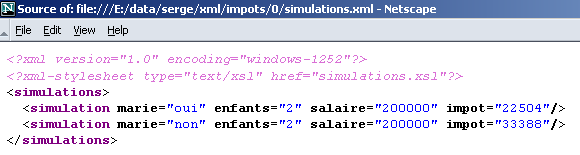
Netscape 使用 simulations.xsl 样式表将上面的 XML 文档转换为可显示的 HTML 文档。现在是时候查看该样式表的内容了:
<?xml version="1.0" encoding="ISO-8859-1"?>
  <xsl:stylesheet version="1.0" xmlns:xsl="http://www.w3.org/1999/XSL/Transform">
      <xsl:output method="html" indent="yes"/>

    <xsl:template match="/">
        <html>
          <head>
            <title>Simulations de calculs d'impôts</title>
        </head>
          <body>
            <center>
              <h3>Simulations de calculs d'impôts</h3>
            <hr/>
            <table border="1">
                    <th>marié</th><th>enfants</th><th>salaire</th><th>impôt</th>
                          <xsl:apply-templates select="/simulations/simulation"/>
                        </table>
         </center>
       </body>
     </html>
        </xsl:template>


    <xsl:template match="simulation">
          <tr>
            <td><xsl:value-of select="@marie"/></td>
            <td><xsl:value-of select="@enfants"/></td>
            <td><xsl:value-of select="@salaire"/></td>
            <td><xsl:value-of select="@impot"/></td>
        </tr>
       </xsl:template>
  </xsl:stylesheet>
- XSL样式表是一个XML文件,因此必须遵循XML规则。其中一项要求是它必须“格式正确”,这意味着每个开始标签都必须有对应的结束标签。
- 该文件以两条 XML 指令开头,这些指令可以包含在任何 XSL 样式表中:
<?xml version="1.0" encoding="ISO-8859-1"?>
  <xsl:stylesheet version="1.0" xmlns:xsl="http://www.w3.org/1999/XSL/Transform">
encoding="ISO-8859-1" 属性允许在样式表中使用带重音的字符。
- <xsl:output method="html" indent="yes"/> 标签告知 XSL 解释器,您希望生成“缩进”的 HTML。
- <xsl:template match="element"> 标签用于定义 XML 文档中的元素,位于 <xsl:template ...> 和 </xsl:template> 之间的指令将应用于该元素。
在上例中,元素“/”表示文档的根节点。这意味着一旦遇到 XML 文档的开头,位于这两个标签之间的 XSL 命令就会被执行。
- 任何非 XSL 标签的内容都会原样包含在输出流中。XSL 标签本身会被执行,其中部分标签生成的结果会被包含在输出流中。让我们来看以下示例:
    <xsl:template match="/">
        <html>
          <head>
            <title>Simulations de calculs d'impôts</title>
        </head>
          <body>
            <center>
              <h3>Simulations de calculs d'impôts</h3>
            <hr/>
            <table border="1">
                    <th>marié</th><th>enfants</th><th>salaire</th><th>impôt</th>
                          <xsl:apply-templates select="/simulations/simulation"/>
                        </table>
          </center>
        </body>
      </html>
        </xsl:template>
请注意,正在分析的 XML 文档如下:
<?xml version="1.0" encoding="ISO-8859-1"?>
<simulations>
  <simulation marie="oui" enfants="2" salaire="200000" impot="22504"/>
  <simulation marie="non" enfants="2" salaire="200000" impot="33388"/>
</simulations>
从解析的 XML 文档开头(match="/") 开始,XSL 处理器将输出文本
<html>
          <head>
            <title>Simulations de calculs d'impôts</title>
        </head>
          <body>
            <center>
              <h3>Simulations de calculs d'impôts</h3>
            <hr>
            <table border="1">
                    <th>marié</th><th>enfants</th><th>salaire</th><th>impôt</th>
请注意,原文中我们使用的是 <hr/>,而不是 <hr>。在原文中,我们不能写 <hr>,因为虽然这是一个有效的 HTML 标签,但作为 XML 标签则无效。然而,我们这里处理的是必须“结构良好”的 XML 文本,这意味着每个标签都必须闭合。 因此我们写成 <hr/>,并且由于我们写了 <xsl:output text="html ...">,XSL 处理器会将文本 <hr/> 转换为 <hr>。紧随其后的将是 XSL 命令生成的文本:
我们稍后将了解该文本的具体内容。最后,解释器会添加以下文本:
<xsl:apply-templates select="/simulations/simulation"/> 指令指示 XSL 处理器将“模板”应用于 /simulations/simulation 元素。每当 XSL 解释器在已解析的 XML 文本中遇到位于 <simulations>..</simulations> 标签内的 <simulation>..</simulations> 或 <simulation/> 标签时,该指令都会被执行。 当遇到 <simulation> 标签时,解释器将执行以下模板中的指令:
<xsl:template match="simulation">
<tr>
<td><xsl:value-of select="@marie"/></td>
<td><xsl:value-of select="@enfants"/></td>
<td><xsl:value-of select="@salaire"/></td>
<td><xsl:value-of select="@impot"/></td>
</tr>
</xsl:template>
请看以下这些 XML 代码行:
行 <simulation ..> 对应于 XSL 指令 <xsl:apply-templates select="/simulations/simulation"> 的模板。因此,XSL 解释器将尝试应用与该模板匹配的指令。它将找到模板 <xsl:template match="simulation"> 并执行它。 请注意,XSL解释器会将所有非XSL命令的内容原样传递,而XSL命令则会被替换为其执行结果。因此,XSL指令<xsl:value-of select="@champ"/>会被解析节点(此处为<simulation>节点)的“champ”属性的值所替换。解析前面的XML行将产生以下输出:
XSL | 输出 |
<tr><td> | <tr><td> |
<xsl:value-of select="@marie"/> | 是 |
</td><td> | </td><td> |
<xsl:value-of select="@children"/> | 2 |
</td><td> | </td><td> |
<xsl:value-of select="@salary"/> | 200000 |
</td><td> | </td><td> |
<xsl:value-of select="@tax"/> | 22504 |
</td></tr> | </td></tr> |
总共,XML 行
将转换为以下 HTML 代码行:
虽然这些解释有些简单,但读者现在应该已经清楚,以下 XML 文本:
<?xml version="1.0" encoding="ISO-8859-1"?>
<?xml-stylesheet type="text/xsl" href="simulations.xsl"?>
<simulations>
<simulation marie="oui" enfants="2" salaire="200000" impot="22504"/>
<simulation marie="non" enfants="2" salaire="200000" impot="33388"/>
</simulations>
并附有以下 XSL 样式表 simulations.xsl:
<?xml version="1.0" encoding="ISO-8859-1"?>
<xsl:stylesheet version="1.0" xmlns:xsl="http://www.w3.org/1999/XSL/Transform">
<xsl:output method="html" indent="yes"/>
<xsl:template match="/">
<html>
<head>
<title>Simulations de calculs d'impôts</title>
</head>
<body>
<center>
<h3>Simulations de calculs d'impôts</h3>
<hr/>
<table border="1">
<th>marié</th><th>enfants</th><th>salaire</th><th>impôt</th>
<xsl:apply-templates select="/simulations/simulation"/>
                    </table>
          </center>
        </body>
      </html>
</xsl:template>
    <xsl:template match="simulation">
          <tr>
            <td><xsl:value-of select="@marie"/></td>
            <td><xsl:value-of select="@enfants"/></td>
            <td><xsl:value-of select="@salaire"/></td>
            <td><xsl:value-of select="@impot"/></td>
        </tr>
       </xsl:template>
</xsl:stylesheet>
生成以下 HTML 文本:
<html>
<head>
<title>Simulations de calculs d'impôts</title>
</head>
<body>
<center>
<h3>Simulations de calculs d'impots</h3>
<hr>
<table border="1">
<th>marié</th><th>enfants</th><th>salaire</th><th>impôt</th>
<tr>
<td>oui</td><td>2</td><td>200000</td><td>22504</td>
</tr>
<tr>
<td>non</td><td>2</td><td>200000</td><td>33388</td>
</tr>
</table>
</center>
</body>
</html>
当在现代浏览器(此处为 Netscape 7)中查看 XML 文件 simulations.xml 及其样式表 simulations.xsl 时,显示效果如下:
6.2. 税费计算应用程序:第 6 版
6.2.1. 税费计算应用程序的 XML 文件和 XSL 样式表
让我们回到税务 Web 应用程序,对其进行修改,使发送给客户端的响应采用 XML 格式而非 HTML 格式。该 XML 响应将附带一个 XSL 样式表,以便浏览器能够显示它。在上一节中,我们介绍了:
- simulations.xml 文件,这是一个包含税费计算模拟结果的 XML 响应原型
- simulations.xsl 文件,即随附此 XML 响应的 XSL 样式表
我们还必须考虑响应中包含错误的情况。在此情况下,XML响应的原型将是以下 errors.xml 文件:
<?xml version="1.0" encoding="windows-1252"?>
<?xml-stylesheet type="text/xsl" href="erreurs.xsl"?>
<erreurs>
<erreur>erreur 1</erreur>
<erreur>erreur 2</erreur>
</erreurs>
用于在浏览器中显示此 XML 文档的 errors.xsl 样式表如下:
<?xml version="1.0" encoding="windows-1252"?>
<xsl:stylesheet version="1.0" xmlns:xsl="http://www.w3.org/1999/XSL/Transform">
<xsl:output method="html" indent="yes"/>
<xsl:template match="/">
<html>
<head>
<title>Simulations de calculs d'impôts</title>
</head>
<body>
<center>
<h3>Simulations de calculs d'impôts</h3>
</center>
<hr/>
Les erreurs suivantes se sont produites :
<ul>
<xsl:apply-templates select="/erreurs/erreur"/>
</ul>
</body>
</html>
</xsl:template>
<xsl:template match="erreur">
<li><xsl:value-of select="."/></li>
</xsl:template>
</xsl:stylesheet>
本样式表引入了一个此前未曾出现过的 XSL 命令:<xsl:value-of select="."/>。该命令输出已解析节点的值,在本例中即 <error>text</error> 节点。该节点的值是开始标签与结束标签之间的文本,在本例中即为“text”。
errors.xml 代码经由 errors.xsl 样式表转换后,生成以下 HTML 文档:
<html>
<head>
<title>Simulations de calculs d'impots</title>
</head>
<body>
<center>
<h3>Simulations de calculs d'impots</h3>
</center>
<hr>
Les erreurs suivantes se sont produites :
<ul>
<li>erreur 1</li>
<li>erreur 2</li>
</ul>
</body>
</html>
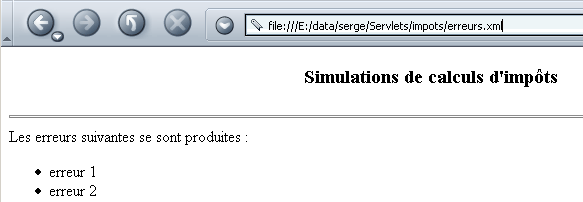
浏览器显示的 errors.xml 文件及其样式表如下:
6.2.2. xmlsimulations Servlet
我们创建一个 index.html 文件,并将其放置在 impots 应用程序目录中。显示的页面如下:
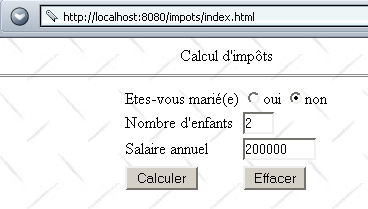
此 HTML 文档是一个静态文档。其代码如下:
<html>
<head>
<title>impots</title>
<script language="JavaScript" type="text/javascript">
function effacer(){
// raz du formulaire
with(document.frmImpots){
optMarie[0].checked=false;
optMarie[1].checked=true;
txtEnfants.value="";
txtSalaire.value="";
txtImpots.value="";
}//with
}//effacer
function calculer(){
// vérification des paramètres avant de les envoyer au serveur
with(document.frmImpots){
//nbre d'enfants
champs=/^\s*(\d+)\s*$/.exec(txtEnfants.value);
if(champs==null){
// le modéle n'est pas vérifié
alert("Le nombre d'enfants n'a pas été donné ou est incorrect");
nbEnfants.focus();
return;
}//if
//salaire
champs=/^\s*(\d+)\s*$/.exec(txtSalaire.value);
if(champs==null){
// le modéle n'est pas vérifié
alert("Le salaire n'a pas été donné ou est incorrect");
salaire.focus();
return;
}//if
// c'est bon - on envoie
submit();
}//with
}//calculer
</script>
</head>
<body background="/impots/images/standard.jpg">
<center>
Calcul d'impôts
<hr>
<form name="frmImpots" action="/impots/xmlsimulations" method="POST">
<table>
<tr>
<td>Etes-vous marié(e)</td>
<td>
<input type="radio" name="optMarie" value="oui">oui
<input type="radio" name="optMarie" value="non" checked>non
</td>
</tr>
<tr>
<td>Nombre d'enfants</td>
<td><input type="text" size="3" name="txtEnfants" value=""></td>
</tr>
<tr>
<td>Salaire annuel</td>
<td><input type="text" size="10" name="txtSalaire" value=""></td>
</tr>
<tr></tr>
<tr>
<td><input type="button" value="Calculer" onclick="calculer()"></td>
<td><input type="button" value="Effacer" onclick="effacer()"></td>
</tr>
</table>
</form>
</center>
</body>
</html>
请注意,表单数据被提交到了 URL /impots/xmlsimulations。该应用程序是一个 Java Servlet,在 impots 应用程序的 web.xml 文件中配置如下:
<?xml version="1.0" encoding="ISO-8859-1"?>
<!DOCTYPE web-app
PUBLIC "-//Sun Microsystems, Inc.//DTD Web Application 2.3//EN"
"http://java.sun.com/dtd/web-app_2_3.dtd">
<web-app>
...........
<servlet>
<servlet-name>xmlsimulations</servlet-name>
<servlet-class>xmlsimulations</servlet-class>
<init-param>
<param-name>xslSimulations</param-name>
<param-value>simulations.xsl</param-value>
</init-param>
<init-param>
<param-name>xslErreurs</param-name>
<param-value>erreurs.xsl</param-value>
</init-param>
<init-param>
<param-name>DSNimpots</param-name>
<param-value>mysql-dbimpots</param-value>
</init-param>
<init-param>
<param-name>admimpots</param-name>
<param-value>admimpots</param-value>
</init-param>
<init-param>
<param-name>mdpimpots</param-name>
<param-value>mdpimpots</param-value>
</init-param>
</servlet>
........
<servlet-mapping>
<servlet-name>xmlsimulations</servlet-name>
<url-pattern>/xmlsimulations</url-pattern>
</servlet-mapping>
</web-app>
- 该 Servlet 命名为 xmlsimulations,并基于 xmlsimulations.class 类。
- 其参数包括 DSNimpots、admimpots 和 mdpimpots,这些参数是访问税务数据库所必需的。此外,它还接受另外两个参数:
- xslSimulations,即必须随附于包含模拟结果的 XML 响应中的样式表文件名称
- xslErrors,即包含任何错误的 XML 响应所必须附带的样式表名称
- 该 Servlet 有一个别名 xmlsimulations,因此可通过 URL http://localhost:8080/impots/xmlsimulations 访问。
xmlsimulations Servlet 的框架与前面讨论过的 simulations Servlet 类似。主要区别在于它必须生成 XML 而不是 HTML。这将导致之前应用程序中使用的 JSP 文件被移除。这些文件的主要作用是通过防止生成的 HTML 代码被埋没在 Servlet 的 Java 代码中,从而提高其可读性。这一作用现已不再必要。该 Servlet 需要生成两种类型的 XML 代码:
- 一种用于模拟
- 一种用于错误
此前我们已介绍并分析了这两种情况下需提供的 XML 响应类型,以及必须随附的样式表。Servlet 代码如下:
import java.io.*;
import javax.servlet.*;
import javax.servlet.http.*;
import java.util.regex.*;
import java.util.*;
public class xmlsimulations extends HttpServlet{
// instance variables
String msgErreur=null;
String xslSimulations=null;
String xslErreurs=null;
String DSNimpots=null;
String admimpots=null;
String mdpimpots=null;
impotsJDBC impots=null;
//-------- GET
public void doGet(HttpServletRequest request, HttpServletResponse response)
throws IOException, ServletException{
// retrieve the write stream to the client
PrintWriter out=response.getWriter();
// specify the type of response
response.setContentType("text/xml");
// error list
ArrayList erreurs=new ArrayList();
// was the initialization successful?
if(msgErreur!=null){
// that's it - we send the response with errors to the server
erreurs.add(msgErreur);
sendErreurs(out,xslErreurs,erreurs);
// it's over
return;
}
// retrieve previous simulations from the session
HttpSession session=request.getSession();
ArrayList simulations=(ArrayList)session.getAttribute("simulations");
if(simulations==null) simulations=new ArrayList();
// retrieve the parameters of the current query
String optMarie=request.getParameter("optMarie"); // marital status
String txtEnfants=request.getParameter("txtEnfants"); // no. of children
String txtSalaire=request.getParameter("txtSalaire"); // annual salary
// do we have all the expected parameters
if(optMarie==null || txtEnfants==null || txtSalaire==null){
// missing parameters
// send response with errors
erreurs.add("Demande incomplète. Il manque des paramètres");
sendErreurs(out,xslErreurs,erreurs);
// it's over
return;
}
// we have all the parameters - we check them
// marital status
if( ! optMarie.equals("oui") && ! optMarie.equals("non")){
// error
erreurs.add("Etat marital incorrect");
}
// number of children
txtEnfants=txtEnfants.trim();
if(! Pattern.matches("^\\d+$",txtEnfants)){
// error
erreurs.add("Nombre d'enfants incorrect");
}
// salary
txtSalaire=txtSalaire.trim();
if(! Pattern.matches("^\\d+$",txtSalaire)){
// error
erreurs.add("Salaire incorrect");
}
if(erreurs.size()!=0){
// if there are errors, we report them
sendErreurs(out,xslErreurs,erreurs);
}else{
// no errors
try{
// you can calculate the tax payable
int nbEnfants=Integer.parseInt(txtEnfants);
int salaire=Integer.parseInt(txtSalaire);
String txtImpots=""+impots.calculer(optMarie.equals("oui"),nbEnfants,salaire);
// the current result is added to the previous simulations
String[] simulation={optMarie.equals("oui") ? "oui" : "non",txtEnfants, txtSalaire, txtImpots};
simulations.add(simulation);
// we send the answer with simulations
sendSimulations(out,xslSimulations,simulations);
}catch(Exception ex){}
}//if-else
// we put the list of simulations back into the session
session.setAttribute("simulations",simulations);
}//GET
//-------- POST
public void doPost(HttpServletRequest request, HttpServletResponse response)
throws IOException, ServletException{
doGet(request,response);
}//POST
//-------- INIT
public void init(){
// retrieve initialization parameters
ServletConfig config=getServletConfig();
xslSimulations=config.getInitParameter("xslSimulations");
xslErreurs=config.getInitParameter("xslErreurs");
DSNimpots=config.getInitParameter("DSNimpots");
admimpots=config.getInitParameter("admimpots");
mdpimpots=config.getInitParameter("mdpimpots");
// parameters ok?
if(xslSimulations==null || DSNimpots==null || admimpots==null || mdpimpots==null){
msgErreur="Configuration incorrecte";
return;
}
// create an instance of impotsJDBC
try{
impots=new impotsJDBC(DSNimpots,admimpots,mdpimpots);
}catch(Exception ex){
msgErreur=ex.getMessage();
}
}//init
//-------- sendErreurs
private void sendErreurs(PrintWriter out,String xslErreurs,ArrayList erreurs){
String réponse="<?xml version=\"1.0\" encoding=\"windows-1252\"?>"
+ "<?xml-stylesheet type=\"text/xsl\" href=\""+xslErreurs+"\"?>\n"
+"<erreurs>\n";
for(int i=0;i<erreurs.size();i++){
réponse+="<erreur>"+(String)erreurs.get(i)+"</erreur>\n";
}//for
réponse+="</erreurs>\n";
// we send the answer
out.println(réponse);
}
//-------- sendSimulations
private void sendSimulations(PrintWriter out, String xslSimulations, ArrayList simulations){
String réponse="<?xml version=\"1.0\" encoding=\"windows-1252\"?>"
+ "<?xml-stylesheet type=\"text/xsl\" href=\""+xslSimulations+"\"?>\n"
+ "<simulations>\n";
String[] simulation=null;
for(int i=0;i<simulations.size();i++){
// simulation no. i
simulation=(String[])simulations.get(i);
réponse+="<simulation "
+"marie=\""+(String)simulation[0]+"\" "
+"enfants=\""+(String)simulation[1]+"\" "
+"salaire=\""+(String)simulation[2]+"\" "
+"impot=\""+(String)simulation[3]+"\" />\n";
}//for
réponse+="</simulations>\n";
// we send the answer
out.println(réponse);
}
}
让我们来分析一下,与我们已知的代码相比,这段代码的主要新功能有哪些:
- init 过程从 web.xml 配置文件中获取新参数:必须随响应附带的两份 XSL 样式表的名称被存储在变量 xslSimulations 和 xslErrors 中。这两份样式表就是前面提到的 simulations.xsl 和 errors.xsl 文件。它们位于 impots 应用程序目录下:
dos>dir E:\data\serge\Servlets\impots\*.xsl
27/08/2002 08:15 1 030 simulations.xsl
27/08/2002 09:23 795 erreurs.xsl
- GET 过程首先检查初始化过程中是否发生错误。如果发生错误,则调用 sendErrors 过程,该过程会生成适用于该情况的相应 XML 响应,然后终止。XML 响应中包含一个指定要使用的样式表的标签。
- 若未发生错误,GET 过程将分析客户端请求的参数。若发现任何错误,则通过 sendErrors 过程进行报告。否则,它将计算新的模拟结果,将其添加到当前会话中存储的先前模拟中,并最终通过 sendSimulations 过程发送其 XML 响应。后者以与 sendErrors 过程类似的方式进行。
- 请注意,该 Servlet 将其响应声明为 text/xml 类型:
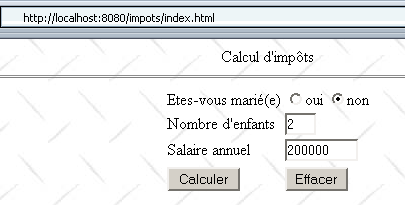
以下是一些执行示例。初始表单填写如下:
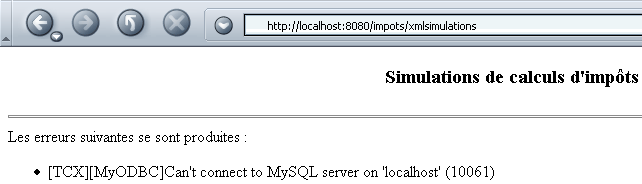
MySQL 数据库尚未启动,导致无法在 Servlet 的 init 方法中构建 impots 对象。因此,Servlet 的响应如下:
浏览器收到的代码(查看源代码)如下:

如果现在在启动 MySQL 数据库后再运行两次模拟,我们会得到以下结果:
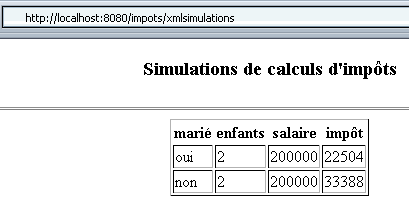
这次,浏览器接收到了以下代码:

请注意,由于删除了 JSP 文件,我们的新应用程序比以前更简单。这些页面之前完成的部分工作已转移到 XSL 样式表中。这种新的任务分工的优势在于,一旦确定了 Servlet 响应的 XML 格式,样式表的开发就与 Servlet 的开发相互独立。
6.3. 在 Java 中解析 XML 文档
我们的 impots 应用程序的第 7 版和第 8 版将作为针对先前 xmlsimulations Servlet 编写的客户端。这些客户端将接收 XML 代码,并需要对其进行解析以提取所需的信息。现在,我们将暂时搁置各版本的开发,学习如何在 Java 中解析 XML 文档。我们将使用 JBuilder 7 中附带的一个名为 MySaxParser 的示例来完成此操作。该程序的调用方式如下:
MySaxParser 应用程序接受一个参数:待解析 XML 文档的 URI(统一资源标识符)。在本例中,该 URI 仅为位于 MySaxParser 应用程序目录下的 XML 文件名。下面我们来看两个执行示例。在第一个示例中,待解析的 XML 文件为 errors.xml:
<?xml version="1.0" encoding="ISO-8859-1"?>
<?xml-stylesheet type="text/xsl" href="erreurs.xsl"?>
<erreurs>
<erreur>erreur 1</erreur>
<erreur>erreur 2</erreur>
</erreurs>
分析得出以下结果:
dos> java MySaxParser erreurs.xml
Début du document
Début élément <erreurs>
Début élément <erreur>
[erreur 1]
Fin élément <erreur>
Début élément <erreur>
[erreur 2]
Fin élément <erreur>
Fin élément <erreurs>
Fin du document
我们尚未说明 MySaxParser 应用程序的功能,但在此我们可以看到它会显示已解析 XML 文档的结构。第二个示例解析了 XML 文件 simulations.xml:
<?xml version="1.0" encoding="ISO-8859-1"?>
<?xml-stylesheet type="text/xsl" href="simulations.xsl"?>
<simulations>
  <simulation marie="oui" enfants="2" salaire="200000" impot="22504"/>
<simulation marie="non" enfants="2" salaire="200000" impot="33388"/>
</simulations>
分析得出以下结果:
dos>java MySaxParser simulations.xml
Début du document
Début élément <simulations>
Début élément <simulation>
marie = oui
enfants = 2
salaire = 200000
impot = 22504
Fin élément <simulation>
Début élément <simulation>
marie = non
enfants = 2
salaire = 200000
impot = 33388
Fin élément <simulation>
Fin élément <simulations>
Fin du document
MySaxParser 类包含了我们在税务应用程序中所需的一切,因为它能够检索 Web 服务器可能发送的错误和模拟数据。让我们来看看它的代码:
import java.io.IOException;
import org.xml.sax.*;
import org.xml.sax.helpers.*;
import org.apache.xerces.parsers.SAXParser;
import java.util.regex.*;

// the class
public class MySaxParser extends DefaultHandler {

     // value of a tree element XML
    private StringBuffer valeur=new StringBuffer();
    // a regular expression of an element's value when you want to ignore
     // the "blanks" that precede or follow it
    private static Pattern ptnValeur=null;
    private static Matcher résultats=null;

    // -------- hand
    public static void main(String[] argv) {
        // check number of parameters
        if (argv.length != 1) {
            System.out.println("Usage: java MySaxParser [URI]");
            System.exit(0);
        }
         // retrieve the URI from the XML file to be analyzed
        String uri = argv[0];
        try {
            // creation of a XML analyzer (parser)
            XMLReader parser = XMLReaderFactory.createXMLReader("org.apache.xerces.parsers.SAXParser");
             // we indicate to the parser the object that will implement the methods
             // startDocument, endDocument, startElement, endElement, characters
            MySaxParser MySaxParserInstance = new MySaxParser();
            parser.setContentHandler(MySaxParserInstance);
             // initialize an element's value model
            ptnValeur=Pattern.compile("^\\s*(.*?)\\s*$");
             // we indicate to the parser the XML document to be analyzed
            parser.parse(uri);
        }
        catch(Exception ex) {
             // error
            System.err.println("Erreur : " + ex);
             // trace
            ex.printStackTrace();
        }
    }//hand


     // -------- startDocument
    public void startDocument() throws SAXException {
         // procedure called when the parser encounters the start of the document
        System.out.println("Début du document");
    }//startDocument

     // -------- endDocument
    public void endDocument() throws SAXException {
         // procedure called when the parser reaches the end of the document

        System.out.println("Fin du document");
    }//endDocument

     // -------- startElement
    public void startElement(String uri, String localName, String qName,
        Attributes attributes) throws SAXException {
         // procedure called by the parser when it encounters the start of a tag
         // uri: URI of the analyzed document?
         // localName: name of element being analyzed
         // qName: ditto, but "qualified" by a namespace if there is one
         // attributes: list of element attributes

         // follow-up
        System.out.println("Début élément <"+localName+">");
         // does the element have attributes?
        for (int i = 0; i < attributes.getLength(); i++) {
            System.out.println(attributes.getLocalName(i) + " = " + attributes.getValue(i));
        }//for
    }//startElement

    // -------- characters
    public void characters(char[] ch, int start, int length) throws SAXException {
        // procedure called repeatedly by the parser when it encounters text
         // between two <tag>text</tag> tags
         // the text is in ch from the start character on length characters

         // the text is added to the value buffer
        valeur.append(ch, start, length);
    }//characters

        // -------- endElement
    public void endElement(String uri, String localName, String qName)
            throws SAXException {
         // procedure called by the parser when it encounters an end of tag
         // uri: URI of the analyzed document?
         // localName: name of element being analyzed
         // qName: ditto, but "qualified" by a namespace if there is one

         // the value of the
        String strValeur=valeur.toString();
        if (ptnValeur==null) System.out.println("null");
        résultats=ptnValeur.matcher(strValeur);
        if (résultats.find() && ! résultats.group(1).equals("")){
            System.out.println("["+résultats.group(1)+"]");
        }//if
         // set element value to empty
        valeur.setLength(0);

         // follow-up
        System.out.println("Fin élément <"+localName+">");
    }//endElement

}//class
首先,让我们定义一个在XML文档分析中经常出现的缩写词:SAX,即Simple API for XML(XML简单API)。它是一组用于简化XML文档处理的Java类。该API有两个版本:SAX1和SAX2。上面的应用程序使用的是SAX2 API。
该应用程序导入了多个包:
前两个包随 JDK 1.4 一起提供,但第三个包不包含在内。xerces.jar 包可在 Apache Web Server 网站上获取。它随 JBuilder 7 以及 Tomcat 4.x 一起提供:
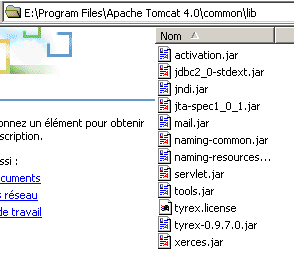
因此,若您希望在 JBuilder 7 之外编译上述应用程序,且已安装 JDK 1.4 和 Tomcat 4.x,可编写如下代码:
运行应用程序时,请采用相同的方法:
dos>java -classpath ".;E:\Program Files\Apache Tomcat 4.0\common\lib\xerces.jar" MySaxParser simulations.xml
MySaxParser 类继承自 DefaultHandler 类。我们稍后会再回到这一点。现在让我们来查看 main 过程的代码:
// retrieve the URI from the XML file to be analyzed
String uri = argv[0];
try {
// creation of a XML analyzer (parser)
XMLReader parser = XMLReaderFactory.createXMLReader("org.apache.xerces.parsers.SAXParser");
// we indicate to the parser the object that will implement the methods
// startDocument, endDocument, startElement, endElement, characters
MySaxParser MySaxParserInstance = new MySaxParser();
parser.setContentHandler(MySaxParserInstance);
// initialize an element's value model
ptnValeur=Pattern.compile("^\\s*(.*?)\\s*$");
// we indicate to the parser the XML document to be analyzed
parser.parse(uri);
}
catch(Exception ex) {
// error
System.err.println("Erreur : " + ex);
// trace
ex.printStackTrace();
}
要解析 XML 文档,我们的应用程序需要一个 XML 代码解析器。
所使用的 XML 解析器由 xerces.jar 包提供。返回的对象类型为 XMLReader。XMLReader 是一个接口,我们在此处使用了其中的两个方法:
告知解析器,在解析 XML 文档时,将由哪个 ContentHandler 对象来处理其生成的事件 | |
开始解析作为参数传递的 XML 文档 |
当解析器分析 XML 文档时,会发出诸如“我遇到了文档开头、标签开头、标签属性、标签内容、标签结尾、文档结尾……”等事件。它将这些事件传递给已提供的 ContentHandler 对象。 ContentHandler 是一个接口,定义了用于处理 XML 解析器可能生成的所有事件所需实现的方法。DefaultHandler 是一个类,为这些方法提供了默认实现。DefaultHandler 中实现的方法虽然不执行任何操作,但它们确实存在。当我们需要通过以下语句告知解析器由哪个对象来处理其生成的事件时
,将一个 DefaultHandler 类型的对象作为参数传递会非常方便。如果仅止步于此,虽然解析器事件将不会被处理,但我们的程序在语法上是正确的。实际上,我们会将一个从 DefaultHandler 类派生的对象作为参数传递给解析器,并在其中重定义仅处理我们感兴趣的事件的方法。这就是此处所做的工作:
// we indicate to the parser the object that will implement the methods
// startDocument, endDocument, startElement, endElement, characters
MySaxParser MySaxParserInstance = new MySaxParser();
parser.setContentHandler(MySaxParserInstance);
// we indicate to the parser the XML document to be analyzed
parser.parse(uri);
我们将 mySaxParser 类的实例传递给解析器,该类是我们自己的类,并在之前的声明中已定义
并开始解析作为参数传递的 URI 对应的文档。至此,XML 文档的解析工作正式开始。解析器会触发事件,并针对每个事件调用负责处理这些事件的对象(本例中即我们的 MySaxParser 对象)的特定方法。该对象负责处理五种特定事件;其余事件将被忽略:
解析器发出的事件 | 处理方法 |
void startDocument() | |
void endDocument() | |
public void startElement(String uri, String localName, String qName, Attributes attributes) uri:? localName:解析元素的名称。如果遇到的是 <simulations> 元素,则 localName 为 "simulations"。 qName:解析元素的命名空间限定名。XML文档可以定义一个命名空间,例如XX。那么上述标签的限定名就是XX:simulations。 attributes:该标签的属性列表 | |
public void characters(char[] ch, int start, int length) ch:字符数组 start:ch数组中要使用的第一个字符的索引 length:从 ch 数组中提取的字符个数 characters 方法可以被多次调用。为了构建元素的值,我们使用一个缓冲区,该缓冲区:
| |
void endElement(String uri, String localName, String qName) 这些参数与 startElement 方法的参数相同。 |
startElement 方法允许您使用类型为 Attributes 的 attributes 参数来获取元素的属性:
- 可通过 attributes.getLength() 获取属性数量
- 属性 i 的名称可通过 attributes.getLocalName(i) 获取
- 属性 i 的值可通过 attributes.getValue(i) 获取
- localName 属性的值可通过 attributes.getValue(localName) 获取
理解了这一点,前面的程序及其执行示例便不言自明。我们使用正则表达式来提取元素的值,因此对于如下 XML 文本:
返回文本“错误 1”作为与 <error> 标签关联的值,并去除其前后的所有空格和换行符。
6.4. 税费计算应用程序:第 7 版
现在,我们已具备所有必要元素,可以编写用于我们提供 XML 的税务服务的客户端。我们将使用应用程序的第 4 版作为客户端,并保留第 6 版作为服务器端。在此客户端-服务器应用程序中:
- 税额计算模拟服务由 xmlsimulations Servlet 处理。因此,正如我们在第 6 版中所见,服务器的响应采用 XML 格式。
- 客户端不再是浏览器,而是一个独立的 Java 客户端。其图形界面与第 4 版相同。
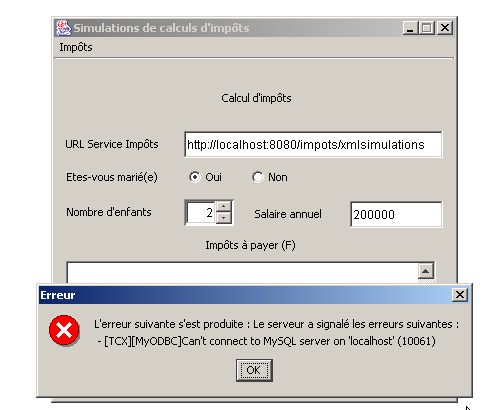
以下是该应用程序运行的几个示例。首先是一个错误场景:尽管客户端因 MySQL 数据库管理系统未运行而未能正确初始化,但它仍向 xmlsimulations Servlet 发起了查询:
我们启动 MySQL 并运行了几次模拟:
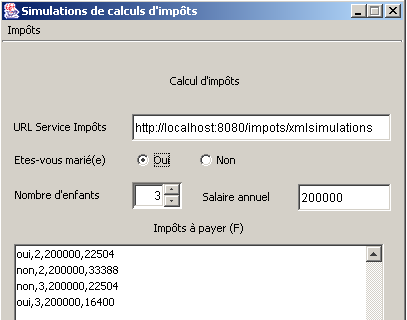
此新版本的客户端与第 4 版客户端的唯一区别在于处理服务器响应的方式。其他方面均未改变。在第 4 版中,客户端接收 HTML 代码,并通过正则表达式从中提取所需信息。在此版本中,客户端接收 XML 代码,并通过 XML 解析器从中获取所需信息。
让我们回顾一下客户端第 4 版中“计算”菜单相关流程的主要步骤,因为主要变更就发生在此处:
void mnuCalculer_actionPerformed(ActionEvent e) {
....
try{
// tax calculation
calculerImpots(urlImpots,rdOui.isSelected(),nbEnfants.intValue(),salaire);
}catch (Exception ex){
// error is displayed
JOptionPane.showMessageDialog(this,"L'erreur suivante s'est produite : " + ex.getMessage(),"Erreur",JOptionPane.ERROR_MESSAGE);
}
....
}//mnuCalculer_actionPerformed
public void calculerImpots(URL urlImpots,boolean marié, int nbEnfants, int salaire)
throws Exception{
// tAX CALCULATION
// urlImpots : URL of the tax department
// married: true if married, false otherwise
// nbEnfants : number of children
// salary: annual salary
// remove from urlImpots the info needed to connect to the tax server
....
try{
// connect to the server
....
// create customer input/output flows TCP
....
// request URL - send HTTP headers
....
// read the 1st line of the answer
....
// we read the response through to the end of the headers, looking for any cookies
while((réponse=IN.readLine())!=null){
.... }//while
// that's it for HTTP headers - move on to HTML code
// to retrieve simulations
ArrayList listeSimulations=getSimulations(IN,OUT,simulations);
simulations.clear();
for (int i=0;i<listeSimulations.size();i++){
simulations.addElement(listeSimulations.get(i));
}
// it's over
....
}//calculerImpots
private ArrayList getSimulations(BufferedReader IN, PrintWriter OUT, DefaultListModel simulations) throws Exception{
....
}
所有这些代码在新版本中仍然有效。只需将服务器 HTML 响应的处理(上文框选部分)及其显示替换为服务器 XML 响应的处理及其显示即可:
// that's it for HTTP headers - move on to XML code
// to recover simulations or errors
ImpotsSaxParser parseur=new ImpotsSaxParser(IN);
ArrayList listeErreurs=parseur.getErreurs();
ArrayList listeSimulations=parseur.getSimulations();
// close server connection
client.close();
// display list cleaning
simulations.clear();
// errors
if(listeErreurs.size()!=0){
// concatenate all errors
String msgErreur="Le serveur a signalé les erreurs suivantes :\n";
for(int i=0;i<listeErreurs.size();i++){
msgErreur+=" - "+(String)listeErreurs.get(i);
}
// error display
throw new Exception(msgErreur);
}//if
// simulations
for (int i=0;i<listeSimulations.size();i++){
simulations.addElement(listeSimulations.get(i));
}
return;
上面的代码片段是做什么的?
- 它创建一个 XML 解析器,并将 IN 流传递给该解析器,该流包含服务器发送的 XML 代码。该流中原本还包含 HTTP 头部,但这些头部已被读取并处理完毕。因此,响应中仅剩下 XML 部分。解析器会生成两个字符串列表:错误列表(如有错误)或模拟列表。这两个列表互斥。
- 如果错误列表不为空,则将列表中的消息拼接成一条错误消息,并抛出一个以该消息为参数的异常。该异常将在调用calculerImpots的mnuCalculer_actionPerformed过程 中显示。
- 如果模拟列表不为空,则将其显示在图形用户界面的 jList 组件中。
现在,让我们来探讨服务器 XML 响应的解析器,该解析器直接源于我们之前关于如何在 Java 中解析 XML 文档的研究:
import java.io.IOException;
import org.xml.sax.*;
import org.xml.sax.helpers.*;
import org.apache.xerces.parsers.SAXParser;
import java.util.regex.*;
import java.io.*;
import java.util.*;
import javax.swing.*;
// the class
public class ImpotsSaxParser extends DefaultHandler {
// value of a tree element XML
private StringBuffer valeur=new StringBuffer();
// a regular expression of an element's value when you want to ignore
// the "blanks" that precede or follow it
private Pattern ptnValeur=null;
private Matcher résultats=null;
// lists of XML elements
private ArrayList listeSimulations=new ArrayList();
private ArrayList listeErreurs=new ArrayList();
// elements XML
private ArrayList éléments=new ArrayList();
String élément="";
// -------- manufacturer
public ImpotsSaxParser(BufferedReader IN) throws Exception{
// creation of a XML analyzer (parser)
XMLReader parser = XMLReaderFactory.createXMLReader("org.apache.xerces.parsers.SAXParser");
// we indicate to the parser the object that will implement the methods
// startDocument, endDocument, startElement, endElement, characters
parser.setContentHandler(this);
// initialize an element's value model
ptnValeur=Pattern.compile("^\\s*(.*?)\\s*$");
// initially no current XML element
éléments.add("");
// document analysis
parser.parse(new InputSource(IN));
}//manufacturer
// -------- startElement
public void startElement(String uri, String localName, String qName,
Attributes attributes) throws SAXException {
// procedure called by the parser when it encounters the start of a tag
// uri: URI of the analyzed document?
// localName: name of element being analyzed
// qName: ditto, but "qualified" by a namespace if there is one
// attributes: list of element attributes
// note the name of the element
élément=localName.toLowerCase();
éléments.add(élément);
// does the element have attributes?
if(élément.equals("simulation") && attributes.getLength()==4){
// it's a simulation - we retrieve the attributes
String simulation=attributes.getValue("marie")+","+
attributes.getValue("enfants")+","+
attributes.getValue("salaire")+","+
attributes.getValue("impot");
// add the simulation to the list of simulations
listeSimulations.add(simulation);
}//if
}//startElement
// -------- characters
public void characters(char[] ch, int start, int length) throws SAXException {
// procedure called repeatedly by the parser when it encounters text
// between two <tag>text</tag> tags
// the text is in ch from the start character on length characters
// the text is added to the value buffer if it is the error element
if (élément.equals("erreur"))
valeur.append(ch, start, length);
}//characters
// -------- endElement
public void endElement(String uri, String localName, String qName)
throws SAXException {
// procedure called by the parser when it encounters an end of tag
// uri: URI of the analyzed document?
// localName: name of element being analyzed
// qName: ditto, but "qualified" by a namespace if there is one
// case of error
if(élément.equals("erreur")){
// retrieve the value of the error element
String strValeur=valeur.toString();
// we strip it of its useless "blanks" and register it in the
// errors if non-empty
résultats=ptnValeur.matcher(strValeur);
if (résultats.find() && ! résultats.group(1).equals("")){
listeErreurs.add(résultats.group(1));
}//if
}
// set element value to empty
valeur.setLength(0);
// reset element name
éléments.remove(éléments.size()-1);
élément=(String)éléments.get(éléments.size()-1);
}//endElement
// --------- getErreurs
public ArrayList getErreurs(){
return listeErreurs;
}
// --------- getSimulations
public ArrayList getSimulations(){
return listeSimulations;
}
}//class
- 构造函数接收待解析的 IN XML 流,并立即执行解析。解析完成后,对象即已构建完毕,错误列表(errorList)和模拟列表(simulationList)也已创建。构建对象的程序接下来只需通过 getErrors 和 getSimulations 方法获取这两个列表即可。
- 此处仅关注XML解析器生成的三个事件:
- XML 元素的开始,该事件将由 startElement 过程处理。该过程将处理 <simulation marie=".." enfants=".." salaire=".." impot=".."> 和 <erreur>...</erreur> 标签。
- XML 元素的值,该事件将由 characters 过程处理。
- XML 元素的结束,该事件将由 endElement 过程处理。
- 在 startElement 过程 中,如果处理的是 <simulation marie=".." enfants=".." salaire=".." impot=".."> 元素,我们会使用 attributes.getValue("属性名") 获取这四个属性。 在所有情况下,我们将元素名称存储在变量 element 中,并将其添加到元素列表(ArrayList)中:elem1、elem2、...、elemN。该列表作为栈进行管理,其中最后一个元素即为当前正在解析的 XML 元素。当发生“元素结束”事件时,列表中的最后一个元素会被移除,并设置新的当前元素。这在 endElement 过程 中完成。
- characters 过程与前一个示例中研究的过程完全相同。我们只需注意验证当前元素确实是 <error> 元素,这种预防措施在此处通常是不必要的。在 startElement 过程中也采取了此类预防措施,以验证我们处理的是 <simulation> 元素。
6.5. 结论
得益于其 XML 响应,impots 应用程序对于其设计者以及客户端应用程序的设计者而言都变得更易于管理。
- 现在,服务器应用程序的设计可以委托给两类人员:Servlet 的 Java 开发人员,以及负责管理服务器响应在浏览器中显示效果的图形设计师。后者只需了解服务器 XML 响应的结构,即可构建与其配套的样式表。请注意,这些样式表包含在独立于 Java Servlet 的单独 XSL 文件中。因此,UI 设计师可以独立于 Java 开发人员进行工作。
- 客户端应用程序设计师同样只需了解服务器 XML 响应的结构。图形设计师对样式表所做的任何修改都不会影响该 XML 响应,后者始终保持不变。这是一项巨大的优势。
- 开发人员如何在不破坏现有功能的情况下更新其 Java Servlet?首先,只要 XML 响应内容保持不变,他们就可以随心所欲地组织 Servlet。此外,只要保留客户端预期的 <error> 和 <simulation> 元素,他们也可以更新 XML 响应。因此,他们可以在该响应中添加新的标签。 前端开发人员会在样式表中处理这些新标签,浏览器也能接收响应的新版本。 然而,程序化客户端将沿用旧模型继续运行,因为新标签会被直接忽略。要实现这一点,必须在服务器响应的 XML 解析中明确标识出需要检索的标签。这正是我们在税务应用的 XML 客户端中所做的,相关流程明确规定我们仅处理 <error> 和 <simulation> 标签。因此,其他标签会被忽略。