9. 程序源代码
9.1. 通用客户端 TCP
互联网早期创建的许多服务都遵循之前研究的回显服务器模型:客户端与服务器的交互通过文本行交换进行。我们将编写一个通用的 TCP 客户端,其启动方式如下:java cltTCPgenerique 服务器端口
该 TCP 客户端将连接到 serveur 服务器的 port 端口。连接成功后,它将创建两个线程:
- 一个线程负责读取键盘输入的命令并将其发送至服务器
- 一个线程负责读取服务器的响应并将其显示在屏幕上
为何需要两个线程?每个 TCP-IP 服务都有其特定的协议,有时会出现以下情况:
- 客户端必须发送多行文本才能获得响应
- 服务器的响应可能包含多行文本
因此,仅发送一行数据给服务器、再接收服务器返回的一行数据的循环模式并不总是适用。因此,我们将创建两个独立的循环:
- 一个用于读取键盘输入的命令并将其发送至服务器的循环。用户将通过关键字 fin 来标记命令结束。
- 一个用于接收并显示服务器响应的循环。这是一个无限循环,仅在服务器关闭网络连接,或用户通过键盘输入命令 fin 时才会终止。
要使这两个循环相互独立,我们需要两个独立的线程。 下面展示一个执行示例,其中我们的通用 TCP 客户端连接到 SMTP 服务(SendMail 传输协议)。该服务负责将电子邮件转发给收件人。它运行在 25 端口上,采用基于文本行交换的交互协议。
Dos>java clientTCPgenerique istia.univ-angers.fr 25
Commandes :
<-- 220 istia.univ-angers.fr ESMTP Sendmail 8.11.6/8.9.3; Mon, 13 May 2002 08:37:26 +0200
help
<-- 502 5.3.0 Sendmail 8.11.6 -- HELP not implemented
mail from: machin@univ-angers.fr
<-- 250 2.1.0 machin@univ-angers.fr... Sender ok
rcpt to: serge.tahe@istia.univ-angers.fr
<-- 250 2.1.5 serge.tahe@istia.univ-angers.fr... Recipient ok
data
<-- 354 Enter mail, end with "." on a line by itself
Subject: test

ligne1
ligne2
ligne3
.
<-- 250 2.0.0 g4D6bks25951 Message accepted for delivery
quit
<-- 221 2.0.0 istia.univ-angers.fr closing connection
[fin du thread de lecture des réponses du serveur]
fin
[fin du thread d'envoi des commandes au serveur]
让我们来分析一下这些客户端与服务端之间的交互:
- 当客户端连接到 SMTP 服务时,该服务会发送一条欢迎消息:
- 某些服务提供 help 命令,用于说明该服务支持的可用命令。但此处并非如此。示例中使用的 SMTP 命令如下:
- mail from: expéditeur,用于指定消息发件人的电子邮箱地址
- rcpt to: destinataire,用于指定邮件收件人的电子邮箱地址。如果有多个收件人,则需针对每位收件人重复发送 rcpt to: 命令。
- data 用于通知服务器 SMTP 即将发送邮件。如服务器响应所示,邮件内容是一系列行,最后以仅包含一个点字符的行结尾。邮件的标题行通常通过空行与正文分隔。在本例中,我们使用 Subject: 关键字设置了主题:
- 消息发送完成后,可通过 quit 命令告知服务器操作已完成。此时服务器将关闭网络连接。读取线程可检测到此事件并停止运行。
- 用户随后在键盘上输入“fin”以停止读取键盘输入命令的线程。
若检查收到的邮件,我们看到如下内容(Outlook):
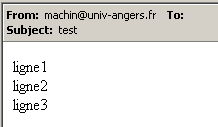
需要注意的是,SMTP服务无法判断发件人是否有效。因此,绝不能信任邮件中的from字段。 此处的发件人 machin@univ-angers.fr 并不存在。
这个通用 TCP 客户端可帮助我们发现互联网服务的通信协议,并据此为这些服务的客户端构建专用类。让我们来探索服务 POP(邮局协议)的通信协议,该协议允许检索存储在服务器上的邮件。它运行在 110 端口上。
Dos> java clientTCPgenerique istia.univ-angers.fr 110
Commandes :
<-- +OK Qpopper (version 4.0.3) at istia.univ-angers.fr starting.
help
<-- -ERR Unknown command: "help".
user st
<-- +OK Password required for st.
pass monpassword
<-- +OK st has 157 visible messages (0 hidden) in 11755927 octets.
list
<-- +OK 157 visible messages (11755927 octets)
<-- 1 892847
<-- 2 171661
...
<-- 156 2843
<-- 157 2796
<-- .
retr 157
<-- +OK 2796 octets
<-- Received: from lagaffe.univ-angers.fr (lagaffe.univ-angers.fr [193.49.144.1])
<--     by istia.univ-angers.fr (8.11.6/8.9.3) with ESMTP id g4D6wZs26600;
<--     Mon, 13 May 2002 08:58:35 +0200
<-- Received: from jaume ([193.49.146.242])
<--     by lagaffe.univ-angers.fr (8.11.1/8.11.2/GeO20000215) with SMTP id g4D6wSd37691;
<--     Mon, 13 May 2002 08:58:28 +0200 (CEST)
...
<-- ------------------------------------------------------------------------
<-- NOC-RENATER2                  Tl.  : 0800 77 47 95
<-- Fax : (+33) 01 40 78 64 00 ,  Email : noc-r2@cssi.renater.fr
<-- ------------------------------------------------------------------------
<--
<-- .
quit
<-- +OK Pop server at istia.univ-angers.fr signing off.
[fin du thread de lecture des réponses du serveur]
fin
[fin du thread d'envoi des commandes au serveur]
主要命令如下:
- user login,在此处输入存储我们邮件的机器上的登录名
- pass password,此处需输入与前一登录名关联的密码
- list,用于获取以编号和字节大小形式显示的邮件列表
- retr i,用于阅读编号为 i 的邮件
- quit,用于结束会话。
现在让我们来了解客户端与通常运行在80端口的Web服务器之间的交互协议:
Dos> java clientTCPgenerique istia.univ-angers.fr 80
Commandes :
GET /index.html HTTP/1.0

<-- HTTP/1.1 200 OK
<-- Date: Mon, 13 May 2002 07:30:58 GMT
<-- Server: Apache/1.3.12 (Unix)  (Red Hat/Linux) PHP/3.0.15 mod_perl/1.21
<-- Last-Modified: Wed, 06 Feb 2002 09:00:58 GMT
<-- ETag: "23432-2bf3-3c60f0ca"
<-- Accept-Ranges: bytes
<-- Content-Length: 11251
<-- Connection: close
<-- Content-Type: text/html
<--
<-- <html>
<--
<-- <head>
<-- <meta http-equiv="Content-Type"
<-- content="text/html; charset=iso-8859-1">
<-- <meta name="GENERATOR" content="Microsoft FrontPage Express 2.0">
<-- <title>Bienvenue a l'ISTIA - Universite d'Angers</title>
<-- </head>
....
<-- face="Verdana"> - Dernire mise  jour le <b>10 janvier 2002</b></font></p>
<-- </body>
<-- </html>
<--
[fin du thread de lecture des réponses du serveur]
fin
[fin du thread d'envoi des commandes au serveur]
Web客户端按照以下模式向服务器发送请求:
只有在收到空行后,Web 服务器才会做出响应。在示例中,我们只使用了一个命令:
该命令向服务器请求URL /index.html,并表明其使用的是HTTP协议的1.0版本。该协议的最新版本为1.1。 该示例显示,服务器响应时返回了文件 index.html 的内容,随后关闭了连接,因为可以看到响应读取线程已结束。在发送文件 index.html 的内容之前,Web 服务器发送了一系列以空行结尾的头部信息:
<-- HTTP/1.1 200 OK
<-- Date: Mon, 13 May 2002 07:30:58 GMT
<-- Server: Apache/1.3.12 (Unix)  (Red Hat/Linux) PHP/3.0.15 mod_perl/1.21
<-- Last-Modified: Wed, 06 Feb 2002 09:00:58 GMT
<-- ETag: "23432-2bf3-3c60f0ca"
<-- Accept-Ranges: bytes
<-- Content-Length: 11251
<-- Connection: close
<-- Content-Type: text/html
<--
<-- <html>
行 <html> 是文件 /index.html 的第一行。上述内容被称为 HTTP 头(HyperText 传输协议)。 我们在此不详细说明这些头部信息,但需注意我们的通用客户端提供了访问这些头部信息的途径,这有助于理解它们。例如第一行:
表明所联系的 Web 服务器支持 HTTP/1.1 协议,并且已成功找到请求的文件(200 OK),其中 200 是 HTTP 响应代码。以下几行
告知客户端,它将接收 11251 个字节,这些数据代表文本 HTML(HyperText 标记语言),并且在发送完成后,连接将被关闭。
因此,这是一个非常实用的 TCP 客户端。虽然它的功能可能不如我们之前使用的 telnet 程序,但亲自编写它还是很有趣的。通用 TCP 客户端的程序如下:
// 导入的软件包
import java.io.*;
import java.net.*;
public class clientTCPgenerique{
// 接收服务特征作为参数,格式为
// 服务器端口
// 连接到服务
// 创建一个线程来读取键盘输入的命令
// 将这些命令发送至服务器
// 创建一个线程以读取服务器的响应
// 这些响应将显示在屏幕上
// 整个过程以键盘输入的“fin”命令结束
// 实例变量
private static Socket client;
public static void main(String[] args){
// 语法
final String syntaxe="pg serveur port";
// 参数个数
if(args.length != 2)
erreur(syntaxe,1);
// 记录服务器名称
String serveur=args[0];
// 端口必须是大于0的整数
int port=0;
boolean erreurPort=false;
Exception E=null;
try{
port=Integer.parseInt(args[1]);
}catch(Exception e){
E=e;
erreurPort=true;
}
erreurPort=erreurPort || port <=0;
if(erreurPort)
erreur(syntaxe+"\n"+"Port incorrect ("+E+")",2);
client=null;
// 可能会出现问题
try{
// 连接到服务
client=new Socket(serveur,port);
}catch(Exception ex){
// 错误
erreur("Impossible de se connecter au service ("+ serveur
+","+port+"), erreur : "+ex.getMessage(),3);
// 结束
return;
}//捕获
// 创建读写线程
new ClientSend(client).start();
new ClientReceive(client).start();
// 主线程结束
return;
}// 主线程
// 显示错误
public static void erreur(String msg, int exitCode){
// 显示错误
System.err.println(msg);
// 因错误停止
System.exit(exitCode);
}//错误
}//类
class ClientSend extends Thread {
// 负责读取键盘输入命令的类
// 并将它们通过作为参数传递的 TCP 客户端发送至服务器
private Socket client; // 该 TCP 客户端
// 构造函数
public ClientSend(Socket client){
// 注:此处为 TCP 客户端
this.client=client;
}//构造函数
// 线程的 Run 方法
public void run(){
// 本地数据
PrintWriter OUT=null; // 网络写入流
BufferedReader IN=null; // 键盘流
String commande=null; // 键盘读取的命令
// 错误处理
try{
// 创建网络写入流
OUT=new PrintWriter(client.getOutputStream(),true);
// 创建键盘输入流
IN=new BufferedReader(new InputStreamReader(System.in));
// 命令输入与发送循环
System.out.println("Commandes : ");
while(true){
// 读取键盘输入的命令
commande=IN.readLine().trim();
// 结束了吗?
if (commande.toLowerCase().equals("fin")) break;
// 将命令发送至服务器
OUT.println(commande);
// 下一条命令
}//while
}catch(Exception ex){
// 错误
System.err.println("Envoi : L'erreur suivante s'est produite : " + ex.getMessage());
}//catch
// 结束 - 关闭数据流
try{
OUT.close();client.close();
}catch(Exception ex){}
// 报告线程结束
System.out.println("[Envoi : fin du thread d'envoi des commandes au serveur]");
}//运行
}//类
class ClientReceive extends Thread{
// 负责读取发往
// 作为参数传递的 TCP 客户端
private Socket client; // TCP 客户端
// 构造函数
public ClientReceive(Socket client){
// 记录 TCP 客户端
this.client=client;
}//构造函数
// 线程的 Run 方法
public void run(){
// 本地数据
BufferedReader IN=null; // 网络读取流
String réponse=null; // 服务器响应
// 错误处理
try{
// 创建网络读取流
IN=new BufferedReader(new InputStreamReader(client.getInputStream()));
// 读取 IN 流中文本行的循环
while(true){
// 读取网络流
réponse=IN.readLine();
// 数据流已关闭?
if(réponse==null) break;
// 显示
System.out.println("<-- "+réponse);
}//while
}catch(Exception ex){
// 错误
System.err.println("Réception : L'erreur suivante s'est produite : " + ex.getMessage());
}//catch
// 结束 - 关闭数据流
try{
IN.close();client.close();
}catch(Exception ex){}
// 报告线程结束
System.out.println("[Réception : fin du thread de lecture des réponses du serveur]");
}//运行
}//类
9.2. 通用TCP服务器
现在我们关注一个服务器
- ,它将客户端发送的命令显示在屏幕上
- 并将用户在键盘上输入的文本行作为响应发送给客户端。因此,用户本身充当了服务器。
该程序通过以下命令启动:java serveurTCPgenerique portEcoute,其中 portEcoute 是客户端需要连接的端口。对客户端的服务将由两个线程负责:
- 一个线程专门用于读取客户端发送的文本行
- 另一个线程专门用于读取用户通过键盘输入的响应。该线程将通过 fin 命令通知服务器,表示其已结束与客户端的连接。
服务器为每个客户端创建两个线程。如果有 n 个客户端,则将有 2n 个线程同时处于活动状态。除非用户通过键盘输入 Ctrl-C,否则服务器永远不会停止运行。让我们来看几个示例。
服务器在100端口上运行,我们使用通用客户端与其通信。客户端窗口如下所示:
E:\data\serge\MSNET\c#\网络\通用 TCP 客户端> java clientTCPgenerique localhost 100
Commandes :
commande 1 du client 1
<-- réponse 1 au client 1
commande 2 du client 1
<-- réponse 2 au client 1
fin
L'erreur suivante s'est produite : Impossible de lire les données de la connexion de transport.
[fin du thread de lecture des réponses du serveur]
[fin du thread d'envoi des commandes au serveur]
以 <-- 开头的行是服务器发送给客户端的,其余的是客户端发送给服务器的。服务器窗口如下:
Dos> java serveurTCPgenerique 100
Serveur générique lancé sur le port 100
Thread de lecture des réponses du serveur au client 1 lancé
1 : Thread de lecture des demandes du client 1 lancé
<-- commande 1 du client 1
réponse 1 au client 1
1 : <-- commande 2 du client 1
réponse 2 au client 1
1 : [fin du Thread de lecture des demandes du client 1]
fin
[fin du Thread de lecture des réponses du serveur au client 1]
以 <-- 开头的行是从客户端发送到服务器的。以 N: 开头的行是从服务器发送给第 N 号客户端的。上文中的服务器仍然处于活动状态,而客户端 1 已结束。现在为同一服务器启动第二个客户端:
Dos> java clientTCPgenerique localhost 100
Commandes :
commande 3 du client 2
<-- réponse 3 au client 2
fin
L'erreur suivante s'est produite : Impossible de lire les données de la connexion de transport.
[fin du thread de lecture des réponses du serveur]
[fin du thread d'envoi des commandes au serveur]
此时服务器窗口如下所示:
Dos> java serveurTCPgenerique 100
Serveur générique lancé sur le port 100
Thread de lecture des réponses du serveur au client 1 lancé
1 : Thread de lecture des demandes du client 1 lancé
<-- commande 1 du client 1
réponse 1 au client 1
1 : <-- commande 2 du client 1
réponse 2 au client 1
1 : [fin du Thread de lecture des demandes du client 1]
fin
[fin du Thread de lecture des réponses du serveur au client 1]
Thread de lecture des réponses du serveur au client 2 lancé
2 : Thread de lecture des demandes du client 2 lancé
<-- commande 3 du client 2
réponse 3 au client 2
2 : [fin du Thread de lecture des demandes du client 2]
fin
[fin du Thread de lecture des réponses du serveur au client 2]
^C
现在,让我们通过在 88 端口上启动我们的通用服务器来模拟一个 Web 服务器:
Dos> java serveurTCPgenerique 88
Serveur générique lancé sur le port 88
现在打开浏览器,访问 http://localhost:88/exemple.html。 浏览器将连接到 localhost 机器的 88 端口,然后请求 /exemple.html 页面:
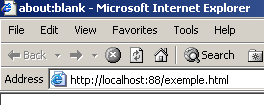
现在让我们看看服务器的窗口:
Dos>java serveurTCPgenerique 88
Serveur générique lancé sur le port 88
Thread de lecture des réponses du serveur au client 2 lancé
2 : Thread de lecture des demandes du client 2 lancé
<-- GET /exemple.html HTTP/1.1
<-- Accept: image/gif, image/x-xbitmap, image/jpeg, image/pjpeg, application/msword, */*
<-- Accept-Language: fr
<-- Accept-Encoding: gzip, deflate
<-- User-Agent: Mozilla/4.0 (compatible; MSIE 6.0; Windows NT 5.0; .NET CLR 1.0.3705; .NET CLR 1.0.2
914)
<-- Host: localhost:88
<-- Connection: Keep-Alive
<--
由此,我们发现了浏览器发送的 HTTP 头部信息。这让我们能够逐步了解 HTTP 协议。在之前的示例中,我们创建了一个仅发送 GET 这一条命令的 Web 客户端。 当时仅此便已足够。在此我们看到,浏览器向服务器发送了其他信息。这些信息的目的是告知服务器,其面对的是何种类型的客户端。我们还注意到,HTTP 头部以空行结尾。
现在我们来为客户端编写一个响应。此时,键盘前的用户就是真正的服务器,可以手动编写响应。回顾一下前一个示例中Web服务器生成的响应:
<-- HTTP/1.1 200 OK
<-- Date: Mon, 13 May 2002 07:30:58 GMT
<-- Server: Apache/1.3.12 (Unix) (Red Hat/Linux) PHP/3.0.15 mod_perl/1.21
<-- Last-Modified: Wed, 06 Feb 2002 09:00:58 GMT
<-- ETag: "23432-2bf3-3c60f0ca"
<-- Accept-Ranges: bytes
<-- Content-Length: 11251
<-- Connection: close
<-- Content-Type: text/html
<--
<-- <html>
让我们尝试给出一个类似的答案:
...
<-- Host: localhost:88
<-- Connection: Keep-Alive
<--
2 : HTTP/1.1 200 OK
2 : Server: serveur tcp generique
2 : Connection: close
2 : Content-Type: text/html
2 :
2 : <html>
2 :   <head><title>Serveur generique</title></head>
2 :   <body>
2 :     <center>
2 :       <h2>Reponse du serveur generique</h2>
2 :     </center>
2 :    </body>
2 : </html>
2 : fin
L'erreur suivante s'est produite : Impossible de lire les données de la connexion de transport.
[fin du Thread de lecture des demandes du client 2]
[fin du Thread de lecture des réponses du serveur au client 2]
以 2: 开头的行是从服务器发送给第 2 号客户端的。命令 fin 结束了服务器与客户端的连接。我们在响应中仅列出了以下 HTTP 头部信息:
HTTP/1.1 200 OK
2 : Server: serveur tcp generique
2 : Connection: close
2 : Content-Type: text/html
2 :
我们不提供即将发送的文件(Content-Length)的大小,而是仅告知在发送该文件后将关闭连接(Connection: close)。这对浏览器而言已足够。 当浏览器检测到连接已关闭时,便会知道服务器的响应已完成,并显示收到的页面 HTML。该页面内容如下:
2 : <html>
2 :   <head><title>Serveur generique</title></head>
2 :   <body>
2 :     <center>
2 :       <h2>Reponse du serveur generique</h2>
2 :     </center>
2 :    </body>
2 : </html>
随后,用户通过输入命令 fin 关闭与客户端的连接。此时,浏览器会知道服务器的响应已经结束,并可以显示该响应:
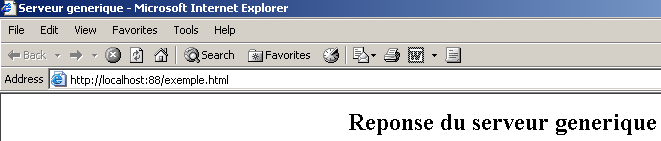
如果在此处执行 View/Source 以查看浏览器接收到的内容,将得到:
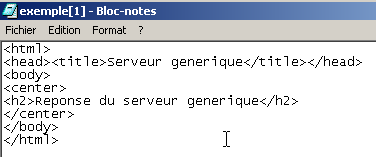
即与从通用服务器发送的内容完全一致。
通用 TCP 服务器的代码如下:
// 包
import java.io.*;
import java.net.*;

public class serveurTCPgenerique{

    // 主程序
    public static void main (String[] args){

    // 监听端口,接收客户端请求
     // 创建一个线程来读取客户端的请求
     // 这些请求将显示在屏幕上
     // 创建一个线程以读取键盘输入的命令
     // 这些命令将作为响应发送给客户端
     // 整个过程以键盘输入的“end”命令结束

    final String syntaxe="Syntaxe : pg port";
   // 实例变量
         // 是否有参数
     if(args.length != 1)
        erreur(syntaxe,1);

         // 端口必须是大于0的整数
        int port=0;
        boolean erreurPort=false;
        Exception E=null;
        try{
            port=Integer.parseInt(args[0]);
        }catch(Exception e){
            E=e;
            erreurPort=true;
        }
        erreurPort=erreurPort || port <=0;
        if(erreurPort)
            erreur(syntaxe+"\n"+"Port incorrect ("+E+")",2);

     // 创建监听服务
    ServerSocket ecoute=null;
    int nbClients=0;    // 处理的客户端数量
        try{
             // 创建服务
            ecoute=new ServerSocket(port);
             // 跟踪
            System.out.println("Serveur générique lancé sur le port " + port);

             // 客户端服务循环
            Socket client=null;
            while (true){ // 无限循环 - 将通过 Ctrl-C 终止
                 // 等待客户端
                client=ecoute.accept();

                 // 该服务由独立线程处理
                nbClients++;

                 // 创建读写线程
        new ServeurSend(client,nbClients).start();
        new ServeurReceive(client,nbClients).start();

                // 返回监听请求
            }// while循环结束
        }catch(Exception ex){
             // 报告错误
            erreur("L'erreur suivante s'est produite : " + ex.getMessage(),3);
        }//catch
    }// main 结束

     // 显示错误
    public static void erreur(String msg, int exitCode){
         // 显示错误
        System.err.println(msg);
         // 带错误停止
        System.exit(exitCode);
    }//错误
}//类

class ServeurSend extends Thread{
    // 负责读取键盘输入的类
     // 并通过传递给构造函数的 TCP 客户端将其发送给客户端

    Socket client;    // TCP 客户端
    int numClient;        // 客户端编号

     // 构造函数
    public ServeurSend(Socket client, int numClient){
         // 这里记录了 TCP 客户端
        this.client=client;
         // 及其编号
        this.numClient=numClient;
    }//制造商

     // 线程的 Run 方法
    public void run(){

        // 本地数据
        PrintWriter OUT=null;        // 网络写入流
        String réponse=null;        // 键盘读取响应
    BufferedReader IN=null;    // 键盘流

        // 跟踪
        System.out.println("Thread de lecture des réponses du serveur au client "+ numClient + " lancé");
         // 错误处理
        try{
             // 创建网络写入流
            OUT=new PrintWriter(client.getOutputStream(),true);
      // 创建键盘流
      IN=new BufferedReader(new InputStreamReader(System.in));
            // 命令输入-发送循环
            while(true){
                 // 客户身份验证
                System.out.print("--> " + numClient + " : ");
                 // 读取键盘输入的响应
                réponse=IN.readLine().trim();
                // 结束了吗?
                if (réponse.toLowerCase().equals("fin")) break;
                // 将响应发送至服务器
                OUT.println(réponse);
                 // 下一个响应
            }//while
        }catch(Exception ex){
             // 错误
            System.err.println("L'erreur suivante s'est produite : " + ex.getMessage());
        }//catch
         // 结束 - 关闭数据流
        try{
            OUT.close();client.close();
        }catch(Exception ex){}
         // 报告线程结束
        System.out.println("[fin du Thread de lecture des réponses du serveur au client "+ numClient+ "]");
    }//运行
}//类

class ServeurReceive extends Thread{
    // 负责读取发送到服务器的文本行的类
     // 通过传递给构造函数的 TCP 客户端

    Socket client;    // TCP客户端
    int numClient;        // 客户端编号

     // 构造函数
    public ServeurReceive(Socket client, int numClient){
         // 记录 TCP 客户端
        this.client=client;
         // 及其编号
        this.numClient=numClient;
    }//构造函数

     // 线程的 Run 方法
    public void run(){

        // 本地数据
        BufferedReader IN=null;        // 网络读取流
        String réponse=null;        // 服务器响应

         // 跟踪
        System.out.println("Thread de lecture des demandes du client "+ numClient + " lancé");
         // 错误处理
        try{
             // 创建网络读取流
            IN=new BufferedReader(new InputStreamReader(client.getInputStream()));
            // 读取 IN 流中文本行的循环
            while(true){
                 // 读取网络流
                réponse=IN.readLine();
                 // 数据流已关闭?
                if(réponse==null) break;
                // 显示
                System.out.println("<-- "+réponse);
            }//while
        }catch(Exception ex){
            // 错误
            System.err.println("L'erreur suivante s'est produite : " + ex.getMessage());
        }//catch
         // 结束 - 关闭数据流
        try{
            IN.close();client.close();
        }catch(Exception ex){}
         // 报告线程结束
        System.out.println("[fin du Thread de lecture des demandes du client "+ numClient+"]");
    }//运行
}//类