5. 税费计算应用程序
5.1. 简介
在此,我们将重新审视 IMPOTS 应用程序,该应用程序在同一位作者的 Java 讲义中被反复使用。让我们回顾一下问题。目标是编写一个应用程序来计算纳税人的应纳税额。我们将考虑一个简化案例,即纳税人只需申报一笔工资收入:
- 我们通过公式 nbParts = nbEnfants / 2 + 1 计算未婚员工的税级数量,已婚员工则为 nbEnfants / 2 + 2,其中 nbEnfants 表示子女数量。
- 若其子女数至少为三名,则额外获得半份免税额
- 其应税收入 R = 0.72 * S,其中 S 为其年薪
- 我们计算其家庭系数 QF = R / nbParts
- 我们计算其应纳税额 I。请看下表:
12620.0 | 0 | 0 |
13,190 | 0.05 | 631 |
15,640 | 0.1 | 1,290.5 |
24,740 | 0.15 | 2,072.5 |
31,810 | 0.2 | 3,309.5 |
39,970 | 0.25 | 4,900 |
48,360 | 0.3 | 6,898.5 |
55,790 | 0.35 | 9,316.5 |
92,970 | 0.4 | 12,106 |
127,860 | 0.45 | 16,754.5 |
151,250 | 0.50 | 23,147.5 |
172,040 | 0.55 | 30,710 |
195,000 | 0.60 | 39312 |
0 | 0.65 | 49062 |
每行有 3 个字段。要计算税款 I,请查找满足 QF <= 字段 1 的第一行。例如,如果 QF = 23,000,则找到的行将是
此时,Tax I 等于 0.15*R - 2072.5*nbParts。如果 QF 使得条件 QF<=field1 永远不成立,则使用最后一行中的系数。这里:
由此得出的税额 I = 0.65*R - 49062*nbParts。
定义不同税率档次的数据存储在 ODBC-MySQL 数据库中。MySQL 是一款公共领域的数据库管理系统(DBMS),可在包括 Windows 和 Linux 在内的多种平台上使用。利用该 DBMS,创建了一个名为 dbimpots 的数据库,其中包含一个名为 impots 的表。 数据库访问通过用户名/密码进行控制,本例中为 admimpots/mdpimpots。下图展示了如何在 MySQL 中使用 dbimpots 数据库:
C:\Program Files\EasyPHP\mysql\bin>mysql -u admimpots -p
Enter password: *********
Welcome to the MySQL monitor.  Commands end with ; or \g.
Your MySQL connection id is 18 to server version: 3.23.49-max-nt

Type 'help;' or '\h' for help. Type '\c' to clear the buffer.

mysql> use dbimpots;
Database changed

mysql> show tables;
+--------------------+
| Tables_in_dbimpots |
+--------------------+
| impots             |
+--------------------+
1 row in set (0.00 sec)

mysql> describe impots;
+---------+--------+------+-----+---------+-------+
| Field   | Type   | Null | Key | Default | Extra |
+---------+--------+------+-----+---------+-------+
| limites | double | YES  |     | NULL    |       |
| coeffR  | double | YES  |     | NULL    |       |
| coeffN  | double | YES  |     | NULL    |       |
+---------+--------+------+-----+---------+-------+
3 rows in set (0.02 sec)

mysql> select * from impots;
+---------+--------+---------+
| limites | coeffR | coeffN  |
+---------+--------+---------+
|   12620 |      0 |       0 |
|   13190 |   0.05 |     631 |
|   15640 |    0.1 |  1290.5 |
|   24740 |   0.15 |  2072.5 |
|   31810 |    0.2 |  3309.5 |
|   39970 |   0.25 |    4900 |
|   48360 |    0.3 |    6898 |
|   55790 |   0.35 |  9316.5 |
|   92970 |    0.4 |   12106 |
|  127860 |   0.45 |   16754 |
|  151250 |    0.5 | 23147.5 |
|  172040 |   0.55 |   30710 |
|  195000 |    0.6 |   39312 |
|       0 |   0.65 |   49062 |
+---------+--------+---------+
14 rows in set (0.00 sec)

mysql>quit
dbimpots 数据库将按以下方式转换为 ODBC 数据源:
- 启动 32 位 ODBC 数据源管理器
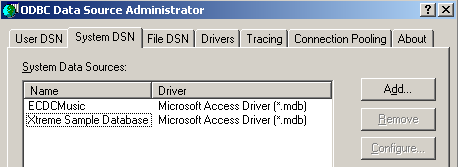
- 使用 [添加] 按钮添加新的 ODBC 数据源
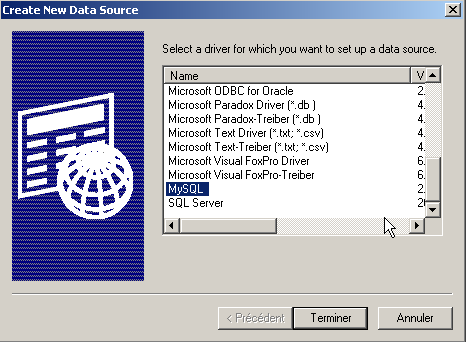
- 选择 MySQL 驱动程序,然后单击 [完成]
54321
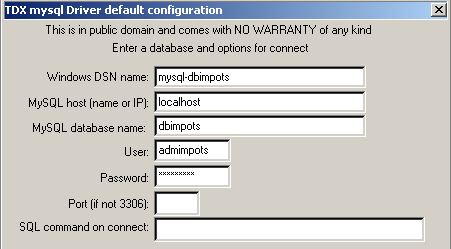
- MySQL 驱动程序需要一些信息:
1 | 要分配给 ODBC 数据源的 DSN 名称——名称可以是任意内容 |
2 | MySQL 数据库管理系统运行的机器——此处为 localhost。值得注意的是,该数据库可能是远程数据库。使用该 ODBC 数据源的本地应用程序不会察觉这一点。特别是对于我们的 Java 应用程序而言,情况正是如此。 |
3 | 要使用的 MySQL 数据库。MySQL 是一种管理关系型数据库的 DBMS,关系型数据库是由关系相互关联的表集合。在此,我们指定所管理的数据库名称。 |
4 | 具有此数据库访问权限的用户名 |
5 | 该用户的密码 |
已定义两个类用于计算税款:impots 和 impotsJDBC。通过将税率区间数据作为参数以数组形式传递,来构造 impots 类的实例:
// creation of an impots class

public class impots{

  // data required for tax calculation
   // come from an external source

  protected double[] limites=null;
  protected double[] coeffR=null;
  protected double[] coeffN=null;

   // empty builder
  protected impots(){}

   // manufacturer
  public impots(double[] LIMITES, double[] COEFFR, double[] COEFFN) throws Exception{
     // check that the 3 arrays have the same size
    boolean OK=LIMITES.length==COEFFR.length && LIMITES.length==COEFFN.length;
    if (! OK) throw new Exception ("Les 3 tableaux fournis n'ont pas la même taille("+
      LIMITES.length+","+COEFFR.length+","+COEFFN.length+")");
    // it's good
    this.limites=LIMITES;
    this.coeffR=COEFFR;
    this.coeffN=COEFFN;
  }//manufacturer

   // tAX CALCULATION
  public long calculer(boolean marié, int nbEnfants, int salaire){
     // calculating the number of shares
    double nbParts;
    if (marié) nbParts=(double)nbEnfants/2+2;
    else nbParts=(double)nbEnfants/2+1;
    if (nbEnfants>=3) nbParts+=0.5;
         // calculation of taxable income & family quota
        double revenu=0.72*salaire;
        double QF=revenu/nbParts;
         // tAX CALCULATION
        limites[limites.length-1]=QF+1;
        int i=0;
        while(QF>limites[i]) i++;
        // return result
        return (long)(revenu*coeffR[i]-nbParts*coeffN[i]);
    }//calculate
}//class
importsJDBC 类继承自之前的 imports 类。importsJDBC 类的实例是利用存储在数据库中的税率区间数据构建的。访问该数据库所需的信息作为参数传递给构造函数:
// imported packages
import java.sql.*;
import java.util.*;

public class impotsJDBC extends impots{
  // addition of a constructor for building
   // limit tables, coeffr, coeffn from table
   // database taxes
  public impotsJDBC(String dsnIMPOTS, String userIMPOTS, String mdpIMPOTS)
      throws SQLException,ClassNotFoundException{

    // dsnIMPOTS: DSN database name
     // userIMPOTS, mdpIMPOTS: database login/password

     // data tables
    ArrayList aLimites=new ArrayList();
    ArrayList aCoeffR=new ArrayList();
    ArrayList aCoeffN=new ArrayList();

    // connection to base
    Class.forName("sun.jdbc.odbc.JdbcOdbcDriver");
    Connection connect=DriverManager.getConnection("jdbc:odbc:"+dsnIMPOTS,userIMPOTS,mdpIMPOTS);
    // creation of a Statement object
    Statement S=connect.createStatement();
    // select request
    String select="select limites, coeffr, coeffn from impots";
    // query execution
    ResultSet RS=S.executeQuery(select);
    while(RS.next()){
      // running line operation
      aLimites.add(RS.getString("limites"));
      aCoeffR.add(RS.getString("coeffr"));
      aCoeffN.add(RS.getString("coeffn"));
    }// next line
     // closing resources
    RS.close();
    S.close();
    connect.close();
     // data transfer to bounded arrays
    int n=aLimites.size();
    limites=new double[n];
    coeffR=new double[n];
    coeffN=new double[n];
    for(int i=0;i<n;i++){
      limites[i]=Double.parseDouble((String)aLimites.get(i));
      coeffR[i]=Double.parseDouble((String)aCoeffR.get(i));
      coeffN[i]=Double.parseDouble((String)aCoeffN.get(i));
    }//for
  }//manufacturer
}//class
一旦构建了 impotsJDBC 类的实例,就可以反复调用其 calculate 方法来计算税额:
这三项必需的数据可以通过多种方式获取。importsJDBC 类的优势在于,我们只需关注如何获取这些数据。一旦获取了这三项信息(婚姻状况、子女数量、年薪),调用 importsJDBC 类的 calculer 方法即可得到应缴税额。
5.2. 版本 1
我们处于一个Web应用程序的上下文中,该应用程序将向用户展示一个HTML界面,以便获取计算税款所需的三个参数:
- 婚姻状况(已婚或未婚)
- 子女数量
- 年收入
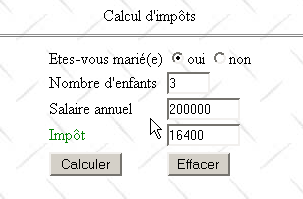
该表单由以下 JSP 页面显示:
<%@ page import="java.util.*" %>

<%
    // on récupère les attributs passés par la servlet principale
  String chkoui=(String)request.getAttribute("chkoui");
  String chknon=(String)request.getAttribute("chknon");
  String txtEnfants=(String)request.getAttribute("txtEnfants");
  String txtSalaire=(String)request.getAttribute("txtSalaire");
  String txtImpots=(String)request.getAttribute("txtImpots");
  ArrayList erreurs=(ArrayList)request.getAttribute("erreurs");
%>

<html>

    <head>
      <title>impots</title>
    <script language="JavaScript" type="text/javascript">
        function effacer(){
          // raz du formulaire
        with(document.frmImpots){
            optMarie[0].checked=false;
          optMarie[1].checked=true;
          txtEnfants.value="";
          txtSalaire.value="";
          txtImpots.value="";
        }//with
      }//effacer
        </script>
  </head>

  <body background="/impots/images/standard.jpg">
      <center>
        Calcul d'impôts
        <hr>
      <form name="frmImpots" action="/impots/main" method="POST">
          <table>
            <tr>
              <td>Etes-vous marié(e)</td>
            <td>
                    <input type="radio" name="optMarie" value="oui" <%= chkoui %>>oui
              <input type="radio" name="optMarie" value="non" <%= chknon %>>non
            </td>
          </tr>
          <tr>
              <td>Nombre d'enfants</td>
            <td><input type="text" size="5" name="txtEnfants" value="<%= txtEnfants %>"></td>
          </tr>
          <tr>
              <td>Salaire annuel</td>
            <td><input type="text" size="10" name="txtSalaire" value="<%= txtSalaire %>"></td>
          </tr>
          <tr>
              <td><font color="green">Impôt</font></td>
            <td><input type="text" size="10" name="txtImpots" value="<%= txtImpots %>" readonly></td>
          </tr>
          <tr></tr>
          <tr>
              <td><input type="submit" value="Calculer"></td>
            <td><input type="button" value="Effacer" onclick="effacer()"></td>
          </tr>
        </table>
      </form>
    </center>
    <%
        // y-a-t-il des erreurs
      if(erreurs!=null){
          // affichage des erreurs
        out.println("<hr>");
        out.println("<font color=\"red\">");
        out.println("Les erreurs suivantes se sont produites<br>");
        out.println("<ul>");
        for(int i=0;i<erreurs.size();i++){
            out.println("<li>"+(String)erreurs.get(i));
        }
        out.println("</ul>");
        out.println("</font>");
      }
   %>
 </body>
</html>
该 JSP 页面仅显示应用程序的主 Servlet 传递给它的信息:
     // retrieve attributes passed by the main servlet
  String chkoui=(String)request.getAttribute("chkoui");
  String chknon=(String)request.getAttribute("chknon");
  String txtEnfants=(String)request.getAttribute("txtEnfants");
  String txtSalaire=(String)request.getAttribute("txtSalaire");
  String txtImpots=(String)request.getAttribute("txtImpots");
  ArrayList erreurs=(ArrayList)request.getAttribute("erreurs");
单选按钮的“checked”和“unchecked”属性可以取值“checked”或“unchecked”,以指示相应的单选按钮是否被选中 | |
纳税人的子女数量 | |
其年薪 | |
应缴税额 | |
错误列表(如有),前提是 errors ≠ null |
发送给客户端的页面包含一个 JavaScript 脚本,其中为“清除”按钮关联了一个 clear 函数,其目的是将表单重置为初始状态:所有复选框均未勾选,所有输入字段均为空。 请注意,使用 HTML 的“重置”按钮无法实现这一效果。事实上,当使用此类按钮时,浏览器会将表单重置为接收时的状态。但在我们的应用程序中,浏览器接收的表单可能并非为空。
该应用程序的主Servlet名为main.java,其代码如下:
import java.io.*;
import javax.servlet.*;
import javax.servlet.http.*;
import java.util.regex.*;
import java.util.*;

public class main extends HttpServlet{

    // instance variables
    String msgErreur=null;
    String urlAffichageImpots=null;
    String urlErreur=null;
    String DSNimpots=null;
    String admimpots=null;
    String mdpimpots=null;
    impotsJDBC impots=null;

    //-------- GET
    public void doGet(HttpServletRequest request, HttpServletResponse response)
    throws IOException, ServletException{

        // was the initialization successful?
        if(msgErreur!=null){
             // we hand over to the error page
            request.setAttribute("msgErreur",msgErreur);
            getServletContext().getRequestDispatcher(urlErreur).forward(request,response);
        }

         // query attributes
        String chkoui=null;
        String chknon=null;
        String txtImpots=null;

        // retrieve query parameters
        String optMarie=request.getParameter("optMarie");              // marital status
        String txtEnfants=request.getParameter("txtEnfants");       // no. of children
        if(txtEnfants==null) txtEnfants="";
        String txtSalaire=request.getParameter("txtSalaire");       // annual salary
        if(txtSalaire==null) txtSalaire="";

         // do we have all the expected parameters
        if(optMarie==null || txtEnfants==null || txtSalaire==null){
             // missing parameters
            request.setAttribute("chkoui","");
            request.setAttribute("chknon","checked");
            request.setAttribute("txtEnfants","");
            request.setAttribute("txtSalaire","");
            request.setAttribute("txtImpots","");
             // we hand over to the tax display url
            getServletContext().getRequestDispatcher(urlAffichageImpots).forward(request,response);
        }

         // we have all the parameters - we check them
        ArrayList erreurs=new ArrayList();
         // marital status
        if( ! optMarie.equals("oui") && ! optMarie.equals("non")){
             // error
            erreurs.add("Etat marital incorrect");
            optMarie="non";
        }
         // number of children
        txtEnfants=txtEnfants.trim();
        if(! Pattern.matches("^\\d+$",txtEnfants)){
            // error
            erreurs.add("Nombre d'enfants incorrect");
        }
         // salary
        txtSalaire=txtSalaire.trim();
        if(! Pattern.matches("^\\d+$",txtSalaire)){
            // error
            erreurs.add("Salaire incorrect");
        }

         // if there are errors, they are passed as query attributes
        if(erreurs.size()!=0){
            request.setAttribute("erreurs",erreurs);
            txtImpots="";
        }else{
             // you can calculate the tax payable
            try{
                int nbEnfants=Integer.parseInt(txtEnfants);
                int salaire=Integer.parseInt(txtSalaire);
                txtImpots=""+impots.calculer(optMarie.equals("oui"),nbEnfants,salaire);
            }catch(Exception ex){}
        }

         // other query attributes
        if(optMarie.equals("oui")){
            request.setAttribute("chkoui","checked");
            request.setAttribute("chknon","");
        }else{
            request.setAttribute("chknon","checked");
            request.setAttribute("chkoui","");
        }
        request.setAttribute("txtEnfants",txtEnfants);
        request.setAttribute("txtSalaire",txtSalaire);
        request.setAttribute("txtImpots",txtImpots);

         // we hand over to the tax display url
        getServletContext().getRequestDispatcher(urlAffichageImpots).forward(request,response);
    }

     //-------- POST
    public void doPost(HttpServletRequest request, HttpServletResponse response)
    throws IOException, ServletException{
        doGet(request,response);
    }

     //-------- INIT
    public void init(){
         // retrieve initialization parameters
        ServletConfig config=getServletConfig();
        urlAffichageImpots=config.getInitParameter("urlAffichageImpots");
        urlErreur=config.getInitParameter("urlErreur");
        DSNimpots=config.getInitParameter("DSNimpots");
        admimpots=config.getInitParameter("admimpots");
        mdpimpots=config.getInitParameter("mdpimpots");

         // parameters ok?
        if(urlAffichageImpots==null || DSNimpots==null || admimpots==null || mdpimpots==null){
            msgErreur="Configuration incorrecte";
            return;
        }

         // create an instance of impotsJDBC
        try{
            impots=new impotsJDBC(DSNimpots,admimpots,mdpimpots);
        }catch(Exception ex){
            msgErreur=ex.getMessage();
        }
    }
}
- Servlet 的 init 方法执行两项操作:
- 它获取初始化参数。这些参数使其能够连接到包含各种税率区间数据(DSNimpots、admimpots、mdpimpots)的 ODBC 数据库,以及与应用程序相关的页面 URL:表单的 urlAffichageImpots 和错误页面的 urlErreur。
- 它创建一个 impotsJDBC 类的实例
在这两种情况下,都会处理潜在的错误,并将错误消息存储在 msgErreur 变量中。
- doGET 方法
- 首先检查 Servlet 是否已正确初始化。如果未正确初始化,则显示错误页面
- 从税务表单中获取预期的参数:optMarie、txtEnfants、txtSalaire。如果其中任何一个参数缺失(==null),则会提交一个空的税务表单。有人可能会认为验证 optMarie 参数是多余的。该参数是单选按钮的值,在此处只能取“yes”或“no”其中一个值。 然而,这忽略了一个事实:没有任何机制能阻止程序通过直接向Servlet发送所需参数来进行查询。你永远无法确定当前连接的是否真的是浏览器。忽视这一点可能会导致应用程序出现安全漏洞,事实上,即使在商业应用程序中,此类问题也屡见不鲜。
- 系统会检查所获取的三个参数的有效性。发现的任何错误都会被添加到错误列表(ArrayList errors)中。如果没有错误,则计算税额;否则,则不计算。
- 将显示页面所需的信息设置为请求属性,随后显示税单
错误 JSP 页面如下:
<%
    // jspService
  // une erreur s'est produite
  String msgErreur= (String)request.getAttribute("msgErreur");
  if(msgErreur==null) msgErreur="Erreur non identifiée";
%>
<!-- top of page HTML -->
<html>
  <head>
      <title>impots</title>
  </head>
  <body>
      <h3>calcul d'impots</h3>
      <hr>
    Application indisponible(<%= msgErreur %>)
  </body>
</html>
该 Web 应用程序名为 impots,并在 Tomcat 的 server.xml 文件中配置如下:
该应用程序目录包含以下目录和文件:
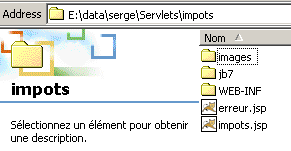
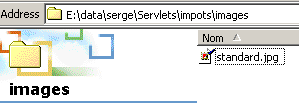
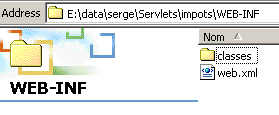
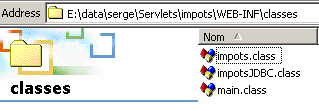
imports 应用程序的 web.xml 配置文件如下:
<?xml version="1.0" encoding="ISO-8859-1"?>

<!DOCTYPE web-app
    PUBLIC "-//Sun Microsystems, Inc.//DTD Web Application 2.3//EN"
    "http://java.sun.com/dtd/web-app_2_3.dtd">

<web-app>
    <servlet>
      <servlet-name>main</servlet-name>
    <servlet-class>main</servlet-class>
    <init-param>
          <param-name>urlAffichageImpots</param-name>
        <param-value>/impots.jsp</param-value>
    </init-param>
    <init-param>
          <param-name>DSNimpots</param-name>
        <param-value>mysql-dbimpots</param-value>
    </init-param>
    <init-param>
          <param-name>admimpots</param-name>
        <param-value>admimpots</param-value>
    </init-param>
    <init-param>
          <param-name>mdpimpots</param-name>
        <param-value>mdpimpots</param-value>
    </init-param>
    <init-param>
          <param-name>urlErreur</param-name>
        <param-value>/erreur.jsp</param-value>
    </init-param>
  </servlet>
  <servlet-mapping>
      <servlet-name>main</servlet-name>
    <url-pattern>/main</url-pattern>
  </servlet-mapping>
</web-app>
主 Servlet 的名称为 main,别名为 /main。因此,可以通过 URL http://localhost:8080/impots/main 访问它。
以下是一些应用示例:
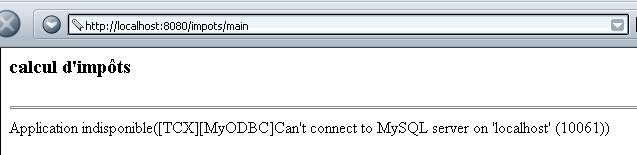
为了正确初始化,Servlet 必须能够访问 mysql-dbimpots 数据库。例如,如果 MySQL 服务器未运行,导致无法访问 mysql-dbimpots 数据库,则会显示以下页面:
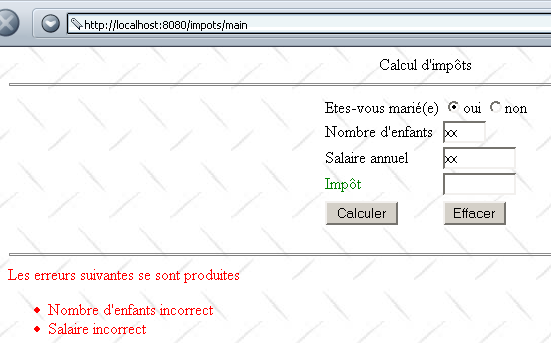
输入错误时显示的页面如下:
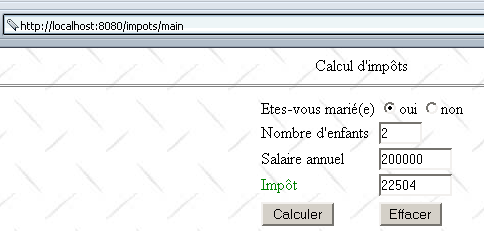
如果输入正确,系统将计算税款:
5.3. 版本 2
在前面的示例中,服务器对表单中的 txtEnfants 和 txtSalaire 参数进行验证。在此,我们建议使用表单页面中包含的 JavaScript 脚本对它们进行验证。随后,浏览器将执行参数验证。只有当参数有效时,才会联系服务器。这可以节省“带宽”。JSP 显示页面如下所示:
<%@ page import="java.util.*" %>
............

<html>

    <head>
      <title>impots</title>
    <script language="JavaScript" type="text/javascript">
        function effacer(){
.......
      }//effacer

      function calculer(){
          // vérification des paramètres avant de les envoyer au serveur
        with(document.frmImpots){
          //nbre d'enfants
          champs=/^\s*(\d+)\s*$/.exec(txtEnfants.value);
          if(champs==null){
            // le modéle n'est pas vérifié
            alert("Le nombre d'enfants n'a pas été donné ou est incorrect");
            nbEnfants.focus();
            return;
          }//if
          //salaire
          champs=/^\s*(\d+)\s*$/.exec(txtSalaire.value);
          if(champs==null){
            // le modéle n'est pas vérifié
            alert("Le salaire n'a pas été donné ou est incorrect");
            salaire.focus();
            return;
          }//if
          // c'est bon - on envoie le formulaire au serveur
          submit();
        }//with
      }//calculer
        </script>
  </head>

  <body background="/impots/images/standard.jpg">
........
              <td><input type="button" value="Calculer" onclick="calculer()"></td>
          <td><input type="button" value="Effacer" onclick="effacer()"></td>
.....
 </body>
</html>
请注意以下更改:
- “Calculate”按钮不再是提交按钮,而是一个关联名为“calculate”函数的普通按钮。该函数将对“txtEnfants”和“txtSalaire”字段进行验证。如果字段有效,表单数据将提交至服务器;否则,将显示错误信息。
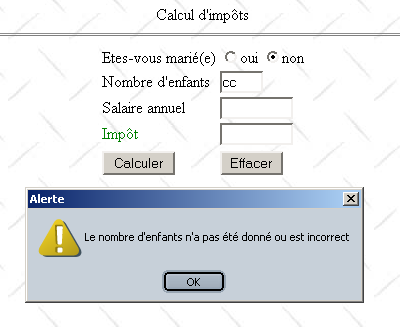
以下是出现错误时显示的内容示例:
5.4. 第 3 版
我们正在对应用程序进行微调,引入“会话”的概念。现在,我们将该应用程序视为一个税务计算模拟工具。用户可以模拟不同的纳税人“情景”,并查看每种情景下的应纳税额。下面的网页展示了该功能可实现的效果:
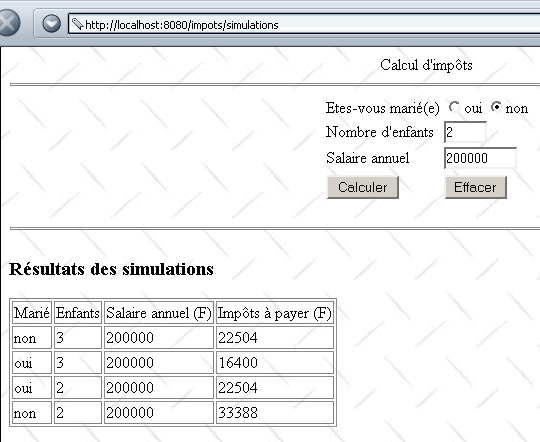
主 Servlet 已进行修改,现命名为 simulations。在 impots 应用程序中,其配置如下:
<?xml version="1.0" encoding="ISO-8859-1"?>

<!DOCTYPE web-app
    PUBLIC "-//Sun Microsystems, Inc.//DTD Web Application 2.3//EN"
    "http://java.sun.com/dtd/web-app_2_3.dtd">

<web-app>
    ....
</servlet>
    <servlet>
      <servlet-name>simulations</servlet-name>
    <servlet-class>simulations</servlet-class>
    <init-param>
          <param-name>urlSimulationImpots</param-name>
        <param-value>/simulationsImpots.jsp</param-value>
    </init-param>
    <init-param>
          <param-name>DSNimpots</param-name>
        <param-value>mysql-dbimpots</param-value>
    </init-param>
    <init-param>
          <param-name>admimpots</param-name>
        <param-value>admimpots</param-value>
    </init-param>
    <init-param>
          <param-name>mdpimpots</param-name>
        <param-value>mdpimpots</param-value>
    </init-param>
    <init-param>
          <param-name>urlErreur</param-name>
        <param-value>/erreur.jsp</param-value>
    </init-param>
  </servlet>
......
  <servlet-mapping>
      <servlet-name>simulations</servlet-name>
    <url-pattern>/simulations</url-pattern>
  </servlet-mapping>
</web-app>
主 Servlet 名为 simulations,基于 simulations.class 文件。它具有别名 /simulations,因此可通过 URL http://localhost:8080/impots/simulations 访问。其初始化参数与前面讨论的主 Servlet(涉及数据库访问)相同。新增了一个参数 **urlSimulationsImports**,即模拟 JSP 页面的 URL(即上文刚介绍的那一个)。
simulations.java Servlet 与 main.java Servlet 类似。它们的主要区别在于以下几点:
- 主 Servlet 根据参数 `optmarie`、`txtEnfants` 和 `txtSalaire` 计算 `txtImpots` 的值,并将该值传递给显示 JSP 页面
- simulations Servlet 以相同方式计算 txtImpots 的值,并将参数(optMarie、txtEnfants、txtSalaire、txtImpots)存储在一个名为 simulations 的列表中。该列表作为参数传递给显示 JSP 页面。为确保该列表包含用户执行的所有模拟,它被存储为当前会话的属性。
模拟 Servlet 代码如下(仅包含与前一个应用程序不同的代码行):
import java.io.*;
.......

public class simulations extends HttpServlet{

    // instance variables
    String msgErreur=null;
    String urlSimulationImpots=null;
    String urlErreur=null;
...........

    //-------- GET
    public void doGet(HttpServletRequest request, HttpServletResponse response)
    throws IOException, ServletException{

...........

         // retrieve previous simulations from the session
        HttpSession session=request.getSession();
        ArrayList simulations=(ArrayList)session.getAttribute("simulations");
        if(simulations==null) simulations=new ArrayList();
        // put the simulations in the current query
        request.setAttribute("simulations",simulations);

         // other query attributes
...........

         // do we have all the expected parameters
        if(optMarie==null || txtEnfants==null || txtSalaire==null){
........
             // we hand over to the url for displaying tax calculation simulations
            getServletContext().getRequestDispatcher(urlSimulationImpots).forward(request,response);
        }

         // we have all the parameters - we check them
...........

         // if there are errors, they are passed as query attributes
        if(erreurs.size()!=0){
            request.setAttribute("erreurs",erreurs);
        }else{
            try{
                 // you can calculate the tax payable
                int nbEnfants=Integer.parseInt(txtEnfants);
                int salaire=Integer.parseInt(txtSalaire);
                txtImpots=""+impots.calculer(optMarie.equals("oui"),nbEnfants,salaire);
                 // the current result is added to the previous simulations
                String[] simulation={optMarie.equals("oui") ? "oui" : "non",txtEnfants, txtSalaire, txtImpots};
                simulations.add(simulation);
                 // the new simulations value is added to the session
                session.setAttribute("simulations",simulations);
            }catch(Exception ex){}
        }

         // other query attributes
..........

         // we hand over to the simulations display url
        getServletContext().getRequestDispatcher(urlSimulationImpots).forward(request,response);
    }

     //-------- POST
    public void doPost(HttpServletRequest request, HttpServletResponse response)
    throws IOException, ServletException{
        doGet(request,response);
    }

     //-------- INIT
    public void init(){
         // retrieve initialization parameters
        ServletConfig config=getServletConfig();
        urlSimulationImpots=config.getInitParameter("urlSimulationImpots");
        urlErreur=config.getInitParameter("urlErreur");
        DSNimpots=config.getInitParameter("DSNimpots");
        admimpots=config.getInitParameter("admimpots");
        mdpimpots=config.getInitParameter("mdpimpots");

         // parameters ok?
.........................
    }
}
显示 JSP 页面 simulationsImpots.jsp 现在如下所示(仅保留了与上一应用程序的显示 JSP 页面不同的代码)。
<%@ page import="java.util.*" %>

<%
    // on récupère les attributs passés par la servlet principale
...........
  ArrayList simulations=(ArrayList)request.getAttribute("simulations");
%>

<html>

    <head>
      <title>impots</title>
    <script language="JavaScript" type="text/javascript">
........
        </script>
  </head>

  <body background="/impots/images/standard.jpg">
      <center>
        Calcul d'impôts
        <hr>
      <form name="frmImpots" action="/impots/simulations" method="POST">
.......................
           </form>
</center>
    <hr>
    <%
        // y-a-t-il des erreurs ?
      if(erreurs!=null){
..................
      }else if(simulations.size()!=0){
          // résultats des simulations
        out.println("<h3>Résultats des simulations<h3>");
        out.println("<table \"border=\"1\">");
        out.println("<tr><td>Marié</td><td>Enfants</td><td>Salaire annuel (F)</td><td>Impôts à payer (F)</td></tr>");
        for(int i=0;i<simulations.size();i++){
            String[] simulation=(String[])simulations.get(i);
            out.println("<tr><td>"+simulation[0]+"</td><td>"+simulation[1]+"</td><td>"+simulation[2]+"</td><td>"+simulation[3]+"</td></tr>");
        }
        out.println("</table>");
      }
   %>
 </body>
</html>
5.5. 版本 4
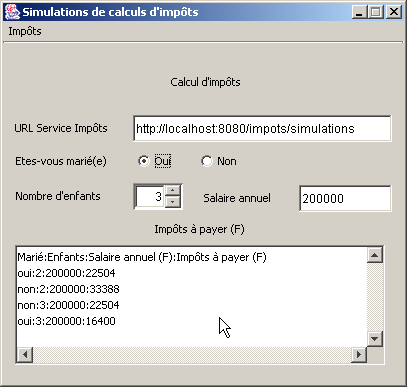
现在我们将创建一个独立应用程序,它将作为之前 /imports/simulations 应用程序的 Web 客户端。该应用程序将具有以下图形界面:
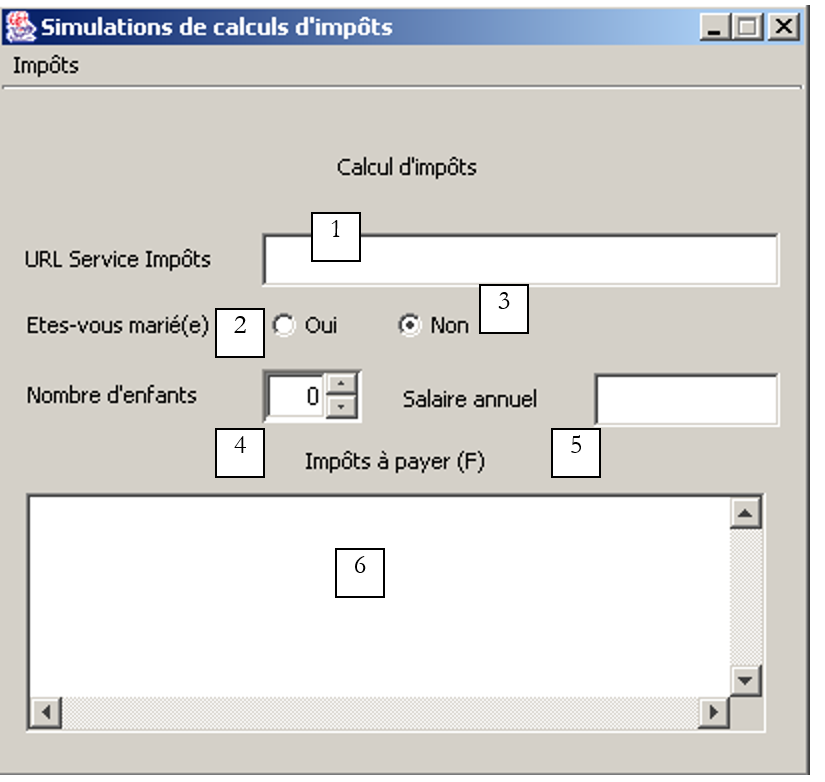 |
编号 | 类型 | 名称 | 角色 |
1 | JTextField | txtTaxServiceUrl | 税务计算模拟服务的 URL |
2 | JRadioButton | rdYes | 已婚状态 |
3 | JRadioButton | rdNo | 是否未婚 |
4 | JSpinner | spinChildren | 纳税人子女的数量(最小值=0,最大值=20,增量=1) |
5 | JTextField | txtSalary | 纳税人年薪(单位:F) |
6 | JList 位于 JScrollPane 中 | lstSimulations | 模拟列表 |
“Tax”菜单包含以下选项:
主菜单 主菜单 | 选项 次要 | 名称 | 角色 |
税 | |||
计算 | mnuCalculate | 在所有计算所需数据均已提供且正确的情况下,计算应缴税款 | |
清除 | mnuClear | 将表单重置为初始状态 | |
退出 | mnuExit | 关闭应用程序 |
操作规则
- 如果字段 1 或 5 为空,则“计算”菜单选项将保持禁用状态
- 在字段 1 中检测到语法错误的 URL
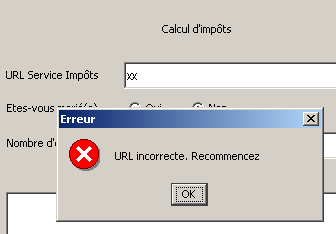
- 检测到薪资不正确
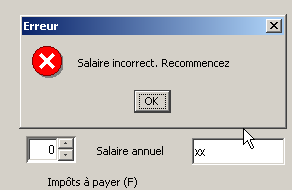
- 报告任何服务器连接错误(如下例 1 所示,端口不正确;如下例 2 所示,请求的 URL 不存在;如下例 3 所示,MySQL 数据库未运行)
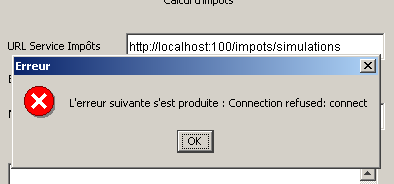
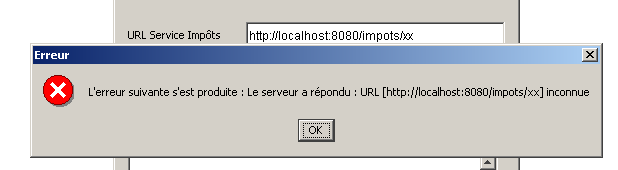
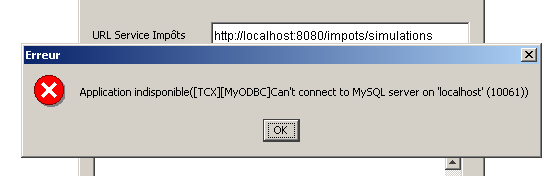
- 如果一切正确,模拟结果将显示出来
在编写编程化的 Web 客户端时,必须准确了解服务器针对客户端的各种可能请求会发送什么样的响应。服务器会发送一组包含有用信息以及仅用于 HTML 布局的其他元素的 HTML 代码行。Java 正则表达式可以帮助我们在服务器发送的代码行流中找到这些有用信息。为此,我们需要了解服务器各种响应的确切格式。 这里我们将使用之前介绍过的 Web 客户端,它允许我们在屏幕上显示服务器对 URL 请求的响应。请求的 URL 将是我们的税费计算模拟服务 http://localhost:8080/impots/simulations,我们可以以 http://localhost:8080/impots/simulations?param1=vam1¶m2=val2&... 的形式向其传递参数
让我们在用于创建税种对象的 MySQL 数据库未运行时请求该 URL:
Dos>java clientweb http://localhost:8080/impots/simulations GET

HTTP/1.1 200 OK
Content-Type: text/html;charset=ISO-8859-1
Date: Fri, 16 Aug 2002 16:31:04 GMT
Connection: close
Server: Apache Tomcat/4.0.3 (HTTP/1.1 Connector)
Set-Cookie: JSESSIONID=9DEC8B27966A1FBE3D4968A7B9DF3331;Path=/impots


<!-- dÚbut from page HTML -->
<html>
  <head>
        <title>impots</title>
  </head>
  <body>
        <h3>calcul d'impôts</h3>
        <hr>
    Application indisponible([TCX][MyODBC]Can't connect to MySQL server on 'localhost' (10061))
  </body>
</html>
要获取该错误,Web客户端必须在Web服务器的响应中搜索包含“Application unavailable”文本的那一行。现在,让我们启动MySQL数据库并请求相同的URL,同时传入它所期望的值(它同样接受GET或POST请求——请参阅服务器的Java代码):
Dos>java clientweb "http://localhost:8080/impots/simulations?ptMarie=oui&txtEnfants=2&txtSalaire=200000" GET

HTTP/1.1 200 OK
Content-Type: text/html;charset=ISO-8859-1
Date: Fri, 16 Aug 2002 16:42:36 GMT
Connection: close
Server: Apache Tomcat/4.0.3 (HTTP/1.1 Connector)
Set-Cookie: JSESSIONID=C2A707600E98A37A343611D80DD5C8A2;Path=/impots


<html>

        <head>
        <title>impots</title>
    <script language="JavaScript" type="text/javascript">
        function effacer(){
...................................................
      }//effacer

      function calculer(){
...................................................
      }//calculer
                </script>
  </head>

  <body background="/impots/images/standard.jpg">
        <center>
        Calcul d'imp¶ts
        <hr>
      <form name="frmImpots" action="/impots/simulations" method="POST">
...................................................
      </form>
    </center>
    <hr>
    <h3>Résultats des simulations<h3>
<table "border="1">
<tr><td>Marié</td><td>Enfants</td><td>Salaire annuel (F)</td><td>Impôts à payer (F)</td></tr>
<tr><td>oui</td><td>2</td><td>200000</td><td>22504</td></tr>
</table>

 </body>
</html>
以下是服务器发送的完整 HTML 文档。各种模拟的结果都包含在该文档中的单个表格内。用于从文档中提取相关信息的正则表达式可以是如下所示:
其中括号内的四个表达式分别代表待提取的四项信息。
现在,我们已经有了用户通过前面的图形界面请求税费计算时的操作指南:
- 验证界面中的所有数据是否有效,并报告任何错误。
- 连接到字段 1 中指定的 URL。为此,我们将遵循之前已介绍并研究过的通用 Web 客户端模型
- 在服务器响应流中,使用正则表达式来:
- 查找错误信息(如有)
- 若无错误,则查找模拟结果
与“计算”菜单相关的代码如下:
  void mnuCalculer_actionPerformed(ActionEvent e) {
    // tAX CALCULATION
         // verification URL service
        URL urlImpots=null;
        try{
            urlImpots=new URL(txtURLServiceImpots.getText().trim());
            String query=urlImpots.getQuery();
            if(query!=null) throw new Exception();
        }catch (Exception ex){
             // error msg
            JOptionPane.showMessageDialog(this,"URL incorrecte. Recommencez","Erreur",JOptionPane.ERROR_MESSAGE);
             // focus on wrong field
            txtURLServiceImpots.requestFocus();
             // back to interface
            return;
        }
     // salary verification
    int salaire=0;
    try{
      salaire=Integer.parseInt(txtSalaire.getText().trim());
      if(salaire<0) throw new Exception();
    }catch (Exception ex){
       // error msg
            JOptionPane.showMessageDialog(this,"Salaire incorrect. Recommencez","Erreur",JOptionPane.ERROR_MESSAGE);
       // focus on wrong field
      txtSalaire.requestFocus();
       // back to interface
      return;
    }
     // no. of children
    Integer nbEnfants=(Integer)spinEnfants.getValue();

    try{
             // tax calculation
            calculerImpots(urlImpots,rdOui.isSelected(),nbEnfants.intValue(),salaire);
    }catch (Exception ex){
             // error is displayed
            JOptionPane.showMessageDialog(this,"L'erreur suivante s'est produite : " + ex.getMessage(),"Erreur",JOptionPane.ERROR_MESSAGE);
        }
  }//mnuCalculer


    public void calculerImpots(URL urlImpots,boolean marié, int nbEnfants, int salaire)
          throws Exception{
         // tAX CALCULATION
         // urlImpots : URL of the tax department
         // married: true if married, false otherwise
         // nbEnfants : number of children
         // salary: annual salary

         // remove from urlImpots the info needed to connect to the tax server
        String path=urlImpots.getPath();
        if(path.equals("")) path="/";
        String query="?"+"optMarie="+(marié ? "oui":"non")+"&txtEnfants="+nbEnfants+"&txtSalaire="+salaire;
        String host=urlImpots.getHost();
        int port=urlImpots.getPort();
        if(port==-1) port=urlImpots.getDefaultPort();

         // local data
        Socket  client=null;                        // the customer
        BufferedReader IN=null;                    // the customer's reading flow
        PrintWriter OUT=null;                        // the customer's writing flow
        String réponse=null;                        // server response
         // the model searched in HTTP headers
        Pattern modèleCookie=Pattern.compile("^Set-Cookie: JSESSIONID=(.*?);");
        // the model for a correct answer
        Pattern réponseOK=Pattern.compile("^.*? 200 OK");
         // the result of the model comparison
        Matcher résultat=null;

        try{
             // connect to the server
            client=new Socket(host,port);

            // create customer input/output flows TCP
            IN=new BufferedReader(new InputStreamReader(client.getInputStream()));
            OUT=new PrintWriter(client.getOutputStream(),true);

            // request URL - send HTTP headers
            OUT.println("GET " + path + query + " HTTP/1.1");
            OUT.println("Host: " + host + ":" + port);
            if(! JSESSIONID.equals("")){
                OUT.println("Cookie: JSESSIONID="+JSESSIONID);
            }
            OUT.println("Connection: close");
            OUT.println("");

             // read the 1st line of the answer
            réponse=IN.readLine();
             // compare the HTTP line with the model of the correct answer
            résultat=réponseOK.matcher(réponse);
            if(! résultat.find()){
                // we have a URL problem
                throw new Exception("Le serveur a répondu : URL ["+ txtURLServiceImpots.getText().trim() + "] inconnue");
            }//if(result)

             // we read the response through to the end of the headers, looking for any cookies
            while((réponse=IN.readLine())!=null){
                 // empty line?
                if(réponse.equals("")) break;
                // line HTTP not empty
                 // if you don't have the session token, look for it
                if (JSESSIONID.equals("")){
                    // compare the HTTP line with the cookie template
                    résultat=modèleCookie.matcher(réponse);
                    if(résultat.find()){
                        // we found the token cookie
                        JSESSIONID=résultat.group(1);
                    }//if(result)
                }//if(JSESSIONID)
            }//while

             // that's it for HTTP headers - move on to HTML code
             // to retrieve simulations
            ArrayList listeSimulations=getSimulations(IN,OUT,simulations);
            simulations.clear();
            for (int i=0;i<listeSimulations.size();i++){
                simulations.addElement(listeSimulations.get(i));
            }

            // it's over
            client.close();
        }catch (Exception ex){
            throw new Exception(ex.getMessage());
        }
    }//calculerImpots

    private ArrayList getSimulations(BufferedReader IN, PrintWriter OUT, DefaultListModel simulations) throws Exception{

        // the model of a line in the simulation table
        Pattern ptnSimulation=Pattern.compile("<tr>\\s*<td>(.*?)</td>\\s*<td>(.*?)</td>\\s*<td>(.*?)</td>\\s*<td>(.*?)</td>\\s*</tr>");
        // the template for a line in the error list
        Pattern ptnErreur=Pattern.compile("(Application indisponible.*?)\\s*$");
         // the result of the model comparison
        Matcher résultat=null;
         // simulations
        ArrayList listeSimulations=new ArrayList();

         // read all the lines to the end
        String ligne=null;
        boolean simulationRéussie=false;
        while((ligne=IN.readLine())!=null){
             // follow-up
             // the line is compared with the error model if the simulation part has not yet been encountered
            if(! simulationRéussie){
                résultat=ptnErreur.matcher(ligne);
                if(résultat.find()){
                    // error msg
                    JOptionPane.showMessageDialog(this,résultat.group(1),"Erreur",JOptionPane.ERROR_MESSAGE);
                    // it's over
                    return listeSimulations;
                }//if
            }//if
             // the line is compared with the simulation model
            résultat=ptnSimulation.matcher(ligne);
            if(résultat.find()){
                // we found a row in the
                listeSimulations.add(résultat.group(1)+":"+résultat.group(2)+":"+résultat.group(3)+
                                                ":"+résultat.group(4));
                 // the simulation was a success
                simulationRéussie=true;
            }//if
        }//while
        // end
        return listeSimulations;
    }
让我们来解释一下这段代码:
- mnuCalculer_actionPerformed 过程会检查界面数据是否有效。如果无效,则显示错误信息并终止该过程。如果有效,则执行 calculerImpots 过程。
- calculerImpots 过程首先构建其请求所需的 URL
        // on retire d'urlImpots les infos nécessaire à la connexion au serveur d'impôts
        String path=urlImpots.getPath();
        if(path.equals("")) path="/";
        String query="?"+"optMarie="+(marié ? "oui":"non")+"&txtEnfants="+nbEnfants+"&txtSalaire="+salaire;
        String host=urlImpots.getHost();
        int port=urlImpots.getPort();
        if(port==-1) port=urlImpots.getDefaultPort();
........................
- 然后通过发送相应的 HTTP 头部连接到此 URL:
             // connect to the server
            client=new Socket(host,port);

            // create customer input/output flows TCP
            IN=new BufferedReader(new InputStreamReader(client.getInputStream()));
            OUT=new PrintWriter(client.getOutputStream(),true);

            // request URL - send HTTP headers
            OUT.println("GET " + path + query + " HTTP/1.1");
            OUT.println("Host: " + host + ":" + port);
            if(! JSESSIONID.equals("")){
                OUT.println("Cookie: JSESSIONID="+JSESSIONID);
            }
            OUT.println("Connection: close");
            OUT.println("");
- 请求发出后,我们的 Web 客户端等待响应。它首先从服务器的响应中接收 HTTP 头部。它解析这些头部以查找会话令牌。确实,它必须将此令牌发回给服务器,以便服务器能够跟踪执行的各种模拟。 需要注意的是,如果由客户端自行存储用户执行的各种模拟,其实会更简单。不过,我们坚持采用回传令牌的方式,以此提供一个会话管理的新示例。响应的第一行需要单独处理。它必须采用 HTTP/版本 200 OK 的格式,以表明所请求的 URL 确实存在。如果不是这种格式,我们就认为用户请求了错误的 URL,并相应地通知用户。
         // the model searched in HTTP headers
        Pattern modèleCookie=Pattern.compile("^Set-Cookie: JSESSIONID=(.*?);");
        // the model of a correct answer
        Pattern réponseOK=Pattern.compile("^.*? 200 OK");
..........

             // read the 1st line of the answer
            réponse=IN.readLine();
             // compare the HTTP line with the model of the correct answer
            résultat=réponseOK.matcher(réponse);
            if(! résultat.find()){
                // we have a URL problem
                throw new Exception("Le serveur a répondu : URL ["+ txtURLServiceImpots.getText().trim() + "] inconnue");
            }//if(result)

             // we read the response through to the end of the headers, looking for any cookies
            while((réponse=IN.readLine())!=null){
                 // empty line?
                if(réponse.equals("")) break;
                // line HTTP not empty
                 // if you don't have the session token, look for it
                if (JSESSIONID.equals("")){
                    // compare the HTTP line with the cookie template
                    résultat=modèleCookie.matcher(réponse);
                    if(résultat.find()){
                        // we found the token cookie
                        JSESSIONID=résultat.group(1);
                    }//if(result)
                }//if(JSESSIONID)
            }//while
- 处理完 HTTP 头部后,我们继续处理响应的 HTML 部分
             // that's it for HTTP headers - move on to HTML code
             // to retrieve simulations
            ArrayList listeSimulations=getSimulations(IN,OUT,simulations);
            simulations.clear();
            for (int i=0;i<listeSimulations.size();i++){
                simulations.addElement(listeSimulations.get(i));
            }
- getSimulations 过程会返回模拟列表(如果存在的话);如果服务器返回错误信息,该列表将为空。在这种情况下,错误信息将显示在消息框中。如果列表不为空,则会在图形用户界面的下拉列表中显示。
- getSimulations 过程会将 HTML 响应的每一行与表示错误消息(应用程序不可用...)的正则表达式以及表示模拟结果的正则表达式进行比对。若发现错误消息,则显示该消息并终止该过程。若发现模拟结果,则将其添加到模拟列表中。在过程结束时,该列表将作为结果返回。
    private ArrayList getSimulations(BufferedReader IN, PrintWriter OUT, DefaultListModel simulations) throws Exception{

        // the model of a line in the simulation table
        Pattern ptnSimulation=Pattern.compile("<tr>\\s*<td>(.*?)</td>\\s*<td>(.*?)</td>\\s*<td>(.*?)</td>\\s*<td>(.*?)</td>\\s*</tr>");
        // the template for a line in the error list
        Pattern ptnErreur=Pattern.compile("(Application indisponible.*?)\\s*$");
5.6. 版本 5
在此,我们将之前的独立图形应用程序转换为 Java 小程序。图形界面略有不同。在独立应用程序中,用户自行提供税务计算模拟服务的 URL,应用程序随后连接到该 URL。在此,客户端应用程序是浏览器,用户将请求包含该小程序的 HTML 文档的 URL。 需要特别注意的是,Java小程序只能与其下载来源的服务器建立网络连接。因此,模拟服务的URL必须位于包含该小程序的HTML文档所在的同一服务器上。在本示例中,这将作为小程序初始化参数放置在txtUrlServiceImpots字段中,且该字段对用户不可编辑。由此产生的客户端代码如下:
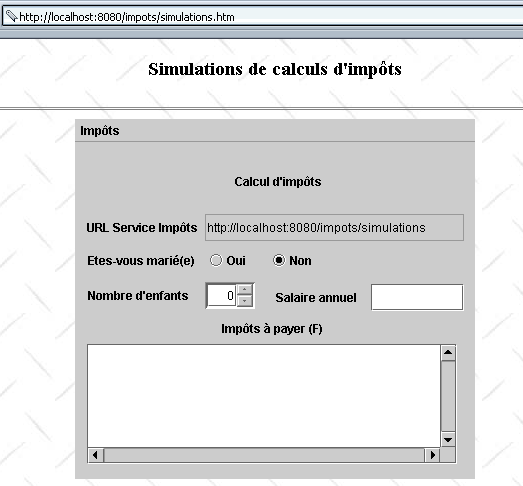
包含该小程序的 HTML 文档名为 simulations.htm,内容如下:
<html>
    <head>
      <title>Simulations de calculs d'impôts</title>
  </head>
  <body background="/impots/images/standard.jpg">
      <center>
          <h3>Simulations de calculs d'impôts</h3>
        <hr>
        <applet code="appletImpots.class" width="400" height="360">
            <param name="urlServiceImpots" value="simulations">
            </applet>
    </center>
  </body>
</html>
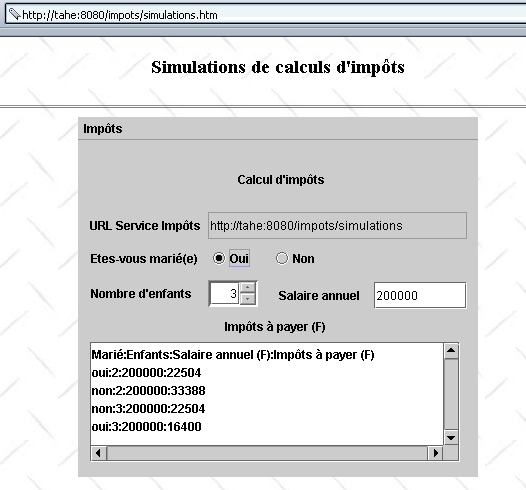
该小程序有一个名为 *urlServiceImports 的参数,它是税费计算模拟服务的 URL。该 URL 是相对于 HTML 文档 simulations.htm 的 URL 而言的。因此,如果浏览器通过 URL http://localhost:8080/impots/simulations.htm 获取该文档,则模拟服务的 URL 将是 http://localhost:8080/impots/simulations。 如果该文档的 URL 是 http://stahe:8080/impots/simulations.htm,则模拟服务的 URL 将是 http://stahe:8080/impots/simulations*。
appletImpots.java 小程序完全整合了前一个独立图形应用程序的代码,同时遵守了将图形应用程序转换为小程序的规则。
public class appletImpots extends JApplet {
  // window components
  JPanel contentPane;
  JMenuBar jMenuBar1 = new JMenuBar();
  JMenu jMenu1 = new JMenu();
  JMenuItem mnuCalculer = new JMenuItem();
.............


   //Building the frame
  public void init() {
    try {
      jbInit();
    }
    catch(Exception e) {
      e.printStackTrace();
    }
     // other initializations
    moreInit();
  }

   // form initialization
  private void moreInit(){
         // retrieve the urlServiceImpots parameter
        String urlServiceImpots=getParameter("urlServiceImpots");
        if(urlServiceImpots==null){
            // missing parameter
            JOptionPane.showMessageDialog(this,"Le paramètre urlServiceImpots de l'applet n'a pas été défini","Erreur",JOptionPane.ERROR_MESSAGE);
             // end
            return;
        }
         // put the URL in its field
        String codeBase=""+getCodeBase();
        if(codeBase.endsWith("/"))
           txtURLServiceImpots.setText(codeBase+urlServiceImpots);
      else txtURLServiceImpots.setText(codeBase+"/"+urlServiceImpots);
    // calculate menu disabled
    mnuCalculer.setEnabled(false);
     // spinner Children - between 0 and 20 children
    spinEnfants=new JSpinner(new SpinnerNumberModel(0,0,20,1));
    spinEnfants.setBounds(new Rectangle(130,140,50,27));
    contentPane.add(spinEnfants);
  }//moreInit

   //Initialize component
  private void jbInit() throws Exception  {
    contentPane = (JPanel) this.getContentPane();
    contentPane.setLayout(null);
...............
  }
当浏览器加载一个小程序时,它首先会执行其 init 方法。在此方法中,我们获取了小程序的 urlServiceImpots 参数的值,计算出模拟服务的完整 URL,并将该值填入 txtURLServiceImpots 字段中,仿佛是用户手动输入的一样。 完成此操作后,这两个应用程序之间便不再存在任何差异。特别是,与“计算”菜单相关的代码完全相同。以下是一个执行示例:
5.7. 结论
我们已经演示了客户端-服务器税务计算应用程序的不同版本:
- 版本 1:该服务由一组 Servlet 和 JSP 页面提供;客户端为浏览器。它仅执行单次模拟,且不保留任何历史记录。
- 版本 2:通过在浏览器加载的 HTML 文档中嵌入 JavaScript 脚本,我们增加了部分客户端功能。该功能用于验证表单参数。
- 版本 3:通过管理会话,使服务能够记住客户端执行的各种模拟。HTML 界面也相应进行了修改,以显示这些模拟。
- 版本 4:客户端现在是一个独立的图形化应用程序。这使我们能够重新审视编程 Web 客户端的开发。
- 版本 5:客户端变为 Java 小程序。现在我们拥有了一个完全用 Java 编写的客户端-服务器应用程序,无论是在服务器端还是客户端。
至此,可以得出以下几点观察:
- 第 1 版至第 3 版仅支持具备执行 JavaScript 脚本能力的浏览器。请注意,用户始终可以选择禁用这些脚本的执行。此时,该应用程序在第 1 版中仅能部分运行(“清除”选项将无法使用),而在第 2 版和第 3 版中则完全无法运行(“清除”和“计算”选项将无法使用)。开发一个不使用 JavaScript 脚本的版本或许值得考虑。
- 第 4 版要求客户端计算机安装 Java 2 虚拟机。
- 版本 5 要求客户端计算机配备带 Java 2 虚拟机的浏览器。
编写 Web 服务时,必须考虑目标客户端的类型。如果希望覆盖尽可能多的客户端,应编写仅向浏览器发送 HTML 的应用程序(不包含 JavaScript 或小程序)。如果是在内网环境中工作,且能够控制工作站的配置,那么就可以对客户端提出更高的要求,此时前一版本(第 5 版)或许也能满足需求。
第 4 版和第 5 版是 Web 客户端,它们从服务器发送的 HTML 数据流中提取所需信息。很多时候,我们无法控制这个数据流。当我们为网络上由他人管理的现有 Web 服务编写客户端时,情况就是如此。 让我们举个例子。假设我们的税务计算模拟服务是由 X 公司编写的。目前,该服务以 HTML 表格的形式发送模拟结果,而我们的客户端正是利用这一特性来获取数据的。因此,它会将服务器响应的每一行与正则表达式进行比对:
         // the model of a line in the simulation table
        Pattern ptnSimulation=Pattern.compile("<tr>\\s*<td>(.*?)</td>\\s*<td>(.*?)</td>\\s*<td>(.*?)</td>\\s*<td>(.*?)</td>\\s*</tr>");
现在假设应用程序开发人员更改了响应的视觉呈现方式,不再将模拟结果放在表格中,而是以以下格式放在列表中:
在这种情况下,我们的 Web 客户端将需要重写。这是我们无法自行控制的应用程序的 Web 客户端所面临的持续威胁。XML 可以为这个问题提供解决方案:
- 模拟服务将生成 XML 而非 HTML。在我们的示例中,这可以是
<simulations>
    <entetes marie="marié" enfants="enfants" salaire="salaire" impot="impôt"/>
  <simulation marie="oui" enfants="2" salaire="200000" impot="22504" />
  <simulation marie="non" enfants="2" salaire="200000" impot="33388" />
</simulations>
- 可以为该响应关联一个样式表,用于指导浏览器如何呈现此 XML 响应
- 编程实现的 Web 客户端会忽略此样式表,并直接从响应的 XML 数据流中提取信息
如果服务设计者希望修改所提供结果的视觉呈现效果,他们将修改样式表而非 XML。得益于样式表,浏览器将显示新的视觉格式,而程序化 Web 客户端则无需进行修改。因此,我们可以编写我们模拟服务的新版本:
- 第 6 版:该服务提供 XML 响应,并附带一份面向浏览器的样式表
- 第 7 版:客户端是一个独立的图形化应用程序,用于处理服务器的 XML 响应
- 版本 8:客户端是一个处理服务器 XML 响应的 Java 小程序