4. 会话跟踪
4.1. 问题
一个Web应用程序可能包含服务器与客户端之间多次表单交互。其工作流程如下:
- 步骤 1
- 客户端 C1 与服务器建立连接并发出初始请求。
- 服务器将表单 F1 发送给客户端 C1,并关闭步骤 1 中建立的连接。
- 步骤 2
- 客户端 C1 填写表单并将其发回服务器。为此,浏览器会与服务器建立新的连接。
- 服务器处理表单 1 的数据,根据这些数据计算出 I1 信息,将表单 F2 发送给客户端 C1,并关闭在步骤 3 中建立的连接。
- 步骤 3
- 步骤3和4的循环在步骤5和6中重复。 在步骤 6 结束时,服务器将收到两个表单 F1 和 F2,并据此计算出信息 I1 和 I2。
问题在于:服务器如何保存与客户端 C1 相关的 I1 和 I2 信息? 这个问题被称为 C1 客户端的会话跟踪。为了理解其根源,让我们来分析一个同时服务多个客户端的 TCP-IP 服务器应用程序的架构:
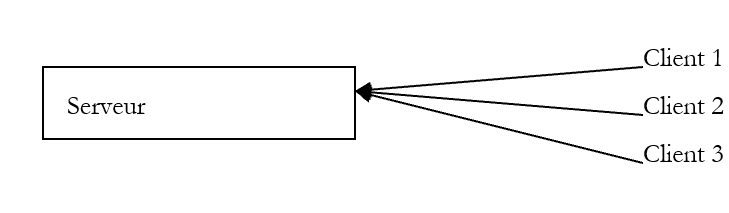 |
在典型的 TCP-IP 客户端-服务器应用程序中:
- 客户端通过该连接与服务器建立连接
- 通过该连接与服务器交换数据
- 连接由双方中的一方关闭
该机制的两个要点是:
- 为每个客户端建立一个唯一的连接
- 该连接在服务器与客户端的整个交互过程中持续使用
服务器能够随时识别当前正在与哪个客户端交互,正是通过连接——或者说连接客户端的“管道”。由于该管道专属于特定客户端,因此通过该管道接收的所有数据均来自该客户端,而发送至该管道的所有数据也将送达该客户端。
HTTP的客户端-服务器机制完全遵循上述模式,但其特殊之处在于客户端与服务器的交互仅限于一次交换:
- 客户端向服务器建立连接并发出请求
- 服务器返回响应并关闭连接
如果在时间点 T1,客户端 C 向服务器发出请求,它将获得连接 C1,该连接将用于完成这一单次请求-响应交互。 如果在时间 T2,该客户端再次向服务器发出请求,它将获得连接 C2,该连接与 C1 不同。 对于服务器而言,用户 C 的第二次请求与其初始请求并无区别:在两种情况下,服务器都将该客户端视为新客户端。 若要建立用户C与服务器之间不同连接的关联,必须让用户C被服务器“识别”为“常客”,并由服务器检索其关于该常客的信息。
设想一种按以下方式运行的管理机制:
- 仅有一条队列
- 设有多个服务窗口。因此可以同时为多名客户提供服务。当某个窗口空闲时,一名客户将从队列中离开,前往该窗口接受服务
- 如果客户是首次到访,窗口工作人员会给他一张带有编号的号牌。客户只能提出一个问题。得到答复后,他必须离开窗口并回到队列末尾。窗口工作人员将该客户的信息记录在标有其编号的档案中。
- 当轮到该客户时,服务他的可能不是上次那位柜员。新柜员会要求客户出示号码牌,并调取对应该号码牌的档案。客户再次提出请求,获得答复后,相关信息会被补充到档案中。
- 如此循环往复……随着时间推移,客户将获得所有请求的答复。不同请求之间的关联追踪是通过取号牌及其关联的档案实现的。
Web客户端-服务器应用程序中的会话跟踪机制与上述原理类似:
- 在首次请求时,Web 服务器会向客户端分配一个令牌
- 此后每次请求时,客户端都会提交该令牌以进行身份验证
令牌可以采用多种形式:
- 表单中的隐藏字段
- 客户端发起首次请求(服务器通过客户端未持有令牌来识别其身份)
- 服务器返回响应(一个表单),并将令牌放入表单中的隐藏字段。此时,连接被关闭(客户端带着令牌离开)。服务器可能已将相关信息与该令牌关联起来。
- 客户端通过提交表单发出第二次请求。服务器从表单中提取令牌。随后,服务器可借助该令牌访问首次请求时计算出的信息,从而处理客户端的第二次请求。 新的信息被添加到与令牌关联的文件中,向客户端发送第二次响应,并第二次关闭连接。令牌再次被放入响应表单中,以便用户在下次请求时能够提交它。
- 以此类推……
该技术的主要缺点在于令牌必须放入表单中。如果服务器的响应不是表单,则无法再使用隐藏字段的方法。
- Cookie 方法
- 客户端发起首次请求(服务器通过客户端未携带令牌来识别该请求)
- 服务器在响应的 HTTP 头部中添加一个 Cookie。这通过 HTTP Set-Cookie 命令实现:
Set-Cookie: param1=value1;param2=value2;....
其中 parami 是参数名称,valeursi 是其值。 这些参数中将包含令牌。通常情况下,Cookie 中仅包含令牌,其余信息由服务器存储在与该令牌关联的文件夹中。接收该 Cookie 的浏览器会将其存储在磁盘上的文件中。服务器响应后,连接即被关闭(客户端带着其令牌离开服务窗口)。
- (续)
- 客户端向服务器发出第二次请求。每次向服务器发送请求时,浏览器都会检查其拥有的所有 Cookie,查看是否有来自该服务器的 Cookie。 如果存在,它会将其发送给服务器,格式始终为 HTTP 命令,即 Cookie 命令,其语法与服务器使用的 Set-Cookie 命令类似:
Cookie: param1=value1;param2=value2;....
在浏览器发送的参数中,服务器将找到该令牌,从而识别客户端并检索与其相关的信息。
这是最常用的令牌形式。它有一个缺点:用户可以配置浏览器拒绝接受Cookie。此类用户将无法访问使用Cookie的Web应用程序。
- URL的重写
- 客户端发出首次请求(服务器通过客户端未持有令牌来识别其身份)
- 服务器发送响应。该响应包含用户需点击以继续使用应用程序的链接。在每个链接的URL中,服务器都会以URL;token=value的形式添加令牌。
- 当用户点击其中一个链接以继续应用程序时,浏览器会向Web服务器发送请求,并在HTTP的请求头中包含URL URL;token=请求值。 服务器随后即可检索到该令牌。
4.2. 用于会话跟踪的 Java 代码
下面介绍会话跟踪的主要方法:
获取当前请求所属的 Session 对象。如果该请求尚未属于任何会话,则会创建一个会话。 | |
当前会话的标识符 | |
当前会话的创建日期(自 1970 年 1 月 1 日 0 点起经过的毫秒数)。 | |
客户端上次访问该会话的日期 | |
会话最长空闲时间(以秒为单位)。超过此时间,会话将失效。 | |
以秒为单位设定会话最长闲置时长。超过该时长后,会话将失效。 | |
如果会话刚刚创建,则为真 | |
为特定会话中的某个参数赋值。正是通过这种机制,可以存储在整个会话期间始终可用的信息。 | |
从会话数据中移除 parametre。 | |
与会话参数 paramètre 关联的值。若该参数不存在,则返回 null。 | |
以枚举形式列出当前会话的所有属性 | |
结束当前会话。与该会话相关的所有信息均被销毁。 |
4.3. 示例 1
我们在此介绍一个摘自Wrox出版社出版、Eyrolles发行的一本优秀书籍《J2EE编程》中的示例。 该书是面向Java Web解决方案开发者的宝贵高级信息资源。书中以单个Java Servlet形式呈现的应用程序,在此被改写为一个主Servlet,该Servlet调用JSP页面向客户端显示各种可能的响应。
该应用程序名为sessions,在文件<tomcat>\conf\server.xml中的配置如下:
在上述 docBase 文件夹中,包含以下内容:
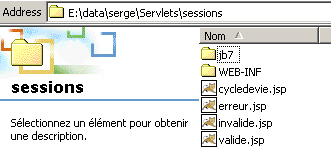
文件 erreur.jsp、invalide.jsp、valide.jsp 均与 sessions 应用程序相关联。在上述 WEB-INF 文件夹中包含:
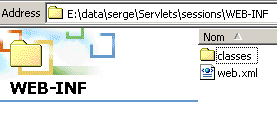
上图所示为 sessions 应用程序的配置文件 web.xml。在 classes 文件夹中,包含该 Servlet 的类文件:
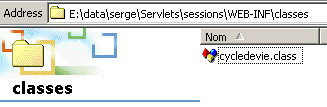
该应用程序的文件 web.xml 如下所示:
<?xml version="1.0" encoding="ISO-8859-1"?>

<!DOCTYPE web-app
    PUBLIC "-//Sun Microsystems, Inc.//DTD Web Application 2.3//EN"
    "http://java.sun.com/dtd/web-app_2_3.dtd">

<web-app>
    <servlet>
      <servlet-name>cycledevie</servlet-name>
    <servlet-class>cycledevie</servlet-class>
    <init-param>
          <param-name>urlSessionValide</param-name>
        <param-value>/valide.jsp</param-value>
    </init-param>
    <init-param>
          <param-name>urlSessionInvalide</param-name>
        <param-value>/invalide.jsp</param-value>
    </init-param>
    <init-param>
          <param-name>urlErreur</param-name>
        <param-value>/erreur.jsp</param-value>
    </init-param>
  </servlet>
  <servlet-mapping>
      <servlet-name>cycledevie</servlet-name>
    <url-pattern>/cycledevie</url-pattern>
  </servlet-mapping>
</web-app>
主Servlet名为cycledevie (servlet-name),并与类文件cycledevie.class (servlet-class)相关联。 它有一个别名 /cycledevie (servlet-mapping),可通过 URL http://localhost:8080/sessions/cycledevie 调用。它有三个初始化参数:
显示当前会话属性的页面网址 | |
当前会话失效后显示的页面 URL | |
主Servlet初始化失败时显示的页面URL |
sessions 应用程序的组件如下:
主Servlet——分析客户端请求:
| |
| |
当用户注销当前会话后显示。此时会提示用户重新创建一个新会话。 | |
当主Servlet在初始化时遇到错误时显示。 |
主Servlet cycledevie如下所示:
import java.io.*;
import javax.servlet.*;
import javax.servlet.http.*;

public class cycledevie extends HttpServlet{

    // 实例变量
    String msgErreur=null;
    String urlSessionInvalide=null;
    String urlSessionValide=null;
    String urlErreur=null;

    //-------- GET
    public void doGet(HttpServletRequest request, HttpServletResponse response)
    throws IOException, ServletException{

        // 初始化是否成功?
        if(msgErreur!=null){
             // 转至错误页面
            getServletContext().getRequestDispatcher(urlErreur).forward(request,response);
        }

         // 获取当前会话
        HttpSession session=request.getSession();

         // 分析待执行的操作
        String action=request.getParameter("action");
        // 注销当前会话
        if(action!=null && action.equals("invalider")){
            // 使当前会话失效
            session.invalidate();
             // 将控制权移交给 URL urlSessionInvalide
            getServletContext().getRequestDispatcher(urlSessionInvalide).forward(request,response);
        }
         // 其他情况
         // 将控制权移交给 URL urlSessionInvalide
        getServletContext().getRequestDispatcher(urlSessionValide).forward(request,response);
    }

     //-------- POST
    public void doPost(HttpServletRequest request, HttpServletResponse response)
    throws IOException, ServletException{
        doGet(request,response);
    }

     //-------- INIT
    public void init(){
         // 获取初始化参数
        ServletConfig config=getServletConfig();
        urlSessionInvalide=config.getInitParameter("urlSessionInvalide");
        urlSessionValide=config.getInitParameter("urlSessionValide");
        urlErreur=config.getInitParameter("urlErreur");

        // 参数正确吗?
        if(urlSessionValide==null || urlSessionInvalide==null){
            msgErreur="Configuration incorrecte";
        }
    }
}
请注意以下几点:
- 在初始化方法中,Servlet 获取其三个参数
- 在处理请求(doGet)时,Servlet:
- 首先检查初始化过程中是否发生错误。若发生错误,则将控制权移交给页面 erreur.jsp。
- 检查参数 action 的值。如果该参数值为“invalider”,Servlet 将控制权移交给页面 invalide.jsp;否则移交给页面 valide.jsp。
显示当前会话属性的页面 JSP valide.jsp:
<%@ page import="java.util.*" %>

<%
     // jspService
   // 此处需描述当前会话
  String etat= session.isNew() ? "Nouvelle session" : "Ancienne session";
%>
<!-- 页面开头 HTML -->
  <html>
      <meta http-equiv="pragma" content="no-cache">
    <head>
        <title>Cycle de vie d'une session</title>
    </head>
    <body>
        <h3>Cycle de vie d'une session</h3>
        <hr>
        <br>Etat session : <%= etat %>
      <br>ID session : <%= session.getId() %>
      <br>Heure de création : <%= new Date(session.getCreationTime()) %>
      <br>Heure du dernier accès : <%= new Date(session.getLastAccessedTime()) %>
      <br>Intervalle maximum d'inactivité : <%= session.getMaxInactiveInterval() %>
      <br><a href="/sessions/cycledevie?action=invalider">Invalider la session</a>
      <br><a href="/sessions/cycledevie">Recharger la page</a>
    <body>
  </html>
请注意,在第
中,使用了一个不知从何而来的会话对象。实际上,该对象属于提供给 JSP 页面的隐式对象,与 request、response、 out、config(ServletConfig)、context(ServletContext)等,这些对象此前已出现过。 该页面上的两个链接指向了前面介绍过的 cycledevie Servlet:
      <br><a href="/sessions/cycledevie?action=invalider">Invalider la session</a>
      <br><a href="/sessions/cycledevie">Recharger la page</a>
用于注销会话的链接包含参数 action=invalider,该参数将使 Servlet cycledevie 识别出用户希望注销当前会话。另一个链接用于刷新页面。 为防止浏览器从缓存中读取该页面,需使用指令 HTML:
。该指令指示浏览器不要对接收到的页面使用缓存。
页面 invalide.jsp 如下所示:
<!-- 页面开头 HTML -->
<html>
  <head>
      <title>Cycle de vie d'une session</title>
  </head>
  <body>
      <h3>Cycle de vie d'une session</h3>
      <hr>
    Votre session a été invalidée
    <a href="/sessions/cycledevie">Créer une nouvelle session</a>
  </body>
</html>
该页面提供了一个指向 cycledevie Servlet 的链接,但未包含 action 参数。此链接将导致 cycledevie Servlet 创建一个新的会话。
页面 erreur.jsp 如下所示:
<%
     // jspService
   // 此处需描述当前会话
  String msgErreur= request.getAttribute("msgErreur");
  if(msgErreur==null) msgErreur="Erreur non identifiée)";
%>
<!-- 页面开头 HTML -->
<html>
  <head>
      <title>Cycle de vie d'une session</title>
  </head>
  <body>
      <h3>Cycle de vie d'une session</h3>
      <hr>
    Application indisponible(<%= msgErreur %>)
  </body>
</html>
其作用是显示由 cycledevie Servlet 传递给它的错误消息。现在让我们来看一些运行示例。首次调用该 Servlet:
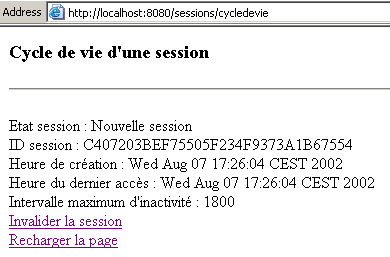
上图显示当前处于新会话中。点击“刷新页面”链接:
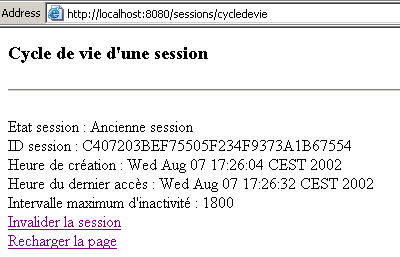
前面的结果表明,当前会话与上一页仍为同一会话(相同的 ID)。请注意,该会话的最后访问时间已发生变化。现在使用“失效会话”链接:
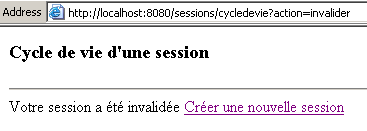
请注意,新页面显示的URL与参数action=invalider不同。现在点击“创建新会话”链接来创建一个新会话:
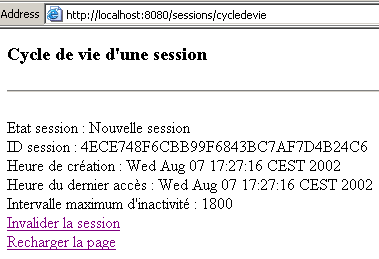
可以看到,一个新的会话已经启动。在之前的示例中,会话依赖于Cookie机制。现在,让我们在浏览器中禁用Cookie,然后重新进行测试。 以下示例是在 Netscape Communicator 上完成的。由于不明原因,使用 IE6 进行的测试产生了意外结果,仿佛 IE6 仍在使用 Cookie,尽管它们已被禁用。首次请求 cycledevie Servlet:
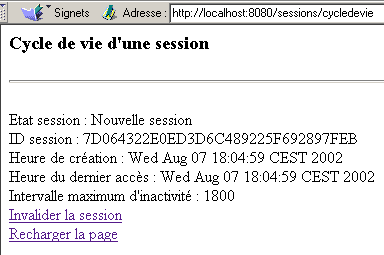
现在我们点击“刷新页面”链接:
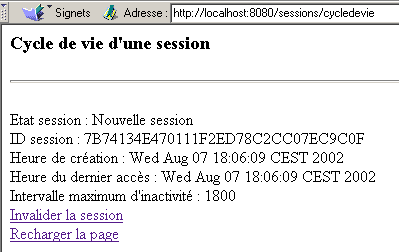
可以观察到两点:
- 会话的 ID 已发生变化
- Servlet 将该会话识别为新会话
Tomcat 服务器为那些在浏览器中禁用 Cookie 的用户提供了解决方案。它通过两种机制来实现本段开头提到的令牌:Cookie 和 URL 的重写。 如果会话 Cookie 不可用,它将尝试从客户端请求的 URL 中获取令牌。 为此,该请求必须包含令牌。通常,在 HTML 文档中生成的所有指向 Web 应用程序的链接都必须包含该应用程序的令牌。这可以通过 encodeURL 方法实现:
将当前会话的令牌添加到作为参数传递的 URL 中,格式为 URL;jsessionid=xxxx |
我们将应用程序修改如下:
- 在 cycledevie.java Servlet 中,URL 被编码为:
             // 将控制权移交给错误页面
            getServletContext().getRequestDispatcher(response.encodeURL(urlErreur)).forward(request,response);
....
             // 将控制权移交给 URL urlSessionInvalide
            getServletContext().getRequestDispatcher(response.encodeURL(urlSessionInvalide)).forward(request,response);
....
         // 转至网址 urlSessionInvalide
        getServletContext().getRequestDispatcher(response.encodeURL(urlSessionValide)).forward(request,response);
- 在页面 valide.jsp 中,URL 被编码为:
<%
     // jspService
   // 此处需描述当前会话
  String etat= session.isNew() ? "Nouvelle session" : "Ancienne session";
   // 编码 URL 生命周期
  String URLcycledevie=response.encodeURL("/sessions/cycledevie");
%>
............
      <br><a href="<%= URLcycledevie %>?action=invalider">Invalider la session</a>
      <br><a href="<%= URLcycledevie %>">Recharger la page</a>
- 在页面 invalide.jsp 中,URL 被编码为:
<%
     // jspservice - 注销当前会话
  session.invalidate();
   // 编码 URL 生命周期
  String URLcycledevie=response.encodeURL("/sessions/cycledevie");
%>
..........
    <a href="<%= URLcycledevie %>">Créer une nouvelle session</a>
现在我们准备进行测试。我们使用的是 Netscape 4.5,并且已禁用 Cookie。我们首次请求 cycledevie Servlet:
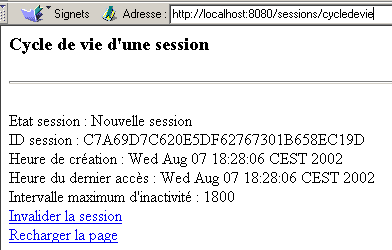
然后通过“刷新页面”链接重新加载页面:
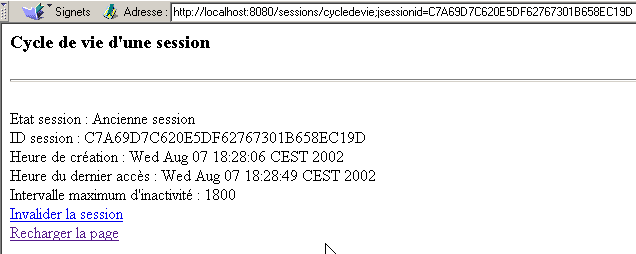
我们可以看到:
- 会话未发生变化(仍是 ID)
- 如上方的Adresse字段所示,生命周期Servlet中的URL确实包含了该令牌
- 因此,Tomcat 服务器会在请求的 URL 中检索到会话令牌(前提是开发人员已对其进行了编码)。
4.4. 示例 2
下面我们通过一个示例演示如何在客户端会话中存储信息。此处的唯一信息是一个计数器,每当用户调用 Servlet 的 URL 时,该计数器就会递增。首次调用时,页面如下所示:
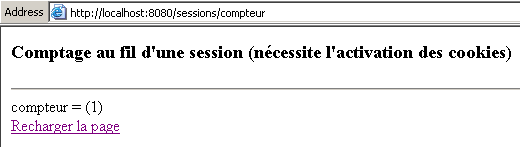
如果点击上方的“刷新页面”链接,将显示以下新页面:
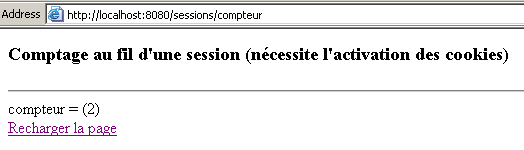
该应用程序包含三个组件:
- 一个处理客户端请求的Servlet
- 一个显示计数器值的 JSP 页面
- 一个用于显示可能出现的错误的 JSP 页面
这三个组件已安装在先前使用的“sessions”Web应用程序中。该应用程序中的文件 web.xml 已进行修改,以配置新的Servlet:
<?xml version="1.0" encoding="ISO-8859-1"?>

<!DOCTYPE web-app
    PUBLIC "-//Sun Microsystems, Inc.//DTD Web Application 2.3//EN"
    "http://java.sun.com/dtd/web-app_2_3.dtd">

<web-app>
...
  <servlet>
      <servlet-name>compteur</servlet-name>
    <servlet-class>compteur</servlet-class>
    <init-param>
          <param-name>urlAffichageCompteur</param-name>
        <param-value>/compteur.jsp</param-value>
    </init-param>
    <init-param>
          <param-name>urlErreur</param-name>
        <param-value>/erreurcompteur.jsp</param-value>
    </init-param>
  </servlet>
...
  <servlet-mapping>
      <servlet-name>compteur</servlet-name>
    <url-pattern>/compteur</url-pattern>
  </servlet-mapping>
</web-app>
- 该Servlet名为计数器(servlet-name),并与类文件compteur.class(servlet-class)相关联
- 它有两个初始化参数:
- urlAffichageCompteur:来自计数器显示页面 JSP 的 URL
- urlErreur:来自可能错误显示页面 JSP 的 URL
- 以及一个别名 /compteur,使得该页面可通过 URL 调用 http://localhost:8080/sessions/compteur
compteur.java Servlet 代码如下:
import java.io.*;
import javax.servlet.*;
import javax.servlet.http.*;

public class compteur extends HttpServlet{

     // 实例变量
    String msgErreur=null;
    String urlAffichageCompteur=null;
    String urlErreur=null;

    //-------- GET
    public void doGet(HttpServletRequest request, HttpServletResponse response)
    throws IOException, ServletException{

        // 初始化是否成功?
        if(msgErreur!=null){
             // 转至错误页面
            getServletContext().getRequestDispatcher(urlErreur).forward(request,response);
        }

         // 获取当前会话
        HttpSession session=request.getSession();
         // 以及计数器
        String compteur=(String)session.getAttribute("compteur");
        if(compteur==null) compteur="0";
         // 计数器递增
        try{
            compteur=""+(Integer.parseInt(compteur)+1);
        }catch(Exception ex){}
         // 将计数器存储在会话中
        session.setAttribute("compteur",compteur);
         // 以及在请求中
        request.setAttribute("compteur",compteur);

         // 将控制权移交给计数器显示的URL
        getServletContext().getRequestDispatcher(urlAffichageCompteur).forward(request,response);
    }

     //-------- POST
    public void doPost(HttpServletRequest request, HttpServletResponse response)
    throws IOException, ServletException{
        doGet(request,response);
    }

     //-------- INIT
    public void init(){
         // 获取初始化参数
        ServletConfig config=getServletConfig();
        urlAffichageCompteur=config.getInitParameter("urlAffichageCompteur");
        urlErreur=config.getInitParameter("urlErreur");

         // 参数正确吗?
        if(urlAffichageCompteur==null){
            msgErreur="Configuration incorrecte";
        }
    }
}
该Servlet的结构与之前遇到的Servlet类似。这里只需注意计数器的处理方式:
- 通过 request.getSession() 获取会话
- 通过 session.getAttribute("compteur") 从该会话中获取计数器
- 若获取的值为 null,则表示会话刚刚开始。此时计数器被置为 0。
- 计数器被递增,重新写入会话(session.setAttribute("计数器",计数器)),并放入将要传递给显示Servlet的请求中(request.setAttribute("计数器",计数器))。
显示页面 compteur.jsp 如下所示:
<%
     // jspService
   // 正在获取计数器
  String compteur= (String) request.getAttribute("compteur");
  if(compteur==null) compteur="inconnu";
%>
<!-- 页面开始 HTML -->
<html>
  <head>
      <title>Comptage au fil d'une session</title>
  </head>
  <body>
      <h3>Comptage au fil d'une session (nécessite l'activation des cookies)</h3>
      <hr>
    compteur = (<%= compteur %>)
    <br><a href="/sessions/compteur">Recharger la page</a>
  </body>
</html>
上文页面仅负责获取主Servlet传递的compteur属性(即request.getAttribute("计数器")并将其显示出来。
错误页面 erreurcompteur.jsp 如下所示:
<%
     // jspService
   // 发生错误
  String msgErreur= request.getAttribute("msgErreur");
  if(msgErreur==null) msgErreur="Erreur non identifiée";
%>
<!-- 页面开头 HTML -->
<html>
  <head>
      <title>Comptage au fil d'une session</title>
  </head>
  <body>
      <h3>Comptage au fil d'une session (nécessite l'activation des cookies)</h3>
      <hr>
    Application indisponible(<%= msgErreur %>)
  </body>
</html>
4.5. 示例 3
我们计划编写一个Java应用程序,作为前文所述compteur应用程序的客户端。该客户端将连续调用该应用程序N次,其中N作为参数传递。 我们的目的是展示一个编程实现的Web客户端以及如何管理Cookie。我们将以同一位作者在Java讲义中介绍的通用Web客户端作为起点。其调用方式如下:
clientweb URL GET/HEAD
- URL:请求的URL
- GET/HEAD: GET 用于请求该页面的代码 HTML,HEAD 用于仅获取页眉 HTTP
以下是一个使用 URL 和 http://localhost:8080/sessions/compteur 的示例:
E:\data\serge\JAVA\SOCKETS\client web>java clientweb http://localhost:8080/sessions/计数器 GET

HTTP/1.1 200 OK
Content-Type: text/html;charset=ISO-8859-1
Date: Thu, 08 Aug 2002 14:21:18 GMT
Connection: close
Server: Apache Tomcat/4.0.3 (HTTP/1.1 Connector)
Set-Cookie: JSESSIONID=B8A9076E552945009215C34A97A0EC5D;Path=/sessions


<!-- 页面开头 HTML -->
<html>
  <head>
        <title>Comptage au fil d'une session</title>
  </head>
  <body>
        <h3>Comptage au fil d'une session (nécessite l'activation des cookies)</h3>
        <hr>
    compteur = (1)
    <br><a href="/sessions/compteur">Recharger la page</a>
  </body>
</html>
程序 clientweb 会显示从服务器接收到的所有内容。上文中的 HTTP Set-cookie 命令,是服务器向客户端发送 Cookie 时使用的。此处的 Cookie 包含两项信息:
- JSESSIONID,即会话令牌
- Path,用于定义该 Cookie 所属的 URL。 Path=/sessions 指示浏览器,每当请求以 /sessions 开头的 URL 时,都必须将该 Cookie 发回给服务器。 在 sessions 应用程序中,我们使用了多个 Servlet,其中包括 /sessions/cycledevie 和 /sessions/compteur。 如果调用 /sessions/cycledevie Servlet,浏览器将收到一个 J 令牌。如果使用同一浏览器 随后调用 /sessions/compteur Servlet,浏览器将向服务器返回 J 令牌,因为该令牌适用于所有以 /sessions 开头的 URL。 在本例中,Servlet cycledevie 和 compteur 无需共享同一个会话令牌。因此,它们本不应被放置在同一个 Web 应用程序中。这一点需要牢记:同一应用程序中的所有 Servlet 共享同一个会话令牌。
- Cookie 还可以设置有效期。此处未提供该信息,因此该 Cookie 将在浏览器关闭时被删除。例如,Cookie 的有效期可以设置为 N 天。 只要它有效,每当访问其域名(Path)下的任何一个 URL 时,浏览器都会将其发回。 以CD的在线销售网站为例。该网站可以追踪客户在其商品目录中的浏览路径,并逐步确定其偏好:例如古典音乐。 这些偏好可以存储在一个有效期为3个月的Cookie中。如果同一位客户在一个月后再次访问该网站,浏览器会将Cookie发回给服务器端应用程序。服务器端应用程序将根据Cookie中包含的信息,将生成的页面调整为符合客户偏好的样式。
Web客户端代码如下。它将作为后续另一个客户端的起点。
// 导入的软件包
import java.io.*;
import java.net.*;

public class clientweb{

    // 请求 URL
     // 在屏幕上显示其内容

    public static void main(String[] args){
        // 语法
        final String syntaxe="pg URI GET/HEAD";

        // 参数数量
        if(args.length != 2)
            erreur(syntaxe,1);

         // 记录所请求的URI
        String URLString=args[0];
        String commande=args[1].toUpperCase();

        // 验证 URI 的有效性
        URL url=null;
        try{
            url=new URL(URLString);
        }catch (Exception ex){
             // URI 错误
            erreur("L'erreur suivante s'est produite : " + ex.getMessage(),2);
        }//捕获
         // 验证订单
        if(! commande.equals("GET") && ! commande.equals("HEAD")){
            // 订单错误
            erreur("Le second paramètre doit être GET ou HEAD",3);
        }

         // 从URL中提取有用信息
    String path=url.getPath();
    if(path.equals("")) path="/";
    String query=url.getQuery();
    if(query!=null) query="?"+query; else query="";
    String host=url.getHost();
    int port=url.getPort();
    if(port==-1) port=url.getDefaultPort();

         // 可以处理
        Socket  client=null;                        // 客户
        BufferedReader IN=null;                    // 客户端的读取流
        PrintWriter OUT=null;                        // 客户端的写入流
        String réponse=null;                        // 服务器响应
        try{
             // 连接到服务器
            client=new Socket(host,port);

            // 创建客户端的输入/输出流 TCP
            IN=new BufferedReader(new InputStreamReader(client.getInputStream()));
            OUT=new PrintWriter(client.getOutputStream(),true);

            // 请求 URL - 发送头信息 HTTP
            OUT.println(commande + " " + path + query + " HTTP/1.1");
            OUT.println("Host: " + host + ":" + port);
            OUT.println("Connection: close");
            OUT.println();
             // 读取响应
            while((réponse=IN.readLine())!=null){
                 // 处理响应
                System.out.println(réponse);
            }//while
             // 处理完毕
            client.close();
        } catch(Exception e){
            // 处理异常
            erreur(e.getMessage(),4);
        }//catch
    }//main

     // 显示错误
    public static void erreur(String msg, int exitCode){
         // 显示错误
        System.err.println(msg);
         // 带错误终止
        System.exit(exitCode);
    }//错误
}//类
现在我们创建名为 clientCompteur 的程序,调用方式如下:
clientCompteur URL N [JSESSIONID]
- URL:计数器 Servlet 的 URL
- N:调用该 Servlet 的次数
- JSESSIONID:可选参数——会话令牌
该程序的目标是通过管理会话cookie,调用计数器Servlet N次,并在每次调用后显示服务器返回的计数器值。N次调用结束后,计数器值应为N。以下是一个初步的运行示例:
E:\data\serge\Servlets\sessions\jb7>java.bat clientCompteur http://localhost:8080/sessions/计数器 3
--> GET /sessions/compteur HTTP/1.1
--> Host: localhost:8080
--> Connection: close
-->

HTTP/1.1 200 OK
Content-Type: text/html;charset=ISO-8859-1
Date: Thu, 08 Aug 2002 18:25:00 GMT
Connection: close
Server: Apache Tomcat/4.0.3 (HTTP/1.1 Connector)
Set-Cookie: JSESSIONID=92DB3808CE8FCB47D47D997C8B52294A;Path=/sessions
cookie trouvÚ : 92DB3808CE8FCB47D47D997C8B52294A

compteur : 1

--> GET /sessions/compteur HTTP/1.1
--> Host: localhost:8080
--> Cookie: JSESSIONID=92DB3808CE8FCB47D47D997C8B52294A
--> Connection: close
-->

HTTP/1.1 200 OK
Content-Type: text/html;charset=ISO-8859-1
Date: Thu, 08 Aug 2002 18:25:00 GMT
Connection: close
Server: Apache Tomcat/4.0.3 (HTTP/1.1 Connector)

compteur : 2

--> GET /sessions/compteur HTTP/1.1
--> Host: localhost:8080
--> Cookie: JSESSIONID=92DB3808CE8FCB47D47D997C8B52294A
--> Connection: close
-->

HTTP/1.1 200 OK
Content-Type: text/html;charset=ISO-8859-1
Date: Thu, 08 Aug 2002 18:25:00 GMT
Connection: close
Server: Apache Tomcat/4.0.3 (HTTP/1.1 Connector)

compteur : 3
程序显示:
- 它发送给服务器的 HTTP 报头,形式为 -->
- 接收到的 HTTP 报头
- 每次调用后的计数器值
可以看出,在第一次调用时:
- 客户端未发送 Cookie
- 服务器发送了一个 Cookie
对于后续请求:
- 客户端会系统性地返回其在首次请求时从服务器接收到的 Cookie。正是这一点使得服务器能够识别该客户端并递增其计数器。
- 服务器则不再返回 Cookie
我们将上述令牌作为第三个参数传递,重新运行前面的程序:
E:\data\serge\Servlets\sessions\jb7>java.bat clientCompteur http://localhost:8080/sessions/计数器 392DB3808CE8FCB47D47D997C8B52294A

--> GET /sessions/compteur HTTP/1.1
--> Host: localhost:8080
--> Cookie: JSESSIONID=92DB3808CE8FCB47D47D997C8B52294A
--> Connection: close
-->

HTTP/1.1 200 OK
Content-Type: text/html;charset=ISO-8859-1
Date: Thu, 08 Aug 2002 18:25:25 GMT
Connection: close
Server: Apache Tomcat/4.0.3 (HTTP/1.1 Connector)

compteur : 4

--> GET /sessions/compteur HTTP/1.1
--> Host: localhost:8080
--> Cookie: JSESSIONID=92DB3808CE8FCB47D47D997C8B52294A
--> Connection: close
-->

HTTP/1.1 200 OK
Content-Type: text/html;charset=ISO-8859-1
Date: Thu, 08 Aug 2002 18:25:25 GMT
Connection: close
Server: Apache Tomcat/4.0.3 (HTTP/1.1 Connector)

compteur : 5

--> GET /sessions/compteur HTTP/1.1
--> Host: localhost:8080
--> Cookie: JSESSIONID=92DB3808CE8FCB47D47D997C8B52294A
--> Connection: close
-->

HTTP/1.1 200 OK
Content-Type: text/html;charset=ISO-8859-1
Date: Thu, 08 Aug 2002 18:25:25 GMT
Connection: close
Server: Apache Tomcat/4.0.3 (HTTP/1.1 Connector)

compteur : 6
由此可见,在客户端首次请求时,服务器便接收到了一个有效的会话cookie。需要注意的是,对于Tomcat而言,会话的最大空闲时间默认设置为20分钟(实际上该值是可配置的)。如果程序的第二次请求迅速发送了首次请求时接收到的cookie,那么对服务器而言,这便属于同一会话。 这里指出了一个潜在的安全漏洞。如果我能够在网络上拦截到一个会话令牌,那么我就能冒充发起该会话的用户。 在我们的示例中,第一次调用代表会话发起者(可能通过登录名和密码获取了生成令牌的权限),第二次调用则代表“劫持”了第一次调用会话令牌的攻击者。如果当前操作是银行交易,后果将非常严重……
客户端代码如下:
// 导入的软件包
import java.io.*;
import java.net.*;
import java.util.regex.*;

public class clientCompteur{

     // 请求 URL
     // 在屏幕上显示其内容

    public static void main(String[] args){
        // 语法
        final String syntaxe="pg URL-COMPTEUR N [JSESSIONID]";

         // 参数个数
        if(args.length !=2 && args.length != 3)
            erreur(syntaxe,1);

         // 记录所请求的URL
        String URLString=args[0];

        // 验证 URL 的有效性
        URL url=null;
        try{
            url=new URL(URLString);
        }catch (Exception ex){
             // URI 错误
            erreur("L'erreur suivante s'est produite : " + ex.getMessage(),2);
        }//捕获
         // 验证调用次数 N
        int N=0;
        try{
            N=Integer.parseInt(args[1]);
            if(N<=0) throw new Exception();
        }catch(Exception ex){
             // 参数 N 错误
            erreur("Le nombre d'appels N doit être un entier >0",3);
        }
         // 是否已将令牌 JSESSIONID 作为参数传递?
        String JSESSIONID="";
        if (args.length==3) JSESSIONID=args[2];

        // 从 URL 中提取有用信息
        String path=url.getPath();
        if(path.equals("")) path="/";
        String query=url.getQuery();
        if(query!=null) query="?"+query; else query="";
        String host=url.getHost();
        int port=url.getPort();
        if(port==-1) port=url.getDefaultPort();

         // 可以继续处理
        Socket  client=null;                        // 客户端
        BufferedReader IN=null;                    // 客户端的读取流
        PrintWriter OUT=null;                        // 客户端的写入流
        String réponse=null;                        // 服务器响应
         // 在标头中查找的模板HTTP
        Pattern modèleCookie=Pattern.compile("^Set-Cookie: JSESSIONID=(.*?);");
        // 代码中搜索到的模式HTML
        Pattern modèleCompteur=Pattern.compile("compteur = .*?(\\d+)");
         // 与模板的比较结果
        Matcher résultat=null;
         // 一个布尔值,表示计数器搜索的结果
        boolean compteurTrouvé;

        try{
             // 向服务器发起 N 次调用
            for(int i=0;i<N;i++){
                // 连接到服务器
                client=new Socket(host,port);

                // 创建客户的输入-输出流 TCP
                IN=new BufferedReader(new InputStreamReader(client.getInputStream()));
                OUT=new PrintWriter(client.getOutputStream(),true);

                // 请求 URL - 发送 HTTP 头部
                envoie(OUT,"GET " + path + query + " HTTP/1.1");
                envoie(OUT,"Host: " + host + ":" + port);
                if(! JSESSIONID.equals("")){
                    envoie(OUT,"Cookie: JSESSIONID="+JSESSIONID);
                }
                envoie(OUT,"Connection: close");
                envoie(OUT,"");

                 // 读取响应直至头部结束,并查找可能存在的cookie
                while((réponse=IN.readLine())!=null){
                     // 响应跟踪
                    System.out.println(réponse);
                     // 空行?
                    if(réponse.equals("")) break;
                     // HTTP 行不为空
                     // 若未找到会话令牌,则进行搜索
                    if (JSESSIONID.equals("")){
                        // 将 HTTP 行与 Cookie 模板进行比对
                        résultat=modèleCookie.matcher(réponse);
                        if(résultat.find()){
                            // 已找到 Cookie
                            JSESSIONID=résultat.group(1);
                        }
                    }
                }//while

                 // HTTP 头部处理完毕 - 转到代码 HTML
                compteurTrouvé=false;
                while((réponse=IN.readLine())!=null){
                     // 当前行是否包含计数器?
                    if (! compteurTrouvé){
                        résultat=modèleCompteur.matcher(réponse);
                        if(résultat.find()){
                            // 已找到计数器 - 显示它
                            System.out.println("compteur : " + résultat.group(1));
                            compteurTrouvé=true;
                        }
                    }
                }//while
                 // 结束
                client.close();
            }//for
        } catch(Exception e){
            // 处理异常
            erreur(e.getMessage(),4);
        }//catch
    }//main

     // 显示错误
    public static void erreur(String msg, int exitCode){
         // 显示错误
        System.err.println(msg);
         // 带错误终止
        System.exit(exitCode);
    }//错误

     // 跟踪客户端-服务器通信
    public static void envoie(PrintWriter OUT,String msg){
        // 向服务器发送消息
        OUT.println(msg);
         // 屏幕监控
        System.out.println("--> "+msg);
    }//错误
}//分类
让我们来剖析一下该程序的要点:
- 我们需要进行 N 次客户端-服务器交互。这就是为什么这些交互被放在一个循环中
- 每次交互时,客户端都会与服务器建立连接 TCP-IP。连接建立后,它会向服务器发送请求的头部信息 HTTP:
                 // 请求 URL - 发送头信息 HTTP
                envoie(OUT,"GET " + path + query + " HTTP/1.1");
                envoie(OUT,"Host: " + host + ":" + port);
                if(! JSESSIONID.equals("")){
                    envoie(OUT,"Cookie: JSESSIONID="+JSESSIONID);
                }
                envoie(OUT,"Connection: close");
                envoie(OUT,"");
如果 JSESSIONID 令牌可用,则以 Cookie 形式发送;否则不发送。
- 客户端发送请求后,将等待服务器的响应。它首先会分析该响应中的 HTTP 头部,以查找可能存在的 Cookie。为了找到它,客户端会将收到的行与 Cookie 的正则表达式进行比对:
         // 在标头中搜索模板 HTTP
        Pattern modèleCookie=Pattern.compile("^Set-Cookie: JSESSIONID=(.*?);");
...........................
                 // 读取响应直至标头结束,并查找可能存在的cookie
                while((réponse=IN.readLine())!=null){
                     // 响应跟踪
                    System.out.println(réponse);
                     // 空行?
                    if(réponse.equals("")) break;
                     // HTTP 行不为空
                     // 如果没有会话令牌,则进行搜索
                    if (JSESSIONID.equals("")){
                        // 将 HTTP 行与 Cookie 模板进行比对
                        résultat=modèleCookie.matcher(réponse);
                        if(résultat.find()){
                            // 已找到 Cookie
                            JSESSIONID=résultat.group(1);
                        }
                    }
                }//while
- 一旦首次找到令牌,后续对服务器的调用将不再进行搜索。当响应中的 HTTP 头部处理完毕后,将转至同一响应中的 HTML 代码。 在此代码中,需查找提供计数器值的行。此处同样使用正则表达式进行搜索:
         // 在代码中搜索计数器模板 HTML
        Pattern modèleCompteur=Pattern.compile("compteur = .*?(\\d+)");
..................................
                 // HTTP 头部处理完毕 - 转到代码 HTML
                compteurTrouvé=false;
                while((réponse=IN.readLine())!=null){
                     // 当前行是否包含该计数器?
                    if (! compteurTrouvé){
                        résultat=modèleCompteur.matcher(réponse);
                        if(résultat.find()){
                            // 已找到计数器 - 显示它
                            System.out.println("compteur : " + résultat.group(1));
                            compteurTrouvé=true;
                        }
                    }
                }//while
4.6. 示例 4
在上一个示例中,Web客户端以Cookie的形式返回令牌。我们已经看到,它也可以在请求的URL内部以URL;jsessionid=xxx的形式返回。让我们来验证一下。 程序 clientCompteur.java 被转换为 clientCompteur2.java,并按以下方式进行修改:
....
                 // 请求 URL - 发送头信息 HTTP
                if(JSESSIONID.equals(""))
                    envoie(OUT,"GET " + path + query + " HTTP/1.1");
                else envoie(OUT,"GET " + path + query + ";jsessionid=" + JSESSIONID + " HTTP/1.1");
                envoie(OUT,"Host: " + host + ":" + port);
                envoie(OUT,"Connection: close");
                envoie(OUT,"");
....
因此,客户端通过 GET URL;jsessionid=xx HTTP/1.1 请求计数器的 URL,且不再发送 Cookie。这是唯一的修改。 以下是首次调用的结果:
E:\data\serge\Servlets\sessions\jb7>java.bat clientCompteur2 http://localhost:8080/sessions/计数器 2

--> GET /sessions/compteur HTTP/1.1
--> Host: localhost:8080
--> Connection: close
-->

HTTP/1.1 200 OK
Content-Type: text/html;charset=ISO-8859-1
Date: Thu, 08 Aug 2002 18:49:30 GMT
Connection: close
Server: Apache Tomcat/4.0.3 (HTTP/1.1 Connector)
Set-Cookie: JSESSIONID=48A6DBA8357D808EC012AAF3A2AFDA63;Path=/sessions
cookie trouvÚ : 48A6DBA8357D808EC012AAF3A2AFDA63

compteur : 1

--> GET /sessions/compteur;jsessionid=48A6DBA8357D808EC012AAF3A2AFDA63 HTTP/1.1
--> Host: localhost:8080
--> Connection: close
-->

HTTP/1.1 200 OK
Content-Type: text/html;charset=ISO-8859-1
Date: Thu, 08 Aug 2002 18:49:30 GMT
Connection: close
Server: Apache Tomcat/4.0.3 (HTTP/1.1 Connector)

compteur : 2
在首次请求时,客户端请求 URL 时未附带会话令牌。服务器向其发送了会话令牌作为响应。随后,客户端再次请求相同的 URL,并在请求中附上了收到的会话令牌。 可见计数器确实已递增,这证明服务器已正确识别出这是同一会话。
4.7. 示例 5
本例展示了一个由三个页面组成的应用程序,分别命名为 page0、page1 和 page2。用户必须按此顺序访问这些页面:
- page0 是一个表单,用于收集信息:姓名
- page1 是提交 page0 表单后生成的表单。它要求提供第二项信息:年龄
- page2 是一个名为 HTML 的文档,用于显示 page0 获取的姓名和 page1 获取的年龄。
此处包含三次客户端-服务器交互:
- 第一次交互中,客户端请求表单 page0,服务器将其发送
- 第二次交互中,客户端请求表单 page1,服务器将其发送。客户端将姓名发送给服务器。
- 在第三次交互中,客户端请求文档 page3,服务器将其发送。客户端将年龄发送给服务器。文档 page3 应显示姓名和年龄。 服务器在第二次交互中获取了姓名,但此后已“遗忘”该信息。我们使用会话在第二次交互中保存姓名,以便在第三次交互时可用。
在第一次交互中获取的 page0 页面如下:
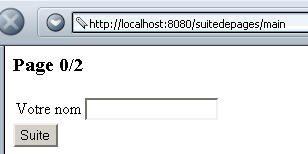
填写姓名字段:
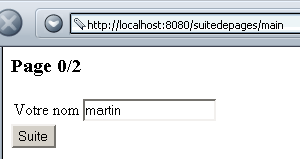
点击按钮 Suite,随后获得如下 page1 页面:
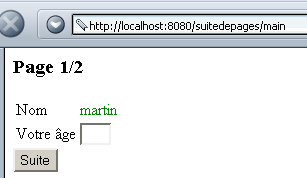
填写年龄字段:
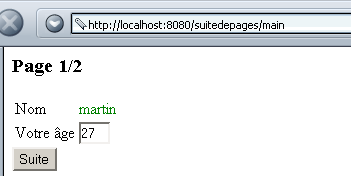
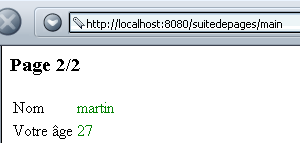
点击按钮 Suite,随后将显示以下页面 page2:
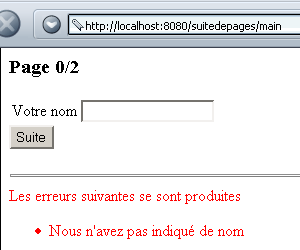
当将页面 page0 提交至服务器时,如果姓名字段为空,服务器可能会返回错误代码:
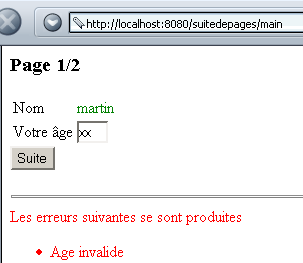
当向服务器提交页面 page1 时,如果年龄无效,服务器可能会返回错误代码:
该应用程序由一个 Servlet 和四个页面 JSP 组成:
显示 page0 | |
显示页面1 | |
显示第2页 | |
显示错误页面 |
该Web应用程序名为suitedepages,在Tomcat的server.xml文件中配置如下:
suitedepages 应用程序的配置文件 web.xml 如下:
<?xml version="1.0" encoding="ISO-8859-1"?>

<!DOCTYPE web-app
    PUBLIC "-//Sun Microsystems, Inc.//DTD Web Application 2.3//EN"
    "http://java.sun.com/dtd/web-app_2_3.dtd">

<web-app>
    <servlet>
      <servlet-name>main</servlet-name>
    <servlet-class>main</servlet-class>
    <init-param>
          <param-name>urlPage0</param-name>
        <param-value>/page0.jsp</param-value>
    </init-param>
    <init-param>
          <param-name>urlPage1</param-name>
        <param-value>/page1.jsp</param-value>
    </init-param>
    <init-param>
          <param-name>urlPage2</param-name>
        <param-value>/page2.jsp</param-value>
    </init-param>
    <init-param>
          <param-name>urlErreur</param-name>
        <param-value>/erreur.jsp</param-value>
    </init-param>
  </servlet>
  <servlet-mapping>
      <servlet-name>main</servlet-name>
    <url-pattern>/main</url-pattern>
  </servlet-mapping>
</web-app>
主Servlet名为main,通过其别名(Servlet映射)可通过URL http://localhost:8080/suitedepages/main访问。 它有四个初始化参数,即用于不同显示的四个页面的 URL。主 Servlet 的代码如下:
import java.io.*;
import javax.servlet.*;
import javax.servlet.http.*;
import java.util.*;
import java.util.regex.*;

public class main extends HttpServlet{

    // 实例变量
    String msgErreur=null;
    String urlPage0=null;
    String urlPage1=null;
    String urlPage2=null;
    String urlErreur=null;

    //-------- GET
    public void doGet(HttpServletRequest request, HttpServletResponse response)
    throws IOException, ServletException{

        // 初始化是否成功?
        if(msgErreur!=null){
             // 转至错误页面
            getServletContext().getRequestDispatcher(urlErreur).forward(request,response);
        }
         // 获取步骤参数
        String étape=request.getParameter("etape");
         // 获取当前会话
        HttpSession session=request.getSession();
         // 处理当前步骤
        if(étape==null) étape0(request,response,session);
        if(étape.equals("1")) étape1(request,response,session);
        if(étape.equals("2")) étape2(request,response,session);
         // 其他情况无效
        étape0(request,response,session);
    }

     //-------- POST
    public void doPost(HttpServletRequest request, HttpServletResponse response)
    throws IOException, ServletException{
        doGet(request,response);
    }

     //-------- INIT
    public void init(){
         // 正在读取初始化参数
        ServletConfig config=getServletConfig();
        urlPage0=config.getInitParameter("urlPage0");
        urlPage1=config.getInitParameter("urlPage1");
        urlPage2=config.getInitParameter("urlPage2");
        urlErreur=config.getInitParameter("urlErreur");

         // 参数正确吗?
        if(urlPage0==null || urlPage1==null || urlPage2==null){
            msgErreur="Configuration incorrecte";
        }
    }

     //-------- 步骤0
    public void étape0(HttpServletRequest request, HttpServletResponse response, HttpSession session)
            throws IOException, ServletException{
        // 设置一些属性
        request.setAttribute("nom","");
         // 显示第0页
        request.getRequestDispatcher(urlPage0).forward(request,response);
    }

     //-------- 步骤1
    public void étape1(HttpServletRequest request, HttpServletResponse response, HttpSession session)
            throws IOException, ServletException{
         // 从请求中获取名称
        String nom=request.getParameter("nom");
        // 名称已设置?
        if(nom==null) étape0(request,response,session);
         // 移除名称中的空格
        nom=nom.trim();
         // 将其放入请求的属性中
        request.setAttribute("nom",nom);
         // 名称为空?
        if(nom.equals("")){
             // 这是个错误
            ArrayList erreurs=new ArrayList();
            erreurs.add("Nous n'avez pas indiqué de nom");
             // 将错误信息写入请求
            request.setAttribute("erreurs",erreurs);
             // 返回第 0 页
            étape0(request,response,session);
        }
         // 名称有效 - 将其存储在当前会话中
        session.setAttribute("nom",nom);
         // 在请求中设置age属性
        request.setAttribute("age","");
         // 显示第1页
        request.getRequestDispatcher(urlPage1).forward(request,response);
    }

     //-------- 步骤2
    public void étape2(HttpServletRequest request, HttpServletResponse response, HttpSession session)
            throws IOException, ServletException{
         // 从会话中获取用户名
        String nom=(String)session.getAttribute("nom");
         // 名称已设置?
        if(nom==null) étape0(request,response,session);
         // 将其放入请求的属性中
        request.setAttribute("nom",nom);
         // 从请求中获取年龄
        String age=request.getParameter("age");
        // 年龄已设置?
        if(age==null){
            // 返回第 1 页
            request.setAttribute("age","");
            request.getRequestDispatcher(urlPage1).forward(request,response);
        }
         // 将年龄存储在请求中
        age=age.trim();
        request.setAttribute("age",age);
        // 年龄有效吗?
        if(! Pattern.matches("^\\s*\\d+\\s*$",age)){
            // 这是个错误
            ArrayList erreurs=new ArrayList();
            erreurs.add("Age invalide");
            // 将错误信息写入请求
            request.setAttribute("erreurs",erreurs);
             // 返回第1页
            request.getRequestDispatcher(urlPage1).forward(request,response);
        }
         // 年龄有效 - 显示第2页
        request.getRequestDispatcher(urlPage2).forward(request,response);
    }
}
- 方法 init 获取四个初始化参数,如果其中任何一个缺失,则设置一条错误消息
- 我们已经看到,该请求包含三个交换。 为了了解当前处于哪个交换阶段,表单 page0 和 page1 包含一个隐藏变量 etape,其值为 1(page0)或 2 (page1)。此处可将该数字视为待显示的下一页页码。在方法 doGet 中,该参数从请求中获取,并根据其值将处理任务委托给其他三个方法:
- étape0 处理初始请求并调用 page0
- étape1 处理来自 page0 的表单,并调用 page1;若出现错误,则再次调用 page0
- 步骤2处理表单page1,并发送page2;若出现错误,则再次发送page1
- 步骤0
- 显示名称为空的 page0
- 步骤1
- 从 page0 表单中获取参数 nom。
- 验证名称是否存在(不为空)。如果不存在,则再次显示 page0,如同首次调用一样。
- 验证名称是否不为空。若不为空,则再次显示 page0 并附带错误信息。
- 将名称存储在当前会话中,如果名称有效,则显示 page1。
- 步骤2
- 从当前会话中获取参数 nom。
- 验证名称是否存在(不为空)。如果不存在,则再次显示 page0,如同首次调用一样。
- 从由 page1 发送的当前请求中获取参数 age。
- 验证年龄是否有效。如果无效,则再次显示 page1 并附带一条错误信息。
- 将姓名和年龄作为请求参数保存,如果姓名和年龄有效,则显示 page2。
页面 page0.jsp 如下所示:
<%@ page import="java.util.*" %>

<% // page0.jsp
     // 获取请求的属性
  String nom=(String)request.getAttribute("nom");
  ArrayList erreurs=(ArrayList)request.getAttribute("erreurs");
   // 属性有效吗?
  if(nom==null){
       // 返回主Servlet
    request.getRequestDispatcher("/main").forward(request,response);
  }
%>

<html>
  <head>
    <title>page 0</title>
  </head>
  <body>
    <h3>Page 0/2</h3>
    <form name="frmNom" method="POST" action="/suitedepages/main">
        <input type="hidden" name="etape" value="1">
      <table>
        <tr>
          <td>Votre nom</td>
          <td><input type="text" name="nom" value="<%= nom %>"></td>
        </tr>
      </table>
      <input type="submit" value="Suite">
    </form>
    <% // 有错误吗?
      if (erreurs!=null){
    %>
      <hr>
      <font color="red">
        Les erreurs suivantes se sont produites
        <ul>
        <% for(int i=0;i<erreurs.size();i++){ %>
            <li><%= erreurs.get(i) %>
        <% }//for %>
        </ul>
     <% }//if %>
  </body>
</html>
- 主Servlet可在以下两种情况下调用页面 page0.jsp:
- 在初始请求时
- 处理完 page0 表单后(当出现错误时)
- 主Servlet会向其提供待显示的参数nom以及可能存在的错误列表。因此,Servlet page0.jsp首先会获取这两项信息。
- 表单会通过隐藏字段(hidden)etape“提交”至主Servlet,该字段用于标识当前处于应用程序的哪个阶段。
页面 page1.jsp 如下所示:
<%@ page import="java.util.*" %>

<% // page1.jsp
     // 获取请求的属性
  String nom=(String)request.getAttribute("nom");
  String age=(String)request.getAttribute("age");
  ArrayList erreurs=(ArrayList)request.getAttribute("erreurs");
  // 属性有效吗?
  if(nom==null || age==null){
      // 返回主Servlet
    request.getRequestDispatcher("/main").forward(request,response);
  }
%>

<html>
  <head>
    <title>page 1</title>
  </head>
  <body>
    <h3>Page 1/2</h3>
    <form name="frmAge" method="POST" action="/suitedepages/main">
        <input type="hidden" name="etape" value="2">
      <table>
        <tr>
          <td>Nom</td>
          <td><font color="green"><%= nom %></font></td>
        </tr>
        <tr>
          <td>Votre âge</td>
          <td><input type="text" name="age" size="3" value="<%= age %>"></td>
        </tr>
      </table>
      <input type="submit" value="Suite">
    </form>
    <% // 有错误吗?
      if (erreurs!=null){
    %>
      <hr>
      <font color="red">
        Les erreurs suivantes se sont produites
        <ul>
        <% for(int i=0;i<erreurs.size();i++){ %>
            <li><%= erreurs.get(i) %>
        <% }//for %>
        </ul>
     <% }//if %>
  </body>
</html>
页面 page1.jsp 的结构与页面 page0.jsp 类似,唯一的区别在于它现在接收了主 Servlet 的两个属性:nom 和 age。 最后,页面 page2.jsp 如下所示:
<%
     // page2.jsp
     // 获取请求的属性
  String nom=(String)request.getAttribute("nom");
  String age=(String)request.getAttribute("age");
  // 属性有效吗?
  if(nom==null || age==null){
      // 返回主Servlet
    request.getRequestDispatcher("/main").forward(request,response);
  }
%>


<html>
  <head>
    <title>page 2</title>
  </head>
  <body>
    <h3>Page 2/2</h3>
      <table>
        <tr>
          <td>Nom</td>
          <td><font color="green"><%= nom %></font></td>
        </tr>
        <tr>
          <td>Votre âge</td>
          <td><font color="green"><%= age %></font></td>
        </tr>
      </table>
  </body>
</html>
页面 page2.jsp 同样接收来自主 Servlet 的属性 nom 和 age。它仅负责显示这些属性。 最后,负责在 Servlet 初始化失败时显示错误的页面 erreur.jsp 如下所示:
<%
     // jspService
   // 发生错误
  String msgErreur= request.getAttribute("msgErreur");
  if(msgErreur==null) msgErreur="Erreur non identifiée";
%>
<!-- 页面开始 HTML -->
<html>
  <head>
      <title>Suite de pages</title>
  </head>
  <body>
      <h3>Suite de pages</h3>
      <hr>
    Application indisponible(<%= msgErreur %>)
  </body>
</html>
它显示了主Servlet传递给它的msgErreur属性。
综上所述,可以发现,在应用程序的三个阶段中,浏览器总是首先向主Servlet发出请求。但生成要显示的响应的并非主Servlet,而是四个页面之一(JSP)。 用户无法察觉这一点,因为浏览器在“地址”栏中仍显示最初请求的 URL,即主 Servlet 的地址。