5. 常用的 .NET 类
本文将介绍.NET平台中一些常用的类。在此之前,我们将向您展示如何获取数百个可用类的相关信息。即使对于经验最丰富的C#开发人员而言,这种帮助也是不可或缺的。帮助文档的质量(易于访问、组织清晰、信息相关性等)足以决定一个开发环境的成败。
5.1. 查找 .NET 类的帮助
本文将提供一些关于如何在 Visual Studio.NET 中查找帮助的提示
5.1.1. 帮助/目录
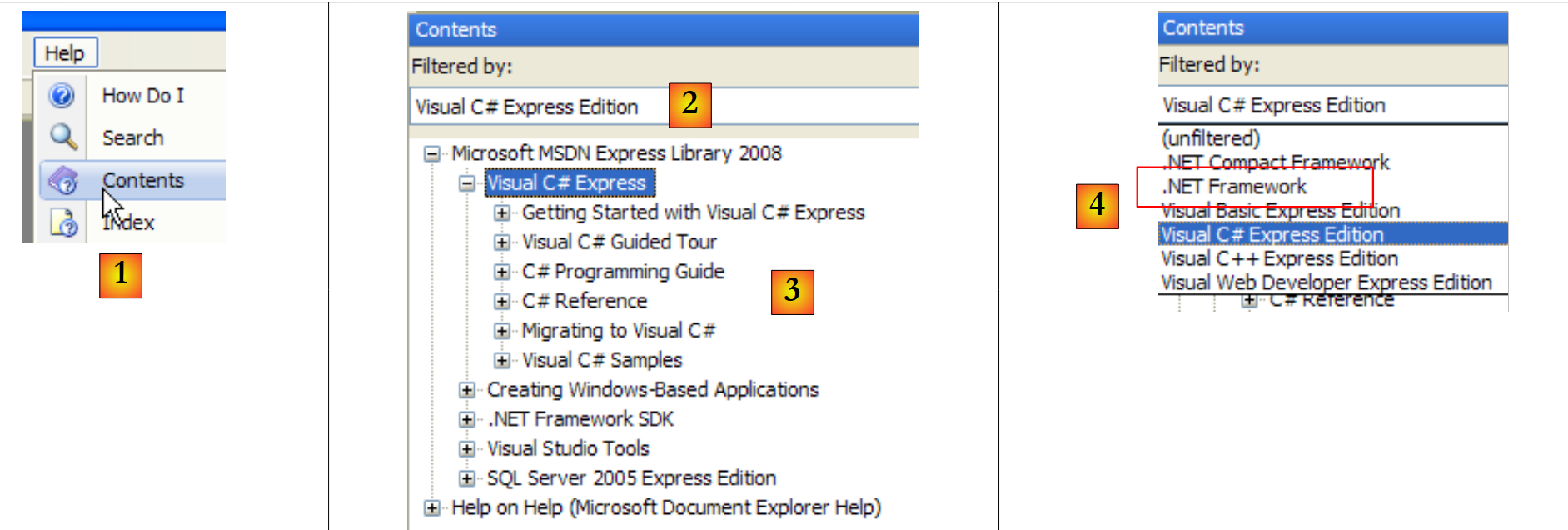 |
- 在 [1] 中,选择“帮助/目录”菜单。
- 在 [2] 中,选择“Visual C# Express Edition”选项
- 在 [3] 中,C# 帮助树
- 在 [4] 中,另一个有用的选项是 .NET Framework,它提供了对所有 .NET Framework 类的访问。
让我们来看看 C# 帮助中的章节标题:
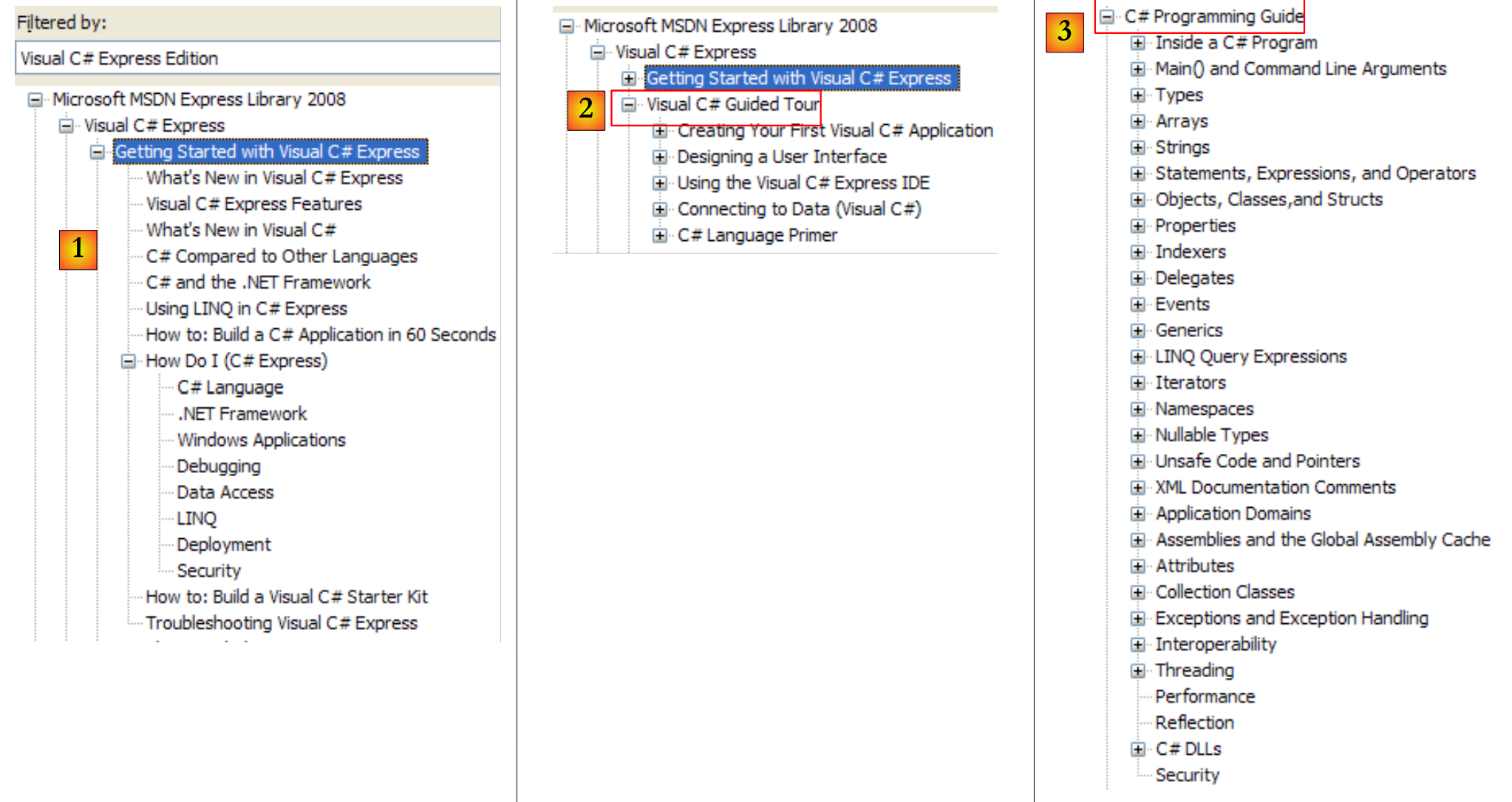 |
- [1]:C# 概述
- [2]:关于 C# 某些方面的系列示例
- [3]:C# 课程——可替代本文档。
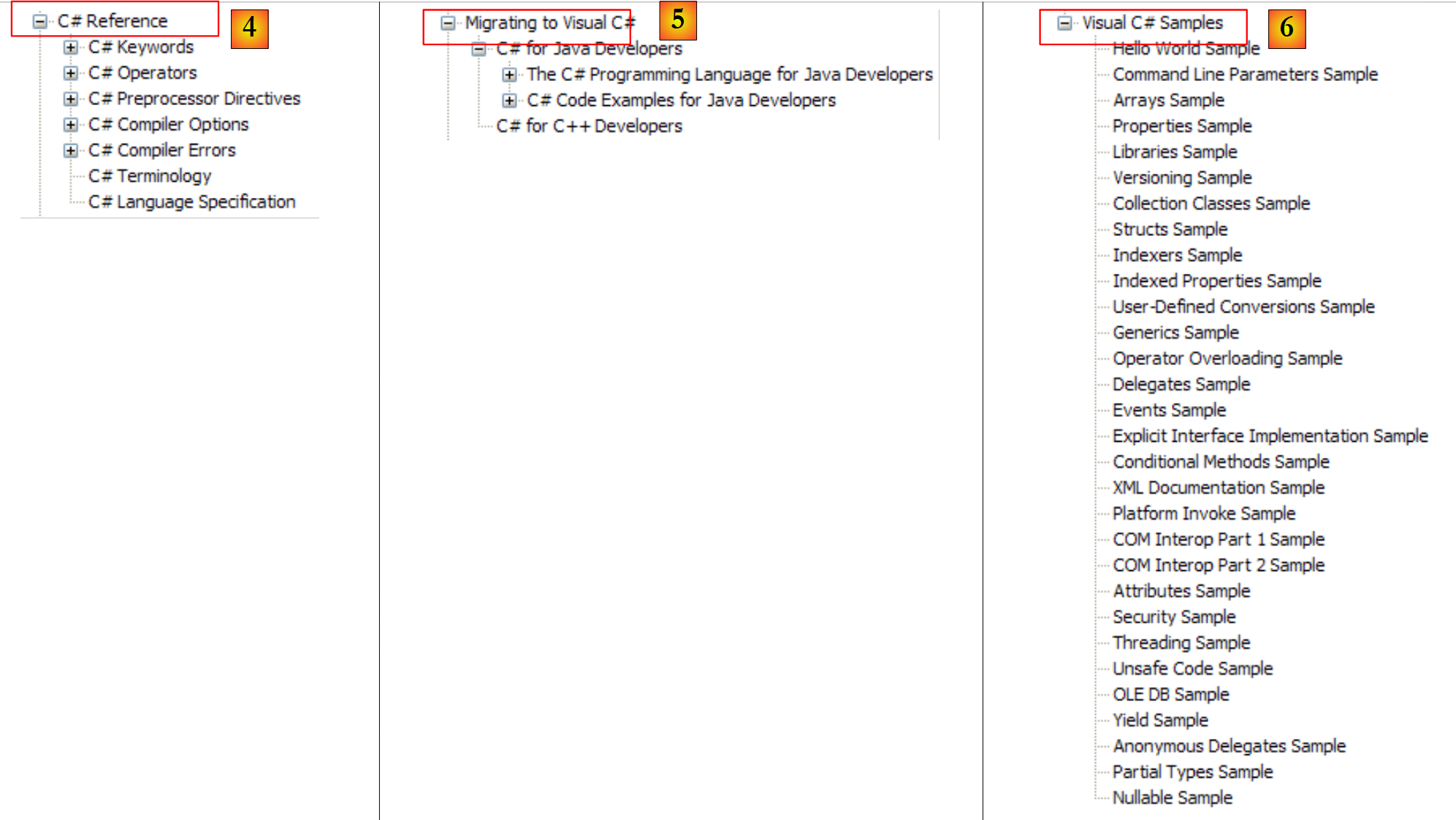 |
- [4]:了解更多关于 C# 的信息
- [5]:对 C++ 或 Java 开发者很有帮助。有助于避免一些常见陷阱。
- [6]:查找示例时,可以从这里开始。
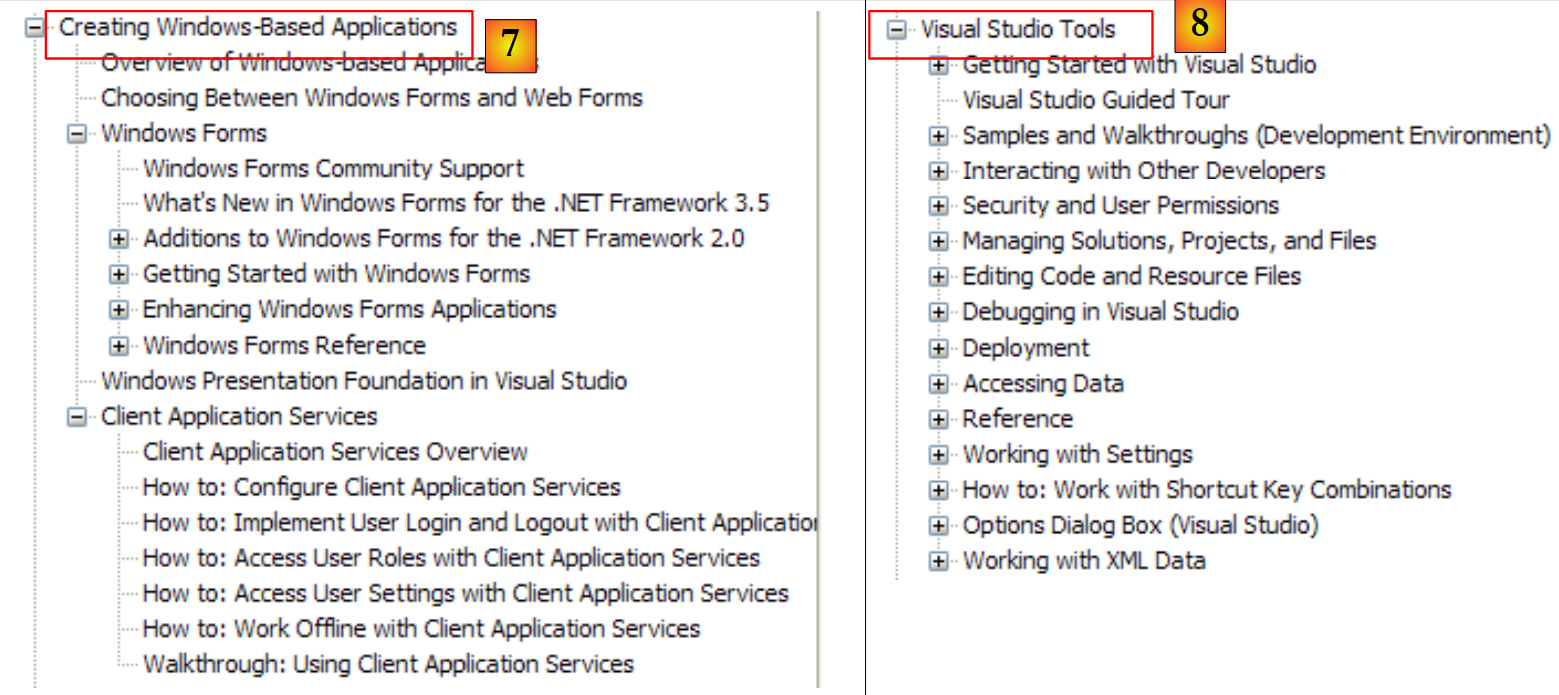 |
- [7]:创建图形用户界面所需掌握的内容
- [8]:充分利用 Visual Studio Express 集成开发环境
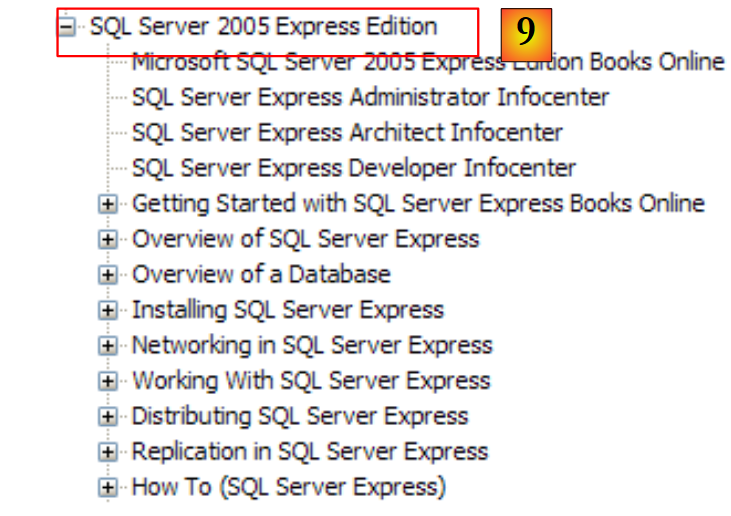 |
- [9]:SQL Server Express 2005 是一款高质量的、免费提供的关系型数据库管理系统(RDBMS)。本课程将使用该软件。
C# 帮助仅是开发人员所需的一部分。另一部分则是关于 .NET 框架中数百个类的帮助,这些类将使开发工作更加轻松。
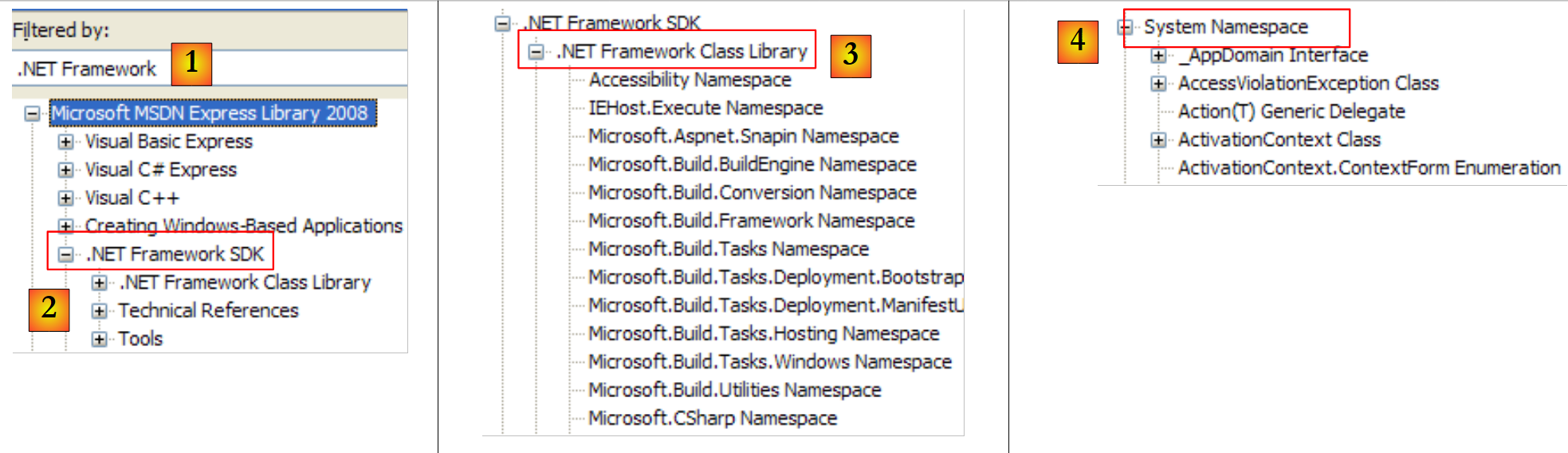 |
- [1]: 选择关于 .NET 框架的帮助
- [2]: 帮助文档位于 .NET Framework SDK 中
- [3]:.NET Framework 类库分支按所属命名空间列出了所有 .NET 类
- [4]: System 命名空间在前几章的示例中使用最为频繁
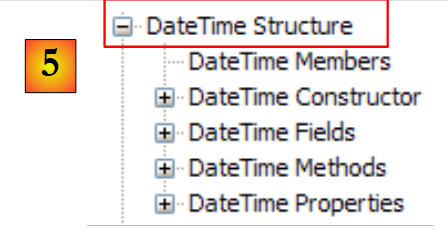 |
- [5]:在 System 命名空间中,例如,此处的 DateTime 结构
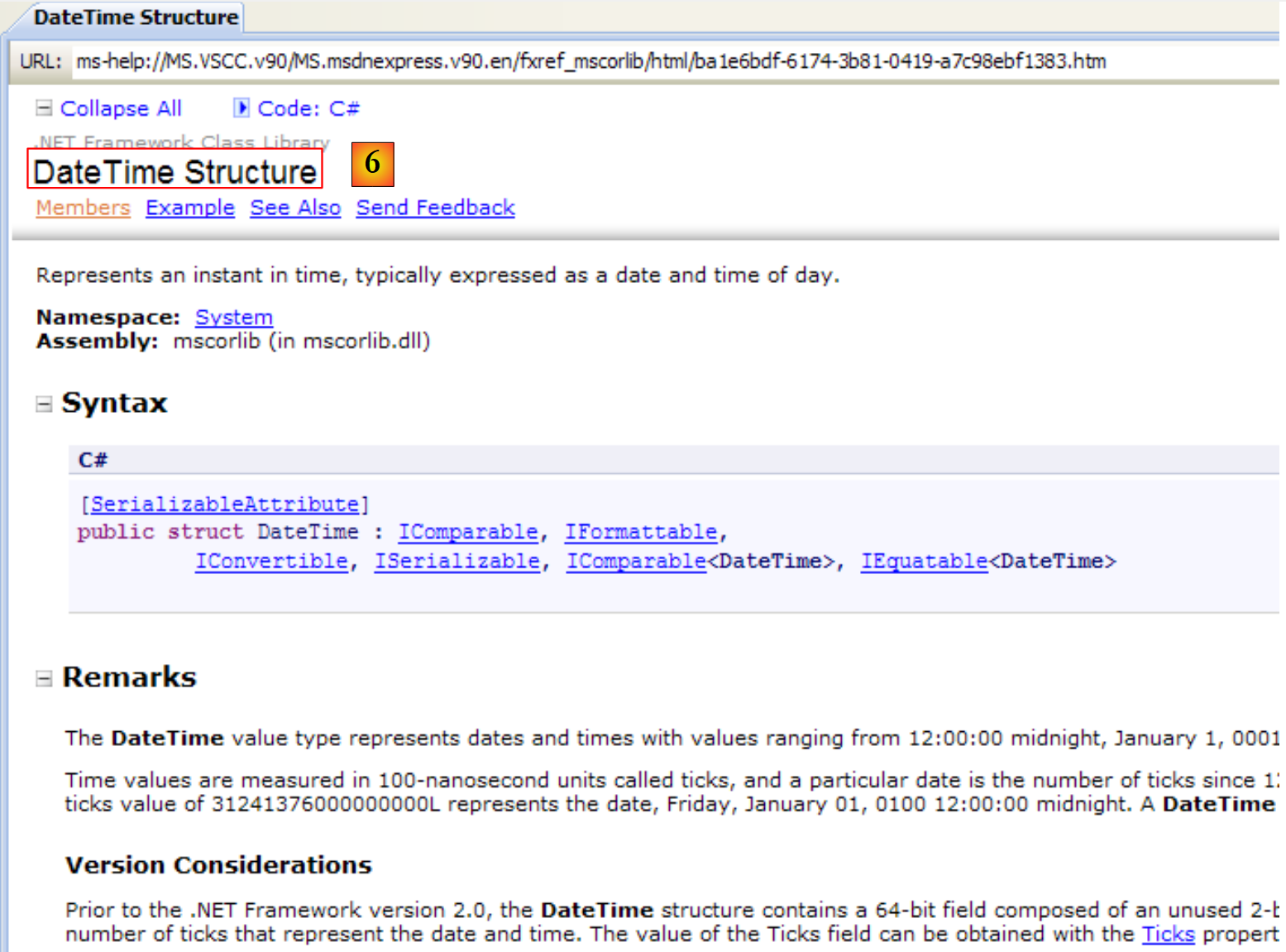 |
- [6]: 关于 DateTime 结构的帮助
5.1.2. 帮助/索引/搜索
MSDN 提供的帮助内容极其庞大,您可能不知道该从何处着手。此时,您可以使用帮助索引:
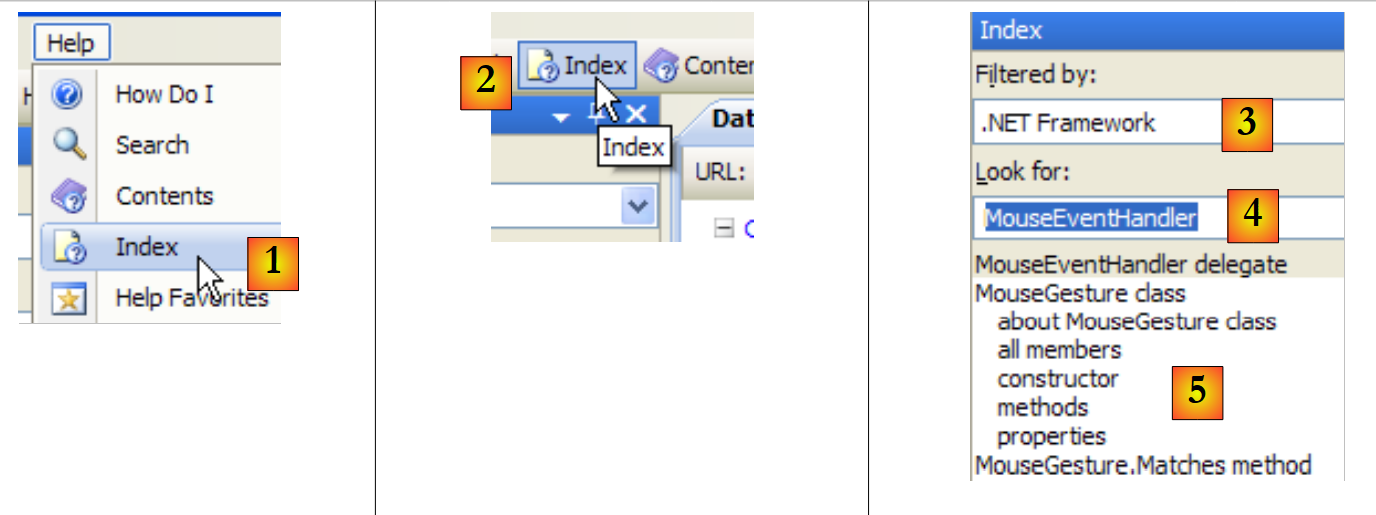 |
- 在 [1] 中,如果帮助窗口尚未打开,请使用 [帮助/索引] 选项;否则,在已打开的帮助窗口中使用 [2]。
- 在 [3] 中,指定要进行搜索的字段
- 在 [4] 中,指定要查找的内容,此处为一个类
- 在 [5] 中,显示结果
另一种查找帮助的方法是使用帮助搜索功能:
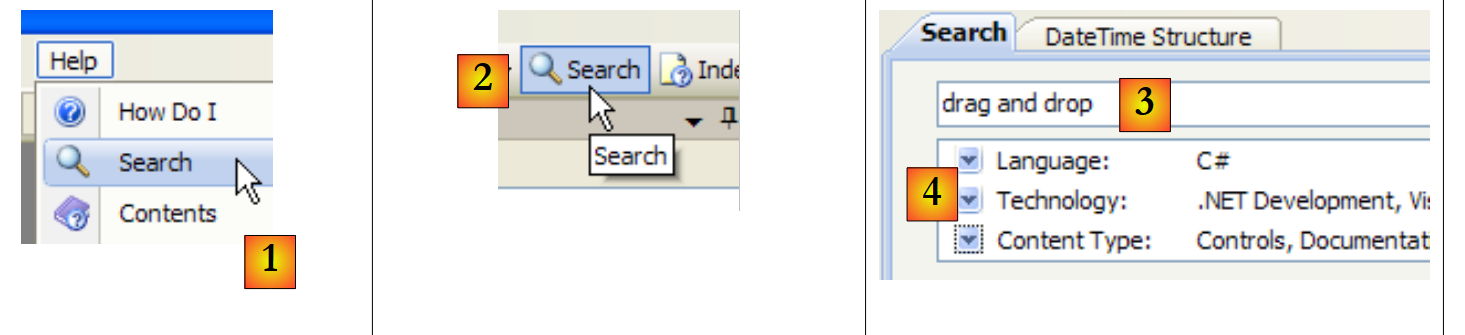 |
- 在 [1] 中,如果帮助窗口尚未打开,请使用 [帮助/搜索] 选项;否则,在已打开的帮助窗口中使用 [2]。
- 在 [3] 中,指定您要查找的内容
- 在 [4] 中,筛选搜索字段
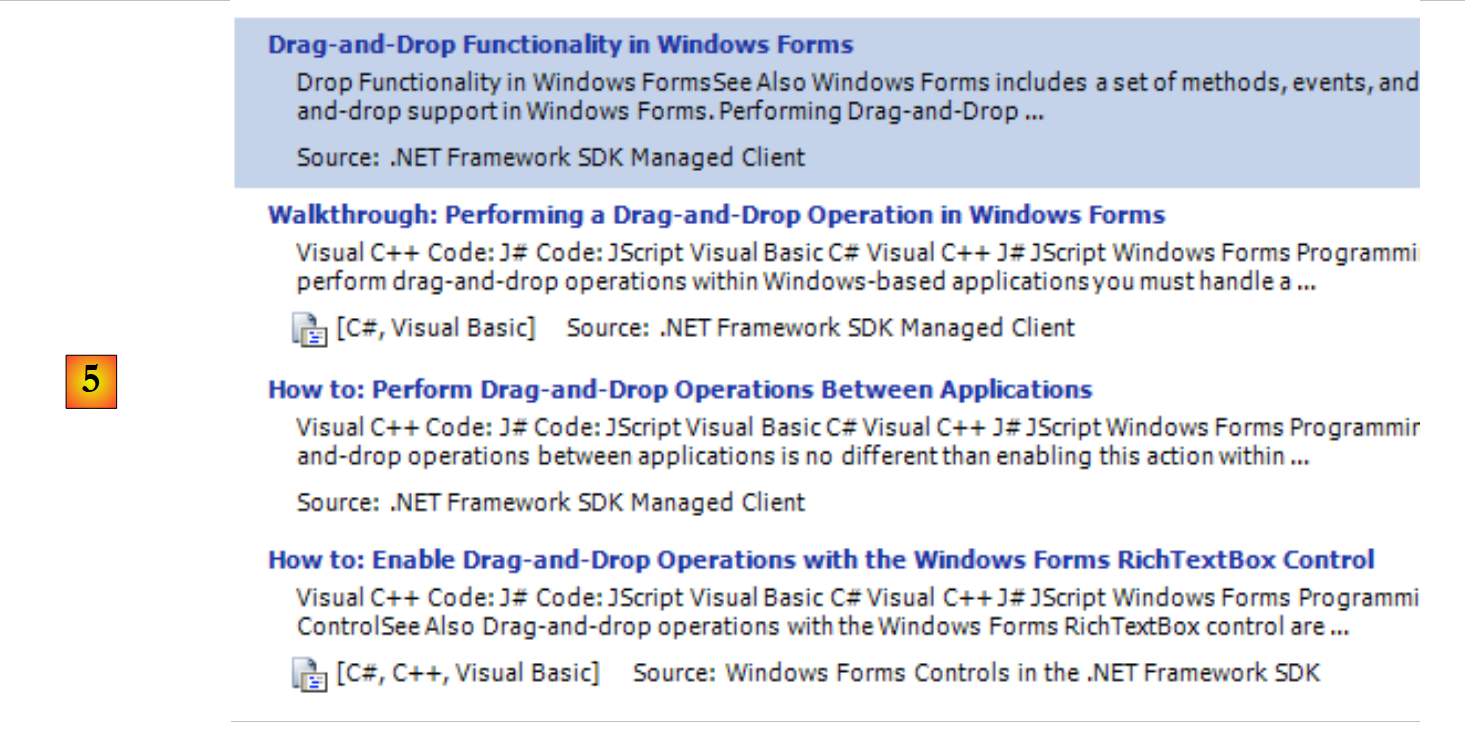 |
- 在 [5] 中,以不同主题的形式显示包含搜索文本的答案。
5.2. 字符串
5.2.1. System.String 类
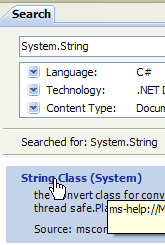 | 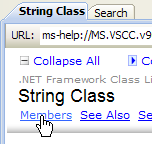 | 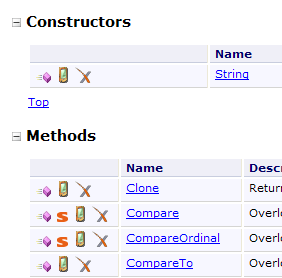 |
System.String 类与简单类型 string 完全相同。它拥有许多属性和方法。以下仅列举其中的一部分:
| |
| |
| |
| |
| |
| |
| |
| |
| |
| |
| |
| |
需要注意的一点是:当一个方法返回一个字符串时,该字符串是与该方法所作用的字符串链不同的另一条字符串链。例如,S1.Trim() 返回字符串 S2,而 S1 和 S2 是两条不同的字符串链。
C 语言中的字符串可以视为一个字符数组。因此
- C[i] 表示 C 数组中的第 i 个字符
- C.Length 是 C 中字符的数量
请看以下示例:
using System;

namespace Chap3 {
    class Program {
        static void Main(string[] args) {
            string uneChaine = "l'oiseau vole au-dessus des nuages";
            affiche("uneChaine=" + uneChaine);
            affiche("uneChaine.Length=" + uneChaine.Length);
            affiche("chaine[10]=" + uneChaine[10]);
            affiche("uneChaine.IndexOf(\"vole\")=" + uneChaine.IndexOf("vole"));
            affiche("uneChaine.IndexOf(\"x\")=" + uneChaine.IndexOf("x"));
            affiche("uneChaine.LastIndexOf('a')=" + uneChaine.LastIndexOf('a'));
            affiche("uneChaine.LastIndexOf('x')=" + uneChaine.LastIndexOf('x'));
            affiche("uneChaine.Substring(4,7)=" + uneChaine.Substring(4, 7));
            affiche("uneChaine.ToUpper()=" + uneChaine.ToUpper());
            affiche("uneChaine.ToLower()=" + uneChaine.ToLower());
            affiche("uneChaine.Replace('a','A')=" + uneChaine.Replace('a', 'A'));
            string[] champs = uneChaine.Split(null);
            for (int i = 0; i < champs.Length; i++) {
                affiche("champs[" + i + "]=[" + champs[i] + "]");
            }//for
            affiche("Join(\":\",champs)=" + System.String.Join(":", champs));
            affiche("(\"  abc  \").Trim()=[" + "  abc  ".Trim() + "]");
         }//Main

        public static void affiche(string msg) {
             // poster msg
            Console.WriteLine(msg);
         }//poster
     }//class
}//namespace
执行后得到以下结果:
让我们来看一个新例子:
using System;

namespace Chap3 {
    class Program {
        static void Main(string[] args) {
             // the line to be analyzed
            string ligne = "un:deux::trois:";
             // field separators
            char[] séparateurs = new char[] { ':' };
             // split
            string[] champs = ligne.Split(séparateurs);
            for (int i = 0; i < champs.Length; i++) {
                Console.WriteLine("Champs[" + i + "]=" + champs[i]);
            }
             // join
            Console.WriteLine("join=[" + System.String.Join(":", champs) + "]");
        }
    }
}
以及性能测试结果:
String 类的 Split 方法用于将字符串的元素放入数组中。此处使用的 Split 方法定义如下:
public string[] Split(char[] separator);
字符数组。这些字符代表用于分隔字符串各字段的字符。因此,如果字符串为 "field1, field2, field3",我们可以使用 separator=new char[] {','}。如果分隔符是一系列空格,则使用 separator=null。 | |
字符串数组,其中数组的每个元素都是一个字符串字段。 |
Join 方法是 String 类的静态方法:
public static string Join(string separator, string[] value);
字符串数组 | |
用作字段分隔符的字符串 | |
由数组元素 value 通过字符串分隔符连接而成的字符串。 |
5.2.2. System.Text.StringBuilder 类
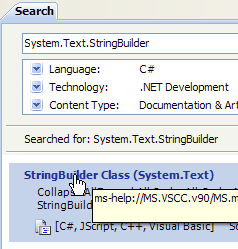 | 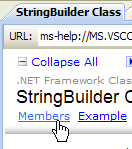 | 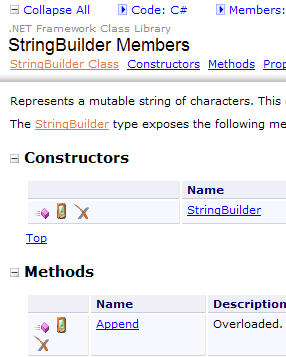 |
前面我们提到,String 类的某些方法在应用于字符串 S1 时会生成另一个字符串 S2。System.Text.StringBuilder 类允许您直接操作 S1,而无需创建 S2 字符串。通过避免生成大量生命周期极短的字符串,这种做法能提升性能。
该类支持多种构造函数:
| |
|
StringBuilder 对象使用容量为 个字符的字符块来存储底层字符串。默认容量设置为16。上文中的第三个构造函数用于指定字符块容量。StringBuilder会自动调整存储字符串S所需的字符块数量。此外,还有用于设置StringBuilder对象最大字符数的构造函数。默认情况下,该最大容量为2,147,483,647。
以下示例说明了容量的概念:
using System.Text;
using System;
namespace Chap3 {
    class Program {
        static void Main(string[] args) {
             // str
            StringBuilder str = new StringBuilder("test");
            Console.WriteLine("taille={0}, capacité={1}", str.Length, str.Capacity);
            for (int i = 0; i < 10; i++) {
                str.Append("test");
                Console.WriteLine("taille={0}, capacité={1}", str.Length, str.Capacity);
            }
             // str2
            StringBuilder str2 = new StringBuilder("test",10);
            Console.WriteLine("taille={0}, capacité={1}", str2.Length, str2.Capacity);
            for (int i = 0; i < 10; i++) {
                str2.Append("test");
                Console.WriteLine("taille={0}, capacité={1}", str2.Length, str2.Capacity);
            }
        }
    }
}
- 第 7 行:创建对象 StringBuilder,块大小为 16 个字符
- 第 8 行:str.Length 是字符串 str 当前的字符数。str.Capacity 是字符串 str 在重新分配新块之前可存储的字符数。
- 第 10 行:str.Append(String S) 将字符串类型 S 追加到字符串类型 str(StringBuilder 对象)上。
- 第 14 行:创建一个块容量为 10 个字符的 StringBuilder 对象
执行结果:
这些结果表明,当容量不足时,该类会遵循其自身的算法来分配新的块:
- 第4-5行:容量增加16个字符
- 第8-9行:容量从16个字符增加到32个字符。
以下是该类的一些方法:
| |
| |
| |
| |
|
以下是一个示例:
using System.Text;
using System;
namespace Chap3 {
    class Program {
        static void Main(string[] args) {
             // str3
            StringBuilder str3 = new StringBuilder("test");
            Console.WriteLine(str3.Append("abCD").Insert(2, "xyZT").Remove(0, 2).Replace("xy", "XY"));
        }
    }
}
及其结果:
5.3. 绘画
数组源自 Array:
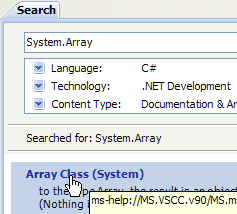 |  | 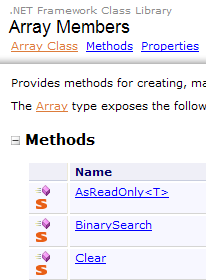 |
Array 类提供了多种方法,用于对数组进行排序、在数组中查找元素、调整数组大小等。我们将介绍该类的一些属性和方法。它们几乎都支持重载,即存在多种变体。每个数组都继承了这些属性和方法。
属性
方法
|
以下程序演示了 Array 类中某些方法的使用:
using System;

namespace Chap3 {
    class Program {
         // search type
        enum TypeRecherche { linéaire, dichotomique };

         // main method
        static void Main(string[] args) {
             // reading table elements typed on the keyboard
            double[] éléments;
            Saisie(out éléments);
             // unsorted table display
            Affiche("Tableau non trié", éléments);
             // Linear search in unsorted table
            Recherche(éléments, TypeRecherche.linéaire);
             // table sorting
            Array.Sort(éléments);
             // sorted table display
            Affiche("Tableau trié", éléments);
             // Dichotomous search in sorted table
            Recherche(éléments, TypeRecherche.dichotomique);
        }

         // entering values for the elements table
         // elements: reference on table created by the
        static void Saisie(out double[] éléments) {
            bool terminé = false;
            string réponse;
            bool erreur;
            double élément = 0;
            int i = 0;
             // initially, the painting does not exist
            éléments = null;
             // table element input loop
            while (!terminé) {
                 // question
                Console.Write("Elément (réel) " + i + " du tableau (rien pour terminer) : ");
                 // reading the answer
                réponse = Console.ReadLine().Trim();
                 // end of input if string empty
                if (réponse.Equals(""))
                    break;
                 // input verification
                try {
                    élément = Double.Parse(réponse);
                    erreur = false;
                } catch {
                    Console.Error.WriteLine("Saisie incorrecte, recommencez");
                    erreur = true;
                 }//try-catch
                 // if no error
                if (!erreur) {
                     // one more element in the table
                    i += 1;
                     // resize table to accommodate new element
                    Array.Resize(ref éléments, i);
                     // insert new element
                    éléments[i - 1] = élément;
                }
             }//while
        }

         // generic method for displaying a picture's elements
        static void Affiche<T>(string texte, T[] éléments) {
            Console.WriteLine(texte.PadRight(50, '-'));
            foreach (T élément in éléments) {
                Console.WriteLine(élément);
            }
        }

        // recherche d'an element in the array
         // elements: array of real
         // TypeRecherche: dichotomous or linear
        static void Recherche(double[] éléments, TypeRecherche type) {
             // Search
            bool terminé = false;
            string réponse = null;
            double élément = 0;
            bool erreur = false;
            int i = 0;
            while (!terminé) {
                 // question
                Console.WriteLine("Elément cherché (rien pour arrêter) : ");
                 // reading-checking response
                réponse = Console.ReadLine().Trim();
                 // finished?
                if (réponse.Equals(""))
                    break;
                 // check
                try {
                    élément = Double.Parse(réponse);
                    erreur = false;
                } catch {
                    Console.WriteLine("Erreur, recommencez...");
                    erreur = true;
                 }//try-catch
                 // if no error
                if (!erreur) {
                    // on cherche l'element in the table
                    if (type == TypeRecherche.dichotomique)
                         // dichotomous search
                        i = Array.BinarySearch(éléments, élément);
                    else
                         // linear search
                        i = Array.IndexOf(éléments, élément);
                     // Display response
                    if (i >= 0)
                        Console.WriteLine("Trouvé en position " + i);
                    else
                        Console.WriteLine("Pas dans le tableau");
                 }//if
             }//while
        }
    }
}
- 第 27-62 行:Input 方法用于捕获通过键盘输入的数组 elements 的元素。由于无法预先确定数组的大小(我们不知道其最终大小),因此必须在添加每个新元素时重新调整数组大小: (第 57 行)。 更高效的算法本应是按 N 个元素为一组为数组分配空间。然而,数组的设计初衷并不支持动态调整大小。这种情况更适合使用列表(ArrayList、List<T>)来处理。
- 第 75-113 行:Search 方法用于根据键盘输入的元素在表中进行搜索。搜索模式取决于表是否已排序。对于未排序的数组,使用第 106 行的 IndexOf 方法执行线性搜索。对于已排序的表,使用第 103 行的 BinarySearch 方法执行二分搜索。
- 第 18 行:对数组元素进行排序。我们使用 ici,这是 Spell 的一个变体,仅有一个参数:待排序的数组。用于比较数组元素的排序关系即为这些元素的隐含关系。在 ici 的情况下,元素是数值型的,因此采用数字的自然排序规则。
屏幕输出结果如下:
5.4. 通用集合
除了数组之外,还有各种用于存储元素集合的类。System.Collections.Generic 命名空间中包含泛型版本,而 System.Collections 命名空间中则包含非泛型版本。我们将介绍两种常用的泛型集合:列表和字典。
泛型集合的列表如下:
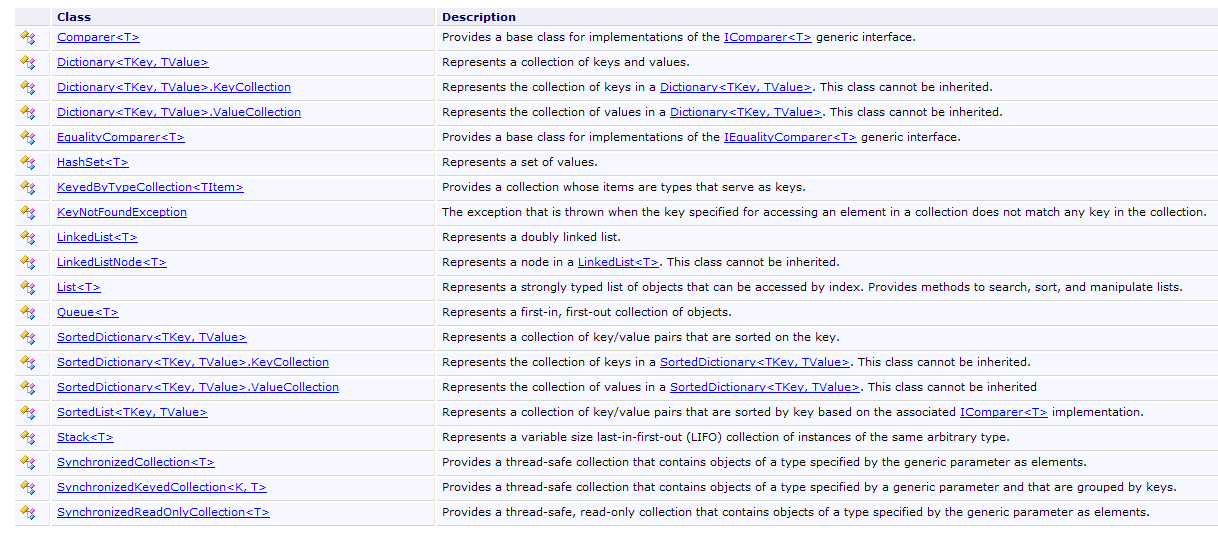
5.4.1. 泛型 List<T> 类
System.Collections.Generic.List<T> 类允许您实现由类型 T 的对象组成的集合,其大小在程序运行期间会发生变化。List<T> 类型的对象几乎可以像数组一样进行操作。因此,列表 l 的第 i 个元素表示为 l[i]。
此外还有一种非泛型列表类型:ArrayList,它能够存储指向任何对象的引用。ArrayList 在功能上等同于 List<Object>。ArrayList 对象的定义如下:
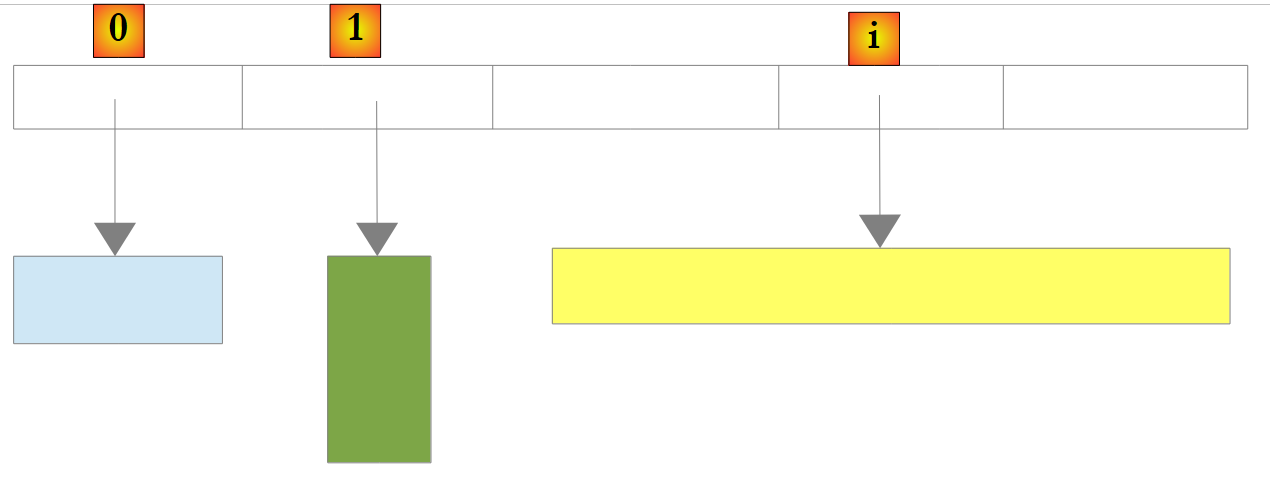 |
在上例中,列表中的元素 0、1 和 i 分别指向不同类型的对象。在将对象引用添加到 ArrayList 之前,必须先创建该对象。尽管 ArrayList 存储的是对象引用,但也可以存储数字。这是通过一种称为“装箱(Boxing)”的机制实现的:将数字封装在一个类型为 Object 的 O 对象中,并将 O 的引用存储在列表中。该机制对开发者而言是透明的。你可以这样编写:
这将产生以下结果:
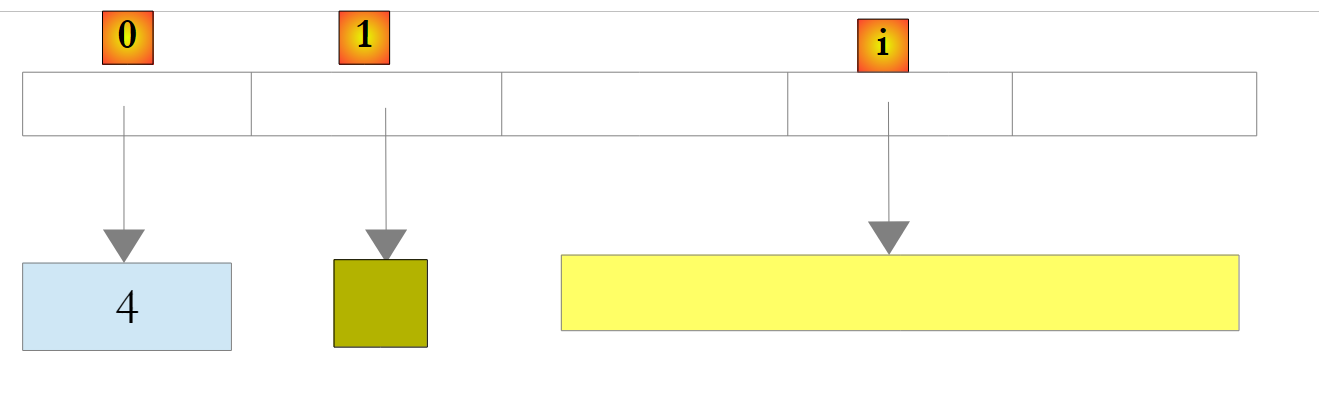 |
在上文中,数字 4 已被封装在一个 O 对象中,并且该 O 对象的引用被存储在列表中。要检索它,请编写:
int i = (int)liste[0];
Object -> int 这一操作称为解箱(Unboxing)。如果列表完全由 int 类型组成,将其声明为 List<int> 可以提升性能。实际上,int 类型的数字将直接存储在列表内部,而非列表外部的 Object 对象中。此时将不再发生装箱(Boxing)和解箱(Unboxing)操作。
 |
对于 List<T> 类型的列表,其中 T 是一个类,该列表则存储指向 T 类型对象的引用:
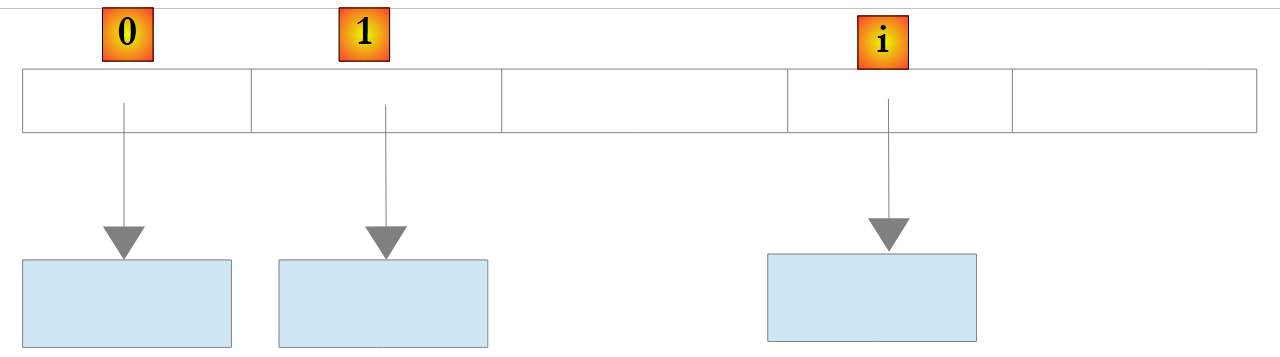 |
以下是泛型列表的一些属性和方法:
属性
|
方法
| |
| |
让我们回到前面的示例,其中有一个类型为 Array 的对象,现在将其替换为类型为 List<T> 的对象。由于列表是与数组非常接近的对象,因此代码变化非常小。我们仅列出最显著的改动:
using System;
using System.Collections.Generic;

namespace Chap3 {
    class Program {
         // search type
        enum TypeRecherche { linéaire, dichotomique };

         // main method
        static void Main(string[] args) {
             // play list items typed on keyboard
            List<double> éléments;
            Saisie(out éléments);
             // number of elements
            Console.WriteLine("La liste a {0} éléments et une capacité de {1} éléments", éléments.Count, éléments.Capacity);
             // display unsorted list
            Affiche("Liste non triée", éléments);
             // Linear search in unsorted list
            Recherche(éléments, TypeRecherche.linéaire);
             // list sorting
            éléments.Sort();
             // sorted list display
            Affiche("Liste triée", éléments);
             // Dichotomous search in sorted list
            Recherche(éléments, TypeRecherche.dichotomique);
        }

         // enter values for the items list
         // elements: reference to the list created by the
        static void Saisie(out List<double> éléments) {
...
             // initially, the list is empty
            éléments = new List<double>();
             // list item entry loop
            while (!terminé) {
...
                 // if no error
                if (!erreur) {
                     // one more item in the list
                    éléments.Add(élément);
                }
             }//while
        }

         // generic method for displaying the elements of an enumerable object
        static void Affiche<T>(string texte, IEnumerable<T> éléments) {
            Console.WriteLine(texte.PadRight(50, '-'));
            foreach (T élément in éléments) {
                Console.WriteLine(élément);
            }
        }

         // search for an item in a list
         // elements: list of real numbers
         // TypeRecherche: dichotomous or linear
        static void Recherche(List<double> éléments, TypeRecherche type) {
...
            while (!terminé) {
...
                 // if no error
                if (!erreur) {
                     // search for the element in the list
                    if (type == TypeRecherche.dichotomique)
                         // dichotomous search
                        i = éléments.BinarySearch(élément);
                    else
                         // linear search
                        i = éléments.IndexOf(élément);
                     // Display response
...
                 }//if
             }//while
        }
    }
}
- 第 46-51 行:泛型方法 Poster<T> 有两个参数:
- 第一个参数是要写入的文本
- 第二个参数是实现泛型接口 IEnumerable<T> 的对象:
第 48 行中的 foreach( T element in elements) 结构,适用于任何实现 IEnumerable 接口的元素对象。表格(Array)和列表(List<T>)都实现了 IEnumerable<T> 接口。Poster 同样适用于显示表格和列表。
程序执行结果与使用 Array 的示例相同。
5.4.2. Dictionary<TKey, TValue> 类
System.Collections.Generic.Dictionary<TKey,TValue> 类用于实现字典。字典可以被视为一个具有两列的数组:
键 | 值 |
key1 | 值1 |
键2 | 值2 |
.. | ... |
在课堂上,Dictionary<TKey, TValue> 中的键是 TKey 类型,值是 TValue 类型。键是唯一的,即不存在两个相同的键。如果类型 TKey 和 TValue 分别表示类,那么这样的字典可能如下所示:
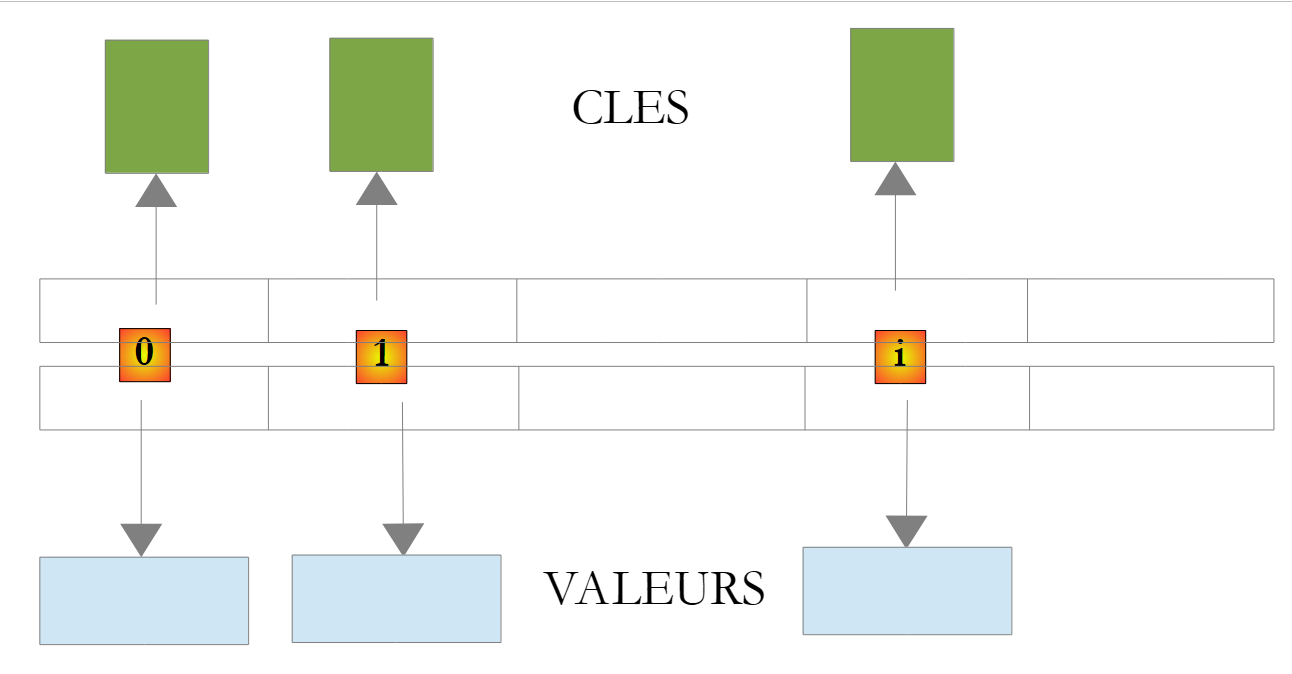 |
字典 D 中与键 C 关联的值通过记法 D[C] 表示。该值既可读取也可写入。因此,我们可以写出:
如果键 c 在字典 D 中不存在,则 D[c] 会引发异常。
Dictionary<TKey, TValue> 的主要方法和属性如下:
制造商
属性
方法
请看以下示例程序:
using System;
using System.Collections.Generic;

namespace Chap3 {
    class Program {
        static void Main(string[] args) {
            // creation of a <string,int> dictionary
            string[] liste = { "jean:20", "paul:18", "mélanie:10", "violette:15" };
            string[] champs = null;
            char[] séparateurs = new char[] { ':' };
            Dictionary<string,int> dico = new Dictionary<string,int>();
            for (int i = 0; i <liste.Length; i++) {
                champs = liste[i].Split(séparateurs);
                dico[champs[0]]= int.Parse(champs[1]);
            }//for
            // number of elements in the dictionary
            Console.WriteLine("Le dictionnaire a " + dico.Count + " éléments");
             // kEY LIST
            Affiche("[Liste des clés]",dico.Keys);
            // list of values
            Affiche("[Liste des valeurs]", dico.Values);
            // list of keys & values
            Console.WriteLine("[Liste des clés & valeurs]");
            foreach (string clé in dico.Keys) {
                Console.WriteLine("clé=" + clé + " valeur=" + dico[clé]);
            }
            // delete the "paul" key
            Console.WriteLine("[Suppression d'une clé]");
            dico.Remove("paul");
            // list of keys & values
            Console.WriteLine("[Liste des clés & valeurs]");
            foreach (string clé in dico.Keys) {
                Console.WriteLine("clé=" + clé + " valeur=" + dico[clé]);
            }
             // dictionary search
            String nomCherché = null;
            Console.Write("Nom recherché (rien pour arrêter) : ");
            nomCherché = Console.ReadLine().Trim();
            int value;
            while (!nomCherché.Equals("")) {
                dico.TryGetValue(nomCherché, out value);
                if (value!=0) {
                    Console.WriteLine(nomCherché + "," + value);
                } else {
                    Console.WriteLine("Nom " + nomCherché + " inconnu");
                }
                 // next search
                Console.Out.Write("Nom recherché (rien pour arrêter) : ");
                nomCherché = Console.ReadLine().Trim();
             }//while
        }

        // generic method for displaying elements of an enumerable type
        static void Affiche<T>(string texte, IEnumerable<T> éléments) {
            Console.WriteLine(texte.PadRight(50, '-'));
            foreach (T élément in éléments) {
                Console.WriteLine(élément);
            }
        }

    }
}
- 第 8 行:一个字符串数组,将用于初始化 <string,int> 字典
- 第 11 行:<string,int> 字典
- 第12-15行:根据第8行的字符串对其进行初始化
- 第 17 行:字典条目数量
- 第 19 行:字典键
- 第 21 行:字典的值
- 第 29 行:删除字典条目
- 第 41 行:在字典中搜索键。如果不存在,TryGetValue 会将 value 设为 0,因为 value 是数值型。此技巧仅在此处适用,因为我们知道字典中不存在值 0。
结果如下:
5.5. 文本文件
5.5.1. StreamReader 类
System.IO.StreamReader 类可以读取文本文件的内容。实际上,它也可以处理非文件流。以下是该类的一些属性和方法:
制造商
属性
方法
以下是一个示例:
using System;
using System.IO;

namespace Chap3 {
    class Program {
        static void Main(string[] args) {
             // execution directory
            Console.WriteLine("Répertoire d'exécution : "+Environment.CurrentDirectory);
            string ligne = null;
            StreamReader fluxInfos = null;
             // read contents of infos.txt file
            try {
                 // reading 1
                Console.WriteLine("Lecture 1----------------");
                using (fluxInfos = new StreamReader("infos.txt")) {
                    ligne = fluxInfos.ReadLine();
                    while (ligne != null) {
                        Console.WriteLine(ligne);
                        ligne = fluxInfos.ReadLine();
                    }
                }
                 // reading 2
                Console.WriteLine("Lecture 2----------------");
                using (fluxInfos = new StreamReader("infos.txt")) {
                    Console.WriteLine(fluxInfos.ReadToEnd());
                }
            } catch (Exception e) {
                Console.WriteLine("L'erreur suivante s'est produite : " + e.Message);
            }
        }
    }
}
- 第 8 行:显示执行目录的名称
- 第 12、27 行:使用 try/catch 块处理可能出现的异常。
- 第 15 行:使用 `using flux = new StreamReader(...)` 的结构是一种机制,用于避免在使用流后必须显式关闭流。只要离开 `using` 作用域,系统就会自动执行关闭操作。
- 第 15 行:要读取的文件名为 infos.txt。由于是相对路径,系统将在第 8 行显示的执行目录中搜索该文件。若该文件不存在,将抛出异常并由 try/catch 进行处理。
- 第 16-20 行:文件按行依次读取
- 第 25 行:一次性读取整个文件
infos.txt 文件内容如下:
并放置在 C# 项目的以下文件夹中:
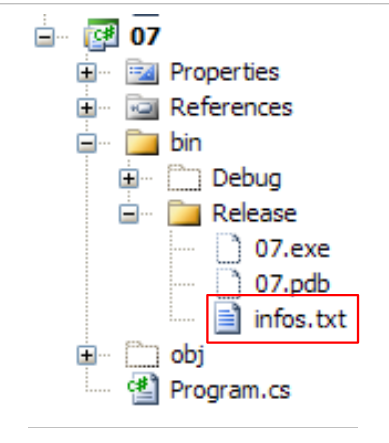 |
我们即将发现,当使用 Ctrl-F5 运行项目时,bin/Release 就是执行文件夹。
执行后得到以下结果:
如果在第15行输入文件名 xx.txt,我们将得到以下结果:
5.5.2. StreamWriter 类
System.IO.StreamWriter 类允许您向文本文件写入数据。与 StreamReader 类似,它实际上也能处理非文件流。以下是该类的一些属性和方法:
制造商
属性
方法
请看以下示例:
using System;
using System.IO;

namespace Chap3 {
    class Program2 {
        static void Main(string[] args) {
             // execution directory
            Console.WriteLine("Répertoire d'exécution : " + Environment.CurrentDirectory);
             string ligne = nu                        ll; // one line of text
             StreamWriter fluxInfos = nu    ll; // the text file
            try {
                 // text file creation
                using (fluxInfos = new StreamWriter("infos2.txt")) {
                    Console.WriteLine("Mode AutoFlush : {0}", fluxInfos.AutoFlush);
                     // read line typed on keyboard
                    Console.Write("ligne (rien pour arrêter) : ");
                    ligne = Console.ReadLine().Trim();
                     // loop as long as the line entered is not empty
                    while (ligne != "") {
                         // write line to text file
                        fluxInfos.WriteLine(ligne);
                         // read new line on keyboard
                        Console.Write("ligne (rien pour arrêter) : ");
                        ligne = Console.ReadLine().Trim();
                     }//while
                }
            } catch (Exception e) {
                Console.WriteLine("L'erreur suivante s'est produite : " + e.Message);
            }
        }
    }
}
- 第 13 行:我们再次使用 using(stream) 语法,以避免必须显式地使用 Close 来关闭流。当 using 作用域结束时,这会自动完成。
- 为什么第 11 行和第 27 行要使用 try/catch?在第 13 行,如果文件名采用 /rep1/rep2/ .../file 的形式,而路径 /rep1/rep2/... 不存在,将导致无法创建文件。此时会抛出异常。此外还可能出现其他异常(如磁盘已满、权限不足等)。
结果如下:
文件 infos2.txt 已创建在项目的 bin/Release 目录中:
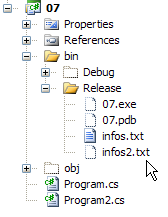 | 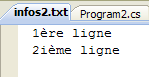 |
5.6. 二进制文件
System.IO.BinaryReader 和 System.IO.BinaryWriter 类用于读取和写入二进制文件。
请看以下应用程序:
// syntaxe pg texte bin logs
// on lit un fichier texte (texte) et on range son contenu dans un fichier binaire (bin
// le fichier texte a des lignes de la forme nom : age qu'on rangera dans une structure string, int
// (logs) est un fichier texte de logs
该文本文件包含以下内容:
程序如下:
using System;
using System.IO;

// syntax pg text bin logs
// read a text file (text) and store its contents in a binary file (bin)
// the text file has lines of the form name: age, which will be stored in a structure string, int
// (logs) is a text log file

namespace Chap3 {
    class Program {
        static void Main(string[] arguments) {
             // you need 3 arguments
            if (arguments.Length != 3) {
                Console.WriteLine("syntaxe : pg texte binaire log");
                Environment.Exit(1);
             }//if

             // variables
            string ligne=null;
            string nom=null;
            int age=0;
            int numLigne = 0;
            char[] séparateurs = new char[] { ':' };
            string[] champs=null;
            StreamReader input = null;
            BinaryWriter output = null;
            StreamWriter logs = null;
            bool erreur = false;
             // read text file - write binary file
            try {
                 // open text file in read mode
                input = new StreamReader(arguments[0]);
                 // open binary file for writing
                output = new BinaryWriter(new FileStream(arguments[1], FileMode.Create, FileAccess.Write));
                 // open write log file
                logs = new StreamWriter(arguments[2]);
                 // text file processing
                while ((ligne = input.ReadLine()) != null) {
                     // one more line
                    numLigne++;
                     // empty line?
                    if (ligne.Trim() == "") {
                        // on ignore
                        continue;
                    }
                     // one line name: age
                    champs = ligne.Split(séparateurs);
                     // we need 2 fields
                    if (champs.Length != 2) {
                        // on logue l'erreur
                        logs.WriteLine("La ligne n° [{0}] du fichier [{1}] a un nombre de champs incorrect", numLigne, arguments[0]);
                         // next line
                        continue;
                     }//if
                     // 1st field must be non-empty
                    erreur = false;
                    nom = champs[0].Trim();
                    if (nom == "") {
                        // on logue l'erreur
                        logs.WriteLine("La ligne n° [{0}] du fichier [{1}] a un nom vide", numLigne, arguments[0]);
                        erreur = true;
                    }
                     // the second field must be an integer >=0
                    if (!int.TryParse(champs[1],out age) || age<0) {
                        // on logue l'erreur
                        logs.WriteLine("La ligne n° [{0}] du fichier [{1}] a un âge [{2}] incorrect", numLigne, arguments[0], champs[1].Trim());
                        erreur = true;
                     }//if
                     // if no error, write data to binary file
                    if (!erreur) {
                        output.Write(nom);
                        output.Write(age);
                    }
                     // next line
                 }//while
            }catch(Exception e){
                Console.WriteLine("L'erreur suivante s'est produite : {0}", e.Message);
            } finally {
                 // closing files
                if(input!=null) input.Close();
                if(output!=null) output.Close();
                if(logs!=null) logs.Close();
            }
        }
    }
}
让我们重点关注与 BinaryWriter 相关的操作:
- 第 34 行:通过
output=new BinaryWriter(new FileStream(arguments[1],FileMode.Create,FileAccess.Write));
构造函数的参数必须是一个流。这里是一个由给定文件(FileStream)构建的流:
- (待续)
- 文件名
- 要执行的操作,此处为 FileMode.Create 以创建
- 访问类型,此处为 FileAccess.Write,用于对文件进行写入访问
- 第 70-73 行:写入操作
BinaryWriter 类提供了一系列方法,其中 Write 方法被重载,用于写入各种简单数据类型
- 第 81 行:流程结束操作
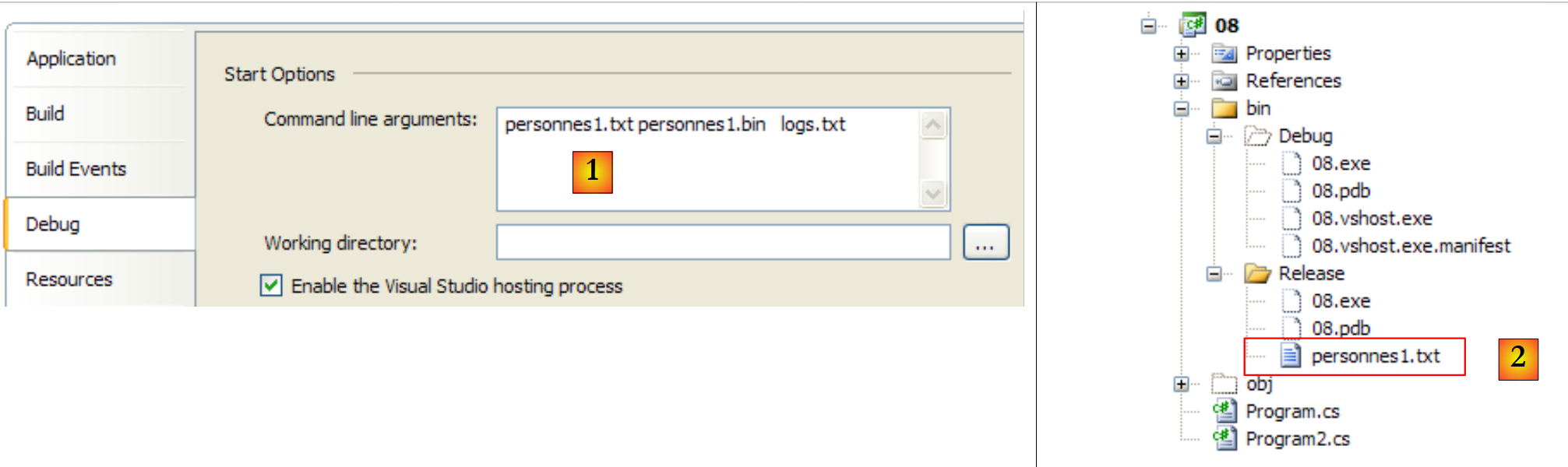
Main 方法的三个参数通过其属性传递给项目 [1],而要使用的文本文件则放置在 bin/Release 目录下 [2]:
 |
使用以下文件 [personnes1.txt]:
结果如下:
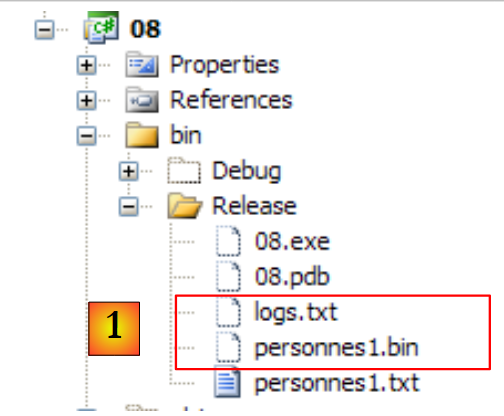 |
- 在 [1] 中,生成了二进制文件 [personnes1.bin] 和日志文件 [logs.txt]。后者的内容如下:
二进制文件 [personnes1.bin] 的内容将由以下程序提供。该程序还接受三个参数:
// syntaxe pg bin texte logs
// on lit un fichier binaire bin et on range son contenu dans un fichier texte (texte)
// le fichier binaire a une structure string, int
// le fichier texte a des lignes de la forme nom : age
// logs est un fichier texte de logs
因此,我们将执行相反的操作。我们读取一个二进制文件来生成一个文本文件。如果生成的文本文件与原始文件完全一致,我们就知道文本 → 二进制 → 文本的转换已经成功。代码如下:
using System;
using System.IO;

// syntax pg bin text logs
// read a binary bin file and store its contents in a text file (text)
// the binary file has a structure string, int
// the text file has lines of the form name: age
// logs is a text log file

namespace Chap3 {
    class Program2 {
        static void Main(string[] arguments) {
             // you need 3 arguments
            if (arguments.Length != 3) {
                Console.WriteLine("syntaxe : pg binaire texte log");
                Environment.Exit(1);
             }//if

             // variables
            string nom = null;
            int age = 0;
            int numPersonne = 1;
            BinaryReader input = null;
            StreamWriter output = null;
            StreamWriter logs = null;
            bool fini;
             // read binary file - write text file
            try {
                 // open binary file for reading
                input = new BinaryReader(new FileStream(arguments[0], FileMode.Open, FileAccess.Read));
                 // open text file for writing
                output = new StreamWriter(arguments[1]);
                 // open write log file
                logs = new StreamWriter(arguments[2]);
                 // binary file processing
                fini = false;
                while (!fini) {
                    try {
                         // read name
                        nom = input.ReadString().Trim();
                         // age reading
                        age = input.ReadInt32();
                         // writing to text file
                        output.WriteLine(nom + ":" + age);
                         // next person
                        numPersonne++;
                    } catch (EndOfStreamException) {
                        fini = true;
                    } catch (Exception e) {
                        logs.WriteLine("L'erreur suivante s'est produite à la lecture de la personne n° {0} : {1}", numPersonne, e.Message);
                    }
                 }//while
            } catch (Exception e) {
                Console.WriteLine("L'erreur suivante s'est produite : {0}", e.Message);
            } finally {
                 // closing files
                if (input != null)
                    input.Close();
                if (output != null)
                    output.Close();
                if (logs != null)
                    logs.Close();
            }
        }
    }
}
让我们重点关注与 BinaryReader 相关的操作:
- 第 30 行:通过
input=new BinaryReader(new FileStream(arguments[0],FileMode.Open,FileAccess.Read));
构造函数的参数必须是一个流。这里是一个由给定文件(FileStream)构建的流:
- (待续)
- 文件名
- 要执行的操作,此处为 FileMode.Open 以打开现有文件
- 访问类型,此处为 FileAccess.Read,用于读取文件
- 第 40、42 行:读取操作
BinaryReader 类提供了一系列 ReadXX 方法,用于读取不同类型的简单数据
- 第 60 行:流程结束操作
如果我们将这两个程序串联运行,先将 personnes1.txt 转换为 personnes1.bin,再将 personnes1.bin 转换为 personnes2.txt2,则会得到以下结果:
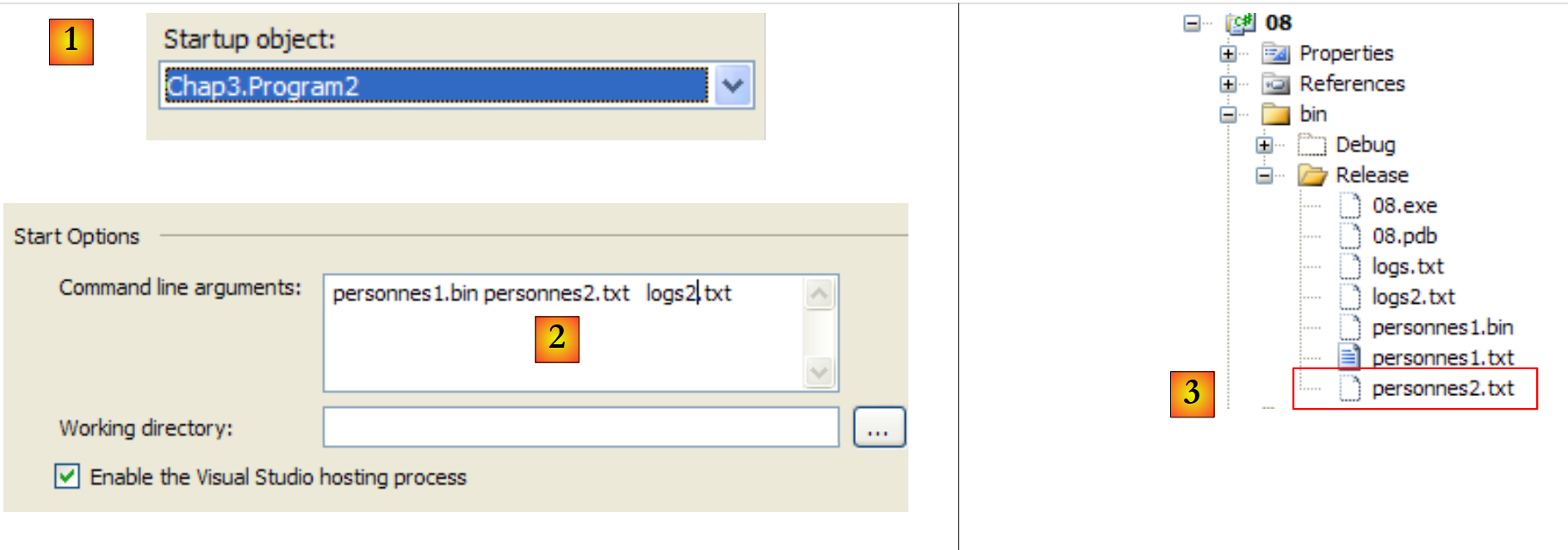 |
- 在 [1] 中,项目配置为运行第二个应用程序
- 在 [2] 中,传递给 Main 的参数
- 在 [3] 中,显示应用程序执行生成的文件。
[personnes2.txt] 的内容如下:
5.7. 正则表达式
System.Text.RegularExpressions.Regex 类支持正则表达式。通过正则表达式,您可以验证字符串的格式。例如,我们可以检查表示日期的字符串是否符合 dd/mm/yy 格式。为此,我们需要使用一个模板,并将字符串与该模板进行比对。在此示例中,d、m 和 a 必须是数字。 因此,有效日期格式的模式为 "\d\d/\d\d/\d\d",其中符号 \d 表示数字。模式中可以使用以下符号:
描述 | |
将下一个字符标记为特殊字符或字面字符。例如,"n" 对应字符 "n"。"\n" 对应换行符。字符序列 "\" 对应 "\",而 "\(" 对应 "("。 | |
表示输入的开头。 | |
表示输入的结尾。 | |
表示前一个字符出现零次或多次。例如,“zo*”表示“z”或“zoo”。 | |
表示前一个字符出现一次或多次。例如,“zo+”匹配“zoo”,但不匹配“z”。 | |
匹配前一个字符零次或一次。例如,“a?ve?”匹配“lever”中的“ve”。 | |
匹配除换行符以外的任意单个字符。 | |
搜索模式并记住匹配结果。可以通过 Item [0]...[n] 从 Matches 中提取对应的子字符串。若要查找包含方括号 ( ) 内的字符的匹配项,请使用 "\(" 或 "\)"。 | |
匹配 x 或 y 中的任意一个。例如,“z|foot”匹配“z”或“foot”。“(z|f)oo”匹配“zoo”或“foo”。 | |
n 是非负整数。精确匹配 n 次该字符。例如,"o{2}" 不匹配 "Bob" 中的 "o",而是匹配 "fooooot" 中的前两个 "o"。 | |
n 是非负整数。表示至少 n 次该字符。例如,“o{2,}”不匹配“Bob”中的“o”,而是匹配“fooooot”中的所有“o”。“o{1,}”等同于“o+”,“o{0,}”等同于“o*”。 | |
m 和 n 均为非负整数。表示该字符出现至少 n 次且至多 m 次。例如,“o{1,3}”对应于“foooooot”中的前三个“o”,而“o{0,1}”等同于“o?”。 | |
字符集。表示匹配指定字符集中的任意一个字符。例如,"[abc]" 匹配 "plat" 中的 "a"。 | |
否定字符集。对应于未指定的任何字符。例如,"[^abc]" 对应于 "plat" 中的 "p"。 | |
字符范围。对应于指定范围内的任何字符。例如,[a-z] 对应于 "a" 到 "z" 之间的任何小写字母。 | |
负字符范围。匹配指定范围之外的任何字符。例如,[^m-z] 匹配不在 "m" 和 "z" 之间的任何字符。 | |
匹配表示单词的边界,即单词与空格之间的位置。例如,“er\b”匹配“lever”中的“er”,但不匹配“verb”中的“er”。 | |
匹配不代表单词的边界。例如,“en*t\B”匹配“bien entendu”中的“ent”。 | |
表示一个数字字符。等同于 [0-9]。 | |
对应不表示数字的字符。等同于 [^0-9]。 | |
对应于换页符。 | |
对应换行字符。 | |
对应回车字符。 | |
对应任何空白字符,包括空格、制表符、分页符等。等同于 "[ \f\r\t\v]"。 | |
对应任何非空白字符。等同于 "[^ \f\n\r\t\v]"。 | |
匹配制表符。 | |
匹配垂直制表符。 | |
对应任何表示单词的字符,包括下划线。等同于 "[A-Za-z0-9_]"。 | |
匹配任何不代表单词的字符。等同于 "[^A-Za-z0-9_]"。 | |
匹配 num,其中 num 是正整数。指代已存储的匹配结果。例如,"(.)\1" 匹配两个连续的相同字符。 | |
匹配 n,其中 n 是八进制转义值。八进制转义值必须包含 1、2 或 3 位数字。 例如,"\11" 和 "\011" 都匹配制表符。"\0011" 等同于 "\001" 与 "1"。八进制转义值不得超过 256。若超过此限制,表达式中仅考虑前两位数字。允许在正则表达式中使用 ASCII 码。 | |
对应于 n,其中 n 是十六进制转义值。十六进制转义值必须包含两位数字。例如,“\x41”对应于“A”。“\x041”等同于“\x04”和“1”。允许在正则表达式中使用 ASCII 码。 |
模型中的一个元素可以出现 1 个或多个副本。让我们来看几个涉及符号 \d 的示例,该符号代表 1 个数字:
模型 | 含义 |
\d | 一个数字 |
\d? | 0 或 1 个数字 |
\d* | 0 个或更多位数字 |
\d+ | 1 个或多个数字 |
\d{2} | 2个数字 |
\d{3,} | 至少 3 个数字 |
\d{5,7} | 5 至 7 位数字 |
现在,让我们设想一个能够描述字符串预期格式的模型:
搜索字符串 | 模型 |
dd/mm/yy格式的日期 | \d{2}/\d{2}/\d{2} |
时长格式为 hh:mm:ss | \d{2}:\d{2}:\d{2} |
一个无符号整数 | \d+ |
一串可能为空的空格 | \s* |
一个无符号整数,其前后可能有空格 | \s*\d+\s* |
一个可能带符号的整数,其前后可能有空格 | \s*[+|-]?\s*\d+\s* |
一个无符号实数,其前后可有空格 | \s*\d+(.\d*)?\s* |
一个可能带符号且前后带有空格的实数 | \s*[+|]?\s*\d+(.\d*)?\s* |
包含单词 just 的字符串 | \bjust\b |
您可以指定在字符串中的哪个位置搜索该模式:
模型 | 表示 |
^model | 模型位于链的开头 |
模型$ | 模型结束链 |
^model$ | 该模型是链的起始点和终点 |
模型 | 在链中从头开始遍历搜索该模型。 |
搜索字符串 | 模型 |
以感叹号结尾的字符串 | !$ |
以点结尾的字符串 | \.$ |
以 // 序列开头的字符串 | ^// |
仅包含一个单词的字符串,前后可能带有空格 | ^\s*\w+\s*$ |
仅包含两个单词的字符串,前后可能带有空格 | ^\s*\w+\s*\w+\s*$ |
包含单词 secret 的字符串 | \bsecret\b |
模型的子集可以被“提取”。 通过这种方式,我们不仅可以验证一个字符串是否符合特定模型,还可以从该字符串中提取那些被括号包围的、对应于模型子集的元素。因此,如果我们要分析一个包含日期格式 dd/mm/yy 的字符串,并且还想提取该日期的 dd、mm、yy 这三个元素,我们将使用模型 (dd)/(dd)/(dd)。
5.7.1. 验证字符串是否符合给定模式
Regex 类型的对象构建方式如下:
一旦构建了模板正则表达式,即可使用 IsMatch 方法将其与字符串进行比对:
以下是一个示例:
using System;
using System.Text.RegularExpressions;

namespace Chap3 {
    class Program {
        static void Main(string[] args) {
             // a regular expression template
            string modèle1 = @"^\s*\d+\s*$";
            Regex regex1 = new Regex(modèle1);
             // compare a copy with the model
            string exemplaire1 = "  123  ";
            if (regex1.IsMatch(exemplaire1)) {
                Console.WriteLine("[{0}] correspond au modèle [{1}]", exemplaire1, modèle1);
            } else {
                Console.WriteLine("[{0}] ne correspond pas au modèle [{1}]", exemplaire1, modèle1);
             }//if
            string exemplaire2 = "  123a  ";
            if (regex1.IsMatch(exemplaire2)) {
                Console.WriteLine("[{0}] correspond au modèle [{1}]", exemplaire2, modèle1);
            } else {
                Console.WriteLine("[{0}] ne correspond pas au modèle [{1}]", exemplaire2, modèle1);
             }//if
        }

    }
}
以及性能结果:
5.7.2. 在字符串中查找模式的所有出现位置
Matches 方法用于检索字符串中与某个模式匹配的元素:
MatchCollection 类有一个 Count 属性,表示集合中的元素个数。如果 results 是一个 MatchCollection 对象,则 results[i] 是该集合的第 i 个元素,其类型为 Match。Match 类具有多种属性,包括以下内容:
- Value:对象 value Match,一个对应于
- Index:在已遍历的链中找到该元素的位置
请看以下示例:
using System;
using System.Text.RegularExpressions;

namespace Chap3 {
    class Program2 {
        static void Main(string[] args) {
             // several occurrences of the model in the copy
            string modèle2 = @"\d+";
            Regex regex2 = new Regex(modèle2);
            string exemplaire3 = "  123  456  789 ";
            MatchCollection résultats = regex2.Matches(exemplaire3);
            Console.WriteLine("Modèle=[{0}],exemplaire=[{1}]", modèle2, exemplaire3);
            Console.WriteLine("Il y a {0} occurrences du modèle dans l'exemplaire ", résultats.Count);
            for (int i = 0; i < résultats.Count; i++) {
                Console.WriteLine("[{0}] trouvé en position {1}", résultats[i].Value, résultats[i].Index);
            }//for
        }
    }
}
- 第 8 行:要查找的模式是一串数字
- 第 10 行:用于搜索该模式的字符串
- 第 11 行:验证模式 model2 的 copy3 中的所有元素
- 第14-16行:显示这些元素
程序的运行结果如下:
5.7.3. 检索模型的组成部分
模型的子集可以被“检索”。 通过这种方式,我们不仅可以验证一条字符串是否符合特定模型,还可以从该字符串中提取出模型中用方括号括起的子集对应的元素。因此,如果我们要分析一条包含日期格式 dd/mm/yy 的字符串,并希望提取该日期的 dd、mm、yy 这三个元素,我们将使用模型 (dd)/(dd)/(dd)。
请看以下示例:
using System;
using System.Text.RegularExpressions;

namespace Chap3 {
    class Program3 {
        static void Main(string[] args) {
             // capture elements in the model
            string modèle3 = @"(\d\d):(\d\d):(\d\d)";
            Regex regex3 = new Regex(modèle3);
            string exemplaire4 = "Il est 18:05:49";
             // model checking
            Match résultat = regex3.Match(exemplaire4);
            if (résultat.Success) {
                 // the copy corresponds to the model
                Console.WriteLine("L'exemplaire [{0}] correspond au modèle [{1}]",exemplaire4,modèle3);
                 // display groups of parentheses
                for (int i = 0; i < résultat.Groups.Count; i++) {
                    Console.WriteLine("groupes[{0}]=[{1}] trouvé en position {2}",i, résultat.Groups[i].Value,résultat.Groups[i].Index);
                }//for
            } else {
                 // the copy does not correspond to the model
                Console.WriteLine("L'exemplaire[{0}] ne correspond pas au modèle [{1}]", exemplaire4, modèle3);
            }
        }
    }
}
运行此程序将产生以下结果:
创新之处在于第12至19行:
- 第12行:通过Match对象将字符串exemplary4与正则表达式regex3进行比对。这会生成一个已定义的Match对象。此处我们使用了该类的两个新属性:
- Success(第13行):指示是否匹配成功
- Groups(第17、18行):一个集合,其中
- Groups[0] 表示字符串中与正则表达式匹配的部分
- Groups[i](i≥1)对应第 i 个括号分组
如果结果类型为 Match,则 results.Groups 的类型为 GroupCollection,而 results.Groups[i] 的类型为 Group。Group 类有两个属性,我们在此处使用它们:
- 值(第 18 行):对象值 Group,即与括号内内容对应的元素
- 索引(第18行):该元素在已遍历链中被找到的位置
5.7.4. 一个学习程序
寻找正则表达式以检查字符串是否符合特定模式,可能是一项真正的挑战。以下程序为您提供了一个练习的机会。它会要求输入一个模式和一个字符串,并指出该字符串是否符合该模式。
using System;
using System.Text.RegularExpressions;

namespace Chap3 {
    class Program4 {
        static void Main(string[] args) {
             // data
            string modèle, chaine;
            Regex regex = null;
            MatchCollection résultats;
             // the user is asked for models and samples to compare with this one
            while (true) {
                 // the model is requested
                Console.Write("Tapez le modèle à tester ou rien pour arrêter :");
                modèle = Console.In.ReadLine();
                 // finished?
                if (modèle.Trim() == "")
                    break;
                 // we create the regular expression
                try {
                    regex = new Regex(modèle);
                } catch (Exception ex) {
                    Console.WriteLine("Erreur : " + ex.Message);
                    continue;
                }
                 // the user is asked for the specimens to be compared with the model
                while (true) {
                    Console.Write("Tapez la chaîne à comparer au modèle [{0}] ou rien pour arrêter :", modèle);
                    chaine = Console.ReadLine();
                     // finished?
                    if (chaine.Trim() == "")
                        break;
                     // we make the comparison
                    résultats = regex.Matches(chaine);
                     // success?
                    if (résultats.Count == 0) {
                        Console.WriteLine("Je n'ai pas trouvé de correspondances");
                        continue;
                     }//if
                     // the elements corresponding to the model are displayed
                    for (int i = 0; i < résultats.Count; i++) {
                        Console.WriteLine("J'ai trouvé la correspondance [{0}] en position [{1}]", résultats[i].Value, résultats[i].Index);
                         // sub-elements
                        if (résultats[i].Groups.Count != 1) {
                            for (int j = 1; j < résultats[i].Groups.Count; j++) {
                                Console.WriteLine("\tsous-élément [{0}] en position [{1}]", résultats[i].Groups[j].Value, résultats[i].Groups[j].Index);
                            }
                        }
                    }
                }
            }
        }
    }
}
以下是一个示例:
5.7.5. Split 方法
我们在 String 类中已经遇到过这个方法:
|
Regex 类的 Split 方法允许我们使用正则表达式来定义分隔符:
|
例如,假设我们有一个文本文件,其中每行都以 field1, field2, .., fieldn 的形式呈现。字段之间用逗号分隔,逗号前后可能带有空格。Split 类不适合处理这种情况。正则表达式(RegEx)提供了解决方案。如果 line 是已读取的行,则可以通过以下方式获取字段:
如下例所示:
using System;
using System.Text.RegularExpressions;

namespace Chap3 {
    class Program5 {
        static void Main(string[] args) {
             // a line
            string ligne = "abc  , def  , ghi";
             // a model
            Regex modèle = new Regex(@"\s*,\s*");
             // decomposition of line into fields
            string[] champs = modèle.Split(ligne);
             // display
            for (int i = 0; i < champs.Length; i++) {
                Console.WriteLine("champs[{0}]=[{1}]", i, champs[i]);
            }
        }
    }
}
性能结果:
5.8. 示例应用程序 - V3
我们回到第3.6节(版本1)和第4.10节(版本2)中研究过的应用程序。
在最新研究的版本中,税额计算是在抽象类 AbstractImpot 中进行的:
namespace Chap2 {
    abstract class AbstractImpot : IImpot {

         // tax brackets required to calculate tax
         // come from an external source

        protected TrancheImpot[] tranchesImpot;

         // tAX CALCULATION
        public int calculer(bool marié, int nbEnfants, int salaire) {
             // calculating the number of shares
            decimal nbParts;
            if (marié) nbParts = (decimal)nbEnfants / 2 + 2;
            else nbParts = (decimal)nbEnfants / 2 + 1;
            if (nbEnfants >= 3) nbParts += 0.5M;
             // calculation of taxable income & family quota
            decimal revenu = 0.72M * salaire;
            decimal QF = revenu / nbParts;
             // tAX CALCULATION
            tranchesImpot[tranchesImpot.Length - 1].Limite = QF + 1;
            int i = 0;
            while (QF > tranchesImpot[i].Limite) i++;
             // return result
            return (int)(revenu * tranchesImpot[i].CoeffR - nbParts * tranchesImpot[i].CoeffN);
         }//calculate
     }//class

}
第 38 行中的 calculate 方法使用了第 35 行中的 tranchesImpot,这是一个未由 AbstractImpot 初始化的数组。这就是为什么它被定义为抽象类,必须通过派生类才能发挥作用。该初始化操作由派生类 HardwiredImpot 完成:
using System;

namespace Chap2 {
    class HardwiredImpot : AbstractImpot {

         // data tables required to calculate the
        decimal[] limites = { 4962M, 8382M, 14753M, 23888M, 38868M, 47932M, 0M };
        decimal[] coeffR = { 0M, 0.068M, 0.191M, 0.283M, 0.374M, 0.426M, 0.481M };
        decimal[] coeffN = { 0M, 291.09M, 1322.92M, 2668.39M, 4846.98M, 6883.66M, 9505.54M };

        public HardwiredImpot() {
                 // creation of a table of
            tranchesImpot = new TrancheImpot[limites.Length];
                 // filling
            for (int i = 0; i < tranchesImpot.Length; i++) {
                tranchesImpot[i] = new TrancheImpot { Limite = limites[i], CoeffR = coeffR[i], CoeffN = coeffN[i] };
                }
        }
     }// class
}// namespace
在上文中,计算税款所需的数据被硬编码在类代码中。示例的新版本将这些数据放在了一个文本文件中:
4962:0:0
8382:0,068:291,09
14753:0,191:1322,92
23888:0,283:2668,39
38868:0,374:4846,98
47932:0,426:6883,66
0:0,481:9505,54
由于操作此文件可能会引发异常,我们创建了一个专门的类来处理它们:
using System;

namespace Chap3 {
    class FileImpotException : Exception {
         // error codes
        [Flags]
        public enum CodeErreurs { Acces = 1, Ligne = 2, Champ1 = 4, Champ2 = 8, Champ3 = 16 };

         // error code
        public CodeErreurs Code { get; set; }

         // manufacturers
        public FileImpotException() {
        }
        public FileImpotException(string message)
            : base(message) {
        }
        public FileImpotException(string message, Exception e)
            : base(message,e) {
        }
    }
}
- 第 4 行:FileImportException 类继承自 Exception 类。它将用于记录在处理数据文本文件过程中可能发生的任何错误。
- 第 7 行:一个表示错误代码的枚举:
- Access:访问文本数据文件时发生错误
- Line:缺少三个预期字段的行
- Field1:第 1 个字段不正确
- Champ2:第 2 个字段不正确
- Champ3:第 3 个字段不正确
其中部分错误可能同时发生(例如 Field1、Champ2、Champ3)。因此,枚举 CodeErreurs 已添加 [Flags] 属性,这意味着各种枚举值必须是 2 的幂。若字段 1 和 2 同时出错,则会生成错误代码 Field1 | Champ2。
- 第 10 行:自动所有权 Code 将存储该错误代码。
- 第 15 行:一个构造函数,用于根据错误消息作为参数构建 FileImportException 对象。
- 第 18 行:用于构建 FileImportException 对象的构造函数,该构造函数将错误消息和引发错误的异常作为参数传入。
初始化 tranchesImpot 类的 AbstractImpot 类现如下所示:
using System;
using System.Collections.Generic;
using System.IO;
using System.Text.RegularExpressions;

namespace Chap3 {
    class FileImpot : AbstractImpot {

        public FileImpot(string fileName) {
             // data
            List<TrancheImpot> listTranchesImpot = new List<TrancheImpot>();
            int numLigne = 1;
             // exception
            FileImpotException fe = null;
             // read the contents of the fileName file, line by line
            Regex pattern = new Regex(@"s*:\s*");
             // initially no error
            FileImpotException.CodeErreurs code = 0;
            try {
                using (StreamReader input = new StreamReader(fileName)) {
                    while (!input.EndOfStream && code == 0) {
                         // current line
                        string ligne = input.ReadLine().Trim();
                         // ignore empty lines
                        if (ligne == "") continue;
                         // line broken down into three fields separated by :
                        string[] champsLigne = pattern.Split(ligne);
                         // do we have 3 fields?
                        if (champsLigne.Length != 3) {
                            code = FileImpotException.CodeErreurs.Ligne;
                        }
                         // 3-field conversions
                        decimal limite = 0, coeffR = 0, coeffN = 0;
                        if (code == 0) {
                            if (!Decimal.TryParse(champsLigne[0], out limite)) code = FileImpotException.CodeErreurs.Champ1;
                            if (!Decimal.TryParse(champsLigne[1], out coeffR)) code |= FileImpotException.CodeErreurs.Champ2;
                            if (!Decimal.TryParse(champsLigne[2], out coeffN)) code |= FileImpotException.CodeErreurs.Champ3; ;
                        }
                         // mistake?
                        if (code != 0) {
                            // on note l'erreur
                            fe = new FileImpotException(String.Format("Ligne n° {0} incorrecte", numLigne)) { Code = code };
                        } else {
                             // the new tax bracket is memorized
                            listTranchesImpot.Add(new TrancheImpot() { Limite = limite, CoeffR = coeffR, CoeffN = coeffN });
                             // next line
                            numLigne++;
                        }
                    }
                }
                 // transfer the listImpot list to the tranchesImpot array
                if (code == 0) {
                     // transfer the listImpot list to the tranchesImpot array
                    tranchesImpot = listTranchesImpot.ToArray();
                }
            } catch (Exception e) {
                // on note l'erreur
                fe= new FileImpotException(String.Format("Erreur lors de la lecture du fichier {0}", fileName), e) { Code = FileImpotException.CodeErreurs.Acces };
            }
             // error to report?
            if (fe != null) throw fe;
        }
    }
}
- 第 7 行:FileImport 类继承自 AbstractImport 类,并作为 HardwiredImport 的子类。
- 第 9 行:FileImpot 类的构造函数用于初始化其基类 AbstractImpot 的 tranchesImpot 字段。其参数是包含数据的文本文件的名称。
- 第 11 行:基类 AbstractImpot 的 tranchesImpot 字段是一个数组,将通过作为参数传递的文件名中的数据进行填充。读取文本文件是顺序操作。在读取完整个文件之前,行数是未知的。因此,tranchesImpot.On 将暂时将数据存储在泛型列表 listTranchesImpot 中。
请记住,TrancheImpot 是一个:
namespace Chap3 {
     // a tax bracket
    struct TrancheImpot {
        public decimal Limite { get; set; }
        public decimal CoeffR { get; set; }
        public decimal CoeffN { get; set; }
    }
}
- 第 14 行:fe 类型 FileImportException 用于封装文本文件中可能出现的操作错误。
- 第 16 行:文本文件中行 field1:field2:field3 的字段分隔符的正则表达式。字段由 : 字符分隔,其前后可跟随任意数量的空格。
- 第 18 行:发生错误时的错误代码
- 第 20 行:使用 StreamReader 处理文本文件
- 第 21 行:只要还有待读取的行且未发生错误,就循环处理
- 第 27 行:使用第 16 行的正则表达式将读取的行拆分为字段
- 第 29-31 行:检查该行是否包含三个字段——记录任何错误
- 第 33-38 行:将三个字符串转换为三个十进制数——记录任何错误
- 第 40-43 行:若发生错误,则抛出 FileImportException 类型的异常。
- 第 44-47 行:如果未检测到错误,则在存储当前行的数据后,读取文本文件的下一行。
- 第 52-55 行:在 while 循环结束时,将泛型列表 data listTranchesImpot 复制到基类 AbstractImpot 的表 tranchesImpot 中。这是制造商的目标。
- 第 56-59 行:异常处理。这封装在一个 FileImpotException 类型的对象中。
- 第 61 行:如果第 18 行定义的异常 fe 已初始化,则抛出该异常。
整个 C# 项目结构如下:
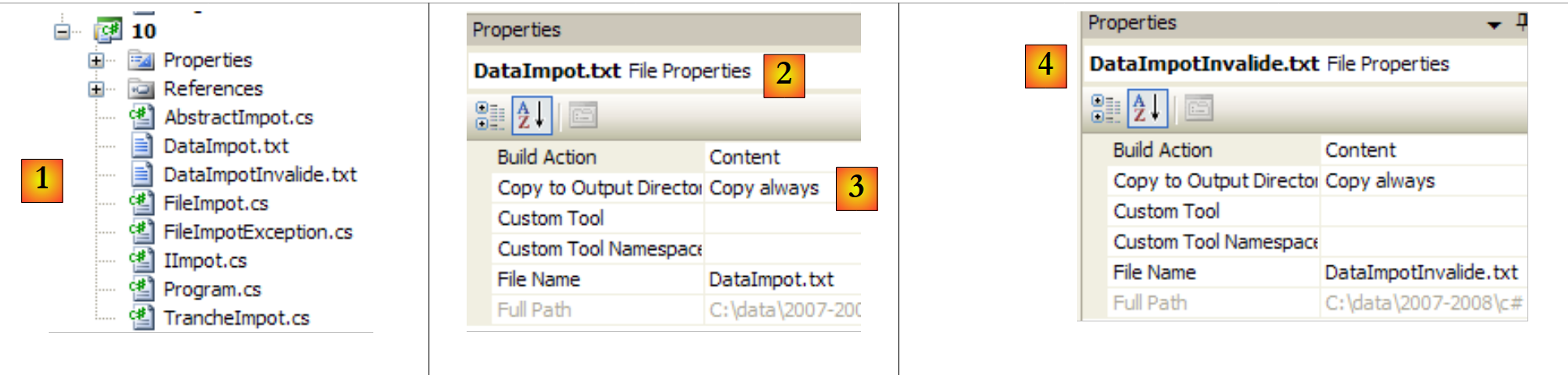 |
- 在 [1] 中:整个项目
- 在 [2,3] 中:文件 [DataImpot.txt] 的属性 [2]。属性 [复制到输出目录] [3] 设置为“始终”。这会导致每次运行时,文件 [DataImpot.txt] 都会被复制到 bin/Release(发布模式)或 bin/Debug(调试模式)文件夹中。可执行文件会在此处查找该文件。
- 在 [4] 中:对文件 [DataImpotInvalide.txt] 进行同样的设置。
[DataImpot.txt] 的内容如下:
4962:0:0
8382:0,068:291,09
14753:0,191:1322,92
23888:0,283:2668,39
38868:0,374:4846,98
47932:0,426:6883,66
0:0,481:9505,54
[DataImportInvalid.txt] 的内容如下:
测试程序 [Program.cs] 未作更改:它与第 2 版第 4.10 节中的内容相同,仅存在以下差异:
using System;

namespace Chap3 {
    class Program {
        static void Main() {
...
             // creation of a IImpot object
            IImpot impot = null;
            try {
                 // creation of a IImpot object
                impot = new FileImpot("DataImpot.txt");
            } catch (FileImpotException e) {
                 // error display
                string msg = e.InnerException == null ? null : String.Format(", Exception d'origine : {0}", e.InnerException.Message);
                Console.WriteLine("L'erreur suivante s'est produite : [Code={0},Message={1}{2}]", e.Code, e.Message, msg == null ? "" : msg);
                 // program stop
                Environment.Exit(1);
            }

             // infinite loop
            while (true) {
...
             }//while
        }
    }
}
- 第 8 行:对象 tax 接口类型 IImpot
- 第 11 行:使用类型为 FileImport 的对象实例化 Tax 对象。这可能会引发异常,该异常由第 9、12 和 18 行的 try/catch 语句进行处理。
以下是一些示例:
使用 [DataImpot.txt]
若为 [xx] 则无
带有 [DataImpotInvalide.txt]