9. Generazione di database da entità JPA
È possibile creare tabelle di database da entità JPA. Lo dimostreremo ora. Lo scopo è verificare che il database generato dalle entità JPA sia effettivamente quello che vogliamo.
9.1. Configurazione dell'ambiente di lavoro
Lavoreremo innanzitutto con un'implementazione JPA di EclipseLink [1].
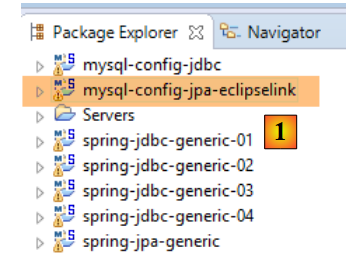 |
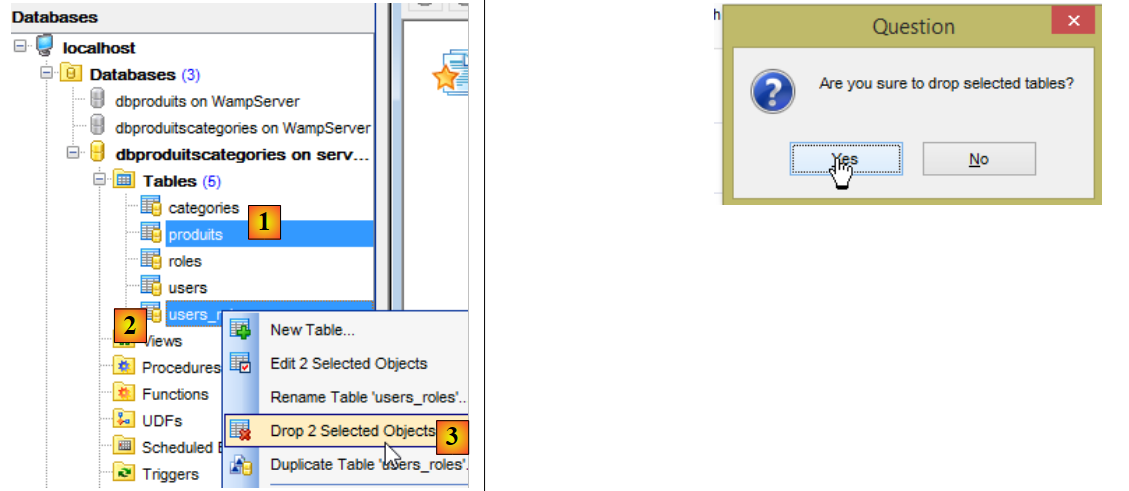
Quindi eliminiamo le tabelle dal database MySQL [dbproduitscategories] utilizzando il client [MyManager] (vedere la Sezione 23.5). Iniziamo eliminando le tabelle contenenti le chiavi esterne [1-3]:
 |
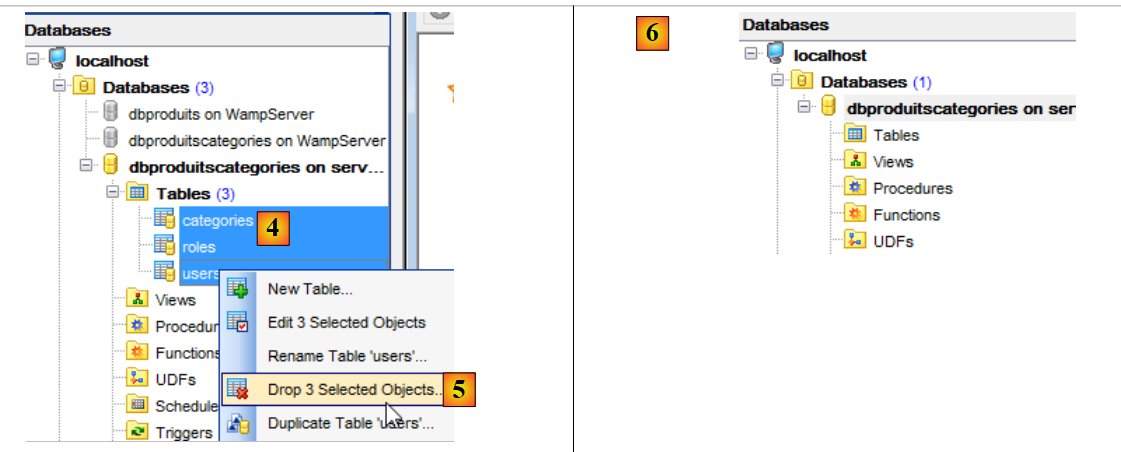
Quindi ripetiamo il processo con le tre tabelle rimanenti [4-6]:
 |
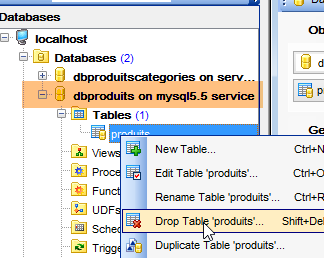
Facciamo lo stesso con la tabella [dbproduits] utilizzata dai progetti [spring-jdbc-01 a 03]:
 | 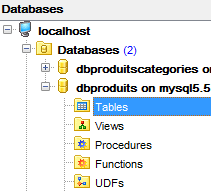 |
Inoltre, è necessario importare i due progetti di generazione del database:
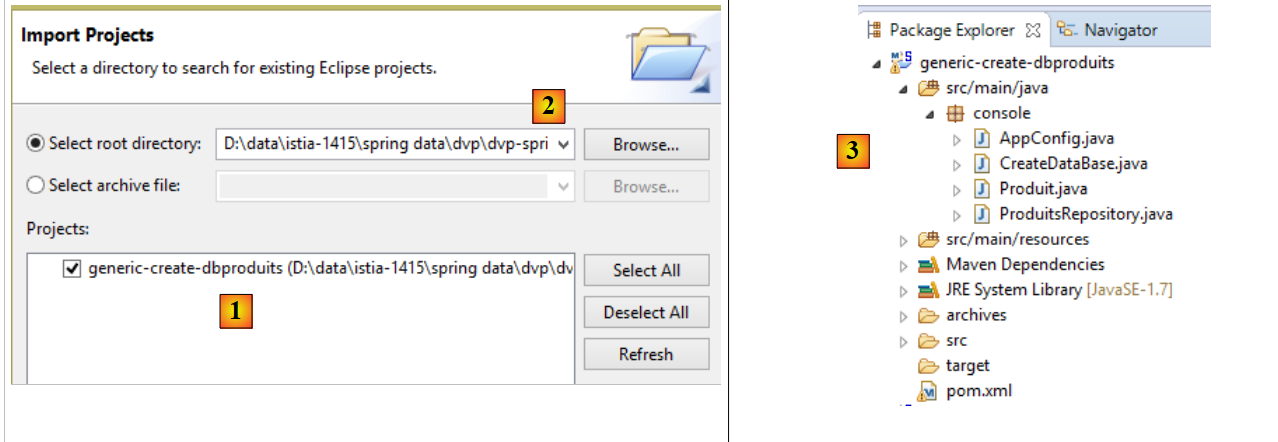 |
- in [1], importare il progetto [generic-create-dbproduits], che si trova in [<examples>/spring-database-generic/spring-jpa] [2];
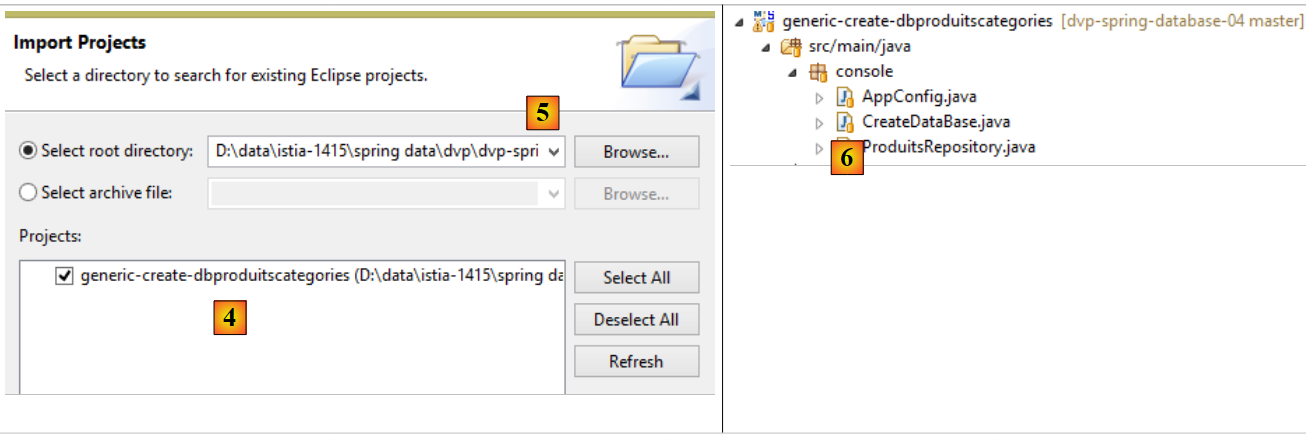 |
- in [4], importare il progetto [generic-create-dbproduitscategories], che si trova in [<examples>/spring-database-generic/spring-jpa] [5];
Nota: premere Alt-F5 e rigenerare tutti i progetti Maven;
9.2. Generazione del database [dbproduitscategories]
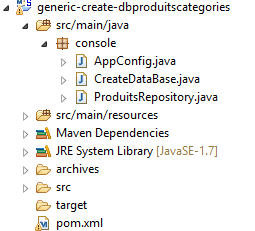 |
9.2.1. Configurazione Maven
Il file [pom.xml] del progetto è il seguente:
<?xml version="1.0" encoding="UTF-8"?>
<project xmlns="http://maven.apache.org/POM/4.0.0" xmlns:xsi="http://www.w3.org/2001/XMLSchema-instance"
    xsi:schemaLocation="http://maven.apache.org/POM/4.0.0 http://maven.apache.org/xsd/maven-4.0.0.xsd">
    <modelVersion>4.0.0</modelVersion>

    <groupId>dvp.spring.database</groupId>
    <artifactId>generic-create-dbproduitscategories</artifactId>
    <version>0.0.1-SNAPSHOT</version>
    <packaging>jar</packaging>

    <name>generic-create-dbproduitscategories</name>
    <description>création de la bases de données [dbproduitscategories] à l'aide des annotations JPA</description>

    <parent>
        <groupId>org.springframework.boot</groupId>
        <artifactId>spring-boot-starter-parent</artifactId>
        <version>1.2.3.RELEASE</version>
    </parent>

    <dependencies>
        <!-- spring-jpa-generic -->
        <dependency>
            <groupId>dvp.spring.database</groupId>
            <artifactId>spring-jpa-generic</artifactId>
            <version>0.0.1-SNAPSHOT</version>
        </dependency>
        <!-- Weaver Spring -->
        <dependency>
            <groupId>org.springframework</groupId>
            <artifactId>spring-instrument</artifactId>
            <scope>runtime</scope>
        </dependency>
    </dependencies>

    <properties>
        <project.build.sourceEncoding>UTF-8</project.build.sourceEncoding>
        <start-class>spring.data.console.Main</start-class>
        <java.version>1.7</java.version>
    </properties>

    <build>
        <plugins>
            <plugin>
                <groupId>org.apache.maven.plugins</groupId>
                <artifactId>maven-surefire-plugin</artifactId>
                <version>2.18.1</version>
            </plugin>
        </plugins>
    </build>

</project>
- righe 22–26: la dipendenza dal progetto [spring-jpa-generic] descritto nella Sezione 6.4;
- righe 28–32: la dipendenza da un weaver che verrà utilizzato per arricchire le entità JPA delle implementazioni EclipseLink e OpenJpa. La sua dipendenza non è richiesta nel file [pom.xml], ma il suo JAR sarà l'agente Java utilizzato. Includere la dipendenza nel file [pom.xml] garantisce che il JAR sia disponibile;
Alla fine, le dipendenze sono le seguenti:
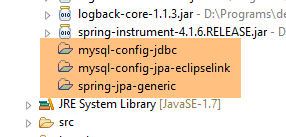 |
9.2.2. Configurazione di Spring
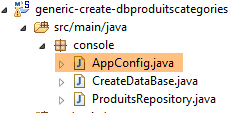 |
La classe [AppConfig] configura il progetto Spring:
package console;

import generic.jpa.config.ConfigJpa;

import org.springframework.context.annotation.Configuration;
import org.springframework.context.annotation.Import;
import org.springframework.data.jpa.repository.config.EnableJpaRepositories;

@Configuration
@Import({ ConfigJpa.class })
@EnableJpaRepositories(basePackages = { "console" })
public class AppConfig {

}
- Riga 10: la classe recupera i bean dalla classe [ConfigJpa]. Si noti che questa classe opera con le entità JPA nel database [dbproduitscategories] (vedere la Sezione 6.3);
- riga 11: dichiariamo che il pacchetto [console] deve essere scansionato per trovare le istanze di [CrudRepository];
Nella classe [ConfigJpa], troviamo il seguente bean (varia a seconda dell'implementazione JPA utilizzata):
    // the provider JPA
    @Bean
    public JpaVendorAdapter jpaVendorAdapter() {
        // Note: JPA entities and Eclipselink configuration are in the META-INF/persistence.xml file
        EclipseLinkJpaVendorAdapter eclipseLinkJpaVendorAdapter = new EclipseLinkJpaVendorAdapter();
        eclipseLinkJpaVendorAdapter.setShowSql(false);
        eclipseLinkJpaVendorAdapter.setDatabase(Database.MYSQL);
        eclipseLinkJpaVendorAdapter.setGenerateDdl(true);
        return eclipseLinkJpaVendorAdapter;
}
La riga 8 è quella importante in questo caso. È presente in tutte le implementazioni JPA utilizzate. Specifica che se le tabelle associate alle entità JPA non esistono, devono essere create. Useremo questa proprietà per generare le tabelle.
9.2.3. I repository
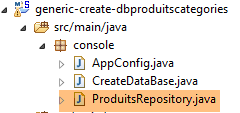 |
L'interfaccia [ProductsRepository] è la seguente:
package console;

import generic.jpa.entities.dbproduitscategories.Produit;

import org.springframework.data.repository.CrudRepository;

public interface ProduitsRepository extends CrudRepository<Produit, Long> {

}
L'istanziazione di questa interfaccia attiverà l'istanziazione del livello JPA. Infatti, alla riga 7, l'interfaccia fa riferimento all'entità JPA [Product], il che forzerà l'istanziazione del livello JPA. Avremmo potuto utilizzare qualsiasi interfaccia [CrudRepository] che facesse riferimento a una delle entità JPA. Possiamo notare che, sebbene il [repository] faccia riferimento solo all'entità JPA [Product], vengono generate tutte le tabelle per tutte le entità JPA.
9.2.4. La classe eseguibile
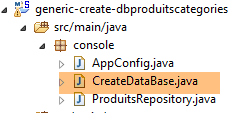 |
La classe [CreateDatabase] è la seguente:
package console;

import org.springframework.context.annotation.AnnotationConfigApplicationContext;

public class CreateDataBase {

    public static void main(String[] args) {
        // simply instantiate the Spring context to create the database tables [dbproduitscategories]
        // you also need at least one Spring Data Repository, otherwise nothing happens
        System.out.println("Travail en cours...");
        new AnnotationConfigApplicationContext(AppConfig.class).close();
        System.out.println("Travail terminé...");
    }

}
- Riga 11: Istanziamo il contesto Spring e lo chiudiamo immediatamente. In questo contesto è presente il bean [ProductsRepository] che fa riferimento all'entità JPA [Product]. Ciò è sufficiente per istanziare il livello JPA e generare così le tabelle nel database [productcategories].
9.2.5. Generazione di tabelle con EclipseLink
Ci troviamo nella seguente configurazione:
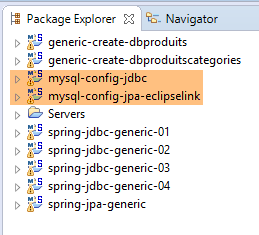 |
- il livello [JDBC] è configurato per il database MySQL [dbproduitscategories];
- il livello [JPA] è implementato con EclipseLink;
- il database [dbproduitscategories] non contiene tabelle;
Nota: premere Alt-F5 e rigenerare tutti i progetti Maven;
Stiamo utilizzando la seguente configurazione di esecuzione:
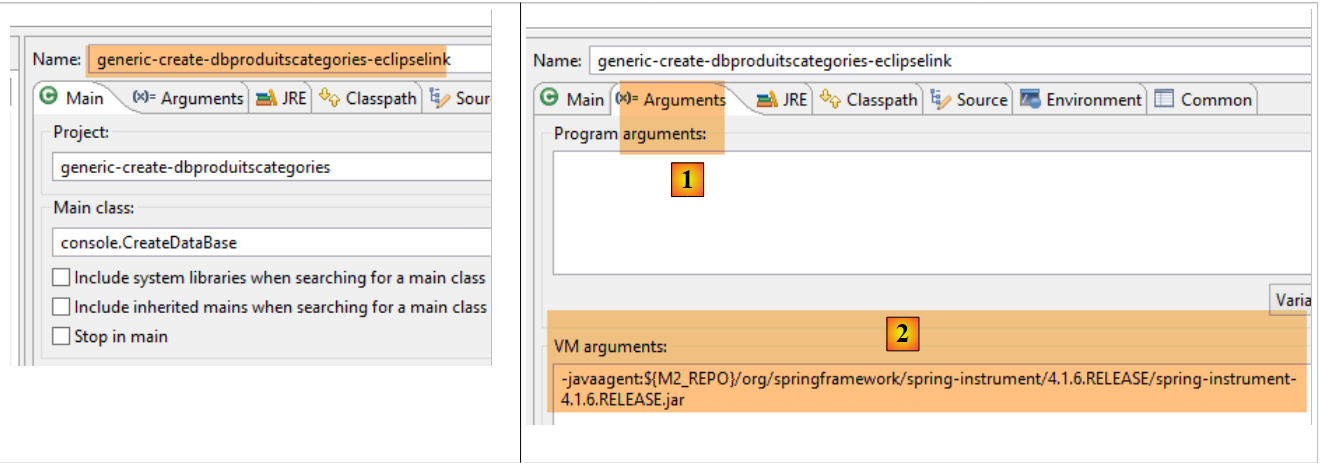 |
- In [1-2], questa configurazione di esecuzione richiede un agente Java affinché il test abbia esito positivo. A seconda della situazione, EclipseLink non sempre necessita di questo agente, ma in questo caso l'esecuzione fallisce se esso non è presente. Questo agente non è un agente EclipseLink, bensì un agente Spring. È fornito dalla dipendenza:
        <dependency>
            <groupId>org.springframework</groupId>
            <artifactId>spring-instrument</artifactId>
            <scope>runtime</scope>
</dependency>
incluso nel file [pom.xml] del progetto. L'agente si trova in [<m2-repo>/org/springframework/spring-instrument/4.1.6.RELEASE/spring-instrument-4.1.6.RELEASE.jar], dove <m2-repo> è il repository Maven locale;
L'esecuzione produce il seguente risultato:
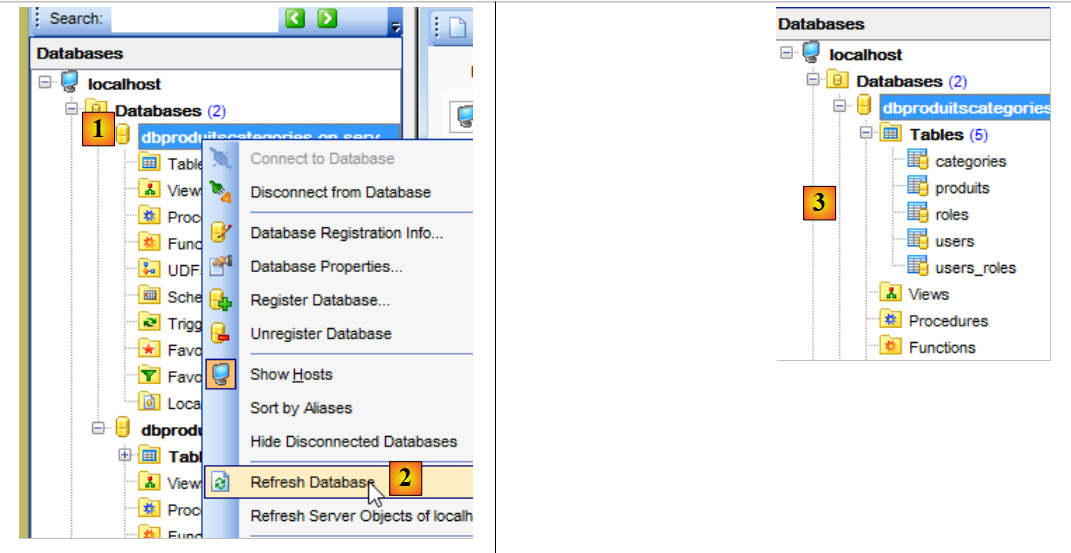 |
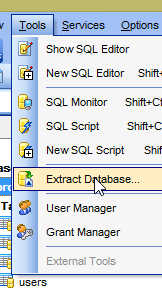
In [3], possiamo vedere che le tabelle sono state generate. Ora controlliamo il DDL (Domain Definition Language) del database:
 | 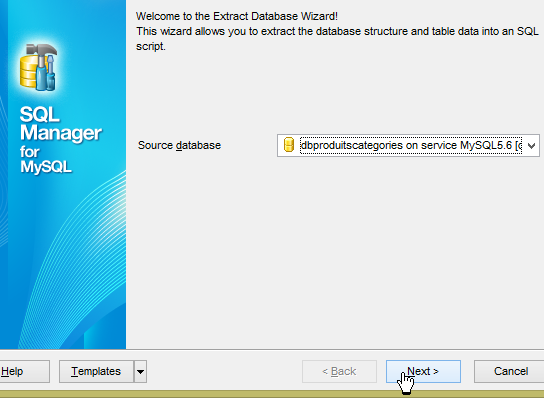 |
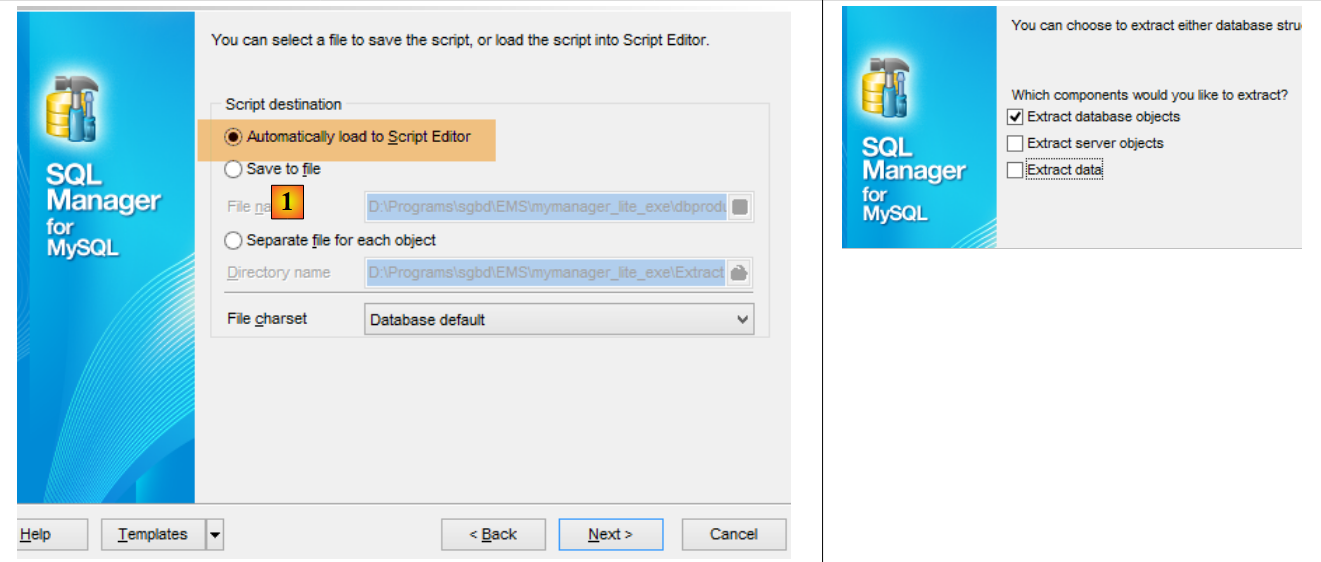 |
Lo script SQL per la generazione delle tabelle può anche essere salvato in un file [1].
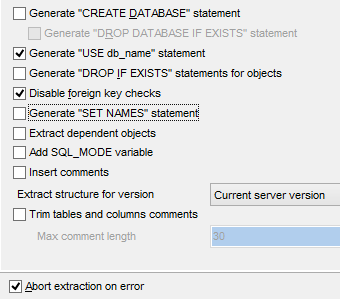 | 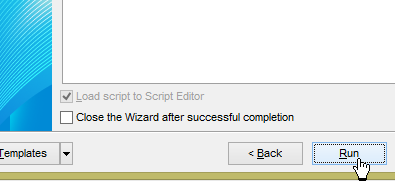 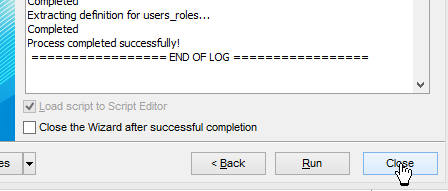 |
Lo script SQL generato è il seguente:
SET FOREIGN_KEY_CHECKS=0;

USE `dbproduitscategories`;

CREATE TABLE `categories` (
  `ID` BIGINT(20) NOT NULL AUTO_INCREMENT,
  `NOM` VARCHAR(30) COLLATE utf8_general_ci NOT NULL,
  `VERSIONING` BIGINT(20) DEFAULT NULL,
  PRIMARY KEY (`ID`) USING BTREE,
  UNIQUE KEY `NOM` (`NOM`) USING BTREE
) ENGINE=InnoDB
AUTO_INCREMENT=1 CHARACTER SET 'utf8' COLLATE 'utf8_general_ci'
;

CREATE TABLE `produits` (
  `ID` BIGINT(20) NOT NULL AUTO_INCREMENT,
  `DESCRIPTION` VARCHAR(100) COLLATE utf8_general_ci DEFAULT NULL,
  `CATEGORIE_ID` BIGINT(20) NOT NULL,
  `NOM` VARCHAR(30) COLLATE utf8_general_ci NOT NULL,
  `PRIX` DOUBLE NOT NULL,
  `VERSIONING` BIGINT(20) DEFAULT NULL,
  `CATEGORIE` INTEGER(11) NOT NULL,
  PRIMARY KEY (`ID`) USING BTREE,
  UNIQUE KEY `NOM` (`NOM`) USING BTREE,
  KEY `FK_PRODUITS_CATEGORIE_ID` (`CATEGORIE_ID`) USING BTREE,
  CONSTRAINT `FK_PRODUITS_CATEGORIE_ID` FOREIGN KEY (`CATEGORIE_ID`) REFERENCES `categories` (`ID`) ON DELETE CASCADE
) ENGINE=InnoDB
AUTO_INCREMENT=1 CHARACTER SET 'utf8' COLLATE 'utf8_general_ci'
;

CREATE TABLE `roles` (
...
) ENGINE=InnoDB
AUTO_INCREMENT=1 CHARACTER SET 'utf8' COLLATE 'utf8_general_ci'
;

CREATE TABLE `users` (
 ...
) ENGINE=InnoDB
AUTO_INCREMENT=1 CHARACTER SET 'utf8' COLLATE 'utf8_general_ci'
;

CREATE TABLE `users_roles` (
...
) ENGINE=InnoDB
AUTO_INCREMENT=1 CHARACTER SET 'utf8' COLLATE 'utf8_general_ci'
;
Diamo un'occhiata, ad esempio, allo script SQL che genera la tabella [PRODUCTS] (righe 15–29):
- riga 16: [ID] è la chiave primaria (riga 23) con l'attributo [AUTO_INCREMENT] (riga 5). Ciò corrisponde alle annotazioni [@Id, @GeneratedValue(strategy = GenerationType.IDENTITY), @Column(name = ConfigJdbc.TAB_JPA_ID)] per il campo [id] dell'entità JPA;
- riga 17: la definizione della colonna [DESCRIPTION] corrisponde all'annotazione [@Column(name = ConfigJdbc.TAB_PRODUITS_DESCRIPTION, length = 100)] per il campo [description] dell'entità JPA;
- riga 18: la colonna [CATEGORIE_ID] è una chiave esterna dalla tabella [PRODUITS] sulla colonna [CATEGORIES.ID] (riga 26). Inoltre, questa chiave esterna ha l'attributo [ON DELETE CASCADE]. Ciò corrisponde alle annotazioni [@ManyToOne(fetch = FetchType.LAZY), @JoinColumn(name = ConfigJdbc.TAB_PRODUITS_CATEGORIE_ID)] per il campo [Produit.categorie] e all'annotazione [@OneToMany(fetch = FetchType.LAZY, mappedBy = "categorie", cascade = { CascadeType.ALL }), @CascadeOnDelete] del campo [Categorie.produits];
- riga 19: la definizione della colonna [NAME] corrisponde all'annotazione [@Column(name = ConfigJdbc.TAB_PRODUITS_NAME, unique = true, length = 30, nullable = false)] del campo [Product.name];
- riga 20: la definizione della colonna [PRICE] corrisponde all'annotazione [@Column(name = ConfigJdbc.TAB_PRODUITS_PRIX, nullable = false)] del campo [Product.price];
- righe 24-25: lo script crea tre indici per ciascuna delle colonne univoche della tabella;
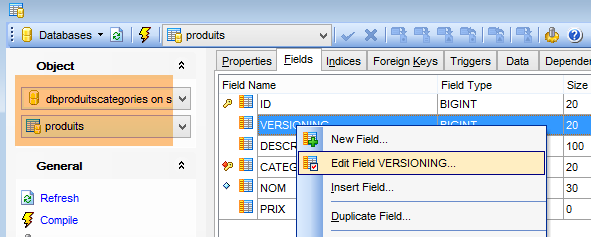
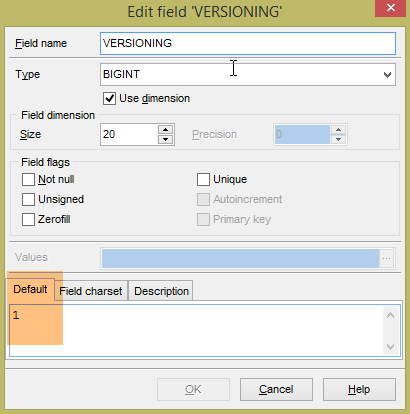
Le tabelle generate non hanno un valore predefinito per il campo VERSIONING, mentre il codice Java si aspetta che ce ne sia uno. Se questo valore predefinito manca, alcuni test falliranno. Aggiungiamo questo attributo come segue:
 |
 |
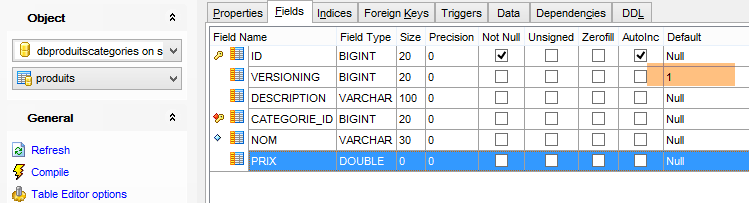 |
Questo viene fatto per le cinque tabelle che contengono la colonna [VERSIONING]. Il valore predefinito non ha importanza; è sufficiente che esista. Successivamente, viene incrementato di 1 ogni volta che la riga a cui appartiene viene modificata.
Una volta fatto ciò, verificare che le seguenti configurazioni di test abbiano esito positivo:
- [spring-jdbc-generic-04.JUnitTestDao], che verifica l'implementazione JDBC;
- [spring-jpa-generic-JUnitTestDao-hibernate-eclipselink], che verifica le implementazioni JPA di Hibernate o EclipseLink (in questo caso, sarà EclipseLink)
Entrambi i test devono essere superati.
9.2.6. Generazione di tabelle con Hibernate
Creiamo le tabelle Hibernate utilizzando il seguente ambiente Eclipse:
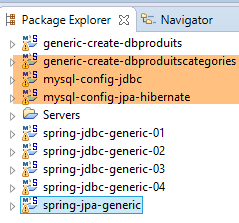 |
La generazione delle tabelle viene eseguita dalla configurazione di esecuzione denominata [generic-create-dbproduitscategories-hibernate] senza un agente Java;
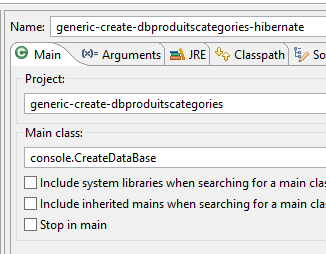 | 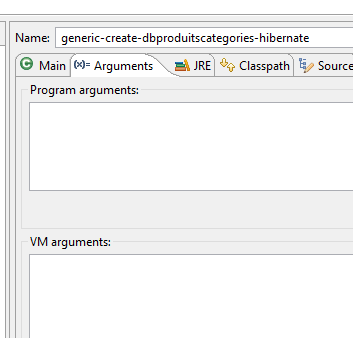 |
Lo script SQL per il database generato da Hibernate è il seguente:
SET FOREIGN_KEY_CHECKS=0;

USE `dbproduitscategories`;

CREATE TABLE `categories` (
  `ID` BIGINT(20) NOT NULL AUTO_INCREMENT,
  `NOM` VARCHAR(30) COLLATE utf8_general_ci NOT NULL,
  `VERSIONING` BIGINT(20) DEFAULT NULL,
  PRIMARY KEY (`ID`) USING BTREE,
  UNIQUE KEY `UK_7ajcg7japnxw846ru01damg8s` (`NOM`) USING BTREE
) ENGINE=InnoDB
AUTO_INCREMENT=1 CHARACTER SET 'utf8' COLLATE 'utf8_general_ci'
;

CREATE TABLE `produits` (
  `ID` BIGINT(20) NOT NULL AUTO_INCREMENT,
  `DESCRIPTION` VARCHAR(100) COLLATE utf8_general_ci DEFAULT NULL,
  `CATEGORIE_ID` BIGINT(20) NOT NULL,
  `NOM` VARCHAR(30) COLLATE utf8_general_ci NOT NULL,
  `PRIX` DOUBLE NOT NULL,
  `VERSIONING` BIGINT(20) DEFAULT NULL,
  PRIMARY KEY (`ID`) USING BTREE,
  UNIQUE KEY `UK_hfvjn9lp7qoo5x79uu0ump3rf` (`NOM`) USING BTREE,
  KEY `FK_p3foj9yrqnmi7856n9s8mbpue` (`CATEGORIE_ID`) USING BTREE,
  CONSTRAINT `FK_p3foj9yrqnmi7856n9s8mbpue` FOREIGN KEY (`CATEGORIE_ID`) REFERENCES `categories` (`ID`)
) ENGINE=InnoDB
AUTO_INCREMENT=1 CHARACTER SET 'utf8' COLLATE 'utf8_general_ci'
;

CREATE TABLE `roles` (
...
) ENGINE=InnoDB
AUTO_INCREMENT=1 CHARACTER SET 'utf8' COLLATE 'utf8_general_ci'
;

CREATE TABLE `users` (
...
) ENGINE=InnoDB
AUTO_INCREMENT=1 CHARACTER SET 'utf8' COLLATE 'utf8_general_ci'
;

CREATE TABLE `users_roles` (
 ...
) ENGINE=InnoDB
AUTO_INCREMENT=1 CHARACTER SET 'utf8' COLLATE 'utf8_general_ci'
;
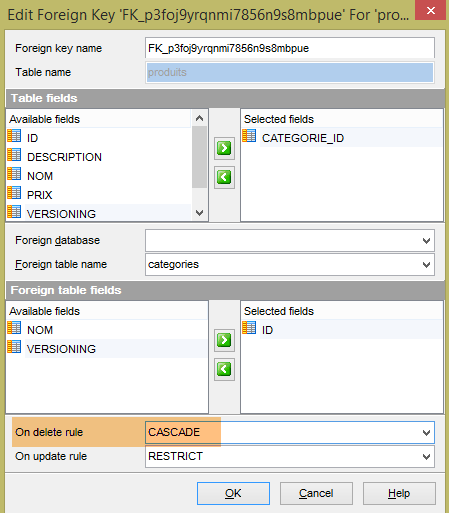
Le tabelle generate sono le stesse poiché anche Hibernate utilizzava le annotazioni JPA. Per Hibernate, non sono riuscito a trovare l'equivalente dell'annotazione EclipseLink [@OnCascadeDelete], che generava l'attributo SQL [ON DELETE CASCADE] sulla chiave esterna [PRODUCTS.CATEGORY_ID] (riga 25). Questo attributo deve quindi essere generato manualmente, poiché è necessario per il test:
 |
 |
 |
Lo stesso deve essere fatto per le due chiavi esterne nella tabella [USERS_ROLES]:
 |
Infine, come è stato fatto con l'implementazione di EclipseLink, le colonne [VERSIONING] nelle cinque tabelle devono avere un valore predefinito:
|
Una volta fatto ciò, verificare che le seguenti configurazioni di test abbiano esito positivo:
- [spring-jdbc-generic-04.JUnitTestDao], che verifica l'implementazione JDBC;
- [spring-jpa-generic-JUnitTestDao-hibernate-eclipselink], che verifica le implementazioni JPA di Hibernate o Eclipselink (in questo caso, si tratterà di Hibernate)
Entrambi i test devono essere superati.
9.2.7. Generazione di tabelle con OpenJpa
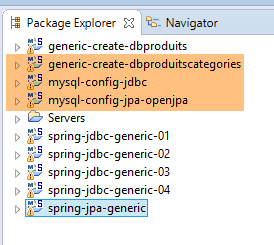
Ripetiamo la procedura precedente con un'implementazione JPA di OpenJpa:
 |
Nota: premere Alt-F5 e rigenerare tutti i progetti Maven;
Modifichiamo la classe [ConfigJpa] che configura il progetto [mysql-config-jpa-openjpa] come segue:
package generic.jpa.config;

import generic.jdbc.config.ConfigJdbc;

import java.util.Map;

import javax.persistence.EntityManagerFactory;

import org.apache.tomcat.jdbc.pool.DataSource;
import org.springframework.context.annotation.Bean;
import org.springframework.context.annotation.Configuration;
import org.springframework.context.annotation.Import;
import org.springframework.orm.jpa.JpaTransactionManager;
import org.springframework.orm.jpa.JpaVendorAdapter;
import org.springframework.orm.jpa.LocalContainerEntityManagerFactoryBean;
import org.springframework.orm.jpa.vendor.Database;
import org.springframework.orm.jpa.vendor.OpenJpaVendorAdapter;
import org.springframework.transaction.PlatformTransactionManager;

@Configuration
@Import({ ConfigJdbc.class })
public class ConfigJpa {

    // the provider JPA
    @Bean
    public JpaVendorAdapter jpaVendorAdapter() {
        OpenJpaVendorAdapter openJpaVendorAdapter = new OpenJpaVendorAdapter();
        openJpaVendorAdapter.setShowSql(false);
        openJpaVendorAdapter.setDatabase(Database.MYSQL);
        openJpaVendorAdapter.setGenerateDdl(true);
        return openJpaVendorAdapter;
    }
..
    // EntityManagerFactory
    @Bean
    public EntityManagerFactory entityManagerFactory(JpaVendorAdapter jpaVendorAdapter, DataSource dataSource) {
        LocalContainerEntityManagerFactoryBean factory = new LocalContainerEntityManagerFactoryBean();
        factory.setJpaVendorAdapter(jpaVendorAdapter);
        factory.setPackagesToScan(ENTITIES_PACKAGES);
        Map<String, Object> mapJpaProperties = factory.getJpaPropertyMap();
        mapJpaProperties.put("openjpa.jdbc.MappingDefaults",
                "ForeignKeyDeleteAction=cascade,JoinForeignKeyDeleteAction=restrict");
        factory.setDataSource(dataSource);
        factory.afterPropertiesSet();
        return factory.getObject();
    }
}
- Righe 40-41: creiamo una proprietà per OpenJPA che specifica come generare le chiavi esterne durante la creazione delle tabelle. Senza questa proprietà, le chiavi esterne non vengono generate. L'attributo [ForeignKeyDeleteAction=cascade] consente di generare la clausola [ON DELETE CASCADE] su queste chiavi esterne;
La generazione delle tabelle viene eseguita dalla configurazione di runtime denominata [generic-create-dbproduitscategories-openjpa], che dispone di due agenti Java;
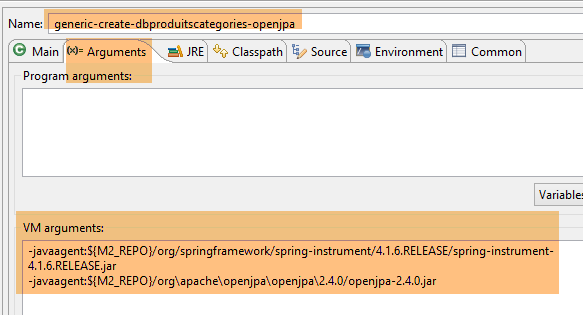
- Il primo agente Java è l'agente Spring già utilizzato con EclipseLink;
- Il secondo agente Java è fornito da OpenJpa;
Lo script SQL per il database generato è quindi il seguente:
SET FOREIGN_KEY_CHECKS=0;

USE `dbproduitscategories`;

CREATE TABLE `categories` (
  `ID` BIGINT(20) NOT NULL AUTO_INCREMENT,
  `NOM` VARCHAR(30) COLLATE utf8_general_ci NOT NULL,
  `VERSIONING` BIGINT(20) DEFAULT NULL,
  PRIMARY KEY (`ID`) USING BTREE,
  UNIQUE KEY `U_CTGORIS_NOM` (`NOM`) USING BTREE
) ENGINE=InnoDB
AUTO_INCREMENT=1 CHARACTER SET 'utf8' COLLATE 'utf8_general_ci'
;

CREATE TABLE `produits` (
  `ID` BIGINT(20) NOT NULL AUTO_INCREMENT,
  `DESCRIPTION` VARCHAR(100) COLLATE utf8_general_ci DEFAULT NULL,
  `CATEGORIE_ID` BIGINT(20) DEFAULT NULL,
  `NOM` VARCHAR(30) COLLATE utf8_general_ci NOT NULL,
  `PRIX` DOUBLE NOT NULL,
  `VERSIONING` BIGINT(20) DEFAULT NULL,
  PRIMARY KEY (`ID`) USING BTREE,
  UNIQUE KEY `U_PRODUTS_NOM` (`NOM`) USING BTREE,
  KEY `CATEGORIE_ID` (`CATEGORIE_ID`) USING BTREE,
  CONSTRAINT `produits_ibfk_1` FOREIGN KEY (`CATEGORIE_ID`) REFERENCES `categories` (`ID`) ON DELETE CASCADE
) ENGINE=InnoDB
AUTO_INCREMENT=1 CHARACTER SET 'utf8' COLLATE 'utf8_general_ci'
;

CREATE TABLE `roles` (
  `ID` BIGINT(20) NOT NULL AUTO_INCREMENT,
  `NAME` VARCHAR(30) COLLATE utf8_general_ci NOT NULL,
  `VERSIONING` BIGINT(20) DEFAULT NULL,
  PRIMARY KEY (`ID`) USING BTREE,
  UNIQUE KEY `U_ROLES_NAME` (`NAME`) USING BTREE
) ENGINE=InnoDB
AUTO_INCREMENT=1 CHARACTER SET 'utf8' COLLATE 'utf8_general_ci'
;

CREATE TABLE `users` (
  `ID` BIGINT(20) NOT NULL AUTO_INCREMENT,
  `LOGIN` VARCHAR(30) COLLATE utf8_general_ci NOT NULL,
  `NAME` VARCHAR(30) COLLATE utf8_general_ci NOT NULL,
  `PASSWORD` VARCHAR(60) COLLATE utf8_general_ci NOT NULL,
  `VERSIONING` BIGINT(20) DEFAULT NULL,
  PRIMARY KEY (`ID`) USING BTREE,
  UNIQUE KEY `U_USERS_LOGIN` (`LOGIN`) USING BTREE
) ENGINE=InnoDB
AUTO_INCREMENT=1 CHARACTER SET 'utf8' COLLATE 'utf8_general_ci'
;

CREATE TABLE `users_roles` (
  `ID` BIGINT(20) NOT NULL AUTO_INCREMENT,
  `VERSIONING` BIGINT(20) DEFAULT NULL,
  `ROLE_ID` BIGINT(20) NOT NULL,
  `USER_ID` BIGINT(20) NOT NULL,
  PRIMARY KEY (`ID`) USING BTREE,
  KEY `ROLE_ID` (`ROLE_ID`) USING BTREE,
  KEY `USER_ID` (`USER_ID`) USING BTREE,
  CONSTRAINT `users_roles_ibfk_2` FOREIGN KEY (`USER_ID`) REFERENCES `users` (`ID`) ON DELETE CASCADE,
  CONSTRAINT `users_roles_ibfk_1` FOREIGN KEY (`ROLE_ID`) REFERENCES `roles` (`ID`) ON DELETE CASCADE
) ENGINE=InnoDB
AUTO_INCREMENT=1 CHARACTER SET 'utf8' COLLATE 'utf8_general_ci'
;
È lo stesso che con EclipseLink. Apporteremo quindi le stesse correzioni alle tabelle. Una volta fatto ciò, verifica che i seguenti casi di test superino il test:
- [spring-jdbc-generic-04.JUnitTestDao], che verifica l'implementazione JDBC;
- [spring-jpa-generic-JUnitTestDao-openjpa], che verifica un'implementazione JPA di OpenJPA;
Entrambe le esecuzioni devono avere esito positivo.
9.3. Generazione del database [dbproduits]
Il database [dbproduits] è utilizzato dai progetti [spring-jdbc-01 a 03]. Può anche essere generato da un'entità JPA.
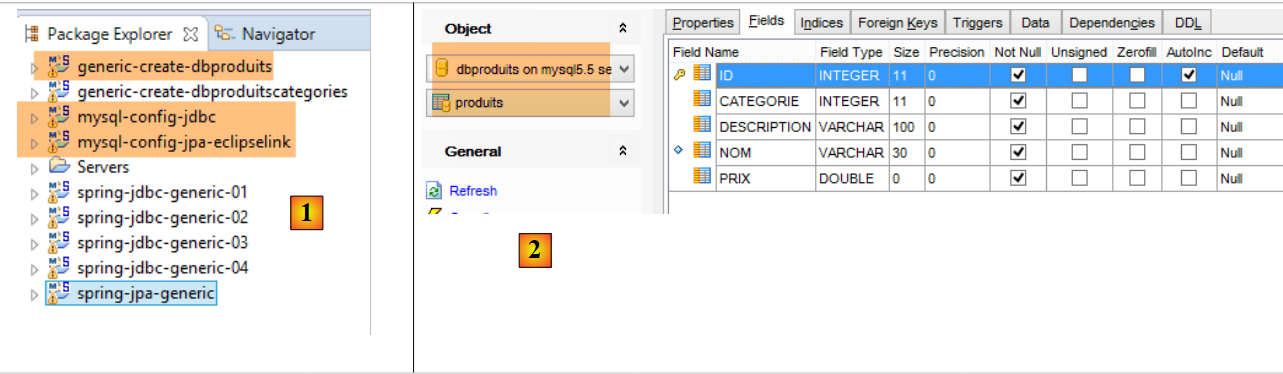 |
- In [1], i progetti Eclipse. Utilizzeremo una configurazione MySQL/EclipseLink. Il progetto per la generazione del database [dbproduits] è [generic-create-dbproduits];
- in [2], la tabella [PRODUITS] da generare;
Nota: premere Alt-F5 e rigenerare tutti i progetti Maven;
9.3.1. Configurazione Maven
La configurazione Maven per il progetto [generic-create-dbproduits] è la seguente:
<?xml version="1.0" encoding="UTF-8"?>
<project xmlns="http://maven.apache.org/POM/4.0.0" xmlns:xsi="http://www.w3.org/2001/XMLSchema-instance"
    xsi:schemaLocation="http://maven.apache.org/POM/4.0.0 http://maven.apache.org/xsd/maven-4.0.0.xsd">
    <modelVersion>4.0.0</modelVersion>

    <groupId>dvp.spring.database</groupId>
    <artifactId>generic-create-dbproduits</artifactId>
    <version>0.0.1-SNAPSHOT</version>
    <packaging>jar</packaging>

    <name>generic-create-dbproduits</name>
    <description>création de la bases de données [dbproduits] à l'aide des annotations JPA</description>

    <parent>
        <groupId>org.springframework.boot</groupId>
        <artifactId>spring-boot-starter-parent</artifactId>
        <version>1.2.3.RELEASE</version>
    </parent>

    <dependencies>
        <!-- configuration JPA of SGBD -->
        <dependency>
            <groupId>dvp.spring.database</groupId>
            <artifactId>generic-config-jpa</artifactId>
            <version>0.0.1-SNAPSHOT</version>
        </dependency>
    </dependencies>

    <properties>
        <project.build.sourceEncoding>UTF-8</project.build.sourceEncoding>
        <start-class>spring.data.console.Main</start-class>
        <java.version>1.7</java.version>
    </properties>

    <build>
        <plugins>
            <plugin>
                <groupId>org.apache.maven.plugins</groupId>
                <artifactId>maven-surefire-plugin</artifactId>
                <version>2.18.1</version>
            </plugin>
        </plugins>
    </build>

</project>
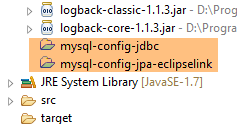
Nel progetto è presente una sola dipendenza, alle righe 22–26, che configura il livello JPA. In definitiva, le dipendenze sono le seguenti:
 |
9.3.2. La configurazione di Spring
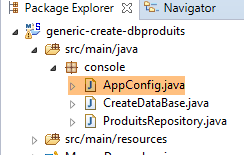 |
La classe di configurazione Spring è la seguente:
package console;

import generic.jdbc.config.ConfigJdbc;
import generic.jpa.config.ConfigJpa;

import javax.persistence.EntityManagerFactory;

import org.apache.tomcat.jdbc.pool.DataSource;
import org.springframework.context.annotation.Bean;
import org.springframework.context.annotation.Configuration;
import org.springframework.context.annotation.Import;
import org.springframework.data.jpa.repository.config.EnableJpaRepositories;
import org.springframework.orm.jpa.JpaVendorAdapter;
import org.springframework.orm.jpa.LocalContainerEntityManagerFactoryBean;

@EnableJpaRepositories(basePackages = { "console" })
@Configuration
@Import({ ConfigJpa.class })
public class AppConfig {

    // data source
    @Bean
    public DataSource dataSource() {
        // data source TomcatJdbc
        DataSource dataSource = new DataSource();
        // configuration access JDBC
        dataSource.setDriverClassName(ConfigJdbc.DRIVER_CLASSNAME);
        dataSource.setUsername(ConfigJdbc.USER_DBPRODUITS);
        dataSource.setPassword(ConfigJdbc.PASSWD_DBPRODUITS);
        dataSource.setUrl(ConfigJdbc.URL_DBPRODUITS);
        // initially open connections
        dataSource.setInitialSize(5);
        // result
        return dataSource;
    }

    // EntityManagerFactory
    @Bean
    public EntityManagerFactory entityManagerFactory(JpaVendorAdapter jpaVendorAdapter, DataSource dataSource) {
        LocalContainerEntityManagerFactoryBean factory = new LocalContainerEntityManagerFactoryBean();
        factory.setJpaVendorAdapter(jpaVendorAdapter);
        factory.setPersistenceUnitName("generic-jpa-entities-dbproduits");
        factory.setDataSource(dataSource);
        factory.afterPropertiesSet();
        return factory.getObject();
    }

}
- riga 18: importiamo i bean dalla classe [ConfigJpa] (sezione 7.3);
- righe 22–35: ridefiniamo l'origine dati [dataSource]. In [ConfigJpa], l'origine dati è il database [dbproduitscategories]. Qui, sarà il database [dbproduits];
- righe 38–46: ridefiniamo il bean [entityManagerFactory] dalla classe [ConfigJpa]. In quella classe, le entità JPA erano [Product, Category]. Qui, è solo [Product], e non ha la stessa definizione del progetto che configura il livello JPA;
- riga 42: per definire questa nuova entità JPA, facciamo riferimento alle entità JPA definite nel file [META-INF/persistence.xml]:
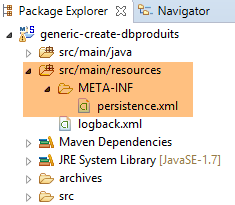 |
Il file [persistence.xml] è il seguente:
<?xml version="1.0" encoding="UTF-8"?>
<persistence version="1.0" xmlns="http://java.sun.com/xml/ns/persistence" xmlns:xsi="http://www.w3.org/2001/XMLSchema-instance"
    xsi:schemaLocation="http://java.sun.com/xml/ns/persistence http://java.sun.com/xml/ns/persistence/persistence_1_0.xsd">
    <persistence-unit name="generic-jpa-entities-dbproduits" transaction-type="RESOURCE_LOCAL">
        <!-- entities JPA -->
        <class>generic.jpa.entities.dbproduits.Produit</class>
        <exclude-unlisted-classes>true</exclude-unlisted-classes>
    </persistence-unit>
</persistence>
- riga 6: la singola entità JPA;
- riga 4: il nome dell'unità di persistenza [generic-jpa-entities-dbproduits] a cui fa riferimento il bean [entityManagerFactory];
9.3.3. L'entità JPA [Product]
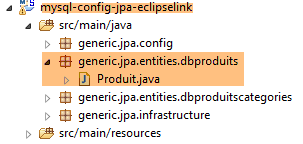 |
L'entità JPA è definita nel progetto [mysql-config-jpa-eclipselink] come segue:
package generic.jpa.entities.dbproduits;

import generic.jdbc.config.ConfigJdbc;

import javax.persistence.Column;
import javax.persistence.Entity;
import javax.persistence.GeneratedValue;
import javax.persistence.GenerationType;
import javax.persistence.Id;
import javax.persistence.Table;

@Entity(name="Produit1")
@Table(name = ConfigJdbc.TAB_PRODUITS)
public class Produit {

    // fields
    @Id
    @GeneratedValue(strategy = GenerationType.IDENTITY)
    @Column(name = ConfigJdbc.TAB_PRODUITS_ID)
    private int id;
    @Column(name = ConfigJdbc.TAB_PRODUITS_NOM, unique = true, length = 30, nullable = false)
    private String nom;
    @Column(name = ConfigJdbc.TAB_PRODUITS_CATEGORIE, nullable = false)
    private int categorie;
    @Column(name = ConfigJdbc.TAB_PRODUITS_PRIX, nullable = false)
    private double prix;
    @Column(name = ConfigJdbc.TAB_PRODUITS_DESCRIPTION, length = 100, nullable = false)
    private String description;

    // manufacturers
    public Produit() {

    }

    public Produit(int id, String nom, int categorie, double prix, String description) {
        this.id = id;
        this.nom = nom;
        this.categorie = categorie;
        this.prix = prix;
        this.description = description;
    }

    // getters and setters
    ...
}
Questa è una definizione JPA che è ormai diventata standard. Si notino i seguenti punti:
- riga 12: abbiamo assegnato un nome all'entità [Product1]. Per impostazione predefinita, il nome di un'entità corrisponde al nome della classe, in questo caso [Product]. Tuttavia, poiché nello stesso progetto è presente un'altra entità JPA denominata [Product], è stato segnalato un errore prima ancora che l'esecuzione avesse inizio. Abbiamo risolto il problema in questo modo;
- riga 24: la categoria qui è semplicemente un numero;
- non ci sono relazioni tra entità. Abbiamo quindi una situazione molto semplice;
9.3.4. La classe eseguibile
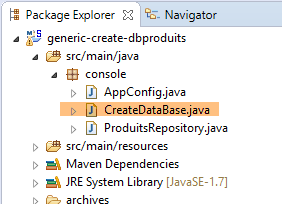 |
La classe [CreateDatabase] è la seguente:
package console;

import org.springframework.context.annotation.AnnotationConfigApplicationContext;

public class CreateDataBase {

    public static void main(String[] args) {
        // simply instantiate the Spring context to create the database tables [dbproduits]
        // you also need at least one Spring Data Repository, otherwise nothing happens
        System.out.println("Travail en cours...");
        new AnnotationConfigApplicationContext(AppConfig.class).close();
        System.out.println("Travail terminé...");
    }

}
Questo è un codice che abbiamo già visto.
9.3.5. Generazione EclipseLink
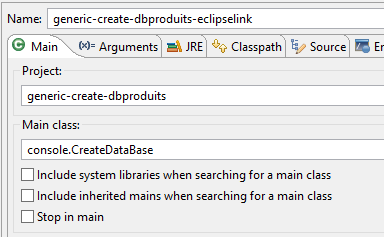
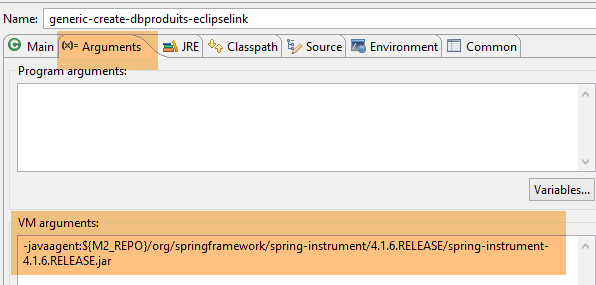
La tabella [PRODUCTS] viene creata con la seguente configurazione di runtime:
 |  |
I log della console sono i seguenti:
Ora torniamo al client [MyManager] e aggiorniamo la visualizzazione [1-2]:
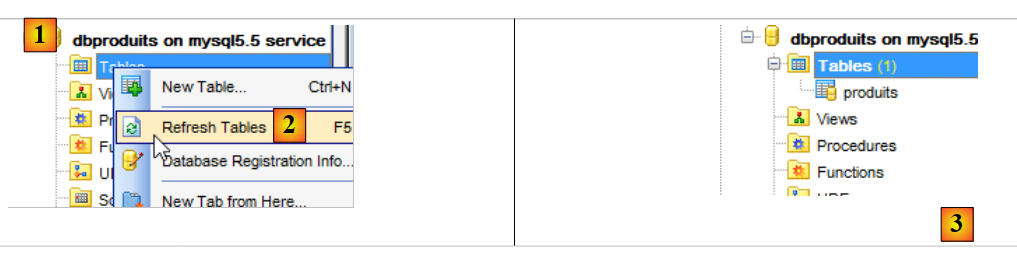 |
In [3] si può notare che è stata generata una tabella. Ora controlliamo il DDL (Domain Definition Language) del database:
SET FOREIGN_KEY_CHECKS=0;

USE `dbproduits`;

CREATE TABLE `produits` (
  `ID` BIGINT(20) NOT NULL AUTO_INCREMENT,
  `CATEGORIE` INTEGER(11) NOT NULL,
  `DESCRIPTION` VARCHAR(100) COLLATE utf8_general_ci NOT NULL,
  `NOM` VARCHAR(30) COLLATE utf8_general_ci NOT NULL,
  `PRIX` DOUBLE NOT NULL,
  PRIMARY KEY (`ID`) USING BTREE,
  UNIQUE KEY `NOM` (`NOM`) USING BTREE
) ENGINE=InnoDB
AUTO_INCREMENT=1 CHARACTER SET 'utf8' COLLATE 'utf8_general_ci'
;
Otteniamo effettivamente la tabella prevista. Per verificarlo, eseguiremo la seguente configurazione:
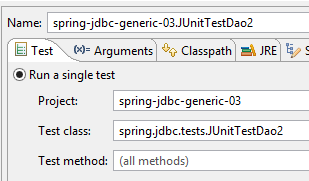 | 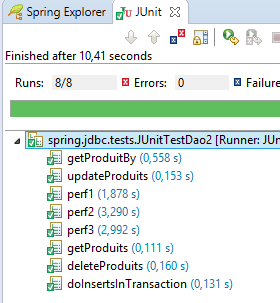 |
Dovrebbe funzionare.
9.3.6. Generazione Hibernate
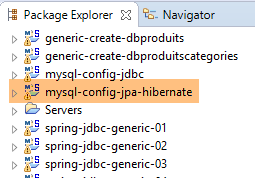 | 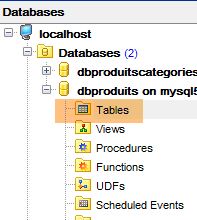 |
Nota: premere Alt-F5 e rigenerare tutti i progetti Maven;
La configurazione di runtime è la seguente:
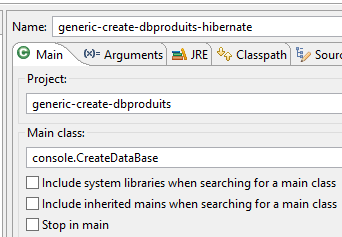 | 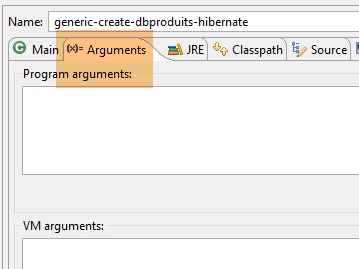 |
Lo script SQL generato da Hibernate è il seguente:
USE `dbproduits`;

CREATE TABLE `produits` (
  `ID` BIGINT(20) NOT NULL AUTO_INCREMENT,
  `CATEGORIE` INTEGER(11) NOT NULL,
  `DESCRIPTION` VARCHAR(100) COLLATE utf8_general_ci NOT NULL,
  `NOM` VARCHAR(30) COLLATE utf8_general_ci NOT NULL,
  `PRIX` DOUBLE NOT NULL,
  PRIMARY KEY (`ID`) USING BTREE,
  UNIQUE KEY `UK_hfvjn9lp7qoo5x79uu0ump3rf` (`NOM`) USING BTREE
) ENGINE=InnoDB
AUTO_INCREMENT=1 CHARACTER SET 'utf8' COLLATE 'utf8_general_ci'
;
9.3.7. Generazione OpenJpa
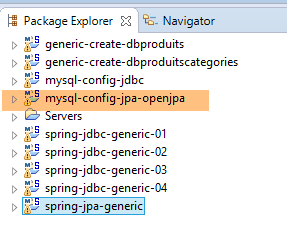 | |
Nota: premere Alt-F5 e rigenerare tutti i progetti Maven;
La configurazione di runtime è la seguente:
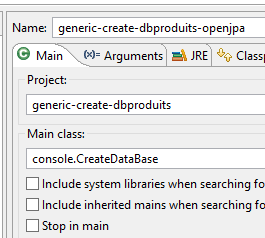 | 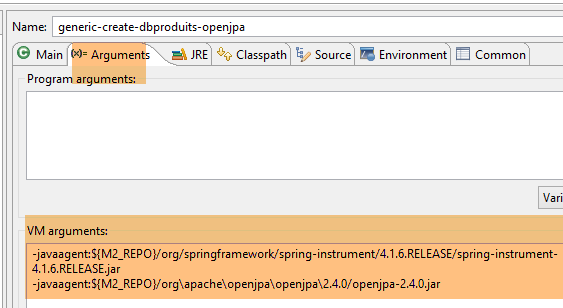 |
Lo script SQL generato da OpenJpa è il seguente:
USE `dbproduits`;

CREATE TABLE `produits` (
  `ID` BIGINT(20) NOT NULL AUTO_INCREMENT,
  `CATEGORIE` INTEGER(11) NOT NULL,
  `DESCRIPTION` VARCHAR(100) COLLATE utf8_general_ci NOT NULL,
  `NOM` VARCHAR(30) COLLATE utf8_general_ci NOT NULL,
  `PRIX` DOUBLE NOT NULL,
  PRIMARY KEY (`ID`) USING BTREE,
  UNIQUE KEY `U_PRODUTS_NOM` (`NOM`) USING BTREE
) ENGINE=InnoDB
AUTO_INCREMENT=1 CHARACTER SET 'utf8' COLLATE 'utf8_general_ci'
;