9. Utilizar el conversor DOCX → HTML
El comando para convertir un documento Word DOCX es muy similar al de convertir un documento LibreOffice ODT. Vamos a cambiar el estilo del título del documento en [config_styles.py] :
STYLES = {
    "style_names": [
        "Titre"
    ]
}
- línea 3 establecido en 'Título'. Este es el estilo del documento DOCX que va a convertir. Lo veremos en las líneas de depuración del conversor.
Todavía en el terminal PyCharm, escriba el siguiente comando:
PS C:\Data\st-2025\GitHub Pages\word-odt-vers-html\v2> python .\convert_docx_v18.py .\word-odt-vers-html-janv-2026.docx .\config.py
C:\Data\st-2025\GitHub Pages\word-odt-vers-html\v2\convert_docx_v18.py:976: SyntaxWarning: invalid escape sequence '\h'
- REF Bookmark \h
--- DOCX to MkDocs Converter V16 ---
Copié : google5179c0eaff293e02.html
Copié : robots.txt
Copié : word-odt-vers-html-janv-2026.pdf
Copié : word-odt-vers-html-janv-2026.zip
[DEBUG PRE-H1] style=Standard heading=None rebase=0 numId=None ilvl=None list=None:0/None txt='...'
[DEBUG PRE-H1] style=Standard heading=None rebase=0 numId=None ilvl=None list=None:0/None txt='...'
[DEBUG PRE-H1] style=Standard heading=None rebase=0 numId=None ilvl=None list=None:0/None txt='...'
[DEBUG PRE-H1] style=Standard heading=None rebase=0 numId=None ilvl=None list=None:0/None txt='...'
[DEBUG PRE-H1] style=Standard heading=None rebase=0 numId=None ilvl=None list=None:0/None txt='...'
[DEBUG PRE-H1] style=Standard heading=None rebase=0 numId=None ilvl=None list=None:0/None txt='...'
[DEBUG PRE-H1] style=Standard heading=None rebase=0 numId=None ilvl=None list=None:0/None txt='...'
[DEBUG PRE-H1] style=Standard heading=None rebase=0 numId=None ilvl=None list=None:0/None txt='...'
[DEBUG PRE-H1] style=Standard heading=None rebase=0 numId=None ilvl=None list=None:0/None txt='...'
[DEBUG PRE-H1] style=StandardWW heading=None rebase=0 numId=None ilvl=None list=None:0/None txt='...'
[DEBUG PRE-H1] style=StandardWW heading=None rebase=0 numId=None ilvl=None list=None:0/None txt='...'
[DEBUG PRE-H1] style=Titre heading=None rebase=0 numId=None ilvl=None list=None:0/None txt='<span>Convertir un document Word ou ODT vers un site statique HTML compatible Mk...'
[DEBUG PRE-H1] style=Standard heading=None rebase=0 numId=None ilvl=None list=None:0/None txt='...'
[DEBUG PRE-H1] style=Standard heading=None rebase=0 numId=None ilvl=None list=None:0/None txt='...'
[DEBUG PRE-H1] style=Standard heading=None rebase=0 numId=None ilvl=None list=None:0/None txt='...'
[DEBUG PRE-H1] style=Standard heading=None rebase=0 numId=None ilvl=None list=None:0/None txt='<b>Serge Tahé</b><span>, janvier 2026</span>...'
[DEBUG PRE-H1] style=Standard heading=None rebase=0 numId=None ilvl=None list=None:0/None txt='...'
[DEBUG PRE-H1] style=Standard heading=None rebase=0 numId=None ilvl=None list=None:0/None txt='...'
[DEBUG PRE-H1] style=Standard heading=None rebase=0 numId=None ilvl=None list=None:0/None txt='...'
[DEBUG PRE-H1] style=StandardWW heading=None rebase=0 numId=None ilvl=None list=None:0/None txt='...'
[DEBUG PRE-H1] style=StandardWW heading=None rebase=0 numId=None ilvl=None list=None:0/None txt='...'
[DEBUG PRE-H1] style=StandardWW heading=None rebase=0 numId=None ilvl=None list=None:0/None txt='...'
[DEBUG PRE-H1] style=StandardWW heading=None rebase=0 numId=None ilvl=None list=None:0/None txt='<b>Ce site a été créé avec le convertisseur [Word ou ODT - > HTML] cr...'
[DEBUG PRE-H1] style=Titre1 heading=1 rebase=0 numId=1 ilvl=0 list=numPr:1/ordered txt='<span>Introduction</span>...'
Terminé. (audit.json, audit.txt, report.txt générés)
- línea 1: el comando es el siguiente: [python .\convert_docx_v18.py .\word-odt-vers-html-janv-2026.docx .\config.py] (Adapte el número de versión (ici 18) a la versión que tenga descargado) :
- el primer parámetro [.\convert_docx_v18.py] es el convertidor DOCX → HTML
- el segundo parámetro [.\word-odt-vers-html-janv-2026.docxes el nombre del documento DOCX a convertir ;
- el tercer parámetro [.\config.py] es el ;
- línea 33: el conversor informa de que se han generado tres archivos:
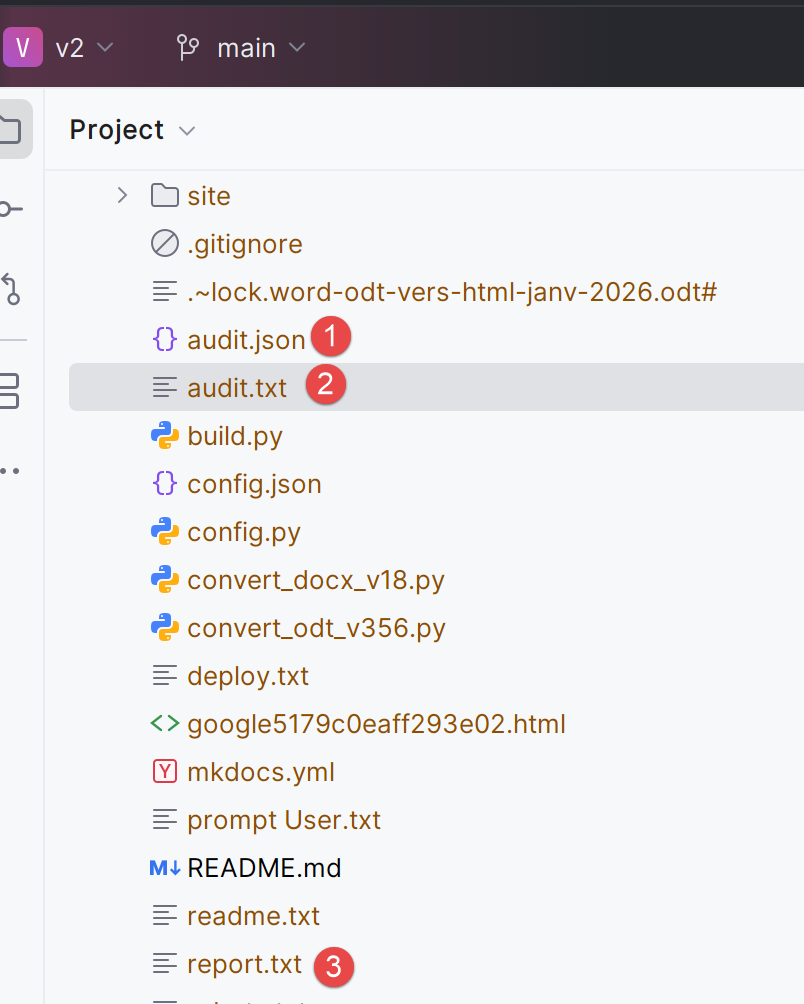 |
El archivo [audit.txt] es el siguiente:
Version: V16
Paragraphs: 2029
Tables: 97
Images (blips): 2
Headings detected (raw): 53
Min heading level detected (raw): 1
Rebase offset applied: 0

Top paragraph styles:
  - SourceCodenumrot: 1054
  - StandardWW: 594
  - Standard: 146
  - Paragraphedeliste: 113
  - SourceCodenumrotrsultats: 33
  - codenouveau: 28
  - Titre2: 25
  - Titre1: 14
  - Titre3: 14
  - StandardWWWW: 6
  - Textebrut: 1
  - Titre: 1

List paragraphs:
  - with numPr: 1329
  - by style fallback: 49
  - not recognized: 0
- línea 2: el número de párrafos del documento Word ;
- línea 3: número de mesas ;
- líneas 9-21: estilos encontrados en el documento ;
- líneas 10, 14, 15: el estilo de los bloques de código. Probablemente habría bastado con un único estilo;
- líneas 11-12, 19: estilo de párrafo estándar. Probablemente habría bastado con un único estilo;
- líneas 16-18, 21: los estilos de título del documento. En la línea 21, sólo un párrafo tiene el estilo 'Título'. Se trata del título del documento que precede al primer 'Título1';
Esta auditoría de documentos Word es una buena forma de juzgar la calidad del documento. Aquí veo que he utilizado demasiados estilos diferentes para la misma cosa en mi documento de Word.
El fichero [audit.json] es idéntico al fichero [audit.txt] pero con la forma jSON :
{
  "version": "V16",
  "file": "word-odt-vers-html-janv-2026.docx",
  "counts": {
    "paragraphs": 2029,
    "tables": 97,
    "image_blips": 2,
    "headings_raw": 53
  },
  "lists": {
    "with_numpr": 1329,
    "by_style": 49,
    "unrecognized": 0
  },
  "heading": {
    "min_level_raw": 1,
    "rebase_offset": 0
  },
  "top_styles": [
    [
      "SourceCodenumrot",
      1054
    ],
    [
      "StandardWW",
      594
    ],
    [
      "Standard",
      146
    ],
    [
      "Paragraphedeliste",
      113
    ],
    [
      "SourceCodenumrotrsultats",
      33
    ],
    [
      "codenouveau",
      28
    ],
    [
      "Titre2",
      25
    ],
    [
      "Titre1",
      14
    ],
    [
      "Titre3",
      14
    ],
    [
      "StandardWWWW",
      6
    ],
    [
      "Textebrut",
      1
    ],
    [
      "Titre",
      1
    ]
  ]
}
El archivo [report.txt] es éste:
[SUMMARY] Listes détectées via fallback "par style" (agrégé)
  - Paragraphedeliste -> level=1 type=unordered: 49

[SUMMARY] Blocs Word ignorés (agrégé)
  - <w:sectPr>: 1
No lo entendí..
Es posible solicitar sólo una auditoría del documento Word para juzgar su calidad con el parámetro [--audit]:
python .\convert_docx_v18.py .\word-odt-vers-html-janv-2026.docx .\config.py --audit
En este caso, sólo se realiza la auditoría de documentos. El sitio MkDocs no se genera.
Como ya hemos visto, puede utilizar las siguientes opciones para visualizar el sitio MkDocs generado por el convertidor :
PS C:\Data\st-2025\GitHub Pages\word-odt-vers-html\v2> python -m mkdocs serve
INFO    -  Building documentation...
INFO    -  Cleaning site directory
INFO    -  Documentation built in 0.59 seconds
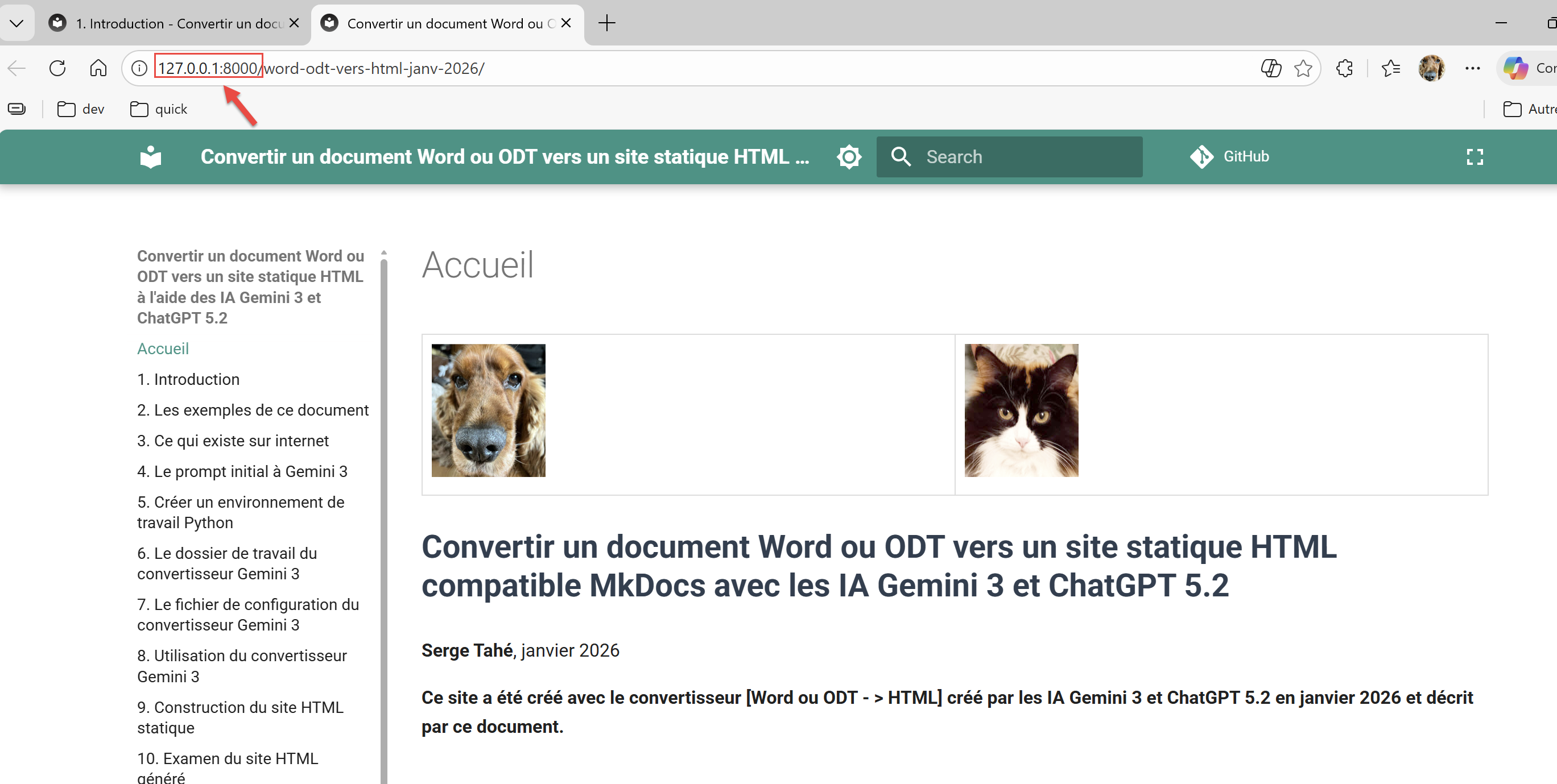
INFO    -  [06:05:48] Serving on http://127.0.0.1:8000/word-odt-vers-html-janv-2026/
Ctrl-Clic en el URL en la línea 5 :
 |