7. Ajaxification of a Spring application MVC
7.1. The role of AJAX in a web application
For now, the learning examples studied had the following architecture:
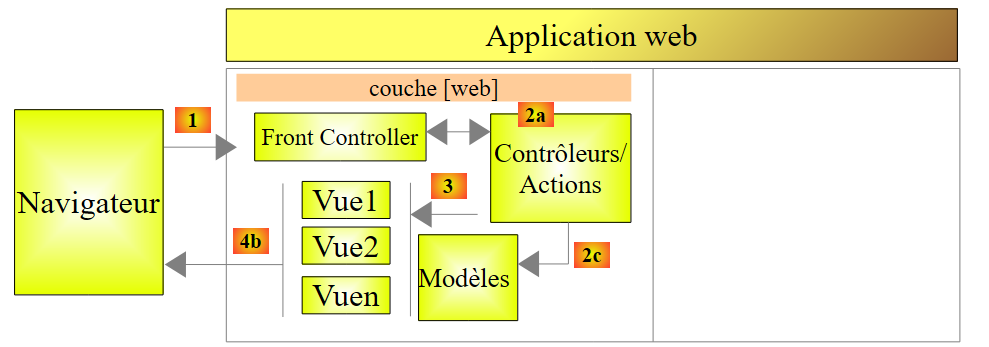 |
To switch from a [Vue1] view to a [Vue2] view, the browser:
- sends a request to the web application;
- receives the [Vue2] view and displays it in place of the [Vue1] view.
This is the classic pattern:
- request from the browser;
- the web server generates a view in response to the client;
- display of this new view by the browser.
For several years now, there has been another mode of interaction between the browser and the web server: AJAX (Asynchronous Javascript and Xml). This actually involves interactions between the view displayed by the browser and the web server. The browser continues to do what it does best—display a view—but it is now controlled by Javascript embedded within the displayed view. The process works as follows:
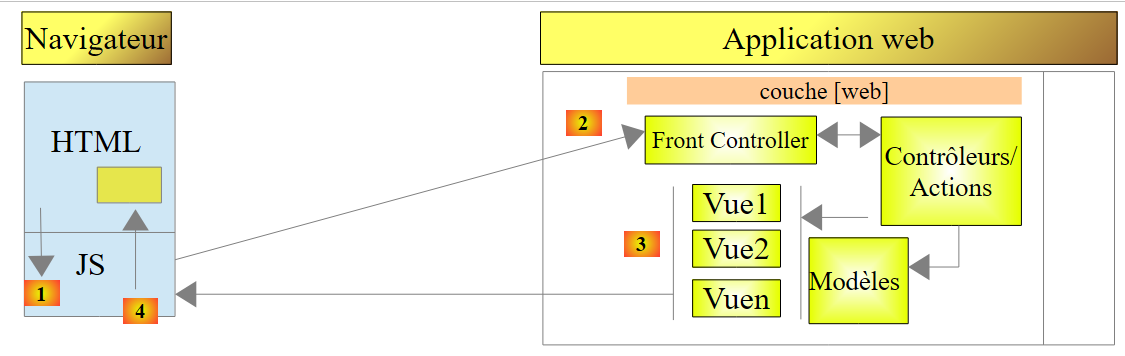 |
- in [1], an event occurs on the page displayed in the browser (click on a button, change of text, etc.). This event is intercepted by Javascript (jS) embedded in the page;
- In [2], the Javascript code makes a HTTP request just as the browser would have done. The request is asynchronous: the user can continue to interact with the page without being blocked while waiting for the response to the HTTP request. The request follows the standard processing flow. Nothing (or very little) distinguishes it from a standard request;
- in [3], a response is sent to the client jS. Rather than a complete HTML view, it is instead a partial HTML view, a XML or jSON (JavaScript Object Notation) that is sent;
- in [4], Javascript retrieves this response and uses it to update a region of the displayed HTML page.
From the user's perspective, the view has changed because what they see has changed. However, the page is not fully reloaded; instead, only a portion of the displayed page is updated. This helps make the page more fluid and interactive: because the page isn’t fully reloaded, we can handle events that we couldn’t handle before. For example, offering the user a list of options as they type characters into an input field. With each new character typed, a AJAX request is sent to the server, which then returns additional suggestions. Without Ajax, this type of input assistance was previously impossible. It was not possible to reload a new page with every character typed.
7.2. Updating a page with a HTML feed
7.2.1. The Views
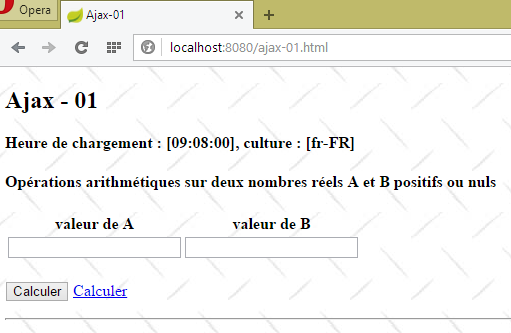
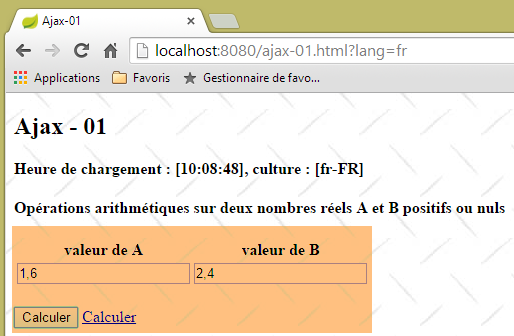
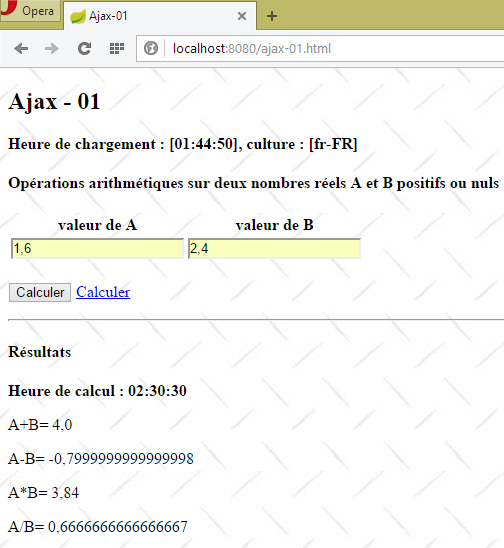
We will examine the following application:
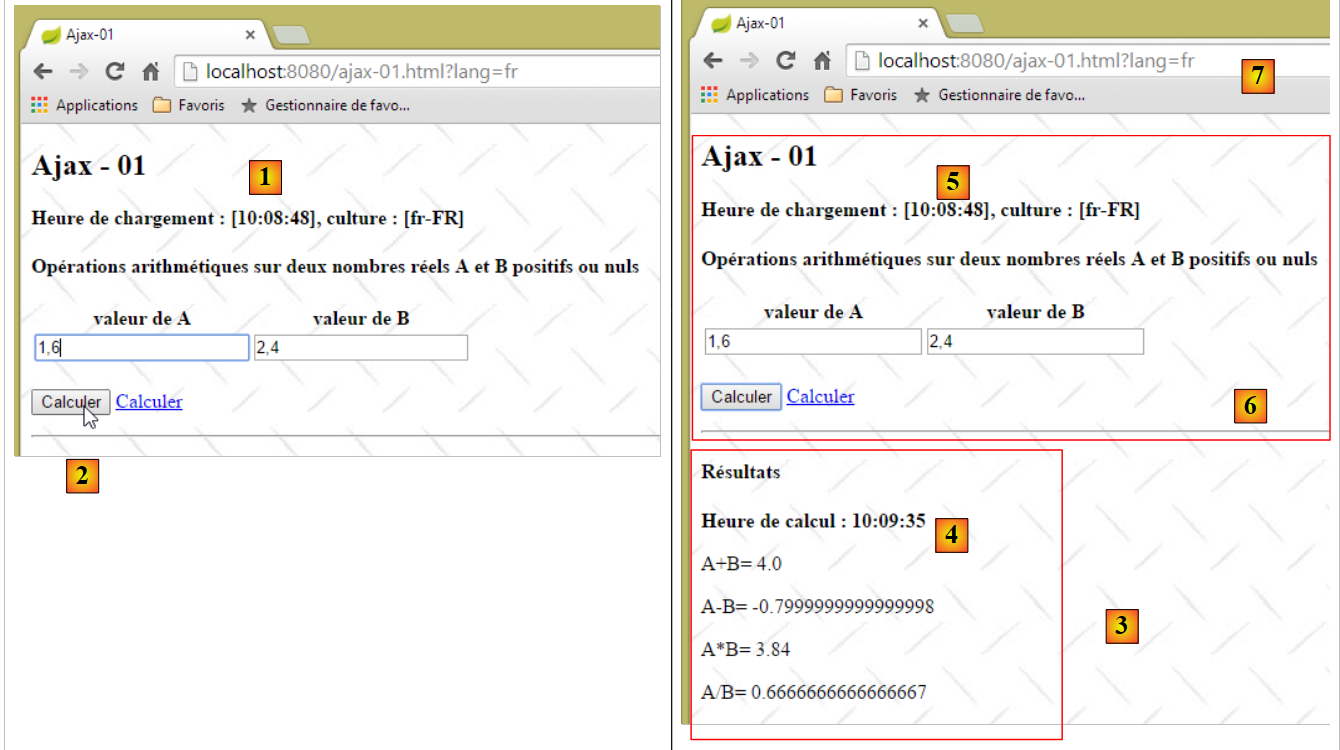 |
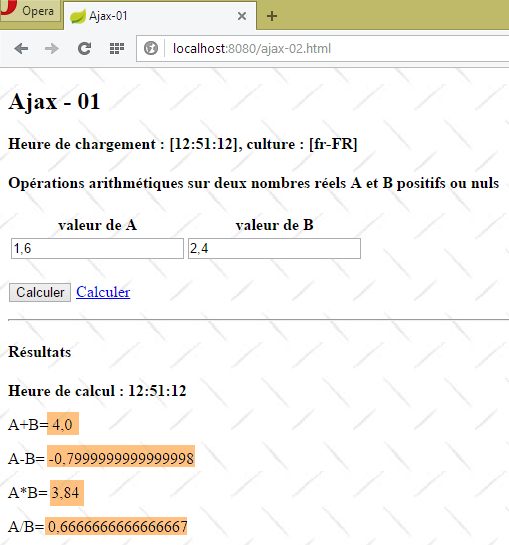
- in [1], the page load time;
- in [2], the four arithmetic operations are performed on two real numbers A and B;
- in [3], the server’s response is displayed in a section of the page;
- in [4], the time of the calculation. This is different from the page load time [5]. The latter is equal to [1], indicating that the region [6] has not been reloaded. Furthermore, the URL and [7] of the page have not changed.
7.2.2. The action [/ajax-01]
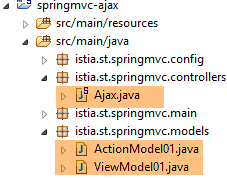 |
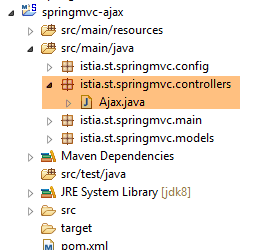
The [Ajax.java] controller defines the following [/ajax-01] action:
    @RequestMapping(value = "/ajax-01", method = RequestMethod.GET, produces = "text/html; charset=UTF-8")
    public String ajax01(Locale locale, Model modèle, HttpSession session, String tempo) {
        // valid tempo?
        if (tempo != null) {
            boolean valide = false;
            int valueTempo = 0;
            try {
                valueTempo = Integer.parseInt(tempo);
                valide = valueTempo >= 0;
            } catch (NumberFormatException e) {

            }
            if (valide) {
                session.setAttribute("tempo", new Integer(valueTempo));
            }
        }
        // prepare the [vue-01] view model
        ...
}
- line 2: the [/ajax-01] action accepts only one parameter, [tempo]. This is the duration in milliseconds that the server must wait before sending the results of arithmetic operations;
- line 4: the parameter [tempo] is optional;
- lines 5–12: the value of the parameter [tempo] is checked to ensure it is valid;
- lines 13–15: if so, the timeout value is saved in the session. This means it will remain in effect until it is changed;
The code for the [/ajax-01] action continues as follows:
    @RequestMapping(value = "/ajax-01", method = RequestMethod.GET, produces = "text/html; charset=UTF-8")
    public String ajax01(Locale locale, Model modèle, HttpSession session, String tempo) {
        // valid tempo?
...
        // prepare the [vue-01] view model
        modèle.addAttribute("actionModel01", new ActionModel01());
...
        // view
        return "vue-01";
}
The [ActionModel01] class is primarily used to encapsulate the values posted by the [/ajax-01] action. Here, nothing is posted. We create an empty class and place it in the model because the [vue-01.xml] view uses it. The [ActionModel01] class is as follows:
package istia.st.springmvc.models;

import javax.validation.constraints.DecimalMin;
import javax.validation.constraints.NotNull;

public class ActionModel01 {

    // posted data
    @NotNull
    @DecimalMin(value = "0.0")
    private Double a;

    @NotNull
    @DecimalMin(value = "0.0")
    private Double b;

    // getters and setters
    ...
}
- lines 11 and 15: two real numbers [a,b] that will be submitted via a form;
Let's go back to the action code:
    @RequestMapping(value = "/ajax-01", method = RequestMethod.GET, produces = "text/html; charset=UTF-8")
    public String ajax01(Locale locale, Model modèle, HttpSession session, String tempo) {
...
        // prepare the [vue-01] view model
        modèle.addAttribute("actionModel01", new ActionModel01());
        Resultats résultats = new Resultats();
        modèle.addAttribute("resultats", résultats);
...
        // view
        return "vue-01";
}
- lines 6-7: we place an instance of type [Resultats] in the template;
The [Resultats] type placed in the model is as follows:
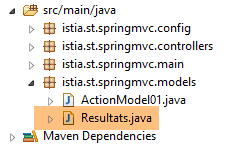 |
package istia.st.springmvc.models;

public class Resultats {

    // data
    private String aplusb;
    private String amoinsb;
    private String amultiplieparb;
    private String adiviseparb;
    private String heureGet;
    private String heurePost;
    private String erreur;
    private String vue;
    private String culture;

    // getters and setters
    ...
}
- lines 6–9: the result of the four arithmetic operations on the numbers [a,b];
- line 10: the time the page was initially loaded;
- line 11: the time the four arithmetic operations were executed;
- line 12: any error messages;
- line 13: the view to be displayed, if any;
- line 14: the view's culture, [fr-FR] or [en-US];
The code for the [/ajax-01] action continues as follows:
    @RequestMapping(value = "/ajax-01", method = RequestMethod.GET, produces = "text/html; charset=UTF-8")
    public String ajax01(ActionModel01 formulaire, Locale locale, Model modèle, HttpSession session) {
        ...
        // local
        setLocale(locale, modèle, résultats);
...
}
- line 5: the [setLocale] method is used to set the locale to be used in the view template, either [fr-FR] or [en-US]. This locale is intended for the Javascript embedded in the view;
The [setLocale] method is as follows:
    private void setLocale(Locale locale, Model modèle, Resultats résultats) {
        // we only manage fr-FR, en-US locales
        String language = locale.getLanguage();
        String country = null;
        switch (language) {
        case "fr":
            country = "FR";
            break;
        default:
            language = "en";
            country = "US";
            break;
        }
        // culture
        résultats.setCulture(String.format("%s-%s", language, country));
}
In the template, the string [${resultats.culture}] will be set to 'fr-FR' or 'en-US'.
Let's go back to the [/ajax-01] action:
@RequestMapping(value = "/ajax-01", method = RequestMethod.GET, produces = "text/html; charset=UTF-8")
    public String ajax01(ActionModel01 formulaire, Locale locale, Model modèle, HttpSession session) {
...
        // local
        setLocale(locale, modèle, résultats);
        // hour
        résultats.setHeureGet(new SimpleDateFormat("hh:mm:ss").format(new Date()));
        // view
        return "vue-01";
    }
- line 7: set the time from GET in the template;
- line 9: display the [vue-01.xml] view:
7.2.3. The [vue-01.xml] view
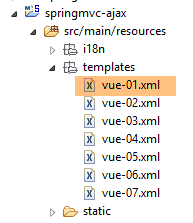 |  |
The [vue-01.xml] view is as follows:
<!DOCTYPE HTML>
<html xmlns:th="http://www.thymeleaf.org">
    <head>
        <meta name="viewport" content="width=device-width" />
        <title>Ajax-01</title>
        <link rel="stylesheet" href="/css/ajax01.css" />
        <script type="text/javascript" src="/js/jquery/jquery-2.1.1.min.js"></script>
        <script type="text/javascript" src="/js/jquery/jquery.validate.min.js"></script>
        <script type="text/javascript" src="/js/jquery/jquery.validate.unobtrusive.min.js"></script>
        <script type="text/javascript" src="/js/jquery/globalize/globalize.js"></script>
        <script type="text/javascript" src="/js/jquery/globalize/cultures/globalize.culture.fr-FR.js"></script>
        <script type="text/javascript" src="/js/jquery/globalize/cultures/globalize.culture.en-US.js"></script>
        <script type="text/javascript" src="/js/jquery/jquery.unobtrusive-ajax.js"></script>
        <script type="text/javascript" src="/js/json3.js"></script>
        <script type="text/javascript" src="/js/client-validation.js"></script>
        <script type="text/javascript" src="/js/local1.js"></script>
        <script th:inline="javascript">
            /*<![CDATA[*/
                    var culture = [[${resultats.culture}]];
                    Globalize.culture(culture);
                    /*]]>*/
        </script>
    </head>
    <body>
        <h2>Ajax - 01</h2>
        <p>
            <strong th:text="#{labelHeureGetCulture(${resultats.heureGet},${resultats.culture})}">
                Heure de chargement :
            </strong>
        </p>
        <h4>
            <p th:text="#{titre.part1}">
                Opérations arithmétiques sur deux nombres réels A et B positifs ou nuls
            </p>
        </h4>
        <form id="formulaire" name="formulaire" ... ">
...
        </form>
        <hr />
        <div id="resultats" />
    </body>
</html>
- lines 7–12: the jQuery validation and internationalization (cultures) libraries;
- line 15: the [client-validation] library built in section 6.3;
- line 14: the jSON library used by the [client-validation] library. It is optional if validation logs have been disabled;
- line 13: the Microsoft library [Unobtrusive Ajax]. This library sometimes allows you to avoid writing Javascript;
- line 16: a jS file for our own needs;
- lines 17–22: to manage the [fr-FR] and [en-US] locales on the client side. We have already encountered this code;
- line 27: a configured message. We discussed these in section 5.18;
- lines 36–38: the form we will return to later;
- line 40: the area of the document where Javascript will place the server’s response;
7.2.4. The form
 |
In view [vue-01.xml], the form is as follows:
<form id="formulaire" name="formulaire" th:action="@{/ajax-02.html}" method="post" th:object="${actionModel01}" th:attr="data-ajax='true',data-ajax-loading='#loading',data-ajax-loading-duration='0',data-ajax-method='post',data-ajax-mode='replace',data-ajax-update='#resultats', data-ajax-begin='beforeSend',data-ajax-complete='afterComplete' ">
    <table>
        <thead>
            <tr>
                <th>
                    <span th:text="#{valeur.a}"></span>
                </th>
                <th>
                    <span th:text="#{valeur.b}"></span>
                </th>
            </tr>
        </thead>
        <tbody>
            <tr>
                <td>
                    <input type="text" th:field="*{a}" th:value="*{a}" data-val="true"
                        th:attr="data-val-required=#{NotNull},data-val-number=#{typeMismatch},data-val-min=#{actionModel01.a.min},data-val-min-value=#{actionModel01.a.min.value}" />
                </td>
                <td>
                    <input type="text" th:field="*{b}" th:value="*{b}" data-val="true"
                        th:attr="data-val-required=#{NotNull},data-val-number=#{typeMismatch},data-val-min=#{actionModel01.b.min},data-val-min-value=#{actionModel01.b.min.value}" />
                </td>
            </tr>
            <tr>
                <td>
                    <span class="field-validation-valid" data-valmsg-for="a" data-valmsg-replace="true"></span>
                    <span th:if="${#fields.hasErrors('a')}" th:errors="*{a}" class="error">Donnée
                        erronée
                    </span>
                </td>
                <td>
                    <span class="field-validation-valid" data-valmsg-for="b" data-valmsg-replace="true"></span>
                    <span th:if="${#fields.hasErrors('b')}" th:errors="*{b}" class="error">Donnée
                        erronée
                    </span>
                </td>
            </tr>
        </tbody>
    </table>
    <p>
        <input type="submit" th:value="#{action.calculer}" value="Calculer"></input>
        <img id="loading" style="display: none" src="/images/loading.gif" />
        <a href="javascript:postForm()" th:text="#{action.calculer}">Calculer</a>
    </p>
</form>
which produces the following HTML:
<form id="formulaire" name="formulaire" method="post" data-ajax-update="#resultats" data-ajax-complete="afterComplete"     data-ajax-begin="beforeSend" data-ajax-loading-duration="0" data-ajax-mode="replace" data-ajax="true" data-ajax-method="post" data-ajax-loading="#loading" action="/ajax-02.html">
    <table>
        <thead>
            <tr>
                <th>
                    <span>valeur de A</span>
                </th>
                <th>
                    <span>valeur de B</span>
                </th>
            </tr>
        </thead>
        <tbody>
            <tr>
                <td>
                    <input type="text" data-val="true" data-val-min="Le nombre doit être supérieur ou égal à 0" data-val-number="Format invalide" data-val-min-value="0" data-val-required="Le champ est obligatoire" value="" id="a" name="a" />
                </td>
                <td>
                    <input type="text" data-val="true" data-val-min="Le nombre doit être supérieur ou égal à 0" data-val-number="Format invalide" data-val-min-value="0" data-val-required="Le champ est obligatoire" value="" id="b" name="b" />
                </td>
            </tr>
            <tr>
                <td>
                    <span class="field-validation-valid" data-valmsg-for="a" data-valmsg-replace="true"></span>

                </td>
                <td>
                    <span class="field-validation-valid" data-valmsg-for="b" data-valmsg-replace="true"></span>

                </td>
            </tr>
        </tbody>
    </table>
    <p>
        <input type="submit" value="Calculer" />
        <img id="loading" style="display: none" src="/images/loading.gif" />
        <a href="javascript:postForm()">Calculer</a>
    </p>
</form>
- line 16: the [a] field is associated with the validators [required], [number], and [min];
- line 19: same for the field [b];
The various messages are found in the [messages.properties] files of the project:
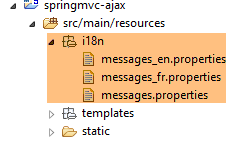 |
[messages_fr.properties]
NotNull=Le champ est obligatoire
typeMismatch=Format invalide
actionModel01.a.min=Le nombre doit être supérieur ou égal à 0
DecimalMin.actionModel01.a=Le nombre doit être supérieur ou égal à 0
DecimalMax.actionModel01.b=Le nombre doit être supérieur ou égal à 0
actionModel01.b.min=Le nombre doit être supérieur ou égal à 0
valeur.a=valeur de A
valeur.b=valeur de B
actionModel01.a.min.value=0
actionModel01.b.min.value=0
labelHeureCalcul=Heure de calcul :
LabelErreur=Une erreur s''est produite : [{0}]
labelAplusB=A+B=
labelAmoinsB=A-B=
labelAfoisB=A*B=
labelAdivB=A/B=
titre.part1=Opérations arithmétiques sur deux nombres réels A et B positifs ou nuls
labelHeureGetCulture=Heure de chargement : [{0}], culture : [{1}]
action.calculer=Calculer
erreur.aleatoire=erreur aléatoire
resultats=Résultats
resultats.erreur=Une erreur s''est produite : [{0}]
resultats.titre=Résultats
message.zone=Nombre d'accès :
[messages_en.properties]
NotNull=Required field
typeMismatch=Invalid format
actionModel01.a.min=The number must be greater or equal to 0
DecimalMin.actionModel01.a=The number must be greater or equal to 0
DecimalMax.actionModel01.b=The number must be greater or equal to 0
actionModel01.b.min=The number must be greater or equal to 0
valeur.a=A value
valeur.b=B value
actionModel01.a.min.value=0
actionModel01.b.min.value=0
labelHeureCalcul=Computing hour:
LabelErreur=There was an error: [{0}]
labelAplusB=A+B=
labelAmoinsB=A-B=
labelAfoisB=A*B=
labelAdivB=A/B=
titre.part1=Arithmetic operations on two positive or equal to zero real numbers
labelHeureGetCulture=Loading hour: [{0}], culture: [{1}]
action.calculer=Calculate
erreur.aleatoire=randomly generated error
resultats=Results
resultats.erreur=Some error occurred : [{0}]
resultats.titre=Results
message.zone=Number of hits:
Now, let's examine the attributes of the [form] tag:
<form id="formulaire" name="formulaire" method="post" data-ajax-update="#resultats" data-ajax-complete="afterComplete" data-ajax-begin="beforeSend" data-ajax-loading-duration="0" data-ajax-mode="replace" data-ajax="true" data-ajax-method="post" data-ajax-loading="#loading" action="/ajax-02.html">
We can recognize the standard attributes of the [form] tag:
<form id="formulaire" name="formulaire" method="post" action="/ajax-02.html">
It is immediately apparent that if Javascript is disabled in the browser displaying the page, the form will be submitted to URL [/ajax-02.html]. Now, let’s analyze the other attributes:
<form ... data-ajax-update="#resultats" data-ajax-complete="afterComplete" data-ajax-begin="beforeSend" data-ajax-loading-duration="0" data-ajax-mode="replace" data-ajax="true" data-ajax-method="post" data-ajax-loading="#loading">
The [data-ajax-xxx] attributes are managed by the jS [unobtrusive-ajax] library, which was imported by the [vue-01.xml] view:
<script type="text/javascript" src="/js/jquery/jquery.unobtrusive-ajax.js"></script>
When the [data-ajax-xxx] attributes are present, the [submit] of the form will be executed via an Ajax call from the [unobtrusive-ajax] library. The parameters have the following meanings:
- [data-ajax="true"]: the presence of this attribute causes the form’s [submit] to be AJAX-ified;
- [data-ajax-method="post"]: the method of [submit]. The URL of post will be that of the [action="/ajax-02.html"] attribute;
- [data-ajax-loading="#loading"]: the id for a field to be displayed while waiting for the server's response. The field identified by [loading] in the [vue-01.xml] view is as follows:
<img id="loading" style="display: none" src="/images/loading.gif" />
This is an animated loading image that will be displayed until the server response is received;
- [data-ajax-loading-duration="0"]: the wait time in milliseconds before the [data-ajax-loading="#loading"] area is displayed. Here, it will be displayed as soon as the wait begins;
- [data-ajax-begin="beforeSend"]: the jS function to be executed before performing [submit];
- [data-ajax-complete="afterComplete"]: the jS function to be executed when the response has been received;
- [data-ajax-update="#resultats"]: the ID of the field where the result sent by the server will be placed. The [vue-01.xml] view has the following field:
<div id="resultats" />
- [data-ajax-mode="replace"]: the mode for inserting the result into the previous area. The [replace] mode will cause the result to 'overwrite' whatever was previously in the id [resultats] area;
Note that [submit] Javascript will only occur if the validators have declared the tested values valid.
The jS [unobtrusive-ajax] library has two objectives:
- to ensure that the form adapts correctly to both possibilities: whether or not Javascript is enabled in the browser;
- to avoid writing Javascript. We will see that here, this could not be avoided.
7.2.5. The [/ajax-02] action
We saw that the posted values were sent to the [/ajax-02] action. It is as follows:
@RequestMapping(value = "/ajax-02", method = RequestMethod.POST, produces = "text/html; charset=UTF-8")
    public String ajax02(ActionModel01 formulaire, Locale locale, Model modèle, HttpSession session) throws InterruptedException {
        // tempo?
        Integer tempo = (Integer) session.getAttribute("tempo");
        if (tempo != null && tempo > 0) {
            Thread.sleep(tempo);
        }
        // prepare the model for the next view
        Resultats résultats = new Resultats();
        modèle.addAttribute("resultats", résultats);
        // we set the locale
        setLocale(locale, modèle, résultats);
        // hour
        résultats.setHeurePost(new SimpleDateFormat("hh:mm:ss").format(new Date()));
        ...
}
- We’ll simplify things for now: we assume that the POST operation was indeed performed by the Javascript from the [vue-01.xml] view. We’ll revisit this assumption a little later;
- line 2: the posted [a,b] values are placed in the [ActionModel01] template;
- lines 4–7: if the user set a timeout during a previous GET, it is retrieved from the session and the timeout is applied (line 6). The purpose of this is to allow the user to see the effect of the [data-ajax-loading="#loading"] attribute in the form;
- lines 9-10: a [resultats] attribute is added to the template;
- line 12: the culture [fr-FR] or [en-US] is added to the template;
- line 14: enter the time for POST in the template;
Recall the type [Resultats] added to the model:
public class Resultats {

    // data
    private String aplusb;
    private String amoinsb;
    private String amultiplieparb;
    private String adiviseparb;
    private String heureGet;
    private String heurePost;
    private String erreur;
    private String vue;
    private String culture;

    // getters and setters
...
}
The code for action [/ajax-02] continues as follows:
@RequestMapping(value = "/ajax-02", method = RequestMethod.POST, produces = "text/html; charset=UTF-8")
    public String ajax02(ActionModel01 formulaire, BindingResult result, Locale locale, Model modèle,    HttpSession session) throws InterruptedException {
...
        résultats.setHeurePost(new SimpleDateFormat("hh:mm:ss").format(new Date()));
        // we generate an error every other time
        int val = new Random().nextInt(2);
        if (val == 0) {
            // an error message is returned
            résultats.setErreur("erreur.aleatoire");
            return "vue-03";
        }
...
    }
- Lines 6–11: For this example, we show how to return an error page to the client jS. Half the time, we return the following view [vue-03.xml]:
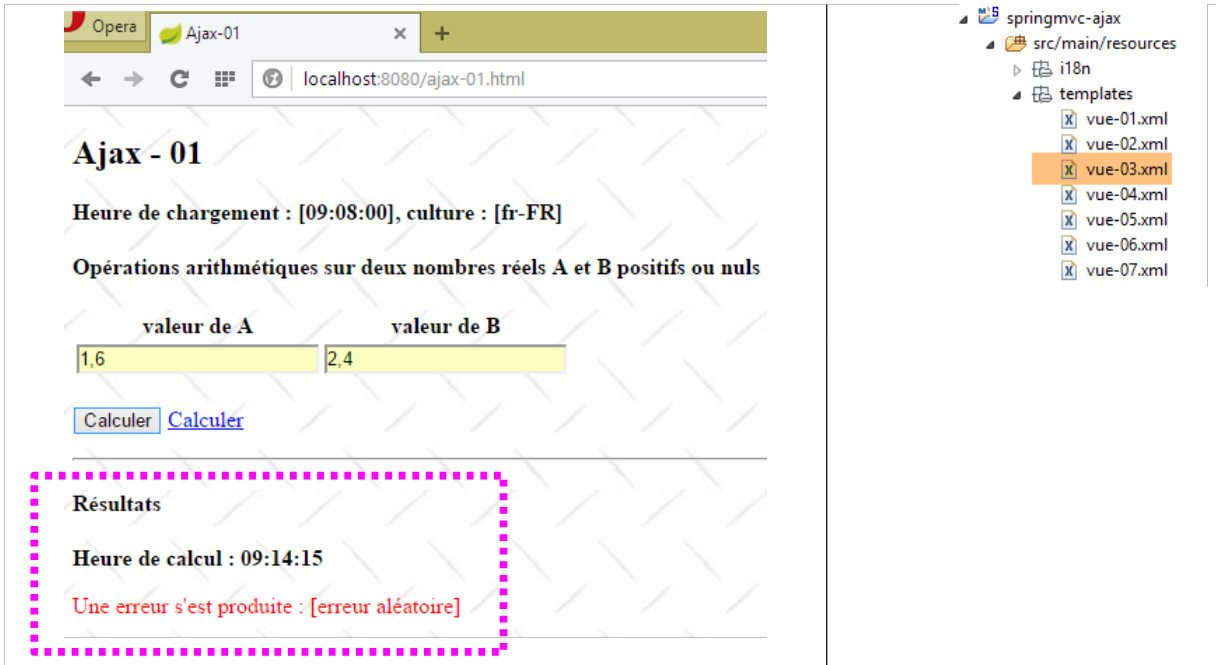 |
Note line 9: this is not a message placed in the template, but a message key:
[messages_fr.properties]
erreur.aleatoire=erreur aléatoire
[messages_fr.properties]
erreur.aleatoire=randomly generated error
The code for the view [vue-03.xml] is as follows:
<!DOCTYPE HTML>
<html xmlns:th="http://www.thymeleaf.org">
    <body>
        <h4>Résultats</h4>
        <p>
            <strong>
                <span th:text="#{labelHeureCalcul}">Heure de calcul :</span>
                <span id="heureCalcul" th:text="${resultats.heurePost}"></span>
            </strong>
        </p>
        <p style="color: red;">
            <span th:text="#{LabelErreur(#{${resultats.erreur}})}">Une erreur s'est produite :</span>
            <!-- <span id="erreur" th:text="${resultats.erreur}"></span> -->
        </p>
    </body>
</html>
- line 12, note a message configured by a message key that is itself calculated. We introduced this concept in section 5.18, page 170.
The code for action [/ajax-02] continues as follows:
@RequestMapping(value = "/ajax-02", method = RequestMethod.POST, produces = "text/html; charset=UTF-8")
    public String ajax02(ActionModel01 formulaire, BindingResult result, Locale locale, Model modèle,    HttpSession session) throws InterruptedException {
...
        // retrieve posted values
        double a = formulaire.getA();
        double b = formulaire.getB();
        // we build the model
        résultats.setAplusb(String.valueOf(a + b));
        résultats.setAmoinsb(String.valueOf(a - b));
        résultats.setAmultiplieparb(String.valueOf(a * b));
        try {
            résultats.setAdiviseparb(String.valueOf(a / b));
        } catch (RuntimeException e) {
            résultats.setAdiviseparb("NaN");
        }
        // the view is displayed
        return "vue-02";
    }
- lines 5–15: the four arithmetic operations are performed on the numbers [a,b] and encapsulated in the model instance [Resultats];
- line 17: the following view [vue-02.xml] is returned:
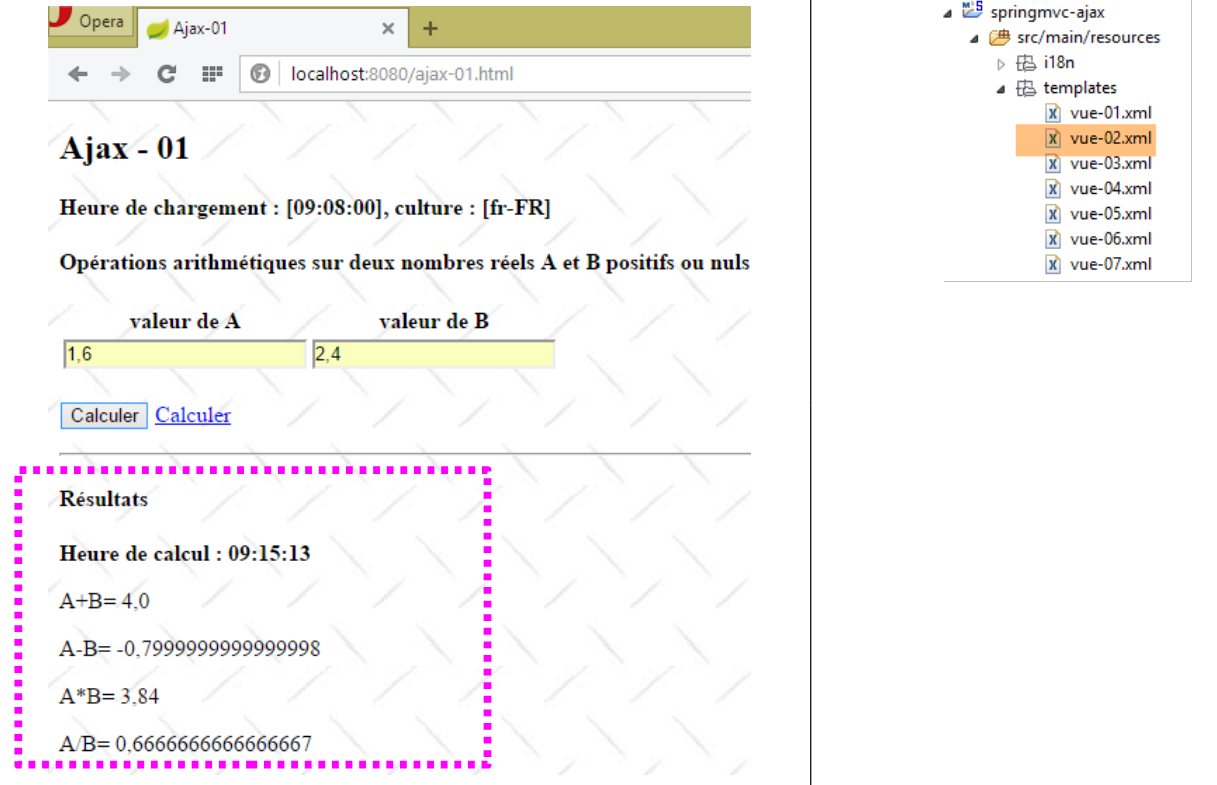 |
The view [vue-02.xml] is as follows:
<!DOCTYPE HTML>
<html xmlns:th="http://www.thymeleaf.org">
    <body>
        <h4>Résultats</h4>
        <p>
            <strong>
                <span th:text="#{labelHeureCalcul}">Heure de calcul :</span>
                <span id="heureCalcul" th:text="${resultats.heurePost}"></span>
            </strong>
        </p>
        <p>
            <span th:text="#{labelAplusB}">A+B=</span>
            <span id="aplusb" th:text="${resultats.aplusb}"></span>
        </p>
        <p>
            <span th:text="#{labelAmoinsB}">A-B=</span>
            <span id="amoinsb" th:text="${resultats.amoinsb}"></span>
        </p>
        <p>
            <span th:text="#{labelAfoisB}">A*B=</span>
            <span id="amultiplieparb" th:text="${resultats.amultiplieparb}"></span>
        </p>
        <p>
            <span th:text="#{labelAdivB}">A/B=</span>
            <span id="adiviseparb" th:text="${resultats.adiviseparb}"></span>
        </p>
    </body>
</html>
Whether the result is view [vue-02.xml] or view [vue-03.xml], this result HTML is placed in the field identified by [resultats] in view [vue-01.xml], due to the [data-ajax-update="#resultats"] attribute of the form.
7.2.6. The POST of the entered values
We encounter a difficulty here with the posted values. We are working with two cultures, [fr-FR] and [en-US], which represent real numbers differently. We addressed this difficulty in Section 6.3, page 190, when we needed to post real numbers in two different cultures. We will reuse the tools used then. However, we face an additional challenge: we do not have access to the method that performs the POST conversion of the entered values. This is why we have added the following attributes to the form tag:
- [data-ajax-begin="beforeSend"]: the jS function to be executed before running [submit];
- [data-ajax-complete="afterComplete"]: the jS function to be executed when the response has been received;
We do not have access to the jS function, which will post the entered values, but we can write two jS functions:
- [beforeSend]: a jS function executed before POST;
- [afterComplete]: a jS function executed upon receipt of the response to POST;
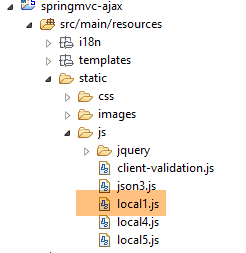
These two functions are placed in a file named [local1.js]:
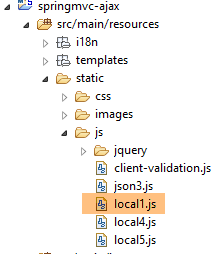 |
The file [local1.js] initializes the environment jS of the view [vue-01.xml] as follows:
// global data
var loading;
var formulaire;
var résultats;
var a, b;

// document loading
$(document).ready(function() {
    // retrieve the references of the page's various components
    loading = $("#loading");
    formulaire = $("#formulaire");
    resultats = $('#resultats');
    a = $("#a");
    b = $("#b");
    // we hide certain elements
    loading.hide();
    // on parse les validateurs du formulaire
    $.validator.unobtrusive.parse(formulaire);
    // we manage two [fr_FR, en_US] locales
    // real [a,b] are sent by the server in Anglo-Saxon format
    // we put them in French format if necessary
    checkCulture(2);
});
- line 22: the function [checkCulture] is presented a little further on;
The function jS [beforeSend] will be as follows:
function beforeSend(jqXHR, settings) {
    // before POST
    // numbers must be posted in Anglo-Saxon format
    var culture = Globalize.culture().name;
    if (culture === 'fr-FR') {
        checkCulture(1);
        settings.data = formulaire.serialize();
    }
}

function afterComplete(jqXHR, settings) {
    ...
}

function checkCulture(mode) {
    if (mode == 1) {
        // we put the numbers [a,b] in Anglo-Saxon format
        var value1 = a.val().replace(",", ".");
        a.val(value1);
        var value2 = b.val().replace(",", ".");
        b.val(value2);
    }
    if (mode == 2) {
...
    }
}
- Lines 4–6: We check if the view culture is [fr-FR]. In this case, the posted values must be changed. Indeed, if the user entered [1,6], the value [1.6] must be posted; otherwise, the value [1,6] will be rejected on the server side. To do this, simply change the comma in the posted values to a decimal point (lines 18–21);
- but we can’t stop there. In fact, when the function [beforeSend] is called, the string of posted values [a=val1&b=valB] has already been constructed. We therefore need to modify it. This is done using the function’s second parameter, [settings];
- line 7: [settings.data] (settings is a function parameter) represents the posted string. We recreate this string using the expression [formulaire.serialize()]. This expression scans the form for the values to be posted and constructs the string for POST. It will then take the new values from [a,b] with decimal points;
If nothing else is done, the server will send its response, which will be displayed correctly. However, the values in [a,b] now have decimal points, even though we are still in the [fr-FR] locale. So if the user doesn’t notice this and clicks on [Calculer] again, the validators will tell them that the [a,b] values are invalid. Which is correct. This is where the [afterComplete] function comes into play, executed upon receiving the result:
function beforeSend(jqXHR, settings) {
    // before POST
...
}

function afterComplete(jqXHR, settings) {
    // after POST
    // numbers must be supplied in French format if necessary
    var culture = Globalize.culture().name;
    if (culture === 'fr-FR') {
        checkCulture(2);
    }
}

function checkCulture(mode) {
    if (mode == 1) {
...
    }
    if (mode == 2) {
        // put the numbers in French format
        var value1 = a.val().replace(".", ",");
        a.val(value1);
        var value2 = b.val().replace(".", ",");
        b.val(value2);
    }
}
- lines 9-12: if the view's locale is [fr-FR], the numbers [a,b] are converted to French format.
7.2.7. Tests
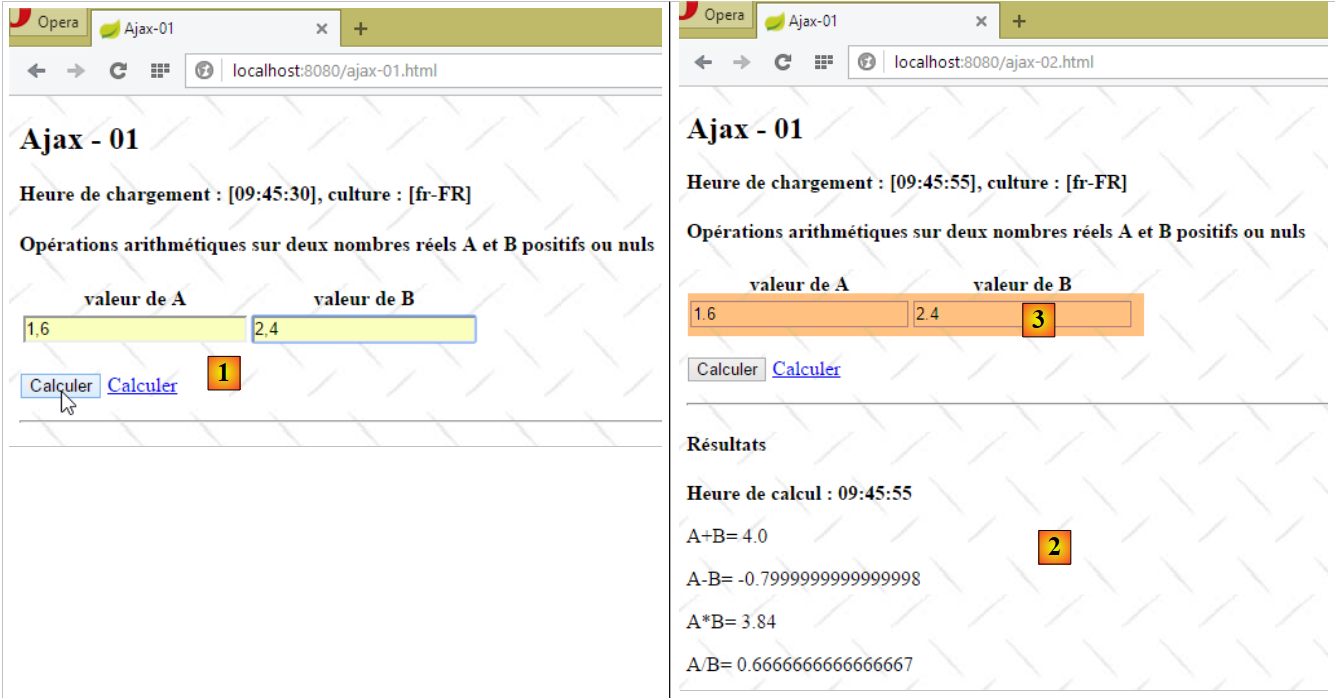
Here are some test screenshots:
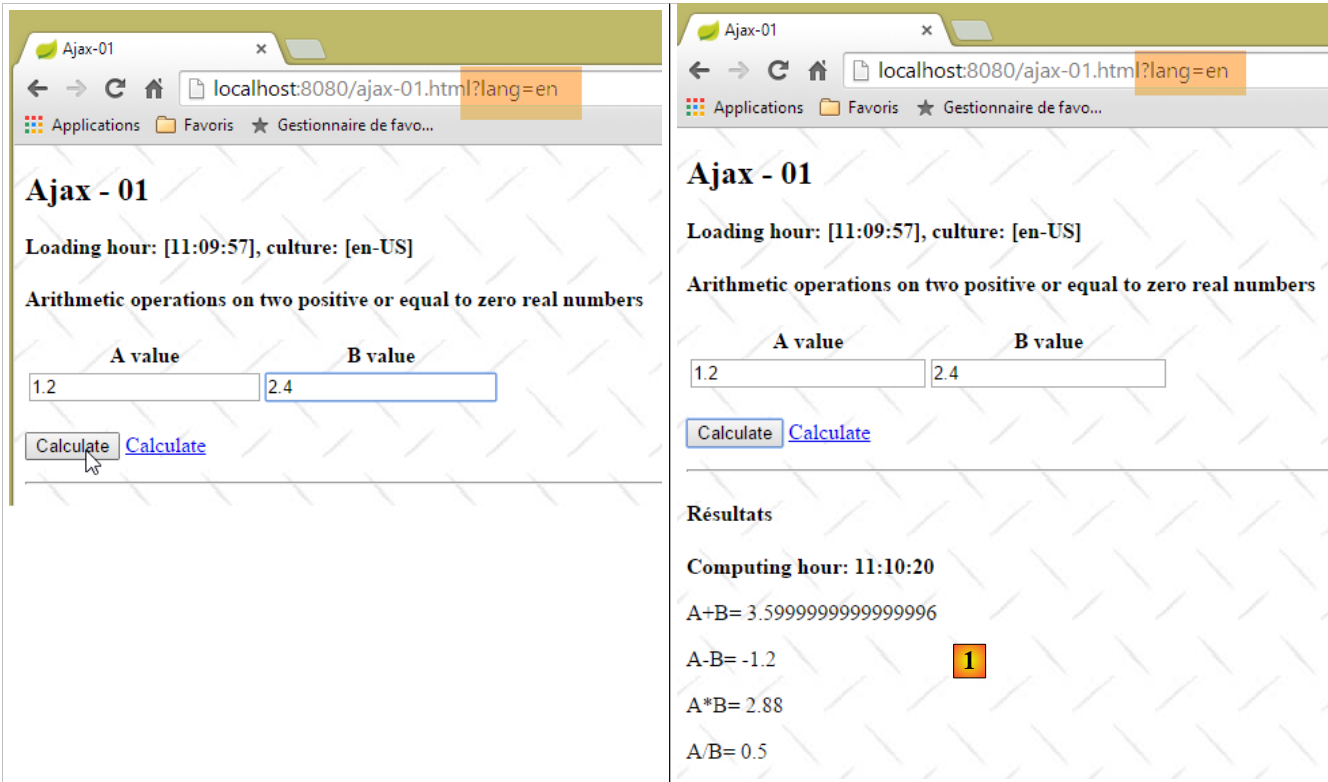 |
- in [1], the server response;
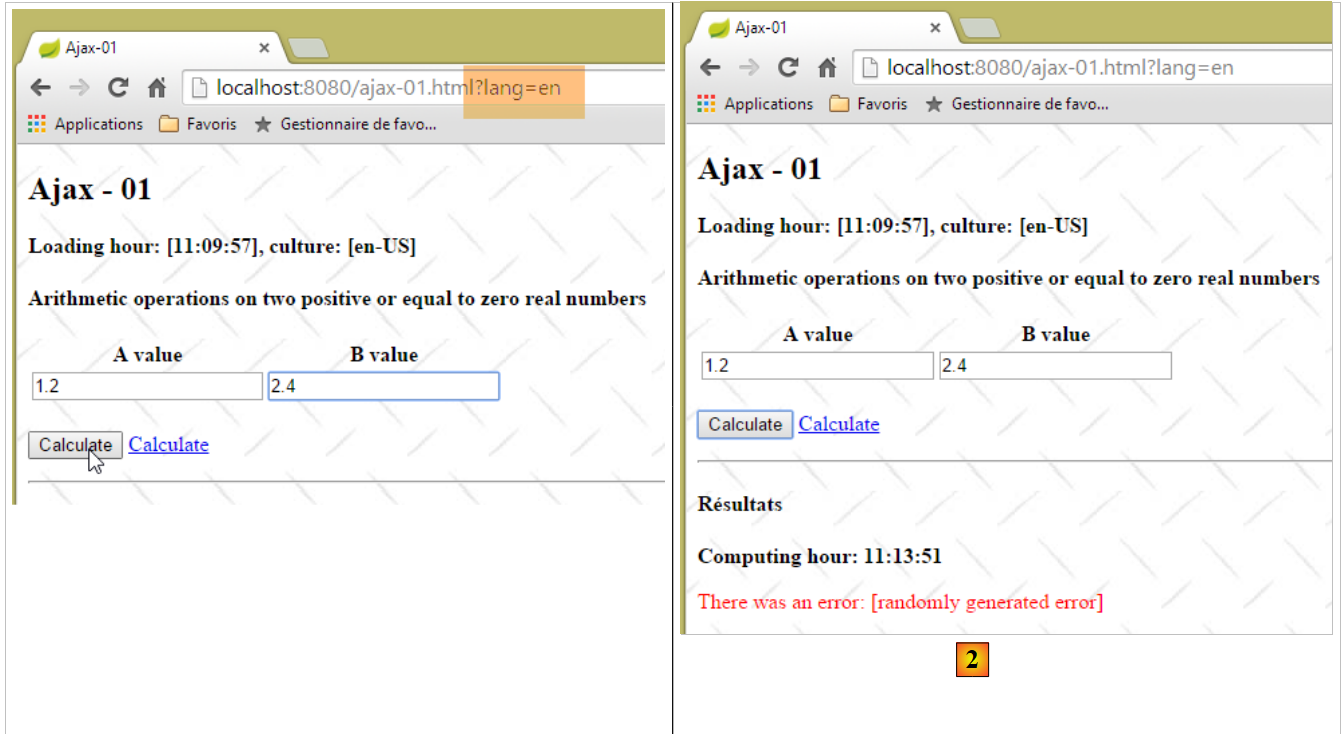 |
- in [2], the server response with an error message;
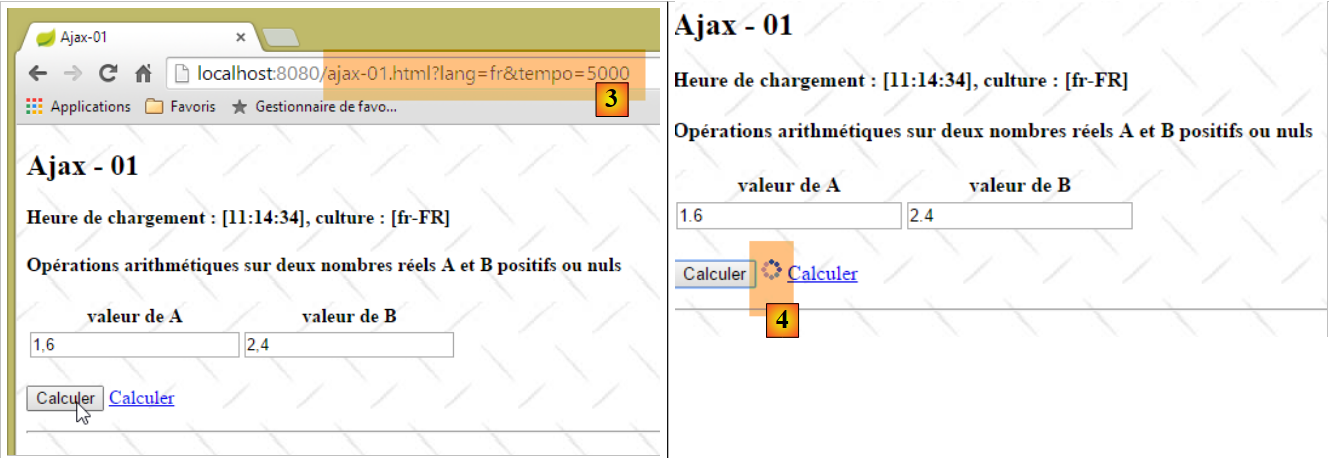 |
- In [3], a 5-second timeout is set. This means the server will wait 5 seconds before sending its response. In the [form] tag, we used the [data-ajax-loading='#loading'] attribute. The [loading] parameter is the identifier of a field that is:
- displayed for the entire duration of the wait;
- hidden after receiving the server's response;
Here, [loading] is the identifier of an animated image that is visible in [4].
7.2.8. Disabling Javascript with the [en-US] setting
What happens if we disable Javascript in the browser?
The rendering of the entered values will be based on the [form] tag, whose [data-ajax-attr] attributes will not be used. It is as if we had the following [form] tag:
<form id="formulaire" name="formulaire" method="post" action="/ajax-02.html">
The entered values will therefore be posted to the [/ajax-02] action. They will not have been validated on the client side. Therefore, the server-side validators will be used. They were already used previously, but on values that had already been validated on the client side and were therefore correct. This is no longer the case.
We modify the [/ajax-02] action as follows:
@RequestMapping(value = "/ajax-02", method = RequestMethod.POST, produces = "text/html; charset=UTF-8")
    public String ajax02(@Valid ActionModel01 formulaire, BindingResult result, Locale locale, Model modèle,    HttpSession session, HttpServletRequest request) throws InterruptedException {
        // ajax request?
        boolean isAjax = "XMLHttpRequest".equals(request.getHeader("X-Requested-With"));
        ...
    }
- Line 4: The [/ajax-02] action can now be called via an Ajax POST or via a standard POST. We need to be able to distinguish between these two cases. We do this using the HTTP headers sent by the client browser;
When we look at the network traffic in the Chrome DevTools (Ctrl-Shift-I) while Javascript is enabled, we see that the client sends the following headers during the POST request:
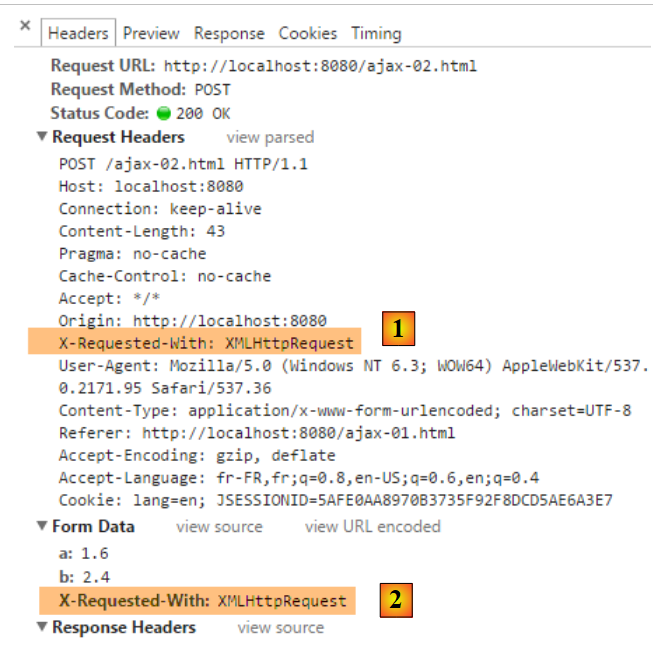 |
As shown above:
- a [X-Requested-With] header was sent with [1];
- a [X-Requested-With] parameter was added to the posted values of [2];
This is not done in the case of a standard POST. We therefore have two options for retrieving the information: retrieve it from the HTTP headers or from the posted values. Line 4 of the [/ajax-02] action chose the first solution.
Let’s continue with the code for this action:
@RequestMapping(value = "/ajax-02", method = RequestMethod.POST, produces = "text/html; charset=UTF-8")
    public String ajax02(@Valid ActionModel01 formulaire, BindingResult result, Locale locale, Model modèle, HttpSession session, HttpServletRequest request) throws InterruptedException {
        // ajax request?
        boolean isAjax = "XMLHttpRequest".equals(request.getHeader("X-Requested-With"));
        // tempo?
        Integer tempo = (Integer) session.getAttribute("tempo");
        if (tempo != null && tempo > 0) {
            Thread.sleep(tempo);
        }
        // prepare the model for the next view
        Resultats résultats = new Resultats();
        modèle.addAttribute("resultats", résultats);
        // we set the locale
        setLocale(locale, modèle, résultats);
        // hour
        String heure = new SimpleDateFormat("hh:mm:ss").format(new Date());
        résultats.setHeurePost(heure);
        résultats.setHeureGet(heure);
        // valid request?
        if (!isAjax && result.hasErrors()) {
            return "vue-01";
        }
...
- line 2: the parameter [@Valid ActionModel01 formulaire] triggers the server-side validators;
- lines 20–22: if the request is not an Ajax request and validation has failed, then the [vue-01.xml] view is returned with error messages.
Here is an example:
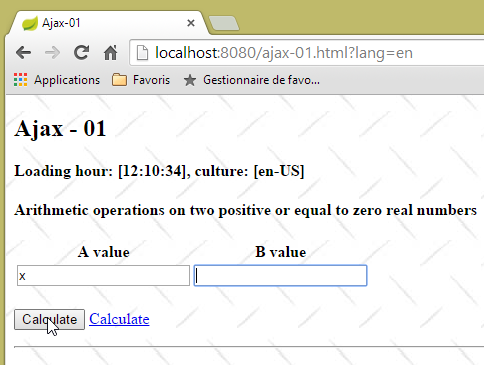 | 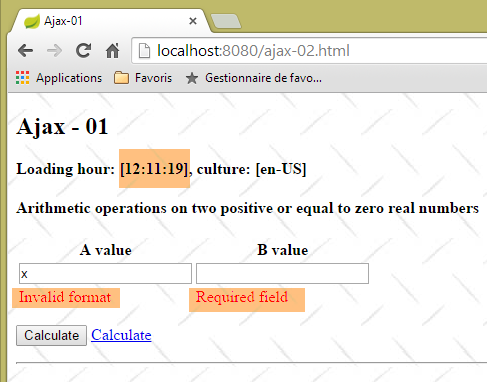 |
Let’s continue our examination of the [/ajax-02] action:
@RequestMapping(value = "/ajax-02", method = RequestMethod.POST, produces = "text/html; charset=UTF-8")
    public String ajax02(@Valid ActionModel01 formulaire, BindingResult result, Locale locale, Model modèle,    HttpSession session, HttpServletRequest request) throws InterruptedException {
        // ajax request?
        boolean isAjax = "XMLHttpRequest".equals(request.getHeader("X-Requested-With"));
...
        // valid request?
        if (!isAjax && result.hasErrors()) {
            return "vue-01";
        }
        // we generate an error every other time
        int val = new Random().nextInt(2);
        if (val == 0) {
            // an error message is returned
            résultats.setErreur("erreur.aleatoire");
            if (isAjax) {
                return "vue-03";
            } else {
                résultats.setVue("vue-03");
                return "vue-01";
            }
        }
...
- line 14: a random error is generated;
- line 16: in the case of an Ajax call, the view [vue-03.xml] is returned and placed in the area identified by [resultats];
- line 18: in the case of a non-Ajax call, the view to be displayed is placed in the [Resultats] model;
- line 19: the view [vue-01.xml] is rendered again;
The view [vue-01.xml] is modified as follows:
<div id="resultats" />
<div th:if="${resultats.vue}=='vue-02'" th:include="vue-02" />
<div th:if="${resultats.vue}=='vue-03'" th:include="vue-03" />
- Line 3: The view [vue-03.xml] will be inserted below the area [resultats];
Here is an example:
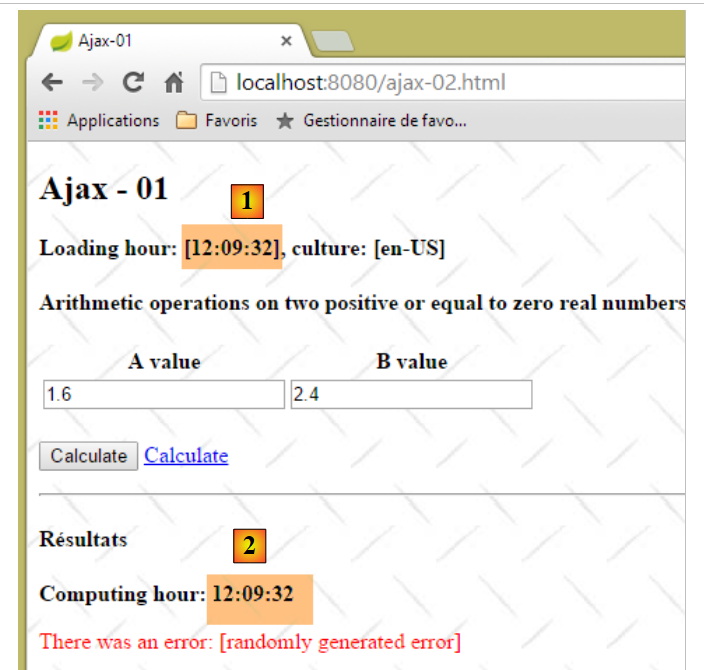 |
Note that the times [1] and [2] are now identical.
Let’s continue our examination of the [/ajax-02] action:
    @RequestMapping(value = "/ajax-02", method = RequestMethod.POST, produces = "text/html; charset=UTF-8")
    public String ajax02(@Valid ActionModel01 formulaire, BindingResult result, Locale locale, Model modèle, HttpSession session, HttpServletRequest request) throws InterruptedException {
        // ajax request?
        boolean isAjax = "XMLHttpRequest".equals(request.getHeader("X-Requested-With"));
...
        // retrieve posted values
        double a = formulaire.getA();
        double b = formulaire.getB();
        // we build the model
        résultats.setAplusb(String.valueOf(a + b));
        résultats.setAmoinsb(String.valueOf(a - b));
        résultats.setAmultiplieparb(String.valueOf(a * b));
        try {
            résultats.setAdiviseparb(String.valueOf(a / b));
        } catch (RuntimeException e) {
            résultats.setAdiviseparb("NaN");
        }
        // the view is displayed
        if (isAjax) {
            return "vue-02";
        } else {
            résultats.setVue("vue-02");
            return "vue-01";
        }
}
- lines 7–17: the results of the four arithmetic operations are placed in the template;
- lines 22-23: the view [vue-01.xml] (line 22) is rendered by inserting the view [vue-02.xml] (line 22);
This insertion is done as follows in [vue-01.xml]:
<div id="resultats" />
<div th:if="${resultats.vue}=='vue-02'" th:include="vue-02" />
<div th:if="${resultats.vue}=='vue-03'" th:include="vue-03" />
- Line 2: The view [vue-02.xml] will be inserted below the area [resultats];
Here is an example of execution:
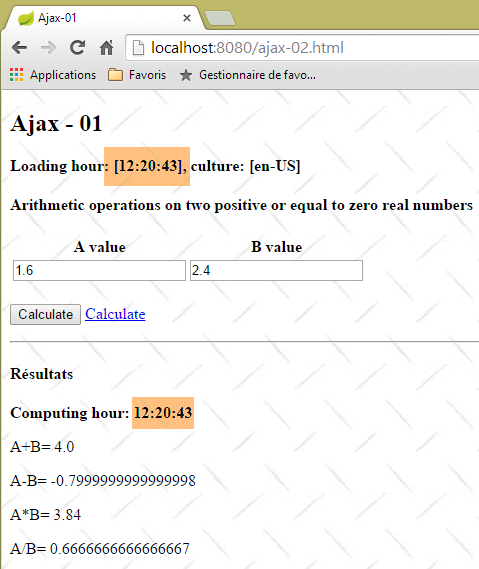 |
7.2.9. Deactivating Javascript with the [fr-FR] culture
With the [fr-FR] culture, we encounter the following problem:
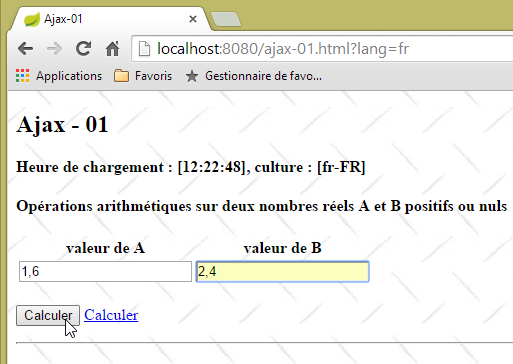 | 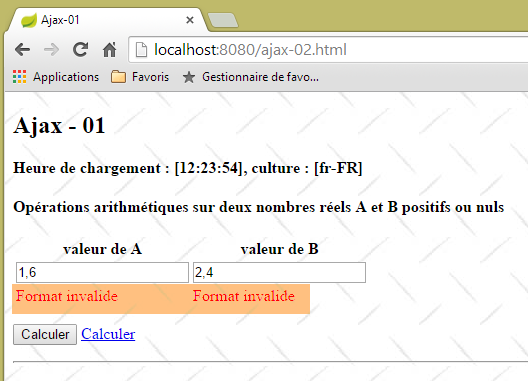 |
Values entered in the French format were declared invalid. This is because the server expects real numbers in the Anglo-Saxon format. The solution is quite complex. We will create a filter that will:
- intercept the request;
- replace the commas in the posted values [a] and [b] with decimal points;
- then pass the new request to the action that needs to process it;
First, we introduce a hidden field in the [vue-01.xml] view:
<form ...>
...
</p>
    <!-- hidden fields -->
    <input type="hidden" id="culture" name="culture" th:value="${resultats.culture}"></input>
</form>
- Line 5: The culture [fr-FR] or [en-US] is placed in the attribute field [name=culture]. Since the [input] tag is in the form, its value will be posted along with the values of [a] and [b]. We will then have a posted string in the form:
It is important to understand this point.
Next, we include a filter in the application configuration:
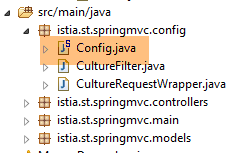 |
The file [Config] is modified as follows:
@Configuration
@ComponentScan({ "istia.st.springmvc.controllers", "istia.st.springmvc.models" })
@EnableAutoConfiguration
public class Config extends WebMvcConfigurerAdapter {
...
    @Bean
    public Filter cultureFilter() {
        return new CultureFilter();
    }
}
- line 7: the fact that the [cultureFilter] bean returns a [Filter] type makes it a filter. The bean itself can have any name;
The next step is to create the filter itself:
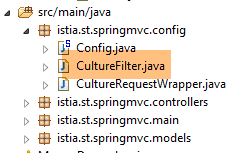 |
package istia.st.springmvc.config;

import java.io.IOException;

import javax.servlet.FilterChain;
import javax.servlet.ServletException;
import javax.servlet.http.HttpServletRequest;
import javax.servlet.http.HttpServletResponse;

import org.springframework.web.filter.OncePerRequestFilter;

public class CultureFilter extends OncePerRequestFilter {

    @Override
    protected void doFilterInternal(HttpServletRequest request, HttpServletResponse response, FilterChain filterChain)
            throws ServletException, IOException {
        // next handler
        filterChain.doFilter(new CultureRequestWrapper(request), response);
    }
}
- line 12: we extend the [OncePerRequestFilter] class, which is a Spring class, and what we need to do is override the [doFilterInternal] method of this class;
- line 15: the [doFilterInternal] method receives three pieces of information:
- [HttpServletRequest request]: the request to be filtered. This cannot be modified,
- [HttpServletResponse response]: the response to be sent to the server. The filter can choose to generate it itself,
- [FilterChain filterChain]: the filter chain. Once the [doFilterInternal] method has finished its work, it must pass the request to the next filter in the filter chain;
- line 18: a new request is created based on the one received ([new CultureRequestWrapper(request)]) and passed to the next filter. Because the initial request ([HttpServletRequest request]) cannot be modified, a new one is created;
The [CultureRequestWrapper] class is as follows:
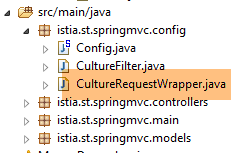 |
package istia.st.springmvc.config;

import javax.servlet.http.HttpServletRequest;
import javax.servlet.http.HttpServletRequestWrapper;

public class CultureRequestWrapper extends HttpServletRequestWrapper {

    public CultureRequestWrapper(HttpServletRequest request) {
        super(request);
    }

    @Override
    public String[] getParameterValues(String name) {
        // posted values a and b
        if (name != null && (name.equals("a") || name.equals("b"))) {
            String[] values = super.getParameterValues(name);
            String[] newValues = values.clone();
            newValues[0] = newValues[0].replace(",", ".");
            return newValues;
        }
        // other cases
        return super.getParameterValues(name);
    }

}
- line 6: the [CultureRequestWrapper] class extends the [HttpServletRequestWrapper] class and will redefine some of its methods;
- lines 8–10: the constructor that receives the request to be filtered and passes it to the parent class;
- It is important to understand here that the filtered request will ultimately end up as an input parameter for a class called a servlet. With Spring MVC, this servlet is of type [DispatcherServlet]. This class has various methods for retrieving request parameters: [getParameter, getParameterMap, getParameterNames, getParameterValues, ...]. The method used by the servlet must be redefined. To do this, one would need to read the code for the [DispatcherServlet] class. I did not do this and redefined various methods. Ultimately, it was the [getParameterValues] method that was redefined;
- line 13: the [getParameterValues] method receives as a parameter the name of one of the parameters returned by the [getParameterNames] method and must return an array of its values. Indeed, we know that a parameter can appear multiple times in a request;
- Line 18: Replace the comma with a decimal point;
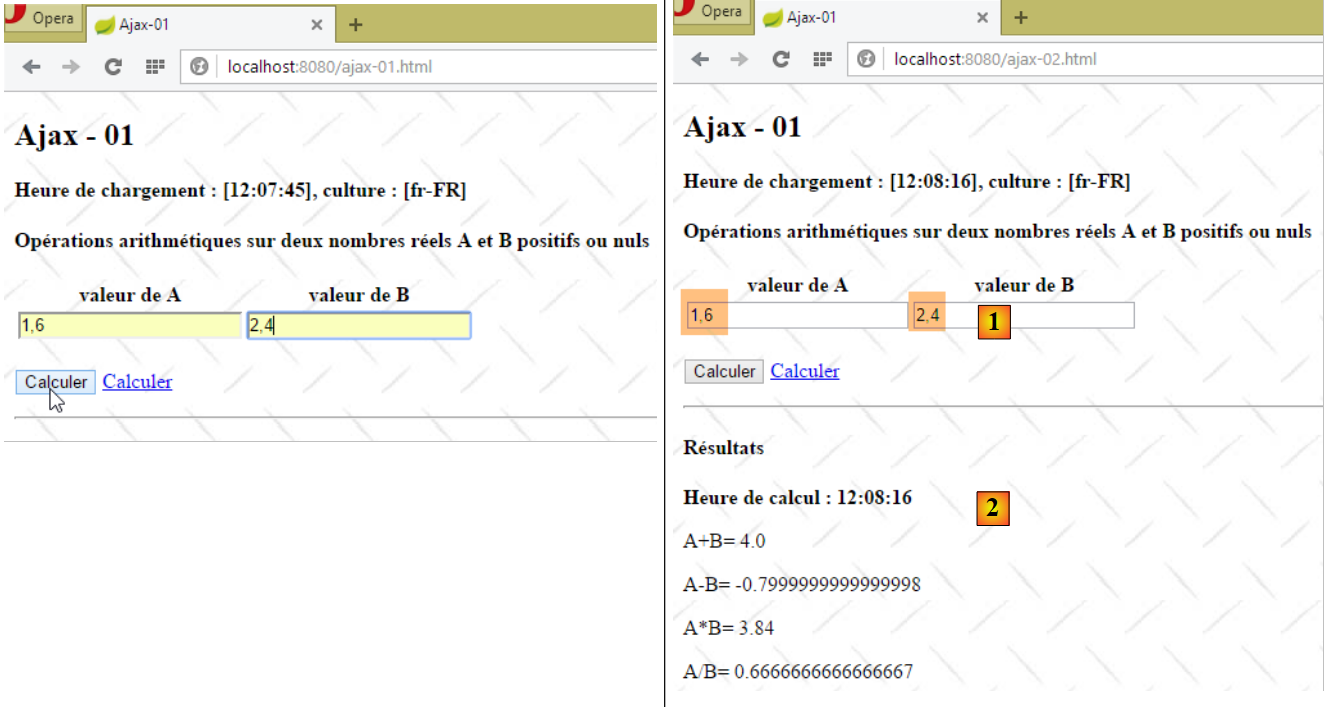
Here is an example of the output:
 |
- In [1], the values [a,b] are entered in French format;
- in [2], the results;
- In [3], the server returned a page with numbers in Anglo-Saxon format.
This last issue can be resolved with Thymeleaf as follows in the [vue-01.xml] view
<tr>
    <td>
        <input type="text" id="a" name="a"    th:value="${resultats.culture}=='fr-FR' and ${actionModel01.a}!=null? ${#strings.replace(actionModel01.a,'.',',')} : ${actionModel01.a}" data-val="true" th:attr="data-val-required=#{NotNull},data-val-number=#{typeMismatch},data-val-min=#{actionModel01.a.min},data-val-min-value=#{actionModel01.a.min.value}" />
    </td>
    <td>
        <input type="text" id="b" name="b" th:value="${resultats.culture}=='fr-FR' and ${actionModel01.b}!=null? ${#strings.replace(actionModel01.b,'.',',')} : ${actionModel01.b}" data-val="true" th:attr="data-val-required=#{NotNull},data-val-number=#{typeMismatch},data-val-min=#{actionModel01.b.min},data-val-min-value=#{actionModel01.b.min.value}" />
    </td>
</tr>
There are several changes to be made on lines 3 and 6. Let’s focus on line 3:
- we had written [th:field="*{a}"]. The parameter [th:field] sets the attributes [id, name, value] of the generated tag HTML [input]. Here, we want to manage the [value] attribute ourselves. So we also set the [id, name] attributes ourselves;
- the [th:value] attribute evaluates an expression using the ternary operator ?. We test the expression [${resultats.culture}=='fr-FR' and ${actionModel01.b}!=null]. If it is true, we set the attribute [value] to the value of [actionModel01.a], where the decimal point is replaced by a comma. If it is false, the attribute [value] is assigned the value of [actionModel01.a] without any changes;
- Line 6: We do the same thing for the field [b];
Here is an example of the result:
 |
- In [1], the numbers in [a,b] have retained the French notation. This is not the case in [2];
This new issue is handled in the same way as the previous one. Modify the [vue-03.xml] view as follows:
<!DOCTYPE HTML>
<html xmlns:th="http://www.thymeleaf.org">
    <body>
        <h4 th:text="#{resultats}">Résultats</h4>
        <p>
            <strong>
                <span th:text="#{labelHeureCalcul}">Heure de calcul :</span>
                <span id="heureCalcul" th:text="${resultats.heurePost}"></span>
            </strong>
        </p>
        <p>
            <span th:text="#{labelAplusB}">A+B=</span>
            <span id="aplusb" th:text="${resultats.culture}=='fr-FR' and ${resultats.aplusb}!=null? ${#strings.replace(resultats.aplusb,'.',',')} : ${resultats.aplusb}"></span>
        </p>
        <p>
            <span th:text="#{labelAmoinsB}">A-B=</span>
            <span id="amoinsb"     th:text="${resultats.culture}=='fr-FR' and ${resultats.amoinsb}!=null? ${#strings.replace(resultats.amoinsb,'.',',')} : ${resultats.amoinsb}"></span>
        </p>
        <p>
            <span th:text="#{labelAfoisB}">A*B=</span>
            <span id="amultiplieparb" th:text="${resultats.culture}=='fr-FR' and ${resultats.amultiplieparb}!=null? ${#strings.replace(resultats.amultiplieparb,'.',',')} : ${resultats.amultiplieparb}"></span>
        </p>
        <p>
            <span th:text="#{labelAdivB}">A/B=</span>
            <span id="adiviseparb" th:text="${resultats.culture}=='fr-FR' and ${resultats.adiviseparb}!=null? ${#strings.replace(resultats.adiviseparb,'.',',')} : ${resultats.adiviseparb}"></span>
        </p>
    </body>
</html>
Here is an example:
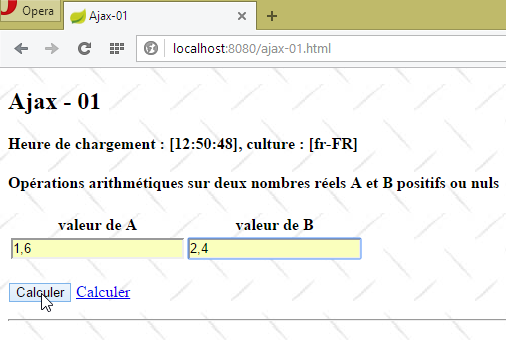 |  |
We now have an application that correctly handles two locales in an environment that may or may not use Javascript. This required significantly increasing the complexity of the server-side code. Moving forward, we will always assume that the browser’s Javascript is enabled. This enables features that are impossible in server-only mode.
7.2.10. Handling the [Calculer] link
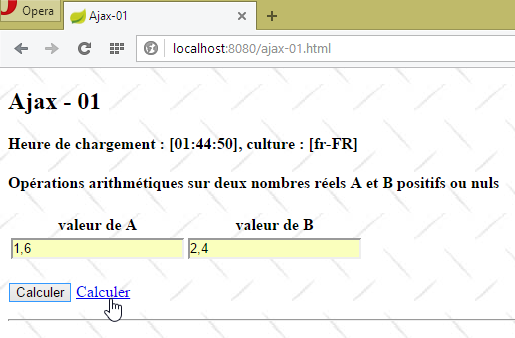
Let’s examine the [Calculer] link on the main page [vue-01.xml]:
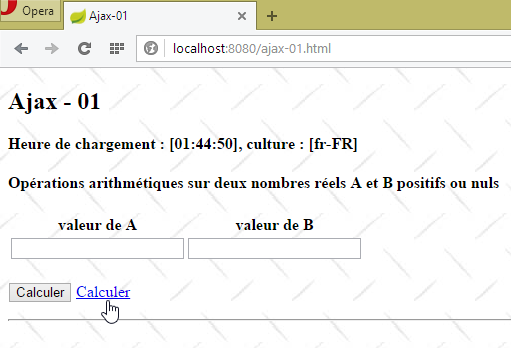 |  |
The code for the [Calculer] link in the [vue-01.xml] view is as follows:
<a href="javascript:postForm()" th:text="#{action.calculer}">Calculer</a>
The function jS [postForm] is defined in the file [local1.js] as follows:
// global data
var loading;
var formulaire;
var résultats;
var a, b;

function postForm() {
    // valid form?
    if (!formulaire.validate().form()) {
        // invalid form - terminated
        return;
    }
    // we manage two [fr_FR, en_US] locales
    // real [a,b] must be posted in Anglo-Saxon format in all cases
    // they will be filtered by [CultureFilter]

    // make a manual Ajax call
    $.ajax({
        url : '/ajax-02',
        headers : {
            'X-Requested-With' : 'XMLHttpRequest'
        },
        type : 'POST',
        data : formulaire.serialize(),
        dataType : 'html',
        beforeSend : function() {
            loading.show();
        },
        success : function(data) {
            resultats.html(data);
        },
        complete : function() {
            loading.hide();
        },
        error : function(jqXHR) {
            résultats.html(jqXHR.responseText);
        }
    })
}
- lines 2–5: note that these elements were initialized by the [$(document).ready] function;
- lines 9-12: the form’s jS validators are executed. If any of the values is invalid, the [formulaire.validate().form()] expression returns false. In this case, the form’s [submit] is canceled;
- lines 18–38: a manual Ajax call is made;
- line 19: the URL target of the Ajax call;
- lines 20-22: an array of headers to be added to those present by default in the request. Here, we add the HTTP header, which will indicate to the server that we are making an Ajax call;
- line 23: the HTTP method used;
- line 24: the posted data. [formulaire.serialize] creates the string to be posted [culture=fr-FR&a=12,7&b=20,89] from the id [formulaire] form. Here we encounter the problem discussed earlier: the [a,b] values must be posted in Anglo-Saxon format. We know that this problem has now been resolved with the creation of the [cultureFilter] filter;
- line 25: the expected return data type. We know that the server will return a HTML stream;
- line 26: the method to execute when the request starts. Here, we specify that the id component [loading] must be displayed. This is the loading animation;
- line 29: the method to execute if the Ajax request is successful. The parameter [data] is the complete server response. We know this is a HTML stream;
- line 30: we update the id component with the HTML from the [data] parameter.
- line 33: the wait signal is cleared;
- line 35: function executed when the server response is received, regardless of whether it is a success or an error;
- lines 35–37: in case of an error (the server returned a HTTP response with a status indicating a server-side error), the server’s HTML response is displayed in the [resultats] field;
Here is an example of execution:
 |  |
7.3. Updating a HTML page with a jSON feed
In the previous example, the web server responded to the HTTP Ajax request with a HTML stream. This stream contained data accompanied by HTML formatting. We propose to revisit the previous example, this time with jSON (JavaScript Object Notation) responses containing only the data. The advantage is that fewer bytes are transmitted. We assume that Javascript is enabled in the browser.
7.3.1. The [/ajax-04] action
The action [/ajax-04] is identical to the action [/ajax-01], except that the view [vue-04.xml] is displayed instead of the view [vue-01.xml]:
@RequestMapping(value = "/ajax-04", method = RequestMethod.GET, produces = "text/html; charset=UTF-8")
    public String ajax04(Locale locale, Model modèle, HttpSession session, String tempo) {
        ...
        // view
        return "vue-04";
    }
7.3.2. The [vue-04.xml] view
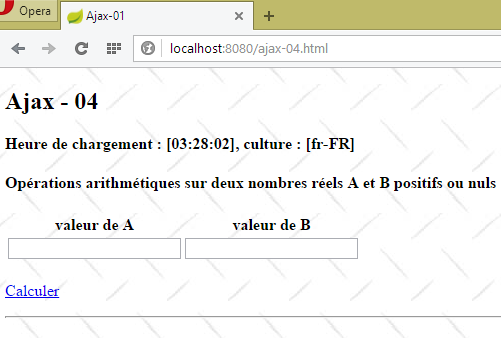 |
The view [vue-04.xml] uses the body of the view [vue-01.xml] with the following differences:
<!DOCTYPE HTML>
<html xmlns:th="http://www.thymeleaf.org">
    <head>
        ...
        <script type="text/javascript" src="/js/local4.js"></script>
        <script th:inline="javascript">
            /*<![CDATA[*/
                    var culture = [[${resultats.culture}]];
                    Globalize.culture(culture);
                    /*]]>*/
        </script>
    </head>
    <body>
        <h2>Ajax - 04</h2>
    ...
        <form id="formulaire" name="formulaire" th:object="${actionModel01}">
...
            <p>
                <img id="loading" style="display: none" src="/images/loading.gif" />
                <a href="javascript:postForm()" th:text="#{action.calculer}">Calculer</a>
            </p>
            <!-- hidden fields -->
            <input type="hidden" id="culture" name="culture" th:value="${resultats.culture}"></input>
</form>
        <hr />
        <div id="entete">
            <h4 id="titre">Résultats</h4>
            <p>
                <strong>
                    <span id="labelHeureCalcul">Heure de calcul :</span>
                    <span id="heureCalcul">12:10:87</span>
                </strong>
            </p>
        </div>
        <div id="résultats">
            <p>
                A+B=
                <span id="aplusb">16,7</span>
            </p>
            <p>
                A-B=
                <span id="amoinsb">16,7</span>
            </p>
            <p>
                A*B=
                <span id="afoisb">16,7</span>
            </p>
            <p>
                A/B=
                <span id="adivb">16,7</span>
            </p>
        </div>
        <div id="erreur">
            <p style="color: red;">
                <span id="msgErreur">xx</span>
            </p>
        </div>
    </body>
</html>
- line 5: the Javascript from the view is now in the [local4.js] file;
- line 16: the [form] tag no longer has the [data-ajax-attr] parameters from the [Unobtrusive Ajax] library. We will not be using it here. The [form] tag also no longer has the [method] and [action] attributes, which specify how and where to submit the values entered in the form. This is because it will be posted by a jS function (line 20);
- lines 26–57: the field id [resultats], which was previously empty, now contains code HTML to display the results;
- lines 26–34: the results header where the calculation time is displayed;
- lines 35–52: the results of the four arithmetic operations;
- lines 53-57: any error messages sent by the server;
The code jS executed when loading the view [vue-04.xm] is in the file [local4.js]. It is as follows:
// global data
    var loading;
    var formulaire;
    var résultats;
    var titre;
    var labelHeureCalcul;
    var heureCalcul;
    var aplusb;
    var amoinsb;
    var afoisb;
    var adivb;
    var msgErreur;

// document loading
$(document).ready(function() {
    // retrieve the references of the page's various components
    loading = $("#loading");
    formulaire = $("#formulaire");
    résultats = $('#résultats');
    titre=$("#titre");
    labelHeureCalcul=$("#labelHeureCalcul");
    heureCalcul=$("#heureCalcul");
    aplusb=$("#aplusb");
    amoinsb=$("#amoinsb");
    afoisb=$("#afoisb");
    adivb=$("#adivb");
    msgErreur=$("#msgErreur");
    // we hide certain elements
    résultats.hide();
    erreur.hide();
    loading.hide();
});
- lines 17–27: retrieve the jQuery references for all elements on the page;
- line 29: the results area is hidden;
- line 30: as well as the error area;
- line 31: as well as the animated loading image;
- lines 2-12: the retrieved references are made global so that other functions can use them;
7.3.3. The function jS [postForm]
The link [Calculer] is as follows:
<p>
    <img id="loading" style="display: none" src="/images/loading.gif" />
    <a href="javascript:postForm()" th:text="#{action.calculer}">Calculer</a>
</p>
The jS [postForm] function is defined in the [local.js] file as follows:
function postForm() {
    // valid form?
    if (!formulaire.validate().form()) {
        // invalid form - terminated
        return;
    }
    // make a manual Ajax call
    $.ajax({
        url : '/ajax-05',
        headers : {
            'Accept' : 'application/json'
        },
        type : 'POST',
        data : formulaire.serialize(),
        dataType : 'json',
        beforeSend : onBegin,
        success : onSuccess,
        error : onError,
        complete : onComplete
    })
}

// before the Ajax call
function onBegin() {
...
}

// on receipt of the server response
// in case of success
function onSuccess(data) {
...
}

// on receipt of the server response
// in case of failure
function onError(jqXHR) {
...
}

// after [onSuccess, onError]
function onComplete() {
...
}
- lines 3–6: Before submitting the entered values, we verify them. If they are incorrect, we do not process the form using POST;
- line 9: the entered values are sent to the [/ajax-05] action, which we’ll detail a bit further on;
- lines 10–12: a HTTP header to tell the server that we are expecting a response in jSON format;
- line 13: the entered values will be posted;
- line 14: serialization of the entered values into a string ready to be posted as [a=1,6&b=2,4&culture=fr-FR];
- line 15: the type of response sent by the server. This will be jSON;
- line 16: the function to execute before the POST;
- line 17: the function to execute upon receipt of the server’s response if it is successful. The “success” of a HTTP request is determined by the status of the server’s HTTP response. A [HTTP/1.1 200 OK ] response is a successful response. A [HTTP/1.1 500 Internal Server Error] response is a failed response. The status of a HTTP response is the code [200] or [500]. Some of these codes are associated with 'success' while others are associated with 'failure';
- line 18: the function to be executed upon receipt of the server response when the status HTTP of this response is a failure status;
- line 18: the function to be executed last, after the preceding [onSuccess, onError] functions;
The function [onBegin] is as follows:
// before the Ajax call
function onBegin() {
    console.log("onBegin");
    // we show the moving image
    loading.show();
    // hide certain elements of the view
    entete.hide();
    résultats.hide();
    erreur.hide();
}
Before examining the other jS functions in the Ajax call, we need to know the response sent by the [/ajax-05] action.
7.3.4. The [/ajax-05] action
The [/ajax-05] action is as follows:
    @RequestMapping(value = "/ajax-05", method = RequestMethod.POST)
    @ResponseBody()
    // processes the POST of the [vue-04] view
    public JsonResults ajax05(@Valid ActionModel01 formulaire, BindingResult result, Locale locale,    HttpServletRequest request, HttpSession session) throws InterruptedException {
        if(result.hasErrors()){
            // abnormal case - nothing returned
            return null;
        }
        ...
}
- line 2: the [ResponseBody] attribute indicates that the [/ajax-05] action itself returns the response to the client. Because a jSON library is included in the project dependencies, Spring Boot automatically configures this type of action to return jSON. Therefore, it is the jSON string of type [JsonResults] (line 4) that will be sent to the client;
- Line 2: The posted values [a, b, culture] will be encapsulated in a [ActionModel01] type, for which validation [@Valid ActionModel01] is requested. This is just for formality. We assumed that JavaScript was enabled on the client browser, so when they arrive, the posted values have already been verified on the client side. However, we can anticipate the case of a rogue POST that would not use our jS client. In this case, validation may fail;
- lines 5–7: in case of an error, an empty jSON stream is returned;
Let’s continue our examination of the [/ajax-05] action:
    @RequestMapping(value = "/ajax-05", method = RequestMethod.POST)
    @ResponseBody()
    // processes the POST of the [vue-04] view
    public JsonResults ajax05(@Valid ActionModel01 formulaire, BindingResult result, Locale locale,
            HttpServletRequest request, HttpSession session) throws InterruptedException {
...
        // spring application context
        WebApplicationContext ctx = WebApplicationContextUtils.getWebApplicationContext(request.getServletContext());
        // tempo?
        Integer tempo = (Integer) session.getAttribute("tempo");
        if (tempo != null && tempo > 0) {
            Thread.sleep(tempo);
        }
    ...
        // we return the result
        return résultats;
}
- Line 8: We retrieve the [ctx] context from the Spring application. We need this to retrieve messages from the [messages.properties] files using a message key and a locale. This is done using the following syntax:
ctx.getMessage(clé_message, tableau_de_paramètres, locale)
- [clé_message]: the key of the message being searched for;
- [locale]: the locale used. Thus, if this locale is [en_US], the file [messages_en.properties] will be used;
- [tableau_de_paramètres]: the resulting message can be configured as in [clé=message {0} {1}]. There are two parameters in this message: [{0} {1}]. As the second parameter for [ctx.getMessage], you must provide an array of two values;
- lines 10–13: if there is a timeout in the session, the current thread is paused for the duration of the timeout;
The [/ajax-05] action continues as follows:
        // prepare the model for the next view
        JsonResults résultats = new JsonResults();
        ...
}
- line 2: creation of the template for the jSON string sent to the client;
The [JsonResults] model is as follows:
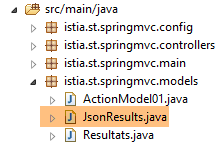 |
package istia.st.springmvc.models;

public class JsonResults {

    // data
    private String titre;
    private String labelHeureCalcul;
    private String heureCalcul;
    private String aplusb;
    private String amoinsb;
    private String afoisb;
    private String adivb;
    private String msgErreur;

    // getters and setters
...

}
- lines 6–13: Each field in the [JsonResult] class corresponds to a field of the same name in the [id] class within the [vue-04.xml] view:
The [/ajax-05] action continues as follows:
        // prepare the model for the next view
        JsonResults résultats = new JsonResults();
        // header
        résultats.setTitre(ctx.getMessage("resultats.titre", null, locale));
        résultats.setLabelHeureCalcul(ctx.getMessage("labelHeureCalcul", null, locale));
        résultats.setHeureCalcul(new SimpleDateFormat("hh:mm:ss").format(new Date()));
        // we generate an error every other time
        int val = new Random().nextInt(2);
        if (val == 0) {
            // an error message is returned
            résultats.setMsgErreur(ctx.getMessage("resultats.erreur",
                    new Object[] { ctx.getMessage("erreur.aleatoire", null, locale) }, locale));
            return résultats;
}
- line 2: create the template for the jSON string sent to the client;
- lines 4–6: create the messages for the results header;
- lines 8–14: on average, an error message is generated every other time. In this case, the process stops there and the string jSON is returned to the client (line 13);
- line 11: here is an example of a configured message:
erreur.aleatoire=erreur aléatoire
resultats.erreur=Une erreur s''est produite : [{0}]
The [/ajax-05] action continues as follows:
        // retrieve posted values
        double a = formulaire.getA();
        double b = formulaire.getB();
        // we build the model
        résultats.setAplusb(String.valueOf(a + b));
        résultats.setAmoinsb(String.valueOf(a - b));
        résultats.setAfoisb(String.valueOf(a * b));
        try {
            résultats.setAdivb(String.valueOf(a / b));
        } catch (RuntimeException e) {
            résultats.setAdivb("NaN");
        }
        // we return the result
return résultats;
- lines 2-3: retrieve the values of [a] and [b];
- lines 5-12: construct the four results;
- line 14: the string jSON [JsonResults] is sent to the client;
Let’s see what happens with the client [Advanced Rest Client]:
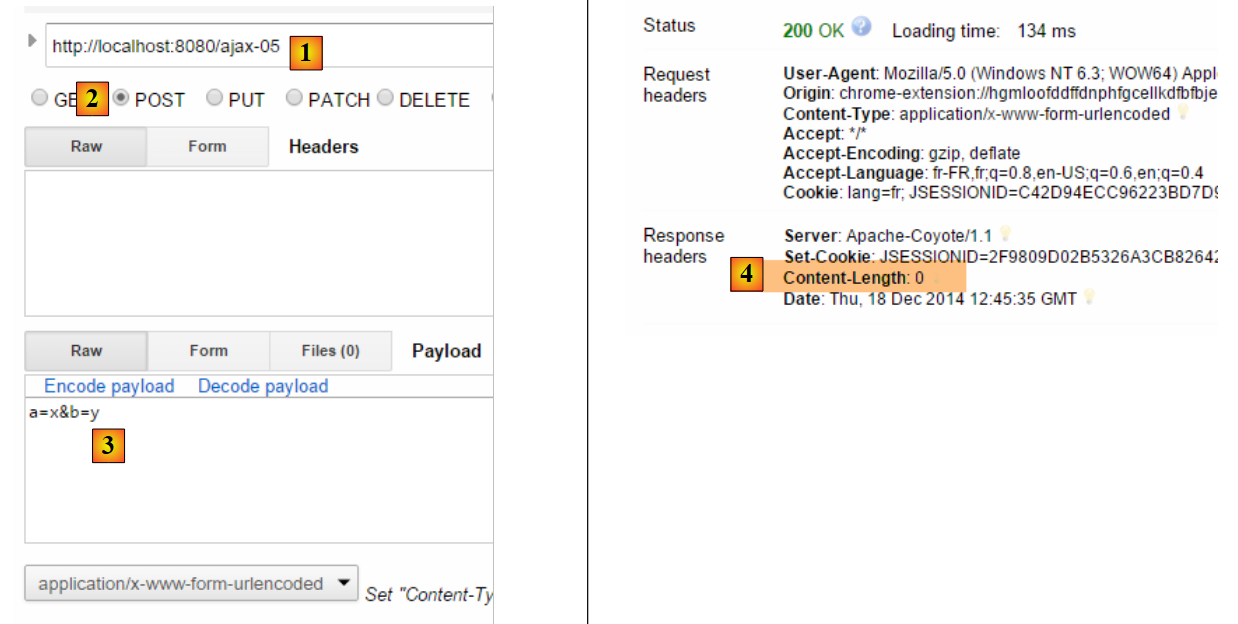 |
- in [1-2], a request POST is made to the action [/ajax-05];
- In [3], incorrect values are posted;
- In [4], the server returned an empty response;
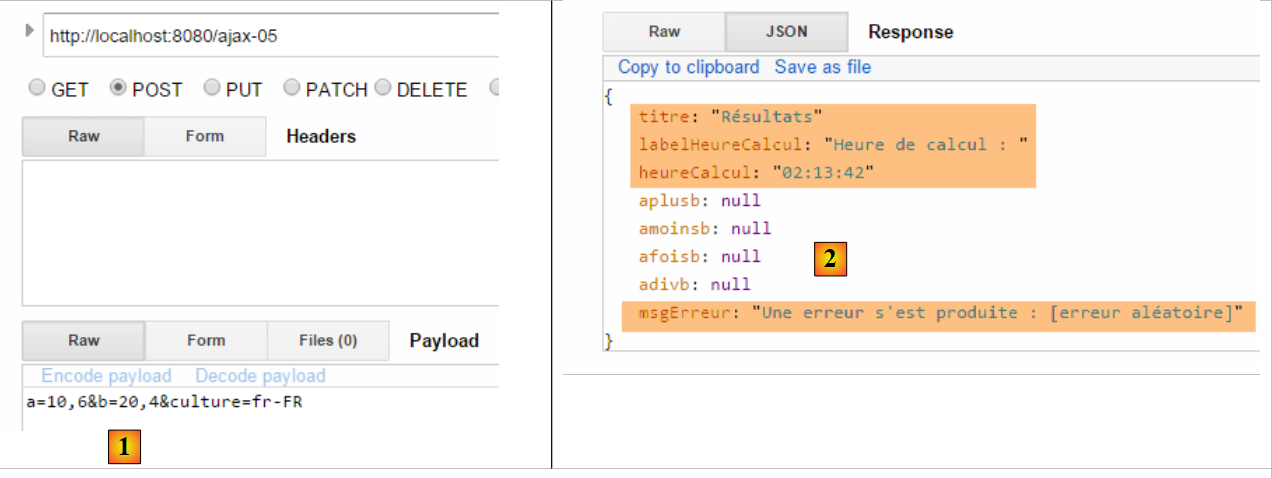 |
- in [1], correct values are posted;
- in [2], the jSON object returned by the server, with an error message here;
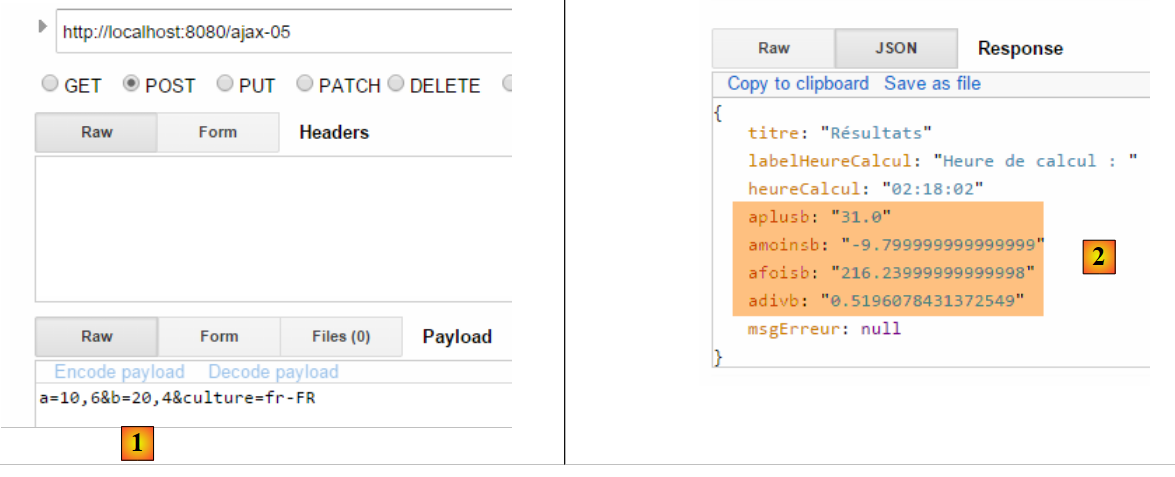 |
- in [1], correct values are posted;
- in [2], the jSON object returned by the server, showing the four results;
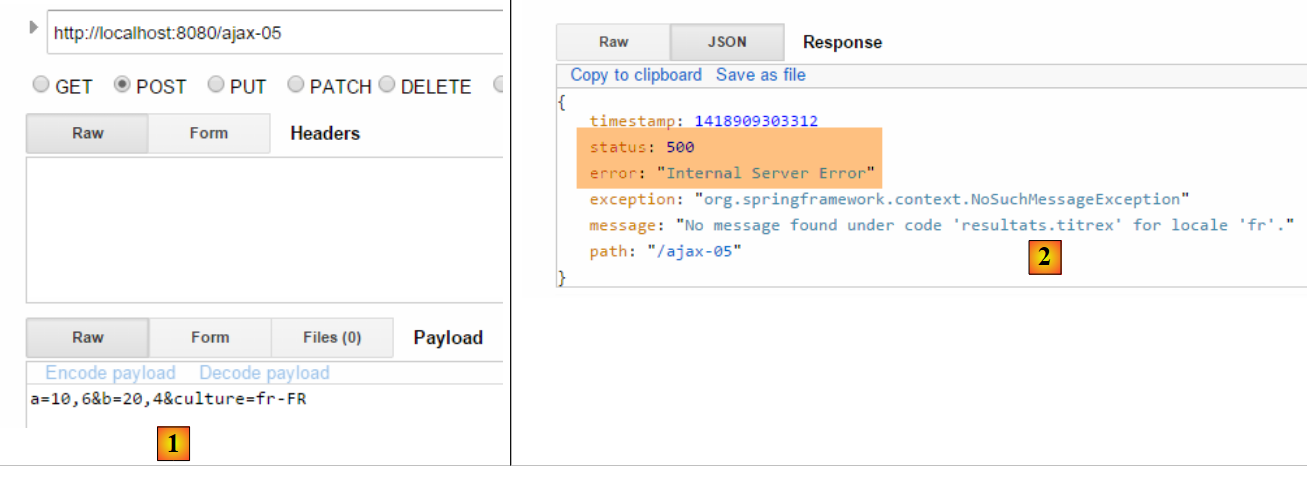 |
- In [1], correct values are posted;
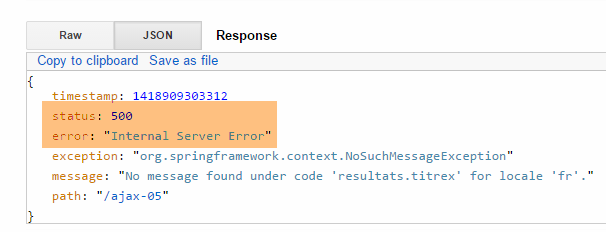
- In [2], we managed to trigger a server-side exception. We see that the server still sends a jSON object. In this message, we see that the response status HTTP is [500], indicating that there was a server-side error;
7.3.5. The jS [postForm] function - 2
Now that we know the jSON object returned by the server, we can use it in javascript. The [onSuccess] method executed when the server sends a response with status HTTP [200] is as follows:
// on receipt of the server response
// in case of success
function onSuccess(data) {
    console.log("onSuccess");
    // fill in the results area
    titre.text(data.titre);
    labelHeureCalcul.text(data.labelHeureCalcul);
    heureCalcul.text(data.heureCalcul);
    entete.show();
    // error-free results
    if (!data.msgErreur) {
        aplusb.text(data.aplusb);
        amoinsb.text(data.amoinsb);
        afoisb.text(data.afoisb);
        adivb.text(data.adivb);
        résultats.show();
        return;
    }
    // results with error
    msgErreur.text(data.msgErreur);
    erreur.show();
}
- Line 3: The parameter [data] is the jSON object returned by the server:
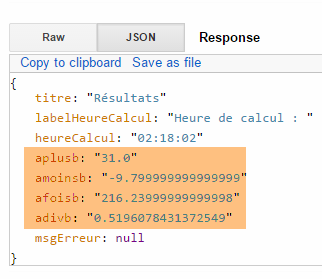 |
The [onError] method executed when the status of the HTTP response is [500] is as follows:
// on receipt of the server response
// in case of failure
function onError(jqXHR) {
    console.log("onError");
    // system error
    msgErreur.text(jqXHR.responseText);
    erreur.show();
}
- line 3: the object JQuery [jqXHR] has the following properties:
- responseText: the text of the server response,
- status: the error code returned by the server,
- statusText: the text associated with this error code;
- line 6: the object [jqXHR.responseText] is the following object jSON:
 |
7.3.6. Tests
Let’s look at some screenshots of the web application in action:
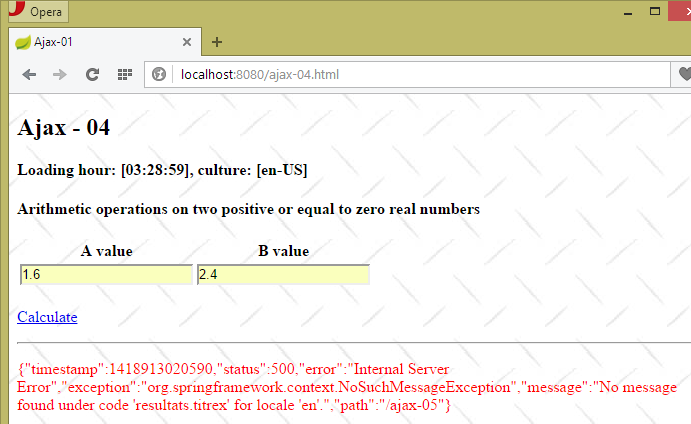 |
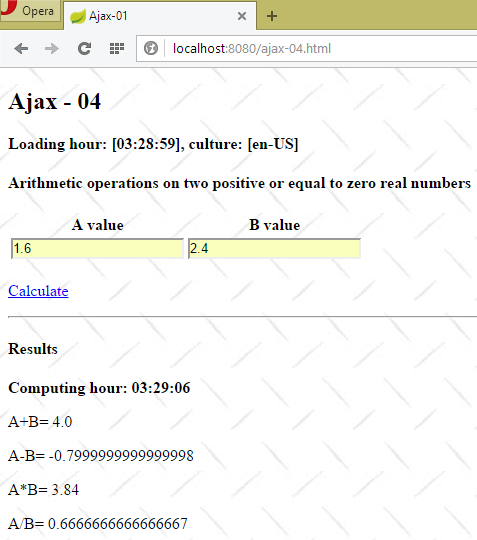 |
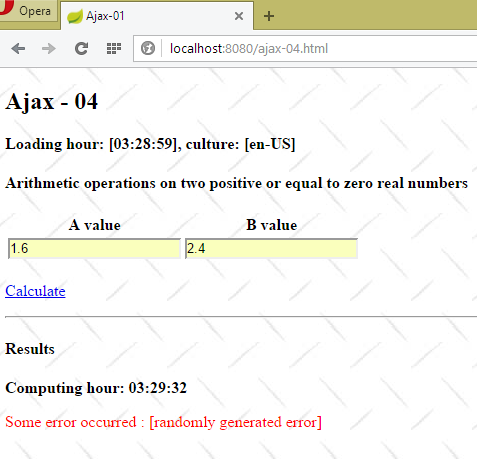 |
7.4. Single-page web application
7.4.1. Introduction
Ajax technology allows you to build single-page applications:
- the first page is loaded via a standard browser request;
- subsequent pages are loaded via Ajax calls. As a result, the browser never changes the URL and never loads a new page. This type of application is called a Single-Page Application (APU).
Here is a basic example of such an application. The new application will have two views:
 |
 |
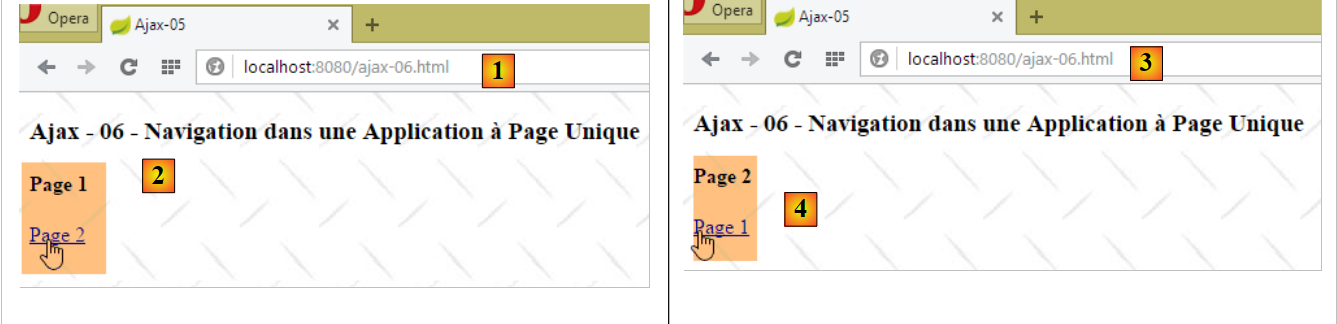
- in [1], the action [/ajax-06] allows us to access the first page, page 1;
- in [2], a link allows us to navigate to page 2 via an Ajax call;
- In [3], URL has not changed. The page displayed is page 2;
- In [4], a link allows us to return to page 1 via an Ajax call;
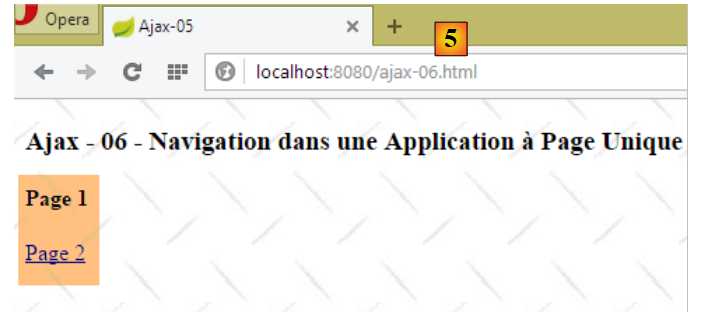
- In [5], URL has not changed. The page displayed is page 1.
7.4.2. The [/ajax-06] action
The code for the [/ajax-06] action is as follows:
    @RequestMapping(value = "/ajax-06", method = RequestMethod.GET, produces = "text/html; charset=UTF-8")
    public String ajax06() {
        return "vue-06";
}
- lines 1-4: the [/ajax-06] action simply renders the [vue-06.xml] view;
7.4.3. The view [vue-06.xml]
The view [vue-06.xml] is as follows:
<!DOCTYPE HTML>
<html xmlns:th="http://www.thymeleaf.org">
    <head>
        <meta name="viewport" content="width=device-width" />
        <title>Ajax-06</title>
        <link rel="stylesheet" href="/css/ajax01.css" />
        <script type="text/javascript" src="/js/jquery/jquery-2.1.1.min.js"></script>
        <script type="text/javascript" src="/js/local6.js"></script>
    </head>
    <body>
        <h3>Ajax - 06 - Navigation dans une Application à Page Unique</h3>
        <div id="content" th:include="vue-07" />
    </body>
</html>
- line 8: the view uses a script [local6.js];
- line 12: the view [vue-07.xml] is included in the id [content] area of the view [vue-06.xml];
7.4.4. The view [vue-07.xml]
The view [vue-07.xml] is as follows:
<!DOCTYPE HTML>
<html xmlns:th="http://www.thymeleaf.org">
    <body>
        <h4>Page 1</h4>
        <p>
            <a href="javascript:gotoPage(2)">Page 2</a>
        </p>
    </body>
</html>
7.4.5. The function jS [gotoPage]
The [Page 2] link in the [vue-07.xml] view uses the jS [gotoPage] function defined in the following [local6.js] file:
// global data
var content;

function gotoPage(num) {
    // make a manual Ajax call
    $.ajax({
        url : '/ajax-07',
        type : 'POST',
        data : 'num=' + num,
        dataType : 'html',
        beforeSend : function() {
        },
        success : function(data) {
            content.html(data)
        },
        complete : function() {
        },
        error : function(jqXHR) {
            // system error
            content.html(jqXHR.responseText);
        }
    })
}

// document loading
$(document).ready(function() {
    // retrieve the references of the page's various components
    content = $("#content");
});
- line 28: when the page loads, we store the area of id [content] and make it a global variable (line 2);
- line 4: the [gotoPage] function receives as a parameter the page number (1 or 2) to be displayed in the current view;
- line 7: the URL is the target of the POST;
- line 8: the URL from line 7 is called via a POST;
- line 9: the posted string. A parameter named [num] is posted. Its value is the page number (line 4) to be displayed in the current view;
- line 10: the server will return HTML, the value for the page to be displayed;
- lines 13–15: if successful (status HTTP equal to 200), the HTML sent by the server is placed in the id [content] field;
- lines 18–20: in case of failure (status HTTP equal to 500), the HTML sent by the server is placed in the id [content] zone;
7.4.6. The [/ajax-07] action
The code for action [/ajax-07] is as follows:
@RequestMapping(value = "/ajax-07", method = RequestMethod.POST, produces = "text/html; charset=UTF-8")
    public String ajax07(int num) {
        // num : page number
        switch (num) {
        case 1:
            return "vue-07";
        case 2:
            return "vue-08";
        default:
            return "vue-07";
        }
    }
- line 2: we retrieve the posted parameter named [num]. Note that the parameter on line 2 must have the same name as the posted parameter, in this case [num]. [num] is a page or view number;
- lines 5–6: if [num==1], we return the view [vue-07.xml];
- lines 7-8: if [num==2], return view [vue-08.xml];
- lines 9-10: in all other cases (which is normally impossible), the view [vue-07.xml] is returned;
7.4.7. The view [vue-08.xml]
The view [vue-08.xml] forms page 2 of the application:
<!DOCTYPE HTML>
<html xmlns:th="http://www.thymeleaf.org">
    <body>
        <h4>Page 2</h4>
        <p>
            <a href="javascript:gotoPage(1)">Page 1</a>
        </p>
    </body>
</html>
7.5. Include multiple HTML streams in a jSON response
7.5.1. Introduction
Consider the following application:
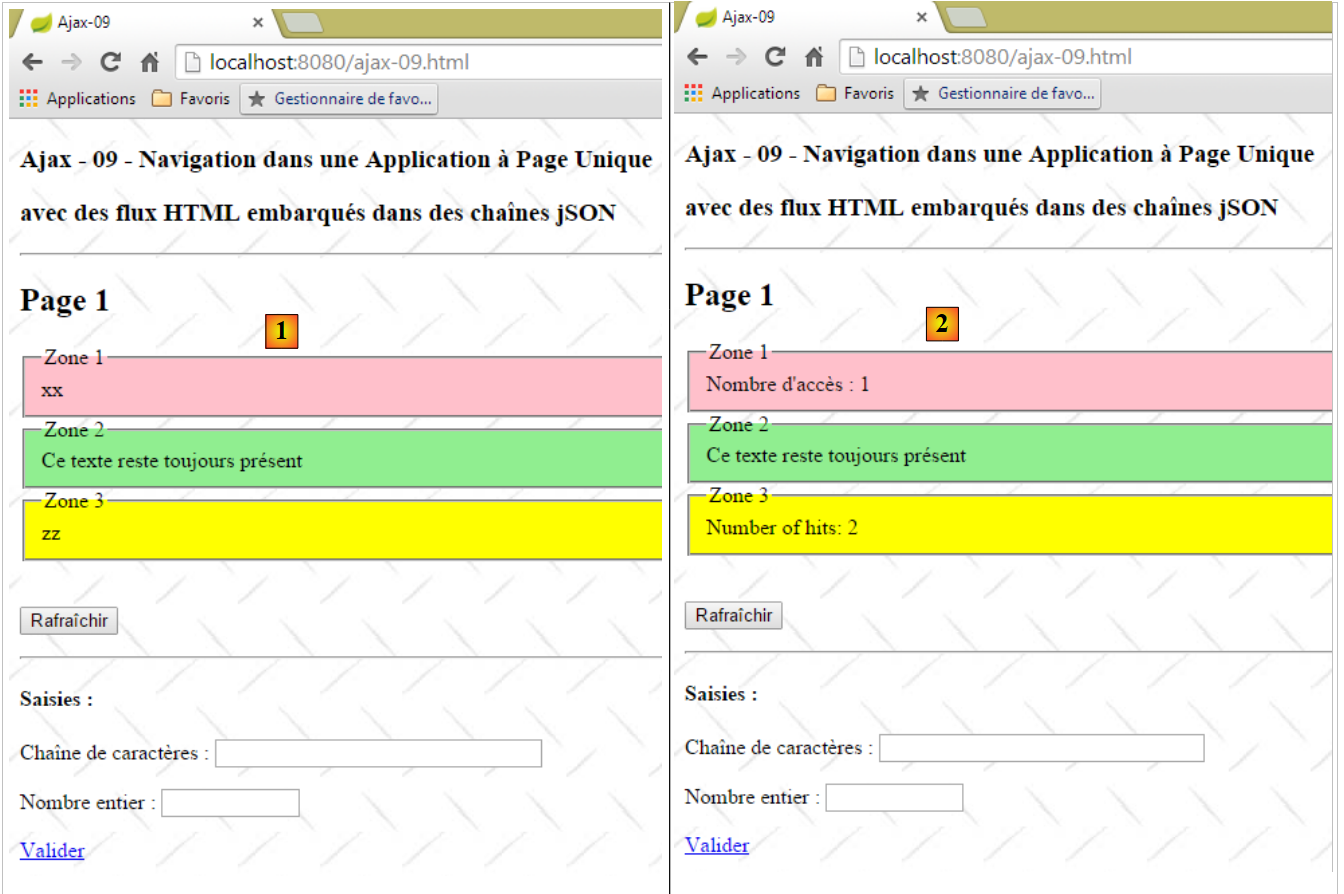 |
The [1] page has four fields:
- [Zone 1, Zone 3] are areas that appear/disappear when the [Rafraîchir] button is clicked. We count the number of times each of these two fields appears: [2]. The field [Zone 1] uses the French language, while the field [Zone 3] uses the English language;
- The field [Zone 2] is always present;
- The [Saisies] zone is always present;
The link [Valider] displays the following page, [3]:
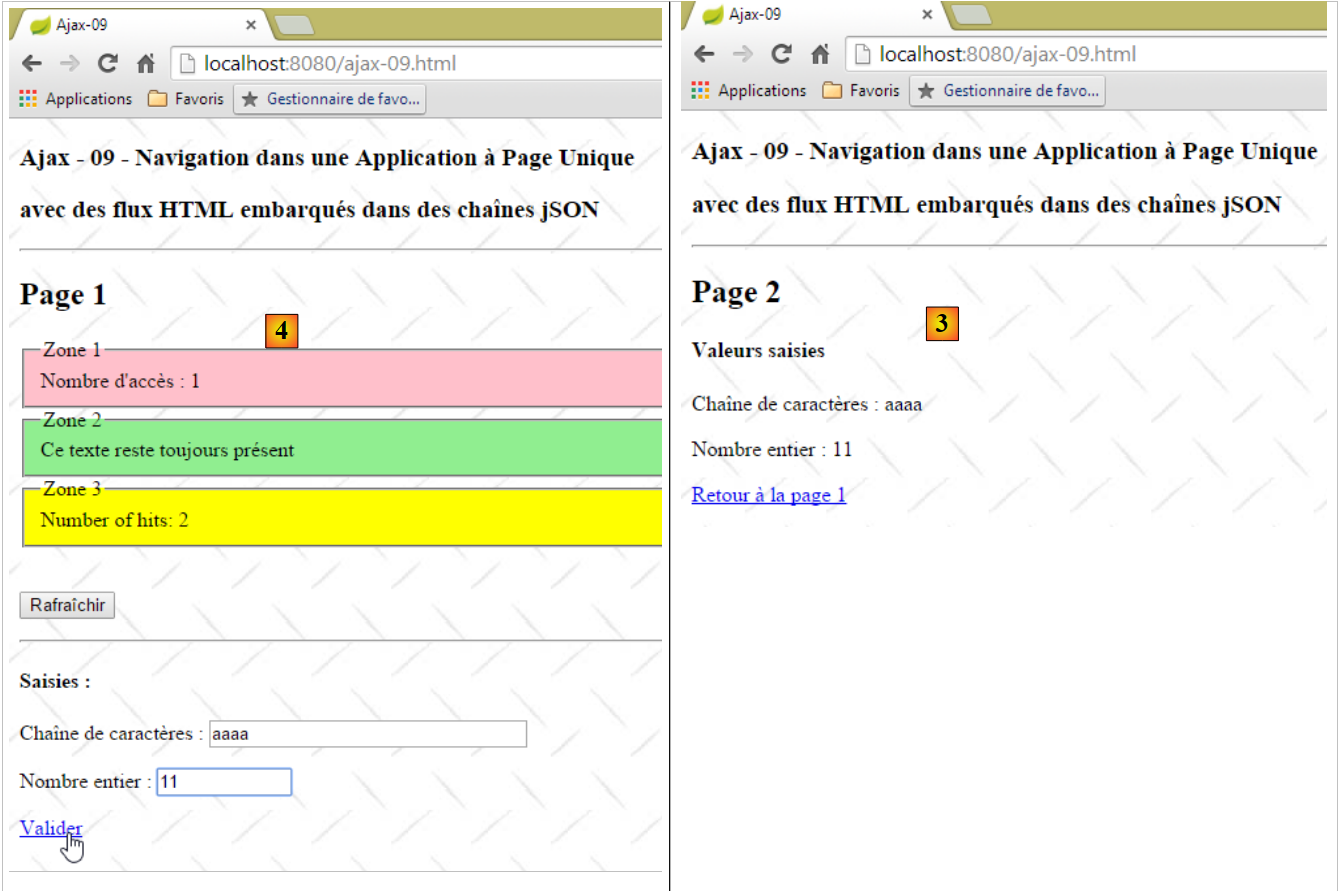 |
- The link [Retour à la page 1] restores page 1 to its previous state [4];
The application is a single-page application. The browser requests the first page from the server. Subsequent pages are retrieved from the server via Ajax calls.
7.5.2. The action [/ajax-09]
 |
The action [/ajax-09] is as follows:
    @RequestMapping(value = "/ajax-09", method = RequestMethod.GET, produces = "text/html; charset=UTF-8")
    public String ajax09() {
        return "vue-09";
}
It simply displays the view [vue-09.xml].
7.5.3. The XML views
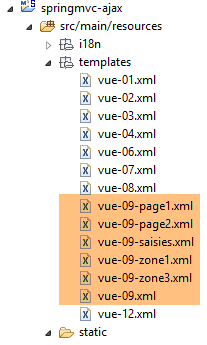 |
The view [vue-09.xml] is the application's master page:
<!DOCTYPE HTML>
<html xmlns:th="http://www.thymeleaf.org">
    <head>
        <meta name="viewport" content="width=device-width" />
        <title>Ajax-09</title>
        <link rel="stylesheet" href="/css/ajax01.css" />
        <script type="text/javascript" src="/js/jquery/jquery-2.1.1.min.js"></script>
        <script type="text/javascript" src="/js/json3.js"></script>
        <script type="text/javascript" src="/js/local9.js"></script>
    </head>
    <body>
        <h3>Ajax - 09 - Navigation dans une Application à Page Unique</h3>
        <h3>avec des flux HTML embarqués dans des chaînes jSON</h3>
        <hr />
        <div id="content" th:include="vue-09-page1" />
        <img id="loading" src="/images/loading.gif" />
        <div id="erreur" style="background-color:lightgrey"></div>
    </body>
</html>
- line 9: the JS file used in the application;
- line 15: the content of the master page;
- line 16: an animated loading image:
- line 17: area to display any errors;
The [vue-09-page1.xml] view is page 1 of the application:
<!DOCTYPE HTML>
<html xmlns:th="http://www.thymeleaf.org">
    <body>
        <h2>Page 1</h2>
        <!-- zone 1 -->
        <fieldset id="zone1" style="background-color:pink">
            <legend>Zone 1</legend>
            <span id="zone1-content" th:text="xx">xx</span>
        </fieldset>
        <!-- zone 2 -->
        <fieldset id="zone2" style="background-color:lightgreen">
            <legend>Zone 2</legend>
            <span>Ce texte reste toujours présent</span>
        </fieldset>
        <!-- zone 3 -->
        <fieldset id="zone3" style="background-color:yellow">
            <legend>Zone 3</legend>
            <span id="zone3-content" th:text="zz">zz</span>
        </fieldset>
        <br />
        <p>
            <button onclick="javascript:postForm()">Rafraîchir</button>
        </p>
        <hr />
        <div id="saisies" th:include="vue-09-saisies">
        </div>
    </body>
</html>
- lines 6–9: the [Zone 1] field. Its content is placed in the [id="zone1-content"] component;
- lines 11-14: the [Zone 2] field, which remains unchanged;
- lines 16-19: the [Zone 3] field. Its content is placed in the [id="zone3-content"] component;
- line 22: the function JS, which submits the form;
- line 25: inclusion of the input field;
Note that page 1 does not have a [form] tag. Everything will be processed in javascript.
The [vue-09-saisies.xml] view is as follows:
<!DOCTYPE HTML>
<html xmlns:th="http://www.thymeleaf.org">
    <div id="saisies">
        <h4>Saisies :</h4>
        <p>
            Chaîne de caractères :
            <input type="text" id="text1" size="30" th:value="${value1}" />
        </p>
        <p>
            Nombre entier :
            <input type="text" id="text2" size="10" th:value="${value2}" />
        </p>
        <p>
            <a href="javascript:valider()">Valider</a>
        </p>
    </div>
</html>
- lines 5-8: enter a string;
- lines 13-16: enter an integer;
- line 14: the JS function that posts the entered values;
Again, note that the input field does not have a [form] tag.
In total, page 1 has two features:
- [Rafraîchir]: which refreshes fields 1 and 3. This action is handled by the server, which randomly returns:
- zone 1 with its access counter and nothing for zone 3,
- zone 3 with its access counter and nothing for zone 1,
- both zones with their access counters;
- [Valider]: which displays page 2 with the entered values or an error message if the entered data is invalid;
We will first focus on the [Rafraîchir] button.
7.5.4. The code JS for managing the button [Rafraîchir]
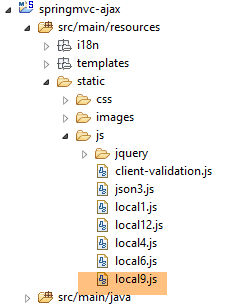 |
The code for the [local9.js] file is as follows:
// global variables
var content;
var loading;
var erreur;

// document loading
$(document).ready(function() {
    // retrieve the references of the page's various components
    loading = $("#loading");
    loading.hide();
    erreur = $("#erreur");
    erreur.hide();
    content = $("#content");
});
- lines 9-13: when the master page is loaded, the references to the three components identified by [loading, erreur, content] are stored;
- lines 2-4: the references to these three components are stored in global variables. They remain fixed because the three areas in question are always present on the displayed page, regardless of the time. Because they remain fixed, they can be calculated in [$(document).ready] and shared with the other functions in the JS file;
The function [postForm] handles the click on the button [Rafraîchir]:
function postForm() {
    console.log("postForm");
    // make a manual Ajax call
    $.ajax({
        url : '/ajax-10',
        headers : {
            'Accept' : 'application/json'
        },
        type : 'POST',
        dataType : 'json',
        beforeSend : onBegin,
        success : onSuccess,
        error : onError,
        complete : onComplete
    })
}
- lines 4–15: the Ajax call to the server;
- line 5: the action [ajax-10] will process POST;
- lines 6-8: the response will be jSON. The client JS indicates that it accepts jSON documents;
- line 9: the [ajax-10] action is called with a POST operation;
- Line 10: We will receive jSON;
- line 11: the function executed before the Ajax call;
- line 12: the function executed upon receiving the server response, when it is successful [200 OK];
- line 13: the function executed upon receiving the server response, when it fails [500 Internal server error, ...];
- line 14: the function executed after receiving the response;
The function [onBegin] is as follows:
// before the Ajax call
function onBegin() {
    console.log("onBegin");
    // waiting image
    loading.show();
}
It simply displays the animated loading image while waiting for the server response.
7.5.5. Action [/ajax-10]
|
The [/ajax-10] action is as follows:
// the session
    @Autowired
    private SessionModel1 session;
    // the Thymeleaf / Spring engine
    @Autowired
    private SpringTemplateEngine engine;

    @RequestMapping(value = "/ajax-10", method = RequestMethod.POST)
    @ResponseBody()
    public JsonResult10 ajax10(HttpServletRequest request, HttpServletResponse response) {
    ...
    }
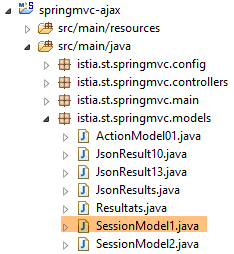
- Line 3: The session is injected. It has the following type: [SessionModel1]
 |
package istia.st.springmvc.models;

import java.io.Serializable;

import org.springframework.context.annotation.Scope;
import org.springframework.context.annotation.ScopedProxyMode;
import org.springframework.stereotype.Component;

@Component
@Scope(value = "session", proxyMode = ScopedProxyMode.TARGET_CLASS)
public class SessionModel1 implements Serializable {

    private static final long serialVersionUID = 1L;
    // two meters
    private int cpt1 = 0;
    private int cpt3 = 0;
    // the three zones
    private String zone1 = "xx";
    private String zone3 = "zz";
    private String saisies;
    private boolean zone1Active = true;
    private boolean zone3Active = true;

    // getters and setters
    ...
}
The session [SessionModel1] stores the following:
- line 15: the number of times [cpt1] where the field [Zone 1] is displayed;
- line 16: the number of times [cpt3] the field [Zone 3] is displayed;
- lines 18–20: the flows HTML from fields [Zone 1], [Zone 3], and [Saisies]. This is necessary in the sequence [Page 1] --> [Page 2] --> [Page 1]. When moving from [Page 2] to [Page 1], [Page 1] must be restored, and therefore its three fields;
- lines 21-22: two Booleans that indicate whether the fields [Zone 1] and [Zone 3] are displayed (visible);
The other element injected into the [AjaxController] controller is as follows:
    // the Thymeleaf / Spring engine
    @Autowired
private SpringTemplateEngine engine;
The bean of type [SpringTemplateEngine] is defined in the configuration file [Config]:
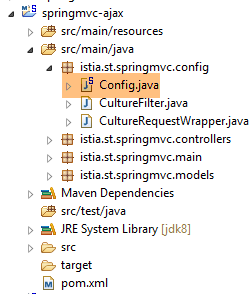 |
It is defined as follows:
    @Bean
    public SpringResourceTemplateResolver templateResolver() {
        SpringResourceTemplateResolver templateResolver = new SpringResourceTemplateResolver();
        templateResolver.setPrefix("classpath:/templates/");
        templateResolver.setSuffix(".xml");
        templateResolver.setTemplateMode("HTML5");
        templateResolver.setCacheable(true);
        templateResolver.setCharacterEncoding("UTF-8");
        return templateResolver;
    }

    @Bean
    SpringTemplateEngine templateEngine(SpringResourceTemplateResolver templateResolver) {
        SpringTemplateEngine templateEngine = new SpringTemplateEngine();
        templateEngine.setTemplateResolver(templateResolver);
        return templateEngine;
}
- lines 2–10: we know the bean of type [SpringResourceTemplateResolver], which allows us to define certain characteristics of the views;
- lines 13–17: The bean of type [SpringTemplateEngine] allows us to define the view “engine,” the class responsible for generating responses [Thymeleaf] to clients. [Thymeleaf] has a default "engine" and another one when used in a [Spring] environment. It is the latter that we are using here;
The signature of the [/ajax-10] action is as follows:
@RequestMapping(value = "/ajax-10", method = RequestMethod.POST)
    @ResponseBody()
    public JsonResult10 ajax10(HttpServletRequest request, HttpServletResponse response) {
    ...
}
- line 1: the [/ajax-10] action only accepts a POST;
- line 2: the [/ajax-10] action itself returns the response to the client. This will be automatically converted to jSON;
- line 3: the response is of type [JsonResult10] as follows:
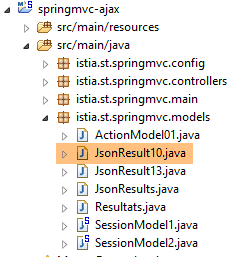 |
package istia.st.springmvc.models;

public class JsonResult10 {

    // data
    private String content;
    private String zone1;
    private String zone3;
    private String erreur;
    private String saisies;
    private boolean zone1Active;
    private boolean zone3Active;

    public JsonResult10() {
    }

    // getters and setters
...
}
- line 6: the content HTML of the field identified by [content];
- line 7: the content HTML of the zone [Zone 1];
- line 8: the content HTML of the zone [Zone 3];
- line 9: the content HTML of the field [Erreur];
- line 10: the content HTML of the field [Saisies];
- line 11: a Boolean indicating whether the [Zone 1] field should be displayed;
- line 12: a Boolean indicating whether the [Zone 3] field should be displayed;
The action code for [/ajax-10] is as follows:
@RequestMapping(value = "/ajax-10", method = RequestMethod.POST)
    @ResponseBody()
    public JsonResult10 ajax10(HttpServletRequest request, HttpServletResponse response) {
        // thymeleaf context
        WebContext thymeleafContext = new WebContext(request, response, request.getServletContext());
        // answer
        JsonResult10 result = new JsonResult10();
        // session
        session.setZone1(null);
        session.setZone3(null);
        session.setZone1Active(false);
        session.setZone3Active(false);
        // randomize an answer
        int cas = new Random().nextInt(3);
        switch (cas) {
        case 0:
            // zone 1 active
            setZone1(thymeleafContext, result);
            return result;
        case 1:
            // zone 3 active
            setZone3(thymeleafContext, result);
            return result;
        case 2:
            // active zones 1 and 3
            setZone1(thymeleafContext, result);
            setZone3(thymeleafContext, result);
            return result;
        }
        return null;
    }
- line 5: we retrieve the context [Thymeleaf]. We will see later what it is used for;
- line 7: we create an empty response for now;
- lines 9–12: we assign the two fields contained in the session to [null] and specify that they should not be displayed. These two fields will be generated shortly, but it is possible that only one of them will be;
- lines 14–29: both fields are generated;
- lines 17–19: only the [Zone 1] field is generated;
- lines 21–23: only the field [Zone 3] is generated;
- lines 25–28: both zones [Zone 1] and [Zone 3] are generated;
The HTML flow from the [Zone 1] zone is generated by the following method:
    private void setZone1(WebContext thymeleafContext, JsonResult10 result) {
        // zone 1 active
        // flow HTML
        int cpt1 = session.getCpt1() + 1;
        thymeleafContext.setVariable("cpt1", cpt1);
        thymeleafContext.setLocale(new Locale("fr", "FR"));
        String zone1 = engine.process("vue-09-zone1", thymeleafContext);
        result.setZone1(zone1);
        result.setZone1Active(true);
        // session
        session.setCpt1(cpt1);
        session.setZone1(zone1);
        session.setZone1Active(true);
}
- line 1: the parameters are:
- the context [Thymeleaf] of type [WebContext],
- the response to the client currently being built of type [JsonResult10];
- line 3: we increment the session counter [cpt1], which counts the number of times the zone [Zone 1] is displayed;
- line 4: the context [Thymeleaf] of type [WebContext] behaves somewhat like the Spring [Model] model MVC. To add an element to the template, we use [WebContext.setVariable]. Here, we place the counter [cpt1] into the template [Thymeleaf]. This will allow us to evaluate the Thymeleaf expression [${cpt1}]
- Line 5: The context [Thymeleaf] has a locale. This allows it to evaluate expressions of the type [#{clé_msg}]. Here, we associate the Thymeleaf context with a French locale;
- line 6: this is the most interesting instruction. The Thymeleaf engine will process the view [vue-09-zone1.xml] using the template and locale we just calculated, and instead of sending the resulting stream HTML to the client, it renders it as a string;
- lines 7–9: the HTML stream from the [Zone 1] field that was just calculated is stored in the session and in the result to be sent to the client. In addition, it is specified that the [Zone 1] field must be displayed;
- Lines 11–13: Information regarding the [Zone 1] area is stored in the session so that it can be regenerated;
Line 7 processes the following view [vue-09-zone1.xml]:
<!DOCTYPE HTML>
<html xmlns:th="http://www.thymeleaf.org">
    <span th:text="#{message.zone}"></span>
    <span th:text="${cpt1}"></span>
</html>
- line 3: the expression [#{message.zone}] will be evaluated using the locale;
- line 4: the expression [${cpt1}] will be evaluated using the Thymeleaf template;
The key message [message.zone] is defined in the message files [messages_fr.properties] and [messages_en.properties]:
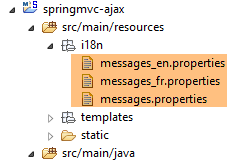 |
[messages_fr.properties]
message.zone=Nombre d'accès :
[messages_en.properties]
message.zone=Number of hits:
The HTML stream from the [Zone 3] zone is generated by a similar method:
    private void setZone3(WebContext thymeleafContext, JsonResult10 result) {
        // zone 3 active
        // flow HTML
        int cpt3 = session.getCpt3() + 1;
        thymeleafContext.setVariable("cpt3", cpt3);
        thymeleafContext.setLocale(new Locale("en", "US"));
        String zone3 = engine.process("vue-09-zone3", thymeleafContext);
        result.setZone3(zone3);
        result.setZone3Active(true);
        // session
        session.setCpt3(cpt3);
        session.setZone3(zone3);
        session.setZone3Active(true);
}
- line 6: the locale for zone [Zone 3] is English;
7.5.6. Processing the response from action [/ajax-10]
Let’s return to the JS code from [local9.js], which will process the server’s response:
// on receipt of the server response
// in case of success
function onSuccess(data) {
    console.log("onSuccess");
    // content
    if (data.content) {
        content.html(data.content);
    }
    // zone 1
    if (data.zone1Active) {
        $("#zone1").show();
        if (data.zone1) {
            $("#zone1-content").html(data.zone1);
        }
    } else {
        $("#zone1").hide();
    }
    // zone 3 active?
    if (data.zone3Active) {
        $("#zone3").show();
        if (data.zone3) {
            $("#zone3-content").html(data.zone3);
        }
    } else {
        $("#zone3").hide();
    }
    // seized?
    if (data.saisies) {
        $("#saisies").html(data.saisies);
    }
    // mistake?
    if (data.erreur) {
        erreur.text(data.erreur);
        erreur.show();
    } else {
        erreur.hide();
    }
}
Let’s review the Java structure of the response received on line 3 in the variable [data]:
public class JsonResult10 {

    // data
    private String content;
    private String zone1;
    private String zone3;
    private String erreur;
    private String saisies;
    private boolean zone1Active;
    private boolean zone3Active;

}
- Lines 6–8: If [data.content!=null], then the field [id=content] is initialized with it. This field represents [Page 1] or [Page 2] in its entirety. In this demonstration, we have [data.content==null], so the zone [id=content] will not be modified and will continue to display [Page 1];
- lines 10–17: displays [Zone 1] if [data.zone1Active==true]. If [data.zone1!=null] is also present, then the content of [Zone 1] is modified; otherwise, it remains unchanged;
- lines 19–26: same for [Zone 3];
- lines 28–30: if we have [data.saisies!=null], then the area [Saisies] is regenerated. In this demonstration, we have [data.saisies==null], so the [Saisies] zone remains unchanged;
- lines 32–37: similar reasoning applies to the zone [Erreur] with the following nuances:
- line 33: [data.erreur] will be a text-format error message;
- line 36: if [data.erreur==null], then the [Erreur] field is hidden. This is because it may have been displayed during the previous request;
In the event of a server-side error (HTTP status such as 500 Internal Server Error error), the following function is executed:
// on receipt of the server response
// in case of failure
function onError(jqXHR) {
    console.log("onError");
    // system error
    erreur.text(jqXHR.responseText);
    erreur.show();
}
To see such an error, let's modify the [postForm] function as follows:
function postForm() {
    console.log("postForm");
    // retrieve references to the current page
    ...
    // make a manual Ajax call
    $.ajax({
        url : '/ajax-10x',
        ...
    })
}
- line 7: we enter a non-existent URL;
Here are the results when clicking the [Rafraîchir] button:
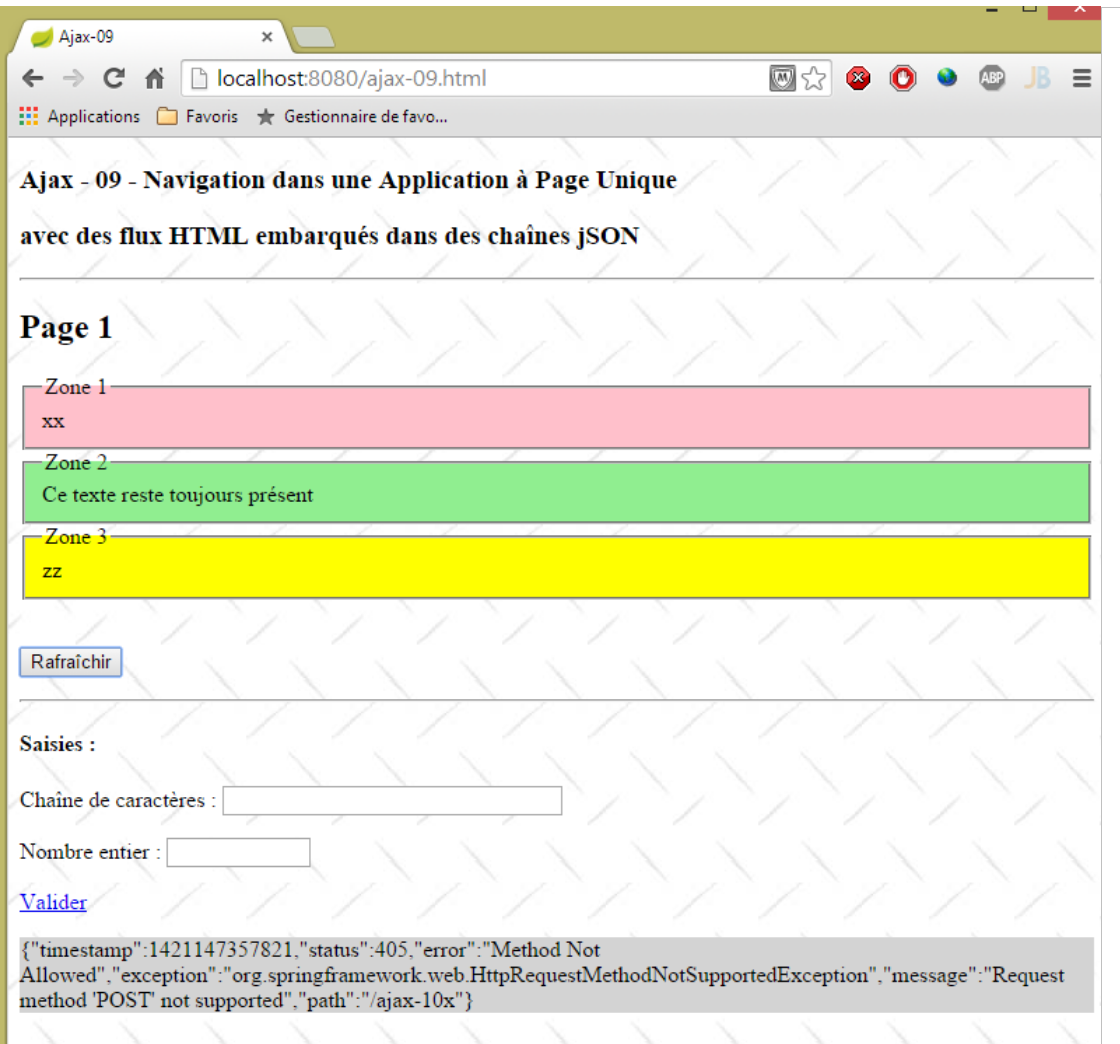 |
It is interesting to note that the error was also sent in the form of a string jSON.
The method executed after receiving the server's response is as follows:
// after [onSuccess, onError]
function onComplete() {
    console.log("onComplete");
    // waiting image
    loading.hide();
}
We simply hide the animated image of the waiting screen.
7.5.7. Displaying page [Page 2]
The code HTML for the link [Valider] is as follows:
<a href="javascript:valider()">Valider</a>
The function JS [valider] is as follows:
// validation of entered values
function valider() {
    // posted value
    var post = JSON3.stringify({
        "value1" : $("#text1").val().trim(),
        "value2" : $("#text2").val().trim()
    });
    // make a manual Ajax call
    $.ajax({
        url : '/ajax-11A',
        headers : {
            'Accept' : 'application/json',
            'Content-Type' : 'application/json'
        },
        type : 'POST',
        data : post,
        dataType : 'json',
        beforeSend : onBegin,
        success : onSuccess,
        error : onError,
        complete : onComplete
    })
}
- lines 4-7: we have two values, v1 and v2, to post: those from the input components identified by [#text1] and [#text2]. We are going to do something new. We are going to post these two values in the form of a string jSON {"value1":v1,"value2":v2};
- line 10: the posted values will be sent to the [ajax-11A] action;
- line 12: since we know we will receive a response jSON, we indicate that we can receive it from jSON;
- line 13: we tell the server that we will send it the posted value in the form of a jSON string;
- lines 15-16: we convert the value to be posted into POST;
- line 17: we will receive jSON;
7.5.8. The [ajax-11A] action
The [ajax-11A] action that processes the posted jSON string is as follows:
@RequestMapping(value = "/ajax-11A", method = RequestMethod.POST, consumes = "application/json")
    @ResponseBody
    public JsonResult10 ajax11A(@RequestBody @Valid PostAjax11A post, BindingResult bindingResult, Locale locale,     HttpServletRequest request, HttpServletResponse response) {
        ...
    }
- line 1: we specify with ["application/json"] that the action expects a document in the form of jSON. This document is the value posted by the client;
- line 3: the posted value will be retrieved in the following [PostAjax11A post] object:
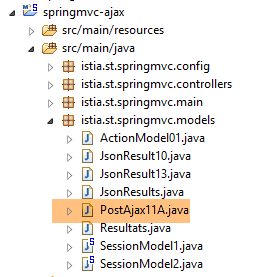 |
package istia.st.springmvc.models;

import javax.validation.constraints.NotNull;
import javax.validation.constraints.Size;

import org.hibernate.validator.constraints.Range;

public class PostAjax11A {

    // data
    @Size(min = 4, max = 6)
    @NotNull
    private String value1;
    @Range(min = 10, max = 14)
    @NotNull
    private Integer value2;

    // getters and setters
    ...
}
- The structure of the [PostAjax11A] object must match the structure of the posted object {"value1":v1,"value2":v2}. Therefore, fields [value1] (line 13) and [value2] (line 16) are required;
- we have placed integrity constraints on both fields;
Let’s return to the code for the [ajax-11A] action:
@RequestMapping(value = "/ajax-11A", method = RequestMethod.POST, consumes = "application/json")
    @ResponseBody
    public JsonResult10 ajax11A(@RequestBody @Valid PostAjax11A post, BindingResult bindingResult, Locale locale,    HttpServletRequest request, HttpServletResponse response) {
        // thymeleaf context
        WebContext thymeleafContext = new WebContext(request, response, request.getServletContext());
        // answer
        JsonResult10 result = new JsonResult10();
        // post valid?
        if (bindingResult.hasErrors()) {
            // page 1 is returned with an error
            result.setZone1Active(session.isZone1Active());
            result.setZone3Active(session.isZone3Active());
            result.setErreur(getErreursForModel(bindingResult));
            return result;
        }
        ...
}
- line 3: the annotation [@RequestBody] refers to the document sent by the client. This is the value posted by the client in jSON. It will therefore be used to construct the [PostAjax11A] object;
- line 3: the annotation [@Valid] enforces validation of the posted value;
- line 9: if validation fails:
- line 13: an error message is returned,
- lines 11–12: fields 1 and 3 are restored to their previous state (displayed or not);
The error message is calculated as follows:
    private String getErreursForModel(BindingResult result) {
        StringBuffer buffer = new StringBuffer();
        for (FieldError error : result.getFieldErrors()) {
            StringBuffer bufferCodes = new StringBuffer("(");
            for (String code : error.getCodes()) {
                bufferCodes.append(String.format("%s ", code));
            }
            bufferCodes.append(")");
            buffer.append(String.format("[%s:%s:%s:%s]", error.getField(), error.getRejectedValue(), bufferCodes,
                    error.getDefaultMessage()));
        }
        return buffer.toString();
}
This is a function we've seen before.
The [ajax-11A] action continues as follows:
@RequestMapping(value = "/ajax-11A", method = RequestMethod.POST, consumes = "application/json")
    @ResponseBody
    public JsonResult10 ajax11A(@RequestBody @Valid PostAjax11A post, BindingResult bindingResult, Locale locale,    HttpServletRequest request, HttpServletResponse response) {
        // thymeleaf context
        WebContext thymeleafContext = new WebContext(request, response, request.getServletContext());
        // answer
        JsonResult10 result = new JsonResult10();
        // post valid?
        if (bindingResult.hasErrors()) {
    ...
        }
        // the input field is saved
        thymeleafContext.setVariable("value1", post.getValue1());
        thymeleafContext.setVariable("value2", post.getValue2());
        session.setSaisies(engine.process("vue-09-saisies", thymeleafContext));
        // send page 2
        result.setContent(engine.process("vue-09-page2", thymeleafContext));
        return result;
}
- lines 13-14: the posted values are placed in the Thymeleaf context;
- line 15: using this context, we render the view [vue-09-saisies] and store it in the session so it can be regenerated later;
- line 17: page 2 is placed in the result that will be sent to the client;
The [vue-09-page2.xml] view is as follows:
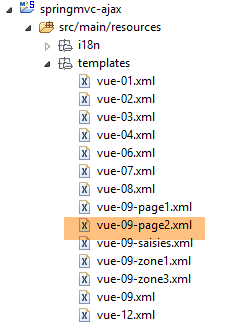 |
<!DOCTYPE HTML>
<html xmlns:th="http://www.thymeleaf.org">
    <body>
        <h2>Page 2</h2>
        <p>
            <h4>Valeurs saisies :</h4>
            <p>
                Chaîne de caractères :
                <span th:text="${value1}"></span>
            </p>
            <p>
                Nombre entier :
                <span th:text="${value2}"></span>
            </p>
            <a href="javascript:retourPage1()">Retour à la page 1</a>
        </p>
    </body>
</html>
- Lines 9 and 13 display the values [value1, value2] that the [/ajax-11A] action placed in the Thymeleaf context;
7.5.9. Processing the response from the [/ajax-11A] action
On the client side, the response from the [/ajax-10] action is processed by the [onSuccess] function:
function onSuccess(data) {
    console.log("onSuccess");
    // content
    if (data.content) {
        content.html(data.content);
    }
    // zone 1
    if (data.zone1Active) {
        $("#zone1").show();
        if (data.zone1) {
            $("#zone1-content").html(data.zone1);
        }
    } else {
        $("#zone1").hide();
    }
    // zone 3 active?
    if (data.zone3Active) {
        $("#zone3").show();
        if (data.zone3) {
            $("#zone3-content").html(data.zone3);
        }
    } else {
        $("#zone3").hide();
    }
    // seized?
    if (data.saisies) {
        $("#saisies").html(data.saisies);
    }
    // mistake?
    if (data.erreur) {
        erreur.text(data.erreur);
        erreur.show();
    } else {
        erreur.hide();
    }
}
We have already commented on this code. Let’s consider the two cases: a response with or without an error:
With error
In this case, the action [/ajax-11A] sent a response jSON in the form {"zone1":null, "zone3":null,"saisies":null,"erreur":erreur,"zone1Active":zone1Active,"zone3Active":zone3Active,"content":null}. If we follow the code above, we see that:
- the [content] field does not change. It contained page #1;
- the [Erreur] zone is displayed;
- the zones [Zone 1], [Zone 3], and [Saisies] remain unchanged;
No error
In this case, action [/ajax-11A] sent a response jSON in the form {"zone1":null, "zone3":null,"entries":null,"error":null,"zone1Active":false,"zone3Active":false,"content":content}. If we follow the code above, we see that:
- the [content] zone is displayed. It contains page #2;
Here are three execution examples:
A case with a validation error:
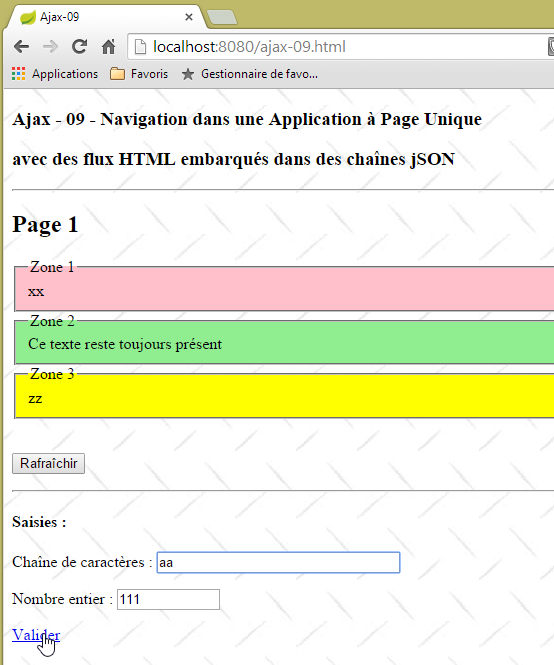 | 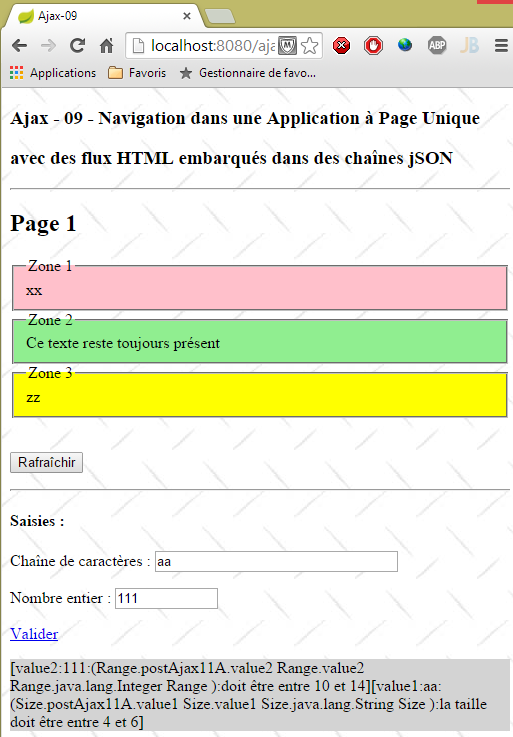 |
A case with a POST error:
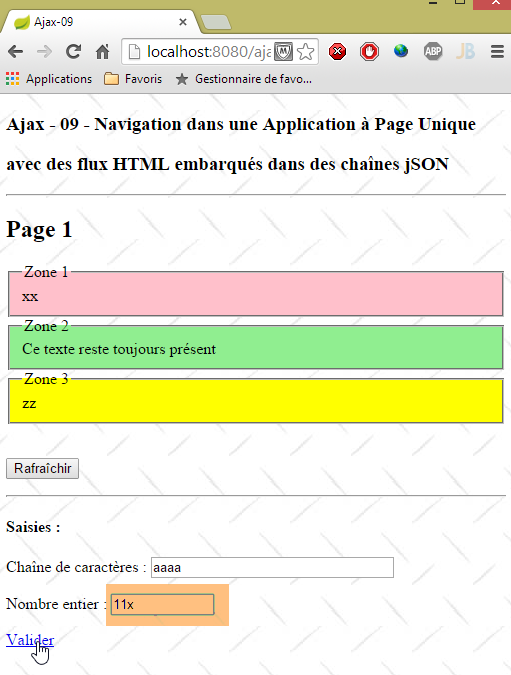 | 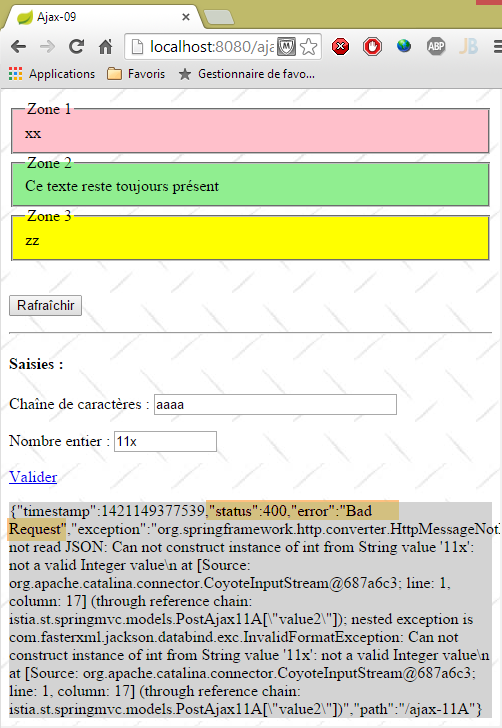 |
This type of error is different. Because Spring was unable to convert the string jSON to type [PostAjax11A], it returned a response HTTP with [status=400]. The [ajax-11A] action was not executed;
A case with no errors:
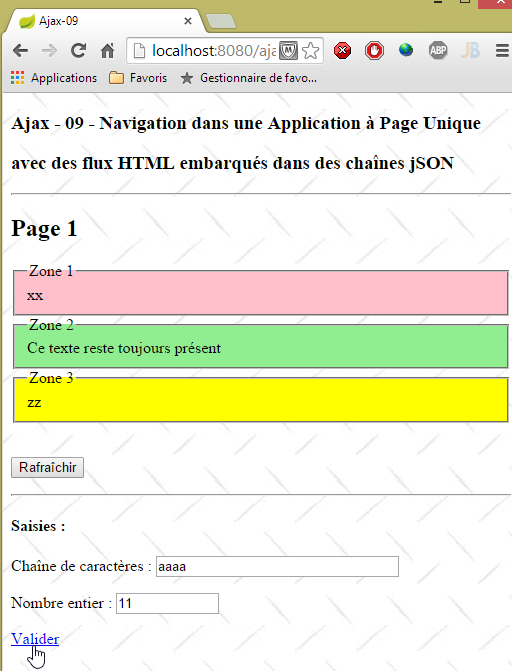 | 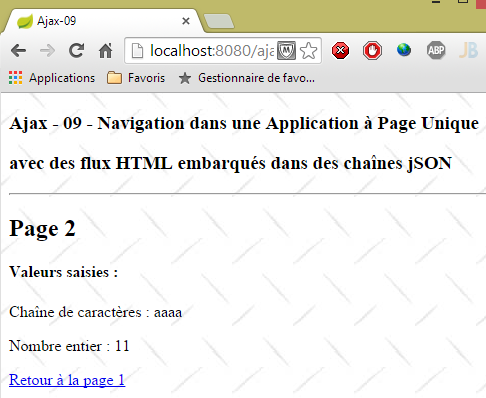 |
7.5.10. Back to page 1
The link [Retour vers la page 1] on page 2 is as follows:
<a href="javascript:retourPage1()">Retour à la page 1</a>
The method JS [retourPage1] is as follows:
// back to page 1
function retourPage1() {
    // make a manual Ajax call
    $.ajax({
        url : '/ajax-11B',
        headers : {
            'Accept' : 'application/json',
        },
        type : 'POST',
        dataType : 'json',
        beforeSend : onBegin,
        success : onSuccess,
        error : onError,
        complete : onComplete
    })
}
It calls POST, without any posted values, to the action [/ajax-11B].
7.5.11. The [/ajax-11B] action
The [/ajax-11B] action is as follows:
    @RequestMapping(value = "/ajax-11B", method = RequestMethod.POST)
    @ResponseBody
    public JsonResult10 ajax11B(HttpServletRequest request, HttpServletResponse response) {
        // thymeleaf context
        WebContext thymeleafContext = new WebContext(request, response, request.getServletContext());
        // answer
        JsonResult10 result = new JsonResult10();
        // we return page 1 in its original state
        result.setContent(engine.process("vue-09-page1", thymeleafContext));
        result.setSaisies(session.getSaisies());
        result.setZone1(session.getZone1());
        result.setZone3(session.getZone3());
        result.setZone1Active(session.isZone1Active());
        result.setZone3Active(session.isZone3Active());
        return result;
}
The action must regenerate page #1 with its three zones [Zone1, Zone3, Erreur]:
- line 9: page 1 is included in the result;
- line 10: the input zone is placed in the result;
- line 11: the [Zone 1] field is included in the result;
- line 12: the [Zone 3] field is included in the result;
- lines 13-14: the status of fields [Zone 1] and [Zone 3] is included in the result;
7.5.12. Processing the response from action [/ajax-11B]
The response from action [/ajax-11B] is processed by function [onSuccess]:
function onSuccess(data) {
    console.log("onSuccess");
    // content
    if (data.content) {
        content.html(data.content);
    }
    // zone 1
    if (data.zone1Active) {
        $("#zone1").show();
        if (data.zone1) {
            $("#zone1-content").html(data.zone1);
        }
    } else {
        $("#zone1").hide();
    }
    // zone 3 active?
    if (data.zone3Active) {
        $("#zone3").show();
        if (data.zone3) {
            $("#zone3-content").html(data.zone3);
        }
    } else {
        $("#zone3").hide();
    }
    // seized?
    if (data.saisies) {
        $("#saisies").html(data.saisies);
    }
    // mistake?
    if (data.erreur) {
        erreur.text(data.erreur);
        erreur.show();
    } else {
        erreur.hide();
    }
}
The action [/ajax-11B] sent a response jSON in the form {"zone1":zone1, "zone3":zone3,"entries":entries,"error":null,"zone1Active":zone1Active,"zone3Active":zone3Active,"content":content}. If we follow the code above, we see that:
- the [content] field has been modified. It previously contained page #2. It will now contain page #1;
- the [Erreur] zone is hidden;
- the zones [Zone 1], [Zone 3], and [Saisies] are displayed as they were;
7.6. Manage the session on the client side
7.6.1. Introduction
In the previous section, we managed a session with the following structure:
public class SessionModel1 implements Serializable {

    // two meters
    private int cpt1 = 0;
    private int cpt3 = 0;
    // the three zones
    private String zone1 = "xx";
    private String zone3 = "zz";
    private String saisies;
    private boolean zone1Active = true;
    private boolean zone3Active = true;
...
}
When there are a large number of users, the memory occupied by all these users’ sessions can become a problem. The rule is therefore to minimize the size of this memory. The APU model (Single-Page Application) allows you to manage the session on the client side and have a sessionless web server. In fact, the single page is initially loaded by the browser. Along with it comes the accompanying Javascript file. Since there is no page reload, this JS file will remain permanently in the browser as it was initially loaded. We can then use its global variables to store information about the user’s various actions. That is what we will now examine. We will not only manage the session on the client side but also redesign the JS application to minimize server requests.
7.6.2. The [/ajax-12] action
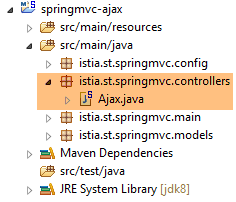 |
The [/ajax-12] action is as follows:
    @RequestMapping(value = "/ajax-12", method = RequestMethod.GET, produces = "text/html; charset=UTF-8")
    public String ajax12() {
        return "vue-12";
}
The [vue-12.xml] view is as follows:
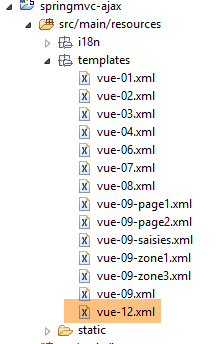 |
<!DOCTYPE HTML>
<html xmlns:th="http://www.thymeleaf.org">
    <head>
        <meta name="viewport" content="width=device-width" />
        <title>Ajax-12</title>
        <link rel="stylesheet" href="/css/ajax01.css" />
        <script type="text/javascript" src="/js/jquery/jquery-2.1.1.min.js"></script>
        <script type="text/javascript" src="/js/json3.js"></script>
        <script type="text/javascript" src="/js/local12.js"></script>
    </head>
    <body>
        <h3>Ajax - 12 - Navigation dans une Application à Page Unique</h3>
        <h3>avec des flux HTML embarqués dans une chaîne jSON</h3>
        <h3>et une session gérée par le client JS</h3>
        <hr />
        <div id="content" th:include="vue-09-page1" />
        <img id="loading" src="/images/loading.gif" />
        <div id="erreur" style="background-color:lightgrey"></div>
    </body>
</html>
- This view is identical to view [vue-09], with the exception of the JS script used on line 9;
The view displayed is as follows:
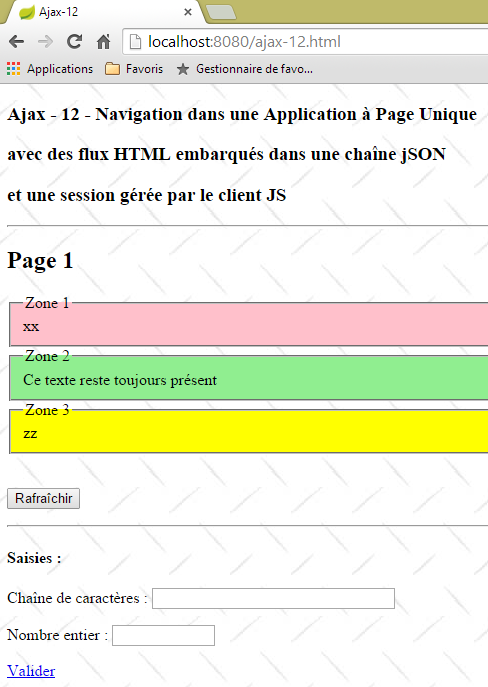 |
7.6.3. The JS code for managing the [Rafraîchir] button
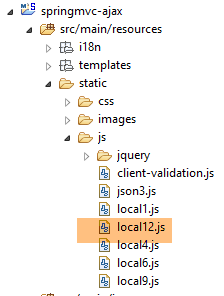 |
The code in the [local12.js] file is as follows:
// global variables
var content;
var loading;
var erreur;
var page1;
var page2;
var value1;
var value2;
var session = {
        "cpt1" : 0,
        "cpt3" : 0
    };

// document loading
$(document).ready(function() {
    // retrieve the references of the page's various components
    loading = $("#loading");
    loading.hide();
    erreur = $("#erreur");
    erreur.hide();
    content = $("#content");
});
- lines 17-21: when the master page is loaded, the references of the three components identified by [loading, erreur, content] are stored in the global variables in lines 2-4;
- lines 5-6: to store the two pages;
- lines 7-8: to store the two values posted by the link [Valider];
- line 9: the session. It stores the values of the [cpt1, cpt3] counters on the client side;
The [postForm] function handles the click on the [Rafraîchir] button:
function postForm() {
    console.log("postForm");
    // we post the session
    var post = JSON3.stringify(session);
    // make a manual Ajax call
    $.ajax({
        url : '/ajax-13',
        headers : {
            'Accept' : 'application/json',
            'Content-Type' : 'application/json'
        },
        type : 'POST',
        data : post,
        dataType : 'json',
        beforeSend : onBegin,
        success : function(data) {
            ...
        },
        error : onError,
        complete : onComplete
    })
}
The differences from the previous version are as follows:
- the URL on line 7 is different;
- line 4: a value is posted, whereas previously none was posted. This value is the jSON string from the session. The principle is as follows:
- the client sends the session to the server,
- the server modifies it and sends it back,
- the client stores the new session;
- line 10: a document is sent in the format jSON (posted value);
- line 13: there is something to post;
- lines 15–20: the [beforeSend, error, complete] functions are the same as those in the previous version. Only the [success] function changes (lines 16–18);
7.6.4. The [/ajax-13] action
|
The [/ajax-13] action is as follows:
    @RequestMapping(value = "/ajax-13", method = RequestMethod.POST, consumes = "application/json; charset=UTF-8")
    @ResponseBody()
    public JsonResult13 ajax13(@RequestBody SessionModel2 session2, HttpServletRequest request,    HttpServletResponse response) {
    ...
}
- Line 3: The parameter [@RequestBody SessionModel2 session2] retrieves the session posted by the client. This session has the following type: [SessionModel2]
 |
package istia.st.springmvc.models;

import java.io.Serializable;

public class SessionModel2 implements Serializable {

    private static final long serialVersionUID = 1L;
    // two meters
    private int cpt1 = 0;
    private int cpt3 = 0;

    // getters and setters
    ...
}
The session [SessionModel2] stores the following:
- line 9: the number of times [cpt1] where the field [Zone 1] is displayed;
- line 10: the number of times [cpt3] where field [Zone 3] is displayed;
Let’s continue examining the code for the [/ajax-13] action:
    @RequestMapping(value = "/ajax-13", method = RequestMethod.POST, consumes = "application/json; charset=UTF-8")
    @ResponseBody()
    public JsonResult13 ajax13(@RequestBody SessionModel2 session2, HttpServletRequest request,    HttpServletResponse response) {
    ...
}
- line 3, the response type [JsonResult13] is as follows:
 |
package istia.st.springmvc.models;

public class JsonResult13 {

    // data
    private String page2;
    private String zone1;
    private String zone3;
    private String erreur;
    private String value1;
    private Integer value2;

    // session
    private SessionModel2 session;

    // getters and setters
    ...
}
- line 14: the session. The server sends it back to the client for storage;
- line 6: the content HTML of page #2;
- line 7: the content HTML of the area [Zone 1];
- line 8: the content HTML of the area [Zone 3];
- line 9: any error message;
- lines 10–11: two pieces of information calculated by the server and displayed on page 2;
Let’s continue examining the code for the [/ajax-13] action:
@RequestMapping(value = "/ajax-13", method = RequestMethod.POST, consumes = "application/json; charset=UTF-8")
    @ResponseBody()
    public JsonResult13 ajax13(@RequestBody SessionModel2 session2, HttpServletRequest request,
            HttpServletResponse response) {
        // thymeleaf context
        WebContext thymeleafContext = new WebContext(request, response, request.getServletContext());
        // answer
        JsonResult13 result = new JsonResult13();
        result.setSession(session2);
        // randomize an answer
        int cas = new Random().nextInt(3);
        switch (cas) {
        case 0:
            // zone 1 active
            setZone1B(thymeleafContext, result);
            return result;
        case 1:
            // zone 3 active
            setZone3B(thymeleafContext, result);
            return result;
        case 2:
            // active zones 1 and 3
            setZone1B(thymeleafContext, result);
            setZone3B(thymeleafContext, result);
            return result;
        }
        return null;
    }
- line 9: the session is placed in the action result;
The method [setZone1B] that activates the zone [Zone 1] is as follows:
    private void setZone1B(WebContext thymeleafContext, JsonResult13 result) {
        // retrieve the session
        SessionModel2 session = result.getSession();
        // zone 1 active
        // flow HTML
        int cpt1 = session.getCpt1() + 1;
        thymeleafContext.setVariable("cpt1", cpt1);
        thymeleafContext.setLocale(new Locale("fr", "FR"));
        String zone1 = engine.process("vue-09-zone1", thymeleafContext);
        result.setZone1(zone1);
        // session
        session.setCpt1(cpt1);
}
- line 3: we retrieve the session. It will be modified on line 12 with the new counter [cpt1]. Note that this session will be sent back to the client;
- line 10: the new zone [Zone 1];
The [setZone3B] method that activates the [Zone 3] zone is similar:
private void setZone3B(WebContext thymeleafContext, JsonResult13 result) {
        // retrieve the session
        SessionModel2 session = result.getSession();
        // zone 3 active
        // flow HTML
        int cpt3 = session.getCpt3() + 1;
        thymeleafContext.setVariable("cpt3", cpt3);
        thymeleafContext.setLocale(new Locale("en", "US"));
        String zone3 = engine.process("vue-09-zone3", thymeleafContext);
        result.setZone3(zone3);
        // session
        session.setCpt3(cpt3);
    }
7.6.5. Processing the response from action [/ajax-13]
On the client side, the jSON response from the [/ajax-13] action is processed by the following [onSuccess] function:
function postForm() {
    console.log("postForm");
    // we post the session
    var post = JSON3.stringify(session);
    // make a manual Ajax call
    $.ajax({
    ...
        success : function(data) {
            // save the session
            session = data.session;
            // update both zones
            if (data.zone1) {
                $("#zone1-content").html(data.zone1);
                $("#zone1").show();
            } else {
                $("#zone1").hide();
            }
            if (data.zone3) {
                $("#zone3").show();
                $("#zone3-content").html(data.zone3);
            } else {
                $("#zone3").hide();
            }
        },
...
    })
}
- lines 12–17: if the server has put something in the [zone1] field of the response, then the [Zone 1] area must be regenerated and displayed; otherwise, it must be hidden;
- lines 18-23: same logic applies to the [Zone 3] field;
7.6.6. Displaying the [Page 2] page
The code HTML for the link [Valider] is as follows:
<a href="javascript:valider()">Valider</a>
The function JS [valider] is as follows:
// validation of entered values
function valider() {
    // memorize page 1
    page1 = content.html();
    // store the values entered
    value1 = $("#text1").val().trim();
    value2 = $("#text2").val().trim();
    // posted value
    var post = JSON3.stringify({
        "value1" : value1,
        "value2" : value2,
        "pageRequired" : page2 ? false : true
    });
    // make a manual Ajax call
    $.ajax({
        url : '/ajax-14',
        headers : {
            'Accept' : 'application/json',
            'Content-Type' : 'application/json'
        },
        type : 'POST',
        data : post,
        dataType : 'json',
        beforeSend : onBegin,
        success : function(data) {
        ...
        },
        error : onError,
        complete : onComplete
    })
}
- we'll do a POST, which should take us to page 2;
- line 4: we save page 1 so we can return to it later;
- lines 6-7: the previous operation does not save the entered values, only the page code HTML. So we now save the two values entered in the form;
- lines 9–13: the two entered values are placed in a string jSON. This is the string that will be posted;
- line 12: a parameter to tell the server whether we need page #2. We will proceed as follows. We will request page #2 once, then store it in the variable JS [page2]. After that, we will not request it again. We will use the cached page. Line 2: [pageRequired] is equal to [true] if the variable [page2] is empty, and [false] otherwise;
- note that the session is not posted. This is because it stores counters that the action [/ajax-14] in line 20 does not modify;
7.6.7. Action [/ajax-14]
The action [/ajax-14] is as follows:
@RequestMapping(value = "/ajax-14", method = RequestMethod.POST)
    @ResponseBody
    public JsonResult13 ajax14(@RequestBody @Valid PostAjax14 post, BindingResult bindingResult, Locale locale,    HttpServletRequest request, HttpServletResponse response) {
        ...
    }
- line 3: the response is always of type [JsonResult13];
- line 3: the posted value is encapsulated in the following [PostAjax14] type:
package istia.st.springmvc.models;

public class PostAjax14 extends PostAjax11A {

    // page 2
    private boolean pageRequired;

    // getters and setters
    ...
}
- line 3: the [PostAjax14] class extends the [PostAjax11A] class from the previous version. It therefore has a [value1, value2, pageRequired] structure;
The [/ajax-14] action continues as follows:
    @RequestMapping(value = "/ajax-14", method = RequestMethod.POST)
    @ResponseBody
public JsonResult13 ajax14(@RequestBody @Valid PostAjax14 post, BindingResult bindingResult, Locale locale,    HttpServletRequest request, HttpServletResponse response) {
        // thymeleaf context
        WebContext thymeleafContext = new WebContext(request, response, request.getServletContext());
        // answer
        JsonResult13 result = new JsonResult13();
        // post valid?
        if (bindingResult.hasErrors()) {
            // an error is returned
            result.setErreur(getErreursForModel(bindingResult));
            return result;
        }
        // send page 2
        result.setValue1(post.getValue1());
        result.setValue2(post.getValue2());
        // page required?
        if (post.isPageRequired()) {
            result.setPage2(engine.process("vue-12-page2", thymeleafContext));
        }
        return result;
}
- lines 9–13: if the posted values [value1, value2] are invalid, an error message is returned;
- lines 15-16: normally, the server should perform a calculation using the posted values. Here, it simply returns them to show that it has received them;
- lines 18-20: page #2 is returned only if it was requested by the client. Line 19, the view [vue-12-page2] is new:
 |
<!DOCTYPE HTML>
<html xmlns:th="http://www.thymeleaf.org">
    <body>
        <h2>Page 2</h2>
        <p>
            <h4>Valeurs saisies :</h4>
            <p>
                Chaîne de caractères :
                <span id="value1"></span>
            </p>
            <p>
                Nombre entier :
                <span id="value2"></span>
            </p>
            <a href="javascript:retourPage1()">Retour à la page 1</a>
        </p>
    </body>
</html>
- The code XML no longer contains values evaluated by Thymeleaf as was previously the case;
- we have identified the areas where to place the values returned by the server as [value1, value2]. Line 9, [id='value1'] indicates where to place [value1]. Line 13, same for [value2];
7.6.8. Processing the response from action [/ajax-14]
The response from action [/ajax-14] is processed by the following function [success]:
// validation of entered values
function valider() {
    ...
    // make a manual Ajax call
    $.ajax({
        ...
        success : function(data) {
            // mistake?
            if (data.erreur) {
                // error display
                erreur.html(data.erreur);
                erreur.show();
            } else {
                // no error
                erreur.hide();
                // page 2
                if (page2) {
                    // use the cached page
                    content.html(page2);
                } else {
                    // memorize page 2
                    page2 = data.page2;
                    // we display it
                    content.html(data.page2);
                }
                // we update it with server info
                $("#value1").text(data.value1);
                $("#value2").text(data.value2);
            }
        },
...
    })
}
- lines 9–13: if the server returned an error, display it;
- lines 14–29: the case where there was no error. We must then display page #2;
- line 17: we check if page #2 is already stored in the variable [page2];
- line 19: in this case, we use the variable [page2] to display page #2;
- line 24: otherwise, we use the field [data.page2] provided by the server;
- line 22: we make sure to store page #2 so we don’t have to request it again later;
- lines 27–28: on page 2, we display the two pieces of information [value1, value2] sent by the server;
7.6.9. Return to page 1
The link [Retour vers la page 1] on page 2 is as follows:
<a href="javascript:retourPage1()">Retour à la page 1</a>
The JS [retourPage1] method is as follows:
// back to page 1
function retourPage1() {
    // regenerate page 1
    content.html(page1);
    // regenerate foreclosures
    $("#text1").val(value1);
    $("#text2").val(value2);
}
- This is a JS action with no interaction with the server, since page #1 has been stored locally in the variable [page1];
- line 4: we regenerate page #1;
- lines 6-7: only the HTML portion of page #1 was saved. Not the user input. We must therefore regenerate the user input;
7.6.10. Conclusion
By leveraging the capabilities of the APU model, we have succeeded in simplifying the web server, which is now stateless (no sessions) and experiences less load:
- we removed the interaction with the server in the JS and [retourPage1] functions;
- the server generates page #2 only once;
7.7. Structuring the Javascript code into layers
7.7.1. Introduction
The Javascript code from the previous application is starting to become complex. It is time to structure it into layers. The application will remain the same as before. We will not touch the server except to define a new start page. We will refactor the JS code.
The new architecture will be as follows:
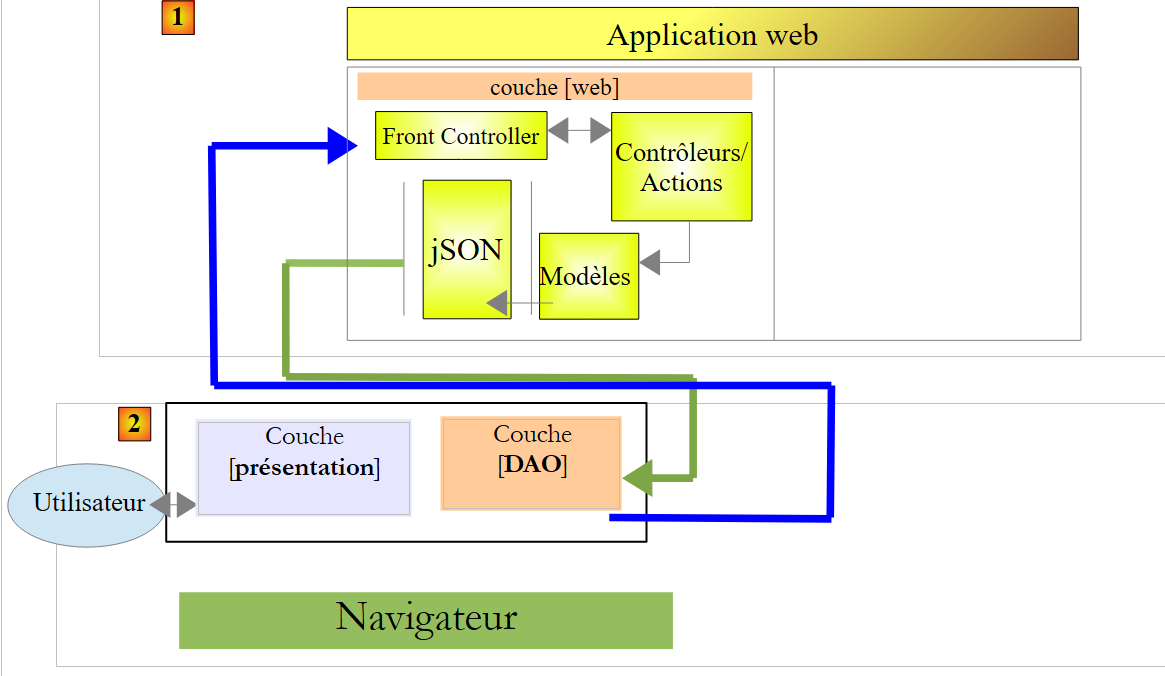 |
7.7.2. The start page
The action that launches the application is the following [/ajax-16] action:
    @RequestMapping(value = "/ajax-16", method = RequestMethod.GET, produces = "text/html; charset=UTF-8")
    public String ajax16() {
        return "vue-16";
}
It displays the following view [vue-16.xml]:
<!DOCTYPE HTML>
<html xmlns:th="http://www.thymeleaf.org">
    <head>
        <meta name="viewport" content="width=device-width" />
        <title>Ajax-12</title>
        <link rel="stylesheet" href="/css/ajax01.css" />
        <script type="text/javascript" src="/js/jquery/jquery-2.1.1.min.js"></script>
        <script type="text/javascript" src="/js/json3.js"></script>
        <script type="text/javascript" src="/js/local16-dao.js"></script>
        <script type="text/javascript" src="/js/local16-ui.js"></script>
    </head>
    <body>
        <h3>Ajax - 16 - Navigation dans une Application à Page Unique</h3>
        <h3>Structuration du code JS</h3>
        <hr />
        <div id="content" th:include="vue-09-page1" />
        <img id="loading" src="/images/loading.gif" />
        <div id="erreur" style="background-color:lightgrey"></div>
    </body>
</html>
- lines 9-10: the code JS has been placed in two different files:
- [local-ui] implements the [présentation] layer,
- [local-dao] implements the [DAO] layer;
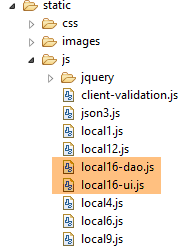 |
7.7.3. Implementation of the [DAO] layer
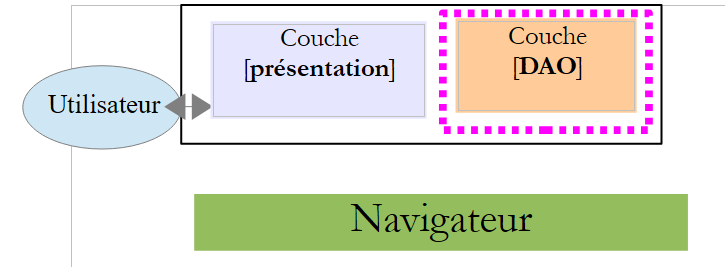 |
7.7.4. Interface
The [DAO] layer in [local-dao.js] will present the following interface to the [présentation] layer:
| to update page 1 with the [Rafraîchir] button |
| to display page 2 using the [Valider] button |
Javascript does not have the concept of an interface. I used this term simply to indicate that the [présentation] layer was committed to communicating with the [DAO] layer solely through the two preceding functions.
7.7.5. Implementation of the interface
The skeleton of the implementation is as follows:
var session = {
    "cpt1" : 0,
    "cpt3" : 0
};

// update Page 1
function updatePage1(deferred, sendMeBack) {
...
}

// page 2
function getPage2(deferred, sendMeBack, value1, value2, pageRequired) {
...
}
The purpose of the [DAO] layer is to hide the details of HTTP requests made to the web server from the [présentation] layer. The session is part of these details. It is therefore now managed by the [DAO] layer.
7.7.5.1. The [updatePage1] function
The [updatePage1] function is the function called by the [présentation] layer to refresh page 1. Its code is as follows:
// update Page 1
function updatePage1(deferred, sendMeBack) {
    // query HTTP
    executePost(deferred, sendMeBack, '/ajax-13', session);
}
- line 1: the [updatePage1] function receives two parameters:
- an object of type [jQuery.Deferred]. This object type stores a state that can have three values: ['pending', 'resolved', 'rejected']. When it arrives in the [updatePage1] function, it is in the [pending] state;
- a JS object to be returned to the [présentation] layer;
All HTTP requests are made by the following [executePost] function:
// query HTTP
function executePost(deferred, sendMeBack, url, post) {
    // make a manual Ajax call
    $.ajax({
        headers : {
            'Accept' : 'application/json',
            'Content-Type': 'application/json'
        },
        url : url,
        type : 'POST',
        data : JSON3.stringify(post),
        dataType : 'json',
        success : function(data) {
            // save the session
            if (data.session) {
                session = data.session;
            }
            // we return the result
            deferred.resolve({
                "status" : 1,
                "data" : data,
                "sendMeBack" : sendMeBack
            });
        },
        error : function(jqXHR) {
            // we return the error
            deferred.resolve({
                "status" : 2,
                "data" : jqXHR.responseText,
                "sendMeBack" : sendMeBack
            });
        }
    });
}
- Line 1: The [executePost] function executes an Ajax call of type POST. It expects four parameters:
- an object of type [jQuery.Deferred] in state [pending];
- a JS object to be returned in the [présentation] layer;
- the URL from the POST;
- the value to be posted as object JS;
- lines 5–8: the post function of jSON (line 7) receives from jSON (line 6);
- line 11: the value to be posted is converted to jSON;
- lines 13–24: the function executed if the Ajax call is successful;
- lines 19–23: if the server returned a session, we store it;
- lines 13–18: Set the [deferred] object to the [resolved] state, also passing a result with the following fields:
- [status]: set to 1 for success, 2 for failure,
- [data]: the server's response jSON,
- [sendMeBack]: the second parameter of the function, which is an object the caller wants to retrieve;
- lines 17–31: the function executed if the Ajax call fails. We do the same thing as before with two differences:
- [status] is set to 2 to indicate an error;
- [data] is again the server’s response jSON, but obtained in a different way;
7.7.5.2. The [getPage2] function
The [getPage2] function is as follows:
// page 2
function getPage2(deferred, sendMeBack, value1, value2, pageRequired) {
    // query HTTP
    executePost(deferred, sendMeBack, '/ajax-14', {
        "value1" : value1,
        "value2" : value2,
        "pageRequired" : pageRequired,
    });
}
- The function receives the following parameters:
- [deferred]: an object of type [jQuery.Deferred] in state [pending],
- [sendMeBack]: a JS object to be returned in the [présentation] layer,
- [value1]: the first entry on page 1,
- [value2]: the second entry on page 2,
- [pageRequired]: a Boolean indicating to the server whether or not to send the HTML stream from page 2;
- the function [executePost] is called to execute the necessary query HTTP;
7.7.6. The [présentation] layer
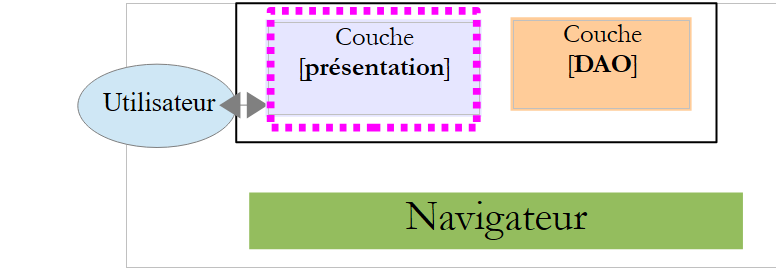 |
The [présentation] layer is implemented by the [local-ui.js] file. This file reuses the code from the [local12.js] file, modified to use the previous [DAO] layer. Only two functions have changed: [postForm] and [valider].
7.7.6.1. The [postForm] function
The [postForm] function is as follows:
// update Page 1
function postForm() {
    // update page 1
    var deferred = $.Deferred();
    loading.show();
    updatePage1(deferred, {
        'sender' : "postForm",
        'info' : 10
    });
    // displaying results
    deferred.done(postFormDone);
}
- line 4: we create a [jQuery.Deferred] object. By default, it is in the [pending] state;
- line 5: the loading image is displayed
- lines 6–9: the [updatePage1] function is executed. We pass a dummy [sendMeBack] object, just to show what it can be used for;
- line 11: the parameter of the [deferred.done] function is itself a function. This is the function to be executed when the state of the [deferred] object changes to the [resolved] state. We just saw that the function DAO [executePost] passed the state of this object to [resolved] upon receiving the server response. This means that when the function [postFormDone] executes, the server response has been received;
The function [postFormDone] is as follows:
function postFormDone(result) {
    // end waiting
    loading.hide();
    // data recovery
    var data = result.data
    // for demo
    console.log(JSON3.stringify(result.sendMeBack));
    // status analysis
    switch (result.status) {
    case 1:
        // update both zones
        if (data.zone1) {
            $("#zone1-content").html(data.zone1);
            $("#zone1").show();
        } else {
            $("#zone1").hide();
        }
        if (data.zone3) {
            $("#zone3").show();
            $("#zone3-content").html(data.zone3);
        } else {
            $("#zone3").hide();
        }
        break;
    case 2:
        // error display
        erreur.html(data);
        break;
    }
}
- line 1: the received parameter [result] is the parameter passed to the method [deferred.resolve] in the function [executePost], for example:
            // we return the result
            deferred.resolve({
                "status" : 1,
                "data" : data,
                "sendMeBack" : sendMeBack
});
- line 5: we retrieve the response from the server;
- lines 10–24: this is the code that, in the previous version, was in the [onSuccess] function of the [postForm] function;
- lines 25–28: this is the code that, in the previous version, was in the [onError] function of the [postForm] function;
7.7.6.2. The role of the [sendMeBack] parameter
What is the purpose of the [sendMeBack] parameter? Let’s look at the call code for the [updatePage1] function:
// update Page 1
function postForm() {
    // update page 1
    var deferred = $.Deferred();
    loading.show();
    updatePage1(deferred, {
        'sender' : "postForm",
        'info' : 10
    });
    // displaying results
    deferred.done(postFormDone);
}
and the signature of the [validerDone] function:
function postFormDone(result) {
}
How can the [postForm] function pass information to the [postFormDone] function? The latter has only one parameter, [result]. This parameter is created by the [executePost] function in the [DAO] layer. To pass information to function [postFormDone], function [postForm] must first pass it to function [updatePage1]. This is the role of the [sendMeBack] parameter. It is used as follows:
function postFormDone(result) {
    // end waiting
    loading.hide();
    // data recovery
    var data = result.data
    // for demo
    console.log(JSON3.stringify(result.sendMeBack));
    // status analysis
    switch (result.status) {
...
- line 7, the function [postFormDone] has retrieved the parameter [sendMeBack] initially passed to the function DAO [updatePage1] by the function [postForm];
7.7.7. The function [valider]
The [valider] function is as follows:
// validate entered values
function valider() {
    // memorize page 1
    page1 = content.html();
    // store the values entered
    value1 = $("#text1").val().trim();
    value2 = $("#text2").val().trim();
    // no error
    erreur.hide();
    // page 2 is requested
    var deferred = $.Deferred();
    loading.show();
    getPage2(deferred, {
        'sender' : 'validate',
        'info': 20
    }, value1, value2, page2 ? false : true);
    // displaying results
    deferred.done(validerDone);
}
and the [validerDone] function (line 18) as follows:
function validerDone(result) {
    // end waiting
    loading.hide();
    // data recovery
    var data = result.data
    // for demo
    console.log(JSON3.stringify(result.sendMeBack));
    // status analysis
    switch (result.status) {
    case 1:
        // mistake?
        if (data.erreur) {
            // error display
            erreur.html(data.erreur);
            erreur.show();
        } else {
            // no error
            erreur.hide();
            // page 2
            if (page2) {
                // use the cached page
                content.html(page2);
            } else {
                // memorize page 2
                page2 = data.page2;
                // we display it
                content.html(data.page2);
            }
            // we update it with server info
            $("#value1").text(data.value1);
            $("#value2").text(data.value2);
        }
        break;
    case 2:
        // error display
        erreur.html(data);
        erreur.show();
        break;
    }
}
- line 5: we retrieve the server's response;
- lines 10–32: this is the code that, in the previous version, was in the [onSuccess] function of the [valider] function;
- lines 34–38: this is the code that, in the previous version, was in the [onError] function of the [valider] function;
7.7.8. Tests
The application continues to function as before, and in the Chrome console, you can see the [sendMeBack] parameters of the [postForm] and [valider] functions:
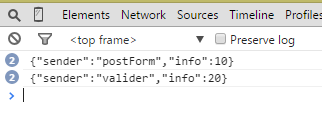 |
7.8. Conclusion
Let’s return to the general diagram of a Spring application MVC:
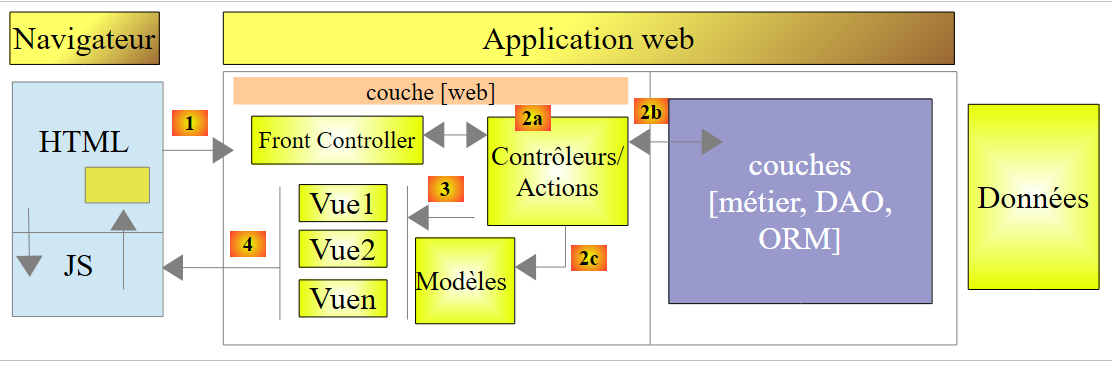 |
Thanks to the Javascript embedded in the HTML pages and executed in the browser, and thanks to the APU model, we can offload code to the browser and achieve the following architecture:
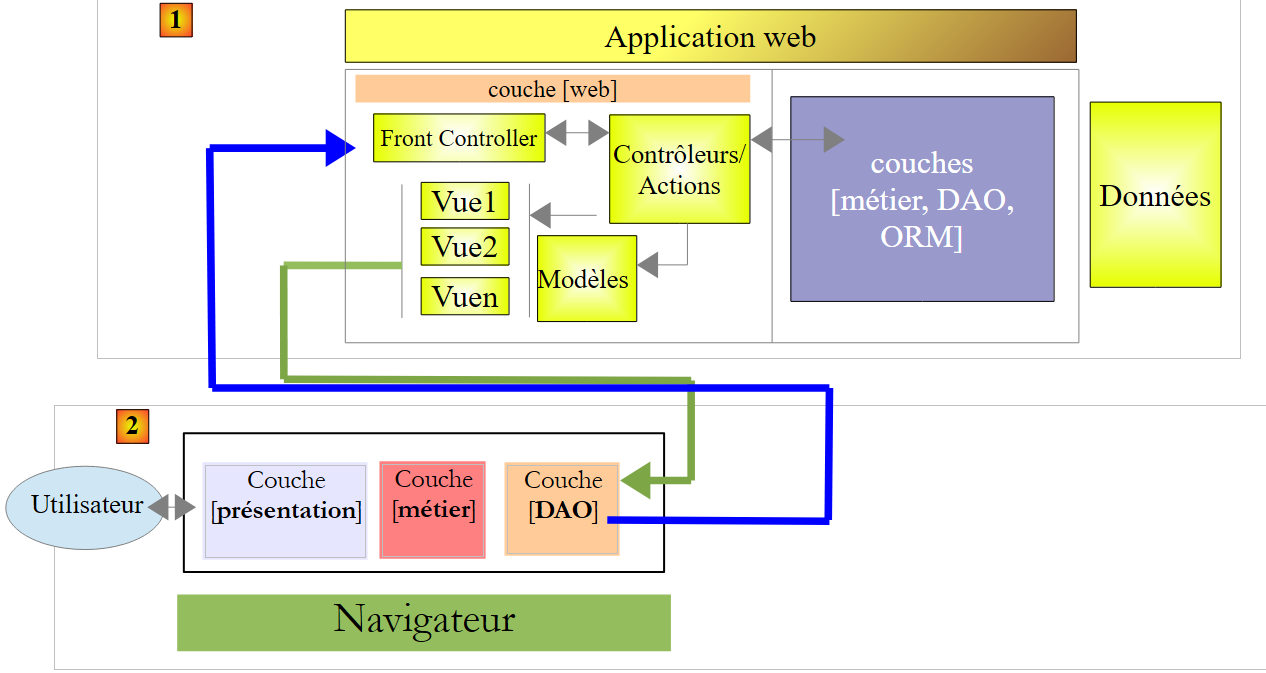 |
- we have a client architecture [2] / server architecture [1] where the client and server communicate via jSON;
- in [1], the Spring web layer MVC delivers views, view fragments, and data in jSON;
- in [2]: the Javascript code embedded in the view loaded at application startup can be structured into layers:
- the [présentation] layer handles user interactions,
- the [DAO] layer handles data access via the [1] web server,
- the [métier] layer may not exist or may take over some of the non-confidential functionalities of the server’s [métier] layer in order to offload the server;
- the [2] client may cache certain views to further offload the server. It manages the session;