4. Routing
4.1. Example 17: The router
An application [React] is a single-page application: the browser loads only ONE HTML page. When you click on an internal link, no request is sent to the server: the router changes the address displayed by the browser and replaces the displayed component. [React] does not have a router: the [React Router] library ([react-router] package), which is the most widely used, is used instead.
[React Router] can be used in three ways (its “modes”): declarative (using the [<Routes>] and [<Route>] components, the simplest), “data” (routes described by objects, with functions executed before rendering: [loader], [middleware]...), and “framework” (a complete application with server-side rendering, similar to [Next.js]). We use the data mode, which provides the navigation controls we’ll need.
4.1.1. The data
| // "hard-coded" data, so as not to depend on a server in this example
export interface Doctor {
id: number;
title: string;
firstName: string;
lastName: string;
specialty: string;
}
export const DOCTORS: Doctor[] = [
{ id: 1, title: 'Mme', firstName: 'Marie', lastName: 'PELISSIER', specialty: 'general practitioner' },
{ id: 2, title: 'Mr', firstName: 'Paul', lastName: 'TATOU', specialty: 'pediatrician' },
{ id: 3, title: 'Melle', firstName: 'Sophie', lastName: 'DUPONT', specialty: 'general practitioner' },
];
|
"Hard-coded" data, so as not to depend on a server in this example.
4.1.2. Routes
| // =========================================================================
// 17-router/src/routes.tsx - the ROUTES of the application
// -------------------------------------------------------------------------
// A React application is a single-page application (SPA: Single
// Page Application): the browser only loads ONE HTML page. When one
// clicks on an internal link, no request is sent to the server: the
// router changes the address displayed by the browser, and replaces the
// component displayed in <Outlet />.
//
// React has no router: the React Router library is used. A
// route associates a PATH with a COMPONENT (a "page"):
// 'doctors/:id' :id is a parameter (/doctors/2 -> id = "2");
// '*' any path: the "not found" page (the
// router always chooses the most specific route).
// The routes are NESTED: the root route displays the shell of
// the application (Shell), and its children are displayed inside it, at
// the place of its <Outlet />.
// =========================================================================
import { redirect, type RouteObject } from 'react-router';
import Shell from './Shell';
import Home from './pages/Home';
import DoctorList from './pages/DoctorList';
import DoctorDetail from './pages/DoctorDetail';
import Search from './pages/Search';
import NotFoundPage from './pages/NotFoundPage';
export const routes: RouteObject[] = [
{
path: '/',
Component: Shell,
children: [
// index: the route of the address of the parent itself ("/")
{ index: true, Component: Home },
{ path: 'doctors', Component: DoctorList },
{ path: 'doctors/:id', Component: DoctorDetail },
{ path: 'search', Component: Search },
// DEFERRED loading: the code of this page is only downloaded on the
// first visit (Vite makes a separate file of it)
{ path: 'about', lazy: async () => ({ Component: (await import('./pages/About')).default }) },
// a redirect: the old address leads to the new one. A LOADER
// is a function that the router calls BEFORE displaying the route;
// if it throws a redirect, the navigation changes target
{
path: 'physicians',
loader: () => {
throw redirect('/doctors');
},
},
{ path: '*', Component: NotFoundPage },
],
},
];
|
- Line 20: [RouteObject] is the type of a route; [redirect] creates a redirect;
- lines 28–53: Routes are objects: a path ([path]) and a component ([Component], capitalized—we specify the component, not [<Home />]);
- lines 30–32: Routes are nested: the root route displays the application’s “shell” ([Shell]), and its children ([children]) are displayed INSIDE the shell, at the location of its [<Outlet />]. The paths of the children are relative to that of the parent;
- line 34: a route index: that of the parent’s address itself (“/”);
- line 36: [:id] is a parameter: [/doctors/2] displays [DoctorDetail], where [id] = “2”;
- line 40: deferred loading: the function [lazy] is called only on the first visit to the page. [import('./pages/About')] (a “dynamic” import, in the form of a function) then downloads the module, which [Vite] has stored in a separate file. [lazy] returns the missing properties of the route: in this case, its component, which is exported by default by the module;
- lines 45–49: a redirect: the old address leads to the new one. A loader is a function that the router calls BEFORE displaying the route (to load its data); if it triggers ([throw]) a redirect, the navigation changes its target;
- line 50: [*] corresponds to any path: the “page not found” page. The router always chooses the most specific route: the order of the routes does not matter.
4.1.3. Startup
| // =========================================================================
// 17-router/src/main.tsx
// -------------------------------------------------------------------------
// createBrowserRouter(routes) builds the router, which follows the address of the
// browser; <RouterProvider> displays the route that matches the current
// address. The root component is no longer App: it is the routes.
// =========================================================================
import { StrictMode } from 'react';
import { createRoot } from 'react-dom/client';
import { createBrowserRouter } from 'react-router';
import { RouterProvider } from 'react-router/dom';
import 'bootstrap/dist/css/bootstrap.min.css';
import { routes } from './routes';

const router = createBrowserRouter(routes);

createRoot(document.getElementById('root')!).render(
  <StrictMode>
    <RouterProvider router={router} />
  </StrictMode>,
);
|
- line 16: the router, constructed from the routes. [Browser]: it follows the browser’s address via API and [history];
- line 20: the component that displays the route corresponding to the current address. The root component is no longer [App]: these are the routes. [RouterProvider] is imported from [react-router/dom], the browser-specific part of the library.
4.1.4. The application shell
| // =========================================================================
// 17-router/src/Shell.tsx - the "shell" of the application
// -------------------------------------------------------------------------
// - <Link to="...">, <NavLink to="...">: an internal link. It produces a
// real <a href>, but a click does not reload the page: it is the router
// that acts. NavLink also knows whether it points to the displayed page: it
// then puts the "active" class (Bootstrap's one);
// - <Outlet />: the placeholder where the current CHILD route is displayed;
// - useLocation(): the current address (pathname, search...).
// =========================================================================
import { NavLink, Outlet, useLocation } from 'react-router';
export default function Shell() {
const location = useLocation();
// decodeURIComponent: %20 becomes a space again
const address = decodeURIComponent(location.pathname + location.search);
return (
<div className="container py-4">
<h1 className="h3 mb-3">Example 17 - the router</h1>
<nav className="nav nav-pills mb-3">
{/* end: "/" is only active on "/" exactly, and not on /doctors */}
<NavLink className="nav-link" to="/" end>Home</NavLink>
<NavLink className="nav-link" to="/doctors">Doctors</NavLink>
{/* the parameters after the ?: NavLink only compares the path */}
<NavLink className="nav-link" to="/search?q=general practitioner">Search</NavLink>
<NavLink className="nav-link" to="/about">About</NavLink>
<NavLink className="nav-link" to="/physicians">/physicians (redirect)</NavLink>
<NavLink className="nav-link" to="/unknown-page">Broken link</NavLink>
</nav>
<p className="small text-muted">current address: <code>{address}</code></p>
<div className="card p-3">
<Outlet />
</div>
</div>
);
}
|
- line 15: [useLocation()] returns the current address: [pathname] (the path), [search] (the part after the “?”)... The component is called each time the user navigates;
- Line 24: [<NavLink to="...">] is an internal link. It generates a valid [<a href>] (which can be opened in a new tab), but clicking it does not reload the page: the router handles this. [NavLink] also knows if it refers to the currently displayed page: in that case, it adds the class [active] (the same as [Bootstrap]). [end]: The home page “/” is active only on “/” exactly, and not on [/doctors]; [<Link>] is the simple version, without an active class;
- line 27: an address with parameters. [NavLink] compares only the path: the link remains active regardless of the search;
- line 34: the location where the current CHILD route is displayed.
4.1.5. The pages
The home page:
| // React 19: a <title> element written in a component is placed by React
// in the <head> of the page; it changes the title of the tab as long as the
// component is displayed
export default function Home() {
return (
<>
<title>Home</title>
<p className="mb-0">
Welcome. Click on the links: the address of the browser changes, the page is never reloaded (open
the Network tab of the developer tools to check it). The Back and Forward buttons of the browser
work, as well as the reloading (F5) of any page.
</p>
</>
);
}
|
- line 7: [React] places any element written in a component into the page’s [<head>], as long as the component is displayed: Each page thus sets the tab title (you can do the same with [<meta>] and [<link>]).
The list of doctors, with parameterized links:
| // 17-router/src/pages/DoctorList.tsx - links with a parameter
import { Link } from 'react-router';
import { DOCTORS } from '../data';
export default function DoctorList() {
return (
<>
<title>Doctors</title>
<ul className="mb-0">
{DOCTORS.map((m) => (
// a template string builds the address /doctors/2
<li key={m.id}>
<Link to={`/doctors/${m.id}`}>{m.title} {m.firstName} {m.lastName}</Link>
</li>
))}
</ul>
</>
);
}
|
A string template generates the address [/doctors/2].
A doctor’s profile:
| // =========================================================================
// 17-router/src/pages/DoctorDetail.tsx - a page with a parameter
// -------------------------------------------------------------------------
// useParams(): the parameters of the path, here { id: "2" } - always
// STRINGS. useNavigate(): a function to navigate BY CODE;
// navigate(-1) goes back to the previous page, like the Back button.
// If one goes from /doctors/1 to /doctors/2, React REUSES the same
// component: it is simply called again with another id.
// =========================================================================
import { useNavigate, useParams } from 'react-router';
import { DOCTORS } from '../data';
export default function DoctorDetail() {
const { id } = useParams();
const navigate = useNavigate();
const doctor = DOCTORS.find((m) => m.id === Number(id));
if (!doctor) {
return <p className="text-danger mb-0">Doctor no. {id} does not exist.</p>;
}
const next = (doctor.id % DOCTORS.length) + 1;
return (
<>
<title>{`${doctor.firstName} ${doctor.lastName}`}</title>
<h2 className="h5">{doctor.title} {doctor.firstName} {doctor.lastName}</h2>
<p>Specialty: {doctor.specialty}</p>
<div className="d-flex gap-2">
<button className="btn btn-sm btn-outline-secondary" onClick={() => navigate(-1)}>Back</button>
<button className="btn btn-sm btn-outline-primary" onClick={() => navigate(`/doctors/${next}`)}>Next doctor</button>
</div>
</>
);
}
|
- Line 15: [useParams()] provides the path parameters—in this case, [{ id: "2" }]—always in string format;
- line 16: a function for navigating by code;
- lines 19–21: an unknown doctor ([/doctors/9]): a message;
- line 26: a calculated title: [<title>] only accepts ONE string, hence the template;
- line 30: [navigate(-1)] returns to the previous page, like the browser’s Back button;
- line 31: navigate to an address. Going from [/doctors/1] to [/doctors/2] does not recreate the component: [React] simply reloads it, with a different [id].
The search:
| // =========================================================================
// 17-router/src/pages/Search.tsx - a page driven by the URL
// -------------------------------------------------------------------------
// /search?q=pediatrician: as with the GET form of the NestJS course, the
// page is entirely described by its address: it can be bookmarked,
// reloaded, navigated back to. useSearchParams() gives the
// parameters after the ?.
// <Form> (from React Router) is a GET form... without reloading: the
// router navigates to /search?q=<input>. The page displays what the
// URL says, and nothing else.
// =========================================================================
import { Form, useSearchParams } from 'react-router';
import { DOCTORS } from '../data';
export default function Search() {
const [params] = useSearchParams();
const q = params.get('q') ?? ''; // null if it is absent
const results = DOCTORS.filter((m) => `${m.firstName} ${m.lastName} ${m.specialty}`.toLowerCase().includes(q.toLowerCase()));
return (
<>
<title>Search</title>
<Form className="d-flex gap-2 mb-3" action="/search">
{/* an UNcontrolled field, which starts with the value of the URL;
key={q}: if the URL changes (Back button), React recreates the
field, which then takes the new value of the URL */}
<input key={q} name="q" className="form-control" placeholder="name or specialty" defaultValue={q} />
<button className="btn btn-primary">Search</button>
</Form>
<ul className="mb-0">
{results.map((m) => (
<li key={m.id}>{m.firstName} {m.lastName} ({m.specialty})</li>
))}
{results.length === 0 && <li className="text-muted">No result.</li>}
</ul>
</>
);
}
|
- Line 17: the parameters after the “?”, in the form of an object [URLSearchParams]: [params.get('q')] is equal to [null] if [q] is absent. [useSearchParams] also returns (as the second element) a function to change them;
- line 24: [<Form>] (from [React Router]) is a GET form... without reloading: upon submission, the router navigates to [/search?q=<input>] ([q] being the [name] for the field). As with the GET form from the [NestJS] course, the page is fully described by its address: you can bookmark it, reload it, or go back;
- Line 28: The field is not validated; it starts with the value of the URL ([defaultValue]). If the URL changes without the page being reloaded (using the Back button), the field would retain its previous text; [key={q}] resolves this issue. When an element’s key changes, [React] treats it as a DIFFERENT element: it destroys the old one and creates a new one, which starts with the new default value. This is a common trick for “resetting” a component.
The on-demand page and the "page not found" page:
| // 17-router/src/pages/About.tsx - a page loaded on demand
// "export default": the route finds it through (await import(...)).default
export default function About() {
return (
<>
<title>About</title>
<p className="mb-0">
This page was downloaded on the first visit (Network tab: a file About-XXXX.js in production).
Its tab title comes from the title element it contains.
</p>
</>
);
}
|
| import { useLocation } from 'react-router';
export default function NotFoundPage() {
const { pathname } = useLocation();
return (
<>
<title>Page not found</title>
<p className="text-danger mb-0">No page at the address <code>{pathname}</code>.</p>
</>
);
}
|
4.1.6. Execution
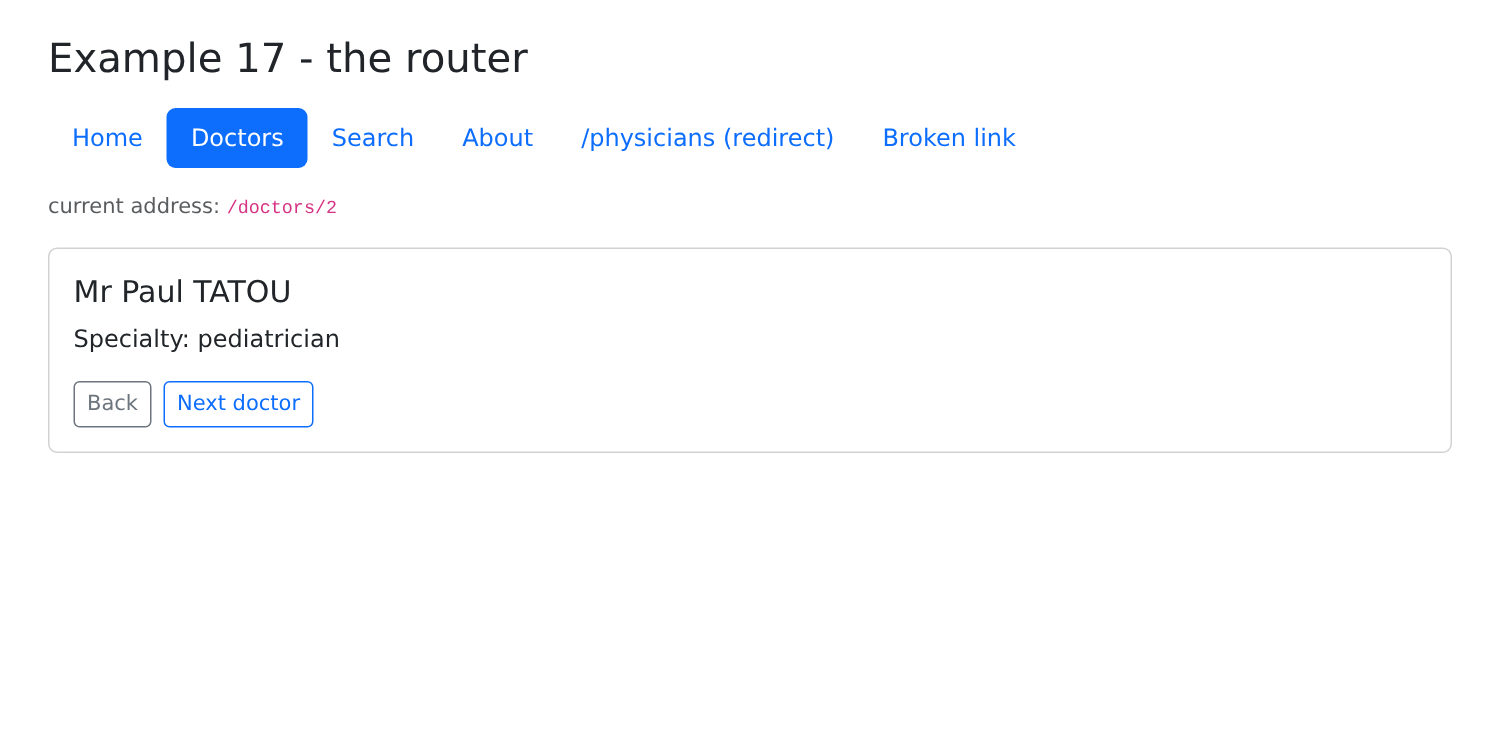
Click on “Doctors,” then on “Mr Paul TATOU”: the address changes to [/doctors/2], and the tab title becomes “Paul TATOU”:
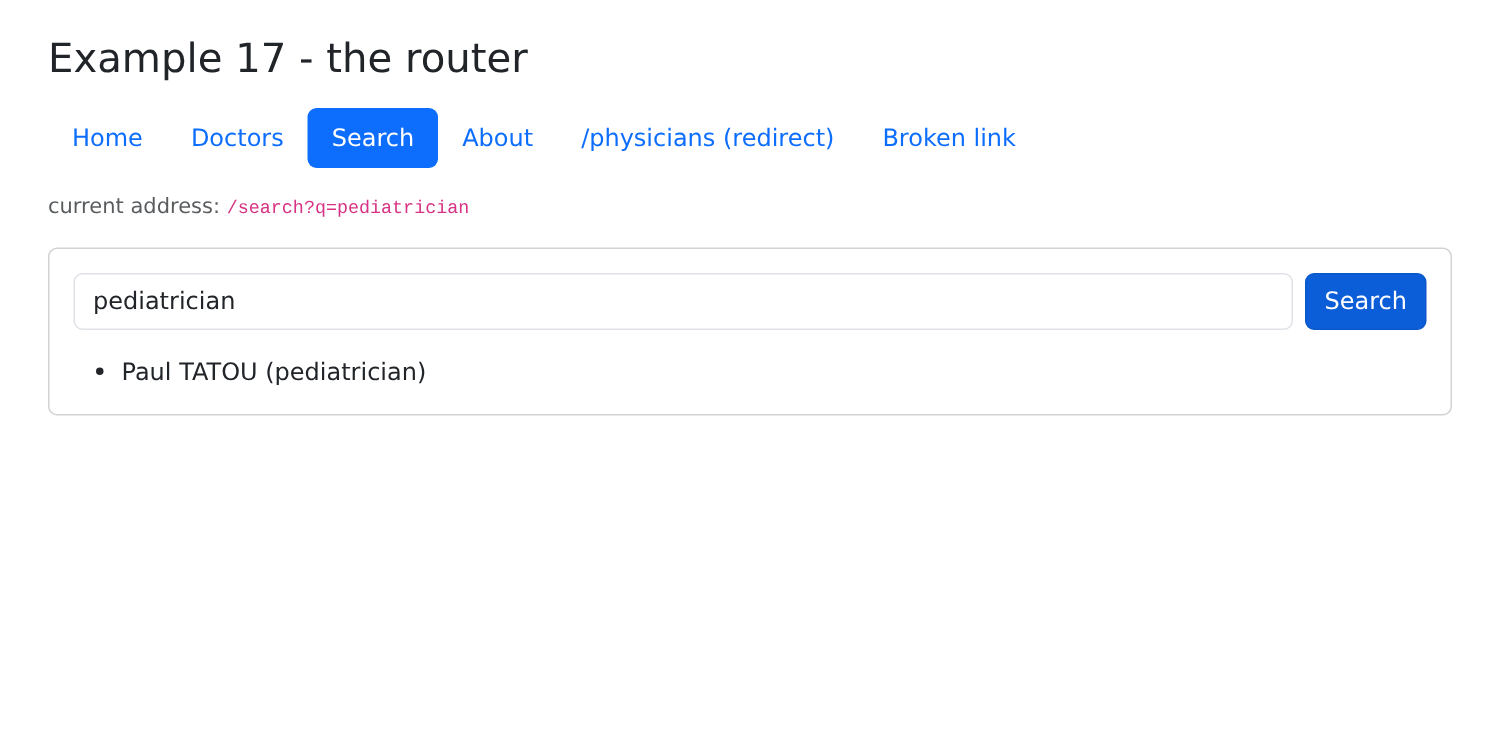
A search: the address becomes [/search?q=pediatrician]:
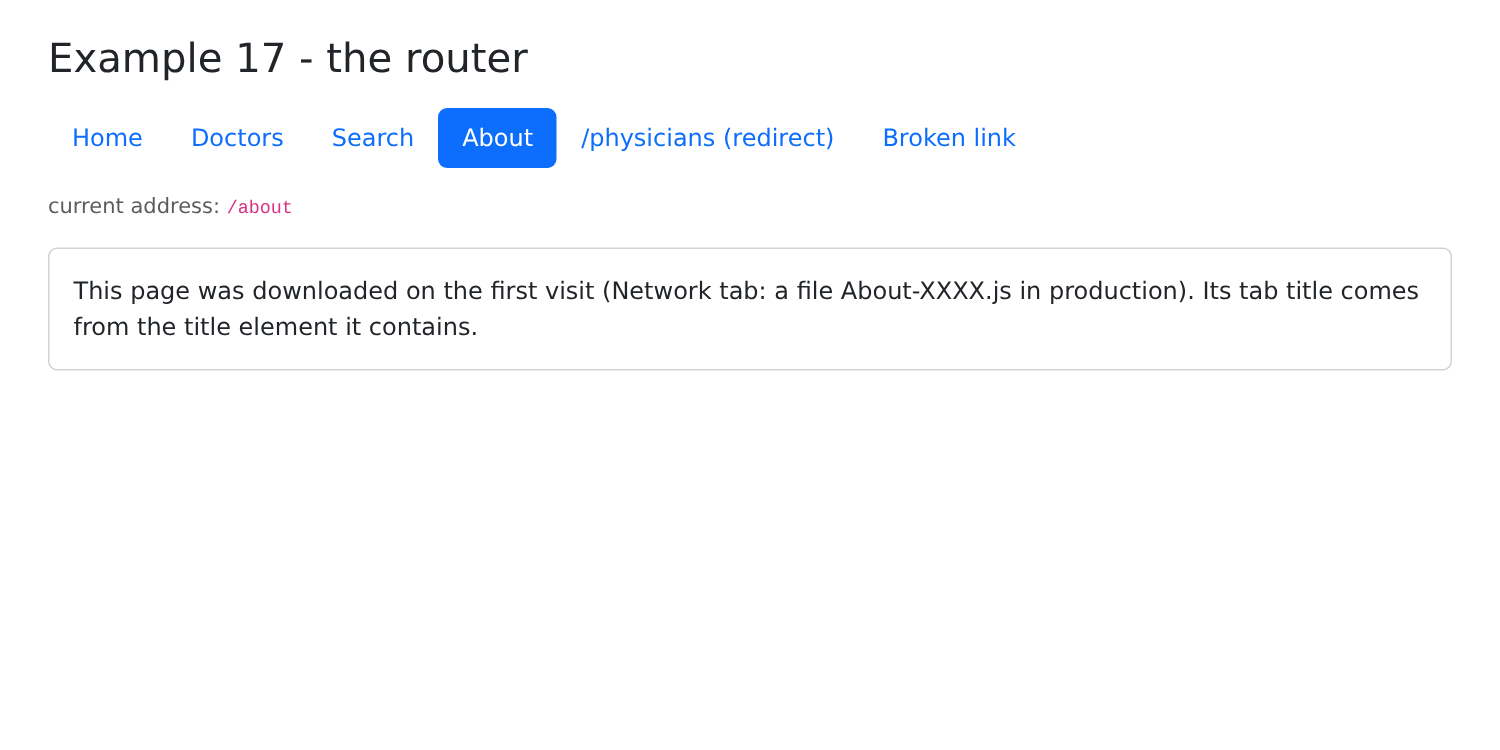
"About": In development, the [About.tsx] module is downloaded only on the first visit (Development Tools Network tab); in production ([npm run build 17-router]), it is stored in a separate file:
| 17-router/dist/index.html 0.38 kB │ gzip: 0.26 kB
17-router/dist/assets/index-CqLr8KVv.css 230.06 kB │ gzip: 30.68 kB
17-router/dist/assets/About-DBg63tlb.js 0.36 kB │ gzip: 0.26 kB
17-router/dist/assets/index-evhjxpxc.js 317.05 kB │ gzip: 100.09 kB
|
"/physicians" leads to [/doctors]; a broken link:
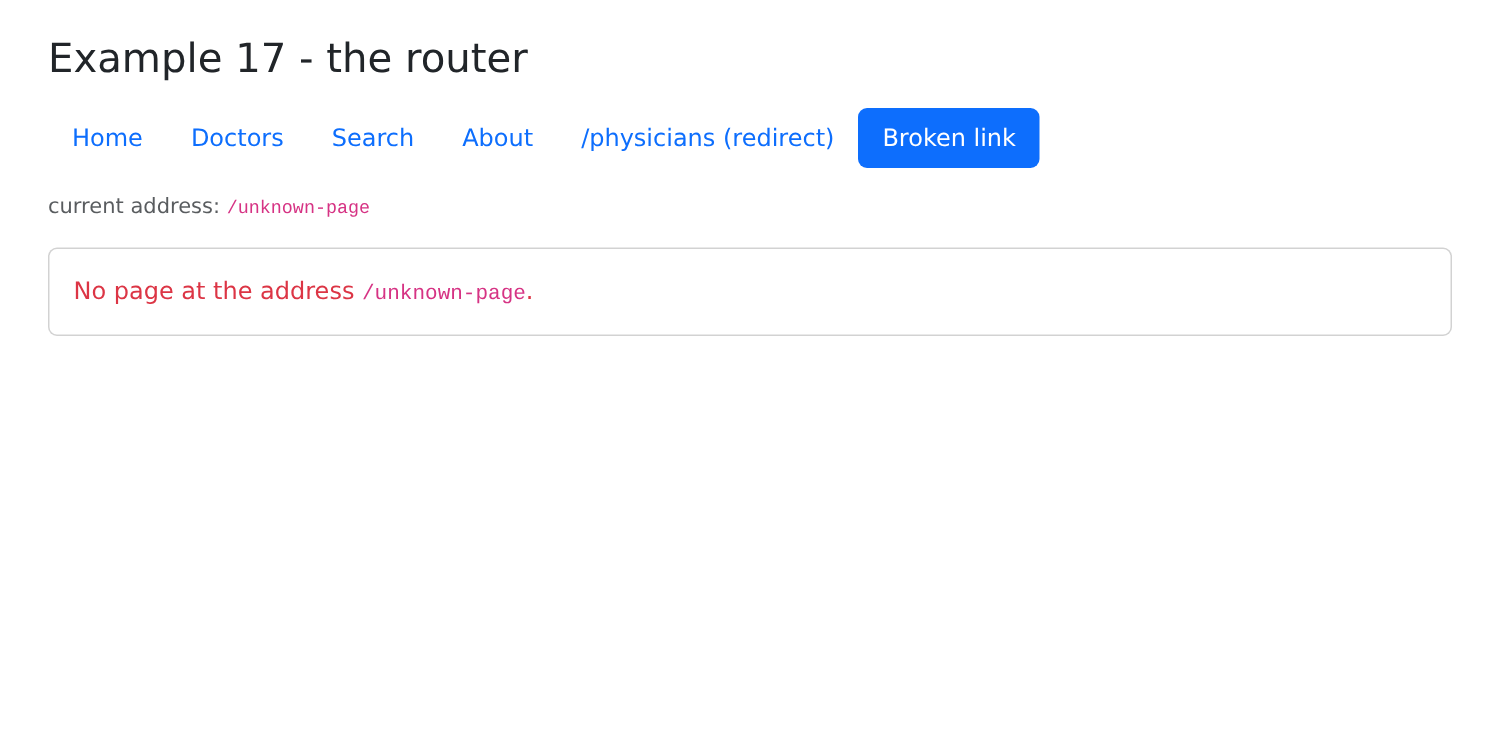
You can reload (F5) any page: the [Vite] development server returns [index.html] for any unknown address, and the router displays the correct page. In production, the server will need to do the same (see the “Deployment” chapter).
4.2. Example 18: Navigation Controls
Some pages require the user to be logged in or to have a specific role. The router can verify this before displaying them, using middleware.
4.2.1. The session
| // =========================================================================
// 18-guards/src/session.ts - a SIMULATED session (without a server)
// -------------------------------------------------------------------------
// The logged-in user must be known to the COMPONENTS (the top bar,
// the schedule page) and to the GUARDS (functions of the router, which are
// not components and therefore cannot read a context). It is stored
// in a simple module, a hand-made "store":
// - a private variable, the state;
// - functions to read and modify it;
// - subscribe: the list of the functions to notify when it changes.
// A component subscribes to it with useSyncExternalStore (cf. useSession): it
// is called again when the state changes. Example 20 will entrust this work to a
// library, Zustand. (Example 23 will do the same thing with a real
// server.)
// =========================================================================
import { useSyncExternalStore } from 'react';
export type Role = 'ADMIN' | 'DOCTOR' | 'USER';
export interface User {
login: string;
role: Role;
}
// three "hard-coded" accounts (password = login)
const ACCOUNTS: Record<string, Role> = { admin: 'ADMIN', pelissier: 'DOCTOR', martin: 'USER' };
let user: User | null = null; // the state
const subscribers = new Set<() => void>();
function setUser(u: User | null) {
user = u;
subscribers.forEach((notify) => notify());
}
export const session = {
user: () => user,
logIn(login: string, password: string): boolean {
const role = Object.hasOwn(ACCOUNTS, login) ? ACCOUNTS[login] : undefined;
if (role === undefined || password !== login) {
return false;
}
setUser({ login, role });
return true;
},
logOut: () => setUser(null),
subscribe(notify: () => void) {
subscribers.add(notify);
return () => subscribers.delete(notify); // to unsubscribe
},
};
// the hook of the components: the logged-in user, always up to date
export function useSession(): User | null {
return useSyncExternalStore(session.subscribe, session.user);
}
|
The logged-in user must be known to the components (the top bar, the schedule page) and to the guards—router functions that are not components and therefore cannot read a context. It is stored in a simple, hand-written module, a store ([store]):
- lines 29–30: the state, a private variable of the module, and the list of functions to notify when it changes;
- lines 32–35: change the state and notify subscribers;
- lines 37–52: the public functions: read the user, log in (three hard-coded accounts, password = login), log out, and subscribe ([subscribe] refers to the function that unsubscribes);
- lines 55–57: the component hook. [useSyncExternalStore(subscribe, read)] is the hook for [React] designed for this purpose: it subscribes the component to the store and calls it back when the read value changes.
Example 20 will delegate this task to a library.
4.2.2. The guards
| // =========================================================================
// 18-guards/src/guards.ts - navigation GUARDS
// -------------------------------------------------------------------------
// A React Router MIDDLEWARE is a function that the router calls
// BEFORE displaying a route that declares it (middleware: [...]), on EACH
// navigation to it. It can:
// - do nothing: the navigation goes on;
// - throw a redirect, redirect('/address'): the
// navigation is replaced by a navigation to this address.
// It receives the navigation request (request.url: the requested address).
//
// It is the client-side equivalent of the NestJS guards (JwtAuthGuard,
// RolesGuard) - with a FUNDAMENTAL difference: a guard of the client is
// only a convenience. The code of the client is in the hands of the user, who
// can modify it at will. The real protection of the data remains that
// of the SERVER (cf. chapter on the black box).
// =========================================================================
import { redirect, type MiddlewareFunction } from 'react-router';
import { session, type Role } from './session';
// the requested address, without the host: "/schedule?x=1"
function address(request: Request): string {
const url = new URL(request.url);
return url.pathname + url.search;
}
// the page requires being logged in
export const requireLogin: MiddlewareFunction = ({ request }) => {
if (session.user() === null) {
// not logged in: to the login page, remembering where we wanted to go
throw redirect(`/login?redirect=${encodeURIComponent(address(request))}`);
}
};
// the page requires one of the given roles: a function that BUILDS the guard
export function requireRole(...roles: Role[]): MiddlewareFunction {
return ({ request }) => {
const u = session.user();
if (u === null || !roles.includes(u.role)) {
// logged in, but not with the right role: back to home, with a reason
throw redirect(`/?denied=${encodeURIComponent(address(request))}`);
}
};
}
|
A [React Router] middleware is a function that the router calls BEFORE displaying a route that declares it, on EACH navigation to it. It can do nothing (navigation continues), or trigger a redirection, which replaces the navigation.
- Lines 23–26: It receives the navigation request: [request.url] is the full requested address ([http://localhost:5173/schedule?x=1]); only the path and parameters are retained;
- lines 29–34: not logged in: redirects to the login page, while retaining the intended destination ([?redirect=...]);
- lines 37–45: a function that BUILDS the guard for the given roles; [...roles]: any number of arguments, grouped into an array. Logged in, but not with the correct role: redirect to the home page, with a reason.
This is the client-side equivalent of the [NestJS] guards ([JwtAuthGuard], [RolesGuard]), with one difference: a client-side guard is merely a convenience. The client code is in the user’s hands, and the user can modify it at will. True data protection remains that provided by the SERVER (see the chapter on the black box).
4.2.3. Protected Routes
| // =========================================================================
// 18-guards/src/routes.tsx - PROTECTED routes
// -------------------------------------------------------------------------
// middleware: the guards to pass, in order. A page loaded on
// demand (lazy) is only downloaded once the guards are passed.
// =========================================================================
import { redirect, type RouteObject } from 'react-router';
import Shell from './Shell';
import Home from './pages/Home';
import Login from './pages/Login';
import Schedule from './pages/Schedule';
import { requireLogin, requireRole } from './guards';
export const routes: RouteObject[] = [
{
path: '/',
Component: Shell,
children: [
{ index: true, Component: Home },
{ path: 'login', Component: Login },
{ path: 'schedule', Component: Schedule, middleware: [requireLogin] },
{
path: 'administration',
middleware: [requireLogin, requireRole('ADMIN')],
lazy: async () => ({ Component: (await import('./pages/Administration')).default }),
},
// any other address: back to home
{ path: '*', loader: () => redirect('/') },
],
},
];
|
- line 22: the route’s safeguards, executed in order;
- lines 24–26: a page loaded on demand is downloaded only after the guards have been passed;
- line 29: any other address: return to the home page. A loader can also RETURN the redirection.
The startup code is the same as in Example 17:
| import { StrictMode } from 'react';
import { createRoot } from 'react-dom/client';
import { createBrowserRouter } from 'react-router';
import { RouterProvider } from 'react-router/dom';
import 'bootstrap/dist/css/bootstrap.min.css';
import { routes } from './routes';
const router = createBrowserRouter(routes);
createRoot(document.getElementById('root')!).render(
<StrictMode>
<RouterProvider router={router} />
</StrictMode>,
);
|
4.2.4. The shell and the pages
| // 18-guards/src/Shell.tsx - the links, and the logged-in user
import { NavLink, Outlet, useNavigate } from 'react-router';
import { session, useSession } from './session';
// NavLink accepts a FUNCTION for className: it receives { isActive }
const cssClass = ({ isActive }: { isActive: boolean }) => (isActive ? 'fw-bold' : '');
export default function Shell() {
const user = useSession();
const navigate = useNavigate();
function onLogOut() {
session.logOut();
navigate('/');
}
return (
<div className="container py-4" style={{ maxWidth: 720 }}>
<h1 className="h3 mb-3">Example 18 - navigation guards</h1>
<nav className="d-flex gap-3 align-items-center mb-3">
<NavLink to="/" end className={cssClass}>Home</NavLink>
<NavLink to="/schedule" className={cssClass}>Schedule (logged in)</NavLink>
<NavLink to="/administration" className={cssClass}>Administration (ADMIN)</NavLink>
<span className="ms-auto">
{user ? (
<>
{user.login} <span className="badge text-bg-primary">{user.role}</span>
<button className="btn btn-sm btn-link" onClick={onLogOut}>log out</button>
</>
) : (
<NavLink to="/login">log in</NavLink>
)}
</span>
</nav>
<div className="card p-3"><Outlet /></div>
</div>
);
}
|
- Line 6: [className] from a [NavLink] can be a function that takes [{ isActive }] as input and returns the classes;
- Line 9: the logged-in user; the bar tracks their changes;
- Lines 12–15: Logout and return to the home page.
| import { useSearchParams } from 'react-router';
export default function Home() {
// ?denied=...: put by the requireRole guard when the role does not fit
const denied = useSearchParams()[0].get('denied');
return (
<>
{denied && <p className="alert alert-danger">Your role does not allow you to open {denied}.</p>}
<p className="mb-0">
Public page. Try the two other links, logged in or not (admin, pelissier, martin - password = login).
</p>
</>
);
}
|
| import { useSession } from '../session';
export default function Schedule() {
const user = useSession();
return (
<p className="mb-0">
The schedule of <strong>{user?.login}</strong>: this page requires being logged in.
</p>
);
}
|
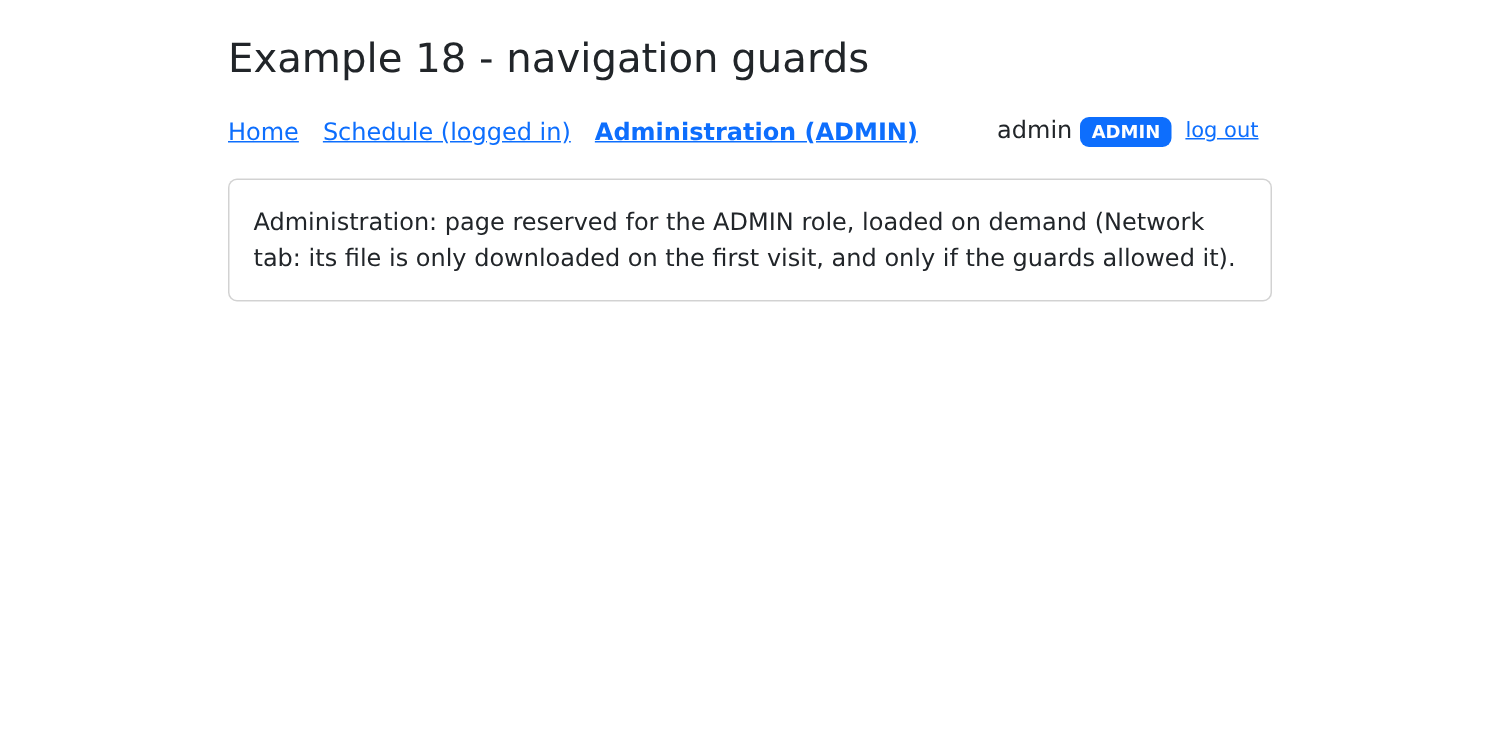
| export default function Administration() {
return (
<p className="mb-0">
Administration: page reserved for the ADMIN role, loaded on demand (Network tab: its file is only downloaded
on the first visit, and only if the guards allowed it).
</p>
);
}
|
| // =========================================================================
// 18-guards/src/pages/Login.tsx
// -------------------------------------------------------------------------
// After logging in, the user is sent back to the page they wanted to
// open (parameter ?redirect=... put by the guard), or to home.
// =========================================================================
import { useState, type FormEvent } from 'react';
import { useNavigate, useSearchParams } from 'react-router';
import { session } from '../session';
export default function Login() {
const redirection = useSearchParams()[0].get('redirect');
const navigate = useNavigate();
const [login, setLogin] = useState('');
const [password, setPassword] = useState('');
const [error, setError] = useState(false);
function submit(e: FormEvent<HTMLFormElement>) {
e.preventDefault();
if (!session.logIn(login.trim(), password)) {
setError(true);
return;
}
// only an INTERNAL path is accepted: it starts with /, but not with //
// (//site.com/... designates ANOTHER site) - no redirect to another site
const internal = redirection !== null && redirection.startsWith('/') && !redirection.startsWith('//');
navigate(internal ? redirection : '/');
}
return (
<>
{redirection && <p className="alert alert-warning">Log in to open {redirection}.</p>}
<form className="d-flex flex-wrap gap-2" onSubmit={submit}>
<input className="form-control w-auto" placeholder="login" autoComplete="username" value={login}
onChange={(e) => setLogin(e.target.value)} />
<input type="password" className="form-control w-auto" placeholder="password" autoComplete="current-password"
value={password} onChange={(e) => setPassword(e.target.value)} />
<button className="btn btn-primary">Log in</button>
</form>
{error && <p className="text-danger mt-2 mb-0">Incorrect login or password.</p>}
</>
);
}
|
- Line 13: the address we wanted to open, handed over by the guard;
- lines 27–28: after logging in, we go there... provided it is an INTERNAL path (it starts with “/”, but not with “//”, which refers to another site): a booby-trapped login URL ([/login?redirect=https://malicious-site.com]) must not lead outside the application.
4.2.5. Execution
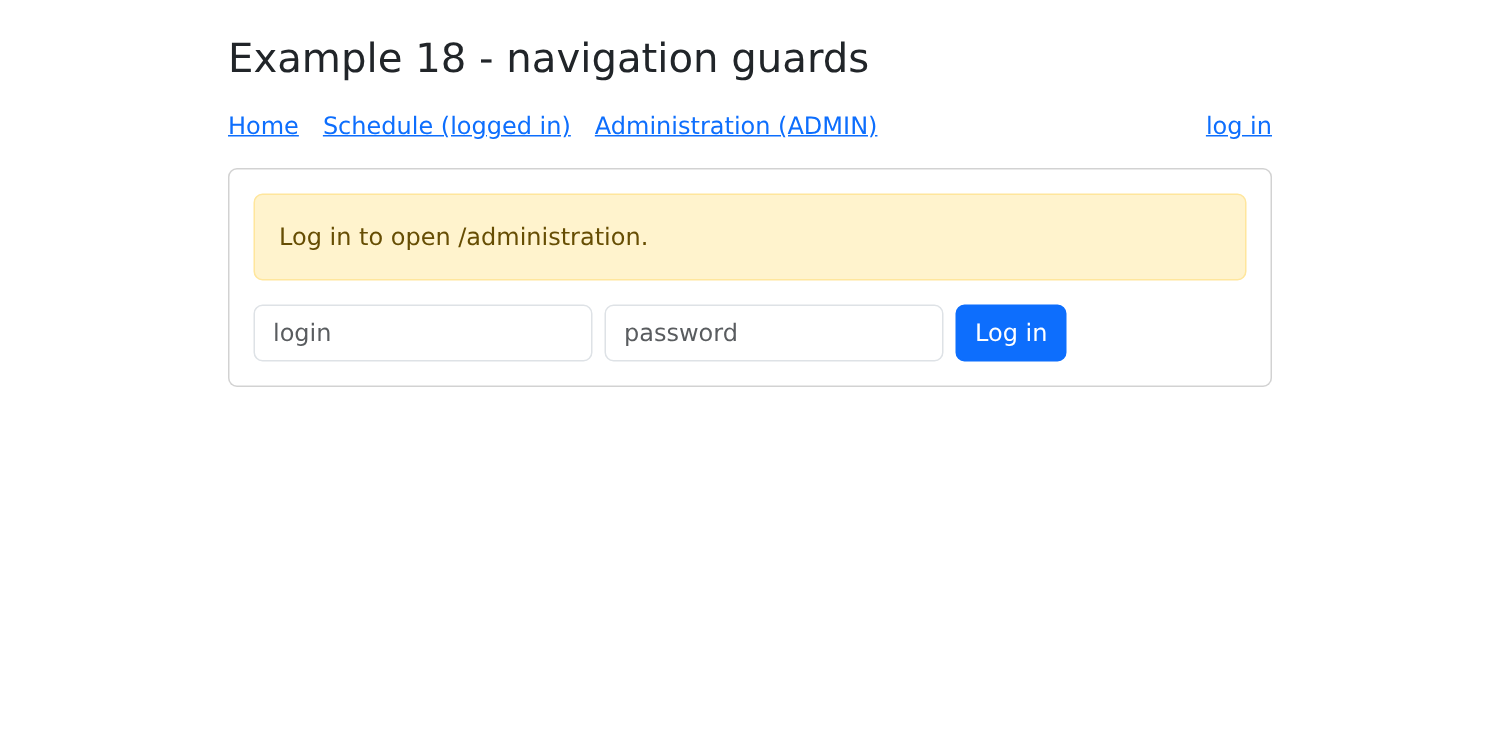
Without being logged in, click “Administration”: the guard redirects to the login page:
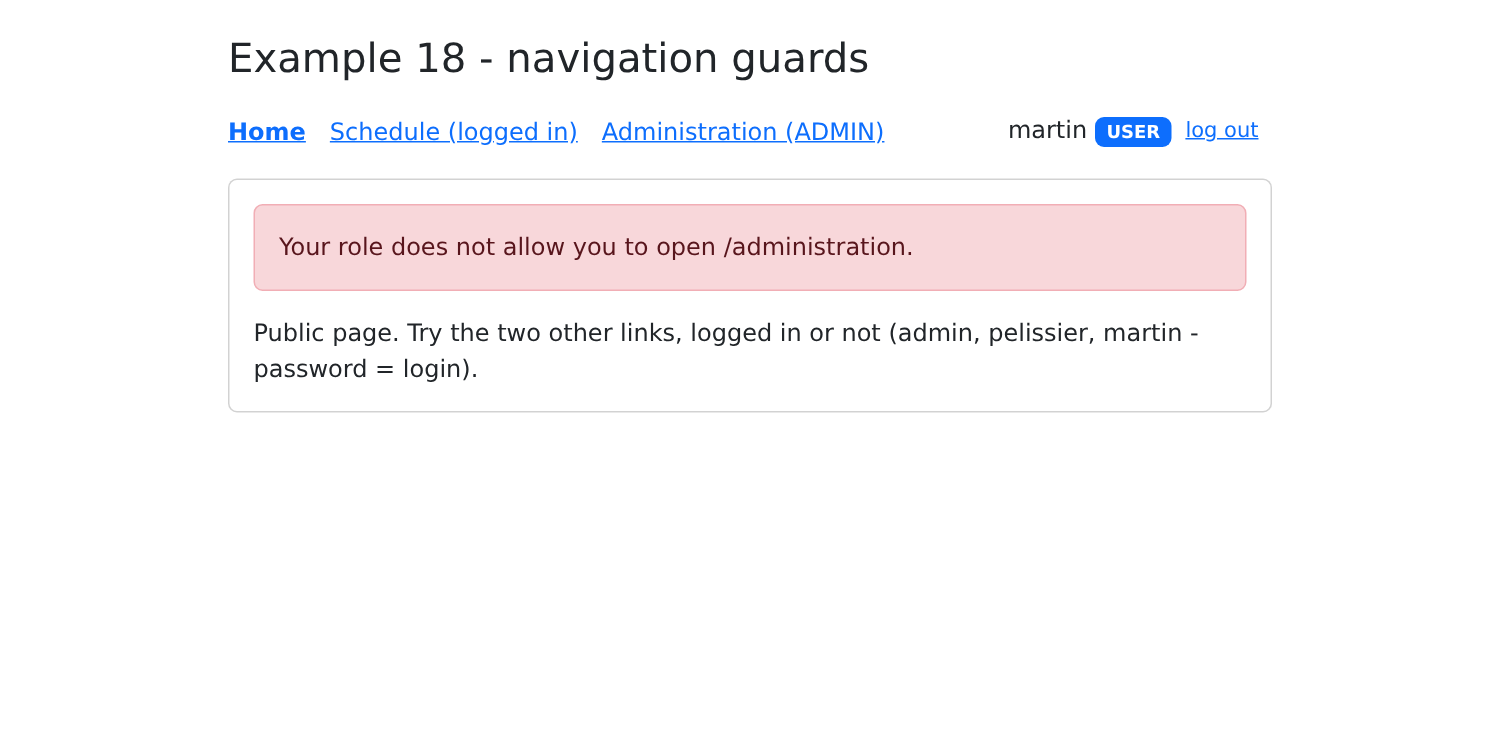
Log in as [martin] (role [USER]): the role check redirects to the home page:
Logged in as [admin]: