8. Communicating with the server
The examples in this chapter query the [RdvMedecins] JSON server: It must be running ([npm run start:dev] in the [rdvmedecins-nestjs-json] folder) on port 8080, at the same time as the [Vite] development server on port 5173.
8.1. Example 22: A first HTTP request
8.1.1. The development server’s proxy
The page in this example comes from http://localhost:5173 (the [Vite] development server); API is located at http://localhost:8080. To a browser, these are two different origins (the port is part of the origin). However, for security reasons, a browser does not allow a page to read responses from another origin unless the server explicitly permits it (the mechanism known as CORS). And a request to another origin does not carry cookies (and therefore not the token), unless the code requests it ([credentials: 'include']) AND the server accepts it, again via CORS.
Rather than opening the server to other origins, we route API requests through the [Vite] development server. This is the proxy declared in the [vite.config.ts] file in the examples (see Example 01):
| proxy: {
'/api': 'http://localhost:8080',
},
|
The browser sends a request to [GET http://localhost:5173/api/captcha]; the development server forwards the request to [http://localhost:8080/api/captcha], then sends the response back to the browser. From the browser’s perspective, the page and API have the same origin:
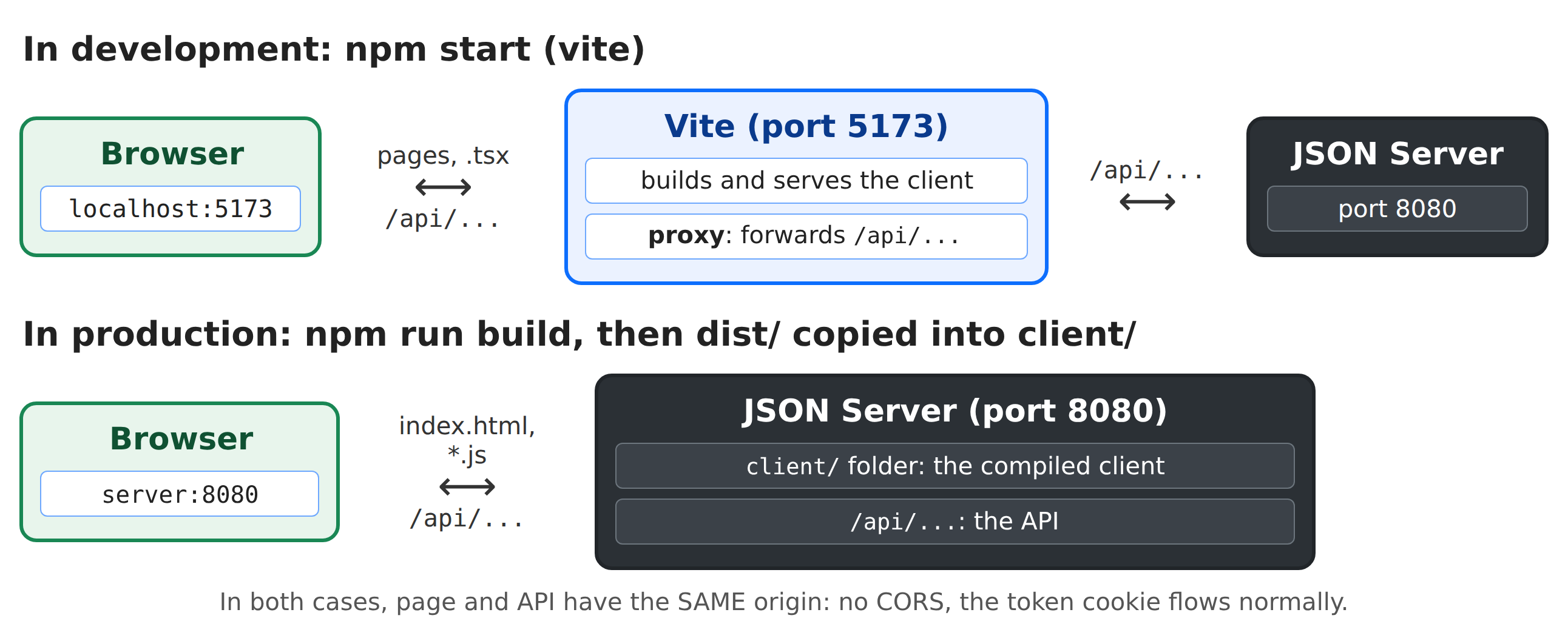
In production, there will no longer be a development server: the JSON server itself will serve the compiled client files (see the “Deployment” chapter). The page and API will still have the same origin.
8.1.2. The request
[React] does not have its own HTTP client: the browser’s [fetch] function is used, or a library ([axios]...). [fetch] is more than sufficient.
| // =========================================================================
// 22-fetch/src/App.tsx - a first HTTP request to the server
// -------------------------------------------------------------------------
// The RdvMedecins JSON server must be started (port 8080). We ask it for
// a captcha: GET /api/captcha -> { "id": "...", "svg": "<svg ...>" }.
//
// - fetch(url): the browser function that sends an HTTP request.
// It returns a PROMISE of the response; response.json() a promise
// of the body, converted from JSON. React has no HTTP client of its own;
// - the address is RELATIVE (/api/captcha): the request goes to the
// server of the page, Vite's (port 5173), which passes it on to the
// JSON server (port 8080) thanks to its proxy (cf. vite.config.ts);
// - three states to display: in progress, succeeded, failed.
// =========================================================================
import { useEffect, useState } from 'react';
// what GET /api/captcha returns
interface Captcha {
id: string;
svg: string;
}
const captchaStyle = { display: 'inline-block', border: '1px solid #dee2e6', borderRadius: '0.375rem' };
export default function App() {
const [captcha, setCaptcha] = useState<Captcha | null>(null);
const [loading, setLoading] = useState(true);
const [error, setError] = useState<string | null>(null);
const [requestCount, setRequestCount] = useState(0);
// each click on "Another image" changes this number, which restarts the effect
const [demand, setDemand] = useState(0);
useEffect(() => {
// AbortController: the means to CANCEL a request in progress
const cancellation = new AbortController();
setLoading(true);
setError(null);
fetch('/api/captcha', { signal: cancellation.signal })
.then(async (response) => {
// fetch does NOT reject an error response (4xx, 5xx): ok is tested
if (!response.ok) {
throw new Error(`the server answered ${response.status} ${response.statusText}`);
}
const c = (await response.json()) as Captcha;
setCaptcha(c);
setRequestCount((n) => n + 1);
setLoading(false);
})
.catch((e: Error) => {
if (e.name === 'AbortError') return; // request cancelled: nothing to display
setError(e.message);
setCaptcha(null);
setLoading(false);
});
// the cleanup CANCELS the request if the effect is restarted or if the
// component disappears before the response. In development, StrictMode
// executes the effect twice at startup: the first request is
// cancelled (Network tab: "canceled"), only the second one counts.
return () => cancellation.abort();
}, [demand]);
return (
<div className="container py-4" style={{ maxWidth: 640 }}>
<h1 className="h3 mb-3">Example 22 - a first HTTP request</h1>
<div className="card p-3">
{loading && <p className="text-muted">Loading...</p>}
{error && (
<div className="alert alert-danger mb-3">
Unable to get a captcha: {error}.<br />
Is the RdvMedecins JSON server started (port 8080)?
</div>
)}
{captcha && !loading && (
<>
{/* dangerouslySetInnerHTML: inserting a string as HTML */}
<div className="mb-2"><div style={captchaStyle} dangerouslySetInnerHTML={{ __html: captcha.svg }} /></div>
<p className="small text-muted">id: <code>{captcha.id}</code></p>
</>
)}
<button className="btn btn-primary align-self-start" disabled={loading} onClick={() => setDemand((d) => d + 1)}>
Another image
</button>
<p className="small text-muted mt-2 mb-0">
{requestCount} successful request(s) - open the Network tab of the developer tools (F12).
</p>
</div>
</div>
);
}
|
- lines 19–22: what [GET /api/captcha] returns;
- lines 27–30: three states to display: in progress, successful (the CAPTCHA), error;
- line 32: a request number: each click on “Another image” increments it, which triggers the effect again;
- lines 34–61: the request is an effect: it synchronizes the component with the server, upon initial display and then with each new request:
- line 36: an [AbortController] allows you to cancel a pending request: its [signal] is passed to [fetch];
- line 39: [fetch(url)] sends a request (GET) and returns a promise for the response. The address is RELATIVE: the request is sent to the page’s server, [Vite], which forwards it to the JSON server;
- lines 42–44: WARNING: [fetch] does NOT reject if it receives an error response (4xx, 5xx); its promise is rejected only if NO response arrives (network outage). Therefore, [response.ok] is checked (true for a 2xx code);
- Line 45: [response.json()] reads the body and converts it from JSON (another promise). [as Captcha]: We tell [TypeScript] the format of the received data; it cannot verify this;
- lines 50–55: an error; [AbortError]: the request was canceled; there is nothing to display;
- Line 60: The cleanup CANCELS the request if the effect is re-triggered or if the component disappears before the response. In development, [<StrictMode>] runs the effect twice at startup: the first request is canceled (the Network tab shows it as “canceled”); only the second one counts;
- line 77: the image is a snippet of SVG, a string to be inserted like HTML. [{captcha.svg}] would display the text [<svg ...>], escaped. [dangerouslySetInnerHTML] inserts the string as-is: its name warns of the danger. Use it ONLY for safe content: this SVG is generated by OUR server. With user input, this would open the door to script injection;
- Line 81: a new request; the effect is triggered again.
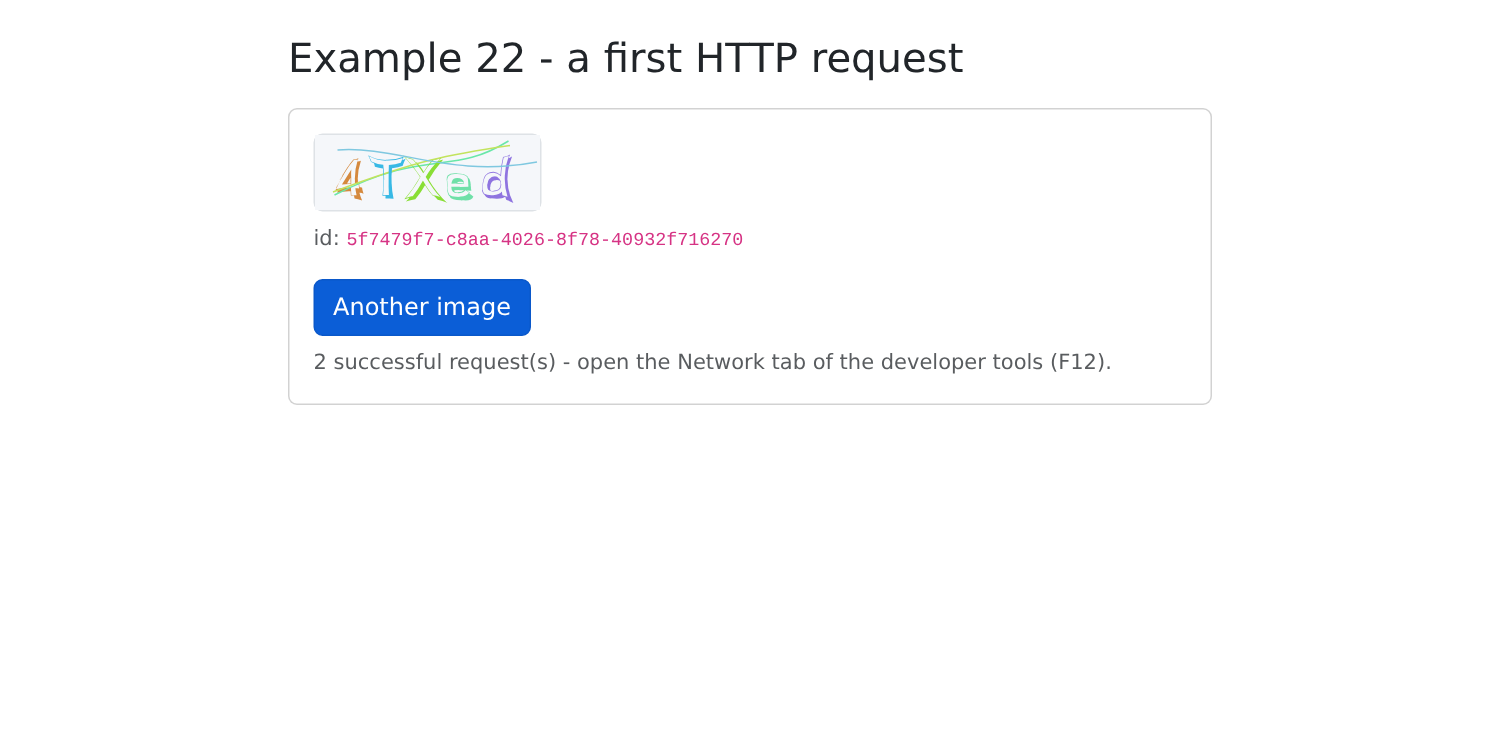
If the JSON server is down, the [Vite] proxy returns a 500 error: “Unable to get a captcha: the server answered 500 Internal Server Error.”
8.2. Example 23: Login, Cookie, and Session
| // =========================================================================
// 23-login/src/App.tsx - logging in to the RdvMedecins server
// -------------------------------------------------------------------------
// 1. at startup: GET /api/auth/me - are we already logged in?
// (after an F5, the client has forgotten everything; the server reads the cookie);
// 2. login: POST /api/auth/login, JSON body { login, password,
// captchaId, captcha }. On success, the server sets the httpOnly
// cookie of the JWT token: our code NEVER sees it (try
// document.cookie in the console: it is not there);
// 3. protected request: GET /api/doctors. The browser attaches the cookie
// to it on its own (same origin);
// 4. logout: POST /api/auth/logout - the server deletes the cookie.
//
// The form uses the ACTIONS of React 19: <form action={function}>.
// Instead of handling onSubmit and each field, we receive all the values
// of the form (FormData), and useActionState keeps the result of the
// last action (here, an error message) and tells whether it is in progress.
//
// A cookie belongs to a host (localhost) and to a path (/api): it
// is therefore common to ALL the examples. Once logged in here, examples
// 24 and 25 are too.
// =========================================================================
import { useActionState, useEffect, useState } from 'react';
import { useFormStatus } from 'react-dom';
interface User {
login: string;
name: string;
role: 'ADMIN' | 'DOCTOR' | 'USER';
}
interface Doctor {
id: number;
title: string;
firstName: string;
lastName: string;
}
interface Captcha {
id: string;
svg: string;
}
// the shape of ALL the errors of the API
interface ApiError {
statusCode: number;
key: string;
params?: Record<string, string>;
}
// the few messages this example needs (example 25 will use i18next)
const MESSAGES: Record<string, string> = {
'LOGIN.ERROR': 'Incorrect login or password.',
'ERRORS.WRONG_CAPTCHA': 'The characters you typed do not match the image.',
'ERRORS.TOO_MANY_ATTEMPTS': 'Too many failed attempts. Try again later.',
};
// a GET request, whose JSON response is typed; an error if it is not a 2xx
async function read<T>(url: string): Promise<T> {
const response = await fetch(url);
if (!response.ok) {
throw response; // the response itself is "thrown": its status will tell what to do
}
return (await response.json()) as T;
}
// the submit button: useFormStatus() tells whether the form THAT CONTAINS IT
// is being sent (it must therefore be a separate component, placed inside)
function LoginButton() {
const { pending } = useFormStatus();
return <button className="btn btn-primary" disabled={pending}>{pending ? 'Logging in...' : 'Log in'}</button>;
}
// the result of the last login attempt
interface LoginState {
error: string | null;
login: string; // the typed login, to display it again
}
export default function App() {
const [user, setUser] = useState<User | null>(null);
const [doctors, setDoctors] = useState<Doctor[]>([]);
const [captcha, setCaptcha] = useState<Captcha | null>(null);
const [ready, setReady] = useState(false); // is the initial check over?
const [serverError, setServerError] = useState<string | null>(null);
async function loadCaptcha() {
setCaptcha(await read<Captcha>('/api/captcha'));
}
async function loadDoctors() {
setDoctors(await read<Doctor[]>('/api/doctors'));
}
// 1. who is logged in? 200 -> the user; 401 -> nobody
useEffect(() => {
async function checkSession() {
try {
setUser(await read<User>('/api/auth/me'));
await loadDoctors();
} catch (e) {
if (!(e instanceof Response) || e.status !== 401) {
setServerError('Is the RdvMedecins JSON server started (port 8080)?');
} else {
await loadCaptcha();
}
}
setReady(true);
}
checkSession();
}, []);
// 2. the login: an ACTION, which receives the previous state and the
// data of the form, and returns the new state
async function logIn(_previous: LoginState, data: FormData): Promise<LoginState> {
const login = String(data.get('login'));
const response = await fetch('/api/auth/login', {
method: 'POST',
headers: { 'Content-Type': 'application/json' }, // the body is JSON
body: JSON.stringify({ login, password: data.get('password'), captchaId: captcha?.id, captcha: data.get('captcha') }),
});
if (!response.ok) {
// the JSON body of the error response
const error = (await response.json().catch(() => null)) as ApiError | null;
const key = error?.key ?? 'ERRORS.SERVER_UNREACHABLE';
await loadCaptcha(); // each image is only used once
return { error: `${response.status} - ${MESSAGES[key] ?? key}`, login };
}
setUser((await response.json()) as User);
await loadDoctors();
return { error: null, login };
}
const [state, loginAction] = useActionState(logIn, { error: null, login: 'admin' });
// 4. the logout
async function logOut() {
await fetch('/api/auth/logout', { method: 'POST', headers: { 'Content-Type': 'application/json' }, body: '{}' });
setUser(null);
setDoctors([]);
await loadCaptcha();
}
let content;
if (!ready) {
content = <p className="text-muted">Checking the session...</p>;
} else if (user) {
// logged in
content = (
<div className="card p-3">
<p>
Logged in: <strong>{user.name}</strong> ({user.login}), role{' '}
<span className="badge text-bg-primary">{user.role}</span>
</p>
<h2 className="h6">GET /api/doctors</h2>
<ul>
{doctors.map((m) => <li key={m.id}>{m.title} {m.firstName} {m.lastName}</li>)}
</ul>
<p className="small text-muted">Reload the page (F5): you remain logged in.</p>
<button className="btn btn-outline-secondary align-self-start" onClick={logOut}>Log out</button>
</div>
);
} else if (!serverError) {
// not logged in: the form. The fields are NOT controlled: name
// designates them in FormData; after each action, React resets them to
// their initial value (defaultValue)
content = (
<form className="card p-3" action={loginAction}>
<div className="mb-2">
<label className="form-label" htmlFor="login">Login</label>
<input id="login" name="login" className="form-control" autoComplete="username" defaultValue={state.login} />
</div>
<div className="mb-2">
<label className="form-label" htmlFor="password">Password</label>
<input id="password" name="password" type="password" className="form-control" autoComplete="current-password" />
</div>
<div className="mb-3">
<label className="form-label" htmlFor="captcha">Type the characters of the image</label>
<div className="d-flex align-items-center gap-3 mb-2">
<div dangerouslySetInnerHTML={{ __html: captcha?.svg ?? '' }} />
<button type="button" className="btn btn-link btn-sm" onClick={loadCaptcha}>Another image</button>
</div>
<input id="captcha" name="captcha" className="form-control" autoComplete="off" />
</div>
<LoginButton />
<p className="small text-muted mt-2 mb-0">Accounts: admin, pelissier, martin... (password = login).</p>
{state.error && <div className="alert alert-danger mt-3 mb-0">{state.error}</div>}
</form>
);
}
return (
<div className="container py-4" style={{ maxWidth: 640 }}>
<h1 className="h3 mb-3">Example 23 - logging in to the server</h1>
{content}
{serverError && <div className="alert alert-danger mt-3">{serverError}</div>}
</div>
);
}
|
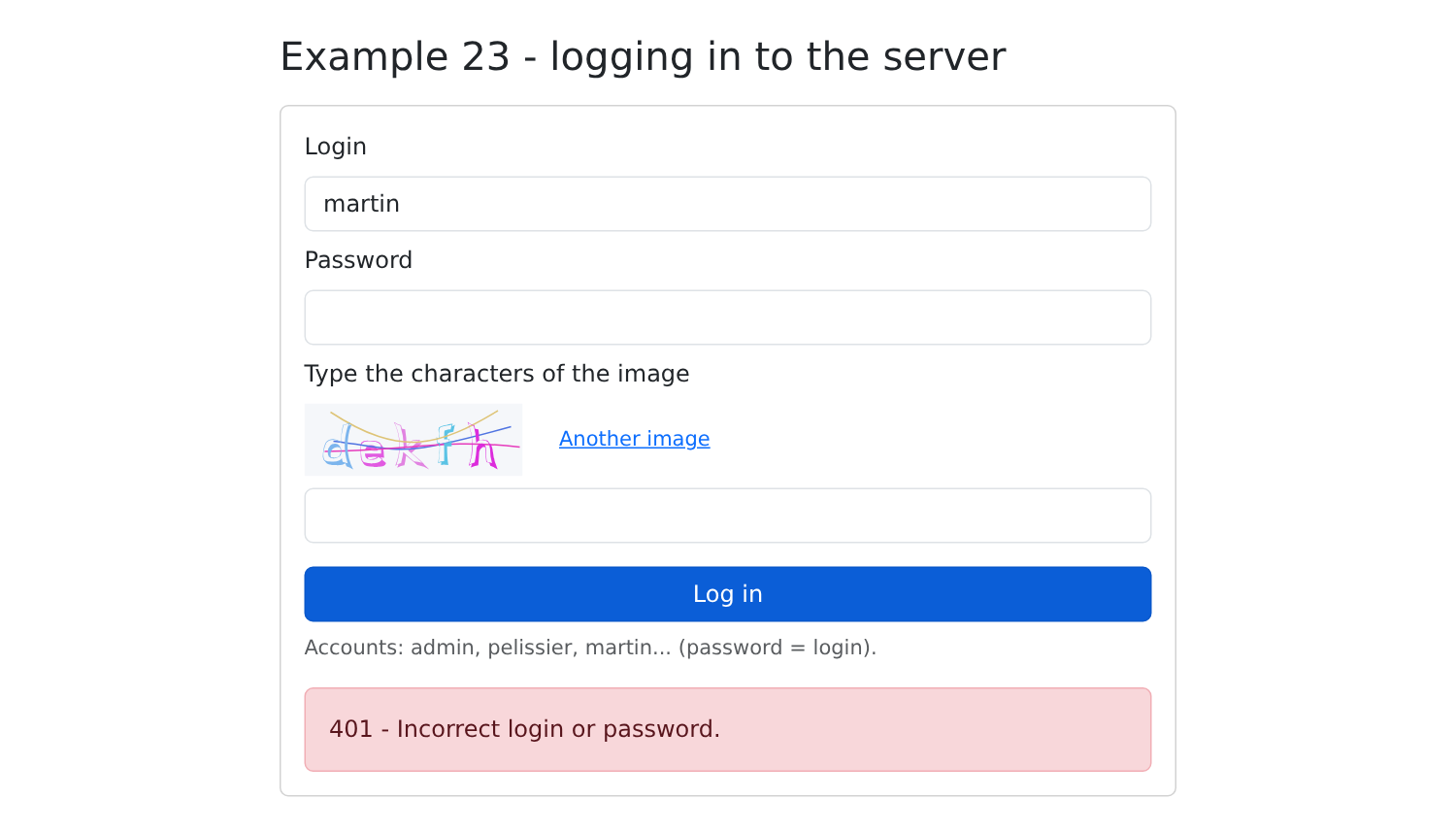
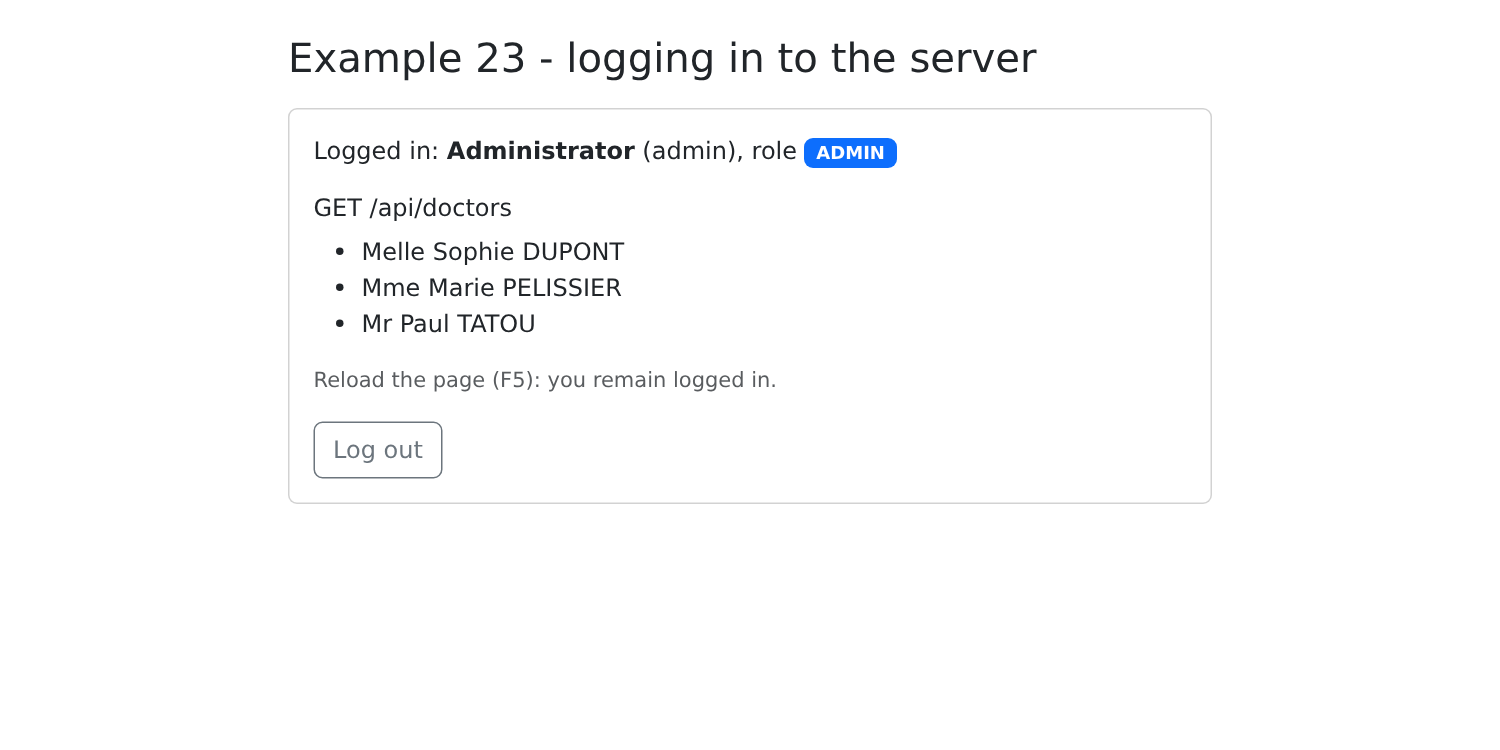
The flow (lines 4–12): Upon startup, the server is queried to determine which one is connected; then comes the connection, a secure request, and logout.
- Lines 27–47: a few API types, including the shape of ALL the errors;
- lines 50–54: the few messages this example needs to translate the server’s keys (Example 25 will use [i18next]);
- lines 57–63: a small generic function for GET requests: the JSON response, with a type; and, if it is not a 2xx, we “trigger” the response itself: its status will indicate what to do;
- lines 67–70: the form submission button. [useFormStatus()] (from [react-dom]) indicates whether the form CONTAINING IT is currently being submitted: so this must be a separate component placed within the form;
- Lines 94–109: On startup, [GET /api/auth/me]: Are we already logged in? After a F5, the client has forgotten everything; the server, however, reads the cookie. 200: the user; 401: no one (a CAPTCHA is then loaded); anything else: the server does not respond. A [async] function cannot be the effect itself (an effect returns its cleanup, not a promise): we declare it within the effect, then call it;
- lines 113–130: the connection, written as an action of [React] 19 (see below). It receives the previous state and the form data ([FormData]), and returns the new state:
- line 114: [data.get(name)] reads a field from the form, identified by its attribute [name];
- lines 115–119: [POST /api/auth/login], with a JSON body: [method], the header [Content-Type], and the body, generated by [JSON.stringify]. If successful, the server sets the [httpOnly] cookie from the JWT token: our code NEVER sees it (try [document.cookie] in the console: it’s not there);
- lines 120–126: a failure: the body of the error response, JSON, provides the message key; each CAPTCHA image is used only once: another one is loaded;
- lines 127–129: a success: the user, followed by a protected request, [GET /api/doctors]: the browser automatically includes the cookie (same origin);
- line 131: [useActionState(action, initialState)] ([React] 19) returns the status generated by the last execution of the action, and a version of the action to be passed to the form;
- lines 134–139: logout; [POST /api/auth/logout]: the server deletes the cookie. Every POST must have a JSON body (the server rejects others; see the previous chapter): ['{}'];
- line 165: [<form action={function}>]: starting with [React] 19, a form’s [action] attribute can accept a function. Upon submission, [React] prevents the browser from submitting the form, consolidates the fields into a [FormData], and calls the function, during which [useFormStatus] displays “in progress.” [onSubmit], [preventDefault], and a per-field status are no longer needed;
- Lines 168–180: The fields are not controlled: they are identified by their [name]. After each action, [React] resets the form: each field reverts to its initial value ([defaultValue]). The password and CAPTCHA fields are therefore cleared; the login field reverts to the value stored in the state by the action ([state.login]), that is, the one that was just entered;
- line 184: the error message generated by the last action.
A cookie belongs to a machine (localhost) and a path ([/api]): it is therefore shared by ALL the examples. Once logged in here, examples 24 and 25 are also logged in.
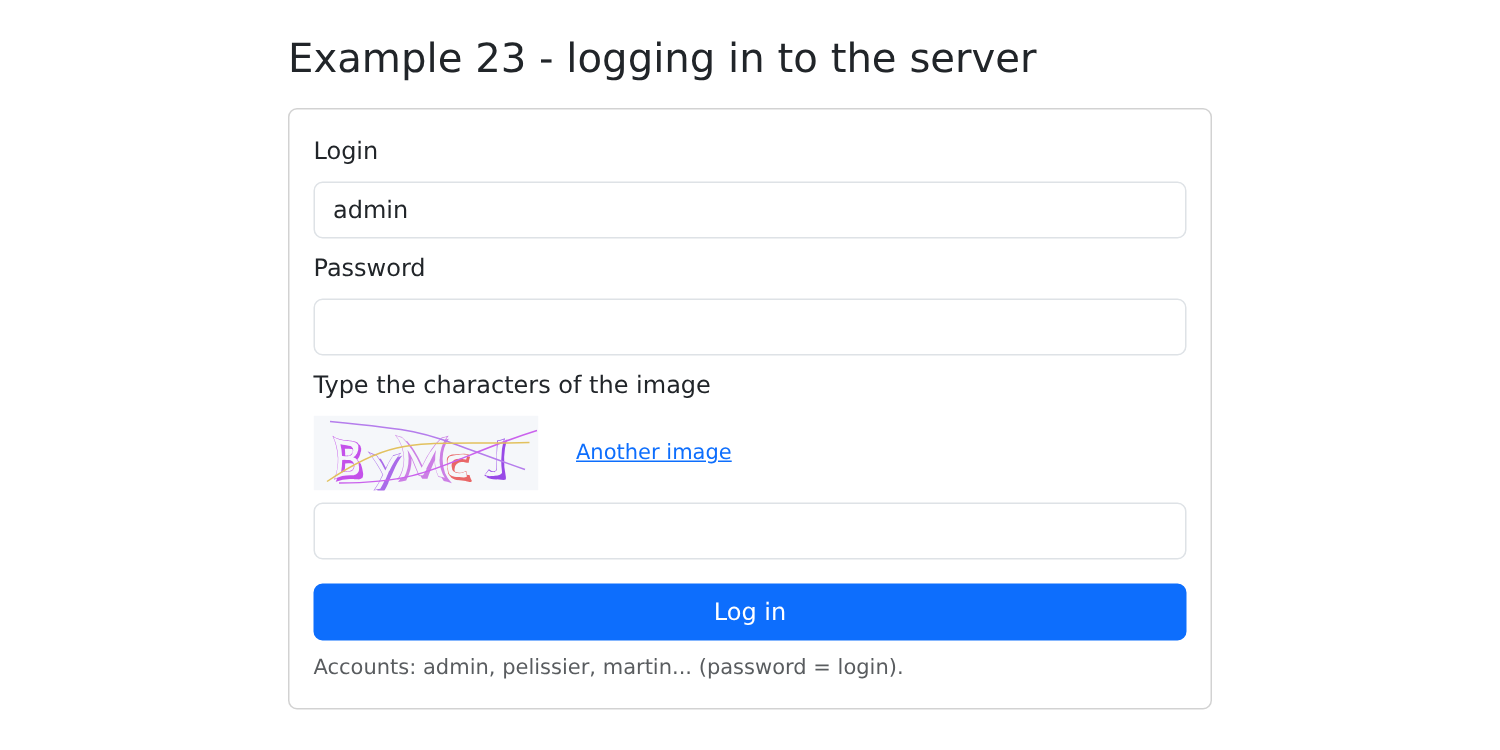
An incorrect password: the login is retained, and a new image is displayed:
Logged in as [admin]; you can reload the page (F5): you remain logged in:
8.3. Example 24: An API access layer
Example 23 repeated the same steps for each request: prefix [/api], JSON header, check for [response.ok], read the error body... Examples 24 and 25 group these together in the [common/] folder, and the case study will follow this same approach.
8.3.1. The types
| // =========================================================================
// common/types.ts - the JSON objects exchanged with the RdvMedecins API
// (cf. the chapter on the black box, which describes each route)
// =========================================================================
export type Role = 'ADMIN' | 'DOCTOR' | 'USER';
// POST /api/auth/login, GET /api/auth/me
export interface User {
login: string;
name: string;
role: Role;
}
// GET /api/captcha
export interface Captcha {
id: string;
svg: string;
}
// a doctor or a client (GET /api/doctors, GET /api/clients...)
export interface Person {
id: number;
version: number;
title: string;
firstName: string;
lastName: string;
login?: string; // only for the ADMIN
}
export interface Identity {
title: string;
firstName: string;
lastName: string;
}
// a row of GET /api/schedule
export interface ScheduleSlot {
id: number;
startHour: number;
startMinute: number;
endHour: number;
endMinute: number;
free: boolean;
patient: Identity | null;
mine: boolean;
bookable: boolean;
appointmentId: number | null;
}
// GET /api/schedule?doctorId=...&day=...
export interface Schedule {
doctor: Person;
day: string;
slots: ScheduleSlot[];
info: string | null;
}
|
The translation, in [TypeScript] interfaces, of the API described in the previous chapter. A line in the calendar ([ScheduleSlot]) describes a time slot AND what the logged-in user is authorized to do with it.
8.3.2. Errors
| // =========================================================================
// common/api-error.ts - ONE class for all the errors of the API
// -------------------------------------------------------------------------
// All the error responses of the RdvMedecins server have the same shape:
// { "statusCode": 409, "key": "ERRORS.LOGIN_TAKEN", "params": {...}, "fields": {...} }
// But a request can also fail OTHERWISE: no response at all
// (network down: fetch throws a TypeError), or a response that does
// not come from our server (an error page of Vite's proxy when the
// JSON server is stopped). All this is converted into ONE class,
// ApiError, which carries the translation key sent by the server (and,
// if any, its parameters and the error of each field).
// =========================================================================
export class ApiError extends Error {
readonly statusCode: number; // 0: the server did not respond
readonly key: string; // e.g.: 'ERRORS.LOGIN_TAKEN'
readonly params: Record<string, string>;
readonly fields: Record<string, string>;
constructor(statusCode: number, key: string, params: Record<string, string> = {}, fields: Record<string, string> = {}) {
super(key);
this.name = 'ApiError';
this.statusCode = statusCode;
this.key = key;
this.params = params;
this.fields = fields;
}
}
// an error response (4xx, 5xx) -> an ApiError
export async function fromResponse(response: Response): Promise<ApiError> {
// the JSON body of the error, if it exists and has the right shape
let body: { key?: string; params?: Record<string, string>; fields?: Record<string, string> } = {};
try {
const json: unknown = await response.json();
if (typeof json === 'object' && json !== null) {
body = json;
}
} catch {
// not JSON: it is not our server that answered
}
// no key: the proxy or the network answered in its place
const key = body.key ?? (response.status >= 500 ? 'ERRORS.SERVER_UNREACHABLE' : 'ERRORS.SERVER_ERROR');
return new ApiError(response.status, key, body.params, body.fields);
}
|
- Lines 14–28: ONE class for all API errors: the HTTP status (0: no response), the translation key sent by the server, its parameters, and the error for each field in a rejected form. It inherits from [Error]: it can be launched ([throw]) and recognized ([instanceof ApiError]). The “property parameters” of [TypeScript] ([constructor(public readonly key: string)]) are not used: the [erasableSyntaxOnly] option of [tsconfig.json] disables them, because they generate code;
- Lines 31–45: An error response becomes an [ApiError]. The body is not always from our server’s JSON: when the JSON server is down, the [Vite] proxy responds without a JSON body. No key: a status code of 500 or higher means “server unreachable.”
8.3.3. Requests
| // =========================================================================
// common/api.ts - requests to the API, in one line
// -------------------------------------------------------------------------
// In example 23, each request repeated the same gestures: /api
// prefix, JSON header, test of response.ok, reading of the error body... They
// are grouped here:
//
// const doctors = await api.get<Person[]>('/doctors');
// await api.post('/appointments', { day, slotId, clientId });
//
// - on success, the promise returns the JSON body, TYPED;
// - on failure, it is REJECTED with an ApiError.
// All the requests go through the request function: it is the place
// where a problem COMMON to all of them would be handled (cf. the case study and the
// 401 response). Used by examples 24 and 25.
// =========================================================================
import { fromResponse, ApiError } from './api-error';
export async function request<T>(method: string, url: string, body?: unknown): Promise<T> {
let response: Response;
try {
response = await fetch(`/api${url}`, {
method,
// a JSON body (the server rejects a POST that is not)
headers: body === undefined ? {} : { 'Content-Type': 'application/json' },
body: body === undefined ? undefined : JSON.stringify(body),
});
} catch {
// fetch got NO response (network, server stopped)
throw new ApiError(0, 'ERRORS.SERVER_UNREACHABLE');
}
if (!response.ok) {
throw await fromResponse(response);
}
return (await response.json()) as T;
}
export const api = {
get: <T>(url: string) => request<T>('GET', url),
// a POST always has a JSON body: {} by default
post: <T>(url: string, body: unknown = {}) => request<T>('POST', url, body),
put: <T>(url: string, body: unknown) => request<T>('PUT', url, body),
delete: <T>(url: string, body?: unknown) => request<T>('DELETE', url, body),
};
|
- lines 20–37: ALL requests pass through this generic function:
- lines 23–28: the prefix [/api], and, if there is a body, the header and JSON;
- lines 29–32: no response: an [ApiError] with status 0;
- lines 33–35: an error response: an [ApiError];
- line 36: a success: the body, typed;
- lines 39–45: shortcuts, a function per HTTP method. A POST always has a JSON body: [{}] by default.
This is where a COMMON issue would be handled for all requests: the case study will address the 401 response (session expired) here.
8.3.4. A login bar
| // =========================================================================
// common/LoginBar.tsx - login / logout, in a bar
// -------------------------------------------------------------------------
// The form of example 23, reduced to a bar and rewritten with api.ts.
// The component calls onUserChange with the logged-in user (or
// null) each time it changes - including at startup, after
// having queried GET /api/auth/me.
// =========================================================================
import { useEffect, useEffectEvent, useState, type FormEvent } from 'react';
import { api } from './api';
import { ApiError } from './api-error';
import type { Captcha, User } from './types';
import './LoginBar.css';
interface Props {
onUserChange: (user: User | null) => void;
}
export default function LoginBar({ onUserChange }: Props) {
const [user, setUser] = useState<User | null>(null);
const [captcha, setCaptcha] = useState<Captcha | null>(null);
const [login, setLogin] = useState('admin');
const [password, setPassword] = useState('');
const [captchaAnswer, setCaptchaAnswer] = useState('');
const [error, setError] = useState<string | null>(null);
function changeUser(u: User | null) {
setUser(u);
onUserChange(u);
}
async function newCaptcha() {
setCaptcha(await api.get<Captcha>('/captcha'));
setCaptchaAnswer('');
}
// at startup: are we already logged in?
const start = useEffectEvent(async () => {
try {
changeUser(await api.get<User>('/auth/me'));
} catch {
changeUser(null); // 401: nobody is logged in
await newCaptcha().catch(() => setError('Is the JSON server started (port 8080)?'));
}
});
useEffect(() => {
start();
}, []);
async function logIn(e: FormEvent<HTMLFormElement>) {
e.preventDefault();
setError(null);
try {
const u = await api.post<User>('/auth/login', { login, password, captchaId: captcha?.id, captcha: captchaAnswer });
setPassword('');
changeUser(u);
} catch (err) {
setError(err instanceof ApiError ? `${err.statusCode} ${err.key}` : String(err));
await newCaptcha();
}
}
async function logOut() {
await api.post('/auth/logout');
changeUser(null);
await newCaptcha();
}
return (
<div className="alert alert-secondary d-flex flex-wrap align-items-center gap-2 py-2">
{user ? (
<>
<span>
Logged in: <strong>{user.name}</strong> <span className="badge text-bg-primary ms-1">{user.role}</span>
</span>
<button className="btn btn-sm btn-outline-secondary ms-auto" onClick={logOut}>Log out</button>
</>
) : (
<form className="d-flex flex-wrap align-items-center gap-2 w-100" onSubmit={logIn}>
<input className="form-control form-control-sm w-auto" placeholder="login" autoComplete="username" value={login}
onChange={(e) => setLogin(e.target.value)} />
<input type="password" className="form-control form-control-sm w-auto" placeholder="password"
autoComplete="current-password" value={password} onChange={(e) => setPassword(e.target.value)} />
{/* the SVG image of the captcha, built by OUR server (cf. example 22) */}
<div className="captcha-bar" dangerouslySetInnerHTML={{ __html: captcha?.svg ?? '' }} />
<input className="form-control form-control-sm w-auto" placeholder="captcha" autoComplete="off" size={8}
value={captchaAnswer} onChange={(e) => setCaptchaAnswer(e.target.value)} />
<button className="btn btn-sm btn-primary">Log in</button>
{error && <span className="text-danger small">{error}</span>}
</form>
)}
</div>
);
}
|
The form from Example 23, reduced to a bar and rewritten using [api.ts] (and with validated fields, for comparison):
- line 17: the component notifies its parent whenever the logged-in user changes;
- lines 39–46 and 47–49: on startup, [GET /api/auth/me]. The function called by the effect notifies the parent: [useEffectEvent] avoids making this a dependency (see Example 13);
- line 55: a one-line request; if it fails, an [ApiError];
- line 86: the CAPTCHA image, scaled to the height of the bar using a small stylesheet:
| /* the SVG image of the captcha, inserted as is into the page: it is reduced
to the height of the bar. An imported style sheet applies to the
WHOLE page: the .captcha-bar class limits it to our element. */
.captcha-bar svg {
display: block;
height: 32px;
width: auto;
}
|
8.3.5. The access layer to the API
| // =========================================================================
// 24-api-layer/src/rdvmedecins.ts - the API access layer
// -------------------------------------------------------------------------
// One typed function per route of the API. The components know neither
// the URLs, nor fetch, nor the JSON format: they call functions.
// It is the client-side equivalent of the DAO layer on the server side: if the API
// changes (a URL, a field name), only this file is modified.
// =========================================================================
import { api } from '../../common/api';
import type { Schedule, Person } from '../../common/types';
export const rdvmedecins = {
getDoctors: () => api.get<Person[]>('/doctors'),
getClients: () => api.get<Person[]>('/clients'),
// URLSearchParams builds "doctorId=1&day=2030-01-15", encoding what needs to be
getSchedule: (doctorId: number, day: string) =>
api.get<Schedule>(`/schedule?${new URLSearchParams({ doctorId: String(doctorId), day })}`),
book: (day: string, slotId: number, clientId?: number) =>
api.post<{ id: number }>('/appointments', { day, slotId, clientId }),
cancelAppointment: (appointmentId: number) => api.delete<Record<string, never>>(`/appointments/${appointmentId}`),
};
|
A function per route of the API, typed. The components do not recognize URL, [fetch], or the JSON format: they call functions. This is the client-side equivalent of the DAO layer on the server side: if the API changes (a URL, a field name), only this file is modified. [URLSearchParams] (line 18) generates the [doctorId=1&day=2030-01-15] portion of an address by encoding the necessary data.
8.3.6. TanStack Query
Reading data from a server into an effect, as in Example 22, requires handling everything: the “in progress” status, errors, stale responses, cancellations, duplicate requests sent twice, and data already received that could be reused... [TanStack Query] (formerly [React Query]), the most widely used library for this purpose, handles all of this.
| // =========================================================================
// 24-api-layer/src/main.tsx
// -------------------------------------------------------------------------
// TanStack Query (formerly React Query): the most used library
// to READ data from a server in a React application.
// The QueryClient keeps in memory (in "cache") the responses already received;
// <QueryClientProvider> provides it to the whole application (a context,
// cf. example 14).
// =========================================================================
import { StrictMode } from 'react';
import { createRoot } from 'react-dom/client';
import { QueryClient, QueryClientProvider } from '@tanstack/react-query';
import 'bootstrap/dist/css/bootstrap.min.css';
import App from './App';
const queryClient = new QueryClient({
// on failure, no new attempt: we want to see the error
defaultOptions: { queries: { retry: false } },
});
createRoot(document.getElementById('root')!).render(
<StrictMode>
<QueryClientProvider client={queryClient}>
<App />
</QueryClientProvider>
</StrictMode>,
);
|
- line 17: the [TanStack Query] client, which stores previously received responses in memory (in the “cache”); [retry: false]: in case of failure, no retry (by default, it attempts three);
- line 24: it is provided to the entire application via a context (see Example 14).
8.3.7. The page
| // =========================================================================
// 24-api-layer/src/App.tsx - a schedule, with the API access layer
// -------------------------------------------------------------------------
// Log in (top bar), choose a doctor and a day: the schedule
// is displayed. ADMIN and DOCTOR can book for a patient and cancel;
// a patient (martin...) books for themselves. Each action ends with
// a reload of the schedule: it is the SERVER that is authoritative.
//
// useQuery({ queryKey, queryFn }): a READING of data, described by
// - queryFn: the function that gets them (a promise);
// - queryKey: what IDENTIFIES these data: ['schedule', doctorId, day].
// TanStack Query calls queryFn at the start, then each time the key
// CHANGES (another doctor, another day). It returns an object: data (the
// response), isPending, isFetching, error... and refetch() to read again.
// It also handles what must be written by hand with useEffect: cancelling
// a stale response, not sending the same request twice, keeping
// the responses in cache.
// =========================================================================
import { useState } from 'react';
import { useQuery } from '@tanstack/react-query';
import LoginBar from '../../common/LoginBar';
import { ApiError } from '../../common/api-error';
import type { ScheduleSlot, User } from '../../common/types';
import { rdvmedecins } from './rdvmedecins';
function tomorrow(): string {
const d = new Date(Date.now() + 24 * 3600 * 1000);
return `${d.getFullYear()}-${String(d.getMonth() + 1).padStart(2, '0')}-${String(d.getDate()).padStart(2, '0')}`;
}
function timeRange(c: ScheduleSlot): string {
const hm = (h: number, m: number) => `${h}:${String(m).padStart(2, '0')}`;
return `${hm(c.startHour, c.startMinute)} - ${hm(c.endHour, c.endMinute)}`;
}
// an error -> a text (its key, for lack of a dictionary here)
function errorText(e: unknown): string {
return e instanceof ApiError ? `${e.statusCode} ${e.key}` : String(e);
}
export default function App() {
const [user, setUser] = useState<User | null>(null);
const [doctorId, setDoctorId] = useState<number | null>(null);
const [day, setDay] = useState(tomorrow);
const [clientId, setClientId] = useState<number | null>(null);
const [message, setMessage] = useState<{ type: 'success' | 'danger'; text: string } | null>(null);
const loggedIn = user !== null;
const isManager = loggedIn && user.role !== 'USER';
// the doctors, then (ADMIN, DOCTOR) the clients: read again when
// the user changes (it is part of the key)
const doctors = useQuery({
queryKey: ['doctors', user?.login],
queryFn: rdvmedecins.getDoctors,
enabled: loggedIn, // false: no request (nobody logged in)
});
const clients = useQuery({
queryKey: ['clients', user?.login],
queryFn: rdvmedecins.getClients,
enabled: isManager, // a USER would receive 403
});
// the schedule: the key contains the doctor and the day
const schedule = useQuery({
queryKey: ['schedule', doctorId, day, user?.login],
queryFn: () => rdvmedecins.getSchedule(doctorId!, day),
enabled: loggedIn && doctorId !== null,
});
// a new choice of doctor or of day clears the previous message
function chooseDoctor(id: number) {
setDoctorId(id);
setMessage(null);
}
function chooseDay(d: string) {
setDay(d);
setMessage(null);
}
async function book(c: ScheduleSlot) {
try {
await rdvmedecins.book(day, c.id, isManager ? (clientId ?? undefined) : undefined);
setMessage({ type: 'success', text: `Slot ${timeRange(c)} booked.` });
} catch (e) {
setMessage({ type: 'danger', text: errorText(e) });
}
schedule.refetch();
}
async function cancel(c: ScheduleSlot) {
try {
await rdvmedecins.cancelAppointment(c.appointmentId!);
setMessage({ type: 'success', text: `Appointment of ${timeRange(c)} cancelled.` });
} catch (e) {
setMessage({ type: 'danger', text: errorText(e) });
}
schedule.refetch();
}
const a = schedule.data;
return (
<div className="container py-4">
<h1 className="h3 mb-3">Example 24 - an API access layer</h1>
<LoginBar onUserChange={setUser} />
{loggedIn && (
<>
<div className="row g-2 mb-3">
<div className="col-sm-5">
<select className="form-select" value={doctorId ?? ''} onChange={(e) => chooseDoctor(Number(e.target.value))}>
<option value="" disabled>-- choose a doctor --</option>
{doctors.data?.map((m) => <option key={m.id} value={m.id}>{m.title} {m.firstName} {m.lastName}</option>)}
</select>
</div>
<div className="col-sm-3">
<input type="date" className="form-control" value={day} onChange={(e) => chooseDay(e.target.value)} />
</div>
{isManager && (
<div className="col-sm-4">
<select className="form-select" value={clientId ?? ''}
onChange={(e) => setClientId(e.target.value === '' ? null : Number(e.target.value))}>
<option value="">-- patient to book for --</option>
{clients.data?.map((c) => <option key={c.id} value={c.id}>{c.title} {c.firstName} {c.lastName}</option>)}
</select>
</div>
)}
</div>
{message && <div className={`alert alert-${message.type}`}>{message.text}</div>}
{schedule.error && <div className="alert alert-danger">{errorText(schedule.error)}</div>}
{schedule.isFetching && <p className="small text-muted">loading the schedule...</p>}
{a && (
<>
{/* info: the key sent by the server when a patient already has an upcoming appointment */}
{a.info && <div className="alert alert-info">{a.info}</div>}
<table className="table table-sm align-middle">
<caption className="caption-top">
Schedule of {a.day} - {a.doctor.title} {a.doctor.firstName} {a.doctor.lastName}
</caption>
<tbody>
{a.slots.map((c) => (
<tr key={c.id}>
<td>{timeRange(c)}</td>
<td>
{c.free ? (
<span className="badge text-bg-success">Free</span>
) : c.patient ? (
<span className={`badge ${c.mine ? 'text-bg-primary' : 'text-bg-secondary'}`}>
{c.patient.title} {c.patient.firstName} {c.patient.lastName}
</span>
) : (
<span className="badge text-bg-secondary">Booked</span>
)}
</td>
<td className="text-end">
{/* the buttons follow the rights computed by the server */}
{c.bookable && <button className="btn btn-sm btn-outline-success" onClick={() => book(c)}>Book</button>}
{c.appointmentId !== null && <button className="btn btn-sm btn-outline-danger" onClick={() => cancel(c)}>Cancel</button>}
</td>
</tr>
))}
</tbody>
</table>
</>
)}
</>
)}
</div>
);
}
|
- lines 54–58: [useQuery({ queryKey, queryFn, enabled })] describes a READ of data:
- [queryFn]: the function that retrieves it, a promise;
- [queryKey]: what IDENTIFIES the data—an array. [TanStack Query] calls [queryFn] first, then each time the key CHANGES; two components that request the same key share the same request and the same response. The user is added to it: the list is reloaded when the user changes;
- [enabled: false]: no request (no one is logged in);
- The result is an object: [data] (the response, [undefined] until it arrives), [isPending], [isFetching] (a request is in progress), [error], and [refetch()] to be re-read;
- lines 59–63: the patient list, only for ADMIN and DOCTOR (a USER would receive a 403);
- lines 66–70: the schedule: the key contains the doctor and the day; changing either one sends a new request. An expired response is automatically ignored;
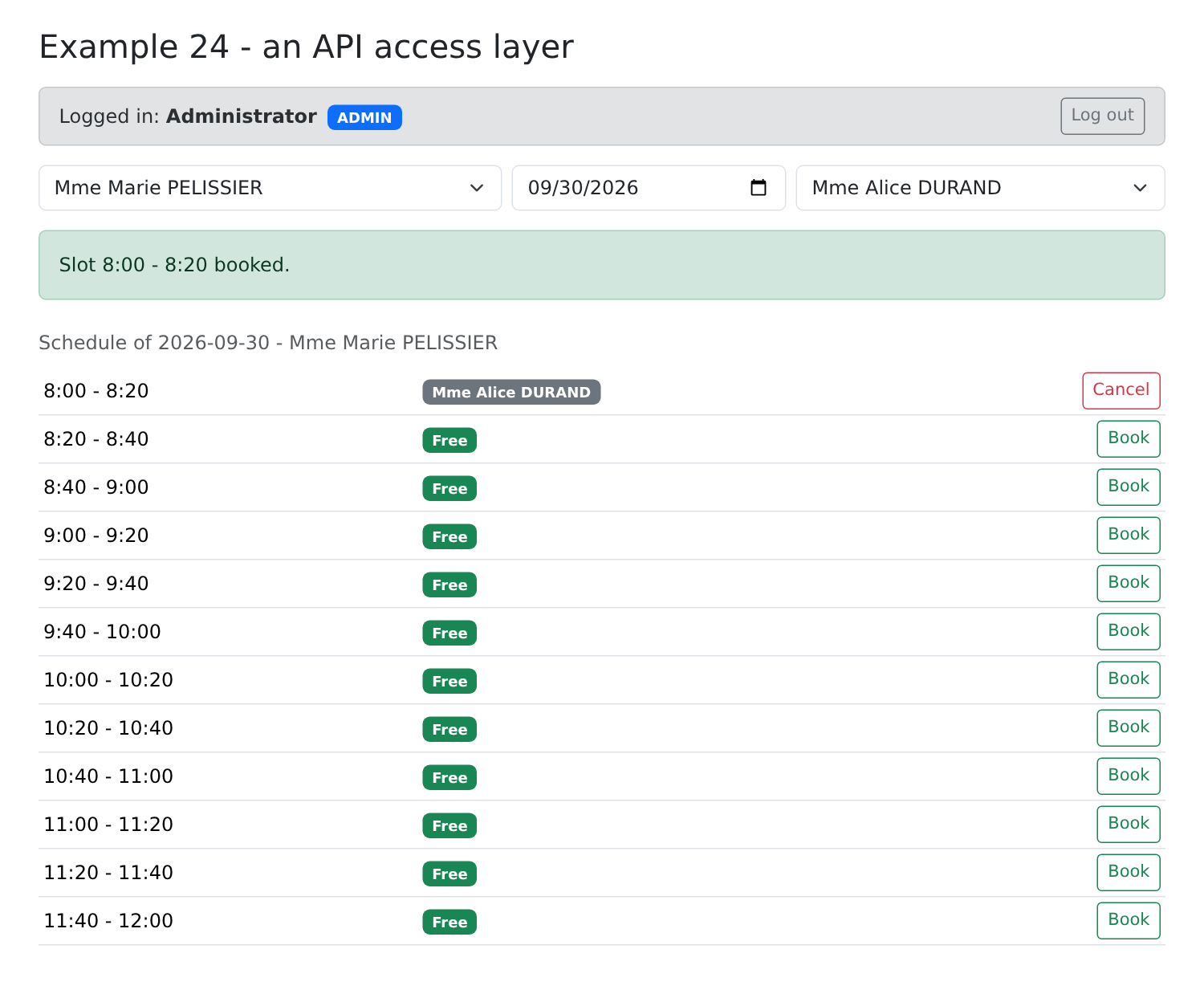
- lines 82–90: a reservation: [POST /api/appointments], then [schedule.refetch()]: the calendar is re-read. The SERVER is the authoritative one;
- line 106: the connection bar notifies the page;
- line 114: the doctors, if they have arrived ([?.]: nothing if [data] is [undefined]);
- line 133: a calendar request is in progress;
- lines 160–161: the buttons follow the permissions calculated by the server;
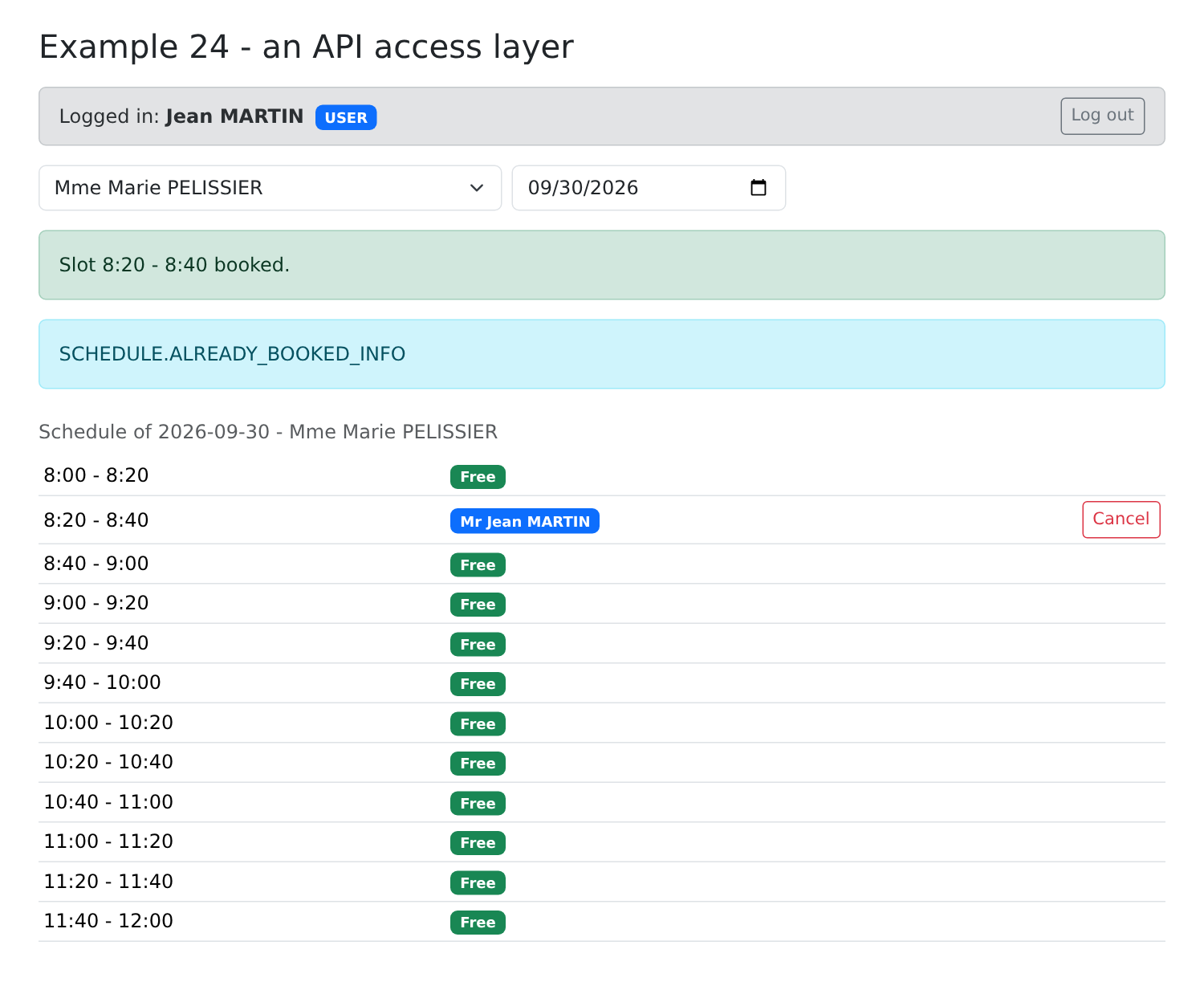
- line 138: [info]: the key sent by the server when a patient already has an upcoming appointment (displayed raw: no dictionary here).
Logged in as [admin], we select Ms. PELISSIER, then a patient, and book the first time slot:
Logged in as [martin], we book a time slot: the patient sees their own name, but the name of another patient is never sent to them; the “Book” button is no longer available (only one upcoming appointment):
For transaction processing (booking, canceling), [TanStack Query] also provides [useMutation], which handles the “in progress” status and errors from modifications. We won’t use those here: a [async] function and a [try / catch] are sufficient.
8.4. Example 25: Errors Returned by the Server
Patient management ([admin] form). This form performs no validation in the browser: everything is sent to the server, which responds—in the event of a rejection—with a JSON error:
| 400 { key: 'ERRORS.INVALID_FORM', fields: { lastName: 'ERRORS.LASTNAME_REQUIRED' } }
409 { key: 'ERRORS.PATIENT_ALREADY_EXISTS', fields: { firstName: ..., lastName: ... } }
409 { key: 'ERRORS.CONCURRENT_UPDATE' } (optimistic lock)
|
8.4.1. Dictionaries
| {
"FORM": {
"TITLE_ADD": "Ajouter un client",
"TITLE_EDIT": "Modifier un client",
"TITLE": "Titre",
"FIRSTNAME": "Prénom",
"LASTNAME": "Nom",
"LOGIN": "Login",
"PASSWORD": "Mot de passe",
"SAVE": "Enregistrer",
"CANCEL": "Annuler",
"EDIT": "Modifier",
"DELETE": "Supprimer",
"DELETE_CONFIRM": "Supprimer le client {{name}}, son compte et ses rendez-vous ?",
"ADDED": "Le client {{name}} a été ajouté (login : {{login}}).",
"UPDATED": "Le client {{name}} a été modifié.",
"DELETED": "Le client {{name}} a été supprimé.",
"ADMIN_ONLY": "Connectez-vous avec le compte admin : seul le rôle ADMIN gère les clients."
},
"ERRORS": {
"INVALID_FORM": "Le formulaire contient des erreurs.",
"INVALID_TITLE": "Choisissez un titre dans la liste.",
"FIRSTNAME_REQUIRED": "Le prénom est obligatoire.",
"FIRSTNAME_TOO_LONG": "Le prénom ne doit pas dépasser 20 caractères.",
"LASTNAME_REQUIRED": "Le nom est obligatoire.",
"LASTNAME_TOO_LONG": "Le nom ne doit pas dépasser 20 caractères.",
"INVALID_LOGIN": "30 caractères au plus : lettres minuscules non accentuées, chiffres, point, tiret, souligné.",
"PASSWORD_TOO_LONG": "Le mot de passe ne doit pas dépasser 72 caractères.",
"LOGIN_TAKEN": "Ce login est déjà utilisé par un autre compte.",
"PATIENT_ALREADY_EXISTS": "Un client portant ce prénom et ce nom existe déjà.",
"PATIENT_NOT_FOUND": "Ce client n'existe pas (ou plus).",
"CONCURRENT_UPDATE": "Cette fiche a été modifiée entre-temps par un autre utilisateur. Rechargez-la avant de recommencer.",
"FORBIDDEN": "Votre rôle ne vous permet pas cette action.",
"AUTH_REQUIRED": "Connectez-vous d'abord.",
"SESSION_EXPIRED": "Votre session a expiré : reconnectez-vous.",
"SERVER_UNREACHABLE": "Le serveur ne répond pas.",
"SERVER_ERROR": "Une erreur inattendue s'est produite."
}
}
|
The keys [ERRORS.*] are those returned by the server. The English dictionary, [en.json], has the same keys. The configuration of [i18next] is the same as in Example 21, but simpler:
| // =========================================================================
// 25-server-errors/src/i18n/i18n.ts - i18next, as in example 21
// =========================================================================
import i18n from 'i18next';
import { initReactI18next } from 'react-i18next';
import fr from './fr.json';
import en from './en.json';
i18n.use(initReactI18next).init({
resources: { fr: { translation: fr }, en: { translation: en } },
lng: 'en',
fallbackLng: 'en',
interpolation: { escapeValue: false },
});
|
| // =========================================================================
// 25-server-errors/src/main.tsx
// -------------------------------------------------------------------------
// - i18next (cf. example 21);
// - the confirmation dialog of example 16, reused as is.
// =========================================================================
import { StrictMode } from 'react';
import { createRoot } from 'react-dom/client';
import 'bootstrap/dist/css/bootstrap.min.css';
import './i18n/i18n';
import App from './App';
import { ConfirmationProvider } from '../../16-confirmation/src/confirmation/confirmation';
createRoot(document.getElementById('root')!).render(
<StrictMode>
<ConfirmationProvider>
<App />
</ConfirmationProvider>
</StrictMode>,
);
|
The confirmation window from Example 16 is reused as-is: its provider is imported.
8.4.2. The page
| // =========================================================================
// 25-server-errors/src/App.tsx - displaying the errors of the SERVER
// -------------------------------------------------------------------------
// The management of the clients (admin account). This form does
// DELIBERATELY no validation in the browser: everything is sent
// to the server, which answers, in case of refusal, with a JSON error (converted
// into an ApiError by common/api.ts):
//
// 400 { key: 'ERRORS.INVALID_FORM', fields: { lastName: 'ERRORS.LASTNAME_REQUIRED' } }
// 409 { key: 'ERRORS.PATIENT_ALREADY_EXISTS', fields: { firstName: ..., lastName: ... } }
// 409 { key: 'ERRORS.CONCURRENT_UPDATE' } (optimistic lock)
//
// The error of EACH field (ApiError.fields) is stored in the state and
// displayed under the field; its message is the KEY sent by the server,
// which the component translates (i18next). Modifying a field clears its error.
// Try: an empty last name, a title "Dr", a namesake (Alice DURAND), a
// login already taken (martin), the same record edited in two tabs...
// =========================================================================
import { useState, useTransition, type FormEvent } from 'react';
import { useTranslation } from 'react-i18next';
import { api } from '../../common/api';
import LoginBar from '../../common/LoginBar';
import { ApiError } from '../../common/api-error';
import type { Person, User } from '../../common/types';
import { useConfirmation } from '../../16-confirmation/src/confirmation/confirmation';
interface ClientInput {
title: string;
firstName: string;
lastName: string;
login: string;
password: string;
version: number;
}
type Field = keyof ClientInput;
const EMPTY: ClientInput = { title: 'Mr', firstName: '', lastName: '', login: '', password: '', version: 0 };
interface Message {
key: string;
params?: Record<string, string>;
}
export default function App() {
const { t, i18n } = useTranslation();
const confirm = useConfirmation();
const [user, setUser] = useState<User | null>(null);
const [clients, setClients] = useState<Person[]>([]);
const isAdmin = user?.role === 'ADMIN';
// the form: editedId === null -> creation, otherwise update
const [editedId, setEditedId] = useState<number | null>(null);
const [input, setInput] = useState<ClientInput>(EMPTY);
// the error of each field (a translation KEY), returned by the server
const [errors, setErrors] = useState<Partial<Record<Field, string>>>({});
// the general message of the last error, and that of a success
const [pageError, setPageError] = useState<ApiError | null>(null);
const [success, setSuccess] = useState<Message | null>(null);
// useTransition: isPending is true during the execution of the action
// passed to startTransition - here, the sending to the server
const [sending, startTransition] = useTransition();
async function reload() {
setClients(await api.get<Person[]>('/clients'));
}
async function onUserChange(u: User | null) {
setUser(u);
setClients([]);
if (u?.role === 'ADMIN') {
await reload();
}
}
function clearMessages() {
setErrors({});
setPageError(null);
setSuccess(null);
}
function newForm() {
setEditedId(null);
setInput(EMPTY);
clearMessages();
}
function edit(c: Person) {
setEditedId(c.id);
// the VERSION read with the record goes back with the update: if someone
// has modified the record in the meantime, the server will answer 409 CONCURRENT_UPDATE
setInput({ title: c.title, firstName: c.firstName, lastName: c.lastName, login: c.login ?? '', password: '', version: c.version });
clearMessages();
}
// a modified field: its value changes, its error disappears
function change(field: Field, value: string) {
setInput((s) => ({ ...s, [field]: value }));
setErrors((e) => ({ ...e, [field]: undefined }));
}
function save(event: FormEvent<HTMLFormElement>) {
event.preventDefault();
clearMessages();
// an ASYNCHRONOUS transition (React 19): sending remains true until
// the end of the function
startTransition(async () => {
try {
const client =
editedId === null
? await api.post<Person>('/clients', input)
: await api.put<Person>(`/clients/${editedId}`, input);
newForm(); // form emptied, messages cleared...
// ... except this one
setSuccess({
key: editedId === null ? 'FORM.ADDED' : 'FORM.UPDATED',
params: { name: `${client.firstName} ${client.lastName}`, login: client.login ?? '' },
});
await reload();
} catch (e) {
if (!(e instanceof ApiError)) {
throw e;
}
setPageError(e); // the general message
setErrors(e.fields); // the error of each field
}
});
}
async function remove(c: Person) {
const name = `${c.firstName} ${c.lastName}`;
if (!(await confirm(t('FORM.DELETE_CONFIRM', { name })))) {
return;
}
clearMessages();
try {
await api.delete(`/clients/${c.id}`);
setSuccess({ key: 'FORM.DELETED', params: { name } });
} catch (e) {
setPageError(e instanceof ApiError ? e : null);
}
await reload();
}
// an input field, with its translated error
function field(name: 'firstName' | 'lastName' | 'login' | 'password', type = 'text') {
const error = errors[name];
return (
<>
<label className="form-label" htmlFor={name}>{t(`FORM.${name.toUpperCase()}`)}</label>
<input id={name} type={type} className={`form-control ${error ? 'is-invalid' : ''}`} value={input[name]}
autoComplete={type === 'password' ? 'new-password' : 'off'} onChange={(e) => change(name, e.target.value)} />
{/* the message of a server error is a KEY: it is translated */}
{error && <div className="invalid-feedback">{t(error)}</div>}
</>
);
}
return (
<div className="container py-4">
<div className="d-flex justify-content-between align-items-center mb-3">
<h1 className="h3 mb-0">Example 25 - the errors returned by the server</h1>
<select className="form-select form-select-sm w-auto" value={i18n.language} onChange={(e) => i18n.changeLanguage(e.target.value)}>
<option value="fr">FR</option>
<option value="en">EN</option>
</select>
</div>
<LoginBar onUserChange={onUserChange} />
{user && !isAdmin && <p className="alert alert-warning">{t('FORM.ADMIN_ONLY')}</p>}
{isAdmin && (
<div className="row g-4">
<div className="col-lg-6">
<table className="table table-sm align-middle">
<tbody>
{clients.map((c) => (
<tr key={c.id}>
<td>{c.title} {c.firstName} {c.lastName}</td>
<td><code>{c.login}</code></td>
<td className="text-end text-nowrap">
<button className="btn btn-sm btn-outline-primary me-1" onClick={() => edit(c)}>{t('FORM.EDIT')}</button>
<button className="btn btn-sm btn-outline-danger" onClick={() => remove(c)}>{t('FORM.DELETE')}</button>
</td>
</tr>
))}
</tbody>
</table>
</div>
<div className="col-lg-6">
<form className="card p-3" noValidate onSubmit={save}>
<h2 className="h5">{t(editedId === null ? 'FORM.TITLE_ADD' : 'FORM.TITLE_EDIT')}</h2>
<div className="mb-2">
<label className="form-label" htmlFor="title">{t('FORM.TITLE')}</label>
{/* an option "Dr" that the server will reject: to see ERRORS.INVALID_TITLE */}
<select id="title" className={`form-select ${errors.title ? 'is-invalid' : ''}`} value={input.title}
onChange={(e) => change('title', e.target.value)}>
<option>Mr</option><option>Mme</option><option>Melle</option><option>Dr</option>
</select>
{errors.title && <div className="invalid-feedback">{t(errors.title)}</div>}
</div>
<div className="row g-2 mb-2">
<div className="col-sm-6">{field('firstName')}</div>
<div className="col-sm-6">{field('lastName')}</div>
</div>
<div className="row g-2 mb-3">
<div className="col-sm-6">{field('login')}</div>
<div className="col-sm-6">{field('password', 'password')}</div>
</div>
<div className="d-flex gap-2">
<button className="btn btn-primary" disabled={sending}>{t('FORM.SAVE')}</button>
<button type="button" className="btn btn-secondary" onClick={newForm}>{t('FORM.CANCEL')}</button>
</div>
{success && <div className="alert alert-success mt-3 mb-0">{t(success.key, success.params)}</div>}
{/* the general message, and the HTTP status, to understand */}
{pageError && (
<div className="alert alert-danger mt-3 mb-0">
{t(pageError.key, pageError.params)}{' '}
<span className="small text-muted">({pageError.statusCode} {pageError.key})</span>
</div>
)}
</form>
</div>
</div>
)}
</div>
);
}
|
- lines 54–55: the form: [editedId === null] for creating a patient, or [editedId] for modifying a patient;
- line 57: the error for each field, a translation KEY, returned by the server;
- line 63: [useTransition] returns a “in progress” flag and a function [startTransition(action)]. Starting with [React] 19, the action can be [async]: the indicator remains true until the end of the function, without requiring any manual handling;
- lines 89–95: modifying a patient. The VERSION read from the master record reflects the modification: if someone has modified the master record in the meantime, the server will respond with a 409 [ERRORS.CONCURRENT_UPDATE] (optimistic lock);
- lines 98–101: a modified field: its value changes, and its error disappears;
- lines 103–129: sending:
- [POST /api/clients] (creation) or [PUT /api/clients/:id] (update);
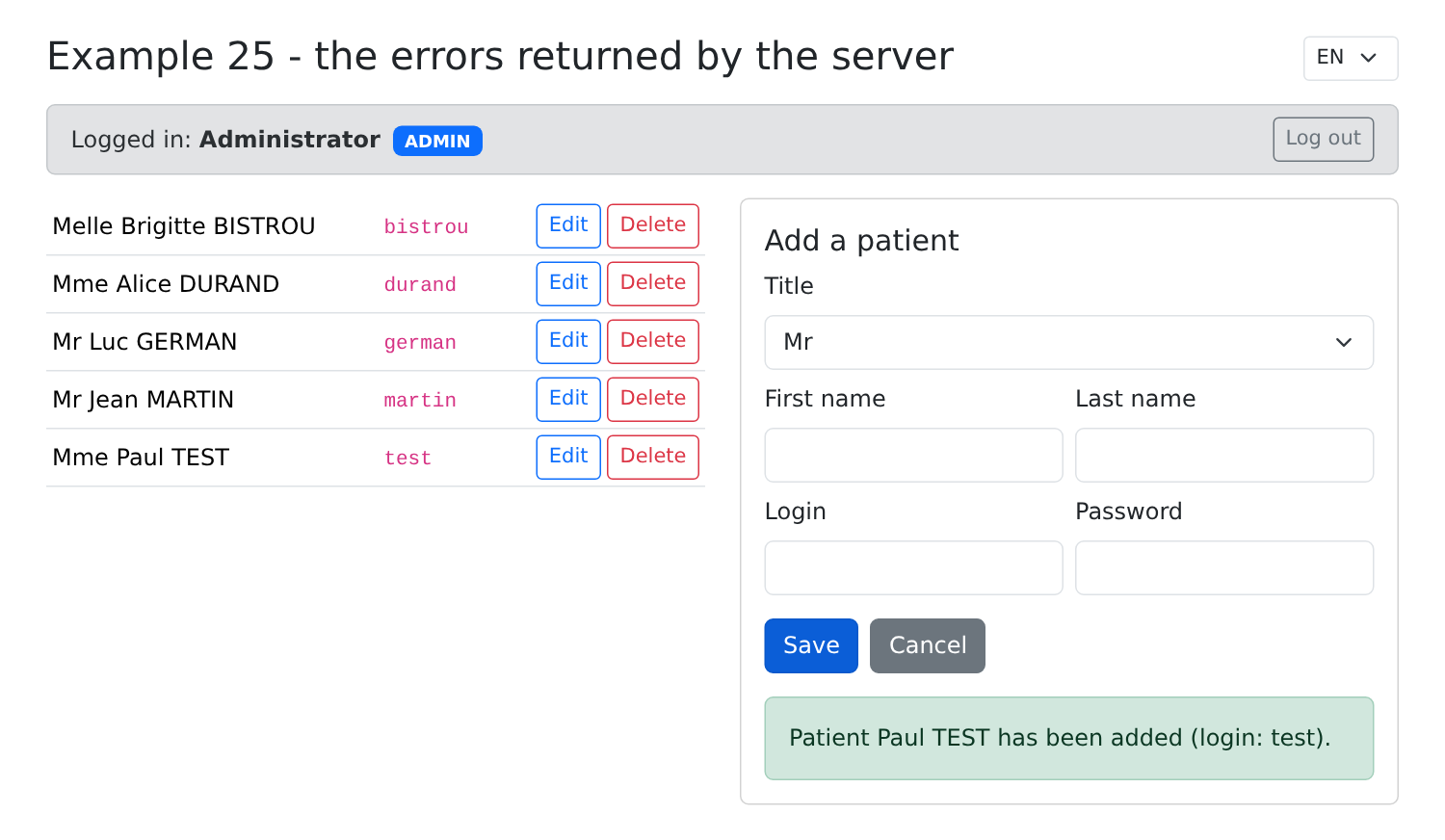
- if successful: the form is cleared, and a message is translated, along with its parameters;
- in the case of [ApiError] (lines 125–126): the general message and the error for EACH field; the row as it appears in the report: [e.fields] has exactly the desired format;
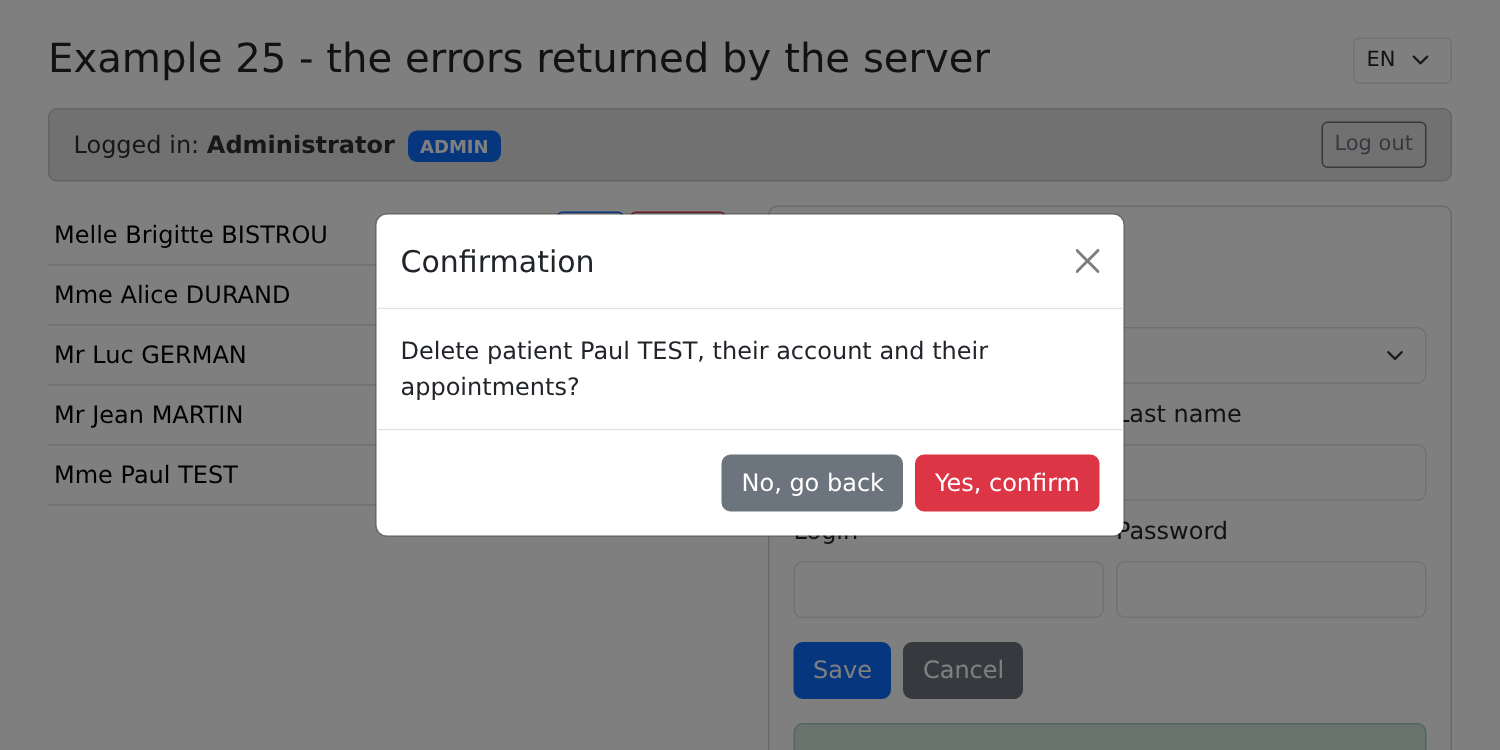
- lines 131–144: deletion, after confirmation. The confirmation message is translated by [t], with a parameter;
- lines 147–158: a function that creates an input field with its label and error message: [t(error)] translates the KEY sent by the server;
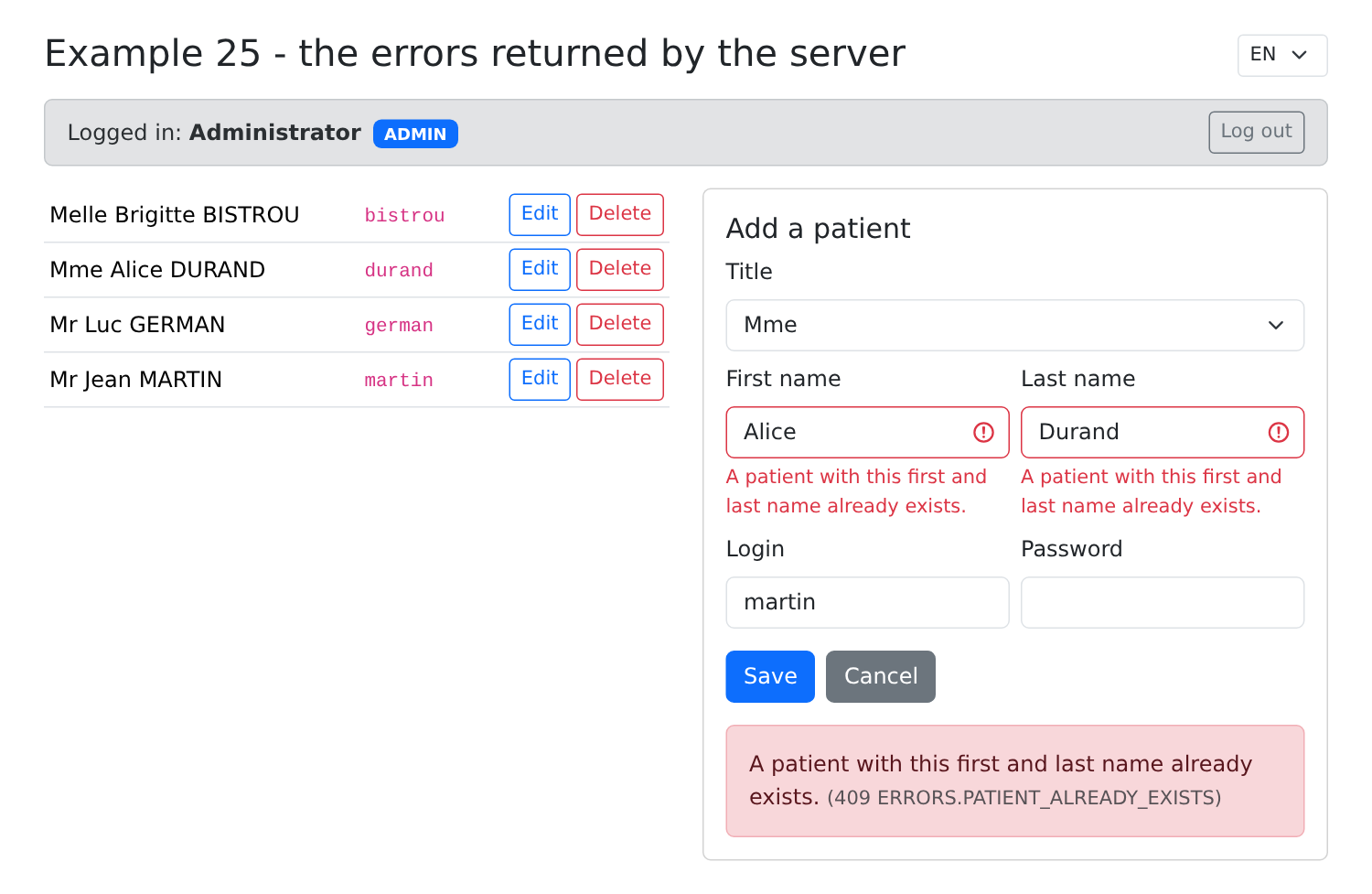
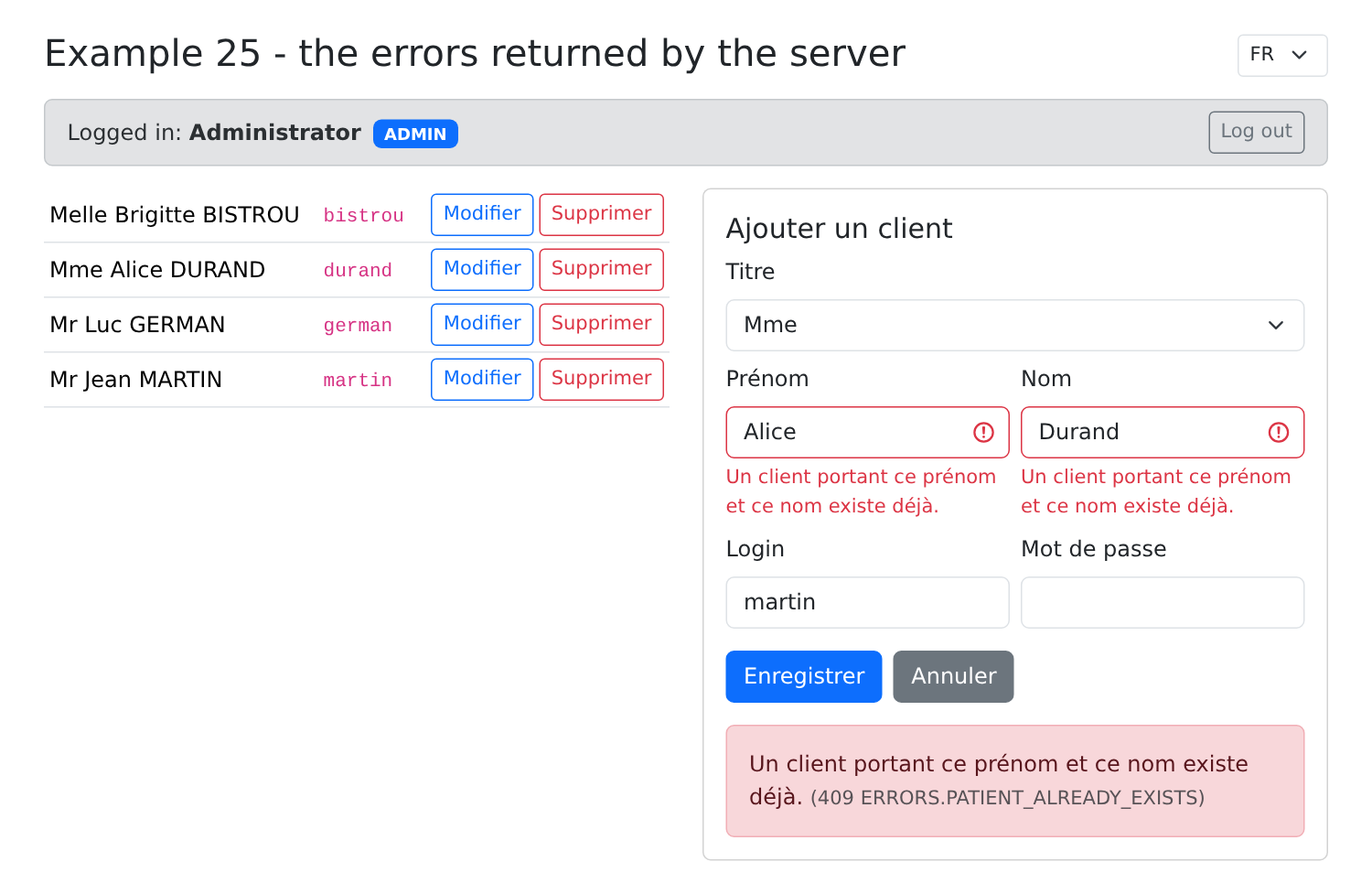
- line 164: language selection: the errors already displayed are retranslated, since they are keys;
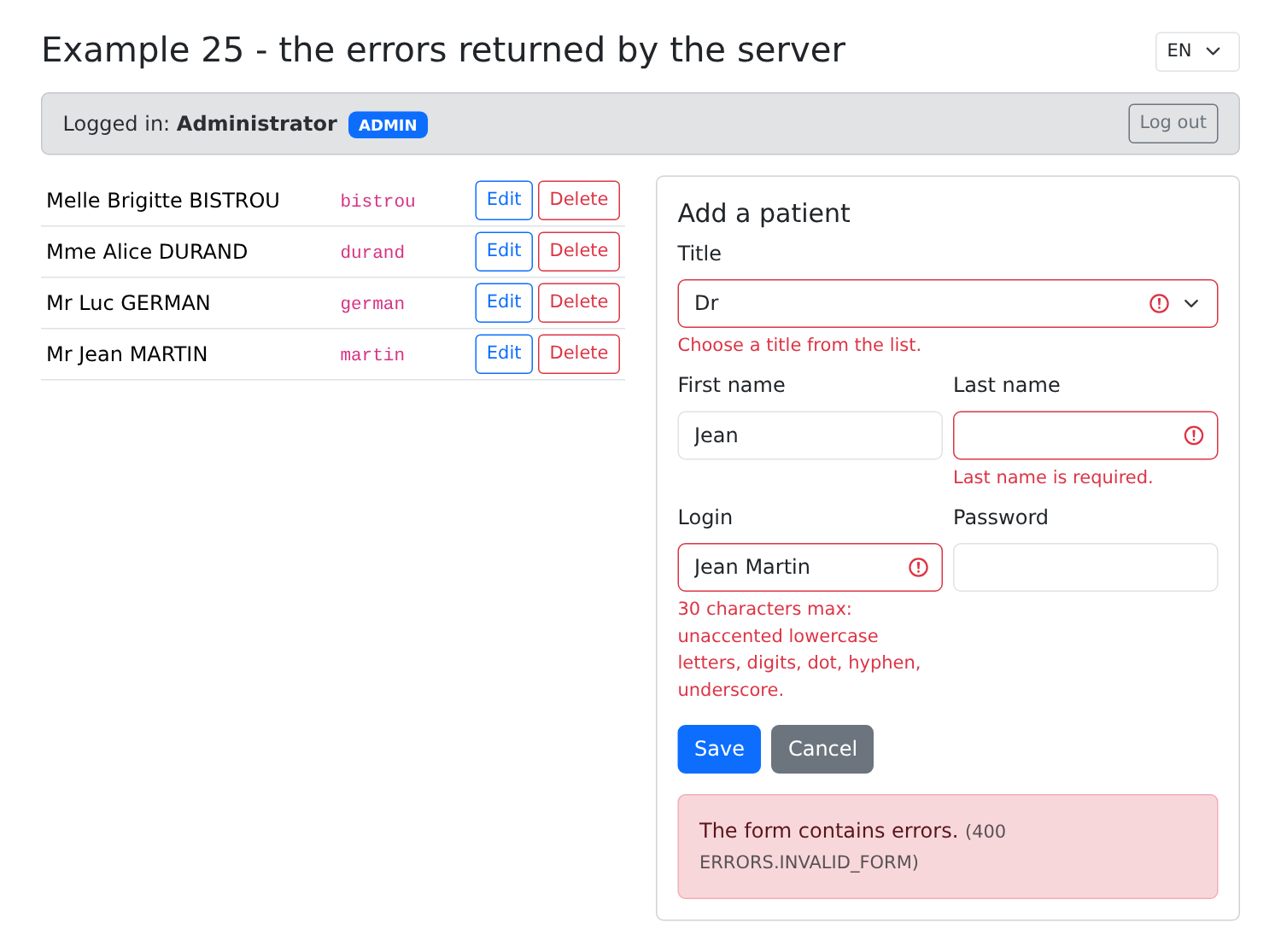
- line 199: a “Dr” option that the server will reject, resulting in [ERRORS.INVALID_TITLE];
- line 212: the button is disabled during transmission;
- line 219: the general message and the HTTP status, for context.
Logged in as [admin], with the title “Dr,” an empty name, and an invalid login:
A namesake (Alice Durand, who already exists) and a username already in use ([martin]): 409, and the two affected fields are flagged:
The same page in French: the server messages are translated back:
A successful addition:
Then its deletion:
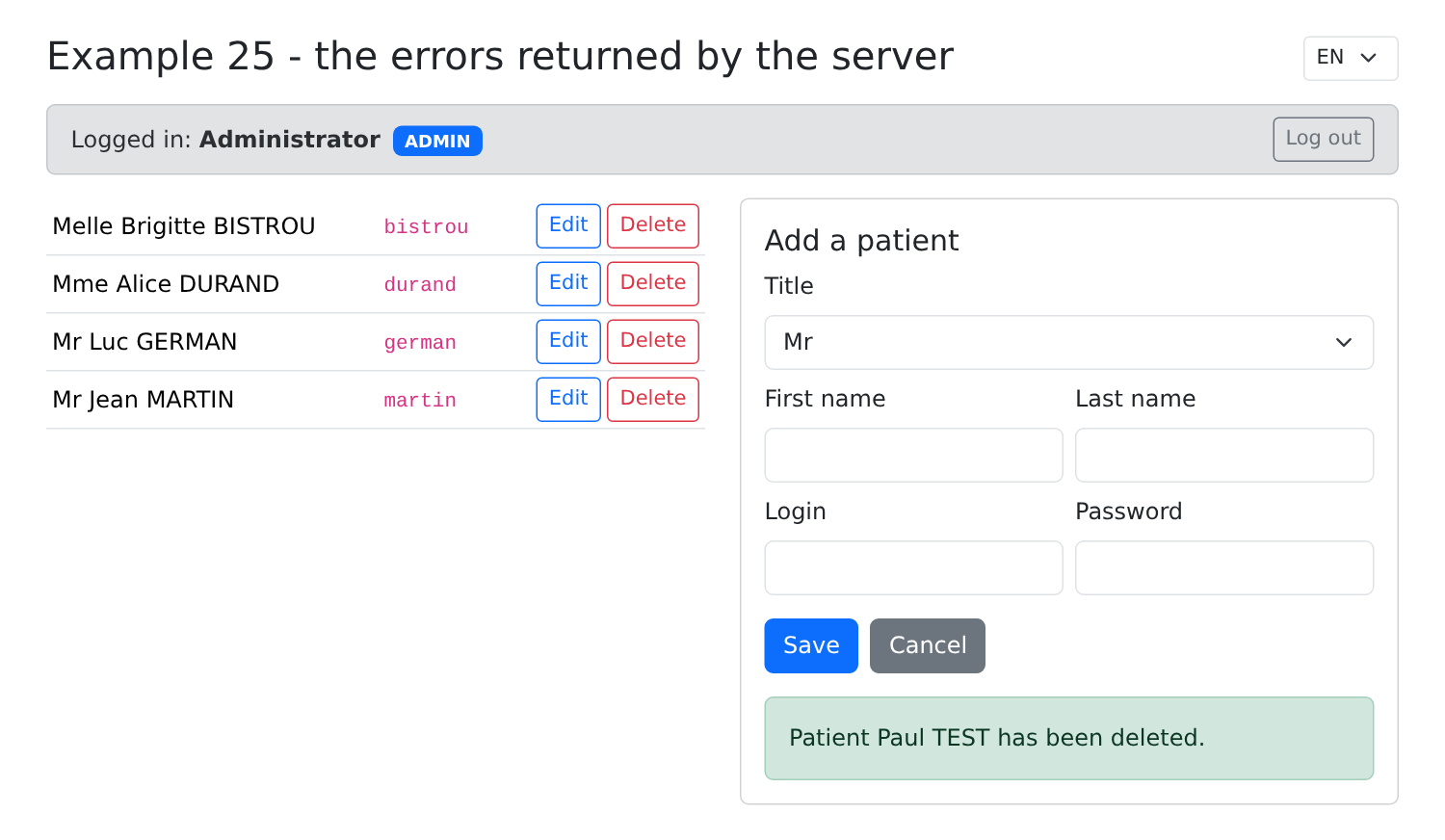
To see the optimistic lock, open the same record in two tabs, save it in the first tab, then in the second: the server responds with a 409 error ([ERRORS.CONCURRENT_UPDATE]).