5. Asynchronous and Shared State
5.1. Example 19: Asynchronous Processing
Many things happen “later”: timer ticks, keystrokes, server responses. [Angular] relies on the [RxJS] library and its observables for this. [React] does not have its own dedicated asynchronous tools: we combine state, effects, and their cleanup, which we store in hooks; and, starting with [React] 19, [use()] and [<Suspense>] allow us to wait for a promise.
5.1.1. A countdown
| // =========================================================================
// 19-asynchronous/src/hooks/useCountdown.ts - a timer in a hook
// -------------------------------------------------------------------------
// From start to 0, one value per second. The timer is stopped when the
// count reaches 0... or when the component disappears (cleanup).
// =========================================================================
import { useEffect, useState } from 'react';
export function useCountdown(start: number): number {
const [remaining, setRemaining] = useState(start);
// [remaining > 0]: the effect is restarted when this condition changes - so
// once, when the count reaches 0 (the timer is then stopped)
const active = remaining > 0;
useEffect(() => {
if (!active) return;
const timer = setInterval(() => setRemaining((r) => r - 1), 1000);
return () => clearInterval(timer);
}, [active]);
return remaining;
}
|
- line 11: the counter;
- line 15: the counter;
- lines 16–20: the effect depends solely on [active]: it is executed at startup (the timer starts), then only once more, when the count reaches 0; its cleanup then stops the timer, and the new execution does nothing. [setRemaining((r) => r - 1)] uses the “function” form of the update: the timer was created once and for all and does not see the new values of [remaining]; the function, on the other hand, receives the current value.
5.1.2. Anti-bounce
| // =========================================================================
// 19-asynchronous/src/hooks/useDebouncedValue.ts - "debounce"
// -------------------------------------------------------------------------
// Returns the received value... but only when it has not changed any more
// for delay milliseconds. For a search as you type: we
// wait for the user to pause before querying the server,
// instead of sending one request per key.
// The principle: each new value restarts the effect, whose cleanup
// cancels the timer of the previous value.
// =========================================================================
import { useEffect, useState } from 'react';
export function useDebouncedValue<T>(value: T, delay: number): T {
const [debounced, setDebounced] = useState(value);
useEffect(() => {
const timer = setTimeout(() => setDebounced(value), delay);
return () => clearTimeout(timer); // a keystroke before the end: cancel
}, [value, delay]);
return debounced;
}
|
For “search-as-you-type” functionality, we wait for the user to pause before querying the server, rather than sending a request with every keystroke: this is anti-bounce ([debounce]). The hook returns the received value... but only when it hasn’t changed for [delay] milliseconds:
- lines 17–20: each new value restarts the effect, which sets a timer; and the cleanup from the previous execution CANCELS the timer of the previous value. Therefore, only the last value, followed by a pause, reaches [setDebounced].
The hook is generic ([<T>]): it works for values of any type.
5.1.3. The page
| // =========================================================================
// 19-asynchronous/src/App.tsx - timers, search as you type, use()
// -------------------------------------------------------------------------
// Many things happen "later": the ticks of a timer, the
// keystrokes, the response of a server. React has no tool of its own
// for asynchrony (Angular uses the RxJS library): we combine
// the state, the effects and their cleanup, stored in hooks (hooks/),
// and, since React 19, use() + <Suspense> to wait for a promise.
// =========================================================================
import { Suspense, use, useEffect, useState } from 'react';
import { useCountdown } from './hooks/useCountdown';
import { useDebouncedValue } from './hooks/useDebouncedValue';
const DOCTORS = ['Marie PELISSIER', 'Paul TATOU', 'Sophie DUPONT', 'Jacques DURAND', 'Martine PELLETIER'];
// a simulated "server": the response arrives after a random delay
function search(text: string): Promise<string[]> {
const found = DOCTORS.filter((m) => m.toLowerCase().includes(text));
return new Promise((resolve) => setTimeout(() => resolve(found), 200 + Math.random() * 600));
}
// 3. a promise, created ONCE (outside the component): it resolves after
// one second
const messagePromise = new Promise<string>((resolve) =>
setTimeout(() => resolve('three (one second later)'), 1000),
);
// use(promise): the value of the promise. As long as it is not
// resolved, the component "suspends" its display: the closest <Suspense>
// displays its waiting content (fallback) instead
function Message({ promise }: { promise: Promise<string> }) {
const value = use(promise);
return <p className="mb-0">received: {value}</p>;
}
export default function App() {
const [log, setLog] = useState<string[]>([]);
const trace = (message: string) => setLog((j) => [...j, `${new Date().toLocaleTimeString()} ${message}`]);
// 1. a countdown: a home-made hook
const countdown = useCountdown(20);
// 2. a search as you type
const [input, setInput] = useState('');
const text = useDebouncedValue(input.trim().toLowerCase(), 400); // after 400 ms without a keystroke
const [results, setResults] = useState<string[]>([]);
useEffect(() => {
if (text.length < 2) {
return; // no search (and no cleanup)
}
// "stale": a response that arrives AFTER another search has been
// started must be ignored (otherwise a slow response of an old
// search would overwrite that of the new one)
let stale = false;
trace(`search sent: "${text}"`);
search(text).then((found) => {
if (stale) {
trace(`response ignored (stale): "${text}"`);
return;
}
setResults(found);
});
// the cleanup: executed when text changes (new search) or on removal
return () => {
stale = true;
};
}, [text]);
// fewer than two letters: no result, whatever those of the
// last search (a computed value, not one more state)
const displayed = text.length < 2 ? [] : results;
return (
<div className="container py-4" style={{ maxWidth: 720 }}>
<h1 className="h3 mb-3">Example 19 - asynchrony</h1>
<div className="card p-3 mb-3">
<h2 className="h6">A countdown (setInterval in a hook)</h2>
<p className="display-6 mb-0">{countdown}</p>
</div>
<div className="card p-3 mb-3">
<h2 className="h6">A search as you type (debounce, stale responses)</h2>
<input className="form-control mb-2" placeholder="at least two letters: pel, dur..." value={input}
onChange={(e) => setInput(e.target.value)} />
<ul className="mb-0">
{displayed.map((r) => <li key={r}>{r}</li>)}
{displayed.length === 0 && <li className="text-muted">no result</li>}
</ul>
</div>
<div className="card p-3 mb-3">
<h2 className="h6">Waiting for a promise (use and Suspense)</h2>
<Suspense fallback={<p className="text-muted mb-0">waiting...</p>}>
<Message promise={messagePromise} />
</Suspense>
</div>
<h2 className="h6">Log</h2>
<ol className="small">
{log.map((line, i) => <li key={i}>{line}</li>)}
</ol>
</div>
);
}
|
- lines 18–21: a simulated “server”: the response arrives after a random delay of 200 to 800 ms;
- lines 25–27: a promise, created ONCE (outside the component), resolved after one second;
- lines 32–35: [use(promise)] returns the value of a promise. As long as it is not resolved, the component “suspends” its display: the nearest [<Suspense>] (line 96) displays its placeholder content ([fallback]). When the promise is resolved, [React] recalls the component, and [use] returns the value. The promise must be created OUTSIDE the component or by a library that caches it: a promise created during rendering would be recreated with each call, and the wait would never end;
- line 42: the custom hook;
- line 46: the search text, after 400 ms without keystrokes;
- lines 49–69: the search, restarted when the (cached) text changes:
- the problem with stale responses: you type “pel,” pause, and the search starts; you type “du,” pause, and a second search starts. If the response to “pel” arrives AFTER the one for “du” (network delays are unpredictable), it would overwrite the correct results;
- The solution (lines 56–67): a variable specific to EACH execution of the effect, which is reset to [true] when the text changes. Any response that arrives afterward is ignored;
- line 73: fewer than two letters: no results, regardless of the results of the last search. This is a calculated value, not an additional state.
You type “pel,” wait a moment, then type “du”; the response to “pel” arrives too late and is ignored:
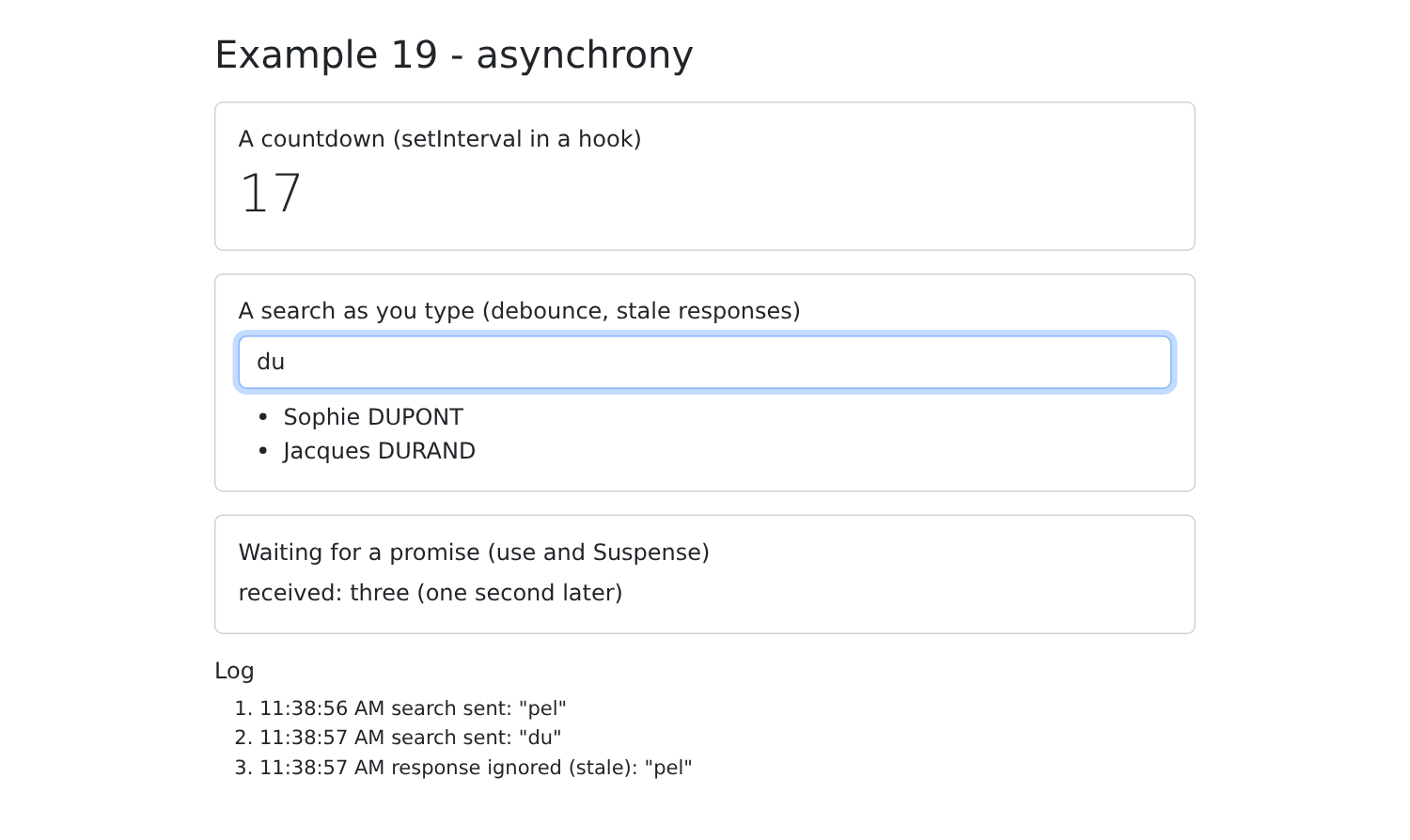
Writing your own query handling code (in progress, successful, error, expired, already in cache, etc.) is tedious. To communicate with a server, in practice you use a library that handles this: in Example 24, this will be [TanStack Query].
5.2. Example 20: A Shared State
Example 18 shows how to write a store by hand. The [Zustand] library does the same thing in just a few lines, and it is one of the most widely used libraries for managing shared state in a [React] application (along with [Redux Toolkit], which is more comprehensive but also more resource-intensive).
| // =========================================================================
// 20-shared-state/src/stores/cart.ts - a SHARED STATE, with Zustand
// -------------------------------------------------------------------------
// A "store" is a state that lives OUTSIDE the components, in ONE single
// copy, shared by all those who read it. Example 18 wrote
// one by hand (useSyncExternalStore); the Zustand library does the
// same thing in a few lines:
//
// const useCart = create<Cart>()((set, get) => ({ ...state and actions... }));
//
// create returns a HOOK. A component reads in it what it needs, through a
// "selector": useCart((p) => p.items). It is only called again if THIS
// piece of the state changes. Usual organization:
// - the STATE: data (items);
// - the ACTIONS: functions, the only ones to modify the state, through set();
// - the computed values: functions (or selectors).
// The store lives as long as the application lives: it survives the removal of a
// component... but not the reloading of the page (F5), which restarts
// the application. (Context + useReducer can do the same work;
// a store has the advantage of being readable also OUTSIDE the components.)
// =========================================================================
import { create } from 'zustand';
export interface Item {
label: string;
price: number;
}
interface Cart {
items: Item[];
add: (item: Item) => void;
clear: () => void;
}
export const useCart = create<Cart>()((set) => ({
items: [],
// set(function): receives the current state, returns what changes (the rest is kept)
add: (item) => set((p) => ({ items: [...p.items, item] })),
clear: () => set({ items: [] }),
}));
// reusable selectors: values computed from the state
export const itemCount = (p: Cart) => p.items.length;
export const cartTotal = (p: Cart) => p.items.reduce((s, a) => s + a.price, 0);
|
- line 23: the function that creates a store;
- lines 30–34: the store type: the state ([items]) and the actions ([add], [clear]), which are the only ones that can modify it;
- lines 36–41: [create<Cart>()(factory)] creates the store and returns a hook. The factory receives [set], which modifies the state: [set(object)] or [set((state) => object)]; only the changes are passed; the rest is preserved. As with [useState], the state itself is never modified: a new one is created;
- Lines 44–45: selectors—functions that calculate a value based on the state.
The store exists as long as the application runs, in ONE single copy: it survives the removal of a component... but not a page reload (F5), which restarts the application. Context and [useReducer] could do the same job; a store has two advantages: it is also readable outside components (by a router guard, for example), and a component is only called back if the part of the state it reads has changed.
5.2.2. Preferences
| // =========================================================================
// 20-shared-state/src/stores/preferences.ts - a state that survives F5
// -------------------------------------------------------------------------
// For a piece of data to survive the reloading of the page, or the closing
// of the browser, it must be stored IN the browser: localStorage (a
// small dictionary key -> string, specific to each site).
// Zustand's persist "middleware" takes care of it: it rereads localStorage at
// the creation of the store, and rewrites it on each change (key
// "example20.preferences", value: the JSON of the state).
// NEVER store sensitive data in it (password, token): any script
// of the page can read localStorage.
// =========================================================================
import { create } from 'zustand';
import { persist } from 'zustand/middleware';
interface Preferences {
dark: boolean;
size: number; // text size, in px
update: (change: Partial<Pick<Preferences, 'dark' | 'size'>>) => void;
}
export const usePreferences = create<Preferences>()(
persist(
(set) => ({
dark: false,
size: 16,
update: (change) => set(change),
}),
{ name: 'example20.preferences' },
),
);
|
For data to persist after the page is reloaded or the browser is closed, it must be stored IN the browser: [localStorage], a small key/string dictionary specific to each site. The “middleware” [persist] from [Zustand] handles this (lines 24–31): It reads [localStorage] when the store is created and rewrites it whenever a change occurs, under the key [example20.preferences] (line 30). Sensitive data (passwords, tokens) is NEVER stored there: any script on the page can read [localStorage].
5.2.3. The components
| // 20-shared-state/src/components/Shop.tsx - ADDS to the shared cart
import { useCart, type Item } from '../stores/cart';
const PRODUCTS: Item[] = [
{ label: 'Consultation', price: 30 },
{ label: 'Vaccine', price: 12.5 },
];
export default function Shop() {
// only the action is read: Shop is not called again when the cart changes
const add = useCart((p) => p.add);
return (
<div className="card p-3 h-100">
<h2 className="h6">Shop</h2>
{PRODUCTS.map((p) => (
<button key={p.label} className="btn btn-sm btn-outline-primary mb-2" onClick={() => add(p)}>
+ {p.label} (€{p.price})
</button>
))}
</div>
);
}
|
[useCart((p) => p.add)]: A component reads the store via a selector and is called only if THE part of the state it reads changes. [Shop] only reads the action [add], which never changes: it is never called when the shopping cart changes.
| // 20-shared-state/src/components/CartSummary.tsx - READS the same cart
import { itemCount, cartTotal, useCart } from '../stores/cart';
export default function CartSummary() {
const count = useCart(itemCount);
const total = useCart(cartTotal);
const clear = useCart((p) => p.clear);
return (
<div className="card p-3 h-100">
<h2 className="h6">Cart</h2>
<p className="mb-2">{count} item(s), €{total}</p>
<button className="btn btn-sm btn-outline-danger align-self-start" disabled={count === 0} onClick={clear}>Clear</button>
</div>
);
}
|
[CartSummary] reads the number of items and the total using the store’s selectors.
| // 20-shared-state/src/components/LocalCounter.tsx - a LOCAL state, which disappears with the component
import { useState } from 'react';
export default function LocalCounter({ title }: { title: string }) {
const [clicks, setClicks] = useState(0);
return (
<div className="card p-3 h-100">
<h2 className="h6">{title}</h2>
<button className="btn btn-sm btn-outline-secondary align-self-start" onClick={() => setClicks(clicks + 1)}>
{clicks} click(s)
</button>
</div>
);
}
|
A LOCAL state, which disappears along with the component.
5.2.4. The page
| // =========================================================================
// 20-shared-state/src/App.tsx - three "scopes" of data on the client side
// -------------------------------------------------------------------------
// Same question as example 23 of the NestJS course (application, request,
// client scope), transposed into the browser:
// - the LOCAL state of a component (LocalCounter) disappears with it;
// - the state of a STORE (the cart) is shared by all the components
// and survives their removal - but not F5;
// - the state stored in localStorage (the preferences) survives F5 and the
// closing of the browser.
// And a novelty of React 19.2, <Activity mode="hidden">: the content is
// HIDDEN, but not removed; its local state is kept.
// Uncheck then recheck "show the area", then reload the page: compare.
// =========================================================================
import { Activity, useState } from 'react';
import { usePreferences } from './stores/preferences';
import Shop from './components/Shop';
import CartSummary from './components/CartSummary';
import LocalCounter from './components/LocalCounter';
export default function App() {
const { dark, size, update } = usePreferences();
const [areaVisible, setAreaVisible] = useState(true);
return (
<div className={`min-vh-100 ${dark ? 'bg-dark text-light' : ''}`} style={{ fontSize: size }}>
<div className="container py-4">
<h1 className="h3 mb-3">Example 20 - a shared state</h1>
<div className="d-flex flex-wrap gap-4 mb-3">
<label className="form-check-label">
<input type="checkbox" className="form-check-input" checked={dark}
onChange={(e) => update({ dark: e.target.checked })} /> dark theme
</label>
<label>
text size{' '}
<input type="range" min={12} max={22} value={size}
onChange={(e) => update({ size: e.target.valueAsNumber })} /> {size} px
</label>
<label className="form-check-label">
<input type="checkbox" className="form-check-input" checked={areaVisible}
onChange={(e) => setAreaVisible(e.target.checked)} /> show the area
</label>
</div>
<div className="row g-3 text-body">
{/* removed: these components disappear, with their local state */}
{areaVisible && (
<>
<div className="col-md-3"><Shop /></div>
<div className="col-md-3"><CartSummary /></div>
<div className="col-md-3"><LocalCounter title="Local state" /></div>
</>
)}
{/* hidden: the component stays in memory, its state is kept */}
<Activity mode={areaVisible ? 'visible' : 'hidden'}>
<div className="col-md-3"><LocalCounter title="Local state, in an Activity" /></div>
</Activity>
</div>
<p className="mt-3 mb-2">Outside the area, a second summary of the SAME cart (it stays there when the area disappears):</p>
<div className="text-body"><CartSummary /></div>
</div>
</div>
);
}
|
- line 23: without a selector, the entire store is read (and the component is reloaded with each change);
- lines 47–53: the field is removed when the checkbox is unchecked: its components disappear, along with their local state;
- lines 55–57: [<Activity mode="hidden">] ([React] 19.2) hides its content without removing it: the component remains in memory, along with its state. This is useful for tabs or a page you leave and return to;
- line 60: outside the area, a second summary of the SAME shopping cart.
Add two items to the shopping cart, double-click the first local counter and triple-click the one in the [Activity], uncheck and then recheck “show the area,” and check “dark theme”:
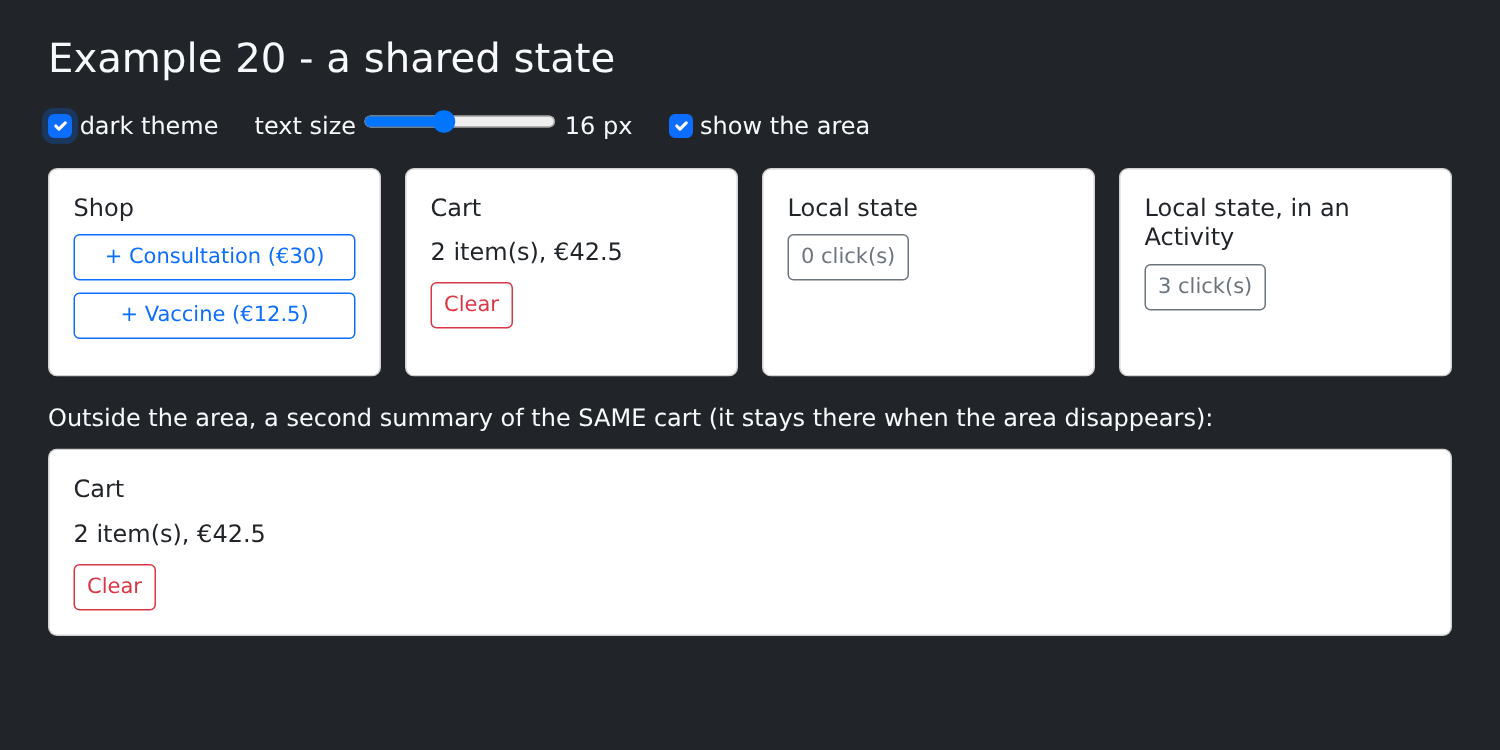
The shopping cart remains intact (it’s in the store); the first counter has reset to 0 (its component was removed and then recreated); the one for [Activity] has retained its value. When you reload the page (F5), the shopping cart is empty, but the theme and text size are preserved ([localStorage]).
This is the same issue as Example 23 from the [NestJS] course (application scope, query, client), transposed to the browser.