9. Using the SGBD MySQL
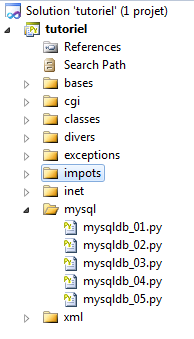 |
9.1. Installing the MySQLdb module
We will write scripts using a MySQL database:
 |
The Python functions for managing a MySQL database are encapsulated in a MySQLdb module that is not included in the initial Python distribution. You must therefore download and install the module. Here is one way to do this:
 |
- In the Programs menu, select the Python package manager. The command window will then appear.
Search for the keyword mysql in the packages:
C:\Documents and Settings\st>pypm search mysql
Get: [pypm-be.activestate.com] :repository-index:
Get: [pypm-free.activestate.com] :repository-index:
autosync: synced 2 repositories
  chartio                    Setup wizard and connection client for connecting
  chartio-setup              Setup wizard and connection client for connecting
  cns.recipe.zmysqlda        Recipe for installing ZMySQLDA
  collective.recipe.zmysqlda Recipe for installing ZMySQLDA
  django-mysql-manager       DESCRIPTION_DESCRIPTION_DESCRIPTION
  jaraco.mysql               MySQLDB-compatible MySQL wrapper by Jason R. Coomb
  lovely.testlayers          mysql, postgres nginx, memcached cassandra test la
  mtstat-mysql               MySQL Plugins for mtstat
  mysql-autodoc              Generate HTML documentation from a mysql database
  mysql-python               Python interface to MySQL
  mysqldbda                  MySQL Database adapter
  products.zmysqlda          MySQL Zope2 adapter.
  pymysql                    Pure Python MySQL Driver
  pymysql-sa                 PyMySQL dialect for SQLAlchemy.
  pymysql3                   Pure Python MySQL Driver
  sa-mysql-dt                Alternative implementation of DateTime column for
  schemaobject               Iterate over a MySQL database schema as a Python o
  schemasync                 A MySQL Schema Synchronization Utility
  simplestore                A datastore layer built on top of MySQL in Python.
  sqlbean                    A auto maping ORM for MYSQL and can bind with memc
  sqlwitch                   sqlwitch offers idiomatic SQL generation on top of
  tiddlywebplugins.mysql     MySQL-based store for tiddlyweb
  tiddlywebplugins.mysql2    MySQL-based store for tiddlyweb
zest.recipe.mysql          A Buildout recipe to setup a MySQL database.
All modules whose name or description contains the keyword mysql have been listed. The one we are interested in is [mysql-python], line 14. Let’s install it:
C:\Documents and Settings\st>pypm install mysql-python
The following packages will be installed into "%APPDATA%\Python" (2.7):
 mysql-python-1.2.3
Hit: [pypm-free.activestate.com] mysql-python 1.2.3
Installing mysql-python-1.2.3

C:\Documents and Settings\st>echo %APPDATA%
C:\Documents and Settings\st\Application Data
- Line 5: The package mysql-python-1.2.3 was installed in the folder "%APPDATA%\Python", where APPDATA is the folder specified on line 8.
This operation may fail if:
- the Python interpreter used is a 64-bit version;
- the path %APPDATA% contains accented characters.
9.2. Installing MySQL
There are various ways to install SGBD MySQL. Here we have used WampServer, a package that includes several pieces of software:
- an Apache web server. We will use it to write web scripts in Python;
- SGBD MySQL;
- the PHP scripting language;
- an administration tool for SGBD MySQL written in PHP: phpMyAdmin.
WampServer can be downloaded (June 2011) at the following address:
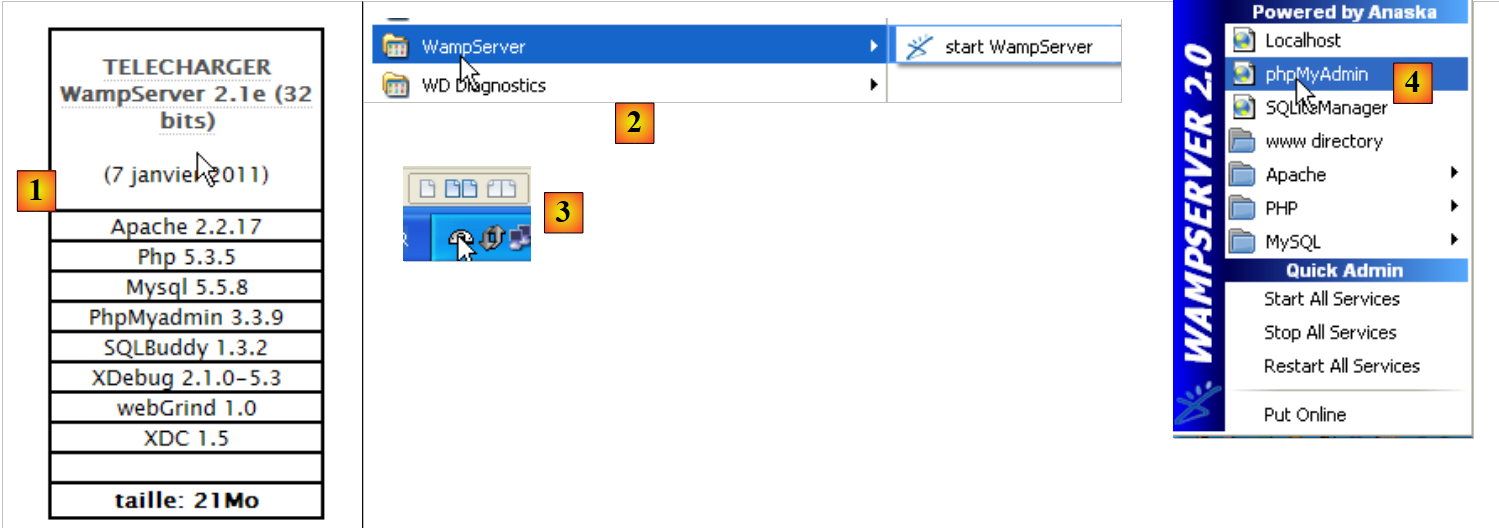 |
- In [1], download version from WampServer, which works fine;
- For [2], once installed, launch it. This will start the Apache web server and SGBD and MySQL;
- in [3], once launched, WampServer can be managed from a [3] icon located at the bottom right of the taskbar;
- In [4], launch the MySQL administration tool.
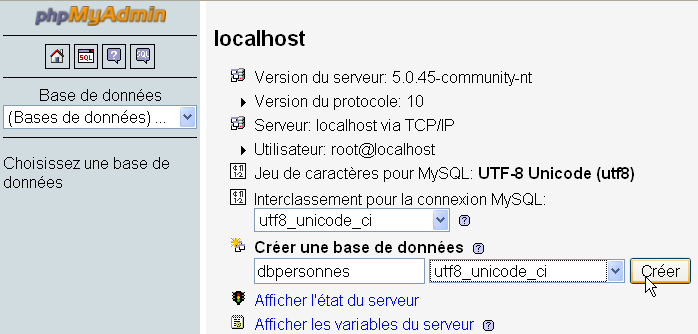
Create a database named [dbpersonnes]:
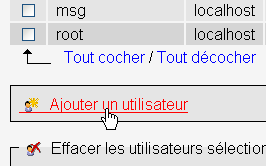
Create a user named [admpersonnes] with the password [nobody]:
 |  |
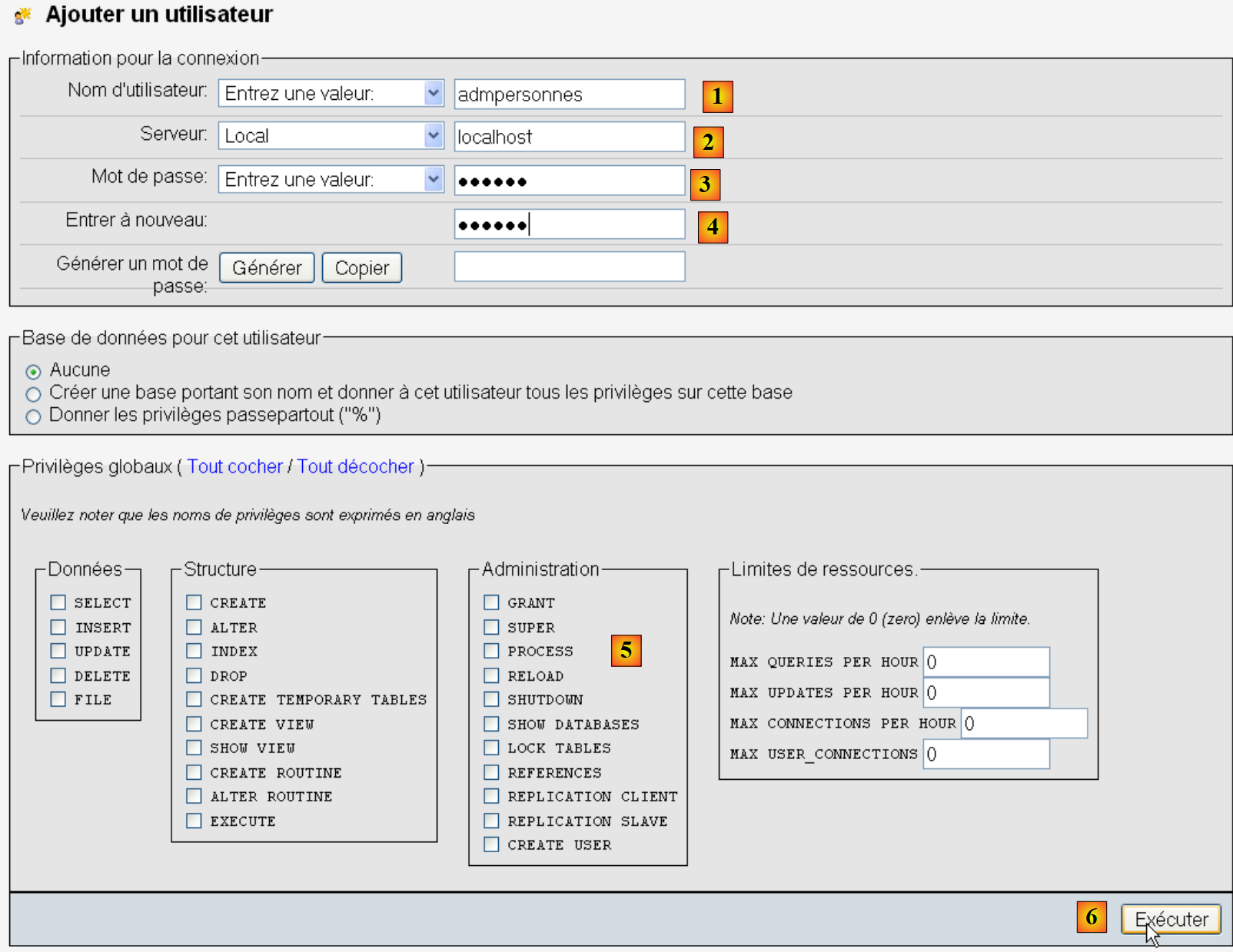 |
- in [1], the user name;
- in [2], the machine of SGBD on which we grant them rights;
- in [3], their password [nobody];
- in [4], same as above;
- in [5], no permissions are granted to this user;
- in [6], the user is created.
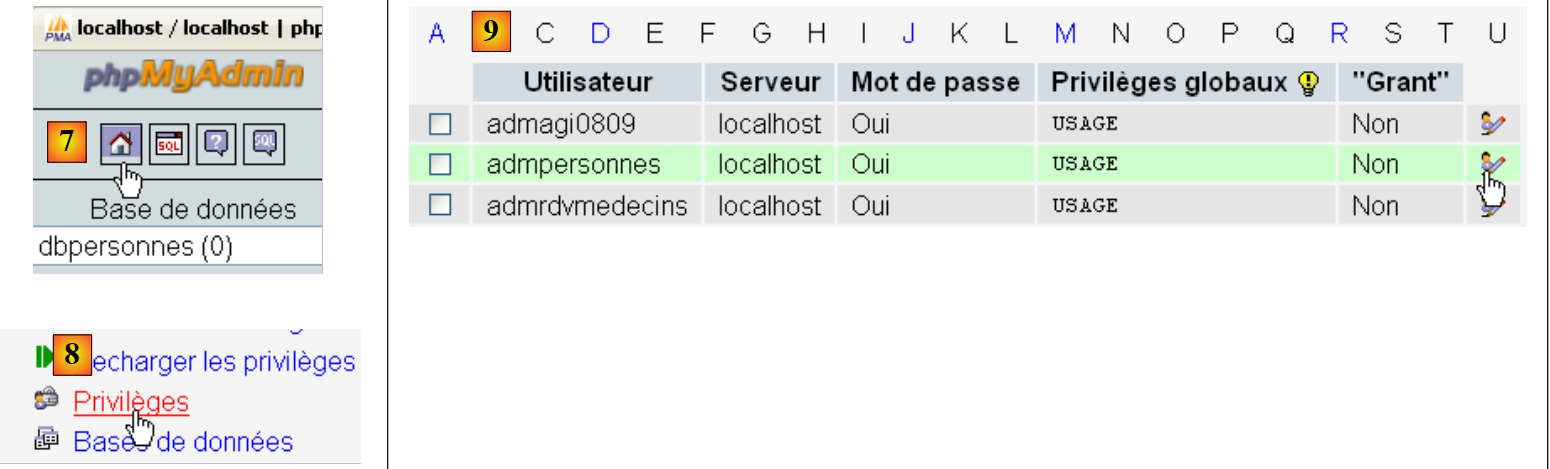 |
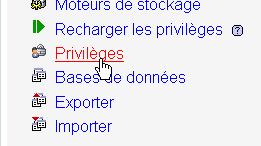
- in [7], we return to the home page of phpMyAdmin;
- In [8], we use the link [Privileges] on this page to go edit those of user [admpersonnes] and [9].
 |
- In [10], specify that you want to grant user [admpersonnes] permissions on the database [dbpersonnes];
- In [11], the selection is confirmed.
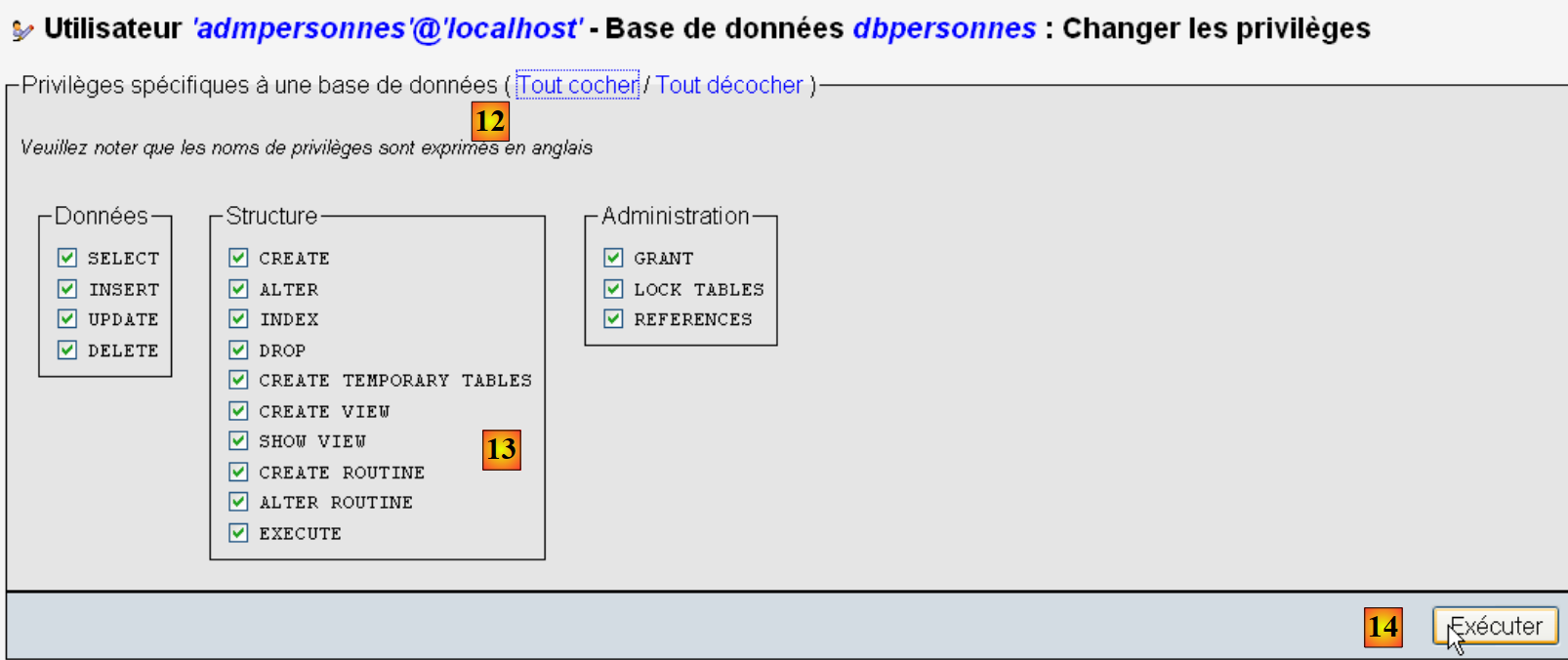 |
- With the link [12] [Tout cocher], the user [admpersonnes] is granted all rights to the database [dbpersonnes] [13];
- We save the changes in [14].
Now we have:
- a database MySQL [dbpersonnes];
- a user [admpersonnes / nobody] who has full access to this database.
We will write Python scripts to work with the database.
9.3. Connection to a database MySQL - 1
# import module MySQLdb
import sys
sys.path.append("D:\Programs\ActivePython\site-packages")
import MySQLdb

# connection to a MySQL database
....
Notes:
- Lines 2–4: Scripts containing operations with SGBD and MySQL must import the MySQLdb module. Recall that we installed this module in the [%APPDATA%\Python] folder. The [%APPDATA%\Python] folder is automatically searched when a Python script requests a module. In fact, all folders declared in sys.path are searched. Here is an example that lists these folders:
# -*- coding=utf-8 -*-

import sys

# display of sys.path files
for dossier in sys.path:
    print dossier
The screen output is as follows:
Line 8, the [site-packages] folder where MySQLdb was originally installed. We move the [site-packages] folder, which is where the pypm utility installs Python modules. To add a new folder that Python will search for modules, we add it to the sys.path list:
# import module MySQLdb
import sys
sys.path.append("D:\Programs\ActivePython\site-packages")
import MySQLdb

# connection to a MySQL database
....
On line 3, we add the folder where the MySQLdb module was moved.
The complete code for the example is as follows:
# import module MySQLdb
import sys
sys.path.append("D:\Programs\ActivePython\site-packages")
import MySQLdb

# connection to a MySQL database
# user identity is (admpersonnes,nobody)
user="admpersonnes"
pwd="nobody"
host="localhost"
connexion=None
try:
    print "connexion..."
    # connection
    connexion=MySQLdb.connect(host=host,user=user,passwd=pwd)
    # follow-up
    print "Connexion a MySQL reussie sous l'identite host={0},user={1},passwd={2}".format(host,user,pwd)
except MySQLdb.OperationalError,message:
    print "Erreur : {0}".format(message)
finally:
    try:
        connexion.close()
    except:
        pass
- Lines 8–11: The script will connect (line 15) the user [admpersonnes / nobody] to SGBD and MySQL on the machine [localhost]. It is not connected to a specific database;
- lines 12–24: the connection may fail. Therefore, it is handled within a try/except/finally block;
- line 15: the connect method of the MySQLdb module accepts various named parameters:
- user: the user who owns the [admpersonnes] connection;
- pwd: password for the [nobody] user;
- host: machine of the DBMS MySQL [localhost];
- db: the database to which the connection is made. Optional.
- line 18: if an exception is thrown, it is of type [ MySQLdb.OperationalError] and the associated error message will be found in the variable [message];
- lines 20–23: in the [finally] clause, the connection is closed. If an exception occurs, it is caught (line 23) but no action is taken (line 24).
connexion...
Connexion a MySQL reussie sous l'identity host=localhost,user=admpersonnes,passwd=nobody
9.4. Connection to a database MySQL - 2
# import module MySQLdb
import sys
sys.path.append("D:\Programs\ActivePython\site-packages")
import MySQLdb

# ---------------------------------------------------------------------------------
def testeConnexion(hote,login,pwd):
    # connects then disconnects (login,pwd) the sgbd mysql from the host server
    # launches eception MySQLdb.operationalError
    # connection
    connexion=MySQLdb.connect(host=hote,user=login,passwd=pwd)
    print "Connexion a MySQL reussie sous l'identite (%s,%s,%s)" % (hote,login,passwd)
    # close the connection
    connexion.close()
    print "Fermeture connexion MySQL reussie\n"


# ---------------------------------------------- main
# connection to the MySQL database
# user identity
user="admpersonnes"
passwd="nobody"
host="localhost"
# test connection
try:
    testeConnexion(host,user,passwd)
except MySQLdb.OperationalError,message:
    print message
# with a non-existent user
try:
    testeConnexion(host,"xx","xx")
except MySQLdb.OperationalError,message:
    print message
Notes:
- lines 7-15: a function that attempts to connect and then disconnect a user from a SGBD MySQL. Displays the result;
- lines 18-34: main program – calls the testeConnexion method twice and displays any exceptions.
9.5. Creating a table MySQL
Now that we know how to establish a connection with SGBD MySQL, we can begin issuing SQL commands over this connection. To do this, we will connect to the created database [dbpersonnes] and use the connection to create a table in the database.
# import du module MySQLdb
import sys
sys.path.append("D:\Programs\ActivePython\site-packages")
import MySQLdb

# ---------------------------------------------------------------------------------
def executeSQL(connexion,update):
    # exécute une requête update de mise à jour sur la connexion
    # on demande un curseur
    curseur=connexion.cursor()
    # exécute la requête sql sur la connexion
    try:
        curseur.execute(update)
        connexion.commit()
    except Exception, erreur:
        connexion.rollback()
        raise
    finally:
        curseur.close()

# ---------------------------------------------- main
# connexion à la base MySQL
# l'identité de l'utilisateur
ID="admpersonnes"
PWD="nobody"
# la machine hôte du sgbd
HOTE="localhost"
# identité de la base
BASE="dbpersonnes"
# connexion
try:
    connexion=MySQLdb.connect(host=HOTE,user=ID,passwd=PWD,db=BASE)
except MySQLdb.OperationalError,message:
    print message
    sys.exit()

# suppression de la table personnes si elle existe
# si elle n'existe pas une erreur se produira
# on l'ignore
requete="drop table personnes"
try:
    executeSQL(connexion,requete)
except:
    pass
# création de la table personnes
requete="create table personnes (prenom varchar(30) NOT NULL, nom varchar(30) NOT NULL, age integer NOT NULL, primary key(nom,prenom))"
try:
    executeSQL(connexion,requete)
except MySQLdb.OperationalError,message:
    print message
    sys.exit()
# on se deconnecte et on quitte
try:
    connexion.close()
except MySQLdb.OperationalError,message:
    print message
sys.exit()
Notes:
- line 7: the executeSQL function executes a SQL query on an open connection;
- line 10: SQL operations on the connection are performed through a special object called a cursor;
- line 10: obtaining a cursor;
- line 13: executing the SQL query;
- line 14: the current transaction is committed;
- line 15: in case of an exception, the error message is retrieved in the error variable;
- line 16: the current transaction is rolled back;
- line 17: the exception is rethrown;
- line 19: whether there is an error or not, the cursor is closed. This releases the resources associated with it.
create table personnes (prenom varchar(30) NOT NULL, nom varchar(30) NOT NULL, age integer NOT NULL, primary key(nom,prenom)) : requete reussie
Verification with phpMyAdmin:
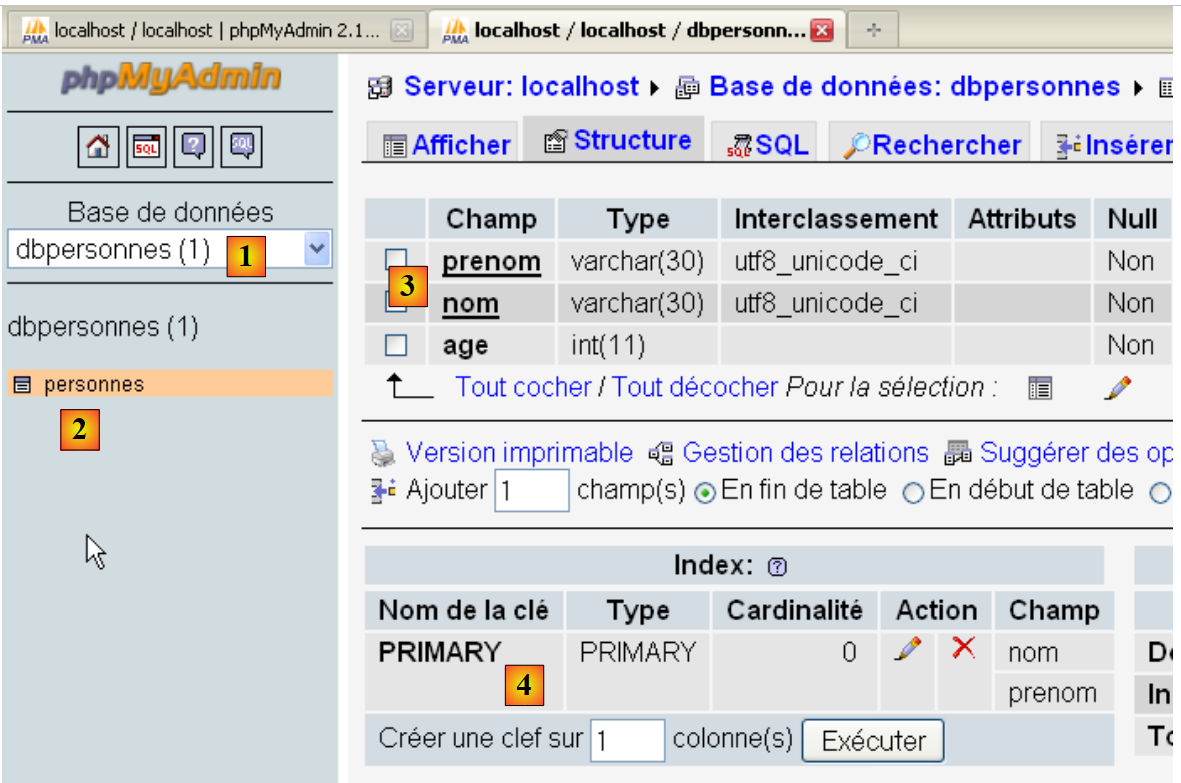 |
- The database [dbpersonnes] [1] has a table [personnes] [2] with the structure [3] and the primary key [4].
9.6. Filling the table [personnes]
After previously creating the table [personnes], we will now populate it.
# import module MySQLdb
import sys
sys.path.append("D:\Programs\ActivePython\site-packages")
import MySQLdb
# other modules
import re

# ---------------------------------------------------------------------------------
def executerCommandes(HOTE,ID,PWD,BASE,SQL,suivi=False,arret=True):
    # uses connection (HOTE,ID,PWD,BASE)
    # executes the SQL commands contained in the SQL text file on this connection
    # this is a file of SQL commands to be executed one per line
    # if followed=True then each execution of a SQL order is displayed, indicating success or failure
    # if stop=True, the function stops on the 1st error encountered, otherwise it executes all sql commands
    # the function returns a list (no. of errors, error1, error2, ...)

    # check for the presence of the SQL file
    data=None
    try:
        data=open(SQL,"r")
    except:
        return [1,"Le fichier %s n'existe pas" % (SQL)]

    # connection
    try:
        connexion=MySQLdb.connect(host=HOTE,user=ID,passwd=PWD,db=BASE)
    except MySQLdb.OperationalError,erreur:
        return [1,"Erreur lors de la connexion a MySQL sous l'identite (%s,%s,%s,%s) : %s" % (HOTE, ID, PWD, BASE, erreur)]

    # a cursor is requested
    curseur=connexion.cursor()
    # execution of SQL queries contained in the SQL file
    # we put them in a table
    requetes=data.readlines()
    # run them one by one - initially no errors
    erreurs=[0]
    for i in range(len(requetes)):
        # store the current query
        requete=requetes[i]
        # do we have an empty query? If so, move on to the next query
        if re.match(r"^\s*$",requete):
            continue
        # query execution i
        erreur=""
        try:
            curseur.execute(requete)
        except Exception, erreur:
            pass
        #was there a mistake?
        if erreur:
            # one more mistake
            erreurs[0]+=1
            # error msg
            msg="%s : Erreur (%s)" % (requete,erreur)
            erreurs.append(msg)
            # screen tracking or not?
            if suivi:
                print msg
            # shall we stop?
            if arret:
                return erreurs
        else:
            if suivi:
                print "%s : Execution reussie" % (requete)
    # close connection and release resources
    curseur.close()
    connexion.commit()
    # we disconnect
    try:
        connexion.close()
    except MySQLdb.OperationalError,erreur:
        # one more mistake
        erreurs[0]+=1
        # error msg
        msg="%s : Erreur (%s)" % (requete,erreur)
        erreurs.append(msg)

    # return
    return erreurs


# ---------------------------------------------- main
# connection to the MySQL database
# user identity
ID="admpersonnes"
PWD="nobody"
# the sgbd host machine
HOTE="localhost"
# base identity
BASE="dbpersonnes"
# identity of the SQL command text file to be executed
TEXTE="sql.txt";

# table creation and filling
erreurs=executerCommandes(HOTE,ID,PWD,BASE,TEXTE,True,False)
#display number of errors
print "il y a eu %s erreur(s)" % (erreurs[0])
for i in range(1,len(erreurs)):
    print erreurs[i]
The file sql.txt:
An error has been intentionally inserted in line 5.
Screen results:
drop table personnes : Execution reussie
create table personnes (prenom varchar(30) not null, nom varchar(30) not null, age integer not null, primary key (nom,prenom)) : Execution reussie
insert into personnes values('Paul','Langevin',48): Successful execution
insert into personnes values ('Sylvie','Lefur',70) : Successful execution
xx : Erreur ((1064, "You have an error in your SQL syntax; check the manual that corresponds to your MySQL server version for the right syntax to use near 'xx' at
 line 1"))
insert into personnes values ('Pierre','Nicazou',35) : Successful execution
insert into personnes values ('Geraldine','Colou',26): Successful execution
insert into personnes values ('Paulette','Girond',56): Successful execution
il y a eu 1 erreur(s)
xx : Erreur ((1064, "You have an error in your SQL syntax; check the manual that corresponds to your MySQL server version for the right syntax to use near 'xx' at line 1"))
Verification with phpMyAdmin:
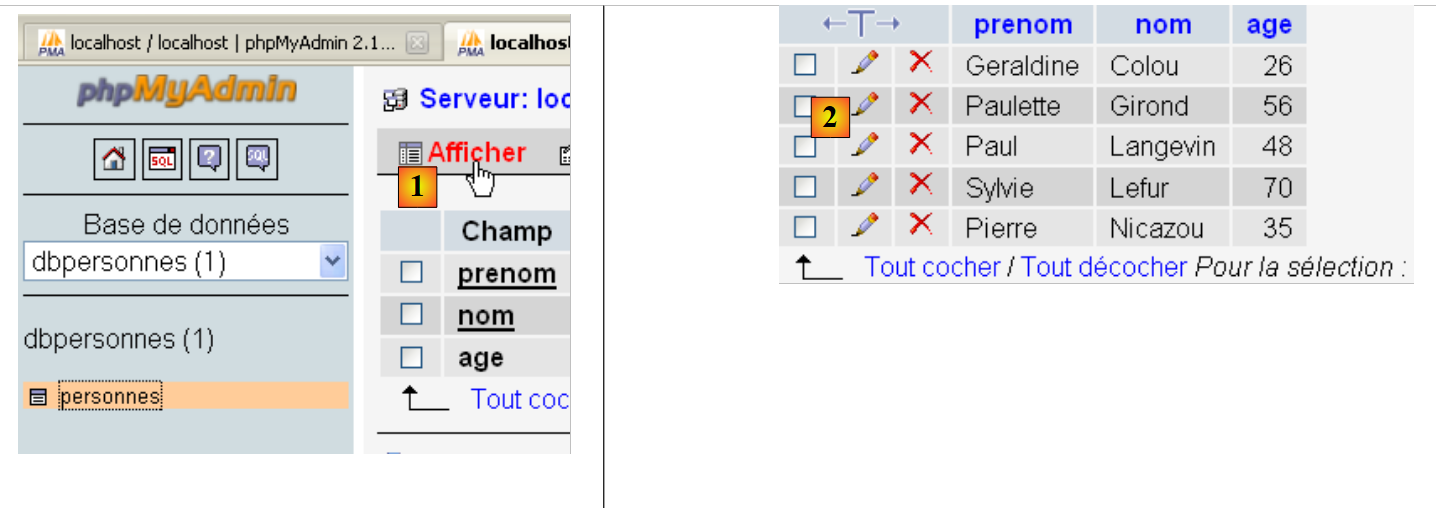
- In [1], the link [Afficher] allows you to retrieve the contents of the table [personnes] [2].
9.7. Executing any SQL queries
The following script executes a SQL batch file and displays the result of each command:
- the result of SELECT if the command is SELECT;
- the number of modified lines if the command is INSERT, UPDATE, or DELETE.
# import module MySQLdb
import sys
sys.path.append("D:\Programs\ActivePython\site-packages")
import MySQLdb
# other modules
import re

def cutNewLineChar(ligne):
    # delete the [line] end-of-line mark if it exists
    l=len(ligne)
    while(ligne[l-1]=="\n" or ligne[l-1]=="\r"):
        l-=1
    return(ligne[0:l])

# ---------------------------------------------------------------------------------
def afficherInfos(curseur):
    # displays the result of a sql query
    # was it a select?
    if curseur.description:
        # there's a description - so it's a select
        # description[i] is the description of column no. i in the select
        # description[i][0] is the name of column no. i of the select
        # displays field names
        titre=""
        for i in range(len(curseur.description)):
            titre+=curseur.description[i][0]+","
        # displays the list of fields without the trailing comma
        print titre[0:len(titre)-1]
        # dividing line
        print "-"*(len(titre)-1)
        # current select line
        ligne=curseur.fetchone()
        while ligne:
            print ligne
            # next line of the select
            ligne=curseur.fetchone()
    else:
        # there are no fields - it wasn't a select
        print "%s lignes(s) a (ont) ete modifiee(s)" % (curseur.rowcount)


# ---------------------------------------------------------------------------------
def executerCommandes(HOTE,ID,PWD,BASE,SQL,suivi=False,arret=True):
    # uses connection (HOTE,ID,PWD,BASE)
    # executes the SQL commands contained in the SQL text file on this connection
    # this is a file of SQL commands to be executed one per line
    # if followed=1 then each execution of a SQL order is displayed, indicating success or failure
    # if stop=1, the function stops on the 1st error encountered, otherwise it executes all sql commands
    # the function returns an array (nb of errors, error1, error2, ...)

    # check for the presence of the SQL file
    data=None
    try:
        data=open(SQL,"r")
    except:
        return [1,"Le fichier %s n'existe pas" % (SQL)]

    # connection
    try:
        connexion=MySQLdb.connect(host=HOTE,user=ID,passwd=PWD,db=BASE)
    except MySQLdb.OperationalError,erreur:
        return [1,"Erreur lors de la connexion a MySQL sous l'identite (%s,%s,%s,%s) : %s" % (HOTE, ID, PWD, BASE, erreur)]

    # a cursor is requested
    curseur=connexion.cursor()
    # execution of SQL queries contained in the SQL file
    # we put them in a table
    requetes=data.readlines()
    # run them one by one - initially no errors
    erreurs=[0]
    for i in range(len(requetes)):
        # store the current query
        requete=requetes[i]
        # do we have an empty query? If so, move on to the next query
        if re.match(r"^\s*$",requete):
            continue
        # query execution i
        erreur=""
        try:
            curseur.execute(requete)
        except Exception, erreur:
            pass
        #was there a mistake?
        if erreur:
            # one more mistake
            erreurs[0]+=1
            # error msg
            msg="%s : Erreur (%s)" % (requete,erreur)
            erreurs.append(msg)
            # screen tracking or not?
            if suivi:
                print msg
            # shall we stop?
            if arret:
                return erreurs
        else:
            if suivi:
                print "%s : Execution reussie" % (requete)
                # information on the result of the query
                afficherInfos(curseur)

    # close connection and release resources
    curseur.close()
    connexion.commit()
    # we disconnect
    try:
        connexion.close()
    except MySQLdb.OperationalError,erreur:
        # one more mistake
        erreurs[0]+=1
        # error msg
        msg="%s : Erreur (%s)" % (requete,erreur)
        erreurs.append(msg)

    # return
    return erreurs


# ---------------------------------------------- main
# connection to the MySQL database
# user identity
ID="admpersonnes"
PWD="nobody"
# the sgbd host machine
HOTE="localhost"
# base identity
BASE="dbpersonnes"
# identity of the SQL command text file to be executed
TEXTE="sql2.txt"


# table creation and filling
erreurs=executerCommandes(HOTE,ID,PWD,BASE,TEXTE,True,False)
#display number of errors
print "il y a eu %s erreur(s)" % (erreurs[0])
for i in range(1,len(erreurs)):
    print erreurs[i]
Notes:
- The new feature is on line 100 of the script: after executing a SQL command, information is requested about the cursor used by this query. This information is provided by the afficheInfos function on lines 16–40;
- Lines 19 and 39: if the executed query SQL were a SELECT, the attribute [curseur.description] is an array where element i describes field i of the result of SELECT. Otherwise, the attribute [curseur.rowcount] (line 39) is the number of rows modified by the query INSERT, UPDATE, or DELETE;
- Lines 32 and 36: The method [curseur.fetchone] retrieves the current row from SELECT. There is a method, [curseur.fetchall], that retrieves them all at once.
The file of executed queries:
Screen results:
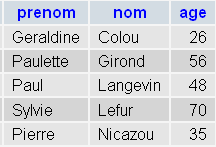
Verification PhpMyadmin:
 |