4. The view and its model
Until now, actions generated their own responses: text, JSON, and a few HTML tags written in a string. In a MVC application, this is the role of a view: a file that describes the page HTML, with placeholders for the data passed to it by the action—the view model.
[Flask] comes with a view engine, [Jinja2], written by the same team (the *Pallets* project). Other engines can be used ([Mako], [Chameleon]...), but [Jinja2] is by far the most widely used in [Python]: it is found in [Django] (as an option), in [Ansible], in static site generators... This is the one used in this course.
A [Jinja2] view (the documentation refers to it as a *template*, a page template) is a text file—in this case, HTML—in which three types of tags are interpreted on the server:
- [{{ expression }}]: the value of an expression, inserted into the page;
- [{% instruction %}]: an instruction: condition ([if]), loop ([for]), template inheritance ([extends], [block]), inclusion ([include]), macro...;
- [{# comment #}]: a comment that does not appear on the generated page.
Everything else is copied as-is. The syntax of the expressions is similar to that of [Python]. This differs from [Thymeleaf], the view engine for course [Spring MVC], whose views are valid HTML files enriched with [th:] attributes; Instead, it brings [Jinja2] closer to [Razor] ([ASP.NET Core MVC]), which mixes HTML and code. By default, [Flask] searches for views in the application’s [templates] folder.
4.1. Example 13: A First View
| 13-first-view/
├── app.py
├── controllers/
│ └── views.py
├── models/
│ └── page.py
└── templates/
└── views/
├── index.html
└── unknown.html
|
4.1.1. The view template: models/page.py
| # models/page.py: the model of the view, the data that the action passes to the view
from dataclasses import dataclass
@dataclass
class PageModel:
title: str
message: str
time: str
|
The view model is a simple [dataclass] (see Example 06): the three pieces of information that the view will display. There is no requirement to define a view’s model as a class: three separate variables could be passed to the view. However, a class documents what the view expects and allows the editor to verify the action’s code. This is the approach the case study will follow, where each view has its own model class.
4.1.2. The controller: controllers/views.py
| # controllers/views.py: actions that return a VIEW
from datetime import datetime
from flask import Blueprint, render_template
from models.page import PageModel
views = Blueprint("views", __name__)
# render_template: the Jinja2 engine builds the page from the view
# templates/views/index.html and from the variables passed as keyword parameters
# (here a single one, [model]); the produced page is the response of the action
@views.get("/")
def index():
model = PageModel(
"My first view",
"This page was built by Jinja2, on the server.",
datetime.now().strftime("%H:%M:%S"))
return render_template("views/index.html", model=model)
# the same view with another model; or another view, with the 404 code
@views.get("/hello/<name>")
def hello(name):
if name == "unknown":
# a tuple (page, code): the page, sent with the 404 code
return render_template("views/unknown.html", name=name), 404
model = PageModel(
f"Hello {name}",
"This time, the title of the page comes from the URL.",
datetime.now().strftime("%H:%M:%S"))
return render_template("views/index.html", model=model)
|
- line 4: imports the function [render_template];
- lines 16–19: the action builds the view model. [datetime.now().strftime("%H:%M:%S")]: the current time, formatted (see Example 12);
- line 20: [render_template] instructs [Jinja2] to generate the page: the first parameter is the view path, relative to the [templates] folder; the named parameters that follow are the view’s variables; in this case, there is only one: [model]. [render_template] returns the text of the generated page, which becomes the action’s response (of type [text/html]);
- line 28: another view, with a different variable ([name]). The tuple [(page, 404)] sends the page with a 404 status code (see Example 03): a custom error page;
- Lines 29–33: the same view as the action [index], with a different template. This is the benefit of separating actions from views: a single view can be used by multiple actions.
4.1.3. The view: templates/views/index.html
| <!doctype html>
<html lang="en">
<head>
<meta charset="utf-8">
{# {{ ... }}: the value of an expression, inserted into the page #}
<title>{{ model.title }}</title>
</head>
<body>
<h1>{{ model.title }}</h1>
<p>{{ model.message }}</p>
<p>Page built at {{ model.time }}.</p>
</body>
</html>
|
- line 5: a comment [Jinja2];
- Line 6: [{{ model.title }}] inserts the value of the [title] attribute from the [model] variable. The dot notation for [Jinja2] is more flexible than that for [Python]: [model.title] first looks for an attribute [title], and then, if that is not found, a key ["title"] (if [model] is a dictionary). The view code therefore does not need to know whether its model is an object or a dictionary.
Everything inserted by [{{ }}] is escaped: the characters [<], [>], [&], ["], and ['] are replaced by their entity codes HTML. This is the role that function [escape] played in Example 09, but this time it is automatic: [Flask] enables automatic escaping (*autoescape*) for views whose names end with [.html], [.htm], [.xml], [.xhtml], or [.svg]. This prevents a view from inadvertently inserting the HTML provided by a user into the page.
4.1.4. The view: templates/views/unknown.html
| <!doctype html>
<html lang="en">
<head>
<meta charset="utf-8">
<title>Unknown</title>
</head>
<body>
<h1>Nobody is called [{{ name }}] here.</h1>
</body>
</html>
|
A view is not required to receive an object: the variable [name] is a string.
4.1.5. Execution
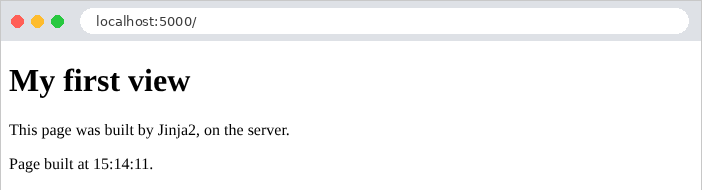
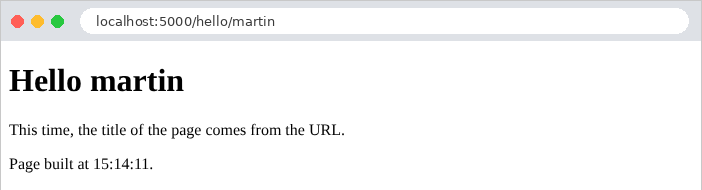
The raw response shows the work done by [Jinja2]: the [{{ }}] tags have been replaced with their values, and the comment has disappeared (an empty line remains in its place; we’ll see in the next example how to avoid this).
| curl -i http://localhost:5000/
|
| HTTP/1.1 200 OK
Content-Type: text/html; charset=utf-8
Content-Length: 242
<!doctype html>
<html lang="en">
<head>
<meta charset="utf-8">
<title>My first view</title>
</head>
<body>
<h1>My first view</h1>
<p>This page was built by Jinja2, on the server.</p>
<p>Page built at 15:30:51.</p>
</body>
</html>
|
The “custom” error page, followed by a name containing HTML ([<b>martin], encoded in URL):
| curl -i http://localhost:5000/hello/unknown
curl http://localhost:5000/hello/%3Cb%3Emartin
|
| HTTP/1.1 404 NOT FOUND
Content-Type: text/html; charset=utf-8
Content-Length: 164
<!doctype html>
<html lang="en">
<head>
<meta charset="utf-8">
<title>Unknown</title>
</head>
<body>
<h1>Nobody is called [unknown] here.</h1>
</body>
</html>
...
<title>Hello <b>martin</title>
...
<h1>Hello <b>martin</h1>
...
|
The [<b>] tag was escaped without any action or view being involved.
4.2. Example 14: The Jinja2 Language
This example combines the main constructs of [Jinja2] into a single view.
4.2.1. The template and the action
| # models/basics.py: the model of the view of example 14
from dataclasses import dataclass
from decimal import Decimal
@dataclass
class Product:
name: str
price: Decimal
in_stock: bool
@dataclass
class Address:
street: str
city: str
@dataclass
class BasicsModel:
title: str
name: str
nickname: str | None
html: str
logged_in: bool
currency: str
products: list[Product]
cart: list[Product]
address: Address
|
The template contains values of various types: strings, [None], booleans, lists of objects, empty lists, and objects containing other objects. The [Decimal] type, from the standard module [decimal], exactly represents decimal numbers (unlike the type [float], for which [0.1 + 0.2] equals [0.30000000000000004]); this is the type to use for amounts.
| # controllers/basics.py: a view that uses the main constructs of Jinja2
from decimal import Decimal
from flask import Blueprint, render_template
from models.basics import Address, BasicsModel, Product
basics = Blueprint("basics", __name__)
@basics.get("/")
def index():
model = BasicsModel(
title="Jinja2 basics",
name="Martin",
nickname=None,
html="<b>this is HTML</b>",
logged_in=True,
currency="€",
products=[
Product("Keyboard", Decimal("25"), True),
Product("Mouse", Decimal("12.5"), False),
Product("Screen", Decimal("149"), True),
],
cart=[],
address=Address("12 rue des Lilas", "Angers"))
return render_template("basics/index.html", model=model)
|
The action builds the model and passes it to the view. [Decimal("12.5")]: a decimal is constructed from a string to avoid using an inaccurate [float].
4.2.2. Configuration: app.py
| # app.py: the application of example 14
from flask import Flask
from controllers.basics import basics
def create_app():
app = Flask(__name__)
# the {% ... %} tags leave no blank lines in the produced page:
# trim_blocks removes the line break that follows a tag, lstrip_blocks the
# spaces that precede it on its line
app.jinja_env.trim_blocks = True
app.jinja_env.lstrip_blocks = True
app.register_blueprint(basics)
return app
if __name__ == "__main__":
create_app().run(port=5000, debug=True)
|
- Lines 12–13: [app.jinja_env] is the application’s [Jinja2] environment—the object that loads and executes the views. By default, a [{% %}] tag standing alone on its line leaves the spaces preceding it and the line break following it in the generated page: a loop would produce numerous empty lines. [trim_blocks] removes the line break following a tag, while [lstrip_blocks] removes the spaces preceding it. These two settings do not affect the page’s display (the browser ignores these whitespace characters), but they make the generated HTML more readable. All of the following examples enable them.
4.2.3. The view: templates/basics/index.html
| <!doctype html>
<html lang="en">
<head>
<meta charset="utf-8">
<title>{{ model.title }}</title>
</head>
<body>
{# {% set %}: a variable of the view; the filters (|) transform a value #}
{% set total = model.products | sum(attribute="price") %}
{% set count = model.products | length %}
<h1>{{ model.title }}</h1>
{# 1. display a value of the model; None is displayed... "None": the filter
default(text, true) replaces an empty or None value. This Jinja2
comment does not appear in the produced page #}
<p>1. Name: {{ model.name }} - nickname: [{{ model.nickname }}] [{{ model.nickname | default("", true) }}]</p>
{# 2. {{ }} escapes HTML; the safe filter inserts it as is #}
<p>2a. {{ model.html }}</p>
<p>2b. {{ model.html | safe }}</p>
{# 3. a condition #}
{% if model.logged_in %}
<p>3. You are logged in.</p>
{% else %}
<p>3. You are not logged in.</p>
{% endif %}
{# 4. a loop: [loop] describes the state of the loop #}
<p>4. Our products:</p>
<ul>
{% for product in model.products %}
<li>no. {{ loop.index0 }}: {{ product.name }}, {{ product.price }} {{ model.currency }}
{{ "(in stock)" if product.in_stock else "(sold out)" }}
{% if loop.first %}- the first one{% endif %}
{% if loop.last %}- the last one, seen by {{ model.name }}{% endif %}
</li>
{% endfor %}
</ul>
{# 5. the empty list: the else block of a for loop #}
<p>5. Your cart:
{% for p in model.cart %}<span>{{ p.name }}</span>{% else %}it is empty.{% endfor %}
</p>
{# 6. computed expressions, the set variables, and the format filter #}
<p>6. {{ count }} products, for a total of {{ total }} {{ model.currency }};
average price: {{ "%.2f" | format(total / count) }} {{ model.currency }}</p>
{# 7. an object inside an object, and a Python method (upper) #}
<p>7. Address: {{ model.address.street }}, {{ model.address.city.upper() }}</p>
<p>8. An email address: contact@example.com</p>
</body>
</html>
|
- Lines 9–10: [{% set %}] creates a view variable. Filters transform a value: [value | filter] or [value | filter(parameters)]. The filter [sum(attribute="price")] sums the [price] attributes of the elements in a list; the filter [length] returns the length of a list. [Jinja2] provides about fifty filters: [upper], [lower], [title], [trim], [join], [sort], [round], [default], [replace], [truncate]... ;
- line 15: the value [None] is displayed... [None]. The filter [default(value, true)] replaces an “empty” value ([None], empty string, zero) with the specified value; without the second parameter [true], it would only replace an undefined variable;
- lines 17–18: [{{ }}] escapes HTML (2a); the filter [safe], on the other hand, declares that the value is safe HTML, to be inserted as-is (2b). [safe] is reserved for HTML generated by the application itself, never for user input;
- lines 20–24: a condition: [{% if %}], [{% elif %}], [{% else %}], [{% endif %}]. Unlike [Python], whose blocks are delimited by indentation, [Jinja2] closes each block with a [end...] tag;
- lines 28–34: a loop [{% for %}] ... [{% endfor %}]. Within the loop, the special variable [loop] describes the loop’s state: [loop.index] (the iteration number, starting at 1), [loop.index0] (starting at 0), [loop.first], [loop.last] (true on the first and last iterations), [loop.length] (the number of elements). Variables outside the loop ([model.name]) remain accessible;
- line 30: the conditional expression for [Python], [a if condition else b], is also that of [Jinja2];
- Line 38: A [for] loop can contain a [{% else %}] block, which is executed if the list is empty. This is simpler than a [if] that would check the length of the list;
- Lines 41–42: calculated expressions ([total / count]). The filter [format] applies a format similar to the [%] operator from [Python]: ["%.2f"] displays a number with two decimal places. In Example 16, we’ll see a much better way to format numbers and amounts;
- line 44: dot notation traverses objects ([model.address.city]) and allows you to call their methods: [upper()] is a method of the strings [Python];
- line 45: an email address, written as-is. The character [@], which has a specific meaning in other view engines ([Razor]), has no such meaning in [Jinja2]: only the tags [{{ }}], [{% %}], and [{# #}] are interpreted.
4.2.4. Execution
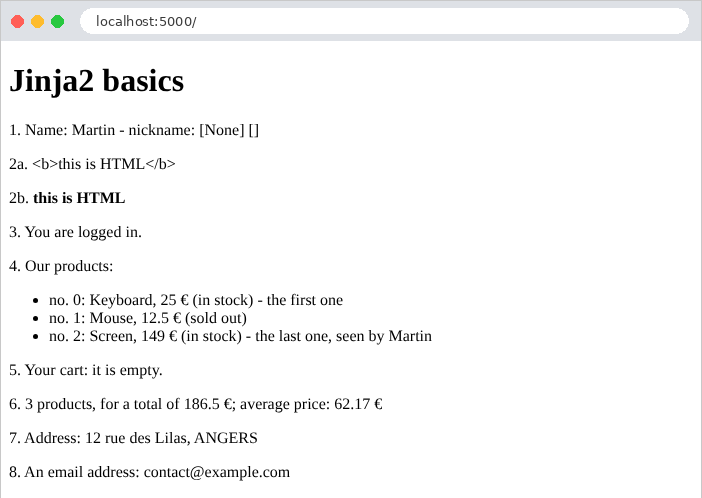
The generated page:
| <!doctype html>
<html lang="en">
<head>
<meta charset="utf-8">
<title>Jinja2 basics</title>
</head>
<body>
<h1>Jinja2 basics</h1>
<p>1. Name: Martin - nickname: [None] []</p>
<p>2a. <b>this is HTML</b></p>
<p>2b. <b>this is HTML</b></p>
<p>3. You are logged in.</p>
<p>4. Our products:</p>
<ul>
<li>no. 0: Keyboard, 25 €
(in stock)
- the first one </li>
<li>no. 1: Mouse, 12.5 €
(sold out)
</li>
<li>no. 2: Screen, 149 €
(in stock)
- the last one, seen by Martin </li>
</ul>
<p>5. Your cart:
it is empty. </p>
<p>6. 3 products, for a total of 186.5 €;
average price: 62.17 €</p>
<p>7. Address: 12 rue des Lilas, ANGERS</p>
<p>8. An email address: contact@example.com</p>
</body>
</html>
|
The comments have disappeared, and the [{% %}] tags did not leave any blank lines. The formatting of certain lines (“[- the first one </li>]”) shows that [trim_blocks] and [lstrip_blocks] also affect tags placed in the middle of a line; this has no effect on the browser.
4.3. Example 15: Template, fragments, static files
The pages of a website usually share the same structure: a header, a navigation bar, a footer, and the same style sheets. Rather than repeating this structure in every view, it is written once in a template (*layout*), which the pages extend. This example also uses [Bootstrap], the most widely used CSS framework, for styling.
| 15-layout/
├── app.py
├── controllers/
│ └── pages.py
├── static/
│ └── css/
│ └── styles.css
└── templates/
├── fragments/
│ ├── card.html
│ └── navbar.html
├── layout.html
└── pages/
├── home.html
├── raw.html
└── team.html
|
4.3.1. Static Files
A HTML page references other files: style sheets, [JavaScript] scripts, and images. These files, which the server sends as-is, are called static files. [Flask] automatically serves the contents of the application’s [static] folder under the URL [/static/...] directory: the [static/css/styles.css] file is available at URL and [/static/css/styles.css].
| /* a few settings in addition to Bootstrap */
body {
background-color: #f5f7fa;
}
/* the footer of the layout */
.footer {
margin-top: 2rem;
font-size: 0.85rem;
color: #6c757d;
}
/* the error messages, at the bottom of the page, on a light pink background */
.error-area {
margin-top: 1.5rem;
padding: 0.75rem 1rem;
background-color: #fdecef;
border: 1px solid #f5c2c7;
border-radius: 0.375rem;
color: #842029;
}
|
A few additional CSS rules in addition to [Bootstrap]: a light gray background, the footer style, and the style for an error area that will be used in the following examples.
[Bootstrap], on the other hand, is used by examples 15 through 28. Rather than placing a copy in each user’s [static] folder, the examples share it: it is located in the [examples/common/bootstrap] folder. You must therefore instruct [Flask] to also use this folder. This is the purpose of the following lines in [app.py]:
| # app.py: the application of example 15
from datetime import date
from pathlib import Path
from flask import Blueprint, Flask, request
from controllers.pages import pages
# Bootstrap, shared by the examples: the examples/common/bootstrap folder,
# designated from the location of THIS file (and not from the current folder)
BOOTSTRAP = Path(__file__).resolve().parent.parent / "common" / "bootstrap"
def create_app():
app = Flask(__name__)
app.jinja_env.trim_blocks = True
app.jinja_env.lstrip_blocks = True
# a blueprint without routes, which only serves static files: the
# BOOTSTRAP folder, under the /bootstrap/... URL
app.register_blueprint(Blueprint("bootstrap", __name__, static_folder=BOOTSTRAP,
static_url_path="/bootstrap"))
app.register_blueprint(pages)
# a "context processor": executed before building EACH view,
# it adds its variables to the model of all the views
@app.context_processor
def common_model():
return {"path": request.path, "year": date.today().year}
return app
if __name__ == "__main__":
create_app().run(port=5000, debug=True)
|
- Line 11: The path to the [common/bootstrap] folder. [Path], from the standard module [pathlib], represents a file path. [Path(__file__)] is the path to the file [app.py] itself ([__file__] is a variable that [Python] defines in each module); [resolve()] makes it absolute; [parent] refers to the folder containing it ([15-layout]), [parent.parent] refers to the folder above it ([examples]); the operator [/] adds an element to the path. Specifying the folder based on the file’s location—rather than the current folder—allows the application to be launched from any folder;
- lines 20–21: A blueprint can have its own static files folder ([static_folder]), served under the specified URL ([static_url_path]). This folder contains only that: it has no routes. The file [common/bootstrap/css/bootstrap.min.css] is thus served to URL and [/bootstrap/css/bootstrap.min.css];
- Lines 26–28: A context processor is a function that [Flask] executes before each view is generated. It returns a dictionary, whose key-value pairs are added to the view’s variables. Here, [path] (the path of the requested URL) and [year] (the current year) are thus available in all views, without the actions having to provide them. The template uses these for its footer.
4.3.2. The template: templates/layout.html
| <!doctype html>
{# the layout of the pages: the pages EXTEND it, and fill its blocks #}
<html lang="en">
<head>
<meta charset="utf-8">
<meta name="viewport" content="width=device-width, initial-scale=1">
{# a block: a slot that the page can fill; here with a default content #}
<title>{% block title %}Home{% endblock %} - My site</title>
{# url_for builds the URL of a static file: /bootstrap/css/bootstrap.min.css #}
<link rel="stylesheet" href="{{ url_for('bootstrap.static', filename='css/bootstrap.min.css') }}">
<link rel="stylesheet" href="{{ url_for('static', filename='css/styles.css') }}">
</head>
<body>
<div class="container py-3">
{# insertion of the fragments/navbar.html file #}
{% include "fragments/navbar.html" %}
<main>
{# the content of the page requested by the action is inserted here #}
{% block content %}{% endblock %}
</main>
{# path, year: added to the model of all the views (see app.py) #}
<footer class="footer">Page [{{ path }}] - © {{ year }}</footer>
</div>
</body>
</html>
|
- line 6: the [viewport] tag instructs mobile browsers to display the page at the screen’s width, which is what [Bootstrap] expects;
- line 8: A block is a named container that pages extending the template can fill. The content written between [{% block title %}] and [{% endblock %}] is the block’s default content, used by a page that does not override it;
- lines 10–11: [url_for], which we are familiar with from actions (example 04), also generates the URL for a static file: [static] refers to the application’s static folder, [bootstrap.static] to that of the blueprint [bootstrap]; [filename] is the file path within that folder. [url_for] is available in all views. Typing URL manually ([/static/css/styles.css]) would also work, but [url_for] adapts if the folder is moved or if the application is installed under a prefix of URL;
- line 16: [{% include %}] inserts the content of another view, in this case the navigation bar. The included view has access to the variables of the view that includes it;
- line 19: the block that each page fills with its own content. It is empty by default;
- line 22: the footer uses the two variables from the context processor.
The class [container] of [Bootstrap] centers the content and limits its width; [py-3] adds vertical padding: [Bootstrap] provides hundreds of classes of this type, which are combined in the [class] attribute.
4.3.3. The navigation bar: templates/fragments/navbar.html
| {# a fragment: a piece of page, inserted by {% include %} #}
<nav class="navbar navbar-expand bg-light rounded mb-3 px-3">
<span class="navbar-brand">My site</span>
<div class="navbar-nav">
<a class="nav-link" href="/">Home</a>
<a class="nav-link" href="/team">Team</a>
<a class="nav-link" href="/raw">Page without layout</a>
</div>
</nav>
|
A fragment: a section of a page that has no meaning on its own. The classes [navbar], [navbar-brand], and [nav-link] are those of the navigation bar in [Bootstrap].
4.3.4. A macro: templates/fragments/card.html
| {# a MACRO: a piece of page that has parameters, like a function #}
{% macro card(name, role) %}
<div class="card">
<div class="card-body">
<h5 class="card-title">{{ name }}</h5>
<p class="card-text">{{ role }}</p>
</div>
</div>
{% endmacro %}
|
- Lines 2–9: A macro is a page fragment that has parameters; this is the function of [Jinja2]. Calling it—[{{ card("name", "role") }}]—inserts the page fragment generated with these values. Parameters can have a default value, as in [Python]: [{% macro card(name, role="") %}]. The card ([card]) is a component of [Bootstrap].
4.3.5. The pages
| {# this page EXTENDS the layout: it only provides the content of its blocks #}
{% extends "layout.html" %}
{# the [card] macro of the fragments/card.html file #}
{% from "fragments/card.html" import card %}
{% block content %}
<h1>Welcome</h1>
<p>This page only contains its own content: the header, the navigation
bar and the footer come from the <code>layout.html</code> layout.</p>
{# the call of the macro, with two parameters written on the spot #}
{{ card("A macro", "called with parameters written on the spot") }}
{% endblock %}
|
- Line 2: The page extends the template: [Jinja2] generates the template page, replacing its blocks with those redefined by the page. [{% extends %}] must be the first tag in the view. In a view that extends a template, text written outside the blocks does not appear in the generated page (however, the [{% set %}] instructions retain their effect there; we’ll see this in the chapter on internationalization);
- line 4: the import of the macro [card], defined in another file;
- line 6: the template’s [content] block, redefined. The page does not redefine the [title] block: it retains its default content, “Home”;
- Line 11: the macro call.
| {% extends "layout.html" %}
{% from "fragments/card.html" import card %}
{% block title %}Our team{% endblock %}
{% block content %}
<h1>Our team</h1>
<div class="row g-3">
{% for member in members %}
<div class="col-md-4">
{# the macro receives the name and the role of the current member #}
{{ card(member.name, member.role) }}
</div>
{% endfor %}
</div>
{% endblock %}
|
- line 4: this page also redefines the title;
- lines 9–14: one card per team member, in a grid using [Bootstrap] ([row], [col-md-4]: three columns on a medium or large screen, one column on a phone).
The controller contains no new features:
| # controllers/pages.py: three pages
from dataclasses import dataclass
from flask import Blueprint, render_template
pages = Blueprint("pages", __name__)
# a member of the team
@dataclass
class Member:
name: str
role: str
@pages.get("/")
def home():
return render_template("pages/home.html")
@pages.get("/team")
def team():
members = [
Member("Marie Pélissier", "Director"),
Member("Jacques Bromard", "Developer"),
Member("Philippe Jandot", "Graphic designer"),
]
return render_template("pages/team.html", members=members)
@pages.get("/raw")
def raw():
return render_template("pages/raw.html")
|
Finally, the third page does not use the template:
| <!doctype html>
{# this view does not use the layout: it is a complete page #}
<html lang="en">
<head>
<meta charset="utf-8">
<title>Raw page</title>
</head>
<body>
<p>This page does not use the layout: no Bootstrap, no navigation bar.</p>
<p><a href="/">Back to home</a></p>
</body>
</html>
|
4.3.6. Execution
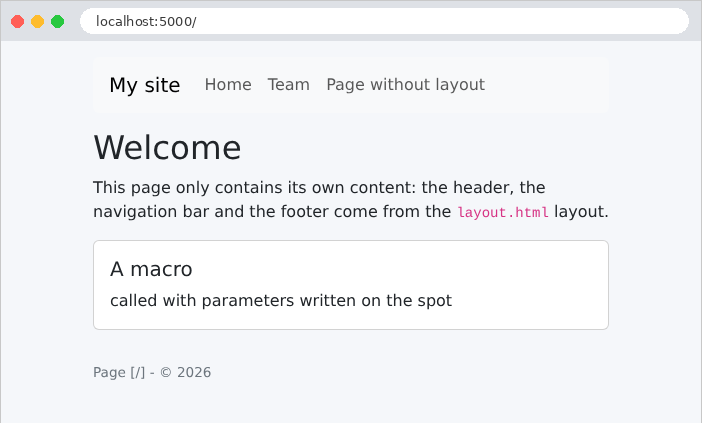
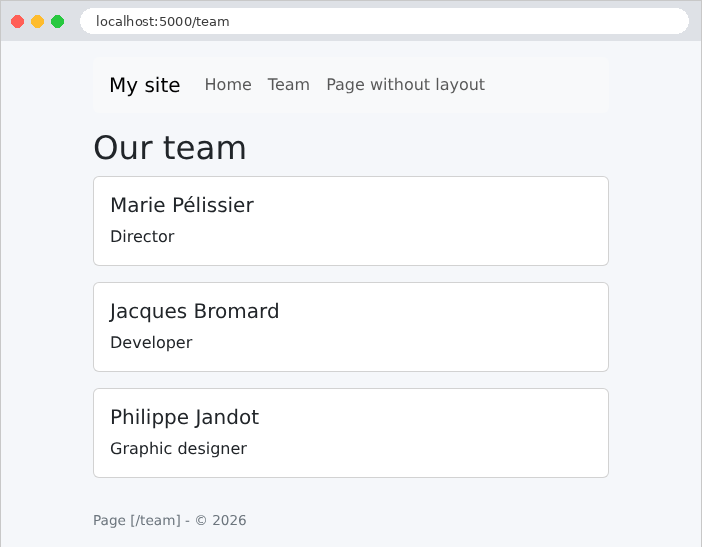

The team page, as received by the browser:
| curl http://localhost:5000/team
|
| <!doctype html>
<html lang="en">
<head>
<meta charset="utf-8">
<meta name="viewport" content="width=device-width, initial-scale=1">
<title>Our team - My site</title>
<link rel="stylesheet" href="/bootstrap/css/bootstrap.min.css">
<link rel="stylesheet" href="/static/css/styles.css">
</head>
<body>
<div class="container py-3">
<nav class="navbar navbar-expand bg-light rounded mb-3 px-3">
<span class="navbar-brand">My site</span>
<div class="navbar-nav">
<a class="nav-link" href="/">Home</a>
<a class="nav-link" href="/team">Team</a>
<a class="nav-link" href="/raw">Page without layout</a>
</div>
</nav> <main>
<h1>Our team</h1>
<div class="row g-3">
<div class="col-md-4">
<div class="card">
<div class="card-body">
<h5 class="card-title">Marie Pélissier</h5>
<p class="card-text">Director</p>
</div>
</div>
</div>
...
</div>
</main>
<footer class="footer">Page [/team] - © 2026</footer>
</div>
</body>
</html>
|
The browser received a complete page: the template, fragment, page, and macros were assembled on the server. The URL style sheets were calculated by [url_for]. You can verify that the [Bootstrap] file is being served correctly (the [-I] option of [curl] displays only the response headers):
| curl -I http://localhost:5000/bootstrap/css/bootstrap.min.css
|
| HTTP/1.1 200 OK
Content-Disposition: inline; filename=bootstrap.min.css
Content-Type: text/css; charset=utf-8
...
|
4.4. Example 16: Helpers
A view often needs to format values: an amount with its currency, a date written out in full, or text in uppercase. This code doesn’t belong in the action (which doesn’t handle presentation), and would be cumbersome to write in the view. Instead, it is written in [Python], within functions that the views call: these are the view’s helpers. [Jinja2] recognizes three types: filters ([{{ price | money }}]), global functions ([{{ uppercase(name) }}]), and macros, which we’ve already encountered.
| # helpers/formats.py: functions called by the views
from datetime import date
from decimal import Decimal
from babel.dates import format_date
from babel.numbers import format_currency
from flask import g
# "keyboard" -> "KEYBOARD"
def uppercase(text: str | None) -> str:
return "" if text is None else text.upper()
# an amount in a currency, in the format of the language of the request (g.locale,
# see app.py): 1149.9 -> "€1,149.90" in English, "1 149,90 €" in French.
# The Babel library knows the conventions of each country
def money(amount: Decimal, currency: str = "EUR") -> str:
return format_currency(amount, currency, locale=g.locale)
# a date in full words, in the language of the request: "Saturday, September 26, 2026"
def long_date(day: date) -> str:
return format_date(day, format="full", locale=g.locale)
|
- lines 11–12: a regular function that accepts [None];
- Lines 18–19: Formatting an amount. This depends on the language: in French, [1 149,90 €] (space to separate thousands, decimal comma, symbol after the amount); in English, [€1,149.90]. The [Babel] library supports the conventions of all countries (it uses data from the Unicode project *CLDR*): [format_currency(amount, currency, locale=...)] formats an amount, with the currency designated by its international code ([EUR], [USD]). The locale ([fr_FR], [en_US]) specifies a language and a country. Here, it is read from [g.locale], which we will examine next;
- lines 23–24: [format_date] formats a date; the format [full] spells it out in full, including the day of the week.
4.4.2. The configuration: app.py
| # app.py: the application of example 16
from pathlib import Path
from flask import Blueprint, Flask, g, request
from helpers import formats
from controllers.pages import pages
BOOTSTRAP = Path(__file__).resolve().parent.parent / "common" / "bootstrap"
def create_app():
app = Flask(__name__)
app.jinja_env.trim_blocks = True
app.jinja_env.lstrip_blocks = True
app.register_blueprint(Blueprint("bootstrap", __name__, static_folder=BOOTSTRAP,
static_url_path="/bootstrap"))
app.register_blueprint(pages)
# the formatting language of each request: the ?lang=fr parameter of the URL,
# English otherwise. before_request: a function executed before EACH
# action; [g]: an object that lives for the duration of a request
@app.before_request
def set_language():
g.locale = "fr_FR" if request.args.get("lang") == "fr" else "en_US"
# "home-made" FILTERS: {{ price | money }}, {{ day | long_date }}
app.add_template_filter(formats.money)
app.add_template_filter(formats.long_date)
# a global FUNCTION, callable in all the views: {{ uppercase(name) }}
app.add_template_global(formats.uppercase)
return app
if __name__ == "__main__":
create_app().run(port=5000, debug=True)
|
- Lines 23–25: The formatting language depends on the request: the parameter [?lang=fr] of URL selects French; English is the default language. [@app.before_request] registers a function that [Flask] executes before each action (the chapter on the request lifecycle will detail these “hooks”). It stores the locale in [g], an object of [Flask] which, like [request], is specific to the current query: you can store whatever you want in it ([g.locale = ...]); it is discarded at the end of the query. This is the way to share information between the different functions that process the same query, without passing it as a parameter from one to the next. The chapter on data scopes will revisit this topic;
- lines 28–29: registering two functions as filters—[Jinja2]—under their names. A filter receives as its first parameter the value placed before [|]; the subsequent parameters are those of the filter: [{{ price | money("USD") }}] calls [money(price, "USD")];
- Line 31: Registering a function as a global view function.
The decorator [@app.template_filter()] (applied to the function itself) is another way to register a filter. Calling [add_template_filter] from within [app.py] has the advantage of keeping the module [helpers/formats.py] independent of [Flask] (with the exception of [g]).
4.4.3. The controller: controllers/pages.py
| # controllers/pages.py: two pages
from dataclasses import dataclass
from datetime import date
from decimal import Decimal
from flask import Blueprint, render_template
pages = Blueprint("pages", __name__)
@dataclass
class Product:
name: str
price: Decimal
stock: int
@pages.get("/")
def home():
return render_template("pages/home.html", today=date.today())
@pages.get("/products")
def products():
return render_template("pages/products.html", products=[
Product("keyboard", Decimal("25"), 12),
Product("mouse", Decimal("12.5"), 0),
Product("screen", Decimal("1149.9"), 3),
])
|
Actions pass raw values to the views: a [date], some [Decimal]. Formatting is handled by the views.
4.4.4. The views
| {# a macro: a link of the navigation bar, which receives the [active] class
if the current page is under the [href] path. [request]: the current
request, which Flask makes available to all the views #}
{% macro link(href, text) %}
{% set active = request.path == "/" if href == "/" else request.path.startswith(href) %}
<a class="nav-link{{ ' active' if active }}" href="{{ href }}">{{ text }}</a>
{% endmacro %}
<nav class="navbar navbar-expand bg-light rounded mb-3 px-3">
<span class="navbar-brand">Helpers</span>
<div class="navbar-nav">
{# 1. a condition written in the view #}
<a class="nav-link{% if request.path == '/' %} active{% endif %}" href="/">Home</a>
{# 2. the [link] macro #}
{{ link("/products", "Products") }}
{# 3. url_for builds the URL of an action; a parameter that is not a
path variable is added at the end of the URL: /products?lang=fr #}
<a class="nav-link" href="{{ url_for('pages.products', lang='fr') }}">Produits (fr)</a>
</div>
</nav>
|
- Lines 4–7: a macro that creates a link for the navigation bar. The link for the current page is assigned the class [active] from [Bootstrap], which highlights it. The variable [request] (the current request) is available in all views, as are [g], [url_for], and [session] (see the chapter on scopes). The conditional expression on line 5 handles the home page separately, whose path, [/], is the starting point for all others;
- line 6: a conditional expression without [else] returns an empty string if the condition is false;
- line 13: the same thing, written directly in the view, without a macro. The macro avoids repeating the condition for each link;
- line 18: a parameter of [url_for] that is not a variable in the route path is added to URL as a parameter: [/products?lang=fr].
| {# a Bootstrap badge: green if the product is in stock, red otherwise #}
{% macro badge(stock) %}
<span class="badge {{ 'text-bg-success' if stock > 0 else 'text-bg-danger' }}">
{{- stock ~ " in stock" if stock > 0 else "sold out" -}}
</span>
{% endmacro %}
|
- Line 3: a [Bootstrap] badge, green ([text-bg-success]) or red ([text-bg-danger]), depending on inventory;
- Line 4: The operator [~] from [Jinja2] concatenates two values by converting them to strings ([+] would refuse to add an integer and a string). The dashes in [{{-] and [-}}] remove whitespace (spaces and line breaks) that precede or follow the tag: the badge text is thus flush with its tags.
| {% extends "layout.html" %}
{% block title %}Home{% endblock %}
{% block content %}
<h1>Home</h1>
{# the "home-made" long_date filter #}
<p>Today is {{ today | long_date }}.</p>
{# g: the object of the current request, also accessible in the views #}
<p>Formatting language: {{ g.locale }}
(<a href="/?lang=fr">in French</a>, <a href="/">in English</a>)</p>
{% endblock %}
|
- line 7: the call to the “custom” filter;
- line 9: the [g] object is accessible in the views.
| {% extends "layout.html" %}
{% from "fragments/badge.html" import badge %}
{% block title %}Products{% endblock %}
{% block content %}
<h1>Products</h1>
<table class="table table-sm w-auto">
<thead><tr><th>Product</th><th>Price</th><th>Price in dollars</th><th>Stock</th></tr></thead>
<tbody>
{% for product in products %}
<tr>
{# a global function, then a filter, without then with a parameter #}
<td>{{ uppercase(product.name) }}</td>
<td>{{ product.price | money }}</td>
<td>{{ product.price | money("USD") }}</td>
{# the [badge] macro builds the HTML of the badge #}
<td>{{ badge(product.stock) }}</td>
</tr>
{% endfor %}
</tbody>
</table>
{% endblock %}
|
- Line 13: the call to the global function;
- lines 14–15: the [money] filter, first with its default currency, then with a parameter;
- line 17: the call to the imported macro.
The [layout.html] template is a simplified version of the one in Example 15.
4.4.5. Execution
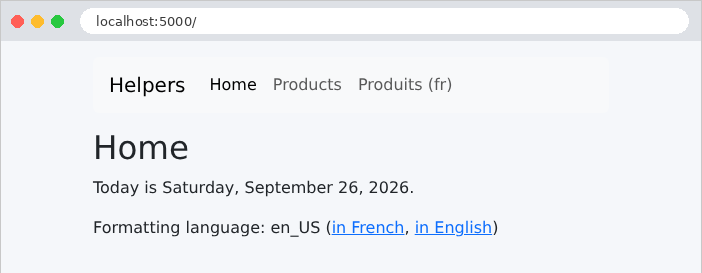
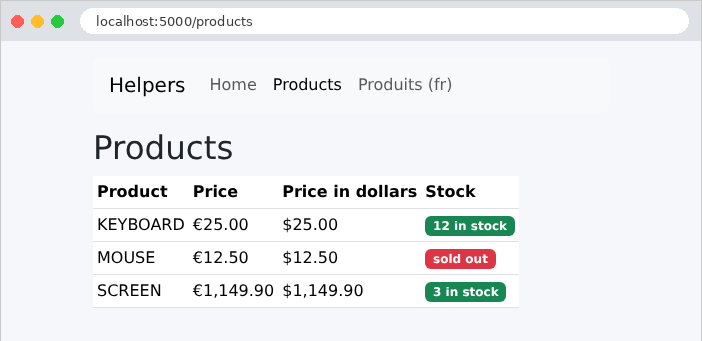
The same page, with the parameter [?lang=fr]. Only the formatting of the numbers changes: the text itself is hard-coded in the views. The chapter on internationalization will also translate the text.
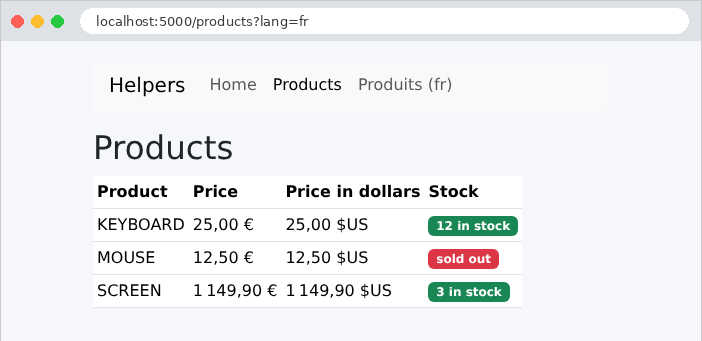
An excerpt from HTML produces:
| curl "http://localhost:5000/products?lang=en"
|
| ...
<tr>
<td>KEYBOARD</td>
<td>€25.00</td>
<td>$25.00</td>
<td><span class="badge text-bg-success">12 in stock</span>
</td>
</tr>
...
|
A HTML form sends its fields to the server in one of two ways, depending on its [method] attribute:
- [method="get"]: The fields are added to the URL as parameters ([/search?keyword=le&genre=novel]). This is the method used by a form that performs a query: a search or a filter. The URL containing the results can be bookmarked, shared, or reloaded safely;
- [method="post"]: The fields are included in the request body (see Example 11). This is the method used by a form that modifies data: a registration, an addition, or a deletion.
This first form is a book search.
4.5.1. The model: models/books.py
| # models/books.py: a book, and the model of the view
from dataclasses import dataclass
@dataclass(frozen=True)
class Book:
title: str
author: str
genre: str
# the model of the view: the input (to display it again), the genres, the results
@dataclass
class SearchModel:
keyword: str
genre: str
genres: list[str]
results: list[Book]
|
- Line 5: [frozen=True] makes the [Book] objects immutable: once created, their attributes can no longer be modified. This is a good practice for data shared by all requests, such as the list of books;
- lines 14–18: The view model contains the user’s input—so the form can display it again—the list of suggested genres, and the results.
4.5.2. The controller: controllers/books.py
| # controllers/books.py: a search form, sent by GET
from flask import Blueprint, render_template, request
from models.books import Book, SearchModel
books = Blueprint("books", __name__)
BOOKS = (
Book("Le Rouge et le Noir", "Stendhal", "novel"),
Book("Les Fleurs du mal", "Baudelaire", "poetry"),
Book("Madame Bovary", "Flaubert", "novel"),
Book("Alcools", "Apollinaire", "poetry"),
Book("Le Cid", "Corneille", "drama"),
)
GENRES = ["novel", "poetry", "drama"]
# GET / and GET /search?keyword=...&genre=...: the form AND its results.
# Two decorators: two routes for the same action
@books.get("/")
@books.get("/search")
def search():
keyword = request.args.get("keyword", "")
genre = request.args.get("genre", "")
word = keyword.strip().lower()
results = [book for book in BOOKS
if (not word or word in book.title.lower() or word in book.author.lower())
and (not genre or book.genre == genre)]
return render_template("books/search.html",
model=SearchModel(keyword, genre, GENRES, results))
|
- lines 8–16: the data, hard-coded for this example. [BOOKS] is a tuple (enclosed in parentheses), an immutable sequence. By convention, uppercase names indicate constants;
- lines 21–22: two route decorators on the same action: it responds to both URL. On the first visit ([/]), there are no parameters: all books are displayed;
- lines 24–25: The form fields are read as parameters for URL (example 07). The second parameter of [get] is the default value;
- lines 27–29: filtering using a list comprehension with a condition ([if]): a book is selected if the keyword is empty or appears in its title or author (in lowercase on both sides), and if the genre is empty or matches the book’s genre;
- line 31: the view template.
4.5.3. The view: templates/books/search.html
| {% extends "layout.html" %}
{% block content %}
<h1 class="h3">Book search</h1>
{# method="get": the fields are sent in the URL (?keyword=...&genre=...) #}
<form method="get" action="/search" class="row g-2 align-items-end mb-3">
<div class="col-auto">
<label class="form-label" for="keyword">Title or author</label>
{# value: the field displays again what was typed (escaped by {{ }}) #}
<input class="form-control" id="keyword" name="keyword" value="{{ model.keyword }}">
</div>
<div class="col-auto">
<label class="form-label" for="genre">Genre</label>
<select class="form-select" id="genre" name="genre">
<option value="">(all)</option>
{% for genre in model.genres %}
{# selected: a boolean attribute, written if the condition is true, omitted otherwise #}
<option value="{{ genre }}"{{ " selected" if genre == model.genre }}>{{ genre }}</option>
{% endfor %}
</select>
</div>
<div class="col-auto">
<button class="btn btn-primary" type="submit">Search</button>
</div>
</form>
<p>{{ model.results | length }} book(s) found.</p>
<ul>
{% for book in model.results %}
<li><i>{{ book.title }}</i>, {{ book.author }} ({{ book.genre }})</li>
{% endfor %}
</ul>
{% endblock %}
|
- line 6: the [<form>] tag. The [action] attribute is the URL to which the form is submitted; [method="get"] places the fields in the URL. The classes in [Bootstrap] arrange the fields on a single line;
- Line 8: a label. Its attribute [for] specifies the identifier ([id]) of the field it describes: clicking on the label places the cursor in the field, and screen readers read the label along with the field;
- Line 10: an input field. Its attribute [name] is the name of the parameter sent to the server: this is the link between the form and the action ([request.args.get("keyword")]). The attribute [value] is the displayed value: the previous entry, redisplayed (and escaped by [{{ }}], which is essential in an attribute: an entry containing a quotation mark ["] would otherwise close the attribute);
- lines 14–20: a drop-down list. Each [<option>] has a value ([value]), sent to the server, and text, displayed. The first option, with an empty value, means “all genres”;
- line 18: the option selected in the previous request is assigned the attribute [selected]. This is a Boolean attribute: its presence alone is sufficient; it has no value. The conditional expression without [else] determines whether or not it is written;
- line 23: the submit button ([type="submit"]);
- line 26: the number of results.
4.5.4. Execution
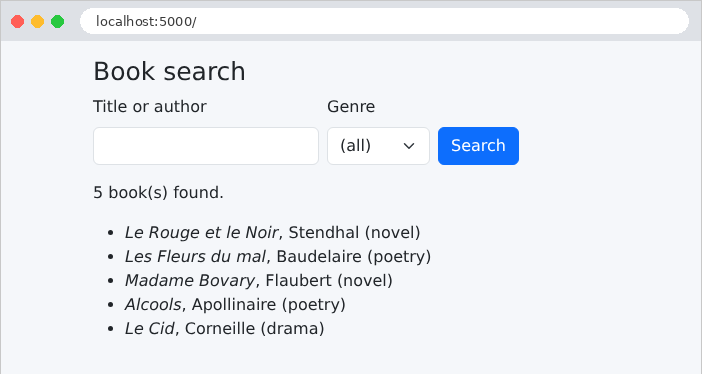
Let’s enter [le] and select the type [novel]:
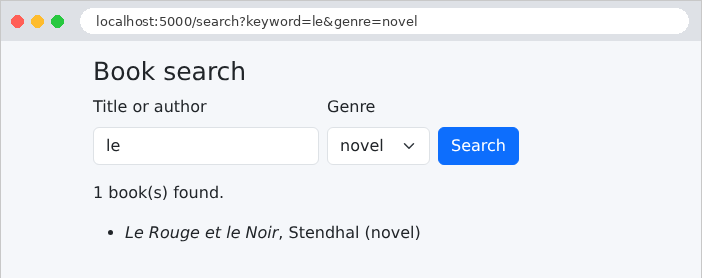
The URL on the results page contains the form fields: [/search?keyword=le&genre=novel]. The response from the form:
| curl "http://localhost:5000/search?keyword=le&genre=novel"
|
| ...
<form method="get" action="/search" class="row g-2 align-items-end mb-3">
<div class="col-auto">
<label class="form-label" for="keyword">Title or author</label>
<input class="form-control" id="keyword" name="keyword" value="le">
</div>
<div class="col-auto">
<label class="form-label" for="genre">Genre</label>
<select class="form-select" id="genre" name="genre">
<option value="">(all)</option>
<option value="novel" selected>novel</option>
<option value="poetry">poetry</option>
<option value="drama">drama</option>
</select>
</div>
...
</form>
<p>1 book(s) found.</p>
<ul>
<li><i>Le Rouge et le Noir</i>, Stendhal (novel)</li>
</ul>
...
|
“Madame Bovary” is not selected: “le” does not appear in either the title or the author’s name.
Manually entering the HTML for each field, re-displaying its value, checking the correct boxes, and selecting the correct options is repetitive work and prone to errors. The [WTForms] library does this for us. A form is described there by a class, where each attribute is a field; each field knows how to:
- how to bind to the query: read its value from the submitted data and convert it to its type;
- validate itself, based on its list of validators (Example 19);
- display itself in HTML, along with its current value.
The [Flask-WTF] extension integrates [WTForms] into [Flask]: its forms read the current request themselves, and they are protected against CSRF attacks (we’ll get to that). This example shows all the field types in a HTML form.
4.6.1. The lists service: services/lists.py
| # services/lists.py: the lists offered by the form. In a real
# application, they would come from a database: we would read them ONCE,
# at startup, since they are the same for all the users.
from flask import current_app
class ListsService:
# each list: pairs (sent value, displayed text)
def titles(self) -> list[tuple[str, str]]:
return [(t, t) for t in ("Mr", "Mme", "Melle")]
def countries(self) -> list[tuple[str, str]]:
return [("fr", "France"), ("be", "Belgium"), ("ch", "Switzerland"), ("ca", "Canada")]
def hobbies(self) -> list[tuple[str, str]]:
return [(h, h) for h in ("reading", "music", "sport", "cinema")]
def languages(self) -> list[tuple[str, str]]:
return [(l, l) for l in ("French", "English", "Spanish", "German")]
def lists_service() -> ListsService:
return current_app.extensions["lists"]
|
The form’s dropdown lists (titles, countries, hobbies, languages) are provided by a service, following the model in Example 06: in a real application, they would come from a database. Each option is a pair [(value, text)]: the value sent to the server and the text displayed. [[(t, t) for t in (...)]] creates pairs where both elements are identical. The function [lists_service] makes the object unique, stored in [app.extensions] by [app.py]:
| # app.py: the application of example 18
from pathlib import Path
from flask import Blueprint, Flask
from controllers.form import form
from services.lists import ListsService
# Bootstrap, shared by the examples (see example 15)
BOOTSTRAP = Path(__file__).resolve().parent.parent / "common" / "bootstrap"
def create_app():
app = Flask(__name__)
app.jinja_env.trim_blocks = True
app.jinja_env.lstrip_blocks = True
# the secret key of the application: it signs the anti-CSRF token of the forms
# (see models/input.py). In production, a long random string, kept secret
app.config["SECRET_KEY"] = "a-secret-key-for-example-18"
# the lists service: a single shared object (see example 06)
app.extensions["lists"] = ListsService()
app.register_blueprint(Blueprint("bootstrap", __name__, static_folder=BOOTSTRAP,
static_url_path="/bootstrap"))
app.register_blueprint(form)
return app
if __name__ == "__main__":
create_app().run(port=5000, debug=True)
|
- line 19: [app.config] is the application configuration, a dictionary. The key [SECRET_KEY] is the application’s secret key: [Flask] and its extensions use it to sign data entrusted to the browser—that is, to add a digital fingerprint that only the key’s holder can calculate. Any modification of the data by the browser is thus detected. [Flask-WTF] needs it for its anti-CSRF tokens; we’ll see it again in the session cookie (example 20). In production, it’s a long random string that must never appear in the source code (the chapter on authentication will read it from an environment variable);
- Line 21: The single service shared by all requests.
| # models/input.py: the form, described by a WTForms class. Each field
# knows how to read itself from the request (binding) and to display itself in HTML (rendering)
from flask_wtf import FlaskForm
from wtforms import (DateField, HiddenField, PasswordField, RadioField,
SelectField, SelectMultipleField, StringField, TextAreaField)
from wtforms.validators import Optional
from wtforms.widgets import CheckboxInput, ListWidget
from services.lists import lists_service
# checkboxes: a multiple-choice list (SelectMultipleField),
# drawn as a list of boxes (widgets) instead of a drop-down list
class Checkboxes(SelectMultipleField):
widget = ListWidget(prefix_label=False)
option_widget = CheckboxInput()
# FlaskForm: a WTForms form adapted to Flask; it reads the fields of the
# current POST request itself, and contains a hidden [csrf_token] field
class InputForm(FlaskForm):
token = HiddenField()
title = RadioField("Title")
name = StringField("Name")
password = PasswordField("Password")
# an <input type="date"> field exchanges its values in the yyyy-mm-dd format;
# Optional: the field can stay empty
birth_date = DateField("Date of birth", validators=[Optional()])
hobbies = Checkboxes("Hobbies")
country = SelectField("Country")
languages = SelectMultipleField("Spoken languages")
comment = TextAreaField("Comment")
# the choice lists, provided by the service at each creation of the form
def __init__(self, *args, **kwargs):
super().__init__(*args, **kwargs)
lists = lists_service()
self.title.choices = lists.titles()
self.country.choices = lists.countries()
self.hobbies.choices = lists.hobbies()
self.languages.choices = lists.languages()
|
- Lines 14–16: [WTForms] does not have a “checkboxes” field. However, a group of checkboxes with the same name is, for the server, a multiple-choice list: it sends zero, one, or more values. We therefore create a class derived from [SelectMultipleField] that changes only its presentation: a field’s widget is the object that generates its HTML; [ListWidget] renders a list of options, and each option is rendered by [CheckboxInput], a checkbox;
- line 21: the form inherits from [FlaskForm], the base class of [Flask-WTF];
- lines 22–32: the fields. The first parameter is the label. Each field class corresponds to a HTML element:
Field WTForms | HTML element generated |
[StringField] | [<input type="text">] |
[PasswordField] | [<input type="password">], never pre-filled |
[HiddenField] | [<input type="hidden">], an invisible field |
[DateField] | [<input type="date">], whose value is converted to [date] |
[IntegerField], [EmailField] | [<input type="number">], [<input type="email">] (example 19) |
[RadioField] | a group of radio buttons: a single value |
[SelectField] | a drop-down list [<select>]: a single value |
[SelectMultipleField] | a list [<select multiple>]: multiple values |
[TextAreaField] | a text box [<textarea>], multi-line |
[BooleanField] | a single checkbox, converted to a Boolean |
- Line 28: The validator [Optional()] allows the field to remain empty (otherwise, converting an empty string to a date would fail). A field [<input type="date">] exchanges its values with the server in the format [yyyy-mm-dd], regardless of the format in which the browser displays it;
- lines 35–41: dropdown fields require their list of options ([choices]). This list is provided each time the form is created, in the constructor, via the [__init__] method. It first calls the parent class’s constructor ([super().__init__(...)]), passing it all its parameters, and then populates the fields. A field [title] declared at the class level becomes, within the object, a linked field ([self.title]) specific to this form.
| # controllers/form.py: a form that uses all the types of fields
from flask import Blueprint, render_template, request
from models.input import InputForm
form = Blueprint("form", __name__, url_prefix="/form")
# GET: the form, with initial values (keyword parameters: one per field)
@form.get("")
def display():
input_form = InputForm(title="Mme", country="fr", languages=["French"], token="A7X2")
return render_template("form/form.html", form=input_form)
# POST: InputForm() reads the sent fields; the form displays them again
@form.post("")
def process():
input_form = InputForm()
# validate: checks the anti-CSRF token, and the constraints of the fields
valid = input_form.validate()
# what the browser actually sent, parameter by parameter
received = "\n".join(f"{name} = [{', '.join(values)}]"
for name, values in request.form.lists())
return render_template("form/form.html", form=input_form, received=received,
valid=valid)
|
- line 12: A form created during a request (GET) does not read anything: its fields take the values passed to the constructor (named parameters, one per field) or remain empty. These are the form’s initial values;
- line 13: the form itself is passed to the view, which will render it;
- line 19: During a POST request, [FlaskForm] reads the submitted fields ([request.form]) itself: each field takes the received value, converted to its type;
- line 21: [validate()] runs the validators for each field and returns [True] if all are satisfied. Dropdown fields automatically verify that the received value is among their options: a malicious user can send anything, not just what the page offered. [Flask-WTF] adds an anti-CSRF token check to this;
- Lines 23–24: For the example, the list of what the browser actually sent: [request.form.lists()] returns, for each parameter, its name and the list of its values. [", ".join(...)] combines them into a single string.
| {% extends "layout.html" %}
{% block content %}
<h1 class="h3">A complete form</h1>
<form method="post" action="/form" style="max-width: 40rem">
{# the hidden fields: Flask-WTF's anti-CSRF token, and our [token] field #}
{{ form.csrf_token }}
{{ form.token }}
<div class="mb-2">
<span class="form-label me-3">{{ form.title.label.text }}</span>
{# radio buttons: we go through the options of the field; same [name], a single value sent #}
{% for option in form.title %}
<div class="form-check form-check-inline">
{{ option(class="form-check-input") }}
{{ option.label(class="form-check-label") }}
</div>
{% endfor %}
</div>
<div class="row g-2 mb-2">
<div class="col">
{# a field is displayed by CALLING it; its parameters become HTML attributes #}
{{ form.name.label(class="form-label") }}
{{ form.name(class="form-control") }}
</div>
<div class="col">
{# a password is NEVER sent back in the page: PasswordField omits it #}
{{ form.password.label(class="form-label") }}
{{ form.password(class="form-control") }}
</div>
<div class="col">
{{ form.birth_date.label(class="form-label") }}
{{ form.birth_date(class="form-control") }}
</div>
</div>
<div class="mb-2">
<span class="form-label me-3">{{ form.hobbies.label.text }}</span>
{# checkboxes: same [name], several possible values #}
{% for option in form.hobbies %}
<div class="form-check form-check-inline">
{{ option(class="form-check-input") }}
{{ option.label(class="form-check-label") }}
</div>
{% endfor %}
</div>
<div class="row g-2 mb-2">
<div class="col">
{{ form.country.label(class="form-label") }}
{{ form.country(class="form-select") }}
</div>
<div class="col">
{{ form.languages.label(class="form-label") }}
{# multiple-selection list: several possible values #}
{{ form.languages(class="form-select", size=4) }}
</div>
</div>
<div class="mb-2">
{{ form.comment.label(class="form-label") }}
{# a text area: the value is BETWEEN the tags #}
{{ form.comment(class="form-control", rows=2) }}
</div>
<button class="btn btn-primary" type="submit">Send</button>
</form>
{% if received is defined %}
<h2 class="h5 mt-3">What the server received</h2>
<pre class="bg-light p-2 border">{{ received }}</pre>
<p>Valid form: {{ "yes" if valid else "no" }}</p>
{# form.errors: a dictionary field -> list of its error messages #}
<ul>
{% for field, messages in form.errors.items() %}
<li>{{ field }}: {{ messages | join(", ") }}</li>
{% endfor %}
</ul>
{% endif %}
{% endblock %}
|
- Line 5: a form POST;
- line 7: the hidden field containing the anti-CSRF token. A CSRF attack (*Cross-Site Request Forgery*) involves a malicious site tricking the victim’s browser into sending a form to our application. The browser includes our application’s cookies in the request—and thus the logged-in user’s session—so the request appears legitimate. The defense: every form in our application contains a random token linked to the user’s session and signed with the secret key, which the malicious site cannot know. [Flask-WTF] rejects any POST form whose token is missing or invalid;
- line 8: a field is rendered by calling it, or simply by inserting it into the page via [{{ }}] (which is equivalent to calling it without parameters). The HTML it produces is not escaped: [WTForms] marks it as safe (the values it places in it are, however, escaped);
- Lines 13–18: a group of radio buttons. Iterated through by a loop, the field renders its options, one per button: each is drawn ([option(...)]) and has its own label ([option.label(...)]). All radio buttons share the same attribute, [name]: only one is selected at a time, and only one value is submitted;
- lines 24–25: the label and the input field. The named parameters of the call become attributes HTML: [class="form-control"]. Since the term [class] is reserved in [Python], [WTForms] also accepts [class_];
- line 30: [PasswordField] never redisplays the received value: a password should not be sent back and forth within a HTML page;
- Lines 41–46: Checkboxes, styled the same way as radio buttons. They also have the same [name]; however, multiple checkboxes can be selected, and the browser then sends multiple values (e.g., 10);
- line 57: the multi-select list, displayed across four lines ([size]);
- line 64: the text field, spanning two lines;
- lines 70–80: the condition [is defined] is true if the variable [received] has been passed to the view (via the action POST). [form.errors] is a dictionary that associates each invalid field with a list of its error messages; [items()] returns these pairs. The filter [join] combines the elements of a list.
4.6.5. Execution
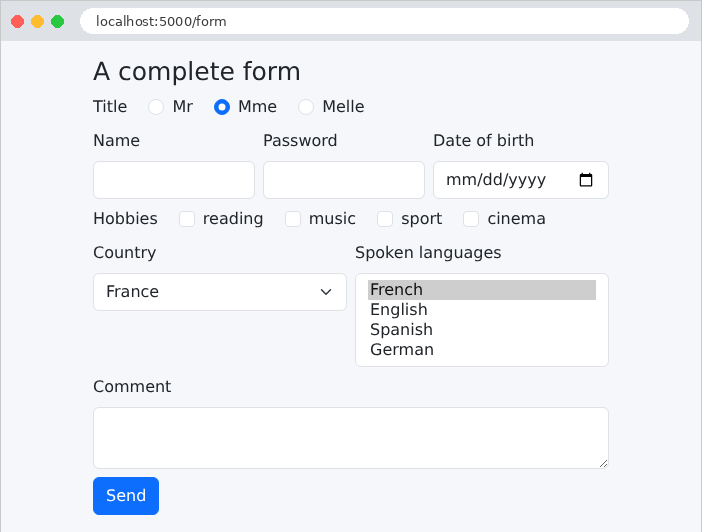
The initial values passed to the constructor are visible: the “Mme” radio button, the country “France,” and the language “French.” The HTML generated by [WTForms] (excerpts):
| <input id="csrf_token" name="csrf_token" type="hidden" value="ImJmYmRjNWU0NGMyZDMwNDM1MGQ0ODQ5YTExZjAzYThhYTc0YWI0ZDYi.arfKQQ.9PqkMic5droodAE5iZdcz87dHJI">
<input id="token" name="token" type="hidden" value="A7X2">
...
<input checked class="form-check-input" id="title-1" name="title" type="radio" value="Mme">
<label class="form-check-label" for="title-1">Mme</label>
...
<input class="form-control" id="birth_date" name="birth_date" type="date" value="">
...
<input class="form-check-input" id="hobbies-0" name="hobbies" type="checkbox" value="reading">
<label class="form-check-label" for="hobbies-0">reading</label>
...
<select class="form-select" id="country" name="country"><option selected value="fr">France</option><option value="be">Belgium</option>...</select>
...
<select class="form-select" id="languages" multiple name="languages" size="4"><option selected value="French">French</option>...</select>
...
<textarea class="form-control" id="comment" name="comment" rows="2">
</textarea>
|
[WTForms] wrote the attributes [id] (the field name, followed by the option number for groups), [name], [type], [value], as well as [checked] and [selected] for common selections. The anti-CSRF token is a signed string. Let’s fill out the form and submit it:
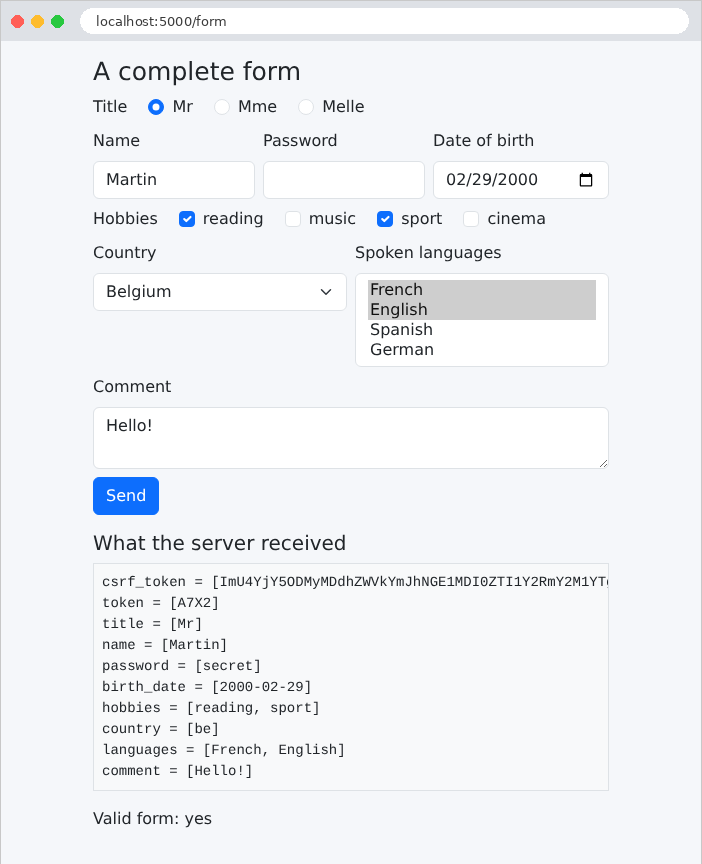
The page shows what the server received: one parameter per field, with multiple values for the checkboxes and the dropdown list; the password was sent but is not displayed again in its field. The hidden field [token] was returned as-is: this is how information that the user cannot see is sent back and forth (the case study uses this for a record’s version number). However, a hidden field is not a protected field: the user can modify it using their browser’s developer tools, and the server must validate it just like any other field.
Now let’s send, using [curl], a form without a token and a country that isn’t in the list:
| curl -d "name=Martin&country=xx" http://localhost:5000/form
|
| ...
<h2 class="h5 mt-3">What the server received</h2>
<pre class="bg-light p-2 border">name = [Martin]
country = [xx]</pre>
<p>Valid form: no</p>
<ul>
<li>title: Not a valid choice.</li>
<li>country: Not a valid choice.</li>
<li>csrf_token: The CSRF token is missing.</li>
</ul>
...
|
Three errors: the token is missing; the country [xx] is not among the options; no title was submitted (a [RadioField] requires a selection). The messages are in English, the default language of [WTForms]: the following example shows how to choose their language.
A registration form, where each field has its own constraints. If an error occurs, the form is redisplayed with the user’s input and a message below each field containing an error.
| # models/registration.py: the fields of the form and their constraints
from flask_wtf import FlaskForm
from wtforms import EmailField, IntegerField, PasswordField, StringField
from wtforms.validators import DataRequired, Email, EqualTo, InputRequired, Length, NumberRange
# a FILTER: it transforms the received value BEFORE the validation;
# here, the spaces that surround the input are removed
def clean(value):
return value.strip() if isinstance(value, str) else value
class RegistrationForm(FlaskForm):
# the language of the messages that WTForms writes itself (impossible conversion,
# for example: "abc" in an integer field)
class Meta:
locales = ["en"]
# each field: a label, filters, and a list of validators, each one
# with its error message. DataRequired rejects an empty input (or one made
# of spaces); it also produces the HTML5 [required] attribute
name = StringField("Name", filters=[clean], validators=[
DataRequired("The name is required."),
Length(max=20, message="The name must not exceed 20 characters.")])
# EmailField: an <input type="email"> field
email = EmailField("Email address", filters=[clean], validators=[
DataRequired("The email address is required."),
Email("Invalid email address.")])
# everything that comes from a form is a string: IntegerField converts it
# ("42" -> 42); InputRequired: the input must not be empty
age = IntegerField("Age", validators=[
InputRequired("The age is required."),
NumberRange(min=18, max=120, message="The age must be between 18 and 120 years.")])
password = PasswordField("Password", validators=[
DataRequired("The password is required."),
Length(min=6, message="The password must have at least 6 characters.")])
# a rule about TWO fields: EqualTo compares this field with another one
confirmation = PasswordField("Confirmation", validators=[
DataRequired("The confirmation is required."),
EqualTo("password", message="The confirmation does not match the password.")])
|
- Lines 9–10: A [WTForms] filter is a function that transforms the received value before validation. It removes the spaces surrounding a string (an input such as [" "] becomes empty and will be rejected by [DataRequired]). The [isinstance] test protects against a missing value ([None]);
- lines 17–18: the internal class [Meta] controls the form’s behavior. [locales = ["en"]]: The messages that [WTForms] generates itself (an impossible conversion, an invalid selection, etc.) will be in English; [WTForms] comes with their translations into many languages (["fr"] would give French messages). [app.py] disables the translation mechanism of [Flask-WTF] ([WTF_I18N_ENABLED = False]) for this purpose; otherwise, it would wait for the [Flask-Babel] extension;
- lines 23–25: The parameter [validators] is the list of field validators, executed in order. Each receives its own error message. [DataRequired] rejects an empty value; [Length] limits the length of the string;
- lines 28–30: [EmailField] generates a [<input type="email">]; the validator [Email] checks the address syntax (using the library [email-validator], already used by [Pydantic] in Example 08);
- lines 34–36: [IntegerField] converts the entire input. [InputRequired] requires an input; unlike [DataRequired], it checks that something has been entered, rather than whether the converted value is “true”: [DataRequired] would reject an age of 0, because [0] is false in [Python]. [NumberRange] limits the value;
- Lines 43–45: a rule that applies to two fields: [EqualTo("password")] compares the value of one field to that of another field.
Validators are also used for display purposes: [WTForms] derives attributes from HTML5 ([required], [maxlength], [minlength], [min], [max]), which allow the browser to verify the input even before it is submitted (we’ll cover this later). A “custom” validator is a function that takes the form and the field as arguments and raises a [ValidationError] (from the [wtforms.validators] module) if the value is invalid; it can also be written as a form method named [validate_<field>]. [WTForms] provides other ready-to-use validators: [Regexp] (a regular expression), [AnyOf] (a list of allowed values), [Optional]... The case study uses these.
4.7.2. The controller: controllers/registration.py
| # controllers/registration.py: a form validated by the server
from flask import Blueprint, render_template, request
from models.registration import RegistrationForm
registration = Blueprint("registration", __name__, url_prefix="/register")
# ?html5=true: we let the browser validate the form before sending it
def html5_requested() -> bool:
return request.args.get("html5") == "true"
@registration.get("")
def display():
return render_template("registration/registration.html", form=RegistrationForm(),
html5=html5_requested())
@registration.post("")
def register():
form = RegistrationForm()
# validate_on_submit: the request is a POST AND the form is valid
if not form.validate_on_submit():
# we DISPLAY the form AGAIN: entered values (except the passwords),
# and a message under each wrong field (see fragments/field.html)
return render_template("registration/registration.html", form=form,
html5=html5_requested(),
error="The form contains errors.")
return render_template("registration/welcome.html", form=form)
|
- lines 10–11: the parameter [?html5=true] enables browser-side validation (see below);
- line 24: [validate_on_submit()] returns [True] if the request is a POST and if the form is valid;
- Lines 27–29: The invalid form is redisplayed: it is the same [form] object, which contains the user’s input and the errors for each field. The variable [error] is a general message displayed at the bottom of the page by the template;
- line 30: the valid form—the welcome page. (The following example will show that it is better to redirect after a successful POST.)
4.7.3. A reusable field: templates/fragments/field.html
Each field is displayed in the same way: a label, the input field, and, in case of an error, the area outlined in red and the message below it. A macro prevents having to write this five times:
| {# an input field, with its label and its FIRST error message.
field.errors: the list of the error messages of the field; the HTML5 attributes
(required, maxlength, minlength, min, max) are written by WTForms itself,
according to the validators of the field #}
{% macro field_row(field) %}
<div class="mb-2">
{{ field.label(class="form-label") }}
{{ field(class="form-control" ~ (" is-invalid" if field.errors else "")) }}
{% if field.errors %}
<div class="invalid-feedback">{{ field.errors[0] }}</div>
{% endif %}
</div>
{% endmacro %}
|
- line 5: the macro receives a field from the form;
- line 8: the class [is-invalid], derived from [Bootstrap], frames the field in red. It is added if the field’s error list, [field.errors], is not empty;
- Lines 9–11: The first error message for the field, in a [invalid-feedback] element, which [Bootstrap] displays in red below a [is-invalid] field.
4.7.4. The views
| {% extends "layout.html" %}
{% from "fragments/field.html" import field_row %}
{% block content %}
<h1 class="h3">Registration</h1>
{% if html5 %}
<p>Browser validation <b>enabled</b> - <a href="/register">disable it</a></p>
{% else %}
<p>Browser validation <b>disabled</b> - <a href="/register?html5=true">enable it</a></p>
{% endif %}
{# novalidate: the browser ignores the required, min... attributes and
sends the form as is; only the server validates #}
<form method="post" action="{{ '/register?html5=true' if html5 else '/register' }}"
{{- '' if html5 else ' novalidate' }}>
{{ form.csrf_token }}
{{ field_row(form.name) }}
{{ field_row(form.email) }}
{{ field_row(form.age) }}
{{ field_row(form.password) }}
{{ field_row(form.confirmation) }}
<button class="btn btn-primary" type="submit">Register</button>
</form>
{% endblock %}
|
- lines 13–14: The [novalidate] attribute disables browser validation: the form is submitted as-is, and only the server validates it. This is what we want to observe first. [{{-] removes the whitespace preceding the tag to make the attribute adjacent to the [<form>] tag;
- lines 16–20: a macro call for each field.
| <!doctype html>
<html lang="en">
<head>
<meta charset="utf-8">
<title>Registration</title>
<link rel="stylesheet" href="{{ url_for('bootstrap.static', filename='css/bootstrap.min.css') }}">
<link rel="stylesheet" href="{{ url_for('static', filename='css/styles.css') }}">
</head>
<body>
<div class="container py-3" style="max-width: 36rem">
<main>
{% block content %}{% endblock %}
</main>
{# the global error, at the bottom of the page, on a light pink background; [error] is provided by the action #}
{% if error %}
<div class="error-area" role="alert">{{ error }}</div>
{% endif %}
</div>
</body>
</html>
|
- lines 15–17: the general message, at the bottom of the page, in an area whose style is defined by [static/css/styles.css] (example 15). The attribute [role="alert"] flags it for screen readers.
| {% extends "layout.html" %}
{% block content %}
{# form.name.data: the value of the field, after filters and conversion #}
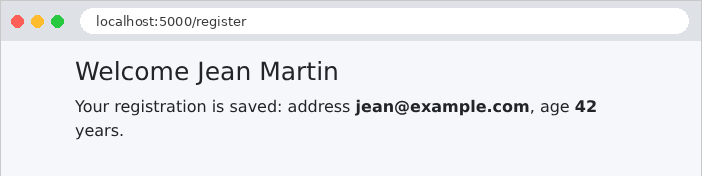
<h1 class="h3">Welcome {{ form.name.data }}</h1>
<p>Your registration is saved: address <b>{{ form.email.data }}</b>,
age <b>{{ form.age.data }}</b> years.</p>
{% endblock %}
|
[form.name.data] is the value of the field after filtering and conversion: the name with spaces removed, and the age as an integer.
4.7.5. Execution
Let’s submit a form full of errors: a name consisting of spaces, an address without a full domain, an age of 12, a password that’s too short, and a different confirmation:
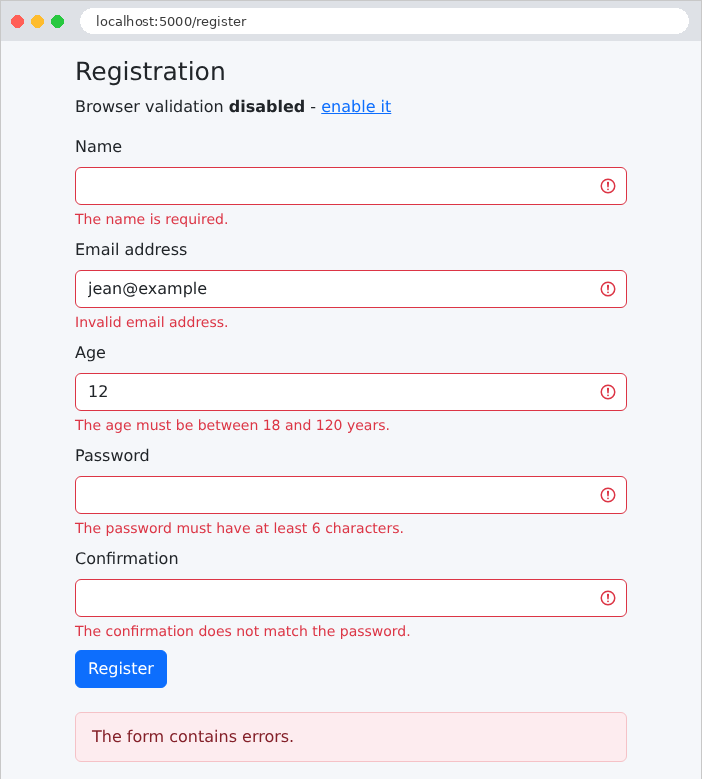
The input was preserved (except for the passwords), and each error is flagged below its corresponding field. With [curl], this time providing the anti-CSRF token, we can also submit something a browser wouldn’t send—a non-numeric age: the conversion message, generated by [WTForms], is in English, the language chosen by [locales]:
| <input class="form-control is-invalid" id="age" max="120" min="18" name="age" required type="number" value="abc">
<div class="invalid-feedback">Not a valid integer value.</div>
|
We can also see the HTML5 attributes inferred from the validators: [required], [min], [max].
4.7.6. Browser validation
Let’s remove the [novalidate] attribute by clicking the “enable it” link (parameter [?html5=true]). The browser then checks the attributes [required], [type="email"], [min], [maxlength]... itself before submitting the form, and displays its own messages:
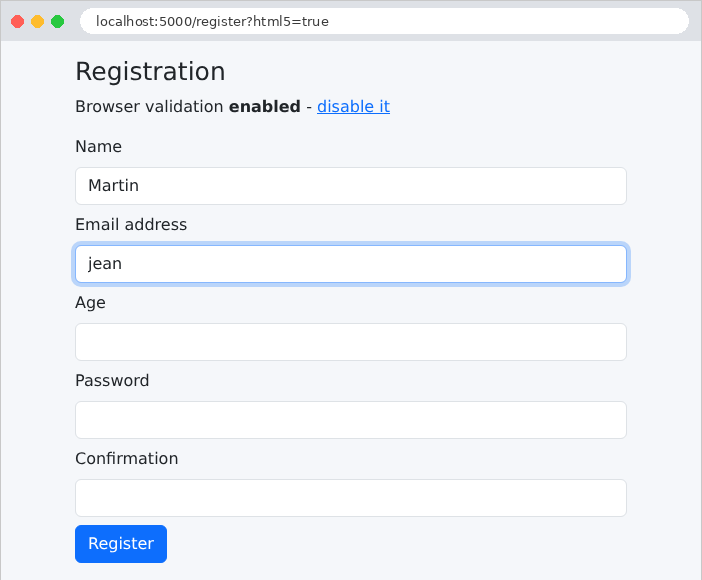
This validation is convenient for the user: it’s immediate, with no back-and-forth with the server. But it does not replace server-side validation: a user can disable it, and a program like [curl] ignores it completely. The rule is absolute: the server always validates; browser-side validation is merely an added convenience.
A correct entry, at last. The name, entered with spaces on either side, was cleaned up by the filter:
4.8. Example 20: The Post/Redirect/Get Pattern
When a POST action responds with a page, that page is the result of a POST. If the user reloads the page (presses [F5]), the browser sends the POST request, after displaying a warning that few people read: the command is sent twice, and the message is posted twice. The Post/Redirect/Get pattern (PRG) avoids this problem: a successful POST action does not return a page; it responds with a redirect (example 04) to a page GET, which the browser requests immediately. Reloading this page simply re-executes the GET action.
There is still one problem: the page GET wants to display a message (“the task has been added”), but it is the action POST that knows this message, and it cannot pass a variable to a request that has not yet occurred. The solution: a flash message, posted by the POST action, retained until the next request, displayed, and then discarded.
4.8.1. The service: services/tasks.py
| # services/tasks.py: the list of tasks, in memory, shared by everyone
from threading import Lock
from flask import current_app
class TasksService:
def __init__(self):
self._tasks = ["Read chapter 3"]
# several requests can run AT THE SAME TIME (the server handles
# them on several threads): a lock (Lock) guarantees that a single
# thread at a time reads or modifies the list
self._lock = Lock()
def list(self) -> list[str]:
with self._lock:
return list(self._tasks) # a COPY: the caller cannot modify ours
def add(self, label: str):
with self._lock:
self._tasks.append(label)
def tasks_service() -> TasksService:
return current_app.extensions["tasks"]
|
- Line 14: The task list is shared by all requests. However, the development server processes each request on a different thread: two requests can run at the same time and modify the list simultaneously. A lock ([Lock], from the standard module [threading]) ensures that only one thread at a time executes the code it protects. The prefix [_] indicates, by convention, an internal attribute of the class;
- line 17: the statement [with] acquires the lock, executes the block, and then releases the lock, even if the block throws an exception. A thread that finds the lock acquired waits until it is released;
- line 18: the method returns a copy of the list: the caller can safely iterate over it while another thread adds a task to the original.
4.8.2. The controller: controllers/tasks.py
| # controllers/tasks.py: the Post / Redirect / Get pattern
from flask import Blueprint, flash, redirect, render_template, request, url_for
from services.tasks import tasks_service
tasks = Blueprint("tasks", __name__, url_prefix="/tasks")
# GET /tasks: the list and the add form
@tasks.get("")
def display():
return render_template("tasks/tasks.html", tasks=tasks_service().list())
# POST /tasks: the Post / Redirect / Get pattern
@tasks.post("")
def add():
label = request.form.get("label", "")
text = label.strip()
if not text or len(text) > 40:
# invalid input: we display the page again, without a redirect
return render_template("tasks/tasks.html", tasks=tasks_service().list(),
label=label,
error="The label must have 1 to 40 characters.")
tasks_service().add(text)
# a "flash" message: it will survive the redirect, for the NEXT request
flash(f"The task [{text}] has been added.")
# no page: a redirect to the GET page
return redirect(url_for("tasks.display"))
# POST /tasks/without-prg: the counter-example (a page in response to the POST)
@tasks.post("/without-prg")
def add_without_prg():
label = request.form.get("label", "").strip()
tasks_service().add(label or "(untitled)")
return render_template("tasks/tasks.html", tasks=tasks_service().list(),
without_prg=True)
|
- lines 18–24: The input is validated manually, without [WTForms], to keep the example simple. An invalid entry is redisplayed without redirection: there is nothing to protect against a duplicate submission, since nothing has been modified;
- line 27: [flash] sets a message for the next request;
- line 29: the redirect to the GET page;
- lines 34–38: the counterexample: a page in response to POST.
4.8.3. The Views
| <!doctype html>
<html lang="en">
<head>
<meta charset="utf-8">
<title>Tasks</title>
<link rel="stylesheet" href="{{ url_for('bootstrap.static', filename='css/bootstrap.min.css') }}">
<link rel="stylesheet" href="{{ url_for('static', filename='css/styles.css') }}">
</head>
<body>
<div class="container py-3" style="max-width: 36rem">
{# the flash messages, at the top of the page: left BEFORE the redirect;
get_flashed_messages returns them, then forgets them #}
{% for message in get_flashed_messages() %}
<div class="alert alert-success" role="status">{{ message }}</div>
{% endfor %}
<main>
{% block content %}{% endblock %}
</main>
{% if error %}
<div class="error-area" role="alert">{{ error }}</div>
{% endif %}
</div>
</body>
</html>
|
- lines 13–15: the function [get_flashed_messages()], available in all views, returns the list of pending flash messages and then discards them: they will be displayed only once. The [alert alert-success] class of [Bootstrap] displays them in a green frame.
| {% extends "layout.html" %}
{% block content %}
<h1 class="h3">My tasks</h1>
<ol>
{% for task in tasks %}
<li>{{ task }}</li>
{% endfor %}
</ol>
<form method="post" action="/tasks" class="d-flex gap-2">
<input class="form-control" name="label" value="{{ label }}" placeholder="New task">
<button class="btn btn-primary text-nowrap" type="submit">Add</button>
{# formaction: this button sends the SAME form to another address #}
<button class="btn btn-outline-secondary text-nowrap" type="submit" formaction="/tasks/without-prg">Add without PRG</button>
</form>
{% if without_prg %}
<p class="text-danger mt-2">Page displayed in response to a POST: press F5 and the task will be added a second time.</p>
{% endif %}
{% endblock %}
|
- Line 14: A button’s [formaction] attribute sends the form to an address different from that of its [action] attribute: a single form can thus trigger two different actions.
4.8.4. Where are flash messages stored?
Between the POST request and the subsequent GET request, the message must be stored somewhere. [Flask] stores it in the user’s session (see the chapter on scopes). By default, the session for [Flask] is not stored on the server: it is stored in a cookie sent to the browser, which resends it with every request. To prevent the user from tampering with it, the cookie is signed with the secret key—which is why [app.py] sets it. Let’s examine this using [curl]. The [-c] option logs the received cookies to a file, while the [-b] option returns those from the file:
| curl -i -c cookies.txt -d "label=Do%20the%20exercises" http://localhost:5000/tasks
|
| HTTP/1.1 302 FOUND
Content-Type: text/html; charset=utf-8
Content-Length: 199
Location: /tasks
Set-Cookie: session=eyJfZmxhc2hlcyI6W3siIHQiOlsibWVzc2FnZSIsIlRoZSB0YXNrIFtEbyB0aGUgZXhlcmNpc2VzXSBoYXMgYmVlbiBhZGRlZC4iXX1dfQ.arfKbA.72zBgSN6wiA_v1Ci_KS3Si8Brbc; HttpOnly; Path=/
...
|
The response to POST is a redirect (status code 302, header [Location]), accompanied by a cookie [session]. Its value consists of three parts, separated by periods: the data, Base64-encoded (not compressed: [Flask] compresses it only when that makes it shorter); the signature date; and the signature. When decoded, the data is readable:
| {"_flashes":[{" t":["message","The task [Do the exercises] has been added."]}]}
|
The session for an application named [Flask] is therefore readable by the user (it is not encrypted), but tamper-proof (it is signed): nothing secret is stored in it. The attribute [HttpOnly] prevents the [JavaScript] on the page from reading the cookie. Let’s follow the redirect by sending the cookie back:
| curl -i -b cookies.txt -c cookies.txt http://localhost:5000/tasks
|
| HTTP/1.1 200 OK
Content-Type: text/html; charset=utf-8
Content-Length: 885
Set-Cookie: session=; Expires=Thu, 01 Jan 1970 00:00:00 GMT; Max-Age=0; HttpOnly; Path=/
...
<div class="alert alert-success" role="status">The task [Do the exercises] has been added.</div>
<main>
<h1 class="h3">My tasks</h1>
<ol>
<li>Read chapter 3</li>
<li>Do the exercises</li>
</ol>
...
|
The message is displayed, and the session—now empty—is deleted: the server returns an empty cookie whose expiration date has passed. A new request for GET would no longer display the message.
4.8.5. Execution
Adding a task: the browser followed the redirect; the URL is the one for the GET page, which can be safely reloaded.
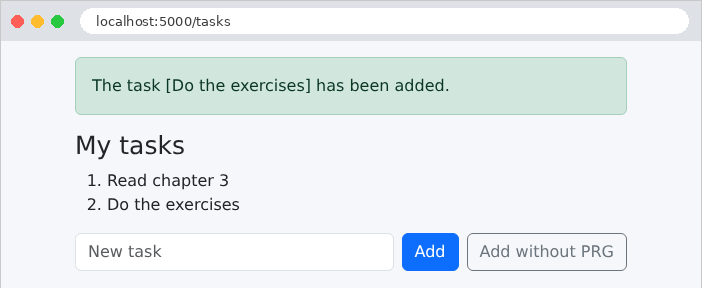
An invalid entry, redisplayed with its error message:
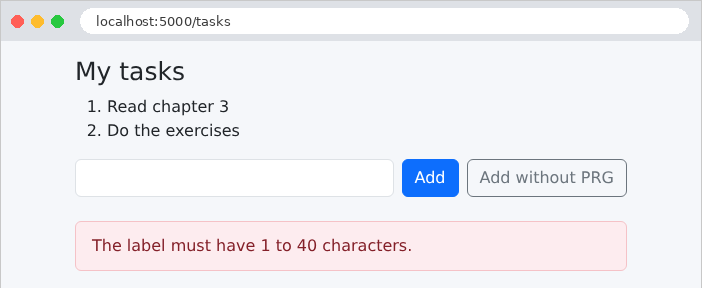
The counterexample: the page is the response to POST, and its URL is [/tasks/without-prg]. If you click on [F5], the browser asks if you want to resubmit the form; if you agree, the task is added a second time.
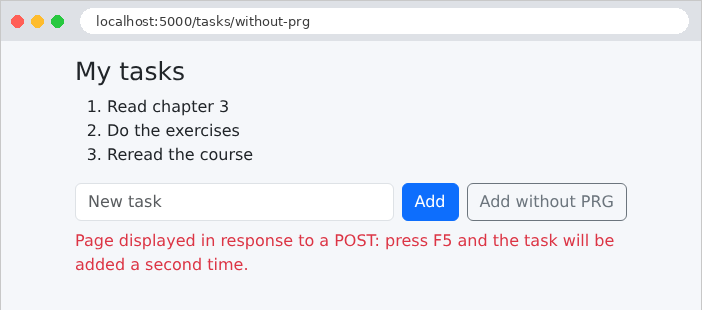
A principle of the HTTP protocol: a GET request does not change anything. Browsers, search engines, and tools that preload pages freely follow links without asking the user for permission. A “delete” link ([<a href="/contacts/2/delete">]) would therefore be dangerous: a bot crawling the site would delete everything. In a web application:
- viewing is done via a link ([<a href>]), which sends a GET request;
- editing (save, duplicate, delete) is done via a button placed in a form (POST), protected by an anti-CSRF token.
This example manages a list of contacts and displays a confirmation window before each deletion.
| # services/contacts.py: the contacts, in memory, shared by everyone
from dataclasses import dataclass, replace
from threading import Lock
from flask import current_app
# a contact: an identifier, a name, a phone number
@dataclass(frozen=True)
class Contact:
id: int
name: str
phone: str
class ContactsService:
def __init__(self):
self._contacts = [
Contact(1, "Marie Durand", "01 23 45 67 89"),
Contact(2, "Paul Martin", "06 12 34 56 78"),
Contact(3, "Philippe Jandot", "02 98 76 54 32"),
]
self._last_id = 3
self._lock = Lock()
def list(self) -> list[Contact]:
with self._lock:
return list(self._contacts)
# the contact, or None if it does not exist
def read(self, id: int) -> Contact | None:
with self._lock:
return next((c for c in self._contacts if c.id == id), None)
def edit(self, id: int, name: str, phone: str) -> Contact | None:
with self._lock:
for i, contact in enumerate(self._contacts):
if contact.id == id:
# a contact is immutable (frozen): replace builds a
# new one, which replaces the old one in the list
self._contacts[i] = replace(contact, name=name, phone=phone)
return self._contacts[i]
return None
def add(self, name: str, phone: str) -> Contact:
with self._lock:
self._last_id += 1
contact = Contact(self._last_id, name, phone)
self._contacts.append(contact)
return contact
def delete(self, id: int) -> Contact | None:
with self._lock:
contact = next((c for c in self._contacts if c.id == id), None)
if contact is not None:
self._contacts.remove(contact)
return contact
def contacts_service() -> ContactsService:
return current_app.extensions["contacts"]
|
An in-memory service, protected by a lock like the one in Example 20. A few points about [Python]:
- line 34: the expression in parentheses is a generator (see Example 05) of contacts whose ID matches the one being searched for; [next] returns the first element, or the default value [None] if none exists;
- line 38: [enumerate] iterates through a list, returning the index and the element for each item;
- line 42: A contact is immutable ([frozen=True]); the function [replace] in the module [dataclasses] creates a copy of it, with certain attributes changed;
- The methods return [None] for a nonexistent contact: it is up to the controller to decide on the response.
| # controllers/contacts.py: links (GET) and buttons (POST)
from flask import Blueprint, abort, flash, redirect, render_template, request, url_for
from services.contacts import contacts_service
contacts = Blueprint("contacts", __name__, url_prefix="/contacts")
# the contact, or a 404 response if it does not exist
def contact_or_404(contact):
if contact is None:
abort(404, "unknown contact")
return contact
# a LINK (<a href>): a GET request, which modifies nothing
@contacts.get("")
def list_contacts():
return render_template("contacts/list.html", contacts=contacts_service().list())
@contacts.get("/<int:id>")
def details(id):
contact = contact_or_404(contacts_service().read(id))
return render_template("contacts/details.html", contact=contact)
# a BUTTON in a POST form: a request that modifies data
@contacts.post("/<int:id>")
def save(id):
contact = contact_or_404(contacts_service().edit(
id, request.form.get("name", ""), request.form.get("phone", "")))
flash(f"The contact [{contact.name}] has been edited.")
return redirect(url_for("contacts.list_contacts"))
# same form, another button (formaction attribute): another action
@contacts.post("/<int:id>/duplicate")
def duplicate(id):
copy = contacts_service().add(request.form.get("name", "") + " (copy)",
request.form.get("phone", ""))
flash(f"The contact [{copy.name}] has been created.")
return redirect(url_for("contacts.list_contacts"))
@contacts.post("/<int:id>/delete")
def delete(id):
contact = contact_or_404(contacts_service().delete(id))
flash(f"The contact [{contact.name}] has been deleted.")
return redirect(url_for("contacts.list_contacts"))
|
- lines 10–13: a utility function: a nonexistent contact stops the action with a 404 response;
- lines 17–23: the two actions GET, which do not modify anything: the list and a contact’s record;
- lines 29–34: saving the record: an action POST, which follows the pattern PRG. The same URL and [/contacts/2] are handled by two different actions, depending on the method: GET displays, POST saves;
- Lines 38–43: duplication—another action, POST, triggered by a second button on the same form;
- lines 46–50: deletion.
4.9.3. Anti-CSRF protection: app.py
| # app.py: the application of example 21
from pathlib import Path
from flask import Blueprint, Flask
from flask_wtf.csrf import CSRFProtect
from controllers.contacts import contacts
from services.contacts import ContactsService
# Bootstrap, shared by the examples (see example 15)
BOOTSTRAP = Path(__file__).resolve().parent.parent / "common" / "bootstrap"
def create_app():
app = Flask(__name__)
app.jinja_env.trim_blocks = True
app.jinja_env.lstrip_blocks = True
app.config["SECRET_KEY"] = "a-secret-key-for-example-21"
app.extensions["contacts"] = ContactsService()
app.register_blueprint(Blueprint("bootstrap", __name__, static_folder=BOOTSTRAP,
static_url_path="/bootstrap"))
app.register_blueprint(contacts)
# Flask-WTF's anti-CSRF protection, for ALL the POST requests of
# the application: each form must send back the csrf_token() token
CSRFProtect(app)
return app
if __name__ == "__main__":
create_app().run(port=5000, debug=True)
|
- line 26: In examples 18 and 19, it was the [WTForms] form that verified its token, in [validate()]. Here, the forms are written by hand, without [WTForms]. [CSRFProtect] extends protection to the entire application: before each request (POST, as well as PUT, PATCH, DELETE), it verifies the token and returns a 400 status code if it is missing or invalid, even before the action is called. An action cannot omit it. This is the configuration that the case study will use.
4.9.4. The views
| {% extends "layout.html" %}
{% block content %}
<h1 class="h3">Contacts</h1>
<table class="table align-middle">
<tbody>
{% for contact in contacts %}
<tr>
<td>{{ contact.name }}</td>
<td>{{ contact.phone }}</td>
<td class="text-end">
{# view: a simple link; url_for places the id in the path: /contacts/2 #}
<a class="btn btn-sm btn-outline-primary" href="{{ url_for('contacts.details', id=contact.id) }}">View</a>
{# delete: a POST form, whose submission will be confirmed #}
<form method="post" class="d-inline" action="{{ url_for('contacts.delete', id=contact.id) }}"
data-confirmation="Delete the contact {{ contact.name }}?">
{# the anti-CSRF token, required by CSRFProtect (see app.py) #}
<input type="hidden" name="csrf_token" value="{{ csrf_token() }}">
<button class="btn btn-sm btn-outline-danger" type="submit">Delete</button>
</form>
</td>
</tr>
{% endfor %}
</tbody>
</table>
{% endblock %}
|
- Line 13: a link, presented as a button by the classes of [Bootstrap] ([btn]...): the appearance has nothing to do with the HTTP method. [url_for('contacts.details', id=contact.id)] places the ID in the path: [/contacts/2];
- lines 15–20: a POST form for each “Delete” button, with no fields other than the token. The [d-inline] class displays it on the same line as the link. The [data-confirmation] attribute contains the confirmation message: the [data-...] attributes are unassigned, intended for the [JavaScript] on the page;
- Line 18: The function [csrf_token()], provided to the views by [Flask-WTF], returns the session's anti-CSRF token; it is placed in a hidden field named [csrf_token].
| {% extends "layout.html" %}
{% block content %}
<h1 class="h3">Contact no. {{ contact.id }}</h1>
<form method="post" action="{{ url_for('contacts.save', id=contact.id) }}">
<input type="hidden" name="csrf_token" value="{{ csrf_token() }}">
<div class="mb-2">
<label class="form-label" for="name">Name</label>
<input class="form-control" id="name" name="name" value="{{ contact.name }}">
</div>
<div class="mb-3">
<label class="form-label" for="phone">Phone</label>
<input class="form-control" id="phone" name="phone" value="{{ contact.phone }}">
</div>
{# two submit buttons for the same form #}
<button class="btn btn-primary" type="submit">Save</button>
<button class="btn btn-outline-primary" type="submit"
formaction="{{ url_for('contacts.duplicate', id=contact.id) }}">Duplicate</button>
<a class="btn btn-link" href="{{ url_for('contacts.list_contacts') }}">Back to the list</a>
</form>
{% endblock %}
|
- Lines 16–18: Two submit buttons for the same form: “Save” submits the form to the address specified by its [action] attribute, and “Duplicate” submits it to the address specified by its [formaction] attribute (Example 20);
- Line 19: Return to the list: a link.
4.9.5. The confirmation window
The browser can display a confirmation box (function [JavaScript] [confirm]), but it is not very attractive, and its appearance depends on the browser. Here we use a modal window from [Bootstrap], displayed by a few lines of [JavaScript]. The window is a fragment included in the template and is therefore present—though hidden—on all pages:
| {# a single window for the whole page, hidden (d-none) at first #}
<div id="confirmation-modal" class="d-none">
<div class="modal-backdrop fade show"></div>
<div class="modal fade show d-block" tabindex="-1" role="alertdialog" aria-modal="true">
<div class="modal-dialog modal-dialog-centered">
<div class="modal-content">
<div class="modal-header">
<h5 class="modal-title">Confirmation</h5>
</div>
<div class="modal-body">
<p class="mb-0" id="confirmation-modal-message"></p>
</div>
<div class="modal-footer">
<button type="button" class="btn btn-secondary" data-action="no">No, go back</button>
<button type="button" class="btn btn-danger" data-action="yes">Yes, confirm</button>
</div>
</div>
</div>
</div>
</div>
|
- line 2: the [d-none] class from [Bootstrap] hides the element;
- lines 3–4: the gray background, followed by the window, are rendered by the classes of [Bootstrap];
- line 11: the message's position;
- lines 14–15: the two buttons, of type [button] (not [submit]: they do not submit any form), distinguished by their [data-action] attribute.
| <!doctype html>
<html lang="en">
<head>
<meta charset="utf-8">
<title>Contacts</title>
<link rel="stylesheet" href="{{ url_for('bootstrap.static', filename='css/bootstrap.min.css') }}">
<link rel="stylesheet" href="{{ url_for('static', filename='css/styles.css') }}">
</head>
<body>
<div class="container py-3" style="max-width: 40rem">
{% for message in get_flashed_messages() %}
<div class="alert alert-success" role="status">{{ message }}</div>
{% endfor %}
<main>
{% block content %}{% endblock %}
</main>
</div>
{# the confirmation window, present in all the pages #}
{% include "fragments/confirmation.html" %}
{# the script, at the end of the page: the elements it looks for already exist #}
<script src="{{ url_for('static', filename='js/app.js') }}"></script>
</body>
</html>
|
- line 19: the window, included on all pages;
- line 21: the script, placed at the end of the page: when it runs, the elements it searches for already exist.
The [static/js/app.js] script:
| // confirmation of the forms that carry the data-confirmation="..." attribute
// Without JavaScript, these forms are simply sent without confirmation.
(() => {
const modal = document.getElementById('confirmation-modal');
const message = document.getElementById('confirmation-modal-message');
let pending = null; // the form to send if the user confirms
// 1. we intercept the submission of the forms to confirm
document.querySelectorAll('form[data-confirmation]').forEach((form) => {
form.addEventListener('submit', (event) => {
event.preventDefault(); // the submission is suspended
pending = form;
message.textContent = form.dataset.confirmation;
modal.classList.remove('d-none'); // the window appears
});
});
// 2. the two buttons of the window
modal.addEventListener('click', (event) => {
const action = event.target.dataset.action;
if (action === 'yes') {
pending.submit(); // submission, WITHOUT firing the 'submit' event again
} else if (action === 'no') {
modal.classList.add('d-none');
pending = null;
}
});
})();
|
- line 3: the code is enclosed in an anonymous function, which is executed immediately; its variables do not interfere with those of the other scripts on the page;
- lines 4–6: the window, the message location, and the form awaiting confirmation;
- lines 9–14: for each form that has a [data-confirmation] attribute, the [submit] event—triggered when the form is submitted—is intercepted. [preventDefault()] suspends submission; the form is put on hold, and its message ([dataset.confirmation], the value of the [data-confirmation] attribute) is displayed in the window, which appears;
- lines 19–25: a single handler for clicks in the window: [event.target] is the element clicked; its attribute [data-action] specifies which button it is. “Yes” submits the pending form using the [submit()] method, which—unlike clicking a button—does not trigger the [submit] event (otherwise, the window would reappear); “No” hides the window.
Without [JavaScript], the form is simply submitted without confirmation: the page remains usable. This is progressive enhancement: [JavaScript] adds convenience, but the application does not depend on it.
4.9.6. Execution
The contact list:
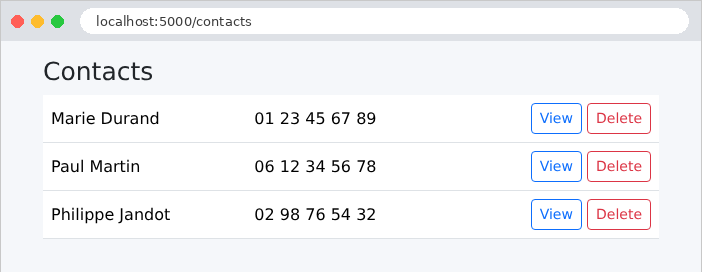
Clicking “Delete” displays the confirmation window:
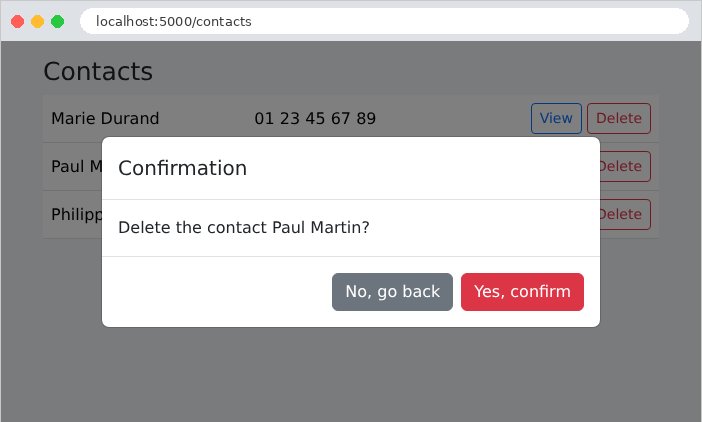
After confirmation, the POST, the redirect, and the pop-up message:
A contact’s profile, with its two send buttons:
A request for POST without an anti-CSRF token is rejected by [CSRFProtect], and a nonexistent contact returns a 404 error:
| curl -i -X POST http://localhost:5000/contacts/2/delete
curl -i http://localhost:5000/contacts/9
|
| HTTP/1.1 400 BAD REQUEST
Content-Type: text/html; charset=utf-8
Content-Length: 117
<!doctype html>
<html lang=en>
<title>400 Bad Request</title>
<h1>Bad Request</h1>
<p>The CSRF token is missing.</p>
HTTP/1.1 404 NOT FOUND
Content-Type: text/html; charset=utf-8
Content-Length: 102
<!doctype html>
<html lang=en>
<title>404 Not Found</title>
<h1>Not Found</h1>
<p>unknown contact</p>
|
The error pages are still the English ones from [Werkzeug]. The chapter on the request lifecycle will show how to replace them with custom pages.