8. Authentication and Authorization
Two distinct questions arise for each request:
- Who is the user? This is authentication: the user has identified themselves with a username and password, and every subsequent request must prove that it comes from them;
- Do they have permission to access this page? This is authorization: in the case study, only a user with the role ADMIN manages doctors and clients.
Since the server is stateless (see the chapter on scopes), proof of identity must be included with every request. A token named JWT (*JSON Web Token*) is used: After login, the server generates a token containing the user’s identity and signs it with a secret key. The token is stored in a cookie; the browser sends it back with every request; the server verifies the signature. The user can read their token but cannot modify it: any modification invalidates the signature. This is the same principle as the [Flask] session (Example 20), but with a standardized format (RFC 7519) that is understood by all programming languages, and an expiration date embedded in the token.
[Flask] does not have a built-in security mechanism, unlike [Spring] ([Spring Security]) or [ASP.NET Core]. Extensions exist ([Flask-Login], [Flask-JWT-Extended]...), but the mechanism is simple enough to be written by hand using the tools from the previous chapters, which has the advantage of making it transparent:
- authentication is handled by a function [before_request] (previous chapter), which retrieves the token from the cookie, verifies it, and stores the authenticated user in [g], the request object;
- authorization is handled by decorators applied to the actions ([@login_required], [@role_required("ADMIN")]), built like the [@with_language] decorator in Example 12.
Two libraries are used, installed by the [requirements.txt] file from the examples: [PyJWT], which generates and verifies tokens, and [bcrypt], which hashes passwords.
8.1. Example 25: Login, Token, Protected Page
8.1.1. Configuration: config.py and app.py
The token is signed with a secret key, which must not be hard-coded. It’s time to separate the configuration from the code:
A [Flask] configuration file is simply a [Python] module: its variables in uppercase become keys for [app.config]. [JWT_SECRET] is the token signing key; the standard requires, for the algorithm used (HMAC-SHA256), a key of at least 256 bits, or 32 bytes. [JWT_DURATION_MINUTES] is the lifetime of a token.
- line 21: reading the configuration file, specified by a path relative to the application folder;
- line 22: reading environment variables whose names begin with [FLASK_]: [FLASK_JWT_SECRET] replaces the key [JWT_SECRET] in the file. The value of a variable is interpreted as JSON whenever possible ([FLASK_JWT_DURATION_MINUTES=30] yields the integer 30). In production, the secret key is provided by the environment, and the file contains only a development value;
- lines 24–26: the two authentication services, the second of which receives the key and the token lifetime;
- line 32: the registration of the [before_request] function, which reads the token.
Under [Linux] or [macOS], the application would be launched with a different key as follows:
and under [Windows] (PowerShell):
8.1.2. Users: auth/users.py
- Lines 9–13: a user: their login, name, role, and password hash. A server never stores a password, even in encrypted form: if the database were stolen, the passwords would be too (and many people use the same password everywhere). It stores the result of a hash function, a one-way function: you can calculate the hash of a password, but you cannot recover a password from its hash. To verify an entered password, you calculate its hash and compare it to the one on file;
- lines 18–19: hashing using the [bcrypt] algorithm, designed for passwords. It has two distinctive features. It is intentionally slow, with an adjustable slowness (the parameter [rounds], or cost: 2^10 computation cycles): a few tens of milliseconds, imperceptible to a user, but which makes it very costly for a hacker to try billions of passwords. It uses a salt: [gensalt] randomly generates a salt, mixes it with the password before hashing, and stores it within the hash itself; thus, two users with the same password will have different hashes. [bcrypt] operates on bytes: [encode()] converts the string into bytes ([UTF-8]). It considers only the first 72 bytes of a password, and version 5 of the library rejects longer passwords (the case study takes this into account);
- Lines 26–28: two test users, stored in memory, organized in a dictionary built during processing ([{key: value for ...}]). Example 28 and the case study will store them in a database.
8.1.3. The authentication service: auth/service.py
- Lines 24–31: Verification of a username and password. [bcrypt.checkpw] hashes the entered password using the stored hash salt and compares the two hashes. An unknown username and an incorrect password yield the same result, [None];
- lines 34–44: generating the token. Its content is a dictionary of claims about the user. Some have standardized names: [sub] (*subject*), the user’s identifier; [iat] (*issued at*), the creation date; [exp] (*expiration*), the expiration date. The others are arbitrary: in this case, the name and role. [jwt.encode] generates the token and signs it using the algorithm [HS256] (HMAC-SHA256, a signature using a shared secret key). Dates must be time-zone-aware dates: [datetime.now(timezone.utc)];
- Lines 48–30: Token verification. [jwt.decode] verifies the signature and expiration date, then returns the assertions. Any anomaly (forged, expired, or malformed token) raises an exception from the [InvalidTokenError] family. The [algorithms] parameter specifies the accepted algorithms: without it, an attacker could create a token that declares a different algorithm (or even none at all, [none]).
8.1.4. Security: auth/security.py
- lines 13–15: Before each action, the cookie token is verified; [g.user] contains the claims of a valid token, or [None]. This function does not reject anything: it establishes who the user is. This is authentication;
- lines 20–31: the decorator that requires an authenticated user. For an anonymous visitor, it does not return the action but instead redirects to the login page. If the browser sent a cookie, it means the token is invalid (expired or forged): we take this opportunity to delete it ([delete_cookie] sends an empty cookie that has already expired).
8.1.5. The controllers
- lines 20–26: the login. If the login fails, the form is redisplayed with the entered username and a deliberately vague message: saying “unknown username” would reveal to a hacker which usernames exist;
- lines 27–32: if successful, the token is stored in a cookie, with a redirect to the protected page (schema PRG). The cookie is [httponly]: the page’s [JavaScript] cannot read it, which protects the token against script injection (XSS); it is [samesite="Lax"]: the browser does not send it with a POST request originating from another site, which protects the application against CSRF attacks (example 18); its lifetime ([max_age], which accepts a [timedelta]) is that of the token. In production, for HTTPS, we would add [secure=True]: the cookie would never be sent over an unencrypted connection;
- lines 38–41: Logging out deletes the cookie. This is a POST action: a simple link to [/logout], placed on another site or within an image, cannot log the user out without their knowledge. Note a limitation of tokens: the token itself remains valid until it expires. Someone who has made a copy of it could still use it. That is why their lifetime is limited.
- line 10: the page is protected;
- line 13: the action uses [g.user], ensuring it is not [None].
8.1.6. The views
- line 8: the entered login is redisplayed after a failure; the expression [login or ''] evaluates to an empty string if [login] is [None] (or absent).
- Lines 9–11: The token’s contents, displayed for illustrative purposes;
- lines 14–16: Logout, via a form reduced to a single button.
8.1.7. Execution
Let’s request the protected page [/profile] without being logged in:
An incorrect password:
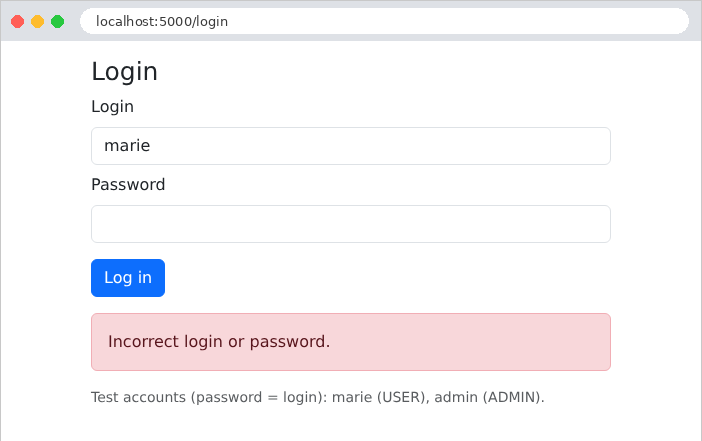
Login successful. With [curl], we save the received cookie to a file:
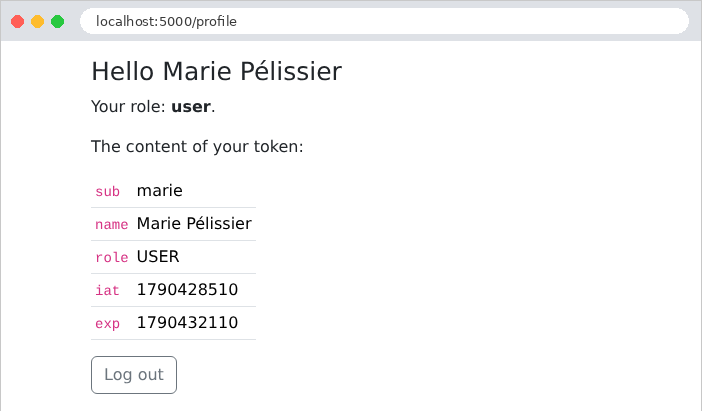
The token consists of three parts, separated by periods, each encoded in Base64: the header, the content, and the signature. The first two parts can be decoded without any key:
Dates are expressed in seconds elapsed since January 1, 1970; the expiration time is one hour after creation. In the browser, the profile page displays this same content:
A malicious user modifies their token: they replace the role ***[USER]*** in the content with ***[ADMIN]***, re-encode this part in Base64, and keep the original signature. The server recalculates the signature of the modified content, which no longer matches:
The forged token is rejected and deleted. To generate a valid signature, one would need to know the secret key—hence the importance of keeping it secret and choosing a long, random key.
8.2. Example 26: Roles
Example 26 adds an administration page, restricted to the role ADMIN. Only new or modified files are displayed.
8.2.1. A decorator with a parameter: auth/security.py
- Lines 37–47: [@role_required("ADMIN")] has one parameter. The expression following [@] is evaluated first: [role_required("ADMIN")] returns a function, [decorator], which is the decorator itself, applied to the action. We therefore have three nested functions: [role_required] receives the role, [decorator] receives the action, and [protected_action] receives the request parameters and performs the work. Each has access to the variables of the functions that contain it ([role], [action]);
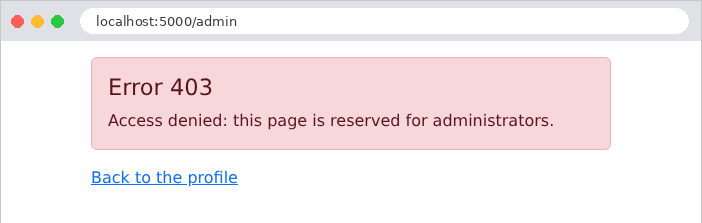
- Line 42: An authenticated user who does not have the requested role receives a 403 error (*Forbidden*). This is significantly different from an anonymous user, who is redirected to the login page: logging in would serve no purpose, since the user is already authenticated.
8.2.2. The controller: controllers/admin.py
- Lines 12–14: Decorators are applied from bottom to top: [role_required] wraps the action, then [login_required] wraps the entire structure. At runtime, the order is reversed: the outer wrapper, [login_required], executes first. So when [role_required] runs, the user is necessarily authenticated, and [g.user] is not [None].
8.2.3. The error page: app.py
- Lines 37–39: A registered error handler for a specific code—error 403—displays our page.
8.2.4. Execution
Marie, with role USER, follows the link to the administration page:
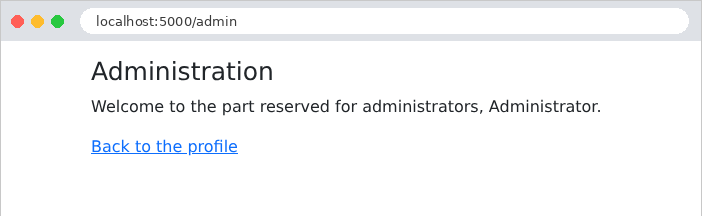
The administrator, on the other hand, has access to it:
With [curl]: a user with role USER, followed by an anonymous visitor:
Protecting actions one by one has a flaw: a single oversight opens a page to everyone. The case study will reverse this logic: all actions are protected by default, and a decorator [@public] designates the rare exceptions (the login page, registration).
8.3. Example 27: CAPTCHA and Attempt Limits
A login form is a target: a program can try thousands of passwords per minute (brute-force attack). Two protections complement each other:
- a CAPTCHA (*Completely Automated Public Turing test to tell Computers and Humans Apart*): an image containing a distorted code that is easy for a human to read but difficult for a program;
- an attempt limit: after three failed attempts, the client’s address IP is blocked for one minute.
Example 27 is based on Example 25 (without the administration page) and adds these two security measures.
8.3.1. The CAPTCHA image: auth/captcha_drawing.py
1 2 3 4 5 6 7 8 9 10 11 12 13 14 15 16 17 18 19 20 21 22 23 24 25 26 27 28 29 30 31 32 33 34 35 36 37 38 39 40 41 42 43 44 45 46 47 48 49 50 51 52 53 54 55 56 57 58 59 60 61 62 63 64 65 66 67 68 69 70 71 72 73 74 75 76 77 78 79 80 81 82 83 84 85 86 87 88 89 90 91 92 93 94 95 96 97 98 99 100 101 102 103 | |
The image is in SVG format (*Scalable Vector Graphics*): a vector graphic described in XML—that is, text—which the server generates without a graphics library and which the browser displays directly on the page.
- Line 11: The [random] module of [Python] produces predictable sequences of numbers (anyone who knows a few values can guess the next ones): it is suitable for simulations, not for security. The [secrets] module provides a cryptographic generator that is unpredictable;
- Lines 16–48: A minimalist “font”: each character is a list of strokes, and each stroke is a list of coordinates [x, y] in a 4 × 6 grid. Characters that are easily confused ([0] and [O], [1], [I], and [L]) are excluded;
- line 51: ["".join(FONT)] combines the dictionary keys: the available characters;
- lines 57–58: random text. [_] is the conventional name for an unused variable;
- lines 69–103: the drawing. Each character is enlarged, rotated, and moved at random, and each of its points is slightly offset; each line becomes a [<path>] element of the SVG ([M]: displacement, [L]: line). Three curves ([C]: Bézier curve) cross the image to confuse recognition programs. The [:.1f] formats write numbers with one decimal place.
8.3.2. The CAPTCHA service: auth/captcha.py
- lines 28–33: a new CAPTCHA: random text, a random and unguessable identifier ([secrets.token_urlsafe]), and the image. For each identifier, the server stores the expected answer and an expiration date. The page receives only the identifier and the image: the answer never leaves the server;
- lines 36–42: verification. [pop] removes the entry from the dictionary and returns it: the CAPTCHA is consumed in all cases, whether successful or not. Without this, a program could try every possible answer on the same image. The comparison ignores case and spaces around the input.
This service keeps data in memory on the server: this is a departure from the stateless server principle (see the chapter on scopes), which is acceptable for short-lived data. With multiple servers, the data would need to be stored in a shared storage system (a database, [Redis]...). Note also that captchas that have never been used are not deleted: the case study regularly cleans up expired captchas.
8.3.3. Attempt limit: auth/limiter.py
- lines 12–15: for each address IP, a number of failed attempts and an end-of-block date ([datetime.min], the earliest possible date, means “not blocked”);
- lines 26–32: the number of seconds remaining in the lock, rounded up to the nearest whole number ([math.ceil]);
- lines 34–40: one more failure. [setdefault] resets the address counter, creating it if it does not exist. On the third failure, the address is blocked for one minute, and the counter resets to zero;
- lines 42–44: A successful connection clears the counter.
8.3.4. The controller: controllers/auth.py
- line 25: the client’s address, IP;
- lines 28–30: a blocked address is not even listened to;
- lines 32–34: The CAPTCHA is verified before the password: verifying it costs almost nothing, whereas [bcrypt] is intentionally slow. A program that enters the wrong CAPTCHA would therefore not trigger [bcrypt]. Every failure—whether for the CAPTCHA or the password—is counted;
- line 39: a successful login clears the failure count;
- lines 54–56: each time the form is displayed, a new CAPTCHA is generated, even after a failure.
8.3.5. The view: templates/auth/login.html
- line 17: the image SVG is inserted as-is into the page, using the filter [safe] (example 14). This is legitimate: this HTML was generated by the server; it contains no user input;
- Line 19: The captcha ID, in a hidden field;
- line 20: the browser does not suggest any previous entries for this field.
8.3.6. Execution
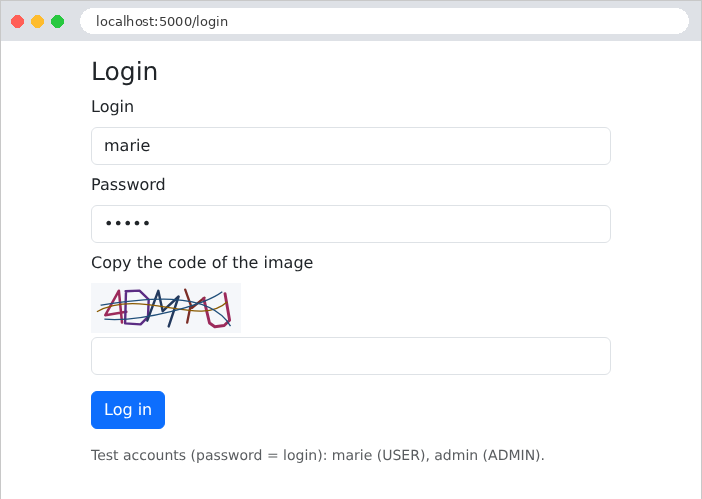
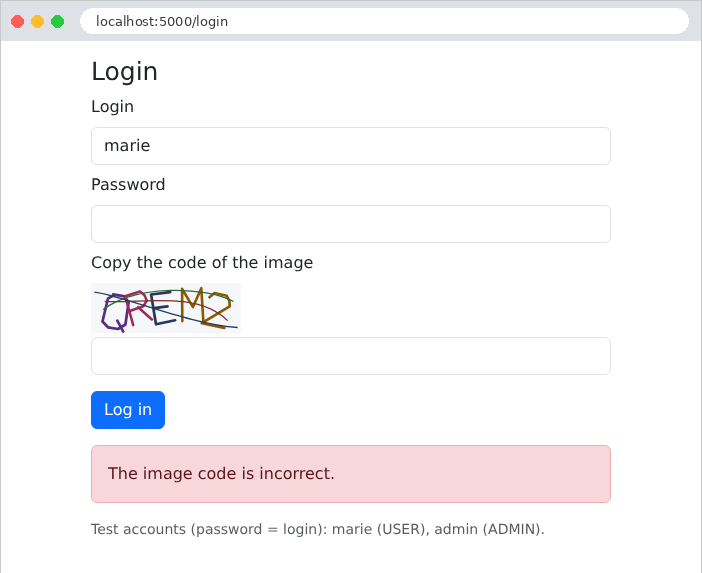
An incorrectly copied code:
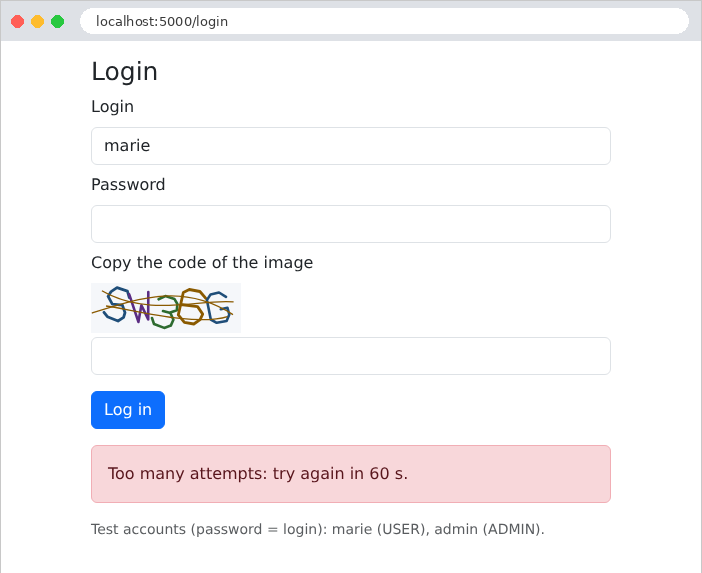
On the third failed attempt, the address is blocked:
With [curl], four attempts with a made-up CAPTCHA ID:
Even with the correct password, the fourth attempt is rejected without verification.