6. Data Scopes
A web application serves many users at once, and each user makes numerous requests. Data can therefore be shared at several levels, known as its scope:
- application scope: the data is shared by all users for the entire lifetime of the server (the list of doctors, for example);
- request scope: the data exists only for the duration of a single request (a view’s model, the logged-in user as identified for that request);
- client scope: the data is specific to a user and must persist from one request to the next (the selected language, the logged-in user).
Web applications have long used a server-maintained session for this last scope: a memory specific to each browser, identified via an identification cookie ([JSESSIONID] in [Java], [PHPSESSID] to [PHP]). The session for [Flask] is different: as we saw in Example 20, it is stored in a signed cookie on the client’s side. The server does not store anything between two requests from the same user: it is said to be stateless. This is what makes it possible, for example, to run multiple identical servers behind a load balancer: any one of them can handle any request. The trade-off is that a cookie is under the user’s control; the user can read it and attempt to modify it. Therefore, only non-sensitive data is stored there, and—if the data must be trusted—it is signed by the server, which then detects any modifications: this is the case for the session [Flask] and the authentication token (see the chapter on authentication).
In [Flask], each scope has its own container:
Scope | Support | Lifetime |
application | An object created at startup, stored in [app.extensions] and retrieved by [current_app] (example 06) | The entire server lifetime, shared by all requests |
Request | The object [g], and the object [request] itself (example 16) | processing a request |
session | the object [session], a dictionary stored in a signed cookie | until the browser is closed (by default) |
client | a standard cookie set by [set_cookie] (example 22) | the duration set by [max_age] |
The objects [current_app], [g], [request], and [session] are imported from the package [flask]. These are proxies (example 05): during a request, each one identifies the object of that request (or of the application processing it).
6.1. Example 23: Scopes
6.1.1. The objects: services/counter.py
- Lines 7–18: a visit counter, with application scope: a single object, shared by all requests. As with the task list in Example 20, a lock protects the increment: the [self._total += 1] statement is not atomic (it reads the value, increments it, then writes it), and two threads executing it simultaneously could read the same value—resulting in a visit being lost;
- lines 22–30: query-scope information: one object per query, containing a number and the time of the query. The number is derived from a counter shared by all instances: [count(1)], from the standard module [itertools], is an iterator that produces 1, 2, 3... each time [next] is called. This is a class attribute (declared at the class level, not in the constructor): it is shared by all instances.
6.1.2. The configuration: app.py
- line 18: the key that signs the session cookie;
- line 21: the application-scope object;
- lines 29–31: Before each request, a [RequestInfo] object is stored in [g]. The action and the view will retrieve it, but only during this request. [strftime("%H:%M:%S.%f")] formats the time with its microseconds ([%f], six digits); [[:-3]] removes the last three characters from the string, leaving the milliseconds.
6.1.3. The controller: controllers/scopes.py
- line 10: the application scope. [current_app] refers to the application processing the current request;
- line 13: the session scope. [session] is used as a dictionary: [session.get("visits", 0)] returns the value of the key, or 0 if it is absent. When the action modifies the session, [Flask] sends, along with the response, a new cookie, [session], which contains the signed dictionary;
- line 16: the client scope, with a regular cookie, [myVisits], read from [request.cookies]. Its value is a string provided by the browser and may therefore be missing or invalid; the function [to_integer] returns 0 in either case;
- Lines 17–20: To set a cookie, you need the response object: [make_response] constructs it from the page generated by the view (example 05), then [set_cookie] adds the header [Set-Cookie] to it. Without [max_age], the cookie lasts until the browser is closed (it is a “session” cookie, as defined by browsers);
- line 18: the request scope: the object stored in [g] by the function [start].
6.1.4. The view: templates/scopes/scopes.html
The objects [g] and [session] are also accessible in the views. The view displays the values received from the action, and, in parentheses, the same values read directly from [g] and [session]: during the same request, the action and the view see the same objects.
6.1.5. Execution
After two visits in a browser:
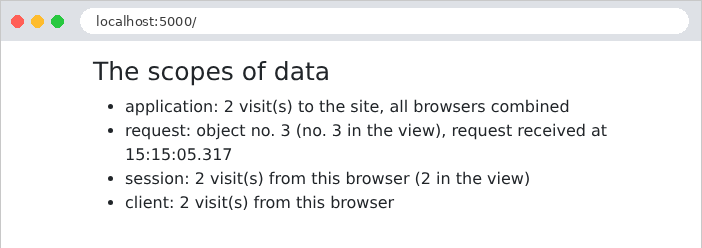
Let's track the requests using [curl], which acts as an initial browser by storing its cookies in the file [a.txt]:
The response sets two cookies. The first, [myVisits], contains the value in plain text. The second, [session], contains the session dictionary: the portion before the first period is JSON [{"visits":1}], encoded in Base64 (uncompressed, as in Example 20, since it is short); followed by the date and the signature.
The request scope object has the number 2, even though this is the first visit to the page: this is because the [start] function runs before every request received by the application, including requests for which no action exists (in this case, a request for a nonexistent URL, made just before) and requests for static files. In the browser, each page thus triggers a second request for the stylesheet of [Bootstrap]: hence the odd numbers in the screenshot. A second visit, with the same cookies:
A second “browser,” with its own cookie file, initially empty:
The application counter has continued running; the session and cookie for the second browser start over at 1. Finally, a malicious user forges their own cookies: 1,000 visits in [myVisits], and a session that purports to contain [{"visits":999}] (Base64-encoded as [eyJ2aXNpdHMiOjk5OX0]), with the signature of another session:
The regular cookie was accepted as is: 1,001 visits. The forged session, however, was rejected: its signature does not match its content, and [Flask] ignored it, as if it were absent. That is the key difference between a regular cookie and a signed cookie. Let’s remember the rule: data coming from the client is only trustworthy if it is signed by the server; and even when signed, it remains readable: we don’t put anything secret in it.