5. Internationalization
An internationalized application displays its text in the user's language. The case study is in French and English. The principle is simple: the views no longer contain text, but rather keys ([MENU.HOME]), and a dictionary for each language associates a text with each key. The selected language is stored in a cookie.
The [Flask] ecosystem offers an extension for this purpose, [Flask-Babel], which relies on the standard translation system [gettext]: texts are extracted from the code by a tool, translated into [.po] files, and then compiled into [.mo] files. It is a powerful system, but it requires specific tools and a compilation step. Instead, we’ll write a small class that reads JSON dictionaries: These are the same files as the [ASP.NET Core MVC], [NestJS], and [Spring MVC] versions from the case study, and their format can be read and written without any special tools. The [Babel] library, on the other hand, is still used for formatting dates and amounts (Example 16).
5.1. Example 22: A Bilingual Application
| 22-i18n/
├── app.py
├── controllers/
│ ├── language.py
│ └── pages.py
├── i18n/
│ ├── en.json
│ └── fr.json
├── static/css/
│ └── styles.css
├── templates/
│ ├── fragments/
│ │ └── navbar.html
│ ├── layout.html
│ └── pages/
│ ├── home.html
│ └── products.html
└── translation/
├── formats.py
└── translator.py
|
5.1.1. Dictionaries
The [i18n/fr.json] file:
| {
"MENU": {
"HOME": "Accueil",
"PRODUCTS": "Produits"
},
"HOME": {
"TITLE": "Bienvenue",
"HELLO": "Bonjour {name} !",
"DATE": "Nous sommes le {date}."
},
"PRODUCTS": {
"TITLE": "Nos produits",
"NAME": "Produit",
"PRICE": "Prix",
"COUNT": "{n} produit(s) au catalogue."
}
}
|
The keys are grouped by theme within nested JSON objects: the menu text “Home” has the full key [MENU.HOME]. A text string may contain placeholders, written as [{name}], which are replaced during translation. The file [i18n/en.json] has exactly the same keys:
| {
"MENU": {
"HOME": "Home",
"PRODUCTS": "Products"
},
"HOME": {
"TITLE": "Welcome",
"HELLO": "Hello {name}!",
"DATE": "Today is {date}."
},
"PRODUCTS": {
"TITLE": "Our products",
"NAME": "Product",
"PRICE": "Price",
"COUNT": "{n} product(s) in the catalogue."
}
}
|
5.1.2. The translation service: translation/translator.py
| # translation/translator.py: the translation service
import json
import re
from pathlib import Path
from flask import g
class Translator:
LANGUAGES = ("fr", "en")
DEFAULT_LANGUAGE = "en"
# {name}: a parameter in a text
PARAMETER = re.compile(r"\{(\w+)\}")
def __init__(self, folder: Path):
# language -> (full key "HOME.HELLO" -> text)
self._dictionaries: dict[str, dict[str, str]] = {}
for language in self.LANGUAGES:
with open(folder / f"{language}.json", encoding="utf-8") as file:
self._dictionaries[language] = self._flatten(json.load(file))
# the supported language that matches [code]: "fr" -> "fr"; "de" or None -> "en"
@classmethod
def language(cls, code: str | None) -> str:
return code if code in cls.LANGUAGES else cls.DEFAULT_LANGUAGE
# translate("HOME.HELLO", name="Marie") -> "Hello Marie!", in the
# language of the current request (g.language, see app.py)
def translate(self, key: str, **parameters) -> str:
# a missing key displays the key itself: an oversight is visible on screen
text = self._dictionaries[g.language].get(key, key)
# each {name} is replaced by the value of the parameter of the same name
return self.PARAMETER.sub(
lambda m: str(parameters.get(m.group(1), m.group(0))), text)
# { "MENU": { "HOME": "Home" } } -> { "MENU.HOME": "Home" }
@classmethod
def _flatten(cls, node: dict, prefix: str = "") -> dict[str, str]:
result = {}
for key, value in node.items():
full_key = f"{prefix}.{key}" if prefix else key
if isinstance(value, dict):
result.update(cls._flatten(value, full_key))
else:
result[full_key] = value
return result
|
- lines 11–12: supported languages and the default language—class attributes shared by all objects of the class and accessible without an object ([Translator.LANGUAGES]);
- line 15: the regular expression for a parameter: a curly brace ([\{], preceded by a [\] because the curly brace has a specific meaning in regular expressions), one or more word characters ([\w+]), and a closing curly brace. The parentheses capture the parameter name. [re.compile] parses the expression once and for all;
- lines 17–22: the constructor reads the dictionaries once, when the service is created. [json.load] converts the contents of a JSON file into [Python] objects (nested dictionaries). [with open(...) as file] opens the file and ensures it is closed at the end of the block; [encoding="utf-8"] is essential, because the default encoding depends on the system (under [Windows], it is not always [UTF-8]);
- Lines 25–27: A class method ([@classmethod] decorator) takes the class ([cls]) instead of an object; it is called on the class: [Translator.language("en")]. It returns the supported language corresponding to a code, or the default language if the code is unknown or missing;
- lines 31–36: the translation of a key, in the language of the current query, read from [g.language] (see Example 16). A key missing from the dictionary is displayed as-is: an omission is immediately visible on the screen. The parameters are received as named parameters ([**parameters]); the regular expression method [sub] replaces each parameter found in the text with the result of a function—in this case, an anonymous function ([lambda m: ...])—which receives the match found ([m]): [m.group(1)] is the captured name, [m.group(0)] is the full text [{name}], which is retained if the parameter was not provided;
- Lines 40–48: The nested JSON objects are “flattened” into a single dictionary, whose keys are the full keys: [{"MENU": {"HOME": "Home"}}] becomes [{"MENU.HOME": "Home"}]. The method is recursive: it calls itself for each nested object, using the current key as a prefix.
| # translation/formats.py: dates and amounts, formatted in the language of the request (see example 16)
from datetime import date
from decimal import Decimal
from babel.dates import format_date
from babel.numbers import format_currency
from flask import g
# a date in full words
def long_date(day: date) -> str:
return format_date(day, format="full", locale=g.language)
# an amount in euros
def money(amount: Decimal) -> str:
return format_currency(amount, "EUR", locale=g.language)
|
The filters in Example 16, which this time use [g.language]. [Babel] accepts a single language ([fr], [en]) as well as a language and a country ([fr_FR]); for [en], it applies U.S. conventions.
5.1.4. Configuration: app.py
| # app.py: the application of example 22
from pathlib import Path
from flask import Blueprint, Flask, g, request
from controllers.language import LANGUAGE_COOKIE, language
from controllers.pages import pages
from translation import formats
from translation.translator import Translator
# Bootstrap, shared by the examples (see example 15)
BOOTSTRAP = Path(__file__).resolve().parent.parent / "common" / "bootstrap"
def create_app():
app = Flask(__name__)
app.jinja_env.trim_blocks = True
app.jinja_env.lstrip_blocks = True
# the translation service: the dictionaries, read ONCE, at startup
translator = Translator(Path(app.root_path) / "i18n")
app.extensions["translator"] = translator
app.register_blueprint(Blueprint("bootstrap", __name__, static_folder=BOOTSTRAP,
static_url_path="/bootstrap"))
app.register_blueprint(language)
app.register_blueprint(pages)
# the language of each request: that of the [language] cookie, English otherwise
@app.before_request
def set_language():
g.language = Translator.language(request.cookies.get(LANGUAGE_COOKIE))
# in the views: {{ t('KEY') }}, {{ day | long_date }}, {{ price | money }}
app.add_template_global(translator.translate, "t")
app.add_template_filter(formats.long_date)
app.add_template_filter(formats.money)
return app
if __name__ == "__main__":
create_app().run(port=5000, debug=True)
|
- lines 20–21: the service, created once at startup. [app.root_path] is the application folder (that of [app.py]);
- Lines 28–30: Before each action, the request language is set to the language of the [language] cookie if one exists and is supported; otherwise, it defaults to English. [request.cookies] is the dictionary of cookies sent by the browser;
- line 33: the service’s [translate] method is made available to views as a global function under a short name, [t] (the second parameter of [add_template_global]). An object method is used like a function: [translator.translate] is a method associated with the object [translator].
5.1.5. Language selection: controllers/language.py
| # controllers/language.py: the choice of the language
from urllib.parse import urlsplit
from flask import Blueprint, abort, redirect, request
from translation.translator import Translator
language = Blueprint("language", __name__)
LANGUAGE_COOKIE = "language"
# GET /language/fr: stores the choice in a cookie, then goes back to the previous page
@language.get("/language/<code>")
def change(code):
if code not in Translator.LANGUAGES:
abort(404)
response = redirect(origin_page())
# the cookie: one year of life, unreadable by the JavaScript of the page (httponly),
# never sent with a POST request coming from another site (samesite)
response.set_cookie(LANGUAGE_COOKIE, code, max_age=365 * 24 * 3600, httponly=True,
samesite="Lax")
return response
# the page we come from (Referer header), of which we keep only the path:
# redirecting to a complete address coming from the request would allow
# sending the user to another site ("open redirect" flaw)
def origin_page() -> str:
url = urlsplit(request.headers.get("Referer", ""))
path = url.path
# "//site.com/..." would be understood by the browser as an address
# on ANOTHER site: rejected too
if not path.startswith("/") or path.startswith("//"):
return "/"
return f"{path}?{url.query}" if url.query else path
|
- line 16: an unknown language code: 404;
- line 18: the action responds with a redirect to the page the user came from: the user is returned to that page, in the new language;
- Lines 21–22: The response includes a cookie, which the browser will send back with every request. [max_age] is its lifetime, in seconds: one year. [httponly=True] makes it invisible to the [JavaScript] on the page; [samesite="Lax"] prevents the browser from sending it with a POST request originating from another site. Unlike the session cookie (example 20), this cookie is not signed: it’s not a problem if the user modifies it, as the server only accepts supported languages;
- lines 29–36: the original page is specified by the [Referer] header in the request (the misspelled version, with a single [r], is the one used in the HTTP standard), which the browser populates with the URL from the page that contained the link. But this header comes from the client, which can put anything in it. Blindly redirecting to this address would turn our application into an *open redirect*: a malicious link bearing our domain name could send the user to a malicious site. Therefore, we retain only the path and parameters of URL ([urlsplit] breaks it down into its components), and we reject any path that begins with [//], which the browser would interpret as the address of another site.
5.1.6. Actions: controllers/pages.py
| # controllers/pages.py: the actions know nothing about the language: they
# provide data, the views translate and format them
from dataclasses import dataclass
from datetime import date
from decimal import Decimal
from flask import Blueprint, render_template
pages = Blueprint("pages", __name__)
@dataclass
class Product:
name: str
price: Decimal
@pages.get("/")
def home():
return render_template("pages/home.html", name="Marie", today=date(2026, 9, 23))
@pages.get("/products")
def products():
return render_template("pages/products.html", products=[
Product("Keyboard", Decimal("25")),
Product("Mouse", Decimal("12.5")),
Product("Screen", Decimal("1149")),
])
|
Actions are language-agnostic: they provide raw data (a name, a date, amounts). Translation and formatting are handled by the views.
5.1.7. Translate in the views
| <!doctype html>
{# g.language: the language of the request, "fr" or "en" #}
<html lang="{{ g.language }}">
<head>
<meta charset="utf-8">
{# the title is a KEY, provided by the page (title_key variable), translated by the layout #}
<title>{{ t(title_key) }}</title>
<link rel="stylesheet" href="{{ url_for('bootstrap.static', filename='css/bootstrap.min.css') }}">
<link rel="stylesheet" href="{{ url_for('static', filename='css/styles.css') }}">
</head>
<body>
<div class="container py-3">
{% include "fragments/navbar.html" %}
<main>
{% block content %}{% endblock %}
</main>
</div>
</body>
</html>
|
- Line 3: The page’s [lang] attribute indicates its language to browsers, search engines, and screen readers;
- line 7: The page title is different for each page, but it is translated by the template. Each page provides the key for its title in a variable, [title_key].
| <nav class="navbar navbar-expand bg-light rounded mb-3 px-3">
<div class="navbar-nav me-auto">
{# t('KEY'): the translation of a key, in the language of the request #}
<a class="nav-link" href="/">{{ t("MENU.HOME") }}</a>
<a class="nav-link" href="/products">{{ t("MENU.PRODUCTS") }}</a>
</div>
{# the current language is highlighted #}
<div class="btn-group btn-group-sm">
{% for code in ["fr", "en"] %}
<a class="btn {{ 'btn-primary' if g.language == code else 'btn-outline-primary' }}"
href="/language/{{ code }}">{{ code | upper }}</a>
{% endfor %}
</div>
</nav>
|
- lines 4–5: the menu texts, translated;
- lines 9–12: one button per language, which leads to the action [/language/<code>]. The current language is highlighted ([btn-primary], solid button).
| {% extends "layout.html" %}
{# a variable defined OUTSIDE the blocks is visible to the layout #}
{% set title_key = "HOME.TITLE" %}
{% block content %}
<h1>{{ t("HOME.TITLE") }}</h1>
{# a parameter: a keyword parameter of the t function #}
<p>{{ t("HOME.HELLO", name=name) }}</p>
{# the date, formatted first, then passed as the [date] parameter #}
<p>{{ t("HOME.DATE", date=today | long_date) }}</p>
{% endblock %}
|
- line 3: a variable defined outside the blocks of a page that extends a template is visible to the template: this is how the page passes its title key to the template. (A variable defined within a block, on the other hand, would remain local to that block.);
- line 8: a text parameter is a named parameter of the function [t];
- Line 10: The date, formatted in the language of the request, then passed as a parameter.
| {% extends "layout.html" %}
{% set title_key = "PRODUCTS.TITLE" %}
{% block content %}
<h1>{{ t("PRODUCTS.TITLE") }}</h1>
<table class="table table-sm w-auto">
<thead><tr><th>{{ t("PRODUCTS.NAME") }}</th><th class="text-end">{{ t("PRODUCTS.PRICE") }}</th></tr></thead>
<tbody>
{% for product in products %}
<tr>
<td>{{ product.name }}</td>
<td class="text-end">{{ product.price | money }}</td>
</tr>
{% endfor %}
</tbody>
</table>
<p>{{ t("PRODUCTS.COUNT", n=products | length) }}</p>
{% endblock %}
|
- Line 17: a calculated parameter. The product names, however, are not translated: they are data that, in a real application, would come from a database.
5.1.8. Execution
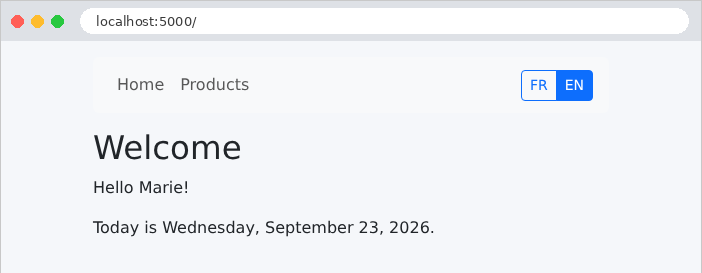
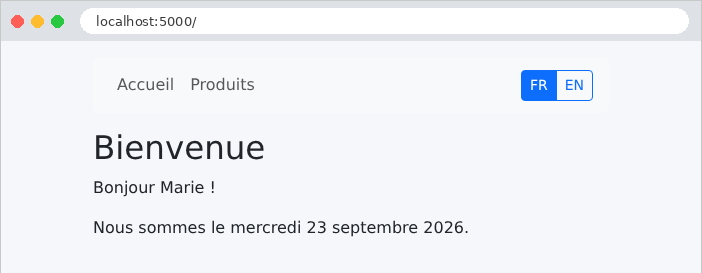
The home page, in English (the default language), then in French after clicking the “FR” button:
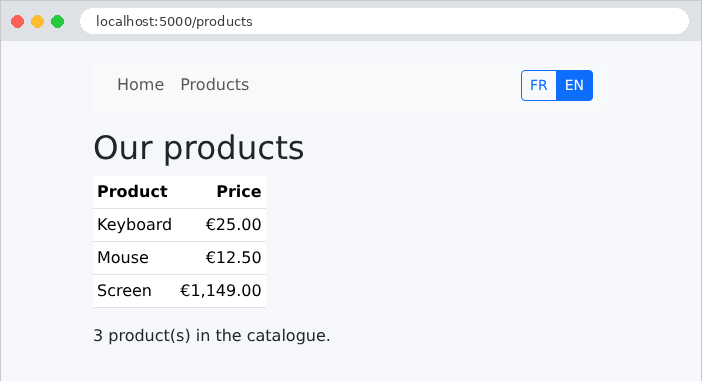
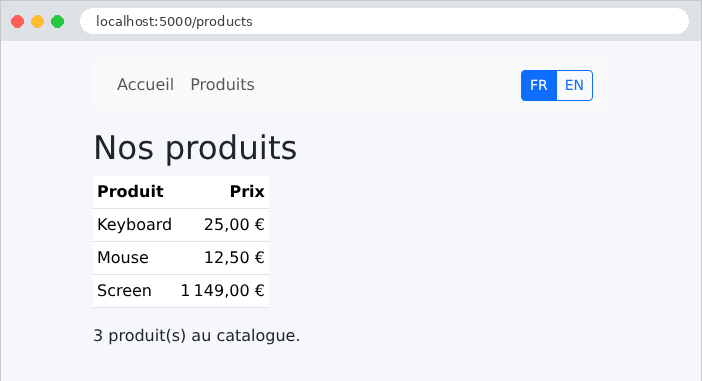
The products page, in both languages. The amounts follow the conventions of each language:
The language switch, as seen with [curl]. The option [-H] provides the header [Referer] that the browser would send:
| curl -i -H "Referer: http://localhost:5000/products" http://localhost:5000/language/en
|
| HTTP/1.1 302 FOUND
Content-Type: text/html; charset=utf-8
Content-Length: 205
Location: /products
Set-Cookie: language=en; Expires=Sun, 26 Sep 2027 13:37:04 GMT; Max-Age=31536000; HttpOnly; Path=/; SameSite=Lax
...
|
The redirect takes you back to the original page, and the cookie is set for one year. A [Referer] that points to another site does not redirect you there: only its path is retained.
| curl -i -H "Referer: https://pirate.example/trap" http://localhost:5000/language/en
curl -i -H "Referer: http://localhost:5000//pirate.example/x" http://localhost:5000/language/fr
|
| HTTP/1.1 302 FOUND
...
Location: /trap
HTTP/1.1 302 FOUND
...
Location: /
|
The page [/trap] does not exist on our site: the user will receive a 404 error but will remain on our site. Finally, the home page, requested with the cookie [language=en] (option [-b] of [curl]):
| curl -b "language=en" http://localhost:5000/
|
| <!doctype html>
<html lang="en">
<head>
<meta charset="utf-8">
<title>Welcome</title>
...
<a class="nav-link" href="/">Home</a>
<a class="nav-link" href="/products">Products</a>
...
<h1>Welcome</h1>
<p>Hello Marie!</p>
<p>Today is Wednesday, September 23, 2026.</p>
...
|
Another way to select the language would have been to read the browser’s [Accept-Language] header (Example 12). The two are often combined: the browser’s language on the first visit, followed by the language the user has selected. This case study focuses on the cookie, with English as the default.