9. Layered Architecture and Data Access
The previous examples kept their data in memory. A real application stores it in a database and is organized into layers (see the diagram in the introduction):
- the web layer (controllers, views): read the request, call the business layer, select the view;
- the business layer: business rules;
- the DAO layer (*Data Access Object*): database queries.
Each layer is aware only of the layer below it, and as few of its details as possible: the web layer is unaware of SQL, and the business layer is unaware of HTML. This separation makes each layer easier to understand, test, and evolve. Example 28 applies this to managing a list of people: it is, on a smaller scale, the management of doctors and clients from the case study.
In [Python], database access is organized across several layers:
- The DB-API standard (PEP 249) defines the common interface for database drivers: open a connection, execute a SQL command, and read rows. For [MySQL] (and [MariaDB]), we use [PyMySQL], a driver written entirely in [Python], which installs without a compiler;
- [SQLAlchemy] is the most widely used data access library in [Python]. It has two levels. Its core (*Core*) manages connections (including a connection pool, which keeps a few connections open and lends them to queries, since opening a connection is costly) and constructs SQL statements from [Python] expressions, regardless of the DBMS. Its ORM (*Object-Relational Mapper*) maps [Python] classes (the entities) to database tables and transforms the read rows into objects.
This is equivalent to [JDBC], [JPA] and [Hibernate] to [Java], or [Entity Framework Core] to [C#]. The [Flask-SQLAlchemy] extension slightly simplifies the configuration of [SQLAlchemy] in a [Flask] application; we use [SQLAlchemy] directly, which demonstrates what is happening and keeps the business layers and DAO independent of [Flask].
The example requires a running [MySQL] (or [MariaDB]) server: the appendix explains how to install one using [Laragon].
9.1. Example 28: A Three-Tiered Personnel Management System
| 28-layers/
├── app.py
├── business/
│ ├── data.py
│ ├── exception.py
│ └── persons_business.py
├── config.py
├── controllers/
│ └── persons.py
├── dao/
│ └── persons_dao.py
├── database/
│ └── dbpersons.sql
├── entities/
│ └── person.py
├── models/
│ └── person_form.py
├── static/
│ ├── css/
│ │ └── styles.css
│ └── js/
│ └── app.js
└── templates/
├── fragments/
│ ├── confirmation.html
│ └── field.html
├── layout.html
└── persons/
├── form.html
└── list.html
|
9.1.1. The database
The database [dbpersons] is created by the script SQL. Using [Laragon], you can run it, for example, in the [HeidiSQL] tool (File menu / Run a SQL file), or from the command line, from the example folder:
| mysql -u root < database/dbpersons.sql
|
The [database/dbpersons.sql] file:
| -- database of example 28: a single table, [persons]
-- the script is written in UTF-8
SET NAMES utf8mb4;
DROP DATABASE IF EXISTS dbpersons;
CREATE DATABASE dbpersons CHARACTER SET utf8mb4 COLLATE utf8mb4_unicode_ci;
USE dbpersons;
CREATE TABLE persons (
id INT NOT NULL AUTO_INCREMENT,
-- the version of the row, increased by SQLAlchemy at each modification
version INT NOT NULL DEFAULT 0,
first_name VARCHAR(30) NOT NULL,
last_name VARCHAR(30) NOT NULL,
age INT NOT NULL,
PRIMARY KEY (id),
-- two persons cannot have the same first and last names
CONSTRAINT unq_persons_first_name_last_name UNIQUE (first_name, last_name)
) ENGINE = InnoDB;
INSERT INTO persons (first_name, last_name, age) VALUES
('Marie', 'Pélissier', 42),
('Jacques', 'Bromard', 35),
('Philippe', 'Jandot', 58);
|
- Line 3: The script is written in [UTF-8]; this is specified to the server so that accents in the data ([Pélissier]) remain intact;
- line 5: the character set [utf8mb4] accepts all characters (accents, emojis, etc.). The [utf8mb4_unicode_ci] collation compares strings without distinguishing between uppercase and lowercase letters or accents: for [MySQL], [pelissier], and [Pélissier] are equal;
- line 11: a version number, incremented each time the line is modified (see “optimistic lock,” below);
- line 17: a named uniqueness constraint: the database does not allow two people with the same first and last names. The name will be used to identify the error.
9.1.2. The configuration
| # config.py: the configuration of the application (see example 25)
# the secret key: it signs the session (flash messages) and the anti-CSRF tokens
SECRET_KEY = "a-secret-key-for-example-28"
# the error messages of WTForms are translated by WTForms itself (see example 19)
WTF_I18N_ENABLED = False
# the connection to the database: a SQLAlchemy URL.
# mysql+pymysql: the MySQL DBMS, through the PyMySQL driver
# root: : the root user, without a password (those of Laragon);
# with a password: root:myPassword@...
# localhost:3306/dbpersons: the server, its port, the database
# charset=utf8mb4: the exchanges with the database are done in UTF-8
DATABASE_URL = "mysql+pymysql://root:@localhost:3306/dbpersons?charset=utf8mb4"
# True: the SQL statements sent to the database are displayed in the console
SQL_ECHO = False
|
- Line 15: [SQLAlchemy] refers to a base identified by URL. [mysql+pymysql]: the dialect SQL ([MySQL]) and the driver ([PyMySQL]); then the user and their password (here, [root]; without a password, the configuration is [Laragon]), the server, its port, and the database; finally, the settings: [charset=utf8mb4] enables communication between the driver and the server at [UTF-8]. If your server has a password, modify this line, or set the environment variable [FLASK_DATABASE_URL] (example 25);
- Line 18: At [True], [SQLAlchemy] displays in the console every SQL command sent to the database. This is very informative, and we’ll use it later on.
| # app.py: the application of example 28; the assembly of the three layers
from pathlib import Path
from flask import Blueprint, Flask
from flask_wtf.csrf import CSRFProtect
from sqlalchemy import create_engine
from sqlalchemy.orm import sessionmaker
from controllers.persons import persons
from dao.persons_dao import PersonsDao
from business.persons_business import PersonsBusiness
BOOTSTRAP = Path(__file__).resolve().parent.parent / "common" / "bootstrap"
def create_app():
app = Flask(__name__)
app.jinja_env.trim_blocks = True
app.jinja_env.lstrip_blocks = True
app.config.from_pyfile("config.py")
app.config.from_prefixed_env()
# the access to the database: the SQLAlchemy "engine" manages a POOL of connections
# (connections opened once, then reused from one request to the next).
# pool_pre_ping: a connection is tested before being reused
engine = create_engine(app.config["DATABASE_URL"], echo=app.config["SQL_ECHO"],
pool_pre_ping=True)
# the session factory; expire_on_commit=False: the objects read remain
# usable after the end of the transaction (by the view, in particular)
sessions = sessionmaker(engine, expire_on_commit=False)
# the assembly of the layers: DAO -> business; the web layer only knows the business layer
app.extensions["business"] = PersonsBusiness(sessions, PersonsDao())
app.register_blueprint(Blueprint("bootstrap", __name__, static_folder=BOOTSTRAP,
static_url_path="/bootstrap"))
app.register_blueprint(persons)
CSRFProtect(app)
return app
if __name__ == "__main__":
create_app().run(port=5000, debug=True)
|
- Lines 26–27: The *engine* of [SQLAlchemy] is the object that manages connections to a database and the connection pool. It is created once, at startup; the first connection is opened only upon the first request. [pool_pre_ping=True] checks a connection from the pool before reusing it: a [MySQL] server closes connections that have been inactive for too long, and the application would otherwise receive an error;
- Line 30: A session of type ORM is the object used to read from and write to entities; it borrows a connection from the pool and tracks the entities it has read to detect changes to them. [sessionmaker] creates a session factory, each call to which will produce a session. By default, at the end of a transaction, the session “expires” the entities (it forgets their values, to read them again the next time they are used). [expire_on_commit=False] prevents this: the entities returned by the business layer remain usable after the transaction, by the view that displays them;
- line 33: assembling the layers: the business layer receives the session factory and the DAO layer. The web layer will only be aware of the business layer;
- line 38: Anti-CSRF protection for the entire application (Example 21).
9.1.3. The Person Entity
| # entities/person.py: a row of the [persons] table
from sqlalchemy import String
from sqlalchemy.orm import DeclarativeBase, Mapped, mapped_column
# the parent class of all the entities: SQLAlchemy records in it the
# class <-> table mapping of each of its child classes
class Base(DeclarativeBase):
pass
class Person(Base):
# the name of the table
__tablename__ = "persons"
# the primary key, generated by the database (AUTO_INCREMENT); SQLAlchemy reads
# its value back after each INSERT. Mapped[int]: the Python type of the column
id: Mapped[int] = mapped_column(primary_key=True)
# the optimistic lock: see __mapper_args__ below
version: Mapped[int] = mapped_column()
first_name: Mapped[str] = mapped_column(String(30))
last_name: Mapped[str] = mapped_column(String(30))
age: Mapped[int]
# version_id_col: SQLAlchemy increases the version at each UPDATE, and adds
# the condition "AND version = <value read>"
__mapper_args__ = {"version_id_col": version}
def __init__(self, first_name: str, last_name: str, age: int):
self.first_name = first_name
self.last_name = last_name
self.age = age
|
- lines 8–9: All entities in an application inherit from the same base class, derived from [DeclarativeBase]. [SQLAlchemy] stores the description of each entity (its table, its columns) in this class: this is the declarative model;
- line 14: the table associated with the class;
- line 18: a column is declared by an attribute annotated with [Mapped[type]]: the column’s type, [Python]. [mapped_column] specifies its characteristics: in this case, the primary key. By default, an integer primary key is generated by the database ([AUTO_INCREMENT]): [SQLAlchemy] re-reads its value after each [INSERT];
- Lines 21–23: [String(30)] specifies the column length (useful if [SQLAlchemy] were to create the table itself). A column with no special characteristics can simply use the annotation ([age]). The type [Mapped[str]] makes the column required ([NOT NULL]); [Mapped[str | None]] would make it optional;
- line 27: [version_id_col] designates the version column: [SQLAlchemy] increments it with each [UPDATE], and adds the condition [AND version = <value read>] to it. If another query has modified the row in the meantime, its version has changed; [UPDATE] does not modify any rows, and [SQLAlchemy] throws a [StaleDataError] exception. This is an optimistic lock: nothing is blocked, but concurrent modifications are detected;
- Lines 29–32: a constructor to create a person in a single line.
9.1.4. The DAO layer
| # dao/persons_dao.py: the DAO layer, queries, no business rule.
# Each method receives the SQLAlchemy SESSION, opened by the business
# layer: all the queries of a same operation thus share the same
# connection, and the same transaction
from sqlalchemy import delete, select
from sqlalchemy.orm import Session
from entities.person import Person
class PersonsDao:
# SELECT ... FROM persons ORDER BY last_name, first_name
def list(self, session: Session) -> list[Person]:
return list(session.scalars(select(Person).order_by(Person.last_name, Person.first_name)))
# SELECT ... WHERE id = ?; None if the person does not exist
def read(self, session: Session, id: int) -> Person | None:
return session.get(Person, id)
# a person with the same first and last names, other than [except_id]:
# SELECT ... WHERE first_name = ? AND last_name = ? AND id <> ? LIMIT 1
def namesake(self, session: Session, first_name: str, last_name: str, except_id: int = 0) -> Person | None:
query = select(Person).where(Person.first_name == first_name, Person.last_name == last_name,
Person.id != except_id).limit(1)
return session.scalars(query).first()
# INSERT (new person): the person is added to the session, and
# flush sends the SQL statement RIGHT AWAY (and not at COMMIT)
def add(self, session: Session, person: Person) -> Person:
session.add(person)
session.flush()
return person
# DELETE FROM persons WHERE id = ?
def delete(self, session: Session, id: int):
session.execute(delete(Person).where(Person.id == id))
|
The DAO layer contains only queries, with no business rules. Each method receives the session opened by the business layer: all queries for a single business operation thus share the same connection and the same transaction.
- Line 15: [select(Person)] constructs a query ([SELECT]) on the "persons" table; [order_by] sorts it. The columns are written as attributes of the class ([Person.last_name]): the editor can verify their names, and no SQL is written by hand. [session.scalars(...)] executes the query and returns the entities constructed from the read rows;
- line 19: reading by primary key, or [None];
- lines 23–26: [where] adds conditions, written using the operators from [Python] ([==], [!=]): [SQLAlchemy] translates them into SQL, with parameters (the values are never copied into the text of the SQL command, which makes SQL injection impossible). [first()] returns the first entity, or [None];
- lines 30–33: [session.add] assigns a new entity to the session; [flush] immediately sends [INSERT] to the database (without [flush], it would go to [COMMIT]). The database then generates the ID, which [SQLAlchemy] stores in the entity;
- line 37: a [DELETE], constructed in the same way.
9.1.5. The business layer
| # business/data.py: the data of a person, as the web layer passes them on
from dataclasses import dataclass
@dataclass(frozen=True)
class PersonData:
first_name: str
last_name: str
age: int
|
A person’s data, as transmitted by the web layer to the business layer: a simple object, unrelated to [Flask], [WTForms], or [SQLAlchemy].
| # business/exception.py: a business rule refuses the operation; the message
# is intended for the user
class BusinessException(Exception):
pass
|
An exception class specific to the business layer: a business rule rejects the operation, and the exception message is intended for the user.
| # business/persons_business.py: the BUSINESS layer, the business rules, and only them.
# Each method opens its TRANSACTION: committed (COMMIT) at the end of the with
# block, cancelled (ROLLBACK) if an exception comes out of it
from sqlalchemy.exc import IntegrityError
from sqlalchemy.orm import sessionmaker
from sqlalchemy.orm.exc import StaleDataError
from dao.persons_dao import PersonsDao
from entities.person import Person
from business.data import PersonData
from business.exception import BusinessException
NAMESAKE = "A person already has these first and last names."
MODIFIED = "This record has been modified meanwhile: reload it."
UNKNOWN = "This person does not exist (anymore)."
class PersonsBusiness:
# sessions: the SQLAlchemy session "factory" (see app.py)
def __init__(self, sessions: sessionmaker, dao: PersonsDao):
self._sessions = sessions
self._dao = dao
def list(self) -> list[Person]:
# sessions.begin(): a session AND its transaction; the with block closes them
with self._sessions.begin() as session:
return self._dao.list(session)
def read(self, id: int) -> Person:
with self._sessions.begin() as session:
return self._read(session, id)
def add(self, data: PersonData) -> Person:
try:
with self._sessions.begin() as session:
# rule 1: no two persons with the same first and last names
if self._dao.namesake(session, data.first_name, data.last_name):
raise BusinessException(NAMESAKE)
return self._dao.add(session, Person(data.first_name, data.last_name, data.age))
except IntegrityError as e:
raise self._translate(e)
def edit(self, id: int, version: int | None, data: PersonData) -> Person:
try:
with self._sessions.begin() as session:
person = self._read(session, id)
# rule 2: we do not modify a record modified meanwhile by someone else
if person.version != version:
raise BusinessException(MODIFIED)
if self._dao.namesake(session, data.first_name, data.last_name, id):
raise BusinessException(NAMESAKE)
# the entity read is "tracked" by the session: it is enough to
# modify it; flush sends the UPDATE right away
person.first_name = data.first_name
person.last_name = data.last_name
person.age = data.age
session.flush()
return person
except StaleDataError:
# the UPDATE "WHERE id = ... AND version = ..." modified no row
raise BusinessException(MODIFIED)
except IntegrityError as e:
raise self._translate(e)
def delete(self, id: int) -> Person:
with self._sessions.begin() as session:
person = self._read(session, id)
self._dao.delete(session, id)
return person
def _read(self, session, id: int) -> Person:
person = self._dao.read(session, id)
if person is None:
raise BusinessException(UNKNOWN)
return person
# two simultaneous additions: the uniqueness constraint of the database rejected the
# second one; e.orig: the original error, that of the PyMySQL driver
@staticmethod
def _translate(e: IntegrityError) -> Exception:
if "unq_persons_first_name_last_name" in str(e.orig):
return BusinessException(NAMESAKE)
return e
|
- Line 27: Each method opens its own session and transaction: [sessions.begin()] returns a session with a transaction that has been started. At the end of the [with] block, the transaction is committed ([COMMIT]) and the session is closed; if an exception occurs within the block, the transaction is rolled back ([ROLLBACK]): none of the changes made within the block are retained. The business layer thus determines the scope of transactions: one business operation equals one transaction;
- lines 34–42: Rule No. 1: No two people may have the same first and last names. The business layer checks this rule before writing to the database and raises a [BusinessException] if it is not met. But this check is not sufficient: two simultaneous requests could both verify that there are no namesakes, and then both proceed to insert the data. The database’s uniqueness constraint then rejects the second [INSERT], and [SQLAlchemy] triggers a [IntegrityError], which the [_translate] method transforms into the same [BusinessException]. The database is the last line of defense;
- lines 44–64: Rule No. 2: Do not modify a record that has been modified in the meantime by someone else. The update form carries the version of the record that was read (in a hidden field); if it differs from the current version, the record has changed since it was displayed. Here again, the database (via the optimistic lock) detects cases where a concurrent modification occurs between the read and the [UPDATE]: this is the [StaleDataError] exception. Note that the modification is performed simply by changing the attributes of the read entity: the session tracks this, and [flush] sends a [UPDATE] containing only the modified columns;
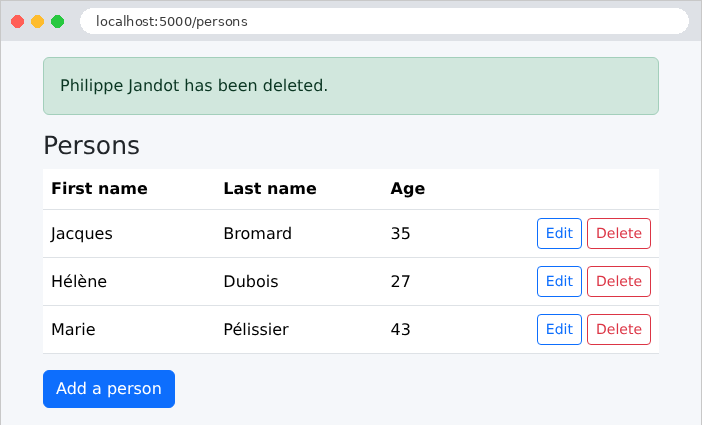
- lines 66–70: Deleting a person results in the confirmation message;
- lines 72–76: A nonexistent person is a business error;
- lines 80–84: A static method does not accept either an object or a class; it is simply a function defined within the class. [e.orig] is the original exception, that of the driver [PyMySQL], whose message contains the name of the violated constraint. Another integrity error is reported as-is: this is not a business error, but a programming error.
9.1.6. The Web Layer
| # models/person_form.py: the fields of the form and their constraints (see example 19)
from flask_wtf import FlaskForm
from wtforms import HiddenField, IntegerField, StringField
from wtforms.validators import DataRequired, InputRequired, Length, NumberRange, Optional
def clean(value):
return value.strip() if isinstance(value, str) else value
# a version: an integer, or None if the field is empty (add form)
def integer_or_none(value):
return int(value) if value not in (None, "") else None
class PersonForm(FlaskForm):
class Meta:
locales = ["en"]
first_name = StringField("First name", filters=[clean], validators=[
DataRequired("The first name is required."), Length(max=30, message="30 characters at most.")])
last_name = StringField("Last name", filters=[clean], validators=[
DataRequired("The last name is required."), Length(max=30, message="30 characters at most.")])
age = IntegerField("Age", validators=[
InputRequired("The age is required."),
NumberRange(min=0, max=150, message="The age must be between 0 and 150.")])
# the version of the record, carried by a hidden field (edit only)
version = HiddenField(filters=[integer_or_none])
|
The form [WTForms] (Example 19). The hidden field [version] has a filter that converts it to an integer, or to [None] if it is empty (add form).
| # controllers/persons.py: the WEB layer; it only knows the business layer
from flask import Blueprint, current_app, flash, redirect, render_template, url_for
from business.data import PersonData
from business.exception import BusinessException
from business.persons_business import PersonsBusiness
from models.person_form import PersonForm
persons = Blueprint("persons", __name__)
def business() -> PersonsBusiness:
return current_app.extensions["business"]
@persons.get("/")
def home():
return redirect(url_for("persons.list_persons"))
@persons.get("/persons")
def list_persons():
return render_template("persons/list.html", persons=business().list())
@persons.get("/persons/add")
def add_form():
return form_page("Add a person", url_for("persons.add"), PersonForm())
@persons.post("/persons/add")
def add():
form = PersonForm()
if not form.validate():
return form_page("Add a person", url_for("persons.add"), form)
try:
p = business().add(PersonData(form.first_name.data, form.last_name.data, form.age.data))
except BusinessException as e:
# a business rule refuses: we display the form again, the message at the bottom of the page
return form_page("Add a person", url_for("persons.add"), form, str(e))
flash(f"{p.first_name} {p.last_name} has been added.", "success")
return redirect(url_for("persons.list_persons"))
@persons.get("/persons/<int:id>/edit")
def edit_form(id):
try:
p = business().read(id)
except BusinessException as e:
flash(str(e), "error")
return redirect(url_for("persons.list_persons"))
# obj=p: the fields of the form are filled with the attributes of p of the same name
return form_page("Edit a person", url_for("persons.edit", id=id),
PersonForm(obj=p))
@persons.post("/persons/<int:id>/edit")
def edit(id):
action = url_for("persons.edit", id=id)
form = PersonForm()
if not form.validate():
return form_page("Edit a person", action, form)
try:
data = PersonData(form.first_name.data, form.last_name.data, form.age.data)
p = business().edit(id, form.version.data, data)
except BusinessException as e:
return form_page("Edit a person", action, form, str(e))
flash(f"{p.first_name} {p.last_name} has been edited.", "success")
return redirect(url_for("persons.list_persons"))
@persons.post("/persons/<int:id>/delete")
def delete(id):
try:
p = business().delete(id)
flash(f"{p.first_name} {p.last_name} has been deleted.", "success")
except BusinessException as e:
# no form to display again: the error also travels as a flash message
flash(str(e), "error")
return redirect(url_for("persons.list_persons"))
# the page of the form: title, submission address, form, global error
def form_page(title: str, action: str, form: PersonForm, error: str | None = None):
return render_template("persons/form.html", title=title, action=action,
form=form, error=error)
|
- lines 12–13: the business layer, the only layer known to the controller;
- lines 32–42: the add operation, in three steps: form validation (input errors), calling the business layer (business rules), then the PRG schema. A [BusinessException] re-displays the form, along with its footer message. [flash] receives a category as its second parameter (["success"]), which the template uses to select the message’s presentation;
- lines 46–54: the edit form, pre-filled: the parameter [obj] fills the form fields with the object’s attributes of the same name, including the version. A nonexistent person redirects to the list, with a flashing error message;
- lines 58–69: the edit, following the same pattern as the add operation;
- lines 73–80: deletion. There is no form to redisplay: any error is also displayed in a pop-up message, of category ["error"].
The web layer contains neither SQL nor any business rules: it translates the request into a call to the business layer and the result into a page.
| <!doctype html>
<html lang="en">
<head>
<meta charset="utf-8">
<title>Persons</title>
<link rel="stylesheet" href="{{ url_for('bootstrap.static', filename='css/bootstrap.min.css') }}">
<link rel="stylesheet" href="{{ url_for('static', filename='css/styles.css') }}">
</head>
<body>
<div class="container py-3" style="max-width: 40rem">
{# the success messages (flash messages of the "success" category): at the top #}
{% for message in get_flashed_messages(category_filter=["success"]) %}
<div class="alert alert-success" role="status">{{ message }}</div>
{% endfor %}
<main>
{% block content %}{% endblock %}
</main>
{# the error: of the current request, or from before the redirect (flash message) #}
{% for message in get_flashed_messages(category_filter=["error"]) + ([error] if error else []) %}
<div class="error-area" role="alert">{{ message }}</div>
{% endfor %}
</div>
{% include "fragments/confirmation.html" %}
<script src="{{ url_for('static', filename='js/app.js') }}"></script>
</body>
</html>
|
- lines 12–14: [category_filter] renders only the flash messages of the specified categories: success messages, at the top of the page;
- lines 19–21: errors, at the bottom of the page: those occurring before a redirect (flash messages), followed by the error from the current request (variable [error]). The operator [+] concatenates two lists.
| {% extends "layout.html" %}
{% block content %}
<h1 class="h3">Persons</h1>
<table class="table align-middle">
<thead><tr><th>First name</th><th>Last name</th><th>Age</th><th></th></tr></thead>
<tbody>
{% for p in persons %}
<tr>
<td>{{ p.first_name }}</td>
<td>{{ p.last_name }}</td>
<td>{{ p.age }}</td>
<td class="text-end">
<a class="btn btn-sm btn-outline-primary" href="{{ url_for('persons.edit_form', id=p.id) }}">Edit</a>
<form method="post" class="d-inline" action="{{ url_for('persons.delete', id=p.id) }}"
data-confirmation="Delete {{ p.first_name }} {{ p.last_name }}?">
<input type="hidden" name="csrf_token" value="{{ csrf_token() }}">
<button class="btn btn-sm btn-outline-danger" type="submit">Delete</button>
</form>
</td>
</tr>
{% endfor %}
</tbody>
</table>
<a class="btn btn-primary" href="{{ url_for('persons.add_form') }}">Add a person</a>
{% endblock %}
|
The list includes the links and buttons from Example 21, along with its confirmation window (the files [fragments/confirmation.html] and [static/js/app.js] are those from Example 21).
| {% extends "layout.html" %}
{% from "fragments/field.html" import field_row %}
{% block content %}
<h1 class="h3">{{ title }}</h1>
<form method="post" action="{{ action }}" novalidate>
{{ form.csrf_token }}
{# the version of the record read: it will come back with the form #}
{{ form.version }}
{{ field_row(form.first_name) }}
{{ field_row(form.last_name) }}
{{ field_row(form.age) }}
<button class="btn btn-primary" type="submit">Save</button>
<a class="btn btn-link" href="{{ url_for('persons.list_persons') }}">Cancel</a>
</form>
{% endblock %}
|
- line 9: the hidden field that carries the version of the record being read;
- Lines 10–12: the macro from Example 19.
9.1.7. Execution
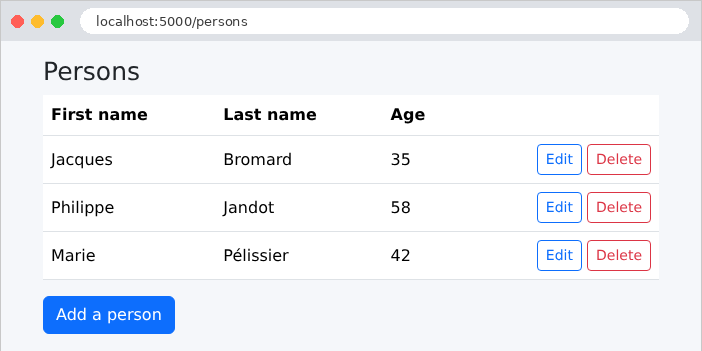
The list of people:
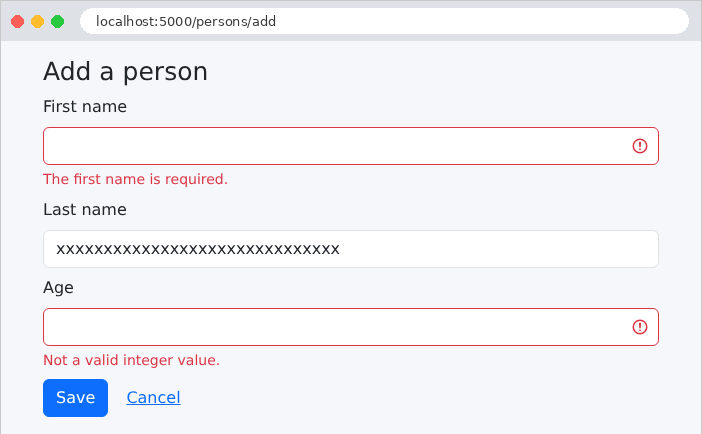
An incorrectly filled-out add form: data entry errors are detected by the web layer.
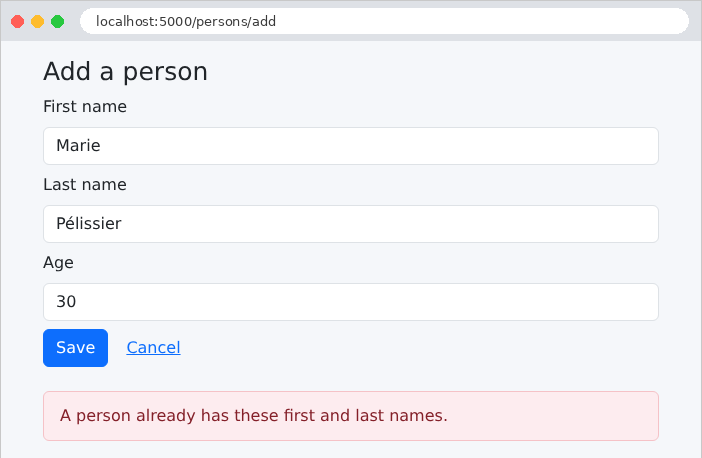
A homonym: the entry is correct, but the business layer rejects the addition. Since the comparison is performed by the database, it ignores both uppercase letters and accents: [marie pelissier] would also be a homonym of [Marie Pélissier].
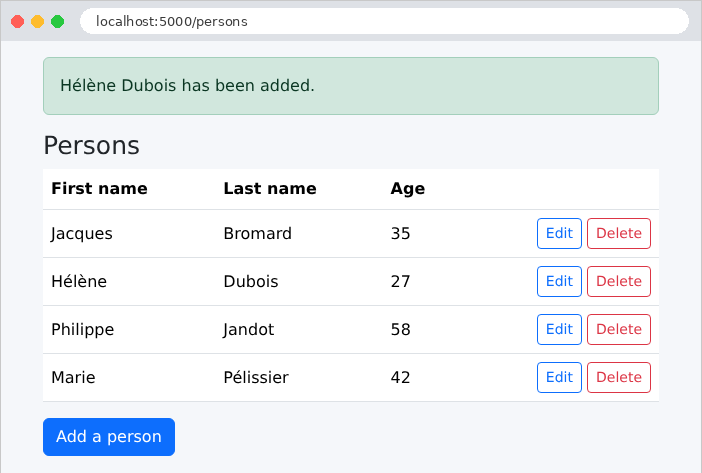
A successful addition:
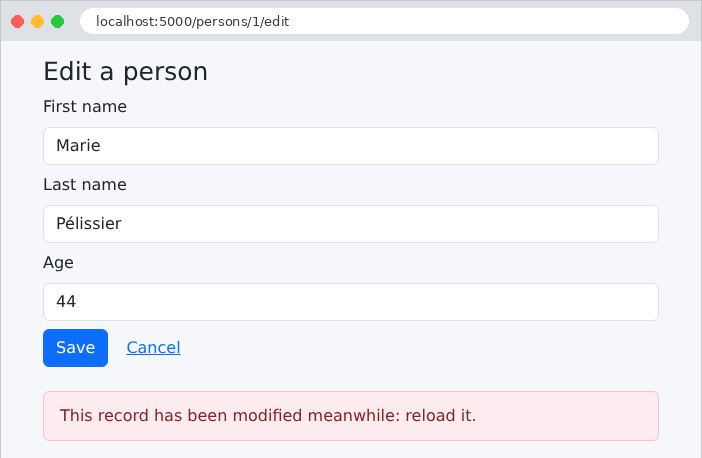
To test Rule #2, let’s open the same record in two tabs. In the first tab, let’s change the age and save. In the second tab, which still displays the old version, let’s also modify the record:
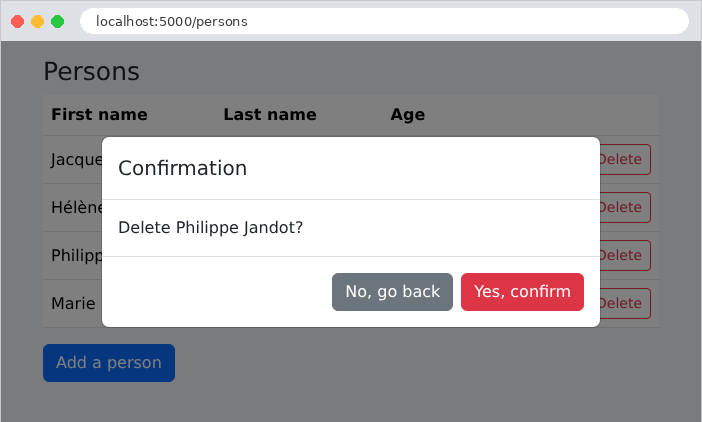
The deletion, with its confirmation:
9.1.8. The commands SQL
Let’s restart the application with the environment variable [FLASK_SQL_ECHO=true] (under [Windows]: [$env:FLASK_SQL_ECHO="true"]), and monitor the SQL commands for a modification in the console. The display of the change form for person No. 1:
| INFO sqlalchemy.engine.Engine BEGIN (implicit)
INFO sqlalchemy.engine.Engine SELECT persons.id, persons.version, persons.first_name, persons.last_name, persons.age
FROM persons
WHERE persons.id = %(pk_1)s
INFO sqlalchemy.engine.Engine [generated in 0.00017s] {'pk_1': 1}
INFO sqlalchemy.engine.Engine COMMIT
|
A transaction, [SELECT], per primary key, whose value is passed as a parameter ([%(pk_1)s]; see the parameter syntax for [PyMySQL]). Saving the master record with a new age:
| INFO sqlalchemy.engine.Engine BEGIN (implicit)
INFO sqlalchemy.engine.Engine SELECT persons.id, persons.version, persons.first_name, persons.last_name, persons.age
FROM persons
WHERE persons.id = %(pk_1)s
INFO sqlalchemy.engine.Engine [cached since 0.05972s ago] {'pk_1': 1}
INFO sqlalchemy.engine.Engine SELECT persons.id, persons.version, persons.first_name, persons.last_name, persons.age
FROM persons
WHERE persons.first_name = %(first_name_1)s AND persons.last_name = %(last_name_1)s AND persons.id != %(id_1)s
LIMIT %(param_1)s
INFO sqlalchemy.engine.Engine [generated in 0.00016s] {'first_name_1': 'Marie', 'last_name_1': 'Pélissier', 'id_1': 1, 'param_1': 1}
INFO sqlalchemy.engine.Engine UPDATE persons SET version=%(version)s, age=%(age)s WHERE persons.id = %(persons_id)s AND persons.version = %(persons_version)s
INFO sqlalchemy.engine.Engine [generated in 0.00015s] {'version': 1, 'age': 43, 'persons_id': 1, 'persons_version': 0}
INFO sqlalchemy.engine.Engine COMMIT
|
In a single transaction, we can see the following: reading the record, searching for a namesake, and then the [UPDATE]. This transaction modifies only the changed column ([age]), increments the version (from 0 to 1), and sets the optimistic lock condition ([AND persons.version = 0]). The entry [cached since] indicates that [SQLAlchemy] reused the translation in SQL from a previously constructed request. Now let’s submit the same form a second time, still with version 0:
| INFO sqlalchemy.engine.Engine BEGIN (implicit)
INFO sqlalchemy.engine.Engine SELECT persons.id, persons.version, persons.first_name, persons.last_name, persons.age
FROM persons
WHERE persons.id = %(pk_1)s
INFO sqlalchemy.engine.Engine [cached since 0.09593s ago] {'pk_1': 1}
INFO sqlalchemy.engine.Engine ROLLBACK
|
The version being read (1) is not the same as the form’s version (0): the business layer raised a [BusinessException], which rolled back the transaction ([ROLLBACK]), and the page displays “This record has been modified meanwhile: reload it.” Similarly, the process of adding a namesake stops after the namesake search, without a [INSERT].