3. Case Study - Appointment Management
3.1. The Project
In document [Tutoriel AngularJS / Spring 4], a client/server application was developed to manage doctor appointments. We will refer to this document as [rdvmedecins-angular]. The application had two types of clients:
- a HTML / CSS / JS client;
- an Android client;
The Android client was automatically generated from the client’s version and HTML files using the [Cordova] tool. The goal here is to recreate this Android client manually using the knowledge gained in the previous chapters.
It is important to note a key difference between the two solutions:
- the one we are going to create will only be usable on Android tablets;
- in the version [rdvmedecins-angular], the mobile web client (HTML / CSS / JS) can be used on any platform (Android, IoS, Windows);
3.2. Android client views
There are four views.
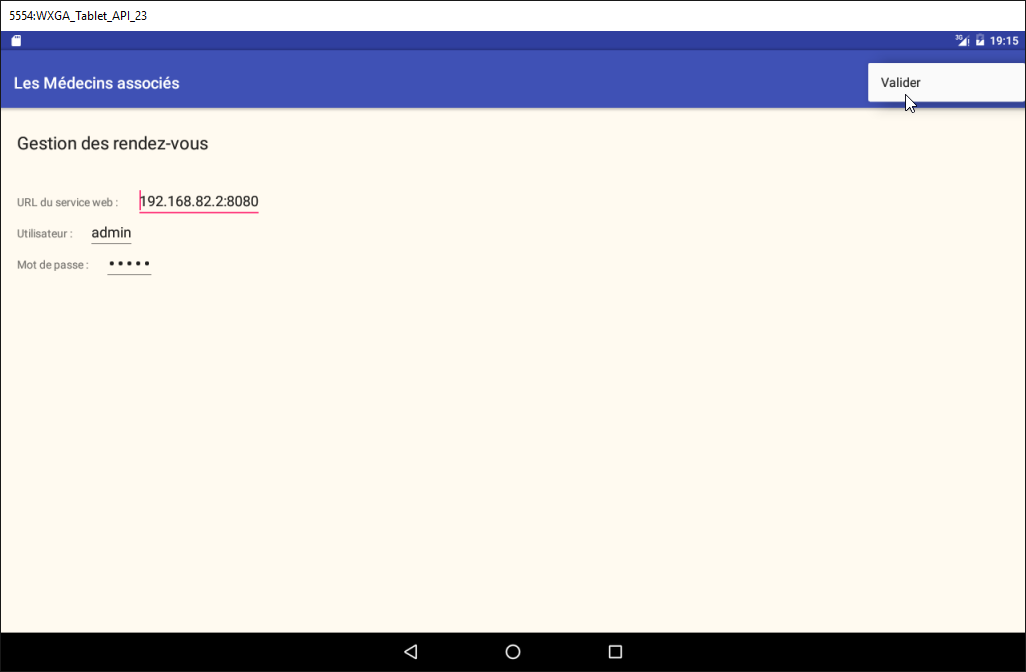
Configuration view
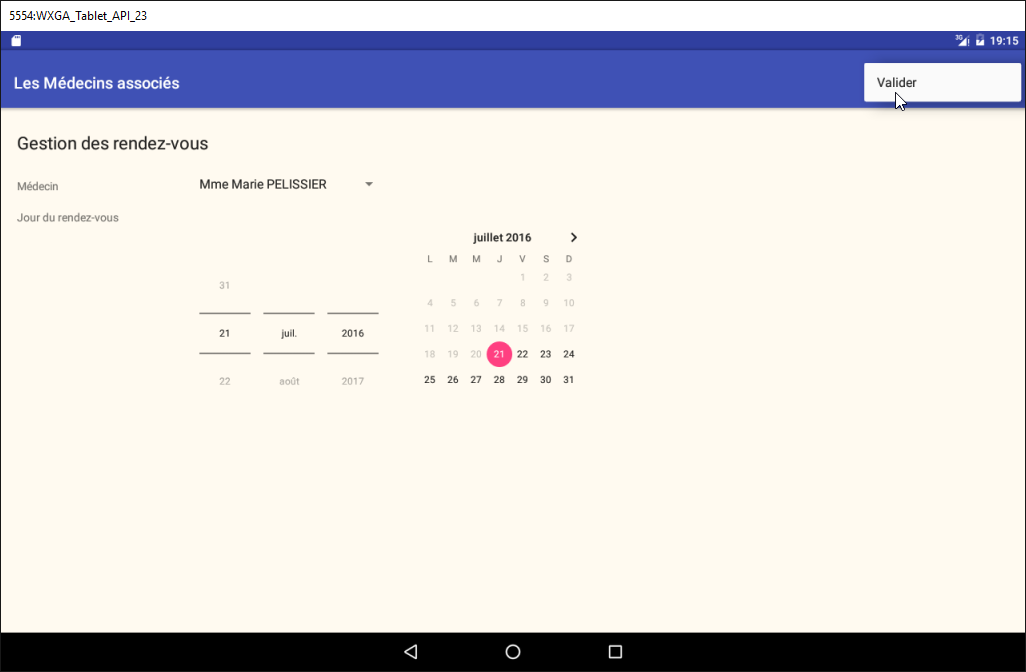
Doctor and appointment date selection view
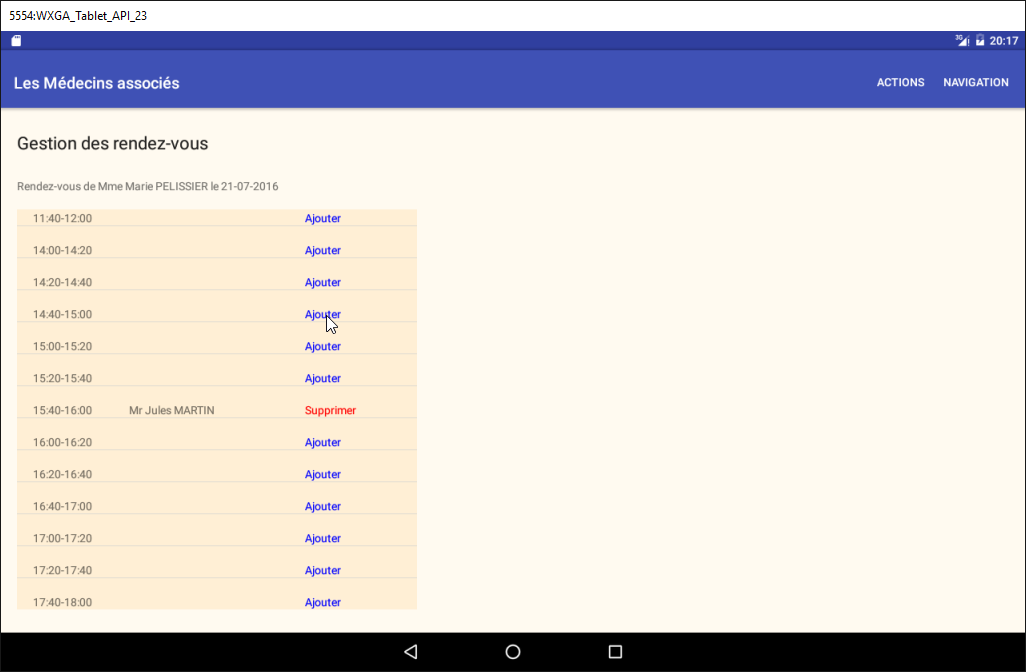
Appointment time slot selection view
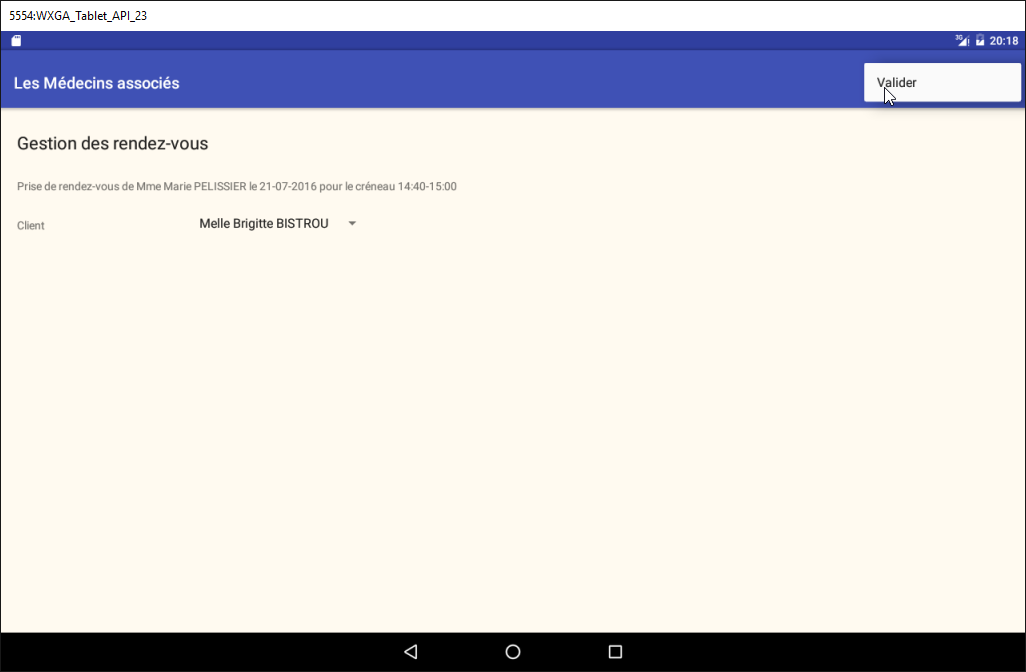
View of the client's appointment selection
3.3. Project architecture
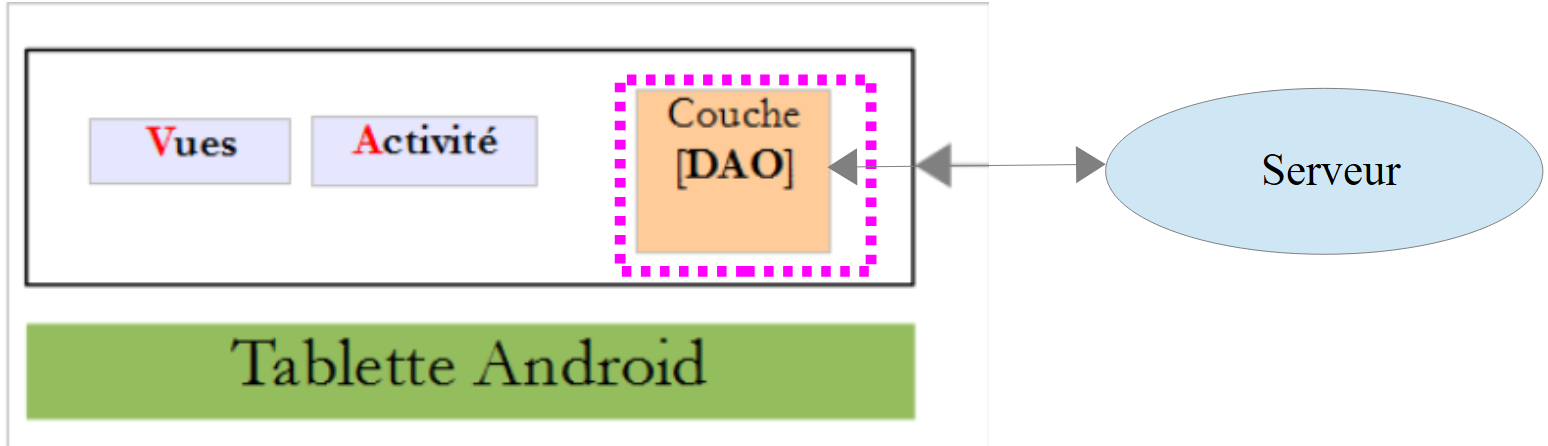
We will have a client/server architecture similar to that of example [Exemple-15] (see section 1.16 ) in this document:
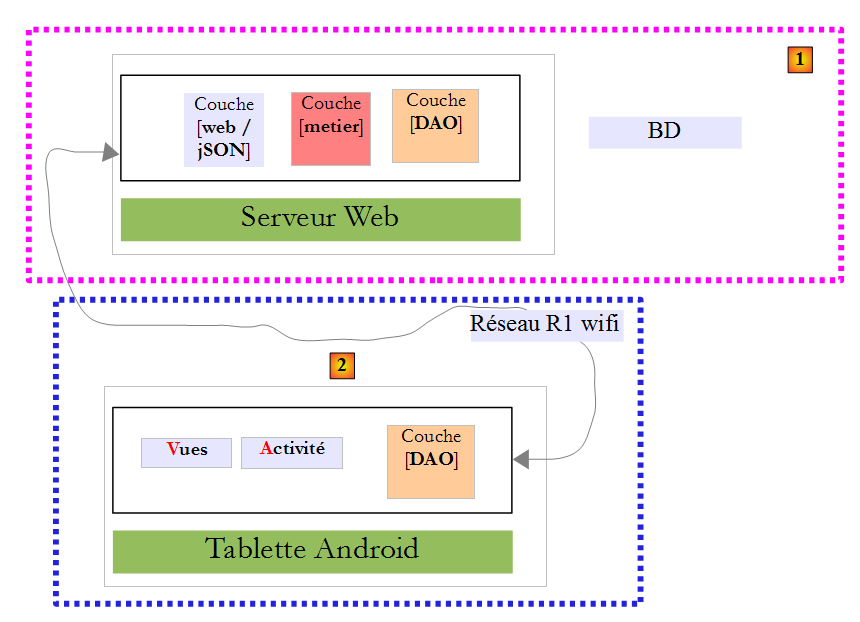
Asynchronous exchanges between the client and the server will be managed using the RxAndroid library.
3.4. The database
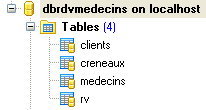
It does not play a fundamental role in this document. We provide it for informational purposes. We will call it [dbrdvmedecins] . It is a MySQL5 database with four tables:
3.4.1. The [MEDECINS] table
It contains information about the doctors managed by the [RdvMedecins] application.
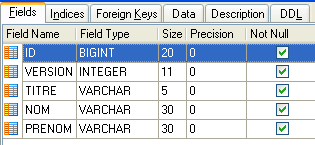 | 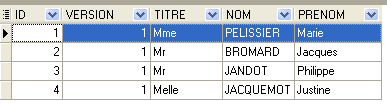 |
- ID: ID number for the doctor—primary key of the table
- VERSION: ID number for the version of the row in the table. This number is incremented by 1 each time a change is made to the row.
- NOM: the doctor’s last name
- PRENOM: their first name
- TITRE: their title (Ms., Mrs., Mr.)
3.4.2. The [CLIENTS] table
The clients values for the various doctors are stored in the [CLIENTS] table:
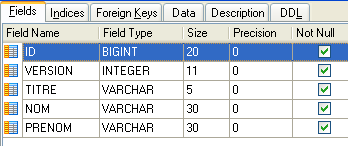 | 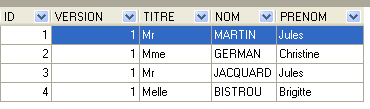 |
- ID: customer ID number—primary key of the table
- VERSION: ID number for the version of the row in the table. This number is incremented by 1 each time a change is made to the row.
- NOM: the customer's last name
- PRENOM: their first name
- TITRE: their title (Ms., Mrs., Mr.)
3.4.3. The [CRENEAUX] table
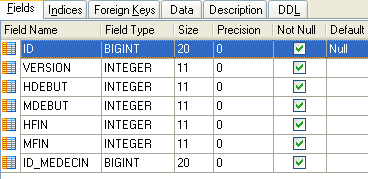
It lists the time slots where RV entries are possible:
 |
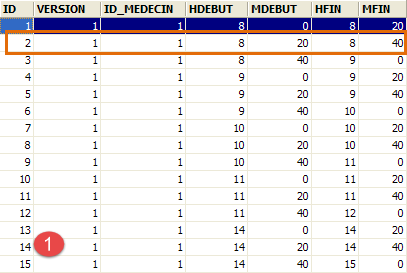 | 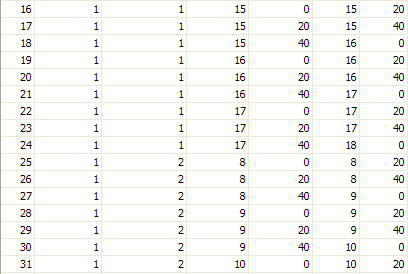 | 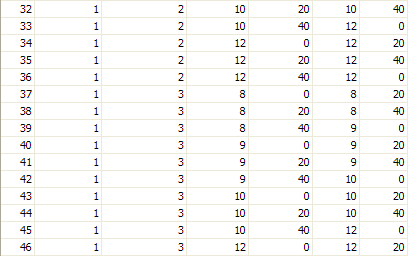 |
- ID: ID number for the time slot—primary key of the table (row 8)
- VERSION: number identifying the version for the row in the table. This number is incremented by 1 each time a change is made to the row.
- ID_MEDECIN: ID number for the doctor to whom this time slot belongs – foreign key on column MEDECINS (ID).
- HDEBUT: slot start time
- MDEBUT: slot start minutes
- HFIN: slot end time
- MFIN: slot end minutes
The second row of table [CRENEAUX] (see [1] above) indicates, for example, that slot No. 2 begins at 8:20 a.m. and ends at 8:40 a.m. and belongs to doctor No. 1 (Dr. Marie PELISSIER).
3.4.4. The table [RV]
lists the RV codes assigned to each doctor:
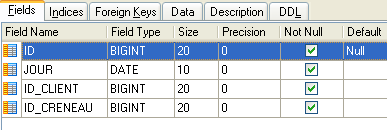 | 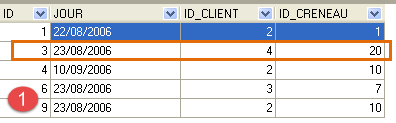 |
- ID: ID number uniquely identifying the RV – primary key
- JOUR: day of the RV
- ID_CRENEAU: time slot for RV – foreign key on the [ID] field in the [CRENEAUX] table – determines both the time slot and the doctor concerned.
- ID_CLIENT: customer ID for whom the reservation is made – foreign key on the [ID] field of the [CLIENTS] table
This table has a uniqueness constraint ( ) on the values of the joined columns (JOUR, ID_CRENEAU):
If a row in table [RV] has the value (JOUR1, ID_CRENEAU1) for the columns (JOUR, ID_CRENEAU), this value cannot appear anywhere else. Otherwise, this would mean that two RV entries were recorded at the same time for the same doctor. From a Java programming perspective, the database driver JDBC triggers a SQLException when this occurs.
The id line equal to 3 (see [1] above) means that a RV was booked for slot #20 and client #4 on 08/23/2006. The table [CRENEAUX] tells us that slot no. 20 corresponds to the time slot 4:20 PM – 4:40 PM and belongs to doctor no. 1 (Ms. Marie PELISSIER). Table [CLIENTS] tells us that client #4 is Ms. Brigitte BISTROU.
3.4.5. Generating the database
To create the tables and populate them, you can use the script [dbrdvmedecins.sql], which can be found in the examples archive |ICI|.
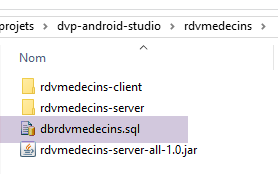
With [WampServer] (see section 6.15 ), you can proceed as follows:
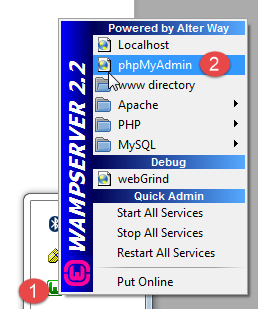

- In [1], click on the [WampServer] icon and select option [PhpMyAdmin] [2],
- in [3], in the window that opens, select the link [Bases de données],
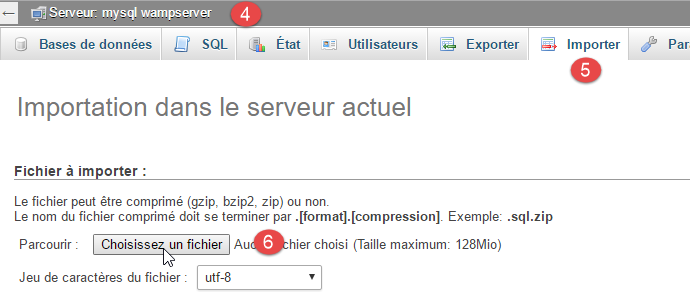
- to [4-6], import a file to SQL,
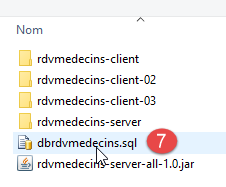
- in [7], select the script SQL and in [8] run it,
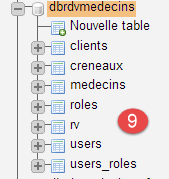
- in [9], the database tables have been created. We follow one of the links,
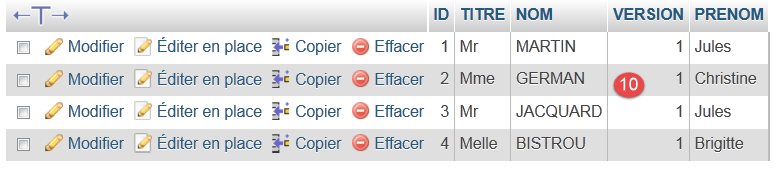
- in [10], the table contents.
We will not return to this database later, but the reader is invited to follow its evolution throughout the tests, especially when the application is not working.
3.5. The Web Server / jSON
Here we are focusing on the [1] server. We will not be developing it. It has been detailed in the document [Spring MVC et Thymeleaf par l'exemple]. Interested readers may refer to it. It was developed like the server in Example 15. Its source code is included in the examples. Here we will use its binary:
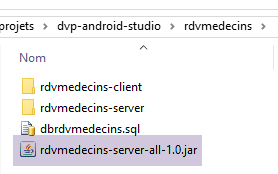
- [rdvmedecins-server-all-1.0.jar] is the server binary;
3.5.1. Implementation
In a command window, navigate to the folder containing the server binary:
...\rdvmedecins>dir
 Le volume dans le lecteur D s’appelle Données
 Le numéro de série du volume est 7A34-AE5F

 Répertoire de D:\data\istia-1516\projets\dvp-android-studio\rdvmedecins

09/06/2016  10:50    <DIR>          .
09/06/2016  10:50    <DIR>          ..
06/07/2014  16:36             7 631 dbrdvmedecins.sql
08/06/2016  16:31    <DIR>          rdvmedecins-client
08/06/2016  16:22    <DIR>          rdvmedecins-server
08/06/2016  16:23        29 618 709 rdvmedecins-server-all-1.0.jar
Then, to start the server, enter the following command (SGBD MySQL must already be running):
...\rdvmedecins>java -jar rdvmedecins-server-all-1.0.jar

  .   ____          _            __ _ _
 /\\ / ___'_ __ _ _(_)_ __  __ _ \ \ \ \
( ( )\___ | '_ | '_| | '_ \/ _` | \ \ \ \
 \\/  ___)| |_)| | | | | || (_| |  ) ) ) )
  '  |____| .__|_| |_|_| |_\__, | / / / /
 =========|_|==============|___/=/_/_/_/
 :: Spring Boot ::                  (v1.0)

10:55:48.617 [main] INFO  rdvmedecins.boot.Boot - Starting Boot v1.0 on st-PC (D:\data\istia-1516\projets\dvp-android-studio\rdvmedecins\rdvmedecins-server-all-1.0.jar started by st in D:\data\istia-1516\projets\dvp-android-studio\rdvmedecins)
10:55:48.621 [main] INFO  rdvmedecins.boot.Boot - No active profile set, falling back to default profiles: default
10:55:48.662 [main] INFO  o.s.b.c.e.AnnotationConfigEmbeddedWebApplicationContext - Refreshing org.springframework.boot.context.embedded.AnnotationConfigEmbeddedWebApplicationContext@7085bdee: startup date [Thu Jun 09 10:55:48 CEST 2016]; root of context hierarchy
10:55:49.948 [main] INFO  o.s.b.c.e.t.TomcatEmbeddedServletContainer - Tomcat initialized with port(s): 8080 (http)
juin 09, 2016 10:55:50 AM org.apache.catalina.core.StandardService startInternal
INFOS: Starting service Tomcat
juin 09, 2016 10:55:50 AM org.apache.catalina.core.StandardEngine startInternal
INFOS: Starting Servlet Engine: Apache Tomcat/8.0.33
juin 09, 2016 10:55:50 AM org.apache.catalina.core.ApplicationContext log
INFOS: Initializing Spring embedded WebApplicationContext
10:55:50.255 [localhost-startStop-1] INFO  o.s.web.context.ContextLoader - Root
WebApplicationContext: initialization completed in 1596 ms
...
10:55:55.765 [localhost-startStop-1] INFO  o.s.s.web.DefaultSecurityFilterChain
- Creating filter chain: ...]
10:55:55.785 [localhost-startStop-1] INFO  o.s.b.c.e.ServletRegistrationBean - Mapping servlet: 'dispatcherServlet' to [/*]
10:55:55.791 [localhost-startStop-1] INFO  o.s.b.c.e.FilterRegistrationBean - Mapping filter: 'springSecurityFilterChain' to: [/*]
...
10:55:56.249 [main] INFO  o.s.w.s.m.m.a.RequestMappingHandlerMapping - Mapped "{[/getAllCreneaux/{idMedecin}],methods=[GET],produces=[application/json;charset=UTF-8]}" onto public java.lang.String rdvmedecins.controllers.RdvMedecinsController.getAllCreneaux(long,javax.servlet.http.HttpServletResponse,java.lang.String)
throws com.fasterxml.jackson.core.JsonProcessingException
10:55:56.252 [main] INFO  o.s.w.s.m.m.a.RequestMappingHandlerMapping - Mapped "{[/getRvMedecinJour/{idMedecin}/{jour}],methods=[GET],produces=[application/json;charset=UTF-8]}" onto public java.lang.String rdvmedecins.controllers.RdvMedecinsController.getRvMedecinJour(long,java.lang.String,javax.servlet.http.HttpServletResponse,java.lang.String) throws com.fasterxml.jackson.core.JsonProcessingException
10:55:56.255 [main] INFO  o.s.w.s.m.m.a.RequestMappingHandlerMapping - Mapped "{[/getCreneauById/{id}],methods=[GET],produces=[application/json;charset=UTF-8]}" onto public java.lang.String rdvmedecins.controllers.RdvMedecinsController.getCreneauById(long,javax.servlet.http.HttpServletResponse,java.lang.String) throws
com.fasterxml.jackson.core.JsonProcessingException
10:55:56.257 [main] INFO  o.s.w.s.m.m.a.RequestMappingHandlerMapping - Mapped "{[/ajouterRv],methods=[POST],consumes=[application/json;charset=UTF-8],produces=[application/json;charset=UTF-8]}" onto public java.lang.String rdvmedecins.controllers.RdvMedecinsController.ajouterRv(rdvmedecins.models.PostAjouterRv,javax.servlet.http.HttpServletResponse,java.lang.String) throws com.fasterxml.jackson.core.JsonProcessingException
10:55:56.259 [main] INFO  o.s.w.s.m.m.a.RequestMappingHandlerMapping - Mapped "{[/getAllClients],methods=[GET],produces=[application/json;charset=UTF-8]}" onto
public java.lang.String rdvmedecins.controllers.RdvMedecinsController.getAllClients(javax.servlet.http.HttpServletResponse,java.lang.String) throws com.fasterxml.jackson.core.JsonProcessingException
10:55:56.261 [main] INFO  o.s.w.s.m.m.a.RequestMappingHandlerMapping - Mapped "{[/getClientById/{id}],methods=[GET],produces=[application/json;charset=UTF-8]}"
onto public java.lang.String rdvmedecins.controllers.RdvMedecinsController.getClientById(long,javax.servlet.http.HttpServletResponse,java.lang.String) throws com.fasterxml.jackson.core.JsonProcessingException
10:55:56.264 [main] INFO  o.s.w.s.m.m.a.RequestMappingHandlerMapping - Mapped "{[/getMedecinById/{id}],methods=[GET],produces=[application/json;charset=UTF-8]}" onto public java.lang.String rdvmedecins.controllers.RdvMedecinsController.getMedecinById(long,javax.servlet.http.HttpServletResponse,java.lang.String) throws com.fasterxml.jackson.core.JsonProcessingException
10:55:56.266 [main] INFO  o.s.w.s.m.m.a.RequestMappingHandlerMapping - Mapped "{[/getRvById/{id}],methods=[GET],produces=[application/json;charset=UTF-8]}" onto public java.lang.String rdvmedecins.controllers.RdvMedecinsController.getRvById(long,javax.servlet.http.HttpServletResponse,java.lang.String) throws com.fasterxml.jackson.core.JsonProcessingException
10:55:56.268 [main] INFO  o.s.w.s.m.m.a.RequestMappingHandlerMapping - Mapped "{[/getAllMedecins],methods=[GET],produces=[application/json;charset=UTF-8]}" onto public java.lang.String rdvmedecins.controllers.RdvMedecinsController.getAllMedecins(javax.servlet.http.HttpServletResponse,java.lang.String) throws com.fasterxml.jackson.core.JsonProcessingException
10:55:56.270 [main] INFO  o.s.w.s.m.m.a.RequestMappingHandlerMapping - Mapped "{[/supprimerRv],methods=[POST],consumes=[application/json;charset=UTF-8],produces=[application/json;charset=UTF-8]}" onto public java.lang.String rdvmedecins.controllers.RdvMedecinsController.supprimerRv(rdvmedecins.models.PostSupprimerRv,javax.servlet.http.HttpServletResponse,java.lang.String) throws com.fasterxml.jackson.core.JsonProcessingException
10:55:56.273 [main] INFO  o.s.w.s.m.m.a.RequestMappingHandlerMapping - Mapped "{[/authenticate],methods=[GET],produces=[application/json;charset=UTF-8]}" onto public java.lang.String rdvmedecins.controllers.RdvMedecinsController.authenticate(javax.servlet.http.HttpServletResponse,java.lang.String) throws com.fasterxml.jackson.core.JsonProcessingException
10:55:56.276 [main] INFO  o.s.w.s.m.m.a.RequestMappingHandlerMapping - Mapped "{[/getAgendaMedecinJour/{idMedecin}/{jour}],methods=[GET],produces=[application/json;charset=UTF-8]}" onto public java.lang.String rdvmedecins.controllers.RdvMedecinsController.getAgendaMedecinJour(long,java.lang.String,javax.servlet.http.HttpServletResponse,java.lang.String) throws com.fasterxml.jackson.core.JsonProcessingException
...
10:55:56.681 [main] INFO  o.s.b.c.e.t.TomcatEmbeddedServletContainer - Tomcat started on port(s): 8080 (http)
10:55:56.686 [main] INFO  rdvmedecins.boot.Boot - Started Boot in 8.231 seconds
The server displays numerous logs. We have included only those relevant to understanding the process above:
- lines 14–18: an embedded Tomcat server is launched on port 8080 of the machine. This server runs the web application for managing appointments. This application is actually a web service / jSON: it is queried via URL and responds by sending a jSON string;
- line 24: the web service is secured using the [Spring Security] framework. The URL of the web service are accessed by authenticating;
- lines 29–44: the URL exposed by the web service;
We will now discuss these in detail.
3.5.2. Securing the web service
The URL exposed by the web service are secured. The server expects the following header in the client’s HTTP request:
The expected code is the Base64 encoding [http://fr.wikipedia.org/wiki/Base64] of the string 'username:password'. In its initial state, the web service only accepts a user named 'admin' with the password 'admin'. For this specific user, the header above becomes the following line:
To send this HTTP header, we use the HTTP client, which is a Chrome browser plugin (see section 6.13 ). We will manually test the various URL responses returned by the web service to understand:
- the parameters expected by the URL;
- the exact nature of its response;
3.5.3. List of doctors
The URL [/getAllMedecins] allows you to obtain the list of doctors:
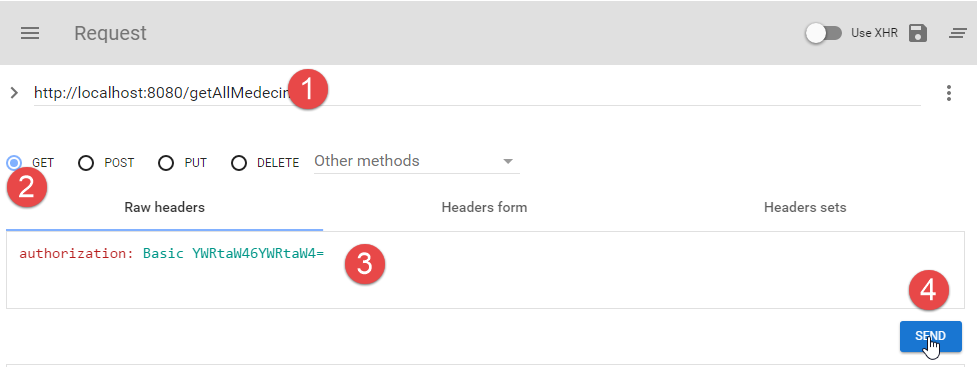
- in [1], the URL query;
- in [2], the HTTP method used for this query;
- in [3], the user security header HTTP (admin, admin);
- in [4], the request HTTP is sent;
The server's response is as follows:
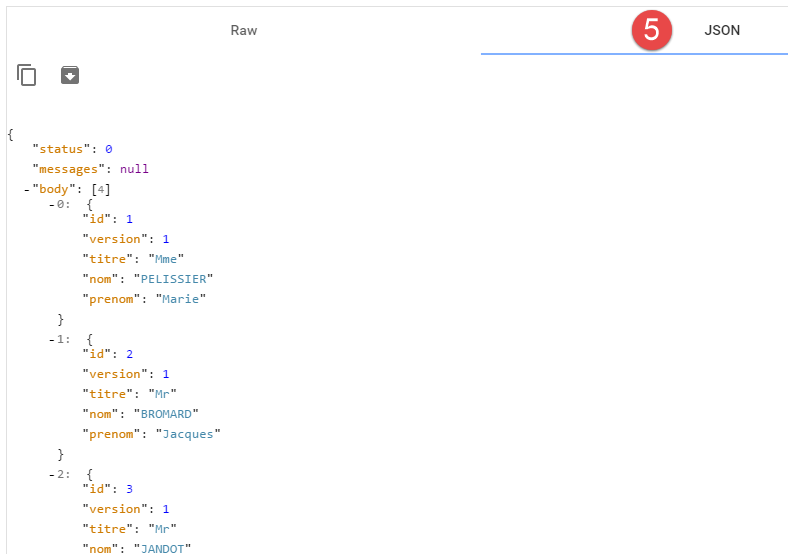 |
- in [5], the formatted server response jSON;
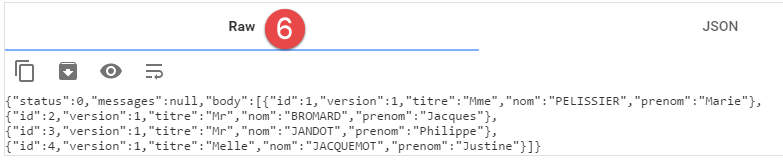 |
- in [6], the same response in raw form;
The format [5] makes it easier to see the structure of the response. All responses from the web service are an instance of the following class [Response]:
package rdvmedecins.android.dao.service;

import java.util.List;

public class Response<T> {

    // ----------------- properties
    // operation status
    private int status;
    // any error messages
    private List<String> messages;
    // the body of the reply
    private T body;

    // manufacturers
    public Response() {

    }

    public Response(int status, List<String> messages, T body) {
        this.status = status;
        this.messages = messages;
        this.body = body;
    }

    // getters and setters
...
}
- line 9: the response status. A value of 0 means there was no error; otherwise, an error occurred;
- line 11: a list of error messages if an error occurred;
- line 13: the response actually expected by the client;
The response to URL [/getAllMedecins] is the string jSON of an object of type [Response<List<Medecin>>]. The [Medecin] class is as follows:
package rdvmedecins.android.dao.entities;

public class Medecin extends Personne {

    // default builder
    public Medecin() {
    }

    // builder with parameters
    public Medecin(String titre, String nom, String prenom) {
        super(titre, nom, prenom);
    }

    public String toString() {
        return String.format("Medecin[%s]", super.toString());
    }

}
Line 3: The [Medecin] class extends the following [Personne] class:
package rdvmedecins.android.dao.entities;

public class Personne extends AbstractEntity {
    // attributes of a person
    private String titre;
    private String nom;
    private String prenom;

    // default builder
    public Personne() {
    }

    // builder with parameters
    public Personne(String titre, String nom, String prenom) {
        this.titre = titre;
        this.nom = nom;
        this.prenom = prenom;
    }

    // toString
    public String toString() {
        return String.format("Personne[%s, %s, %s, %s, %s]", id, version, titre, nom, prenom);
    }

    // getters and setters
    ...
}
Line 3: The [Personne] class extends the following [AbstractEntity] class:
package rdvmedecins.android.dao.entities;

import java.io.Serializable;

public class AbstractEntity implements Serializable {

    private static final long serialVersionUID = 1L;
    protected Long id;
    protected Long version;

    @Override
    public int hashCode() {
        int hash = 0;
        hash += (id != null ? id.hashCode() : 0);
        return hash;
    }

    // initialization
    public AbstractEntity build(Long id, Long version) {
        this.id = id;
        this.version = version;
        return this;
    }

    @Override
    public boolean equals(Object entity) {
        String class1 = this.getClass().getName();
        String class2 = entity.getClass().getName();
        if (!class2.equals(class1)) {
            return false;
        }
        AbstractEntity other = (AbstractEntity) entity;
        return this.id == other.id;
    }

    // getters and setters
    ...
}
Ultimately, the structure of a [Medecin] object is as follows:
[Long id; Long version; String titre; String nom; String prenom;]
and that of [Response<List<Medecin>>] is as follows:
Going forward, we will use these abbreviated definitions to describe the server’s response. Additionally, for the time being, we will no longer show screenshots. It suffices to review what we have just covered. We will return to screenshots when it is time to make a POST request. We will also present an example of execution in the following form:
3.5.4. List of clients
| |
|
Example:
3.5.5. List of a doctor's appointment slots
|
- [idMedecin]: ID of the doctor whose appointment slots are requested;
- [hdebut]: start time of the appointment;
- [mdebut]: start minute of the appointment;
- [hfin]: end time of the appointment;
- [mfin]: end minute of the appointment;
For a time slot between 10:20 and 10:40, we have [hdebut, mdebut, hfin, mfin]=[10, 20, 10, 40].
Example:
3.5.6. List of a doctor's appointments
|
- [idMedecin]: ID of the doctor whose appointments are requested;
- URL [jour]: date of the appointments in the format 'yyyy-mm-dd';
- Response [jour]: same as above, but in the form of a Java date;
- [client]: the appointment client. Its structure was described earlier;
- [idClient]: the client ID;
- [creneau]: the appointment slot. Its structure was described earlier;
- [idCreneau]: the slot ID;
Example:
3.5.7. A doctor's agenda
|
- [idMedecin]: ID of the doctor whose appointments are wanted;
- URL [jour]: day of the appointments in the format 'yyyy-mm-dd';
- [agenda]: agenda for the physician;
- [medecin]: the doctor in question. Its structure was defined previously;
- Response [jour]: the day of the agenda in the form of a Java date;
- [creneauxMedecinJour]: an array of elements of type [CreneauMedecinJour];
- [creneau]: a time slot. Its structure was described previously;
- [rv]: an appointment. Its structure was described earlier;
Example:
|
We have highlighted the case where there is an appointment in the time slot and the case where there is none.
3.5.8. Get a doctor by their ID
|
- [idMedecin]: the doctor's ID;
Example 1:
Example 2:
3.5.9. Get a client by ID
|
- [idClient]: the client ID;
Example 1:
Example 2:
3.5.10. Get a slot by its ID
|
- [idCreneau]: the slot ID;
Example 1:
Note that the response does not include the doctor who owns the slot, only their ID.
Example 2:
3.5.11. Get an appointment by its ID
|
- [idRv]: the appointment ID;
Example 1:
Note that the response does not include the client or the appointment slot, but only their identifiers.
Example 2:
3.5.12. Add an appointment
The URL [/ajouterRv] allows you to add an appointment. The information required for this addition (the day, the time slot, and the client) is transmitted via a HTTP POST request. We show how to make this request using the [Advanced Rest Client] tool.
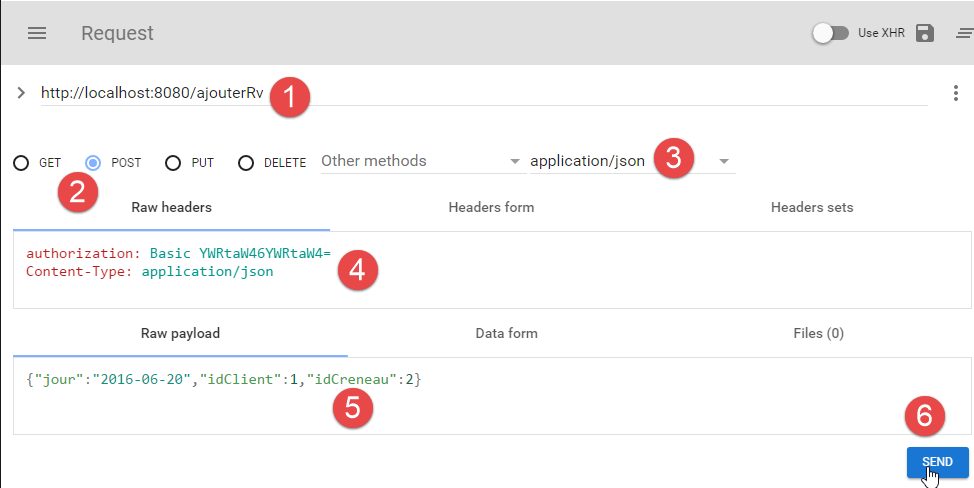
- In [1], the URL is queried;
- in [2], it is queried by a POST;
- In [3-4], the server is informed that the values posted to it are in the form of a jSON string;
- in [4], the HTTP authentication header;
- in [5], the information transmitted by POST. This is a jSON string containing:
- [jour]: the date of the appointment in the format 'yyyy-mm-dd',
- [idClient]: the ID of the patient for whom the appointment is scheduled,
- [idCreneau]: the identifier of the appointment time slot. Since a time slot belongs to a specific doctor, this also identifies the doctor;
- in [6], the request is sent;
The string jSON that is posted is that of the following object of type [PostAjouterRv]:
public class PostAjouterRv {

  // data from post
  private String jour;
  private long idClient;
  private long idCreneau;

  // manufacturers
  public PostAjouterRv() {

  }

  public PostAjouterRv(String jour, long idCreneau, long idClient) {
    this.jour = jour;
    this.idClient = idClient;
    this.idCreneau = idCreneau;
  }

  // getters and setters
  ...
}
The server response is of type [Response<Rv>] [int status; List<String> messages; Rv rv], where [rv] is the added appointment.
The server's response to the request above is as follows:
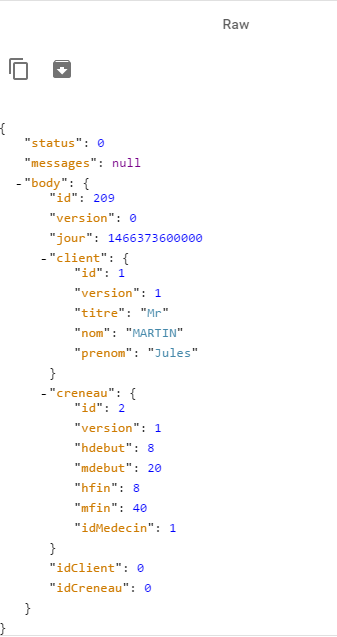
Note that some information is not included in [idClient, idCreneau] but can be found in the fields [client] and [creneau]. The important information is the ID of the added appointment (209). The web service could have simply returned this single piece of information.
3.5.13. Delete an appointment
This operation is also performed using a POST:
|
The posted value is the string jSON from the following object of type [PostSupprimerRv]:
public class PostSupprimerRv {

  // data from post
  private long idRv;

  // manufacturers
  public PostSupprimerRv() {

  }

  public PostSupprimerRv(long idRv) {
    this.idRv = idRv;
  }

  // getters and setters
  ...
}
- Line 4: [idRv] is the ID of the appointment to be deleted.
Example 1:
Appointment #209 has been successfully deleted because [status=0].
Example 2:
3.6. The Android client
Now that the [1] server has been described in detail and is operational, we will examine the [2] Android client.
3.6.1. Android Studio Project Architecture
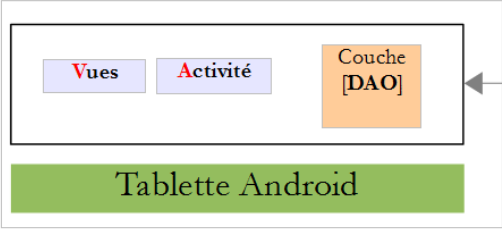
The project uses the same architecture as the [client-android-skel] project (see section 1.17 ). In the Android client architecture shown above, there are three distinct components:
- the [DAO] layer responsible for communication with the web service;
- the [vues] layers responsible for communication with the user;
- the [activité], which acts as a bridge between the two previous blocks. The views are not aware of the [DAO] layer. They communicate only with the activity.
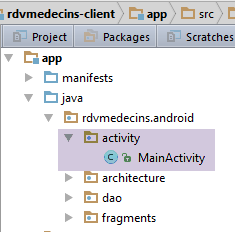
This architecture is reflected in the Android Studio project for the Android client:
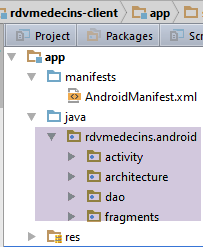
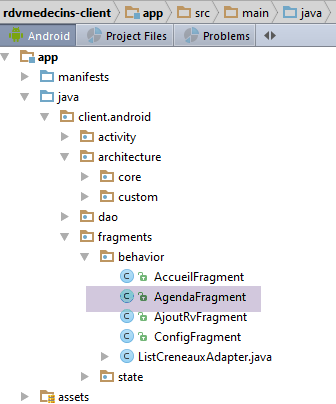
- the [activity] package implements the activity;
- The [architecture] package incorporates the architectural components we developed previously;
- The [dao] package implements the [DAO] layer;
- The [fragments] package implements the [vues];
3.6.2. Project Customization
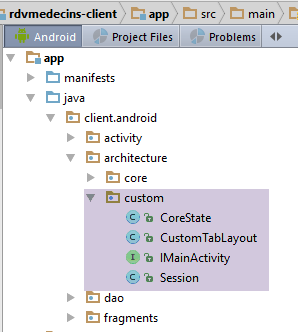
The [architecture / custom] folder contains the customizable elements of the architecture.
The [IMainActivity] interface is as follows:
package client.android.architecture.custom;

import client.android.architecture.core.ISession;
import client.android.dao.service.IDao;

public interface IMainActivity extends IDao {

  // session access
  ISession getSession();

  // change of view
  void navigateToView(int position, ISession.Action action);

  // wait management
  void beginWaiting();

  void cancelWaiting();

  // application constants -------------------------------------

  // mode debug
  boolean IS_DEBUG_ENABLED = true;

  // maximum time to wait for server response
  int TIMEOUT = 1000;

  // waiting time before executing customer request
  int DELAY = 000;

  // basic authentication
  boolean IS_BASIC_AUTHENTIFICATION_NEEDED = true;

  // fragment adjacency
  int OFF_SCREEN_PAGE_LIMIT = 1;

  // tab bar
  boolean ARE_TABS_NEEDED = false;

  // waiting image
  boolean IS_WAITING_ICON_NEEDED = true;

  // number of application fragments
  int FRAGMENTS_COUNT = 4;

  // view n°s
  int VUE_CONFIG = 0;
  int VUE_ACCUEIL = 1;
  int VUE_AGENDA = 2;
  int VUE_AJOUT_RV = 3;
}
- lines 25, 28: customization of the [DAO] layer;
- line 31: this application makes authenticated requests to the server;
- line 40: a loading image is required;
- line 43: the application has four fragments;
- lines 46–49: the numbers of the four fragments;
- line 37: there are no tabs;
The base class [CoreState] for fragment states will be as follows:
package client.android.architecture.custom;

import client.android.architecture.core.MenuItemState;
import client.android.fragments.state.AccueilFragmentState;
import client.android.fragments.state.AgendaFragmentState;
import client.android.fragments.state.AjoutRvFragmentState;
import client.android.fragments.state.ConfigFragmentState;
import com.fasterxml.jackson.annotation.JsonIgnoreProperties;
import com.fasterxml.jackson.annotation.JsonSubTypes;
import com.fasterxml.jackson.annotation.JsonTypeInfo;

@JsonIgnoreProperties(ignoreUnknown = true)
@JsonTypeInfo(use = JsonTypeInfo.Id.NAME, include = JsonTypeInfo.As.PROPERTY)
@JsonSubTypes({
  @JsonSubTypes.Type(value = AccueilFragmentState.class),
  @JsonSubTypes.Type(value = AgendaFragmentState.class),
  @JsonSubTypes.Type(value = AjoutRvFragmentState.class),
  @JsonSubTypes.Type(value = ConfigFragmentState.class)
}
)
public class CoreState {
  // fragment visited or not
  protected boolean hasBeenVisited = false;
  // status of any fragment menu
  protected MenuItemState[] menuOptionsState;

  // getters and setters
...
}
- lines 15–18: the four fragments have a state:
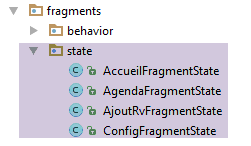
Finally, the session contains the data shared between fragments:
package client.android.architecture.custom;

import client.android.architecture.core.AbstractSession;
import client.android.dao.entities.AgendaMedecinJour;
import client.android.dao.entities.Client;
import client.android.dao.entities.Medecin;
import client.android.fragments.state.AccueilFragmentState;
import client.android.fragments.state.AgendaFragmentState;
import client.android.fragments.state.AjoutRvFragmentState;
import client.android.fragments.state.ConfigFragmentState;

import java.util.List;

public class Session extends AbstractSession {
  // elements that cannot be serialized as jSON must be annotated with @JsonIgnore

  // list of doctors
  private List<Medecin> médecins;
  // clients list
  private List<Client> clients;
  // agenda of a doctor for a given day
  private AgendaMedecinJour agenda;
  // position of clicked element in agenda
  private int position;
  // day of Rv in English notation "yyyy-MM-dd"
  private String dayRv;
  // day of Rv in French notation "dd-MM-yyyy"
  private String jourRv;

  // getters and setters
...
}
- lines 17-28: the session stores six pieces of information. We will explain their purpose when necessary.
3.6.3. The [DAO]
 |
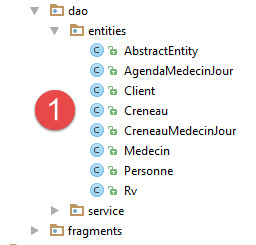
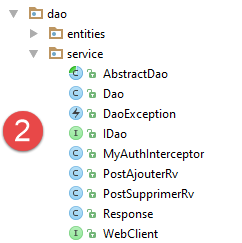
- in [1], the entities encapsulated in the server’s responses. These were introduced in the section 3.5 ;
- in [2], the client elements managing exchanges with the server;
We will not revisit the [1] elements. They have already been presented. The reader is invited to return to the section 3.5 if necessary. We will examine the implementation of the [service] package. This will also lead us to discuss the implementation of secure communication between the client and the server.
3.6.3.1. Implementation of client/server communication
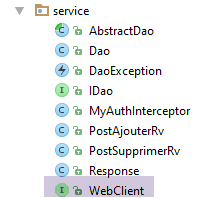
The [WebClient] class is a AA component that describes:
- the URL exposed by the web service;
- their parameters;
- their responses;
package rdvmedecins.android.dao.service;

import rdvmedecins.android.dao.entities.*;
import org.androidannotations.rest.spring.annotations.*;
import org.androidannotations.rest.spring.api.RestClientRootUrl;
import org.androidannotations.rest.spring.api.RestClientSupport;
import org.springframework.http.converter.json.MappingJackson2HttpMessageConverter;
import org.springframework.web.client.RestTemplate;

import java.util.List;

@Rest(converters = {MappingJackson2HttpMessageConverter.class})
public interface WebClient extends RestClientRootUrl, RestClientSupport {

  // RestTemplate
  public void setRestTemplate(RestTemplate restTemplate);

  // list of doctors
  @Get("/getAllMedecins")
  public Response<List<Medecin>> getAllMedecins();

  // clients list
  @Get("/getAllClients")
  public Response<List<Client>> getAllClients();

  // list of physician slots
  @Get("/getAllCreneaux/{idMedecin}")
  public Response<List<Creneau>> getAllCreneaux(@Path long idMedecin);

  // list of doctor's appointments
  @Get("/getRvMedecinJour/{idMedecin}/{jour}")
  public Response<List<Rv>> getRvMedecinJour(@Path long idMedecin, @Path String jour);

  // Customer
  @Get("/getClientById/{id}")
  public Response<Client> getClientById(@Path long id);

  // Doctor
  @Get("/getMedecinById/{id}")
  public Response<Medecin> getMedecinById(@Path long id);

  // Rv
  @Get("/getRvById/{id}")
  public Response<Rv> getRvById(@Path long id);

  // Niche
  @Get("/getCreneauById/{id}")
  public Response<Creneau> getCreneauById(@Path long id);

  // add a RV
  @Post("/ajouterRv")
  public Response<Rv> ajouterRv(@Body PostAjouterRv post);

  // delete a Rv
  @Post("/supprimerRv")
  public Response<Rv> supprimerRv(@Body PostSupprimerRv post);

  // obtain agenda from a doctor
  @Get(value = "/getAgendaMedecinJour/{idMedecin}/{jour}")
  public Response<AgendaMedecinJour> getAgendaMedecinJour(@Path long idMedecin, @Path String jour);

}
- lines 19–60: all the URL components discussed in the section 3.5 are present;
- line 16: the [RestTemplate] component of [Spring Android] on which client/server communication is based;
3.6.3.2. The [IDao] interface
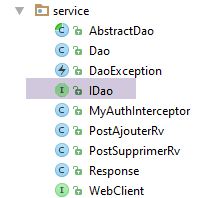
The [IDao] interface of the [DAO] layer is as follows:
package rdvmedecins.android.dao.service;

import rdvmedecins.android.dao.entities.*;
import rx.Observable;

import java.util.List;

public interface IDao {
  // Url of the web service
  public void setUrlServiceWebJson(String url);

  // user
  public void setUser(String user, String mdp);

  // customer timeout
  public void setTimeout(int timeout);

  // clients list
  public Observable<List<Client>> getAllClients();

  // list of doctors
  public Observable<List<Medecin>> getAllMedecins();

  // list of physician slots
  public Observable<List<Creneau>> getAllCreneaux(long idMedecin);

  // list of a doctor's Rv on a given day
  public Observable<List<Rv>> getRvMedecinJour(long idMedecin, String jour);

  // find a customer identified by his id
  public Observable<Client> getClientById(long id);

  // find a doctor identified by his id
  public Observable<Medecin> getMedecinById(long id);

  // find a Rv identified by its id
  public Observable<Rv> getRvById(long id);

  // find a time slot identified by its id
  public Observable<Creneau> getCreneauById(long id);

  // add a RV to the list
  public Observable<Rv> ajouterRv(String jour, long idCreneau, long idClient);

  // delete a RV
  public Observable<Rv> supprimerRv(long idRv);

  // job
  public Observable<AgendaMedecinJour> getAgendaMedecinJour(long idMedecin, String jour);

  // mode debug
  void setDebugMode(boolean isDebugEnabled);
}
- line 10: to set the web service ID to URL / jSON;
- line 13: to set the user for client/server communication. [user] is the user ID, [mdp] is the password;
- line 16: to set a maximum timeout for the server response;
- lines 18–49: each URL exposed by the web service corresponds to a method. They use the same method signatures as the AA and [WebClient] components;
- line 52: to control the debug mode of the [DAO] layer;
3.6.3.3. The [Dao] class
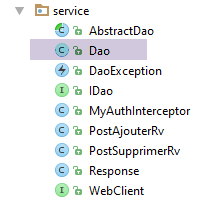
The implementation [DAO] of the previous interface [IDao] is as follows:
package client.android.dao.service;

import android.util.Log;
import client.android.dao.entities.*;
import org.androidannotations.annotations.AfterInject;
import org.androidannotations.annotations.Bean;
import org.androidannotations.annotations.EBean;
import org.androidannotations.rest.spring.annotations.RestService;
import org.springframework.http.client.ClientHttpRequestInterceptor;
import org.springframework.http.client.SimpleClientHttpRequestFactory;
import org.springframework.http.converter.json.MappingJackson2HttpMessageConverter;
import org.springframework.web.client.RestTemplate;
import rx.Observable;

import java.util.ArrayList;
import java.util.List;

@EBean(scope = EBean.Scope.Singleton)
public class Dao extends AbstractDao implements IDao {

  // web service customer
  @RestService
  protected WebClient webClient;
  // safety
  @Bean
  protected MyAuthInterceptor authInterceptor;
  // on RestTemplate
  private RestTemplate restTemplate;
  // factory du RestTemplate
  private SimpleClientHttpRequestFactory factory;

  @AfterInject
  public void afterInject() {
    ...
  }

  @Override
  public void setUrlServiceWebJson(String url) {
    ...
  }

  @Override
  public void setUser(String user, String mdp) {
    ...
  }

  @Override
  public void setTimeout(int timeout) {
    ...
  }

  @Override
  public void setBasicAuthentification(boolean isBasicAuthentificationNeeded) {
    if (isDebugEnabled) {
      Log.d(className, String.format("setBasicAuthentification thread=%s, isBasicAuthentificationNeeded=%s", Thread.currentThread().getName(), isBasicAuthentificationNeeded));
    }
    // authentication interceptor?
    if (isBasicAuthentificationNeeded) {
      // add the authentication interceptor
      List<ClientHttpRequestInterceptor> interceptors = new ArrayList<ClientHttpRequestInterceptor>();
      interceptors.add(authInterceptor);
      restTemplate.setInterceptors(interceptors);
    }

  }

  // méthodes privées -------------------------------------------------
  private void log(String message) {
    if (isDebugEnabled) {
      Log.d(className, message);
    }
  }

  // implementation of the IDao interface --------------------------------------------------------------------
  @Override
  public Observable<Response<List<Client>>> getAllClients() {
    // log
    log("getAllClients");
    // result
    return getResponse(new IRequest<Response<List<Client>>>() {
      @Override
      public Response<List<Client>> getResponse() {
        return webClient.getAllClients();
      }
    });
  }

  @Override
  public Observable<Response<List<Medecin>>> getAllMedecins() {
    // log
    log("getAllMedecins");
    // result
    return getResponse(new IRequest<Response<List<Medecin>>>() {
      @Override
      public Response<List<Medecin>> getResponse() {
        return webClient.getAllMedecins();
      }
    });
  }

  @Override
  public Observable<Response<List<Creneau>>> getAllCreneaux(final long idMedecin) {
    // log
    log("getAllCreneaux");
    // result
    return getResponse(new IRequest<Response<List<Creneau>>>() {
      @Override
      public Response<List<Creneau>> getResponse() {
        return webClient.getAllCreneaux(idMedecin);
      }
    });
  }

  @Override
  public Observable<Response<List<Rv>>> getRvMedecinJour(final long idMedecin, final String jour) {
    // log
    log("getRvMedecinJour");
    // result
    return getResponse(new IRequest<Response<List<Rv>>>() {
      @Override
      public Response<List<Rv>> getResponse() {
        return webClient.getRvMedecinJour(idMedecin, jour);
      }
    });
  }

  @Override
  public Observable<Response<Client>> getClientById(final long id) {
    // log
    log("getClientById");
    // result
    return getResponse(new IRequest<Response<Client>>() {
      @Override
      public Response<Client> getResponse() {
        return webClient.getClientById(id);
      }
    });
  }

  @Override
  public Observable<Response<Medecin>> getMedecinById(final long id) {
    // log
    log("getMedecinById");
    // result
    return getResponse(new IRequest<Response<Medecin>>() {
      @Override
      public Response<Medecin> getResponse() {
        return webClient.getMedecinById(id);
      }
    });
  }

  @Override
  public Observable<Response<Rv>> getRvById(final long id) {
    // log
    log("getRvById");
    // result
    return getResponse(new IRequest<Response<Rv>>() {
      @Override
      public Response<Rv> getResponse() {
        return webClient.getRvById(id);
      }
    });
  }

  @Override
  public Observable<Response<Creneau>> getCreneauById(final long id) {
    // log
    log("getCreneauById");
    // result
    return getResponse(new IRequest<Response<Creneau>>() {
      @Override
      public Response<Creneau> getResponse() {
        return webClient.getCreneauById(id);
      }
    });
  }

  @Override
  public Observable<Response<Rv>> ajouterRv(final String jour, final long idCreneau, final long idClient) {
    // log
    log("ajouterRv");
    // result
    return getResponse(new IRequest<Response<Rv>>() {
      @Override
      public Response<Rv> getResponse() {
        return webClient.ajouterRv(new PostAjouterRv(jour, idCreneau, idClient));
      }
    });
  }

  @Override
  public Observable<Response<Rv>> supprimerRv(final long idRv) {
    // log
    log("supprimerRv");
    // result
    return getResponse(new IRequest<Response<Rv>>() {
      @Override
      public Response<Rv> getResponse() {
        return webClient.supprimerRv(new PostSupprimerRv(idRv));
      }
    });
  }

  @Override
  public Observable<Response<AgendaMedecinJour>> getAgendaMedecinJour(final long idMedecin, final String jour) {
    // log
    log("getAgendaMedecinJour");
    // result
    return getResponse(new IRequest<Response<AgendaMedecinJour>>() {
      @Override
      public Response<AgendaMedecinJour> getResponse() {
        return webClient.getAgendaMedecinJour(idMedecin, jour);
      }
    });
  }

}
- lines 18–72: these are the default lines in the [Dao] class of the [client-android-skel] project;
- lines 74-216: implementation of the [IDao] interface. The methods that query the URL exposed by the web service delegate this query to the AA and [WebClient] components (lines 22-23);
- Lines 58–63: If client/server exchanges are authenticated using basic authentication, an interceptor is added to the [RestTemplate] component. This will cause any HTTP request issued by the [RestTemplate] component to be intercepted by the [MyAuthInterceptor] class (lines 25–26);
The [MyAuthInterceptor] class is as follows:
package rdvmedecins.android.dao.security;

import org.androidannotations.annotations.Bean;
import org.androidannotations.annotations.EBean;
import org.springframework.http.HttpAuthentication;
import org.springframework.http.HttpBasicAuthentication;
import org.springframework.http.HttpHeaders;
import org.springframework.http.HttpRequest;
import org.springframework.http.client.ClientHttpRequestExecution;
import org.springframework.http.client.ClientHttpRequestInterceptor;
import org.springframework.http.client.ClientHttpResponse;

import java.io.IOException;

@EBean(scope = EBean.Scope.Singleton)
public class MyAuthInterceptor implements ClientHttpRequestInterceptor {

  // user
  private String user;
  private String mdp;

  public ClientHttpResponse intercept(HttpRequest request, byte[] body, ClientHttpRequestExecution execution) throws IOException {
    HttpHeaders headers = request.getHeaders();
    HttpAuthentication auth = new HttpBasicAuthentication(user, mdp);
    headers.setAuthorization(auth);
    return execution.execute(request, body);
  }

  public void setUser(String user, String mdp) {
    this.user = user;
    this.mdp = mdp;
  }
}
- line 15: the class [MyAuthInterceptor] is a component of type [singleton];
- line 16: the [MyAuthInterceptor] class extends the Spring interface [ClientHttpRequestInterceptor]. This interface has one method, the [intercept] method on line 22. We extend this interface to intercept any HTTP request from the client. The [intercept] method takes three parameters;
- [HtpRequest request]: the intercepted HTTP request,
- [byte[] body]: its body, if it has one (posted values, for example),
- [ClientHttpRequestExecution execution]: the Spring component executing the request;
We intercept all HTTP requests from the Android client to add the HTTP authentication header described in the section 3.5 .
- line 23: we retrieve the HTTP headers from the intercepted request;
- line 24: we create the HTTP authentication header. The authentication method used (Base64 encoding of the string 'user:mdp') is provided by the Spring class [HttpBasicAuthentication];
- line 25: the authentication header we just created is added to the current headers of the intercepted request;
- line 26: execution of the intercepted request continues. To summarize, the intercepted request has been enhanced with the authentication header;
The implementations of the methods in the [IDao] interface all follow the same pattern. Let’s take the example of the [getAgendaMedecinJour] method:
  @Override
  public Observable<Response<AgendaMedecinJour>> getAgendaMedecinJour(final long idMedecin, final String jour) {
    // log
    log("getAgendaMedecinJour");
    // result
    return getResponse(new IRequest<Response<AgendaMedecinJour>>() {
      @Override
      public Response<AgendaMedecinJour> getResponse() {
        return webClient.getAgendaMedecinJour(idMedecin, jour);
      }
    });
}
- line 2: the method expects two parameters:
- [idMedecin]: the ID of the doctor for whom we want the agenda;
- [jour]: the day for which you want the agenda;
- Line 6: We call the [getResponse] method of the parent class [AbstractDao]. This method expects a parameter of type [IRequest<T>], where T is the type returned by the [getAgendaMedecinJour] method on line 2, in this case [Response<AgendaMedecinJour>]. The [IRequest] interface has only one method: [getResponse] (line 8);
- lines 8–10: implementation of the method [IRequest.getResponse]. This method must return the result expected by the method [getAgendaMedecinJour] on line 2, of type [Response<AgendaMedecinJour>];
- line 9: the response is returned by the [webClient.getAgendaMedecinJour] method:
  // obtain agenda from a doctor
  @Get(value = "/getAgendaMedecinJour/{idMedecin}/{jour}")
Response<AgendaMedecinJour> getAgendaMedecinJour(@Path long idMedecin, @Path String jour);
The parameters used in line 9 are those passed to the [getAgendaMedecinJour] method in line 2. For this reason, these parameters must have the final attribute;
3.6.4. The [MainActivity] activity
Server
The [MainActivity] class is as follows:
package client.android.activity;

import android.util.Log;
import client.android.architecture.core.AbstractActivity;
import client.android.architecture.core.AbstractFragment;
import client.android.architecture.custom.IMainActivity;
import client.android.dao.entities.*;
import client.android.dao.service.Dao;
import client.android.dao.service.IDao;
import client.android.dao.service.Response;
import client.android.fragments.behavior.AccueilFragment_;
import client.android.fragments.behavior.AgendaFragment_;
import client.android.fragments.behavior.AjoutRvFragment_;
import client.android.fragments.behavior.ConfigFragment_;
import org.androidannotations.annotations.Bean;
import org.androidannotations.annotations.EActivity;
import rx.Observable;

import java.util.List;

@EActivity
public class MainActivity extends AbstractActivity {

  // layer [DAO]
  @Bean(Dao.class)
  protected IDao dao;

  // parent class ---------------------------------------
  @Override
  protected void onCreateActivity() {
    // log
    if (IS_DEBUG_ENABLED) {
      Log.d(className, "onCreateActivity");
    }
  }

  @Override
  protected IDao getDao() {
    return dao;
  }

  @Override
  protected AbstractFragment[] getFragments() {
    AbstractFragment[] fragments= new AbstractFragment[]{new ConfigFragment_(), new AccueilFragment_(), new AgendaFragment_(), new AjoutRvFragment_()};
    return fragments;
  }

  @Override
  protected CharSequence getFragmentTitle(int position) {
    return null;
  }

  @Override
  protected void navigateOnTabSelected(int position) {

  }

  @Override
  protected int getFirstView() {
    return IMainActivity.VUE_CONFIG;
  }

  // interface IDao -----------------------------------------------------
...

  @Override
  public Observable<Response<List<Client>>> getAllClients() {
    return dao.getAllClients();
  }

  @Override
  public Observable<Response<List<Medecin>>> getAllMedecins() {
    return dao.getAllMedecins();
  }

  @Override
  public Observable<Response<List<Creneau>>> getAllCreneaux(long idMedecin) {
    return dao.getAllCreneaux(idMedecin);
  }

  @Override
  public Observable<Response<List<Rv>>> getRvMedecinJour(long idMedecin, String jour) {
    return dao.getRvMedecinJour(idMedecin, jour);
  }

  @Override
  public Observable<Response<Client>> getClientById(long id) {
    return dao.getClientById(id);
  }

  @Override
  public Observable<Response<Medecin>> getMedecinById(long id) {
    return dao.getMedecinById(id);
  }

  @Override
  public Observable<Response<Rv>> getRvById(long id) {
    return dao.getRvById(id);
  }

  @Override
  public Observable<Response<Creneau>> getCreneauById(long id) {
    return dao.getCreneauById(id);
  }

  @Override
  public Observable<Response<Rv>> ajouterRv(String jour, long idCreneau, long idClient) {
    return dao.ajouterRv(jour, idCreneau, idClient);
  }

  @Override
  public Observable<Response<Rv>> supprimerRv(long idRv) {
    return dao.supprimerRv(idRv);
  }

  @Override
  public Observable<Response<AgendaMedecinJour>> getAgendaMedecinJour(long idMedecin, String jour) {
    return dao.getAgendaMedecinJour(idMedecin, jour);
  }
}
- lines 21–66: these lines are provided by default in the [client-android-skel] model;
- lines 66–119: implementation of the [IDao] interface. All methods delegate the work to the [DAO] layer on line 26;
- lines 42–46: the [getFragments] method returns the array of the application’s four fragments;
- lines 58–61: the configuration view is the first view to be displayed when the application starts;
3.6.5. The session
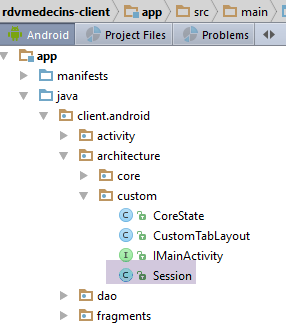
The [Session] class is used to store information that needs to be passed between fragments. It is as follows:
package rdvmedecins.android.architecture;

import rdvmedecins.android.dao.entities.AgendaMedecinJour;
import rdvmedecins.android.dao.entities.Client;
import rdvmedecins.android.dao.entities.Medecin;
import org.androidannotations.annotations.EBean;

import java.util.List;

@EBean(scope = EBean.Scope.Singleton)
public class Session {
  // list of doctors
  private List<Medecin> médecins;
  // clients list
  private List<Client> clients;
  // agenda
  private AgendaMedecinJour agenda;
  // position of clicked element in agenda
  private int position;
  // day of Rv in English notation "yyyy-MM-dd"
  private String dayRv;
  // day of Rv in French notation "dd-MM-yyyy"
  private String jourRv;


  // getters and setters
...
}
- line 10: the [Session] class is a AA component instantiated as a single instance;
- lines 12–15: In this case study, we will assume that the lists of doctors and clients do not change. We will retrieve them when the application starts and store them in the session so that the fragments can use them;
- lines 20–23: the desired date for an appointment. It is handled in two formats: in French notation (line 23) within the Android client, and in English notation (line 21) for communication with the server;
- line 19: the position of the clicked element (add/delete link) on the agenda;
3.6.6. Configuration View Management
3.6.6.1. The view
The configuration view is the view displayed when the application starts:
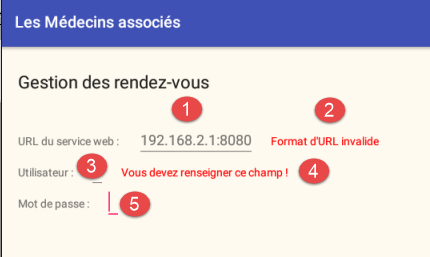
The elements of the visual interface are as follows:
3.6.6.2. The fragment
The configuration view is managed by the following fragment: [ConfigFragment]
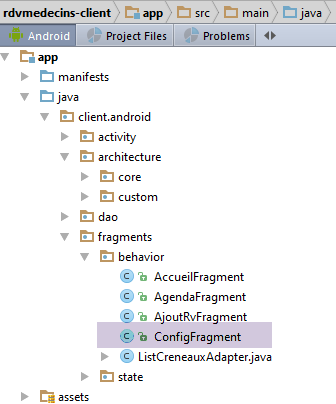
package client.android.fragments.behavior;

import android.util.Log;
import android.view.View;
import android.widget.Button;
import android.widget.EditText;
import android.widget.TextView;
import client.android.R;
import client.android.architecture.core.AbstractFragment;
import client.android.architecture.core.ISession;
import client.android.architecture.core.MenuItemState;
import client.android.architecture.custom.CoreState;
import client.android.architecture.custom.IMainActivity;
import client.android.dao.entities.Client;
import client.android.dao.entities.Medecin;
import client.android.dao.service.Response;
import client.android.fragments.state.ConfigFragmentState;
import org.androidannotations.annotations.*;
import rx.functions.Action1;

import java.net.URI;
import java.util.List;

@EFragment(R.layout.config)
@OptionsMenu(R.menu.menu_config)
public class ConfigFragment extends AbstractFragment {

  // visual interface elements
  @ViewById(R.id.edt_urlServiceRest)
  protected EditText edtUrlServiceRest;
  @ViewById(R.id.txt_errorUrlServiceRest)
  protected TextView txtErrorUrlServiceRest;
  @ViewById(R.id.txt_errorUtilisateur)
  protected TextView txtErrorUtilisateur;
  @ViewById(R.id.edt_utilisateur)
  protected EditText edtUtilisateur;
  @ViewById(R.id.edt_mdp)
  protected EditText edtMdp;

  // seizures
  private String urlServiceRest;
  private String utilisateur;
  private String mdp;

  // page validation
  @OptionsItem(R.id.actionValider)
  protected void doValider() {
   ...
  }
..
  // implementation methods parent class -------------------------------------------
 ...

}
- line 25: the fragment is associated with the following menu [menu_config]:
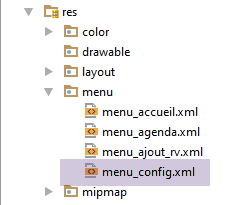
<menu xmlns:android="http://schemas.android.com/apk/res/android"
      xmlns:app="http://schemas.android.com/apk/res-auto"
      xmlns:tools="http://schemas.android.com/tools"
      tools:context=".activity.MainActivity1">
  <item
    android:id="@+id/menuActions"
    app:showAsAction="ifRoom"
    android:title="@string/menuActions">
    <menu>
      <item
        android:id="@+id/actionValider"
        android:title="@string/actionValider"/>
      <item
        android:id="@+id/actionAnnuler"
        android:title="@string/actionAnnuler"/>
    </menu>
  </item>

</menu>
- lines 28–38: the visual interface elements;
- lines 41-43: the three form fields;
Clicking on the option menu item in [Valider] is handled by the [doValider] method:
// page validation
  @OptionsItem(R.id.actionValider)
  protected void doValider() {
    // hide any previous error messages
    txtErrorUrlServiceRest.setVisibility(View.INVISIBLE);
    txtErrorUtilisateur.setVisibility(View.INVISIBLE);
    // test the validity of entries
    if (!isPageValid()) {
      return;
    }
    // enter the URL of the web service
    mainActivity.setUrlServiceWebJson(urlServiceRest);
    // user information
    mainActivity.setUser(utilisateur, mdp);
    // start waiting - 2 asynchronous tasks will be launched
    beginWaiting(2);
    // doctors
    executeInBackground(mainActivity.getAllMedecins(), new Action1<Response<List<Medecin>>>() {
      @Override
      public void call(Response<List<Medecin>> responseMedecins) {
        // we consume the answer
        consumeMedecins(responseMedecins);
      }
    });
    // clients
    executeInBackground(mainActivity.getAllClients(), new Action1<Response<List<Client>>>() {
      @Override
      public void call(Response<List<Client>> responseClients) {
        // we consume the answer
        consumeClients(responseClients);
      }
    });
  }


  private void consumeMedecins(Response<List<Medecin>> responseMedecins) {
    // log
    if (isDebugEnabled) {
      Log.d(className, "consume médecins");
    }
    // mistake?
    if (responseMedecins.getStatus() != 0) {
      // message
      showAlert(responseMedecins.getMessages());
      // cancellation
      doAnnuler();
      // back to UI
      return;
    }
    // doctors are saved in the session
    session.setMédecins(responseMedecins.getBody());
  }

  private void consumeClients(Response<List<Client>> responseClients) {
    // log
    if (isDebugEnabled) {
      Log.d(className, "consume clients");
    }
    // mistake?
    if (responseClients.getStatus() != 0) {
      // message
      showAlert(responseClients.getMessages());
      // cancellation
      doAnnuler();
      // back to UI
      return;
    }
    // we store the clients in the session
    session.setClients(responseClients.getBody());
  }
- lines 8–10: the validity of the three form entries is checked. If the form is invalid, the process stops there;
- lines 11-14: the inputs required by the [DAO] layer are passed to the activity;
- line 16: the parent class is notified that two asynchronous tasks will be launched, and the wait is prepared;
- lines 17–24: the list of doctors is requested;
- line 18: the method [executeInBackground] expects two parameters:
- line 18: the process to be executed and observed is provided by the method [mainActivity.getAllMedecins()];
- lines 18–24: the second parameter is an instance of type [Action1<T>], where T is the type returned by the observed process, here [Response<List<Medecin>>]
- line 22: when the response is received, it is passed to the [consumeMedecins] method on line 36;
- lines 25–33: after launching a first asynchronous task, a second one is launched to request the list of clients. We will therefore have two tasks running in parallel;
- lines 36–52: we have received the response from the doctors’ task. We process it;
- lines 42–49: First, we check whether the server reported an error in the [status] field of the response;
- line 44: if there is an error, we display the messages that the server placed in the [messages] field of the response;
- line 46: we cancel all tasks;
- line 48: return to Ui;
- line 51: if there was no error, the list of doctors is loaded into the session;
The validity of the entries (line 8) is verified using the following method:
  private boolean isPageValid() {
    // check the validity of the data entered
    boolean erreur;
    URI service;
    // validity of the URL of the REST service
    urlServiceRest = String.format("http://%s", edtUrlServiceRest.getText().toString().trim());
    try {
      service = new URI(urlServiceRest);
      erreur = service.getHost() == null || service.getPort() == -1;
    } catch (Exception ex) {
      // we note the error
      erreur = true;
    }
    if (erreur) {
      // error display
      txtErrorUrlServiceRest.setVisibility(View.VISIBLE);
    }
    // user
    utilisateur = edtUtilisateur.getText().toString().trim();
    if (utilisateur.length() == 0) {
      // error is displayed
      txtErrorUtilisateur.setVisibility(View.VISIBLE);
      // we note the error
      erreur = true;
    }
    // password
    mdp = edtMdp.getText().toString().trim();
    // return
    return !erreur;
}
The [beginWaiting] method (line 16) is as follows:
  // start of waiting
  protected void beginWaiting(int numberOfRunningTasks) {
    // prepare to launch tasks
    beginRunningTasks(numberOfRunningTasks);
    // status of buttons and menus
    setAllMenuOptionsStates(false);
    setMenuOptionsStates(new MenuItemState[]{new MenuItemState(R.id.menuActions, true),new MenuItemState(R.id.actionAnnuler, true)});

}
- line 4: we tell the parent task that we are going to launch [numberOfRunningTasks] tasks;
- line 6: all menu options are hidden;
- line 7: then make the option and [Actions/Annuler] visible;
Clicking on the option menu item in [Annuler] is handled by the [doAnnuler] method:
  @OptionsItem(R.id.actionAnnuler)
  protected void doAnnuler() {
    if (isDebugEnabled) {
      Log.d(className, "Annulation demandée");
    }
    // asynchronous tasks are cancelled
    cancelRunningTasks();
}
- line 8: we ask the parent class to cancel the asynchronous tasks;
3.6.6.3. Fragment lifecycle management
The fragment has the following state: [ConfigFragmentState]
package client.android.fragments.state;

import client.android.architecture.custom.CoreState;

public class ConfigFragmentState extends CoreState {

  // visibility of two error messages
  private boolean txtErrorUrlServiceRestVisible;
  private boolean txtErrorUtilisateurVisible;

  // getters and setters
...
}
- When the parent class requests it, the fragment will save the visibility of its two error messages;
The fragment's lifecycle is implemented as follows:
// implementation methods parent class -------------------------------------------
  @Override
  public CoreState saveFragment() {
    // save fragment status
    ConfigFragmentState state = new ConfigFragmentState();
    state.setTxtErrorUrlServiceRestVisible(txtErrorUrlServiceRest.getVisibility() == View.VISIBLE);
    state.setTxtErrorUtilisateurVisible(txtErrorUtilisateur.getVisibility() == View.VISIBLE);
    return state;
  }

  @Override
  protected int getNumView() {
    return     IMainActivity.VUE_CONFIG;
  }

  @Override
  protected void initFragment(CoreState previousState) {

  }

  @Override
  protected void initView(CoreState previousState) {
    if (previousState == null) {
      // 1st visit
      // hide error messages
      txtErrorUtilisateur.setVisibility(View.INVISIBLE);
      txtErrorUrlServiceRest.setVisibility(View.INVISIBLE);
      // menu
      initMenu();
    }
  }

  @Override
  protected void updateOnSubmit(CoreState previousState) {
  }

  @Override
  protected void updateOnRestore(CoreState previousState) {
    // restore error msg visibility
    ConfigFragmentState state = (ConfigFragmentState) previousState;
    // not the 1st visit - error messages are returned
    txtErrorUtilisateur.setVisibility(state.isTxtErrorUtilisateurVisible() ? View.VISIBLE : View.INVISIBLE);
    txtErrorUrlServiceRest.setVisibility(state.isTxtErrorUrlServiceRestVisible() ? View.VISIBLE : View.INVISIBLE);
  }


  @Override
  protected void notifyEndOfUpdates() {
  }

  @Override
  protected void notifyEndOfTasks(boolean runningTasksHaveBeenCanceled) {
    // menu
    initMenu();
    // next view?
    if (!runningTasksHaveBeenCanceled) {
      mainActivity.navigateToView(IMainActivity.VUE_ACCUEIL, ISession.Action.SUBMIT);
    }
  }

  // méthodes privées ------------------------------------------------
  private void initMenu(){
    // menu status
    setAllMenuOptionsStates(true);
    setMenuOptionsStates(new MenuItemState[]{new MenuItemState(R.id.actionAnnuler, false)});
}
- lines 2–9: when requested by its parent class, the fragment saves the state of its two error messages;
- lines 11–14: the fragment ID is [IMainActivity.VUE_CONFIG];
- lines 16–19: executed when the fragment is generated for the first time (previousState == null) or regenerated on subsequent occasions (previousState != null). Here, there is nothing to do;
- lines 21–31: executed when the view associated with the fragment is built for the first time (previousState==null) or rebuilt on subsequent occasions (previousState !=null);
- lines 24–29: for the first visit, error messages are hidden and the menu is displayed without the [Annuler] action (lines 62–66);
- lines 33-35: executed when the fragment is reached via a [SUBMIT] operation. This never happens here;
- lines 37–44: executed when the fragment is reached via a [NAVIGATION] or [RESTORE] operation. The error message status is restored from the previous state;
- lines 47–49: executed when all previous updates have been made. There is nothing more to do;
- lines 51–59: executed when all asynchronous tasks are complete;
- lines 53-54: the menu is reset to its default state;
- lines 56–58: if the tasks completed normally, then we move to the next view; otherwise, we remain on the same view;
3.6.7. Home View Management
3.6.7.1. The view
The home view is as follows:
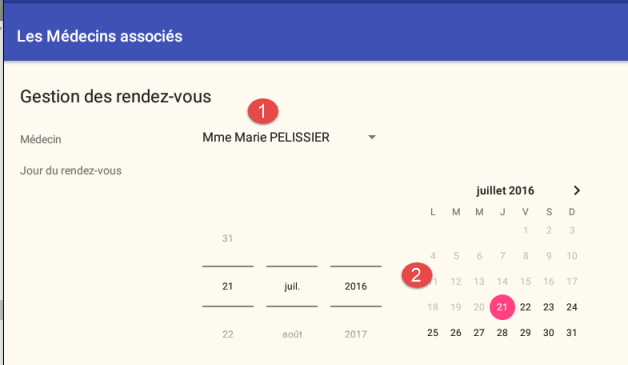
The elements of the visual interface are as follows:
3.6.7.2. The fragment
The home view is managed by the following fragment: [AccueilFragment]
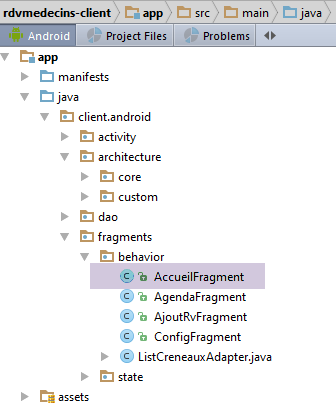
package client.android.fragments.behavior;

import android.util.Log;
import android.view.View;
import android.widget.ArrayAdapter;
import android.widget.Button;
import android.widget.DatePicker;
import android.widget.Spinner;
import client.android.R;
import client.android.architecture.core.AbstractFragment;
import client.android.architecture.core.ISession;
import client.android.architecture.core.MenuItemState;
import client.android.architecture.custom.CoreState;
import client.android.architecture.custom.IMainActivity;
import client.android.dao.entities.AgendaMedecinJour;
import client.android.dao.entities.Medecin;
import client.android.dao.service.Response;
import client.android.fragments.state.AccueilFragmentState;
import org.androidannotations.annotations.*;
import rx.functions.Action1;

import java.util.Calendar;
import java.util.List;
import java.util.Locale;

@EFragment(R.layout.accueil)
@OptionsMenu(R.menu.menu_accueil)
public class AccueilFragment extends AbstractFragment {

  // visual interface elements
  @ViewById(R.id.spinnerMedecins)
  protected Spinner spinnerMedecins;
  @ViewById(R.id.edt_JourRv)
  protected DatePicker edtJourRv;

  // local data
  private List<Medecin> medecins;
  private Calendar calendrier;
  private String[] spinnerMedecinsDataSource;

  // page validation
  @OptionsItem(R.id.actionValider)
  protected void doValider() {
    ...
  }
...

  // implementation methods parent class -------------------------------------
...
}
- line 26: the fragment is associated with the following menu [menu_accueil]:
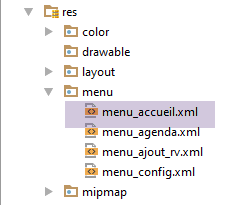
<menu xmlns:android="http://schemas.android.com/apk/res/android"
      xmlns:app="http://schemas.android.com/apk/res-auto"
      xmlns:tools="http://schemas.android.com/tools"
      tools:context=".activity.MainActivity1">
  <item
    android:id="@+id/menuActions"
    app:showAsAction="ifRoom"
    android:title="@string/menuActions">
    <menu>
      <item
        android:id="@+id/actionValider"
        android:title="@string/actionValider"/>
      <item
        android:id="@+id/actionAnnuler"
        android:title="@string/actionAnnuler"/>
    </menu>
  </item>
  <item
    android:id="@+id/menuNavigation"
    app:showAsAction="ifRoom"
    android:title="@string/menuNavigation">
    <menu>
      <item
        android:id="@+id/navigationToConfig"
        android:title="@string/navigationToConfig"/>
    </menu>
  </item>
</menu>
- lines 31–34: the visual interface elements;
- line 37: the list of doctors;
- line 38: a calendar;
- line 39: the data source for the doctors spinner;
Clicking the [Valider] link is handled by the following [doValider] method:
// page validation
  @OptionsItem(R.id.actionValider)
  protected void doValider() {
    // we note the id of the selected doctor
    Long idMedecin = medecins.get(spinnerMedecins.getSelectedItemPosition()).getId();
    // the day is saved in the session
    String jourRv = String.format(new Locale("Fr-fr"), "%02d-%02d-%04d", edtJourRv.getDayOfMonth(), edtJourRv.getMonth() + 1, edtJourRv.getYear());
    session.setJourRv(jourRv);
    // switch to date format yyyy-MM-dd
    String dayRv = String.format(new Locale("Fr-fr"), "%04d-%02d-%02d", edtJourRv.getYear(), edtJourRv.getMonth() + 1, edtJourRv.getDayOfMonth());
    session.setDayRv(dayRv);
    // start wait - 1 asynchronous task will be launched
    beginWaiting(1);
    // the doctor's agenda is requested
    executeInBackground(mainActivity.getAgendaMedecinJour(idMedecin, dayRv), new Action1<Response<AgendaMedecinJour>>() {

      @Override
      public void call(Response<AgendaMedecinJour> responseAgendaMedecinJour) {
        // we consume the answer
        consumeAgenda(responseAgendaMedecinJour);
      }
    });
  }

  private void consumeAgenda(Response<AgendaMedecinJour> responseAgendaMedecinJour) {
    // mistake?
    if (responseAgendaMedecinJour.getStatus() != 0) {
      // message
      showAlert(responseAgendaMedecinJour.getMessages());
      // cancellation
      doAnnuler();
      // back to UI
      return;
    }
    // we put the agenda in the session
    session.setAgenda(responseAgendaMedecinJour.getBody());
  }
- line 5: retrieve the ID of the selected doctor;
- lines 7-8: we store the selected date in the session in French format;
- lines 10-11: we set the selected date in the session, in English format;
- line 13: we notify the parent class that we are about to launch an asynchronous task and prepare for the wait;
- lines 15-22: the doctor’s agenda is requested;
- line 15: the [executeInBackground] method expects two parameters:
- line 15: the process to be executed and observed is provided by the [mainActivity.getAgendaMedecinJour(idMedecin, dayRv)] method;
- lines 15–22: the second parameter is an instance of type [Action1<T>], where T is the type returned by the observed process, here [Response<AgendaMedecinJour>]
- line 20: when the response is received, it is passed to the [consumeAgenda] method on line 25;
- line 15: the [executeInBackground] method expects two parameters:
- lines 25–37: we have received the agenda from the doctor. We process it;
- lines 27–34: First, we check if the server reported an error in the [status] field of the response;
- line 29: if there is an error, we display the messages that the server placed in the [messages] field of the response;
- line 31: we cancel all tasks;
- line 33: return to Ui;
- line 36: if there were no errors, agenda is started;
The [beginWaiting] method (line 13) is as follows:
  // start of waiting
  protected void beginWaiting(int numberOfRunningTasks) {
    // prepare to launch tasks
    beginRunningTasks(numberOfRunningTasks);
    // status of buttons and menus
    setAllMenuOptionsStates(false);
    setMenuOptionsStates(new MenuItemState[]{new MenuItemState(R.id.menuActions, true),new MenuItemState(R.id.actionAnnuler, true)});

}
- line 4: we tell the parent task that we are going to launch [numberOfRunningTasks] tasks;
- line 6: we hide all menu options;
- line 7: then make the option and [Actions/Annuler] visible;
Clicking on the option menu item [Annuler] is handled by the [doAnnuler] method:
  @OptionsItem(R.id.actionAnnuler)
  protected void doAnnuler() {
    if (isDebugEnabled) {
      Log.d(className, "Annulation demandée");
    }
    // asynchronous tasks are cancelled
    cancelRunningTasks();
}
- line 8: we ask the parent class to cancel the asynchronous tasks;
Clicking on the option menu item in [Retour à la configuration] is handled as follows:
  @OptionsItem(R.id.navigationToConfig)
  protected void navigationToConfig() {
    // navigate to the configuration view
    mainActivity.navigateToView(IMainActivity.VUE_CONFIG, ISession.Action.NAVIGATION);
}
- line 4: navigate to the configuration view with the action [NAVIGATION]. This means we want to restore the configuration view to the state in which we left it;
3.6.7.3. Fragment Lifecycle Management
The fragment has the following state: [AccueilFragmentState]
package client.android.fragments.state;

import android.widget.ArrayAdapter;
import client.android.architecture.custom.CoreState;
import client.android.dao.entities.CreneauMedecinJour;

public class AccueilFragmentState extends CoreState {

  // fragment status [Home]
  // selected doctor's position
  private int selectedMedecinPosition;
  // selected date
  private int year;
  private int month;
  private int dayOfMonth;
  // doctors' spinner data source
  private String[] spinnerMedecinsDataSource;

  // manufacturers
  public AccueilFragmentState() {

  }

  // getters and setters
...
}
- line 11: returns the selected item from the list of doctors;
- lines 13–15: returns the selected date from the calendar;
- line 17: returns the data source for the list of doctors;
The fragment's lifecycle is implemented as follows:
// implementation methods parent class -------------------------------------
  @Override
  public CoreState saveFragment() {
    // save the view
    AccueilFragmentState state = new AccueilFragmentState();
    state.setSelectedMedecinPosition(spinnerMedecins.getSelectedItemPosition());
    state.setDayOfMonth(edtJourRv.getDayOfMonth());
    state.setMonth(edtJourRv.getMonth());
    state.setYear(edtJourRv.getYear());
    state.setSpinnerMedecinsDataSource(spinnerMedecinsDataSource);
    return state;
  }

  @Override
  protected int getNumView() {
    return IMainActivity.VUE_ACCUEIL;
  }

  @Override
  protected void initFragment(CoreState previousState) {
    // we get the doctors back in session
    medecins = session.getMédecins();
    // 1st visit?
    if (previousState == null) {
      // we build the table displayed by the spinner
      spinnerMedecinsDataSource = new String[medecins.size()];
      int i = 0;
      for (Medecin medecin : medecins) {
        spinnerMedecinsDataSource[i] = String.format("%s %s %s", medecin.getTitre(), medecin.getPrenom(), medecin.getNom());
        i++;
      }
    } else {
      // no 1st visit
      AccueilFragmentState state = (AccueilFragmentState) previousState;
      spinnerMedecinsDataSource = state.getSpinnerMedecinsDataSource();
    }
    // the calendar
    calendrier = Calendar.getInstance();
  }

  @Override
  protected void initView(CoreState previousState) {
    // we associate the doctors' spinner with its data source
    ArrayAdapter<String> dataAdapterMedecins = new ArrayAdapter<>(activity, android.R.layout.simple_spinner_item, spinnerMedecinsDataSource);
    dataAdapterMedecins.setDropDownViewResource(android.R.layout.simple_spinner_dropdown_item);
    spinnerMedecins.setAdapter(dataAdapterMedecins);
    // minimum calendar date to today
    edtJourRv.setMinDate(calendrier.getTimeInMillis());
    // 1st visit?
    if (previousState == null) {
      // menu
      initMenu();
    }
  }

  @Override
  protected void updateOnSubmit(CoreState previousState) {
    // menu
    initMenu();
  }

  @Override
  protected void updateOnRestore(CoreState previousState) {
    // restore the state currently in session
    AccueilFragmentState state = (AccueilFragmentState) previousState;
    // selection in doctors' spinner
    spinnerMedecins.setSelection(state.getSelectedMedecinPosition());
    // calendar
    edtJourRv.updateDate(state.getYear(), state.getMonth(), state.getDayOfMonth());
  }

  @Override
  protected void notifyEndOfUpdates() {
  }

  @Override
  protected void notifyEndOfTasks(boolean runningTasksHaveBeenCanceled) {
    // called after all tasks have been completed or cancelled
    // menu status
    initMenu();
    // next view?
    if (!runningTasksHaveBeenCanceled) {
      mainActivity.navigateToView(IMainActivity.VUE_AGENDA, ISession.Action.SUBMIT);
    }
  }

  // méthodes privées ------------------------------------------------
  private void initMenu() {
    // menu status
    setAllMenuOptionsStates(true);
    setMenuOptionsStates(new MenuItemState[]{new MenuItemState(R.id.actionAnnuler, false)});
  }
- lines 2–9: when requested by its parent class, the fragment saves the state of the following items:
- line 6: the selected position in the list of doctors;
- lines 7–9: the day of the month, the month, and the year of the date selected in the calendar;
- line 10: the data source for the doctors spinner;
- lines 14-17: the fragment ID is [IMainActivity.VUE_ACCUEIL];
- lines 19–39: executed when the fragment is generated for the first time (previousState==null) or regenerated on subsequent occasions (previousState !=null);
- lines 25-31: in the case of a first visit, the data source for the doctors spinner is constructed;
- lines 33–35: for subsequent visits, the spinner’s data source is retrieved from the fragment’s previous state;
- lines 41-54: executed when the view associated with the fragment is built for the first time (previousState==null) or rebuilt on subsequent visits (previousState !=null);
- lines 50–53: for the first visit, the menu is displayed without the action [Annuler] (lines 88–92);
- lines 43–48: for all visits, whether the first or not, the doctor spinner is linked to its source (lines 44–46) and the minimum date on the calendar is set to today’s date (line 48);
- lines 56–60: executed when the fragment is reached via a [SUBMIT] operation. We are then coming from the [CONFIG] view. We reset the menu to its initial state;
- lines 62-70: executed when the fragment is reached via a [NAVIGATION] or [RESTORE] operation;
- line 67: the doctors spinner is reset to the last selected doctor;
- line 69: the calendar is set to the last selected date;
- lines 72–74: executed when all previous updates have been made. There is nothing else to do;
- lines 76–85: executed when all asynchronous tasks are complete;
- line 80: reset the menu to its default state;
- lines 82–84: if the tasks completed normally, then move to the next view; otherwise, remain on the same view;
3.6.8. View Management Agenda
3.6.8.1. The view
The home view is as follows:
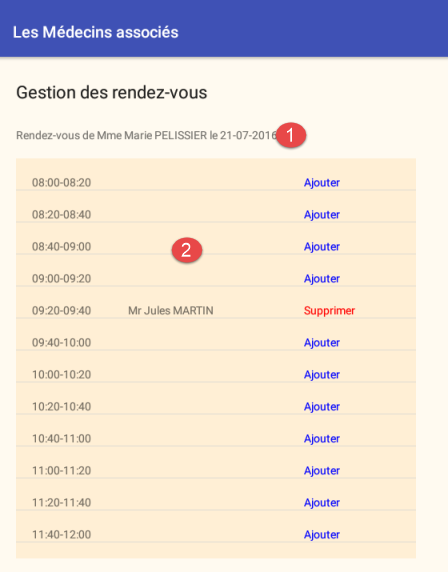
The elements of the visual interface are as follows:
3.6.8.2. The fragment
The Agenda view is managed by the following [AgendaFragment] fragment:
package client.android.fragments.behavior;

import android.util.Log;
import android.view.View;
import android.widget.ArrayAdapter;
import android.widget.ListView;
import android.widget.TextView;
import android.widget.Toast;
import client.android.R;
import client.android.architecture.core.AbstractFragment;
import client.android.architecture.core.ISession;
import client.android.architecture.core.MenuItemState;
import client.android.architecture.custom.CoreState;
import client.android.architecture.custom.IMainActivity;
import client.android.dao.entities.AgendaMedecinJour;
import client.android.dao.entities.CreneauMedecinJour;
import client.android.dao.entities.Medecin;
import client.android.dao.entities.Rv;
import client.android.dao.service.Response;
import client.android.fragments.state.AgendaFragmentState;
import org.androidannotations.annotations.EFragment;
import org.androidannotations.annotations.OptionsItem;
import org.androidannotations.annotations.OptionsMenu;
import org.androidannotations.annotations.ViewById;
import rx.functions.Action1;

@EFragment(R.layout.agenda)
@OptionsMenu(R.menu.menu_agenda)
public class AgendaFragment extends AbstractFragment {

  // visual interface elements
  @ViewById(R.id.txt_titre2_agenda)
  protected TextView txtTitre2;
  @ViewById(R.id.listViewAgenda)
  protected ListView lstCreneaux;

  // agenda displayed by the fragment
  private AgendaMedecinJour agenda;
  // info ListView slots
  private int firstPosition;
  private int top;
  // appointment deleted or not
  private boolean rdvSupprimé;
  // slot number added or deleted
  private int numCréneau;

  // update of agenda after an addition/deletion
  private void updateAgenda() {
  ...
  }

...

  // implementation methods parent class ------------------------------------------------------
  ...
}
- line 27: the fragment is associated with the following menu [menu_agenda]:
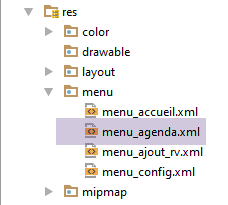
<menu xmlns:android="http://schemas.android.com/apk/res/android"
      xmlns:app="http://schemas.android.com/apk/res-auto"
      xmlns:tools="http://schemas.android.com/tools"
      tools:context=".activity.MainActivity1">
  <item
    android:id="@+id/menuActions"
    app:showAsAction="ifRoom"
    android:title="@string/menuActions">
    <menu>
      <item
        android:id="@+id/actionAnnuler"
        android:title="@string/actionAnnuler"/>
      <item
        android:id="@+id/actionAgenda"
        android:title="@string/actionAgenda"/>
    </menu>
  </item>
  <item
    android:id="@+id/menuNavigation"
    app:showAsAction="ifRoom"
    android:title="@string/menuNavigation">
    <menu>
      <item
        android:id="@+id/navigationToConfig"
        android:title="@string/navigationToConfig"/>
      <item
        android:id="@+id/navigationToAccueil"
        android:title="@string/navigationToAccueil"/>
    </menu>
  </item>
</menu>
- lines 32–35: visual interface elements;
- lines 37-45: global data for methods;
3.6.8.2.1. Method [updateAgenda]
The (re)generation of the agenda slot list is required in several places in the code. It has been factored into the following private method [updateAgenda]:
  // update of agenda after an addition/deletion
  private void updateAgenda() {
    // (re)generation of agenda slots
    // the agenda is taken from the session and stored in a fragment field
    agenda = session.getAgenda();
    // regeneration of ListView slots
    ArrayAdapter<CreneauMedecinJour> adapter = new ListCreneauxAdapter(activity, R.layout.creneau_medecin,
      agenda.getCreneauxMedecinJour(), this);
    lstCreneaux.setAdapter(adapter);
    // we reposition ourselves at the right spot on the ListView
    lstCreneaux.setSelectionFromTop(firstPosition, top);
}
- line 5: agenda is retrieved from the session and stored in the [agenda] field of the fragment;
- lines 7–9: We define the adapter for the [ListView] component. This adapter defines both the data source for the [ListView] and the display model for each of its elements. We will present this adapter shortly;
- line 11: we return to the previous position of the agenda. In fact, we only see a portion of the day’s time slots. If we add or remove an appointment in the last time slot, the code above will refresh the page to display the new agenda. This refresh causes us to be positioned back at the firsttime slot, which is undesirable. Line 5 resolves this issue. A description of this solution can be found in URL [http://stackoverflow.com/questions/3014089/maintain-save-restore-scroll-position-when-returning-to-a-listview];
The class [ListCreneauxAdapter] is used to define a line in [ListView]:
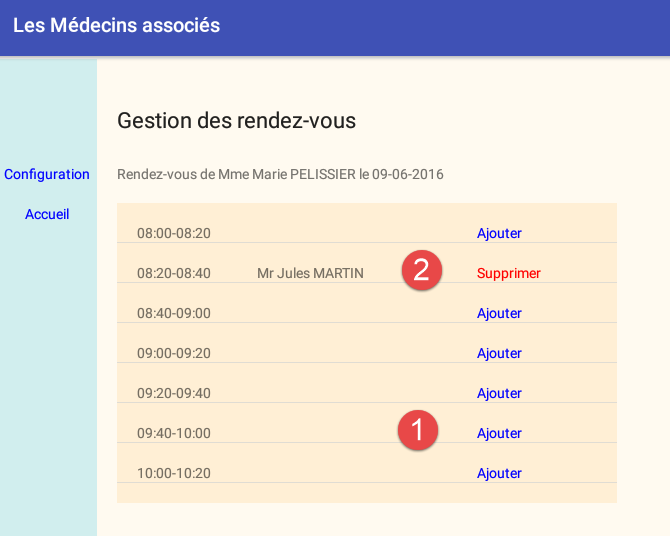
As shown above, the display differs depending on whether the time slot has an appointment or not. The code for the [ListCreneauxAdapter] class is as follows:
...

public class ListCreneauxAdapter extends ArrayAdapter<CreneauMedecinJour> {

    // time slot table
    private CreneauMedecinJour[] creneauxMedecinJour;
    // execution context
    private Context context;
    // the id of the display layout of a line in the slot list
    private int layoutResourceId;
    // click listener
    private AgendaFragment vue;

    // manufacturer
    public ListCreneauxAdapter(Context context, int layoutResourceId, CreneauMedecinJour[] creneauxMedecinJour,
            AgendaFragment vue) {
        super(context, layoutResourceId, creneauxMedecinJour);
        // memorize information
        this.creneauxMedecinJour = creneauxMedecinJour;
        this.context = context;
        this.layoutResourceId = layoutResourceId;
        this.vue = vue;
        // sort the table of slots in schedule order
        Arrays.sort(creneauxMedecinJour, new MyComparator());
    }

    @Override
    public View getView(final int position, View convertView, ViewGroup parent) {
    ...
}

// sorting the slot table
class MyComparator implements Comparator<CreneauMedecinJour> {
...
    }
}
- Line 3: The class [ListCreneauxAdapter] must extend a predefined adapter for [ListView], in this case the [ArrayAdapter] class, which, as its name suggests, supplies the [ListView] with an array of objects, in this case of type [CreneauMedecinJour]. Let’s review the code for this entity:
public class CreneauMedecinJour implements Serializable {

    private static final long serialVersionUID = 1L;
    // fields
    private Creneau creneau;
    private Rv rv;
...
}
- The [CreneauMedecinJour] class contains a time slot (line 5) and a possible appointment (line 6) or null if there is no appointment;
Back to the code for the [ListCreneauxAdapter] class:
- line 15: the constructor receives four parameters:
- the current Android activity,
- the XML file defining the content of each element of [ListView],
- the table of the doctor's time slots,
- the view itself;
- line 24: the table of time slots is sorted in ascending order by time;
The [getView] method is responsible for generating the view corresponding to a row in [ListView]. This view consists of three elements:

The code for method [getView] is as follows:
@Override
    public View getView(final int position, View convertView, ViewGroup parent) {
        // we position ourselves in the right niche
        CreneauMedecinJour creneauMedecin = creneauxMedecinJour[position];
        // create the line
        View row = ((Activity) context).getLayoutInflater().inflate(layoutResourceId, parent, false);
        // the time slot
        TextView txtCreneau = (TextView) row.findViewById(R.id.txt_Creneau);
        txtCreneau.setText(String.format("%02d:%02d-%02d:%02d", creneauMedecin.getCreneau().getHdebut(), creneauMedecin
                .getCreneau().getMdebut(), creneauMedecin.getCreneau().getHfin(), creneauMedecin.getCreneau().getMfin()));
        // the customer
        TextView txtClient = (TextView) row.findViewById(R.id.txt_Client);
        String text;
        if (creneauMedecin.getRv() != null) {
            Client client = creneauMedecin.getRv().getClient();
            text = String.format("%s %s %s", client.getTitre(), client.getPrenom(), client.getNom());
        } else {
            text = "";
        }
        txtClient.setText(text);
        // the link
        final TextView btnValider = (TextView) row.findViewById(R.id.btn_Valider);
        if (creneauMedecin.getRv() == null) {
            // add
            btnValider.setText(R.string.btn_ajouter);
            btnValider.setTextColor(context.getResources().getColor(R.color.blue));
        } else {
            // delete
            btnValider.setText(R.string.btn_supprimer);
            btnValider.setTextColor(context.getResources().getColor(R.color.red));
        }
        // link listener
        btnValider.setOnClickListener(new OnClickListener() {

            @Override
            public void onClick(View v) {
                // pass info to agenda view
                vue.doValider(position, btnValider.getText().toString());
            }
        });
        // we return the line
        return row;
    }
- line 2: position is the line number to be generated in [ListView]. It is also the slot number in the [creneauxMedecinJour] table. We ignore the other two parameters;
- line 4: we retrieve the time slot to be displayed in the row of [ListView];
- Line 6: The line is constructed based on its definition in XML
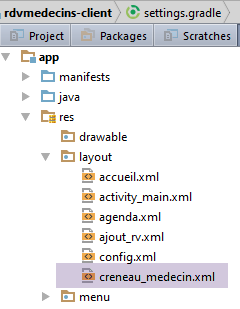
The code for [creneau_medecin.xml] is as follows:
<?xml version="1.0" encoding="utf-8"?>
<RelativeLayout xmlns:android="http://schemas.android.com/apk/res/android"
    android:id="@+id/RelativeLayout1"
    android:layout_width="match_parent"
    android:layout_height="match_parent"
    android:background="@color/wheat" >

    <TextView
        android:id="@+id/txt_Creneau"
        android:layout_width="100dp"
        android:layout_height="wrap_content"
        android:layout_marginTop="20dp"
        android:layout_marginLeft="20dp"
        android:text="@string/txt_dummy" />

    <TextView
        android:id="@+id/txt_Client"
        android:layout_width="200dp"
        android:layout_height="wrap_content"
        android:layout_alignBaseline="@+id/txt_Creneau"
        android:layout_marginLeft="20dp"
        android:layout_toRightOf="@+id/txt_Creneau"
        android:text="@string/txt_dummy" />

    <TextView
        android:id="@+id/btn_Valider"
        android:layout_width="wrap_content"
        android:layout_height="wrap_content"
        android:layout_alignBaseline="@+id/txt_Client"
        android:layout_marginLeft="20dp"
        android:layout_toRightOf="@+id/txt_Client"
        android:text="@string/btn_valider"
        android:textColor="@color/blue" />

</RelativeLayout>
- lines 8-10: the time slot [1] is constructed;
- lines 12-20: the client ID [2] is created;
- line 23: if the time slot has no appointment;
- lines 25-26: the link [Ajouter] is created in blue;
- lines 29-30: otherwise, the link [Supprimer] is created in red;
- lines 33-40: regardless of the nature of the link [Ajouter / Supprimer], it is the [doValider] method of the view that will handle the click on the link. The method will receive two arguments:
- the number of the slot that was clicked,
- the label of the link that was clicked;
- line 42: we return the line we just constructed.
Note that it is the [doValider] method of the [AgendaFragment] fragment that handles the links. It is as follows:
  // click on a link [Add / Remove]
  public void doValider(int numCréneau, String texte) {
    // operation in progress?
    if (numberOfRunningTasks != 0) {
      Toast.makeText(activity, "Une opération est en cours. Patientez ou Annulez...", Toast.LENGTH_SHORT).show();
      return;
    }
    // note the scroll position to return to it
    // lire [http://stackoverflow.com/questions/3014089/maintain-save-restore-scroll-position-when-returning-to-a-listview]
    // position of 1st element fully visible or not
    firstPosition = lstCreneaux.getFirstVisiblePosition();
    // y offset of this element relative to the top of the ListView
    // measures the height of any hidden part
    View v = lstCreneaux.getChildAt(0);
    top = (v == null) ? 0 : v.getTop();
    // we also note the number of the clicked slot
    this.numCréneau = numCréneau;
    // depending on the text of the link, we do not do the same thing
    if (texte.equals(getResources().getString(R.string.lnk_ajouter))) {
      doAjouter();
    } else {
      doSupprimer();
    }
}
- The [doValider] method receives two pieces of information:
- the number of the slot that was clicked;
- the text (Add / Delete) of the link that was clicked;
- lines 4–7: clicking on the [Supprimer / Ajouter] links is disabled if there are asynchronous tasks in progress. This is a design choice that simplifies code writing. It is open to discussion;
- lines 11-15: the information (firstPosition, top) from the ListView of the slots is stored in fields of the fragment so that the private method [updateAgenda] can regenerate it with the same scroll position;
- line 17: the number of the clicked slot is noted;
- lines 19–23: depending on the text of the clicked link, we add or remove content;
3.6.8.2.2. Method [doSupprimer]
The [doSupprimer] method deletes the appointment from the selected time slot:
// deleting an appointment
  private void doSupprimer() {
    // waiting for two tasks to be completed
    beginWaiting(2);
    // delete the Rdv in the background
    rdvSupprimé = false;
    // identifier of the rv to be deleted
    long idRv = agenda.getCreneauxMedecinJour()[numCréneau].getRv().getId();
    // deletion by an asynchronous task
    executeInBackground(mainActivity.supprimerRv(idRv), new Action1<Response<Rv>>() {

      @Override
      public void call(Response<Rv> responseRv) {
        // income consumption
        consumeRv(responseRv);
      }
    });
  }

  // consumption of an answer
  private void consumeRv(Response<Rv> responseRv) {
    // mistake?
    if (responseRv.getStatus() != 0) {
      // message
      showAlert(responseRv.getMessages());
      // cancellation
      doAnnuler();
      // back to UI
      return;
    }
    // we note that the appointment has been cancelled
    rdvSupprimé = true;
    // the most recent agenda is requested
    executeInBackground(
      mainActivity.getAgendaMedecinJour(agenda.getMedecin().getId(), session.getDayRv()),
      new Action1<Response<AgendaMedecinJour>>() {

        @Override
        public void call(Response<AgendaMedecinJour> responseAgendaMedecinJour) {
          // we consume the answer
          consumeAgenda(responseAgendaMedecinJour);
        }
      });
  }

  // consumption of a agenda
  private void consumeAgenda(Response<AgendaMedecinJour> responseAgendaMedecinJour) {
    // mistake?
    if (responseAgendaMedecinJour.getStatus() != 0) {
      // message
      showAlert(responseAgendaMedecinJour.getMessages());
      // cancellation
      doAnnuler();
      // back to UI
      return;
    }
    // we put the agenda in the session
    session.setAgenda(responseAgendaMedecinJour.getBody());
    // we update the view's agenda
    updateAgenda();
  }
- line 4: we notify the parent class that we are going to launch two asynchronous tasks and begin waiting for these two tasks to complete;
- line 8: retrieve the ID of the appointment to be deleted. The server needs this information;
- lines 9–18: we request the deletion of the appointment via an asynchronous task;
- line 10: the [executeInBackground] method expects two parameters:
- line 10: the process to be executed and observed is provided by the [mainActivity.supprimerRv(idRv)] method;
- lines 10–17: the second parameter is an instance of type [Action1<T>], where T is the type returned by the observed process, here [Response<Rv>]
- line 15: when the response is received, it is passed to the [consumeRv] method on line 21;
- line 10: the [executeInBackground] method expects two parameters:
- lines 21–44: we have received the response from the asynchronous task. We process it;
- lines 23–30: First, we check whether the server reported an error in the [status] field of the response;
- line 25: if there is an error, we display the messages that the server placed in the [messages] field of the response;
- line 27: we cancel all tasks;
- line 29: return to Ui;
- line 32: if there was no error, note that the appointment has been deleted;
- lines 34–43: rather than simply deleting the appointment in the agenda currently displayed by the fragment, we request the doctor’s new agenda. This is because the application is multi-user, and other users may also have modified the doctor’s agenda. So it’s best to have the most recent version;
- lines 34–43, 47–61: we repeat what was done in the [AccueilFragment] fragment, this time using information from the session;
The [beginWaiting] method (line 4) is as follows:
  // start of waiting
  protected void beginWaiting(int numberOfRunningTasks) {
    // prepare to launch tasks
    beginRunningTasks(numberOfRunningTasks);
    // status of buttons and menus
    setAllMenuOptionsStates(false);
    setMenuOptionsStates(new MenuItemState[]{new MenuItemState(R.id.menuActions, true),new MenuItemState(R.id.actionAnnuler, true)});

}
- line 4: we tell the parent task that we are going to launch [numberOfRunningTasks] tasks;
- line 6: all menu options are hidden;
- line 7: then make option and [Actions/Annuler] visible;
3.6.8.2.3. Method [doAnnuler]
Clicking on the option menu item in the [Annuler] menu is handled by the [doAnnuler] method:
  @OptionsItem(R.id.actionAnnuler)
  protected void doAnnuler() {
    if (isDebugEnabled) {
      Log.d(className, "Annulation demandée");
    }
    // asynchronous tasks are cancelled
    cancelRunningTasks();
}
- line 7: we ask the parent class to cancel the asynchronous tasks;
3.6.8.2.4. Option from menu [Retour à la configuration]
Clicking on the option menu item [Retour à la configuration] is handled as follows:
  @OptionsItem(R.id.navigationToConfig)
  protected void navigationToConfig() {
    // navigate to the configuration view
    mainActivity.navigateToView(IMainActivity.VUE_CONFIG, ISession.Action.NAVIGATION);
}
- line 4: we navigate to the configuration view using the action [NAVIGATION]. This means we want to restore the configuration view to the state in which we left it;
3.6.8.2.5. Option from menu [Retour à l'accueil]
Clicking on the option menu item [Retour à l'accueil] is handled similarly:
  @OptionsItem(R.id.navigationToAccueil)
  protected void navigationToAccueil() {
    // navigate to home view
    mainActivity.navigateToView(IMainActivity.VUE_ACCUEIL, ISession.Action.NAVIGATION);
}
3.6.8.3. Fragment Lifecycle Management
The fragment has the following state: [AgendaFragmentState]
package client.android.fragments.state;

import android.widget.ArrayAdapter;
import client.android.architecture.custom.CoreState;
import client.android.dao.entities.CreneauMedecinJour;

public class AgendaFragmentState extends CoreState {

  // title view
  private String titre;
  // ListView
  private int firstPosition;
  private int top;

  // manufacturers
  public AgendaFragmentState() {

  }

  public AgendaFragmentState(String titre) {
    this.titre = titre;
  }

  // getters and setters
...
}
- line 10: the title displayed at the top of the view;
- lines 12-13: enables scrolling of the ListView for the doctor's appointment slots;
The fragment's lifecycle is implemented as follows:
// implementation methods parent class ------------------------------------------------------
  @Override
  public CoreState saveFragment() {
    // save status
    AgendaFragmentState state = new AgendaFragmentState();
    state.setTitre(txtTitre2.getText().toString());
    // note the scroll position to return to it
    // lire [http://stackoverflow.com/questions/3014089/maintain-save-restore-scroll-position-when-returning-to-a-listview]
    // position of 1st element fully visible or not
    firstPosition = lstCreneaux.getFirstVisiblePosition();
    // y offset of this element relative to the top of the ListView
    // measures the height of any hidden part
    View v = lstCreneaux.getChildAt(0);
    top = (v == null) ? 0 : v.getTop();
    // we memorize it all
    state.setTop(top);
    state.setFirstPosition(firstPosition);
    return state;
  }

  @Override
  protected int getNumView() {
    return IMainActivity.VUE_AGENDA;
  }

  @Override
  protected void initFragment(CoreState previousState) {
    // 1st visit?
    if (previousState != null) {
      // not the 1st visit
      AgendaFragmentState state = (AgendaFragmentState) previousState;
      // and information from ListView
      firstPosition = state.getFirstPosition();
      top = state.getTop();
    }
  }

  @Override
  protected void initView(CoreState previousState) {
  }

  @Override
  protected void updateOnSubmit(CoreState previousState) {
    // we retrieve the agenda
    agenda = session.getAgenda();
    // generate the page title
    Medecin medecin = agenda.getMedecin();
    txtTitre2.setText(String.format("Rendez-vous de %s %s %s le %s", medecin.getTitre(), medecin.getPrenom(),
      medecin.getNom(), session.getJourRv()));
    // menu status
    initMenu();
  }

  @Override
  protected void updateOnRestore(CoreState previousState) {
    // regenerate the page title
    AgendaFragmentState state = (AgendaFragmentState) previousState;
    txtTitre2.setText(state.getTitre());
  }

  @Override
  protected void notifyEndOfUpdates() {
    // regenerate the slot list
    updateAgenda();
  }

  @Override
  protected void notifyEndOfTasks(boolean runningTasksHaveBeenCanceled) {
    // menu status
    initMenu();
    // if cancelled but appointment deleted, update local agenda
    if (runningTasksHaveBeenCanceled && rdvSupprimé) {
      // we delete the appointment in the local agenda (we couldn't get the global agenda)
      agenda.getCreneauxMedecinJour()[numCréneau].setRv(null);
      // update the visual interface
      updateAgenda();
    }
  }


  // méthodes privées ------------------------------------------------
  private void initMenu() {
    // menu status
    setAllMenuOptionsStates(true);
    setMenuOptionsStates(new MenuItemState[]{new MenuItemState(R.id.actionAnnuler, false)});
  }
- lines 2–19: when requested by its parent class, the fragment saves the state of the following elements:
- line 6: the title displayed at the top of the view;
- lines 7-17: the information (top, firstPosition) that will allow the scrolling of ListView to be restored;
- lines 21-24: the fragment ID is [IMainActivity.VUE_AGENDA];
- lines 26–35: executed when the fragment is generated for the first time (previousState == null) or regenerated on subsequent occasions (previousState != null);
- lines 30–34: if this is not the first visit to the fragment, we retrieve the information (top, firstPosition) that will allow us to restore the scrolling of ListView;
- lines 38–40: executed when the view associated with the fragment is built for the first time (previousState == null) or rebuilt on subsequent visits (previousState != null). There is nothing to do here because the ListView for the slots will be generated by the private method [updateAgenda] (lines 61–65);
- lines 42–52: executed when the fragment is reached via a [SUBMIT] operation. We are then coming from the [ACCUEIL] view;
- line 45: the agenda sessioned by [AccueilFragment] is retrieved;
- lines 47–49: the view title is generated;
- the ListView for the time slots will be generated by the private method [updateAgenda] (lines 61–65);
- lines 54-59: executed when the fragment is reached via a [NAVIGATION] or [RESTORE] operation;
- lines 57–58: the view title is regenerated;
- the ListView for the time slots will be generated by the private method [updateAgenda] (lines 61-65);
- lines 72-74: executed once all previous updates have been completed. The ListView for the slots is updated because this update is necessary regardless of how the fragment is accessed;
- lines 67–77: executed when all asynchronous tasks are complete;
- line 70: the menu is reset to its default state (lines 82-86);
- line 72: there were two asynchronous tasks. We check if the first one (deleting the appointment) succeeded, despite a cancellation;
- line 74: if so, the appointment is deleted from the local agenda
- line 75: and we update its display;
3.6.9. Managing the view for adding an appointment
3.6.9.1. The view
The view for adding an appointment is as follows:
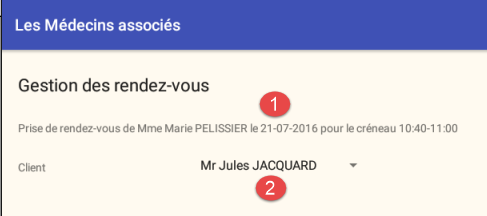
The elements of the visual interface are as follows:
3.6.9.2. The fragment
The view for adding an appointment is managed by the following fragment: [AjoutRvFragment]
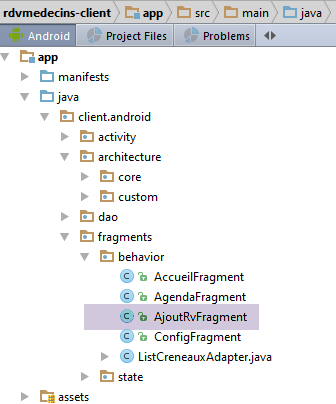
package client.android.fragments.behavior;

import android.util.Log;
import android.widget.ArrayAdapter;
import android.widget.Spinner;
import android.widget.TextView;
import client.android.R;
import client.android.architecture.core.AbstractFragment;
import client.android.architecture.core.ISession;
import client.android.architecture.core.MenuItemState;
import client.android.architecture.custom.CoreState;
import client.android.architecture.custom.IMainActivity;
import client.android.dao.entities.*;
import client.android.dao.service.Response;
import client.android.fragments.state.AjoutRvFragmentState;
import org.androidannotations.annotations.EFragment;
import org.androidannotations.annotations.OptionsItem;
import org.androidannotations.annotations.OptionsMenu;
import org.androidannotations.annotations.ViewById;
import rx.functions.Action1;

import java.util.List;
import java.util.Locale;

@EFragment(R.layout.ajout_rv)
@OptionsMenu(R.menu.menu_ajout_rv)
public class AjoutRvFragment extends AbstractFragment {

  // visual interface elements
  @ViewById(R.id.spinnerClients)
  protected Spinner spinnerClients;
  @ViewById(R.id.txt_titre2_ajoutRv)
  protected TextView txtTitre2;

  // the clients
  private List<Client> clients;

  // local data
  private Creneau creneau;
  private Medecin medecin;
  private boolean rdvAjouté;
  private Rv rv;
  private String[] spinnerClientsDataSource;

  // page validation
  @OptionsItem(R.id.actionValider)
  protected void doValider() {
   ...
  }
...

  // implementation methods parent class ----------------------------------
...
}
- line 26: the fragment is associated with the following menu [menu_ajout_rv]:
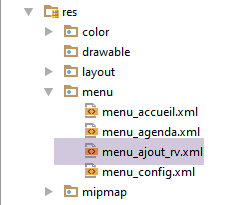
<menu xmlns:android="http://schemas.android.com/apk/res/android"
      xmlns:app="http://schemas.android.com/apk/res-auto"
      xmlns:tools="http://schemas.android.com/tools"
      tools:context=".activity.MainActivity1">
  <item
    android:id="@+id/menuActions"
    app:showAsAction="ifRoom"
    android:title="@string/menuActions">
    <menu>
      <item
        android:id="@+id/actionValider"
        android:title="@string/actionValider"/>
      <item
        android:id="@+id/actionAnnuler"
        android:title="@string/actionAnnuler"/>
    </menu>
  </item>
  <item
    android:id="@+id/menuNavigation"
    app:showAsAction="ifRoom"
    android:title="@string/menuNavigation">
    <menu>
      <item
        android:id="@+id/navigationToConfig"
        android:title="@string/navigationToConfig"/>
      <item
        android:id="@+id/navigationToAccueil"
        android:title="@string/navigationToAccueil"/>
      <item
        android:id="@+id/navigationToAgenda"
        android:title="@string/navigationToAgenda"/>
    </menu>
  </item>
</menu>
- lines 30–33: the elements of the visual interface;
- line 36: the list of clients;
- line 43: the data source for the clients spinner;
Clicking the [Valider] link is handled by the following [doValider] method:
  // the clients
  private List<Client> clients;

  // local data
  private Creneau creneau;
  private Medecin medecin;
  private boolean rdvAjouté;
  private Rv rv;
  private String[] spinnerClientsDataSource;
...
// page validation
  @OptionsItem(R.id.actionValider)
  protected void doValider() {
    // the selected customer is retrieved
    Client client = clients.get(spinnerClients.getSelectedItemPosition());
    // start waiting for 2 asynchronous tasks
    beginWaiting(2);
    // we add the RV
    rdvAjouté = false;
    executeInBackground(
      mainActivity.ajouterRv(session.getDayRv(), creneau.getId(), client.getId()),
      new Action1<Response<Rv>>() {

        @Override
        public void call(Response<Rv> responseRv) {
          // we consume the answer
          consumeRv(responseRv);
        }
      });
  }

  // consumption of a Response<Rv> object
  void consumeRv(Response<Rv> responseRv) {
    // mistake?
    if (responseRv.getStatus() != 0) {
      // message
      showAlert(responseRv.getMessages());
      // cancellation
      doAnnuler();
      // back to UI
      return;
    }
    // note that the rdv has been added
    rdvAjouté = true;
    // memorize the appointment
    this.rv = responseRv.getBody();
    // the new agenda is requested
    executeInBackground(mainActivity.getAgendaMedecinJour(session.getAgenda().getMedecin().getId(), session.getDayRv()), new Action1<Response<AgendaMedecinJour>>() {

      @Override
      public void call(Response<AgendaMedecinJour> responseAgendaMedecinJour) {
        // we consume the answer
        consumeAgenda(responseAgendaMedecinJour);
      }
    });
  }

  // consumption of a Response<AgendaMedecinJour> object
  private void consumeAgenda(Response<AgendaMedecinJour> responseAgendaMedecinJour) {
    // mistake?
    if (responseAgendaMedecinJour.getStatus() != 0) {
      // message
      showAlert(responseAgendaMedecinJour.getMessages());
      // cancellation
      doAnnuler();
      // back to UI
      return;
    }
    // we put the agenda in the session
    session.setAgenda(responseAgendaMedecinJour.getBody());
}
- line 13: when the [doValider] method begins, fields 2, 5, 6, and 9 have been initialized during the fragment’s lifecycle. We’ll see how;
- line 15: we retrieve the [Client] entity corresponding to the element selected in the clients spinner;
- line 17: we inform the parent class that we are going to launch two asynchronous tasks and prepare for the wait;
- line 19: initially, the appointment has not yet been added to the doctor’s agenda;
- lines 20–30: we request that the server add an appointment;
- line 20: the [executeInBackground] method expects two parameters:
- line 20: the process to be executed and observed is provided by the [mainActivity.ajouterRv(session.getDayRv(), creneau.getId(), client.getId())] method;
- lines 22–29: the second parameter is an instance of type [Action1<T>], where T is the type returned by the observed process, here [Response<Rv>]
- line 27: when the response is received, it is passed to the [consumeRV] method on line 33;
- line 20: the [executeInBackground] method expects two parameters:
- lines 33–56: we have received the response from the server. We process it;
- lines 35–42: we first check whether the server reported an error in the [status] field of the response;
- line 37: if there is an error, we display the messages that the server placed in the [messages] field of the response;
- line 39: we cancel all tasks;
- line 41 : return to Ui;
- line 44: if there was no error, note that the appointment has been added;
- line 46: the added appointment is stored in a field of the fragment;
- lines 47–55: as was done when deleting an appointment, after adding the appointment, we request the doctor’s most recent agenda from the server;
- lines 47–56, 59–71: this code has been encountered several times before;
The [beginWaiting] method (line 17) is as follows:
  // start of waiting
  protected void beginWaiting(int numberOfRunningTasks) {
    // prepare to launch tasks
    beginRunningTasks(numberOfRunningTasks);
    // status of buttons and menus
    setAllMenuOptionsStates(false);
    setMenuOptionsStates(new MenuItemState[]{new MenuItemState(R.id.menuActions, true),new MenuItemState(R.id.actionAnnuler, true)});

}
- line 4: we tell the parent task that we are going to launch [numberOfRunningTasks] tasks;
- line 6: all menu options are hidden;
- line 7: to then make the option and [Actions/Annuler] visible;
Clicking on the option menu item [Annuler] is handled by the [doAnnuler] method:
  @OptionsItem(R.id.actionAnnuler)
  protected void doAnnuler() {
    if (isDebugEnabled) {
      Log.d(className, "Annulation demandée");
    }
    // asynchronous tasks are cancelled
    cancelRunningTasks();
}
- line 7: we ask the parent class to cancel the asynchronous tasks;
Back navigation is handled by the following three methods:
  @OptionsItem(R.id.navigationToConfig)
  protected void navigationToConfig() {
    // navigate to the configuration view
    mainActivity.navigateToView(IMainActivity.VUE_CONFIG, ISession.Action.NAVIGATION);
  }

  @OptionsItem(R.id.navigationToAccueil)
  protected void navigationToAccueil() {
    // navigate to the configuration view
    mainActivity.navigateToView(IMainActivity.VUE_ACCUEIL, ISession.Action.NAVIGATION);
  }

  @OptionsItem(R.id.navigationToAgenda)
  protected void navigationToAgenda() {
    // navigate to the agenda view
    mainActivity.navigateToView(IMainActivity.VUE_AGENDA, ISession.Action.NAVIGATION);
}
3.6.9.3. Fragment Lifecycle Management
The fragment has the following state: [AjoutRvFragmentState]
package client.android.fragments.state;

import client.android.architecture.custom.CoreState;

// fragment status AjoutRvFragment
public class AjoutRvFragmentState  extends CoreState {

  // selected customer position
  private int selectedClientPosition;
  // title view
  private String titre;
  // clients spinner data source
  private String[] spinnerClientsDataSource;

  // getters and setters
...
}
The fragment's lifecycle is implemented as follows:
// implementation methods parent class ----------------------------------
  @Override
  public CoreState saveFragment() {
    // save view
    AjoutRvFragmentState state = new AjoutRvFragmentState();
    state.setTitre(txtTitre2.getText().toString());
    state.setSelectedClientPosition(spinnerClients.getSelectedItemPosition());
    state.setSpinnerClientsDataSource(spinnerClientsDataSource);
    return state;
  }

  @Override
  protected int getNumView() {
    return IMainActivity.VUE_AJOUT_RV;
  }

  @Override
  protected void initFragment(CoreState previousState) {
    // retrieve clients in session
    clients = session.getClients();
    // 1st visit?
    if (previousState == null) {
      // we build the table displayed by the spinner
      spinnerClientsDataSource = new String[clients.size()];
      int i = 0;
      for (Client client : clients) {
        spinnerClientsDataSource[i] = String.format("%s %s %s", client.getTitre(), client.getPrenom(), client.getNom());
        i++;
      }
    } else {
      // no 1st visit
      AjoutRvFragmentState state = (AjoutRvFragmentState) previousState;
      spinnerClientsDataSource = state.getSpinnerClientsDataSource();
    }
  }

  @Override
  protected void initView(CoreState previousState) {
    // association spinner to its data source
    ArrayAdapter<String> dataAdapterClients = new ArrayAdapter<>(activity, android.R.layout.simple_spinner_item,
      spinnerClientsDataSource);
    dataAdapterClients.setDropDownViewResource(android.R.layout.simple_spinner_dropdown_item);
    spinnerClients.setAdapter(dataAdapterClients);
    // 1st visit?
    if (previousState == null) {
      // menu
      initMenu();
    }
  }

  @Override
  protected void updateOnSubmit(CoreState previousState) {
    // retrieve the number of the slot to be reserved in the session
    int position = session.getPosition();
    // retrieve the doctor's agenda in the session
    AgendaMedecinJour agenda = session.getAgenda();
    // we get the doctor and the time slot for an appointment
    medecin = agenda.getMedecin();
    creneau = agenda.getCreneauxMedecinJour()[position].getCreneau();
    // build page title 2
    String jour = session.getJourRv();
    txtTitre2.setText(String.format(Locale.FRANCE,
      "Prise de rendez-vous de %s %s %s le %s pour le créneau %02d:%02d-%02d:%02d", medecin.getTitre(),
      medecin.getPrenom(), medecin.getNom(), jour, creneau.getHdebut(), creneau.getMdebut(), creneau.getHfin(),
      creneau.getMfin()));
    // customer selection
    spinnerClients.setSelection(0);
    // menu
    initMenu();
  }

  @Override
  protected void updateOnRestore(CoreState previousState) {
    // restore previous state
    AjoutRvFragmentState state = (AjoutRvFragmentState) previousState;
    // title
    txtTitre2.setText(state.getTitre());
    // spinner
    spinnerClients.setSelection(state.getSelectedClientPosition());
  }

  @Override
  protected void notifyEndOfUpdates() {
  }

  @Override
  protected void notifyEndOfTasks(boolean runningTasksHaveBeenCanceled) {
    // menu status
    initMenu();
    // next view?
    if (!runningTasksHaveBeenCanceled) {
      mainActivity.navigateToView(IMainActivity.VUE_AGENDA, ISession.Action.SUBMIT);
      return;
    }
    // there has been a cancellation - appointment already added?
    if (rdvAjouté) {
      // we modify the local agenda (we didn't get the global agenda)
      AgendaMedecinJour agenda = session.getAgenda();
      agenda.getCreneauxMedecinJour()[session.getPosition()].setRv(rv);
      // the agenda is displayed
      mainActivity.navigateToView(IMainActivity.VUE_AGENDA, ISession.Action.SUBMIT);
      return;
    }
  }

  // private methods -------------------
  private void initMenu() {
    // menu status
    setAllMenuOptionsStates(true);
    setMenuOptionsStates(new MenuItemState[]{new MenuItemState(R.id.actionAnnuler, false)});
  }
- lines 2–10: when requested by its parent class, the fragment saves the state of the following elements:
- line 6: the title at the top of the view;
- line 7: the position of the selected item in the clients spinner;
- line 8: the data source for the clients spinner;
- lines 12–15: the fragment ID is [IMainActivity.VUE_AJOUT_RV];
- lines 17–35: executed when the fragment is generated for the first time (previousState == null) or regenerated on subsequent occasions (previousState != null);
- line 20: the list of clients is retrieved from the session and placed in a field of the fragment;
- lines 22–30: in the case of a first visit, the data source for the clients spinner is constructed;
- lines 32–33: for subsequent visits, the data source for the clients spinner is retrieved from the fragment’s previous state;
- lines 37–49: executed when the view associated with the fragment is built for the first time (previousState == null) or rebuilt on subsequent visits (previousState != null);
- lines 40–43: in all cases, the clients spinner is associated with its data source;
- lines 45–48: for the first visit, the menu is displayed without the [Annuler] action (lines 107–111);
- lines 51-70: executed when the fragment is reached via a [SUBMIT] operation. We are then coming from the [AGENDA] view;
- line 54: the number of the time slot in which an appointment will be scheduled is retrieved;
- lines 56–59: retrieve the [Medecin] entity and the [Creneau] entity required to add this appointment and place them in fields within the fragment;
- lines 61–65: using this information, we can construct the view title;
- line 67: the clients spinner is set to its first element;
- line 69: the menu is set to its initial state (without the option and [Annuler]);
- lines 72–80: executed when the fragment is reached via a [NAVIGATION] or [RESTORE] operation;
- line 77: the view title is regenerated;
- line 79: the clients spinner is reset to the last selected client;
- lines 82–84: executed once all previous updates have been completed. There is nothing further to do here;
- lines 86–104: executed when all asynchronous tasks are complete;
- line 89: the menu is reset to its default state;
- lines 91-94: if the tasks completed normally, then we return to the [AGENDA] view via a [SUBMIT] (here, this could also have been a NAVIGATION action);
- lines 96-103: if the tasks ended in a cancellation, we still check whether the appointment was added (this would mean that obtaining the new agenda failed);
- lines 98-99: if the appointment was added;
- lines 98-99: the appointment returned by the server is added to the current agenda, the one in session;
- line 101: we return to the [AGENDA] view via a [SUBMIT] (here, this could also have been a NAVIGATION action);
3.7. Execution
Perform the following tests:
- use the application under normal conditions and verify that it works;
- rotate the device for each view and verify that each one is restored correctly;
- set a timeout of a few seconds in [IMainActivity];
- then cancel the tasks and verify that the result obtained is as expected;
- rotate the device during wait times and verify that the tasks are properly canceled and that there is no crash;
- Change the order of the fragments in [IMainActivity] and verify that the application continues to function;