11. Praktische Übung: Version 3
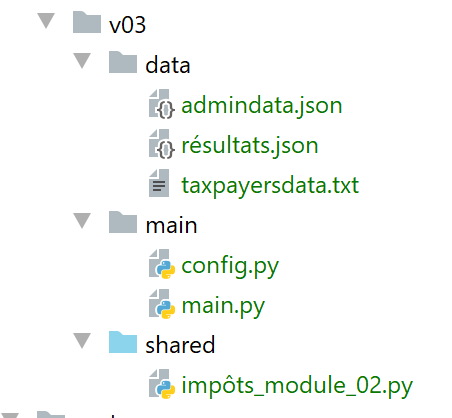
Diese neue Version enthält zwei Änderungen:
- Die von der Steuerbehörde bereitgestellten Daten, die zur Berechnung der Steuer benötigt werden, werden in einer JSON-Datei [admindata.json] gespeichert:
{
    "limites": [9964, 27519, 73779, 156244, 0],
    "coeffR": [0, 0.14, 0.3, 0.41, 0.45],
    "coeffN": [0, 1394.96, 5798, 13913.69, 20163.45],
    "PLAFOND_QF_DEMI_PART": 1551,
    "PLAFOND_REVENUS_CELIBATAIRE_POUR_REDUCTION": 21037,
    "PLAFOND_REVENUS_COUPLE_POUR_REDUCTION": 42074,
    "VALEUR_REDUC_DEMI_PART": 3797,
    "PLAFOND_DECOTE_CELIBATAIRE": 1196,
    "PLAFOND_DECOTE_COUPLE": 1970,
    "PLAFOND_IMPOT_COUPLE_POUR_DECOTE": 2627,
    "PLAFOND_IMPOT_CELIBATAIRE_POUR_DECOTE": 1595,
    "ABATTEMENT_DIXPOURCENT_MAX": 12502,
    "ABATTEMENT_DIXPOURCENT_MIN": 437
}
- Die Ergebnisse der Steuerberechnung werden ebenfalls in einer JSON-Datei [results.json] gespeichert:
[
  {
    "marié": "oui",
    "enfants": 2,
    "salaire": 55555,
    "impôt": 2814,
    "surcôte": 0,
    "décôte": 0,
    "réduction": 0,
    "taux": 0.14
  },
  {
    "marié": "oui",
    "enfants": 2,
    "salaire": 50000,
    "impôt": 1384,
    "surcôte": 0,
    "décôte": 384,
    "réduction": 347,
    "taux": 0.14
  },
  …
  {
    "marié": "oui",
    "enfants": 3,
    "salaire": 200000,
    "impôt": 42842,
    "surcôte": 17283,
    "décôte": 0,
    "réduction": 0,
    "taux": 0.41
  }
]
11.1. Das Konfigurationsskript [config.py]
Das Konfigurationsskript sieht wie folgt aus:
| def configure():
import os
# absolute path of this script's folder
script_dir = os.path.dirname(os.path.abspath(__file__))
# application dependencies
absolute_dependencies = [
f"{script_dir}/../shared",
]
# application configuration
config = {
# absolute path of the taxpayer file
"taxpayersFilename": f"{script_dir}/../data/taxpayersdata.txt",
# absolute path of the results file
"resultsFilename": f"{script_dir}/../data/résultats.json",
# absolute path of tax administration data file
"admindataFilename": f"{script_dir}/../data/admindata.json"
}
# update syspath
from myutils import set_syspath
set_syspath(absolute_dependencies)
# return the config
return config
|
- Zeile 8: Fügen Sie den Ordner [shared] zum Python-Pfad hinzu. Dieser Ordner enthält das Modul [impôts_module_02], das vom Hauptskript verwendet wird;
11.2. Hauptskript [main.py]
Das Hauptskript für Version 3 lautet wie folgt:
| # configure the application
import config
config = config.configure()
# syspath is configured - imports can be made
from impôts_module_02 import calcul_impôt, get_admindata, get_taxpayers_data, record_results_in_json_file
# taxpayer file
taxpayers_filename = config['taxpayersFilename']
# results file
results_filename = config['resultsFilename']
# tax administration data file
admindata_filename = config['admindataFilename']
# code
try:
# reading tax administration data
admindata = get_admindata(admindata_filename)
# reading taxpayer data
taxpayers = get_taxpayers_data(taxpayers_filename)
# results list
results = []
# taxpayers' taxes are calculated
for taxpayer in taxpayers:
# tax calculation returns a dictionary of keys
# ['married', 'children', 'salary', 'tax', 'surcôte', 'décôte', 'réduction', 'taux']
result = calcul_impôt(admindata, taxpayer['marié'], taxpayer['enfants'], taxpayer['salaire'])
# the dictionary is added to the list of results
results.append(result)
# we record the results
record_results_in_json_file(results_filename, results)
except BaseException as erreur:
# there may be various errors: no file, incorrect file content
# display the error and exit the application
print(f"L'erreur suivante s'est produite : {erreur}]\n")
finally:
print("Travail terminé...")
|
Anmerkungen
- Zeilen 2–4: Wir konfigurieren die Anwendung, insbesondere ihren Python-Pfad;
- Zeile 7: Wir importieren die benötigten Funktionen in [main.py];
- Zeilen 9–14: Die Namen der von der Anwendung verwendeten Dateien werden aus der Konfiguration abgerufen;
- Das Hauptskript in Version 3 weist drei Unterschiede zu den Skripten in den Versionen 1 und 2 auf:
- Zeile 21: Die Daten der Steuerbehörde werden aus der JSON-Datei [./data/admindata.json] abgerufen;
- Zeile 32: Die Ergebnisse der Steuerberechnung werden in die JSON-Datei [./data/results.json] geschrieben;
- Zeile 7: Die Funktionen in Version 3 befinden sich im Modul [impots.modules.impôts_module_02];
11.3. Das Modul [impots.v02.modules.impôts_module_02]
Das Modul [impots.v02.modules.impôts_module_02] hat folgende Struktur:
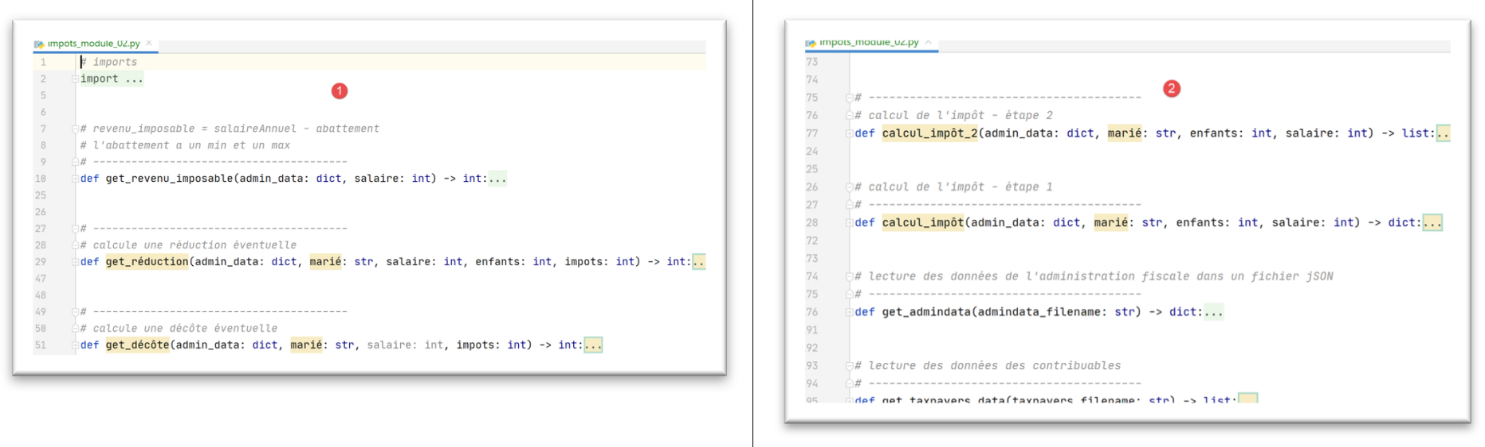
- Das Modul enthält Funktionen, die bereits im von Version 1 verwendeten Modul vorhanden waren, mit einem Unterschied. Wenn das Modul der Version 2 eine Funktion aus dem Modul der Version 1 wiederverwendet, geschieht dies mit einem zusätzlichen Parameter: [adminData] (Zeilen 29, 51, 77, 127). Dieser Parameter repräsentiert das Wörterbuch der Steuerdaten aus der JSON-Datei [adminData.json]. Im Modul der Version 1 mussten diese Daten nicht an die Funktionen übergeben werden, da sie für diese global definiert waren, was bedeutet, dass die Funktionen bereits darüber informiert waren;
11.4. Daten aus der Steuerverwaltung lesen
Die Funktion [get_admindata] sieht wie folgt aus:
| # read data from tax authorities in a jSON file
# ----------------------------------------
def get_admindata(admindata_filename: str) -> dict:
# reading tax administration data
# we let any exceptions go up: file missing, jSON content incorrect
file = None
try:
# open file jSON in read mode
file = codecs.open(admindata_filename, "r", "utf8")
# transfer content to a dictionary
admin_data = json.load(file)
# we return the result
return admin_data
finally:
# close the file if it has been opened
if file:
file.close()
|
- Zeile 9: Rufen Sie das Bild-Dictionary aus der gelesenen JSON-Datei ab;
11.5. Speichern der Ergebnisse
Die Funktion [record_results_in_json_file] lautet wie folgt:
| # writing results to a jSON file
# ----------------------------------------
def record_results_in_json_file(results_filename: str, results: list):
file = None
try:
# opening the results file
file = codecs.open(results_filename, "w", "utf8")
# block writing
json.dump(results, file, ensure_ascii=False)
finally:
# close the file if it has been opened
if file:
file.close()
|
- Zeile 7: Erstelle eine UTF-8-kodierte Datei;
- Zeile 9: Schreiben der Liste [results] in die JSON-Datei. UTF-8-Zeichen werden nicht maskiert (ensure_ascii=False);
11.6. Funktionsänderungen
Einige Funktionen erhalten nun einen zusätzlichen Parameter [admin_data]. Dies verändert ihre Syntax geringfügig. Nehmen wir zum Beispiel die Funktion [calcul_impôt]:
| # tax calculation - step 1
# ----------------------------------------
def calcul_impôt(admin_data: dict, marié: str, enfants: int, salaire: int) -> dict:
# married: yes, no
# children: number of children
# salary: annual salary
# limits, coeffr, coeffn: data tables for tax calculation
#
# tax calculation with children
result1 = calcul_impôt_2(admin_data, marié, enfants, salaire)
impot1 = result1["impôt"]
# tax calculation without children
if enfants != 0:
result2 = calcul_impôt_2(admin_data, marié, 0, salaire)
impot2 = result2["impôt"]
# application of the family allowance ceiling
if enfants < 3:
# PLAFOND_QF_DEMI_PART euros for the first 2 children
impot2 = impot2 - enfants * admin_data['plafond_qf_demi_part']
else:
# PLAFOND_QF_DEMI_PART euros for the first 2 children, double for subsequent children
impot2 = impot2 - 2 * admin_data['plafond_qf_demi_part'] - (enfants - 2) * 2 * admin_data[
'plafond_qf_demi_part']
else:
impot2 = impot1
result2 = result1
# we take the highest tax with the rate and surcharge that go with it
if impot1 > impot2:
impot = impot1
taux = result1["taux"]
surcôte = result1["surcôte"]
else:
surcôte = impot2 - impot1 + result2["surcôte"]
impot = impot2
taux = result2["taux"]
# calculation of any discount
décôte = get_décôte(admin_data, marié, salaire, impot)
impot -= décôte
# calculation of any tax reduction
réduction = get_réduction(admin_data, marié, salaire, enfants, impot)
impot -= réduction
# result
return {"marié": marié, "enfants": enfants, "salaire": salaire, "impôt": math.floor(impot), "surcôte": surcôte,
"décôte": décôte, "réduction": réduction, "taux": taux}
|
Anmerkungen
- Wenn [calcul_tax] andere Funktionen aufruft, übergibt es [admin_data] als ersten Parameter (Zeilen 10, 14, 39, 42);
- wo [tax_calculation] Steuerkonstanten verwendet, greift es nun über das [admin_data]-Wörterbuch darauf zu (Zeilen 19, 22);
Alle Funktionen, die [admin_data] als Parameter erhalten, durchlaufen dieselben Änderungen.
11.7. Ergebnisse
Die erzielten Ergebnisse sind diejenigen, die am Anfang von Abschnitt 8.3 vorgestellt wurden.