5. 应用程序 IMPOTS
5.1. 简介
这里我们再次使用应用程序 IMPOTS,该程序在同一位作者的 Java 讲义中多次出现。让我们回顾一下其核心问题。该任务是编写一个应用程序,用于计算纳税人的税款。我们假设一个简化情况:纳税人仅需申报工资收入:
- 若未婚,则计算该雇员的税额份额 nbParts=nbEnfants/2 +1; 已婚者为 nbEnfants/2+2,其中 nbEnfants 代表其子女数量。
- 若其子女数≥3,则额外增加半份
- 计算其应税收入 R=0.72*S,其中 S 为其年薪
- 计算其家庭系数 QF=R/nbParts
- 计算其应纳税额 I。请看下表:
12620.0 | 0 | 0 |
13190 | 0.05 | 631 |
15640 | 0.1 | 1290.5 |
24740 | 0.15 | 2072.5 |
31810 | 0.2 | 3309.5 |
39970 | 0.25 | 4900 |
48360 | 0.3 | 6898.5 |
55790 | 0.35 | 9316.5 |
92970 | 0.4 | 12106 |
127860 | 0.45 | 16754.5 |
151250 | 0.50 | 23147.5 |
172040 | 0.55 | 30710 |
195000 | 0.60 | 39312 |
0 | 0.65 | 49062 |
每行有 3 个字段。要计算税款 I,需查找满足 QF<=字段1 的第一行。例如,若 QF=23000,则会找到该行
此时税额 I 等于 0.15*R - 2072.5*nbParts。 如果 QF 使得关系 QF<=field1 从未成立,则使用最后一行中的系数。此处为:
由此得出的税额 I=0.65*R - 49062*nbParts。
定义不同税率区间的数据存储在 ODBC-MySQL 数据库中。MySQL 是一个开源的 SGBD 版本,可在包括 Windows 和 Linux 在内的多种平台上使用。 使用此 SGBD,已创建了一个名为 dbimpots 的数据库,其中包含一个名为 impots 的表。对该数据库的访问由登录名/密码控制,此处为 admimpots/mdpimpots。下图展示了如何使用 MySQL 访问 dbimpots 数据库:
C:\Program Files\EasyPHP\mysql\bin>mysql -u admimpots -p
Enter password: *********
Welcome to the MySQL monitor.  Commands end with ; or \g.
Your MySQL connection id is 18 to server version: 3.23.49-max-nt

Type 'help;' or '\h' for help. Type '\c' to clear the buffer.

mysql> use dbimpots;
Database changed

mysql> show tables;
+--------------------+
| Tables_in_dbimpots |
+--------------------+
| impots             |
+--------------------+
1 row in set (0.00 sec)

mysql> describe impots;
+---------+--------+------+-----+---------+-------+
| Field   | Type   | Null | Key | Default | Extra |
+---------+--------+------+-----+---------+-------+
| limites | double | YES  |     | NULL    |       |
| coeffR  | double | YES  |     | NULL    |       |
| coeffN  | double | YES  |     | NULL    |       |
+---------+--------+------+-----+---------+-------+
3 rows in set (0.02 sec)

mysql> select * from impots;
+---------+--------+---------+
| limites | coeffR | coeffN  |
+---------+--------+---------+
|   12620 |      0 |       0 |
|   13190 |   0.05 |     631 |
|   15640 |    0.1 |  1290.5 |
|   24740 |   0.15 |  2072.5 |
|   31810 |    0.2 |  3309.5 |
|   39970 |   0.25 |    4900 |
|   48360 |    0.3 |    6898 |
|   55790 |   0.35 |  9316.5 |
|   92970 |    0.4 |   12106 |
|  127860 |   0.45 |   16754 |
|  151250 |    0.5 | 23147.5 |
|  172040 |   0.55 |   30710 |
|  195000 |    0.6 |   39312 |
|       0 |   0.65 |   49062 |
+---------+--------+---------+
14 rows in set (0.00 sec)

mysql>quit
数据库 dbimpots 按以下方式转换为数据源 ODBC:
- 启动 32 位数据源管理器 ODBC
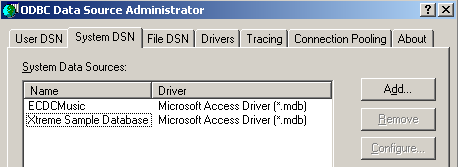
- 使用按钮 [Add] 添加新的数据源 ODBC
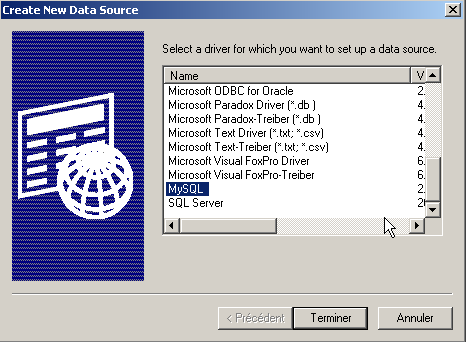
- 指定驱动程序 MySQL,并执行 [Terminer]
54321
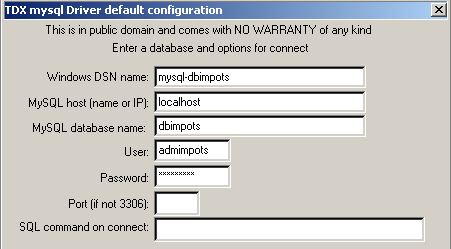
- 驱动程序 MySQL 需要一些信息:
1 | 需为数据源 ODBC 指定的名称 DSN —— 可能为任意名称 |
2 | 运行 SGBD 和 MySQL 的机器——此处为 localhost。值得注意的是,该数据库可能是远程数据库。 使用数据源 ODBC 的本地应用程序不会察觉到这一变化。我们的 Java 应用程序便是如此。 |
3 | 要使用的数据库为 MySQL。MySQL 是一个 SGBD,用于管理关系型数据库,即通过关系相互关联的表集合。此处指定了所管理的数据库名称。 |
4 | 具有该数据库访问权限的用户名 |
5 | 其密码 |
已定义两个类用于计算税款:impots 和 impotsJDBC。通过将税率区间数据作为参数传递给数组,构建了 impots 类的实例:
// 创建税种类

public class impots{

  // 计算税款所需的数据
   // 来自外部来源

  protected double[] limites=null;
  protected double[] coeffR=null;
  protected double[] coeffN=null;

   // 空构造函数
  protected impots(){}

   // 构造函数
  public impots(double[] LIMITES, double[] COEFFR, double[] COEFFN) throws Exception{
     // 验证三个数组是否大小相同
    boolean OK=LIMITES.length==COEFFR.length && LIMITES.length==COEFFN.length;
    if (! OK) throw new Exception ("Les 3 tableaux fournis n'ont pas la même taille("+
      LIMITES.length+","+COEFFR.length+","+COEFFN.length+")");
    // 没问题
    this.limites=LIMITES;
    this.coeffR=COEFFR;
    this.coeffN=COEFFN;
  }//构造函数

   // 计算税额
  public long calculer(boolean marié, int nbEnfants, int salaire){
     // 计算份额数
    double nbParts;
    if (marié) nbParts=(double)nbEnfants/2+2;
    else nbParts=(double)nbEnfants/2+1;
    if (nbEnfants>=3) nbParts+=0.5;
         // 应税收入及家庭系数计算
        double revenu=0.72*salaire;
        double QF=revenu/nbParts;
         // 税额计算
        limites[limites.length-1]=QF+1;
        int i=0;
        while(QF>limites[i]) i++;
        // 返回结果
        return (long)(revenu*coeffR[i]-nbParts*coeffN[i]);
    }//计算
}//分类
类 impotsJDBC 继承自之前的 impots 类。通过数据库中存储的税率区间数据,构建了一个 impotsJDBC 类的实例。访问该数据库所需的必要信息作为参数传递给构造函数:
// 导入的包
import java.sql.*;
import java.util.*;

public class impotsJDBC extends impots{
  // 添加一个用于构建的构造函数
   // 根据表
   // 从数据库的税费表中
  public impotsJDBC(String dsnIMPOTS, String userIMPOTS, String mdpIMPOTS)
      throws SQLException,ClassNotFoundException{

    // dsnIMPOTS:数据库名称
     // userIMPOTS, mdpIMPOTS:数据库登录名/密码

     // 数据表
    ArrayList aLimites=new ArrayList();
    ArrayList aCoeffR=new ArrayList();
    ArrayList aCoeffN=new ArrayList();

    // 连接数据库
    Class.forName("sun.jdbc.odbc.JdbcOdbcDriver");
    Connection connect=DriverManager.getConnection("jdbc:odbc:"+dsnIMPOTS,userIMPOTS,mdpIMPOTS);
    // 创建Statement对象
    Statement S=connect.createStatement();
    // SELECT 查询
    String select="select limites, coeffr, coeffn from impots";
    // 执行查询
    ResultSet RS=S.executeQuery(select);
    while(RS.next()){
      // 处理当前行
      aLimites.add(RS.getString("limites"));
      aCoeffR.add(RS.getString("coeffr"));
      aCoeffN.add(RS.getString("coeffn"));
    }// 下一行
     // 关闭资源
    RS.close();
    S.close();
    connect.close();
     // 将数据传输到限定数组
    int n=aLimites.size();
    limites=new double[n];
    coeffR=new double[n];
    coeffN=new double[n];
    for(int i=0;i<n;i++){
      limites[i]=Double.parseDouble((String)aLimites.get(i));
      coeffR[i]=Double.parseDouble((String)aCoeffR.get(i));
      coeffN[i]=Double.parseDouble((String)aCoeffN.get(i));
    }//for
  }//构造函数
}//类
一旦创建了类 impotsJDBC 的实例,就可以反复调用其方法 calculer 来计算税款:
获取这三项必要数据的方法多种多样。impotsJDBC 类的优势在于,我们只需关注数据的获取过程。 一旦获取了这三项信息(婚姻状况、子女数量、年薪),调用类 impotsJDBC 中的方法 calculer 即可得到应缴税额。
5.2. 版本 1
假设这是一个Web应用程序,它会向用户展示一个HTML界面,以获取计算税款所需的三个参数:
- 婚姻状况(已婚或未婚)
- 子女数量
- 年薪
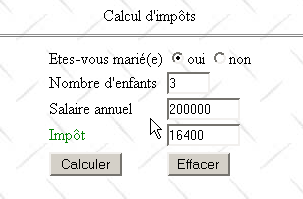
表单的显示由以下页面 JSP 实现:
<%@ page import="java.util.*" %>

<%
     // 获取主Servlet传递的属性
  String chkoui=(String)request.getAttribute("chkoui");
  String chknon=(String)request.getAttribute("chknon");
  String txtEnfants=(String)request.getAttribute("txtEnfants");
  String txtSalaire=(String)request.getAttribute("txtSalaire");
  String txtImpots=(String)request.getAttribute("txtImpots");
  ArrayList erreurs=(ArrayList)request.getAttribute("erreurs");
%>

<html>

    <head>
      <title>impots</title>
    <script language="JavaScript" type="text/javascript">
        function effacer(){
           // 清空表单
        with(document.frmImpots){
            optMarie[0].checked=false;
          optMarie[1].checked=true;
          txtEnfants.value="";
          txtSalaire.value="";
          txtImpots.value="";
        }//带
      }//清除
        </script>
  </head>

  <body background="/impots/images/standard.jpg">
      <center>
        Calcul d'impôts
        <hr>
      <form name="frmImpots" action="/impots/main" method="POST">
          <table>
            <tr>
              <td>Etes-vous marié(e)</td>
            <td>
                    <input type="radio" name="optMarie" value="oui" <%= chkoui %>>oui
              <input type="radio" name="optMarie" value="non" <%= chknon %>>non
            </td>
          </tr>
          <tr>
              <td>Nombre d'enfants</td>
            <td><input type="text" size="5" name="txtEnfants" value="<%= txtEnfants %>"></td>
          </tr>
          <tr>
              <td>Salaire annuel</td>
            <td><input type="text" size="10" name="txtSalaire" value="<%= txtSalaire %>"></td>
          </tr>
          <tr>
              <td><font color="green">Impôt</font></td>
            <td><input type="text" size="10" name="txtImpots" value="<%= txtImpots %>" readonly></td>
          </tr>
          <tr></tr>
          <tr>
              <td><input type="submit" value="Calculer"></td>
            <td><input type="button" value="Effacer" onclick="effacer()"></td>
          </tr>
        </table>
      </form>
    </center>
    <%
         // 是否有错误
      if(erreurs!=null){
           // 显示错误
        out.println("<hr>");
        out.println("<font color=\"red\">");
        out.println("Les erreurs suivantes se sont produites<br>");
        out.println("<ul>");
        for(int i=0;i<erreurs.size();i++){
            out.println("<li>"+(String)erreurs.get(i));
        }
        out.println("</ul>");
        out.println("</font>");
      }
   %>
 </body>
</html>
页面 JSP 仅显示由应用程序的主 Servlet 传递给它的信息:
     // 获取主Servlet传递的属性
  String chkoui=(String)request.getAttribute("chkoui");
  String chknon=(String)request.getAttribute("chknon");
  String txtEnfants=(String)request.getAttribute("txtEnfants");
  String txtSalaire=(String)request.getAttribute("txtSalaire");
  String txtImpots=(String)request.getAttribute("txtImpots");
  ArrayList erreurs=(ArrayList)request.getAttribute("erreurs");
单选按钮的“是”、“否”属性——其可能的取值为 "checked" 或 "",用于控制是否勾选相应的单选按钮 | |
纳税人的子女数量 | |
其年薪 | |
应缴税额 | |
错误列表(如果 errors!=null) |
发送给客户的页面包含一个 JavaScript 脚本,其中包含一个与按钮“Effacer”关联的函数 effacer,其作用是将表单恢复到初始状态:按钮未勾选,输入字段为空。 需要注意的是,使用类型为“reset”的HTML按钮无法实现此效果。因为当使用此类按钮时,浏览器会将表单恢复到接收时的状态。而在我们的应用程序中,浏览器接收的表单可能并非空表单。
该应用程序的主Servlet名为main.java,其代码如下:
import java.io.*;
import javax.servlet.*;
import javax.servlet.http.*;
import java.util.regex.*;
import java.util.*;

public class main extends HttpServlet{

    // 实例变量
    String msgErreur=null;
    String urlAffichageImpots=null;
    String urlErreur=null;
    String DSNimpots=null;
    String admimpots=null;
    String mdpimpots=null;
    impotsJDBC impots=null;

    //-------- GET
    public void doGet(HttpServletRequest request, HttpServletResponse response)
    throws IOException, ServletException{

        // 初始化是否成功?
        if(msgErreur!=null){
             // 将控制权移交给错误页面
            request.setAttribute("msgErreur",msgErreur);
            getServletContext().getRequestDispatcher(urlErreur).forward(request,response);
        }

         // 请求的属性
        String chkoui=null;
        String chknon=null;
        String txtImpots=null;

        // 获取请求参数
        String optMarie=request.getParameter("optMarie");              // 婚姻状况
        String txtEnfants=request.getParameter("txtEnfants");       // 子女数量
        if(txtEnfants==null) txtEnfants="";
        String txtSalaire=request.getParameter("txtSalaire");       // 年薪
        if(txtSalaire==null) txtSalaire="";

         // 是否已获取所有预期参数
        if(optMarie==null || txtEnfants==null || txtSalaire==null){
             // 缺少参数
            request.setAttribute("chkoui","");
            request.setAttribute("chknon","checked");
            request.setAttribute("txtEnfants","");
            request.setAttribute("txtSalaire","");
            request.setAttribute("txtImpots","");
             // 将数据传递至税款显示网址
            getServletContext().getRequestDispatcher(urlAffichageImpots).forward(request,response);
        }

         // 所有参数已齐 - 正在验证
        ArrayList erreurs=new ArrayList();
         // 婚姻状况
        if( ! optMarie.equals("oui") && ! optMarie.equals("non")){
             // 错误
            erreurs.add("Etat marital incorrect");
            optMarie="non";
        }
         // 子女数量
        txtEnfants=txtEnfants.trim();
        if(! Pattern.matches("^\\d+$",txtEnfants)){
            // 错误
            erreurs.add("Nombre d'enfants incorrect");
        }
         // 工资
        txtSalaire=txtSalaire.trim();
        if(! Pattern.matches("^\\d+$",txtSalaire)){
            // 错误
            erreurs.add("Salaire incorrect");
        }

         // 如有错误,将其作为查询的属性
        if(erreurs.size()!=0){
            request.setAttribute("erreurs",erreurs);
            txtImpots="";
        }else{
             // 可计算应缴税款
            try{
                int nbEnfants=Integer.parseInt(txtEnfants);
                int salaire=Integer.parseInt(txtSalaire);
                txtImpots=""+impots.calculer(optMarie.equals("oui"),nbEnfants,salaire);
            }catch(Exception ex){}
        }

         // 请求的其他属性
        if(optMarie.equals("oui")){
            request.setAttribute("chkoui","checked");
            request.setAttribute("chknon","");
        }else{
            request.setAttribute("chknon","checked");
            request.setAttribute("chkoui","");
        }
        request.setAttribute("txtEnfants",txtEnfants);
        request.setAttribute("txtSalaire",txtSalaire);
        request.setAttribute("txtImpots",txtImpots);

         // 将控制权移交给税款显示的URL
        getServletContext().getRequestDispatcher(urlAffichageImpots).forward(request,response);
    }

     //-------- POST
    public void doPost(HttpServletRequest request, HttpServletResponse response)
    throws IOException, ServletException{
        doGet(request,response);
    }

     //-------- INIT
    public void init(){
         // 获取初始化参数
        ServletConfig config=getServletConfig();
        urlAffichageImpots=config.getInitParameter("urlAffichageImpots");
        urlErreur=config.getInitParameter("urlErreur");
        DSNimpots=config.getInitParameter("DSNimpots");
        admimpots=config.getInitParameter("admimpots");
        mdpimpots=config.getInitParameter("mdpimpots");

         // 参数正确吗?
        if(urlAffichageImpots==null || DSNimpots==null || admimpots==null || mdpimpots==null){
            msgErreur="Configuration incorrecte";
            return;
        }

         // 创建 impotsJDBC 实例
        try{
            impots=new impotsJDBC(DSNimpots,admimpots,mdpimpots);
        }catch(Exception ex){
            msgErreur=ex.getMessage();
        }
    }
}
- Servlet 的 init 方法执行两项操作:
- 获取其初始化参数。 这些参数使其能够连接到包含不同税种数据(DSNimpots、admimpots、mdpimpots)的数据库,以及应用程序相关页面的URL: urlAffichageImpots 用于表单,urlErreur 用于错误页面。
- 它创建了类 impotsJDBC 的实例
在这两种情况下,系统都会处理可能出现的错误,并将错误消息存储在变量 msgErreur 中。
- 方法 doGET
- 首先会检查Servlet是否已正确初始化。若未初始化,则显示错误页面
- 从税务表单中获取预期的参数:optMarie、txtEnfants、txtSalaire。 如果其中任何一个缺失(==null),则会发送一个空的税务表单。 有人可能会认为验证参数 optMarie 的有效性是多余的。该参数是单选按钮的值,在此处只能取“oui”或“non”中的一个值。 但这忽略了一个事实:没有任何机制能阻止程序通过直接向Servlet发送所需参数来发起请求。我们永远无法确保请求方确实是浏览器。忽视这一点可能会导致应用程序出现安全漏洞,事实上,即使在商业应用程序中也经常能发现此类漏洞。
- 将验证所获取的三个参数的有效性。发现的每个错误都会被添加到错误列表中(ArrayList 错误)。如果没有错误,则计算税额;否则不进行计算。
- 页面显示所需的信息被设置为请求的属性,随后显示税费表单
错误页面 JSP 如下所示:
<%
     // jspService
   // 发生错误
  String msgErreur= (String)request.getAttribute("msgErreur");
  if(msgErreur==null) msgErreur="Erreur non identifiée";
%>
<!-- 页面开始 HTML -->
<html>
  <head>
      <title>impots</title>
  </head>
  <body>
      <h3>calcul d'impots</h3>
      <hr>
    Application indisponible(<%= msgErreur %>)
  </body>
</html>
该Web应用程序名为impots,并在Tomcat的server.xml文件中按以下方式配置:
该应用程序目录包含以下文件夹和文件:
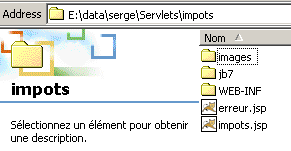
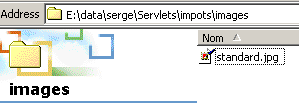
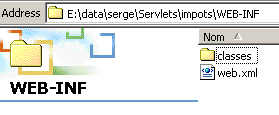
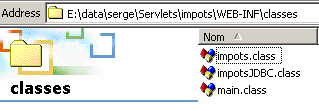
impots 应用程序的配置文件 web.xml 如下:
<?xml version="1.0" encoding="ISO-8859-1"?>

<!DOCTYPE web-app
    PUBLIC "-//Sun Microsystems, Inc.//DTD Web Application 2.3//EN"
    "http://java.sun.com/dtd/web-app_2_3.dtd">

<web-app>
    <servlet>
      <servlet-name>main</servlet-name>
    <servlet-class>main</servlet-class>
    <init-param>
          <param-name>urlAffichageImpots</param-name>
        <param-value>/impots.jsp</param-value>
    </init-param>
    <init-param>
          <param-name>DSNimpots</param-name>
        <param-value>mysql-dbimpots</param-value>
    </init-param>
    <init-param>
          <param-name>admimpots</param-name>
        <param-value>admimpots</param-value>
    </init-param>
    <init-param>
          <param-name>mdpimpots</param-name>
        <param-value>mdpimpots</param-value>
    </init-param>
    <init-param>
          <param-name>urlErreur</param-name>
        <param-value>/erreur.jsp</param-value>
    </init-param>
  </servlet>
  <servlet-mapping>
      <servlet-name>main</servlet-name>
    <url-pattern>/main</url-pattern>
  </servlet-mapping>
</web-app>
主Servlet名为main,其别名为/main。因此,可以通过URL或http://localhost:8080/impots/main访问它。
以下是一些应用示例:
为了正确初始化,Servlet 必须能够访问数据库 mysql-dbimpots。例如,如果服务器 MySQL 未启动,导致无法访问数据库 mysql-dbimpots,则会显示以下页面:
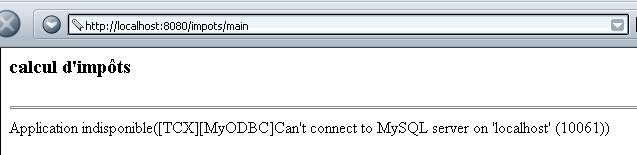
若输入错误,将显示以下页面:
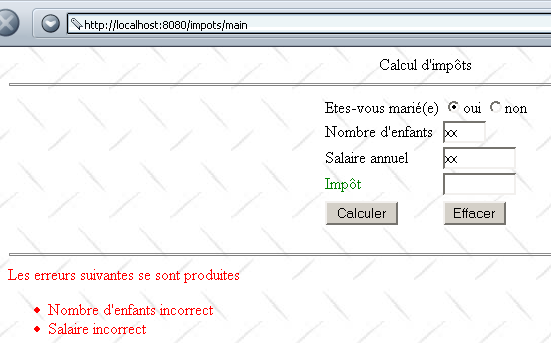
如果输入正确,则会计算税款:
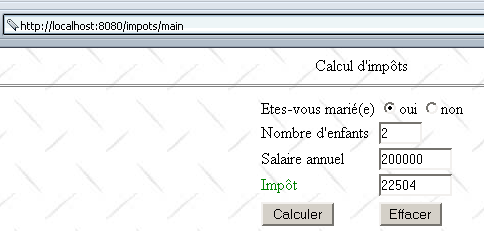
5.3. 版本 2
在上例中,表单参数 txtEnfants、txtSalaire 的有效性由服务器进行验证。 这里建议通过表单页面中嵌入的JavaScript脚本进行验证。这样,参数的验证工作将由浏览器完成。只有当参数有效时,才会向服务器发送请求。这样可以节省“带宽”。显示页面JSP变为如下所示:
<%@ page import="java.util.*" %>
............

<html>

    <head>
      <title>impots</title>
    <script language="JavaScript" type="text/javascript">
        function effacer(){
.......
      }//清除

      function calculer(){
           // 在将参数发送至服务器前进行验证
        with(document.frmImpots){
          //子节点数量
          champs=/^\s*(\d+)\s*$/.exec(txtEnfants.value);
          if(champs==null){
            // 模型未通过验证
            alert("Le nombre d'enfants n'a pas été donné ou est incorrect");
            nbEnfants.focus();
            return;
          }//if
          //工资
          champs=/^\s*(\d+)\s*$/.exec(txtSalaire.value);
          if(champs==null){
            // 未验证模板
            alert("Le salaire n'a pas été donné ou est incorrect");
            salaire.focus();
            return;
          }//if
          // 没问题——将表单发送至服务器
          submit();
        }//with
      }//计算
        </script>
  </head>

  <body background="/impots/images/standard.jpg">
........
              <td><input type="button" value="Calculer" onclick="calculer()"></td>
          <td><input type="button" value="Effacer" onclick="effacer()"></td>
.....
 </body>
</html>
请注意以下变更:
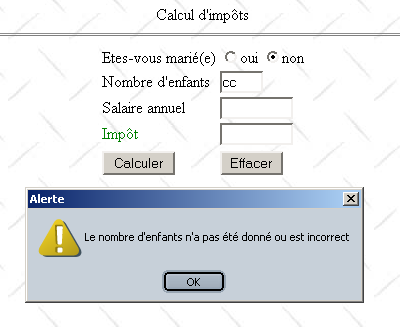
- 按钮 Calculer 不再属于类型 submit,而是属于类型 button,并关联了一个名为 calculer 的函数。 该函数将对字段 txtEnfants 和 txTsalaire 进行分析。如果字段正确,表单值将发送至服务器(提交);否则将显示错误信息。
以下是出现错误时的显示示例:
5.4. 版本 3
我们将对应用程序进行微调,引入会话概念。 现在,我们将该应用程序视为一个税务计算模拟程序。用户可以模拟不同的纳税人“配置”,并查看每种配置下应缴纳的税款。下面的页面 WEb 展示了可能的输出示例:
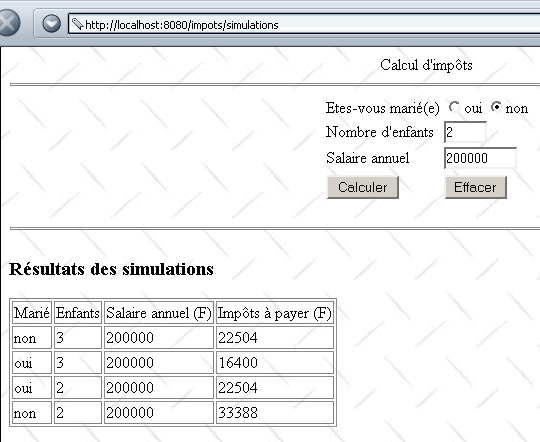
主 Servlet 已修改,现命名为 simulations。它在 impots 应用程序中的配置如下:
<?xml version="1.0" encoding="ISO-8859-1"?>

<!DOCTYPE web-app
    PUBLIC "-//Sun Microsystems, Inc.//DTD Web Application 2.3//EN"
    "http://java.sun.com/dtd/web-app_2_3.dtd">

<web-app>
    ....
</servlet>
    <servlet>
      <servlet-name>simulations</servlet-name>
    <servlet-class>simulations</servlet-class>
    <init-param>
          <param-name>urlSimulationImpots</param-name>
        <param-value>/simulationsImpots.jsp</param-value>
    </init-param>
    <init-param>
          <param-name>DSNimpots</param-name>
        <param-value>mysql-dbimpots</param-value>
    </init-param>
    <init-param>
          <param-name>admimpots</param-name>
        <param-value>admimpots</param-value>
    </init-param>
    <init-param>
          <param-name>mdpimpots</param-name>
        <param-value>mdpimpots</param-value>
    </init-param>
    <init-param>
          <param-name>urlErreur</param-name>
        <param-value>/erreur.jsp</param-value>
    </init-param>
  </servlet>
......
  <servlet-mapping>
      <servlet-name>simulations</servlet-name>
    <url-pattern>/simulations</url-pattern>
  </servlet-mapping>
</web-app>
主Servlet名为simulations,基于类文件simulations.class。其别名为/simulations,可通过URL http://localhost:8080/impots/simulations访问。 在访问数据库方面,它与之前研究的主Servlet具有相同的初始化参数。 出现了一个新参数 urlSimulationsImpots,它是模拟页面 JSP(即上文稍早介绍的那个页面)的 URL。
Servlet simulations.java 与 Servlet main.java 相似。它们的主要区别在于以下几点:
- 主Servlet根据参数optmarie计算出值txtImpots, txtEnfants 和 txtSalaire 计算出 txtImpots 值,并将该值传递给显示页面 JSP
- simulations Servlet 同样计算出值 txtImpots,并将参数(optMarie、txtEnfants、txtsalaire、 txtImpots)保存到名为 simulations 的列表中。该列表作为参数传递给显示页面 JSP。为了确保该列表包含用户执行的所有模拟,它被保存为当前会话的属性。
simulations Servlet 代码如下(仅保留了与前一个应用程序不同的代码行):
import java.io.*;
.......

public class simulations extends HttpServlet{

    // 实例变量
    String msgErreur=null;
    String urlSimulationImpots=null;
    String urlErreur=null;
...........

    //-------- GET
    public void doGet(HttpServletRequest request, HttpServletResponse response)
    throws IOException, ServletException{

...........

         // 检索本会话的先前模拟
        HttpSession session=request.getSession();
        ArrayList simulations=(ArrayList)session.getAttribute("simulations");
        if(simulations==null) simulations=new ArrayList();
        // 将模拟结果放入当前查询
        request.setAttribute("simulations",simulations);

         // 查询的其他属性
...........

         // 是否已包含所有预期参数
        if(optMarie==null || txtEnfants==null || txtSalaire==null){
........
             // 将控制权移交给显示税款计算模拟结果的URL
            getServletContext().getRequestDispatcher(urlSimulationImpots).forward(request,response);
        }

         // 已获取所有参数 - 进行验证
...........

         // 如有错误,将其作为请求属性传递
        if(erreurs.size()!=0){
            request.setAttribute("erreurs",erreurs);
        }else{
            try{
                 // 可以计算应缴税款
                int nbEnfants=Integer.parseInt(txtEnfants);
                int salaire=Integer.parseInt(txtSalaire);
                txtImpots=""+impots.calculer(optMarie.equals("oui"),nbEnfants,salaire);
                 // 将当前结果添加到之前的模拟中
                String[] simulation={optMarie.equals("oui") ? "oui" : "non",txtEnfants, txtSalaire, txtImpots};
                simulations.add(simulation);
                 // 将新的模拟值写入会话
                session.setAttribute("simulations",simulations);
            }catch(Exception ex){}
        }

         // 查询的其他属性
..........

         // 将控制权移交给模拟结果的显示网址
        getServletContext().getRequestDispatcher(urlSimulationImpots).forward(request,response);
    }

     //-------- POST
    public void doPost(HttpServletRequest request, HttpServletResponse response)
    throws IOException, ServletException{
        doGet(request,response);
    }

     //-------- INIT
    public void init(){
         // 获取初始化参数
        ServletConfig config=getServletConfig();
        urlSimulationImpots=config.getInitParameter("urlSimulationImpots");
        urlErreur=config.getInitParameter("urlErreur");
        DSNimpots=config.getInitParameter("DSNimpots");
        admimpots=config.getInitParameter("admimpots");
        mdpimpots=config.getInitParameter("mdpimpots");

         // 参数正确吗?
.........................
    }
}
显示页面 JSP 已变为如下所示(仅保留了与前一应用程序显示页面 JSP 不同的代码)。
<%@ page import="java.util.*" %>

<%
     // 获取主Servlet传递的属性
...........
  ArrayList simulations=(ArrayList)request.getAttribute("simulations");
%>

<html>

    <head>
      <title>impots</title>
    <script language="JavaScript" type="text/javascript">
........
        </script>
  </head>

  <body background="/impots/images/standard.jpg">
      <center>
        Calcul d'impôts
        <hr>
      <form name="frmImpots" action="/impots/simulations" method="POST">
.......................
           </form>
</center>
    <hr>
    <%
         // 是否有错误?
      if(erreurs!=null){
..................
      }else if(simulations.size()!=0){
          // 模拟结果
        out.println("<h3>Résultats des simulations<h3>");
        out.println("<table \"border=\"1\">");
        out.println("<tr><td>Marié</td><td>Enfants</td><td>Salaire annuel (F)</td><td>Impôts à payer (F)</td></tr>");
        for(int i=0;i<simulations.size();i++){
            String[] simulation=(String[])simulations.get(i);
            out.println("<tr><td>"+simulation[0]+"</td><td>"+simulation[1]+"</td><td>"+simulation[2]+"</td><td>"+simulation[3]+"</td></tr>");
        }
        out.println("</table>");
      }
   %>
 </body>
</html>
5.5. 版本 4
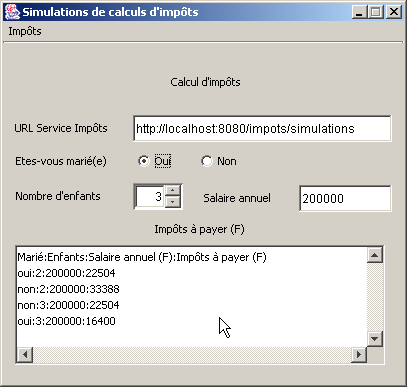
现在,我们将创建一个独立应用程序,它将作为之前 /impots/simulations 应用程序的 Web 客户端。该应用程序将具有以下图形界面:
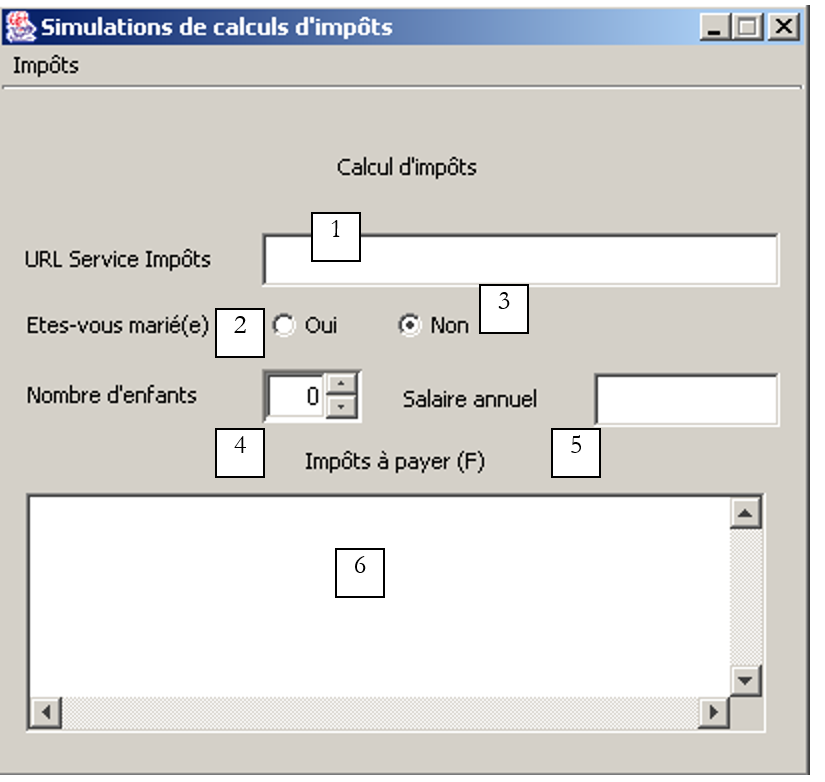 |
编号 | 类型 | 名称 | 角色 |
1 | JTextField | txtUrlServiceImpots | URL来自税务计算模拟服务 |
2 | JRadioButton | rdOui | 已婚请勾选 |
3 | JRadioButton | rdNon | 未婚者请勾选 |
4 | JSpinner | spinEnfants | 纳税人的子女数量(最小值=0,最大值=20,增量=1) |
5 | JTextField | txtSalaire | 纳税人的年薪(法郎) |
6 | JList 中的 JScrollPane | lstSimulations | 模拟列表 |
“税收”菜单包含以下选项:
选项 主要 | 选项 次级 | 名称 | 角色 |
税 | |||
计算 | mnuCalculer | 在所有计算所需数据均已存在且正确的情况下,计算应缴税款 | |
清除 | mnuEffacer | 将表格恢复为初始状态 | |
退出 | mnuQuitter | 退出应用程序 |
运行规则
- 如果字段 1 或 5 中的任一个为空,则菜单选项 Calculer 保持禁用
- 检测到字段 1 中存在语法错误的 URL
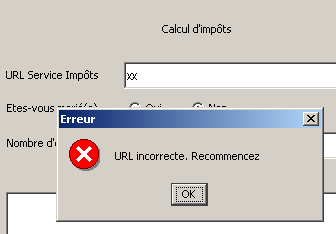
- 检测到工资不正确
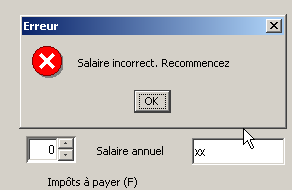
- 报告任何服务器连接错误(在下面的示例 1 中,端口不正确;在示例 2 中,请求的 URL 不存在;在示例 3 中,MySQL 数据库未启动)
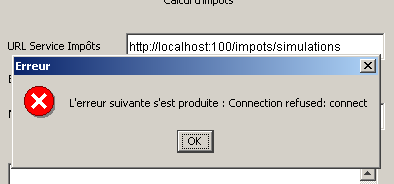
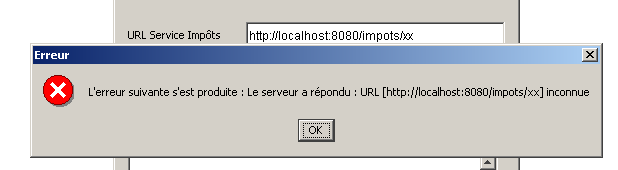
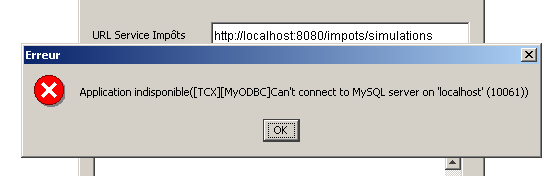
- 如果一切正常,将显示模拟结果
在编写编程实现的Web客户端时,必须准确了解服务器针对客户端可能发出的各种请求会返回什么内容。服务器会发送一组包含有用信息以及仅用于版面排版的行 HTML HTML。 Java 正则表达式可帮助我们在服务器发送的行流中筛选出有用信息。为此,我们需要了解服务器各种响应的确切格式。在此,我们将使用之前介绍过的 Web 客户端,该客户端可将服务器对 URL 请求的响应显示在屏幕上。 所请求的URL将对应我们的税款计算模拟服务http://localhost:8080/impots/simulations,我们可以向其传递参数,格式为http://localhost:8080/impots/simulations?param1=vam1¶m2=val2&...
在用于创建 impots 类型对象的基础 QZXX2HTMLP001746ZQX 未启动的情况下,请求 URL:
Dos>java clientweb http://localhost:8080/impots/simulations GET

HTTP/1.1 200 OK
Content-Type: text/html;charset=ISO-8859-1
Date: Fri, 16 Aug 2002 16:31:04 GMT
Connection: close
Server: Apache Tomcat/4.0.3 (HTTP/1.1 Connector)
Set-Cookie: JSESSIONID=9DEC8B27966A1FBE3D4968A7B9DF3331;Path=/impots


<!-- dÚbut 来自页面 HTML -->
<html>
  <head>
        <title>impots</title>
  </head>
  <body>
        <h3>calcul d'impôts</h3>
        <hr>
    Application indisponible([TCX][MyODBC]Can't connect to MySQL server on 'localhost' (10061))
  </body>
</html>
要获取该错误,Web客户端需要在Web服务器的响应中查找包含“应用程序不可用”文本的行。现在启动数据库MySQL,并向其请求相同的URL,同时传入它所期望的值 (无论是以 GET 还是 POST 的形式,服务器均可接受——参见服务器端的 Java 代码):
Dos>java clientweb "http://localhost:8080/impots/simulations?ptMarie=oui&txtEnfants=2&txtSalaire=200000" GET

HTTP/1.1 200 OK
Content-Type: text/html;charset=ISO-8859-1
Date: Fri, 16 Aug 2002 16:42:36 GMT
Connection: close
Server: Apache Tomcat/4.0.3 (HTTP/1.1 Connector)
Set-Cookie: JSESSIONID=C2A707600E98A37A343611D80DD5C8A2;Path=/impots


<html>

        <head>
        <title>impots</title>
    <script language="JavaScript" type="text/javascript">
        function effacer(){
...................................................
      }//清除

      function calculer(){
...................................................
      }//计算
                </script>
  </head>

  <body background="/impots/images/standard.jpg">
        <center>
        Calcul d'imp¶ts
        <hr>
      <form name="frmImpots" action="/impots/simulations" method="POST">
...................................................
      </form>
    </center>
    <hr>
    <h3>Résultats des simulations<h3>
<table "border="1">
<tr><td>Marié</td><td>Enfants</td><td>Salaire annuel (F)</td><td>Impôts à payer (F)</td></tr>
<tr><td>oui</td><td>2</td><td>200000</td><td>22504</td></tr>
</table>

 </body>
</html>
这里是服务器发送的完整文档 HTML。该文档中唯一的表格中包含了各种模拟的结果。用于从文档中提取相关信息的正则表达式可以如下所示:
其中四个带括号的表达式分别代表需要提取的四项信息。
现在,我们已经掌握了当用户通过前面的图形界面请求计算税款时应采取的操作指南:
- 验证界面中的所有数据是否有效,并在必要时提示错误。
- 连接到字段1中指定的URL。为此,我们将遵循之前介绍并研究过的通用Web客户端模型
- 在服务器响应流中,使用正则表达式来:
- 若存在错误,则查找错误信息
- 若无错误,则查找模拟结果
与菜单 calculer 相关的代码如下:
  void mnuCalculer_actionPerformed(ActionEvent e) {
    // 计算税款
         // 验证URL 服务
        URL urlImpots=null;
        try{
            urlImpots=new URL(txtURLServiceImpots.getText().trim());
            String query=urlImpots.getQuery();
            if(query!=null) throw new Exception();
        }catch (Exception ex){
             // 错误信息
            JOptionPane.showMessageDialog(this,"URL incorrecte. Recommencez","Erreur",JOptionPane.ERROR_MESSAGE);
             // 聚焦错误字段
            txtURLServiceImpots.requestFocus();
             // 返回界面
            return;
        }
     // 工资验证
    int salaire=0;
    try{
      salaire=Integer.parseInt(txtSalaire.getText().trim());
      if(salaire<0) throw new Exception();
    }catch (Exception ex){
       // 错误信息
            JOptionPane.showMessageDialog(this,"Salaire incorrect. Recommencez","Erreur",JOptionPane.ERROR_MESSAGE);
       // 聚焦错误字段
      txtSalaire.requestFocus();
       // 返回界面
      return;
    }
     // 子女数量
    Integer nbEnfants=(Integer)spinEnfants.getValue();

    try{
             // 计算税款
            calculerImpots(urlImpots,rdOui.isSelected(),nbEnfants.intValue(),salaire);
    }catch (Exception ex){
             // 显示错误
            JOptionPane.showMessageDialog(this,"L'erreur suivante s'est produite : " + ex.getMessage(),"Erreur",JOptionPane.ERROR_MESSAGE);
        }
  }//mnuCalculer


    public void calculerImpots(URL urlImpots,boolean marié, int nbEnfants, int salaire)
          throws Exception{
         // 计算税款
         // urlImpots:税务局的 URL
         // 已婚:已婚为true,否则为false
         // nbEnfants:子女数量
         // 工资:年薪

         // 从urlImpots中提取连接税务服务器所需的信息
        String path=urlImpots.getPath();
        if(path.equals("")) path="/";
        String query="?"+"optMarie="+(marié ? "oui":"non")+"&txtEnfants="+nbEnfants+"&txtSalaire="+salaire;
        String host=urlImpots.getHost();
        int port=urlImpots.getPort();
        if(port==-1) port=urlImpots.getDefaultPort();

         // 本地数据
        Socket  client=null;                        // 客户端
        BufferedReader IN=null;                    // 客户端的读取流
        PrintWriter OUT=null;                        // 客户端写入流
        String réponse=null;                        // 服务器响应
         // 在标头中搜索的模板HTTP
        Pattern modèleCookie=Pattern.compile("^Set-Cookie: JSESSIONID=(.*?);");
        // 正确响应的模板
        Pattern réponseOK=Pattern.compile("^.*? 200 OK");
         // 与模板的比对结果
        Matcher résultat=null;

        try{
             // 连接到服务器
            client=new Socket(host,port);

            // 创建客户端的输入-输出流 TCP
            IN=new BufferedReader(new InputStreamReader(client.getInputStream()));
            OUT=new PrintWriter(client.getOutputStream(),true);

            // 请求 URL - 发送头信息 HTTP
            OUT.println("GET " + path + query + " HTTP/1.1");
            OUT.println("Host: " + host + ":" + port);
            if(! JSESSIONID.equals("")){
                OUT.println("Cookie: JSESSIONID="+JSESSIONID);
            }
            OUT.println("Connection: close");
            OUT.println("");

             // 读取响应的第一行
            réponse=IN.readLine();
             // 将 HTTP 行与正确响应的模板进行比对
            résultat=réponseOK.matcher(réponse);
            if(! résultat.find()){
                // URL 存在问题
                throw new Exception("Le serveur a répondu : URL ["+ txtURLServiceImpots.getText().trim() + "] inconnue");
            }//if(结果)

             // 读取响应直至头部结束,并查找可能存在的cookie
            while((réponse=IN.readLine())!=null){
                 // 空行?
                if(réponse.equals("")) break;
                // 非空行 HTTP
                 // 如果没有会话令牌,则进行搜索
                if (JSESSIONID.equals("")){
                    // 将 HTTP 行与 Cookie 模板进行比对
                    résultat=modèleCookie.matcher(réponse);
                    if(résultat.find()){
                        // 已找到会话令牌的 Cookie
                        JSESSIONID=résultat.group(1);
                    }//if(结果)
                }//if(JSESSIONID)
            }//while

             // HTTP 头部处理完毕 - 转到代码 HTML
             // 用于检索模拟结果
            ArrayList listeSimulations=getSimulations(IN,OUT,simulations);
            simulations.clear();
            for (int i=0;i<listeSimulations.size();i++){
                simulations.addElement(listeSimulations.get(i));
            }

            // 已完成
            client.close();
        }catch (Exception ex){
            throw new Exception(ex.getMessage());
        }
    }//calculerImpots

    private ArrayList getSimulations(BufferedReader IN, PrintWriter OUT, DefaultListModel simulations) throws Exception{

        // 模拟表中某行数据
        Pattern ptnSimulation=Pattern.compile("<tr>\\s*<td>(.*?)</td>\\s*<td>(.*?)</td>\\s*<td>(.*?)</td>\\s*<td>(.*?)</td>\\s*</tr>");
        // 错误列表中某一行模型
        Pattern ptnErreur=Pattern.compile("(Application indisponible.*?)\\s*$");
         // 与模型的比较结果
        Matcher résultat=null;
         // 模拟结果
        ArrayList listeSimulations=new ArrayList();

         // 读取所有行直至结尾
        String ligne=null;
        boolean simulationRéussie=false;
        while((ligne=IN.readLine())!=null){
             // 后续
             // 如果尚未遇到模拟部分,则将该行与错误模板进行比较
            if(! simulationRéussie){
                résultat=ptnErreur.matcher(ligne);
                if(résultat.find()){
                    // 错误信息
                    JOptionPane.showMessageDialog(this,résultat.group(1),"Erreur",JOptionPane.ERROR_MESSAGE);
                    // 结束
                    return listeSimulations;
                }//如果
            }//如果
             // 将该行与模拟模型进行比较
            résultat=ptnSimulation.matcher(ligne);
            if(résultat.find()){
                // 已找到表中的一行
                listeSimulations.add(résultat.group(1)+":"+résultat.group(2)+":"+résultat.group(3)+
                                                ":"+résultat.group(4));
                 // 模拟成功
                simulationRéussie=true;
            }//if
        }//while
        // 结束
        return listeSimulations;
    }
让我们来详细说明一下这段代码:
- 过程 mnuCalculer_actionPerformed 会验证接口数据是否有效。如果无效,则会输出错误消息并终止该过程。如果有效,则执行过程 calculerImpots。
- 过程 calculerImpots 首先构建其需要调用的 URL
         // 从 urlImpots 中提取连接税务服务器所需的信息
        String path=urlImpots.getPath();
        if(path.equals("")) path="/";
        String query="?"+"optMarie="+(marié ? "oui":"non")+"&txtEnfants="+nbEnfants+"&txtSalaire="+salaire;
        String host=urlImpots.getHost();
        int port=urlImpots.getPort();
        if(port==-1) port=urlImpots.getDefaultPort();
........................
- 然后通过发送相应的 HTTP 报头连接到该 URL:
             // 连接至服务器
            client=new Socket(host,port);

            // 创建客户的输入-输出流 TCP
            IN=new BufferedReader(new InputStreamReader(client.getInputStream()));
            OUT=new PrintWriter(client.getOutputStream(),true);

            // 请求URL - 发送报头 HTTP
            OUT.println("GET " + path + query + " HTTP/1.1");
            OUT.println("Host: " + host + ":" + port);
            if(! JSESSIONID.equals("")){
                OUT.println("Cookie: JSESSIONID="+JSESSIONID);
            }
            OUT.println("Connection: close");
            OUT.println("");
- 请求发出后,我们的Web客户端等待响应。它首先获取服务器响应中的HTTP头部信息。它会解析这些头部信息以查找会话令牌。实际上,它必须将会话令牌发回给服务器,以便服务器能够记录所进行的各种模拟。 需要指出的是,如果由客户端自行记录用户执行的各项模拟操作,其实会更简单。不过,我们仍坚持将令牌发回给服务器的做法,以此提供一个新的会话管理示例。 响应的第一行需单独处理。其格式必须为 HTTP/version 200 OK,以表明所请求的 URL 确实存在。 因此,如果响应不采用这种格式,则可推断用户请求的 URL 存在错误,并向用户发出相应提示。
         // 在报头中查找模板 HTTP
        Pattern modèleCookie=Pattern.compile("^Set-Cookie: JSESSIONID=(.*?);");
        // 正确响应的模板
        Pattern réponseOK=Pattern.compile("^.*? 200 OK");
..........

             // 读取响应的第一行
            réponse=IN.readLine();
             // 将 HTTP 行与正确答案的模板进行比较
            résultat=réponseOK.matcher(réponse);
            if(! résultat.find()){
                // 出现URL的问题
                throw new Exception("Le serveur a répondu : URL ["+ txtURLServiceImpots.getText().trim() + "] inconnue");
            }//if(结果)

             // 读取响应直至头部结束,并查找可能存在的cookie
            while((réponse=IN.readLine())!=null){
                 // 空行?
                if(réponse.equals("")) break;
                // 非空行 HTTP
                 // 如果没有会话令牌,则进行搜索
                if (JSESSIONID.equals("")){
                    // 将 HTTP 行与 Cookie 模板进行比对
                    résultat=modèleCookie.matcher(réponse);
                    if(résultat.find()){
                        // 已找到会话令牌的 Cookie
                        JSESSIONID=résultat.group(1);
                    }//if(结果)
                }//if(JSESSIONID)
            }//while
- 处理完 HTTP 头部后,进入响应的 HTML 部分
             // HTTP 头部处理完毕 - 转到代码 HTML
             // 用于获取模拟结果
            ArrayList listeSimulations=getSimulations(IN,OUT,simulations);
            simulations.clear();
            for (int i=0;i<listeSimulations.size();i++){
                simulations.addElement(listeSimulations.get(i));
            }
- 如果存在模拟,getSimulations 过程将返回模拟列表;如果服务器返回错误消息,则该列表为空。在此情况下,错误消息将显示在消息框中。如果列表不为空,则会在图形界面的下拉列表中显示。
- 过程 getSimulations 将把 HTML 响应中的每一行分别与表示错误消息(应用程序不可用...)的正则表达式以及表示模拟的正则表达式进行比对。若遇到错误消息,则显示该消息并终止过程。 若发现模拟结果,则将其添加到模拟列表中。在过程结束时,该列表将作为结果返回。
    private ArrayList getSimulations(BufferedReader IN, PrintWriter OUT, DefaultListModel simulations) throws Exception{

        // 模拟表中某行数据
        Pattern ptnSimulation=Pattern.compile("<tr>\\s*<td>(.*?)</td>\\s*<td>(.*?)</td>\\s*<td>(.*?)</td>\\s*<td>(.*?)</td>\\s*</tr>");
        // 错误列表中某一行模板
        Pattern ptnErreur=Pattern.compile("(Application indisponible.*?)\\s*$");
5.6. 第 5 版
在此,我们将之前的独立图形应用程序转换为 Java 小程序。图形界面略有不同。在独立应用程序中,用户需自行提供税务计算模拟服务的 URL,随后应用程序会连接到该 URL。 在此,客户端应用程序是浏览器,用户将请求包含该小程序的HTML文档。 现在需要记住的是,Java小程序只能与其下载来源的服务器建立网络连接。因此,模拟服务的URL将位于与包含该小程序的文档HTML相同的服务器上。 在本例中,将把一个小程序的初始化参数放入字段 txtUrlServiceImpots 中,该字段对用户不可编辑。因此,客户端代码如下:
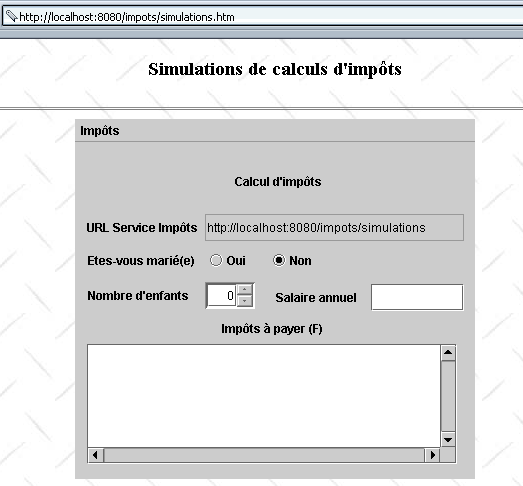
包含小程序的文档 HTML 名为 simulations.htm,内容如下:
<html>
    <head>
      <title>Simulations de calculs d'impôts</title>
  </head>
  <body background="/impots/images/standard.jpg">
      <center>
          <h3>Simulations de calculs d'impôts</h3>
        <hr>
        <applet code="appletImpots.class" width="400" height="360">
            <param name="urlServiceImpots" value="simulations">
            </applet>
    </center>
  </body>
</html>
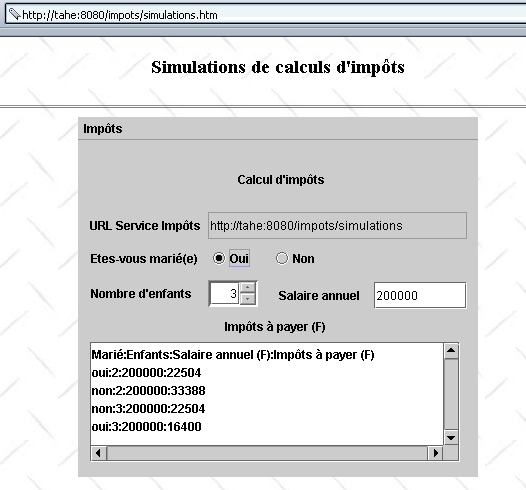
该小程序有一个参数 urlServiceImpots,它是税务计算模拟服务的 URL。 该 URL 是相对于文档 HTML simulations.htm 中的 URL 而言的,并以此为基准进行衡量。 因此,如果浏览器获取了包含URL的文档http://localhost:8080/impots/simulations.htm, 则模拟服务中的URL将变为http://localhost:8080/impots/simulations.。如果该URL的原始地址为http://stahe:8080/impots/simulations.htm,则模拟服务中的URL将变为http://stahe:8080/impots/simulations。
appletImpots.java小程序完整继承了先前独立图形应用程序的代码,并遵循了将图形应用程序转换为小程序的规则。
public class appletImpots extends JApplet {
  // 窗口的组件
  JPanel contentPane;
  JMenuBar jMenuBar1 = new JMenuBar();
  JMenu jMenu1 = new JMenu();
  JMenuItem mnuCalculer = new JMenuItem();
.............


   //构建框架
  public void init() {
    try {
      jbInit();
    }
    catch(Exception e) {
      e.printStackTrace();
    }
     // 其他初始化
    moreInit();
  }

   // 表单初始化
  private void moreInit(){
         // 获取参数 urlServiceImpots
        String urlServiceImpots=getParameter("urlServiceImpots");
        if(urlServiceImpots==null){
            // 参数缺失
            JOptionPane.showMessageDialog(this,"Le paramètre urlServiceImpots de l'applet n'a pas été défini","Erreur",JOptionPane.ERROR_MESSAGE);
             // 结束
            return;
        }
         // 将 URL 填入相应字段
        String codeBase=""+getCodeBase();
        if(codeBase.endsWith("/"))
           txtURLServiceImpots.setText(codeBase+urlServiceImpots);
      else txtURLServiceImpots.setText(codeBase+"/"+urlServiceImpots);
    // “计算”菜单被禁用
    mnuCalculer.setEnabled(false);
     // 儿童人数下拉框 - 0 至 20 名儿童
    spinEnfants=new JSpinner(new SpinnerNumberModel(0,0,20,1));
    spinEnfants.setBounds(new Rectangle(130,140,50,27));
    contentPane.add(spinEnfants);
  }//moreInit

   //初始化组件
  private void jbInit() throws Exception  {
    contentPane = (JPanel) this.getContentPane();
    contentPane.setLayout(null);
...............
  }
当浏览器加载一个小程序时,首先会执行其 init 过程。在此过程中, 我们获取了小程序的 urlServiceImpots 参数值,随后计算出模拟服务 URL 的完整名称,并将该值填入 txtURLServiceImpots 字段,仿佛是由用户亲自输入的一样。 完成此操作后,两个应用程序之间不再存在差异。特别是,与菜单 Calculer 关联的代码完全相同。以下是一个执行示例:
5.7. 结论
我们展示了税费计算客户端-服务器应用程序的不同版本:
- 版本 1:服务由一组 Servlet 和 JSP 页面提供,客户端为浏览器。它仅执行单次模拟,且不保留先前记录。
- 版本 2:通过在浏览器加载的文档 HTML 中嵌入 JavaScript 脚本,增加了浏览器端的功能。该脚本负责验证表单参数的有效性。
- 版本 3:通过管理会话,使服务能够记住客户端执行的各种模拟。相应地修改了 HTML 界面以显示这些模拟。
- 第 4 版:客户端现已成为一个独立的图形化应用程序。这使我们能够重新开发基于 Web 的客户端程序。
- 版本 5:客户端转变为 Java 小程序。至此,无论服务器端还是客户端,都已实现完全基于 Java 编程的客户端-服务器应用程序。
在此阶段,我们可以提出几点说明:
- 第 1 至 3 版仅支持具备执行 JavaScript 脚本能力的浏览器。 需要注意的是,用户始终可以禁用这些脚本的执行。此时,该应用程序在第1版中仅能部分运行(“清除”选项将无法使用),而在第2版和第3版中则完全无法运行(“清除”和“计算”选项均无法使用)。开发一个不使用JavaScript脚本的服务版本或许值得考虑。
- 第 4 版要求客户端计算机安装 Java 2 虚拟机。
- 第5版要求客户端浏览器具备Java 2虚拟机。
编写Web服务时,必须考虑目标用户群体。若希望覆盖尽可能多的用户,应编写仅向浏览器发送HTML(不含JavaScript或Applet)的应用程序。 若在内部网环境中工作且能控制其终端配置,则可在客户端方面提出更高要求,此时前文提到的第5版便可接受。
第4版和第5版是Web客户端,它们从服务器发送的HTML数据流中提取所需信息。很多时候我们无法控制这个数据流。例如,当我们为网络上由他人管理的现有Web服务编写客户端时,就是这种情况。 举个例子。假设我们的税务计算模拟服务是由X公司开发的。目前该服务将模拟结果发送在HTML表中,我们的客户端利用这一特性来获取数据。它会将服务器响应中的每一行与正则表达式进行比对:
         // 模拟表中一行模板
        Pattern ptnSimulation=Pattern.compile("<tr>\\s*<td>(.*?)</td>\\s*<td>(.*?)</td>\\s*<td>(.*?)</td>\\s*<td>(.*?)</td>\\s*</tr>");
现在假设应用程序开发人员更改了响应的视觉呈现方式,不再将模拟结果放入数组中,而是以列表形式呈现:
在这种情况下,我们的Web客户端将需要重写。这就是那些我们无法完全掌控的应用程序的Web客户端所面临的长期威胁。XML可以解决这个问题:
- 模拟服务将不再生成 HTML,而是生成 XML。在我们的示例中,这可能表现为
<simulations>
    <entetes marie="marié" enfants="enfants" salaire="salaire" impot="impôt"/>
  <simulation marie="oui" enfants="2" salaire="200000" impot="22504" />
  <simulation marie="non" enfants="2" salaire="200000" impot="33388" />
</simulations>
- 可以为该响应关联一个样式表,以指示浏览器应如何呈现该响应的视觉效果XML
- 编程实现的Web客户端将忽略该样式表,并直接从响应中的XML数据流中获取信息
如果服务设计者希望修改所提供结果的视觉呈现,他将修改样式表而非 XML。借助样式表,浏览器将显示新的视觉样式,而编程的 Web 客户端则无需进行修改。因此,我们可以编写我们模拟服务的新版本:
- 第 6 版:服务提供 XML 响应,并附带面向浏览器的样式表
- 第 7 版:客户端是一个独立的图形应用程序,利用服务器的 XML 响应
- 版本 8:客户端是一个 Java 小程序,利用服务器的响应 XML