20. 应用练习——第 10 版
上一版本表明,由应用的所有用户共享的税务数据,应当存储在作用域为 [application] 的内存中。我们将使用 Redis 服务器(https://redis.io)来实现这一点。
20.1. Redis
Redis 是一个以 [key, value] 对的形式在内存中存储数据的服务器。它速度非常快,被 Web 应用广泛用作缓存——也就是用来存放获取成本高昂的数据。[application] 作用域的内存将由 Redis 服务器来实现。需要这种应用内存的 PHP 脚本将成为该服务器的客户端:
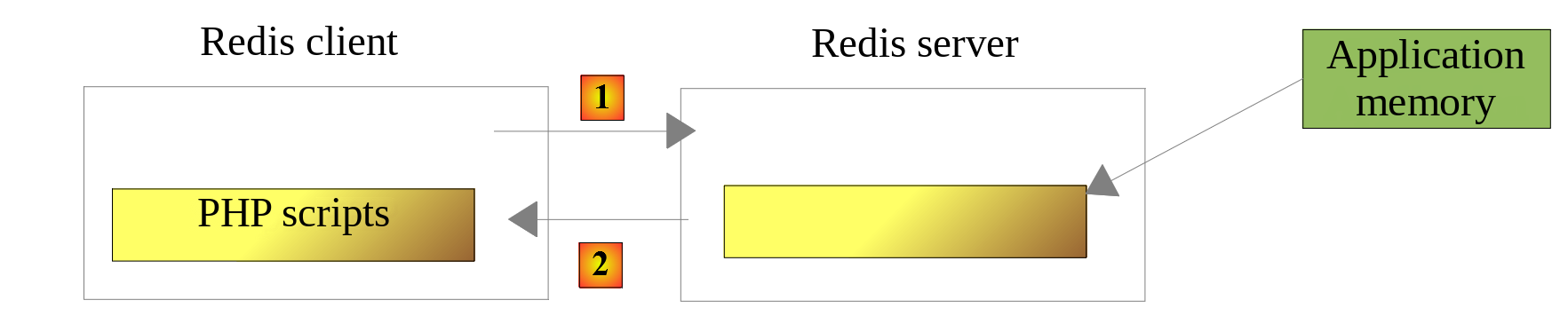
- 在 [1] 中,一个 PHP 脚本向 Redis 服务器发送一条命令,例如请求与某个键相关联的值;
- 在 [2] 中,Redis 服务器作出响应。
Redis 服务器独立于 PHP 脚本运行:存储在其中的数据在两次请求之间仍然可用,并且对应用的所有用户都可用。
20.2. 安装 Redis
[Laragon] 自带一个默认禁用的 Redis 服务器。你可以在 [Laragon] 的首选项中([Preferences] 菜单,[Services & Ports] 选项卡)勾选 [Redis] 复选框来启用它。保持端口 [6379] 不变,因为这是 Redis 客户端使用的默认端口。然后,单击 [Start All] 按钮,Redis 服务器就会与 [Laragon] 的其他服务(Apache、MySQL……)一起启动。
20.3. 命令模式下的 Redis 客户端
可以在命令模式下查询 Redis 服务器。打开 [Laragon] 终端并输入命令 [redis-cli],它会以命令模式启动 Redis 服务器客户端。然后客户端显示提示符 [127.0.0.1:6379>]:它连接到本机(IP 地址 127.0.0.1)6379 端口上的 Redis 服务器。下面是一个示例会话:
| > redis-cli
127.0.0.1:6379> command count
(integer) 240
127.0.0.1:6379> set title "PHP 8 by example"
OK
127.0.0.1:6379> get title
"PHP 8 by example"
127.0.0.1:6379> exists title
(integer) 1
127.0.0.1:6379> del title
(integer) 1
127.0.0.1:6379> get title
(nil)
127.0.0.1:6379> exists title
(integer) 0
127.0.0.1:6379> quit
|
- 第 3 行:Redis 客户端有 200 多条用于与服务器通信的命令。其中一条命令 [command count] 会显示所用版本可用命令的确切数量;
- 第 4–7 行:我们只介绍 PHP 应用中需要用到的命令。我们使用 Redis 只做一件事:在 Redis 的内存中将一个值与一个键相关联。这通过 Redis 命令 [set key value] 完成。随后可以用命令 [get key] 取回该值。我们只需要这些;
- 第 8–9 行:[exists] 命令检查某个键是否存在:键存在时返回 1,否则返回 0;
- 第 10–11 行:命令 [del] 删除一个键;
- 第 12–13 行:如果请求一个不存在的键的值,会得到值 [nil],表示未找到该键;
- 第 16 行:要退出 Redis 客户端,请输入命令 [quit]。
有时可能需要清空整个 Redis 内存。这通过命令 [flushdb] 完成。
20.4. 安装 PHP 的 Redis 客户端
我们现在需要一个 PHP 的 Redis 客户端。主要有两个:
与 PHP 7 课程一样,我们将使用 [Predis] 的第 3 版。它位于 [composer.json] 文件中,该文件在 [php8-oct-2026] 文件夹内,并且已通过 [composer install] 命令与课程的其他库一起安装。可以在 [vendor/predis/predis] 文件夹中找到它。[Composer] 的类加载器支持它:与 PHP 7 课程不同,不再需要引入 [predis/autoload.php] 文件,也不再需要调用 [Predis\Autoloader::register] 方法。
20.5. 服务器代码
第 10 版的服务器由如下文件组成:
| scripts-web/tax/version-10
├── Data
│ ├── .htaccess
│ ├── config-server.json
│ └── logs.txt
└── tax-server.php
|
配置文件 [config-server.json] 的变化如下:
| {
"databaseFilename": "../version-08/Data/database-mysql.json",
"dependencies": [
"../../../scripts-console/tax/version-05/Entities/TaxException.php",
"../../../scripts-console/tax/version-05/Entities/TaxAdminData.php",
"../../../scripts-console/tax/version-05/Entities/Database.php",
"../../../scripts-console/tax/version-05/Utilities/Utilities.php",
"../version-08/Dao/InterfaceServerDao.php",
"../version-08/Dao/ServerDao.php",
"../version-09/Dao/ServerDaoWithSession.php",
"../version-08/Business/InterfaceServerBusiness.php",
"../version-08/Business/ServerBusiness.php",
"../version-09/Utilities/Logger.php",
"../version-09/Utilities/SendAdminMail.php"
],
"users": [
{
"login": "admin",
"passwd": "admin"
}
],
"adminMail": {
"smtp-server": "localhost",
"smtp-port": 1025,
"from": "guest@localhost",
"to": "guest@localhost",
"subject": "tax calculation server crash",
"tls": false,
"attachments": []
},
"logsFilename": "Data/logs.txt",
"redis": {
"scheme": "tcp",
"host": "127.0.0.1",
"port": 6379
}
}
|
说明
- 第 3–15 行:除了脚本 [tax-server.php] 之外,第 10 版没有引入其他新内容。它使用第 5、8 和 9 版中的元素;
- 第 32–37 行:Redis 服务器的连接参数:协议(tcp)、主机和端口。这些是 [Predis] 的默认值,但最好还是在配置中指定它们:如果 Redis 服务器迁移到另一台主机或另一个端口,只需更新配置即可。
服务器 [tax-server.php] 的代码变化如下:
| <?php
// 严格遵守所声明的函数参数和结果的类型
declare(strict_types=1);
// 命名空间
namespace Application;
// Symfony 依赖
use Symfony\Component\HttpFoundation\JsonResponse;
use Symfony\Component\HttpFoundation\Request;
use Symfony\Component\HttpFoundation\Response;
use Symfony\Component\HttpFoundation\Session\Session;
// Predis 依赖
use Predis\Client as RedisClient;
use Predis\PredisException;
// 类别名:版本 9 的 [dao] 层配合 Redis 使用
use Application\ServerDaoWithSession as ServerDaoWithRedis;
// PHP 错误不会发送给客户端(它们进入 Web 服务器的日志)
ini_set("display_errors", "0");
// 服务器的根文件夹:配置文件的路径相对于此文件夹
const ROOT_DIRECTORY = __DIR__;
// 配置文件的路径
const CONFIG_FILENAME = ROOT_DIRECTORY . "/Data/config-server.json";
// 获取配置
$config = json_decode(file_get_contents(CONFIG_FILENAME), true, flags: JSON_THROW_ON_ERROR);
// 引入脚本所需的依赖
require_once ROOT_DIRECTORY . "/../../../vendor/autoload.php";
foreach ($config["dependencies"] as $dependency) {
require_once ROOT_DIRECTORY . "/$dependency";
}
// 会话:它现在只包含已通过身份验证的用户的标识符
$session = new Session();
$session->start();
// 创建日志文件
try {
$logger = new Logger(ROOT_DIRECTORY . "/" . $config["logsFilename"]);
} catch (TaxException $ex) {
// 没有日志的 500 错误 - 消息不得泄露服务器的文件树
$message = "Failed to create the log file [{$config["logsFilename"]}]";
doInternalServerError($message, $config["adminMail"]);
// 完成
exit;
}
// 第 1 条日志
$logger->write("---new request");
// 我们获取当前请求
$request = Request::createFromGlobals();
// 仅在第 1 次进行身份验证
if (!$session->has("user")) {
// 日志
$logger->write("Authentication in progress…");
// 客户端发送的凭据(如果它没有发送则为 null)
$requestUser = $request->getUser();
$requestPassword = $request->getPassword();
// 该用户是授权用户之一吗?
$found = $requestUser !== null && $requestPassword !== null
&& array_any(
$config["users"],
fn(array $user): bool => $user["login"] === $requestUser && hash_equals($user["passwd"], $requestPassword)
);
if (!$found) {
// 未找到 - 代码 401
sendResponse(
["error" => "Authentication failed [$requestUser]"],
Response::HTTP_UNAUTHORIZED,
["WWW-Authenticate" => 'Basic realm="Tax calculation server"'],
$logger
);
// 完成
exit;
}
// 我们在会话中记录该用户已通过身份验证
$session->set("user", $requestUser);
// 日志
$logger->write("Authentication successful [$requestUser]");
} else {
// 日志
$logger->write("Authentication taken from the session…");
}
// 我们有了有效的用户 - 检查收到的参数
$errors = [];
// 必须是带三个参数的 GET 请求
if ($request->getMethod() !== "GET" || $request->query->count() !== 3) {
$errors[] = "GET method required with only the parameters [married, children, salary]";
}
// 婚姻状况
if (!$request->query->has("married")) {
$errors[] = "missing married parameter";
} else {
$married = strtolower(trim($request->query->getString("married")));
if (!in_array($married, ["yes", "no"], true)) {
$errors[] = "invalid married parameter [$married]";
}
}
// 子女数和工资:整数 >= 0
$values = [];
foreach (["children", "salary"] as $parameter) {
if (!$request->query->has($parameter)) {
$errors[] = "missing $parameter parameter";
continue;
}
$value = trim($request->query->getString($parameter));
if (preg_match('/^\d+$/', $value) !== 1) {
$errors[] = "invalid $parameter parameter [$value]";
} else {
$values[$parameter] = (int) $value;
}
}
// 请求中还有其他参数吗?
foreach (array_diff(array_keys($request->query->all()), ["married", "children", "salary"]) as $parameter) {
$errors[] = "invalid parameter [$parameter]";
}
// 有错误吗?
if ($errors !== []) {
// 我们向客户端发送 400 错误代码
sendResponse(["errors" => $errors], Response::HTTP_BAD_REQUEST, [], $logger);
// 完成
exit;
}
// 日志
[$children, $salary] = [$values["children"], $values["salary"]];
$logger->write("valid parameters ['married'=>$married, 'children'=>$children, 'salary'=>$salary]");
// 我们已具备工作所需的一切
// [application] 作用域的内存:一个 Redis 服务器
try {
// Redis 客户端
$redis = new RedisClient($config["redis"]);
// 我们立即连接到服务器,以确认它是否存在
$redis->connect();
} catch (PredisException $ex) {
// 500 错误
doInternalServerError("[redis], {$ex->getMessage()}", $config["adminMail"], $logger);
// 完成
exit;
}
// 创建 [dao] 层
$json = $redis->get("taxAdminData");
if ($json === null) {
// 税务数据取自数据库
$logger->write("tax data taken from the database");
try {
// 构建 [dao] 层
$dao = new ServerDaoWithRedis(ROOT_DIRECTORY . "/" . $config["databaseFilename"]);
// 我们把税务数据的 JSON 字符串放入 [application] 作用域的内存
$redis->set("taxAdminData", (string) $dao->getTaxAdminData());
} catch (TaxException $ex) {
// 500 错误
doInternalServerError("[dao], {$ex->getMessage()}", $config["adminMail"], $logger, $redis);
// 完成
exit;
}
} else {
// 税务数据取自 [application] 作用域的内存
$taxAdminData = TaxAdminData::fromArray(json_decode($json, true, flags: JSON_THROW_ON_ERROR));
// 实例化 [dao] 层
$dao = new ServerDaoWithRedis($taxAdminData);
// 日志
$logger->write("tax data taken from Redis");
}
// 创建 [business] 层
$business = new ServerBusiness($dao);
// 税款计算
$result = $business->calculateTax($married, $children, $salary);
// 我们返回响应
sendResponse($result, Response::HTTP_OK, [], $logger, $redis);
// 结束
exit;
// --------------------------------------------------------------------------
// 致命错误:向管理员发送电子邮件,并向客户端返回 500 响应
function doInternalServerError(
string $message,
array $adminMail,
?Logger $logger = null,
?RedisClient $redis = null
): void {
// DBMS 驱动的错误消息可能不是 UTF-8 编码(Windows 上是 Windows-1252)
if (!mb_check_encoding($message, "UTF-8")) {
$message = mb_convert_encoding($message, "UTF-8", "Windows-1252");
}
// 我们向管理员发送电子邮件
// [SendAdminMail] 会捕获所有异常并自行记录
(new SendAdminMail($adminMail, $logger))->send($message);
// 我们向客户端发送 500 错误代码
sendResponse(["error" => $message], Response::HTTP_INTERNAL_SERVER_ERROR, [], $logger, $redis);
}
// 向客户端发送 HTTP 响应
// $result:要发送的数组,形式为 ["response" => $result]
// $statusCode:响应的 HTTP 状态
// $headers:要添加到响应中的 HTTP 头
// $logger:应用程序的日志(如果无法创建则为 null)
// $redis:Redis 客户端(如果尚未创建则为 null)
function sendResponse(
array $result,
int $statusCode,
array $headers = [],
?Logger $logger = null,
?RedisClient $redis = null
): void {
// JSON 响应
$response = new JsonResponse(null, $statusCode, $headers);
$response->setEncodingOptions(JSON_UNESCAPED_UNICODE | JSON_UNESCAPED_SLASHES | JSON_PRESERVE_ZERO_FRACTION);
$response->setData(["response" => $result]);
// 发送
$response->send();
// 日志
$logger?->write($response->getContent());
// 关闭与 Redis 服务器的连接
$redis?->disconnect();
}
|
说明
- 第 15–16 行:我们所使用的 [Predis] 中的类。[Predis\Client] 类是 Redis 客户端。我们给它起了别名 [RedisClient],这在我们的代码中更具描述性。[PredisException] 是 [Predis] 所抛出的所有异常的父类;
- 第 18 行:我们用别名 [ServerDaoWithRedis] 来指代第 9 版的 [ServerDaoWithSession] 类,以反映服务器脚本实现的变化。[ServerDaoWithSession] 类可以根据先前获取的税务数据构造 [dao] 层:数据来自会话还是 Redis 服务器都无关紧要;
- 第 38–39 行:保留会话。这里有两项信息需要记住:
- 用户已成功通过身份验证这一事实。这条信息的作用域是 [session]:它与某个特定用户相关联,不适用于其他用户。它保留在会话中;
- 税务管理部门的数据。这条信息的作用域是 [application]:它与特定用户无关,而适用于所有用户。它存储在 Redis 服务器上;
- 第 135–145 行:创建客户端 [Predis],它将使用配置文件中的连接参数与 Redis 服务器通信:
- 第 140 行:客户端立即连接到服务器,以检查其是否有响应;
- 如果与 Redis 服务器的连接失败,则向客户端发送错误响应,并向应用管理员发送电子邮件。错误消息带有前缀 [[redis]] ,以指明错误的来源;
- 第 148 行:向 Redis 服务器查询键 [taxAdminData] 的值。[Predis] 客户端为每条 Redis 命令提供一个方法:[get] 方法发送 [get taxAdminData] 命令。它返回该键的值;如果该键不存在,则返回 [null];
- 第 149 行:如果未找到该键,则从数据库中获取税务数据;
- 第 156 行:键 [taxAdminData] 被存入 Redis 内存,其关联值是由 [dao] 层 [TaxAdminData] 对象得到的 JSON 字符串。[set] 方法要求键的值是字符串。[(string)] 转换会调用 [TaxAdminData] 类的 [__toString] 方法,该方法 返回该对象的 JSON 字符串。PHP 7 脚本让 PHP 隐式完成这一转换;使用 [declare(strict_types=1)] 时,最好显式写出;
- 第 159 行:如果读取数据库失败,则返回 500 错误并向管理员发送电子邮件;消息以 [[dao]] 为前缀;
- 第 164–169 行:键 [taxAdminData] 在 Redis 内存中。我们知道它的值是 [TaxAdminData] 对象的 JSON 字符串:
- 第 165 行:JSON 字符串被解码为关联数组,然后版本 5 中的静态方法 [TaxAdminData::fromArray] 根据该数组构造 [TaxAdminData] 对象,同时验证其数据;
- 第 167 行:用这些数据实例化 [dao] 层;
- 第 182–187 行:函数 [doInternalServerError] 多了一个参数——Redis 客户端——它把该参数传给函数 [sendResponse]。当函数有多个参数时,每个参数单独占一行;
- 第 221 行:函数 [sendResponse] 会关闭与 Redis 服务器的连接(如果该连接已打开)。
20.6. 客户端代码
客户端的版本 10 与版本 9 完全相同。唯一的变化在配置文件 [config-client.json] 中:
| {
"urlServer": "http://localhost/php8-oct-2026/scripts-web/tax/version-10/tax-server.php",
"user": {
"login": "admin",
"passwd": "admin"
},
"httpClientOptions": {
"verify_peer": false,
"verify_host": false
},
"taxPayersDataFilename": "Data/taxpayersdata.json",
"resultsFilename": "Data/results.json",
"errorsFilename": "Data/errors.json",
"dependencies": [
"../version-05/Entities/TaxException.php",
"../version-05/Entities/TaxPayerData.php",
"../version-05/Utilities/Utilities.php",
"../version-05/Dao/TraitDao.php",
"../version-08/Dao/InterfaceClientDao.php",
"../version-09/Dao/ClientDao.php",
"../version-08/Business/InterfaceClientBusiness.php",
"../version-08/Business/ClientBusiness.php"
]
}
|
- 第 2 行:版本 10 的服务器 URL;
- 第 20 行:客户端的 [dao] 层就是版本 9 的那一层。
因此,[scripts-console/tax/version-10] 文件夹只包含 [Data] 文件夹、主脚本 [Main/MainTaxClient.php] (即版本 8 的那一个)以及测试脚本 [Tests/ClientBusinessTest.php]。
在运行客户端之前,先使用 [redis-cli] 中的命令 [del taxAdminData] 从 Redis 服务器内存中删除键 [taxAdminData] 。然后运行客户端:
| > php MainTaxClient.php
The results have been saved in the file [Data/results.json]
Done
|
结果与版本 9 相同。服务器日志如下:
| 01/10/26 18:10:12.890 : ---new request
01/10/26 18:10:12.891 : Authentication in progress…
01/10/26 18:10:12.891 : Authentication successful [admin]
01/10/26 18:10:12.891 : valid parameters ['married'=>yes, 'children'=>2, 'salary'=>55555]
01/10/26 18:10:12.907 : tax data taken from the database
01/10/26 18:10:12.909 : {"response":{"tax":2814,"surcharge":0,"discount":0,"reduction":0,"rate":0.14}}
01/10/26 18:10:12.912 : ---new request
01/10/26 18:10:12.912 : Authentication taken from the session…
01/10/26 18:10:12.912 : valid parameters ['married'=>yes, 'children'=>2, 'salary'=>50000]
01/10/26 18:10:12.913 : tax data taken from Redis
01/10/26 18:10:12.913 : {"response":{"tax":1384,"surcharge":0,"discount":384,"reduction":347,"rate":0.14}}
01/10/26 18:10:12.916 : ---new request
…
|
- 第 5 行:第一次请求时,税务数据从数据库中获取;
- 第 10 行:下一次请求时,数据从 Redis 中获取。
现在测试一个新的错误场景:Redis 服务器不可用。我们可以在 [Laragon] 中停止 Redis 服务器。这里我们改为在服务器配置([redis])中设置端口 6380——没有任何服务器在该端口上监听。控制台中的结果如下:
| > php MainTaxClient.php
Error no. 42: {"HTTP status":500,"error":"[redis], Connection refused [tcp://127.0.0.1:6380]"}
Done
|
服务器日志显示管理员已通过电子邮件收到通知:
| 01/10/26 18:10:32.255 : ---new request
01/10/26 18:10:32.255 : Authentication in progress…
01/10/26 18:10:32.256 : Authentication successful [admin]
01/10/26 18:10:32.256 : valid parameters ['married'=>yes, 'children'=>2, 'salary'=>55555]
01/10/26 18:10:32.305 : Message [[redis], Connection refused [tcp://127.0.0.1:6380]] sent to guest@localhost
01/10/26 18:10:32.305 : {"response":{"error":"[redis], Connection refused [tcp://127.0.0.1:6380]"}}
|
随后我们在配置中恢复了端口 6379。
20.7. 客户端测试 [PHPUnit]
版本 10 的测试类 [ClientBusinessTest] 与版本 9 的相同;测试环境是版本 10 客户端的环境。开始测试之前,使用 [redis-cli] 客户端从 Redis 服务器内存中删除 [taxAdminData] 键(命令 [del taxAdminData])。现在运行测试:
| > php vendor/bin/phpunit scripts-console/tax/version-10/Tests --testdox
PHPUnit 12.5.37 by Sebastian Bergmann and contributors.
Runtime: PHP 8.5.11
Configuration: .../php8-oct-2026/phpunit.xml
........... 11 / 11 (100%)
Time: 00:00.063, Memory: 16.00 MB
Client Business (Application\Tests\ClientBusiness)
✔ Calculate tax with data set "couple, 2 children, 55555"
✔ Calculate tax with data set "couple, 2 children, 50000"
✔ Calculate tax with data set "couple, 3 children, 50000"
✔ Calculate tax with data set "single, 2 children, 100000"
✔ Calculate tax with data set "single, 3 children, 100000"
✔ Calculate tax with data set "couple, 3 children, 100000"
✔ Calculate tax with data set "couple, 5 children, 100000"
✔ Calculate tax with data set "single, 0 children, 100000"
✔ Calculate tax with data set "couple, 2 children, 30000"
✔ Calculate tax with data set "single, 0 children, 200000"
✔ Calculate tax with data set "couple, 3 children, 200000"
OK (11 tests, 22 assertions)
|
我们来查看服务器的 [logs.txt] 日志:
| 01/10/26 18:10:32.488 : ---new request
01/10/26 18:10:32.488 : Authentication in progress…
01/10/26 18:10:32.488 : Authentication successful [admin]
01/10/26 18:10:32.488 : valid parameters ['married'=>yes, 'children'=>2, 'salary'=>55555]
01/10/26 18:10:32.489 : tax data taken from the database
01/10/26 18:10:32.491 : {"response":{"tax":2814,"surcharge":0,"discount":0,"reduction":0,"rate":0.14}}
01/10/26 18:10:32.495 : ---new request
01/10/26 18:10:32.495 : Authentication in progress…
01/10/26 18:10:32.495 : Authentication successful [admin]
01/10/26 18:10:32.495 : valid parameters ['married'=>yes, 'children'=>2, 'salary'=>50000]
01/10/26 18:10:32.496 : tax data taken from Redis
01/10/26 18:10:32.496 : {"response":{"tax":1384,"surcharge":0,"discount":384,"reduction":347,"rate":0.14}}
01/10/26 18:10:32.500 : ---new request
01/10/26 18:10:32.500 : Authentication in progress…
01/10/26 18:10:32.500 : Authentication successful [admin]
01/10/26 18:10:32.500 : valid parameters ['married'=>yes, 'children'=>3, 'salary'=>50000]
01/10/26 18:10:32.501 : tax data taken from Redis
01/10/26 18:10:32.501 : {"response":{"tax":0,"surcharge":0,"discount":720,"reduction":0,"rate":0.14}}
…
|
我们已经提到,每个测试之前都会重新执行测试类的 [setUp] 方法,这意味着被测试的 [ClientDao] 类在每个测试中都是用一个不存在的会话 Cookie 实例化的。因此,就好像这 11 个测试代表 11 个不同的用户,拥有 11 个不同的会话:
- 第 2–3、8–9、14–15 行:每个测试都要进行身份验证,因为它会启动一个新会话;
- 第 5 行:税务数据从数据库中获取;
- 第 11、17 行:税务数据从 Redis 内存中获取。这清楚地表明存在一个由应用程序所有用户共享的 [application] 作用域内存。
20.8. 查看 Redis 服务器的内容
我们已经看到,可以在命令模式下管理 Redis 服务器。命令 [get taxAdminData] 显示键 [taxAdminData] 的值:我们认出这是 [TaxAdminData] 类型对象的 JSON 字符串:
| > redis-cli get taxAdminData
"{\"limits\":[9964,27519,73779,156244,0],\"coeffR\":[0,0.14,0.3,0.41,0.45],\"coeffN\":[0,1394.96,5798,13913.69,20163.45],\"halfShareQfCeiling\":1551,\"singleIncomeCeilingForReduction\":21037,\"coupleIncomeCeilingForReduction\":42074,\"halfShareReductionValue\":3797,\"singleDiscountCeiling\":1196,\"coupleDiscountCeiling\":1970,\"coupleTaxCeilingForDiscount\":2627,\"singleTaxCeilingForDiscount\":1595,\"tenPercentAllowanceMax\":12502,\"tenPercentAllowanceMin\":437}"
|
[redis-cli] 会把字符串显示在引号之中,并在其中包含的每个引号前加上字符 [\]。
Redis 服务器也可以通过图形界面来管理。官方工具是 [Redis Insight] (https://redis.io/insight),它是免费的,提供 Windows 版本。连接到 [127.0.0.1:6379] 服务器后,它会显示服务器中存储的键列表。点击 [taxAdminData] 键,即可看到它的值,该工具将其显示为 JSON 对象。你还可以删除键、添加新键,或在内置控制台中执行 [redis-cli] 命令。