22. 实践练习 – 版本 11
Web 服务以 XML 文档而不是 JSON 文档的形式发送响应,仍然很常见:
- JSON 文档更小,但你需要说明才能理解它;
- XML 文档更冗长,但具有自描述性,一眼就能看懂。
我们修改版本 10 的客户端/服务器应用程序,使服务器现在以 XML 文档作为对客户端的响应。这样,我们就把上一章的内容付诸实践。
22.1. 服务器
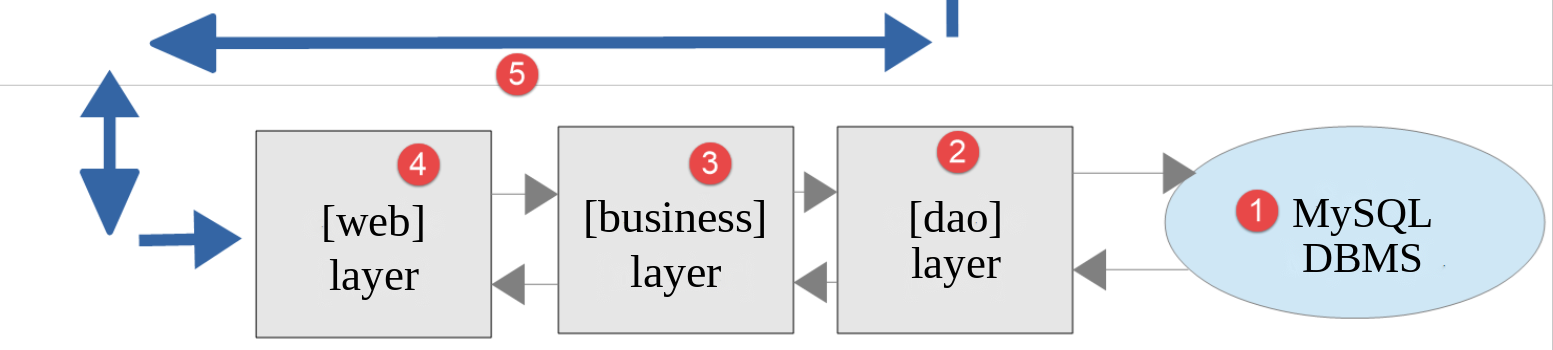
这一架构将由以下文件来实现:
| scripts-web/tax/version-11
├── Data
│ ├── .htaccess
│ ├── config-server.json
│ └── logs.txt
├── Utilities
│ ├── XmlUtilities.php
│ └── testXml.php
└── tax-server.php
|
22.1.1. [XmlUtilities] 类
PHP 7 课程在 [Utilities] 类中添加了一个方法 [getXmlForArrayOfAttributes],用于根据数组生成 XML 文档。我们的服务器已经使用了版本 5 中的 [Utilities] 类(用于 [Database] 类):我们新建一个 [XmlUtilities] 类:
| <?php
declare(strict_types=1);
// 命名空间
namespace Application;
// XML 格式的工具函数:该类既不能被实例化,也不能被派生
final class XmlUtilities
{
// 私有构造函数:该类不能被实例化
private function __construct()
{
}
// 返回数组 [$data] 的 XML 文档:根元素名为 [$root]
// 数组的键成为元素名,值成为其内容
public static function arrayToXml(array $data, string $root): string
{
// 一个空的 XML 文档(PHP 8.4 的新 DOM API)
$document = \Dom\XMLDocument::createEmpty();
// 文档将带缩进
$document->formatOutput = true;
// 根元素及其后代
$document->append(self::element($document, $root, $data));
// 文档的 XML 文本
return $document->saveXml();
}
// 返回 XML 元素 [<$name>$value</$name>]
private static function element(\Dom\XMLDocument $document, string $name, mixed $value): \Dom\Element
{
$element = $document->createElement($name);
if (is_array($value)) {
// 数组:数组的每个元素成为一个子元素(递归调用)
foreach ($value as $key => $subValue) {
// 列表的元素(键 0、1、2……)命名为 [item]
$element->append(self::element($document, is_int($key) ? "item" : $key, $subValue));
}
} else {
// 简单值成为元素的文本(字符 <、>、& 由 DOM 编码)
$element->textContent = match (true) {
is_bool($value) => $value ? "true" : "false",
default => (string) $value,
};
}
return $element;
}
}
|
说明
- 第 9 行:与版本 5 中的 [Utilities] 类一样,这个类只有静态方法。它是 [final] 的,并且构造函数是私有的:既不能被继承,也不能被实例化;
- 第 18 行:静态方法 [arrayToXml] 根据作为参数传入的数组 [$data] 返回 XML 文档。第二个参数是文档根元素的名称;
- 第 21 行:我们使用上一章介绍的 PHP 8.4 新 DOM API。静态方法 [createEmpty] 创建一个空的 XML 文档。PHP 7 脚本使用 [SimpleXML],它也可以生成文档,但效果不佳:你必须自己用 [htmlspecialchars] 函数对文本中的特殊字符进行编码;
- 第 23 行:生成的文档会带缩进,更易阅读;
- 第 25 行:由 [element] 方法创建的文档根元素被添加到文档中;
- 第 27 行:方法 [saveXml] 生成文档的 XML 文本;
- 第 31 行:私有方法 [element] 返回名称为 [$name]、表示值 [$value] 的 XML 元素;
- 第 33 行:文档的 [createElement] 方法创建该元素;
- 第 34–38 行:如果值是数组,则其每个元素都成为子元素,通过递归调用 [element] 方法创建。数组的键成为子元素的名称。列表的键是整数 0、1、2……,它们不能作为 XML 元素名:因此这些元素被命名为 [item]。PHP 7 脚本把它们称为 [i0]、[i1]、[i2]……;
- 第 40–45 行:否则,该值成为元素的文本,赋给其 [textContent] 属性。文本中的字符 [<]、[>]、和 [&] 由 DOM 进行编码([<]、[>]、[&])。布尔值被写成 [true] 和 [false];其他值被转换为字符串。表达式 [match (true)] 选择第一个条件为真的分支。
我们编写如下测试脚本 [testXml.php]:
| <?php
// 严格遵守所声明的函数参数和结果的类型
declare(strict_types=1);
// 依赖
require_once __DIR__ . "/XmlUtilities.php";
use Application\XmlUtilities;
// 一个关联数组
$array = [
"lastName" => "amédée",
"firstName" => "sylvain",
"age" => 40,
"children" => [
["lastName" => "amédée", "firstName" => "béatrice", "age" => 6],
["lastName" => "amédée", "firstName" => "bertrand", "age" => 4],
],
"remark" => "<married> & happy",
];
// 响应是一个 XML 文档
header("Content-Type: application/xml; charset=utf-8");
print XmlUtilities::arrayToXml($array, "person");
|
- 第 12–21 行:一个关联数组,包含一个列表和带有 XML 特殊字符的文本;
- 第 23 行:函数 [header] 设置响应的 HTTP 头 [Content-Type] :这是一个 XML 文档;
- 第 24 行:以 [person] 为根元素、由数组生成的 XML 文档被发送给客户端。
我们用 [http://localhost/php8-oct-2026/scripts-web/tax/version-11/Utilities/testXml.php] 这个 URL,通过 [curl] 发出请求:
| > curl http://localhost/php8-oct-2026/scripts-web/tax/version-11/Utilities/testXml.php
<?xml version="1.0" encoding="UTF-8"?>
<person>
<lastName>amédée</lastName>
<firstName>sylvain</firstName>
<age>40</age>
<children>
<item>
<lastName>amédée</lastName>
<firstName>béatrice</firstName>
<age>6</age>
</item>
<item>
<lastName>amédée</lastName>
<firstName>bertrand</firstName>
<age>4</age>
</item>
</children>
<remark><married> & happy</remark>
</person>
|
- 第 7–18 行:列表 [children] 及其两个元素 [item];
- 第 19 行:字符 [<]、[>]、和 [&] 已被编码。
浏览器以树形显示同一个文档:
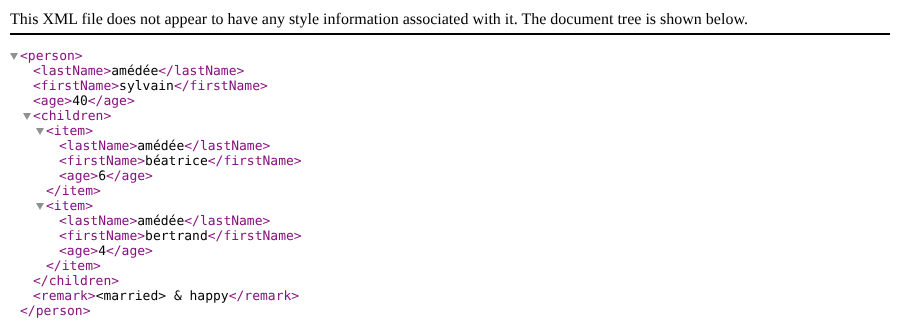
请注意,[Chrome] 已对 [remark] 元素的文本进行了解码。
22.1.2. 服务器端脚本
服务器端脚本 [tax-server.php] 及其配置文件 [config-server.json] 必须修改:
| {
"databaseFilename": "../version-08/Data/database-mysql.json",
"dependencies": [
"../../../scripts-console/tax/version-05/Entities/TaxException.php",
"../../../scripts-console/tax/version-05/Entities/TaxAdminData.php",
"../../../scripts-console/tax/version-05/Entities/Database.php",
"../../../scripts-console/tax/version-05/Utilities/Utilities.php",
"../version-08/Dao/InterfaceServerDao.php",
"../version-08/Dao/ServerDao.php",
"../version-09/Dao/ServerDaoWithSession.php",
"../version-08/Business/InterfaceServerBusiness.php",
"../version-08/Business/ServerBusiness.php",
"../version-09/Utilities/Logger.php",
"../version-09/Utilities/SendAdminMail.php",
"Utilities/XmlUtilities.php"
],
|
- 第 15 行:引入新类 [XmlUtilities]。其余配置与版本 10 相同。
服务器脚本的更改如下:
| }
// 向客户端发送 HTTP 响应
// $result:要发送的数组,形式为 XML 文档 <response>...</response>
// $statusCode:响应的 HTTP 状态
// $headers:要添加到响应中的 HTTP 头
// $logger:应用程序的日志(如果无法创建则为 null)
// $redis:Redis 客户端(如果尚未创建则为 null)
function sendResponse(
array $result,
int $statusCode,
array $headers = [],
?Logger $logger = null,
?RedisClient $redis = null
): void {
// XML 响应
$response = new Response(XmlUtilities::arrayToXml($result, "response"), $statusCode, $headers);
$response->headers->set("Content-Type", "application/xml; charset=utf-8");
// 发送
$response->send();
// JSON 日志,比 XML 更简洁
$logger?->write(json_encode(
["response" => $result],
JSON_UNESCAPED_UNICODE | JSON_UNESCAPED_SLASHES | JSON_PRESERVE_ZERO_FRACTION
));
// 关闭与 Redis 服务器的连接
$redis?->disconnect();
}
|
说明
- 不再使用 [JsonResponse] 类:响应是一个简单的 [Response] 响应;
- 第 212 行:服务器响应现在是 XML 文档,其根元素为 [response] ,内容来自 [$result] 数组;
- 第 213 行:指明响应是一个以 UTF-8 编码的 XML 文档;
- 第 217–220 行:响应以 JSON 格式记入日志,它比 XML 更简洁。
脚本的其余部分保持不变。由于所有响应都经过 [sendResponse] 函数,只需修改这个函数,就能保证所有响应——包括错误响应——都是 XML 文档。
测试
我们请求 URL [http://localhost/php8-oct-2026/scripts-web/tax/version-11/tax-server.php?married=yes&children=2&salary=60000],并通过 [curl] 发出请求:
| > curl -i -u admin:admin "http://localhost/php8-oct-2026/scripts-web/tax/version-11/tax-server.php?married=yes&children=2&salary=60000"
HTTP/1.0 200 OK
Date: Fri, 02 Oct 2026 12:29:50 GMT
Server: Apache/2.4.58 (Ubuntu)
X-Powered-By: PHP/8.5.11
Cache-Control: max-age=0, private, must-revalidate
Set-Cookie: PHPSESSID=cdcb082d1342f5b0a273f76a30f92fc6; path=/
Cache-Control: no-cache, private
Vary: Accept-Encoding
Connection: close
Content-Type: application/xml; charset=utf-8
<?xml version="1.0" encoding="UTF-8"?>
<response>
<tax>3375</tax>
<surcharge>0</surcharge>
<discount>0</discount>
<reduction>0</reduction>
<rate>0.14</rate>
</response>
|
- 第 7 行:服务器在第一次请求中发送的会话 Cookie;
- 第 11 行:所发送文档的类型;
- 第 13–20 行:响应中的 XML 文档。
在浏览器中,经过身份验证后,得到如下结果:

错误响应也是 XML 文档。参数不正确的请求:
| > curl -u admin:admin "http://localhost/php8-oct-2026/scripts-web/tax/version-11/tax-server.php?married=x&children=2"
<?xml version="1.0" encoding="UTF-8"?>
<response>
<errors>
<item>GET method required with only the parameters [married, children, salary]</item>
<item>invalid married parameter [x]</item>
<item>missing salary parameter</item>
</errors>
</response>
|
来自未知用户的请求:
| > curl -u x:x "http://localhost/php8-oct-2026/scripts-web/tax/version-11/tax-server.php"
<?xml version="1.0" encoding="UTF-8"?>
<response>
<error>Authentication failed [x]</error>
</response>
|
22.2. 客户端
现在我们来关注应用程序的客户端。
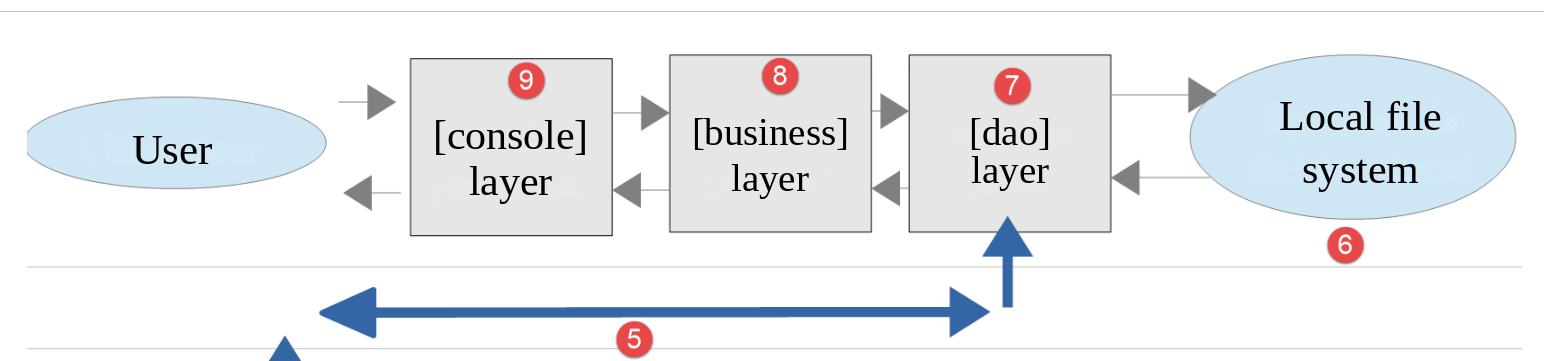
这一架构将由以下文件来实现:
| scripts-console/tax/version-11
├── Dao
│ └── ClientDao.php
├── Data
│ ├── config-client-ko.json
│ ├── config-client.json
│ ├── errors.json
│ ├── results.json
│ └── taxpayersdata.json
├── Main
│ └── MainTaxClient.php
└── Tests
└── ClientBusinessTest.php
|
在新版本中,唯一的更改是:
- 配置文件 [config-client.json];
- 客户端 [dao] 层。
配置文件 [config-client.json] 变为如下内容:
| {
"urlServer": "http://localhost/php8-oct-2026/scripts-web/tax/version-11/tax-server.php",
"user": {
"login": "admin",
"passwd": "admin"
},
"httpClientOptions": {
"verify_peer": false,
"verify_host": false
},
"taxPayersDataFilename": "Data/taxpayersdata.json",
"resultsFilename": "Data/results.json",
"errorsFilename": "Data/errors.json",
"dependencies": [
"../version-05/Entities/TaxException.php",
"../version-05/Entities/TaxPayerData.php",
"../version-05/Utilities/Utilities.php",
"../version-05/Dao/TraitDao.php",
"../version-08/Dao/InterfaceClientDao.php",
"Dao/ClientDao.php",
"../version-08/Business/InterfaceClientBusiness.php",
"../version-08/Business/ClientBusiness.php"
]
}
|
- 第 2 行:版本 11 的服务器 URL;
- 第 20 行:新的客户端 [dao] 层。
22.2.1. [dao] 层
版本 9 中的 [ClientDao] 类经过修改,以适应新的响应格式。使用 [SimpleXML] 来处理该响应:
| try {
// 我们向服务器发出请求
$response = $this->httpClient->request("GET", $this->urlServer, $options);
// 响应的状态、头部和 XML 文档,即使出错也是如此(参数 false)
$statusCode = $response->getStatusCode();
$headers = $response->getHeaders(false);
$content = $response->getContent(false);
} catch (ExceptionInterface $ex) {
// 无法连接到服务器
throw new TaxException("Error communicating with the server ({$ex->getMessage()})", 40, $ex);
}
// 日志
// print "$content\n";
// 服务器发送 XML 文档 <response>...</response>
// LIBXML_NOERROR 和 LIBXML_NOWARNING 选项可在 XML 无效时避免 PHP 警告
$xml = simplexml_load_string($content, options: LIBXML_NOERROR | LIBXML_NOWARNING);
if ($xml === false || $xml->getName() !== "response") {
throw new TaxException("Invalid server response [$content]", 41);
}
// 出错?
if ($statusCode !== 200) {
// 我们抛出一个异常,其消息是服务器的响应,转换为 JSON(更简洁),
// 并补充其 HTTP 状态
$serverResponse = json_decode(json_encode($xml, JSON_THROW_ON_ERROR), true, flags: JSON_THROW_ON_ERROR);
$message = json_encode(
["HTTP status" => $statusCode] + $serverResponse,
JSON_UNESCAPED_UNICODE | JSON_UNESCAPED_SLASHES | JSON_THROW_ON_ERROR
);
throw new TaxException($message, 42);
}
// 如果尚未获得会话 Cookie,我们就获取它
if ($this->sessionCookie === null) {
foreach ($headers["set-cookie"] ?? [] as $cookie) {
if (preg_match('/^PHPSESSID=(.+?);/', $cookie, $fields) === 1) {
$this->sessionCookie = "PHPSESSID=$fields[1]";
}
}
}
// 我们返回响应:数组 [tax, surcharge, discount, reduction, rate]
// 在 XML 文档中,所有值都是文本:我们将它们转换为各自的类型
return [
"tax" => (int) $xml->tax,
"surcharge" => (int) $xml->surcharge,
"discount" => (int) $xml->discount,
"reduction" => (int) $xml->reduction,
"rate" => (float) $xml->rate,
];
}
}
|
说明
- 第 63 行:读取服务器的响应。它是一个 XML [<response>…</response>] 文档;
- 第 72 行:[simplexml_load_string] 函数解析收到的 XML 文档,并返回代表其根元素的 [SimpleXMLElement] 对象;如果该文档不是有效的 XML 文档,则返回 [false] 。默认情况下,[SimpleXML] 所使用的 [libxml] 库还会把文档错误作为 PHP 警告报告:选项 [LIBXML_NOERROR] 和 [LIBXML_NOWARNING] 可以抑制这些警告。它们通过名为 [options] 的参数传入,这样就不必写出函数签名中位于其前面的参数 [class_name] ;
- 第 73 行:方法 [getName] 返回根元素的名称,它必须是 [response];
- 第 77–85 行:出错时,异常消息将是服务器响应的 JSON 字符串,而不是收到的 XML 字符串,因为 JSON 字符串更简洁。为了得到响应 XML 对应的关联数组,我们使用一个经典技巧:函数 [json_encode] 可以把 [SimpleXMLElement] 对象转换为 JSON,然后 [json_decode] 再把这个 JSON 转换为数组。这样,异常消息与之前的版本格式相同;
- 第 97–103 行:返回结果数组。[response] 元素的子元素作为 [$xml] 对象的属性来访问([$xml->tax])。在 XML 文档中,所有值都是文本:与 JSON 不同,XML 不区分整数、实数和字符串。因此,每个值都使用 [(int)] 和 [(float)] 运算符转换为 [business] 层所期望的类型。PHP 7 客户端则把这些值作为字符串返回。
测试
如果在配置正确的环境(数据库、身份验证、日志、Redis)中运行客户端,会得到通常的结果:
| > php MainTaxClient.php
The results have been saved in the file [Data/results.json]
Done
|
检查 [taxpayersdata.json, results.json, errors.json] 文件夹中的文件:[results.json] 文件与之前的版本相同。在服务器端,日志如下:
| 01/10/26 18:12:15.370 : ---new request
01/10/26 18:12:15.370 : Authentication in progress…
01/10/26 18:12:15.370 : Authentication successful [admin]
01/10/26 18:12:15.370 : valid parameters ['married'=>yes, 'children'=>2, 'salary'=>55555]
01/10/26 18:12:15.371 : tax data taken from the database
01/10/26 18:12:15.373 : {"response":{"tax":2814,"surcharge":0,"discount":0,"reduction":0,"rate":0.14}}
01/10/26 18:12:15.376 : ---new request
01/10/26 18:12:15.376 : Authentication taken from the session…
01/10/26 18:12:15.376 : valid parameters ['married'=>yes, 'children'=>2, 'salary'=>50000]
01/10/26 18:12:15.377 : tax data taken from Redis
01/10/26 18:12:15.377 : {"response":{"tax":1384,"surcharge":0,"discount":384,"reduction":347,"rate":0.14}}
…
|
使用配置文件 [config-client-ko.json] (未知用户)时,输出为:
| > php MainTaxClient.php config-client-ko.json
Error no. 42: {"HTTP status":401,"error":"Authentication failed [x]"}
Done
|
错误消息的格式与之前的版本相同,而服务器返回的是 XML 文档。
22.2.2. [PHPUnit] 测试
[Tests/ClientBusinessTest.php] 测试是针对版本 10 的,而测试环境是版本 11 客户端的环境。结果如下:
| > php vendor/bin/phpunit scripts-console/tax/version-11/Tests --testdox
PHPUnit 12.5.37 by Sebastian Bergmann and contributors.
Runtime: PHP 8.5.11
Configuration: .../php8-oct-2026/phpunit.xml
........... 11 / 11 (100%)
Time: 00:00.073, Memory: 16.00 MB
Client Business (Application\Tests\ClientBusiness)
✔ Calculate tax with data set "couple, 2 children, 55555"
✔ Calculate tax with data set "couple, 2 children, 50000"
✔ Calculate tax with data set "couple, 3 children, 50000"
✔ Calculate tax with data set "single, 2 children, 100000"
✔ Calculate tax with data set "single, 3 children, 100000"
✔ Calculate tax with data set "couple, 3 children, 100000"
✔ Calculate tax with data set "couple, 5 children, 100000"
✔ Calculate tax with data set "single, 0 children, 100000"
✔ Calculate tax with data set "couple, 2 children, 30000"
✔ Calculate tax with data set "single, 0 children, 200000"
✔ Calculate tax with data set "couple, 3 children, 200000"
OK (11 tests, 22 assertions)
|
测试通过了 [assertSame] 验证:由 [dao] 层返回的值确实属于预期的类型,这要归功于读取 XML 文档之后所执行的转换。