19. 实践练习——第 9 版
在这个版本中,我们将按如下方式改进服务器:
- 目前,每次请求都要从数据库中获取税务管理部门的数据。我们将使用会话:
- 当用户第一次发出请求时,从数据库中获取税务机关的数据并存储在会话中;
- 对于同一用户的后续请求,则从会话中获取税务机关的数据。由于数据库查询消耗资源较多,我们可以期待执行时间略有改善;
- 会话还将确保用户只需进行一次身份验证;
- 服务器将把重要事件记录到文本文件(日志)中:
- 身份验证成功或失败;
- 客户端发送的参数是否有效;
- 税额计算的结果;
- 各种错误情形;
- 发生致命错误时,将向应用管理员发送一封电子邮件。
客户端也需要修改,以便处理服务器将发送给它的会话 Cookie。
19.1. 服务器
我们先关注应用的服务器端。
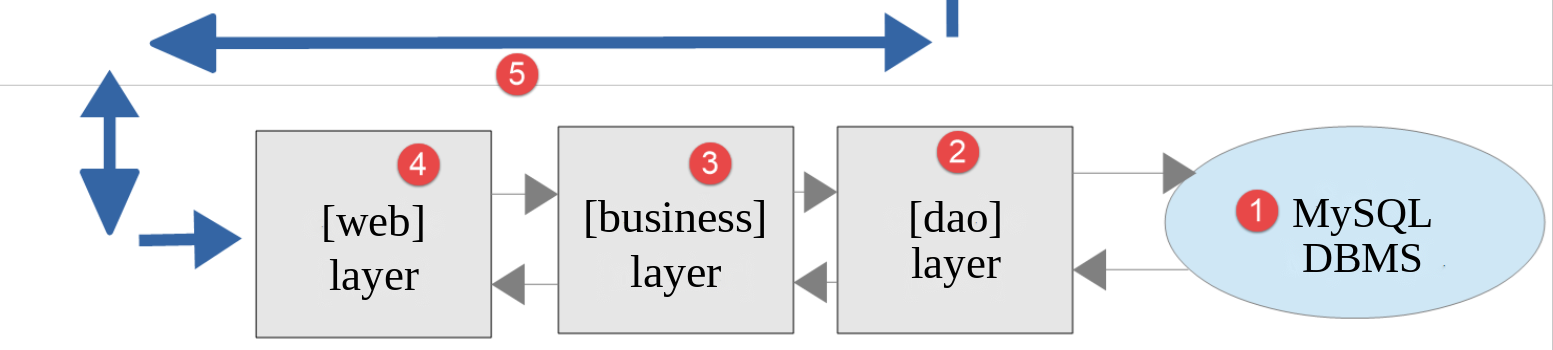
这个架构将由如下文件来实现:
| scripts-web/tax/version-09
├── Dao
│ └── ServerDaoWithSession.php
├── Data
│ ├── .htaccess
│ ├── config-server.json
│ └── logs.txt
├── Tests
│ └── ServerDaoTest.php
├── Utilities
│ ├── Logger.php
│ └── SendAdminMail.php
└── tax-server.php
|
其他文件来自第 5 版和第 8 版。
19.1.1. 实用工具
19.1.1.1. [Logger] 类
[Logger] 类将用于把日志写入文本文件:
| <?php
declare(strict_types=1);
// 命名空间
namespace Application;
// 文本文件中的日志
final readonly class Logger
{
// 构造函数:如果日志文件不存在,则创建它
public function __construct(private string $logsFilename)
{
// 我们检查能否写入该文件(追加一个空字符串)
if (@file_put_contents($logsFilename, "", FILE_APPEND) === false) {
throw new TaxException("Failed to create the log file [$logsFilename]", 50);
}
}
// 向日志写入一条消息,前面加上日期和时间
public function write(string $message): void
{
$date = (new \DateTimeImmutable())->format("d/m/y H:i:s.v");
// FILE_APPEND:我们写在文件末尾
// LOCK_EX:写入期间锁定文件
file_put_contents($this->logsFilename, "$date : $message\n", FILE_APPEND | LOCK_EX);
}
}
|
说明
- 第 9 行:该类是 [final] (不能被派生)并且是 [readonly] 的:它唯一的属性,即日志文件的名称,在对象创建之后就不能再修改;
- 第 12 行:类的构造函数接受日志文件名作为参数;
- 第 15 行:我们通过向文件追加一个空字符串来验证是否可以写入该文件。标志 [FILE_APPEND] 确保文件不存在时被创建,存在时则保留其内容。[@] 运算符阻止 PHP 在失败时显示警告:我们自己处理这个错误;
- 第 16 行:如果写入操作失败,则抛出异常;
- 第 21 行:[write] 方法把 [$message] 消息写入日志文件,前面加上日期和时间。[d/m/y H:i:s.v] 格式指定日、月、年(各为两位数字),后面是时、分、秒和毫秒;
- 第 26 行:函数 [file_put_contents] 打开文件,向其中添加该行,然后关闭它。因此,不再有 PHP 7 版本的该类中那样的 [close] 方法,那个版本会在两次写入之间保持文件打开。
服务器应用可能同时为多个客户端提供服务。然而,所有客户端只有一个日志文件。因此,在写入该文件时存在并发访问的风险。PHP 7 课程忽略了这个问题。这里,[LOCK_EX] 标志指示 [file_put_contents] 在写入期间锁定文件:如果另一个请求试图同时写入,它会等待到锁被释放。因此,单独一行日志绝不会与另一行混杂在一起。不过,两个同时发生的请求所写入的各行之间可能会相互交错。
19.1.1.2. [SendAdminMail] 类
[SendAdminMail] 类可以在应用崩溃时向应用管理员发送电子邮件:
| <?php
declare(strict_types=1);
// 命名空间
namespace Application;
// Symfony Mailer 依赖
use Symfony\Component\Mailer\Mailer;
use Symfony\Component\Mailer\Transport;
use Symfony\Component\Mime\Email;
// 向应用程序的管理员发送电子邮件
final readonly class SendAdminMail
{
// $config:发送电子邮件所需的信息
// $logger:用于记录发送结果的可选日志
public function __construct(private array $config, private ?Logger $logger = null)
{
}
// 向管理员发送消息 [$message]
// 该方法不抛出异常:发送失败只会记录在日志中
public function send(string $message): void
{
// 电子邮件发送到 SMTP 服务器 $this->config["smtp-server"] 的端口 $this->config["smtp-port"]
// 发件人为 $this->config["from"],收件人为 $this->config["to"]
// 主题为 $this->config["subject"],附件为 $this->config["attachments"]
// 如果 $this->config["tls"] 为 true,则连接是安全且经过身份验证的
$config = $this->config;
try {
// 创建消息
$email = (new Email())
->from($config["from"])
->to($config["to"])
->subject($config["subject"])
->text($message);
// 附件
foreach ($config["attachments"] as $attachment) {
if (file_exists($attachment)) {
$email->attachFromPath($attachment);
} else {
$this->logger?->write("The attachment [$attachment] does not exist");
}
}
// 消息的传输
$dsn = "smtp://{$config["smtp-server"]}:{$config["smtp-port"]}";
if ($config["tls"]) {
// 安全 (STARTTLS) 且经过身份验证的连接
$verifyPeer = ($config["verify-peer"] ?? true) ? 1 : 0;
$dsn = sprintf("smtp://%s:%s@%s:%d?require_tls=1&verify_peer=%d",
rawurlencode($config["user"]), rawurlencode($config["password"]),
$config["smtp-server"], $config["smtp-port"], $verifyPeer);
}
// 发送消息
(new Mailer(Transport::fromDsn($dsn)))->send($email);
$this->logger?->write("Message [$message] sent to {$config["to"]}");
} catch (\Throwable $ex) {
// 发送失败
$this->logger?->write("Error while sending the message [$message]: {$ex->getMessage()}");
}
}
}
|
说明
- 第 9–11 行:PHP 7 课程使用的是 [SwiftMailer] 库,它已不再维护。我们使用的是网络函数一章中介绍的 [Symfony Mailer];
- 第 18 行:构造函数接受两个参数:
- [$config]:一个包含发送电子邮件所需全部信息的关联数组;
- [$logger]:用于记录邮件发送结果的日志。这个参数是可选的;其默认值为 [null];
- 第 24 行:方法 [send] 发送消息 [$message]。代码就是 [sendmail] 函数的代码,取自网络函数一章中的脚本 [smtp-02.php] ;
- 第 43 行:空安全运算符 [?->](PHP 8.0)会调用 [write] 方法,前提是 [$this->logger] 不是 [null]。它取代了 PHP 7 脚本中的 [if ($this->logger !== NULL)] 测试;
- 第 58 行:[send] 方法捕获所有错误:电子邮件发送失败只会被记录下来。错误处理中的错误不能阻止服务器响应其客户端。
关联数组 [$config] 将具有如下形式:
| "adminMail": {
"smtp-server": "localhost",
"smtp-port": 1025,
"from": "guest@localhost",
"to": "guest@localhost",
"subject": "tax calculation server crash",
"tls": false,
"attachments": []
},
|
电子邮件被发送到网络函数一章中介绍的 [Mailpit] 服务器,它监听 [localhost] 机器的 1025 端口,并存储它收到的所有电子邮件。必须先启动它([scripts-console/inet/mailpit] 文件夹中的文件 [mailpit.bat] )。
19.1.2. [dao] 层
第 9 版中的 [dao] 层由如下 [ServerDaoWithSession] 类实现:
| <?php
declare(strict_types=1);
// 命名空间
namespace Application;
// 可以由已获取的税务数据构建的 [dao] 层
class ServerDaoWithSession extends ServerDao
{
// 构造函数接收:
// - 要么是描述数据库的 JSON 文件名:税务数据从数据库读取
// - 要么是已获取的税务数据本身(例如在会话中)
public function __construct(string|TaxAdminData $source)
{
if ($source instanceof TaxAdminData) {
// 最简单的情形:数据已经在那里了
$this->taxAdminData = $source;
} else {
// 我们交给懂得使用数据库的父类
parent::__construct($source);
}
}
}
|
说明
- 第 9 行:第 9 版的 [ServerDaoWithSession] 类扩展了第 8 版的 [ServerDao] 类。这是因为 [ServerDao] 类已经能够使用数据库。剩下要做的只是处理税务管理部门的数据已经取得的情形;
- 第 14 行:构造函数接收一个可以有两种类型的参数。联合类型 [string|TaxAdminData] (PHP 8.0)对它的定义如下:
- 字符串:如果税务机关的数据尚未获取,则为包含连接数据库所需信息的文件的名称;
- 一个 [TaxAdminData] 对象:如果税务机关的数据已经获取,则为这些数据;
- 第 16–18 行:[instanceof] 运算符用于判断收到的是两种类型中的哪一种。如果是税务数据,就将其存储在 [taxAdminData] 属性中,该属性继承自 [ServerDao] 类。这就是为什么该属性在第 8 版中被声明为 [protected readonly] 。第 7 版中的 PHP 类有一个带两个参数的构造函数,其中一个参数必须是 [NULL];
- 第 21 行:否则,控制权交给父类的构造函数,由它从数据库中获取数据。
当 Web 会话启动时,[dao] 层将使用数据库文件名来构造。然后从数据库中获取税务管理部门的数据,并存储在会话中。对于同一会话内的后续请求,[dao] 层将使用会话中的 [TaxAdminData] 对象来构造。因此不会发生数据库查询。
19.1.3. 服务器脚本
服务器脚本 [tax-server.php] 由如下 JSON 文件 [config-server.json] 配置:
| {
"databaseFilename": "../version-08/Data/database-mysql.json",
"dependencies": [
"../../../scripts-console/tax/version-05/Entities/TaxException.php",
"../../../scripts-console/tax/version-05/Entities/TaxAdminData.php",
"../../../scripts-console/tax/version-05/Entities/Database.php",
"../../../scripts-console/tax/version-05/Utilities/Utilities.php",
"../version-08/Dao/InterfaceServerDao.php",
"../version-08/Dao/ServerDao.php",
"Dao/ServerDaoWithSession.php",
"../version-08/Business/InterfaceServerBusiness.php",
"../version-08/Business/ServerBusiness.php",
"Utilities/Logger.php",
"Utilities/SendAdminMail.php"
],
"users": [
{
"login": "admin",
"passwd": "admin"
}
],
    "adminMail": {
        "smtp-server": "localhost",
        "smtp-port": 1025,
        "from": "guest@localhost",
        "to": "guest@localhost",
        "subject": "tax calculation server crash",
        "tls": false,
        "attachments": []
    },
"logsFilename": "Data/logs.txt"
}
|
- 第 2 行:使用第 8 版的 MySQL 数据库描述;
- 第 3–15 行:第 5 版和第 8 版的文件,以及第 9 版新增的三个文件;
- 第 22–30 行:向管理员发送电子邮件所需的信息。这些信息现在使用了恰当的 JSON 类型:端口用数字,[tls] 用布尔值。PHP 7 的文件使用的是字符串(["25"]、["FALSE"]);
- 第 31 行:日志文件,相对于服务器上的 [version-09] 文件夹。它位于 [Data] 文件夹中,受第 8 版的 [.htaccess] 文件保护:日志不应让所有人都能读取。
服务器脚本 [tax-server.php] 的变化如下:
| <?php
// 严格遵守所声明的函数参数和结果的类型
declare(strict_types=1);
// 命名空间
namespace Application;
// Symfony 依赖
use Symfony\Component\HttpFoundation\JsonResponse;
use Symfony\Component\HttpFoundation\Request;
use Symfony\Component\HttpFoundation\Response;
use Symfony\Component\HttpFoundation\Session\Session;
// PHP 错误不会发送给客户端(它们进入 Web 服务器的日志)
ini_set("display_errors", "0");
// 服务器的根文件夹:配置文件的路径相对于此文件夹
const ROOT_DIRECTORY = __DIR__;
// 配置文件的路径
const CONFIG_FILENAME = ROOT_DIRECTORY . "/Data/config-server.json";
// 获取配置
$config = json_decode(file_get_contents(CONFIG_FILENAME), true, flags: JSON_THROW_ON_ERROR);
// 引入脚本所需的依赖
require_once ROOT_DIRECTORY . "/../../../vendor/autoload.php";
foreach ($config["dependencies"] as $dependency) {
require_once ROOT_DIRECTORY . "/$dependency";
}
// 会话(在加载 [TaxAdminData] 类之后,会话中可能有该类的对象)
$session = new Session();
$session->start();
// 创建日志文件
try {
$logger = new Logger(ROOT_DIRECTORY . "/" . $config["logsFilename"]);
} catch (TaxException $ex) {
// 没有日志的 500 错误 - 消息不得泄露服务器的文件树
$message = "Failed to create the log file [{$config["logsFilename"]}]";
doInternalServerError($message, $config["adminMail"]);
// 完成
exit;
}
// 第 1 条日志
$logger->write("---new request");
// 我们获取当前请求
$request = Request::createFromGlobals();
// 仅在第 1 次进行身份验证
if (!$session->has("user")) {
// 日志
$logger->write("Authentication in progress…");
// 客户端发送的凭据(如果它没有发送则为 null)
$requestUser = $request->getUser();
$requestPassword = $request->getPassword();
// 该用户是授权用户之一吗?
$found = $requestUser !== null && $requestPassword !== null
&& array_any(
$config["users"],
fn(array $user): bool => $user["login"] === $requestUser && hash_equals($user["passwd"], $requestPassword)
);
if (!$found) {
// 未找到 - 代码 401
sendResponse(
["error" => "Authentication failed [$requestUser]"],
Response::HTTP_UNAUTHORIZED,
["WWW-Authenticate" => 'Basic realm="Tax calculation server"'],
$logger
);
// 完成
exit;
}
// 我们在会话中记录该用户已通过身份验证
$session->set("user", $requestUser);
// 日志
$logger->write("Authentication successful [$requestUser]");
} else {
// 日志
$logger->write("Authentication taken from the session…");
}
// 我们有了有效的用户 - 检查收到的参数
$errors = [];
// 必须是带三个参数的 GET 请求
if ($request->getMethod() !== "GET" || $request->query->count() !== 3) {
$errors[] = "GET method required with only the parameters [married, children, salary]";
}
// 婚姻状况
if (!$request->query->has("married")) {
$errors[] = "missing married parameter";
} else {
$married = strtolower(trim($request->query->getString("married")));
if (!in_array($married, ["yes", "no"], true)) {
$errors[] = "invalid married parameter [$married]";
}
}
// 子女数和工资:整数 >= 0
$values = [];
foreach (["children", "salary"] as $parameter) {
if (!$request->query->has($parameter)) {
$errors[] = "missing $parameter parameter";
continue;
}
$value = trim($request->query->getString($parameter));
if (preg_match('/^\d+$/', $value) !== 1) {
$errors[] = "invalid $parameter parameter [$value]";
} else {
$values[$parameter] = (int) $value;
}
}
// 请求中还有其他参数吗?
foreach (array_diff(array_keys($request->query->all()), ["married", "children", "salary"]) as $parameter) {
$errors[] = "invalid parameter [$parameter]";
}
// 有错误吗?
if ($errors !== []) {
// 我们向客户端发送 400 错误代码
sendResponse(["errors" => $errors], Response::HTTP_BAD_REQUEST, [], $logger);
// 完成
exit;
}
// 日志
[$children, $salary] = [$values["children"], $values["salary"]];
$logger->write("valid parameters ['married'=>$married, 'children'=>$children, 'salary'=>$salary]");
// 我们已具备工作所需的一切
// 创建 [dao] 层
if (!$session->has("taxAdminData")) {
// 税务数据取自数据库
$logger->write("tax data taken from the database");
try {
// 构建 [dao] 层
$dao = new ServerDaoWithSession(ROOT_DIRECTORY . "/" . $config["databaseFilename"]);
// 我们把税务数据放入会话
$session->set("taxAdminData", $dao->getTaxAdminData());
} catch (TaxException $ex) {
// 500 错误
doInternalServerError($ex->getMessage(), $config["adminMail"], $logger);
// 完成
exit;
}
} else {
// 税务数据取自会话
$dao = new ServerDaoWithSession($session->get("taxAdminData"));
// 日志
$logger->write("tax data taken from the session");
}
// 创建 [business] 层
$business = new ServerBusiness($dao);
// 税款计算
$result = $business->calculateTax($married, $children, $salary);
// 我们返回响应
sendResponse($result, Response::HTTP_OK, [], $logger);
// 结束
exit;
// --------------------------------------------------------------------------
// 致命错误:向管理员发送电子邮件,并向客户端返回 500 响应
function doInternalServerError(string $message, array $adminMail, ?Logger $logger = null): void
{
// DBMS 驱动的错误消息可能不是 UTF-8 编码(Windows 上是 Windows-1252)
if (!mb_check_encoding($message, "UTF-8")) {
$message = mb_convert_encoding($message, "UTF-8", "Windows-1252");
}
// 我们向管理员发送电子邮件
// [SendAdminMail] 会捕获所有异常并自行记录
(new SendAdminMail($adminMail, $logger))->send($message);
// 我们向客户端发送 500 错误代码
sendResponse(["error" => $message], Response::HTTP_INTERNAL_SERVER_ERROR, [], $logger);
}
// 向客户端发送 HTTP 响应
// $result:要发送的数组,形式为 ["response" => $result]
// $statusCode:响应的 HTTP 状态
// $headers:要添加到响应中的 HTTP 头
// $logger:应用程序的日志(如果无法创建则为 null)
function sendResponse(array $result, int $statusCode, array $headers = [], ?Logger $logger = null): void
{
// JSON 响应
$response = new JsonResponse(null, $statusCode, $headers);
$response->setEncodingOptions(JSON_UNESCAPED_UNICODE | JSON_UNESCAPED_SLASHES | JSON_PRESERVE_ZERO_FRACTION);
$response->setData(["response" => $result]);
// 发送
$response->send();
// 日志
$logger?->write($response->getContent());
}
|
说明
- 第 13 行:使用上一章介绍过的 [Session] 类,它来自 [HttpFoundation];
- 第 16 行:PHP 检测到的错误(警告、致命错误等)不会显示在发送给客户端的文档中。否则它们会破坏客户端所期望的 JSON 响应。这些错误会记录在 Web 服务器的错误日志中(Apache 的 [error.log] 文件);
- 第 33–34 行:启动会话。它在应用文件加载之后启动:会话中可能包含 [TaxAdminData] 对象,而 PHP 在重建会话对象时,必须已经知道 [TaxAdminData] 类;
- 第 37–44 行:尝试创建日志文件。如果发生异常,则在不带日志的情况下调用 [doInternalServerError] 函数(缺少最后一个参数)。错误消息中包含配置中指定的日志文件的名称:异常消息包含文件的完整路径,这会向客户端暴露服务器的文件夹结构;
- 第 162 行:[doInternalServerError] 函数接受三个参数:
- [$message]:错误消息;
- [$adminMail]:向应用管理员发送电子邮件所需的信息;
- [$logger]:应用日志(如果能够创建的话);
- 第 165–166 行:错误消息可能来自数据库管理系统的驱动程序,并且可能不是以 UTF-8 编码的(参见第 8 版);
- 第 170 行:向应用管理员发送一封电子邮件;
- 第 172 行:使用 [500 Internal Server Error] 状态码向客户端发送响应;
- 第 180 行:函数 [sendResponse] 向客户端发送所有响应。它的参数是:
- [$result]:要发送的数组。服务器发送数组 [["response" => $result]] 的 JSON 字符串;
- [$statusCode]:响应的 HTTP 状态;
- [$headers]:要添加到响应中的 HTTP 头。401 响应中的头 [WWW-Authenticate] 就属于这种情况;
- [$logger]:应用日志;
- 第 183 行:[JsonResponse] 类的构造函数接受响应的数据、状态和头。数据稍后由 [setData] 设置,此时已选定 [json_encode] 的选项,它们与第 8 版相同;
- 第 189 行:所发送的 JSON 响应被记入日志;
- 第 48 行:该请求的第一条日志记录;
- 第 53 行:得益于已建立的会话,客户端只需进行一次身份验证:
- 客户端通过身份验证后,键 [user] 就被存储在会话中,其值为第 77 行中的用户 ID;
- 在同一客户端的下一次请求中,这项检查可避免不必要的重复身份验证;
- 第 67–72 行:如果身份验证失败,函数 [sendResponse] 会发送 401 响应,并带有头 [WWW-Authenticate];
- 第 86–118 行:参数验证遵循第 8 版的规范;
- 第 126 行:数组解包函数 [[$a, $b] = [...]] 用一条语句就为两个变量 [$children] 和 [$salary] 赋值。它取代了 PHP 7 中的函数 [list] ;
- 第 131 行:得益于会话,数据只会从数据库中获取一次:
- 在第一次查询时,数据库搜索发生在第 136 行。随后获取到的数据被存储在会话中,在第 138 行与键 [taxAdminData] 相关联;
- 对于后续请求,会话中可以找到键 [taxAdminData] ,于是税务数据在第 147 行被直接传递给 [dao] 层;
- 第 139–143 行:在数据库中搜索税务数据可能会失败。在这种情况下,会向客户端发送状态码 [500 Internal Server Error],并向管理员发送一封电子邮件;
- 第 156 行:其余代码与上一版本相同,只是响应由 [sendResponse] 函数发送。
请注意,函数 [doInternalServerError] 和 [sendResponse] 定义在脚本的末尾,位于 [exit] 语句之后:PHP 在执行文件中的第一条语句之前,就已经知道该文件顶层定义的所有函数。
19.1.4. [PHPUnit] 测试
我们只测试 [dao] 层,因为只有它发生了变化。[Tests/ServerDaoTest.php] 的测试代码如下:
| <?php
// 严格遵守所声明的函数参数和结果的类型
declare(strict_types=1);
// 测试的命名空间
namespace Application\Tests;
// 被测试的类
use Application\ServerDaoWithSession;
// PHPUnit 的类
use PHPUnit\Framework\TestCase;
final class ServerDaoTest extends TestCase
{
// 服务器的根文件夹
private const string ROOT_DIRECTORY = __DIR__ . "/..";
// 服务器的配置
private static array $config;
// 在类的第一个测试之前执行一次
#[\Override]
public static function setUpBeforeClass(): void
{
// 我们获取服务器的配置
self::$config = json_decode(file_get_contents(self::ROOT_DIRECTORY . "/Data/config-server.json"), true, flags: JSON_THROW_ON_ERROR);
// 我们引入服务器的依赖
foreach (self::$config["dependencies"] as $dependency) {
require_once self::ROOT_DIRECTORY . "/$dependency";
}
}
// 从数据库读取的税务管理部门数据(会话的第 1 个请求)
public function testTaxAdminData(): void
{
// 根据描述数据库的文件创建 [dao] 层
$dao = new ServerDaoWithSession(self::ROOT_DIRECTORY . "/" . self::$config["databaseFilename"]);
$taxAdminData = $dao->getTaxAdminData();
// 计算常量
$this->assertSame(1551.0, $taxAdminData->halfShareQfCeiling);
$this->assertSame(21037.0, $taxAdminData->singleIncomeCeilingForReduction);
$this->assertSame(42074.0, $taxAdminData->coupleIncomeCeilingForReduction);
$this->assertSame(3797.0, $taxAdminData->halfShareReductionValue);
$this->assertSame(1196.0, $taxAdminData->singleDiscountCeiling);
$this->assertSame(1970.0, $taxAdminData->coupleDiscountCeiling);
$this->assertSame(1595.0, $taxAdminData->singleTaxCeilingForDiscount);
$this->assertSame(2627.0, $taxAdminData->coupleTaxCeilingForDiscount);
$this->assertSame(12502.0, $taxAdminData->tenPercentAllowanceMax);
$this->assertSame(437.0, $taxAdminData->tenPercentAllowanceMin);
// 税率档
$this->assertSame([9964.0, 27519.0, 73779.0, 156244.0, 0.0], $taxAdminData->limits);
$this->assertSame([0.0, 0.14, 0.30, 0.41, 0.45], $taxAdminData->coeffR);
$this->assertSame([0.0, 1394.96, 5798.0, 13913.69, 20163.45], $taxAdminData->coeffN);
}
// 已获取的税务管理部门数据(会话的后续请求)
public function testTaxAdminDataInSession(): void
{
// 在第 1 个请求期间从数据库读取的数据
$databaseFilename = self::ROOT_DIRECTORY . "/" . self::$config["databaseFilename"];
$taxAdminData = (new ServerDaoWithSession($databaseFilename))->getTaxAdminData();
// 像会话的后续请求那样,根据这些数据创建 [dao] 层
$dao = new ServerDaoWithSession($taxAdminData);
// [dao] 层返回同一个对象,不访问数据库
$this->assertSame($taxAdminData, $dao->getTaxAdminData());
}
}
|
- 第 23–31 行:我们创建一个与服务器脚本 [tax-server.php] 相同的运行环境;
- 第 37 行:为了构建 [dao] 层,使用数据库文件名实例化类 [ServerDaoWithSession]。然后测试验证第 8 版的内容;
- 第 57–65 行:第二个测试验证使用先前获取的税务数据构造 [dao] 层的情况:[dao] 层必须返回同一个对象,这通过 [assertSame] 来验证。
测试结果如下:
| > php vendor/bin/phpunit scripts-web/tax/version-09/Tests --testdox
PHPUnit 12.5.37 by Sebastian Bergmann and contributors.
Runtime: PHP 8.5.11
Configuration: .../php8-oct-2026/phpunit.xml
.. 2 / 2 (100%)
Time: 00:00.004, Memory: 16.00 MB
Server Dao (Application\Tests\ServerDao)
✔ Tax admin data
✔ Tax admin data in session
OK (2 tests, 14 assertions)
|
19.2. 客户端
我们接下来关注应用的客户端部分。
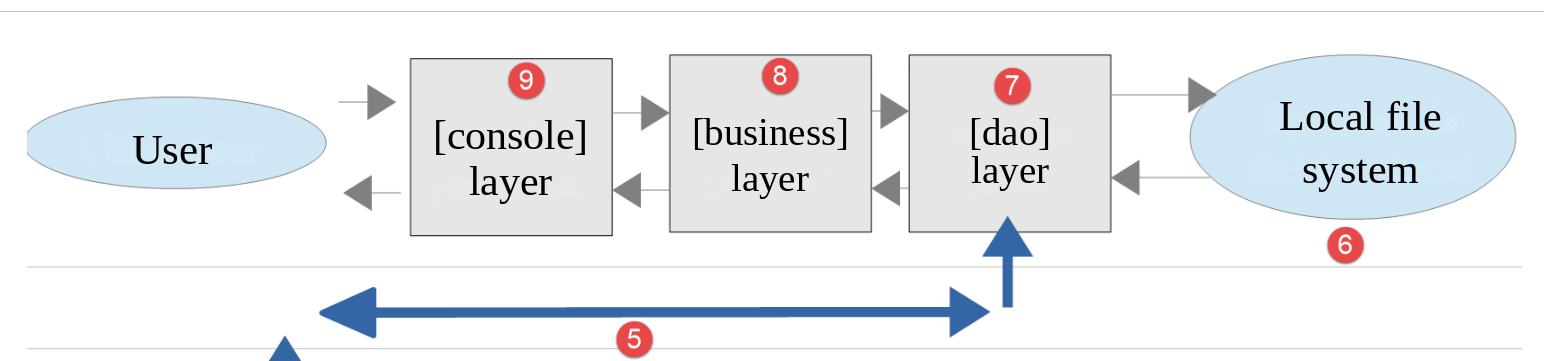
这个架构将由如下文件来实现:
| scripts-console/tax/version-09
├── Dao
│ └── ClientDao.php
├── Data
│ ├── config-client-ko.json
│ ├── config-client.json
│ ├── errors.json
│ ├── results.json
│ └── taxpayersdata.json
├── Main
│ └── MainTaxClient.php
└── Tests
└── ClientBusinessTest.php
|
在新版本中,唯一的变化是:
- 配置文件 [config-client.json];
- 客户端的 [dao] 层。
脚本 [MainTaxClient.php] 与第 8 版中的相同。
19.2.1. [dao] 层
[dao] 层的变化如下:
| <?php
declare(strict_types=1);
// 命名空间
namespace Application;
// Symfony 依赖
use Symfony\Component\HttpClient\HttpClient;
use Symfony\Contracts\HttpClient\Exception\ExceptionInterface;
use Symfony\Contracts\HttpClient\HttpClientInterface;
// 客户端的 [dao] 层:管理会话的税款计算服务器 HTTP 客户端
class ClientDao implements InterfaceClientDao
{
// 版本 5 的 trait 实现了接口的 [getTaxPayersData] 和 [saveResults] 方法
use TraitDao;
// HTTP 客户端
private readonly HttpClientInterface $httpClient;
// 会话 Cookie(在服务器发送它之前为 null)
private ?string $sessionCookie = null;
// 构造函数
// $urlServer:税款计算服务器的 URL
// $user:发出请求的用户,数组 [login, passwd]
// $httpClientOptions:HTTP 客户端的附加选项(verify_peer、verify_host……)
public function __construct(
private readonly string $urlServer,
#[\SensitiveParameter] private readonly array $user,
array $httpClientOptions = [],
) {
// HTTP 客户端:用户的凭据只随第 1 个请求发送
$this->httpClient = HttpClient::create($httpClientOptions);
}
// 由服务器计算税款
#[\Override]
public function calculateTax(string $married, int $children, int $salary): array
{
// 请求的选项:服务器期望的参数
$options = [
"query" => [
"married" => $married,
"children" => $children,
"salary" => $salary,
],
];
if ($this->sessionCookie === null) {
// 还没有会话:我们发送用户的凭据
$options["auth_basic"] = [$this->user["login"], $this->user["passwd"]];
} else {
// 我们发送会话 Cookie:用户在此会话中已通过身份验证
$options["headers"] = ["Cookie" => $this->sessionCookie];
}
try {
// 我们向服务器发出请求
$response = $this->httpClient->request("GET", $this->urlServer, $options);
// 响应的状态、头部和 JSON 文档,即使出错也是如此(参数 false)
$statusCode = $response->getStatusCode();
$headers = $response->getHeaders(false);
$json = $response->getContent(false);
} catch (ExceptionInterface $ex) {
// 无法连接到服务器
throw new TaxException("Error communicating with the server ({$ex->getMessage()})", 40, $ex);
}
// 日志
// print "$json\n";
// 服务器发送数组 ["response" => something] 的 JSON 字符串
try {
$serverResponse = json_decode($json, true, flags: JSON_THROW_ON_ERROR)["response"] ?? null;
} catch (\JsonException $ex) {
$serverResponse = null;
}
if (!is_array($serverResponse)) {
throw new TaxException("Invalid server response [$json]", 41);
}
// 出错?
if ($statusCode !== 200) {
// 我们抛出一个异常,其消息是服务器的响应并补充其 HTTP 状态
$message = json_encode(
["HTTP status" => $statusCode] + $serverResponse,
JSON_UNESCAPED_UNICODE | JSON_UNESCAPED_SLASHES | JSON_THROW_ON_ERROR
);
throw new TaxException($message, 42);
}
// 如果尚未获得会话 Cookie,我们就获取它
if ($this->sessionCookie === null) {
foreach ($headers["set-cookie"] ?? [] as $cookie) {
if (preg_match('/^PHPSESSID=(.+?);/', $cookie, $fields) === 1) {
$this->sessionCookie = "PHPSESSID=$fields[1]";
}
}
}
// 我们返回响应:数组 [tax, surcharge, discount, reduction, rate]
return $serverResponse;
}
}
|
说明
对 [dao] 层的修改现在涉及会话的管理:
- 第 22 行:会话 Cookie。在服务器发送它之前,其值为 [null] 。这个属性不是 [readonly] 的:其值在第一次请求之后会发生变化;
- 第 30 行:用户的凭据现在存储在一个属性中,因为它们不再随每个请求发送;
- 第 34 行:HTTP 客户端在创建时不带选项 [auth_basic];
- 第 49–51 行:在第一次请求时,Cookie 不存在;因此请求连同身份验证信息一起发送给服务器。选项 [auth_basic] 现在是请求本身的一部分,而不是 HTTP 客户端的一部分;
- 第 52–55 行:对于后续请求,会话 Cookie 通常是存在的。此时不发送身份验证信息,而是通过 HTTP 头 [Cookie] 发送该 Cookie;
- 第 61 行:我们获取响应头。与 [getContent] 一样,如果响应状态表示错误,参数 [false] 可以避免抛出异常;
- 第 88–94 行:服务器对第一次请求的响应在 [Set-Cookie] 头中包含一个会话 Cookie。我们按上一章所述的方式获取它,并将其存储在 [$sessionCookie] 属性中。
我们本可以保留 [dao] 层的旧版本,并在每个请求中都进行身份验证,因为这样做的开销可以忽略不计。然而,出于教学目的,我们想演示 HTTP 客户端如何管理会话。
19.2.2. 配置文件
JSON 配置文件的变化如下:
| {
"urlServer": "http://localhost/php8-oct-2026/scripts-web/tax/version-09/tax-server.php",
"user": {
"login": "admin",
"passwd": "admin"
},
"httpClientOptions": {
"verify_peer": false,
"verify_host": false
},
"taxPayersDataFilename": "Data/taxpayersdata.json",
"resultsFilename": "Data/results.json",
"errorsFilename": "Data/errors.json",
"dependencies": [
"../version-05/Entities/TaxException.php",
"../version-05/Entities/TaxPayerData.php",
"../version-05/Utilities/Utilities.php",
"../version-05/Dao/TraitDao.php",
"../version-08/Dao/InterfaceClientDao.php",
"Dao/ClientDao.php",
"../version-08/Business/InterfaceClientBusiness.php",
"../version-08/Business/ClientBusiness.php"
]
}
|
- 第 2 行:第 9 版服务器的 URL;
- 第 14–23 行:只有 [dao] 层是新的。其他文件来自第 5 版和第 8 版。
19.3. 一些测试
进行这些测试时,Apache 服务器、MySQL 数据库管理系统以及邮件服务器 [Mailpit] 必须处于运行状态。
19.3.1. 测试 1
首先,我们在没有错误的环境中运行客户端:
| > php MainTaxClient.php
The results have been saved in the file [Data/results.json]
Done
|
结果与以前的版本相同。但现在,在服务器端有一个名为 [Data/logs.txt] 的日志文件:
| 01/10/26 18:08:11.971 : ---new request
01/10/26 18:08:11.972 : Authentication in progress…
01/10/26 18:08:11.972 : Authentication successful [admin]
01/10/26 18:08:11.972 : valid parameters ['married'=>yes, 'children'=>2, 'salary'=>55555]
01/10/26 18:08:11.972 : tax data taken from the database
01/10/26 18:08:11.973 : {"response":{"tax":2814,"surcharge":0,"discount":0,"reduction":0,"rate":0.14}}
01/10/26 18:08:11.976 : ---new request
01/10/26 18:08:11.977 : Authentication taken from the session…
01/10/26 18:08:11.977 : valid parameters ['married'=>yes, 'children'=>2, 'salary'=>50000]
01/10/26 18:08:11.977 : tax data taken from the session
01/10/26 18:08:11.977 : {"response":{"tax":1384,"surcharge":0,"discount":384,"reduction":347,"rate":0.14}}
01/10/26 18:08:11.979 : ---new request
01/10/26 18:08:11.979 : Authentication taken from the session…
01/10/26 18:08:11.979 : valid parameters ['married'=>yes, 'children'=>3, 'salary'=>50000]
01/10/26 18:08:11.980 : tax data taken from the session
01/10/26 18:08:11.980 : {"response":{"tax":0,"surcharge":0,"discount":720,"reduction":0,"rate":0.14}}
…
|
- 第 1–6 行:在第一次请求时,进行身份验证并从数据库中获取数据;
- 第 7–11 行:在下一次请求时,不再进行身份验证,数据从会话中获取。后续请求(第 12 行及以后)重复这一模式。
19.3.2. 测试 2
现在,让我们像第 8 版中那样模拟 MySQL 数据库管理系统的故障(在 [version-08/Data/database-mysql.json] 文件中使用 3307 端口)。在客户端,我们得到如下控制台输出:
| > php MainTaxClient.php
Error no. 42: {"HTTP status":500,"error":"Database access error (SQLSTATE[HY000] [2002] Connection refused)"}
Done
|
在服务器端,我们看到如下日志:
| 01/10/26 18:06:48.367 : ---new request
01/10/26 18:06:48.367 : Authentication in progress…
01/10/26 18:06:48.367 : Authentication successful [admin]
01/10/26 18:06:48.367 : valid parameters ['married'=>yes, 'children'=>2, 'salary'=>55555]
01/10/26 18:06:48.367 : tax data taken from the database
01/10/26 18:06:48.450 : Message [Database access error (SQLSTATE[HY000] [2002] Connection refused)] sent to guest@localhost
01/10/26 18:06:48.450 : {"response":{"error":"Database access error (SQLSTATE[HY000] [2002] Connection refused)"}}
|
- 第 6 行:发送给管理员的电子邮件;
- 第 7 行:发送给客户端的响应。
[Mailpit] [http://localhost:8025] 的 Web 界面显示了管理员收到的电子邮件:
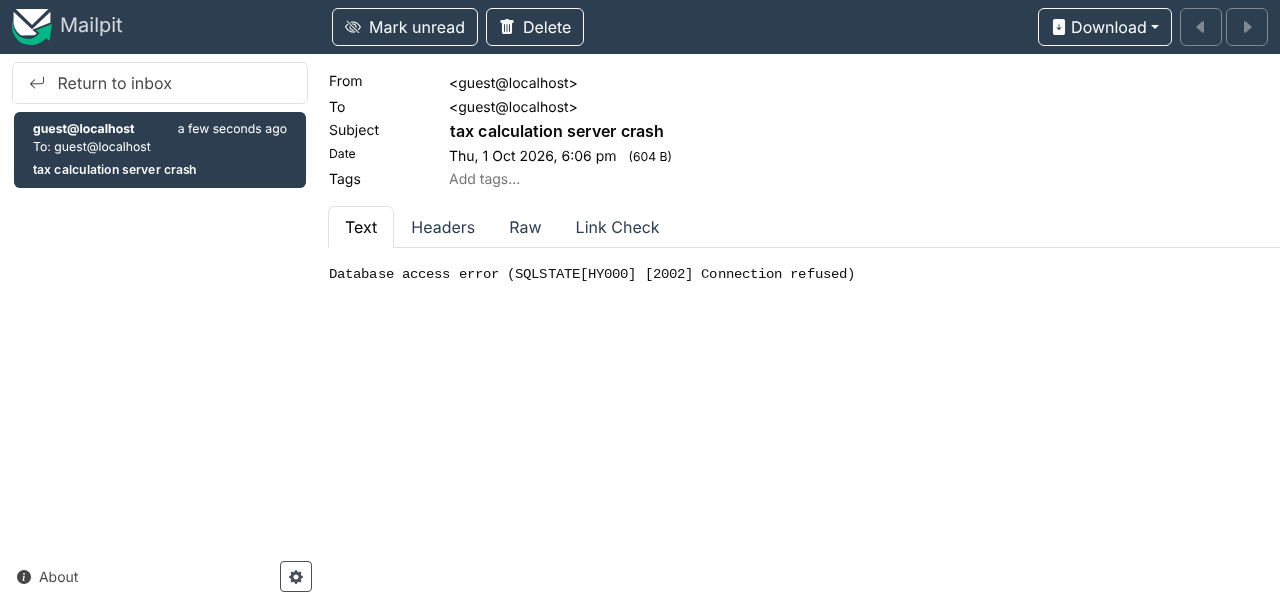
PHP 7 课程使用网络函数一章中的 [imap-03.php] 脚本来读取这封电子邮件。现在仍然可以使用 [Mailpit] 的 POP3 服务器来做到这一点。[Raw] 选项卡(位于 [Mailpit] 中)显示电子邮件的纯文本:
| Return-Path: <guest@localhost>
Received: from [127.0.0.1] (localhost [127.0.0.1])
by vm (Mailpit) with SMTP
for <guest@localhost>; Thu, 1 Oct 2026 18:06:48 +0200 (CEST)
From: guest@localhost
To: guest@localhost
Subject: tax calculation server crash
Message-ID: <abc3d7c0b4e68b2d5e70d6710a13a897@localhost>
MIME-Version: 1.0
Date: Thu, 01 Oct 2026 18:06:48 +0200
Content-Type: text/plain; charset=utf-8
Content-Transfer-Encoding: quoted-printable
Database access error (SQLSTATE[HY000] [2002] =
Connection refused)
|
- 第 7 行:主题只包含 ASCII 字符,因此没有被编码(包含非 ASCII 字符的主题会按 RFC 2047 编码);
- 第 11–12 行:电子邮件正文是 UTF-8 的,以 [quoted-printable] 编码:非 ASCII 字符会被编码(例如,[è] 变为 [=C3=A8]),而第 14 行末尾的字符 [=] 表示该行在下一行继续。
19.3.3. 测试 3
现在,让我们确保文件 [logs.txt] 无法被创建。为此,只需删除文件 [Data/logs.txt] ,并在其位置创建一个名为 [Data/logs.txt] 的文件夹。完成之后,让我们运行客户端。在客户端,我们得到如下控制台输出:
| > php MainTaxClient.php
Error no. 42: {"HTTP status":500,"error":"Failed to create the log file [Data/logs.txt]"}
Done
|
在服务器端没有日志,但管理员收到了如下电子邮件:
| Return-Path: <guest@localhost>
Received: from [127.0.0.1] (localhost [127.0.0.1])
by vm (Mailpit) with SMTP
for <guest@localhost>; Thu, 1 Oct 2026 18:07:32 +0200 (CEST)
From: guest@localhost
To: guest@localhost
Subject: tax calculation server crash
Message-ID: <4ec9aec48972386b80bbcbb0e2967dfd@localhost>
MIME-Version: 1.0
Date: Thu, 01 Oct 2026 18:07:32 +0200
Content-Type: text/plain; charset=utf-8
Content-Transfer-Encoding: quoted-printable
Failed to create the log file [Data/logs.txt]
|
然后我们删除 [Data/logs.txt] 文件夹。
19.3.4. 测试 4
这一次,让我们使用配置 [config-client-ko.json],它向客户端提供了错误的凭据。客户端显示如下控制台输出:
| > php MainTaxClient.php config-client-ko.json
Error no. 42: {"HTTP status":401,"error":"Authentication failed [x]"}
Done
|
在服务器端,出现如下日志:
| 01/10/26 18:07:08.838 : ---new request
01/10/26 18:07:08.838 : Authentication in progress…
01/10/26 18:07:08.839 : {"response":{"error":"Authentication failed [x]"}}
|
19.3.5. 测试 5
现在,让我们不传递任何参数,向服务器请求 URL [http://localhost/php8-oct-2026/scripts-web/tax/version-09/tax-server.php] :
| > curl -u admin:admin http://localhost/php8-oct-2026/scripts-web/tax/version-09/tax-server.php
{"response":{"errors":["GET method required with only the parameters [married, children, salary]","missing married parameter","missing children parameter","missing salary parameter"]}}
|
在服务器的日志文件 [logs.txt] 中,我们看到如下几行:
| 01/10/26 18:07:08.894 : ---new request
01/10/26 18:07:08.894 : Authentication in progress…
01/10/26 18:07:08.894 : Authentication successful [admin]
01/10/26 18:07:08.895 : {"response":{"errors":["GET method required with only the parameters [married, children, salary]","missing married parameter","missing children parameter","missing salary parameter"]}}
|
19.4. [PHPUnit] 测试
与前面各版本一样,我们将运行客户端 [PHPUnit] 测试,该测试针对 [business] 层,即 [Tests/ClientBusinessTest.php]。与第 8 版的测试类相比,没有任何变化:该测试根据第 9 版客户端的配置文件构建其环境,该文件位于该版本的 [Data] 文件夹中。
测试结果如下:
| > php vendor/bin/phpunit scripts-console/tax/version-09/Tests --testdox
PHPUnit 12.5.37 by Sebastian Bergmann and contributors.
Runtime: PHP 8.5.11
Configuration: .../php8-oct-2026/phpunit.xml
........... 11 / 11 (100%)
Time: 00:00.063, Memory: 16.00 MB
Client Business (Application\Tests\ClientBusiness)
✔ Calculate tax with data set "couple, 2 children, 55555"
✔ Calculate tax with data set "couple, 2 children, 50000"
✔ Calculate tax with data set "couple, 3 children, 50000"
✔ Calculate tax with data set "single, 2 children, 100000"
✔ Calculate tax with data set "single, 3 children, 100000"
✔ Calculate tax with data set "couple, 3 children, 100000"
✔ Calculate tax with data set "couple, 5 children, 100000"
✔ Calculate tax with data set "single, 0 children, 100000"
✔ Calculate tax with data set "couple, 2 children, 30000"
✔ Calculate tax with data set "single, 0 children, 200000"
✔ Calculate tax with data set "couple, 3 children, 200000"
OK (11 tests, 22 assertions)
|
值得看一看服务器 [logs.txt] 的日志:
| 01/10/26 18:08:07.348 : ---new request
01/10/26 18:08:07.348 : Authentication in progress…
01/10/26 18:08:07.348 : Authentication successful [admin]
01/10/26 18:08:07.348 : valid parameters ['married'=>yes, 'children'=>2, 'salary'=>55555]
01/10/26 18:08:07.348 : tax data taken from the database
01/10/26 18:08:07.349 : {"response":{"tax":2814,"surcharge":0,"discount":0,"reduction":0,"rate":0.14}}
01/10/26 18:08:07.354 : ---new request
01/10/26 18:08:07.354 : Authentication in progress…
01/10/26 18:08:07.354 : Authentication successful [admin]
01/10/26 18:08:07.354 : valid parameters ['married'=>yes, 'children'=>2, 'salary'=>50000]
01/10/26 18:08:07.354 : tax data taken from the database
01/10/26 18:08:07.355 : {"response":{"tax":1384,"surcharge":0,"discount":384,"reduction":347,"rate":0.14}}
01/10/26 18:08:07.359 : ---new request
01/10/26 18:08:07.359 : Authentication in progress…
01/10/26 18:08:07.359 : Authentication successful [admin]
01/10/26 18:08:07.359 : valid parameters ['married'=>yes, 'children'=>3, 'salary'=>50000]
01/10/26 18:08:07.359 : tax data taken from the database
01/10/26 18:08:07.360 : {"response":{"tax":0,"surcharge":0,"discount":720,"reduction":0,"rate":0.14}}
…
01/10/26 18:08:07.397 : ---new request
01/10/26 18:08:07.397 : Authentication in progress…
01/10/26 18:08:07.397 : Authentication successful [admin]
01/10/26 18:08:07.397 : valid parameters ['married'=>yes, 'children'=>3, 'salary'=>200000]
01/10/26 18:08:07.397 : tax data taken from the database
01/10/26 18:08:07.398 : {"response":{"tax":42842,"surcharge":17283,"discount":0,"reduction":0,"rate":0.41}}
|
我们可以看到,税务管理部门的数据总是从数据库中获取,而从不从会话中获取。让我们回到刚才运行的测试的代码:
| // 在每个测试之前执行
#[\Override]
protected function setUp(): void
{
// 像在主脚本中那样创建 [dao] 层和 [business] 层
$clientDao = new ClientDao(self::$config["urlServer"], self::$config["user"], self::$config["httpClientOptions"]);
$this->business = new ClientBusiness($clientDao);
}
|
- 第 41 行:[setUp] 方法在每个测试之前执行。因此,每个测试都会创建一个新的 [ClientDao] ,其会话 Cookie 为 [null]。这就解释了为什么这个客户端没有从任何会话中受益:就好像这 11 个测试是由 11 个不同的用户执行的。
这个例子表明,会话并不是存储税务管理部门数据的合适位置。事实上,这些数据是由应用的所有用户共享的。然而,在这里,它被复制到了每个用户的会话中。
在 Web 编程中,共享数据有三种可见性类型:
- 由 Web 应用的所有用户共享的数据。这通常是只读数据。PHP 本身并不原生支持这种存储:每个请求都由一个从空内存开始的脚本来执行;
- 同一客户端的各个请求之间共享的数据。这些数据存储在会话中。我们称之为客户端会话,用以表示客户端的内存。客户端的所有请求都可以访问这个会话。它们可以在其中存储和读取信息。在前面的脚本中,这个会话由 Symfony 对象 [HttpFoundation\Session\Session] 实现;
- 请求上下文。用户的一次请求可以通过若干个连续的动作来处理。请求上下文使动作 1 能够向动作 2 传递信息。在 [HttpFoundation] 中,请求由对象 [Request] 实现,其上下文由它的属性 [attributes] 实现。
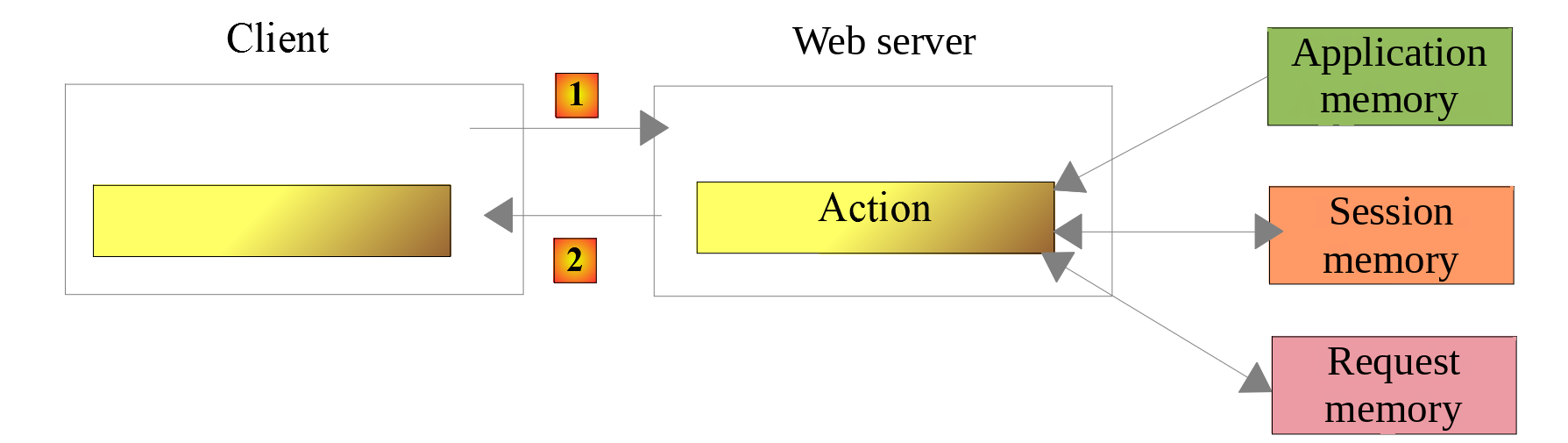
有一些工具可以为 PHP 分配应用级内存。本应用练习的新版本演示了其中一种工具的使用。